AI Assist is now on Stack Overflow. Start a chat to get instant answers from across the network. Sign up to save and share your chats.
replaced http://farm4.static.flickr.com/3301/3423982498_1a5b1c44d3.jpg with https://farm4.static.flickr.com/3301/3423982498_1a5b1c44d3.jpg
Source Link
URL Rewriter Bot
URL Rewriter Bot

Use Dense_Rank() to partition by A, B, and D
(Thanks Lieven, for the temp table query, I had to use it for demo to be consistent ;))

According to MSDN,

The rank of a row is one plus the number of distinct ranks that come before the row in question

Partitioning by A, B, C and then sorting by A, B, C, D will give you the rank of 1 for the first distinct value where uniqueness is defined by A, B, D. That is where filtering by 1 came from.

where DenseRank = 1

Here is the result

alt text http://farm4.static.flickr.com/3301/3423982498_1a5b1c44d3.jpgalt text
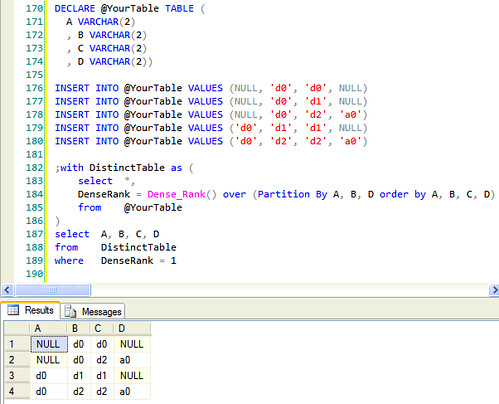
Here is the code:

DECLARE @YourTable TABLE ( A VARCHAR(2) , B VARCHAR(2) , C VARCHAR(2) , D VARCHAR(2)) INSERT INTO @YourTable VALUES (NULL, 'd0', 'd0', NULL) INSERT INTO @YourTable VALUES (NULL, 'd0', 'd1', NULL) INSERT INTO @YourTable VALUES (NULL, 'd0', 'd2', 'a0') INSERT INTO @YourTable VALUES ('d0', 'd1', 'd1', NULL) INSERT INTO @YourTable VALUES ('d0', 'd2', 'd2', 'a0') ;with DistinctTable as ( select *, DenseRank = Dense_Rank() over (Partition By A, B, D order by A, B, C, D) from @YourTable ) select A, B, C, D from DistinctTable where DenseRank = 1 

Use Dense_Rank() to partition by A, B, and D
(Thanks Lieven, for the temp table query, I had to use it for demo to be consistent ;))

According to MSDN,

The rank of a row is one plus the number of distinct ranks that come before the row in question

Partitioning by A, B, C and then sorting by A, B, C, D will give you the rank of 1 for the first distinct value where uniqueness is defined by A, B, D. That is where filtering by 1 came from.

where DenseRank = 1

Here is the result

alt text http://farm4.static.flickr.com/3301/3423982498_1a5b1c44d3.jpg

Here is the code:

DECLARE @YourTable TABLE ( A VARCHAR(2) , B VARCHAR(2) , C VARCHAR(2) , D VARCHAR(2)) INSERT INTO @YourTable VALUES (NULL, 'd0', 'd0', NULL) INSERT INTO @YourTable VALUES (NULL, 'd0', 'd1', NULL) INSERT INTO @YourTable VALUES (NULL, 'd0', 'd2', 'a0') INSERT INTO @YourTable VALUES ('d0', 'd1', 'd1', NULL) INSERT INTO @YourTable VALUES ('d0', 'd2', 'd2', 'a0') ;with DistinctTable as ( select *, DenseRank = Dense_Rank() over (Partition By A, B, D order by A, B, C, D) from @YourTable ) select A, B, C, D from DistinctTable where DenseRank = 1 

Use Dense_Rank() to partition by A, B, and D
(Thanks Lieven, for the temp table query, I had to use it for demo to be consistent ;))

According to MSDN,

The rank of a row is one plus the number of distinct ranks that come before the row in question

Partitioning by A, B, C and then sorting by A, B, C, D will give you the rank of 1 for the first distinct value where uniqueness is defined by A, B, D. That is where filtering by 1 came from.

where DenseRank = 1

Here is the result

alt text

Here is the code:

DECLARE @YourTable TABLE ( A VARCHAR(2) , B VARCHAR(2) , C VARCHAR(2) , D VARCHAR(2)) INSERT INTO @YourTable VALUES (NULL, 'd0', 'd0', NULL) INSERT INTO @YourTable VALUES (NULL, 'd0', 'd1', NULL) INSERT INTO @YourTable VALUES (NULL, 'd0', 'd2', 'a0') INSERT INTO @YourTable VALUES ('d0', 'd1', 'd1', NULL) INSERT INTO @YourTable VALUES ('d0', 'd2', 'd2', 'a0') ;with DistinctTable as ( select *, DenseRank = Dense_Rank() over (Partition By A, B, D order by A, B, C, D) from @YourTable ) select A, B, C, D from DistinctTable where DenseRank = 1 
Source Link
dance2die
  • 37.2k
  • 39
  • 137
  • 200

Use Dense_Rank() to partition by A, B, and D
(Thanks Lieven, for the temp table query, I had to use it for demo to be consistenntconsistent ;))

According to MSDN,

The rank of a row is one plus the number of distinct ranks that come before the row in question

Partitioning by A, B, C and then sorting by A, B, C, D will give you the rank of 1 for the first distinct value where uniqueness is defined by A, B, CD. That is where filtering by 1 came from.

where DenseRank = 1

Here is the result

alt text http://farm4.static.flickr.com/3301/3423982498_1a5b1c44d3.jpg

Here is the code:

DECLARE @YourTable TABLE ( A VARCHAR(2) , B VARCHAR(2) , C VARCHAR(2) , D VARCHAR(2)) INSERT INTO @YourTable VALUES (NULL, 'd0', 'd0', NULL) INSERT INTO @YourTable VALUES (NULL, 'd0', 'd1', NULL) INSERT INTO @YourTable VALUES (NULL, 'd0', 'd2', 'a0') INSERT INTO @YourTable VALUES ('d0', 'd1', 'd1', NULL) INSERT INTO @YourTable VALUES ('d0', 'd2', 'd2', 'a0') ;with DistinctTable as ( select *, DenseRank = Dense_Rank() over (Partition By A, B, D order by A, B, C, D) from @YourTable ) select A, B, C, D from DistinctTable where DenseRank = 1 

Use Dense_Rank() to partition by A, B, and D
(Thanks Lieven, for the temp table query, I had to use it for demo to be consistennt ;))

According to MSDN,

The rank of a row is one plus the number of distinct ranks that come before the row in question

Partitioning by A, B, C and then sorting by A, B, C, D will give you the rank of 1 for the first distinct value where uniqueness is defined by A, B, C. That is where filtering by 1 came from.

where DenseRank = 1

DECLARE @YourTable TABLE ( A VARCHAR(2) , B VARCHAR(2) , C VARCHAR(2) , D VARCHAR(2)) INSERT INTO @YourTable VALUES (NULL, 'd0', 'd0', NULL) INSERT INTO @YourTable VALUES (NULL, 'd0', 'd1', NULL) INSERT INTO @YourTable VALUES (NULL, 'd0', 'd2', 'a0') INSERT INTO @YourTable VALUES ('d0', 'd1', 'd1', NULL) INSERT INTO @YourTable VALUES ('d0', 'd2', 'd2', 'a0') ;with DistinctTable as ( select *, DenseRank = Dense_Rank() over (Partition By A, B, D order by A, B, C, D) from @YourTable ) select A, B, C, D from DistinctTable where DenseRank = 1 

Use Dense_Rank() to partition by A, B, and D
(Thanks Lieven, for the temp table query, I had to use it for demo to be consistent ;))

According to MSDN,

The rank of a row is one plus the number of distinct ranks that come before the row in question

Partitioning by A, B, C and then sorting by A, B, C, D will give you the rank of 1 for the first distinct value where uniqueness is defined by A, B, D. That is where filtering by 1 came from.

where DenseRank = 1

Here is the result

alt text http://farm4.static.flickr.com/3301/3423982498_1a5b1c44d3.jpg

Here is the code:

DECLARE @YourTable TABLE ( A VARCHAR(2) , B VARCHAR(2) , C VARCHAR(2) , D VARCHAR(2)) INSERT INTO @YourTable VALUES (NULL, 'd0', 'd0', NULL) INSERT INTO @YourTable VALUES (NULL, 'd0', 'd1', NULL) INSERT INTO @YourTable VALUES (NULL, 'd0', 'd2', 'a0') INSERT INTO @YourTable VALUES ('d0', 'd1', 'd1', NULL) INSERT INTO @YourTable VALUES ('d0', 'd2', 'd2', 'a0') ;with DistinctTable as ( select *, DenseRank = Dense_Rank() over (Partition By A, B, D order by A, B, C, D) from @YourTable ) select A, B, C, D from DistinctTable where DenseRank = 1 
Source Link
dance2die
  • 37.2k
  • 39
  • 137
  • 200

Use Dense_Rank() to partition by A, B, and D
(Thanks Lieven, for the temp table query, I had to use it for demo to be consistennt ;))

According to MSDN,

The rank of a row is one plus the number of distinct ranks that come before the row in question

Partitioning by A, B, C and then sorting by A, B, C, D will give you the rank of 1 for the first distinct value where uniqueness is defined by A, B, C. That is where filtering by 1 came from.

where DenseRank = 1

DECLARE @YourTable TABLE ( A VARCHAR(2) , B VARCHAR(2) , C VARCHAR(2) , D VARCHAR(2)) INSERT INTO @YourTable VALUES (NULL, 'd0', 'd0', NULL) INSERT INTO @YourTable VALUES (NULL, 'd0', 'd1', NULL) INSERT INTO @YourTable VALUES (NULL, 'd0', 'd2', 'a0') INSERT INTO @YourTable VALUES ('d0', 'd1', 'd1', NULL) INSERT INTO @YourTable VALUES ('d0', 'd2', 'd2', 'a0') ;with DistinctTable as ( select *, DenseRank = Dense_Rank() over (Partition By A, B, D order by A, B, C, D) from @YourTable ) select A, B, C, D from DistinctTable where DenseRank = 1