Maybe a bit late to add to this, but I've expanded the code to handle invalid password entry.
James' solution did not account for providing an invalid password, which would leave the process up in the air by showing a message box (Project Locked) that the user had to acknowledge. The code below will close this message automatically so the process can continue on its own.
It's not perfect since in InvalidTimerProc I couldn't get the handle of the OK button of the Project Locked message box when providing an invalid password. But it still works by letting it time out instead of closing the message box.
Option Explicit #Const InvalidPWD = True #If VBA7 Then Private Declare PtrSafe Function FindWindowEx Lib "user32" Alias "FindWindowExA" (ByVal hwndParent As LongPtr, ByVal hwndChildAfter As LongPtr, ByVal lpszClass As String, ByVal lpszWindow As String) As LongPtr Private Declare PtrSafe Function GetParent Lib "user32" (ByVal hWnd As LongPtr) As LongPtr Private Declare PtrSafe Function GetDlgItem Lib "user32" (ByVal hDlg As LongPtr, ByVal nIDDlgItem As Long) As LongPtr ' nIDDlgItem = int? Private Declare PtrSafe Function GetDesktopWindow Lib "user32" () As LongPtr Private Declare PtrSafe Function SendMessage Lib "user32" Alias "SendMessageA" (ByVal hWnd As LongPtr, ByVal Msg As Long, ByVal wParam As Long, lParam As Any) As Long Private Declare PtrSafe Function SetFocusAPI Lib "user32" Alias "SetFocus" (ByVal hWnd As LongPtr) As LongPtr Private Declare PtrSafe Function LockWindowUpdate Lib "user32" (ByVal hWndLock As LongPtr) As Long Private Declare PtrSafe Function SetTimer Lib "user32" (ByVal hWnd As LongPtr, ByVal nIDEvent As LongPtr, ByVal uElapse As Long, ByVal lpTimerFunc As LongPtr) As LongPtr Private Declare PtrSafe Function KillTimer Lib "user32" (ByVal hWnd As LongPtr, ByVal uIDEvent As LongPtr) As Long Private Declare PtrSafe Sub Sleep Lib "kernel32" (ByVal dwMilliseconds As Long) #Else Private Declare Function FindWindowEx Lib "user32" Alias "FindWindowExA" (ByVal hwndParent As Long, ByVal hwndChildAfter As Long, ByVal lpszClass As String, ByVal lpszWindow As String) As Long Private Declare Function GetParent Lib "user32" (ByVal hWnd As Long) As Long Private Declare Function GetDlgItem Lib "user32" (ByVal hDlg As Long, ByVal nIDDlgItem As Long) As Long ' nIDDlgItem = int? Private Declare Function GetDesktopWindow Lib "user32" () As Long Private Declare Function SendMessage Lib "user32" Alias "SendMessageA" (ByVal hWnd As Long, ByVal Msg As Long, ByVal wParam As Long, lParam As Any) As Long Private Declare Function SetFocusAPI Lib "user32" Alias "SetFocus" (ByVal hWnd As Long) As Long Private Declare Function LockWindowUpdate Lib "user32" (ByVal hWndLock As Long) As Long Private Declare Function SetTimer Lib "user32" (ByVal hWnd As Long, ByVal nIDEvent As Long, ByVal uElapse As Long, ByVal lpTimerFunc As Long) As Long Private Declare Function KillTimer Lib "user32" (ByVal hWnd As Long, ByVal uIDEvent As Long) As Long Private Declare Sub Sleep Lib "kernel32" (ByVal dwMilliseconds As Long) #End If Private Const WM_CLOSE As Long = &H10 Private Const WM_GETTEXT As Long = &HD Private Const EM_REPLACESEL As Long = &HC2 Private Const EM_SETSEL As Long = &HB1 Private Const BM_CLICK As Long = &HF5& Private Const TCM_SETCURFOCUS As Long = &H1330& Private Const IDPassword As Long = &H155E& Private Const IDOK As Long = &H1& #If InvalidPWD Then Private Const IDCANCEL As Long = &H2& #End If Private Const TimeoutSecond As Long = 2 Private g_ProjectName As String Private g_Password As String Private g_Result As Long #If VBA7 Then Private g_hwndVBE As LongPtr 'Private g_hwndPassword As LongPtr #Else Private g_hwndVBE As Long 'Private g_hwndPassword As Long #End If #If InvalidPWD Then #If VBA7 Then Private g_hwndTmp As LongPtr #Else Private g_hwndTmp As Long #End If #End If ''''''''''''''''''''''''''''''''''''''''''''''''''''''''''''''''''''''''''''''''''''''''''''''''''''''''''''''''''''''''''''''''''''''''''''''''''''''''''''''''''''''''''''''''''''''''''''''''''''' 'Sub Test_UnlockProject() ' 'Application.ScreenUpdating = True ' Select Case UnlockProject(ActiveWorkbook.VBProject, "Test") ' Case 0: MsgBox "The project was unlocked" ' Case 1: MsgBox "Errorhandler" ' Case 2: MsgBox "The active project was already unlocked" ' Case 3: MsgBox "Wrong password" ' Case Else: MsgBox "Error or timeout" ' End Select 'End Sub ''''''''''''''''''''''''''''''''''''''''''''''''''''''''''''''''''''''''''''''''''''''''''''''''''''''''''''''''''''''''''''''''''''''''''''''''''''''''''''''''''''''''''''''''''''''''''''''''''''' Public Function UnlockProject(ByVal Project As Object, ByVal Password As String) As Long #If VBA7 Then Dim lRet As LongPtr #Else Dim lRet As Long #End If Dim timeout As Date On Error GoTo ErrorHandler UnlockProject = 1 ' If project already unlocked then no need to do anything fancy ' Return status 2 to indicate already unlocked If Project.Protection <> vbext_pp_locked Then UnlockProject = 2 Exit Function End If ' Set global varaibles for the project name, the password and the result of the callback g_ProjectName = Project.Name g_Password = Password g_Result = 0 ' Freeze windows updates so user doesn't see the magic happening :) ' This is dangerous if the program crashes as will 'lock' user out of Windows ' LockWindowUpdate GetDesktopWindow() ' Switch to the VBE and set the VBE window handle as a global variable Application.VBE.MainWindow.Visible = True g_hwndVBE = Application.VBE.MainWindow.hWnd ' Run 'UnlockTimerProc' as a callback lRet = SetTimer(0, 0, 100, AddressOf UnlockTimerProc) If lRet = 0 Then GoTo ErrorHandler ' Switch to the project we want to unlock Set Application.VBE.ActiveVBProject = Project If Not Application.VBE.ActiveVBProject Is Project Then GoTo ErrorHandler ' Launch the menu item Tools -> VBA Project Properties ' This will trigger the password dialog which will then get picked up by the callback Application.VBE.CommandBars.FindControl(ID:=2578).Execute ' Loop until callback procedure 'UnlockTimerProc' has run ' determine run by watching the state of the global variable 'g_result' ' ... or backstop of 2 seconds max timeout = Now() + TimeSerial(0, 0, TimeoutSecond) Do While g_Result = 0 And Now() < timeout DoEvents Loop #If InvalidPWD Then If g_Result = 1 Then UnlockProject = 0 If g_Result = 2 Then UnlockProject = 3 #Else If g_Result Then UnlockProject = 0 #End If ErrorHandler: ' Switch back to the Excel application AppActivate Application.Caption ' Unfreeze window updates LockWindowUpdate 0 End Function #If VBA7 Then Private Function UnlockTimerProc(ByVal hWnd As LongPtr, ByVal uMsg As Long, ByVal idEvent As LongPtr, ByVal dwTime As Long) As Long #Else Private Function UnlockTimerProc(ByVal hWnd As Long, ByVal uMsg As Long, ByVal idEvent As Long, ByVal dwTime As Long) As Long #End If #If VBA7 Then Dim hWndPassword As LongPtr Dim hWndOK As LongPtr Dim hWndTmp As LongPtr Dim lRet As LongPtr #Else Dim hWndPassword As Long Dim hWndOK As Long Dim hWndTmp As Long Dim lRet As Long #End If Dim lRet2 As Long Dim sCaption As String Dim timeout As Date Dim timeout2 As Date Dim pwd As String #If InvalidPWD Then #If VBA7 Then Dim hWndCancel As LongPtr #Else Dim hWndCancel As Long #End If #End If ' Protect ourselves against failure :) On Error GoTo ErrorHandler ' Kill timer used to initiate this callback KillTimer 0, idEvent ' Determine the Title for the password dialog Select Case Application.LanguageSettings.LanguageID(msoLanguageIDUI) ' For the japanese version Case 1041 sCaption = ChrW(&H30D7) & ChrW(&H30ED) & ChrW(&H30B8) & _ ChrW(&H30A7) & ChrW(&H30AF) & ChrW(&H30C8) & _ ChrW(&H20) & ChrW(&H30D7) & ChrW(&H30ED) & _ ChrW(&H30D1) & ChrW(&H30C6) & ChrW(&H30A3) Case Else sCaption = " Password" End Select sCaption = g_ProjectName & sCaption ' Set a max timeout of 2 seconds to guard against endless loop failure timeout = Now() + TimeSerial(0, 0, TimeoutSecond) Do While Now() < timeout hWndPassword = 0 hWndOK = 0 hWndTmp = 0 ' Loop until find a window with the correct title that is a child of the ' VBE handle for the project to unlock we found in 'UnlockProject' Do hWndTmp = FindWindowEx(0, hWndTmp, vbNullString, sCaption) If hWndTmp = 0 Then Exit Do Loop Until GetParent(hWndTmp) = g_hwndVBE #If InvalidPWD Then g_hwndTmp = hWndTmp #End If ' If we don't find it then could be that the calling routine hasn't yet triggered the appearance of the dialog box ' Skip to the end of the loop, wait 0.1 secs and try again If hWndTmp = 0 Then GoTo Continue ' Found the dialog box, make sure it has focus lRet2 = SendMessage(hWndTmp, TCM_SETCURFOCUS, 1, ByVal 0&) ' Get the handle for the password input hWndPassword = GetDlgItem(hWndTmp, IDPassword) ' Get the handle for the OK button hWndOK = GetDlgItem(hWndTmp, IDOK) ' If either handle is zero then we have an issue ' Skip to the end of the loop, wait 0.1 secs and try again If (hWndTmp And hWndOK) = 0 Then GoTo Continue ' Enter the password into the password box ' lRet = SetFocusAPI(hWndPassword) lRet2 = SendMessage(hWndPassword, EM_SETSEL, 0, ByVal -1&) lRet2 = SendMessage(hWndPassword, EM_REPLACESEL, 0, ByVal g_Password) ' As a check, get the text back out of the pasword box and verify it's the same pwd = String(260, Chr(0)) lRet2 = SendMessage(hWndPassword, WM_GETTEXT, Len(pwd), ByVal pwd) pwd = Left(pwd, InStr(1, pwd, Chr(0), 0) - 1) 'pwd = VBA.Left(pwd, InStr(1, pwd, Chr(0), 0) - 1) ' If not the same then we have an issue ' Skip to the end of the loop, wait 0.1 secs and try again If pwd <> g_Password Then GoTo Continue ' Now we need to close the Project Properties window we opened to trigger the password input in the first place ' Like the current routine, do it as a callback lRet = SetTimer(0, 0, 100, AddressOf ClosePropertiesWindow) ' Click the OK button ' lRet = SetFocusAPI(hWndOK) lRet2 = SendMessage(hWndOK, BM_CLICK, 0, ByVal 0&) ' Set the global variable to success to flag back up to the initiating routine that this worked (if global variable was not set to fail before) #If InvalidPWD Then If g_Result = 2 Then ' Get the handle for the Cancel button hWndCancel = GetDlgItem(hWndTmp, IDCANCEL) ' Click the Cancel button lRet = SetFocusAPI(hWndCancel) lRet2 = SendMessage(hWndCancel, BM_CLICK, 0, ByVal 0&) Else g_Result = 1 End If #Else g_Result = 1 #End If Exit Do ' If we get here then something didn't work above ' Wait 0.1 secs and try again ' Master loop is capped with a longstop of 2 secs to terminate endless loops Continue: DoEvents Sleep 100 Loop Exit Function ' If we get here something went wrong so close the password dialog box (if we have a handle) ' and unfreeze window updates (if we set that in the first place) ErrorHandler: ' Debug.Print Err.Number If hWndPassword <> 0 Then SendMessage hWndPassword, WM_CLOSE, 0, ByVal 0& LockWindowUpdate 0 End Function #If VBA7 Then Private Function ClosePropertiesWindow(ByVal hWnd As LongPtr, ByVal uMsg As Long, ByVal idEvent As LongPtr, ByVal dwTime As Long) As Long #Else Private Function ClosePropertiesWindow(ByVal hWnd As Long, ByVal uMsg As Long, ByVal idEvent As Long, ByVal dwTime As Long) As Long #End If #If VBA7 Then Dim hWndTmp As LongPtr Dim hWndOK As LongPtr Dim lRet As LongPtr #Else Dim hWndTmp As Long Dim hWndOK As Long Dim lRet As Long #End If Dim lRet2 As Long Dim timeout As Date Dim sCaption As String ' Protect ourselves against failure :) On Error GoTo ErrorHandler ' Kill timer used to initiate this callback KillTimer 0, idEvent ' Determine the Title for the project properties dialog sCaption = g_ProjectName & " - Project Properties" ' Set a max timeout of 2 seconds to guard against endless loop failure timeout = Now() + TimeSerial(0, 0, TimeoutSecond) Do While Now() < timeout hWndTmp = 0 ' Loop until find a window with the correct title that is a child of the ' VBE handle for the project to unlock we found in 'UnlockProject' Do hWndTmp = FindWindowEx(0, hWndTmp, vbNullString, sCaption) If hWndTmp = 0 Then Exit Do Loop Until GetParent(hWndTmp) = g_hwndVBE ' If we don't find it then could be that the calling routine hasn't yet triggered ' the appearance of the dialog box ' Skip to the end of the loop, wait 0.1 secs and try again If hWndTmp = 0 Then GoTo Continue ' Found the dialog box, make sure it has focus lRet2 = SendMessage(hWndTmp, TCM_SETCURFOCUS, 1, ByVal 0&) ' Get the handle for the OK button hWndOK = GetDlgItem(hWndTmp, IDOK) ' If either handle is zero then we have an issue ' Skip to the end of the loop, wait 0.1 secs and try again If (hWndTmp And hWndOK) = 0 Then GoTo Continue ' Click the OK button ' lRet = SetFocusAPI(hWndOK) lRet2 = SendMessage(hWndOK, BM_CLICK, 0, ByVal 0&) ' Set the global variable to success to flag back up to the initiating routine that this worked g_Result = 1 Exit Do ' If we get here then something didn't work above ' Wait 0.1 secs and try again ' Master loop is capped with a longstop of 2 secs to terminate endless loops Continue: DoEvents Sleep 100 Loop #If InvalidPWD Then ' Set the global variable to fail to flag back up to the initiating routine that this has not worked (we have timed out) If g_Result = 0 Then g_Result = 2 ' Run 'InvalidTimerProc' as a callback lRet2 = SetTimer(0, 0, 100, AddressOf InvalidTimerProc) If lRet2 = 0 Then GoTo ErrorHandler End If End If #End If Exit Function ' If we get here something went wrong so unfreeze window updates (if we set that in the first place) ErrorHandler: ' Debug.Print Err.Number LockWindowUpdate 0 End Function #If InvalidPWD Then #If VBA7 Then Private Function InvalidTimerProc(ByVal hWnd As LongPtr, ByVal uMsg As Long, ByVal idEvent As LongPtr, ByVal dwTime As Long) As Long #Else Private Function InvalidTimerProc(ByVal hWnd As Long, ByVal uMsg As Long, ByVal idEvent As Long, ByVal dwTime As Long) As Long #End If #If VBA7 Then Dim hWndOK As LongPtr Dim hWndTmp As LongPtr Dim lRet As LongPtr #Else Dim hWndOK As Long Dim hWndTmp As Long Dim lRet As Long #End If Dim lRet2 As Long Dim sCaption As String Dim timeout As Date ' Protect ourselves against failure :) On Error GoTo ErrorHandler ' Kill timer used to initiate this callback KillTimer 0, idEvent ' Determine the Title for the password dialog Select Case Application.LanguageSettings.LanguageID(msoLanguageIDUI) ' For the japanese version Case 1041 sCaption = "NO JAPANESE VERSION YET" Case Else sCaption = "Project Locked" End Select ' Set a max timeout of 2 seconds to guard against endless loop failure timeout = Now() + TimeSerial(0, 0, TimeoutSecond) Do While Now() < timeout hWndOK = 0 hWndTmp = 0 ' Loop until find a window with the correct title that is a child of the password dialog Do hWndTmp = FindWindowEx(0, hWndTmp, vbNullString, sCaption) If hWndTmp = 0 Then Exit Do Loop Until GetParent(hWndTmp) = g_hwndTmp ' If we don't find it then could be that the calling routine hasn't yet triggered the appearance of the dialog box ' Skip to the end of the loop, wait 0.1 secs and try again If hWndTmp = 0 Then GoTo Continue ' Found the message box, make sure it has focus lRet2 = SendMessage(hWndTmp, TCM_SETCURFOCUS, 1, ByVal 0&) ' Get the handle for the OK button hWndOK = GetDlgItem(hWndTmp, IDOK) ' can't find handle of OK button :( ' If either handle is zero then we have an issue ' Skip to the end of the loop, wait 0.1 secs and try again If (hWndTmp And hWndOK) = 0 Then GoTo Continue ' Click the OK button ' lRet = SetFocusAPI(hWndOK) lRet2 = SendMessage(hWndOK, BM_CLICK, 0, ByVal 0&) ' Set the global variable to fail to flag back up to the initiating routine that this worked 'g_Result = 2 Exit Do ' If we get here then something didn't work above ' Wait 0.1 secs and try again ' Master loop is capped with a longstop of 2 secs to terminate endless loops Continue: DoEvents Sleep 100 Loop If g_Result = 2 Then GoTo ErrorHandler ' since we couldn't find OK button handle, close window this way :( Exit Function ' If we get here something went wrong so close the message box (if we have a handle) ' and unfreeze window updates (if we set that in the first place) ErrorHandler: ' Debug.Print Err.Number If hWndTmp <> 0 Then SendMessage hWndTmp, WM_CLOSE, 0, ByVal 0& LockWindowUpdate 0 End Function #End If


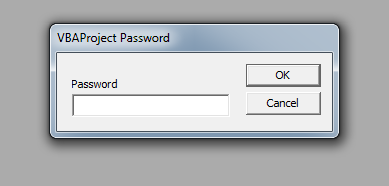
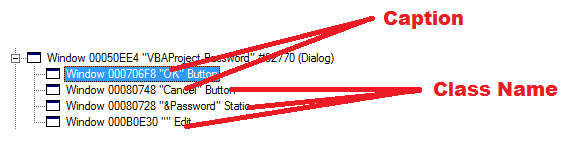


Javameans coffee to me and Jacob is an ol' friend of mine who died in his sleep... I have shown you how to automateVBAProject Password. I am sure you can take it off from here ;)