I'm trying to figure out how to locate all occurrences of a url in a database. I want to search all tables and all fields. But I have no idea where to start or if it's even possible.


- An example of when I needed this is when I needed to do a global find and replace on a database I was not familiar with, e.g. when migrating a WordPress site to a different domain I needed to replace all occurrences of the old domain name.Liam– Liam2010-04-16 16:34:05 +00:00Commented Apr 16, 2010 at 16:34
- 3Refer this: winashwin.wordpress.com/2012/08/28/mysql-searchJacob– Jacob2012-08-29 17:19:24 +00:00Commented Aug 29, 2012 at 17:19
- 3Export as text all tables, then Ctrl+F :)artur99– artur992014-09-06 08:46:45 +00:00Commented Sep 6, 2014 at 8:46
Add a comment |
16 Answers
A simple solution would be doing something like this:
mysqldump -u myuser --no-create-info --extended-insert=FALSE databasename | grep -i "<search string>" 
answered Feb 18, 2009 at 19:34

Paolo Bergantino
490k83 gold badges523 silver badges437 bronze badges
9 Comments

ashes999
@SchlaWeiner that just dumps out the data; you have no idea the row schema or table.

Joe P.
adminer.org does a pretty good job looking for text in ALL tables (given specified database).

Olaseni
This makes sense if you are in a hurry ...

Josh Ribakoff
@ashes999 in
less or vim you can search for next/prev occurrence of a DDL statement to find the table name. As for the row, it would find the row. Just look at the values and/or primary key in the matched line of text.
Jorge Campos
+1 I was trying to figure out a sql block to pass through all tables then all columns searching my string then do an update for that particular row.... WHAT A MESS!!! This is simple as ever!! Thank you so much!! Ps.: I already had the dump file and did not think about searching the string on it :P
|
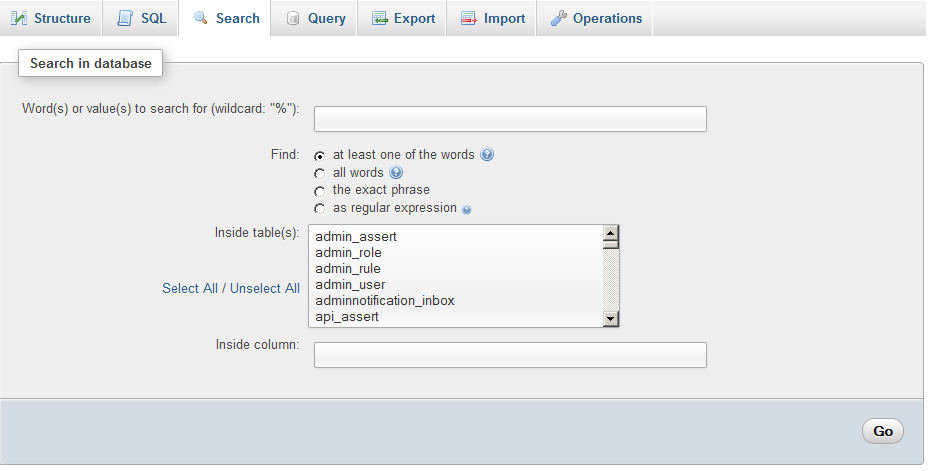
In phpMyAdmin a 'Search' feature is available:
- Select particular database not table.
- Click 'Search' tab
- Enter the search term you want
- Select the tables you want to search in
phpMyAdmin screen shot:
The 'Search' feature is also available in MySQL Workbench:
- Database Menu > Search Table Data
- Select database and tables you want to search (it will search in selected tables only)
- In search you can use wildChars.
MySQL Workbench screen shot:


3 Comments

Osify
far better to extract dump file and search when dump is in a very big size

user674669
I just tried MySQLWorkbench version 6.3.9 on Mac os 10.12.6 and it has this 'global search' feature

jave.web
Adminer (the one-PHP-file superfast (My)SQL tool has also a search feature (per database) - adminer.org
Old post I know, but for others that find this via Google like I did, if you have phpmyadmin installed, it has a global search feature.

4 Comments

Jon Weinraub
What if you don't know the actual database? Like OP, I need to find all instances of a specific IP address and I have 5+ GB of data in my MySQL db...

pal4life
This feature has since been gone in the new versions of Phpmyadmin

Ralf
I prefer HeidiSQL to phpMyAdmin. Same price, much easier to use and more powerful. Faster, too.

nematoth
@pal4life - The feature is still there in phpadmin
Using the MySQL Workbench, you can search for a string from the "Database" -> "Search Table Data" menu option.
Specify LIKE %URL_TO_SEARCH% and on the left side select all the tables you want to search through. You can use "Cntrl + A" to select the whole tree on the left, and then deselect the objects you don't care about.


1 Comment

Tyler Collier
Wow. I wish I knew of this answer 9 years ago.
You can do this with HeidiSQL without generating Db dumps
Steps:
Select the database you need to search in from the left panel of GUI.
Export > Export Database as SQL
In Table Tools window, select "FIND TEXT" tab.
Provide your string to search and click "FIND".
It will list all the tables that has our string.
Select the row with higher relevance %.
Click "SEE RESULTS"


Comments
I was looking for this myself when we changed domain on our Wordpress website. It can't be done without some programming so this is what I did.
<?php header("Content-Type: text/plain"); $host = "localhost"; $username = "root"; $password = ""; $database = "mydatabase"; $string_to_replace = 'old.example.com'; $new_string = 'new.example.com'; // Connect to database server mysql_connect($host, $username, $password); // Select database mysql_select_db($database); // List all tables in database $sql = "SHOW TABLES FROM ".$database; $tables_result = mysql_query($sql); if (!$tables_result) { echo "Database error, could not list tables\nMySQL error: " . mysql_error(); exit; } echo "In these fields '$string_to_replace' have been replaced with '$new_string'\n\n"; while ($table = mysql_fetch_row($tables_result)) { echo "Table: {$table[0]}\n"; $fields_result = mysql_query("SHOW COLUMNS FROM ".$table[0]); if (!$fields_result) { echo 'Could not run query: ' . mysql_error(); exit; } if (mysql_num_rows($fields_result) > 0) { while ($field = mysql_fetch_assoc($fields_result)) { if (stripos($field['Type'], "VARCHAR") !== false || stripos($field['Type'], "TEXT") !== false) { echo " ".$field['Field']."\n"; $sql = "UPDATE ".$table[0]." SET ".$field['Field']." = replace(".$field['Field'].", '$string_to_replace', '$new_string')"; mysql_query($sql); } } echo "\n"; } } mysql_free_result($tables_result); ?> Hope it helps anyone who's stumbling into this problem in the future :)

Comments
Found a way with two (2) easy codes here. First do a mysqldump:
mysqldump -uUSERNAME -p DATABASE_NAME > database-dump.sql then grep the sqldump file:
grep -i "Search string" database-dump.sql It possible also to find/replace and re-import back to the database.


1 Comment

axlotl
been using oracle/mysql (and others) for decades and I endorse the idea of dumping and using grep/sed/awk and reimporting. So much easier than the (you must admit this) somewhat quirky SQL language.
SQLyog is GUI based solution to the problem of data search across all columns, tables and databases. One can customize search restricting it to field, table and databases.
In its Data Search feature one can search for strings just like one uses Google.


1 Comment

Frank Myat Thu
But only ultimate version can do it. webyog.com/product/sqlyogFeatureListExpanded
MikeW presented an interesting solution, but as mentioned in comments, it's a SQL Server solution not a MySQL solution. Here is a MySQL solution:
use information_schema; set @q = 'Boston'; set @t = 'my_db'; select CONCAT('use \'',@q,'\';') as q UNION select CONCAT('select \'', tbl.`TABLE_NAME`,'\' as TableName, \'', col.`COLUMN_NAME`,'\' as Col, `',col.`COLUMN_NAME`,'` as value from `' , tbl.`TABLE_NAME`,'` where `' , col.`COLUMN_NAME` , '` like \'%' ,@q, '%\' UNION') AS q from `tables` tbl inner join `columns` col on tbl.`TABLE_NAME` = col.`TABLE_NAME`and col.DATA_TYPE='varchar' where tbl.TABLE_SCHEMA = @t ; 
1 Comment

Dalin
So close. Some issues: 1. This produces a trailing
UNION which is invalid. 2. Fourth line should be select CONCAT('use \'',@t,'\';') as q UNION 3. variables are ambiguous. Might be better to call them @search and @databaseI can't remember where I came across this script, but I've been using it with XCloner to move my WP multisites.
<?php // Setup the associative array for replacing the old string with new string $replace_array = array( 'FIND' => 'REPLACE', 'FIND' => 'REPLACE'); $mysql_link = mysql_connect( 'localhost', 'USERNAME', 'PASSWORD' ); if( ! $mysql_link) { die( 'Could not connect: ' . mysql_error() ); } $mysql_db = mysql_select_db( 'DATABASE', $mysql_link ); if(! $mysql_db ) { die( 'Can\'t select database: ' . mysql_error() ); } // Traverse all tables $tables_query = 'SHOW TABLES'; $tables_result = mysql_query( $tables_query ); while( $tables_rows = mysql_fetch_row( $tables_result ) ) { foreach( $tables_rows as $table ) { // Traverse all columns $columns_query = 'SHOW COLUMNS FROM ' . $table; $columns_result = mysql_query( $columns_query ); while( $columns_row = mysql_fetch_assoc( $columns_result ) ) { $column = $columns_row['Field']; $type = $columns_row['Type']; // Process only text-based columns if( strpos( $type, 'char' ) !== false || strpos( $type, 'text' ) !== false ) { // Process all replacements for the specific column foreach( $replace_array as $old_string => $new_string ) { $replace_query = 'UPDATE ' . $table . ' SET ' . $column . ' = REPLACE(' . $column . ', \'' . $old_string . '\', \'' . $new_string . '\')'; mysql_query( $replace_query ); } } } } } mysql_free_result( $columns_result ); mysql_free_result( $tables_result ); mysql_close( $mysql_link ); echo 'Done!'; ?> 
1 Comment

John Magnolia
If you can use a bash - here is a script: It needs a user dbread with pass dbread on the database.
#!/bin/bash IFS=' ' DBUSER=dbread DBPASS=dbread echo -n "Which database do you want to search in (press 0 to see all databases): " read DB echo -n "Which string do you want to search: " read SEARCHSTRING for i in `mysql $DB -u$DBUSER -p$DBPASS -e "show tables" | grep -v \`mysql $DB -u$DBUSER -p$DBPASS -e "show tables" | head -1\`` do for k in `mysql $DB -u$DBUSER -p$DBPASS -e "desc $i" | grep -v \`mysql $DB -u$DBUSER -p$DBPASS -e "desc $i" | head -1\` | grep -v int | awk '{print $1}'` do if [ `mysql $DB -u$DBUSER -p$DBPASS -e "Select * from $i where $k='$SEARCHSTRING'" | wc -l` -gt 1 ] then echo " Your searchstring was found in table $i, column $k" fi done done If anyone wants an explanation: http://infofreund.de/?p=1670

Comments
Scott gives a good example of how to do it, but the question is why would you want to? If you need to do a find-and-replace on a specific string, you could also try doing a mysqldump of your database, do a find-and-replace in an editor, then re-load the database.
Maybe if you gave some background on what you are trying to achieve, others might be able to provide better answers.

1 Comment

R891
There are cases where that won't work, or might not be a good idea. Example: query all rows in a database that contain a certain string among user-submitted HTML code, then load those rows into an HTML parser, manipulate the data, and re-save them.
I was looking for the same but couldn't find it, so I make a small script in PHP, you can find it at: http://tequilaphp.wordpress.com/2010/07/05/searching-strings-in-a-database-and-files/
Good luck! (I remove some private code, let me know if I didn't break it in the process :D)

1 Comment

panosru
Thanks for that! you saved me time! I would like it more if I had the option to set case sensitive search :)
The first 30 seconds of this video shows how to use the global search feature of Phpmyadmin and it works. it will search every table for a string.
http://www.vodahost.com/vodatalk/phpmyadmin-setup/62422-search-database-phpmyadmin.html

Comments
In unix machines, if the database is not too big:
mysqldump -u <username> -p <password> <database_name> --extended=FALSE | grep <String to search> | less -S 
Comments
Not an elegant solution, but you could achieve it with a nested looping structure
// select tables from database and store in an array // loop through the array foreach table in database { // select columns in the table and store in an array // loop through the array foreach column in table { // select * from table where column = url } } You could probably speed this up by checking which columns contain strings while building your column array, and also by combining all the columns per table in one giant, comma-separated WHERE clause.
answered Feb 18, 2009 at 19:26

Scott Vander Molen
6,4296 gold badges44 silver badges43 bronze badges
1 Comment

James Socol
<code>where column like '%url%'</code> if you can't guarantee the field is just the URL.