211

I'm trying to create a new file and things don't seem to be working as I expect them to. Here's what I've tried:

File.new "out.txt" File.open "out.txt" File.new "out.txt","w" File.open "out.txt","w" 

According to everything I've read online all of those should work but every single one of them gives me this:

ERRNO::ENOENT: No such file or directory - out.txt 

This happens from IRB as well as a Ruby script. What am I missing?

5
  • 13
    The first two should not work, but the second two are synonymous and definitely should work. Commented Oct 27, 2011 at 4:21
  • @Andrew: You're thinking that only the first two were tried? Commented Oct 27, 2011 at 4:23
  • 1
    @muistooshort That's the only conclusion I can reach. A permissions error would have thrown Errno::EACCES, not ENOENT. Commented Oct 27, 2011 at 4:25
  • 2
    OK, now I feel stupid. The first two definitely do not work but the second two do. Not sure how I convinced my self that I had tried them. Sorry for wasting everyone's time. Commented Oct 27, 2011 at 4:32
  • 1
    @Civatrix That's no problem. We all waste time sometimes. Commented Oct 14, 2016 at 16:53

10 Answers 10

486

Use:

File.open("out.txt", [your-option-string]) do |f| f.write("write your stuff here") end 

where your options are:

  • r - Read only. The file must exist.
  • w - Create an empty file for writing.
  • a - Append to a file.The file is created if it does not exist.
  • r+ - Open a file for update both reading and writing. The file must exist.
  • w+ - Create an empty file for both reading and writing.
  • a+ - Open a file for reading and appending. The file is created if it does not exist.

In your case, 'w' is preferable.

OR you could have:

out_file = File.new("out.txt", "w") #... out_file.puts("write your stuff here") #... out_file.close 

... but that has the risk of forgetting to call close (such as if an exception is raised, or you return early).

Sign up to request clarification or add additional context in comments.

11 Comments

great answer. Ruby conevntion is snake case for var names. Just a heads up for newbies. outFile should look like out_file.
@AdamWaite I edited the answer as per your snake_case suggestion, leaving this comment for context.
@zanbri - what happens if I don't close the file ?
@BoratSagdiyev "A File object which is no longer referenced becomes eligible for garbage collection. The file will be closed automatically when the File object is garbage collected." rootr.net/rubyfaq-9.html
@jkdev, yes, it will be closed, but it's still considered code smell to rely on that, just as if the programmer never closed files and let the OS close the files when the interpreter terminates. And both can lead to a bad bug if multiple files are opened and the code never closes them leading to an out-of-handles condition and error. It's just a better, safer, practice to deliberately close them or rely on a block that does so automatically.
|
42

Try

File.open("out.txt", "w") do |f| f.write(data_you_want_to_write) end 

without using the

File.new "out.txt" 

Comments

33

Try using "w+" as the write mode instead of just "w":

File.open("out.txt", "w+") { |file| file.write("boo!") } 

1 Comment

Depends if you want to write only (w) or both read and write (w+).
21

OK, now I feel stupid. The first two definitely do not work but the second two do. Not sure how I convinced my self that I had tried them. Sorry for wasting everyone's time.

In case this helps anyone else, this can occur when you are trying to make a new file in a directory that does not exist.

Comments

18

If the objective is just to create a file, the most direct way I see is:

 FileUtils.touch "foobar.txt" 

Comments

14

File.new and File.open default to read mode ('r') as a safety mechanism, to avoid possibly overwriting a file. We have to explicitly tell Ruby to use write mode ('w' is the most common way) if we're going to output to the file.

If the text to be output is a string, rather than write:

File.open('foo.txt', 'w') { |fo| fo.puts "bar" } 

or worse:

fo = File.open('foo.txt', 'w') fo.puts "bar" fo.close 

Use the more succinct write:

File.write('foo.txt', 'bar') 

write has modes allowed so we can use 'w', 'a', 'r+' if necessary.

open with a block is useful if you have to compute the output in an iterative loop and want to leave the file open as you do so. write is useful if you are going to output the content in one blast then close the file.

See the documentation for more information.

2 Comments

Great response, this is the most idiomatic and thus the "Rubyist" way. Should be the top answer.
Well, I agree. I rarely use the block form to write files. It's too visually-noisy.
10

The directory doesn't exist. Make sure it exists as open won't create those dirs for you.

I ran into this myself a while back.

Comments

4
data = 'data you want inside the file'. 

You can use File.write('name of file here', data)

Comments

1

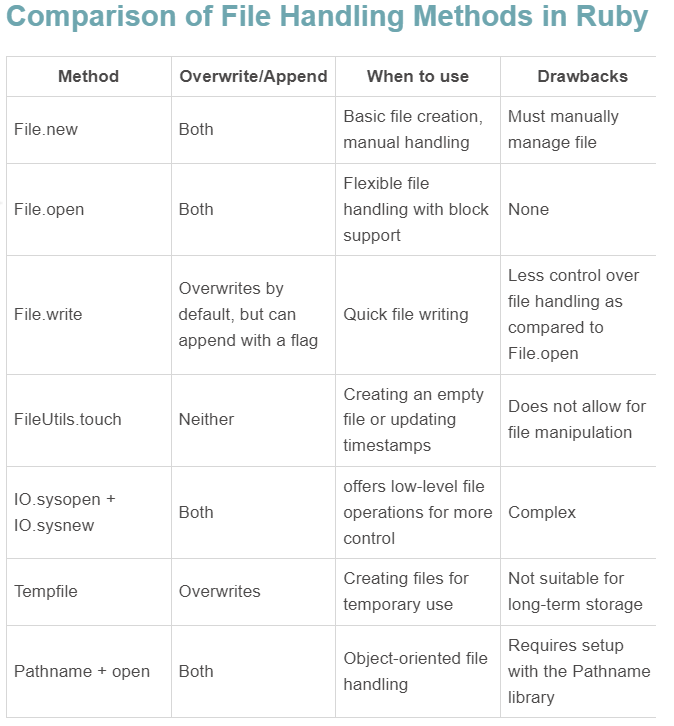
There are several different options you could try. (This is not meant to be an exhaustive list... just tiring.)

File.new

file_name = File.new("out.txt", "w") file_name.close 

File.open

File.open("out.txt", "w") do |file| #other stuff here end 

File.write

File.write('out.txt', 'contents here') 

FileUtils.touch

require 'fileutils' FileUtils.touch('out.txt') 

IO.sysopen and IO.sysnew

fd = IO.sysopen("out.txt", "w") file = IO.new(fd, "w") file.puts "other stuff" file.close 

Tempfile

require 'tempfile' tempfile = Tempfile.new('out') tempfile.puts "some text" tempfile.close 

Pathname and open

require 'pathname' path = Pathname.new("out.txt") path.open("w") do |file| file.puts "some text" end 

Chart source: How to write to a file in Ruby (Disclosure: I wrote it)

Various methods for file creation in Ruby

Comments

0

You can also use constants instead of strings to specify the mode you want. The benefit is if you make a typo in a constant name, your program will raise an runtime exception.

The constants are File::RDONLY or File::WRONLY or File::CREAT. You can also combine them if you like.

Full description of file open modes on ruby-doc.org

Comments

Start asking to get answers

Find the answer to your question by asking.

Ask question

Explore related questions

See similar questions with these tags.