VPN as a Service is an OpenStack networking extension that provides VPN services for your project. Currently this service is restricted to IPsec based VPNs.
In the following examples we will construct a VPN between the Hamilton region (nz-hlz-1) and the Porirua region (nz-por-1) of our project. We will assume that in both regions we have an identical network setup that looks like:
A network called private-net.
A subnet called private-subnet.
A router to the Internet called border-router.
The only differences between the two setups will be the external IP address on the router and the CIDR of the private subnets.
We will illustrate how to create the the VPN using the following approaches:
In order to set up a VPN, we need to identify some key information:
Router name
Router IP address
Subnet name
Subnet CIDR range
Remote peer router IP
Remote peer subnet CIDR range
A secret pre shared key
While we will be using the names of the router and subnet it is important to note that these are not required to be unique so if your creating multiple VPN connections it may be more appropriate to use the UUID values for these elements in order to avoid ambiguity when running commands.
Note
IPSec relies on symmetrical encryption where both sides use the same private key. This key is known as a Pre Shared Key (PSK). You should ensure that you manage this key appropriately, so for example be sure that it is not committed to your configuration management system source control in plain text.
Warning
The Pre Shared Key should be between 20 to 40 characters long and consist of alphanumeric characters only. The Pre Shared Key must not contain the ‘&’ character.
The first thing we need to do prior to creating our VPN is to gather the relevant information, as mentioned above, for our existing network elements. We will create the first half of our VPN in the Hamilton region.
To get the subnet’s CIDR run the following command.
From the JSON data, the router IP address is the IPv4 value associated with the ip_address key within the external_gateway_info.
As we are creating a VPN that connects our Catalyst Cloud project across two regions, the remote peer router IP and remote peer subnet CIDR range will be the values associated with the subnet and router in the other region.
In this case we need to find the router IP and the subnet CIDR from the network located in the Porirua region. You can determine these in the same way as shown above while connected to the other region.
If you are setting up a VPN to a different peer, then the remote peer router IP will be the publicly accessible IPv4 address of that router, while the remote peer subnet CIDR range will be the subnet behind that router whose traffic you wish to route via the VPN to access the local subnet.
Note
If you are connecting to a remote peer that is not a Catalyst Cloud router, you may need to modify some of the parameters used in the following steps.
By now you should have the required values so you can proceed to create a VPN.
There are four steps to creating a VPN:
Create a VPN Service
Create a VPN IKE Policy
Create a VPN IPSec Policy
Create a VPN Endpoint Group for the local subnet
Create a VPN Endpoint Group for the peer CIDR
Create a VPN IPSec Site Connection
This example will cover setting up one half of the VPN in the Hamilton region.
First let’s create a VPN Service called vpn_service.
$ openstackvpnservicecreate\ --routerborder-router\ vpn_service +----------------+--------------------------------------+| Field | Value |+----------------+--------------------------------------+| Description | || ID | 99d8f06c-8cd8-44d6-9337-xxxxxxxxxxxx || Name | vpn_service || Project | 630116938c82479cxxxxxx3912c1d09c || Router | ddd82b49-8bae-4a25-ae94-xxxxxxxxxxxx || State | True || Status | PENDING_CREATE || Subnet | None || external_v4_ip | 10.10.8.3 || external_v6_ip | 2404:130:4040:8::16 || project_id | 630116938c82479cxxxxxx3912c1d09c |+----------------+--------------------------------------+
Then create a VPN IKE policy called ike_policy.
$ openstackvpnikepolicycreate\ --auth-algorithmsha1\ --encryption-algorithmaes-256\ --phase1-negotiation-modemain\ --pfsgroup14\ --ike-versionv1\ --lifetimeunits=seconds,value=14400\ ike_policy +-------------------------------+--------------------------------------+| Field | Value |+-------------------------------+--------------------------------------+| Authentication Algorithm | sha1 || Description | || Encryption Algorithm | aes-256 || ID | d64b4355-576f-4f68-989d-xxxxxxxxxxxx || IKE Version | v1 || Lifetime | {'units': 'seconds', 'value': 14400} || Name | ike_policy || Perfect Forward Secrecy (PFS) | group14 || Phase1 Negotiation Mode | main || Project | 630116938c82479cxxxxxx3912c1d09c || project_id | 630116938c82479cxxxxxx3912c1d09c |+-------------------------------+--------------------------------------+
Then create a VPN IPSec policy called ipsec_policy.
You have now stood up one end of the VPN. This process should be repeated at the other end using the same configuration options and PSK. Once both sides of the VPN are configured, the peers should automatically detect each other and bring up the VPN. When the VPN is up, the status will change to ACTIVE.
The Catalyst Cloud team have created a bash script that simplifies the procedure for creating a VPN. In order to run the script you will need to know the following information for each region you will be creating a VPN endpoint for. Details on how to obtain this information can be found in the Command Line example.
router name
router external IP address
subnet name
subnet CIDR range
This script will require no modification when setting up region to region VPNs. If you are using it to connect a Catalyst Cloud router to a non Catalyst Cloud router, you may need to change some configuration options.
This script currently only supports single CIDR ranges. If you are wanting to tunnel multiple ranges then it will require some modification.
You can download the latest version of this script using the following command:
Your VPN has been created, note that you will need to create appropriate security group rules.
The script source is included below for reference:
#!/bin/bash#------------------------------------------------------------------------------# Parameters#------------------------------------------------------------------------------# set the default VPN creation modeDEFAULT_MENU_PROMPT="Select the option you require or type 'q' to quit: "ARR_REGIONS=(HamiltonPorirua)VPN_MODE=""REGION_1=""REGION_2=""# colour data for message promptGREEN="\033[92m"# for success outputYELLOW="\033[93m"# for debug outputRED="\033[91m"# for error outputNC='\033[0m'# remove colour from output#------------------------------------------------------------------------------# Functions#------------------------------------------------------------------------------ usage(){echocat<<USAGE_DOC Usage: ./$(basename $0) [-h] This script will assist in the creation of a VPN endpoint or endpoints on Catalyst Cloud. The default behaviour is to create a single VPN endpoint using the selected region. -h Print this usage guideUSAGE_DOC} parse_args(){whilegetoptsmhOPTION;docase"$OPTION"in# m)# # build a VPN between two regions of a cloud project# MODE="multi"# ;;h)usage exit0;;?)usage exit1;;esacdone} handle_interruptions(){exit130} check_credentials(){# Look for $OS_* environment variables. If not defined, prompt the user to source# their OpenRC fileif[[${OS_PROJECT_ID}&&${OS_TOKEN}]]||[[${OS_USERNAME}&&${OS_PASSWORD}&&${OS_PROJECT_ID}]];thenOPENRC="True"elseMSG="No cloud credentials found in the current shell session, please source your openrc file."echo-e"${RED}${MSG}${NC}"exit1fi} create_menu(){MENU_PROMPT="${1}"shiftarrsize=$1shiftarr=$1ret_val=""PS3="${MENU_PROMPT}"selectoptionin"${@}"doif["$REPLY"=="q"]||["$REPLY"=="Q"]thenecho"Exiting..."break;elif[1-le"$REPLY"]&&["$REPLY"-le$((arrsize))]then# echo "You have selected : $option"echoret_val=$optionbreak;elseecho"Incorrect Input: Select a number 1-$arrsize"fidone} get_vpn_choice(){echo"----------------------------------------------------------"echo" This script will setup a VPN in your project."echo" You can select either:"echo" a single region that will connect to an external site"echo" or"echo" a site-to-site vpn between 2 regions for the same project"echo"----------------------------------------------------------"echomyarray=(singlesite-to-site)MENU_PROMPT="Select the VPN option you require or type 'q' to quit: "create_menu"${MENU_PROMPT}"${#myarray[@]}${myarray[@]}VPN_MODE=$ret_val} get_vpn_region(){if[$VPN_MODE=="single"]thenecho"----------------------------------------"echo" Select the region for your VPN endpoint"echo"----------------------------------------"echoMENU_PROMPT="Select the VPN option you require or type 'q' to quit: "create_menu"${MENU_PROMPT}"${#ARR_REGIONS[@]}${ARR_REGIONS[@]}REGION_1=$ret_valelif[$VPN_MODE=="site-to-site"]thenecho"-------------------------------------------------------"echo" Select the regions for your site-to-site VPN endpoints"echo"-------------------------------------------------------"echoEXIT="false"while[$EXIT=="false"]doforiin12doMENU_PROMPT="Select region $i for the site-to-site VPN or type 'q' to quit: "create_menu"${MENU_PROMPT}"${#ARR_REGIONS[@]}${ARR_REGIONS[@]}evalREGION_${i}=$ret_valif[$REGION_2]thenif[$REGION_1!=$REGION_2]thenEXIT="true"elseecho"error can't use the same region for both endpoints"fifidonedoneelseecho"ERROR: The VPN mode was not set correctly!"exit1fi} lookup_region_name(){case$1inHamilton)ret_val="nz-hlz-1";;Porirua)ret_val="nz-por-1";;esac} check_openstack(){hashopenstack2>/dev/null||{echo"openstack command line client is not available, please install it before proceeding";exit1;}# check if openstack command works with current credentialsexportTOKENID=$(openstacktokenissue-cid-fvalue)if[-z$TOKENID];thenecho"Unable to get openstack token please checkl that you have sourced your openrc file"exit1fi} build_vpn(){if[$REGION_1]then# define single region or region_1 endpointlookup_region_name$REGION_1OS_REGION_NAME=$ret_valecho"Please enter the name of your $REGION_1 router:"read-rregion_1_router_name;ifopenstackroutershow"$region_1_router_name"2>&1|grep-q"No Router found for"thenMSG="Unable to find router with name $region_1_router_name"echo-e"${RED}${MSG}${NC}"echopleaseensureyouhavecreatedtherequiredroutersbeforerunningthisscript exit;fiecho"Please enter the name of your $REGION_1 subnet:";read-rregion_1_subnet_name;ifopenstacksubnetshow"$region_1_subnet_name"2>&1/dev/null|grep-q'Unable to find subnet with name'thenMSG="No Subnet found for $region_1_subnet_name"echo-e"${RED}${MSG}${NC}"echopleaseensureyouhavecreatedtherequiredsubnetsbeforerunningthisscript exit;fifiif[$REGION_2]thenlookup_region_name$REGION_2OS_REGION_NAME=$ret_valecho$OS_REGION_NAMEecho"Please enter the name of your $REGION_2 router:";read-rregion_2_router_name;ifopenstackroutershow"$region_2_router_name"2>&1/dev/null|grep-q'Unable to find router with name'thenecho"Unable to find router with name $region_2_router_name"echopleaseensureyouhavecreatedtherequiredroutersbeforerunningthisscript exit;fiecho"Please enter the name of your $REGION_2 subnet:";read-rregion_2_subnet_name;ifopenstacksubnetshow"$region_2_subnet_name"2>&1/dev/null|grep-q'Unable to find subnet with name'thenecho"Unable to find subnet with name $region_2_subnet_name"echopleaseensureyouhavecreatedtherequiredsubnetsbeforerunningthisscript exit;fifiecho"Please enter your pre shared key:";read-rpre_shared_key;if[[$REGION_1&&$REGION_2]]# This is a site-to-site VPN across regionsthenecho"Please enter the $REGION_1 router ip address";read-rregion_1_router_ip;echo"Please enter the $REGION_1 CIDR range";read-rregion_1_subnet;echoecho"Please enter the $REGION_2 router ip address";read-rregion_2_router_ip;echo"Please enter the $REGION_2 CIDR range";read-rregion_2_subnet;region_1_peer_router_ip=$region_2_router_ipregion_1_peer_subnet=$region_2_subnetregion_2_peer_router_ip=$region_1_router_ipregion_2_peer_subnet=$region_1_subnetelif[-z$REGION_2]# This ss a single endpoint VPN to a remote sitethenecho"Please enter the remote peer router ip address";read-rremote_peer_router_ip;echo"Please enter the remote peer CIDR range";read-rremote_peer_subnet;region_1_peer_router_ip=$remote_peer_router_ipregion_1_peer_subnet=$remote_peer_subnetfiechoecho-------------------------------------------------------- MSG="Proceeding to create VPN with the following credentials:"echo-e"${GREEN}${MSG}${NC}"if[$REGION_1]thenecho"Region name = $REGION_1"echo"region_1_router_name = $region_1_router_name"echo"region_1_subnet_name = $region_1_subnet_name"echo"region_1_router_ip = $region_1_router_ip"echo"region_1_subnet = $region_1_subnet"echo"region_1_peer_router_ip = $region_1_peer_router_ip"echo"region_1_peer_subnet = $region_1_peer_subnet"echofiif[$REGION_2]thenecho"Region name = $REGION_2"echo"region_2_router_name = $region_2_router_name"echo"region_2_subnet_name = $region_2_subnet_name"echo"region_2_router_ip = $region_2_router_ip"echo"region_2_subnet = $region_2_subnet"echo"region_2_peer_router_ip = $region_2_peer_router_ip"echo"region_2_peer_subnet = $region_2_peer_subnet"echofi# echo "tenant_id = $tenant_id"echo"pre_shared_key = $pre_shared_key"echo-------------------------------------------------------- echo# build the first endpointif[$REGION_1]thenMSG="creating endpoint for $REGION_1"echo-e"${YELLOW}${MSG}${NC}"lookup_region_name$REGION_1OS_REGION_NAME=$ret_valopenstackvpnservicecreate\--subnet$region_1_subnet_name\--router$region_1_router_name\vpn_service openstackvpnikepolicycreate\--auth-algorithmsha1\--encryption-algorithmaes-256\--phase1-negotiation-modemain\--pfsgroup14\--ike-versionv1\--lifetimeunits=seconds,value=14400\ike_policy openstackvpnipsecpolicycreate\--transform-protocolesp\--auth-algorithmsha1\--encryption-algorithmaes-256\--encapsulation-modetunnel\--pfsgroup14\--lifetimeunits=seconds,value=3600\ipsec_policy openstackvpnipsecsiteconnectioncreate\--initiatorbi-directional\--vpnservicevpn_service\--ikepolicyike_policy\--ipsecpolicyipsec_policy\--dpdaction=restart,interval=15,timeout=150\--peer-address$region_1_peer_router_ip\--peer-id$region_1_peer_router_ip\--peer-cidr$region_1_peer_subnet\--pskpre_shared_key\vpn_site_connection fi# build the second endpoint if creating an inter-region VPNif[$REGION_2]thenMSG="creating endpoint for $REGION_2"echo-e"${YELLOW}${MSG}${NC}"lookup_region_name$REGION_2OS_REGION_NAME=$ret_valopenstackvpnservicecreate\--subnet$region_2_subnet_name\--router$region_2_router_name\vpn_service openstackvpnikepolicycreate\--auth-algorithmsha1\--encryption-algorithmaes-256\--phase1-negotiation-modemain\--pfsgroup14\--ike-versionv1\--lifetimeunits=seconds,value=14400\ike_policy openstackvpnipsecpolicycreate\--transform-protocolesp\--auth-algorithmsha1\--encryption-algorithmaes-256\--encapsulation-modetunnel\--pfsgroup14\--lifetimeunits=seconds,value=3600\ipsec_policy openstackvpnipsecsiteconnectioncreate\--initiatorbi-directional\--vpnservicevpn_service\--ikepolicyike_policy\--ipsecpolicyipsec_policy\--dpdaction=restart,interval=15,timeout=150\--peer-address$region_2_peer_router_ip\--peer-id$region_2_peer_router_ip\--peer-cidr$region_2_peer_subnet\--pskpre_shared_key\vpn_site_connection fiMSG="Your VPN has been created, note that you will need to create appropriate security group rules."echoecho-e"${GREEN}${MSG}${NC}"echo}#------------------------------------------------------------------------------# Main#------------------------------------------------------------------------------# Handle ctrl-c (SIGINT)traphandle_interruptionsINT parse_args"$@" check_credentials check_openstack get_vpn_choice get_vpn_region build_vpn
In this example we are going to set up a VPN connection in the Hamilton region to a remote router in the Porirua region with a public IP 150.242.40.137 that has the private subnet 10.20.30.0/24 connected to it.
In the Hamilton region we already have defined a router named border-router that is connected to the public network and has a subnet called private subnet with a CIDR of 10.0.0.0/24 connected to one of it’s interfaces. The steps to create these resources are covered in Adding a network
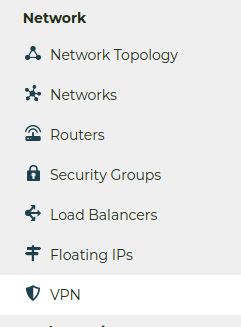
To create the VPN connection we are going to use the VPN screen which is accessed by clicking on the VPN item underneath the Network group on the left hand menu of the console:
Using the VPN screen we are going perform the following steps:
Create a VPN Service
Create a VPN IKE Policy
Create a VPN IPSec Policy
Create a VPN Endpoint Group for the local subnet
Create a VPN Endpoint Group for the peer CIDR
Create a VPN IPSec Site Connection
Create a VPN Service
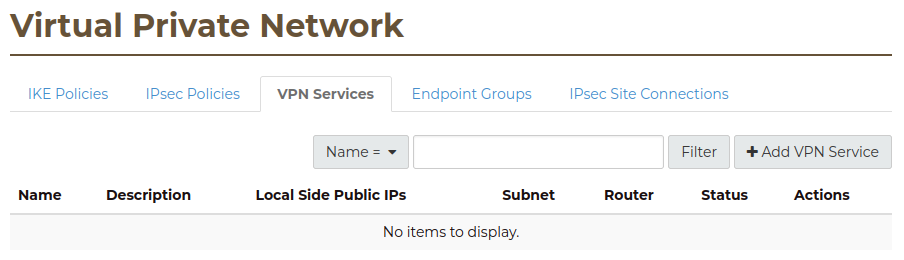
First we select the VPN Service tab and click on the + Add VPN Service button to create a VPN service.
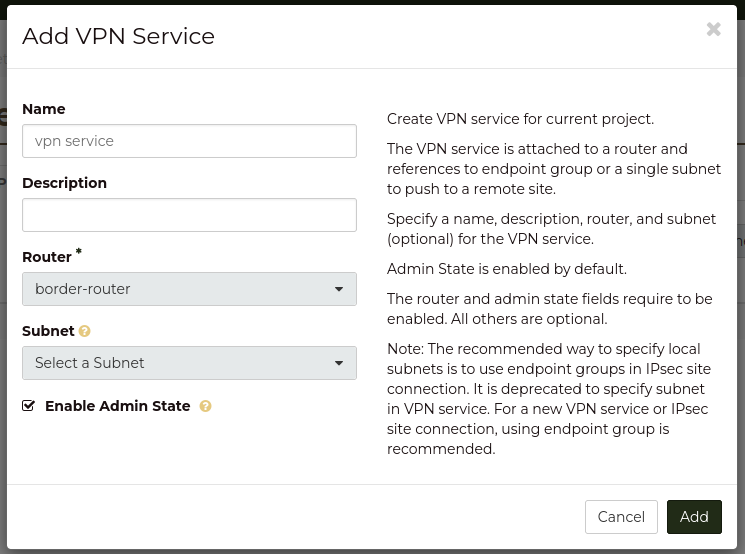
In the Add VPN Service dialog we do the following:
name the VPN Service “vpn service”
select “border-router” as the router for this VPN service.
Note
We do not select the subnet for the service as this will be done later using the endpoint groups.
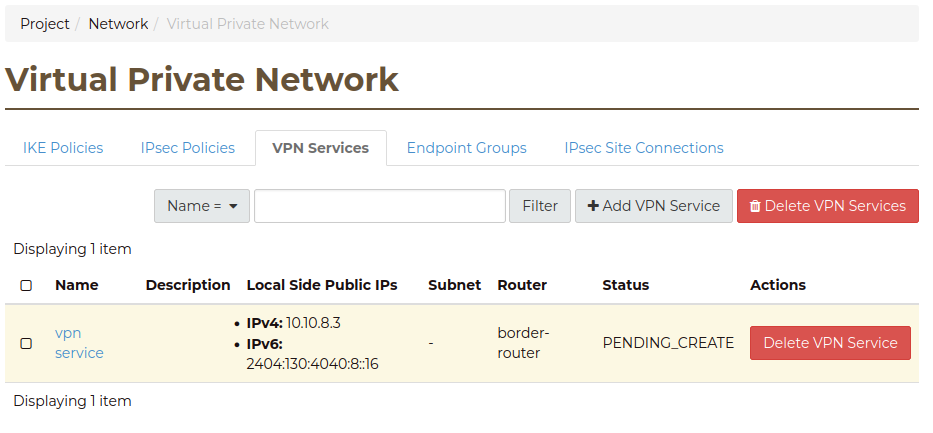
Click the Add button and the VPN service will be in the Pending Create state, it will become Active when we have completed the IPSec connection.
Create IKE Policy
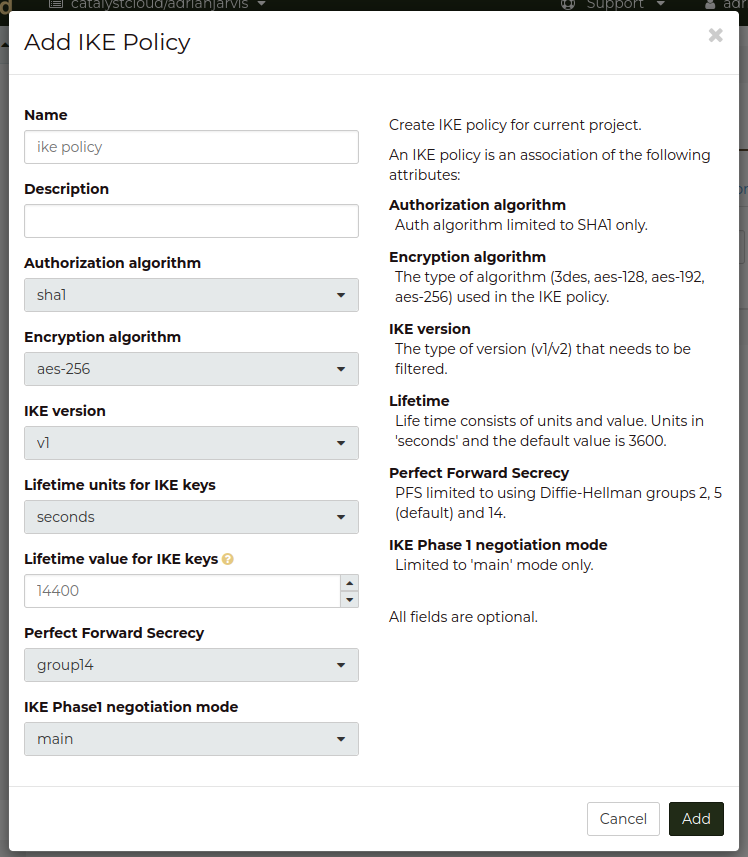
Next we create the IKE policy for the VPN connection by selecting the IKE Policies tab and clicking on the + Add IKE Policy button. In the dialog we named the policy “ike policy” we enter the following:
Name: ike policy
Encryption algorithm: change to “aes-256”
Lifetime value for IKE key: change to 14400
Perfect Forward Secrecy: change to “group14”.
Create IPsec Policy
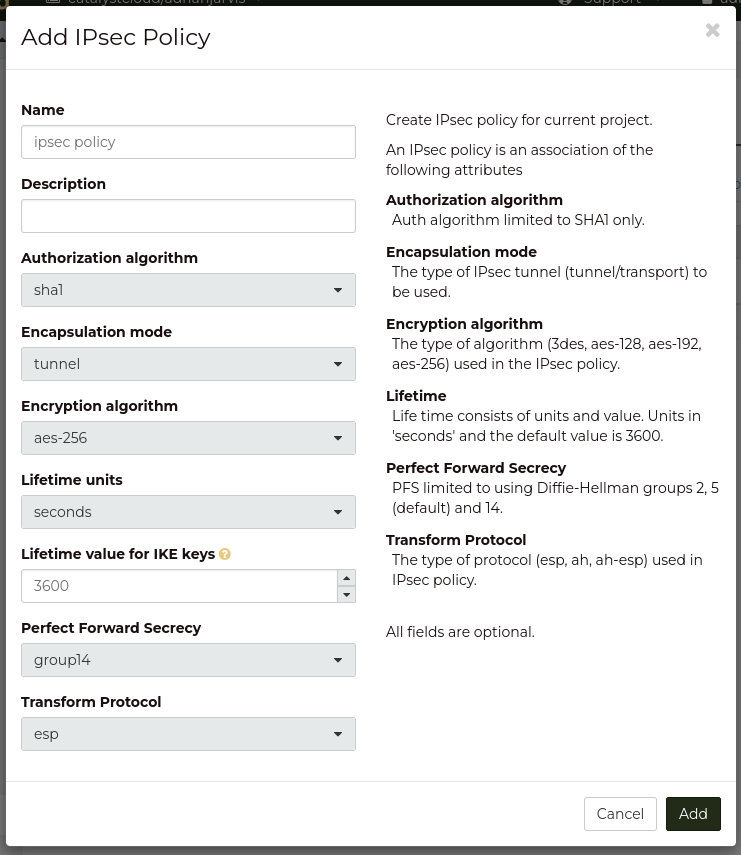
Next we are going to create the IPSec policy by selecting the IPsec Policies tab and clicking on the + Add IPsec Policy button. In the Add IPsec Policy dialog we are going to enter the following:
Name: ipsec policy
Encryption algorithm: aes-256
Perfect Forward Secrecy: group14
The other fields we leave as the defaults. Click the Add button and the policy is created.
Create Endpoint Groups
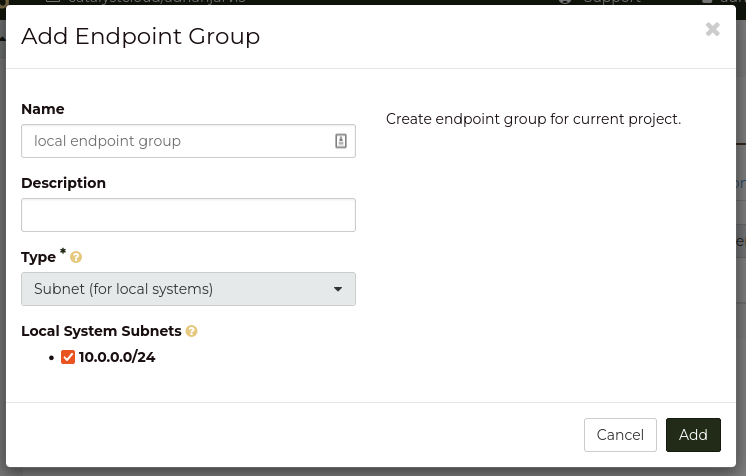
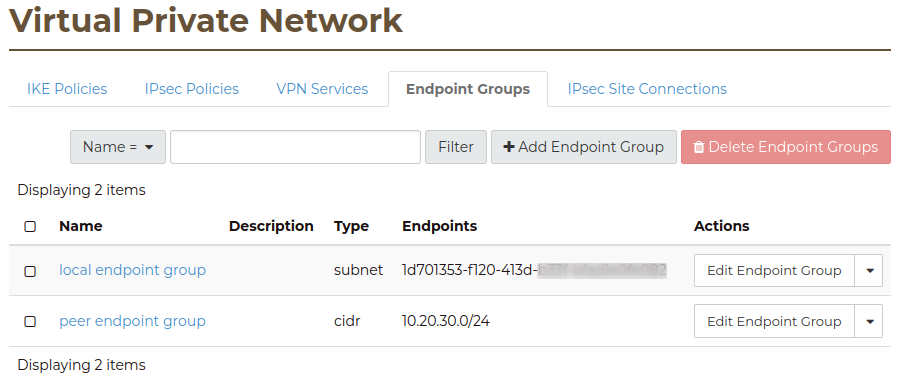
Next we are going to add to Endpoint Group one for the local subnet and the other for the remote subnet. Recall that the local subnet called private subnet has a CIDR of 10.0.0.0/24 and the remote subnet has a CIDR of 10.20.30.0/24. Select the Endpoint Groups tab and click on the + Add Endpoint Group button. In the Add Endpoint Group dialog we are going to enter the following:
Name: local endpoint group
Type: Subnet (for local systems)
Local System Subnets: tick the box next to “10.0.0.0/24”
Click the Add button to create the endpoint group.
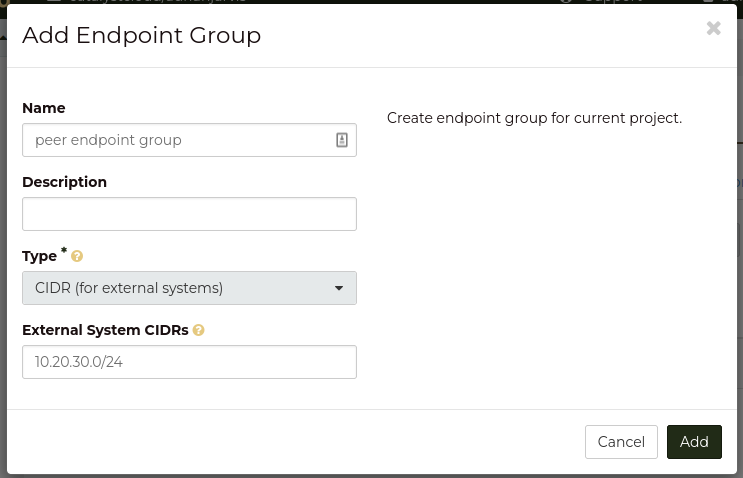
Click the + Add Endpoint Group button again and enter the following:
Name: peer endpoint group
Type: CIDR (for external systems)
External System CIDRs: 10.20.30.0/24
Click the Add button to create the endpoint group.
You should now have two endpoint groups:
Create an IPsec Site Connection
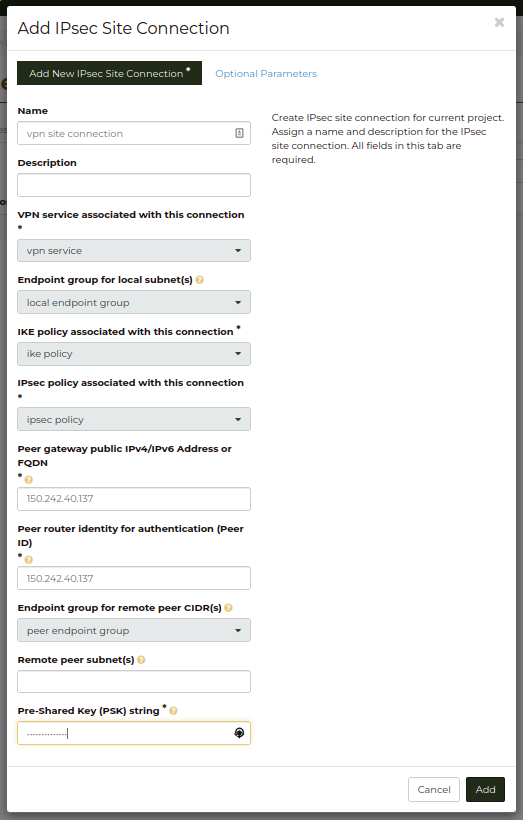
Finally we are able to create the connection by selecting the IPsec Site Connections tab and clicking the + Add IPsec Site Connection button.
In the Add IPsec Site Connection dialog we are entering the following values:
Name: vpn site connection
VPN service associated with this connection: vpn service
Endpoint group for local subnet(s): local endpoint group
IKE policy associated with this connection: ike policy
IPsec policy associated with this connection: ipsec policy
Peer gateway public IPv4/IPv6 Address or FQDN: 150.242.40.137
Peer router identity for authentication (Peer ID): 150.242.40.137
Endpoint group for remote peer CIDR(s): peer endpoint group
Pre-Shared Key (PSK) string: supersecretpsk
Recall that 150.242.40.137 is the public IP address of the remote router.
Note
Leave the Remote peer subnet(s) field blank this is an old method of defining the peer CIDRs which has been replaced by the Endpoint Groups.
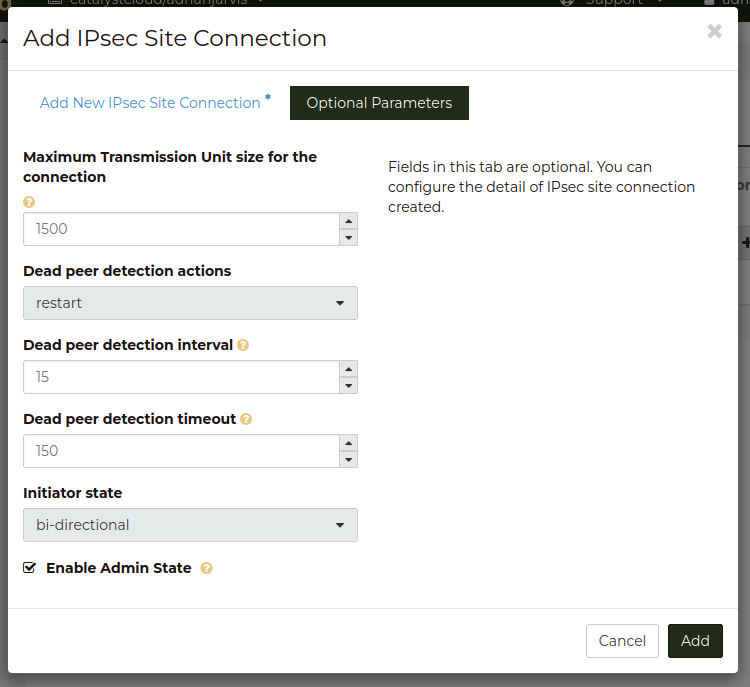
Then click Optional Parameters and change the following:
Dead peer detection actions: restart
Dead peer detection interval: 15
Dead peer detection timeout: 150
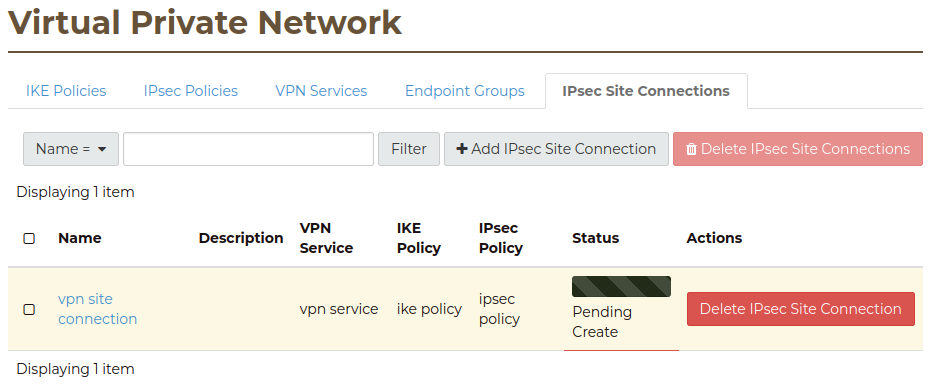
Click the Add button and the IPsec Site Connection will be created:
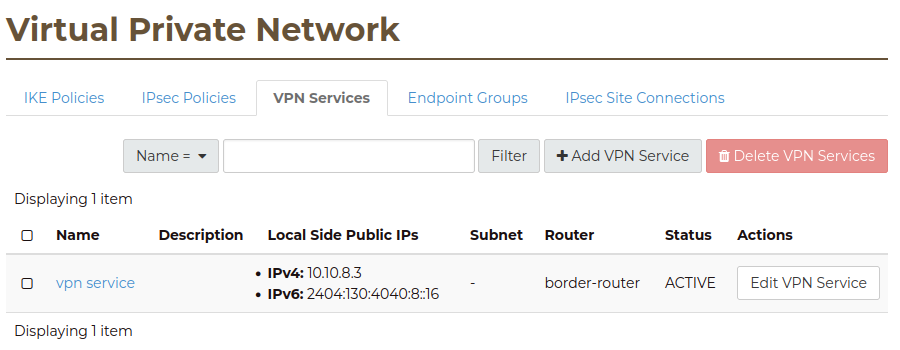
Once the IPsec site connection is created the VPN service will become active:
This process should be repeated at the other end using the same configuration options and PSK. Once both sides of the VPN are configured, the peers should automatically detect each other and bring up the VPN.
There are situations where you may need multiple VPNs to your Catalyst Cloud project, for example if you have offices in two locations and need VPNs from both to connect into your project.
To create another VPN to your Catalyst Cloud project you can create another IPsec Site Connection under the same VPN Service by following these steps:
Create a VPN IKE Policy (if your new VPN needs a different policy)
Create a VPN IPSec Policy (if required)
Create a VPN Endpoint Group for the peer CIDR
Create a VPN IPSec Site Connection that uses the existing VPN Service
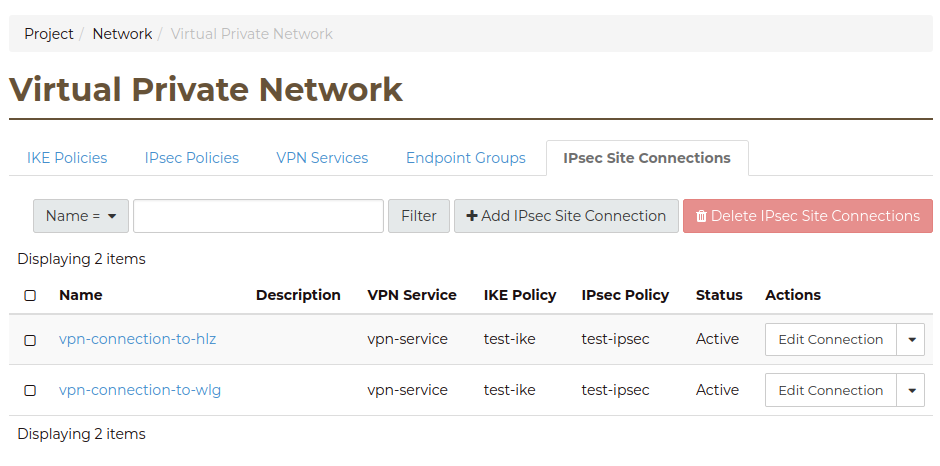
You should now have two VPN Connections running on the same Router.
Warning
A Router can only support one VPN Service. If you add additional VPN Services to the same router then the existing VPN Service will go down.