added 25 characters in body
Source Link
Joseph
  • 76.7k
  • 8
  • 173
  • 286

Not completely sure why your method doesn't work but another method is to instead use None when using runalg as this will also create an output in memory. Below I defined the first process as output_0 and called the result of this as input to the second process:

output_0 = processing.runalg("qgis:mergevectorlayers",["memory:bufferOne", "memory:bufferTwo"], None) processing.runandload("qgis:dissolve", output_0['OUTPUT'], True, '', r"D:\PythonTesting\dissolved.shp") 

Result:
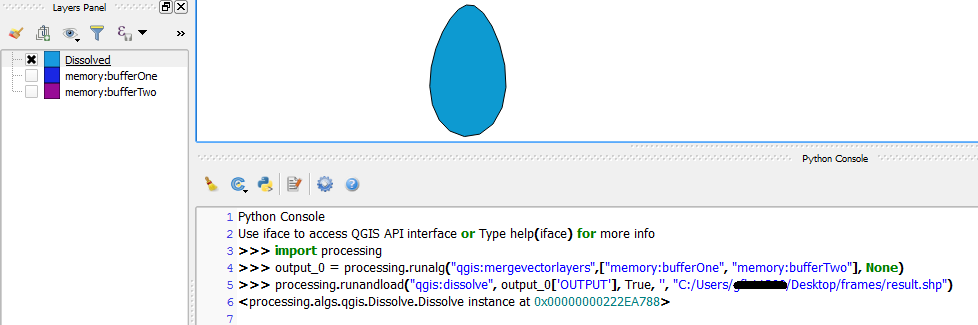
Result


Tested on QGIS 2.16.0-Nødebo with Processing plugin v2.12.2.

Note that qgis:mergevectorlayers now requires a list of input layers.

Not completely sure why your method doesn't work but another method is to instead use None when using runalg as this will create an output in memory. Below I defined the process as output_0 and called this as input to the second process:

output_0 = processing.runalg("qgis:mergevectorlayers",["memory:bufferOne", "memory:bufferTwo"], None) processing.runandload("qgis:dissolve", output_0['OUTPUT'], True, '', r"D:\PythonTesting\dissolved.shp") 

Result:

Result


Tested on QGIS 2.16.0-Nødebo with Processing plugin v2.12.2.

Note that qgis:mergevectorlayers now requires a list of input layers.

Not completely sure why your method doesn't work but another method is to instead use None when using runalg as this will also create an output in memory. Below I defined the first process as output_0 and called the result of this as input to the second process:

output_0 = processing.runalg("qgis:mergevectorlayers",["memory:bufferOne", "memory:bufferTwo"], None) processing.runandload("qgis:dissolve", output_0['OUTPUT'], True, '', r"D:\PythonTesting\dissolved.shp") 

Result:

Result


Tested on QGIS 2.16.0-Nødebo with Processing plugin v2.12.2.

Note that qgis:mergevectorlayers now requires a list of input layers.

added 79 characters in body
Source Link
Joseph
  • 76.7k
  • 8
  • 173
  • 286

Not completely sure why your method doesn't work but another method is to instead use None when using runalg as this will create an output in memory. Below I defined the process as output_0 and called this as input to the second process:

output_0 = processing.runalg("qgis:mergevectorlayers",["memory:bufferOne", "memory:bufferTwo"], None) processing.runandload("qgis:dissolve", output_0['OUTPUT'], True, '', r"D:\PythonTesting\dissolved.shp") 

Result:

Result


Tested on QGIS 2.16.0-Nødebo with Processing plugin v2.12.2.

Note that qgis:mergevectorlayers now requires a list of input layers.

Not completely sure why your method doesn't work but another method is to instead use None when using runalg as this will create an output in memory. Below I defined the process as output_0 and called this as input to the second process:

output_0 = processing.runalg("qgis:mergevectorlayers",["memory:bufferOne", "memory:bufferTwo"], None) processing.runandload("qgis:dissolve", output_0['OUTPUT'], True, '', r"D:\PythonTesting\dissolved.shp") 

Tested on QGIS 2.16.0-Nødebo with Processing plugin v2.12.2.

Note that qgis:mergevectorlayers now requires a list of input layers.

Not completely sure why your method doesn't work but another method is to instead use None when using runalg as this will create an output in memory. Below I defined the process as output_0 and called this as input to the second process:

output_0 = processing.runalg("qgis:mergevectorlayers",["memory:bufferOne", "memory:bufferTwo"], None) processing.runandload("qgis:dissolve", output_0['OUTPUT'], True, '', r"D:\PythonTesting\dissolved.shp") 

Result:

Result


Tested on QGIS 2.16.0-Nødebo with Processing plugin v2.12.2.

Note that qgis:mergevectorlayers now requires a list of input layers.

Source Link
Joseph
  • 76.7k
  • 8
  • 173
  • 286

Not completely sure why your method doesn't work but another method is to instead use None when using runalg as this will create an output in memory. Below I defined the process as output_0 and called this as input to the second process:

output_0 = processing.runalg("qgis:mergevectorlayers",["memory:bufferOne", "memory:bufferTwo"], None) processing.runandload("qgis:dissolve", output_0['OUTPUT'], True, '', r"D:\PythonTesting\dissolved.shp") 

Tested on QGIS 2.16.0-Nødebo with Processing plugin v2.12.2.

Note that qgis:mergevectorlayers now requires a list of input layers.