
How do I load a query of a non-spatial table to be used as a join with a spatial layer? The DB Manager doesn't allow me to load as a layer and I don't want to load the whole table.


Add a comment |
4 Answers
There are at least four options: the three options before loading the data as a layer, the last one after the layer is loaded.
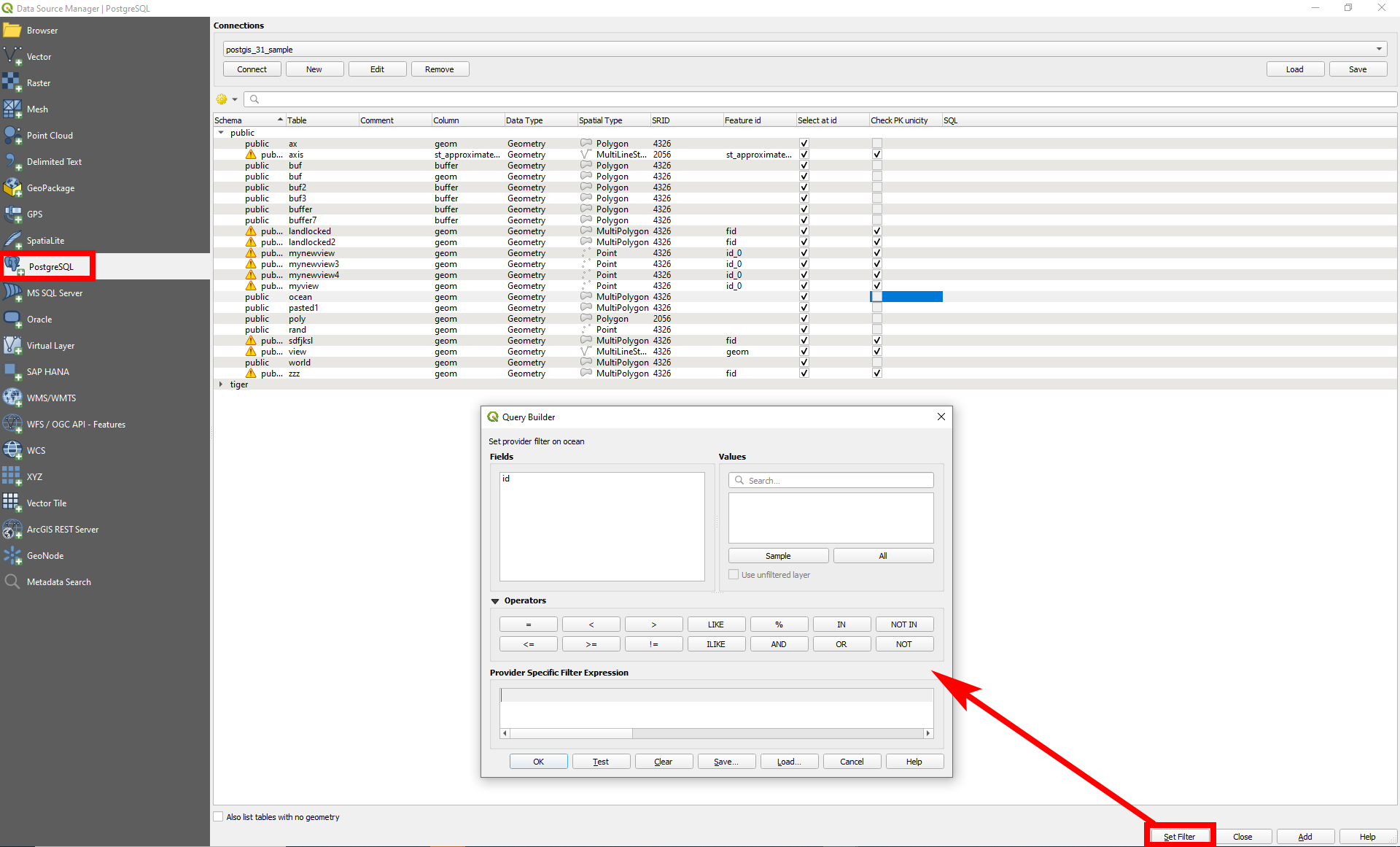
Option 1: Data source Mananger Filter
Use Data Source manager to load data. Before loading a table, click on Set Filter at the bottom of the page. Like this, you can filter before loading data. Demonstrated on this screenshot with a PostGIS database, but works the same for SpatiaLite connections:
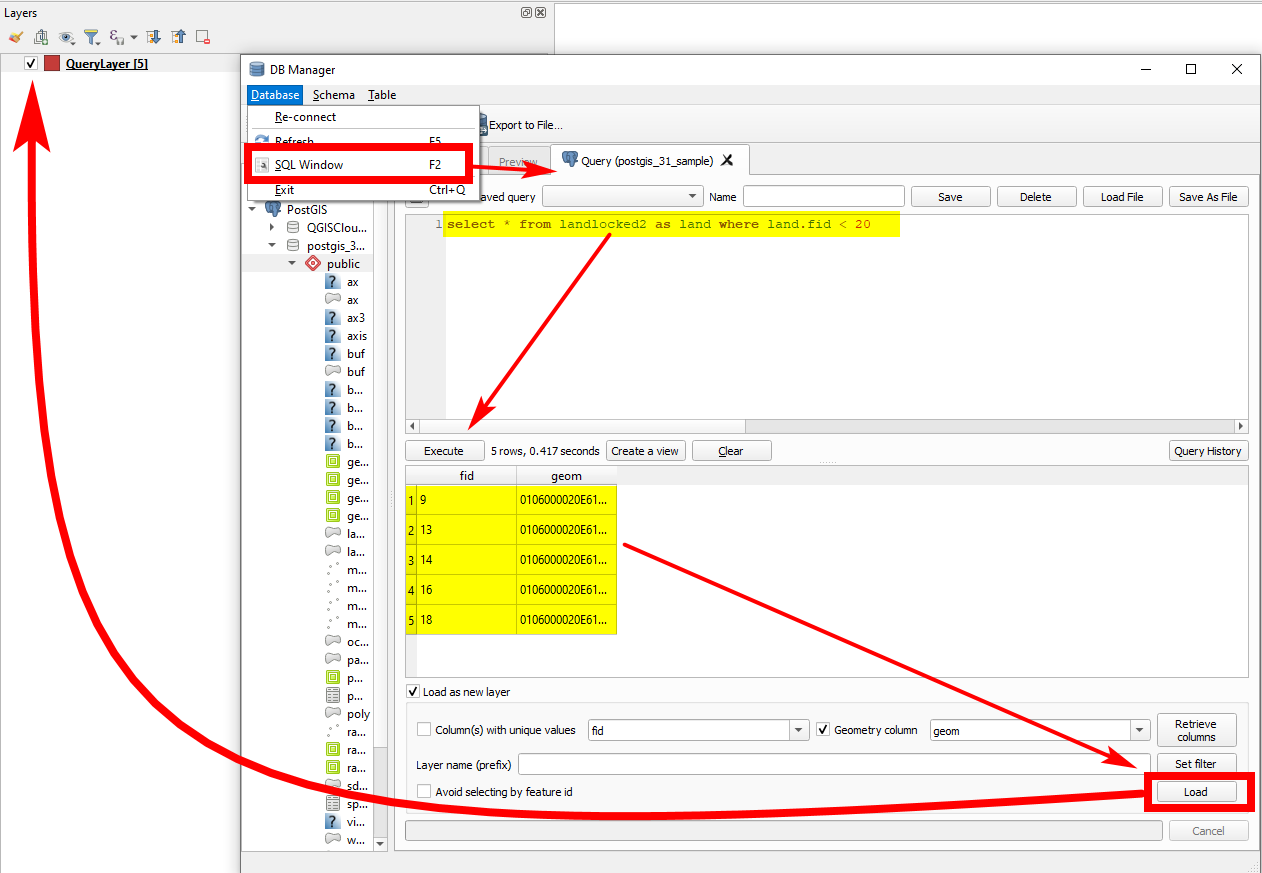
Option 2: DB Manager Query
In DB Manager, click Menu Database > SQL window (or press F2). Insert your query and than click to load as a layer:
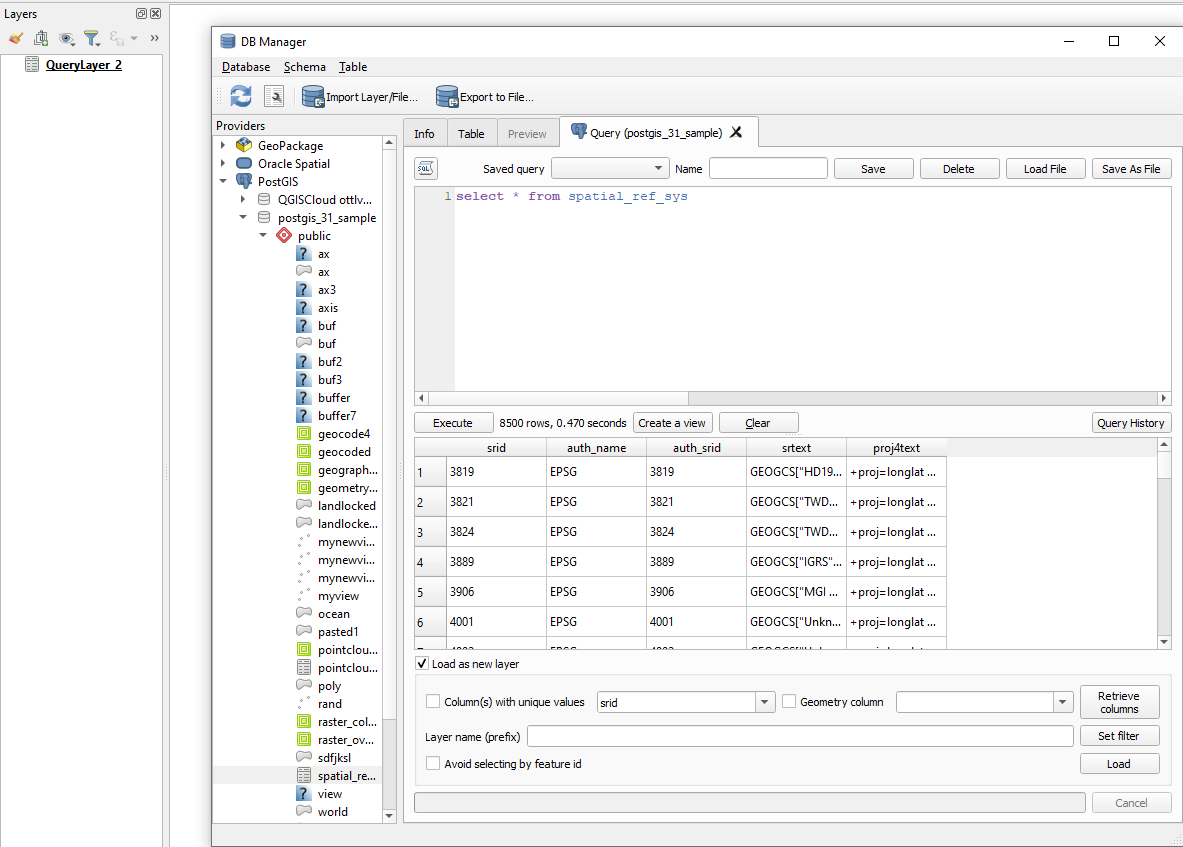
See for non spatial tables:
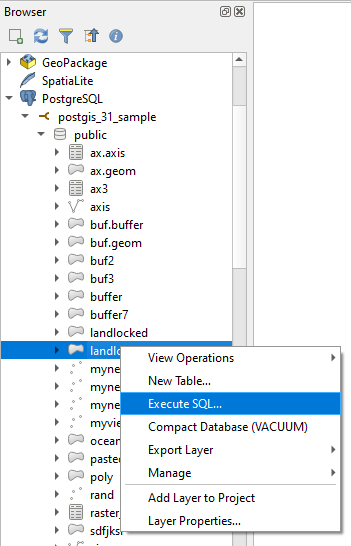
Option 3: Browser Panel SQL
Open the database in Browser Panel, right-click the table and select Execute SQL...
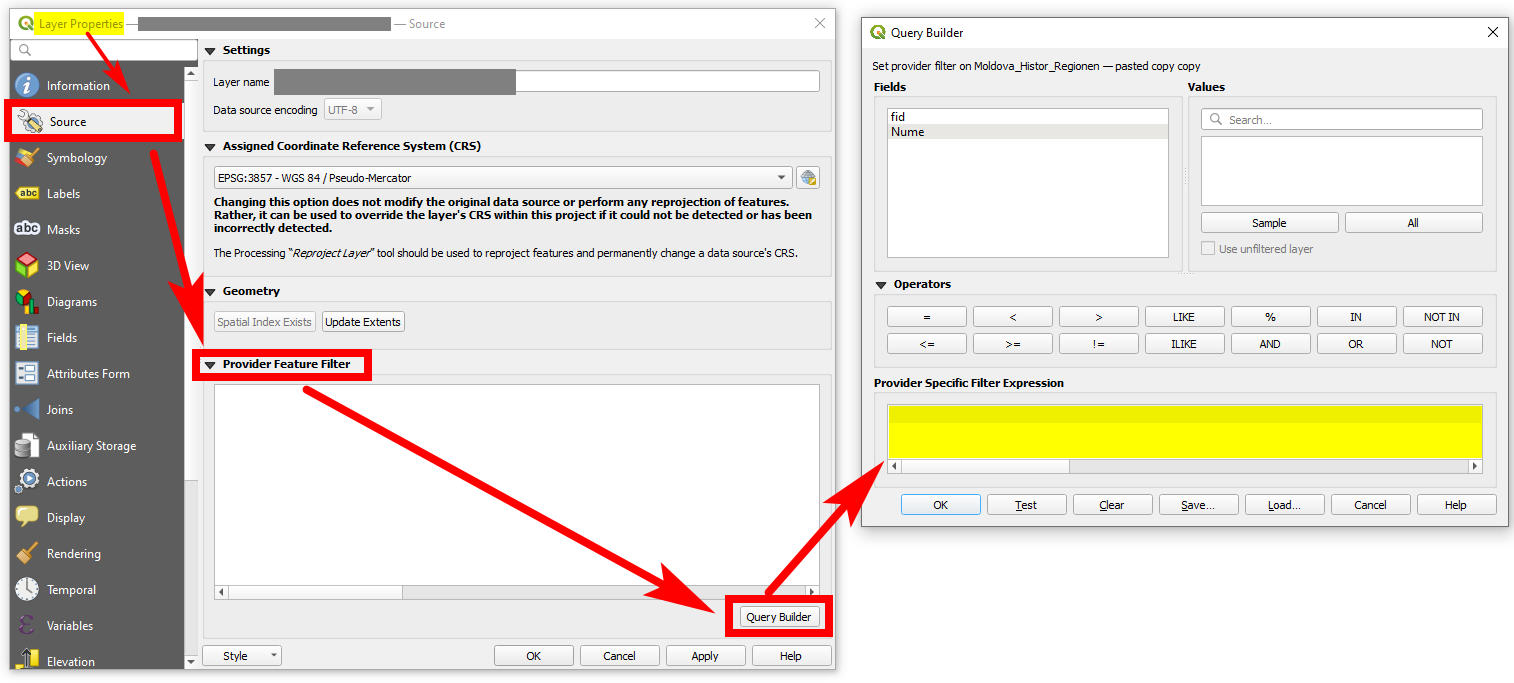
Option 4: Provider Feature Filter
Use Provider Feature Filter to only load a selection of all features of the source to QGIS. You can find it in Layer Properties (right click layer) > Source tab. Expand Provider Feature Filter and click on Query Builder.
Be aware (from documentation):
The filter is made at the data provider (OGR, PostgreSQL, MSSQL…) level. So the syntax depends on the data provider (DateTime is for instance not supported for the ESRI Shapefile format).

- Thank you, but the idea behind this is to avoid the load of the whole table in the first place. In this method still have to load everything before filtering the data, also this doesn't allow the use of aggregation functions.Ariel– Ariel2022-11-08 20:18:03 +00:00Commented Nov 8, 2022 at 20:18
- 1See updated answer, option 1.Babel– Babel2022-11-08 20:35:42 +00:00Commented Nov 8, 2022 at 20:35
- This is really interesting but my database is non-spatial so it is an SQLite DB and not SpatiaLite, that means if I try to connect through Data Source Manager | SpatiLite it gives me a metadata check failed error, with the message really a SpatiaLite database?Ariel– Ariel2022-11-08 20:47:25 +00:00Commented Nov 8, 2022 at 20:47
- And if you confirm it is a SpatialLite db, what happens? In fact, SpatiaLite is an extension to SQLite - so in my undertanding, if you can load a spatial version of SQLite (geometry + data), a non-spatial ("simple": data without geometry) should be possible to load - shouldn't it?Babel– Babel2022-11-08 20:50:15 +00:00Commented Nov 8, 2022 at 20:50
- 1Yes, I guess it is not the lack of possibilities to do what you want, but that the database you use drops an error. You should provide more info. As it is written now, the question is about possibilities to apply an SQL query to load data. As shown, this is possible. So you should focus more on the specific problem in your case, maybe opening a new post.Babel– Babel2022-11-08 21:31:32 +00:00Commented Nov 8, 2022 at 21:31
There is one more option that is supported by GDAL but unfortunately not by QGIS.
It is possible to write a virtual GDAL vector data source than includes a SQL query by following the manual https://gdal.org/drivers/vector/vrt.html.
A simple example follows. The source layer "foo" contains 3 features but the SQL selects only one.
<OGRVRTDataSource> <OGRVRTLayer name="foo"> <SrcDataSource>onlyattributes.sqlite</SrcDataSource> <SrcSQL>SELECT * from foo where bar='test2'</SrcSQL> </OGRVRTLayer> </OGRVRTDataSource> Test with ogrinfo is successful
ogrinfo onlyattributes_with_sql_select.vrt -al INFO: Open of `onlyattributes_with_sql_select.vrt' using driver `OGR_VRT' successful. Layer name: foo Geometry: None Feature Count: 1 Layer SRS WKT: (unknown) bar: String (0.0) OGRFeature(foo):0 bar (String) = test2 Unfortunately there seems to be a bug or a missing feature in QGIS and it does not handle the OGR VRT format right. It is possible to select a .vrt file as a new GDAL/OGR vector data source and a new layer appears into QGIS, but it is always empty. The same happens even when the .vrt file contains also geometries.
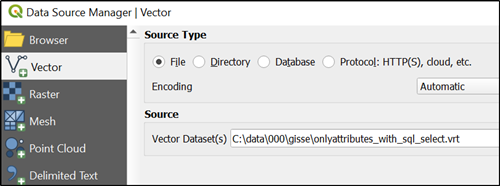

- OGR VRT datasources are supported by QGIS as well. You only need to add the complete file path
<SrcDataSource>C:\data\000\gisse\onlyattributes.sqlite</SrcDataSource>.christoph– christoph2025-03-08 12:16:12 +00:00Commented Mar 8 at 12:16 - The above example does not need full path if the source SQLite is in the same directory than the VRT. See relativeToVRT in gdal.org/en/stable/drivers/vector/vrt.html#ogrvrtlayer-element Defaults to OFF for SrcLayer use and ON for SrcSQL use. Notice the use of SrcSQ in the VRT.user30184– user301842025-03-08 21:16:00 +00:00Commented Mar 8 at 21:16
- The example doesn't need full path if you add
relativeToVRT="1"(default value is "0"). if you read carefully, you will notice that ON/OFF refers to thesharedattribute.christoph– christoph2025-03-09 07:42:42 +00:00Commented Mar 9 at 7:42 - 1I understand now, and you are right. My ogrinfo test did work because I was running the command from the same directory where I had the data file and the VRT.user30184– user301842025-03-09 13:21:52 +00:00Commented Mar 9 at 13:21
It's been a few years since I tried to solve a similar problem. I wanted to join an Oracle point layer with an MSSQL non-spatial table using OGR VRT (see GDAL/OGR Error: Cyclic VRT opening detected). The OGR VRT driver does not care whether the data source is geospatial or not.
In my first attempt with GDAL 1.10.1, I called the VRT file myJoin.ovf cyclically, which worked perfectly in this GDAL version:
<!-- file: myJoin.ovf --> <OGRVRTDataSource> <OGRVRTLayer name="mssql"> <SrcDataSource relativeToVRT="1">mssql.ovf</SrcDataSource> <GeometryType>wkbNone</GeometryType> <SrcSQL>SELECT * from mssql</SrcSQL> </OGRVRTLayer> <OGRVRTLayer name="oracle"> <SrcDataSource relativeToVRT="1">oracle.ovf</SrcDataSource> <GeometryType>wkbPoint</GeometryType> <SrcLayer>oracle</SrcLayer> </OGRVRTLayer> <OGRVRTLayer name="myJoin"> <SrcDataSource relativeToVRT="1">myJoin.ovf</SrcDataSource> <GeometryType>wkbPoint</GeometryType> <SrcSQL dialect="sqlite"> SELECT o.*,m.ui_status from oracle o left join mssql m on o.uwi = m.ui </SrcSQL> </OGRVRTLayer> </OGRVRTDataSource> Unfortunately, with GDAL 2.2.4 this was not possible anymore, because GDAL prevents cyclic VRT opening.
ogrinfo (GDAL 2.2.4) throws an error:
D:\data>ogrinfo -ro myJoin.ovf INFO: Open of `myJoin.ovf' using driver `OGR_VRT' successful. 1: MSSQL (None) 2: ORACLE (Point) 3: MYJOINERROR 1: Cyclic VRT opening detected ! (None) To solve this problem, we can either put the "myJoin" layer in a second VRT file, which was not my initial intention, or use an inline datasource definition for SrcDataSource. GDAL VRT has allowed to use inline datasource definitions for many years. We must replace the relative file names with absolute file names, remove the SrcDataSource attribute “relativeToVRT” and replace all “<” and “>” with “<” and “>”:
<!-- file: myJoin.ovf --> <OGRVRTDataSource> <OGRVRTLayer name="myJoin"> <SrcDataSource><OGRVRTDataSource><OGRVRTLayer name="mssql"><SrcDataSource>d:/data/mssql.ovf</SrcDataSource><GeometryType>wkbNone</GeometryType><SrcSQL>SELECT * from mssql</SrcSQL></OGRVRTLayer><OGRVRTLayer name="oracle"><SrcDataSource>d:/data/oracle.ovf</SrcDataSource><GeometryType>wkbPoint</GeometryType><SrcLayer>oracle</SrcLayer></OGRVRTLayer></OGRVRTDataSource></SrcDataSource> <GeometryType>wkbPoint</GeometryType> <SrcSQL dialect="sqlite"> SELECT o.*,m.ui_status from oracle o left join mssql m on o.uwi = m.ui </SrcSQL> </OGRVRTLayer> </OGRVRTDataSource> 
The DB must have the spatial metadata even if the specific table doesn't have spatial data to be correctly recognized by qgis