异步爬虫代理池,以 Python asyncio 为基础,旨在充分利用 Python 的异步性能。
项目使用了 sanic,(也提供了 Flask)一个异步网络框架。所以建议运行 Python 环境为 Python3.5+,并且 sanic 不支持 Windows 系统,Windows 用户(比如我 😄)可以考虑使用 Ubuntu on Windows。
项目数据库使用了 Redis,Redis 是一个开源(BSD 许可)的,内存中的数据结构存储系统,它可以用作数据库、缓存和消息中间件。所以请确保运行环境已经正确安装了 Redis。安装方法请参照官网指南。
$ git clone https://github.com/chenjiandongx/async-proxy-pool.git使用 requirements.txt
$ pip install -r requirements.txt配置文件 config.py,保存了项目所使用到的所有配置项。如下所示,用户可以根据需求自行更改。不然按默认即可。
#!/usr/bin/env python # coding=utf-8 # 请求超时时间(秒) REQUEST_TIMEOUT = 15 # 请求延迟时间(秒) REQUEST_DELAY = 0 # redis 地址 REDIS_HOST = "localhost" # redis 端口 REDIS_PORT = 6379 # redis 密码 REDIS_PASSWORD = None # redis set key REDIS_KEY = "proxies:ranking" # redis 连接池最大连接量 REDIS_MAX_CONNECTION = 20 # REDIS SCORE 最大分数 MAX_SCORE = 10 # REDIS SCORE 最小分数 MIN_SCORE = 0 # REDIS SCORE 初始分数 INIT_SCORE = 9 # server web host SERVER_HOST = "localhost" # server web port SERVER_PORT = 3289 # 是否开启日志记录 SERVER_ACCESS_LOG = True # 批量测试数量 VALIDATOR_BATCH_COUNT = 256 # 校验器测试网站,可以定向改为自己想爬取的网站,如新浪,知乎等 VALIDATOR_BASE_URL = "https://httpbin.org/" # 校验器循环周期(分钟) VALIDATOR_RUN_CYCLE = 15 # 爬取器循环周期(分钟) CRAWLER_RUN_CYCLE = 30 # 请求 headers HEADERS = { "X-Requested-With": "XMLHttpRequest", "User-Agent": "Mozilla/5.0 (Windows NT 10.0; WOW64) AppleWebKit/537.36 " "(KHTML, like Gecko) Chrome/56.0.2924.87 Safari/537.36", }运行客户端,启动收集器和校验器
# 可设置校验网站环境变量 set/export VALIDATOR_BASE_URL="https://example.com" $ python client.py 2018-05-16 23:41:39,234 - Crawler working... 2018-05-16 23:41:40,509 - Crawler √ http://202.83.123.33:3128 2018-05-16 23:41:40,509 - Crawler √ http://123.53.118.122:61234 2018-05-16 23:41:40,510 - Crawler √ http://212.237.63.84:8888 2018-05-16 23:41:40,510 - Crawler √ http://36.73.102.245:8080 2018-05-16 23:41:40,511 - Crawler √ http://78.137.90.253:8080 2018-05-16 23:41:40,512 - Crawler √ http://5.45.70.39:1490 2018-05-16 23:41:40,512 - Crawler √ http://117.102.97.162:8080 2018-05-16 23:41:40,513 - Crawler √ http://109.185.149.65:8080 2018-05-16 23:41:40,513 - Crawler √ http://189.39.143.172:20183 2018-05-16 23:41:40,514 - Crawler √ http://186.225.112.62:20183 2018-05-16 23:41:40,514 - Crawler √ http://189.126.66.154:20183 ... 2018-05-16 23:41:55,866 - Validator working... 2018-05-16 23:41:56,951 - Validator × https://114.113.126.82:80 2018-05-16 23:41:56,953 - Validator × https://114.199.125.242:80 2018-05-16 23:41:56,955 - Validator × https://114.228.75.17:6666 2018-05-16 23:41:56,957 - Validator × https://115.227.3.86:9000 2018-05-16 23:41:56,960 - Validator × https://115.229.88.191:9000 2018-05-16 23:41:56,964 - Validator × https://115.229.89.100:9000 2018-05-16 23:41:56,966 - Validator × https://103.18.180.194:8080 2018-05-16 23:41:56,967 - Validator × https://115.229.90.207:9000 2018-05-16 23:41:56,968 - Validator × https://103.216.144.17:8080 2018-05-16 23:41:56,969 - Validator × https://117.65.43.29:31588 2018-05-16 23:41:56,971 - Validator × https://103.248.232.135:8080 2018-05-16 23:41:56,972 - Validator × https://117.94.69.166:61234 2018-05-16 23:41:56,975 - Validator × https://103.26.56.109:8080 ...运行服务器,启动 web 服务
$ python server_sanic.py [2018-05-16 23:36:22 +0800] [108] [INFO] Goin' Fast @ http://localhost:3289 [2018-05-16 23:36:22 +0800] [108] [INFO] Starting worker [108]$ python server_flask.py * Serving Flask app "async_proxy_pool.webapi_flask" (lazy loading) * Environment: production WARNING: Do not use the development server in a production environment. Use a production WSGI server instead. * Debug mode: on * Restarting with stat * Debugger is active! * Debugger PIN: 322-954-449 * Running on http://localhost:3289/ (Press CTRL+C to quit)项目主要几大模块分别是爬取模块,存储模块,校验模块,调度模块,接口模块。
爬取模块:负责爬取代理网站,并将所得到的代理存入到数据库,每个代理的初始化权值为 INIT_SCORE。
存储模块:封装了 Redis 操作的一些接口,提供 Redis 连接池。
校验模块:验证代理 IP 是否可用,如果代理可用则权值 +1,最大值为 MAX_SCORE。不可用则权值 -1,直至权值为 0 时将代理从数据库中删除。
调度模块:负责调度爬取器和校验器的运行。
接口模块:使用 sanic 提供 WEB API 。
/
欢迎页面
$ http http://localhost:3289/ HTTP/1.1 200 OK Connection: keep-alive Content-Length: 42 Content-Type: application/json Keep-Alive: 5 { "Welcome": "This is a proxy pool system." }/pop
随机返回一个代理,分三次尝试。
- 尝试返回权值为 MAX_SCORE,也就是最新可用的代理。
- 尝试返回随机权值在 (MAX_SCORE -3) - MAX_SCORE 之间的代理。
- 尝试返回权值在 0 - MAX_SCORE 之间的代理
$ http http://localhost:3289/pop HTTP/1.1 200 OK Connection: keep-alive Content-Length: 38 Content-Type: application/json Keep-Alive: 5 { "http": "http://46.48.105.235:8080" }/get/<count:int>
返回指定数量的代理,权值从大到小排序。
$ http http://localhost:3289/get/10 HTTP/1.1 200 OK Connection: keep-alive Content-Length: 393 Content-Type: application/json Keep-Alive: 5 [ { "http": "http://94.177.214.215:3128" }, { "http": "http://94.139.242.70:53281" }, { "http": "http://94.130.92.40:3128" }, { "http": "http://82.78.28.139:8080" }, { "http": "http://82.222.153.227:9090" }, { "http": "http://80.211.228.238:8888" }, { "http": "http://80.211.180.224:3128" }, { "http": "http://79.101.98.2:53281" }, { "http": "http://66.96.233.182:8080" }, { "http": "http://61.228.45.165:8080" } ]/count
返回代理池中所有代理总数
$ http http://localhost:3289/count HTTP/1.1 200 OK Connection: keep-alive Content-Length: 15 Content-Type: application/json Keep-Alive: 5 { "count": "698" }/count/<score:int>
返回指定权值代理总数
$ http http://localhost:3289/count/10 HTTP/1.1 200 OK Connection: keep-alive Content-Length: 15 Content-Type: application/json Keep-Alive: 5 { "count": "143" } /clear/<score:int>
删除权值小于等于 score 的代理
$ http http://localhost:3289/clear/0 HTTP/1.1 200 OK Connection: keep-alive Content-Length: 22 Content-Type: application/json Keep-Alive: 5 { "Clear": "Successful" }在 crawler.py 文件里新增你自己的爬取方法。
class Crawler: @staticmethod def run(): ... # 新增你自己的爬取方法 @staticmethod @collect_funcs # 加入装饰器用于最后运行函数 def crawl_xxx(): # 爬取逻辑本项目使用了 Sanic,但是开发者完全可以根据自己的需求选择其他 web 框架,web 模块是完全独立的,替换框架不会影响到项目的正常运行。需要如下步骤。
使用 wrk 进行服务器压力测试。基准测试 30 秒, 使用 12 个线程, 并发 400 个 http 连接。
$ wrk -t12 -c400 -d30s http://127.0.0.1:3289/pop Running 30s test @ http://127.0.0.1:3289/pop 12 threads and 400 connections Thread Stats Avg Stdev Max +/- Stdev Latency 350.37ms 118.99ms 660.41ms 60.94% Req/Sec 98.18 35.94 277.00 79.43% 33694 requests in 30.10s, 4.77MB read Socket errors: connect 0, read 340, write 0, timeout 0 Requests/sec: 1119.44 Transfer/sec: 162.23KB测试 http://127.0.0.1:3289/get/10
Running 30s test @ http://127.0.0.1:3289/get/10 12 threads and 400 connections Thread Stats Avg Stdev Max +/- Stdev Latency 254.90ms 95.43ms 615.14ms 63.51% Req/Sec 144.84 61.52 320.00 66.58% 46538 requests in 30.10s, 22.37MB read Socket errors: connect 0, read 28, write 0, timeout 0 Requests/sec: 1546.20 Transfer/sec: 761.02KB性能还算不错,再测试一下没有 Redis 操作的 http://127.0.0.1:3289/
$ wrk -t12 -c400 -d30s http://127.0.0.1:3289/ Running 30s test @ http://127.0.0.1:3289/ 12 threads and 400 connections Thread Stats Avg Stdev Max +/- Stdev Latency 127.86ms 41.71ms 260.69ms 55.22% Req/Sec 258.56 92.25 520.00 68.90% 92766 requests in 30.10s, 13.45MB read Requests/sec: 3081.87 Transfer/sec: 457.47KB⭐️ Requests/sec: 3081.87
关闭 sanic 日志记录,测试 http://127.0.0.1:3289/
$ wrk -t12 -c400 -d30s http://127.0.0.1:3289/ Running 30s test @ http://127.0.0.1:3289/ 12 threads and 400 connections Thread Stats Avg Stdev Max +/- Stdev Latency 34.63ms 12.66ms 96.28ms 58.07% Req/Sec 0.96k 137.29 2.21k 73.29% 342764 requests in 30.10s, 49.69MB read Requests/sec: 11387.89 Transfer/sec: 1.65MB⭐️ Requests/sec: 11387.89
test_proxy.py 用于测试实际代理性能
$ cd test $ python test_proxy.py # 可设置的环境变量 TEST_COUNT = os.environ.get("TEST_COUNT") or 1000 TEST_WEBSITE = os.environ.get("TEST_WEBSITE") or "https://httpbin.org/" TEST_PROXIES = os.environ.get("TEST_PROXIES") or "http://localhost:3289/get/20"测试代理: http://localhost:3289/get/20 测试网站: https://httpbin.org/ 测试次数: 1000 成功次数: 1000 失败次数: 0 成功率: 1.0 测试代理: http://localhost:3289/get/20 测试网站: https://taobao.com/ 测试次数: 1000 成功次数: 984 失败次数: 16 成功率: 0.984 测试代理: http://localhost:3289/get/20 测试网站: https://baidu.com 测试次数: 1000 成功次数: 975 失败次数: 25 成功率: 0.975 测试代理: http://localhost:3289/get/20 测试网站: https://zhihu.com 测试次数: 1000 成功次数: 1000 失败次数: 0 成功率: 1.0 可以看到其实性能是非常棒的,成功率极高。 😉
import random import requests # 确保已经启动 sanic 服务 # 获取多个然后随机选一个 try: proxies = requests.get("http://localhost:3289/get/20").json() req = requests.get("https://example.com", proxies=random.choice(proxies)) except: raise # 或者单独弹出一个 try: proxy = requests.get("http://localhost:3289/pop").json() req = requests.get("https://example.com", proxies=proxy) except: raise整个项目都是基于 aiohttp 这个异步网络库的,在这个项目的文档中,关于代理的介绍是这样的。
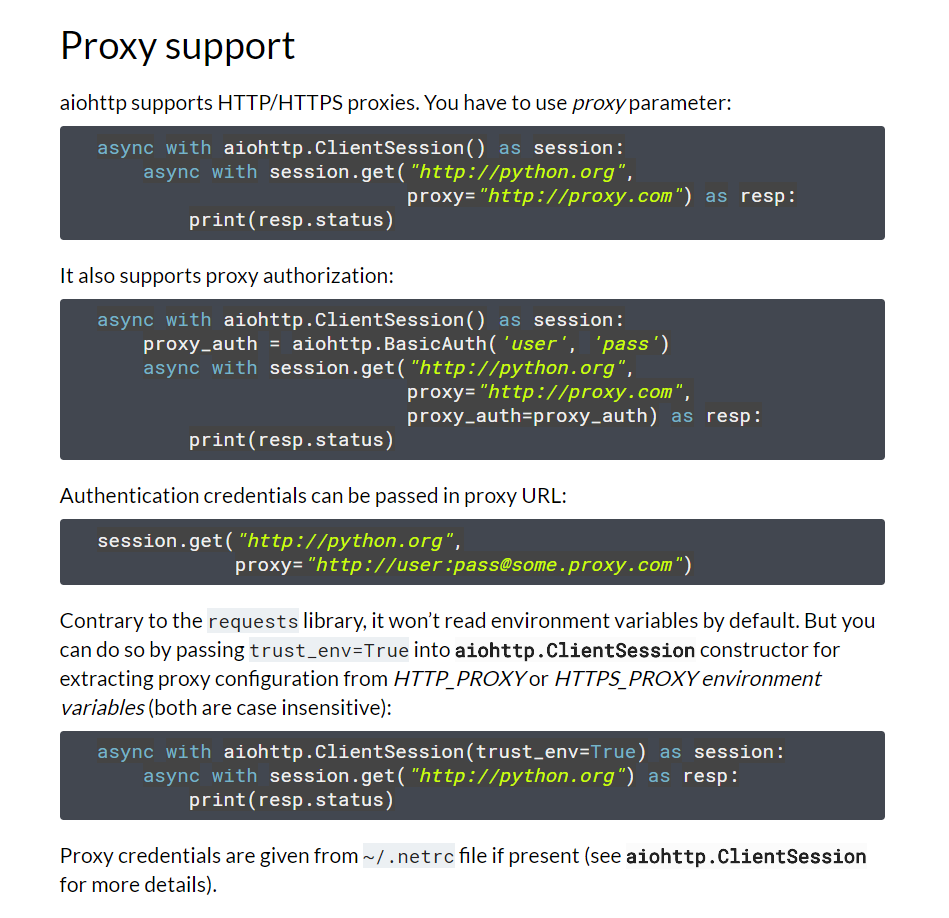
划重点:aiohttp supports HTTP/HTTPS proxies
但是,它根本就不支持 https 代理好吧,在它的代码中是这样写的。
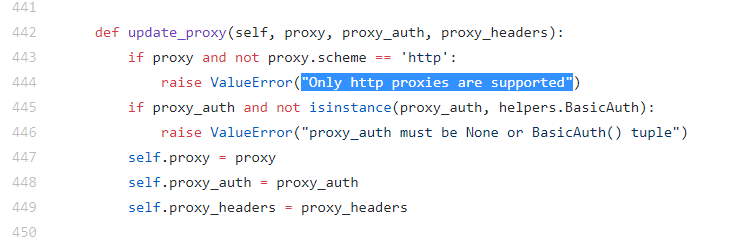
划重点:Only http proxies are supported
我的心情可以说是十分复杂的。😲 不过只有 http 代理效果也不错没什么太大影响,参见上面的测试数据。
✨🍰✨
MIT ©chenjiandongx