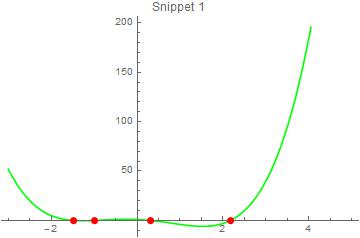
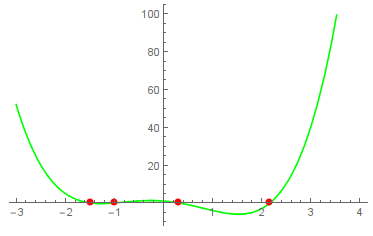
11
$\begingroup$

Bug introduced in 7.0.1 or earlier and persisting through 11.0.1 or later


While I've been thinking about this question, I tried to visualize the Intercepts. I use three snippets, actually snippet 1, 2 and 3. The visualization works as expected.

p[x_] := x^4 - 4 x^2 - 2 x + 1 solutions = NSolve[p[x] == 0, x] snippet1 = Plot[p[x], {x, -3, 3}, PlotStyle -> Green, MeshFunctions -> {p[x] /. x -> # &}, Mesh -> {{0}}, MeshStyle -> Directive[PointSize[Large], Red], PlotLabel -> "Snippet 1"]; snippet2 = Show[Plot[p[x], {x, -3, 3}, PlotStyle -> Brown], Graphics[{Red, PointSize[Large], Point[{x, p[x]} /. solutions]}], PlotLabel -> "Snippet 2"]; snippet3 = Plot[p[x], {x, -3, 3}, PlotStyle -> Blue, Epilog -> {PointSize[Large], Red, Point[{x, 0} /. NSolve[p[x]]]}, PlotLabel -> "Snippet 3"]; 
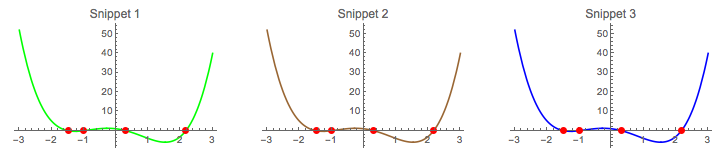
enter image description here

When applying snippet 1 with a larger xmin-value a fifth red spot appears. I do not observe this behavior on snippet 2 and 3. What's wrong with snippet 1, or with my knowledge/interpretation?

snippet1 = Plot[p[x], {x, -3, 4}, PlotStyle -> Green, MeshFunctions -> {p[x] /. x -> # &}, Mesh -> {{0}}, MeshStyle -> Directive[PointSize[Large], Red], PlotLabel -> "Snippet 1"] 
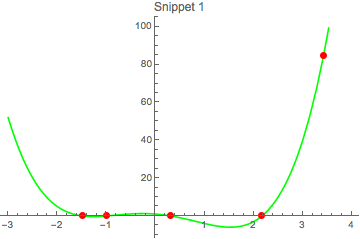
enter image description here

I'm on 10.0 for Mac OS X x86 (64-bit) (September 10, 2014).

$\endgroup$
4
  • 2
    $\begingroup$ This problem looks familiar, but perhaps it wasn't on this site that I've seen it. At least I can't find it. The problem goes back at least to V8.0.4 (Mac OS). It doesn't happen if you use PlotRange -> All. $\endgroup$ Commented Oct 15, 2014 at 3:28
  • $\begingroup$ @MichaelE2 Should this be tagged as a bug? $\endgroup$ Commented Oct 19, 2014 at 9:13
  • $\begingroup$ @Mr.Wizard Yes, I think it ought to be considered a bug. I've edited the question, hopefully in line with our current "bugs" style. $\endgroup$ Commented Oct 19, 2014 at 12:58
  • $\begingroup$ This still happens to 10.3. $\endgroup$ Commented Jan 17, 2016 at 12:55

2 Answers 2

7
$\begingroup$

A very good question. You should not rely on MeshFunctions.

Follow the old path step for step:

fun = x^4 - 4 x^2 - 2 x + 1; xvals = NSolve[fun == 0, x] // Values // Flatten 

{-1.48119, -1., 0.311108, 2.17009}

yvals = fun /. xvals // Chop 

{0, 0, 0, 0}

zeroes = Transpose[{xvals, yvals}] 

{{-1.48119, 0}, {-1., 0}, {0.311108, 0}, {2.17009, 0}}

snippet1 = Plot[fun, {x, -3, 5}, Epilog -> {Red, PointSize[0.02], Point /@ zeroes}, PlotStyle -> Green, PlotLabel -> "Snippet 1"] 

enter image description here

$\endgroup$
10
$\begingroup$

It looks like a bug. However there is a simple workaround: change the sign of your mesh function. In addition, p[x] /. x -> # & is equivalent to #2 &.

Plot[p[x], {x, -3, 4}, PlotStyle -> Green, MeshFunctions -> {-#2 &}, Mesh -> {{0}}, MeshStyle -> Directive[PointSize[Large], Red]] 

enter image description here

$\endgroup$
1
  • 1
    $\begingroup$ Yes, it's a bug, and your "workaround" profits from this bug. +1 anyway :) $\endgroup$ Commented Oct 14, 2014 at 20:39