


Update: I maintain the latest version of this function on my blog.
SaveToCell is a convenience-minded implementation of Vitaliy's idea. The code is at the end.
Description
SaveToCell[var] creates an input cell that re-assigns the value of var. The right-hand-side of the assignment is displayed concisely in the notebook.
Usage example
range = Range[1000]; SaveToCell[range] This creates a new input cell:

Evaluating it re-assigns the value of range. The small panel with the label "data" can also be copied and pasted somewhere else in the notebook. It contains all the data in compressed form.
We can set a custom label instead of the default "data", using the second argument:
SaveToCell[range, Short[range]] 
Hovering the panel shows the time when it was saved.
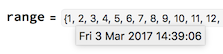
Any options will be passed down to the generated cell, so if you are worried about accidentally deleting your data, you can use
SaveToCell[var, Deletable -> False] (To delete such a cell, select its bracket, press Ctrl-Shift-E or Command-Shift-E on Mac to show its expression, and remove the Deletable option.)
Possible issues
SaveToCell re-evaluates the contents of the variable. Thus the following
var = {1, a}; a = 5; SaveToCell[var] will save {1,5} instead of {1,a} where a is a symbol.
In fact, the little panel is equivalent not even to {1,5} but to Uncompress["1:eJxTTMoPSmNiYGAoZgESPpnFJZmMQEYmK5AAAE4GBJg="]. This means that it will behave differently if copied and pasted inside of a Hold[...].
Code
ClearAll[SaveToCell] SaveToCell::usage = "SaveToCell[variable] creates an input cell that reassigns the current value of variable.\n" <> "SaveToCell[variables, display] shows 'display' on the right-hand-side of the assignment."; SetAttributes[SaveToCell, HoldFirst] SaveToCell[var_, name : Except[_?OptionQ] : "data", opt : OptionsPattern[]] := With[{data = Compress[var], panel = ToBoxes@Tooltip[Panel[name, FrameMargins -> Small], DateString[]]}, CellPrint@Cell[ BoxData@RowBox[{ MakeBoxes[var], "=", InterpretationBox[panel, Uncompress[data]], ";" }], "Input", GeneratedCell -> False opt, CellLabel -> "(saved)", CellLabelAutoDelete -> False ] ]