Transform: TRANSCODED LANDSCAPE
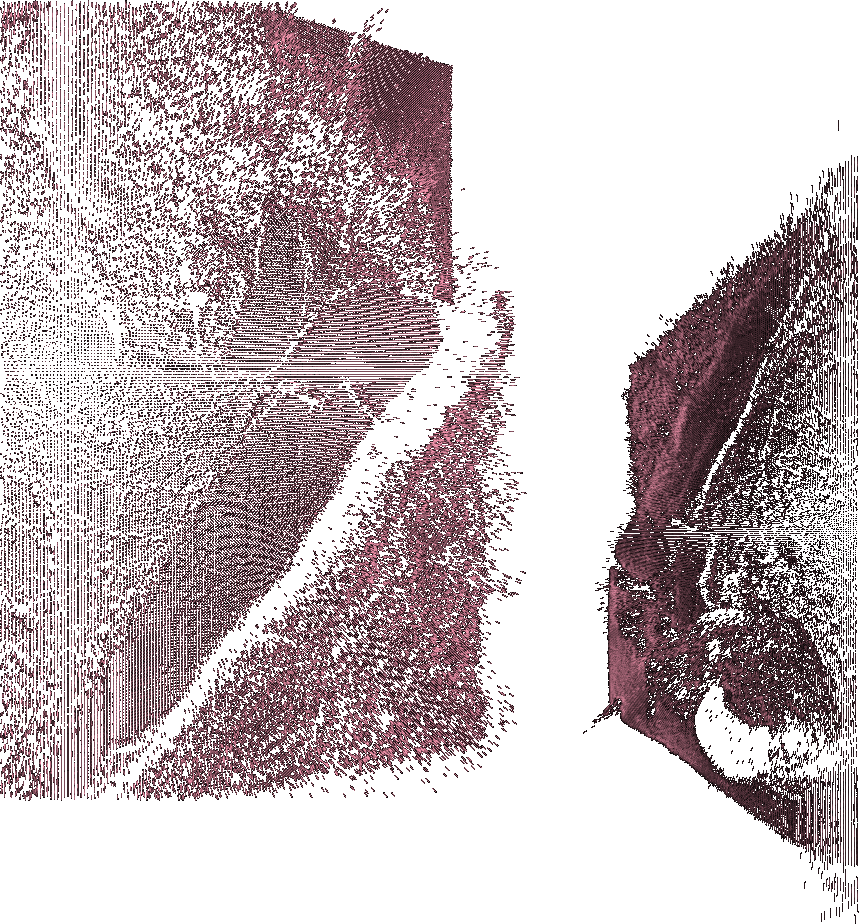
Photographic images can be a rich source of data, and transcoding can be used to interpret this data from a different perspective. Image extrusion is a visually appealing transcoding technique that creates depth from a 2-D picture.
This example loads a black-and-white image of an iceberg taken from a satellite, and it uses the gray value of each pixel to displace the position of a line along the z-axis. A black pixel value will have less displacement than a white one. This creates a dimensional surface that the program slowly turns to present it from multiple angles.
/** * Transform: Transcoded Landscape * from Form+Code in Design, Art, and Architecture * by Casey Reas, Chandler McWilliams, and LUST * Princeton Architectural Press, 2010 * ISBN 9781568989372 * * This code was written for Processing 1.2+ * Get Processing at http://www.processing.org/download */ import processing.opengl.*; PImage img; int[][] values; float angle; void setup() { size(1024, 768, OPENGL); noFill(); values = new int[width][height]; // Extract the brightness of each pixel in the image // and store in the "values" array img = loadImage("nasa-iceberg.jpg"); img.loadPixels(); for (int i = 0; i < img.height; i++) { for (int j = 0; j < img.width; j++) { color pixel = img.pixels[i*img.width + j]; values[j][i] = int(brightness(pixel)); } } } void draw() { background(0); // Set black background translate(width/2, height/2, 0); // Move to the center scale(4.0); // Scale to 400% // Update the angle angle += 0.005; rotateY(angle); // Display the image mass for (int i = 0; i < img.height; i += 2) { for (int j = 0; j < img.width; j += 2) { stroke(values[j][i], 153); float x1 = j-img.width/2; float y1 = i-img.height/2; float z1 = -values[j][i]/2; float x2 = j-img.width/2; float y2 = i-img.height/2; float z2 = -values[j][i]/2-4; line(x1, y1, z1, x2, y2, z2); } } } Contributed Examples
-
OpenFrameworks
/** * Transform: Landscape from Form+Code in Design, Art, and Architecture * implemented in OpenFrameworks by Anthony Stellato <http://rabbitattack.com/> * * Requires OpenFrameworks available at http://openframeworks.cc/ * * For more information about Form+Code visit http://formandcode.com */ // =========================================================== // - Transform_Landscape.h // =========================================================== #include "ofMain.h" class testApp : public ofBaseApp{ public: void setup(); void draw(); ofImage img; float angle; }; // =========================================================== // - Transform_Landscape.cpp // =========================================================== #include "Transform_Landscape.h" #define WIDTH 348 #define HEIGHT 600 int values[WIDTH][HEIGHT]; //-------------------------------------------------------------- void testApp::setup(){ ofSetFrameRate(60); ofEnableAlphaBlending(); ofNoFill(); angle = 0.0f; img.loadImage("nasa-iceberg.jpg"); unsigned char * pixels = img.getPixels(); for(int i = 0; i < HEIGHT; i++){ for(int j = 0; j < WIDTH; j++){ values[j][i] = pixels[(int)(i*WIDTH+j)]; } } } //-------------------------------------------------------------- void testApp::draw(){ ofBackground(0, 0, 0); ofTranslate(ofGetWidth()/2, ofGetHeight()/2, 0); ofRotate(ofRadToDeg(angle), 0, 1, 0); ofScale(2, 2, 2); angle += 0.005f; glBegin(GL_LINES); for(int i = 0; i < HEIGHT; i += 3){ for(int j = 0; j < WIDTH; j += 3){ float val = (float)values[j][i]; ofSetColor(val, val, val, 153); float x1 = j-WIDTH/2; float y1 = i-HEIGHT/2; float z1 = -val/2; float x2 = j-WIDTH/2; float y2 = i-HEIGHT/2; float z2 = -val/2-4; glVertex3f(x1, y1, z1); glVertex3f(x2, y2, z2); } } glEnd(); }
We are looking for implementations of the code examples in other programming languages to post on the site. If you would like to submit a sample, or if you find a bug, please write to