Configuring Cmd Prompt
The preferable way to run cmd.exe in ConEmu is predefined Task {cmd}, it runs cmd.exe with CmdInit.cmd initialization file.
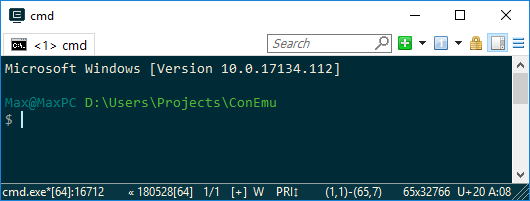
You may get git repository status in your prompt, just append -git switch after CmdInit.cmd in {cmd} task command.
Note Results of git status are parsed by cmd script and you may notice long lags if your repository has a lot of changed files.
Note Option ‘GuiMacro and Process execution’ should be enabled for cmd.exe on the ANSI execution settings page.
CmdInit options
When you run {cmd} task or any other task utilizing CmdInit.cmd you may set configuration variables on the Environment settings page:
| Variable | Value | Description |
|---|---|---|
ConEmuPromptNL | YES | (default) Use two-lines prompt: second line contains only $ or # (for elevated consoles) |
| NO | Use one-line prompt | |
ConEmuPromptNames | YES | (default) Print User@PC before current directory |
| NO | Omit User@PC from prompt |
Legacy PROMPT command
Note PROMPT command does not work in cmder or clink. PROMPT option is processed by cmd.exe only.
All configuration of cmd.exe prompt (color, text, linefeeds) is done either by the PROMPT command (run PROMPT /? for help) or the PROMPT environment variable.
The example below shows how the default ConEmu’s Task cmd (Admin) looks like:

If you run set PROMPT there you’ll see following configuration string:
$ set prompt PROMPT=$E[32m$E]9;8;"USERNAME"$E\@$E]9;8;"COMPUTERNAME"$E\$S$E[92m$P$E[90m$_$E[90m$$$E[m$S As I’ve said before all macros are described in the PROMPT /? printout. Also, there are some $E... macroses which are ANSI escape codes. For example, $E[32m is a standard ANSI color switch. But $E]9;8;"USERNAME" is a ConEmu extension to ANSI standard which prints the content of the USERNAME environment variable.
How to set up your prompt automatically
There are two ways actually. First one is to define PROMPT variable before cmd.exe starts. For example you may type the following in your Task:
set PROMPT=$P$_$G & cmd.exe And your prompt will looks like Directory + LineFeed + >.
Another way is to use initialization script. The nice example you may see in the ConEmu files: ConEmu\CmdInit.cmd. In breif you have to create YourInit.cmd file with following command:
PROMPT $P$_$G and run your cmd.exe as follows
cmd.exe /k YourInit.cmd Bottom line
Again, run PROMPT /? to learn possible macros and look at ANSI escape codes for the more power.