added 918 characters in body
Source Link
sepupic
  • 11.3k
  • 18
  • 27

As the OP updated the question saying he's open to another code, and the login is already granted access to the database, I suggest to only grant VIEW DEFINITION permissiononly grant VIEW DEFINITION permission on database to the user in question and use sys.allocation_units to get out index sizes like this:

And here is the link to technet article describing VIEW DEFINITION Permission

The VIEW DEFINITION permission lets a user see the metadata of the securable on which the permission is granted. However, VIEW DEFINITION permission does not confer access to the securable itself. For example, a user that is granted only VIEW DEFINITION permission on a table can see metadata related to the table in the sys.objects catalog view. However, without additional permissions such as SELECT or CONTROL, the user cannot read data from the table. For more information about viewing metadata, see GRANT (Transact-SQL).

In our case we grant VIEW DEFINITION on a database, so the user granted has no access to data itself but to all the metadata:

Database Scope

VIEW DEFINITION granted at this scope effectively negates permissions-based metadata access for the grantee in the specified database. This means that the grantee can see all metadata in the database context in which the GRANT statement is executed, unless the grantee is denied VIEW DEFINITION or CONTROL permissions at the schema scope or for an individual entity such as a table. For information about the syntax to use for this permission at this scope, see GRANT (Transact-SQL).

As the OP updated the question saying he's open to another code, and the login is already granted access to the database, I suggest to only grant VIEW DEFINITION permission to the user in question and use sys.allocation_units to get out index sizes like this:

As the OP updated the question saying he's open to another code, and the login is already granted access to the database, I suggest to only grant VIEW DEFINITION permission on database to the user in question and use sys.allocation_units to get out index sizes like this:

And here is the link to technet article describing VIEW DEFINITION Permission

The VIEW DEFINITION permission lets a user see the metadata of the securable on which the permission is granted. However, VIEW DEFINITION permission does not confer access to the securable itself. For example, a user that is granted only VIEW DEFINITION permission on a table can see metadata related to the table in the sys.objects catalog view. However, without additional permissions such as SELECT or CONTROL, the user cannot read data from the table. For more information about viewing metadata, see GRANT (Transact-SQL).

In our case we grant VIEW DEFINITION on a database, so the user granted has no access to data itself but to all the metadata:

Database Scope

VIEW DEFINITION granted at this scope effectively negates permissions-based metadata access for the grantee in the specified database. This means that the grantee can see all metadata in the database context in which the GRANT statement is executed, unless the grantee is denied VIEW DEFINITION or CONTROL permissions at the schema scope or for an individual entity such as a table. For information about the syntax to use for this permission at this scope, see GRANT (Transact-SQL).

added 918 characters in body
Source Link
sepupic
  • 11.3k
  • 18
  • 27

.....................................................................

Solution for only some databases:

As the OP updated the question saying he's open to another code, and the login is already granted access to the database, I suggest to only grant VIEW DEFINITION permission to the user in question and use sys.allocation_units to get out index sizes like this:

select object_name(i.object_id) as tbl_ename, i.name as idx_name, i.index_id as idx_id, cast(sum(a.used_pages) * 8 / 1024. as decimal(20,2)) as size_Mb from sys.indexes i join sys.partitions p on p.object_id = i.object_id and p.index_id = i.index_id join sys.allocation_units a on a.container_id = p.partition_id group by i.object_id, i.index_id, i.name order by object_name(i.object_id), i.index_id; 

.....................................................................

Solution for only some databases:

As the OP updated the question saying he's open to another code, and the login is already granted access to the database, I suggest to only grant VIEW DEFINITION permission to the user in question and use sys.allocation_units to get out index sizes like this:

select object_name(i.object_id) as tbl_ename, i.name as idx_name, i.index_id as idx_id, cast(sum(a.used_pages) * 8 / 1024. as decimal(20,2)) as size_Mb from sys.indexes i join sys.partitions p on p.object_id = i.object_id and p.index_id = i.index_id join sys.allocation_units a on a.container_id = p.partition_id group by i.object_id, i.index_id, i.name order by object_name(i.object_id), i.index_id; 
added 509 characters in body
Source Link
sepupic
  • 11.3k
  • 18
  • 27

I asked the OP if the code is intended to be executed on the whole server, i.e. in all databases or in some of them and still no anwer, so I suppose he needs the code to be executed in ALL databases:

managing an application with a large number of SQL Server 2014 databases I give the solution to all the server.

First, your login should access all the databases, and you accomplish this by granting him CONNECT ANY DATABASE PERMISSION

Then your login should access object definitions without accessing the data (here is a trade off: or you give the read access on all your tables, or you give the access on all definitions, this means all modules included, but no data access in this case, so I prefer the last one), this is given by VIEW ANY DEFINITION to login

These two permissions:

  • CONNECT ANY DATABASE PERMISSION

  • VIEW ANY DEFINITION

granted to login at the server level is the minimum set of permissions to find out all sizes of all indexes on the server, just change you code to use sys.allocation_units instead of sys.dm_db_partition_stats

But if you insists on your code using sys.dm_db_partition_stats it requires VIEW DATABASE STATE in every database, and you grant it by granting only 1 time VIEW SERVER STATE permission to your login

............................................ In reply to this one:

sys.indexes contains no rows if the user does not have permissions on any tables...

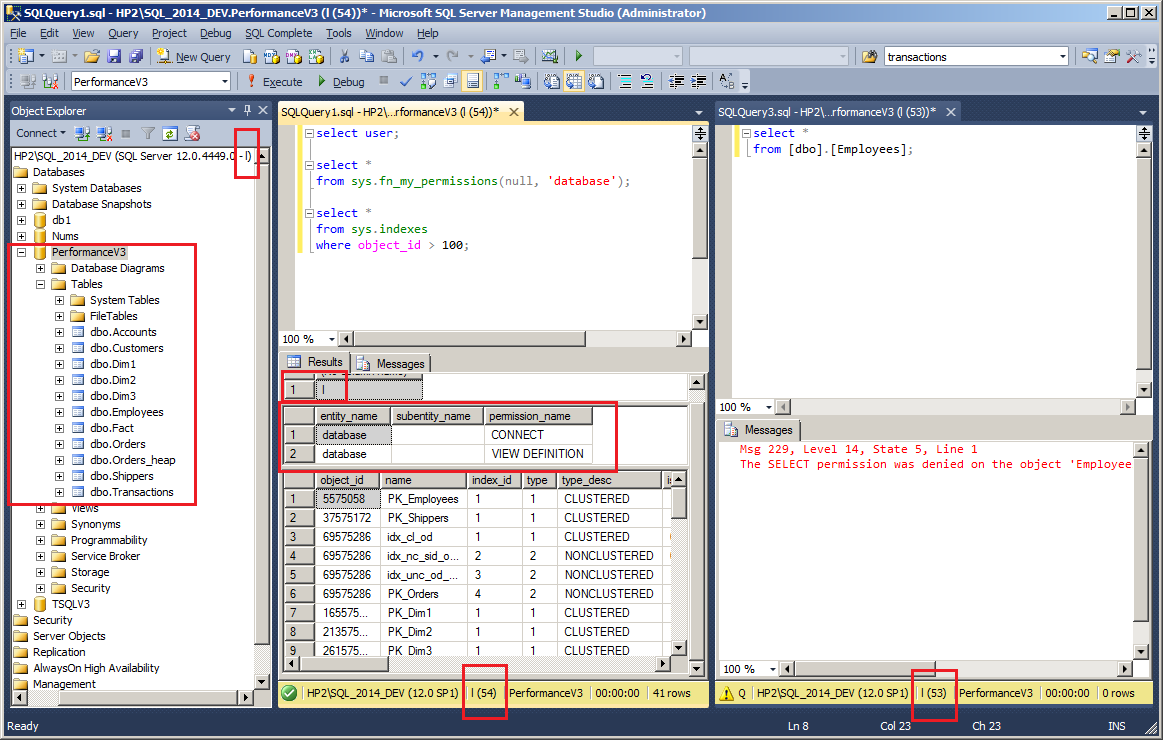
My user l has no SELECT permission in a database, but it "sees" all the tables(and other objects as well) in a database, and has no problem with sys.indexes while he cannot read any data; all he has in that database is VIEW DEFINITION permission

enter image description here

I asked the OP if the code is intended to be executed on the whole server, i.e. in all databases or in some of them and still no anwer, so I suppose he needs the code to be executed in ALL databases:

managing an application with a large number of SQL Server 2014 databases I give the solution to all the server.

First, your login should access all the databases, and you accomplish this by granting him CONNECT ANY DATABASE PERMISSION

Then your login should access object definitions without accessing the data (here is a trade off: or you give the read access on all your tables, or you give the access on all definitions, this means all modules included, but no data access in this case, so I prefer the last one), this is given by VIEW ANY DEFINITION to login

These two permissions:

  • CONNECT ANY DATABASE PERMISSION

  • VIEW ANY DEFINITION

granted to login at the server level is the minimum set of permissions to find out all sizes of all indexes on the server, just change you code to use sys.allocation_units instead of sys.dm_db_partition_stats

But if you insists on your code using sys.dm_db_partition_stats it requires VIEW DATABASE STATE in every database, and you grant it by granting only 1 time VIEW SERVER STATE permission to your login

I asked the OP if the code is intended to be executed on the whole server, i.e. in all databases or in some of them and still no anwer, so I suppose he needs the code to be executed in ALL databases:

managing an application with a large number of SQL Server 2014 databases I give the solution to all the server.

First, your login should access all the databases, and you accomplish this by granting him CONNECT ANY DATABASE PERMISSION

Then your login should access object definitions without accessing the data (here is a trade off: or you give the read access on all your tables, or you give the access on all definitions, this means all modules included, but no data access in this case, so I prefer the last one), this is given by VIEW ANY DEFINITION to login

These two permissions:

  • CONNECT ANY DATABASE PERMISSION

  • VIEW ANY DEFINITION

granted to login at the server level is the minimum set of permissions to find out all sizes of all indexes on the server, just change you code to use sys.allocation_units instead of sys.dm_db_partition_stats

But if you insists on your code using sys.dm_db_partition_stats it requires VIEW DATABASE STATE in every database, and you grant it by granting only 1 time VIEW SERVER STATE permission to your login

............................................ In reply to this one:

sys.indexes contains no rows if the user does not have permissions on any tables...

My user l has no SELECT permission in a database, but it "sees" all the tables(and other objects as well) in a database, and has no problem with sys.indexes while he cannot read any data; all he has in that database is VIEW DEFINITION permission

enter image description here

Source Link
sepupic
  • 11.3k
  • 18
  • 27
Loading