Groups Management
For general information about the group feature see group.
Related pages
group, user permissions, permissions, category, admin
Creating Groups
-
To create a group:
- Expand the Admin drop down:
- Click on Groups, you'll see the page below
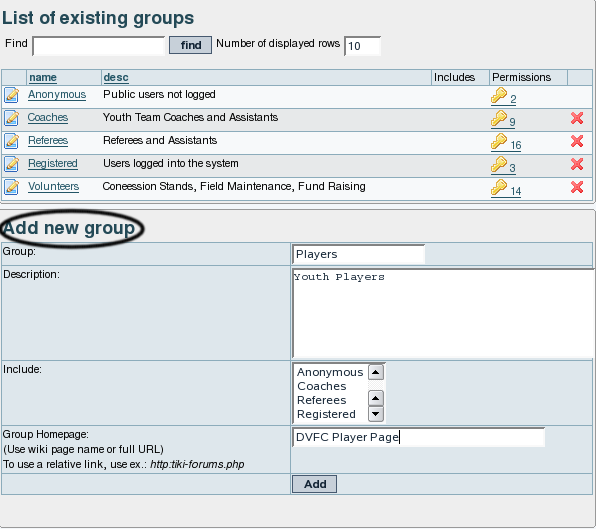
- Fill in the form with the group name and description
- If the group you are creating should be included as a sub-group of another group, use the include box to choose the group or group that the new group should be a part of.
Note: By default, all groups will include the Registered group. - If the group should have it's own homepage, put the wiki page name or full URL in the Home Page Box (Do not forget to have checked 'Use group homepages' in admin->general ) . Special value: the user homepage prefix (ex: UserPage) can be use to redirect a user to his homepage at login.
- When all fields have been filled in click the Add button. The form will refresh and you group will appear in the new list (see below)
- Group Default Category(Default category assigned to objects edited by a group user): (tw>=1.10)If a user with a default group (do not forget to set the default group for each user) edits (create or modify) an object and save the object without putting a category, the specified category is automatically assign to the object.
Assigning users to groups.
From the user administration screen click on the gold key to the right of the user line.
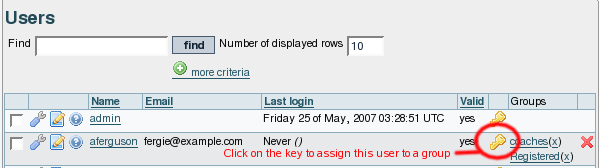
The assign user form will be opened (see below)

This form shows the user information, the group that the user already belongs to, and a list of group that the user can join. There are also shortcuts to group permissions, group admin, and user admin from this page.
Assigning permissions to groups.
From the group administration screen click on the gold key icon for a particular group and you will see a screen divided in two parts. The first part (see below)shows the permissions that are currently set for the group.

The lower part of the screen shows all the permissions available to the group, as well as details about the currently assigned permissions.
The entry below shows that the permission has been inherited from the permissions given to registered users. 
An entry like the one below shows that the group has permission to administer the feature, in this case, calendars. 
Additional permissions are assigned by clicking the checkboxes next to the permission, and then clicking the update button at the top or bottom of the page when finished.
Changing or Removing Groups

- To change a group, click on the group name
- To change permissions on a group, click on the key icon
- To remove a group, click on the X.
Changing group Settings
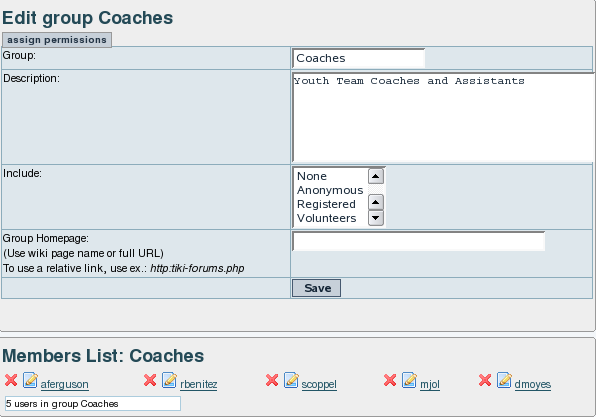
After clicking on the group you want to change, you'll see the form above.
- To change group Name, Description, Subgroups Included, or Homepage, edit the form and click the save button.
- To remove a group member, click on the red X next to the members name. __Note!: This does not remove the user, it just takes them out of the group.
Assigning a tracker to a group
see: Group Tracker
Group Permissions
In this section you can see information for the group that you selected as name, description and permissions assigned.
Then you can create a new permission level and you can if you want assign all the permissions in some level to the group. Or remove all the permissions in some level from this group. As you can see permissions are organized in levels. By default Tiki comes with four prearranged levels that you can modify as you want:
- Basic: permissions for anonymous users, basic site usage
- Registered: permissions for logged users
- Editor: Permissions to site editors can manipulate content.
- Admin: Permissions for admins only. Can be dangerous if misused
In the second part of the screen you can assign permissions and change levels.

The top section is used to select a permission category, for example games, forums, FAQs,etc. All can be used to see all the permissions at once (the screen will be VERY long). For each category for which permissions will be displayed the checkboxes indicate if the permission is assigned to the group or not. You can assign/remove permissions using the checkboxes; you can also change the level of any permission using the dropdown. In this way you can re-classify the permissions as you need and then easily assign all level-x permissions to a group whenever you want.
When a user belongs to more than one group the permissions are accumulated.
Permissions
Permissions are what group CAN do. Note that permissions always ALLOW group to do things; there are no restrictive permissions in Tiki because they can conflict if the user belongs to more than one group. The list of permissions that you can assign to group are:
General permissions
| tiki_p_admin | Administrator, can manage users group and permissions and all the weblog features |
| tiki_p_use_HTML | Can use HTML in pages |
| tiki_p_edit_templates | Can edit site templates |
| tiki_p_admin_dynamic | Can admin the dynamic content system |
| tiki_p_admin_banners | Administrator, can admin banners |
| tiki_p_admin_categories | Can admin categories |
| tiki_p_vote_poll | Can vote polls |
| tiki_p_edit_cookies | Can admin cookies |
| tiki_p_view_stats | Can view site stats |
| tiki_p_view_referer_stats | Can view referer stats |
| tiki_p_eph_admin | Can admin ephemerides |
| tiki_p_admin_mailin | Can admin mail-in accounts |
| tiki_p_edit_languages | Can edit translations and create new languages |
| tiki_p_admin_banning | Can ban users or ISP |
| tiki_p_create_css | Can create new css suffixed with -user |
Wiki permissions
| tiki_p_edit | Can edit pages |
| tiki_p_view | Can view page/pages |
| tiki_p_remove | Can remove |
| tiki_p_rollback | Can rollback pages |
| tiki_p_admin_wiki | Can admin the wiki |
| tiki_p_wiki_attach_files | Can attach files to wiki pages |
| tiki_p_wiki_admin_attachments | Can admin attachments to wiki pages |
| tiki_p_wiki_view_attachments | Can view wiki attachments and download |
| tiki_p_upload_picture | Can upload pictures to wiki pages |
| tiki_p_minor | Can save as minor edit |
| tiki_p_rename | Can rename pages |
| tiki_p_lock | Can lock pages |
| tiki_p_edit_structures | Can create and edit structures |
| tiki_p_edit_copyrights | Can edit copyright notices |
File galleries permissions
| tiki_p_admin_file_galleries | Can admin file galleries |
| tiki_p_create_file_galleries | Can create file galleries |
| tiki_p_upload_files | Can upload files |
| tiki_p_download_files | Can download files |
| tiki_p_view_file_gallery | Can view file galleries |
| tiki_p_batch_upload_files | Can upload zip files with files |
Comment permissions
| tiki_p_post_comments | Can post new comments |
| tiki_p_read_comments | Can read comments |
| tiki_p_remove_comments | Can delete comments |
| tiki_p_vote_comments | Can vote comments |
| tiki_p_edit_comments | Can edit all comments |
Blog permissions
| tiki_p_create_blogs | Can create a blog |
| tiki_p_blog_post | Can post to a blog |
| tiki_p_blog_admin | Can admin blogs |
| tiki_p_read_blog | Can read blogs |
Image gallery permissions
| tiki_p_admin_galleries | Can admin Image Galleries |
| tiki_p_create_galleries | Can create image galleries |
| tiki_p_upload_images | Can upload images |
| tiki_p_view_image_gallery | Can view image galleries |
| tiki_p_batch_upload_images | Can upload zip files with images |
Forums permissions
| tiki_p_admin_forum | Can admin forums |
| tiki_p_forum_post | Can post in forums |
| tiki_p_forum_post_topic | Can start threads in forums |
| tiki_p_forum_read | Can read forums |
| tiki_p_forum_vote | Can vote comments in forums |
| tiki_p_forums_report | Can report msgs to moderator |
| tiki_p_forum_attach | Can attach to forum posts |
| tiki_p_forum_autoapp | Auto approve forum posts |
Communications permissions
| tiki_p_send_pages | Can send pages to other sites |
| tiki_p_sendme_pages | Can send pages to this site |
| tiki_p_admin_received_pages | Can admin received pages |
| tiki_p_send_articles | Can send articles to other sites |
| tiki_p_sendme_articles | Can send articles to this site |
| tiki_p_admin_received_articles | Can admin received articles |
Games permissions
| tiki_p_play_games | Can play games |
| tiki_p_admin_games | Can admin games |
Quiz permissions
| tiki_p_admin_quizzes | Can admin quizzes |
| tiki_p_take_quiz | Can take quizzes |
| tiki_p_view_quiz_stats | Can view quiz stats |
| tiki_p_view_user_results | Can view user quiz results |
Articles & Submissions permissions
| tiki_p_edit_article | Can edit articles |
| tiki_p_remove_article | Can remove articles |
| tiki_p_read_article | Can read articles |
| tiki_p_submit_article | Can submit articles |
| tiki_p_edit_submission | Can edit submissions |
| tiki_p_remove_submission | Can remove submissions |
| tiki_p_approve_submission | Can approve submissions |
| tiki_p_admin_cms | Can admin the cms |
| tiki_p_autoapprove_submission | Submitted articles automatically approved |
FAQ permissions
| tiki_p_admin_faqs | Can admin FAQs |
| tiki_p_view_faqs | Can view FAQs |
| tiki_p_suggest_faq | Can suggest FAQ questions |
User permissions
| tiki_p_create_bookmarks | Can create user bookmarks |
| tiki_p_configure_modules | Can configure modules |
| tiki_p_cache_bookmarks | Can cache user bookmarks |
| tiki_p_usermenu | Can create items in personal menu |
| tiki_p_minical | Can use the mini event calendar |
| tiki_p_userfiles | Can upload personal files |
| tiki_p_tasks | Can use tasks |
| tiki_p_notepad | Can use the notepad |
| tiki_p_newsreader | Can use the newsreader |
Chat permissions
| tiki_p_admin_chat | Administrator, can create channels remove channels etc |
| tiki_p_chat | Can use the chat system |
Content template permissions
| tiki_p_edit_content_templates | templates Can edit content templates |
| tiki_p_use_content_templates | templates Can use content templates |
Shout box permissions
| tiki_p_view_shoutbox | Can view shoutbox |
| tiki_p_admin_shoutbox | Can admin shoutbox (Edit/remove msgs) |
| tiki_p_post_shoutbox | Can pot messages in shoutbox |
Drawing permissions
| tiki_p_admin_drawings | Can admin drawings |
| tiki_p_edit_drawings | Can edit drawings |
HTML page permissions
| tiki_p_view_html_pages | pages Can view HTML pages |
| tiki_p_edit_html_pages | pages Can edit HTML pages |
Tracker permissions
| tiki_p_modify_tracker_items | Can change tracker items |
| tiki_p_comment_tracker_items | Can insert comments for tracker items |
| tiki_p_create_tracker_items | Can create new items for trackers |
| tiki_p_admin_trackers | Can admin trackers |
| tiki_p_view_trackers | Can view trackers |
| tiki_p_attach_trackers | Can attach files to tracker items |
Survey permissions
| tiki_p_admin_surveys | Can admin surveys |
| tiki_p_take_survey | Can take surveys |
| tiki_p_view_survey_stats | Can view survey stats |
Webmail permissions
| tiki_p_use_webmail | Can use webmail |
Newsletter permissions
| tiki_p_admin_newsletters | Can admin newsletters |
| tiki_p_subscribe_newsletters | Can subscribe to newsletters |
| tiki_p_subscribe_email | Can subscribe any email to newsletters |
User message permissions
| tiki_p_messages | Can use the messaging system |
| tiki_p_broadcast | Can broadcast messages to group |
| tiki_p_broadcast_all | Can broadcast messages to all user |
DSNs
Permissions are created dynamically. See the Wiki SQL plugin for information
Directory permissions
| tiki_p_admin_directory | Can admin the directory |
| tiki_p_view_directory | Can use the directory |
| tiki_p_admin_directory_cats | Can admin directory categories |
| tiki_p_admin_directory_sites | Can admin directory sites |
| tiki_p_submit_link | Can submit sites to the directory |
| tiki_p_autosubmit_link | Submitted links are valid |
| tiki_p_validate_links | Can validate submitted links |
Charts
| tiki_p_admin_charts | Can admin charts |
| tiki_p_view_chart | Can view charts |
| tiki_p_vote_chart | Can vote |
| tiki_p_suggest_chart_item | charts Can suggest items |
| tiki_p_autoval_chart_suggestio | Autovalidate suggestions |
ExtWikis
missing permissions here
Live Support
| tiki_p_live_support_admin | Admin live support system |
| tiki_p_live_support | Can use live support system |
Calendar
| tiki_p_view_calendar | Can browse the calendar |
| tiki_p_change_events | Can change events in the calendar |
| tiki_p_add_events | Can add events in the calendar |
| tiki_p_admin_calendar | Can create/admin calendars |
Permissions for individual users
What if you want to give a specific user some permissions? Just create an artificial group, assign the user to that group and give the group the permissions that you need.
Individual permissions
As we explained you can set up individual permissions for some Tiki objects. When assigning individual permissions the permissions you can assign are the same as you have in the global permissions screen. Once an object has individual permissions only the individual permissions apply to the object, and not the global permissions.
The following objects accept individual permissions:
- Wiki pages
- Image galleries
- File galleries
- Forums
- Weblogs
- Newsletters
- Surveys
- Quizzes
- Trackers