

























Arduino Quick Start
2. Devices & Examples
3. M5Unified
4. M5GFX
5. Extensions
Unit
Base
Cap
IoT
Accessories
PowerHub Power
APIs and example programs related to PowerHub Power management.
Example Program
Compile Requirements
- M5Stack board manager version >= 3.2.3
- Board selection = M5PowerHub
- M5Unified library version >= 0.2.11
cpp
1 2 3 4 5 6 7 8 9 10 11 12 13 14 15 16 17 18 19 20 21 22 23 24 25 26 27 28 29 30 31 32 33 34 35 36 37 38 39 40 41 42 43 44 45 46 47 48 49 50 51
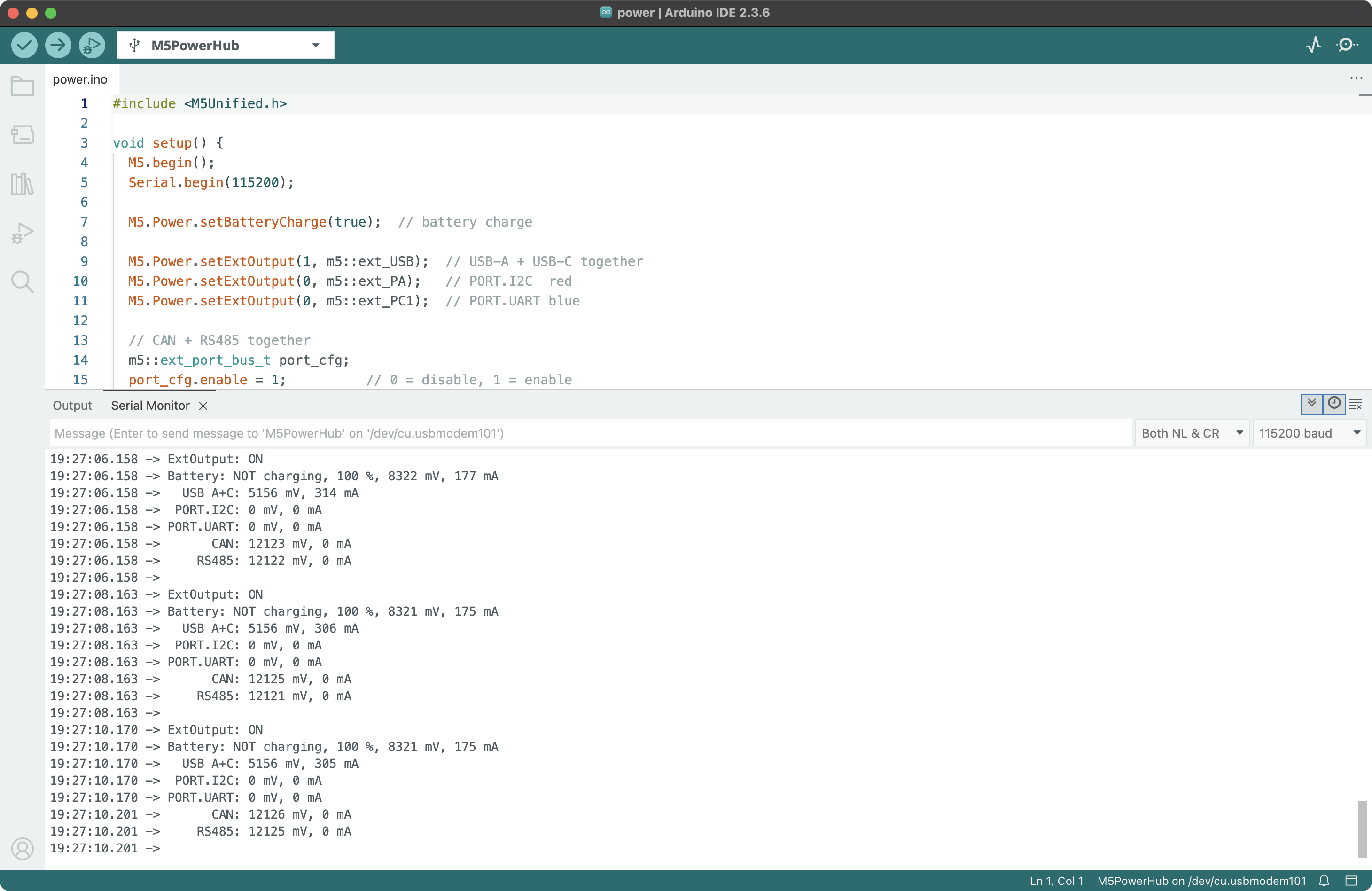
#include <M5Unified.h> void setup() { M5.begin(); Serial.begin(115200); M5.Power.setBatteryCharge(true); // battery charge M5.Power.setExtOutput(1, m5::ext_USB); // USB-A + USB-C together M5.Power.setExtOutput(0, m5::ext_PA); // PORT.I2C red M5.Power.setExtOutput(0, m5::ext_PC1); // PORT.UART blue // CAN + RS485 together m5::ext_port_bus_t port_cfg; port_cfg.enable = 1; // 0 = disable, 1 = enable port_cfg.direction = 1; // 0 = input, 1 = output port_cfg.voltage = 12000; // mV port_cfg.currentLimit = 300; // mA M5.Power.setExtPortBusConfig(port_cfg); // 5V OUT in the backside 2*8 pin pinMode(14, OUTPUT); digitalWrite(14, LOW); // LOW = disable, HIGH = enable } void loop() { M5.update(); Serial.printf("ExtOutput: %s", M5.Power.getExtOutput() ? "ON\n" : "OFF\n"); // 0 = all OFF, 1 = some or all ON Serial.printf("Battery: %s charging", M5.Power.isCharging() ? "IS" : "NOT"); Serial.printf(", %d %%", M5.Power.getBatteryLevel()); // 0 ~ 100 % Serial.printf(", %d mV", M5.Power.getBatteryVoltage()); // mV Serial.printf(", %d mA\n", M5.Power.getBatteryCurrent()); // mA, >0 = charge, <0 = discharge Serial.printf(" USB A+C: %d mV", M5.Power.getExtVoltage(m5::ext_USB)); // mV Serial.printf(", %d mA\n", M5.Power.getExtCurrent(m5::ext_USB)); // mA Serial.printf(" PORT.I2C: %d mV", M5.Power.getExtVoltage(m5::ext_PA)); // mV Serial.printf(", %d mA\n", M5.Power.getExtCurrent(m5::ext_PA)); // mA Serial.printf("PORT.UART: %d mV", M5.Power.getExtVoltage(m5::ext_PC1)); // mV Serial.printf(", %d mA\n", M5.Power.getExtCurrent(m5::ext_PC1)); // mA Serial.printf(" CAN: %d mV", M5.Power.getExtVoltage(m5::ext_PWRCAN)); // mV Serial.printf(", %d mA\n", M5.Power.getExtCurrent(m5::ext_PWRCAN)); // mA Serial.printf(" RS485: %d mV", M5.Power.getExtVoltage(m5::ext_PWR485)); // mV Serial.printf(", %d mA\n", M5.Power.getExtCurrent(m5::ext_PWR485)); // mA Serial.println(); delay(2000); // M5.Power.powerOff(); }This program controls the on/off state of each power output port and monitors the battery’s charging status, percentage, voltage, and current, as well as the voltage and current of each power output port.
API
The PowerHub Power management driver uses the Power_Class from the M5Unified library. For more related APIs, refer to the following documentation: