0

I am trying to create a smart contract and I am using ganache, visual studio code and truffle for that purpose. The versions installed in my windows system are: Truffle v5.1.49, Solidity v0.5.16 (solc-js), Node v12.19.0, and Web3.js v1.2.1. However, when I include pragma solidity ^0.5.0 in my sol file I get the following error:
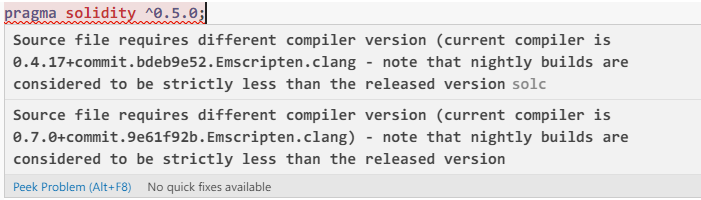
enter image description here

I have also explicitly stated the version in my truffle-config.js file, but it didn't resolve my problem.

2
  • 1
    Which editor are you using? Which plugin to highlight solidity are you using? VS Code + Solidity plugin suggest installing the correct version in the project folder. Commented Nov 12, 2020 at 21:55
  • The solidity plugin by Juan Blanco v0.0.76 in visual studio code editor. Commented Nov 13, 2020 at 15:21

2 Answers 2

1

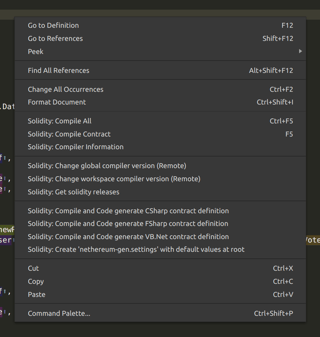
Right click a solidity file, it popup a menu with the option "Solidity: Change workspace compiler version (Remote)".

Change workspace compiler version popup

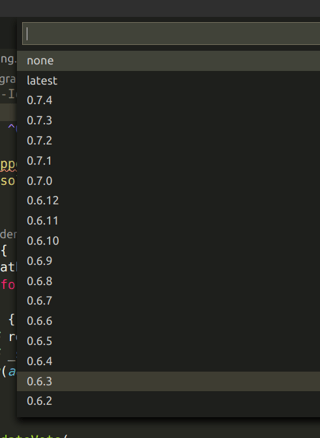
After a few seconds it will show a list of available versions to select.

solidity versions

After selecting desired version it will store it in .vscode/settings.json.

{ "solidity.compileUsingRemoteVersion": "v0.6.12+commit.27d51765" } 
0
0

I installed solc using npm and then specified solidity version in truffle-config.js. That solved my problem.

Start asking to get answers

Find the answer to your question by asking.

Ask question

Explore related questions

See similar questions with these tags.