deleted 79 characters in body; edited tags; edited title; deleted 37 characters in body
Source Link
PolyGeo
  • 65.5k
  • 29
  • 115
  • 353

How to find Finding disconnected islands in a road network layer, using QGIS

I have a road network layer that can't route from one side of the layer to the other. Topologically, there is no connectivity between the start and end nodes, probably due to missing links. This creates disconnected "islands" in the network graph.

How can I use QGIS or GRASS or a python plugin to analyse my road network, perhaps traversing it from the starting node, to the extents of the connected links?

The output can either be a group column, where all connected links will all have the same ID, and the number of distinct IDs will be the number of disconnected islands, or a colour coded equivalent, like the one below, produced by TransCAD.
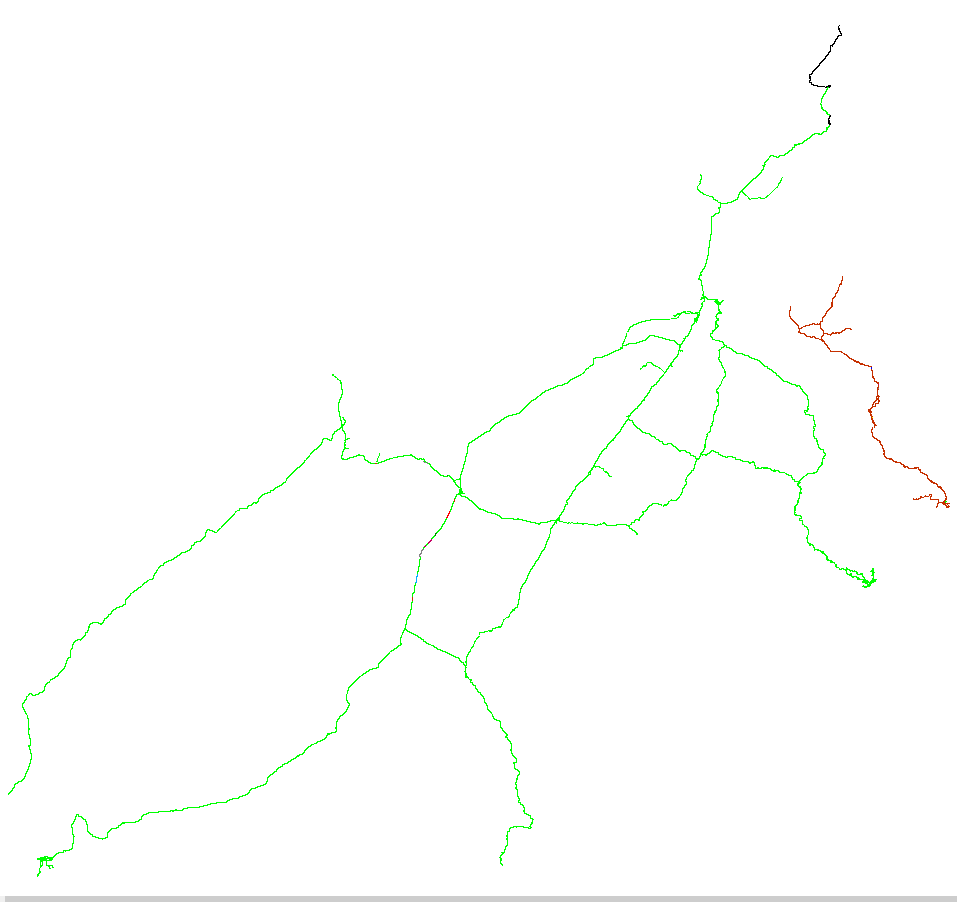
Image showing disconnected regions in different colours

I am using QGIS 2.14.0-Essen. I have tried Topology Checker, Processing modules (formerly Sextante toolbox), GRASS v.net, v.clean, etc, and PyQGIS Developer Cookbook (http://docs.qgis.org/testing/en/docs/pyqgis_developer_cookbook/network_analysis.html#areas-of-availability)

The next step is to try and iterate, from the starting node, all "touching" links, adding them to a selection set, until there are no further ones to add. Label these as group 1 and then move onto another link that has not been selected and repeat for group 2, and so on, until there are no more unselected links. But how do I do this easily?

Other tools, like ArcGIS, have a "Find Disconnected" tool. But but I am looking for a QGIS solution, please. An alternative might be the pgrouting.org extension for PostGIS.

How to find disconnected islands in a road network layer, using QGIS

I have a road network layer that can't route from one side of the layer to the other. Topologically, there is no connectivity between the start and end nodes, probably due to missing links. This creates disconnected "islands" in the network graph.

How can I use QGIS or GRASS or a python plugin to analyse my road network, perhaps traversing it from the starting node, to the extents of the connected links?

The output can either be a group column, where all connected links will all have the same ID, and the number of distinct IDs will be the number of disconnected islands, or a colour coded equivalent, like the one below, produced by TransCAD.

Image showing disconnected regions in different colours

I am using QGIS 2.14.0-Essen. I have tried Topology Checker, Processing modules (formerly Sextante toolbox), GRASS v.net, v.clean, etc, and PyQGIS Developer Cookbook (http://docs.qgis.org/testing/en/docs/pyqgis_developer_cookbook/network_analysis.html#areas-of-availability)

The next step is to try and iterate, from the starting node, all "touching" links, adding them to a selection set, until there are no further ones to add. Label these as group 1 and then move onto another link that has not been selected and repeat for group 2, and so on, until there are no more unselected links. But how do I do this easily?

Other tools, like ArcGIS, have a "Find Disconnected" tool. But I am looking for a QGIS solution, please. An alternative might be the pgrouting.org extension for PostGIS.

Finding disconnected islands in road network layer using QGIS

I have a road network layer that can't route from one side of the layer to the other. Topologically, there is no connectivity between the start and end nodes, probably due to missing links. This creates disconnected "islands" in the network graph.

How can I use QGIS or a python plugin to analyse my road network, perhaps traversing it from the starting node, to the extents of the connected links?

The output can either be a group column, where all connected links will all have the same ID, and the number of distinct IDs will be the number of disconnected islands, or a colour coded equivalent, like the one below, produced by TransCAD.

Image showing disconnected regions in different colours

I am using QGIS 2.14.0-Essen. I have tried Topology Checker, Processing modules (formerly Sextante toolbox), GRASS v.net, v.clean, etc, and PyQGIS Developer Cookbook (http://docs.qgis.org/testing/en/docs/pyqgis_developer_cookbook/network_analysis.html#areas-of-availability)

The next step is to try and iterate, from the starting node, all "touching" links, adding them to a selection set, until there are no further ones to add. Label these as group 1 and then move onto another link that has not been selected and repeat for group 2, and so on, until there are no more unselected links.

Other tools, like ArcGIS, have a "Find Disconnected" tool but I am looking for a QGIS solution.

Tweeted twitter.com/StackGIS/status/708379609650352128
Source Link
PeterS
  • 738
  • 6
  • 18

How to find disconnected islands in a road network layer, using QGIS

I have a road network layer that can't route from one side of the layer to the other. Topologically, there is no connectivity between the start and end nodes, probably due to missing links. This creates disconnected "islands" in the network graph.

How can I use QGIS or GRASS or a python plugin to analyse my road network, perhaps traversing it from the starting node, to the extents of the connected links?

The output can either be a group column, where all connected links will all have the same ID, and the number of distinct IDs will be the number of disconnected islands, or a colour coded equivalent, like the one below, produced by TransCAD.

Image showing disconnected regions in different colours

I am using QGIS 2.14.0-Essen. I have tried Topology Checker, Processing modules (formerly Sextante toolbox), GRASS v.net, v.clean, etc, and PyQGIS Developer Cookbook (http://docs.qgis.org/testing/en/docs/pyqgis_developer_cookbook/network_analysis.html#areas-of-availability)

The next step is to try and iterate, from the starting node, all "touching" links, adding them to a selection set, until there are no further ones to add. Label these as group 1 and then move onto another link that has not been selected and repeat for group 2, and so on, until there are no more unselected links. But how do I do this easily?

Other tools, like ArcGIS, have a "Find Disconnected" tool. But I am looking for a QGIS solution, please. An alternative might be the pgrouting.org extension for PostGIS.