added 99 characters in body
Source Link
Taras
  • 36k
  • 7
  • 77
  • 153
  1. Get the nearest point on layer airports: use overlay_nearest() with the optional argument limit:=1. Do the same for layer harbors. You might also add a max_distance() argument.
  2. Combine both nearest points with union()
  3. Get the closest point to your input out of these two points using closest_point().

The whole expression to do so:

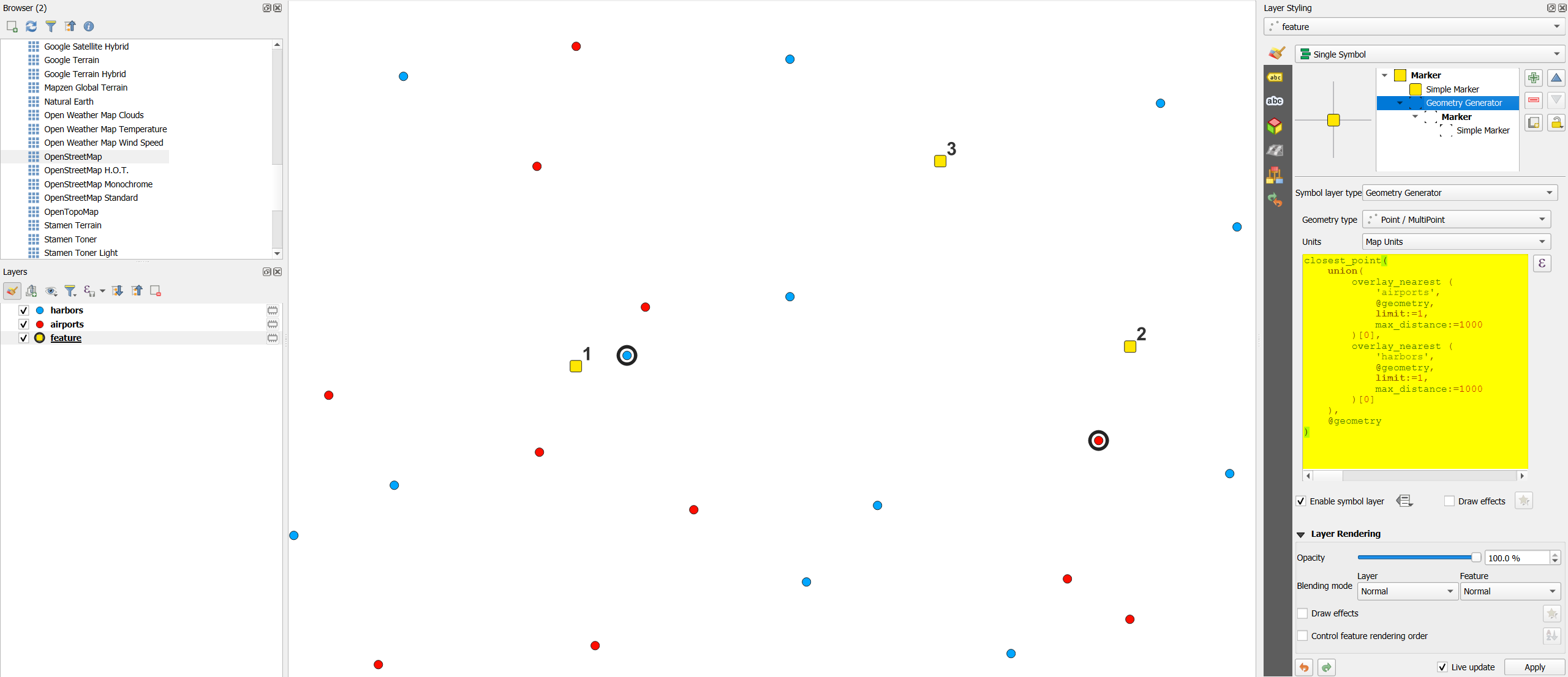
closest_point( union( overlay_nearest ( 'airports', @geometry, limit:=1, max_distance:=1000 )[0], overlay_nearest ( 'harbors', @geometry, limit:=1, max_distance:=1000 )[0] ), @geometry ) 

Screenshot: yellow points 1 and 2 each have either athe closest airport or harbor within max. 1000 m, marked with a black ring, created by the expression above; point 3 does not have within 1000 m any harbor or airport:
enter image description here

  1. Get the nearest point on layer airports: use overlay_nearest() with optional argument limit:=1. Do the same for layer harbors. You might also add a max_distance() argument.
  2. Combine both nearest points with union()
  3. Get the closest point to your input out of these two points using closest_point().

The whole expression to do so:

closest_point( union( overlay_nearest ( 'airports', @geometry, limit:=1, max_distance:=1000 )[0], overlay_nearest ( 'harbors', @geometry, limit:=1, max_distance:=1000 )[0] ), @geometry ) 

Screenshot: yellow points 1 and 2 each have either a closest airport or harbor within max. 1000 m, marked with a black ring, created by the expression above; point 3 does not have within 1000 m any harbor or airport:

enter image description here

  1. Get the nearest point on layer airports: use overlay_nearest() with the optional argument limit:=1. Do the same for layer harbors. You might also add a max_distance() argument.
  2. Combine both nearest points with union()
  3. Get the closest point to your input out of these two points using closest_point().

The whole expression to do so:

closest_point( union( overlay_nearest ( 'airports', @geometry, limit:=1, max_distance:=1000 )[0], overlay_nearest ( 'harbors', @geometry, limit:=1, max_distance:=1000 )[0] ), @geometry ) 

Screenshot: yellow points 1 and 2 each have either the closest airport or harbor within max. 1000 m, marked with a black ring, created by the expression above; point 3 does not have within 1000 m any harbor or airport:

enter image description here

added 499 characters in body
Source Link
Babel
  • 80.4k
  • 15
  • 97
  • 245
  1. Get the nearest point on layer airports: use overlay_nearest() with optional argument limit:=1. Do the same for layer harbors. You might also add a max_distance() argument.
  2. Combine both nearest points with union()
  3. Get the closest point to your input out of these two points using closest_point().

The whole expression to do so:

closest_point( union( overlay_nearest ( 'airports', @geometry, limit:=1,   max_distance:=1000  )[0], overlay_nearest ( 'harbors', @geometry, limit:=1, max_distance:=1000 )[0] ), @geometry ) 

Screenshot: yellow points 1 and 2 each have either a closest airport or harbor within max. 1000 m, marked with a black ring, created by the expression above; point 3 does not have within 1000 m any harbor or airport:

enter image description here

  1. Get the nearest point on layer airports: use overlay_nearest() with optional argument limit:=1. Do the same for layer harbors.
  2. Combine both nearest points with union()
  3. Get the closest point to your input out of these two points using closest_point().

The whole expression to do so:

closest_point( union( overlay_nearest ( 'airports', @geometry, limit:=1 )[0], overlay_nearest ( 'harbors', @geometry, limit:=1 )[0] ), @geometry ) 
  1. Get the nearest point on layer airports: use overlay_nearest() with optional argument limit:=1. Do the same for layer harbors. You might also add a max_distance() argument.
  2. Combine both nearest points with union()
  3. Get the closest point to your input out of these two points using closest_point().

The whole expression to do so:

closest_point( union( overlay_nearest ( 'airports', @geometry, limit:=1,   max_distance:=1000  )[0], overlay_nearest ( 'harbors', @geometry, limit:=1, max_distance:=1000 )[0] ), @geometry ) 

Screenshot: yellow points 1 and 2 each have either a closest airport or harbor within max. 1000 m, marked with a black ring, created by the expression above; point 3 does not have within 1000 m any harbor or airport:

enter image description here

Source Link
Babel
  • 80.4k
  • 15
  • 97
  • 245

  1. Get the nearest point on layer airports: use overlay_nearest() with optional argument limit:=1. Do the same for layer harbors.
  2. Combine both nearest points with union()
  3. Get the closest point to your input out of these two points using closest_point().

The whole expression to do so:

closest_point( union( overlay_nearest ( 'airports', @geometry, limit:=1 )[0], overlay_nearest ( 'harbors', @geometry, limit:=1 )[0] ), @geometry )