Get a full fake GraphQL API with zero coding in less than 30 seconds.
I'd love to learn GraphQL, but it seems that I first have to read a book about GraphQL Types and Queries, then install a gazillion npm packages.
- About every developer
Start playing with GraphQL right away with json-graphql-server, a testing and mocking tool for GraphQL. All it takes is a JSON of your data.
Inspired by the excellent json-server.
Create a db.js file.
Your data file should export an object where the keys are the entity types. The values should be lists of entities, i.e. arrays of value objects with at least an id key. For instance:
module.exports = { posts: [ { id: 1, title: "Lorem Ipsum", views: 254, user_id: 123 }, { id: 2, title: "Sic Dolor amet", views: 65, user_id: 456 }, ], users: [ { id: 123, name: "John Doe" }, { id: 456, name: "Jane Doe" } ], comments: [ { id: 987, post_id: 1, body: "Consectetur adipiscing elit", date: new Date('2017-07-03') }, { id: 995, post_id: 1, body: "Nam molestie pellentesque dui", date: new Date('2017-08-17') } ] }Start the GraphQL server on localhost, port 3000.
json-graphql-server db.jsNow you can query your data in graphql. For instance, to issue the following query:
{ Post(id: 1) { id title views User { name } Comments { date body } } }Go to http://localhost:3000/?query=%7B%20Post%28id%3A%201%29%20%7B%20id%20title%20views%20User%20%7B%20name%20%7D%20Comments%20%7B%20date%20body%20%7D%20%7D%20%7D. You'll get the following result:
{ "data": { "Post": { "id": "1", "title": "Lorem Ipsum", "views": 254, "User": { "name": "John Doe" }, "Comments": [ { "date": "2017-07-03T00:00:00.000Z", "body": "Consectetur adipiscing elit" }, { "date": "2017-08-17T00:00:00.000Z", "body": "Nam molestie pellentesque dui" }, ] } } }The json-graphql-server accepts queries in GET and POST. Under the hood, it uses the express-graphql module. Please refer to their documentations for details about passing variables, etc.
Note that the server is GraphiQL enabled, so you can query your server using a full-featured graphical user interface, providing autosuggest, history, etc.
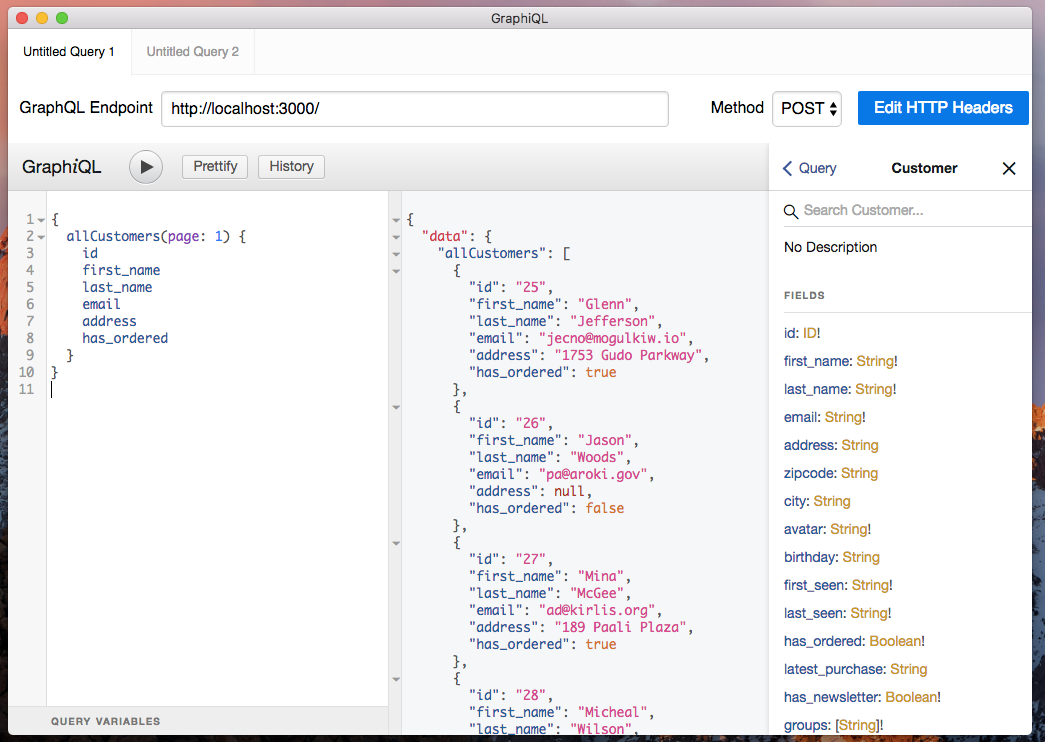
npm install -g json-graphql-serverBased on your data, json-graphql-server will generate a schema with one type per entity, as well as 3 query types and 3 mutation types. For instance for the Post entity:
type Query { Post(id: ID!): Post allPosts(page: Int, perPage: Int, sortField: String, sortOrder: String, filter: PostFilter): [Post] _allPostsMeta(page: Int, perPage: Int, sortField: String, sortOrder: String, filter: PostFilter): ListMetadata } type Mutation { createPost(data: String): Post updatePost(data: String): Post removePost(id: ID!): Boolean } type Post { id: ID! title: String! views: Int! user_id: ID! User: User Comments: [Comment] } type PostFilter { q: String id: ID title: String views: Int views_lt: Int views_lte: Int views_gt: Int views_gte: Int user_id: ID } type ListMetadata { count: Int! } scalar DateBy convention, json-graphql-server expects all entities to have an id field that is unique for their type - it's the entity primary key. The type of every field is inferred from the values, so for instance, Post.title is a String!, and Post.views is an Int!. When all entities have a value for a field, json-graphql-server makes the field type non nullable (that's why Post.views type is Int! and not Int).
For every field named *_id, json-graphql-server creates a two-way relationship, to let you fetch related entities from both sides. For instance, the presence of the user_id field in the posts entity leads to the ability to fetch the related User for a Post - and the related Posts for a User.
The all* queries accept parameters to let you sort, paginate, and filter the list of results. You can filter by any field, not just the primary key. For instance, you can get the posts written by user 123. Json-graphql-server also adds a full-text query field named q, and created range filter fields for numeric and date fields. The detail of all available filters can be seen in the generated *Filter type.
Here is how you can use the queries and mutations generated for your data, using Post as an example:
| Query / Mutation | Result |
|---|---|
// get a single entity, by id { Post(id: 1) { id title views user_id } } | { "data": { "Post": { "id": 1, "title": "Lorem Ipsum", "views": 254, "user_id": 123 } } } |
// include many-to-one relationships { Post(id: 1) { title User { name } } } | { "data": { "Post": { "title": "Lorem Ipsum", "User": { "name": "John Doe" } } } } |
// include one-to-many relationships { Post(id: 1) { title Comments { body } } } | { "data": { "Post": { "title": "Lorem Ipsum", "Comments": [ { "body": "Consectetur adipiscing elit" }, { "body": "Nam molestie pellentesque dui" }, ] } } } |
// get a list of entities for a type { allPosts { title views } } | { "data": { "allPosts": [ { "title": "Lorem Ipsum", views: 254 }, { "title": "Sic Dolor amet", views: 65 } ] } } |
// paginate the results { allPosts(page: 0, perPage: 1) { title views } } | { "data": { "allPosts": [ { "title": "Lorem Ipsum", views: 254 }, ] } } |
// sort the results by field { allPosts(sortField: "title", sortOrder: "desc") { title views } } | { "data": { "allPosts": [ { "title": "Sic Dolor amet", views: 65 } { "title": "Lorem Ipsum", views: 254 }, ] } } |
// filter the results using the full-text filter { allPosts({ filter: { q: "lorem" }}) { title views } } | { "data": { "allPosts": [ { "title": "Lorem Ipsum", views: 254 }, ] } } |
// filter the result using any of the entity fields { allPosts(views: 254) { title views } } | { "data": { "allPosts": [ { "title": "Lorem Ipsum", views: 254 }, ] } } |
// number fields get range filters // -lt, _lte, -gt, and _gte { allPosts(views_gte: 200) { title views } } | { "data": { "allPosts": [ { "title": "Lorem Ipsum", views: 254 }, ] } } |
Install the module locally
npm install --save-dev json-graphql-serverThen use the jsonGraphqlExpress express middleware:
import express from 'express'; import { jsonGraphqlExpress } from 'json-graphql-server'; const PORT = 3000; const app = express(); const data = { // ... your data }; app.use('/graphql', jsonGraphqlExpress(data)); app.listen(PORT);json-graphql-server doesn't deal with authentication or custom routes. But you can use your favorite middleware with Express:
import express from 'express'; import { jsonGraphqlExpress } from 'json-graphql-server'; import OAuthSecurityMiddleWare from './path/to/OAuthSecurityMiddleWare'; const PORT = 3000; const app = express(); const data = { // ... your data }; app.use(OAuthSecurityMiddleWare()); app.use('/graphql', jsonGraphqlExpress(data)); app.listen(PORT);Deploy with Heroku or Next.js.
- CLI options (port, https, watch, delay, custom schema)
- Subscriptions
- Client-side mocking (à la FakeRest)
Use Prettier formatting and make sure you include unit tests. The project includes a Makefile to automate usual developer tasks:
make install make build make test make watch make formatAdmin-on-rest is licensed under the MIT Licence, sponsored and supported by marmelab.