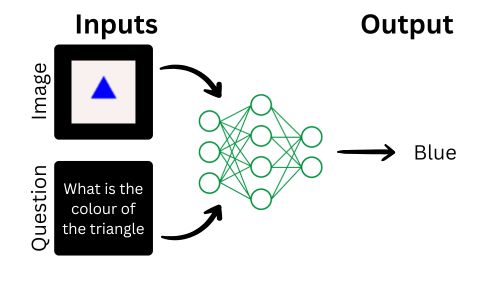
Visual Question Answering (VQA) is a fascinating field in artificial intelligence where a system answers questions about an image. This combines natural language processing (NLP) to understand the question and computer vision to analyze the image. For example, given an image of a red apple and the question “What color is the fruit?”, the model would answer “Red.”
Project Overview
In this project, we’ll build a simple Visual Question Answering model using the Easy VQA dataset. Easy VQA is designed to help beginners get started with VQA by offering a small, manageable dataset. Our implementation will involve:
- Understanding the dataset: Exploring its structure and contents.
- Preprocessing the data: Preparing the dataset for training.
- Building a model in TensorFlow: Creating a model that integrates visual and textual inputs.
- Training and evaluating the model: Using Easy VQA’s training and testing sets.
- Visualizing results: Showcasing how the model predicts answers for test images and questions.
READ MORE:
- What is Image Captioning?
- Image Segmentation-based Background Removal in TensorFlow
- What is MobileViT?
Dataset: Easy VQA
Easy VQA is a beginner-friendly dataset for Visual Question Answering. It includes:
- 4,000 training images and 38,575 training questions.
- 1,000 test images and 9,673 test questions.
- A total of 13 possible answers.
- Many questions are binary yes/no types:
- 28,407 yes/no questions in the training set.
- 7,136 yes/no questions in the testing set.

All images are 64×64 color images, making them lightweight and easy to work with.
For more: Easy VQA
The dataset is small enough to be trained on a regular computer with a modest GPU, making it perfect for beginners and small-scale experimentation.
Code: https://github.com/nikhilroxtomar/Visual-Question-Answer
Dataset Preprocessing
Here, we’ll load the dataset, split it into training and validation sets, and process the images and questions.
Loading Dataset
We define functions to load the questions, answers, and image paths.
import os import numpy as np import cv2 from glob import glob import json from sklearn.model_selection import train_test_split First of all, let us import all the libraries and functions that will be required.
def get_data(dataset_path, train=True): # Determine if we are processing training or testing data data_type = "train" if train else "test" # Load questions and answers from the JSON file with open(os.path.join(dataset_path, data_type, "questions.json"), "r") as file: data = json.load(file) questions, answers, image_paths = [], [], [] # Parse the questions, answers, and corresponding image paths for q, a, p in data: questions.append(q) answers.append(a) image_paths.append(os.path.join(dataset_path, data_type, "images", f"{p}.png")) return questions, answers, image_paths The function reads a JSON file containing questions, answers, and image names. It returns three lists:
questions: A list of textual questions.answers: The corresponding answers.image_paths: Full paths to the associated images.
Getting Unique Answer Labels
We load the unique set of 13 possible answers:
def get_answers_labels(dataset_path): with open(os.path.join(dataset_path, "answers.txt"), "r") as file: data = file.read().strip().split("\n") return data This function reads a file answers.txt, which lists all possible answers (like “yes”, “no”, “red”, etc.). It splits the file into a list of answers
Splitting Data into Train, Validation, and Test Sets
def main(): dataset_path = "data" # Load training and testing data trainQ, trainA, trainI = get_data(dataset_path, train=True) testQ, testA, testI = get_data(dataset_path, train=False) unique_answers = get_answers_labels(dataset_path) # Split the training data into training and validation sets trainQ, valQ, trainA, valA, trainI, valI = train_test_split( trainQ, trainA, trainI, test_size=0.2, random_state=42 ) # Print statistics print(f"Train -> Questions: {len(trainQ)} - Answers: {len(trainA)} - Images: {len(trainI)}") print(f"Valid -> Questions: {len(valQ)} - Answers: {len(valA)} - Images: {len(valI)}") print(f"Test -> Questions: {len(testQ)} - Answers: {len(testA)} - Images: {len(testI)}") In the main function, we execute all the functions present in the data processing part.
Load Training and Testing Data
- Training data: Loaded using
get_data(dataset_path, train=True). - Testing data: Loaded using
get_data(dataset_path, train=False).
Split Training Data into Training and Validation
train_test_splitdivides the training dataset into:- Training set (80%): Used for model learning.
- Validation set (20%): Used to check how well the model generalizes during training.
Print Statistics
- Helps verify the size of each dataset (train, validation, and test).
Output Example
Train -> Questions: 30860 - Answers: 30860 - Images: 30860 Valid -> Questions: 7715 - Answers: 7715 - Images: 7715 Test -> Questions: 9673 - Answers: 9673 - Images: 9673 Model Implementation
The model can be divided into three key components:
- Vision Part (CNN): Processes the image input to extract features.
- NLP Part (MLP): Processes the question input to extract features.
- Merge and Output Part: Combines the features from the vision and NLP parts and generates the final answer.
Import the TensorFlow Framework
from tensorflow.keras import layers as L from tensorflow.keras import Model Vision Part (CNN)
This sub-network processes the image input (image_shape=(64, 64, 3)) using a Convolutional Neural Network (CNN).
# Vision Part: Image Processing image_input = L.Input(image_shape) # Convolutional layers with max pooling and ReLU activation x1 = L.Conv2D(8, 3, padding='same')(image_input) x1 = L.MaxPooling2D()(x1) x1 = L.Activation("relu")(x1) x1 = L.Conv2D(16, 3, padding='same')(x1) x1 = L.MaxPooling2D()(x1) x1 = L.Activation("relu")(x1) # Flatten the feature map and apply a Dense layer x1 = L.Flatten()(x1) x1 = L.Dense(32, activation='tanh')(x1) - Conv2D Layers: Extract spatial features from the image.
- MaxPooling2D: Down-samples the feature maps to reduce dimensions and capture important features.
- Flatten: Converts the 2D feature maps into a 1D vector for the fully connected layers.
- Dense Layer: Reduces the feature representation to a size of 32 and uses an
tanhactivation for non-linearity.
NLP Part (MLP)
This sub-network processes the question input (vocab_size=27) using a Multi-Layer Perceptron (MLP).
# NLP Part: Question Processing question_input = L.Input(shape=(vocab_size,)) # Dense layers with tanh activation x2 = L.Dense(32, activation='tanh')(question_input) x2 = L.Dense(32, activation='tanh')(x2) - Input Layer: The question input is represented as a one-hot encoded vector with a size equal to the vocabulary size (
vocab_size=27). - Dense Layers: Two fully connected layers with tanh activation extract meaningful features from the question input.
Merge and Output Part
This sub-network combines the features from the vision and NLP parts and generates the final prediction.
# Merge Vision and NLP Parts out = L.Multiply()([x1, x2]) # Element-wise multiplication of features # Dense layers to combine features and generate predictions out = L.Dense(32, activation='tanh')(out) out = L.Dense(num_answers, activation='softmax')(out) - Multiply Layer: Combines the image and question features using element-wise multiplication. This operation models the interaction between visual and textual features.
- Dense Layers: Further process the combined features.
- The first Dense layer with
tanhactivation refines the combined representation. - The second Dense layer with
softmaxactivation outputs probabilities for each of the possible answers (num_answers=13).
- The first Dense layer with
Final Model Assembly
The complete model integrates the three components:
model = Model(inputs=[image_input, question_input], outputs=out) - Inputs: The model takes two inputs:
image_input(image features).question_input(question features).
- Output: The model predicts the answer as a probability distribution over 13 possible answers.
Training the VQA Model
We first begin by importing all the required libraries and functions.
import os import numpy as np import cv2 import tensorflow as tf from tensorflow.keras.preprocessing.text import Tokenizer from tensorflow.keras.optimizers import Adam from tensorflow.keras.callbacks import ModelCheckpoint, ReduceLROnPlateau, EarlyStopping, CSVLogger from sklearn.model_selection import train_test_split from data import get_data, get_answers_labels from model import build_model The create_dir function is used to create a directory which is used to save the files.
def create_dir(path): if not os.path.exists(path): os.makedirs(path) Dataset Preparation
The TFDataset class is responsible for parsing the raw data into a format suitable for TensorFlow training.
class TFDAtaset: def __init__(self, tokenizer, labels, image_h, image_w): self.tokenizer = tokenizer self.labels = labels self.image_h = image_h self.image_w = image_w def parse(self, question, answer, image_path): question = question.decode() answer = answer.decode() image_path = image_path.decode() """ Question """ question = self.tokenizer.texts_to_matrix([question]) question = np.array(question[0], dtype=np.float32) """ Answer """ index = self.labels.index(answer) answer = [0] * len(self.labels) answer[index] = 1 answer = np.array(answer, dtype=np.float32) """ Image """ image = cv2.imread(image_path, cv2.IMREAD_COLOR) image = cv2.resize(image, (self.image_w, self.image_h)) image = image/255.0 image = image.astype(np.float32) return question, answer, image def tf_parse(self, question, answer, image_path): q, a, i = tf.numpy_function( self.parse, [question, answer, image_path], [tf.float32, tf.float32, tf.float32] ) q.set_shape([len(self.tokenizer.word_index) + 1,]) a.set_shape([len(self.labels),]) i.set_shape([self.image_h, self.image_w, 3]) return (i, q), a def tf_dataset(self, questions, answers, image_paths, batch_size=16): ds = tf.data.Dataset.from_tensor_slices((questions, answers, image_paths)) ds = ds.map(self.tf_parse).batch(batch_size).prefetch(10) return ds parse(): Converts the question, answer, and image path into numerical representations.
- Question: Tokenized into a bag-of-words representation.
- Answer: One-hot encoded based on the label index.
- Image: Loaded, resized, and normalized to pixel values in the range
[0, 1].
tf_parse(): Wraps parse() for compatibility with TensorFlow datasets using tf.numpy_function.
tf_dataset(): Creates a batched and pre-fetched TensorFlow dataset.
Seeding and parameters
""" Seeding """ tf.random.set_seed(42) """ Directory for storing files """ create_dir("files") """ Hyperparameters """ image_shape = (64, 64, 3) batch_size = 32 num_epochs = 20 model_path = os.path.join("files", "model.h5") csv_path = os.path.join("files", "data.csv") Training Pipeline
- Fetch the dataset and split it into training and validation set.
- Tokenizer: Converts text questions into numerical formats.
- Dataset Pipeline:
TFDatasetprepares training and validation datasets.
dataset_path = "data" trainQ, trainA, trainI = get_data(dataset_path, train=True) testQ, testA, testI = get_data(dataset_path, train=False) unique_answers = get_answers_labels(dataset_path) num_answers = len(unique_answers) """ Split the data into training and validation """ trainQ, valQ, trainA, valA, trainI, valI = train_test_split( trainQ, trainA, trainI, test_size=0.2, random_state=42 ) tokenizer = Tokenizer() tokenizer.fit_on_texts(trainQ + valQ) vocab_size = len(tokenizer.word_index) + 1 ds = TFDAtaset(tokenizer, unique_answers, image_h=image_shape[0], image_w=image_shape[1]) train_ds = ds.tf_dataset(trainQ, trainA, trainI, batch_size=batch_size) valid_ds = ds.tf_dataset(valQ, valA, valI, batch_size=batch_size) Model Building
model = build_model(image_shape=image_shape, vocab_size=vocab_size, num_answers=num_answers) model.compile( optimizer=Adam(learning_rate=5e-4), loss='categorical_crossentropy', metrics=['accuracy'] ) Callbacks for Training
The following callbacks are defined:
- ModelCheckpoint: Saves the best model based on validation loss.
- ReduceLROnPlateau: Reduces the learning rate if validation loss plateaus.
- CSVLogger: Logs training metrics to a CSV file.
- EarlyStopping: Stops training if no improvement in validation loss.
callbacks = [ ModelCheckpoint(model_path, monitor='val_loss', verbose=1, save_best_only=True), ReduceLROnPlateau(monitor='val_loss', factor=0.1, patience=5, min_lr=1e-7, verbose=1), CSVLogger(csv_path, append=True), EarlyStopping(monitor='val_loss', patience=20, restore_best_weights=False) ] Training the Model
The model is trained using the prepared datasets and callbacks.
model.fit( train_ds, validation_data=valid_ds, epochs=num_epochs, callbacks=callbacks ) Evaluating and Visualizing Test Results
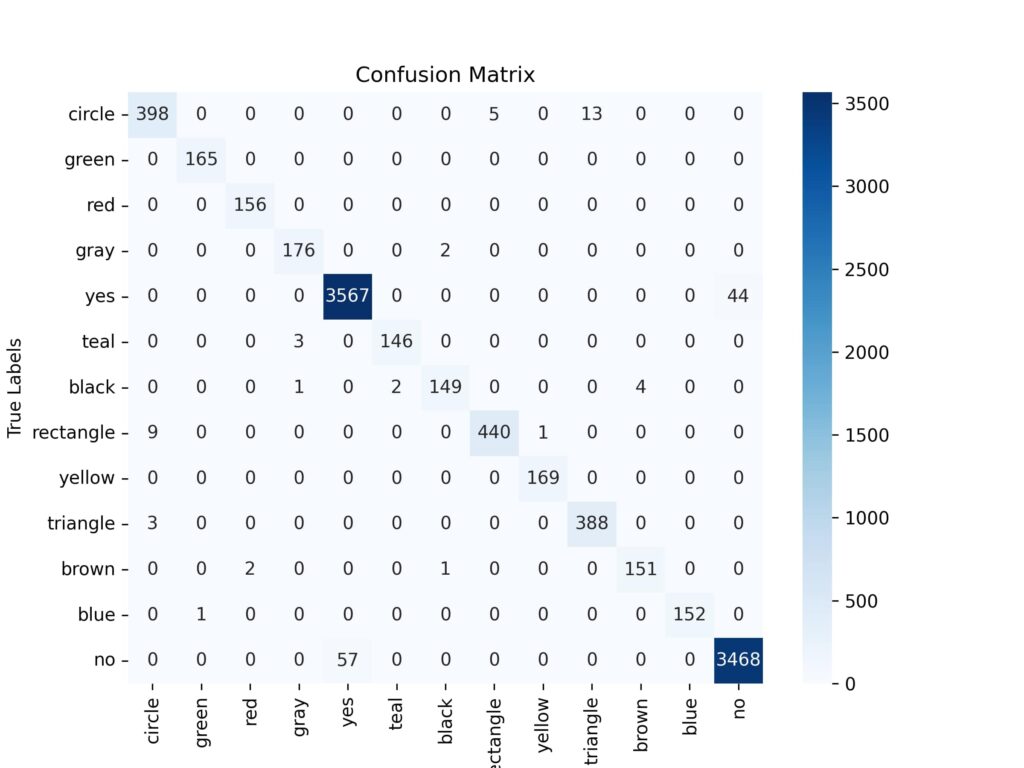
Finally, we evaluate the trained model’s performance on a test dataset and produce a classification report and a confusion matrix visualization.
Imports
import os import matplotlib.pyplot as plt import seaborn as sns import numpy as np import cv2 from tqdm import tqdm import tensorflow as tf from tensorflow.keras.preprocessing.text import Tokenizer from sklearn.model_selection import train_test_split from sklearn.metrics import classification_report, confusion_matrix, ConfusionMatrixDisplay from data import get_data, get_answers_labels Seeding and Parameters
""" Seeding """ tf.random.set_seed(42) """ Parameters """ image_shape = (64, 64) model_path = os.path.join("files", "model.h5") Dataset Loading and Processing
""" Split the data into training and validation """ trainQ, valQ, trainA, valA, trainI, valI = train_test_split( trainQ, trainA, trainI, test_size=0.2, random_state=42 ) print(f"Train -> Questions: {len(trainQ)} - Answers: {len(trainA)} - Images: {len(trainI)}") print(f"Valid -> Questions: {len(valQ)} - Answers: {len(valA)} - Images: {len(valI)}") print(f"Test -> Questions: {len(testQ)} - Answers: {len(testA)} - Images: {len(testI)}") """ Tokenizer: BOW """ tokenizer = Tokenizer() tokenizer.fit_on_texts(trainQ + valQ) vocab_size = len(tokenizer.word_index) + 1 testQ = tokenizer.texts_to_matrix(testQ) Loading Model
model = tf.keras.models.load_model("files/model.h5") Evaluation Loop
Iterates over the test dataset to make predictions and collect true and predicted values.
true_values, pred_values = [], [] for question, answer, image_path in tqdm(zip(testQ, testA, testI), total=len(testQ)): """ Question """ question = np.expand_dims(question, axis=0) """ Answer """ answer = unique_answers.index(answer) true_values.append(answer) """ Image """ image = cv2.imread(image_path, cv2.IMREAD_COLOR) image = cv2.resize(image, image_shape) image = image/255.0 image = image.astype(np.float32) image = np.expand_dims(image, axis=0) """ Prediction """ pred = model.predict([image, question], verbose=0)[0] pred = np.argmax(pred, axis=-1) pred_values.append(pred) Evaluation and Visualization
""" Classification Report """ report = classification_report(true_values, pred_values, target_names=unique_answers) print(report) """ Confusion Matrix """ cm = confusion_matrix(true_values, pred_values) plt.figure(figsize=(8, 6)) sns.heatmap(cm, annot=True, fmt='d', cmap='Blues', xticklabels=unique_answers, yticklabels=unique_answers) plt.title('Confusion Matrix') plt.xlabel('Predicted Labels') plt.ylabel('True Labels') plt.savefig('files/confusion_matrix_heatmap.png', dpi=300) plt.close() Output:
Generates a detailed classification report, including precision, recall, F1-score, and support for each class.
precision recall f1-score support circle 0.97 0.96 0.96 416 green 0.99 1.00 1.00 165 red 0.99 1.00 0.99 156 gray 0.98 0.99 0.98 178 yes 0.98 0.99 0.99 3611 teal 0.99 0.98 0.98 149 black 0.98 0.96 0.97 156 rectangle 0.99 0.98 0.98 450 yellow 0.99 1.00 1.00 169 triangle 0.97 0.99 0.98 391 brown 0.97 0.98 0.98 154 blue 1.00 0.99 1.00 153 no 0.99 0.98 0.99 3525 accuracy 0.98 9673 macro avg 0.98 0.98 0.98 9673 weighted avg 0.98 0.98 0.98 9673 Confusion Matrix: It shows the relationship between true and predicted labels using a confusion matrix and shows it in the form of heatmap using seaborn.
Conclusion
In this tutorial, we walked through a complete pipeline for evaluating a trained multi-modal model using a test dataset comprising questions, answers, and images. Starting with data preprocessing, including tokenizing questions and resizing images, we then loaded the pre-trained model to generate predictions. Using true and predicted labels, we calculated key performance metrics, including a classification report and a confusion matrix, which were visualized for better understanding.