
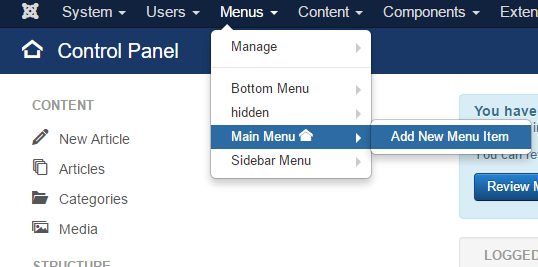
Articles in Joomla are usually displayed through Menu Items. Creating and publishing an article is only the first step, you also have to create a menu item:
How to add a menu item in Joomla

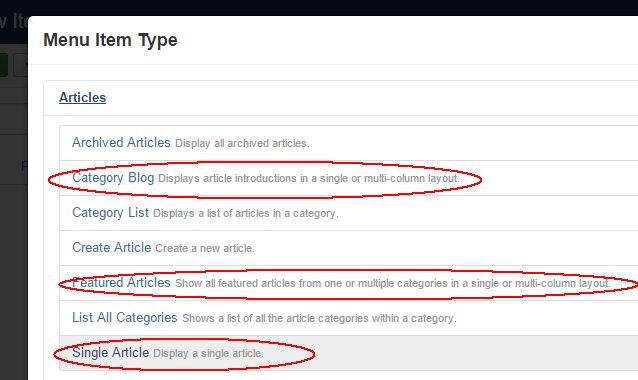
These are some of the most popular menu types:

Articles → Featured Articles

This will show all your featured articles (marketmarked with a star in the article list).

Articles → Single article

This will let you choose a single article thatwhich will be displayed on your website for the menu item.

Articles → Category blog

This will display all articles from a chosen category. If the articles has a Readmore tag (inserted using the Read more button below the article editor), only the first part of each article will be displayed, followed by a link to the full article. This is the simplest way to create a blog in Joomla.
Display articles in Joomla

Articles in Joomla are usually displayed through Menu Items. Creating and publishing an article is only the first step, you also have to create a menu item:

How to add a menu item in Joomla

These are some of the most popular menu types:

Articles → Featured Articles

This will show all your featured articles (market with a star in the article list).

Articles → Single article

This will let you choose a single article that will be displayed on your website for the menu item.

Articles → Category blog

This will display all articles from a chosen category. If the articles has a Readmore tag (inserted using the Read more button below the article editor), only the first part of each article will be displayed, followed by a link to the full article. This is the simplest way to create a blog in Joomla.

Display articles in Joomla

Articles in Joomla are usually displayed through Menu Items. Creating and publishing an article is only the first step, you also have to create a menu item:

How to add a menu item in Joomla

These are some of the most popular menu types:

Articles → Featured Articles

This will show all your featured articles (marked with a star in the article list).

Articles → Single article

This will let you choose a single article which will be displayed on your website for the menu item.

Articles → Category blog

This will display all articles from a chosen category. If the articles has a Readmore tag (inserted using the Read more button below the article editor), only the first part of each article will be displayed, followed by a link to the full article. This is the simplest way to create a blog in Joomla.

Display articles in Joomla

Source Link
johanpw
  • 13.3k
  • 6
  • 41
  • 77

Articles in Joomla are usually displayed through Menu Items. Creating and publishing an article is only the first step, you also have to create a menu item:

How to add a menu item in Joomla

These are some of the most popular menu types:

Articles → Featured Articles

This will show all your featured articles (market with a star in the article list).

Articles → Single article

This will let you choose a single article that will be displayed on your website for the menu item.

Articles → Category blog

This will display all articles from a chosen category. If the articles has a Readmore tag (inserted using the Read more button below the article editor), only the first part of each article will be displayed, followed by a link to the full article. This is the simplest way to create a blog in Joomla.

Display articles in Joomla