React Chart - commonAxisSettings.minorTick
Configures the appearance of minor axis ticks.
Selector: MinorTick
Type:
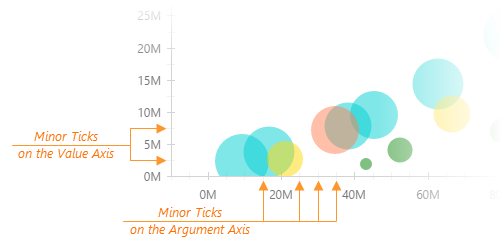
In addition to major ticks, the DevExtreme Chart can display minor ticks. This component places minor ticks between major ticks.
jQuery
index.js
$('#chart').dxChart({ commonAxisSettings: { minorTick: { visible: true, color: "blue", length: 10, opacity: 0.5, shift: 0, width: 1, }, }, })Angular
app.component.html
<dx-chart ... > <dxo-common-axis-settings> <dxo-minor-tick [visible]="true" color="blue" [length]="10" [opacity]="0.5" [shift]="0" [width]="1" ></dxo-minor-tick> </dxo-common-axis-settings> </dx-chart>
Vue
App.vue
<template> <DxChart ... > <DxCommonAxisSettings> <DxMinorTick :visible="true" color="blue" :length="10" :opacity="0.5" :shift="0" :width="1" /> </DxCommonAxisSettings> </DxChart> </template> <script setup lang="ts"> import { DxChart, DxCommonAxisSettings, DxMinorTick } from 'devextreme-vue/chart'; </script>React
App.tsx
import { Chart, CommonAxisSettings, MinorTick } from 'devextreme-react/chart'; function App() { return ( <Chart ... > <CommonAxisSettings> <MinorTick visible={true} color="blue" length={10} opacity={0.5} shift={0} width={1} /> </CommonAxisSettings> </Chart> ) }The commonAxisSettings.minorTick object specifies common settings for all minor ticks in a chart. To configure only those minor ticks that belong to a particular axis, use the following objects:
Axis-specific settings override common settings.
NOTE
The component does not display minor ticks for "discrete" axes.
See Also
- argumentAxis.minorTickInterval - specifies the minor tick interval of the argument axis.
- valueAxis.minorTickInterval - specifies the minor tick interval of the value axis.
color
Specifies the color of minor ticks.
Type:
Default Value: '#767676'
This property supports the following colors:
- Hexadecimal colors
- RGB colors
- RGBA colors
- Predefined/cross-browser color names
- Predefined SVG colors
- Paint server address
opacity
Specifies how transparent minor ticks should be.
Type:
Default Value: 0.3
This property accepts a value from 0 to 1, where 0 makes minor ticks completely transparent, and 1 makes them opaque.
shift
Shifts minor ticks from the reference position.
Type:
Default Value: 3
Main article: shift for major ticks
Feel free to share topic-related thoughts here.
If you have technical questions, please create a support ticket in the DevExpress Support Center.
Thank you for the feedback! If you have technical questions, please create a support ticket in the DevExpress Support Center.