4

I have a table name stat_customer look like this:
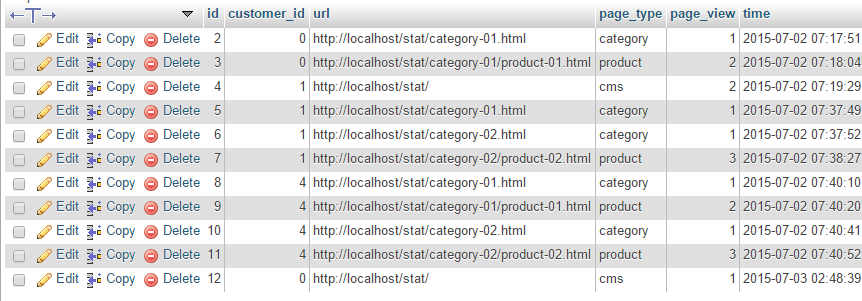
stat_customer table

I want to add a column page_view to customer collection to show at grid page. page_view is total page view of product page for each customer. My SQL query looks like:

SELECT sum(page_view) as page_view, customer_id FROM stat_customer WHERE page_type = 'product' GROUP BY customer_id;

But I don't know how to join it with customer collection. Can anyone help me please ?

UPDATE

I'm trying this way:

protected function _prepareCollection() { $collection = Mage::getResourceModel('customer/customer_collection') ->addNameToSelect() ->addAttributeToSelect('email') ->addAttributeToSelect('created_at') ->addAttributeToSelect('group_id') ->joinAttribute('company', 'customer_address/company', 'default_billing', null, 'left'); $collection->addExpressionAttributeToSelect("page_view", "sum({{page_view}})", "page_view"); $collection->groupByAttribute("page_view"); $this->setCollection($collection); return parent::_prepareCollection(); } 

But getting this error:

Fatal error: Call to a member function getBackend() on a non-object in E:\XAMPP\htdocs\stat\app\code\core\Mage\Eav\Model\Entity\Collection\Abstract.php on line 513

2
  • are you want to add this stat_customer table to Admin >Customer Grid.. Commented Jul 3, 2015 at 7:13
  • Yes, I want to add 1 column page_view calculated by my query to customer grid. Commented Jul 3, 2015 at 7:14

3 Answers 3

8

Have a look at the methods Mage_Core_Model_Resource_Db_Collection_Abstract::addExpressionFieldToSelect() for standard models:

/** * Add attribute expression (SUM, COUNT, etc) * Example: ('sub_total', 'SUM({{attribute}})', 'revenue') * Example: ('sub_total', 'SUM({{revenue}})', 'revenue') * For some functions like SUM use groupByAttribute. * * @param string $alias * @param string $expression * @param array $fields * @return Mage_Core_Model_Resource_Db_Collection_Abstract */ public function addExpressionFieldToSelect($alias, $expression, $fields) 

And Mage_Eav_Model_Entity_Collection_Abstract::addExpressionAttributeToSelect() for EAV models:

/** * Add attribute expression (SUM, COUNT, etc) * * Example: ('sub_total', 'SUM({{attribute}})', 'revenue') * Example: ('sub_total', 'SUM({{revenue}})', 'revenue') * * For some functions like SUM use groupByAttribute. * * @param string $alias * @param string $expression * @param string $attribute * @return Mage_Eav_Model_Entity_Collection_Abstract */ public function addExpressionAttributeToSelect($alias, $expression, $attribute) 

Usage

$collection->addExpressionFieldToSelect("page_view", "sum({{page_view}})", ["page_view"]); // ^ alias ^ expression ^ used fields $collection->getSelect()->group("main_table.entity_id"); 

or

$collection->addExpressionAttributeToSelect("page_view", "sum({{page_view}})", "page_view"); // ^ alias ^ expression ^ used attribute $collection->getSelect()->group("main_table.entity_id"); 

Note that the method suggested in the doc block, groupByAttribute() is only used to group by EAV attributes, not static columns like the entity id.

10
  • Good answer.. I just typing answer.. But you give first +V1 Commented Jul 3, 2015 at 7:28
  • 1
    Not sure why I got this error: Call to undefined method Mage_Customer_Model_Resource_Customer_Collection::addExpressionFieldToSelect(). My collection is: $collection = Mage::getResourceModel('customer/customer_collection'). I'm using magento 1.6.1.0 Commented Jul 3, 2015 at 7:33
  • OK for EAV collections like the customer collection it works a bit different. See updated answer Commented Jul 3, 2015 at 7:38
  • 1
    it cannot be the same error with the method name addExpressionAttributeToSelect Commented Jul 3, 2015 at 7:52
  • 1
    OK, I think I understand the problem: addExpressionAttributeToSelect only works with expressions based on actual EAV attributes, not joined tables, while addExpressionFieldToSelect is not available. You should use joinTable and specify the expression as Zend_Db_Expr. I will update the answer later with more information when I find the time Commented Jul 3, 2015 at 8:14
3

I've found my answered by using the following join:

$statTable = Mage::getSingleton('core/resource')->getTableName('stat_customer'); $collection->getSelect() ->join(array("stat" => $statTable), "e.entity_id = stat.customer_id", array("*","sum(stat.page_view) as page_view" )) ->where('stat.page_type = "product"') ->group('e.entity_id'); 

It works great.

2

First,

Need to add this table magento to Customer collection on prepareCollection() at class Mage_Adminhtml_Block_Customer_Grid

$subSelect = Mage::getSingleton( 'core/resource' )->getConnection( 'core_read' )->select() ->from(array('o' =>'stat_customer'), 'SUM(o.page_view)') ->where('o.customer_id = e.entity_id ') $subSelect->where('o.page_type = ?', 'product') ; $collection->getSelect()->columns(array('page_view_count' => $subSelect))->group("o.customer_id"); 

Second,

You need to this column on grid using addColumn function _prepareColumns() (class Mage_Adminhtml_Block_Customer_Grid )

protected function _prepareColumns() { parent::_prepareColumns(); $this->addColumn('page_view', array( 'header'=> Mage::helper('customer')->__('Page View'), 'width' => '50px', 'index' => 'page_view_count', )); return parent::_prepareColumns(); } 
1
  • I've got this error: Column not found: 1054 Unknown column 'o.customer_id' in 'group statement'. I'm not sure why :( Commented Jul 3, 2015 at 8:31

Start asking to get answers

Find the answer to your question by asking.

Ask question

Explore related questions

See similar questions with these tags.