replaced http://mathematica.stackexchange.com/ with https://mathematica.stackexchange.com/
Source Link

To find the area of these points, we first must convert to a projected coordinate system. Since your points lie in multiple state plane systems, we'll use UTM zone 11 to convert your latitude longitudes.

Here are the points courtesy of new Wolfram Language functions...

latlons = {{32.6123, -117.041}, {40.6973, -111.9}, {34.0276, -118.046}, {40.8231, -111.986}, {34.0446, -117.94}, {33.7389, -118.024}}; GeoGraphics[GeoMarker/@latlons] 
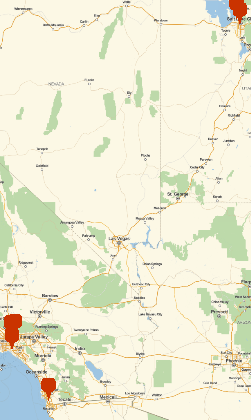
enter image description here

To do the conversion:

utm = GeoGridPosition[GeoPosition[#], "UTMZone11"][[1]] & /@ latlons 

{{-3848.25, 3.60975*10^6}, {431132., 4.51949*10^6}, {-96605.2, 3.76722*10^6}, {423059., 4.53305*10^6}, {-86797.8, 3.76901*10^6}, {-94892.4, 3.73517*10^6}}

This returns coordinates in meters.

Now, using thisthis code:

Graphics`Mesh`MeshInit[]; PolygonArea[utm] 

7.43416*10^10

And let's convert to acres, lazily...

UnitConvert[Quantity[%, "meters squared"], "acres"] 

1.83701*10^7 acres

Even so, these points are spread far apart in a strange order across multiple defined projected areas, so the area calculation may not be as accurate as possible.

To find the area of these points, we first must convert to a projected coordinate system. Since your points lie in multiple state plane systems, we'll use UTM zone 11 to convert your latitude longitudes.

Here are the points courtesy of new Wolfram Language functions...

latlons = {{32.6123, -117.041}, {40.6973, -111.9}, {34.0276, -118.046}, {40.8231, -111.986}, {34.0446, -117.94}, {33.7389, -118.024}}; GeoGraphics[GeoMarker/@latlons] 

enter image description here

To do the conversion:

utm = GeoGridPosition[GeoPosition[#], "UTMZone11"][[1]] & /@ latlons 

{{-3848.25, 3.60975*10^6}, {431132., 4.51949*10^6}, {-96605.2, 3.76722*10^6}, {423059., 4.53305*10^6}, {-86797.8, 3.76901*10^6}, {-94892.4, 3.73517*10^6}}

This returns coordinates in meters.

Now, using this code:

Graphics`Mesh`MeshInit[]; PolygonArea[utm] 

7.43416*10^10

And let's convert to acres, lazily...

UnitConvert[Quantity[%, "meters squared"], "acres"] 

1.83701*10^7 acres

Even so, these points are spread far apart in a strange order across multiple defined projected areas, so the area calculation may not be as accurate as possible.

To find the area of these points, we first must convert to a projected coordinate system. Since your points lie in multiple state plane systems, we'll use UTM zone 11 to convert your latitude longitudes.

Here are the points courtesy of new Wolfram Language functions...

latlons = {{32.6123, -117.041}, {40.6973, -111.9}, {34.0276, -118.046}, {40.8231, -111.986}, {34.0446, -117.94}, {33.7389, -118.024}}; GeoGraphics[GeoMarker/@latlons] 

enter image description here

To do the conversion:

utm = GeoGridPosition[GeoPosition[#], "UTMZone11"][[1]] & /@ latlons 

{{-3848.25, 3.60975*10^6}, {431132., 4.51949*10^6}, {-96605.2, 3.76722*10^6}, {423059., 4.53305*10^6}, {-86797.8, 3.76901*10^6}, {-94892.4, 3.73517*10^6}}

This returns coordinates in meters.

Now, using this code:

Graphics`Mesh`MeshInit[]; PolygonArea[utm] 

7.43416*10^10

And let's convert to acres, lazily...

UnitConvert[Quantity[%, "meters squared"], "acres"] 

1.83701*10^7 acres

Even so, these points are spread far apart in a strange order across multiple defined projected areas, so the area calculation may not be as accurate as possible.

added 166 characters in body
Source Link
kale
  • 11.1k
  • 1
  • 36
  • 72

To find the area of these points, we first must convert to a projected coordinate system. Since your points lie in multiple state plane systems, we'll use UTM zone 11 to convert your latitude longitudes.

Here are the points courtesy of new Wolfram Language functions...

latlons = {{32.6123, -117.041}, {40.6973, -111.9}, {34.0276, -118.046}, {40.8231, -111.986}, {34.0446, -117.94}, {33.7389, -118.024}}; GeoGraphics[GeoMarker/@latlons] 

enter image description here

To do the conversion:

utm = GeoGridPosition[GeoPosition[#], "UTMZone11"][[1]] & /@ latlons 

{{-3848.25, 3.60975*10^6}, {431132., 4.51949*10^6}, {-96605.2, 3.76722*10^6}, {423059., 4.53305*10^6}, {-86797.8, 3.76901*10^6}, {-94892.4, 3.73517*10^6}}

This returns coordinates in meters.

Now, using this code:

Graphics`Mesh`MeshInit[]; PolygonArea[utm] 

7.43416*10^10

And let's convert to acres, lazily...

UnitConvert[Quantity[%, "meters squared"], "acres"] 

1.83701*10^7 acres

Even so, these points are spread far apart in a strange order across multiple defined projected areas, so the area calculation may not be as accurate as possible.

To find the area of these points, we first must convert to a projected coordinate system. Since your points lie in multiple state plane systems, we'll use UTM zone 11 to convert your latitude longitudes.

Here are the points courtesy of new Wolfram Language functions...

latlons = {{32.6123, -117.041}, {40.6973, -111.9}, {34.0276, -118.046}, {40.8231, -111.986}, {34.0446, -117.94}, {33.7389, -118.024}}; GeoGraphics[GeoMarker/@latlons] 

enter image description here

To do the conversion:

utm = GeoGridPosition[GeoPosition[#], "UTMZone11"][[1]] & /@ latlons 

{{-3848.25, 3.60975*10^6}, {431132., 4.51949*10^6}, {-96605.2, 3.76722*10^6}, {423059., 4.53305*10^6}, {-86797.8, 3.76901*10^6}, {-94892.4, 3.73517*10^6}}

This returns coordinates in meters.

Now, using this code:

Graphics`Mesh`MeshInit[]; PolygonArea[utm] 

7.43416*10^10

And let's convert to acres, lazily...

UnitConvert[Quantity[%, "meters squared"], "acres"] 

1.83701*10^7 acres

To find the area of these points, we first must convert to a projected coordinate system. Since your points lie in multiple state plane systems, we'll use UTM zone 11 to convert your latitude longitudes.

Here are the points courtesy of new Wolfram Language functions...

latlons = {{32.6123, -117.041}, {40.6973, -111.9}, {34.0276, -118.046}, {40.8231, -111.986}, {34.0446, -117.94}, {33.7389, -118.024}}; GeoGraphics[GeoMarker/@latlons] 

enter image description here

To do the conversion:

utm = GeoGridPosition[GeoPosition[#], "UTMZone11"][[1]] & /@ latlons 

{{-3848.25, 3.60975*10^6}, {431132., 4.51949*10^6}, {-96605.2, 3.76722*10^6}, {423059., 4.53305*10^6}, {-86797.8, 3.76901*10^6}, {-94892.4, 3.73517*10^6}}

This returns coordinates in meters.

Now, using this code:

Graphics`Mesh`MeshInit[]; PolygonArea[utm] 

7.43416*10^10

And let's convert to acres, lazily...

UnitConvert[Quantity[%, "meters squared"], "acres"] 

1.83701*10^7 acres

Even so, these points are spread far apart in a strange order across multiple defined projected areas, so the area calculation may not be as accurate as possible.

added 65 characters in body
Source Link
kale
  • 11.1k
  • 1
  • 36
  • 72

To find the area of these points, we first must convert to a projected coordinate system. Since your points lie in multiple state plane systems, we'll use UTM zone 11 to convert your latitude longitudes.

Here are the points courtesy of new Wolfram Language functions...

latlons = {{32.6123, -117.041}, {40.6973, -111.9}, {34.0276, -118.046}, {40.8231, -111.986}, {34.0446, -117.94}, {33.7389, -118.024}}; GeoGraphics[GeoMarker/@latlons] 

enter image description here

To do the conversion:

utm = GeoGridPosition[GeoPosition[#], "UTMZone11"][[1]] & /@ latlons 

{{-3848.25, 3.60975*10^6}, {431132., 4.51949*10^6}, {-96605.2, 3.76722*10^6}, {423059., 4.53305*10^6}, {-86797.8, 3.76901*10^6}, {-94892.4, 3.73517*10^6}}

This returns coordinates in meters.

Now, using thisthis code:

Graphics`Mesh`MeshInit[]; PolygonArea[utm] 

7.43416*10^10

And let's convert to acres, lazily...

UnitConvert[Quantity[%, "meters squared"], "acres"] 

1.83701*10^7 acres

To find the area of these points, we first must convert to a projected coordinate system. Since your points lie in multiple state plane systems, we'll use UTM zone 11 to convert your latitude longitudes.

Here are the points courtesy of new Wolfram Language functions...

latlons = {{32.6123, -117.041}, {40.6973, -111.9}, {34.0276, -118.046}, {40.8231, -111.986}, {34.0446, -117.94}, {33.7389, -118.024}}; GeoGraphics[GeoMarker/@latlons] 

enter image description here

To do the conversion:

utm = GeoGridPosition[GeoPosition[#], "UTMZone11"][[1]] & /@ latlons 

{{-3848.25, 3.60975*10^6}, {431132., 4.51949*10^6}, {-96605.2, 3.76722*10^6}, {423059., 4.53305*10^6}, {-86797.8, 3.76901*10^6}, {-94892.4, 3.73517*10^6}}

This returns coordinates in meters.

Now, using this code:

Graphics`Mesh`MeshInit[]; PolygonArea[utm] 

7.43416*10^10

And let's convert to acres, lazily...

UnitConvert[Quantity[%, "meters squared"], "acres"] 

1.83701*10^7 acres

To find the area of these points, we first must convert to a projected coordinate system. Since your points lie in multiple state plane systems, we'll use UTM zone 11 to convert your latitude longitudes.

Here are the points courtesy of new Wolfram Language functions...

latlons = {{32.6123, -117.041}, {40.6973, -111.9}, {34.0276, -118.046}, {40.8231, -111.986}, {34.0446, -117.94}, {33.7389, -118.024}}; GeoGraphics[GeoMarker/@latlons] 

enter image description here

To do the conversion:

utm = GeoGridPosition[GeoPosition[#], "UTMZone11"][[1]] & /@ latlons 

{{-3848.25, 3.60975*10^6}, {431132., 4.51949*10^6}, {-96605.2, 3.76722*10^6}, {423059., 4.53305*10^6}, {-86797.8, 3.76901*10^6}, {-94892.4, 3.73517*10^6}}

This returns coordinates in meters.

Now, using this code:

Graphics`Mesh`MeshInit[]; PolygonArea[utm] 

7.43416*10^10

And let's convert to acres, lazily...

UnitConvert[Quantity[%, "meters squared"], "acres"] 

1.83701*10^7 acres

Source Link
kale
  • 11.1k
  • 1
  • 36
  • 72
Loading