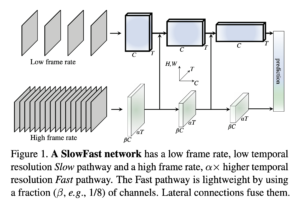
3D ResNet
Example Usage
Imports
Load the model:
import torch # Choose the `slow_r50` model model = torch.hub.load('facebookresearch/pytorchvideo', 'slow_r50', pretrained=True) Import remaining functions:
import json import urllib from pytorchvideo.data.encoded_video import EncodedVideo from torchvision.transforms import Compose, Lambda from torchvision.transforms._transforms_video import ( CenterCropVideo, NormalizeVideo, ) from pytorchvideo.transforms import ( ApplyTransformToKey, ShortSideScale, UniformTemporalSubsample ) Setup
Set the model to eval mode and move to desired device.
# Set to GPU or CPU device = "cpu" model = model.eval() model = model.to(device) Download the id to label mapping for the Kinetics 400 dataset on which the torch hub models were trained. This will be used to get the category label names from the predicted class ids.
json_url = "https://dl.fbaipublicfiles.com/pyslowfast/dataset/class_names/kinetics_classnames.json" json_filename = "kinetics_classnames.json" try: urllib.URLopener().retrieve(json_url, json_filename) except: urllib.request.urlretrieve(json_url, json_filename) with open(json_filename, "r") as f: kinetics_classnames = json.load(f) # Create an id to label name mapping kinetics_id_to_classname = {} for k, v in kinetics_classnames.items(): kinetics_id_to_classname[v] = str(k).replace('"', "") Define input transform
side_size = 256 mean = [0.45, 0.45, 0.45] std = [0.225, 0.225, 0.225] crop_size = 256 num_frames = 8 sampling_rate = 8 frames_per_second = 30 # Note that this transform is specific to the slow_R50 model. transform = ApplyTransformToKey( key="video", transform=Compose( [ UniformTemporalSubsample(num_frames), Lambda(lambda x: x/255.0), NormalizeVideo(mean, std), ShortSideScale( size=side_size ), CenterCropVideo(crop_size=(crop_size, crop_size)) ] ), ) # The duration of the input clip is also specific to the model. clip_duration = (num_frames * sampling_rate)/frames_per_second Run Inference
Download an example video.
url_link = "https://dl.fbaipublicfiles.com/pytorchvideo/projects/archery.mp4" video_path = 'archery.mp4' try: urllib.URLopener().retrieve(url_link, video_path) except: urllib.request.urlretrieve(url_link, video_path) Load the video and transform it to the input format required by the model.
# Select the duration of the clip to load by specifying the start and end duration # The start_sec should correspond to where the action occurs in the video start_sec = 0 end_sec = start_sec + clip_duration # Initialize an EncodedVideo helper class and load the video video = EncodedVideo.from_path(video_path) # Load the desired clip video_data = video.get_clip(start_sec=start_sec, end_sec=end_sec) # Apply a transform to normalize the video input video_data = transform(video_data) # Move the inputs to the desired device inputs = video_data["video"] inputs = inputs.to(device) Get Predictions
# Pass the input clip through the model preds = model(inputs[None, ...]) # Get the predicted classes post_act = torch.nn.Softmax(dim=1) preds = post_act(preds) pred_classes = preds.topk(k=5).indices[0] # Map the predicted classes to the label names pred_class_names = [kinetics_id_to_classname[int(i)] for i in pred_classes] print("Top 5 predicted labels: %s" % ", ".join(pred_class_names)) Model Description
The model architecture is based on [1] with pretrained weights using the 8×8 setting on the Kinetics dataset.
| arch | depth | frame length x sample rate | top 1 | top 5 | Flops (G) | Params (M) |
|---|---|---|---|---|---|---|
| Slow | R50 | 8×8 | 74.58 | 91.63 | 54.52 | 32.45 |
References
[1] Christoph Feichtenhofer et al, “SlowFast Networks for Video Recognition” https://arxiv.org/pdf/1812.03982.pdf