

Configuration
Configuration basics
Section titled “Configuration basics”MCP Front uses a single JSON config file. The structure is straightforward: proxy settings at the top, MCP servers at the bottom.
{ "version": "v0.0.1-DEV_EDITION_EXPECT_CHANGES", "proxy": { "name": "My MCP Proxy", "baseURL": "https://mcp.company.com", "addr": ":8080", "auth": { /* auth config */ } }, "mcpServers": { /* server configs */ }}The version is currently “v0.0.1-DEV_EDITION_EXPECT_CHANGES” - this signals the config format may change. The name shows up in logs. The addr is where MCP Front listens, typically “:8080” for port 8080 on all interfaces.
For OAuth, you need baseURL (note the camelCase) set to your public URL so Google can redirect back after login. For bearer tokens, you can skip it.
The auth section defines how users authenticate. The mcpServers section lists all the MCP servers you want to proxy.
Authentication configuration
Section titled “Authentication configuration”MCP Front has three authentication layers:
- User-to-proxy auth (
proxy.auth) - How users authenticate to MCP Front (OAuth with Google) - Proxy-to-server auth (
serviceAuths) - How MCP Front authenticates to backend MCP servers (bearer tokens or basic auth) - Per-service user tokens (
userAuthentication) - When backend services need individual user OAuth tokens (Linear, Notion, etc.)
User authentication (proxy.auth)
Section titled “User authentication (proxy.auth)”OAuth 2.0 with PKCE
Section titled “OAuth 2.0 with PKCE”For production, use OAuth with Google. Claude redirects users to Google for authentication, and MCP Front validates their domain. All sensitive fields must use environment variables for security.
{ "auth": { "kind": "oauth", "issuer": "https://mcp.company.com", "allowedDomains": ["company.com"], "allowedOrigins": ["https://claude.ai"], "tokenTtl": "24h", "storage": "memory", "googleClientId": { "$env": "GOOGLE_CLIENT_ID" }, "googleClientSecret": { "$env": "GOOGLE_CLIENT_SECRET" }, "googleRedirectUri": "https://mcp.company.com/oauth/callback", "jwtSecret": { "$env": "JWT_SECRET" }, "encryptionKey": { "$env": "ENCRYPTION_KEY" } }}The issuer should match your baseURL. allowedDomains restricts access to specific email domains. allowedOrigins controls which websites can make requests.
tokenTtl controls how long JWT tokens are valid. Shorter times are more secure but require more frequent logins.
Security requirements: googleClientSecret, jwtSecret, and encryptionKey must be environment variables. The JWT secret must be at least 32 bytes. The encryption key must be exactly 32 bytes.
For production, set storage to “firestore” and add gcpProject, firestoreDatabase, and firestoreCollection fields.
Storage architecture
Section titled “Storage architecture”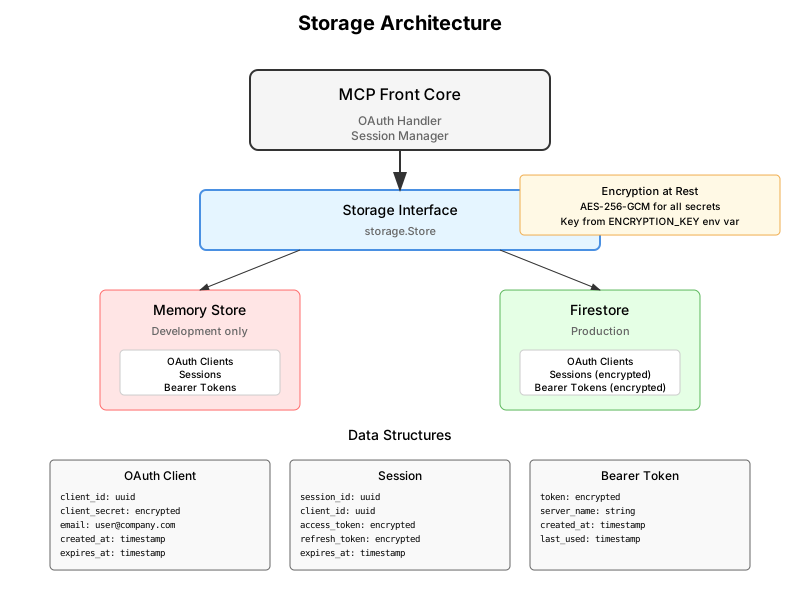
MCP Front supports two storage backends:
- Memory: Development only, data lost on restart
- Firestore: Production, with encrypted secrets and persistent sessions
MCP server configuration
Section titled “MCP server configuration”All MCP servers need a transportType field. MCP Front supports four transport types for different use cases.
SSE servers (existing HTTP services)
Section titled “SSE servers (existing HTTP services)”For MCP servers that already expose a Server-Sent Events endpoint:
{ "mcpServers": { "database": { "transportType": "sse", "url": "http://postgres-mcp:3000/sse", "options": { "authTokens": ["dev", "prod"] } } }}Stdio servers (spawn processes)
Section titled “Stdio servers (spawn processes)”Start MCP servers as subprocesses. Each user gets their own process. Isolation depends on your sandboxing setup:
{ "mcpServers": { "filesystem": { "transportType": "stdio", "command": "npx", "args": ["-y", "@modelcontextprotocol/server-filesystem", "/data"], "env": { "DEBUG": "1" } } }}MCP Front just spawns processes directly. For actual isolation, use containers, systemd sandboxing, or similar tools.
Streamable HTTP servers
Section titled “Streamable HTTP servers”For MCP servers that use HTTP with streaming responses:
{ "mcpServers": { "api-tools": { "transportType": "streamable-http", "url": "http://api-mcp:8080", "options": { "timeout": "30s" } } }}Inline servers
Section titled “Inline servers”For simple servers defined directly in the config (advanced use case):
{ "mcpServers": { "simple": { "transportType": "inline", "options": { "handler": "builtin-echo" } } }}Server options
Section titled “Server options”Additional configuration via options field.
Proxy-to-Server Authentication (serviceAuths)
Section titled “Proxy-to-Server Authentication (serviceAuths)”Backend MCP servers may require authentication. The serviceAuths array configures how MCP Front authenticates when connecting to each backend server. This is separate from how users authenticate to MCP Front itself.
Bearer tokens:
"postgres": { "transportType": "sse", "url": "http://postgres-mcp:3000/sse", "serviceAuths": [ { "type": "bearer", "tokens": ["dev-token-postgres-1", "dev-token-postgres-2"] } ]}MCP Front will accept any request using any token from this list and forward it to the backend server. This is per-server authentication - tokens for postgres don’t work for linear.
Basic authentication:
"serviceAuths": [ { "type": "basic", "username": "admin", "password": {"$env": "ADMIN_PASSWORD"} }]Per-User Authentication (userAuthentication)
Section titled “Per-User Authentication (userAuthentication)”Services like Notion or Linear need individual user OAuth tokens or API keys. Set requiresUserToken: true and add userAuthentication object. Users connect their accounts through the interstitial page after Google login.
Type: manual
Section titled “Type: manual”User-generated API tokens.
"notion": { "transportType": "stdio", "requiresUserToken": true, "userAuthentication": { "type": "manual", "displayName": "Notion Integration Token", "instructions": "Create a new internal integration and copy the 'Internal Integration Secret'.", "helpUrl": "https://www.notion.so/my-integrations", "validation": "^secret_[a-zA-Z0-9]{43}$" }}Users enter tokens at /my/tokens.
Type: oauth
Section titled “Type: oauth”Services with OAuth 2.0 support. Handles flow and token refresh.
"stainless": { "transportType": "stdio", "requiresUserToken": true, "userAuthentication": { "type": "oauth", "displayName": "Stainless", "clientId": {"$env": "STAINLESS_OAUTH_CLIENT_ID"}, "clientSecret": {"$env": "STAINLESS_OAUTH_CLIENT_SECRET"}, "authorizationUrl": "https://api.stainless.com/oauth/authorize", "tokenUrl": "https://api.stainless.com/oauth/token", "scopes": ["mcp:read", "mcp:write"] }}Other Options
Section titled “Other Options”Configure timeouts, custom headers, and other transport-specific options:
{ "database": { "transportType": "sse", "url": "http://postgres-mcp:3000/sse", "timeout": "30s", "headers": { "X-Custom-Header": "value", "X-API-Key": { "$env": "DB_API_KEY" } } }}Routing to servers
Section titled “Routing to servers”Claude can connect to specific servers using URL paths. For example, GET /database/sse connects to the “database” server, while GET /filesystem/sse connects to “filesystem”.
Environment variables
Section titled “Environment variables”Any string value in the config can reference environment variables using {"$env": "VAR_NAME"}. This keeps secrets out of your config files.
{ "proxy": { "baseUrl": { "$env": "BASE_URL" }, "auth": { "tokens": { "prod": { "$env": "PROD_TOKEN" } }, "gcpProject": { "$env": "GOOGLE_CLOUD_PROJECT" } } }, "mcpServers": { "database": { "url": { "$env": "DATABASE_URL" } } }}OAuth requirements
Section titled “OAuth requirements”OAuth needs these environment variables:
GOOGLE_CLIENT_ID=your-client-idGOOGLE_CLIENT_SECRET=your-secretJWT_SECRET=your-32-byte-jwt-secret-for-oauth! # Must be 32+ bytesENCRYPTION_KEY=your-32-byte-encryption-key-here! # Must be exactly 32 bytesRuntime options
Section titled “Runtime options”Control MCP Front behavior with these optional variables:
MCP_FRONT_ENV=development # Relaxes OAuth validation for local devLOG_LEVEL=debug # Options: debug, info, warn, errorLOG_FORMAT=json # Options: json (structured) or text (human-readable)Set MCP_FRONT_ENV=development when testing OAuth locally. It allows http:// URLs and reduces security requirements.
Complete examples
Section titled “Complete examples”Development with bearer tokens
Section titled “Development with bearer tokens”{ "version": "v0.0.1-DEV_EDITION_EXPECT_CHANGES", "proxy": { "name": "Dev Proxy", "addr": ":8080", "auth": { "kind": "bearerToken", "tokens": { "filesystem": ["dev-token-123"] } } }, "mcpServers": { "filesystem": { "transportType": "stdio", "command": "npx", "args": ["-y", "@modelcontextprotocol/server-filesystem", "/tmp"] } }}Production with OAuth
Section titled “Production with OAuth”{ "version": "v0.0.1-DEV_EDITION_EXPECT_CHANGES", "proxy": { "name": "Production Proxy", "baseURL": "https://mcp.company.com", "addr": ":8080", "auth": { "kind": "oauth", "issuer": "https://mcp.company.com", "allowedDomains": ["company.com"], "allowedOrigins": ["https://claude.ai"], "tokenTtl": "4h", "storage": "firestore", "googleClientId": { "$env": "GOOGLE_CLIENT_ID" }, "googleClientSecret": { "$env": "GOOGLE_CLIENT_SECRET" }, "googleRedirectUri": "https://mcp.company.com/oauth/callback", "jwtSecret": { "$env": "JWT_SECRET" }, "encryptionKey": { "$env": "ENCRYPTION_KEY" }, "gcpProject": { "$env": "GOOGLE_CLOUD_PROJECT" }, "firestoreDatabase": "(default)", "firestoreCollection": "mcp_front_oauth_clients" } }, "mcpServers": { "database": { "transportType": "sse", "url": { "$env": "DATABASE_MCP_URL" } }, "analytics": { "transportType": "sse", "url": { "$env": "ANALYTICS_MCP_URL" } } }}