Chains Getting Started Tutorial
This tutorial will guide you through:
- Generating your own keypair and storing it as a Kubernetes Secret
- Configuring Tekton Chains backend storage
- Creating a sample TaskRun
- Retrieving the signature and payload from the signed TaskRun
- Verifying the signature
We will be creating a TaskRun, signing it, and storing the signature and the payload as annotations on the TaskRun itself. So, no additional authentication should be required!
For this tutorial we will use the x509 key type.
x509
To generate your own encrypted x509 keypair and save it as a Kubernetes secret, install cosign and run the following:
cosign generate-key-pair k8s://tekton-chains/signing-secrets cosign will prompt you for a password, which will be stored in a Kubernetes secret named signing-secrets in the tekton-chains namespace.
Configuring Tekton Chains
You will need to make sure that OCI storage is disabled and that the taskrun storage and format is set to tekton.
You can set these fields by running the following command:
kubectl patch configmap chains-config -n tekton-chains -p='{"data":{"artifacts.oci.storage": "", "artifacts.taskrun.format":"in-toto", "artifacts.taskrun.storage": "tekton"}}' Then restart the controller to ensure it picks up the changes:
kubectl delete po -n tekton-chains -l app=tekton-chains-controller This tells Chains to use the default tekton artifact (enabled by default) and disable the OCI artifact.
To create a simple TaskRun, run:
$ kubectl create -f https://raw.githubusercontent.com/tektoncd/chains/main/examples/taskruns/task-output-image.yaml taskrun.tekton.dev/build-push-run-output-image-qbjvh created Wait for it to finish (all the steps should be marked as Completed).
$ tkn tr describe --last [...truncated output...] 🦶 Steps NAME STATUS ∙ create-dir-builtimage-9467f Completed ∙ git-source-sourcerepo-p2sk8 Completed ∙ build-and-push Completed ∙ echo Completed ∙ image-digest-exporter-xlkn7 Completed Next, retrieve the signature and payload from the object (they are stored as base64-encoded annotations):
export TASKRUN_UID=$(tkn tr describe --last -o jsonpath='{.metadata.uid}') tkn tr describe --last -o jsonpath="{.metadata.annotations.chains\.tekton\.dev/signature-taskrun-$TASKRUN_UID}" | base64 -d > sig Finally, we can check the signature with cosign:
$ cosign verify-blob-attestation --insecure-ignore-tlog --key k8s://tekton-chains/signing-secrets --signature sig --type slsaprovenance --check-claims=false /dev/null Verified OK If using Cosign v1
$ cosign verify-blob --key k8s://tekton-chains/signing-secrets --signature sig sig Verified OK Now we have a verifiable record of the TaskRun!
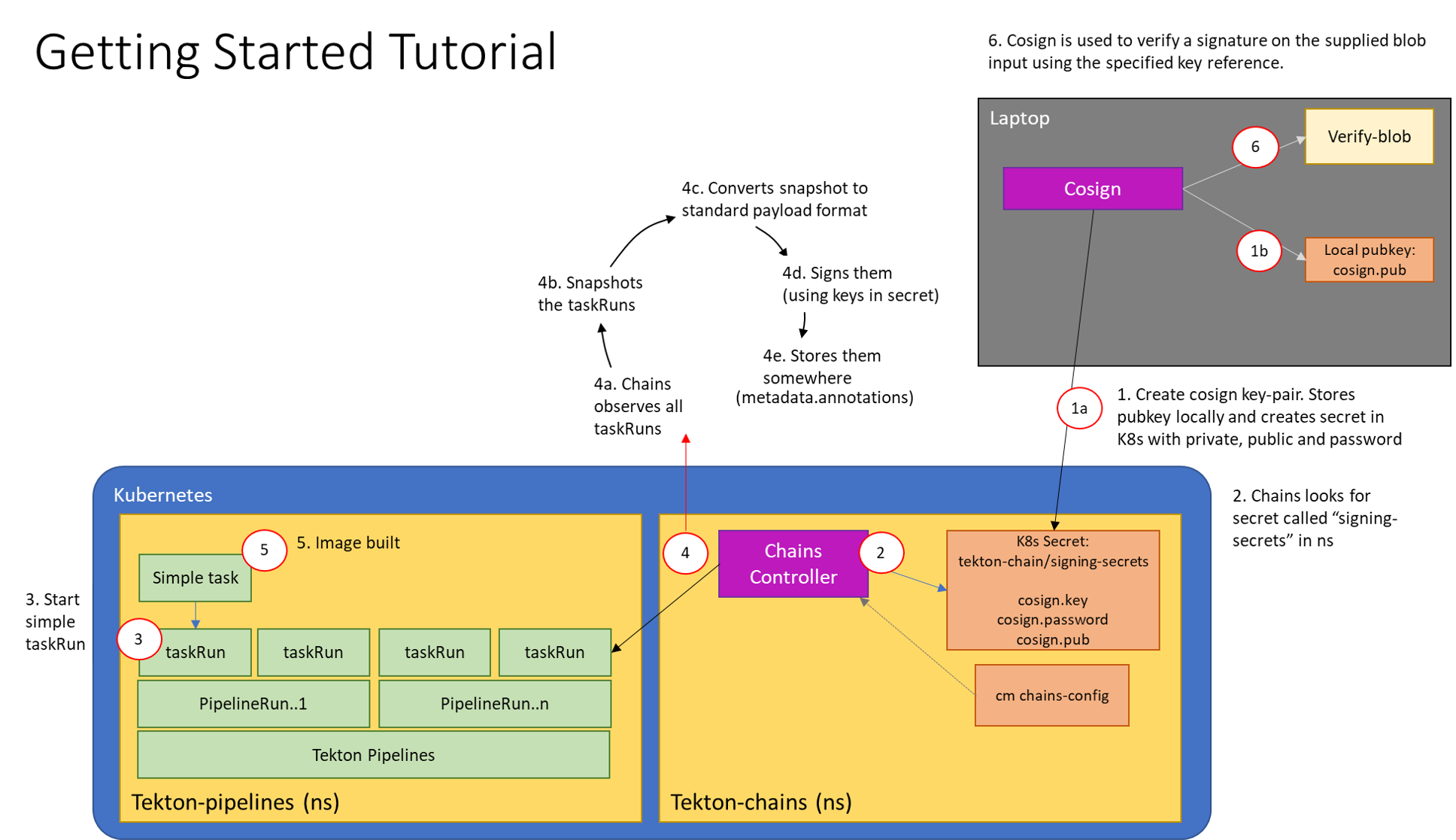
What you just created
This diagram shows what you just deployed:
Feedback
Was this page helpful?