BLACK FRIDAY
Seize the deal!
07
Days
:
16
Hours
:
30
Minutes
:
25
Seconds
You missed out!

Java Persistence Video Course
Save $79.6

SQL Video Course
Save $79.6

Spring Persistence Video Course
Save $79.6
Are you struggling with performance issues in your Spring, Jakarta EE, or Java EE application?
What if there were a tool that could automatically detect what caused performance issues in your JPA and Hibernate data access layer?
Wouldn’t it be awesome to have such a tool to watch your application and prevent performance issues during development, long before they affect production systems?
Well, Hypersistence Optimizer is that tool! And it works with Spring Boot, Spring Framework, Jakarta EE, Java EE, Quarkus, Micronaut, or Play Framework.
So, rather than fixing performance issues in your production system on a Saturday night, you are better off using Hypersistence Optimizer to help you prevent those issues so that you can spend your time on the things that you love!
Many database servers support CSV data transfers and this post will show one way you can import CSV files to PostgreSQL.
My previous post demonstrated FlexyPool metrics capabilities and all connection related statistics were exported in CSV format.
When it comes to aggregation tabular data SQL is at its best. If your database engine supports SQL:2003 windows functions you should definitely make use of this great feature.
For scripting, I mostly rely on Python or Bash scripting. Python is powerful and expressive while Bash scripting doesn’t need too many dependencies, even on Windows.
These are the CSV files to be imported :
$ ls -1 *.csv concurrentConnectionRequestsHistogram.csv concurrentConnectionsHistogram.csv connectionAcquireMillis.csv connectionLeaseMillis.csv maxPoolSizeHistogram.csv overallConnectionAcquireMillis.csv overflowPoolSizeHistogram.csv retryAttemptsHistogram.csv
All these files are Dropwizard Metrics histogram and timer metrics and this is how the import script looks like:
#!/bin/bash function import_histogram(){ echo "Importing Histogram file: $2 to $1 table" psql metrics postgres <<SQL CREATE TABLE IF NOT EXISTS $1 ( t BIGINT, count BIGINT, max NUMERIC(19, 6), mean NUMERIC(19, 6), min NUMERIC(19, 6), stddev NUMERIC(19, 6), p50 NUMERIC(19, 6), p75 NUMERIC(19, 6), p95 NUMERIC(19, 6), p98 NUMERIC(19, 6), p99 NUMERIC(19, 6), p999 NUMERIC(19, 6), PRIMARY KEY (t) ); COPY $1( t, count, max, mean, min, stddev, p50, p75, p95, p98, p99, p999 ) FROM '$2' WITH DELIMITER ',' CSV HEADER; SQL } function import_timer(){ echo "Importing Timer file: $2 to $1 table" psql metrics postgres <<SQL CREATE TABLE IF NOT EXISTS $1 ( t BIGINT, count BIGINT, max NUMERIC(19, 6), mean NUMERIC(19, 6), min NUMERIC(19, 6), stddev NUMERIC(19, 6), p50 NUMERIC(19, 6), p75 NUMERIC(19, 6), p95 NUMERIC(19, 6), p98 NUMERIC(19, 6), p99 NUMERIC(19, 6), p999 NUMERIC(19, 6), mean_rate NUMERIC(19, 6), m1_rate NUMERIC(19, 6), m5_rate NUMERIC(19, 6), m15_rate NUMERIC(19, 6), rate_unit VARCHAR(64), duration_unit VARCHAR(64), PRIMARY KEY (t) ); COPY $1( t, count, max, mean, min, stddev, p50, p75, p95, p98, p99, p999, mean_rate, m1_rate, m5_rate, m15_rate, rate_unit, duration_unit ) FROM '$2' WITH DELIMITER ',' CSV HEADER; SQL } for csv_file in *.csv do table_name=`echo ${csv_file%%.*}|sed -e 's/\([A-Z]\)/_\L\1/g'` csv_folder_path="$(cygpath -w `pwd`)" csv_file_path=$csv_folder_path/$csv_file if [[ $table_name == *histogram ]] then import_histogram $table_name $csv_file_path elif [[ $table_name == *millis ]] then import_timer $table_name $csv_file_path fi done Because PostgreSQL requires Windows paths we need to use the $(cygpath -w pwd) command to translate the Cygwin like paths to their Windows equivalent.
Let’s run this scrip now:
vlad@HOME /cygdrive/d/metrics $ dos2unix codahale_metrics_csv_to_postgres.sh dos2unix: converting file codahale_metrics_csv_to_postgres.sh to Unix format ... vlad@HOME /cygdrive/d/metrics $ ./codahale_metrics_csv_to_postgres.sh Importing Histogram file: D:\metrics/concurrentConnectionRequestsHistogram.csv to concurrent_connection_requests_histogram table NOTICE: CREATE TABLE / PRIMARY KEY will create implicit index "concurrent_connection_requests_histogram_pkey" for table "concurrent_connection_requests_histogram" CREATE TABLE COPY 1537 Importing Histogram file: D:\metrics/concurrentConnectionsHistogram.csv to concurrent_connections_histogram table NOTICE: CREATE TABLE / PRIMARY KEY will create implicit index "concurrent_connections_histogram_pkey" for table "concurrent_connections_histogram" CREATE TABLE COPY 1537 Importing Timer file: D:\metrics/connectionAcquireMillis.csv to connection_acquire_millis table NOTICE: CREATE TABLE / PRIMARY KEY will create implicit index "connection_acquire_millis_pkey" for table "connection_acquire_millis" CREATE TABLE COPY 1537 Importing Timer file: D:\metrics/connectionLeaseMillis.csv to connection_lease_millis table NOTICE: CREATE TABLE / PRIMARY KEY will create implicit index "connection_lease_millis_pkey" for table "connection_lease_millis" CREATE TABLE COPY 1537 Importing Histogram file: D:\metrics/maxPoolSizeHistogram.csv to max_pool_size_histogram table NOTICE: CREATE TABLE / PRIMARY KEY will create implicit index "max_pool_size_histogram_pkey" for table "max_pool_size_histogram" CREATE TABLE COPY 1537 Importing Timer file: D:\metrics/overallConnectionAcquireMillis.csv to overall_connection_acquire_millis table NOTICE: CREATE TABLE / PRIMARY KEY will create implicit index "overall_connection_acquire_millis_pkey" for table "overall_connection_acquire_millis" CREATE TABLE COPY 1537 Importing Histogram file: D:\metrics/overflowPoolSizeHistogram.csv to overflow_pool_size_histogram table NOTICE: CREATE TABLE / PRIMARY KEY will create implicit index "overflow_pool_size_histogram_pkey" for table "overflow_pool_size_histogram" CREATE TABLE COPY 1537 Importing Histogram file: D:\metrics/retryAttemptsHistogram.csv to retry_attempts_histogram table NOTICE: CREATE TABLE / PRIMARY KEY will create implicit index "retry_attempts_histogram_pkey" for table "retry_attempts_histogram" CREATE TABLE COPY 1537
If you enjoyed this article, I bet you are going to love my Book and Video Courses as well.



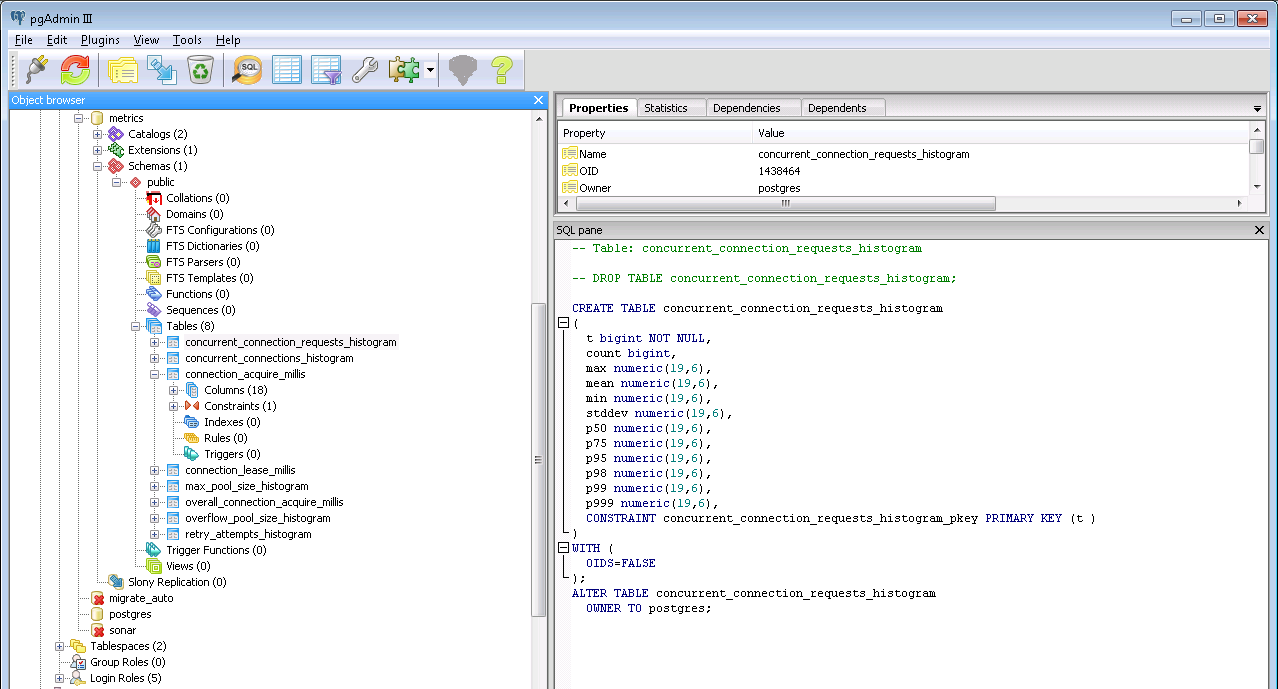
After running this script we got the following fully-loaded PostgreSQL tables:
My next post will put window functions to work, as I want to compare the FlexyPool empirical metrics to the queueing theory probabilities.