![MOBAPAD Chitu2 HD Wireless Pro Controller for Nintendo Switch 2/1 Lite/OLED, Gamepad with TMR Glide Joysticks [ZERO Drift], H](https://images-na.ssl-images-amazon.com/images/I/71MZ5yyYmCL._AC_UL165_SR165,165_.jpg)



Now it's not perfect but for the tech involved and how it's being implemented its very much in the right direction. 1st party controller makers like sony, nintendo, microsoft will have to soon take notes from companies like this.
What it does right:
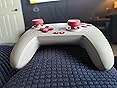
1. Hall effect joysticks, this version of the hall effect modules are different than the ones in the 8bitdo ultimate bluetooth, and the Kingkongpro controller, im not sure the manufacturer but they are a significant upgrade. On gamepad-tester website I get about 0.6% error circularity. (Very good). There is no flickback and the precision is extremely fine tuned compared to 8bitdo's (im speaking about the points of analog input density, aka within a 1mm square zone this stick will have atleast twice the available points vs 8bitdo for example.
2. The joystick and the joystick ring are well thought out, not perfect, but the idea of having a metal ring around the lower stick that rubs against the bowl is very good. Albeit with time i'm sure there will be some form of degradation. Just much less than some that are just plastic on plastic or other more easily degradable materials. I love the fact that you can also just pop off the joysticks, i've found that i can place xbox elite 2 sticks on here , and they fit great lol. I'd rate the sticks 9.5/10 and for the price and materials used 9.8/10.
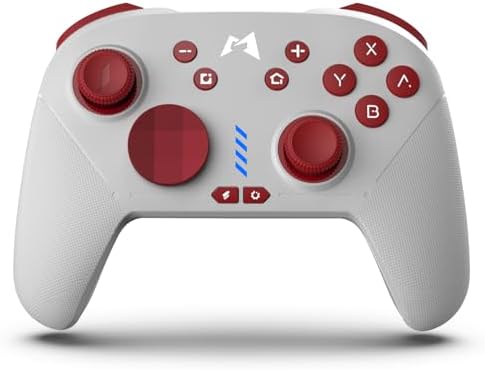
3. Face buttons, I am torn a bit here about this one, so i'll start by saying that at first i was reluctant to like them. And I kept going back and forth on whether they were good or not. Now my rating for the face buttons is about a 7.8/10. But with the caveat that once you get used to them, and dependent on what type of game you're playing they can potentially be 9+/10 rating face buttons. They are mechanical and they feel mechanical, I have a Gamesir T4 Kaleid and the click satisfaction on these are much better. They fell akin to mouse clicks. The only real issue is the fact that if you press them too hard they can depress a bit below the shell. This might sound very bad or scary, but its really not, and after you get used to the pressure you need to use, its becomes almost unnoticeable. If i were to change 1 thing i would make the face buttons either 0.3-0.5mm taller, change the shape of them to be a bit more rounded, or have the shell taper around the buttons a bit to fix this issue. Overall I really am enjoying the face buttons now.
4. I don't really care much about analog triggers so having these be digital feels great, the bumpers and triggers both fit great on the fingers and have satisfying clicks when pressed, The plastic feels cheap but smart, (if that makes sense). Very good use of the type of plastic used. and the durability feels good.
5. The dpad is a mixed bag, so it comes with 2 types , the bowl and the cross, the bowl is virtually unusable if you plan on also using the joystick, it just gets in the way, not nearly enough space for the circle shaped bowl dpad. On the other hand the cross one is great and the mechanics underneath also feel great, nice and clicky feeling, but not loud or anything, just nice tactile dpad. It could allow for a bit more range to allow you to press it further but that's very nit picky.
What it doesn't do so good
1. The back buttons are not well placed, I only really use them to play Souls games, (I use them to run) So they work fine for that. But if you want to use them without changing your grip it might not be the best controller for that. They do feel good to press otherwise, but the placement is just too far towards the center to really be useful.
2. The controller is a bit too small, the distance between the joystick and dpad need to be elongated by at least half a centimeter. as well as well as the face buttons to the right joystick. But this is a common issue for people with larger hands amongst all controllers. This one is not much different.
3. I personally prefer the shape of xbox series controllers shell and handles over the switch pro shape. The reason being is that the xbox allows your hands to more naturally hang around the grips instead of being more parallel like with switch. I also found that when gripping this controller very hard for a period of time my right middle finger wouldn't have much room to fit around the right handle so it can be a bit uncomfortable if you're used to the xbox shape and gripping hard. After a couple weeks i have adapted and it's no longer really an issue.
4. The phone app... It does work but if you're not really good with phones it can be annoying, plus i hate having to unplug from my pc to pair with bluetooth just to change my deadzone or a setting. 8bitdo software on pc is phenomenal comparatively.
I'm sure i missed some stuff but overall i would rate this controller a 9.3/10 its my main all arounder right now and i'm super digging the sticks and triggers/ facebuttons (after getting used to the face buttons)
With a few tweaks this could be the god controller for tech used.

Shop your favorite movies and TV shows
Discover apparel, toys, video games, books, and more in Shop the Show. Explore now
Customers who bought this item also bought
Page 1 of 1 Start over
- MOBAPAD Chitu2 HD Wireless Pro Controller for Nintendo Switch 2/1 Lite/OLED, Gamepad with TMR Glide Joysticks [ZERO Drift], HD Rumble, NFC, Mechanical Buttons, Turbo, Programming, 6 Axis GyroMOBAPADNintendo Switch 2, iOS, Windows, Nintendo Switch, AndroidFREE Shipping by AmazonGet it as soon as Friday, Apr 17
- Mobapad SA1 Switch Charging Grip for Joy-Con & Mobapad M6 HD, Play While Charging, Adjustable Angle, Portable V-Shaped Charger with LED Indicators (White)MOBAPADNintendo SwitchFREE Shipping on orders over $35 shipped by AmazonGet it as soon as Friday, Apr 17Only 8 left in stock - order soon.
Product information
Feedback
Product description


From the brand

-


Mobapad official
-

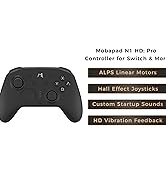
Mobapad is a premium brand offering advanced gaming controllers and accessories for Nintendo Switch, PC, iOS, and Android. Our controllers feature Hall Effect joysticks, ALPS motors, six-axis motion control, and HD vibration for precise, immersive gameplay. With NFC support for Amiibo scanning and ergonomic designs, Mobapad enhances your gaming experience for both casual and competitive play.
-

Product Videos

Similar brands on Amazon
Page 1 of 1Start Over
Sponsored
Customers say
Customers find the controller feels higher quality and appreciate its customizable features. The stick control receives positive feedback, with one customer noting the joysticks snap back to place with precision. Button responsiveness and texture receive mixed reviews - while some customers like the satisfying click with each press and nice feel in their hands, others mention the back buttons are not well placed. Reliability is also mixed, with some saying it works great while others report it stopped working after 4 weeks.
AI Generated from the text of customer reviews
Select to learn more
13 customers mention build quality, 10 positive, 3 negative
...TLDR: PC player only here, no switch. Excellent controller, nice polling rate wired on PC at around 5ms response, the best hall effect joys/...Read more
This controller is awesome and does not have stickdrift! The battery lasts a super long time and it's very light and comfortable to play with....Read more
...But it's really finally a pro controller alternative that cuts no corners: HD rumble, power on from Home button, Amiibo support, 6 axis...Read more
This controller is the biggest piece of crap....Read more
8 customers mention stick control, 6 positive, 2 negative
...This does everything the pro controller does (rumble, motion controls, NFC support) for $15 less....Read more
...as the Pro Controller and has the same features including rumble, motion control (gyro), and NFC for amiibo support....Read more
...This thing is not drift proof. This happened less than a week after purchasing. Also the thing vibrates horribly....Read more
...The joysticks snap back to place with precision as well, with 0 wiggle once they do, at least so far...as the sticks become worn this could change,...Read more
5 customers mention customizability, 5 positive, 0 negative
...The biggest advantage: Customizable and additional buttons!! Background and further details:...Read more
...It is also mechanical, but it comes in two forms. You can choose to use a traditional + D-pad, or you can use the disk shaped pad....Read more
...5. The dpad is a mixed bag, so it comes with 2 types , the bowl and the cross, the bowl is virtually unusable if you plan on also using the joystick...Read more
...Overall no complaints at all. Love the ability to easily switch from Xbox to Switch controller mode and the ease of the programming app.Read more
11 customers mention button responsiveness, 7 positive, 4 negative
...feels higher quality and it's lighter, plus it has turbo and mappable back buttons (which I haven't yet bothered with during the week I've had it)....Read more
...to the 4 way + d-pad for most games that use joysticks, the triggers are not analog and are just another button but for some reason the triggers...Read more
...I like the clicky buttons....Read more
Have not had a single problem with it. Its a clicky controller. I see why its called mobapad. Kind of like mousepad because it makes clicky noises.Read more
10 customers mention texture, 6 positive, 4 negative
...The buttons, especially D-pad feel amazing. The hall effect sticks are accurate, and the back buttons are perfect size and placement....Read more
Buttons are louder than blue switched keyboards. Plastic feels a bit cheap, back paddles and turbo are a plus.Read more
...I love the buttons sound and feel even the rumble is decent and I never like rumble. The hunt for the perfect smash controller continues....Read more
...the official pro controllers - I think they feel clunky, the texture/finish feels cheap, and they're prone to the same drift issues as the Nintendo...Read more
6 customers mention reliability, 2 positive, 4 negative
Controller Quit Working After 4 Weeks!Read more
...This does everything the pro controller does (rumble, motion controls, NFC support) for $15 less....Read more
...It's odd to start pulling in a trigger to see no response at all on your game or to have lag between pulling the triggers and a response simply due...Read more
...bag, so it comes with 2 types , the bowl and the cross, the bowl is virtually unusable if you plan on also using the joystick, it just gets in the...Read more
5 customers mention button placement, 3 positive, 2 negative
...The biggest advantage: Customizable and additional buttons!! Background and further details:...Read more
...What it doesn't do so good 1. The back buttons are not well placed, I only really use them to play Souls games, (I use them to run) So...Read more
...The hall effect sticks are accurate, and the back buttons are perfect size and placement....Read more
...I will stand by my 5/10 for triggers. The back buttons are in a pretty awful place or the controller is just too small, or both....Read more

Great all around controller
This controller comes super close to greatness. The controller does wake the switch from sleep and the gyroscope function works. Battery life is above average, multiple half-days playing without recharging. The thumbsticks feel great and better than most first party controllers - and with hall effect sensors they should resist getting any drift. The buttons are micro-switches so they have nice tactile presses and clicks with short press distances. The direction pad is on par with some of my all-time favorites for brutal fighting games. Both of the direction pads work very well, and is easy to swap (be sure to line up the correct tab in the corner, it only fits in one way). The triggers are good too, no issues at all. The texturing on the grips feel great during extended gameplay. The turbo features and programmable macros are easy to work and to manage (and you can even loop the macros which is an awesome feature). You can change the LED color that shines thru the logo in the middle and it even flashes using the turbo buttons. The HD rumble certainly feels better than any other 3rd party controller I have tried to this date. However it does feel a bit different as comparing it to 1st party joycons - so the difference may be due to the size of the controller itself. Not totally a bad thing though, as not many games utilize HD rumble, but its something to be aware of. And now for the not so good portion. The back buttons are a little harder to press due to placement/size, however not unreasonable. There also does not seem to be any way to map the back buttons in the controller itself. It appears to be set up more to be a macro mode for recording and replaying multiple button presses (that you can certainly do in the controller - and it is easy). I tried to record a single button press with the macro feature, but there is a delay for how quickly the button can be repeated. (for example I can rapidly press A on the controller itself and the system will input every press - while the back buttons at the same speed only registers every 4th or 5th press). It may be possible to map back buttons in their controller app, however I could not find any way to do this on the fly while gaming. I will certainly use it for many gaming sessions as it ticks nearly every box that is important to me in a controller. This controller has really impressed me and is in my top 5 list - I would absolutely recommend this controller.
Top reviews from the United States
There was a problem filtering reviews. Please reload the page.
- Reviewed in the United States on June 11, 2023
- Reviewed in the United States on August 9, 2023 I bought it for smash ultimate and I really wanted to like it but it simply cannot handle fast buttons. The left stick can't keep up with any serious inputs. I love the buttons sound and feel even the rumble is decent and I never like rumble. The hunt for the perfect smash controller continues. Edit: I got a full refund and kept the controller so kudos for the customer care, bumped up the stars to 4 because the controllers still decent for average gamers.
It's a decent controller for general use but not for anything competitive
Reviewed in the United States on August 9, 2023
Images in this review
- Reviewed in the United States on September 12, 2023