Agent Builder is available now as a tech preview. Get started with an Elastic Cloud Trial, and check out the documentation for Agent Builder here.
Every search bar is a broken promise. Users type natural language queries, "beachfront paradise in Hawaii with a chef's kitchen" but get back irrelevant results from lexical search. We've solved this with Agentic search and relevance autotuning: a reference architecture that combines natural language understanding with self-improving search that learns from every user interaction. No data scientists needed. No manual tuning. Just search that gets smarter automatically. In this post, I'll show you exactly how to build it.
Who does this help:
- Insurance companies: Customers find the right coverage without understanding policy jargon
- SaaS companies: Developers find documentation using natural language
- E-commerce: Buyers discover products using conversational queries
- Any business with search: Turn your search bar from a cost center into a competitive advantage
Objective
In this blog, we walk through the steps you will need to take to enable an agentic search solution leveraging any LLM you want and the Elastic platform. This search solution will automatically train a Learn-to-Rank model based on user interactions. We will be leveraging a dataset of properties to make a home-search-agent that allows users to ask natural language queries “Show me houses for sale in Hawaii that have 3 bedrooms, a pool, and cost under 1 million” and have rich search results returned to them.
Architecture overview
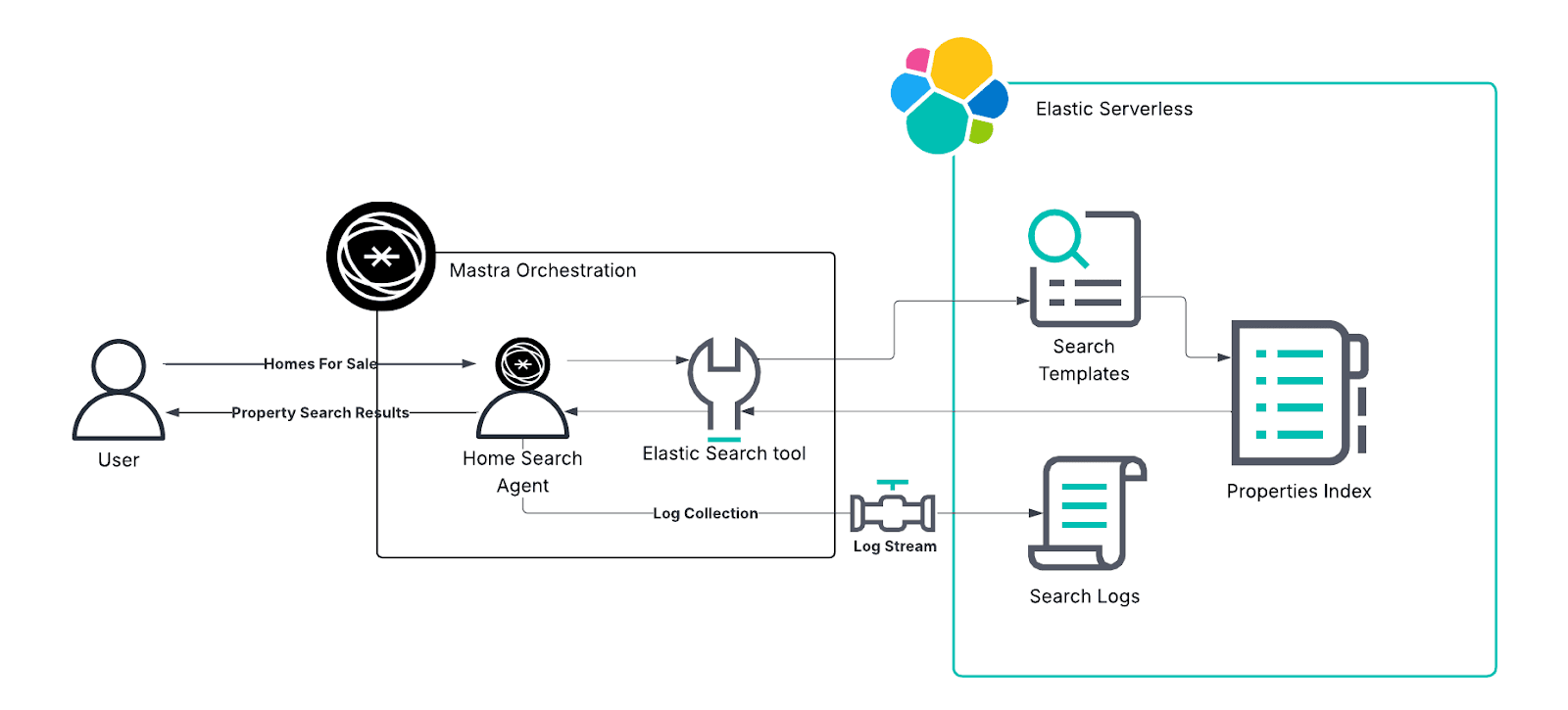
- User asks naturally → "Show me houses for sale in Hawaii that have 3 bedrooms"
- Agent understands → Translates to optimized Elasticsearch query
- Results delivered → Relevant results, no keyword gymnastics
- System learns → Every interaction teaches the model what users actually want
Learn-to-Rank (LTR) implementation
The most difficult part of training Learn-to-Rank algorithms is creating judgment lists; this is now handled automatically with Elastic Logging. As searches are run with your home-search-agent those searches, the results, and follow-up questions get logged for training.
- 48 features are looked at in this example, ranging from property attributes (pool, number of rooms) to engagement signals (click-through rate, follow-up questions)
- Once enough conversations have been logged, an XGBoost-based reranking model will be trained on the data and deployed back to Elasticsearch.
- The feedback loop: search → log events → train model → d→ improved search
Setup and deployment
A detailed step-by-step is provided in the Github readme section, along with a technical deep dive
- Ensure you have Node.js, Git, and Python >=3.10, <3.13
- Clone the provided code repository:https://github.com/jwilliams-elastic/agentic-search-o11y-autotune
- Set up a virtual environment with the requirements.txt provided
- Create an Elastic Serverless project and copy down the following:
- ELASTIC_URL
- ELASTIC_API_KEY
- Create an .env file and provide the credentials from Step 4 (Additionally, you will provide your LLM’s API_KEY)
- Open a Terminal in your virtual environment and run
npm run dev. This will spin up your Mastra server and provide you with a URL like http://localhost:4111/
What was deployed and how it is used
- Multiple search templates were created during the deployment workflow
- Each one of these search templates provides different configurations from V1-V4
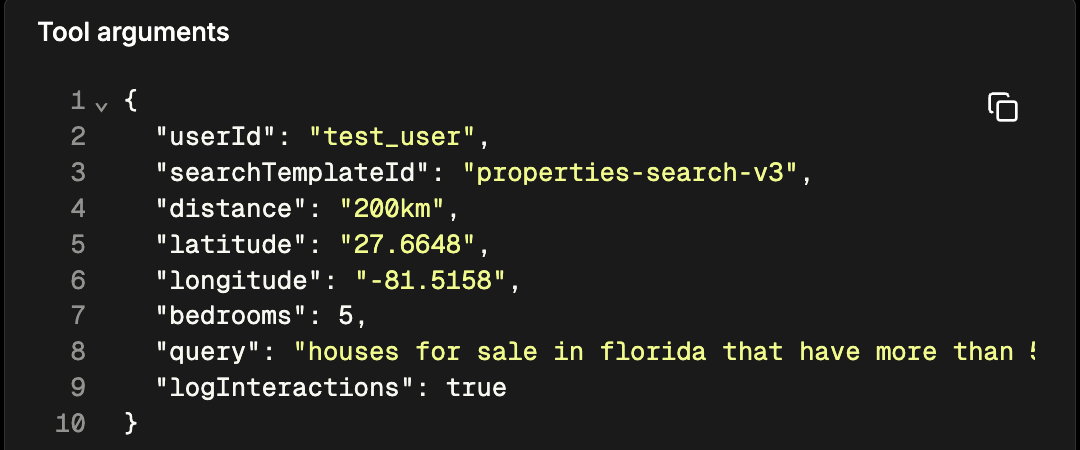
- The home-search-agent has a prompt provided that allows the LLM to fill in search templates
- The LLM is able to convert natural language queries and fill in search templates via an ElasticSearch tool the agent can access
Demo workflow
- Open http://localhost:4111/workflows
- Run
elastic-setup-workflow (.envfile has default values, but you can override in Mastra UI) - Run
search-autotune-workflow(LOW and HIGH option generates different simulated search engagement behavior - HIGH = Luxury, LOW = Affordable) - Open http://localhost:4111/agents and run the "Home Search Agent"
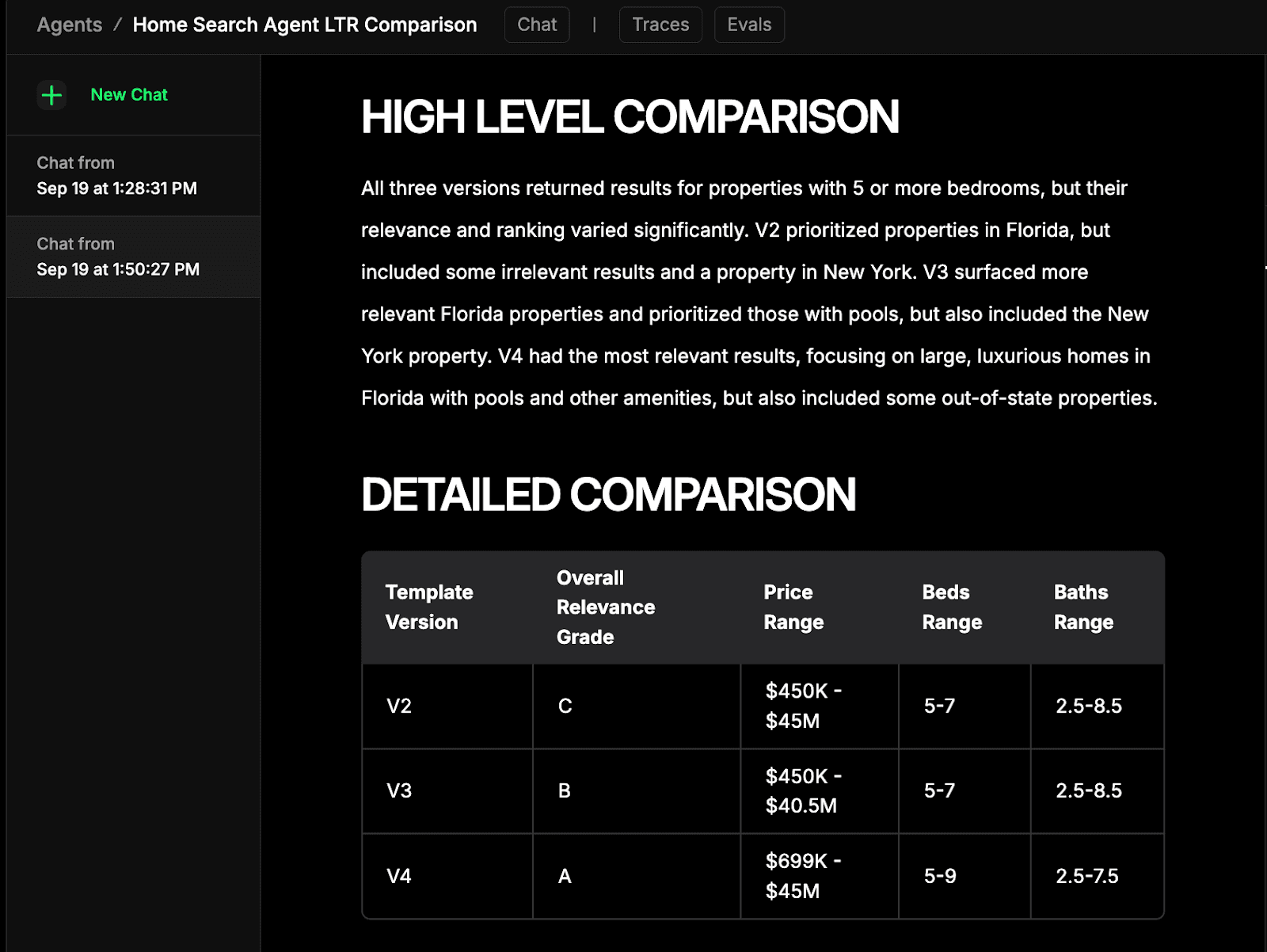
- Show the difference b/t LTR and no-LTR LLM judgment with a query like "affordable home", "luxury home" and "6 bed, 6 bath single family home near orlando fl with garage and pool under 5M with designer finishes throughout"
- You can trigger engagement by asking for more detail for a specific result (ex: tell me more about result #20 in v4 results)
- Open the "Agentic Search Analytics" dashboard - KPIs like CTR, Average Click Position and search template usage.
Agents in Action
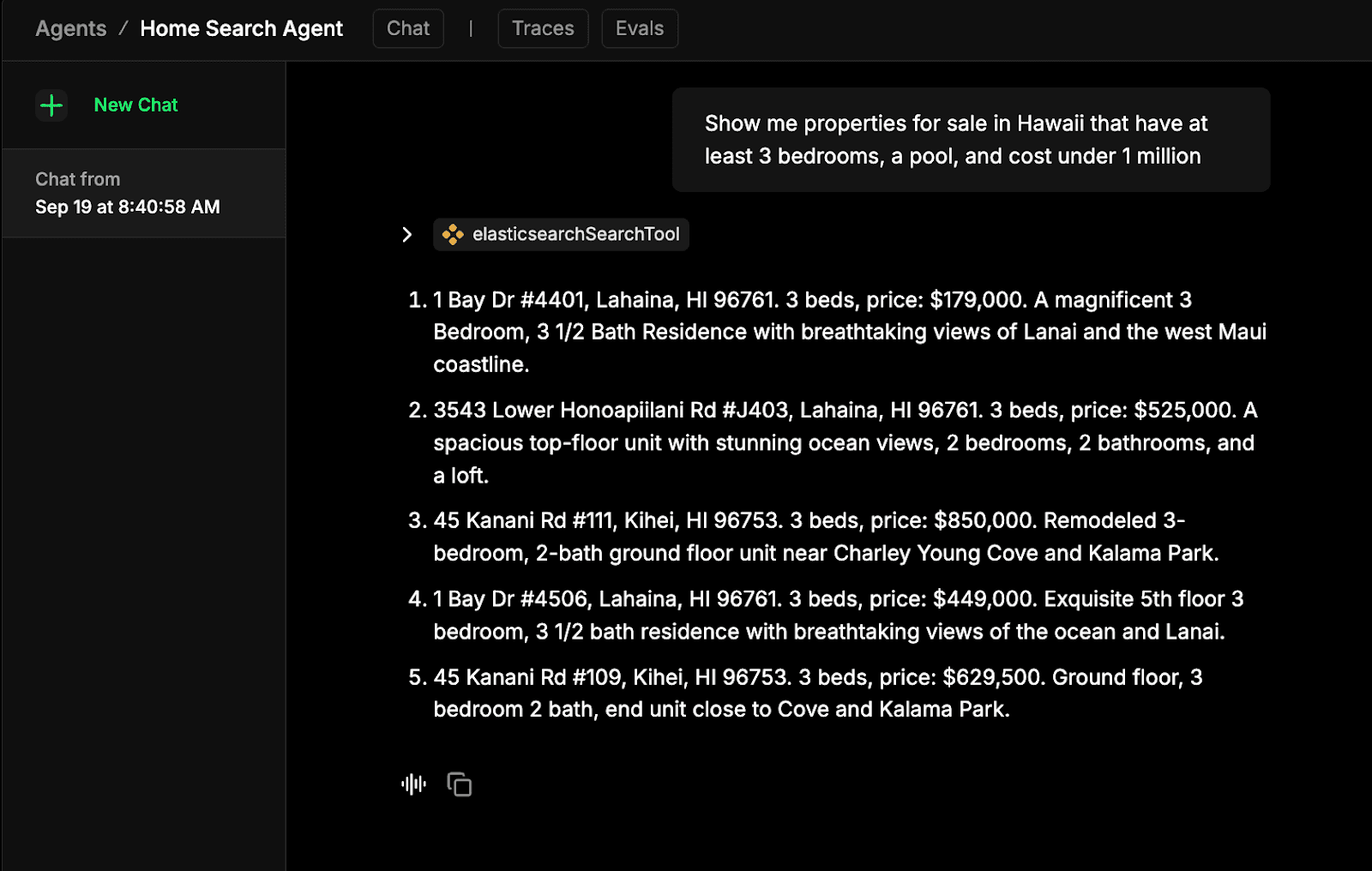
With your Elastic Agents running on the Mastra Framework, you now can choose between the home-search-agent, which allows you to run property searches, and the home-search-agent-ltr-comparison, which allows you to see the direct benefits of training on personalized data.
The home-search-agent
The home-search-agent-ltr-comparison
Why Now?
As users increasingly expect ChatGPT-like search experiences, traditional search engines lose customers to poor relevance and complicated manual tuning. This architecture democratizes access by enabling non-technical users to find what they need without crafting complex queries, while LTR models continuously adapt to individual behavior patterns to increase relevance. Automated retraining keeps results current as trends evolve, and the built-in observability dashboard reveals usage patterns and gaps in your offerings. These insights directly inform feature development and keep you aligned with actual user needs rather than assumptions. Ready to transform your search engine's relevance? Contact us at elastic.co/contact to find out how your search can begin working for you.
Related Content

November 27, 2025
Developing an agentic RAG assistant using LangChain and Elasticsearch
Learn how to build an agentic rag news assistant using LangChain and Elasticsearch that answers queries about articles with adaptive routing.

November 24, 2025
Top Elastic Agent Builder projects and learnings from Cal Hacks 12.0
Explore the top Elastic Agent Builder projects from Cal Hacks 12.0 and dive into our technical takeaways on Serverless, ES|QL, and agent architectures.
November 20, 2025
Getting started with Elastic Agent Builder and Microsoft Agent Framework
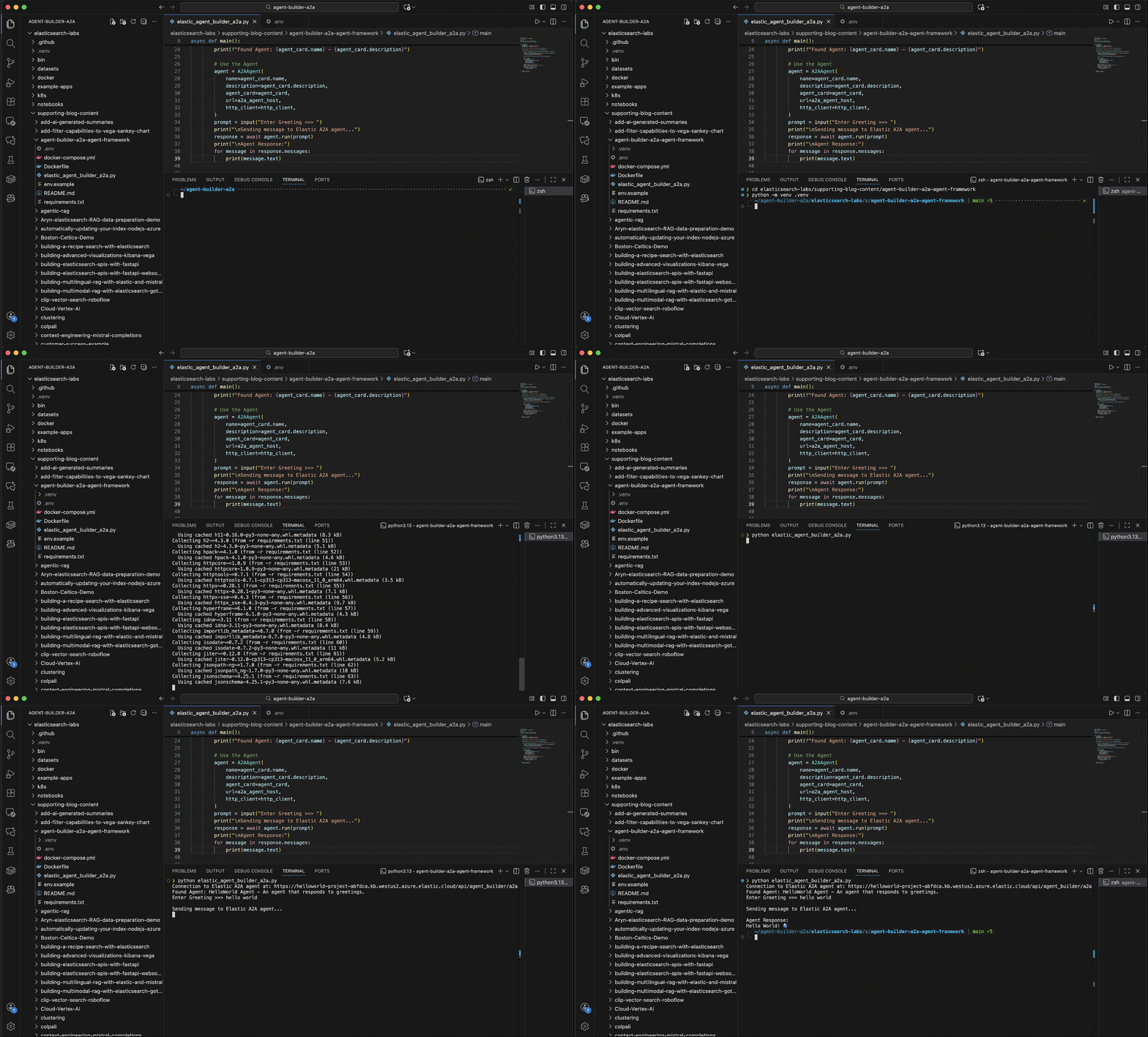
Walk through the complete process of creating an agent with Elastic Agent Builder and then explore how to use the agent via the A2A protocol orchestrated with the Microsoft Agent Framework.

November 23, 2025
Creating an LLM agent newsroom with A2A protocol and MCP in Elasticsearch: Part II
Discover how to build a specialized hybrid LLM agent newsroom using A2A Protocol for agent collaboration and MCP for tool access in Elasticsearch.

November 19, 2025
You Know, for Context - Part III: The power of hybrid search in context engineering
Discover how to use context engineering and hybrid search to improve AI output accuracy with aggregations, RBAC, and non-content signals.