What is Machine Learning Pipeline?
Last Updated : 03 Nov, 2025
A Machine Learning Pipeline is a systematic workflow designed to automate the process of building, training, and deploying ML models. It includes several steps, such as:
- Data Collection
- Preprocessing
- Feature Engineering
- Model Training
- Evaluation
- Deployment.
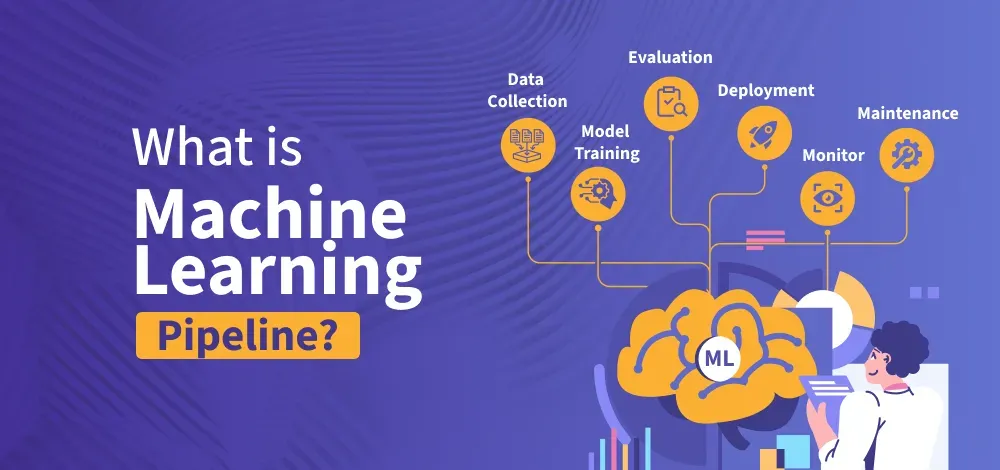
Rather than managing each step individually, pipelines help simplify and standardize the workflow, making machine learning development faster, more efficient and scalable. They also enhance data management by enabling the extraction, transformation, and loading of data from various sources.
Steps to build Machine Learning Pipeline
A machine learning pipeline is a step-by-step process that automates data preparation, model training and deployment. Here, we will discuss the key steps:
Step 1: Data Collection and Preprocessing
- Gather data from sources like databases, APIs or CSV files.
- Clean the data by handling missing values, duplicates and errors.
- Normalize and standardize numerical values.
- Convert categorical variables into a machine readable format.
Step 2: Feature Engineering
- Select the most important features for better model performance.
- Create new features for feature extraction or transformation.
Step 3: Data splitting
- Divide the dataset into training, validation and testing sets.
- When dealing with imbalanced datasets, use random sampling.
Step 4: Model Selection & Training
Step 5: Model evaluation & Optimization
Step 6: Model Deployment
- Deploy the trained model using Flask, FastAPI, TensorFlow and cloud services.
- Save the trained model for real-world applications.
Step 7: Continuous learning & Monitoring
- Automates the pipeline using MLOps tools like MLflow or Kubeflow.
- Update the model with new data to maintain accuracy.
Implementation for model Training
1. Import Libraries
Python import numpy as np import pandas as pd from sklearn.model_selection import train_test_split from sklearn.preprocessing import StandardScaler, OneHotEncoder from sklearn.pipeline import Pipeline from sklearn.compose import ColumnTransformer from sklearn.ensemble import RandomForestClassifier from sklearn.metrics import accuracy_score
2. Load and Prepare the data
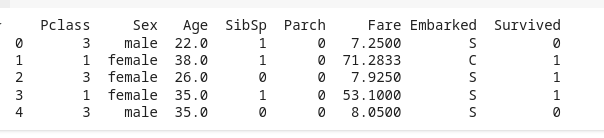
Python # Load dataset df = pd.read_csv("https://raw.githubusercontent.com/datasciencedojo/datasets/master/titanic.csv") # Select relevant features features = ['Pclass', 'Sex', 'Age', 'SibSp', 'Parch', 'Fare', 'Embarked'] df = df[features + ['Survived']].dropna() # Drop rows with missing values # Display the first few rows print(df.head()) Output:
3. Define Preprocessing Steps
Python # Define numerical and categorical features num_features = ['Age', 'SibSp', 'Parch', 'Fare'] cat_features = ['Pclass', 'Sex', 'Embarked'] # Define transformers num_transformer = StandardScaler() # Standardization for numerical features cat_transformer = OneHotEncoder(handle_unknown='ignore') # One-hot encoding for categorical features # Combine transformers into a preprocessor preprocessor = ColumnTransformer([ ('num', num_transformer, num_features), ('cat', cat_transformer, cat_features) ]) 4. Split the data for training and Testing
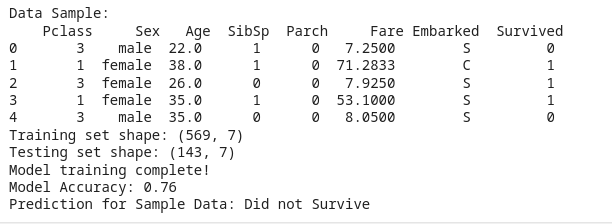
Python # Define target and features X = df[features] y = df['Survived'] # Split into training and testing sets X_train, X_test, y_train, y_test = train_test_split(X, y, test_size=0.2, random_state=42) # Display the shape of the data print(f"Training set shape: {X_train.shape}") print(f"Testing set shape: {X_test.shape}") Output:
Training set shape: (567, 7) Testing set shape: (143, 7)
5. Build and Train model
Python # Define the pipeline pipeline = Pipeline([ ('preprocessor', preprocessor), # Data transformation ('classifier', RandomForestClassifier(n_estimators=100, random_state=42)) # ML model ]) # Train the model pipeline.fit(X_train, y_train) print("Model training complete!") Output:
Model training complete!
6. Evaluate the Model
Python # Make predictions y_pred = pipeline.predict(X_test) # Compute accuracy accuracy = accuracy_score(y_test, y_pred) print(f"Model Accuracy: {accuracy:.2f}") Output:
Model Accuracy: 0.76
7. Save and Load the Model
Python import joblib # Save the trained pipeline joblib.dump(pipeline, 'ml_pipeline.pkl') # Load the model loaded_pipeline = joblib.load('ml_pipeline.pkl') # Predict using the loaded model sample_data = pd.DataFrame([{'Pclass': 3, 'Sex': 'male', 'Age': 25, 'SibSp': 0, 'Parch': 0, 'Fare': 7.5, 'Embarked': 'S'}]) prediction = loaded_pipeline.predict(sample_data) print(f"Prediction: {'Survived' if prediction[0] == 1 else 'Did not Survive'}") Output:
Prediction: Did not Survive
Implementation code
Python # Step 1: Import Required Libraries import numpy as np import pandas as pd from sklearn.model_selection import train_test_split from sklearn.preprocessing import StandardScaler, OneHotEncoder from sklearn.pipeline import Pipeline from sklearn.compose import ColumnTransformer from sklearn.ensemble import RandomForestClassifier from sklearn.metrics import accuracy_score import joblib # For saving and loading models # Step 2: Load and Prepare the Data # Load dataset (Titanic dataset as an example) df = pd.read_csv("https://raw.githubusercontent.com/datasciencedojo/datasets/master/titanic.csv") # Select relevant features features = ['Pclass', 'Sex', 'Age', 'SibSp', 'Parch', 'Fare', 'Embarked'] df = df[features + ['Survived']].dropna() # Drop rows with missing values # Display the first few rows of the dataset print("Data Sample:\n", df.head()) # Step 3: Define Preprocessing Steps # Define numerical and categorical features num_features = ['Age', 'SibSp', 'Parch', 'Fare'] cat_features = ['Pclass', 'Sex', 'Embarked'] # Define transformers for preprocessing num_transformer = StandardScaler() # Standardize numerical features cat_transformer = OneHotEncoder(handle_unknown='ignore') # One-hot encode categorical features # Combine transformers into a single preprocessor preprocessor = ColumnTransformer([ ('num', num_transformer, num_features), ('cat', cat_transformer, cat_features) ]) # Step 4: Split Data into Training and Testing Sets # Define target and features X = df[features] y = df['Survived'] # Split into training and testing sets (80% train, 20% test) X_train, X_test, y_train, y_test = train_test_split(X, y, test_size=0.2, random_state=42) print(f"Training set shape: {X_train.shape}") print(f"Testing set shape: {X_test.shape}") # Step 5: Build the Machine Learning Pipeline # Define the pipeline (includes preprocessing + RandomForest classifier) pipeline = Pipeline([ ('preprocessor', preprocessor), # Apply preprocessing steps ('classifier', RandomForestClassifier(n_estimators=100, random_state=42)) # ML model (RandomForest) ]) # Step 6: Train the Model # Train the model using the pipeline pipeline.fit(X_train, y_train) print("Model training complete!") # Step 7: Evaluate the Model # Make predictions on the test data y_pred = pipeline.predict(X_test) # Compute accuracy of the model accuracy = accuracy_score(y_test, y_pred) print(f"Model Accuracy: {accuracy:.2f}") # Step 8: Save and Load the Model # Save the trained pipeline (preprocessing + model) joblib.dump(pipeline, 'ml_pipeline.pkl') # Load the model back loaded_pipeline = joblib.load('ml_pipeline.pkl') # Predict using the loaded model sample_data = pd.DataFrame([{'Pclass': 3, 'Sex': 'male', 'Age': 25, 'SibSp': 0, 'Parch': 0, 'Fare': 7.5, 'Embarked': 'S'}]) prediction = loaded_pipeline.predict(sample_data) # Output prediction for a sample input print(f"Prediction for Sample Data: {'Survived' if prediction[0] == 1 else 'Did not Survive'}") Output:
Benefits of Machine Learning pipeline
A Machine Learning Pipeline offers several advantages by automating and streamlining the process of developing, training and deploying machine learning models. Here are the key benefits:
1. Automation and Efficiency: It automates the repetitive tasks such as data cleaning, model training and testing. It saves time and speeds up the development process and allows data scientists to focus on more strategic task.
2. Faster Model Deployment: It helps in quickly moving a trained model into real-world use. It is useful for AI applications like stock trading, fraud detection and healthcare.
3. Improve Accuracy & Consistency: It ensures that data is processed the same way every time reducing human error and making predictions more reliable.
4. Handles Large Data easily: ML pipeline works efficiently with big datasets and can run on powerful cloud platforms for better performance.
5. Cost-Effective: Machine Learning Pipeline saves time and money by automating tasks that would normally require manual work. This means fewer mistakes and less work for extra workers, making the process more efficient and cost-effective.
Explore
How To Become
Roadmap
Interview Preparation
Project Ideas
Certification