Java Program to Append a String in an Existing File
Last Updated : 11 Jul, 2025
In Java, we can append a string in an existing file using FileWriter which has an option to open a file in append mode. Java FileWriter class is used to write character-oriented data to a file. It is a character-oriented class that is used for file handling in Java. Unlike FileOutputStream class, we don't need to convert the string into a byte array because it provides a method to write a string directly.
Note: The buffer size may be specified, or the default size may be used. A Writer sends its output immediately to the underlying character or byte stream.
Let us see constructors used later on adhering towards as usual methods of this class
Constructor: FileWriter(File file, boolean append):
It Constructs a FileWriter object given a File object in append mode. Now let us toggle onto methods of this class which is invoked here and play a crucial role in appending a string in an existing file as follows:
Method 1: write()
This method writes a portion of a String
Syntax:
void write(String s,int off,int len);
Return Type: Void
Parameters:
- Input string
- int off
- String length
Method 2: close()
This method closes the stream after flushing it.
Return Type: Void
Example
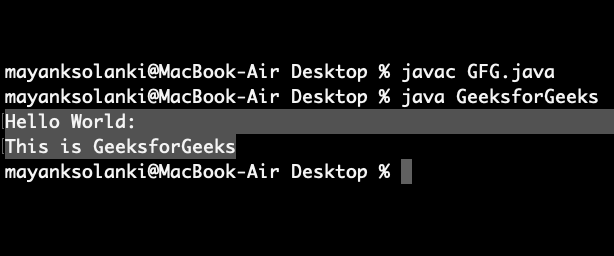
Java // Java Program to Append a String to the // End of a File // Importing input output classes import java.io.*; // Main class class GeeksforGeeks { // Method 1 // TO append string into a file public static void appendStrToFile(String fileName, String str) { // Try block to check for exceptions try { // Open given file in append mode by creating an // object of BufferedWriter class BufferedWriter out = new BufferedWriter( new FileWriter(fileName, true)); // Writing on output stream out.write(str); // Closing the connection out.close(); } // Catch block to handle the exceptions catch (IOException e) { // Display message when exception occurs System.out.println("exception occurred" + e); } } // Method 2 // main driver method public static void main(String[] args) throws Exception { // Creating a sample file with some random text String fileName = "Geek.txt"; // Try block to check for exceptions try { // Again operating same operations by passing // file as // parameter to read it BufferedWriter out = new BufferedWriter( new FileWriter(fileName)); // Writing on. file out.write("Hello World:\n"); // Closing file connections out.close(); } // Catch block to handle exceptions catch (IOException e) { // Display message when error occurs System.out.println("Exception Occurred" + e); } // Now appendinggiven str to above // created file String str = "This is GeeksforGeeks"; // Calling the above method appendStrToFile(fileName, str); // Let us print modified file try { BufferedReader in = new BufferedReader( new FileReader("Geek.txt")); String mystring; // TIll there is content in string // condition holds true while ((mystring = in.readLine()) != null) { System.out.println(mystring); } } // Catch block to handle IO exceptions catch (IOException e) { System.out.println("Exception Occurred" + e); } } } Output:
Explore
Java Basics
OOP & Interfaces
Collections
Exception Handling
Java Advanced
Practice Java