1 Arduino Tutorial #3 - Measuring the light - Dong Ho Son POSTECH Pohang, Korea donghoson@postech.ac.kr
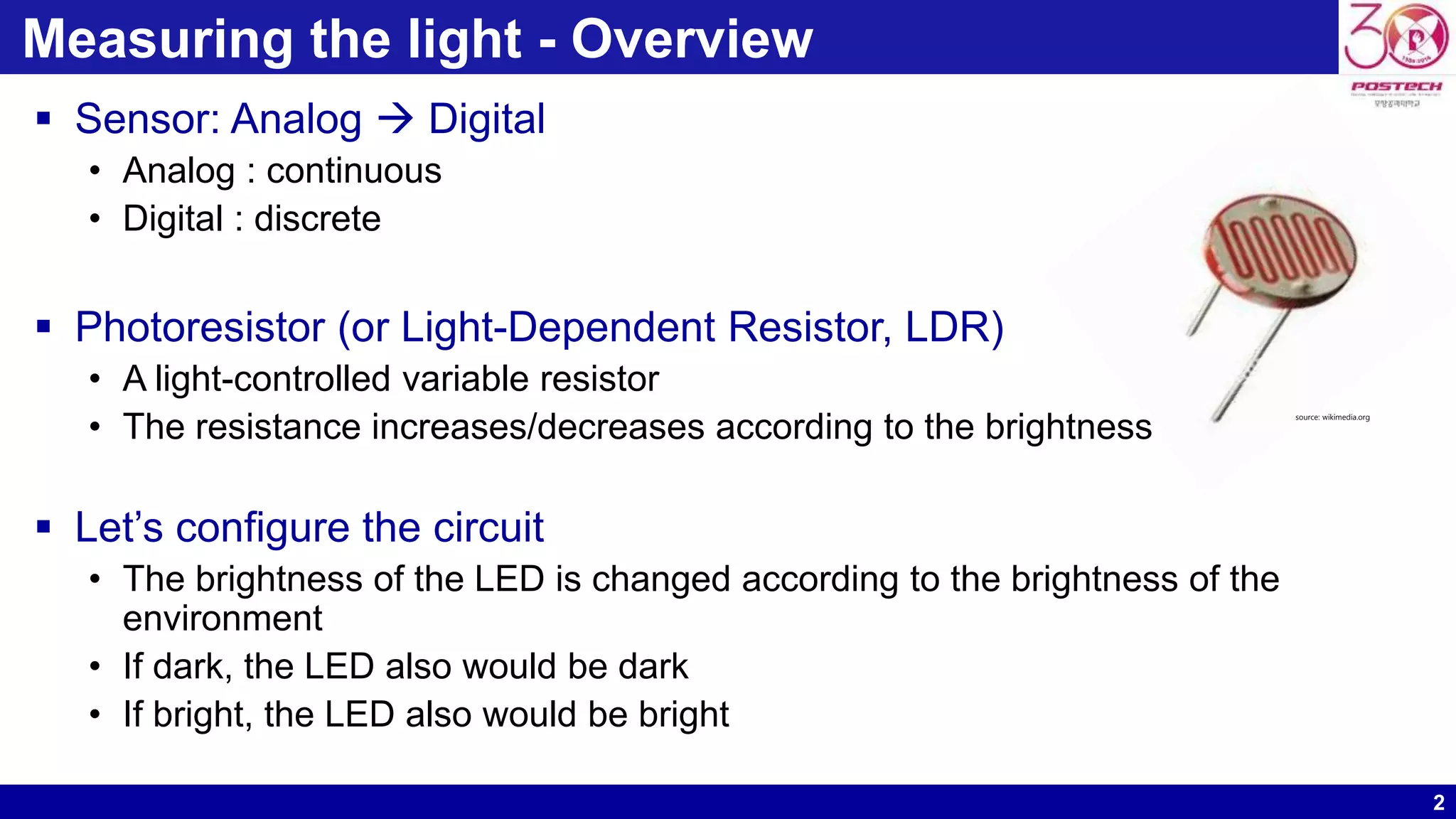
2 Measuring the light - Overview  Sensor: Analog  Digital • Analog : continuous • Digital : discrete  Photoresistor (or Light-Dependent Resistor, LDR) • A light-controlled variable resistor • The resistance increases/decreases according to the brightness  Let’s configure the circuit • The brightness of the LED is changed according to the brightness of the environment • If dark, the LED also would be dark • If bright, the LED also would be bright source: wikimedia.org
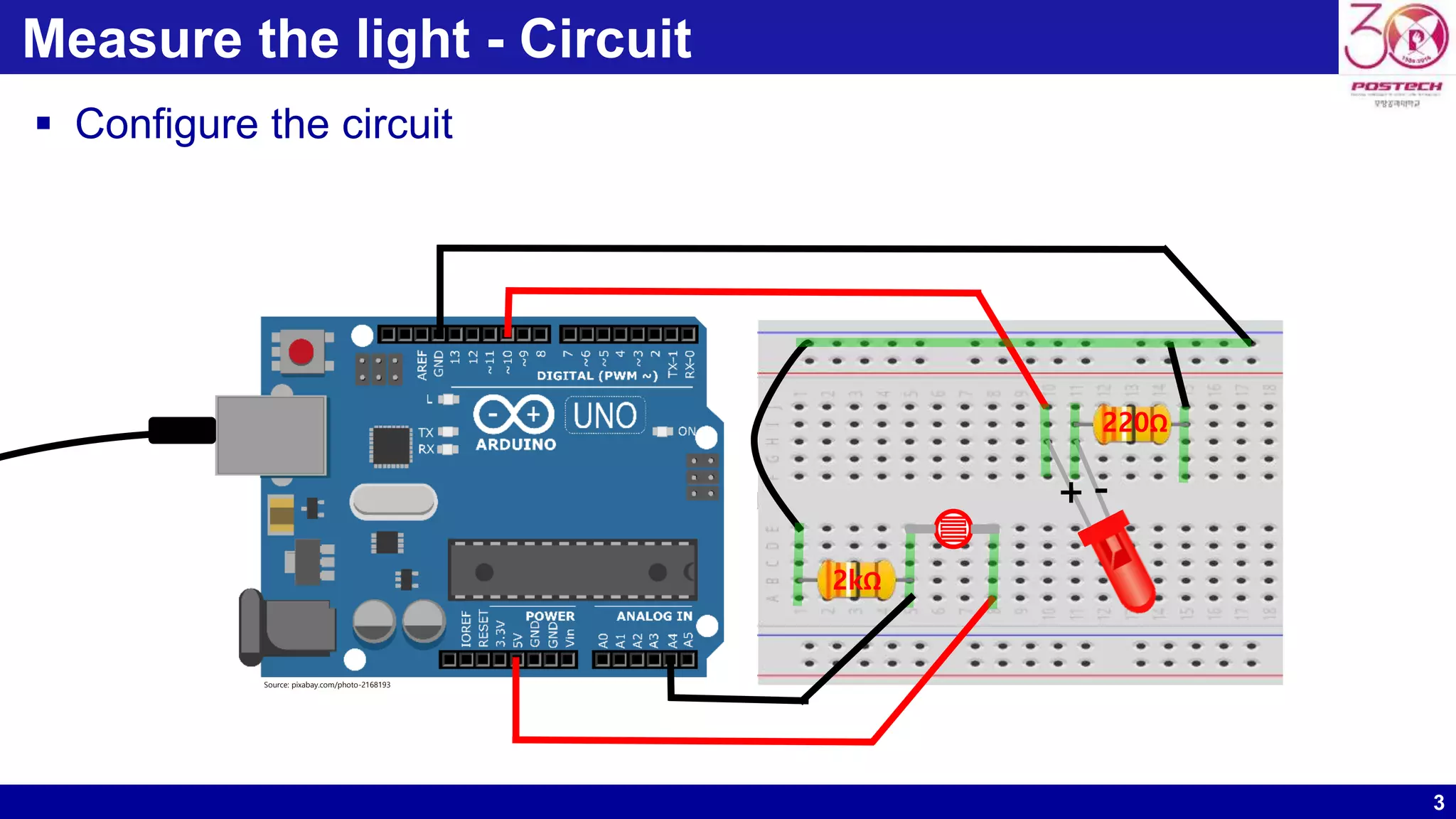
3 Measure the light - Circuit  Configure the circuit +- 2kΩ 220Ω Source: pixabay.com/photo-2168193
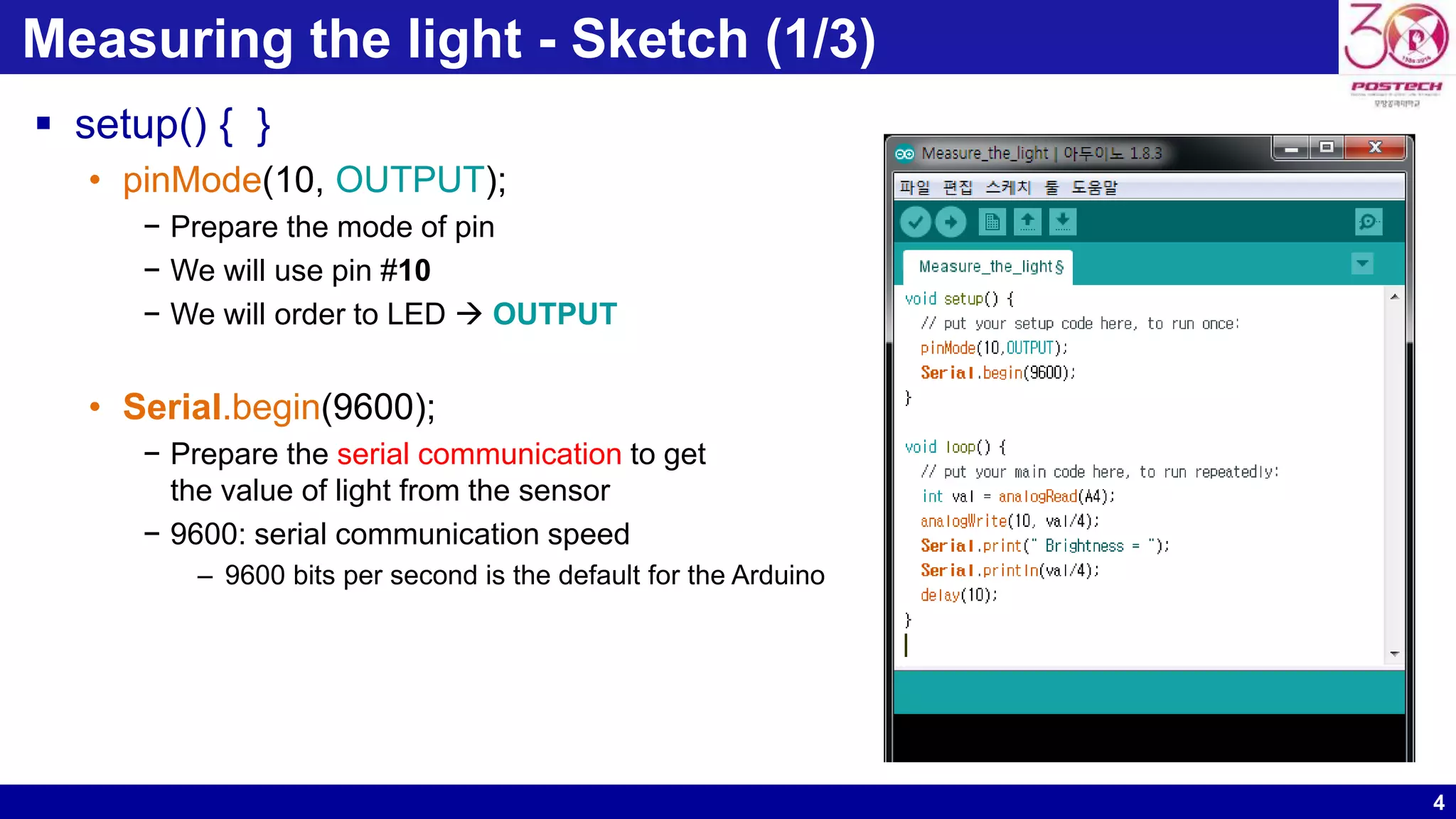
4 Measuring the light - Sketch (1/3)  setup() { } • pinMode(10, OUTPUT); − Prepare the mode of pin − We will use pin #10 − We will order to LED  OUTPUT • Serial.begin(9600); − Prepare the serial communication to get the value of light from the sensor − 9600: serial communication speed – 9600 bits per second is the default for the Arduino
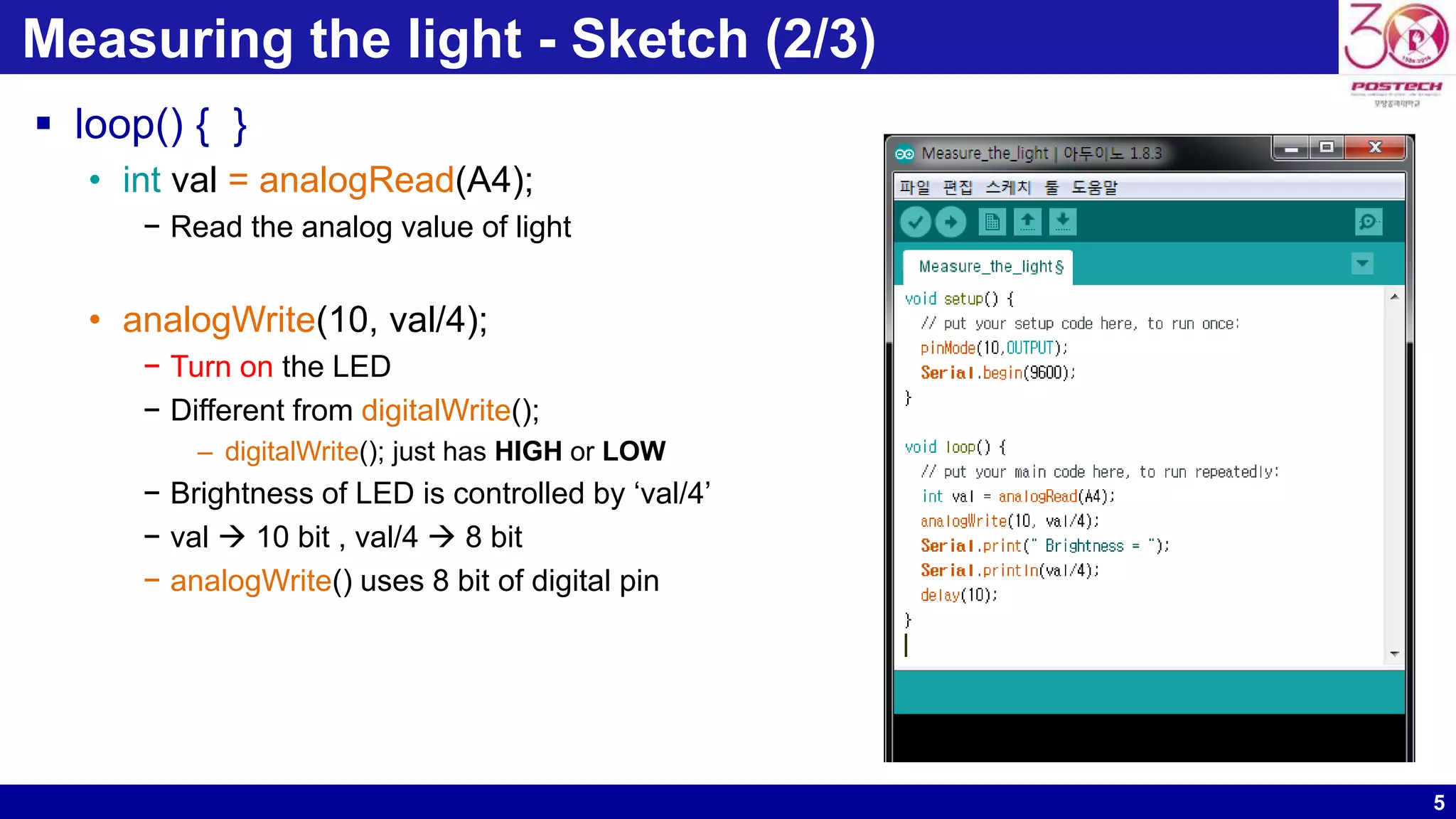
5 Measuring the light - Sketch (2/3)  loop() { } • int val = analogRead(A4); − Read the analog value of light • analogWrite(10, val/4); − Turn on the LED − Different from digitalWrite(); – digitalWrite(); just has HIGH or LOW − Brightness of LED is controlled by ‘val/4’ − val  10 bit , val/4  8 bit − analogWrite() uses 8 bit of digital pin
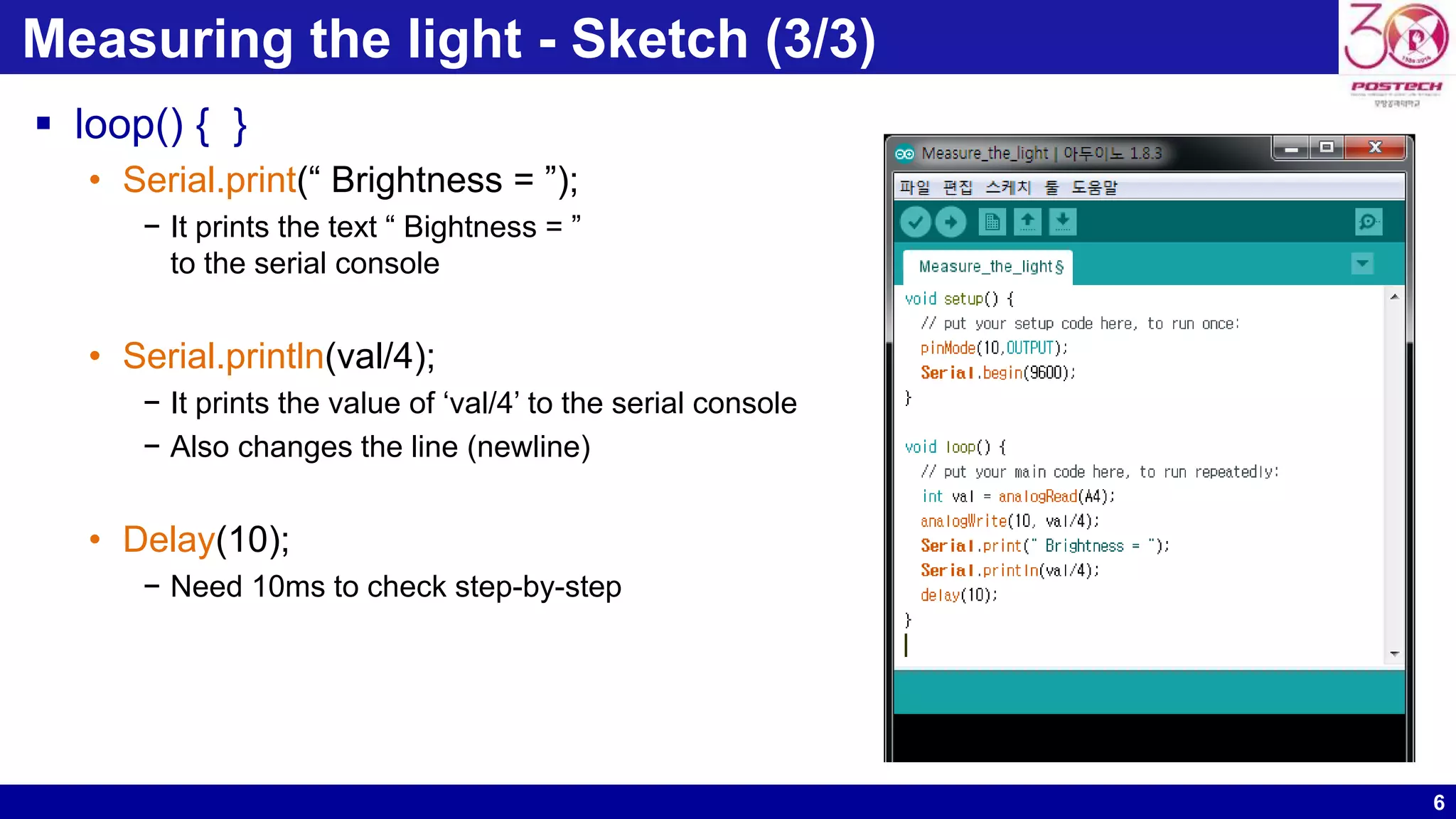
6 Measuring the light - Sketch (3/3)  loop() { } • Serial.print(“ Brightness = ”); − It prints the text “ Bightness = ” to the serial console • Serial.println(val/4); − It prints the value of ‘val/4’ to the serial console − Also changes the line (newline) • Delay(10); − Need 10ms to check step-by-step
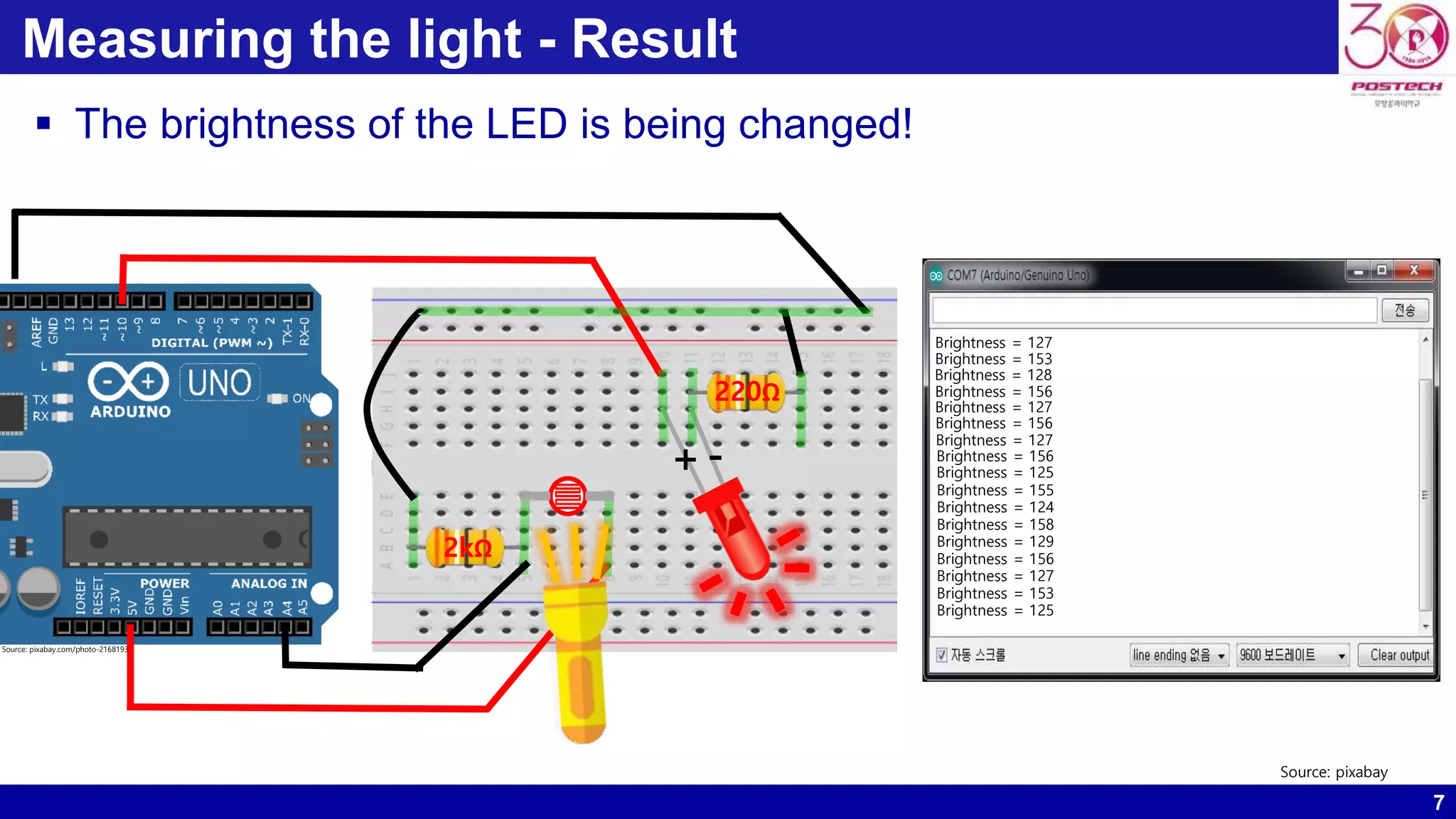
7 Measuring the light - Result  The brightness of the LED is being changed! +- Brightness = 127 Brightness = 153 Brightness = 128 Brightness = 156 Brightness = 127 Brightness = 156 Brightness = 127 Brightness = 156 Brightness = 125 Brightness = 155 Brightness = 124 Brightness = 158 Brightness = 129 Brightness = 156 Brightness = 127 Brightness = 153 Brightness = 125 Source: pixabay 2kΩ 220Ω Source: pixabay.com/photo-2168193

Arduino tutorial #3

  • 1.
    1 Arduino Tutorial #3 -Measuring the light - Dong Ho Son POSTECH Pohang, Korea donghoson@postech.ac.kr
  • 2.
    2 Measuring the light- Overview  Sensor: Analog  Digital • Analog : continuous • Digital : discrete  Photoresistor (or Light-Dependent Resistor, LDR) • A light-controlled variable resistor • The resistance increases/decreases according to the brightness  Let’s configure the circuit • The brightness of the LED is changed according to the brightness of the environment • If dark, the LED also would be dark • If bright, the LED also would be bright source: wikimedia.org
  • 3.
    3 Measure the light- Circuit  Configure the circuit +- 2kΩ 220Ω Source: pixabay.com/photo-2168193
  • 4.
    4 Measuring the light- Sketch (1/3)  setup() { } • pinMode(10, OUTPUT); − Prepare the mode of pin − We will use pin #10 − We will order to LED  OUTPUT • Serial.begin(9600); − Prepare the serial communication to get the value of light from the sensor − 9600: serial communication speed – 9600 bits per second is the default for the Arduino
  • 5.
    5 Measuring the light- Sketch (2/3)  loop() { } • int val = analogRead(A4); − Read the analog value of light • analogWrite(10, val/4); − Turn on the LED − Different from digitalWrite(); – digitalWrite(); just has HIGH or LOW − Brightness of LED is controlled by ‘val/4’ − val  10 bit , val/4  8 bit − analogWrite() uses 8 bit of digital pin
  • 6.
    6 Measuring the light- Sketch (3/3)  loop() { } • Serial.print(“ Brightness = ”); − It prints the text “ Bightness = ” to the serial console • Serial.println(val/4); − It prints the value of ‘val/4’ to the serial console − Also changes the line (newline) • Delay(10); − Need 10ms to check step-by-step
  • 7.
    7 Measuring the light- Result  The brightness of the LED is being changed! +- Brightness = 127 Brightness = 153 Brightness = 128 Brightness = 156 Brightness = 127 Brightness = 156 Brightness = 127 Brightness = 156 Brightness = 125 Brightness = 155 Brightness = 124 Brightness = 158 Brightness = 129 Brightness = 156 Brightness = 127 Brightness = 153 Brightness = 125 Source: pixabay 2kΩ 220Ω Source: pixabay.com/photo-2168193