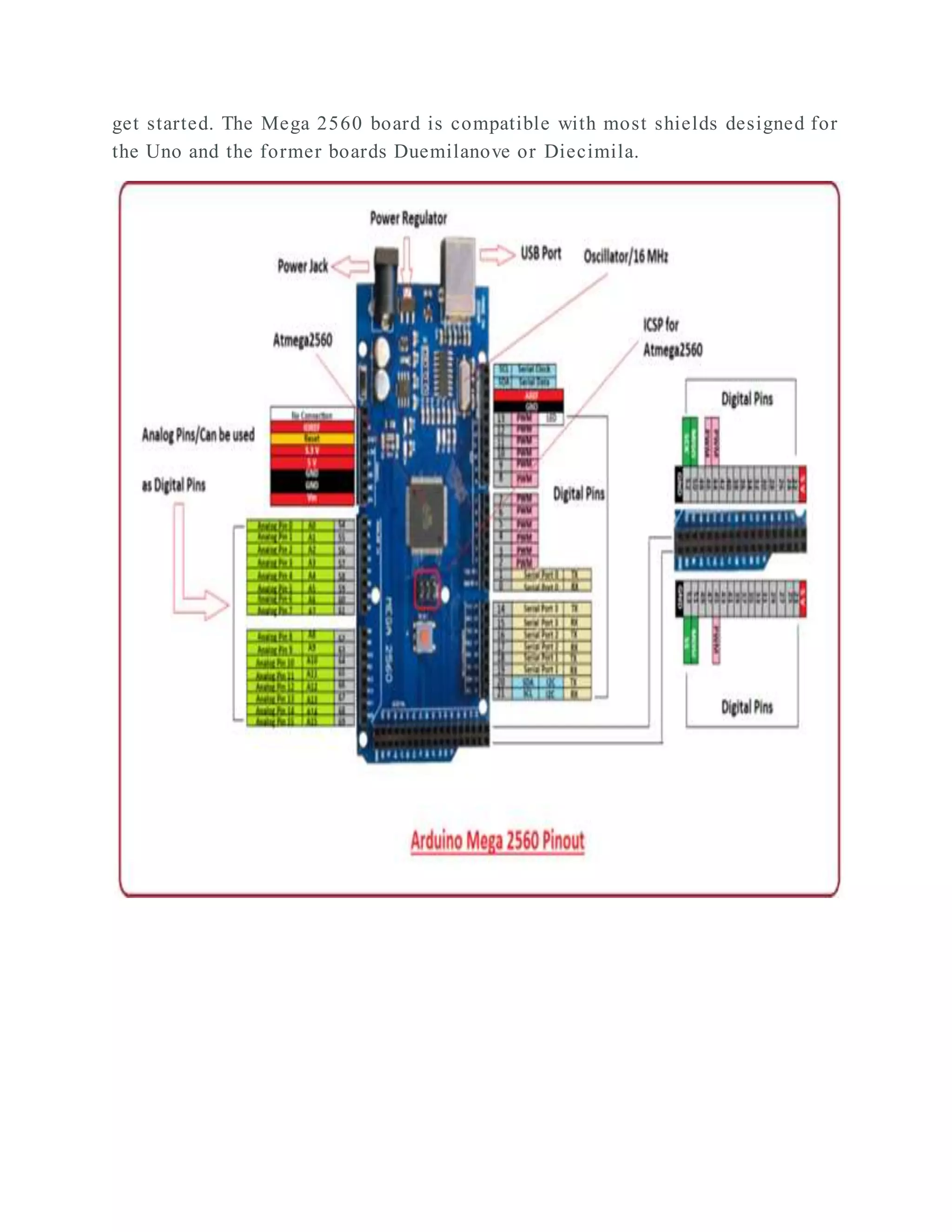
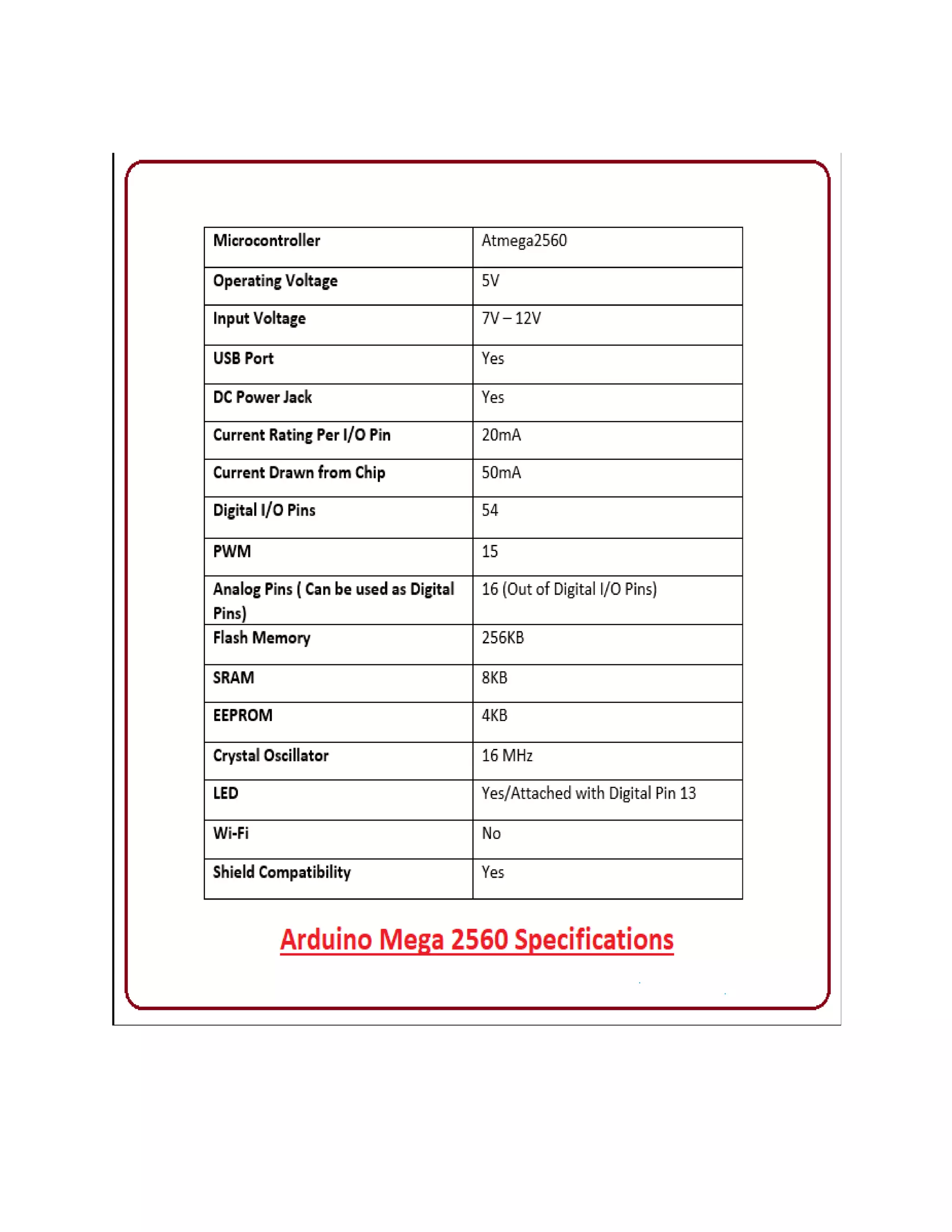
DESIGN AND DEVELOPMENT OF AUTOMATIC IRRIGATION SYSTEM USING DS1307 TIMER SENSOR OBJECTIVE: In this project we will be able to control the on and off of your devices between the time you want. They may be a light or motor etc., we will use the arduino Mega 2560, and the RTC 1307 to show and control the time. You can set the "ON" hour and the "OFF" hour. Hardware Required: 1. Arduino Mega 2560 2. DS1307 RTC Sensor 3. Kirti Relay (12 V) 4. SMPS (12 V) 5. Relay (5 V) 6. Dot Matrix Board 7. Jumper Wires 8. Bulb 9. AC motor (230 VAC/12 AMPS) Software Required: 1. Arduino IDE (Embedded C code) Hardware Components Description: Arduino Mega 2560 The Arduino Mega 2560 is a microcontroller board based on the ATmega2560. It has 54 digital input/output pins (of which 15 can be used as PWM outputs), 16 analog inputs, 4 UARTs (hardware serial ports), a 16 MHz crystal oscillator, a USB connection, a power jack, an ICSP header, and a reset button. It contains everything needed to support the microcontroller; simply connect it to a computer with a USB cable or power it with a AC-to-DC adapter or battery to
get started. The Mega 2560 board is compatible with most shields designed for the Uno and the former boards Duemilanove or Diecimila.
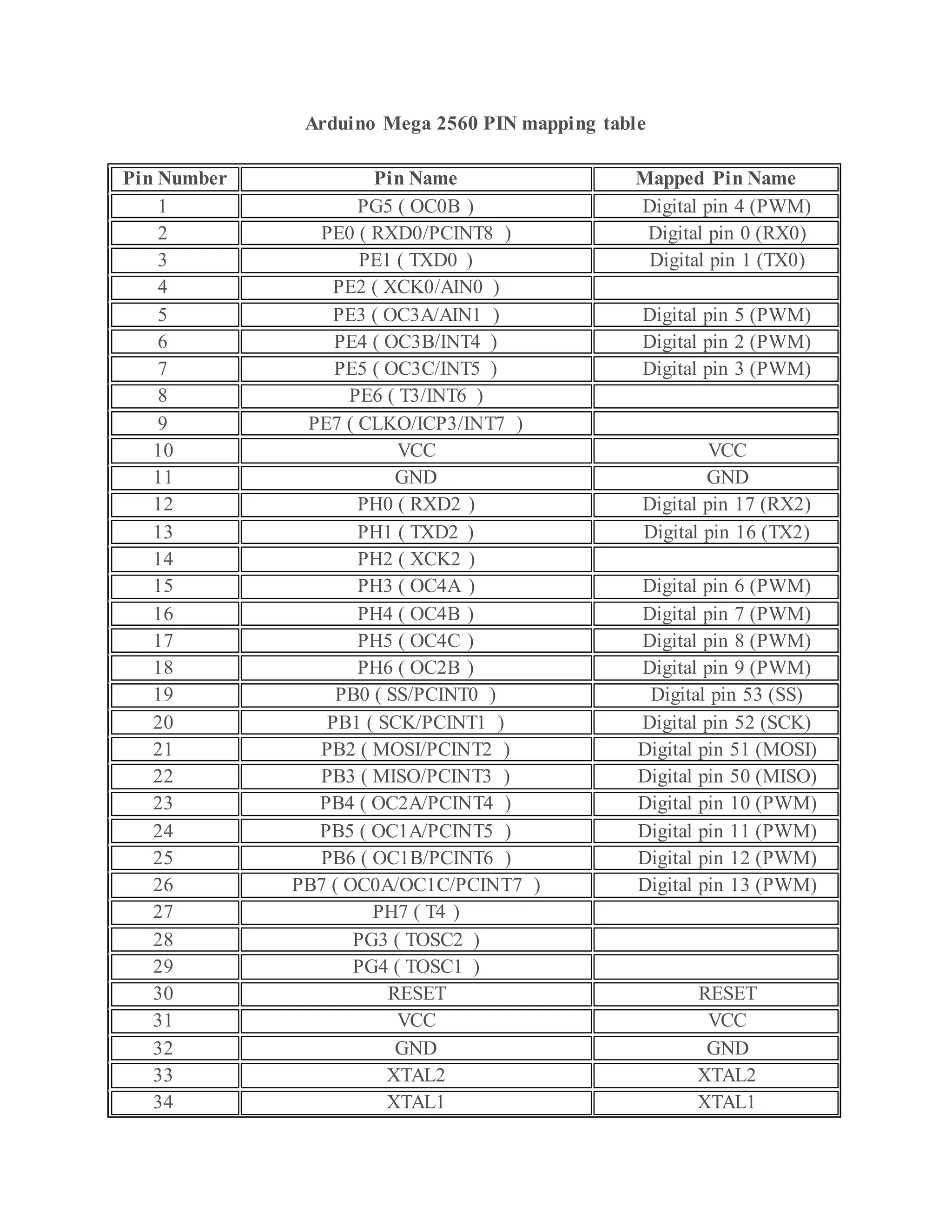
Arduino Mega 2560 PIN mapping table Pin Number Pin Name Mapped Pin Name 1 PG5 ( OC0B ) Digital pin 4 (PWM) 2 PE0 ( RXD0/PCINT8 ) Digital pin 0 (RX0) 3 PE1 ( TXD0 ) Digital pin 1 (TX0) 4 PE2 ( XCK0/AIN0 ) 5 PE3 ( OC3A/AIN1 ) Digital pin 5 (PWM) 6 PE4 ( OC3B/INT4 ) Digital pin 2 (PWM) 7 PE5 ( OC3C/INT5 ) Digital pin 3 (PWM) 8 PE6 ( T3/INT6 ) 9 PE7 ( CLKO/ICP3/INT7 ) 10 VCC VCC 11 GND GND 12 PH0 ( RXD2 ) Digital pin 17 (RX2) 13 PH1 ( TXD2 ) Digital pin 16 (TX2) 14 PH2 ( XCK2 ) 15 PH3 ( OC4A ) Digital pin 6 (PWM) 16 PH4 ( OC4B ) Digital pin 7 (PWM) 17 PH5 ( OC4C ) Digital pin 8 (PWM) 18 PH6 ( OC2B ) Digital pin 9 (PWM) 19 PB0 ( SS/PCINT0 ) Digital pin 53 (SS) 20 PB1 ( SCK/PCINT1 ) Digital pin 52 (SCK) 21 PB2 ( MOSI/PCINT2 ) Digital pin 51 (MOSI) 22 PB3 ( MISO/PCINT3 ) Digital pin 50 (MISO) 23 PB4 ( OC2A/PCINT4 ) Digital pin 10 (PWM) 24 PB5 ( OC1A/PCINT5 ) Digital pin 11 (PWM) 25 PB6 ( OC1B/PCINT6 ) Digital pin 12 (PWM) 26 PB7 ( OC0A/OC1C/PCINT7 ) Digital pin 13 (PWM) 27 PH7 ( T4 ) 28 PG3 ( TOSC2 ) 29 PG4 ( TOSC1 ) 30 RESET RESET 31 VCC VCC 32 GND GND 33 XTAL2 XTAL2 34 XTAL1 XTAL1
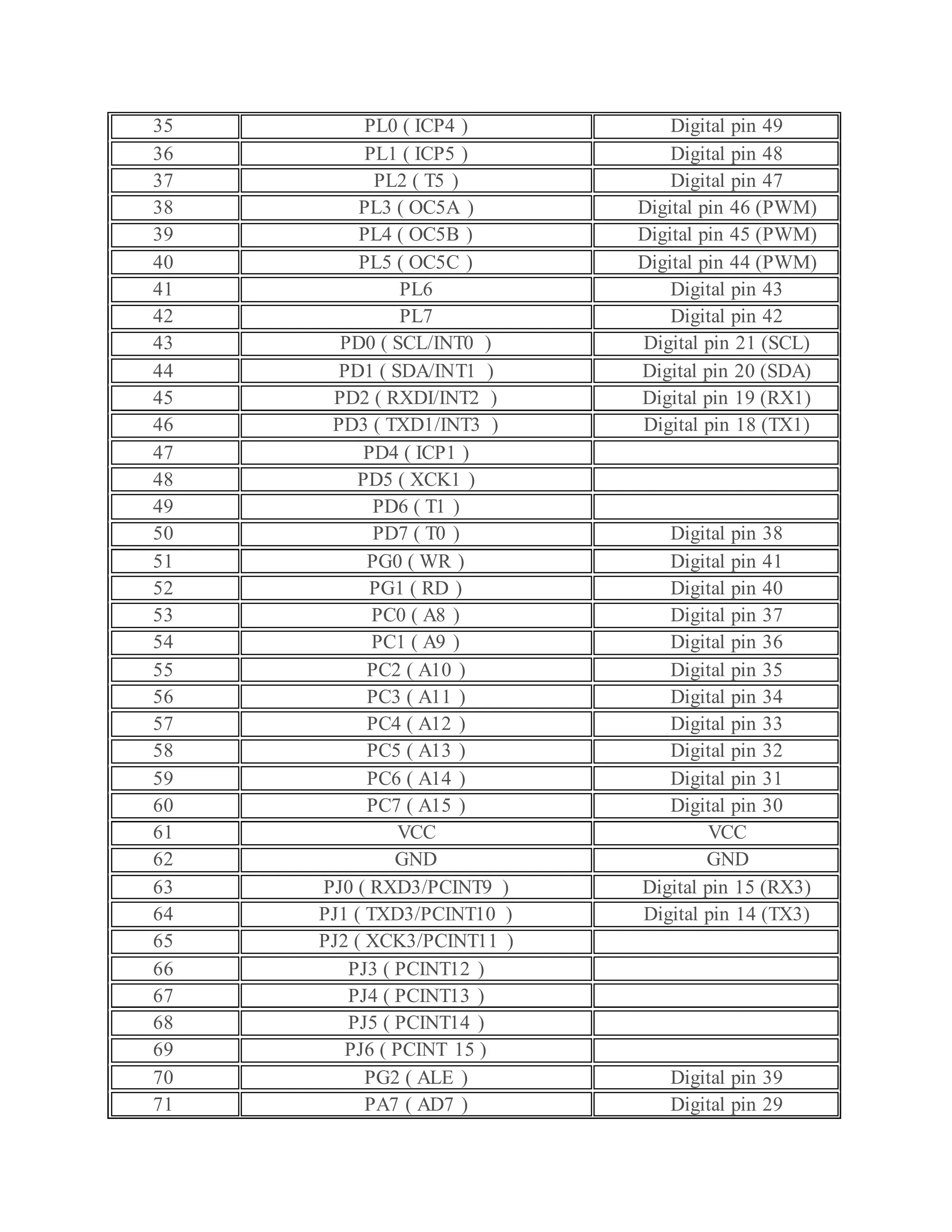
35 PL0 ( ICP4 ) Digital pin 49 36 PL1 ( ICP5 ) Digital pin 48 37 PL2 ( T5 ) Digital pin 47 38 PL3 ( OC5A ) Digital pin 46 (PWM) 39 PL4 ( OC5B ) Digital pin 45 (PWM) 40 PL5 ( OC5C ) Digital pin 44 (PWM) 41 PL6 Digital pin 43 42 PL7 Digital pin 42 43 PD0 ( SCL/INT0 ) Digital pin 21 (SCL) 44 PD1 ( SDA/INT1 ) Digital pin 20 (SDA) 45 PD2 ( RXDI/INT2 ) Digital pin 19 (RX1) 46 PD3 ( TXD1/INT3 ) Digital pin 18 (TX1) 47 PD4 ( ICP1 ) 48 PD5 ( XCK1 ) 49 PD6 ( T1 ) 50 PD7 ( T0 ) Digital pin 38 51 PG0 ( WR ) Digital pin 41 52 PG1 ( RD ) Digital pin 40 53 PC0 ( A8 ) Digital pin 37 54 PC1 ( A9 ) Digital pin 36 55 PC2 ( A10 ) Digital pin 35 56 PC3 ( A11 ) Digital pin 34 57 PC4 ( A12 ) Digital pin 33 58 PC5 ( A13 ) Digital pin 32 59 PC6 ( A14 ) Digital pin 31 60 PC7 ( A15 ) Digital pin 30 61 VCC VCC 62 GND GND 63 PJ0 ( RXD3/PCINT9 ) Digital pin 15 (RX3) 64 PJ1 ( TXD3/PCINT10 ) Digital pin 14 (TX3) 65 PJ2 ( XCK3/PCINT11 ) 66 PJ3 ( PCINT12 ) 67 PJ4 ( PCINT13 ) 68 PJ5 ( PCINT14 ) 69 PJ6 ( PCINT 15 ) 70 PG2 ( ALE ) Digital pin 39 71 PA7 ( AD7 ) Digital pin 29
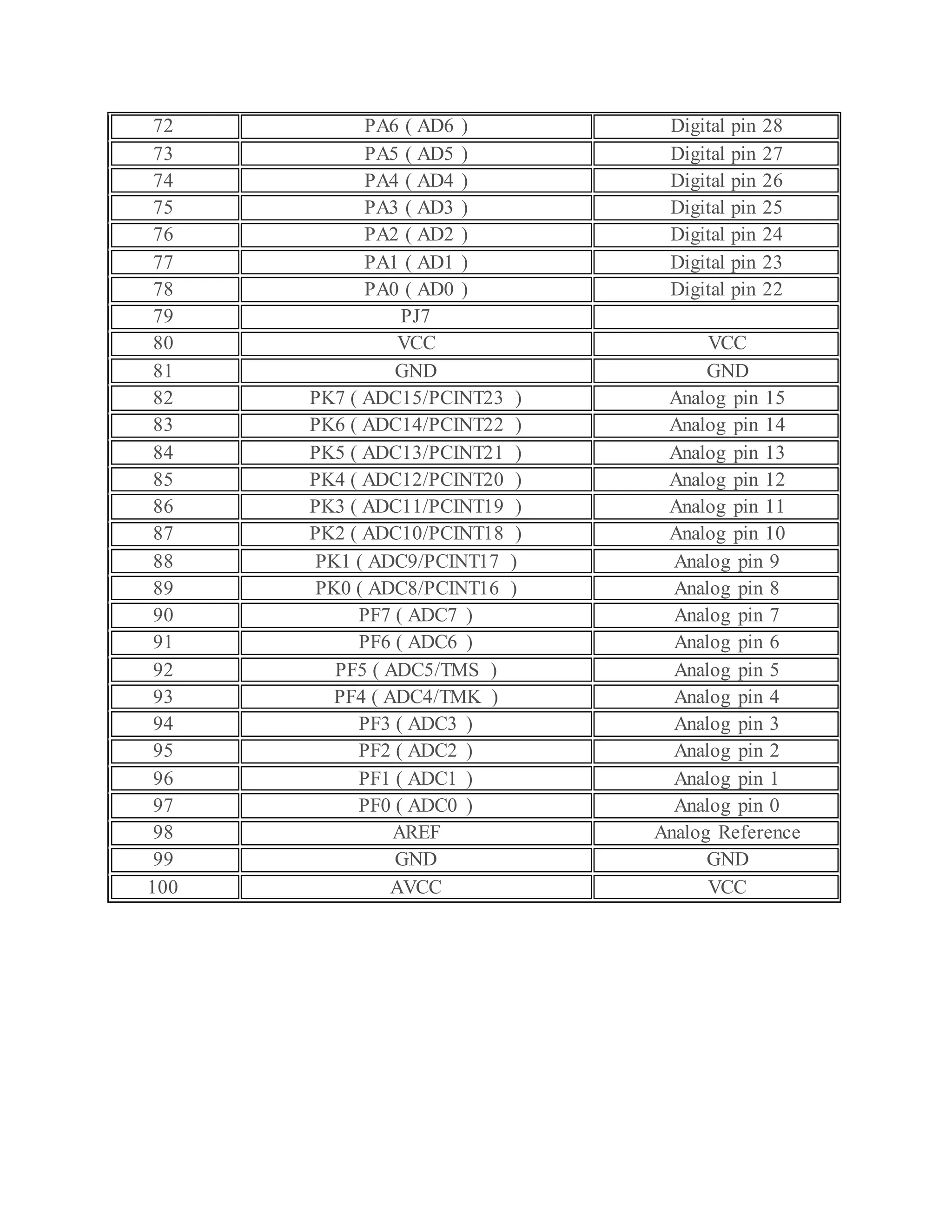
72 PA6 ( AD6 ) Digital pin 28 73 PA5 ( AD5 ) Digital pin 27 74 PA4 ( AD4 ) Digital pin 26 75 PA3 ( AD3 ) Digital pin 25 76 PA2 ( AD2 ) Digital pin 24 77 PA1 ( AD1 ) Digital pin 23 78 PA0 ( AD0 ) Digital pin 22 79 PJ7 80 VCC VCC 81 GND GND 82 PK7 ( ADC15/PCINT23 ) Analog pin 15 83 PK6 ( ADC14/PCINT22 ) Analog pin 14 84 PK5 ( ADC13/PCINT21 ) Analog pin 13 85 PK4 ( ADC12/PCINT20 ) Analog pin 12 86 PK3 ( ADC11/PCINT19 ) Analog pin 11 87 PK2 ( ADC10/PCINT18 ) Analog pin 10 88 PK1 ( ADC9/PCINT17 ) Analog pin 9 89 PK0 ( ADC8/PCINT16 ) Analog pin 8 90 PF7 ( ADC7 ) Analog pin 7 91 PF6 ( ADC6 ) Analog pin 6 92 PF5 ( ADC5/TMS ) Analog pin 5 93 PF4 ( ADC4/TMK ) Analog pin 4 94 PF3 ( ADC3 ) Analog pin 3 95 PF2 ( ADC2 ) Analog pin 2 96 PF1 ( ADC1 ) Analog pin 1 97 PF0 ( ADC0 ) Analog pin 0 98 AREF Analog Reference 99 GND GND 100 AVCC VCC
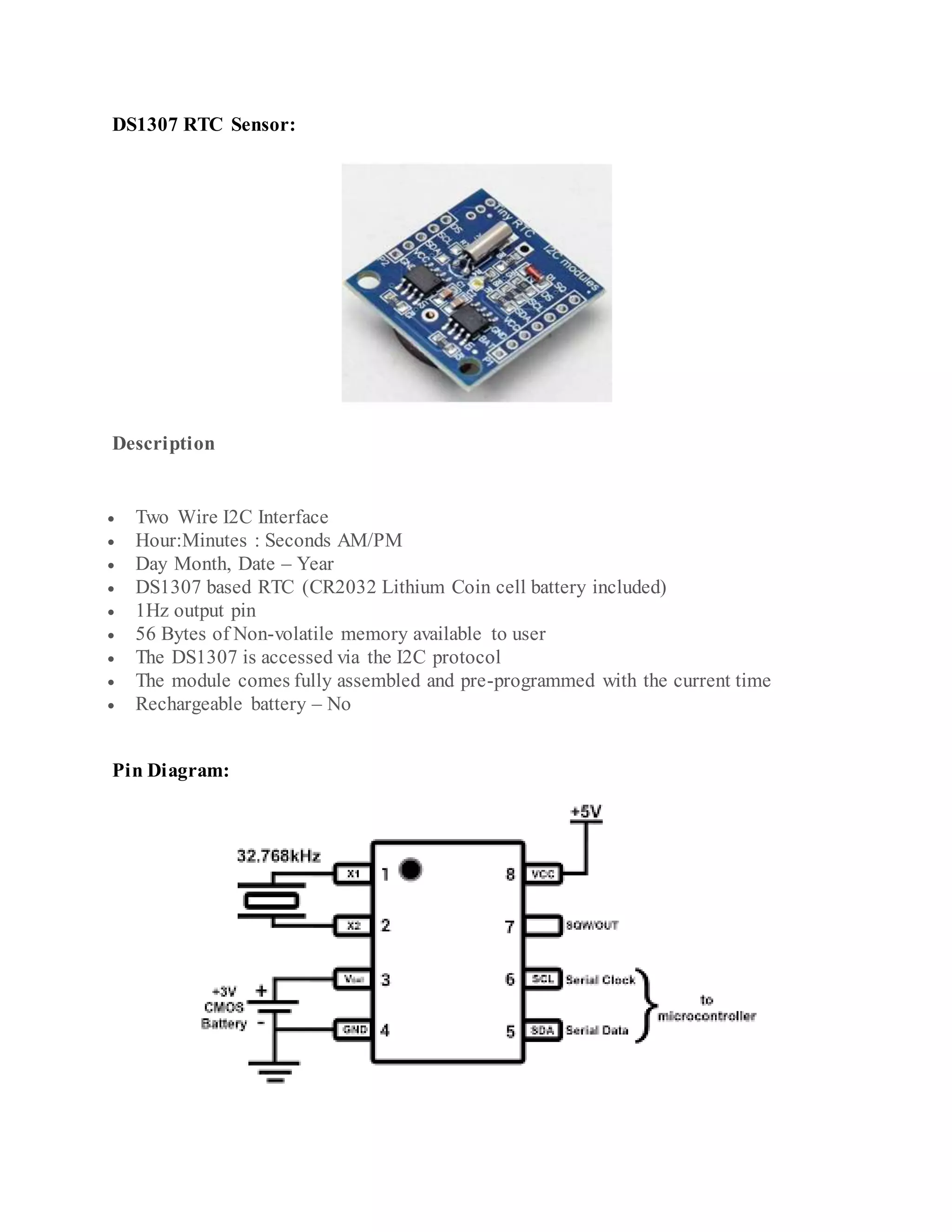
DS1307 RTC Sensor: Description  Two Wire I2C Interface  Hour:Minutes : Seconds AM/PM  Day Month, Date – Year  DS1307 based RTC (CR2032 Lithium Coin cell battery included)  1Hz output pin  56 Bytes of Non-volatile memory available to user  The DS1307 is accessed via the I2C protocol  The module comes fully assembled and pre-programmed with the current time  Rechargeable battery – No Pin Diagram:
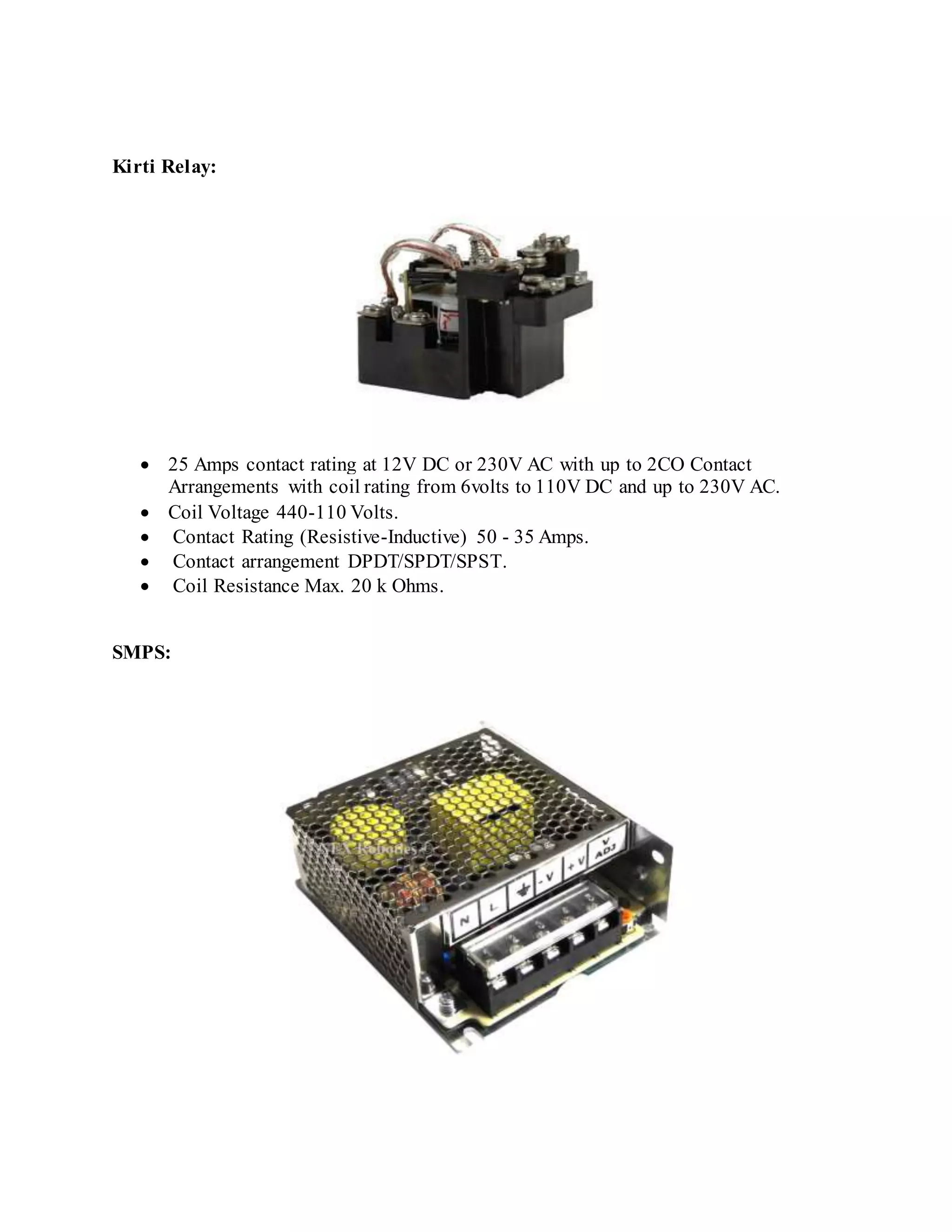
Kirti Relay:  25 Amps contact rating at 12V DC or 230V AC with up to 2CO Contact Arrangements with coil rating from 6volts to 110V DC and up to 230V AC.  Coil Voltage 440-110 Volts.  Contact Rating (Resistive-Inductive) 50 - 35 Amps.  Contact arrangement DPDT/SPDT/SPST.  Coil Resistance Max. 20 k Ohms. SMPS:
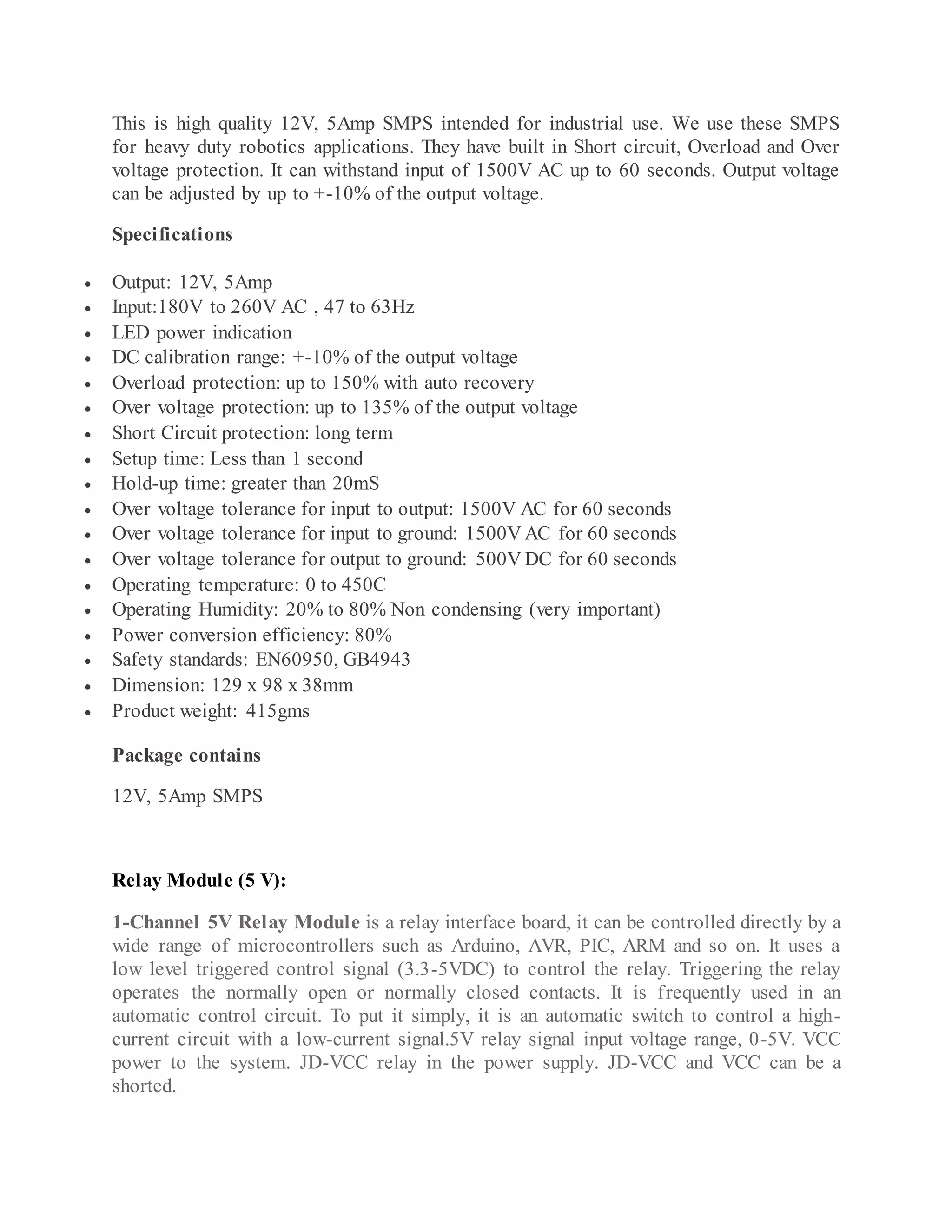
This is high quality 12V, 5Amp SMPS intended for industrial use. We use these SMPS for heavy duty robotics applications. They have built in Short circuit, Overload and Over voltage protection. It can withstand input of 1500V AC up to 60 seconds. Output voltage can be adjusted by up to +-10% of the output voltage. Specifications  Output: 12V, 5Amp  Input:180V to 260V AC , 47 to 63Hz  LED power indication  DC calibration range: +-10% of the output voltage  Overload protection: up to 150% with auto recovery  Over voltage protection: up to 135% of the output voltage  Short Circuit protection: long term  Setup time: Less than 1 second  Hold-up time: greater than 20mS  Over voltage tolerance for input to output: 1500V AC for 60 seconds  Over voltage tolerance for input to ground: 1500V AC for 60 seconds  Over voltage tolerance for output to ground: 500V DC for 60 seconds  Operating temperature: 0 to 450C  Operating Humidity: 20% to 80% Non condensing (very important)  Power conversion efficiency: 80%  Safety standards: EN60950, GB4943  Dimension: 129 x 98 x 38mm  Product weight: 415gms Package contains 12V, 5Amp SMPS Relay Module (5 V): 1-Channel 5V Relay Module is a relay interface board, it can be controlled directly by a wide range of microcontrollers such as Arduino, AVR, PIC, ARM and so on. It uses a low level triggered control signal (3.3-5VDC) to control the relay. Triggering the relay operates the normally open or normally closed contacts. It is frequently used in an automatic control circuit. To put it simply, it is an automatic switch to control a high- current circuit with a low-current signal.5V relay signal input voltage range, 0-5V. VCC power to the system. JD-VCC relay in the power supply. JD-VCC and VCC can be a shorted.
The features of 1-Channel Relay module:  Good for safe control of higher amperage circuits. In power systems, the lower current can control the higher one.  Standard interface that can be controlled directly by microcontroller (Arduino , 8051, AVR, PIC, DSP, ARM)]  Wide range of controllable voltages.  Being able to control high load current, which can reach 250V, 10A or 125V, 15A  With a normally-open (NO) contact and a normally-closed (NC) contact.  Around the board with 4 mounting holes, easy installation and fixing  It has a common end, a beginning, a closed-end Specificationof 1-Channel Relay module:  Voltage to operate: 5V D  Color : Blue Relays on a black PCB  Load : 10A, AC 250V/ 15A, 125V
Pinout Relay Module Software Component Descritipon: Arduino IDE: The Arduino Integrated Development Environment (IDE) is a cross- platform application (for Windows, macOS, Linux) that is written in the programming language Java. It is used to write and upload programs to Arduino compatible boards, but also, with the help of 3rd party cores, other vendor development boards The source code for the IDE is released under the GNU General Public License, version 2. The Arduino IDE supports the languages C and C++ using special rules of code structuring. The Arduino IDE supplies a software library from the Wiring project, which provides many common input and output procedures. User-written code only requires two basic functions, for starting the sketch and the main program loop, that are compiled and linked with a program stub main() into an executable cyclic executive program with the GNU toolchain, also included with the IDE distribution. The Arduino IDE employs the program avrdude to convert the executable code into a text file in hexadecimal encoding that is loaded into the Arduino board by a loader program in the board's firmware.
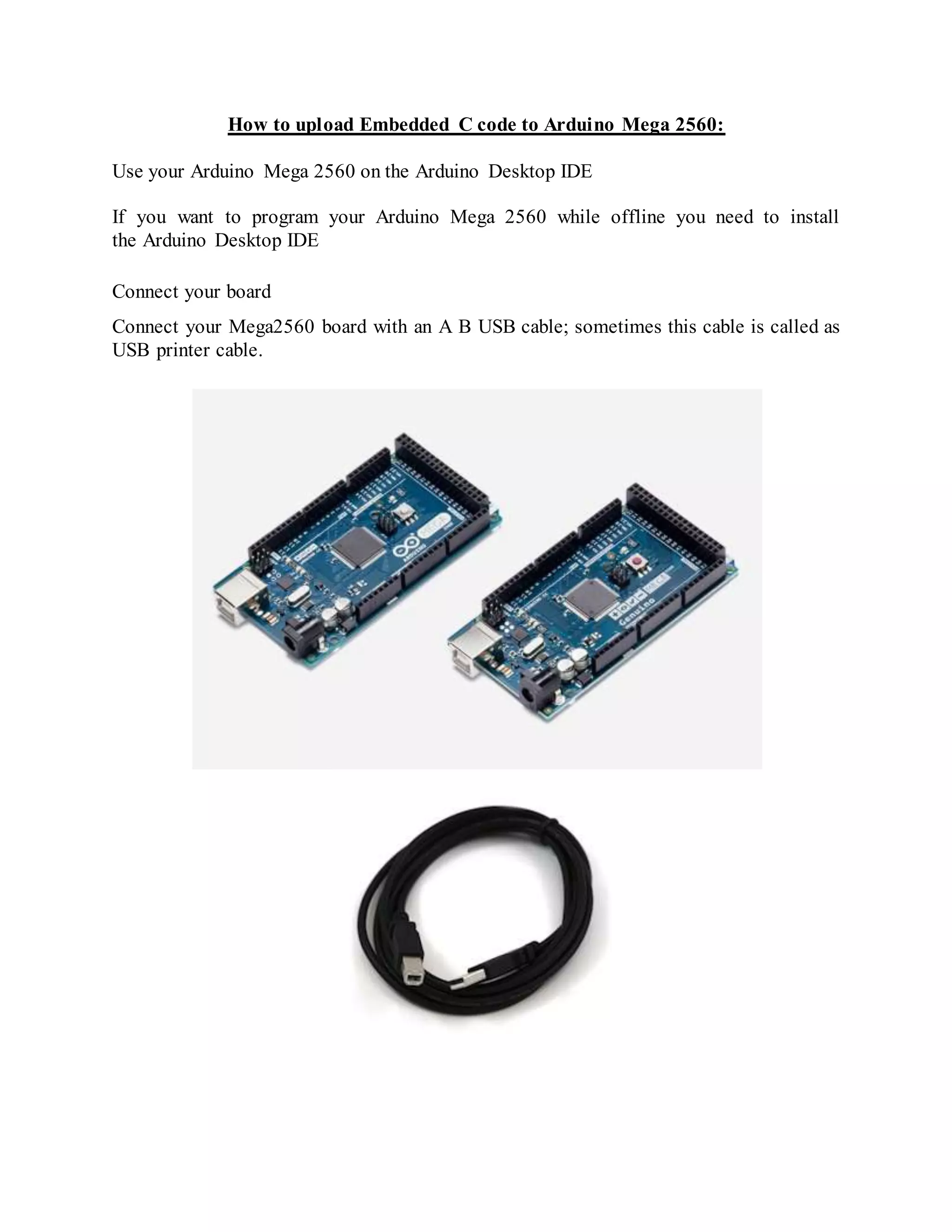
How to upload Embedded C code to Arduino Mega 2560: Use your Arduino Mega 2560 on the Arduino Desktop IDE If you want to program your Arduino Mega 2560 while offline you need to install the Arduino Desktop IDE Connect your board Connect your Mega2560 board with an A B USB cable; sometimes this cable is called as USB printer cable.
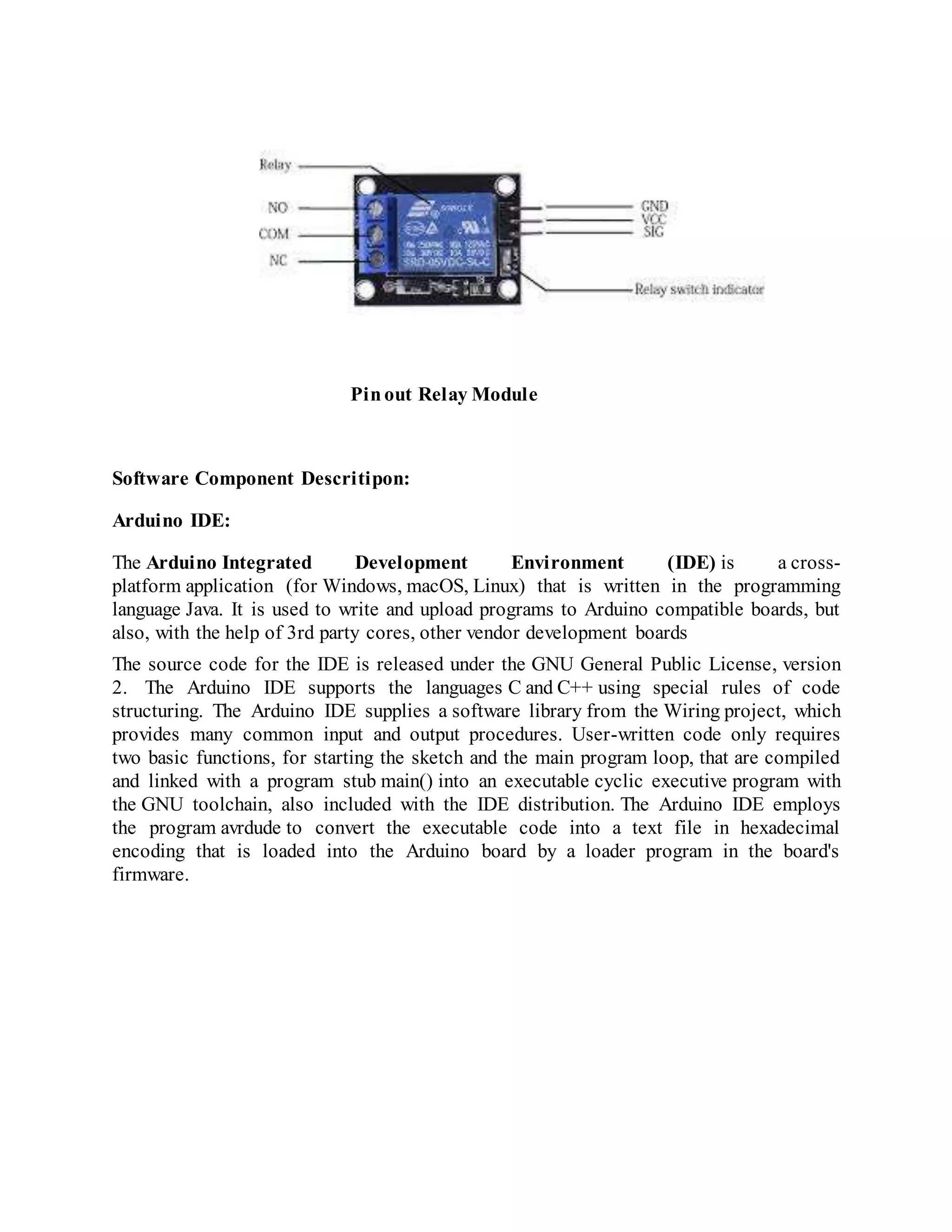
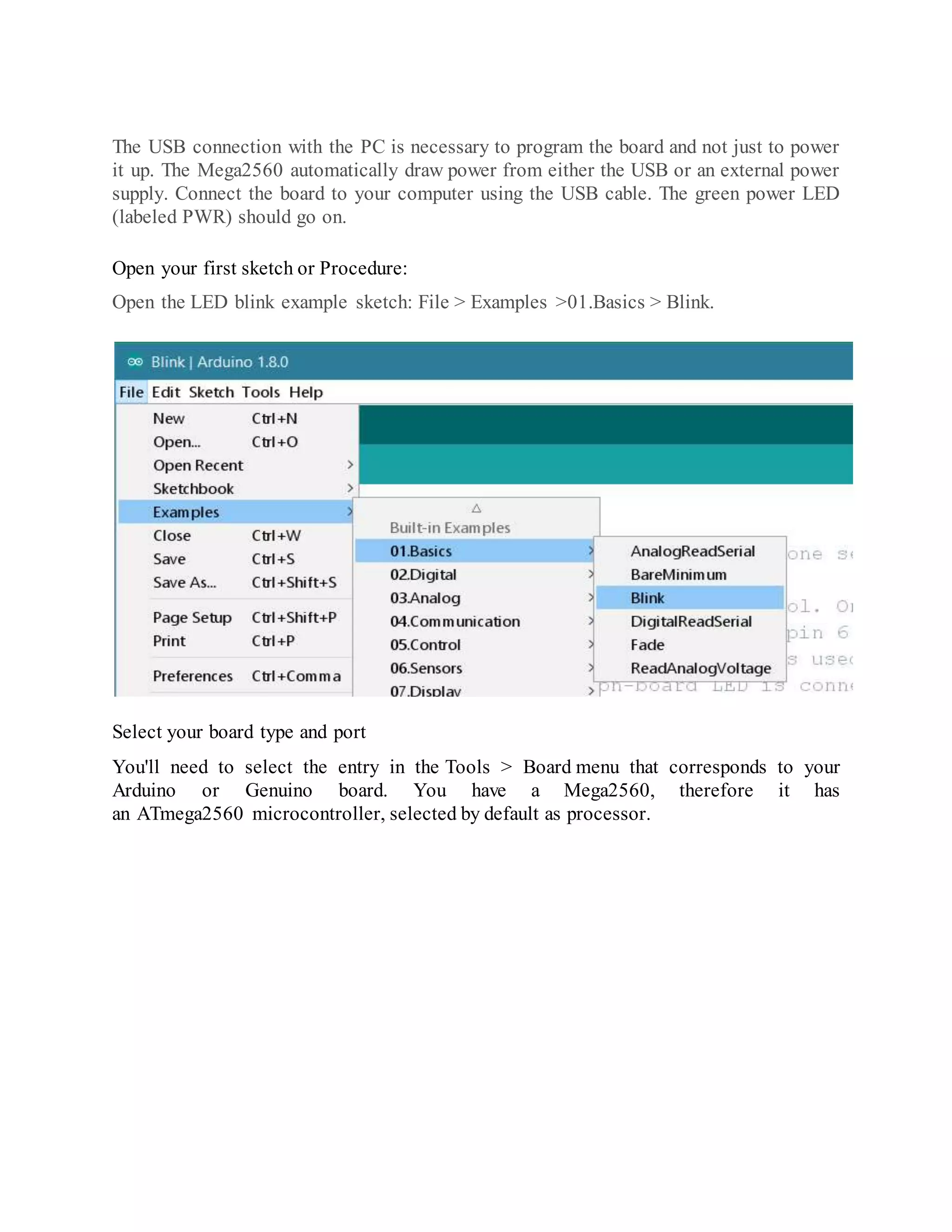
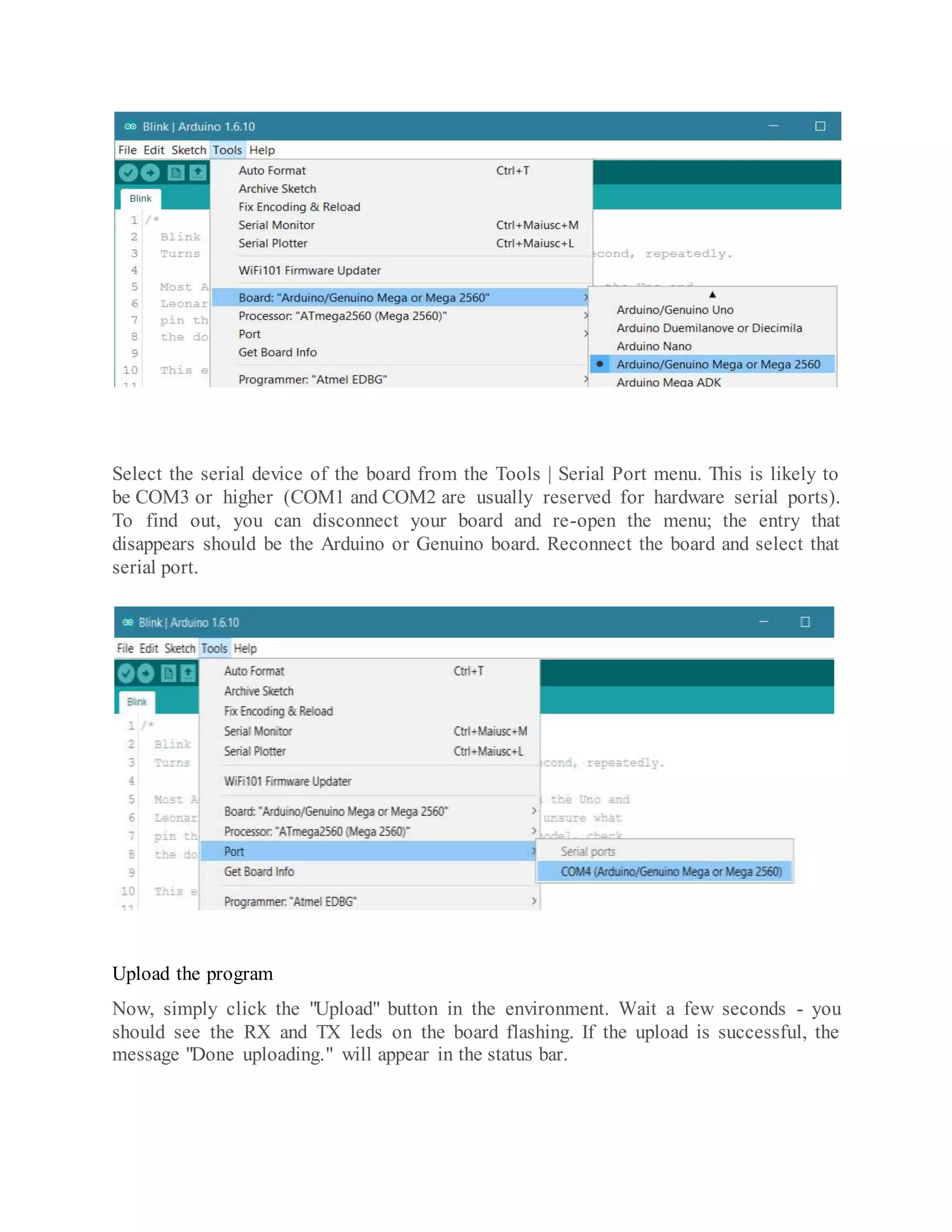
The USB connection with the PC is necessary to program the board and not just to power it up. The Mega2560 automatically draw power from either the USB or an external power supply. Connect the board to your computer using the USB cable. The green power LED (labeled PWR) should go on. Open your first sketch or Procedure: Open the LED blink example sketch: File > Examples >01.Basics > Blink. Select your board type and port You'll need to select the entry in the Tools > Board menu that corresponds to your Arduino or Genuino board. You have a Mega2560, therefore it has an ATmega2560 microcontroller, selected by default as processor.
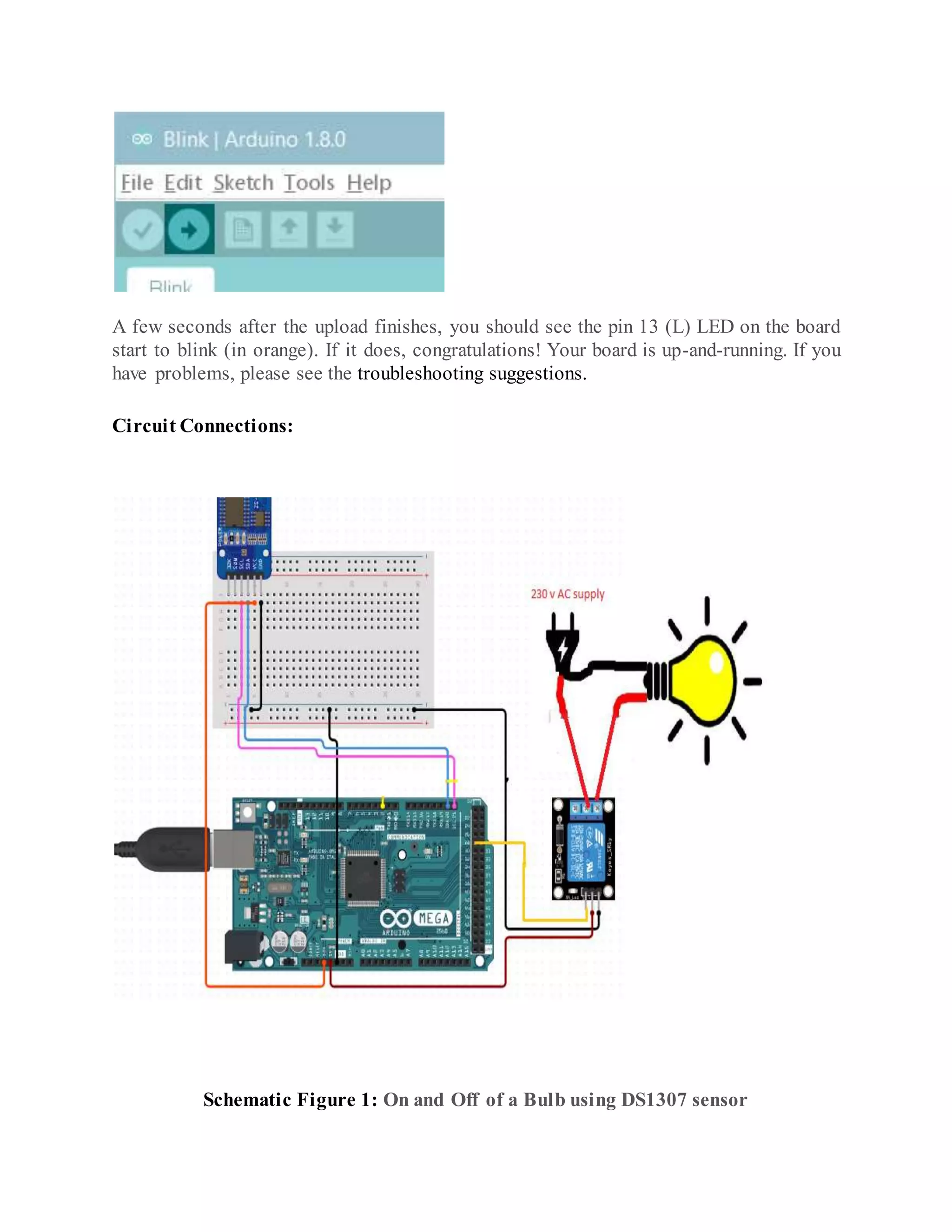
Select the serial device of the board from the Tools | Serial Port menu. This is likely to be COM3 or higher (COM1 and COM2 are usually reserved for hardware serial ports). To find out, you can disconnect your board and re-open the menu; the entry that disappears should be the Arduino or Genuino board. Reconnect the board and select that serial port. Upload the program Now, simply click the "Upload" button in the environment. Wait a few seconds - you should see the RX and TX leds on the board flashing. If the upload is successful, the message "Done uploading." will appear in the status bar.
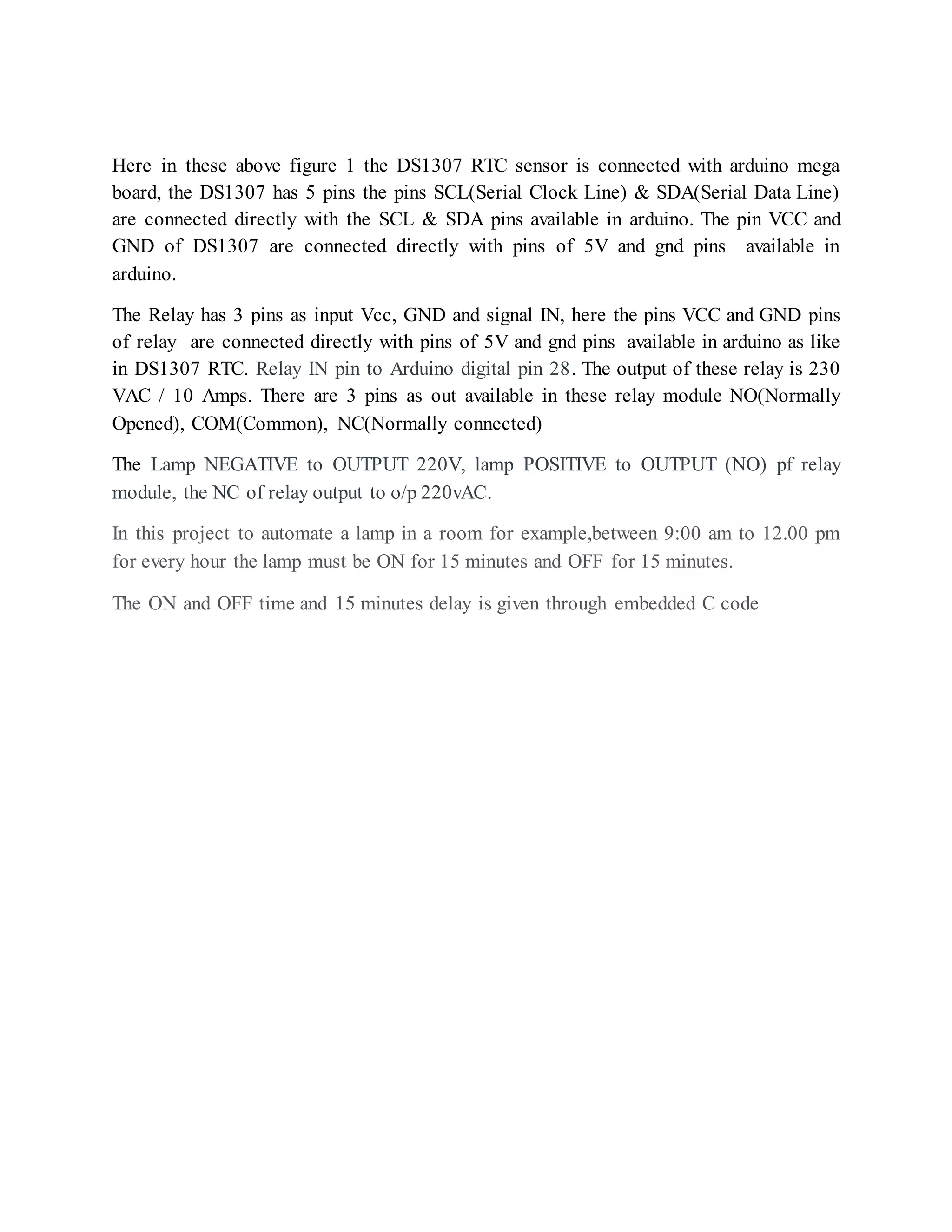
A few seconds after the upload finishes, you should see the pin 13 (L) LED on the board start to blink (in orange). If it does, congratulations! Your board is up-and-running. If you have problems, please see the troubleshooting suggestions. Circuit Connections: Schematic Figure 1: On and Off of a Bulb using DS1307 sensor
Here in these above figure 1 the DS1307 RTC sensor is connected with arduino mega board, the DS1307 has 5 pins the pins SCL(Serial Clock Line) & SDA(Serial Data Line) are connected directly with the SCL & SDA pins available in arduino. The pin VCC and GND of DS1307 are connected directly with pins of 5V and gnd pins available in arduino. The Relay has 3 pins as input Vcc, GND and signal IN, here the pins VCC and GND pins of relay are connected directly with pins of 5V and gnd pins available in arduino as like in DS1307 RTC. Relay IN pin to Arduino digital pin 28. The output of these relay is 230 VAC / 10 Amps. There are 3 pins as out available in these relay module NO(Normally Opened), COM(Common), NC(Normally connected) The Lamp NEGATIVE to OUTPUT 220V, lamp POSITIVE to OUTPUT (NO) pf relay module, the NC of relay output to o/p 220vAC. In this project to automate a lamp in a room for example,between 9:00 am to 12.00 pm for every hour the lamp must be ON for 15 minutes and OFF for 15 minutes. The ON and OFF time and 15 minutes delay is given through embedded C code
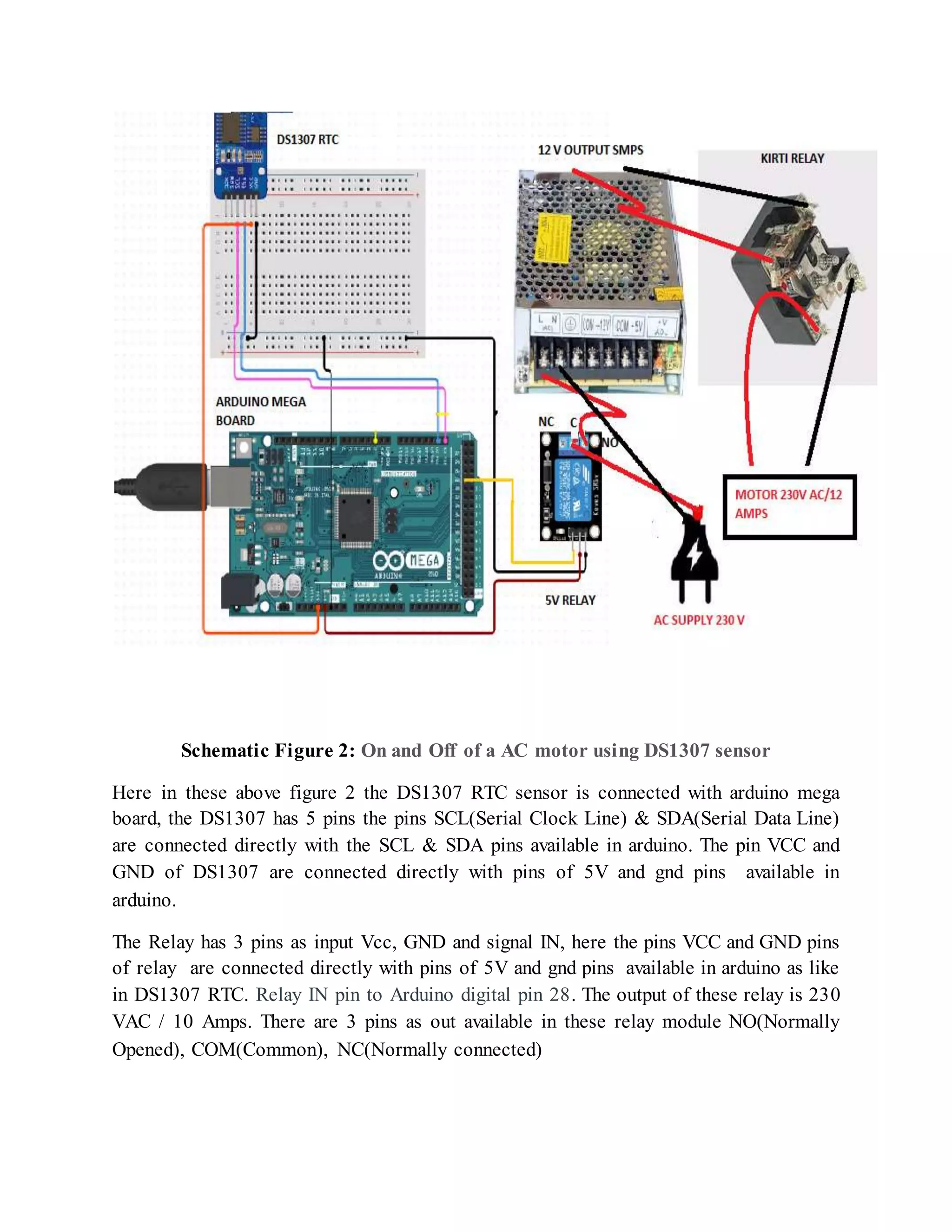
Schematic Figure 2: On and Off of a AC motor using DS1307 sensor Here in these above figure 2 the DS1307 RTC sensor is connected with arduino mega board, the DS1307 has 5 pins the pins SCL(Serial Clock Line) & SDA(Serial Data Line) are connected directly with the SCL & SDA pins available in arduino. The pin VCC and GND of DS1307 are connected directly with pins of 5V and gnd pins available in arduino. The Relay has 3 pins as input Vcc, GND and signal IN, here the pins VCC and GND pins of relay are connected directly with pins of 5V and gnd pins available in arduino as like in DS1307 RTC. Relay IN pin to Arduino digital pin 28. The output of these relay is 230 VAC / 10 Amps. There are 3 pins as out available in these relay module NO(Normally Opened), COM(Common), NC(Normally connected)
The output of relay is 250 VAC / 10 Amps it is not enogh to run a AC motor of 12 Amps current needed as an input. So along with 5V relay module another heavy relay is needed . So in this project Kirti relay is used along with 5V relay module. The output of 5V relay module is given as input to SMPS the out of this power supply is 12v/5 Amps is enough to switch ON the kirti relay. The load (AC Motor) is connected to kirti relay is operted. In this project to automate an AC motor for irrigation purpose ,between 9:00 am to 12.00 pm for every hour the motor must be ON for 15 minutes and OFF for 15 minutes. The ON and OFF time and 15 minutes delay is given through embedded C code Coding: #include "RTClib.h" //include RTC library file in Arduino IDE #include <Wire.h> // include wire library in Arduino IDE RTC_DS1307 rtc; #define relay 28 // connect relay module in 28th digital pin of Arduino int TIME; // declare variable void setup() { // put your setup code here, to run once: pinMode(relay, OUTPUT); // relay as an output digitalWrite (relay, LOW); //relay as logic 0 no signal is received at relay Serial.begin(9600); // baud rate Wire.begin( ); rtc.begin( ); rtc.adjust(DateTime(F(__DATE__), F(__TIME__))); // get time from PC to RTC if (! rtc.isrunning()) { Serial.println("RTC is NOT running!"); } } void loop() { // put your main code here, to run repeatedly: DateTime now = rtc.now(); Serial.print(now.year(), DEC); Serial.print("/"); Serial.print(now.month(), DEC); Serial.print("/"); Serial.print(now.day(), DEC); Serial.print(" ("); Serial.print(now.hour(), DEC); Serial.print(":");
Serial.print(now.minute(), DEC); Serial.print(":"); Serial.print(now.second(), DEC); Serial.print(":"); Serial.println(); delay(1000); //delay for 1 second Serial.println( ); TIME=now.hour(); if(TIME==16) // if time is 16th i.e. 4’0 clock hour { digitalWrite (relay, HIGH); // relay as logic 1 signal is received at relay from arduino delay(60000); // delay for 1 minute digitalWrite (relay, LOW); // relay as logic 1 signal is received at relay from arduino delay(60000); // delay for 1 minute Serial.println ("lights on"); //serial monitor print lights ON Serial.println ("motor on"); //serial monitor print lights ON } else { digitalWrite (relay, LOW); //relay as logic 0 no signal is received at relay delay(60000); // delay for 1 minute } TIME=now.hour(); if(TIME==15) // if time is 15th i.e. 3’0 clock hour { digitalWrite (relay, LOW); // relay as logic 1 signal is received at relay from arduino delay(1000); Serial.println ("lights off"); //serial monitor print lights OFF Serial.println ("motor off"); //serial monitor print motor OFF } } Conclusion: In this project time operated electrical appliances like lamp and AC motor is locally customized device capable of switching electrical devices with respect to time and can be used for both home and commercial purposes. It can be used in various industries to control the devices based on different time. This Project reduces the human effort or human interaction, and makes life straightforward without compromising on efficiency of appliances and using this system one can also save time, and thus it can work independently as an automated circuit. Implementation and deployment of
system has huge potential of minimizing energy wastage in various appliances such as domestic and industrial electrical applications.

Automatic irrigation system using Arduino

  • 1.
    DESIGN AND DEVELOPMENTOF AUTOMATIC IRRIGATION SYSTEM USING DS1307 TIMER SENSOR OBJECTIVE: In this project we will be able to control the on and off of your devices between the time you want. They may be a light or motor etc., we will use the arduino Mega 2560, and the RTC 1307 to show and control the time. You can set the "ON" hour and the "OFF" hour. Hardware Required: 1. Arduino Mega 2560 2. DS1307 RTC Sensor 3. Kirti Relay (12 V) 4. SMPS (12 V) 5. Relay (5 V) 6. Dot Matrix Board 7. Jumper Wires 8. Bulb 9. AC motor (230 VAC/12 AMPS) Software Required: 1. Arduino IDE (Embedded C code) Hardware Components Description: Arduino Mega 2560 The Arduino Mega 2560 is a microcontroller board based on the ATmega2560. It has 54 digital input/output pins (of which 15 can be used as PWM outputs), 16 analog inputs, 4 UARTs (hardware serial ports), a 16 MHz crystal oscillator, a USB connection, a power jack, an ICSP header, and a reset button. It contains everything needed to support the microcontroller; simply connect it to a computer with a USB cable or power it with a AC-to-DC adapter or battery to
  • 2.
    get started. TheMega 2560 board is compatible with most shields designed for the Uno and the former boards Duemilanove or Diecimila.
  • 4.
    Arduino Mega 2560PIN mapping table Pin Number Pin Name Mapped Pin Name 1 PG5 ( OC0B ) Digital pin 4 (PWM) 2 PE0 ( RXD0/PCINT8 ) Digital pin 0 (RX0) 3 PE1 ( TXD0 ) Digital pin 1 (TX0) 4 PE2 ( XCK0/AIN0 ) 5 PE3 ( OC3A/AIN1 ) Digital pin 5 (PWM) 6 PE4 ( OC3B/INT4 ) Digital pin 2 (PWM) 7 PE5 ( OC3C/INT5 ) Digital pin 3 (PWM) 8 PE6 ( T3/INT6 ) 9 PE7 ( CLKO/ICP3/INT7 ) 10 VCC VCC 11 GND GND 12 PH0 ( RXD2 ) Digital pin 17 (RX2) 13 PH1 ( TXD2 ) Digital pin 16 (TX2) 14 PH2 ( XCK2 ) 15 PH3 ( OC4A ) Digital pin 6 (PWM) 16 PH4 ( OC4B ) Digital pin 7 (PWM) 17 PH5 ( OC4C ) Digital pin 8 (PWM) 18 PH6 ( OC2B ) Digital pin 9 (PWM) 19 PB0 ( SS/PCINT0 ) Digital pin 53 (SS) 20 PB1 ( SCK/PCINT1 ) Digital pin 52 (SCK) 21 PB2 ( MOSI/PCINT2 ) Digital pin 51 (MOSI) 22 PB3 ( MISO/PCINT3 ) Digital pin 50 (MISO) 23 PB4 ( OC2A/PCINT4 ) Digital pin 10 (PWM) 24 PB5 ( OC1A/PCINT5 ) Digital pin 11 (PWM) 25 PB6 ( OC1B/PCINT6 ) Digital pin 12 (PWM) 26 PB7 ( OC0A/OC1C/PCINT7 ) Digital pin 13 (PWM) 27 PH7 ( T4 ) 28 PG3 ( TOSC2 ) 29 PG4 ( TOSC1 ) 30 RESET RESET 31 VCC VCC 32 GND GND 33 XTAL2 XTAL2 34 XTAL1 XTAL1
  • 5.
    35 PL0 (ICP4 ) Digital pin 49 36 PL1 ( ICP5 ) Digital pin 48 37 PL2 ( T5 ) Digital pin 47 38 PL3 ( OC5A ) Digital pin 46 (PWM) 39 PL4 ( OC5B ) Digital pin 45 (PWM) 40 PL5 ( OC5C ) Digital pin 44 (PWM) 41 PL6 Digital pin 43 42 PL7 Digital pin 42 43 PD0 ( SCL/INT0 ) Digital pin 21 (SCL) 44 PD1 ( SDA/INT1 ) Digital pin 20 (SDA) 45 PD2 ( RXDI/INT2 ) Digital pin 19 (RX1) 46 PD3 ( TXD1/INT3 ) Digital pin 18 (TX1) 47 PD4 ( ICP1 ) 48 PD5 ( XCK1 ) 49 PD6 ( T1 ) 50 PD7 ( T0 ) Digital pin 38 51 PG0 ( WR ) Digital pin 41 52 PG1 ( RD ) Digital pin 40 53 PC0 ( A8 ) Digital pin 37 54 PC1 ( A9 ) Digital pin 36 55 PC2 ( A10 ) Digital pin 35 56 PC3 ( A11 ) Digital pin 34 57 PC4 ( A12 ) Digital pin 33 58 PC5 ( A13 ) Digital pin 32 59 PC6 ( A14 ) Digital pin 31 60 PC7 ( A15 ) Digital pin 30 61 VCC VCC 62 GND GND 63 PJ0 ( RXD3/PCINT9 ) Digital pin 15 (RX3) 64 PJ1 ( TXD3/PCINT10 ) Digital pin 14 (TX3) 65 PJ2 ( XCK3/PCINT11 ) 66 PJ3 ( PCINT12 ) 67 PJ4 ( PCINT13 ) 68 PJ5 ( PCINT14 ) 69 PJ6 ( PCINT 15 ) 70 PG2 ( ALE ) Digital pin 39 71 PA7 ( AD7 ) Digital pin 29
  • 6.
    72 PA6 (AD6 ) Digital pin 28 73 PA5 ( AD5 ) Digital pin 27 74 PA4 ( AD4 ) Digital pin 26 75 PA3 ( AD3 ) Digital pin 25 76 PA2 ( AD2 ) Digital pin 24 77 PA1 ( AD1 ) Digital pin 23 78 PA0 ( AD0 ) Digital pin 22 79 PJ7 80 VCC VCC 81 GND GND 82 PK7 ( ADC15/PCINT23 ) Analog pin 15 83 PK6 ( ADC14/PCINT22 ) Analog pin 14 84 PK5 ( ADC13/PCINT21 ) Analog pin 13 85 PK4 ( ADC12/PCINT20 ) Analog pin 12 86 PK3 ( ADC11/PCINT19 ) Analog pin 11 87 PK2 ( ADC10/PCINT18 ) Analog pin 10 88 PK1 ( ADC9/PCINT17 ) Analog pin 9 89 PK0 ( ADC8/PCINT16 ) Analog pin 8 90 PF7 ( ADC7 ) Analog pin 7 91 PF6 ( ADC6 ) Analog pin 6 92 PF5 ( ADC5/TMS ) Analog pin 5 93 PF4 ( ADC4/TMK ) Analog pin 4 94 PF3 ( ADC3 ) Analog pin 3 95 PF2 ( ADC2 ) Analog pin 2 96 PF1 ( ADC1 ) Analog pin 1 97 PF0 ( ADC0 ) Analog pin 0 98 AREF Analog Reference 99 GND GND 100 AVCC VCC
  • 7.
    DS1307 RTC Sensor: Description Two Wire I2C Interface  Hour:Minutes : Seconds AM/PM  Day Month, Date – Year  DS1307 based RTC (CR2032 Lithium Coin cell battery included)  1Hz output pin  56 Bytes of Non-volatile memory available to user  The DS1307 is accessed via the I2C protocol  The module comes fully assembled and pre-programmed with the current time  Rechargeable battery – No Pin Diagram:
  • 8.
    Kirti Relay:  25Amps contact rating at 12V DC or 230V AC with up to 2CO Contact Arrangements with coil rating from 6volts to 110V DC and up to 230V AC.  Coil Voltage 440-110 Volts.  Contact Rating (Resistive-Inductive) 50 - 35 Amps.  Contact arrangement DPDT/SPDT/SPST.  Coil Resistance Max. 20 k Ohms. SMPS:
  • 9.
    This is highquality 12V, 5Amp SMPS intended for industrial use. We use these SMPS for heavy duty robotics applications. They have built in Short circuit, Overload and Over voltage protection. It can withstand input of 1500V AC up to 60 seconds. Output voltage can be adjusted by up to +-10% of the output voltage. Specifications  Output: 12V, 5Amp  Input:180V to 260V AC , 47 to 63Hz  LED power indication  DC calibration range: +-10% of the output voltage  Overload protection: up to 150% with auto recovery  Over voltage protection: up to 135% of the output voltage  Short Circuit protection: long term  Setup time: Less than 1 second  Hold-up time: greater than 20mS  Over voltage tolerance for input to output: 1500V AC for 60 seconds  Over voltage tolerance for input to ground: 1500V AC for 60 seconds  Over voltage tolerance for output to ground: 500V DC for 60 seconds  Operating temperature: 0 to 450C  Operating Humidity: 20% to 80% Non condensing (very important)  Power conversion efficiency: 80%  Safety standards: EN60950, GB4943  Dimension: 129 x 98 x 38mm  Product weight: 415gms Package contains 12V, 5Amp SMPS Relay Module (5 V): 1-Channel 5V Relay Module is a relay interface board, it can be controlled directly by a wide range of microcontrollers such as Arduino, AVR, PIC, ARM and so on. It uses a low level triggered control signal (3.3-5VDC) to control the relay. Triggering the relay operates the normally open or normally closed contacts. It is frequently used in an automatic control circuit. To put it simply, it is an automatic switch to control a high- current circuit with a low-current signal.5V relay signal input voltage range, 0-5V. VCC power to the system. JD-VCC relay in the power supply. JD-VCC and VCC can be a shorted.
  • 10.
    The features of1-Channel Relay module:  Good for safe control of higher amperage circuits. In power systems, the lower current can control the higher one.  Standard interface that can be controlled directly by microcontroller (Arduino , 8051, AVR, PIC, DSP, ARM)]  Wide range of controllable voltages.  Being able to control high load current, which can reach 250V, 10A or 125V, 15A  With a normally-open (NO) contact and a normally-closed (NC) contact.  Around the board with 4 mounting holes, easy installation and fixing  It has a common end, a beginning, a closed-end Specificationof 1-Channel Relay module:  Voltage to operate: 5V D  Color : Blue Relays on a black PCB  Load : 10A, AC 250V/ 15A, 125V
  • 11.
    Pinout Relay Module SoftwareComponent Descritipon: Arduino IDE: The Arduino Integrated Development Environment (IDE) is a cross- platform application (for Windows, macOS, Linux) that is written in the programming language Java. It is used to write and upload programs to Arduino compatible boards, but also, with the help of 3rd party cores, other vendor development boards The source code for the IDE is released under the GNU General Public License, version 2. The Arduino IDE supports the languages C and C++ using special rules of code structuring. The Arduino IDE supplies a software library from the Wiring project, which provides many common input and output procedures. User-written code only requires two basic functions, for starting the sketch and the main program loop, that are compiled and linked with a program stub main() into an executable cyclic executive program with the GNU toolchain, also included with the IDE distribution. The Arduino IDE employs the program avrdude to convert the executable code into a text file in hexadecimal encoding that is loaded into the Arduino board by a loader program in the board's firmware.
  • 12.
    How to uploadEmbedded C code to Arduino Mega 2560: Use your Arduino Mega 2560 on the Arduino Desktop IDE If you want to program your Arduino Mega 2560 while offline you need to install the Arduino Desktop IDE Connect your board Connect your Mega2560 board with an A B USB cable; sometimes this cable is called as USB printer cable.
  • 13.
    The USB connectionwith the PC is necessary to program the board and not just to power it up. The Mega2560 automatically draw power from either the USB or an external power supply. Connect the board to your computer using the USB cable. The green power LED (labeled PWR) should go on. Open your first sketch or Procedure: Open the LED blink example sketch: File > Examples >01.Basics > Blink. Select your board type and port You'll need to select the entry in the Tools > Board menu that corresponds to your Arduino or Genuino board. You have a Mega2560, therefore it has an ATmega2560 microcontroller, selected by default as processor.
  • 14.
    Select the serialdevice of the board from the Tools | Serial Port menu. This is likely to be COM3 or higher (COM1 and COM2 are usually reserved for hardware serial ports). To find out, you can disconnect your board and re-open the menu; the entry that disappears should be the Arduino or Genuino board. Reconnect the board and select that serial port. Upload the program Now, simply click the "Upload" button in the environment. Wait a few seconds - you should see the RX and TX leds on the board flashing. If the upload is successful, the message "Done uploading." will appear in the status bar.
  • 15.
    A few secondsafter the upload finishes, you should see the pin 13 (L) LED on the board start to blink (in orange). If it does, congratulations! Your board is up-and-running. If you have problems, please see the troubleshooting suggestions. Circuit Connections: Schematic Figure 1: On and Off of a Bulb using DS1307 sensor
  • 16.
    Here in theseabove figure 1 the DS1307 RTC sensor is connected with arduino mega board, the DS1307 has 5 pins the pins SCL(Serial Clock Line) & SDA(Serial Data Line) are connected directly with the SCL & SDA pins available in arduino. The pin VCC and GND of DS1307 are connected directly with pins of 5V and gnd pins available in arduino. The Relay has 3 pins as input Vcc, GND and signal IN, here the pins VCC and GND pins of relay are connected directly with pins of 5V and gnd pins available in arduino as like in DS1307 RTC. Relay IN pin to Arduino digital pin 28. The output of these relay is 230 VAC / 10 Amps. There are 3 pins as out available in these relay module NO(Normally Opened), COM(Common), NC(Normally connected) The Lamp NEGATIVE to OUTPUT 220V, lamp POSITIVE to OUTPUT (NO) pf relay module, the NC of relay output to o/p 220vAC. In this project to automate a lamp in a room for example,between 9:00 am to 12.00 pm for every hour the lamp must be ON for 15 minutes and OFF for 15 minutes. The ON and OFF time and 15 minutes delay is given through embedded C code
  • 17.
    Schematic Figure 2:On and Off of a AC motor using DS1307 sensor Here in these above figure 2 the DS1307 RTC sensor is connected with arduino mega board, the DS1307 has 5 pins the pins SCL(Serial Clock Line) & SDA(Serial Data Line) are connected directly with the SCL & SDA pins available in arduino. The pin VCC and GND of DS1307 are connected directly with pins of 5V and gnd pins available in arduino. The Relay has 3 pins as input Vcc, GND and signal IN, here the pins VCC and GND pins of relay are connected directly with pins of 5V and gnd pins available in arduino as like in DS1307 RTC. Relay IN pin to Arduino digital pin 28. The output of these relay is 230 VAC / 10 Amps. There are 3 pins as out available in these relay module NO(Normally Opened), COM(Common), NC(Normally connected)
  • 18.
    The output ofrelay is 250 VAC / 10 Amps it is not enogh to run a AC motor of 12 Amps current needed as an input. So along with 5V relay module another heavy relay is needed . So in this project Kirti relay is used along with 5V relay module. The output of 5V relay module is given as input to SMPS the out of this power supply is 12v/5 Amps is enough to switch ON the kirti relay. The load (AC Motor) is connected to kirti relay is operted. In this project to automate an AC motor for irrigation purpose ,between 9:00 am to 12.00 pm for every hour the motor must be ON for 15 minutes and OFF for 15 minutes. The ON and OFF time and 15 minutes delay is given through embedded C code Coding: #include "RTClib.h" //include RTC library file in Arduino IDE #include <Wire.h> // include wire library in Arduino IDE RTC_DS1307 rtc; #define relay 28 // connect relay module in 28th digital pin of Arduino int TIME; // declare variable void setup() { // put your setup code here, to run once: pinMode(relay, OUTPUT); // relay as an output digitalWrite (relay, LOW); //relay as logic 0 no signal is received at relay Serial.begin(9600); // baud rate Wire.begin( ); rtc.begin( ); rtc.adjust(DateTime(F(__DATE__), F(__TIME__))); // get time from PC to RTC if (! rtc.isrunning()) { Serial.println("RTC is NOT running!"); } } void loop() { // put your main code here, to run repeatedly: DateTime now = rtc.now(); Serial.print(now.year(), DEC); Serial.print("/"); Serial.print(now.month(), DEC); Serial.print("/"); Serial.print(now.day(), DEC); Serial.print(" ("); Serial.print(now.hour(), DEC); Serial.print(":");
  • 19.
    Serial.print(now.minute(), DEC); Serial.print(":"); Serial.print(now.second(), DEC); Serial.print(":"); Serial.println(); delay(1000);//delay for 1 second Serial.println( ); TIME=now.hour(); if(TIME==16) // if time is 16th i.e. 4’0 clock hour { digitalWrite (relay, HIGH); // relay as logic 1 signal is received at relay from arduino delay(60000); // delay for 1 minute digitalWrite (relay, LOW); // relay as logic 1 signal is received at relay from arduino delay(60000); // delay for 1 minute Serial.println ("lights on"); //serial monitor print lights ON Serial.println ("motor on"); //serial monitor print lights ON } else { digitalWrite (relay, LOW); //relay as logic 0 no signal is received at relay delay(60000); // delay for 1 minute } TIME=now.hour(); if(TIME==15) // if time is 15th i.e. 3’0 clock hour { digitalWrite (relay, LOW); // relay as logic 1 signal is received at relay from arduino delay(1000); Serial.println ("lights off"); //serial monitor print lights OFF Serial.println ("motor off"); //serial monitor print motor OFF } } Conclusion: In this project time operated electrical appliances like lamp and AC motor is locally customized device capable of switching electrical devices with respect to time and can be used for both home and commercial purposes. It can be used in various industries to control the devices based on different time. This Project reduces the human effort or human interaction, and makes life straightforward without compromising on efficiency of appliances and using this system one can also save time, and thus it can work independently as an automated circuit. Implementation and deployment of
  • 20.
    system has hugepotential of minimizing energy wastage in various appliances such as domestic and industrial electrical applications.