SUBMITTED BY: JYOTIRAMAN DE M TECH (CAD/CAM)
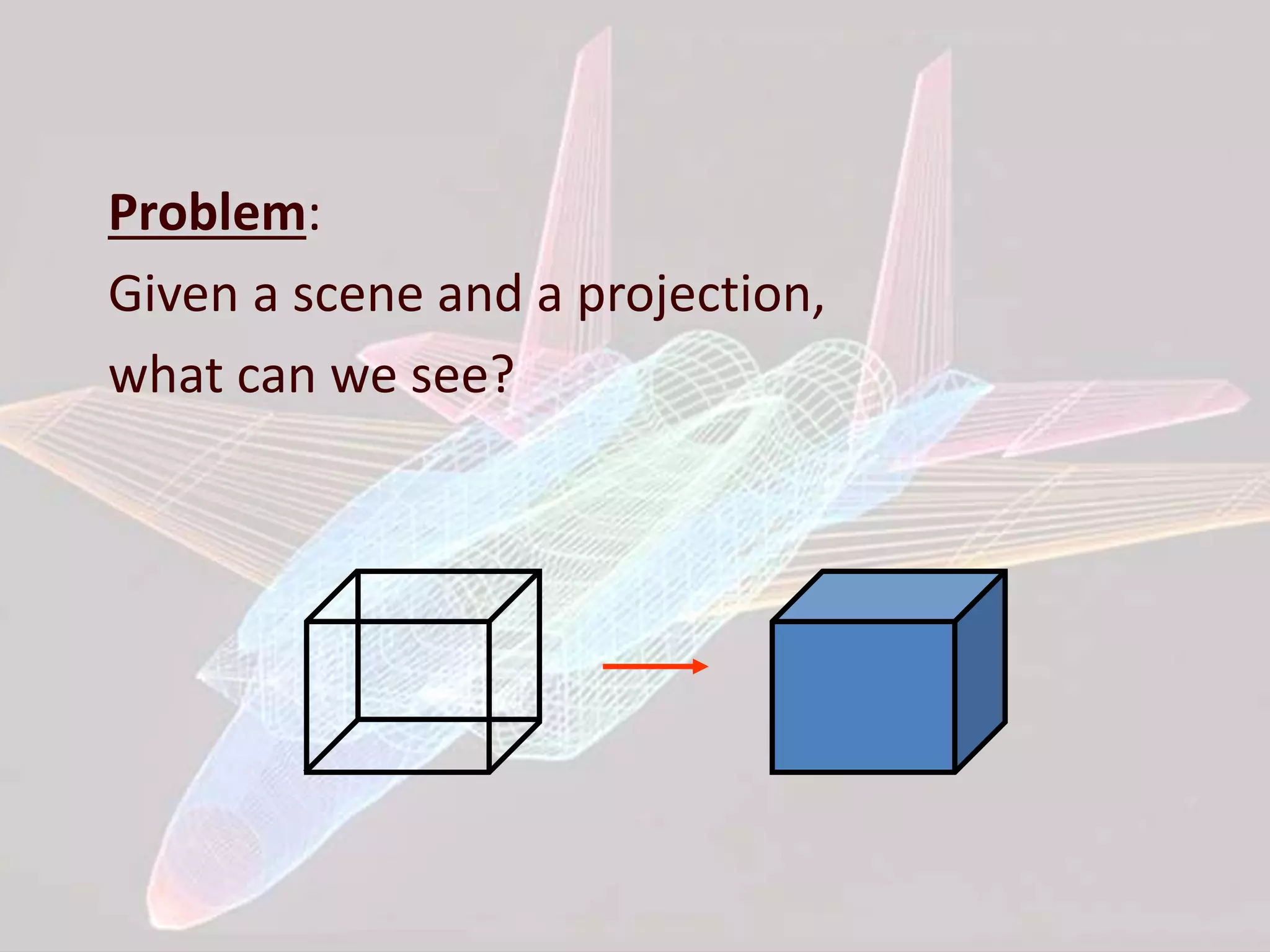
Problem: Given a scene and a projection, what can we see?
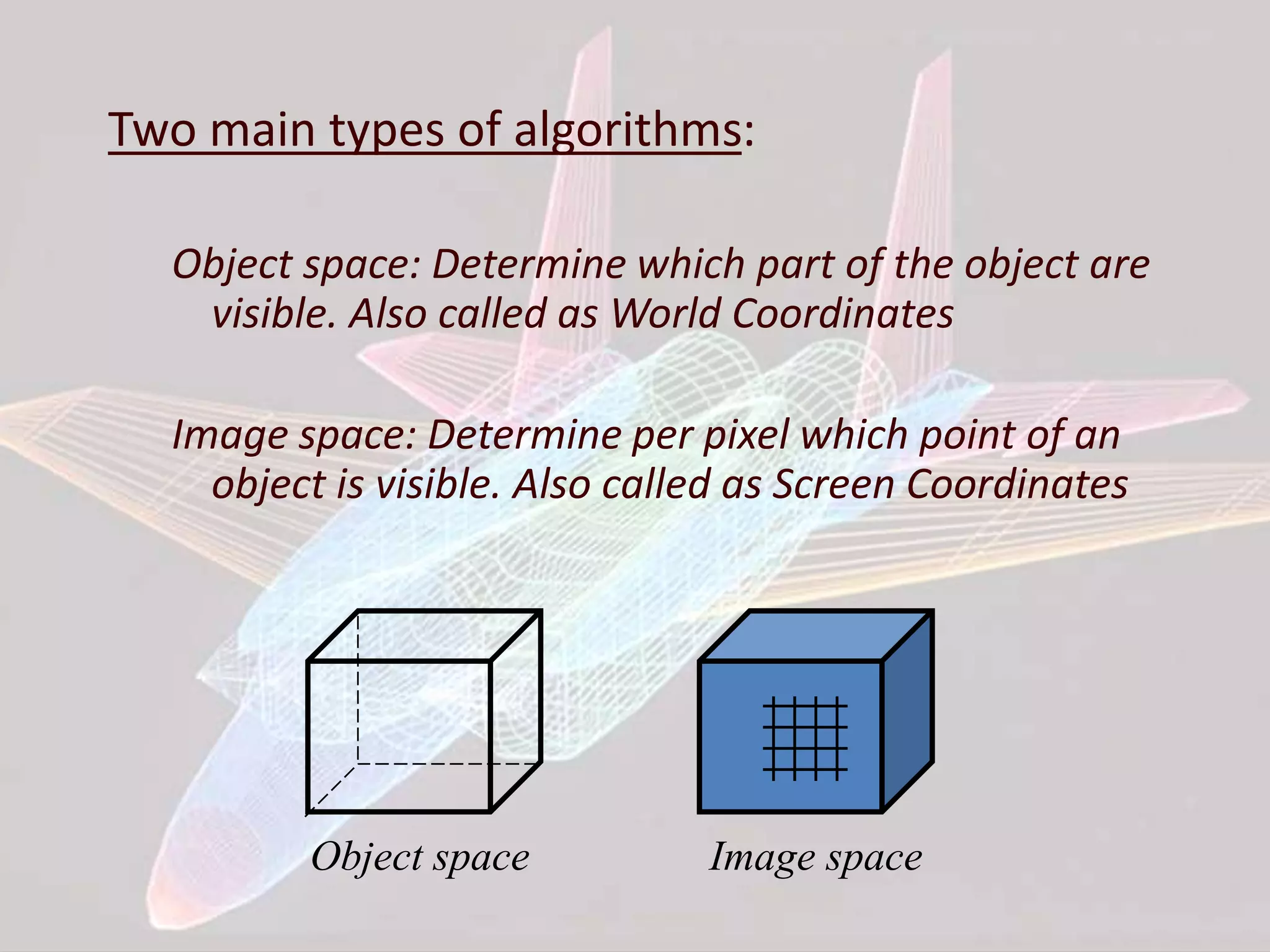
Two main types of algorithms: Object space: Determine which part of the object are visible. Also called as World Coordinates Image space: Determine per pixel which point of an object is visible. Also called as Screen Coordinates Object space Image space
Two main Hidden Surface Removal Algorithm Techniques: Object space: Hidden Surface Removal for all objects Image space: Objects: 3 D Clipping Transformed to Screen Coordinates Hidden Surface Removal
ALGORITHMS WE ARE GOING TO DISCUSS: • Z-buffer method • Scan-line method • Spanning scan-line method • Floating horizon method • Discrete data method
Z-BUFFER ALGORITHM: • Its an extension of Frame Buffer • Display is always stored on Frame Buffer • Frame Buffer stores information of each and every pixel on the screen • Bits (0, 1) decide that the pixel will be ON or OFF • Z- Buffer apart from Frame buffer stores the depth of pixel • After analyzing the data of the overlapping polygons, pixel closer to the eye will be updated • Resolution of X,Y => Array[X,Y]
Given set of polygon in image space Z-Buffer Algorithm: 1. Set the frame buffer & Z-Buffer to a background value (Z-BUFFER=Zmin) where, Zmin is value To display polygon decide=>color, intensity and depth 2. Scan convert each polygon i.e, for each pixel, find depth at that point If Z(X,Y)>Z-BUFFER(X,Y) Update Z-BUFFER(X,Y)=Z(X,Y) & FRAME BUFFER This process will repeat for each pixel
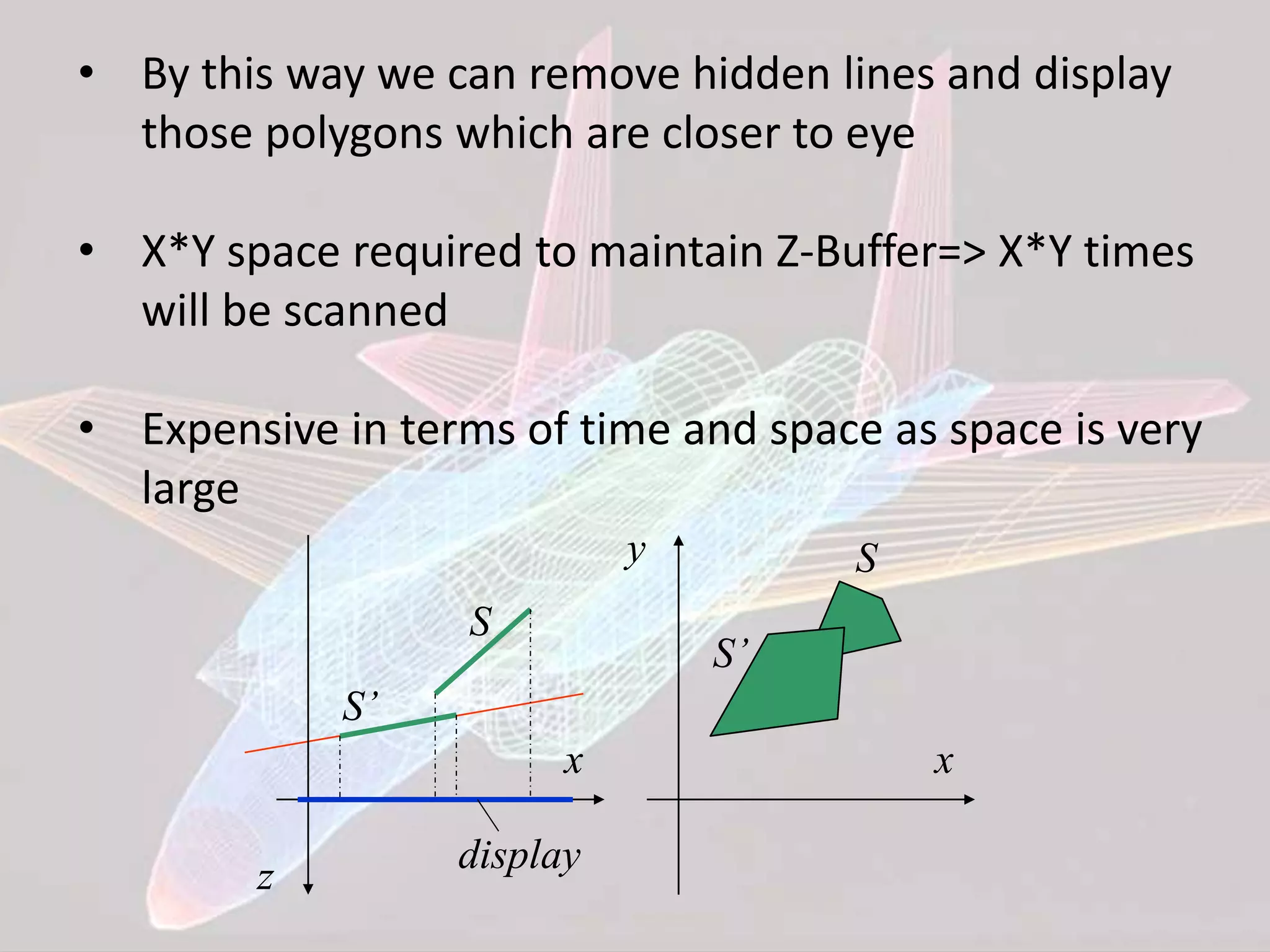
• By this way we can remove hidden lines and display those polygons which are closer to eye • X*Y space required to maintain Z-Buffer=> X*Y times will be scanned • Expensive in terms of time and space as space is very large x z display S S’ x y S S’
Pseudocode for the z-buffer algorithm void zBuffer(void) { int x,y; for(y=0;y<YMAX;y++) { /*Clear frame buffer and z-buffer*/ for(x=0;x<XMAX;x++) { WritePixel(x,y,BACKGROUND_VALUE); WriteZ(x,y,0); } } for(each polygon) { /*Draw Polygons*/ for(each pixel in polygons projection) { double pz=polygons z-value at pixel coords(x,y); if(pz>=ReadZ(x,y)) { /*New point is not farther*/ WriteZ(x,y,pz); WritePixel(x,y,polygons color at pixel coords(x,y)); } } } }
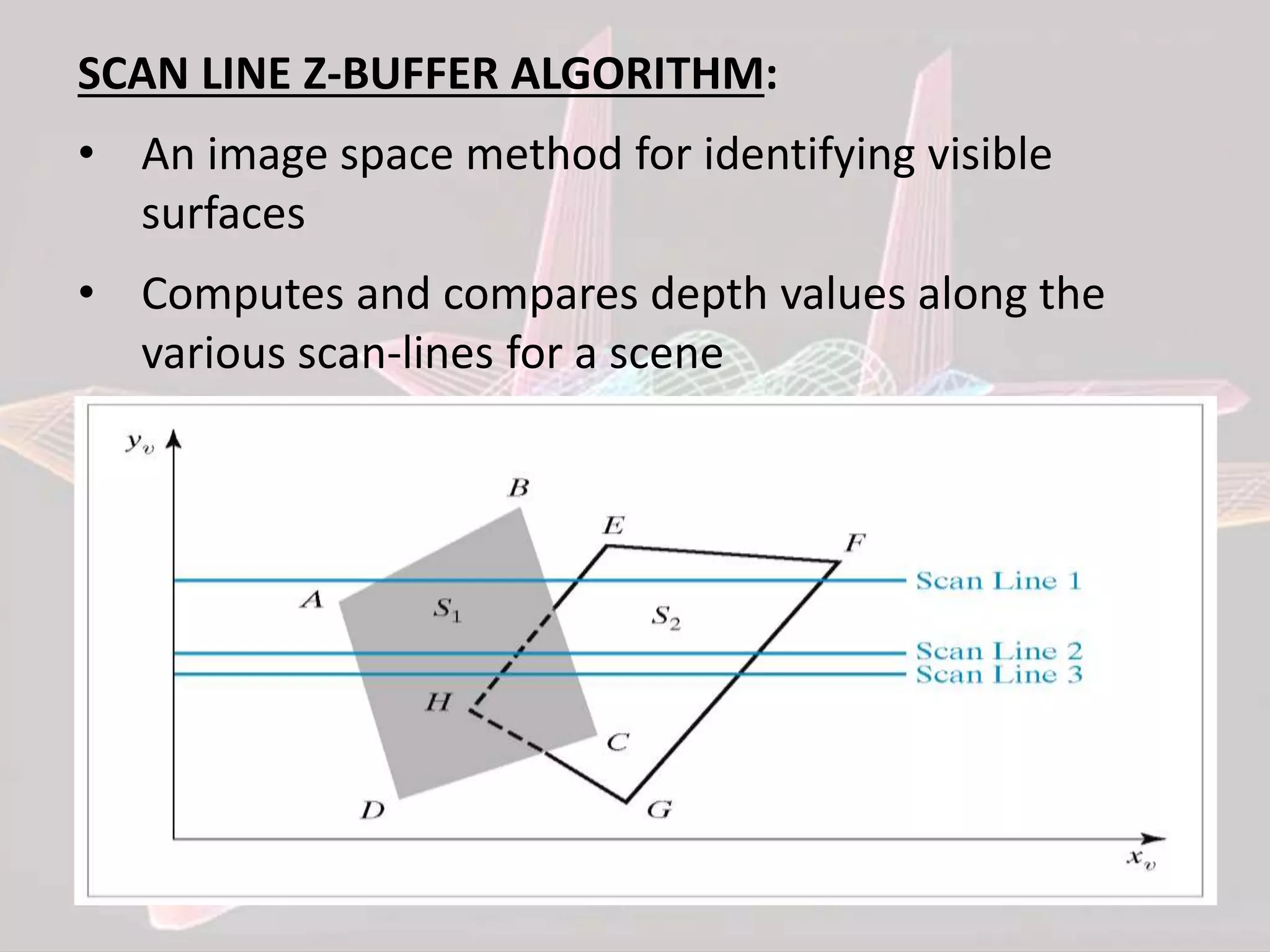
SCAN LINE Z-BUFFER ALGORITHM: • An image space method for identifying visible surfaces • Computes and compares depth values along the various scan-lines for a scene
• Scanning takes place row by row • To facilitate the search for surfaces crossing a given scan-line an active list of edges is formed for each scan-line as it is processed • The active list stores only those edges that cross the scan-line in order of increasing x • Pixel positions across each scan-line are processed from left to right • We only need to perform depth calculations • In Scan Line, Z-Buffer(X) whereas earlier it was X*Y
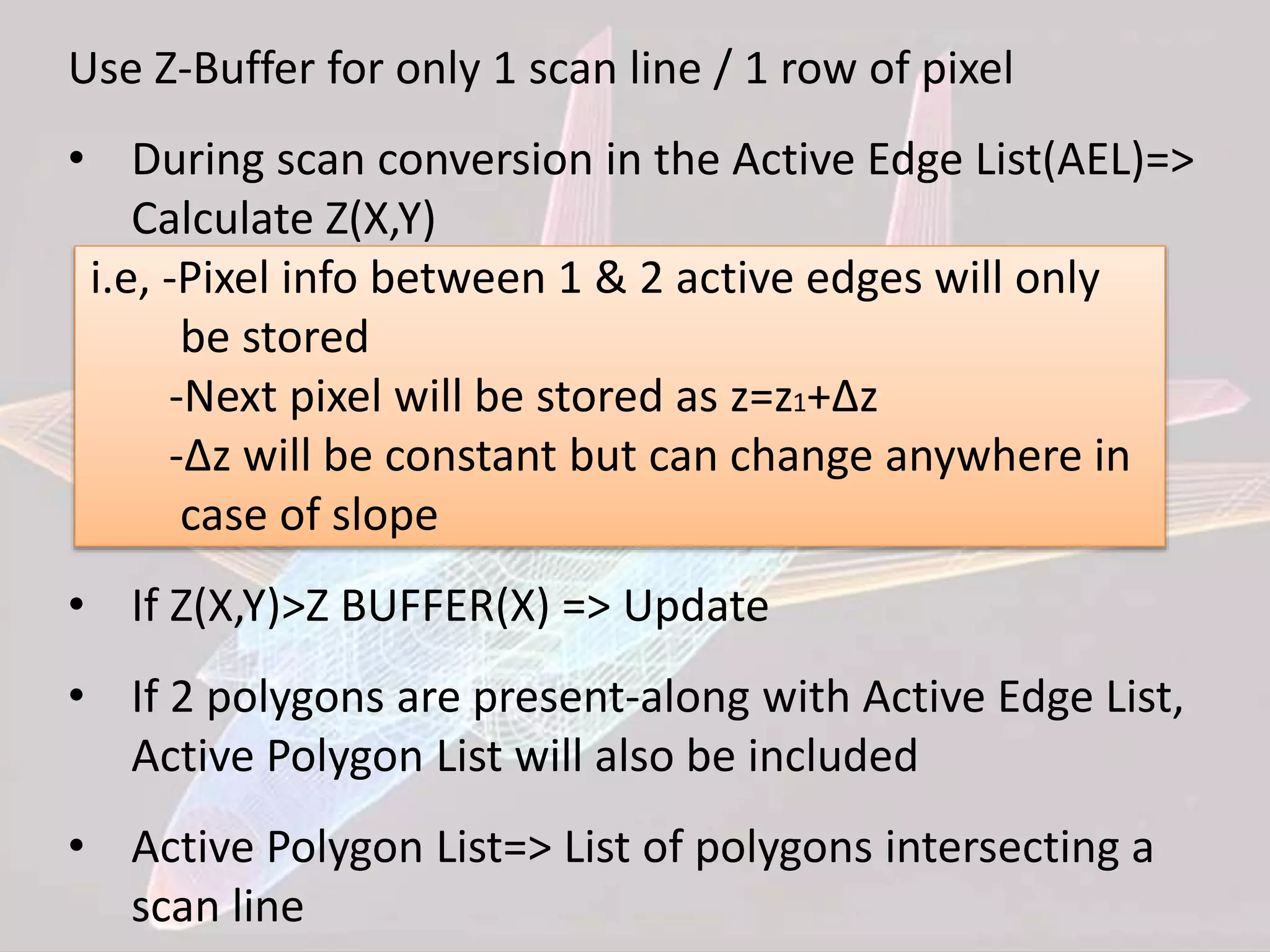
Use Z-Buffer for only 1 scan line / 1 row of pixel • During scan conversion in the Active Edge List(AEL)=> Calculate Z(X,Y) i.e, -Pixel info between 1 & 2 active edges will only be stored -Next pixel will be stored as z=z1+∆z -∆z will be constant but can change anywhere in case of slope • If Z(X,Y)>Z BUFFER(X) => Update • If 2 polygons are present-along with Active Edge List, Active Polygon List will also be included • Active Polygon List=> List of polygons intersecting a scan line
Pseudocode for the general scan line algorithm Add surfaces to surface table; Initialize active-surface table; for(each scan line) { update active-surface table; for(each pixel on scan line) { determine surfaces in active-surface table that project to pixel; find closest such surface; determine closest surface’s shade at pixel; } }
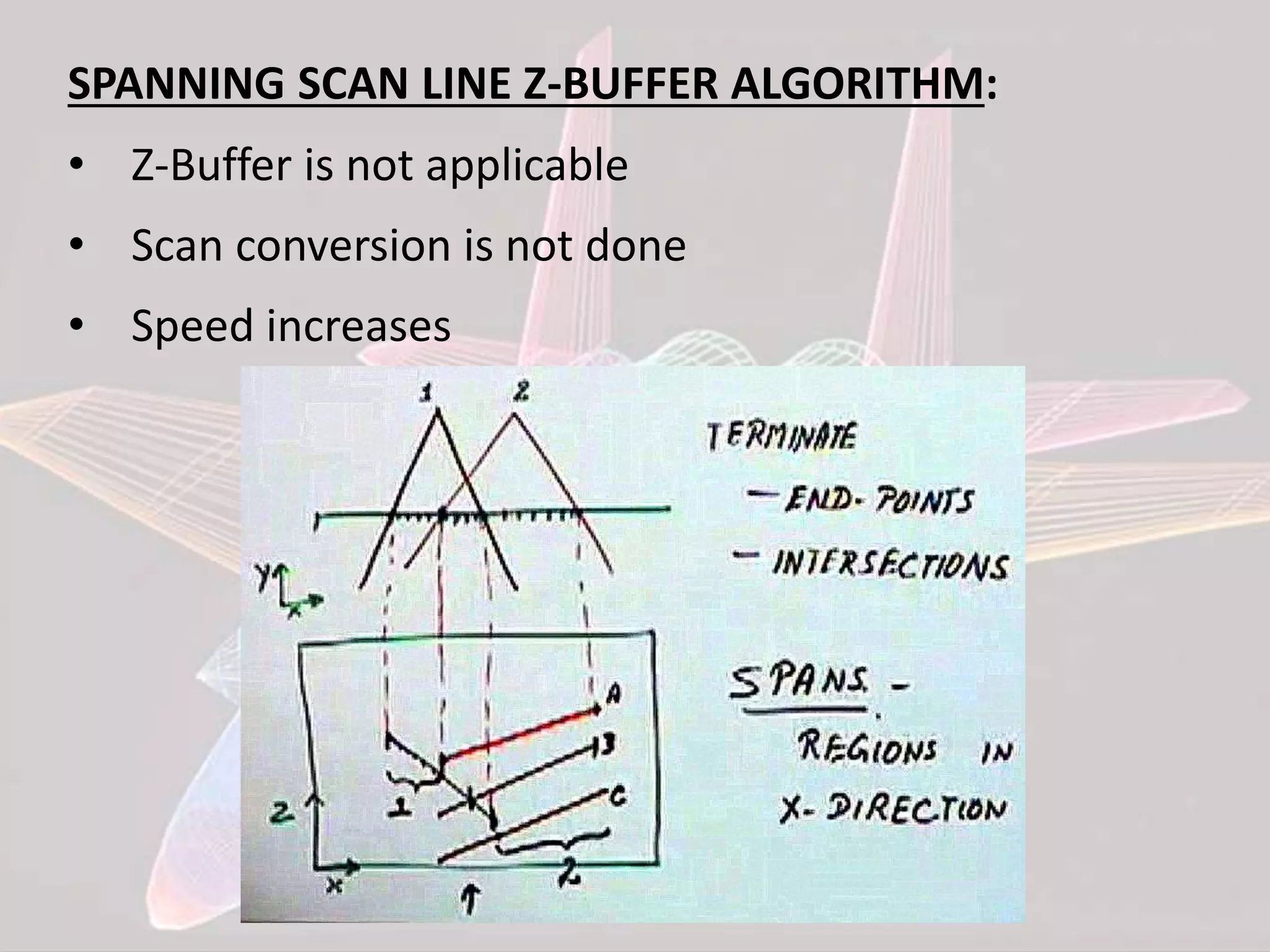
SPANNING SCAN LINE Z-BUFFER ALGORITHM: • Z-Buffer is not applicable • Scan conversion is not done • Speed increases
1 2 3 4 5 6 Each span at most one polygon shall be displayed • For each polygon determine the highest scan line intersected by it • Place the polygon in the Y-Bucket of that scan line [YB] • For each scan line -Examine YB for any new polygon -Add new polygon to APL -Update AEL -Divide into spans -In each span decide which polygon shall be displayed -Increment Y, update AEL & APL
FLOATING HORIZON ALGORITHM: • Used for displaying surface • Take each plane & intersection z=constant plane and get a curve from F(x,y)=0 f(x,y,z)=0 Array HORIZONTAL[X]=Ymax Curve in each plane=>f(x,y)=0 y=f(x,y) z=constant curves Family of curves
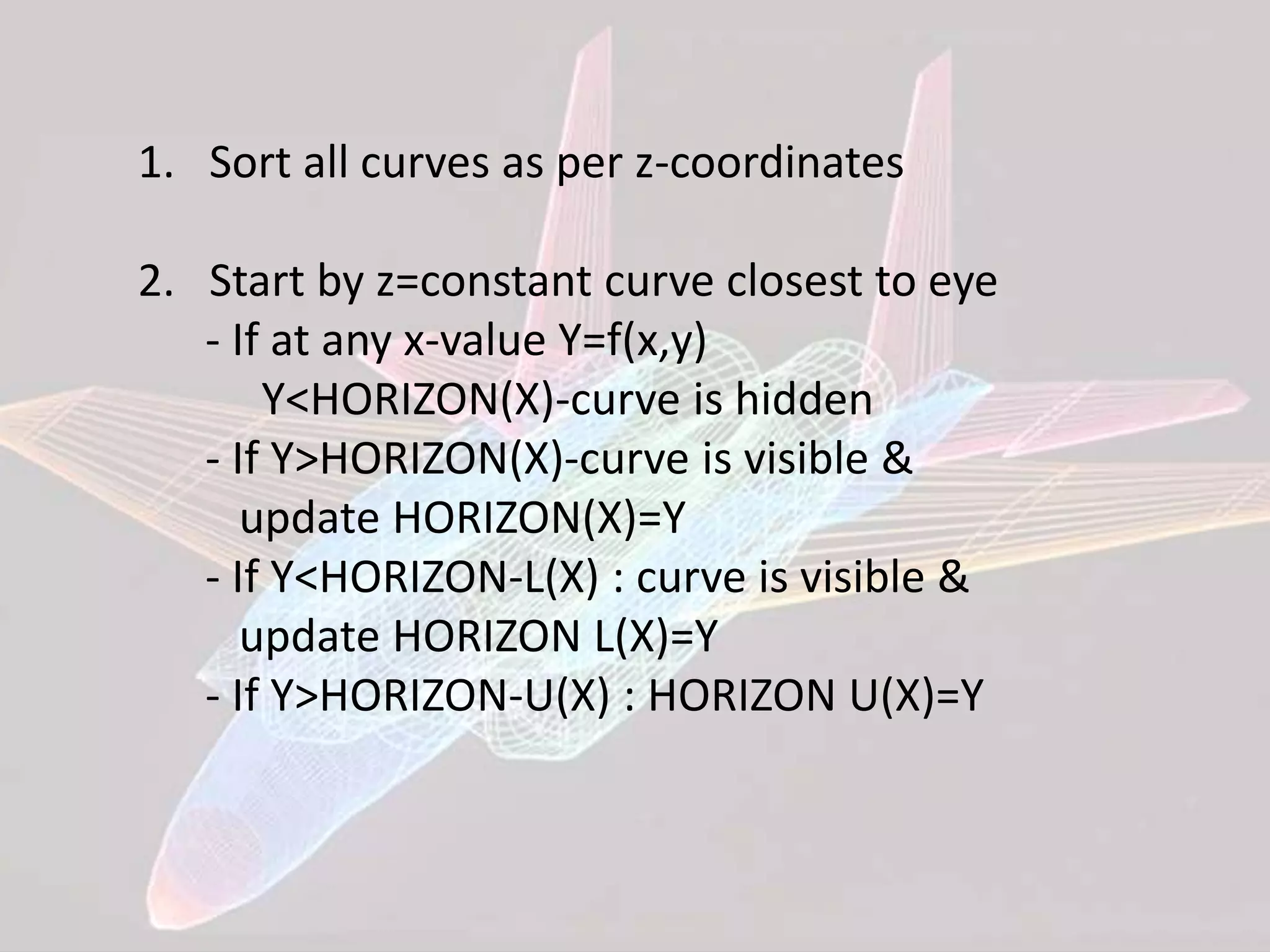
1. Sort all curves as per z-coordinates 2. Start by z=constant curve closest to eye - If at any x-value Y=f(x,y) Y<HORIZON(X)-curve is hidden - If Y>HORIZON(X)-curve is visible & update HORIZON(X)=Y - If Y<HORIZON-L(X) : curve is visible & update HORIZON L(X)=Y - If Y>HORIZON-U(X) : HORIZON U(X)=Y
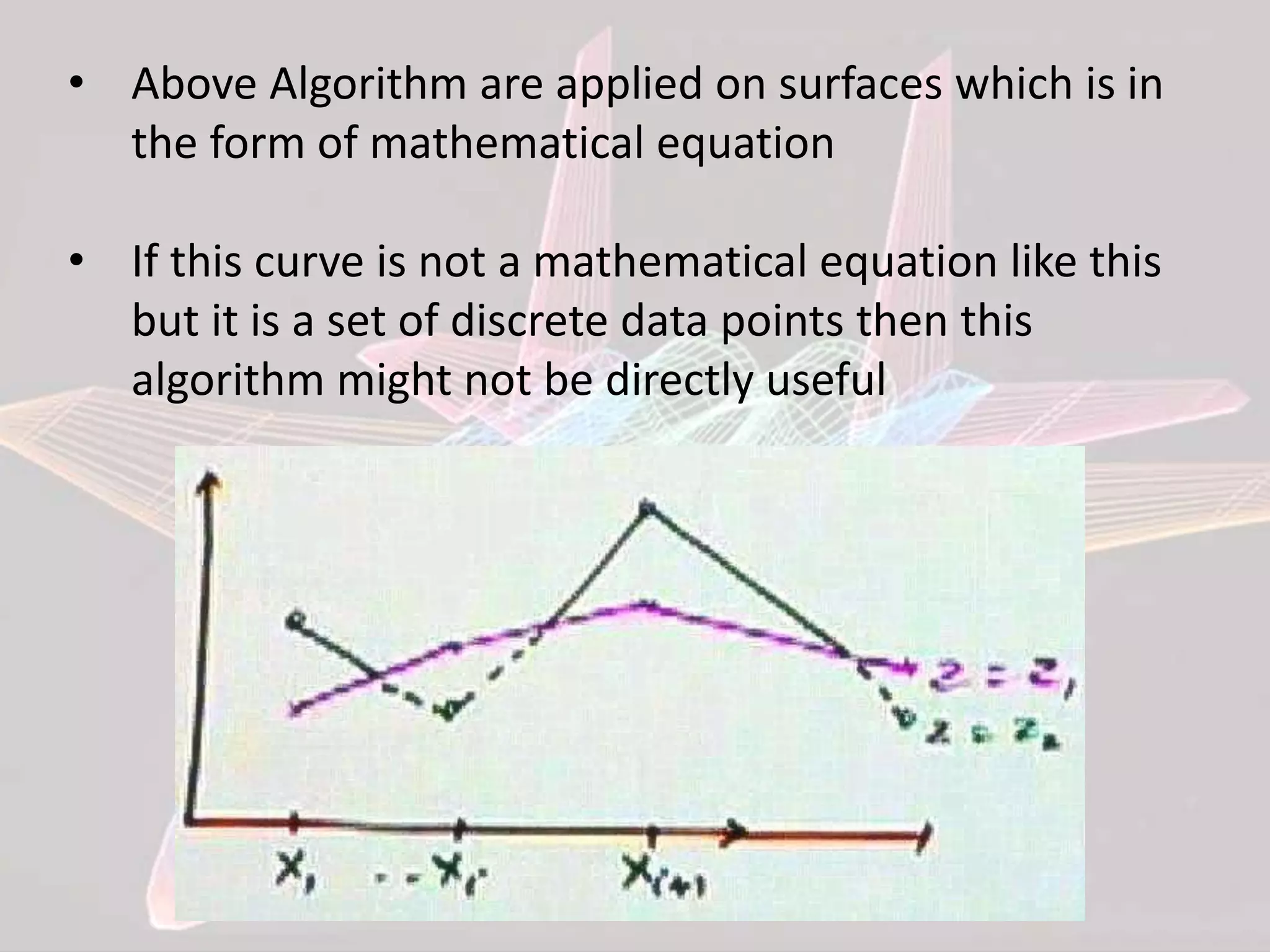
• Above Algorithm are applied on surfaces which is in the form of mathematical equation • If this curve is not a mathematical equation like this but it is a set of discrete data points then this algorithm might not be directly useful
• Maintain HORIZON[X] at each side • While displaying next curve, it will be compared to 2 points i.e, Y(Xi) & Y(Xi+1) • If both points are visible, then the complete curve is visible • Algorithm will be complex as the curve is in discrete data form Y(Xi) Y(Xi+1) Result V V Curve is visible V I Xi to Intersection -> Visible Intersection to Xi+1 -> NOT Visible I V Xi to Intersection -> NOT Visible Intersection to Xi+1 -> Visible I I NOT Visible
SUMMARY • We need to make sure that we only draw visible surfaces when rendering scenes • There are a number of techniques for doing this such as – Z-buffer method – Scan-line method – Spanning scan-line method – Floating horizon method – Discrete data method
REFERENCES • NPTEL Video Lectures: CAD by Dr. Anoop Chawla, Dept. of Mechanical Engineering, Indian Institute of Technology, Delhi, Lecture No. # 12,13,14 • Ibrahim Zeid, “CAD/CAM” TMH • Hoschek J, Dieter L, “Fundamentals of Computer Aided Geometric Design ”, A K Peters, 1997 • Rogers D F I and Adams J A, “Mathematical Elements for Computer Graphics”, McGraw-Hill, 1996 • J.H. Hughes, J.D.F., A.V.M., S.K.F., “Computer Graphics Principles And Practice”, Pearson Education Asia,2001
Computer Graphics - Hidden Line Removal Algorithm

Computer Graphics - Hidden Line Removal Algorithm

  • 1.
  • 2.
    Problem: Given a sceneand a projection, what can we see?
  • 3.
    Two main typesof algorithms: Object space: Determine which part of the object are visible. Also called as World Coordinates Image space: Determine per pixel which point of an object is visible. Also called as Screen Coordinates Object space Image space
  • 4.
    Two main HiddenSurface Removal Algorithm Techniques: Object space: Hidden Surface Removal for all objects Image space: Objects: 3 D Clipping Transformed to Screen Coordinates Hidden Surface Removal
  • 5.
    ALGORITHMS WE AREGOING TO DISCUSS: • Z-buffer method • Scan-line method • Spanning scan-line method • Floating horizon method • Discrete data method
  • 6.
    Z-BUFFER ALGORITHM: • Itsan extension of Frame Buffer • Display is always stored on Frame Buffer • Frame Buffer stores information of each and every pixel on the screen • Bits (0, 1) decide that the pixel will be ON or OFF • Z- Buffer apart from Frame buffer stores the depth of pixel • After analyzing the data of the overlapping polygons, pixel closer to the eye will be updated • Resolution of X,Y => Array[X,Y]
  • 7.
    Given set ofpolygon in image space Z-Buffer Algorithm: 1. Set the frame buffer & Z-Buffer to a background value (Z-BUFFER=Zmin) where, Zmin is value To display polygon decide=>color, intensity and depth 2. Scan convert each polygon i.e, for each pixel, find depth at that point If Z(X,Y)>Z-BUFFER(X,Y) Update Z-BUFFER(X,Y)=Z(X,Y) & FRAME BUFFER This process will repeat for each pixel
  • 8.
    • By thisway we can remove hidden lines and display those polygons which are closer to eye • X*Y space required to maintain Z-Buffer=> X*Y times will be scanned • Expensive in terms of time and space as space is very large x z display S S’ x y S S’
  • 9.
    Pseudocode for thez-buffer algorithm void zBuffer(void) { int x,y; for(y=0;y<YMAX;y++) { /*Clear frame buffer and z-buffer*/ for(x=0;x<XMAX;x++) { WritePixel(x,y,BACKGROUND_VALUE); WriteZ(x,y,0); } } for(each polygon) { /*Draw Polygons*/ for(each pixel in polygons projection) { double pz=polygons z-value at pixel coords(x,y); if(pz>=ReadZ(x,y)) { /*New point is not farther*/ WriteZ(x,y,pz); WritePixel(x,y,polygons color at pixel coords(x,y)); } } } }
  • 10.
    SCAN LINE Z-BUFFERALGORITHM: • An image space method for identifying visible surfaces • Computes and compares depth values along the various scan-lines for a scene
  • 11.
    • Scanning takesplace row by row • To facilitate the search for surfaces crossing a given scan-line an active list of edges is formed for each scan-line as it is processed • The active list stores only those edges that cross the scan-line in order of increasing x • Pixel positions across each scan-line are processed from left to right • We only need to perform depth calculations • In Scan Line, Z-Buffer(X) whereas earlier it was X*Y
  • 12.
    Use Z-Buffer foronly 1 scan line / 1 row of pixel • During scan conversion in the Active Edge List(AEL)=> Calculate Z(X,Y) i.e, -Pixel info between 1 & 2 active edges will only be stored -Next pixel will be stored as z=z1+∆z -∆z will be constant but can change anywhere in case of slope • If Z(X,Y)>Z BUFFER(X) => Update • If 2 polygons are present-along with Active Edge List, Active Polygon List will also be included • Active Polygon List=> List of polygons intersecting a scan line
  • 13.
    Pseudocode for thegeneral scan line algorithm Add surfaces to surface table; Initialize active-surface table; for(each scan line) { update active-surface table; for(each pixel on scan line) { determine surfaces in active-surface table that project to pixel; find closest such surface; determine closest surface’s shade at pixel; } }
  • 14.
    SPANNING SCAN LINEZ-BUFFER ALGORITHM: • Z-Buffer is not applicable • Scan conversion is not done • Speed increases
  • 15.
    1 2 34 5 6 Each span at most one polygon shall be displayed • For each polygon determine the highest scan line intersected by it • Place the polygon in the Y-Bucket of that scan line [YB] • For each scan line -Examine YB for any new polygon -Add new polygon to APL -Update AEL -Divide into spans -In each span decide which polygon shall be displayed -Increment Y, update AEL & APL
  • 16.
    FLOATING HORIZON ALGORITHM: •Used for displaying surface • Take each plane & intersection z=constant plane and get a curve from F(x,y)=0 f(x,y,z)=0 Array HORIZONTAL[X]=Ymax Curve in each plane=>f(x,y)=0 y=f(x,y) z=constant curves Family of curves
  • 17.
    1. Sort allcurves as per z-coordinates 2. Start by z=constant curve closest to eye - If at any x-value Y=f(x,y) Y<HORIZON(X)-curve is hidden - If Y>HORIZON(X)-curve is visible & update HORIZON(X)=Y - If Y<HORIZON-L(X) : curve is visible & update HORIZON L(X)=Y - If Y>HORIZON-U(X) : HORIZON U(X)=Y
  • 18.
    • Above Algorithmare applied on surfaces which is in the form of mathematical equation • If this curve is not a mathematical equation like this but it is a set of discrete data points then this algorithm might not be directly useful
  • 19.
    • Maintain HORIZON[X]at each side • While displaying next curve, it will be compared to 2 points i.e, Y(Xi) & Y(Xi+1) • If both points are visible, then the complete curve is visible • Algorithm will be complex as the curve is in discrete data form Y(Xi) Y(Xi+1) Result V V Curve is visible V I Xi to Intersection -> Visible Intersection to Xi+1 -> NOT Visible I V Xi to Intersection -> NOT Visible Intersection to Xi+1 -> Visible I I NOT Visible
  • 20.
    SUMMARY • We needto make sure that we only draw visible surfaces when rendering scenes • There are a number of techniques for doing this such as – Z-buffer method – Scan-line method – Spanning scan-line method – Floating horizon method – Discrete data method
  • 21.
    REFERENCES • NPTEL VideoLectures: CAD by Dr. Anoop Chawla, Dept. of Mechanical Engineering, Indian Institute of Technology, Delhi, Lecture No. # 12,13,14 • Ibrahim Zeid, “CAD/CAM” TMH • Hoschek J, Dieter L, “Fundamentals of Computer Aided Geometric Design ”, A K Peters, 1997 • Rogers D F I and Adams J A, “Mathematical Elements for Computer Graphics”, McGraw-Hill, 1996 • J.H. Hughes, J.D.F., A.V.M., S.K.F., “Computer Graphics Principles And Practice”, Pearson Education Asia,2001