• A distinguishing feature of MATLAB is its ease of extendibility through user written programs . • MATLAB provides its own language, which incorporates many features from C. • In some regards, it is a higher-level language than most common programming languages, such as Pascal, Fortran, and C, meaning that you will spend less time worrying about formalisms and syntax. • In MATLAB you write your programs in M-files. M-files are ordinary ASCII text files written in MATLAB's language.
• A script file is an M-file with a set of valid MATLAB commands in it. • A script file is executed by typing the name of the file (without the .m extension) on the command line. • A script file may contain any number of commands, including those that call built-in functions or functions written by you. • Script files are useful when you have to repeat a set of commands several times. • Here is an example.
• Example of a script file: Let us write a script file to solve the following system of linear equations: [ 5 2𝑟 𝑟 3 6 2 𝑟 − 1 2 𝑟 − 1 3 𝑟 ][ 𝑥1 𝑥2 𝑥3 ]= [ 2 3 5] • How you create this file, write the commands in it, and save the file depends on the computer you are using. • In any case, you are creating a file called solvex . m, which will be saved on some disk drive in some directory (or folder) .
%----------- This is the script file 'solvex . m' -----------­ % It solves equation (4 . 1) for x and also calculates det (A) . solvex.m
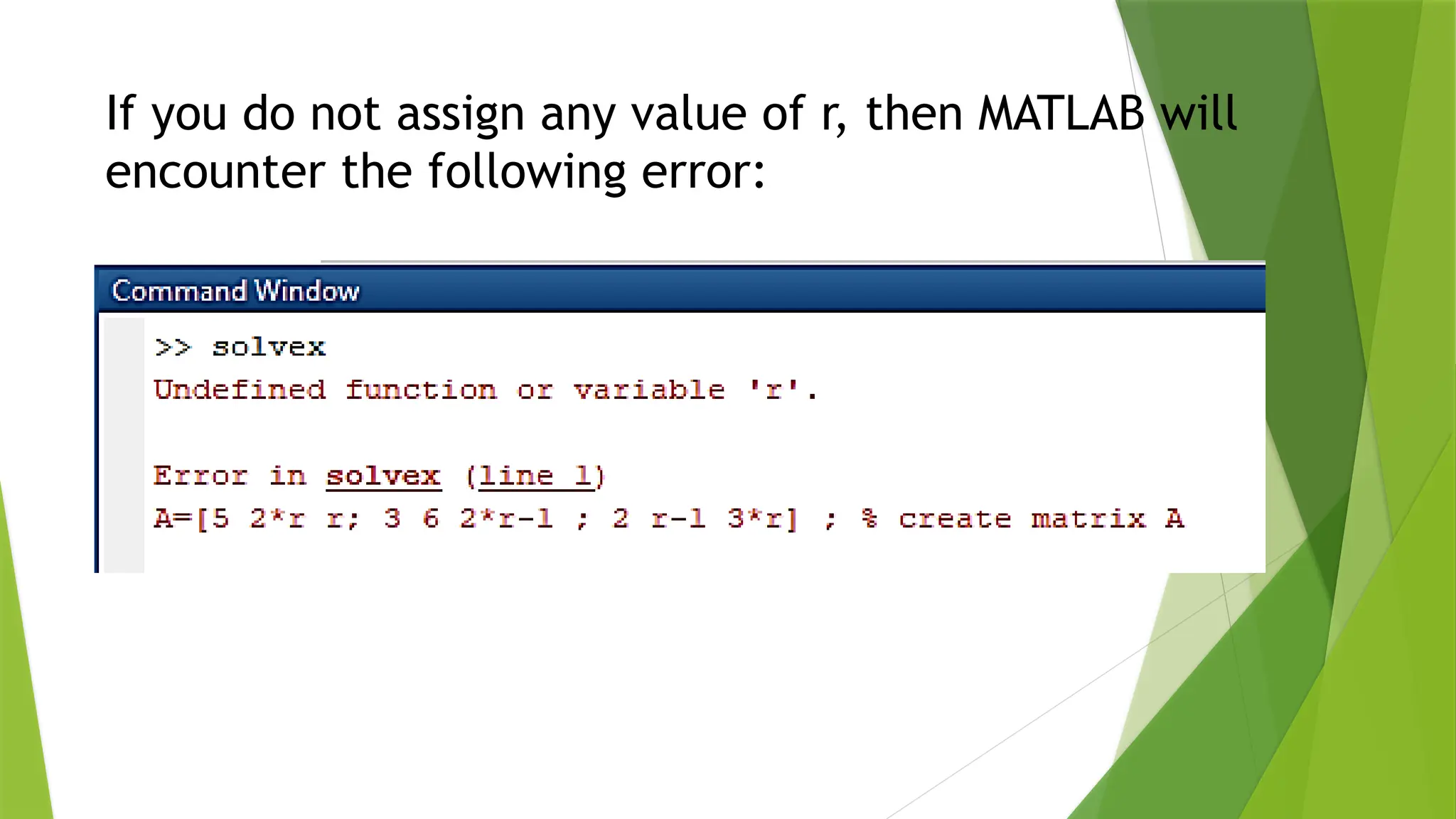
If you do not assign any value of r, then MATLAB will encounter the following error:
• NEVER name a script file the same as the name of a variable it computes. • When MATLAB looks for a name, it first searches the list of variables in the workspace. • If a variable of the same name as the script file exists, MATLAB will never be able to access the script file.
Example of a simple function file • Let us write a function file to solve the same system of linear equations that we solved in Slide 5 using a script file. • This time, we will make r an input to the function and det_A and x will be the output. • Let us call this function solvexf . • As a rule, it must be saved in a file called solvexf. m.
solvexf.m
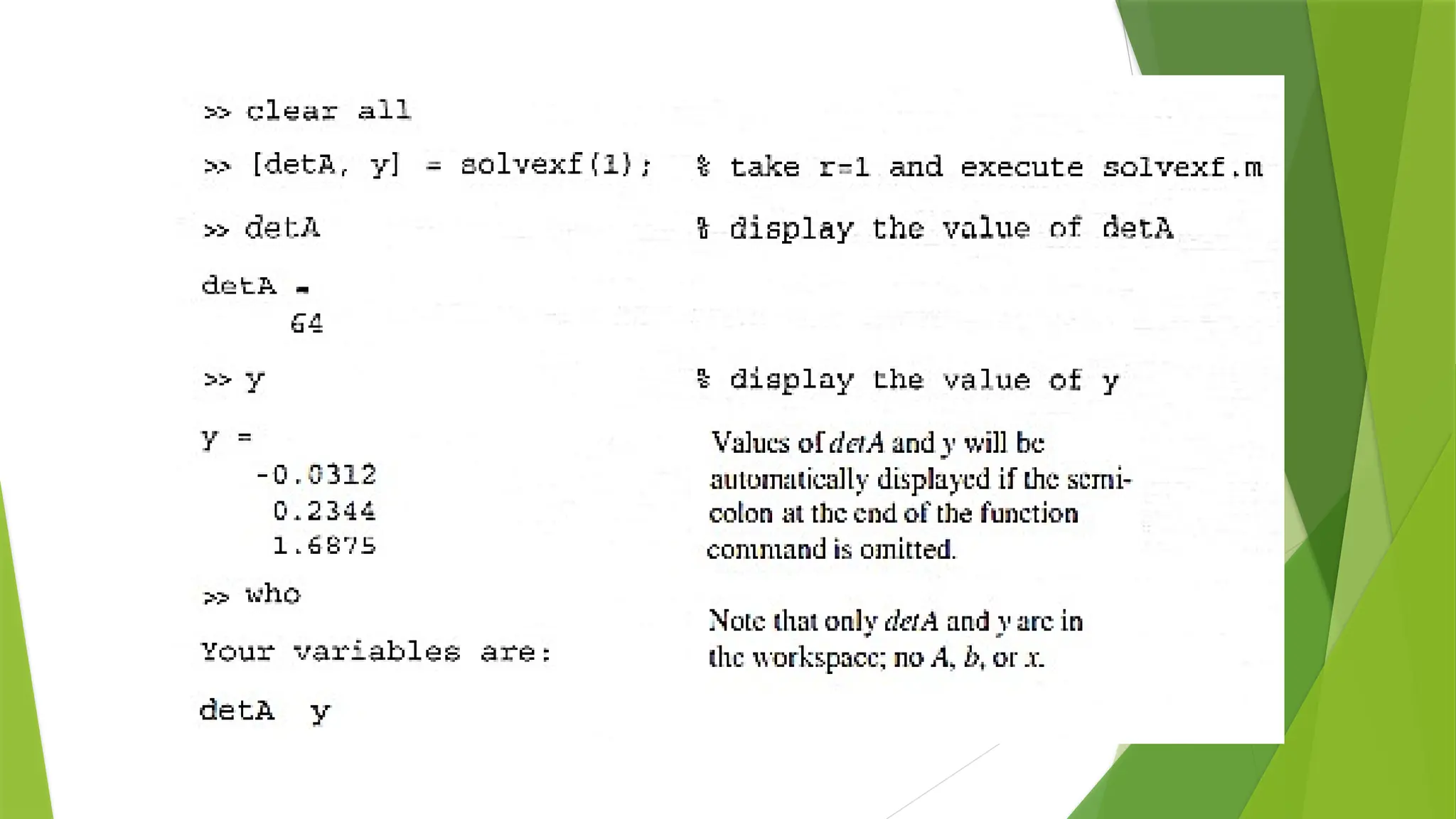
• Now r, x, and detA are all local variables. • Therefore, any other variable names may be used in their places in the function call statement. • Let us execute this function in MATLAB.
• We can also include error checks and messages inside the function. • For example, we could modify the preceding function to check if matrix A is empty or not and display an appropriate message before solving the system by changing the last line to
if isempty(A) % if matrix A is empty disp(' Matrix A is empty '); else % if A is not empty X = Ab ; % find x end % end of if statement
Thank you so much

Creating Functions file in Matrices Laboratory using MATLAB

  • 3.
    • A distinguishingfeature of MATLAB is its ease of extendibility through user written programs . • MATLAB provides its own language, which incorporates many features from C. • In some regards, it is a higher-level language than most common programming languages, such as Pascal, Fortran, and C, meaning that you will spend less time worrying about formalisms and syntax. • In MATLAB you write your programs in M-files. M-files are ordinary ASCII text files written in MATLAB's language.
  • 4.
    • A scriptfile is an M-file with a set of valid MATLAB commands in it. • A script file is executed by typing the name of the file (without the .m extension) on the command line. • A script file may contain any number of commands, including those that call built-in functions or functions written by you. • Script files are useful when you have to repeat a set of commands several times. • Here is an example.
  • 5.
    • Example ofa script file: Let us write a script file to solve the following system of linear equations: [ 5 2𝑟 𝑟 3 6 2 𝑟 − 1 2 𝑟 − 1 3 𝑟 ][ 𝑥1 𝑥2 𝑥3 ]= [ 2 3 5] • How you create this file, write the commands in it, and save the file depends on the computer you are using. • In any case, you are creating a file called solvex . m, which will be saved on some disk drive in some directory (or folder) .
  • 6.
    %----------- This isthe script file 'solvex . m' -----------­ % It solves equation (4 . 1) for x and also calculates det (A) . solvex.m
  • 8.
    If you donot assign any value of r, then MATLAB will encounter the following error:
  • 9.
    • NEVER namea script file the same as the name of a variable it computes. • When MATLAB looks for a name, it first searches the list of variables in the workspace. • If a variable of the same name as the script file exists, MATLAB will never be able to access the script file.
  • 10.
    Example of asimple function file • Let us write a function file to solve the same system of linear equations that we solved in Slide 5 using a script file. • This time, we will make r an input to the function and det_A and x will be the output. • Let us call this function solvexf . • As a rule, it must be saved in a file called solvexf. m.
  • 11.
  • 12.
    • Now r,x, and detA are all local variables. • Therefore, any other variable names may be used in their places in the function call statement. • Let us execute this function in MATLAB.
  • 14.
    • We canalso include error checks and messages inside the function. • For example, we could modify the preceding function to check if matrix A is empty or not and display an appropriate message before solving the system by changing the last line to
  • 15.
    if isempty(A) %if matrix A is empty disp(' Matrix A is empty '); else % if A is not empty X = Ab ; % find x end % end of if statement
  • 16.