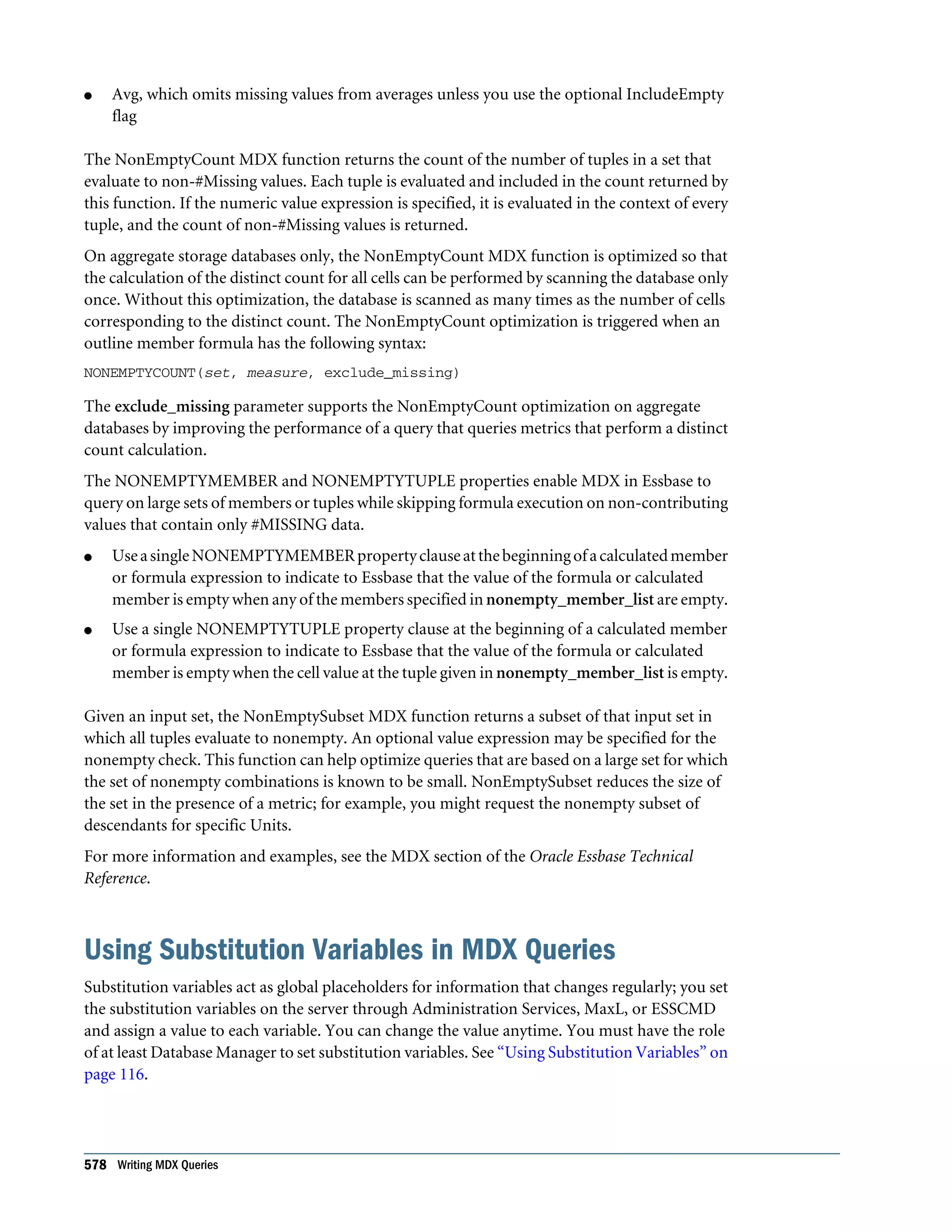
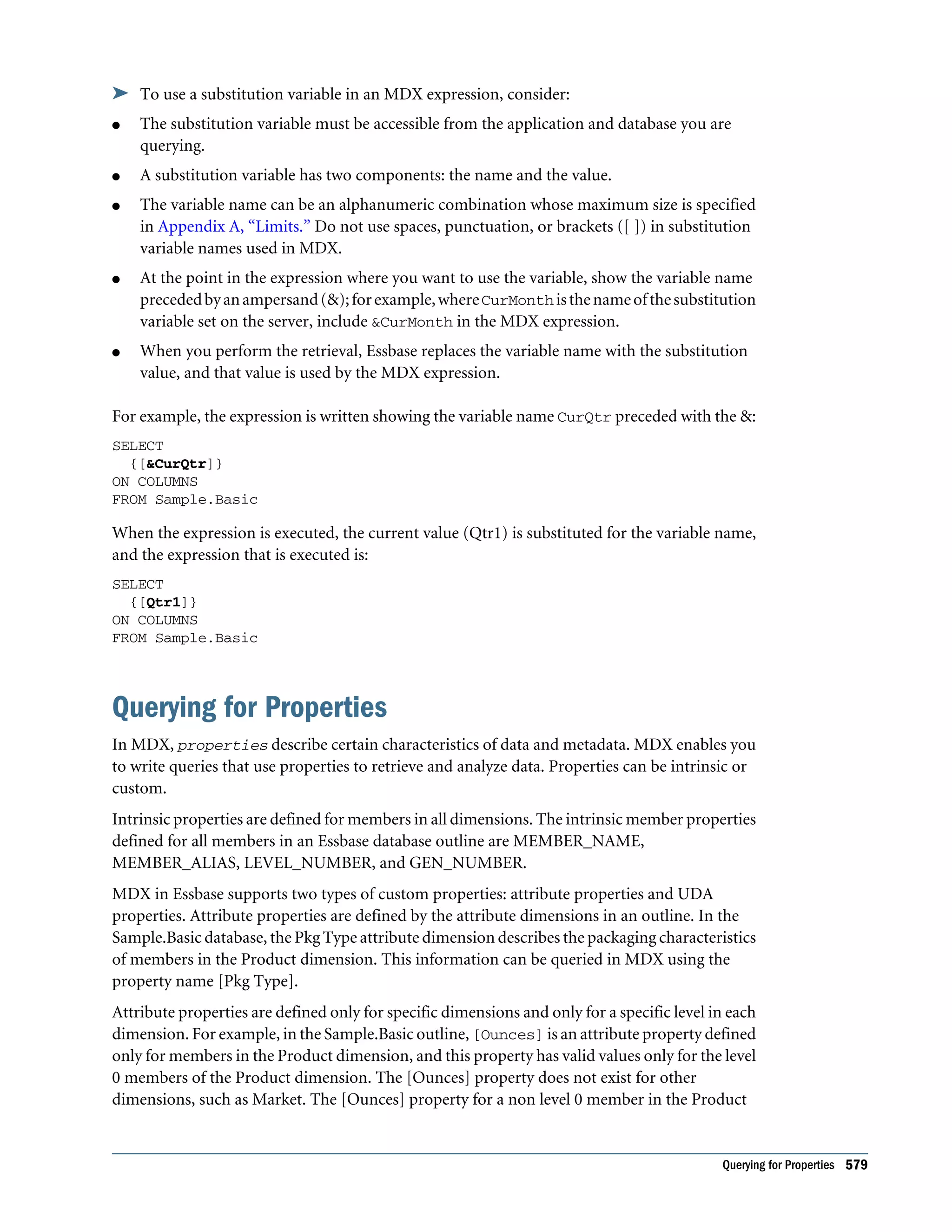
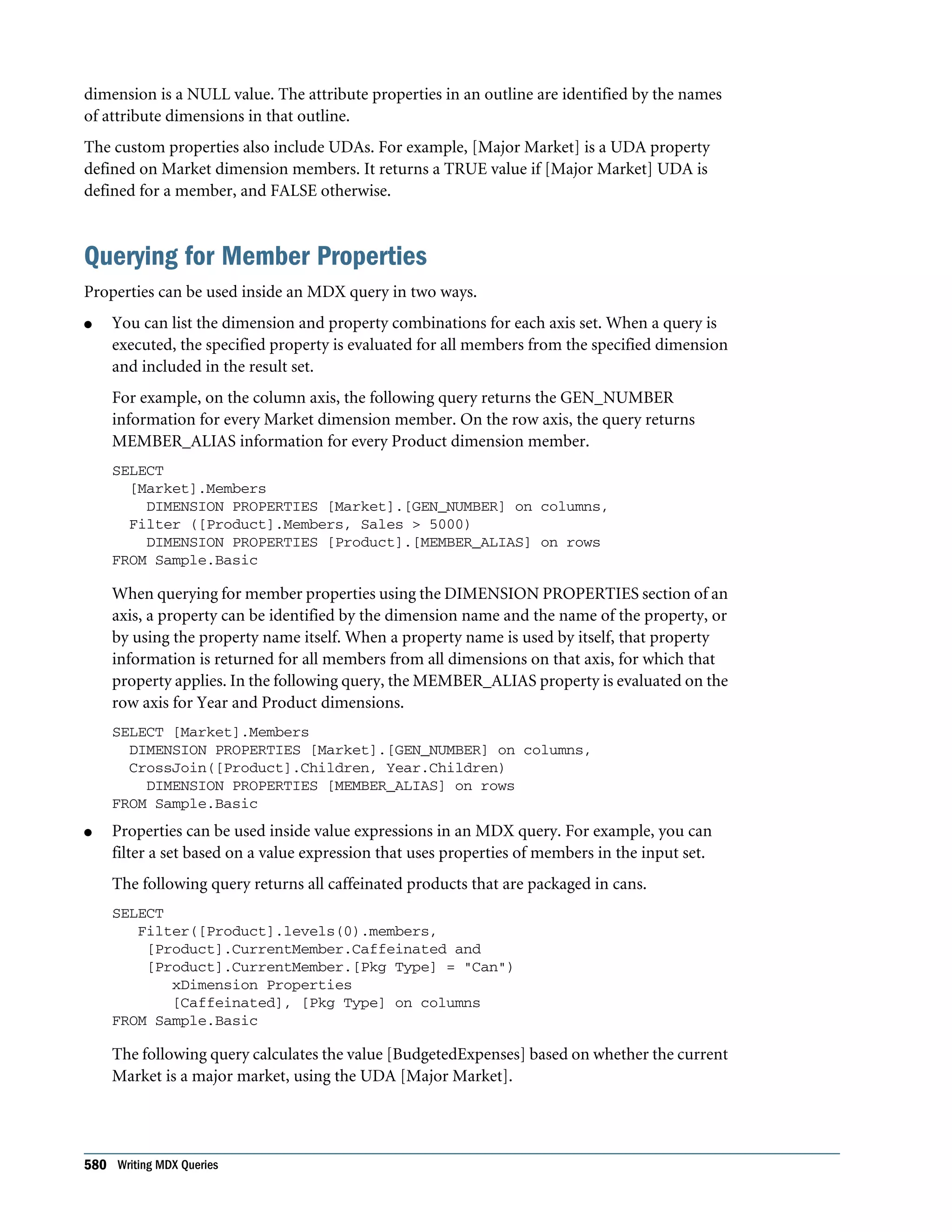
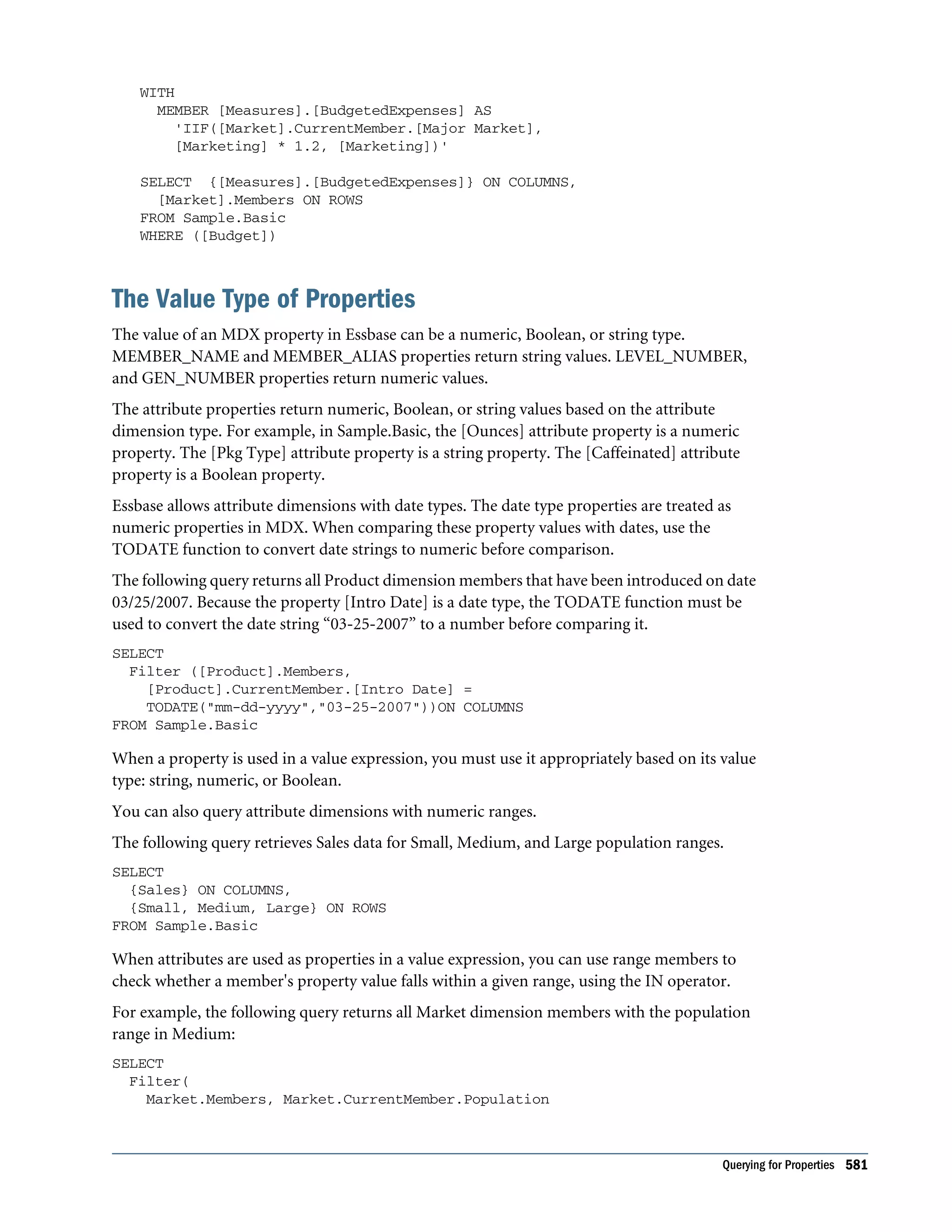
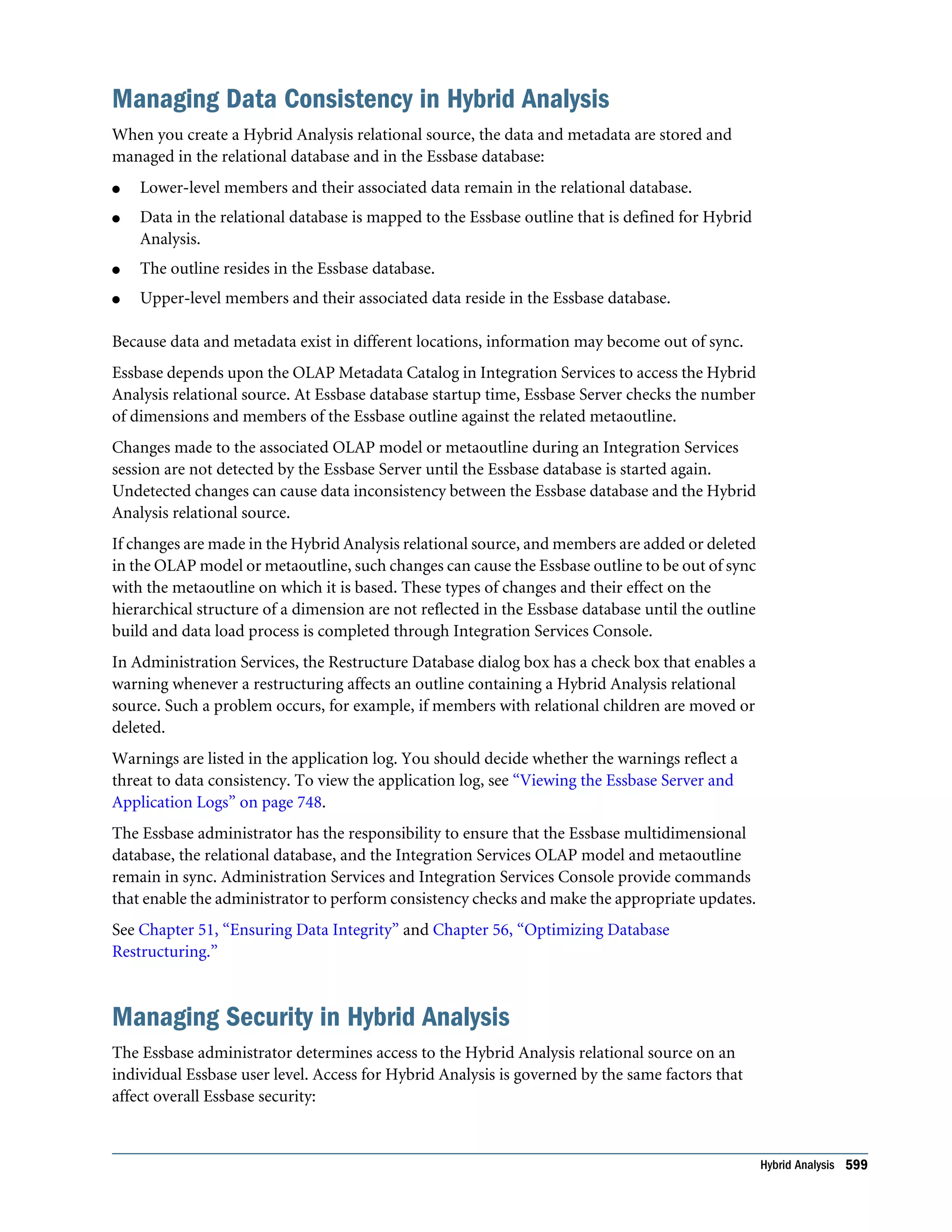
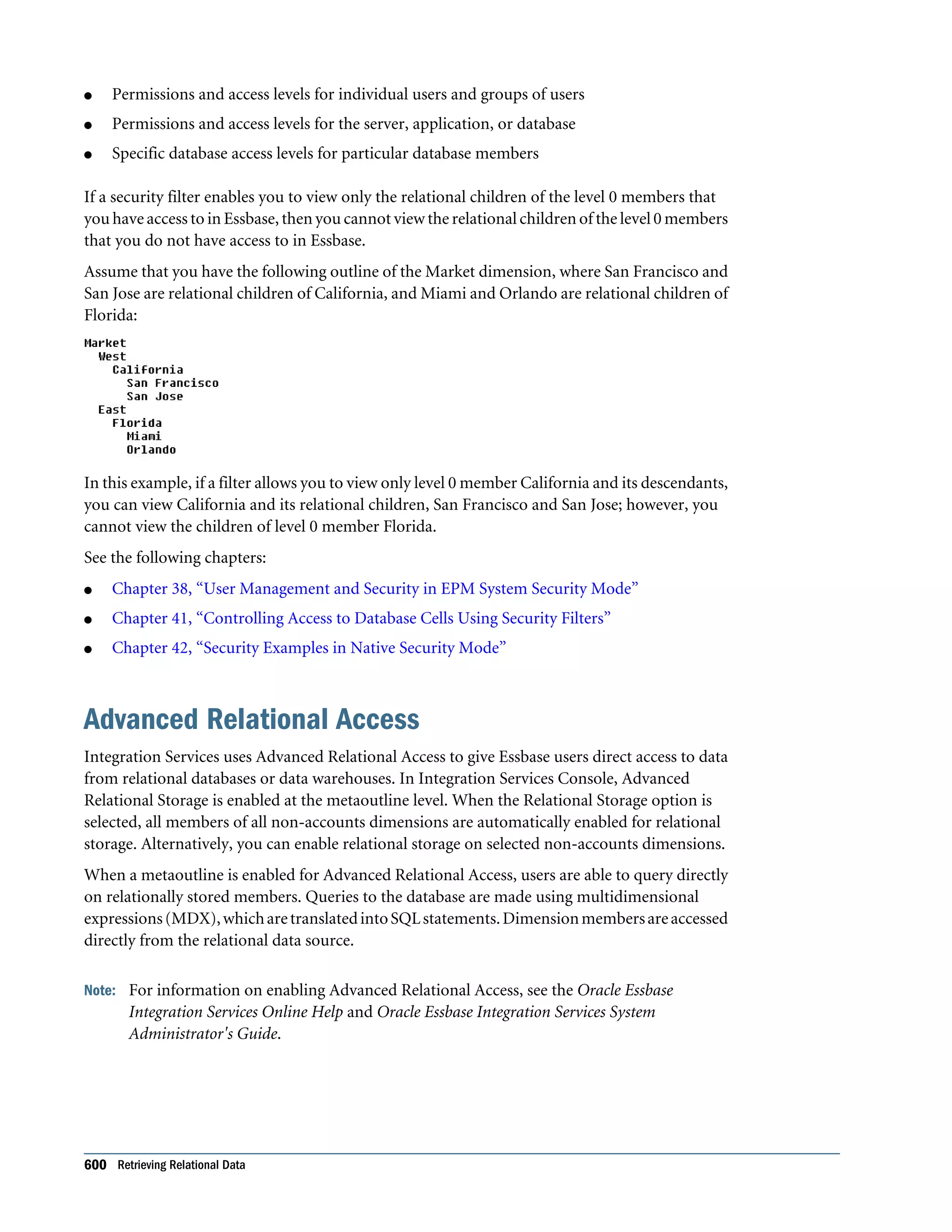
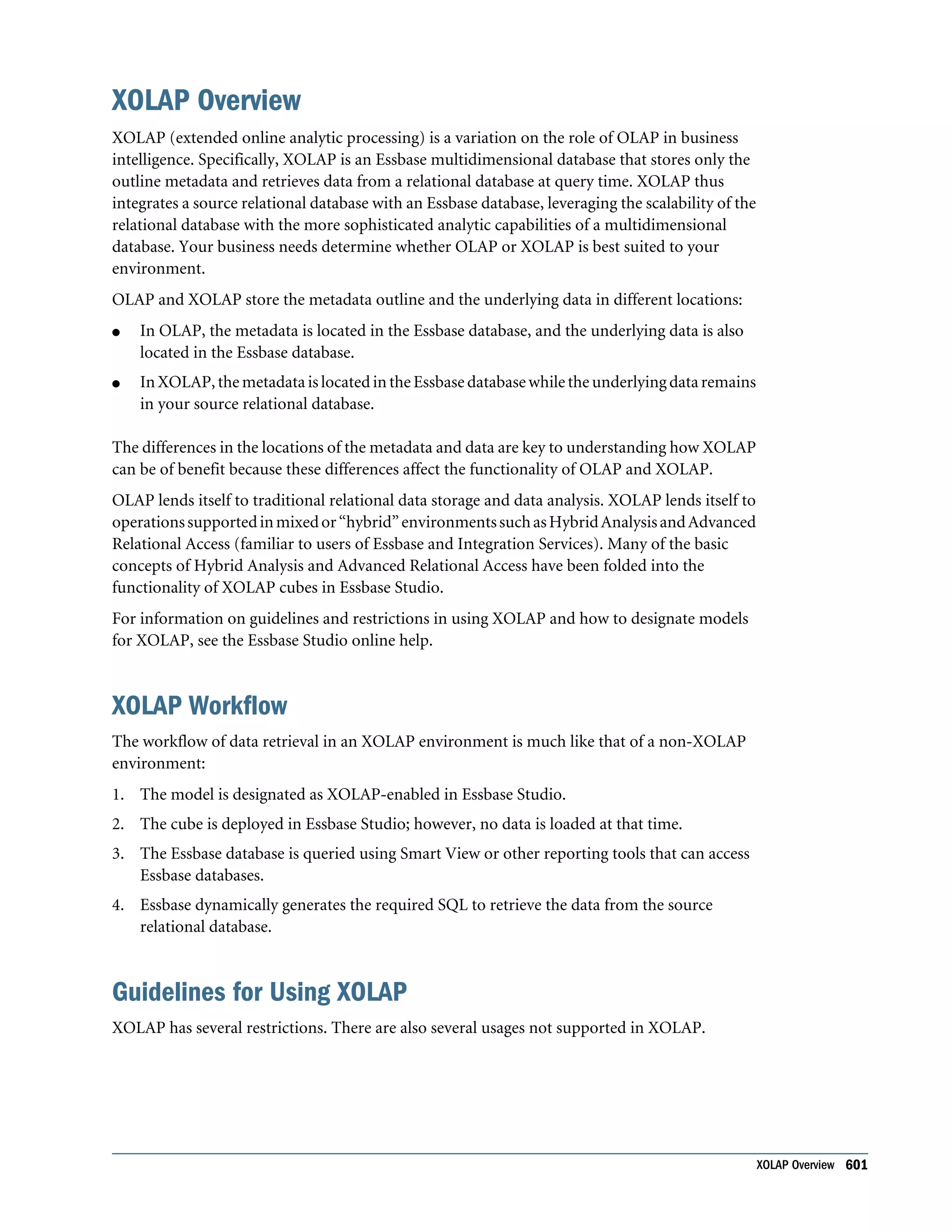
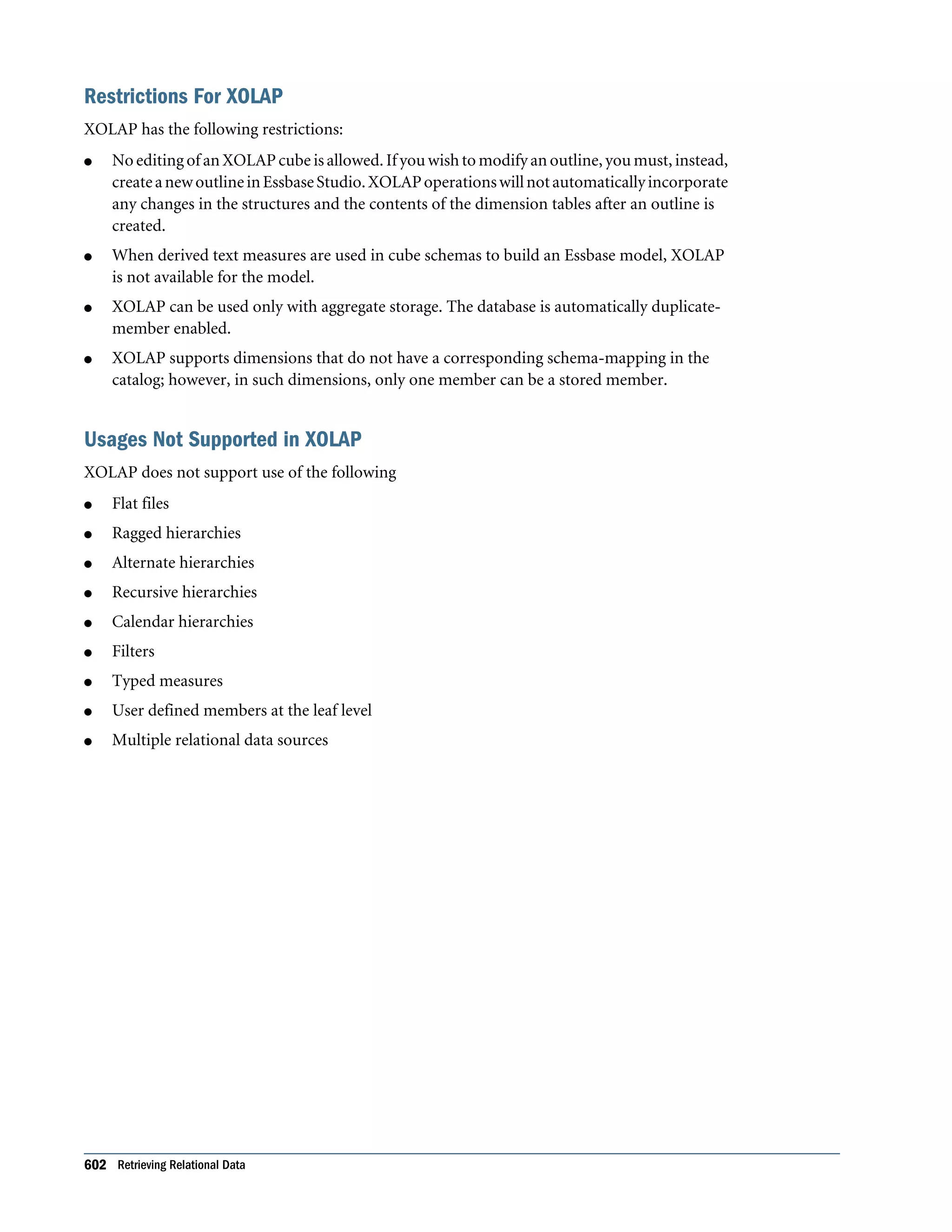
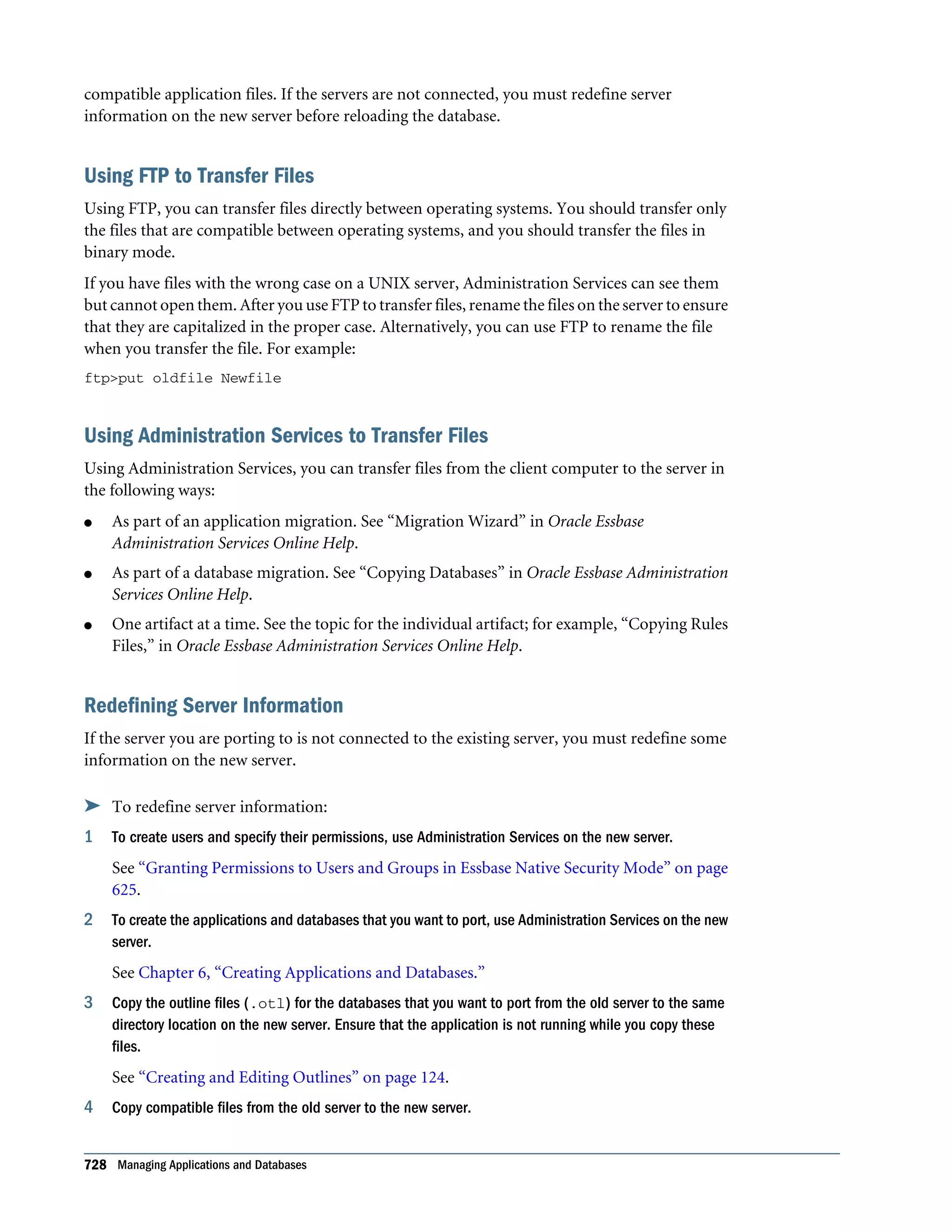
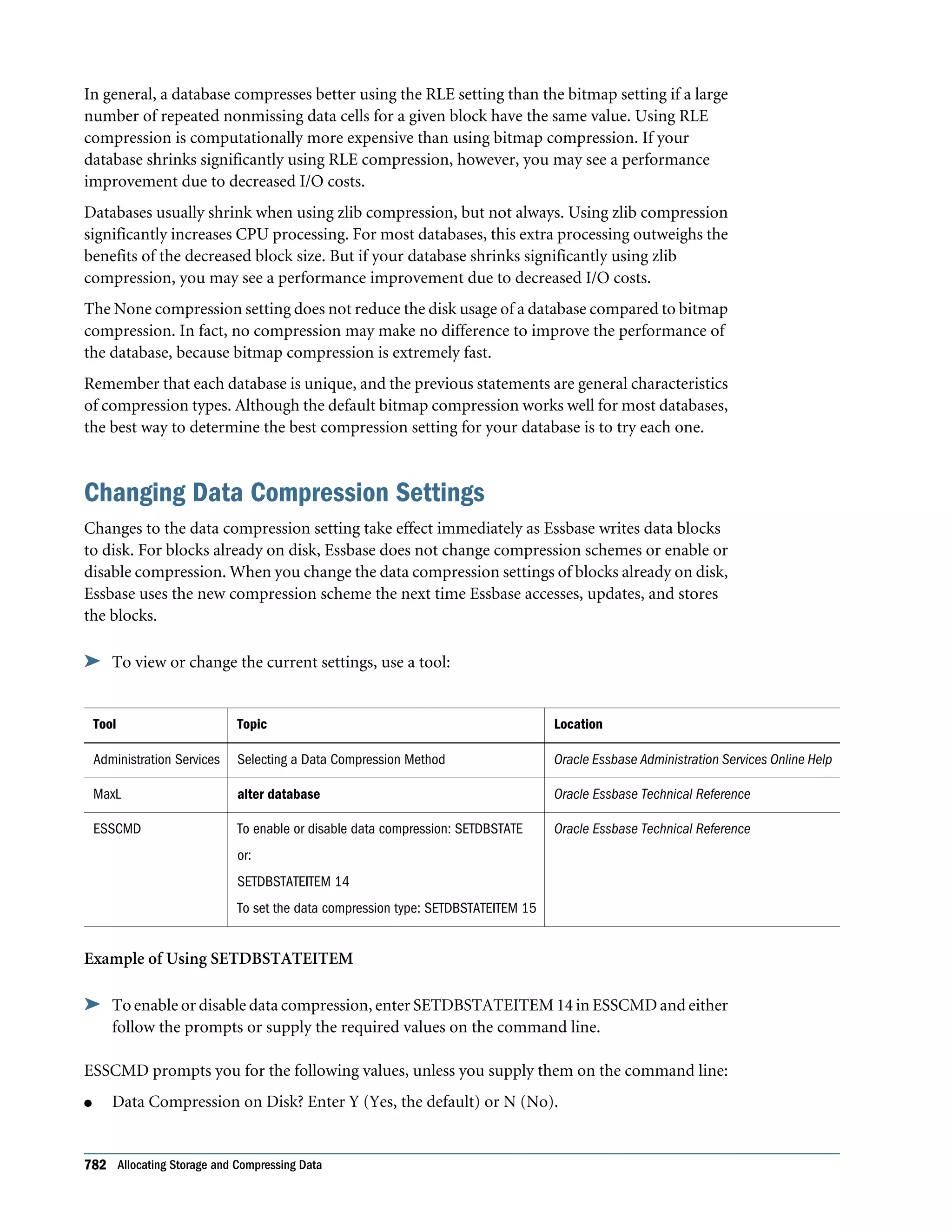
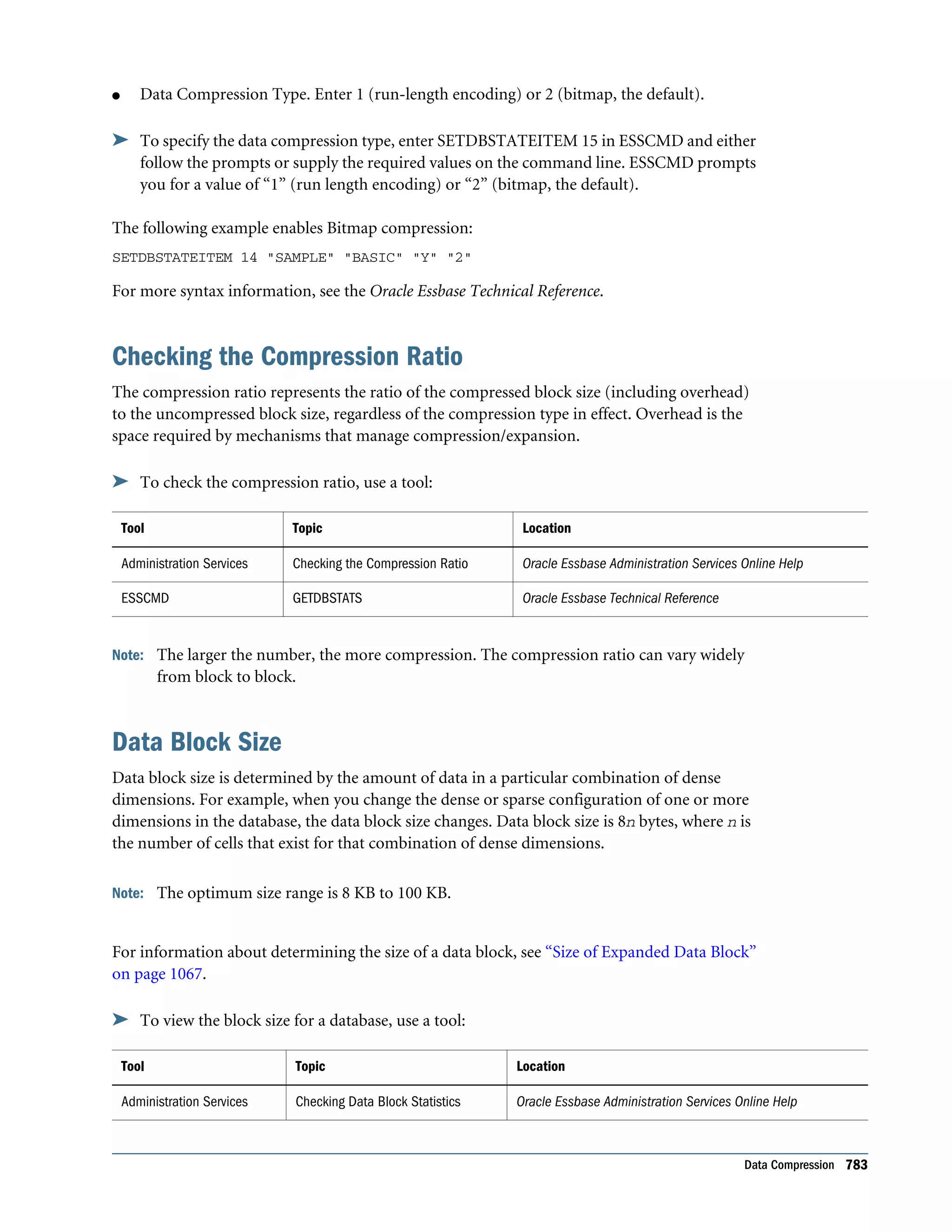
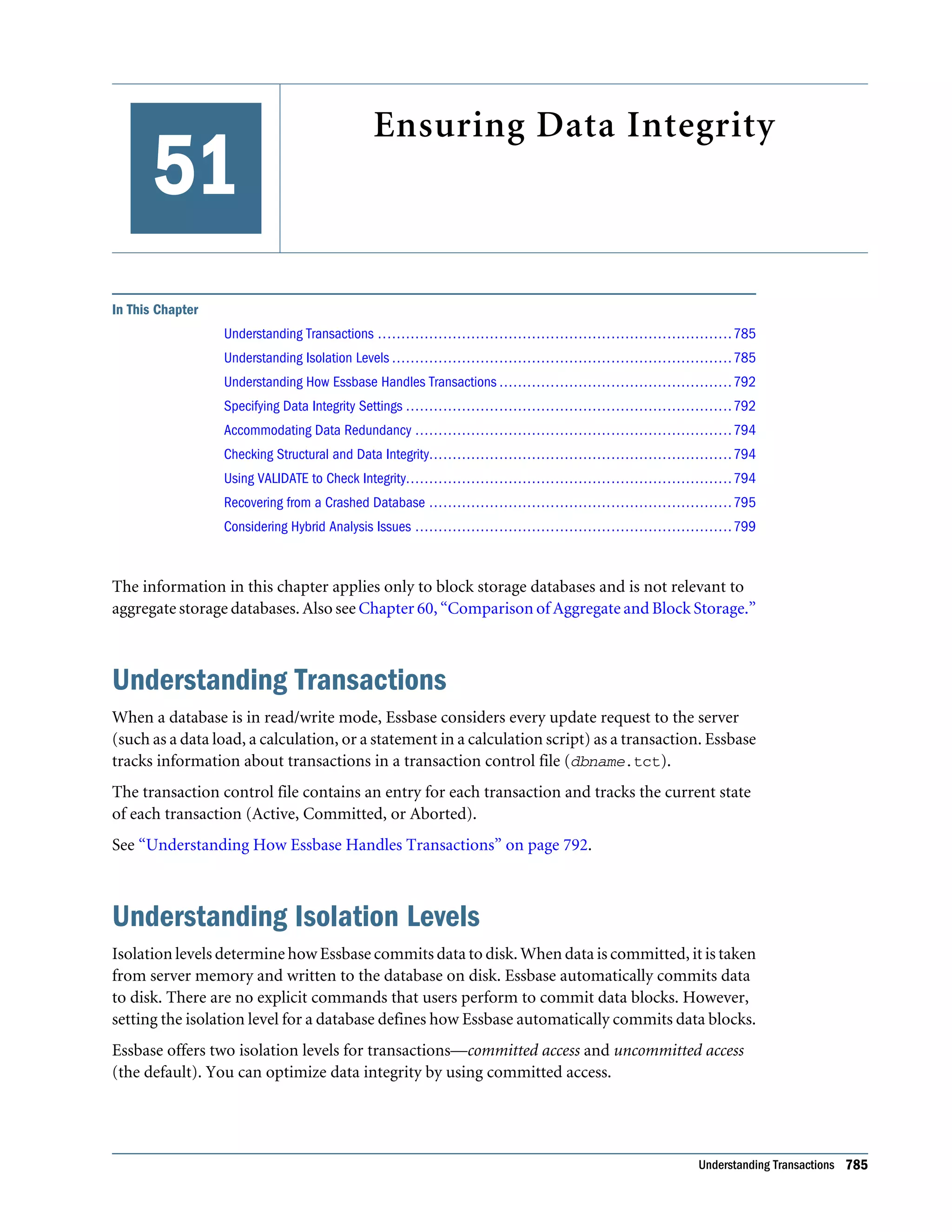
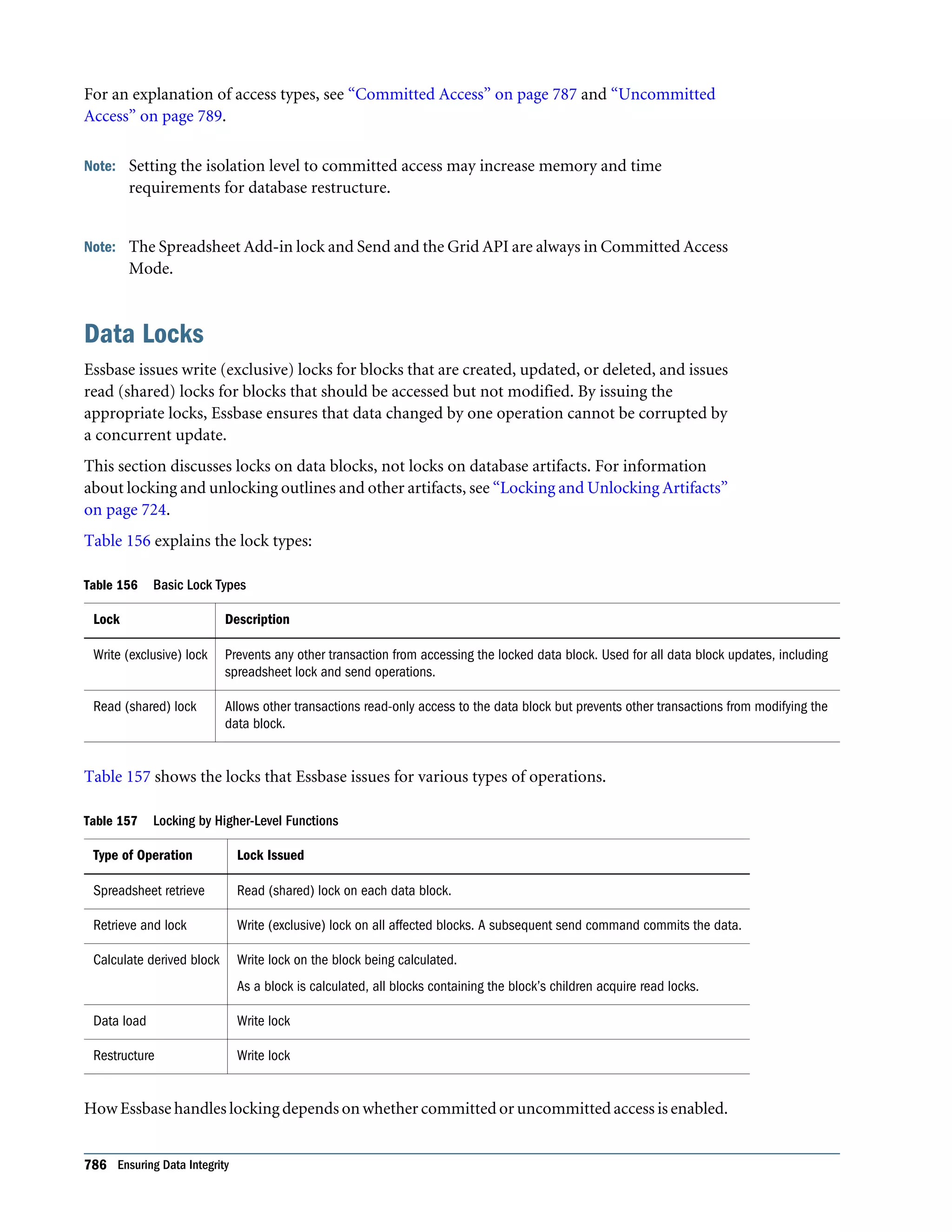
Oracle® Essbase Database Administrator's Guide Release 11.1.2.2.100 Updated: December 2013
Essbase Database Administrator's Guide, 11.1.2.2.100 Copyright © 1996, 2013, Oracle and/or its affiliates. All rights reserved. Authors: EPM Information Development Team Oracle and Java are registered trademarks of Oracle and/or its affiliates. Other names may be trademarks of their respective owners. Intel and Intel Xeon are trademarks or registered trademarks of Intel Corporation. All SPARC trademarks are used under license and are trademarks or registered trademarks of SPARC International, Inc. AMD, Opteron, the AMD logo, and the AMD Opteron logo are trademarks or registered trademarks of Advanced Micro Devices. UNIX is a registered trademark of The Open Group. This software and related documentation are provided under a license agreement containing restrictions on use and disclosure and are protected by intellectual property laws. Except as expressly permitted in your license agreement or allowed by law, you may not use, copy, reproduce, translate, broadcast, modify, license, transmit, distribute, exhibit, perform, publish, or display any part, in any form, or by any means. Reverse engineering, disassembly, or decompilation of this software, unless required by law for interoperability, is prohibited. The information contained herein is subject to change without notice and is not warranted to be error-free. If you find any errors, please report them to us in writing. If this is software or related documentation that is delivered to the U.S. Government or anyone licensing it on behalf of the U.S. Government, the following notice is applicable: U.S. GOVERNMENT END USERS: Oracle programs, including any operating system, integrated software, any programs installed on the hardware, and/or documentation, delivered to U.S. Government end users are "commercial computer software" pursuant to the applicable Federal Acquisition Regulation and agency-specific supplemental regulations. As such, use, duplication, disclosure, modification, and adaptation of the programs, including any operating system, integrated software, any programs installed onthehardware,and/ordocumentation,shallbesubjecttolicensetermsandlicenserestrictionsapplicabletotheprograms. No other rights are granted to the U.S. Government. This software or hardware is developed for general use in a variety of information management applications. It is not developed or intended for use in any inherently dangerous applications, including applications that may create a risk of personal injury. If you use this software or hardware in dangerous applications, then you shall be responsible to take all appropriate fail-safe, backup, redundancy, and other measures to ensure its safe use. Oracle Corporation and its affiliates disclaim any liability for any damages caused by use of this software or hardware in dangerous applications. This software or hardware and documentation may provide access to or information on content, products, and services from third parties. Oracle Corporation and its affiliates are not responsible for and expressly disclaim all warranties of any kind with respect to third-party content, products, and services. Oracle Corporation and its affiliates will not be responsible for any loss, costs, or damages incurred due to your access to or use of third-party content, products, or services.
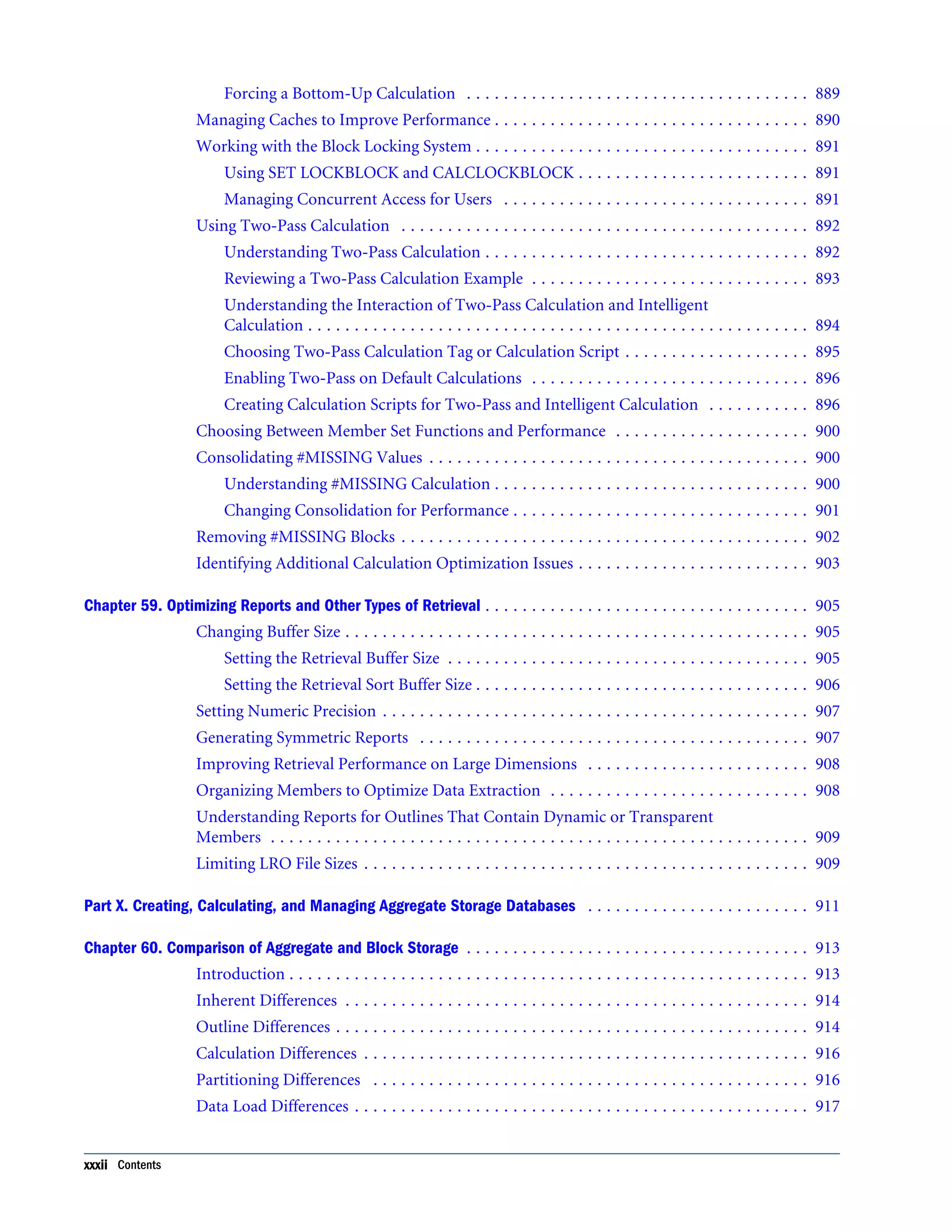
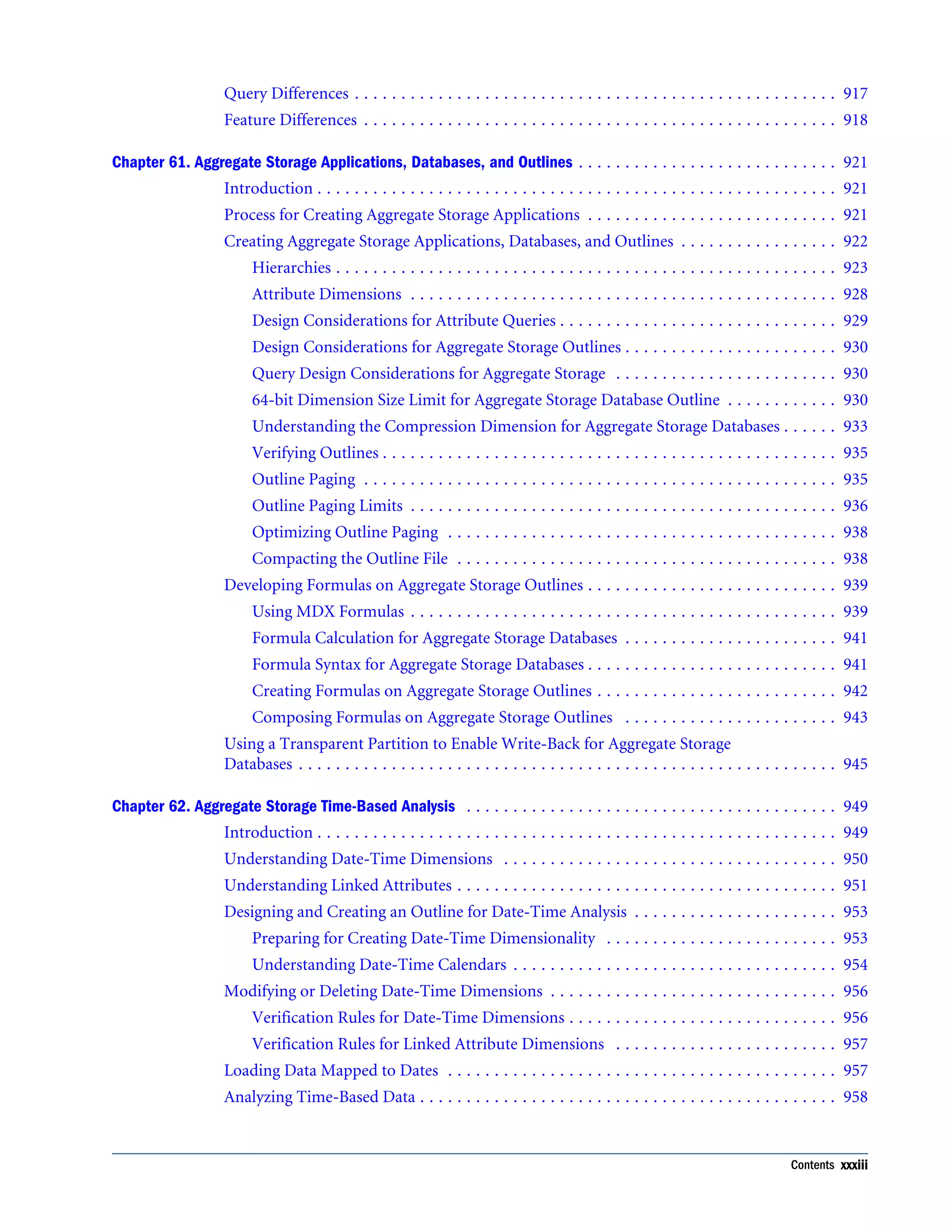
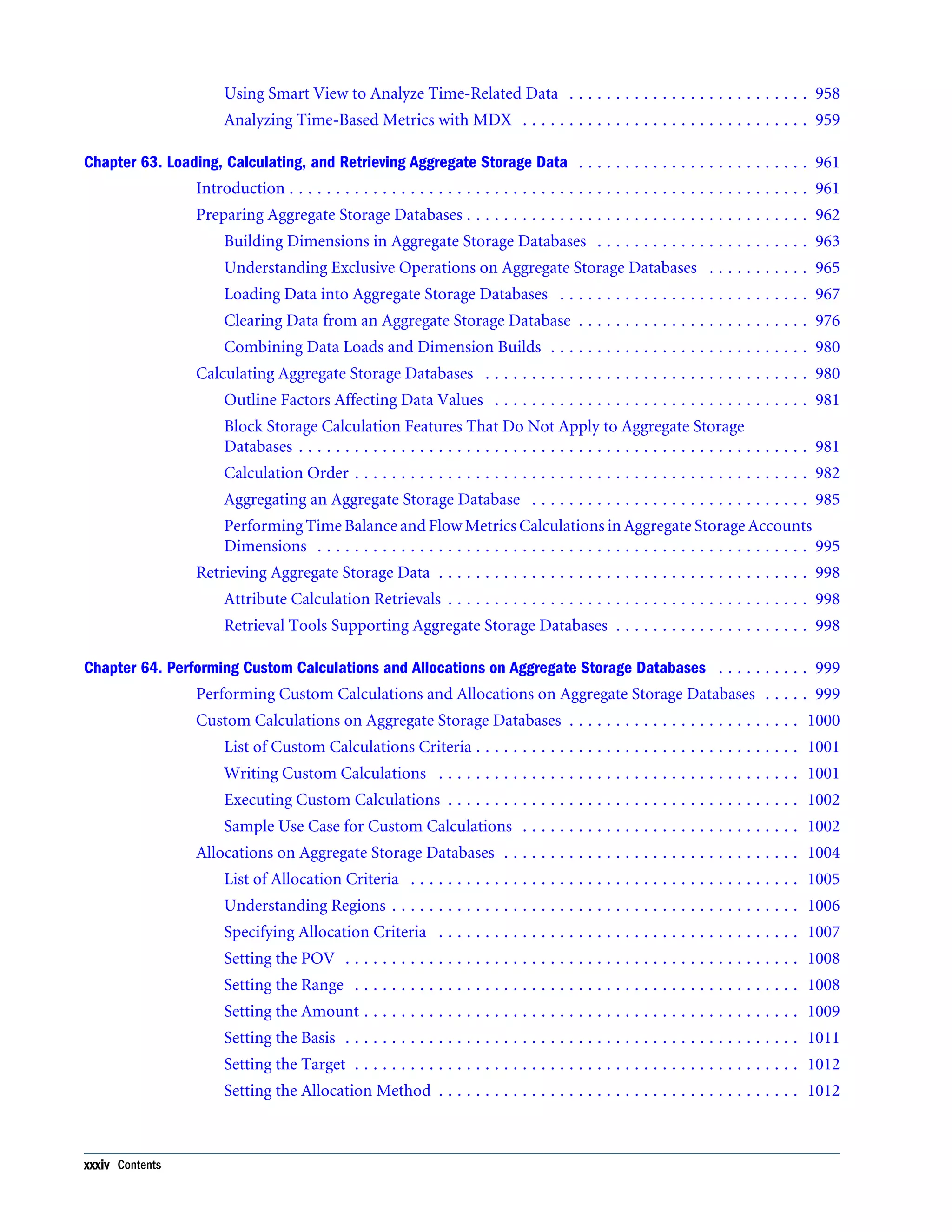
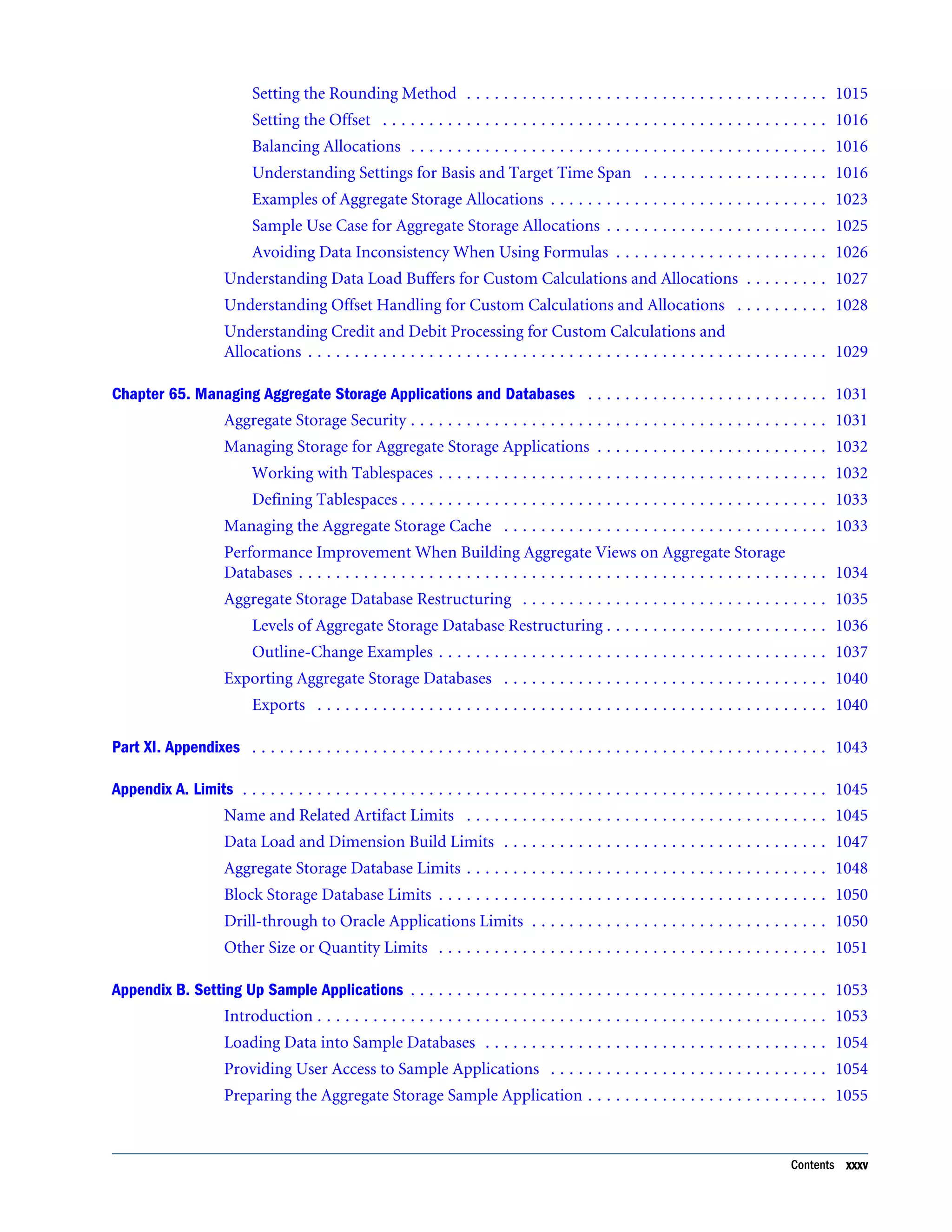
Documentation Accessibility . . . . . . . . . . . . . . . . . . . . . . . . . . . . . . . . . . . . . . . . . . . . . . . . . . . . . . . . . . 39 Part I. Understanding Essbase . . . . . . . . . . . . . . . . . . . . . . . . . . . . . . . . . . . . . . . . . . . . . . . . . . . . . . . . . 41 Chapter 1. Introducing Essbase . . . . . . . . . . . . . . . . . . . . . . . . . . . . . . . . . . . . . . . . . . . . . . . . . . . . . . . . 43 Introduction . . . . . . . . . . . . . . . . . . . . . . . . . . . . . . . . . . . . . . . . . . . . . . . . . . . . . . . . . 43 Essbase Product Components . . . . . . . . . . . . . . . . . . . . . . . . . . . . . . . . . . . . . . . . . . . . 43 Essbase . . . . . . . . . . . . . . . . . . . . . . . . . . . . . . . . . . . . . . . . . . . . . . . . . . . . . . . . . . 44 Sample Essbase Applications . . . . . . . . . . . . . . . . . . . . . . . . . . . . . . . . . . . . . . . . . . 45 Administration Services . . . . . . . . . . . . . . . . . . . . . . . . . . . . . . . . . . . . . . . . . . . . . . 45 Essbase Studio . . . . . . . . . . . . . . . . . . . . . . . . . . . . . . . . . . . . . . . . . . . . . . . . . . . . 45 Spreadsheet Add-in . . . . . . . . . . . . . . . . . . . . . . . . . . . . . . . . . . . . . . . . . . . . . . . . . 46 Integration Services . . . . . . . . . . . . . . . . . . . . . . . . . . . . . . . . . . . . . . . . . . . . . . . . . 46 Provider Services . . . . . . . . . . . . . . . . . . . . . . . . . . . . . . . . . . . . . . . . . . . . . . . . . . 46 Smart View . . . . . . . . . . . . . . . . . . . . . . . . . . . . . . . . . . . . . . . . . . . . . . . . . . . . . . . 46 Application Programming Interface (API) . . . . . . . . . . . . . . . . . . . . . . . . . . . . . . . . 46 Developer Products . . . . . . . . . . . . . . . . . . . . . . . . . . . . . . . . . . . . . . . . . . . . . . . . . 46 Lifecycle Management . . . . . . . . . . . . . . . . . . . . . . . . . . . . . . . . . . . . . . . . . . . . . . . 47 Key Features . . . . . . . . . . . . . . . . . . . . . . . . . . . . . . . . . . . . . . . . . . . . . . . . . . . . . . . . . 47 Integration with Existing Infrastructure . . . . . . . . . . . . . . . . . . . . . . . . . . . . . . . . . . 47 Data Integration . . . . . . . . . . . . . . . . . . . . . . . . . . . . . . . . . . . . . . . . . . . . . . . . . . . 48 Ease of Server and Database Administration . . . . . . . . . . . . . . . . . . . . . . . . . . . . . . . 48 Mission Critical Applications in Web-based Environments . . . . . . . . . . . . . . . . . . . . 48 Powerful Querying . . . . . . . . . . . . . . . . . . . . . . . . . . . . . . . . . . . . . . . . . . . . . . . . . 48 Calculations . . . . . . . . . . . . . . . . . . . . . . . . . . . . . . . . . . . . . . . . . . . . . . . . . . . . . . 48 Write-Back and Security . . . . . . . . . . . . . . . . . . . . . . . . . . . . . . . . . . . . . . . . . . . . . 49 Ease of Development . . . . . . . . . . . . . . . . . . . . . . . . . . . . . . . . . . . . . . . . . . . . . . . . 49 Chapter 2. Quick Start for Implementing Essbase . . . . . . . . . . . . . . . . . . . . . . . . . . . . . . . . . . . . . . . . . . . 51 Chapter 3. Understanding Multidimensional Databases . . . . . . . . . . . . . . . . . . . . . . . . . . . . . . . . . . . . . . . 57 OLAP and Multidimensional Databases . . . . . . . . . . . . . . . . . . . . . . . . . . . . . . . . . . . . . 57 Dimensions and Members . . . . . . . . . . . . . . . . . . . . . . . . . . . . . . . . . . . . . . . . . . . . . . . 58 Outline Hierarchies . . . . . . . . . . . . . . . . . . . . . . . . . . . . . . . . . . . . . . . . . . . . . . . . . 59 Dimension and Member Relationships . . . . . . . . . . . . . . . . . . . . . . . . . . . . . . . . . . . 59 Standard Dimensions and Attribute Dimensions . . . . . . . . . . . . . . . . . . . . . . . . . . . . 62 Sparse and Dense Dimensions . . . . . . . . . . . . . . . . . . . . . . . . . . . . . . . . . . . . . . . . . 62 Selection of Dense and Sparse Dimensions . . . . . . . . . . . . . . . . . . . . . . . . . . . . . . . . 63 Data Storage . . . . . . . . . . . . . . . . . . . . . . . . . . . . . . . . . . . . . . . . . . . . . . . . . . . . . . . . . 68 Data Values . . . . . . . . . . . . . . . . . . . . . . . . . . . . . . . . . . . . . . . . . . . . . . . . . . . . . . 69 Contents iii
Data Blocks and the Index System . . . . . . . . . . . . . . . . . . . . . . . . . . . . . . . . . . . . . . 70 Multiple Data Views . . . . . . . . . . . . . . . . . . . . . . . . . . . . . . . . . . . . . . . . . . . . . . . . 72 The Essbase Solution . . . . . . . . . . . . . . . . . . . . . . . . . . . . . . . . . . . . . . . . . . . . . . . . . . . 73 Chapter 4. Case Study: Designing a Single-Server, Multidimensional Database . . . . . . . . . . . . . . . . . . . . . . . 75 Process for Designing a Database . . . . . . . . . . . . . . . . . . . . . . . . . . . . . . . . . . . . . . . . . . 75 Case Study: The Beverage Company . . . . . . . . . . . . . . . . . . . . . . . . . . . . . . . . . . . . . . . . 76 Analyzing and Planning . . . . . . . . . . . . . . . . . . . . . . . . . . . . . . . . . . . . . . . . . . . . . . . . . 77 Analyzing Source Data . . . . . . . . . . . . . . . . . . . . . . . . . . . . . . . . . . . . . . . . . . . . . . 78 Identifying User Requirements . . . . . . . . . . . . . . . . . . . . . . . . . . . . . . . . . . . . . . . . 78 Planning for Security in a Multiple User Environment . . . . . . . . . . . . . . . . . . . . . . . . 79 Creating Database Models . . . . . . . . . . . . . . . . . . . . . . . . . . . . . . . . . . . . . . . . . . . . 79 Drafting Outlines . . . . . . . . . . . . . . . . . . . . . . . . . . . . . . . . . . . . . . . . . . . . . . . . . . . . . 87 Dimension and Member Properties . . . . . . . . . . . . . . . . . . . . . . . . . . . . . . . . . . . . . 88 Dimension Types . . . . . . . . . . . . . . . . . . . . . . . . . . . . . . . . . . . . . . . . . . . . . . . . . . 89 Member Storage Properties . . . . . . . . . . . . . . . . . . . . . . . . . . . . . . . . . . . . . . . . . . . 89 Checklist for Dimension and Member Properties . . . . . . . . . . . . . . . . . . . . . . . . . . . 90 Designing an Outline to Optimize Performance . . . . . . . . . . . . . . . . . . . . . . . . . . . . 90 Checking System Requirements . . . . . . . . . . . . . . . . . . . . . . . . . . . . . . . . . . . . . . . . . . . 92 Loading Test Data . . . . . . . . . . . . . . . . . . . . . . . . . . . . . . . . . . . . . . . . . . . . . . . . . . . . . 92 Defining Calculations . . . . . . . . . . . . . . . . . . . . . . . . . . . . . . . . . . . . . . . . . . . . . . . . . . 93 Consolidation of Dimensions and Members . . . . . . . . . . . . . . . . . . . . . . . . . . . . . . . 93 Tags and Operators on Example Measures Dimension . . . . . . . . . . . . . . . . . . . . . . . . 95 Accounts Dimension Calculations . . . . . . . . . . . . . . . . . . . . . . . . . . . . . . . . . . . . . . 96 Formulas and Functions . . . . . . . . . . . . . . . . . . . . . . . . . . . . . . . . . . . . . . . . . . . . . 97 Dynamic Calculations . . . . . . . . . . . . . . . . . . . . . . . . . . . . . . . . . . . . . . . . . . . . . . . 99 Two-Pass Calculations . . . . . . . . . . . . . . . . . . . . . . . . . . . . . . . . . . . . . . . . . . . . . . 99 Checklist for Calculations . . . . . . . . . . . . . . . . . . . . . . . . . . . . . . . . . . . . . . . . . . . 101 Defining Reports . . . . . . . . . . . . . . . . . . . . . . . . . . . . . . . . . . . . . . . . . . . . . . . . . . . . 101 Verifying the Design . . . . . . . . . . . . . . . . . . . . . . . . . . . . . . . . . . . . . . . . . . . . . . . . . . 102 Chapter 5. About Administration Services . . . . . . . . . . . . . . . . . . . . . . . . . . . . . . . . . . . . . . . . . . . . . . . . 103 Introduction . . . . . . . . . . . . . . . . . . . . . . . . . . . . . . . . . . . . . . . . . . . . . . . . . . . . . . . . 103 Administration Services Architecture . . . . . . . . . . . . . . . . . . . . . . . . . . . . . . . . . . . . . . 103 Deploying Administration Services . . . . . . . . . . . . . . . . . . . . . . . . . . . . . . . . . . . . . . . 104 Starting Administration Services . . . . . . . . . . . . . . . . . . . . . . . . . . . . . . . . . . . . . . . . . 104 About Administration Services Users . . . . . . . . . . . . . . . . . . . . . . . . . . . . . . . . . . . . . . 105 Connecting to Administration Services . . . . . . . . . . . . . . . . . . . . . . . . . . . . . . . . . . . . . 105 Adding Essbase Administration Servers to Enterprise View . . . . . . . . . . . . . . . . . . . . . . 105 Adding Essbase Servers to Enterprise View . . . . . . . . . . . . . . . . . . . . . . . . . . . . . . . . . . 106 iv Contents
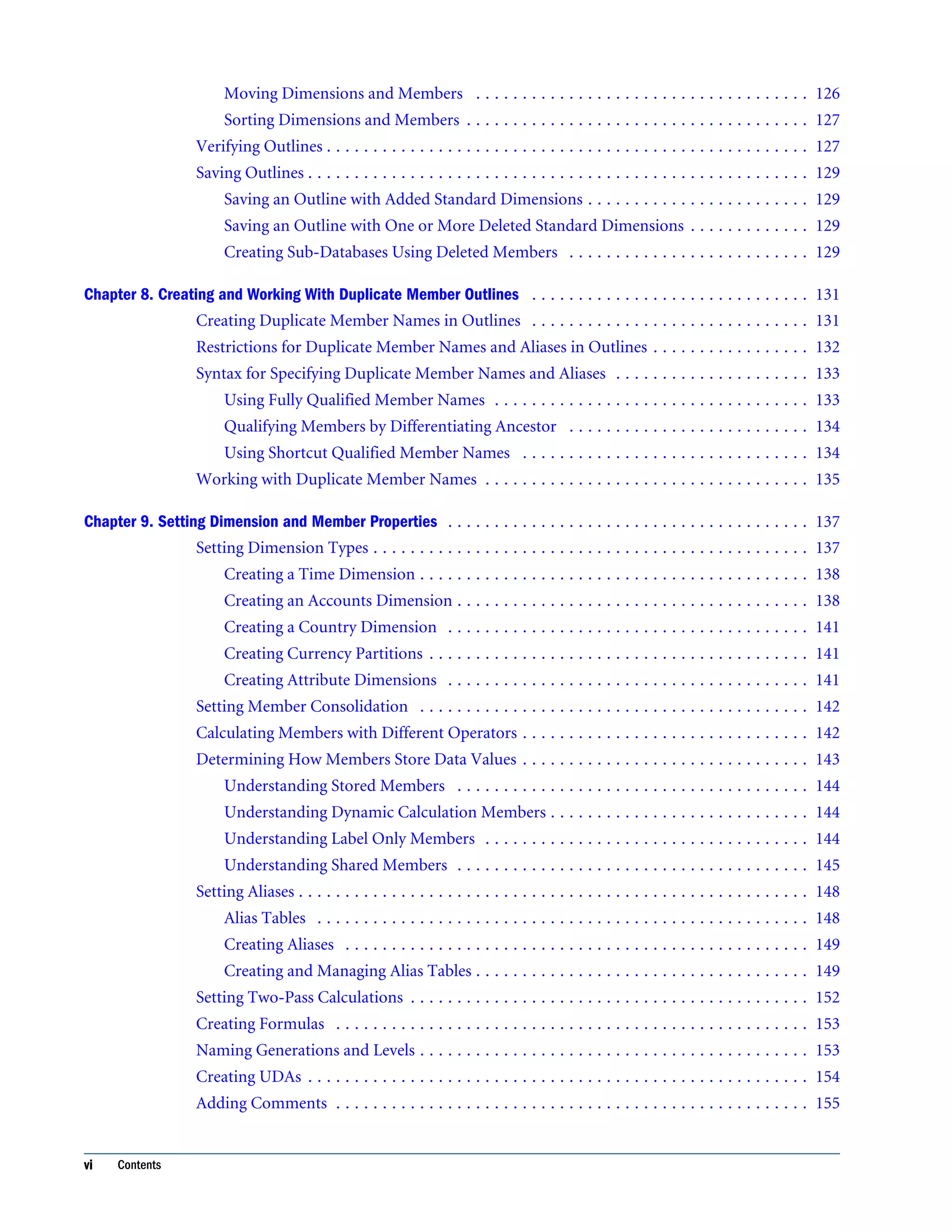
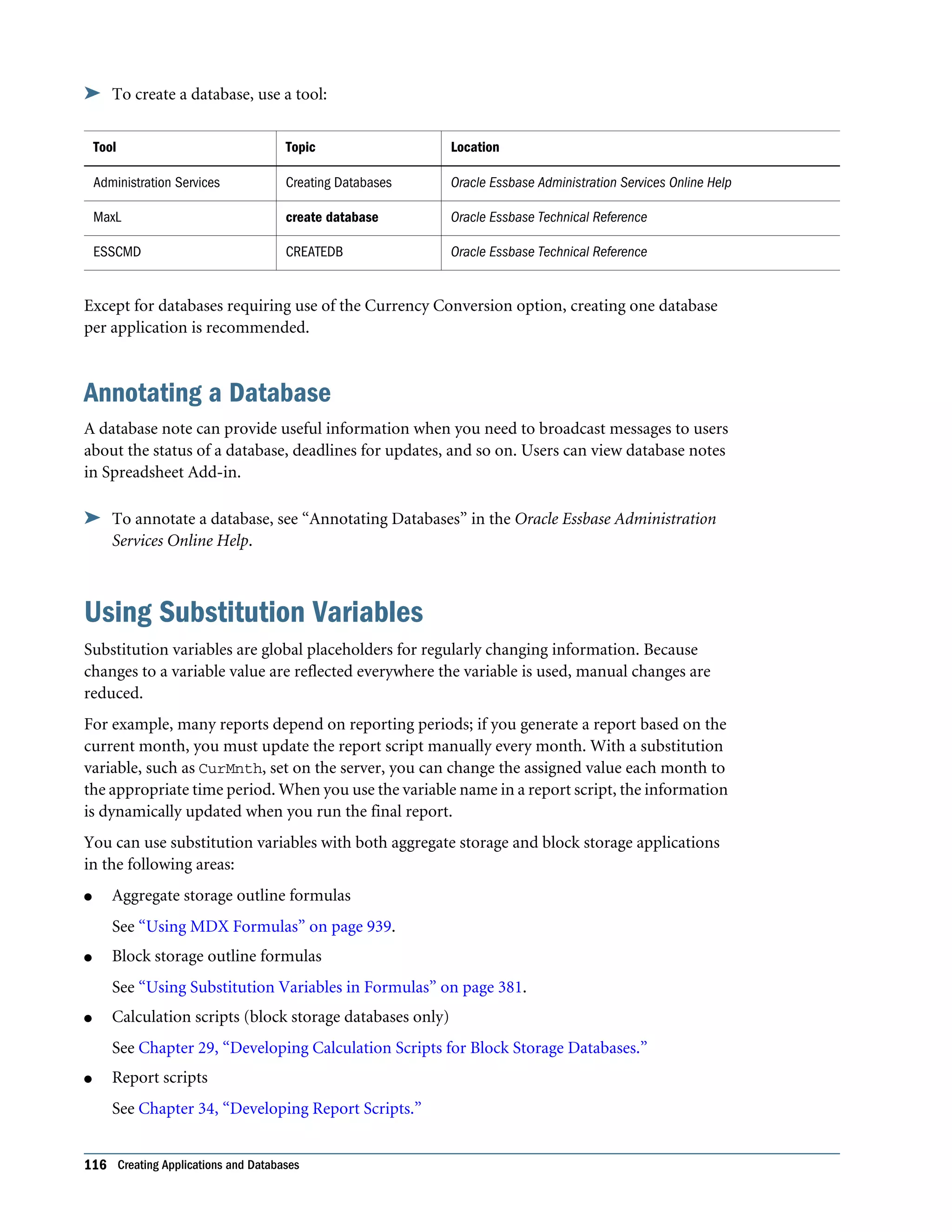
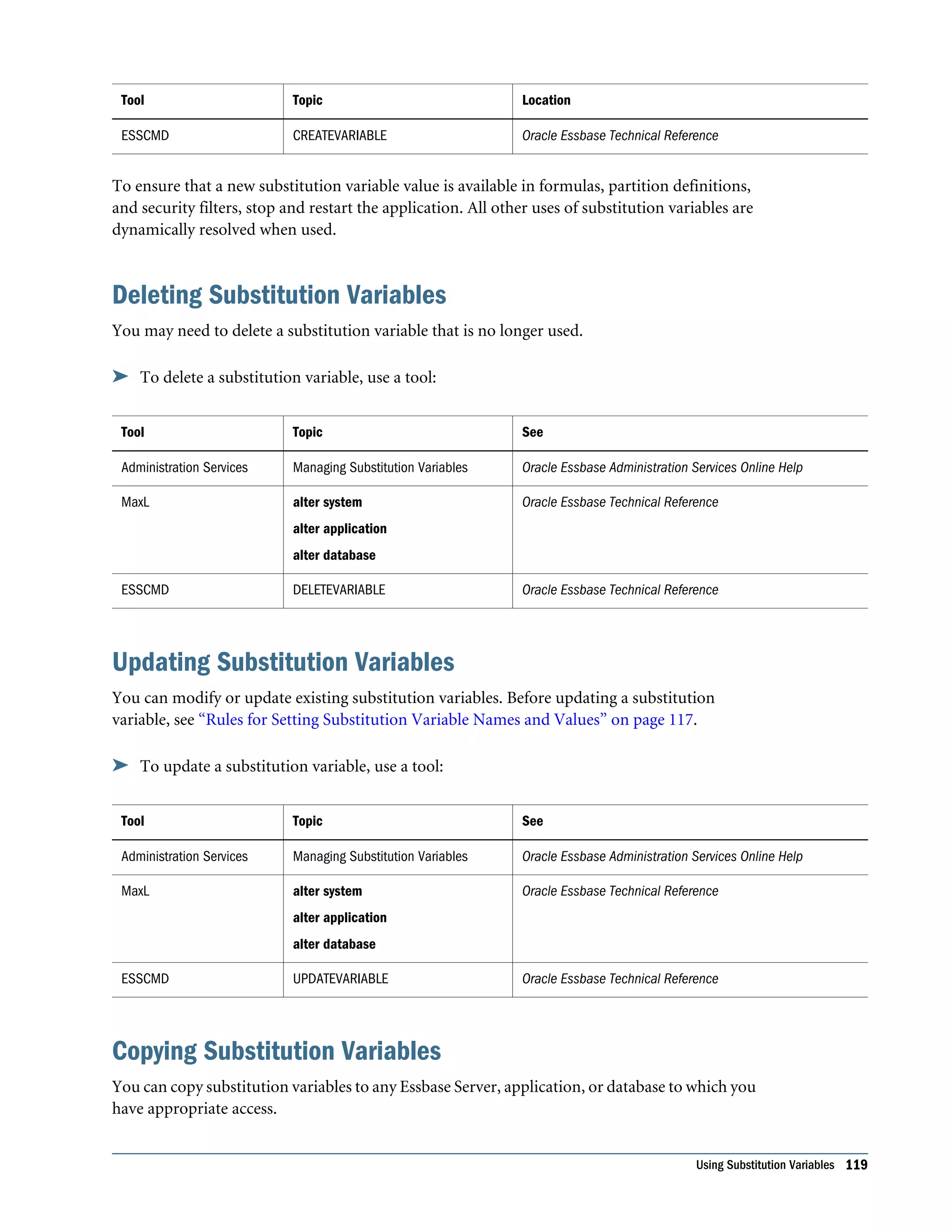
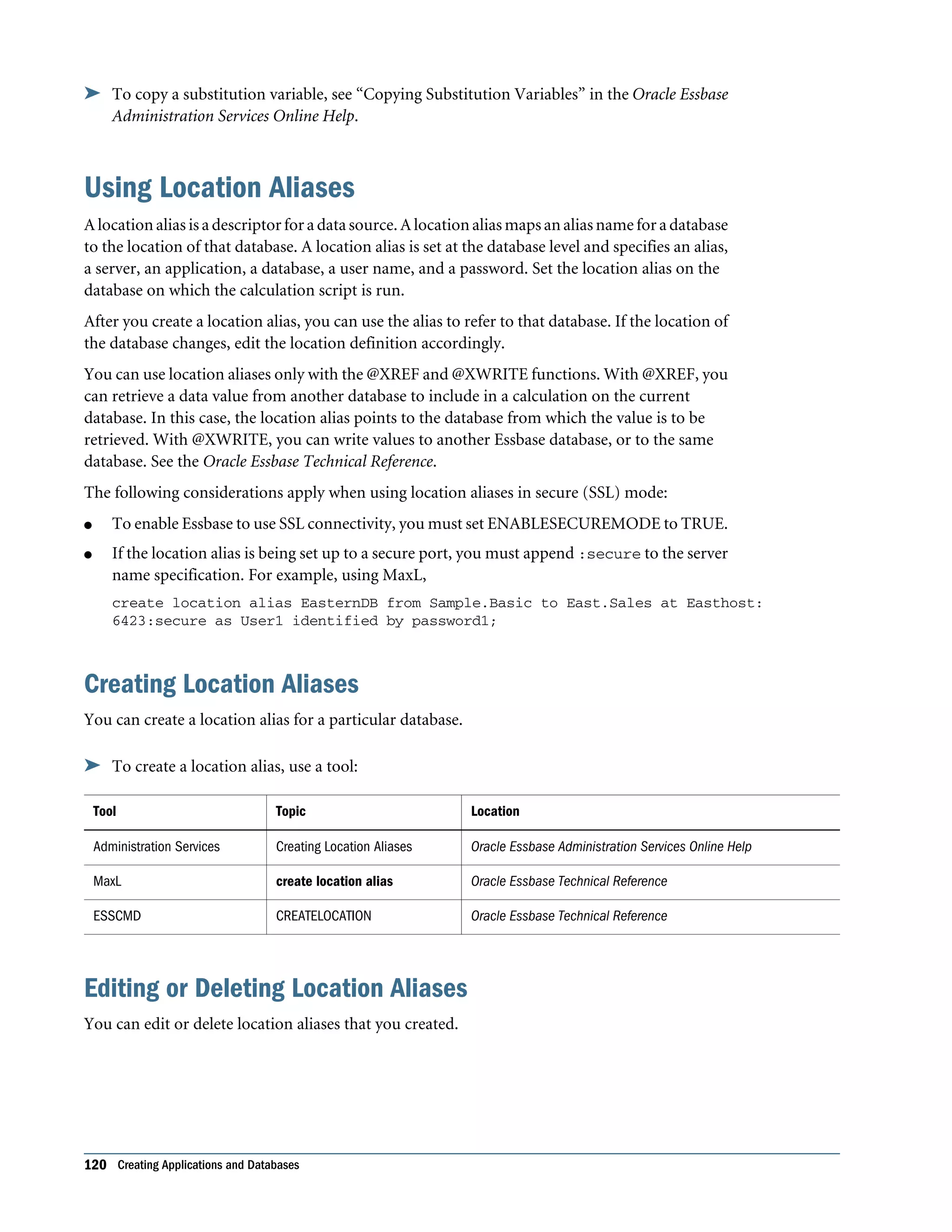
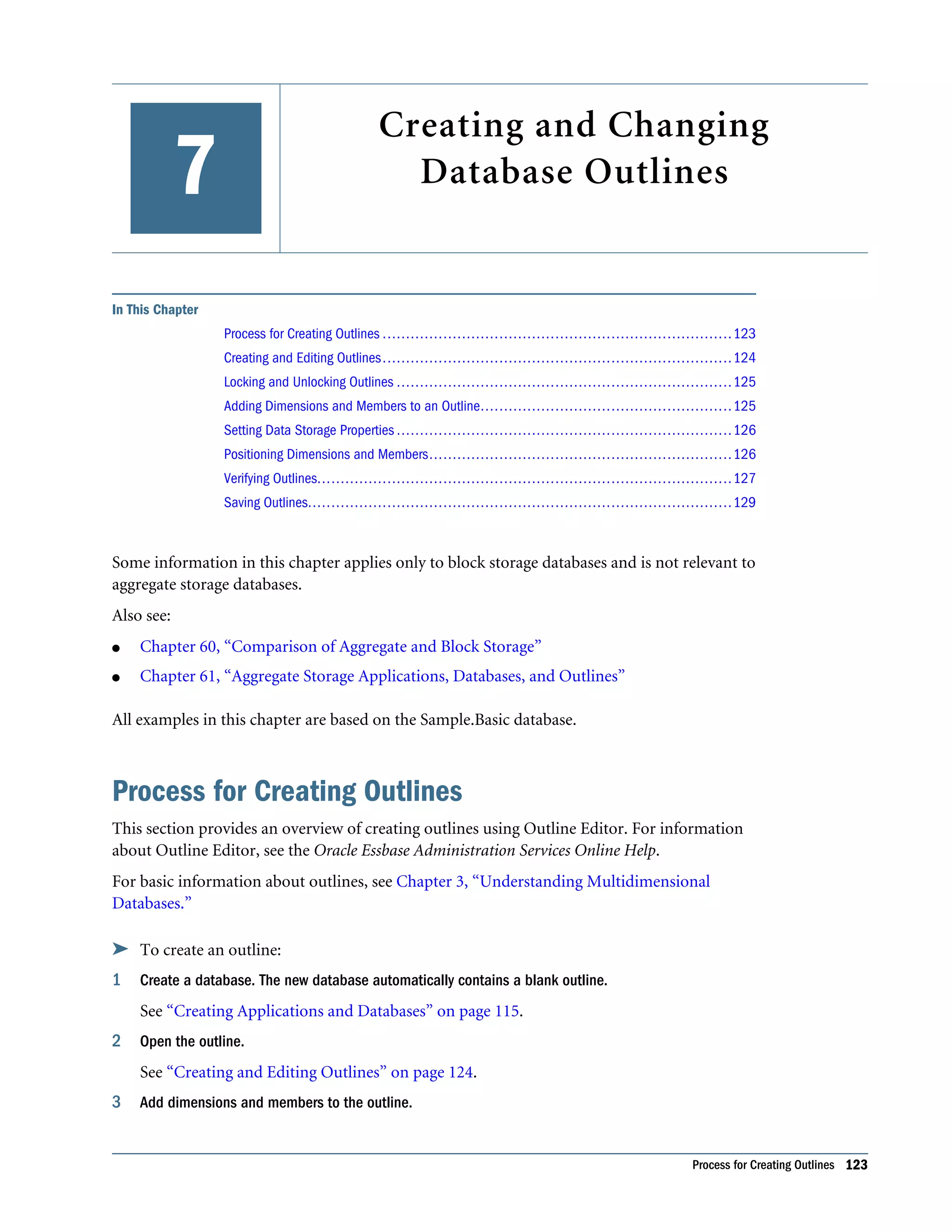
About Essbase Server Connections and Ports . . . . . . . . . . . . . . . . . . . . . . . . . . . . . . . . 106 About Essbase Administration Server . . . . . . . . . . . . . . . . . . . . . . . . . . . . . . . . . . . . . . 106 Part II. Designing and Creating Applications and Databases . . . . . . . . . . . . . . . . . . . . . . . . . . . . . . . . . . . 109 Chapter 6. Creating Applications and Databases . . . . . . . . . . . . . . . . . . . . . . . . . . . . . . . . . . . . . . . . . . . 111 Process for Creating Applications and Databases . . . . . . . . . . . . . . . . . . . . . . . . . . . . . . 111 Understanding Applications and Databases . . . . . . . . . . . . . . . . . . . . . . . . . . . . . . . . . 112 Understanding Database Artifacts . . . . . . . . . . . . . . . . . . . . . . . . . . . . . . . . . . . . . . . . 112 Understanding Database Outlines . . . . . . . . . . . . . . . . . . . . . . . . . . . . . . . . . . . . . 112 Understanding Data Sources . . . . . . . . . . . . . . . . . . . . . . . . . . . . . . . . . . . . . . . . . 113 Understanding Rules Files for Data Load and Dimension Build . . . . . . . . . . . . . . . . 113 Understanding Calculation Scripts . . . . . . . . . . . . . . . . . . . . . . . . . . . . . . . . . . . . . 113 Understanding Report Scripts . . . . . . . . . . . . . . . . . . . . . . . . . . . . . . . . . . . . . . . . 114 Understanding Security Definitions . . . . . . . . . . . . . . . . . . . . . . . . . . . . . . . . . . . . 114 Understanding LROs . . . . . . . . . . . . . . . . . . . . . . . . . . . . . . . . . . . . . . . . . . . . . . 114 Understanding Spreadsheet Queries . . . . . . . . . . . . . . . . . . . . . . . . . . . . . . . . . . . . 114 Understanding Member Select Definitions . . . . . . . . . . . . . . . . . . . . . . . . . . . . . . . 114 Understanding Triggers Definitions . . . . . . . . . . . . . . . . . . . . . . . . . . . . . . . . . . . . 115 Creating Applications and Databases . . . . . . . . . . . . . . . . . . . . . . . . . . . . . . . . . . . . . . 115 Creating an Application . . . . . . . . . . . . . . . . . . . . . . . . . . . . . . . . . . . . . . . . . . . . 115 Creating a Database . . . . . . . . . . . . . . . . . . . . . . . . . . . . . . . . . . . . . . . . . . . . . . . 115 Annotating a Database . . . . . . . . . . . . . . . . . . . . . . . . . . . . . . . . . . . . . . . . . . . . . 116 Using Substitution Variables . . . . . . . . . . . . . . . . . . . . . . . . . . . . . . . . . . . . . . . . . . . . 116 Rules for Setting Substitution Variable Names and Values . . . . . . . . . . . . . . . . . . . . 117 Setting Substitution Variables . . . . . . . . . . . . . . . . . . . . . . . . . . . . . . . . . . . . . . . . 118 Deleting Substitution Variables . . . . . . . . . . . . . . . . . . . . . . . . . . . . . . . . . . . . . . . 119 Updating Substitution Variables . . . . . . . . . . . . . . . . . . . . . . . . . . . . . . . . . . . . . . 119 Copying Substitution Variables . . . . . . . . . . . . . . . . . . . . . . . . . . . . . . . . . . . . . . . 119 Using Location Aliases . . . . . . . . . . . . . . . . . . . . . . . . . . . . . . . . . . . . . . . . . . . . . . . . 120 Creating Location Aliases . . . . . . . . . . . . . . . . . . . . . . . . . . . . . . . . . . . . . . . . . . . 120 Editing or Deleting Location Aliases . . . . . . . . . . . . . . . . . . . . . . . . . . . . . . . . . . . . 120 Chapter 7. Creating and Changing Database Outlines . . . . . . . . . . . . . . . . . . . . . . . . . . . . . . . . . . . . . . . . 123 Process for Creating Outlines . . . . . . . . . . . . . . . . . . . . . . . . . . . . . . . . . . . . . . . . . . . . 123 Creating and Editing Outlines . . . . . . . . . . . . . . . . . . . . . . . . . . . . . . . . . . . . . . . . . . . 124 Locking and Unlocking Outlines . . . . . . . . . . . . . . . . . . . . . . . . . . . . . . . . . . . . . . . . . 125 Adding Dimensions and Members to an Outline . . . . . . . . . . . . . . . . . . . . . . . . . . . . . . 125 Setting Data Storage Properties . . . . . . . . . . . . . . . . . . . . . . . . . . . . . . . . . . . . . . . . . . 126 Positioning Dimensions and Members . . . . . . . . . . . . . . . . . . . . . . . . . . . . . . . . . . . . . 126 Contents v
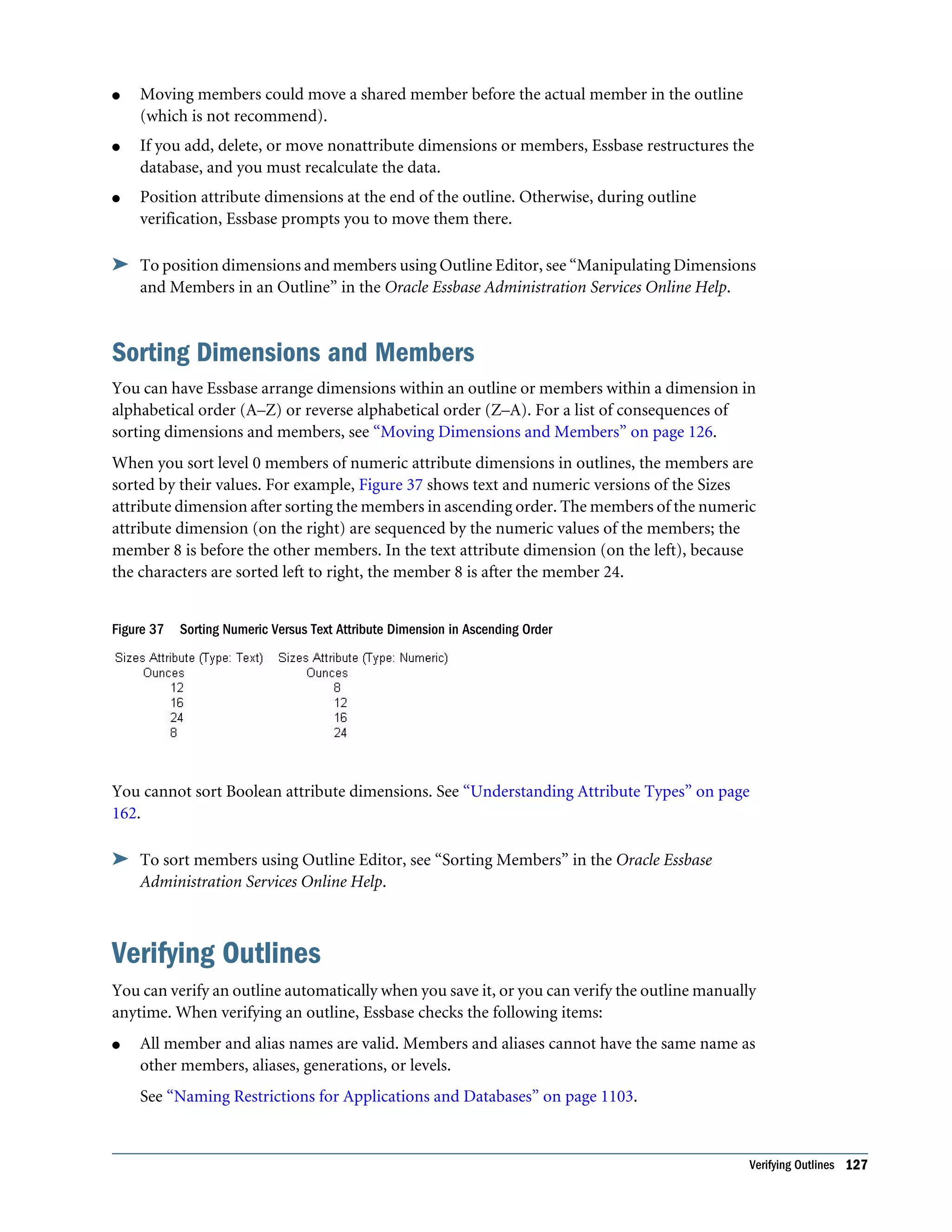
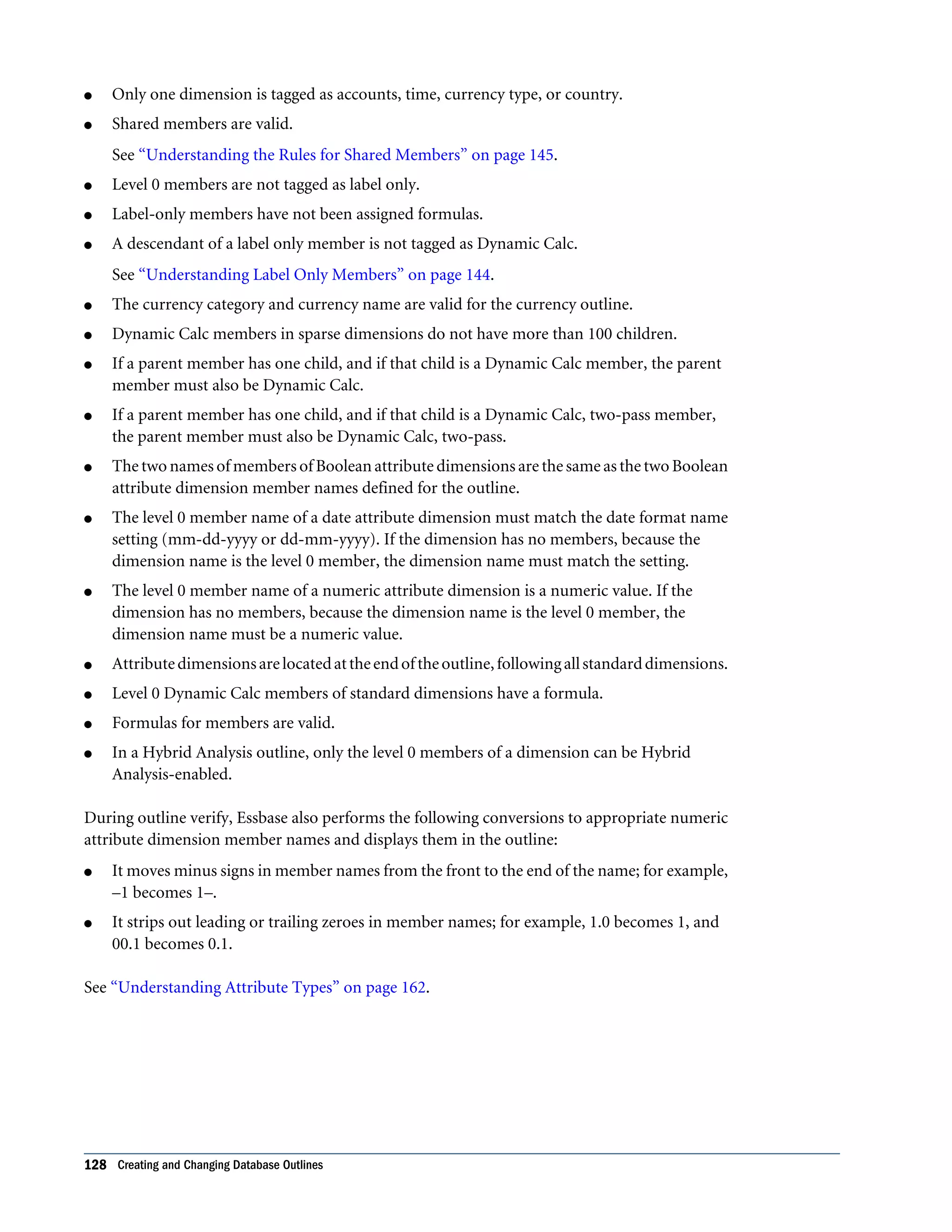
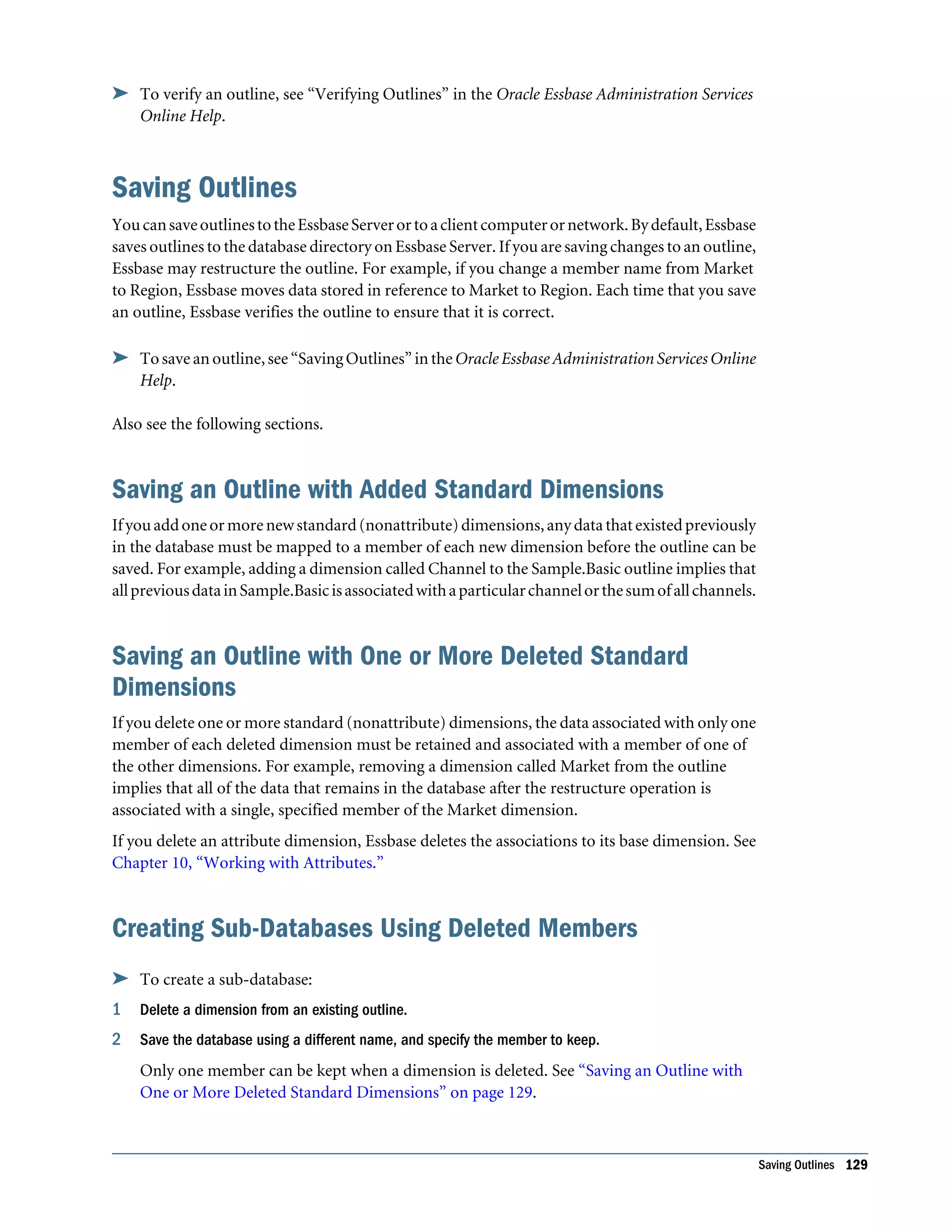
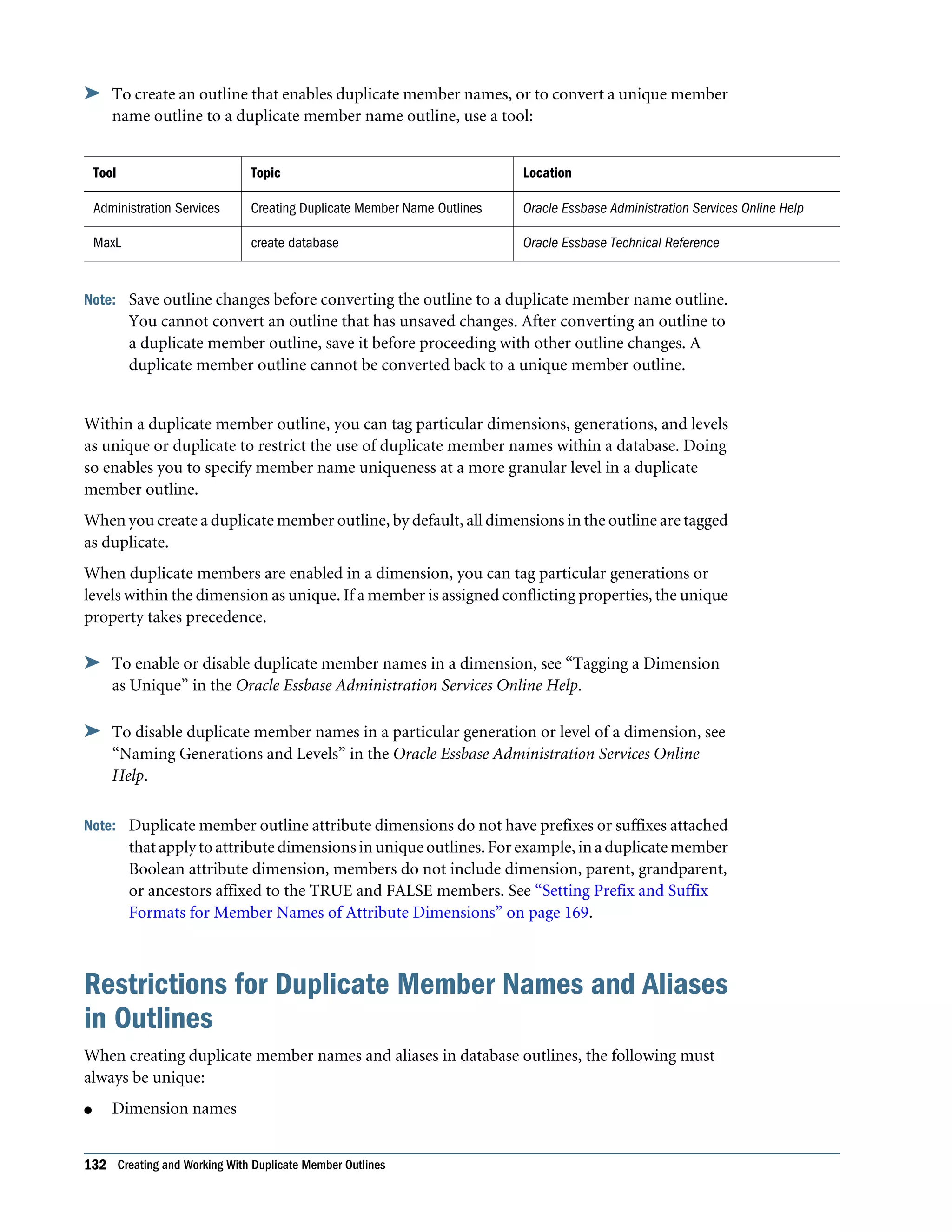
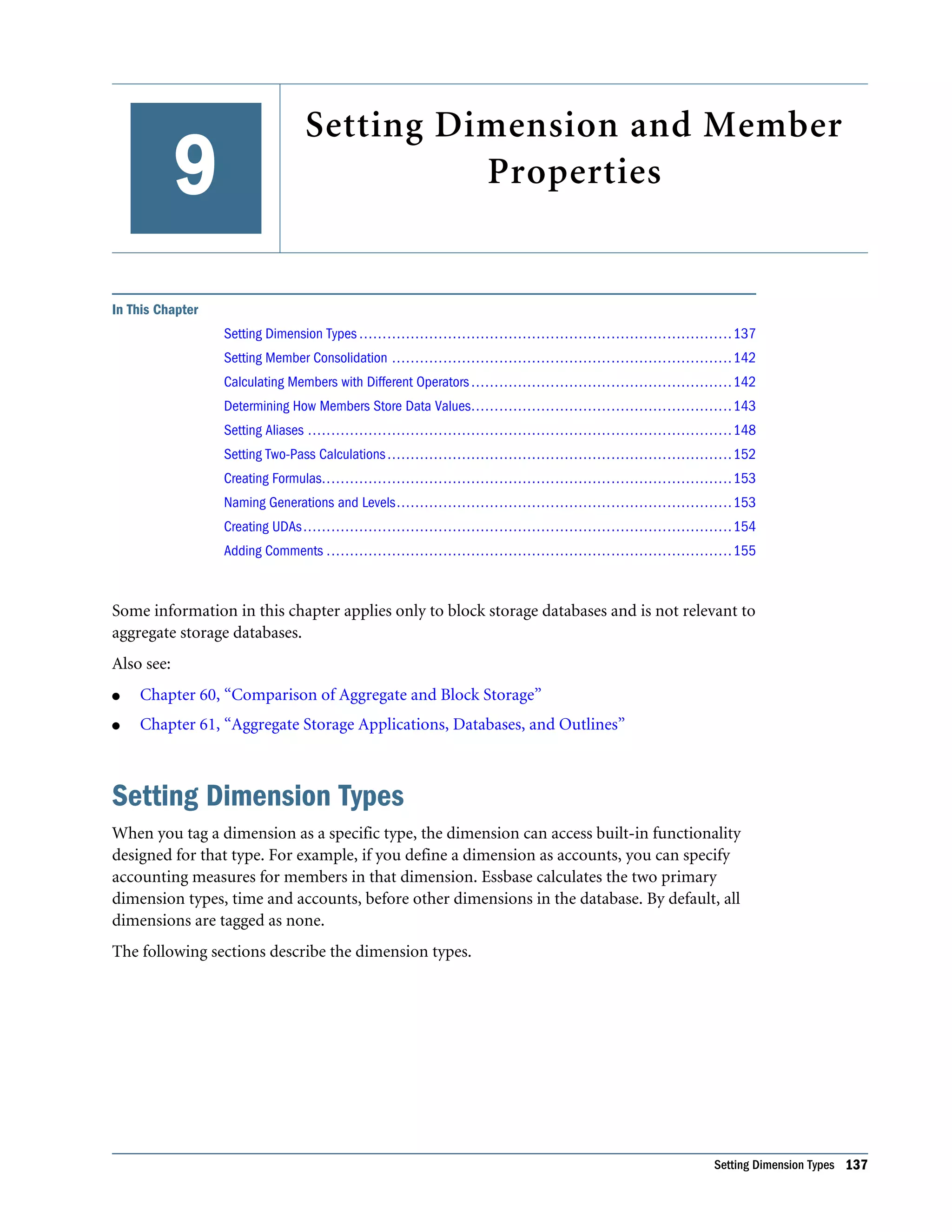
Moving Dimensions and Members . . . . . . . . . . . . . . . . . . . . . . . . . . . . . . . . . . . . 126 Sorting Dimensions and Members . . . . . . . . . . . . . . . . . . . . . . . . . . . . . . . . . . . . . 127 Verifying Outlines . . . . . . . . . . . . . . . . . . . . . . . . . . . . . . . . . . . . . . . . . . . . . . . . . . . . 127 Saving Outlines . . . . . . . . . . . . . . . . . . . . . . . . . . . . . . . . . . . . . . . . . . . . . . . . . . . . . . 129 Saving an Outline with Added Standard Dimensions . . . . . . . . . . . . . . . . . . . . . . . . 129 Saving an Outline with One or More Deleted Standard Dimensions . . . . . . . . . . . . . 129 Creating Sub-Databases Using Deleted Members . . . . . . . . . . . . . . . . . . . . . . . . . . 129 Chapter 8. Creating and Working With Duplicate Member Outlines . . . . . . . . . . . . . . . . . . . . . . . . . . . . . . 131 Creating Duplicate Member Names in Outlines . . . . . . . . . . . . . . . . . . . . . . . . . . . . . . 131 Restrictions for Duplicate Member Names and Aliases in Outlines . . . . . . . . . . . . . . . . . 132 Syntax for Specifying Duplicate Member Names and Aliases . . . . . . . . . . . . . . . . . . . . . 133 Using Fully Qualified Member Names . . . . . . . . . . . . . . . . . . . . . . . . . . . . . . . . . . 133 Qualifying Members by Differentiating Ancestor . . . . . . . . . . . . . . . . . . . . . . . . . . 134 Using Shortcut Qualified Member Names . . . . . . . . . . . . . . . . . . . . . . . . . . . . . . . 134 Working with Duplicate Member Names . . . . . . . . . . . . . . . . . . . . . . . . . . . . . . . . . . . 135 Chapter 9. Setting Dimension and Member Properties . . . . . . . . . . . . . . . . . . . . . . . . . . . . . . . . . . . . . . . 137 Setting Dimension Types . . . . . . . . . . . . . . . . . . . . . . . . . . . . . . . . . . . . . . . . . . . . . . . 137 Creating a Time Dimension . . . . . . . . . . . . . . . . . . . . . . . . . . . . . . . . . . . . . . . . . . 138 Creating an Accounts Dimension . . . . . . . . . . . . . . . . . . . . . . . . . . . . . . . . . . . . . . 138 Creating a Country Dimension . . . . . . . . . . . . . . . . . . . . . . . . . . . . . . . . . . . . . . . 141 Creating Currency Partitions . . . . . . . . . . . . . . . . . . . . . . . . . . . . . . . . . . . . . . . . . 141 Creating Attribute Dimensions . . . . . . . . . . . . . . . . . . . . . . . . . . . . . . . . . . . . . . . 141 Setting Member Consolidation . . . . . . . . . . . . . . . . . . . . . . . . . . . . . . . . . . . . . . . . . . 142 Calculating Members with Different Operators . . . . . . . . . . . . . . . . . . . . . . . . . . . . . . . 142 Determining How Members Store Data Values . . . . . . . . . . . . . . . . . . . . . . . . . . . . . . . 143 Understanding Stored Members . . . . . . . . . . . . . . . . . . . . . . . . . . . . . . . . . . . . . . 144 Understanding Dynamic Calculation Members . . . . . . . . . . . . . . . . . . . . . . . . . . . . 144 Understanding Label Only Members . . . . . . . . . . . . . . . . . . . . . . . . . . . . . . . . . . . 144 Understanding Shared Members . . . . . . . . . . . . . . . . . . . . . . . . . . . . . . . . . . . . . . 145 Setting Aliases . . . . . . . . . . . . . . . . . . . . . . . . . . . . . . . . . . . . . . . . . . . . . . . . . . . . . . . 148 Alias Tables . . . . . . . . . . . . . . . . . . . . . . . . . . . . . . . . . . . . . . . . . . . . . . . . . . . . . 148 Creating Aliases . . . . . . . . . . . . . . . . . . . . . . . . . . . . . . . . . . . . . . . . . . . . . . . . . . 149 Creating and Managing Alias Tables . . . . . . . . . . . . . . . . . . . . . . . . . . . . . . . . . . . . 149 Setting Two-Pass Calculations . . . . . . . . . . . . . . . . . . . . . . . . . . . . . . . . . . . . . . . . . . . 152 Creating Formulas . . . . . . . . . . . . . . . . . . . . . . . . . . . . . . . . . . . . . . . . . . . . . . . . . . . 153 Naming Generations and Levels . . . . . . . . . . . . . . . . . . . . . . . . . . . . . . . . . . . . . . . . . . 153 Creating UDAs . . . . . . . . . . . . . . . . . . . . . . . . . . . . . . . . . . . . . . . . . . . . . . . . . . . . . . 154 Adding Comments . . . . . . . . . . . . . . . . . . . . . . . . . . . . . . . . . . . . . . . . . . . . . . . . . . . 155 vi Contents
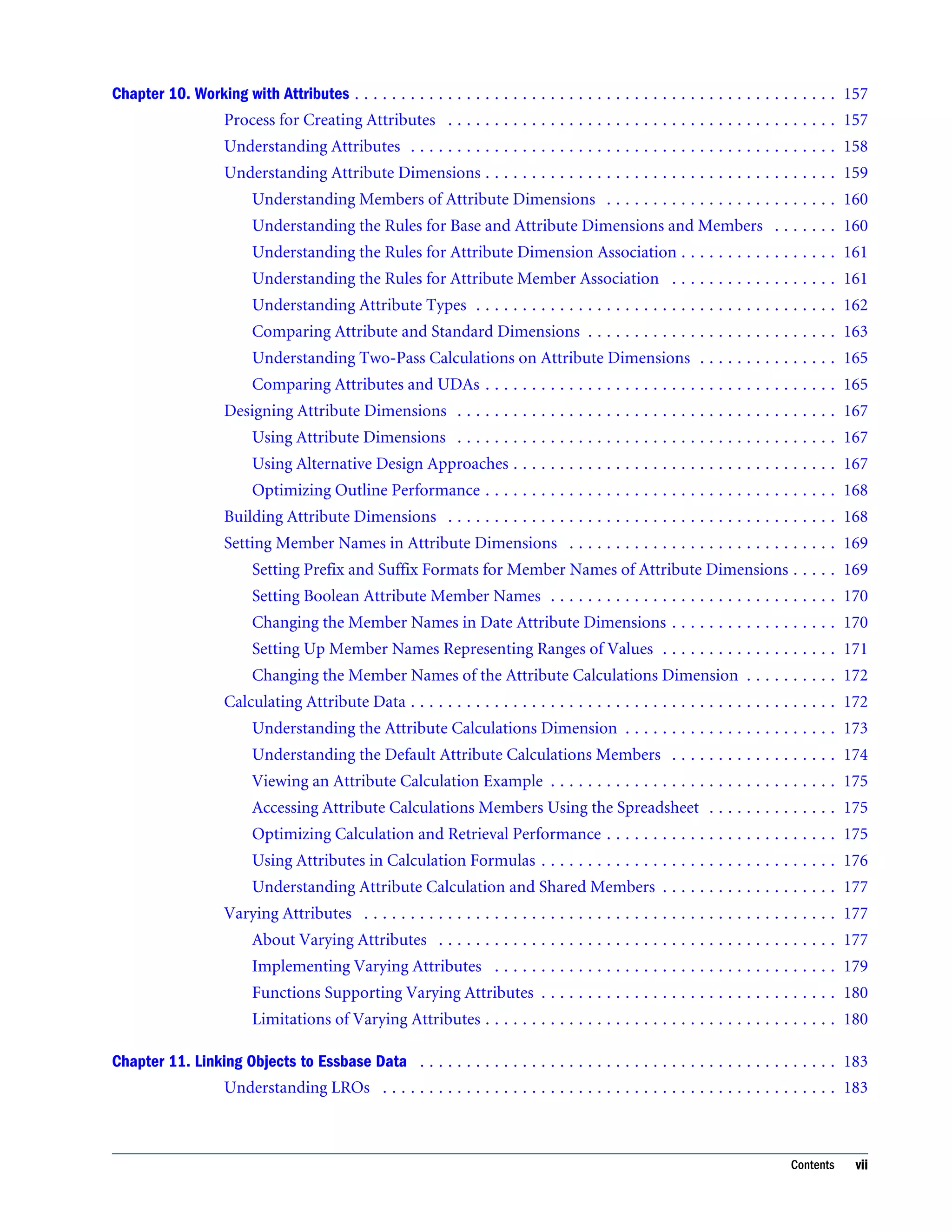
Chapter 10. Working with Attributes . . . . . . . . . . . . . . . . . . . . . . . . . . . . . . . . . . . . . . . . . . . . . . . . . . . . 157 Process for Creating Attributes . . . . . . . . . . . . . . . . . . . . . . . . . . . . . . . . . . . . . . . . . . 157 Understanding Attributes . . . . . . . . . . . . . . . . . . . . . . . . . . . . . . . . . . . . . . . . . . . . . . 158 Understanding Attribute Dimensions . . . . . . . . . . . . . . . . . . . . . . . . . . . . . . . . . . . . . . 159 Understanding Members of Attribute Dimensions . . . . . . . . . . . . . . . . . . . . . . . . . 160 Understanding the Rules for Base and Attribute Dimensions and Members . . . . . . . 160 Understanding the Rules for Attribute Dimension Association . . . . . . . . . . . . . . . . . 161 Understanding the Rules for Attribute Member Association . . . . . . . . . . . . . . . . . . 161 Understanding Attribute Types . . . . . . . . . . . . . . . . . . . . . . . . . . . . . . . . . . . . . . . 162 Comparing Attribute and Standard Dimensions . . . . . . . . . . . . . . . . . . . . . . . . . . . 163 Understanding Two-Pass Calculations on Attribute Dimensions . . . . . . . . . . . . . . . 165 Comparing Attributes and UDAs . . . . . . . . . . . . . . . . . . . . . . . . . . . . . . . . . . . . . . 165 Designing Attribute Dimensions . . . . . . . . . . . . . . . . . . . . . . . . . . . . . . . . . . . . . . . . . 167 Using Attribute Dimensions . . . . . . . . . . . . . . . . . . . . . . . . . . . . . . . . . . . . . . . . . 167 Using Alternative Design Approaches . . . . . . . . . . . . . . . . . . . . . . . . . . . . . . . . . . . 167 Optimizing Outline Performance . . . . . . . . . . . . . . . . . . . . . . . . . . . . . . . . . . . . . . 168 Building Attribute Dimensions . . . . . . . . . . . . . . . . . . . . . . . . . . . . . . . . . . . . . . . . . . 168 Setting Member Names in Attribute Dimensions . . . . . . . . . . . . . . . . . . . . . . . . . . . . . 169 Setting Prefix and Suffix Formats for Member Names of Attribute Dimensions . . . . . 169 Setting Boolean Attribute Member Names . . . . . . . . . . . . . . . . . . . . . . . . . . . . . . . 170 Changing the Member Names in Date Attribute Dimensions . . . . . . . . . . . . . . . . . . 170 Setting Up Member Names Representing Ranges of Values . . . . . . . . . . . . . . . . . . . 171 Changing the Member Names of the Attribute Calculations Dimension . . . . . . . . . . 172 Calculating Attribute Data . . . . . . . . . . . . . . . . . . . . . . . . . . . . . . . . . . . . . . . . . . . . . . 172 Understanding the Attribute Calculations Dimension . . . . . . . . . . . . . . . . . . . . . . . 173 Understanding the Default Attribute Calculations Members . . . . . . . . . . . . . . . . . . 174 Viewing an Attribute Calculation Example . . . . . . . . . . . . . . . . . . . . . . . . . . . . . . . 175 Accessing Attribute Calculations Members Using the Spreadsheet . . . . . . . . . . . . . . 175 Optimizing Calculation and Retrieval Performance . . . . . . . . . . . . . . . . . . . . . . . . . 175 Using Attributes in Calculation Formulas . . . . . . . . . . . . . . . . . . . . . . . . . . . . . . . . 176 Understanding Attribute Calculation and Shared Members . . . . . . . . . . . . . . . . . . . 177 Varying Attributes . . . . . . . . . . . . . . . . . . . . . . . . . . . . . . . . . . . . . . . . . . . . . . . . . . . 177 About Varying Attributes . . . . . . . . . . . . . . . . . . . . . . . . . . . . . . . . . . . . . . . . . . . 177 Implementing Varying Attributes . . . . . . . . . . . . . . . . . . . . . . . . . . . . . . . . . . . . . 179 Functions Supporting Varying Attributes . . . . . . . . . . . . . . . . . . . . . . . . . . . . . . . . 180 Limitations of Varying Attributes . . . . . . . . . . . . . . . . . . . . . . . . . . . . . . . . . . . . . . 180 Chapter 11. Linking Objects to Essbase Data . . . . . . . . . . . . . . . . . . . . . . . . . . . . . . . . . . . . . . . . . . . . . 183 Understanding LROs . . . . . . . . . . . . . . . . . . . . . . . . . . . . . . . . . . . . . . . . . . . . . . . . . 183 Contents vii
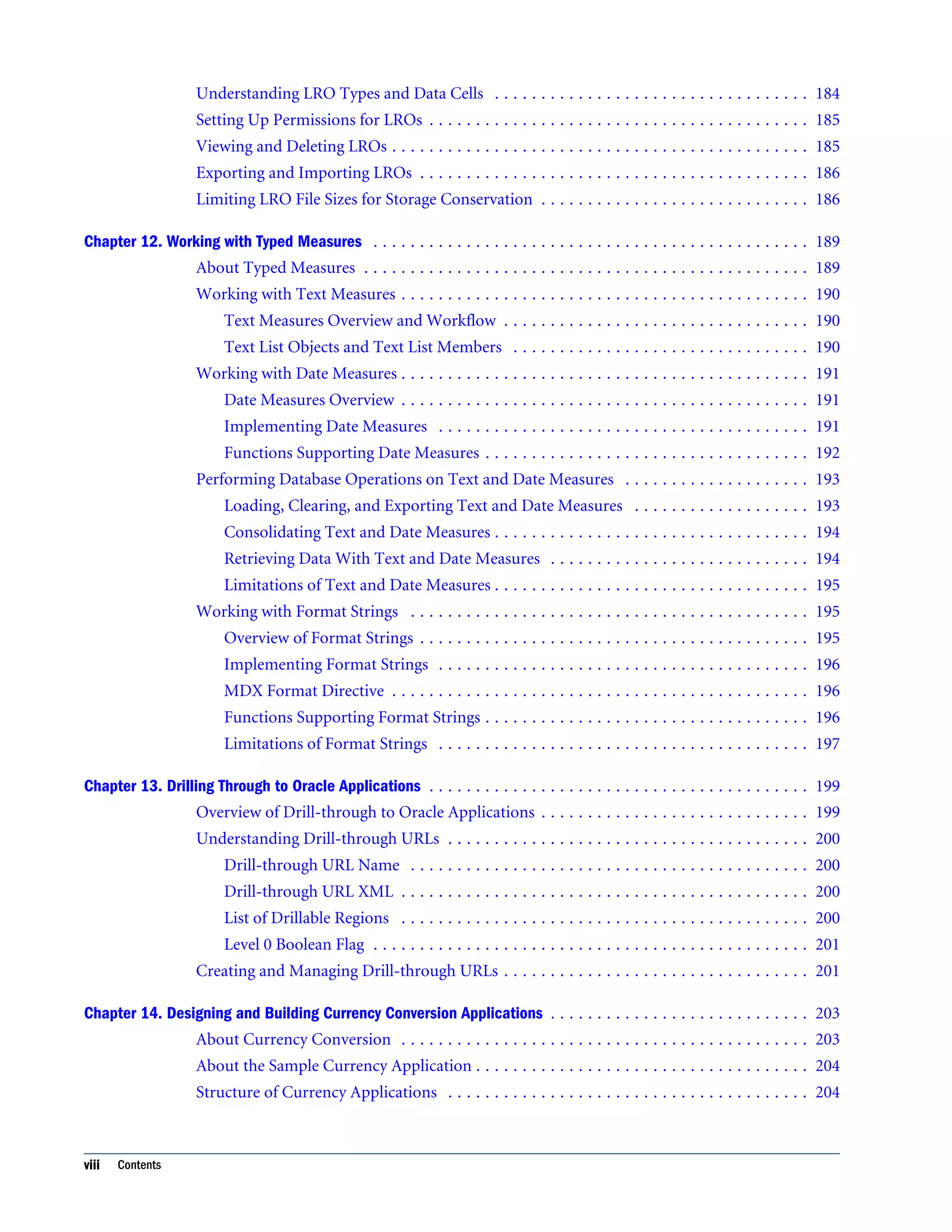
Understanding LRO Types and Data Cells . . . . . . . . . . . . . . . . . . . . . . . . . . . . . . . . . . 184 Setting Up Permissions for LROs . . . . . . . . . . . . . . . . . . . . . . . . . . . . . . . . . . . . . . . . . 185 Viewing and Deleting LROs . . . . . . . . . . . . . . . . . . . . . . . . . . . . . . . . . . . . . . . . . . . . . 185 Exporting and Importing LROs . . . . . . . . . . . . . . . . . . . . . . . . . . . . . . . . . . . . . . . . . . 186 Limiting LRO File Sizes for Storage Conservation . . . . . . . . . . . . . . . . . . . . . . . . . . . . . 186 Chapter 12. Working with Typed Measures . . . . . . . . . . . . . . . . . . . . . . . . . . . . . . . . . . . . . . . . . . . . . . . 189 About Typed Measures . . . . . . . . . . . . . . . . . . . . . . . . . . . . . . . . . . . . . . . . . . . . . . . . 189 Working with Text Measures . . . . . . . . . . . . . . . . . . . . . . . . . . . . . . . . . . . . . . . . . . . . 190 Text Measures Overview and Workflow . . . . . . . . . . . . . . . . . . . . . . . . . . . . . . . . . 190 Text List Objects and Text List Members . . . . . . . . . . . . . . . . . . . . . . . . . . . . . . . . 190 Working with Date Measures . . . . . . . . . . . . . . . . . . . . . . . . . . . . . . . . . . . . . . . . . . . . 191 Date Measures Overview . . . . . . . . . . . . . . . . . . . . . . . . . . . . . . . . . . . . . . . . . . . . 191 Implementing Date Measures . . . . . . . . . . . . . . . . . . . . . . . . . . . . . . . . . . . . . . . . 191 Functions Supporting Date Measures . . . . . . . . . . . . . . . . . . . . . . . . . . . . . . . . . . . 192 Performing Database Operations on Text and Date Measures . . . . . . . . . . . . . . . . . . . . 193 Loading, Clearing, and Exporting Text and Date Measures . . . . . . . . . . . . . . . . . . . 193 Consolidating Text and Date Measures . . . . . . . . . . . . . . . . . . . . . . . . . . . . . . . . . . 194 Retrieving Data With Text and Date Measures . . . . . . . . . . . . . . . . . . . . . . . . . . . . 194 Limitations of Text and Date Measures . . . . . . . . . . . . . . . . . . . . . . . . . . . . . . . . . . 195 Working with Format Strings . . . . . . . . . . . . . . . . . . . . . . . . . . . . . . . . . . . . . . . . . . . 195 Overview of Format Strings . . . . . . . . . . . . . . . . . . . . . . . . . . . . . . . . . . . . . . . . . . 195 Implementing Format Strings . . . . . . . . . . . . . . . . . . . . . . . . . . . . . . . . . . . . . . . . 196 MDX Format Directive . . . . . . . . . . . . . . . . . . . . . . . . . . . . . . . . . . . . . . . . . . . . . 196 Functions Supporting Format Strings . . . . . . . . . . . . . . . . . . . . . . . . . . . . . . . . . . . 196 Limitations of Format Strings . . . . . . . . . . . . . . . . . . . . . . . . . . . . . . . . . . . . . . . . 197 Chapter 13. Drilling Through to Oracle Applications . . . . . . . . . . . . . . . . . . . . . . . . . . . . . . . . . . . . . . . . . 199 Overview of Drill-through to Oracle Applications . . . . . . . . . . . . . . . . . . . . . . . . . . . . . 199 Understanding Drill-through URLs . . . . . . . . . . . . . . . . . . . . . . . . . . . . . . . . . . . . . . . 200 Drill-through URL Name . . . . . . . . . . . . . . . . . . . . . . . . . . . . . . . . . . . . . . . . . . . 200 Drill-through URL XML . . . . . . . . . . . . . . . . . . . . . . . . . . . . . . . . . . . . . . . . . . . . 200 List of Drillable Regions . . . . . . . . . . . . . . . . . . . . . . . . . . . . . . . . . . . . . . . . . . . . 200 Level 0 Boolean Flag . . . . . . . . . . . . . . . . . . . . . . . . . . . . . . . . . . . . . . . . . . . . . . . 201 Creating and Managing Drill-through URLs . . . . . . . . . . . . . . . . . . . . . . . . . . . . . . . . . 201 Chapter 14. Designing and Building Currency Conversion Applications . . . . . . . . . . . . . . . . . . . . . . . . . . . . 203 About Currency Conversion . . . . . . . . . . . . . . . . . . . . . . . . . . . . . . . . . . . . . . . . . . . . 203 About the Sample Currency Application . . . . . . . . . . . . . . . . . . . . . . . . . . . . . . . . . . . . 204 Structure of Currency Applications . . . . . . . . . . . . . . . . . . . . . . . . . . . . . . . . . . . . . . . 204 viii Contents
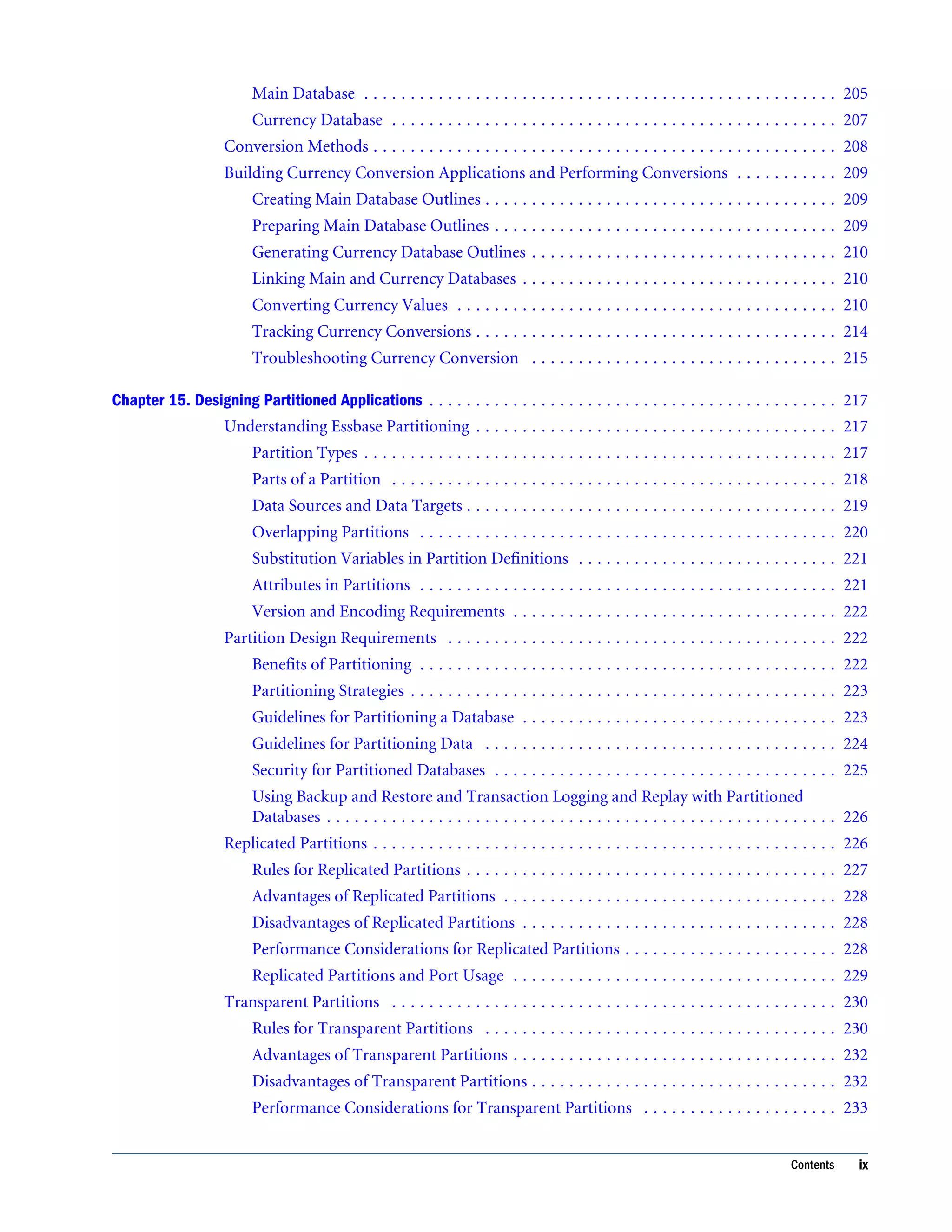
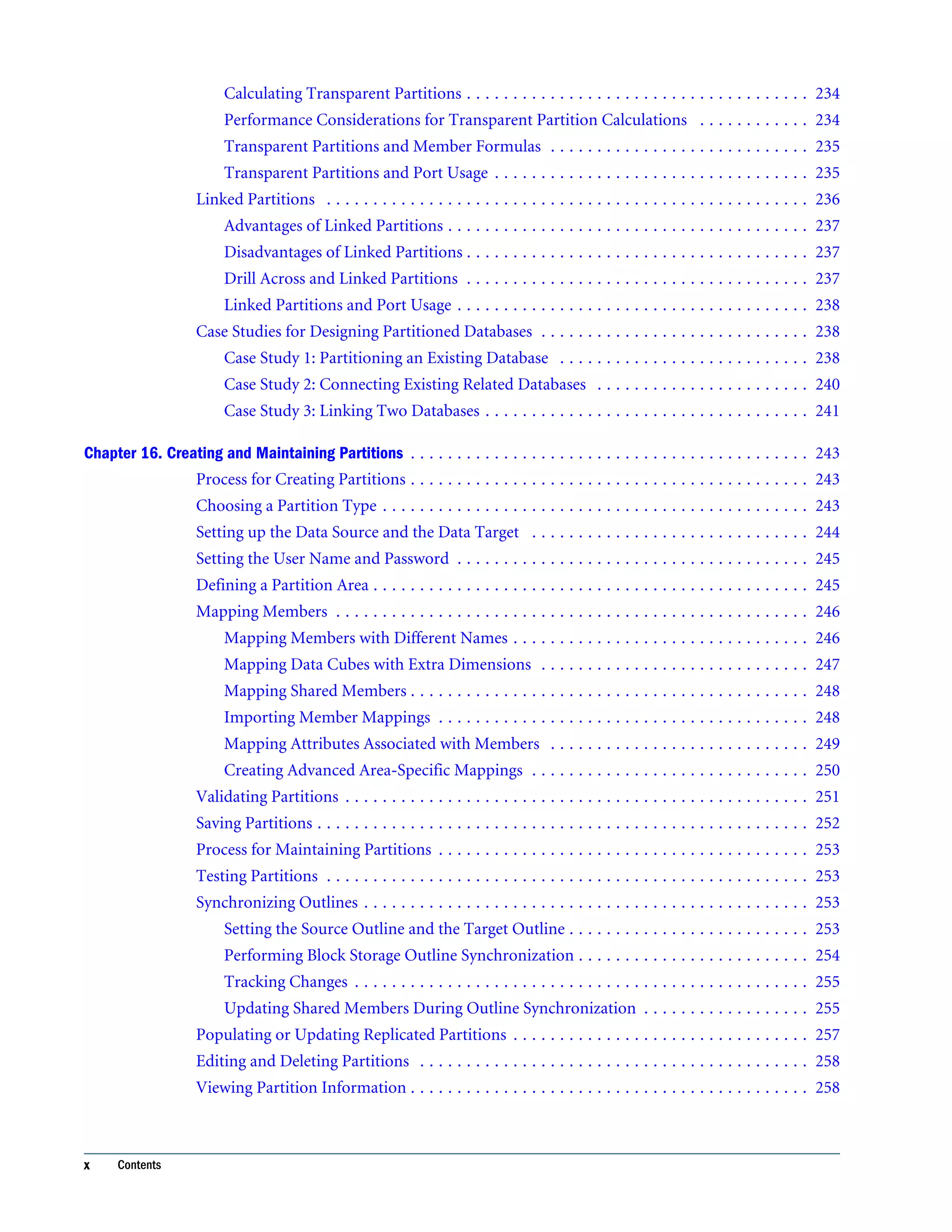
Main Database . . . . . . . . . . . . . . . . . . . . . . . . . . . . . . . . . . . . . . . . . . . . . . . . . . . 205 Currency Database . . . . . . . . . . . . . . . . . . . . . . . . . . . . . . . . . . . . . . . . . . . . . . . . 207 Conversion Methods . . . . . . . . . . . . . . . . . . . . . . . . . . . . . . . . . . . . . . . . . . . . . . . . . . 208 Building Currency Conversion Applications and Performing Conversions . . . . . . . . . . . 209 Creating Main Database Outlines . . . . . . . . . . . . . . . . . . . . . . . . . . . . . . . . . . . . . . 209 Preparing Main Database Outlines . . . . . . . . . . . . . . . . . . . . . . . . . . . . . . . . . . . . . 209 Generating Currency Database Outlines . . . . . . . . . . . . . . . . . . . . . . . . . . . . . . . . . 210 Linking Main and Currency Databases . . . . . . . . . . . . . . . . . . . . . . . . . . . . . . . . . . 210 Converting Currency Values . . . . . . . . . . . . . . . . . . . . . . . . . . . . . . . . . . . . . . . . . 210 Tracking Currency Conversions . . . . . . . . . . . . . . . . . . . . . . . . . . . . . . . . . . . . . . . 214 Troubleshooting Currency Conversion . . . . . . . . . . . . . . . . . . . . . . . . . . . . . . . . . 215 Chapter 15. Designing Partitioned Applications . . . . . . . . . . . . . . . . . . . . . . . . . . . . . . . . . . . . . . . . . . . . 217 Understanding Essbase Partitioning . . . . . . . . . . . . . . . . . . . . . . . . . . . . . . . . . . . . . . . 217 Partition Types . . . . . . . . . . . . . . . . . . . . . . . . . . . . . . . . . . . . . . . . . . . . . . . . . . . 217 Parts of a Partition . . . . . . . . . . . . . . . . . . . . . . . . . . . . . . . . . . . . . . . . . . . . . . . . 218 Data Sources and Data Targets . . . . . . . . . . . . . . . . . . . . . . . . . . . . . . . . . . . . . . . . 219 Overlapping Partitions . . . . . . . . . . . . . . . . . . . . . . . . . . . . . . . . . . . . . . . . . . . . . 220 Substitution Variables in Partition Definitions . . . . . . . . . . . . . . . . . . . . . . . . . . . . 221 Attributes in Partitions . . . . . . . . . . . . . . . . . . . . . . . . . . . . . . . . . . . . . . . . . . . . . 221 Version and Encoding Requirements . . . . . . . . . . . . . . . . . . . . . . . . . . . . . . . . . . . 222 Partition Design Requirements . . . . . . . . . . . . . . . . . . . . . . . . . . . . . . . . . . . . . . . . . . 222 Benefits of Partitioning . . . . . . . . . . . . . . . . . . . . . . . . . . . . . . . . . . . . . . . . . . . . . 222 Partitioning Strategies . . . . . . . . . . . . . . . . . . . . . . . . . . . . . . . . . . . . . . . . . . . . . . 223 Guidelines for Partitioning a Database . . . . . . . . . . . . . . . . . . . . . . . . . . . . . . . . . . 223 Guidelines for Partitioning Data . . . . . . . . . . . . . . . . . . . . . . . . . . . . . . . . . . . . . . 224 Security for Partitioned Databases . . . . . . . . . . . . . . . . . . . . . . . . . . . . . . . . . . . . . 225 Using Backup and Restore and Transaction Logging and Replay with Partitioned Databases . . . . . . . . . . . . . . . . . . . . . . . . . . . . . . . . . . . . . . . . . . . . . . . . . . . . . . . 226 Replicated Partitions . . . . . . . . . . . . . . . . . . . . . . . . . . . . . . . . . . . . . . . . . . . . . . . . . . 226 Rules for Replicated Partitions . . . . . . . . . . . . . . . . . . . . . . . . . . . . . . . . . . . . . . . . 227 Advantages of Replicated Partitions . . . . . . . . . . . . . . . . . . . . . . . . . . . . . . . . . . . . 228 Disadvantages of Replicated Partitions . . . . . . . . . . . . . . . . . . . . . . . . . . . . . . . . . . 228 Performance Considerations for Replicated Partitions . . . . . . . . . . . . . . . . . . . . . . . 228 Replicated Partitions and Port Usage . . . . . . . . . . . . . . . . . . . . . . . . . . . . . . . . . . . 229 Transparent Partitions . . . . . . . . . . . . . . . . . . . . . . . . . . . . . . . . . . . . . . . . . . . . . . . . 230 Rules for Transparent Partitions . . . . . . . . . . . . . . . . . . . . . . . . . . . . . . . . . . . . . . 230 Advantages of Transparent Partitions . . . . . . . . . . . . . . . . . . . . . . . . . . . . . . . . . . . 232 Disadvantages of Transparent Partitions . . . . . . . . . . . . . . . . . . . . . . . . . . . . . . . . . 232 Performance Considerations for Transparent Partitions . . . . . . . . . . . . . . . . . . . . . 233 Contents ix
Calculating Transparent Partitions . . . . . . . . . . . . . . . . . . . . . . . . . . . . . . . . . . . . . 234 Performance Considerations for Transparent Partition Calculations . . . . . . . . . . . . 234 Transparent Partitions and Member Formulas . . . . . . . . . . . . . . . . . . . . . . . . . . . . 235 Transparent Partitions and Port Usage . . . . . . . . . . . . . . . . . . . . . . . . . . . . . . . . . . 235 Linked Partitions . . . . . . . . . . . . . . . . . . . . . . . . . . . . . . . . . . . . . . . . . . . . . . . . . . . . 236 Advantages of Linked Partitions . . . . . . . . . . . . . . . . . . . . . . . . . . . . . . . . . . . . . . . 237 Disadvantages of Linked Partitions . . . . . . . . . . . . . . . . . . . . . . . . . . . . . . . . . . . . . 237 Drill Across and Linked Partitions . . . . . . . . . . . . . . . . . . . . . . . . . . . . . . . . . . . . . 237 Linked Partitions and Port Usage . . . . . . . . . . . . . . . . . . . . . . . . . . . . . . . . . . . . . . 238 Case Studies for Designing Partitioned Databases . . . . . . . . . . . . . . . . . . . . . . . . . . . . . 238 Case Study 1: Partitioning an Existing Database . . . . . . . . . . . . . . . . . . . . . . . . . . . 238 Case Study 2: Connecting Existing Related Databases . . . . . . . . . . . . . . . . . . . . . . . 240 Case Study 3: Linking Two Databases . . . . . . . . . . . . . . . . . . . . . . . . . . . . . . . . . . . 241 Chapter 16. Creating and Maintaining Partitions . . . . . . . . . . . . . . . . . . . . . . . . . . . . . . . . . . . . . . . . . . . 243 Process for Creating Partitions . . . . . . . . . . . . . . . . . . . . . . . . . . . . . . . . . . . . . . . . . . . 243 Choosing a Partition Type . . . . . . . . . . . . . . . . . . . . . . . . . . . . . . . . . . . . . . . . . . . . . . 243 Setting up the Data Source and the Data Target . . . . . . . . . . . . . . . . . . . . . . . . . . . . . . 244 Setting the User Name and Password . . . . . . . . . . . . . . . . . . . . . . . . . . . . . . . . . . . . . . 245 Defining a Partition Area . . . . . . . . . . . . . . . . . . . . . . . . . . . . . . . . . . . . . . . . . . . . . . . 245 Mapping Members . . . . . . . . . . . . . . . . . . . . . . . . . . . . . . . . . . . . . . . . . . . . . . . . . . . 246 Mapping Members with Different Names . . . . . . . . . . . . . . . . . . . . . . . . . . . . . . . . 246 Mapping Data Cubes with Extra Dimensions . . . . . . . . . . . . . . . . . . . . . . . . . . . . . 247 Mapping Shared Members . . . . . . . . . . . . . . . . . . . . . . . . . . . . . . . . . . . . . . . . . . . 248 Importing Member Mappings . . . . . . . . . . . . . . . . . . . . . . . . . . . . . . . . . . . . . . . . 248 Mapping Attributes Associated with Members . . . . . . . . . . . . . . . . . . . . . . . . . . . . 249 Creating Advanced Area-Specific Mappings . . . . . . . . . . . . . . . . . . . . . . . . . . . . . . 250 Validating Partitions . . . . . . . . . . . . . . . . . . . . . . . . . . . . . . . . . . . . . . . . . . . . . . . . . . 251 Saving Partitions . . . . . . . . . . . . . . . . . . . . . . . . . . . . . . . . . . . . . . . . . . . . . . . . . . . . . 252 Process for Maintaining Partitions . . . . . . . . . . . . . . . . . . . . . . . . . . . . . . . . . . . . . . . . 253 Testing Partitions . . . . . . . . . . . . . . . . . . . . . . . . . . . . . . . . . . . . . . . . . . . . . . . . . . . . 253 Synchronizing Outlines . . . . . . . . . . . . . . . . . . . . . . . . . . . . . . . . . . . . . . . . . . . . . . . . 253 Setting the Source Outline and the Target Outline . . . . . . . . . . . . . . . . . . . . . . . . . . 253 Performing Block Storage Outline Synchronization . . . . . . . . . . . . . . . . . . . . . . . . . 254 Tracking Changes . . . . . . . . . . . . . . . . . . . . . . . . . . . . . . . . . . . . . . . . . . . . . . . . . 255 Updating Shared Members During Outline Synchronization . . . . . . . . . . . . . . . . . . 255 Populating or Updating Replicated Partitions . . . . . . . . . . . . . . . . . . . . . . . . . . . . . . . . 257 Editing and Deleting Partitions . . . . . . . . . . . . . . . . . . . . . . . . . . . . . . . . . . . . . . . . . . 258 Viewing Partition Information . . . . . . . . . . . . . . . . . . . . . . . . . . . . . . . . . . . . . . . . . . . 258 x Contents
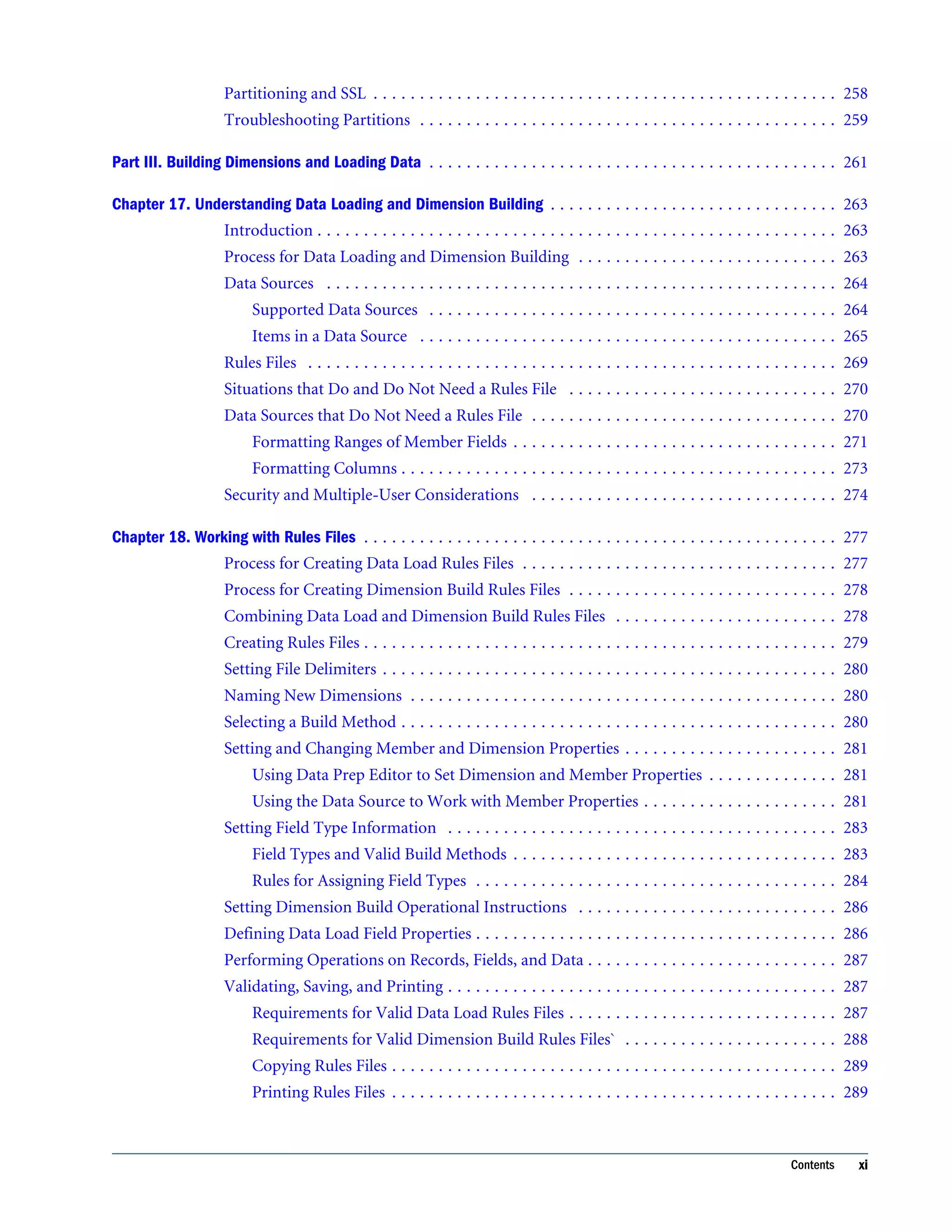
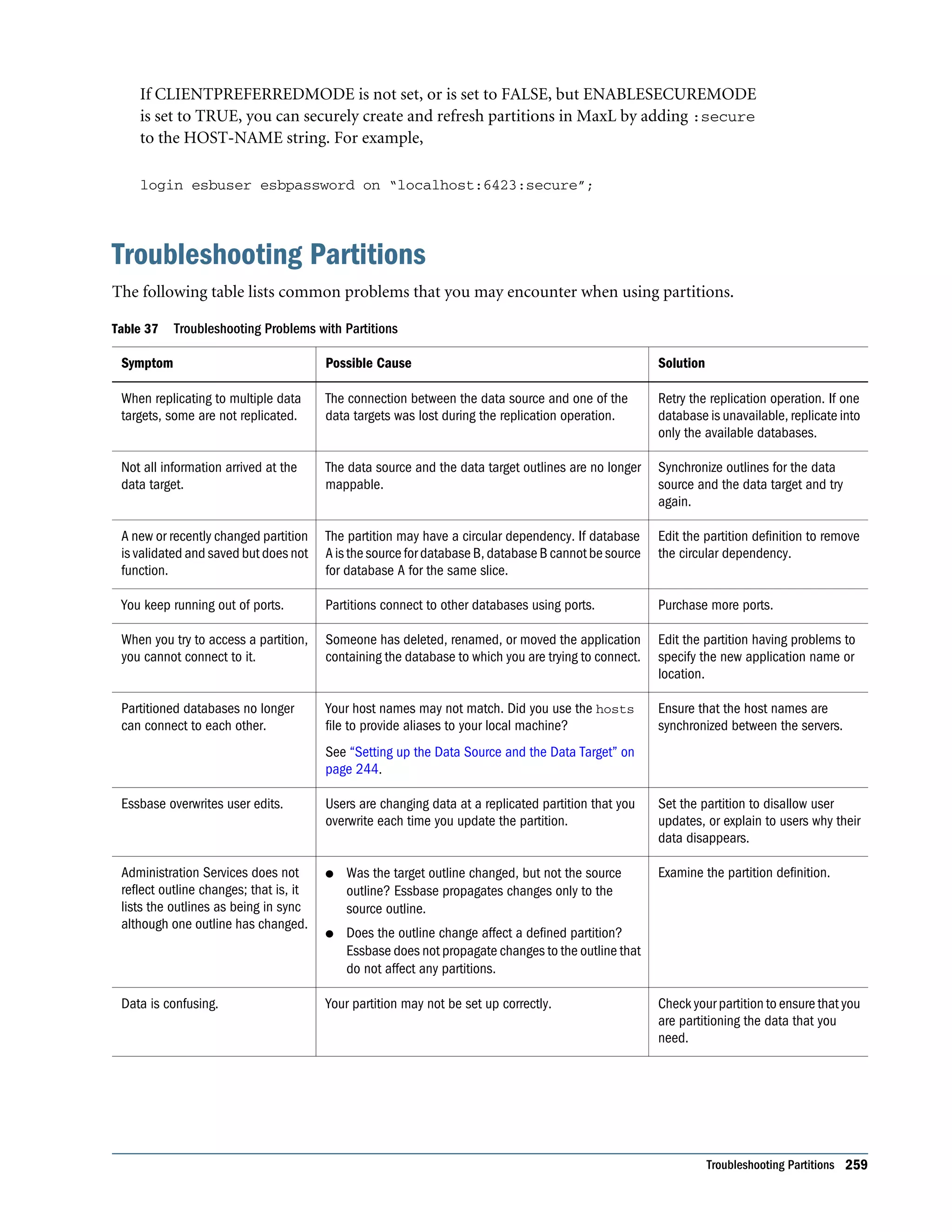
Partitioning and SSL . . . . . . . . . . . . . . . . . . . . . . . . . . . . . . . . . . . . . . . . . . . . . . . . . . 258 Troubleshooting Partitions . . . . . . . . . . . . . . . . . . . . . . . . . . . . . . . . . . . . . . . . . . . . . 259 Part III. Building Dimensions and Loading Data . . . . . . . . . . . . . . . . . . . . . . . . . . . . . . . . . . . . . . . . . . . . 261 Chapter 17. Understanding Data Loading and Dimension Building . . . . . . . . . . . . . . . . . . . . . . . . . . . . . . . 263 Introduction . . . . . . . . . . . . . . . . . . . . . . . . . . . . . . . . . . . . . . . . . . . . . . . . . . . . . . . . 263 Process for Data Loading and Dimension Building . . . . . . . . . . . . . . . . . . . . . . . . . . . . 263 Data Sources . . . . . . . . . . . . . . . . . . . . . . . . . . . . . . . . . . . . . . . . . . . . . . . . . . . . . . . 264 Supported Data Sources . . . . . . . . . . . . . . . . . . . . . . . . . . . . . . . . . . . . . . . . . . . . 264 Items in a Data Source . . . . . . . . . . . . . . . . . . . . . . . . . . . . . . . . . . . . . . . . . . . . . 265 Rules Files . . . . . . . . . . . . . . . . . . . . . . . . . . . . . . . . . . . . . . . . . . . . . . . . . . . . . . . . . 269 Situations that Do and Do Not Need a Rules File . . . . . . . . . . . . . . . . . . . . . . . . . . . . . 270 Data Sources that Do Not Need a Rules File . . . . . . . . . . . . . . . . . . . . . . . . . . . . . . . . . 270 Formatting Ranges of Member Fields . . . . . . . . . . . . . . . . . . . . . . . . . . . . . . . . . . . 271 Formatting Columns . . . . . . . . . . . . . . . . . . . . . . . . . . . . . . . . . . . . . . . . . . . . . . . 273 Security and Multiple-User Considerations . . . . . . . . . . . . . . . . . . . . . . . . . . . . . . . . . 274 Chapter 18. Working with Rules Files . . . . . . . . . . . . . . . . . . . . . . . . . . . . . . . . . . . . . . . . . . . . . . . . . . . 277 Process for Creating Data Load Rules Files . . . . . . . . . . . . . . . . . . . . . . . . . . . . . . . . . . 277 Process for Creating Dimension Build Rules Files . . . . . . . . . . . . . . . . . . . . . . . . . . . . . 278 Combining Data Load and Dimension Build Rules Files . . . . . . . . . . . . . . . . . . . . . . . . 278 Creating Rules Files . . . . . . . . . . . . . . . . . . . . . . . . . . . . . . . . . . . . . . . . . . . . . . . . . . . 279 Setting File Delimiters . . . . . . . . . . . . . . . . . . . . . . . . . . . . . . . . . . . . . . . . . . . . . . . . . 280 Naming New Dimensions . . . . . . . . . . . . . . . . . . . . . . . . . . . . . . . . . . . . . . . . . . . . . . 280 Selecting a Build Method . . . . . . . . . . . . . . . . . . . . . . . . . . . . . . . . . . . . . . . . . . . . . . . 280 Setting and Changing Member and Dimension Properties . . . . . . . . . . . . . . . . . . . . . . . 281 Using Data Prep Editor to Set Dimension and Member Properties . . . . . . . . . . . . . . 281 Using the Data Source to Work with Member Properties . . . . . . . . . . . . . . . . . . . . . 281 Setting Field Type Information . . . . . . . . . . . . . . . . . . . . . . . . . . . . . . . . . . . . . . . . . . 283 Field Types and Valid Build Methods . . . . . . . . . . . . . . . . . . . . . . . . . . . . . . . . . . . 283 Rules for Assigning Field Types . . . . . . . . . . . . . . . . . . . . . . . . . . . . . . . . . . . . . . . 284 Setting Dimension Build Operational Instructions . . . . . . . . . . . . . . . . . . . . . . . . . . . . 286 Defining Data Load Field Properties . . . . . . . . . . . . . . . . . . . . . . . . . . . . . . . . . . . . . . . 286 Performing Operations on Records, Fields, and Data . . . . . . . . . . . . . . . . . . . . . . . . . . . 287 Validating, Saving, and Printing . . . . . . . . . . . . . . . . . . . . . . . . . . . . . . . . . . . . . . . . . . 287 Requirements for Valid Data Load Rules Files . . . . . . . . . . . . . . . . . . . . . . . . . . . . . 287 Requirements for Valid Dimension Build Rules Files` . . . . . . . . . . . . . . . . . . . . . . . 288 Copying Rules Files . . . . . . . . . . . . . . . . . . . . . . . . . . . . . . . . . . . . . . . . . . . . . . . . 289 Printing Rules Files . . . . . . . . . . . . . . . . . . . . . . . . . . . . . . . . . . . . . . . . . . . . . . . . 289 Contents xi
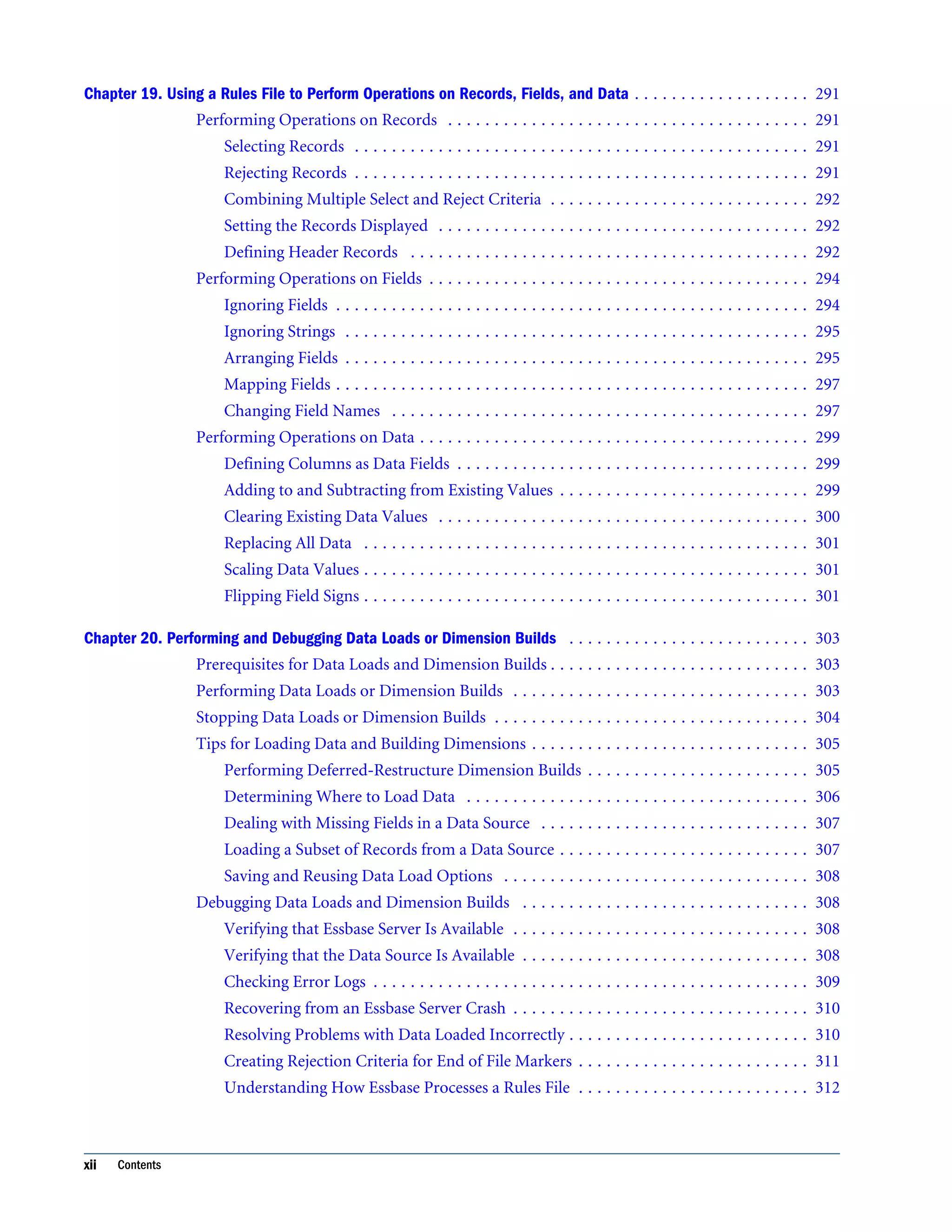
Chapter 19. Using a Rules File to Perform Operations on Records, Fields, and Data . . . . . . . . . . . . . . . . . . . 291 Performing Operations on Records . . . . . . . . . . . . . . . . . . . . . . . . . . . . . . . . . . . . . . . 291 Selecting Records . . . . . . . . . . . . . . . . . . . . . . . . . . . . . . . . . . . . . . . . . . . . . . . . . 291 Rejecting Records . . . . . . . . . . . . . . . . . . . . . . . . . . . . . . . . . . . . . . . . . . . . . . . . . 291 Combining Multiple Select and Reject Criteria . . . . . . . . . . . . . . . . . . . . . . . . . . . . 292 Setting the Records Displayed . . . . . . . . . . . . . . . . . . . . . . . . . . . . . . . . . . . . . . . . 292 Defining Header Records . . . . . . . . . . . . . . . . . . . . . . . . . . . . . . . . . . . . . . . . . . . 292 Performing Operations on Fields . . . . . . . . . . . . . . . . . . . . . . . . . . . . . . . . . . . . . . . . . 294 Ignoring Fields . . . . . . . . . . . . . . . . . . . . . . . . . . . . . . . . . . . . . . . . . . . . . . . . . . . 294 Ignoring Strings . . . . . . . . . . . . . . . . . . . . . . . . . . . . . . . . . . . . . . . . . . . . . . . . . . 295 Arranging Fields . . . . . . . . . . . . . . . . . . . . . . . . . . . . . . . . . . . . . . . . . . . . . . . . . . 295 Mapping Fields . . . . . . . . . . . . . . . . . . . . . . . . . . . . . . . . . . . . . . . . . . . . . . . . . . . 297 Changing Field Names . . . . . . . . . . . . . . . . . . . . . . . . . . . . . . . . . . . . . . . . . . . . . 297 Performing Operations on Data . . . . . . . . . . . . . . . . . . . . . . . . . . . . . . . . . . . . . . . . . . 299 Defining Columns as Data Fields . . . . . . . . . . . . . . . . . . . . . . . . . . . . . . . . . . . . . . 299 Adding to and Subtracting from Existing Values . . . . . . . . . . . . . . . . . . . . . . . . . . . 299 Clearing Existing Data Values . . . . . . . . . . . . . . . . . . . . . . . . . . . . . . . . . . . . . . . . 300 Replacing All Data . . . . . . . . . . . . . . . . . . . . . . . . . . . . . . . . . . . . . . . . . . . . . . . . 301 Scaling Data Values . . . . . . . . . . . . . . . . . . . . . . . . . . . . . . . . . . . . . . . . . . . . . . . . 301 Flipping Field Signs . . . . . . . . . . . . . . . . . . . . . . . . . . . . . . . . . . . . . . . . . . . . . . . . 301 Chapter 20. Performing and Debugging Data Loads or Dimension Builds . . . . . . . . . . . . . . . . . . . . . . . . . . 303 Prerequisites for Data Loads and Dimension Builds . . . . . . . . . . . . . . . . . . . . . . . . . . . . 303 Performing Data Loads or Dimension Builds . . . . . . . . . . . . . . . . . . . . . . . . . . . . . . . . 303 Stopping Data Loads or Dimension Builds . . . . . . . . . . . . . . . . . . . . . . . . . . . . . . . . . . 304 Tips for Loading Data and Building Dimensions . . . . . . . . . . . . . . . . . . . . . . . . . . . . . . 305 Performing Deferred-Restructure Dimension Builds . . . . . . . . . . . . . . . . . . . . . . . . 305 Determining Where to Load Data . . . . . . . . . . . . . . . . . . . . . . . . . . . . . . . . . . . . . 306 Dealing with Missing Fields in a Data Source . . . . . . . . . . . . . . . . . . . . . . . . . . . . . 307 Loading a Subset of Records from a Data Source . . . . . . . . . . . . . . . . . . . . . . . . . . . 307 Saving and Reusing Data Load Options . . . . . . . . . . . . . . . . . . . . . . . . . . . . . . . . . 308 Debugging Data Loads and Dimension Builds . . . . . . . . . . . . . . . . . . . . . . . . . . . . . . . 308 Verifying that Essbase Server Is Available . . . . . . . . . . . . . . . . . . . . . . . . . . . . . . . . 308 Verifying that the Data Source Is Available . . . . . . . . . . . . . . . . . . . . . . . . . . . . . . . 308 Checking Error Logs . . . . . . . . . . . . . . . . . . . . . . . . . . . . . . . . . . . . . . . . . . . . . . . 309 Recovering from an Essbase Server Crash . . . . . . . . . . . . . . . . . . . . . . . . . . . . . . . . 310 Resolving Problems with Data Loaded Incorrectly . . . . . . . . . . . . . . . . . . . . . . . . . . 310 Creating Rejection Criteria for End of File Markers . . . . . . . . . . . . . . . . . . . . . . . . . 311 Understanding How Essbase Processes a Rules File . . . . . . . . . . . . . . . . . . . . . . . . . 312 xii Contents
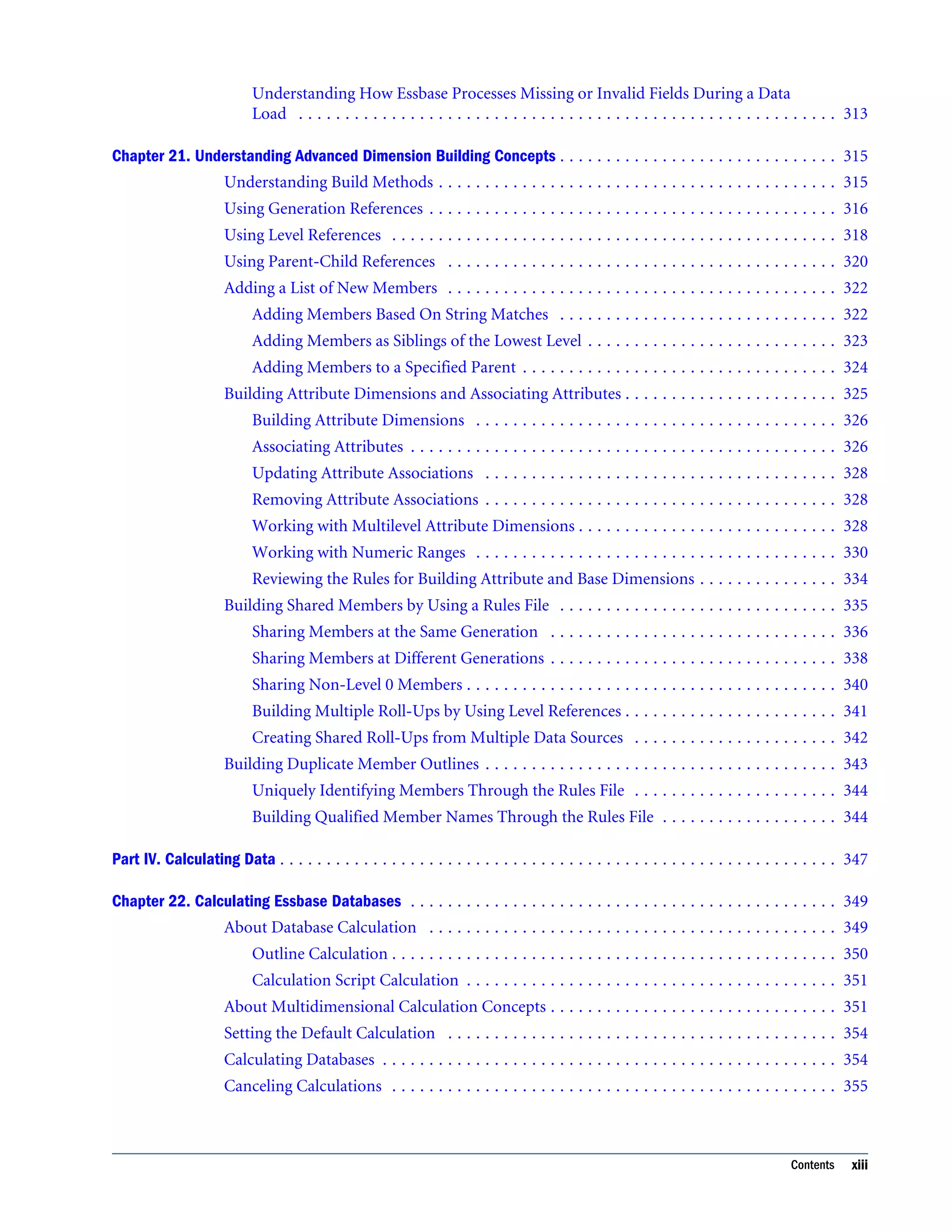
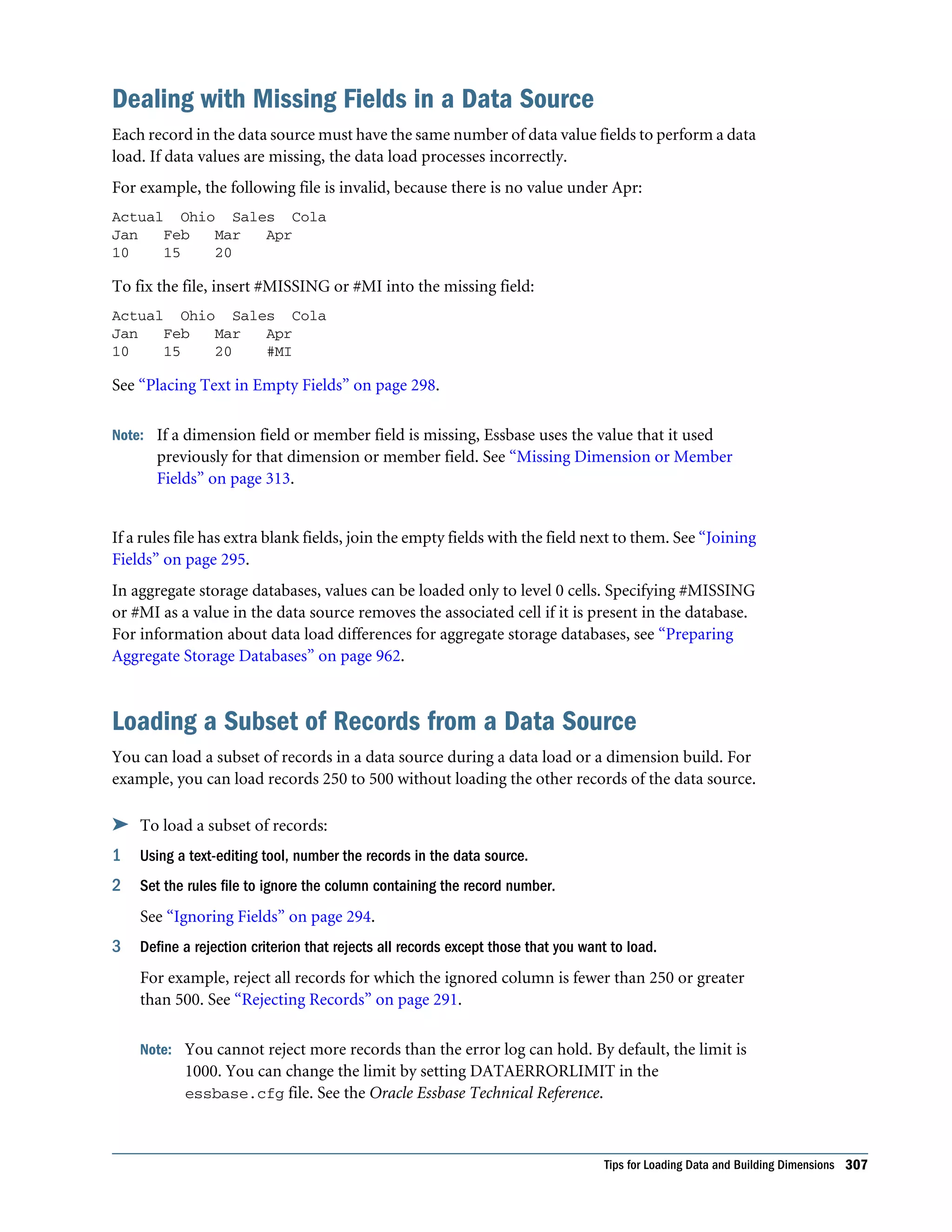
Understanding How Essbase Processes Missing or Invalid Fields During a Data Load . . . . . . . . . . . . . . . . . . . . . . . . . . . . . . . . . . . . . . . . . . . . . . . . . . . . . . . . . . 313 Chapter 21. Understanding Advanced Dimension Building Concepts . . . . . . . . . . . . . . . . . . . . . . . . . . . . . . 315 Understanding Build Methods . . . . . . . . . . . . . . . . . . . . . . . . . . . . . . . . . . . . . . . . . . . 315 Using Generation References . . . . . . . . . . . . . . . . . . . . . . . . . . . . . . . . . . . . . . . . . . . . 316 Using Level References . . . . . . . . . . . . . . . . . . . . . . . . . . . . . . . . . . . . . . . . . . . . . . . . 318 Using Parent-Child References . . . . . . . . . . . . . . . . . . . . . . . . . . . . . . . . . . . . . . . . . . 320 Adding a List of New Members . . . . . . . . . . . . . . . . . . . . . . . . . . . . . . . . . . . . . . . . . . 322 Adding Members Based On String Matches . . . . . . . . . . . . . . . . . . . . . . . . . . . . . . 322 Adding Members as Siblings of the Lowest Level . . . . . . . . . . . . . . . . . . . . . . . . . . . 323 Adding Members to a Specified Parent . . . . . . . . . . . . . . . . . . . . . . . . . . . . . . . . . . 324 Building Attribute Dimensions and Associating Attributes . . . . . . . . . . . . . . . . . . . . . . . 325 Building Attribute Dimensions . . . . . . . . . . . . . . . . . . . . . . . . . . . . . . . . . . . . . . . 326 Associating Attributes . . . . . . . . . . . . . . . . . . . . . . . . . . . . . . . . . . . . . . . . . . . . . . 326 Updating Attribute Associations . . . . . . . . . . . . . . . . . . . . . . . . . . . . . . . . . . . . . . 328 Removing Attribute Associations . . . . . . . . . . . . . . . . . . . . . . . . . . . . . . . . . . . . . . 328 Working with Multilevel Attribute Dimensions . . . . . . . . . . . . . . . . . . . . . . . . . . . . 328 Working with Numeric Ranges . . . . . . . . . . . . . . . . . . . . . . . . . . . . . . . . . . . . . . . 330 Reviewing the Rules for Building Attribute and Base Dimensions . . . . . . . . . . . . . . . 334 Building Shared Members by Using a Rules File . . . . . . . . . . . . . . . . . . . . . . . . . . . . . . 335 Sharing Members at the Same Generation . . . . . . . . . . . . . . . . . . . . . . . . . . . . . . . 336 Sharing Members at Different Generations . . . . . . . . . . . . . . . . . . . . . . . . . . . . . . . 338 Sharing Non-Level 0 Members . . . . . . . . . . . . . . . . . . . . . . . . . . . . . . . . . . . . . . . . 340 Building Multiple Roll-Ups by Using Level References . . . . . . . . . . . . . . . . . . . . . . . 341 Creating Shared Roll-Ups from Multiple Data Sources . . . . . . . . . . . . . . . . . . . . . . 342 Building Duplicate Member Outlines . . . . . . . . . . . . . . . . . . . . . . . . . . . . . . . . . . . . . . 343 Uniquely Identifying Members Through the Rules File . . . . . . . . . . . . . . . . . . . . . . 344 Building Qualified Member Names Through the Rules File . . . . . . . . . . . . . . . . . . . 344 Part IV. Calculating Data . . . . . . . . . . . . . . . . . . . . . . . . . . . . . . . . . . . . . . . . . . . . . . . . . . . . . . . . . . . . 347 Chapter 22. Calculating Essbase Databases . . . . . . . . . . . . . . . . . . . . . . . . . . . . . . . . . . . . . . . . . . . . . . 349 About Database Calculation . . . . . . . . . . . . . . . . . . . . . . . . . . . . . . . . . . . . . . . . . . . . 349 Outline Calculation . . . . . . . . . . . . . . . . . . . . . . . . . . . . . . . . . . . . . . . . . . . . . . . . 350 Calculation Script Calculation . . . . . . . . . . . . . . . . . . . . . . . . . . . . . . . . . . . . . . . . 351 About Multidimensional Calculation Concepts . . . . . . . . . . . . . . . . . . . . . . . . . . . . . . . 351 Setting the Default Calculation . . . . . . . . . . . . . . . . . . . . . . . . . . . . . . . . . . . . . . . . . . 354 Calculating Databases . . . . . . . . . . . . . . . . . . . . . . . . . . . . . . . . . . . . . . . . . . . . . . . . . 354 Canceling Calculations . . . . . . . . . . . . . . . . . . . . . . . . . . . . . . . . . . . . . . . . . . . . . . . . 355 Contents xiii
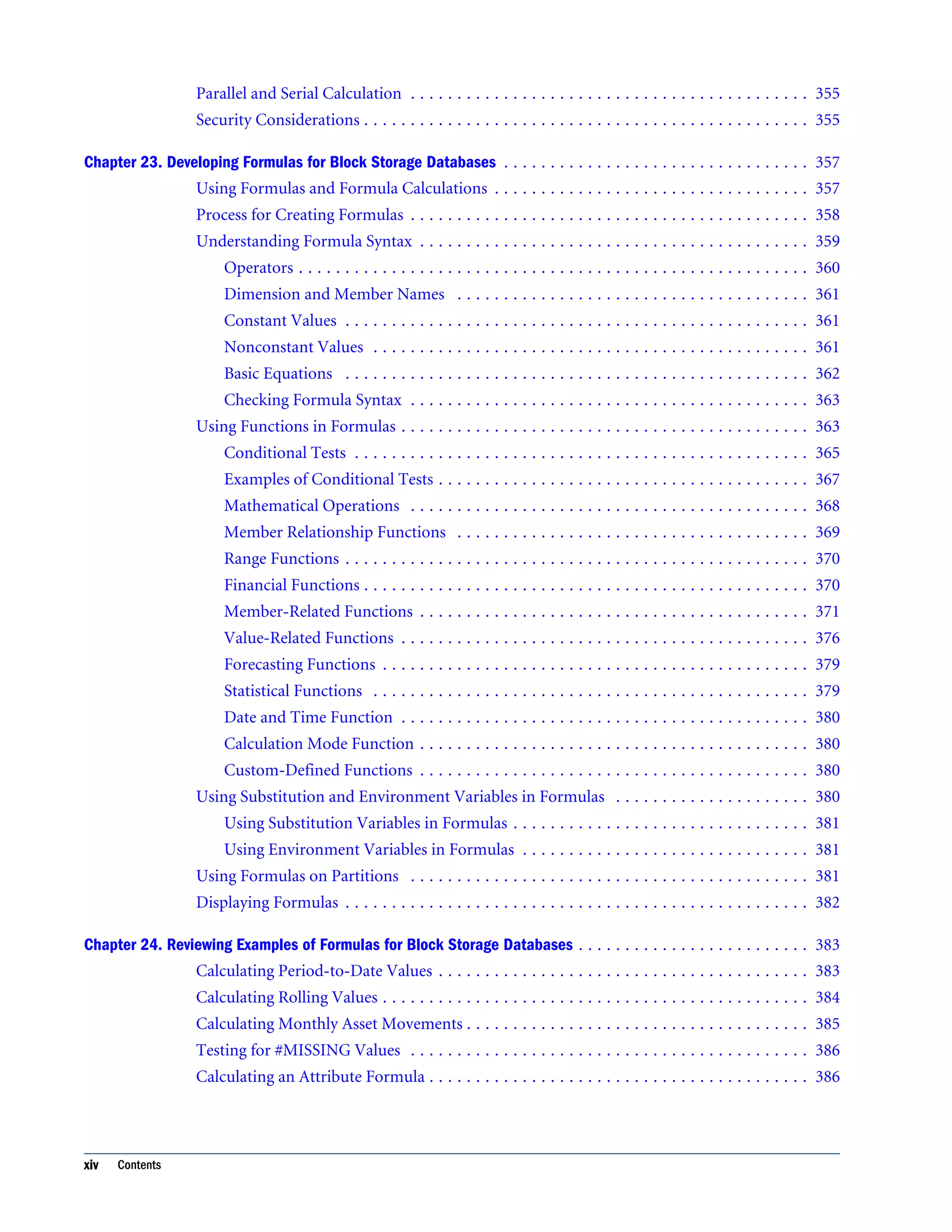
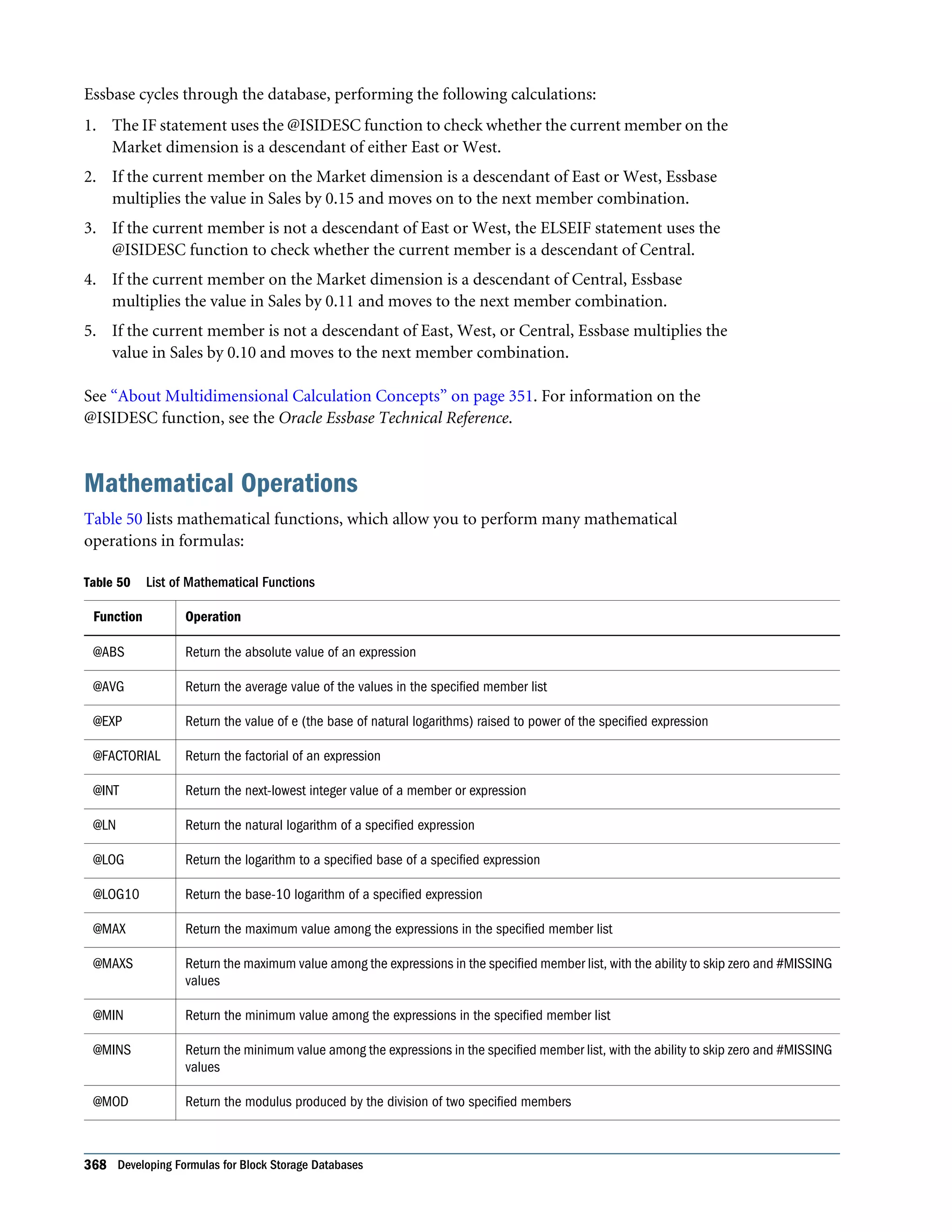
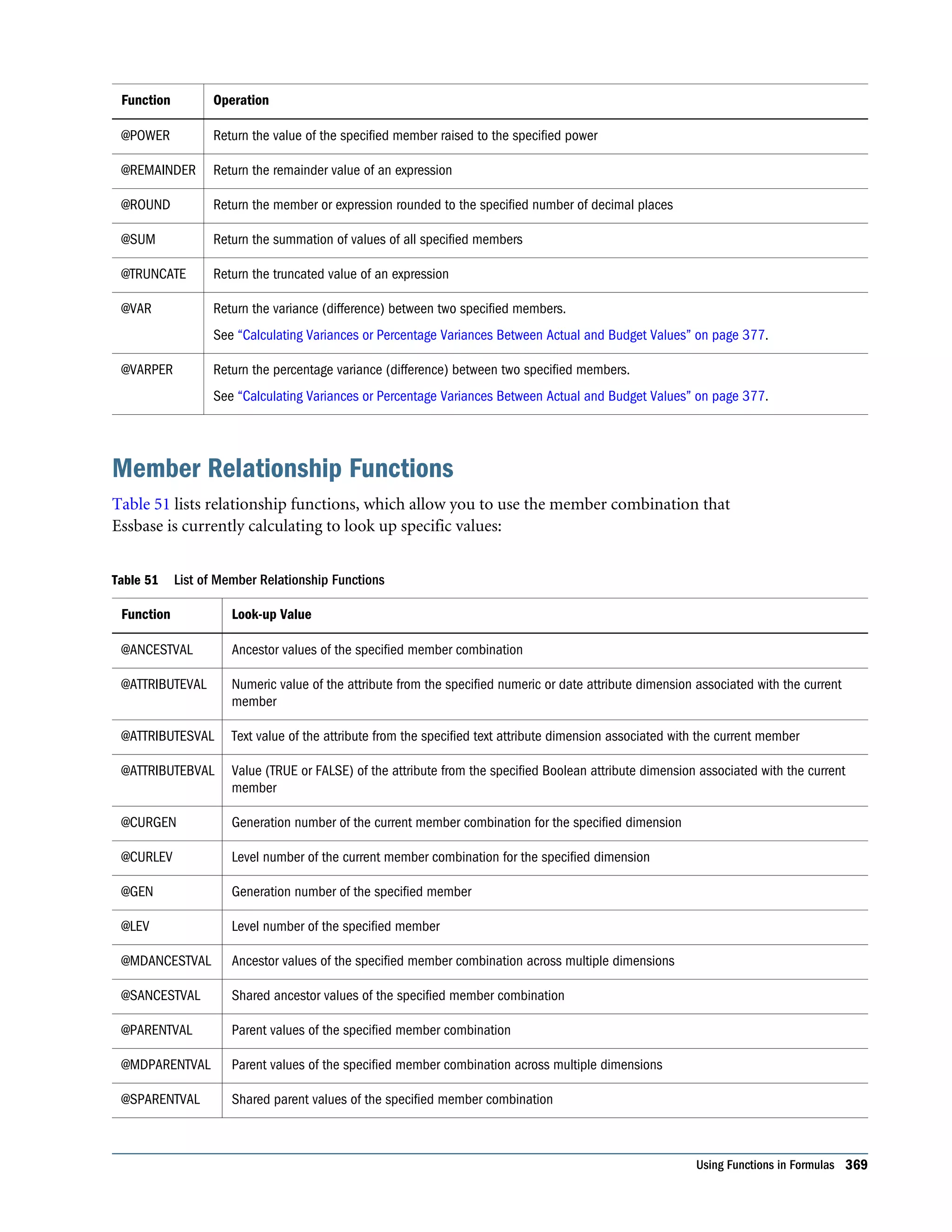
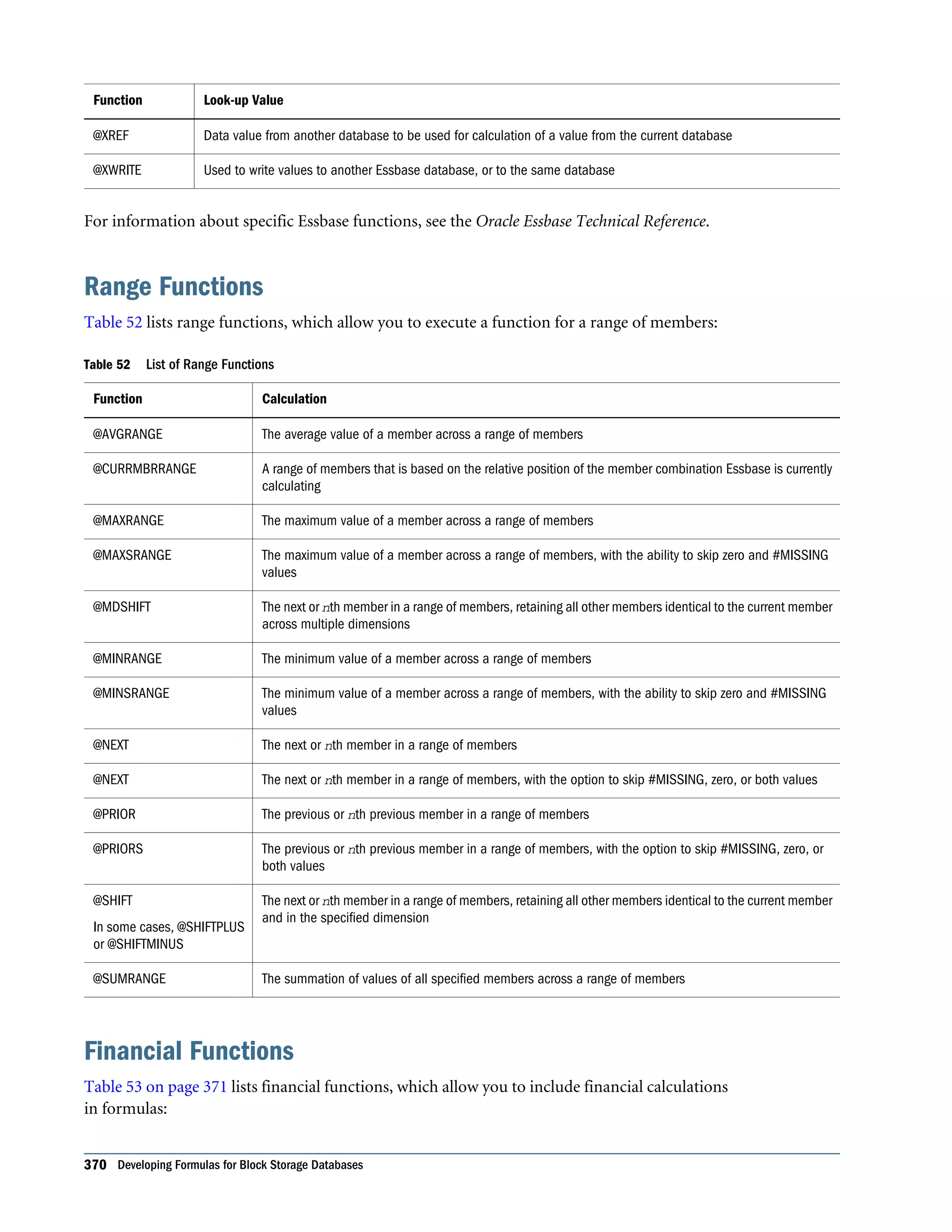
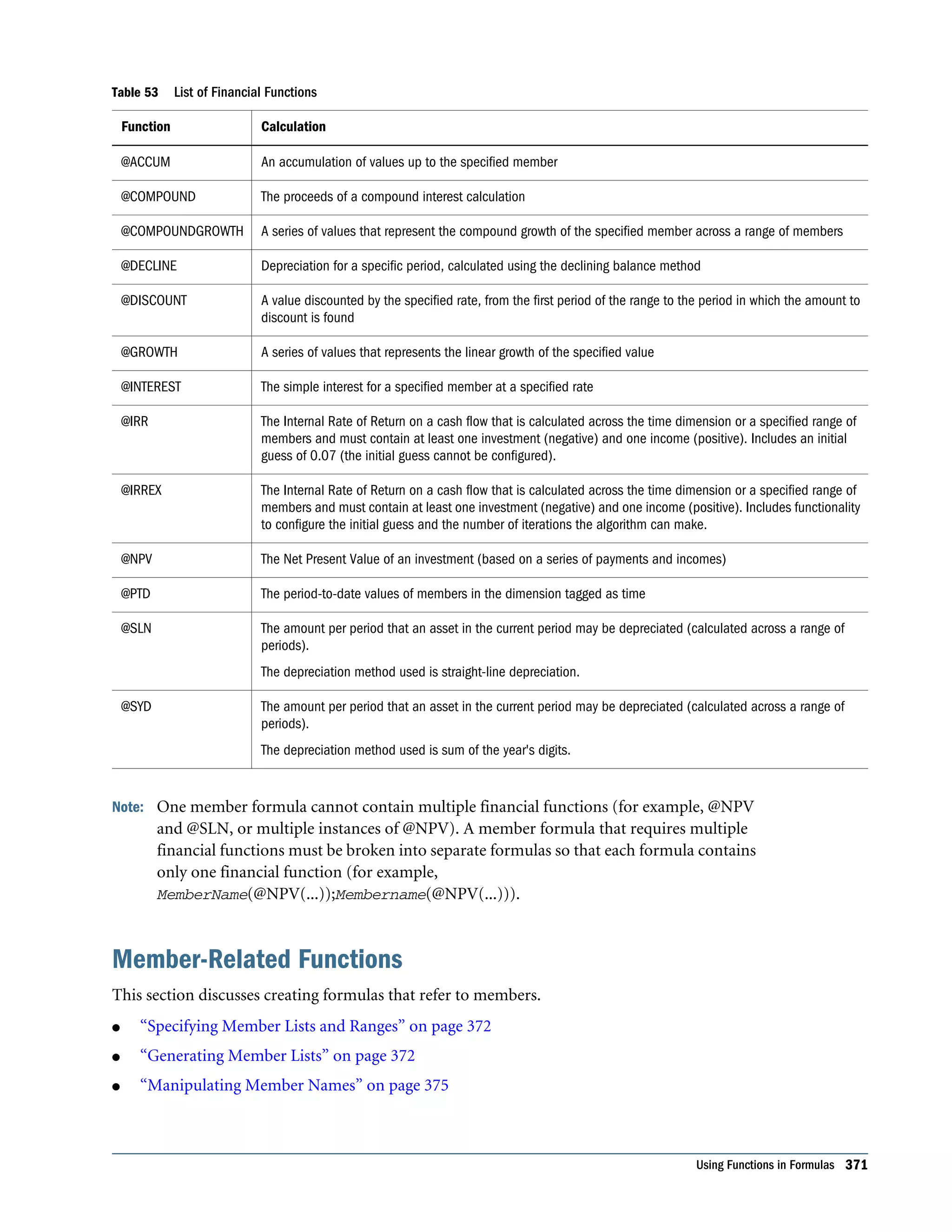
Parallel and Serial Calculation . . . . . . . . . . . . . . . . . . . . . . . . . . . . . . . . . . . . . . . . . . . 355 Security Considerations . . . . . . . . . . . . . . . . . . . . . . . . . . . . . . . . . . . . . . . . . . . . . . . . 355 Chapter 23. Developing Formulas for Block Storage Databases . . . . . . . . . . . . . . . . . . . . . . . . . . . . . . . . . 357 Using Formulas and Formula Calculations . . . . . . . . . . . . . . . . . . . . . . . . . . . . . . . . . . 357 Process for Creating Formulas . . . . . . . . . . . . . . . . . . . . . . . . . . . . . . . . . . . . . . . . . . . 358 Understanding Formula Syntax . . . . . . . . . . . . . . . . . . . . . . . . . . . . . . . . . . . . . . . . . . 359 Operators . . . . . . . . . . . . . . . . . . . . . . . . . . . . . . . . . . . . . . . . . . . . . . . . . . . . . . . 360 Dimension and Member Names . . . . . . . . . . . . . . . . . . . . . . . . . . . . . . . . . . . . . . 361 Constant Values . . . . . . . . . . . . . . . . . . . . . . . . . . . . . . . . . . . . . . . . . . . . . . . . . . 361 Nonconstant Values . . . . . . . . . . . . . . . . . . . . . . . . . . . . . . . . . . . . . . . . . . . . . . . 361 Basic Equations . . . . . . . . . . . . . . . . . . . . . . . . . . . . . . . . . . . . . . . . . . . . . . . . . . 362 Checking Formula Syntax . . . . . . . . . . . . . . . . . . . . . . . . . . . . . . . . . . . . . . . . . . . 363 Using Functions in Formulas . . . . . . . . . . . . . . . . . . . . . . . . . . . . . . . . . . . . . . . . . . . . 363 Conditional Tests . . . . . . . . . . . . . . . . . . . . . . . . . . . . . . . . . . . . . . . . . . . . . . . . . 365 Examples of Conditional Tests . . . . . . . . . . . . . . . . . . . . . . . . . . . . . . . . . . . . . . . . 367 Mathematical Operations . . . . . . . . . . . . . . . . . . . . . . . . . . . . . . . . . . . . . . . . . . . 368 Member Relationship Functions . . . . . . . . . . . . . . . . . . . . . . . . . . . . . . . . . . . . . . 369 Range Functions . . . . . . . . . . . . . . . . . . . . . . . . . . . . . . . . . . . . . . . . . . . . . . . . . . 370 Financial Functions . . . . . . . . . . . . . . . . . . . . . . . . . . . . . . . . . . . . . . . . . . . . . . . . 370 Member-Related Functions . . . . . . . . . . . . . . . . . . . . . . . . . . . . . . . . . . . . . . . . . . 371 Value-Related Functions . . . . . . . . . . . . . . . . . . . . . . . . . . . . . . . . . . . . . . . . . . . . 376 Forecasting Functions . . . . . . . . . . . . . . . . . . . . . . . . . . . . . . . . . . . . . . . . . . . . . . 379 Statistical Functions . . . . . . . . . . . . . . . . . . . . . . . . . . . . . . . . . . . . . . . . . . . . . . . 379 Date and Time Function . . . . . . . . . . . . . . . . . . . . . . . . . . . . . . . . . . . . . . . . . . . . 380 Calculation Mode Function . . . . . . . . . . . . . . . . . . . . . . . . . . . . . . . . . . . . . . . . . . 380 Custom-Defined Functions . . . . . . . . . . . . . . . . . . . . . . . . . . . . . . . . . . . . . . . . . . 380 Using Substitution and Environment Variables in Formulas . . . . . . . . . . . . . . . . . . . . . 380 Using Substitution Variables in Formulas . . . . . . . . . . . . . . . . . . . . . . . . . . . . . . . . 381 Using Environment Variables in Formulas . . . . . . . . . . . . . . . . . . . . . . . . . . . . . . . 381 Using Formulas on Partitions . . . . . . . . . . . . . . . . . . . . . . . . . . . . . . . . . . . . . . . . . . . 381 Displaying Formulas . . . . . . . . . . . . . . . . . . . . . . . . . . . . . . . . . . . . . . . . . . . . . . . . . . 382 Chapter 24. Reviewing Examples of Formulas for Block Storage Databases . . . . . . . . . . . . . . . . . . . . . . . . . 383 Calculating Period-to-Date Values . . . . . . . . . . . . . . . . . . . . . . . . . . . . . . . . . . . . . . . . 383 Calculating Rolling Values . . . . . . . . . . . . . . . . . . . . . . . . . . . . . . . . . . . . . . . . . . . . . . 384 Calculating Monthly Asset Movements . . . . . . . . . . . . . . . . . . . . . . . . . . . . . . . . . . . . . 385 Testing for #MISSING Values . . . . . . . . . . . . . . . . . . . . . . . . . . . . . . . . . . . . . . . . . . . 386 Calculating an Attribute Formula . . . . . . . . . . . . . . . . . . . . . . . . . . . . . . . . . . . . . . . . . 386 xiv Contents
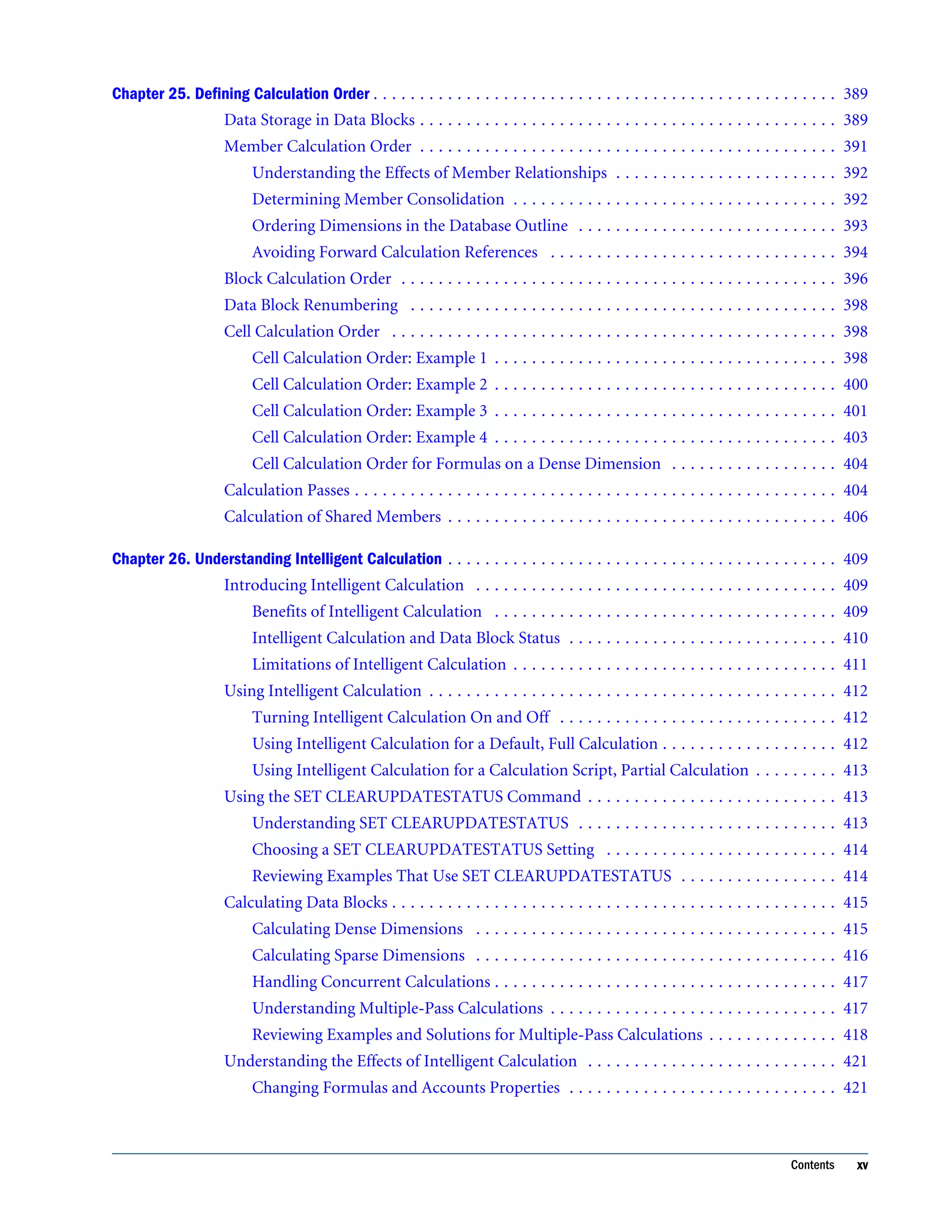
Chapter 25. Defining Calculation Order . . . . . . . . . . . . . . . . . . . . . . . . . . . . . . . . . . . . . . . . . . . . . . . . . . 389 Data Storage in Data Blocks . . . . . . . . . . . . . . . . . . . . . . . . . . . . . . . . . . . . . . . . . . . . . 389 Member Calculation Order . . . . . . . . . . . . . . . . . . . . . . . . . . . . . . . . . . . . . . . . . . . . . 391 Understanding the Effects of Member Relationships . . . . . . . . . . . . . . . . . . . . . . . . 392 Determining Member Consolidation . . . . . . . . . . . . . . . . . . . . . . . . . . . . . . . . . . . 392 Ordering Dimensions in the Database Outline . . . . . . . . . . . . . . . . . . . . . . . . . . . . 393 Avoiding Forward Calculation References . . . . . . . . . . . . . . . . . . . . . . . . . . . . . . . 394 Block Calculation Order . . . . . . . . . . . . . . . . . . . . . . . . . . . . . . . . . . . . . . . . . . . . . . . 396 Data Block Renumbering . . . . . . . . . . . . . . . . . . . . . . . . . . . . . . . . . . . . . . . . . . . . . . 398 Cell Calculation Order . . . . . . . . . . . . . . . . . . . . . . . . . . . . . . . . . . . . . . . . . . . . . . . . 398 Cell Calculation Order: Example 1 . . . . . . . . . . . . . . . . . . . . . . . . . . . . . . . . . . . . . 398 Cell Calculation Order: Example 2 . . . . . . . . . . . . . . . . . . . . . . . . . . . . . . . . . . . . . 400 Cell Calculation Order: Example 3 . . . . . . . . . . . . . . . . . . . . . . . . . . . . . . . . . . . . . 401 Cell Calculation Order: Example 4 . . . . . . . . . . . . . . . . . . . . . . . . . . . . . . . . . . . . . 403 Cell Calculation Order for Formulas on a Dense Dimension . . . . . . . . . . . . . . . . . . 404 Calculation Passes . . . . . . . . . . . . . . . . . . . . . . . . . . . . . . . . . . . . . . . . . . . . . . . . . . . . 404 Calculation of Shared Members . . . . . . . . . . . . . . . . . . . . . . . . . . . . . . . . . . . . . . . . . . 406 Chapter 26. Understanding Intelligent Calculation . . . . . . . . . . . . . . . . . . . . . . . . . . . . . . . . . . . . . . . . . . 409 Introducing Intelligent Calculation . . . . . . . . . . . . . . . . . . . . . . . . . . . . . . . . . . . . . . . 409 Benefits of Intelligent Calculation . . . . . . . . . . . . . . . . . . . . . . . . . . . . . . . . . . . . . 409 Intelligent Calculation and Data Block Status . . . . . . . . . . . . . . . . . . . . . . . . . . . . . 410 Limitations of Intelligent Calculation . . . . . . . . . . . . . . . . . . . . . . . . . . . . . . . . . . . 411 Using Intelligent Calculation . . . . . . . . . . . . . . . . . . . . . . . . . . . . . . . . . . . . . . . . . . . . 412 Turning Intelligent Calculation On and Off . . . . . . . . . . . . . . . . . . . . . . . . . . . . . . 412 Using Intelligent Calculation for a Default, Full Calculation . . . . . . . . . . . . . . . . . . . 412 Using Intelligent Calculation for a Calculation Script, Partial Calculation . . . . . . . . . 413 Using the SET CLEARUPDATESTATUS Command . . . . . . . . . . . . . . . . . . . . . . . . . . . 413 Understanding SET CLEARUPDATESTATUS . . . . . . . . . . . . . . . . . . . . . . . . . . . . 413 Choosing a SET CLEARUPDATESTATUS Setting . . . . . . . . . . . . . . . . . . . . . . . . . 414 Reviewing Examples That Use SET CLEARUPDATESTATUS . . . . . . . . . . . . . . . . . 414 Calculating Data Blocks . . . . . . . . . . . . . . . . . . . . . . . . . . . . . . . . . . . . . . . . . . . . . . . . 415 Calculating Dense Dimensions . . . . . . . . . . . . . . . . . . . . . . . . . . . . . . . . . . . . . . . 415 Calculating Sparse Dimensions . . . . . . . . . . . . . . . . . . . . . . . . . . . . . . . . . . . . . . . 416 Handling Concurrent Calculations . . . . . . . . . . . . . . . . . . . . . . . . . . . . . . . . . . . . . 417 Understanding Multiple-Pass Calculations . . . . . . . . . . . . . . . . . . . . . . . . . . . . . . . 417 Reviewing Examples and Solutions for Multiple-Pass Calculations . . . . . . . . . . . . . . 418 Understanding the Effects of Intelligent Calculation . . . . . . . . . . . . . . . . . . . . . . . . . . . 421 Changing Formulas and Accounts Properties . . . . . . . . . . . . . . . . . . . . . . . . . . . . . 421 Contents xv
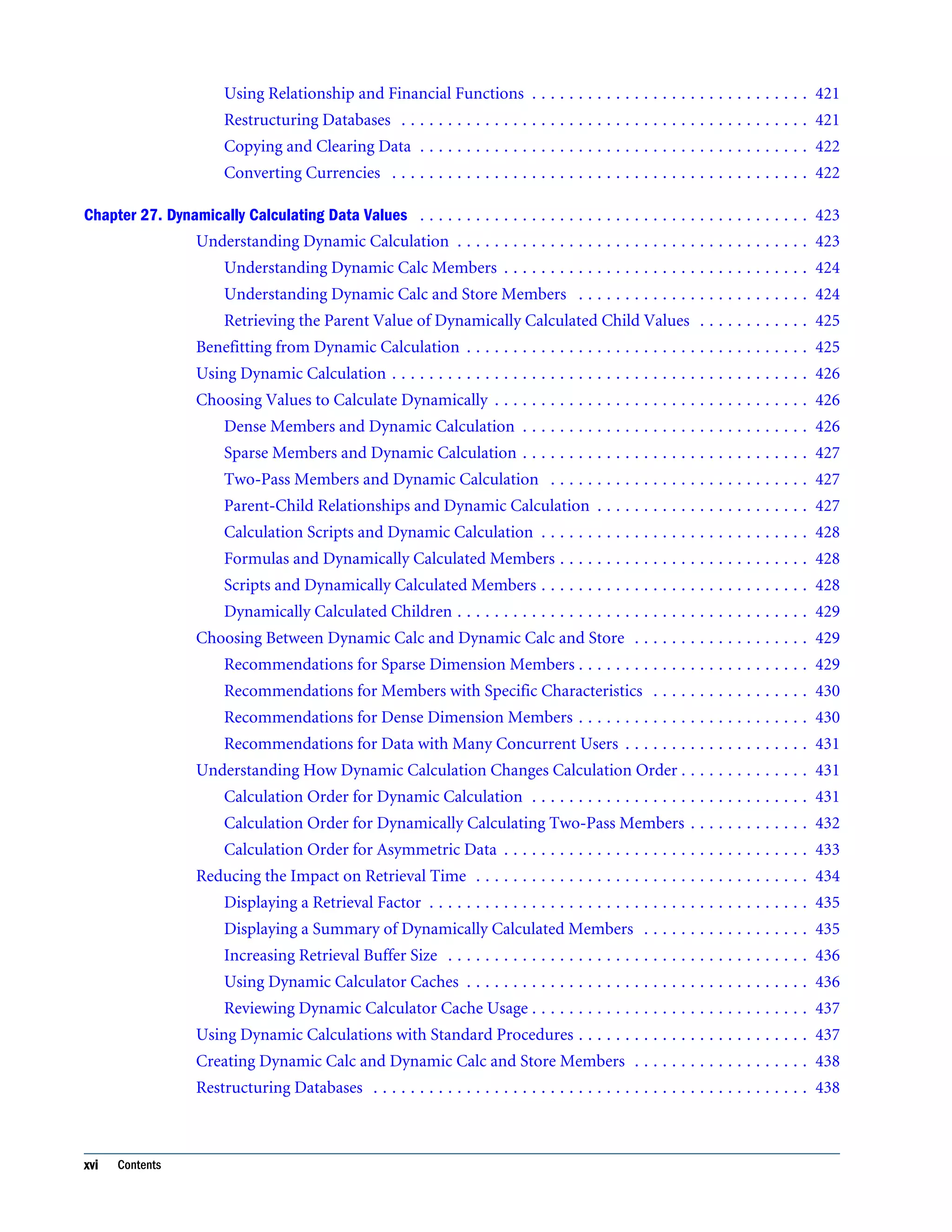
Using Relationship and Financial Functions . . . . . . . . . . . . . . . . . . . . . . . . . . . . . . 421 Restructuring Databases . . . . . . . . . . . . . . . . . . . . . . . . . . . . . . . . . . . . . . . . . . . . 421 Copying and Clearing Data . . . . . . . . . . . . . . . . . . . . . . . . . . . . . . . . . . . . . . . . . . 422 Converting Currencies . . . . . . . . . . . . . . . . . . . . . . . . . . . . . . . . . . . . . . . . . . . . . 422 Chapter 27. Dynamically Calculating Data Values . . . . . . . . . . . . . . . . . . . . . . . . . . . . . . . . . . . . . . . . . . 423 Understanding Dynamic Calculation . . . . . . . . . . . . . . . . . . . . . . . . . . . . . . . . . . . . . . 423 Understanding Dynamic Calc Members . . . . . . . . . . . . . . . . . . . . . . . . . . . . . . . . . 424 Understanding Dynamic Calc and Store Members . . . . . . . . . . . . . . . . . . . . . . . . . 424 Retrieving the Parent Value of Dynamically Calculated Child Values . . . . . . . . . . . . 425 Benefitting from Dynamic Calculation . . . . . . . . . . . . . . . . . . . . . . . . . . . . . . . . . . . . . 425 Using Dynamic Calculation . . . . . . . . . . . . . . . . . . . . . . . . . . . . . . . . . . . . . . . . . . . . . 426 Choosing Values to Calculate Dynamically . . . . . . . . . . . . . . . . . . . . . . . . . . . . . . . . . . 426 Dense Members and Dynamic Calculation . . . . . . . . . . . . . . . . . . . . . . . . . . . . . . . 426 Sparse Members and Dynamic Calculation . . . . . . . . . . . . . . . . . . . . . . . . . . . . . . . 427 Two-Pass Members and Dynamic Calculation . . . . . . . . . . . . . . . . . . . . . . . . . . . . 427 Parent-Child Relationships and Dynamic Calculation . . . . . . . . . . . . . . . . . . . . . . . 427 Calculation Scripts and Dynamic Calculation . . . . . . . . . . . . . . . . . . . . . . . . . . . . . 428 Formulas and Dynamically Calculated Members . . . . . . . . . . . . . . . . . . . . . . . . . . . 428 Scripts and Dynamically Calculated Members . . . . . . . . . . . . . . . . . . . . . . . . . . . . . 428 Dynamically Calculated Children . . . . . . . . . . . . . . . . . . . . . . . . . . . . . . . . . . . . . . 429 Choosing Between Dynamic Calc and Dynamic Calc and Store . . . . . . . . . . . . . . . . . . . 429 Recommendations for Sparse Dimension Members . . . . . . . . . . . . . . . . . . . . . . . . . 429 Recommendations for Members with Specific Characteristics . . . . . . . . . . . . . . . . . 430 Recommendations for Dense Dimension Members . . . . . . . . . . . . . . . . . . . . . . . . . 430 Recommendations for Data with Many Concurrent Users . . . . . . . . . . . . . . . . . . . . 431 Understanding How Dynamic Calculation Changes Calculation Order . . . . . . . . . . . . . . 431 Calculation Order for Dynamic Calculation . . . . . . . . . . . . . . . . . . . . . . . . . . . . . . 431 Calculation Order for Dynamically Calculating Two-Pass Members . . . . . . . . . . . . . 432 Calculation Order for Asymmetric Data . . . . . . . . . . . . . . . . . . . . . . . . . . . . . . . . . 433 Reducing the Impact on Retrieval Time . . . . . . . . . . . . . . . . . . . . . . . . . . . . . . . . . . . . 434 Displaying a Retrieval Factor . . . . . . . . . . . . . . . . . . . . . . . . . . . . . . . . . . . . . . . . . 435 Displaying a Summary of Dynamically Calculated Members . . . . . . . . . . . . . . . . . . 435 Increasing Retrieval Buffer Size . . . . . . . . . . . . . . . . . . . . . . . . . . . . . . . . . . . . . . . 436 Using Dynamic Calculator Caches . . . . . . . . . . . . . . . . . . . . . . . . . . . . . . . . . . . . . 436 Reviewing Dynamic Calculator Cache Usage . . . . . . . . . . . . . . . . . . . . . . . . . . . . . . 437 Using Dynamic Calculations with Standard Procedures . . . . . . . . . . . . . . . . . . . . . . . . . 437 Creating Dynamic Calc and Dynamic Calc and Store Members . . . . . . . . . . . . . . . . . . . 438 Restructuring Databases . . . . . . . . . . . . . . . . . . . . . . . . . . . . . . . . . . . . . . . . . . . . . . . 438 xvi Contents
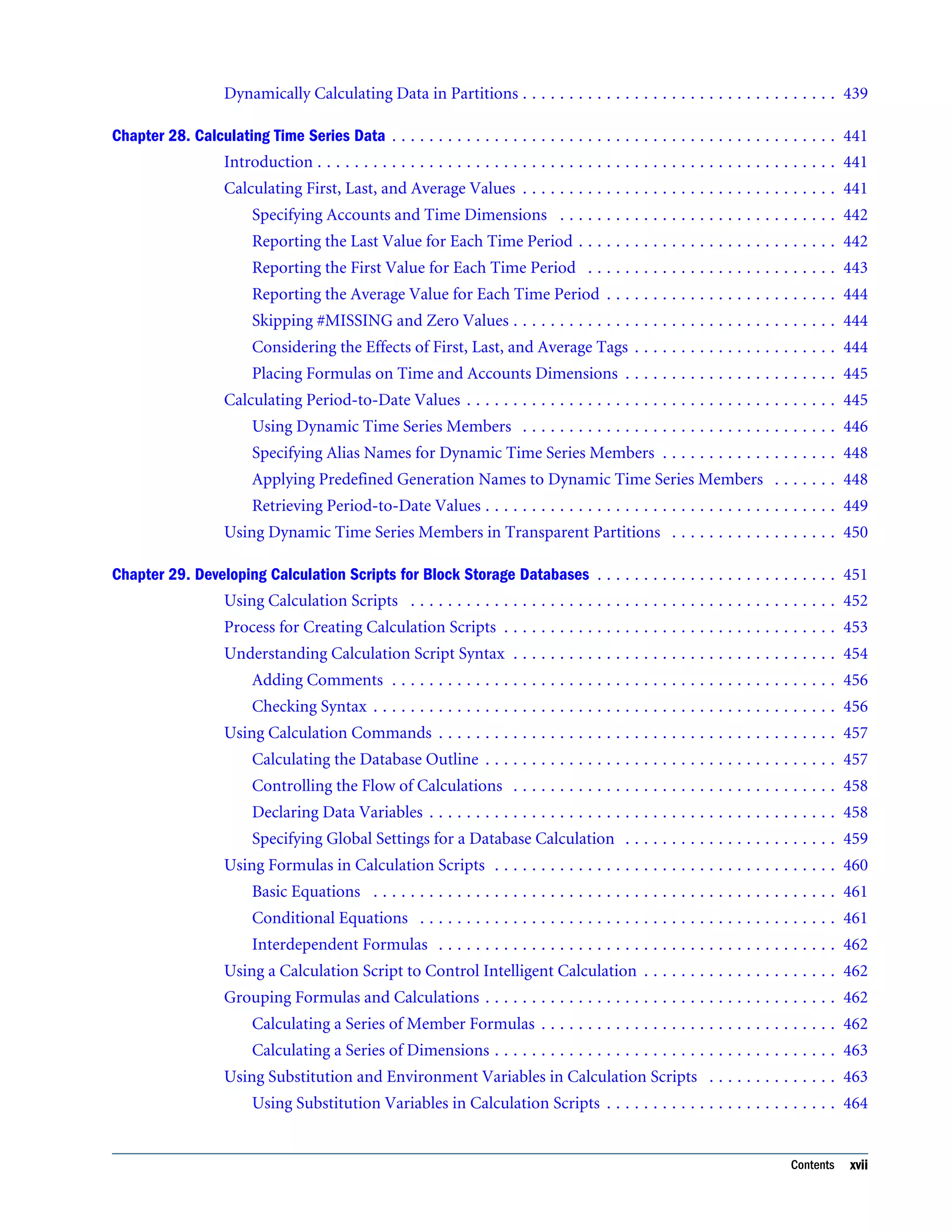
Dynamically Calculating Data in Partitions . . . . . . . . . . . . . . . . . . . . . . . . . . . . . . . . . . 439 Chapter 28. Calculating Time Series Data . . . . . . . . . . . . . . . . . . . . . . . . . . . . . . . . . . . . . . . . . . . . . . . . 441 Introduction . . . . . . . . . . . . . . . . . . . . . . . . . . . . . . . . . . . . . . . . . . . . . . . . . . . . . . . . 441 Calculating First, Last, and Average Values . . . . . . . . . . . . . . . . . . . . . . . . . . . . . . . . . . 441 Specifying Accounts and Time Dimensions . . . . . . . . . . . . . . . . . . . . . . . . . . . . . . 442 Reporting the Last Value for Each Time Period . . . . . . . . . . . . . . . . . . . . . . . . . . . . 442 Reporting the First Value for Each Time Period . . . . . . . . . . . . . . . . . . . . . . . . . . . 443 Reporting the Average Value for Each Time Period . . . . . . . . . . . . . . . . . . . . . . . . . 444 Skipping #MISSING and Zero Values . . . . . . . . . . . . . . . . . . . . . . . . . . . . . . . . . . . 444 Considering the Effects of First, Last, and Average Tags . . . . . . . . . . . . . . . . . . . . . . 444 Placing Formulas on Time and Accounts Dimensions . . . . . . . . . . . . . . . . . . . . . . . 445 Calculating Period-to-Date Values . . . . . . . . . . . . . . . . . . . . . . . . . . . . . . . . . . . . . . . . 445 Using Dynamic Time Series Members . . . . . . . . . . . . . . . . . . . . . . . . . . . . . . . . . . 446 Specifying Alias Names for Dynamic Time Series Members . . . . . . . . . . . . . . . . . . . 448 Applying Predefined Generation Names to Dynamic Time Series Members . . . . . . . 448 Retrieving Period-to-Date Values . . . . . . . . . . . . . . . . . . . . . . . . . . . . . . . . . . . . . . 449 Using Dynamic Time Series Members in Transparent Partitions . . . . . . . . . . . . . . . . . . 450 Chapter 29. Developing Calculation Scripts for Block Storage Databases . . . . . . . . . . . . . . . . . . . . . . . . . . 451 Using Calculation Scripts . . . . . . . . . . . . . . . . . . . . . . . . . . . . . . . . . . . . . . . . . . . . . . 452 Process for Creating Calculation Scripts . . . . . . . . . . . . . . . . . . . . . . . . . . . . . . . . . . . . 453 Understanding Calculation Script Syntax . . . . . . . . . . . . . . . . . . . . . . . . . . . . . . . . . . . 454 Adding Comments . . . . . . . . . . . . . . . . . . . . . . . . . . . . . . . . . . . . . . . . . . . . . . . . 456 Checking Syntax . . . . . . . . . . . . . . . . . . . . . . . . . . . . . . . . . . . . . . . . . . . . . . . . . . 456 Using Calculation Commands . . . . . . . . . . . . . . . . . . . . . . . . . . . . . . . . . . . . . . . . . . . 457 Calculating the Database Outline . . . . . . . . . . . . . . . . . . . . . . . . . . . . . . . . . . . . . . 457 Controlling the Flow of Calculations . . . . . . . . . . . . . . . . . . . . . . . . . . . . . . . . . . . 458 Declaring Data Variables . . . . . . . . . . . . . . . . . . . . . . . . . . . . . . . . . . . . . . . . . . . . 458 Specifying Global Settings for a Database Calculation . . . . . . . . . . . . . . . . . . . . . . . 459 Using Formulas in Calculation Scripts . . . . . . . . . . . . . . . . . . . . . . . . . . . . . . . . . . . . . 460 Basic Equations . . . . . . . . . . . . . . . . . . . . . . . . . . . . . . . . . . . . . . . . . . . . . . . . . . 461 Conditional Equations . . . . . . . . . . . . . . . . . . . . . . . . . . . . . . . . . . . . . . . . . . . . . 461 Interdependent Formulas . . . . . . . . . . . . . . . . . . . . . . . . . . . . . . . . . . . . . . . . . . . 462 Using a Calculation Script to Control Intelligent Calculation . . . . . . . . . . . . . . . . . . . . . 462 Grouping Formulas and Calculations . . . . . . . . . . . . . . . . . . . . . . . . . . . . . . . . . . . . . . 462 Calculating a Series of Member Formulas . . . . . . . . . . . . . . . . . . . . . . . . . . . . . . . . 462 Calculating a Series of Dimensions . . . . . . . . . . . . . . . . . . . . . . . . . . . . . . . . . . . . . 463 Using Substitution and Environment Variables in Calculation Scripts . . . . . . . . . . . . . . 463 Using Substitution Variables in Calculation Scripts . . . . . . . . . . . . . . . . . . . . . . . . . 464 Contents xvii
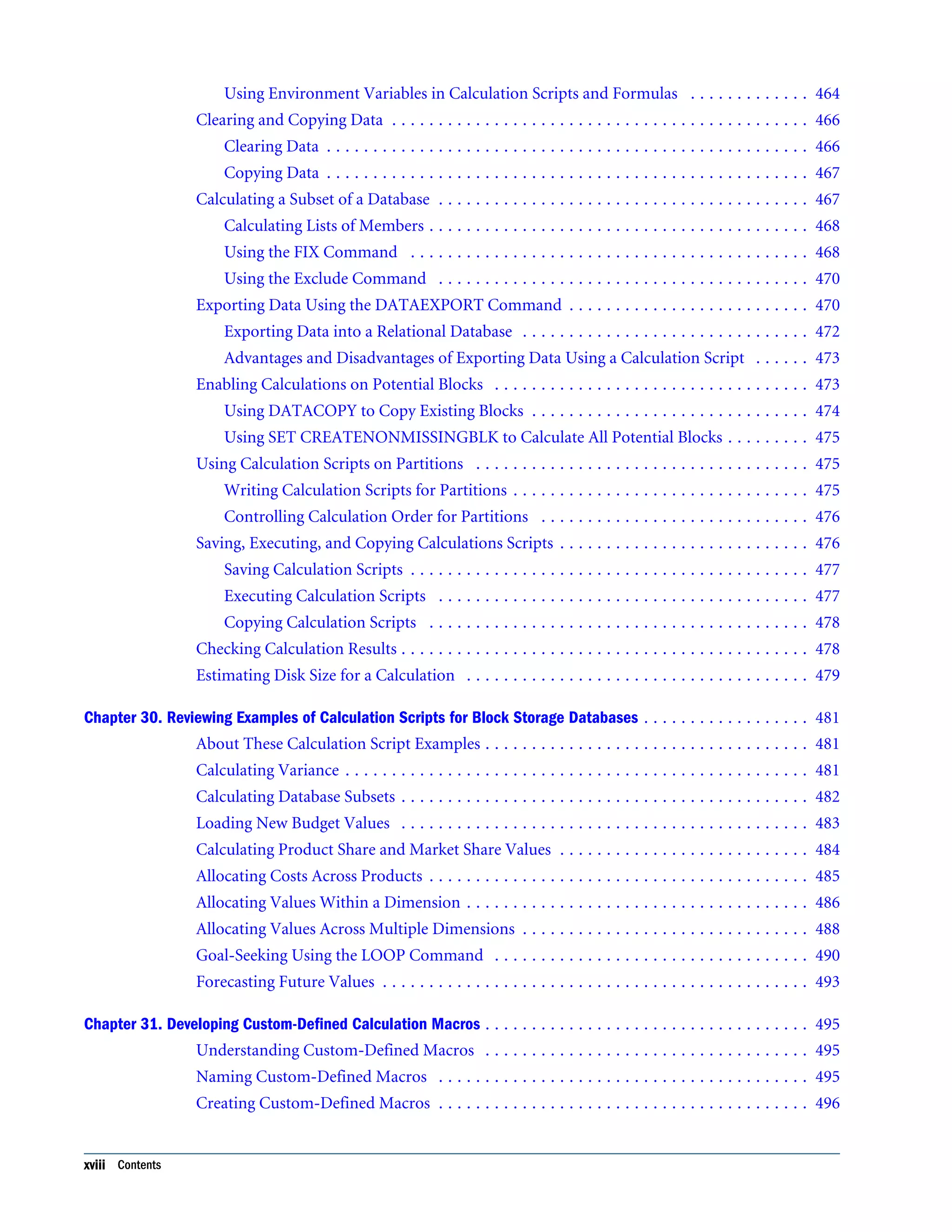
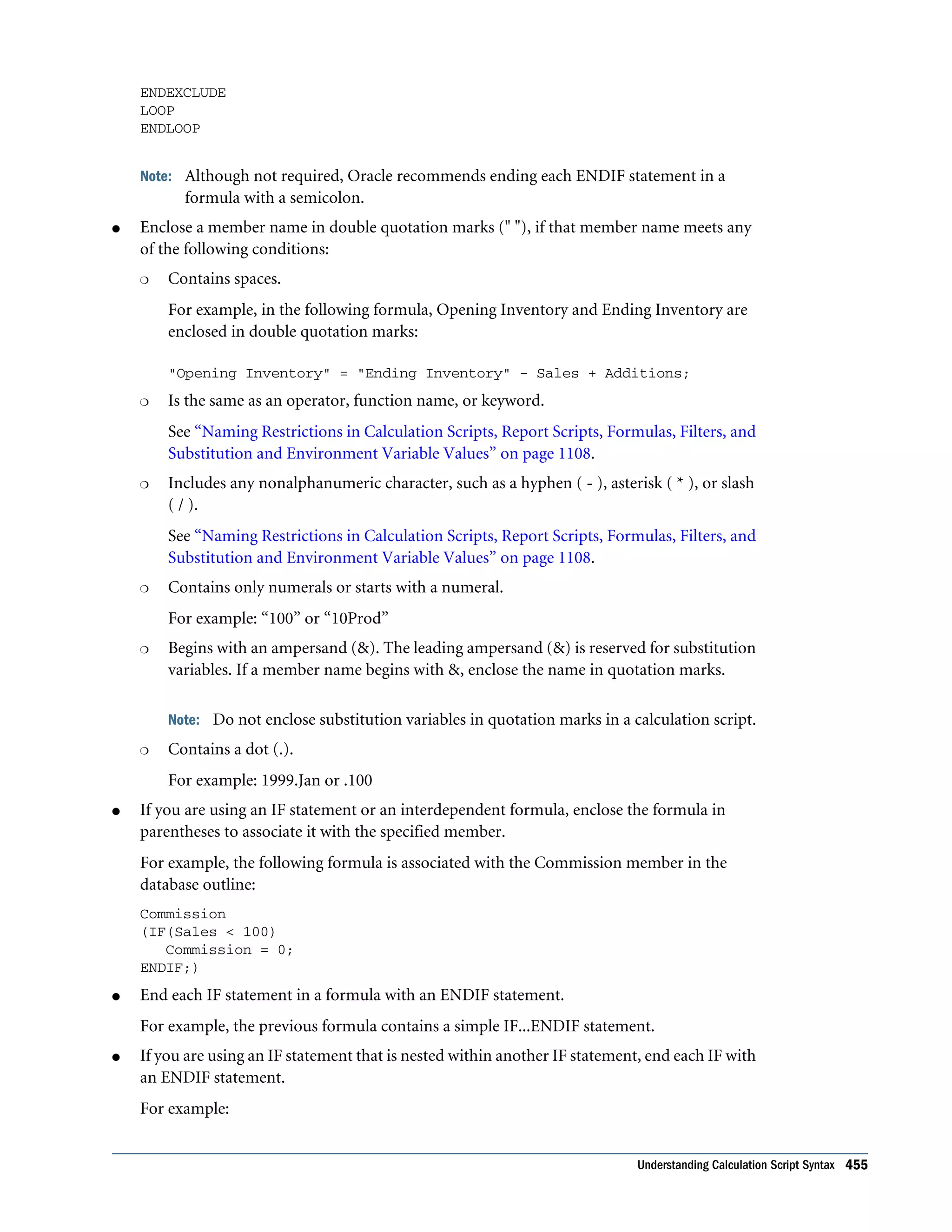
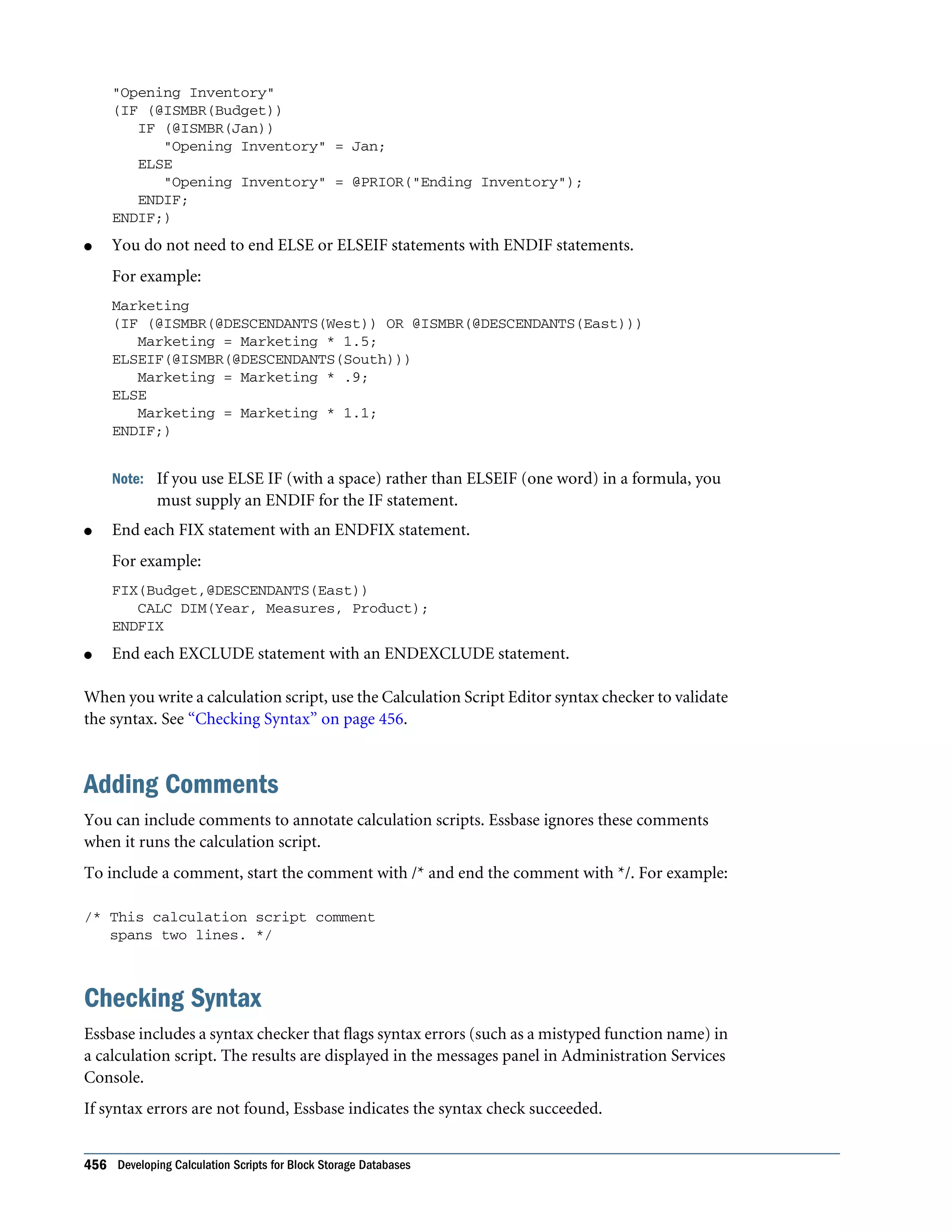
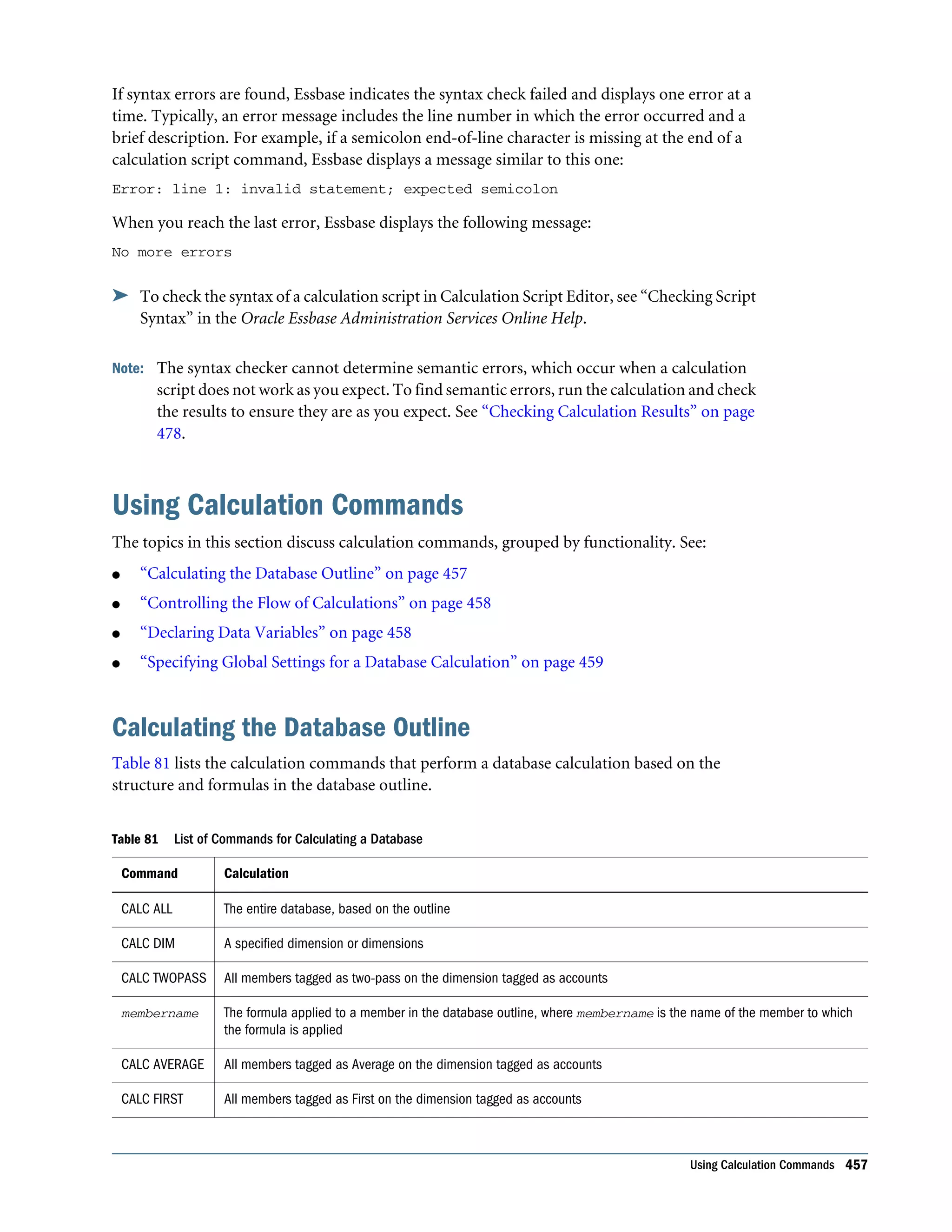
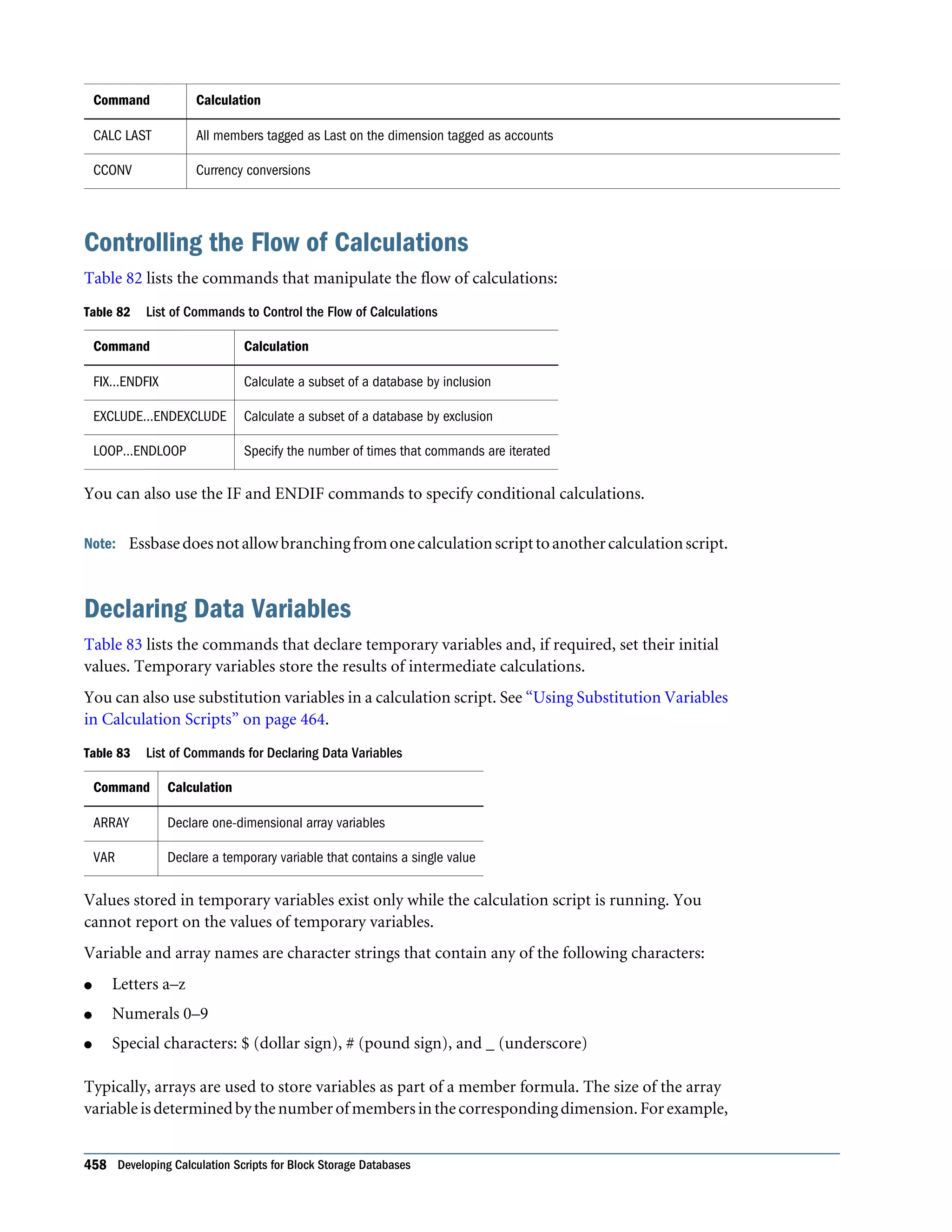
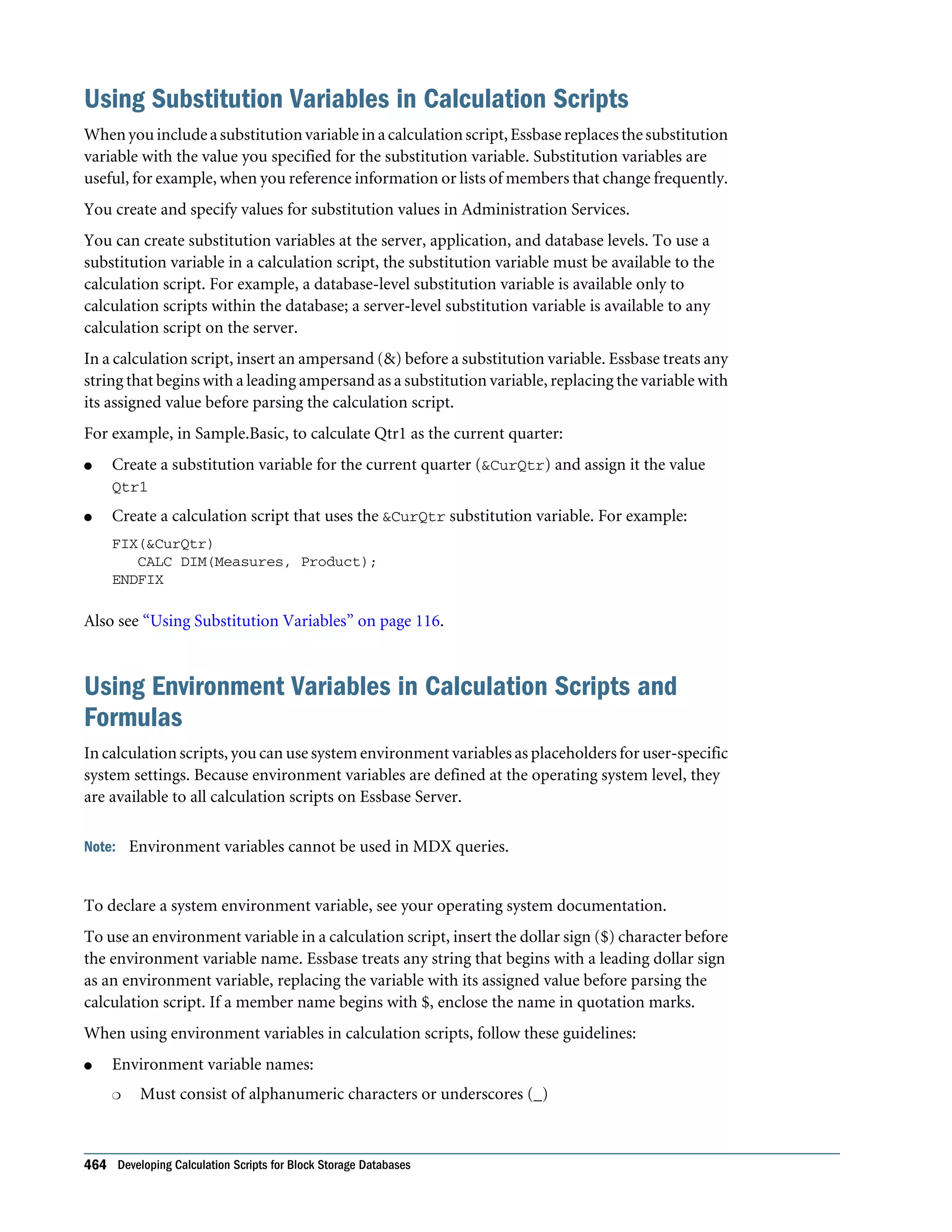
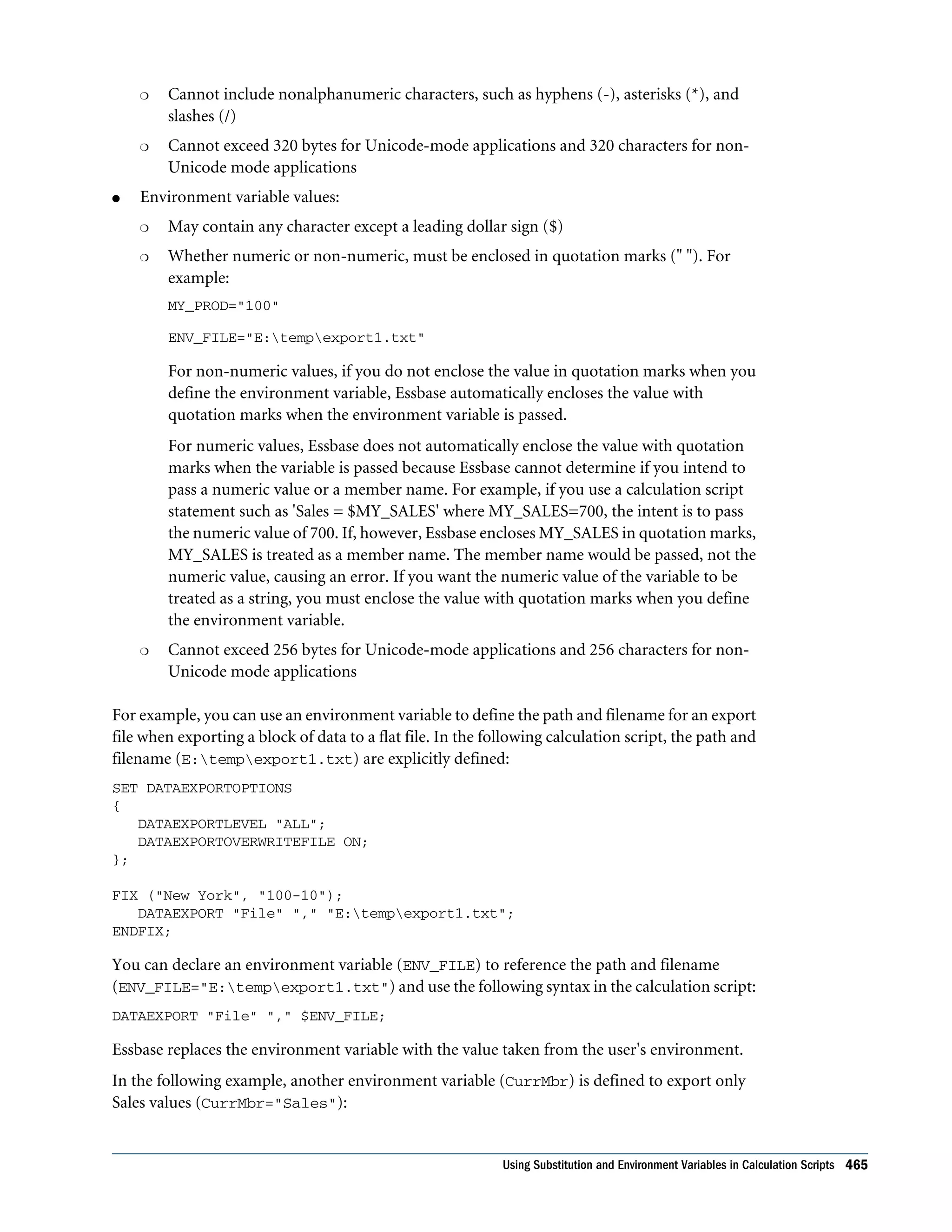
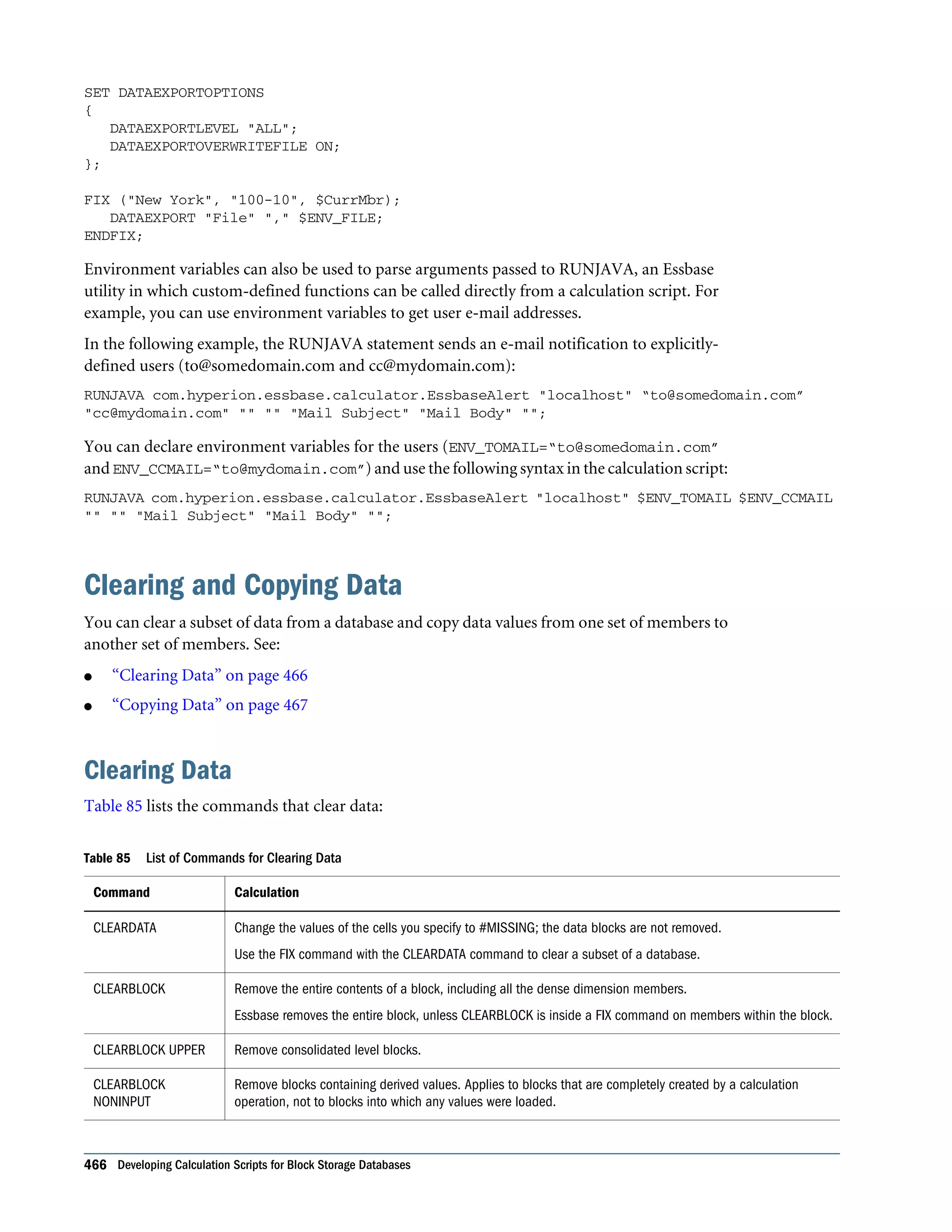
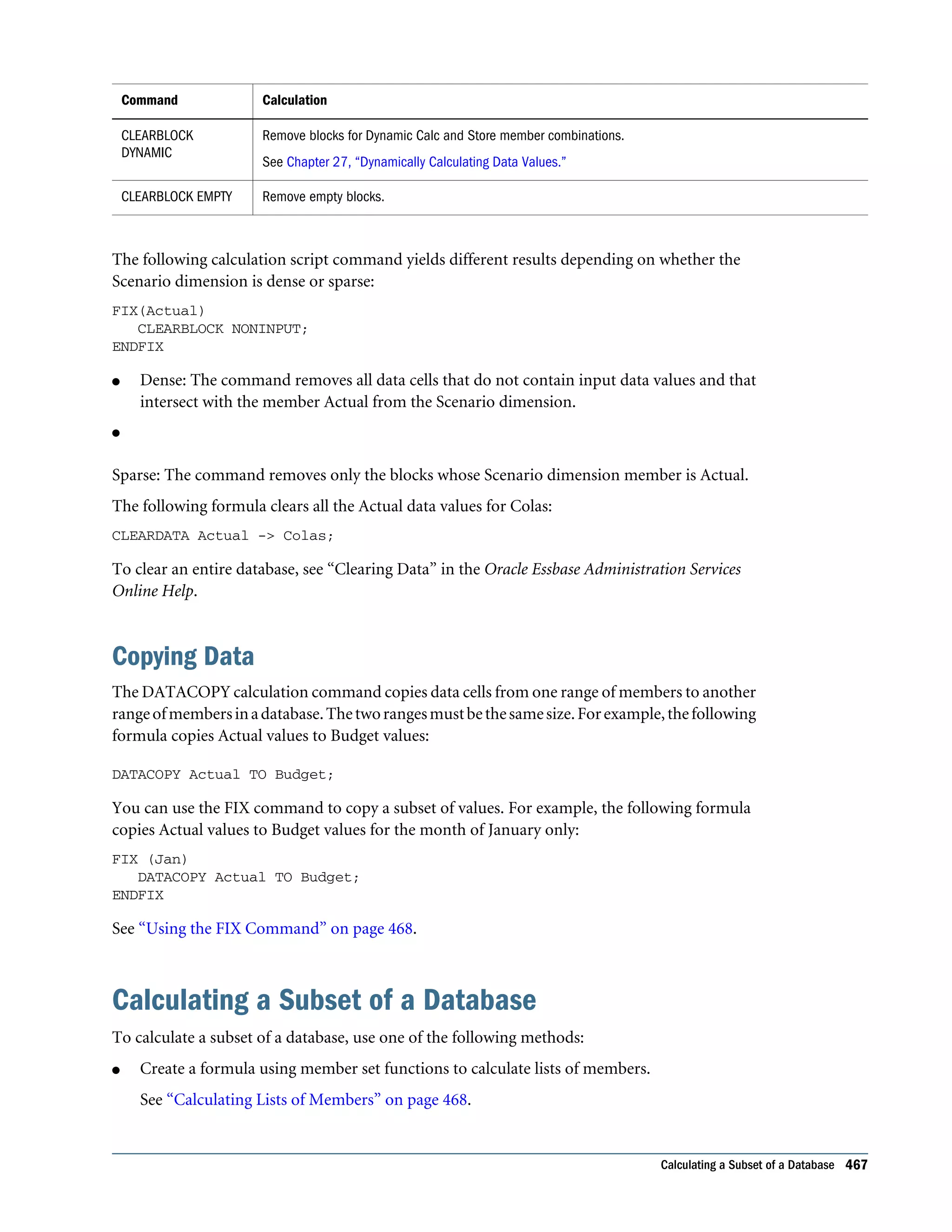
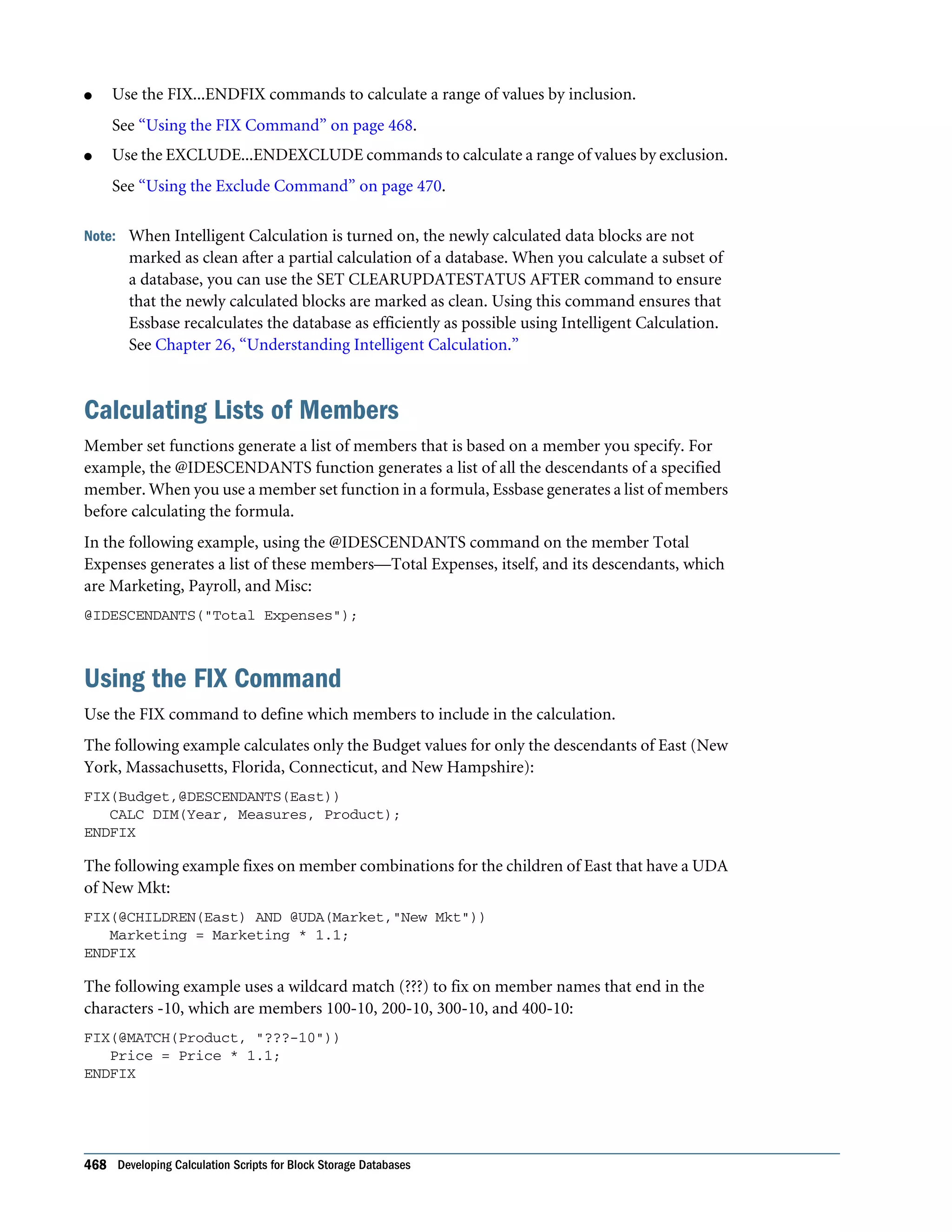
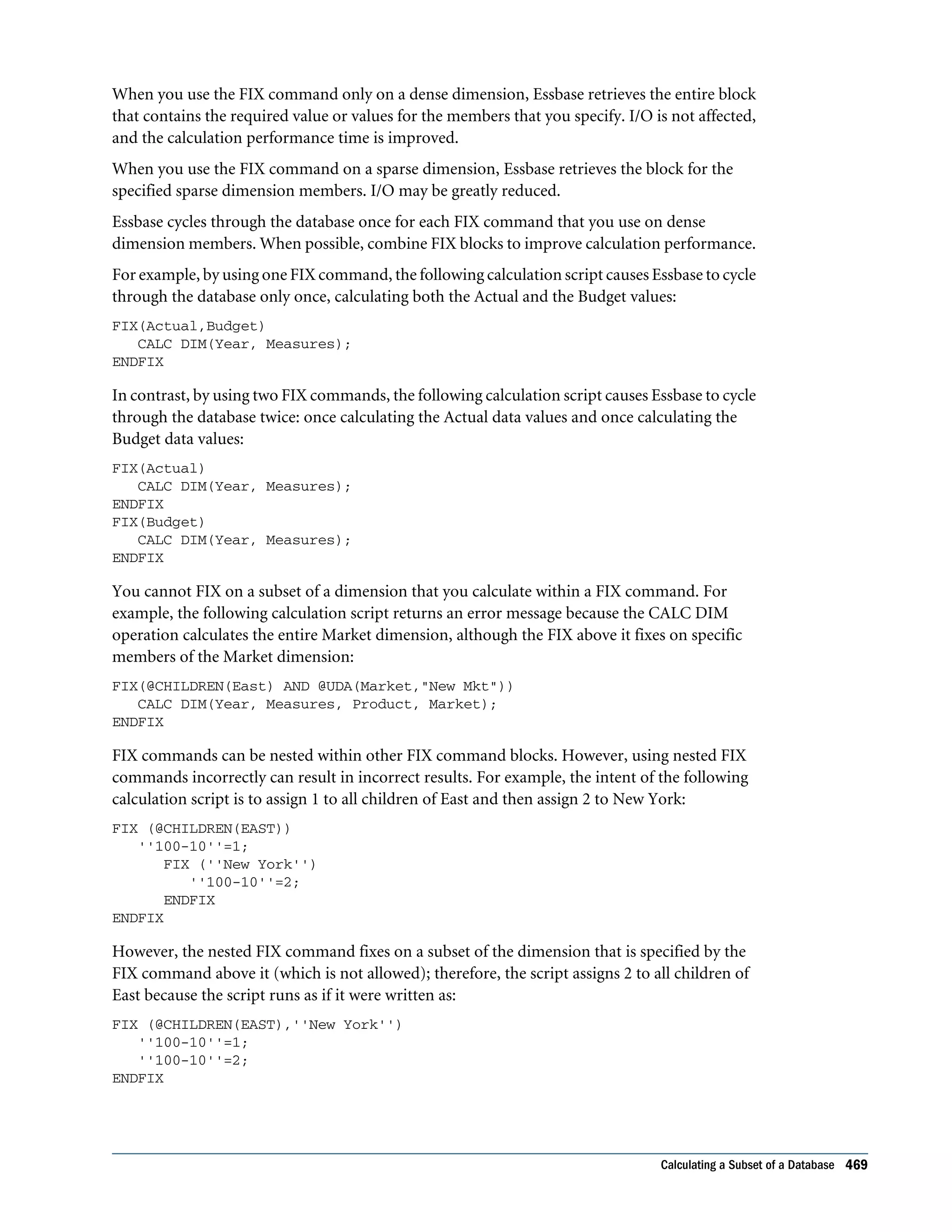
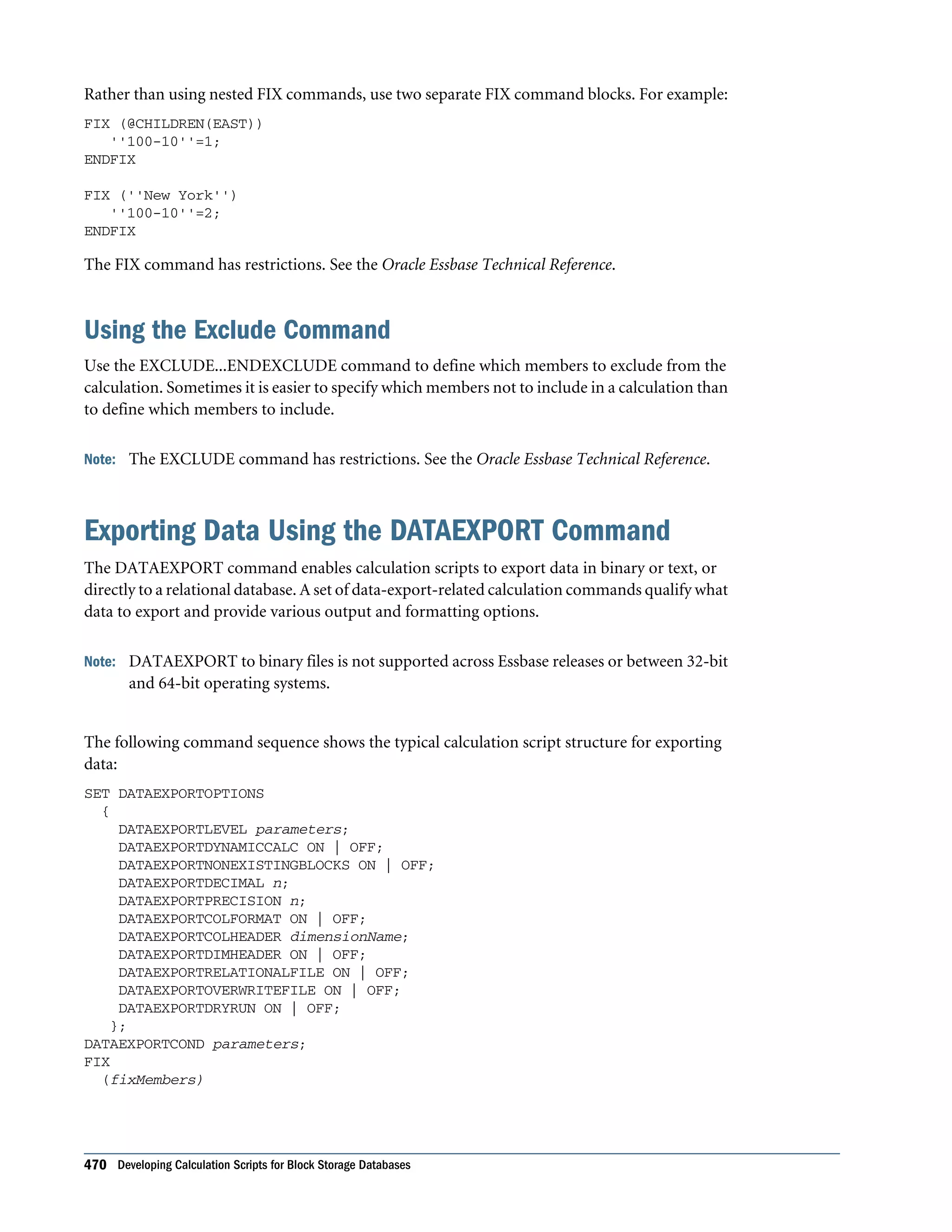
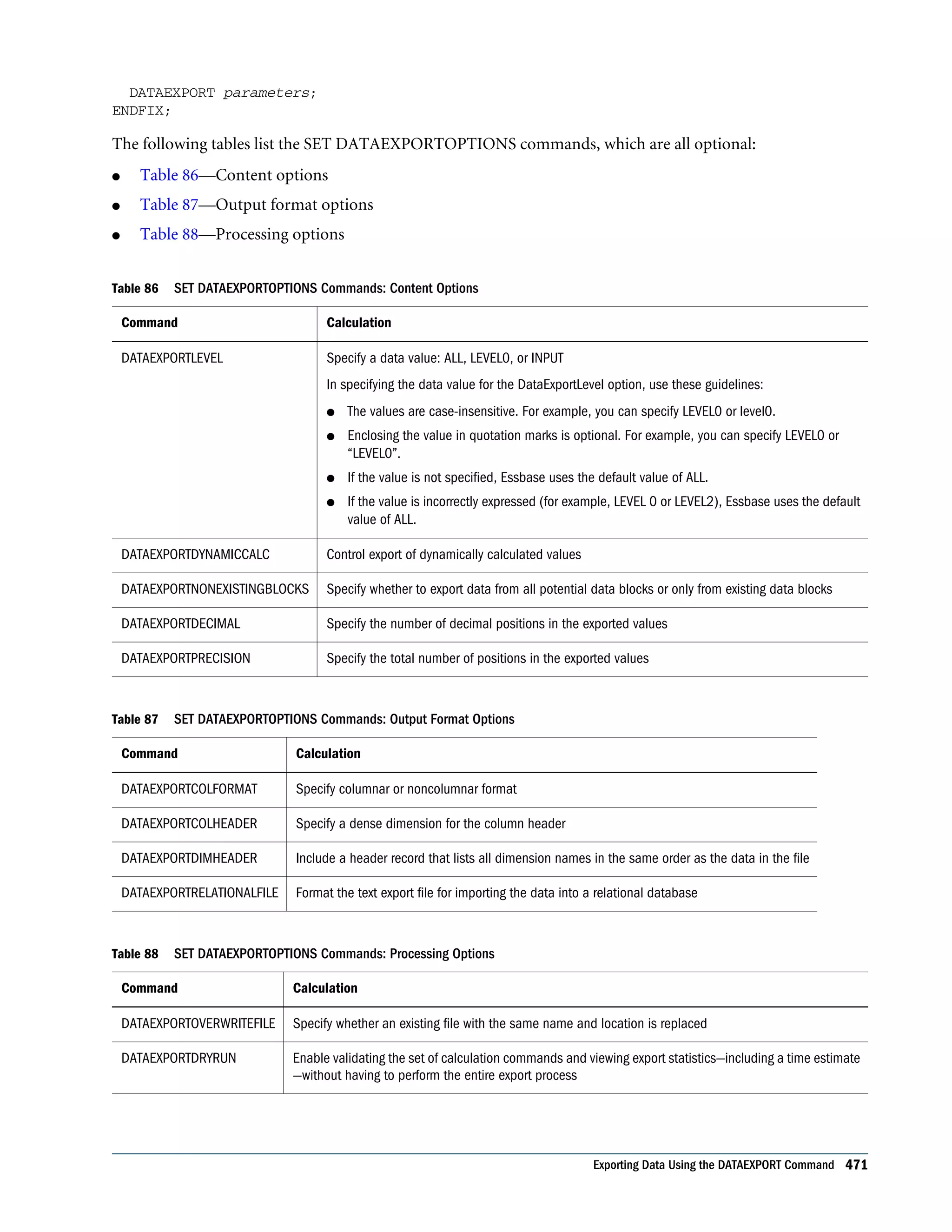
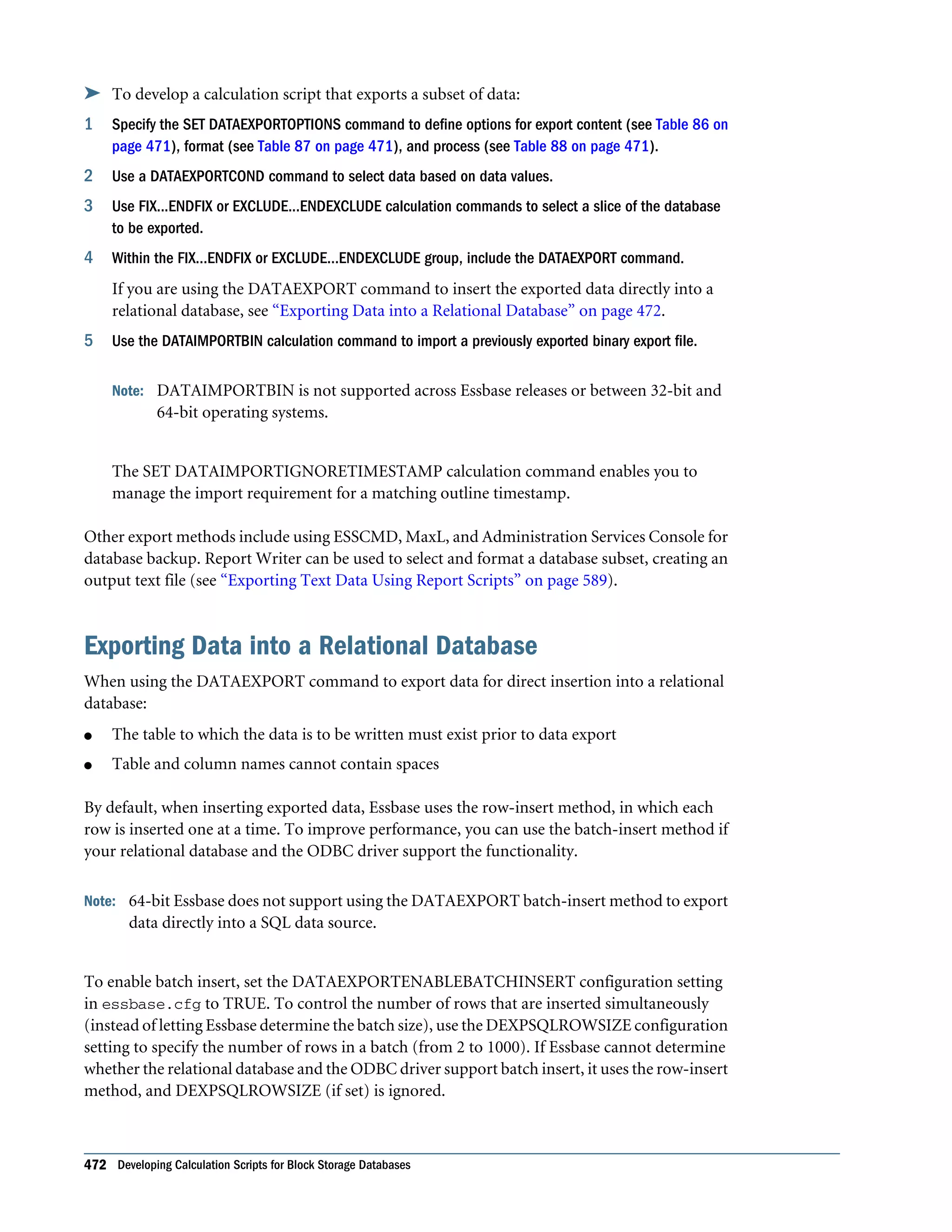
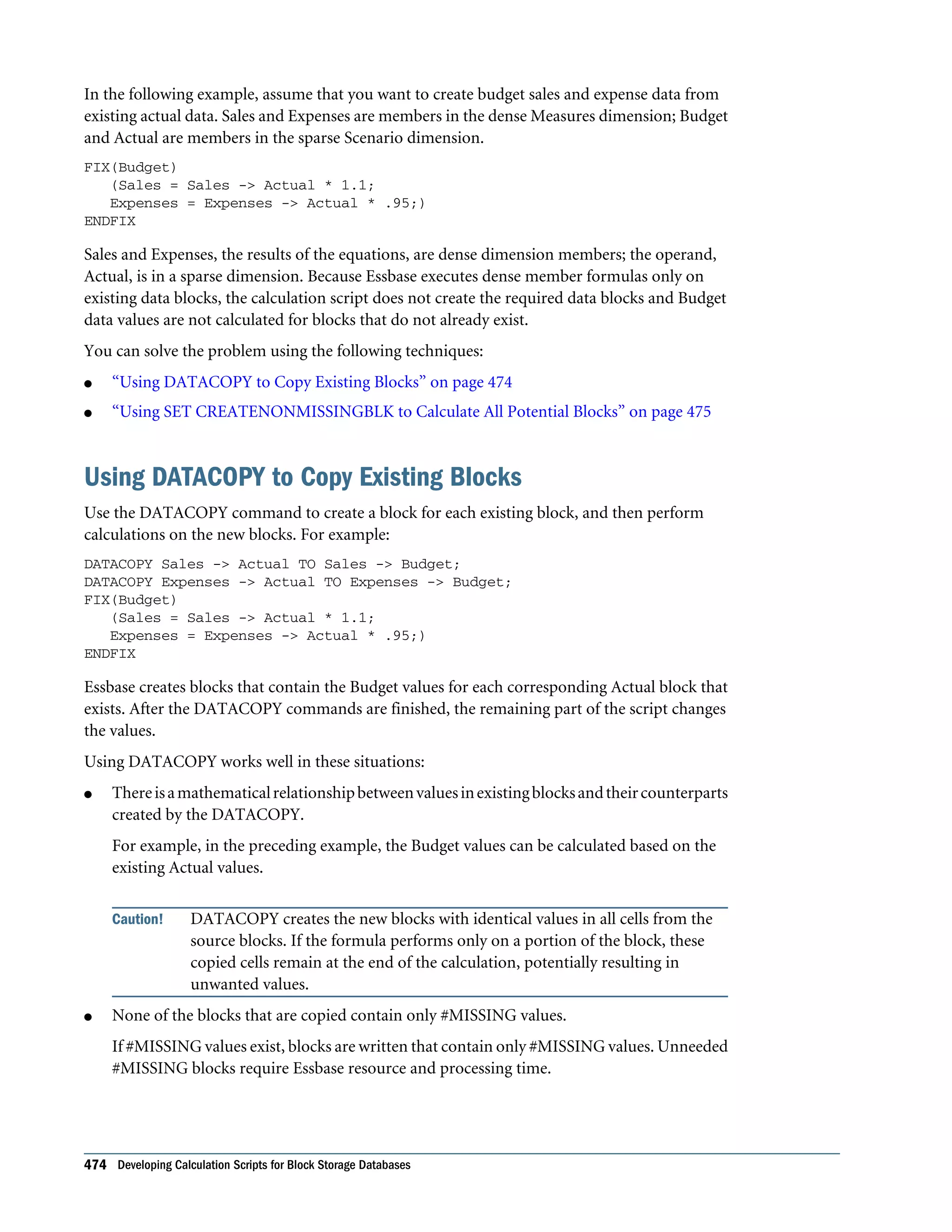
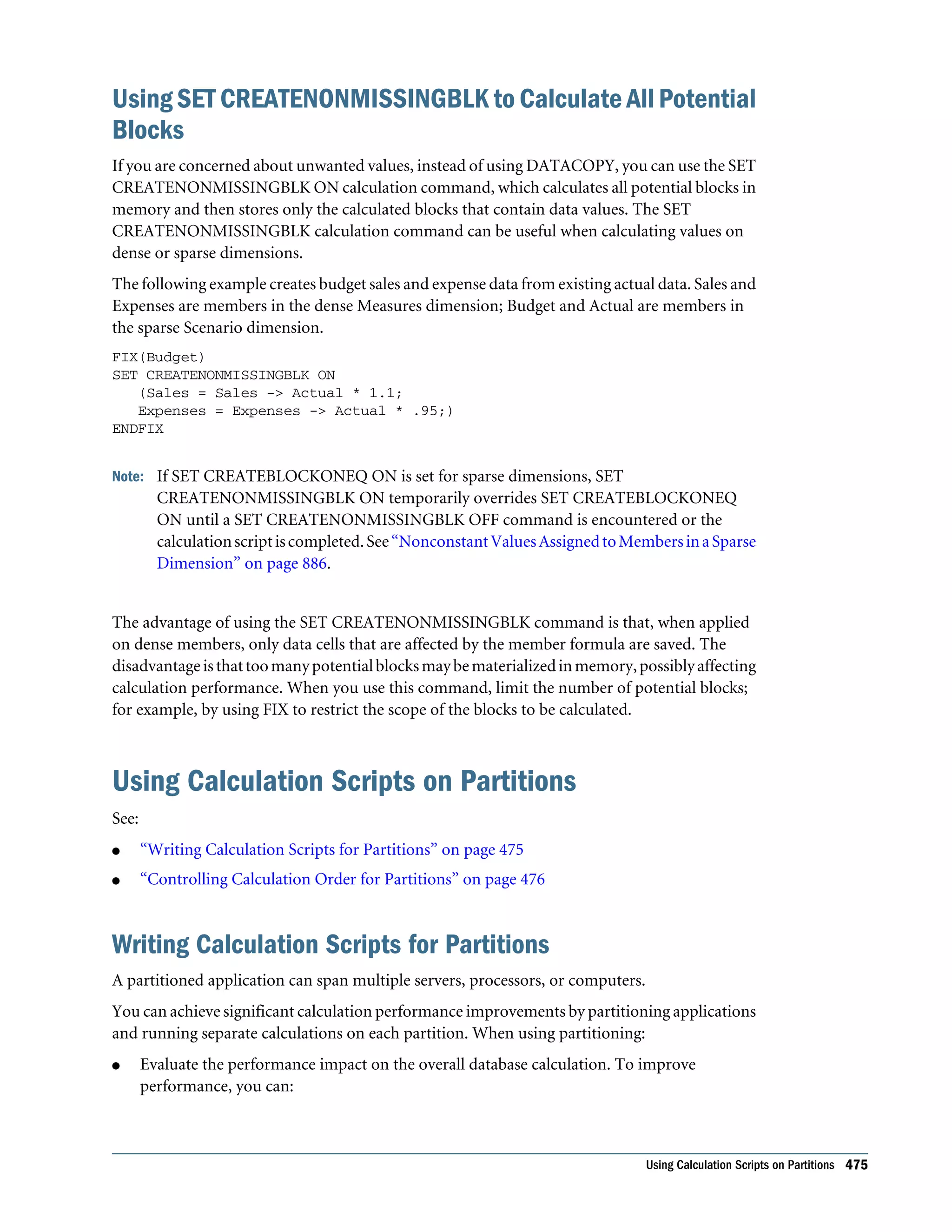
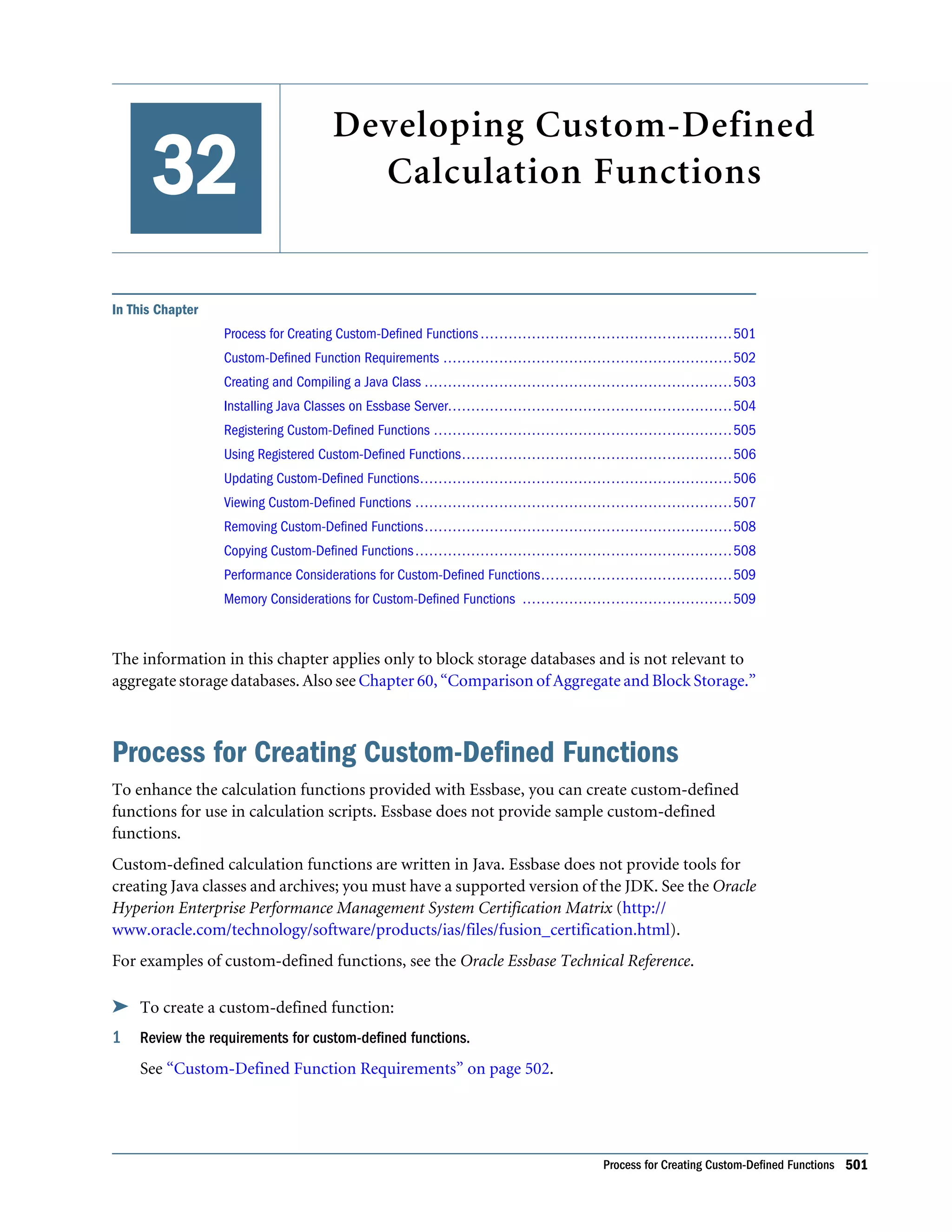
Using Environment Variables in Calculation Scripts and Formulas . . . . . . . . . . . . . 464 Clearing and Copying Data . . . . . . . . . . . . . . . . . . . . . . . . . . . . . . . . . . . . . . . . . . . . . 466 Clearing Data . . . . . . . . . . . . . . . . . . . . . . . . . . . . . . . . . . . . . . . . . . . . . . . . . . . . 466 Copying Data . . . . . . . . . . . . . . . . . . . . . . . . . . . . . . . . . . . . . . . . . . . . . . . . . . . . 467 Calculating a Subset of a Database . . . . . . . . . . . . . . . . . . . . . . . . . . . . . . . . . . . . . . . . 467 Calculating Lists of Members . . . . . . . . . . . . . . . . . . . . . . . . . . . . . . . . . . . . . . . . . 468 Using the FIX Command . . . . . . . . . . . . . . . . . . . . . . . . . . . . . . . . . . . . . . . . . . . 468 Using the Exclude Command . . . . . . . . . . . . . . . . . . . . . . . . . . . . . . . . . . . . . . . . 470 Exporting Data Using the DATAEXPORT Command . . . . . . . . . . . . . . . . . . . . . . . . . . 470 Exporting Data into a Relational Database . . . . . . . . . . . . . . . . . . . . . . . . . . . . . . . 472 Advantages and Disadvantages of Exporting Data Using a Calculation Script . . . . . . 473 Enabling Calculations on Potential Blocks . . . . . . . . . . . . . . . . . . . . . . . . . . . . . . . . . . 473 Using DATACOPY to Copy Existing Blocks . . . . . . . . . . . . . . . . . . . . . . . . . . . . . . 474 Using SET CREATENONMISSINGBLK to Calculate All Potential Blocks . . . . . . . . . 475 Using Calculation Scripts on Partitions . . . . . . . . . . . . . . . . . . . . . . . . . . . . . . . . . . . . 475 Writing Calculation Scripts for Partitions . . . . . . . . . . . . . . . . . . . . . . . . . . . . . . . . 475 Controlling Calculation Order for Partitions . . . . . . . . . . . . . . . . . . . . . . . . . . . . . 476 Saving, Executing, and Copying Calculations Scripts . . . . . . . . . . . . . . . . . . . . . . . . . . . 476 Saving Calculation Scripts . . . . . . . . . . . . . . . . . . . . . . . . . . . . . . . . . . . . . . . . . . . 477 Executing Calculation Scripts . . . . . . . . . . . . . . . . . . . . . . . . . . . . . . . . . . . . . . . . 477 Copying Calculation Scripts . . . . . . . . . . . . . . . . . . . . . . . . . . . . . . . . . . . . . . . . . 478 Checking Calculation Results . . . . . . . . . . . . . . . . . . . . . . . . . . . . . . . . . . . . . . . . . . . . 478 Estimating Disk Size for a Calculation . . . . . . . . . . . . . . . . . . . . . . . . . . . . . . . . . . . . . 479 Chapter 30. Reviewing Examples of Calculation Scripts for Block Storage Databases . . . . . . . . . . . . . . . . . . 481 About These Calculation Script Examples . . . . . . . . . . . . . . . . . . . . . . . . . . . . . . . . . . . 481 Calculating Variance . . . . . . . . . . . . . . . . . . . . . . . . . . . . . . . . . . . . . . . . . . . . . . . . . . 481 Calculating Database Subsets . . . . . . . . . . . . . . . . . . . . . . . . . . . . . . . . . . . . . . . . . . . . 482 Loading New Budget Values . . . . . . . . . . . . . . . . . . . . . . . . . . . . . . . . . . . . . . . . . . . . 483 Calculating Product Share and Market Share Values . . . . . . . . . . . . . . . . . . . . . . . . . . . 484 Allocating Costs Across Products . . . . . . . . . . . . . . . . . . . . . . . . . . . . . . . . . . . . . . . . . 485 Allocating Values Within a Dimension . . . . . . . . . . . . . . . . . . . . . . . . . . . . . . . . . . . . . 486 Allocating Values Across Multiple Dimensions . . . . . . . . . . . . . . . . . . . . . . . . . . . . . . . 488 Goal-Seeking Using the LOOP Command . . . . . . . . . . . . . . . . . . . . . . . . . . . . . . . . . . 490 Forecasting Future Values . . . . . . . . . . . . . . . . . . . . . . . . . . . . . . . . . . . . . . . . . . . . . . 493 Chapter 31. Developing Custom-Defined Calculation Macros . . . . . . . . . . . . . . . . . . . . . . . . . . . . . . . . . . . 495 Understanding Custom-Defined Macros . . . . . . . . . . . . . . . . . . . . . . . . . . . . . . . . . . . 495 Naming Custom-Defined Macros . . . . . . . . . . . . . . . . . . . . . . . . . . . . . . . . . . . . . . . . 495 Creating Custom-Defined Macros . . . . . . . . . . . . . . . . . . . . . . . . . . . . . . . . . . . . . . . . 496 xviii Contents
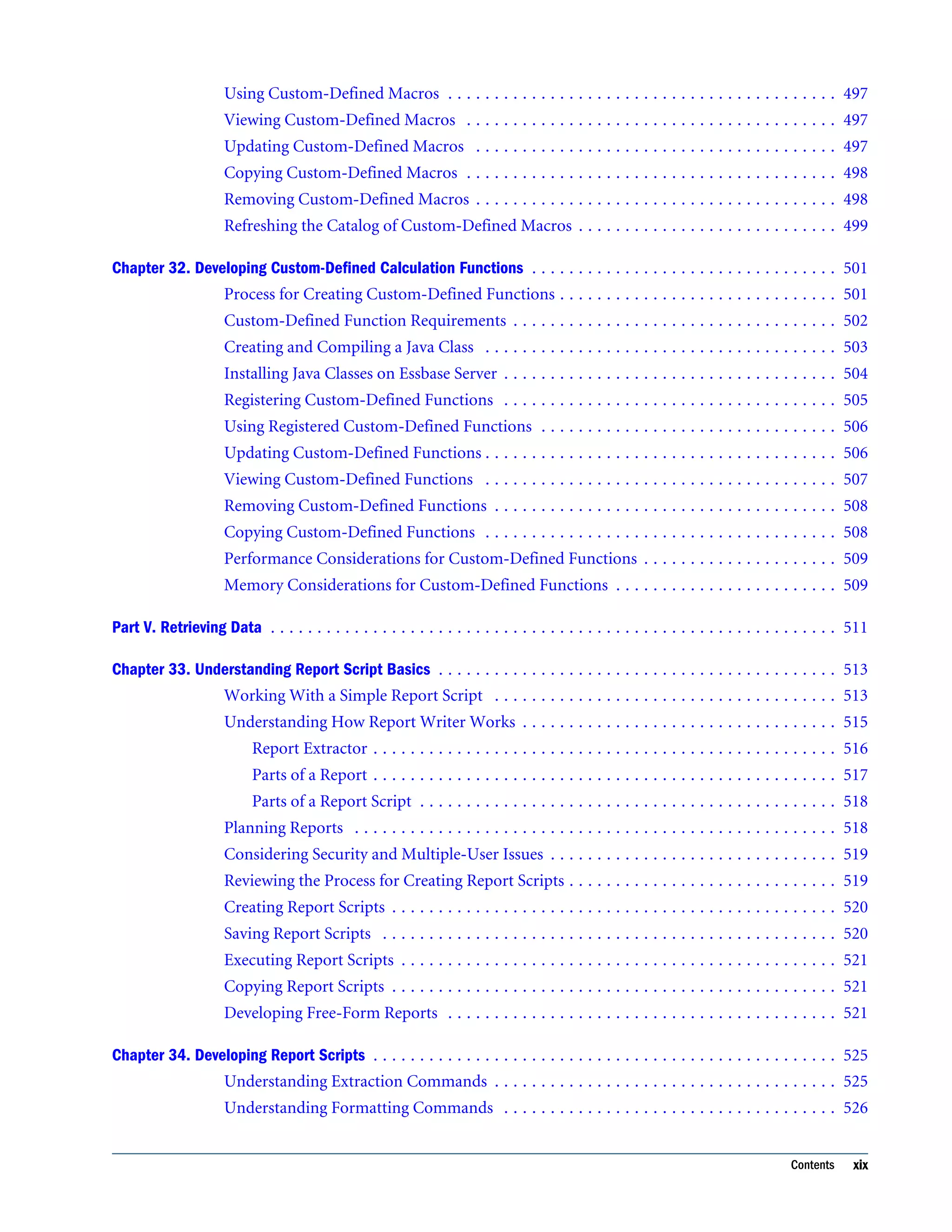
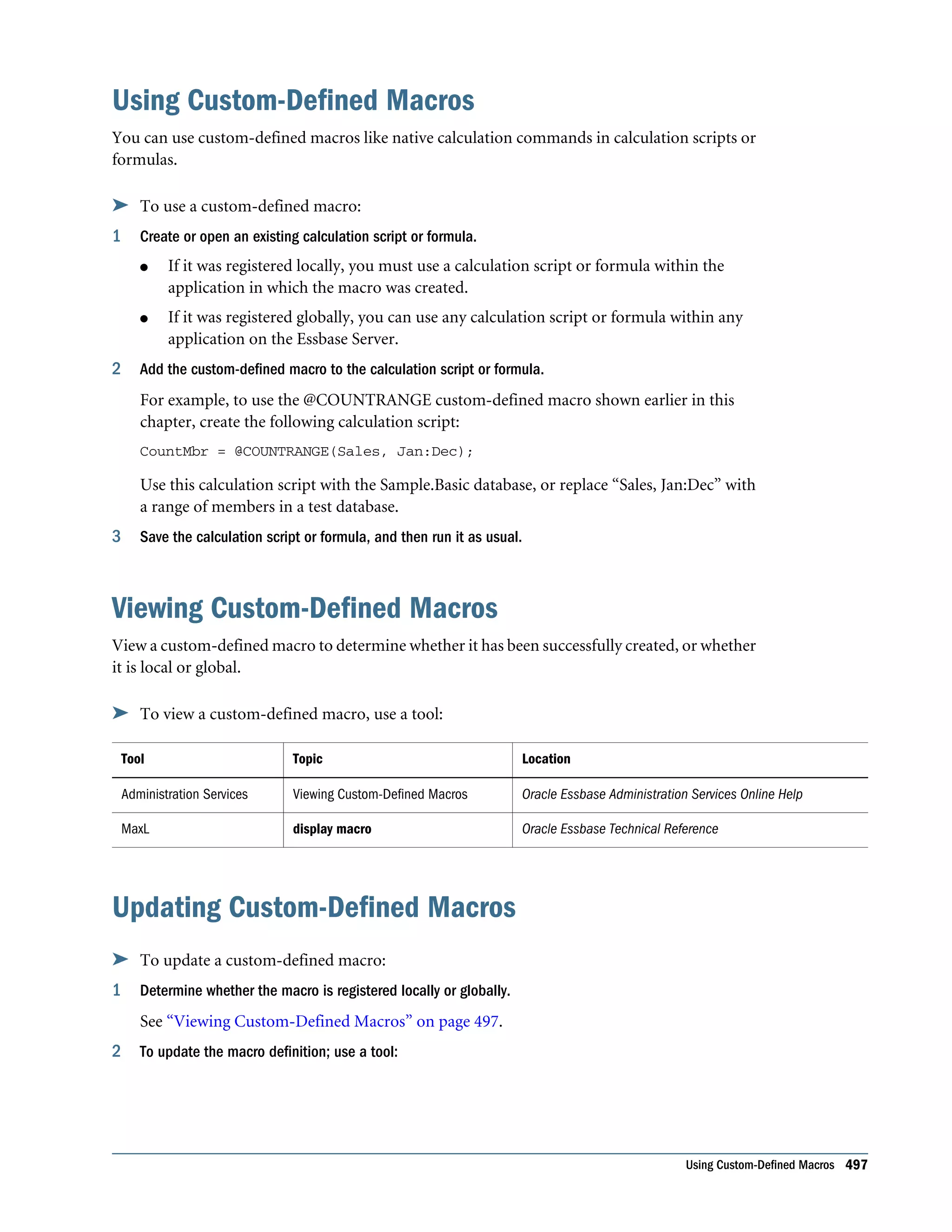
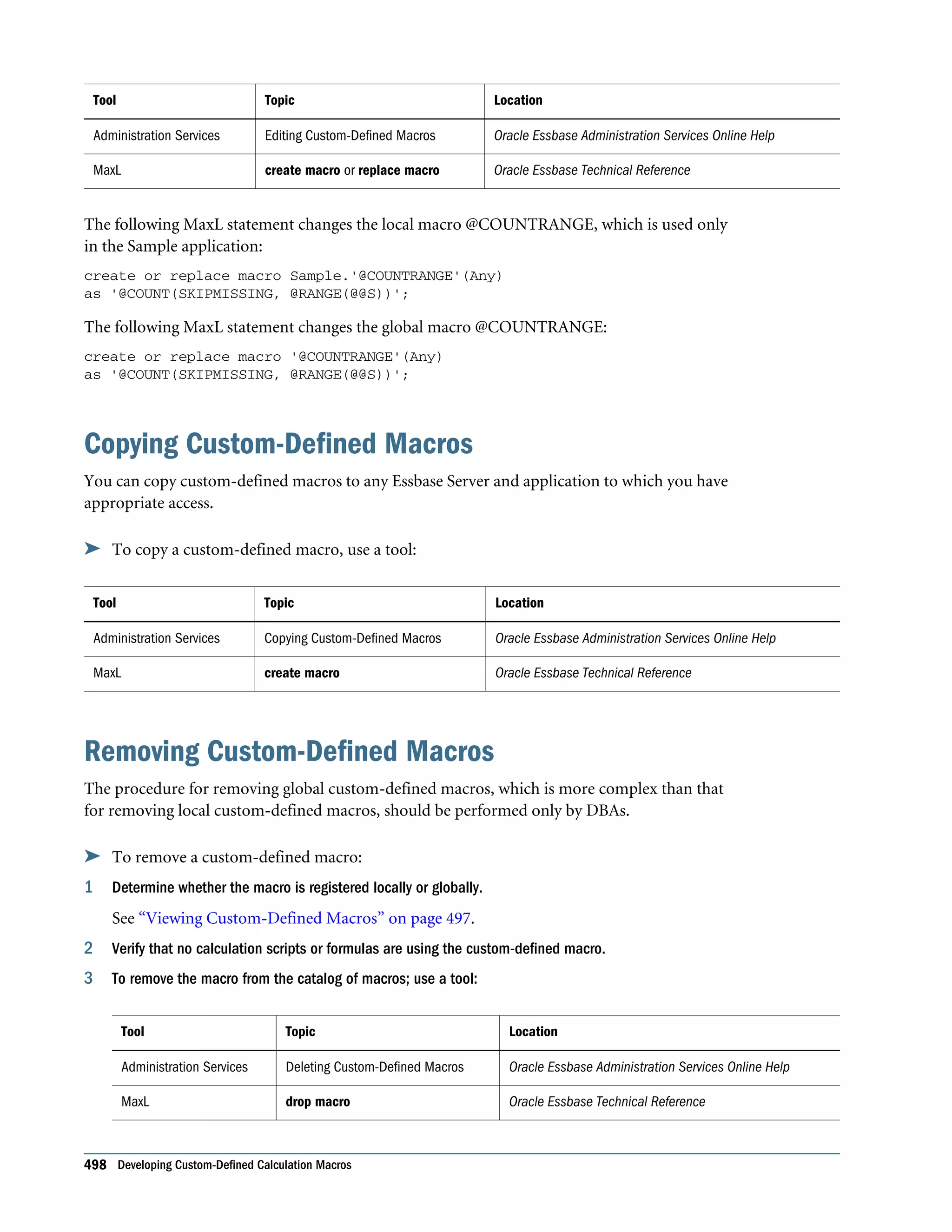
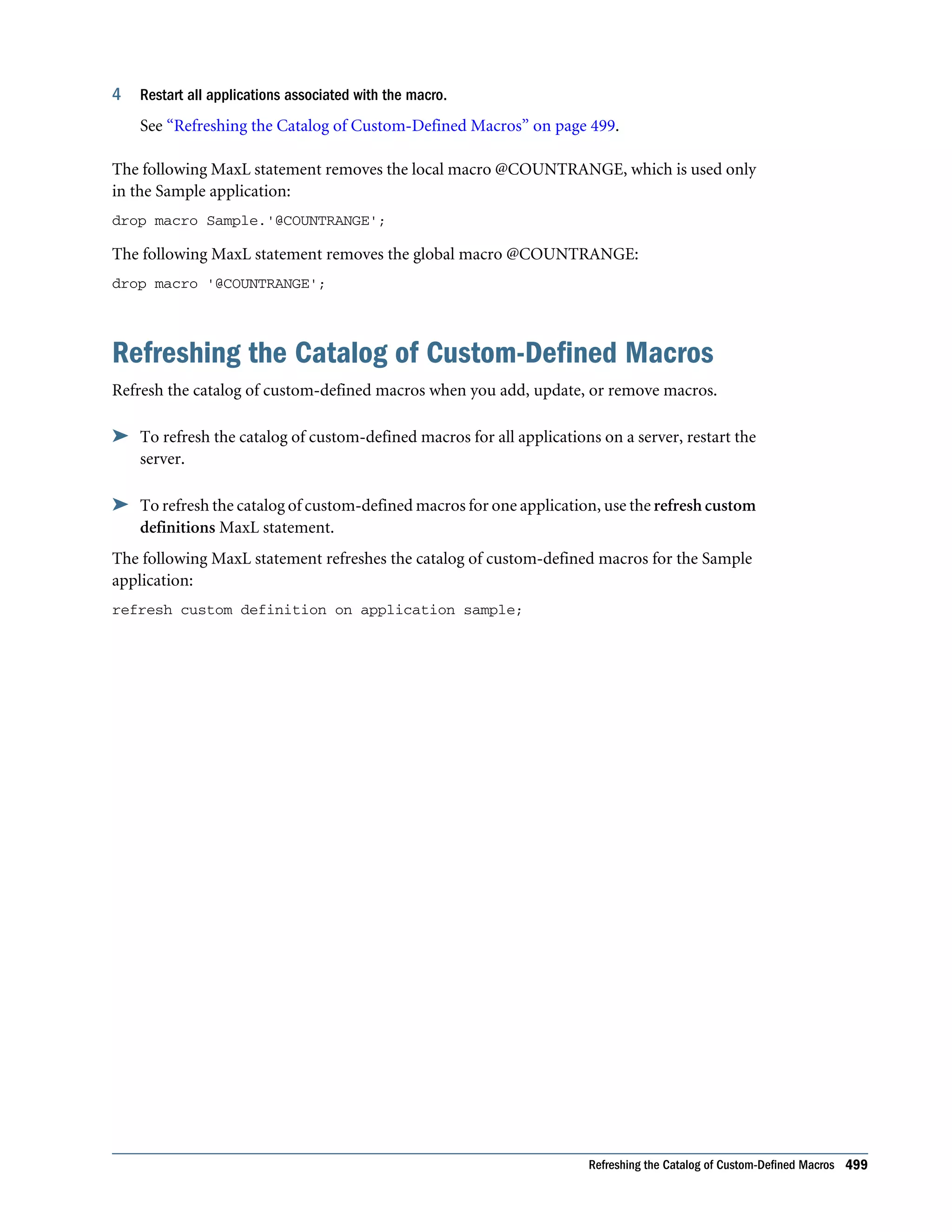
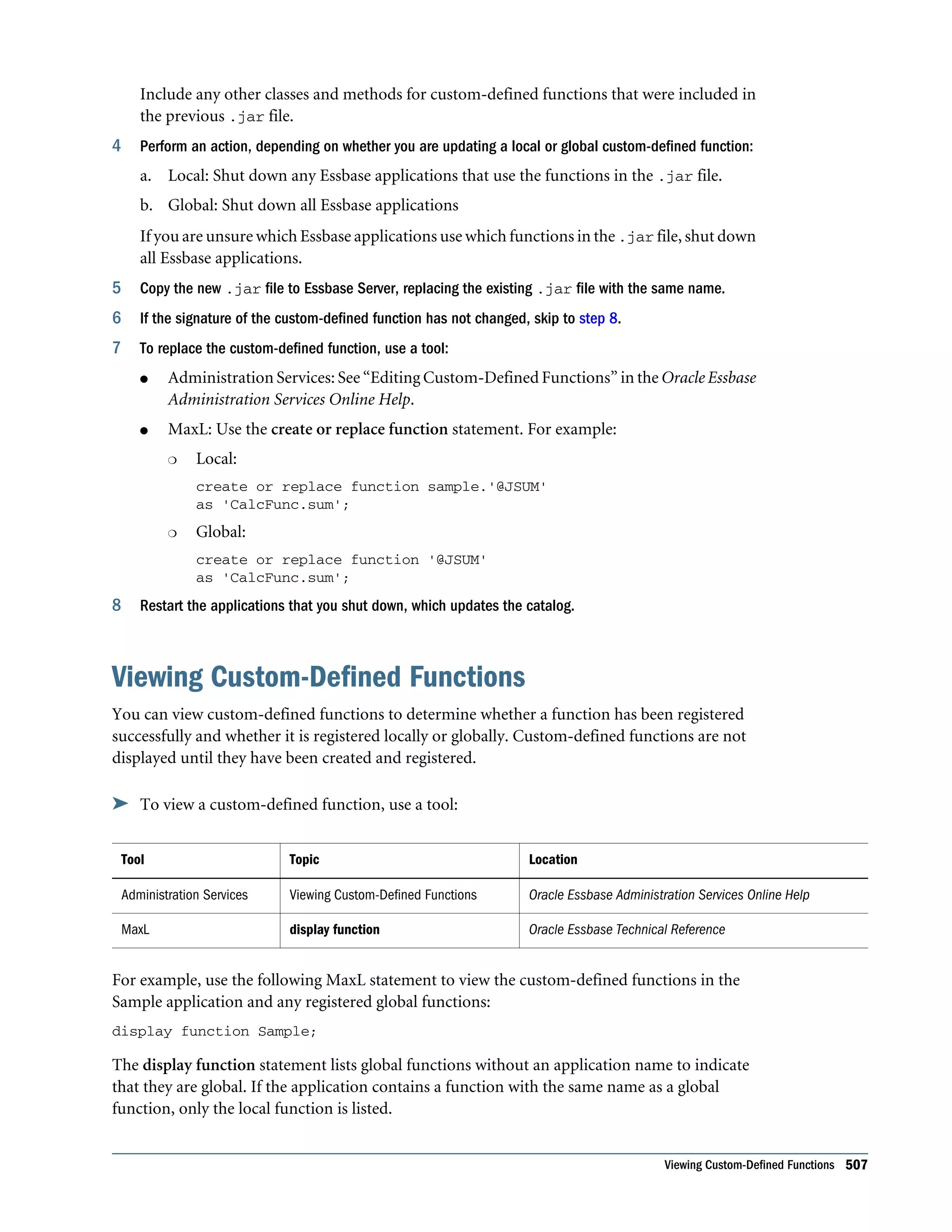
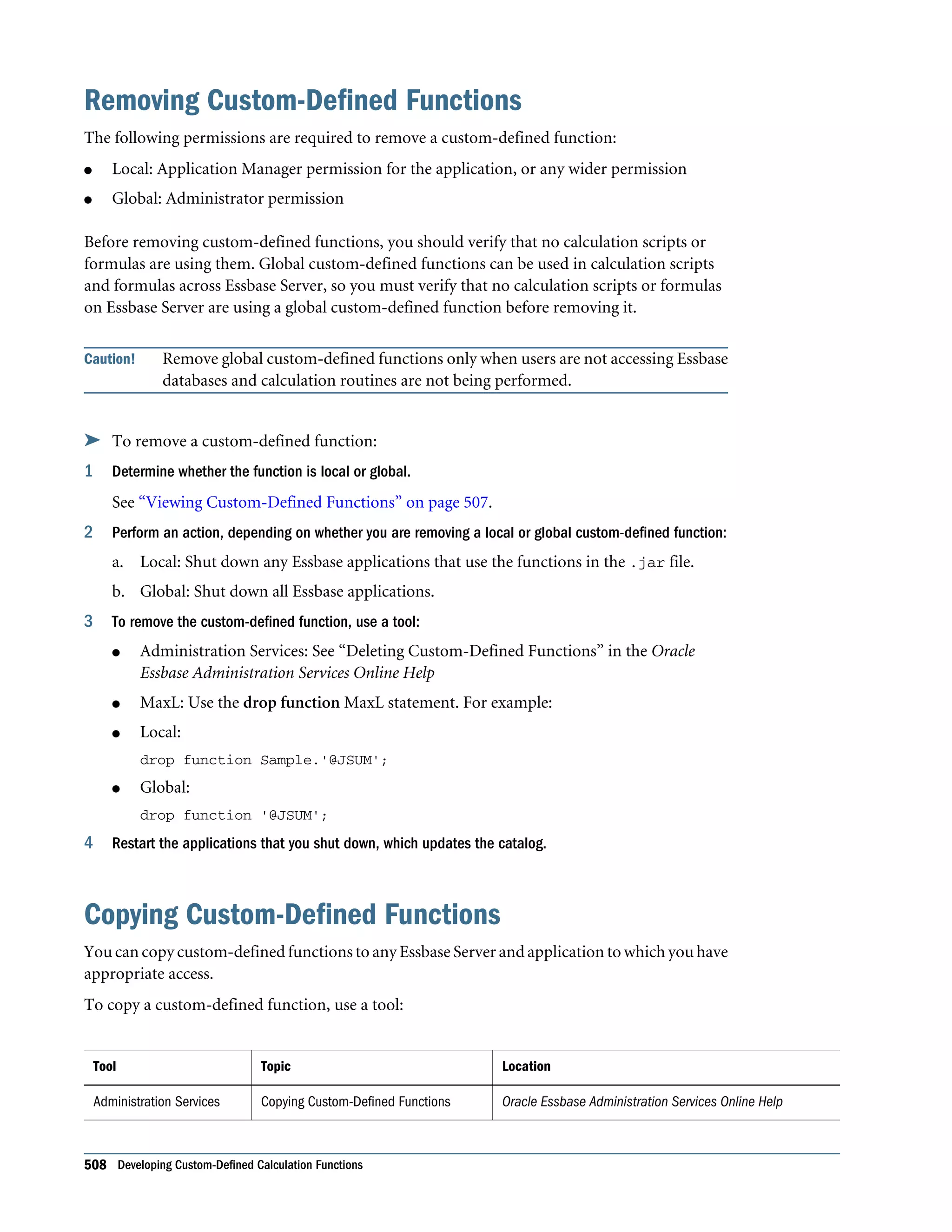
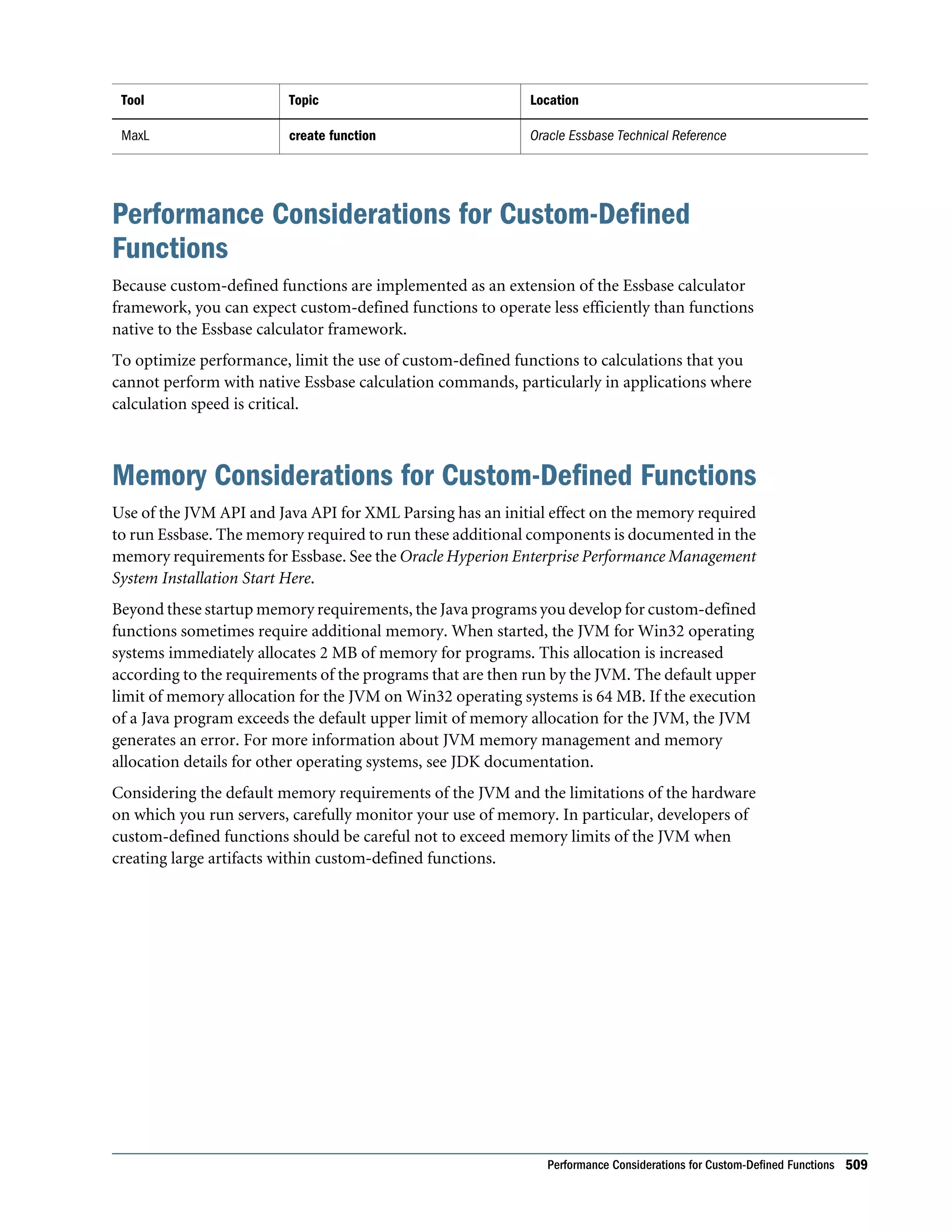
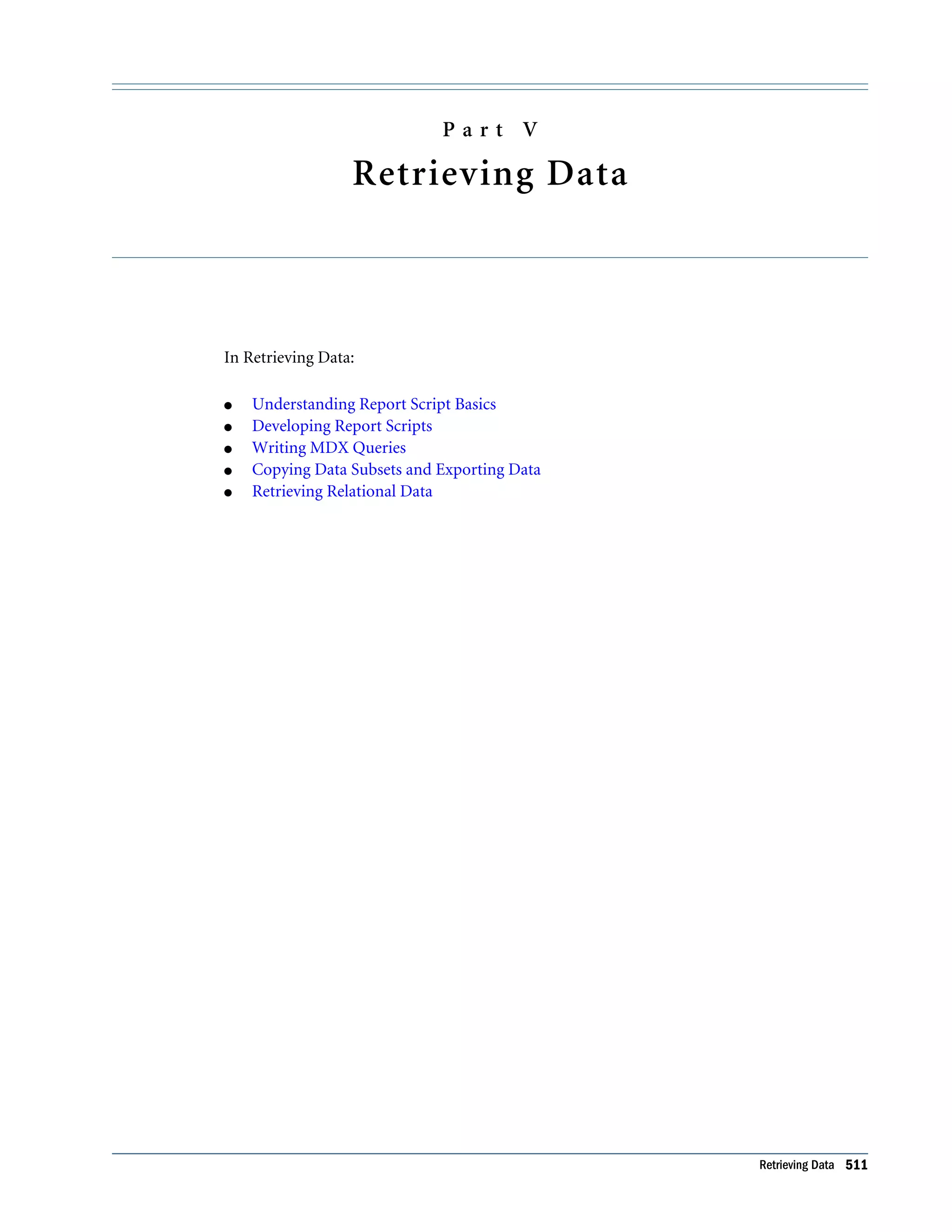
Using Custom-Defined Macros . . . . . . . . . . . . . . . . . . . . . . . . . . . . . . . . . . . . . . . . . . 497 Viewing Custom-Defined Macros . . . . . . . . . . . . . . . . . . . . . . . . . . . . . . . . . . . . . . . . 497 Updating Custom-Defined Macros . . . . . . . . . . . . . . . . . . . . . . . . . . . . . . . . . . . . . . . 497 Copying Custom-Defined Macros . . . . . . . . . . . . . . . . . . . . . . . . . . . . . . . . . . . . . . . . 498 Removing Custom-Defined Macros . . . . . . . . . . . . . . . . . . . . . . . . . . . . . . . . . . . . . . . 498 Refreshing the Catalog of Custom-Defined Macros . . . . . . . . . . . . . . . . . . . . . . . . . . . . 499 Chapter 32. Developing Custom-Defined Calculation Functions . . . . . . . . . . . . . . . . . . . . . . . . . . . . . . . . . 501 Process for Creating Custom-Defined Functions . . . . . . . . . . . . . . . . . . . . . . . . . . . . . . 501 Custom-Defined Function Requirements . . . . . . . . . . . . . . . . . . . . . . . . . . . . . . . . . . . 502 Creating and Compiling a Java Class . . . . . . . . . . . . . . . . . . . . . . . . . . . . . . . . . . . . . . 503 Installing Java Classes on Essbase Server . . . . . . . . . . . . . . . . . . . . . . . . . . . . . . . . . . . . 504 Registering Custom-Defined Functions . . . . . . . . . . . . . . . . . . . . . . . . . . . . . . . . . . . . 505 Using Registered Custom-Defined Functions . . . . . . . . . . . . . . . . . . . . . . . . . . . . . . . . 506 Updating Custom-Defined Functions . . . . . . . . . . . . . . . . . . . . . . . . . . . . . . . . . . . . . . 506 Viewing Custom-Defined Functions . . . . . . . . . . . . . . . . . . . . . . . . . . . . . . . . . . . . . . 507 Removing Custom-Defined Functions . . . . . . . . . . . . . . . . . . . . . . . . . . . . . . . . . . . . . 508 Copying Custom-Defined Functions . . . . . . . . . . . . . . . . . . . . . . . . . . . . . . . . . . . . . . 508 Performance Considerations for Custom-Defined Functions . . . . . . . . . . . . . . . . . . . . . 509 Memory Considerations for Custom-Defined Functions . . . . . . . . . . . . . . . . . . . . . . . . 509 Part V. Retrieving Data . . . . . . . . . . . . . . . . . . . . . . . . . . . . . . . . . . . . . . . . . . . . . . . . . . . . . . . . . . . . . 511 Chapter 33. Understanding Report Script Basics . . . . . . . . . . . . . . . . . . . . . . . . . . . . . . . . . . . . . . . . . . . 513 Working With a Simple Report Script . . . . . . . . . . . . . . . . . . . . . . . . . . . . . . . . . . . . . 513 Understanding How Report Writer Works . . . . . . . . . . . . . . . . . . . . . . . . . . . . . . . . . . 515 Report Extractor . . . . . . . . . . . . . . . . . . . . . . . . . . . . . . . . . . . . . . . . . . . . . . . . . . 516 Parts of a Report . . . . . . . . . . . . . . . . . . . . . . . . . . . . . . . . . . . . . . . . . . . . . . . . . . 517 Parts of a Report Script . . . . . . . . . . . . . . . . . . . . . . . . . . . . . . . . . . . . . . . . . . . . . 518 Planning Reports . . . . . . . . . . . . . . . . . . . . . . . . . . . . . . . . . . . . . . . . . . . . . . . . . . . . 518 Considering Security and Multiple-User Issues . . . . . . . . . . . . . . . . . . . . . . . . . . . . . . . 519 Reviewing the Process for Creating Report Scripts . . . . . . . . . . . . . . . . . . . . . . . . . . . . . 519 Creating Report Scripts . . . . . . . . . . . . . . . . . . . . . . . . . . . . . . . . . . . . . . . . . . . . . . . . 520 Saving Report Scripts . . . . . . . . . . . . . . . . . . . . . . . . . . . . . . . . . . . . . . . . . . . . . . . . . 520 Executing Report Scripts . . . . . . . . . . . . . . . . . . . . . . . . . . . . . . . . . . . . . . . . . . . . . . . 521 Copying Report Scripts . . . . . . . . . . . . . . . . . . . . . . . . . . . . . . . . . . . . . . . . . . . . . . . . 521 Developing Free-Form Reports . . . . . . . . . . . . . . . . . . . . . . . . . . . . . . . . . . . . . . . . . . 521 Chapter 34. Developing Report Scripts . . . . . . . . . . . . . . . . . . . . . . . . . . . . . . . . . . . . . . . . . . . . . . . . . . 525 Understanding Extraction Commands . . . . . . . . . . . . . . . . . . . . . . . . . . . . . . . . . . . . . 525 Understanding Formatting Commands . . . . . . . . . . . . . . . . . . . . . . . . . . . . . . . . . . . . 526 Contents xix
Understanding Report Script Syntax . . . . . . . . . . . . . . . . . . . . . . . . . . . . . . . . . . . . . . 526 Designing the Page Layout . . . . . . . . . . . . . . . . . . . . . . . . . . . . . . . . . . . . . . . . . . . . . . 527 Creating Page, Column, and Row Headings . . . . . . . . . . . . . . . . . . . . . . . . . . . . . . 528 Modifying Headings . . . . . . . . . . . . . . . . . . . . . . . . . . . . . . . . . . . . . . . . . . . . . . . 529 Creating Symmetric and Asymmetric Reports . . . . . . . . . . . . . . . . . . . . . . . . . . . . . 530 Formatting . . . . . . . . . . . . . . . . . . . . . . . . . . . . . . . . . . . . . . . . . . . . . . . . . . . . . . . . . 531 Formatting Report Pages . . . . . . . . . . . . . . . . . . . . . . . . . . . . . . . . . . . . . . . . . . . . 531 Formatting Page, Column, and Row Headings . . . . . . . . . . . . . . . . . . . . . . . . . . . . 532 Adding Totals and Subtotals . . . . . . . . . . . . . . . . . . . . . . . . . . . . . . . . . . . . . . . . . 535 Changing How Data Is Displayed . . . . . . . . . . . . . . . . . . . . . . . . . . . . . . . . . . . . . . 539 Selecting and Sorting Members . . . . . . . . . . . . . . . . . . . . . . . . . . . . . . . . . . . . . . . . . . 542 Selecting Members . . . . . . . . . . . . . . . . . . . . . . . . . . . . . . . . . . . . . . . . . . . . . . . . 542 Selecting Members by Using Generation and Level Names . . . . . . . . . . . . . . . . . . . . 543 Selecting Duplicate Members . . . . . . . . . . . . . . . . . . . . . . . . . . . . . . . . . . . . . . . . . 544 Selecting Dynamic Time Series Members . . . . . . . . . . . . . . . . . . . . . . . . . . . . . . . . 545 Selecting Members by Using Boolean Operators . . . . . . . . . . . . . . . . . . . . . . . . . . . 546 Selecting Members by Using Substitution Variables . . . . . . . . . . . . . . . . . . . . . . . . . 547 Selecting Members by Using Attributes . . . . . . . . . . . . . . . . . . . . . . . . . . . . . . . . . 548 Selecting Members by Using UDAs . . . . . . . . . . . . . . . . . . . . . . . . . . . . . . . . . . . . 549 Selecting Members by Using Wildcards . . . . . . . . . . . . . . . . . . . . . . . . . . . . . . . . . 550 Suppressing Shared Members . . . . . . . . . . . . . . . . . . . . . . . . . . . . . . . . . . . . . . . . 551 Selecting How Member Names are Displayed . . . . . . . . . . . . . . . . . . . . . . . . . . . . . 551 Sorting Members . . . . . . . . . . . . . . . . . . . . . . . . . . . . . . . . . . . . . . . . . . . . . . . . . 553 Restricting and Ordering Data Values . . . . . . . . . . . . . . . . . . . . . . . . . . . . . . . . . . . . . . 554 Understanding the Order of Operation . . . . . . . . . . . . . . . . . . . . . . . . . . . . . . . . . . 554 Using TOP, BOTTOM, and ORDERBY with Sorting Commands . . . . . . . . . . . . . . . 554 Using RESTRICT . . . . . . . . . . . . . . . . . . . . . . . . . . . . . . . . . . . . . . . . . . . . . . . . . 555 Using ORDERBY . . . . . . . . . . . . . . . . . . . . . . . . . . . . . . . . . . . . . . . . . . . . . . . . . 555 Using ORDERBY with Formatting Commands . . . . . . . . . . . . . . . . . . . . . . . . . . . . 555 Using TOP and BOTTOM . . . . . . . . . . . . . . . . . . . . . . . . . . . . . . . . . . . . . . . . . . . 556 Converting Data to a Different Currency . . . . . . . . . . . . . . . . . . . . . . . . . . . . . . . . . . . 558 Generating Reports Using the C, Visual Basic, and Grid APIs . . . . . . . . . . . . . . . . . . . . . 558 Chapter 35. Writing MDX Queries . . . . . . . . . . . . . . . . . . . . . . . . . . . . . . . . . . . . . . . . . . . . . . . . . . . . . . 559 Introduction . . . . . . . . . . . . . . . . . . . . . . . . . . . . . . . . . . . . . . . . . . . . . . . . . . . . . . . . 559 Understanding Elements of a Query . . . . . . . . . . . . . . . . . . . . . . . . . . . . . . . . . . . . . . . 559 Introduction to Sets and Tuples . . . . . . . . . . . . . . . . . . . . . . . . . . . . . . . . . . . . . . . 560 Rules for Specifying Sets . . . . . . . . . . . . . . . . . . . . . . . . . . . . . . . . . . . . . . . . . . . . 562 Introduction to Axis Specifications . . . . . . . . . . . . . . . . . . . . . . . . . . . . . . . . . . . . 562 xx Contents
Cube Specification . . . . . . . . . . . . . . . . . . . . . . . . . . . . . . . . . . . . . . . . . . . . . . . . 565 Using Functions to Build Sets . . . . . . . . . . . . . . . . . . . . . . . . . . . . . . . . . . . . . . . . . . . 565 Exercise: Using the MemberRange Function . . . . . . . . . . . . . . . . . . . . . . . . . . . . . . 565 Exercise: Using the CrossJoin Function . . . . . . . . . . . . . . . . . . . . . . . . . . . . . . . . . 566 Exercise: Using the Children Function . . . . . . . . . . . . . . . . . . . . . . . . . . . . . . . . . . 568 Working with Levels and Generations . . . . . . . . . . . . . . . . . . . . . . . . . . . . . . . . . . . . . 568 Exercise: Using the Members Function . . . . . . . . . . . . . . . . . . . . . . . . . . . . . . . . . . 569 Using a Slicer Axis to Set Query Point-of-View . . . . . . . . . . . . . . . . . . . . . . . . . . . . . . . 570 Exercise: Limiting the Results with a Slicer Axis . . . . . . . . . . . . . . . . . . . . . . . . . . . . 570 Common Relationship Functions . . . . . . . . . . . . . . . . . . . . . . . . . . . . . . . . . . . . . . . . 571 Performing Set Operations . . . . . . . . . . . . . . . . . . . . . . . . . . . . . . . . . . . . . . . . . . . . . 571 Exercise: Using the Intersect Function . . . . . . . . . . . . . . . . . . . . . . . . . . . . . . . . . . 572 Exercise: Using the Union Function . . . . . . . . . . . . . . . . . . . . . . . . . . . . . . . . . . . . 573 Creating and Using Named Sets and Calculated Members . . . . . . . . . . . . . . . . . . . . . . . 574 Calculated Members . . . . . . . . . . . . . . . . . . . . . . . . . . . . . . . . . . . . . . . . . . . . . . . 574 Named Sets . . . . . . . . . . . . . . . . . . . . . . . . . . . . . . . . . . . . . . . . . . . . . . . . . . . . . 576 Using Iterative Functions . . . . . . . . . . . . . . . . . . . . . . . . . . . . . . . . . . . . . . . . . . . . . . 576 Working with Missing Data . . . . . . . . . . . . . . . . . . . . . . . . . . . . . . . . . . . . . . . . . . . . . 577 Using Substitution Variables in MDX Queries . . . . . . . . . . . . . . . . . . . . . . . . . . . . . . . 578 Querying for Properties . . . . . . . . . . . . . . . . . . . . . . . . . . . . . . . . . . . . . . . . . . . . . . . . 579 Querying for Member Properties . . . . . . . . . . . . . . . . . . . . . . . . . . . . . . . . . . . . . . 580 The Value Type of Properties . . . . . . . . . . . . . . . . . . . . . . . . . . . . . . . . . . . . . . . . . 581 NULL Property Values . . . . . . . . . . . . . . . . . . . . . . . . . . . . . . . . . . . . . . . . . . . . . 582 Chapter 36. Copying Data Subsets and Exporting Data . . . . . . . . . . . . . . . . . . . . . . . . . . . . . . . . . . . . . . . 583 Process for Creating a Database Subset . . . . . . . . . . . . . . . . . . . . . . . . . . . . . . . . . . . . . 583 Create an Application and Database . . . . . . . . . . . . . . . . . . . . . . . . . . . . . . . . . . . . 584 Copy the Outline File from the Source Database . . . . . . . . . . . . . . . . . . . . . . . . . . . 584 Create an Output File Containing the Required Data Subset . . . . . . . . . . . . . . . . . . 585 Load the Output File into the New Database . . . . . . . . . . . . . . . . . . . . . . . . . . . . . . 586 Exporting Data . . . . . . . . . . . . . . . . . . . . . . . . . . . . . . . . . . . . . . . . . . . . . . . . . . . . . . 587 Exporting Data Using MaxL . . . . . . . . . . . . . . . . . . . . . . . . . . . . . . . . . . . . . . . . . 587 Exporting Text Data Using Calculation Scripts . . . . . . . . . . . . . . . . . . . . . . . . . . . . 588 Exporting Text Data Using Report Scripts . . . . . . . . . . . . . . . . . . . . . . . . . . . . . . . 589 Chapter 37. Retrieving Relational Data . . . . . . . . . . . . . . . . . . . . . . . . . . . . . . . . . . . . . . . . . . . . . . . . . . 593 Integrating Relational Databases with Essbase . . . . . . . . . . . . . . . . . . . . . . . . . . . . . . . . 593 Hybrid Analysis . . . . . . . . . . . . . . . . . . . . . . . . . . . . . . . . . . . . . . . . . . . . . . . . . . . . . 594 Hybrid Analysis Relational Source . . . . . . . . . . . . . . . . . . . . . . . . . . . . . . . . . . . . . 594 Data Retrieval . . . . . . . . . . . . . . . . . . . . . . . . . . . . . . . . . . . . . . . . . . . . . . . . . . . . 595 Contents xxi
Retrieving Hybrid Analysis Data . . . . . . . . . . . . . . . . . . . . . . . . . . . . . . . . . . . . . . 595 Using Outline Editor with Hybrid Analysis . . . . . . . . . . . . . . . . . . . . . . . . . . . . . . . 598 Managing Data Consistency in Hybrid Analysis . . . . . . . . . . . . . . . . . . . . . . . . . . . 599 Managing Security in Hybrid Analysis . . . . . . . . . . . . . . . . . . . . . . . . . . . . . . . . . . 599 Advanced Relational Access . . . . . . . . . . . . . . . . . . . . . . . . . . . . . . . . . . . . . . . . . . . . . 600 XOLAP Overview . . . . . . . . . . . . . . . . . . . . . . . . . . . . . . . . . . . . . . . . . . . . . . . . . . . . 601 XOLAP Workflow . . . . . . . . . . . . . . . . . . . . . . . . . . . . . . . . . . . . . . . . . . . . . . . . 601 Guidelines for Using XOLAP . . . . . . . . . . . . . . . . . . . . . . . . . . . . . . . . . . . . . . . . . 601 Part VI. Designing and Managing a Security System . . . . . . . . . . . . . . . . . . . . . . . . . . . . . . . . . . . . . . . . . 603 Chapter 38. User Management and Security in EPM System Security Mode . . . . . . . . . . . . . . . . . . . . . . . . . 605 Using Essbase in EPM System Security Mode . . . . . . . . . . . . . . . . . . . . . . . . . . . . . . . . 605 Security for Users and Groups in EPM System Security . . . . . . . . . . . . . . . . . . . . . . . . . 606 EPM System Security Migration and Upgrade Considerations . . . . . . . . . . . . . . . . . 606 User Security Considerations after EPM System Security Migration and Upgrade . . . 607 Essbase User Roles for Shared Services . . . . . . . . . . . . . . . . . . . . . . . . . . . . . . . . . . . . . 609 Essbase Projects, Applications, and Databases in Shared Services . . . . . . . . . . . . . . . . . . 610 Essbase Users and Groups in Shared Services . . . . . . . . . . . . . . . . . . . . . . . . . . . . . . . . 612 Assigning Access to Users in Shared Services . . . . . . . . . . . . . . . . . . . . . . . . . . . . . . . . . 612 Launching and Logging In to Shared Services Console . . . . . . . . . . . . . . . . . . . . . . . 612 Assigning Server Access in Shared Services . . . . . . . . . . . . . . . . . . . . . . . . . . . . . . . 613 Assigning Application Access in Shared Services . . . . . . . . . . . . . . . . . . . . . . . . . . . 613 Assigning Database Calculation and Filter Access in Shared Services . . . . . . . . . . . . . 614 Assigning Application Access Type in Shared Services . . . . . . . . . . . . . . . . . . . . . . . 615 Migrating Essbase to EPM System Security . . . . . . . . . . . . . . . . . . . . . . . . . . . . . . . . . . 615 Application and Database Migration . . . . . . . . . . . . . . . . . . . . . . . . . . . . . . . . . . . 616 User and Group Migration . . . . . . . . . . . . . . . . . . . . . . . . . . . . . . . . . . . . . . . . . . 617 User and Group Identities . . . . . . . . . . . . . . . . . . . . . . . . . . . . . . . . . . . . . . . . . . . . . . 619 Security Information Recovery in EPM System Security Mode . . . . . . . . . . . . . . . . . . . . 619 User and Group Information . . . . . . . . . . . . . . . . . . . . . . . . . . . . . . . . . . . . . . . . . 619 Application Information . . . . . . . . . . . . . . . . . . . . . . . . . . . . . . . . . . . . . . . . . . . . 620 Chapter 39. User Management and Security in Essbase Native Security Mode . . . . . . . . . . . . . . . . . . . . . . . 621 About Essbase Native Security Mode . . . . . . . . . . . . . . . . . . . . . . . . . . . . . . . . . . . . . . 621 Continuing to Use Essbase in Native Security Mode . . . . . . . . . . . . . . . . . . . . . . . . . . . 623 Creating Users and Groups in Essbase Native Security Mode . . . . . . . . . . . . . . . . . . . . . 624 Creating Users in Essbase Native Security Mode . . . . . . . . . . . . . . . . . . . . . . . . . . . 624 Assigning Application Access Type in Essbase Native Security Mode . . . . . . . . . . . . 624 Creating Groups in Essbase Native Security Mode . . . . . . . . . . . . . . . . . . . . . . . . . . 625 xxii Contents
Granting Permissions to Users and Groups in Essbase Native Security Mode . . . . . . . . . 625 Assigning User and Group Types in Essbase Native Security Mode . . . . . . . . . . . . . . 626 Granting Application and Database Access to Users and Groups in Essbase Native Security Mode . . . . . . . . . . . . . . . . . . . . . . . . . . . . . . . . . . . . . . . . . . . . . . . . . . . 627 Granting Designer Permissions to Users and Groups in Essbase Native Security Mode . . . . . . . . . . . . . . . . . . . . . . . . . . . . . . . . . . . . . . . . . . . . . . . . . . . . . . . . . . 628 Managing Users and Groups in Essbase Native Security Mode . . . . . . . . . . . . . . . . . . . . 628 Viewing Users and Groups in Essbase Native Security Mode . . . . . . . . . . . . . . . . . . 629 Editing Users in Essbase Native Security Mode . . . . . . . . . . . . . . . . . . . . . . . . . . . . 629 Editing Groups in Essbase Native Security Mode . . . . . . . . . . . . . . . . . . . . . . . . . . . 629 Copying an Existing Security Profile in Essbase Native Security Mode . . . . . . . . . . . 629 Deleting Users and Groups in Essbase Native Security Mode . . . . . . . . . . . . . . . . . . 630 Renaming Users and Groups in Essbase Native Security Mode . . . . . . . . . . . . . . . . . 631 Using EPM System Security for External Authentication in Essbase Native Security Mode . . . . . . . . . . . . . . . . . . . . . . . . . . . . . . . . . . . . . . . . . . . . . . . . . . . . . . . . . . . . . 631 Managing Global Security for Applications and Databases in Native Security Mode . . . . . 631 Defining Application Settings in Essbase Native Security Mode . . . . . . . . . . . . . . . . 632 Setting General Application Connection Options in Essbase Native Security Mode . . . . . . . . . . . . . . . . . . . . . . . . . . . . . . . . . . . . . . . . . . . . . . . . . . . . . . . . . . 632 Setting Application and Database Minimum Permissions in Essbase Native Security Mode . . . . . . . . . . . . . . . . . . . . . . . . . . . . . . . . . . . . . . . . . . . . . . . . . . . . . . . . . . 635 Managing User Activity on Essbase Server in Essbase Native Security Mode . . . . . . . . . . 636 Disconnecting Users and Terminating Requests in Essbase Native Security Mode . . . . . . . . . . . . . . . . . . . . . . . . . . . . . . . . . . . . . . . . . . . . . . . . . . . . . . . . . . 637 Managing User Locks in Essbase Native Security Mode . . . . . . . . . . . . . . . . . . . . . . 637 Managing Passwords and User Names in Essbase Native Security Mode . . . . . . . . . . 638 Propagating Password Changes in Essbase Native Security Mode . . . . . . . . . . . . . . . 638 Viewing and Activating Disabled User Names in Essbase Native Security Mode . . . . . 639 Chapter 40. Managing the Essbase Security File (essbase.sec) . . . . . . . . . . . . . . . . . . . . . . . . . . . . . . 641 About the Essbase Security File . . . . . . . . . . . . . . . . . . . . . . . . . . . . . . . . . . . . . . . . . . 641 Managing Essbase Security Backup Files . . . . . . . . . . . . . . . . . . . . . . . . . . . . . . . . . . . . 642 Restoring the Essbase Security File . . . . . . . . . . . . . . . . . . . . . . . . . . . . . . . . . . . . . . . . 643 Changing Essbase Security Backup File Comparison Frequency . . . . . . . . . . . . . . . . . . . 643 Reconciling the Essbase Security File to the State of Essbase on an External Disk . . . . . . . 644 Managing Essbase Security File Fragmentation . . . . . . . . . . . . . . . . . . . . . . . . . . . . . . . 644 Displaying the Essbase Security File Fragmentation Status . . . . . . . . . . . . . . . . . . . . 644 Compacting the Essbase Security File While the Agent is Running . . . . . . . . . . . . . . 644 Exporting the Essbase Security File to a Readable Format . . . . . . . . . . . . . . . . . . . . . . . . 645 Contents xxiii
Chapter 41. Controlling Access to Database Cells Using Security Filters . . . . . . . . . . . . . . . . . . . . . . . . . . . 647 About Security Filters . . . . . . . . . . . . . . . . . . . . . . . . . . . . . . . . . . . . . . . . . . . . . . . . . 647 Defining Permissions Using Security Filters . . . . . . . . . . . . . . . . . . . . . . . . . . . . . . . . . 647 Creating Filters . . . . . . . . . . . . . . . . . . . . . . . . . . . . . . . . . . . . . . . . . . . . . . . . . . . . . . 648 Filtering Members Versus Filtering Member Combinations . . . . . . . . . . . . . . . . . . . 649 Filtering Using Substitution Variables . . . . . . . . . . . . . . . . . . . . . . . . . . . . . . . . . . 651 Filtering with Attribute Functions . . . . . . . . . . . . . . . . . . . . . . . . . . . . . . . . . . . . . 651 Metadata Filtering . . . . . . . . . . . . . . . . . . . . . . . . . . . . . . . . . . . . . . . . . . . . . . . . . 652 Managing Filters . . . . . . . . . . . . . . . . . . . . . . . . . . . . . . . . . . . . . . . . . . . . . . . . . . . . . 652 Viewing Filters . . . . . . . . . . . . . . . . . . . . . . . . . . . . . . . . . . . . . . . . . . . . . . . . . . . 652 Editing Filters . . . . . . . . . . . . . . . . . . . . . . . . . . . . . . . . . . . . . . . . . . . . . . . . . . . . 653 Copying Filters . . . . . . . . . . . . . . . . . . . . . . . . . . . . . . . . . . . . . . . . . . . . . . . . . . . 653 Renaming Filters . . . . . . . . . . . . . . . . . . . . . . . . . . . . . . . . . . . . . . . . . . . . . . . . . . 653 Deleting Filters . . . . . . . . . . . . . . . . . . . . . . . . . . . . . . . . . . . . . . . . . . . . . . . . . . . 653 Assigning Filters . . . . . . . . . . . . . . . . . . . . . . . . . . . . . . . . . . . . . . . . . . . . . . . . . . . . . 654 Assigning Filters in EPM System Security Mode . . . . . . . . . . . . . . . . . . . . . . . . . . . 654 Assigning Filters in Essbase Native Security Mode . . . . . . . . . . . . . . . . . . . . . . . . . . 654 Overlapping Filter Definitions . . . . . . . . . . . . . . . . . . . . . . . . . . . . . . . . . . . . . . . . 654 Overlapping Metadata Filter Definitions . . . . . . . . . . . . . . . . . . . . . . . . . . . . . . . . . 655 Overlapping Access Definitions . . . . . . . . . . . . . . . . . . . . . . . . . . . . . . . . . . . . . . . 655 Chapter 42. Security Examples in Native Security Mode . . . . . . . . . . . . . . . . . . . . . . . . . . . . . . . . . . . . . . 657 Example 1: Users Require the Same Access to Databases . . . . . . . . . . . . . . . . . . . . . . . . 657 Example 2: Users Require Differing Access to Databases . . . . . . . . . . . . . . . . . . . . . . . . 658 Example 3: Users Require Differing Access to Databases; Users Will Be Added . . . . . . . . 658 Example 4: Users Require Differing Access to Application and Databases . . . . . . . . . . . . 659 Example 5: Administrator Must Perform Maintenance . . . . . . . . . . . . . . . . . . . . . . . . . 660 Part VII. Enabling Multi-Language Applications Through Unicode . . . . . . . . . . . . . . . . . . . . . . . . . . . . . . . . 661 Chapter 43. Understanding the Essbase Unicode Implementation . . . . . . . . . . . . . . . . . . . . . . . . . . . . . . . 663 About Unicode . . . . . . . . . . . . . . . . . . . . . . . . . . . . . . . . . . . . . . . . . . . . . . . . . . . . . . 663 When to Use Unicode-Mode Applications . . . . . . . . . . . . . . . . . . . . . . . . . . . . . . . . . . 664 Locales and the ESSLANG Variable . . . . . . . . . . . . . . . . . . . . . . . . . . . . . . . . . . . . . . . 665 Unicode and Non-Unicode Application Modes . . . . . . . . . . . . . . . . . . . . . . . . . . . . . . 665 Unicode and Non-Unicode Essbase Server Modes . . . . . . . . . . . . . . . . . . . . . . . . . . . . . 666 Increased Name Lengths . . . . . . . . . . . . . . . . . . . . . . . . . . . . . . . . . . . . . . . . . . . . . . . 666 Compatibility Between Different Versions of Client Programs and Essbase Applications . . . . . . . . . . . . . . . . . . . . . . . . . . . . . . . . . . . . . . . . . . . . . . . . . . . . . . . . 666 Unicode-Enabled C API . . . . . . . . . . . . . . . . . . . . . . . . . . . . . . . . . . . . . . . . . . . . . . . 667 xxiv Contents
Identification of Text Encoding and Locale . . . . . . . . . . . . . . . . . . . . . . . . . . . . . . . . . . 667 Unicode-Enabled Administration Tools . . . . . . . . . . . . . . . . . . . . . . . . . . . . . . . . . . . . 667 Retrieval Tools . . . . . . . . . . . . . . . . . . . . . . . . . . . . . . . . . . . . . . . . . . . . . . . . . . . . . . 668 Report Script . . . . . . . . . . . . . . . . . . . . . . . . . . . . . . . . . . . . . . . . . . . . . . . . . . . . 668 Spreadsheet . . . . . . . . . . . . . . . . . . . . . . . . . . . . . . . . . . . . . . . . . . . . . . . . . . . . . 668 SQL Interface . . . . . . . . . . . . . . . . . . . . . . . . . . . . . . . . . . . . . . . . . . . . . . . . . . . . . . . 668 Sample_U.Basic . . . . . . . . . . . . . . . . . . . . . . . . . . . . . . . . . . . . . . . . . . . . . . . . . . . . . 669 Chapter 44. Administering Unicode-Mode Applications . . . . . . . . . . . . . . . . . . . . . . . . . . . . . . . . . . . . . . . 671 Setting Up a Computer for Unicode Support . . . . . . . . . . . . . . . . . . . . . . . . . . . . . . . . 671 Defining Password Security . . . . . . . . . . . . . . . . . . . . . . . . . . . . . . . . . . . . . . . . . . . . . 671 Naming Applications and Databases . . . . . . . . . . . . . . . . . . . . . . . . . . . . . . . . . . . . . . 672 Managing Unicode-Mode Essbase Servers . . . . . . . . . . . . . . . . . . . . . . . . . . . . . . . . . . 672 Setting Essbase Server to Unicode Mode . . . . . . . . . . . . . . . . . . . . . . . . . . . . . . . . . 672 Viewing the Unicode-Related Mode of Essbase Server . . . . . . . . . . . . . . . . . . . . . . . 672 Managing Unicode-Mode Applications . . . . . . . . . . . . . . . . . . . . . . . . . . . . . . . . . . . . 673 Creating Unicode-Mode Applications . . . . . . . . . . . . . . . . . . . . . . . . . . . . . . . . . . 673 Migrating Applications to Unicode Mode . . . . . . . . . . . . . . . . . . . . . . . . . . . . . . . . 673 Backing Up and Restoring Databases Between Unicode and Non-Unicode Applications . . . . . . . . . . . . . . . . . . . . . . . . . . . . . . . . . . . . . . . . . . . . . . . . . . . . . 674 Viewing the Unicode-Related Mode of an Application . . . . . . . . . . . . . . . . . . . . . . . 674 Using Control Characters in Report Scripts . . . . . . . . . . . . . . . . . . . . . . . . . . . . . . . . . 675 Working with Partitions . . . . . . . . . . . . . . . . . . . . . . . . . . . . . . . . . . . . . . . . . . . . . . . 675 Working with Logs . . . . . . . . . . . . . . . . . . . . . . . . . . . . . . . . . . . . . . . . . . . . . . . . . . . 675 Managing File Encoding . . . . . . . . . . . . . . . . . . . . . . . . . . . . . . . . . . . . . . . . . . . . . . . 676 How the Encoding of a File Is Determined . . . . . . . . . . . . . . . . . . . . . . . . . . . . . . . 676 Encoding Indicators . . . . . . . . . . . . . . . . . . . . . . . . . . . . . . . . . . . . . . . . . . . . . . . 677 Part VIII. Maintaining Essbase . . . . . . . . . . . . . . . . . . . . . . . . . . . . . . . . . . . . . . . . . . . . . . . . . . . . . . . . 683 Chapter 45. Managing Essbase Using OPMN . . . . . . . . . . . . . . . . . . . . . . . . . . . . . . . . . . . . . . . . . . . . . . 685 About OPMN . . . . . . . . . . . . . . . . . . . . . . . . . . . . . . . . . . . . . . . . . . . . . . . . . . . . . . . 685 Starting and Stopping Essbase Using OPMN . . . . . . . . . . . . . . . . . . . . . . . . . . . . . . . . . 687 Logging In to Essbase Using Logical Names . . . . . . . . . . . . . . . . . . . . . . . . . . . . . . . . . 688 Understanding Essbase Failover Clusters . . . . . . . . . . . . . . . . . . . . . . . . . . . . . . . . . . . 688 Essbase Failover Clusters and Lease Management . . . . . . . . . . . . . . . . . . . . . . . . . . 690 Fine-Tuning Failover Detection . . . . . . . . . . . . . . . . . . . . . . . . . . . . . . . . . . . . . . . 691 Conditions for Agent and Server Terminations . . . . . . . . . . . . . . . . . . . . . . . . . . . . . . . 692 Universal/Uniform Naming Convention (UNC) Paths . . . . . . . . . . . . . . . . . . . . . . . . . 694 Configuration for SSL Encrypted Communication with Provider Services . . . . . . . . . . . . 695 Contents xxv
Chapter 46. Running Essbase Servers, Applications, and Databases . . . . . . . . . . . . . . . . . . . . . . . . . . . . . . 697 Essbase Executable Files . . . . . . . . . . . . . . . . . . . . . . . . . . . . . . . . . . . . . . . . . . . . . . . 697 Understanding the Agent . . . . . . . . . . . . . . . . . . . . . . . . . . . . . . . . . . . . . . . . . . . . . . . 698 Multithreading . . . . . . . . . . . . . . . . . . . . . . . . . . . . . . . . . . . . . . . . . . . . . . . . . . . 698 List of Agent Commands and Equivalents . . . . . . . . . . . . . . . . . . . . . . . . . . . . . . . . 699 Starting and Stopping Essbase Server . . . . . . . . . . . . . . . . . . . . . . . . . . . . . . . . . . . . . . 700 Starting Essbase on Ports Qualified by Host Names . . . . . . . . . . . . . . . . . . . . . . . . 701 Starting Essbase Server in the Foreground . . . . . . . . . . . . . . . . . . . . . . . . . . . . . . . . 701 Starting Essbase Server as a Background Process . . . . . . . . . . . . . . . . . . . . . . . . . . . 702 Hiding Essbase Server Passwords on HP-UX and Solaris . . . . . . . . . . . . . . . . . . . . . 703 Changing the Essbase Server System Password . . . . . . . . . . . . . . . . . . . . . . . . . . . . 703 Stopping Essbase Server . . . . . . . . . . . . . . . . . . . . . . . . . . . . . . . . . . . . . . . . . . . . . 704 Starting and Stopping Applications . . . . . . . . . . . . . . . . . . . . . . . . . . . . . . . . . . . . . . . 704 Starting an Application . . . . . . . . . . . . . . . . . . . . . . . . . . . . . . . . . . . . . . . . . . . . . 704 Stopping an Application . . . . . . . . . . . . . . . . . . . . . . . . . . . . . . . . . . . . . . . . . . . . 705 Stopping an Application Improperly . . . . . . . . . . . . . . . . . . . . . . . . . . . . . . . . . . . 706 Starting and Stopping Databases . . . . . . . . . . . . . . . . . . . . . . . . . . . . . . . . . . . . . . . . . 707 Starting a Database . . . . . . . . . . . . . . . . . . . . . . . . . . . . . . . . . . . . . . . . . . . . . . . . 707 Stopping a Database . . . . . . . . . . . . . . . . . . . . . . . . . . . . . . . . . . . . . . . . . . . . . . . 707 Managing Ports . . . . . . . . . . . . . . . . . . . . . . . . . . . . . . . . . . . . . . . . . . . . . . . . . . . . . 708 Viewing a List of Users and Available Ports . . . . . . . . . . . . . . . . . . . . . . . . . . . . . . . 708 Specifying Nondefault Port Values . . . . . . . . . . . . . . . . . . . . . . . . . . . . . . . . . . . . . 709 Changing Port Default Values . . . . . . . . . . . . . . . . . . . . . . . . . . . . . . . . . . . . . . . . 709 Viewing Port Statistics . . . . . . . . . . . . . . . . . . . . . . . . . . . . . . . . . . . . . . . . . . . . . . 709 Managing Essbase Administration Server Communication Ports . . . . . . . . . . . . . . . 710 Communicating with Essbase Using SSL . . . . . . . . . . . . . . . . . . . . . . . . . . . . . . . . . . . 710 Controlling Query Size and Duration . . . . . . . . . . . . . . . . . . . . . . . . . . . . . . . . . . . . . . 711 Increasing Agent Connections to Essbase Server . . . . . . . . . . . . . . . . . . . . . . . . . . . . . . 711 Limiting the Number of User Sessions . . . . . . . . . . . . . . . . . . . . . . . . . . . . . . . . . . . . . 712 Chapter 47. Managing Applications and Databases . . . . . . . . . . . . . . . . . . . . . . . . . . . . . . . . . . . . . . . . . 713 Understanding Applications and Databases . . . . . . . . . . . . . . . . . . . . . . . . . . . . . . . . . 713 Understanding How Essbase Files Are Stored . . . . . . . . . . . . . . . . . . . . . . . . . . . . . . . . 714 Server Software File Types . . . . . . . . . . . . . . . . . . . . . . . . . . . . . . . . . . . . . . . . . . . 715 Application and Database File Types . . . . . . . . . . . . . . . . . . . . . . . . . . . . . . . . . . . 716 API File Types . . . . . . . . . . . . . . . . . . . . . . . . . . . . . . . . . . . . . . . . . . . . . . . . . . . 717 Managing Applications, Databases, and Database Artifacts . . . . . . . . . . . . . . . . . . . . . . 718 Strategies for Backing Up and Recovering Databases . . . . . . . . . . . . . . . . . . . . . . . . 718 Using the File System to Manage Applications and Databases During Backup . . . . . . 719 xxvi Contents
Monitoring Applications . . . . . . . . . . . . . . . . . . . . . . . . . . . . . . . . . . . . . . . . . . . . 719 Using Essbase to Manage Applications and Databases . . . . . . . . . . . . . . . . . . . . . . . 720 Using Essbase to Manage Artifacts . . . . . . . . . . . . . . . . . . . . . . . . . . . . . . . . . . . . . 723 Migrating Applications Using Administration Services . . . . . . . . . . . . . . . . . . . . . . . . . 725 Porting Applications Across Platforms . . . . . . . . . . . . . . . . . . . . . . . . . . . . . . . . . . . . . 725 Identifying Compatible Files . . . . . . . . . . . . . . . . . . . . . . . . . . . . . . . . . . . . . . . . . 725 Checking File Names . . . . . . . . . . . . . . . . . . . . . . . . . . . . . . . . . . . . . . . . . . . . . . . 726 Transferring Compatible Files . . . . . . . . . . . . . . . . . . . . . . . . . . . . . . . . . . . . . . . . 727 Reloading the Database . . . . . . . . . . . . . . . . . . . . . . . . . . . . . . . . . . . . . . . . . . . . . 729 Chapter 48. Monitoring Data, Applications, and Databases . . . . . . . . . . . . . . . . . . . . . . . . . . . . . . . . . . . . 731 Monitoring Data Changes Using Triggers . . . . . . . . . . . . . . . . . . . . . . . . . . . . . . . . . . . 731 Administering Triggers . . . . . . . . . . . . . . . . . . . . . . . . . . . . . . . . . . . . . . . . . . . . . 731 Effect of Triggers on Performance and Memory Usage . . . . . . . . . . . . . . . . . . . . . . 734 Trigger Examples . . . . . . . . . . . . . . . . . . . . . . . . . . . . . . . . . . . . . . . . . . . . . . . . . 734 Using Essbase Logs . . . . . . . . . . . . . . . . . . . . . . . . . . . . . . . . . . . . . . . . . . . . . . . . . . . 735 Essbase Server and Application Logs . . . . . . . . . . . . . . . . . . . . . . . . . . . . . . . . . . . . 736 Contents of the Essbase Server Log . . . . . . . . . . . . . . . . . . . . . . . . . . . . . . . . . . . . . 737 Essbase Server Log Example . . . . . . . . . . . . . . . . . . . . . . . . . . . . . . . . . . . . . . . . . . 738 Contents of the Application Log . . . . . . . . . . . . . . . . . . . . . . . . . . . . . . . . . . . . . . 739 Example of an Application Log . . . . . . . . . . . . . . . . . . . . . . . . . . . . . . . . . . . . . . . 740 Essbase Server and Application Log Message Categories . . . . . . . . . . . . . . . . . . . . . 744 Using Essbase Server and Application Logs . . . . . . . . . . . . . . . . . . . . . . . . . . . . . . . 746 Implementing Query Logs . . . . . . . . . . . . . . . . . . . . . . . . . . . . . . . . . . . . . . . . . . . 751 Understanding and Using the Outline Change Log . . . . . . . . . . . . . . . . . . . . . . . . . 752 Understanding and Using Exception Logs . . . . . . . . . . . . . . . . . . . . . . . . . . . . . . . 754 Understanding and Using Dimension Build and Data Load Error Logs . . . . . . . . . . . 760 Chapter 49. Managing Database Settings . . . . . . . . . . . . . . . . . . . . . . . . . . . . . . . . . . . . . . . . . . . . . . . . 763 Understanding the Essbase Server Kernel . . . . . . . . . . . . . . . . . . . . . . . . . . . . . . . . . . . 763 Understanding Buffered I/O and Direct I/O . . . . . . . . . . . . . . . . . . . . . . . . . . . . . . 764 Viewing the I/O Access Mode . . . . . . . . . . . . . . . . . . . . . . . . . . . . . . . . . . . . . . . . 764 Setting the I/O Access Mode . . . . . . . . . . . . . . . . . . . . . . . . . . . . . . . . . . . . . . . . . 765 Understanding Kernel Components . . . . . . . . . . . . . . . . . . . . . . . . . . . . . . . . . . . . . . . 765 Index Manager . . . . . . . . . . . . . . . . . . . . . . . . . . . . . . . . . . . . . . . . . . . . . . . . . . . 765 Allocation Manager . . . . . . . . . . . . . . . . . . . . . . . . . . . . . . . . . . . . . . . . . . . . . . . . 766 Data Block Manager . . . . . . . . . . . . . . . . . . . . . . . . . . . . . . . . . . . . . . . . . . . . . . . 767 LRO Manager . . . . . . . . . . . . . . . . . . . . . . . . . . . . . . . . . . . . . . . . . . . . . . . . . . . . 767 Lock Manager . . . . . . . . . . . . . . . . . . . . . . . . . . . . . . . . . . . . . . . . . . . . . . . . . . . . 768 Transaction Manager . . . . . . . . . . . . . . . . . . . . . . . . . . . . . . . . . . . . . . . . . . . . . . 768 Contents xxvii
Understanding Kernel Startup . . . . . . . . . . . . . . . . . . . . . . . . . . . . . . . . . . . . . . . . . . . 768 Understanding the Precedence of Database Settings . . . . . . . . . . . . . . . . . . . . . . . . . . . 768 Understanding How Essbase Reads Settings . . . . . . . . . . . . . . . . . . . . . . . . . . . . . . . . . 769 Viewing Most-Recently Entered Settings . . . . . . . . . . . . . . . . . . . . . . . . . . . . . . . . . . . 769 Customizing Database Settings . . . . . . . . . . . . . . . . . . . . . . . . . . . . . . . . . . . . . . . . . . 770 Specifying and Changing Database Settings . . . . . . . . . . . . . . . . . . . . . . . . . . . . . . . 770 Using alter database in MaxL . . . . . . . . . . . . . . . . . . . . . . . . . . . . . . . . . . . . . . . . . 771 Using SETDBSTATEITEM in ESSCMD . . . . . . . . . . . . . . . . . . . . . . . . . . . . . . . . . 771 Chapter 50. Allocating Storage and Compressing Data . . . . . . . . . . . . . . . . . . . . . . . . . . . . . . . . . . . . . . . 773 Storage Allocation . . . . . . . . . . . . . . . . . . . . . . . . . . . . . . . . . . . . . . . . . . . . . . . . . . . . 773 Checking Index and Data File Sizes . . . . . . . . . . . . . . . . . . . . . . . . . . . . . . . . . . . . 773 Specifying Disk Volumes . . . . . . . . . . . . . . . . . . . . . . . . . . . . . . . . . . . . . . . . . . . . 774 Reviewing an Example of Specifying Volumes to Control Storage . . . . . . . . . . . . . . . 777 Data Compression . . . . . . . . . . . . . . . . . . . . . . . . . . . . . . . . . . . . . . . . . . . . . . . . . . . 778 Bitmap Data Compression . . . . . . . . . . . . . . . . . . . . . . . . . . . . . . . . . . . . . . . . . . . 779 RLE Data Compression . . . . . . . . . . . . . . . . . . . . . . . . . . . . . . . . . . . . . . . . . . . . . 780 zlib Compression . . . . . . . . . . . . . . . . . . . . . . . . . . . . . . . . . . . . . . . . . . . . . . . . . 780 Index Value Pair Compression . . . . . . . . . . . . . . . . . . . . . . . . . . . . . . . . . . . . . . . . 781 Deciding Which Compression Type to Use . . . . . . . . . . . . . . . . . . . . . . . . . . . . . . . 781 Changing Data Compression Settings . . . . . . . . . . . . . . . . . . . . . . . . . . . . . . . . . . . 782 Checking the Compression Ratio . . . . . . . . . . . . . . . . . . . . . . . . . . . . . . . . . . . . . . 783 Data Block Size . . . . . . . . . . . . . . . . . . . . . . . . . . . . . . . . . . . . . . . . . . . . . . . . . . . 783 Chapter 51. Ensuring Data Integrity . . . . . . . . . . . . . . . . . . . . . . . . . . . . . . . . . . . . . . . . . . . . . . . . . . . . 785 Understanding Transactions . . . . . . . . . . . . . . . . . . . . . . . . . . . . . . . . . . . . . . . . . . . . 785 Understanding Isolation Levels . . . . . . . . . . . . . . . . . . . . . . . . . . . . . . . . . . . . . . . . . . 785 Data Locks . . . . . . . . . . . . . . . . . . . . . . . . . . . . . . . . . . . . . . . . . . . . . . . . . . . . . . 786 Committed Access . . . . . . . . . . . . . . . . . . . . . . . . . . . . . . . . . . . . . . . . . . . . . . . . 787 Uncommitted Access . . . . . . . . . . . . . . . . . . . . . . . . . . . . . . . . . . . . . . . . . . . . . . 789 Committed Versus Uncommitted Access . . . . . . . . . . . . . . . . . . . . . . . . . . . . . . . . 791 Understanding How Essbase Handles Transactions . . . . . . . . . . . . . . . . . . . . . . . . . . . . 792 Specifying Data Integrity Settings . . . . . . . . . . . . . . . . . . . . . . . . . . . . . . . . . . . . . . . . . 792 Example of Specifying Isolation Level Settings with ESSCMD . . . . . . . . . . . . . . . . . 793 Example of Specifying Isolation Level Settings with MaxL . . . . . . . . . . . . . . . . . . . . 794 Accommodating Data Redundancy . . . . . . . . . . . . . . . . . . . . . . . . . . . . . . . . . . . . . . . 794 Checking Structural and Data Integrity . . . . . . . . . . . . . . . . . . . . . . . . . . . . . . . . . . . . 794 Using VALIDATE to Check Integrity . . . . . . . . . . . . . . . . . . . . . . . . . . . . . . . . . . . . . . 794 Recovering from a Crashed Database . . . . . . . . . . . . . . . . . . . . . . . . . . . . . . . . . . . . . . 795 Free Space Recovery . . . . . . . . . . . . . . . . . . . . . . . . . . . . . . . . . . . . . . . . . . . . . . . 796 xxviii Contents
What to Expect if a Server Interruption Occurs . . . . . . . . . . . . . . . . . . . . . . . . . . . . 797 How to Use Spreadsheet Update Logging . . . . . . . . . . . . . . . . . . . . . . . . . . . . . . . . 798 Considering Hybrid Analysis Issues . . . . . . . . . . . . . . . . . . . . . . . . . . . . . . . . . . . . . . . 799 Chapter 52. Using MaxL Data Definition Language . . . . . . . . . . . . . . . . . . . . . . . . . . . . . . . . . . . . . . . . . . 801 The MaxL DDL Language . . . . . . . . . . . . . . . . . . . . . . . . . . . . . . . . . . . . . . . . . . . . . . 801 Overview of Statements . . . . . . . . . . . . . . . . . . . . . . . . . . . . . . . . . . . . . . . . . . . . . 801 Components of Statements . . . . . . . . . . . . . . . . . . . . . . . . . . . . . . . . . . . . . . . . . . 802 Analysis of Statements . . . . . . . . . . . . . . . . . . . . . . . . . . . . . . . . . . . . . . . . . . . . . . 806 The MaxL Shell . . . . . . . . . . . . . . . . . . . . . . . . . . . . . . . . . . . . . . . . . . . . . . . . . . . . . . 807 Starting the MaxL Shell . . . . . . . . . . . . . . . . . . . . . . . . . . . . . . . . . . . . . . . . . . . . . 807 Logging In to Essbase . . . . . . . . . . . . . . . . . . . . . . . . . . . . . . . . . . . . . . . . . . . . . . 810 Command Shell Features . . . . . . . . . . . . . . . . . . . . . . . . . . . . . . . . . . . . . . . . . . . . 810 Stopping the MaxL Shell . . . . . . . . . . . . . . . . . . . . . . . . . . . . . . . . . . . . . . . . . . . . 812 The MaxL Perl Module . . . . . . . . . . . . . . . . . . . . . . . . . . . . . . . . . . . . . . . . . . . . . . . . 812 Part IX. Optimizing Essbase . . . . . . . . . . . . . . . . . . . . . . . . . . . . . . . . . . . . . . . . . . . . . . . . . . . . . . . . . . 815 Chapter 53. Monitoring Performance . . . . . . . . . . . . . . . . . . . . . . . . . . . . . . . . . . . . . . . . . . . . . . . . . . . 817 Finding Diagnostic Information . . . . . . . . . . . . . . . . . . . . . . . . . . . . . . . . . . . . . . . . . . 817 Viewing Essbase Server Information . . . . . . . . . . . . . . . . . . . . . . . . . . . . . . . . . . . . . . . 818 Viewing Application Information . . . . . . . . . . . . . . . . . . . . . . . . . . . . . . . . . . . . . . . . 818 Viewing Database Information . . . . . . . . . . . . . . . . . . . . . . . . . . . . . . . . . . . . . . . . . . 818 Monitoring the Status of Applications and Databases . . . . . . . . . . . . . . . . . . . . . . . . . . 819 Monitoring User Sessions and Requests . . . . . . . . . . . . . . . . . . . . . . . . . . . . . . . . . . . . 819 Monitoring Applications from the Operating System . . . . . . . . . . . . . . . . . . . . . . . . . . 819 Chapter 54. Improving Essbase Performance . . . . . . . . . . . . . . . . . . . . . . . . . . . . . . . . . . . . . . . . . . . . . . 821 Recognizing Basic Design Issues That Affect Optimization . . . . . . . . . . . . . . . . . . . . . . . 821 Resetting Databases to Improve Performance . . . . . . . . . . . . . . . . . . . . . . . . . . . . . . . . 821 Using Database Settings to Customize for Maximum Performance . . . . . . . . . . . . . . . . . 822 Database Cache Settings . . . . . . . . . . . . . . . . . . . . . . . . . . . . . . . . . . . . . . . . . . . . 822 Database Disk Volumes Settings . . . . . . . . . . . . . . . . . . . . . . . . . . . . . . . . . . . . . . 823 Database Transaction Control Settings . . . . . . . . . . . . . . . . . . . . . . . . . . . . . . . . . . 823 Miscellaneous Database Settings . . . . . . . . . . . . . . . . . . . . . . . . . . . . . . . . . . . . . . 824 Eliminating and Measuring Fragmentation . . . . . . . . . . . . . . . . . . . . . . . . . . . . . . . . . . 825 Measuring Fragmentation . . . . . . . . . . . . . . . . . . . . . . . . . . . . . . . . . . . . . . . . . . . 826 Preventing or Removing Fragmentation . . . . . . . . . . . . . . . . . . . . . . . . . . . . . . . . . 827 Enabling Windows 4 GB Tuning (4GT) . . . . . . . . . . . . . . . . . . . . . . . . . . . . . . . . . . . . 827 Implementing 64-bit Essbase . . . . . . . . . . . . . . . . . . . . . . . . . . . . . . . . . . . . . . . . . . . . 827 Finding Additional Optimization Information . . . . . . . . . . . . . . . . . . . . . . . . . . . . . . . 828 Contents xxix
Chapter 55. Optimizing Essbase Caches . . . . . . . . . . . . . . . . . . . . . . . . . . . . . . . . . . . . . . . . . . . . . . . . . 831 Understanding Essbase Caches . . . . . . . . . . . . . . . . . . . . . . . . . . . . . . . . . . . . . . . . . . . 831 Deciding Whether to Use Cache Memory Locking . . . . . . . . . . . . . . . . . . . . . . . . . . . . 832 Sizing Caches . . . . . . . . . . . . . . . . . . . . . . . . . . . . . . . . . . . . . . . . . . . . . . . . . . . . . . . 832 Sizing the Index Cache . . . . . . . . . . . . . . . . . . . . . . . . . . . . . . . . . . . . . . . . . . . . . 833 Changing the Index Cache Size . . . . . . . . . . . . . . . . . . . . . . . . . . . . . . . . . . . . . . . 834 Sizing the Data File Cache . . . . . . . . . . . . . . . . . . . . . . . . . . . . . . . . . . . . . . . . . . . 834 Changing the Data File Cache Size . . . . . . . . . . . . . . . . . . . . . . . . . . . . . . . . . . . . . 834 Sizing the Data Cache . . . . . . . . . . . . . . . . . . . . . . . . . . . . . . . . . . . . . . . . . . . . . . 835 Changing the Data Cache Size . . . . . . . . . . . . . . . . . . . . . . . . . . . . . . . . . . . . . . . . 836 Sizing the Calculator Cache . . . . . . . . . . . . . . . . . . . . . . . . . . . . . . . . . . . . . . . . . . 836 Sizing Dynamic Calculator Caches . . . . . . . . . . . . . . . . . . . . . . . . . . . . . . . . . . . . . 841 Fine-Tuning Cache Settings . . . . . . . . . . . . . . . . . . . . . . . . . . . . . . . . . . . . . . . . . . . . . 844 Understanding Cache Settings . . . . . . . . . . . . . . . . . . . . . . . . . . . . . . . . . . . . . . . . 844 Checking Cache Hit Ratios . . . . . . . . . . . . . . . . . . . . . . . . . . . . . . . . . . . . . . . . . . 845 Checking Performance . . . . . . . . . . . . . . . . . . . . . . . . . . . . . . . . . . . . . . . . . . . . . 845 Running Test Calculations . . . . . . . . . . . . . . . . . . . . . . . . . . . . . . . . . . . . . . . . . . . 845 Chapter 56. Optimizing Database Restructuring . . . . . . . . . . . . . . . . . . . . . . . . . . . . . . . . . . . . . . . . . . . . 847 Database Restructuring . . . . . . . . . . . . . . . . . . . . . . . . . . . . . . . . . . . . . . . . . . . . . . . . 847 Types of Database Restructuring . . . . . . . . . . . . . . . . . . . . . . . . . . . . . . . . . . . . . . 848 Conditions Affecting Database Restructuring . . . . . . . . . . . . . . . . . . . . . . . . . . . . . 849 Temporary Files Used During Restructuring . . . . . . . . . . . . . . . . . . . . . . . . . . . . . . 849 Dense Restructures . . . . . . . . . . . . . . . . . . . . . . . . . . . . . . . . . . . . . . . . . . . . . . . . 850 Sparse Restructures . . . . . . . . . . . . . . . . . . . . . . . . . . . . . . . . . . . . . . . . . . . . . . . . 850 Optimization of Restructure Operations . . . . . . . . . . . . . . . . . . . . . . . . . . . . . . . . . . . . 851 Actions That Improve Performance . . . . . . . . . . . . . . . . . . . . . . . . . . . . . . . . . . . . . . . 851 Incremental Restructuring and Performance . . . . . . . . . . . . . . . . . . . . . . . . . . . . . . 852 Parallel Restructuring . . . . . . . . . . . . . . . . . . . . . . . . . . . . . . . . . . . . . . . . . . . . . . 853 Options for Saving a Modified Outline . . . . . . . . . . . . . . . . . . . . . . . . . . . . . . . . . . 853 Outline Change Log . . . . . . . . . . . . . . . . . . . . . . . . . . . . . . . . . . . . . . . . . . . . . . . 853 Essbase Partitioning Option . . . . . . . . . . . . . . . . . . . . . . . . . . . . . . . . . . . . . . . . . . 854 Outline Change Quick Reference . . . . . . . . . . . . . . . . . . . . . . . . . . . . . . . . . . . . . . . . . 854 Chapter 57. Optimizing Data Loads . . . . . . . . . . . . . . . . . . . . . . . . . . . . . . . . . . . . . . . . . . . . . . . . . . . . 859 Understanding Data Loads . . . . . . . . . . . . . . . . . . . . . . . . . . . . . . . . . . . . . . . . . . . . . 859 Grouping Sparse Member Combinations . . . . . . . . . . . . . . . . . . . . . . . . . . . . . . . . . . . 860 Making the Data Source as Small as Possible . . . . . . . . . . . . . . . . . . . . . . . . . . . . . . . . . 861 Making Source Fields as Small as Possible . . . . . . . . . . . . . . . . . . . . . . . . . . . . . . . . . . . 862 Positioning Data in the Same Order as the Outline . . . . . . . . . . . . . . . . . . . . . . . . . . . . 862 xxx Contents
Loading from Essbase Server . . . . . . . . . . . . . . . . . . . . . . . . . . . . . . . . . . . . . . . . . . . . 863 Using Parallel Data Load . . . . . . . . . . . . . . . . . . . . . . . . . . . . . . . . . . . . . . . . . . . . . . . 863 Understanding Parallel Data Load . . . . . . . . . . . . . . . . . . . . . . . . . . . . . . . . . . . . . 863 Enabling Parallel Data Load . . . . . . . . . . . . . . . . . . . . . . . . . . . . . . . . . . . . . . . . . . 864 Optimizing Parallel Data Load . . . . . . . . . . . . . . . . . . . . . . . . . . . . . . . . . . . . . . . . 864 Chapter 58. Optimizing Calculations . . . . . . . . . . . . . . . . . . . . . . . . . . . . . . . . . . . . . . . . . . . . . . . . . . . . 867 Designing for Calculation Performance . . . . . . . . . . . . . . . . . . . . . . . . . . . . . . . . . . . . 867 Block Size and Block Density . . . . . . . . . . . . . . . . . . . . . . . . . . . . . . . . . . . . . . . . . 868 Order of Sparse Dimensions . . . . . . . . . . . . . . . . . . . . . . . . . . . . . . . . . . . . . . . . . 868 Incremental Data Loading . . . . . . . . . . . . . . . . . . . . . . . . . . . . . . . . . . . . . . . . . . . 868 Database Outlines with Multiple Flat Dimensions . . . . . . . . . . . . . . . . . . . . . . . . . . 869 Formulas and Calculation Scripts . . . . . . . . . . . . . . . . . . . . . . . . . . . . . . . . . . . . . . 869 Monitoring and Tracing Calculations . . . . . . . . . . . . . . . . . . . . . . . . . . . . . . . . . . . . . . 869 SET MSG SUMMARY and SET MSG DETAIL . . . . . . . . . . . . . . . . . . . . . . . . . . . . 870 SET NOTICE . . . . . . . . . . . . . . . . . . . . . . . . . . . . . . . . . . . . . . . . . . . . . . . . . . . . 870 Using Simulated Calculations to Estimate Calculation Time . . . . . . . . . . . . . . . . . . . . . 870 Performing a Simulated Calculation . . . . . . . . . . . . . . . . . . . . . . . . . . . . . . . . . . . . 871 Estimating Calculation Time . . . . . . . . . . . . . . . . . . . . . . . . . . . . . . . . . . . . . . . . . 871 Factors Affecting Estimate Accuracy . . . . . . . . . . . . . . . . . . . . . . . . . . . . . . . . . . . . 872 Changing the Outline Based on Results . . . . . . . . . . . . . . . . . . . . . . . . . . . . . . . . . 873 Estimating Calculation Affects on Database Size . . . . . . . . . . . . . . . . . . . . . . . . . . . . . . 874 Using Parallel Calculation . . . . . . . . . . . . . . . . . . . . . . . . . . . . . . . . . . . . . . . . . . . . . . 874 Parallel Calculation . . . . . . . . . . . . . . . . . . . . . . . . . . . . . . . . . . . . . . . . . . . . . . . . 875 Checking Current Parallel Calculation Settings . . . . . . . . . . . . . . . . . . . . . . . . . . . . 880 Enabling Parallel Calculation . . . . . . . . . . . . . . . . . . . . . . . . . . . . . . . . . . . . . . . . . 880 Identifying Additional Tasks for Parallel Calculation . . . . . . . . . . . . . . . . . . . . . . . . 881 Monitoring Parallel Calculation . . . . . . . . . . . . . . . . . . . . . . . . . . . . . . . . . . . . . . . 882 Using Formulas . . . . . . . . . . . . . . . . . . . . . . . . . . . . . . . . . . . . . . . . . . . . . . . . . . . . . 883 Consolidating . . . . . . . . . . . . . . . . . . . . . . . . . . . . . . . . . . . . . . . . . . . . . . . . . . . . 883 Using Simple Formulas . . . . . . . . . . . . . . . . . . . . . . . . . . . . . . . . . . . . . . . . . . . . . 883 Using Complex Formulas . . . . . . . . . . . . . . . . . . . . . . . . . . . . . . . . . . . . . . . . . . . 884 Optimizing Formulas on Sparse Dimensions in Large Database Outlines . . . . . . . . . 885 Constant Values Assigned to Members in a Sparse Dimension . . . . . . . . . . . . . . . . . 885 Nonconstant Values Assigned to Members in a Sparse Dimension . . . . . . . . . . . . . . 886 Using Cross-Dimensional Operators . . . . . . . . . . . . . . . . . . . . . . . . . . . . . . . . . . . 886 Managing Formula Execution Levels . . . . . . . . . . . . . . . . . . . . . . . . . . . . . . . . . . . 888 Using Bottom-Up Calculation . . . . . . . . . . . . . . . . . . . . . . . . . . . . . . . . . . . . . . . . . . . 888 Bottom-Up and Top-Down Calculation . . . . . . . . . . . . . . . . . . . . . . . . . . . . . . . . . 888 Contents xxxi
Forcing a Bottom-Up Calculation . . . . . . . . . . . . . . . . . . . . . . . . . . . . . . . . . . . . . 889 Managing Caches to Improve Performance . . . . . . . . . . . . . . . . . . . . . . . . . . . . . . . . . . 890 Working with the Block Locking System . . . . . . . . . . . . . . . . . . . . . . . . . . . . . . . . . . . . 891 Using SET LOCKBLOCK and CALCLOCKBLOCK . . . . . . . . . . . . . . . . . . . . . . . . . 891 Managing Concurrent Access for Users . . . . . . . . . . . . . . . . . . . . . . . . . . . . . . . . . 891 Using Two-Pass Calculation . . . . . . . . . . . . . . . . . . . . . . . . . . . . . . . . . . . . . . . . . . . . 892 Understanding Two-Pass Calculation . . . . . . . . . . . . . . . . . . . . . . . . . . . . . . . . . . . 892 Reviewing a Two-Pass Calculation Example . . . . . . . . . . . . . . . . . . . . . . . . . . . . . . 893 Understanding the Interaction of Two-Pass Calculation and Intelligent Calculation . . . . . . . . . . . . . . . . . . . . . . . . . . . . . . . . . . . . . . . . . . . . . . . . . . . . . . 894 Choosing Two-Pass Calculation Tag or Calculation Script . . . . . . . . . . . . . . . . . . . . 895 Enabling Two-Pass on Default Calculations . . . . . . . . . . . . . . . . . . . . . . . . . . . . . . 896 Creating Calculation Scripts for Two-Pass and Intelligent Calculation . . . . . . . . . . . 896 Choosing Between Member Set Functions and Performance . . . . . . . . . . . . . . . . . . . . . 900 Consolidating #MISSING Values . . . . . . . . . . . . . . . . . . . . . . . . . . . . . . . . . . . . . . . . . 900 Understanding #MISSING Calculation . . . . . . . . . . . . . . . . . . . . . . . . . . . . . . . . . . 900 Changing Consolidation for Performance . . . . . . . . . . . . . . . . . . . . . . . . . . . . . . . . 901 Removing #MISSING Blocks . . . . . . . . . . . . . . . . . . . . . . . . . . . . . . . . . . . . . . . . . . . . 902 Identifying Additional Calculation Optimization Issues . . . . . . . . . . . . . . . . . . . . . . . . . 903 Chapter 59. Optimizing Reports and Other Types of Retrieval . . . . . . . . . . . . . . . . . . . . . . . . . . . . . . . . . . . 905 Changing Buffer Size . . . . . . . . . . . . . . . . . . . . . . . . . . . . . . . . . . . . . . . . . . . . . . . . . . 905 Setting the Retrieval Buffer Size . . . . . . . . . . . . . . . . . . . . . . . . . . . . . . . . . . . . . . . 905 Setting the Retrieval Sort Buffer Size . . . . . . . . . . . . . . . . . . . . . . . . . . . . . . . . . . . . 906 Setting Numeric Precision . . . . . . . . . . . . . . . . . . . . . . . . . . . . . . . . . . . . . . . . . . . . . . 907 Generating Symmetric Reports . . . . . . . . . . . . . . . . . . . . . . . . . . . . . . . . . . . . . . . . . . 907 Improving Retrieval Performance on Large Dimensions . . . . . . . . . . . . . . . . . . . . . . . . 908 Organizing Members to Optimize Data Extraction . . . . . . . . . . . . . . . . . . . . . . . . . . . . 908 Understanding Reports for Outlines That Contain Dynamic or Transparent Members . . . . . . . . . . . . . . . . . . . . . . . . . . . . . . . . . . . . . . . . . . . . . . . . . . . . . . . . . . 909 Limiting LRO File Sizes . . . . . . . . . . . . . . . . . . . . . . . . . . . . . . . . . . . . . . . . . . . . . . . . 909 Part X. Creating, Calculating, and Managing Aggregate Storage Databases . . . . . . . . . . . . . . . . . . . . . . . . 911 Chapter 60. Comparison of Aggregate and Block Storage . . . . . . . . . . . . . . . . . . . . . . . . . . . . . . . . . . . . . 913 Introduction . . . . . . . . . . . . . . . . . . . . . . . . . . . . . . . . . . . . . . . . . . . . . . . . . . . . . . . . 913 Inherent Differences . . . . . . . . . . . . . . . . . . . . . . . . . . . . . . . . . . . . . . . . . . . . . . . . . . 914 Outline Differences . . . . . . . . . . . . . . . . . . . . . . . . . . . . . . . . . . . . . . . . . . . . . . . . . . . 914 Calculation Differences . . . . . . . . . . . . . . . . . . . . . . . . . . . . . . . . . . . . . . . . . . . . . . . . 916 Partitioning Differences . . . . . . . . . . . . . . . . . . . . . . . . . . . . . . . . . . . . . . . . . . . . . . . 916 Data Load Differences . . . . . . . . . . . . . . . . . . . . . . . . . . . . . . . . . . . . . . . . . . . . . . . . . 917 xxxii Contents
Query Differences . . . . . . . . . . . . . . . . . . . . . . . . . . . . . . . . . . . . . . . . . . . . . . . . . . . . 917 Feature Differences . . . . . . . . . . . . . . . . . . . . . . . . . . . . . . . . . . . . . . . . . . . . . . . . . . . 918 Chapter 61. Aggregate Storage Applications, Databases, and Outlines . . . . . . . . . . . . . . . . . . . . . . . . . . . . 921 Introduction . . . . . . . . . . . . . . . . . . . . . . . . . . . . . . . . . . . . . . . . . . . . . . . . . . . . . . . . 921 Process for Creating Aggregate Storage Applications . . . . . . . . . . . . . . . . . . . . . . . . . . . 921 Creating Aggregate Storage Applications, Databases, and Outlines . . . . . . . . . . . . . . . . . 922 Hierarchies . . . . . . . . . . . . . . . . . . . . . . . . . . . . . . . . . . . . . . . . . . . . . . . . . . . . . . 923 Attribute Dimensions . . . . . . . . . . . . . . . . . . . . . . . . . . . . . . . . . . . . . . . . . . . . . . 928 Design Considerations for Attribute Queries . . . . . . . . . . . . . . . . . . . . . . . . . . . . . . 929 Design Considerations for Aggregate Storage Outlines . . . . . . . . . . . . . . . . . . . . . . . 930 Query Design Considerations for Aggregate Storage . . . . . . . . . . . . . . . . . . . . . . . . 930 64-bit Dimension Size Limit for Aggregate Storage Database Outline . . . . . . . . . . . . 930 Understanding the Compression Dimension for Aggregate Storage Databases . . . . . . 933 Verifying Outlines . . . . . . . . . . . . . . . . . . . . . . . . . . . . . . . . . . . . . . . . . . . . . . . . . 935 Outline Paging . . . . . . . . . . . . . . . . . . . . . . . . . . . . . . . . . . . . . . . . . . . . . . . . . . . 935 Outline Paging Limits . . . . . . . . . . . . . . . . . . . . . . . . . . . . . . . . . . . . . . . . . . . . . . 936 Optimizing Outline Paging . . . . . . . . . . . . . . . . . . . . . . . . . . . . . . . . . . . . . . . . . . 938 Compacting the Outline File . . . . . . . . . . . . . . . . . . . . . . . . . . . . . . . . . . . . . . . . . 938 Developing Formulas on Aggregate Storage Outlines . . . . . . . . . . . . . . . . . . . . . . . . . . . 939 Using MDX Formulas . . . . . . . . . . . . . . . . . . . . . . . . . . . . . . . . . . . . . . . . . . . . . . 939 Formula Calculation for Aggregate Storage Databases . . . . . . . . . . . . . . . . . . . . . . . 941 Formula Syntax for Aggregate Storage Databases . . . . . . . . . . . . . . . . . . . . . . . . . . . 941 Creating Formulas on Aggregate Storage Outlines . . . . . . . . . . . . . . . . . . . . . . . . . . 942 Composing Formulas on Aggregate Storage Outlines . . . . . . . . . . . . . . . . . . . . . . . 943 Using a Transparent Partition to Enable Write-Back for Aggregate Storage Databases . . . . . . . . . . . . . . . . . . . . . . . . . . . . . . . . . . . . . . . . . . . . . . . . . . . . . . . . . . 945 Chapter 62. Aggregate Storage Time-Based Analysis . . . . . . . . . . . . . . . . . . . . . . . . . . . . . . . . . . . . . . . . 949 Introduction . . . . . . . . . . . . . . . . . . . . . . . . . . . . . . . . . . . . . . . . . . . . . . . . . . . . . . . . 949 Understanding Date-Time Dimensions . . . . . . . . . . . . . . . . . . . . . . . . . . . . . . . . . . . . 950 Understanding Linked Attributes . . . . . . . . . . . . . . . . . . . . . . . . . . . . . . . . . . . . . . . . . 951 Designing and Creating an Outline for Date-Time Analysis . . . . . . . . . . . . . . . . . . . . . . 953 Preparing for Creating Date-Time Dimensionality . . . . . . . . . . . . . . . . . . . . . . . . . 953 Understanding Date-Time Calendars . . . . . . . . . . . . . . . . . . . . . . . . . . . . . . . . . . . 954 Modifying or Deleting Date-Time Dimensions . . . . . . . . . . . . . . . . . . . . . . . . . . . . . . . 956 Verification Rules for Date-Time Dimensions . . . . . . . . . . . . . . . . . . . . . . . . . . . . . 956 Verification Rules for Linked Attribute Dimensions . . . . . . . . . . . . . . . . . . . . . . . . 957 Loading Data Mapped to Dates . . . . . . . . . . . . . . . . . . . . . . . . . . . . . . . . . . . . . . . . . . 957 Analyzing Time-Based Data . . . . . . . . . . . . . . . . . . . . . . . . . . . . . . . . . . . . . . . . . . . . . 958 Contents xxxiii
Using Smart View to Analyze Time-Related Data . . . . . . . . . . . . . . . . . . . . . . . . . . 958 Analyzing Time-Based Metrics with MDX . . . . . . . . . . . . . . . . . . . . . . . . . . . . . . . 959 Chapter 63. Loading, Calculating, and Retrieving Aggregate Storage Data . . . . . . . . . . . . . . . . . . . . . . . . . 961 Introduction . . . . . . . . . . . . . . . . . . . . . . . . . . . . . . . . . . . . . . . . . . . . . . . . . . . . . . . . 961 Preparing Aggregate Storage Databases . . . . . . . . . . . . . . . . . . . . . . . . . . . . . . . . . . . . . 962 Building Dimensions in Aggregate Storage Databases . . . . . . . . . . . . . . . . . . . . . . . 963 Understanding Exclusive Operations on Aggregate Storage Databases . . . . . . . . . . . 965 Loading Data into Aggregate Storage Databases . . . . . . . . . . . . . . . . . . . . . . . . . . . 967 Clearing Data from an Aggregate Storage Database . . . . . . . . . . . . . . . . . . . . . . . . . 976 Combining Data Loads and Dimension Builds . . . . . . . . . . . . . . . . . . . . . . . . . . . . 980 Calculating Aggregate Storage Databases . . . . . . . . . . . . . . . . . . . . . . . . . . . . . . . . . . . 980 Outline Factors Affecting Data Values . . . . . . . . . . . . . . . . . . . . . . . . . . . . . . . . . . 981 Block Storage Calculation Features That Do Not Apply to Aggregate Storage Databases . . . . . . . . . . . . . . . . . . . . . . . . . . . . . . . . . . . . . . . . . . . . . . . . . . . . . . . 981 Calculation Order . . . . . . . . . . . . . . . . . . . . . . . . . . . . . . . . . . . . . . . . . . . . . . . . . 982 Aggregating an Aggregate Storage Database . . . . . . . . . . . . . . . . . . . . . . . . . . . . . . 985 Performing Time Balance and Flow Metrics Calculations in Aggregate Storage Accounts Dimensions . . . . . . . . . . . . . . . . . . . . . . . . . . . . . . . . . . . . . . . . . . . . . . . . . . . . . 995 Retrieving Aggregate Storage Data . . . . . . . . . . . . . . . . . . . . . . . . . . . . . . . . . . . . . . . . 998 Attribute Calculation Retrievals . . . . . . . . . . . . . . . . . . . . . . . . . . . . . . . . . . . . . . . 998 Retrieval Tools Supporting Aggregate Storage Databases . . . . . . . . . . . . . . . . . . . . . 998 Chapter 64. Performing Custom Calculations and Allocations on Aggregate Storage Databases . . . . . . . . . . 999 Performing Custom Calculations and Allocations on Aggregate Storage Databases . . . . . 999 Custom Calculations on Aggregate Storage Databases . . . . . . . . . . . . . . . . . . . . . . . . . 1000 List of Custom Calculations Criteria . . . . . . . . . . . . . . . . . . . . . . . . . . . . . . . . . . . 1001 Writing Custom Calculations . . . . . . . . . . . . . . . . . . . . . . . . . . . . . . . . . . . . . . . 1001 Executing Custom Calculations . . . . . . . . . . . . . . . . . . . . . . . . . . . . . . . . . . . . . . 1002 Sample Use Case for Custom Calculations . . . . . . . . . . . . . . . . . . . . . . . . . . . . . . 1002 Allocations on Aggregate Storage Databases . . . . . . . . . . . . . . . . . . . . . . . . . . . . . . . . 1004 List of Allocation Criteria . . . . . . . . . . . . . . . . . . . . . . . . . . . . . . . . . . . . . . . . . . 1005 Understanding Regions . . . . . . . . . . . . . . . . . . . . . . . . . . . . . . . . . . . . . . . . . . . . 1006 Specifying Allocation Criteria . . . . . . . . . . . . . . . . . . . . . . . . . . . . . . . . . . . . . . . 1007 Setting the POV . . . . . . . . . . . . . . . . . . . . . . . . . . . . . . . . . . . . . . . . . . . . . . . . . 1008 Setting the Range . . . . . . . . . . . . . . . . . . . . . . . . . . . . . . . . . . . . . . . . . . . . . . . . 1008 Setting the Amount . . . . . . . . . . . . . . . . . . . . . . . . . . . . . . . . . . . . . . . . . . . . . . . 1009 Setting the Basis . . . . . . . . . . . . . . . . . . . . . . . . . . . . . . . . . . . . . . . . . . . . . . . . . 1011 Setting the Target . . . . . . . . . . . . . . . . . . . . . . . . . . . . . . . . . . . . . . . . . . . . . . . . 1012 Setting the Allocation Method . . . . . . . . . . . . . . . . . . . . . . . . . . . . . . . . . . . . . . . 1012 xxxiv Contents
Setting the Rounding Method . . . . . . . . . . . . . . . . . . . . . . . . . . . . . . . . . . . . . . . 1015 Setting the Offset . . . . . . . . . . . . . . . . . . . . . . . . . . . . . . . . . . . . . . . . . . . . . . . . 1016 Balancing Allocations . . . . . . . . . . . . . . . . . . . . . . . . . . . . . . . . . . . . . . . . . . . . . 1016 Understanding Settings for Basis and Target Time Span . . . . . . . . . . . . . . . . . . . . 1016 Examples of Aggregate Storage Allocations . . . . . . . . . . . . . . . . . . . . . . . . . . . . . . 1023 Sample Use Case for Aggregate Storage Allocations . . . . . . . . . . . . . . . . . . . . . . . . 1025 Avoiding Data Inconsistency When Using Formulas . . . . . . . . . . . . . . . . . . . . . . . 1026 Understanding Data Load Buffers for Custom Calculations and Allocations . . . . . . . . . 1027 Understanding Offset Handling for Custom Calculations and Allocations . . . . . . . . . . 1028 Understanding Credit and Debit Processing for Custom Calculations and Allocations . . . . . . . . . . . . . . . . . . . . . . . . . . . . . . . . . . . . . . . . . . . . . . . . . . . . . . . . 1029 Chapter 65. Managing Aggregate Storage Applications and Databases . . . . . . . . . . . . . . . . . . . . . . . . . . 1031 Aggregate Storage Security . . . . . . . . . . . . . . . . . . . . . . . . . . . . . . . . . . . . . . . . . . . . . 1031 Managing Storage for Aggregate Storage Applications . . . . . . . . . . . . . . . . . . . . . . . . . 1032 Working with Tablespaces . . . . . . . . . . . . . . . . . . . . . . . . . . . . . . . . . . . . . . . . . . 1032 Defining Tablespaces . . . . . . . . . . . . . . . . . . . . . . . . . . . . . . . . . . . . . . . . . . . . . . 1033 Managing the Aggregate Storage Cache . . . . . . . . . . . . . . . . . . . . . . . . . . . . . . . . . . . 1033 Performance Improvement When Building Aggregate Views on Aggregate Storage Databases . . . . . . . . . . . . . . . . . . . . . . . . . . . . . . . . . . . . . . . . . . . . . . . . . . . . . . . . . 1034 Aggregate Storage Database Restructuring . . . . . . . . . . . . . . . . . . . . . . . . . . . . . . . . . 1035 Levels of Aggregate Storage Database Restructuring . . . . . . . . . . . . . . . . . . . . . . . . 1036 Outline-Change Examples . . . . . . . . . . . . . . . . . . . . . . . . . . . . . . . . . . . . . . . . . . 1037 Exporting Aggregate Storage Databases . . . . . . . . . . . . . . . . . . . . . . . . . . . . . . . . . . . 1040 Exports . . . . . . . . . . . . . . . . . . . . . . . . . . . . . . . . . . . . . . . . . . . . . . . . . . . . . . . 1040 Part XI. Appendixes . . . . . . . . . . . . . . . . . . . . . . . . . . . . . . . . . . . . . . . . . . . . . . . . . . . . . . . . . . . . . . 1043 Appendix A. Limits . . . . . . . . . . . . . . . . . . . . . . . . . . . . . . . . . . . . . . . . . . . . . . . . . . . . . . . . . . . . . . . 1045 Name and Related Artifact Limits . . . . . . . . . . . . . . . . . . . . . . . . . . . . . . . . . . . . . . . 1045 Data Load and Dimension Build Limits . . . . . . . . . . . . . . . . . . . . . . . . . . . . . . . . . . . 1047 Aggregate Storage Database Limits . . . . . . . . . . . . . . . . . . . . . . . . . . . . . . . . . . . . . . . 1048 Block Storage Database Limits . . . . . . . . . . . . . . . . . . . . . . . . . . . . . . . . . . . . . . . . . . 1050 Drill-through to Oracle Applications Limits . . . . . . . . . . . . . . . . . . . . . . . . . . . . . . . . 1050 Other Size or Quantity Limits . . . . . . . . . . . . . . . . . . . . . . . . . . . . . . . . . . . . . . . . . . 1051 Appendix B. Setting Up Sample Applications . . . . . . . . . . . . . . . . . . . . . . . . . . . . . . . . . . . . . . . . . . . . . 1053 Introduction . . . . . . . . . . . . . . . . . . . . . . . . . . . . . . . . . . . . . . . . . . . . . . . . . . . . . . . 1053 Loading Data into Sample Databases . . . . . . . . . . . . . . . . . . . . . . . . . . . . . . . . . . . . . 1054 Providing User Access to Sample Applications . . . . . . . . . . . . . . . . . . . . . . . . . . . . . . 1054 Preparing the Aggregate Storage Sample Application . . . . . . . . . . . . . . . . . . . . . . . . . . 1055 Contents xxxv
Preparing the Partitioning Sample Applications . . . . . . . . . . . . . . . . . . . . . . . . . . . . . 1055 Setting the Environment . . . . . . . . . . . . . . . . . . . . . . . . . . . . . . . . . . . . . . . . . . . 1055 Creating the Partition User . . . . . . . . . . . . . . . . . . . . . . . . . . . . . . . . . . . . . . . . . 1056 Changing Embedded User Names in Sample Partition Definitions . . . . . . . . . . . . . 1056 Appendix C. Troubleshooting Essbase Errors . . . . . . . . . . . . . . . . . . . . . . . . . . . . . . . . . . . . . . . . . . . . . 1059 Understanding Fatal Error Handling . . . . . . . . . . . . . . . . . . . . . . . . . . . . . . . . . . . . . 1059 Recovering from Dense Restructure Failures . . . . . . . . . . . . . . . . . . . . . . . . . . . . . . . . 1060 Recovering from Sparse Restructure Failure . . . . . . . . . . . . . . . . . . . . . . . . . . . . . . . . 1060 Synchronizing Member Names in Report Scripts and Database Outlines . . . . . . . . . . . 1060 Handling Essbase Server Problems When Running Multiple Reports . . . . . . . . . . . . . . 1061 References . . . . . . . . . . . . . . . . . . . . . . . . . . . . . . . . . . . . . . . . . . . . . . . . . . . . . . . . 1061 Appendix D. Estimating Disk and Memory Requirements . . . . . . . . . . . . . . . . . . . . . . . . . . . . . . . . . . . . . 1063 Introduction . . . . . . . . . . . . . . . . . . . . . . . . . . . . . . . . . . . . . . . . . . . . . . . . . . . . . . . 1063 Understanding How Essbase Stores Data . . . . . . . . . . . . . . . . . . . . . . . . . . . . . . . . . . 1063 Determining Disk Space Requirements . . . . . . . . . . . . . . . . . . . . . . . . . . . . . . . . . . . . 1064 Calculating the Factors to Be Used in Sizing Disk Requirements . . . . . . . . . . . . . . . 1065 Estimating Disk Space Requirements for One Database . . . . . . . . . . . . . . . . . . . . . 1069 Estimating the Total Essbase Server Disk Space Requirement . . . . . . . . . . . . . . . . . 1076 Determining Memory Requirements . . . . . . . . . . . . . . . . . . . . . . . . . . . . . . . . . . . . . 1077 Factors to Be Used in Sizing Memory Requirements . . . . . . . . . . . . . . . . . . . . . . . 1078 Estimating Startup Memory Requirements for Applications . . . . . . . . . . . . . . . . . . 1079 Estimating Startup Memory Requirements for Databases . . . . . . . . . . . . . . . . . . . . 1079 Estimating Additional Memory Requirements for Database Operations . . . . . . . . . 1083 Estimating Total Essbase Memory Requirements . . . . . . . . . . . . . . . . . . . . . . . . . 1088 Appendix E. Using ESSCMD . . . . . . . . . . . . . . . . . . . . . . . . . . . . . . . . . . . . . . . . . . . . . . . . . . . . . . . . . 1091 Understanding ESSCMD . . . . . . . . . . . . . . . . . . . . . . . . . . . . . . . . . . . . . . . . . . . . . . 1091 Understanding Syntax Guidelines . . . . . . . . . . . . . . . . . . . . . . . . . . . . . . . . . . . . 1091 Canceling ESSCMD Operations . . . . . . . . . . . . . . . . . . . . . . . . . . . . . . . . . . . . . . 1092 Referencing Files . . . . . . . . . . . . . . . . . . . . . . . . . . . . . . . . . . . . . . . . . . . . . . . . . 1092 Accessing Multiple Databases . . . . . . . . . . . . . . . . . . . . . . . . . . . . . . . . . . . . . . . 1093 Considering Case-Sensitivity . . . . . . . . . . . . . . . . . . . . . . . . . . . . . . . . . . . . . . . . 1093 Getting Help . . . . . . . . . . . . . . . . . . . . . . . . . . . . . . . . . . . . . . . . . . . . . . . . . . . . 1094 Preparing to Start ESSCMD . . . . . . . . . . . . . . . . . . . . . . . . . . . . . . . . . . . . . . . . . . . . 1094 Starting and Quitting ESSCMD . . . . . . . . . . . . . . . . . . . . . . . . . . . . . . . . . . . . . . . . . 1094 Using Interactive Mode . . . . . . . . . . . . . . . . . . . . . . . . . . . . . . . . . . . . . . . . . . . . . . . 1094 Logging on to Essbase Server . . . . . . . . . . . . . . . . . . . . . . . . . . . . . . . . . . . . . . . . 1095 Entering Commands . . . . . . . . . . . . . . . . . . . . . . . . . . . . . . . . . . . . . . . . . . . . . . 1095 xxxvi Contents
Canceling Operations . . . . . . . . . . . . . . . . . . . . . . . . . . . . . . . . . . . . . . . . . . . . . 1096 Using Script and Batch Files for Batch Processing . . . . . . . . . . . . . . . . . . . . . . . . . . . . 1096 Writing Script Files . . . . . . . . . . . . . . . . . . . . . . . . . . . . . . . . . . . . . . . . . . . . . . . 1097 Running Script Files . . . . . . . . . . . . . . . . . . . . . . . . . . . . . . . . . . . . . . . . . . . . . . 1097 Handling Command Errors in Script Files . . . . . . . . . . . . . . . . . . . . . . . . . . . . . . 1098 Reviewing Sample Script Files . . . . . . . . . . . . . . . . . . . . . . . . . . . . . . . . . . . . . . . 1098 Writing Batch Files . . . . . . . . . . . . . . . . . . . . . . . . . . . . . . . . . . . . . . . . . . . . . . . 1100 Handling Command Errors in Batch Files . . . . . . . . . . . . . . . . . . . . . . . . . . . . . . 1100 Appendix F. Naming Restrictions for Essbase Applications, Databases, Dimensions, Members, and Aliases . . . . . . . . . . . . . . . . . . . . . . . . . . . . . . . . . . . . . . . . . . . . . . . . . . . . . . . . . . . . . . . . . . . . . . . 1103 Naming Restrictions for Applications and Databases . . . . . . . . . . . . . . . . . . . . . . . . . . 1103 Naming Restrictions for Dimensions, Members, and Aliases . . . . . . . . . . . . . . . . . . . . 1104 Naming Restrictions for Dynamic Time Series Members . . . . . . . . . . . . . . . . . . . . 1107 Naming Restrictions for Attribute Calculations Dimension Member Names . . . . . . 1107 Naming Restrictions in Calculation Scripts, Report Scripts, Formulas, Filters, and Substitution and Environment Variable Values . . . . . . . . . . . . . . . . . . . . . . . . . . . . . . 1108 List of Essbase System-Defined Dimension and Member Names . . . . . . . . . . . . . . . . . 1109 List of MaxL DDL Reserved Words . . . . . . . . . . . . . . . . . . . . . . . . . . . . . . . . . . . . . . 1109 Appendix G. Differences in Security-Related Operations in Different Security Models . . . . . . . . . . . . . . . . . 1111 Glossary . . . . . . . . . . . . . . . . . . . . . . . . . . . . . . . . . . . . . . . . . . . . . . . . . . . . . . . . . . . . . . . . . . . . . . 1115 Contents xxxvii
xxxviiiContents
Documentation Accessibility For information about Oracle's commitment to accessibility, visit the Oracle Accessibility Program website at http://www.oracle.com/pls/topic/lookup?ctx=acc&id=docacc. Access to Oracle Support Oracle customers have access to electronic support through My Oracle Support. For information, visit http:// www.oracle.com/pls/topic/lookup?ctx=acc&id=info or visit http://www.oracle.com/pls/topic/lookup? ctx=acc&id=trs if you are hearing impaired. 39
40 Documentation Accessibility
P a r t I Understanding Essbase In Understanding Essbase: l Introducing Essbase l Quick Start for Implementing Essbase l Understanding Multidimensional Databases l Case Study: Designing a Single-Server, Multidimensional Database l About Administration Services Understanding Essbase 41
42 Understanding Essbase
1 Introducing Essbase In This Chapter Introduction.................................................................................................43 Essbase Product Components............................................................................43 Key Features................................................................................................47 Introduction Oracle Essbase products provide companies the ability to deliver critical business information to the right people when they need it. With Essbase, companies quickly leverage and integrate data from multiple existing data sources and distribute filtered information to end-user communities in the format that best meets the users’ needs. Users interact and intuitively explore data in real time and along familiar business dimensions, enabling them to perform speed-of- thought analytics. Essbase Product Components Essbase products incorporate powerful architectural features to handle a wide range of analytic applications across large multiuser environments. Figure 1 provides a high-level view of the information flow between the three tiers of the Essbase architecture. The client tier (on the left) includes Essbase Server clients, such as Oracle Hyperion Smart View for Office and AdministrationServicesConsole.Themiddletier(inthecenter)includesservices,suchasOracle Hyperion Provider Services and Oracle Essbase Administration Services. The database tier (on the right) is made up of Essbase Servers. Communication between the client and middle tiers, and the middle and database tiers, is through HTTP. Communication between the client and database tiers is through TCP/IP or HTTP. Communication between data sources and the metadata catalog with the middle and database tiers is through ODBC and JDBC drivers. Introduction 43
Figure 1 High-level Information Flow Between Product Components Essbase Essbase—a multi-threaded OLAP database software that takes advantage of symmetric multiprocessing hardware platforms—is based on Web-deployable, thin-client architecture. The server acts as a shared resource, handling all data storage, caching, calculations, and data security. The Essbase Server client needs only to retrieve and view data that resides on a server. All Essbase application components, including database outlines and calculation scripts, application control, and multidimensional database information, reside on a server. With Essbase, you can configure server disk storage to span multiple disk drives, enabling you to store large databases. Essbase requires a server to run a multi-threaded operating system so a server can efficiently manage simultaneous requests. A server also runs a server agent process that acts as a traffic coordinator for all user requests to applications. Aggregate storage databases provide an alternative to block storage databases and enable dramatic increases in database dimensionality. Using aggregate storage, Essbase serves a wide range of analytic needs—financial analysis, planning, budgeting, sales analysis, marketing analysis, supply-chain analysis, profitability analytics—all from a single analytic infrastructure. MaxL—a multidimensional database access language that is part of Essbase Server—provides a flexible way to automate Essbase administration and maintenance tasks. 44 Introducing Essbase
For information on system requirements, see the Oracle Hyperion Enterprise Performance Management System Certification Matrix (http://www.oracle.com/technology/software/ products/ias/files/fusion_certification.html). To install and configure Essbase, see the Oracle Hyperion Enterprise Performance Management System Installation and Configuration Guide. Sample Essbase Applications Essbase provides a set of sample applications and associated databases that you can use to learn about Essbase features, and which are the basis for many of the examples given in this document. Sample applications are installed with Essbase Server. To use the sample applications, see Appendix B, “Setting Up Sample Applications.” Administration Services Administration Services—the database and system administrators’ interface to Essbase— provides a single-point-of-access console to multiple Essbase Servers. Using Administration Services, you can design, develop, maintain, and manage multiple Essbase Servers, applications, and databases. You can preview data from within the console without having to open a client application, such as Spreadsheet Add-in. You can also use custom Java plug-ins to leverage and extend key functionality. Essbase Studio Oracle Essbase Studio simplifies cube construction by delivering a single environment for performing tasks related to data modeling, cube designing, and analytic application construction. With a wizard-driven user interface, Essbase Studio supports modeling of the various data source types from which Essbase applications are typically built. A single common metadata repository, or catalog, captures all metadata related to all Essbase applications built in the enterprise and allows the reuse of metadata at the lowest level of granularity. The catalog makes Essbase Studio inherently aware of the common metadata that is shared across the various applications enterprise wide. Essbase Studio supports several drill-through options: relational databases, custom SQL, URLs (including Oracle Business Intelligence Enterprise Edition and Oracle Hyperion Financial Data Quality Management URLs), and Java methods. Essbase Studio also supports lineage tracking through a rich graphical view of metadata relationships, allowing users to follow application lineages to their metadata components and through to the data sources from which they were sourced. Essbase Product Components 45
Spreadsheet Add-in Oracle Essbase Spreadsheet Add-in integrates Essbase with Microsoft Excel. Spreadsheet Add- in adds the Essbase menu to Excel, which provides enhanced commands such as Connect, Pivot, Drill-down,andCalculate.UserscanaccessandanalyzedataonEssbaseServerwithmouseclicks and dragging operations. Spreadsheet Add-in enables multiple users to access and update data on an Essbase Server simultaneously. Integration Services Oracle Essbase Integration Services—an optional product component—provides a metadata- driven environment to bridge the gap between data stored in Essbase databases and detailed data stored in relational databases. The Hybrid Analysis feature gives business users more detail for decision-making and IT managers more modularity in designing and maintaining large-scale analytic applications. Hybrid Analysis allows portions of Essbase databases to be stored in a relational database. This relational-stored data is mapped to the appropriate Essbase hierarchies. Provider Services Provider Services is a middle-tier data-source provider to Essbase for Java API, Smart View, and XMLA clients. Provider Services supports highly concurrent analytical scenarios and provides scalability and reliability in a distributed Web-enabled enterprise environment. Smart View Smart View provides a common Microsoft Office interface for Essbase, Oracle Hyperion Financial Management, Oracle Hyperion Planning, and Oracle Hyperion Enterprise Performance Management Workspace data. Using Smart View, you can view, import, manipulate, distribute, and share data in Microsoft Excel, Word, and PowerPoint interfaces. Application Programming Interface (API) Essbase API—the developers’ interface to Essbase—enables you to create customized applications. The Oracle Essbase API Reference provides a complete listing of API functions. Developer Products Essbase developer products enable the rapid creation, management, and deployment of tailored enterprise analytic applications, whether or not users have programming knowledge. The products (for example, Application Builder and Oracle Hyperion Application Builder for .NET) provide a comprehensive set of application programming interfaces, drag-and-drop components, and services. 46 Introducing Essbase
Lifecycle Management Oracle Hyperion Enterprise Performance Management System Lifecycle Management provides a consistent way for Oracle Enterprise Performance Management System products to migrate an application, a repository, or individual artifacts across product environments and operating systems. Generally, the Lifecycle Management interface in Oracle Hyperion Shared Services ConsoleisconsistentforallEPMSystemproductsthatsupportLifecycleManagement.However, EPM System products display different artifact listings and export and import options in the Lifecycle Management interface. Lifecycle Management features: l Viewing applications and folders l Searching for artifacts l Migrating directly from one application to another l Migrating to and from the file system l Saving and loading migration definition files l Viewing selected artifacts l Auditing migrations l Viewing the status of migrations l Importing and exporting individual artifacts for quick changes on the file system In addition to providing the Lifecycle Management interface in Shared Services Console, there is a command-line utility called Lifecycle Management Utility that provides an alternate way to migrate artifacts from source to destination. The Lifecycle Management Utility can be used with a third-party scheduling service such as Windows Task Scheduler or Oracle Enterprise Manager. Lastly, there is a Lifecycle Management Application Programming Interface (API) that enables users to customize and extend the Lifecycle Management functionality. For detailed information about Oracle Hyperion Enterprise Performance Management System Lifecycle Management, see the Oracle Hyperion Enterprise Performance Management System Lifecycle Management Guide. Key Features Integration with Existing Infrastructure Essbase products integrate with your existing business intelligence infrastructure. Essbase products meet the enterprise analytic demands of users for critical business information with a minimum of information technology (IT) overhead, and therefore enable organizations to realize maximum return on their existing IT investments: l Provides an extensible architecture Key Features 47
l Supports a comprehensive range of data sources, hardware and operating system platforms, access interfaces, and development languages l Enables analytic applications to be deployed across a local or wide area network and across an intranet or Internet Data Integration Essbase products enable organizations to leverage data in their data warehouses, legacy systems, online transaction processing (OLTP) systems, enterprise resource planning (ERP) systems, e- business systems, customer relationship management (CRM) applications, Web log files and other external data sources. For database integration, Integration Services provides a suite of graphical tools, data integration services, and a metadata catalog that tie into relational databases or data warehouse environments. Ease of Server and Database Administration Essbase products provide a cross-platform administration console. The console gives you detailed control over the Essbase environment: l You can manage multiple servers and databases. l You can use MaxL, a syntactical language command shell with a PERL extension module, to automate batch maintenance. Mission Critical Applications in Web-based Environments A middle-tier framework extends the power of Essbase products by creating a Web-enabled, distributed platform for Essbase applications, hence serving the analysis needs of large numbers of users in Web-based environments. Provider Services provides clustering and failover support, extending the scalability and reliability of the platform, and supports mission-critical applications in a 24 x 7 environment. Powerful Querying Large communities of business users can interact with data in real time to quickly analyze business performance. Using Essbase products, you can organize and present data along familiar business dimensions, enabling users to view and explore the data intuitively and turn it into actionable information. Calculations Essbase includes powerful calculation features for demanding analytic requirements. A rich library of functions makes it easy to define advanced and sophisticated business logic and relationships. Essbase gives users the flexibility to build, customize, and extend the calculator through custom-defined macros and functions, as well as the ability to span calculations across 48 Introducing Essbase
databases. On multiprocessor systems, a DBA can configure a single calculation request to use multiple threads to accomplish the calculation, providing enhanced calculation speed. Aggregate storage databases provide an alternative to block storage databases and enable dramatic improvements in database aggregation time for certain types of applications. Write-Back and Security Essbaseprovidesuniquemulti-userreadandwritecapabilities,includingdataupdateandmulti- user recalculation. Business users with front-end tools can write data back to a server and recalculate the data on a server using calculation scripts—key functionality to support sophisticated modeling and planning applications. The robust, multilevel security model provides server-, database-, and cell-level security. Full control of data access, views, and write capabilities are managed through administration. EPM SystemsecurityallowsyoutointegratewithavarietyofexternaluserdirectoriesincludingLDAP- enabled directories such as Oracle Internet Directory and Microsoft Active Directory, and relational databases. Ease of Development Essbase offers many key advantages to help users develop effective multidimensional applications. Users can: l Design and manage applications using a graphical interface to control most server functions. l Quicklyadddimensions,changecalculations,andmodifyhierarchiestoreflectnewbusiness developments. In addition, the dynamic dimension builder automatically defines and dynamically loads large amounts of data, including data from spreadsheets, flat files, and supported relational database tables directly into a database. l Define key calculations without having to write a program. l Define security for individuals and groups and customize views and retrieval procedures for each user without writing a program. Key Features 49
50 Introducing Essbase
2 Quick Start for Implementing Essbase Some information in this chapter applies only to block storage databases and is not relevant to aggregate storage databases. Also see: l Chapter 60, “Comparison of Aggregate and Block Storage” l Oracle Hyperion Enterprise Performance Management System Installation and Configuration Guide, if you are upgrading from a previous version of Essbase The following table provides a process map for implementing Essbase. Each step in the process is described at a high level, with references to where you can obtain more detailed information. Table 1 A Process Map Process Step Reference Learn the fundamentals of Essbase and distributed OLAP. l Chapter 1, “Introducing Essbase” l Chapter 3, “Understanding Multidimensional Databases” l Chapter 6, “Creating Applications and Databases” l Chapter 10, “Working with Attributes” l Chapter 15, “Designing Partitioned Applications” l Attend an Essbase training class; contact your software vendor. Assess your needs and requirements. Have a clear idea of your data analysis needs and which calculations and reports you want to run. Your budget, forecasting, and other financial reports with notes on how you want to improve them Analyze your data from a multidimensional perspective: l Where are your data sources? l What type is the data? Is it detailed, relational data, or is it higher-level, hierarchical data that can be used for analysis? l In what format is the data? l How will you access the data? If you must access relational data, you may need Oracle Essbase SQL Interface or Integration Services. l Chapter 3, “Understanding Multidimensional Databases” l Oracle Essbase SQL Interface Guide l ODBC drivers documentation l Integration Services documentation Install Essbase. Oracle Hyperion Enterprise Performance Management System Installation and Configuration Guide 51
Process Step Reference Design your application and database. l Identify business and user requirements, including security. l Identify source data and determine the scope of the Essbase database. l Choose whether to leave lowest-level member data in a relational database and access with Hybrid Analysis, or to load all data. l Define standard dimensions and designate sparse and dense storage. l Identify any need for attribute dimensions. l Identify any need for currency conversion applications that track data in different currencies. l Define calculations needed for outline dimensions and members. l Identify any need to monitor data changes in the database. You monitor data changes using the Essbase triggers feature. Chapter 4, “Case Study: Designing a Single-Server, Multidimensional Database” Estimate the size of your database, check disk space, and ensure that the sizes of the index, data files, and data caches in memory are adequate. l Appendix A, “Limits” l Appendix D, “Estimating Disk and Memory Requirements” Create an application and a database. Chapter 6, “Creating Applications and Databases” Design a currency application. Chapter 14, “Designing and Building Currency Conversion Applications” Build an outline for your database. Chapter 7, “Creating and Changing Database Outlines” Assign alias names to your members. Chapter 9, “Setting Dimension and Member Properties” Build the dimensions. Decide whether your data loads will introduce new members into the outline. If so, consider dynamically building your dimensions using a rules file and a data source. If not, set up regular data loads. l Chapter 17, “Understanding Data Loading and Dimension Building” l Chapter 18, “Working with Rules Files” Load your data. You can load data in these ways: l Free-form l With a rules file l With Hybrid Analysis l Chapter 17, “Understanding Data Loading and Dimension Building” l Chapter 18, “Working with Rules Files” l Chapter 19, “Using a Rules File to Perform Operations on Records, Fields, and Data” l Chapter 20, “Performing and Debugging Data Loads or Dimension Builds” l Chapter 21, “Understanding Advanced Dimension Building Concepts” 52 Quick Start for Implementing Essbase
Process Step Reference Calculate your database. l Decide on a type of calculation: outline or calculation script, or a combination l Ensure that relationships between members and member consolidations in the database outline are correct. l Consider whether tagging some members as Dynamic Calc or using Intelligent Calculation will improve calculation efficiency. l Consider which members you should tag as two-pass calculation to ensure correct calculation results. l Chapter 22, “Calculating Essbase Databases” l Chapter 23, “Developing Formulas for Block Storage Databases” l Chapter 24, “Reviewing Examples of Formulas for Block Storage Databases” l Chapter 25, “Defining Calculation Order” l Chapter 27, “Dynamically Calculating Data Values” l Chapter 28, “Calculating Time Series Data” l Chapter 29, “Developing Calculation Scripts for Block Storage Databases” l Chapter 30, “Reviewing Examples of Calculation Scripts for Block Storage Databases” l Chapter 31, “Developing Custom-Defined Calculation Macros” l Chapter 32, “Developing Custom-Defined Calculation Functions” Learn about dynamic calculations and how they can improve performance. Chapter 27, “Dynamically Calculating Data Values” View data with Spreadsheet Add-in, other Oracle tools, or third-party tools. l See the Oracle Essbase Spreadsheet Add-in User's Guide l For third-party tools, see vendor documentation Learn about Partitioning. Think about whether your data can benefit from being decentralized into connected databases. l Chapter 15, “Designing Partitioned Applications” l Chapter 16, “Creating and Maintaining Partitions” Link files or cell notes to data cells. Chapter 11, “Linking Objects to Essbase Data” Copy or export data subsets. Chapter 36, “Copying Data Subsets and Exporting Data” Back up and restore your data. Oracle Hyperion Enterprise Performance Management System Backup and Recovery Guide Allocate storage and specify Essbase kernel settings for your database. l Data compression: Specify data compression on disk and the compression scheme. l Cache sizes: You can specify the index, data file, and data cache sizes. To prevent a slowdown of the operating system, ensure that the sum of index and data cache sizes for all the active databases on the server is not more than two-thirds of the system’s RAM. l Cache memory locking: You can lock the memory that is used for the index, data file, and data caches into physical memory. l Disk volumes: You can specify the storage location of Essbase index files and data files, appropriate disk volume names, and configuration parameters. l Isolation level: Specify committed or uncommitted access. l Chapter 49, “Managing Database Settings” l Chapter 50, “Allocating Storage and Compressing Data” 53
Process Step Reference Generate a report. l Choose a type of report: structured or free-form. l Plan the elements of the report, such as page layout, column number, member identity, data value format, and title content. l For a structured report, create page, column, and row headings (unnecessary for free-form reports). l Create and test a report script using Administration Services Report Script Editor or any other text editor. l Save the report on Essbase Server or on a client computer. l Chapter 33, “Understanding Report Script Basics” l Chapter 34, “Developing Report Scripts” l Chapter 36, “Copying Data Subsets and Exporting Data” Fine-tune your database performance and storage settings. l Chapter 49, “Managing Database Settings” l Chapter 50, “Allocating Storage and Compressing Data” l Chapter 53, “Monitoring Performance” Automate routine operations by using MaxL or ESSCMD. l Chapter 52, “Using MaxL Data Definition Language” l Appendix E, “Using ESSCMD” Design security for your database. l Create a security plan for your environment based on database security needs. l Create users and groups and assign them administrative or data-access permissions, if necessary. l Define common data access permissions at the scope of the server, applications, databases, or data-cell levels. l To define global application or database permissions, select the relevant application or application and database and adjust the settings. l Chapter 38, “User Management and Security in EPM System Security Mode” l Chapter 41, “Controlling Access to Database Cells Using Security Filters” l Chapter 42, “Security Examples in Native Security Mode” Maintain your applications. l Chapter 46, “Running Essbase Servers, Applications, and Databases” l Chapter 47, “Managing Applications and Databases” l “Using Essbase Logs” on page 735 l Chapter 49, “Managing Database Settings” l Chapter 50, “Allocating Storage and Compressing Data” l Chapter 51, “Ensuring Data Integrity” l Oracle Hyperion Enterprise Performance Management System Backup and Recovery Guide 54 Quick Start for Implementing Essbase
Process Step Reference Analyze and improve performance and troubleshoot errors if they occur. l Ensure that block size is not excessively large. l Set the correct size for the index, data file, data, and calculator caches. l Validate the database to ensure data integrity. l Consider using partitioning to distribute data across multiple cubes for better scalability and performance. l Ensure that disk space is adequate to allow the application to grow over time. l Archive data from Essbase Server on a regular basis. l Enable logging for spreadsheet update to ensure that log files are updated after archiving. l If sorting on retrievals, increase the size of the retrieval sort buffer. l Chapter 53, “Monitoring Performance” l Chapter 54, “Improving Essbase Performance” l Chapter 55, “Optimizing Essbase Caches” l Chapter 56, “Optimizing Database Restructuring” l Chapter 57, “Optimizing Data Loads” l Chapter 58, “Optimizing Calculations” l Chapter 26, “Understanding Intelligent Calculation” l Chapter 59, “Optimizing Reports and Other Types of Retrieval” 55
56 Quick Start for Implementing Essbase
3 Understanding Multidimensional Databases In This Chapter OLAP and Multidimensional Databases .................................................................57 Dimensions and Members ................................................................................58 Data Storage ...............................................................................................68 The Essbase Solution......................................................................................73 Some information in this chapter applies only to block storage databases and is not relevant to aggregate storage databases. Also see Chapter 60, “Comparison of Aggregate and Block Storage.” OLAP and Multidimensional Databases Online analytical processing (OLAP) is a multidimensional, multiuser, client-server computing environment for users who need to analyze enterprise data. Finance departments use OLAP for applications such as budgeting, activity-based costing (allocations), financial performance analysis, and financial modeling. Sales departments use OLAP for sales analysis and forecasting. Marketing departments use OLAP for market research analysis, sales forecasting, promotions analysis, customer analysis, and market/customer segmentation. Typical manufacturing OLAP applications include production planning and defect analysis. Important to all of these applications is the ability to provide managers the information that they need to make effective decisions about an organization's strategic directions. A successful OLAP application provides information as needed; that is, it provides “just-in-time” information for effective decision-making. Providing such information requires more than a base level of detailed data. Just-in-time information is computed data that usually reflects complex relationships and is often calculated on the fly. Analyzing and modeling complex relationships are practical only if response times are consistently short. In addition, because the nature of data relationships may not be known in advance, the data model must be flexible. A truly flexible data model ensures that OLAP systems can respond to changing business requirements as needed for effective decision making. Although OLAP applications are found in widely divergent functional areas, all require the following key features: l Multidimensional views of data l Calculation-intensive capabilities l Time intelligence OLAP and Multidimensional Databases 57
Key to OLAP systems are multidimensional databases, which not only consolidate and calculate data; but also provide retrieval and calculation of a variety of data subsets. A multidimensional database supports multiple views of data sets for users who need to analyze the relationships between data categories. For example, a marketing analyst might ask following questions: l How did Product A sell last month? How does this figure compare to sales in the same month over the last five years? How did the product sell by branch, region, and territory? l Did this product sell better in particular regions? Are there regional trends? l Did customers return Product A last year? Were the returns due to product defects? Did the company manufacture the products in a specific plant? l Did commissions and pricing affect how salespeople sold the product? Did certain salespeople sell more? In multidimensional databases, the number of data views is limited only by the database outline, the structure that defines all elements of the database. Users can pivot the data to see information from a different viewpoint, drill down to find more detailed information, or drill up to see an overview. Dimensions and Members This section introduces the concepts of outlines, dimensions, and members within a multidimensional database. If you understand dimensions and members, you are well on your way to understanding the power of a multidimensional database. A dimension represents the highest consolidation level in the database outline. The database outline presents dimensions and members in a tree structure to indicate a consolidation relationship. For example, in Figure 2 on page 59, Year is a dimension (of type Time) and Qtr1 is a member. Essbase has standard dimensions and attribute dimensions. Standard dimensions represent the core components of a business plan and often relate to departmental functions. Typical standard dimensions: Time, Accounts, Product Line, Market, and Division. Dimensions change less frequently than members. Attribute dimensions are associated with standard dimensions. Through attribute dimensions, you group and analyze members of standard dimensions based on the member attributes (characteristics). For example, you can compare the profitability of noncaffeinated products that are packaged in glass to the profitability of noncaffeinated products packaged in cans. Members are the individual components of a dimension. For example, Product A, Product B, and Product C might be members of the Product dimension. Each member has a unique name. Essbase can store the data associated with a member (referred to as a stored member in this chapter), or it can dynamically calculate the data when a user retrieves it. 58 Understanding Multidimensional Databases
Outline Hierarchies All Essbase database development begins with creating a database outline, which accomplishes the following: l Defines the structural relationships between members in an Essbase database l Organizes data in the database l Defines the consolidations and mathematical relationships between items Essbase uses the concept of members to represent data hierarchies. Each dimension consists of one or more members. The members, in turn, may consist of other members. When you create a dimension, you tell Essbase how to consolidate the values of its individual members. Within the tree structure of the database outline, a consolidation is a group of members in a branch of the tree. For example, many businesses summarize their data monthly, rolling up monthly data to obtain quarterly figures and rolling up quarterly data to obtain annual figures. Businesses may also summarize data by zip code, city, state, and country. Any dimension can be used to consolidate data for reporting purposes. In the Sample.Basic database included with Essbase Server, for example, the Year dimension comprises five members: Qtr1, Qtr2, Qtr3, and Qtr4, each storing data for an individual quarter, plus Year, storing summary data for the year. Qtr1 comprises four members: Jan, Feb, and Mar, each storing data for a month, plus Qtr1, storing summary data for the quarter. Similarly, Qtr2, Qtr3, and Qtr4 comprise the members that represent the individual months plus the member that stores the quarterly totals. The database outline in Figure 2 uses a hierarchical structure to represent the data consolidations and relationships in Qtr, as described in the previous paragraph. Figure 2 Hierarchical Structure Some dimensions consist of relatively few members, while others may have hundreds or even thousands of members. Essbase does not limit the number of members within a dimension and enables the addition of new members as needed. Dimension and Member Relationships Essbase uses hierarchical (generations and level; and roots and leaves) and family history (parents, children, and siblings; and descendants and ancestors) terms to describe the roles and relationships of the members in a database outline. The subtopics in this section reference the outline show in Figure 3 on page 60 in describing the position of the members. Dimensions and Members 59
Figure 3 Member Generation and Level Numbers Parents, Children, and Siblings Figure 3 illustrates the following parent, child, and sibling relationships: l A parent is a member that has a branch below it. For example, Margin is a parent member for Sales and Cost of Goods Sold. l A child is a member that has a parent above it. For example, Sales and Cost of Goods Sold are children of the parent Margin. l Siblings are child members of the same immediate parent, at the same generation. For example, Sales and Cost of Goods Sold are siblings (they both have the parent Margin), but Marketing (at the same branch level) is not a sibling, because its parent is Total Expenses. Descendants and Ancestors Figure 3 on page 60 illustrates the following descendant and ancestral relationships: l Descendants are members in branches below a parent. For example, Profit, Inventory, and Ratios are descendants of Measures. The children of Profit, Inventory, and Ratios are also descendants of Measures. l Ancestors are members in branches above a member. For example, Margin, Profit, and Measures are ancestors of Sales. Roots and Leaves Figure 3 on page 60 illustrates the following root and leaf member relationships: l The root is the top member in a branch. Measures is the root for Profit, Inventory, Ratios, and the children of Profit, Inventory, and Ratios. l Leaf members have no children. They are also referred to as level 0 members. For example, Opening Inventory, Additions, and Ending Inventory are leaf members. 60 Understanding Multidimensional Databases
Generations and Levels Figure 3 on page 60 illustrates the following generations levels: l Generation refers to a consolidation level within a dimension. A root branch of the tree is generation 1. Generation numbers increase as you count from the root toward the leaf member. In Figure 3, Measures is generation 1, Profit is generation 2, and Margin is generation 3. All siblings of each level belong to the same generation; for example, both Inventory and Ratios are generation 2. Figure 4 shows part of the Product dimension with its generations numbered. Product is generation 1, 100 is generation 2, 100-10 is generation 3, and 100-10-12 and 100-10-16 are generation 4. Figure 4 Generations l Level also refers to a branch within a dimension; levels reverse the numerical ordering used for generations. Levels count up from the leaf member toward the root. The root level number varies depending on the depth of the branch. In Figure 3, Sales and Cost of Goods Sold are level 0. All other leaf members are also level 0. Margin is level 1, and Profit is level 2. Notice that the level number of Measures varies depending on the branch. For the Ratios branch, Measures is level 2. For the Total Expenses branch, Measures is level 3. Figure 5 shows part of the Product dimension with its levels numbered. 100 is level 2, 100-10 is level 1, and 100-10-12 and 100-10-16 are level 0. Figure 5 Levels Generation and Level Names To ease report maintenance, you can assign a name to a generation or level and then use the name as a shorthand for all members in that generation or level. Because changes to an outline are automatically reflected in a report, when you use generation and level names, you do not need to change the report if a member name is changed or deleted from the database outline. Dimensions and Members 61
Standard Dimensions and Attribute Dimensions Essbase has standard dimensions and attribute dimensions. This chapter focuses on standard dimensions,becauseEssbasedoesnotallocatestorageforattributedimensionmembers.Instead, it dynamically calculates the members when the user requests data associated with them. An attribute dimension is a special type of dimension that is associated with a standard dimension. See Chapter 10, “Working with Attributes.” Sparse and Dense Dimensions Most data sets of multidimensional databases have two characteristics: l Data is not smoothly and uniformly distributed. l Data does not exist for the majority of member combinations. For example, all products may not be sold in all areas of the country. Essbase maximizes performance by dividing the standard dimensions of an application into two types: dense dimensions and sparse dimensions. This division allows Essbase to cope with data that is not smoothly distributed, without losing the advantages of matrix-style access to the data. Essbase speeds data retrieval while minimizing memory and disk requirements. Most multidimensional databases are inherently sparse; they lack data values for the majority of member combinations. A sparse dimension is one with a low percentage of available data positions filled. For example, the outline of the Sample.Basic database in Figure 6 includes the Year, Product, Market, Measures, and Scenario dimensions. Product represents the product units, Market represents the geographical regions in which the products are sold, and Measures represents the accounts data. Because not every product is sold in every market, Market and Product are chosen as sparse dimensions. Most multidimensional databases also contain dense dimensions. A dense dimension has a high probability that one or more cells is occupied in every combination of dimensions. For example, in the Sample.Basic database, accounts data exists for almost all products in all markets, so Measuresischosenasadensedimension.YearandScenarioarealsochosenasdensedimensions. Year represents time in months, and Scenario represents whether the accounts values are budget or actual values. Caffeinated, Intro Date, Ounces, Pkg Type and Population are attribute dimensions. See Chapter 10, “Working with Attributes.” 62 Understanding Multidimensional Databases
Figure 6 Sample.Basic Database Outline Selection of Dense and Sparse Dimensions In most data sets, existing data tends to follow predictable patterns of density and sparsity. If you match patterns correctly, you can store the existing data in a reasonable number of fairly dense data blocks, rather than in many highly sparse data blocks. By default, a new dimension is set sparse. To help you determine whether dimensions should be dense or sparse, Essbase provides an automatic configuration feature. ä To select automatic configuration of dense and sparse dimensions, see “Setting Dimensions as Dense or Sparse” in the Oracle Essbase Administration Services Online Help. Essbase can make recommendations for the sparse-dense configuration of dimensions based on the following factors: l The time and accounts tags on dimensions l The probable size of the data blocks l Characteristics that you attribute to the dimensions You can apply a recommended configuration, or you can turn off automatic configuration and manually set the sparse or dense property for each dimension. Attribute dimensions are always sparse dimensions. Keep in mind that you can associate attribute dimensions only with sparse standard dimensions. Note: The automatic configuration of dense and sparse dimensions provides only an estimate. It cannot take into account the nature of the data that you will load into your database or multiple user considerations. Dimensions and Members 63
Dense-Sparse Configuration for Sample.Basic Consider the Sample.Basic database, which represents data for The Beverage Company (TBC). Because TBC does not sell every product in every market, the data set is reasonably sparse. Data values do not exist for many combinations of members in the Product and Market dimensions. For example, if Caffeine Free Cola is not sold in Florida, data values do not exist for the combination Caffeine Free Cola (100-30) -> Florida, so Product and Market are sparse dimensions. Therefore, if no data values exist for a specific combination of members in these dimensions, Essbase does not create a data block for the combination. However, consider combinations of members in the Year, Measures, and Scenario dimensions. Data values almost always exist for some member combinations on these dimensions. For example, data values exist for the member combination Sales -> January -> Actual, because at least some products are sold in January. Thus, Year and, similarly, Measures and Scenario, are dense dimensions. The sparse-dense configuration of the standard dimensions in the Sample.Basic database may be summarized: l The sparse standard dimensions are Product and Market. l The dense standard dimensions are Year, Measures, and Scenario. Essbase creates a data block for each unique combination of members in the Product and Market dimensions (see “Data Storage” on page 68). Each data block represents data from the dense dimensions. The data blocks likely will have few empty cells. For example, consider the sparse member combination Caffeine Free Cola (100-30), New York, in Figure 7: l If accounts data (represented by the Measures dimension) exists for this combination for January, it probably exists for February and for all members in the Year dimension. l If a data value exists for one member on the Measures dimension, it is likely that other accounts data values exist for other members in the Measures dimension. l If Actual accounts data values exist, it is likely that Budget accounts data values exist. Figure 7 Dense Data Block for Sample.Basic Database 64 Understanding Multidimensional Databases
Dense and Sparse Selection Scenarios The following scenarios show how a database is affected when you select different standard dimensions. Assume that these scenarios are based on typical databases with at least seven dimensions and several hundred members: Scenario 1: All Sparse Standard Dimensions If you make all dimensions sparse, Essbase creates data blocks that consist of single data cells that contain single data values. An index entry is created for each data block and, therefore, in this scenario, for each existing data value. This configuration produces an index that requires a large memory. The more index entries, the longer Essbase searches for a specific block. Figure 8 Database with All Sparse Standard Dimensions Scenario 2: All Dense Standard Dimensions If you make all dimensions dense, as shown in Figure 9, Essbase creates one index entry and one large, sparse block. In most applications, this configuration requires thousands of times more storage than other configurations. Essbase must load the entire memory when it searches for a data value, which requires enormous memory. Figure 9 Database with All Dense Standard Dimensions Scenario 3: Dense and Sparse Standard Dimensions Based on your knowledge of your company’s data, you have identified all your sparse and dense standard dimensions. Ideally, you have approximately equal numbers of sparse and dense Dimensions and Members 65
standard dimensions. If not, you are probably working with a nontypical data set, and you must do more tuning to define the dimensions. Essbase creates dense blocks that can fit into memory easily and creates a relatively small index, as shown in Figure 10. Your database runs efficiently using minimal resources. Figure 10 An Ideal Configuration with Combination of Dense and Sparse Dimensions Scenario 4: A Typical Multidimensional Problem Consider a database with four standard dimensions: Time, Accounts, Region, and Product. In the following example, Time and Accounts are dense dimensions, and Region and Product are sparse dimensions. The two-dimensional data blocks shown in Figure 11 represent data values from the dense dimensions: Time and Accounts. The members in the Time dimension are J, F, M, and Q1. The members in the Accounts dimension are Rev, Exp, and Net. Figure 11 Two-dimensional Data Block for Time and Accounts Essbase creates data blocks for combinations of members in the sparse standard dimensions (providing that at least one data value exists for the member combination). The sparse dimensions are Region and Product. The members of the Region dimension are East, West, South, and Total US. The members in the Product dimension are Product A, Product B, Product C, and Total Product. Figure 12 shows 11 data blocks. No data values exist for Product A in the West and South, for Product B in the East and West, or for Product C in the East. Therefore, Essbase has not created data blocks for these member combinations. The data blocks that Essbase has created have few empty cells. This example effectively concentrates all sparseness into the index and concentrates all data into fully utilized blocks. This configuration provides efficient data storage and retrieval. 66 Understanding Multidimensional Databases
Figure 12 Data Blocks Created for Sparse Members on Region and Product Next, consider a reversal of the dense and sparse dimension selections. In the following example, Region and Product are dense dimensions, and Time and Accounts are sparse dimensions. In Figure 13, the two-dimensional data blocks represent data values from the dense dimensions: Region and Product. In the West region, data is not available for Product A and Product B. Data is also not available for Total Product in US. Figure 13 Two-Dimensional Data Block for Region and Product Essbase creates data blocks for combinations of members in the sparse standard dimensions (providing that at least one data value exists for the member combination). The sparse standard dimensions are Time and Accounts. Figure 14 shows 12 data blocks. Data values exist for all combinations of members in the Time and Accounts dimensions; therefore, Essbase creates data blocks for all member combinations. Because data values do not exist for all products in all regions, the data blocks have many empty cells. Data blocks with many empty cells store data inefficiently. Dimensions and Members 67
Figure 14 Data Blocks Created for Sparse Members on Time and Accounts Data Storage Each data value in a multidimensional database is stored in one cell. A particular data value is referenced by specifying its coordinates along each standard dimension. Note: Essbase does not store data for attribute dimensions. Essbase dynamically calculates attribute dimension data when a user retrieves the data. Consider the simplified database shown in Figure 15. This database has three dimensions: Accounts, Time, and Scenario: l The Accounts dimension has four members: Sales, COGS, Margin, and Margin%. l The Time dimension has four quarter members, and Qtr1 has three month members l The Scenario dimension has two child members: Budget for budget values and Actual for actual values. Figure 15 A Multidimensional Database Outline 68 Understanding Multidimensional Databases
Data Values The intersection of one member from one dimension with one member from each of the other dimensions represents a data value. The example in Figure 16 has three dimensions (Accounts, Time, and Scenario); therefore, the dimensions and data values in the database can be represented as a cube. Figure 16 Three-Dimensional Database As illustrated in Figure 17, when you specify Sales, you are specifying the slice of the database that contains eight Sales values, where Sales intersect with Actual and Budget. Figure 17 Sales Slice of the Database Slicing a database amounts to fixing one or more dimensions at a constant value while allowing the other dimensions to vary. As illustrated in Figure 18, when you specify Actual Sales, you are specifying the slice of the database that contains four Sales values, where Actual and Sales intersect. Figure 18 Actual, Sales Slice of the Database A data value is stored in one cell in the database. To refer to a specific data value in a multidimensional database, you specify its member on each dimension. In Figure 19, the cell containing the data value for Sales, Jan, Actual is shaded. The data value can also be expressed using the cross-dimensional operator (->) as Sales -> Actual -> Jan. Data Storage 69
Figure 19 Sales->Jan->Actual Slice of the Database Data Blocks and the Index System Essbase uses two types of internal structures to store and access data: data blocks and the index system. Essbasecreatesadatablockforeachuniquecombinationofsparsestandarddimensionmembers (providing that at least one data value exists for the sparse dimension member combination). The data block represents all the dense dimension members for its combination of sparse dimension members. Essbase creates an index entry for each data block. The index represents the combinations of sparse standard dimension members. It contains an entry for each unique combination of sparse standard dimension members for which at least one data value exists. For example, in the Sample.Basic database outline shown in Figure 20, Product and Market are sparse dimensions. Figure 20 Product and Market Dimensions from the Sample.Basic Database If data exists for Caffeine Free Cola in New York, Essbase creates a data block and an index entry for the sparse member combination of Caffeine Free Cola (100-30) -> New York. If Caffeine Free Cola is not sold in Florida, Essbase does not create a data block or an index entry for the sparse member combination: Caffeine Free Cola (100-30) -> Florida. The data block Caffeine Free Cola (100-30) -> New York represents all the Year, Measures, and Scenario dimensions for Caffeine Free Cola (100-30) -> New York. Each unique data value can be considered to exist in a cell in a data block. When Essbase searches for a data value, it uses the index to locate the appropriate data block. Then, within the data block, it locates the cell containing the data value. The index entry provides a pointer to the data 70 Understanding Multidimensional Databases
block. The index handles sparse data efficiently because it includes only pointers to existing data blocks. Figure 21 shows part of a data block for the Sample.Basic database. Each dimension of the block represents a dense dimension in the Sample.Basic database: Time, Measures, and Scenario. A data block exists for each unique combination of members of the Product and Market sparse dimensions (providing that at least one data value exists for the combination). Figure 21 Part of a Data Block for the Sample.Basic Database Each data block is a multidimensional array that contains a fixed, ordered location for each possiblecombinationofdensedimensionmembers.Accessingacellintheblockdoesnotinvolve sequential or index searches. The search is almost instantaneous, resulting in optimal retrieval and calculation speed. Essbase orders the cells in a data block according to the order of the members in the dense dimensions of the database outline. A (Dense) a1 a2 B (Dense) b1 b11 b12 b2 b21 b22 C (Dense) c1 c2 c3 D (Sparse) d1 d2 d21 d22 E (Sparse) e1 e2 e3 Data Storage 71
The block in Figure 22 represents the three dense dimensions from within the combination of the sparse members d22 and e3, from the preceding database outline. In Essbase, member combinations are denoted by the cross-dimensional operator. The symbol for the cross- dimensional operator is ->, so d22 -> e3 denotes the block for d22 and e3. The intersection of A, b21, and c3 is written as A -> b21 -> c3. Figure 22 Data Block Representing Dense Dimensions for d22 -> e3 Essbase creates a data block for every unique combination of the members of the sparse dimensions D and E (providing that at least one data value exists for the combination). Data blocks, such as the one in Figure 22, may include cells that do not contain data values. A data block is created if at least one data value exists in the block. Essbase compresses data blocks with missing values on disk, expanding each block fully as it brings the block into memory. Data compression is optional but is enabled by default. See “Data Compression” on page 778. By carefully selecting dense and sparse standard dimensions, you can ensure that data blocks do not contain many empty cells, minimizing disk storage requirements and improving performance. In Essbase, empty cells are known as #MISSING data. Multiple Data Views A multidimensional database supports multiple views of data sets for users who need to analyze the relationships between data categories. Slicing the database in different ways gives you different perspectives of the data. For example, in Figure 23, the slice for Jan examines all data values for which the Year dimension is fixed at Jan. Figure 23 Data for January The slice in Figure 24 shows data for the month of Feb: 72 Understanding Multidimensional Databases
Figure 24 Data for February The slice in Figure 25 shows data for profit margin: Figure 25 Data for Profit Margin The Essbase Solution To create an optimized Essbase database, ask: l How does your company use the data? l How will you build and order the dimensions? l Which data compression scheme will you use? l How will you create and order calculations? See these topics: l Planning the development of your multidimensional database, see Chapter 4, “Case Study: Designing a Single-Server, Multidimensional Database.” l Selecting dense and sparse dimensions, see “Selection of Dense and Sparse Dimensions” on page 63. l Loading data, see Chapter 17, “Understanding Data Loading and Dimension Building.” l Compressing data and optimizing your database, see “Data Compression” on page 778. l Calculating your database, see Chapter 22, “Calculating Essbase Databases.” The Essbase Solution 73
74 Understanding Multidimensional Databases
4 Case Study: Designing a Single- Server, Multidimensional Database In This Chapter Process for Designing a Database .......................................................................75 Case Study: The Beverage Company.....................................................................76 Analyzing and Planning....................................................................................77 Drafting Outlines ...........................................................................................87 Checking System Requirements..........................................................................92 Loading Test Data..........................................................................................92 Defining Calculations ......................................................................................93 Defining Reports .........................................................................................101 Verifying the Design......................................................................................102 Some information in this chapter applies only to block storage databases and is not relevant to aggregate storage databases. Also see Chapter 60, “Comparison of Aggregate and Block Storage.” Process for Designing a Database To implement a multidimensional database, you install Essbase, and then you design and create an application and databases. You analyze data sources and define requirements carefully and decidewhetherasingle-serverapproachorapartitioned,distributedapproachbetterservesyour needs. For criteria that you can review to decide whether to partition an application, see “Guidelines for Partitioning a Database” on page 223. Using a case study, this chapter provides an overview of the database planning process and discusses working rules that you can follow to design a single-server, multidimensional database solution for your organization. See Chapter 6, “Creating Applications and Databases.” Figure 26 on page 76 illustrates the cyclical process of designing a database, which includes the following basic steps: 1. Analyze business needs and design a plan. The application and database that you create must satisfy the information needs of your users and your organization. Therefore, you identify source data, define user information access needs, review security considerations, and design a database model. See “Analyzing and Planning” on page 77. 2. Draft a database outline. Process for Designing a Database 75
The outline determines the structure of the database—what information is stored and how different pieces of information interrelate. See “Drafting Outlines” on page 87. 3. Check system requirements. How you meet system requirements and define system parameters affects the efficiency and performance of the database. See “Checking System Requirements” on page 92. 4. Load test data into the database. After an outline and a security plan are in place, you load the database with test data to enable the later steps of the process. See “Loading Test Data” on page 92. 5. Define calculations. You test outline consolidations and write and test formulas and calculation scripts for specialized calculations. See “Defining Calculations” on page 93. 6. Define reports. Users access data through print and online reports and spreadsheets or on the Web. If you plan to provide predefined reports to users, you design report layouts and run reports. See “Defining Reports” on page 101. 7. Verify with users. To ensure that the database satisfies your user goals, solicit and carefully consider user opinions. See “Verifying the Design” on page 102. 8. Repeat the process. To fine-tune the design, repeat steps 1 through 7. Figure 26 The Database Design Cycle Case Study: The Beverage Company This chapter bases the database planning process on the needs of a fictitious company called The Beverage Company (TBC) and uses TBC as an example to demonstrate how to build an 76 Case Study: Designing a Single-Server, Multidimensional Database
Essbase database. TBC is a variation of the Sample.Basic application that is included with the Essbase installation. TBCmanufactures,markets,anddistributessoftdrinkproductsinternationally.AnalystsatTBC prepare budget forecasts and compare performance to budget forecasts monthly. The financial measures that analysts track are profit and loss and inventory. TBC uses spreadsheet packages to prepare budget data and perform variance reporting. Because TBC plans and tracks a variety of products over several markets, the process of deriving and analyzing data is tedious. Last month, analysts spent most of their time entering and rekeying data and preparing reports. TBChasdeterminedthatEssbaseisthebesttoolforcreatingacentralizedrepositoryforfinancial data. The data repository will reside on a server that is accessible to analysts throughout the organization. Users can access the server and load data from various sources and retrieve data as needed. TBC has a variety of users, so TBC expects that different users will have different security levels for accessing data. Analyzing and Planning The design and operation of an Essbase multidimensional database are key to achieving a well- tuned system that enables you to analyze business information efficiently. Given the size and performance volatility of multidimensional databases, developing an optimized database is critical. A detailed plan that outlines data sources, user needs, and prospective database elements can save you development and implementation time. The planning and analysis phase involves these tasks: l “Analyzing Source Data” on page 78 l “Identifying User Requirements” on page 78 l “Planning for Security in a Multiple User Environment” on page 79 l “Creating Database Models” on page 79 When designing a multidimensional application, consider these factors: l How information flows within the company—who uses which data for what purposes l Thetypesofreportingthecompanydoes—whattypesofdatamustbeincludedintheoutline to serve user reporting needs Note: Defining only one database per application enables enhanced memory usage and ease of database administration. Applications that use the optional Essbase Currency Conversion module are an exception to this recommendation. Currency conversion applications generally consist of a main database and a separate currency database (see Chapter 14, “Designing and Building Currency Conversion Applications”). Analyzing and Planning 77
Analyzing Source Data First, evaluate the source data to be included in the database. Think about where the data resides and how often you plan to update the database with the data. This up-front research saves time when you create the database outline and load data into the Essbase database. Determine the scope of the database. If an organization has thousands of product families containing hundreds of thousands of products, you may want to store data values only for product families. Interview members from each user department to find out what data they process, how they process data today, and how they want to process data in the future. Carefully define reporting and analysis needs. l How do users want to view and analyze data? l How much detail should the database contain? l Does the data support the desired analysis and reporting goals? l If not, what additional data do you need, and where can you find it? Determine the location of the current data. l Where does each department currently store data? l Is data in a form that Essbase can use? l Do departments store data in relational databases on Windows or UNIX servers, or in Excel spreadsheets? l Who updates the database and how frequently? l Do those who need to update data have access to it? Ensure that the data is ready to load into Essbase. l Does data come from a single source or multiple sources? l Is data in a format that Essbase can use? For a list of valid data sources that you can load into Essbase, see “Data Sources” on page 264. l Is all data that you want to use readily available? Identifying User Requirements Discuss information needs with users. Review the information they use and the reports they must generate for review by others. Determine the following requirements: l What types of analysis do users require? l What summary and detail levels of information do users need? l Do some users require access to information that other users should not see? 78 Case Study: Designing a Single-Server, Multidimensional Database
Planning for Security in a Multiple User Environment Consider user information needs when you plan how to set up security permissions. End your analysis with a list of users and permissions. Use this checklist to plan for security: l Who are the users and what permissions should they have? l Who should have load data permissions? l Which users can be grouped, and as a group, given similar permissions? See Chapter 38, “User Management and Security in EPM System Security Mode”. Creating Database Models Next, create a model of the database on paper. To build the model, identify the perspectives and views that are important to your business. These views translate into the dimensions of the database model. Most businesses analyze the following areas: l Time periods l Accounting measures l Scenarios l Products l Distribution channels l Geographical regions l Business units Use the following topics to help you gather information and make decisions. Identifying Analysis Objectives After you identify the major areas of information in a business, the next step in designing an Essbase database is deciding how the database enables data analysis: l If analyzing by time, which time periods are needed? Should the analysis include only the current year or multiple years? Should the analysis include quarterly and monthly data? Should it include data by season? l If analyzing by geographical region, how do you define the regions? Do you define regions by sales territories? Do you define regions by geographical boundaries such as states and cities? l If analyzing by product line, should you review data for each product? Can you summarize data into product classes? Analyzing and Planning 79
Regardless of the business area, you must determine the perspective and detail needed in the analysis. Each business area that you analyze provides a different view of the data. Determining Dimensions and Members You can represent each business view as a separate standard dimension in the database. If you need to analyze a business area by classification or attribute, such as by the size or color of products, you can use attribute dimensions to represent the classification views. The dimensions that you choose determine what types of analysis you can perform on the data. With Essbase, you can use as many dimensions as you need for analysis. A typical Essbase databasecontainsatleastsevenstandarddimensions(nonattributedimensions)andmanymore attribute dimensions. When you know approximately what dimensions and members you need, review the following topics and develop a tentative database design: l “Relationships Among Dimensions” on page 80 l “Example Dimension-Member Structure” on page 81 l “Checklist for Determining Dimensions and Members” on page 82 After you determine the dimensions of the database model, choose the elements or items within the perspective of each dimension. These elements become the members of their respective dimensions. For example, a perspective of time may include the time periods that you want to analyze, such as quarters, and within quarters, months. Each quarter and month becomes a member of the dimension that you create for time. Quarters and months represent a two-level hierarchy of members and their children. Months within a quarter consolidate to a total for each quarter. Relationships Among Dimensions Next, consider the relationships among the business areas. The structure of an Essbase database makes it easy for users to analyze information from many perspectives. A financial analyst, for example, may ask the following questions: l What are sales for a particular month? How does this figure compare to sales in the same month over the last five years? l By what percentage is profit margin increasing? l How close are actual values to budgeted values? In other words, the analyst may want to examine information from three perspectives—time, account, and scenario. The sample database in Figure 27 represents these three perspectives as three dimensions, with one dimension represented along each of the three axes: l A time dimension—which comprises Jan, Feb, Mar, and the total for Qtr1—is displayed along the X-axis. l An accounts dimension, which consists of accounting figures such as Sales, COGS, Margin, and Margin%, is displayed along the Y-axis. 80 Case Study: Designing a Single-Server, Multidimensional Database
l Another dimension, which provides a different point of view, such as Budget for budget values and Actual for actual values, is displayed along the Z-axis. Figure 27 Cube Representing Three Database Dimensions The cells within the cube, where the members intersect, contain the data relevant to all three intersecting members; for example, the actual sales in January. Example Dimension-Member Structure Table 2 shows a summary of the TBC business areas that the planner determined would be dimensions. The dimensions represent the major business areas to be analyzed. The planner created three columns, with the dimensions in the left column and members in the two right columns. The members in column 3 are subcategories of the members in column 2. In some cases, members in column 3 are divided into another level of subcategories; for example, the Margin of the Measures dimension is divided into Sales and COGS. Table 2 TBC Sample Dimensions Dimensions Members Child Members Year Qtr1 Jan, Feb, Mar Year Qtr2 Apr, May, Jun Year Qtr3 Jul, Aug, Sep Year Qtr4 Oct, Nov, Dec Measures Profit Margin: Sales, COGS Total Expenses: Marketing, Payroll, Miscellaneous Measures Inventory Opening Inventory, Additions, Ending Inventory Measures Ratios Margin %, Profit %, Profit per Ounce Product Colas (100) Cola (100-10), Diet Cola (100-20), Caffeine Free Cola (100-30) Product Root Beer (200) Old Fashioned (200-10), Diet Root Beer (200-20), Sarsaparilla (200-30), Birch Beer (200-40) Product Cream Soda (300) Dark Cream (300-10), Vanilla Cream (300-20), Diet Cream Soda (300-30) Product Fruit Soda (400) Grape (400-10), Orange (400-20), Strawberry (400-30) Analyzing and Planning 81
Dimensions Members Child Members Market East Connecticut, Florida, Massachusetts, New Hampshire, New York Market West California, Nevada, Oregon, Utah, Washington Market South Louisiana, New Mexico, Oklahoma, Texas Market Central Colorado, Illinois, Iowa, Missouri, Ohio, Wisconsin Scenario Actual N/A Scenario Budget N/A Scenario Variance N/A Scenario Variance % N/A In addition, the planner added two attribute dimensions to enable product analysis based on size and packaging: Table 3 TBC Sample Attribute Dimensions Dimensions Members Child Members Ounces Large Small 64, 32, 20 16, 12 Pkg Type Bottle Can N/A Checklist for Determining Dimensions and Members Use the following checklist when determining the dimensions and members of your model database: l What are the candidates for dimensions? l Do any of the dimensions classify or describe other dimensions? These dimensions are candidates for attribute dimensions. l Do users want to qualify their view of a dimension? The categories by which they qualify a dimension are candidates for attribute dimensions. l What are the candidates for members? l How many levels does the data require? l How does the data consolidate? Analyzing Database Design While the initial dimension design is still on paper, you should review the design according to a set of guidelines. The guidelines help you fine-tune the database and leverage the 82 Case Study: Designing a Single-Server, Multidimensional Database
multidimensional technology. The guidelines are processes or questions that help you achieve an efficient design and meet consolidation and calculation goals. The number of members needed to describe a potential data point should determine the number of dimensions. If you are not sure whether you should delete a dimension, keep it and apply more analysis rules until you feel confident about deleting or keeping it. Use the information in the following topics to analyze and improve your database design. Dense and Sparse Dimensions Which dimensions are sparse and which dense affects performance. For an introduction, see “Sparse and Dense Dimensions” on page 62. See “Designing an Outline to Optimize Performance” on page 90. Standard and Attribute Dimensions For simplicity, the examples in this topic show alternative arrangements for what initially was designed as two dimensions. You can apply the same logic to all combinations of dimensions. Consider the design for a company that sells products to multiple customers over multiple markets; the markets are unique to each customer: Cust A Cust B Cust C New York 100 N/A N/A Illinois N/A 150 N/A California N/A N/A 30 Cust A is only in New York, Cust B is only in Illinois, and Cust C is only in California. The company can define the data in one standard dimension: Market New York Cust A Illinois Cust B California Cust C However, if you look at a larger sampling of data, you may see that many customers can be in each market. Cust A and Cust E are in New York; Cust B, Cust M, and Cust P are in Illinois; Cust C and Cust F are in California. In this situation, the company typically defines the large dimension, Customer, as a standard dimension and the smaller dimension, Market, as an attributedimension.ThecompanyassociatesthemembersoftheMarketdimensionasattributes of the members of the Customer dimension. The members of the Market dimension describe locations of the customers. Customer (Standard dimension) Cust A (Attribute:New York) Cust B (Attribute:Illinois) Cust C (Attribute:California) Cust E (Attribute:New York) Cust F (Attribute:California) Cust M (Attribute:Illinois) Analyzing and Planning 83
Cust P (Attribute:Illinois) Market (Attribute dimension) New York Illinois California Consider another situation. Again, the company sells products to multiple customers over multiplemarkets,butthecompanycanshiptoacustomerthathaslocationsindifferentmarkets: Cust A Cust B Cust C New York 100 75 N/A Illinois N/A 150 N/A California 150 N/A 30 Cust A is in New York and California. Cust B is in New York and Illinois. Cust C is only in California. Using an attribute dimension does not work in this situation; a customer member cannot have multiple attribute members. Therefore, the company designs the data in two standard dimensions: Customer Cust A Cust B Cust C Market New York Illinois California Dimension Combinations Break each combination of two dimensions into a two-dimensional matrix. For example, proposed dimensions at TBC (as listed in Table 2 on page 81) include the following combinations: l Year across Measures l Year across Product l Year across Market l Year across Scenario l Measures across Product l Measures across Market l Measures across Scenario l Market across Product l Market across Scenario l Scenario across Product l Ounces across Pkg Type Ounces and Pkg Type, as attribute dimensions associated with the Product dimension, can be considered with the Product dimension. 84 Case Study: Designing a Single-Server, Multidimensional Database
To help visualize each dimension, draw a matrix and include a few of the first-generation members. Figure 28 shows a simplified set of matrixes for three dimensions. Figure 28 Analyzing Dimensional Relationships For each combination of dimensions, ask three questions: l Does it add analytic value? l Does it add utility for reporting? l Does it avoid an excess of unused combinations? For each combination, the answers to the questions help determine whether the combination is valid for the database. Ideally, the answer to each question is yes. If not, consider rearranging the data into more-meaningful dimensions. As you work through this process, discuss information needs with users. Repetition in Outlines The repetition of elements in an outline often indicates a need to split dimensions. The following examples show you how to avoid repetition. In Figure 29 on page 85, the left column, labeled “Repetition,” shows Profit, Margin, Sales, COGS, and Expenses repeated under Budget and Actual in the Accounts dimension. The right column, labeled “No Repetition,” separates Budget and Actual into another dimension (Scenario), leaving just one set of Profit, Margin, Sales, COGS, and Expenses members in the Accounts dimension. This approach simplifies the outline and provides a simpler view of the budget and actual figures of the other dimensions in the database. Figure 29 Example of Eliminating Repetition By Creating a Scenario Dimension Analyzing and Planning 85
In Figure 30 on page 86, the left column, labeled “Repetition,” uses shared members in the Diet dimension to analyze diet beverages. Members 100–20, 200–20, and 300–20 are repeated: once under Diet, and once under their respective parents. The right column, labeled “No Repetition,” simplifies the outline by creating a Diet attribute dimension of type Boolean (True or False). All members are shown only once, under their respective parents, and are tagged with the appropriate attribute (“Diet: True” or “Diet: False”). Figure 30 Example of Eliminating Repetition By Creating an Attribute Dimension Attribute dimensions also provide additional analytic capabilities. See “Designing Attribute Dimensions” on page 167. Interdimensional Irrelevance Interdimensional irrelevance occurs when many members of a dimension are irrelevant across other dimensions. Essbase defines irrelevant data as data that Essbase stores only at the summary (dimension) level. In such a situation, you may be able to remove a dimension from the database and add its members to another dimension or split the model into separate databases. For example, TBC considered analyzing salaries as a member of the Measures dimension. But salary information often proves irrelevant in the context of a corporate database. Most salaries are confidential and apply to individuals. The individual and the salary typically represent one cell, with no reason to intersect with any other dimension. TBC considered separating employees into a separate dimension. Table 4 shows an example of how TBC analyzed the proposed Employee dimension for interdimensional irrelevance. Members of the proposed Employee dimension (represented in the table header row) are compared with members of the Measures dimension (represented in the left-most column). The Measures dimension members (such as Revenue) apply to All Employees; only the Salary measure is relevant to individual employees. Table 4 Example of Interdimensional Irrelevance Joe Smith Mary Jones Mike Garcia All Employees Revenue Irrelevance Irrelevance Irrelevance Relevance Variable Costs Irrelevance Irrelevance Irrelevance Relevance COGS Irrelevance Irrelevance Irrelevance Relevance 86 Case Study: Designing a Single-Server, Multidimensional Database
Joe Smith Mary Jones Mike Garcia All Employees Advertising Irrelevance Irrelevance Irrelevance Relevance Salaries Relevance Relevance Relevance Relevance Fixed Costs Irrelevance Irrelevance Irrelevance Relevance Expenses Irrelevance Irrelevance Irrelevance Relevance Profit Irrelevance Irrelevance Irrelevance Relevance Reasons to Split Databases Because individual employee information is irrelevant to the other information in the database, and also because adding an Employee dimension would substantially increase database storage needs, TBC created a separate Human Resources (HR) database. The new HR database contains a group of related dimensions and includes salaries, benefits, insurance, and 401(k) plans. There are many reasons for splitting a database; for example, suppose that a company maintains an organizational database that contains several international subsidiaries in several time zones. Each subsidiary relies on time-sensitive financial calculations. You can split the database for groups of subsidiaries in the same time zone to ensure that financial calculations are timely. You can also use a partitioned application to separate information by subsidiary. Checklist to Analyze the Database Design Use the following checklist to analyze the database design: l Have you minimized the number of dimensions? l For each dimensional combination, did you ask: m Does it add analytic value? m Does it add utility for reporting? m Does it avoid an excess of unused combinations? l Did you avoid repetition in the outline? l Did you avoid interdimensional irrelevance? l Did you split the databases as necessary? Drafting Outlines NowyoucancreatetheapplicationanddatabaseandbuildthefirstdraftoftheoutlineinEssbase. The draft defines all dimensions, members, and consolidations. Use the outline to design consolidation requirements and identify where you need formulas and calculation scripts. Note: Before you create a database and build its outline, create an Essbase application in which to add the database. Drafting Outlines 87
The TBC planners issued the following draft for a database outline. In this plan, Year, Measures, Product, Market, Scenario, Pkg Type, and Ounces are dimension names. Observe how TBC anticipated consolidations, calculations and formulas, and reporting requirements. The planners also used product codes rather than product names to describe products. l Year. TBC needs to collect data monthly and summarize the monthly data by quarter and year. Monthly data, stored in members such as Jan, Feb, and Mar, consolidates to quarters. Quarterly data, stored in members such as Qtr1 and Qtr2, consolidates to Year. l Measures.Sales,CostofGoodsSold,Marketing,Payroll,Miscellaneous,OpeningInventory, Additions,andEndingInventoryarestandardmeasures.EssbasecancalculateMargin,Total Expenses, Profit, Total Inventory, Profit %, Margin %, and Profit per Ounce from these measures. TBC needs to calculate Measures on a monthly, quarterly, and yearly basis. l Product. The Product codes are 100-10, 100-20, 100-30, 200-10, 200-20, 200-30, 200-40, 300-10, 300-20, 300-30, 400-10, 400-20, and 400-30. Each product consolidates to its respective family (100, 200, 300, and 400). Each consolidation allows TBC to analyze by size and package, because each product is associated with members of the Ounces and Pkg Type attribute dimensions. l Market. Several states make up a region; four regions make up a market. The states are Connecticut, Florida, Massachusetts, New Hampshire, New York, California, Nevada, Oregon, Utah, Washington, Louisiana, New Mexico, Oklahoma, Texas, Colorado, Illinois, Iowa, Missouri, Ohio, and Wisconsin. Each state consolidates into its region—East, West, South, or Central. Each region consolidates into Market. l Scenario. TBC derives and tracks budget versus actual data. Managers must monitor and track budgets and actuals, as well as the variance and variance percentage between them. l Pkg Type. TBC wants to see the effect that product packaging has on sales and profit. Establishing the Pkg Type attribute dimension enables users to analyze product information based on whether a product is packaged in bottles or cans. l Ounces. TBC sells products in different sizes in ounces in different markets. Establishing the Ounces attribute dimension helps users monitor which sizes sell better in which markets. The following topics present a review of the basics of dimension and member properties and a discussion of how outline design affects performance. Dimension and Member Properties The properties of dimensions and members define the roles of the dimensions and members in the design of the multidimensional structure. These properties include the following: l Dimension types and attribute associations. See “Dimension Types” on page 89. l Data storage properties. See “Member Storage Properties” on page 89. l Consolidation operators. See “Consolidation of Dimensions and Members” on page 93. l Formulas. See “Formulas and Functions” on page 97. 88 Case Study: Designing a Single-Server, Multidimensional Database
For a complete list of dimension and member properties, see Chapter 9, “Setting Dimension and Member Properties.” Dimension Types A dimension type is a property that Essbase provides that adds special functionality to a dimension. The most commonly used dimension types: time, accounts, and attribute. This topic uses the following dimensions of the TBC database to illustrate dimension types. Database:Design Year (Type: time) Measures (Type: accounts) Product Market Scenario Pkg Type (Type: attribute) Ounces (Type: attribute) Table 5 defines each Essbase dimension type. Table 5 Dimension Types Dimension Types Description None Specifies no particular dimension type. Time Defines the time periods for which you report and update data. You can tag only one dimension as time. The time dimension enables several accounts dimension functions, such as first and last time balances. Accounts Contains items that you want to measure, such as profit and inventory, and makes Essbase built-in accounting functionality available. Only one dimension can be defined as accounts. For discussion of two forms of account dimension calculation, see “Accounts Dimension Calculations” on page 96. Attribute Contains members that can be used to classify members of another, associated dimension. For example, the Pkg Type attribute dimension contains a member for each type of packaging, such as bottle or can, that applies to members of the Product dimension. Country Contains data about where business activities take place. In a country dimension, you can specify the currency used in each member. For example, Canada has three markets—Vancouver, Toronto, and Montreal, which use the same currency, Canadian dollars. Currency partition Separates local currency members from the base currency defined in the application. This dimension type is used only in the main database and is only for currency conversion applications. The base currency for analysis may be U.S. dollars, and the local currency members may contain values that are based on the currency type of their region. Member Storage Properties You can specify data storage properties for members; data storage properties define where and when consolidations are stored. For example, by default, members are tagged as store data. Essbase sums the values of store data members and stores the result at the parent level. Drafting Outlines 89
You can change the default logic for each member by changing the data storage property tag for themember.Forexample,youcanchangeastoredatamembertoalabelonlymember.Members with the label only tag, for example, do not have data associated with them. Table 6 describes the effect that Essbase data storage properties have on members. Table 6 Essbase Data Storage Properties Data Storage Properties Effects on Members Store data The member stores data. Store data is the default storage property. Dynamic Calc The data associated with the member is not calculated until requested by a user. The calculated data is not stored; it is discarded after the request is completed. Dynamic Calc and Store The data associated with the member is not calculated until it is requested by a user. The calculated data is then stored. Shared member The data associated with the member comes from another member with the same name. Never share The data associated with the member is duplicated with the parent and its child if an implied shared relationship exists. Label only Although a label only member has no data associated with it, a label only member can display a value. The label only tag groups members and eases navigation and reporting. Typically, label only members are not calculated. For example, in the Measures dimension, the member Ratios has three children, Margin%, Profit%, and Profit per Ounce. The member Ratios defines a category of members. When consolidated, Margin%, Profit%, and Profit per Ounce do not roll up to a meaningful figure for Ratios. Hence, Ratios is tagged as label only. Checklist for Dimension and Member Properties l Can you identify a time dimension? l Can you identify an accounts dimension? l Does the data include foreign currencies? If so, did you identify a currency partition dimension? l Can you identify qualities or characteristics of dimensions that should be defined as separate attribute dimensions? l Which members require special data storage properties? Designing an Outline to Optimize Performance Position attribute dimensions at the end of the outline. Position dense dimensions before sparse dimensions. The position of dimensions in an outline and the storage properties of dimensions can affect two areas of performance—how quickly calculations are run and how long it takes users to retrieve information. Use the following topics to understand performance optimization basics. 90 Case Study: Designing a Single-Server, Multidimensional Database
Optimizing Query Performance To optimize query performance, use the following guidelines when you design an outline: l If the outline contains attribute dimensions, ensure that the attribute dimensions are the only sparse Dynamic Calc dimensions in the outline. l In the outline, place the more-queried sparse dimensions before the less-queried sparse dimensions. The outline in Figure 31 is designed for optimum query performance: l Because the outline contains attribute dimensions, the storage property for standard dimensions and all standard dimensions members is set as store data. l As the most-queried sparse dimension, the Product dimension is the first of the sparse dimensions. Base dimensions are typically queried more than other dimensions. Figure 31 Designing an Outline for Optimized Query Times Optimizing Calculation Performance To optimize calculation performance, order the sparse dimensions in the outline by their number of members, starting with the dimension that contains the fewest. See “Designing for Calculation Performance” on page 867. The outline in Figure 32 is designed for optimum calculation performance: l The smallest standard dimension that is sparse, Market, is the first of the sparse dimensions in the outline. l The largest standard dimension that is sparse, Product, is immediately above the first attribute dimension. If the outline did not contain attribute dimensions, the Product dimension would be at the end of the outline. Drafting Outlines 91
Figure 32 Designing an Outline for Optimized Calculation Times Meeting the Needs of Both Calculation and Retrieval Although they contain the same dimensions, the example outlines in Figure 31 on page 91 and Figure 32 on page 92 are different. To determine the best outline sequence for a situation, prioritize the data retrieval requirements of the users against the time needed to run calculations on the database. How often do you expect to update and recalculate the database? What is the nature of user queries? What is the expected volume of user queries? A possible workaround is initially to position the dimensions in the outline to optimize calculation. After you run the calculations, you can manually resequence the dimensions to optimize retrieval. When you save the outline after you reposition its dimensions, choose to restructure the database by index only. Before you run calculations again, resequence the dimensions in the outline to optimize calculation. Checking System Requirements Now you are ready to determine the system requirements for the database. l Ensure that you have enough disk space. See “Determining Disk Space Requirements” on page 1064. l Ensure that you have enough memory. See “Determining Memory Requirements” on page 1077. l Ensure that your caches are set correctly. See Chapter 55, “Optimizing Essbase Caches.” Loading Test Data Before you can test calculations, consolidations, and reports, you need data in the database. During the design process, loading mocked-up data or a subset of real data provides flexibility and shortens the time required to test and analyze results. Detailed instructions for loading data are in the following chapters: l Chapter 17, “Understanding Data Loading and Dimension Building” l Chapter 18, “Working with Rules Files” 92 Case Study: Designing a Single-Server, Multidimensional Database
l Chapter 19, “Using a Rules File to Perform Operations on Records, Fields, and Data” l Chapter 20, “Performing and Debugging Data Loads or Dimension Builds” l Chapter 21, “Understanding Advanced Dimension Building Concepts” If you are satisfied with your database design after the preliminary test, test load the complete set of real data with which you will populate the final database. Use the test rules files if possible. This final test may reveal source data problems that were not anticipated during earlier design process phases. Defining Calculations Calculations are essential to derive certain types of data. Data that is derived from a calculation is called calculated data; basic noncalculated data is called input data. The following topics use the Product and Measures dimensions of the TBC application to illustrate several types of common calculations that are found in many Essbase databases. For information on block storage calculations, see the following chapters: l Chapter 22, “Calculating Essbase Databases” l Chapter 32, “Developing Custom-Defined Calculation Functions” l Chapter 26, “Understanding Intelligent Calculation” Consolidation of Dimensions and Members When you define members of standard dimensions, Essbase automatically tags the members with the + (plus sign representing addition) consolidation operator, meaning that during consolidation members are added. As appropriate, you can change a member consolidation property to one of the operators shown in Table 7, “Consolidation Operators,” on page 94. Consolidation is the most frequently used calculation in Essbase. This topic uses the Product dimension to illustrate consolidations. The TBC application has several consolidation paths: l Individual products roll up to product families, and product families consolidate into Product. The TBC outline also requires multiple consolidation paths; some products must consolidate in multiple categories. l States roll up to regions, and regions consolidate into Market. l Months roll up into quarters, and quarters consolidate into Year. The following topics discuss consolidation in greater detail: l “Effect of Position and Operator on Consolidation” on page 94 l “Consolidation of Shared Members” on page 95 l “Checklist for Consolidation” on page 95 Defining Calculations 93
Consolidation operators define how Essbase rolls up data for each member in a branch to the parent. For example, using the default addition (+) operator, Essbase adds 100-10, 100-20, and 100-30 and stores the result in their parent, 100, as shown in Figure 33. Figure 33 TBC Product Dimension The Product dimension contains mostly addition (+) operators, which indicate that each group of members is added and rolled up to the parent. Diet has a tilde (~) operator, which indicates that Essbase does not include the Diet member in the consolidation to the parent, Product. The Dietmemberconsistsentirelyofmembersthatareshared.TheTBCproductmanagementgroup wants to be able to isolate Diet drinks in reports, so TBC created a separate Diet member that does not impact overall consolidation. Effect of Position and Operator on Consolidation Essbase calculates the data of a branch in top-down order. For example, if you have, in order, two members tagged with an addition (+) operator and a third member tagged with a multiplication (*) operator, Essbase adds the first two and multiplies that sum by the third. Because Essbase always begins with the top member when it consolidates, the order and the labels of the members is important. See “Calculating Members with Different Operators” on page 142. Table 7 defines Essbase consolidation operators. Table 7 Consolidation Operators Consolidation Operator Description Plus sign (+) The default operator. Essbase adds the member to the result of previous calculations performed on members of the branch. Dash (–) Essbase multiplies the member by -1 and then adds the product to the result of previous calculations performed on members of the branch. Asterisk (*) Essbase multiplies the member by the result of previous calculations performed on members of the branch. 94 Case Study: Designing a Single-Server, Multidimensional Database
Consolidation Operator Description Forward slash (/) Essbase divides the member into the result of previous calculations performed on members of the branch. Percent sign (%) Essbase divides the member into the sum of previous calculations performed on members of the branch. The result is multiplied by 100. Tilda (~) Essbase does not use the value of the member in the consolidation to its parent. Caret (^) Essbase never uses the value of the member in any consolidation in any dimension. Consolidation of Shared Members Shared members also affect consolidation paths. The shared member concept enables two members with the same name to share the same data. The shared member stores a pointer to data contained in the other member, so Essbase stores the data only once. Shared members must be in the same dimension. Data can be shared by multiple members. Checklist for Consolidation Use the following checklist to help define consolidation: l Did you identify the consolidations in the outline? l Did you tag each member with the proper consolidation operator? l Did you specify a shared member tag for designated members? l Would shared members be more efficient if designed within an attribute dimension (other than shared)? Tags and Operators on Example Measures Dimension The Measures dimension is the most complex dimension in the TBC outline because it uses both time and accounts data. It also contains formulas and special tags to help Essbase calculate the outline. This topic discusses the formulas and tags that TBC included in the Measures dimension (the dimension tagged as accounts). Look closely at the Measures dimension tags defined by TBC (in Figure 34). Many of the properties of the Measures dimension are discussed in previous topics of this chapter: addition (+), subtraction (–), and no consolidation (~) operators, and accounts and label only tags: l The Inventory and Ratios member names assist the user in data navigation. They do not contain data and therefore receive a label only tag. l The Measures dimension itself has a label only tag. Some members of Measures have a Dynamic Calc tag. Dynamic calculations are discussed in “Dynamic Calculations” on page 99. l Some members of Measures have a time balance tag (TB First or TB Last). Time balance tags are discussed in “Setting Time Balance Properties” on page 138. Defining Calculations 95
Figure 34 TBC Measures Dimension Accounts Dimension Calculations This topic discusses two forms of calculations for a dimension tagged as accounts, time balance properties and variance reporting. Time Balance Properties Note the two tags in the Measures dimension of Table 9—TB first and TB last. These tags, called time balance tags or properties, provide instructions to Essbase about how to calculate the data in a dimension tagged as accounts. Using the tags requires a dimension tagged as accounts and a dimension tagged as time. The first, last, average, and expense tags are available exclusively for use with accounts dimension members. In the TBC Measures dimension, Opening Inventory data represents the inventory that TBC carries at the beginning of each month. The quarterly value for Opening Inventory equals the Opening value for the quarter. Opening Inventory requires the time balance tag, TB first. Ending Inventory data represents the inventory that TBC carries at the end of each month. The quarterly value for Ending Inventory equals the ending value for the quarter. Ending Inventory requires the time balance tag, TB last. Table 8 defines the time balance tags for the accounts dimension. Table 8 Accounts Member Tags Tags Description Time Balance Last The value for the last child member is carried to the parent. For example, March is carried to Qtr1. Time Balance First The value for the first child is carried to the parent. For example, Jan is carried to Qtr1. In Table 9, Qtr1 (second column from the right) and Year (right-most column) show how consolidation in the time dimension is affected by time balance properties in the accounts dimension. Data is shown for the first quarter only. 96 Case Study: Designing a Single-Server, Multidimensional Database
Table 9 TBC Consolidations Affected by Time Balance Properties Dimensions Jan Feb Mar Qtr1 Year Accounts Member1 11 12 13 36 Qtr1 + Qtr2 + Qtr3 + Qtr4 Accounts Member2 (TB First) 20 25 21 20 20 Accounts Member3 (TB Last) 25 21 30 30 Value of Qtr4 Normally, the calculation of a parent in the time dimension is based on the consolidation and formulas of children of the parent. However, if a member in an accounts branch is marked as TB First, any parent in the time dimension matches the member marked as TB First. For examples, see “Setting Time Balance Properties” on page 138. Variance Reporting One TBC Essbase requirement is the ability to perform variance reporting on actual versus budget data. The variance reporting calculation requires that any item that represents an expense to the company must have an expense reporting tag. Inventory members, Total Expense members, and the COGS member each receive an expense reporting tag for variance reporting. Essbase provides two variance reporting properties—expense and nonexpense. The default is nonexpense. Variance reporting properties define how Essbase calculates the difference between actual and budget data in members with the @VAR or @VARPER function in their member formulas. Whenyoutagamemberasexpense,the@VARfunctioncalculatesBudget–Actual.Forexample, if the budgeted amount is $100 and the actual amount is $110, the variance is –10. Without the expense reporting tag, the @VAR function calculates Actual – Budget. For example, if the budgeted amount is $100 and the actual amount is $110, the variance is 10. Formulas and Functions Formulas calculate relationships between members in the database outline. You can apply formulas to members in the outline, or you can place formulas in a calculation script. This topic explains how TBC optimized the performance of its database by using formulas. Functions are predefined routines that perform specialized calculations and return sets of membersorsetsofdatavalues.Formulascompriseoperatorsandfunctions,aswellasdimension names, member names, and numeric constants. Essbase supports the following operators: l Mathematical operators that perform arithmetic operations l Conditional operators that build logical conditions into calculations l Cross-dimensional operators that point to data values of specific database member combinations Defining Calculations 97
The Essbase functions include more than 100 predefined routines to extend the calculation capabilities of Essbase. Essbase supports the following functions: l Boolean functions, which provide a conditional test by returning a TRUE or FALSE value l Mathematical functions, which perform specialized mathematical calculations l Relationship functions, which look up data values within a database during a calculation based on the position of the current member l Range functions, which declare a range of members as an argument to another function or to a command l Financial functions, which perform specialized financial calculations l Member set functions, which are based on a specified member and which generate lists of members l Allocation functions, which allocate values that are input at a parent level across child members l Forecasting functions, which manipulate data for the purpose of smoothing data, interpolating data, or calculating future values l Statistical functions, which calculate advanced statistics l Date and time functions, which use date and time characteristics in calculation formulas l Calculation mode functions, which specify the calculation mode that Essbase uses to calculate a formula The Measures dimension uses the following formulas: l Margin = Sales – COGS l Total Expenses = Marketing + Payroll + Miscellaneous l Profit = Margin – Total Expenses l Profit % = Profit % Sales l Margin % = Margin % Sales l Profit per Ounce = Profit / @ATTRIBUTEVAL(@NAME(Ounces)) Essbase uses consolidation operators to calculate the Margin, Total Expenses, and Profit members. The Margin% formula uses a % operator, which means “express Margin as a percentage of Sales.” The Profit% formula uses the same % operator. The Profit per Ounce formula uses a division operator (/) and a function (@ATTRIBUTEVAL) to calculate profitability by ounce for products sized in ounces. Note: In the Profit per Ounce formula, the @NAME function is also used to process the string “Ounces” for the @ATTRIBUTEVAL function. For a complete list of operators, functions, and syntax, see the Oracle Essbase Technical Reference. Also see Chapter 23, “Developing Formulas for Block Storage Databases”. 98 Case Study: Designing a Single-Server, Multidimensional Database
Dynamic Calculations When you design the overall database calculation, you may want to define a member as a Dynamic Calc member. When you tag a member as Dynamic Calc, Essbase calculates the combinations of that member when you retrieve the data, instead of precalculating the member combinations during the regular database calculation. Dynamic calculations shorten regular database calculation time but may increase retrieval time for dynamically calculated data values. In Figure 35, the TBC Measures dimension contains several members tagged as Dynamic Calc —Profit, Margin, Total Expenses, Margin %, and Profit %. Figure 35 TBC Measures Dimension, Dynamic Calc Tags When an overall database calculation is performed, the Dynamic Calc members and their corresponding formulas are not calculated. These members are calculated when a user requests them, for example, from Spreadsheet Add-in. Essbase does not store the calculated values; it recalculates the values for any subsequent retrieval. However, you can choose to store dynamically calculated values after the first retrieval. To decide when to calculate data values dynamically, consider your priorities in the following areas: l Optimum regular calculation time (batch calculation) l Low disk space usage l Reduced database restructure time l Speedy data retrieval for users l Reduced backup time See Chapter 27, “Dynamically Calculating Data Values”. Two-Pass Calculations In the TBC database, Margin % and Profit % contain the label two-pass. This default label indicates that some member formulas must be calculated twice to produce the desired value. The two-pass property works only on members of the dimension tagged as accounts and on members tagged as Dynamic Calc and Dynamic Calc and Store. Defining Calculations 99
The following example illustrates why Profit % (based on the formula Profit % Sales) has a two- pass tag. The tables have five columns (column headers are labeled left to right as Dimension, Jan, Feb, Mar, and Qtr1) and three rows (labeled as Profit, Sales, and Profit %). Jan, Feb, Mar, and Qtr1 are members of the Year dimension. Profit, Sales, and Profit % are members of the Measures (accounts) dimension. Table 10 on page 100 defines the initial data to load into Essbase. The data values for Profit -> Jan, Profit -> Feb, and Profit -> Mar are 100. The data value for Sales -> Jan, Sales -> Feb, and Sales -> Mar are 1000. Table 10 Data Loaded into Essbase Dimension Jan Feb Mar Qtr1 Profit 100 100 100 N/A Sales 1000 1000 1000 N/A Profit % N/A N/A N/A N/A First, Essbase calculates the Measures dimension. In Table 11 on page 100, the data values for Profit % -> Jan, Profit % -> Feb, and Profit % -> Mar are 10%. Table 11 Data After Essbase Calculates the Measures Dimension Dimension Jan Feb Mar Qtr1 Profit 100 100 100 Sales 1000 1000 1000 Profit % 10% 10% 10% N/A Next, Essbase calculates the Year dimension. The data rolls up across the dimension. In Table 12 on page 100, the data values for Profit -> Qtr1 (300) and Sales -> Qtr1 (3000) are correct. The data value for Profit % -> Qtr1 (30%) is incorrect because Profit % is tagged as a two-pass calculation. Table 12 Data After Essbase Calculates the Year Dimension Dimension Jan Feb Mar Qtr1 Profit 100 100 100 300 Sales 1000 1000 1000 3000 Profit % 10% 10% 10% 30% Essbase then recalculates profit percentage at each occurrence of the member Profit %. In Table 13 on page 101, the data value for Profit % -> Qtr1 (10%) is correct after the second pass. 100 Case Study: Designing a Single-Server, Multidimensional Database
Table 13 Data After Essbase Recalculates Profit Percentage Dimension Jan Feb Mar Qtr1 Profit 100 100 100 300 Sales 1000 1000 1000 3000 Profit % 10% 10% 10% 10% Checklist for Calculations Use the following checklist when you define a calculation: l Does the default calculation logic achieve accurate results? l Which members require formulas? l Which members require time balance tags? l Which members require variance reporting? l Which members require two-pass calculation? l Which members can be tagged as Dynamic Calc? Note: The Essbase triggers feature enables efficient monitoring of data changes in a database. See “Understanding Triggers Definitions” on page 115. Defining Reports To ensure that the design meets user information requirements, you must view data as users view it. Users typically view data through spreadsheets, printed reports, or reports published on the Web. Oracle and its partners offer many tools for producing the reporting systems that users use. Several tools can help you display and format data quickly, and test whether the database design meets user needs. You can use the Report Script Editor in Administration Services Console to write report scripts quickly. Those familiar with spreadsheets can use the Spreadsheet Add-in or Smart View (Smart View requires Provider Services). During the design phase, check for the following things: l Grouping and sequencing of data. Do the intersections enabled by the design provide the data that users need? l Levels of totals. What consolidation levels are required by, for example, a Spreadsheet Add- in user who drills down and up through the hierarchy of the outline design? l Attribute reporting. Does the database design facilitate an analysis that is based on the characteristics or attributes of specific dimensions or members? For example, do you need to compare sales by specific combinations of size and packaging, such as comparing the sales of 16-ounce bottled colas with the sales of 32-ounce bottled colas? Defining Reports 101
Be sure to use the appropriate tool to create and test predesigned use reports against the test data.Thereportsthatyoudesignshouldprovideinformationthatmeetsyouroriginalobjectives. The reports should be easy to use, providing the right combinations of data and the right amount of data. Because reports with too many columns and rows are difficult to use, you may need to create several reports instead of one all-inclusive report. Verifying the Design After you analyze the data and create a preliminary design, check all aspects of the design with users.Youshouldalreadyhaveverifiedthatthedatabasesatisfiestheusers’analysisandreporting needs. Ensure that the database satisfies all of their goals. Dothecalculationsprovidetheinformationtheyneed?Aretheyabletogeneratereportsquickly? Are they satisfied with consolidation times? In short, ask users if the database works for them. Near the end of the design cycle, test with real data. Does the outline build correctly? Does all data load? If the database fails in any area, repeat the steps of the design cycle to identify the cause of the problem. Essbase provides several sources of information to help you isolate problems. Sources include application and Essbase Server logs, exception logs, and database information accessible from Administration Services. Look at documentation topics relevant to your problem; for example, topics about security, calculations, reports, or general error messages. Use the index of this guide for help in solving problems. Look up such terms as troubleshooting, logs, optimizing, performance, recovery, resources, errors, and warnings. Most likely, you will need to repeat one or more steps of the design process to arrive at the ideal database solution. 102 Case Study: Designing a Single-Server, Multidimensional Database
5 About Administration Services In This Chapter Introduction...............................................................................................103 Administration Services Architecture...................................................................103 Deploying Administration Services .....................................................................104 Starting Administration Services........................................................................104 About Administration Services Users...................................................................105 Connecting to Administration Services.................................................................105 Adding Essbase Administration Servers to Enterprise View..........................................105 Adding Essbase Servers to Enterprise View ...........................................................106 About Essbase Server Connections and Ports ........................................................106 About Essbase Administration Server..................................................................106 Introduction Administration Services is the cross-platform administration tool for Essbase. Administration Services consists of a Java middle-tier server, called Essbase Administration Server, and a Java client console, called Administration Services Console. Administration Services Console is the graphical user interface (GUI) that enables administrators to manage the Essbase environment from one navigation tree, called Enterprise View. The console provides wizards, editors, and other tools to help administrators view, manage, and maintain a unique set of Essbase Servers. The console includes a data preview grid that enables you to preview data without having to switch from the console to another program. Administration Services Architecture Administration Services works with Essbase Servers in a three-tiered system consisting of a client user interface (UI), a middle-tier server, and one or more Essbase Servers. The middle tier coordinates interactions and resources between the UI and Essbase Servers. The tiers, which may or may not be on the same computer or platform, include the following components, as illustrated below: Introduction 103
Figure 36 Administration Services Architecture l Client tier (Administration Services Console): A Java-based client console provides a UI to manage the Essbase environment. l Middle tier (Essbase Administration Server): A Java-based server maintains communication, session, and security information for connections to Essbase Servers. l Database tier (Essbase Server): One or more Essbase Servers store and process multidimensional database information. Essbase Servers are installed separately from Administration Services. Deploying Administration Services Administration Services can be deployed in a variety of scenarios. For example, you can install Essbase Server on a computer running UNIX and install Essbase Administration Server and Administration Services Console on a computer running Windows, or you can install Essbase Administration Server and Administration Services Console on separate computers and platforms. The middle tier Essbase Administration Server also supports the substitution of certain third-party products within the existing framework (for example, application servers and relational databases). See the Oracle Hyperion Enterprise Performance Management System Installation and Configuration Guide. Starting Administration Services To start Administration Services, start Essbase Administration Server, and then start Administration Services Console. See “Starting Administration Services” in the Oracle Essbase Administration Services Online Help. 104 About Administration Services
About Administration Services Users Existing Essbase users cannot use Administration Services until they have also been created as users on Essbase Administration Server. You can use the User Setup Wizard to step you through the process of creating Essbase Administration Server users and associating them with the appropriate Essbase Servers. You do not need to create Excel spreadsheet users on Essbase Administration Server. ä To create Administration Services users, see “User Setup Wizard” in the Oracle Essbase Administration Services Online Help. Connecting to Administration Services In Administration Services, connections to individual Essbase Servers are handled by the middle tier Essbase Administration Server. When you start Administration Services, if Essbase Server is started, you are automatically connected to each Essbase Server you added to Enterprise View. See “About Essbase Connections and Ports” in the Oracle Essbase Administration Services Online Help. You can connect to different instances of Essbase Server simultaneously from Administration Services Console. YourAdministrationServicesusernameandpasswordmaybedifferentthanyourEssbaseServer user name and password. If you do not know your Administration Services user name and password, see your Administration Services administrator. After your initial connection to Administration Services, you can use the User Setup Wizard to create Administration Services users and add Essbase Servers to each user’s Enterprise View. See “Connecting to Administration Services” in the Oracle Essbase Administration Services Online Help. Adding Essbase Administration Servers to Enterprise View Each time you connect to Administration Services, the Essbase Administration Servers you have chosen are displayed in Enterprise View, which is the navigation tree in the left navigation pane. Each user can populate Enterprise View with a unique set of Essbase Administration Servers. About Administration Services Users 105
ä To add Essbase Administration Servers to Enterprise View, see “Adding Essbase Administration Servers to Enterprise View” in the Oracle Essbase Administration Services Online Help. Adding Essbase Servers to Enterprise View Each time you connect to Administration Services, the Essbase Servers you have chosen are displayed in Enterprise View, which is the navigation tree in the left navigation pane. Each user can populate Enterprise View with a unique set of Essbase Servers. You can use the following methods to add Essbase Servers to Enterprise View: l In Enterprise View, right-click an Essbase Server node, and select Add Essbase Server. l Select File, then Wizards, then User Setup. Follow the wizard instructions. l For an existing server, edit the server’s properties. You can also create custom views of the Enterprise View tree in separate tabs in the navigation pane. See “About Custom Views” in the Oracle Essbase Administration Services Online Help. ä To add Essbase Servers to Enterprise View, see “Adding Essbase Servers to Enterprise View” in the Oracle Essbase Administration Services Online Help. About Essbase Server Connections and Ports ThenumberofportsavailableforanEssbaseServerrepresentsthenumberoflicensedconcurrent connections. Essbase provides one reserve port for the system administrator. A system administrator uses the reserve port to log out one or more users when all other ports are in use. See Chapter 46, “Running Essbase Servers, Applications, and Databases.” InAdministrationServices,aportisinuseonlywhenanEssbaseServerconnectionisestablished. See “About Essbase Connections and Ports” in the Oracle Essbase Administration Services Online Help. About Essbase Administration Server The middle tier Essbase Administration Server provides business logic to support cross-server operations,persistenceofuserpreferences,andaccesstoEssbaseServers.Asystemadministrator creates users on Essbase Administration Server, and then Essbase Administration Server manages their connections to Essbase. In Enterprise View, the node name for Essbase Administration Server is the same as the server computer name. Essbase Administration Server has several configurable communication ports, which are different from Essbase Server ports. If one of the default communication ports is in use by 106 About Administration Services
another application, you must specify another port value in order to run Essbase Administration Server. Note: If you change the value for the Essbase Administration Server port, you must specify the new port value when you log on to Administration Services Console. ä To change a default port value, see “Specifying Communication Ports for Administration Server” in the Oracle Essbase Administration Services Online Help. About Essbase Administration Server 107
108 About Administration Services
P a r t I I Designing and Creating Applications and Databases In Designing and Creating Applications and Databases: l Creating Applications and Databases l Creating and Changing Database Outlines l Creating and Working With Duplicate Member Outlines l Setting Dimension and Member Properties l Working with Attributes l Linking Objects to Essbase Data l Working with Typed Measures l Drilling Through to Oracle Applications l Designing and Building Currency Conversion Applications l Designing Partitioned Applications l Creating and Maintaining Partitions Designing and Creating Applications and Databases 109
110 Designing and Creating Applications and Databases
6 Creating Applications and Databases In This Chapter Process for Creating Applications and Databases ....................................................111 Understanding Applications and Databases ..........................................................112 Understanding Database Artifacts......................................................................112 Creating Applications and Databases..................................................................115 Using Substitution Variables............................................................................116 Using Location Aliases ..................................................................................120 Some information in this chapter applies only to block storage databases and is not relevant to aggregate storage databases. Also see: l Chapter 60, “Comparison of Aggregate and Block Storage” l Chapter 61, “Aggregate Storage Applications, Databases, and Outlines” Process for Creating Applications and Databases ä To create an application and database: 1 Design the application. See “Quick Start for Implementing Essbase” on page 51. 2 Create an application. See “Creating an Application” on page 115. 3 Create a database. See “Creating a Database” on page 115. 4 If necessary, set substitution variables at the Essbase Server, application, or database level. See “Using Substitution Variables” on page 116. 5 If necessary, set a location alias for the database. See “Using Location Aliases” on page 120. 6 Create the outline. Process for Creating Applications and Databases 111
See Chapter 7, “Creating and Changing Database Outlines.” Understanding Applications and Databases An Essbase application is a management structure that contains one or more Essbase databases and related files. Essbase applications and databases reside on an Essbase Server. The server computer can store multiple applications. An Essbase database is a data repository that contains a multidimensional data storage array. A multidimensional database supports multiple views of data so that users can analyze the data and make meaningful business decisions. See “Understanding Multidimensional Databases” on page 57 and “Storage Allocation” on page 773. Understanding Database Artifacts Files that are related to databases are called artifacts (or objects). Database artifacts perform actions against one or more Essbase databases, such as defining calculations or reporting against data. By default, artifacts are stored in their associated database folder on the Essbase Server, and can also be saved to a client computer or to other available network directories. You cannot, however, load data or calculate data on a client computer. Essbase provides the following common types: l A database outline (a storage structure definition) l Data sources l Rules for loading data and building dimensions dynamically (rules files) l Scripts that define how to calculate data (calculation scripts) l Scripts that generate reports on data (report scripts) l Security definitions l Linked reporting objects (LROs) l Partition definitions Some of these artifacts are optional, such as calculation scripts and LROs. See “Application and Database File Types” on page 716. In Administration Services Console, database artifacts are displayed under their associated applications or database in the Enterprise View tree. Understanding Database Outlines Database outlines define the structure of a multidimensional database, including all the dimensions, members, aliases, properties, types, consolidations, and mathematical relationships. The structure defined in the outline determines how data is stored in the database. 112 Creating Applications and Databases
When a database is created, Essbase creates an outline for that database automatically. The outline has the same name as the database (dbname.otl). For example, when the Basic database is created within the Sample application, an outline is created in the following directory: ARBORPATH/app/sample/basic/basic.otl See “Creating a Database” on page 115 and Chapter 7, “Creating and Changing Database Outlines.” Understanding Data Sources A data source is external data that is loaded into an Essbase database. The common types of data sources include the following: l Text files l Spreadsheet files l Spreadsheet audit log files l External databases, such as an SQL database See “Supported Data Sources” on page 264. Understanding Rules Files for Data Load and Dimension Build AnEssbasedatabasecontainsnodatawhenitiscreated.Dataloadrulesfilesaresetsofoperations that Essbase performs on data from an external data source file as the data is loaded, or copied, into the Essbase database. Dimension build rules files create or modify the dimensions and members in an outline dynamically based on data in an external data source. Rules files are typically associated with a particular database, but you can define rules for use with multiple databases. One rules file can be used for both data loads and dimension builds. Rules files have a .rul extension. See “Rules Files” on page 269 and Chapter 18, “Working with Rules Files.” Understanding Calculation Scripts Calculation scripts are text files that contain sets of instructions telling Essbase how to calculate data in the database. Calculation scripts perform calculations different from the consolidations and mathematical operations that are defined in the database outline. Because calculation scripts perform specific mathematical operations on members, they are typically associated with a particulardatabase.Youcan,however,defineacalculationscriptforusewithmultipledatabases. Calculation scripts files have a .csc extension. See Chapter 29, “Developing Calculation Scripts for Block Storage Databases.” Understanding Database Artifacts 113
Understanding Report Scripts Report scripts are text files that contain data retrieval, formatting, and output instructions to create a report from the database. Report scripts are typically associated with a particular database, but you can define a report script for use with multiple databases. Report scripts have a .rep extension. See Chapter 34, “Developing Report Scripts.” Understanding Security Definitions Essbase provides a comprehensive system for managing access to applications, databases, and other artifacts. Each application and database contains its own security definitions that restrict user access. See Chapter 38, “User Management and Security in EPM System Security Mode.” Understanding LROs AnLROisanartifactassociatedwithaspecificdatacellinanEssbasedatabase.LROscanenhance data analysis capabilities by providing additional information on a cell. An LRO can be any of the following: l A paragraph of descriptive text (a “cell note”) l A separate file that contains text, audio, video, or graphics l A URL for a Web site l A link to data in another Essbase database See Chapter 11, “Linking Objects to Essbase Data.” Understanding Spreadsheet Queries Within Spreadsheet Add-in, users can create and save queries using Query Designer (EQD). Users with access to the query can access it later. Query files created using Query Designer have a .eqd extension. See the Oracle Essbase Spreadsheet Add-in User's Guide. Understanding Member Select Definitions Within Spreadsheet Add-in, users can define and save member retrievals with the member select feature. Member specification files have a .sel extension. See the Oracle Essbase Spreadsheet Add-in User's Guide. 114 Creating Applications and Databases
Understanding Triggers Definitions The triggers feature enables efficient monitoring of data changes in a database. If data breaks rules that you specify in a trigger, Essbase logs relevant information in a file or, for some triggers, sends an e-mail alert; for example, to notify the sales manager if, in the Western region, sales for a month fall below sales for the equivalent month in the previous year. See “Monitoring Data Changes Using Triggers” on page 731. Creating Applications and Databases Create an application and then create its databases. You can annotate the databases. Creating an Application When you create an application on the Essbase Server, Essbase creates a subdirectory for the application on the Essbase Server in the ARBORPATH/app directory. The new subdirectory has the same name as the application; for example, ARBORPATH/app/app1. In Administration Services Console, applications and databases are displayed in a tree structure in Enterprise View. Before naming the application, see “Naming Restrictions for Applications and Databases” on page 1103. You can also create an application that is a copy of an existing application. See “Copying or Migrating Applications” on page 720. ä To create an application, use a tool: Tool Topic Location Administration Services Creating Applications Oracle Essbase Administration Services Online Help MaxL create application Oracle Essbase Technical Reference ESSCMD CREATEAPP Oracle Essbase Technical Reference Creating a Database When you create a database, Essbase creates a subdirectory for the database within the application directory. The new subdirectory has the same name as the database; for example, ARBORPATH/app/app1/dbname1. In Administration Services Console, applications and databases are displayed in a tree structure in Enterprise View. Youcancreatenormaldatabasesorcurrencydatabases.SeeChapter14,“DesigningandBuilding Currency Conversion Applications.” Before naming the database, see “Naming Restrictions for Applications and Databases” on page 1103. Creating Applications and Databases 115
ä To create a database, use a tool: Tool Topic Location Administration Services Creating Databases Oracle Essbase Administration Services Online Help MaxL create database Oracle Essbase Technical Reference ESSCMD CREATEDB Oracle Essbase Technical Reference Except for databases requiring use of the Currency Conversion option, creating one database per application is recommended. Annotating a Database A database note can provide useful information when you need to broadcast messages to users about the status of a database, deadlines for updates, and so on. Users can view database notes in Spreadsheet Add-in. ä To annotate a database, see “Annotating Databases” in the Oracle Essbase Administration Services Online Help. Using Substitution Variables Substitution variables are global placeholders for regularly changing information. Because changes to a variable value are reflected everywhere the variable is used, manual changes are reduced. For example, many reports depend on reporting periods; if you generate a report based on the current month, you must update the report script manually every month. With a substitution variable, such as CurMnth, set on the server, you can change the assigned value each month to the appropriate time period. When you use the variable name in a report script, the information is dynamically updated when you run the final report. You can use substitution variables with both aggregate storage and block storage applications in the following areas: l Aggregate storage outline formulas See “Using MDX Formulas” on page 939. l Block storage outline formulas See “Using Substitution Variables in Formulas” on page 381. l Calculation scripts (block storage databases only) See Chapter 29, “Developing Calculation Scripts for Block Storage Databases.” l Report scripts See Chapter 34, “Developing Report Scripts.” 116 Creating Applications and Databases
l Data load rules file header definitions and field definitions. You can enter variable names for dimension and member names. See these Oracle Essbase Administration Services Online Help topics: “Setting Headers in the Rules File” and “Mapping Field Names.” l Partition definitions See “Substitution Variables in Partition Definitions” on page 221. l Data source name (DSN) specifications in rules files for SQL data sources See Oracle Essbase SQL Interface Guide. l SELECT, FROM, or WHERE clauses in rules files for SQL data sources See Oracle Essbase SQL Interface Guide. l Security filters See “Filtering Using Substitution Variables” on page 651. l MDX statements See “Using Substitution Variables in MDX Queries” on page 578. l Spreadsheet Add-in. See the Oracle Essbase Spreadsheet Add-in User's Guide. You can set substitution variables on the Essbase Server using Administration Services, MaxL, or ESSCMD. Set the variable at any of the following levels: l Essbase Server—providing access to the variable from all applications and databases on the Essbase Server l Application—providing access to the variable from all databases within the application l Database—providing access to the variable within the specified database Rules for Setting Substitution Variable Names and Values The following rules apply to substitution variable names and values: l The substitution variable name must comprise alphanumeric characters or underscores ( _ ) and cannot exceed the limit specified in Appendix A, “Limits.” l The substitution variable name cannot include nonalphanumeric characters, such as hyphens (-), asterisks (*), and slashes (/). Do not use spaces, punctuation marks, or brackets ([ ]) in substitution variable names used in MDX. l If substitution variables with the same name exist at server, application, and database levels, the order of precedence for the variables: a database-level substitution variable supersedes an application-level variable, which supersedes a server-level variable. l The substitution variable value may contain any character except a leading ampersand (&). The substitution variable value cannot exceed the limit specified in Appendix A, “Limits.” Using Substitution Variables 117
l To set a substitution variable value to a duplicate member name, use the qualified member name enclosed in double quotation marks; for example, a value for &Period could be “[2006].[Qtr1]”. l When specifying use of a substitution variable, do not insert a substitution variable as a part of a qualified name. For example, it is invalid to specify “[2004].[&CurrentQtr]”. l If a substitution variable value is a member name that begins with a numeral or contains spaces or any of the special characters listed in “Naming Restrictions in Calculation Scripts, Report Scripts, Formulas, Filters, and Substitution and Environment Variable Values” on page 1108, different rules apply for how you enter the variable: m Enclose the member-name value in brackets ([ ]) if it is used in MDX statements. m Enclose the member-name value in quotation marks (“ ”) if it is not used in MDX statements. l If a substitution variable value is numeric, different rules apply for how you enter the variable: m If it is not used in MDX statements, enclose a substitution variable value in quotation marks; for example, if the variable name is Month, and its corresponding value is 01 (corresponding to January), place quotation marks around 01 (“01”). Substitution variables usually are used with block storage databases; they are not used in MDX statements. m If it is used in MDX statements only, such as in formulas in aggregate storage outlines, and the value is numeric or a member name, do not enclose the value in quotation marks. Note: If a substitution variable value is numeric or a member name starting with a numeral or containing the special characters referred to above is to be used both in MDX and non-MDX situations, create two substitution variables, one without the value enclosed in quotation marks and one with the value in quotation marks. Setting Substitution Variables You can set substitution variables on the Essbase Server at the server, application, or database level. Before setting a substitution variable, see “Rules for Setting Substitution Variable Names and Values” on page 117. ä To set a substitution variable, use a tool: Tool Topic Location Administration Services Managing Substitution Variables Oracle Essbase Administration Services Online Help MaxL alter system alter application alter database Oracle Essbase Technical Reference 118 Creating Applications and Databases
Tool Topic Location ESSCMD CREATEVARIABLE Oracle Essbase Technical Reference To ensure that a new substitution variable value is available in formulas, partition definitions, and security filters, stop and restart the application. All other uses of substitution variables are dynamically resolved when used. Deleting Substitution Variables You may need to delete a substitution variable that is no longer used. ä To delete a substitution variable, use a tool: Tool Topic See Administration Services Managing Substitution Variables Oracle Essbase Administration Services Online Help MaxL alter system alter application alter database Oracle Essbase Technical Reference ESSCMD DELETEVARIABLE Oracle Essbase Technical Reference Updating Substitution Variables You can modify or update existing substitution variables. Before updating a substitution variable, see “Rules for Setting Substitution Variable Names and Values” on page 117. ä To update a substitution variable, use a tool: Tool Topic See Administration Services Managing Substitution Variables Oracle Essbase Administration Services Online Help MaxL alter system alter application alter database Oracle Essbase Technical Reference ESSCMD UPDATEVARIABLE Oracle Essbase Technical Reference Copying Substitution Variables You can copy substitution variables to any Essbase Server, application, or database to which you have appropriate access. Using Substitution Variables 119
ä To copy a substitution variable, see “Copying Substitution Variables” in the Oracle Essbase Administration Services Online Help. Using Location Aliases A location alias is a descriptor for a data source. A location alias maps an alias name for a database to the location of that database. A location alias is set at the database level and specifies an alias, a server, an application, a database, a user name, and a password. Set the location alias on the database on which the calculation script is run. After you create a location alias, you can use the alias to refer to that database. If the location of the database changes, edit the location definition accordingly. You can use location aliases only with the @XREF and @XWRITE functions. With @XREF, you can retrieve a data value from another database to include in a calculation on the current database. In this case, the location alias points to the database from which the value is to be retrieved. With @XWRITE, you can write values to another Essbase database, or to the same database. See the Oracle Essbase Technical Reference. The following considerations apply when using location aliases in secure (SSL) mode: l To enable Essbase to use SSL connectivity, you must set ENABLESECUREMODE to TRUE. l If the location alias is being set up to a secure port, you must append :secure to the server name specification. For example, using MaxL, create location alias EasternDB from Sample.Basic to East.Sales at Easthost: 6423:secure as User1 identified by password1; Creating Location Aliases You can create a location alias for a particular database. ä To create a location alias, use a tool: Tool Topic Location Administration Services Creating Location Aliases Oracle Essbase Administration Services Online Help MaxL create location alias Oracle Essbase Technical Reference ESSCMD CREATELOCATION Oracle Essbase Technical Reference Editing or Deleting Location Aliases You can edit or delete location aliases that you created. 120 Creating Applications and Databases
ä To edit or delete a location alias, use a tool: Tool Topic Location Administration Services Editing or Deleting Location Aliases Oracle Essbase Administration Services Online Help MaxL display location alias drop location alias Oracle Essbase Technical Reference ESSCMD LISTLOCATIONS DELETELOCATION Oracle Essbase Technical Reference Using Location Aliases 121
122 Creating Applications and Databases
7 Creating and Changing Database Outlines In This Chapter Process for Creating Outlines ...........................................................................123 Creating and Editing Outlines...........................................................................124 Locking and Unlocking Outlines ........................................................................125 Adding Dimensions and Members to an Outline......................................................125 Setting Data Storage Properties ........................................................................126 Positioning Dimensions and Members.................................................................126 Verifying Outlines.........................................................................................127 Saving Outlines...........................................................................................129 Some information in this chapter applies only to block storage databases and is not relevant to aggregate storage databases. Also see: l Chapter 60, “Comparison of Aggregate and Block Storage” l Chapter 61, “Aggregate Storage Applications, Databases, and Outlines” All examples in this chapter are based on the Sample.Basic database. Process for Creating Outlines This section provides an overview of creating outlines using Outline Editor. For information about Outline Editor, see the Oracle Essbase Administration Services Online Help. For basic information about outlines, see Chapter 3, “Understanding Multidimensional Databases.” ä To create an outline: 1 Create a database. The new database automatically contains a blank outline. See “Creating Applications and Databases” on page 115. 2 Open the outline. See “Creating and Editing Outlines” on page 124. 3 Add dimensions and members to the outline. Process for Creating Outlines 123
See “Adding Dimensions and Members to an Outline” on page 125. 4 Set each dimension as dense or sparse. See “Setting Data Storage Properties” on page 126. 5 Position dimensions and members in the outline. See “Positioning Dimensions and Members” on page 126. 6 Set dimension and member properties. See Chapter 9, “Setting Dimension and Member Properties.” 7 If necessary, create attribute dimensions and associate them with the appropriate base dimensions. See Chapter 10, “Working with Attributes.” 8 Verify and save the outline. See Figure 37 and “Saving Outlines” on page 129. Creating and Editing Outlines The database outline defines the structure of the database. Outline Editor displays the dimension hierarchy of an outline visually. When a database is created, Essbase creates an outline for that database automatically. The outline has the same name as the database (dbname.otl) and is stored in the database directory on Essbase Server. You can create content in the new outline in the following ways: l In Outline Editor, open the empty outline created by default when you create a database and add content manually. See “Opening and Editing Outlines” in the Oracle Essbase Administration Services Online Help. l Copy an existing outline to the current database and change the existing outline. l Create content using data sources and rules files. See Chapter 17, “Understanding Data Loading and Dimension Building.” Caution! If you open the same outline with two instances of the Administration Services Console using the same login ID, each save overwrites the changes of the other instance. Oracle does not recommend this practice, as it can be difficult to keep track of the changes that are saved or overwritten. ä To create an outline or open an existing outline, use a tool: Tool Topic Location Administration Services Opening and Editing Outlines Oracle Essbase Administration Services Online Help MaxL create database Oracle Essbase Technical Reference 124 Creating and Changing Database Outlines
Tool Topic Location ESSCMD CREATEDB Oracle Essbase Technical Reference ä To copy an existing outline, use a tool: Tool Topic Location Administration Services Copying Outlines Oracle Essbase Administration Services Online Help MaxL create database as Oracle Essbase Technical Reference ESSCMD COPYDB Oracle Essbase Technical Reference Locking and Unlocking Outlines In Outline Editor, an outline is always locked when it is opened in edit mode. Essbase unlocks the outline when the outline is closed. When an outline is locked, Essbase does not allow other users to save over, rename, delete, or edit the outline. When you attempt to edit a locked outline, you are given an option to view the outline in Outline Viewer. If you have Administrator permissions, you can unlock a locked outline. Before you forcefully unlock a locked outline, make sure that no one else is working with it. Note: Essbase uses a different process for locking and unlocking outlines than for other database artifacts. See “Locking and Unlocking Artifacts” on page 724. ä To unlock an outline, use a tool: Tool Topic Location Administration Services Locking and Unlocking Outlines Oracle Essbase Administration Services Online Help MaxL create database as Oracle Essbase Technical Reference ESSCMD UNLOCKOBJECT Oracle Essbase Technical Reference Adding Dimensions and Members to an Outline You can add dimensions and member hierarchies to an outline in several ways: l Manually, using Outline Editor l With a data source and rules file, using Data Prep Editor Before naming dimensions and members, see “Naming Restrictions for Applications and Databases” on page 1103. Locking and Unlocking Outlines 125
ä To add dimensions and members to an outline using Outline Editor, see “Adding Dimensions to Outlines” and “Adding Members to Dimensions” in the Oracle Essbase Administration Services Online Help. ä To add dimensions and members to an outline using Data Prep Editor, see “Creating Dimension Build Rules Files” in the Oracle Essbase Administration Services Online Help. ä To add dimensions and members dynamically (using a rules file) from Outline Editor, see “Updating an Outline Dynamically Using a Rules File” in the Oracle Essbase Administration Services Online Help. Setting Data Storage Properties When you create dimensions and save an outline, Essbase automatically sets the new dimensions in the outline as sparse. You can change the dimension storage type according to the optimal configuration for the database. Set as sparse any standard dimensions with which you plan to associate attribute dimensions. See “Selection of Dense and Sparse Dimensions” on page 63. ä To set data storage properties using Outline Editor, see “Setting Dimensions as Dense or Sparse” in the Oracle Essbase Administration Services Online Help. Positioning Dimensions and Members Dimensions are the highest level of organization in an outline. Dimensions contain members, which you can nest inside of other members in a hierarchy. See “Dimensions and Members” on page 58. The following sections describe how to position dimensions and members in the outline. Note: The relative locations of dimensions in an outline can affect calculation and retrieval performance times. See “Designing an Outline to Optimize Performance” on page 90. Moving Dimensions and Members After you create dimensions and members, you can rearrange them within the outline. Before moving members and dimensions in an outline, consider the following information: l The positions of dimensions and members in an outline can affect performance. See “Optimizing Outline Performance” on page 168. l Moving dimensions and members can affect the performance of calculations and retrievals. See “Designing an Outline to Optimize Performance” on page 90. 126 Creating and Changing Database Outlines
l Moving members could move a shared member before the actual member in the outline (which is not recommend). l If you add, delete, or move nonattribute dimensions or members, Essbase restructures the database, and you must recalculate the data. l Position attribute dimensions at the end of the outline. Otherwise, during outline verification, Essbase prompts you to move them there. ä To position dimensions and members using Outline Editor, see “Manipulating Dimensions and Members in an Outline” in the Oracle Essbase Administration Services Online Help. Sorting Dimensions and Members You can have Essbase arrange dimensions within an outline or members within a dimension in alphabetical order (A–Z) or reverse alphabetical order (Z–A). For a list of consequences of sorting dimensions and members, see “Moving Dimensions and Members” on page 126. When you sort level 0 members of numeric attribute dimensions in outlines, the members are sorted by their values. For example, Figure 37 shows text and numeric versions of the Sizes attribute dimension after sorting the members in ascending order. The members of the numeric attribute dimension (on the right) are sequenced by the numeric values of the members; the member 8 is before the other members. In the text attribute dimension (on the left), because the characters are sorted left to right, the member 8 is after the member 24. Figure 37 Sorting Numeric Versus Text Attribute Dimension in Ascending Order You cannot sort Boolean attribute dimensions. See “Understanding Attribute Types” on page 162. ä To sort members using Outline Editor, see “Sorting Members” in the Oracle Essbase Administration Services Online Help. Verifying Outlines You can verify an outline automatically when you save it, or you can verify the outline manually anytime. When verifying an outline, Essbase checks the following items: l All member and alias names are valid. Members and aliases cannot have the same name as other members, aliases, generations, or levels. See “Naming Restrictions for Applications and Databases” on page 1103. Verifying Outlines 127
l Only one dimension is tagged as accounts, time, currency type, or country. l Shared members are valid. See “Understanding the Rules for Shared Members” on page 145. l Level 0 members are not tagged as label only. l Label-only members have not been assigned formulas. l A descendant of a label only member is not tagged as Dynamic Calc. See “Understanding Label Only Members” on page 144. l The currency category and currency name are valid for the currency outline. l Dynamic Calc members in sparse dimensions do not have more than 100 children. l If a parent member has one child, and if that child is a Dynamic Calc member, the parent member must also be Dynamic Calc. l If a parent member has one child, and if that child is a Dynamic Calc, two-pass member, the parent member must also be Dynamic Calc, two-pass. l The two names of members of Boolean attribute dimensions are the same as the two Boolean attribute dimension member names defined for the outline. l The level 0 member name of a date attribute dimension must match the date format name setting (mm-dd-yyyy or dd-mm-yyyy). If the dimension has no members, because the dimension name is the level 0 member, the dimension name must match the setting. l The level 0 member name of a numeric attribute dimension is a numeric value. If the dimension has no members, because the dimension name is the level 0 member, the dimension name must be a numeric value. l Attributedimensionsarelocatedattheendoftheoutline,followingallstandarddimensions. l Level 0 Dynamic Calc members of standard dimensions have a formula. l Formulas for members are valid. l In a Hybrid Analysis outline, only the level 0 members of a dimension can be Hybrid Analysis-enabled. During outline verify, Essbase also performs the following conversions to appropriate numeric attribute dimension member names and displays them in the outline: l It moves minus signs in member names from the front to the end of the name; for example, –1 becomes 1–. l It strips out leading or trailing zeroes in member names; for example, 1.0 becomes 1, and 00.1 becomes 0.1. See “Understanding Attribute Types” on page 162. 128 Creating and Changing Database Outlines
ä To verify an outline, see “Verifying Outlines” in the Oracle Essbase Administration Services Online Help. Saving Outlines YoucansaveoutlinestotheEssbaseServerortoaclientcomputerornetwork.Bydefault,Essbase saves outlines to the database directory on Essbase Server. If you are saving changes to an outline, Essbase may restructure the outline. For example, if you change a member name from Market to Region, Essbase moves data stored in reference to Market to Region. Each time that you save an outline, Essbase verifies the outline to ensure that it is correct. ä Tosaveanoutline,see“SavingOutlines”intheOracleEssbaseAdministrationServicesOnline Help. Also see the following sections. Saving an Outline with Added Standard Dimensions Ifyouaddoneormorenewstandard(nonattribute)dimensions,anydatathatexistedpreviously in the database must be mapped to a member of each new dimension before the outline can be saved. For example, adding a dimension called Channel to the Sample.Basic outline implies that allpreviousdatainSample.Basicisassociatedwithaparticularchannelorthesumofallchannels. Saving an Outline with One or More Deleted Standard Dimensions If you delete one or more standard (nonattribute) dimensions, the data associated with only one member of each deleted dimension must be retained and associated with a member of one of the other dimensions. For example, removing a dimension called Market from the outline implies that all of the data that remains in the database after the restructure operation is associated with a single, specified member of the Market dimension. If you delete an attribute dimension, Essbase deletes the associations to its base dimension. See Chapter 10, “Working with Attributes.” Creating Sub-Databases Using Deleted Members ä To create a sub-database: 1 Delete a dimension from an existing outline. 2 Save the database using a different name, and specify the member to keep. Only one member can be kept when a dimension is deleted. See “Saving an Outline with One or More Deleted Standard Dimensions” on page 129. Saving Outlines 129
130 Creating and Changing Database Outlines
8 Creating and Working With Duplicate Member Outlines In This Chapter Creating Duplicate Member Names in Outlines.......................................................131 Restrictions for Duplicate Member Names and Aliases in Outlines.................................132 Syntax for Specifying Duplicate Member Names and Aliases .......................................133 Working with Duplicate Member Names...............................................................135 The information in this chapter applies to block storage and aggregate storage databases. Also see: l Chapter 6, “Creating Applications and Databases” l Chapter 7, “Creating and Changing Database Outlines” Creating Duplicate Member Names in Outlines You can use duplicate names in an outline only if the outline has the allow duplicate members option enabled. When you enable duplicate member names in an outline, Essbase displays multiple members in the outline using the same name. Create the names in the usual way. See “Naming Restrictions for Dimensions, Members, and Aliases” on page 1104. When you save the outline, Essbase validates and saves the outline with the duplicate member names. A qualified name format differentiates the duplicate member names. Figure 38 shows an example of a duplicate member outline in which the New York state member and the New York city member appear in the outline as New York. Figure 38 Duplicate Member Name “New York” The qualified member names for the example in Figure 38 are [State].[New York] and [City]. [New York]. See “Syntax for Specifying Duplicate Member Names and Aliases” on page 133. Creating Duplicate Member Names in Outlines 131
ä To create an outline that enables duplicate member names, or to convert a unique member name outline to a duplicate member name outline, use a tool: Tool Topic Location Administration Services Creating Duplicate Member Name Outlines Oracle Essbase Administration Services Online Help MaxL create database Oracle Essbase Technical Reference Note: Save outline changes before converting the outline to a duplicate member name outline. You cannot convert an outline that has unsaved changes. After converting an outline to a duplicate member outline, save it before proceeding with other outline changes. A duplicate member outline cannot be converted back to a unique member outline. Within a duplicate member outline, you can tag particular dimensions, generations, and levels as unique or duplicate to restrict the use of duplicate member names within a database. Doing so enables you to specify member name uniqueness at a more granular level in a duplicate member outline. When you create a duplicate member outline, by default, all dimensions in the outline are tagged as duplicate. When duplicate members are enabled in a dimension, you can tag particular generations or levels within the dimension as unique. If a member is assigned conflicting properties, the unique property takes precedence. ä To enable or disable duplicate member names in a dimension, see “Tagging a Dimension as Unique” in the Oracle Essbase Administration Services Online Help. ä To disable duplicate member names in a particular generation or level of a dimension, see “Naming Generations and Levels” in the Oracle Essbase Administration Services Online Help. Note: Duplicate member outline attribute dimensions do not have prefixes or suffixes attached thatapplytoattributedimensionsinuniqueoutlines.Forexample,inaduplicatemember Boolean attribute dimension, members do not include dimension, parent, grandparent, or ancestors affixed to the TRUE and FALSE members. See “Setting Prefix and Suffix Formats for Member Names of Attribute Dimensions” on page 169. Restrictions for Duplicate Member Names and Aliases in Outlines When creating duplicate member names and aliases in database outlines, the following must always be unique: l Dimension names 132 Creating and Working With Duplicate Member Outlines
l Generation names and level names l Siblings under a parent member If you are using aliases, this additional restriction applies: an alias table that contains duplicate alias names is valid only with a duplicate member outline. Note: Do not use quotation marks (" "), brackets ([ ]), or tabs in member, dimension, or alias names. For example, you cannot create a member name “[New York].[Area 1]”. Outline verification does not display an error for member names that contain the invalid sequence of characters, and you can save the outline; however, Essbase cannot accurately query the data. Syntax for Specifying Duplicate Member Names and Aliases Although duplicate member names appear in the outline, each nonshared member name uniquely identifies a member in the database. A qualified name format differentiates the duplicate member names. When using Administration Services editors, you can select the qualified member name for an outline tree. You can view the qualified member name for a duplicate member in the Outline Viewer Member Properties dialog box in Administration Services. A qualified name must be used to specify a duplicate member name. A qualified member or alias name can be specified in any of the following formats: l Fully qualified member name l Member name qualified by differentiating ancestor l Shortcut qualified member name Note: A qualified name must comprise all alias names or all member names. You cannot mix member names and alias names in a qualified name. Using Fully Qualified Member Names A fully qualified member name comprises the duplicate member or alias name and all ancestors up to and including the dimension name. Each name must be enclosed in brackets ([ ]) and separated by a period (.). The syntax is as follows: [DimensionMember].[Ancestors...].[DuplicateMember] For example: [Market].[East].[State].[New York] [Market].[East].[City].[New York] Syntax for Specifying Duplicate Member Names and Aliases 133
Qualifying Members by Differentiating Ancestor A member name qualified by differentiating ancestor uses the member or alias name and all ancestors up to and including the ancestor that uniquely identifies the duplicate member or alias. The top ancestor in the path will always be a unique member name. Each name must be enclosed in brackets ([ ]) and separated by a period (.). The syntax is as follows: [DifferentiatingAncestor].[Ancestors...].[DuplicateMember] For example: [State].[New York] [City].[New York] Using Shortcut Qualified Member Names Essbase internally constructs shortcut qualified names for members in duplicate member outlines. These can be inserted into scripts using Administration Services by right-clicking the member and selecting Insert member name. You can also manually insert shortcut qualified names into scripts, spreadsheets, or MDX queries. Essbase uses the syntax shown in Table 14 to construct shortcut qualified names. Using the same syntax that Essbase uses when you reference members in scripts, spreadsheets, and MDX queries is optimal but not required. Table 14 Shortcut Qualified Name Syntax Scenario Qualified Name Syntax Example Duplicate member names exist at generation 2 [DimensionMember].[DuplicateMember] [Year].[Jan] [Product].[Jan] Duplicate member names exist in an outline but are unique within a dimension [DimensionMember]@[DuplicateMember] [Year]@[Jan] Duplicate member names have a unique parent [ParentMember].[DuplicateMember] [East].[New York] Duplicate member names exist at generation 3 [DimensionMember].[ParentMember]. [DuplicateMember] [Products].[Personal Electronics]. [Televisions] Duplicate member names exist at a named generation or level, and the member is unique at its generation or level [DimensionMember]@[GenLevelName]| [DuplicateMember] [2006]@[Gen1]|[Jan] In some scenarios, the differentiating ancestor method is used as a shortcut. [DifferentiatingAncestor].[Ancestors...]. [DuplicateMember] [2006].[Qtr1].[Jan] 134 Creating and Working With Duplicate Member Outlines
Working with Duplicate Member Names This topic describes the syntax for defining duplicate member names in Administration Services. To specify duplicate member names in: l Smart View, see the Oracle Hyperion Smart View for Office User's Guide Help l Spreadsheet Add-in, see the Oracle Essbase Spreadsheet Add-in User's Guide l API, see the Oracle Essbase API Reference To use duplicate member names in MaxL and MDX, see the Oracle Essbase Technical Reference. Note: If an alias name and member name are the same but do not represent the same member, searching by alias name is not supported in clients (for example Spreadsheet Add-in, Administration Services, or the API). In Administration Services, if you use the member selection tool to insert a duplicate member name from the outline tree, the qualified member name is inserted automatically. If you type a duplicate member name directly into an editor, type the qualified member name and enclose the qualified name in double quotation marks (" "). For example, "[State].[New York]" In MDX and MaxL qualified member names are not enclosed in quotation marks. See “Inserting Dimension and Member Names in MDX Scripts” in the Oracle Essbase Administration Services Online Help. The Administration Services Data Preview feature does not support duplicate member outlines. Working with Duplicate Member Names 135
136 Creating and Working With Duplicate Member Outlines
9 Setting Dimension and Member Properties In This Chapter Setting Dimension Types ................................................................................137 Setting Member Consolidation .........................................................................142 Calculating Members with Different Operators ........................................................142 Determining How Members Store Data Values........................................................143 Setting Aliases ...........................................................................................148 Setting Two-Pass Calculations..........................................................................152 Creating Formulas........................................................................................153 Naming Generations and Levels........................................................................153 Creating UDAs............................................................................................154 Adding Comments .......................................................................................155 Some information in this chapter applies only to block storage databases and is not relevant to aggregate storage databases. Also see: l Chapter 60, “Comparison of Aggregate and Block Storage” l Chapter 61, “Aggregate Storage Applications, Databases, and Outlines” Setting Dimension Types When you tag a dimension as a specific type, the dimension can access built-in functionality designed for that type. For example, if you define a dimension as accounts, you can specify accounting measures for members in that dimension. Essbase calculates the two primary dimension types, time and accounts, before other dimensions in the database. By default, all dimensions are tagged as none. The following sections describe the dimension types. Setting Dimension Types 137
ä To set a dimension type, see “Setting the Dimension Type” in the Oracle Essbase Administration Services Online Help. Creating a Time Dimension Tag a dimension as time if it contains members that describe how often you collect and update data. In the Sample.Basic database, for example, the Year dimension is tagged as time, as are its descendants—all Qtr members and the months (such as Jan). The time dimension also enables several accounts dimension functions, such as first and last time balances. Rules when tagging a dimension as time: l You can tag only one dimension in an outline as time. l All members in the time dimension inherit the time property. l You can add time members to dimensions that are not tagged as time. l You can create an outline that does not have a time dimension. ä To tag a dimension as time, see “Tagging a Time Dimension” in the Oracle Essbase Administration Services Online Help. Creating an Accounts Dimension Tag a dimension as accounts if it contains items that you want to measure, such as profit or inventory. Rules when tagging a dimension as accounts: l You can tag only one dimension in an outline as accounts. l All members in the accounts dimension inherit the accounts property. l You can specify that members of the accounts dimension are calculated on the second pass through an outline. See “Setting Two-Pass Calculations” on page 152. l You can create an outline that does not have an accounts dimension. ä To tag a dimension as accounts, see “Tagging an Accounts Dimension” in the Oracle Essbase Administration Services Online Help. The following sections describe built-in functionality for accounts dimensions. Setting Time Balance Properties If an accounts dimension member uses the time balance property, it affects how Essbase calculates the parent of that member in the time dimension. By default, a parent in the time dimension is calculated based on the consolidation and formulas of its children. For example, in the Sample.Basic database, the Qtr1 member is the sum of its children (Jan, Feb, and Mar). However, setting a time balance property causes parents, for example Qtr1, to roll up differently. 138 Setting Dimension and Member Properties
ä To set time balance properties, see “Setting Time Balance Properties” in the Oracle Essbase Administration Services Online Help. Example of Time Balance as None ”None” is the default value. When you set the time balance property as none, Essbase rolls up parents in the time dimension in the usual way—the value of the parent is based on the formulas and consolidation properties of its children. Example of Time Balance as First Set the time balance as “first” when you want the parent value to represent the value of the first member in the branch (often at the beginning of a time period). For example, assume that a member named OpeningInventory represents the inventory at the beginning of the time period. If the time period was Qtr1, OpeningInventory represents the inventory at the beginning of Jan; that is, the OpeningInventory for Qtr1 is the same as the OpeningInventory for Jan. For example, if you had 50 cases of Cola at the beginning of Jan, you also had 50 cases of Cola at the beginning of Qtr1. Tag OpeningInventory as first, as shown in the following example consolidation: OpeningInventory (TB First), Cola, East, Actual, Jan(+), 50 OpeningInventory (TB First), Cola, East, Actual, Feb(+), 60 OpeningInventory (TB First), Cola, East, Actual, Mar(+), 70 OpeningInventory (TB First), Cola, East, Actual, Qtr1(+), 50 Example of Time Balance as Last Set the time balance as “last” when you want the parent value to represent the value of the last member in the branch (often at the end of a time period). For example, assume that a member named EndingInventory represents the inventory at the end of the time period. If the time period is Qtr1, EndingInventory represents the inventory at the end of Mar; that is, the EndingInventory for Qtr1 is the same as the EndingInventory for Mar. For example, if you had 70 cases of Cola at the end of Mar, you also had 70 cases of Cola at the end of Qtr1. Tag EndingInventory as last, as shown in the following example consolidation: EndingInventory (TB Last), Cola, East, Actual, Jan(+), 50 EndingInventory (TB Last), Cola, East, Actual, Feb(+), 60 EndingInventory (TB Last), Cola, East, Actual, Mar(+), 70 EndingInventory (TB Last), Cola, East, Actual, Qtr1(+), 70 Example of Time Balance as Average Set the time balance as “average” when you want the parent value to represent the average value of its children. For example, assume that a member named AverageInventory represents the average of the inventory for the time period. If the time period was Qtr1, then AverageInventory represents the average of the inventory during Jan, Feb, and Mar. Tag AverageInventory as average, as shown in the following example consolidation: Setting Dimension Types 139
AverageInventory (TB Average), Cola, East, Actual, Jan(+), 60 AverageInventory (TB Average), Cola, East, Actual, Feb(+), 62 AverageInventory (TB Average), Cola, East, Actual, Mar(+), 67 AverageInventory (TB Average), Cola, East, Actual, Qtr1(+), 63 Setting Skip Properties If you set the time balance as first, last, or average, set the skip property to tell Essbase what to do when it encounters missing values or values of 0. Table 15 describes how each setting determines what Essbase does when it encounters a missing or zero value. Table 15 Skip Properties Setting Essbase Action None Does not skip data when calculating the parent value. Missing Skips #MISSING data when calculating the parent value. Zeros Skips data that equals zero when calculating the parent value. Missing and Zeros Skips #MISSING data and data that equals zero when calculating the parent value. If you mark a member as last with a skip property of missing or missing and zeros, the parent of that time period matches the last nonmissing child. In the following example, EndingInventory is based on the value for Feb, because Mar does not have a value. Cola, East, Actual, Jan, EndingInventory (Last), 60 Cola, East, Actual, Feb, EndingInventory (Last), 70 Cola, East, Actual, Mar, EndingInventory (Last), #MI Cola, East, Actual, Qtr1, EndingInventory (Last), 70 Setting Variance Reporting Properties Variance reporting properties determine how Essbase calculates the difference between actual and budget data in a member with the @VAR or @VARPER function in its member formula. Any member that represents an expense to the company requires an expense property. When you are budgeting expenses for a time period, the actual expenses should be less than the budget. When actual expenses are greater than budget expenses, the variance is negative. The @VAR function calculates Budget – Actual. For example, if budgeted expenses are $100, and you spend $110, the variance is -10. When you are budgeting nonexpense items, such as sales, the actual sales should be more than the budget. When actual sales are less than budget, the variance is negative. The @VAR function calculates Actual – Budget. For example, if budgeted sales were $100, and you made $110 in sales, the variance is 10. By default, members are nonexpense. 140 Setting Dimension and Member Properties
ä To set variance reporting properties, see “Setting Variance Reporting Properties” in the Oracle Essbase Administration Services Online Help. Setting Essbase Currency Conversion Properties Currency conversion properties define categories of currency exchange rates. These properties are used only in currency databases on members of accounts dimensions. See Chapter 14, “Designing and Building Currency Conversion Applications.” ä To set currency conversion properties, see “Assigning Currency Categories to Accounts Members” in the Oracle Essbase Administration Services Online Help. Creating a Country Dimension Use country dimensions to track business activities in multiple countries. If you track business activity in the U.S. and Canada, for example, the country dimension should contain states, provinces, and countries. If a dimension is tagged as country, you can set the currency name property. The currency name property defines what type of currency this market region uses. In a country dimension, you can specify the currency used in each member. For example, in the Interntl application and database shipped with Essbase, Canada has three markets—Vancouver, Toronto, and Montreal—which use Canadian dollars. This dimension type is used for currency conversion applications. See Chapter 14, “Designing and Building Currency Conversion Applications.” ä To tag a dimension as country, see “Tagging a Country Dimension” in the Oracle Essbase Administration Services Online Help. Creating Currency Partitions Use currency partition members to separate local currency members from a base currency defined in the application. If the base currency for analysis is U.S. dollars, for example, the local currency members would contain values based on the currency type of the region, such as Canadian dollars. This dimension type is used for currency conversion applications. See Chapter 14, “Designing and Building Currency Conversion Applications.” ä To tag a dimension as currency partition, see “Creating a Currency Partition” in the Oracle Essbase Administration Services Online Help. Creating Attribute Dimensions Use attribute dimensions to report and aggregate data based on characteristics of standard dimensions. In the Sample.Basic database, for example, the Product dimension is associated Setting Dimension Types 141
with the Ounces attribute dimension. Members of the Ounces attribute dimension categorize products based on their size in ounces. Review the rules for using attribute dimensions in Chapter 10, “Working with Attributes.” ä To tag a dimension as an attribute, see “Tagging an Attribute Dimension” in the Oracle Essbase Administration Services Online Help. Setting Member Consolidation Member consolidation properties, which are listed in Table 16 on page 142, determine how children roll up into their parents. By default, new members are given the addition (+) operator, meaning that members are added. For example, Jan, Feb, and Mar figures are added and the result stored in their parent, Qtr1. Note: Essbase does not use consolidation properties with members of attribute dimensions. See “Calculating Attribute Data” on page 172. Table 16 Consolidation Operators Operator Description + Adds the member to the result of previous calculations performed on other members. + is the default operator. - Multiplies the member by –1 and adds it to the sum of previous calculations performed on other members. * Multiplies the member by the result of previous calculations performed on other members. / Divides the member into the result of previous calculations performed on other members. % Divides the member into the sum of previous calculations performed on other members. The result is multiplied by 100 to yield a percentage value. ~ Does not use the member in the consolidation to its parent. ^ Does not use the member in any consolidation in any dimension. ä To set member consolidation properties, see “Setting Member Consolidation Properties” in the Oracle Essbase Administration Services Online Help. Calculating Members with Different Operators When siblings have different operators, Essbase calculates the data in top-down order. Consider the following members: Parent1 Member1 (+) 10 Member2 (+) 20 Member3 (-) 25 142 Setting Dimension and Member Properties
Member4 (*) 40 Member5 (%) 50 Member6 (/) 60 Member7 (~) 70 Essbase calculates Member1 through Member4 as follows: (((Member1 + Member2) + (-1)Member3) * Member4) = X (((10 + 20) + (-25)) * 40) = 200 If the result of this calculation is X, Member5 consolidates as follows: (X/Member5) * 100 = Y (200/50) * 100 = 400 If the result of the Member1 through Member4 calculation is Y, Member6 consolidates as follows: Y/Member6 = Z 400/60 = 66.67 Because Member7 is set to No Consolidation(~), Essbase ignores Member7 in the consolidation. Determining How Members Store Data Values You can determine how and when Essbase stores the data values for a member. For example, you can tell Essbase to calculate the value for a member only when a user requests it, and then discard the data value. Table 17 describes each storage property. Table 17 Choosing Storage Properties Storage Property Behavior See Store Stores the data value with the member. “Understanding Stored Members” on page 144 Dynamic Calc and Store Does not calculate the data value until a user requests it, and then stores the data value. “Understanding Dynamic Calculation Members” on page 144 Dynamic Calc Does not calculate the data value until a user requests it, and then discards the data value. “Understanding Dynamic Calculation Members” on page 144 Never share Does not allow members to be shared implicitly. Members tagged as Never share can only be explicitly shared. To explicitly share a member, create the shared member with the same name and tag it as shared. “Understanding Implied Sharing” on page 147 Label only Creates members for navigation only; that is, members that contain no data values. “Understanding Label Only Members” on page 144 Shared member Shares values between members. For example, in the Sample.Basic database, the 100-20 member is stored under the 100 parent and shared under Diet parent. “Understanding Shared Members” on page 145 Determining How Members Store Data Values 143
ä To set member storage properties, see “Setting Member Storage Properties” in the Oracle Essbase Administration Services Online Help. Understanding Stored Members Stored members contain calculated values that are stored with the member in the database after calculation. By default, members are set as stored. ä To define a member as stored, see “Setting Member Storage Properties” in the Oracle Essbase Administration Services Online Help. Understanding Dynamic Calculation Members When a member is Dynamic Calc, Essbase does not calculate the value for that member until a user requests it. After the user views it, Essbase does not store the value for that member. If you tag a member as Dynamic Calc and Store, Essbase performs the same operation as for a Dynamic Calc member but then stores the data value. See Chapter 27, “Dynamically Calculating Data Values.” Essbase automatically tags members of attribute dimensions as Dynamic Calc. You cannot change this setting. ä To tag a member as Dynamic Calc, see “Setting Member Storage Properties” in the Oracle Essbase Administration Services Online Help. Understanding Label Only Members Label only members have no associated data. Use them to group members or to ease navigation and reporting from Spreadsheet Add-in. Typically, you should give label only members the “no consolidation” property. See “Setting Member Consolidation” on page 142. You cannot associate attributes with label only members. If you tag a base dimension member that has attribute associations as label only, Essbase removes the attribute associations and displays a warning message. A descendent of a label only member cannot be tagged as Dynamic Calc. In the following example, when verifying the outline, Essbase issues an error message indicating that ChildB cannot be tagged as label only: ParentA = Label Only ChildB = Label Only DescendantC = Dynamic Calc Tagging DescendantC as Store Data or Dynamic Calc and Store resolves the issue. 144 Setting Dimension and Member Properties
ä To tag a member as label only, see “Setting Member Storage Properties” in the Oracle Essbase Administration Services Online Help. Understanding Shared Members The data values associated with a shared member come from another member with the same name. The shared member stores a pointer to data contained in the other member, and the data is stored only once. To define a member as shared, an actual nonshared member of the same name must exist. For example, in the Sample.Basic database, the 100-20 member under 100 stores the data for that member. The 100-20 member under Diet points to that value. Shared members typically are used to calculate the same member across multiple parents; for example, to calculate a Diet Cola member in both the 100 and Diet parents. Using shared members lets you use members repeatedly throughout a dimension. Essbase stores the data value only once, but it displays in multiple locations. Storing the data value only once saves space and improves processing efficiency. ä To tag a member as shared, see “Setting Member Storage Properties” in the Oracle Essbase Administration Services Online Help. Read the following sections to learn more about shared members. Note: Members with the same name may be duplicate members instead of shared members. See Chapter 8, “Creating and Working With Duplicate Member Outlines.” Understanding the Rules for Shared Members Rules when creating shared members: l Shared members must be in the same dimension. For example, both 100-20 members in the Sample.Basic database are in the Product dimension. l Shared members cannot have children. l An unlimited number of shared members can have the same name. l UDAs or formulas cannot be assigned to shared members. l You can create a shared member for a member with a duplicate member name. Specify the duplicate member name for which you want to create the shared member. The qualified name of the duplicate member, on which the shared member is based, is displayed in the Member Properties dialog box. See “Defining Shared Members” in the Oracle Essbase Administration Services Online Help. l Attributes cannot be associated with shared members. l If accounts properties are assigned to shared members, the values for those accounts properties are taken from the base member, even if the accounts properties on the shared member are changed. l Aliases can be assigned to shared members. Determining How Members Store Data Values 145
l An actual member must be located in a dimension before its shared member. l Avoid complex relationships between actual and shared members that will be part of an attribute calculation, or a calculation may return unexpected results. See “Understanding Attribute Calculation and Shared Members” on page 177. Note: You cannot create a shared member and the member on which it is based under the same parent. In a duplicate member outline, siblings must be unique. Understanding Shared Member Retrieval During Drill-Down Essbase retrieves shared members during drill-down, depending on their location in the spreadsheet. Essbase follows three rules during this type of retrieval: l Essbase retrieves stored members (not their shared member counterparts) by default. l Essbase retrieves from the bottom of a spreadsheet first. l If the parent of a shared member is a sibling of the stored member counterpart of one of the shared members, Essbase retrieves the stored member. Example of Shared Members from a Single Dimension If you create a test dimension with all shared members based on the members of the dimension East from the Sample.Basic outline, the outline would be similar to the one shown in Figure 39: Figure 39 Shared Members from a Single Dimension If you retrieve only the children of East, all results are from stored members because Essbase retrieves stored members by default. If, however, you retrieve data with the children of test above it in the spreadsheet, Essbase retrieves the shared members: New York Massachusetts Florida Connecticut 146 Setting Dimension and Member Properties
New Hampshire test If you move test above its last two children, Essbase retrieves the first three children as shared members, but the last two as stored members. Similarly, if you insert a member in the middle of the list above which was not a sibling of the shared members (for example, California inserted between Florida and Connecticut), Essbase retrieves shared members only between the nonsibling and the parent (in this case, between California and test). Example of Retrieval with Crossed Generation Shared Members You can modify the Sample.Basic outline to create a shared member whose stored member counterpart is a sibling to its own parent, as shown in Figure 40: Figure 40 Retrieval with Crossed Generation Shared Members If you create a spreadsheet with shared members in this order, Essbase retrieves all the shared members, except it retrieves the stored member West, not the shared member west: West New York Massachusetts Connecticut New Hampshire test Essbase retrieves the members in this order because test is a parent of west and a sibling of west’s stored member counterpart, West. Understanding Implied Sharing The shared member property defines a shared data relationship explicitly. Some members are shared even if you do not explicitly set them as shared. These members are implied shared members. Essbase assumes (or implies) a shared member relationship in the following situations: l A parent has only one child. In this situation, the parent and the child contain the same data. Essbase ignores the consolidation property on the child and stores the data only once Determining How Members Store Data Values 147
—thus the parent has an implied shared relationship with the child. In the following example, the parent 500 has only one child, 500-10, so the parent shares the value of that child: 500 (+) 500-10 (+) l A parent has only one child that consolidates to the parent. If the parent has four children, but three are marked as no consolidation, the parent and child that consolidates contain the same data. Essbase ignores the consolidation property on the child and stores the data only once—thus the parent has an implied shared relationship with the child. In the following example, the parent 500 has only one child, 500-10, that rolls up to it. The other children are marked as No Consolidate(~), so the parent implicitly shares the value of 500-10. 500 (+) 500-10 (+) 500-20 (~) 500-30 (~) If you do not want a member to be shared implicitly, mark the parent as Never Share so that the data is duplicated instead. See “Understanding Shared Members” on page 145 for an explanation of how shared members work. Setting Aliases The information about aliases and alias tables applies to block storage and aggregate storage databases. An alias is an alternate name for a member or shared member. For example, members in the Product dimension in the Sample.Basic database are identified both by product codes, such as 100, and by more descriptive aliases, such as Cola. Aliases, stored in alias tables, can improve the readability of outlines or reports. You can set multiple aliases for a member using alias tables. For example, you can use different aliases for different kinds of reports—users may be familiar with 100-10 as Cola, but advertisers and executives may be familiar with it as The Best Cola. This list shows products in the Sample.Basic database that have two descriptive alias names: Product Default Long Names 100-10 Cola The Best Cola 100-20 Diet Cola Diet Cola with Honey 100-30 Caffeine Free Cola All the Cola, none of the Caffeine Essbase does not support aliases for Hybrid Analysis-enabled members. Alias Tables Aliasesarestoredinoneormoretablesaspartofadatabaseoutline.Analiastablemapsaspecific, named set of alias names to member names. When you create a database outline, Essbase creates an empty alias table named Default. If you do not create any other alias tables, the aliases that you create are stored in the Default alias table. 148 Setting Dimension and Member Properties
You can create an alias table for each set of outline members. When you view the outline or retrieve data, you can use the alias table name to indicate which set of alias names you want to see.Identifyingwhichaliastablecontainsthenamesthatyouwanttoseewhileviewinganoutline is called making an alias table the active alias table. See “Setting an Alias Table as Active” on page 150. For Unicode-mode applications, setting up a separate alias table for each user language enables users to view member names in their own language. See Chapter 43, “Understanding the Essbase Unicode Implementation.” Creating Aliases You can provide an alias for any member. Alias names must follow the same rules as member names. See “Naming Restrictions for Dimensions, Members, and Aliases” on page 1104. You can use any of the following methods to create aliases in an existing alias table: ä To manually assign an alias to a member while editing an outline, see “Creating Aliases for Dimensions and Members” in the Oracle Essbase Administration Services Online Help. ä To use dimension build and a data source to add aliases to an alias table, see “Defining a Rules File for Adding Aliases” in the Oracle Essbase Administration Services Online Help. ä To import alias values from an alias table source file created in a predefined format, see “Importing and Exporting Alias Tables” on page 152. Creating and Managing Alias Tables Named alias tables enable you to display different aliases in different situations. See: l “Creating an Alias Table” on page 149 l “Setting an Alias Table as Active” on page 150 l “Working with Alias Table Language Codes” on page 150 l “Copying an Alias Table” on page 151 l “Renaming an Alias Table” on page 151 l “Clearing and Deleting Alias Tables” on page 151 l “Importing and Exporting Alias Tables” on page 152 Creating an Alias Table An alias table contains a list of aliases to use for outline members. These requirements apply: l You can create up to 32 alias tables for a block storage or aggregate storage outline. l The naming conventions for alias table names are the same as those for dimensions. Setting Aliases 149
See “Naming Restrictions for Dimensions, Members, and Aliases” on page 1104. l Name-length restrictions depend on the Unicode-related mode of the application. See Appendix A, “Limits.” l The name of the system-generated default alias table, which is Default, cannot be changed; however, the name of alias tables that you create can be changed. l Optional. You can specify multiple language codes for an alias table. When you create an alias table, a language code is not specified. See “Working with Alias Table Language Codes” on page 150. ä To create an alias table, see “Creating Alias Tables” in the Oracle Essbase Administration Services Online Help. A new alias table is empty. To add aliases to an alias table and assign them to members, see “Creating Aliases” on page 149. To assign language codes to an alias table, see “Working with Alias Table Language Codes” on page 150. Working with Alias Table Language Codes You can specify multiple language codes for an alias table. When you create an alias table, a language code is not specified. To assign language codes to an alias table, use the C-API or VB- API versions of the SetAliasTableLanguage API. (You cannot set a language code for the default alias table.) To get the set of language codes associated with an alias table, use the C-API or VB-API versions of the GetAliasTableLanguages API. To clear the language codes associated with an alias table, use the C-API or VB-API versions of the ClearAliasTableLanguages API. When clearing aliases from an alias table, language codes are removed from the alias table. When copying an alias table, language codes are removed from the copied alias table. When renaming an alias table, language codes are preserved in the renamed alias table. See the Oracle Essbase API Reference. Setting an Alias Table as Active The active alias table contains the aliases that Essbase currently displays in the outline. ä To view a list of alias tables in the outline and to set the current alias table, use a tool: Tool Topic Location Administration Services Setting the Active Alias Table for Outline Editor Oracle Essbase Administration Services Online Help 150 Setting Dimension and Member Properties
Tool Topic Location MaxL query database alter database Oracle Essbase Technical Reference ESSCMD LISTALIASES SETALIAS Oracle Essbase Technical Reference Copying an Alias Table To copy an alias table, the table must be persisted in the database directory. To copy artifacts that are not persisted in the database directory, use the EXPORT ESSCMD command. When you copy an alias table, language codes associated with that alias table are removed from the copied alias table. See “Working with Alias Table Language Codes” on page 150. ä To copy alias tables, use a tool: Tool Topic Location Administration Services Copying Alias Tables Oracle Essbase Administration Services Online Help MaxL alter object Oracle Essbase Technical Reference ESSCMD COPYOBJECT Oracle Essbase Technical Reference Renaming an Alias Table When you rename an alias table, language codes associated with that table are preserved in the renamed alias table. See “Working with Alias Table Language Codes” on page 150. ä To rename an alias table, use a tool: Tool Topic Location Administration Services Renaming Alias Tables Oracle Essbase Administration Services Online Help MaxL alter object Oracle Essbase Technical Reference ESSCMD RENAMEOBJECT Oracle Essbase Technical Reference Clearing and Deleting Alias Tables You can delete an alias table from the outline, or you can clear all the aliases from an alias table without deleting the alias table itself. To clear or delete alias tables, see “Deleting and Clearing Alias Tables” in the Oracle Essbase Administration Services Online Help. When you clear the aliases from an alias table, language codes associated with that alias table are removed. See “Working with Alias Table Language Codes” on page 150. Setting Aliases 151
Importing and Exporting Alias Tables You can import a correctly formatted text file into Essbase as an alias table. Alias table import files have the .alt extension. Alias table import files should have the following structure: l The first line in the file starts with $ALT_NAME. Add one or two spaces followed by the name of the alias table. If the alias table name contains a blank character, enclose the name in single quotation marks. l The last line of the file must be $END. l Each line between the first and the last lines contains two values separated by one or more spaces or tabs. The first value must be the name of an existing outline member; the second value is the alias for the member. l Any member or alias name that contains a blank or underscore must be enclosed in double quotation marks. The following is an example of an alias table import file: $ALT_NAME 'Quarters' Qtr1 Quarter1 Jan January Feb February Mar March $END You can also export an alias table from the Essbase outline to a text file. The export file contains aliases and the corresponding member names—qualified member names for duplicate members. ä To import or export alias tables, use a tool: Tool Topic Location Administration Services Importing Alias Tables Exporting Alias Tables Oracle Essbase Administration Services Online Help MaxL alter database Oracle Essbase Technical Reference ESSCMD LOADALIAS UNLOADALIAS Oracle Essbase Technical Reference Setting Two-Pass Calculations By default, Essbase calculates outlines from the bottom up—first calculating the values for the children and then the values for the parent. Sometimes, however, the values of the children may be based on the values of the parent or the values of other members in the outline. To obtain the correct values for these members, Essbase must first calculate the outline and then recalculate the members that are dependent on the calculated values of other members. The members that are calculated on the second pass through the outline are called two-pass calculations. 152 Setting Dimension and Member Properties
See “Using Bottom-Up Calculation” on page 888. For example, to calculate the ratio between Sales and Margin, Essbase needs first to calculate Margin, which is a parent member based on its children, including Sales. To ensure that the ratio is calculated based on a freshly calculated Margin figure, tag the Margin % ratio member as a two-pass calculation. Essbase calculates the database once and then calculates the ratio member again. This calculation produces the correct result. Although two-pass calculation is a property that you can give to any nonattribute member, it works only on the following members: l Accounts dimension members l Dynamic Calc members l Dynamic Calc and Store members. If two-pass calculation is assigned to other members, Essbase ignores it. ä To tag a member as two-pass, see “Setting Two-Pass Calculation Properties” in the Oracle Essbase Administration Services Online Help. Creating Formulas You can apply formulas to standard dimensions and members. You cannot set formulas for attribute dimensions and their members. The formula determines how Essbase calculates the outline data. See Chapter 23, “Developing Formulas for Block Storage Databases.” ä To add formulas to a dimension or member, see “Creating and Editing Formulas in Outlines” in the Oracle Essbase Administration Services Online Help. Naming Generations and Levels You can create names for generations and levels in an outline, such as a word or phrase that describes the generation or level. For example, you might create a generation name called Cities for all cities in the outline. See “Dimension and Member Relationships” on page 59. Use generation and level names in calculation scripts or report scripts wherever you need to specify either a list of member names or generation or level numbers. For example, you could limit a calculation in a calculation script to all members in a specific generation. See Chapter 29, “Developing Calculation Scripts for Block Storage Databases”. You can define only one name for each generation or level. When you name generations and levels, follow the same naming rules as for members. See “Naming Restrictions for Dimensions, Members, and Aliases” on page 1104. Creating Formulas 153
ä To name generations and levels using Outline Editor, see “Naming Generations and Levels” in the Oracle Essbase Administration Services Online Help. Creating UDAs You can create user-defined attributes (UDA) for members. For example, you might create a UDA called Debit. Use UDAs in the following places: l Calculation scripts. After you define a UDA, you can query a member for its UDA in a calculation script. For example, you can multiply all members with the UDA Debit by –1 so that they display as either positive or negative (depending on how the data is currently stored). See Chapter 29, “Developing Calculation Scripts for Block Storage Databases.” l Data loading. You can change the sign of the data as it is loaded into the database based on its UDA. See “Flipping Field Signs” on page 301. To perform a calculation, selectively retrieve data based on attribute values, or provide full crosstab, pivot, and drill-down support in the spreadsheet, create attribute dimensions instead of UDAs. See “Comparing Attributes and UDAs” on page 165. Note: On aggregate storage databases, using UDAs to define member groups greatly decreases the execution speeds of Essbase functions. To avoid this performance loss, use attribute dimensions to define member groups. Rules when creating UDAs: l You can define multiple UDAs per member. l You cannot set the same UDA twice for one member. l You can set the same UDA for different members. l A UDA name can be the same as a member, alias, level, or generation name. Follow the same naming rules as for members. See “Naming Restrictions for Dimensions, Members, and Aliases” on page 1104. l You cannot create a UDA on shared members. l You cannot create a UDA on members of attribute dimensions. l A UDA applies to the specified member only. Descendants and ancestors of the member do not automatically receive the same UDA. 154 Setting Dimension and Member Properties
ä To add UDAs to a member, see “Working with UDAs” in the Oracle Essbase Administration Services Online Help. Adding Comments You can add comments to dimensions and members. Comments can contain 255 characters maximum. Outline Editor displays comments to the right of the dimension or member in the following format: /* comment */ ä To add comments to a dimension or member, see “Setting Comments on Dimensions and Members” in the Oracle Essbase Administration Services Online Help. Adding Comments 155
156 Setting Dimension and Member Properties
10 Working with Attributes In This Chapter Process for Creating Attributes..........................................................................157 Understanding Attributes................................................................................158 Understanding Attribute Dimensions...................................................................159 Designing Attribute Dimensions ........................................................................167 Building Attribute Dimensions ..........................................................................168 Setting Member Names in Attribute Dimensions .....................................................169 Calculating Attribute Data...............................................................................172 Varying Attributes ........................................................................................177 Some information in this chapter applies only to block storage databases and is not relevant to aggregate storage databases. Also see: l Chapter 60, “Comparison of Aggregate and Block Storage” l Chapter 61, “Aggregate Storage Applications, Databases, and Outlines” For other information about using attributes, see: l “Building Attribute Dimensions and Associating Attributes” on page 325 l Chapter 15, “Designing Partitioned Applications” l Chapter 16, “Creating and Maintaining Partitions” l Chapter 34, “Developing Report Scripts” Process for Creating Attributes Attributes describe characteristics of data such as product size and color. Through attributes, you can group and analyze members of dimensions based on their characteristics. This chapter describes how to create and manage attributes in an Essbase Server outline. When working with attributes in Outline Editor, perform the following tasks: 1. Create a dimension. See “Adding Dimensions and Members to an Outline” on page 125. In the outline, position the attribute dimensions after all standard dimensions. Process for Creating Attributes 157
2. Tag the dimension as an attribute dimension and set attribute dimension type as text, numeric, Boolean, or date. See “Creating Attribute Dimensions” on page 141. 3. Add members to the attribute dimension. See “Adding Dimensions and Members to an Outline” on page 125. 4. Associate a base dimension with the attribute dimension. See “Understanding the Rules for Attribute Dimension Association” on page 161. 5. Associate members of the base dimension with members of the attribute dimension. See “Understanding the Rules for Attribute Member Association” on page 161. 6. If necessary, set up the attribute calculations. See “Calculating Attribute Data” on page 172. Understanding Attributes You can use the Essbase attribute feature to retrieve and analyze data not only from the perspective of dimensions, but also in terms of characteristics, or attributes, of those dimensions. For example, you can analyze product profitability based on size or packaging, and you can make more effective conclusions by incorporating market attributes, such as the population of each market region, into the analysis. Such an analysis could tell you that decaffeinated drinks sold in cans in small markets (populations less than 6,000,000) are less profitable than you anticipated. For more details, you can filter the analysis by specific attribute criteria, including minimum or maximum sales and profits of different products in similar market segments. A few ways analysis by attribute provides depth and perspective, supporting better-informed decisions: l You can select, aggregate, and report on data based on common features (attributes). l By defining attributes as having a text, numeric, Boolean, or date type, you can filter (select) data using type-related functions such as AND, OR, and NOT operators and <, >, and = comparisons. l You can use the numeric attribute type to group statistical values by attribute ranges; for example, population groupings such as <500,000, 500,000–1,000,000, and >1,000,000. l Through the Attribute Calculations dimension automatically created by Essbase, you can view sums, counts, minimum or maximum values, and average values of attribute data. For example, when you enter Avg and Bottle into a spreadsheet, Essbase retrieves calculated values for average sales in bottles for all the column and row intersections on the sheet. l You can perform calculations using numeric attribute values in calculation scripts and member formulas; for example, to determine profitability by ounce for products sized by the ounce. 158 Working with Attributes
l You can create crosstabs of attribute data for the same dimension, and you can pivot and drill down for detail data in spreadsheets. Anattributecrosstabisareportorspreadsheetshowingdataconsolidationsacrossattributes of the same dimension. The crosstab example below displays product packaging as columns and the product size in ounces as rows. At their intersections, you see the profit for each combination of package type and size. Fromthisinformation,youcanseewhichsize-packagingcombinationsweremostprofitable in the Florida market. Product Year Florida Profit Actual Bottle Can Pkg Type ====== ===== ======== 32 946 N/A 946 20 791 N/A 791 16 714 N/A 714 12 241 2,383 2,624 Ounces 2,692 2,383 5,075 Understanding Attribute Dimensions Products have attributes that are characteristics of the products, such as a product's size and packaging. Attribute members reside in attribute dimensions. An attribute dimension has the word Attribute next to its name in the outline. Figure 41 shows part of the Sample.Basic outline featuring the Product dimension and three attributedimensions:Caffeinated,Ounces,andPkgType.TotherightoftheProductdimension, thetermsCaffeinated,Ounces,andPkgTypeshowthattheseattributedimensionsareassociated with the Product dimension. Figure 41 Outline Showing Base and Attribute Dimensions Understanding Attribute Dimensions 159
A standard dimension is any dimension that is not an attribute dimension. When an attribute dimension is associated with a standard dimension, the standard dimension is the base dimension for that attribute dimension. In Figure 41, the Product dimension is the base dimension for the Caffeinated, Ounces, and Pkg Type attribute dimensions. Note: Attribute dimensions and members are Dynamic Calc, so Essbase calculates attribute information at retrieval time. Attribute data is not stored in the database. Understanding Members of Attribute Dimensions Members of an attribute dimension are potential attributes of the members of the associated base dimension. After you associate a base dimension with an attribute dimension, you associate membersofthebasedimensionwithmembersoftheassociatedattributedimension.TheMarket dimension member Connecticut is associated with the 6000000 member of the Population attribute dimension. That makes 6000000 an attribute of Connecticut. In the outline, the information next to a base dimension member shows the attributes of that member. For example, Figure 41 shows that product 100-10 has three attributes—it has caffeine, is sold in 12-ounce containers, and is sold in cans. Understanding the Rules for Base and Attribute Dimensions and Members Rules regarding members of attribute dimensions and their base dimensions. l You can tag only sparse dimensions as attribute dimensions. l Before you can save an outline to the server, each attribute dimension must be associated with a standard, sparse dimension as its base dimension. l Attribute dimensions must be the last dimensions in the outline. l Attributedimensionshaveatypesetting—text,numeric,Boolean,ordate.Textisthedefault setting.Althoughassignedatthedimensionlevel,thetypeappliesonlytothelevel0members of the dimension. See “Understanding Attribute Types” on page 162. l If you remove the attribute tag from a dimension, Essbase removes prefixes or suffixes from its member names. Prefixes and suffixes are not visible in the outline. See “Setting Prefix and Suffix Formats for Member Names of Attribute Dimensions” on page 169. l A base dimension member can have many attributes, but only one attribute from each attribute dimension. For example, product 100-10 can have size and packaging attributes, but only one size and only one type of packaging. l You cannot associate an attribute with an implied shared member, the child of which is tagged as shared. l Essbase does not support attributes for Hybrid Analysis-enabled members. 160 Working with Attributes
You can use attribute values in calculations in the following comparisons: l > (greater than) l >= (greater than or equal to) l < (less than) l <= (less than or equal to) l == (equal to) l <> or != (not equal to) l IN Understanding the Rules for Attribute Dimension Association When you associate an attribute dimension with a standard dimension, the standard dimension is the base dimension for that attribute dimension. l An attribute dimension must be associated with a sparse standard dimension. l A standard dimension can be a base dimension for multiple attribute dimensions. l An attribute dimension can be associated with only one base dimension. For example, you might have a Size attribute dimension with members Small, Medium, and Large. If you associate the Size attribute dimension with the Product dimension, you cannot also associate the Size attribute dimension with the Market dimension. Tracking size-related information for the Market dimension requires another attribute dimension with a different name; for example, MarketSize, with the MarketSize attribute dimension associated with the Market dimension. Understanding the Rules for Attribute Member Association When you associate a member of an attribute dimension with a member of a base dimension, follow these rules: l You cannot associate multiple members from the same attribute dimension with the same base dimension member. For example, the Bottle and Can package types cannot both be associated with the product 100-30. l You can associate members from different attribute dimensions with the same member of a base dimension. For example, a decaffeinated cola product (100-30) sold in 16-ounce bottles has three attributes: Caffeinated:False; Ounces:16; and Pkg Type:Bottle. l After attributes are associated with base dimension members, if you cut or copy and paste base dimension members to another outline location, the attribute associations are lost. l Essbase does not require that each member of a base dimension be associated with a member of an attribute dimension. l All base dimension members associated with members of a particular attribute dimension must be at the same level. Understanding Attribute Dimensions 161
For example, in Figure 42, all Market dimension members that have Population attributes are at level 0. You cannot associate East, which is a level 1 member, with a Population attribute, because the other members of the Market dimension that have Population attributes are level 0 members. Figure 42 Association of Attributes with the Same Level Members of the Market Dimension l The level 0 members of attribute dimensions are the only members that you can associate with base dimension members. For example, in the Population attribute dimension, you can associate only level 0 members such as 3000000, 6000000, and 9000000, with members of the Market dimension. You cannot associate a level 1 member such as Small. The name of the level 0 member of an attribute dimension is the attribute value. The only members of attribute dimensions that have attribute values are level 0 members. You can use the higher-level members of attribute dimensions to select and group data. For example, you can use Small, the level 1 member of the Population attribute dimension, to retrieve sales in both the 3000000 and 6000000 population categories. Understanding Attribute Types Attribute dimensions have a text, numeric, Boolean, or date type that enables different functions for grouping, selecting, or calculating data. Although assigned at the dimension level, the attribute type applies only to level 0 members of the attribute dimension. l The default attribute type is text. Text attributes enable the basic attribute member selection and attribute comparisons in calculations. When you perform such comparisons, Essbase compares characters. For example, the package type Bottle is less than the package type Can, because B precedes C in the alphabet. In Sample.Basic, Pkg Type is an example of a text attribute dimension. l The names of level 0 members of numeric attribute dimensions are numeric values. You can include the names (values) of numeric attribute dimension members in calculations. For example, you can use the number of ounces specified in the Ounces attribute to calculate profit per ounce for each product. You can also associate numeric attributes with ranges of base dimension values; for example, to analyze product sales by market population groupings—states with 3,000,000 population or less in one group, states with a population between 3,000,001 and 6,000,000 in another 162 Working with Attributes
group, and so on. See “Setting Up Member Names Representing Ranges of Values” on page 171. l All Boolean attribute dimensions in a database contain only two members. The member names must match the settings for the database; for example, True and False. If multiple Boolean attribute dimensions exist, specify a prefix or suffix member name format to ensure unique member names; for example, Caffeinated_True and Caffeinated_False. See “Setting Boolean Attribute Member Names” on page 170. l You can use date attributes to specify the date format—month-day-year or day-month-year —and to sequence information accordingly. See “Changing the Member Names in Date Attribute Dimensions” on page 170. You can use date attributes in calculations. For example, you can compare dates in a calculation that selects product sales from markets established since 10-12-1999. Essbase supports date attributes from January 1, 1970, through January 1, 2038. Comparing Attribute and Standard Dimensions In general, attribute dimensions and their members are similar to standard dimensions and their members. You can provide aliases and member comments for attributes. Attribute dimensions can include hierarchies, and you can name generations and levels. You can perform the same spreadsheet operations on attribute dimensions and members as on standard dimensions and members; for example, to analyze data from different perspectives, you can retrieve, pivot, and drill down in the spreadsheet. Table 18 describes major differences between attribute and standard dimensions and their members. Table 18 Differences Between Attribute and Standard Dimensions Functionality Attribute Dimensions Standard Dimensions Storage Sparse. An attribute dimension's base dimension also must be sparse Can be dense or sparse Storage property Can be Dynamic Calc only. Therefore, not stored in the database. The outline does not display this property. Can be Store Data, Dynamic Calc and Store, Dynamic Calc, Never Share, or Label Only Position in outline Must be the last dimensions in the outline Must be above all attribute dimensions in the outline Partitions Cannot be defined along attribute dimensions, but you can use attributes to define a partition on a base dimension Can be defined along standard dimensions Formulas (on members) Cannot be associated Can be associated Shared members Not allowed Allowed Two-pass calculation member property Not available Available Understanding Attribute Dimensions 163
Functionality Attribute Dimensions Standard Dimensions Two-pass calculation with runtime formula If a member formula contains a runtime-dependent function associated with an attribute member name, and the member with the formula is tagged as two-pass, calculation skips the member and issues a warning message. Runtime-dependent functions include: @CURRMBR, @PARENT, @PARENTVAL, @SPARENTVAL, @MDPARENTVAL, @ANCEST, @ANCESTVAL, @SANCESTVAL, and @MDANCESTVAL. See “Understanding Two-Pass Calculations on Attribute Dimensions” on page 165. Calculation is performed on standard members with runtime formulas and tagged two-pass. Two-pass, multiple dimensions: Calculation order Order of calculation of members tagged two-pass depends on order in outline. The last dimension is calculated last. Calculation result is not dependent on outline order for members tagged two-pass in multiple dimensions. Two-pass calculation with no member formula Calculation skipped, warning message issued. Therefore, member intersection of two-pass tagged members and upper-level members may return different results from calculation on standard dimensions. See “Understanding Two-Pass Calculations on Attribute Dimensions” on page 165. Available Dense Dynamic Calc members in nonexisting stored blocks Calculations skip dense dimensions if they are on nonexisting stored blocks. For attributes to work on dense members, data blocks for the dense members must exist. When retrieving data on a dense member that has a Dynamic Calc formula and no attributes, Essbase dynamically creates the data block and returns a value. However, if the Dynamic Calc dense member has an attribute, doing a retrieve on the attribute member results in #MISSING, because Essbase skips the dynamic calculation on the dense member and, therefore, the data block is not created. To identify nonexisting stored blocks, export the database or run a query to find out whether the block has data. Available UDAs on members Not allowed Allowed Consolidations For all members, calculated through the Attribute Calculations dimension members: Sum, Count, Min, Max, and Avg. Consolidation operators in the outline are ignored during attribute calculations. Consolidation operation indicated by assigning the desired consolidation symbol to each member Member selection facilitated by Level 0 member typing Available types include text, numeric, Boolean, and date. All members treated as text Associations Must be associated with a base dimension N/A Spreadsheet drill- downs List the base dimension data associated with the selected attribute. For example, drilling down on the attribute Glass displays sales for each product packaged in glass, where Product is the base dimension for the Pkg Type attribute dimension. List lower or sibling levels of detail in the standard dimensions. For example, drilling down on QTR1 displays a list of products and their sales for that quarter. 164 Working with Attributes
Understanding Two-Pass Calculations on Attribute Dimensions Thefollowingexample,basedontheProductdimensionintheSample.Basicdatabase,illustrates how two-pass calculations work on attribute dimensions. Assume member “400–30” is tagged as two-pass. If member “400-30” has the following member formula: =”400–10”; Essbase executes the formula when performing a retrieve on “400-30.” If “400-30” has the following member formula: =@CURRMBR("Market"); Essbase skips the calculation because the formula includes the @CURRMBR runtime function, which is not allowed, and issues the following error message: Two-pass calc skipped on member [400-30] in attribute calc” If “400-30” does not have a member formula, the same error message is generated because a member tagged as two-pass must have a formula. Comparing Attributes and UDAs Attributes and UDAs enable analysis based on characteristics of the data. Attributes provide greater capability than UDAs. The tables in this topic describe the differences between attributes and UDAs in these areas of functionality: l Data storage (Table 19 on page 165) l Data retrieval (Table 20 on page 165) l Data conversion (Table 21 on page 166) l Calculation scripts (Table 22 on page 166) Table 19 Data Storage—Comparing Attributes and UDAs Data storage Attributes UDAs You can associate with sparse dimensions. Supported Supported You can associate with dense dimensions. Not supported Supported Table 20 Data Retrieval—Comparing Attributes and UDAs Data Retrieval Attributes UDAs You can group and retrieve consolidated totals by attribute or UDA value. For example, associate the value High Focus Item to various members of the Product dimension and use that term to retrieve totals and details for only those members. Supported Simple Supported More difficult to implement, requiring additional calculation scripts or commands Understanding Attribute Dimensions 165
Data Retrieval Attributes UDAs You can categorize attributes in a hierarchy and retrieve consolidated totals by higher levels in the attribute hierarchy; for example, if each product has a size attribute such as 8, 12, 16, or 32, and the sizes are categorized as small, medium, and large. You can view the total sales of small products. Supported Supported More difficult to implement You can create crosstab views displaying aggregate totals of attributes associated with the same base dimension. Supported You can show a crosstab of all values of each attribute dimension. Not supported You can retrieve only totals based on specific UDA values. You can use Boolean operators AND, OR, and NOT with attribute and UDA values to refine a query. For example, you can select decaffeinated drinks from the 100 product group. Supported Supported Because attributes have a text, Boolean, date, or numeric type, you can use appropriate operators and functions to work with and display attribute data. For example, you can view sales totals of all products introduced after a specific date. Supported Not supported You can group numeric attributes into ranges of values and let the dimension building process automatically associate the base member with the appropriate range. For example, you can group sales in various regions based on ranges of their populations— less than 3 million, between 3 million and 6 million, and so on. Supported Not supported Through the Attribute Calculations dimension, you can view aggregations of attribute values as sums, counts, minimums, maximums, and averages. Supported Not supported You can use an attribute in a calculation that defines a member. For example, you can use the weight of a product in ounces to define the profit per ounce member of the Measures dimension. Supported Not supported You can retrieve specific base members using attribute-related information. Supported Powerful conditional and value-based selections Supported Limited to text string matches only Table 21 Data Conversion—Comparing Attributes and UDAs Data Conversion Attributes UDAs Based on the value of a UDA, you can change the sign of the data as it is loaded into the database. For example, you can reverse the sign of all members with the UDA Debit. Not supported Supported Table 22 Calculation Scripts—Comparing Attributes and UDAs Calculation Scripts Attributes UDAs You can perform calculations on a member if its attribute or UDA value matches a specific value. For example, you can increase the price by 10% of all products with the attribute or UDA of Bottle. Supported Supported You can perform calculations on base members whose attribute value satisfies conditions that you specify. For example, you can calculate the Profit per Ounce of each base member. Supported Not supported 166 Working with Attributes
Designing Attribute Dimensions Essbase provides multiple ways to design attribute information into a database. Most often, defining characteristics of the data through attribute dimensions and their members is the best approach. The following sections discuss when to use attribute dimensions, when to use other features, and how to optimize performance when using attributes. Using Attribute Dimensions Forthemostflexibilityandfunctionality,useattributedimensionstodefineattributedata.Using attribute dimensions provides the following features: l Sophisticated, flexible data retrieval You can view attribute data only when you want to; you can create meaningful summaries through crosstabs; and, using type-based comparisons, you can selectively view only the data that you want to see. l Additional calculation functionality Not only can you perform calculations on the names of members of attribute dimensions to define members of standard dimensions, you can also access five types of consolidations of attribute data—sums, counts, averages, minimums, and maximums. l Economy and simplicity Because attribute dimensions are sparse, Dynamic Calc, they are not stored as data. Compared to using shared members, outlines using attribute dimensions contain fewer members and are easier to read. See “Understanding Attributes” on page 158. Using Alternative Design Approaches In some situations, consider one of the following approaches: l UDAs. Although UDAs provide less flexibility than attributes, you can use them to group and retrieve data based on its characteristics. See “Comparing Attributes and UDAs” on page 165. l Shared members. For example, to include a seasonal analysis in the Year dimension, repeat the months as shared members under the appropriate season; Winter: Jan (shared member), Feb (shared member), and so on. A major disadvantage of using shared members is that the outline becomes large if the categories repeat many members. l Standard dimensions and members. Additional standard dimensions provide flexibility but add storage requirements and complexity to a database. For guidelines on evaluating the impact of additional dimensions, see “Analyzing and Planning” on page 77. Table 23 describes situations in which you might consider an alternative approach to managing attribute data in a database. Designing Attribute Dimensions 167
Table 23 Considering Alternatives to Attribute Dimensions Situation Alternative Analyze attributes of dense dimensions UDAs or shared members Perform batch calculation of data Shared members or members of separate, standard dimensions Define the name of a member of an attribute dimension as a value that results from a formula Shared members or members of separate, standard dimensions Define attributes that vary over time Members of separate, standard dimensions. For example, to track product maintenance costs over time, the age of the product at the time of maintenance is important. However, using the attribute feature, you could associate only one age with the product. You need multiple members in a separate dimension for each time period that you want to track. Minimize retrieval time with large numbers of base-dimension members Batch calculation with shared members or members of separate, standard dimensions. Optimizing Outline Performance Outline layout and content can affect attribute calculation and query performance. For general outline design guidelines, see “Designing an Outline to Optimize Performance” on page 90. To optimize attribute query performance, consider the following design tips: l Ensure that attribute dimensions are the only sparse Dynamic Calc dimensions in the outline. l Locate sparse dimensions after dense dimensions in the outline. Place the most-queried dimensions at the beginning of the sparse dimensions and attribute dimensions at the end of the outline. In most situations, base dimensions are queried most. See “Optimizing Calculation and Retrieval Performance” on page 175. Building Attribute Dimensions To build an attribute dimension, tag the dimension as an attribute and assign the dimension a type. Then associate the attribute dimension with a base dimension. Finally, associate each level 0 member of the attribute dimension with a member of the associated base dimension. 168 Working with Attributes
ä To build an attribute dimension, see “Defining Attributes” in the Oracle Essbase Administration Services Online Help. ä To view the dimension, attribute value, and attribute type of a specific attribute member, use a tool: Tool Topic Location Administration Services Viewing Attribute Information in Outlines Oracle Essbase Administration Services Online Help MaxL query database Oracle Essbase Technical Reference ESSCMD GETATTRINFO Oracle Essbase Technical Reference Setting Member Names in Attribute Dimensions When you use the attribute feature, Essbase establishes default member names; for example, the system-definedTrueandFalseprecludesothermembernamesofTrueandFalse.Youcanchange these system-defined names for the database. Date attributes and numeric attributes also can be duplicated.Toavoidduplicatenameconfusion,youcanestablishsettingsforqualifyingmember names in attribute dimensions. The outline does not show the fully qualified attribute names, but you can see the full attribute names anywhere you select members, such as when you define partitions or select information to be retrieved. Define the member name settings before you define or build the attribute dimensions. Changing the settings after the attribute dimensions and members are defined could result in invalid member names. Thefollowingsectionsdescribehowtoworkwiththenamesofmembersofattributedimensions: Note: If you partition on outlines containing attribute dimensions, the name format settings of members described in this section must be identical in the source and target outlines. Setting Prefix and Suffix Formats for Member Names of Attribute Dimensions The information in this section does not apply to duplicate member attribute dimensions. The names of members of Boolean, date, and numeric attribute dimensions are values. It is possible to encounter duplicate attribute values in different attribute dimensions. l Boolean example If you have multiple Boolean attribute dimensions in an outline, the two members of each of those dimensions have the same names, by default, True and False. l Date example Setting Member Names in Attribute Dimensions 169
If you have multiple date attribute dimensions, some member names in both dimensions could be the same. For example, the date on which a store opens in a certain market could be the same as the date on which a product was introduced. l Numeric example The attribute value for the size of a product could be 12, and 12 also could be the value for the number of packing units for a product. This example results in two members with the name 12. You can define unique names by attaching a prefix or suffix to member names in Boolean, date, and numeric attribute dimensions in the outline. You can affix the dimension, parent, grandparent, or all ancestors to the attribute name. For example, by setting member names of attribute dimensions to include the dimension name as the suffix, attached by an underscore, the member value 12 in the Ounces attribute dimension assumes the unique, full attribute member name 12_Ounces. By default, Essbase assumes that no prefix or suffix is attached to the names of members of attribute dimensions. The convention that you select applies to the level 0 member names of all numeric, Boolean, and date attribute dimensions in the outline. You can define aliases for these names if you want to display shorter names in retrievals. ä To define prefix and suffix formats, see “Defining a Prefix or Suffix Format for Members of Attribute Dimensions” in the Oracle Essbase Administration Services Online Help. Setting Boolean Attribute Member Names When you set the dimension type of an attribute dimension as Boolean, Essbase automatically creates two level 0 members with the names specified for the Boolean attribute settings. The initial Boolean member names in a database are set as True and False. To change these default names, for example, to Yes and No, define the member names for Boolean attribute dimensions before you create Boolean attribute dimensions in the database. Before you can set an attribute dimension type as Boolean, you must delete all existing members in the dimension. ä To define the database setting for the names of members of Boolean attribute dimensions, see “Setting Member Names for Boolean Attribute Dimensions” in the Oracle Essbase Administration Services Online Help. Changing the Member Names in Date Attribute Dimensions You can change the format of members of date attribute dimensions. For example, you can use the following date formats: l mm-dd-yyyy: October 18, 2007 is displayed as 10-18-2007. l dd-mm-yyyy: October 18, 2007 is displayed as 18-10-2007. 170 Working with Attributes
If you change the date member name format, the names of existing members of date attribute dimensions may be invalid. For example, if the 10-18-2007 member exists, and you change the format to dd-mm-2007, outline verification will find this member invalid. If you change the date format, you must rebuild the date attribute dimensions. ä To change member names in date attribute dimensions, see “Setting the Member Name Format of Date Attribute Dimensions” in the Oracle Essbase Administration Services Online Help. Setting Up Member Names Representing Ranges of Values Members of numeric attribute dimensions can represent single numeric values or ranges of values: l Single-value example: the member 12 in the Ounces attribute dimension represents the single numeric value 12; you associate this attribute with all 12-ounce products. The outline includes a separate member for each size; for example, 16, 20, and 32. l Range of values example: the Population attribute dimension, as shown in Figure 43: Figure 43 Population Attribute Dimension and Members In this outline, the members of the Population attribute dimension represent ranges of population values in the associated Market dimension. The 3000000 member represents populations from zero through 3,000,000; the 6000000 member represents populations from 3,000,001 through 6,000,000; and so on. A setting for the outline establishes that each numeric member represents the top of its range. You can also define this outline setting so that members of numeric attribute dimensions are the bottoms of the ranges that they represent. For example, if numeric members are set to define the bottoms of the ranges, the 3000000 member represents populations from 3,000,000 through 5,999,999, and the 6000000 member represents populations from 6,000,000 through 8,999,999. When you build the base dimension, Essbase automatically associates members of the base dimension with the appropriate attribute range. For example, if numeric members represent the Setting Member Names in Attribute Dimensions 171
tops of ranges, Essbase automatically associates the Connecticut market, with a population of 3,269,858, with the 6000000 member of the Population attribute dimension. In the dimension build rules file, specify the size of the range for each member of the numeric attribute dimension. In the above example, each attribute represents a range of 3,000,000. ä To define ranges in numeric attribute dimensions, see “Assigning Member Names to Ranges of Values” in the Oracle Essbase Administration Services Online Help. Note: Oracle recommends that numeric attribute dimension member names contain no more than six decimal positions. Otherwise, because of precision adjustments, an outline may not pass verification. Changing the Member Names of the Attribute Calculations Dimension To avoid duplicating names in an outline, you may need to change the name of the Attribute Calculations dimension or its members. Sum,Count,Min,Max,andAvg—thenamesofthemembersthatEssbasecreatesintheAttribute Calculations dimension—are not considered reserved words because you can change these names in the Attribute Calculations dimension and then use the default name in an attribute or standard dimension. Follow these guidelines: l If the outline is tagged as a duplicate member outline, you can use the default names to name other base or attribute members. l If the outline is tagged as a unique member outline, you should avoid using Sum, Count, Min, Max, and Avg as member names. For example, if you use Max in a standard dimension and then create an attribute dimension, in which Essbase creates the Max member in the Attribute Calculations dimension, Essbase detects a duplicate name and returns an error message indicating the name is already in use. Regardless of the name that you use for a Attribute Calculations dimension member, its function remains the same. For example, Count, the second member, always counts. ä To change member names in the Attribute Calculations dimension, see “Changing Member Names of Attribute Calculations Dimensions” in the Oracle Essbase Administration Services Online Help. Calculating Attribute Data Essbase calculates attribute data dynamically at retrieval time, using members from a system- defined dimension created by Essbase. Using this dimension, you can apply different calculation functions, such as a sum or an average, to the same attribute. You can also perform specific calculations on members of attribute dimensions; for example, to determine profitability by ounce for products sized by the ounce. 172 Working with Attributes
The following information assumes that you understand the concepts of attribute dimensions and Essbase calculations, including dynamic calculations. See the following sections. Understanding the Attribute Calculations Dimension When you create the first attribute dimension in the outline, Essbase also creates the Attribute Calculations dimension comprising five members with the default names Sum, Count, Min (minimum), Max (maximum), and Avg (average). You can use these members in spreadsheets or in reports to dynamically calculate and report on attribute data, such as the average yearly sales of 12-ounce bottles of cola in the West. The Attribute Calculations dimension is not visible in the outline. You can see it wherever you select dimension members, such as in the Spreadsheet Add-in. The attribute calculation dimension has the following properties: l System-defined Whenyoucreatethefirstattributedimensioninanapplication,EssbasecreatestheAttribute Calculations dimension and its members (Sum, Count, Min, Max, and Avg). Each member represents a type of calculation to be performed for attributes. See “Understanding the Default Attribute Calculations Members” on page 174. l Label only Like all label only dimensions, the Attribute Calculations dimension shares the value of its first child, Sum. See “Member Storage Properties” on page 89. l Dynamic Calc The data in the Attribute Calculations dimension is calculated when a user requests it and is then discarded. You cannot store calculated attribute data in a database. See Chapter 27, “Dynamically Calculating Data Values.” l Not displayed in Outline Editor The Attribute Calculations dimension is not displayed in Outline Editor. Members from this dimension can be viewed in spreadsheets and in reports. There is no consolidation along attribute dimensions. You cannot tag members from attribute dimensions with consolidation symbols (for example, + or -) or with member formulas in order to calculate attribute data. As Dynamic Calc members, attribute calculations do not affect the batch calculation in terms of time or calculation order. To calculate attribute data at retrieval time, Essbase performs the following tasks: 1. Finds the base-dimension members associated with the attribute-dimension members present in the current query 2. Dynamically calculates the sum, count, minimum, maximum, or average for the attribute- member combination for the current query Calculating Attribute Data 173
3. Displays the results in the spreadsheet or report 4. Discards the calculated values—that is, the values are not stored in the database Note: Essbase excludes #MISSING values when calculating attribute data. For example, as shown in Figure 44, a spreadsheet user specifies two members of attribute dimensions (Ounces_16 and Bottle) and an Attribute Calculations member (Avg) in a spreadsheet report. Upon retrieval, Essbase dynamically calculates the average sales values of all products associated with these attributes for the current member combination (Actual -> Sales - > East -> Qtr1): Figure 44 Retrieving an Attribute Calculations Member See “Accessing Attribute Calculations Members Using the Spreadsheet” on page 175. Understanding the Default Attribute Calculations Members The Attribute Calculations dimension contains five members (Sum, Count, Min, Max, and Avg) that are used to calculate and report attribute data: l Sum—Calculates a sum, or total, of the values for a member with an attribute or combination of attributes. l Count—Calculates the number of members with the specified attribute or combination of attributes, for which a data value exists. Count includes only those members that have data blocks in existence. To calculate a count of all members with certain attributes, regardless of whether they have data values, use the @COUNT function in combination with the @ATTRIBUTE function. See the Oracle Essbase Technical Reference. l Avg—Calculates a mathematical mean, or average, of the nonmissing values for an specified attribute or combination of attributes (Sum divided by Count). l Min—Calculates the minimum data value for a specified attribute or combination of attributes. l Max—Calculates the maximum data value for a specified attribute or combination of attributes. Note: Each of these calculations excludes #MISSING values. You can change these default member names, subject to the same naming conventions as standard members. See “Changing the Member Names of the Attribute Calculations Dimension” on page 172. 174 Working with Attributes
Viewing an Attribute Calculation Example As an example of how Essbase calculates attribute data, consider the following yearly sales data for the East: Table 24 Sample Attribute Data Base-Dimension Member Associated Attributes Sales Value for Attribute-Member Combination Cola Ounces_12, Can 23205 Diet Cola Ounces_12, Can 3068 Diet Cream Ounces_12, Can 1074 Grape Ounces_32, Bottle 6398 Orange Ounces_32, Bottle 3183 Strawberry Ounces_32, Bottle 5664 Figure 45 on page 175 shows how calculated attribute data might look in a spreadsheet report. You can retrieve multiple Attribute Calculations members for attributes. For example, you can calculate Sum, Count, Avg, Min, and Max for bottles and cans. Figure 45 Sample Spreadsheet with Attribute Data Accessing Attribute Calculations Members Using the Spreadsheet You can access members from the Attribute Calculations dimension in Spreadsheet Add-in. From the spreadsheet, users can view Attribute Calculations dimension members using any of the following methods: l Entering members directly into a sheet l Selecting members from the Query Designer l Entering members as an EssCell parameter See the Oracle Essbase Spreadsheet Add-in User's Guide. Optimizing Calculation and Retrieval Performance To optimize attribute calculation and retrieval performance, consider the following: Calculating Attribute Data 175
l The calculation order for attribute calculations is the same as for dynamic calculations. For an outline, see “Calculation Order for Dynamic Calculation” on page 431. l Because Essbase calculates attribute data dynamically at retrieval time, attribute calculations do not affect the performance of the overall (batch) database calculation. l Tagging base-dimension members as Dynamic Calc may increase retrieval time. l When a query includes the Sum member and an attribute-dimension member whose associated base member is tagged as two-pass, retrieval time may be slow. l To maximize attribute retrieval performance, use any of the following techniques: m Configure the outline using the tips in “Optimizing Outline Performance” on page 168. m Drill down to the lowest level of base dimensions before retrieving data. For example, in Spreadsheet Add-in, turn on the Navigate Without Data feature, drill down to the lowest level of the base dimensions included in the report, and then retrieve data. m Whenthemembersofabasedimensionareassociatedwithseveralattributedimensions, consider grouping the members of the base dimension according to their attributes. For example, in the Sample.Basic database, you can group all 8-ounce products. Using Attributes in Calculation Formulas In addition to using the Attribute Calculations dimension to calculate attribute data, you can use calculation formulas on members of standard or base dimensions to perform specific calculations on members of attribute dimensions; for example, to determine profitability by ounce for products sized by the ounce. You cannot associate formulas with members of attribute dimensions. Note: Some restrictions apply when using attributes in formulas associated with two-pass members. See the rows about two-pass calculations in Table 18 on page 163 and “Understanding Two-Pass Calculations on Attribute Dimensions” on page 165. Table 25 lists functions you can use to perform specific calculations on attributes: Table 25 Functions That Calculate On Attributes Function Type of Calculation @ATTRIBUTE Generate a list of all base members with a specific attribute. For example, generate a list of members that have the Bottle attribute, and then increase the price for those members. 176 Working with Attributes
Function Type of Calculation @ATTRIBUTEVAL @ATTRIBUTEBVAL @ATTRIBUTESVAL Return the value of the level 0 attribute member that is associated with the base member being calculated. l From a numeric or date attribute dimension (using @ATTRIBUTEVAL) l From a Boolean attribute dimension (using @ATTRIBUTEBVAL) l From a text attribute dimension (using @ATTRIBUTESVAL) For example, return the numeric value of a size attribute (for example, 12 for the member 12 under Ounces) for the base member being calculated (for example, Cola). For an additional example using @ATTRIBUTEVAL in a formula, see “Calculating an Attribute Formula” on page 386. @TODATE Convert a date string to numbers for a calculation. For example, use @TODATE in combination with the @ATTRIBUTEVAL function to increase overhead costs for stores opened after a certain date. @WITHATTR Generate a list of base dimension members associated with attributes or varying attributes that satisfy the conditions that you specify. For example, generate a list of products that are greater than or equal to 20 ounces, and then increase the price for those products. Understanding Attribute Calculation and Shared Members Attribute calculations start at level 0 and stop at the first stored member. Therefore, if your outline has placed a stored member between two shared members in an outline hierarchy, the calculation results may not include the higher shared member. In the following example, when an attribute calculation is performed, the calculation starts with level 0 Member 2 and stops when it encounters the first stored member, which is Member A. Therefore, Member 1 would not be included in the calculation. Member 1 (stored) Member A (stored) Member 2 (shared) Member B (stored) Member 1 (shared member whose stored member is Member 1 above) Toavoidunexpectedresultswithattributecalculation,avoidmixingsharedandstoredmembers. For this example, if Member 2 were not shared, or Member 1 did not have a corresponding shared member elsewhere in the outline, calculation results would be as expected. Varying Attributes About Varying Attributes A product typically has attributes that describe or define the product. For example, a product could have an attribute describing the size of the product in ounces and an attribute describing the flavor of the product. In such a scenario, Product would be a base dimension while Ounces and Flavor would be attribute dimensions. Varying Attributes 177
A varying attribute enables you to track two values in relation to a third dimension called an independent dimension. You could, for example, track your product in eight ounces over a year. In this scenario, Time is the independent dimension. The value of this third factor can vary (hence the name). For example, you could track your product over a year, a quarter, or a month. Note: There are two types of independent dimensions: continuous and discrete. The members in a continuous dimension reflect continuity. For example, week, month, and quarter reflect the continuity in a time dimension. The members in a discrete dimension do not imply continuity. For example, California, Texas, and Ohio in a market dimension do not have a relationship based on continuity. As another example, consider this scenario: The sales representative for a client changes in midyear. Table 26 lists the customer sales totals and sales representative assignments over six months: Table 26 Varying Attribute Example: Sales Representative Changing Over Time March April May June July August 4000 6000 2000 1000 1000 7000 Jones Jones Jones Smith Smith Smith In this example, Sales Representative is the varying attribute. Data retrievals show that the sales representative Jones sold the customer a total of $12,000 worth of products from March through May and the sales representative Smith then sold a total of $9,000 worth of products to the customer from June through August. Without the use of the varying attribute, the only known sales representative would be the current representative Smith to whom all sales ($21,000) would be credited. Varying attributes offer alternate ways of grouping your members. For example, you can use color to group SKUs. In this scenario, the attribute dimension “Color” is associated with SUBSKU: Product_H | |__Family | | | |__SKU | | | |__SUBSKU | |__Color | |__SUBSKU When Color is set as a varying attribute, the retrieval results would be similar to the values in Table 27: 178 Working with Attributes
Table 27 Color as a Varying Attribute SUBSKU SKU Red 100 White 400 White 600 Black 200 Black 300 Silver 500 Varying attributes must meet the following guidelines: l They must have multiple chains. l Leaf levels must match. You can enable an outline to support varying attributes. You can define attribute dimensions to function as varying attributes. You can also edit varying attributes to reflect the type of information you need. Implementing Varying Attributes Varying attributes are supported for aggregate and block storage databases. You implement varying attributes at the database level. Use the following workflow to enable and use varying attributes: 1. In the outline properties, enable varying attributes. 2. In the member properties for the base dimension, go to the Attributes tab and identify the independent dimension (the dimension upon which varying attributes depend). For example, if the sales representative attribute association for Customer A gets changed in May, then Year would be the independent dimension. 3. Specify the type of independent dimension: continuous or discrete. An example of a continuous independent dimension is one that is based on time. A discrete independent dimension has no continuity; for example, in a Market dimension, California, Texas, and Ohio do not have a relationship based on continuity. 4. Associate the independent dimension with a varying attribute. Optionally select a range and an association mode. A range can be assigned for which the attribute association is true. For example, you can assign a time range for which the attribute association applies: Jane is an Engineer from July 2007–June 2008. Varying Attributes 179
An association mode tells Essbase how to handle conflicting associations of a varying attribute with its independent dimension. The following association modes are available: Overwrite, NoOverwrite, and Extend. 5. Save and restructure the outline. 6. Perform the following maintenance tasks as needed: l Add new varying attribute associations to independent members (for example, add a new job title for an employee). l Remove independent member associations. l View existing independent dimension member associations (for example, see for which Months the company had a replacement sales manager). l Disassociate attribute dimensions from base dimensions. Functions Supporting Varying Attributes The following Report Writer commands are designed to work with varying attributes. l <PERSPECTIVE l <WITHATTREX l <ATTRIBUTEVA The following calculation functions and command work with varying attributes. l @WITHATTR l @ISATTRIBUTE l @ISMBRWITHATTR l SET SCAPERSPECTIVE The following MDX functions are designed to work with varying attributes. l AttributeEx l WithAttrEx l The WITH PERSPECTIVE keywords See the Oracle Essbase Technical Reference. Limitations of Varying Attributes Continuous independent dimensions must act as a single dimension, for example Year and Month. Unconnected continuous independent dimensions are not supported. Continuous independent dimensions and members must be specified last. Independent members must be stored, level 0 members. 180 Working with Attributes
A varying attribute cannot be included in a FIX command if no perspective is specified in the calculation script. Independent members that denote the start/end of a range: l Cannot be deleted l Cannot be shared or label only l Must be level 0 l Cannot be moved to another dimension l Cannot be moved into other ranges Independent members that are newly moved or added cannot be used to denote a range until the outline is saved. Varying Attributes 181
182 Working with Attributes
11 Linking Objects to Essbase Data In This Chapter Understanding LROs .....................................................................................183 Understanding LRO Types and Data Cells .............................................................184 Setting Up Permissions for LROs .......................................................................185 Viewing and Deleting LROs..............................................................................185 Exporting and Importing LROs ..........................................................................186 Limiting LRO File Sizes for Storage Conservation .....................................................186 The information in this chapter applies only to block storage databases and is not relevant to aggregate storage databases. Also see Chapter 60, “Comparison of Aggregate and Block Storage.” Understanding LROs You can link various kinds of data with any cell in an Essbase database, using a linked reporting object (LRO). This ability is similar to attaching a file to e-mail. An LRO provides improved support for planning and reporting applications and can enhance your data analysis capabilities. LROs are objects (alternatively called artifacts) that you associate with specific data cells in an Essbase database. Users create linked objects through Spreadsheet Add-in by selecting a data cell and choosing a menu item. You can link an unlimited number of objects to a cell. The objects are stored on the Essbase Server, where they are available to any user with the appropriate access permissions. Users retrieve and edit the objects through the Spreadsheet Add-in Linked Objects Browser feature, which enables them to view objects linked to the selected cell. For the maximum sizes of the types of linked objects described in Table 28, see Appendix A, “Limits.” Table 28 Types of Linked Objects Object Type Description Cell note A text annotation File An external file, such as a Microsoft Word document, an Excel spreadsheet, a scanned image, an audio clip, or an HTML file (for example, mypage.htm). Understanding LROs 183
Object Type Description URL For example: http://www.oracle.com ftp://ftp.oracle.com Linked partition A set of data cells that you can link to in another Essbase database. For example, a sales manager may attach cell notes to recently updated budget items. A finance manager may link a spreadsheet containing supporting data for this quarter’s results. A product manager may link bitmap images of new products. A sales manager may link the URL of a company’s Web site to quickly access the information on the Web site. Understanding LRO Types and Data Cells LROs are linked to data cells—not to the data contained in the cells. The link is based on a member combination in the database. Adding or removing links to a cell does not affect the cell contents. When a user links an object to a cell, Essbase stores in the object catalog information about the typeofobject,thenameofthelastusertomodifytheobject,andthedatetheobjectwasmodified. How Essbase stores the LRO depends on the LRO type: l If the object is a cell note, the text is stored as part of the object description in the catalog entry. l If the object is a file, Essbase stores the contents of the file in the database directory on the Essbase Server, giving it an .lro extension. Essbase imposes no restrictions on the data formats of linked files and performs no file-type checking. It is up to the user’s client computer to render the file after retrieving it from the Essbase Server. l If the object is a URL, Essbase stores it as part of the object description in the catalog entry. When the user tries to view the URL, Essbase does a preliminary syntax check; then the default Web browser checks for the existence of the URL. l If the object is a linked partition, it is available through the Essbase Partitioning module. Before you perform tasks related to LROs, be aware of these facts: l Essbase uses the database index to locate and retrieve linked objects. If you clear all data values from a database, the index is deleted, and so are the links to linked objects. If you restructure a database, the index is preserved, as are the links to linked objects. l Shared members share data values but not LROs, because LROs are linked to specific member combinations, and shared members do not have identical member combinations. To link an object to shared members, link it to each shared member individually. l You cannot change the member combination associated with any linked object. To move an object to another member combination, delete it, and then use Spreadsheet Add-in to re-link the object to the desired member combination. 184 Linking Objects to Essbase Data
Setting Up Permissions for LROs Users who add, edit, and delete LROs through client interfaces must have the appropriate permissions in the active database. If the object is a linked partition, the user must also have the required permissions in the database containing the linked partition. Table 29 lists the permissions required for several different tasks. Table 29 Permissions Required for LRO Tasks Task Permission Add a linked object to a database Read-write View an existing linked object Read Edit an existing linked object Read-write Delete a linked object Read-write Export the LRO catalog to a file Read Import the LROs from the LRO-catalog file Read-write To prevent users from linking files to data cells without changing user access to other data in a database, you can set the maximum file size for linked files to 1. Users can then create cell notes, link to a URL, or view linked partitions but can attach only files smaller than 1 KB. ä To set the maximum LRO file size for an application, see “Limiting LRO File Sizes” in the Oracle Essbase Administration Services Online Help. Viewing and Deleting LROs Users work with LROs on a cell-by-cell basis through Spreadsheet Add-in. That is, they select a cell and open the Linked Object Browser, which displays the objects linked to the selected cell. With Administration Services, you can view LROs, and you can delete all LROs for the entire database. You can also view LROs based on selection criteria such as user name and last modification date. For example, you can purge all objects older than a certain date or remove the objects belonging to a user who has left the company. ä To view a list of the linked objects for a database, use a tool: Tool Topic Location Administration Services Managing LROs Oracle Essbase Administration Services Online Help MaxL query database Oracle Essbase Technical Reference ESSCMD LISTLINKEDOBJECTS Oracle Essbase Technical Reference Setting Up Permissions for LROs 185
ä To delete the linked objects for a database, use a tool: Tool Topic Location Administration Services Managing LROs Oracle Essbase Administration Services Online Help MaxL alter database Oracle Essbase Technical Reference ESSCMD PURGELINKEDOBJECTS Oracle Essbase Technical Reference Exporting and Importing LROs To improve backup and data-migration capabilities, you can export and re-import LROs from data intersections in a database. ä To export and import linked objects for a database, use a tool: Tool Topic Location Administration Services Exporting LROs Importing LROs Oracle Essbase Administration Services Online Help MaxL export lro import lro Oracle Essbase Technical Reference Limiting LRO File Sizes for Storage Conservation Because Essbase stores linked files in a repository on the server, by default, the size is unlimited. Limiting the file size prevents users from taking up too much of the server resources by storing extremely large objects. You can set the maximum linked file size for each application. If a user attempts to link a file that is larger than the limit, an error message displays. To prevent users from attaching anything except very small files, enter 1. Setting the file size to 1 lets users link only cell notes, URLs, and files smaller than 1 KB. Note: The maximum file size setting applies only to linked files and does not affect cell notes or URLs. The lengths of the cell note, URL string, and LRO descriptions are fixed. For the maximum sizes of these objects, see Appendix A, “Limits.” ä To limit the size of a linked object, use a tool: Tool Topic Location Administration Services Limiting LRO File Sizes Oracle Essbase Administration Services Online Help MaxL alter application Oracle Essbase Technical Reference 186 Linking Objects to Essbase Data
Tool Topic Location ESSCMD SETAPPSTATE Oracle Essbase Technical Reference Limiting LRO File Sizes for Storage Conservation 187
188 Linking Objects to Essbase Data
12 Working with Typed Measures In This Chapter About Typed Measures ..................................................................................189 Working with Text Measures.............................................................................190 Working with Date Measures............................................................................191 Performing Database Operations on Text and Date Measures.......................................193 Working with Format Strings ............................................................................195 About Typed Measures Typed measures extend the analytical capabilities of Essbase. In addition to numeric values, measures can also be associated with text- or date-typed values. Text measures are tagged as “text” in whichever dimension measures are represented. They enable cell values to contain one of an enumerated list of text labels. These labels are defined, at the outline level, using a mapping artifact called a text list. Date measures are tagged as “date” in the dimension where measures are represented. Date measures enable cell values in the form of a formatted date. The following general guidelines apply to both text and date measures: l Add them to the existing measures dimension; for example, Accounts. l Do not consolidate them. By default, text and date measures are assigned the Never Consolidate operator (^). l If the measure is not designed to be consolidated, queries should be made at the same level at which data was loaded. l After you enable an outline to support typed measures, it cannot be reverted back to an outline that does not support typed measures. l Text and date measures functionality applies to both aggregate storage and block storage applications. About Typed Measures 189
Working with Text Measures Text Measures Overview and Workflow Text measures extend the analytical capabilities of Essbase beyond numerical data to text-based content. Storage and analysis of textual content can be useful when a cell needs to have one of a finite list of textual values; for example, a product may be sold in five different colors. The color is a text measure whose value must be one of those five colors. Any color not represented in the finite list would be considered by Essbase to be out of range. You create text measures at the database level. Text measures are made possible by your mapping of a set of text strings to corresponding numeric IDs. These mappings are contained in database- level text list objects that you create. Use the following workflow to enable and use text measures: 1. In the outline properties, enable typed measures. 2. Create a text list object to store the available text values and map each text value to an ordinal number, so that Essbase can work with the text values. Optionally, map Missing and Out of Range to ordinal numbers. Note: Each numeric value can have only one text value mapped to it. 3. Create a text measure in the outline (in the Accounts dimension), and in the member properties: a. Define it as type Text. b. Associate it with the text list object. See “Performing Database Operations on Text and Date Measures” on page 193. Text List Objects and Text List Members A cell that corresponds to a text measure can have one of a finite list of up to 1024 valid text values. Internally, Essbase needs to store the text values as numbers. Therefore, a mapping of text values to numeric values is required. You define the mapping between the text and numeric values by creating a text list object. A text list object consists of a list of text values and a numeric value that corresponds to each text value. For example, you can create a text list object called “Customer Satisfaction Level” with the contents in Table 30. The Name column contains the possible text values for a text measure, and the ID column represents the internal numeric value used by Essbase. Table 30 Example of a Text List Object Name ID Missing #MISSING 190 Working with Typed Measures
Name ID N/A #OUTOFRANGE High 1 Medium 2 Low 3 Each text value must map to a unique numeric value. Any text value that does not map to an integer in the text list object is considered by Essbase to be invalid. The first two IDs, #MISSING and #OUTOFRANGE, are for handling cases where the textual data is invalid or empty. For example, if a user attempted to load an unmapped value such as “Average” to a text measure, the cell value would not be updated, and would display as #MISSING in a subsequent query. If a user loads a numerical cell value which is unmapped, the subsequent query would return N/A. Aside from #MISSING and #OUTOFRANGE , all of the other IDs must be integers. Working with Date Measures Date Measures Overview Date measures enable members to be associated with date-type values. The ability to process dates in the measures dimension can be useful for types of analysis that are difficult to represent using the Time dimension. For example, an application that analyzes asset depreciation may need to track acquisition dates for a series of capital assets. The company has been in business for fifty years, so the acquisition datesspantoolargeaperiodtoallowforfeasibleTimedimensionmodeling(theTimedimension only covers five years). In addition to their ability to represent values spanning large time periods, date measures can also capture date values with smaller granularity than is captured in the Time dimension, such as hours and minutes. Implementing Date Measures Datemeasuresaresupportedforaggregateandblockstoragedatabases.Youcreatedatemeasures at the database level. Use the following workflow to enable and use date measures: 1. In the outline properties, enable typed measures. 2. In the outline properties, select a date format (for example,yyyy-mm-dd). All date measures in the outline must use the same format. Working with Date Measures 191
3. Create a date measure in the outline (in the Accounts dimension), and in the member properties, define it as type Date. For example, in ASOsamp.Sample, you can enable typed measures for the outline, select a date format, and add a measure named IntroDate defined as type Date. The date values are stored internally as numeric values, although you load them into Essbase as formatted date strings. When queried, date measures are displayed according to the selected date format. See “Performing Database Operations on Text and Date Measures” on page 193. Functions Supporting Date Measures The following MDX functions are useful for calculations based on date measures. l DateDiff l DatePart l DateRoll l FormatDate l GetFirstDate l GetLastDate l ToDate l ToDateEx l Today The following calculation functions are useful for calculations based on date measures. l @DATEDIFF l @DATEPART l @DATEROLL l @FORMATDATE l @TODATEEX l @TODAY The DATEFORMAT Report Writer command. For information about these functions and commands, see the Oracle Essbase Technical Reference. 192 Working with Typed Measures
Performing Database Operations on Text and Date Measures This section explains how to perform common database operations when using text and date measures. Loading, Clearing, and Exporting Text and Date Measures To load data to text or date measures, follow the same procedure as for loading data to members with numeric measures. The input data should contain formatted date values, or text values corresponding to the text list object that is associated with the text measure. If you attempt to load text values that are not present in the text list object associated with that member, Essbase issues a warning message. Inaggregatestoragedatabases,valuescanonlybeloadedattheinputlevel;thisrestrictionapplies equally to text and date measures. In block storage databases, text and date values can be loaded at any level. Use the following guidelines when loading text and date values into an aggregate storage database. These guidelines will help eliminate invalid aggregations. l Use Replace mode. Note: Replace mode is set when committing the buffer. In MaxL, use the override values grammar of the import data statement. In Administration Services Console, use the overwrite existing values option in the Data Load dialog box. In the Essbase API, use the ulCommitType field of EssLoadBufferTerm. l Use a single load buffer to load all values associated with date/text measures. l Use the aggregate_use_last aggregation method. Caution! The aggregate_use_last method has significant performance impact, and is not intended for large data loads. If your data load is larger than one million cells, consider separating the numeric data into a separate data load process (from any typed measure data). The separate data load can use aggregate_sum instead. Aggregate_use_last is set when creating the load buffer. In MaxL, see the PROPS terminal that is part of the initialize load_buffer grammar in thealter database statement. In Administration Services Console, select the aggregate use last check box in the Data Load dialog box. In the Essbase API, use the ulDuplicateAggregationMethod field of EssLoadBufferInit. l Avoidloading#MISSINGvaluestotext/datemeasuresinincrementaldataloadmode.When a #MISSING value is loaded to a cell with a non-Missing value in incremental load, it is replaced with a zero value. The zero value may not have the same meaning as the #MISSING value for date/text measures. Use full data load if you need to load #MISSING values to date/ text measures. Performing Database Operations on Text and Date Measures 193
If mixed (numeric and text or date) data are being loaded, either ensure that Replace mode is sufficient for your numeric data, or create a separate data load process for the numeric data. You can load text or date values with or without rules files. When a rules file is not used, you must distinguish text or date values from member names by enclosing the text values in double quotation marks and prefixing them with the string #Txt:. Here is an example of a line of data in a free-form data load file: "100-10" "New York" "Cust Index" #Txt:"Highly Satisfied" The text value "Highly Satisfied" is pre-fixed with #Txt:to differentiate it from member names such as "New York". The "#Txt" prefix is also required for date measures when a rules file is not used for data load. You can clear, lock and send, and export text or date values just as you perform those operations on numeric values. Consolidating Text and Date Measures By default, text measures are assigned the “^” (never consolidate operator). Text and date measures are not consolidated to higher level members along non Accounts dimensions. If you tag a text or date measure with an operator other than “^”, it will be consolidated along other dimensions based on its internal numeric value. This is not recommended for aggregate storage databases, because only the + operator is supported, and the aggregated values likely will not have any validity for text or date measures. Additionally, Essbase does not translate out-of- range values to #OUTOFRANGE during consolidation. For block storage databases, you can write calculation scripts that consolidate text measures in a custom fashion. You might want to consolidated text measures when they represent ranking measures. For example, consider a text list named "CustomerSatisfaction", which contains mappings such as Excellent=5, Good=4, Fair=3, Poor=2, Bad=1. The values are loaded at level 0. You can consolidate values to parent levels by taking an average of values at child levels. For example, the value of “CustomerSatisfaction” at [Qtr1] is the average of values at [Jan], [Feb], [Mar]. Retrieving Data With Text and Date Measures Text or date measures can be queried in the same way as numerical measures, using Smart View, Grid API clients, Report Writer, and MDX. The corresponding cells are displayed with the appropriate text values or formatted date values. The following Report Writer commands are designed to work with numeric data, and are not supported for text or date measures: l RESTRICT l TOP l BOTTOM 194 Working with Typed Measures
l SORT* commands l CALCULATE COLUMN l CALCULATE ROW The MDX function EnumValue and the calculation function @ENUMVALUE are designed specifically for getting the text value of text measures. These functions can be useful in MDX scripts, calc scripts, or formulas, when you need to do operations based on the text value of a memberratherthanitsinternallystorednumericvalue.SeetheOracleEssbaseTechnicalReference Limitations of Text and Date Measures An outline restructure does not restructure text lists. If the mapping of numeric to text values in a text list is changed, the change will be reflected in the text data already present in the database for that text list. Therefore, when adding items to a text list, add them to the top or bottom of the list so as to avoid altering the mapping numbers of existing text list items. Text and date measures are not supported across partitions. Shared members and implied shared members inherit the text or date type of the original member. Working with Format Strings Overview of Format Strings Using format strings, you can format the values (cell contents) of Essbase database members in numeric type measures so that they appear, for query purposes, as text, dates, or other types of predefined values. The resultant display value is the cell’s formatted value (FORMATTED_VALUE property in MDX). The underlying real value is numeric, and this value is unaffected by the associated formatted value. Format strings enable you to display more meaningful values in place of raw numeric values. For example, using a text based formatted value, you might display data cells as “High,” “Medium,” and “Low.” Text and date type values are additionally supported using the built-in text and date measure types. Format strings add more flexibility to your implementation, in that you can apply format strings to members in multiple dimensions, whereas with text and date measures, you can only apply one or the other to a single measures dimension. You can apply format strings to numeric dimensions; you do not have to type the dimension as text or date. Format strings can be applied to either aggregate storage or block storage databases. Format strings can be defined on the following members: l All members in Measures dimension l Members associated with explicit formula strings on other dimensions Working with Format Strings 195
Implementing Format Strings Format strings are supported for aggregate and block storage databases. You implement format strings at the database level. Use the following workflow to enable and use format strings: 1. In the outline properties, enable typed measures. 2. In the Accounts dimension, create a measure whose members you want to format, and in its member properties, edit the Associate Format String field to create an MDX format directive. For the syntax to create an MDX format directive, see “MDX Format Directive” on page 196. MDX Format Directive A format string is defined by the following syntax: format_string_expression = MdxFormat (string_value_expression) where string_value_expression is a valid MDX string value expression as described in the MDX specification documented in the Oracle Essbase Technical Reference. Most MDX expressions can be used to specify format strings; however, format strings cannot contain references to values of data cells other than the current cell value being formatted. The current cell value can be referenced using the MDX CellValue function. Essbasetreatsmemberswithinvalidformatstringsasifthereisnoformatstringdefined.Outlines can be saved with invalid format strings. Essbase generates a warning if a query consists of a member with an invalid format string. If a member is not associated with a format string, default format rules are applied. The default format rules format a cell based on whether the measure is numeric, text, or date type. For numeric measures, the default formatted value is the text version of that number. For text measures, the default formatted value is the text value based on the associated text list object. For date values, the default format is a date string formatted according the date format string defined in the outline properties. Functions Supporting Format Strings The following MDX functions can be useful when applying format strings to a measure. Format strings are applied as MDX expressions, in both aggregate and block storage databases. l EnumText, returns the text list label associated with the internal numeric value. l EnumValue, returns the internal numeric value for a text list label. l CellValue, returns the internal numeric value of the current cell. l NumToStr, converts a value to a decimal string. 196 Working with Typed Measures
The @ENUMVALUE calculation function can be useful when writing calculation scripts for a block storage database that has text measures or format strings. This function returns the text list label associated with the internal numeric value. The MaxL alter session set dml_output statement has a clause set formatted_value on | off. By default, formatted values are displayed in queries, but this statement can be used to turn off the display of formatted values. The OUTFORMATTEDVALUES Report Writer command returns formatted cell values in a report. For information about these functions, commands, and statements, see the Oracle Essbase Technical Reference. Limitations of Format Strings Format strings are not supported across partitions. Shared members and implied shared members cannot have separate format strings: they inherit the format string of the original member. Working with Format Strings 197
198 Working with Typed Measures
13 Drilling Through to Oracle Applications In This Chapter Overview of Drill-through to Oracle Applications ......................................................199 Understanding Drill-through URLs ......................................................................200 Creating and Managing Drill-through URLs............................................................201 Overview of Drill-through to Oracle Applications Essbase provides URL-based drill-through access from Essbase client reporting interfaces (such as Smart View or Oracle Hyperion Financial Reporting) to information located on Oracle Enterprise Resource Planning (ERP) applications and Enterprise Performance Management (EPM) applications. This documentation discusses the ability to drill through to information hosted on Oracle ERP and EPM applications, which differs from the concept of drill-through as described in Integration Services and Essbase Studio documentation. In this documentation, drill-through refers to the ability of an Essbase database cell to link to information contained in another Oracle application. In Integration Services and Essbase Studio documentation, drill-through refers to linking a multidimensional database cell to further data; for example, to transaction-level data that is stored in a relational source. When you deploy an Essbase database using Oracle General Ledger or Oracle Hyperion EPM Architect, you use the Essbase API to populate the Essbase database with information about which Essbase database cells are valid regions enabled for drill-through access to the enterprise- reporting applications. For each Essbase drillable region of an Essbase database, you enable drill-through access by meansofaURL.UsetheEssbaseAPItopopulatetheEssbasedatabasewiththeURLinformation, as well as the drillable-region information. The URL displays to users of the Essbase client interfaces as a link associated to a cell which provides access to related information hosted by Oracle ERP and EPM applications. For example, in Smart View, a cell represents actual sales data for Cola in the New York market in January. Color-coding on the cell indicates that there are reports associated with the cell. This particular cell could have multiple links associated through which the user can scroll. Each link is enabled by a URL. When the user clicks on a link, the URL is validated, and a launch page, hosted by the ERP or EPM application, displays in a Web browser. Overview of Drill-through to Oracle Applications 199
Understanding Drill-through URLs ERP and EPM applications create a drill-through URL using Essbase. The drill-through URL is stored in the Essbase database file as metadata. The number of drill-through URLs per database is limited to 255. Note: It the responsibility of the Administrators of the ERP and EPM applications to define drill-through definitions and host the Web pages that they wish to use as targets of drill- through URLs. See the following topics, which describe the components of drill-through URLs: l “Drill-through URL Name” on page 200 l “Drill-through URL XML” on page 200 l “List of Drillable Regions” on page 200 l “Level 0 Boolean Flag” on page 201 Drill-through URL Name Thedrill-throughURLnameisanidentifiertomanagethedefineddrill-throughURLThisname can be different from the URL display name visible to the end user through Essbase clients. Drill-through URL XML The drill-through URL XML is a block of XML information structured in a protocol that enables Essbase to link specified database regions to information on Oracle ERP and EPM applications. This URL XML is transparent to the end users querying the application. The URL XML is populated by the ERP or EPM applications that deployed the Essbase database. It is not recommended that the Administrator edit the URL XML; however, Essbase does provide the interface to edit the URL XML. The XML block contains the drill-through URL display name, as well as a URL enabling the hyperlink from a cell to a Web interface to occur. List of Drillable Regions The list of drillable regions is a member specification defining areas of the database that should allowdrill-throughusingthespecifiedURL.Theadministratordefinesthelistofdrillableregions using a member specification of members from one or more dimensions. Define the member specification using the same Essbase member-set calculation language that you use for defining security filters. For example, the following is a valid member specification, indicating all eastern states, except New York, for months of Qtr1: @REMOVE(@DESCENDANTS("Eastern Region"), “New York”), @CHILDREN(Qtr1). The number of drillable regions in a drill-through URL is limited to 256. The number of characters per drillable region is limited to 65536. 200 Drilling Through to Oracle Applications
Level 0 Boolean Flag This flag indicates whether the URL applies only to level 0 descendents of the region specified by the list of drillable regions. For example, if the level 0 flag is enabled for drillable region DESCENDANTS("Market"), @CHILDREN(Qtr1), then the URL is applicable for all states of Market during all months of Qtr1, and for all level 0 members across remaining dimensions. Creating and Managing Drill-through URLs For more information about the MaxL statements and APIs referenced in this section, see the Oracle Essbase Technical Reference and the Oracle Essbase API Reference, respectively. Use the following MaxL statements to manage drill-through URLs: l create drillthrough l alter drillthrough l display drillthrough l drop drillthrough Use the following Essbase API structures and functions to manage the drill-through URLs on the Essbase database: l C Main API Structure: m ESS_DURLINFO_T l C Main API functions: m EssCreateDrillThruURL m EssDeleteDrillThruURL m EssGetDrillThruURL m EssGetCellDrillThruReports m EssListDrillThruURLs m EssMDXIsCellGLDrillable m EssUpdateDrillThruURL l C Grid API structure: m ESSG_DATA_T l C Grid API function: m EssGGetIsCellDrillable l Visual Basic API structure: m ESB_DURLINFO_T l Visual Basic API functions: Creating and Managing Drill-through URLs 201
m EsbCreateDrillThruURL m EsbUpdateDrillThruURL m EsbDeleteDrillThruURL m EsbListDrillThruURLs m EsbGetDrillThruURL m EsbGetCellDrillThruReports To manage drill-through URLs in Administration Services, see these topics in the Oracle Essbase Administration Services Online Help: l “Managing Drill-through Definitions” l “Edit Drill-through Definitions Dialog Box” 202 Drilling Through to Oracle Applications
14 Designing and Building Currency Conversion Applications In This Chapter About Currency Conversion .............................................................................203 About the Sample Currency Application ...............................................................204 Structure of Currency Applications .....................................................................204 Conversion Methods.....................................................................................208 Building Currency Conversion Applications and Performing Conversions...........................209 The information in this chapter applies only to block storage databases and is not relevant to aggregate storage databases. Also see Chapter 60, “Comparison of Aggregate and Block Storage.” About Currency Conversion The Essbase Currency Conversion feature enables you to translate financial data from one currency into another. Currency conversion facilitates comparisons among countries and enables consolidation of financial data from locations that use different currencies. For example, consider an organization that analyzes profitability data from the UK, reported in pounds, and from Japan, reported in yen. Comparing local currency profitability figures would be meaningless. To understand the relative contribution of each country, you must convert pounds into yen, yen into pounds, or both into another currency. As another example, reporting total profitability for North America requires standardization of the local currency values that constitute the North America total. Assuming that the U.S., Mexico, and Canada consolidate into Total North America, the profitability total is meaningless if data is kept in local currencies. The Total North America sum is meaningful only if local currencies are converted to a common currency before consolidation. The Essbase installation includes the option to install the Sample currency application, which consists of two databases, Interntl and Xchgrate. If you do not have access to these databases, contact your Essbase administrator. See Appendix B, “Setting Up Sample Applications.” About Currency Conversion 203
About the Sample Currency Application The Sample currency application builds on the business scenario introduced in Chapter 4, “Case Study:DesigningaSingle-Server,MultidimensionalDatabase,”astheBeverageCompany(TBC) expands its business outside the U.S. TBC adds the following markets: l Three locations in Canada: Toronto, Vancouver, and Montreal l Four locations in Europe: the UK, Germany, Switzerland, and Sweden In addition, TBC adds a new member, U.S., a consolidation of data from the U.S. regions: East, West, South, and Central. Data for each TBC market location is captured in local currency. U.S. dollar values are derived by applying exchange rates to local values. TBC must analyze actual data in two ways: l Actuals are converted at actual exchange rates. l Actuals are converted at budget exchange rates to analyze variances due to exchange rates. After all actuals are processed, budget data is converted with budget exchange rates. The TBC currency application consists of the main database (Interntl) and the currency database (Xchgrate). On Essbase Server, the databases are in the Sample application. If you do not have access to the databases, contact your Essbase administrator. Structure of Currency Applications In a business application requiring currency conversion, the main database is divided into at least two slices. One slice handles input of the local data, and another slice holds a copy of the input data converted to a common currency. Essbase holds the exchange rates required for currency conversion in a separate currency database. The currency database outline, automatically generated by Essbase from the main databaseafteryouassignthenecessarytags,typicallymapsagivenconversionratioontoasection of the main database. After the currency database is generated, it can be edited like any other Essbase database. The relationship between the main database and the currency database is illustrated in Figure 46. 204 Designing and Building Currency Conversion Applications
Figure 46 Currency Application Databases Main Database To enable Essbase to generate the currency database outline automatically, you modify dimensions and members in the main database outline. In the Sample currency application, the main database is Interntl. The main database outline can contain from 3 to n dimensions. At minimum, the main database must contain the following dimensions: l A dimension tagged as time. Tagging a dimension as time generates a dimension in the currency database that is identical to the time dimension in the main database. In the Sample.Interntl database, the dimension tagged as time is Year. l A dimension tagged as accounts. Tagging a dimension as accounts and assigning currency categories to its members creates a dimension in the currency database that contains members for each of the individual currency categories. Category assignment enables the application of different exchange rates to various accounts or measures. In the Sample.Interntl database, the dimension tagged as accounts is Measures. Each descendant of a member inherits the currency category tag of its ancestor. A member or sub-branch of members also can have its own category. For example, profit and loss (P&L) accounts may use exchange rates that differ from the rates used with balance sheet accounts. In addition, some accounts may not require conversion. For example, in the Sample.Interntl database, members such as Margin% and Profit% require no conversion. You tag members not to be converted as No Conversion. The No Conversion tag is not inherited. l A market-related dimension tagged as country. Tagging a dimension as country and assigning currency names to individual countries creates a member in the currency database for each currency. In the Sample.Interntl database, the Market dimension is tagged as country. The currency name for this dimension is USD (U.S. dollars), because all local currencies must be converted to USD, the company’s common currency. Becausemultiplememberscanhavethesamecurrencyname,thenumberofcurrencynames is typically less than the total number of members in the dimension. As shown in Table 31 on page 206, the Sample.Interntl database uses only six currency names for the 15 members in the Market dimension. Each of the children of the member Europe uses a different currency and, therefore, must be assigned an individual currency name. However, the U.S. Structure of Currency Applications 205
dimension and its four regional members all use the same currency. The same is true of the Canada member and its three city members. When the children of a given member share a currency, you must define a currency name for only the parent member. Table 31 Interntl Database Currency Names Dimensions and Members Currency Name Market - Country U.S. East West South Central USD (U.S. dollar) Canada Toronto Vancouver Montreal CND (Canadian dollar) Europe UK Germany Switzerland Sweden GBP (British pound) EUR (Euro) CHF (Swiss franc) SEK (Swedish krona) When preparing a main database outline for currency conversion, you can create an optional currency partition to tell Essbase which slice of the database holds local currency data and which holds data to be converted. The dimension that you tag as currency partition contains members forbothlocalcurrencyvaluesandconvertedvalues.Localcurrencydataisconvertedtocommon currency data using currency conversion calculation scripts. In the Sample.Interntl database, the Scenario dimension is the currency partition dimension. Forinstructionsonhowtousecurrencypartitiondimensions,see“KeepingLocalandConverted Values” on page 211. Note: A currency conversion partition applies only to the Currency Conversion option. It is not related to the Partitioning option that enables data to be shared between databases by using a replicated, linked, or transparent partition. The Oracle Essbase Spreadsheet Add-in User's Guide provides examples of ad hoc currency reporting capabilities. Report scripts enable the creation of reports that convert data when the report is displayed, as discussed under “Converting Currencies in Report Scripts” on page 213. 206 Designing and Building Currency Conversion Applications
Note: For a list of methods used to create the main database outline, see “Creating Main Database Outlines” on page 209. Currency Database By assigning currency tags to members in the main database outline, you enable Essbase to generate the currency database automatically. In the Sample currency application, the currency database is Xchgrate. Note: Inthecurrencydatabase,alllevel0membersmustbestored,non-dynamic-calcmembers. This means that the database the currency database is generated from must also have all level 0 members as stored, non-dynamic-calc members. A currency database always consists of the following three dimensions, with an optional fourth dimension: l A dimension tagged as time, which is typically the same as the dimension tagged as time in the main database. This allows the currency database to track currency fluctuations over time and to accurately convert various time slices of the main database. In the Sample.Xchgrate database, the dimension tagged as time is Year. Each member of the time dimension in the main database must be defined in the currency database. Values by time period in the main database usually are converted to the exchange rates of their respective time period from the currency database (although you can convert data values against the exchange rate of any period). l A dimension tagged as country, which contains the names of currencies relevant to the markets (or countries) defined in the main database. Each currency name defined in the main database must also exist in the currency database. The currency names define the country-to-exchange rate mapping when conversion occurs. In the Sample.Xchgrate database, the country dimension is CurName. Table 32 lists the currency names in the CurName dimension: Table 32 Xchgrate Database Currency Names Dimension and Members Alias Name CurName - Country USD CND GBP EUR CHF SEK U.S. dollar Canadian dollar British pound Euro Swiss franc Swedish krona l A dimension tagged as accounts, which enables the application of various rates to members of the dimension tagged as accounts in the main database. The categories defined for the Structure of Currency Applications 207
accounts dimension in the main database are used to form the members in the accounts dimensionofthecurrencydatabase.Forexample,itmaybenecessarytoconvertGrossProfit and Net Profit using one category of rates, while other accounts use a different set of rates. In the Sample.Xchgrate database, the dimension tagged as accounts is CurCategory, and the account categories included are P&L (Profit & Loss) and B/S (Balance Sheet). l A currency database, which typically includes an optional currency type dimension, which enables different scenarios for currency conversion. Typically, an application has different exchange rates for different scenarios, such as actual, budget, and forecast. To convert data between scenarios, select which type of rate to use. The currency type dimension is created when you generate the currency outline and is not directly mapped to the main database. Therefore, member names in this dimension need not match member names of the main database. In the Sample.Xchgrate database, the currency type dimension is CurType. CurType includes actual and budget scenarios. Note: Forinformationaboutcreatingthecurrencydatabaseoutline,see“BuildingCurrency Conversion Applications and Performing Conversions” on page 209. Conversion Methods Different currency applications have different conversion requirements. Essbase supports two conversion methods: l Overwriting local values with converted values. Some applications require that only converted values be stored in the main database. Local values are entered, and the conversion operation overwrites local values with common currency values. This method assumes that there is no requirement for reporting or analyzing local currencies. Because this operation overwrites data, load local values and recalculate the data each time you perform a conversion. This method is useful only for single (not ongoing) conversions. l Keeping local and converted values. Most applications require that data be stored in both local and common currency (converted) values. This method permits reporting and analyzing local data, and data modifications and recalculations are easier to control. To use this method, define a currency partition (see “Main Database” on page 205). Either of these methods may require a currency conversion at report time. Report time conversion enables analysis of various exchange rate scenarios without actually storing data in the database. The Currency Conversion module enables performance of ad hoc conversions. You perform ad hoc conversions by using Spreadsheet Add-in, as discussed in the Oracle Essbase Spreadsheet Add-in User's Guide, or by using a report script, as discussed in “Converting Currencies in Report Scripts” on page 213. 208 Designing and Building Currency Conversion Applications
Building Currency Conversion Applications and Performing Conversions To build a currency conversion application and perform conversions, use the following process: 1. Create or open the main database outline. See “Creating Main Database Outlines” on page 209. 2. Prepare the main database outline for currency conversion. See “Preparing Main Database Outlines” on page 209. 3. Generate the currency database outline. See “Generating Currency Database Outlines” on page 210. 4. Link the main and currency databases. See “Linking Main and Currency Databases” on page 210. 5. Convert currency values. See “Converting Currency Values” on page 210. 6. Track currency conversions. See “Tracking Currency Conversions” on page 214. 7. If necessary, troubleshoot currency conversion. See “Troubleshooting Currency Conversion” on page 215. Creating Main Database Outlines To create a main database outline, create or open an Essbase database outline, modify the outline as needed, and save the outline for use in the currency conversion application. ä To create an outline or open an existing outline, use a tool: Tool Topic Location Administration Services Opening and Editing Outlines Oracle Essbase Administration Services Online Help MaxL create database Oracle Essbase Technical Reference ESSCMD CREATEDB Oracle Essbase Technical Reference Preparing Main Database Outlines After you create or open the main database outline, modify dimensions and members to enable Essbase to generate the currency database outline automatically. See “Main Database” on page 205. Building Currency Conversion Applications and Performing Conversions 209
ä To prepare a main database outline, see “Preparing the Main Database Outline for Currency Conversion” in the Oracle Essbase Administration Services Online Help. Generating Currency Database Outlines After you verify and save the main database outline, you can generate the currency outline. The currency outline contains dimensions, members, currency names, and currency categories previously defined in the main database outline. The currency database outline is basically structured and ready to use after being generated but may require additions to make it complete. ä To generate a currency database outline, see “Generating a Currency Database Outline” in the Oracle Essbase Administration Services Online Help. Linking Main and Currency Databases To perform a currency conversion calculation, Essbase must recognize a link between the main and currency databases. Generating a currency outline does not automatically link a main database with a currency database. When you link the databases, you specify the conversion calculation method and the default currency type member. ä To link main and currency databases, see “Linking a Database to a Currency Database” in the Oracle Essbase Administration Services Online Help. Converting Currency Values Afteryoucreateacurrencyconversionapplication,youconvertdatavaluesfromalocalcurrency to a common, converted currency by using the CCONV command in calculation scripts. For example, you might convert data from a variety of currencies into USD (U.S. dollars). You can convert the data values back to the original, local currencies by using the CCONV TOLOCALRATE command. You can convert all or part of the main database using the rates defined in the currency database. You can overwrite local values with converted values, or you can keep both local and converted values in the main database, depending on your tracking and reporting needs. Note: When running a currency conversion, ensure that the data being converted is not simultaneously being updated by other user activities (for example, a calculation, data load, or currency conversion against the same currency partition). Concurrent activity on the data being converted may produce incorrect results. Essbase does not display a warning message in this situation. Note: When you convert currencies using the CCONV command, the resulting data blocks are marked as dirty for the purposes of Intelligent Calculation. Thus, Essbase recalculates all converted blocks when you recalculate the database. 210 Designing and Building Currency Conversion Applications
To see sample currency conversion calculation scripts, see the Oracle Essbase Technical Reference. Overwriting Local Values with Converted Values To overwrite local values, you need not create a currency partition dimension in the main database. Use the CCONV command in a calculation script to convert all data in the database: The following calculation script converts the values in the database to USD: CCONV USD; CALC ALL; If required, you can specify a currency name that contains the required exchange rate. The following calculation script converts the values in the database to USD, using the exchange rate for Jan as defined in the currency database: CCONV Jan->USD; CALC ALL; The CALC ALL command is required in the examples shown because the CCONV command converts only currencies. It does not consolidate or calculate members in the database. The following calculation script uses the “Act xchg” rate to convert the converted values back to their original local currency values: CCONV TOLOCALRATE "Act xchg"; CALC ALL; Note: You cannot use the FIX command unless you are using a currency partition dimension and the CCTRACK configuration setting is TRUE in the essbase.cfg file. Keeping Local and Converted Values You can keep local and converted values in a database. In the main database, you must define themembersthatstorethelocalandconvertedvaluesbycreatingacurrencypartitiondimension (see “Main Database” on page 205). The currency partition dimension has one partition for local values and one for converted values. ä To create a calculation script that copies local data to a converted partition and calculates the data: 1 Use the DATACOPY command to copy data from the local to the converted partition. 2 Use the FIX command to calculate only the converted partition and use the CCONV command to convert the data. Note: When using a currency partition dimension, you must FIX on a member of the dimension to use the CCONV command. 3 Use the CALC command to recalculate the database. Building Currency Conversion Applications and Performing Conversions 211
The following example is based on the Sample.Interntl database and the corresponding Sample.Xchgrate currency database. Figure 47 shows the currency partition from the Sample.Interntl database. Figure 47 Calculating Local and Converted Currency Conversions The following calculation script performs three currency conversions for Actual, Budget, and Actual @ Bud Xchg data values: /* Copy data from the local partition to the master partition (for converted values) */ DATACOPY Act TO Actual; DATACOPY Bud TO Budget; /* Convert the Actual data values using the "Act xchg" rate */ FIX(Actual) CCONV "Act xchg"->US$; ENDFIX * Convert the Budget data values using the "Bud xchg" rate */ FIX(Budget) CCONV "Bud xchg"->US$; ENDFIX /* Convert the "Actual @ Bud XChg" data values using the "Bud xchg" rate */ FIX("Actual @ Bud XChg") CCONV "Bud xchg"->US$; ENDFIX /* Recalculate the database */ CALC ALL; CALC TWOPASS; The following calculation script converts the Actual and Budget values back to their original local currency values: FIX(Actual) CCONV TOLOCALRATE "Act xchg"; ENDFIX FIX(Budget) CCONV TOLOCALRATE "Bud xchg"; ENDFIX CALC ALL; 212 Designing and Building Currency Conversion Applications
Note: When you convert currencies using the CCONV command, the resulting data blocks are marked as dirty for the purposes of Intelligent Calculation. Thus, Essbase recalculates all converted blocks when you recalculate the database. Calculating Databases If you execute a CALC ALL command to consolidate the database after running a conversion, meaningful total-level data is generated in the converted base rate partition, but the local rate partition contains a meaningless consolidation of local currency values. To prevent meaningless consolidation, use the calculation command SET UPTOLOCAL, which restricts consolidations to parents with the same defined currency. For example, all cities in the U.S. use dollars as the unit of currency. Therefore, all children of U.S. consolidate to U.S. Consolidation stops at the country level, however, because North America contains countries that use other currencies. Converting Currencies in Report Scripts You can convert currencies in report scripts, using the CURRENCY command to set the output currency and the currency type. For the syntax and definitions of Report Writer commands, see the Oracle Essbase Technical Reference. Note: Essbase cannot perform ”on the fly” currency conversions across transparent databases. If two transparent partition databases are calculated using different conversions, you cannot perform currency conversions in reports. The following Sample report contains first-quarter Budget Sales for colas, using the January exchange rate for the Peseta currency. Illinois Sales Budget Jan Feb Mar ======== ======== ======== 100-10 3 3 3 100-20 2 2 2 100-30 #MISSING #MISSING #MISSING 100 5 5 5 Currency: Jan->Peseta->Act xchg Currency: Jan->Peseta->Act xchg Illinois Sales Budget Jan Feb Mar ======== ======== ======== 100-10 3 3 3 100-20 2 2 2 100-30 #MISSING #MISSING #MISSING 100 5 5 5 Use the following script to create the Sample currency conversion report: <Page (Market, Measures, Scenario) {SupCurHeading} Illinois Sales Budget Building Currency Conversion Applications and Performing Conversions 213
<Column (Year) <children Qtr1 <Currency "Jan->Peseta->Act xchg" <Ichildren Colas ! {CurHeading} Illinois Sales Budget <Column (Year) <children Qtr1 ! Tracking Currency Conversions You can use the CCTRACK configuration setting in the essbase.cfg file to control whether Essbase tracks the currency partitions that have been converted and the exchange rates that have been used for the conversions. Tracking currency conversions has the following advantages: l Enables conversion to occur at report time through Spreadsheet Add-in or Report Writer l Enables conversion of a converted currency back to its original, local rate using the CONV TOLOCALRATE command l Prevents data inaccuracies due to accidental reconversion of data during a currency calculation By default, CCTRACK is turned on. Essbase tracks which currency partitions have been converted and which have not. The tracking is done at the currency partition level: a database with two partitions has two flags, each of which can be “converted” or “unconverted.” Essbase does not store a flag for member combinations within a partition. When using a currency partition, and when CCTRACK is set to TRUE (the default) in essbase.cfg, you must FIX on a single currency partition member. You cannot FIX on multiple members, because CCTRACK works at the currency partition member level and marks as converted or unconverted all data associated with the currency partition member. For example, in the Sample.Basic database, the following example is valid: FIX(Actual) CCONV "Act xchg"->US$; ENDFIX In the Sample.Basic database, if you were able to use a FIX command to convert the actual values for only the members Jan and Feb, the database would have converted and unconverted data in the same currency partition, causing a data consistency issue. Reasons to Turn Off CCTRACK For increased efficiency when converting currency data between currency partitions, consider turning off CCTRACK. For example, if you load data for the current month into the local partition, use the DATACOPY command to copy the entire currency partition that contains the updated data, and then run the conversion on the currency partition. 214 Designing and Building Currency Conversion Applications
Note: Always do a partial data load to the local partition and use the DATACOPY command to copy the entire currency partition to the converted partition before running the currency conversion. Updating data directly into the converted partition causes incorrect results. Methods for Turning Off CCTRACK You can turn off CCTRACK in three ways: l Use the SET CCTRACKCALC ON|OFF command in a calculation script to turn off CCTRACK temporarily. You can use this command at calculation time to increase flexibility and efficiency during currency conversion. l Use the CLEARCCTRACK calculation command to clear the internal exchange rate tables created by CCTRACK. You can use the command inside a FIX statement to clear the exchange rates for a currency partition. Use the command after a data load to reset the exchange rate tables so that they are ready for future currency conversion calculations. l Set CCTRACK to FALSE in the essbase.cfg file. Setting CCTRACK to FALSE turns off the tracking system and has the following results: m The CCONV command assumes that data is unconverted (is in local currency). If you accidentally run the CCONV command multiple times on the same data, the resulting data is inaccurate. m Similarly, the currency report options assume that the data is unconverted (is in local currency). If the data already has been converted in the database, it is reconverted at report time, resulting in inaccurate data. m The restrictions on using the FIX and DATACOPY commands in currency conversions do not apply. Note: When running a currency conversion, ensure that the data being converted is not simultaneously being updated by other user activities (for example, a calculation, data load, or currency conversion against the same currency partition). Concurrent activity on the data being converted may produce incorrect results. Essbase does not display a warning message in this situation. Troubleshooting Currency Conversion See “Troubleshooting Currency Conversion” in the Oracle Essbase Administration Services Online Help. Building Currency Conversion Applications and Performing Conversions 215
216 Designing and Building Currency Conversion Applications
15 Designing Partitioned Applications In This Chapter Understanding Essbase Partitioning ...................................................................217 Partition Design Requirements .........................................................................222 Replicated Partitions.....................................................................................226 Transparent Partitions ...................................................................................230 Linked Partitions .........................................................................................236 Case Studies for Designing Partitioned Databases...................................................238 Understanding Essbase Partitioning Apartitionistheregionofadatabasethatissharedwithanotherdatabase.AnEssbasepartitioned application can span multiple servers, processors, or computers. Partition Types Table 33 lists the types of partitions that are supported in Essbase: Table 33 Partition Types Partition Type Description Applies To Replicated A copy of a portion of the data source that is stored in the data target. See “Replicated Partitions” on page 226. Block storage databases Aggregate storage databases Transparent Allows users to access data from the data source as though it were stored in the data target. The data is, however, stored at the data source, which can be in another application or Essbase database, or on another Essbase Server. See “Transparent Partitions” on page 230. Block storage databases Aggregate storage databases Linked Sends users from a cell in one database to a cell in another database. Linked partitions give users a different perspective on the data. See “Linked Partitions” on page 236. Block storage databases Aggregate storage databases Use the information in Table 34 to help you choose which type of partition to use: Understanding Essbase Partitioning 217
Table 34 Features Supported by Partition Type Feature Replicated Transparent Linked Up-to-the-minute data x x Reduced network traffic x x Reduced disk space x x Increased calculation speed x Smaller databases x x Improved query speed x x Invisible to end users x x Access to databases with different dimensionality x Easier to recover x Less synchronization required x Ability to query data based on its attributes x x Ability to use front-end tools that are not distributed OLAP-aware x x Easy to perform frequent updates and calculations x Ability to update data at the data target x x View data in a different context x Perform batch updates and simple aggregations x Parts of a Partition Partitions contain the following parts, as illustrated in Figure 48 and described in Table 35 on page 219. Figure 48 Parts of a Partition 218 Designing Partitioned Applications
Table 35 Parts of a Partition Part Description Type of partition A flag indicating whether the partition is replicated, transparent, or linked. Data source information The server, application, and database name of the data source. Data target information The server, application, and database name of the data target. Login and password The login and password information for the data source and the data target. This information is used for internal requests between the two databases to execute administrative and end-user operations. Shared areas A definition of one or more areas, or regions, shared between the data source and the data target. To share multiple noncontiguous portions of a database, define multiple areas in a single partition. This information determines which parts of the data source and data target are shared so that Essbase can put the proper data into the data target and keep the outlines for the shared areas synchronized. Member mapping information A description of how the members in the data source map to members in the data target. Essbase uses this information to determine how to put data into the data target if the data target and the data source use different names for some members and dimensions. State of the partition Information about whether the partition is up-to-date and when the partition was last updated. Data Sources and Data Targets Partitioned databases contain at least one data source (the primary site of the data) and at least one data target (the secondary site of the data). One database can serve as the data source for one partition and the data target for another partition. When defining a partition, you map cells in the data source to their counterparts in the data target. Figure 49 Data Source and Data Target An Essbase database can contain many partitions, as well as data that is not shared with any other Essbase database. You can define partitions between the following databases: l Different databases in different applications, as long as each database uses the same language and the same Unicode-related mode. The applications can be on the same computer or different computers. l Different databases in one block storage application. This practice is not recommended, because the full benefits of partitioning databases are realized when each database is in a separate application. Understanding Essbase Partitioning 219
You can define only one partition of each type between the same two databases. For example, you can create only one replicated partition between the Sampeast.East and Samppart.Company databases. The East or Company databases can, however, contain many replicated partitions that connect to other databases. One database can serve as the data source or data target for multiple partitions. To share data amongmanydatabases,createmultiplepartitions,eachwiththesamedatasourceandadifferent data target, as shown in Figure 50: Figure 50 Data Shared at Multiple Targets Table 36 lists the combinations of block storage and aggregate storage databases as data target and data source that are supported by each partition type: Table 36 Combinations of Data Sources and Data Targets Supported by Partition Type Source Target Replicated Transparent Linked Block storage Block storage Yes Yes Yes Aggregate storage Block storage No Yes Yes Aggregate storage Aggregate storage No Yes Yes Block storage Aggregate storage Yes Yes Yes Overlapping Partitions An overlapping partition occurs when similar data from multiple databases is the data source for one data target in a partition. For example, IDESC East, Sales from database 1 and Boston, Sales from database 2 are mapped to IDESC East, Sales and Boston, Sales in database 3. Because Boston is a member of the East dimension, the data for Boston mapped to database 3 from database 1 and database 2 overlap. This data overlap results in an overlapping partition, as shown in Figure 51: 220 Designing Partitioned Applications
Figure 51 Overlapping Partitions An overlapping partition is allowed in linked partitions but is invalid in replicated and transparent partitions and generates an error message during validation. Substitution Variables in Partition Definitions Using substitution variables in partition definitions enables you to base the partition definition on different members at different times. Substitution variables act as global placeholders for information that changes regularly; each variable has an assigned value, which the Database Manager can change anytime. For example, you can define a substitution variable named Curmonth and change the substitution variable value to the member name for each month throughout the year to Jan, Feb, Mar, and so on. In this example, using a substitution variable reduces the partition size because you need not include all months in the partition definition area to access data from one month. To specify a substitution variable in an area definition or in a mapping specification, use the Use text editororUse inline editingoption.Insert“&”atthebeginningofthesubstitutionvariable name; for example, &Month. Essbase uses substitution values when you verify the partition. When you perform any process that uses partitioned data, Essbase resolves the substitution variable name to its value. The substitution variable name is displayed when you view the partition definition. See “Using Substitution Variables” on page 116. Attributes in Partitions For block storage databases, you can use attribute functions for partitioning on attribute values, but you cannot partition an attribute dimension. Use attribute values to partition a database to access members of a dimension according to their characteristics. For example, in the Sample.Basic database, you cannot partition the Pkg Type attribute dimension,butyoucancreateapartitionthatcontainsallthemembersoftheProductdimension that are associated with either or both members (Bottle and Can) of the Pkg Type dimension. If you create a partition that contains members associated with Can, you can access data only on Product members that are packaged in cans; namely, 100-10, 100-20, and 300-30. Understanding Essbase Partitioning 221
Note: Retrieving data on attribute members of block storage databases may result in missing data. See the entry for “Dense Dynamic Calc members in nonexisting stored blocks” in Table 18, “Differences Between Attribute and Standard Dimensions,” on page 163. Youcanusethe@ATTRIBUTEcommandandthe@WITHATTRcommandtodefinepartitions. For example, to extract data on all members of the Product dimension that are associated with the Caffeinated attribute dimension, you can create a partition such as @ATTRIBUTE (Caffeinated). But you cannot partition the Caffeinated attribute dimension. Based on the previous example, this partition is correct: Source Target @ATTRIBUTE(Caffeinated) @ATTRIBUTE(Caffeinated) This partition is incorrect: Source Target Caffeinated Caffeinated For more information about these commands, see the Oracle Essbase Technical Reference. Also see Chapter 10, “Working with Attributes.” Version and Encoding Requirements Version: Both ends (the source and target) of the partition must be on the same release level of Essbase Server for these partition types: l Replicated l Transparent l Linked Encoding: The application mode—Unicode mode or non-Unicode mode—of both ends of the partition must be the same for these partition types: l Replicated l Transparent Partition Design Requirements Use the information in this section to carefully design partitions before implementing them. Benefits of Partitioning Partitioning can provide the following benefits: l For block storage databases, data synchronization across multiple databases 222 Designing Partitioned Applications
Essbase tracks changes made to data values in a partition and provides tools for updating the data values in related partitions. l Outline synchronization across multiple databases (except when an aggregate storage database is the target of a transparent partition) Essbase tracks changes made to the outlines of partitioned databases and provides tools for updating related outlines. l Ability for user navigation between databases with differing dimensionality When users drill across to the new database, they can drill down to more-detailed data. Partitioning Strategies Based on user requirements, select a partitioning strategy: l Partition applications from the top down. Usetop-downpartitioningtosplitadatabaseontomultipleprocessors,servers,orcomputers, which can improve the scalability, reliability, and performance of databases. To achieve the best results with top-down partitioning, create a separate application for each partitioned database. l Partition applications from the bottom up. Use bottom-up partitioning to manage data flow between multiple related databases, which can improve the quality and accessibility of the data in databases. l Partitiondatabasesaccordingtoattributevaluesassociatedwithbasedimensions(astandard dimension associated with one or more attribute dimensions). Use this strategy to extract data based on the characteristics of a dimension, such as flavor or size. Note: You cannot partition attribute dimensions. See “Attributes in Partitions” on page 221. Guidelines for Partitioning a Database Use the following information to help you determine whether to partition a database. l Partition a database when: m The data should be closer to the people who are using it. m A single failure would be catastrophic. m It takes too long to perform calculations after new data is loaded, and you want to improve performance by spreading calculations across multiple processors or computers. m Users want to see the data in different application contexts, and you want to control how users navigate between databases. Partition Design Requirements 223
m You need to synchronize information from different sources. m You plan to add new organizational units that would benefit from having their own databases. m Users must wait as other users access the database. m You want to save disk space by giving users access to data stored in a remote location. m You want to reduce network traffic by replicating data in several locations. m You need to control database outlines from a central location. m You need client write-back functionality on an aggregate storage database. See “Using a Transparent Partition to Enable Write-Back for Aggregate Storage Databases” on page 945. l Do not partition a database when: m You have disk space, network bandwidth, and administrative resource concerns. m You perform complex allocations where unit level values are derived from total values. m You are required to keep all databases online at all times. Keeping databases online can be a problem if you have databases in several time zones, because peak user load may differ between time zones. Using linked and transparent partitions exacerbate this problem, but using replicated partitions might help. m Databases are in different languages or Unicode-related modes. Essbase can partition databases only if each database uses the same language, or each database uses the same Unicode or non-Unicode mode. Guidelines for Partitioning Data When designing a partitioned database, use the following information to help you determine which data to include in each partition: l Which database should be the data source and which the data target? The database that “owns”thedata,wherethedataisupdatedandwheremostofthedetaildataisstored,should be the data source. l Are some parts of the database accessed more frequently than others? l What data can you share among sites? l How granular must the data be at each location? l How frequently is the data accessed, updated, or calculated? l What are the available resources: disk space, CPUs, and network resources? l How much data must be transferred over the network? How long does it take? l Is the data stored in one or multiple locations? l Is the data accessed in one or multiple locations? l Is there information in separate databases that should be accessed from a central location? How closely are groups of data related? 224 Designing Partitioned Applications
See “Case Studies for Designing Partitioned Databases” on page 238. Security for Partitioned Databases Users accessing replicated, transparent, or linked partitions may need to view data stored in multiple databases. The following sections describe how to set up security so that users do not view or change inappropriate data. Setting up End-User Security Create the required end users with the correct filters. 1. Create accounts for users at the data target. See “Managing Users and Groups in Essbase Native Security Mode” on page 628. 2. Create read and write filters at the data target to determine what end users can view and update. See Chapter 38, “User Management and Security in EPM System Security Mode.” 3. If you are creating a replicated partition, determine whether users can make changes to a replicated partition at the data target. The update setting (which allows or disallows updates) overrides user filters that allow users to update data. See the . l When creating replicated partitions using the create replicated partition MaxL statement, if you do not specify the update allow grammar, replicated partitions cannot be updated by default. See the Oracle Essbase Technical Reference. l When creating replicated partitions using Administration Services Console, by default, replicated partitions can be updated. See the Oracle Essbase Administration Services Online Help. 4. If you are creating a linked partition, create accounts for users at the data source. Users accessing linked databases may need to connect to multiple databases. See “Drill Across and Linked Partitions” on page 237. Setting up Administrator Security The administrative account performs all read and write operations requested by the data target for the data source. For example, when end users request data at the data target, the administrative account retrieves the data. When end users update data at the data target, the administrative account logs into the data source and updates the data there. You can create filters on the administrative account and on the end users. Filters on the administrativeaccountcanensurethatnooneatthedatatargetcanvieworupdateinappropriate data. For example, the administrator at the corporate database can restrict write access on certain cells to avoid relying on administrators in the regions to set up security correctly for each end user. Partition Design Requirements 225
Create the required administrative users with the correct filters. 1. Create an administrative account at the data source and data target. See “Setting the User Name and Password” on page 245. Essbase uses this account to log onto the data source to retrieve data and to perform outline synchronization operations. 2. Create read and write filters to determine which data administrators can view and update. See Chapter 38, “User Management and Security in EPM System Security Mode”. l For replicated partitions, set up read filters at the data source to determine which data Essbase reads when replicating, and set up write filters at the data target to determine which data Essbase writes to when replicating. l For transparent partitions, set up read filters at the data source to determine which data Essbase retrieves for end users, and set up write filters at the data source to determine which data Essbase updates for end users. Using Backup and Restore and Transaction Logging and Replay with Partitioned Databases If you are using Essbase backup and restore and transaction logging and replay features with partitioned databases, there are guidelines that you must follow. See the Oracle Hyperion Enterprise Performance Management System Backup and Recovery Guide. Replicated Partitions A replicated partition is a copy of a portion of the data source that is stored in the data target. Some users can then access the data in the data source while others access it in the data target. For example, in the Samppart and Sampeast sample applications, the DBA at The Beverage Company (TBC) created a replicated partition between the East database and the Company database containing Actual, Budget, Variance, and Variance%. Users in the eastern region now store their budget data locally. Because they do not have to retrieve this data live from corporate headquarters, response times are faster, and they have more control over the downtimes and administration of local data. See “Case Study 1: Partitioning an Existing Database” on page 238. Changes to the data in a replicated partition flow from the data source to the data target. Changes made to replicated data in the data target do not flow back to the data source. If users change the data at the data target, Essbase overwrites their changes when the DBA updates the replicated partition. When a replicated partition is defined, the DBA can select a setting to prevent the data in the replicated portion of the data target from being updated. The update setting (which allows or disallows updates) takes precedence over access provided by security filters and is also honored by batch operations, such as data load and calculation. The default behavior of the update setting 226 Designing Partitioned Applications
depends on whether you create the replicated partition using MaxL or EAS Console. See “Setting up End-User Security” on page 225. Use a replicated partition to achieve any of the following goals: l Decrease network activity l Decrease query response times l Decrease calculation times l Recover more easily from system failures Rules for Replicated Partitions Replicated partitions must follow these rules: l You must be able to map the shared replicated areas of the data source and data target outlines, although the shared areas need not be identical. You must tell Essbase how each dimension and member in the data source maps to each dimension and member in the data target. Thedatasourceanddatatargetoutlinesforthenon-sharedareasdonothavetobemappable. l Because none of the areas that you use as a replicated partition target can come from a transparent partition source, you cannot create a replicated partition on top of a transparent partition, as shown in Figure 52: Figure 52 Invalid Replicated Partition l The cells in the data target of a replicated partition cannot come from two data sources; the cells in one partition must come from one database. To replicate cells from multiple databases, create a different partition for each data source. The cells in a data target can be the data source for a different replicated partition. For example, if the Samppart.Company database contains a replicated partition from the Sampeast.East database, you can replicate the cells in Sampeast.East into a third database, such as Sampwest.West. l You cannot use attribute members to define a replicated partition. For example, associated with the Market dimension, the Market Type attribute dimension members are Urban, Suburban, and Rural. You cannot define a partition on Urban, Suburban, or Rural, because a replicated partition contains dynamic data, not stored data. Therefore, an attempt to map attributes in replicated partitions results in an error message. However, you can use the WITHATTR command to replicate attribute data. Replicated Partitions 227
Advantages of Replicated Partitions l Becausedataisstoredclosertoendusers,inthedatatarget,replicatedpartitionscandecrease network activity, resulting in improved retrieval times for users. l The data is more easily accessible to all users. Some users access the data at the data source, others at the data target. l Failures are not as catastrophic. Because the data is in multiple places, if one database fails, only the users connected to that database are unable to access the information. Data is still available at and can be retrieved from the other sites. l Local DBAs can control the downtime of their local databases. For example, because users in the eastern region are accessing their own replicated data instead of the Company database, DBAs can bring down the Company database without affecting users in the eastern region. l Because only the relevant data is kept at each site, databases can be smaller. For example, users in the eastern region can replicate only the eastern budget information, instead of accessing a larger company database containing budget information for all regions. Disadvantages of Replicated Partitions l You need more disk space because data is stored in multiple locations. l Because the DBA must manually refresh data regularly, users may not see the latest version of the data. Performance Considerations for Replicated Partitions To improve the performance of replicated partitions, follow these guidelines: l Donotreplicatemembersthataredynamicallycalculatedinthedatasource,becauseEssbase must probe the outline to find dynamically calculated members and their children to determine how to perform the calculation. l Do not replicate derived data from the data source. Instead, replicate the lowest practical level of each dimension and perform the calculations on the data target after you complete the replication. For example, to replicate the database along the Market dimension: m Define the shared area as the lowest-level members of the Market dimension that you care about, for example, East, West, South, and Central and the level 0 members of the other dimensions. m After you complete the replication, calculate the values for Market and the upper-level values in the other dimensions at the data target. Sometimes you cannot calculate derived data at the data target. In that case, replicate it from the data source. For example, you cannot calculate derived data at the data source if the data meets any of the following criteria: 228 Designing Partitioned Applications
o Requires that data outside the replicated area be calculated. o Requires calculation scripts from which you cannot extract only the portion to be calculated at the data target. o Is being replicated onto a computer with little processing power, such as a laptop. l To optimize the replication of an aggregate storage database when the aggregate storage database is the target and a block storage database is the source and the two outlines are identical, use one of these methods: m The REPLICATIONASSUMEIDENTICALOUTLINE configuration setting in essbase.cfg. The setting can be enabled at the server, application, or database level. The syntax for the setting is as follows: REPLICATIONASSUMEIDENTICALOUTLINE [appname [dbname]] TRUE | FALSE When updating the essbase.cfg file, you must stop and then restart Essbase Server for the changes to take effect. m The alter database MaxL statement with the replication_assume_identical_outline grammar. The statement can be enabled only at the database level. The syntax for the statement is as follows: alter database appname.dbname enable | disable replication_assume_identical_outline; When using the alter database statement, you do not need to stop and restart the aggregate storage application. Both optimization methods affect only the target aggregate storage application; the source block storage application is not affected. The methods do not apply to block storage replication. l Partitioning along a dense dimension takes longer than partitioning along a sparse dimension.WhenEssbasereplicatesdatapartitionedalongadensedimension,itmustaccess every block in the data source and then create each block in the data target during the replication operation. l You cannot replicate data into a member that is dynamically calculated at the data target. Essbase does not load or replicate into Dynamic Calc and Dynamic Calc and Store members, because these members do not contain data until a user requests it at runtime. Essbase avoids sending replicated data for both dynamic dense and dynamic sparse members on the replication target, because this data is not stored on the data target. To replicate only the data values that have changed instead of the entire partition, see “Populating or Updating Replicated Partitions” on page 257. Replicated Partitions and Port Usage With replicated partitions, users connect to the target database only. When data is updated on the target database, the process of replicating data from the source database to the target database utilizesoneportandthisconnectionisbasedontheusernamedeclaredinthepartitiondefinition (partition user). Replicated Partitions 229
Note: Because of the short-term nature of replication, replicated partitions and ports are rarely a problem. Transparent Partitions A transparent partition allows users to manipulate data that is stored remotely as if it were part of the local database. The remote data is retrieved from the data source each time that users at the data target request it. Users do not need to know where the data is stored, because they see it as part of their local database. Figure 53 Transparent Partitions Because data is retrieved directly from the data source, users see the latest version. When they update the data, their updates are written back to the data source. This process means that other users at the data source and the data target have immediate access to those updates. With a transparent partition, users at the data source and at the data target may notice slower performance as more users access the source data. For example, the DBA at TBC can use a transparent partition to calculate each member of the Scenario dimension on a separate computer. This process reduces the elapsed time for the calculation while providing users with the same view of the data. See “Case Study 1: Partitioning an Existing Database” on page 238. Use a transparent partition to achieve the following goals: l Show users the latest version of the data l Allow users at the data target to update data l Decrease disk space Rules for Transparent Partitions Transparent partitions must follow these rules: l Thesharedtransparentareasofthedatasourceanddatatargetoutlinesneednotbeidentical, but you must be able to map the dimensions in them. You must tell Essbase how each 230 Designing Partitioned Applications
dimension and member in the data source maps to each dimension and member in the data target. l The data source and data target outlines for the nonshared areas need not be mappable, but attribute associations must be identical. Otherwise, users can get incorrect results for some retrievals. For example, if product 100-10-1010 is associated with the Grape Flavor attribute on the source, but product 100-10-1010 is not associated with Grape on the target, the total of sales for all Grape flavors in New York is incorrect. l The partition definition must contain only stored members. You cannot use attribute dimensions or members to define a transparent partition. For example, the Market Type attribute dimension, which is associated with the Market dimension, has members Urban, Suburban, and Rural. You cannot define a partition on Urban, Suburban, or Rural. l If a cell is mapped from the data source to an aggregate storage database as the target, all the cell's dependents must also be mapped to the same partition definition. l You can create a transparent partition on top of a replicated partition. In other words, you can create a transparent partition target using a replicated partition source, as shown in Figure 54 Figure 54 Valid Transparent Partition l As illustrated in Figure 55, you cannot create a transparent partition on top of multiple other partitions. In other words, you cannot create a transparent partition target from multiple sources because each cell in a database must be retrieved from only one location—either the local disk or a remote disk. Figure 55 Invalid Transparent Partition l Carefully consider any formulas you assign to members in the data source and data target. Transparent Partitions 231
Advantages of Transparent Partitions Transparent partitions can solve many database problems, but transparent partitions are not always the ideal partition type. l You need less disk space, because you are storing the data in one database. l The data accessed from the data target is always the latest version. l When the user updates the data at the data source, Essbase makes those changes at the data target. l Individual databases are smaller, so they can be calculated more quickly. l The distribution of the data is invisible to the end user and the end user’s tools. l You can load the data from either the data source or data target. l You can enable write-back functionality for aggregate storage databases by creating a transparentpartitionbetweenanaggregatestoragedatabaseasthesourceandablockstorage database as the target. See “Using a Transparent Partition to Enable Write-Back for Aggregate Storage Databases” on page 945. Disadvantages of Transparent Partitions If these disadvantages are too serious, consider using replicated or linked partitions instead. l Transparent partitions increase network activity, because Essbase transfers the data at the data source across the network to the data target. Increased network activity results in slower retrieval times for users. l Because more users are accessing the data source, retrieval time may be slower. l If the data source fails, users at both the data source and the data target are affected. Therefore, the network and data source must be available whenever users at the data source or data target need them. l You can perform some administrative operations only on local data. For example, if you archive the data target, Essbase archives only the data target and not the data source. The following administrative operations work only on local data in block storage databases: m CLEARDATA calculation command m DATACOPY calculation command m EXPORT command m VALIDATE command m BEGINARCHIVE and ENDARCHIVE commands m Restructure operations in Administration Services l Whenyouperformacalculationonatransparentpartition,Essbaseperformsthecalculation using the current values of the local data and transparent dependents. Essbase does not recalculate the values of transparent dependents, because the outlines for the data source and the data target may be so different that such a calculation is inaccurate. To calculate all 232 Designing Partitioned Applications
partitions, issue a CALC ALL command for each individual partition, and then perform a CALC ALL command at the top level using the new values for each partition. Consider this example: m ThedatatargetoutlinecontainsaMarketdimensionwithEast,West,South,andCentral members m The data source outline contains an East dimension with New York and New Jersey members If you tried to calculate the data target outline, you would assume that East was a level 0 member. In the data source, however, East is derived by adding New York and New Jersey. Any calculations at the data target, however, would not know this information and could not reflect changes made to New York and New Jersey in the data source. To perform an accurate calculation, therefore, calculate East in the data source and then calculate the data target. l Formulas assigned to members in the data source may produce calculated results that are inconsistent with formulas or consolidations defined in the data target, and vice versa. Performance Considerations for Transparent Partitions To improve the performance of transparent partitions, consider the following guidelines when creating the partition: l Partitioning along dense dimensions in a transparent partition can greatly slow performance, because dense dimensions are used to determine the structure and contents of data blocks. If a database is partitioned only along a dense dimension at the target, Essbase mustcomposedatablocksbyperformingnetworkcallsfortheremotedatainthetransparent partition and to the disk I/O for the local portion of the block. To improve performance, consider including one or more sparse dimensions in the area definition so that the number of blocks required is limited to combinations with the sparse members. l Basing transparent partitions on the attribute values of a dimension can increase retrieval time, because attributes are associated with sparse dimensions. In such cases, partitioning at a level higher than the level that is associated with attributes improves retrieval time. For example, in the Product dimension of the Sample.Basic database, if children 100-10, 200-10, and 300-10 (level 0) are associated with attributes, then partition their parents 100, 200, and 300 (level 1) for better retrieval performance. l Loading data into the data source from the data target can greatly slow performance. If possible, load data into the data source locally. l Retrieval time is slower because users access the data over the network. l When a transparent partition is the target, consider using these configuration settings: m For requests sent from a data source to a transparent partition target (whether a block storage or aggregate storage database), you can log transaction response times using the ENABLE_DIAG_TRANSPARENT_PARTITION configuration setting in the Transparent Partitions 233
essbase.cfg file. Logging these messages is helpful when troubleshooting response times that are too slow. m When the transparent partition target is an aggregate storage database, you can specify the maximum size of the request grid and the response grid, using the MAX_REQUEST_GRID_SIZE and MAX_RESPONSE_GRID_SIZE configuration settings. l Partitioning base dimensions can greatly slow performance. l See “Performance Considerations for Transparent Partition Calculations” on page 234. Calculating Transparent Partitions When you perform a calculation on a transparent partition, Essbase performs the calculation using the current values of the local data and transparent dependents. When calculating local data that depends on remote data, Essbase performs a bottom-up calculation. The bottom-up calculation can be done only if the calculator cache on the target database is used properly. See “Using Bottom-Up Calculation” on page 888. Increasing the memory assigned to the calculator cache greatly improves calculation performance with transparent partitions. When a calculation is started, a message in the application log file indicates whether the calculator cache is enabled or disabled on the target database. Using the calculator cache on the target database reduces the number of blocks that are requested from the data source during calculation. Reducing the blocks requested, in turn, reducesthenetworktrafficthatisgeneratedbytransferringblocksacrossthenetwork.See“Sizing the Calculator Cache” on page 836. Performance Considerations for Transparent Partition Calculations Calculating data on the data target can greatly slow performance when the data target must retrieve each dependent data block across the network, and then perform the calculation. Performance with transparent calculations also may slow if Essbase must perform a top-down calculation on any portion of the data target that contains top-down member formulas. When the data target does not contain top-down member formulas, Essbase can perform a bottom- up calculation on the data target, which is much faster. When Essbase performs the calculation on the data source, it can always perform a bottom-up calculation. For a comparison of top-down and bottom-up calculations, see “Using Bottom-Up Calculation” on page 888. Consider using these calculation alternatives: l If you are absolutely sure that a target partition calculation script does not involve access to remote data, you can use the SET REMOTECALC OFF calculation command in the calculation script to stop retrieval efforts from the source partition. See the Oracle Essbase Technical Reference. 234 Designing Partitioned Applications
l Dynamic Calc or Dynamic Calc and Store members as parents of the transparent data so that the data is calculated on the fly when it is retrieved. This process reduces the batch processing time. Essbase performs the calculation only when users request it. l A replicated layer between the low-level transparent data and high-level local data. Consider these performance strategies: l Keep the partition fully within the calculator cache area (see “Sizing the Calculator Cache” on page 836), which means that any sparse members in the partition definition must be contained within the calculator cache. For example, in the Sample.Basic database, if a partition definition includes @IDESC(East), all descendants of East must be within the calculator cache. l Enable the calculator cache, and assign a sufficient amount of memory to it. l Do not use complex formulas on any members that define the partition. For example, in Sample.Basic, assigning a complex formula to New York or New Jersey (both children of East) forces Essbase to use the top-down calculation method. See “Bottom-Up and Top- Down Calculation” on page 888. Transparent Partitions and Member Formulas If the data target and data source outlines are identical except for different member formulas, ensure that the partition definition produces the calculation results you want. For example, suppose that the data source and data target outlines both contain a Market dimensionwithNorthandSouthmembers,andchildrenofNorthandSouth.Onthedatatarget, Market is calculated from the data for the North and South members (and their children) on the data source. If any of these members on the data source contains member formulas, these formulas are calculated, affecting the calculated value of Market on the data target. These results may be different from how the Market member are calculated from the North and South members on the data target, where these formulas may not exist. Ensure that any formulas you assign to members in the data source and data target produce the results you want. Transparent Partitions and Port Usage One port is used for every unique user and machine combination. If a user defines several transparent partitions on one server, using the same user name, then only one port is occupied. In a transparent partition, when a user (user1) drills into an area in the target that accesses source data, user1 is using the user name declared in the partition definition (partition user) to access the data from the source database. This access causes the use of an additional port because different users (user1 and partition user) are connecting to the application. If a second user (user2) connects to the target database and drills down to access source data, user2 also uses the user name declared in the partition definition (partition user). Because the partition user is already connected to the source database, an additional port is not needed for the partition user, as long as user2 is accessing the same source database. Transparent Partitions 235
Linked Partitions A linked partition connects two databases with a data cell. When you click the linked cell in the data target, you drill across to a second database—the data source—and view the data there. If you are using Spreadsheet Add-in, for example, a new sheet opens, displaying the dimensions in the second database. You can then drill down into these dimensions. Unlike replicated or transparent partitions, linked partitions do not restrict you to viewing data in the same dimensionality as the target database. The database that you link to can contain different dimensions than the database from which you connected. With linked partitions, data is not physically transferred from the source to the target. Instead, a data cell or range of cells on the target provides a link point to a cell or range of cells on the source. Figure 56 Linked Partition To prevent users from seeing privileged data, establish security filters on the data source and the data target. See “Security for Partitioned Databases” on page 225. There are no performance considerations for linked partitions, beyond optimizing the performance of each linked database. For example, if TBC grew into a large company, it might have several business units. Some data, suchasprofitandsales,existsineachbusinessunit.TBCcanstoreprofitandsalesinacentralized database so that the profit and sales for the entire company are available at a glance. The DBA can link business unit databases to the corporate database. See “Case Study 3: Linking Two Databases” on page 241. A user in such a scenario can perform these tasks: l View the general profit and sales at the corporate level in a spreadsheet at the data target. l Drill across to individual business units, such as East (this action opens a new spreadsheet). l Drill down in the new spreadsheet to more-detailed data. 236 Designing Partitioned Applications
Figure 57 Source and Target for Linked Partition For linked partitions, the spreadsheet that the user first views is connected to the data target, and the spreadsheet that opens when the user drills across is connected to the data source. This setup is the opposite of replicated and transparent databases, in which users move from the data target to the data source. Use a linked partition to connect databases with different dimensionality. Advantages of Linked Partitions l You can view data in a different context; that is, you can navigate between databases containing many dimensions. l You need not keep the data source and data target outlines closely synchronized, because less of the outline is shared. l A single data cell can allow the user to navigate to multiple databases. For example, the Total Profit cell in the Accounting database can link to the Profit cells in the databases of each business unit. l Performance may improve, because Essbase accesses the database directly, not through a data target. Disadvantages of Linked Partitions You must create an account for users on each database or use default access to the destination database (such as through a guest account). See “Drill Across and Linked Partitions” on page 237. Drill Across and Linked Partitions When a user clicks on a linked cell in a linked partition, a spreadsheet opens and displays the linked database. This process is called drill across. To facilitate drill-across access, you can use the following strategies: Linked Partitions 237
l Create accounts for each user on each database. For example, if Mary accesses data in a CompanydatabaseandanEastdatabase,createanaccountwiththesameloginandpassword for Mary on the Company and East databases. See “Managing Users and Groups in Essbase Native Security Mode” on page 628. l Create a default account that users can use when accessing target databases. For example, if usersaccessdatathroughadatasourcenamedCompanyandadatatargetnamedEast,create aguestaccountfortheEastdatabasewiththeappropriatepermissions.Usetheguestaccount login and password as the default login when creating the linked partition. When a user drills across on data to a data target, Essbase logs the user into the data target using the following steps: 1. Checkswhethertheuserhasanaccountonthedatatargetwiththesamenameandpassword. If so, Essbase logs in the user using that account. 2. Checks whether you specified a default account on the data target when you created the partition. If you did, Essbase logs the user in using that account. 3. Opens a login window prompting the user to enter a new login and password. After the user enters a valid login and password, Essbase logs the user in using that account. Linked Partitions and Port Usage When accessing a linked partition, Essbase tries to use the end user’s (user1) login information to connect to the source database. If user1 does not have access to the source database, Essbase looks for the linked partition default user name and password. If these defaults are not specified, user1 is asked to enter login information to access the source database. Port usage varies depending on the number of user names being used to access the various source and target databases (and whether those databases are contained within the same or different servers). Case Studies for Designing Partitioned Databases The following sections describe examples of partitioning a database: Case Study 1: Partitioning an Existing Database Assume that TBC, the fictional soft drink company upon which the Sample.Basic database is based, started out with a centralized database. As the eastern region grew, however, this solution was no longer feasible. The networks to the eastern region could not handle the large data flow. Users were constantly waiting for data that they needed in order to make decisions. One day, the network went down, and users at the eastern region could not access the data. Everyone agreed that the eastern region needed to access its own data directly, without going through the company database. In addition, TBC decided to change where budgeting information was stored. The corporate budget stays at company headquarters, but the eastern region budget moves to the eastern region’s database. 238 Designing Partitioned Applications
So, assume that TBC decided to ask you to partition their large centralized database into two smaller databases—Company and East. This example is based on the Samppart sample application (which contains the Company database) and the Sampeast sample application (which contains the East database). Figure 58 shows a subset of the partitioned databases. The arrows indicate flow from the data source to the data target. The Company database is the data source for the Corp_Budget member and the data target for the East and the East Actual members. The East database is the data source for its East and Actual members and the data target for the Corp_Budget member. Figure 58 Data Flow from Data Source to Data Target ä To create a partition based on this example: 1 Determine which data to partition. The Sample.Basic database contains five standard dimensions—Year, Measures, Product, Market, and Scenario. l Partition the database along the East member of the Market dimension to give the eastern region more control over the contents of its database. l Partition the database along the Actual and Corp_Budget members of the Scenario dimension. 2 Choose the data source and the data target. l For Corp_Budget, use Company as source and East as Target, because the company owns the corporate budget—it is the source. l For Eastern Region and Actual, East is the source and Company is the target, because the eastern region needs to update its market and actual information. 3 Decide which type of partition to use. l For East, use transparent because the data target (Company) needs up-to-the-minute data. l For Corp_Budget, use transparent because the data target (East) needs up-to-the- minute data. Case Studies for Designing Partitioned Databases 239
l For East Actual, use replication because the data target (Company) does not need up- to-the-minute data. 4 Create the partitioned databases by performing the following tasks. l Create the Sampeast application. l Create the East database by cutting the Company outline and pasting it into the East outline. Then delete the extra members (South, West, and Central) and promote East. l If necessary, edit existing data sources, rules files, calculation scripts, report scripts, and outlines. l Create the partitions. l Load data into the new partitions. After the corporate database is partitioned, users and DBAs see the following benefits: l Faster response times, because they are competing with fewer users for the data and they are accessing the data locally l Easier maintenance, because DBAs can control the downtime of their local databases l Access to more data, because users can connect to both the eastern and corporate budgets l Higher-quality data, because the corporate budget and eastern budget are now synchronized —they use the same data. Case Study 2: Connecting Existing Related Databases Assume that TBC has several databases, such as Inventory, Payroll, Marketing, and Sales. Users viewing the Sample.Basic database want to share data with and navigate to those other databases. You, the DBA, want to synchronize related data. It is impractical to combine all of the databases into one database, for the following reasons: l So many users access it that performance is slow. l You cannot find downtime to administer the database. l No one has control over his own data, because it is centrally managed. l The database is very sparse, because so much of the data is unrelated. By connecting the databases instead, you can: l Leverage work that has already been completed l Synchronize the data Note: This example is not included with Essbase. ä To connect multiple databases: 1 Determine which data to connect. First, connect the Inventory database. 240 Designing Partitioned Applications
l Replicate the Opening_Inventory and Ending_Inventory members from the Measures dimension of the Inventory database into the Measures dimension of the Sample.Basic database. l Do not replicate the Number_On_Hand, Number_Shipped, and Number_Returned members in the Measures dimension of the Inventory database to the Sample.Basic database. l AddalinktotheInventorydatabasesothatuserscanviewthesemore-detailedmeasures, if necessary. l Create a partition containing data from the Payroll, Marketing, and Sales databases in the Sample.Basic database. 2 Choose the data source and data target. In the case of the Opening_Inventory and Ending_Inventory members, the Inventory database is the data source and the Sample.Basic database is the data target. 3 Decide which type of partition to use. Use a replicated partition for the Opening_Inventory and Ending_Inventory members because the network connection is slow. 4 Connect the Payroll, Marketing, and Sales databases. Perform steps step 1 through step 3 for each database. 5 Create the partitioned databases by performing the following tasks: l Edit existing data sources, rules files, calculation scripts, report scripts, and outlines l Create the partitions l If necessary, load data into the new partitions Now that the Sample.Basic database is partitioned, users and DBAs see the following benefits: l Easier maintenance, because DBAs can control the downtime of local databases. l Access to more data; users can link to new databases. l Higher-quality data, because the databases are now synchronized (they use the same data). Case Study 3: Linking Two Databases Assume that TBC has two main databases—Sample.Basic and TBC.Demo. Both databases have similar outlines, but TBC.Demo has two additional dimensions: l Channel, which describes where a product is sold l Package, which describes how the product is packaged The DBA for Sample.Basic notices that more users are requesting that she add channel information to Sample.Basic. But, because she does not own the data for channel information, sheisreluctanttodoso.Instead,shedecidestoallowheruserstolinktotheTBC.Demodatabase, which already contains this information. Case Studies for Designing Partitioned Databases 241
Note: This example is not shipped with Essbase. ä To link two databases: 1 Determine which data to link. The DBA decides to link the Product dimension of Sample.Basic to the Product dimension of TBC.Demo. Users can then drill across to TBC.Demo and view the Channel and Package information. 2 Choose the data source and the data target. Because users start at the Sample.Basic database, it is considered the data target. Because users move to TBC.Demo, it is considered the data source. Note: This setup is the opposite of replicated and transparent databases, in which users move from the data target to the data source. 3 Decide which type of partition to use. Use a linked partition because the databases have different dimensionality. 4 Create the partition: l Establish a link from the Product member of Sample.Basic to the Product dimension of TBC.Demo. Remember to map the extra dimensions from TBC.Demo—Channel and Product—to void in Sample.Basic. See “Mapping Data Cubes with Extra Dimensions” on page 247. l Set up a guest account on TBC.Demo that gives the users who connect from Sample.Basic permissions to access the Channel and Package dimensions. For a general discussion on creating accounts, see “Granting Permissions to Users and Groups in Essbase Native Security Mode” on page 625. To assign accounts to linked partitions, see “Choosing a Partition Type” on page 243. After the databases are linked, users and DBAs see the following benefits: l Users have access to more data. l The DBA for Sample.Basic need not maintain TBC.Demo; she needs only to check the link periodically to make sure that it still works. 242 Designing Partitioned Applications
16 Creating and Maintaining Partitions In This Chapter Process for Creating Partitions..........................................................................243 Choosing a Partition Type ...............................................................................243 Setting up the Data Source and the Data Target .....................................................244 Setting the User Name and Password .................................................................245 Defining a Partition Area ................................................................................245 Mapping Members.......................................................................................246 Validating Partitions .....................................................................................251 Saving Partitions .........................................................................................252 Process for Maintaining Partitions......................................................................253 Testing Partitions.........................................................................................253 Synchronizing Outlines ..................................................................................253 Populating or Updating Replicated Partitions .........................................................257 Editing and Deleting Partitions..........................................................................258 Viewing Partition Information ...........................................................................258 Partitioning and SSL.....................................................................................258 Troubleshooting Partitions...............................................................................259 Process for Creating Partitions When you build a partition, each database in the partition uses a partition definition file to record all information about the partition, such as its data source, data target, and the areas to share. Partition creation requires Database Manager permissions or higher. After you have created a partition, load and calculate the database that contains the partition. Loading and calculating the partition may require you to change existing rules files and calculation scripts. See Chapter 17, “Understanding Data Loading and Dimension Building” and Chapter 22, “Calculating Essbase Databases.” Choosing a Partition Type Decide which type of partition to create: l Replicated Process for Creating Partitions 243
l Transparent l Linked See “Partition Types” on page 217. Setting up the Data Source and the Data Target Define the data source and data target, including specifying the source application and database, the target application and database, and the location of each. For a list of supported block and aggregate storage data source and data target combinations for each partition type, see “Data Sources and Data Targets” on page 219. ä To set up the data source and the data target: 1 Specify the names of the application and database for the data source and data target. See“SpecifyingConnectionInformationforPartitions”intheOracleEssbaseAdministration Services Online Help. 2 Specify the locations of the Essbase Servers on which the data source and data target reside. See“SpecifyingConnectionInformationforPartitions”intheOracleEssbaseAdministration Services Online Help. If you want to use network aliases for the data source or data target names, ensure that the aliases are propagated to all computers on your system. Otherwise, use the full server name. To propagate an alias to all the computers on your system, edit the hosts file (you need root or administrative privileges) for the operating system you are using: l Windows: %WINDIR%/system32/drivers/etc/hosts l UNIX: /etc/hosts In the hosts file, add an entry using the following syntax: IP_address hostname.domainname alias [alias] The following example specifies one alias: 172.234.23.1 myhost.mydomain abcdefg.hijk.123 This example specifies multiple aliases: 172.234.23.1 myhost.mydomain abcdefg.hijk.123 lmnopqrs.tuvw.456 Note: Do not use localhost as an alias to specify source and target server names. 3 Optional: Enter a note to describe the data source or data target. See“SpecifyingConnectionInformationforPartitions”intheOracleEssbaseAdministration Services Online Help. 4 Optional: Specify the outline to which you can make changes. 244 Creating and Maintaining Partitions
By default, all changes made on the data source outline overwrite the data target outline when you synchronize the outlines. You can, however, specify that changes made to the data target outline overwrite the data source outline when you synchronize the outlines. See “Synchronizing Outlines” on page 253. Setting the User Name and Password You must specify a user name and password for Essbase to use when it communicates between the data source and the data target. The user name and password must be identical on the data source and the data target. Essbase uses this user name and password to: l Transfer data between the data source and the data target for replicated and transparent partitions. Local security filters apply to prevent end users from seeing privileged data. l Synchronize database outlines for all partition types. See “Security for Partitioned Databases” on page 225. ä To set the user name and password for the data source and the data target, see “Specifying Connection Information for Partitions” in the Oracle Essbase Administration Services Online Help. Defining a Partition Area You can define or edit the areas of the data source to share with the data target in a partition. An area is a subcube within a database and a partition comprises one or more areas. For example, an area could be all Measures at the lowest level for Actual data in the Eastern region. When you define a replicated area, ensure that the data source and data target contain the same number of cells. The shape of the two partitions must match. For example, if the area in the data source covers 18 cells, the data target should contain an area covering 18 cells into which to put those values. The cell count does not include the cells of attribute dimensions. You can use substitution variables in a partition area definition, which provides flexibility in sharing different data at different times. See “Substitution Variables in Partition Definitions” on page 221. Note: Use member names instead of their aliases to create area definitions. Although Essbase validates the aliases, the partitions will not work. Setting the User Name and Password 245
ä To define a partition area, see “Defining Areas in Partitions” in the Oracle Essbase Administration Services Online Help. Mapping Members To create a partition, Essbase must be able to map all shared data source members to data target members. Oracle recommends that data source member names and data target member names are the same to reduce maintenance requirements for the partition, especially when the partition is based on member attributes. Ifthedatasourceanddatatargetcontainthesamenumberofmembersandusethesamemember names, Essbase automatically maps the members. You need only validate, save, and test the partitions. If Essbase cannot map automatically, you must map manually. Map data source members to data target members in any of the following ways: l Enter or select member names manually. (When you type a duplicate member name, type the qualified member name and enclose it in double quotation marks; for example, “[State].[New York]” l Import the member mappings from an external data file. l Create area-specific mappings. Note: You can use substitution variables for member names in mapping specifications. See “Substitution Variables in Partition Definitions” on page 221. To map members, see “Defining Global Mappings in Partitions” in the Oracle Essbase Administration Services Online Help. Mapping Members with Different Names If the data source outline and data target outline contain different members, or if the members have different names in each outline, you must map the data source members to the data target members. In the following example, the first two member names are identical, but the third member name is different: Source Target Product Product Cola Cola Year Year 1998 1998 Market Market East East_Region Because you know that East in the data source corresponds to East_Region in the data target, map East to East_Region. Then, all references to East_Region in the data target point to East in 246 Creating and Maintaining Partitions
the data source. For example, if the data value for Cola, 1998, East is 15 in the data source, the data value for Cola, 1998, East_Region is 15 in the data target. Mapping Data Cubes with Extra Dimensions The number of dimensions in the data source and data target may vary. The following example illustrates a case where there are more dimensions in the data source outline than in the data target outline: Source Target Product Product Cola Cola Market Market East East Year 1999 1998 1997 You can map member 1997 of the Year dimension to Void in the data target. First, define the areas of the data source to share with the data target: Source Target @DESCENDANTS(Market), 1997 @DESCENDANTS(Market) Then, map the data source member to Void in the data target: Source Target 1997 Void “Void” is displayed automatically; manually entering “Void” may cause errors. If you do not include at least one member from the extra dimension in the area definition, you will receive an error message when you attempt to validate the partition. Note: When you map a member from an extra dimension, the partition results reflect data only for the mapped member. In the above example, the Year dimension contains three members: 1999, 1998, and 1997. If you map member 1997 from the data source to the data target, the partition results reflect Product and Market data only for 1997. Product and Market data for 1998 and 1999 will not be extracted. The following example illustrates a case where the data target includes more dimensions than the data source: Source Target Product Product Cola Cola Market East Year Year 1997 1997 In such cases, first define the shared areas of the data source and the data target: Mapping Members 247
Source Target @IDESCENDANTS(Product) @IDESCENDANTS(Product), East You can then map member East from the Market dimension of the data target to Void in the data source: Source Target Void East If member East from the Market dimension in the data target is not included in the target areas definition, you will receive an error message when you attempt to validate the partition. Mapping Shared Members When you create a replicated or transparent partition using a shared member, use the actual member names in the mapping. Essbase maps the actual member from the data source. Importing Member Mappings You can import member mappings from a text file. Mapping files must have the .txt extension. A sample member file must contain all of the following (except extra columns): Figure 59 Member Mapping Import File l Data source members column (left)—lists the member names in the data source. Member names containing spaces must be in quotation marks. l Data target members column (center)—lists the member names in the data target. Member names containing spaces must be in quotes. l Non-member column (left)—missing members. Use it to map an extra member in the data source to Void in the data target or to map an extra member in the data target to Void in the data source. l Separators (between the columns)—tabs or spaces to separate columns. l Extra column (right)—the file can contain extra columns that do not contain member names. 248 Creating and Maintaining Partitions
ä To import member mappings, see “Importing Member Mappings for Partitions” in the Oracle Essbase Administration Services Online Help. Mapping Attributes Associated with Members You must accurately map attribute dimensions and members from the data source to the data target to ensure that the partition is valid. Note: You cannot map members of attributes dimension in replicated partitions (see “Rules for Replicated Partitions” on page 227). You can, however, map attributes in transparent and linked partitions (see “Attributes in Partitions” on page 221). In the following example, the outline for the data source contains a Product dimension with a member 100 (Cola). Children 100-10 and 100-20 are associated with member TRUE of the Caffeinated attribute dimension, and child 100-30 is associated with member FALSE of the Caffeinated attribute dimension. The data target outline has a Product dimension with a member 200 (Cola). Children 200-10 and 200-20 are associated with member Yes of the With_Caffeine attribute dimension, and child 200-30 is associated with No of the With_Caffeine attribute dimension. First define the areas to be shared from the data source to the data target: Source Target @DESCENDANTS(100) @DESCENDANTS(200) @DESCENDANTS(East) @DESCENDANTS(East) Then map the attributes: Source Target 100–10 200–10 100–20 200–20 100–30 200–30 Caffeinated With Caffeine Caffeinated_True With_Caffeine_True Caffeinated_False With_Caffeine_False If you map attribute Caffeinated_True to attribute With_Caffeine_No, you receive an error message during validation. You must associate caffeinated cola from the data source to caffeinated cola in the data target. An attribute dimension or an attribute member can exist in the outline of the data source but not in the outline of the data target, or in the outline of the data target but not in the outline for the data source. For example: Source Target Caffeinated True False In such cases, you have the following choices: Mapping Members 249
l Create the Caffeinated attribute dimension and its members in the outline of the data target and associate them with the Product dimension. You can then map the attributes from the data source to the data target. l Map the Caffeinated attribute dimension in the data source to Void in the data target. For a comprehensive discussion of attributes, see Chapter 10, “Working with Attributes.” For a general discussion of attributes in partitions, see “Attributes in Partitions” on page 221. Creating Advanced Area-Specific Mappings If you can map all of the members in your data source to their counterparts in the data target using standard member mapping, you need not perform advanced area-specific mapping. If, however, you need to control how Essbase maps members at a more granular level, you may need to use area-specific mapping, which maps members in one area to members in another area only in the context of a particular area map. Use area-to-area mapping to do the following: l Map data differently depending on where it is coming from. l Map multiple members in the data source to a single member in the data target. Because Essbase cannot determine how to map multiple members in the data source to a single member in the data target, you must logically determine how to divide your data until you can apply one mapping rule to that subset of the data. Then use that rule in the context of area- specific mapping to map the members. ä To create area-specific mappings, see “Defining Area-Specific Member Mappings in Partitions (Optional)” in the Oracle Essbase Administration Services Online Help. Example 1: Advanced Area-Specific Mapping The data source and data target contain the following dimensions and members: Source Target Product Product Cola Cola Market Market East East Year Year 1998 1998 1999 1999 Scenario Actual Budget The data source does not have a Scenario dimension. Instead, it assumes that past data is actual data and future data is forecast, or budget, data. You know that 1998 in the data source should correspond to 1998, Actual in the data target and 1999 in the data source should correspond to 1999, Budget in the data target. So, for example, 250 Creating and Maintaining Partitions
if the data value for Cola, East, 1998 in the data source is 15, the data value for Cola, East, 1998, Actual in the data target should be 15. Because mapping works on members, not member combinations, you cannot simply map 1998 to 1998, Actual. Define the area (1998 and 1998, Actual) and then create area-specific mapping rules for that area. Because the data source does not have Actual and Budget members, you also must map these members to Void in the data target. Example 2: Advanced Area-Specific Mapping You also can use advanced area-specific mapping if the data source and data target are structured very differently but contain the same kind of information. This strategy works, for example, if your data source and data target contain the following dimensions and members: Source Target Market Customer_Planning NY NY_Actual CA NY_Budget CA_Actual CA_Budget Scenario Actual Budget You know that NY and Actual in the data source should correspond to NY_Actual in the data target and NY and Budget in the data source should correspond to NY_Budget in the data target. So, for example, if the data value for NY, Budget in the data source is 28, the data value for NY_Budget in the data target should be 28. Because mapping works on members, not member combinations, you cannot simply map NY, Actual to NY_Actual. Define the area (NY and Actual, and NY_Actual) and then create area- specific mapping rules for that area. Because the data target does not have NY and CA members, you must also map these members to Void in the data target so that the dimensionality is complete when going from the data source to the data target. Validating Partitions Whenyoucreateapartition,validateittoensureitsaccuracybeforeyouuseit.DatabaseManager permissions or higher are required. After you validate, save the partition definition. If necessary, you can edit an existing partition. When Essbase validates a partition definition, it checks on the Essbase Server for the data source and the data target to ensure that: l The area definition is valid (contains no syntax errors). l The specified data source members are valid and map to valid members in the data target. Validating Partitions 251
l All connection information is correct; that is, the server names, database names, application names, user names, and password information. l For linked partitions, the default user name and password that you provide are correct. l For replicated and transparent partitions, a replication target does not overlap with a replication target; a replication target does not overlap with a transparent target; and a transparent target does not overlap with a transparent target. l For replicated and transparent partitions, the cell count for the partition is the same on the data source and the data target. l For replicated and transparent partitions, the area dimensionality matches the data source and the data target. l You must validate a transparent partition that is based on attribute values to ensure that the results are complete. Essbase does not display an error message when results are incomplete. After you validate, save the partition; the partition definition is saved to two .ddb files, on the data source server and the data target server. ä To validate a partition, use a tool: Tool Topic Location Administration Services Validating Partitions Oracle Essbase Administration Services Online Help ESSCMD VALIDATEPARTITIONDEFFILE Oracle Essbase Technical Reference MaxL create partition Oracle Essbase Technical Reference Saving Partitions After you validate the partition definition, you can save the partition definition to any of the following locations: l To both the data source server and the data target server. The partition definition is stored in two .ddb files. l To a client machine. The partition definition is stored in a .ddb file. Note: Although you can save a partition with mapping errors, operations using that partition will fail until the mapping errors are fixed. 252 Creating and Maintaining Partitions
ä To save a partition definition, see “Saving Partitions” in the Oracle Essbase Administration Services Online Help. Process for Maintaining Partitions The following sections describe how to maintain partitions. Testing Partitions To test a partition: l View data targets using the Spreadsheet Add-in or another tool to ensure that the user sees the correct data. l When testing a linked partition, ensure that Essbase links you to the expected database and that the default user name and password work correctly. Synchronizing Outlines When you partition a database, Essbase must be able to map each dimension and member in the data source outline to the appropriate dimension and member in the data target outline. After you map the two outlines to each other, Essbase can make the data in the data source available from the data target, as long as the outlines are synchronized and the partition definitions are up-to-date. If you make changes to one outline, the two outlines are no longer synchronized. Although Essbasemakeswhateverchangesitcantoreplicatedandtransparentpartitionswhentheoutlines are not synchronized, Essbase may not be able to make the data in the data source available in the data target. Essbase tracks changes that you make to block storage outlines and provides tools to keep your block storage outlines synchronized. Note: Essbase does not enable automatic synchronization of aggregate storage outlines. You must manually make the same changes to the source and target outlines. Setting the Source Outline and the Target Outline Before you can synchronize block storage outlines, you must determine which outline is the source outline and which is the target outline. l The source outline is the outline from which outline changes are taken. l The target outline is the outline to which outline changes are applied. Process for Maintaining Partitions 253
By default, the source outline is from the same database as the data source; that is, outline and data changes flow in the same direction. For example, if the East database is the data source and the Company database is the data target, the default source outline is East. You can also use the data target outline as the source outline. Consider this method if the structure of the outline (its dimensions, members, and properties) is maintained centrally at a corporate level, while the data values in the outline are maintained at the regional level (for example, East). Administrators can make changes in the Company outline and apply those changes to each regional outline when the outline is synchronized. l If you make changes to the shared area in the source outline, you can propagate them to the target outline when you synchronize the outlines. l If you make changes to the target outline, those changes cannot be propagated back to the source outline when you synchronize the outlines. To move these changes up to the source outline, make those changes in Outline Editor. See Chapter 7, “Creating and Changing Database Outlines.” Essbase updates as many changes as possible to the target outline. If Essbase cannot apply all changes, a warning message prompts you to see the application log for details. Messages that pertain to outline synchronization are prefixed with OUTLINE SYNC. See “Viewing the Essbase Server and Application Logs” on page 748. ä To set the source outline, see “Setting up the Data Source and the Data Target” on page 244. Performing Block Storage Outline Synchronization ä To synchronize block storage outlines, use a tool: Tool Topic Location Administration Services Synchronizing Outlines Oracle Essbase Administration Services Online Help MaxL refresh outline Oracle Essbase Technical Reference ESSCMD GETPARTITIONOTLCHANGES APPLYOTLCHANGEFILE RESETOTLCHANGETIME PURGEOTLCHANGEFILE Oracle Essbase Technical Reference Note: For synchronizing non-Unicode-mode outlines with multibyte characters, you can use only non-Unicode clients such as ESSCMD or MaxL statements executed through the MaxL Shell. Note: Outline synchronization cannot be performed on an outline containing a Dynamic Calc member that has many (approximately 100 or more) children. 254 Creating and Maintaining Partitions
Tracking Changes This topic describes the process for changing the source outline and synchronizing the target outline with the source outline. l When you make changes to the source outline, Essbase takes the following actions: 1. Records the changes in a change log named essxxxx.chg, where xxxxx is the number of the partition. If you have multiple partitions on a source outline, Essbase creates a change log for each partition. 2. Creates or updates the outline change timestamp for that partition in the partition definition (.ddb) file. Each partition defined against the source outline has a separate timestamp in the .ddb file. l When you pull changes from the outline source, Essbase takes the following actions: 1. Compares the last updated timestamp in the target outline .ddb file to the last updated timestamp in the source outline backup (.dbb) file. Essbase updates the target timestamp when it finishes synchronizing the outlines using the last updated time on the source outline, even if the two outlines are on servers in different time zones. 2. If the source outline has changed since the last synchronization, Essbase retrieves those changes from the source outline change log and places them in the target outline change log. The change logs may have different names on the source outline and the target outline. l When you select the changes to apply to the target outline, Essbase takes the following actions: 1. Applies the changes to the target outline. 2. Updates the timestamp in the target outline’s .ddb file, using the time from the source outline. Caution! If you choose not to apply some changes, you cannot apply those changes later. Updating Shared Members During Outline Synchronization An actual member and its shared members in the source outline are propagated to the target outline if at least one actual or shared member is defined in the partition area. As illustrated in Figure 60, the partition definition is @IDESC(“Diet”). The parent 100 and its children (100-10, 100-20, 100-30) are not defined in the partition area. The parent Diet and its children (100-10, 100-20, 100-30) are defined in the partition area. The children of Diet are shared members of the actual members. Synchronizing Outlines 255
Figure 60 Shared Members and Outline Synchronization If you make a change to an actual member in the undefined partition area, such as adding an alias to the 100-10 actual member, that change is propagated to the target outline because it is associated with a shared member in the defined partition area. The reverse is also true. If a shared member is not in the partition area and its actual member is, a change to the shared member in the undefined area is propagated to the target outline. Anychangemadetoamemberthatdoesnothaveatleastoneactualmember(orsharedmember) in the defined partition area is not propagated to the target outline. For example, in Figure 60, a change to the parent 100 is not propagated to the target outline because it is in the undefined partition area and does not have an associated shared member in the defined partition area. If a shared member is included in the partition area, it is recommended to include its parent. In the above example, the parent Diet is included in the outline because its children are shared members and in the defined partition area. Implied shared members are treated the same as shared members during outline synchronization. Actual members and their implied shared members in the source outline are propagated to the target outline if at least one actual or implied shared member is defined in the partition definition. Using the partition definition as @CHILD(“A”) in the example in Figure 61, A1 and A2 are in the defined partition area, and A11, A21, and A22 are in the undefined partition area. Although A11 (implied shared member) is in the undefined partition area, a change to A11 is propagated to the target outline because its parent, A1, is in the defined partition area. The change to the children A21 and A22 is not propagated to the target outline because these members are not defined in the partition area and are not associated with a member that is in the defined partition area. The reverse is true again. If A1 is not defined in the partition area and its implied shared member is, any change to A1 is propagated to the target outline. Figure 61 Implied Shared Members and Outline Synchronization 256 Creating and Maintaining Partitions
Populating or Updating Replicated Partitions The administrator should regularly update data in a replicated partition. How frequently you update replicated partitions depends on user requirements for up-to-the-minute data. Essbase keeps track of when the data source was last changed and when the data target was last updated so that you can determine when to update replicated partitions. This information is saved at the data source. The administrator of either the data source site or data target site can be responsible for replicating data. Essbase also tracks which cells in a partition are changed: l Faster—Only the cells that have changed since the last replication l Slower—All cells The slower update is useful under certain conditions; for example, updating all cells to recover lost data at the target. Follow these guidelines: l Unless you update all cells, replication does not update target data when the source data has not changed since the last replication. l By default, Essbase replicates #MISSING cells. If you do not want to replicate #MISSING cells, you can use the DISABLEREPLMISSINGDATA configuration setting in the essbase.cfg file. See the Oracle Essbase Technical Reference. l If you deleted data blocks on the data source, Essbase updates all data cells at the data target, even if you choose to update only changed cells. You can delete data blocks at the data source using any of these methods: m Using the CLEARDATA command in a calculation script m Using “Clear combinations” in your rules file during a data load m Issuing CLEAR UPPER, CLEAR INPUT or RESETDB commands in Administration Services; m Restructuring the database keeping only level 0 or input data m Deleting sparse members You can replicate: l All data targets connected to a data source. For example, if you replicate all data targets connected to the Sampeast.East database, Essbase updates the Budget, Actual, Variance, and Variance % members in the Samppart.Company database: l From all data sources connected to a data target. For example, if you replicate from all data sources connected to the Samppart.Company database, Essbase pulls the Budget, Actual, Variance, and Variance % members from the Sampeast.East database and updates them in the Samppart.Company database. Populating or Updating Replicated Partitions 257
ä To update a replicated partition, use a tool: Tool Topic Location Administration Services Replicating Data Oracle Essbase Administration Services Online Help MaxL refresh replicated partition Oracle Essbase Technical Reference ESSCMD GETUPDATEDREPLCELLS GETALLREPLCELLS PUTUPDATEDREPLCELLS PUTALLREPLCELLS Oracle Essbase Technical Reference Editing and Deleting Partitions When you edit a partition, you use the same interface as for creating the partition. When you delete a partition, Essbase deletes the partition definition from the .ddb file on the data source and data target servers. ä To edit or delete a partition, see “Opening the Create or Edit Partition Window” and “Deleting Partitions” in the Oracle Essbase Administration Services Online Help. Viewing Partition Information ä To view information about a partition, use a tool: Tool Topic Location Administration Services Opening the Create or Edit Partition Window Oracle Essbase Administration Services Online Help MaxL display partition Oracle Essbase Technical Reference ESSCMD PRINTPARTITIONDEFFILE Oracle Essbase Technical Reference Partitioning and SSL The following considerations apply when partitioning in secure (SSL) mode: l The partition source and target must have the same security protocol; for example, both or neither use SSL. l To enable Essbase to use SSL connectivity, you must set ENABLESECUREMODE to TRUE. l Consider setting CLIENTPREFERREDMODE to SECURE. 258 Creating and Maintaining Partitions
If CLIENTPREFERREDMODE is not set, or is set to FALSE, but ENABLESECUREMODE is set to TRUE, you can securely create and refresh partitions in MaxL by adding :secure to the HOST-NAME string. For example, login esbuser esbpassword on “localhost:6423:secure”; Troubleshooting Partitions The following table lists common problems that you may encounter when using partitions. Table 37 Troubleshooting Problems with Partitions Symptom Possible Cause Solution When replicating to multiple data targets, some are not replicated. The connection between the data source and one of the data targets was lost during the replication operation. Retry the replication operation. If one database is unavailable, replicate into only the available databases. Not all information arrived at the data target. The data source and the data target outlines are no longer mappable. Synchronize outlines for the data source and the data target and try again. A new or recently changed partition is validated and saved but does not function. The partition may have a circular dependency. If database A is the source for database B, database B cannot be source for database A for the same slice. Edit the partition definition to remove the circular dependency. You keep running out of ports. Partitions connect to other databases using ports. Purchase more ports. When you try to access a partition, you cannot connect to it. Someone has deleted, renamed, or moved the application containing the database to which you are trying to connect. Edit the partition having problems to specify the new application name or location. Partitioned databases no longer can connect to each other. Your host names may not match. Did you use the hosts file to provide aliases to your local machine? See “Setting up the Data Source and the Data Target” on page 244. Ensure that the host names are synchronized between the servers. Essbase overwrites user edits. Users are changing data at a replicated partition that you overwrite each time you update the partition. Set the partition to disallow user updates, or explain to users why their data disappears. Administration Services does not reflect outline changes; that is, it lists the outlines as being in sync although one outline has changed. l Was the target outline changed, but not the source outline? Essbase propagates changes only to the source outline. l Does the outline change affect a defined partition? Essbase does not propagate changes to the outline that do not affect any partitions. Examine the partition definition. Data is confusing. Your partition may not be set up correctly. Check your partition to ensure that you are partitioning the data that you need. Troubleshooting Partitions 259
Symptom Possible Cause Solution Moved members or dimensions in the source outline are not reflected properly in a synchronized target outline. Moving a dimension past a dimension that is not in the partition may not get propagated to the target during outline synchronization. Also, moving a member past a member that is not in the partition may not get propagated. Structure your outline so that members and dimensions are not moved across partitions. If doing so is not possible, change the target outline to reflect the source outline moved members or dimensions. 260 Creating and Maintaining Partitions
P a r t I I I Building Dimensions and Loading Data In Building Dimensions and Loading Data: l Understanding Data Loading and Dimension Building l Working with Rules Files l Using a Rules File to Perform Operations on Records, Fields, and Data l Performing and Debugging Data Loads or Dimension Builds l Understanding Advanced Dimension Building Concepts Building Dimensions and Loading Data 261
262 Building Dimensions and Loading Data
17 Understanding Data Loading and Dimension Building In This Chapter Introduction...............................................................................................263 Process for Data Loading and Dimension Building ...................................................263 Data Sources.............................................................................................264 Rules Files ................................................................................................269 Situations that Do and Do Not Need a Rules File ....................................................270 Data Sources that Do Not Need a Rules File..........................................................270 Security and Multiple-User Considerations............................................................274 The information in this chapter applies to block storage databases and aggregate storage database. As some rules file options and data source requirements vary for aggregate storage databases, also see “Preparing Aggregate Storage Databases” on page 962. Introduction An Essbase database contains dimensions, members, and data values. l Loading data is the process of adding data values to an Essbase database from a data source, such as a Microsoft Excel spreadsheet or SQL database. If the data source is not perfectly formatted, you need a rules file to load the data values. l Building dimensions is the process of loading dimensions and members to an Essbase database outline by using a data source and a rules file. You can also use Outline Editor to add dimensions and members manually. Process for Data Loading and Dimension Building To load data values or dimensions and members into an Essbase database, follow these steps: 1. Set up the data source. If you are not using a rules file, you must set up the data source outside Essbase. See “Data Sources” on page 264. 2. If necessary, set up the rules file. See “Rules Files” on page 269. Introduction 263
3. Perform the data load or dimension build. See Chapter 20, “Performing and Debugging Data Loads or Dimension Builds.” Data Sources Data sources contain the information that you want to load into the Essbase database. A data source can contain: l Data values l Information about members, such as member names, member aliases, formulas, and consolidation properties l Generation and level names l Currency name and category l Data storage properties l Attributes l UDAs The following sections describe the components of any kind of data source. Supported Data Sources Essbase supports the following types of data sources: l Text files (flat files) from text backups or external sources l SQL data sources l Essbase export files (export files do not need a rules file to load) l Microsoft Excel spreadsheet files l Spreadsheet audit log files l Oracle Business Intelligence Enterprise Edition Note: When using spreadsheet files to load data or build an outline in Essbase, the spreadsheet files must reside on a Windows computer, regardless of the tool you use. Spreadsheet files that reside on a UNIX computer or are transferred via FTP to a UNIX computer are not supported. If Essbase Administration Server is installed on a UNIX computer, data loads and dimension builds from client-side spreadsheet files are not supported. To avoid rules file, data load, and dimension build errors, remove formatting in Microsoft Excel data source files; for example, in Excel, set color to “Automatic” and “No Fill,” and remove font settings such as bold and italic. 264 Understanding Data Loading and Dimension Building
Items in a Data Source As illustrated in Figure 62, a data source comprises records, fields, and field delimiters. l A record is a structured row of related fields. l A field is an individual value. l A delimiter indicates that a field is complete and that the next character in the record starts another field. Essbase reads data sources starting at the top and proceeding from left to right. Figure 62 Records and Fields As illustrated in Figure 63, data sources can contain dimension fields, member fields, member combination fields, and data fields. Figure 63 Kinds of Fields l Dimension fields identify the dimensions of the database, such as Market. Use dimension fields to tell Essbase the order of the dimensions in the data source. In Figure 63, for example, thedimensionfieldsareMarket,Product,Year,Measures,andScenario.FieldsintheMarket column, such as Texas, are members of the Market dimension, and fields in the Product column, such as 100-10, are members of the Product dimension. Although you can set dimension fields in the data source, usually you define dimension fields in the rules file. l Member fields identify the members or member combinations of the specified dimensions. Use member fields to tell Essbase to which members to map new data values, or which members to add to the outline. In Figure 63, for example, Texas, 100-10, Jan, Sales, and Actual are member fields. l Data fields contain the numeric data values that are loaded into the intersections of the members of the database. Each data value must map to a dimension intersection. In Figure 63, for example, 42 is the data value that corresponds to the intersection of Texas, 100-10, Jan, Sales, and Actual. You can specify information in the header and in an individual record. In the following example, 100 is the data value that corresponds to the intersection of Jan, Actual, Cola, East, Data Sources 265
Sales, and 200 is the data value that corresponds to the intersection of Jan, Actual, Cola, West, Sales. Jan, Actual Cola East Sales 100 Cola West Sales 200 Cola South Sales 300 Data fields are used only for data loading; dimension builds ignore data fields. The following sections describe each item in a data source. Valid Dimension Fields In a data load, if the data source does not identify every dimension in the Essbase database, the rules file must identify the missing dimensions. For example, the Sample.Basic database has a dimension for Year. If several data sources arrive with monthly numbers from different regions, the month itself may not be specified in the data sources. You must specify the month in the data source header or the rules file. See “Defining Header Records” on page 292. A dimension field must contain a valid dimension name. If you are not performing a dimension build, the dimension must already exist in the database. If you are performing a dimension build, the dimension name can be new, but the new name must be specified in the rules file. Valid Member Fields A member field can contain the name of a valid member or an alias. In Figure 63 on page 265, for example, Texas and Ohio are valid members of the Market dimension. A blank member field inherits the member name from the previous record. Essbase must know how to map each member field of the data source to a member of the database. To be valid, a member field must meet the following criteria: l The member field must contain or inherit a valid member name or member property. See “Using the Data Source to Work with Member Properties” on page 281. If you are not performing a dimension build, the member must already exist in the outline. If you are performing a dimension build, the member can be new. l Either the data source or the rules file must specify which dimension each member field maps to. l A member field can map to a single member name, such as Jan (which is a member of the Year dimension), or to a member combination, such as Jan, Actual (which are members of the Year and Scenario dimensions). l Member names that contain the same character as the file delimiter must be surrounded by double quotation marks. For example, if the data source is delimited by spaces, ensure that a member containing spaces, such as “New York,” is enclosed by double quotation marks. If you are performing a data load without a rules file, member names containing some other characters also must be enclosed by quotation marks. See “Data Sources that Do Not Need a Rules File” on page 270. 266 Understanding Data Loading and Dimension Building
When a rules file is not used, blank dimension and member fields are valid. When Essbase encounters a blank dimension or member field while loading data without a rules file, it uses the last dimension or member name encountered for that dimension or member column. Note: While it processes each record in a data source for a data load, Essbase does not check to ensure that a member specified in a member field belongs to the dimension specified for the dimension field. Essbase loads the data value to the data cell identified by the member combination in the record. In Figure 63 on page 265, for example, if the second record reversed Jan and Sales (Texas, ‘100-10’, Sales, Jan, Actual, 42), Essbase would load 42 to the correct data cell. The exception is for fields in the rules file set as dimension reference method. Valid Data Fields If you are performing a dimension build, skip this section. Data fields are ignored during a dimension build. EitherthedatasourceortherulesfilemustcontainenoughinformationforEssbasetodetermine where to put each data value. A data field contains the data value for its intersection in the database. In Figure 63 on page 265, for example, 42 is a data field. It is the dollar sales of 100-10 (Cola) in Texas in January. Inadatafield,Essbaseacceptsnumbersandtheirmodifiers,withnospacesorseparatorsbetween them, and the text strings #MI and #MISSING, as listed in Table 38. Table 38 Valid Data Field Modifiers Valid Modifiers Examples Currency symbols: l Dollar $ l Euro l Yen ¥ $12 is a valid value. $ 12 is not a valid value because there is a space between the dollar sign and the 12. Parentheses around numbers to indicate a negative number (12) Minus sign before numbers. Minus signs after numbers are not valid. -12 Decimal point 12.3 Large numbers with or without commas 1,345,218 and 1345218 are valid values. #MI or #MISSING to represent missing or unknown values See “Placing Text in Empty Fields” on page 298. If the data source contains a member field for every dimension and one field that contains data values, you must define the field that contains data values as a data field in the rules file. To read the following data source into the Sample.Basic database, for example, define the last field as a data field. Jan Cola East Sales Actual 100 Feb Cola East Sales Actual 200 Data Sources 267
ä To define a data field, see “Defining Columns as Data Fields” in the Oracle Essbase Administration Services Online Help. If the data source contains blank fields for data values, replace them with #MI or #MISSING. If thereisnovalueinthedatafield(orthevalueis#MISSING),Essbasedoesnotchangetheexisting data value in the database. Essbase does not replace current values with empty values. Valid Delimiters You must separate fields from each other with delimiters. If you are loading data without a rules file, you must use spaces to delimit fields. If you are using a rules file, delimiters can be any of the following: l Tabs (default) l Spaces l New lines l Carriage returns l Commas Extra Delimiters Without a Rules File In data sources that are loaded without a rules file, Essbase ignores extra delimiters. In the following example, the fields are separated by spaces. Essbase ignores the extra spaces between the fields. East Cola Actual Jan Sales 10 East Cola Actual Feb Sales 21 East Cola Actual Mar Sales 30 Extra Delimiters with a Rules File In data sources that are loaded with a rules file, Essbase reads extra delimiters as empty fields. For example, if you try to use a rules file to load the file below into the Sample.Basic database, the load fails. Essbase reads the extra comma between East and Cola in the first record as an extra field. Essbase then puts Cola into Field 3. In the next record, however, Cola is in Field 2. Essbase expects Cola to be in Field 3 and stops the data load. East,,Cola,Actual,Jan,Sales,10 East,Cola,Actual,Feb,Sales,21 East,Cola,Actual,Mar,Sales,30 To resolve the problem, delete the extra delimiter from the data source. Valid Formatting Characters Essbase views some characters in the data source as formatting characters only. Essbase ignores the characters listed in Table 39: 268 Understanding Data Loading and Dimension Building
Table 39 Valid Formatting Characters Formatting Character Description == Multiple equal signs, such as for double underlining -- Multiple minus signs, such as for single underlining _ _ Multiple underscores == Multiple IBM PC graphic double underlines (ASCII character 205) _ _ Multiple IBM PC graphic single underlines (ASCII character 196) Ignored fields do not affect the data load or dimension build. For example, Essbase ignores the equal signs in the following data source and loads the other fields normally. East Actual "100-10" Sales Marketing ===== ========= Jan 10 8 Feb 21 16 Rules Files Rules define operations that Essbase performs on data values or on dimensions and members when it processes a data source. Use rules to map data values to an Essbase database or to map dimensions and members to an Essbase outline. Figure 64 Loading Data Sources Through Rules Files Rules are stored in rules files. A rules file defines which build method to use, whether data values or members are sorted or are in random order, and how to transform data values or members before loading them. It is best to create a separate rules file for each dimension. Essbase reads the data values or members in the data source, changes them based on the rules in the rules file, and loads the changed data values into the database and the changed members Rules Files 269
into the outline. Essbase does not change the data source. You can reuse a rules file with any data source that requires the same set of rules. After you create a dimension build rules file, you may want to automate the process of updating dimensions. See Appendix E, “Using ESSCMD.” Situations that Do and Do Not Need a Rules File You need a rules file if the data source does not map perfectly to the database or if you are performing any of the following tasks: l Loading data from a SQL data source l Building dimensions m Adding dimensions and members to the database m Changing existing dimensions and members in the database l Changing the data in any way, including the following: m Ignoring fields or strings in the data source m Changing the order of fields by moving, joining, splitting, or creating fields m Mapping the data in the data source to the database by changing strings m Changing the data values in the data source by scaling data values or by adding data values to existing data values in the data source m Setting header records for missing values m Rejecting an invalid record and continuing the data load You do not need a rules file if you are performing a data load and the data source maps perfectly to the database. See “Data Sources that Do Not Need a Rules File” on page 270. Note: If you are using a rules file, the number of fields in each record in the rules file must match. See “Dealing with Missing Fields in a Data Source” on page 307. Data Sources that Do Not Need a Rules File If you are performing a dimension build, skip this section. If a data source contains all of the information required to load the data values in it into the database, you can load the data source directly in a free-form data load. To load a data value successfully, Essbase must encounter one member from each dimension before encountering the data value. For example, in Figure 63, Essbase loads the data value 42 into the database with the members Texas, 100-10, Jan, Sales, and Actual. If Essbase encounters a data value before a member of each dimension is specified, it stops loading the data source. To map perfectly, a data source must contain all of the following and nothing else: 270 Understanding Data Loading and Dimension Building
l One or more valid members from each dimension. A member name must be enclosed in quotation marks if it contains any of the following: m Spaces m Numeric characters (0–9) m Dashes (minus signs, hyphens) m Plus signs m Ampersands (&) Ifyouareperformingadataloadwithoutarulesfile,whenEssbaseencountersaninvalid member field, it stops the data load. Essbase loads all fields read before the invalid field into the database, resulting in a partial load of the data values. See “Loading Dimension Build and Data Load Error Logs” on page 762. l One or more valid data values. See “Valid Data Fields” on page 267. If the data source contains blank fields for data values, replace the blank fields with #MI or #MISSING. Otherwise, the data values may not load correctly. l Valid delimiters. See “Valid Delimiters” on page 268. The fields in the data source must be formatted in an order that Essbase understands. The simplest way to format a record is to include a member from each dimension and a data field, as illustrated below: Sales "100-10" Ohio Jan Actual 25 Sales "100-20" Ohio Jan Actual 25 Sales "100-30" Ohio Jan Actual 25 An incorrectly formatted data source will not load. You can edit the data source using a text editor and fix the problem. If you must perform many edits (such as moving several fields and records), consider using a rules file to load the data source. See “Rules Files” on page 269. The following sections describe more complicated ways to format free-form data sources. Formatting Ranges of Member Fields If you are performing a dimension build, skip this section. You can express member names as ranges within a dimension. For example, Sales and COGS form a range in the Measures dimension. Ranges of member names can handle a series of values. A data source can contain ranges from multiple dimensions at a time. In the example below, Jan and Feb form a range in the Year dimension and Sales and COGS form a range in the Measures dimension. Actual Texas Sales COGS Jan Feb Jan Feb "100-10" 98 89 26 19 "100-20" 87 78 23 32 Notice that Sales is defined for the first two columns and COGS for the last two columns. Data Sources that Do Not Need a Rules File 271
The following sections describe additional types of ranges. Setting Ranges Automatically If you are performing a dimension build, skip this section. When Essbase encounters multiple members from the same dimension with no intervening data fields, it sets up a range for that dimension. The range stays in effect until Essbase encounters another member name from the same dimension, at which point Essbase replaces the range with the new member or new member range. The following example contains a range of Jan to Feb in the Year dimension. It remains in effect until Essbase encounters another member name, such as Mar. When Essbase encounters Mar, the range changes to Jan, Feb, Mar. Texas Sales Jan Feb Mar Actual “100-10" 98 89 58 “100-20” 87 78 115 Handling Out of Range Data Values If you are performing a dimension build, skip this section. When Essbase encounters a member range, it assumes that there is a corresponding range of data values. If the data values are not in the member range, the data load stops. Essbase loads any data fields read before the invalid field into the database, resulting in a partial data load. The following example contains more data fields than member fields in the defined range of members. The data load stops when it reaches the 10 data field. Essbase loads the 100 and 120 data fields into the database. Cola Actual East Jan Feb Sales 100 120 10 COGS 30 34 32 For information on restarting the load, see “Loading Dimension Build and Data Load Error Logs” on page 762. Interpreting Duplicate Members in a Range If you are performing a dimension build, skip this section. StructurerangesinthesourcedatasothatEssbaseinterpretsthemcorrectly.Ifamemberappears more than once in a range, Essbase ignores the duplicates. The following example shows duplicate members for Actual, Budget, Sales, and Budget and two ranges: Actual to Budget and Sales to COGS. Essbase ignores the duplicate instances of Actual, Budget, Sales, and COGs (for example, in the second line in the example, the second Actual and second Actual are ignored): Cola East 272 Understanding Data Loading and Dimension Building
Actual Budget Actual Budget Sales Sales COGS COGS Jan 108 110 49 50 Feb 102 120 57 60 For Actual, the first member of the first range, Essbase maps data values to each member of the secondrange(SalesandCOGS).Essbasethenproceedstothenextvalueofthefirstrange,Budget, similarly mapping values to each member of the second range. As a result, Essbase interprets the file as shown below: Cola East Actual Budget Sales COGS Sales COGS Jan 108 110 49 50 Feb 102 120 57 60 Reading Multiple Ranges If you are performing a dimension build, skip this section. As Essbase scans a file, it processes the most recently encountered range first when identifying a range of data values. The example above contains two ranges: Actual and Budget and Sales and COGS. While reading the file from left to right and top to bottom, Essbase encounters the Actual and Budget range first and the Sales and COGS range second. Because the Sales and COGS range is encountered second, Essbase puts data fields in the Sales and COGS part of the database first. Formatting Columns If you are performing a dimension build, skip this section. Files can contain columns of fields. Essbase supports loading data from symmetric columns or asymmetric columns. Symmetric Columns If you are performing a dimension build, skip this section. Dimension builds require a rules file. Symmetric columns have the same number of members under them. In the following example, each dimension column has one column of members under it. For example, Product has one column under it (100-10 and 100-10) and Market has one column under it (Texas and Ohio). Product Measures Market Year Scenario "100-10" Sales Texas Jan Actual 112 "100-10" Sales Ohio Jan Actual 145 The columns in the following file are also symmetric, because Jan and Feb have the same number of members under them: Jan Feb Actual Budget Actual Budget "100-10" Sales Texas 112 110 243 215 "100-10" Sales Ohio 145 120 81 102 Data Sources that Do Not Need a Rules File 273
Asymmetric Columns If you are performing a dimension build, skip this section. Asymmetriccolumnshavedifferentnumbersofmembersunderthem.Inthefollowingexample, the Jan and Feb columns are asymmetric because Jan has two columns under it (Actual and Budget) and Feb has one column under it (Budget): Jan Jan Feb Actual Budget Budget "100-10" Sales Texas 112 110 243 "100-10" Sales Ohio 145 120 81 If a file contains asymmetric columns, label each column with the appropriate member name. The example above is valid because the Jan label is now over Actual and Budget. It is clear to Essbase that both columns map to Jan. The following example is not valid because the column labels are incomplete. The Jan label must appear over the Actual and Budget columns. Jan Feb Actual Budget Budget "100-10" Sales Texas 112 110 243 "100-10" Sales Ohio 145 120 81 Security and Multiple-User Considerations Essbase supports concurrent multiple users reading and updating the database; therefore, users can use the database while you are dynamically building dimensions, loading data, or calculating the database. In a multi-user environment, Essbase protects data by using the security system described in Chapter 38, “User Management and Security in EPM System Security Mode”. l Security Issues The security system prevents unauthorized users from changing the database. Only users with write access to a database can load data values or add dimensions and members to the database. Write access can be provided globally or by using filters. l Multi-User Data Load Issues You can load data values while multiple users are connected to a database. Essbase uses a block locking scheme for handling multi-user issues. When you load data values, Essbase does the following: m Locks the block it is loading into so that no one can write to the block. See Chapter 51, “Ensuring Data Integrity” for information on Essbase transaction settings, such as identifying whether other users get read-only access to the locked block or noting how long Essbase waits for a locked block to be released. m Updates the block. See “Data Locks” on page 786 for information on whether Essbase unlocks a block when its update is complete or waits for the entire data load to complete before unlocking the block. 274 Understanding Data Loading and Dimension Building
l Multi-User Dimension Build Issues You cannot build dimensions while other users are reading or writing to the database. After you build dimensions, Essbase restructures the outline and locks the database for the duration of the restructure operation. Security and Multiple-User Considerations 275
276 Understanding Data Loading and Dimension Building
18 Working with Rules Files In This Chapter Process for Creating Data Load Rules Files ...........................................................277 Process for Creating Dimension Build Rules Files ....................................................278 Combining Data Load and Dimension Build Rules Files .............................................278 Creating Rules Files......................................................................................279 Setting File Delimiters ...................................................................................280 Naming New Dimensions................................................................................280 Selecting a Build Method ...............................................................................280 Setting and Changing Member and Dimension Properties...........................................281 Setting Field Type Information ..........................................................................283 Setting Dimension Build Operational Instructions ....................................................286 Defining Data Load Field Properties....................................................................286 Performing Operations on Records, Fields, and Data ................................................287 Validating, Saving, and Printing ........................................................................287 Also see: l Chapter 17, “Understanding Data Loading and Dimension Building” l Chapter 20, “Performing and Debugging Data Loads or Dimension Builds” Process for Creating Data Load Rules Files To create a data load rules file: 1. Determine whether to use the same rules file for data loads and dimension builds. See “Combining Data Load and Dimension Build Rules Files” on page 278. 2. Create a rules file. See “Creating Rules Files” on page 279. 3. Set the file delimiters for the data source. See “Setting File Delimiters” on page 280. 4. Map each rules file field to the data source and define field properties. See “Defining Data Load Field Properties” on page 286. Process for Creating Data Load Rules Files 277
5. Ifnecessary,setrecord,field,anddataoperationstochangethedatainthedatasourceduring loading. See Chapter 19, “Using a Rules File to Perform Operations on Records, Fields, and Data.” 6. Validate and save the rules file. See “Setting Dimension Build Operational Instructions” on page 286. Process for Creating Dimension Build Rules Files To create a dimension build rules file: 1. Determine whether to use the same rules file for data loads and dimension builds. See “Combining Data Load and Dimension Build Rules Files” on page 278. 2. Create a rules file. See “Creating Rules Files” on page 279. 3. Set the file delimiters for the data source. See “Setting File Delimiters” on page 280. 4. If you are creating a dimension, name the dimension. See “Naming New Dimensions” on page 280. 5. Select the build method. See “Selecting a Build Method” on page 280. 6. If necessary, change or set the properties of members and dimensions you are building. See “Setting and Changing Member and Dimension Properties” on page 281. 7. If necessary, set record and field operations to change the members in the data source during loading. See Chapter 19, “Using a Rules File to Perform Operations on Records, Fields, and Data.” 8. Set field type information, including field type, field number, and dimension. See “Setting Field Type Information” on page 283. 9. Validate and save the rules file. See “Setting Dimension Build Operational Instructions” on page 286. Combining Data Load and Dimension Build Rules Files Before building a rules file, you must decide whether the rules file will be used for data loads and dimension builds, for only data loads, or for only dimension builds. After you create a rules file, you cannot separate it into two rules files. Similarly, you cannot merge two rules files into one file. 278 Working with Rules Files
Use the same rules file for both data load and dimension build if you plan to load the data source and build new dimensions simultaneously. Use separate rules files for data load and dimension build under any of the following circumstances: l To build an outline from scratch l To perform different field operations during the data load and dimension build l To reuse the data load or dimension build rules file separately l To use data sources that contain no data values, only dimensions Creating Rules Files A rules files tells Essbase what changes to make to the data source and outline during a data load or dimension build. Note: In rules files, record size is limited to 64 KB. ä To create a rules file: 1 If you are creating the rules file on the Essbase Server, connect to the server. Connecting to the server is not necessary if you are creating the rules file on the client. 2 Open Data Prep Editor. See “Creating Rules Files” or “Opening Rules Files” in the Oracle Essbase Administration Services Online Help. You can open Data Prep Editor with a new or existing rules file. After you open Data Prep Editor,puttheeditorinthecorrectmode.See“AboutDataPrepEditor”intheOracleEssbase Administration Services Online Help. 3 Open the data source. In Data Prep Editor, you can open data sources such as text files, spreadsheet files, and SQL data sources. Data Prep Editor displays the data source, enabling you to see what needs to be changed. l To open text files and spreadsheet files, see “Opening Data Files” in the Oracle Essbase Administration Services Online Help. l To open SQL data sources, see “Opening SQL Databases” in the Oracle Essbase Administration Services Online Help. To open an SQL data source, use SQL Interface. The Oracle Essbase SQL Interface Guide provides information on supported environments, installation, and connection to supported data sources. Contact your Essbase administrator for more information. You can define a substitution variable for the data source name (DSN). When you open a SQL data source, you can select the substitution variable for the value you want to use as the DSN. For example, you can create a substitution variable named Payroll_detail Creating Rules Files 279
and create a rules file that specifies Payroll_detail as the substitution variable for the data source name. Before performing the data load or dimension build, you must set the value for Payroll_detail to the data source name you want to use; for example, an Oracle or IBM DB2 database. When a data load or dimension build is performed, the substitution variable value that Essbase Server finds at that time is used. See “Using Substitution Variables” on page 116. Note: WhenyouopenanSQLdatasource,therulesfieldsdefaulttotheSQLdatasource column names. If the names are not the same as the Essbase dimension names, map the fields to the dimensions. See “Changing Field Names” on page 297. Setting File Delimiters A file delimiter is the character (or characters) used to separate fields in the data source. By default,arulesfileexpectsfieldstobeseparatedbytabs.Youcansetthefiledelimiterasacomma, tab, space, fixed-width column, or custom value. Acceptable custom values are characters in the standard ASCII character set, numbered from 0 through 127. Usually, setting file delimiters is what you do first after opening a data source. Note: You do not need to set file delimiters for SQL data. ä To set file delimiters, see “Setting File Delimiters” in the Oracle Essbase Administration Services Online Help. Naming New Dimensions If you are not creating a dimension in the rules file, skip this section. If you are creating a dimension, you must name it in the rules file. See “Naming Restrictions for Dimensions, Members, and Aliases” on page 1104. If you are creating an attribute dimension, the base dimension must be a sparse dimension already defined in the outline or the rules file. See Chapter 10, “Working with Attributes.” ä To name a new dimension, see “Using Rules Files To Name Dimensions” in the Oracle Essbase Administration Services Online Help. Selecting a Build Method If you are not performing a dimension build, skip this section. If you are building a new dimension or adding members to an existing dimension, you must specify a build method for each dimension that you are creating or modifying. For information about each build method, see “Understanding Build Methods” on page 315. 280 Working with Rules Files
ä To select a build method, see “Specifying Build Methods” in the Oracle Essbase Administration Services Online Help. Setting and Changing Member and Dimension Properties If you are not performing a dimension build, skip this section. If you are performing a dimension build, you can set or change the properties of the members and dimensions in the outline. Some changes affect all members of the selected dimension, some affect only the selected dimension, and some affect all dimensions in the rules file. You can set or change member and dimension properties using the Data Prep Editor or change the member properties in the data source. Using Data Prep Editor to Set Dimension and Member Properties If you are not performing a dimension build, skip this section. ä To set dimension properties, see “Setting Dimension Properties” in the Oracle Essbase Administration Services Online Help. ä To set member properties, see “Setting Member Properties” in the Oracle Essbase Administration Services Online Help. Using the Data Source to Work with Member Properties You can modify the properties of new and existing members during a dimension build by: l Including member properties in a field in the data source l Leaving the data source field empty to reset the property to the default value, or to remove the formula or UDA In Administration Services Console, the following dimension build options control whether the value in the data source property field is applied to the associated member: l Allow property changes l Allow formula changes l Allow UDA changes In the data source, put the properties in the field directly following the field containing the members that the properties modify. For example, to specify that the Margin% member not roll up into its parent and not be shared: Setting and Changing Member and Dimension Properties 281
1. Position the ~ property (which indicates that the member should not roll up into its parent) and the N property (which indicates that the member should not be shared) after the Margin % field. For example: Margin% Margin% ~ N Sales 2. Set the field type for the properties fields to Property. See “Setting Field Type Information” on page 283. Removing a formula, UDA, or attribute, or resetting a property to its default value, includes the following additional steps: l In Administration Services Console, select the Delete when the field is empty option for the Property field on the Dimension Build Properties tab of the Field Properties dialog box. (This option is ignored if the appropriate dimension property is not selected in the Dimension Build dialog box.) l Leave the field NULL or empty in the data source. Table 40 lists all member codes used in the data source to assign properties to block storage outline members. (For a list of properties that can be assigned to aggregate storage outline members, see “Rules File Differences for Aggregate Storage Dimension Builds” on page 963.) Table 40 Member Property Codes Code Description % Express as a percentage of the current total in a consolidation * Multiply by the current total in a consolidation + Add to the current total in a consolidation - Subtract from the current total in a consolidation / Divide by the current total in a consolidation ~ Exclude from the consolidation ^ Exclude from all consolidations in all dimensions A Treat as an average time balance item (applies to accounts dimensions only) B Exclude data values of zero or #MISSING in the time balance (applies to accounts dimensions only) E Treat as an expense item (applies to accounts dimensions only) F Treat as a first time balance item (applies to accounts dimensions only) L Treat as a last time balance item (applies to accounts dimensions only) M Exclude data values of #MISSING from the time balance (applies to accounts dimensions only) N Never allow data sharing O Tag as label only (store no data) 282 Working with Rules Files
Code Description S Set member as stored member (non-Dynamic Calc and not label only) T Require a two-pass calculation (applies to accounts dimensions only) V Create as Dynamic Calc and Store X Create as Dynamic Calc Z Exclude data values of zero from the time balance (applies to accounts dimensions only) Setting Field Type Information If you are not performing a dimension build, skip this section. In a dimension build, each field in the data source is part of a column that describes an outline member. Fields can contain information about: l Member names l Member properties l Attribute associations ForEssbasetoprocessthisinformation,youmustspecifythefollowinginformationwhensetting field types: l Field type The type of field to expect in that column, such as a generation field or an alias field. The field type depends on the data source and the build method (see “Understanding Build Methods” on page 315). l Dimension The dimension to which the members of that column belong. l Generation or level number The generation or level number of the members of that column. ä To set field type information, see “Setting Field Types” in the Oracle Essbase Administration Services Online Help. Field Types and Valid Build Methods Table 41 lists field types and valid build methods. Setting Field Type Information 283
Table 41 Field Types and Valid Build Methods Field Type1 What the Field Contains Valid Build Methods Alias An alias Note: The alias value will not be assigned to the new member if Member update dimension build is set to Remove unspecified and the data source for a new member contains the alias value of a removed member. Generation, level, and parent-child references See “Rules for Assigning Field Types” on page 284. Property A member property. See Table 40, “Member Property Codes,” on page 282. Formula A formula Currency name (Block storage outlines only) A currency name Currency category (Block storage outlines only) A currency category UDA A UDA Attribute parent In an attribute dimension, the name of the parent member of the attribute member in the following field The name of a specific attribute dimension A member of the specified attribute dimension. This member is associated with a specified generation or level of the selected base dimension. Generation The name of a member in the specified generation Generation references Duplicate generation The name of a member with a shared member as a child Duplicate generation alias The alias for the shared member Level The name of a member in a level Level references Duplicate level The name of a member with a shared member as a child Duplicate level alias The alias for the shared member Parent The name of a parent Parent-child reference Child The name of a child 1Field types whose names begin with duplicate (such as duplicate generation and duplicate level alias), are not related to duplicate member names described in Chapter 8, “Creating and Working With Duplicate Member Outlines”. Rules for Assigning Field Types Table 42 lists the rules for selecting valid field types, depending on the build method. 284 Working with Rules Files
Table 42 Rules for Assigning Field Types Based on Build Method Build Method Rules for Assigning Field Types Generation l If GEN numbers do not start at 2, the first member of the specified generation must exist in the outline. l GEN numbers must form a contiguous range. For example, if GEN 3 and GEN 5 exist, you must also define GEN 4. l Put DUPGEN fields immediately after GEN fields. l Put DUPGENALIAS fields immediately after DUPGEN fields. l Group GEN fields sequentially within a dimension. For example: GEN2,PRODUCT GEN3,PRODUCT GEN4,PRODUCT l Put attribute association fields after the base field with which they are associated, and specify the generation number of the associated base dimension member. For example: GEN2,PRODUCT GEN3,PRODUCT OUNCES3,PRODUCT The generation number must correspond to the generation of the member in the outline for which the field provides values. For example, the 3 in GEN3,PRODUCT shows that the values in the field are third-generation members of the Product dimension. The 2 in ALIAS2,POPULATION shows that the values in the field are associated with the second- generation member of the Population dimension. Note: When using the generation build method to create a duplicate member dimension, the maximum number of generations is 20. Level l Put DUPLEVEL fields immediately after LEVEL fields. l Put DUPLEVELALIAS fields immediately after the DUPLEVEL fields. l Each record must contain a level 0 member. If a level 0 member is repeated on a new record with a different parent, Essbase rejects the record unless you select the Allow Moves member property. See “Setting and Modifying Member Properties” in the Oracle Essbase Administration Services Online Help. l Group level fields sequentially within a dimension. l Put the fields for each roll-up in sequential order. l Use a single record to describe the primary and secondary roll-ups. l Put attribute association fields after the base field with which they are associated, and specify the level number of the associated base dimension member. For example: LEVEL3,PRODUCT OUNCES3,PRODUCT LEVEL2,PRODUCT l The level number must correspond to the level of the member in the outline for which the field provides values. For example, the 3 in LEVEL3,PRODUCT shows that the values in the field are level 3 members of the Product dimension. The2 inALIAS2,POPULATIONshows that the values in the field are associated with the second level of the Population dimension. Parent-child If field type is parent or child, enter 0 (zero) in the Number text box. Attribute dimension name The generation or level number must correspond to the generation or level of the associated base member in the outline. For example, the 3 in OUNCES3,PRODUCT shows that the values in the field are the members of the Ounces attribute dimension that are associated with the third-generation member of the Product dimension in the same source data record. If necessary, move the fields to the required locations. See “Moving Fields” on page 295. Setting Field Type Information 285
ä To move fields, see “Moving Fields” in the Oracle Essbase Administration Services Online Help. Setting Dimension Build Operational Instructions If you are not performing a dimension build, skip this section. Within the rules file, you define operations to be performed after the data source has been read: l Whether to sort members after Essbase has processed and added all members from the data source l Whether to add the members to the existing outline or to remove unspecified members from the outline Removing unspecified members is available only with the generation reference, level reference, and parent-child reference build methods. Note: Outlines are invalid if removing members results in level 0 Dynamic Calc members without formulas. Defining Data Load Field Properties You must map each rules file field to the corresponding outline member, or as a data field or ignored field. Other field characteristics may also apply. For duplicate member outlines, you must specify the method (level reference, generation reference, or dimension reference) that Essbase uses to map the field. l Level and generation references: The data source contains multiple fields within the duplicate member dimension to uniquely identify duplicate members. m Use the level reference method when fields within a dimension are organized bottom- up in the data source. m Use the generation reference method when fields within a dimension are organized top- down in the data source. For example: gen2,Market, gen3,Market, Product, Year, Measures, Scenario, *data* State,"New York","100-10",Jan,Sales,Actual,42 City,"New York","100-20",Jan,Sales Actual,82 State,Texas,"100-10",Jan,Sales,Actual,37 l Dimension reference: If an outline contains a duplicate member name in different dimensions—for example, a member name such as Other can be meaningful in different dimensions—you can use the dimension reference method. When you set a field to use the dimension reference method, you also identify the dimension to which members in that field belong. When the dimension reference method is specified for a field, Essbase checks to ensure that members in the field belong to the dimension specified for the field. 286 Working with Rules Files
ä To specify generation, level, or dimension references for data loads, see “Mapping Field Names” in the Oracle Essbase Administration Services Online Help. Performing Operations on Records, Fields, and Data A rules file enables you to perform operations on records, fields, and data values before loading them into the database without changing the data source. See Chapter 19, “Using a Rules File to Perform Operations on Records, Fields, and Data.” Validating, Saving, and Printing Rules files are validated to ensure that the members and dimensions in the rules file map to the outline. Validation cannot ensure that the data source loads properly. ä To validate a rules file, see “Validating Rules Files” in the Oracle Essbase Administration Services Online Help. If the rules file is correct, you can perform a data load or dimension build. See Chapter 20, “Performing and Debugging Data Loads or Dimension Builds.” If the rules file is not valid, see the appropriate topic for each rules file type: l Data load: “Requirements for Valid Data Load Rules Files” on page 287 l Dimension build: “Requirements for Valid Dimension Build Rules Files`” on page 288 ä To save a rules file, see “Saving Rules Files” in the Oracle Essbase Administration Services Online Help. Requirements for Valid Data Load Rules Files For a data load rules file to validate, all of the following questions must be answered “yes.” l Is the rules file associated with the correct outline? See “Validating Rules Files” in the Oracle Essbase Administration Services Online Help. l Does each record in the data source contain only one member from each dimension? See “Items in a Data Source” on page 265. l Are all member and dimension names spelled correctly? l Are all members surrounded by quotation marks if they contain numbers or file delimiters? See “Valid Member Fields” on page 266. l Are there no extra delimiters in the data source? See “Extra Delimiters with a Rules File” on page 268. l Is the member that each data field maps to spelled correctly in the rules file? Performing Operations on Records, Fields, and Data 287
See “Changing Field Names” on page 297. l Are the file delimiters correctly placed? See “Valid Delimiters” on page 268. l Is the member in the field name a valid member? See “Mapping Fields” on page 297. l Is the dimension name used in only one field (for example, not in a field name and the header)? You can map a single data value to only one set of members. l Is only one field defined as a data field? See “Defining Columns as Data Fields” on page 299. l Is the UDA used for sign flipping in the associated outline? See “Flipping Field Signs” on page 301. Requirements for Valid Dimension Build Rules Files` For a dimension build rules file to validate, all of the following questions must be answered “yes.” l Is the rules file associated with the correct outline? See “Validating Rules Files” in the Oracle Essbase Administration Services Online Help. l Does each record contain only one member from each dimension? See “Items in a Data Source” on page 265. l Are all member and dimension names spelled correctly? l Are all members enclosed in quotation marks if they contain numbers or file delimiters? See “Valid Member Fields” on page 266. l Are there no extra delimiters in the data source? See “Extra Delimiters with a Rules File” on page 268. l Are the reference numbers sequential? See “Rules for Assigning Field Types” on page 284. l Are there no repeated generations? See “Rules for Assigning Field Types” on page 284. l Is each field type valid for the build method? See “Field Types and Valid Build Methods” on page 283. l Are all the fields in correct order? See “Rules for Assigning Field Types” on page 284. l Does each child field have a parent field? l Do all dimension names exist in the outline or the rules file? 288 Working with Rules Files
l Are any dimensions specified in both the header record in the rules file and the header record in the data source? Dimensions can be specified in either the header in the rules file or the header in the data source, but not in both. See “Defining Header Records” on page 292. Copying Rules Files You can copy rules files to applications and databases on any Essbase Server, according to your permissions. You can also copy rules files across servers as part of application migration. ä To copy a rules file, use a tool: Tool Topic Location Administration Services Copying Rules Files Oracle Essbase Administration Services Online Help MaxL alter object Oracle Essbase Technical Reference ESSCMD COPYOBJECT Oracle Essbase Technical Reference Printing Rules Files You can print the entire contents and properties of a data load or dimension build rules file. You can also specify properties and settings to print. ä To print a rules file, see “Printing Rules Files” in the Oracle Essbase Administration Services Online Help. Validating, Saving, and Printing 289
290 Working with Rules Files
19 Using a Rules File to Perform Operations on Records, Fields, and Data In This Chapter Performing Operations on Records.....................................................................291 Performing Operations on Fields........................................................................294 Performing Operations on Data.........................................................................299 Also see: l Chapter 17, “Understanding Data Loading and Dimension Building” l Chapter 18, “Working with Rules Files” Performing Operations on Records You can perform operations at the record level. For example, you can reject certain records before they are loaded into the database. See the following sections. Selecting Records You can specify which records Essbase loads into the database or uses to build dimensions by setting selection criteria. Selection criteria are string and number conditions that must be met by one or more fields within a record for Essbase to load the record. If a field or fields in the record do not meet the selection criteria, Essbase does not load the record. You can define one or more selection criteria. For example, to load only 2003 Budget data from a data source, create a selection criterion to load only records in which the first field is Budget and the second field is 2003. If you define selection criteria on multiple fields, you can specify how Essbase combines the criteria. See “Combining Multiple Select and Reject Criteria” on page 292. ä To select a record, see “Selecting Records” in the Oracle Essbase Administration Services Online Help. Rejecting Records You can specify which records Essbase ignores by setting rejection criteria. Rejection criteria are stringandnumberconditionsthat,whenmetbyoneormorefieldswithinarecord,causeEssbase Performing Operations on Records 291
to reject the record. You can define one or more rejection criteria. If no field in the record meets the rejection criteria, Essbase loads the record. For example, to reject Actual data from a data source and load only Budget data, create a rejection criterion to reject records in which the first field is Actual. ä To reject a record, see “Rejecting Records” in the Oracle Essbase Administration Services Online Help. Combining Multiple Select and Reject Criteria When you define select and reject criteria on multiple fields, you can specify how Essbase combines the rules across fields: whether the criteria are connected logically with AND or with OR. If you select AND from the Boolean group, the fields must match all of the criteria. If you select OR, the fields must match only one of the criteria. The global Boolean setting applies to all select or reject operations in the rules file, for data load and dimension build fields. Note: If selection and rejection criteria apply to the same record (you define select and reject criteria on the same record), the record is rejected. ä To determine how to combine select and reject criteria on multiple fields, see “Combining Selection and Rejection Criteria” in the Oracle Essbase Administration Services Online Help. Setting the Records Displayed You can specify the number of records, and the first record, that Essbase displays in Data Prep Editor. When you specify the first record, Essbase skips all preceding records. For example, if you enter 5 as the starting record, Essbase does not display records 1 through 4. Note: Essbase treats header records the same as data records when counting the records to skip. ä To set the records displayed, see “Setting How Records Are Displayed” in the Oracle Essbase Administration Services Online Help. Defining Header Records Data sources can contain: l Data records, which contain member fields and data fields l Header records, which describe the contents of the data source and how to load values from the data source to the database Rules files contain records that translate the data of the data source to map it to the database. As part of that information, rules files can also contain header records. For example, the 292 Using a Rules File to Perform Operations on Records, Fields, and Data
Sample.Basic database has a dimension for Year. If several data sources arrive with monthly numbers from different regions, the month itself might not be specified in the data sources. You must set header information to specify the month. You can create a header record using one of the following methods: l Define header information in the rules file. Rulesfileheadersareusedonlyduringdataloadingordimensionbuildinganddonotchange the data source. Header information set in a rules file is not used if the rules file also points to header records in the data source. l Define header information in the data source and, in the rules file, point to the header records. Placing header information in the data source makes it possible to use the same rules file for multiple data sources with different formats, because the data source format is specified in the data source header (not in the rules file). When you add one or more headers to the data source, you must also specify in the rules files the location of the headers in the data source. The rules file tells Essbase to read the header information as a header record (not as a data record). You can also specify the type of header information in each header record. Header information defined in the data source takes precedence over header information defined in the rules file. ä To define a header in the rules file, see “Specifying Data-Source Members in Rules Files” in the Oracle Essbase Administration Services Online Help. ä To define a header in the data source, see “Setting Headers in the Data Source” in the Oracle Essbase Administration Services Online Help. Data Source Headers You can build dimensions dynamically by adding header information to the top record of the data source and by specifying the location of the header record in the rules file. The header record lists field definitions for each field. The field definition includes the field type, the field number, and the dimension name into which to load the fields. Figure 65 illustrates the format of a header record: Figure 65 Header Record with Three Field Definitions If the file delimiter is a comma, enclose each field definition in quotation marks (" "). Performing Operations on Records 293
After you set the header information in the data source, you must specify the location of the header information in the rules file. If a rules file refers to header information in a data source, Essbase uses the information in the data source—rather than the information in the rules file— to determine field types and dimensions. Valid Data Source Header Field Types Valid field types, which must be in capital letters: l GEN, DUPGEN, and DUPGENALIAS l LEVEL, DUPLEVEL, and DUPLEVELALIAS l PARENT, CHILD l PROPERTY l ALIAS l FORMULA l CURNAME l CURCAT l UDA l ATTRPARENT l The name of an attribute dimension, such as CAFFEINATED Eachfieldtypethatyousetrequiresafieldnumber.Whenthefieldtypeisthenameofanattribute dimension, the field number cannot be greater than 9. See “Setting Field Type Information” on page 283. Performing Operations on Fields Youcanperformoperationsatthefieldlevel.Forexample,youcanmoveafieldtoanewposition in the record. See the following sections. Ignoring Fields You can ignore all fields of a specified column of the data source. The fields still exist in the data source,buttheyarenotloadedintotheEssbasedatabase.Forexample,theSample.Basicdatabase has five standard dimensions: Year, Product, Market, Measures, and Scenario. If the data source has an extra field that is not a member of any dimension, such as Salesperson, you can tell Essbase to ignore the Salesperson field. 294 Using a Rules File to Perform Operations on Records, Fields, and Data
ä To ignore all fields in a column, see “Ignoring Fields” in the Oracle Essbase Administration Services Online Help. Ignoring Strings You can ignore any field in the data source that matches a string, called a token. When you ignore fields based on string values, the fields are ignored everywhere they appear in the data source, not just in a particular column. For example, in a data source that is a computer-generated report in text format, special ASCII characters might be used to create horizontal lines between pages or boxes around headings. These special characters can be defined as tokens to be ignored. ä To ignore all instances of a string, see “Ignoring Fields Based on String Matches” in the Oracle Essbase Administration Services Online Help. Arranging Fields You can set the order of the fields in the rules file to be different from the order of the fields in the data source. The data source is unchanged. See the following sections. Moving Fields You can move fields to a different location using a rules file. For example, you can specify the first field in the data source to be the third field during the data load or dimension build. In some instances, moved fields may appear to merge. If you move a field that contains empty cells, and the moved field becomes the last field in the record, as shown below, the field may merge with the field to its left. 1<tab>2<tab>3 1<tab>2<tab>(null) To prevent merging, replace the empty cell with a delimiter. ä To move fields, see “Moving Fields” in the Oracle Essbase Administration Services Online Help. Joining Fields You can join multiple fields into one field. The new field is given the name of the first field in the join. For example, if a data source has separate fields for product number (100) and product family (-10), you must join the fields (100-10) before loading them into the Sample.Basic database. Before you join fields, move the fields to join into the order in which you want them joined. See “Moving Fields” in the Oracle Essbase Administration Services Online Help. Performing Operations on Fields 295
ä To join fields, see “Joining Fields” in the Oracle Essbase Administration Services Online Help. Creating a Field by Joining Fields You can join fields by placing the joined fields into a new field. This procedure leaves the original fields intact. Creating a field is useful if you need to concatenate fields of the data source to create a member. For example, if a data source has separate fields for product number (100) and product family (-10), you must join the fields (100-10) before you load them into the Sample.Basic database. If, however, you want to preserve the two existing fields in the data source, you can create a field (100-10) using a join. The data source now includes all three fields (100, -10, and 100-10). Before you join fields, move the fields to join into the order in which you want them joined. See “Moving Fields” in the Oracle Essbase Administration Services Online Help. ä To create a field by joining existing fields, see “Creating Fields Using Joins” in the Oracle Essbase Administration Services Online Help. Copying Fields You can create a copy of a field while leaving the original field intact. For example, if, during a single dimension build, you want to define a multilevel attribute dimension and associate attributes with members of a base dimension, you must copy some of the fields. See “Working with Multilevel Attribute Dimensions” on page 328. ä To copy a field, select one field and then create a field using a join; see “Creating Fields Using Joins” in the Oracle Essbase Administration Services Online Help. Splitting Fields You can split a field into two fields. For example, if a data source for the Sample.Basic database has a field containing UPC100-10-1, you can split “UPC” out of the field and ignore it. Then, only 100-10-1, the product number, is loaded. ä To split a field, see “Splitting Fields” in the Oracle Essbase Administration Services Online Help. Creating Additional Text Fields You can create a text field between two fields. You might create a text field to insert text between fields that are to be joined. For example, if one field contains 100 and one contains 10-1, you can insert a text field with a dash between the two fields and then join the three fields to create the 100-10-1 member of the Product dimension. 296 Using a Rules File to Perform Operations on Records, Fields, and Data
ä To create a field and populate it with text, see “Using Text to Create Fields” in the Oracle Essbase Administration Services Online Help. Undoing Field Operations You can undo the last field operation that you performed, such as move, split, join, create using text, or create using join, by using Undo command (select Edit, then Undo). You can undo field operations even if you have performed other actions. Undoing field operations is sequential, starting with the most recently performed operation. ä To undo one or more field operations, see “Undoing Field Operations” in the Oracle Essbase Administration Services Online Help. Mapping Fields This section applies to data load only. If you are performing a dimension build, skip this section. You use a rules file to map data source fields to Essbase member names during a data load. You can map fields in a data source directly to fields in the Essbase database during a data load by specifying which field in the data source maps to which member or member combination in the Essbase database. The data source is not changed. Note: When you open a SQL data source, the fields default to the SQL data source column names. If the SQL column names and the Essbase dimension names are the same, you need not map the column names. ä To map fields, see “Mapping Field Names” in the Oracle Essbase Administration Services Online Help. Changing Field Names To load a data source, you must specify how the fields of the data source map to the dimensions and members of the database. Rules files can translate fields of the data source so that the fields match member names each time the data source is loaded. This process does not change the data source. The rules file: l Maps member fields of the data source to dimensions and members of the database l Maps data fields of the data source to member names or member combinations (such as Jan, Actual) of the database See the following sections. Performing Operations on Fields 297
Replacing Text Strings You can replace text strings so that the fields map to Essbase member names during a data load or dimension build. The data source is not changed. For example, if the data source abbreviates New York to NY, you can have the rules file replace each NY with New York. ä To replace a text string, see “Replacing Field Names” in the Oracle Essbase Administration Services Online Help. Placing Text in Empty Fields You may want to replace empty fields in a column with text. For example, if empty fields in the column represent default values, you can insert the default values or insert #MI to represent missing values. ä To replace an empty field with text, see “Placing Text in Empty Fields” in the Oracle Essbase Administration Services Online Help. Changing the Case of Fields You can change the case of a field so that the field maps to Essbase member names during a data load or dimension build. The data source is not changed. For example, if the data source capitalizes a field (for example, JAN) that is in lowercase in the database (jan), you can have the rules file change the field to lowercase. ä To change the case of values in a field, see “Changing Case of Fields” in the Oracle Essbase Administration Services Online Help. Dropping Leading and Trailing Spaces You can drop leading and trailing spaces from around fields of the data source. A field value containing leading or trailing spaces does not map to a member name, even if the name within the spaces is an exact match. By default, Essbase drops leading and trailing spaces. ä To drop spaces around a field, see “Dropping Spaces Around Fields” in the Oracle Essbase Administration Services Online Help. Converting Spaces to Underscores You can convert spaces in fields of the data source to underscores to make the field values match the member names of the database. 298 Using a Rules File to Perform Operations on Records, Fields, and Data
ä To change spaces to underscores, see “Converting Spaces to Underscores” in the Oracle Essbase Administration Services Online Help. Adding Prefixes or Suffixes to Field Values You can add prefixes and suffixes to each field value of the data source. For example, you can add 2002 as the prefix to all member names in the Year dimension. ä To add prefix or suffix values to a field, see “Adding Prefixes and Suffixes” in the Oracle Essbase Administration Services Online Help. Performing Operations on Data This section applies to data load only. If you are performing a dimension build, skip this section. You can perform operations on the data in a field; for example, moving a field to a new position in the record. See the following sections. Defining Columns as Data Fields This section applies to data load only. If you are performing a dimension build, skip this section. If each record in the data source contains a column for every dimension and one data column, you must define the data column as a data field, as shown in the following example: Market, Product, Year, Measures, Scenario Texas 100-10 Jan Sales Actual 42 Texas 100-20 Jan Sales Actual 82 Texas 100-10 Jan Sales Actual 37 You can define only one field in a record as a data field. ä To define a data field, see “Defining Columns as Data Fields” in the Oracle Essbase Administration Services Online Help. Adding to and Subtracting from Existing Values This section is for data load only. If you are performing a dimension build, skip this section. By default, Essbase overwrites the existing values of the database with the values of the data source, but you can determine how newly loaded data values affect existing data values. You can use incoming data values to add to or subtract from existing database values. For example, if you load weekly values, you can add them to create monthly values in the database. Using this option makes recovery more difficult if the database crashes while loading data, althoughEssbaseliststhenumberofthelastrowcommittedintheapplicationlog.See“Contents of the Application Log” on page 739. Performing Operations on Data 299
For block storage databases, set the Commit Row database transaction option to 0 to prevent difficult recoveries. This setting causes Essbase to view the entire load as a single transaction and to commit the data only when the load is complete. See “Understanding Isolation Levels” on page 785. Using Administration Services Console, you can add to and substract from existing values in block storage and aggregate storage databases. Using MaxL, you can only add to and substract from existing values in aggregate storage databases only. ä To add to or substract from existing data values, use a tool: Tool Topic Location Administration Services Adding to Data Values Subtracting from Data Values Oracle Essbase Administration Services Online Help MaxL import data (aggregate storage) Oracle Essbase Technical Reference Clearing Existing Data Values This section is for data load only. If you are performing a dimension build, skip this section. You can clear existing data values from the database before you load new values. By default, Essbase overwrites the existing values of the database with the new values of the data source. If you are adding and subtracting data values, however, Essbase adds or subtracts the new data values to and from the existing values. Before adding or subtracting new values, make sure that the existing values are correct. Before loading the first set of values into the database, make sure that there is no existing value. For example, assume that the Sales figures for January are calculated by adding the values for each week in January: January Sales = Week 1 Sales + Week 2 Sales + Week 3 Sales + Week 4 Sales When you load Week 1 Sales, clear the database value for January Monthly Sales. If there is an existing value, Essbase performs the following calculation: January Sales = Existing Value + Week 1 Sales + Week 2 Sales + Week 3 Sales + Week 4 Sales You can also clear data from fields that are not part of the data load. For example, if a data source contains data for January, February, and March, and you want to load only the March data, you can clear January and February data. ä To clear existing values, see “Clearing Existing Data Values” in the Oracle Essbase Administration Services Online Help. Note: If you are using transparent partitions, clear the values using the steps that you use to clear data from a local database. 300 Using a Rules File to Perform Operations on Records, Fields, and Data
Replacing All Data This section applies to loading data into an aggregate storage database only. If you are loading data into a block storage database or performing a dimension build, skip this section. In an aggregate storage database, Essbase can remove all of the data in the database or all of the data in each incremental data slice in a database, and replace the data with the contents of a specified data load buffer. This functionality is useful when working with data sets that are small enough to reload completely, or when working with data that can be separated into large, static data sets that are never updated and small, volatile data sets in which you need to track changes. To replace all data, see “Replacing Database or Incremental Data Slice Contents” on page 974 and “Replacing the Contents of an Aggregate Storage Database” in the Oracle Essbase Administration Services Online Help. Scaling Data Values This section is for data load only. If you are performing a dimension build, skip this section. You can scale data values if the values of the data source are not in the same scale as the values of the database. For example, assume the real value of sales is $5,460. If the Sales data source tracks the values in hundreds, the value is 54.6. If the Essbase database tracks the real value, you must multiply the value coming in from the Sales data source (54.6) by 100 to have the value display correctly in the Essbase database (as 5460). ä To scale data values, see “Scaling Data Values” in the Oracle Essbase Administration Services Online Help. Flipping Field Signs This section is for data load only. If you are performing a dimension build, skip this section. You can reverse, or flip, the value of a data field by flipping its sign. Sign flips are based on the UDAs of the outline. When loading data into the accounts dimension, for example, you can specify that any record whose accounts member has a UDA of Expense change from a plus sign to a minus sign. See “Creating UDAs” on page 154. ä To reverse a field sign, see “Flipping Signs” in the Oracle Essbase Administration Services Online Help. Performing Operations on Data 301
302 Using a Rules File to Perform Operations on Records, Fields, and Data
20 Performing and Debugging Data Loads or Dimension Builds In This Chapter Prerequisites for Data Loads and Dimension Builds..................................................303 Performing Data Loads or Dimension Builds ..........................................................303 Stopping Data Loads or Dimension Builds ............................................................304 Tips for Loading Data and Building Dimensions ......................................................305 Debugging Data Loads and Dimension Builds........................................................308 Also see: l Chapter 17, “Understanding Data Loading and Dimension Building” l Chapter 18, “Working with Rules Files” Prerequisites for Data Loads and Dimension Builds You can load data or members from one or more external data sources to an Essbase Server. You can load data without updating the outline, update the outline without loading data, or load data and build dimensions simultaneously. Before you load data or build dimensions, ensure that the following items are in place: l An Essbase database l A connection to the appropriate Essbase Server l One or more valid data sources See “Data Sources” on page 264. l A rules files, if you are using one See “Rules Files” on page 269. l If you are not using a rules file, a data source correctly formatted for free-form data loading See “Data Sources that Do Not Need a Rules File” on page 270. Performing Data Loads or Dimension Builds When you use Administration Services to perform a data load or dimension build, you can execute the load or build in the background so that you can continue working during the load Prerequisites for Data Loads and Dimension Builds 303
or build. You can then check the status of the background process to see when the load or build has completed. See “Loading Data and Building Dimensions” in the Oracle Essbase Administration Services Online Help. If you are using multiple data sources in a dimension build, to reduce total processing time you can perform a deferred-restructure dimension build. See “Performing Deferred-Restructure Dimension Builds” on page 305. Note: If you are loading data into a transparent partition, follow the same steps as for loading data into a local database. ä To load data or build dimensions, use a tool: Tool Topic Location Administration Services Loading Data and Building Dimensions Oracle Essbase Administration Services Online Help MaxL For data loading: import data For dimension building: import dimensions Oracle Essbase Technical Reference ESSCMD For data loading: IMPORT For dimension building: BUILDDIM Oracle Essbase Technical Reference Stopping Data Loads or Dimension Builds You can stop a data load or dimension build before it completes. You should not stop a data load or dimension build unless it is necessary. If a data load or dimension build process is terminated, Essbase displays the file name as partially loaded. If you initiate a data load or dimension build from a client and terminate the data load or dimension build from the server, it could take time before the client responds to the termination request. Because Essbase reads the source file until all source data is read, the amount of time depends on the file size and the amount of source data that Essbase has processed. If the process is terminated from the computer that initiated it, termination is immediate. Note: If you are adding to or subtracting from data values during a data load to a block storage database, use the Committed Isolation Level setting, if possible. If the data load is terminated, this setting rolls the data load back to its previous state. See “Understanding Isolation Levels” on page 785. If you stop a data load that is adding to or subtracting from data values, see “Recovering from an Essbase Server Crash” on page 310. ä To stop a data load or dimension build before it completes, use a tool: Tool Topic Location Administration Services Disconnecting User Sessions and Requests Oracle Essbase Administration Services Online Help 304 Performing and Debugging Data Loads or Dimension Builds
Tool Topic Location MaxL alter system kill request Oracle Essbase Technical Reference Tips for Loading Data and Building Dimensions This section contains topics to help you load data and build dimensions. See: l “Performing Deferred-Restructure Dimension Builds” on page 305 l “Determining Where to Load Data” on page 306 l “Dealing with Missing Fields in a Data Source” on page 307 l “Loading a Subset of Records from a Data Source” on page 307 l “Saving and Reusing Data Load Options” on page 308 Performing Deferred-Restructure Dimension Builds Skip this section if you are loading data only or are using a single data source for a dimension build. By default, each time you make changes to an outline, Essbase considers the type of change and restructuresthedatabaseifneeded.Restructuringthedatabaserebuildsthedatabase,whichtakes time, requires more disk space for its process, and can cause file defragmentation. For information about the types of changes and types of restructuring that can be required, see the following topics: l For block storage outlines, see “Optimizing Database Restructuring” on page 847. l For aggregate storage outlines, see “Aggregate Storage Database Restructuring” on page 1035. Deferred-restructure dimension builds, also known as incremental dimension builds, read multiple data sources for dimension builds and delay restructuring until all data sources have been processed. The following methods for performing deferred-restructure builds use different approaches to specifying the action: l Administration Services enables you to list all data sources in a single dialog box. When the files listed are all dimension builds, a deferred-restructure dimension build option is available. Selecting this option delays restructuring until all sources have been processed. The outline is validated after each dimension build is processed. See “Loading Data and Building Dimensions” in the Oracle Essbase Administration Services Online Help. l MaxL enables you to include all of the data sources within one import database statement. You can control whether outline validation is performed for each file. You must enable outline validation for the last file. See “import database” and “import dimension” in the MaxL section of the Oracle Essbase Technical Reference. l ESSCMD requires several commands: Tips for Loading Data and Building Dimensions 305
m BEGINCBUILDDIM, to indicate that a deferred-restructure dimension build is to be performed m INCBUILDDIM for each data source, to indicate that the data sources to be included in the dimension build m ENDBUILDDIM, to trigger restructuring, if needed In all cases, the data sources are processed in the order in which they are listed. Note: MaxL and ESSCMD enable you to enforce or suppress outline verification for each file. To ensure a valid outline, ensure that the last build verifies the outline. Deferred- restructure dimension builds in Administration Services verify the outline after each data source is processed. Determining Where to Load Data Skip this section if you are building dimensions or working with an aggregate storage database. If you load data into a parent member, when you calculate the database, the consolidation of the children’s data values can overwrite the parent data value. To prevent overwriting: l If possible, do not load data directly into a parent. l If you must load data into a parent member, ensure that Essbase knows not to consolidate #MISSING values from the children of the parent into the parent. ä To set the consolidation, use a tool: Tool Topic Location Administration Services Aggregating Missing Values During Calculation Oracle Essbase Administration Services Online Help Calculation Script SET AGGMISSG Oracle Essbase Technical Reference MaxL alter database Oracle Essbase Technical Reference ESSCMD SETDBSTATEITEM Oracle Essbase Technical Reference The methods in this table work only if the child values are empty (#MISSING). If the children have data values, the data values overwrite the data values of the parent. See “Consolidating #MISSING Values” on page 900. Note: You cannot load data into Dynamic Calc, Dynamic Calc and Store, or attribute members. For example, if Year is a Dynamic Calc member, you cannot load data into it. Instead, load data into Qtr1, Qtr2, Qtr3, and Qtr4, which are not Dynamic Calc members. 306 Performing and Debugging Data Loads or Dimension Builds
Dealing with Missing Fields in a Data Source Each record in the data source must have the same number of data value fields to perform a data load. If data values are missing, the data load processes incorrectly. For example, the following file is invalid, because there is no value under Apr: Actual Ohio Sales Cola Jan Feb Mar Apr 10 15 20 To fix the file, insert #MISSING or #MI into the missing field: Actual Ohio Sales Cola Jan Feb Mar Apr 10 15 20 #MI See “Placing Text in Empty Fields” on page 298. Note: If a dimension field or member field is missing, Essbase uses the value that it used previously for that dimension or member field. See “Missing Dimension or Member Fields” on page 313. If a rules file has extra blank fields, join the empty fields with the field next to them. See “Joining Fields” on page 295. In aggregate storage databases, values can be loaded only to level 0 cells. Specifying #MISSING or #MI as a value in the data source removes the associated cell if it is present in the database. For information about data load differences for aggregate storage databases, see “Preparing Aggregate Storage Databases” on page 962. Loading a Subset of Records from a Data Source You can load a subset of records in a data source during a data load or a dimension build. For example, you can load records 250 to 500 without loading the other records of the data source. ä To load a subset of records: 1 Using a text-editing tool, number the records in the data source. 2 Set the rules file to ignore the column containing the record number. See “Ignoring Fields” on page 294. 3 Define a rejection criterion that rejects all records except those that you want to load. For example, reject all records for which the ignored column is fewer than 250 or greater than 500. See “Rejecting Records” on page 291. Note: You cannot reject more records than the error log can hold. By default, the limit is 1000. You can change the limit by setting DATAERRORLIMIT in the essbase.cfg file. See the Oracle Essbase Technical Reference. Tips for Loading Data and Building Dimensions 307
Saving and Reusing Data Load Options If you perform data loads and dimension builds through Administration Services, and you use the same data source files and rules files each time, you can save the source and rules file options specified in the Data Load dialog box and reuse them later. By default, the file options are saved in the ARBORPATH directory on the client in an XML file that you name. To use a file of saved options, you can open the file. The saved files and their options are added to the list in the currently open Data Load dialog box. Tip: You can use the data load options file as a template; after opening a data load options file, you can modify any specifications. See “Loading Data and Building Dimensions” in the Oracle Essbase Administration Services Online Help. Debugging Data Loads and Dimension Builds If a data source does not correctly load into Essbase Server, ensure that you are connected to the appropriate application and database and that you are loading the correct data source. If you still encounter problems, see the following topics. After you correct the problems, you can reload the records that did not load by reloading the error log. See “Loading Dimension Build and Data Load Error Logs” on page 762. Verifying that Essbase Server Is Available To help identify that the problem is with Essbase and not with the server or network, try to access the server without using Essbase. Check whether: l The server is running. Try connecting to the server without using Essbase. If you cannot, check with your system administrator. l Essbase Server is running. Check with your Essbase administrator. l The client is connected to the server. Try connecting to the server from the client without using Essbase. Verifying that the Data Source Is Available IfEssbasecannotopenthedatasourcethatyouwanttoload,ensurethatthefollowingconditions are true: l The data source is open (for example, is someone editing the data source?). 308 Performing and Debugging Data Loads or Dimension Builds
Essbase can load only data sources that are not locked by another user or application. l The data source has the correct file extension. Text files must have a .txt extension; rules files must have an .rul extension. l The data source name and the path name are correct. Check for misspellings. l The data source is in the specified location. Ensure that no one has moved or deleted the data source. l If you are using a SQL data source: m The connection information (such as the user name, password, and database name) is correct. m You can connect to the SQL data source without using Essbase. Checking Error Logs If a data load or dimension build fails, the error log can be a valuable debugging tool. See “Understanding and Viewing Dimension Build and Data Load Error Logs” on page 761. If there is no error log, check whether the following conditions exist: l The person running the data load set up an error log. By default, when using a rules file, Essbase creates an error log. l The data source and Essbase Server are available. See “Verifying that Essbase Server Is Available” on page 308 and “Verifying that the Data Source Is Available” on page 308 l Essbase Server crashed during the data load. If so, you probably received a timeout error on the client. See “Recovering from an Essbase Server Crash” on page 310. l The application log exists. See “Essbase Server and Application Logs” on page 736. If the error log exists but is empty, Essbase does not think that an error occurred during loading. Check whether the following conditions exist: l The rules file contains selection or rejection criteria that rejected every record in the data source. See “Selecting Records” on page 291 and “Rejecting Records” on page 291. l The rules file validates properly. See “Requirements for Valid Data Load Rules Files” on page 287 and “Requirements for Valid Dimension Build Rules Files`” on page 288. Debugging Data Loads and Dimension Builds 309
Recovering from an Essbase Server Crash If the server crashes while you are loading data, Essbase sends you a timeout error. The recovery procedures that you must perform depend on the type of load you are performing and the Isolation Level database transaction setting (see “Understanding Isolation Levels” on page 785): l If you are overwriting the values of the data source, reload the data source when the server is running again. l If you are adding to or subtracting from existing values in the data source and the Isolation Level setting is: m Committed, reload the data source when the server is running again. m Uncommitted, determine how much data Essbase loaded before the crash: 1. Compare the values of the data source with the values of the database. 2. If the values that you are adding to or subtracting from have not changed, reload the data source. 3. If the values that you are adding to or subtracting from have changed, clear the values that loaded and reload the previous data sources. If, for example, you derive monthly sales figures by adding the sales figures for each week as they are loaded, clear the sales figures from the database and reload the sales figures for each week up to the current week. Resolving Problems with Data Loaded Incorrectly If the data source loads without error, but the data in the database is wrong, check whether the following conditions exist: l You loaded the correct data source. If so, check the data source again to make sure that it contains the correct values. l There are blank fields in the data source. You must insert #MI or #MISSING into a data field that has no value. Otherwise, the data source may not load correctly. To replace a blank field with #MI or #MISSING using a rules file, see “Placing Text in Empty Fields” on page 298. l The data source is formatted correctly. m All ranges are set up properly. m The data is clean. For example, as it processes the data source, Essbase recognizes member names and knows the dimensions they belong to. If a data source record inadvertently includes a member from a dimension for which there is a member named in the header record, the new member name replaces the header record member for that dimension. In the following example data source, Essbase recognizes Florida as a member of the Market dimension. The values in the last four records are interpreted as Florida values instead of Texas values. 310 Performing and Debugging Data Loads or Dimension Builds
Jan Actual Texas Sales "100-10" 51.7 "100-20" 102.5 "100-20" 335.0 Florida 96.7 "200-20" 276.0 "200-20" 113.1 "200-10" 167.0 l Thereareanyimplicitlysharedmembers(whenaparentandchildsharethesamedatavalue) of which you were unaware. This situation occurs if a parent has only one child or only one child rolls up into the parent. See “Understanding Implied Sharing” on page 147. l You added incoming data to existing data instead of replacing incoming data with existing data. See “Adding to and Subtracting from Existing Values” on page 299. l You selected or rejected any records that you did not intend to select or reject. See “Selecting Records” on page 291 and “Rejecting Records” on page 291. l The sign is reversed (for example, a minus sign instead of a plus sign) and whether you performed sign flips on any UDAs. See “Flipping Field Signs” on page 301. l You cleared data combinations that you did not intend to clear. See “Clearing Existing Data Values” on page 300. l You scaled the incoming values incorrectly. See “Scaling Data Values” on page 301. l All member and alias names are fewer than 79 characters long. Note: You can check data by exporting it, by running a report on it, or by using a spreadsheet. If exporting or running reports, see Chapter 34, “Developing Report Scripts” and AppendixE,“UsingESSCMD.”Ifusingaspreadsheet,seeOracleEssbaseSpreadsheetAdd- in User's Guide. Creating Rejection Criteria for End of File Markers A SQL data source may have an end of file marker made up of special characters that cause a data load or dimension build to fail. To fix this problem, define a rejection criterion to reject the problem record. 1. Find the end of file marker in the SQL data source. 2. Determine how to search for the end of file marker using the Essbase search command. This task may be difficult, because the end of file marker may be composed of one or more special characters. Debugging Data Loads and Dimension Builds 311
See “Ignoring Fields By Specifying Tokens” in the Oracle Essbase Administration Services Online Help. 3. Define a rejection criterion that rejects the end of file marker. See “Rejecting Records” in the Oracle Essbase Administration Services Online Help. Understanding How Essbase Processes a Rules File Sometimes, you can track down problems with dimension builds by understanding how Essbase initializes the rules file and processes the data source. Essbase performs the following steps to initialize a rules file: 1. Validates the rules file against the associated outline. 2. Validates the dimensions. This process includes ensuring that the build method and field types are compatible and that each dimension name is unique. Member names must be either unique or shared. 3. Adds new dimensions defined in the rules file to the outline. 4. Reads header records specified in the data source. Then Essbase performs the following operations on each record of the data source during a data load or dimension build: 1. Sets the file delimiters for all records. 2. Applies field operations to the data in the order in which the operations are defined in the rules file. Field operations include joins, moves, splits, and creating fields using text and joins. To see the order in which field operations are defined in the rules file, see “Performing Operations on Fields” on page 294. 3. Essbase applies all properties for each field, applying all properties to field1 before proceeding to field2. Essbase applies field properties in the following order: a. Ignores fields set to be ignored during data load b. Ignores fields set to be ignored during dimension build c. Flags the data field d. Applies field names e. Applies field generations f. Performs all replaces in the order in which they are defined in the rules file g. Drops leading and trailing spaces h. Converts spaces to underscores i. Applies suffix and prefix operations j. Scales data values k. Converts text to lowercase 312 Performing and Debugging Data Loads or Dimension Builds
l. Converts text to uppercase 4. Adds members, or member information, or both, to the outline 5. If you chose to skip lines, Essbase skips the number of lines that you specified; otherwise, Essbase proceeds to the first record. 6. Essbase performs selection or rejection criteria in the order in which the criteria are defined in the rules file. Essbase loads or rejects individual records of the data source based on the specified criteria. Understanding How Essbase Processes Missing or Invalid Fields During a Data Load The following sections describe how Essbase processes invalid fields during a data load. Missing Dimension or Member Fields If a dimension or member field is missing, Essbase uses the value that it used previously for that dimension or member field. If there is no previous value, Essbase aborts the data load. For example, when you load the following file into the Sample.Basic database, Essbase maps the Ohio member field into the Market dimension for all records, including the records that have Root Beer and Diet Cola in the Product dimension. Jan Sales Actual Ohio Cola 25 "Root Beer" 50 "Diet Cola" 19 Essbase stops the data load if no prior record contains a value for the missing member field. For example, if you try to load the following file into the Sample.Basic database, the data load stops, because the Market dimension (Ohio, in the previous example) is not specified. Jan Sales Actual Cola 25 "Root Beer" 50 "Diet Cola" 19 For information on restarting the load, see “Loading Dimension Build and Data Load Error Logs” on page 762. Unknown Member Fields If you are performing a data load and Essbase encounters an unknown member name, Essbase rejects the entire record. If there is a prior record with a member name for the missing member field, Essbase continues to the next record. If there is no prior record, the data load stops. For example, when you load the following file into the Sample.Basic database, Essbase rejects the record containing Ginger Ale because it is not a valid member name. Essbase loads the records containing Cola, Root Beer, and Cream Soda. If Ginger Ale were in the first record, however, the data load would stop. Debugging Data Loads and Dimension Builds 313
Jan, Sales, Actual Ohio Cola 2 "Root Beer" 12 "Ginger Ale" 15 "Cream Soda" 11 Note: If you are performing a dimension build, you can add the new member to the database. See “Performing Data Loads or Dimension Builds” on page 303. For information on restarting the load, see “Loading Dimension Build and Data Load Error Logs” on page 762. Invalid Data Fields If you are performing a data load, when Essbase encounters an invalid data field, it stops the data load. Essbase loads all fields read before the invalid field into the database, resulting in a partialdataload.Forexample,inthefollowingfile,Essbasestopsthedataloadwhenitencounters the 15- data value. Essbase loads the Jan and Feb Sales records but not the Mar and Apr Sales records. East Cola Actual Sales Jan $10 Feb $21 Mar $15- Apr $16 For information on continuing the load, see “Loading Dimension Build and Data Load Error Logs” on page 762. 314 Performing and Debugging Data Loads or Dimension Builds
21 Understanding Advanced Dimension Building Concepts In This Chapter Understanding Build Methods ..........................................................................315 Using Generation References ...........................................................................316 Using Level References..................................................................................318 Using Parent-Child References .........................................................................320 Adding a List of New Members .........................................................................322 Building Attribute Dimensions and Associating Attributes ...........................................325 Building Shared Members by Using a Rules File......................................................335 Building Duplicate Member Outlines...................................................................343 All examples in this chapter are based on the Sample.Basic database. Understanding Build Methods The build method that you select depends on the type of data in the data source and determines the algorithm that Essbase uses to add, change, or remove dimensions, members, and aliases in the outline. Use the guidelines in Table 43 to select the appropriate build method for the data source: Table 43 Build Method Guidelines Type of Data in Each Record Examples Desired Operation Build Method1 Field Type Information Top-down data Each record specifies the parent’s name, the child’s name, the children of that child, and so on. Year, Quarter, Month Modify the properties of existing dimensions and members Generation references The generation number for each field. Bottom-up data Each record specifies the name of the member, the name of its parent, the name of its parent’s parent, and so forth. Month, Quarter, Year l Create shared members that roll up into different generations l Modify the properties of existing dimensions and members Level references The level number for each field. Understanding Build Methods 315
Type of Data in Each Record Examples Desired Operation Build Method1 Field Type Information Parent followed by its child Each record specifies the name of the parent and the name of the new child member, in that order, although they can specify other information as well. Cola, Diet Cola l Create shared members that roll up into different generations l Share non-level 0 members l Modify properties of existing dimensions and members Parent-child references Whether a field is parent or child. The field number is 0. A list of new members Each data source lists new members; the data source does not specify where in the outline the members belong. Essbase provides algorithms that determine where to add these members. Jan, Feb, Mar, April Add all members as children of an existing parent (possibly a “dummy” parent) Add as child of the specified parent 800-10, 800-20 Add all members at the end of the dimension Add as sibling at the lowest level 800-10, 800-20 Add each new member to the dimension that contains similar members Add as sibling to a member with a matching string A list of base dimension members and their attributes Cola 16oz Can, Root Beer 14oz Bottle Add members to an attribute dimension and associate the added members with the appropriate members of the base dimension Generation, level, or parent-child references, depending on the organization of the source data The number for each field. The number is either the generation or level number of the associated member of the base dimension or zero. 1Using a level references build, you cannot create an alias that has the same name as its member. This restriction does not apply if you use other build methods, including the generation references build method. Using Generation References Top-down data sources are organized left to right from the highest level to the lowest level. Each recordbeginswiththemostgeneralinformationandprogressestothemostspecificinformation. The name of the new member is at the end of the record. When using a top-down data source, use the generation references build method. In the rules file, specify the generation number and the field type of each field of the data source. Essbase numbers members within a dimension according to the hierarchical position of the member within the dimension. The numbers are called generation references. A dimension is always generation 1. All members at the same branch in a dimension are called a generation. Generations are numbered top-down according to their position relative to the dimension; that is, relative to dimension 1. For example, as illustrated in Figure 66, the Product dimension is generation 1. Product has a 100 member, which is generation 2. 100 has members, such as 100-10, which are generation 3. To use the generation references build method, specify the generation reference number in the rules file. 316 Understanding Advanced Dimension Building Concepts
Figure 66 Generations The top half of Figure 67 shows a top-down data source (GENREF.TXT). The data source is used to build the Product dimension. The bottom half shows the rules file for the data source (GENREF.RUL). The rules file specifies the generation number for each field in the data source. See “Setting Field Type Information” on page 283. Figure 67 Rules File for Generation Build Figure 68 shows the tree that Essbase builds from the GENREF.TXT data source and GENREF.RUL rules file: Figure 68 Generation References Dealing with Empty Fields When you use the generation references build method, you can choose to process null values. Null processing specifies what actions Essbase takes when it encounters empty fields, also known as null fields, in the data source. If null processing is not enabled, Essbase rejects all records with null values and writes an error to the error log. If null processing is enabled, Essbase processes nulls as in the following ways: l Missing field: If the null occurs where Essbase expects a GENERATION field, Essbase promotes the next GENERATION field to replace the missing field. Using Generation References 317
In the following example, there is no field in the GEN3,Products column: GEN2,Products GEN3,Products GEN4,Products 100 100-10a When Essbase reads the record, it promotes the GEN4 field (100-10a) to GEN3, as if the data source looked like the following example: GEN2,Products GEN3,Products GEN4,Products 100 100-10a l Missingfieldbeforesecondaryfield:Ifanulloccursdirectlybeforeasecondaryfield,Essbase ignores the secondary field. (Secondary field types are alias, property, formula, duplicate generation, duplicate generation alias, currency name, currency category, attribute parent, UDA, and name of an attribute dimension.) In the following example, there is no field in the GEN2, Products or the ALIAS2,Products column: GEN2,Products ALIAS2,Products GEN3,Products GEN4,Products Cola 100-10 100-10a When Essbase reads the record, it ignores the ALIAS2 field and promotes the GEN3 field (100-10) to GEN2 and the GEN4 field (100-10a) to GEN3, as if the data source looked like the following example: GEN2,Products ALIAS2,Products GEN3,Products GEN4,Products 100-10 Cola 100-10a l Missing secondary field: If the null occurs where Essbase expects a secondary field, Essbase ignores the secondary null field and continues loading. In the following example, there is no field in the ALIAS2, Products column: GEN2,Products ALIAS2,Products GEN3,Products GEN4,Products 100 100-10 100-10a When Essbase reads the record, it ignores the ALIAS2 field and loads the other fields. Using Level References In a bottom-up data source, each record defines a single member of a dimension. The definition begins with the most specific information about the member and provides progressively more general information. A typical record specifies the name of the new member, then the name of its parent, then its parent’s parent, and so forth. Levels are defined from a bottom-up hierarchical structure. For example, in the outline in Figure69,thelowest-levelmembersareatthebottomsofthebranchesoftheProductdimension. 318 Understanding Advanced Dimension Building Concepts
Figure 69 Generation and Level Numbers To build the outline in Figure 69, you can use the following bottom-up data source: 100-10-12 100-10 100 100-20-12 100-20 100 In a level reference build, the lowest-level members are sequenced left to right. Level 0 members are in the first field, level 1 members are in the second field, and so on. This organization is the opposite of how data is presented for generation references (top-down). In the following example, the rules file uses the level reference build method to add members to the Product dimension. The rules file specifies the level number and the field type for each field of the data source (see “Setting Field Type Information” on page 283). The first column of the data source contains new members (600-10-11, 600-20-10, and 600-20-18). The second column contains the parents of the new members (600-10 and 600-20), and the third column contains parents of the parents (600). Figure 70 Rules File for Level Build For example, to build the tree in Figure 71, use Figure 70 to set up the data source (LEVEL.TXT) and the rules file (LEVEL.RUL). Figure 71 Levels Using Level References 319
Dealing with Empty Fields When you use the level references build method, you can choose to process null values. Null processing specifies what actions Essbase takes when it encounters empty fields, also know as null fields, in the data source. If null processing is not enabled, Essbase rejects all records with null values and writes an error to the error log. If null processing is enabled, Essbase processes nulls in the following ways: l Missing field: If a null occurs where Essbase expects a LEVEL field, Essbase promotes the next LEVEL field to replace the missing field. In the following example, there is no field in the LEVEL0, Products column: LEVEL0,Products LEVEL1,Products LEVEL2,Products 100-10 100 When Essbase reads the record, it promotes the LEVEL1 field (100-10) to LEVEL0 and the LEVEL2 field (100) to LEVEL1, as if the data source looked like the following example: LEVEL0,Products LEVEL1,Products LEVEL2,Products 100-10 100 l Missing field before a secondary field: If a null occurs directly before a secondary field, Essbase ignores the secondary field. (Secondary field options are alias, property, formula, duplicate level, duplicate level alias, currency name, currency category, attribute parent, UDA, and a name of an attribute dimension.) In the following example, there is no field in the LEVEL0, Products column: LEVEL0,Products ALIAS0,Products LEVEL1,Products LEVEL2,Products Cola 100-10 100 When Essbase reads the record, it ignores the ALIAS0 field and promotes the LEVEL1 field (100-10) to LEVEL0 and the LEVEL2 field (100) to LEVEL1, as if the data source looked like the following example: LEVEL0,Products ALIAS0,Products LEVEL1,Products LEVEL2,Products 100-10 Cola 100 l Missing secondary field: If a null occurs where Essbase expects a secondary field, Essbase ignores the secondary null field and continues loading. In the following example, there is no field in the ALIAS0, Products column: LEVEL0,Products ALIAS0,Products LEVEL1,Products LEVEL2,Products 100-10a 100-10 100 When Essbase reads the record, it ignores the ALIAS0 field and loads the other fields. Using Parent-Child References Use the parent-child references build method when every record of the data source specifies the name of a new member and the name of the parent to which you want to add the new member. 320 Understanding Advanced Dimension Building Concepts
Members in a database exist in a parent-child relationship. Figure 72 shows part of the Product dimension with its parent and children relationships identified. Product is the parent of 100. 100 is the child of Product and the parent of 100-10, 100-10-12, and 100-10-16. 100-10, 100-10-12, and 100-10-16 are the children of 100. Figure 72 Parents and Children A parent-child data source must contain at least two columns: a parent column and a child column, in that order. The data source can include columns with other information (for example,thealias,theattributes,orthepropertiesofthenewmember).Arecordwithinaparent- child data source cannot specify multiple parents or multiple children, and cannot reverse the order of the parent and child columns. In a parent-child build, the rules file specifies which column is the parent and which column is the child. For example, the top half of Figure 73 shows a data source (PARCHIL.TXT), in which each record specifies the name of a parent and the name of its child, in that order. The bottom half of the figure shows the rules file (PARCHIL.RUL) that specifies which column is the parent and which column is the child. Additionally, this example associates aliases with the child field. Figure 73 Rules Files for Parent-Child Build Figure 74 shows the tree that Essbase builds from this data source and rules file. Figure 74 Parents and Children Note: For duplicate member situations, the parent field must contain the qualified member name. See “Building Qualified Member Names Through the Rules File” on page 344. Using Parent-Child References 321
Adding a List of New Members If a data source consists of a list of new members and does not specify their ancestors, Essbase must decide where in the outline to add them. Essbase provides the following build methods for this type of data source: l Add each new member as a sibling of the existing member whose text most closely matches its own. See “Adding Members Based On String Matches” on page 322. l Add each new member as a sibling of the lowest-level existing member. See “Adding Members as Siblings of the Lowest Level” on page 323. l Add all new members as children of a specified parent (generally a “dummy” parent). See “Adding Members to a Specified Parent” on page 324. After Essbase adds all new members to the outline, it may be necessary to move the new members into their correct positions using Outline Editor. See “Positioning Dimensions and Members” on page 126. Note: Essbase does not support concurrent attribute association with the Add as build methods. Adding Members Based On String Matches You can add new members from a data source to an existing dimension by matching strings with existing members. When Essbase encounters a new member in a data source, it scans the outlineforamembernamewithsimilartextandaddsthenewmemberasasiblingofthemember with the closest string match. For example, the data source in Figure 75 (SIBSTR.TXT) contains two new members (100-11 and 200-22) to add to the Product dimension. The new members are similar to strings in the Product dimension: they contain three digits, one dash, and two digits. To add the example members to the database, set the values in Table 44 in the rules file: Table 44 Example of Adding Members Using String Matches Field Value See Field 1 (Product) l Do not select a field type for the field l Set the dimension for the field to Product (field 1 is displayed as Product, as shown in Figure 74) “Setting Field Type Information” on page 283 Fields 2 through 6 Ignore the fields “Ignoring Fields” on page 294 Product dimension Select the “Add as sibling of matching string” build method “Selecting a Build Method” on page 280 322 Understanding Advanced Dimension Building Concepts
Figure 75 Rules File Fields Set to Add Members as Siblings with String Matches Figure 76 shows the tree that Essbase builds from this data source and rules file. 100-11 is added as a sibling of 100 and 200-22 is added as a sibling of 200. Figure 76 Tree for Adding Members as Siblings with String Matches Adding Members as Siblings of the Lowest Level You can add new members from a data source as siblings of members that reside at the lowest level of a dimension—at the level 0 branch. When Essbase encounters a new member in a data source, it scans the outline for the level 0 branch of members and adds the new member as a sibling of these members. Note: If the outline contains multiple groups of members at this level, Essbase adds the new member to the first group of members that it encounters. For example, the data source (SIBLOW.TXT) and the rules file (SIBLOW.RUL) in Figure 77 contain new members (A100-10 and A100-99) to add to the Measures dimension. Figure 77 Rules File Fields Set to Add Members as Siblings of the Lowest Level To add the example members dynamically to the database, set the values shown in Table 45 in the rules file: Adding a List of New Members 323
Table 45 Example of Adding Members as Siblings of the Lowest Level Field Value See Field 3 (Measures) l Do not select a field type for the field l Set the dimension for the field to Measures (field 3 is displayed as Measures, as shown in Figure 77) “Setting Field Type Information” on page 283 Fields 1, 2, 4, 5, and 6 Ignore the fields “Ignoring Fields” on page 294 Measures dimension Select the “Add as sibling of lowest level” build method “Selecting a Build Method” on page 280 Figure 78 shows the tree that Essbase builds from this data source and rules file. A100–20 and A100–99 are added as siblings of Margin. Figure 78 Tree for Adding Members as Siblings of the Lowest Level Adding Members to a Specified Parent You can add all new members as children of a specified parent, generally a “dummy” parent. After Essbase adds all new members to the outline, review the added members and move or delete them in Outline Editor. When Essbase encounters a new member in the data source, it adds the new member as a child of the parent that you define. The parent must be part of the outline before you start the dimension build. For example, the data source in Figure 79 (SIBPAR.TXT) contains two new members (600-54 and 780-22) for the Product dimension (field 1). Assume that you previously added a member called NewProducts under the Products dimension. Figure 79 Rules File Fields Set to Add Members as a Child of a Specified Parent To add the example members to the database under the NewProducts member, set the values shown in Table 46 in the rules file: 324 Understanding Advanced Dimension Building Concepts
Table 46 Example of Adding Members as a Child of a Specified Parent Field Value See Field 1 (Product) l Do not select a field type for the field l Set the dimension for the field to Product (field 1 is displayed as Product, as shown in Figure 79) “Setting Field Type Information” on page 283 Fields 2 through 6 Ignore the fields “Ignoring Fields” on page 294 Product dimension Select the “Add as child of” build method “Selecting a Build Method” on page 280 Enter NewProducts in the Add as Child of text box. Figure 80 shows the tree that Essbase builds from this data source and rules file. 600-54 and 780-22 are added as siblings of NewProducts. Figure 80 Tree for Adding Members as a Child of a Specified Parent Building Attribute Dimensions and Associating Attributes When a data source contains attribute information, you must use one or more rules files to build attribute dimensions and to associate attributes with members of their base dimensions. You can use rules files to build attribute dimensions dynamically, to add and delete members, and to establish or change attribute associations. Working with attributes involves the following operations: l If the base dimension does not exist, you must build it. l You must build the attribute dimension. l You must associate members of the base dimension with members of the attribute dimension. You can use any of the following approaches to perform these operations: l Build the base and attribute dimensions and perform the associations all simultaneously. Doing so, you use a single rules file to build the base dimension and one or more attribute dimensions to associate each attribute with the appropriate member of the base dimension. Building Attribute Dimensions and Associating Attributes 325
Becausethisapproachusesasinglerulesfile,itcanbethemostconvenient.Usethisapproach if the base dimension does not exist and each source data record contains all attribute information for each member of the base dimension. l Build the attribute dimension and perform the associations in one rules file. Assuming that the base dimension is built in a separate step or that the base dimension already exists, you can build an attribute dimension and associate the attributes with the members of the base dimension in one step. You need only to define the attribute associations in the rules file. See “Associating Attributes” on page 326. l Build the attribute dimension and then perform the associations using separate rules files. Assuming that the base dimension is built in a separate step or that the base dimension already exists, you can build an attribute dimension and associate the attributes with the members of the base dimension in separate steps. Build the attribute dimension, and then associate the attribute members with members of the base dimension. Use this approach when you build numeric attribute dimensions that are multilevel or that have members that represent different-sized ranges. The following sections describe how to build attribute dimensions. Building Attribute Dimensions Beforeyoubuildattributedimensionsinadatabase,youmustdefinetheattributemembername formats for the outline. See “Setting Member Names in Attribute Dimensions” on page 169. You can build attribute dimensions in one of the following ways: l The same way in which you build standard dimensions. See“Process for Data Loading and Dimension Building” on page 263. l Simultaneously, as you associate attributes with members of the base dimension. See “Associating Attributes” on page 326. Essbase does not support concurrent attribute association with the Add as build methods. When you define the rules file for building attribute dimensions, specify the base dimension and the name of the attribute dimension file. Associating Attributes Whether you build the attribute dimension and associate the attribute members with the members of the base dimension in one step or in separate steps, define the fields as described in this section. Note: If you are working with a multilevel attribute dimension or with an attribute dimension of the type numeric, Boolean, or date, the rules file requires an additional field. See “Working with Multilevel Attribute Dimensions” on page 328. 326 Understanding Advanced Dimension Building Concepts
Every record of the source data must include at least two columns: one for the member of the base dimension and one for the attribute value of the base dimension member. In the same source data record you can include additional columns for other attributes that you want to associate with the member of the base dimension. You must position the field for the member of the base dimension before any of the fields for the members of the attribute dimension. Define the field type for the attribute dimension member as the name of the attribute dimension, use the generation or level number of the associated member of the base dimension, and specify the base dimension name. For example, as shown in the ATTRPROD.RUL file in Figure 81, the field definition Ounces3,Product specifies that the field contains members of the Ounces attribute dimension. Each member of this field is associated with the data field that is defined asthegeneration3memberofthebasedimensionProduct.Basedonthisfielddefinition,Essbase associates the attribute 64 with the 500-10 member. Figure 81 Rules File for Associating Attributes You can have Essbase use the attribute columns to build the members of the attribute dimensions. In Data Prep Editor, in the Dimension Build Settings tab of the Dimension Build Settings dialog box, clear the Do not create members option for the base dimension. See “Setting Member Properties” in the Oracle Essbase Administration Services Online Help. When you are working with numeric ranges, you may need to build attribute dimensions and perform associations in separate steps. See “Working with Numeric Ranges” on page 330. The Caffeinated3,Product field in Figure 81 shows how to associate attributes from additional single-level attribute dimensions. Because the base dimension is already specified, you need only to define an additional field for each attribute that you want to associate with the member of the base dimension. The file in Figure 81 associates attributes as shown in the outline in Figure 82. Member 64 is a new member of the Ounces attribute dimension. Members 500, 500-10, and 500-20 are new members of the base dimension, Product, and are associated with member 64. Figure 82 Associating Attributes Building Attribute Dimensions and Associating Attributes 327
Updating Attribute Associations You can also use the rules file shown in Figure 81 on page 327 to change attribute associations. Ensure that you allow association changes. In Data Prep Editor, on the Dimension Build Settings tab of the Dimension Build Settings dialog box, check Allow association changes for the base dimension.See“SettingMemberProperties”intheOracleEssbaseAdministrationServicesOnline Help. Note: For duplicate member situations, the field to which the attribute is associated must contain the qualified member name. See “Building Qualified Member Names Through the Rules File” on page 344. Removing Attribute Associations To remove attribute associations, use the same process as for updating them, plus the following steps: l In the Dimension Build Properties tab of the Field Properties dialog box, select Delete when the field is empty for the attribute field. (This option is ignored if Allow association changes is not selected.) l Leave the field empty or NULL in the data source. Working with Multilevel Attribute Dimensions Multilevel,numeric,Boolean,anddateattributedimensionscanhaveduplicatelevel0members. For example, associated with a Product dimension, you can have a Size attribute dimension with two levels. Level 1 categorizes sizes by men or by women. The level 0 members (attributes) are the actual sizes. You can have a member named 8 under Women and member named 8 under Men. When an attribute is part of a multilevel numeric, Boolean, or date attribute dimension, the source data must include columns for all generations or levels of the attribute dimension. In the rules file, you must make copies of all fields that comprise the levels of the attribute dimension. Define the first set of attribute fields to build the attribute dimension. Define the second set of attribute fields to associate the attributes with the appropriate base dimension members. To ensure association with the correct attribute, indicate the parent field for the attribute field by making a copy of the parent field and setting the copy of the parent field as the field type Attribute Parent. The position of the fields in the rules file is important. l Place the copied attribute dimension field or fields that define the association immediately to the right of the field for the members of the base dimension. l For a multilevel attribute dimension, place the attribute parent field immediately to the left of the field that is the child of the attribute parent. 328 Understanding Advanced Dimension Building Concepts
The following steps describe how to define the fields in the rules file to build a multilevel attribute dimension and associate its members with members of its base dimension. This example uses the level references build method. 1. In the rules file, in field 1 and field 2, define the attribute dimension fields in the same way in which you define standard dimensions; specify type (level or generation), number, and dimension name. Essbase uses field1 and field2 to build the attribute dimension. 2. Define the fields for building the base dimension. In the following example, you are defining the level 0 and level 1 fields for the Product dimension. Figure 83 shows the fields of the rules file at this stage. Figure 83 Defining Multilevel Attribute Dimensions Before Adding the Association Fields 3. To define the association, make a copy of the field that contains the level 0 attribute. In the current example, make a copy of field 1. a. Use the attribute dimension name as the field type and specify the generation or level number of the member of the base dimension with which Essbase associates the attribute; for example, Size0. b. Specify the base dimension; for example, Product. c. Move the new field immediately to the right of the field for the base dimension with which Essbase associates the attribute. In the current example, move the new field to the right of the field Level0, Product. 4. Make a copy of the field containing the parent of the attribute field. In the current example, make a copy of field 2. a. Set the field type of the new field as Attribute Parent and specify the generation or level number of the base member with which you want Essbase to associate the attribute; for example, ATTRPARENT0. b. Specify the attribute dimension; for example, Size. c. Move the ATTRPARENT field immediately to the left of the attribute association field that you created in step 3. As shown in Figure 84, the rules file now contains the field definitions to build the attribute dimension Size and to associate the members of Size with the appropriate members of the base dimension Product. Building Attribute Dimensions and Associating Attributes 329
Figure 84 Source Data and Rules File for Building a Multilevel Attribute Dimension When you run a dimension build with the data shown in Figure 84, Essbase builds the Size attribute dimension and associates its members with the appropriate members of the base dimension. Figure 85 shows the updated outline. Figure 85 Multilevel Attribute Dimension Working with Numeric Ranges In many cases, you can use one rules file in a dimension build operation to dynamically build attribute dimensions for numeric ranges and to associate the members of the base dimension with the ranges. In the following situations, however, you must use two rules files: one to build the attribute dimension and one to associate the attributes with the appropriate members of the base dimension: l When the range size is different for different members. For example, you can define small ranges for towns and cities with smaller populations, larger ranges for mid-sized cities, and ranges greater than 1,000,000 for cities with large populations. l When the ranges are members of a multilevel attribute dimension. For example, the Population attribute dimension can have level 1 members that categorize the population ranges as Towns, Cities, and Metropolitan Areas. The Population attribute dimension shown in Figure 86 demonstrates both situations. Population is a multilevel, numeric attribute dimension with level 0 members representing ranges of different sizes. 330 Understanding Advanced Dimension Building Concepts
Figure 86 Numeric Attribute Dimension with Different-Sized Ranges You must use one rules file to build the Population dimension and another rules file to associate the Population dimension members as attributes of members of the base dimension. Building Attribute Dimensions that Accommodate Ranges First, create a rules file that uses the generation, level, or parent-child build method to build the attribute dimension. In the rules file, specify the following information: l The name of the attribute dimension and its associated base dimension. l The fields for building the attribute dimension. See “Setting Field Type Information” on page 283. The source data must be in attribute sequence, in ascending order. If ranges have different sizes, the source data must include a record for every attribute range. Note: In later builds, you cannot insert attribute members between existing members. To use the generation method to build the outline in Figure 86, you must sequence the source data in ascending sequence, based on the numeric attribute value. Define the fields in a rules file as shown in Figure 87. Additionally, Figure 87 shows how to associate aliases with attributes. Figure 87 Rules File for Building a Numeric Attribute Dimension with Ranges Building Attribute Dimensions and Associating Attributes 331
Associating Base Dimension Members with Their Range Attributes After you build the numeric attribute dimension ranges, you need a rules file to associate the members of the base dimension with their attributes. The source data includes fields for the members of the base dimension and fields for the data values that Essbase uses to associate the appropriate Population attribute. Define the rules file as shown in Figure 88. Figure 88 Rules File for Associating Numeric Range Attributes When you define the association field (for example, Population3, Market), place the attribute members within a range. In Data Prep Editor, on the Dimension Build Properties tab of the Field Properties dialog box, select “Place attribute members within a numeric range.” Note: Figure 88 includes a city, Boston, whose population of 3,227,707 is outside the ranges of the attribute dimension in Figure 86 on page 331, where the ranges extend only to 3,000,000. To allow for values in the source data that are outside the ranges in the attribute dimension,enterarangesize,suchas1000000.Essbaseusestherangesizetoaddmembers to the attribute dimension above the existing highest member or below the existing lowest member, as needed. Caution! After you associate members of the base dimension with members of the attribute dimension, if you manually insert new members into the attribute dimension or rename members of the attribute dimension, you may invalidate existing attribute associations. Consider an example where numeric range attributes are defined as “Tops of ranges” and an attribute dimension contains members 100, 200, 500, and 1000. A base dimension member with the value 556 is associated with the attribute 1000. If you rename a attribute dimension member from 500 to 600, the base dimension member with the value 556 now has an invalid association. This base member is still associated with the attribute 1000 when it should be associated with the attribute 600. If you manually insert new members or rename existing members, to ensure that associations are correct, rerun the dimension build procedure and associate the base members with the changed attribute dimensions. For example, rerunning the attribute association procedure correctly associates the member of the base dimension with the value 556 with the new attribute 600. 332 Understanding Advanced Dimension Building Concepts
Ensuring the Validity of Associations To ensure the validity of attribute associations, you must select the correct dimension building options and perform the builds in the proper sequence. l Adding or Changing Members of the Attribute Dimension: After you associate members ofabasedimensionwiththeirnumericattributeranges,ifyoumanuallyinsertnewmembers or rename existing members in the attribute dimension, ensure that associations between attributes and base members are correct by performing one of the following tasks: m Rerunthedimensionbuildprocedurethatassociatesthebasememberswiththechanged attribute dimension. m Use Outline Editor to manually review and fix, as needed, the associations of all base dimensions. l Deleting Members from the Attribute Dimension: You can delete all members of an attribute dimension so that you can rebuild the dimension with new data. In Data Prep Editor, on the Dimension Building Properties tab on the Field Properties dialog box, click the Ranges button and select Delete all members of this attribute dimension. Essbase uses the startvalueandrangesizevaluetorebuildtheattributedimension.Toensureproperattribute association, on the Dimension Build Settings tab of the Dimension Build Settings dialog box, you must select the Allow association changes option for the base dimension. l Adding Members to the Base Dimension: You can use the same rules file to add new members to the base dimension and to associate the new members with their numeric range attributes simultaneously. Provide a value for the range size. In Data Prep Editor, on the Dimension Build Properties tab in the Field Properties dialog box, click the Ranges button and specify the range size for the attribute dimension. If Essbase encounters a base dimension value that is greater than the highest attribute member by more than the range size or is lower than the lowest attribute member by more than the range size, it creates members in the attribute dimension to accommodate the out- of-range values. For example, in Figure 89, the numeric range attributes are defined as “Tops of ranges.” The highest value member of the Population attribute dimension is 3000000. If the source data includes a record with the population 4,420,000, and the range size is 1000000, Essbase adds two members to the attribute dimension, 4000000 and 5000000, and associates the base member with the value of 4,420,000 with the 5000000 attribute. Figure 89 Dynamically Adding Attribute Range Members Building Attribute Dimensions and Associating Attributes 333
When you add range members and base dimension members simultaneously, Essbase does not create aliases for the new members of the attribute dimension. If you want aliases that describe the range values for the new members of the attribute dimension, you must add the aliases in a separate operation. Reviewing the Rules for Building Attribute and Base Dimensions The information in this section describes areas unique to defining and associating attributes through a dimension build. Getting Ready l Before running a dimension build, you must define the attribute member name formats for the outline. See “Setting Member Names in Attribute Dimensions” on page 169. l Defining new attribute dimensions in a rules file is different from defining new standard dimensions in a rules file. Defining Fields in Rules Files Rules files that are used to build single-level attribute dimensions require fewer field types than rules files that build and associate members of multilevel attribute dimensions. l For single-level attribute dimensions, define the field that contains the attribute values as the field to be associated with the members of the base dimension. A dimension build uses the defined field to add new members to the attribute dimension. See “Associating Attributes” on page 326. l For multilevel attribute dimensions, Essbase requires fields that define each generation or level in the attribute dimension and fields that define the associations. Use the new field type, Attribute Parent, to identify fields that are parent members for the attribute members being associated. See “Working with Multilevel Attribute Dimensions” on page 328. Controlling Adding New Attribute Members When Essbase encounters attribute data values that are not members of the attribute dimension, it automatically adds the values as new members. To prevent adding new members to attribute dimensions, in the Dimension Build Settings tab of the Dimension Build Settings dialog box, select the Do not create members option for the attribute dimension. See “Setting Member Properties” in the Oracle Essbase Administration Services Online Help. Controlling Associations You can control the following associations: l Making changes to attribute associations 334 Understanding Advanced Dimension Building Concepts
In Data Prep Editor, in the Dimension Build Settings tab of the Dimension Build Settings dialog box, select the Allow association changes option for the attribute dimension. See “Setting Member Properties” in the Oracle Essbase Administration Services Online Help. l Enabling automatic association of base members with attributes that represent ranges of values In Data Prep Editor, on the Dimension Building Properties tab of the Field Properties dialog box, click the Ranges button and define the size of the range. See “Setting Field Type Information” on page 283. l Concurrent attribute associations Use any build method except the Add as build methods. See “Understanding Build Methods” on page 315. Note: Because attributes are defined only in the outline, the data load process does not affect them. Building Shared Members by Using a Rules File The data associated with a shared member comes from an actual member with the same name as the shared member. Because the shared member stores a pointer to data contained in the actual member, the data is shared between the members and is stored only once. For example, member 100-20 (Diet Cola) rolls up into the 100 family and into the Diet family. Figure 90 Shared Members in the Sample.Basic Database You can share members among as many parents as you want. Diet Cola has two parents (100 and Diet), but you can define it to roll up into more parents. You can share members at multiple generations in the outline. In Figure 90, Diet Cola is shared by two members at generation 2 in the outline, but it can be shared by a member at generation 3 and a member at generation 4, as shown in Figure 95 on page 338. CreatingsharedmembersatdifferentgenerationsintheoutlineiseasyinOutlineEditor;creating shared members using dimension build is more difficult. You must pick the build method and format the data source carefully. Building Shared Members by Using a Rules File 335
The following sections describe how to build shared members in the outline by using a data source and a rules file. l “Sharing Members at the Same Generation” on page 336 l “Sharing Members at Different Generations” on page 338 l “Sharing Non-Level 0 Members” on page 340 l “Building Multiple Roll-Ups by Using Level References” on page 341 l “Creating Shared Roll-Ups from Multiple Data Sources” on page 342 Note: You should not create an outline in which a shared member is located before the actual member with which it is associated. If you do this, you will encounter an error while validating the outline. However, during a dimension build, you can select an option in the Dimension Build Settings–Dimension Build Settings Tab to have Essbase fix the error by making the top-most shared member the primary member and the former primary member a shared member. See the Oracle Essbase Administration Services Online Help. Sharing Members at the Same Generation Members that are shared at the same generation roll up into the same branch. 100-20 (Diet Cola) is shared by two parents (100 and Diet). Both parents roll up into the same branch (the Product dimension), and both parents are at generation 2, as shown in Figure 91: Figure 91 Sample Outline: Members Shared at the Same Generation Sharing members at the same generation is the simplest way to share members, and can be accomplished using generation, level, or parent-child references. See: l “Using Generation References to Create Same Generation Shared Members” on page 337 l “Using Level References to Create Same Generation Shared Members” on page 337 l “Using Parent-Child References to Create Same Generation Shared Members” on page 338 Sample data source and rules files are provided for each build method. The result for each build method is shown in Figure 91. 336 Understanding Advanced Dimension Building Concepts
Using Generation References to Create Same Generation Shared Members To create shared member parents at the same generation by using the generation references buildmethod,definethefieldtypefortheparentofthesharedmembersasDUPGEN.Aduplicate generation is a generation with shared members for children. Use the same GEN number as the primary member. For example, to create the Diet parent and share members 100-20, 200-20, 300-20, and 400-20, use the sample data source file (SHGENREF.TXT) and set up the rules file so that the fields look like the sample rules file (SHGENREF.RUL) shown in Figure 92. 100 is the Cola family, 200 is the Root Beer family, 300 is the Cream Soda family, and -20 appended to the family name (for example, 100–20) indicates a diet version of the soda. Figure 92 Sample Rules File: Members Shared at the Same Generation Using Generation References Using Level References to Create Same Generation Shared Members To create shared members of the same generation by using the level references build method, first ensure that the primary and any secondary roll-ups are specified in one record. You can specify as many secondary roll-ups as you want, as long as they are all in one record. Define the field type for the shared member as LEVEL. Then enter the level number. To create a shared member of the same generation, set the level number of the secondary roll-up to have the same number of levels as the primary roll-up. While processing the data source, Essbase creates a parent at the specified level and inserts the shared members under it. For example, to create the shared members 100-20 (Diet Cola), 200-20 (Diet Root Beer), 300-20 (Diet Cream Soda), and 400-20 (Diet Fruit Soda), use the sample data source file (SHLEV.TXT) and set up the rules file so that the fields look like the sample rules file (SHLEV.RUL) shown in Figure 93. Figure 93 Sample Rules File: Members Shared at the Same Generation Using Level References Building Shared Members by Using a Rules File 337
Using Parent-Child References to Create Same Generation Shared Members To create shared members of the same generation by using the parent-child references build method,definethePARENTandCHILDfieldtypes.EnsurethatEssbaseissetuptoallowsharing (in the Dimension Build Settings tab of the Dimension Build Settings dialog box, clear the Do not share option). When sharing is enabled, Essbase automatically creates duplicate members under a new parent as shared members. Figure 94 Sample Rules File: Members Shared at the Same Generation Using Parent-Child References Sharing Members at Different Generations Sometimes you want shared members to roll up into parents that are at different generations in the outline. For example, in Figure 95, the shared members roll up into parents at generation 2 (Diet) and at generation 3 (TBC and Grandma’s). This outline assumes that TBC (The Beverage Company) buys some beverages from outside vendors: it buys 200-20 (Diet Root Beer) from a vendor named Grandma’s. Figure 95 Sample Outline: Members Shared at Different Generations Sharing members at different generations can be accomplished using level or parent-child references. See: l “Using Level References to Create Different Generation Shared Members” on page 339 l “Using Parent-Child References to Create Different Generation Shared Members” on page 339 338 Understanding Advanced Dimension Building Concepts
Sample data source and rules files are provided for each build method. The result for each build method is shown in Figure 95. Using Level References to Create Different Generation Shared Members To create shared members of different generations by using the level references build method, ensure that primary and secondary roll-ups are specified in one record. You can specify as many secondary roll-ups as you want, as long as they are all in one record. Define the field type for the shared member as LEVEL. Then enter the level number. While processing the data source, Essbase creates a parent at the specified level and inserts the shared members under it. For example, to share the products 100-20, 200-20, and 300-20 with a parent called Diet and two parents called TBC and Grandma’s, use the sample data file and the rules file shown in Figure 96: Figure 96 Sample Rules File: Members Shared at Different Generations Using Level References Using Parent-Child References to Create Different Generation Shared Members To create shared members at different generations using the parent-child references build method,definethePARENTandCHILDfieldtypes.EnsurethatEssbaseissetuptoallowsharing (on the Dimension Build Settings tab of the Dimension Build Settings dialog box, clear the Do not share option). When sharing is enabled, Essbase automatically creates duplicate members under a new parent as shared members. Figure 97 Sample Rules File: Members Shared at Different Generations Using Parent-Child References Building Shared Members by Using a Rules File 339
Sharing Non-Level 0 Members Sometimes you want to share non-level 0 members (members that are not at the lowest generation). For example, in Figure 98, 100, 200, and 300 are shared by TBC and Grandma's. This outline assumes that TBC buys some of its product lines from outside vendors; it buys 200 (all root beer) from a vendor named Grandma's. Figure 98 Sample Outline: Non-Level 0 Members Shared at Different Generations Sharing non-level 0 members can be accomplished using level or parent-child references. See: l “Using Level References to Create Non-Level 0 Shared Members” on page 340 l “Using Parent-Child References to Create Non-Level 0 Shared Members” on page 341 Sample data source and rules files are provided for each build method. The result for each build method is shown in Figure 98. Using Level References to Create Non-Level 0 Shared Members To create shared non-level 0 members by using the level references build method, ensure that primary and secondary roll-ups are specified in one record. You can specify unlimited secondary roll-ups, as long as they are all in one record. Define the field type for the parent of the shared member as duplicate level (DUPLEVEL), and then enter the level number. To create a shared member of the same generation, set the level number of the secondary roll-up to have the same number of levels as the primary roll-up. While processing the data source, Essbase creates a parent at the specified level and inserts the shared members under it. For example, to share the product lines 100, 200, and 300 with a parent called Soda and parents called TBC and Grandma’s, use the sample data file and rules file shown in Figure 99. This data source and rules file work only if the Diet, TBC, and Grandma’s members exist in the outline. The DUPLEVEL field is always created as a child of the dimension (at generation 2), unless the named level field already exists in the outline. 340 Understanding Advanced Dimension Building Concepts
Figure 99 Sample Rules File: Non-Level 0 Members Shared at Different Generations Using Level References Using Parent-Child References to Create Non-Level 0 Shared Members The parent-child references build method is the most versatile for creating shared members. It does not have any restrictions on the position of the shared members in the outline, unlike the generation references and level references build methods. To create non-level 0 shared members at the same generation using the parent-child references build method, define the PARENT and CHILD field types. Ensure that Essbase is set up to allow sharing (clear Do Not Share in the Dimension Build Settings tab of the Dimension Build Settings dialog box). When sharing is enabled, Essbase automatically creates duplicate members under a new parent as shared members. Figure 100 Sample Rules File: Non-Level 0 Members Shared at the Same Generation Using Parent-Child References Building Multiple Roll-Ups by Using Level References To enable the retrieval of totals from multiple perspectives, you can also put shared members at different levels in the outline by using the level references build method. For example, the rules file (LEVELMUL.RUL) shown in Figure 101 and Figure 102 specifies build instructions for levels in the Product dimension: Building Shared Members by Using a Rules File 341
Figure 101 Sample Rules File: Multiple Roll-Ups at Different Levels Using Level References Because the record is so long, this second graphic shows the rules file scrolled to the right to show the extra members: Figure 102 (Continuation) Sample Rules File: Multiple Roll-Ups at Different Levels Using Level References When you run the dimension build using the data in Figure 102, Essbase builds the outline shown in Figure 103: Figure 103 Sample Outline: Multiple Roll-Ups at Different Levels This example enables analysis not only by package type (Cans), but also by packaging material (comparing sales of aluminum cans and steel cans). Because Product is a sparse dimension, you can use an alternative outline design to enable retrieval of the same information. For example, consider creating a multilevel attribute dimension for package type with Steel and Aluminum as level 0 members under Can. For outline design guidelines, see “Analyzing Database Design” on page 82. Creating Shared Roll-Ups from Multiple Data Sources In many situations, the data for a dimension is in multiple data sources. If you are building dimensions from multiple data sources and want to create multiple roll-ups, load the first data source using the most appropriate build method, and then load all other data sources using the parent-child references build method. Ensure that Essbase is set up to allow sharing (clear Do Not Share on the Dimension Build Settings tab of the Dimension Build Settings dialog box). For example, using the following Product data source: 342 Understanding Advanced Dimension Building Concepts
"Soft Drinks" Cola "Soft Drinks" "Root Beer" Cola TBC "Root Beer" Grandma’s Essbase builds the outline illustrated in Figure 104: Figure 104 Sample Outline: Soft Drinks Then load the second data source below to relate the products to the vendors using the parent- child build method. Ensure that Essbase is set up to allow sharing. Vendor TBC Vendor Grandma’s Essbase builds the outline illustrated in Figure 105: Figure 105 Sample Outline: Vendors (Shared Roll-Ups) Building Duplicate Member Outlines Duplicate member outlines contain multiple members with the same name, where the values are not shared. In unique member outlines, only shared members can have the same name. See Chapter 8, “Creating and Working With Duplicate Member Outlines.” The rules file enables you to set whether dimensions, levels, and generations in a duplicate member outline are unique or can include duplicate members. ä To set dimension uniqueness during a dimension build, see “Setting Dimension Properties” in the Oracle Essbase Administration Services Online Help. In the rules file, generation or level uniqueness is set on the Generation/Level Names tab of the Dimension Properties dialog box. Building Duplicate Member Outlines 343
ä To set generation or level uniqueness during a dimension build, see “Setting Dimension Properties” in the Oracle Essbase Administration Services Online Help. Uniquely Identifying Members Through the Rules File To ensure that duplicate member outline hierarchies are built correctly, use qualified member names in the data source or use the rules file to construct qualified member names from fields in the data source. In most situations, the reference method and arrangement of fields provide enough information for Essbase to map data source columns to members in a duplicate member outline. The dimension build rules file for duplicate member is similar to the rules file for unique member outlines. The following operations require more complex rules files for qualified member names: l Parent-child dimension builds: The parent-child build method requires two fields, one for parent and one for child. For duplicate member situations the parent field must contain the qualified member name. Parent-child dimension builds on duplicate member outlines do not support attribute association. To ensure that attributes are associated with the correct members, perform the associations in a separate pass, using a generation-reference or level- reference rules file. l Association of attributes to existing members in the outline: For duplicate member situations, the field to which the attribute is associated must contain the qualified member name. Building Qualified Member Names Through the Rules File If the data source does not contain the qualified member name as a field, you can use the rules file to edit and join multiple fields resulting in qualified member names. To create qualified member names, use the Field Edits tab of the Data Source Properties dialog box to copy, move, and join fields, and to create brackets and periods. For example, you can assign population attributes to existing city members in a duplicate member dimension. You can use move, join, and create operations to build the qualified name. For example, the cities in the following data source already exist in the outline. You want to associate with the cities the population attributes in the last column of this four-column data source: Central "Kansas City" Kansas 706010 Central "Kansas City" Missouri 1070052 East "New York" "New York" 8104079 Editing this source through the rules file to build qualified names and sequence the field columns properly involves the following edits: l Using Create using text operations, create one field each for the following text elements: m [ 344 Understanding Advanced Dimension Building Concepts
m ].[ m ].[ m ] l Using Move operations, move the fields to the following sequence: 1 2 3 4 5 6 7 8 [ Central ].[ Kansas ].[ Kansas City ] 706010 l Using Join operations, join together fields 1 2 3 4 5 6 7 to create the single field to which the attributes are to be associated: [Central].[Kansas].[Kansas City]. The rules file now shows two fields: 1 2 [Central].[Kansas].[Kansas City] 706010 Building Duplicate Member Outlines 345
346 Understanding Advanced Dimension Building Concepts
P a r t I V Calculating Data In Calculating Data: l Calculating Essbase Databases l Developing Formulas for Block Storage Databases l Reviewing Examples of Formulas for Block Storage Databases l Defining Calculation Order l Understanding Intelligent Calculation l Dynamically Calculating Data Values l Calculating Time Series Data l Developing Calculation Scripts for Block Storage Databases l Reviewing Examples of Calculation Scripts for Block Storage Databases l Developing Custom-Defined Calculation Macros l Developing Custom-Defined Calculation Functions Calculating Data 347
348 Calculating Data
22 Calculating Essbase Databases In This Chapter About Database Calculation ............................................................................349 About Multidimensional Calculation Concepts........................................................351 Setting the Default Calculation .........................................................................354 Calculating Databases...................................................................................354 Canceling Calculations ..................................................................................355 Parallel and Serial Calculation..........................................................................355 Security Considerations .................................................................................355 The information in this chapter applies only to block storage databases and is not relevant to aggregate storage databases. Also see: l Chapter 60, “Comparison of Aggregate and Block Storage.” l “Calculating Aggregate Storage Databases” on page 980 About Database Calculation A database contains two types of values: l Values that you enter, called input data l Values that are calculated from input data For example: l You enter regional sales figures for a variety of products. You calculate the total sales for each. l You enter the budget and actual values for the cost of goods sold for several products in severalregions.Youcalculatethevariancebetweenbudgetandactualvaluesforeachproduct in each region. l The database contains regional sales figures and prices for all products. You calculate what happens to total profit if you increase the price of one product in one region by 5%. Small differences in the precision of cell values may occur between calculations run on different platforms, due to operating system math library differences. About Database Calculation 349
Note: Most computers represent numbers in binary, and therefore can only approximately represent real numbers. Because binary computers cannot hold an infinite number of bits after a decimal point, numeric fractions such as one-third (0.3333...) cannot be expressed as a decimal with a terminating point. Fractions with a denominator of the power of two (for example, 0.50) or ten (0.10) are the only real numbers that can be represented exactly. See IEEE Standard 754 for Floating-Point Representation (IEEE, 1985). Essbase offers two methods for calculating a database: l Outline calculation l Calculation script calculation The method that you choose depends on the type of calculation that you want to perform. Outline Calculation Outline calculation is the simplest calculation method. Essbase bases the calculation of the database on the relationships between members in the database outline and on any formulas that are associated with members in the outline. For example, Figure 106 shows the relationships between the members of the Market dimension in the Sample.Basic database. The values for New York, Massachusetts, Florida, Connecticut, and New Hampshire are added to calculate the value for East. The values for East, West, South, and Central are added to calculate the total value for Market. Figure 106 Relationship Between Members of the Market Dimension Figure 107 shows the Scenario dimension from the Sample.Basic database. The Variance and Variance % members are calculated by using the formulas attached to them. Figure 107 Calculation of Variance and Variance % It may be more efficient to calculate some member combinations when you retrieve the data instead of calculating the member combinations during the regular database calculation. You 350 Calculating Essbase Databases
can use dynamic calculations to calculate data at retrieval time. See Chapter 27, “Dynamically Calculating Data Values.” Calculation Script Calculation Calculation script calculation is the second method of calculation. Using a calculation script, you can choose exactly how to calculate a database. For example, you can calculate part of a database or copy data values between members. A calculation script contains a series of calculation commands, equations, and formulas. For example, the following calculation script increases the actual marketing expenses in the New York region by 5%. FIX (Actual, “New York”) Marketing = Marketing *1.05; ENDFIX; See Chapter 29, “Developing Calculation Scripts for Block Storage Databases.” About Multidimensional Calculation Concepts Figure 108, which is based on a simplified database, illustrates the nature of multidimensional calculations: Figure 108 Calculating a Multidimensional Database The database has three dimensions—Accounts, Time, and Scenario. The Accounts dimension has four members: l Sales and COGS are input values l Margin = Sales - COGS l Margin% = Margin % Sales (Margin as a percentage of Sales) The Time dimension has four quarters. The example displays only the members in Qtr1—Jan, Feb, and Mar. TheScenariodimensionhastwochildmembers—BudgetforbudgetvaluesandActualforactual values. About Multidimensional Calculation Concepts 351
The outline in Figure 108 is illustrated as a three-dimensional cube in Figure 109: Figure 109 Illustration of a Three-Dimensional Database An intersection of members (one member on each dimension) represents a data value; a data value is stored in one cell in the database. To refer to a specific data value in a multidimensional database, you must specify each member on each dimension. In Essbase, member combinations are denoted by a cross-dimensional operator (->). Create the cross-dimensional operator using a hyphen (-) and a greater-than symbol (>). Do not include a space between the cross- dimensional operator and members. The single cell containing the data value for Sales, Jan, Actual, as shown in Figure 110, is written as Sales -> Jan -> Actual. Figure 110 Sales, Jan, Actual Slice of the Database When you refer to Sales, you are referring to a slice of the database containing eight values, as shown in Figure 111, which are: l Sales -> Jan -> Actual l Sales -> Feb -> Actual l Sales -> Mar -> Actual l Sales -> Qtr1 -> Actual l Sales -> Jan -> Budget l Sales -> Feb -> Budget l Sales -> Mar -> Budget l Sales -> Qtr1 -> Budget 352 Calculating Essbase Databases
Figure 111 Sales, Actual, Budget Slice of the Database When you refer to Actual Sales, you are referring to four values, as shown in Figure 112, which are: l Sales -> Jan -> Actual l Sales -> Feb -> Actual l Sales -> Mar -> Actual l Sales -> Qtr1 -> Actual Figure 112 Actual, Sales Slice of the Database When Essbase calculates the formula “Margin% = Margin % Sales,” it takes each Margin value and calculates it as a percentage of its corresponding Sales value. Essbase cycles through the database and calculates Margin% as follows: 1. Margin -> Jan -> Actual as a percentage of Sales -> Jan -> Actual. The result is placed in Margin% -> Jan -> Actual. 2. Margin -> Feb -> Actual as a percentage of Sales -> Feb -> Actual. The result is placed in Margin% -> Feb -> Actual. 3. Margin -> Mar -> Actual as a percentage of Sales -> Mar -> Actual. The result is placed in Margin% -> Mar -> Actual. 4. Margin -> Qtr1 -> Actual as a percentage of Sales -> Qtr1 -> Actual. The result is placed in Margin% -> Qtr1 -> Actual. 5. Margin -> Jan -> Budget as a percentage of Sales -> Jan -> Budget. The result is placed in Margin% -> Jan -> Budget. About Multidimensional Calculation Concepts 353
6. Essbase continues cycling through the database until it has calculated Margin% for every combination of members in the database. See Chapter 25, “Defining Calculation Order.” Setting the Default Calculation By default, the calculation for a database is a CALC ALL of the database outline. CALC ALL consolidates all dimensions and members and calculates all formulas in the outline. You can, however, specify any calculation script as the default database calculation. Thus, you can assign a frequently used script to the database rather than loading the script each time you want to perform its calculation. If you want a calculation script to work with calculation settings defined at the database level, you must set the calculation script as the default calculation. ä To set the default calculation, use a tool: Tool Topic Location Administration Services Setting the Default Calculation Oracle Essbase Administration Services Online Help MaxL alter database Oracle Essbase Technical Reference ESSCMD SETDEFAULTCALCFILE Oracle Essbase Technical Reference Calculating Databases If you have Calculation permissions, you can calculate a database. When you use Administration Services to calculate a database, you can execute the calculation in the background so that you can continue working as the calculation processes. You can then check the status of the background process to see when the calculation is complete. ä To calculate a database, use a tool: Tool Topic Location Administration Services Calculating Block Storage Databases Oracle Essbase Administration Services Online Help MaxL execute calculation Oracle Essbase Technical Reference ESSCMD CALC, CALCDEFAULT, and CALCLINE Oracle Essbase Technical Reference Spreadsheet Add-in Calculating a Database Oracle Essbase Spreadsheet Add-in User's Guide 354 Calculating Essbase Databases
Canceling Calculations ä To stop a calculation before Essbase completes it, click the Cancel button while the calculation is running. When you cancel a calculation, Essbase performs one of the following operations: l Reverts all values to their previous state l Retains any values calculated before the cancellation How Essbase handles the cancellation depends on the Essbase Kernel Isolation Level settings. See “Understanding Isolation Levels” on page 785. Parallel and Serial Calculation Essbase supports parallel and serial calculations: l Serial calculation (default): All steps in a calculation run on a single thread. Each task is completed before the next is started. l Parallel calculation: The Essbase calculator can analyze a calculation, and, if appropriate, assign tasks to multiple CPUs (up to four). See “Using Parallel Calculation” on page 874. Security Considerations To calculate a database, you must have Calculate permissions for the database outline. With calculate permissions, you can calculate any value in the database, and you can calculate a value even if a security filter denies you read and update permissions. Carefully consider providing users with calculate permissions. See Chapter 38, “User Management and Security in EPM System Security Mode.” Canceling Calculations 355
356 Calculating Essbase Databases
23 Developing Formulas for Block Storage Databases In This Chapter Using Formulas and Formula Calculations ............................................................357 Process for Creating Formulas ..........................................................................358 Understanding Formula Syntax .........................................................................359 Using Functions in Formulas............................................................................363 Using Substitution and Environment Variables in Formulas .........................................380 Using Formulas on Partitions ...........................................................................381 Displaying Formulas .....................................................................................382 The information in this chapter applies only to block storage databases and is not relevant to aggregate storage databases. Also see: l Chapter 24, “Reviewing Examples of Formulas for Block Storage Databases” l “Developing Formulas on Aggregate Storage Outlines” on page 939 l Chapter 29, “Developing Calculation Scripts for Block Storage Databases” l Chapter 58, “Optimizing Calculations” All of the examples in this chapter are based on the Sample.Basic database. For more information about the functions referenced in this chapter, see the Oracle Essbase Technical Reference. Using Formulas and Formula Calculations Formulas calculate relationships between members in a database outline. With formulas, you can: l Apply formulas to members in the database outline. Use this method if you do not need to control database calculations carefully for accuracy or performance. This method limits formula size to less than 64 KB. See “Using Functions in Formulas” on page 363. l Place formulas in a calculation script. Use this method if you need to control database calculations carefully. Using Formulas and Formula Calculations 357
See “Using Formulas in Calculation Scripts” on page 460. Figure113showstheMeasuresdimensionfromtheSample.Basicdatabase.TheMargin%,Profit %, and Profit per Ounce members are calculated using the formulas applied to them. Figure 113 Calculation of Margin %, Profit %, and Profit per Ounce For formulas applied to members in a database outline, Essbase calculates formulas when you perform the following actions: l Run a default (CALC ALL) calculation of a database. l Run a calculation script that calculates the member containing the formula; for example, a CALC DIM of the dimension containing the member, or the member itself. See Chapter 29, “Developing Calculation Scripts for Block Storage Databases.” For a formula in a calculation script, Essbase calculates the formula when it occurs in the calculation script. If a formula is associated with a dynamically calculated member, Essbase calculates the formula when the user requests the data values. In a calculation script, you cannot calculate a dynamically calculatedmemberormakeadynamicallycalculatedmemberthetargetofaformulacalculation. See Chapter 27, “Dynamically Calculating Data Values.” Using dynamically calculated members in a formula on a database outline or in a calculation script can significantly affect calculation performance. Performance is affected because Essbase interrupts the regular calculation to perform the dynamic calculation. You cannot use substitution variables in formulas that you apply to the database outline. See “Using Substitution Variables in Formulas” on page 381. Process for Creating Formulas You use Formula Editor, a tab in the Member Properties dialog box in Outline Editor, to create formulas. You can type the formulas directly into the formula text area, or you can use the Formula Editor UI features to create the formula. Formulas are plain text. If required, you can create a formula in the text editor of your choice and paste it into Formula Editor. To create a formula: 1. In Outline Editor, select the member to which to apply the formula. 2. Open Formula Editor. See “Creating and Editing Formulas in Outlines” in the Oracle Essbase Administration Services Online Help. 358 Developing Formulas for Block Storage Databases
3. Enter the formula text. See “Using Functions in Formulas” on page 363 and “Creating and Editing Formulas in Outlines” in the Oracle Essbase Administration Services Online Help. 4. Check the formula syntax. See “Checking Formula Syntax” on page 363. 5. Save the formula. See “Creating and Editing Formulas in Outlines” in the Oracle Essbase Administration Services Online Help. 6. Save the outline. See “Saving Outlines” in the Oracle Essbase Administration Services Online Help. Understanding Formula Syntax When you create member formulas, follow these rules: l End each statement in the formula with a semicolon (;). For example: Margin % Sales; l Use only saved outline member names. If a substitution variable is used for a member name, the substitution variable value must be a saved outline member name. l Enclose a member name in double quotation marks (“”) if the member name meets any of the following conditions: m Contains spaces. For example: "Opening Inventory" = "Ending Inventory" - Sales + Additions; m Is the same as an operator, function name, or keyword. See “Naming Restrictions in Calculation Scripts, Report Scripts, Formulas, Filters, and Substitution and Environment Variable Values” on page 1108. m Includes any nonalphanumeric character. For example, hyphens (-), asterisks (*), and slashes (/). m Is all numeric or starts with one or more numerals. For example, "100" or "10Prod" For a full list of member names that must be enclosed in quotation marks, see “Naming Restrictions in Calculation Scripts, Report Scripts, Formulas, Filters, and Substitution and Environment Variable Values” on page 1108. l End each IF statement in a formula with an ENDIF statement. For example, the following formula contains a simple IF...ENDIF statement. You can apply this formula to the Commission member in a database outline: IF(Sales < 100) Commission = 0; ENDIF; Understanding Formula Syntax 359
If you are using an IF statement nested within another IF statement, end each IF with an ENDIF. For example: "Opening Inventory" (IF (@ISMBR(Budget)) IF (@ISMBR(Jan)) "Opening Inventory" = Jan; ELSE "Opening Inventory" = @PRIOR("Ending Inventory"); ENDIF; ENDIF;) l You do not need to end ELSE or ELSEIF statements with ENDIFs. For example: IF (@ISMBR(@DESCENDANTS(West)) OR @ISMBR(@DESCENDANTS(East) Marketing = Marketing * 1.5; ELSEIF(@ISMBR(@DESCENDANTS(South))) Marketing = Marketing * .9; ELSE Marketing = Marketing * 1.1; ENDIF; Note: If you use ELSE IF (with a space) rather than ELSEIF (one word) in a formula, you must supply an ENDIF for the IF statement. l Ending ENDIF statements with a semicolon (;) is not required, but it is a good practice. When writing formulas, you can check the syntax using the Formula Editor syntax checker. See “Checking Formula Syntax” on page 363. See: l “Operators” on page 360 l “Dimension and Member Names” on page 361 l “Constant Values” on page 361 l “Nonconstant Values” on page 361 l “Basic Equations” on page 362 l “Checking Formula Syntax” on page 363 Operators Table 47 lists the types of operators you can use in formulas: Table 47 List of Operator Types Operator Type Description Mathematical Perform common arithmetic operations. For example, you can add, subtract, multiply, or divide values. See “Mathematical Operations” on page 368. 360 Developing Formulas for Block Storage Databases
Operator Type Description Conditional Control the flow of formula executions based on the results of conditional tests. For example, you can use an IF statement to test for a specified condition. See “Conditional Tests” on page 365. Cross-dimensional Point to the data values of specific member combinations. For example, you can point to the sales value for a specific product in a specific region. See “Working with Member Combinations Across Dimensions” on page 375. For information about using operators with #MISSING, zero, and other values, see the “Essbase Functions” section in the Oracle Essbase Technical Reference. Dimension and Member Names You can include dimension and member names in a formula. For example: l Scenario l 100-10 l Feb Constant Values You can assign a constant value to a member. For example: California = 120; In this formula, California is a member in a sparse dimension and 120 is a constant value. Essbase automatically creates all possible data blocks for California and assigns the value 120 to all data cells. Many thousands of data blocks may be created. To assign constants in a sparse dimension to only those intersections that require a value, use a FIX statement. See “Constant Values Assigned to Members in a Sparse Dimension” on page 885. Nonconstant Values If you assign anything other than a constant to a member in a sparse dimension, and no data block exists for that member, new blocks may not be created unless Essbase is enabled to create blocks on equations. By default, Create Blocks on Equations is disabled. For example, to create blocks for West that did not exist before running the calculation, you must enable Create Blocks on Equations for this formula: West = California + 120; Understanding Formula Syntax 361
Note: If Create Blocks on Equations is disabled for a database and data blocks exist for members on either the left- or right-side of the equation, the formula produces results. You can enable Create Blocks on Equations at the database level, whereby blocks are always created, or you can control block creation within calculation scripts using the SET CREATEBLOCKONEQ ON | OFF calculation command. ä To enable the Create Blocks on Equations feature for all calculation scripts for a specific database, use a tool: Tool Topic Location Administration Services Enabling Create Blocks on Equations Oracle Essbase Administration Services Online Help MaxL alter database Oracle Essbase Technical Reference ESSCMD SETDBSTATE Oracle Essbase Technical Reference Because unnecessary blocks can be created when Create Blocks on Equations is enabled at the application or database level, calculation performance can be affected. To control block creation withinacalculationscript,usetheSETCREATEBLOCKONEQON|OFFcalculationcommand. See “Nonconstant Values Assigned to Members in a Sparse Dimension” on page 886. Basic Equations You can apply a mathematical operation to a formula to create a basic equation. The equation can be in the database outline or in a calculation script. The syntax for an equation: member = mathematical_operation; member is a member name from the database outline and mathematical_operation is any valid mathematical operation. In the following example, Essbase cycles through the database, subtracting the values in COGS from the values in Sales, and placing the results in Margin: Margin = Sales - COGS; The following example shows how to use an equation in the database outline and in a calculation script. In the outline, apply the following formula to a Markup member: (Retail - Cost) % Retail; Then, in a calculation script, use this formula: Markup = (Retail - Cost) % Retail; Essbase cycles through the database, subtracting the values in Cost from the values in Retail, calculating the resulting values as a percentage of the values in Retail, and placing the result in Markup. 362 Developing Formulas for Block Storage Databases
Checking Formula Syntax Essbase includes Essbase Server-based formula syntax checking that tells you about syntax errors in formulas. For example, Essbase tells you if you have mistyped a function name. Unknown names can be validated against a list of custom-defined macro and function names. If you are not connected to a server or the application associated with the outline, Essbase may connect you to validate unknown names. A syntax checker cannot tell you about semantic errors in a formula. Semantic errors occur when a formula does not work as you expect. To find semantic errors, run the calculation and check the results to ensure that they are as you expect. Essbase displays the syntax checker results at the bottom of the Formula Editor. If Essbase finds no syntax errors, it displays the “No errors” message. If Essbase finds one or more syntax errors, it displays the number of the line that includes the error and a brief description of the error. For example, if you do not include a semicolon end- of-line character at the end of a formula, Essbase displays a message similar to the following message: Error: line 1: invalid statement; expected semicolon If a formula passes validation in Formula Editor or Outline Editor, but Essbase Server detects semantic errors when the outline is saved, check the following: l The incorrect formula is saved as part of the outline, even though it contains errors. l Essbase Server writes a message in the application log that indicates what the error is and displays the incorrect formula. l Essbase Server writes an error message to the comment field of the member associated with the incorrect formula. The message indicates that the incorrect formula was not loaded. You can view this comment in Outline Editor by closing and reopening the outline. l If you do not correct the member formula, and a calculation that includes that member is run, the formula is ignored during the calculation. Afteryouhavecorrectedtheformulaandsavedtheoutline,themessageinthemembercomment is deleted. You can view the updated comment when you reopen the outline. ä To check formula syntax, see “Creating and Editing Formulas in Outlines” in Oracle Essbase Administration Services Online Help. Using Functions in Formulas Functions are predefined routines that perform specialized calculations and return sets of members or data values. Table 48 lists the types of functions you can use in formulas: Using Functions in Formulas 363
Table 48 List of Function Types Function Type Description Boolean Provide a conditional test by returning a TRUE (1) or FALSE (0) value. For example, you can use the @ISMBR function to determine whether the current member matches any members specified. See “Conditional Tests” on page 365. Mathematical Perform specialized mathematical calculations. For example, you can use the @AVG function to return the average value of a list of members. See “Mathematical Operations” on page 368. Relationship Look up data values within a database during a calculation. For example, you can use the @ANCESTVAL function to return the ancestor values of a specified member combination. See “Member Relationship Functions” on page 369. Range Declare a range of members as an argument to another function or command. For example, you can use the @SUMRANGE function to return the sum of all members within a specified range. See “Range Functions” on page 370. Financial Perform specialized financial calculations. For example, you can use the @INTEREST function to calculate simple interest or the @PTD function to calculate period-to-date values. See “Financial Functions” on page 370. Specifying member lists and ranges Specify multiple members or a range of members. For example, the @ISMBR function tests to see if a member that is currently being calculated matches any of a list or range of specified members. See “Specifying Member Lists and Ranges” on page 372. Generating member lists Generate a list of members that is based on a specified member. For example, you can use the @ICHILDREN function to return a specified member and its children. See “Generating Member Lists” on page 372. Character string manipulation Manipulate character strings for member and dimension names. For example, you can generate member names by adding a character prefix to a name or removing a suffix from a name, or by passing the name as a string. See “Manipulating Member Names” on page 375. Member combinations across dimensions Point to data values of specific member combinations by using the cross-dimensional operator (->). See “Working with Member Combinations Across Dimensions” on page 375. Interdependent values For formulas that require values from members of the same dimension, but for which the required values have not yet been calculated. See “Using Interdependent Values” on page 376. 364 Developing Formulas for Block Storage Databases
Function Type Description Variances and variance percentages Calculate a variance or percentage variance between budget and actual values. See “Calculating Variances or Percentage Variances Between Actual and Budget Values” on page 377. Allocation Allocate values that are input at a parent level across child members. You can allocate values within the same dimension or across multiple dimensions. For example, you can use the @ALLOCATE function to allocate sales values that are input at a parent level to the children of the parent; the allocation of each child is determined by its share of the sales of the previous year. See “Allocating Values” on page 378. Forecasting Manipulate data for the purposes of smoothing or interpolating data, or calculating future values. For example, you can use the @TREND function to calculate future values that are based on curve-fitting to historical values. See “Forecasting Functions” on page 379. Statistical Calculate advanced statistics. For example, you can use the @RANK function to calculate the rank of a specified member or a specified value in a data set. See “Statistical Functions” on page 379. Date and time Use date and time characteristics in calculation formulas. For example, you can use the @TODATE function to convert date strings to numbers that can be used in calculation formulas. See “Date and Time Function” on page 380. Calculation mode Specify calculation modes that Essbase is to use to calculate a formula—cell, block, bottom-up, and top-down. See “Calculation Mode Function” on page 380. Custom-defined This type enables you to perform functions that you develop for calculation operations. These custom-developed functions are written in the Java programming language and are called by the Essbase calculator framework as external functions. See “Custom-Defined Functions” on page 380. Note: Abbreviations of functions are not supported. Some commands may work in an abbreviated form, but if another function has a similar name, Essbase may use the wrong function. Use the complete function name to ensure correct results. Conditional Tests You can define formulas that use a conditional test or a series of conditional tests to control the flow of calculation. The IF and ENDIF commands define a conditional block. The formulas between the IF and the ENDIF commands are executed only if the test returns TRUE (1). If the test returns FALSE (0), you can use the ELSE and ELSEIF commands to specify alternative actions. The formulas following each ELSE command are executed only if the previous test returns FALSE (0). Conditions following each ELSEIF command are tested only if the previous IF command returns FALSE (0). See “Understanding Formula Syntax” on page 359. Using Functions in Formulas 365
Whenyouuseaconditionalformulainacalculationscript,encloseitinparenthesesandassociate it with a member in the database outline, as shown in the examples in this section. In conjunction with an IF command, you can use functions that return TRUE or FALSE (1 or 0, respectively) based on the result of a conditional test. These functions are known as Boolean functions. Use Boolean functions to determine which formula to use. The decision is based on the characteristics of the current member combination. For example, to restrict a certain calculation to the members in the Product dimension that contain input data, preface the calculation with an IF test based on @ISLEV(Product,0). If one of the function parameters is a cross-dimensional member, such as @ISMBR(Sales - > Budget), all of the parts of the cross-dimensional member must match the properties of the current cell to return a value of TRUE (1). Table 49 lists Boolean functions that specify conditions: Table 49 List of Boolean Functions That Test Conditions Function Condition @ISACCTYPE Current member has a specified accounts tag (for example, an Expense tag) @ISANCEST Current member is an ancestor of the specified member @ISIANCEST Current member is an ancestor of the specified member, or the specified member itself @ISCHILD Current member is a child of the specified member @ISICHILD Current member is a child of the specified member, or the specified member itself @ISDESC Current member is a descendant of the specified member @ISIDESC Current member is a descendant of the specified member, or the specified member itself @ISGEN Current member of the specified dimension is in the generation specified @ISLEV Current member of the specified dimension is in the level specified @ISMBR Current member matches any of the specified members @ISPARENT Current member is the parent of the specified member @ISIPARENT Current member is the parent of the specified member, or the specified member itself @ISSAMEGEN Current member (of the same dimension as the specified member) is in the same generation as the specified member @ISSAMELEV Current member (of the same dimension as the specified member) is in the same level as the specified member @ISSIBLING Current member is a sibling of the specified member @ISISIBLING Current member is a sibling of the specified member, or the specified member itself @ISUDA A specified UDA exists for the current member of the specified dimension 366 Developing Formulas for Block Storage Databases
When you place formulas on the database outline, you can use only the IF, ELSE, ELSEIF, and ENDIF commands and Boolean functions to control the flow of the calculations. You can use additional control commands in a calculation script. For information about how to develop calculation scripts and how to use them to control how Essbase calculates a database, see Chapter 29, “Developing Calculation Scripts for Block Storage Databases.” For information on individual Essbase functions and calculation commands, see the Oracle Essbase Technical Reference. Examples of Conditional Tests You can apply the following formula to a Commission member in the database outline. In the following example, the formula calculates commission at 1% of sales if the sales are greater than 500000: IF(Sales > 500000) Commission = Sales * .01; ENDIF; If you place the formula in a calculation script, you must associate the formula with the Commission member as shown: Commission (IF(Sales > 500000) Commission = Sales * .01; ENDIF;) Essbase cycles through the database, performing these calculations: 1. The IF statement checks to see if the value of Sales for the current member combination is greater than 500000. 2. If Sales is greater than 500000, Essbase multiplies the value in Sales by 0.01 and places the result in Commission. In the next example, the formula tests the ancestry of the current member and then applies the appropriate Payroll calculation formula: IF(@ISIDESC(East) OR @ISIDESC(West)) Payroll = Sales * .15; ELSEIF(@ISIDESC(Central)) Payroll = Sales * .11; ELSE Payroll = Sales * .10; ENDIF; If you place the formula in a calculation script, you must associate the formula with the Payroll member as shown: Payroll(IF(@ISIDESC(East) OR @ISIDESC(West)) Payroll = Sales * .15; ELSEIF(@ISIDESC(Central)) Payroll = Sales * .11; ELSE Payroll = Sales * .10; ENDIF;) Using Functions in Formulas 367
Essbase cycles through the database, performing the following calculations: 1. The IF statement uses the @ISIDESC function to check whether the current member on the Market dimension is a descendant of either East or West. 2. If the current member on the Market dimension is a descendant of East or West, Essbase multiplies the value in Sales by 0.15 and moves on to the next member combination. 3. If the current member is not a descendant of East or West, the ELSEIF statement uses the @ISIDESC function to check whether the current member is a descendant of Central. 4. If the current member on the Market dimension is a descendant of Central, Essbase multiplies the value in Sales by 0.11 and moves to the next member combination. 5. If the current member is not a descendant of East, West, or Central, Essbase multiplies the value in Sales by 0.10 and moves to the next member combination. See “About Multidimensional Calculation Concepts” on page 351. For information on the @ISIDESC function, see the Oracle Essbase Technical Reference. Mathematical Operations Table 50 lists mathematical functions, which allow you to perform many mathematical operations in formulas: Table 50 List of Mathematical Functions Function Operation @ABS Return the absolute value of an expression @AVG Return the average value of the values in the specified member list @EXP Return the value of e (the base of natural logarithms) raised to power of the specified expression @FACTORIAL Return the factorial of an expression @INT Return the next-lowest integer value of a member or expression @LN Return the natural logarithm of a specified expression @LOG Return the logarithm to a specified base of a specified expression @LOG10 Return the base-10 logarithm of a specified expression @MAX Return the maximum value among the expressions in the specified member list @MAXS Return the maximum value among the expressions in the specified member list, with the ability to skip zero and #MISSING values @MIN Return the minimum value among the expressions in the specified member list @MINS Return the minimum value among the expressions in the specified member list, with the ability to skip zero and #MISSING values @MOD Return the modulus produced by the division of two specified members 368 Developing Formulas for Block Storage Databases
Function Operation @POWER Return the value of the specified member raised to the specified power @REMAINDER Return the remainder value of an expression @ROUND Return the member or expression rounded to the specified number of decimal places @SUM Return the summation of values of all specified members @TRUNCATE Return the truncated value of an expression @VAR Return the variance (difference) between two specified members. See “Calculating Variances or Percentage Variances Between Actual and Budget Values” on page 377. @VARPER Return the percentage variance (difference) between two specified members. See “Calculating Variances or Percentage Variances Between Actual and Budget Values” on page 377. Member Relationship Functions Table 51 lists relationship functions, which allow you to use the member combination that Essbase is currently calculating to look up specific values: Table 51 List of Member Relationship Functions Function Look-up Value @ANCESTVAL Ancestor values of the specified member combination @ATTRIBUTEVAL Numeric value of the attribute from the specified numeric or date attribute dimension associated with the current member @ATTRIBUTESVAL Text value of the attribute from the specified text attribute dimension associated with the current member @ATTRIBUTEBVAL Value (TRUE or FALSE) of the attribute from the specified Boolean attribute dimension associated with the current member @CURGEN Generation number of the current member combination for the specified dimension @CURLEV Level number of the current member combination for the specified dimension @GEN Generation number of the specified member @LEV Level number of the specified member @MDANCESTVAL Ancestor values of the specified member combination across multiple dimensions @SANCESTVAL Shared ancestor values of the specified member combination @PARENTVAL Parent values of the specified member combination @MDPARENTVAL Parent values of the specified member combination across multiple dimensions @SPARENTVAL Shared parent values of the specified member combination Using Functions in Formulas 369
Function Look-up Value @XREF Data value from another database to be used for calculation of a value from the current database @XWRITE Used to write values to another Essbase database, or to the same database For information about specific Essbase functions, see the Oracle Essbase Technical Reference. Range Functions Table 52 lists range functions, which allow you to execute a function for a range of members: Table 52 List of Range Functions Function Calculation @AVGRANGE The average value of a member across a range of members @CURRMBRRANGE A range of members that is based on the relative position of the member combination Essbase is currently calculating @MAXRANGE The maximum value of a member across a range of members @MAXSRANGE The maximum value of a member across a range of members, with the ability to skip zero and #MISSING values @MDSHIFT The next or nth member in a range of members, retaining all other members identical to the current member across multiple dimensions @MINRANGE The minimum value of a member across a range of members @MINSRANGE The minimum value of a member across a range of members, with the ability to skip zero and #MISSING values @NEXT The next or nth member in a range of members @NEXT The next or nth member in a range of members, with the option to skip #MISSING, zero, or both values @PRIOR The previous or nth previous member in a range of members @PRIORS The previous or nth previous member in a range of members, with the option to skip #MISSING, zero, or both values @SHIFT In some cases, @SHIFTPLUS or @SHIFTMINUS The next or nth member in a range of members, retaining all other members identical to the current member and in the specified dimension @SUMRANGE The summation of values of all specified members across a range of members Financial Functions Table 53 on page 371 lists financial functions, which allow you to include financial calculations in formulas: 370 Developing Formulas for Block Storage Databases
Table 53 List of Financial Functions Function Calculation @ACCUM An accumulation of values up to the specified member @COMPOUND The proceeds of a compound interest calculation @COMPOUNDGROWTH A series of values that represent the compound growth of the specified member across a range of members @DECLINE Depreciation for a specific period, calculated using the declining balance method @DISCOUNT A value discounted by the specified rate, from the first period of the range to the period in which the amount to discount is found @GROWTH A series of values that represents the linear growth of the specified value @INTEREST The simple interest for a specified member at a specified rate @IRR The Internal Rate of Return on a cash flow that is calculated across the time dimension or a specified range of members and must contain at least one investment (negative) and one income (positive). Includes an initial guess of 0.07 (the initial guess cannot be configured). @IRREX The Internal Rate of Return on a cash flow that is calculated across the time dimension or a specified range of members and must contain at least one investment (negative) and one income (positive). Includes functionality to configure the initial guess and the number of iterations the algorithm can make. @NPV The Net Present Value of an investment (based on a series of payments and incomes) @PTD The period-to-date values of members in the dimension tagged as time @SLN The amount per period that an asset in the current period may be depreciated (calculated across a range of periods). The depreciation method used is straight-line depreciation. @SYD The amount per period that an asset in the current period may be depreciated (calculated across a range of periods). The depreciation method used is sum of the year's digits. Note: One member formula cannot contain multiple financial functions (for example, @NPV and @SLN, or multiple instances of @NPV). A member formula that requires multiple financial functions must be broken into separate formulas so that each formula contains only one financial function (for example, MemberName(@NPV(...));Membername(@NPV(...))). Member-Related Functions This section discusses creating formulas that refer to members. l “Specifying Member Lists and Ranges” on page 372 l “Generating Member Lists” on page 372 l “Manipulating Member Names” on page 375 Using Functions in Formulas 371
l “Working with Member Combinations Across Dimensions” on page 375 Specifying Member Lists and Ranges In some functions, you may need to specify multiple members, or you may need to specify a range of members. For example, the @ISMBR function tests to see if a member that is currently being calculated matches any of a list or range of specified members. Table 54 lists the syntax for specifying members: Table 54 Syntax for Specifying Member Lists and Ranges Member List or Range Syntax One member The member name. For example: Mar2001 A list of members A comma-delimited (,) list of member names. For example: Mar2001, Apr2001, May2001 A range of all members at the same level, between and including the two defining members The two defining member names separated by a colon (:). For example: Jan2000:Dec2000 A range of all members in the same generation, between and including the two defining members The two defining member names separated by two colons (::). For example: Q1_2000::Q4_2000 A function-generated list of members or a range of members For a list of member list contents and corresponding functions, see “Generating Member Lists” on page 372. A combination of ranges and list Separate each range, list, and function with a comma (,). For example: Q1_97::Q4_98, FY99, FY2000 or @SIBLINGS(Dept01), Dept65:Dept73, Total_Dept If you do not specify a list of members or a range of members in a function that requires either, Essbase uses the level 0 members of the dimension tagged as time. If no dimension is tagged as time, Essbase displays an error message. Generating Member Lists Member set functions allow you to generate member lists that are based on a specified member or member list. Table 55 lists member set functions: 372 Developing Formulas for Block Storage Databases
Table 55 List of Member Set Functions Function Contents of Member List @ALLANCESTORS All ancestors of the specified member, including ancestors of the specified member as a shared member. This function does not include the specified member. @IALLANCESTORS All ancestors of the specified member, including ancestors of the specified member as a shared member. This function includes the specified member. @ANCEST The ancestor of the specified member at the specified generation or level @ANCESTORS All ancestors of the specified member (optionally, up to the specified generation or level), but not the specified member @IANCESTORS All ancestors of the specified member (optionally, up to the specified generation or level), including the specified member @LANCESTORS All ancestors of the specified list of members (optionally, up to the specified generation or level), but not including the specified members @ILANCESTORS All ancestors of the specified list of members (optionally, up to the specified generation or level), including the specified members @ATTRIBUTE All base-dimension members that are associated with the specified attribute-dimension member @WITHATTR All base members that are associated with attributes that satisfy the specified conditions @BETWEEN All members whose name string value fall between, and are inclusive of, two specified string tokens @CHILDREN All children of the specified member, but not including the specified member @ICHILDREN All children of the specified member, including the specified member @CURRMBR The current member being calculated for the specified dimension @DESCENDANTS All descendants of the specified member (optionally, up to the specified generation or level), but not the specified member nor descendants of shared members @IDESCENDANTS All descendants of the specified member (optionally, up to the specified generation or level), including the specified member, but not descendants of shared members @LDESCENDANTS All descendants of the specified list of members (optionally, down to the specified generation or level), but not including the specified members @ILDESCENDANTS All descendants of the specified list of members (optionally, down to the specified generation or level), including the specified members @RDESCENDANTS All descendants of the specified member (optionally, up to the specified generation or level), including descendants of shared members, but not the specified member @IRDESCENDANTS All descendants of the specified member (optionally, up to the specified generation or level), including the specified member and descendants of shared members @EQUAL Member names that match the specified token name @NOTEQUAL Member names that do not match the specified token name @EXPAND Expands a member search by calling a member set function for each member in a member list Using Functions in Formulas 373
Function Contents of Member List @GENMBRS All members of the specified generation in the specified dimension @LEVMBRS All members of the specified level in the specified dimension @LIKE Member names that match the specified pattern. @LIST Separate lists of members to be processed by functions that require multiple list arguments @MATCH All members that match the specified wildcard selection @MBRCOMPARE Member names that match the comparison criteria @MBRPARENT Parent of the specified member @MEMBER The member with the name that is provided as a character string @MERGE A merged list of two member lists to be processed by another function @PARENT The parent of the current member being calculated in the specified dimension @RANGE A member list that crosses the specified member from one dimension with the specified member range from another dimension @REMOVE A list of members from which some members have been removed @RELATIVE All members of the specified generation or level that are above or below the specified member @SHARE A member list that identifies all shared members among the specified members @SIBLINGS All siblings of the specified member, but not the specified member @ISIBLINGS All siblings of the specified member, including the specified member @LSIBLINGS All siblings that precede the specified member in the database outline, but not the specified member @RSIBLINGS All siblings that follow the specified member in the database outline, but not the specified member @ILSIBLINGS All siblings that precede the specified member in the database outline, including the specified member @IRSIBLINGS All siblings that follow the specified member in the database outline, including the specified member @SHIFTSIBLING The sibling at the specified distance from the member @NEXTSIBLING The next, or right-most, sibling of the member @PREVSIBLING The previous, or left-most, sibling of the member @UDA All members that have a common UDA defined on Essbase Server @XRANGE A member list that identifies the range of members between (and inclusive of) two specified single or cross- dimensional members at the same level 374 Developing Formulas for Block Storage Databases
Manipulating Member Names You can work with member names as character strings. Table 56 on page 375 lists character string manipulation functions: Table 56 List of Character String Manipulation Functions Function Character String Manipulation @CONCATENATE Create a character string that is the result of appending a member name or specified character string to another member name or character string @NAME Return a member name as a string @SUBSTRING Return a substring of characters from another character string or from a member name Working with Member Combinations Across Dimensions Use the cross-dimensional operator to point to data values of specific member combinations. Create the cross-dimensional operator using a hyphen (-) and a greater-than symbol (>). Do not include a space between the cross-dimensional operator and members. Figure 114 is a simplified illustration of a multidimensional cube, in which Jan is the first column on the X axis, Sales is the fourth and top-most row on the Y axis, and Actual is the first row on the Z axis. In this example, Sales -> Jan -> Actual is the intersection of a single data value. Figure 114 Specifying a Single Data Value The following example, which allocates miscellaneous expenses to each product in each market, illustrates how to use the cross-dimensional operator. The value of Misc_Expenses for all products in all markets is known. The formula allocates a percentage of the total Misc_Expenses value to each Product -> Market combination. The allocation is based on the value of Sales for each product in each market. Misc_Expenses = Misc_Expenses -> Market -> Product * (Sales / ( Sales -> Market -> Product)); Essbase cycles through the database, performing these calculations: 1. Divides the Sales value for the current member combination by the total Sales value for all markets and all products (Sales -> Market -> Product). Using Functions in Formulas 375
2. Multiplies the value calculated in step 1 by the Misc_Expenses value for all markets and all products (Misc_Expenses -> Market -> Product). 3. Allocates the result to Misc_Expenses for the current member combination. Using the cross-dimensional operator can have significant performance implications. For optimization guidelines, see “Using Cross-Dimensional Operators” on page 886. Value-Related Functions This section discusses formulas related to values. l “Using Interdependent Values” on page 376 l “CalculatingVariancesorPercentageVariancesBetweenActualandBudgetValues”onpage 377 l “Allocating Values” on page 378 Using Interdependent Values Essbase optimizes calculation performance by calculating formulas for a range of members in the same dimension simultaneously. Some formulas, however, require values from members of the same dimension, and Essbase may not yet have calculated the required values. A good example is that of cash flow, in which the opening inventory is dependent on the ending inventory from the previous month. The values for Opening Inventory and Ending Inventory must be calculated on a month-by- month basis. Assume you want to achieve the results shown in Table 57: Table 57 Data Values for Cash Flow Example Jan Feb Mar Opening Inventory 100 120 110 Sales 50 70 100 Addition 70 60 150 Ending Inventory 120 110 160 AssumingthattheOpeningInventoryvalueforJanuaryisloadedintothedatabase,thefollowing calculations are required to get the results in Table 57: 1. January Ending = January Opening – Sales + Additions 2. February Opening = January Ending 3. February Ending = February Opening – Sales + Additions 4. March Opening = February Ending 5. March Ending = March Opening – Sales + Additions You can calculate the required results by applying interdependent, multiple equations to one member in the database outline. 376 Developing Formulas for Block Storage Databases
The following formula, applied to the Opening Inventory member in the database outline, calculates the correct values: IF(NOT @ISMBR (Jan)) "Opening Inventory" = @PRIOR("Ending Inventory"); ENDIF; "Ending Inventory" = "Opening Inventory" - Sales + Additions; If you place the formula in a calculation script, you must associate the formula with the Opening Inventory member as shown: "Opening Inventory" (IF(NOT @ISMBR (Jan)) "Opening Inventory" = @PRIOR("Ending Inventory"); ENDIF;) "Ending Inventory" = "Opening Inventory" - Sales + Additions; Essbase cycles through the months, performing the following calculations: 1. The IF statement and @ISMBR function check that the current member on the Year dimension is not Jan. This step is necessary because the Opening Inventory value for Jan is an input value. 2. If the current month is not Jan, the @PRIOR function obtains the value for the Ending Inventory for the previous month. This value is then allocated to the Opening Inventory of the current month. 3. The Ending Inventory is calculated for the current month. Note: To calculate the correct results, you must place the above formula on one member, Opening Inventory. If you place the formulas for Opening Inventory and Ending Inventory on their separate members, Essbase calculates Opening Inventory for all months and then Ending Inventory for all months. This organization means that the value of the Ending Inventory of the previous month is not available when Opening Inventory is calculated. Calculating Variances or Percentage Variances Between Actual and Budget Values You can use the @VAR and @VARPER functions to calculate a variance or percentage variance between budget and actual values. You may want the variance to be positive or negative, depending on whether you are calculating variance for members on the accounts dimension that are expense or nonexpense items: l Expense items. You want Essbase to show a positive variance if the actual values are less than the budget values (for example, if actual costs are less than budgeted costs). l Nonexpense items. You want Essbase to show a negative variance if the actual values are less than the budget values (for example, if actual sales are less than budgeted sales). By default, Essbase assumes that members are nonexpense items and calculates the variance accordingly. Using Functions in Formulas 377
ä To tell Essbase that a member is an expense item: 1 In Outline Editor, select the member. The member must be on the dimension tagged as accounts. 2 Open Formula Editor. See “Creating and Editing Formulas in Outlines” in the Oracle Essbase Administration Services Online Help. 3 Tag the member as an expense item. See “Setting Variance Reporting Properties” on page 140. When you use the @VAR or @VARPER functions, Essbase shows a positive variance if the actual values are less than the budget values. For example, in Sample.Basic, the children of Total Expenses are expense items. The Variance and Variance % members of the Scenario dimension calculate the variance between the Actual and Budget values. See Figure 115. Figure 115 Variance Example Allocating Values Allocation functions allow you to allocate values that are input at the parent level across child members in the same dimension or in different dimensions. The allocation is based on a variety of specified criteria. Table 58 List of Allocation Functions Function Allocated Values @ALLOCATE Values from a member, cross-dimensional member, or value across a member list within the same dimension. @MDALLOCATE Values from a member, cross-dimensional member, or value across multiple dimensions. For examples of calculation scripts using @ALLOCATE, see “Allocating Costs Across Products” on page 485; using @MDALLOCATE, see “Allocating Values Across Multiple Dimensions” on page 488. 378 Developing Formulas for Block Storage Databases
Forecasting Functions Forecasting functions allow you to manipulate data for the purposes of interpolating data or calculating future values. Table 59 lists the functions that forecast values: Table 59 List of Forecasting Functions Function Data Manipulation @MOVAVG Apply a moving average to a data set and replace each term in the list with a trailing average. This function modifies the data set for smoothing purposes. @MOVMAX Apply a moving maximum to a data set and replace each term in the list with a trailing maximum. This function modifies the data set for smoothing purposes. @MOVMED Apply a moving median to a data set and replace each term in the list with a trailing median. This function modifies the data set for smoothing purposes. @MOVMIN Apply a moving minimum to a data set and replace each term in the list with a trailing minimum. This function modifies the data set for smoothing purposes. @MOVSUM Apply a moving sum to a data set and replace each term with a trailing sum. This function modifies the data set for smoothing purposes. @MOVSUMX Apply a moving sum to a data set and replace each term with a trailing sum. Specify how to assign values to members before you reach the number to sum. This function modifies the data set for smoothing purposes. @SPLINE Apply a smoothing spline to a set of data points. A spline is a mathematical curve that is used to smooth or interpolate data. @TREND Calculate future values and base the calculation on curve-fitting to historical values. For information about specific Essbase functions, see the Oracle Essbase Technical Reference. Statistical Functions Statistical functions allow you to calculate advanced statistics in Essbase. Table 60 List of Statistical Functions Function Calculated Value @CORRELATION The correlation coefficient between two parallel data sets @COUNT The number of values in the specified data set @MEDIAN The median, or middle number, in the specified data set @MODE The mode, or the most frequently occurring value, in the specified data set @RANK The rank of the specified member or value in the specified data set Using Functions in Formulas 379
Function Calculated Value @STDEV The standard deviation, based upon a sample, of the specified members @STDEVP The standard deviation, based upon the entire population, of the specified members @STDEVRANGE The standard deviation, crossed with a range of members, of the specified members @VARIANCE The variance, based upon a sample, of the specified data set @VARIANCEP The variance, based upon the entire population, of the specified data set Date and Time Function The date function allows you to use dates with other functions. @TODATE: Convert date strings to numbers that can be used in calculation formulas Calculation Mode Function The calculation mode function allows you to specify which calculation mode that Essbase uses to calculate a formula. @CALCMODE:Specifythecalculationmode(cell,block,bottom-up,ortop-down)thatEssbase uses to calculate a formula Note: You can also use the configuration setting CALCMODE to set calculation modes to BLOCKorBOTTOMUPatthedatabase,application,orserverlevel.SeetheOracleEssbase Technical Reference. Custom-Defined Functions You can create custom-defined functions, to be used in formulas and calculation scripts, to perform calculations not otherwise supported by the Essbase calculation scripting language. Custom-developed functions must be written in the Java programming language and registered on the Essbase Server. The Essbase calculator framework calls them as external functions. Custom-defined functions are displayed in the functions tree in Calculation Script Editor, where you can select them to insert into a formula. See Chapter 32, “Developing Custom-Defined Calculation Functions.” Using Substitution and Environment Variables in Formulas Substitution variables are used to reference information that changes frequently; environment variables are used as placeholders for user-specific system settings. See: 380 Developing Formulas for Block Storage Databases
l “Using Substitution Variables in Formulas” on page 381 l “Using Environment Variables in Formulas” on page 381 Using Substitution Variables in Formulas Substitution variables act as placeholders for information that changes regularly; for example, time-period information. You can use substitution variables in formulas that you apply to the database outline. When the outline is calculated, Essbase replaces the substitution variable with the value that you have assigned to it. You can create and assign values to substitution variables using Administration Services, MaxL, or ESSCMD. You can set substitution variables at the server, application, and database levels. Essbase must be able to access the substitution variable from the application and database on which you are running the calculation scripts. See “Using Substitution Variables” on page 116. To use a substitution variable in a formula, enter an ampersand (&), followed by the substitution variable name. Essbase treats any text string preceded by & as a substitution variable. For example, assume that the substitution variable UpToCurr is defined as Jan:Jun. You can use the following @ISMBR function as part of a conditional test: @ISMBR(&UpToCurr) At the time Essbase calculates the outline, it replaces the substitution variable, as shown: @ISMBR(Jan:Jun) Note: Substitution variables used in formulas for new outline members do not pass verification unless the outline is saved. Using Environment Variables in Formulas In outline member formulas, you can use system environment variables as placeholders for user- specific system settings. Because environment variables are defined at the operating system level, they are available to all formulas on Essbase Server. Using environment variables in formulas is the same as using them in calculation scripts. See “Using Environment Variables in Calculation Scripts and Formulas” on page 464. Note: Environment variables cannot be used in MDX queries or in member formulas that are within aggregate storage outlines. Using Formulas on Partitions A partitioned application can span multiple Essbase Servers, processors, or computers. Using Formulas on Partitions 381
Youcanuseformulasinpartitioning,justasyouuseformulasonyourlocaldatabase.If,however, aformulayouuseinonedatabasereferencesavaluefromanotherdatabase,Essbasemustretrieve the data from the other database when calculating the formula; therefore, ensure that the referenced values are up-to-date and carefully consider the performance impact on the overall database calculation. See “Writing Calculation Scripts for Partitions” on page 475. With transparent partitions, carefully consider how you use formulas on the data target. See “Transparent Partitions and Member Formulas” on page 235 and “Performance Considerations for Transparent Partitions” on page 233. See Chapter 15, “Designing Partitioned Applications” and Chapter 16, “Creating and Maintaining Partitions”. Displaying Formulas ä To display a formula, use a tool: Tool Topic Location Administration Services Creating and Editing Formulas in Outlines Oracle Essbase Administration Services Online Help ESSCMD GETMBRCALC Oracle Essbase Technical Reference MaxL query database Oracle Essbase Technical Reference 382 Developing Formulas for Block Storage Databases
24 Reviewing Examples of Formulas for Block Storage Databases In This Chapter Calculating Period-to-Date Values......................................................................383 Calculating Rolling Values...............................................................................384 Calculating Monthly Asset Movements.................................................................385 Testing for #MISSING Values ...........................................................................386 Calculating an Attribute Formula .......................................................................386 The information in this chapter applies only to block storage databases and is not relevant to aggregate storage databases. Also see: l Chapter 60, “Comparison of Aggregate and Block Storage” l “Developing Formulas on Aggregate Storage Outlines” on page 939 l Chapter 30, “Reviewing Examples of Calculation Scripts for Block Storage Databases” Calculating Period-to-Date Values If the outline includes a dimension tagged as accounts, you can use the @PTD function to calculate period-to-date values. This example uses the Inventory branch of the Measures dimension from the Sample.Basic database, as shown: Inventory (~) (Label Only) Opening Inventory (+) (TB First) (Expense Reporting) IF(NOT @ISMBR(Jan)) Additions (~) (Expense Reporting) Ending Inventory (~) (TB Last) (Expense Reporting) To calculate period-to-date values for the year and for the current quarter, add two members to the Year dimension: QTD for quarter-to-date and YTD for year-to-date. For example: QTD (~) @PTD(Apr:May) YTD (~) @PTD(Jan:May); Assuming that the current month is May, add this formula to the QTD member: @PTD(Apr:May); Calculating Period-to-Date Values 383
And add this formula on the YTD member: @PTD(Jan:May); Essbase sums the values for the range of months, as appropriate. Opening Inventory, however, has a time balance tag, First, and Ending Inventory has a time balance tag, Last. Essbase takes these values and treats them accordingly. See “Calculating First, Last, and Average Values” on page 441. Table 61 provides an example of the calculation results for the members in the Inventory branch and for the Sales member: Table 61 Results: Example Calculation Script for Calculating Period-to-Date Values Measures->Time Jan Feb Mar Apr May QTD YTD Opening Inventory 100 110 120 110 140 110 100 Additions 110 120 100 160 180 340 670 Sales 100 110 110 130 190 320 640 Ending Inventory 110 120 110 140 130 130 130 The values for Sales and Additions have been summed. Opening Inventory has a First tag. For QTD, Essbase takes the first value in the current quarter, which is Apr. For YTD, Essbase takes the first value in the year, which is Jan. Ending Inventory has a Last tag. For QTD, Essbase takes the last value in the current quarter, which is May. For YTD, Essbase takes the last value in the year, which is also May. Note: You can also use Dynamic Time Series members to calculate period-to-date values. See Chapter 28, “Calculating Time Series Data.” Calculating Rolling Values Youcanusethe@AVGRANGEfunctiontocalculaterollingaveragesandthe@ACCUMfunction to calculate rolling year-to-date values. For example, assume that a database contains monthly Sales data values and that the database outline includes the members AVG_Sales and YTD_Sales. You would add this formula to the AVG_Sales member: @AVGRANGE(SKIPNONE, Sales, @CURRMBRRANGE(Year, LEV, 0, , 0)); And you would add this formula on the YTD_Sales member: @ACCUM(Sales); Essbase calculates the average Sales values across the months in the dimension tagged as time. The SKIPNONE parameter means that all values are included, even #MISSING values. Essbase places the results in AVG_Sales. See “Consolidating #MISSING Values” on page 900. 384 Reviewing Examples of Formulas for Block Storage Databases
Table 62 shows the results when Essbase calculates the cumulative Sales values and places the results in YTD_Sales: Table 62 Results: Example Calculation Script for Calculating Rolling Values Measures -> Time Jan Feb Mar Qtr1 Sales 100 200 300 600 AVG_Sales 100 150 200 #MISSING YTD_Sales 100 300 600 #MISSING The values for AVG_Sales are averages of the months-to-date. For example, AVG_Sales -> Mar is an average of Sales for Jan, Feb, and Mar. The values for YTD_Sales are the cumulative values up to the current month. So YTD_Sales -> Feb is the sum of Sales -> Jan and Sales -> Feb. Calculating Monthly Asset Movements You can use the @PRIOR function to calculate values based on a previous month’s value. For example, assume that a database contains assets data values that are stored on a month-by- month basis. You can calculate the difference between the assets values of successive months (theassetmovement)bysubtractingthepreviousmonth’svaluefromthepresentmonth’svalue. Assume these three members manage the asset values for the database: l Assets for the monthly asset values l Asset_MVNT for the asset movement values l Opening_Balance for the asset value at the beginning of the year For Jan, the Asset_MVNT value is calculated by subtracting the Opening_Balance value from the Jan value. You would add this formula on the Asset_MVNT member: IF(@ISMBR(Jan)) Asset_MVNT = Assets - Opening_Balance; ELSE Asset_MVNT = Assets - @PRIOR(Assets); ENDIF; Table 63 shows the results when Essbase calculates the difference between the values of assets in successive months: Table 63 Results: Example Calculation Script for Calculating Monthly Asset Movements Assets -> Time Opening_Balance Jan Feb Mar Assets 1200 1400 1300 1800 Asset_MVNT 200 -100 500 Essbase cycles through the months, performing these calculations: Calculating Monthly Asset Movements 385
1. The IF statement and @ISMBR function check whether the current member on the Year dimension is Jan. This check is necessary because the Asset_MVNT value for Jan cannot be calculated by subtracting the previous month’s value. 2. If the current member on the Year dimension is Jan, Essbase subtracts the Opening_Balance from the Jan -> Assets value and places the result in Jan -> Asset_MVNT. 3. If the current member on the Year dimension is not Jan, the @PRIOR function obtains the value for the previous month’s assets. Essbase subtracts the previous month’s assets from the current month’s assets. It places the result in the current month’s Asset_MVNT value. Testing for #MISSING Values You can test for #MISSING values in a database. See “Consolidating #MISSING Values” on page 900. Assume that a database outline contains a member called Commission. Commission is paid at 10% of sales when the Sales value for the current member combination is not #MISSING. When applied to a Commission member in the database outline, the following formula calculates Commission: IF(Sales <> #MISSING) Commission = Sales * .1; ELSE Commission = #MISSING; ENDIF; If you place the formula in a calculation script, you must associate it with the Commission member as shown: Commission(IF(Sales <> #MISSING) Commission = Sales * .1; ELSE Commission = #MISSING; ENDIF;); Essbase cycles through the database, performing the following calculations: 1. The IF statement checks the value of the Sales member for the current member combination. 2. If Sales is not #MISSING, Essbase multiplies the value in the Sales member by 0.1 and places the result in the Commission member. 3. If Sales is #MISSING, Essbase places #MISSING in the Commission member. Calculating an Attribute Formula You can perform specific calculations on attribute-dimension members in a database. See “Calculating Attribute Data” on page 172. For example, to calculate profitability by ounce for products sized in ounces, you can use the @ATTRIBUTEVAL function in a calculation formula. In the Sample.Basic database, the Ratios branch of the Measures dimension contains a member called Profit per Ounce. The formula on this member: Profit/@ATTRIBUTEVAL(@NAME(Ounces)); 386 Reviewing Examples of Formulas for Block Storage Databases
Essbase cycles through the Products dimension, performing the following calculations: 1. For each base member that is associated with a member from the Ounces attribute dimension, the @ATTRIBUTEVAL function returns the numeric attribute value (for example, 12 for the member 12 under Ounces). Note: The @NAME function is required to process the string “Ounces” before passing it to the @ATTRIBUTEVAL function. 2. Essbase then divides Profit by the result of @ATTRIBUTEVAL to yield Profit per Ounce. Note: See “Using Attributes in Calculation Formulas” on page 176. For more information about the @ATTRIBUTEVAL function, see the Oracle Essbase Technical Reference. Calculating an Attribute Formula 387
388 Reviewing Examples of Formulas for Block Storage Databases
25 Defining Calculation Order In This Chapter Data Storage in Data Blocks............................................................................389 Member Calculation Order ..............................................................................391 Block Calculation Order .................................................................................396 Data Block Renumbering................................................................................398 Cell Calculation Order ...................................................................................398 Calculation Passes.......................................................................................404 Calculation of Shared Members ........................................................................406 The information in this chapter applies only to block storage databases and is not relevant to aggregate storage databases. Also see: l Chapter 60, “Comparison of Aggregate and Block Storage” l “Sparse and Dense Dimensions” on page 62 l “Generations and Levels” on page 61 l “Understanding How Dynamic Calculation Changes Calculation Order” on page 431 Data Storage in Data Blocks Essbase stores data values in data blocks. Essbase creates a data block for each unique combination of sparse dimension members (providing that at least one data value exists for the combination). Each data block contains all the dense dimension member values for its unique combination of sparse dimension members. In the Sample.Basic database, the Year, Measures, and Scenario dimensions are dense; the Product and Market dimensions are sparse. Figure 116 shows an outline of the dimensions in the Sample.Basic database: Data Storage in Data Blocks 389
Figure 116 Dimensions from the Sample.Basic Database Note: Sample.Basic also contains five attribute dimensions. These dimensions are sparse, Dynamic Calc, meaning that attribute data is not stored in the database. See Chapter 10, “Working with Attributes.” Essbase creates a data block for each unique combination of members in the Product and Market dimensions (providing that at least one data value exists for the combination). For example, it creates one data block for the combination of 100-10, New York. This data block contains all the Year, Measures, and Scenario values for 100-10, New York. Figure 117 shows an outline of the Product and Market dimensions in the Sample.Basic database: Figure 117 Product and Market Dimensions from the Sample.Basic Database In Essbase, member combinations are denoted by the cross-dimensional operator. The symbol for the cross-dimensional operator is -> (a hyphen followed by a greater-than symbol). So 100-10, New York is written as 100-10 -> New York. You can categorize data blocks in the following ways: l Input These blocks are created by loading data to cells in a block. Input blocks can be created for (1) sparse, level 0 member combinations or (2) sparse, upper-level member combinations, when at least one of the sparse members is a parent-level member. Input blocks can be level 0 or upper-level blocks. l Noninput These blocks are created through calculations. For example, in Sample.Basic, the East -> Cola block is created during a sparse calculation process (that is, the block did not exist before calculation). l Level 0 These blocks are created for sparse member combinations when all of the sparse members are level 0 members. For example, in Sample.Basic, New York -> Cola is a level 0 block because New York and Cola are level 0 members of their respective sparse dimensions. Level 390 Defining Calculation Order
0 blocks can be input or noninput blocks; for example, a level 0 noninput block is created during an allocation process, where data is loaded at a parent level and then allocated down to level 0. l Upper level These blocks are created for sparse member combinations when at least one of the sparse members is a parent-level member. Upper-level blocks can be input or noninput blocks. See “Generations and Levels” on page 61 and “Data Blocks and the Index System” on page 70. Member Calculation Order Essbase calculates a database at the data block level, bringing one or more blocks into memory and calculating the required values within the block. Essbase calculates the blocks in order, according to their block numbers. The database outline tells Essbase how to order the blocks. Within each block, Essbase calculates the values in order according to the hierarchy in the database outline. Therefore, overall, Essbase calculates a database based on the database outline. When you perform a default calculation (CALC ALL) on a database, Essbase calculates the dimensions in this order: l If both a dimension tagged as accounts and a dimension tagged as time exist, and if formulas are applied to members on the accounts dimension, Essbase calculates in this order: 1. Dimension tagged as accounts 2. Dimension tagged as time 3. Other dense dimensions (in the order in which they are displayed in the database outline) 4. Other sparse dimensions (in the order in which they are displayed in the database outline) l Otherwise, Essbase calculates in this order: 1. Dense dimensions (in the order in which they are displayed in the database outline) 2. Sparse dimensions (in the order in which they are displayed in the database outline) Note: Attribute dimensions, which are not included in the database consolidation, do not affect calculation order. See Chapter 10, “Working with Attributes.” In the Sample.Basic database, the dimensions are calculated in this order: Measures, Year, Scenario, Product, and Market. You can override the default order by using a calculation script. See Chapter 29, “Developing Calculation Scripts for Block Storage Databases.” Member Calculation Order 391
Understanding the Effects of Member Relationships The order of calculation within each dimension depends on the relationships between members in the database outline. Within each branch of a dimension, level 0 values are calculated first followed by their level 1, parent value. Then the level 0 values of the next branch are calculated, followed by their level 1, parent value. The calculation continues in this way until all levels are calculated. Figure 118 shows the Year dimension from the Sample.Basic database. The calculation order is shown on the left. This example assumes that the parent members are not tagged as Dynamic Calc. See Chapter 27, “Dynamically Calculating Data Values.” Figure 118 Year Dimension from the Sample.Basic Database Jan is the first member in the first branch. Jan has no formula, so it is not calculated. The same applies to Feb and Mar, the other two members in the branch. Essbase calculates Qtr1 by consolidating Jan, Feb, and Mar. In this example, these members are added. Essbase then calculates the Qtr2 through Qtr4 branches in the same way. Finally, Essbase calculates the Year member by consolidating the values of Qtr1 through Qtr4. These members are added. Determining Member Consolidation You can choose how Essbase consolidates members by applying any calculation operator (+, -, /, *, %, ~, ^) to the members in the database outline. If an accounts member has a time balance tag (First, Last, or Average), Essbase consolidates it accordingly. See “Calculating First, Last, and Average Values” on page 441. If a parent member has a label only operator, Essbase does not calculate the parent from its children. If a member has a ~ operator, Essbase does not consolidate the member up to its parent. If a member has a ^ operator, Essbase does not consolidate the member in any dimension. 392 Defining Calculation Order
Note: If you use dynamic calculations, Essbase may use a different calculation order. See “Calculation Order for Dynamic Calculation” on page 431. Ordering Dimensions in the Database Outline To ensure the required calculation results, consider the calculation order of the dimensions in the database outline if you do either of these tasks: l Use calculation operators to divide (/), multiply (*), or calculate percentages (%) for members in the database outline. l Place formulas on members in the database outline. You need not consider calculation order if you use only calculation operators to add (+) and subtract (–) members in the database outline and you do not use formulas in the outline. Placing Formulas on Members in the Database Outline If you place formulas on members in the database outline, consider the calculation order of the dimensions. A formula that is attached to a member on one dimension may be overwritten by a subsequent calculation on another dimension. For example, the Sample.Basic database has a Measures dimension, tagged as accounts, and a Year dimension, tagged as time. Measures is calculated first and Year second. If you attach a formula to Margin on the Measures dimension, Essbase calculates the formula when it calculates the Measures dimension. Essbase then overwrites the formula when it consolidates the Year dimension. See “Cell Calculation Order” on page 398. Using the Calculation Operators *, /, and % If you use calculation operators to multiply ( * ), divide ( / ), and calculate percentages ( % ) for members in the database outline, consider the calculation order of the dimensions. The required calculated values may be overwritten by a subsequent calculation on another dimension. For example, the Sample.Basic database has a Measures dimension, tagged as accounts, and a Year dimension, tagged as time. Measures is calculated first and Year second. If you multiply members on the Measures dimension, the calculated results may be overwritten when Essbase consolidates values on the Year dimension. See “Cell Calculation Order” on page 398. When you use a multiplication ( * ), division ( / ), or percentage ( % ) operator to consolidate members, carefully order the members in the branch to achieve the required result. Figure 119 shows calculations operators as they appear in an outline. Assume that the user wants to divide the total of Child 2 and Child 3 by Child 1. However, if Child 1 is the first member, Essbase starts with Child 1, starting with the value #MISSING, and dividing it by Child 1. The result is #MISSING. Essbase then adds Child 2 and Child 3. Obviously, this result is not the required one. Member Calculation Order 393
Figure 119 Calculation Operators in the Database Outline To calculate the correct result, make Child 1 the last member in the branch. You can apply a formula to a member on the database outline to achieve the same result. However, it is far more efficient to use these calculation operators on members as shown in Figure 119. Avoiding Forward Calculation References To obtain the calculation results you expect, ensure that the outline does not contain forward calculation references. Forward calculation references occur when the value of a calculating member is dependent on a member that Essbase has not yet calculated. In these cases, Essbase may not produce the required calculation results. For example, consider the Product dimension shown in Figure 120, which has three forward calculation references: two shared members (P100–20 and P300–20) and one nonshared member (P500–20): Figure 120 Product Dimension with Forward Calculation References In Outline Editor, when you verify the outline, Essbase identifies shared members with forward calculation references. Verifying the outline does not identify nonshared members that have forward calculation references. You can save and use an outline containing forward calculation references. ä To verify the outline, see “Verifying Outlines” in the Oracle Essbase Administration Services Online Help. Consider the five members under Diet. The members P100-20, P300-20, and P500-20 have forward calculation references: 394 Defining Calculation Order
l P100-20 (+) (Shared Member): Essbase calculates the shared member P100-20 before it calculates the actual member P100-20. Because the actual member P100-20 has children, Essbase must calculate the actual member by adding its children before it can accurately calculate the shared member P100-20. l P300-20 (+) (Shared Member): Essbase calculates the shared member P300-20 before it calculates the actual member P300-20. Because the actual member P300-20 has a formula, Essbase must calculate the actual member before it can accurately calculate the shared member P300-20. l P500-20 (+) (“P200-20” + “P300-20”): The formula applied to P500-20 references members that Essbase has not yet calculated. One referenced member, P300-20, has its own formula, andEssbasemustcalculateP300-20beforeitcanaccuratelycalculateP500-20.Themembers P200-20 and P400-20 calculate correctly, because they do not have forward calculation references. l P200-20 (+) (Shared Member): P200-20 is not a forward calculation reference, although Essbase calculates the shared member P200-20 before it calculates the actual member P200-20. The actual member P200-20 has no calculation dependencies (no children and no formula). Therefore, Essbase does not need to calculate the actual member before the shared member. Essbase simply takes the value of the actual member. l P400-20 (+) (“P200-10” * 2): P400-20 is not a forward calculation reference, although the formula that is applied to P400-20 references a member that Essbase has not yet calculated. The member referenced in the formula does not itself have calculation dependencies. P200-10 is the only member in the formula, and P200-10 does not itself have children or a formula. Essbase accurately calculates P400-20. To get accurate calculation results for P100-20, P300-20, and P500-20, change the order of members in the outline. By placing the Diet shared members after the Regular members, as shown in Figure 121, you ensure that Essbase calculates the members in the required order. Figure 121 Changed Product Dimension Without Forward Calculation References Now Essbase calculates: Member Calculation Order 395
l The actual member P100-20 before it calculates the shared member P100-20. So, P100-20 no longer has a forward calculation reference. l The actual member P300-20 before the shared member P300-20. So, P300-20 no longer has a forward calculation reference. l The referenced member with a formula, P300-20, before the member P500-20. So, P500-20 no longer has a forward calculation reference. Block Calculation Order Essbase calculates blocks in the order in which the blocks are numbered. Essbase takes the first sparse dimension in a database outline as a starting point. It defines the sparse member combinations from this first dimension. In the Sample.Basic database, Product is the first sparse dimension in the database outline. Figure 122 Dimensions in the Sample.Basic Database Note: The attribute dimensions in the Sample.Basic outline (not shown in the figure above), are not included in the database consolidation and do not affect block calculation order. See Chapter 10, “Working with Attributes.”. As shown in Figure 123, Product has 19 members (excluding the shared members, for which Essbase does not create data blocks). Therefore, the first 19 data blocks in the database are numbered according to the calculation order of members in the Product dimension. 396 Defining Calculation Order
Figure 123 Product Dimension from the Sample.Basic Database The other sparse dimension is Market. The first 19 data blocks contain the first member to be calculated in the Market dimension, which is New York. Table 64 shows the sparse member combinations of each Product member and New York, for the first five of these 19 data blocks: Table 64 Sparse Member Combinations: Data Blocks 0 Through 4 Block Number Product Member Market Member 0 Cola (100-10) New York 1 Diet Cola (100-20) New York 2 Caffeine Free Cola (100-30) New York 3 Colas (100) New York 4 Old Fashioned (200-10) New York The next member in the Market dimension is Massachusetts. Essbase creates the next 19 data blocks for sparse combinations of each Product member and Massachusetts. Table 65 shows the sparse member combinations for the block numbers 19 through 23: Table 65 Sparse Member Combinations: Data Blocks 19 Through 23 Block Number Product Member Market Member 19 Cola (100-10) Massachusetts 20 Diet Cola (100-20) Massachusetts 21 Caffeine Free Cola (100-30) Massachusetts 22 Colas (100) Massachusetts 23 Old Fashioned (200-10) Massachusetts Block Calculation Order 397
Essbase continues until blocks have been created for all combinations of sparse dimension members for which at least one data value exists. Essbase creates a data block only if at least one value exists for the block. For example, if no data values exist for Old Fashioned Root Beer (200-10) in Massachusetts, then Essbase does not create a data block for 200-10 -> Massachusetts. However, Essbase does reserve the appropriate block number for 200-10 -> Massachusetts in case data is loaded for that member combination in the future. When you run a default calculation (CALC ALL) on a database, each block is processed in order, according to its block number. If you have Intelligent Calculation turned on, and if the block does not need to be calculated, then Essbase skips the block and moves to the next block. For information about how intelligent calculation is used to optimize performance, see Chapter 26, “Understanding Intelligent Calculation.” Data Block Renumbering Essbase renumbers the data blocks when you make any of these changes: l Move a sparse dimension l Add a sparse dimension l Change a dense dimension to a sparse dimension l Move any member in a sparse dimension l Delete any member in a sparse dimension l Add a member to a sparse dimension Cell Calculation Order Each data block contains all the dense dimension member values for its unique combination of sparse dimension members. Each data value is contained in a cell of the data block. The order in which Essbase calculates the cells within each block depends on how you have configured the database. How you have configured the database defines the member calculation order of dense dimension members within each block. It also defines the calculation order of blocks that represent sparse dimension members. See the following examples. Cell Calculation Order: Example 1 In this example, which is the simplest case, these conditions are true: l No dimensions have time or accounts tags. l The setting for consolidating #MISSING values is turned on. l Market and Year are dense dimensions. 398 Defining Calculation Order
Essbase calculates dense dimensions in the order in which they are defined in the database outline. Assume that the Year dimension is positioned in the database outline before the Market dimension and is calculated first. Table 66 shows a subset of the cells in a data block: Table 66 Calculation Order Example 1: Input Cells and Calculated Cells Year-Market New York Massachusetts East Jan 112345 68754 3 Feb 135788 75643 4 Mar 112234 93456 5 Qtr1 1 2 6 Data values have been loaded into the following input cells: l Jan -> New York l Feb -> New York l Mar -> New York l Jan -> Massachusetts l Feb -> Massachusetts l Mar -> Massachusetts Essbase calculates the following cells. In Table 66, the calculation order for these cells is represented by the numbers 1 through 6 that appear in the cells: 1. Qtr1 -> New York 2. Qtr1 -> Massachusetts 3. Jan -> East 4. Feb -> East 5. Mar -> East 6. Qtr1 -> East Qtr1 -> East has multiple consolidation paths; it can be consolidated on Market or on Year. When consolidated on Market, it is a consolidation of Qtr1 -> New York and Qtr1 -> Massachusetts. When consolidated on Year, it is a consolidation of Jan -> East, Feb -> East, and Mar -> East. Essbase knows that Qtr1 -> East has multiple consolidation paths. Therefore, it calculates Qtr1 -> East only once by consolidating the values for Qtr1 and uses the consolidation path of the dimension calculated last (in this example, the Market dimension), as shown in Table 67. Cell Calculation Order 399
Table 67 Calculation Order Example 1: Results Year-Market New York Massachusetts East Jan 112345 68754 181099 Feb 135788 75643 211431 Mar 112234 93456 205690 Qtr1 360367 237853 598220 Based on the calculation order, if you place a member formula on Qtr1 in the database outline, Essbase ignores it when calculating Qtr1 -> East. If you place a member formula on East in the database outline, the formula is calculated when Essbase consolidates Qtr1 -> East on the Market consolidation path. If required, you can use a calculation script to calculate the dimensions in the order you choose. See Chapter 29, “Developing Calculation Scripts for Block Storage Databases.” Cell Calculation Order: Example 2 In this example, these conditions are true: l No dimensions have time or accounts tags. l The setting for consolidating #MISSING values is turned off (the default). l Market and Year are dense dimensions. Essbase calculates dense dimensions in the order in which they are defined in the database outline. Assume that the Year dimension is positioned in the database outline before the Market dimension and is calculated first. Table 68 shows a subset of the cells in a data block: Table 68 Calculation Order Example 2: Input Cells and Calculated Cells Year-Market New York Massachusetts East Jan 112345 68754 4 Feb 135788 75643 5 Mar 112234 93456 6 Qtr1 1 2 3/7 Data values have been loaded into the following input cells: l Jan -> New York l Feb -> New York l Mar -> New York 400 Defining Calculation Order
l Jan -> Massachusetts l Feb -> Massachusetts l Mar -> Massachusetts Essbase calculates the Qtr1 cells for New York, Massachusetts, and East and the East cells for Jan, Feb, and March. In Table 68, the calculation order for these cells is represented by the numbers 1 through 7 that appear in the cells: 1. Qtr1 -> New York 2. Qtr1 -> Massachusetts 3. Qtr1 -> East 4. Jan -> East 5. Feb -> East 6. Mar -> East 7. Qtr1 -> East Qtr1 -> East is calculated on both the Year and Market consolidation paths. First, Qtr1 -> East is calculated as a consolidation of Qtr1 -> New York and Qtr1 -> Massachusetts. Second, Qtr1 -> East is calculated as a consolidation of Jan -> East, Feb -> East, and Mar -> East. The results, as shown in Table 69, are identical to the results for example 1 (see Table 67 on page 400). However, Qtr1 -> East has been calculated twice. This fact is significant when you need to load data at parent levels (see “Cell Calculation Order: Example 3” on page 401). Table 69 Calculation Order Example 2: Results Year-Market New York Massachusetts East Jan 112345 68754 181099 Feb 135788 75643 211431 Mar 112234 93456 205690 Qtr1 360367 237853 598220 Based on the calculation order, if you place a member formula on Qtr1 in the database outline, its result is overwritten when Essbase consolidates Qtr1 -> East on the Market consolidation path.IfyouplaceamemberformulaonEastinthedatabaseoutline,theresultisretained,because the Market consolidation path is calculated last. Cell Calculation Order: Example 3 In this example, these conditions are true: l No dimensions have time or accounts tags. l The setting for consolidating #MISSING values is turned off (the default). Cell Calculation Order 401
l Data values have been loaded at parent levels. l Market and Year are dense dimensions. Essbase calculates dense dimensions in the order in which they are defined in the database outline. Assume that the Year dimension is positioned in the database outline before the Market dimension and is calculated first. Table 70 shows a subset of the cells in a data block: Table 70 Calculation Order Example 3: Input Cells and #MISSING Values Year-Market New York Massachusetts East Jan #MISSING #MISSING 181099 Feb #MISSING #MISSING 211431 Mar #MISSING #MISSING 205690 Qtr1 #MISSING #MISSING The cells are calculated in the same order as in “Cell Calculation Order: Example 2” on page 400. Qtr1 -> East is calculated on both the Year and Market consolidation paths. Because the setting for consolidating #MISSING values is turned off, Essbase does not consolidate the #MISSING values. Thus, the data that is loaded at parent levels is not overwritten by the #MISSING values below it. However, if any of the child data values are not #MISSING, these values are consolidated and overwrite the parent values. For example, if Jan -> New York contains 50000.00, this value overwrites the values loaded at parent levels. The results, as shown in Table 71, show that Essbase first correctly calculates the Qtr1 -> East cell by consolidating Jan -> East, Feb -> East, and Mar -> East, and then calculates on the Market consolidation path. However, it does not consolidate the #MISSING values in Qtr1 -> New York and Qtr1 -> Massachusetts; therefore, the value in Qtr1 -> East is not overwritten. Table 71 Calculation Order Example 3: Results Year-Market New York Massachusetts East Jan #MISSING #MISSING 181099 Feb #MISSING #MISSING 211431 Mar #MISSING #MISSING 205690 Qtr1 #MISSING #MISSING 598220 Essbase must calculate the Qtr1 -> East cell twice to ensure that a value is calculated for the cell. IfQtr1->Eastiscalculatedaccordingtoonlythelastconsolidationpath,theresultis#MISSING, which is not the required result. 402 Defining Calculation Order
Cell Calculation Order: Example 4 In this example, these conditions are true: l The Year dimension is tagged as time. l The Measures dimension is tagged as accounts. Essbase calculates a dimension tagged as accounts first, followed by a dimension tagged as time. Therefore, in this example, Measures is calculated before Year. l The setting for consolidating #MISSING values is turned off (the default). l The Marketing, Payroll, and Misc Expenses values have been loaded at the Qtr1, parent level. Figure 124 shows the Profit branch of the Measures dimension in the Sample.Basic database. This example assumes that Total Expenses is not a Dynamic Calc member. Figure 124 Profit Branch of the Measures Dimension Table 72 shows a subset of the cells in a data block: Table 72 Calculation Order Example 4: Input Cells, #MISSING Values, and Calculated Cells Measures/Year Jan Feb Mar Qtr1 Sales 31538 32069 32213 13 COGS 14160 14307 14410 14 Margin 1 4 7 10/15 Marketing #MISSING #MISSING #MISSING 15839 Payroll #MISSING #MISSING #MISSING 12168 Misc #MISSING #MISSING #MISSING 233 Total Expenses 2 5 8 11/16 Profit 3 6 9 12/17 The following cells have multiple consolidation paths: l Margin -> Qtr1 l Total Expenses -> Qtr1 l Profit -> Qtr1 Cell Calculation Order 403
Because the setting for consolidating #MISSING values is turned off, Essbase does not consolidatethe#MISSINGvalues.Thus,anydatathatisloadedatparentlevelsisnotoverwritten by the #MISSING values and Essbase calculates the cells with multiple consolidation paths twice. The results are shown in Table 73: Table 73 Calculation Order Example 4: Results Measures/Year Jan Feb Mar Qtr1 Sales 31538 32069 32213 95820 COGS 14160 14307 14410 42877 Margin 17378 17762 17803 52943 Marketing #MISSING #MISSING #MISSING 15839 Payroll #MISSING #MISSING #MISSING 12168 Misc #MISSING #MISSING #MISSING 233 Total Expenses 28240 Profit 17378 17762 17803 12/17 Based on the calculation order, if you place a member formula on, for example, Margin in the database outline, its result is overwritten by the consolidation on Qtr1. Cell Calculation Order for Formulas on a Dense Dimension The cell calculation order within a data block is not affected by formulas on members. When Essbase encounters a formula in a data block, it locks any other required data blocks, calculates the formula, and proceeds with the data block calculation. When placing a formula on a dense dimension member, carefully consider the cell calculation order. As described in the examples above, the dimension calculated last overwrites previous cell calculations for cells with multiple consolidation paths. If required, you can use a calculation script to change the order in which the dimensions are calculated. See Chapter 29, “Developing Calculation Scripts for Block Storage Databases” and Chapter 23, “Developing Formulas for Block Storage Databases.” Calculation Passes Whenever possible, Essbase calculates a database in one calculation pass through the database. Thus, it reads each of the required data blocks into memory only once, performing all relevant calculations on the data block and saving it. However, in some situations, Essbase must perform multiple calculation passes through a database. On subsequent calculation passes, Essbase brings data blocks back into memory, performs further calculations on them, and saves them again. 404 Defining Calculation Order
When you perform a default, full calculation of a database (CALC ALL), Essbase attempts to calculate the database in one calculation pass. If you have dimensions that are tagged as accounts or time, Essbase may have to do multiple calculation passes through the database. Table 74 shows the number of calculation passes Essbase performs if you have dimensions that are tagged as time or accounts, and you have at least one formula on the accounts dimension: Table 74 Calculation Passes For Accounts and Time Dimension Dimension Tagged As Accounts Dimension Tagged As Time Calculation Passes During each calculation pass, Essbase calculates based on: Dense or Sparse None 1 All dimensions Dense Dense 1 All dimensions Dense Sparse 2 Pass 1: Accounts and time dimensions Pass 2: Other dimensions Sparse Sparse 2 Pass 1: Accounts and time dimensions Pass 2: Other dimensions Sparse Dense 2 Pass 1: Accounts dimension Pass 2: Other dimensions IfyouareusingformulasthataretaggedasTwo-Pass,Essbasemayneedtodoanextracalculation pass to calculate these formulas. See “Using Two-Pass Calculation” on page 892. When you use a calculation script to calculate a database, the number of calculation passes Essbase needs to perform depends upon the calculation script. See “Calculation Passes” on page 404 and “Understanding Multiple-Pass Calculations” on page 417. Also see “Grouping Formulas and Calculations” on page 462. If the isolation level is set for committed access, and multiple passes are required, Essbase writes data values at the end of each pass. Data retrievals that occur between passes can pick up intermediate values. When you calculate a database, Essbase automatically displays the calculation order of the dimensions for each pass through the database and tells you how many times Essbase has cycled through the database during the calculation. Essbase displays this information in the ESSCMD window and in the application log. ä To display the application log, see “Viewing the Essbase Server and Application Logs” on page 748. For each data block, Essbase decides whether to do a dense or a sparse calculation. The type of calculation it chooses depends on the type of values within the data block. When you run a default calculation (CALC ALL) on a database, each block is processed in order, according to its block number. Essbase calculates the blocks using this procedure: Calculation Passes 405
l If you have Intelligent Calculation turned on, and if the block does not need to be calculated (if it is marked as clean), Essbase skips the block and moves to the next block. See Chapter 26, “Understanding Intelligent Calculation.” l If the block needs recalculating, Essbase checks to see if the block is a level 0, an input, or an upper-level block. See “Data Storage in Data Blocks” on page 389. l If the block is a level 0 block or an input block, Essbase performs a dense calculation on the block. Each cell in the block is calculated. See “Cell Calculation Order” on page 398. l If the block is an upper-level block, Essbase either consolidates the values or performs a sparse calculation on the data block. The sparse member combination of each upper-level block contains at least one parent member. Essbase consolidates or calculates the block based on the parent member’s dimension. For example, if the upper-level block is for Product -> Florida from the Sample.Basic database, then Essbase chooses the Product dimension. If the sparse member combination for the block has multiple parent members, Essbase chooses the last dimension in the calculation order that includes a parent member. For example, if the block is for Product -> East, and you perform a default calculation on the Sample.Basic database, Essbase chooses the Market dimension, which contains East. The MarketdimensionislastinthedefaultcalculationorderbecauseitisplacedaftertheProduct dimension in the database outline. See “Member Calculation Order” on page 391. Based on the chosen sparse dimension, Essbase either consolidates the values or performs a sparse calculation on the data block: m Ifaformulaisappliedtothedatablockmemberonthechosensparsedimension,Essbase performs a formula calculation on the sparse dimension. Essbase evaluates each cell in the data block. The formula affects only the member on the sparse dimension, so overall calculation performance is not significantly affected. m If the chosen sparse dimension is a default consolidation, Essbase consolidates the values, taking the values of the previously calculated child data blocks. Calculation of Shared Members Shared members are those that share data values with other members. For example, in the Sample.Basic database, Diet Cola, Diet Root Beer, and Diet Cream are consolidated under two parents: under Diet and under their product types—Colas, Root Beer, and Cream Soda. The membersundertheDietparentaresharedmembers,asshowninFigure125.See“Understanding Shared Members” on page 145. 406 Defining Calculation Order
Figure 125 Calculating Shared Members A calculation on a shared member is a calculation on the actual member. If you use the FIX command to calculate a subset of a database and the subset includes a shared member, Essbase calculates the actual member. Calculation of Shared Members 407
408 Defining Calculation Order
26 Understanding Intelligent Calculation In This Chapter Introducing Intelligent Calculation......................................................................409 Using Intelligent Calculation ............................................................................412 Using the SET CLEARUPDATESTATUS Command......................................................413 Calculating Data Blocks .................................................................................415 Understanding the Effects of Intelligent Calculation..................................................421 Introducing Intelligent Calculation By default, when Essbase performs a full calculation of a database, it tracks which data blocks it calculates. If you then load a subset of data, on subsequent calculations, Essbase calculates only the data blocks that have not been calculated and the calculated blocks that require recalculation because of the new data. This process is called Intelligent Calculation. By default, Intelligent Calculation is turned on. You can change this default setting in essbase.cfg. See the Oracle Essbase Technical Reference. YoucanalsoturnIntelligentCalculationonoroffinacalculationscript.See“TurningIntelligent Calculation On and Off” on page 412. For information on other calculation optimization methods, see: l Chapter 15, “Designing Partitioned Applications” l Chapter 27, “Dynamically Calculating Data Values” l Chapter 58, “Optimizing Calculations” Benefits of Intelligent Calculation Intelligent Calculation is designed to provide significant calculation performance benefits for these types of calculations: l A full calculation of a database (CALC ALL), with some exceptions. See “Limitations of Intelligent Calculation” on page 411. l A calculation script that calculates all members in one CALC DIM statement. l For database calculations that cannot use Intelligent Calculation for the full calculation, you may be able to use Intelligent Calculation for part of the calculation. Introducing Intelligent Calculation 409
For example, to significantly improve calculation performance for a case in which you calculate a database by doing a default consolidation and then an allocation of data, enable Intelligent Calculation for the default consolidation and then disable Intelligent Calculation for the allocation. Assuming that Intelligent Calculation is turned on (the default), create a calculation script to perform these steps for a partial Intelligent Calculation: m Enable Intelligent Calculation, if it is disabled m Use CALC ALL to calculate the database m Use the SET UPDATECALC command to disable Intelligent Calculation m Allocate data m Optionally, enable Intelligent Calculation again Intelligent Calculation and Data Block Status To provide Intelligent Calculation, Essbase checks the status of the data blocks in a database. Data blocks have a calculation status of clean or dirty. Essbase marks a data block as clean after certain calculations. WhenIntelligentCalculationisenabled,Essbasecalculatesonlydirtyblocksandtheirdependent parents. When disabled, Essbase calculates all data blocks, regardless of whether they are marked as clean or dirty. Marking Blocks as Clean Essbase marks data blocks as clean in these types of calculations: l A full calculation (CALC ALL) of a database (the default calculation). l A calculation script that calculates all the dimensions in one CALC DIM statement. For example, the following calculation script calculates all members in the Sample.Basic database: CALC DIM(Measures, Product, Market, Year, Scenario); Compare this calculation script to a calculation script that calculates all the members with two CALC DIM statements: CALC DIM(Measures, Product); CALC DIM(Market, Year, Scenario); Using two CALC DIM statements causes Essbase to do at least two calculation passes through the database. In this calculation, Essbase does not, by default, mark the data blocks as clean. Because Intelligent Calculation depends on accurate clean and dirty status, you must manage these markers carefully. See “Maintaining Clean and Dirty Status” on page 411. Essbase marks calculated data blocks as clean only in the situations described above, unless you use the SET CLEARUPDATESTATUS command in a calculation script. See “Using the SET CLEARUPDATESTATUS Command” on page 413. 410 Understanding Intelligent Calculation
Marking Blocks as Dirty Essbase marks a data block as dirty in these situations: l Calculating the data block for a partial calculation of the database only if SET CLEARUPDATESTATUS AFTER is not part of the partial calculation statement in the calculation script l Loading data into the data block l Restructuring the database (for example, by adding a member to a dense dimension) l Copying data to the data block; for example, using DATACOPY Maintaining Clean and Dirty Status To use Intelligent Calculation when calculating a subset of a database or when performing multiple calculation passes through a database, consider carefully the implications of how Essbase marks data blocks as clean. When using Intelligent Calculation, you must accurately maintain the clean and dirty status of the data blocks to ensure that Essbase recalculates the database as efficiently as possible. For example, when you calculate a subset of a database, the newly calculated data blocks are not marked as clean by default. You can ensure that the newly calculated blocks are marked as clean by using the SET CLEARUPDATESTATUS AFTER command in a calculation script. Before creating the calculation script, see “Using the SET CLEARUPDATESTATUS Command” on page 413 and the Oracle Essbase Technical Reference. Limitations of Intelligent Calculation Consider the following limitations and situations when using Intelligent Calculation: l Intelligent Calculation works on a data block level and not on a cell level. For example, if you load a data value into one cell of a data block, the whole data block is marked as dirty. l A CALC ALL that requires two passes through the database may calculate incorrectly. The problemoccursbecauseblocksthataremarkedcleanduringthefirstpassareskippedduring the second pass. To avoid this problem, turn Intelligent Calculation off or perform a CALC DIM for each dimension (rather than a CALC ALL for the database). A CALC ALL requires two passes through the database in either of these situations: m When the accounts dimension is sparse m When the accounts dimension is dense, the time dimension is sparse, and there is at least one more dense dimension in the outline l Changing a formula on the database outline or changing an accounts property on the database outline does not cause Essbase to restructure the database. Therefore, Essbase does not mark the affected blocks as dirty. You must recalculate the appropriate data blocks. See “Changing Formulas and Accounts Properties” on page 421. l Whenever possible, Essbase calculates formulas that are tagged as two-pass and in the dimension tagged as accounts as part of the main calculation of a database. You may, Introducing Intelligent Calculation 411
however, need to use a calculation script to calculate some formulas twice. When you use a calculation script, disable Intelligent Calculation before recalculating formulas. l When SET CREATENONMISSINGBLK is set to ON in a calculation script, Intelligent Calculation is turned off, and affected blocks are calculated whether they are marked clean or dirty. Using Intelligent Calculation This section provides information on turning Intelligent Calculation on and off and using Intelligent Calculation with different types of calculations. Turning Intelligent Calculation On and Off By default, Intelligent Calculation is turned on. To change the default, use the UPDATECALC setting in the essbase.cfg file. To turn Intelligent Calculation on and off for the duration of a calculation script, use the SET UPDATECALC command in a calculation script. See the Oracle Essbase Technical Reference. Using Intelligent Calculation for a Default, Full Calculation Intelligent Calculation provides significant performance benefits when you do a full calculation (CALC ALL) of a database. If you do a full calculation, leave Intelligent Calculation turned on (the default) to take advantage of its performance benefits. ä To check the current calculation setting, see “Setting the Default Calculation” in the Oracle Essbase Administration Services Online Help. Caution! When using Intelligent Calculation, note the information in “Limitations of Intelligent Calculation” on page 411. Calculating for the First Time When you do the first full calculation of a database, Essbase calculates every block. The performance is the same whether Intelligent Calculation is on or off. Recalculating When you do a full recalculation of a database with Intelligent Calculation turned on, Essbase checks each block to see whether it is marked as clean or dirty. See “Intelligent Calculation and Data Block Status” on page 410. 412 Understanding Intelligent Calculation
Checking data blocks has a 5% to 10% performance overhead, which is insignificant when compared to the performance gained by enabling Intelligent Calculation. If, however, you recalculate a database in which more than approximately 80% of the values have changed, the overhead of Intelligent Calculation may outweigh the benefits. In this case, disable Intelligent Calculation. Using Intelligent Calculation for a Calculation Script, Partial Calculation Essbase marks a data block as clean when it calculates the data block on a full calculation (CALC ALL) or when it calculates all dimensions in one CALC DIM command. See “Marking Blocks as Clean” on page 410. In any other calculations, Essbase does not mark calculated data blocks as clean, unless you use theSETCLEARUPDATESTATUScommandinacalculationscript.Forexample,ifyoucalculate a subset of a database or calculate a database in two calculation passes, Essbase does not mark the calculated blocks as clean, unless you use the SET CLEARUPDATESTATUS command. The following calculation scripts do not cause Essbase to mark the calculated data blocks as clean: FIX(“New York”) CALC DIM(Product, Measures); ENDFIX CALC DIM(Measures, Product); CALC DIM(Market, Year, Scenario); Use SET CLEARUPDATESTATUS to avoid unnecessary recalculations. Using the SET CLEARUPDATESTATUS Command In some cases, Essbase does not mark calculated blocks as clean; for example, if you calculate a subset of a database or calculate a database in two calculation passes. To manually mark data blocks as clean for purposes of Intelligent Calculation, use the SET CLEARUPDATESTATUS command in a calculation script. Read this section, and also see “Intelligent Calculation and Data Block Status” on page 410. Understanding SET CLEARUPDATESTATUS The SET CLEARUPDATESTATUS command has three parameters—AFTER, ONLY, and OFF. l SET CLEARUPDATESTATUS AFTER; Essbase marks calculated data blocks as clean, even if it is calculating a subset of a database. l SET CLEARUPDATESTATUS ONLY; Essbase marks the specified data blocks as clean but does not calculate the data blocks. This parameter provides the same result as AFTER, but without calculation. Using the SET CLEARUPDATESTATUS Command 413
l SET CLEARUPDATESTATUS OFF; Essbase calculates the data blocks but does not mark the calculated data blocks as clean. Data blocks are not marked as clean, even on a full calculation (CALC ALL) of a database. The existing clean or dirty status of the calculated data blocks remains unchanged. Choosing a SET CLEARUPDATESTATUS Setting When you use the SET CLEARUPDATESTATUS command to mark calculated data blocks as clean,beawareoftheserecommendationsbeforeselectingtheparameter(AFTER,ONLY,OFF): l Only calculated data blocks are marked as clean. l Do not use the SET CLEARUPDATESTATUS AFTER command with concurrent calculations unless you are certain that the concurrent calculations do not need to calculate the same data block or blocks. If concurrent calculations attempt to calculate the same data blocks, with Intelligent Calculation enabled, Essbase does not recalculate the data blocks if the data blocks are already marked clean by the other concurrent calculation. See “Handling Concurrent Calculations” on page 417. l When Essbase calculates data blocks on a first calculation pass through a database, it marks the data blocks as clean. If you try to calculate the same data blocks on a subsequent pass with Intelligent Calculation enabled, Essbase does not recalculate the data blocks, because they are already marked as clean. Reviewing Examples That Use SET CLEARUPDATESTATUS Assume a scenario using the Sample.Basic database: l Sparse dimensions are Market and Product. l New York is a member on the sparse Market dimension. l Intelligent Calculation is turned on (the default). These examples show different ways of using SET CLEARUPDATESTATUS: Example 1: CLEARUPDATESTATUS AFTER SET CLEARUPDATESTATUS AFTER; FIX(“New York”) CALC DIM(Product); ENDFIX In this example, Essbase searches for dirty parent data blocks for New York (for example New York -> Colas, in which Colas is a parent member on the Product dimension). It calculates these dirty blocks and marks them as clean. Essbase does not mark the level 0 data blocks as clean, because they are not calculated. For information on level 0 blocks, see Chapter 25, “Defining Calculation Order.” 414 Understanding Intelligent Calculation
Example 2: CLEARUPDATESTATUS ONLY SET CLEARUPDATESTATUS ONLY; FIX(“New York”) CALC DIM(Product); ENDFIX Essbase searches for dirty parent data blocks for New York (for example New York -> Colas, in which Colas is a parent member on the Product dimension). Essbase marks the dirty parent data blocks as clean but does not calculate the data blocks. Essbase does not mark the level 0 data blocks as clean because they are not calculated. For example, if New York -> 100-10 (a level 0 block) is dirty, it remains dirty. Example 3: CLEARUPDATESTATUS OFF SET CLEARUPDATESTATUS OFF; CALC ALL; CALC TWOPASS; SET CLEARUPDATESTATUS ONLY; CALC ALL; In this example, Essbase first calculates all the dirty data blocks in the database. The calculated data blocks remain dirty. Essbase does not mark them as clean. Essbase then calculates the members tagged as two-pass that are in the dimension tagged as accounts. Because the data blocks are still marked as dirty, Essbase recalculates them. Again, it does not mark the calculated data blocks as clean. Essbase then searches for all the dirty blocks in the database and marks them as clean. It does not calculate the blocks, although a CALC ALL command is used. Calculating Data Blocks Essbase creates a data block for each unique combination of sparse dimension members, provided that at least one data value exists for the combination. Each data block represents all dense dimension member values for that unique combination of sparse dimension members. For example, in the Sample.Basic database, the Market and Product dimensions are sparse. Therefore, the data block New York -> Colas represents all the member values on the Year, Measures, and Scenario dimensions for the sparse combination New York -> Colas. These sections assume that you are familiar with the concepts of upper-level, level 0, and input data blocks. See “Data Storage in Data Blocks” on page 389. Calculating Dense Dimensions When you calculate a dense dimension and do not use a FIX command, Essbase calculates at least some of the data values in every data block in the database. For example, the following calculation script is based on the Sample.Basic database: Calculating Data Blocks 415
SET CLEARUPDATESTATUS AFTER; CALC DIM(Year); This script calculates the Year dimension, which is a dense dimension. Because Year is dense, every data block in the database includes members of the Year dimension. Therefore, Essbase calculates data values in every data block. Because the script uses the SET CLEARUPDATESTATUS AFTER command, Essbase marks all data blocks as clean. Calculating Sparse Dimensions When you calculate a sparse dimension, Essbase may not need to calculate every data block in the database. For example, the following calculation script is based on the Sample.Basic database: SET CLEARUPDATESTATUS AFTER; CALC DIM(Product); This script calculates the Product dimension, which is a sparse dimension. Because Product is sparse, a data block exists for each member on the Product dimension. For example, one data block exists for New York -> Colas and another for New York -> 100-10. Level 0 Effects The data block New York -> 100-10 is a level 0 block; it does not represent a parent member on either sparse dimension (Market or Product). The data values for New York -> 100-10 are input values; they are loaded into the database. Therefore, Essbase does not need to calculate this data block. Nor does Essbase mark the data block for New York -> 100-10 as clean, even though the script uses the SET CLEARUPDATESTATUS AFTER command. Note: Essbase calculates level 0 data blocks if a corresponding sparse, level 0 member has a formula applied to it. If you load data into a database, the level 0 data blocks into which you load data are marked as dirty. If you subsequently calculate only a sparse dimension or dimensions, the level 0 blocks remain dirty, because Essbase does not calculate them. Therefore, when you recalculate only a sparse dimension or dimensions, Essbase recalculates all upper-level data blocks, because the upper-level blocks are marked as dirty if their child blocks are dirty, although the upper-level blocks were originally clean. Upper-Level Effects Colas is a parent-level member on the Product dimension. Essbase must calculate values for Colas, so Essbase calculates this data block. Because the script uses the SET CLEARUPDATESTATUS AFTER command, Essbase marks the data block as clean. When Essbase calculates a sparse dimension, it recalculates an upper-level data block if the block is dependent on one or more dirty child blocks. 416 Understanding Intelligent Calculation
Unnecessary Calculation You can avoid unnecessary calculation by calculating at least one dense dimension. When you calculate a dense dimension and do not use the FIX command, data values are calculated in every data block, including the level 0 blocks. So the level 0 blocks are marked as clean. Handling Concurrent Calculations If concurrent calculations attempt to calculate the same data blocks, and Intelligent Calculation is turned on, Essbase may not recalculate the data blocks, because they are already marked as clean. In the following example, based on the Sample.Basic database, Actual and Budget are members of the dense Scenario dimension. Because Scenario is dense, each data block in the database contains Actual and Budget values. If User 1 runs the following calculation script, Essbase calculates the Actual values for all data blocks that represent New York. Essbase marks the calculated data blocks as clean, although not all the data values in each calculated block have been calculated. For example, the Budget values have not been calculated. SET CLEARUPDATESTATUS AFTER; FIX(“New York”, Actual) CALC DIM(Product, Year); ENDFIX IfUser2runsthefollowingcalculationscripttocalculatetheBudgetvaluesforNewYork,Essbase does not recalculate the specified data blocks, because they are already marked as clean. The calculation results for Budget are not correct. SET CLEARUPDATESTATUS AFTER; FIX(“New York”, Budget) CALC DIM(Product, Year); ENDFIX One way to solve this problem is to make the Scenario dimension sparse. Then the Actual and Budget values are in different data blocks; for example, New York -> Colas -> Actual and New York -> Colas -> Budget. In this case, the second calculation script correctly calculates Budget data block. Running concurrent calculations might require an increase in the data cache. See “Sizing the Data Cache” on page 835. Understanding Multiple-Pass Calculations Whenever possible, Essbase calculates a database in one calculation pass through the database. See “Calculation Passes” on page 404. When you use a calculation script to calculate a database, the number of calculation passes that Essbase performs depends upon the calculation script. See “Intelligent Calculation and Data Block Status” on page 410 and “Grouping Formulas and Calculations” on page 462. For example, assume that Essbase calculates data blocks on a first calculation pass through a database and marks them as clean. If you attempt to calculate the same data blocks on a Calculating Data Blocks 417
subsequent pass and Intelligent Calculation is enabled, Essbase does not recalculate the data blocks, because they are already marked as clean. Reviewing Examples and Solutions for Multiple-Pass Calculations These examples describe situations that produce incorrect calculation results and provide a solution to obtain correct results. They are based on the Sample.Basic database and assume that Intelligent Calculation is turned on. Example 1: Intelligent Calculation and Two-Pass This calculation script does a default calculation and then a two-pass calculation: CALC ALL; CALC TWOPASS; Error Essbase calculates the dirty data blocks in the database and marks all the data blocks as clean. Essbase then needs to recalculate the members tagged as two-pass in the dimension tagged as accounts. However, Essbase does not recalculate the specified data blocks because they are already marked as clean. The calculation results are not correct. Solution You can calculate the correct results by disabling Intelligent Calculation for the two-pass calculation. Example 2: SET CLEARUPDATESTATUS and FIX This calculation script calculates data values for New York. The calculation is based on the Product dimension: SET CLEARUPDATESTATUS AFTER; FIX(“New York”) CALC DIM(Product); ENDFIX CALC TWOPASS; Error ä Essbase performs the following processes: 1 Essbase cycles through the database calculating the dirty data blocks that represent New York. The calculation is based on the Product dimension. Thus, Essbase calculates only the blocks that represent a parent member on the Product dimension (for example, New York -> Colas, New York -> Root Beer, and New York -> Fruit Soda), and then only calculates the aggregations and formulas for the Product dimension. 418 Understanding Intelligent Calculation
2 Because the SET CLEARUPDATESTATUS AFTER command is used, Essbase marks the calculated data blocks as clean, although not all data values in each calculated block have been calculated. 3 Essbase should recalculate the members tagged as two-pass in the dimension tagged as accounts; however, some of these data blocks are already marked as clean from the calculation in step 2. Essbase does not recalculate the data blocks that are marked as clean. The calculation results are not correct. Solution You can calculate the correct results by disabling Intelligent Calculation for the two-pass calculation. Example 3: SET CLEARUPDATESTATUS and Two CALC DIM Commands This calculation script bases the database calculation on the Product and Year dimensions. Because two CALC DIM commands are used, Essbase does two calculation passes through the database: SET CLEARUPDATESTATUS AFTER; CALC DIM(Product); CALC DIM(Year); Error ä Essbase performs the following processes: 1 Essbase cycles through the database calculating the dirty data blocks. The calculation is based on the Product dimension, as in “Example 2: SET CLEARUPDATESTATUS and FIX” on page 418. 2 Because the SET CLEARUPDATESTATUS AFTER command is used, Essbase marks the calculated data blocks as clean, although not all data values in each calculated block have been calculated. 3 Essbase should recalculate the data blocks. The recalculation is based on the Year dimension. However, as a result of the calculation in step 2, some data blocks are already marked as clean, and Essbase does not recalculate them. The calculation results are not correct. Solution You can calculate the correct results by using one CALC DIM command to calculate the Product and Year dimensions. Essbase calculates both dimensions in one calculation pass through the database. The following calculation script calculates the correct results: SET CLEARUPDATESTATUS AFTER; CALC DIM(Product, Year); Note: When you calculate several dimensions in one CALC DIM command, Essbase calculates the dimensions in the default calculation order and not in the order in which you list them in the command. See “Member Calculation Order” on page 391. Calculating Data Blocks 419
Example 4: Two Calculation Scripts This example calculates data values for New York but calculates based on two dimensions using two calculation scripts. The first calculation script calculates the Product dimension: SET CLEARUPDATESTATUS AFTER; FIX(“New York”) CALC DIM(Product); ENDFIX Essbase calculates the data blocks that include New York. Because the calculation is based on the Product dimension, Essbase calculates only the dirty blocks that include a parent member on the Product dimension (for example, New York -> Colas, New York -> Root Beer, and New York -> Fruit Soda), and calculates only the aggregations and formulas for the Product dimension. Because of the CLEARUPDATESTATUS AFTER command, Essbase marks the calculated data blocks as clean, although not all data values in each calculated block have been calculated. The second calculation script calculates the Year dimension: SET CLEARUPDATESTATUS AFTER; FIX(“New York”) CALC DIM(Year); ENDFIX Essbase calculates the data blocks that represent New York. Because the calculation is based on the Year dimension, which is a dense dimension, Essbase should calculate all data blocks that include New York, although within each block Essbase calculates only the aggregations and formulas for the Year dimension. Error As a result of the first calculation, some data blocks for New York are already marked as clean. Essbase does not recalculate these data blocks with the second calculation script because the data blocks are marked as clean. The calculation results are not correct. Solution You can calculate the correct results by telling Essbase not to mark the calculated data blocks as clean. The following calculation script calculates the correct results: SET CLEARUPDATESTATUS OFF; FIX(“New York”) CALC DIM(Product); ENDFIX SET CLEARUPDATESTATUS AFTER; FIX(“New York”) CALC DIM(Year); ENDFIX With the SET CLEARUPDATESTATUS OFF command, Essbase calculates dirty data blocks but does not to mark them as clean, unlike the SET CLEARUPDATESTATUS AFTER command. This solution assumes that the data blocks are not marked as clean from a previous partial calculation of the database. 420 Understanding Intelligent Calculation
You can ensure that all data blocks are calculated, regardless of their status, by disabling Intelligent Calculation. The following calculation script calculates all specified data blocks, regardless of their clean or dirty status: SET UPDATECALC OFF; FIX(“New York”) CALC DIM(Year, Product); ENDFIX Because you have not used the SET CLEARUPDATESTATUS AFTER command, Essbase does not mark calculated data blocks as clean. Understanding the Effects of Intelligent Calculation Using Intelligent Calculation may have implications for how you administer a database. This section discusses the implications of each action. Changing Formulas and Accounts Properties Because neither changing a formula in the database outline nor changing an accounts property in the database outline causes Essbase to restructure the database, data blocks affected by such a change are not marked as dirty. For example, if you change a time balance tag in the dimension tagged as accounts, Essbase does not restructure the database and does not mark the affected blocks as dirty. When you subsequently run a default calculation with Intelligent Calculation turned on, the changes are not calculated. To recalculate the appropriate data blocks, use a calculation script to perform any of the following tasks: l Disable Intelligent Calculation and calculate the member formula that has changed. l Disable Intelligent Calculation and use the FIX command to calculate the appropriate subset of a database. l Disable Intelligent Calculation and perform a default CALC ALL on a database. Using Relationship and Financial Functions If you use relationship functions (for example, @PRIOR or @NEXT) or financial functions (for example, @ACCUM, @NPV, or @INTEREST) in a formula on a sparse dimension or a dense dimension, Essbase always recalculates the data block that contains the formula. See the Oracle Essbase Technical Reference. Restructuring Databases When you restructure a database (for example, by adding a member to a dense dimension), all data blocks potentially need recalculating. Therefore, Essbase marks all data blocks as dirty. When you calculate the restructured database, all blocks are calculated. Understanding the Effects of Intelligent Calculation 421
Note: Changing a formula in the database outline or changing an accounts property in the database outline does not cause Essbase to restructure the database. You must recalculate the appropriate data blocks. See “Changing Formulas and Accounts Properties” on page 421. Copying and Clearing Data When you copy values to a data block by using the DATACOPY command, the resulting data block is marked as dirty. Essbase calculates the block when you recalculate a database. When you clear data values by using the CLEARDATA and CLEARBLOCK commands, Essbase clears all the blocks regardless of how they are marked. Converting Currencies When you convert currencies using the CCONV command, the resulting data blocks are marked as dirty. Essbase calculates all converted blocks when you recalculate a database. 422 Understanding Intelligent Calculation
27 Dynamically Calculating Data Values In This Chapter Understanding Dynamic Calculation ...................................................................423 Benefitting from Dynamic Calculation..................................................................425 Using Dynamic Calculation..............................................................................426 Choosing Values to Calculate Dynamically............................................................426 Choosing Between Dynamic Calc and Dynamic Calc and Store.....................................429 Understanding How Dynamic Calculation Changes Calculation Order..............................431 Reducing the Impact on Retrieval Time................................................................434 Using Dynamic Calculations with Standard Procedures..............................................437 Creating Dynamic Calc and Dynamic Calc and Store Members.....................................438 Restructuring Databases ................................................................................438 Dynamically Calculating Data in Partitions ............................................................439 The information in this chapter applies only to block storage databases and is not relevant to aggregate storage databases. Also see Chapter 60, “Comparison of Aggregate and Block Storage.” Understanding Dynamic Calculation When you design the overall database calculation, it may be more efficient to calculate some member combinations when you retrieve their data, instead of precalculating the member combinations during a batch database calculation. Dynamically calculating some values in a database can significantly improve the performance of an overall database calculation. In Essbase, you can define a member to have a dynamic calculation. This definition tells Essbase to calculate a data value for the member as users request it. Dynamic calculation shortens batch database calculation time, but may increase retrieval time for the dynamically calculated data values. See “Reducing the Impact on Retrieval Time” on page 434. In Essbase you specify dynamic calculations on a per-member basis. You can define a member in the database outline as one of two types of a dynamically calculated member: l Dynamic Calc l Dynamic Calc and Store Understanding Dynamic Calculation 423
Understanding Dynamic Calc Members For a member tagged as Dynamic Calc, Essbase does not calculate its data value during a batch database calculation (for example, during a CALC ALL). Instead, Essbase calculates the data value upon retrieval (for example, when you retrieve the data into Spreadsheet Add-in or Smart View.) Specifically, Essbase calculates a data value dynamically when you request the data value in either of two ways: l By retrieving the data value into Spreadsheet Add-in or Smart View l By running a report script that displays the data value Essbase does not store the calculated value; it recalculates the value for each subsequent retrieval. Understanding Dynamic Calc and Store Members Essbase calculates the data value for a member tagged as Dynamic Calc and Store when you retrieve the data, in the same way as for a Dynamic Calc member. For a Dynamic Calc and Store member, however, Essbase stores the data value that is calculated dynamically. Subsequent retrievals of that data value do not require recalculation, unless Essbase detects that the value needs recalculating. Recalculation of Data When Essbase detects that the data value for a Dynamic Calc and Store member needs recalculating, it places an indicator on the data block that contains the value, so that Essbase knows to recalculate the block on the next retrieval of the data value. Essbase places the indicator on the data block containing the value and not on the data value itself, meaning that Essbase tracks Dynamic Calc and Store members at the data block level. See “Data Blocks and the Index System” on page 70. If the data block needs recalculating, Essbase detects the need and places an indicator on the data block when any of the following situations occur: l You perform a batch calculation. l You restructure the database. l You use the CLEARBLOCK DYNAMIC calculation command. See the Oracle Essbase Technical Reference. Essbase recalculates the indicated data blocks when you next retrieve the data value. 424 Dynamically Calculating Data Values
Effect of Updated Values on Recalculation Because Essbase does not detect that a data block needs recalculating and does not place an indicator on the data block when you update the data, updated blocks are recalculated only during the next batch calculation. Consider these scenarios: l You do a data load. l You do a Lock and Send from Spreadsheet Add-in. If you load data into the children of a Dynamic Calc and Store member, and the member is a consolidation of its child members, Essbase does not know to recalculate the Dynamic Calc and Store member during the next retrieval. The parent member is recalculated only during the next batch calculation. After loading data, you must perform a batch calculation of the database or use the CLEARBLOCK DYNAMIC calculation command to ensure that the Dynamic Calc and Store members are recalculated. See the Oracle Essbase Technical Reference. Retrieving the Parent Value of Dynamically Calculated Child Values If you retrieve a parent value that is calculated from Dynamic Calc or Dynamic Calc and Store child members, Essbase must dynamically calculate the child member combinations before calculating the parent value. Essbase does not store the child values, even if they are Dynamic Calc and Store members. For example, assume that Market is a parent member and that East and West are Dynamic Calc and Store child members that consolidate up to Market. When you retrieve a data value for Market, Essbase calculates East and West, even though you have not specifically retrieved them. However, Essbase does not store the values of East or West. Benefitting from Dynamic Calculation Dynamically calculating some database values can significantly improve the performance of an overall database calculation. By calculating some data values dynamically, you reduce: l Batch calculation time of the database, because Essbase has fewer member combinations to calculate. l Disk usage, because Essbase stores fewer calculated data values. Database size and index size are also reduced. l Database restructure time. For example, adding or deleting a Dynamic Calc member in a dense dimension does not change the data block size, so Essbase does not need to restructure the database. See “Restructuring Databases” on page 438. l Time required to back up the database. Because database size is reduced, Essbase takes less time to perform a backup. Benefitting from Dynamic Calculation 425
Data values that Essbase calculates dynamically can take longer to retrieve. You can estimate the retrievaltimefordynamicallycalculatedmembers.See“ReducingtheImpactonRetrievalTime” on page 434. Using Dynamic Calculation You can tag any member as Dynamic Calc or Dynamic Calc and Store, except the following members: l Level 0 members that do not have a formula l Label-only members l Shared members Which members you choose to calculate dynamically depends on the database structure and on the balance between (1) the need for reduced calculation time and disk usage and (2) the need for speedy data retrieval for users. See “Choosing Values to Calculate Dynamically” on page 426. In Outline Editor, you can see which members are Dynamic Calc and which are Dynamic Calc and Store. Figure 126 shows Dynamic Calc members. Figure 126 Sample.Basic Outline Showing Dynamic Calc Members In Spreadsheet Add-in or Smart View, users can display visual cues to distinguish dynamically calculated values. See the Oracle Essbase Spreadsheet Add-in User's Guide and the Oracle Hyperion Smart View for Office User's Guide Help. Whendevelopingspreadsheetsthatincludedynamicallycalculatedvalues,spreadsheetdesigners may want to use the spreadsheet Navigate Without Data option, so that Essbase does not dynamically calculate and store values while test spreadsheets are built. Choosing Values to Calculate Dynamically Dynamically calculating some data values decreases calculation time and disk usage and reduces database restructure time but increases retrieval time for dynamically calculated data values. Usetheguidelinesdescribedinthefollowingsectionswhendecidingwhichmemberstocalculate dynamically. Dense Members and Dynamic Calculation Consider making the following changes to members of dense dimensions: 426 Dynamically Calculating Data Values
l Tag upper-level members of dense dimensions as Dynamic Calc. l Try tagging level 0 members of dense dimensions with simple formulas as Dynamic Calc, and assess the increase in retrieval time. Simple formulas do not require Essbase to perform an expensive calculation. Formulas containing financial functions or cross-dimensional operators (->) are complex formulas. l Do not tag members of dense dimensions as Dynamic Calc and Store. Sparse Members and Dynamic Calculation Consider making the following changes to members of sparse dimensions: l Tag some upper-level members of sparse dimensions that have six or fewer children as Dynamic Calc or Dynamic Calc and Store. l Tag sparse-dimension members with complex formulas as Dynamic Calc or Dynamic Calc and Store. A complex formula requires Essbase to perform an expensive calculation. For example, any formula that contains a financial function is a complex formula. See “Using Complex Formulas” on page 884. l Tag upper-level members in a dimension that you frequently restructure as Dynamic Calc or Dynamic Calc and Store. l Do not tag upper-level, sparse-dimension members that have 20 or more descendants as Dynamic Calc or Dynamic Calc and Store. See “Choosing Between Dynamic Calc and Dynamic Calc and Store” on page 429. Two-Pass Members and Dynamic Calculation To reduce the time needed to perform batch calculations, tag two-pass members as Dynamic Calc. You can tag any Dynamic Calc or Dynamic Calc and Store member as two-pass, even if it is not on an accounts dimension. See “Using Two-Pass Calculation” on page 892. For information about the interaction of members tagged as two-pass and attribute members, see “Comparing Attribute and Standard Dimensions” on page 163. For information about how querying on a two-pass member in a dense dimension impacts the dynamic calculator cache, see “Two-Pass Members and Dynamic Calculation” on page 427. Parent-Child Relationships and Dynamic Calculation If a parent member has one child member, and you tag the child as Dynamic Calc, you must also tag the parent as Dynamic Calc. Similarly, if you tag the child as Dynamic Calc and Store, you must also tag the parent as Dynamic Calc and Store. However, if a parent member has one child member, and the parent is a Dynamic Calc or Dynamic Calc and Store member, you do not have to tag the child as Dynamic Calc or Dynamic Calc and Store. Choosing Values to Calculate Dynamically 427
Calculation Scripts and Dynamic Calculation When Essbase calculates a CALC ALL or CALC DIM statement in a calculation script, it bypasses the calculation of Dynamic Calc and Dynamic Calc and Store members. Similarly,ifamembersetfunction(forexample,@CHILDRENor@SIBLINGS)isusedtospecify the list of members to calculate, Essbase bypasses the calculation of any Dynamic Calc or Dynamic Calc and Store members in the resulting list. If you specify a Dynamic Calc or Dynamic Calc and Store member explicitly in a calculation script, the calculation script fails. You cannot do a calculation script calculation of a Dynamic Calc or Dynamic Calc and Store member. To use a calculation script to calculate a member explicitly, do not tag the member as Dynamic Calc. For example, the following calculation script is valid only if Qtr1 is not a Dynamic Calc member: FIX (East, Colas) Qtr1; ENDFIX Formulas and Dynamically Calculated Members You can include a dynamically calculated member in a formula when you apply the formula to thedatabaseoutline.Forexample,ifQtr1isaDynamicCalcmember,youcanplacethefollowing formula on Qtr1 in the database outline: Qtr1 = Jan + Feb; You cannot make a dynamically calculated member the target of a formula calculation in a calculation script; Essbase does not reserve memory for a dynamically calculated value and, therefore, cannot assign a value to it. For example, if Qtr1 is a Dynamic Calc or Dynamic Calc and Store member, Essbase displays a syntax error if you include the following formula in a calculation script: Qtr1 = Jan + Feb; If Qtr1 is a Dynamic Calc or Dynamic Calc and Store member and Year is neither Dynamic Calc nor Dynamic Calc and Store, you can use the following formula in a calculation script: Year = Qtr1 + Qtr2; This formula is valid because Essbase does not assign a value to the dynamically calculated member. Note: Whenyoureferenceadynamicallycalculatedmemberinaformulainthedatabaseoutline or in a calculation script, Essbase interrupts the regular calculation to do the dynamic calculation. This interruption can significantly reduce calculation performance. Scripts and Dynamically Calculated Members The preprocessing phase of a calculation script cannot determine whether an outline contains dense Dynamic Calc members. If a script contains runtime-dependent formulas, Essbase must 428 Dynamically Calculating Data Values
calculate all dense Dynamic Calc members when the script is executed. Using the SET FRMLRTDYNAMIC OFF calculation command improves performance by stopping calculation of these Dynamic Calc members. See the Oracle Essbase Technical Reference. Dynamically Calculated Children If the calculation of a member depends on the calculation of Dynamic Calc or Dynamic Calc and Store child members, Essbase must calculate the child members first during the batch database calculation in order to calculate the parent. Therefore, regular calculation time is not reduced. This requirement applies to members of sparse dimensions and members of dense dimensions. For example, in Figure 127, Qtr1 is a Dynamic Calc member. Its children, Jan, Feb, and Mar, are not dynamic members. Its parent, Year, is not a dynamic member. When Essbase calculates Year during a batch database calculation, it must consolidate the values of its children, including Qtr1. Therefore, it must take the additional time to calculate Qtr1, although Qtr1 is a Dynamic Calc member. Figure 127 Sample.Basic Outline, Showing Qtr1 as a Dynamic Calc Member Choosing Between Dynamic Calc and Dynamic Calc and Store In most cases, you can optimize calculation performance and reduce disk usage by using Dynamic Calc members instead of Dynamic Calc and Store members. However, in specific situations, using Dynamic Calc and Store members is optimal. Recommendations for Sparse Dimension Members In most cases, to calculate a sparse dimension member dynamically, tag the member as Dynamic Calc instead of Dynamic Calc and Store. When Essbase calculates data values for a member combination that includes a Dynamic Calc member, Essbase calculates only the requested values of the relevant data block. These values can be a subset of the data block. However, when Essbase calculates data values for a member combination that includes a Dynamic Calc and Store member, Essbase must calculate and store the whole data block, even if the requested data values are a subset of the data block. Thus, the calculation takes longer and the initial retrieval time is greater. Choosing Between Dynamic Calc and Dynamic Calc and Store 429
Essbase stores only the data blocks that contain the requested data values. If Essbase must calculate intermediate data blocks to calculate the requested data blocks, it does not store the intermediate blocks. Calculating the intermediate data blocks can significantly increase the initial retrieval time. For example, in the Sample.Basic database, Market and Product are the sparse dimensions. Assume that Market and the children of Market are Dynamic Calc and Store members. When a user retrieves the data value for the member combination Market -> Cola -> Jan -> Actual -> Sales, Essbase calculates and stores the Market -> Cola data block. To calculate and store Market -> Cola, Essbase calculates the intermediate data blocks—East -> Cola, West -> Cola, South -> Cola, and Central -> Cola. Essbase does not store these intermediate data blocks. Recommendations for Members with Specific Characteristics Using Dynamic Calc and Store may slow initial retrieval; however, subsequent retrievals are faster than for Dynamic Calc members. Use Dynamic Calc and Store instead of Dynamic Calc for the following members: l An upper-level sparse dimension member with children on a remote database. Essbase must retrieve the value from the remote database, which increases retrieval time. See “Dynamically Calculating Data in Partitions” on page 439. l A sparse dimension member with a complex formula. A complex formula requires Essbase to perform an expensive calculation. Any formula that contains a financial function or a cross-dimensional member is a complex formula. l If users frequently retrieve an upper-level member of a sparse dimension, speedy retrieval is important. For example, in the Sample.Basic database, if most users retrieve data at the Market level, you probably want to tag Market as Dynamic Calc and Store and its children as Dynamic Calc. Figure 128 Sample.Basic Outline, Market is Dynamic Calc and Store Member Recommendations for Dense Dimension Members Use Dynamic Calc members for dense dimension members. Defining members as Dynamic Calc and Store on a dense dimension provides only a small decrease in retrieval time and in batch calculation time. In addition, database size (disk usage) does not decrease significantly because Essbase reserves space in the data block for the data values of the members. 430 Dynamically Calculating Data Values
Recommendations for Data with Many Concurrent Users Use Dynamic Calc members for data with concurrent users. If many users are concurrently retrieving Essbase data, the initial retrieval time for Dynamic Calc and Store members can be significantly longer than for Dynamic Calc members. Dynamic Calc and Store member retrieval time increases as the number of concurrent user retrievals increases. However, Dynamic Calc member retrieval time does not increase as concurrent user retrievals increase. If many users are concurrently accessing data, you may see significantly faster retrieval times if you use Dynamic Calc members instead of Dynamic Calc and Store members. Understanding How Dynamic Calculation Changes Calculation Order UsingdynamicallycalculateddatavalueschangestheorderinwhichEssbasecalculatesthevalues and can have implications for how you administer a database. Calculation Order for Dynamic Calculation When Essbase dynamically calculates data values, it calculates the data in an order different from the batch database calculation order. During batch calculations, Essbase calculates the database in the following order: 1. Dimension tagged as accounts 2. Dimension tagged as time 3. Other dense dimensions (in the order in which they appear in the database outline) 4. Other sparse dimensions (in the order in which they appear in the database outline) 5. Two-pass calculations See Chapter 25, “Defining Calculation Order.” For dynamically calculated values, on retrieval, Essbase calculates the values by calculating the database in the following order: 1. Sparse dimensions l If the dimension tagged as time is sparse and the database outline uses time series data, Essbase bases the sparse calculation on the time dimension. l Otherwise, Essbase bases the calculation on the dimension that it normally uses for a batch calculation. 2. Dense dimensions a. Dimension tagged as accounts, if dense b. Dimension tagged as time, if dense Understanding How Dynamic Calculation Changes Calculation Order 431
c. Time series calculations d. Remaining dense dimensions e. Two-pass calculations f. Attributes If your data retrieval uses attribute members, the last step in the calculation order is the summation of the attributes. Attribute calculation performs on-the-fly aggregation on data blocks that match the attribute members specified in the query. When the query contains two- pass calculation members, attribute calculation applies the two-pass calculation member formula after all the aggregated values are collected. This two-pass calculation uses the data values from the attribute calculation, not the values in a real data block. The use of attribute members in your query causes Essbase to disregard the value of the Time Balance member in the dynamic calculations. During retrievals that do not use attributes, the value of the Time Balance member is applied to the calculations. The difference in calculation procedure between the use and nonuse of attribute members generates different results for any upper-level time members that are dynamically calculated. During retrievals that do not use attributes, these dynamically calculated members are calculated in the last step and, therefore, apply the time balance functionality properly. However, during retrievals that do use attributes, the summation of the attribute is the last step applied. The difference in calculation order produces two different, predictable results for upper-level time members that are dynamically calculated. Calculation Order for Dynamically Calculating Two-Pass Members Consider the following information to ensure that Essbase produces the required calculation result when it dynamically calculates data values for members tagged as two-pass (see “Using Two-Pass Calculation” on page 892). If multiple Dynamic Calc or Dynamic Calc and Store dense dimension member are tagged as two-pass, Essbase performs the dynamic calculation in the first pass, and then calculates the two- pass members in this order: 1. Two-pass members in the accounts dimension, if any exist 2. Two-pass members in the time dimension, if any exist 3. Two-passmembersintheremainingdensedimensionsintheorderinwhichthedimensions appear in the outline For example, in the Sample.Basic database, assume the following: l Margin% in the dense Measures dimension (the dimension tagged as accounts) is tagged as Dynamic Calc and two-pass. l Variance in the dense Scenario dimension is tagged as Dynamic Calc and two-pass. 432 Dynamically Calculating Data Values
Essbase calculates the accounts dimension member first. So, Essbase calculates Margin% (from the Measures dimension) and then calculates Variance (from the Scenario dimension). If Scenario is a sparse dimension, Essbase calculates Variance first, following the regular calculation order for dynamic calculations. Essbase then calculates Margin%. See “Calculation Order for Dynamic Calculation” on page 431. This calculation order does not produce the required result, because Essbase needs to calculate Margin % -> Variance using the formula on Margin %, and not the formula on Variance. You can avoid this problem by making Scenario a dense dimension. This problem does not occur if the Measures dimension (the accounts dimension) is sparse, because Essbase still calculates Margin% first. Calculation Order for Asymmetric Data Because the calculation order used for dynamic calculations differs from the calculation order usedforbatchdatabasecalculations,insomedatabaseoutlines,youmaygetdifferentcalculation results if you tag certain members as Dynamic Calc or Dynamic Calc and Store. These differences happen when Essbase dynamically calculates asymmetric data. Symmetric data calculations produce the same results no matter which dimension is calculated. Using the data set in Table 75, the calculation for Qtr1-> Profit produces the same result whether you calculate along the dimension tagged as time or the dimension tagged as accounts. Calculating along the time dimension, add the values for Jan, Feb, and Mar: 50+100+150=300 Calculating along the accounts dimension, subtract Qtr1 -> COGS from Qtr1 -> Sales: 600–300=300 Table 75 Example of a Symmetric Calculation Time -> Accounts Jan Feb Mar Qtr1 Sales 100 200 300 600 COGS 50 100 150 300 Profit (Sales – COGS) 50 100 150 300 Asymmetric data calculations calculate differently along different dimensions. Using the data set in Table 76, the calculation for East -> Sales produces the correct result when you calculate along the Market dimension, but produces an incorrect result when you calculate along the accounts dimension. Calculating along the Market dimension, adding the values for New York, Florida, and Connecticut produces the correct results: 50 + 100 + 100 = 250 Calculating along the accounts dimension, multiplying the value East -> Price by the value East -> UnitsSold produces incorrect results: 15 * 50 = 750 Understanding How Dynamic Calculation Changes Calculation Order 433
Table 76 Example of an Asymmetric Calculation Market -> Accounts New York Florida Connecticut East UnitsSold 10 20 20 50 Price 5 5 5 15 Sales (Price * UnitsSold) 50 100 100 250 In the following outline, East is a sparse dimension, and Accounts is a dense dimension: If East and Sales are tagged as Dynamic Calc, Essbase calculates a different result than it does if East and Sales are not tagged as Dynamic Calc. If East and Sales are not Dynamic Calc members, Essbase produces the correct result by calculating these dimensions: 1. Dense Accounts dimension—calculating the values for UnitsSold, Price, and Sales for New York, Florida, and Connecticut 2. Sparse East dimension—aggregating the calculated values for UnitsSold, Price, and Sales for New York, Florida, and Connecticut to obtain the Sales values for East If East and Sales are Dynamic Calc members, Essbase produces an incorrect result by calculating these dimensions: 1. Sparse East dimension—aggregating the values for UnitsSold, Price, and Sales for New York, Florida, and Connecticut to obtain the values for East 2. ValuesforEast->Sales—takingtheaggregatedvaluesintheEastdatablocksandperforming a formula calculation with these values to obtain the value for Sales To avoid this problem and ensure that you obtain the required results, do not tag the Sales member as Dynamic Calc or Dynamic Calc and Store. Reducing the Impact on Retrieval Time The increase in retrieval time when you dynamically calculate a member of a dense dimension is not significant unless the member contains a complex formula. The increase in retrieval time may be significant when you tag members of sparse dimensions as Dynamic Calc or Dynamic Calc and Store. The following sections discuss ways you can analyze and manage the effect of Dynamic Calc members on a database. 434 Dynamically Calculating Data Values
Note: Foralistoffunctionsthathavethemostsignificanteffectonqueryretrieval,see“Choosing Between Member Set Functions and Performance” on page 900. Displaying a Retrieval Factor To help you estimate any increase in retrieval time, Essbase calculates a retrieval factor for a database outline when you save the outline. Essbase calculates this retrieval factor based on the dynamicallycalculateddatablockthatisthemostexpensiveforEssbasetocalculate.Theretrieval factor takes into account only aggregations. It does not consider the retrieval impact of formulas. The retrieval factor is the number of data blocks that Essbase must retrieve from the disk or from the database to calculate the most expensive block. If the database has Dynamic Calc or Dynamic Calc and Store members in dense dimensions only (no Dynamic Calc or Dynamic Calc and Store members in sparse dimensions), the retrieval factor is 1. An outline with a high retrieval factor (for example, greater than 2000) can cause long delays when users retrieve data. However, the actual impact on retrieval time also depends on how many dynamically calculated data values a user retrieves. The retrieval factor is only an indicator. In some applications, using Dynamic Calc members may reduce retrieval time because the database size and index size are reduced. Essbase displays the retrieval factor value in the application log. ä To view an estimated retrieval factor, see “Viewing the Essbase Server and Application Logs” on page 748. A message similar to this sample indicates a retrieval factor: [Wed Sep 20 20:04:13 2000] Local/Sample///Info (1012710) Essbase needs to retrieve [1] Essbase kernel blocks in order to calculate the top dynamically-calculated block. This message tells you that Essbase needs to retrieve one block to calculate the most expensive dynamically calculated data block. Displaying a Summary of Dynamically Calculated Members When you add Dynamic Calc or Dynamic Calc and Store members to a database outline and save the outline, Essbase provides a summary of how many members are tagged as Dynamic Calc and Dynamic Calc and Store. Essbase displays the summary in the application log. ä To view a summary of dynamically calculated members, see “Viewing the Essbase Server and Application Logs” on page 748. A message similar to this sample is displayed: [Wed Sep 20 20:04:13 2000]Local/Sample///Info(1007125) The number of Dynamic Calc Non-Store Members = [ 8 6 0 0 2] Reducing the Impact on Retrieval Time 435
[Wed Sep 20 20:04:13 2000]Local/Sample///Info(1007126) The number of Dynamic Calc Store Members = [ 0 0 0 0 0] This message tells you that there are eight Dynamic Calc members in the first dimension of the database outline, six in the second dimension, and two in the fifth dimension. Dynamic Time Series members are included in this count. This example does not include Dynamic Calc and Store members. Increasing Retrieval Buffer Size When you retrieve data into Spreadsheet Add-in or use Report Writer to retrieve data, Essbase uses the retrieval buffer to optimize the retrieval. Essbase processes the data in sections. Increasing the retrieval buffer size can significantly reduce retrieval time because Essbase can process larger sections of data simultaneously. By default, the retrieval buffer size is 10 KB. However, you may speed retrieval time if you set the retrieval buffer size greater than 10 KB. See “Setting the Retrieval Buffer Size” on page 905. ä To set the retrieval buffer size, use a tool: Tool Topic Location Administration Services Setting the Size of Retrieval Buffers Oracle Essbase Administration Services Online Help MaxL alter database Oracle Essbase Technical Reference ESSCMD SETDBSTATEITEM Oracle Essbase Technical Reference Using Dynamic Calculator Caches By default, when Essbase calculates a Dynamic Calc member in a dense dimension (for example, for a query), it writes all blocks needed for the calculation into an area in memory called the dynamic calculator cache. When Essbase writes these blocks into the dynamic calculator cache, it expands them to include all Dynamic Calc members in the dense dimensions. If a query includes a two-pass calculation member in a dense dimension, the query needs one dynamic calculator cache for each block retrieved. Using the Essbase dynamic calculator cache enables centralized control of memory usage for dynamic calculations. Managing data blocks in the dynamic calculator cache also reduces the overall memory space requirement and can improve performance by reducing the number of calls to the operating system to do memory allocations. Note: The dynamic calculator cache and the calculator cache use different approaches to optimizing calculation performance. See “Sizing the Calculator Cache” on page 836. 436 Dynamically Calculating Data Values
Reviewing Dynamic Calculator Cache Usage Essbase writes two messages to the application log for each data retrieval. In the following example, the first message describes the total time required for the retrieval: [Thu Aug 03 14:33:00 2005]Local/Sample/Basic/aspen/Info(1001065) Regular Extractor Elapsed Time : [0.531] seconds [Thu Aug 03 14:33:00 2005]Local/Sample/Basic/aspen/Info(1001401) Regular Extractor Big Blocks Allocs -- Dyn.Calc.Cache : [30] non-Dyn.Calc.Cache : [0] If a dynamic calculator cache is used, a second message displays the number of blocks calculated within the data calculator cache (Dyn.Calc.Cache: [n]) and the number of blocks calculated in memory outside dynamic calculator cache (non-Dyn.Calc.Cache: [n]). To determine whether the dynamic calculator cache is being used effectively, review both messages and consider your essbase.cfg settings. For example, if the message indicates that blocks were calculated outside and in a dynamic calculator cache, you may increase the DYNCALCCACHEMAXSIZE setting. If the specified maximum size is all that you can afford for all dynamic calculator caches on the server, and if using memory outside the calculator cache to complete dynamically calculated retrievals results in unacceptable delays (for example, because of swapping or paging activity), set DYNCALCCACHEWAITFORBLK to TRUE. You can use the query database MaxL statement with the performance statistics grammar to view a summary of dynamic calculator cache activity. See the Oracle Essbase Technical Reference. Using Dynamic Calculations with Standard Procedures Using dynamic calculations with standard Essbase procedures affects these processes: l Clearing data and data blocks You can use the CLEARBLOCK DYNAMIC command to remove data blocks for Dynamic Calc and Store member combinations. You can use the CLEARDATA command to mark Dynamic Calc and Store data blocks, so that Essbase knows to recalculate the blocks. The CLEARDATA command has no effect on data values for Dynamic Calc members. l Copying data You cannot copy data to a dynamically calculated data value. You cannot specify a Dynamic Calc or Dynamic Calc and Store member as the target for the DATACOPY calculation command. l Converting currencies You cannot specify a Dynamic Calc or Dynamic Calc and Store member as the target for the CCONV command. l Loading data Using Dynamic Calculations with Standard Procedures 437
When you load data, Essbase does not load data into member combinations that contain a Dynamic Calc or Dynamic Calc and Store member. Essbase skips these members during data load and does not display an error message. To place data into Dynamic Calc and Dynamic Calc and Store members, after loading data, ensure that Essbase recalculates Dynamic Calc and Store members. See “Effect of Updated Values on Recalculation” on page 425. l Exporting data Essbase does not calculate dynamically calculated values before exporting data. Essbase does not export values for Dynamic Calc members. Essbase exports values for Dynamic Calc and Store members only if a calculated value exists in the database from a previous user retrieval of the data. l Reporting data EssbasecannotusetheSPARSEdataextractionmethodfordynamicallycalculatedmembers. The SPARSE data extraction method optimizes performance when a high proportion of the reported data rows are #MISSING. See the <SPARSE command in the Oracle Essbase Technical Reference. l Including dynamic members in calculation scripts When calculating a database, Essbase skips the calculation of any Dynamic Calc or Dynamic Calc and Store members. Essbase displays an error message if you attempt to do a member calculation of a Dynamic Calc or Dynamic Calc and Store member in a calculation script. See “Calculation Scripts and Dynamic Calculation” on page 428. Creating Dynamic Calc and Dynamic Calc and Store Members ä To create Dynamic Calc and Dynamic Calc and Store members using Outline Editor, see “Setting Member Storage Properties” in the Oracle Essbase Administration Services Online Help. ä To create Dynamic Calc and Dynamic Calc and Store members during a dimension build, in the dimension build data file, use the property X for Dynamic Calc and the property V for Dynamic Calc and Store. See “Using the Data Source to Work with Member Properties” on page 281. Restructuring Databases When you add a Dynamic Calc member to a dense dimension, Essbase does not reserve space in the data block for the member’s values. Therefore, Essbase does not need to restructure the database. However, when you add a Dynamic Calc and Store member to a dense dimension, Essbase does reserve space in the relevant data blocks for the member’s values and, therefore, must restructure the database. 438 Dynamically Calculating Data Values
When you add a Dynamic Calc or a Dynamic Calc and Store member to a sparse dimension, Essbase updates the index but does not change the relevant data blocks. See “Index Manager” on page 765. Essbase can save changes to the database outline significantly faster if it does not have to restructure the database. In the following cases, Essbase does not restructure the database or change the index (Essbase saves only the database outline, which is very fast): l Add, delete, or move a dense dimension Dynamic Calc member. Essbase does restructure the database if the member is Dynamic Calc and Store. l Change the storage property of a dense dimension member from Dynamic Calc and Store member to a nondynamic storage property. l Change the storage property of a sparse dimension Dynamic Calc or Dynamic Calc and Store member to a nondynamic storage property. l Rename any Dynamic Calc or Dynamic Calc and Store member. Inthefollowingcases,Essbasedoesnotrestructurethedatabasebutdoesrestructurethedatabase index, which is significantly faster: l Add, delete, or move sparse dimension Dynamic Calc or Dynamic Calc and Store members. l Change the storage property of a dense dimension member from a nondynamic value to Dynamic Calc and Store. In the following cases, Essbase restructures the database: l Add, delete, or move a dense dimension Dynamic Calc and Store member. Essbase does not restructure the database if the member is Dynamic Calc. l Change a dense dimension Dynamic Calc and Store member to a Dynamic Calc member. l Change a dense dimension Dynamic Calc member to a Dynamic Calc and Store member. l Change the storage property of a nondynamic member in a dense dimension to Dynamic Calc. l Change the storage property of a dense dimension from Dynamic Calc member to a nondynamic value. l Change the storage property of a nondynamic member in a sparse dimension Dynamic Calc or Dynamic Calc and Store. See “Types of Database Restructuring” on page 848. Dynamically Calculating Data in Partitions You can define Dynamic Calc and Dynamic Calc and Store members in transparent, replicated, or linked regions of the partitions. See Chapter 15, “Designing Partitioned Applications”. Dynamically Calculating Data in Partitions 439
For example, if you tag an upper-level, sparse dimension member with children that are on a remote database (transparent database partition) as Dynamic Calc and Store, because Essbase retrieves child values from the other database, retrieval time is increased. You can use Dynamic Calc instead of Dynamic Calc and Store; however, the impact on subsequent retrieval time might be too great. For example, assume that the local database is the Corporate database, which has transparent partitions to the regional data for East, West, South, and Central. You can tag the parent member Market as Dynamic Calc and Store. In a transparent partition, the definition on the remote database takes precedence over any definition on the local database. For example, if a member is tagged as Dynamic Calc in the local database but not in the remote database, Essbase retrieves the value from the remote database and does not do the local calculation. Ifyouareusingareplicatedpartition,considerusingDynamicCalcmembersinsteadofDynamic Calc and Store members. When calculating replicated data, Essbase does not retrieve the child blocks from the remote database; therefore, the impact on retrieval time is not great. Note: When Essbase replicates data, it checks the time stamp on each source data block and each corresponding target data block. If the source data block is more recent, Essbase replicates the data in the data block. However, for dynamically calculated data, data blocks and time stamps do not exist. Therefore, Essbase always replicates dynamically calculated data. 440 Dynamically Calculating Data Values
28 Calculating Time Series Data In This Chapter Introduction...............................................................................................441 Calculating First, Last, and Average Values ...........................................................441 Calculating Period-to-Date Values......................................................................445 Using Dynamic Time Series Members in Transparent Partitions.....................................450 The information in this chapter applies only to block storage databases and is not relevant to aggregate storage databases. Also see Chapter 60, “Comparison of Aggregate and Block Storage.” Introduction Time series calculations assume that you have Dynamic Time Series members defined in the outline. Calculating time series data is helpful in tracking inventory by calculating the first and last values for a time period, and in calculating period-to-date values. Calculating First, Last, and Average Values Using time balance and variance reporting tags on the dimension tagged as accounts, you can tell Essbase how to perform time balance calculations on accounts data. Essbase usually calculates a dimension tagged as time by consolidating or calculating the formulas on the parent’s children. However, you can use accounts tags, such as time balance and variance reporting tags, to consolidate a different kind of value. For example, if you tag a parent member in the accounts dimension with a time balance property of First, Essbase calculates the member by consolidating the value of the member’s first child. For example, in the Sample.Basic database, the Opening Inventory member in the Measures dimension (the accounts dimension) has a time balance property of First. This member represents the inventory at the beginning of the time period. If the time period is Qtr1, Opening Inventory represents the inventory available at the beginning of Jan (the first member in the Qtr1 branch). To use accounts tags, you must have a dimension tagged as accounts and a dimension tagged as time. You use the First, Last, and Average tags (time balance properties) and the Expense tag (variance reporting property) only on members of a dimension tagged as accounts. The dimensions you tag as time and accounts can be either dense or sparse dimensions. Introduction 441
For cells of time balance account members, a member in any dimension other than the time dimension that is set with the ^ consolidation operator is excluded from the Average calculation; the member is, however, included in First and Last calculations. Note: If you are using Intelligent Calculation, changing accounts tags in the database outline does not cause Essbase to restructure the database. You may have to tell Essbase explicitly torecalculatetherequireddatavalues.See“ChangingFormulasandAccountsProperties” on page 421. Specifying Accounts and Time Dimensions When you tag a dimension as accounts, Essbase knows that the dimension contains members with accounts tags. When you tag a dimension as time, Essbase knows that this dimension is the one on which to base the time periods for the accounts tags. As shown in Figure 129, the Measures dimension is tagged as accounts, and the Year dimension is tagged as time. Figure 129 Sample.Basic Outline Showing Accounts and Time Tags See “Creating a Time Dimension” on page 138 and “Creating an Accounts Dimension” on page 138. Reporting the Last Value for Each Time Period For an accounts dimension member, you can tell Essbase to move the last value for each time period up to the next level. To report the last value for each time period, set the member’s time balance property as Last. (The tag displays as TB Last in the database outline.) As shown in Figure 130, the accounts member Ending Inventory is tagged as TB Last. Ending Inventory consolidates the value for the last month in each quarter and uses that value for that month’s parent. For example, the value for Qtr1 is the same as the value for Mar. 442 Calculating Time Series Data
Figure 130 Sample.Basic Outline Showing Last Tag For information on tagging an accounts member as Last, see “Setting Time Balance Properties” on page 138. By default, Essbase does not skip #MISSING or zero (0) values when calculating a parent value. You can choose to skip these values. For a discussion of how and why to skip #MISSING values, see “Skipping #MISSING and Zero Values” on page 444. Reporting the First Value for Each Time Period For an accounts dimension member, you can tell Essbase to move the first value for each time period up to the next level. To report the first value for each time period, set the member’s time balance property as First. (The tag displays as TB First in the database outline.) As shown in Figure 131, the accounts member Opening Inventory is tagged as TB First. Opening Inventory consolidates the value of the first month in each quarter and uses that value for that month’s parent. For example, the value for Qtr1 is the same as the value for Jan. Figure 131 Sample.Basic Outline Showing First Tag For information on tagging an accounts member as First, see “Setting Time Balance Properties” on page 138. By default, Essbase does not skip #MISSING or zero (0) values when calculating a parent value. You can choose to skip these values. See “Skipping #MISSING and Zero Values” on page 444. Calculating First, Last, and Average Values 443
Reporting the Average Value for Each Time Period For an accounts dimension member, you can tell Essbase to average values across time periods and consolidate the average up to the next level. For example, you can tell Essbase to average the values for Jan, Feb, and Mar and then use that value for the Qtr1 value. To report the average value for each time period, set the member’s time balance property as Average. For information on tagging an accounts member as Average, see “Setting Time Balance Properties” on page 138. By default, Essbase does not skip #MISSING or zero (0) values when it calculates a parent value. Thus, when it calculates the average, Essbase aggregates the child values and divides by the number of children, regardless of whether the children have #MISSING or zero values. You can tell Essbase to skip #MISSING and zero values. See “Skipping #MISSING and Zero Values” on page 444. Skipping #MISSING and Zero Values You can tell Essbase how to treat #MISSING and zero (0) values when doing time balance calculations. A #MISSING value is a marker in Essbase that indicates that the data in this location does not exist, does not contain any meaningful value, or was never entered. By default, Essbase does not skip #MISSING or 0 (zero) values when calculating a parent value. You can override this default by setting a skip property. See “Setting Skip Properties” on page 140. For example, if you tag an accounts dimension member as Last and Skip Missing, then Essbase consolidates the last nonmissing child to the parent. Consider the example in Table 77: Table 77 Example of the Effects of the Skip Missing Accounts -> Time Jan Feb Mar Qtr1 Accounts Member (Last, Skip Missing) 60 70 #MI 70 Tagging an account as Average and Skip Missing may produce different results from tagging that account as Average and Skip None. A calculation performed with Average and Skip None produces correct results because no data is skipped. But because grandparents with children are consolidated by summing the averages, results of a calculation on an account with Average and Skip Missing is incorrect unless you use Dynamic Calc or Two-Pass tags. Considering the Effects of First, Last, and Average Tags Table 78 shows how Essbase consolidates the time dimension based on the time balance (TB) First, Last, and Average tags on accounts dimension members. 444 Calculating Time Series Data
Table 78 Example of the Effects of (TB) First, Last and Average Accounts -> Time Jan Feb Mar Qtr1 Accounts Member1 11 12 13 36 Value of Jan + Feb + Mar Accounts Member2 (TB First) 20 25 21 20 Value of Jan Accounts Member3 (TB Last) 25 21 30 30 Value of Mar Accounts Member4 (TB Average) 20 30 28 26 Average of Jan, Feb, Mar Placing Formulas on Time and Accounts Dimensions If you place a member formula on a time or accounts dimension, it may be overwritten by a time balance calculation. Table 79 shows an example in which Opening Inventory is tagged as First: Table 79 Example of the Effects of (TB) First Measures -> Year Jan Feb Mar Qtr1 Opening Inventory: First 30000 28000 27000 30000 Because Opening Inventory is tagged as First, Essbase calculates Opening Inventory for Qtr1 by taking the Opening Inventory for Jan value. Any member formula that is placed on Qtr1 in the database outline is overwritten by this time balance calculation. Calculating Period-to-Date Values You can calculate period-to-date values for data. For example, you can calculate the sales values for the current quarter up to the current month. If the current month is May, using a standard calendar quarter, the quarter total is the total of the values for April and May. In Essbase, you can calculate period-to-date values in the following ways: l During a batch calculation, using the @PTD function l Dynamically, when a user requests the values, using Dynamic Time Series members l As part of an MDX query, using the DTS function ThissectionexplainshowtouseDynamicTimeSeriesmemberstodynamicallycalculateperiod- to-date values. Using Dynamic Time Series members is almost always the most efficient method. For an example, see “Calculating Period-to-Date Values” on page 383. Calculating Period-to-Date Values 445
Using Dynamic Time Series Members To calculate period-to-date values dynamically, you must use a Dynamic Time Series member for a period on the dimension tagged as time. See “Specifying Accounts and Time Dimensions” on page 442. You do not create the Dynamic Time Series member directly in the database outline. Instead, you enable a predefined Dynamic Time Series member and associate it with an appropriate generation number. For example, to calculate quarter-to-date values, you enable the Q-T-D member and associate it with the generation to which you want to apply the Dynamic Time Series member. In Sample.Basic, the generation containing quarters is generation number 2, which contains the Qtr1, Qtr2, Qtr3, and Qtr4 members. Essbase creates a Dynamic Time Series member called Q- T-D and associates it with generation 2. The Q-T-D member calculates monthly values up to the current month in the quarter. see “Enabling Dynamic Time Series Members” on page 447. Dynamic Time Series members are not displayed as members in the database outline. Instead, Essbase lists the currently active Dynamic Time Series members in a comment on the time dimension. In the outline in Figure 132, H-T-D (history-to-date) and Q-T-D (quarter-to-date) are active. H-T-D is associated with generation 1; Q-T-D is associated with generation 2. Figure 132 Sample.Basic Outline Showing Dynamic Time Series Essbase provides eight predefined Dynamic Time Series members: l HTD (history-to-date) l Y-T-D (year-to-date) l S-T-D (season-to-date) l P-T-D (period-to-date) l Q-T-D (quarter-to-date) l M-T-D (month-to-date) l W-T-D (week-to-date) l D-T-D (day-to-date) These members provide up to eight levels of period-to-date reporting. How many and which members you use depends on the data and the database outline. For example, if the database contains hourly, daily, weekly, monthly, quarterly, and yearly data, you can report day-to date (D-T-D), week-to-date (W-T-D), month-to-date (M-T-D), quarter- to-date (Q-T-D), and year-to-date (Y-T-D) information. 446 Calculating Time Series Data
If the database contains monthly data for the last five years, you can report year-to-date (Y-T- D) and history-to-date (H-T-D) information, up to a specific year. If the database tracks data for seasonal time periods, you can report period-to-date (P-T-D) or season-to-date (S-T-D) information. You can associate a Dynamic Time Series member with any generation in the time dimension except the highest generation number, regardless of the data. For example, you can use the P- T-D member to report quarter-to-date information. You cannot associate Dynamic Time Series members with level 0 members of the time dimension. Note: Oraclerecommendsthatyouavoidassigningtimebalanceproperties(First,Last,Average, Skip Missing) to members set for dynamic calculations if you plan to use these members inDynamicTimeSeriescalculations.Doingsomayretrieveincorrectvaluesfortheparent members in your accounts dimension. Enabling Dynamic Time Series Members To use Dynamic Time Series members, you must enable them. If required, you can specify aliases for Dynamic Time Series members. See “Specifying Alias Names for Dynamic Time Series Members” on page 448. ä To enable Dynamic Time Series members, see “Enabling Dynamic Time Series Members” in the Oracle Essbase Administration Services Online Help. Note: The number of generations displayed depends on the number of generations in the time dimension. You cannot associate Dynamic Time Series members with the highest generation (level 0 members). AfteryouenableDynamicTimeSeriesmembersinthedatabaseoutline,Essbaseaddsacomment to the dimension tagged as time; for example, the Year dimension from Sample.Basic showing H-T-D and Q-T-D defined: Year Time (Active Dynamic Time Series Members: H-T-D, Q-T-D) (Dynamic Calc) Disabling Dynamic Time Series Members To disable a Dynamic Time Series member, tell Essbase not to use the predefined member. Calculating Period-to-Date Values 447
ä To disable Dynamic Time Series members, see “Disabling Dynamic Time Series Members” in the Oracle Essbase Administration Services Online Help. Specifying Alias Names for Dynamic Time Series Members You can specify alias names for predefined Dynamic Time Series members, such as QtrToDate, for the Q-T-D Dynamic Time Series member. You can then use the alias names to retrieve the Dynamic Time Series members in Smart View, Spreadsheet Add-in, or in a report. You can create up to eight alias names for each Dynamic Time Series member. Essbase saves each alias name in the Dynamic Time Series alias table that you specify. ä To create aliases for Dynamic Time Series members, see “Creating Aliases for Dynamic Time Series Members” in the Oracle Essbase Administration Services Online Help. For information on specifying and displaying alias names, see “Setting Aliases” on page 148. Applying Predefined Generation Names to Dynamic Time Series Members When you enable a Dynamic Time Series member and associate it with a generation number, Essbase creates a predefined generation name for that generation number. See “Naming Generations and Levels” on page 153. ä To display generation and level names, see “Naming Generations and Levels” in the Oracle Essbase Administration Services Online Help. Table 80 lists the Dynamic Time Series members and their corresponding generation names: Table 80 Dynamic Time Series Members and Corresponding Generation Names Member Generation Name D-T-D Day H-T-D History M-T-D Month P-T-D Period Q-T-D Quarter S-T-D Season W-T-D Week Y-T-D Year 448 Calculating Time Series Data
These member and generation names are reserved for use by Essbase. If you use one of these generation names to create a generation name on the time dimension, Essbase automatically creates and enables the corresponding Dynamic Time Series member for you. For example, in Sample.Basic, you can create a generation name called Quarter for generation number 2. Quarter contains quarterly data in the members Qtr1, Qtr2, and so on. When you create the generation name Quarter, Essbase creates and enables a Dynamic Time Series member called Q-T-D. Retrieving Period-to-Date Values When you retrieve a Dynamic Time Series member, you must tell Essbase the time period up to which you want to calculate the period-to-date value. This time period, known as the latest time period, must be a level 0 member on the time dimension. ä Use the following methods to specify the latest time period: l For a specific member, in Smart View or Spreadsheet Add-in, specify the latest period member name. Place that name after the Dynamic Time Series member or alias name. For example,Q-T-D(May)returnsthequarter-to-datevaluebyaddingvaluesforAprilandMay. l For a retrieval, use one of the following methods to specify the latest time period: m Use the <LATEST command in Report Writer. m Specify the Latest Time Period option in the Essbase Options dialog box in Spreadsheet Add-in. The member-specific setting—for example, Q-T-D(May)—takes precedence over the <LATEST or Latest Time Series option setting. In the example in Figure 133, Q-T-D(May) displays the period-to-date value for May that is obtained by adding the values for Apr and May (8644 + 8929 = 17573). Figure 133 Spreadsheet Showing Period-To-Date Value for May Calculating Period-to-Date Values 449
Using Dynamic Time Series Members in Transparent Partitions To optimize query time across transparent partitions for outlines containing Dynamic Time Series members, use the essbase.cfg setting TARGETTIMESERIESOPT. See the Oracle Essbase Technical Reference and Chapter 16, “Creating and Maintaining Partitions.” 450 Calculating Time Series Data
29 Developing Calculation Scripts for Block Storage Databases In This Chapter Using Calculation Scripts................................................................................452 Process for Creating Calculation Scripts...............................................................453 Understanding Calculation Script Syntax ..............................................................454 Using Calculation Commands ..........................................................................457 Using Formulas in Calculation Scripts .................................................................460 Using a Calculation Script to Control Intelligent Calculation.........................................462 Grouping Formulas and Calculations ..................................................................462 Using Substitution and Environment Variables in Calculation Scripts ..............................463 Clearing and Copying Data..............................................................................466 Calculating a Subset of a Database ...................................................................467 Exporting Data Using the DATAEXPORT Command....................................................470 Enabling Calculations on Potential Blocks ............................................................473 Using Calculation Scripts on Partitions ................................................................475 Saving, Executing, and Copying Calculations Scripts.................................................476 Checking Calculation Results ...........................................................................478 Estimating Disk Size for a Calculation .................................................................479 The information in this chapter applies only to block storage databases and is not relevant to aggregate storage databases. Also see: l Chapter 30, “Reviewing Examples of Calculation Scripts for Block Storage Databases” l Chapter 23, “Developing Formulas for Block Storage Databases” l Chapter 58, “Optimizing Calculations” l Chapter 64, “Performing Custom Calculations and Allocations on Aggregate Storage Databases” All of the examples in this chapter are based on the Sample.Basic database. For more information about the calculation commands referenced in this chapter, see the Oracle Essbase Technical Reference. 451
Using Calculation Scripts A calculation script, which contains a series of calculation commands, equations, and formulas, allows you to define calculations other than those defined by the database outline. In a calculation script, you can perform a default calculation (CALC ALL) or a calculation of your choosing (for example, you can calculate part of a database or copy data values between members). You must write a calculation script to perform any of the following tasks: l Calculate a subset of a database See “Calculating a Subset of a Database” on page 467. l Change the calculation order of the dense and sparse dimensions in a database l Perform a complex calculation in a specific order or perform a calculation that requires multiple iterations through the data (for example, some two-pass calculations require a calculation script) l Perform any two-pass calculation on a dimension without an accounts tag See “Using Two-Pass Calculation” on page 892. l Perform a currency conversion See Chapter 14, “Designing and Building Currency Conversion Applications.” l Calculate member formulas that differ from formulas in the database outline (formulas in a calculation script override formulas in the database outline) l Use an API interface to create a custom calculation dynamically l Use control of flow logic in a calculation (for example, to use the IF…ELSE…ENDIF or the LOOP…ENDLOOP commands) l Clear or copy data from specific members See “Copying Data” on page 467. l Define temporary variables for use in a database calculation See “Declaring Data Variables” on page 458. l Forcearecalculationofdatablocksafteryouhavechangedaformulaoranaccountsproperty on the database outline l Control how Essbase uses Intelligent Calculation when calculating a database See Chapter 26, “Understanding Intelligent Calculation.” The following calculation script calculates the Actual values from the Year, Measures, Market, and Product dimensions: FIX (Actual) CALC DIM(Year, Measures, Market, Product); ENDFIX Using Calculation Script Editor in Administration Services Console, you can create calculation scripts by: 452 Developing Calculation Scripts for Block Storage Databases
l Entering the calculation script in the text area of the script editor l Using the user interface features of the script editor to build the script l Creating the script in a text editor and pasting the script text into Calculation Script Editor See “About Calculation Script Editor” in the Oracle Essbase Administration Services Online Help. Calculation scripts created using Administration Services are given a .csc extension by default. If you run a calculation script from Administration Services, Smart View, or Spreadsheet Add- in, the file must have a .csc extension. However, because a calculation script is a text file, you can use MaxL or ESSCMD to run any text file as a calculation script. A calculation script can also be a string defined in memory and accessed through the API on an Essbase client or an Essbase Server. Therefore, from dialog boxes, you can dynamically create a calculation script that is based on user selections. Process for Creating Calculation Scripts Use this process to create a calculation script: 1. Create a calculation script or open an existing calculation script. See “Creating Scripts” or “Opening Scripts” in the Oracle Essbase Administration Services Online Help. 2. Enter or edit the contents of the calculation script. See “About Calculation Script Editor” in the Oracle Essbase Administration Services Online Help for information about: l Associating a script with an outline l Searching an outline tree for members l Inserting dimensions, members, and aliases in a script from an outline tree l Inserting functions and commands in a script from a tree l Using syntax autocompletion l Checking script syntax l Executing scripts l Viewing color-coded script elements l Searching for text in a script l Changing fonts 3. Validate the calculation script. See “Checking Syntax” on page 456. 4. Save the calculation script. See “Saving Calculation Scripts” on page 477. Process for Creating Calculation Scripts 453
5. Execute the calculation script. See “Executing Calculation Scripts” on page 477. 6. Check the results of the calculation script. See “Checking Calculation Results” on page 478. 7. If necessary, perform other operations on the calculation script. In the Oracle Essbase Administration Services Online Help, see the following topics: l “Locking and Unlocking Objects” l “Copying Scripts” l “Renaming Scripts” l “Deleting Scripts” l “Printing Scripts” Understanding Calculation Script Syntax Essbase provides a flexible set of commands that you can use to control how a database is calculated. You can construct calculation scripts from commands and formulas. When you create a calculation script, you must apply the following rules: l End each formula or calculation script command with a semicolon (;). For example: Example 1 CALC DIM(Product, Measures); Example 2 DATACOPY Plan TO Revised_Plan; Example 3 "Market Share" = Sales % Sales -> Market; Example 4 IF (Sales <> #MISSING) Commission = Sales * .9; ELSE Commission = #MISSING; ENDIF; You do not need to end the following commands with semicolons: IF ENDIF ELSE ELSIF FIX ENDFIX EXCLUDE 454 Developing Calculation Scripts for Block Storage Databases
ENDEXCLUDE LOOP ENDLOOP Note: Although not required, Oracle recommends ending each ENDIF statement in a formula with a semicolon. l Enclose a member name in double quotation marks (" "), if that member name meets any of the following conditions: m Contains spaces. For example, in the following formula, Opening Inventory and Ending Inventory are enclosed in double quotation marks: "Opening Inventory" = "Ending Inventory" - Sales + Additions; m Is the same as an operator, function name, or keyword. See “Naming Restrictions in Calculation Scripts, Report Scripts, Formulas, Filters, and Substitution and Environment Variable Values” on page 1108. m Includes any nonalphanumeric character, such as a hyphen ( - ), asterisk ( * ), or slash ( / ). See “Naming Restrictions in Calculation Scripts, Report Scripts, Formulas, Filters, and Substitution and Environment Variable Values” on page 1108. m Contains only numerals or starts with a numeral. For example: “100” or “10Prod” m Begins with an ampersand (&). The leading ampersand (&) is reserved for substitution variables. If a member name begins with &, enclose the name in quotation marks. Note: Do not enclose substitution variables in quotation marks in a calculation script. m Contains a dot (.). For example: 1999.Jan or .100 l If you are using an IF statement or an interdependent formula, enclose the formula in parentheses to associate it with the specified member. For example, the following formula is associated with the Commission member in the database outline: Commission (IF(Sales < 100) Commission = 0; ENDIF;) l End each IF statement in a formula with an ENDIF statement. For example, the previous formula contains a simple IF...ENDIF statement. l If you are using an IF statement that is nested within another IF statement, end each IF with an ENDIF statement. For example: Understanding Calculation Script Syntax 455
"Opening Inventory" (IF (@ISMBR(Budget)) IF (@ISMBR(Jan)) "Opening Inventory" = Jan; ELSE "Opening Inventory" = @PRIOR("Ending Inventory"); ENDIF; ENDIF;) l You do not need to end ELSE or ELSEIF statements with ENDIF statements. For example: Marketing (IF (@ISMBR(@DESCENDANTS(West)) OR @ISMBR(@DESCENDANTS(East))) Marketing = Marketing * 1.5; ELSEIF(@ISMBR(@DESCENDANTS(South))) Marketing = Marketing * .9; ELSE Marketing = Marketing * 1.1; ENDIF;) Note: If you use ELSE IF (with a space) rather than ELSEIF (one word) in a formula, you must supply an ENDIF for the IF statement. l End each FIX statement with an ENDFIX statement. For example: FIX(Budget,@DESCENDANTS(East)) CALC DIM(Year, Measures, Product); ENDFIX l End each EXCLUDE statement with an ENDEXCLUDE statement. When you write a calculation script, use the Calculation Script Editor syntax checker to validate the syntax. See “Checking Syntax” on page 456. Adding Comments You can include comments to annotate calculation scripts. Essbase ignores these comments when it runs the calculation script. To include a comment, start the comment with /* and end the comment with */. For example: /* This calculation script comment spans two lines. */ Checking Syntax Essbase includes a syntax checker that flags syntax errors (such as a mistyped function name) in a calculation script. The results are displayed in the messages panel in Administration Services Console. If syntax errors are not found, Essbase indicates the syntax check succeeded. 456 Developing Calculation Scripts for Block Storage Databases
If syntax errors are found, Essbase indicates the syntax check failed and displays one error at a time. Typically, an error message includes the line number in which the error occurred and a brief description. For example, if a semicolon end-of-line character is missing at the end of a calculation script command, Essbase displays a message similar to this one: Error: line 1: invalid statement; expected semicolon When you reach the last error, Essbase displays the following message: No more errors ä To check the syntax of a calculation script in Calculation Script Editor, see “Checking Script Syntax” in the Oracle Essbase Administration Services Online Help. Note: The syntax checker cannot determine semantic errors, which occur when a calculation script does not work as you expect. To find semantic errors, run the calculation and check the results to ensure they are as you expect. See “Checking Calculation Results” on page 478. Using Calculation Commands The topics in this section discuss calculation commands, grouped by functionality. See: l “Calculating the Database Outline” on page 457 l “Controlling the Flow of Calculations” on page 458 l “Declaring Data Variables” on page 458 l “Specifying Global Settings for a Database Calculation” on page 459 Calculating the Database Outline Table 81 lists the calculation commands that perform a database calculation based on the structure and formulas in the database outline. Table 81 List of Commands for Calculating a Database Command Calculation CALC ALL The entire database, based on the outline CALC DIM A specified dimension or dimensions CALC TWOPASS All members tagged as two-pass on the dimension tagged as accounts membername The formula applied to a member in the database outline, where membername is the name of the member to which the formula is applied CALC AVERAGE All members tagged as Average on the dimension tagged as accounts CALC FIRST All members tagged as First on the dimension tagged as accounts Using Calculation Commands 457
Command Calculation CALC LAST All members tagged as Last on the dimension tagged as accounts CCONV Currency conversions Controlling the Flow of Calculations Table 82 lists the commands that manipulate the flow of calculations: Table 82 List of Commands to Control the Flow of Calculations Command Calculation FIX…ENDFIX Calculate a subset of a database by inclusion EXCLUDE…ENDEXCLUDE Calculate a subset of a database by exclusion LOOP…ENDLOOP Specify the number of times that commands are iterated You can also use the IF and ENDIF commands to specify conditional calculations. Note: Essbasedoesnotallowbranchingfromonecalculationscripttoanothercalculationscript. Declaring Data Variables Table 83 lists the commands that declare temporary variables and, if required, set their initial values. Temporary variables store the results of intermediate calculations. You can also use substitution variables in a calculation script. See “Using Substitution Variables in Calculation Scripts” on page 464. Table 83 List of Commands for Declaring Data Variables Command Calculation ARRAY Declare one-dimensional array variables VAR Declare a temporary variable that contains a single value Values stored in temporary variables exist only while the calculation script is running. You cannot report on the values of temporary variables. Variable and array names are character strings that contain any of the following characters: l Letters a–z l Numerals 0–9 l Special characters: $ (dollar sign), # (pound sign), and _ (underscore) Typically, arrays are used to store variables as part of a member formula. The size of the array variableisdeterminedbythenumberofmembersinthecorrespondingdimension.Forexample, 458 Developing Calculation Scripts for Block Storage Databases
if the Scenario dimension has four members, the following command creates an array called Discount with four entries: ARRAY Discount[Scenario]; You can use multiple arrays at a time. Specifying Global Settings for a Database Calculation Table 84 lists the commands that define calculation behavior: Table 84 List of Commands for Defining Calculation Behavior Command Calculation SET AGGMISSG Specify how Essbase treats #MISSING values during a calculation SET CACHE Adjust the default calculator cache size SET CALCPARALLEL Enable parallel calculation (see “Using Parallel Calculation” on page 874) SET CALCTASKDIMS Increase the number of dimensions used to identify tasks for parallel calculation (see “Using Parallel Calculation” on page 874) SET FRMLBOTTOMUP Optimize the calculation of sparse dimension formulas in large database outlines (see “Optimizing Formulas on Sparse Dimensions in Large Database Outlines” on page 885) SET MSG SET NOTICE Display messages to trace a calculation SET UPDATECALC Turn on and turn off Intelligent Calculation (see “Turning Intelligent Calculation On and Off” on page 412) SET CLEARUPDATESTATUS Control how Essbase marks data blocks for Intelligent Calculation (see “Using the SET CLEARUPDATESTATUS Command” on page 413) SET LOCKBLOCK Specify the maximum number of blocks that Essbase can lock concurrently when calculating a sparse member formula SET CREATEBLOCKEQ Turn on and turn off the Create Blocks on Equation setting, which controls the creation of blocks when you assign nonconstant values to members of a sparse dimension (see “Nonconstant Values Assigned to Members in a Sparse Dimension” on page 886) SET CREATENONMISSINGBLK Enable calculations on potential data blocks and save these blocks when the result is not #MISSING SET UPTOLOCAL For currency conversions, restrict consolidations to parents that have the same defined currency (see “Calculating Databases” on page 213) A SET command in a calculation script stays in effect until the next occurrence of the same SET command. In the following calculation script, Essbase displays messages at the detail level (SET MSG DETAIL;) when calculating the Year dimension and displays messages at the summary level (SET MSG SUMMARY;) when calculating the Measures dimension: SET MSG DETAIL; CALC DIM(Year); Using Calculation Commands 459
SET MSG SUMMARY; CALC DIM(Measures); Some SET calculation commands trigger additional passes through the database. In the following calculation script, Essbase calculates member combinations for Qtr1 with SET AGGMISSG turned on, and then does a second calculation pass through the database and calculates member combinations for East with SET AGGMISSG turned off: SET AGGMISSG ON; Qtr1; SET AGGMISSG OFF; East; Also see “Using Two-Pass Calculation” on page 892. Using Formulas in Calculation Scripts You can place member formulas in a calculation script. When you do, the formula overrides conflicting formulas that are applied to members in the database outline. In a calculation script, you can perform both of these operations: l Calculate a member formula on the database outline l Define a formula To calculate a formula that is applied to a member in the database outline, use the member name followed by a semicolon (;). For example, the following command calculates the formula applied to the Variance member in the database outline: Variance; To override values that result from calculating an outline, manually apply a formula that you define in a calculation script. For example, the following formula cycles through the database, adding the values in the members Payroll, Marketing, and Misc, and placing the result in the Expenses member. The formula overrides any formula placed on the Expenses member in the database outline: Expenses = Payroll + Marketing + Misc; Note: You cannot apply formulas to shared members or label only members. See: l “Basic Equations” on page 461 l “Conditional Equations” on page 461 l “Interdependent Formulas” on page 462 Also see Chapter 23, “Developing Formulas for Block Storage Databases.” 460 Developing Calculation Scripts for Block Storage Databases
Basic Equations You can use equations in a calculation script to assign a value to a member. The syntax for an equation: member = mathematical_expression; member is a member name from the database outline and mathematical_expression is any valid mathematical expression. Essbase evaluates the expression and assigns the value to the specified member. In the following example, Essbase cycles through the database, subtracting the values in COGS from the values in Sales, and placing the result in Margin: Margin = Sales - COGS; In this example, Essbase cycles through the database, subtracting the values in Cost from the values in Retail, calculating the resulting values as a percentage of the values in Retail, and placing the results in Markup: Markup = (Retail - Cost) % Retail; You can also use the > (greater than) and < (less than) logical operators in equations. In the following example, if February sales are greater than January sales, Sales Increase Flag results in a value of 1; if false, the result is a value of 0: Sales Increase Flag = Sales -> Feb > Sales -> Jan; Conditional Equations When you use an IF statement as part of a member formula in a calculation script, you must: l Associate the IF statement with a single member l Enclose the IF statement in parentheses In the following example, the entire IF…ENDIF statement is enclosed in parentheses and associated with the Profit member, Profit (IF(...)...): Profit (IF (Sales > 100) Profit = (Sales - COGS) * 2; ELSE Profit = (Sales - COGS) * 1.5; ENDIF;) Essbase cycles through the database and performs the following calculations: 1. The IF statement checks whether the value of Sales for the current member combination is greater than 100. 2. If Sales is greater than 100, Essbase subtracts the value in COGS from the value in Sales, multiplies the difference by 2, and places the result in Profit. Using Formulas in Calculation Scripts 461
3. If Sales is less than or equal to 100, Essbase subtracts the value in COGS from the value in Sales, multiplies the difference by 1.5, and places the result in Profit. Interdependent Formulas When you use an interdependent formula in a calculation script, the same rules apply as for the IF statement. You must: l Associate the formula with a single member l Enclose the formula in parentheses In the following example, the entire formula is enclosed in parentheses and associated with the Opening Inventory member: "Opening Inventory" (IF(NOT @ISMBR (Jan)) "Opening Inventory" = @PRIOR("Ending Inventory"); ENDIF;) "Ending Inventory" = "Opening Inventory" - Sales + Additions; Using a Calculation Script to Control Intelligent Calculation Assume that you have a formula on a sparse dimension member, and the formula contains either of the following type of function: l Relationship (for example, @PRIOR or @NEXT) l Financial (for example, @NPV or @INTEREST) Essbase always recalculates the data block that contains the formula, even if the data block is marked as clean for the purposes of Intelligent Calculation. See “Calculating Data Blocks” on page 415 and Chapter 26, “Understanding Intelligent Calculation.” Grouping Formulas and Calculations You may achieve significant calculation performance improvements by carefully grouping formulas and dimensions in a calculation script. See: l “Calculating a Series of Member Formulas” on page 462 l “Calculating a Series of Dimensions” on page 463 Calculating a Series of Member Formulas When you calculate formulas, be sure to use parentheses correctly. 462 Developing Calculation Scripts for Block Storage Databases
In the following example, incorrectly placed parentheses causes Essbase to perform two calculation passes through the database: once calculating the formulas on the members Qtr1 and Qtr2; and once calculating the formula on Qtr3: (Qtr1; Qtr2;) Qtr3; In contrast, the following configurations cause Essbase to cycle through the database only once, calculating the formulas on the members Qtr1, Qtr2, and Qtr3: Qtr1; Qtr2; Qtr3; or (Qtr1; Qtr2; Qtr3;) Similarly, the following formulas cause Essbase to cycle through the database once, calculating both formulas in one pass: Profit = (Sales - COGS) * 1.5; Market = East + West; Calculating a Series of Dimensions When calculating a series of dimensions, you can optimize performance by grouping the dimensions wherever possible. For example, the following formula causes Essbase to cycle through the database only once: CALC DIM(Year, Measures); In contrast, the following syntax causes Essbase to cycle through the database twice, once for each CALC DIM command: CALC DIM(Year); CALC DIM(Measures); Using Substitution and Environment Variables in Calculation Scripts Substitution variables are used to reference information that changes frequently; environment variables are used as placeholders for user-specific system settings. See: l “Using Substitution Variables in Calculation Scripts” on page 464 l “Using Environment Variables in Calculation Scripts and Formulas” on page 464 Using Substitution and Environment Variables in Calculation Scripts 463
Using Substitution Variables in Calculation Scripts Whenyouincludeasubstitutionvariableinacalculationscript,Essbasereplacesthesubstitution variable with the value you specified for the substitution variable. Substitution variables are useful, for example, when you reference information or lists of members that change frequently. You create and specify values for substitution values in Administration Services. You can create substitution variables at the server, application, and database levels. To use a substitution variable in a calculation script, the substitution variable must be available to the calculation script. For example, a database-level substitution variable is available only to calculation scripts within the database; a server-level substitution variable is available to any calculation script on the server. In a calculation script, insert an ampersand (&) before a substitution variable. Essbase treats any string that begins with a leading ampersand as a substitution variable, replacing the variable with its assigned value before parsing the calculation script. For example, in Sample.Basic, to calculate Qtr1 as the current quarter: l Create a substitution variable for the current quarter (&CurQtr) and assign it the value Qtr1 l Create a calculation script that uses the &CurQtr substitution variable. For example: FIX(&CurQtr) CALC DIM(Measures, Product); ENDFIX Also see “Using Substitution Variables” on page 116. Using Environment Variables in Calculation Scripts and Formulas In calculation scripts, you can use system environment variables as placeholders for user-specific system settings. Because environment variables are defined at the operating system level, they are available to all calculation scripts on Essbase Server. Note: Environment variables cannot be used in MDX queries. To declare a system environment variable, see your operating system documentation. To use an environment variable in a calculation script, insert the dollar sign ($) character before the environment variable name. Essbase treats any string that begins with a leading dollar sign as an environment variable, replacing the variable with its assigned value before parsing the calculation script. If a member name begins with $, enclose the name in quotation marks. When using environment variables in calculation scripts, follow these guidelines: l Environment variable names: m Must consist of alphanumeric characters or underscores (_) 464 Developing Calculation Scripts for Block Storage Databases
m Cannot include nonalphanumeric characters, such as hyphens (-), asterisks (*), and slashes (/) m Cannot exceed 320 bytes for Unicode-mode applications and 320 characters for non- Unicode mode applications l Environment variable values: m May contain any character except a leading dollar sign ($) m Whether numeric or non-numeric, must be enclosed in quotation marks (" "). For example: MY_PROD="100" ENV_FILE="E:tempexport1.txt" For non-numeric values, if you do not enclose the value in quotation marks when you define the environment variable, Essbase automatically encloses the value with quotation marks when the environment variable is passed. For numeric values, Essbase does not automatically enclose the value with quotation marks when the variable is passed because Essbase cannot determine if you intend to pass a numeric value or a member name. For example, if you use a calculation script statement such as 'Sales = $MY_SALES' where MY_SALES=700, the intent is to pass the numeric value of 700. If, however, Essbase encloses MY_SALES in quotation marks, MY_SALES is treated as a member name. The member name would be passed, not the numeric value, causing an error. If you want the numeric value of the variable to be treated as a string, you must enclose the value with quotation marks when you define the environment variable. m Cannot exceed 256 bytes for Unicode-mode applications and 256 characters for non- Unicode mode applications For example, you can use an environment variable to define the path and filename for an export file when exporting a block of data to a flat file. In the following calculation script, the path and filename (E:tempexport1.txt) are explicitly defined: SET DATAEXPORTOPTIONS { DATAEXPORTLEVEL "ALL"; DATAEXPORTOVERWRITEFILE ON; }; FIX ("New York", "100-10"); DATAEXPORT "File" "," "E:tempexport1.txt"; ENDFIX; You can declare an environment variable (ENV_FILE) to reference the path and filename (ENV_FILE="E:tempexport1.txt") and use the following syntax in the calculation script: DATAEXPORT "File" "," $ENV_FILE; Essbase replaces the environment variable with the value taken from the user's environment. In the following example, another environment variable (CurrMbr) is defined to export only Sales values (CurrMbr="Sales"): Using Substitution and Environment Variables in Calculation Scripts 465
SET DATAEXPORTOPTIONS { DATAEXPORTLEVEL "ALL"; DATAEXPORTOVERWRITEFILE ON; }; FIX ("New York", "100-10", $CurrMbr); DATAEXPORT "File" "," $ENV_FILE; ENDFIX; Environment variables can also be used to parse arguments passed to RUNJAVA, an Essbase utility in which custom-defined functions can be called directly from a calculation script. For example, you can use environment variables to get user e-mail addresses. In the following example, the RUNJAVA statement sends an e-mail notification to explicitly- defined users (to@somedomain.com and cc@mydomain.com): RUNJAVA com.hyperion.essbase.calculator.EssbaseAlert "localhost" “to@somedomain.com” "cc@mydomain.com" "" "" "Mail Subject" "Mail Body" ""; You can declare environment variables for the users (ENV_TOMAIL=“to@somedomain.com” and ENV_CCMAIL=“to@mydomain.com”) and use the following syntax in the calculation script: RUNJAVA com.hyperion.essbase.calculator.EssbaseAlert "localhost" $ENV_TOMAIL $ENV_CCMAIL "" "" "Mail Subject" "Mail Body" ""; Clearing and Copying Data You can clear a subset of data from a database and copy data values from one set of members to another set of members. See: l “Clearing Data” on page 466 l “Copying Data” on page 467 Clearing Data Table 85 lists the commands that clear data: Table 85 List of Commands for Clearing Data Command Calculation CLEARDATA Change the values of the cells you specify to #MISSING; the data blocks are not removed. Use the FIX command with the CLEARDATA command to clear a subset of a database. CLEARBLOCK Remove the entire contents of a block, including all the dense dimension members. Essbase removes the entire block, unless CLEARBLOCK is inside a FIX command on members within the block. CLEARBLOCK UPPER Remove consolidated level blocks. CLEARBLOCK NONINPUT Remove blocks containing derived values. Applies to blocks that are completely created by a calculation operation, not to blocks into which any values were loaded. 466 Developing Calculation Scripts for Block Storage Databases
Command Calculation CLEARBLOCK DYNAMIC Remove blocks for Dynamic Calc and Store member combinations. See Chapter 27, “Dynamically Calculating Data Values.” CLEARBLOCK EMPTY Remove empty blocks. The following calculation script command yields different results depending on whether the Scenario dimension is dense or sparse: FIX(Actual) CLEARBLOCK NONINPUT; ENDFIX l Dense: The command removes all data cells that do not contain input data values and that intersect with the member Actual from the Scenario dimension. l Sparse: The command removes only the blocks whose Scenario dimension member is Actual. The following formula clears all the Actual data values for Colas: CLEARDATA Actual -> Colas; To clear an entire database, see “Clearing Data” in the Oracle Essbase Administration Services Online Help. Copying Data The DATACOPY calculation command copies data cells from one range of members to another rangeofmembersinadatabase.Thetworangesmustbethesamesize.Forexample,thefollowing formula copies Actual values to Budget values: DATACOPY Actual TO Budget; You can use the FIX command to copy a subset of values. For example, the following formula copies Actual values to Budget values for the month of January only: FIX (Jan) DATACOPY Actual TO Budget; ENDFIX See “Using the FIX Command” on page 468. Calculating a Subset of a Database To calculate a subset of a database, use one of the following methods: l Create a formula using member set functions to calculate lists of members. See “Calculating Lists of Members” on page 468. Calculating a Subset of a Database 467
l Use the FIX...ENDFIX commands to calculate a range of values by inclusion. See “Using the FIX Command” on page 468. l Use the EXCLUDE...ENDEXCLUDE commands to calculate a range of values by exclusion. See “Using the Exclude Command” on page 470. Note: When Intelligent Calculation is turned on, the newly calculated data blocks are not marked as clean after a partial calculation of a database. When you calculate a subset of a database, you can use the SET CLEARUPDATESTATUS AFTER command to ensure that the newly calculated blocks are marked as clean. Using this command ensures that Essbase recalculates the database as efficiently as possible using Intelligent Calculation. See Chapter 26, “Understanding Intelligent Calculation.” Calculating Lists of Members Member set functions generate a list of members that is based on a member you specify. For example, the @IDESCENDANTS function generates a list of all the descendants of a specified member. When you use a member set function in a formula, Essbase generates a list of members before calculating the formula. In the following example, using the @IDESCENDANTS command on the member Total Expenses generates a list of these members—Total Expenses, itself, and its descendants, which are Marketing, Payroll, and Misc: @IDESCENDANTS("Total Expenses"); Using the FIX Command Use the FIX command to define which members to include in the calculation. The following example calculates only the Budget values for only the descendants of East (New York, Massachusetts, Florida, Connecticut, and New Hampshire): FIX(Budget,@DESCENDANTS(East)) CALC DIM(Year, Measures, Product); ENDFIX The following example fixes on member combinations for the children of East that have a UDA of New Mkt: FIX(@CHILDREN(East) AND @UDA(Market,"New Mkt")) Marketing = Marketing * 1.1; ENDFIX The following example uses a wildcard match (???) to fix on member names that end in the characters -10, which are members 100-10, 200-10, 300-10, and 400-10: FIX(@MATCH(Product, "???-10")) Price = Price * 1.1; ENDFIX 468 Developing Calculation Scripts for Block Storage Databases
When you use the FIX command only on a dense dimension, Essbase retrieves the entire block that contains the required value or values for the members that you specify. I/O is not affected, and the calculation performance time is improved. When you use the FIX command on a sparse dimension, Essbase retrieves the block for the specified sparse dimension members. I/O may be greatly reduced. Essbase cycles through the database once for each FIX command that you use on dense dimension members. When possible, combine FIX blocks to improve calculation performance. For example, by using one FIX command, the following calculation script causes Essbase to cycle through the database only once, calculating both the Actual and the Budget values: FIX(Actual,Budget) CALC DIM(Year, Measures); ENDFIX In contrast, by using two FIX commands, the following calculation script causes Essbase to cycle through the database twice: once calculating the Actual data values and once calculating the Budget data values: FIX(Actual) CALC DIM(Year, Measures); ENDFIX FIX(Budget) CALC DIM(Year, Measures); ENDFIX You cannot FIX on a subset of a dimension that you calculate within a FIX command. For example, the following calculation script returns an error message because the CALC DIM operation calculates the entire Market dimension, although the FIX above it fixes on specific members of the Market dimension: FIX(@CHILDREN(East) AND @UDA(Market,"New Mkt")) CALC DIM(Year, Measures, Product, Market); ENDFIX FIX commands can be nested within other FIX command blocks. However, using nested FIX commands incorrectly can result in incorrect results. For example, the intent of the following calculation script is to assign 1 to all children of East and then assign 2 to New York: FIX (@CHILDREN(EAST)) ''100-10''=1; FIX (''New York'') ''100-10''=2; ENDFIX ENDFIX However, the nested FIX command fixes on a subset of the dimension that is specified by the FIX command above it (which is not allowed); therefore, the script assigns 2 to all children of East because the script runs as if it were written as: FIX (@CHILDREN(EAST),''New York'') ''100-10''=1; ''100-10''=2; ENDFIX Calculating a Subset of a Database 469
Rather than using nested FIX commands, use two separate FIX command blocks. For example: FIX (@CHILDREN(EAST)) ''100-10''=1; ENDFIX FIX (''New York'') ''100-10''=2; ENDFIX The FIX command has restrictions. See the Oracle Essbase Technical Reference. Using the Exclude Command Use the EXCLUDE...ENDEXCLUDE command to define which members to exclude from the calculation. Sometimes it is easier to specify which members not to include in a calculation than to define which members to include. Note: The EXCLUDE command has restrictions. See the Oracle Essbase Technical Reference. Exporting Data Using the DATAEXPORT Command The DATAEXPORT command enables calculation scripts to export data in binary or text, or directly to a relational database. A set of data-export-related calculation commands qualify what data to export and provide various output and formatting options. Note: DATAEXPORT to binary files is not supported across Essbase releases or between 32-bit and 64-bit operating systems. The following command sequence shows the typical calculation script structure for exporting data: SET DATAEXPORTOPTIONS { DATAEXPORTLEVEL parameters; DATAEXPORTDYNAMICCALC ON | OFF; DATAEXPORTNONEXISTINGBLOCKS ON | OFF; DATAEXPORTDECIMAL n; DATAEXPORTPRECISION n; DATAEXPORTCOLFORMAT ON | OFF; DATAEXPORTCOLHEADER dimensionName; DATAEXPORTDIMHEADER ON | OFF; DATAEXPORTRELATIONALFILE ON | OFF; DATAEXPORTOVERWRITEFILE ON | OFF; DATAEXPORTDRYRUN ON | OFF; }; DATAEXPORTCOND parameters; FIX (fixMembers) 470 Developing Calculation Scripts for Block Storage Databases
DATAEXPORT parameters; ENDFIX; The following tables list the SET DATAEXPORTOPTIONS commands, which are all optional: l Table 86—Content options l Table 87—Output format options l Table 88—Processing options Table 86 SET DATAEXPORTOPTIONS Commands: Content Options Command Calculation DATAEXPORTLEVEL Specify a data value: ALL, LEVEL0, or INPUT In specifying the data value for the DataExportLevel option, use these guidelines: l The values are case-insensitive. For example, you can specify LEVEL0 or level0. l Enclosing the value in quotation marks is optional. For example, you can specify LEVEL0 or “LEVEL0”. l If the value is not specified, Essbase uses the default value of ALL. l If the value is incorrectly expressed (for example, LEVEL 0 or LEVEL2), Essbase uses the default value of ALL. DATAEXPORTDYNAMICCALC Control export of dynamically calculated values DATAEXPORTNONEXISTINGBLOCKS Specify whether to export data from all potential data blocks or only from existing data blocks DATAEXPORTDECIMAL Specify the number of decimal positions in the exported values DATAEXPORTPRECISION Specify the total number of positions in the exported values Table 87 SET DATAEXPORTOPTIONS Commands: Output Format Options Command Calculation DATAEXPORTCOLFORMAT Specify columnar or noncolumnar format DATAEXPORTCOLHEADER Specify a dense dimension for the column header DATAEXPORTDIMHEADER Include a header record that lists all dimension names in the same order as the data in the file DATAEXPORTRELATIONALFILE Format the text export file for importing the data into a relational database Table 88 SET DATAEXPORTOPTIONS Commands: Processing Options Command Calculation DATAEXPORTOVERWRITEFILE Specify whether an existing file with the same name and location is replaced DATAEXPORTDRYRUN Enable validating the set of calculation commands and viewing export statistics—including a time estimate —without having to perform the entire export process Exporting Data Using the DATAEXPORT Command 471
ä To develop a calculation script that exports a subset of data: 1 Specify the SET DATAEXPORTOPTIONS command to define options for export content (see Table 86 on page 471), format (see Table 87 on page 471), and process (see Table 88 on page 471). 2 Use a DATAEXPORTCOND command to select data based on data values. 3 Use FIX...ENDFIX or EXCLUDE...ENDEXCLUDE calculation commands to select a slice of the database to be exported. 4 Within the FIX...ENDFIX or EXCLUDE...ENDEXCLUDE group, include the DATAEXPORT command. If you are using the DATAEXPORT command to insert the exported data directly into a relational database, see “Exporting Data into a Relational Database” on page 472. 5 Use the DATAIMPORTBIN calculation command to import a previously exported binary export file. Note: DATAIMPORTBIN is not supported across Essbase releases or between 32-bit and 64-bit operating systems. The SET DATAIMPORTIGNORETIMESTAMP calculation command enables you to manage the import requirement for a matching outline timestamp. Other export methods include using ESSCMD, MaxL, and Administration Services Console for database backup. Report Writer can be used to select and format a database subset, creating an output text file (see “Exporting Text Data Using Report Scripts” on page 589). Exporting Data into a Relational Database When using the DATAEXPORT command to export data for direct insertion into a relational database: l The table to which the data is to be written must exist prior to data export l Table and column names cannot contain spaces By default, when inserting exported data, Essbase uses the row-insert method, in which each row is inserted one at a time. To improve performance, you can use the batch-insert method if your relational database and the ODBC driver support the functionality. Note: 64-bit Essbase does not support using the DATAEXPORT batch-insert method to export data directly into a SQL data source. To enable batch insert, set the DATAEXPORTENABLEBATCHINSERT configuration setting in essbase.cfg to TRUE. To control the number of rows that are inserted simultaneously (instead of letting Essbase determine the batch size), use the DEXPSQLROWSIZE configuration setting to specify the number of rows in a batch (from 2 to 1000). If Essbase cannot determine whether the relational database and the ODBC driver support batch insert, it uses the row-insert method, and DEXPSQLROWSIZE (if set) is ignored. 472 Developing Calculation Scripts for Block Storage Databases
Note: If DATAEXPORTENABLEBATCHINSERT is set to TRUE and DEXPSQLROWSIZE is set to 1, batch insert is disabled (as a DEXPSQLROWSIZE setting of 1 inserts rows one at a time). Advantages and Disadvantages of Exporting Data Using a Calculation Script Compared to using other methods to export data, using a calculation script has the following advantages and disadvantages: l Advantages m Enables exporting a subset of data m Supports multiple targets: flat files, relational databases, and binary files m Provides options for type, format, or data m As part of a calculation script, can be deployed in a batch process m Can be very fast when the dynamic calculation export option (DATAEXPORTDYNAMICCALC) is not used because DATAEXPORT directly accesses Kernel storage blocks in memory m Provides,throughbinaryexport/import,afasterwaytobackupandrestoredatabecause the compressed format used by binary export requires less storage for the export files m Can be used as a debug tool to trace batch calculation results by using the DATAEXPORT command before and after other calculation commands to track data changes l Disadvantages m Contains limited data formatting options compared to Report Writer formatting m Works with stored members and Dynamic Calc members only, with no support for attribute members and alias names m Not supported for aggregate storage databases m Cannot export data directly to the client m Can significantly impact performance when exporting dynamic calculation data (DATAEXPORTDYNAMICCALC) is used, unless DATAEXPORTNONEXISTINGBLOCKS is set to ON. Enabling Calculations on Potential Blocks When you use a formula on a dense member in a dense dimension, if the resultant values are from a dense dimension and the operand or operands are from a sparse dimension, Essbase does not automatically create the required blocks. Enabling Calculations on Potential Blocks 473
In the following example, assume that you want to create budget sales and expense data from existing actual data. Sales and Expenses are members in the dense Measures dimension; Budget and Actual are members in the sparse Scenario dimension. FIX(Budget) (Sales = Sales -> Actual * 1.1; Expenses = Expenses -> Actual * .95;) ENDFIX Sales and Expenses, the results of the equations, are dense dimension members; the operand, Actual, is in a sparse dimension. Because Essbase executes dense member formulas only on existing data blocks, the calculation script does not create the required data blocks and Budget data values are not calculated for blocks that do not already exist. You can solve the problem using the following techniques: l “Using DATACOPY to Copy Existing Blocks” on page 474 l “Using SET CREATENONMISSINGBLK to Calculate All Potential Blocks” on page 475 Using DATACOPY to Copy Existing Blocks Use the DATACOPY command to create a block for each existing block, and then perform calculations on the new blocks. For example: DATACOPY Sales -> Actual TO Sales -> Budget; DATACOPY Expenses -> Actual TO Expenses -> Budget; FIX(Budget) (Sales = Sales -> Actual * 1.1; Expenses = Expenses -> Actual * .95;) ENDFIX Essbase creates blocks that contain the Budget values for each corresponding Actual block that exists. After the DATACOPY commands are finished, the remaining part of the script changes the values. Using DATACOPY works well in these situations: l Thereisamathematicalrelationshipbetweenvaluesinexistingblocksandtheircounterparts created by the DATACOPY. For example, in the preceding example, the Budget values can be calculated based on the existing Actual values. Caution! DATACOPY creates the new blocks with identical values in all cells from the source blocks. If the formula performs only on a portion of the block, these copied cells remain at the end of the calculation, potentially resulting in unwanted values. l None of the blocks that are copied contain only #MISSING values. If #MISSING values exist, blocks are written that contain only #MISSING values. Unneeded #MISSING blocks require Essbase resource and processing time. 474 Developing Calculation Scripts for Block Storage Databases
Using SET CREATENONMISSINGBLK to Calculate All Potential Blocks If you are concerned about unwanted values, instead of using DATACOPY, you can use the SET CREATENONMISSINGBLK ON calculation command, which calculates all potential blocks in memory and then stores only the calculated blocks that contain data values. The SET CREATENONMISSINGBLK calculation command can be useful when calculating values on dense or sparse dimensions. The following example creates budget sales and expense data from existing actual data. Sales and Expenses are members in the dense Measures dimension; Budget and Actual are members in the sparse Scenario dimension. FIX(Budget) SET CREATENONMISSINGBLK ON (Sales = Sales -> Actual * 1.1; Expenses = Expenses -> Actual * .95;) ENDFIX Note: If SET CREATEBLOCKONEQ ON is set for sparse dimensions, SET CREATENONMISSINGBLK ON temporarily overrides SET CREATEBLOCKONEQ ON until a SET CREATENONMISSINGBLK OFF command is encountered or the calculationscriptiscompleted.See“NonconstantValuesAssignedtoMembersinaSparse Dimension” on page 886. The advantage of using the SET CREATENONMISSINGBLK command is that, when applied on dense members, only data cells that are affected by the member formula are saved. The disadvantageisthattoomanypotentialblocksmaybematerializedinmemory,possiblyaffecting calculation performance. When you use this command, limit the number of potential blocks; for example, by using FIX to restrict the scope of the blocks to be calculated. Using Calculation Scripts on Partitions See: l “Writing Calculation Scripts for Partitions” on page 475 l “Controlling Calculation Order for Partitions” on page 476 Writing Calculation Scripts for Partitions A partitioned application can span multiple servers, processors, or computers. You can achieve significant calculation performance improvements by partitioning applications and running separate calculations on each partition. When using partitioning: l Evaluate the performance impact on the overall database calculation. To improve performance, you can: Using Calculation Scripts on Partitions 475
m Redesign the overall calculation to avoid referencing remote values that are in a transparent partition in a remote database. m Dynamically calculate a value in a remote database. See “Dynamically Calculating Data in Partitions” on page 439. m Replicate a value in the database that contains the applicable formula. For example, if replicating quarterly data for the Eastern region, replicate only the values for Qtr1, Qtr2, Qtr3, and Qtr4, and calculate the parent Year values locally. l Ensure that a referenced value is up-to-date when Essbase retrieves it. Choose one of the options previously discussed (redesign, dynamically calculate, or replicate) or calculate the referenced database before calculating the formula. See Chapter 15, “Designing Partitioned Applications” and Chapter 16, “Creating and Maintaining Partitions.” Controlling Calculation Order for Partitions You must calculate databases in a specific order to ensure that Essbase calculates the required results. Figure 134 illustrates partitions in which you view information from the West, Central, and East databases transparently from the Corporate database: Figure 134 Calculating Partitions West, Central, and East contain only actual values. Corporate contains actual and budgeted values. Although you can view West, Central, and East data in the Corporate database, the data exists only in the West, Central, and East databases—it is not duplicated in the Corporate database. Therefore, when Essbase calculates Corporate, it must take the latest values from West, Central, and East. To obtain the required results, you must calculate West, Central, and East before you calculate Corporate. Saving, Executing, and Copying Calculations Scripts See: 476 Developing Calculation Scripts for Block Storage Databases
l “Saving Calculation Scripts” on page 477 l “Executing Calculation Scripts” on page 477 l “Copying Calculation Scripts” on page 478 Saving Calculation Scripts You can save a calculation script in the following locations: l As a file on a client computer. l As an artifact on an Essbase Server, which allows other users to access the calculation script. You can associate the script with the following artifacts: m An application and all the databases within the application, which lets you run the script against any database in the application. Calculation scripts associated with an application are saved in the ARBORPATH/app/ appname directory on the Essbase Server computer. m A database, which lets you run the script against the specified database. Calculation scripts associated with a database are saved in the ARBORPATH/app/ appname/dbname directory on the Essbase Server computer. See “Using Essbase to Manage Artifacts” on page 723. ä To save a calculation script using Calculation Script Editor, see “Saving Scripts” in the Oracle Essbase Administration Services Online Help. Executing Calculation Scripts Before you can execute a calculation script in Administration Services, you must save it as an artifact on an Essbase Server, a client computer, or a network. See “Saving Calculation Scripts” on page 477. When you use Administration Services to execute a calculation script, you can execute the calculation in the background so that you can continue working as the calculation processes. You can then check the status of the background process to see when the calculation has completed. See “Executing Calculation Scripts” in the Oracle Essbase Administration Services Online Help. ä To execute a calculation script, use a tool: Tool Topic Location Administration Services Executing Calculation Scripts Oracle Essbase Administration Services Online Help MaxL execute calculation Oracle Essbase Technical Reference ESSCMD RUNCALC Oracle Essbase Technical Reference Saving, Executing, and Copying Calculations Scripts 477
Tool Topic Location Spreadsheet Add-in ESSBASE, then CALCULATION Oracle Essbase Spreadsheet Add-in User's Guide Smart View Calculating Data Oracle Hyperion Smart View for Office User's Guide Help Copying Calculation Scripts You can copy calculation scripts to applications and databases on any Essbase Server, according to your permissions. You can also copy scripts across servers as part of application migration. ä To copy a calculation script, use a tool: Tool Topic Location Administration Services Copying Scripts Oracle Essbase Administration Services Online Help MaxL create calculation as Oracle Essbase Technical Reference ESSCMD COPYOBJECT Oracle Essbase Technical Reference Checking Calculation Results After you execute a calculation script, you can check the results of the calculation in Smart View or Spreadsheet Add-in. Essbase provides the following information about the executed calculation script: l Calculation order of the dimensions for each pass through the database l Total calculation time To display more-detailed information, you can use the SET MSG SUMMARY, SET MSG DETAIL, and SET NOTICE commands in a calculation script. See “Specifying Global Settings for a Database Calculation” on page 459. You can use these messages to understand how the calculation is performed and to tune it for the next calculation. Where you view this information depends on the tool used to execute the calculation script. l Administration Services, Spreadsheet Add-in, and Smart View—Application log See “Viewing the Essbase Server and Application Logs” on page 748. l MaxL—Standard output (command-line window) The amount of information depends on the message level set in MaxL Shell. l ESSCMD—ESSCMD window or standard output (command-line window) The amount of information depends on the message level set in ESSCMD. 478 Developing Calculation Scripts for Block Storage Databases
Estimating Disk Size for a Calculation You can estimate the disk size required for a single CALC ALL for a full data load or a partial data load by using the ESTIMATEFULLDBSIZE configuration setting. See “Estimating Calculation Affects on Database Size” on page 874. Estimating Disk Size for a Calculation 479
480 Developing Calculation Scripts for Block Storage Databases
30 Reviewing Examples of Calculation Scripts for Block Storage Databases In This Chapter About These Calculation Script Examples .............................................................481 Calculating Variance.....................................................................................481 Calculating Database Subsets..........................................................................482 Loading New Budget Values ............................................................................483 Calculating Product Share and Market Share Values.................................................484 Allocating Costs Across Products.......................................................................485 Allocating Values Within a Dimension .................................................................486 Allocating Values Across Multiple Dimensions........................................................488 Goal-Seeking Using the LOOP Command..............................................................490 Forecasting Future Values...............................................................................493 The information in this chapter applies only to block storage databases and is not relevant to aggregate storage databases. Also see Chapter 60, “Comparison of Aggregate and Block Storage.” About These Calculation Script Examples All examples in this chapter are based on the Sample.Basic database. For examples that use the Intelligent Calculation commands SET UPDATECALC and SET CLEARUPDATESTATUS, see “Reviewing Examples That Use SET CLEARUPDATESTATUS” on page 414 and “Reviewing Examples and Solutions for Multiple-Pass Calculations” on page 418. Calculating Variance This example includes a calculation of the variance percentage between Budget and Actual values. Figure 135 shows an outline in which Variance and Variance % are tagged as Dynamic Calc, two-pass members. About These Calculation Script Examples 481
Figure 135 Variance and Variance % in the Scenario Dimension During a default calculation, Essbase aggregates the values on the Market and Product dimensions. Because percentage values do not aggregate correctly, the Variance % formula must be recalculated after the default calculation. Because Variance % is tagged as a Dynamic Calc, two-pass member, Essbase dynamically calculates Variance % values when they are retrieved. The dynamic calculation overwrites the incorrect values with the correctly calculated percentages. If you choose not to tag Variance % as a Dynamic Calc, two-pass member, use the following calculation script—which assumes that Intelligent Calculation is turned on (the default)—to perform a default calculation and to recalculate the formula on Variance %: CALC ALL; SET UPDATECALC OFF; SET CLEARUPDATESTATUS AFTER; "Variance %"; Essbase performs the following actions: 1. Performs a default calculation of the database (CALC ALL). Alternatively, you can run a default calculation of the database outline without using a calculation script. 2. Turns off Intelligent Calculation (SET UPDATECALC OFF). 3. Marks the calculated blocks calculated by the variance formula of the calculation script as clean, even though the variance calculation is a partial calculation of the database (CLEARUPDATESTATUS AFTER). By default, data blocks are marked as clean only after a full calculation of the database. 4. Cycles through the database calculating the formula for Variance %. See “Choosing Two-Pass Calculation Tag or Calculation Script” on page 895 and “Using Two- Pass Calculation” on page 892. For information on calculating statistical variance, see the Oracle Essbase Technical Reference. Calculating Database Subsets This example shows how a regional Marketing manager can calculate her respective area of the database. The calculation script uses @DESCENDENTS(East) to limit the calculations to the East region, as it calculates the Year, Measures, and Product dimensions for each child of East. Figure 136 shows an outline of the East, West, South, and Central members in the Market dimension: 482 Reviewing Examples of Calculation Scripts for Block Storage Databases
Figure 136 East, West, South, and Central Members in the Market Dimension Example script: /* Calculate the Budget data values for the descendants of East */ FIX(Budget, @DESCENDANTS(East)) CALC DIM(Year, Measures, Product); ENDFIX /* Consolidate East */ FIX(Budget) @DESCENDANTS(East); ENDFIX Essbase performs the following actions: 1. Fixes on the Budget values of the descendants of East. 2. Calculates the Year, Measures, and Product dimensions in one pass of the database for all Budget values of the descendants of East. 3. Fixes on the Budget values for all members on the other dimensions. 4. Aggregates the descendants of East and places the result in East. Loading New Budget Values This example calculates Budget values and then recalculates the Variance and Variance % members. Example script: /* Calculate all Budget values */ FIX(Budget) CALC DIM(Year, Product, Market, Measures); ENDFIX /* Recalculate the Variance and Variance % formulas, which requires two passes */ Variance; "Variance %"; Essbase performs the following actions: 1. Fixes on the Budget values. 2. Calculates all Budget values. The CALC DIM command is used to calculate all the dimensions except for the Scenario dimension, which contains Budget. Loading New Budget Values 483
3. Calculates the formula applied to Variance in the database outline. 4. Calculates the formula applied to Variance % in the database outline. Calculating Product Share and Market Share Values Thisexamplecalculatesproductshareandmarketsharevaluesforeachmarketandeachproduct. The share values are calculated as follows: l Each member as a percentage of the total l Each member as a percentage of its parent Assume that you added four members to the Measures dimension: l Market Share l Product Share l Market % l Product % Example script: /* First consolidate the Sales values to ensure that they are accurate */ FIX(Sales) CALC DIM(Year, Market, Product); ENDFIX /* Calculate each market as a percentage of the total market for each product */ "Market Share" = Sales % Sales -> Market; /* Calculate each product as a percentage of the total product for each market */ "Product Share" = Sales % Sales -> Product; /* Calculate each market as a percentage of its parent for each product */ "Market %" = Sales % @PARENTVAL(Market, Sales); /* Calculate each product as a percentage its parent for each market */ "Product %" = Sales % @PARENTVAL(Product, Sales); Essbase performs the following actions: 1. Fixes on the Sales values and consolidates all the Sales values. The CALC DIM command is used to calculate the Year, Market, and Product dimensions. The Measures dimension contains the Sales member and therefore is not consolidated. The Scenario dimension is label only and therefore does not need to be consolidated. 484 Reviewing Examples of Calculation Scripts for Block Storage Databases
2. Cycles through the database and calculates Market Share by taking the Sales value for each product in each market for each month and calculating this Sales value as a percentage of total Sales in all markets for each product (Sales -> Market). 3. Calculates Product Share by taking the Sales value for each product in each market for each month and calculating this Sales value as a percentage of total Sales of all products in each market (Sales -> Product). 4. Calculates Market % by taking the Sales value for each product in each market for each month and calculating this Sales value as a percentage of the Sales value of the parent of the current member on the Market dimension. The @PARENTVAL function is used to obtain the Sales value of the parent on the Market dimension. 5. Calculates Product % by taking the Sales value for each product in each market for each month, and calculating this Sales value as a percentage of the Sales value of the parent of the current member on the Product dimension. The @PARENTVAL function is used to obtain the Sales value of the parent on the Product dimension. Allocating Costs Across Products This example allocates overhead costs to each product in each market for each month. Overhead costs are allocated based on each product’s Sales value as a percentage of the total Sales for all products. Assume that you added two members to the Measures dimension: l OH_Costs for the allocated overhead costs l OH_TotalCost for the total overhead costs Example script: /* Declare a temporary array called ALLOCQ based on the Year dimension */ ARRAY ALLOCQ[Year]; /* Turn the Aggregate Missing Values setting off. If this is your system default, omit this line */ SET AGGMISSG OFF; /* Allocate the overhead costs for Actual values */ FIX(Actual) OH_Costs (ALLOCQ=Sales/Sales->Product; OH_Costs = OH_TotalCost->Product * ALLOCQ;); /* Calculate and consolidate the Measures dimension */ CALC DIM(Measures); ENDFIX Allocating Costs Across Products 485
Essbase performs these calculations: 1. Creates a one-dimensional array called ALLOCQ to store the value of Sales as a percentage of total Sales temporarily for each member combination. The size of ALLOCQ is based on the number of members in the Year dimension. 2. #MISSING values are not aggregated to their parents (SET AGGMISSG OFF). Data values stored at parent levels are not overwritten. IfSETAGGMISSGOFFisyoursystemdefault,omitthisline.See“Consolidating#MISSING Values” on page 900. l Fixes on the Actual values. l Cycles through the member combinations for Actual and calculates OH_Costs. l Takes the Sales value for each product in each market for each month and calculates it as a percentage of total Sales for all products in each market (Sales -> Product). The result is placed in ALLOCQ. l Takes the total overhead costs for all products (OH_TotalCost -> Product) and multipliesitbythevalueithasjustplacedinALLOCQ.TheresultisplacedinOH_Costs. Note that both equations are enclosed in parentheses ( ) and associated with the OH_Costs member: OH_Costs (equation1; equation2;). 3. Calculates and consolidates the Measures dimension. Allocating Values Within a Dimension This example uses the @ALLOCATE function to allocate budgeted total expenses across expense categories for two products. The budgeted total expenses are allocated based on the actual values for the previous year. Assume that you made the following changes, as shown in the outline in Figure 137: l Added a child, Lease, under Total Expenses in the Measures dimension l Added a child, PY Actual, to the Scenario dimension l Removed the Dynamic Calc tag from the Total Expenses member 486 Reviewing Examples of Calculation Scripts for Block Storage Databases
Figure 137 Modified Measures and Scenario Dimensions Assume that data values of 1000 and 2000 are loaded into Budget -> Total Expenses for Colas and Root Beer, respectively. These values must be allocated to each expense category, evenly spreading the values based on the nonmissing children of Total Expenses from PY Actual. The allocated values must be rounded to the nearest dollar. Example script: /* Allocate budgeted total expenses based on prior year */ FIX("Total Expenses") Budget = @ALLOCATE(Budget->"Total Expenses", @CHILDREN("Total Expenses"),"PY Actual",, spread,SKIPMISSING,roundAmt,0,errorsToHigh) ENDFIX The results of the calculation script: Budget PY Actual Colas Marketing 334 * 150 Payroll #MI #MI Lease 333 200 Misc 333 100 Total Expenses 1000 450 Root Beer Marketing 500 300 Payroll 500 200 Lease 500 200 Misc 500 400 Total Expenses 2000 1100 * Rounding errors are added to this value. See step 5 on page 488. ä Essbase cycles through the database, performing the following calculations: 1 Fixes on the children of Total Expenses. Using a FIX statement with @ALLOCATE may improve calculation performance. 2 For Budget -> Colas -> Marketing, divides 1 by the count of nonmissing values for each expense category in PY Actual -> Colas for each month. Allocating Values Within a Dimension 487
In this case, 1 is divided by 3, because there are 3 nonmissing expense values for Budget -> Colas. 3 Takes the value from step 2 (.333), multiplies it by the value for Budget -> Colas -> Total Expenses (1000), and rounds to the nearest dollar (333). The result is placed in Budget -> Colas -> Marketing. 4 Repeats step 2 and step 3 for each expense category for Budget -> Colas and then for Budget -> Root Beer. 5 As specified in the calculation script, rounds allocated values to the nearest whole dollar. Essbase makes a second pass through the block to make the sum of the rounded values equal to the allocation value (for example, 1000 for Budget -> Colas -> Total Expenses). In this example, there is a rounding error of 1 for Budget -> Colas -> Total Expenses, because the expensecategoriesaddupto999,not1000,whichistheallocationvalue.Becauseallallocated values are identical (333), the rounding error of 1 is added to the first value in the allocation range, Budget -> Colas -> Marketing (thus a value of 334). Allocating Values Across Multiple Dimensions This example uses the @MDALLOCATE function to allocate a loaded value for budgeted total expenses across three dimensions. The budgeted total expenses are allocated based on the actual values of the previous year. Assume that you made the following changes: l Added a child, PY Actual, to the Scenario dimension l Copied data from Actual into PY Actual l Cleared data from Budget For this example, a value of 750 (for Budget -> Total Expenses -> Product -> East -> Jan) must be allocated to each expense category for the children of product 100 across the states in the East. The allocation uses values from PY Actual to determine the percentage share that each category should receive. Example script: /* Allocate budgeted total expenses based on prior year, across 3 dimensions */ SET UPDATECALC OFF; FIX (East, “100”, “Total Expenses”) BUDGET = @MDALLOCATE(750,3,@CHILDREN(“100”),@CHILDREN("Total Expenses"),@CHILDREN(East),"PY Actual",,share); ENDFIX The values for PY Actual: Jan PY Actual Marketing Payroll Misc Total Expenses 100–10 New York 94 51 0 145 Massachusetts 23 31 1 55 Florida 27 31 0 58 Connecticut 40 31 0 71 488 Reviewing Examples of Calculation Scripts for Block Storage Databases
New Hampshire 15 31 1 47 100-20 New York 199 175 2 376 Massachusetts #MI #MI #MI #MI Florida #MI #MI #MI #MI Connecticut 26 23 0 49 New Hampshire #MI #MI #MI #MI 100-30 New York #MI #MI #MI #MI Massachusetts 26 23 0 49 Florida #MI #MI #MI #MI Connecticut #MI #MI #MI #MI New Hampshire #MI #MI #MI #MI 100 New York #MI #MI #MI #MI Massachusetts 12 22 1 35 Florida 12 22 1 35 Connecticut 94 51 0 145 New Hampshire 23 31 1 55 East 237 220 3 460 ä Essbase cycles through the database, performing these calculations: 1 Fixes on East, the children of 100, and Total Expenses. Using a FIX statement with @MDALLOCATE may improve calculation performance. 2 Before performing the allocation, determines what share of 750 (the value to be allocated) each expense category should receive, for each product-state combination, using the shares of each expense category from PY Actual. Starting with PY Actual -> 100-10 -> New York, Essbase divides the value for the first expense category, Marketing, by the value for PY Actual-> 100-10 -> East -> Total Expenses to calculate the percentage share of that category. For example, Essbase divides the value for PY Actual -> 100-10 -> New York -> Marketing (94) by the value for PY Actual -> 100-10 -> East -> Total Expenses (460), which yields a percentage share of approximately 20.4% for the Marketing category. 3 Repeats step 2 for each expense category, for each product-state combination. 4 During the allocation, Essbase uses the percentage shares calculated in step 2 and step 3 to determine what share of 750 should be allocated to each child of Total Expenses from Budget, for each product- state combination. For example, for Marketing, Essbase uses the 20.4% figure calculated in step step 2, takes 20.4% of 750 (approximately 153), and places the allocated value in Budget -> 100-10 -> New York -> Marketing (see the results that follow this procedure). 5 Repeats step 4 for each expense category and for each product-state combination, using the percentage shares from PY Actual calculated in step 2 and step 3. 6 Consolidates the expense categories to yield the values for Total Expenses. The results of the allocation for Budget: Jan Budget Marketing Payroll Misc Total Expenses 100–10 New York 153.26 83.15 0 236.41 Massachusetts 37.50 50.54 1.63 89.67 Florida 44.02 50.54 0 94.56 Allocating Values Across Multiple Dimensions 489
Connecticut 65.22 50.54 0 115.76 New Hampshire 24.26 50.54 1.63 76.63 100-20 New York #MI #MI #MI #MI Massachusetts #MI #MI #MI #MI Florida 42.39 37.50 0 79.89 Connecticut #MI #MI #MI #MI New Hampshire #MI #MI #MI #MI 100-30 New York #MI #MI #MI #MI Massachusetts #MI #MI #MI #MI Florida #MI #MI #MI #MI Connecticut #MI #MI #MI #MI New Hampshire 19.57 35.87 1.63 57.07 100 New York 153.26 83.15 0 236.41 Massachusetts 37.50 50.54 1.63 89.67 Florida 86.41 88.04 0 174.46 Connecticut 65.22 50.54 0 115.76 New Hampshire 44.02 86.41 3.26 133.70 East 386.41 358.70 4.89 750 Goal-Seeking Using the LOOP Command This example shows how to calculate the sales value you must reach to obtain a certain profit on a specific product. In this case, the calculation script adjusts the Budget value of Sales to reach a goal of 15,000 Profit for Jan. As shown in the outline in Figure 138, assume that no members are tagged as Dynamic Calc, and that the Profit per Ounce member (under Ratios in the Measures dimension) is not included in the calculation. Figure 138 Measures Dimension Assume that, before running the goal-seeking calculation script, the data values are: Product, Market, Budget Jan Profit 12,278.50 Margin 30,195.50 Sales 49,950.00 COGS 19,755.00 Total Expenses 17,917.00 Marketing 3,515.00 Payroll 14,402.00 Misc 0 490 Reviewing Examples of Calculation Scripts for Block Storage Databases
Inventory Label Only member Ratios Label Only member Margin % 60.45 Profit % 24.58 Example script: /* Declare the temporary variables and set their initial values*/ VAR Target = 15000, AcceptableErrorPercent = .001, AcceptableError, PriorVar, PriorTar, PctNewVarChange = .10, CurTarDiff, Slope, Quit = 0, DependencyCheck, NxtVar; /*Declare a temporary array variable called Rollback based on the Measures dimension */ ARRAY Rollback [Measures]; /* Fix on the appropriate member combinations and perform the goal-seeking calculation*/ FIX(Budget, Jan, Product, Market) LOOP (35, Quit) Sales (Rollback = Budget; AcceptableError = Target * (AcceptableErrorPercent); PriorVar = Sales; PriorTar = Profit; Sales = Sales + PctNewVarChange * Sales;); CALC DIM(Measures); Sales (DependencyCheck = PriorVar - PriorTar; IF(DependencyCheck <> 0) CurTarDiff = Profit - Target; IF(@ABS(CurTarDiff) > @ABS(AcceptableError)) Slope = (Profit - PriorTar) / (Sales - PriorVar); NxtVar = Sales - (CurTarDiff / Slope); PctNewVarChange = (NxtVar - Sales) / Sales; ELSE Quit = 1; ENDIF; ELSE Budget = Rollback; Quit = 1; ENDIF;); ENDLOOP CALC DIM(Measures); ENDFIX ä Essbase performs the following calculations: 1 Declares the required temporary variables using the VAR command. Where appropriate, the initial values are set. Goal-Seeking Using the LOOP Command 491
2 Declares a one-dimensional array called Rollback to store the Budget values. The size of Rollback is based on the number of members in the Measures dimension. 3 Fixes on the Jan -> Budget values for all Product and Market members. 4 Ensures that the commands between LOOP and ENDLOOP are cycled through 35 times for each member combination. If, however, the Quit variable is set to 1, the LOOP is broken and the calculation continues after the ENDLOOP command. 5 Cycles through the member combinations, performing the following calculations: a. Places the Budget -> Sales value in the Rollback temporary array variable. b. Calculates the acceptable error, by multiplying the Target value (15000) by the AcceptableErrorPercent value (0.001). The result is placed in the AcceptableError variable. c. Retains the current Sales value, and places the Sales value for the current member combination in the PriorVar temporary variable. d. Retains the current Profit value, and places the Profit value for the current member combination in the PriorTar temporary variable. e. Calculates a new Sales value by multiplying the PctNewVarChange value (0.1) by the current Sales value, and adding the current Sales value. The result is placed in Sales. f. Calculates and consolidates the Measures dimension. g. Subtracts the PriorTar value from the PriorVar value, and places the result in the DependencyCheck temporary variable. h. Checks that DependencyCheck is not 0 (zero) (IF). l If DependencyCheck is not 0, subtracts the Target value (15000) from the current Profit and places the result in the CurTarDiff temporary variable. The IF command checks whether the absolute value (irrespective of the + or – sign) of CurTarDiff is greater than the absolute value of AcceptableError: m If greater than AcceptableError, calculates the Slope, NxtVar, and PctNewVarChange temporary variables. m If not greater than AcceptableError, breaks the LOOP command by setting the value of Quit to 1. The calculation continues after the ENDLOOP command. l If DependencyCheck is 0, places the value in the Rollback array into Budget. Essbase breaks the LOOP command by setting the value of Quit to 1. The calculation continues after the ENDLOOP command. 6 Calculates and consolidates the Measures dimension. The results for product 100-10: Product, Market, Budget Jan Profit 15,000.00 Margin 32,917.00 Sales 52,671.50 COGS 19,755.00 492 Reviewing Examples of Calculation Scripts for Block Storage Databases
Total Expenses 17,917.00 Marketing 3,515.00 Payroll 14,402.00 Misc 0 Inventory Label Only member Ratios Label Only member Margin % 28.47839913 Profit % 62.49489762 Forecasting Future Values This example uses a linear regression forecasting method to produce a trend (@TREND), or line, that starts with the known data values from selected previous months and continues with forecasted values based on the known values, and shows how to check the results of the trend for “goodness of fit” to the known data values. In this case, the calculation script forecasts sales data for June–December, assuming that data currently exists only up to May. AssumethattheMeasuresdimensioncontainsanadditionalchild,ErrorLR,wherethegoodness- of-fit results are placed. Example script: Sales (@TREND(@LIST(Jan,Mar,Apr),@LIST(1,3,4),, @RANGE(ErrorLR,@LIST(Jan,Mar,Apr)), @LIST(6,7,8,9,10,11,12), Jun:Dec,LR);); Table 89 describes the parameters used in the forecasting calculation script: Table 89 Parameters Used in the Example Calculation Script for Forecasting Future Values Parameter Description @LIST(Jan,Mar,Apr) Represents the Ylist, or the members that contain the known data values. The @LIST function groups the three members as a comma-delimited list and keeps the list separate from other parameters. @LIST(1,3,4) Represents the Xlist, or the underlying variable values. Because Feb and May are skipped, Essbase numbers the Ylist values as 1,3,4. , The extra comma after the Xlist parameter indicates that a parameter (weightList) was skipped. This example uses a default weight of 1. @RANGE(ErrorLR, @LIST(Jan,Mar,Apr) Represents the errorList, or the member list where results of the goodness of fit of the trend line to Ylist are placed. The values placed in errorList are the differences between the data points in Ylist and the data points on the trend line that is produced. The @RANGE function combines the ErrorLR member with Ylist (Jan, Mar, Apr) to produce a member list. @LIST(6,7,8,9,10,11,12) Represents the XforecastList, or the underlying variable values for which the forecast is sought. This example forecasts values consecutively for Jun–Dec, so the values are 6,7,8,9,10,11,12. Forecasting Future Values 493
Parameter Description Jun:Dec Represents the YforecastList, or the member list into which the forecast values are placed. This example forecasts values for Jun–Dec, based on the values for Jan, Mar, and Apr. LR Specifies the Linear Regression method. ä Essbase cycles through the database, performing the following calculations: 1 Finds the known data values on which to base the trend (Sales for Jan, Mar, Apr), as specified by the Ylist and Xlist parameters. 2 Calculates the trend line using Linear Regression and places the results in Sales for Jun–Dec, as specified by the YforecastList parameter. 3 Calculates the goodness of fit of the trend line for the data values for Jan, Mar, and Apr, and places the results in ErrorLR for those months. For example, the value in ErrorLR for Jan (4.57) means that after Essbase calculates the trend line, the difference between the Sales value for Jan (2339) and the Jan value on the trend line is 4.57. The ErrorLR values for Feb and May are #MISSING, because these months were not part of Ylist. The results of the calculation script: 100 West Actual Sales ErrorLR Jan 2339 4.57 Feb 2298 #MI Mar 2313 -13.71 Apr 2332 9.14 May 2351 #MI Jun 2315.14 #MI Jul 2311.29 #MI Aug 2307.49 #MI Sep 2303.57 #MI Oct 2299.71 #MI Nov 2295.86 #MI Dec 2292 #MI 494 Reviewing Examples of Calculation Scripts for Block Storage Databases
31 Developing Custom-Defined Calculation Macros In This Chapter Understanding Custom-Defined Macros ...............................................................495 Naming Custom-Defined Macros.......................................................................495 Creating Custom-Defined Macros ......................................................................496 Using Custom-Defined Macros .........................................................................497 Viewing Custom-Defined Macros .......................................................................497 Updating Custom-Defined Macros .....................................................................497 Copying Custom-Defined Macros.......................................................................498 Removing Custom-Defined Macros.....................................................................498 Refreshing the Catalog of Custom-Defined Macros...................................................499 The information in this chapter applies only to block storage databases and is not relevant to aggregate storage databases. Also see Chapter 60, “Comparison of Aggregate and Block Storage.” Understanding Custom-Defined Macros With custom-defined macros, you can combine multiple calculation functions into a single function. When developing and testing custom-defined macros, create and test new macros locally within a test application. Register custom-defined macros globally only after you have tested them in a test application and are ready to use them in a production environment. To create and manage custom-defined macros, you must have a security level of Database Manager or higher. Naming Custom-Defined Macros Follow these guidelines when naming custom-defined macros: l Start the macro name with the “@” symbol; for example, @MYMACRO. The rest of a name can contain letters, numbers, and the following symbols: @, #, $, and _. Macro names must not contain spaces. l For macros that are called only by other macros, start the macro name with “@_”, to distinguish it from general-use macros and functions. Understanding Custom-Defined Macros 495
l Give macros unique names. Additionally, a macro name must be different from the names of custom-defined functions and from the names of existing calculation functions. Note: If an application contains a local macro that has the same name as a global macro, the local macro takes precedence and is used for calculation. l For local macros, you must prepend the application name to the macro name, separating the application name from the macro name with a period: AppName.@MacroName For example: Sample.@MYMACRO l Because global macros are available to any application running on the Essbase Server where the macro was created, you do not assign an application name to it. Creating Custom-Defined Macros When you create a custom-defined macro, Essbase records the macro definition and stores it in a catalog of macros. You can then use the macro in formulas and calculation scripts until the macro is removed from the catalog. You can register a custom-defined macro in the following ways: l As local, in which the macro is available only in the Essbase application in which it was created l As global, in which the macro is available to all Essbase applications running on the Essbase Server where the macro was created ä To create a custom-defined macro, use a tool: Tool Topic Location Administration Services Creating Custom-Defined Macros Oracle Essbase Administration Services Online Help MaxL create macro Oracle Essbase Technical Reference The following MaxL statement creates a local macro named @COUNTRANGE for use in the Sample application: create macro Sample.'@COUNTRANGE'(Any) AS '@COUNT(SKIPMISSING, @RANGE(@@S))' spec '@COUNTRANGE(MemberRange)' comment 'counts all non-missing values'; The following MaxL statement creates a global macro named @COUNTRANGE: create macro'@COUNTRANGE'(Any) AS '@COUNT(SKIPMISSING, @RANGE(@@S))' spec '@COUNTRANGE(MemberRange)' comment 'counts all non-missing values'; 496 Developing Custom-Defined Calculation Macros
Using Custom-Defined Macros You can use custom-defined macros like native calculation commands in calculation scripts or formulas. ä To use a custom-defined macro: 1 Create or open an existing calculation script or formula. l If it was registered locally, you must use a calculation script or formula within the application in which the macro was created. l If it was registered globally, you can use any calculation script or formula within any application on the Essbase Server. 2 Add the custom-defined macro to the calculation script or formula. For example, to use the @COUNTRANGE custom-defined macro shown earlier in this chapter, create the following calculation script: CountMbr = @COUNTRANGE(Sales, Jan:Dec); Use this calculation script with the Sample.Basic database, or replace “Sales, Jan:Dec” with a range of members in a test database. 3 Save the calculation script or formula, and then run it as usual. Viewing Custom-Defined Macros View a custom-defined macro to determine whether it has been successfully created, or whether it is local or global. ä To view a custom-defined macro, use a tool: Tool Topic Location Administration Services Viewing Custom-Defined Macros Oracle Essbase Administration Services Online Help MaxL display macro Oracle Essbase Technical Reference Updating Custom-Defined Macros ä To update a custom-defined macro: 1 Determine whether the macro is registered locally or globally. See “Viewing Custom-Defined Macros” on page 497. 2 To update the macro definition; use a tool: Using Custom-Defined Macros 497
Tool Topic Location Administration Services Editing Custom-Defined Macros Oracle Essbase Administration Services Online Help MaxL create macro or replace macro Oracle Essbase Technical Reference The following MaxL statement changes the local macro @COUNTRANGE, which is used only in the Sample application: create or replace macro Sample.'@COUNTRANGE'(Any) as '@COUNT(SKIPMISSING, @RANGE(@@S))'; The following MaxL statement changes the global macro @COUNTRANGE: create or replace macro '@COUNTRANGE'(Any) as '@COUNT(SKIPMISSING, @RANGE(@@S))'; Copying Custom-Defined Macros You can copy custom-defined macros to any Essbase Server and application to which you have appropriate access. ä To copy a custom-defined macro, use a tool: Tool Topic Location Administration Services Copying Custom-Defined Macros Oracle Essbase Administration Services Online Help MaxL create macro Oracle Essbase Technical Reference Removing Custom-Defined Macros The procedure for removing global custom-defined macros, which is more complex than that for removing local custom-defined macros, should be performed only by DBAs. ä To remove a custom-defined macro: 1 Determine whether the macro is registered locally or globally. See “Viewing Custom-Defined Macros” on page 497. 2 Verify that no calculation scripts or formulas are using the custom-defined macro. 3 To remove the macro from the catalog of macros; use a tool: Tool Topic Location Administration Services Deleting Custom-Defined Macros Oracle Essbase Administration Services Online Help MaxL drop macro Oracle Essbase Technical Reference 498 Developing Custom-Defined Calculation Macros
4 Restart all applications associated with the macro. See “Refreshing the Catalog of Custom-Defined Macros” on page 499. The following MaxL statement removes the local macro @COUNTRANGE, which is used only in the Sample application: drop macro Sample.'@COUNTRANGE'; The following MaxL statement removes the global macro @COUNTRANGE: drop macro '@COUNTRANGE'; Refreshing the Catalog of Custom-Defined Macros Refresh the catalog of custom-defined macros when you add, update, or remove macros. ä To refresh the catalog of custom-defined macros for all applications on a server, restart the server. ä To refresh the catalog of custom-defined macros for one application, use the refresh custom definitions MaxL statement. The following MaxL statement refreshes the catalog of custom-defined macros for the Sample application: refresh custom definition on application sample; Refreshing the Catalog of Custom-Defined Macros 499
500 Developing Custom-Defined Calculation Macros
32 Developing Custom-Defined Calculation Functions In This Chapter Process for Creating Custom-Defined Functions ......................................................501 Custom-Defined Function Requirements ..............................................................502 Creating and Compiling a Java Class ..................................................................503 Installing Java Classes on Essbase Server.............................................................504 Registering Custom-Defined Functions ................................................................505 Using Registered Custom-Defined Functions..........................................................506 Updating Custom-Defined Functions...................................................................506 Viewing Custom-Defined Functions ....................................................................507 Removing Custom-Defined Functions..................................................................508 Copying Custom-Defined Functions....................................................................508 Performance Considerations for Custom-Defined Functions.........................................509 Memory Considerations for Custom-Defined Functions .............................................509 The information in this chapter applies only to block storage databases and is not relevant to aggregate storage databases. Also see Chapter 60, “Comparison of Aggregate and Block Storage.” Process for Creating Custom-Defined Functions To enhance the calculation functions provided with Essbase, you can create custom-defined functions for use in calculation scripts. Essbase does not provide sample custom-defined functions. Custom-defined calculation functions are written in Java. Essbase does not provide tools for creating Java classes and archives; you must have a supported version of the JDK. See the Oracle Hyperion Enterprise Performance Management System Certification Matrix (http:// www.oracle.com/technology/software/products/ias/files/fusion_certification.html). For examples of custom-defined functions, see the Oracle Essbase Technical Reference. ä To create a custom-defined function: 1 Review the requirements for custom-defined functions. See “Custom-Defined Function Requirements” on page 502. Process for Creating Custom-Defined Functions 501
2 Write a public Java class that contains at least one public, static method to be used as a custom-defined function. See “Creating and Compiling a Java Class” on page 503. 3 Install the Java class. See “Installing Java Classes on Essbase Server” on page 504. 4 Register the custom-defined function as a local or global function. See “Registering Custom-Defined Functions” on page 505. Custom-Defined Function Requirements Youcancreatemultiplemethodsinaclassforuseasacustom-definedfunction.Typically,Oracle recommends that you create the methods that you plan to use across all applications on an EssbaseServerascustom-definedfunctionsinasingleclass.If,however,youplantoaddcustom- defined functions that will be used in selective applications on the Essbase Server, create these custom-defined functions in a separate class and add them to Essbase Server in a separate .jar file. When creating multiple Java classes that contain methods for use as custom-defined functions, verify that each class name is unique. Duplicate class names cause methods in the duplicate class not to be recognized, and you cannot register those methods as custom-defined functions. Using test programs in Java, test the Java classes and methods. When you are satisfied with the output of the methods, install them on Essbase Server and register them in a single test application. Do not register functions globally for testing; doing so makes updating them more difficult if you encounter problems. Methods in custom-defined functions can have any combination of the following supported data types as input parameters: l boolean l byte l char l com.hyperion.essbase.calculator.CalcBoolean l float, double l java.lang.String l short, int, long l arrays of any of these types CalcBoolean is an Essbase-specific data type that can include three values—TRUE, FALSE, and #MISSING. For information about the other listed data types, see the JDK documentation. The method return data type can be void or any of the preceding data types. Returned data types are converted to Essbase-specific data types. Strings are mapped to a string type. Boolean values are mapped to the CalcBoolean data type. All other values are mapped to a double type. 502 Developing Custom-Defined Calculation Functions
Note: EssbasedoesnotsupportdoublevariablesreturnedwithinfiniteorNot-a-Numbervalues. If these values are returned from a Java program, they may not be recorded or displayed correctly in Essbase. Double variables should be checked for infinite or Not-a-Number values and set to finite values before being returned to Essbase. See the entry for the class, Double, in the JDK documentation. For creating, deleting, and managing custom-defined functions, Essbase requires these security permissions: l Local, application-wide, custom-defined functions: Application Manager or higher l Global, server-wide, custom-defined functions: Administrator When you register a custom-defined function in Essbase, you give the function a name, which is used in calculation scripts and formulas and is distinct from the Java class and method name used by the function. Follow these requirements for naming custom-defined functions: l Start the name with the @ symbol. The rest of a function name can contain letters, numbers, and the following symbols: @, #, $, and _. Function names cannot contain spaces. For example: @MYFUNCTION l Start the names of custom-defined functions that are called only by custom-defined macros with “@_”, to distinguish them from general-use functions and macros. For example: @_MYFUNCTION l Custom-definedfunctionsmusthaveuniquenames.Functionnamesmustbedifferentfrom each other, from the names of custom-defined macros, and from the names of existing calculation functions. l If an Essbase application contains a local function that has the same name as a global function, the local function is used for calculation. Creating and Compiling a Java Class To create and compile a Java class, use a text editor and the JDK javac tool. ä To create a Java class for a custom-defined function: 1 In a text editor, create a Java class. For example: public class CalcFunc { public static double sum (double[] data) { int i, n = data.length; double sum = 0.0d; for (i=0; i<n; i++) { double d = data [i]; sum = sum + d; } Creating and Compiling a Java Class 503
return sum; } } 2 Save the file with a .java extension. For example: CalcFunc.java 3 Navigate to the directory where the .java file resides; at a command prompt, enter this command: javac java_filename For example: javac CalcFunc.java 4 Resolve any compiling errors until the compiler creates a new file with a .class extension. For example: CalcFunc.class Installing Java Classes on Essbase Server Java classes must be compiled in a JAR file, using the JDK jar tool. ä To create a .jar file and install it on an Essbase Server: 1 Navigate to the directory where the .class file resides; at a command prompt, enter this command: jar cf jar_filename class_filename For example: jar cf CalcFunc.jar CalcFunc.class 2 On the computer running Essbase Server, copy the .jar file to one of the following directories (if the directory does not exist, create it): l For .jar files containing global custom-defined functions: ARBORPATH/java/udf/ l For .jar files to be used only with specific applications: ARBORPATH/app/appName/udf/ where appName is the name of the application where the local custom-defined function will be used. If the .jar file is subsequently placed in another location, you must modify the CLASSPATH variable to include the full path and filename for the .jar file. 3 If the functions will be used only by specific applications, restart those applications in Essbase. Otherwise, restart Essbase Server. 504 Developing Custom-Defined Calculation Functions
Registering Custom-Defined Functions After you have compiled the Java classes for custom-defined functions into .jar files and installed the .jar files on Essbase Server, you must register the custom-defined functions before you can use them in calculation scripts and formulas. See “Custom-Defined Function Requirements” on page 502. When you register a global custom-defined function, all Essbase applications on the Essbase Server can use it. Test custom-defined functions in a single application (and register them only in that application) before making them global functions. Use the same process for updating the catalog of functions as for updating the catalog of macros. See “Refreshing the Catalog of Custom-Defined Macros” on page 499. Caution! Do not register global functions for testing; doing so makes changing them more difficult if you encounter problems. ä To register a custom-defined function, use a tool: Tool Topic Location Administration Services Creating Custom-Defined Functions Oracle Essbase Administration Services Online Help MaxL create function Oracle Essbase Technical Reference To register a custom-defined function with local scope, include the application name as a prefix. For example, the following MaxL statement registers the custom-defined function, @JSUM, in the CalcFunc class as a local function for use within the Sample application: create function Sample.'@JSUM' as 'CalcFunc.sum' spec '@JSUM(memberRange)' comment 'adds list of input members'; To register a custom-defined function with global scope, do not include the application name as a prefix. For example, the following MaxL statement registers the custom-defined function, @JSUM, in the CalcFunc class as a global function for use in any application on Essbase Server: create function '@JSUM' as 'CalcFunc.sum' spec '@JSUM(memberRange)' comment 'adds list of input members'; Note: Specifying input parameters for the Java method is optional. If you do not specify input parameters, Essbase reads them from the method definition in the Java code. If, however, you are registering multiple custom-defined functions with the same method name but with different parameter sets, you must register each version of the function separately, specifying the parameters for each version of the function. Registering Custom-Defined Functions 505
Using Registered Custom-Defined Functions You can use registered custom-defined functions like native Essbase calculation commands. ä To use a registered custom-defined function: 1 Create or open an existing calculation script or formula. l If the custom-defined function was registered locally—within a specific application— you must use a calculation script or formula within that application. l Ifthecustom-definedfunctionwasregisteredglobally,youcanuseanycalculationscript or formula on Essbase Server. 2 Add the custom-defined function to the calculation script or formula. For example, to use JSUM, use this calculation script: "New York" = @JSUM(@LIST(2.3, 4.5, 6.6, 1000.34)); Use this calculation script with the Sample.Basic sample database, or replace “New York” with the name of a member in a test database. 3 Save the calculation script or formula, and then run it as usual. Updating Custom-Defined Functions The procedure for updating custom-defined functions depends on these conditions: l Whether the function is registered locally or globally l Whether the signature of the custom-defined function—class name, method name, or input parameters—has been changed in the Java code for the custom-defined function Typically, to update a custom-defined function, you must replace the .jar file that contains the code for the function, and then re-register the function. If, however, the signature of the custom- defined function has not changed, and the function has only one set of input parameters (it is not an overloaded method), you can replace the .jar file that contains the function. Note: Only DBAs should update global custom-defined functions. ä To update a custom-defined function: 1 Determine whether the function is local or global. See “Viewing Custom-Defined Functions” on page 507. 2 Make the changes to the Java class for the custom-defined function and use Java test programs to test its output. 3 Compile the Java classes and archive them in a new .jar file, using the same name as the previous .jar file. 506 Developing Custom-Defined Calculation Functions
Include any other classes and methods for custom-defined functions that were included in the previous .jar file. 4 Perform an action, depending on whether you are updating a local or global custom-defined function: a. Local: Shut down any Essbase applications that use the functions in the .jar file. b. Global: Shut down all Essbase applications If you are unsure which Essbase applications use which functions in the .jar file, shut down all Essbase applications. 5 Copy the new .jar file to Essbase Server, replacing the existing .jar file with the same name. 6 If the signature of the custom-defined function has not changed, skip to step 8. 7 To replace the custom-defined function, use a tool: l Administration Services: See “Editing Custom-Defined Functions” in the Oracle Essbase Administration Services Online Help. l MaxL: Use the create or replace function statement. For example: m Local: create or replace function sample.'@JSUM' as 'CalcFunc.sum'; m Global: create or replace function '@JSUM' as 'CalcFunc.sum'; 8 Restart the applications that you shut down, which updates the catalog. Viewing Custom-Defined Functions You can view custom-defined functions to determine whether a function has been registered successfully and whether it is registered locally or globally. Custom-defined functions are not displayed until they have been created and registered. ä To view a custom-defined function, use a tool: Tool Topic Location Administration Services Viewing Custom-Defined Functions Oracle Essbase Administration Services Online Help MaxL display function Oracle Essbase Technical Reference For example, use the following MaxL statement to view the custom-defined functions in the Sample application and any registered global functions: display function Sample; The display function statement lists global functions without an application name to indicate that they are global. If the application contains a function with the same name as a global function, only the local function is listed. Viewing Custom-Defined Functions 507
Removing Custom-Defined Functions The following permissions are required to remove a custom-defined function: l Local: Application Manager permission for the application, or any wider permission l Global: Administrator permission Before removing custom-defined functions, you should verify that no calculation scripts or formulas are using them. Global custom-defined functions can be used in calculation scripts and formulas across Essbase Server, so you must verify that no calculation scripts or formulas on Essbase Server are using a global custom-defined function before removing it. Caution! Remove global custom-defined functions only when users are not accessing Essbase databases and calculation routines are not being performed. ä To remove a custom-defined function: 1 Determine whether the function is local or global. See “Viewing Custom-Defined Functions” on page 507. 2 Perform an action, depending on whether you are removing a local or global custom-defined function: a. Local: Shut down any Essbase applications that use the functions in the .jar file. b. Global: Shut down all Essbase applications. 3 To remove the custom-defined function, use a tool: l Administration Services: See “Deleting Custom-Defined Functions” in the Oracle Essbase Administration Services Online Help l MaxL: Use the drop function MaxL statement. For example: l Local: drop function Sample.'@JSUM'; l Global: drop function '@JSUM'; 4 Restart the applications that you shut down, which updates the catalog. Copying Custom-Defined Functions You can copy custom-defined functions to any Essbase Server and application to which you have appropriate access. To copy a custom-defined function, use a tool: Tool Topic Location Administration Services Copying Custom-Defined Functions Oracle Essbase Administration Services Online Help 508 Developing Custom-Defined Calculation Functions
Tool Topic Location MaxL create function Oracle Essbase Technical Reference Performance Considerations for Custom-Defined Functions Because custom-defined functions are implemented as an extension of the Essbase calculator framework, you can expect custom-defined functions to operate less efficiently than functions native to the Essbase calculator framework. To optimize performance, limit the use of custom-defined functions to calculations that you cannot perform with native Essbase calculation commands, particularly in applications where calculation speed is critical. Memory Considerations for Custom-Defined Functions Use of the JVM API and Java API for XML Parsing has an initial effect on the memory required to run Essbase. The memory required to run these additional components is documented in the memory requirements for Essbase. See the Oracle Hyperion Enterprise Performance Management System Installation Start Here. Beyond these startup memory requirements, the Java programs you develop for custom-defined functions sometimes require additional memory. When started, the JVM for Win32 operating systems immediately allocates 2 MB of memory for programs. This allocation is increased according to the requirements of the programs that are then run by the JVM. The default upper limit of memory allocation for the JVM on Win32 operating systems is 64 MB. If the execution of a Java program exceeds the default upper limit of memory allocation for the JVM, the JVM generates an error. For more information about JVM memory management and memory allocation details for other operating systems, see JDK documentation. Considering the default memory requirements of the JVM and the limitations of the hardware on which you run servers, carefully monitor your use of memory. In particular, developers of custom-defined functions should be careful not to exceed memory limits of the JVM when creating large artifacts within custom-defined functions. Performance Considerations for Custom-Defined Functions 509
510 Developing Custom-Defined Calculation Functions
P a r t V Retrieving Data In Retrieving Data: l Understanding Report Script Basics l Developing Report Scripts l Writing MDX Queries l Copying Data Subsets and Exporting Data l Retrieving Relational Data Retrieving Data 511
512 Retrieving Data
33 Understanding Report Script Basics In This Chapter Working With a Simple Report Script ..................................................................513 Understanding How Report Writer Works ..............................................................515 Planning Reports.........................................................................................518 Considering Security and Multiple-User Issues .......................................................519 Reviewing the Process for Creating Report Scripts....................................................519 Creating Report Scripts..................................................................................520 Saving Report Scripts....................................................................................520 Executing Report Scripts ................................................................................521 Copying Report Scripts ..................................................................................521 Developing Free-Form Reports..........................................................................521 All report script examples in this chapter are based on the Sample.Basic database. Working With a Simple Report Script When you combine report commands that include page, row, and column dimension declarations with selected members, you have all the elements of a simple report script. The following step-by-step example of the report script process includes a sample script that specifies these elements, dimensions, and member selection commands. It includes comments, which document the behavior of the script, and the ! output command. This script is based on the Sample.Basic database. 1. Create a report script. See “Creating Scripts” in the Oracle Essbase Administration Services Online Help. 2. Type the following information in the report script. // This is a simple report script example // Define the dimensions to list on the current page, as below <PAGE (Market, Measures) // Define the dimensions to list across the page, as below <COLUMN (Year, Scenario) // Define the dimensions to list down the page, as below <ROW (Product) Working With a Simple Report Script 513
// Select the members to include in the report Sales <ICHILDREN Market Qtr1 Qtr2 Actual Budget Variance <ICHILDREN Product // Finish with a bang ! 3. Save the report script. See “Saving Scripts” in the Oracle Essbase Administration Services Online Help. 4. Execute the report script. See “Executing Report Scripts” in the Oracle Essbase Administration Services Online Help. When you execute the example script against the Sample.Basic database, it produces the following report: East Sales Qtr1 Qtr2 Actual Budget Variance Actual Budget Variance ======== ======== ======== ======== ======== ======== 100 9,211 6,500 2,711 10,069 6,900 3,169 200 6,542 3,700 2,842 6,697 3,700 2,997 300 6,483 4,500 1,983 6,956 5,200 1,756 400 4,725 2,800 ,925 4,956 3,200 1,756 Product 26,961 17,500 9,461 28,678 19,000 9,678 West Sales Qtr1 Qtr2 Actual Budget Variance Actual Budget Variance ======== ======== ======== ======== ======== ======== 100 7,660 5,900 1,760 7,942 6,500 1,442 200 8,278 6,100 2,178 8,524 6,200 2,324 300 8,599 6,800 1,799 9,583 7,600 1,983 400 8,403 5,200 3,203 8,888 6,300 2,588 Product 32,940 24,000 8,940 34,937 26,600 8,337 South Sales Qtr1 Qtr2 Actual Budget Variance Actual Budget Variance ======== ======== ======== ======== ======== ======== 100 5,940 4,100 1,840 6,294 4,900 1,394 200 5,354 3,400 1,954 5,535 4,000 1,535 300 4,639 4,000 639 4,570 3,800 770 400 #MISSING MISSING #MISSING #MISSING #MISSING #MISSING Product 15,933 11,500 4,433 16,399 12,700 3,699 Central Sales Qtr1 Qtr2 514 Understanding Report Script Basics
Actual Budget Variance Actual Budget Variance ======== ======== ======== ======== ======== ======== 100 9,246 ,500 2,746 9,974 7,300 2,674 200 7,269 6,800 469 7,440 7,000 440 300 10,405 6,200 4,205 10,784 6,800 3,984 400 10,664 5,200 5,464 11,201 5,800 5,401 Product 37,584 24,700 12,884 39,399 26,900 12,499 Market Sales Qtr1 Qtr2 Actual Budget Variance Actual Budget Variance ======== ======== ======== ======== ======== ======== 100 32,057 23,000 9,057 34,279 25,600 8,679 200 27,443 20,000 7,443 28,196 20,900 7,296 300 30,126 21,500 8,626 31,893 23,400 8,493 400 23,792 13,200 10,592 25,045 15,300 9,745 Product 113,418 77,700 35,718 119,413 85,200 34,21 Understanding How Report Writer Works Report Writer comprises three main components: l Report Script Editor is a text editor that you use to write report scripts. Report commands define formatted reports, export data subsets from a database, and produce free-form reports. Execute the saved script to generate a report. Saved report scripts have the file extension .rep. l ReportExtractorretrievesdatainformationfromtheEssbasedatabasewhenyourunareport script. l Report Viewer displays the complete report. Saved reports have the file extension .rpt. Understanding How Report Writer Works 515
Figure 139 Report Writer Components Report Extractor ä TheReportExtractorprocessesthereportscriptandretrievesdata,performingthefollowing actions: 1 Composes the member list, based on all possible member combinations. For example, <IDESCENDANTS East retrieves member East and all of its descendants. 2 Applies member restrictions. For example, <LINK refines the member selection. 3 Orders the member output. For example, <SORT determines the order in which members are sorted. 4 Extracts data from the following areas: l Local regions l Partitioned regions l Dynamically calculated data 5 Restricts data. For example, the following command suppresses the display of all rows that contain only missing values: {SUPMISSINGROWS} 6 Sorts data. For example, <TOP returns rows with the greatest values of a specified data column. 7 Formats output. For example, {SKIP} skips one or more lines in the final output report. The order in which Report Extractor retrieves data affects the execution of complex extraction and formatting commands. For example, because the Report Extractor restricts data (step 5) before sorting data (step 6), if you place conditional retrieval commands in the wrong order, 516 Understanding Report Script Basics
report output results can be unexpected. Be aware of the data retrieval process when designing report scripts. Parts of a Report Understanding the parts of a report is essential as you plan and design your own reports. Figure 140 Elements of a Typical Report A typical report is composed of the following parts: l Page Headings list dimensions represented on the current page. All data values on the page have the dimensions in the page heading as a common property. <PAGE (Market, Measures) l Column Headings list members across a page. You can define columns that report on data from multiple dimensions, which results in nested column headings. <COLUMN (Year, Scenario) l Row Headings list members down a page. You can define a member list that includes rows frommultiplelevelswithinadimensionorfrommultipledimensions.Therowsareindented below the dimension name. <ROW (Product) l Titles contain user-defined text, date and time stamp, the user name of the person running the report, page numbers, the name of the source database, or any other descriptive information. Titles are user-generated and optional. Page, column, and row headings are automatically generated, because they are necessary to clearly describe the data on the report page. { STARTHEADING TEXT 1 "Prepared by:" 14 "*USERNAME" Understanding How Report Writer Works 517
C "The Electronics Club" 65 "*PAGESTRING" TEXT 65 "*DATE" SKIP ENDHEADING } l Data values are the values contained in the database cells; they are the lookup results of member combinations or the results of calculations when the report is run through the Report Extractor. Each data value is the combination of the members in the page heading, column heading, and row name. All data values in a row share the properties of the row names of that row. A report can have zero or more row name dimensions, each of which produces column of row names, with the innermost row name column cycling the fastest. Parts of a Report Script A report script comprises a series of Report Writer commands, terminated by the bang (!) report output command. You can enter one or more report scripts in a report script file, which is a text file that you create with Report Script Editor or any text editor. To build a report script, enter or select commands that define the layout, member selection, and format in Report Script Editor. The different elements of a script are color-coded to aid readability. You can enable syntax autocompletion to help build scripts quickly. The commands in Report Writer perform two functions, data extraction and formatting: l Extraction commands deal with the selection, orientation, grouping, and ordering of raw data extracted from the database. These commands begin with less-than signs (<). l Formatting commands allow customization of the report format and appearance, the creation of new columns, and calculation of columns and rows. These commands are generally contained within braces ({ }), although some begin with less-than signs (<). l The bang character (!) terminates a series of commands and requests information from the database. You can place one or more report scripts, each terminated by its own ! command, in the same report file. For information about report commands, see the Oracle Essbase Technical Reference. Planning Reports Report design is important to presenting information. Include the proper elements and arrange information in an attractive, easy-to-read layout. ä To plan a report: 1 Consider the reporting needs and the time required to generate the report. 2 Roughly sketch the report. Include the following items: 518 Understanding Report Script Basics
l Layout l Number of columns l Members l Titles, if applicable l Format of data values 3 Review the sketch; it is often apparent at this stage if additional data or formatting is needed. 4 Determine ways to optimize the report runtime. See Chapter 59, “Optimizing Reports and Other Types of Retrieval” for a comprehensive discussion of how to optimize a report script. Note: As you plan the report, minimize use of numeric row names; instead, to avoid ambiguity, give rows descriptive names. Considering Security and Multiple-User Issues You must use Administration Services to use Report Script Editor to create or modify a report script. You can also use any text editor to create script files. If you use Report Script Editor, it enables you to create and modify report scripts stored on your desktop machine, as well as the Essbase Server. To modify report scripts stored on the server, you must have Application Manager or Database Manager access. Essbase supports concurrent, multiple-user database access. As in most multiple-user environments, Essbase protects critical data with a security system. Users can read or update data only with the correct permissions. When you execute a report script, Essbase security verifies that you have read or higher access level to all data members specified in the report. In a filtering process identical to that for retrieving members into a spreadsheet, Essbase filters any member from the output for which you have insufficient permissions. To users who are only reporting data, locks placed by other users are transparent. Even if a user has locked and is updating part of the data required by the report, the lock does not interfere with the report in any way. The data in the report reflects the data in the database at the time you run the report. Running the same report later reflects any changes made after the last report ran. See Chapter 38, “User Management and Security in EPM System Security Mode” for a comprehensive discussion of the Essbase security system. Reviewing the Process for Creating Report Scripts This section describes the process for creating a report script. 1. Create the report script. See “Creating Report Scripts” on page 520. Considering Security and Multiple-User Issues 519
2. Check the report script syntax. See “Checking Script Syntax” in the Oracle Essbase Administration Services Online Help. 3. Save the report script. See “Saving Report Scripts” on page 520. 4. Run the report script. See “Executing Report Scripts” on page 521. 5. If desired, save the report. See “Saving Reports” in the Oracle Essbase Administration Services Online Help. Creating Report Scripts You can report on the data in a database using the following methods: l Report Script Editor. Use Report Script Editor to create large-scale reports comprising many pages of multidimensional data. Reports of this scale often can exceed the capabilities of even the most robust spreadsheet. Report Writer commands let you define formatted reports, export data subsets from an Essbase database, and produce free-form reports. See “Creating Scripts” in the Oracle Essbase Administration Services Online Help. l A text editor. l Through a spreadsheet. Use report commands in a spreadsheet in free-form mode or template-retrieval mode. See the Oracle Essbase Spreadsheet Add-in User's Guide. l Essbase APIs. See “Generating Reports Using the C, Visual Basic, and Grid APIs” on page 558 and see the Oracle Essbase API Reference. l Third-party reporting tools. For information about creating and editing report scripts in Administration Services, see “About Report Script Editor” in the Oracle Essbase Administration Services Online Help. Saving Report Scripts You can save a report script in the following locations: l As a file on a client machine or network. l As an artifact on Essbase Server. To allow other users access to the report script, save it on Essbase Server. You can associate the script artifact with the following artifacts: m An application and all the databases within the application, which lets you run the script against any database in the application. m A database, which lets you run the script against the specified database. Report scripts have a .rep extension by default. If you run a report script from Administration Services, the script must have a .rep extension. 520 Understanding Report Script Basics
ä To save a report script using Report Script Editor, see “Saving Report Scripts” in the Oracle Essbase Administration Services Online Help. Executing Report Scripts When you execute a report script using Administration Services, you can send the results to the Report Viewer window, to a printer, and/or to a file. From the Report Viewer window, you can print, save, and copy the report. Using Administration Services, you can execute a report in the background so that you can continue working as the report processes. You can then check the status of the background process to see when the report has completed. See “Executing Report Scripts” in the Oracle Essbase Administration Services Online Help. Copying Report Scripts You can copy report scripts to applications and databases on any Essbase Server, according to your permissions. You can also copy scripts across servers as part of application migration. ä To copy a report script, use a tool: Tool Topic Location Administration Services Copying Scripts Oracle Essbase Administration Services Online Help MaxL alter object Oracle Essbase Technical Reference ESSCMD COPYOBJECT Oracle Essbase Technical Reference Developing Free-Form Reports Free-form reports are often easier to create than structured reports. The free-form reporting style is ideal for ad hoc reporting in the Report Script Editor window. A free-form report does not include PAGE, COLUMN, or ROW commands and instead gathers this information from a series of internal rules that are applied to the report script by the Report Extractor when you run the report. The following example script and report illustrate free-form reporting: Sales Colas Jan Feb Mar Actual Budget Illinois Ohio Wisconsin Missouri Iowa Executing Report Scripts 521
Colorado {UCHARACTERS} Central ! Resulting report: Sales 100 Jan Feb Mar Actual Budget Actual Budget Actual Budget ======= ======= ======= ======= ======= ======= Illinois 829 700 898 700 932 700 Ohio 430 300 397 300 380 300 Wisconsin 490 300 518 400 535 400 Missouri 472 300 470 300 462 300 Iowa 161 0 162 0 162 0 Colorado 643 500 665 500 640 500 ======== === === === === === === Central 3,025 2,100 3,110 2,200 3,111 2,200 You can use formatting commands to add specific formats to a free-form report. When PAGE, COLUMN, and ROW commands are omitted, Essbase formats free-form reports according to the following rules: 1. The Report Extractor finds the last member or members of a single dimension defined in the report specification (before the report output operator !). This dimension becomes the ROW dimension for the report. All remaining selections become PAGE or COLUMN dimensions, as defined by rules 2 and 3. 2. The Report Extractor searches for any single-member selections. If a single member is found that does not satisfy rule 1, that dimension becomes a PAGE dimension. 3. The Report Extractor searches for all remaining dimension members that do not satisfy rules 1 or 2. If any remaining members are found, those dimensions become COLUMN dimensions. COLUMN dimensions are nested in the order of selection in the free-form script. 4. The Report Extractor searches the database outline for any dimensions not specified in the report specification. If unspecified dimensions are found, they become PAGE dimensions (the default for single-member selections, as defined in rule 2). 5. A subsequent selection of one or more consecutive members from a given dimension overrides any previous selection for that dimension. For example, the following report recognizes California, Oregon, Washington, Utah, Nevada, and West as members of Market. Sales Jan Feb Mar Actual Budget Apr May Jun California Oregon Washington Utah Nevada 522 Understanding Report Script Basics
{UCHARACTERS} West ! Report Extractor applies free-form formatting rules to this report: 1. Because California, Oregon, Washington, Utah, Nevada, and West are listed last, the Report Extractor treats them as if ROW (Market) had been specified (rule 1). 2. Sales is a single-member selection from dimension Measures. The Report Extractor treats this member as if PAGE (Measures) had been specified (rule 2). 3. After searching the remaining members, the Report Extractor finds members of dimensions Year and Scenario, which it treats as COLUMN (Year, Scenario) (rule 3). 4. The Report Extractor searches the database outline and finds that dimension Product is not specified in the report specification. Because Product is a single-member selection, the Report Extractor treats this member as if PAGE (Product) had been specified (rule 4). 5. Finally, the Report Extractor finds that Apr May Jun is from the same dimension as Jan Feb Mar and is displayed on a subsequent line of the script. The Report Extractor discards the first specification (Jan Feb Mar) and uses the second (Apr May Jun). Resulting report: Product Sales Actual Budget Apr May Jun Apr May Jun ======= ====== ====== ====== ====== ====== California 3,814 4,031 4,319 3,000 3,400 3,700 Oregon 1,736 1,688 1,675 1,100 1,000 1,100 Washington 1,868 1,908 1,924 1,500 1,600 1,700 Utah 1,449 1,416 1,445 900 800 800 Nevada 2,442 2,541 2,681 1,900 2,000 2,100 ====== ===== ===== ===== ===== ===== ===== West 11,309 11,584 12,044 8,400 8,800 9,400 Note: You cannot use substitution variables in free-form mode. Developing Free-Form Reports 523
524 Understanding Report Script Basics
34 Developing Report Scripts In This Chapter Understanding Extraction Commands..................................................................525 Understanding Formatting Commands.................................................................526 Understanding Report Script Syntax ...................................................................526 Designing the Page Layout..............................................................................527 Formatting ................................................................................................531 Selecting and Sorting Members ........................................................................542 Restricting and Ordering Data Values..................................................................554 Converting Data to a Different Currency ...............................................................558 Generating Reports Using the C, Visual Basic, and Grid APIs .......................................558 All report script examples in this chapter are based on the Sample.Basic database. Also see: l Chapter 33, “Understanding Report Script Basics” l Oracle Essbase Technical Reference, for report command syntax and an extensive set of report script examples Understanding Extraction Commands You create a report using extraction commands, which specify member combinations for pages, columns, and rows. Extraction commands determine the selection, orientation, grouping, and ordering of raw data recordsextractedfromthedatabase.Thesecommandsarebasedoneitherdimensionormember names, or keywords, and their names begin with the greater-than symbol (>). Extraction commands apply to the report from the line on which they occur until the end of the report. If another extraction command occurs on a subsequent line of the report, it overrides the previous command. Understanding Extraction Commands 525
Understanding Formatting Commands You use formatting commands to determine the visual design of the report and to control the display of the data values. Formatted data values are displayed in the report when you run the script, based on the combined extraction and report commands. Formattingcommandsenableyoutocustomizetheformatandappearanceofareportandcreate report-time calculations. Formatting commands are generally enclosed in braces ({ }), although several formatting commands begin with the less-than (<) character. Formatting commands are either applied globally within the report script or are specific to a member. Understanding Report Script Syntax To build a report, you enter commands that define the layout, member selection, and format you want in Report Script Editor. The different elements of a script are color-coded to aid readability. You can enable autocompletion to help build scripts interactively as you type. See “About Report Script Editor” in the Oracle Essbase Administration Services Online Help. When you write a report script, follow these guidelines: l Separate commands with at least one space, tab, or new line for readability. Report processing is unaffected by extra blank lines, spaces, or tabs. l Enter commands in uppercase or lowercase. Commands are not case-sensitive. If the database outline is case-sensitive, the members in the report script must match the outline. l To start report processing, enter the bang (!) report output command or one or more consecutive numeric values. You can place one or more report scripts, each terminated by its own ! command, in the same report file. l You can group multiple format commands within one set of braces. For example, these formats are synonymous: {UDATA SKIP} {UDATA} {SKIP} l Enclose member names in quotation marks in the following cases: m Names beginning with an ampersand (for example, “&Product”). m Names containing spaces (for example, “Cost of Goods Sold”). m Names containing the word Default (for example, “Default Value”). m Duplicate member names, which must be entered as qualified member names (for example, “[2006].[Qtr1]”) m Names containing one or more numerals at the beginning of the name (for example, “100-Blue”) m Names containing any of the characters listed in Table 90: 526 Developing Report Scripts
Table 90 Characters that Require Member Name Enclosures Character Description * asterisks @ at signs {} braces [ ] brackets , commas :
Essbase database administrator's guide

Essbase database administrator's guide

  • 1.
    Oracle® Essbase Database Administrator'sGuide Release 11.1.2.2.100 Updated: December 2013
  • 2.
    Essbase Database Administrator'sGuide, 11.1.2.2.100 Copyright © 1996, 2013, Oracle and/or its affiliates. All rights reserved. Authors: EPM Information Development Team Oracle and Java are registered trademarks of Oracle and/or its affiliates. Other names may be trademarks of their respective owners. Intel and Intel Xeon are trademarks or registered trademarks of Intel Corporation. All SPARC trademarks are used under license and are trademarks or registered trademarks of SPARC International, Inc. AMD, Opteron, the AMD logo, and the AMD Opteron logo are trademarks or registered trademarks of Advanced Micro Devices. UNIX is a registered trademark of The Open Group. This software and related documentation are provided under a license agreement containing restrictions on use and disclosure and are protected by intellectual property laws. Except as expressly permitted in your license agreement or allowed by law, you may not use, copy, reproduce, translate, broadcast, modify, license, transmit, distribute, exhibit, perform, publish, or display any part, in any form, or by any means. Reverse engineering, disassembly, or decompilation of this software, unless required by law for interoperability, is prohibited. The information contained herein is subject to change without notice and is not warranted to be error-free. If you find any errors, please report them to us in writing. If this is software or related documentation that is delivered to the U.S. Government or anyone licensing it on behalf of the U.S. Government, the following notice is applicable: U.S. GOVERNMENT END USERS: Oracle programs, including any operating system, integrated software, any programs installed on the hardware, and/or documentation, delivered to U.S. Government end users are "commercial computer software" pursuant to the applicable Federal Acquisition Regulation and agency-specific supplemental regulations. As such, use, duplication, disclosure, modification, and adaptation of the programs, including any operating system, integrated software, any programs installed onthehardware,and/ordocumentation,shallbesubjecttolicensetermsandlicenserestrictionsapplicabletotheprograms. No other rights are granted to the U.S. Government. This software or hardware is developed for general use in a variety of information management applications. It is not developed or intended for use in any inherently dangerous applications, including applications that may create a risk of personal injury. If you use this software or hardware in dangerous applications, then you shall be responsible to take all appropriate fail-safe, backup, redundancy, and other measures to ensure its safe use. Oracle Corporation and its affiliates disclaim any liability for any damages caused by use of this software or hardware in dangerous applications. This software or hardware and documentation may provide access to or information on content, products, and services from third parties. Oracle Corporation and its affiliates are not responsible for and expressly disclaim all warranties of any kind with respect to third-party content, products, and services. Oracle Corporation and its affiliates will not be responsible for any loss, costs, or damages incurred due to your access to or use of third-party content, products, or services.
  • 3.
    Documentation Accessibility .. . . . . . . . . . . . . . . . . . . . . . . . . . . . . . . . . . . . . . . . . . . . . . . . . . . . . . . . . 39 Part I. Understanding Essbase . . . . . . . . . . . . . . . . . . . . . . . . . . . . . . . . . . . . . . . . . . . . . . . . . . . . . . . . . 41 Chapter 1. Introducing Essbase . . . . . . . . . . . . . . . . . . . . . . . . . . . . . . . . . . . . . . . . . . . . . . . . . . . . . . . . 43 Introduction . . . . . . . . . . . . . . . . . . . . . . . . . . . . . . . . . . . . . . . . . . . . . . . . . . . . . . . . . 43 Essbase Product Components . . . . . . . . . . . . . . . . . . . . . . . . . . . . . . . . . . . . . . . . . . . . 43 Essbase . . . . . . . . . . . . . . . . . . . . . . . . . . . . . . . . . . . . . . . . . . . . . . . . . . . . . . . . . . 44 Sample Essbase Applications . . . . . . . . . . . . . . . . . . . . . . . . . . . . . . . . . . . . . . . . . . 45 Administration Services . . . . . . . . . . . . . . . . . . . . . . . . . . . . . . . . . . . . . . . . . . . . . . 45 Essbase Studio . . . . . . . . . . . . . . . . . . . . . . . . . . . . . . . . . . . . . . . . . . . . . . . . . . . . 45 Spreadsheet Add-in . . . . . . . . . . . . . . . . . . . . . . . . . . . . . . . . . . . . . . . . . . . . . . . . . 46 Integration Services . . . . . . . . . . . . . . . . . . . . . . . . . . . . . . . . . . . . . . . . . . . . . . . . . 46 Provider Services . . . . . . . . . . . . . . . . . . . . . . . . . . . . . . . . . . . . . . . . . . . . . . . . . . 46 Smart View . . . . . . . . . . . . . . . . . . . . . . . . . . . . . . . . . . . . . . . . . . . . . . . . . . . . . . . 46 Application Programming Interface (API) . . . . . . . . . . . . . . . . . . . . . . . . . . . . . . . . 46 Developer Products . . . . . . . . . . . . . . . . . . . . . . . . . . . . . . . . . . . . . . . . . . . . . . . . . 46 Lifecycle Management . . . . . . . . . . . . . . . . . . . . . . . . . . . . . . . . . . . . . . . . . . . . . . . 47 Key Features . . . . . . . . . . . . . . . . . . . . . . . . . . . . . . . . . . . . . . . . . . . . . . . . . . . . . . . . . 47 Integration with Existing Infrastructure . . . . . . . . . . . . . . . . . . . . . . . . . . . . . . . . . . 47 Data Integration . . . . . . . . . . . . . . . . . . . . . . . . . . . . . . . . . . . . . . . . . . . . . . . . . . . 48 Ease of Server and Database Administration . . . . . . . . . . . . . . . . . . . . . . . . . . . . . . . 48 Mission Critical Applications in Web-based Environments . . . . . . . . . . . . . . . . . . . . 48 Powerful Querying . . . . . . . . . . . . . . . . . . . . . . . . . . . . . . . . . . . . . . . . . . . . . . . . . 48 Calculations . . . . . . . . . . . . . . . . . . . . . . . . . . . . . . . . . . . . . . . . . . . . . . . . . . . . . . 48 Write-Back and Security . . . . . . . . . . . . . . . . . . . . . . . . . . . . . . . . . . . . . . . . . . . . . 49 Ease of Development . . . . . . . . . . . . . . . . . . . . . . . . . . . . . . . . . . . . . . . . . . . . . . . . 49 Chapter 2. Quick Start for Implementing Essbase . . . . . . . . . . . . . . . . . . . . . . . . . . . . . . . . . . . . . . . . . . . 51 Chapter 3. Understanding Multidimensional Databases . . . . . . . . . . . . . . . . . . . . . . . . . . . . . . . . . . . . . . . 57 OLAP and Multidimensional Databases . . . . . . . . . . . . . . . . . . . . . . . . . . . . . . . . . . . . . 57 Dimensions and Members . . . . . . . . . . . . . . . . . . . . . . . . . . . . . . . . . . . . . . . . . . . . . . . 58 Outline Hierarchies . . . . . . . . . . . . . . . . . . . . . . . . . . . . . . . . . . . . . . . . . . . . . . . . . 59 Dimension and Member Relationships . . . . . . . . . . . . . . . . . . . . . . . . . . . . . . . . . . . 59 Standard Dimensions and Attribute Dimensions . . . . . . . . . . . . . . . . . . . . . . . . . . . . 62 Sparse and Dense Dimensions . . . . . . . . . . . . . . . . . . . . . . . . . . . . . . . . . . . . . . . . . 62 Selection of Dense and Sparse Dimensions . . . . . . . . . . . . . . . . . . . . . . . . . . . . . . . . 63 Data Storage . . . . . . . . . . . . . . . . . . . . . . . . . . . . . . . . . . . . . . . . . . . . . . . . . . . . . . . . . 68 Data Values . . . . . . . . . . . . . . . . . . . . . . . . . . . . . . . . . . . . . . . . . . . . . . . . . . . . . . 69 Contents iii
  • 4.
    Data Blocks andthe Index System . . . . . . . . . . . . . . . . . . . . . . . . . . . . . . . . . . . . . . 70 Multiple Data Views . . . . . . . . . . . . . . . . . . . . . . . . . . . . . . . . . . . . . . . . . . . . . . . . 72 The Essbase Solution . . . . . . . . . . . . . . . . . . . . . . . . . . . . . . . . . . . . . . . . . . . . . . . . . . . 73 Chapter 4. Case Study: Designing a Single-Server, Multidimensional Database . . . . . . . . . . . . . . . . . . . . . . . 75 Process for Designing a Database . . . . . . . . . . . . . . . . . . . . . . . . . . . . . . . . . . . . . . . . . . 75 Case Study: The Beverage Company . . . . . . . . . . . . . . . . . . . . . . . . . . . . . . . . . . . . . . . . 76 Analyzing and Planning . . . . . . . . . . . . . . . . . . . . . . . . . . . . . . . . . . . . . . . . . . . . . . . . . 77 Analyzing Source Data . . . . . . . . . . . . . . . . . . . . . . . . . . . . . . . . . . . . . . . . . . . . . . 78 Identifying User Requirements . . . . . . . . . . . . . . . . . . . . . . . . . . . . . . . . . . . . . . . . 78 Planning for Security in a Multiple User Environment . . . . . . . . . . . . . . . . . . . . . . . . 79 Creating Database Models . . . . . . . . . . . . . . . . . . . . . . . . . . . . . . . . . . . . . . . . . . . . 79 Drafting Outlines . . . . . . . . . . . . . . . . . . . . . . . . . . . . . . . . . . . . . . . . . . . . . . . . . . . . . 87 Dimension and Member Properties . . . . . . . . . . . . . . . . . . . . . . . . . . . . . . . . . . . . . 88 Dimension Types . . . . . . . . . . . . . . . . . . . . . . . . . . . . . . . . . . . . . . . . . . . . . . . . . . 89 Member Storage Properties . . . . . . . . . . . . . . . . . . . . . . . . . . . . . . . . . . . . . . . . . . . 89 Checklist for Dimension and Member Properties . . . . . . . . . . . . . . . . . . . . . . . . . . . 90 Designing an Outline to Optimize Performance . . . . . . . . . . . . . . . . . . . . . . . . . . . . 90 Checking System Requirements . . . . . . . . . . . . . . . . . . . . . . . . . . . . . . . . . . . . . . . . . . . 92 Loading Test Data . . . . . . . . . . . . . . . . . . . . . . . . . . . . . . . . . . . . . . . . . . . . . . . . . . . . . 92 Defining Calculations . . . . . . . . . . . . . . . . . . . . . . . . . . . . . . . . . . . . . . . . . . . . . . . . . . 93 Consolidation of Dimensions and Members . . . . . . . . . . . . . . . . . . . . . . . . . . . . . . . 93 Tags and Operators on Example Measures Dimension . . . . . . . . . . . . . . . . . . . . . . . . 95 Accounts Dimension Calculations . . . . . . . . . . . . . . . . . . . . . . . . . . . . . . . . . . . . . . 96 Formulas and Functions . . . . . . . . . . . . . . . . . . . . . . . . . . . . . . . . . . . . . . . . . . . . . 97 Dynamic Calculations . . . . . . . . . . . . . . . . . . . . . . . . . . . . . . . . . . . . . . . . . . . . . . . 99 Two-Pass Calculations . . . . . . . . . . . . . . . . . . . . . . . . . . . . . . . . . . . . . . . . . . . . . . 99 Checklist for Calculations . . . . . . . . . . . . . . . . . . . . . . . . . . . . . . . . . . . . . . . . . . . 101 Defining Reports . . . . . . . . . . . . . . . . . . . . . . . . . . . . . . . . . . . . . . . . . . . . . . . . . . . . 101 Verifying the Design . . . . . . . . . . . . . . . . . . . . . . . . . . . . . . . . . . . . . . . . . . . . . . . . . . 102 Chapter 5. About Administration Services . . . . . . . . . . . . . . . . . . . . . . . . . . . . . . . . . . . . . . . . . . . . . . . . 103 Introduction . . . . . . . . . . . . . . . . . . . . . . . . . . . . . . . . . . . . . . . . . . . . . . . . . . . . . . . . 103 Administration Services Architecture . . . . . . . . . . . . . . . . . . . . . . . . . . . . . . . . . . . . . . 103 Deploying Administration Services . . . . . . . . . . . . . . . . . . . . . . . . . . . . . . . . . . . . . . . 104 Starting Administration Services . . . . . . . . . . . . . . . . . . . . . . . . . . . . . . . . . . . . . . . . . 104 About Administration Services Users . . . . . . . . . . . . . . . . . . . . . . . . . . . . . . . . . . . . . . 105 Connecting to Administration Services . . . . . . . . . . . . . . . . . . . . . . . . . . . . . . . . . . . . . 105 Adding Essbase Administration Servers to Enterprise View . . . . . . . . . . . . . . . . . . . . . . 105 Adding Essbase Servers to Enterprise View . . . . . . . . . . . . . . . . . . . . . . . . . . . . . . . . . . 106 iv Contents
  • 5.
    About Essbase ServerConnections and Ports . . . . . . . . . . . . . . . . . . . . . . . . . . . . . . . . 106 About Essbase Administration Server . . . . . . . . . . . . . . . . . . . . . . . . . . . . . . . . . . . . . . 106 Part II. Designing and Creating Applications and Databases . . . . . . . . . . . . . . . . . . . . . . . . . . . . . . . . . . . 109 Chapter 6. Creating Applications and Databases . . . . . . . . . . . . . . . . . . . . . . . . . . . . . . . . . . . . . . . . . . . 111 Process for Creating Applications and Databases . . . . . . . . . . . . . . . . . . . . . . . . . . . . . . 111 Understanding Applications and Databases . . . . . . . . . . . . . . . . . . . . . . . . . . . . . . . . . 112 Understanding Database Artifacts . . . . . . . . . . . . . . . . . . . . . . . . . . . . . . . . . . . . . . . . 112 Understanding Database Outlines . . . . . . . . . . . . . . . . . . . . . . . . . . . . . . . . . . . . . 112 Understanding Data Sources . . . . . . . . . . . . . . . . . . . . . . . . . . . . . . . . . . . . . . . . . 113 Understanding Rules Files for Data Load and Dimension Build . . . . . . . . . . . . . . . . 113 Understanding Calculation Scripts . . . . . . . . . . . . . . . . . . . . . . . . . . . . . . . . . . . . . 113 Understanding Report Scripts . . . . . . . . . . . . . . . . . . . . . . . . . . . . . . . . . . . . . . . . 114 Understanding Security Definitions . . . . . . . . . . . . . . . . . . . . . . . . . . . . . . . . . . . . 114 Understanding LROs . . . . . . . . . . . . . . . . . . . . . . . . . . . . . . . . . . . . . . . . . . . . . . 114 Understanding Spreadsheet Queries . . . . . . . . . . . . . . . . . . . . . . . . . . . . . . . . . . . . 114 Understanding Member Select Definitions . . . . . . . . . . . . . . . . . . . . . . . . . . . . . . . 114 Understanding Triggers Definitions . . . . . . . . . . . . . . . . . . . . . . . . . . . . . . . . . . . . 115 Creating Applications and Databases . . . . . . . . . . . . . . . . . . . . . . . . . . . . . . . . . . . . . . 115 Creating an Application . . . . . . . . . . . . . . . . . . . . . . . . . . . . . . . . . . . . . . . . . . . . 115 Creating a Database . . . . . . . . . . . . . . . . . . . . . . . . . . . . . . . . . . . . . . . . . . . . . . . 115 Annotating a Database . . . . . . . . . . . . . . . . . . . . . . . . . . . . . . . . . . . . . . . . . . . . . 116 Using Substitution Variables . . . . . . . . . . . . . . . . . . . . . . . . . . . . . . . . . . . . . . . . . . . . 116 Rules for Setting Substitution Variable Names and Values . . . . . . . . . . . . . . . . . . . . 117 Setting Substitution Variables . . . . . . . . . . . . . . . . . . . . . . . . . . . . . . . . . . . . . . . . 118 Deleting Substitution Variables . . . . . . . . . . . . . . . . . . . . . . . . . . . . . . . . . . . . . . . 119 Updating Substitution Variables . . . . . . . . . . . . . . . . . . . . . . . . . . . . . . . . . . . . . . 119 Copying Substitution Variables . . . . . . . . . . . . . . . . . . . . . . . . . . . . . . . . . . . . . . . 119 Using Location Aliases . . . . . . . . . . . . . . . . . . . . . . . . . . . . . . . . . . . . . . . . . . . . . . . . 120 Creating Location Aliases . . . . . . . . . . . . . . . . . . . . . . . . . . . . . . . . . . . . . . . . . . . 120 Editing or Deleting Location Aliases . . . . . . . . . . . . . . . . . . . . . . . . . . . . . . . . . . . . 120 Chapter 7. Creating and Changing Database Outlines . . . . . . . . . . . . . . . . . . . . . . . . . . . . . . . . . . . . . . . . 123 Process for Creating Outlines . . . . . . . . . . . . . . . . . . . . . . . . . . . . . . . . . . . . . . . . . . . . 123 Creating and Editing Outlines . . . . . . . . . . . . . . . . . . . . . . . . . . . . . . . . . . . . . . . . . . . 124 Locking and Unlocking Outlines . . . . . . . . . . . . . . . . . . . . . . . . . . . . . . . . . . . . . . . . . 125 Adding Dimensions and Members to an Outline . . . . . . . . . . . . . . . . . . . . . . . . . . . . . . 125 Setting Data Storage Properties . . . . . . . . . . . . . . . . . . . . . . . . . . . . . . . . . . . . . . . . . . 126 Positioning Dimensions and Members . . . . . . . . . . . . . . . . . . . . . . . . . . . . . . . . . . . . . 126 Contents v
  • 6.
    Moving Dimensions andMembers . . . . . . . . . . . . . . . . . . . . . . . . . . . . . . . . . . . . 126 Sorting Dimensions and Members . . . . . . . . . . . . . . . . . . . . . . . . . . . . . . . . . . . . . 127 Verifying Outlines . . . . . . . . . . . . . . . . . . . . . . . . . . . . . . . . . . . . . . . . . . . . . . . . . . . . 127 Saving Outlines . . . . . . . . . . . . . . . . . . . . . . . . . . . . . . . . . . . . . . . . . . . . . . . . . . . . . . 129 Saving an Outline with Added Standard Dimensions . . . . . . . . . . . . . . . . . . . . . . . . 129 Saving an Outline with One or More Deleted Standard Dimensions . . . . . . . . . . . . . 129 Creating Sub-Databases Using Deleted Members . . . . . . . . . . . . . . . . . . . . . . . . . . 129 Chapter 8. Creating and Working With Duplicate Member Outlines . . . . . . . . . . . . . . . . . . . . . . . . . . . . . . 131 Creating Duplicate Member Names in Outlines . . . . . . . . . . . . . . . . . . . . . . . . . . . . . . 131 Restrictions for Duplicate Member Names and Aliases in Outlines . . . . . . . . . . . . . . . . . 132 Syntax for Specifying Duplicate Member Names and Aliases . . . . . . . . . . . . . . . . . . . . . 133 Using Fully Qualified Member Names . . . . . . . . . . . . . . . . . . . . . . . . . . . . . . . . . . 133 Qualifying Members by Differentiating Ancestor . . . . . . . . . . . . . . . . . . . . . . . . . . 134 Using Shortcut Qualified Member Names . . . . . . . . . . . . . . . . . . . . . . . . . . . . . . . 134 Working with Duplicate Member Names . . . . . . . . . . . . . . . . . . . . . . . . . . . . . . . . . . . 135 Chapter 9. Setting Dimension and Member Properties . . . . . . . . . . . . . . . . . . . . . . . . . . . . . . . . . . . . . . . 137 Setting Dimension Types . . . . . . . . . . . . . . . . . . . . . . . . . . . . . . . . . . . . . . . . . . . . . . . 137 Creating a Time Dimension . . . . . . . . . . . . . . . . . . . . . . . . . . . . . . . . . . . . . . . . . . 138 Creating an Accounts Dimension . . . . . . . . . . . . . . . . . . . . . . . . . . . . . . . . . . . . . . 138 Creating a Country Dimension . . . . . . . . . . . . . . . . . . . . . . . . . . . . . . . . . . . . . . . 141 Creating Currency Partitions . . . . . . . . . . . . . . . . . . . . . . . . . . . . . . . . . . . . . . . . . 141 Creating Attribute Dimensions . . . . . . . . . . . . . . . . . . . . . . . . . . . . . . . . . . . . . . . 141 Setting Member Consolidation . . . . . . . . . . . . . . . . . . . . . . . . . . . . . . . . . . . . . . . . . . 142 Calculating Members with Different Operators . . . . . . . . . . . . . . . . . . . . . . . . . . . . . . . 142 Determining How Members Store Data Values . . . . . . . . . . . . . . . . . . . . . . . . . . . . . . . 143 Understanding Stored Members . . . . . . . . . . . . . . . . . . . . . . . . . . . . . . . . . . . . . . 144 Understanding Dynamic Calculation Members . . . . . . . . . . . . . . . . . . . . . . . . . . . . 144 Understanding Label Only Members . . . . . . . . . . . . . . . . . . . . . . . . . . . . . . . . . . . 144 Understanding Shared Members . . . . . . . . . . . . . . . . . . . . . . . . . . . . . . . . . . . . . . 145 Setting Aliases . . . . . . . . . . . . . . . . . . . . . . . . . . . . . . . . . . . . . . . . . . . . . . . . . . . . . . . 148 Alias Tables . . . . . . . . . . . . . . . . . . . . . . . . . . . . . . . . . . . . . . . . . . . . . . . . . . . . . 148 Creating Aliases . . . . . . . . . . . . . . . . . . . . . . . . . . . . . . . . . . . . . . . . . . . . . . . . . . 149 Creating and Managing Alias Tables . . . . . . . . . . . . . . . . . . . . . . . . . . . . . . . . . . . . 149 Setting Two-Pass Calculations . . . . . . . . . . . . . . . . . . . . . . . . . . . . . . . . . . . . . . . . . . . 152 Creating Formulas . . . . . . . . . . . . . . . . . . . . . . . . . . . . . . . . . . . . . . . . . . . . . . . . . . . 153 Naming Generations and Levels . . . . . . . . . . . . . . . . . . . . . . . . . . . . . . . . . . . . . . . . . . 153 Creating UDAs . . . . . . . . . . . . . . . . . . . . . . . . . . . . . . . . . . . . . . . . . . . . . . . . . . . . . . 154 Adding Comments . . . . . . . . . . . . . . . . . . . . . . . . . . . . . . . . . . . . . . . . . . . . . . . . . . . 155 vi Contents
  • 7.
    Chapter 10. Workingwith Attributes . . . . . . . . . . . . . . . . . . . . . . . . . . . . . . . . . . . . . . . . . . . . . . . . . . . . 157 Process for Creating Attributes . . . . . . . . . . . . . . . . . . . . . . . . . . . . . . . . . . . . . . . . . . 157 Understanding Attributes . . . . . . . . . . . . . . . . . . . . . . . . . . . . . . . . . . . . . . . . . . . . . . 158 Understanding Attribute Dimensions . . . . . . . . . . . . . . . . . . . . . . . . . . . . . . . . . . . . . . 159 Understanding Members of Attribute Dimensions . . . . . . . . . . . . . . . . . . . . . . . . . 160 Understanding the Rules for Base and Attribute Dimensions and Members . . . . . . . 160 Understanding the Rules for Attribute Dimension Association . . . . . . . . . . . . . . . . . 161 Understanding the Rules for Attribute Member Association . . . . . . . . . . . . . . . . . . 161 Understanding Attribute Types . . . . . . . . . . . . . . . . . . . . . . . . . . . . . . . . . . . . . . . 162 Comparing Attribute and Standard Dimensions . . . . . . . . . . . . . . . . . . . . . . . . . . . 163 Understanding Two-Pass Calculations on Attribute Dimensions . . . . . . . . . . . . . . . 165 Comparing Attributes and UDAs . . . . . . . . . . . . . . . . . . . . . . . . . . . . . . . . . . . . . . 165 Designing Attribute Dimensions . . . . . . . . . . . . . . . . . . . . . . . . . . . . . . . . . . . . . . . . . 167 Using Attribute Dimensions . . . . . . . . . . . . . . . . . . . . . . . . . . . . . . . . . . . . . . . . . 167 Using Alternative Design Approaches . . . . . . . . . . . . . . . . . . . . . . . . . . . . . . . . . . . 167 Optimizing Outline Performance . . . . . . . . . . . . . . . . . . . . . . . . . . . . . . . . . . . . . . 168 Building Attribute Dimensions . . . . . . . . . . . . . . . . . . . . . . . . . . . . . . . . . . . . . . . . . . 168 Setting Member Names in Attribute Dimensions . . . . . . . . . . . . . . . . . . . . . . . . . . . . . 169 Setting Prefix and Suffix Formats for Member Names of Attribute Dimensions . . . . . 169 Setting Boolean Attribute Member Names . . . . . . . . . . . . . . . . . . . . . . . . . . . . . . . 170 Changing the Member Names in Date Attribute Dimensions . . . . . . . . . . . . . . . . . . 170 Setting Up Member Names Representing Ranges of Values . . . . . . . . . . . . . . . . . . . 171 Changing the Member Names of the Attribute Calculations Dimension . . . . . . . . . . 172 Calculating Attribute Data . . . . . . . . . . . . . . . . . . . . . . . . . . . . . . . . . . . . . . . . . . . . . . 172 Understanding the Attribute Calculations Dimension . . . . . . . . . . . . . . . . . . . . . . . 173 Understanding the Default Attribute Calculations Members . . . . . . . . . . . . . . . . . . 174 Viewing an Attribute Calculation Example . . . . . . . . . . . . . . . . . . . . . . . . . . . . . . . 175 Accessing Attribute Calculations Members Using the Spreadsheet . . . . . . . . . . . . . . 175 Optimizing Calculation and Retrieval Performance . . . . . . . . . . . . . . . . . . . . . . . . . 175 Using Attributes in Calculation Formulas . . . . . . . . . . . . . . . . . . . . . . . . . . . . . . . . 176 Understanding Attribute Calculation and Shared Members . . . . . . . . . . . . . . . . . . . 177 Varying Attributes . . . . . . . . . . . . . . . . . . . . . . . . . . . . . . . . . . . . . . . . . . . . . . . . . . . 177 About Varying Attributes . . . . . . . . . . . . . . . . . . . . . . . . . . . . . . . . . . . . . . . . . . . 177 Implementing Varying Attributes . . . . . . . . . . . . . . . . . . . . . . . . . . . . . . . . . . . . . 179 Functions Supporting Varying Attributes . . . . . . . . . . . . . . . . . . . . . . . . . . . . . . . . 180 Limitations of Varying Attributes . . . . . . . . . . . . . . . . . . . . . . . . . . . . . . . . . . . . . . 180 Chapter 11. Linking Objects to Essbase Data . . . . . . . . . . . . . . . . . . . . . . . . . . . . . . . . . . . . . . . . . . . . . 183 Understanding LROs . . . . . . . . . . . . . . . . . . . . . . . . . . . . . . . . . . . . . . . . . . . . . . . . . 183 Contents vii
  • 8.
    Understanding LRO Typesand Data Cells . . . . . . . . . . . . . . . . . . . . . . . . . . . . . . . . . . 184 Setting Up Permissions for LROs . . . . . . . . . . . . . . . . . . . . . . . . . . . . . . . . . . . . . . . . . 185 Viewing and Deleting LROs . . . . . . . . . . . . . . . . . . . . . . . . . . . . . . . . . . . . . . . . . . . . . 185 Exporting and Importing LROs . . . . . . . . . . . . . . . . . . . . . . . . . . . . . . . . . . . . . . . . . . 186 Limiting LRO File Sizes for Storage Conservation . . . . . . . . . . . . . . . . . . . . . . . . . . . . . 186 Chapter 12. Working with Typed Measures . . . . . . . . . . . . . . . . . . . . . . . . . . . . . . . . . . . . . . . . . . . . . . . 189 About Typed Measures . . . . . . . . . . . . . . . . . . . . . . . . . . . . . . . . . . . . . . . . . . . . . . . . 189 Working with Text Measures . . . . . . . . . . . . . . . . . . . . . . . . . . . . . . . . . . . . . . . . . . . . 190 Text Measures Overview and Workflow . . . . . . . . . . . . . . . . . . . . . . . . . . . . . . . . . 190 Text List Objects and Text List Members . . . . . . . . . . . . . . . . . . . . . . . . . . . . . . . . 190 Working with Date Measures . . . . . . . . . . . . . . . . . . . . . . . . . . . . . . . . . . . . . . . . . . . . 191 Date Measures Overview . . . . . . . . . . . . . . . . . . . . . . . . . . . . . . . . . . . . . . . . . . . . 191 Implementing Date Measures . . . . . . . . . . . . . . . . . . . . . . . . . . . . . . . . . . . . . . . . 191 Functions Supporting Date Measures . . . . . . . . . . . . . . . . . . . . . . . . . . . . . . . . . . . 192 Performing Database Operations on Text and Date Measures . . . . . . . . . . . . . . . . . . . . 193 Loading, Clearing, and Exporting Text and Date Measures . . . . . . . . . . . . . . . . . . . 193 Consolidating Text and Date Measures . . . . . . . . . . . . . . . . . . . . . . . . . . . . . . . . . . 194 Retrieving Data With Text and Date Measures . . . . . . . . . . . . . . . . . . . . . . . . . . . . 194 Limitations of Text and Date Measures . . . . . . . . . . . . . . . . . . . . . . . . . . . . . . . . . . 195 Working with Format Strings . . . . . . . . . . . . . . . . . . . . . . . . . . . . . . . . . . . . . . . . . . . 195 Overview of Format Strings . . . . . . . . . . . . . . . . . . . . . . . . . . . . . . . . . . . . . . . . . . 195 Implementing Format Strings . . . . . . . . . . . . . . . . . . . . . . . . . . . . . . . . . . . . . . . . 196 MDX Format Directive . . . . . . . . . . . . . . . . . . . . . . . . . . . . . . . . . . . . . . . . . . . . . 196 Functions Supporting Format Strings . . . . . . . . . . . . . . . . . . . . . . . . . . . . . . . . . . . 196 Limitations of Format Strings . . . . . . . . . . . . . . . . . . . . . . . . . . . . . . . . . . . . . . . . 197 Chapter 13. Drilling Through to Oracle Applications . . . . . . . . . . . . . . . . . . . . . . . . . . . . . . . . . . . . . . . . . 199 Overview of Drill-through to Oracle Applications . . . . . . . . . . . . . . . . . . . . . . . . . . . . . 199 Understanding Drill-through URLs . . . . . . . . . . . . . . . . . . . . . . . . . . . . . . . . . . . . . . . 200 Drill-through URL Name . . . . . . . . . . . . . . . . . . . . . . . . . . . . . . . . . . . . . . . . . . . 200 Drill-through URL XML . . . . . . . . . . . . . . . . . . . . . . . . . . . . . . . . . . . . . . . . . . . . 200 List of Drillable Regions . . . . . . . . . . . . . . . . . . . . . . . . . . . . . . . . . . . . . . . . . . . . 200 Level 0 Boolean Flag . . . . . . . . . . . . . . . . . . . . . . . . . . . . . . . . . . . . . . . . . . . . . . . 201 Creating and Managing Drill-through URLs . . . . . . . . . . . . . . . . . . . . . . . . . . . . . . . . . 201 Chapter 14. Designing and Building Currency Conversion Applications . . . . . . . . . . . . . . . . . . . . . . . . . . . . 203 About Currency Conversion . . . . . . . . . . . . . . . . . . . . . . . . . . . . . . . . . . . . . . . . . . . . 203 About the Sample Currency Application . . . . . . . . . . . . . . . . . . . . . . . . . . . . . . . . . . . . 204 Structure of Currency Applications . . . . . . . . . . . . . . . . . . . . . . . . . . . . . . . . . . . . . . . 204 viii Contents
  • 9.
    Main Database .. . . . . . . . . . . . . . . . . . . . . . . . . . . . . . . . . . . . . . . . . . . . . . . . . . 205 Currency Database . . . . . . . . . . . . . . . . . . . . . . . . . . . . . . . . . . . . . . . . . . . . . . . . 207 Conversion Methods . . . . . . . . . . . . . . . . . . . . . . . . . . . . . . . . . . . . . . . . . . . . . . . . . . 208 Building Currency Conversion Applications and Performing Conversions . . . . . . . . . . . 209 Creating Main Database Outlines . . . . . . . . . . . . . . . . . . . . . . . . . . . . . . . . . . . . . . 209 Preparing Main Database Outlines . . . . . . . . . . . . . . . . . . . . . . . . . . . . . . . . . . . . . 209 Generating Currency Database Outlines . . . . . . . . . . . . . . . . . . . . . . . . . . . . . . . . . 210 Linking Main and Currency Databases . . . . . . . . . . . . . . . . . . . . . . . . . . . . . . . . . . 210 Converting Currency Values . . . . . . . . . . . . . . . . . . . . . . . . . . . . . . . . . . . . . . . . . 210 Tracking Currency Conversions . . . . . . . . . . . . . . . . . . . . . . . . . . . . . . . . . . . . . . . 214 Troubleshooting Currency Conversion . . . . . . . . . . . . . . . . . . . . . . . . . . . . . . . . . 215 Chapter 15. Designing Partitioned Applications . . . . . . . . . . . . . . . . . . . . . . . . . . . . . . . . . . . . . . . . . . . . 217 Understanding Essbase Partitioning . . . . . . . . . . . . . . . . . . . . . . . . . . . . . . . . . . . . . . . 217 Partition Types . . . . . . . . . . . . . . . . . . . . . . . . . . . . . . . . . . . . . . . . . . . . . . . . . . . 217 Parts of a Partition . . . . . . . . . . . . . . . . . . . . . . . . . . . . . . . . . . . . . . . . . . . . . . . . 218 Data Sources and Data Targets . . . . . . . . . . . . . . . . . . . . . . . . . . . . . . . . . . . . . . . . 219 Overlapping Partitions . . . . . . . . . . . . . . . . . . . . . . . . . . . . . . . . . . . . . . . . . . . . . 220 Substitution Variables in Partition Definitions . . . . . . . . . . . . . . . . . . . . . . . . . . . . 221 Attributes in Partitions . . . . . . . . . . . . . . . . . . . . . . . . . . . . . . . . . . . . . . . . . . . . . 221 Version and Encoding Requirements . . . . . . . . . . . . . . . . . . . . . . . . . . . . . . . . . . . 222 Partition Design Requirements . . . . . . . . . . . . . . . . . . . . . . . . . . . . . . . . . . . . . . . . . . 222 Benefits of Partitioning . . . . . . . . . . . . . . . . . . . . . . . . . . . . . . . . . . . . . . . . . . . . . 222 Partitioning Strategies . . . . . . . . . . . . . . . . . . . . . . . . . . . . . . . . . . . . . . . . . . . . . . 223 Guidelines for Partitioning a Database . . . . . . . . . . . . . . . . . . . . . . . . . . . . . . . . . . 223 Guidelines for Partitioning Data . . . . . . . . . . . . . . . . . . . . . . . . . . . . . . . . . . . . . . 224 Security for Partitioned Databases . . . . . . . . . . . . . . . . . . . . . . . . . . . . . . . . . . . . . 225 Using Backup and Restore and Transaction Logging and Replay with Partitioned Databases . . . . . . . . . . . . . . . . . . . . . . . . . . . . . . . . . . . . . . . . . . . . . . . . . . . . . . . 226 Replicated Partitions . . . . . . . . . . . . . . . . . . . . . . . . . . . . . . . . . . . . . . . . . . . . . . . . . . 226 Rules for Replicated Partitions . . . . . . . . . . . . . . . . . . . . . . . . . . . . . . . . . . . . . . . . 227 Advantages of Replicated Partitions . . . . . . . . . . . . . . . . . . . . . . . . . . . . . . . . . . . . 228 Disadvantages of Replicated Partitions . . . . . . . . . . . . . . . . . . . . . . . . . . . . . . . . . . 228 Performance Considerations for Replicated Partitions . . . . . . . . . . . . . . . . . . . . . . . 228 Replicated Partitions and Port Usage . . . . . . . . . . . . . . . . . . . . . . . . . . . . . . . . . . . 229 Transparent Partitions . . . . . . . . . . . . . . . . . . . . . . . . . . . . . . . . . . . . . . . . . . . . . . . . 230 Rules for Transparent Partitions . . . . . . . . . . . . . . . . . . . . . . . . . . . . . . . . . . . . . . 230 Advantages of Transparent Partitions . . . . . . . . . . . . . . . . . . . . . . . . . . . . . . . . . . . 232 Disadvantages of Transparent Partitions . . . . . . . . . . . . . . . . . . . . . . . . . . . . . . . . . 232 Performance Considerations for Transparent Partitions . . . . . . . . . . . . . . . . . . . . . 233 Contents ix
  • 10.
    Calculating Transparent Partitions. . . . . . . . . . . . . . . . . . . . . . . . . . . . . . . . . . . . . 234 Performance Considerations for Transparent Partition Calculations . . . . . . . . . . . . 234 Transparent Partitions and Member Formulas . . . . . . . . . . . . . . . . . . . . . . . . . . . . 235 Transparent Partitions and Port Usage . . . . . . . . . . . . . . . . . . . . . . . . . . . . . . . . . . 235 Linked Partitions . . . . . . . . . . . . . . . . . . . . . . . . . . . . . . . . . . . . . . . . . . . . . . . . . . . . 236 Advantages of Linked Partitions . . . . . . . . . . . . . . . . . . . . . . . . . . . . . . . . . . . . . . . 237 Disadvantages of Linked Partitions . . . . . . . . . . . . . . . . . . . . . . . . . . . . . . . . . . . . . 237 Drill Across and Linked Partitions . . . . . . . . . . . . . . . . . . . . . . . . . . . . . . . . . . . . . 237 Linked Partitions and Port Usage . . . . . . . . . . . . . . . . . . . . . . . . . . . . . . . . . . . . . . 238 Case Studies for Designing Partitioned Databases . . . . . . . . . . . . . . . . . . . . . . . . . . . . . 238 Case Study 1: Partitioning an Existing Database . . . . . . . . . . . . . . . . . . . . . . . . . . . 238 Case Study 2: Connecting Existing Related Databases . . . . . . . . . . . . . . . . . . . . . . . 240 Case Study 3: Linking Two Databases . . . . . . . . . . . . . . . . . . . . . . . . . . . . . . . . . . . 241 Chapter 16. Creating and Maintaining Partitions . . . . . . . . . . . . . . . . . . . . . . . . . . . . . . . . . . . . . . . . . . . 243 Process for Creating Partitions . . . . . . . . . . . . . . . . . . . . . . . . . . . . . . . . . . . . . . . . . . . 243 Choosing a Partition Type . . . . . . . . . . . . . . . . . . . . . . . . . . . . . . . . . . . . . . . . . . . . . . 243 Setting up the Data Source and the Data Target . . . . . . . . . . . . . . . . . . . . . . . . . . . . . . 244 Setting the User Name and Password . . . . . . . . . . . . . . . . . . . . . . . . . . . . . . . . . . . . . . 245 Defining a Partition Area . . . . . . . . . . . . . . . . . . . . . . . . . . . . . . . . . . . . . . . . . . . . . . . 245 Mapping Members . . . . . . . . . . . . . . . . . . . . . . . . . . . . . . . . . . . . . . . . . . . . . . . . . . . 246 Mapping Members with Different Names . . . . . . . . . . . . . . . . . . . . . . . . . . . . . . . . 246 Mapping Data Cubes with Extra Dimensions . . . . . . . . . . . . . . . . . . . . . . . . . . . . . 247 Mapping Shared Members . . . . . . . . . . . . . . . . . . . . . . . . . . . . . . . . . . . . . . . . . . . 248 Importing Member Mappings . . . . . . . . . . . . . . . . . . . . . . . . . . . . . . . . . . . . . . . . 248 Mapping Attributes Associated with Members . . . . . . . . . . . . . . . . . . . . . . . . . . . . 249 Creating Advanced Area-Specific Mappings . . . . . . . . . . . . . . . . . . . . . . . . . . . . . . 250 Validating Partitions . . . . . . . . . . . . . . . . . . . . . . . . . . . . . . . . . . . . . . . . . . . . . . . . . . 251 Saving Partitions . . . . . . . . . . . . . . . . . . . . . . . . . . . . . . . . . . . . . . . . . . . . . . . . . . . . . 252 Process for Maintaining Partitions . . . . . . . . . . . . . . . . . . . . . . . . . . . . . . . . . . . . . . . . 253 Testing Partitions . . . . . . . . . . . . . . . . . . . . . . . . . . . . . . . . . . . . . . . . . . . . . . . . . . . . 253 Synchronizing Outlines . . . . . . . . . . . . . . . . . . . . . . . . . . . . . . . . . . . . . . . . . . . . . . . . 253 Setting the Source Outline and the Target Outline . . . . . . . . . . . . . . . . . . . . . . . . . . 253 Performing Block Storage Outline Synchronization . . . . . . . . . . . . . . . . . . . . . . . . . 254 Tracking Changes . . . . . . . . . . . . . . . . . . . . . . . . . . . . . . . . . . . . . . . . . . . . . . . . . 255 Updating Shared Members During Outline Synchronization . . . . . . . . . . . . . . . . . . 255 Populating or Updating Replicated Partitions . . . . . . . . . . . . . . . . . . . . . . . . . . . . . . . . 257 Editing and Deleting Partitions . . . . . . . . . . . . . . . . . . . . . . . . . . . . . . . . . . . . . . . . . . 258 Viewing Partition Information . . . . . . . . . . . . . . . . . . . . . . . . . . . . . . . . . . . . . . . . . . . 258 x Contents
  • 11.
    Partitioning and SSL. . . . . . . . . . . . . . . . . . . . . . . . . . . . . . . . . . . . . . . . . . . . . . . . . . 258 Troubleshooting Partitions . . . . . . . . . . . . . . . . . . . . . . . . . . . . . . . . . . . . . . . . . . . . . 259 Part III. Building Dimensions and Loading Data . . . . . . . . . . . . . . . . . . . . . . . . . . . . . . . . . . . . . . . . . . . . 261 Chapter 17. Understanding Data Loading and Dimension Building . . . . . . . . . . . . . . . . . . . . . . . . . . . . . . . 263 Introduction . . . . . . . . . . . . . . . . . . . . . . . . . . . . . . . . . . . . . . . . . . . . . . . . . . . . . . . . 263 Process for Data Loading and Dimension Building . . . . . . . . . . . . . . . . . . . . . . . . . . . . 263 Data Sources . . . . . . . . . . . . . . . . . . . . . . . . . . . . . . . . . . . . . . . . . . . . . . . . . . . . . . . 264 Supported Data Sources . . . . . . . . . . . . . . . . . . . . . . . . . . . . . . . . . . . . . . . . . . . . 264 Items in a Data Source . . . . . . . . . . . . . . . . . . . . . . . . . . . . . . . . . . . . . . . . . . . . . 265 Rules Files . . . . . . . . . . . . . . . . . . . . . . . . . . . . . . . . . . . . . . . . . . . . . . . . . . . . . . . . . 269 Situations that Do and Do Not Need a Rules File . . . . . . . . . . . . . . . . . . . . . . . . . . . . . 270 Data Sources that Do Not Need a Rules File . . . . . . . . . . . . . . . . . . . . . . . . . . . . . . . . . 270 Formatting Ranges of Member Fields . . . . . . . . . . . . . . . . . . . . . . . . . . . . . . . . . . . 271 Formatting Columns . . . . . . . . . . . . . . . . . . . . . . . . . . . . . . . . . . . . . . . . . . . . . . . 273 Security and Multiple-User Considerations . . . . . . . . . . . . . . . . . . . . . . . . . . . . . . . . . 274 Chapter 18. Working with Rules Files . . . . . . . . . . . . . . . . . . . . . . . . . . . . . . . . . . . . . . . . . . . . . . . . . . . 277 Process for Creating Data Load Rules Files . . . . . . . . . . . . . . . . . . . . . . . . . . . . . . . . . . 277 Process for Creating Dimension Build Rules Files . . . . . . . . . . . . . . . . . . . . . . . . . . . . . 278 Combining Data Load and Dimension Build Rules Files . . . . . . . . . . . . . . . . . . . . . . . . 278 Creating Rules Files . . . . . . . . . . . . . . . . . . . . . . . . . . . . . . . . . . . . . . . . . . . . . . . . . . . 279 Setting File Delimiters . . . . . . . . . . . . . . . . . . . . . . . . . . . . . . . . . . . . . . . . . . . . . . . . . 280 Naming New Dimensions . . . . . . . . . . . . . . . . . . . . . . . . . . . . . . . . . . . . . . . . . . . . . . 280 Selecting a Build Method . . . . . . . . . . . . . . . . . . . . . . . . . . . . . . . . . . . . . . . . . . . . . . . 280 Setting and Changing Member and Dimension Properties . . . . . . . . . . . . . . . . . . . . . . . 281 Using Data Prep Editor to Set Dimension and Member Properties . . . . . . . . . . . . . . 281 Using the Data Source to Work with Member Properties . . . . . . . . . . . . . . . . . . . . . 281 Setting Field Type Information . . . . . . . . . . . . . . . . . . . . . . . . . . . . . . . . . . . . . . . . . . 283 Field Types and Valid Build Methods . . . . . . . . . . . . . . . . . . . . . . . . . . . . . . . . . . . 283 Rules for Assigning Field Types . . . . . . . . . . . . . . . . . . . . . . . . . . . . . . . . . . . . . . . 284 Setting Dimension Build Operational Instructions . . . . . . . . . . . . . . . . . . . . . . . . . . . . 286 Defining Data Load Field Properties . . . . . . . . . . . . . . . . . . . . . . . . . . . . . . . . . . . . . . . 286 Performing Operations on Records, Fields, and Data . . . . . . . . . . . . . . . . . . . . . . . . . . . 287 Validating, Saving, and Printing . . . . . . . . . . . . . . . . . . . . . . . . . . . . . . . . . . . . . . . . . . 287 Requirements for Valid Data Load Rules Files . . . . . . . . . . . . . . . . . . . . . . . . . . . . . 287 Requirements for Valid Dimension Build Rules Files` . . . . . . . . . . . . . . . . . . . . . . . 288 Copying Rules Files . . . . . . . . . . . . . . . . . . . . . . . . . . . . . . . . . . . . . . . . . . . . . . . . 289 Printing Rules Files . . . . . . . . . . . . . . . . . . . . . . . . . . . . . . . . . . . . . . . . . . . . . . . . 289 Contents xi
  • 12.
    Chapter 19. Usinga Rules File to Perform Operations on Records, Fields, and Data . . . . . . . . . . . . . . . . . . . 291 Performing Operations on Records . . . . . . . . . . . . . . . . . . . . . . . . . . . . . . . . . . . . . . . 291 Selecting Records . . . . . . . . . . . . . . . . . . . . . . . . . . . . . . . . . . . . . . . . . . . . . . . . . 291 Rejecting Records . . . . . . . . . . . . . . . . . . . . . . . . . . . . . . . . . . . . . . . . . . . . . . . . . 291 Combining Multiple Select and Reject Criteria . . . . . . . . . . . . . . . . . . . . . . . . . . . . 292 Setting the Records Displayed . . . . . . . . . . . . . . . . . . . . . . . . . . . . . . . . . . . . . . . . 292 Defining Header Records . . . . . . . . . . . . . . . . . . . . . . . . . . . . . . . . . . . . . . . . . . . 292 Performing Operations on Fields . . . . . . . . . . . . . . . . . . . . . . . . . . . . . . . . . . . . . . . . . 294 Ignoring Fields . . . . . . . . . . . . . . . . . . . . . . . . . . . . . . . . . . . . . . . . . . . . . . . . . . . 294 Ignoring Strings . . . . . . . . . . . . . . . . . . . . . . . . . . . . . . . . . . . . . . . . . . . . . . . . . . 295 Arranging Fields . . . . . . . . . . . . . . . . . . . . . . . . . . . . . . . . . . . . . . . . . . . . . . . . . . 295 Mapping Fields . . . . . . . . . . . . . . . . . . . . . . . . . . . . . . . . . . . . . . . . . . . . . . . . . . . 297 Changing Field Names . . . . . . . . . . . . . . . . . . . . . . . . . . . . . . . . . . . . . . . . . . . . . 297 Performing Operations on Data . . . . . . . . . . . . . . . . . . . . . . . . . . . . . . . . . . . . . . . . . . 299 Defining Columns as Data Fields . . . . . . . . . . . . . . . . . . . . . . . . . . . . . . . . . . . . . . 299 Adding to and Subtracting from Existing Values . . . . . . . . . . . . . . . . . . . . . . . . . . . 299 Clearing Existing Data Values . . . . . . . . . . . . . . . . . . . . . . . . . . . . . . . . . . . . . . . . 300 Replacing All Data . . . . . . . . . . . . . . . . . . . . . . . . . . . . . . . . . . . . . . . . . . . . . . . . 301 Scaling Data Values . . . . . . . . . . . . . . . . . . . . . . . . . . . . . . . . . . . . . . . . . . . . . . . . 301 Flipping Field Signs . . . . . . . . . . . . . . . . . . . . . . . . . . . . . . . . . . . . . . . . . . . . . . . . 301 Chapter 20. Performing and Debugging Data Loads or Dimension Builds . . . . . . . . . . . . . . . . . . . . . . . . . . 303 Prerequisites for Data Loads and Dimension Builds . . . . . . . . . . . . . . . . . . . . . . . . . . . . 303 Performing Data Loads or Dimension Builds . . . . . . . . . . . . . . . . . . . . . . . . . . . . . . . . 303 Stopping Data Loads or Dimension Builds . . . . . . . . . . . . . . . . . . . . . . . . . . . . . . . . . . 304 Tips for Loading Data and Building Dimensions . . . . . . . . . . . . . . . . . . . . . . . . . . . . . . 305 Performing Deferred-Restructure Dimension Builds . . . . . . . . . . . . . . . . . . . . . . . . 305 Determining Where to Load Data . . . . . . . . . . . . . . . . . . . . . . . . . . . . . . . . . . . . . 306 Dealing with Missing Fields in a Data Source . . . . . . . . . . . . . . . . . . . . . . . . . . . . . 307 Loading a Subset of Records from a Data Source . . . . . . . . . . . . . . . . . . . . . . . . . . . 307 Saving and Reusing Data Load Options . . . . . . . . . . . . . . . . . . . . . . . . . . . . . . . . . 308 Debugging Data Loads and Dimension Builds . . . . . . . . . . . . . . . . . . . . . . . . . . . . . . . 308 Verifying that Essbase Server Is Available . . . . . . . . . . . . . . . . . . . . . . . . . . . . . . . . 308 Verifying that the Data Source Is Available . . . . . . . . . . . . . . . . . . . . . . . . . . . . . . . 308 Checking Error Logs . . . . . . . . . . . . . . . . . . . . . . . . . . . . . . . . . . . . . . . . . . . . . . . 309 Recovering from an Essbase Server Crash . . . . . . . . . . . . . . . . . . . . . . . . . . . . . . . . 310 Resolving Problems with Data Loaded Incorrectly . . . . . . . . . . . . . . . . . . . . . . . . . . 310 Creating Rejection Criteria for End of File Markers . . . . . . . . . . . . . . . . . . . . . . . . . 311 Understanding How Essbase Processes a Rules File . . . . . . . . . . . . . . . . . . . . . . . . . 312 xii Contents
  • 13.
    Understanding How EssbaseProcesses Missing or Invalid Fields During a Data Load . . . . . . . . . . . . . . . . . . . . . . . . . . . . . . . . . . . . . . . . . . . . . . . . . . . . . . . . . . 313 Chapter 21. Understanding Advanced Dimension Building Concepts . . . . . . . . . . . . . . . . . . . . . . . . . . . . . . 315 Understanding Build Methods . . . . . . . . . . . . . . . . . . . . . . . . . . . . . . . . . . . . . . . . . . . 315 Using Generation References . . . . . . . . . . . . . . . . . . . . . . . . . . . . . . . . . . . . . . . . . . . . 316 Using Level References . . . . . . . . . . . . . . . . . . . . . . . . . . . . . . . . . . . . . . . . . . . . . . . . 318 Using Parent-Child References . . . . . . . . . . . . . . . . . . . . . . . . . . . . . . . . . . . . . . . . . . 320 Adding a List of New Members . . . . . . . . . . . . . . . . . . . . . . . . . . . . . . . . . . . . . . . . . . 322 Adding Members Based On String Matches . . . . . . . . . . . . . . . . . . . . . . . . . . . . . . 322 Adding Members as Siblings of the Lowest Level . . . . . . . . . . . . . . . . . . . . . . . . . . . 323 Adding Members to a Specified Parent . . . . . . . . . . . . . . . . . . . . . . . . . . . . . . . . . . 324 Building Attribute Dimensions and Associating Attributes . . . . . . . . . . . . . . . . . . . . . . . 325 Building Attribute Dimensions . . . . . . . . . . . . . . . . . . . . . . . . . . . . . . . . . . . . . . . 326 Associating Attributes . . . . . . . . . . . . . . . . . . . . . . . . . . . . . . . . . . . . . . . . . . . . . . 326 Updating Attribute Associations . . . . . . . . . . . . . . . . . . . . . . . . . . . . . . . . . . . . . . 328 Removing Attribute Associations . . . . . . . . . . . . . . . . . . . . . . . . . . . . . . . . . . . . . . 328 Working with Multilevel Attribute Dimensions . . . . . . . . . . . . . . . . . . . . . . . . . . . . 328 Working with Numeric Ranges . . . . . . . . . . . . . . . . . . . . . . . . . . . . . . . . . . . . . . . 330 Reviewing the Rules for Building Attribute and Base Dimensions . . . . . . . . . . . . . . . 334 Building Shared Members by Using a Rules File . . . . . . . . . . . . . . . . . . . . . . . . . . . . . . 335 Sharing Members at the Same Generation . . . . . . . . . . . . . . . . . . . . . . . . . . . . . . . 336 Sharing Members at Different Generations . . . . . . . . . . . . . . . . . . . . . . . . . . . . . . . 338 Sharing Non-Level 0 Members . . . . . . . . . . . . . . . . . . . . . . . . . . . . . . . . . . . . . . . . 340 Building Multiple Roll-Ups by Using Level References . . . . . . . . . . . . . . . . . . . . . . . 341 Creating Shared Roll-Ups from Multiple Data Sources . . . . . . . . . . . . . . . . . . . . . . 342 Building Duplicate Member Outlines . . . . . . . . . . . . . . . . . . . . . . . . . . . . . . . . . . . . . . 343 Uniquely Identifying Members Through the Rules File . . . . . . . . . . . . . . . . . . . . . . 344 Building Qualified Member Names Through the Rules File . . . . . . . . . . . . . . . . . . . 344 Part IV. Calculating Data . . . . . . . . . . . . . . . . . . . . . . . . . . . . . . . . . . . . . . . . . . . . . . . . . . . . . . . . . . . . 347 Chapter 22. Calculating Essbase Databases . . . . . . . . . . . . . . . . . . . . . . . . . . . . . . . . . . . . . . . . . . . . . . 349 About Database Calculation . . . . . . . . . . . . . . . . . . . . . . . . . . . . . . . . . . . . . . . . . . . . 349 Outline Calculation . . . . . . . . . . . . . . . . . . . . . . . . . . . . . . . . . . . . . . . . . . . . . . . . 350 Calculation Script Calculation . . . . . . . . . . . . . . . . . . . . . . . . . . . . . . . . . . . . . . . . 351 About Multidimensional Calculation Concepts . . . . . . . . . . . . . . . . . . . . . . . . . . . . . . . 351 Setting the Default Calculation . . . . . . . . . . . . . . . . . . . . . . . . . . . . . . . . . . . . . . . . . . 354 Calculating Databases . . . . . . . . . . . . . . . . . . . . . . . . . . . . . . . . . . . . . . . . . . . . . . . . . 354 Canceling Calculations . . . . . . . . . . . . . . . . . . . . . . . . . . . . . . . . . . . . . . . . . . . . . . . . 355 Contents xiii
  • 14.
    Parallel and SerialCalculation . . . . . . . . . . . . . . . . . . . . . . . . . . . . . . . . . . . . . . . . . . . 355 Security Considerations . . . . . . . . . . . . . . . . . . . . . . . . . . . . . . . . . . . . . . . . . . . . . . . . 355 Chapter 23. Developing Formulas for Block Storage Databases . . . . . . . . . . . . . . . . . . . . . . . . . . . . . . . . . 357 Using Formulas and Formula Calculations . . . . . . . . . . . . . . . . . . . . . . . . . . . . . . . . . . 357 Process for Creating Formulas . . . . . . . . . . . . . . . . . . . . . . . . . . . . . . . . . . . . . . . . . . . 358 Understanding Formula Syntax . . . . . . . . . . . . . . . . . . . . . . . . . . . . . . . . . . . . . . . . . . 359 Operators . . . . . . . . . . . . . . . . . . . . . . . . . . . . . . . . . . . . . . . . . . . . . . . . . . . . . . . 360 Dimension and Member Names . . . . . . . . . . . . . . . . . . . . . . . . . . . . . . . . . . . . . . 361 Constant Values . . . . . . . . . . . . . . . . . . . . . . . . . . . . . . . . . . . . . . . . . . . . . . . . . . 361 Nonconstant Values . . . . . . . . . . . . . . . . . . . . . . . . . . . . . . . . . . . . . . . . . . . . . . . 361 Basic Equations . . . . . . . . . . . . . . . . . . . . . . . . . . . . . . . . . . . . . . . . . . . . . . . . . . 362 Checking Formula Syntax . . . . . . . . . . . . . . . . . . . . . . . . . . . . . . . . . . . . . . . . . . . 363 Using Functions in Formulas . . . . . . . . . . . . . . . . . . . . . . . . . . . . . . . . . . . . . . . . . . . . 363 Conditional Tests . . . . . . . . . . . . . . . . . . . . . . . . . . . . . . . . . . . . . . . . . . . . . . . . . 365 Examples of Conditional Tests . . . . . . . . . . . . . . . . . . . . . . . . . . . . . . . . . . . . . . . . 367 Mathematical Operations . . . . . . . . . . . . . . . . . . . . . . . . . . . . . . . . . . . . . . . . . . . 368 Member Relationship Functions . . . . . . . . . . . . . . . . . . . . . . . . . . . . . . . . . . . . . . 369 Range Functions . . . . . . . . . . . . . . . . . . . . . . . . . . . . . . . . . . . . . . . . . . . . . . . . . . 370 Financial Functions . . . . . . . . . . . . . . . . . . . . . . . . . . . . . . . . . . . . . . . . . . . . . . . . 370 Member-Related Functions . . . . . . . . . . . . . . . . . . . . . . . . . . . . . . . . . . . . . . . . . . 371 Value-Related Functions . . . . . . . . . . . . . . . . . . . . . . . . . . . . . . . . . . . . . . . . . . . . 376 Forecasting Functions . . . . . . . . . . . . . . . . . . . . . . . . . . . . . . . . . . . . . . . . . . . . . . 379 Statistical Functions . . . . . . . . . . . . . . . . . . . . . . . . . . . . . . . . . . . . . . . . . . . . . . . 379 Date and Time Function . . . . . . . . . . . . . . . . . . . . . . . . . . . . . . . . . . . . . . . . . . . . 380 Calculation Mode Function . . . . . . . . . . . . . . . . . . . . . . . . . . . . . . . . . . . . . . . . . . 380 Custom-Defined Functions . . . . . . . . . . . . . . . . . . . . . . . . . . . . . . . . . . . . . . . . . . 380 Using Substitution and Environment Variables in Formulas . . . . . . . . . . . . . . . . . . . . . 380 Using Substitution Variables in Formulas . . . . . . . . . . . . . . . . . . . . . . . . . . . . . . . . 381 Using Environment Variables in Formulas . . . . . . . . . . . . . . . . . . . . . . . . . . . . . . . 381 Using Formulas on Partitions . . . . . . . . . . . . . . . . . . . . . . . . . . . . . . . . . . . . . . . . . . . 381 Displaying Formulas . . . . . . . . . . . . . . . . . . . . . . . . . . . . . . . . . . . . . . . . . . . . . . . . . . 382 Chapter 24. Reviewing Examples of Formulas for Block Storage Databases . . . . . . . . . . . . . . . . . . . . . . . . . 383 Calculating Period-to-Date Values . . . . . . . . . . . . . . . . . . . . . . . . . . . . . . . . . . . . . . . . 383 Calculating Rolling Values . . . . . . . . . . . . . . . . . . . . . . . . . . . . . . . . . . . . . . . . . . . . . . 384 Calculating Monthly Asset Movements . . . . . . . . . . . . . . . . . . . . . . . . . . . . . . . . . . . . . 385 Testing for #MISSING Values . . . . . . . . . . . . . . . . . . . . . . . . . . . . . . . . . . . . . . . . . . . 386 Calculating an Attribute Formula . . . . . . . . . . . . . . . . . . . . . . . . . . . . . . . . . . . . . . . . . 386 xiv Contents
  • 15.
    Chapter 25. DefiningCalculation Order . . . . . . . . . . . . . . . . . . . . . . . . . . . . . . . . . . . . . . . . . . . . . . . . . . 389 Data Storage in Data Blocks . . . . . . . . . . . . . . . . . . . . . . . . . . . . . . . . . . . . . . . . . . . . . 389 Member Calculation Order . . . . . . . . . . . . . . . . . . . . . . . . . . . . . . . . . . . . . . . . . . . . . 391 Understanding the Effects of Member Relationships . . . . . . . . . . . . . . . . . . . . . . . . 392 Determining Member Consolidation . . . . . . . . . . . . . . . . . . . . . . . . . . . . . . . . . . . 392 Ordering Dimensions in the Database Outline . . . . . . . . . . . . . . . . . . . . . . . . . . . . 393 Avoiding Forward Calculation References . . . . . . . . . . . . . . . . . . . . . . . . . . . . . . . 394 Block Calculation Order . . . . . . . . . . . . . . . . . . . . . . . . . . . . . . . . . . . . . . . . . . . . . . . 396 Data Block Renumbering . . . . . . . . . . . . . . . . . . . . . . . . . . . . . . . . . . . . . . . . . . . . . . 398 Cell Calculation Order . . . . . . . . . . . . . . . . . . . . . . . . . . . . . . . . . . . . . . . . . . . . . . . . 398 Cell Calculation Order: Example 1 . . . . . . . . . . . . . . . . . . . . . . . . . . . . . . . . . . . . . 398 Cell Calculation Order: Example 2 . . . . . . . . . . . . . . . . . . . . . . . . . . . . . . . . . . . . . 400 Cell Calculation Order: Example 3 . . . . . . . . . . . . . . . . . . . . . . . . . . . . . . . . . . . . . 401 Cell Calculation Order: Example 4 . . . . . . . . . . . . . . . . . . . . . . . . . . . . . . . . . . . . . 403 Cell Calculation Order for Formulas on a Dense Dimension . . . . . . . . . . . . . . . . . . 404 Calculation Passes . . . . . . . . . . . . . . . . . . . . . . . . . . . . . . . . . . . . . . . . . . . . . . . . . . . . 404 Calculation of Shared Members . . . . . . . . . . . . . . . . . . . . . . . . . . . . . . . . . . . . . . . . . . 406 Chapter 26. Understanding Intelligent Calculation . . . . . . . . . . . . . . . . . . . . . . . . . . . . . . . . . . . . . . . . . . 409 Introducing Intelligent Calculation . . . . . . . . . . . . . . . . . . . . . . . . . . . . . . . . . . . . . . . 409 Benefits of Intelligent Calculation . . . . . . . . . . . . . . . . . . . . . . . . . . . . . . . . . . . . . 409 Intelligent Calculation and Data Block Status . . . . . . . . . . . . . . . . . . . . . . . . . . . . . 410 Limitations of Intelligent Calculation . . . . . . . . . . . . . . . . . . . . . . . . . . . . . . . . . . . 411 Using Intelligent Calculation . . . . . . . . . . . . . . . . . . . . . . . . . . . . . . . . . . . . . . . . . . . . 412 Turning Intelligent Calculation On and Off . . . . . . . . . . . . . . . . . . . . . . . . . . . . . . 412 Using Intelligent Calculation for a Default, Full Calculation . . . . . . . . . . . . . . . . . . . 412 Using Intelligent Calculation for a Calculation Script, Partial Calculation . . . . . . . . . 413 Using the SET CLEARUPDATESTATUS Command . . . . . . . . . . . . . . . . . . . . . . . . . . . 413 Understanding SET CLEARUPDATESTATUS . . . . . . . . . . . . . . . . . . . . . . . . . . . . 413 Choosing a SET CLEARUPDATESTATUS Setting . . . . . . . . . . . . . . . . . . . . . . . . . 414 Reviewing Examples That Use SET CLEARUPDATESTATUS . . . . . . . . . . . . . . . . . 414 Calculating Data Blocks . . . . . . . . . . . . . . . . . . . . . . . . . . . . . . . . . . . . . . . . . . . . . . . . 415 Calculating Dense Dimensions . . . . . . . . . . . . . . . . . . . . . . . . . . . . . . . . . . . . . . . 415 Calculating Sparse Dimensions . . . . . . . . . . . . . . . . . . . . . . . . . . . . . . . . . . . . . . . 416 Handling Concurrent Calculations . . . . . . . . . . . . . . . . . . . . . . . . . . . . . . . . . . . . . 417 Understanding Multiple-Pass Calculations . . . . . . . . . . . . . . . . . . . . . . . . . . . . . . . 417 Reviewing Examples and Solutions for Multiple-Pass Calculations . . . . . . . . . . . . . . 418 Understanding the Effects of Intelligent Calculation . . . . . . . . . . . . . . . . . . . . . . . . . . . 421 Changing Formulas and Accounts Properties . . . . . . . . . . . . . . . . . . . . . . . . . . . . . 421 Contents xv
  • 16.
    Using Relationship andFinancial Functions . . . . . . . . . . . . . . . . . . . . . . . . . . . . . . 421 Restructuring Databases . . . . . . . . . . . . . . . . . . . . . . . . . . . . . . . . . . . . . . . . . . . . 421 Copying and Clearing Data . . . . . . . . . . . . . . . . . . . . . . . . . . . . . . . . . . . . . . . . . . 422 Converting Currencies . . . . . . . . . . . . . . . . . . . . . . . . . . . . . . . . . . . . . . . . . . . . . 422 Chapter 27. Dynamically Calculating Data Values . . . . . . . . . . . . . . . . . . . . . . . . . . . . . . . . . . . . . . . . . . 423 Understanding Dynamic Calculation . . . . . . . . . . . . . . . . . . . . . . . . . . . . . . . . . . . . . . 423 Understanding Dynamic Calc Members . . . . . . . . . . . . . . . . . . . . . . . . . . . . . . . . . 424 Understanding Dynamic Calc and Store Members . . . . . . . . . . . . . . . . . . . . . . . . . 424 Retrieving the Parent Value of Dynamically Calculated Child Values . . . . . . . . . . . . 425 Benefitting from Dynamic Calculation . . . . . . . . . . . . . . . . . . . . . . . . . . . . . . . . . . . . . 425 Using Dynamic Calculation . . . . . . . . . . . . . . . . . . . . . . . . . . . . . . . . . . . . . . . . . . . . . 426 Choosing Values to Calculate Dynamically . . . . . . . . . . . . . . . . . . . . . . . . . . . . . . . . . . 426 Dense Members and Dynamic Calculation . . . . . . . . . . . . . . . . . . . . . . . . . . . . . . . 426 Sparse Members and Dynamic Calculation . . . . . . . . . . . . . . . . . . . . . . . . . . . . . . . 427 Two-Pass Members and Dynamic Calculation . . . . . . . . . . . . . . . . . . . . . . . . . . . . 427 Parent-Child Relationships and Dynamic Calculation . . . . . . . . . . . . . . . . . . . . . . . 427 Calculation Scripts and Dynamic Calculation . . . . . . . . . . . . . . . . . . . . . . . . . . . . . 428 Formulas and Dynamically Calculated Members . . . . . . . . . . . . . . . . . . . . . . . . . . . 428 Scripts and Dynamically Calculated Members . . . . . . . . . . . . . . . . . . . . . . . . . . . . . 428 Dynamically Calculated Children . . . . . . . . . . . . . . . . . . . . . . . . . . . . . . . . . . . . . . 429 Choosing Between Dynamic Calc and Dynamic Calc and Store . . . . . . . . . . . . . . . . . . . 429 Recommendations for Sparse Dimension Members . . . . . . . . . . . . . . . . . . . . . . . . . 429 Recommendations for Members with Specific Characteristics . . . . . . . . . . . . . . . . . 430 Recommendations for Dense Dimension Members . . . . . . . . . . . . . . . . . . . . . . . . . 430 Recommendations for Data with Many Concurrent Users . . . . . . . . . . . . . . . . . . . . 431 Understanding How Dynamic Calculation Changes Calculation Order . . . . . . . . . . . . . . 431 Calculation Order for Dynamic Calculation . . . . . . . . . . . . . . . . . . . . . . . . . . . . . . 431 Calculation Order for Dynamically Calculating Two-Pass Members . . . . . . . . . . . . . 432 Calculation Order for Asymmetric Data . . . . . . . . . . . . . . . . . . . . . . . . . . . . . . . . . 433 Reducing the Impact on Retrieval Time . . . . . . . . . . . . . . . . . . . . . . . . . . . . . . . . . . . . 434 Displaying a Retrieval Factor . . . . . . . . . . . . . . . . . . . . . . . . . . . . . . . . . . . . . . . . . 435 Displaying a Summary of Dynamically Calculated Members . . . . . . . . . . . . . . . . . . 435 Increasing Retrieval Buffer Size . . . . . . . . . . . . . . . . . . . . . . . . . . . . . . . . . . . . . . . 436 Using Dynamic Calculator Caches . . . . . . . . . . . . . . . . . . . . . . . . . . . . . . . . . . . . . 436 Reviewing Dynamic Calculator Cache Usage . . . . . . . . . . . . . . . . . . . . . . . . . . . . . . 437 Using Dynamic Calculations with Standard Procedures . . . . . . . . . . . . . . . . . . . . . . . . . 437 Creating Dynamic Calc and Dynamic Calc and Store Members . . . . . . . . . . . . . . . . . . . 438 Restructuring Databases . . . . . . . . . . . . . . . . . . . . . . . . . . . . . . . . . . . . . . . . . . . . . . . 438 xvi Contents
  • 17.
    Dynamically Calculating Datain Partitions . . . . . . . . . . . . . . . . . . . . . . . . . . . . . . . . . . 439 Chapter 28. Calculating Time Series Data . . . . . . . . . . . . . . . . . . . . . . . . . . . . . . . . . . . . . . . . . . . . . . . . 441 Introduction . . . . . . . . . . . . . . . . . . . . . . . . . . . . . . . . . . . . . . . . . . . . . . . . . . . . . . . . 441 Calculating First, Last, and Average Values . . . . . . . . . . . . . . . . . . . . . . . . . . . . . . . . . . 441 Specifying Accounts and Time Dimensions . . . . . . . . . . . . . . . . . . . . . . . . . . . . . . 442 Reporting the Last Value for Each Time Period . . . . . . . . . . . . . . . . . . . . . . . . . . . . 442 Reporting the First Value for Each Time Period . . . . . . . . . . . . . . . . . . . . . . . . . . . 443 Reporting the Average Value for Each Time Period . . . . . . . . . . . . . . . . . . . . . . . . . 444 Skipping #MISSING and Zero Values . . . . . . . . . . . . . . . . . . . . . . . . . . . . . . . . . . . 444 Considering the Effects of First, Last, and Average Tags . . . . . . . . . . . . . . . . . . . . . . 444 Placing Formulas on Time and Accounts Dimensions . . . . . . . . . . . . . . . . . . . . . . . 445 Calculating Period-to-Date Values . . . . . . . . . . . . . . . . . . . . . . . . . . . . . . . . . . . . . . . . 445 Using Dynamic Time Series Members . . . . . . . . . . . . . . . . . . . . . . . . . . . . . . . . . . 446 Specifying Alias Names for Dynamic Time Series Members . . . . . . . . . . . . . . . . . . . 448 Applying Predefined Generation Names to Dynamic Time Series Members . . . . . . . 448 Retrieving Period-to-Date Values . . . . . . . . . . . . . . . . . . . . . . . . . . . . . . . . . . . . . . 449 Using Dynamic Time Series Members in Transparent Partitions . . . . . . . . . . . . . . . . . . 450 Chapter 29. Developing Calculation Scripts for Block Storage Databases . . . . . . . . . . . . . . . . . . . . . . . . . . 451 Using Calculation Scripts . . . . . . . . . . . . . . . . . . . . . . . . . . . . . . . . . . . . . . . . . . . . . . 452 Process for Creating Calculation Scripts . . . . . . . . . . . . . . . . . . . . . . . . . . . . . . . . . . . . 453 Understanding Calculation Script Syntax . . . . . . . . . . . . . . . . . . . . . . . . . . . . . . . . . . . 454 Adding Comments . . . . . . . . . . . . . . . . . . . . . . . . . . . . . . . . . . . . . . . . . . . . . . . . 456 Checking Syntax . . . . . . . . . . . . . . . . . . . . . . . . . . . . . . . . . . . . . . . . . . . . . . . . . . 456 Using Calculation Commands . . . . . . . . . . . . . . . . . . . . . . . . . . . . . . . . . . . . . . . . . . . 457 Calculating the Database Outline . . . . . . . . . . . . . . . . . . . . . . . . . . . . . . . . . . . . . . 457 Controlling the Flow of Calculations . . . . . . . . . . . . . . . . . . . . . . . . . . . . . . . . . . . 458 Declaring Data Variables . . . . . . . . . . . . . . . . . . . . . . . . . . . . . . . . . . . . . . . . . . . . 458 Specifying Global Settings for a Database Calculation . . . . . . . . . . . . . . . . . . . . . . . 459 Using Formulas in Calculation Scripts . . . . . . . . . . . . . . . . . . . . . . . . . . . . . . . . . . . . . 460 Basic Equations . . . . . . . . . . . . . . . . . . . . . . . . . . . . . . . . . . . . . . . . . . . . . . . . . . 461 Conditional Equations . . . . . . . . . . . . . . . . . . . . . . . . . . . . . . . . . . . . . . . . . . . . . 461 Interdependent Formulas . . . . . . . . . . . . . . . . . . . . . . . . . . . . . . . . . . . . . . . . . . . 462 Using a Calculation Script to Control Intelligent Calculation . . . . . . . . . . . . . . . . . . . . . 462 Grouping Formulas and Calculations . . . . . . . . . . . . . . . . . . . . . . . . . . . . . . . . . . . . . . 462 Calculating a Series of Member Formulas . . . . . . . . . . . . . . . . . . . . . . . . . . . . . . . . 462 Calculating a Series of Dimensions . . . . . . . . . . . . . . . . . . . . . . . . . . . . . . . . . . . . . 463 Using Substitution and Environment Variables in Calculation Scripts . . . . . . . . . . . . . . 463 Using Substitution Variables in Calculation Scripts . . . . . . . . . . . . . . . . . . . . . . . . . 464 Contents xvii
  • 18.
    Using Environment Variablesin Calculation Scripts and Formulas . . . . . . . . . . . . . 464 Clearing and Copying Data . . . . . . . . . . . . . . . . . . . . . . . . . . . . . . . . . . . . . . . . . . . . . 466 Clearing Data . . . . . . . . . . . . . . . . . . . . . . . . . . . . . . . . . . . . . . . . . . . . . . . . . . . . 466 Copying Data . . . . . . . . . . . . . . . . . . . . . . . . . . . . . . . . . . . . . . . . . . . . . . . . . . . . 467 Calculating a Subset of a Database . . . . . . . . . . . . . . . . . . . . . . . . . . . . . . . . . . . . . . . . 467 Calculating Lists of Members . . . . . . . . . . . . . . . . . . . . . . . . . . . . . . . . . . . . . . . . . 468 Using the FIX Command . . . . . . . . . . . . . . . . . . . . . . . . . . . . . . . . . . . . . . . . . . . 468 Using the Exclude Command . . . . . . . . . . . . . . . . . . . . . . . . . . . . . . . . . . . . . . . . 470 Exporting Data Using the DATAEXPORT Command . . . . . . . . . . . . . . . . . . . . . . . . . . 470 Exporting Data into a Relational Database . . . . . . . . . . . . . . . . . . . . . . . . . . . . . . . 472 Advantages and Disadvantages of Exporting Data Using a Calculation Script . . . . . . 473 Enabling Calculations on Potential Blocks . . . . . . . . . . . . . . . . . . . . . . . . . . . . . . . . . . 473 Using DATACOPY to Copy Existing Blocks . . . . . . . . . . . . . . . . . . . . . . . . . . . . . . 474 Using SET CREATENONMISSINGBLK to Calculate All Potential Blocks . . . . . . . . . 475 Using Calculation Scripts on Partitions . . . . . . . . . . . . . . . . . . . . . . . . . . . . . . . . . . . . 475 Writing Calculation Scripts for Partitions . . . . . . . . . . . . . . . . . . . . . . . . . . . . . . . . 475 Controlling Calculation Order for Partitions . . . . . . . . . . . . . . . . . . . . . . . . . . . . . 476 Saving, Executing, and Copying Calculations Scripts . . . . . . . . . . . . . . . . . . . . . . . . . . . 476 Saving Calculation Scripts . . . . . . . . . . . . . . . . . . . . . . . . . . . . . . . . . . . . . . . . . . . 477 Executing Calculation Scripts . . . . . . . . . . . . . . . . . . . . . . . . . . . . . . . . . . . . . . . . 477 Copying Calculation Scripts . . . . . . . . . . . . . . . . . . . . . . . . . . . . . . . . . . . . . . . . . 478 Checking Calculation Results . . . . . . . . . . . . . . . . . . . . . . . . . . . . . . . . . . . . . . . . . . . . 478 Estimating Disk Size for a Calculation . . . . . . . . . . . . . . . . . . . . . . . . . . . . . . . . . . . . . 479 Chapter 30. Reviewing Examples of Calculation Scripts for Block Storage Databases . . . . . . . . . . . . . . . . . . 481 About These Calculation Script Examples . . . . . . . . . . . . . . . . . . . . . . . . . . . . . . . . . . . 481 Calculating Variance . . . . . . . . . . . . . . . . . . . . . . . . . . . . . . . . . . . . . . . . . . . . . . . . . . 481 Calculating Database Subsets . . . . . . . . . . . . . . . . . . . . . . . . . . . . . . . . . . . . . . . . . . . . 482 Loading New Budget Values . . . . . . . . . . . . . . . . . . . . . . . . . . . . . . . . . . . . . . . . . . . . 483 Calculating Product Share and Market Share Values . . . . . . . . . . . . . . . . . . . . . . . . . . . 484 Allocating Costs Across Products . . . . . . . . . . . . . . . . . . . . . . . . . . . . . . . . . . . . . . . . . 485 Allocating Values Within a Dimension . . . . . . . . . . . . . . . . . . . . . . . . . . . . . . . . . . . . . 486 Allocating Values Across Multiple Dimensions . . . . . . . . . . . . . . . . . . . . . . . . . . . . . . . 488 Goal-Seeking Using the LOOP Command . . . . . . . . . . . . . . . . . . . . . . . . . . . . . . . . . . 490 Forecasting Future Values . . . . . . . . . . . . . . . . . . . . . . . . . . . . . . . . . . . . . . . . . . . . . . 493 Chapter 31. Developing Custom-Defined Calculation Macros . . . . . . . . . . . . . . . . . . . . . . . . . . . . . . . . . . . 495 Understanding Custom-Defined Macros . . . . . . . . . . . . . . . . . . . . . . . . . . . . . . . . . . . 495 Naming Custom-Defined Macros . . . . . . . . . . . . . . . . . . . . . . . . . . . . . . . . . . . . . . . . 495 Creating Custom-Defined Macros . . . . . . . . . . . . . . . . . . . . . . . . . . . . . . . . . . . . . . . . 496 xviii Contents
  • 19.
    Using Custom-Defined Macros. . . . . . . . . . . . . . . . . . . . . . . . . . . . . . . . . . . . . . . . . . 497 Viewing Custom-Defined Macros . . . . . . . . . . . . . . . . . . . . . . . . . . . . . . . . . . . . . . . . 497 Updating Custom-Defined Macros . . . . . . . . . . . . . . . . . . . . . . . . . . . . . . . . . . . . . . . 497 Copying Custom-Defined Macros . . . . . . . . . . . . . . . . . . . . . . . . . . . . . . . . . . . . . . . . 498 Removing Custom-Defined Macros . . . . . . . . . . . . . . . . . . . . . . . . . . . . . . . . . . . . . . . 498 Refreshing the Catalog of Custom-Defined Macros . . . . . . . . . . . . . . . . . . . . . . . . . . . . 499 Chapter 32. Developing Custom-Defined Calculation Functions . . . . . . . . . . . . . . . . . . . . . . . . . . . . . . . . . 501 Process for Creating Custom-Defined Functions . . . . . . . . . . . . . . . . . . . . . . . . . . . . . . 501 Custom-Defined Function Requirements . . . . . . . . . . . . . . . . . . . . . . . . . . . . . . . . . . . 502 Creating and Compiling a Java Class . . . . . . . . . . . . . . . . . . . . . . . . . . . . . . . . . . . . . . 503 Installing Java Classes on Essbase Server . . . . . . . . . . . . . . . . . . . . . . . . . . . . . . . . . . . . 504 Registering Custom-Defined Functions . . . . . . . . . . . . . . . . . . . . . . . . . . . . . . . . . . . . 505 Using Registered Custom-Defined Functions . . . . . . . . . . . . . . . . . . . . . . . . . . . . . . . . 506 Updating Custom-Defined Functions . . . . . . . . . . . . . . . . . . . . . . . . . . . . . . . . . . . . . . 506 Viewing Custom-Defined Functions . . . . . . . . . . . . . . . . . . . . . . . . . . . . . . . . . . . . . . 507 Removing Custom-Defined Functions . . . . . . . . . . . . . . . . . . . . . . . . . . . . . . . . . . . . . 508 Copying Custom-Defined Functions . . . . . . . . . . . . . . . . . . . . . . . . . . . . . . . . . . . . . . 508 Performance Considerations for Custom-Defined Functions . . . . . . . . . . . . . . . . . . . . . 509 Memory Considerations for Custom-Defined Functions . . . . . . . . . . . . . . . . . . . . . . . . 509 Part V. Retrieving Data . . . . . . . . . . . . . . . . . . . . . . . . . . . . . . . . . . . . . . . . . . . . . . . . . . . . . . . . . . . . . 511 Chapter 33. Understanding Report Script Basics . . . . . . . . . . . . . . . . . . . . . . . . . . . . . . . . . . . . . . . . . . . 513 Working With a Simple Report Script . . . . . . . . . . . . . . . . . . . . . . . . . . . . . . . . . . . . . 513 Understanding How Report Writer Works . . . . . . . . . . . . . . . . . . . . . . . . . . . . . . . . . . 515 Report Extractor . . . . . . . . . . . . . . . . . . . . . . . . . . . . . . . . . . . . . . . . . . . . . . . . . . 516 Parts of a Report . . . . . . . . . . . . . . . . . . . . . . . . . . . . . . . . . . . . . . . . . . . . . . . . . . 517 Parts of a Report Script . . . . . . . . . . . . . . . . . . . . . . . . . . . . . . . . . . . . . . . . . . . . . 518 Planning Reports . . . . . . . . . . . . . . . . . . . . . . . . . . . . . . . . . . . . . . . . . . . . . . . . . . . . 518 Considering Security and Multiple-User Issues . . . . . . . . . . . . . . . . . . . . . . . . . . . . . . . 519 Reviewing the Process for Creating Report Scripts . . . . . . . . . . . . . . . . . . . . . . . . . . . . . 519 Creating Report Scripts . . . . . . . . . . . . . . . . . . . . . . . . . . . . . . . . . . . . . . . . . . . . . . . . 520 Saving Report Scripts . . . . . . . . . . . . . . . . . . . . . . . . . . . . . . . . . . . . . . . . . . . . . . . . . 520 Executing Report Scripts . . . . . . . . . . . . . . . . . . . . . . . . . . . . . . . . . . . . . . . . . . . . . . . 521 Copying Report Scripts . . . . . . . . . . . . . . . . . . . . . . . . . . . . . . . . . . . . . . . . . . . . . . . . 521 Developing Free-Form Reports . . . . . . . . . . . . . . . . . . . . . . . . . . . . . . . . . . . . . . . . . . 521 Chapter 34. Developing Report Scripts . . . . . . . . . . . . . . . . . . . . . . . . . . . . . . . . . . . . . . . . . . . . . . . . . . 525 Understanding Extraction Commands . . . . . . . . . . . . . . . . . . . . . . . . . . . . . . . . . . . . . 525 Understanding Formatting Commands . . . . . . . . . . . . . . . . . . . . . . . . . . . . . . . . . . . . 526 Contents xix
  • 20.
    Understanding Report ScriptSyntax . . . . . . . . . . . . . . . . . . . . . . . . . . . . . . . . . . . . . . 526 Designing the Page Layout . . . . . . . . . . . . . . . . . . . . . . . . . . . . . . . . . . . . . . . . . . . . . . 527 Creating Page, Column, and Row Headings . . . . . . . . . . . . . . . . . . . . . . . . . . . . . . 528 Modifying Headings . . . . . . . . . . . . . . . . . . . . . . . . . . . . . . . . . . . . . . . . . . . . . . . 529 Creating Symmetric and Asymmetric Reports . . . . . . . . . . . . . . . . . . . . . . . . . . . . . 530 Formatting . . . . . . . . . . . . . . . . . . . . . . . . . . . . . . . . . . . . . . . . . . . . . . . . . . . . . . . . . 531 Formatting Report Pages . . . . . . . . . . . . . . . . . . . . . . . . . . . . . . . . . . . . . . . . . . . . 531 Formatting Page, Column, and Row Headings . . . . . . . . . . . . . . . . . . . . . . . . . . . . 532 Adding Totals and Subtotals . . . . . . . . . . . . . . . . . . . . . . . . . . . . . . . . . . . . . . . . . 535 Changing How Data Is Displayed . . . . . . . . . . . . . . . . . . . . . . . . . . . . . . . . . . . . . . 539 Selecting and Sorting Members . . . . . . . . . . . . . . . . . . . . . . . . . . . . . . . . . . . . . . . . . . 542 Selecting Members . . . . . . . . . . . . . . . . . . . . . . . . . . . . . . . . . . . . . . . . . . . . . . . . 542 Selecting Members by Using Generation and Level Names . . . . . . . . . . . . . . . . . . . . 543 Selecting Duplicate Members . . . . . . . . . . . . . . . . . . . . . . . . . . . . . . . . . . . . . . . . . 544 Selecting Dynamic Time Series Members . . . . . . . . . . . . . . . . . . . . . . . . . . . . . . . . 545 Selecting Members by Using Boolean Operators . . . . . . . . . . . . . . . . . . . . . . . . . . . 546 Selecting Members by Using Substitution Variables . . . . . . . . . . . . . . . . . . . . . . . . . 547 Selecting Members by Using Attributes . . . . . . . . . . . . . . . . . . . . . . . . . . . . . . . . . 548 Selecting Members by Using UDAs . . . . . . . . . . . . . . . . . . . . . . . . . . . . . . . . . . . . 549 Selecting Members by Using Wildcards . . . . . . . . . . . . . . . . . . . . . . . . . . . . . . . . . 550 Suppressing Shared Members . . . . . . . . . . . . . . . . . . . . . . . . . . . . . . . . . . . . . . . . 551 Selecting How Member Names are Displayed . . . . . . . . . . . . . . . . . . . . . . . . . . . . . 551 Sorting Members . . . . . . . . . . . . . . . . . . . . . . . . . . . . . . . . . . . . . . . . . . . . . . . . . 553 Restricting and Ordering Data Values . . . . . . . . . . . . . . . . . . . . . . . . . . . . . . . . . . . . . . 554 Understanding the Order of Operation . . . . . . . . . . . . . . . . . . . . . . . . . . . . . . . . . . 554 Using TOP, BOTTOM, and ORDERBY with Sorting Commands . . . . . . . . . . . . . . . 554 Using RESTRICT . . . . . . . . . . . . . . . . . . . . . . . . . . . . . . . . . . . . . . . . . . . . . . . . . 555 Using ORDERBY . . . . . . . . . . . . . . . . . . . . . . . . . . . . . . . . . . . . . . . . . . . . . . . . . 555 Using ORDERBY with Formatting Commands . . . . . . . . . . . . . . . . . . . . . . . . . . . . 555 Using TOP and BOTTOM . . . . . . . . . . . . . . . . . . . . . . . . . . . . . . . . . . . . . . . . . . . 556 Converting Data to a Different Currency . . . . . . . . . . . . . . . . . . . . . . . . . . . . . . . . . . . 558 Generating Reports Using the C, Visual Basic, and Grid APIs . . . . . . . . . . . . . . . . . . . . . 558 Chapter 35. Writing MDX Queries . . . . . . . . . . . . . . . . . . . . . . . . . . . . . . . . . . . . . . . . . . . . . . . . . . . . . . 559 Introduction . . . . . . . . . . . . . . . . . . . . . . . . . . . . . . . . . . . . . . . . . . . . . . . . . . . . . . . . 559 Understanding Elements of a Query . . . . . . . . . . . . . . . . . . . . . . . . . . . . . . . . . . . . . . . 559 Introduction to Sets and Tuples . . . . . . . . . . . . . . . . . . . . . . . . . . . . . . . . . . . . . . . 560 Rules for Specifying Sets . . . . . . . . . . . . . . . . . . . . . . . . . . . . . . . . . . . . . . . . . . . . 562 Introduction to Axis Specifications . . . . . . . . . . . . . . . . . . . . . . . . . . . . . . . . . . . . 562 xx Contents
  • 21.
    Cube Specification .. . . . . . . . . . . . . . . . . . . . . . . . . . . . . . . . . . . . . . . . . . . . . . . 565 Using Functions to Build Sets . . . . . . . . . . . . . . . . . . . . . . . . . . . . . . . . . . . . . . . . . . . 565 Exercise: Using the MemberRange Function . . . . . . . . . . . . . . . . . . . . . . . . . . . . . . 565 Exercise: Using the CrossJoin Function . . . . . . . . . . . . . . . . . . . . . . . . . . . . . . . . . 566 Exercise: Using the Children Function . . . . . . . . . . . . . . . . . . . . . . . . . . . . . . . . . . 568 Working with Levels and Generations . . . . . . . . . . . . . . . . . . . . . . . . . . . . . . . . . . . . . 568 Exercise: Using the Members Function . . . . . . . . . . . . . . . . . . . . . . . . . . . . . . . . . . 569 Using a Slicer Axis to Set Query Point-of-View . . . . . . . . . . . . . . . . . . . . . . . . . . . . . . . 570 Exercise: Limiting the Results with a Slicer Axis . . . . . . . . . . . . . . . . . . . . . . . . . . . . 570 Common Relationship Functions . . . . . . . . . . . . . . . . . . . . . . . . . . . . . . . . . . . . . . . . 571 Performing Set Operations . . . . . . . . . . . . . . . . . . . . . . . . . . . . . . . . . . . . . . . . . . . . . 571 Exercise: Using the Intersect Function . . . . . . . . . . . . . . . . . . . . . . . . . . . . . . . . . . 572 Exercise: Using the Union Function . . . . . . . . . . . . . . . . . . . . . . . . . . . . . . . . . . . . 573 Creating and Using Named Sets and Calculated Members . . . . . . . . . . . . . . . . . . . . . . . 574 Calculated Members . . . . . . . . . . . . . . . . . . . . . . . . . . . . . . . . . . . . . . . . . . . . . . . 574 Named Sets . . . . . . . . . . . . . . . . . . . . . . . . . . . . . . . . . . . . . . . . . . . . . . . . . . . . . 576 Using Iterative Functions . . . . . . . . . . . . . . . . . . . . . . . . . . . . . . . . . . . . . . . . . . . . . . 576 Working with Missing Data . . . . . . . . . . . . . . . . . . . . . . . . . . . . . . . . . . . . . . . . . . . . . 577 Using Substitution Variables in MDX Queries . . . . . . . . . . . . . . . . . . . . . . . . . . . . . . . 578 Querying for Properties . . . . . . . . . . . . . . . . . . . . . . . . . . . . . . . . . . . . . . . . . . . . . . . . 579 Querying for Member Properties . . . . . . . . . . . . . . . . . . . . . . . . . . . . . . . . . . . . . . 580 The Value Type of Properties . . . . . . . . . . . . . . . . . . . . . . . . . . . . . . . . . . . . . . . . . 581 NULL Property Values . . . . . . . . . . . . . . . . . . . . . . . . . . . . . . . . . . . . . . . . . . . . . 582 Chapter 36. Copying Data Subsets and Exporting Data . . . . . . . . . . . . . . . . . . . . . . . . . . . . . . . . . . . . . . . 583 Process for Creating a Database Subset . . . . . . . . . . . . . . . . . . . . . . . . . . . . . . . . . . . . . 583 Create an Application and Database . . . . . . . . . . . . . . . . . . . . . . . . . . . . . . . . . . . . 584 Copy the Outline File from the Source Database . . . . . . . . . . . . . . . . . . . . . . . . . . . 584 Create an Output File Containing the Required Data Subset . . . . . . . . . . . . . . . . . . 585 Load the Output File into the New Database . . . . . . . . . . . . . . . . . . . . . . . . . . . . . . 586 Exporting Data . . . . . . . . . . . . . . . . . . . . . . . . . . . . . . . . . . . . . . . . . . . . . . . . . . . . . . 587 Exporting Data Using MaxL . . . . . . . . . . . . . . . . . . . . . . . . . . . . . . . . . . . . . . . . . 587 Exporting Text Data Using Calculation Scripts . . . . . . . . . . . . . . . . . . . . . . . . . . . . 588 Exporting Text Data Using Report Scripts . . . . . . . . . . . . . . . . . . . . . . . . . . . . . . . 589 Chapter 37. Retrieving Relational Data . . . . . . . . . . . . . . . . . . . . . . . . . . . . . . . . . . . . . . . . . . . . . . . . . . 593 Integrating Relational Databases with Essbase . . . . . . . . . . . . . . . . . . . . . . . . . . . . . . . . 593 Hybrid Analysis . . . . . . . . . . . . . . . . . . . . . . . . . . . . . . . . . . . . . . . . . . . . . . . . . . . . . 594 Hybrid Analysis Relational Source . . . . . . . . . . . . . . . . . . . . . . . . . . . . . . . . . . . . . 594 Data Retrieval . . . . . . . . . . . . . . . . . . . . . . . . . . . . . . . . . . . . . . . . . . . . . . . . . . . . 595 Contents xxi
  • 22.
    Retrieving Hybrid AnalysisData . . . . . . . . . . . . . . . . . . . . . . . . . . . . . . . . . . . . . . 595 Using Outline Editor with Hybrid Analysis . . . . . . . . . . . . . . . . . . . . . . . . . . . . . . . 598 Managing Data Consistency in Hybrid Analysis . . . . . . . . . . . . . . . . . . . . . . . . . . . 599 Managing Security in Hybrid Analysis . . . . . . . . . . . . . . . . . . . . . . . . . . . . . . . . . . 599 Advanced Relational Access . . . . . . . . . . . . . . . . . . . . . . . . . . . . . . . . . . . . . . . . . . . . . 600 XOLAP Overview . . . . . . . . . . . . . . . . . . . . . . . . . . . . . . . . . . . . . . . . . . . . . . . . . . . . 601 XOLAP Workflow . . . . . . . . . . . . . . . . . . . . . . . . . . . . . . . . . . . . . . . . . . . . . . . . 601 Guidelines for Using XOLAP . . . . . . . . . . . . . . . . . . . . . . . . . . . . . . . . . . . . . . . . . 601 Part VI. Designing and Managing a Security System . . . . . . . . . . . . . . . . . . . . . . . . . . . . . . . . . . . . . . . . . 603 Chapter 38. User Management and Security in EPM System Security Mode . . . . . . . . . . . . . . . . . . . . . . . . . 605 Using Essbase in EPM System Security Mode . . . . . . . . . . . . . . . . . . . . . . . . . . . . . . . . 605 Security for Users and Groups in EPM System Security . . . . . . . . . . . . . . . . . . . . . . . . . 606 EPM System Security Migration and Upgrade Considerations . . . . . . . . . . . . . . . . . 606 User Security Considerations after EPM System Security Migration and Upgrade . . . 607 Essbase User Roles for Shared Services . . . . . . . . . . . . . . . . . . . . . . . . . . . . . . . . . . . . . 609 Essbase Projects, Applications, and Databases in Shared Services . . . . . . . . . . . . . . . . . . 610 Essbase Users and Groups in Shared Services . . . . . . . . . . . . . . . . . . . . . . . . . . . . . . . . 612 Assigning Access to Users in Shared Services . . . . . . . . . . . . . . . . . . . . . . . . . . . . . . . . . 612 Launching and Logging In to Shared Services Console . . . . . . . . . . . . . . . . . . . . . . . 612 Assigning Server Access in Shared Services . . . . . . . . . . . . . . . . . . . . . . . . . . . . . . . 613 Assigning Application Access in Shared Services . . . . . . . . . . . . . . . . . . . . . . . . . . . 613 Assigning Database Calculation and Filter Access in Shared Services . . . . . . . . . . . . . 614 Assigning Application Access Type in Shared Services . . . . . . . . . . . . . . . . . . . . . . . 615 Migrating Essbase to EPM System Security . . . . . . . . . . . . . . . . . . . . . . . . . . . . . . . . . . 615 Application and Database Migration . . . . . . . . . . . . . . . . . . . . . . . . . . . . . . . . . . . 616 User and Group Migration . . . . . . . . . . . . . . . . . . . . . . . . . . . . . . . . . . . . . . . . . . 617 User and Group Identities . . . . . . . . . . . . . . . . . . . . . . . . . . . . . . . . . . . . . . . . . . . . . . 619 Security Information Recovery in EPM System Security Mode . . . . . . . . . . . . . . . . . . . . 619 User and Group Information . . . . . . . . . . . . . . . . . . . . . . . . . . . . . . . . . . . . . . . . . 619 Application Information . . . . . . . . . . . . . . . . . . . . . . . . . . . . . . . . . . . . . . . . . . . . 620 Chapter 39. User Management and Security in Essbase Native Security Mode . . . . . . . . . . . . . . . . . . . . . . . 621 About Essbase Native Security Mode . . . . . . . . . . . . . . . . . . . . . . . . . . . . . . . . . . . . . . 621 Continuing to Use Essbase in Native Security Mode . . . . . . . . . . . . . . . . . . . . . . . . . . . 623 Creating Users and Groups in Essbase Native Security Mode . . . . . . . . . . . . . . . . . . . . . 624 Creating Users in Essbase Native Security Mode . . . . . . . . . . . . . . . . . . . . . . . . . . . 624 Assigning Application Access Type in Essbase Native Security Mode . . . . . . . . . . . . 624 Creating Groups in Essbase Native Security Mode . . . . . . . . . . . . . . . . . . . . . . . . . . 625 xxii Contents
  • 23.
    Granting Permissions toUsers and Groups in Essbase Native Security Mode . . . . . . . . . 625 Assigning User and Group Types in Essbase Native Security Mode . . . . . . . . . . . . . . 626 Granting Application and Database Access to Users and Groups in Essbase Native Security Mode . . . . . . . . . . . . . . . . . . . . . . . . . . . . . . . . . . . . . . . . . . . . . . . . . . . 627 Granting Designer Permissions to Users and Groups in Essbase Native Security Mode . . . . . . . . . . . . . . . . . . . . . . . . . . . . . . . . . . . . . . . . . . . . . . . . . . . . . . . . . . 628 Managing Users and Groups in Essbase Native Security Mode . . . . . . . . . . . . . . . . . . . . 628 Viewing Users and Groups in Essbase Native Security Mode . . . . . . . . . . . . . . . . . . 629 Editing Users in Essbase Native Security Mode . . . . . . . . . . . . . . . . . . . . . . . . . . . . 629 Editing Groups in Essbase Native Security Mode . . . . . . . . . . . . . . . . . . . . . . . . . . . 629 Copying an Existing Security Profile in Essbase Native Security Mode . . . . . . . . . . . 629 Deleting Users and Groups in Essbase Native Security Mode . . . . . . . . . . . . . . . . . . 630 Renaming Users and Groups in Essbase Native Security Mode . . . . . . . . . . . . . . . . . 631 Using EPM System Security for External Authentication in Essbase Native Security Mode . . . . . . . . . . . . . . . . . . . . . . . . . . . . . . . . . . . . . . . . . . . . . . . . . . . . . . . . . . . . . 631 Managing Global Security for Applications and Databases in Native Security Mode . . . . . 631 Defining Application Settings in Essbase Native Security Mode . . . . . . . . . . . . . . . . 632 Setting General Application Connection Options in Essbase Native Security Mode . . . . . . . . . . . . . . . . . . . . . . . . . . . . . . . . . . . . . . . . . . . . . . . . . . . . . . . . . . 632 Setting Application and Database Minimum Permissions in Essbase Native Security Mode . . . . . . . . . . . . . . . . . . . . . . . . . . . . . . . . . . . . . . . . . . . . . . . . . . . . . . . . . . 635 Managing User Activity on Essbase Server in Essbase Native Security Mode . . . . . . . . . . 636 Disconnecting Users and Terminating Requests in Essbase Native Security Mode . . . . . . . . . . . . . . . . . . . . . . . . . . . . . . . . . . . . . . . . . . . . . . . . . . . . . . . . . . 637 Managing User Locks in Essbase Native Security Mode . . . . . . . . . . . . . . . . . . . . . . 637 Managing Passwords and User Names in Essbase Native Security Mode . . . . . . . . . . 638 Propagating Password Changes in Essbase Native Security Mode . . . . . . . . . . . . . . . 638 Viewing and Activating Disabled User Names in Essbase Native Security Mode . . . . . 639 Chapter 40. Managing the Essbase Security File (essbase.sec) . . . . . . . . . . . . . . . . . . . . . . . . . . . . . . 641 About the Essbase Security File . . . . . . . . . . . . . . . . . . . . . . . . . . . . . . . . . . . . . . . . . . 641 Managing Essbase Security Backup Files . . . . . . . . . . . . . . . . . . . . . . . . . . . . . . . . . . . . 642 Restoring the Essbase Security File . . . . . . . . . . . . . . . . . . . . . . . . . . . . . . . . . . . . . . . . 643 Changing Essbase Security Backup File Comparison Frequency . . . . . . . . . . . . . . . . . . . 643 Reconciling the Essbase Security File to the State of Essbase on an External Disk . . . . . . . 644 Managing Essbase Security File Fragmentation . . . . . . . . . . . . . . . . . . . . . . . . . . . . . . . 644 Displaying the Essbase Security File Fragmentation Status . . . . . . . . . . . . . . . . . . . . 644 Compacting the Essbase Security File While the Agent is Running . . . . . . . . . . . . . . 644 Exporting the Essbase Security File to a Readable Format . . . . . . . . . . . . . . . . . . . . . . . . 645 Contents xxiii
  • 24.
    Chapter 41. ControllingAccess to Database Cells Using Security Filters . . . . . . . . . . . . . . . . . . . . . . . . . . . 647 About Security Filters . . . . . . . . . . . . . . . . . . . . . . . . . . . . . . . . . . . . . . . . . . . . . . . . . 647 Defining Permissions Using Security Filters . . . . . . . . . . . . . . . . . . . . . . . . . . . . . . . . . 647 Creating Filters . . . . . . . . . . . . . . . . . . . . . . . . . . . . . . . . . . . . . . . . . . . . . . . . . . . . . . 648 Filtering Members Versus Filtering Member Combinations . . . . . . . . . . . . . . . . . . . 649 Filtering Using Substitution Variables . . . . . . . . . . . . . . . . . . . . . . . . . . . . . . . . . . 651 Filtering with Attribute Functions . . . . . . . . . . . . . . . . . . . . . . . . . . . . . . . . . . . . . 651 Metadata Filtering . . . . . . . . . . . . . . . . . . . . . . . . . . . . . . . . . . . . . . . . . . . . . . . . . 652 Managing Filters . . . . . . . . . . . . . . . . . . . . . . . . . . . . . . . . . . . . . . . . . . . . . . . . . . . . . 652 Viewing Filters . . . . . . . . . . . . . . . . . . . . . . . . . . . . . . . . . . . . . . . . . . . . . . . . . . . 652 Editing Filters . . . . . . . . . . . . . . . . . . . . . . . . . . . . . . . . . . . . . . . . . . . . . . . . . . . . 653 Copying Filters . . . . . . . . . . . . . . . . . . . . . . . . . . . . . . . . . . . . . . . . . . . . . . . . . . . 653 Renaming Filters . . . . . . . . . . . . . . . . . . . . . . . . . . . . . . . . . . . . . . . . . . . . . . . . . . 653 Deleting Filters . . . . . . . . . . . . . . . . . . . . . . . . . . . . . . . . . . . . . . . . . . . . . . . . . . . 653 Assigning Filters . . . . . . . . . . . . . . . . . . . . . . . . . . . . . . . . . . . . . . . . . . . . . . . . . . . . . 654 Assigning Filters in EPM System Security Mode . . . . . . . . . . . . . . . . . . . . . . . . . . . 654 Assigning Filters in Essbase Native Security Mode . . . . . . . . . . . . . . . . . . . . . . . . . . 654 Overlapping Filter Definitions . . . . . . . . . . . . . . . . . . . . . . . . . . . . . . . . . . . . . . . . 654 Overlapping Metadata Filter Definitions . . . . . . . . . . . . . . . . . . . . . . . . . . . . . . . . . 655 Overlapping Access Definitions . . . . . . . . . . . . . . . . . . . . . . . . . . . . . . . . . . . . . . . 655 Chapter 42. Security Examples in Native Security Mode . . . . . . . . . . . . . . . . . . . . . . . . . . . . . . . . . . . . . . 657 Example 1: Users Require the Same Access to Databases . . . . . . . . . . . . . . . . . . . . . . . . 657 Example 2: Users Require Differing Access to Databases . . . . . . . . . . . . . . . . . . . . . . . . 658 Example 3: Users Require Differing Access to Databases; Users Will Be Added . . . . . . . . 658 Example 4: Users Require Differing Access to Application and Databases . . . . . . . . . . . . 659 Example 5: Administrator Must Perform Maintenance . . . . . . . . . . . . . . . . . . . . . . . . . 660 Part VII. Enabling Multi-Language Applications Through Unicode . . . . . . . . . . . . . . . . . . . . . . . . . . . . . . . . 661 Chapter 43. Understanding the Essbase Unicode Implementation . . . . . . . . . . . . . . . . . . . . . . . . . . . . . . . 663 About Unicode . . . . . . . . . . . . . . . . . . . . . . . . . . . . . . . . . . . . . . . . . . . . . . . . . . . . . . 663 When to Use Unicode-Mode Applications . . . . . . . . . . . . . . . . . . . . . . . . . . . . . . . . . . 664 Locales and the ESSLANG Variable . . . . . . . . . . . . . . . . . . . . . . . . . . . . . . . . . . . . . . . 665 Unicode and Non-Unicode Application Modes . . . . . . . . . . . . . . . . . . . . . . . . . . . . . . 665 Unicode and Non-Unicode Essbase Server Modes . . . . . . . . . . . . . . . . . . . . . . . . . . . . . 666 Increased Name Lengths . . . . . . . . . . . . . . . . . . . . . . . . . . . . . . . . . . . . . . . . . . . . . . . 666 Compatibility Between Different Versions of Client Programs and Essbase Applications . . . . . . . . . . . . . . . . . . . . . . . . . . . . . . . . . . . . . . . . . . . . . . . . . . . . . . . . 666 Unicode-Enabled C API . . . . . . . . . . . . . . . . . . . . . . . . . . . . . . . . . . . . . . . . . . . . . . . 667 xxiv Contents
  • 25.
    Identification of TextEncoding and Locale . . . . . . . . . . . . . . . . . . . . . . . . . . . . . . . . . . 667 Unicode-Enabled Administration Tools . . . . . . . . . . . . . . . . . . . . . . . . . . . . . . . . . . . . 667 Retrieval Tools . . . . . . . . . . . . . . . . . . . . . . . . . . . . . . . . . . . . . . . . . . . . . . . . . . . . . . 668 Report Script . . . . . . . . . . . . . . . . . . . . . . . . . . . . . . . . . . . . . . . . . . . . . . . . . . . . 668 Spreadsheet . . . . . . . . . . . . . . . . . . . . . . . . . . . . . . . . . . . . . . . . . . . . . . . . . . . . . 668 SQL Interface . . . . . . . . . . . . . . . . . . . . . . . . . . . . . . . . . . . . . . . . . . . . . . . . . . . . . . . 668 Sample_U.Basic . . . . . . . . . . . . . . . . . . . . . . . . . . . . . . . . . . . . . . . . . . . . . . . . . . . . . 669 Chapter 44. Administering Unicode-Mode Applications . . . . . . . . . . . . . . . . . . . . . . . . . . . . . . . . . . . . . . . 671 Setting Up a Computer for Unicode Support . . . . . . . . . . . . . . . . . . . . . . . . . . . . . . . . 671 Defining Password Security . . . . . . . . . . . . . . . . . . . . . . . . . . . . . . . . . . . . . . . . . . . . . 671 Naming Applications and Databases . . . . . . . . . . . . . . . . . . . . . . . . . . . . . . . . . . . . . . 672 Managing Unicode-Mode Essbase Servers . . . . . . . . . . . . . . . . . . . . . . . . . . . . . . . . . . 672 Setting Essbase Server to Unicode Mode . . . . . . . . . . . . . . . . . . . . . . . . . . . . . . . . . 672 Viewing the Unicode-Related Mode of Essbase Server . . . . . . . . . . . . . . . . . . . . . . . 672 Managing Unicode-Mode Applications . . . . . . . . . . . . . . . . . . . . . . . . . . . . . . . . . . . . 673 Creating Unicode-Mode Applications . . . . . . . . . . . . . . . . . . . . . . . . . . . . . . . . . . 673 Migrating Applications to Unicode Mode . . . . . . . . . . . . . . . . . . . . . . . . . . . . . . . . 673 Backing Up and Restoring Databases Between Unicode and Non-Unicode Applications . . . . . . . . . . . . . . . . . . . . . . . . . . . . . . . . . . . . . . . . . . . . . . . . . . . . . 674 Viewing the Unicode-Related Mode of an Application . . . . . . . . . . . . . . . . . . . . . . . 674 Using Control Characters in Report Scripts . . . . . . . . . . . . . . . . . . . . . . . . . . . . . . . . . 675 Working with Partitions . . . . . . . . . . . . . . . . . . . . . . . . . . . . . . . . . . . . . . . . . . . . . . . 675 Working with Logs . . . . . . . . . . . . . . . . . . . . . . . . . . . . . . . . . . . . . . . . . . . . . . . . . . . 675 Managing File Encoding . . . . . . . . . . . . . . . . . . . . . . . . . . . . . . . . . . . . . . . . . . . . . . . 676 How the Encoding of a File Is Determined . . . . . . . . . . . . . . . . . . . . . . . . . . . . . . . 676 Encoding Indicators . . . . . . . . . . . . . . . . . . . . . . . . . . . . . . . . . . . . . . . . . . . . . . . 677 Part VIII. Maintaining Essbase . . . . . . . . . . . . . . . . . . . . . . . . . . . . . . . . . . . . . . . . . . . . . . . . . . . . . . . . 683 Chapter 45. Managing Essbase Using OPMN . . . . . . . . . . . . . . . . . . . . . . . . . . . . . . . . . . . . . . . . . . . . . . 685 About OPMN . . . . . . . . . . . . . . . . . . . . . . . . . . . . . . . . . . . . . . . . . . . . . . . . . . . . . . . 685 Starting and Stopping Essbase Using OPMN . . . . . . . . . . . . . . . . . . . . . . . . . . . . . . . . . 687 Logging In to Essbase Using Logical Names . . . . . . . . . . . . . . . . . . . . . . . . . . . . . . . . . 688 Understanding Essbase Failover Clusters . . . . . . . . . . . . . . . . . . . . . . . . . . . . . . . . . . . 688 Essbase Failover Clusters and Lease Management . . . . . . . . . . . . . . . . . . . . . . . . . . 690 Fine-Tuning Failover Detection . . . . . . . . . . . . . . . . . . . . . . . . . . . . . . . . . . . . . . . 691 Conditions for Agent and Server Terminations . . . . . . . . . . . . . . . . . . . . . . . . . . . . . . . 692 Universal/Uniform Naming Convention (UNC) Paths . . . . . . . . . . . . . . . . . . . . . . . . . 694 Configuration for SSL Encrypted Communication with Provider Services . . . . . . . . . . . . 695 Contents xxv
  • 26.
    Chapter 46. RunningEssbase Servers, Applications, and Databases . . . . . . . . . . . . . . . . . . . . . . . . . . . . . . 697 Essbase Executable Files . . . . . . . . . . . . . . . . . . . . . . . . . . . . . . . . . . . . . . . . . . . . . . . 697 Understanding the Agent . . . . . . . . . . . . . . . . . . . . . . . . . . . . . . . . . . . . . . . . . . . . . . . 698 Multithreading . . . . . . . . . . . . . . . . . . . . . . . . . . . . . . . . . . . . . . . . . . . . . . . . . . . 698 List of Agent Commands and Equivalents . . . . . . . . . . . . . . . . . . . . . . . . . . . . . . . . 699 Starting and Stopping Essbase Server . . . . . . . . . . . . . . . . . . . . . . . . . . . . . . . . . . . . . . 700 Starting Essbase on Ports Qualified by Host Names . . . . . . . . . . . . . . . . . . . . . . . . 701 Starting Essbase Server in the Foreground . . . . . . . . . . . . . . . . . . . . . . . . . . . . . . . . 701 Starting Essbase Server as a Background Process . . . . . . . . . . . . . . . . . . . . . . . . . . . 702 Hiding Essbase Server Passwords on HP-UX and Solaris . . . . . . . . . . . . . . . . . . . . . 703 Changing the Essbase Server System Password . . . . . . . . . . . . . . . . . . . . . . . . . . . . 703 Stopping Essbase Server . . . . . . . . . . . . . . . . . . . . . . . . . . . . . . . . . . . . . . . . . . . . . 704 Starting and Stopping Applications . . . . . . . . . . . . . . . . . . . . . . . . . . . . . . . . . . . . . . . 704 Starting an Application . . . . . . . . . . . . . . . . . . . . . . . . . . . . . . . . . . . . . . . . . . . . . 704 Stopping an Application . . . . . . . . . . . . . . . . . . . . . . . . . . . . . . . . . . . . . . . . . . . . 705 Stopping an Application Improperly . . . . . . . . . . . . . . . . . . . . . . . . . . . . . . . . . . . 706 Starting and Stopping Databases . . . . . . . . . . . . . . . . . . . . . . . . . . . . . . . . . . . . . . . . . 707 Starting a Database . . . . . . . . . . . . . . . . . . . . . . . . . . . . . . . . . . . . . . . . . . . . . . . . 707 Stopping a Database . . . . . . . . . . . . . . . . . . . . . . . . . . . . . . . . . . . . . . . . . . . . . . . 707 Managing Ports . . . . . . . . . . . . . . . . . . . . . . . . . . . . . . . . . . . . . . . . . . . . . . . . . . . . . 708 Viewing a List of Users and Available Ports . . . . . . . . . . . . . . . . . . . . . . . . . . . . . . . 708 Specifying Nondefault Port Values . . . . . . . . . . . . . . . . . . . . . . . . . . . . . . . . . . . . . 709 Changing Port Default Values . . . . . . . . . . . . . . . . . . . . . . . . . . . . . . . . . . . . . . . . 709 Viewing Port Statistics . . . . . . . . . . . . . . . . . . . . . . . . . . . . . . . . . . . . . . . . . . . . . . 709 Managing Essbase Administration Server Communication Ports . . . . . . . . . . . . . . . 710 Communicating with Essbase Using SSL . . . . . . . . . . . . . . . . . . . . . . . . . . . . . . . . . . . 710 Controlling Query Size and Duration . . . . . . . . . . . . . . . . . . . . . . . . . . . . . . . . . . . . . . 711 Increasing Agent Connections to Essbase Server . . . . . . . . . . . . . . . . . . . . . . . . . . . . . . 711 Limiting the Number of User Sessions . . . . . . . . . . . . . . . . . . . . . . . . . . . . . . . . . . . . . 712 Chapter 47. Managing Applications and Databases . . . . . . . . . . . . . . . . . . . . . . . . . . . . . . . . . . . . . . . . . 713 Understanding Applications and Databases . . . . . . . . . . . . . . . . . . . . . . . . . . . . . . . . . 713 Understanding How Essbase Files Are Stored . . . . . . . . . . . . . . . . . . . . . . . . . . . . . . . . 714 Server Software File Types . . . . . . . . . . . . . . . . . . . . . . . . . . . . . . . . . . . . . . . . . . . 715 Application and Database File Types . . . . . . . . . . . . . . . . . . . . . . . . . . . . . . . . . . . 716 API File Types . . . . . . . . . . . . . . . . . . . . . . . . . . . . . . . . . . . . . . . . . . . . . . . . . . . 717 Managing Applications, Databases, and Database Artifacts . . . . . . . . . . . . . . . . . . . . . . 718 Strategies for Backing Up and Recovering Databases . . . . . . . . . . . . . . . . . . . . . . . . 718 Using the File System to Manage Applications and Databases During Backup . . . . . . 719 xxvi Contents
  • 27.
    Monitoring Applications .. . . . . . . . . . . . . . . . . . . . . . . . . . . . . . . . . . . . . . . . . . . 719 Using Essbase to Manage Applications and Databases . . . . . . . . . . . . . . . . . . . . . . . 720 Using Essbase to Manage Artifacts . . . . . . . . . . . . . . . . . . . . . . . . . . . . . . . . . . . . . 723 Migrating Applications Using Administration Services . . . . . . . . . . . . . . . . . . . . . . . . . 725 Porting Applications Across Platforms . . . . . . . . . . . . . . . . . . . . . . . . . . . . . . . . . . . . . 725 Identifying Compatible Files . . . . . . . . . . . . . . . . . . . . . . . . . . . . . . . . . . . . . . . . . 725 Checking File Names . . . . . . . . . . . . . . . . . . . . . . . . . . . . . . . . . . . . . . . . . . . . . . . 726 Transferring Compatible Files . . . . . . . . . . . . . . . . . . . . . . . . . . . . . . . . . . . . . . . . 727 Reloading the Database . . . . . . . . . . . . . . . . . . . . . . . . . . . . . . . . . . . . . . . . . . . . . 729 Chapter 48. Monitoring Data, Applications, and Databases . . . . . . . . . . . . . . . . . . . . . . . . . . . . . . . . . . . . 731 Monitoring Data Changes Using Triggers . . . . . . . . . . . . . . . . . . . . . . . . . . . . . . . . . . . 731 Administering Triggers . . . . . . . . . . . . . . . . . . . . . . . . . . . . . . . . . . . . . . . . . . . . . 731 Effect of Triggers on Performance and Memory Usage . . . . . . . . . . . . . . . . . . . . . . 734 Trigger Examples . . . . . . . . . . . . . . . . . . . . . . . . . . . . . . . . . . . . . . . . . . . . . . . . . 734 Using Essbase Logs . . . . . . . . . . . . . . . . . . . . . . . . . . . . . . . . . . . . . . . . . . . . . . . . . . . 735 Essbase Server and Application Logs . . . . . . . . . . . . . . . . . . . . . . . . . . . . . . . . . . . . 736 Contents of the Essbase Server Log . . . . . . . . . . . . . . . . . . . . . . . . . . . . . . . . . . . . . 737 Essbase Server Log Example . . . . . . . . . . . . . . . . . . . . . . . . . . . . . . . . . . . . . . . . . . 738 Contents of the Application Log . . . . . . . . . . . . . . . . . . . . . . . . . . . . . . . . . . . . . . 739 Example of an Application Log . . . . . . . . . . . . . . . . . . . . . . . . . . . . . . . . . . . . . . . 740 Essbase Server and Application Log Message Categories . . . . . . . . . . . . . . . . . . . . . 744 Using Essbase Server and Application Logs . . . . . . . . . . . . . . . . . . . . . . . . . . . . . . . 746 Implementing Query Logs . . . . . . . . . . . . . . . . . . . . . . . . . . . . . . . . . . . . . . . . . . . 751 Understanding and Using the Outline Change Log . . . . . . . . . . . . . . . . . . . . . . . . . 752 Understanding and Using Exception Logs . . . . . . . . . . . . . . . . . . . . . . . . . . . . . . . 754 Understanding and Using Dimension Build and Data Load Error Logs . . . . . . . . . . . 760 Chapter 49. Managing Database Settings . . . . . . . . . . . . . . . . . . . . . . . . . . . . . . . . . . . . . . . . . . . . . . . . 763 Understanding the Essbase Server Kernel . . . . . . . . . . . . . . . . . . . . . . . . . . . . . . . . . . . 763 Understanding Buffered I/O and Direct I/O . . . . . . . . . . . . . . . . . . . . . . . . . . . . . . 764 Viewing the I/O Access Mode . . . . . . . . . . . . . . . . . . . . . . . . . . . . . . . . . . . . . . . . 764 Setting the I/O Access Mode . . . . . . . . . . . . . . . . . . . . . . . . . . . . . . . . . . . . . . . . . 765 Understanding Kernel Components . . . . . . . . . . . . . . . . . . . . . . . . . . . . . . . . . . . . . . . 765 Index Manager . . . . . . . . . . . . . . . . . . . . . . . . . . . . . . . . . . . . . . . . . . . . . . . . . . . 765 Allocation Manager . . . . . . . . . . . . . . . . . . . . . . . . . . . . . . . . . . . . . . . . . . . . . . . . 766 Data Block Manager . . . . . . . . . . . . . . . . . . . . . . . . . . . . . . . . . . . . . . . . . . . . . . . 767 LRO Manager . . . . . . . . . . . . . . . . . . . . . . . . . . . . . . . . . . . . . . . . . . . . . . . . . . . . 767 Lock Manager . . . . . . . . . . . . . . . . . . . . . . . . . . . . . . . . . . . . . . . . . . . . . . . . . . . . 768 Transaction Manager . . . . . . . . . . . . . . . . . . . . . . . . . . . . . . . . . . . . . . . . . . . . . . 768 Contents xxvii
  • 28.
    Understanding Kernel Startup. . . . . . . . . . . . . . . . . . . . . . . . . . . . . . . . . . . . . . . . . . . 768 Understanding the Precedence of Database Settings . . . . . . . . . . . . . . . . . . . . . . . . . . . 768 Understanding How Essbase Reads Settings . . . . . . . . . . . . . . . . . . . . . . . . . . . . . . . . . 769 Viewing Most-Recently Entered Settings . . . . . . . . . . . . . . . . . . . . . . . . . . . . . . . . . . . 769 Customizing Database Settings . . . . . . . . . . . . . . . . . . . . . . . . . . . . . . . . . . . . . . . . . . 770 Specifying and Changing Database Settings . . . . . . . . . . . . . . . . . . . . . . . . . . . . . . . 770 Using alter database in MaxL . . . . . . . . . . . . . . . . . . . . . . . . . . . . . . . . . . . . . . . . . 771 Using SETDBSTATEITEM in ESSCMD . . . . . . . . . . . . . . . . . . . . . . . . . . . . . . . . . 771 Chapter 50. Allocating Storage and Compressing Data . . . . . . . . . . . . . . . . . . . . . . . . . . . . . . . . . . . . . . . 773 Storage Allocation . . . . . . . . . . . . . . . . . . . . . . . . . . . . . . . . . . . . . . . . . . . . . . . . . . . . 773 Checking Index and Data File Sizes . . . . . . . . . . . . . . . . . . . . . . . . . . . . . . . . . . . . 773 Specifying Disk Volumes . . . . . . . . . . . . . . . . . . . . . . . . . . . . . . . . . . . . . . . . . . . . 774 Reviewing an Example of Specifying Volumes to Control Storage . . . . . . . . . . . . . . . 777 Data Compression . . . . . . . . . . . . . . . . . . . . . . . . . . . . . . . . . . . . . . . . . . . . . . . . . . . 778 Bitmap Data Compression . . . . . . . . . . . . . . . . . . . . . . . . . . . . . . . . . . . . . . . . . . . 779 RLE Data Compression . . . . . . . . . . . . . . . . . . . . . . . . . . . . . . . . . . . . . . . . . . . . . 780 zlib Compression . . . . . . . . . . . . . . . . . . . . . . . . . . . . . . . . . . . . . . . . . . . . . . . . . 780 Index Value Pair Compression . . . . . . . . . . . . . . . . . . . . . . . . . . . . . . . . . . . . . . . . 781 Deciding Which Compression Type to Use . . . . . . . . . . . . . . . . . . . . . . . . . . . . . . . 781 Changing Data Compression Settings . . . . . . . . . . . . . . . . . . . . . . . . . . . . . . . . . . . 782 Checking the Compression Ratio . . . . . . . . . . . . . . . . . . . . . . . . . . . . . . . . . . . . . . 783 Data Block Size . . . . . . . . . . . . . . . . . . . . . . . . . . . . . . . . . . . . . . . . . . . . . . . . . . . 783 Chapter 51. Ensuring Data Integrity . . . . . . . . . . . . . . . . . . . . . . . . . . . . . . . . . . . . . . . . . . . . . . . . . . . . 785 Understanding Transactions . . . . . . . . . . . . . . . . . . . . . . . . . . . . . . . . . . . . . . . . . . . . 785 Understanding Isolation Levels . . . . . . . . . . . . . . . . . . . . . . . . . . . . . . . . . . . . . . . . . . 785 Data Locks . . . . . . . . . . . . . . . . . . . . . . . . . . . . . . . . . . . . . . . . . . . . . . . . . . . . . . 786 Committed Access . . . . . . . . . . . . . . . . . . . . . . . . . . . . . . . . . . . . . . . . . . . . . . . . 787 Uncommitted Access . . . . . . . . . . . . . . . . . . . . . . . . . . . . . . . . . . . . . . . . . . . . . . 789 Committed Versus Uncommitted Access . . . . . . . . . . . . . . . . . . . . . . . . . . . . . . . . 791 Understanding How Essbase Handles Transactions . . . . . . . . . . . . . . . . . . . . . . . . . . . . 792 Specifying Data Integrity Settings . . . . . . . . . . . . . . . . . . . . . . . . . . . . . . . . . . . . . . . . . 792 Example of Specifying Isolation Level Settings with ESSCMD . . . . . . . . . . . . . . . . . 793 Example of Specifying Isolation Level Settings with MaxL . . . . . . . . . . . . . . . . . . . . 794 Accommodating Data Redundancy . . . . . . . . . . . . . . . . . . . . . . . . . . . . . . . . . . . . . . . 794 Checking Structural and Data Integrity . . . . . . . . . . . . . . . . . . . . . . . . . . . . . . . . . . . . 794 Using VALIDATE to Check Integrity . . . . . . . . . . . . . . . . . . . . . . . . . . . . . . . . . . . . . . 794 Recovering from a Crashed Database . . . . . . . . . . . . . . . . . . . . . . . . . . . . . . . . . . . . . . 795 Free Space Recovery . . . . . . . . . . . . . . . . . . . . . . . . . . . . . . . . . . . . . . . . . . . . . . . 796 xxviii Contents
  • 29.
    What to Expectif a Server Interruption Occurs . . . . . . . . . . . . . . . . . . . . . . . . . . . . 797 How to Use Spreadsheet Update Logging . . . . . . . . . . . . . . . . . . . . . . . . . . . . . . . . 798 Considering Hybrid Analysis Issues . . . . . . . . . . . . . . . . . . . . . . . . . . . . . . . . . . . . . . . 799 Chapter 52. Using MaxL Data Definition Language . . . . . . . . . . . . . . . . . . . . . . . . . . . . . . . . . . . . . . . . . . 801 The MaxL DDL Language . . . . . . . . . . . . . . . . . . . . . . . . . . . . . . . . . . . . . . . . . . . . . . 801 Overview of Statements . . . . . . . . . . . . . . . . . . . . . . . . . . . . . . . . . . . . . . . . . . . . . 801 Components of Statements . . . . . . . . . . . . . . . . . . . . . . . . . . . . . . . . . . . . . . . . . . 802 Analysis of Statements . . . . . . . . . . . . . . . . . . . . . . . . . . . . . . . . . . . . . . . . . . . . . . 806 The MaxL Shell . . . . . . . . . . . . . . . . . . . . . . . . . . . . . . . . . . . . . . . . . . . . . . . . . . . . . . 807 Starting the MaxL Shell . . . . . . . . . . . . . . . . . . . . . . . . . . . . . . . . . . . . . . . . . . . . . 807 Logging In to Essbase . . . . . . . . . . . . . . . . . . . . . . . . . . . . . . . . . . . . . . . . . . . . . . 810 Command Shell Features . . . . . . . . . . . . . . . . . . . . . . . . . . . . . . . . . . . . . . . . . . . . 810 Stopping the MaxL Shell . . . . . . . . . . . . . . . . . . . . . . . . . . . . . . . . . . . . . . . . . . . . 812 The MaxL Perl Module . . . . . . . . . . . . . . . . . . . . . . . . . . . . . . . . . . . . . . . . . . . . . . . . 812 Part IX. Optimizing Essbase . . . . . . . . . . . . . . . . . . . . . . . . . . . . . . . . . . . . . . . . . . . . . . . . . . . . . . . . . . 815 Chapter 53. Monitoring Performance . . . . . . . . . . . . . . . . . . . . . . . . . . . . . . . . . . . . . . . . . . . . . . . . . . . 817 Finding Diagnostic Information . . . . . . . . . . . . . . . . . . . . . . . . . . . . . . . . . . . . . . . . . . 817 Viewing Essbase Server Information . . . . . . . . . . . . . . . . . . . . . . . . . . . . . . . . . . . . . . . 818 Viewing Application Information . . . . . . . . . . . . . . . . . . . . . . . . . . . . . . . . . . . . . . . . 818 Viewing Database Information . . . . . . . . . . . . . . . . . . . . . . . . . . . . . . . . . . . . . . . . . . 818 Monitoring the Status of Applications and Databases . . . . . . . . . . . . . . . . . . . . . . . . . . 819 Monitoring User Sessions and Requests . . . . . . . . . . . . . . . . . . . . . . . . . . . . . . . . . . . . 819 Monitoring Applications from the Operating System . . . . . . . . . . . . . . . . . . . . . . . . . . 819 Chapter 54. Improving Essbase Performance . . . . . . . . . . . . . . . . . . . . . . . . . . . . . . . . . . . . . . . . . . . . . . 821 Recognizing Basic Design Issues That Affect Optimization . . . . . . . . . . . . . . . . . . . . . . . 821 Resetting Databases to Improve Performance . . . . . . . . . . . . . . . . . . . . . . . . . . . . . . . . 821 Using Database Settings to Customize for Maximum Performance . . . . . . . . . . . . . . . . . 822 Database Cache Settings . . . . . . . . . . . . . . . . . . . . . . . . . . . . . . . . . . . . . . . . . . . . 822 Database Disk Volumes Settings . . . . . . . . . . . . . . . . . . . . . . . . . . . . . . . . . . . . . . 823 Database Transaction Control Settings . . . . . . . . . . . . . . . . . . . . . . . . . . . . . . . . . . 823 Miscellaneous Database Settings . . . . . . . . . . . . . . . . . . . . . . . . . . . . . . . . . . . . . . 824 Eliminating and Measuring Fragmentation . . . . . . . . . . . . . . . . . . . . . . . . . . . . . . . . . . 825 Measuring Fragmentation . . . . . . . . . . . . . . . . . . . . . . . . . . . . . . . . . . . . . . . . . . . 826 Preventing or Removing Fragmentation . . . . . . . . . . . . . . . . . . . . . . . . . . . . . . . . . 827 Enabling Windows 4 GB Tuning (4GT) . . . . . . . . . . . . . . . . . . . . . . . . . . . . . . . . . . . . 827 Implementing 64-bit Essbase . . . . . . . . . . . . . . . . . . . . . . . . . . . . . . . . . . . . . . . . . . . . 827 Finding Additional Optimization Information . . . . . . . . . . . . . . . . . . . . . . . . . . . . . . . 828 Contents xxix
  • 30.
    Chapter 55. OptimizingEssbase Caches . . . . . . . . . . . . . . . . . . . . . . . . . . . . . . . . . . . . . . . . . . . . . . . . . 831 Understanding Essbase Caches . . . . . . . . . . . . . . . . . . . . . . . . . . . . . . . . . . . . . . . . . . . 831 Deciding Whether to Use Cache Memory Locking . . . . . . . . . . . . . . . . . . . . . . . . . . . . 832 Sizing Caches . . . . . . . . . . . . . . . . . . . . . . . . . . . . . . . . . . . . . . . . . . . . . . . . . . . . . . . 832 Sizing the Index Cache . . . . . . . . . . . . . . . . . . . . . . . . . . . . . . . . . . . . . . . . . . . . . 833 Changing the Index Cache Size . . . . . . . . . . . . . . . . . . . . . . . . . . . . . . . . . . . . . . . 834 Sizing the Data File Cache . . . . . . . . . . . . . . . . . . . . . . . . . . . . . . . . . . . . . . . . . . . 834 Changing the Data File Cache Size . . . . . . . . . . . . . . . . . . . . . . . . . . . . . . . . . . . . . 834 Sizing the Data Cache . . . . . . . . . . . . . . . . . . . . . . . . . . . . . . . . . . . . . . . . . . . . . . 835 Changing the Data Cache Size . . . . . . . . . . . . . . . . . . . . . . . . . . . . . . . . . . . . . . . . 836 Sizing the Calculator Cache . . . . . . . . . . . . . . . . . . . . . . . . . . . . . . . . . . . . . . . . . . 836 Sizing Dynamic Calculator Caches . . . . . . . . . . . . . . . . . . . . . . . . . . . . . . . . . . . . . 841 Fine-Tuning Cache Settings . . . . . . . . . . . . . . . . . . . . . . . . . . . . . . . . . . . . . . . . . . . . . 844 Understanding Cache Settings . . . . . . . . . . . . . . . . . . . . . . . . . . . . . . . . . . . . . . . . 844 Checking Cache Hit Ratios . . . . . . . . . . . . . . . . . . . . . . . . . . . . . . . . . . . . . . . . . . 845 Checking Performance . . . . . . . . . . . . . . . . . . . . . . . . . . . . . . . . . . . . . . . . . . . . . 845 Running Test Calculations . . . . . . . . . . . . . . . . . . . . . . . . . . . . . . . . . . . . . . . . . . . 845 Chapter 56. Optimizing Database Restructuring . . . . . . . . . . . . . . . . . . . . . . . . . . . . . . . . . . . . . . . . . . . . 847 Database Restructuring . . . . . . . . . . . . . . . . . . . . . . . . . . . . . . . . . . . . . . . . . . . . . . . . 847 Types of Database Restructuring . . . . . . . . . . . . . . . . . . . . . . . . . . . . . . . . . . . . . . 848 Conditions Affecting Database Restructuring . . . . . . . . . . . . . . . . . . . . . . . . . . . . . 849 Temporary Files Used During Restructuring . . . . . . . . . . . . . . . . . . . . . . . . . . . . . . 849 Dense Restructures . . . . . . . . . . . . . . . . . . . . . . . . . . . . . . . . . . . . . . . . . . . . . . . . 850 Sparse Restructures . . . . . . . . . . . . . . . . . . . . . . . . . . . . . . . . . . . . . . . . . . . . . . . . 850 Optimization of Restructure Operations . . . . . . . . . . . . . . . . . . . . . . . . . . . . . . . . . . . . 851 Actions That Improve Performance . . . . . . . . . . . . . . . . . . . . . . . . . . . . . . . . . . . . . . . 851 Incremental Restructuring and Performance . . . . . . . . . . . . . . . . . . . . . . . . . . . . . . 852 Parallel Restructuring . . . . . . . . . . . . . . . . . . . . . . . . . . . . . . . . . . . . . . . . . . . . . . 853 Options for Saving a Modified Outline . . . . . . . . . . . . . . . . . . . . . . . . . . . . . . . . . . 853 Outline Change Log . . . . . . . . . . . . . . . . . . . . . . . . . . . . . . . . . . . . . . . . . . . . . . . 853 Essbase Partitioning Option . . . . . . . . . . . . . . . . . . . . . . . . . . . . . . . . . . . . . . . . . . 854 Outline Change Quick Reference . . . . . . . . . . . . . . . . . . . . . . . . . . . . . . . . . . . . . . . . . 854 Chapter 57. Optimizing Data Loads . . . . . . . . . . . . . . . . . . . . . . . . . . . . . . . . . . . . . . . . . . . . . . . . . . . . 859 Understanding Data Loads . . . . . . . . . . . . . . . . . . . . . . . . . . . . . . . . . . . . . . . . . . . . . 859 Grouping Sparse Member Combinations . . . . . . . . . . . . . . . . . . . . . . . . . . . . . . . . . . . 860 Making the Data Source as Small as Possible . . . . . . . . . . . . . . . . . . . . . . . . . . . . . . . . . 861 Making Source Fields as Small as Possible . . . . . . . . . . . . . . . . . . . . . . . . . . . . . . . . . . . 862 Positioning Data in the Same Order as the Outline . . . . . . . . . . . . . . . . . . . . . . . . . . . . 862 xxx Contents
  • 31.
    Loading from EssbaseServer . . . . . . . . . . . . . . . . . . . . . . . . . . . . . . . . . . . . . . . . . . . . 863 Using Parallel Data Load . . . . . . . . . . . . . . . . . . . . . . . . . . . . . . . . . . . . . . . . . . . . . . . 863 Understanding Parallel Data Load . . . . . . . . . . . . . . . . . . . . . . . . . . . . . . . . . . . . . 863 Enabling Parallel Data Load . . . . . . . . . . . . . . . . . . . . . . . . . . . . . . . . . . . . . . . . . . 864 Optimizing Parallel Data Load . . . . . . . . . . . . . . . . . . . . . . . . . . . . . . . . . . . . . . . . 864 Chapter 58. Optimizing Calculations . . . . . . . . . . . . . . . . . . . . . . . . . . . . . . . . . . . . . . . . . . . . . . . . . . . . 867 Designing for Calculation Performance . . . . . . . . . . . . . . . . . . . . . . . . . . . . . . . . . . . . 867 Block Size and Block Density . . . . . . . . . . . . . . . . . . . . . . . . . . . . . . . . . . . . . . . . . 868 Order of Sparse Dimensions . . . . . . . . . . . . . . . . . . . . . . . . . . . . . . . . . . . . . . . . . 868 Incremental Data Loading . . . . . . . . . . . . . . . . . . . . . . . . . . . . . . . . . . . . . . . . . . . 868 Database Outlines with Multiple Flat Dimensions . . . . . . . . . . . . . . . . . . . . . . . . . . 869 Formulas and Calculation Scripts . . . . . . . . . . . . . . . . . . . . . . . . . . . . . . . . . . . . . . 869 Monitoring and Tracing Calculations . . . . . . . . . . . . . . . . . . . . . . . . . . . . . . . . . . . . . . 869 SET MSG SUMMARY and SET MSG DETAIL . . . . . . . . . . . . . . . . . . . . . . . . . . . . 870 SET NOTICE . . . . . . . . . . . . . . . . . . . . . . . . . . . . . . . . . . . . . . . . . . . . . . . . . . . . 870 Using Simulated Calculations to Estimate Calculation Time . . . . . . . . . . . . . . . . . . . . . 870 Performing a Simulated Calculation . . . . . . . . . . . . . . . . . . . . . . . . . . . . . . . . . . . . 871 Estimating Calculation Time . . . . . . . . . . . . . . . . . . . . . . . . . . . . . . . . . . . . . . . . . 871 Factors Affecting Estimate Accuracy . . . . . . . . . . . . . . . . . . . . . . . . . . . . . . . . . . . . 872 Changing the Outline Based on Results . . . . . . . . . . . . . . . . . . . . . . . . . . . . . . . . . 873 Estimating Calculation Affects on Database Size . . . . . . . . . . . . . . . . . . . . . . . . . . . . . . 874 Using Parallel Calculation . . . . . . . . . . . . . . . . . . . . . . . . . . . . . . . . . . . . . . . . . . . . . . 874 Parallel Calculation . . . . . . . . . . . . . . . . . . . . . . . . . . . . . . . . . . . . . . . . . . . . . . . . 875 Checking Current Parallel Calculation Settings . . . . . . . . . . . . . . . . . . . . . . . . . . . . 880 Enabling Parallel Calculation . . . . . . . . . . . . . . . . . . . . . . . . . . . . . . . . . . . . . . . . . 880 Identifying Additional Tasks for Parallel Calculation . . . . . . . . . . . . . . . . . . . . . . . . 881 Monitoring Parallel Calculation . . . . . . . . . . . . . . . . . . . . . . . . . . . . . . . . . . . . . . . 882 Using Formulas . . . . . . . . . . . . . . . . . . . . . . . . . . . . . . . . . . . . . . . . . . . . . . . . . . . . . 883 Consolidating . . . . . . . . . . . . . . . . . . . . . . . . . . . . . . . . . . . . . . . . . . . . . . . . . . . . 883 Using Simple Formulas . . . . . . . . . . . . . . . . . . . . . . . . . . . . . . . . . . . . . . . . . . . . . 883 Using Complex Formulas . . . . . . . . . . . . . . . . . . . . . . . . . . . . . . . . . . . . . . . . . . . 884 Optimizing Formulas on Sparse Dimensions in Large Database Outlines . . . . . . . . . 885 Constant Values Assigned to Members in a Sparse Dimension . . . . . . . . . . . . . . . . . 885 Nonconstant Values Assigned to Members in a Sparse Dimension . . . . . . . . . . . . . . 886 Using Cross-Dimensional Operators . . . . . . . . . . . . . . . . . . . . . . . . . . . . . . . . . . . 886 Managing Formula Execution Levels . . . . . . . . . . . . . . . . . . . . . . . . . . . . . . . . . . . 888 Using Bottom-Up Calculation . . . . . . . . . . . . . . . . . . . . . . . . . . . . . . . . . . . . . . . . . . . 888 Bottom-Up and Top-Down Calculation . . . . . . . . . . . . . . . . . . . . . . . . . . . . . . . . . 888 Contents xxxi
  • 32.
    Forcing a Bottom-UpCalculation . . . . . . . . . . . . . . . . . . . . . . . . . . . . . . . . . . . . . 889 Managing Caches to Improve Performance . . . . . . . . . . . . . . . . . . . . . . . . . . . . . . . . . . 890 Working with the Block Locking System . . . . . . . . . . . . . . . . . . . . . . . . . . . . . . . . . . . . 891 Using SET LOCKBLOCK and CALCLOCKBLOCK . . . . . . . . . . . . . . . . . . . . . . . . . 891 Managing Concurrent Access for Users . . . . . . . . . . . . . . . . . . . . . . . . . . . . . . . . . 891 Using Two-Pass Calculation . . . . . . . . . . . . . . . . . . . . . . . . . . . . . . . . . . . . . . . . . . . . 892 Understanding Two-Pass Calculation . . . . . . . . . . . . . . . . . . . . . . . . . . . . . . . . . . . 892 Reviewing a Two-Pass Calculation Example . . . . . . . . . . . . . . . . . . . . . . . . . . . . . . 893 Understanding the Interaction of Two-Pass Calculation and Intelligent Calculation . . . . . . . . . . . . . . . . . . . . . . . . . . . . . . . . . . . . . . . . . . . . . . . . . . . . . . 894 Choosing Two-Pass Calculation Tag or Calculation Script . . . . . . . . . . . . . . . . . . . . 895 Enabling Two-Pass on Default Calculations . . . . . . . . . . . . . . . . . . . . . . . . . . . . . . 896 Creating Calculation Scripts for Two-Pass and Intelligent Calculation . . . . . . . . . . . 896 Choosing Between Member Set Functions and Performance . . . . . . . . . . . . . . . . . . . . . 900 Consolidating #MISSING Values . . . . . . . . . . . . . . . . . . . . . . . . . . . . . . . . . . . . . . . . . 900 Understanding #MISSING Calculation . . . . . . . . . . . . . . . . . . . . . . . . . . . . . . . . . . 900 Changing Consolidation for Performance . . . . . . . . . . . . . . . . . . . . . . . . . . . . . . . . 901 Removing #MISSING Blocks . . . . . . . . . . . . . . . . . . . . . . . . . . . . . . . . . . . . . . . . . . . . 902 Identifying Additional Calculation Optimization Issues . . . . . . . . . . . . . . . . . . . . . . . . . 903 Chapter 59. Optimizing Reports and Other Types of Retrieval . . . . . . . . . . . . . . . . . . . . . . . . . . . . . . . . . . . 905 Changing Buffer Size . . . . . . . . . . . . . . . . . . . . . . . . . . . . . . . . . . . . . . . . . . . . . . . . . . 905 Setting the Retrieval Buffer Size . . . . . . . . . . . . . . . . . . . . . . . . . . . . . . . . . . . . . . . 905 Setting the Retrieval Sort Buffer Size . . . . . . . . . . . . . . . . . . . . . . . . . . . . . . . . . . . . 906 Setting Numeric Precision . . . . . . . . . . . . . . . . . . . . . . . . . . . . . . . . . . . . . . . . . . . . . . 907 Generating Symmetric Reports . . . . . . . . . . . . . . . . . . . . . . . . . . . . . . . . . . . . . . . . . . 907 Improving Retrieval Performance on Large Dimensions . . . . . . . . . . . . . . . . . . . . . . . . 908 Organizing Members to Optimize Data Extraction . . . . . . . . . . . . . . . . . . . . . . . . . . . . 908 Understanding Reports for Outlines That Contain Dynamic or Transparent Members . . . . . . . . . . . . . . . . . . . . . . . . . . . . . . . . . . . . . . . . . . . . . . . . . . . . . . . . . . 909 Limiting LRO File Sizes . . . . . . . . . . . . . . . . . . . . . . . . . . . . . . . . . . . . . . . . . . . . . . . . 909 Part X. Creating, Calculating, and Managing Aggregate Storage Databases . . . . . . . . . . . . . . . . . . . . . . . . 911 Chapter 60. Comparison of Aggregate and Block Storage . . . . . . . . . . . . . . . . . . . . . . . . . . . . . . . . . . . . . 913 Introduction . . . . . . . . . . . . . . . . . . . . . . . . . . . . . . . . . . . . . . . . . . . . . . . . . . . . . . . . 913 Inherent Differences . . . . . . . . . . . . . . . . . . . . . . . . . . . . . . . . . . . . . . . . . . . . . . . . . . 914 Outline Differences . . . . . . . . . . . . . . . . . . . . . . . . . . . . . . . . . . . . . . . . . . . . . . . . . . . 914 Calculation Differences . . . . . . . . . . . . . . . . . . . . . . . . . . . . . . . . . . . . . . . . . . . . . . . . 916 Partitioning Differences . . . . . . . . . . . . . . . . . . . . . . . . . . . . . . . . . . . . . . . . . . . . . . . 916 Data Load Differences . . . . . . . . . . . . . . . . . . . . . . . . . . . . . . . . . . . . . . . . . . . . . . . . . 917 xxxii Contents
  • 33.
    Query Differences .. . . . . . . . . . . . . . . . . . . . . . . . . . . . . . . . . . . . . . . . . . . . . . . . . . . 917 Feature Differences . . . . . . . . . . . . . . . . . . . . . . . . . . . . . . . . . . . . . . . . . . . . . . . . . . . 918 Chapter 61. Aggregate Storage Applications, Databases, and Outlines . . . . . . . . . . . . . . . . . . . . . . . . . . . . 921 Introduction . . . . . . . . . . . . . . . . . . . . . . . . . . . . . . . . . . . . . . . . . . . . . . . . . . . . . . . . 921 Process for Creating Aggregate Storage Applications . . . . . . . . . . . . . . . . . . . . . . . . . . . 921 Creating Aggregate Storage Applications, Databases, and Outlines . . . . . . . . . . . . . . . . . 922 Hierarchies . . . . . . . . . . . . . . . . . . . . . . . . . . . . . . . . . . . . . . . . . . . . . . . . . . . . . . 923 Attribute Dimensions . . . . . . . . . . . . . . . . . . . . . . . . . . . . . . . . . . . . . . . . . . . . . . 928 Design Considerations for Attribute Queries . . . . . . . . . . . . . . . . . . . . . . . . . . . . . . 929 Design Considerations for Aggregate Storage Outlines . . . . . . . . . . . . . . . . . . . . . . . 930 Query Design Considerations for Aggregate Storage . . . . . . . . . . . . . . . . . . . . . . . . 930 64-bit Dimension Size Limit for Aggregate Storage Database Outline . . . . . . . . . . . . 930 Understanding the Compression Dimension for Aggregate Storage Databases . . . . . . 933 Verifying Outlines . . . . . . . . . . . . . . . . . . . . . . . . . . . . . . . . . . . . . . . . . . . . . . . . . 935 Outline Paging . . . . . . . . . . . . . . . . . . . . . . . . . . . . . . . . . . . . . . . . . . . . . . . . . . . 935 Outline Paging Limits . . . . . . . . . . . . . . . . . . . . . . . . . . . . . . . . . . . . . . . . . . . . . . 936 Optimizing Outline Paging . . . . . . . . . . . . . . . . . . . . . . . . . . . . . . . . . . . . . . . . . . 938 Compacting the Outline File . . . . . . . . . . . . . . . . . . . . . . . . . . . . . . . . . . . . . . . . . 938 Developing Formulas on Aggregate Storage Outlines . . . . . . . . . . . . . . . . . . . . . . . . . . . 939 Using MDX Formulas . . . . . . . . . . . . . . . . . . . . . . . . . . . . . . . . . . . . . . . . . . . . . . 939 Formula Calculation for Aggregate Storage Databases . . . . . . . . . . . . . . . . . . . . . . . 941 Formula Syntax for Aggregate Storage Databases . . . . . . . . . . . . . . . . . . . . . . . . . . . 941 Creating Formulas on Aggregate Storage Outlines . . . . . . . . . . . . . . . . . . . . . . . . . . 942 Composing Formulas on Aggregate Storage Outlines . . . . . . . . . . . . . . . . . . . . . . . 943 Using a Transparent Partition to Enable Write-Back for Aggregate Storage Databases . . . . . . . . . . . . . . . . . . . . . . . . . . . . . . . . . . . . . . . . . . . . . . . . . . . . . . . . . . 945 Chapter 62. Aggregate Storage Time-Based Analysis . . . . . . . . . . . . . . . . . . . . . . . . . . . . . . . . . . . . . . . . 949 Introduction . . . . . . . . . . . . . . . . . . . . . . . . . . . . . . . . . . . . . . . . . . . . . . . . . . . . . . . . 949 Understanding Date-Time Dimensions . . . . . . . . . . . . . . . . . . . . . . . . . . . . . . . . . . . . 950 Understanding Linked Attributes . . . . . . . . . . . . . . . . . . . . . . . . . . . . . . . . . . . . . . . . . 951 Designing and Creating an Outline for Date-Time Analysis . . . . . . . . . . . . . . . . . . . . . . 953 Preparing for Creating Date-Time Dimensionality . . . . . . . . . . . . . . . . . . . . . . . . . 953 Understanding Date-Time Calendars . . . . . . . . . . . . . . . . . . . . . . . . . . . . . . . . . . . 954 Modifying or Deleting Date-Time Dimensions . . . . . . . . . . . . . . . . . . . . . . . . . . . . . . . 956 Verification Rules for Date-Time Dimensions . . . . . . . . . . . . . . . . . . . . . . . . . . . . . 956 Verification Rules for Linked Attribute Dimensions . . . . . . . . . . . . . . . . . . . . . . . . 957 Loading Data Mapped to Dates . . . . . . . . . . . . . . . . . . . . . . . . . . . . . . . . . . . . . . . . . . 957 Analyzing Time-Based Data . . . . . . . . . . . . . . . . . . . . . . . . . . . . . . . . . . . . . . . . . . . . . 958 Contents xxxiii
  • 34.
    Using Smart Viewto Analyze Time-Related Data . . . . . . . . . . . . . . . . . . . . . . . . . . 958 Analyzing Time-Based Metrics with MDX . . . . . . . . . . . . . . . . . . . . . . . . . . . . . . . 959 Chapter 63. Loading, Calculating, and Retrieving Aggregate Storage Data . . . . . . . . . . . . . . . . . . . . . . . . . 961 Introduction . . . . . . . . . . . . . . . . . . . . . . . . . . . . . . . . . . . . . . . . . . . . . . . . . . . . . . . . 961 Preparing Aggregate Storage Databases . . . . . . . . . . . . . . . . . . . . . . . . . . . . . . . . . . . . . 962 Building Dimensions in Aggregate Storage Databases . . . . . . . . . . . . . . . . . . . . . . . 963 Understanding Exclusive Operations on Aggregate Storage Databases . . . . . . . . . . . 965 Loading Data into Aggregate Storage Databases . . . . . . . . . . . . . . . . . . . . . . . . . . . 967 Clearing Data from an Aggregate Storage Database . . . . . . . . . . . . . . . . . . . . . . . . . 976 Combining Data Loads and Dimension Builds . . . . . . . . . . . . . . . . . . . . . . . . . . . . 980 Calculating Aggregate Storage Databases . . . . . . . . . . . . . . . . . . . . . . . . . . . . . . . . . . . 980 Outline Factors Affecting Data Values . . . . . . . . . . . . . . . . . . . . . . . . . . . . . . . . . . 981 Block Storage Calculation Features That Do Not Apply to Aggregate Storage Databases . . . . . . . . . . . . . . . . . . . . . . . . . . . . . . . . . . . . . . . . . . . . . . . . . . . . . . . 981 Calculation Order . . . . . . . . . . . . . . . . . . . . . . . . . . . . . . . . . . . . . . . . . . . . . . . . . 982 Aggregating an Aggregate Storage Database . . . . . . . . . . . . . . . . . . . . . . . . . . . . . . 985 Performing Time Balance and Flow Metrics Calculations in Aggregate Storage Accounts Dimensions . . . . . . . . . . . . . . . . . . . . . . . . . . . . . . . . . . . . . . . . . . . . . . . . . . . . . 995 Retrieving Aggregate Storage Data . . . . . . . . . . . . . . . . . . . . . . . . . . . . . . . . . . . . . . . . 998 Attribute Calculation Retrievals . . . . . . . . . . . . . . . . . . . . . . . . . . . . . . . . . . . . . . . 998 Retrieval Tools Supporting Aggregate Storage Databases . . . . . . . . . . . . . . . . . . . . . 998 Chapter 64. Performing Custom Calculations and Allocations on Aggregate Storage Databases . . . . . . . . . . 999 Performing Custom Calculations and Allocations on Aggregate Storage Databases . . . . . 999 Custom Calculations on Aggregate Storage Databases . . . . . . . . . . . . . . . . . . . . . . . . . 1000 List of Custom Calculations Criteria . . . . . . . . . . . . . . . . . . . . . . . . . . . . . . . . . . . 1001 Writing Custom Calculations . . . . . . . . . . . . . . . . . . . . . . . . . . . . . . . . . . . . . . . 1001 Executing Custom Calculations . . . . . . . . . . . . . . . . . . . . . . . . . . . . . . . . . . . . . . 1002 Sample Use Case for Custom Calculations . . . . . . . . . . . . . . . . . . . . . . . . . . . . . . 1002 Allocations on Aggregate Storage Databases . . . . . . . . . . . . . . . . . . . . . . . . . . . . . . . . 1004 List of Allocation Criteria . . . . . . . . . . . . . . . . . . . . . . . . . . . . . . . . . . . . . . . . . . 1005 Understanding Regions . . . . . . . . . . . . . . . . . . . . . . . . . . . . . . . . . . . . . . . . . . . . 1006 Specifying Allocation Criteria . . . . . . . . . . . . . . . . . . . . . . . . . . . . . . . . . . . . . . . 1007 Setting the POV . . . . . . . . . . . . . . . . . . . . . . . . . . . . . . . . . . . . . . . . . . . . . . . . . 1008 Setting the Range . . . . . . . . . . . . . . . . . . . . . . . . . . . . . . . . . . . . . . . . . . . . . . . . 1008 Setting the Amount . . . . . . . . . . . . . . . . . . . . . . . . . . . . . . . . . . . . . . . . . . . . . . . 1009 Setting the Basis . . . . . . . . . . . . . . . . . . . . . . . . . . . . . . . . . . . . . . . . . . . . . . . . . 1011 Setting the Target . . . . . . . . . . . . . . . . . . . . . . . . . . . . . . . . . . . . . . . . . . . . . . . . 1012 Setting the Allocation Method . . . . . . . . . . . . . . . . . . . . . . . . . . . . . . . . . . . . . . . 1012 xxxiv Contents
  • 35.
    Setting the RoundingMethod . . . . . . . . . . . . . . . . . . . . . . . . . . . . . . . . . . . . . . . 1015 Setting the Offset . . . . . . . . . . . . . . . . . . . . . . . . . . . . . . . . . . . . . . . . . . . . . . . . 1016 Balancing Allocations . . . . . . . . . . . . . . . . . . . . . . . . . . . . . . . . . . . . . . . . . . . . . 1016 Understanding Settings for Basis and Target Time Span . . . . . . . . . . . . . . . . . . . . 1016 Examples of Aggregate Storage Allocations . . . . . . . . . . . . . . . . . . . . . . . . . . . . . . 1023 Sample Use Case for Aggregate Storage Allocations . . . . . . . . . . . . . . . . . . . . . . . . 1025 Avoiding Data Inconsistency When Using Formulas . . . . . . . . . . . . . . . . . . . . . . . 1026 Understanding Data Load Buffers for Custom Calculations and Allocations . . . . . . . . . 1027 Understanding Offset Handling for Custom Calculations and Allocations . . . . . . . . . . 1028 Understanding Credit and Debit Processing for Custom Calculations and Allocations . . . . . . . . . . . . . . . . . . . . . . . . . . . . . . . . . . . . . . . . . . . . . . . . . . . . . . . . 1029 Chapter 65. Managing Aggregate Storage Applications and Databases . . . . . . . . . . . . . . . . . . . . . . . . . . 1031 Aggregate Storage Security . . . . . . . . . . . . . . . . . . . . . . . . . . . . . . . . . . . . . . . . . . . . . 1031 Managing Storage for Aggregate Storage Applications . . . . . . . . . . . . . . . . . . . . . . . . . 1032 Working with Tablespaces . . . . . . . . . . . . . . . . . . . . . . . . . . . . . . . . . . . . . . . . . . 1032 Defining Tablespaces . . . . . . . . . . . . . . . . . . . . . . . . . . . . . . . . . . . . . . . . . . . . . . 1033 Managing the Aggregate Storage Cache . . . . . . . . . . . . . . . . . . . . . . . . . . . . . . . . . . . 1033 Performance Improvement When Building Aggregate Views on Aggregate Storage Databases . . . . . . . . . . . . . . . . . . . . . . . . . . . . . . . . . . . . . . . . . . . . . . . . . . . . . . . . . 1034 Aggregate Storage Database Restructuring . . . . . . . . . . . . . . . . . . . . . . . . . . . . . . . . . 1035 Levels of Aggregate Storage Database Restructuring . . . . . . . . . . . . . . . . . . . . . . . . 1036 Outline-Change Examples . . . . . . . . . . . . . . . . . . . . . . . . . . . . . . . . . . . . . . . . . . 1037 Exporting Aggregate Storage Databases . . . . . . . . . . . . . . . . . . . . . . . . . . . . . . . . . . . 1040 Exports . . . . . . . . . . . . . . . . . . . . . . . . . . . . . . . . . . . . . . . . . . . . . . . . . . . . . . . 1040 Part XI. Appendixes . . . . . . . . . . . . . . . . . . . . . . . . . . . . . . . . . . . . . . . . . . . . . . . . . . . . . . . . . . . . . . 1043 Appendix A. Limits . . . . . . . . . . . . . . . . . . . . . . . . . . . . . . . . . . . . . . . . . . . . . . . . . . . . . . . . . . . . . . . 1045 Name and Related Artifact Limits . . . . . . . . . . . . . . . . . . . . . . . . . . . . . . . . . . . . . . . 1045 Data Load and Dimension Build Limits . . . . . . . . . . . . . . . . . . . . . . . . . . . . . . . . . . . 1047 Aggregate Storage Database Limits . . . . . . . . . . . . . . . . . . . . . . . . . . . . . . . . . . . . . . . 1048 Block Storage Database Limits . . . . . . . . . . . . . . . . . . . . . . . . . . . . . . . . . . . . . . . . . . 1050 Drill-through to Oracle Applications Limits . . . . . . . . . . . . . . . . . . . . . . . . . . . . . . . . 1050 Other Size or Quantity Limits . . . . . . . . . . . . . . . . . . . . . . . . . . . . . . . . . . . . . . . . . . 1051 Appendix B. Setting Up Sample Applications . . . . . . . . . . . . . . . . . . . . . . . . . . . . . . . . . . . . . . . . . . . . . 1053 Introduction . . . . . . . . . . . . . . . . . . . . . . . . . . . . . . . . . . . . . . . . . . . . . . . . . . . . . . . 1053 Loading Data into Sample Databases . . . . . . . . . . . . . . . . . . . . . . . . . . . . . . . . . . . . . 1054 Providing User Access to Sample Applications . . . . . . . . . . . . . . . . . . . . . . . . . . . . . . 1054 Preparing the Aggregate Storage Sample Application . . . . . . . . . . . . . . . . . . . . . . . . . . 1055 Contents xxxv
  • 36.
    Preparing the PartitioningSample Applications . . . . . . . . . . . . . . . . . . . . . . . . . . . . . 1055 Setting the Environment . . . . . . . . . . . . . . . . . . . . . . . . . . . . . . . . . . . . . . . . . . . 1055 Creating the Partition User . . . . . . . . . . . . . . . . . . . . . . . . . . . . . . . . . . . . . . . . . 1056 Changing Embedded User Names in Sample Partition Definitions . . . . . . . . . . . . . 1056 Appendix C. Troubleshooting Essbase Errors . . . . . . . . . . . . . . . . . . . . . . . . . . . . . . . . . . . . . . . . . . . . . 1059 Understanding Fatal Error Handling . . . . . . . . . . . . . . . . . . . . . . . . . . . . . . . . . . . . . 1059 Recovering from Dense Restructure Failures . . . . . . . . . . . . . . . . . . . . . . . . . . . . . . . . 1060 Recovering from Sparse Restructure Failure . . . . . . . . . . . . . . . . . . . . . . . . . . . . . . . . 1060 Synchronizing Member Names in Report Scripts and Database Outlines . . . . . . . . . . . 1060 Handling Essbase Server Problems When Running Multiple Reports . . . . . . . . . . . . . . 1061 References . . . . . . . . . . . . . . . . . . . . . . . . . . . . . . . . . . . . . . . . . . . . . . . . . . . . . . . . 1061 Appendix D. Estimating Disk and Memory Requirements . . . . . . . . . . . . . . . . . . . . . . . . . . . . . . . . . . . . . 1063 Introduction . . . . . . . . . . . . . . . . . . . . . . . . . . . . . . . . . . . . . . . . . . . . . . . . . . . . . . . 1063 Understanding How Essbase Stores Data . . . . . . . . . . . . . . . . . . . . . . . . . . . . . . . . . . 1063 Determining Disk Space Requirements . . . . . . . . . . . . . . . . . . . . . . . . . . . . . . . . . . . . 1064 Calculating the Factors to Be Used in Sizing Disk Requirements . . . . . . . . . . . . . . . 1065 Estimating Disk Space Requirements for One Database . . . . . . . . . . . . . . . . . . . . . 1069 Estimating the Total Essbase Server Disk Space Requirement . . . . . . . . . . . . . . . . . 1076 Determining Memory Requirements . . . . . . . . . . . . . . . . . . . . . . . . . . . . . . . . . . . . . 1077 Factors to Be Used in Sizing Memory Requirements . . . . . . . . . . . . . . . . . . . . . . . 1078 Estimating Startup Memory Requirements for Applications . . . . . . . . . . . . . . . . . . 1079 Estimating Startup Memory Requirements for Databases . . . . . . . . . . . . . . . . . . . . 1079 Estimating Additional Memory Requirements for Database Operations . . . . . . . . . 1083 Estimating Total Essbase Memory Requirements . . . . . . . . . . . . . . . . . . . . . . . . . 1088 Appendix E. Using ESSCMD . . . . . . . . . . . . . . . . . . . . . . . . . . . . . . . . . . . . . . . . . . . . . . . . . . . . . . . . . 1091 Understanding ESSCMD . . . . . . . . . . . . . . . . . . . . . . . . . . . . . . . . . . . . . . . . . . . . . . 1091 Understanding Syntax Guidelines . . . . . . . . . . . . . . . . . . . . . . . . . . . . . . . . . . . . 1091 Canceling ESSCMD Operations . . . . . . . . . . . . . . . . . . . . . . . . . . . . . . . . . . . . . . 1092 Referencing Files . . . . . . . . . . . . . . . . . . . . . . . . . . . . . . . . . . . . . . . . . . . . . . . . . 1092 Accessing Multiple Databases . . . . . . . . . . . . . . . . . . . . . . . . . . . . . . . . . . . . . . . 1093 Considering Case-Sensitivity . . . . . . . . . . . . . . . . . . . . . . . . . . . . . . . . . . . . . . . . 1093 Getting Help . . . . . . . . . . . . . . . . . . . . . . . . . . . . . . . . . . . . . . . . . . . . . . . . . . . . 1094 Preparing to Start ESSCMD . . . . . . . . . . . . . . . . . . . . . . . . . . . . . . . . . . . . . . . . . . . . 1094 Starting and Quitting ESSCMD . . . . . . . . . . . . . . . . . . . . . . . . . . . . . . . . . . . . . . . . . 1094 Using Interactive Mode . . . . . . . . . . . . . . . . . . . . . . . . . . . . . . . . . . . . . . . . . . . . . . . 1094 Logging on to Essbase Server . . . . . . . . . . . . . . . . . . . . . . . . . . . . . . . . . . . . . . . . 1095 Entering Commands . . . . . . . . . . . . . . . . . . . . . . . . . . . . . . . . . . . . . . . . . . . . . . 1095 xxxvi Contents
  • 37.
    Canceling Operations .. . . . . . . . . . . . . . . . . . . . . . . . . . . . . . . . . . . . . . . . . . . . 1096 Using Script and Batch Files for Batch Processing . . . . . . . . . . . . . . . . . . . . . . . . . . . . 1096 Writing Script Files . . . . . . . . . . . . . . . . . . . . . . . . . . . . . . . . . . . . . . . . . . . . . . . 1097 Running Script Files . . . . . . . . . . . . . . . . . . . . . . . . . . . . . . . . . . . . . . . . . . . . . . 1097 Handling Command Errors in Script Files . . . . . . . . . . . . . . . . . . . . . . . . . . . . . . 1098 Reviewing Sample Script Files . . . . . . . . . . . . . . . . . . . . . . . . . . . . . . . . . . . . . . . 1098 Writing Batch Files . . . . . . . . . . . . . . . . . . . . . . . . . . . . . . . . . . . . . . . . . . . . . . . 1100 Handling Command Errors in Batch Files . . . . . . . . . . . . . . . . . . . . . . . . . . . . . . 1100 Appendix F. Naming Restrictions for Essbase Applications, Databases, Dimensions, Members, and Aliases . . . . . . . . . . . . . . . . . . . . . . . . . . . . . . . . . . . . . . . . . . . . . . . . . . . . . . . . . . . . . . . . . . . . . . . 1103 Naming Restrictions for Applications and Databases . . . . . . . . . . . . . . . . . . . . . . . . . . 1103 Naming Restrictions for Dimensions, Members, and Aliases . . . . . . . . . . . . . . . . . . . . 1104 Naming Restrictions for Dynamic Time Series Members . . . . . . . . . . . . . . . . . . . . 1107 Naming Restrictions for Attribute Calculations Dimension Member Names . . . . . . 1107 Naming Restrictions in Calculation Scripts, Report Scripts, Formulas, Filters, and Substitution and Environment Variable Values . . . . . . . . . . . . . . . . . . . . . . . . . . . . . . 1108 List of Essbase System-Defined Dimension and Member Names . . . . . . . . . . . . . . . . . 1109 List of MaxL DDL Reserved Words . . . . . . . . . . . . . . . . . . . . . . . . . . . . . . . . . . . . . . 1109 Appendix G. Differences in Security-Related Operations in Different Security Models . . . . . . . . . . . . . . . . . 1111 Glossary . . . . . . . . . . . . . . . . . . . . . . . . . . . . . . . . . . . . . . . . . . . . . . . . . . . . . . . . . . . . . . . . . . . . . . 1115 Contents xxxvii
  • 38.
  • 39.
    Documentation Accessibility For informationabout Oracle's commitment to accessibility, visit the Oracle Accessibility Program website at http://www.oracle.com/pls/topic/lookup?ctx=acc&id=docacc. Access to Oracle Support Oracle customers have access to electronic support through My Oracle Support. For information, visit http:// www.oracle.com/pls/topic/lookup?ctx=acc&id=info or visit http://www.oracle.com/pls/topic/lookup? ctx=acc&id=trs if you are hearing impaired. 39
  • 40.
  • 41.
    P a rt I Understanding Essbase In Understanding Essbase: l Introducing Essbase l Quick Start for Implementing Essbase l Understanding Multidimensional Databases l Case Study: Designing a Single-Server, Multidimensional Database l About Administration Services Understanding Essbase 41
  • 42.
  • 43.
    1 Introducing Essbase In ThisChapter Introduction.................................................................................................43 Essbase Product Components............................................................................43 Key Features................................................................................................47 Introduction Oracle Essbase products provide companies the ability to deliver critical business information to the right people when they need it. With Essbase, companies quickly leverage and integrate data from multiple existing data sources and distribute filtered information to end-user communities in the format that best meets the users’ needs. Users interact and intuitively explore data in real time and along familiar business dimensions, enabling them to perform speed-of- thought analytics. Essbase Product Components Essbase products incorporate powerful architectural features to handle a wide range of analytic applications across large multiuser environments. Figure 1 provides a high-level view of the information flow between the three tiers of the Essbase architecture. The client tier (on the left) includes Essbase Server clients, such as Oracle Hyperion Smart View for Office and AdministrationServicesConsole.Themiddletier(inthecenter)includesservices,suchasOracle Hyperion Provider Services and Oracle Essbase Administration Services. The database tier (on the right) is made up of Essbase Servers. Communication between the client and middle tiers, and the middle and database tiers, is through HTTP. Communication between the client and database tiers is through TCP/IP or HTTP. Communication between data sources and the metadata catalog with the middle and database tiers is through ODBC and JDBC drivers. Introduction 43
  • 44.
    Figure 1 High-levelInformation Flow Between Product Components Essbase Essbase—a multi-threaded OLAP database software that takes advantage of symmetric multiprocessing hardware platforms—is based on Web-deployable, thin-client architecture. The server acts as a shared resource, handling all data storage, caching, calculations, and data security. The Essbase Server client needs only to retrieve and view data that resides on a server. All Essbase application components, including database outlines and calculation scripts, application control, and multidimensional database information, reside on a server. With Essbase, you can configure server disk storage to span multiple disk drives, enabling you to store large databases. Essbase requires a server to run a multi-threaded operating system so a server can efficiently manage simultaneous requests. A server also runs a server agent process that acts as a traffic coordinator for all user requests to applications. Aggregate storage databases provide an alternative to block storage databases and enable dramatic increases in database dimensionality. Using aggregate storage, Essbase serves a wide range of analytic needs—financial analysis, planning, budgeting, sales analysis, marketing analysis, supply-chain analysis, profitability analytics—all from a single analytic infrastructure. MaxL—a multidimensional database access language that is part of Essbase Server—provides a flexible way to automate Essbase administration and maintenance tasks. 44 Introducing Essbase
  • 45.
    For information onsystem requirements, see the Oracle Hyperion Enterprise Performance Management System Certification Matrix (http://www.oracle.com/technology/software/ products/ias/files/fusion_certification.html). To install and configure Essbase, see the Oracle Hyperion Enterprise Performance Management System Installation and Configuration Guide. Sample Essbase Applications Essbase provides a set of sample applications and associated databases that you can use to learn about Essbase features, and which are the basis for many of the examples given in this document. Sample applications are installed with Essbase Server. To use the sample applications, see Appendix B, “Setting Up Sample Applications.” Administration Services Administration Services—the database and system administrators’ interface to Essbase— provides a single-point-of-access console to multiple Essbase Servers. Using Administration Services, you can design, develop, maintain, and manage multiple Essbase Servers, applications, and databases. You can preview data from within the console without having to open a client application, such as Spreadsheet Add-in. You can also use custom Java plug-ins to leverage and extend key functionality. Essbase Studio Oracle Essbase Studio simplifies cube construction by delivering a single environment for performing tasks related to data modeling, cube designing, and analytic application construction. With a wizard-driven user interface, Essbase Studio supports modeling of the various data source types from which Essbase applications are typically built. A single common metadata repository, or catalog, captures all metadata related to all Essbase applications built in the enterprise and allows the reuse of metadata at the lowest level of granularity. The catalog makes Essbase Studio inherently aware of the common metadata that is shared across the various applications enterprise wide. Essbase Studio supports several drill-through options: relational databases, custom SQL, URLs (including Oracle Business Intelligence Enterprise Edition and Oracle Hyperion Financial Data Quality Management URLs), and Java methods. Essbase Studio also supports lineage tracking through a rich graphical view of metadata relationships, allowing users to follow application lineages to their metadata components and through to the data sources from which they were sourced. Essbase Product Components 45
  • 46.
    Spreadsheet Add-in Oracle EssbaseSpreadsheet Add-in integrates Essbase with Microsoft Excel. Spreadsheet Add- in adds the Essbase menu to Excel, which provides enhanced commands such as Connect, Pivot, Drill-down,andCalculate.UserscanaccessandanalyzedataonEssbaseServerwithmouseclicks and dragging operations. Spreadsheet Add-in enables multiple users to access and update data on an Essbase Server simultaneously. Integration Services Oracle Essbase Integration Services—an optional product component—provides a metadata- driven environment to bridge the gap between data stored in Essbase databases and detailed data stored in relational databases. The Hybrid Analysis feature gives business users more detail for decision-making and IT managers more modularity in designing and maintaining large-scale analytic applications. Hybrid Analysis allows portions of Essbase databases to be stored in a relational database. This relational-stored data is mapped to the appropriate Essbase hierarchies. Provider Services Provider Services is a middle-tier data-source provider to Essbase for Java API, Smart View, and XMLA clients. Provider Services supports highly concurrent analytical scenarios and provides scalability and reliability in a distributed Web-enabled enterprise environment. Smart View Smart View provides a common Microsoft Office interface for Essbase, Oracle Hyperion Financial Management, Oracle Hyperion Planning, and Oracle Hyperion Enterprise Performance Management Workspace data. Using Smart View, you can view, import, manipulate, distribute, and share data in Microsoft Excel, Word, and PowerPoint interfaces. Application Programming Interface (API) Essbase API—the developers’ interface to Essbase—enables you to create customized applications. The Oracle Essbase API Reference provides a complete listing of API functions. Developer Products Essbase developer products enable the rapid creation, management, and deployment of tailored enterprise analytic applications, whether or not users have programming knowledge. The products (for example, Application Builder and Oracle Hyperion Application Builder for .NET) provide a comprehensive set of application programming interfaces, drag-and-drop components, and services. 46 Introducing Essbase
  • 47.
    Lifecycle Management Oracle HyperionEnterprise Performance Management System Lifecycle Management provides a consistent way for Oracle Enterprise Performance Management System products to migrate an application, a repository, or individual artifacts across product environments and operating systems. Generally, the Lifecycle Management interface in Oracle Hyperion Shared Services ConsoleisconsistentforallEPMSystemproductsthatsupportLifecycleManagement.However, EPM System products display different artifact listings and export and import options in the Lifecycle Management interface. Lifecycle Management features: l Viewing applications and folders l Searching for artifacts l Migrating directly from one application to another l Migrating to and from the file system l Saving and loading migration definition files l Viewing selected artifacts l Auditing migrations l Viewing the status of migrations l Importing and exporting individual artifacts for quick changes on the file system In addition to providing the Lifecycle Management interface in Shared Services Console, there is a command-line utility called Lifecycle Management Utility that provides an alternate way to migrate artifacts from source to destination. The Lifecycle Management Utility can be used with a third-party scheduling service such as Windows Task Scheduler or Oracle Enterprise Manager. Lastly, there is a Lifecycle Management Application Programming Interface (API) that enables users to customize and extend the Lifecycle Management functionality. For detailed information about Oracle Hyperion Enterprise Performance Management System Lifecycle Management, see the Oracle Hyperion Enterprise Performance Management System Lifecycle Management Guide. Key Features Integration with Existing Infrastructure Essbase products integrate with your existing business intelligence infrastructure. Essbase products meet the enterprise analytic demands of users for critical business information with a minimum of information technology (IT) overhead, and therefore enable organizations to realize maximum return on their existing IT investments: l Provides an extensible architecture Key Features 47
  • 48.
    l Supports acomprehensive range of data sources, hardware and operating system platforms, access interfaces, and development languages l Enables analytic applications to be deployed across a local or wide area network and across an intranet or Internet Data Integration Essbase products enable organizations to leverage data in their data warehouses, legacy systems, online transaction processing (OLTP) systems, enterprise resource planning (ERP) systems, e- business systems, customer relationship management (CRM) applications, Web log files and other external data sources. For database integration, Integration Services provides a suite of graphical tools, data integration services, and a metadata catalog that tie into relational databases or data warehouse environments. Ease of Server and Database Administration Essbase products provide a cross-platform administration console. The console gives you detailed control over the Essbase environment: l You can manage multiple servers and databases. l You can use MaxL, a syntactical language command shell with a PERL extension module, to automate batch maintenance. Mission Critical Applications in Web-based Environments A middle-tier framework extends the power of Essbase products by creating a Web-enabled, distributed platform for Essbase applications, hence serving the analysis needs of large numbers of users in Web-based environments. Provider Services provides clustering and failover support, extending the scalability and reliability of the platform, and supports mission-critical applications in a 24 x 7 environment. Powerful Querying Large communities of business users can interact with data in real time to quickly analyze business performance. Using Essbase products, you can organize and present data along familiar business dimensions, enabling users to view and explore the data intuitively and turn it into actionable information. Calculations Essbase includes powerful calculation features for demanding analytic requirements. A rich library of functions makes it easy to define advanced and sophisticated business logic and relationships. Essbase gives users the flexibility to build, customize, and extend the calculator through custom-defined macros and functions, as well as the ability to span calculations across 48 Introducing Essbase
  • 49.
    databases. On multiprocessorsystems, a DBA can configure a single calculation request to use multiple threads to accomplish the calculation, providing enhanced calculation speed. Aggregate storage databases provide an alternative to block storage databases and enable dramatic improvements in database aggregation time for certain types of applications. Write-Back and Security Essbaseprovidesuniquemulti-userreadandwritecapabilities,includingdataupdateandmulti- user recalculation. Business users with front-end tools can write data back to a server and recalculate the data on a server using calculation scripts—key functionality to support sophisticated modeling and planning applications. The robust, multilevel security model provides server-, database-, and cell-level security. Full control of data access, views, and write capabilities are managed through administration. EPM SystemsecurityallowsyoutointegratewithavarietyofexternaluserdirectoriesincludingLDAP- enabled directories such as Oracle Internet Directory and Microsoft Active Directory, and relational databases. Ease of Development Essbase offers many key advantages to help users develop effective multidimensional applications. Users can: l Design and manage applications using a graphical interface to control most server functions. l Quicklyadddimensions,changecalculations,andmodifyhierarchiestoreflectnewbusiness developments. In addition, the dynamic dimension builder automatically defines and dynamically loads large amounts of data, including data from spreadsheets, flat files, and supported relational database tables directly into a database. l Define key calculations without having to write a program. l Define security for individuals and groups and customize views and retrieval procedures for each user without writing a program. Key Features 49
  • 50.
  • 51.
    2 Quick Start forImplementing Essbase Some information in this chapter applies only to block storage databases and is not relevant to aggregate storage databases. Also see: l Chapter 60, “Comparison of Aggregate and Block Storage” l Oracle Hyperion Enterprise Performance Management System Installation and Configuration Guide, if you are upgrading from a previous version of Essbase The following table provides a process map for implementing Essbase. Each step in the process is described at a high level, with references to where you can obtain more detailed information. Table 1 A Process Map Process Step Reference Learn the fundamentals of Essbase and distributed OLAP. l Chapter 1, “Introducing Essbase” l Chapter 3, “Understanding Multidimensional Databases” l Chapter 6, “Creating Applications and Databases” l Chapter 10, “Working with Attributes” l Chapter 15, “Designing Partitioned Applications” l Attend an Essbase training class; contact your software vendor. Assess your needs and requirements. Have a clear idea of your data analysis needs and which calculations and reports you want to run. Your budget, forecasting, and other financial reports with notes on how you want to improve them Analyze your data from a multidimensional perspective: l Where are your data sources? l What type is the data? Is it detailed, relational data, or is it higher-level, hierarchical data that can be used for analysis? l In what format is the data? l How will you access the data? If you must access relational data, you may need Oracle Essbase SQL Interface or Integration Services. l Chapter 3, “Understanding Multidimensional Databases” l Oracle Essbase SQL Interface Guide l ODBC drivers documentation l Integration Services documentation Install Essbase. Oracle Hyperion Enterprise Performance Management System Installation and Configuration Guide 51
  • 52.
    Process Step Reference Designyour application and database. l Identify business and user requirements, including security. l Identify source data and determine the scope of the Essbase database. l Choose whether to leave lowest-level member data in a relational database and access with Hybrid Analysis, or to load all data. l Define standard dimensions and designate sparse and dense storage. l Identify any need for attribute dimensions. l Identify any need for currency conversion applications that track data in different currencies. l Define calculations needed for outline dimensions and members. l Identify any need to monitor data changes in the database. You monitor data changes using the Essbase triggers feature. Chapter 4, “Case Study: Designing a Single-Server, Multidimensional Database” Estimate the size of your database, check disk space, and ensure that the sizes of the index, data files, and data caches in memory are adequate. l Appendix A, “Limits” l Appendix D, “Estimating Disk and Memory Requirements” Create an application and a database. Chapter 6, “Creating Applications and Databases” Design a currency application. Chapter 14, “Designing and Building Currency Conversion Applications” Build an outline for your database. Chapter 7, “Creating and Changing Database Outlines” Assign alias names to your members. Chapter 9, “Setting Dimension and Member Properties” Build the dimensions. Decide whether your data loads will introduce new members into the outline. If so, consider dynamically building your dimensions using a rules file and a data source. If not, set up regular data loads. l Chapter 17, “Understanding Data Loading and Dimension Building” l Chapter 18, “Working with Rules Files” Load your data. You can load data in these ways: l Free-form l With a rules file l With Hybrid Analysis l Chapter 17, “Understanding Data Loading and Dimension Building” l Chapter 18, “Working with Rules Files” l Chapter 19, “Using a Rules File to Perform Operations on Records, Fields, and Data” l Chapter 20, “Performing and Debugging Data Loads or Dimension Builds” l Chapter 21, “Understanding Advanced Dimension Building Concepts” 52 Quick Start for Implementing Essbase
  • 53.
    Process Step Reference Calculateyour database. l Decide on a type of calculation: outline or calculation script, or a combination l Ensure that relationships between members and member consolidations in the database outline are correct. l Consider whether tagging some members as Dynamic Calc or using Intelligent Calculation will improve calculation efficiency. l Consider which members you should tag as two-pass calculation to ensure correct calculation results. l Chapter 22, “Calculating Essbase Databases” l Chapter 23, “Developing Formulas for Block Storage Databases” l Chapter 24, “Reviewing Examples of Formulas for Block Storage Databases” l Chapter 25, “Defining Calculation Order” l Chapter 27, “Dynamically Calculating Data Values” l Chapter 28, “Calculating Time Series Data” l Chapter 29, “Developing Calculation Scripts for Block Storage Databases” l Chapter 30, “Reviewing Examples of Calculation Scripts for Block Storage Databases” l Chapter 31, “Developing Custom-Defined Calculation Macros” l Chapter 32, “Developing Custom-Defined Calculation Functions” Learn about dynamic calculations and how they can improve performance. Chapter 27, “Dynamically Calculating Data Values” View data with Spreadsheet Add-in, other Oracle tools, or third-party tools. l See the Oracle Essbase Spreadsheet Add-in User's Guide l For third-party tools, see vendor documentation Learn about Partitioning. Think about whether your data can benefit from being decentralized into connected databases. l Chapter 15, “Designing Partitioned Applications” l Chapter 16, “Creating and Maintaining Partitions” Link files or cell notes to data cells. Chapter 11, “Linking Objects to Essbase Data” Copy or export data subsets. Chapter 36, “Copying Data Subsets and Exporting Data” Back up and restore your data. Oracle Hyperion Enterprise Performance Management System Backup and Recovery Guide Allocate storage and specify Essbase kernel settings for your database. l Data compression: Specify data compression on disk and the compression scheme. l Cache sizes: You can specify the index, data file, and data cache sizes. To prevent a slowdown of the operating system, ensure that the sum of index and data cache sizes for all the active databases on the server is not more than two-thirds of the system’s RAM. l Cache memory locking: You can lock the memory that is used for the index, data file, and data caches into physical memory. l Disk volumes: You can specify the storage location of Essbase index files and data files, appropriate disk volume names, and configuration parameters. l Isolation level: Specify committed or uncommitted access. l Chapter 49, “Managing Database Settings” l Chapter 50, “Allocating Storage and Compressing Data” 53
  • 54.
    Process Step Reference Generatea report. l Choose a type of report: structured or free-form. l Plan the elements of the report, such as page layout, column number, member identity, data value format, and title content. l For a structured report, create page, column, and row headings (unnecessary for free-form reports). l Create and test a report script using Administration Services Report Script Editor or any other text editor. l Save the report on Essbase Server or on a client computer. l Chapter 33, “Understanding Report Script Basics” l Chapter 34, “Developing Report Scripts” l Chapter 36, “Copying Data Subsets and Exporting Data” Fine-tune your database performance and storage settings. l Chapter 49, “Managing Database Settings” l Chapter 50, “Allocating Storage and Compressing Data” l Chapter 53, “Monitoring Performance” Automate routine operations by using MaxL or ESSCMD. l Chapter 52, “Using MaxL Data Definition Language” l Appendix E, “Using ESSCMD” Design security for your database. l Create a security plan for your environment based on database security needs. l Create users and groups and assign them administrative or data-access permissions, if necessary. l Define common data access permissions at the scope of the server, applications, databases, or data-cell levels. l To define global application or database permissions, select the relevant application or application and database and adjust the settings. l Chapter 38, “User Management and Security in EPM System Security Mode” l Chapter 41, “Controlling Access to Database Cells Using Security Filters” l Chapter 42, “Security Examples in Native Security Mode” Maintain your applications. l Chapter 46, “Running Essbase Servers, Applications, and Databases” l Chapter 47, “Managing Applications and Databases” l “Using Essbase Logs” on page 735 l Chapter 49, “Managing Database Settings” l Chapter 50, “Allocating Storage and Compressing Data” l Chapter 51, “Ensuring Data Integrity” l Oracle Hyperion Enterprise Performance Management System Backup and Recovery Guide 54 Quick Start for Implementing Essbase
  • 55.
    Process Step Reference Analyzeand improve performance and troubleshoot errors if they occur. l Ensure that block size is not excessively large. l Set the correct size for the index, data file, data, and calculator caches. l Validate the database to ensure data integrity. l Consider using partitioning to distribute data across multiple cubes for better scalability and performance. l Ensure that disk space is adequate to allow the application to grow over time. l Archive data from Essbase Server on a regular basis. l Enable logging for spreadsheet update to ensure that log files are updated after archiving. l If sorting on retrievals, increase the size of the retrieval sort buffer. l Chapter 53, “Monitoring Performance” l Chapter 54, “Improving Essbase Performance” l Chapter 55, “Optimizing Essbase Caches” l Chapter 56, “Optimizing Database Restructuring” l Chapter 57, “Optimizing Data Loads” l Chapter 58, “Optimizing Calculations” l Chapter 26, “Understanding Intelligent Calculation” l Chapter 59, “Optimizing Reports and Other Types of Retrieval” 55
  • 56.
    56 Quick Startfor Implementing Essbase
  • 57.
    3 Understanding Multidimensional Databases In ThisChapter OLAP and Multidimensional Databases .................................................................57 Dimensions and Members ................................................................................58 Data Storage ...............................................................................................68 The Essbase Solution......................................................................................73 Some information in this chapter applies only to block storage databases and is not relevant to aggregate storage databases. Also see Chapter 60, “Comparison of Aggregate and Block Storage.” OLAP and Multidimensional Databases Online analytical processing (OLAP) is a multidimensional, multiuser, client-server computing environment for users who need to analyze enterprise data. Finance departments use OLAP for applications such as budgeting, activity-based costing (allocations), financial performance analysis, and financial modeling. Sales departments use OLAP for sales analysis and forecasting. Marketing departments use OLAP for market research analysis, sales forecasting, promotions analysis, customer analysis, and market/customer segmentation. Typical manufacturing OLAP applications include production planning and defect analysis. Important to all of these applications is the ability to provide managers the information that they need to make effective decisions about an organization's strategic directions. A successful OLAP application provides information as needed; that is, it provides “just-in-time” information for effective decision-making. Providing such information requires more than a base level of detailed data. Just-in-time information is computed data that usually reflects complex relationships and is often calculated on the fly. Analyzing and modeling complex relationships are practical only if response times are consistently short. In addition, because the nature of data relationships may not be known in advance, the data model must be flexible. A truly flexible data model ensures that OLAP systems can respond to changing business requirements as needed for effective decision making. Although OLAP applications are found in widely divergent functional areas, all require the following key features: l Multidimensional views of data l Calculation-intensive capabilities l Time intelligence OLAP and Multidimensional Databases 57
  • 58.
    Key to OLAPsystems are multidimensional databases, which not only consolidate and calculate data; but also provide retrieval and calculation of a variety of data subsets. A multidimensional database supports multiple views of data sets for users who need to analyze the relationships between data categories. For example, a marketing analyst might ask following questions: l How did Product A sell last month? How does this figure compare to sales in the same month over the last five years? How did the product sell by branch, region, and territory? l Did this product sell better in particular regions? Are there regional trends? l Did customers return Product A last year? Were the returns due to product defects? Did the company manufacture the products in a specific plant? l Did commissions and pricing affect how salespeople sold the product? Did certain salespeople sell more? In multidimensional databases, the number of data views is limited only by the database outline, the structure that defines all elements of the database. Users can pivot the data to see information from a different viewpoint, drill down to find more detailed information, or drill up to see an overview. Dimensions and Members This section introduces the concepts of outlines, dimensions, and members within a multidimensional database. If you understand dimensions and members, you are well on your way to understanding the power of a multidimensional database. A dimension represents the highest consolidation level in the database outline. The database outline presents dimensions and members in a tree structure to indicate a consolidation relationship. For example, in Figure 2 on page 59, Year is a dimension (of type Time) and Qtr1 is a member. Essbase has standard dimensions and attribute dimensions. Standard dimensions represent the core components of a business plan and often relate to departmental functions. Typical standard dimensions: Time, Accounts, Product Line, Market, and Division. Dimensions change less frequently than members. Attribute dimensions are associated with standard dimensions. Through attribute dimensions, you group and analyze members of standard dimensions based on the member attributes (characteristics). For example, you can compare the profitability of noncaffeinated products that are packaged in glass to the profitability of noncaffeinated products packaged in cans. Members are the individual components of a dimension. For example, Product A, Product B, and Product C might be members of the Product dimension. Each member has a unique name. Essbase can store the data associated with a member (referred to as a stored member in this chapter), or it can dynamically calculate the data when a user retrieves it. 58 Understanding Multidimensional Databases
  • 59.
    Outline Hierarchies All Essbasedatabase development begins with creating a database outline, which accomplishes the following: l Defines the structural relationships between members in an Essbase database l Organizes data in the database l Defines the consolidations and mathematical relationships between items Essbase uses the concept of members to represent data hierarchies. Each dimension consists of one or more members. The members, in turn, may consist of other members. When you create a dimension, you tell Essbase how to consolidate the values of its individual members. Within the tree structure of the database outline, a consolidation is a group of members in a branch of the tree. For example, many businesses summarize their data monthly, rolling up monthly data to obtain quarterly figures and rolling up quarterly data to obtain annual figures. Businesses may also summarize data by zip code, city, state, and country. Any dimension can be used to consolidate data for reporting purposes. In the Sample.Basic database included with Essbase Server, for example, the Year dimension comprises five members: Qtr1, Qtr2, Qtr3, and Qtr4, each storing data for an individual quarter, plus Year, storing summary data for the year. Qtr1 comprises four members: Jan, Feb, and Mar, each storing data for a month, plus Qtr1, storing summary data for the quarter. Similarly, Qtr2, Qtr3, and Qtr4 comprise the members that represent the individual months plus the member that stores the quarterly totals. The database outline in Figure 2 uses a hierarchical structure to represent the data consolidations and relationships in Qtr, as described in the previous paragraph. Figure 2 Hierarchical Structure Some dimensions consist of relatively few members, while others may have hundreds or even thousands of members. Essbase does not limit the number of members within a dimension and enables the addition of new members as needed. Dimension and Member Relationships Essbase uses hierarchical (generations and level; and roots and leaves) and family history (parents, children, and siblings; and descendants and ancestors) terms to describe the roles and relationships of the members in a database outline. The subtopics in this section reference the outline show in Figure 3 on page 60 in describing the position of the members. Dimensions and Members 59
  • 60.
    Figure 3 MemberGeneration and Level Numbers Parents, Children, and Siblings Figure 3 illustrates the following parent, child, and sibling relationships: l A parent is a member that has a branch below it. For example, Margin is a parent member for Sales and Cost of Goods Sold. l A child is a member that has a parent above it. For example, Sales and Cost of Goods Sold are children of the parent Margin. l Siblings are child members of the same immediate parent, at the same generation. For example, Sales and Cost of Goods Sold are siblings (they both have the parent Margin), but Marketing (at the same branch level) is not a sibling, because its parent is Total Expenses. Descendants and Ancestors Figure 3 on page 60 illustrates the following descendant and ancestral relationships: l Descendants are members in branches below a parent. For example, Profit, Inventory, and Ratios are descendants of Measures. The children of Profit, Inventory, and Ratios are also descendants of Measures. l Ancestors are members in branches above a member. For example, Margin, Profit, and Measures are ancestors of Sales. Roots and Leaves Figure 3 on page 60 illustrates the following root and leaf member relationships: l The root is the top member in a branch. Measures is the root for Profit, Inventory, Ratios, and the children of Profit, Inventory, and Ratios. l Leaf members have no children. They are also referred to as level 0 members. For example, Opening Inventory, Additions, and Ending Inventory are leaf members. 60 Understanding Multidimensional Databases
  • 61.
    Generations and Levels Figure3 on page 60 illustrates the following generations levels: l Generation refers to a consolidation level within a dimension. A root branch of the tree is generation 1. Generation numbers increase as you count from the root toward the leaf member. In Figure 3, Measures is generation 1, Profit is generation 2, and Margin is generation 3. All siblings of each level belong to the same generation; for example, both Inventory and Ratios are generation 2. Figure 4 shows part of the Product dimension with its generations numbered. Product is generation 1, 100 is generation 2, 100-10 is generation 3, and 100-10-12 and 100-10-16 are generation 4. Figure 4 Generations l Level also refers to a branch within a dimension; levels reverse the numerical ordering used for generations. Levels count up from the leaf member toward the root. The root level number varies depending on the depth of the branch. In Figure 3, Sales and Cost of Goods Sold are level 0. All other leaf members are also level 0. Margin is level 1, and Profit is level 2. Notice that the level number of Measures varies depending on the branch. For the Ratios branch, Measures is level 2. For the Total Expenses branch, Measures is level 3. Figure 5 shows part of the Product dimension with its levels numbered. 100 is level 2, 100-10 is level 1, and 100-10-12 and 100-10-16 are level 0. Figure 5 Levels Generation and Level Names To ease report maintenance, you can assign a name to a generation or level and then use the name as a shorthand for all members in that generation or level. Because changes to an outline are automatically reflected in a report, when you use generation and level names, you do not need to change the report if a member name is changed or deleted from the database outline. Dimensions and Members 61
  • 62.
    Standard Dimensions andAttribute Dimensions Essbase has standard dimensions and attribute dimensions. This chapter focuses on standard dimensions,becauseEssbasedoesnotallocatestorageforattributedimensionmembers.Instead, it dynamically calculates the members when the user requests data associated with them. An attribute dimension is a special type of dimension that is associated with a standard dimension. See Chapter 10, “Working with Attributes.” Sparse and Dense Dimensions Most data sets of multidimensional databases have two characteristics: l Data is not smoothly and uniformly distributed. l Data does not exist for the majority of member combinations. For example, all products may not be sold in all areas of the country. Essbase maximizes performance by dividing the standard dimensions of an application into two types: dense dimensions and sparse dimensions. This division allows Essbase to cope with data that is not smoothly distributed, without losing the advantages of matrix-style access to the data. Essbase speeds data retrieval while minimizing memory and disk requirements. Most multidimensional databases are inherently sparse; they lack data values for the majority of member combinations. A sparse dimension is one with a low percentage of available data positions filled. For example, the outline of the Sample.Basic database in Figure 6 includes the Year, Product, Market, Measures, and Scenario dimensions. Product represents the product units, Market represents the geographical regions in which the products are sold, and Measures represents the accounts data. Because not every product is sold in every market, Market and Product are chosen as sparse dimensions. Most multidimensional databases also contain dense dimensions. A dense dimension has a high probability that one or more cells is occupied in every combination of dimensions. For example, in the Sample.Basic database, accounts data exists for almost all products in all markets, so Measuresischosenasadensedimension.YearandScenarioarealsochosenasdensedimensions. Year represents time in months, and Scenario represents whether the accounts values are budget or actual values. Caffeinated, Intro Date, Ounces, Pkg Type and Population are attribute dimensions. See Chapter 10, “Working with Attributes.” 62 Understanding Multidimensional Databases
  • 63.
    Figure 6 Sample.BasicDatabase Outline Selection of Dense and Sparse Dimensions In most data sets, existing data tends to follow predictable patterns of density and sparsity. If you match patterns correctly, you can store the existing data in a reasonable number of fairly dense data blocks, rather than in many highly sparse data blocks. By default, a new dimension is set sparse. To help you determine whether dimensions should be dense or sparse, Essbase provides an automatic configuration feature. ä To select automatic configuration of dense and sparse dimensions, see “Setting Dimensions as Dense or Sparse” in the Oracle Essbase Administration Services Online Help. Essbase can make recommendations for the sparse-dense configuration of dimensions based on the following factors: l The time and accounts tags on dimensions l The probable size of the data blocks l Characteristics that you attribute to the dimensions You can apply a recommended configuration, or you can turn off automatic configuration and manually set the sparse or dense property for each dimension. Attribute dimensions are always sparse dimensions. Keep in mind that you can associate attribute dimensions only with sparse standard dimensions. Note: The automatic configuration of dense and sparse dimensions provides only an estimate. It cannot take into account the nature of the data that you will load into your database or multiple user considerations. Dimensions and Members 63
  • 64.
    Dense-Sparse Configuration forSample.Basic Consider the Sample.Basic database, which represents data for The Beverage Company (TBC). Because TBC does not sell every product in every market, the data set is reasonably sparse. Data values do not exist for many combinations of members in the Product and Market dimensions. For example, if Caffeine Free Cola is not sold in Florida, data values do not exist for the combination Caffeine Free Cola (100-30) -> Florida, so Product and Market are sparse dimensions. Therefore, if no data values exist for a specific combination of members in these dimensions, Essbase does not create a data block for the combination. However, consider combinations of members in the Year, Measures, and Scenario dimensions. Data values almost always exist for some member combinations on these dimensions. For example, data values exist for the member combination Sales -> January -> Actual, because at least some products are sold in January. Thus, Year and, similarly, Measures and Scenario, are dense dimensions. The sparse-dense configuration of the standard dimensions in the Sample.Basic database may be summarized: l The sparse standard dimensions are Product and Market. l The dense standard dimensions are Year, Measures, and Scenario. Essbase creates a data block for each unique combination of members in the Product and Market dimensions (see “Data Storage” on page 68). Each data block represents data from the dense dimensions. The data blocks likely will have few empty cells. For example, consider the sparse member combination Caffeine Free Cola (100-30), New York, in Figure 7: l If accounts data (represented by the Measures dimension) exists for this combination for January, it probably exists for February and for all members in the Year dimension. l If a data value exists for one member on the Measures dimension, it is likely that other accounts data values exist for other members in the Measures dimension. l If Actual accounts data values exist, it is likely that Budget accounts data values exist. Figure 7 Dense Data Block for Sample.Basic Database 64 Understanding Multidimensional Databases
  • 65.
    Dense and SparseSelection Scenarios The following scenarios show how a database is affected when you select different standard dimensions. Assume that these scenarios are based on typical databases with at least seven dimensions and several hundred members: Scenario 1: All Sparse Standard Dimensions If you make all dimensions sparse, Essbase creates data blocks that consist of single data cells that contain single data values. An index entry is created for each data block and, therefore, in this scenario, for each existing data value. This configuration produces an index that requires a large memory. The more index entries, the longer Essbase searches for a specific block. Figure 8 Database with All Sparse Standard Dimensions Scenario 2: All Dense Standard Dimensions If you make all dimensions dense, as shown in Figure 9, Essbase creates one index entry and one large, sparse block. In most applications, this configuration requires thousands of times more storage than other configurations. Essbase must load the entire memory when it searches for a data value, which requires enormous memory. Figure 9 Database with All Dense Standard Dimensions Scenario 3: Dense and Sparse Standard Dimensions Based on your knowledge of your company’s data, you have identified all your sparse and dense standard dimensions. Ideally, you have approximately equal numbers of sparse and dense Dimensions and Members 65
  • 66.
    standard dimensions. Ifnot, you are probably working with a nontypical data set, and you must do more tuning to define the dimensions. Essbase creates dense blocks that can fit into memory easily and creates a relatively small index, as shown in Figure 10. Your database runs efficiently using minimal resources. Figure 10 An Ideal Configuration with Combination of Dense and Sparse Dimensions Scenario 4: A Typical Multidimensional Problem Consider a database with four standard dimensions: Time, Accounts, Region, and Product. In the following example, Time and Accounts are dense dimensions, and Region and Product are sparse dimensions. The two-dimensional data blocks shown in Figure 11 represent data values from the dense dimensions: Time and Accounts. The members in the Time dimension are J, F, M, and Q1. The members in the Accounts dimension are Rev, Exp, and Net. Figure 11 Two-dimensional Data Block for Time and Accounts Essbase creates data blocks for combinations of members in the sparse standard dimensions (providing that at least one data value exists for the member combination). The sparse dimensions are Region and Product. The members of the Region dimension are East, West, South, and Total US. The members in the Product dimension are Product A, Product B, Product C, and Total Product. Figure 12 shows 11 data blocks. No data values exist for Product A in the West and South, for Product B in the East and West, or for Product C in the East. Therefore, Essbase has not created data blocks for these member combinations. The data blocks that Essbase has created have few empty cells. This example effectively concentrates all sparseness into the index and concentrates all data into fully utilized blocks. This configuration provides efficient data storage and retrieval. 66 Understanding Multidimensional Databases
  • 67.
    Figure 12 DataBlocks Created for Sparse Members on Region and Product Next, consider a reversal of the dense and sparse dimension selections. In the following example, Region and Product are dense dimensions, and Time and Accounts are sparse dimensions. In Figure 13, the two-dimensional data blocks represent data values from the dense dimensions: Region and Product. In the West region, data is not available for Product A and Product B. Data is also not available for Total Product in US. Figure 13 Two-Dimensional Data Block for Region and Product Essbase creates data blocks for combinations of members in the sparse standard dimensions (providing that at least one data value exists for the member combination). The sparse standard dimensions are Time and Accounts. Figure 14 shows 12 data blocks. Data values exist for all combinations of members in the Time and Accounts dimensions; therefore, Essbase creates data blocks for all member combinations. Because data values do not exist for all products in all regions, the data blocks have many empty cells. Data blocks with many empty cells store data inefficiently. Dimensions and Members 67
  • 68.
    Figure 14 DataBlocks Created for Sparse Members on Time and Accounts Data Storage Each data value in a multidimensional database is stored in one cell. A particular data value is referenced by specifying its coordinates along each standard dimension. Note: Essbase does not store data for attribute dimensions. Essbase dynamically calculates attribute dimension data when a user retrieves the data. Consider the simplified database shown in Figure 15. This database has three dimensions: Accounts, Time, and Scenario: l The Accounts dimension has four members: Sales, COGS, Margin, and Margin%. l The Time dimension has four quarter members, and Qtr1 has three month members l The Scenario dimension has two child members: Budget for budget values and Actual for actual values. Figure 15 A Multidimensional Database Outline 68 Understanding Multidimensional Databases
  • 69.
    Data Values The intersectionof one member from one dimension with one member from each of the other dimensions represents a data value. The example in Figure 16 has three dimensions (Accounts, Time, and Scenario); therefore, the dimensions and data values in the database can be represented as a cube. Figure 16 Three-Dimensional Database As illustrated in Figure 17, when you specify Sales, you are specifying the slice of the database that contains eight Sales values, where Sales intersect with Actual and Budget. Figure 17 Sales Slice of the Database Slicing a database amounts to fixing one or more dimensions at a constant value while allowing the other dimensions to vary. As illustrated in Figure 18, when you specify Actual Sales, you are specifying the slice of the database that contains four Sales values, where Actual and Sales intersect. Figure 18 Actual, Sales Slice of the Database A data value is stored in one cell in the database. To refer to a specific data value in a multidimensional database, you specify its member on each dimension. In Figure 19, the cell containing the data value for Sales, Jan, Actual is shaded. The data value can also be expressed using the cross-dimensional operator (->) as Sales -> Actual -> Jan. Data Storage 69
  • 70.
    Figure 19 Sales->Jan->ActualSlice of the Database Data Blocks and the Index System Essbase uses two types of internal structures to store and access data: data blocks and the index system. Essbasecreatesadatablockforeachuniquecombinationofsparsestandarddimensionmembers (providing that at least one data value exists for the sparse dimension member combination). The data block represents all the dense dimension members for its combination of sparse dimension members. Essbase creates an index entry for each data block. The index represents the combinations of sparse standard dimension members. It contains an entry for each unique combination of sparse standard dimension members for which at least one data value exists. For example, in the Sample.Basic database outline shown in Figure 20, Product and Market are sparse dimensions. Figure 20 Product and Market Dimensions from the Sample.Basic Database If data exists for Caffeine Free Cola in New York, Essbase creates a data block and an index entry for the sparse member combination of Caffeine Free Cola (100-30) -> New York. If Caffeine Free Cola is not sold in Florida, Essbase does not create a data block or an index entry for the sparse member combination: Caffeine Free Cola (100-30) -> Florida. The data block Caffeine Free Cola (100-30) -> New York represents all the Year, Measures, and Scenario dimensions for Caffeine Free Cola (100-30) -> New York. Each unique data value can be considered to exist in a cell in a data block. When Essbase searches for a data value, it uses the index to locate the appropriate data block. Then, within the data block, it locates the cell containing the data value. The index entry provides a pointer to the data 70 Understanding Multidimensional Databases
  • 71.
    block. The indexhandles sparse data efficiently because it includes only pointers to existing data blocks. Figure 21 shows part of a data block for the Sample.Basic database. Each dimension of the block represents a dense dimension in the Sample.Basic database: Time, Measures, and Scenario. A data block exists for each unique combination of members of the Product and Market sparse dimensions (providing that at least one data value exists for the combination). Figure 21 Part of a Data Block for the Sample.Basic Database Each data block is a multidimensional array that contains a fixed, ordered location for each possiblecombinationofdensedimensionmembers.Accessingacellintheblockdoesnotinvolve sequential or index searches. The search is almost instantaneous, resulting in optimal retrieval and calculation speed. Essbase orders the cells in a data block according to the order of the members in the dense dimensions of the database outline. A (Dense) a1 a2 B (Dense) b1 b11 b12 b2 b21 b22 C (Dense) c1 c2 c3 D (Sparse) d1 d2 d21 d22 E (Sparse) e1 e2 e3 Data Storage 71
  • 72.
    The block inFigure 22 represents the three dense dimensions from within the combination of the sparse members d22 and e3, from the preceding database outline. In Essbase, member combinations are denoted by the cross-dimensional operator. The symbol for the cross- dimensional operator is ->, so d22 -> e3 denotes the block for d22 and e3. The intersection of A, b21, and c3 is written as A -> b21 -> c3. Figure 22 Data Block Representing Dense Dimensions for d22 -> e3 Essbase creates a data block for every unique combination of the members of the sparse dimensions D and E (providing that at least one data value exists for the combination). Data blocks, such as the one in Figure 22, may include cells that do not contain data values. A data block is created if at least one data value exists in the block. Essbase compresses data blocks with missing values on disk, expanding each block fully as it brings the block into memory. Data compression is optional but is enabled by default. See “Data Compression” on page 778. By carefully selecting dense and sparse standard dimensions, you can ensure that data blocks do not contain many empty cells, minimizing disk storage requirements and improving performance. In Essbase, empty cells are known as #MISSING data. Multiple Data Views A multidimensional database supports multiple views of data sets for users who need to analyze the relationships between data categories. Slicing the database in different ways gives you different perspectives of the data. For example, in Figure 23, the slice for Jan examines all data values for which the Year dimension is fixed at Jan. Figure 23 Data for January The slice in Figure 24 shows data for the month of Feb: 72 Understanding Multidimensional Databases
  • 73.
    Figure 24 Datafor February The slice in Figure 25 shows data for profit margin: Figure 25 Data for Profit Margin The Essbase Solution To create an optimized Essbase database, ask: l How does your company use the data? l How will you build and order the dimensions? l Which data compression scheme will you use? l How will you create and order calculations? See these topics: l Planning the development of your multidimensional database, see Chapter 4, “Case Study: Designing a Single-Server, Multidimensional Database.” l Selecting dense and sparse dimensions, see “Selection of Dense and Sparse Dimensions” on page 63. l Loading data, see Chapter 17, “Understanding Data Loading and Dimension Building.” l Compressing data and optimizing your database, see “Data Compression” on page 778. l Calculating your database, see Chapter 22, “Calculating Essbase Databases.” The Essbase Solution 73
  • 74.
  • 75.
    4 Case Study: Designinga Single- Server, Multidimensional Database In This Chapter Process for Designing a Database .......................................................................75 Case Study: The Beverage Company.....................................................................76 Analyzing and Planning....................................................................................77 Drafting Outlines ...........................................................................................87 Checking System Requirements..........................................................................92 Loading Test Data..........................................................................................92 Defining Calculations ......................................................................................93 Defining Reports .........................................................................................101 Verifying the Design......................................................................................102 Some information in this chapter applies only to block storage databases and is not relevant to aggregate storage databases. Also see Chapter 60, “Comparison of Aggregate and Block Storage.” Process for Designing a Database To implement a multidimensional database, you install Essbase, and then you design and create an application and databases. You analyze data sources and define requirements carefully and decidewhetherasingle-serverapproachorapartitioned,distributedapproachbetterservesyour needs. For criteria that you can review to decide whether to partition an application, see “Guidelines for Partitioning a Database” on page 223. Using a case study, this chapter provides an overview of the database planning process and discusses working rules that you can follow to design a single-server, multidimensional database solution for your organization. See Chapter 6, “Creating Applications and Databases.” Figure 26 on page 76 illustrates the cyclical process of designing a database, which includes the following basic steps: 1. Analyze business needs and design a plan. The application and database that you create must satisfy the information needs of your users and your organization. Therefore, you identify source data, define user information access needs, review security considerations, and design a database model. See “Analyzing and Planning” on page 77. 2. Draft a database outline. Process for Designing a Database 75
  • 76.
    The outline determinesthe structure of the database—what information is stored and how different pieces of information interrelate. See “Drafting Outlines” on page 87. 3. Check system requirements. How you meet system requirements and define system parameters affects the efficiency and performance of the database. See “Checking System Requirements” on page 92. 4. Load test data into the database. After an outline and a security plan are in place, you load the database with test data to enable the later steps of the process. See “Loading Test Data” on page 92. 5. Define calculations. You test outline consolidations and write and test formulas and calculation scripts for specialized calculations. See “Defining Calculations” on page 93. 6. Define reports. Users access data through print and online reports and spreadsheets or on the Web. If you plan to provide predefined reports to users, you design report layouts and run reports. See “Defining Reports” on page 101. 7. Verify with users. To ensure that the database satisfies your user goals, solicit and carefully consider user opinions. See “Verifying the Design” on page 102. 8. Repeat the process. To fine-tune the design, repeat steps 1 through 7. Figure 26 The Database Design Cycle Case Study: The Beverage Company This chapter bases the database planning process on the needs of a fictitious company called The Beverage Company (TBC) and uses TBC as an example to demonstrate how to build an 76 Case Study: Designing a Single-Server, Multidimensional Database
  • 77.
    Essbase database. TBCis a variation of the Sample.Basic application that is included with the Essbase installation. TBCmanufactures,markets,anddistributessoftdrinkproductsinternationally.AnalystsatTBC prepare budget forecasts and compare performance to budget forecasts monthly. The financial measures that analysts track are profit and loss and inventory. TBC uses spreadsheet packages to prepare budget data and perform variance reporting. Because TBC plans and tracks a variety of products over several markets, the process of deriving and analyzing data is tedious. Last month, analysts spent most of their time entering and rekeying data and preparing reports. TBChasdeterminedthatEssbaseisthebesttoolforcreatingacentralizedrepositoryforfinancial data. The data repository will reside on a server that is accessible to analysts throughout the organization. Users can access the server and load data from various sources and retrieve data as needed. TBC has a variety of users, so TBC expects that different users will have different security levels for accessing data. Analyzing and Planning The design and operation of an Essbase multidimensional database are key to achieving a well- tuned system that enables you to analyze business information efficiently. Given the size and performance volatility of multidimensional databases, developing an optimized database is critical. A detailed plan that outlines data sources, user needs, and prospective database elements can save you development and implementation time. The planning and analysis phase involves these tasks: l “Analyzing Source Data” on page 78 l “Identifying User Requirements” on page 78 l “Planning for Security in a Multiple User Environment” on page 79 l “Creating Database Models” on page 79 When designing a multidimensional application, consider these factors: l How information flows within the company—who uses which data for what purposes l Thetypesofreportingthecompanydoes—whattypesofdatamustbeincludedintheoutline to serve user reporting needs Note: Defining only one database per application enables enhanced memory usage and ease of database administration. Applications that use the optional Essbase Currency Conversion module are an exception to this recommendation. Currency conversion applications generally consist of a main database and a separate currency database (see Chapter 14, “Designing and Building Currency Conversion Applications”). Analyzing and Planning 77
  • 78.
    Analyzing Source Data First,evaluate the source data to be included in the database. Think about where the data resides and how often you plan to update the database with the data. This up-front research saves time when you create the database outline and load data into the Essbase database. Determine the scope of the database. If an organization has thousands of product families containing hundreds of thousands of products, you may want to store data values only for product families. Interview members from each user department to find out what data they process, how they process data today, and how they want to process data in the future. Carefully define reporting and analysis needs. l How do users want to view and analyze data? l How much detail should the database contain? l Does the data support the desired analysis and reporting goals? l If not, what additional data do you need, and where can you find it? Determine the location of the current data. l Where does each department currently store data? l Is data in a form that Essbase can use? l Do departments store data in relational databases on Windows or UNIX servers, or in Excel spreadsheets? l Who updates the database and how frequently? l Do those who need to update data have access to it? Ensure that the data is ready to load into Essbase. l Does data come from a single source or multiple sources? l Is data in a format that Essbase can use? For a list of valid data sources that you can load into Essbase, see “Data Sources” on page 264. l Is all data that you want to use readily available? Identifying User Requirements Discuss information needs with users. Review the information they use and the reports they must generate for review by others. Determine the following requirements: l What types of analysis do users require? l What summary and detail levels of information do users need? l Do some users require access to information that other users should not see? 78 Case Study: Designing a Single-Server, Multidimensional Database
  • 79.
    Planning for Securityin a Multiple User Environment Consider user information needs when you plan how to set up security permissions. End your analysis with a list of users and permissions. Use this checklist to plan for security: l Who are the users and what permissions should they have? l Who should have load data permissions? l Which users can be grouped, and as a group, given similar permissions? See Chapter 38, “User Management and Security in EPM System Security Mode”. Creating Database Models Next, create a model of the database on paper. To build the model, identify the perspectives and views that are important to your business. These views translate into the dimensions of the database model. Most businesses analyze the following areas: l Time periods l Accounting measures l Scenarios l Products l Distribution channels l Geographical regions l Business units Use the following topics to help you gather information and make decisions. Identifying Analysis Objectives After you identify the major areas of information in a business, the next step in designing an Essbase database is deciding how the database enables data analysis: l If analyzing by time, which time periods are needed? Should the analysis include only the current year or multiple years? Should the analysis include quarterly and monthly data? Should it include data by season? l If analyzing by geographical region, how do you define the regions? Do you define regions by sales territories? Do you define regions by geographical boundaries such as states and cities? l If analyzing by product line, should you review data for each product? Can you summarize data into product classes? Analyzing and Planning 79
  • 80.
    Regardless of thebusiness area, you must determine the perspective and detail needed in the analysis. Each business area that you analyze provides a different view of the data. Determining Dimensions and Members You can represent each business view as a separate standard dimension in the database. If you need to analyze a business area by classification or attribute, such as by the size or color of products, you can use attribute dimensions to represent the classification views. The dimensions that you choose determine what types of analysis you can perform on the data. With Essbase, you can use as many dimensions as you need for analysis. A typical Essbase databasecontainsatleastsevenstandarddimensions(nonattributedimensions)andmanymore attribute dimensions. When you know approximately what dimensions and members you need, review the following topics and develop a tentative database design: l “Relationships Among Dimensions” on page 80 l “Example Dimension-Member Structure” on page 81 l “Checklist for Determining Dimensions and Members” on page 82 After you determine the dimensions of the database model, choose the elements or items within the perspective of each dimension. These elements become the members of their respective dimensions. For example, a perspective of time may include the time periods that you want to analyze, such as quarters, and within quarters, months. Each quarter and month becomes a member of the dimension that you create for time. Quarters and months represent a two-level hierarchy of members and their children. Months within a quarter consolidate to a total for each quarter. Relationships Among Dimensions Next, consider the relationships among the business areas. The structure of an Essbase database makes it easy for users to analyze information from many perspectives. A financial analyst, for example, may ask the following questions: l What are sales for a particular month? How does this figure compare to sales in the same month over the last five years? l By what percentage is profit margin increasing? l How close are actual values to budgeted values? In other words, the analyst may want to examine information from three perspectives—time, account, and scenario. The sample database in Figure 27 represents these three perspectives as three dimensions, with one dimension represented along each of the three axes: l A time dimension—which comprises Jan, Feb, Mar, and the total for Qtr1—is displayed along the X-axis. l An accounts dimension, which consists of accounting figures such as Sales, COGS, Margin, and Margin%, is displayed along the Y-axis. 80 Case Study: Designing a Single-Server, Multidimensional Database
  • 81.
    l Another dimension,which provides a different point of view, such as Budget for budget values and Actual for actual values, is displayed along the Z-axis. Figure 27 Cube Representing Three Database Dimensions The cells within the cube, where the members intersect, contain the data relevant to all three intersecting members; for example, the actual sales in January. Example Dimension-Member Structure Table 2 shows a summary of the TBC business areas that the planner determined would be dimensions. The dimensions represent the major business areas to be analyzed. The planner created three columns, with the dimensions in the left column and members in the two right columns. The members in column 3 are subcategories of the members in column 2. In some cases, members in column 3 are divided into another level of subcategories; for example, the Margin of the Measures dimension is divided into Sales and COGS. Table 2 TBC Sample Dimensions Dimensions Members Child Members Year Qtr1 Jan, Feb, Mar Year Qtr2 Apr, May, Jun Year Qtr3 Jul, Aug, Sep Year Qtr4 Oct, Nov, Dec Measures Profit Margin: Sales, COGS Total Expenses: Marketing, Payroll, Miscellaneous Measures Inventory Opening Inventory, Additions, Ending Inventory Measures Ratios Margin %, Profit %, Profit per Ounce Product Colas (100) Cola (100-10), Diet Cola (100-20), Caffeine Free Cola (100-30) Product Root Beer (200) Old Fashioned (200-10), Diet Root Beer (200-20), Sarsaparilla (200-30), Birch Beer (200-40) Product Cream Soda (300) Dark Cream (300-10), Vanilla Cream (300-20), Diet Cream Soda (300-30) Product Fruit Soda (400) Grape (400-10), Orange (400-20), Strawberry (400-30) Analyzing and Planning 81
  • 82.
    Dimensions Members ChildMembers Market East Connecticut, Florida, Massachusetts, New Hampshire, New York Market West California, Nevada, Oregon, Utah, Washington Market South Louisiana, New Mexico, Oklahoma, Texas Market Central Colorado, Illinois, Iowa, Missouri, Ohio, Wisconsin Scenario Actual N/A Scenario Budget N/A Scenario Variance N/A Scenario Variance % N/A In addition, the planner added two attribute dimensions to enable product analysis based on size and packaging: Table 3 TBC Sample Attribute Dimensions Dimensions Members Child Members Ounces Large Small 64, 32, 20 16, 12 Pkg Type Bottle Can N/A Checklist for Determining Dimensions and Members Use the following checklist when determining the dimensions and members of your model database: l What are the candidates for dimensions? l Do any of the dimensions classify or describe other dimensions? These dimensions are candidates for attribute dimensions. l Do users want to qualify their view of a dimension? The categories by which they qualify a dimension are candidates for attribute dimensions. l What are the candidates for members? l How many levels does the data require? l How does the data consolidate? Analyzing Database Design While the initial dimension design is still on paper, you should review the design according to a set of guidelines. The guidelines help you fine-tune the database and leverage the 82 Case Study: Designing a Single-Server, Multidimensional Database
  • 83.
    multidimensional technology. Theguidelines are processes or questions that help you achieve an efficient design and meet consolidation and calculation goals. The number of members needed to describe a potential data point should determine the number of dimensions. If you are not sure whether you should delete a dimension, keep it and apply more analysis rules until you feel confident about deleting or keeping it. Use the information in the following topics to analyze and improve your database design. Dense and Sparse Dimensions Which dimensions are sparse and which dense affects performance. For an introduction, see “Sparse and Dense Dimensions” on page 62. See “Designing an Outline to Optimize Performance” on page 90. Standard and Attribute Dimensions For simplicity, the examples in this topic show alternative arrangements for what initially was designed as two dimensions. You can apply the same logic to all combinations of dimensions. Consider the design for a company that sells products to multiple customers over multiple markets; the markets are unique to each customer: Cust A Cust B Cust C New York 100 N/A N/A Illinois N/A 150 N/A California N/A N/A 30 Cust A is only in New York, Cust B is only in Illinois, and Cust C is only in California. The company can define the data in one standard dimension: Market New York Cust A Illinois Cust B California Cust C However, if you look at a larger sampling of data, you may see that many customers can be in each market. Cust A and Cust E are in New York; Cust B, Cust M, and Cust P are in Illinois; Cust C and Cust F are in California. In this situation, the company typically defines the large dimension, Customer, as a standard dimension and the smaller dimension, Market, as an attributedimension.ThecompanyassociatesthemembersoftheMarketdimensionasattributes of the members of the Customer dimension. The members of the Market dimension describe locations of the customers. Customer (Standard dimension) Cust A (Attribute:New York) Cust B (Attribute:Illinois) Cust C (Attribute:California) Cust E (Attribute:New York) Cust F (Attribute:California) Cust M (Attribute:Illinois) Analyzing and Planning 83
  • 84.
    Cust P (Attribute:Illinois) Market(Attribute dimension) New York Illinois California Consider another situation. Again, the company sells products to multiple customers over multiplemarkets,butthecompanycanshiptoacustomerthathaslocationsindifferentmarkets: Cust A Cust B Cust C New York 100 75 N/A Illinois N/A 150 N/A California 150 N/A 30 Cust A is in New York and California. Cust B is in New York and Illinois. Cust C is only in California. Using an attribute dimension does not work in this situation; a customer member cannot have multiple attribute members. Therefore, the company designs the data in two standard dimensions: Customer Cust A Cust B Cust C Market New York Illinois California Dimension Combinations Break each combination of two dimensions into a two-dimensional matrix. For example, proposed dimensions at TBC (as listed in Table 2 on page 81) include the following combinations: l Year across Measures l Year across Product l Year across Market l Year across Scenario l Measures across Product l Measures across Market l Measures across Scenario l Market across Product l Market across Scenario l Scenario across Product l Ounces across Pkg Type Ounces and Pkg Type, as attribute dimensions associated with the Product dimension, can be considered with the Product dimension. 84 Case Study: Designing a Single-Server, Multidimensional Database
  • 85.
    To help visualizeeach dimension, draw a matrix and include a few of the first-generation members. Figure 28 shows a simplified set of matrixes for three dimensions. Figure 28 Analyzing Dimensional Relationships For each combination of dimensions, ask three questions: l Does it add analytic value? l Does it add utility for reporting? l Does it avoid an excess of unused combinations? For each combination, the answers to the questions help determine whether the combination is valid for the database. Ideally, the answer to each question is yes. If not, consider rearranging the data into more-meaningful dimensions. As you work through this process, discuss information needs with users. Repetition in Outlines The repetition of elements in an outline often indicates a need to split dimensions. The following examples show you how to avoid repetition. In Figure 29 on page 85, the left column, labeled “Repetition,” shows Profit, Margin, Sales, COGS, and Expenses repeated under Budget and Actual in the Accounts dimension. The right column, labeled “No Repetition,” separates Budget and Actual into another dimension (Scenario), leaving just one set of Profit, Margin, Sales, COGS, and Expenses members in the Accounts dimension. This approach simplifies the outline and provides a simpler view of the budget and actual figures of the other dimensions in the database. Figure 29 Example of Eliminating Repetition By Creating a Scenario Dimension Analyzing and Planning 85
  • 86.
    In Figure 30on page 86, the left column, labeled “Repetition,” uses shared members in the Diet dimension to analyze diet beverages. Members 100–20, 200–20, and 300–20 are repeated: once under Diet, and once under their respective parents. The right column, labeled “No Repetition,” simplifies the outline by creating a Diet attribute dimension of type Boolean (True or False). All members are shown only once, under their respective parents, and are tagged with the appropriate attribute (“Diet: True” or “Diet: False”). Figure 30 Example of Eliminating Repetition By Creating an Attribute Dimension Attribute dimensions also provide additional analytic capabilities. See “Designing Attribute Dimensions” on page 167. Interdimensional Irrelevance Interdimensional irrelevance occurs when many members of a dimension are irrelevant across other dimensions. Essbase defines irrelevant data as data that Essbase stores only at the summary (dimension) level. In such a situation, you may be able to remove a dimension from the database and add its members to another dimension or split the model into separate databases. For example, TBC considered analyzing salaries as a member of the Measures dimension. But salary information often proves irrelevant in the context of a corporate database. Most salaries are confidential and apply to individuals. The individual and the salary typically represent one cell, with no reason to intersect with any other dimension. TBC considered separating employees into a separate dimension. Table 4 shows an example of how TBC analyzed the proposed Employee dimension for interdimensional irrelevance. Members of the proposed Employee dimension (represented in the table header row) are compared with members of the Measures dimension (represented in the left-most column). The Measures dimension members (such as Revenue) apply to All Employees; only the Salary measure is relevant to individual employees. Table 4 Example of Interdimensional Irrelevance Joe Smith Mary Jones Mike Garcia All Employees Revenue Irrelevance Irrelevance Irrelevance Relevance Variable Costs Irrelevance Irrelevance Irrelevance Relevance COGS Irrelevance Irrelevance Irrelevance Relevance 86 Case Study: Designing a Single-Server, Multidimensional Database
  • 87.
    Joe Smith MaryJones Mike Garcia All Employees Advertising Irrelevance Irrelevance Irrelevance Relevance Salaries Relevance Relevance Relevance Relevance Fixed Costs Irrelevance Irrelevance Irrelevance Relevance Expenses Irrelevance Irrelevance Irrelevance Relevance Profit Irrelevance Irrelevance Irrelevance Relevance Reasons to Split Databases Because individual employee information is irrelevant to the other information in the database, and also because adding an Employee dimension would substantially increase database storage needs, TBC created a separate Human Resources (HR) database. The new HR database contains a group of related dimensions and includes salaries, benefits, insurance, and 401(k) plans. There are many reasons for splitting a database; for example, suppose that a company maintains an organizational database that contains several international subsidiaries in several time zones. Each subsidiary relies on time-sensitive financial calculations. You can split the database for groups of subsidiaries in the same time zone to ensure that financial calculations are timely. You can also use a partitioned application to separate information by subsidiary. Checklist to Analyze the Database Design Use the following checklist to analyze the database design: l Have you minimized the number of dimensions? l For each dimensional combination, did you ask: m Does it add analytic value? m Does it add utility for reporting? m Does it avoid an excess of unused combinations? l Did you avoid repetition in the outline? l Did you avoid interdimensional irrelevance? l Did you split the databases as necessary? Drafting Outlines NowyoucancreatetheapplicationanddatabaseandbuildthefirstdraftoftheoutlineinEssbase. The draft defines all dimensions, members, and consolidations. Use the outline to design consolidation requirements and identify where you need formulas and calculation scripts. Note: Before you create a database and build its outline, create an Essbase application in which to add the database. Drafting Outlines 87
  • 88.
    The TBC plannersissued the following draft for a database outline. In this plan, Year, Measures, Product, Market, Scenario, Pkg Type, and Ounces are dimension names. Observe how TBC anticipated consolidations, calculations and formulas, and reporting requirements. The planners also used product codes rather than product names to describe products. l Year. TBC needs to collect data monthly and summarize the monthly data by quarter and year. Monthly data, stored in members such as Jan, Feb, and Mar, consolidates to quarters. Quarterly data, stored in members such as Qtr1 and Qtr2, consolidates to Year. l Measures.Sales,CostofGoodsSold,Marketing,Payroll,Miscellaneous,OpeningInventory, Additions,andEndingInventoryarestandardmeasures.EssbasecancalculateMargin,Total Expenses, Profit, Total Inventory, Profit %, Margin %, and Profit per Ounce from these measures. TBC needs to calculate Measures on a monthly, quarterly, and yearly basis. l Product. The Product codes are 100-10, 100-20, 100-30, 200-10, 200-20, 200-30, 200-40, 300-10, 300-20, 300-30, 400-10, 400-20, and 400-30. Each product consolidates to its respective family (100, 200, 300, and 400). Each consolidation allows TBC to analyze by size and package, because each product is associated with members of the Ounces and Pkg Type attribute dimensions. l Market. Several states make up a region; four regions make up a market. The states are Connecticut, Florida, Massachusetts, New Hampshire, New York, California, Nevada, Oregon, Utah, Washington, Louisiana, New Mexico, Oklahoma, Texas, Colorado, Illinois, Iowa, Missouri, Ohio, and Wisconsin. Each state consolidates into its region—East, West, South, or Central. Each region consolidates into Market. l Scenario. TBC derives and tracks budget versus actual data. Managers must monitor and track budgets and actuals, as well as the variance and variance percentage between them. l Pkg Type. TBC wants to see the effect that product packaging has on sales and profit. Establishing the Pkg Type attribute dimension enables users to analyze product information based on whether a product is packaged in bottles or cans. l Ounces. TBC sells products in different sizes in ounces in different markets. Establishing the Ounces attribute dimension helps users monitor which sizes sell better in which markets. The following topics present a review of the basics of dimension and member properties and a discussion of how outline design affects performance. Dimension and Member Properties The properties of dimensions and members define the roles of the dimensions and members in the design of the multidimensional structure. These properties include the following: l Dimension types and attribute associations. See “Dimension Types” on page 89. l Data storage properties. See “Member Storage Properties” on page 89. l Consolidation operators. See “Consolidation of Dimensions and Members” on page 93. l Formulas. See “Formulas and Functions” on page 97. 88 Case Study: Designing a Single-Server, Multidimensional Database
  • 89.
    For a completelist of dimension and member properties, see Chapter 9, “Setting Dimension and Member Properties.” Dimension Types A dimension type is a property that Essbase provides that adds special functionality to a dimension. The most commonly used dimension types: time, accounts, and attribute. This topic uses the following dimensions of the TBC database to illustrate dimension types. Database:Design Year (Type: time) Measures (Type: accounts) Product Market Scenario Pkg Type (Type: attribute) Ounces (Type: attribute) Table 5 defines each Essbase dimension type. Table 5 Dimension Types Dimension Types Description None Specifies no particular dimension type. Time Defines the time periods for which you report and update data. You can tag only one dimension as time. The time dimension enables several accounts dimension functions, such as first and last time balances. Accounts Contains items that you want to measure, such as profit and inventory, and makes Essbase built-in accounting functionality available. Only one dimension can be defined as accounts. For discussion of two forms of account dimension calculation, see “Accounts Dimension Calculations” on page 96. Attribute Contains members that can be used to classify members of another, associated dimension. For example, the Pkg Type attribute dimension contains a member for each type of packaging, such as bottle or can, that applies to members of the Product dimension. Country Contains data about where business activities take place. In a country dimension, you can specify the currency used in each member. For example, Canada has three markets—Vancouver, Toronto, and Montreal, which use the same currency, Canadian dollars. Currency partition Separates local currency members from the base currency defined in the application. This dimension type is used only in the main database and is only for currency conversion applications. The base currency for analysis may be U.S. dollars, and the local currency members may contain values that are based on the currency type of their region. Member Storage Properties You can specify data storage properties for members; data storage properties define where and when consolidations are stored. For example, by default, members are tagged as store data. Essbase sums the values of store data members and stores the result at the parent level. Drafting Outlines 89
  • 90.
    You can changethe default logic for each member by changing the data storage property tag for themember.Forexample,youcanchangeastoredatamembertoalabelonlymember.Members with the label only tag, for example, do not have data associated with them. Table 6 describes the effect that Essbase data storage properties have on members. Table 6 Essbase Data Storage Properties Data Storage Properties Effects on Members Store data The member stores data. Store data is the default storage property. Dynamic Calc The data associated with the member is not calculated until requested by a user. The calculated data is not stored; it is discarded after the request is completed. Dynamic Calc and Store The data associated with the member is not calculated until it is requested by a user. The calculated data is then stored. Shared member The data associated with the member comes from another member with the same name. Never share The data associated with the member is duplicated with the parent and its child if an implied shared relationship exists. Label only Although a label only member has no data associated with it, a label only member can display a value. The label only tag groups members and eases navigation and reporting. Typically, label only members are not calculated. For example, in the Measures dimension, the member Ratios has three children, Margin%, Profit%, and Profit per Ounce. The member Ratios defines a category of members. When consolidated, Margin%, Profit%, and Profit per Ounce do not roll up to a meaningful figure for Ratios. Hence, Ratios is tagged as label only. Checklist for Dimension and Member Properties l Can you identify a time dimension? l Can you identify an accounts dimension? l Does the data include foreign currencies? If so, did you identify a currency partition dimension? l Can you identify qualities or characteristics of dimensions that should be defined as separate attribute dimensions? l Which members require special data storage properties? Designing an Outline to Optimize Performance Position attribute dimensions at the end of the outline. Position dense dimensions before sparse dimensions. The position of dimensions in an outline and the storage properties of dimensions can affect two areas of performance—how quickly calculations are run and how long it takes users to retrieve information. Use the following topics to understand performance optimization basics. 90 Case Study: Designing a Single-Server, Multidimensional Database
  • 91.
    Optimizing Query Performance Tooptimize query performance, use the following guidelines when you design an outline: l If the outline contains attribute dimensions, ensure that the attribute dimensions are the only sparse Dynamic Calc dimensions in the outline. l In the outline, place the more-queried sparse dimensions before the less-queried sparse dimensions. The outline in Figure 31 is designed for optimum query performance: l Because the outline contains attribute dimensions, the storage property for standard dimensions and all standard dimensions members is set as store data. l As the most-queried sparse dimension, the Product dimension is the first of the sparse dimensions. Base dimensions are typically queried more than other dimensions. Figure 31 Designing an Outline for Optimized Query Times Optimizing Calculation Performance To optimize calculation performance, order the sparse dimensions in the outline by their number of members, starting with the dimension that contains the fewest. See “Designing for Calculation Performance” on page 867. The outline in Figure 32 is designed for optimum calculation performance: l The smallest standard dimension that is sparse, Market, is the first of the sparse dimensions in the outline. l The largest standard dimension that is sparse, Product, is immediately above the first attribute dimension. If the outline did not contain attribute dimensions, the Product dimension would be at the end of the outline. Drafting Outlines 91
  • 92.
    Figure 32 Designingan Outline for Optimized Calculation Times Meeting the Needs of Both Calculation and Retrieval Although they contain the same dimensions, the example outlines in Figure 31 on page 91 and Figure 32 on page 92 are different. To determine the best outline sequence for a situation, prioritize the data retrieval requirements of the users against the time needed to run calculations on the database. How often do you expect to update and recalculate the database? What is the nature of user queries? What is the expected volume of user queries? A possible workaround is initially to position the dimensions in the outline to optimize calculation. After you run the calculations, you can manually resequence the dimensions to optimize retrieval. When you save the outline after you reposition its dimensions, choose to restructure the database by index only. Before you run calculations again, resequence the dimensions in the outline to optimize calculation. Checking System Requirements Now you are ready to determine the system requirements for the database. l Ensure that you have enough disk space. See “Determining Disk Space Requirements” on page 1064. l Ensure that you have enough memory. See “Determining Memory Requirements” on page 1077. l Ensure that your caches are set correctly. See Chapter 55, “Optimizing Essbase Caches.” Loading Test Data Before you can test calculations, consolidations, and reports, you need data in the database. During the design process, loading mocked-up data or a subset of real data provides flexibility and shortens the time required to test and analyze results. Detailed instructions for loading data are in the following chapters: l Chapter 17, “Understanding Data Loading and Dimension Building” l Chapter 18, “Working with Rules Files” 92 Case Study: Designing a Single-Server, Multidimensional Database
  • 93.
    l Chapter 19,“Using a Rules File to Perform Operations on Records, Fields, and Data” l Chapter 20, “Performing and Debugging Data Loads or Dimension Builds” l Chapter 21, “Understanding Advanced Dimension Building Concepts” If you are satisfied with your database design after the preliminary test, test load the complete set of real data with which you will populate the final database. Use the test rules files if possible. This final test may reveal source data problems that were not anticipated during earlier design process phases. Defining Calculations Calculations are essential to derive certain types of data. Data that is derived from a calculation is called calculated data; basic noncalculated data is called input data. The following topics use the Product and Measures dimensions of the TBC application to illustrate several types of common calculations that are found in many Essbase databases. For information on block storage calculations, see the following chapters: l Chapter 22, “Calculating Essbase Databases” l Chapter 32, “Developing Custom-Defined Calculation Functions” l Chapter 26, “Understanding Intelligent Calculation” Consolidation of Dimensions and Members When you define members of standard dimensions, Essbase automatically tags the members with the + (plus sign representing addition) consolidation operator, meaning that during consolidation members are added. As appropriate, you can change a member consolidation property to one of the operators shown in Table 7, “Consolidation Operators,” on page 94. Consolidation is the most frequently used calculation in Essbase. This topic uses the Product dimension to illustrate consolidations. The TBC application has several consolidation paths: l Individual products roll up to product families, and product families consolidate into Product. The TBC outline also requires multiple consolidation paths; some products must consolidate in multiple categories. l States roll up to regions, and regions consolidate into Market. l Months roll up into quarters, and quarters consolidate into Year. The following topics discuss consolidation in greater detail: l “Effect of Position and Operator on Consolidation” on page 94 l “Consolidation of Shared Members” on page 95 l “Checklist for Consolidation” on page 95 Defining Calculations 93
  • 94.
    Consolidation operators definehow Essbase rolls up data for each member in a branch to the parent. For example, using the default addition (+) operator, Essbase adds 100-10, 100-20, and 100-30 and stores the result in their parent, 100, as shown in Figure 33. Figure 33 TBC Product Dimension The Product dimension contains mostly addition (+) operators, which indicate that each group of members is added and rolled up to the parent. Diet has a tilde (~) operator, which indicates that Essbase does not include the Diet member in the consolidation to the parent, Product. The Dietmemberconsistsentirelyofmembersthatareshared.TheTBCproductmanagementgroup wants to be able to isolate Diet drinks in reports, so TBC created a separate Diet member that does not impact overall consolidation. Effect of Position and Operator on Consolidation Essbase calculates the data of a branch in top-down order. For example, if you have, in order, two members tagged with an addition (+) operator and a third member tagged with a multiplication (*) operator, Essbase adds the first two and multiplies that sum by the third. Because Essbase always begins with the top member when it consolidates, the order and the labels of the members is important. See “Calculating Members with Different Operators” on page 142. Table 7 defines Essbase consolidation operators. Table 7 Consolidation Operators Consolidation Operator Description Plus sign (+) The default operator. Essbase adds the member to the result of previous calculations performed on members of the branch. Dash (–) Essbase multiplies the member by -1 and then adds the product to the result of previous calculations performed on members of the branch. Asterisk (*) Essbase multiplies the member by the result of previous calculations performed on members of the branch. 94 Case Study: Designing a Single-Server, Multidimensional Database
  • 95.
    Consolidation Operator Description Forwardslash (/) Essbase divides the member into the result of previous calculations performed on members of the branch. Percent sign (%) Essbase divides the member into the sum of previous calculations performed on members of the branch. The result is multiplied by 100. Tilda (~) Essbase does not use the value of the member in the consolidation to its parent. Caret (^) Essbase never uses the value of the member in any consolidation in any dimension. Consolidation of Shared Members Shared members also affect consolidation paths. The shared member concept enables two members with the same name to share the same data. The shared member stores a pointer to data contained in the other member, so Essbase stores the data only once. Shared members must be in the same dimension. Data can be shared by multiple members. Checklist for Consolidation Use the following checklist to help define consolidation: l Did you identify the consolidations in the outline? l Did you tag each member with the proper consolidation operator? l Did you specify a shared member tag for designated members? l Would shared members be more efficient if designed within an attribute dimension (other than shared)? Tags and Operators on Example Measures Dimension The Measures dimension is the most complex dimension in the TBC outline because it uses both time and accounts data. It also contains formulas and special tags to help Essbase calculate the outline. This topic discusses the formulas and tags that TBC included in the Measures dimension (the dimension tagged as accounts). Look closely at the Measures dimension tags defined by TBC (in Figure 34). Many of the properties of the Measures dimension are discussed in previous topics of this chapter: addition (+), subtraction (–), and no consolidation (~) operators, and accounts and label only tags: l The Inventory and Ratios member names assist the user in data navigation. They do not contain data and therefore receive a label only tag. l The Measures dimension itself has a label only tag. Some members of Measures have a Dynamic Calc tag. Dynamic calculations are discussed in “Dynamic Calculations” on page 99. l Some members of Measures have a time balance tag (TB First or TB Last). Time balance tags are discussed in “Setting Time Balance Properties” on page 138. Defining Calculations 95
  • 96.
    Figure 34 TBCMeasures Dimension Accounts Dimension Calculations This topic discusses two forms of calculations for a dimension tagged as accounts, time balance properties and variance reporting. Time Balance Properties Note the two tags in the Measures dimension of Table 9—TB first and TB last. These tags, called time balance tags or properties, provide instructions to Essbase about how to calculate the data in a dimension tagged as accounts. Using the tags requires a dimension tagged as accounts and a dimension tagged as time. The first, last, average, and expense tags are available exclusively for use with accounts dimension members. In the TBC Measures dimension, Opening Inventory data represents the inventory that TBC carries at the beginning of each month. The quarterly value for Opening Inventory equals the Opening value for the quarter. Opening Inventory requires the time balance tag, TB first. Ending Inventory data represents the inventory that TBC carries at the end of each month. The quarterly value for Ending Inventory equals the ending value for the quarter. Ending Inventory requires the time balance tag, TB last. Table 8 defines the time balance tags for the accounts dimension. Table 8 Accounts Member Tags Tags Description Time Balance Last The value for the last child member is carried to the parent. For example, March is carried to Qtr1. Time Balance First The value for the first child is carried to the parent. For example, Jan is carried to Qtr1. In Table 9, Qtr1 (second column from the right) and Year (right-most column) show how consolidation in the time dimension is affected by time balance properties in the accounts dimension. Data is shown for the first quarter only. 96 Case Study: Designing a Single-Server, Multidimensional Database
  • 97.
    Table 9 TBCConsolidations Affected by Time Balance Properties Dimensions Jan Feb Mar Qtr1 Year Accounts Member1 11 12 13 36 Qtr1 + Qtr2 + Qtr3 + Qtr4 Accounts Member2 (TB First) 20 25 21 20 20 Accounts Member3 (TB Last) 25 21 30 30 Value of Qtr4 Normally, the calculation of a parent in the time dimension is based on the consolidation and formulas of children of the parent. However, if a member in an accounts branch is marked as TB First, any parent in the time dimension matches the member marked as TB First. For examples, see “Setting Time Balance Properties” on page 138. Variance Reporting One TBC Essbase requirement is the ability to perform variance reporting on actual versus budget data. The variance reporting calculation requires that any item that represents an expense to the company must have an expense reporting tag. Inventory members, Total Expense members, and the COGS member each receive an expense reporting tag for variance reporting. Essbase provides two variance reporting properties—expense and nonexpense. The default is nonexpense. Variance reporting properties define how Essbase calculates the difference between actual and budget data in members with the @VAR or @VARPER function in their member formulas. Whenyoutagamemberasexpense,the@VARfunctioncalculatesBudget–Actual.Forexample, if the budgeted amount is $100 and the actual amount is $110, the variance is –10. Without the expense reporting tag, the @VAR function calculates Actual – Budget. For example, if the budgeted amount is $100 and the actual amount is $110, the variance is 10. Formulas and Functions Formulas calculate relationships between members in the database outline. You can apply formulas to members in the outline, or you can place formulas in a calculation script. This topic explains how TBC optimized the performance of its database by using formulas. Functions are predefined routines that perform specialized calculations and return sets of membersorsetsofdatavalues.Formulascompriseoperatorsandfunctions,aswellasdimension names, member names, and numeric constants. Essbase supports the following operators: l Mathematical operators that perform arithmetic operations l Conditional operators that build logical conditions into calculations l Cross-dimensional operators that point to data values of specific database member combinations Defining Calculations 97
  • 98.
    The Essbase functionsinclude more than 100 predefined routines to extend the calculation capabilities of Essbase. Essbase supports the following functions: l Boolean functions, which provide a conditional test by returning a TRUE or FALSE value l Mathematical functions, which perform specialized mathematical calculations l Relationship functions, which look up data values within a database during a calculation based on the position of the current member l Range functions, which declare a range of members as an argument to another function or to a command l Financial functions, which perform specialized financial calculations l Member set functions, which are based on a specified member and which generate lists of members l Allocation functions, which allocate values that are input at a parent level across child members l Forecasting functions, which manipulate data for the purpose of smoothing data, interpolating data, or calculating future values l Statistical functions, which calculate advanced statistics l Date and time functions, which use date and time characteristics in calculation formulas l Calculation mode functions, which specify the calculation mode that Essbase uses to calculate a formula The Measures dimension uses the following formulas: l Margin = Sales – COGS l Total Expenses = Marketing + Payroll + Miscellaneous l Profit = Margin – Total Expenses l Profit % = Profit % Sales l Margin % = Margin % Sales l Profit per Ounce = Profit / @ATTRIBUTEVAL(@NAME(Ounces)) Essbase uses consolidation operators to calculate the Margin, Total Expenses, and Profit members. The Margin% formula uses a % operator, which means “express Margin as a percentage of Sales.” The Profit% formula uses the same % operator. The Profit per Ounce formula uses a division operator (/) and a function (@ATTRIBUTEVAL) to calculate profitability by ounce for products sized in ounces. Note: In the Profit per Ounce formula, the @NAME function is also used to process the string “Ounces” for the @ATTRIBUTEVAL function. For a complete list of operators, functions, and syntax, see the Oracle Essbase Technical Reference. Also see Chapter 23, “Developing Formulas for Block Storage Databases”. 98 Case Study: Designing a Single-Server, Multidimensional Database
  • 99.
    Dynamic Calculations When youdesign the overall database calculation, you may want to define a member as a Dynamic Calc member. When you tag a member as Dynamic Calc, Essbase calculates the combinations of that member when you retrieve the data, instead of precalculating the member combinations during the regular database calculation. Dynamic calculations shorten regular database calculation time but may increase retrieval time for dynamically calculated data values. In Figure 35, the TBC Measures dimension contains several members tagged as Dynamic Calc —Profit, Margin, Total Expenses, Margin %, and Profit %. Figure 35 TBC Measures Dimension, Dynamic Calc Tags When an overall database calculation is performed, the Dynamic Calc members and their corresponding formulas are not calculated. These members are calculated when a user requests them, for example, from Spreadsheet Add-in. Essbase does not store the calculated values; it recalculates the values for any subsequent retrieval. However, you can choose to store dynamically calculated values after the first retrieval. To decide when to calculate data values dynamically, consider your priorities in the following areas: l Optimum regular calculation time (batch calculation) l Low disk space usage l Reduced database restructure time l Speedy data retrieval for users l Reduced backup time See Chapter 27, “Dynamically Calculating Data Values”. Two-Pass Calculations In the TBC database, Margin % and Profit % contain the label two-pass. This default label indicates that some member formulas must be calculated twice to produce the desired value. The two-pass property works only on members of the dimension tagged as accounts and on members tagged as Dynamic Calc and Dynamic Calc and Store. Defining Calculations 99
  • 100.
    The following exampleillustrates why Profit % (based on the formula Profit % Sales) has a two- pass tag. The tables have five columns (column headers are labeled left to right as Dimension, Jan, Feb, Mar, and Qtr1) and three rows (labeled as Profit, Sales, and Profit %). Jan, Feb, Mar, and Qtr1 are members of the Year dimension. Profit, Sales, and Profit % are members of the Measures (accounts) dimension. Table 10 on page 100 defines the initial data to load into Essbase. The data values for Profit -> Jan, Profit -> Feb, and Profit -> Mar are 100. The data value for Sales -> Jan, Sales -> Feb, and Sales -> Mar are 1000. Table 10 Data Loaded into Essbase Dimension Jan Feb Mar Qtr1 Profit 100 100 100 N/A Sales 1000 1000 1000 N/A Profit % N/A N/A N/A N/A First, Essbase calculates the Measures dimension. In Table 11 on page 100, the data values for Profit % -> Jan, Profit % -> Feb, and Profit % -> Mar are 10%. Table 11 Data After Essbase Calculates the Measures Dimension Dimension Jan Feb Mar Qtr1 Profit 100 100 100 Sales 1000 1000 1000 Profit % 10% 10% 10% N/A Next, Essbase calculates the Year dimension. The data rolls up across the dimension. In Table 12 on page 100, the data values for Profit -> Qtr1 (300) and Sales -> Qtr1 (3000) are correct. The data value for Profit % -> Qtr1 (30%) is incorrect because Profit % is tagged as a two-pass calculation. Table 12 Data After Essbase Calculates the Year Dimension Dimension Jan Feb Mar Qtr1 Profit 100 100 100 300 Sales 1000 1000 1000 3000 Profit % 10% 10% 10% 30% Essbase then recalculates profit percentage at each occurrence of the member Profit %. In Table 13 on page 101, the data value for Profit % -> Qtr1 (10%) is correct after the second pass. 100 Case Study: Designing a Single-Server, Multidimensional Database
  • 101.
    Table 13 DataAfter Essbase Recalculates Profit Percentage Dimension Jan Feb Mar Qtr1 Profit 100 100 100 300 Sales 1000 1000 1000 3000 Profit % 10% 10% 10% 10% Checklist for Calculations Use the following checklist when you define a calculation: l Does the default calculation logic achieve accurate results? l Which members require formulas? l Which members require time balance tags? l Which members require variance reporting? l Which members require two-pass calculation? l Which members can be tagged as Dynamic Calc? Note: The Essbase triggers feature enables efficient monitoring of data changes in a database. See “Understanding Triggers Definitions” on page 115. Defining Reports To ensure that the design meets user information requirements, you must view data as users view it. Users typically view data through spreadsheets, printed reports, or reports published on the Web. Oracle and its partners offer many tools for producing the reporting systems that users use. Several tools can help you display and format data quickly, and test whether the database design meets user needs. You can use the Report Script Editor in Administration Services Console to write report scripts quickly. Those familiar with spreadsheets can use the Spreadsheet Add-in or Smart View (Smart View requires Provider Services). During the design phase, check for the following things: l Grouping and sequencing of data. Do the intersections enabled by the design provide the data that users need? l Levels of totals. What consolidation levels are required by, for example, a Spreadsheet Add- in user who drills down and up through the hierarchy of the outline design? l Attribute reporting. Does the database design facilitate an analysis that is based on the characteristics or attributes of specific dimensions or members? For example, do you need to compare sales by specific combinations of size and packaging, such as comparing the sales of 16-ounce bottled colas with the sales of 32-ounce bottled colas? Defining Reports 101
  • 102.
    Be sure touse the appropriate tool to create and test predesigned use reports against the test data.Thereportsthatyoudesignshouldprovideinformationthatmeetsyouroriginalobjectives. The reports should be easy to use, providing the right combinations of data and the right amount of data. Because reports with too many columns and rows are difficult to use, you may need to create several reports instead of one all-inclusive report. Verifying the Design After you analyze the data and create a preliminary design, check all aspects of the design with users.Youshouldalreadyhaveverifiedthatthedatabasesatisfiestheusers’analysisandreporting needs. Ensure that the database satisfies all of their goals. Dothecalculationsprovidetheinformationtheyneed?Aretheyabletogeneratereportsquickly? Are they satisfied with consolidation times? In short, ask users if the database works for them. Near the end of the design cycle, test with real data. Does the outline build correctly? Does all data load? If the database fails in any area, repeat the steps of the design cycle to identify the cause of the problem. Essbase provides several sources of information to help you isolate problems. Sources include application and Essbase Server logs, exception logs, and database information accessible from Administration Services. Look at documentation topics relevant to your problem; for example, topics about security, calculations, reports, or general error messages. Use the index of this guide for help in solving problems. Look up such terms as troubleshooting, logs, optimizing, performance, recovery, resources, errors, and warnings. Most likely, you will need to repeat one or more steps of the design process to arrive at the ideal database solution. 102 Case Study: Designing a Single-Server, Multidimensional Database
  • 103.
    5 About Administration Services InThis Chapter Introduction...............................................................................................103 Administration Services Architecture...................................................................103 Deploying Administration Services .....................................................................104 Starting Administration Services........................................................................104 About Administration Services Users...................................................................105 Connecting to Administration Services.................................................................105 Adding Essbase Administration Servers to Enterprise View..........................................105 Adding Essbase Servers to Enterprise View ...........................................................106 About Essbase Server Connections and Ports ........................................................106 About Essbase Administration Server..................................................................106 Introduction Administration Services is the cross-platform administration tool for Essbase. Administration Services consists of a Java middle-tier server, called Essbase Administration Server, and a Java client console, called Administration Services Console. Administration Services Console is the graphical user interface (GUI) that enables administrators to manage the Essbase environment from one navigation tree, called Enterprise View. The console provides wizards, editors, and other tools to help administrators view, manage, and maintain a unique set of Essbase Servers. The console includes a data preview grid that enables you to preview data without having to switch from the console to another program. Administration Services Architecture Administration Services works with Essbase Servers in a three-tiered system consisting of a client user interface (UI), a middle-tier server, and one or more Essbase Servers. The middle tier coordinates interactions and resources between the UI and Essbase Servers. The tiers, which may or may not be on the same computer or platform, include the following components, as illustrated below: Introduction 103
  • 104.
    Figure 36 AdministrationServices Architecture l Client tier (Administration Services Console): A Java-based client console provides a UI to manage the Essbase environment. l Middle tier (Essbase Administration Server): A Java-based server maintains communication, session, and security information for connections to Essbase Servers. l Database tier (Essbase Server): One or more Essbase Servers store and process multidimensional database information. Essbase Servers are installed separately from Administration Services. Deploying Administration Services Administration Services can be deployed in a variety of scenarios. For example, you can install Essbase Server on a computer running UNIX and install Essbase Administration Server and Administration Services Console on a computer running Windows, or you can install Essbase Administration Server and Administration Services Console on separate computers and platforms. The middle tier Essbase Administration Server also supports the substitution of certain third-party products within the existing framework (for example, application servers and relational databases). See the Oracle Hyperion Enterprise Performance Management System Installation and Configuration Guide. Starting Administration Services To start Administration Services, start Essbase Administration Server, and then start Administration Services Console. See “Starting Administration Services” in the Oracle Essbase Administration Services Online Help. 104 About Administration Services
  • 105.
    About Administration ServicesUsers Existing Essbase users cannot use Administration Services until they have also been created as users on Essbase Administration Server. You can use the User Setup Wizard to step you through the process of creating Essbase Administration Server users and associating them with the appropriate Essbase Servers. You do not need to create Excel spreadsheet users on Essbase Administration Server. ä To create Administration Services users, see “User Setup Wizard” in the Oracle Essbase Administration Services Online Help. Connecting to Administration Services In Administration Services, connections to individual Essbase Servers are handled by the middle tier Essbase Administration Server. When you start Administration Services, if Essbase Server is started, you are automatically connected to each Essbase Server you added to Enterprise View. See “About Essbase Connections and Ports” in the Oracle Essbase Administration Services Online Help. You can connect to different instances of Essbase Server simultaneously from Administration Services Console. YourAdministrationServicesusernameandpasswordmaybedifferentthanyourEssbaseServer user name and password. If you do not know your Administration Services user name and password, see your Administration Services administrator. After your initial connection to Administration Services, you can use the User Setup Wizard to create Administration Services users and add Essbase Servers to each user’s Enterprise View. See “Connecting to Administration Services” in the Oracle Essbase Administration Services Online Help. Adding Essbase Administration Servers to Enterprise View Each time you connect to Administration Services, the Essbase Administration Servers you have chosen are displayed in Enterprise View, which is the navigation tree in the left navigation pane. Each user can populate Enterprise View with a unique set of Essbase Administration Servers. About Administration Services Users 105
  • 106.
    ä To addEssbase Administration Servers to Enterprise View, see “Adding Essbase Administration Servers to Enterprise View” in the Oracle Essbase Administration Services Online Help. Adding Essbase Servers to Enterprise View Each time you connect to Administration Services, the Essbase Servers you have chosen are displayed in Enterprise View, which is the navigation tree in the left navigation pane. Each user can populate Enterprise View with a unique set of Essbase Servers. You can use the following methods to add Essbase Servers to Enterprise View: l In Enterprise View, right-click an Essbase Server node, and select Add Essbase Server. l Select File, then Wizards, then User Setup. Follow the wizard instructions. l For an existing server, edit the server’s properties. You can also create custom views of the Enterprise View tree in separate tabs in the navigation pane. See “About Custom Views” in the Oracle Essbase Administration Services Online Help. ä To add Essbase Servers to Enterprise View, see “Adding Essbase Servers to Enterprise View” in the Oracle Essbase Administration Services Online Help. About Essbase Server Connections and Ports ThenumberofportsavailableforanEssbaseServerrepresentsthenumberoflicensedconcurrent connections. Essbase provides one reserve port for the system administrator. A system administrator uses the reserve port to log out one or more users when all other ports are in use. See Chapter 46, “Running Essbase Servers, Applications, and Databases.” InAdministrationServices,aportisinuseonlywhenanEssbaseServerconnectionisestablished. See “About Essbase Connections and Ports” in the Oracle Essbase Administration Services Online Help. About Essbase Administration Server The middle tier Essbase Administration Server provides business logic to support cross-server operations,persistenceofuserpreferences,andaccesstoEssbaseServers.Asystemadministrator creates users on Essbase Administration Server, and then Essbase Administration Server manages their connections to Essbase. In Enterprise View, the node name for Essbase Administration Server is the same as the server computer name. Essbase Administration Server has several configurable communication ports, which are different from Essbase Server ports. If one of the default communication ports is in use by 106 About Administration Services
  • 107.
    another application, youmust specify another port value in order to run Essbase Administration Server. Note: If you change the value for the Essbase Administration Server port, you must specify the new port value when you log on to Administration Services Console. ä To change a default port value, see “Specifying Communication Ports for Administration Server” in the Oracle Essbase Administration Services Online Help. About Essbase Administration Server 107
  • 108.
  • 109.
    P a rt I I Designing and Creating Applications and Databases In Designing and Creating Applications and Databases: l Creating Applications and Databases l Creating and Changing Database Outlines l Creating and Working With Duplicate Member Outlines l Setting Dimension and Member Properties l Working with Attributes l Linking Objects to Essbase Data l Working with Typed Measures l Drilling Through to Oracle Applications l Designing and Building Currency Conversion Applications l Designing Partitioned Applications l Creating and Maintaining Partitions Designing and Creating Applications and Databases 109
  • 110.
    110 Designing andCreating Applications and Databases
  • 111.
    6 Creating Applications and Databases InThis Chapter Process for Creating Applications and Databases ....................................................111 Understanding Applications and Databases ..........................................................112 Understanding Database Artifacts......................................................................112 Creating Applications and Databases..................................................................115 Using Substitution Variables............................................................................116 Using Location Aliases ..................................................................................120 Some information in this chapter applies only to block storage databases and is not relevant to aggregate storage databases. Also see: l Chapter 60, “Comparison of Aggregate and Block Storage” l Chapter 61, “Aggregate Storage Applications, Databases, and Outlines” Process for Creating Applications and Databases ä To create an application and database: 1 Design the application. See “Quick Start for Implementing Essbase” on page 51. 2 Create an application. See “Creating an Application” on page 115. 3 Create a database. See “Creating a Database” on page 115. 4 If necessary, set substitution variables at the Essbase Server, application, or database level. See “Using Substitution Variables” on page 116. 5 If necessary, set a location alias for the database. See “Using Location Aliases” on page 120. 6 Create the outline. Process for Creating Applications and Databases 111
  • 112.
    See Chapter 7,“Creating and Changing Database Outlines.” Understanding Applications and Databases An Essbase application is a management structure that contains one or more Essbase databases and related files. Essbase applications and databases reside on an Essbase Server. The server computer can store multiple applications. An Essbase database is a data repository that contains a multidimensional data storage array. A multidimensional database supports multiple views of data so that users can analyze the data and make meaningful business decisions. See “Understanding Multidimensional Databases” on page 57 and “Storage Allocation” on page 773. Understanding Database Artifacts Files that are related to databases are called artifacts (or objects). Database artifacts perform actions against one or more Essbase databases, such as defining calculations or reporting against data. By default, artifacts are stored in their associated database folder on the Essbase Server, and can also be saved to a client computer or to other available network directories. You cannot, however, load data or calculate data on a client computer. Essbase provides the following common types: l A database outline (a storage structure definition) l Data sources l Rules for loading data and building dimensions dynamically (rules files) l Scripts that define how to calculate data (calculation scripts) l Scripts that generate reports on data (report scripts) l Security definitions l Linked reporting objects (LROs) l Partition definitions Some of these artifacts are optional, such as calculation scripts and LROs. See “Application and Database File Types” on page 716. In Administration Services Console, database artifacts are displayed under their associated applications or database in the Enterprise View tree. Understanding Database Outlines Database outlines define the structure of a multidimensional database, including all the dimensions, members, aliases, properties, types, consolidations, and mathematical relationships. The structure defined in the outline determines how data is stored in the database. 112 Creating Applications and Databases
  • 113.
    When a databaseis created, Essbase creates an outline for that database automatically. The outline has the same name as the database (dbname.otl). For example, when the Basic database is created within the Sample application, an outline is created in the following directory: ARBORPATH/app/sample/basic/basic.otl See “Creating a Database” on page 115 and Chapter 7, “Creating and Changing Database Outlines.” Understanding Data Sources A data source is external data that is loaded into an Essbase database. The common types of data sources include the following: l Text files l Spreadsheet files l Spreadsheet audit log files l External databases, such as an SQL database See “Supported Data Sources” on page 264. Understanding Rules Files for Data Load and Dimension Build AnEssbasedatabasecontainsnodatawhenitiscreated.Dataloadrulesfilesaresetsofoperations that Essbase performs on data from an external data source file as the data is loaded, or copied, into the Essbase database. Dimension build rules files create or modify the dimensions and members in an outline dynamically based on data in an external data source. Rules files are typically associated with a particular database, but you can define rules for use with multiple databases. One rules file can be used for both data loads and dimension builds. Rules files have a .rul extension. See “Rules Files” on page 269 and Chapter 18, “Working with Rules Files.” Understanding Calculation Scripts Calculation scripts are text files that contain sets of instructions telling Essbase how to calculate data in the database. Calculation scripts perform calculations different from the consolidations and mathematical operations that are defined in the database outline. Because calculation scripts perform specific mathematical operations on members, they are typically associated with a particulardatabase.Youcan,however,defineacalculationscriptforusewithmultipledatabases. Calculation scripts files have a .csc extension. See Chapter 29, “Developing Calculation Scripts for Block Storage Databases.” Understanding Database Artifacts 113
  • 114.
    Understanding Report Scripts Reportscripts are text files that contain data retrieval, formatting, and output instructions to create a report from the database. Report scripts are typically associated with a particular database, but you can define a report script for use with multiple databases. Report scripts have a .rep extension. See Chapter 34, “Developing Report Scripts.” Understanding Security Definitions Essbase provides a comprehensive system for managing access to applications, databases, and other artifacts. Each application and database contains its own security definitions that restrict user access. See Chapter 38, “User Management and Security in EPM System Security Mode.” Understanding LROs AnLROisanartifactassociatedwithaspecificdatacellinanEssbasedatabase.LROscanenhance data analysis capabilities by providing additional information on a cell. An LRO can be any of the following: l A paragraph of descriptive text (a “cell note”) l A separate file that contains text, audio, video, or graphics l A URL for a Web site l A link to data in another Essbase database See Chapter 11, “Linking Objects to Essbase Data.” Understanding Spreadsheet Queries Within Spreadsheet Add-in, users can create and save queries using Query Designer (EQD). Users with access to the query can access it later. Query files created using Query Designer have a .eqd extension. See the Oracle Essbase Spreadsheet Add-in User's Guide. Understanding Member Select Definitions Within Spreadsheet Add-in, users can define and save member retrievals with the member select feature. Member specification files have a .sel extension. See the Oracle Essbase Spreadsheet Add-in User's Guide. 114 Creating Applications and Databases
  • 115.
    Understanding Triggers Definitions Thetriggers feature enables efficient monitoring of data changes in a database. If data breaks rules that you specify in a trigger, Essbase logs relevant information in a file or, for some triggers, sends an e-mail alert; for example, to notify the sales manager if, in the Western region, sales for a month fall below sales for the equivalent month in the previous year. See “Monitoring Data Changes Using Triggers” on page 731. Creating Applications and Databases Create an application and then create its databases. You can annotate the databases. Creating an Application When you create an application on the Essbase Server, Essbase creates a subdirectory for the application on the Essbase Server in the ARBORPATH/app directory. The new subdirectory has the same name as the application; for example, ARBORPATH/app/app1. In Administration Services Console, applications and databases are displayed in a tree structure in Enterprise View. Before naming the application, see “Naming Restrictions for Applications and Databases” on page 1103. You can also create an application that is a copy of an existing application. See “Copying or Migrating Applications” on page 720. ä To create an application, use a tool: Tool Topic Location Administration Services Creating Applications Oracle Essbase Administration Services Online Help MaxL create application Oracle Essbase Technical Reference ESSCMD CREATEAPP Oracle Essbase Technical Reference Creating a Database When you create a database, Essbase creates a subdirectory for the database within the application directory. The new subdirectory has the same name as the database; for example, ARBORPATH/app/app1/dbname1. In Administration Services Console, applications and databases are displayed in a tree structure in Enterprise View. Youcancreatenormaldatabasesorcurrencydatabases.SeeChapter14,“DesigningandBuilding Currency Conversion Applications.” Before naming the database, see “Naming Restrictions for Applications and Databases” on page 1103. Creating Applications and Databases 115
  • 116.
    ä To createa database, use a tool: Tool Topic Location Administration Services Creating Databases Oracle Essbase Administration Services Online Help MaxL create database Oracle Essbase Technical Reference ESSCMD CREATEDB Oracle Essbase Technical Reference Except for databases requiring use of the Currency Conversion option, creating one database per application is recommended. Annotating a Database A database note can provide useful information when you need to broadcast messages to users about the status of a database, deadlines for updates, and so on. Users can view database notes in Spreadsheet Add-in. ä To annotate a database, see “Annotating Databases” in the Oracle Essbase Administration Services Online Help. Using Substitution Variables Substitution variables are global placeholders for regularly changing information. Because changes to a variable value are reflected everywhere the variable is used, manual changes are reduced. For example, many reports depend on reporting periods; if you generate a report based on the current month, you must update the report script manually every month. With a substitution variable, such as CurMnth, set on the server, you can change the assigned value each month to the appropriate time period. When you use the variable name in a report script, the information is dynamically updated when you run the final report. You can use substitution variables with both aggregate storage and block storage applications in the following areas: l Aggregate storage outline formulas See “Using MDX Formulas” on page 939. l Block storage outline formulas See “Using Substitution Variables in Formulas” on page 381. l Calculation scripts (block storage databases only) See Chapter 29, “Developing Calculation Scripts for Block Storage Databases.” l Report scripts See Chapter 34, “Developing Report Scripts.” 116 Creating Applications and Databases
  • 117.
    l Data loadrules file header definitions and field definitions. You can enter variable names for dimension and member names. See these Oracle Essbase Administration Services Online Help topics: “Setting Headers in the Rules File” and “Mapping Field Names.” l Partition definitions See “Substitution Variables in Partition Definitions” on page 221. l Data source name (DSN) specifications in rules files for SQL data sources See Oracle Essbase SQL Interface Guide. l SELECT, FROM, or WHERE clauses in rules files for SQL data sources See Oracle Essbase SQL Interface Guide. l Security filters See “Filtering Using Substitution Variables” on page 651. l MDX statements See “Using Substitution Variables in MDX Queries” on page 578. l Spreadsheet Add-in. See the Oracle Essbase Spreadsheet Add-in User's Guide. You can set substitution variables on the Essbase Server using Administration Services, MaxL, or ESSCMD. Set the variable at any of the following levels: l Essbase Server—providing access to the variable from all applications and databases on the Essbase Server l Application—providing access to the variable from all databases within the application l Database—providing access to the variable within the specified database Rules for Setting Substitution Variable Names and Values The following rules apply to substitution variable names and values: l The substitution variable name must comprise alphanumeric characters or underscores ( _ ) and cannot exceed the limit specified in Appendix A, “Limits.” l The substitution variable name cannot include nonalphanumeric characters, such as hyphens (-), asterisks (*), and slashes (/). Do not use spaces, punctuation marks, or brackets ([ ]) in substitution variable names used in MDX. l If substitution variables with the same name exist at server, application, and database levels, the order of precedence for the variables: a database-level substitution variable supersedes an application-level variable, which supersedes a server-level variable. l The substitution variable value may contain any character except a leading ampersand (&). The substitution variable value cannot exceed the limit specified in Appendix A, “Limits.” Using Substitution Variables 117
  • 118.
    l To seta substitution variable value to a duplicate member name, use the qualified member name enclosed in double quotation marks; for example, a value for &Period could be “[2006].[Qtr1]”. l When specifying use of a substitution variable, do not insert a substitution variable as a part of a qualified name. For example, it is invalid to specify “[2004].[&CurrentQtr]”. l If a substitution variable value is a member name that begins with a numeral or contains spaces or any of the special characters listed in “Naming Restrictions in Calculation Scripts, Report Scripts, Formulas, Filters, and Substitution and Environment Variable Values” on page 1108, different rules apply for how you enter the variable: m Enclose the member-name value in brackets ([ ]) if it is used in MDX statements. m Enclose the member-name value in quotation marks (“ ”) if it is not used in MDX statements. l If a substitution variable value is numeric, different rules apply for how you enter the variable: m If it is not used in MDX statements, enclose a substitution variable value in quotation marks; for example, if the variable name is Month, and its corresponding value is 01 (corresponding to January), place quotation marks around 01 (“01”). Substitution variables usually are used with block storage databases; they are not used in MDX statements. m If it is used in MDX statements only, such as in formulas in aggregate storage outlines, and the value is numeric or a member name, do not enclose the value in quotation marks. Note: If a substitution variable value is numeric or a member name starting with a numeral or containing the special characters referred to above is to be used both in MDX and non-MDX situations, create two substitution variables, one without the value enclosed in quotation marks and one with the value in quotation marks. Setting Substitution Variables You can set substitution variables on the Essbase Server at the server, application, or database level. Before setting a substitution variable, see “Rules for Setting Substitution Variable Names and Values” on page 117. ä To set a substitution variable, use a tool: Tool Topic Location Administration Services Managing Substitution Variables Oracle Essbase Administration Services Online Help MaxL alter system alter application alter database Oracle Essbase Technical Reference 118 Creating Applications and Databases
  • 119.
    Tool Topic Location ESSCMDCREATEVARIABLE Oracle Essbase Technical Reference To ensure that a new substitution variable value is available in formulas, partition definitions, and security filters, stop and restart the application. All other uses of substitution variables are dynamically resolved when used. Deleting Substitution Variables You may need to delete a substitution variable that is no longer used. ä To delete a substitution variable, use a tool: Tool Topic See Administration Services Managing Substitution Variables Oracle Essbase Administration Services Online Help MaxL alter system alter application alter database Oracle Essbase Technical Reference ESSCMD DELETEVARIABLE Oracle Essbase Technical Reference Updating Substitution Variables You can modify or update existing substitution variables. Before updating a substitution variable, see “Rules for Setting Substitution Variable Names and Values” on page 117. ä To update a substitution variable, use a tool: Tool Topic See Administration Services Managing Substitution Variables Oracle Essbase Administration Services Online Help MaxL alter system alter application alter database Oracle Essbase Technical Reference ESSCMD UPDATEVARIABLE Oracle Essbase Technical Reference Copying Substitution Variables You can copy substitution variables to any Essbase Server, application, or database to which you have appropriate access. Using Substitution Variables 119
  • 120.
    ä To copya substitution variable, see “Copying Substitution Variables” in the Oracle Essbase Administration Services Online Help. Using Location Aliases A location alias is a descriptor for a data source. A location alias maps an alias name for a database to the location of that database. A location alias is set at the database level and specifies an alias, a server, an application, a database, a user name, and a password. Set the location alias on the database on which the calculation script is run. After you create a location alias, you can use the alias to refer to that database. If the location of the database changes, edit the location definition accordingly. You can use location aliases only with the @XREF and @XWRITE functions. With @XREF, you can retrieve a data value from another database to include in a calculation on the current database. In this case, the location alias points to the database from which the value is to be retrieved. With @XWRITE, you can write values to another Essbase database, or to the same database. See the Oracle Essbase Technical Reference. The following considerations apply when using location aliases in secure (SSL) mode: l To enable Essbase to use SSL connectivity, you must set ENABLESECUREMODE to TRUE. l If the location alias is being set up to a secure port, you must append :secure to the server name specification. For example, using MaxL, create location alias EasternDB from Sample.Basic to East.Sales at Easthost: 6423:secure as User1 identified by password1; Creating Location Aliases You can create a location alias for a particular database. ä To create a location alias, use a tool: Tool Topic Location Administration Services Creating Location Aliases Oracle Essbase Administration Services Online Help MaxL create location alias Oracle Essbase Technical Reference ESSCMD CREATELOCATION Oracle Essbase Technical Reference Editing or Deleting Location Aliases You can edit or delete location aliases that you created. 120 Creating Applications and Databases
  • 121.
    ä To editor delete a location alias, use a tool: Tool Topic Location Administration Services Editing or Deleting Location Aliases Oracle Essbase Administration Services Online Help MaxL display location alias drop location alias Oracle Essbase Technical Reference ESSCMD LISTLOCATIONS DELETELOCATION Oracle Essbase Technical Reference Using Location Aliases 121
  • 122.
  • 123.
    7 Creating and Changing DatabaseOutlines In This Chapter Process for Creating Outlines ...........................................................................123 Creating and Editing Outlines...........................................................................124 Locking and Unlocking Outlines ........................................................................125 Adding Dimensions and Members to an Outline......................................................125 Setting Data Storage Properties ........................................................................126 Positioning Dimensions and Members.................................................................126 Verifying Outlines.........................................................................................127 Saving Outlines...........................................................................................129 Some information in this chapter applies only to block storage databases and is not relevant to aggregate storage databases. Also see: l Chapter 60, “Comparison of Aggregate and Block Storage” l Chapter 61, “Aggregate Storage Applications, Databases, and Outlines” All examples in this chapter are based on the Sample.Basic database. Process for Creating Outlines This section provides an overview of creating outlines using Outline Editor. For information about Outline Editor, see the Oracle Essbase Administration Services Online Help. For basic information about outlines, see Chapter 3, “Understanding Multidimensional Databases.” ä To create an outline: 1 Create a database. The new database automatically contains a blank outline. See “Creating Applications and Databases” on page 115. 2 Open the outline. See “Creating and Editing Outlines” on page 124. 3 Add dimensions and members to the outline. Process for Creating Outlines 123
  • 124.
    See “Adding Dimensionsand Members to an Outline” on page 125. 4 Set each dimension as dense or sparse. See “Setting Data Storage Properties” on page 126. 5 Position dimensions and members in the outline. See “Positioning Dimensions and Members” on page 126. 6 Set dimension and member properties. See Chapter 9, “Setting Dimension and Member Properties.” 7 If necessary, create attribute dimensions and associate them with the appropriate base dimensions. See Chapter 10, “Working with Attributes.” 8 Verify and save the outline. See Figure 37 and “Saving Outlines” on page 129. Creating and Editing Outlines The database outline defines the structure of the database. Outline Editor displays the dimension hierarchy of an outline visually. When a database is created, Essbase creates an outline for that database automatically. The outline has the same name as the database (dbname.otl) and is stored in the database directory on Essbase Server. You can create content in the new outline in the following ways: l In Outline Editor, open the empty outline created by default when you create a database and add content manually. See “Opening and Editing Outlines” in the Oracle Essbase Administration Services Online Help. l Copy an existing outline to the current database and change the existing outline. l Create content using data sources and rules files. See Chapter 17, “Understanding Data Loading and Dimension Building.” Caution! If you open the same outline with two instances of the Administration Services Console using the same login ID, each save overwrites the changes of the other instance. Oracle does not recommend this practice, as it can be difficult to keep track of the changes that are saved or overwritten. ä To create an outline or open an existing outline, use a tool: Tool Topic Location Administration Services Opening and Editing Outlines Oracle Essbase Administration Services Online Help MaxL create database Oracle Essbase Technical Reference 124 Creating and Changing Database Outlines
  • 125.
    Tool Topic Location ESSCMDCREATEDB Oracle Essbase Technical Reference ä To copy an existing outline, use a tool: Tool Topic Location Administration Services Copying Outlines Oracle Essbase Administration Services Online Help MaxL create database as Oracle Essbase Technical Reference ESSCMD COPYDB Oracle Essbase Technical Reference Locking and Unlocking Outlines In Outline Editor, an outline is always locked when it is opened in edit mode. Essbase unlocks the outline when the outline is closed. When an outline is locked, Essbase does not allow other users to save over, rename, delete, or edit the outline. When you attempt to edit a locked outline, you are given an option to view the outline in Outline Viewer. If you have Administrator permissions, you can unlock a locked outline. Before you forcefully unlock a locked outline, make sure that no one else is working with it. Note: Essbase uses a different process for locking and unlocking outlines than for other database artifacts. See “Locking and Unlocking Artifacts” on page 724. ä To unlock an outline, use a tool: Tool Topic Location Administration Services Locking and Unlocking Outlines Oracle Essbase Administration Services Online Help MaxL create database as Oracle Essbase Technical Reference ESSCMD UNLOCKOBJECT Oracle Essbase Technical Reference Adding Dimensions and Members to an Outline You can add dimensions and member hierarchies to an outline in several ways: l Manually, using Outline Editor l With a data source and rules file, using Data Prep Editor Before naming dimensions and members, see “Naming Restrictions for Applications and Databases” on page 1103. Locking and Unlocking Outlines 125
  • 126.
    ä To adddimensions and members to an outline using Outline Editor, see “Adding Dimensions to Outlines” and “Adding Members to Dimensions” in the Oracle Essbase Administration Services Online Help. ä To add dimensions and members to an outline using Data Prep Editor, see “Creating Dimension Build Rules Files” in the Oracle Essbase Administration Services Online Help. ä To add dimensions and members dynamically (using a rules file) from Outline Editor, see “Updating an Outline Dynamically Using a Rules File” in the Oracle Essbase Administration Services Online Help. Setting Data Storage Properties When you create dimensions and save an outline, Essbase automatically sets the new dimensions in the outline as sparse. You can change the dimension storage type according to the optimal configuration for the database. Set as sparse any standard dimensions with which you plan to associate attribute dimensions. See “Selection of Dense and Sparse Dimensions” on page 63. ä To set data storage properties using Outline Editor, see “Setting Dimensions as Dense or Sparse” in the Oracle Essbase Administration Services Online Help. Positioning Dimensions and Members Dimensions are the highest level of organization in an outline. Dimensions contain members, which you can nest inside of other members in a hierarchy. See “Dimensions and Members” on page 58. The following sections describe how to position dimensions and members in the outline. Note: The relative locations of dimensions in an outline can affect calculation and retrieval performance times. See “Designing an Outline to Optimize Performance” on page 90. Moving Dimensions and Members After you create dimensions and members, you can rearrange them within the outline. Before moving members and dimensions in an outline, consider the following information: l The positions of dimensions and members in an outline can affect performance. See “Optimizing Outline Performance” on page 168. l Moving dimensions and members can affect the performance of calculations and retrievals. See “Designing an Outline to Optimize Performance” on page 90. 126 Creating and Changing Database Outlines
  • 127.
    l Moving memberscould move a shared member before the actual member in the outline (which is not recommend). l If you add, delete, or move nonattribute dimensions or members, Essbase restructures the database, and you must recalculate the data. l Position attribute dimensions at the end of the outline. Otherwise, during outline verification, Essbase prompts you to move them there. ä To position dimensions and members using Outline Editor, see “Manipulating Dimensions and Members in an Outline” in the Oracle Essbase Administration Services Online Help. Sorting Dimensions and Members You can have Essbase arrange dimensions within an outline or members within a dimension in alphabetical order (A–Z) or reverse alphabetical order (Z–A). For a list of consequences of sorting dimensions and members, see “Moving Dimensions and Members” on page 126. When you sort level 0 members of numeric attribute dimensions in outlines, the members are sorted by their values. For example, Figure 37 shows text and numeric versions of the Sizes attribute dimension after sorting the members in ascending order. The members of the numeric attribute dimension (on the right) are sequenced by the numeric values of the members; the member 8 is before the other members. In the text attribute dimension (on the left), because the characters are sorted left to right, the member 8 is after the member 24. Figure 37 Sorting Numeric Versus Text Attribute Dimension in Ascending Order You cannot sort Boolean attribute dimensions. See “Understanding Attribute Types” on page 162. ä To sort members using Outline Editor, see “Sorting Members” in the Oracle Essbase Administration Services Online Help. Verifying Outlines You can verify an outline automatically when you save it, or you can verify the outline manually anytime. When verifying an outline, Essbase checks the following items: l All member and alias names are valid. Members and aliases cannot have the same name as other members, aliases, generations, or levels. See “Naming Restrictions for Applications and Databases” on page 1103. Verifying Outlines 127
  • 128.
    l Only onedimension is tagged as accounts, time, currency type, or country. l Shared members are valid. See “Understanding the Rules for Shared Members” on page 145. l Level 0 members are not tagged as label only. l Label-only members have not been assigned formulas. l A descendant of a label only member is not tagged as Dynamic Calc. See “Understanding Label Only Members” on page 144. l The currency category and currency name are valid for the currency outline. l Dynamic Calc members in sparse dimensions do not have more than 100 children. l If a parent member has one child, and if that child is a Dynamic Calc member, the parent member must also be Dynamic Calc. l If a parent member has one child, and if that child is a Dynamic Calc, two-pass member, the parent member must also be Dynamic Calc, two-pass. l The two names of members of Boolean attribute dimensions are the same as the two Boolean attribute dimension member names defined for the outline. l The level 0 member name of a date attribute dimension must match the date format name setting (mm-dd-yyyy or dd-mm-yyyy). If the dimension has no members, because the dimension name is the level 0 member, the dimension name must match the setting. l The level 0 member name of a numeric attribute dimension is a numeric value. If the dimension has no members, because the dimension name is the level 0 member, the dimension name must be a numeric value. l Attributedimensionsarelocatedattheendoftheoutline,followingallstandarddimensions. l Level 0 Dynamic Calc members of standard dimensions have a formula. l Formulas for members are valid. l In a Hybrid Analysis outline, only the level 0 members of a dimension can be Hybrid Analysis-enabled. During outline verify, Essbase also performs the following conversions to appropriate numeric attribute dimension member names and displays them in the outline: l It moves minus signs in member names from the front to the end of the name; for example, –1 becomes 1–. l It strips out leading or trailing zeroes in member names; for example, 1.0 becomes 1, and 00.1 becomes 0.1. See “Understanding Attribute Types” on page 162. 128 Creating and Changing Database Outlines
  • 129.
    ä To verifyan outline, see “Verifying Outlines” in the Oracle Essbase Administration Services Online Help. Saving Outlines YoucansaveoutlinestotheEssbaseServerortoaclientcomputerornetwork.Bydefault,Essbase saves outlines to the database directory on Essbase Server. If you are saving changes to an outline, Essbase may restructure the outline. For example, if you change a member name from Market to Region, Essbase moves data stored in reference to Market to Region. Each time that you save an outline, Essbase verifies the outline to ensure that it is correct. ä Tosaveanoutline,see“SavingOutlines”intheOracleEssbaseAdministrationServicesOnline Help. Also see the following sections. Saving an Outline with Added Standard Dimensions Ifyouaddoneormorenewstandard(nonattribute)dimensions,anydatathatexistedpreviously in the database must be mapped to a member of each new dimension before the outline can be saved. For example, adding a dimension called Channel to the Sample.Basic outline implies that allpreviousdatainSample.Basicisassociatedwithaparticularchannelorthesumofallchannels. Saving an Outline with One or More Deleted Standard Dimensions If you delete one or more standard (nonattribute) dimensions, the data associated with only one member of each deleted dimension must be retained and associated with a member of one of the other dimensions. For example, removing a dimension called Market from the outline implies that all of the data that remains in the database after the restructure operation is associated with a single, specified member of the Market dimension. If you delete an attribute dimension, Essbase deletes the associations to its base dimension. See Chapter 10, “Working with Attributes.” Creating Sub-Databases Using Deleted Members ä To create a sub-database: 1 Delete a dimension from an existing outline. 2 Save the database using a different name, and specify the member to keep. Only one member can be kept when a dimension is deleted. See “Saving an Outline with One or More Deleted Standard Dimensions” on page 129. Saving Outlines 129
  • 130.
    130 Creating andChanging Database Outlines
  • 131.
    8 Creating and WorkingWith Duplicate Member Outlines In This Chapter Creating Duplicate Member Names in Outlines.......................................................131 Restrictions for Duplicate Member Names and Aliases in Outlines.................................132 Syntax for Specifying Duplicate Member Names and Aliases .......................................133 Working with Duplicate Member Names...............................................................135 The information in this chapter applies to block storage and aggregate storage databases. Also see: l Chapter 6, “Creating Applications and Databases” l Chapter 7, “Creating and Changing Database Outlines” Creating Duplicate Member Names in Outlines You can use duplicate names in an outline only if the outline has the allow duplicate members option enabled. When you enable duplicate member names in an outline, Essbase displays multiple members in the outline using the same name. Create the names in the usual way. See “Naming Restrictions for Dimensions, Members, and Aliases” on page 1104. When you save the outline, Essbase validates and saves the outline with the duplicate member names. A qualified name format differentiates the duplicate member names. Figure 38 shows an example of a duplicate member outline in which the New York state member and the New York city member appear in the outline as New York. Figure 38 Duplicate Member Name “New York” The qualified member names for the example in Figure 38 are [State].[New York] and [City]. [New York]. See “Syntax for Specifying Duplicate Member Names and Aliases” on page 133. Creating Duplicate Member Names in Outlines 131
  • 132.
    ä To createan outline that enables duplicate member names, or to convert a unique member name outline to a duplicate member name outline, use a tool: Tool Topic Location Administration Services Creating Duplicate Member Name Outlines Oracle Essbase Administration Services Online Help MaxL create database Oracle Essbase Technical Reference Note: Save outline changes before converting the outline to a duplicate member name outline. You cannot convert an outline that has unsaved changes. After converting an outline to a duplicate member outline, save it before proceeding with other outline changes. A duplicate member outline cannot be converted back to a unique member outline. Within a duplicate member outline, you can tag particular dimensions, generations, and levels as unique or duplicate to restrict the use of duplicate member names within a database. Doing so enables you to specify member name uniqueness at a more granular level in a duplicate member outline. When you create a duplicate member outline, by default, all dimensions in the outline are tagged as duplicate. When duplicate members are enabled in a dimension, you can tag particular generations or levels within the dimension as unique. If a member is assigned conflicting properties, the unique property takes precedence. ä To enable or disable duplicate member names in a dimension, see “Tagging a Dimension as Unique” in the Oracle Essbase Administration Services Online Help. ä To disable duplicate member names in a particular generation or level of a dimension, see “Naming Generations and Levels” in the Oracle Essbase Administration Services Online Help. Note: Duplicate member outline attribute dimensions do not have prefixes or suffixes attached thatapplytoattributedimensionsinuniqueoutlines.Forexample,inaduplicatemember Boolean attribute dimension, members do not include dimension, parent, grandparent, or ancestors affixed to the TRUE and FALSE members. See “Setting Prefix and Suffix Formats for Member Names of Attribute Dimensions” on page 169. Restrictions for Duplicate Member Names and Aliases in Outlines When creating duplicate member names and aliases in database outlines, the following must always be unique: l Dimension names 132 Creating and Working With Duplicate Member Outlines
  • 133.
    l Generation namesand level names l Siblings under a parent member If you are using aliases, this additional restriction applies: an alias table that contains duplicate alias names is valid only with a duplicate member outline. Note: Do not use quotation marks (" "), brackets ([ ]), or tabs in member, dimension, or alias names. For example, you cannot create a member name “[New York].[Area 1]”. Outline verification does not display an error for member names that contain the invalid sequence of characters, and you can save the outline; however, Essbase cannot accurately query the data. Syntax for Specifying Duplicate Member Names and Aliases Although duplicate member names appear in the outline, each nonshared member name uniquely identifies a member in the database. A qualified name format differentiates the duplicate member names. When using Administration Services editors, you can select the qualified member name for an outline tree. You can view the qualified member name for a duplicate member in the Outline Viewer Member Properties dialog box in Administration Services. A qualified name must be used to specify a duplicate member name. A qualified member or alias name can be specified in any of the following formats: l Fully qualified member name l Member name qualified by differentiating ancestor l Shortcut qualified member name Note: A qualified name must comprise all alias names or all member names. You cannot mix member names and alias names in a qualified name. Using Fully Qualified Member Names A fully qualified member name comprises the duplicate member or alias name and all ancestors up to and including the dimension name. Each name must be enclosed in brackets ([ ]) and separated by a period (.). The syntax is as follows: [DimensionMember].[Ancestors...].[DuplicateMember] For example: [Market].[East].[State].[New York] [Market].[East].[City].[New York] Syntax for Specifying Duplicate Member Names and Aliases 133
  • 134.
    Qualifying Members byDifferentiating Ancestor A member name qualified by differentiating ancestor uses the member or alias name and all ancestors up to and including the ancestor that uniquely identifies the duplicate member or alias. The top ancestor in the path will always be a unique member name. Each name must be enclosed in brackets ([ ]) and separated by a period (.). The syntax is as follows: [DifferentiatingAncestor].[Ancestors...].[DuplicateMember] For example: [State].[New York] [City].[New York] Using Shortcut Qualified Member Names Essbase internally constructs shortcut qualified names for members in duplicate member outlines. These can be inserted into scripts using Administration Services by right-clicking the member and selecting Insert member name. You can also manually insert shortcut qualified names into scripts, spreadsheets, or MDX queries. Essbase uses the syntax shown in Table 14 to construct shortcut qualified names. Using the same syntax that Essbase uses when you reference members in scripts, spreadsheets, and MDX queries is optimal but not required. Table 14 Shortcut Qualified Name Syntax Scenario Qualified Name Syntax Example Duplicate member names exist at generation 2 [DimensionMember].[DuplicateMember] [Year].[Jan] [Product].[Jan] Duplicate member names exist in an outline but are unique within a dimension [DimensionMember]@[DuplicateMember] [Year]@[Jan] Duplicate member names have a unique parent [ParentMember].[DuplicateMember] [East].[New York] Duplicate member names exist at generation 3 [DimensionMember].[ParentMember]. [DuplicateMember] [Products].[Personal Electronics]. [Televisions] Duplicate member names exist at a named generation or level, and the member is unique at its generation or level [DimensionMember]@[GenLevelName]| [DuplicateMember] [2006]@[Gen1]|[Jan] In some scenarios, the differentiating ancestor method is used as a shortcut. [DifferentiatingAncestor].[Ancestors...]. [DuplicateMember] [2006].[Qtr1].[Jan] 134 Creating and Working With Duplicate Member Outlines
  • 135.
    Working with DuplicateMember Names This topic describes the syntax for defining duplicate member names in Administration Services. To specify duplicate member names in: l Smart View, see the Oracle Hyperion Smart View for Office User's Guide Help l Spreadsheet Add-in, see the Oracle Essbase Spreadsheet Add-in User's Guide l API, see the Oracle Essbase API Reference To use duplicate member names in MaxL and MDX, see the Oracle Essbase Technical Reference. Note: If an alias name and member name are the same but do not represent the same member, searching by alias name is not supported in clients (for example Spreadsheet Add-in, Administration Services, or the API). In Administration Services, if you use the member selection tool to insert a duplicate member name from the outline tree, the qualified member name is inserted automatically. If you type a duplicate member name directly into an editor, type the qualified member name and enclose the qualified name in double quotation marks (" "). For example, "[State].[New York]" In MDX and MaxL qualified member names are not enclosed in quotation marks. See “Inserting Dimension and Member Names in MDX Scripts” in the Oracle Essbase Administration Services Online Help. The Administration Services Data Preview feature does not support duplicate member outlines. Working with Duplicate Member Names 135
  • 136.
    136 Creating andWorking With Duplicate Member Outlines
  • 137.
    9 Setting Dimension andMember Properties In This Chapter Setting Dimension Types ................................................................................137 Setting Member Consolidation .........................................................................142 Calculating Members with Different Operators ........................................................142 Determining How Members Store Data Values........................................................143 Setting Aliases ...........................................................................................148 Setting Two-Pass Calculations..........................................................................152 Creating Formulas........................................................................................153 Naming Generations and Levels........................................................................153 Creating UDAs............................................................................................154 Adding Comments .......................................................................................155 Some information in this chapter applies only to block storage databases and is not relevant to aggregate storage databases. Also see: l Chapter 60, “Comparison of Aggregate and Block Storage” l Chapter 61, “Aggregate Storage Applications, Databases, and Outlines” Setting Dimension Types When you tag a dimension as a specific type, the dimension can access built-in functionality designed for that type. For example, if you define a dimension as accounts, you can specify accounting measures for members in that dimension. Essbase calculates the two primary dimension types, time and accounts, before other dimensions in the database. By default, all dimensions are tagged as none. The following sections describe the dimension types. Setting Dimension Types 137
  • 138.
    ä To seta dimension type, see “Setting the Dimension Type” in the Oracle Essbase Administration Services Online Help. Creating a Time Dimension Tag a dimension as time if it contains members that describe how often you collect and update data. In the Sample.Basic database, for example, the Year dimension is tagged as time, as are its descendants—all Qtr members and the months (such as Jan). The time dimension also enables several accounts dimension functions, such as first and last time balances. Rules when tagging a dimension as time: l You can tag only one dimension in an outline as time. l All members in the time dimension inherit the time property. l You can add time members to dimensions that are not tagged as time. l You can create an outline that does not have a time dimension. ä To tag a dimension as time, see “Tagging a Time Dimension” in the Oracle Essbase Administration Services Online Help. Creating an Accounts Dimension Tag a dimension as accounts if it contains items that you want to measure, such as profit or inventory. Rules when tagging a dimension as accounts: l You can tag only one dimension in an outline as accounts. l All members in the accounts dimension inherit the accounts property. l You can specify that members of the accounts dimension are calculated on the second pass through an outline. See “Setting Two-Pass Calculations” on page 152. l You can create an outline that does not have an accounts dimension. ä To tag a dimension as accounts, see “Tagging an Accounts Dimension” in the Oracle Essbase Administration Services Online Help. The following sections describe built-in functionality for accounts dimensions. Setting Time Balance Properties If an accounts dimension member uses the time balance property, it affects how Essbase calculates the parent of that member in the time dimension. By default, a parent in the time dimension is calculated based on the consolidation and formulas of its children. For example, in the Sample.Basic database, the Qtr1 member is the sum of its children (Jan, Feb, and Mar). However, setting a time balance property causes parents, for example Qtr1, to roll up differently. 138 Setting Dimension and Member Properties
  • 139.
    ä To settime balance properties, see “Setting Time Balance Properties” in the Oracle Essbase Administration Services Online Help. Example of Time Balance as None ”None” is the default value. When you set the time balance property as none, Essbase rolls up parents in the time dimension in the usual way—the value of the parent is based on the formulas and consolidation properties of its children. Example of Time Balance as First Set the time balance as “first” when you want the parent value to represent the value of the first member in the branch (often at the beginning of a time period). For example, assume that a member named OpeningInventory represents the inventory at the beginning of the time period. If the time period was Qtr1, OpeningInventory represents the inventory at the beginning of Jan; that is, the OpeningInventory for Qtr1 is the same as the OpeningInventory for Jan. For example, if you had 50 cases of Cola at the beginning of Jan, you also had 50 cases of Cola at the beginning of Qtr1. Tag OpeningInventory as first, as shown in the following example consolidation: OpeningInventory (TB First), Cola, East, Actual, Jan(+), 50 OpeningInventory (TB First), Cola, East, Actual, Feb(+), 60 OpeningInventory (TB First), Cola, East, Actual, Mar(+), 70 OpeningInventory (TB First), Cola, East, Actual, Qtr1(+), 50 Example of Time Balance as Last Set the time balance as “last” when you want the parent value to represent the value of the last member in the branch (often at the end of a time period). For example, assume that a member named EndingInventory represents the inventory at the end of the time period. If the time period is Qtr1, EndingInventory represents the inventory at the end of Mar; that is, the EndingInventory for Qtr1 is the same as the EndingInventory for Mar. For example, if you had 70 cases of Cola at the end of Mar, you also had 70 cases of Cola at the end of Qtr1. Tag EndingInventory as last, as shown in the following example consolidation: EndingInventory (TB Last), Cola, East, Actual, Jan(+), 50 EndingInventory (TB Last), Cola, East, Actual, Feb(+), 60 EndingInventory (TB Last), Cola, East, Actual, Mar(+), 70 EndingInventory (TB Last), Cola, East, Actual, Qtr1(+), 70 Example of Time Balance as Average Set the time balance as “average” when you want the parent value to represent the average value of its children. For example, assume that a member named AverageInventory represents the average of the inventory for the time period. If the time period was Qtr1, then AverageInventory represents the average of the inventory during Jan, Feb, and Mar. Tag AverageInventory as average, as shown in the following example consolidation: Setting Dimension Types 139
  • 140.
    AverageInventory (TB Average),Cola, East, Actual, Jan(+), 60 AverageInventory (TB Average), Cola, East, Actual, Feb(+), 62 AverageInventory (TB Average), Cola, East, Actual, Mar(+), 67 AverageInventory (TB Average), Cola, East, Actual, Qtr1(+), 63 Setting Skip Properties If you set the time balance as first, last, or average, set the skip property to tell Essbase what to do when it encounters missing values or values of 0. Table 15 describes how each setting determines what Essbase does when it encounters a missing or zero value. Table 15 Skip Properties Setting Essbase Action None Does not skip data when calculating the parent value. Missing Skips #MISSING data when calculating the parent value. Zeros Skips data that equals zero when calculating the parent value. Missing and Zeros Skips #MISSING data and data that equals zero when calculating the parent value. If you mark a member as last with a skip property of missing or missing and zeros, the parent of that time period matches the last nonmissing child. In the following example, EndingInventory is based on the value for Feb, because Mar does not have a value. Cola, East, Actual, Jan, EndingInventory (Last), 60 Cola, East, Actual, Feb, EndingInventory (Last), 70 Cola, East, Actual, Mar, EndingInventory (Last), #MI Cola, East, Actual, Qtr1, EndingInventory (Last), 70 Setting Variance Reporting Properties Variance reporting properties determine how Essbase calculates the difference between actual and budget data in a member with the @VAR or @VARPER function in its member formula. Any member that represents an expense to the company requires an expense property. When you are budgeting expenses for a time period, the actual expenses should be less than the budget. When actual expenses are greater than budget expenses, the variance is negative. The @VAR function calculates Budget – Actual. For example, if budgeted expenses are $100, and you spend $110, the variance is -10. When you are budgeting nonexpense items, such as sales, the actual sales should be more than the budget. When actual sales are less than budget, the variance is negative. The @VAR function calculates Actual – Budget. For example, if budgeted sales were $100, and you made $110 in sales, the variance is 10. By default, members are nonexpense. 140 Setting Dimension and Member Properties
  • 141.
    ä To setvariance reporting properties, see “Setting Variance Reporting Properties” in the Oracle Essbase Administration Services Online Help. Setting Essbase Currency Conversion Properties Currency conversion properties define categories of currency exchange rates. These properties are used only in currency databases on members of accounts dimensions. See Chapter 14, “Designing and Building Currency Conversion Applications.” ä To set currency conversion properties, see “Assigning Currency Categories to Accounts Members” in the Oracle Essbase Administration Services Online Help. Creating a Country Dimension Use country dimensions to track business activities in multiple countries. If you track business activity in the U.S. and Canada, for example, the country dimension should contain states, provinces, and countries. If a dimension is tagged as country, you can set the currency name property. The currency name property defines what type of currency this market region uses. In a country dimension, you can specify the currency used in each member. For example, in the Interntl application and database shipped with Essbase, Canada has three markets—Vancouver, Toronto, and Montreal—which use Canadian dollars. This dimension type is used for currency conversion applications. See Chapter 14, “Designing and Building Currency Conversion Applications.” ä To tag a dimension as country, see “Tagging a Country Dimension” in the Oracle Essbase Administration Services Online Help. Creating Currency Partitions Use currency partition members to separate local currency members from a base currency defined in the application. If the base currency for analysis is U.S. dollars, for example, the local currency members would contain values based on the currency type of the region, such as Canadian dollars. This dimension type is used for currency conversion applications. See Chapter 14, “Designing and Building Currency Conversion Applications.” ä To tag a dimension as currency partition, see “Creating a Currency Partition” in the Oracle Essbase Administration Services Online Help. Creating Attribute Dimensions Use attribute dimensions to report and aggregate data based on characteristics of standard dimensions. In the Sample.Basic database, for example, the Product dimension is associated Setting Dimension Types 141
  • 142.
    with the Ouncesattribute dimension. Members of the Ounces attribute dimension categorize products based on their size in ounces. Review the rules for using attribute dimensions in Chapter 10, “Working with Attributes.” ä To tag a dimension as an attribute, see “Tagging an Attribute Dimension” in the Oracle Essbase Administration Services Online Help. Setting Member Consolidation Member consolidation properties, which are listed in Table 16 on page 142, determine how children roll up into their parents. By default, new members are given the addition (+) operator, meaning that members are added. For example, Jan, Feb, and Mar figures are added and the result stored in their parent, Qtr1. Note: Essbase does not use consolidation properties with members of attribute dimensions. See “Calculating Attribute Data” on page 172. Table 16 Consolidation Operators Operator Description + Adds the member to the result of previous calculations performed on other members. + is the default operator. - Multiplies the member by –1 and adds it to the sum of previous calculations performed on other members. * Multiplies the member by the result of previous calculations performed on other members. / Divides the member into the result of previous calculations performed on other members. % Divides the member into the sum of previous calculations performed on other members. The result is multiplied by 100 to yield a percentage value. ~ Does not use the member in the consolidation to its parent. ^ Does not use the member in any consolidation in any dimension. ä To set member consolidation properties, see “Setting Member Consolidation Properties” in the Oracle Essbase Administration Services Online Help. Calculating Members with Different Operators When siblings have different operators, Essbase calculates the data in top-down order. Consider the following members: Parent1 Member1 (+) 10 Member2 (+) 20 Member3 (-) 25 142 Setting Dimension and Member Properties
  • 143.
    Member4 (*) 40 Member5(%) 50 Member6 (/) 60 Member7 (~) 70 Essbase calculates Member1 through Member4 as follows: (((Member1 + Member2) + (-1)Member3) * Member4) = X (((10 + 20) + (-25)) * 40) = 200 If the result of this calculation is X, Member5 consolidates as follows: (X/Member5) * 100 = Y (200/50) * 100 = 400 If the result of the Member1 through Member4 calculation is Y, Member6 consolidates as follows: Y/Member6 = Z 400/60 = 66.67 Because Member7 is set to No Consolidation(~), Essbase ignores Member7 in the consolidation. Determining How Members Store Data Values You can determine how and when Essbase stores the data values for a member. For example, you can tell Essbase to calculate the value for a member only when a user requests it, and then discard the data value. Table 17 describes each storage property. Table 17 Choosing Storage Properties Storage Property Behavior See Store Stores the data value with the member. “Understanding Stored Members” on page 144 Dynamic Calc and Store Does not calculate the data value until a user requests it, and then stores the data value. “Understanding Dynamic Calculation Members” on page 144 Dynamic Calc Does not calculate the data value until a user requests it, and then discards the data value. “Understanding Dynamic Calculation Members” on page 144 Never share Does not allow members to be shared implicitly. Members tagged as Never share can only be explicitly shared. To explicitly share a member, create the shared member with the same name and tag it as shared. “Understanding Implied Sharing” on page 147 Label only Creates members for navigation only; that is, members that contain no data values. “Understanding Label Only Members” on page 144 Shared member Shares values between members. For example, in the Sample.Basic database, the 100-20 member is stored under the 100 parent and shared under Diet parent. “Understanding Shared Members” on page 145 Determining How Members Store Data Values 143
  • 144.
    ä To setmember storage properties, see “Setting Member Storage Properties” in the Oracle Essbase Administration Services Online Help. Understanding Stored Members Stored members contain calculated values that are stored with the member in the database after calculation. By default, members are set as stored. ä To define a member as stored, see “Setting Member Storage Properties” in the Oracle Essbase Administration Services Online Help. Understanding Dynamic Calculation Members When a member is Dynamic Calc, Essbase does not calculate the value for that member until a user requests it. After the user views it, Essbase does not store the value for that member. If you tag a member as Dynamic Calc and Store, Essbase performs the same operation as for a Dynamic Calc member but then stores the data value. See Chapter 27, “Dynamically Calculating Data Values.” Essbase automatically tags members of attribute dimensions as Dynamic Calc. You cannot change this setting. ä To tag a member as Dynamic Calc, see “Setting Member Storage Properties” in the Oracle Essbase Administration Services Online Help. Understanding Label Only Members Label only members have no associated data. Use them to group members or to ease navigation and reporting from Spreadsheet Add-in. Typically, you should give label only members the “no consolidation” property. See “Setting Member Consolidation” on page 142. You cannot associate attributes with label only members. If you tag a base dimension member that has attribute associations as label only, Essbase removes the attribute associations and displays a warning message. A descendent of a label only member cannot be tagged as Dynamic Calc. In the following example, when verifying the outline, Essbase issues an error message indicating that ChildB cannot be tagged as label only: ParentA = Label Only ChildB = Label Only DescendantC = Dynamic Calc Tagging DescendantC as Store Data or Dynamic Calc and Store resolves the issue. 144 Setting Dimension and Member Properties
  • 145.
    ä To taga member as label only, see “Setting Member Storage Properties” in the Oracle Essbase Administration Services Online Help. Understanding Shared Members The data values associated with a shared member come from another member with the same name. The shared member stores a pointer to data contained in the other member, and the data is stored only once. To define a member as shared, an actual nonshared member of the same name must exist. For example, in the Sample.Basic database, the 100-20 member under 100 stores the data for that member. The 100-20 member under Diet points to that value. Shared members typically are used to calculate the same member across multiple parents; for example, to calculate a Diet Cola member in both the 100 and Diet parents. Using shared members lets you use members repeatedly throughout a dimension. Essbase stores the data value only once, but it displays in multiple locations. Storing the data value only once saves space and improves processing efficiency. ä To tag a member as shared, see “Setting Member Storage Properties” in the Oracle Essbase Administration Services Online Help. Read the following sections to learn more about shared members. Note: Members with the same name may be duplicate members instead of shared members. See Chapter 8, “Creating and Working With Duplicate Member Outlines.” Understanding the Rules for Shared Members Rules when creating shared members: l Shared members must be in the same dimension. For example, both 100-20 members in the Sample.Basic database are in the Product dimension. l Shared members cannot have children. l An unlimited number of shared members can have the same name. l UDAs or formulas cannot be assigned to shared members. l You can create a shared member for a member with a duplicate member name. Specify the duplicate member name for which you want to create the shared member. The qualified name of the duplicate member, on which the shared member is based, is displayed in the Member Properties dialog box. See “Defining Shared Members” in the Oracle Essbase Administration Services Online Help. l Attributes cannot be associated with shared members. l If accounts properties are assigned to shared members, the values for those accounts properties are taken from the base member, even if the accounts properties on the shared member are changed. l Aliases can be assigned to shared members. Determining How Members Store Data Values 145
  • 146.
    l An actualmember must be located in a dimension before its shared member. l Avoid complex relationships between actual and shared members that will be part of an attribute calculation, or a calculation may return unexpected results. See “Understanding Attribute Calculation and Shared Members” on page 177. Note: You cannot create a shared member and the member on which it is based under the same parent. In a duplicate member outline, siblings must be unique. Understanding Shared Member Retrieval During Drill-Down Essbase retrieves shared members during drill-down, depending on their location in the spreadsheet. Essbase follows three rules during this type of retrieval: l Essbase retrieves stored members (not their shared member counterparts) by default. l Essbase retrieves from the bottom of a spreadsheet first. l If the parent of a shared member is a sibling of the stored member counterpart of one of the shared members, Essbase retrieves the stored member. Example of Shared Members from a Single Dimension If you create a test dimension with all shared members based on the members of the dimension East from the Sample.Basic outline, the outline would be similar to the one shown in Figure 39: Figure 39 Shared Members from a Single Dimension If you retrieve only the children of East, all results are from stored members because Essbase retrieves stored members by default. If, however, you retrieve data with the children of test above it in the spreadsheet, Essbase retrieves the shared members: New York Massachusetts Florida Connecticut 146 Setting Dimension and Member Properties
  • 147.
    New Hampshire test If youmove test above its last two children, Essbase retrieves the first three children as shared members, but the last two as stored members. Similarly, if you insert a member in the middle of the list above which was not a sibling of the shared members (for example, California inserted between Florida and Connecticut), Essbase retrieves shared members only between the nonsibling and the parent (in this case, between California and test). Example of Retrieval with Crossed Generation Shared Members You can modify the Sample.Basic outline to create a shared member whose stored member counterpart is a sibling to its own parent, as shown in Figure 40: Figure 40 Retrieval with Crossed Generation Shared Members If you create a spreadsheet with shared members in this order, Essbase retrieves all the shared members, except it retrieves the stored member West, not the shared member west: West New York Massachusetts Connecticut New Hampshire test Essbase retrieves the members in this order because test is a parent of west and a sibling of west’s stored member counterpart, West. Understanding Implied Sharing The shared member property defines a shared data relationship explicitly. Some members are shared even if you do not explicitly set them as shared. These members are implied shared members. Essbase assumes (or implies) a shared member relationship in the following situations: l A parent has only one child. In this situation, the parent and the child contain the same data. Essbase ignores the consolidation property on the child and stores the data only once Determining How Members Store Data Values 147
  • 148.
    —thus the parenthas an implied shared relationship with the child. In the following example, the parent 500 has only one child, 500-10, so the parent shares the value of that child: 500 (+) 500-10 (+) l A parent has only one child that consolidates to the parent. If the parent has four children, but three are marked as no consolidation, the parent and child that consolidates contain the same data. Essbase ignores the consolidation property on the child and stores the data only once—thus the parent has an implied shared relationship with the child. In the following example, the parent 500 has only one child, 500-10, that rolls up to it. The other children are marked as No Consolidate(~), so the parent implicitly shares the value of 500-10. 500 (+) 500-10 (+) 500-20 (~) 500-30 (~) If you do not want a member to be shared implicitly, mark the parent as Never Share so that the data is duplicated instead. See “Understanding Shared Members” on page 145 for an explanation of how shared members work. Setting Aliases The information about aliases and alias tables applies to block storage and aggregate storage databases. An alias is an alternate name for a member or shared member. For example, members in the Product dimension in the Sample.Basic database are identified both by product codes, such as 100, and by more descriptive aliases, such as Cola. Aliases, stored in alias tables, can improve the readability of outlines or reports. You can set multiple aliases for a member using alias tables. For example, you can use different aliases for different kinds of reports—users may be familiar with 100-10 as Cola, but advertisers and executives may be familiar with it as The Best Cola. This list shows products in the Sample.Basic database that have two descriptive alias names: Product Default Long Names 100-10 Cola The Best Cola 100-20 Diet Cola Diet Cola with Honey 100-30 Caffeine Free Cola All the Cola, none of the Caffeine Essbase does not support aliases for Hybrid Analysis-enabled members. Alias Tables Aliasesarestoredinoneormoretablesaspartofadatabaseoutline.Analiastablemapsaspecific, named set of alias names to member names. When you create a database outline, Essbase creates an empty alias table named Default. If you do not create any other alias tables, the aliases that you create are stored in the Default alias table. 148 Setting Dimension and Member Properties
  • 149.
    You can createan alias table for each set of outline members. When you view the outline or retrieve data, you can use the alias table name to indicate which set of alias names you want to see.Identifyingwhichaliastablecontainsthenamesthatyouwanttoseewhileviewinganoutline is called making an alias table the active alias table. See “Setting an Alias Table as Active” on page 150. For Unicode-mode applications, setting up a separate alias table for each user language enables users to view member names in their own language. See Chapter 43, “Understanding the Essbase Unicode Implementation.” Creating Aliases You can provide an alias for any member. Alias names must follow the same rules as member names. See “Naming Restrictions for Dimensions, Members, and Aliases” on page 1104. You can use any of the following methods to create aliases in an existing alias table: ä To manually assign an alias to a member while editing an outline, see “Creating Aliases for Dimensions and Members” in the Oracle Essbase Administration Services Online Help. ä To use dimension build and a data source to add aliases to an alias table, see “Defining a Rules File for Adding Aliases” in the Oracle Essbase Administration Services Online Help. ä To import alias values from an alias table source file created in a predefined format, see “Importing and Exporting Alias Tables” on page 152. Creating and Managing Alias Tables Named alias tables enable you to display different aliases in different situations. See: l “Creating an Alias Table” on page 149 l “Setting an Alias Table as Active” on page 150 l “Working with Alias Table Language Codes” on page 150 l “Copying an Alias Table” on page 151 l “Renaming an Alias Table” on page 151 l “Clearing and Deleting Alias Tables” on page 151 l “Importing and Exporting Alias Tables” on page 152 Creating an Alias Table An alias table contains a list of aliases to use for outline members. These requirements apply: l You can create up to 32 alias tables for a block storage or aggregate storage outline. l The naming conventions for alias table names are the same as those for dimensions. Setting Aliases 149
  • 150.
    See “Naming Restrictionsfor Dimensions, Members, and Aliases” on page 1104. l Name-length restrictions depend on the Unicode-related mode of the application. See Appendix A, “Limits.” l The name of the system-generated default alias table, which is Default, cannot be changed; however, the name of alias tables that you create can be changed. l Optional. You can specify multiple language codes for an alias table. When you create an alias table, a language code is not specified. See “Working with Alias Table Language Codes” on page 150. ä To create an alias table, see “Creating Alias Tables” in the Oracle Essbase Administration Services Online Help. A new alias table is empty. To add aliases to an alias table and assign them to members, see “Creating Aliases” on page 149. To assign language codes to an alias table, see “Working with Alias Table Language Codes” on page 150. Working with Alias Table Language Codes You can specify multiple language codes for an alias table. When you create an alias table, a language code is not specified. To assign language codes to an alias table, use the C-API or VB- API versions of the SetAliasTableLanguage API. (You cannot set a language code for the default alias table.) To get the set of language codes associated with an alias table, use the C-API or VB-API versions of the GetAliasTableLanguages API. To clear the language codes associated with an alias table, use the C-API or VB-API versions of the ClearAliasTableLanguages API. When clearing aliases from an alias table, language codes are removed from the alias table. When copying an alias table, language codes are removed from the copied alias table. When renaming an alias table, language codes are preserved in the renamed alias table. See the Oracle Essbase API Reference. Setting an Alias Table as Active The active alias table contains the aliases that Essbase currently displays in the outline. ä To view a list of alias tables in the outline and to set the current alias table, use a tool: Tool Topic Location Administration Services Setting the Active Alias Table for Outline Editor Oracle Essbase Administration Services Online Help 150 Setting Dimension and Member Properties
  • 151.
    Tool Topic Location MaxLquery database alter database Oracle Essbase Technical Reference ESSCMD LISTALIASES SETALIAS Oracle Essbase Technical Reference Copying an Alias Table To copy an alias table, the table must be persisted in the database directory. To copy artifacts that are not persisted in the database directory, use the EXPORT ESSCMD command. When you copy an alias table, language codes associated with that alias table are removed from the copied alias table. See “Working with Alias Table Language Codes” on page 150. ä To copy alias tables, use a tool: Tool Topic Location Administration Services Copying Alias Tables Oracle Essbase Administration Services Online Help MaxL alter object Oracle Essbase Technical Reference ESSCMD COPYOBJECT Oracle Essbase Technical Reference Renaming an Alias Table When you rename an alias table, language codes associated with that table are preserved in the renamed alias table. See “Working with Alias Table Language Codes” on page 150. ä To rename an alias table, use a tool: Tool Topic Location Administration Services Renaming Alias Tables Oracle Essbase Administration Services Online Help MaxL alter object Oracle Essbase Technical Reference ESSCMD RENAMEOBJECT Oracle Essbase Technical Reference Clearing and Deleting Alias Tables You can delete an alias table from the outline, or you can clear all the aliases from an alias table without deleting the alias table itself. To clear or delete alias tables, see “Deleting and Clearing Alias Tables” in the Oracle Essbase Administration Services Online Help. When you clear the aliases from an alias table, language codes associated with that alias table are removed. See “Working with Alias Table Language Codes” on page 150. Setting Aliases 151
  • 152.
    Importing and ExportingAlias Tables You can import a correctly formatted text file into Essbase as an alias table. Alias table import files have the .alt extension. Alias table import files should have the following structure: l The first line in the file starts with $ALT_NAME. Add one or two spaces followed by the name of the alias table. If the alias table name contains a blank character, enclose the name in single quotation marks. l The last line of the file must be $END. l Each line between the first and the last lines contains two values separated by one or more spaces or tabs. The first value must be the name of an existing outline member; the second value is the alias for the member. l Any member or alias name that contains a blank or underscore must be enclosed in double quotation marks. The following is an example of an alias table import file: $ALT_NAME 'Quarters' Qtr1 Quarter1 Jan January Feb February Mar March $END You can also export an alias table from the Essbase outline to a text file. The export file contains aliases and the corresponding member names—qualified member names for duplicate members. ä To import or export alias tables, use a tool: Tool Topic Location Administration Services Importing Alias Tables Exporting Alias Tables Oracle Essbase Administration Services Online Help MaxL alter database Oracle Essbase Technical Reference ESSCMD LOADALIAS UNLOADALIAS Oracle Essbase Technical Reference Setting Two-Pass Calculations By default, Essbase calculates outlines from the bottom up—first calculating the values for the children and then the values for the parent. Sometimes, however, the values of the children may be based on the values of the parent or the values of other members in the outline. To obtain the correct values for these members, Essbase must first calculate the outline and then recalculate the members that are dependent on the calculated values of other members. The members that are calculated on the second pass through the outline are called two-pass calculations. 152 Setting Dimension and Member Properties
  • 153.
    See “Using Bottom-UpCalculation” on page 888. For example, to calculate the ratio between Sales and Margin, Essbase needs first to calculate Margin, which is a parent member based on its children, including Sales. To ensure that the ratio is calculated based on a freshly calculated Margin figure, tag the Margin % ratio member as a two-pass calculation. Essbase calculates the database once and then calculates the ratio member again. This calculation produces the correct result. Although two-pass calculation is a property that you can give to any nonattribute member, it works only on the following members: l Accounts dimension members l Dynamic Calc members l Dynamic Calc and Store members. If two-pass calculation is assigned to other members, Essbase ignores it. ä To tag a member as two-pass, see “Setting Two-Pass Calculation Properties” in the Oracle Essbase Administration Services Online Help. Creating Formulas You can apply formulas to standard dimensions and members. You cannot set formulas for attribute dimensions and their members. The formula determines how Essbase calculates the outline data. See Chapter 23, “Developing Formulas for Block Storage Databases.” ä To add formulas to a dimension or member, see “Creating and Editing Formulas in Outlines” in the Oracle Essbase Administration Services Online Help. Naming Generations and Levels You can create names for generations and levels in an outline, such as a word or phrase that describes the generation or level. For example, you might create a generation name called Cities for all cities in the outline. See “Dimension and Member Relationships” on page 59. Use generation and level names in calculation scripts or report scripts wherever you need to specify either a list of member names or generation or level numbers. For example, you could limit a calculation in a calculation script to all members in a specific generation. See Chapter 29, “Developing Calculation Scripts for Block Storage Databases”. You can define only one name for each generation or level. When you name generations and levels, follow the same naming rules as for members. See “Naming Restrictions for Dimensions, Members, and Aliases” on page 1104. Creating Formulas 153
  • 154.
    ä To namegenerations and levels using Outline Editor, see “Naming Generations and Levels” in the Oracle Essbase Administration Services Online Help. Creating UDAs You can create user-defined attributes (UDA) for members. For example, you might create a UDA called Debit. Use UDAs in the following places: l Calculation scripts. After you define a UDA, you can query a member for its UDA in a calculation script. For example, you can multiply all members with the UDA Debit by –1 so that they display as either positive or negative (depending on how the data is currently stored). See Chapter 29, “Developing Calculation Scripts for Block Storage Databases.” l Data loading. You can change the sign of the data as it is loaded into the database based on its UDA. See “Flipping Field Signs” on page 301. To perform a calculation, selectively retrieve data based on attribute values, or provide full crosstab, pivot, and drill-down support in the spreadsheet, create attribute dimensions instead of UDAs. See “Comparing Attributes and UDAs” on page 165. Note: On aggregate storage databases, using UDAs to define member groups greatly decreases the execution speeds of Essbase functions. To avoid this performance loss, use attribute dimensions to define member groups. Rules when creating UDAs: l You can define multiple UDAs per member. l You cannot set the same UDA twice for one member. l You can set the same UDA for different members. l A UDA name can be the same as a member, alias, level, or generation name. Follow the same naming rules as for members. See “Naming Restrictions for Dimensions, Members, and Aliases” on page 1104. l You cannot create a UDA on shared members. l You cannot create a UDA on members of attribute dimensions. l A UDA applies to the specified member only. Descendants and ancestors of the member do not automatically receive the same UDA. 154 Setting Dimension and Member Properties
  • 155.
    ä To addUDAs to a member, see “Working with UDAs” in the Oracle Essbase Administration Services Online Help. Adding Comments You can add comments to dimensions and members. Comments can contain 255 characters maximum. Outline Editor displays comments to the right of the dimension or member in the following format: /* comment */ ä To add comments to a dimension or member, see “Setting Comments on Dimensions and Members” in the Oracle Essbase Administration Services Online Help. Adding Comments 155
  • 156.
    156 Setting Dimensionand Member Properties
  • 157.
    10 Working with Attributes InThis Chapter Process for Creating Attributes..........................................................................157 Understanding Attributes................................................................................158 Understanding Attribute Dimensions...................................................................159 Designing Attribute Dimensions ........................................................................167 Building Attribute Dimensions ..........................................................................168 Setting Member Names in Attribute Dimensions .....................................................169 Calculating Attribute Data...............................................................................172 Varying Attributes ........................................................................................177 Some information in this chapter applies only to block storage databases and is not relevant to aggregate storage databases. Also see: l Chapter 60, “Comparison of Aggregate and Block Storage” l Chapter 61, “Aggregate Storage Applications, Databases, and Outlines” For other information about using attributes, see: l “Building Attribute Dimensions and Associating Attributes” on page 325 l Chapter 15, “Designing Partitioned Applications” l Chapter 16, “Creating and Maintaining Partitions” l Chapter 34, “Developing Report Scripts” Process for Creating Attributes Attributes describe characteristics of data such as product size and color. Through attributes, you can group and analyze members of dimensions based on their characteristics. This chapter describes how to create and manage attributes in an Essbase Server outline. When working with attributes in Outline Editor, perform the following tasks: 1. Create a dimension. See “Adding Dimensions and Members to an Outline” on page 125. In the outline, position the attribute dimensions after all standard dimensions. Process for Creating Attributes 157
  • 158.
    2. Tag thedimension as an attribute dimension and set attribute dimension type as text, numeric, Boolean, or date. See “Creating Attribute Dimensions” on page 141. 3. Add members to the attribute dimension. See “Adding Dimensions and Members to an Outline” on page 125. 4. Associate a base dimension with the attribute dimension. See “Understanding the Rules for Attribute Dimension Association” on page 161. 5. Associate members of the base dimension with members of the attribute dimension. See “Understanding the Rules for Attribute Member Association” on page 161. 6. If necessary, set up the attribute calculations. See “Calculating Attribute Data” on page 172. Understanding Attributes You can use the Essbase attribute feature to retrieve and analyze data not only from the perspective of dimensions, but also in terms of characteristics, or attributes, of those dimensions. For example, you can analyze product profitability based on size or packaging, and you can make more effective conclusions by incorporating market attributes, such as the population of each market region, into the analysis. Such an analysis could tell you that decaffeinated drinks sold in cans in small markets (populations less than 6,000,000) are less profitable than you anticipated. For more details, you can filter the analysis by specific attribute criteria, including minimum or maximum sales and profits of different products in similar market segments. A few ways analysis by attribute provides depth and perspective, supporting better-informed decisions: l You can select, aggregate, and report on data based on common features (attributes). l By defining attributes as having a text, numeric, Boolean, or date type, you can filter (select) data using type-related functions such as AND, OR, and NOT operators and <, >, and = comparisons. l You can use the numeric attribute type to group statistical values by attribute ranges; for example, population groupings such as <500,000, 500,000–1,000,000, and >1,000,000. l Through the Attribute Calculations dimension automatically created by Essbase, you can view sums, counts, minimum or maximum values, and average values of attribute data. For example, when you enter Avg and Bottle into a spreadsheet, Essbase retrieves calculated values for average sales in bottles for all the column and row intersections on the sheet. l You can perform calculations using numeric attribute values in calculation scripts and member formulas; for example, to determine profitability by ounce for products sized by the ounce. 158 Working with Attributes
  • 159.
    l You cancreate crosstabs of attribute data for the same dimension, and you can pivot and drill down for detail data in spreadsheets. Anattributecrosstabisareportorspreadsheetshowingdataconsolidationsacrossattributes of the same dimension. The crosstab example below displays product packaging as columns and the product size in ounces as rows. At their intersections, you see the profit for each combination of package type and size. Fromthisinformation,youcanseewhichsize-packagingcombinationsweremostprofitable in the Florida market. Product Year Florida Profit Actual Bottle Can Pkg Type ====== ===== ======== 32 946 N/A 946 20 791 N/A 791 16 714 N/A 714 12 241 2,383 2,624 Ounces 2,692 2,383 5,075 Understanding Attribute Dimensions Products have attributes that are characteristics of the products, such as a product's size and packaging. Attribute members reside in attribute dimensions. An attribute dimension has the word Attribute next to its name in the outline. Figure 41 shows part of the Sample.Basic outline featuring the Product dimension and three attributedimensions:Caffeinated,Ounces,andPkgType.TotherightoftheProductdimension, thetermsCaffeinated,Ounces,andPkgTypeshowthattheseattributedimensionsareassociated with the Product dimension. Figure 41 Outline Showing Base and Attribute Dimensions Understanding Attribute Dimensions 159
  • 160.
    A standard dimensionis any dimension that is not an attribute dimension. When an attribute dimension is associated with a standard dimension, the standard dimension is the base dimension for that attribute dimension. In Figure 41, the Product dimension is the base dimension for the Caffeinated, Ounces, and Pkg Type attribute dimensions. Note: Attribute dimensions and members are Dynamic Calc, so Essbase calculates attribute information at retrieval time. Attribute data is not stored in the database. Understanding Members of Attribute Dimensions Members of an attribute dimension are potential attributes of the members of the associated base dimension. After you associate a base dimension with an attribute dimension, you associate membersofthebasedimensionwithmembersoftheassociatedattributedimension.TheMarket dimension member Connecticut is associated with the 6000000 member of the Population attribute dimension. That makes 6000000 an attribute of Connecticut. In the outline, the information next to a base dimension member shows the attributes of that member. For example, Figure 41 shows that product 100-10 has three attributes—it has caffeine, is sold in 12-ounce containers, and is sold in cans. Understanding the Rules for Base and Attribute Dimensions and Members Rules regarding members of attribute dimensions and their base dimensions. l You can tag only sparse dimensions as attribute dimensions. l Before you can save an outline to the server, each attribute dimension must be associated with a standard, sparse dimension as its base dimension. l Attribute dimensions must be the last dimensions in the outline. l Attributedimensionshaveatypesetting—text,numeric,Boolean,ordate.Textisthedefault setting.Althoughassignedatthedimensionlevel,thetypeappliesonlytothelevel0members of the dimension. See “Understanding Attribute Types” on page 162. l If you remove the attribute tag from a dimension, Essbase removes prefixes or suffixes from its member names. Prefixes and suffixes are not visible in the outline. See “Setting Prefix and Suffix Formats for Member Names of Attribute Dimensions” on page 169. l A base dimension member can have many attributes, but only one attribute from each attribute dimension. For example, product 100-10 can have size and packaging attributes, but only one size and only one type of packaging. l You cannot associate an attribute with an implied shared member, the child of which is tagged as shared. l Essbase does not support attributes for Hybrid Analysis-enabled members. 160 Working with Attributes
  • 161.
    You can useattribute values in calculations in the following comparisons: l > (greater than) l >= (greater than or equal to) l < (less than) l <= (less than or equal to) l == (equal to) l <> or != (not equal to) l IN Understanding the Rules for Attribute Dimension Association When you associate an attribute dimension with a standard dimension, the standard dimension is the base dimension for that attribute dimension. l An attribute dimension must be associated with a sparse standard dimension. l A standard dimension can be a base dimension for multiple attribute dimensions. l An attribute dimension can be associated with only one base dimension. For example, you might have a Size attribute dimension with members Small, Medium, and Large. If you associate the Size attribute dimension with the Product dimension, you cannot also associate the Size attribute dimension with the Market dimension. Tracking size-related information for the Market dimension requires another attribute dimension with a different name; for example, MarketSize, with the MarketSize attribute dimension associated with the Market dimension. Understanding the Rules for Attribute Member Association When you associate a member of an attribute dimension with a member of a base dimension, follow these rules: l You cannot associate multiple members from the same attribute dimension with the same base dimension member. For example, the Bottle and Can package types cannot both be associated with the product 100-30. l You can associate members from different attribute dimensions with the same member of a base dimension. For example, a decaffeinated cola product (100-30) sold in 16-ounce bottles has three attributes: Caffeinated:False; Ounces:16; and Pkg Type:Bottle. l After attributes are associated with base dimension members, if you cut or copy and paste base dimension members to another outline location, the attribute associations are lost. l Essbase does not require that each member of a base dimension be associated with a member of an attribute dimension. l All base dimension members associated with members of a particular attribute dimension must be at the same level. Understanding Attribute Dimensions 161
  • 162.
    For example, inFigure 42, all Market dimension members that have Population attributes are at level 0. You cannot associate East, which is a level 1 member, with a Population attribute, because the other members of the Market dimension that have Population attributes are level 0 members. Figure 42 Association of Attributes with the Same Level Members of the Market Dimension l The level 0 members of attribute dimensions are the only members that you can associate with base dimension members. For example, in the Population attribute dimension, you can associate only level 0 members such as 3000000, 6000000, and 9000000, with members of the Market dimension. You cannot associate a level 1 member such as Small. The name of the level 0 member of an attribute dimension is the attribute value. The only members of attribute dimensions that have attribute values are level 0 members. You can use the higher-level members of attribute dimensions to select and group data. For example, you can use Small, the level 1 member of the Population attribute dimension, to retrieve sales in both the 3000000 and 6000000 population categories. Understanding Attribute Types Attribute dimensions have a text, numeric, Boolean, or date type that enables different functions for grouping, selecting, or calculating data. Although assigned at the dimension level, the attribute type applies only to level 0 members of the attribute dimension. l The default attribute type is text. Text attributes enable the basic attribute member selection and attribute comparisons in calculations. When you perform such comparisons, Essbase compares characters. For example, the package type Bottle is less than the package type Can, because B precedes C in the alphabet. In Sample.Basic, Pkg Type is an example of a text attribute dimension. l The names of level 0 members of numeric attribute dimensions are numeric values. You can include the names (values) of numeric attribute dimension members in calculations. For example, you can use the number of ounces specified in the Ounces attribute to calculate profit per ounce for each product. You can also associate numeric attributes with ranges of base dimension values; for example, to analyze product sales by market population groupings—states with 3,000,000 population or less in one group, states with a population between 3,000,001 and 6,000,000 in another 162 Working with Attributes
  • 163.
    group, and soon. See “Setting Up Member Names Representing Ranges of Values” on page 171. l All Boolean attribute dimensions in a database contain only two members. The member names must match the settings for the database; for example, True and False. If multiple Boolean attribute dimensions exist, specify a prefix or suffix member name format to ensure unique member names; for example, Caffeinated_True and Caffeinated_False. See “Setting Boolean Attribute Member Names” on page 170. l You can use date attributes to specify the date format—month-day-year or day-month-year —and to sequence information accordingly. See “Changing the Member Names in Date Attribute Dimensions” on page 170. You can use date attributes in calculations. For example, you can compare dates in a calculation that selects product sales from markets established since 10-12-1999. Essbase supports date attributes from January 1, 1970, through January 1, 2038. Comparing Attribute and Standard Dimensions In general, attribute dimensions and their members are similar to standard dimensions and their members. You can provide aliases and member comments for attributes. Attribute dimensions can include hierarchies, and you can name generations and levels. You can perform the same spreadsheet operations on attribute dimensions and members as on standard dimensions and members; for example, to analyze data from different perspectives, you can retrieve, pivot, and drill down in the spreadsheet. Table 18 describes major differences between attribute and standard dimensions and their members. Table 18 Differences Between Attribute and Standard Dimensions Functionality Attribute Dimensions Standard Dimensions Storage Sparse. An attribute dimension's base dimension also must be sparse Can be dense or sparse Storage property Can be Dynamic Calc only. Therefore, not stored in the database. The outline does not display this property. Can be Store Data, Dynamic Calc and Store, Dynamic Calc, Never Share, or Label Only Position in outline Must be the last dimensions in the outline Must be above all attribute dimensions in the outline Partitions Cannot be defined along attribute dimensions, but you can use attributes to define a partition on a base dimension Can be defined along standard dimensions Formulas (on members) Cannot be associated Can be associated Shared members Not allowed Allowed Two-pass calculation member property Not available Available Understanding Attribute Dimensions 163
  • 164.
    Functionality Attribute DimensionsStandard Dimensions Two-pass calculation with runtime formula If a member formula contains a runtime-dependent function associated with an attribute member name, and the member with the formula is tagged as two-pass, calculation skips the member and issues a warning message. Runtime-dependent functions include: @CURRMBR, @PARENT, @PARENTVAL, @SPARENTVAL, @MDPARENTVAL, @ANCEST, @ANCESTVAL, @SANCESTVAL, and @MDANCESTVAL. See “Understanding Two-Pass Calculations on Attribute Dimensions” on page 165. Calculation is performed on standard members with runtime formulas and tagged two-pass. Two-pass, multiple dimensions: Calculation order Order of calculation of members tagged two-pass depends on order in outline. The last dimension is calculated last. Calculation result is not dependent on outline order for members tagged two-pass in multiple dimensions. Two-pass calculation with no member formula Calculation skipped, warning message issued. Therefore, member intersection of two-pass tagged members and upper-level members may return different results from calculation on standard dimensions. See “Understanding Two-Pass Calculations on Attribute Dimensions” on page 165. Available Dense Dynamic Calc members in nonexisting stored blocks Calculations skip dense dimensions if they are on nonexisting stored blocks. For attributes to work on dense members, data blocks for the dense members must exist. When retrieving data on a dense member that has a Dynamic Calc formula and no attributes, Essbase dynamically creates the data block and returns a value. However, if the Dynamic Calc dense member has an attribute, doing a retrieve on the attribute member results in #MISSING, because Essbase skips the dynamic calculation on the dense member and, therefore, the data block is not created. To identify nonexisting stored blocks, export the database or run a query to find out whether the block has data. Available UDAs on members Not allowed Allowed Consolidations For all members, calculated through the Attribute Calculations dimension members: Sum, Count, Min, Max, and Avg. Consolidation operators in the outline are ignored during attribute calculations. Consolidation operation indicated by assigning the desired consolidation symbol to each member Member selection facilitated by Level 0 member typing Available types include text, numeric, Boolean, and date. All members treated as text Associations Must be associated with a base dimension N/A Spreadsheet drill- downs List the base dimension data associated with the selected attribute. For example, drilling down on the attribute Glass displays sales for each product packaged in glass, where Product is the base dimension for the Pkg Type attribute dimension. List lower or sibling levels of detail in the standard dimensions. For example, drilling down on QTR1 displays a list of products and their sales for that quarter. 164 Working with Attributes
  • 165.
    Understanding Two-Pass Calculationson Attribute Dimensions Thefollowingexample,basedontheProductdimensionintheSample.Basicdatabase,illustrates how two-pass calculations work on attribute dimensions. Assume member “400–30” is tagged as two-pass. If member “400-30” has the following member formula: =”400–10”; Essbase executes the formula when performing a retrieve on “400-30.” If “400-30” has the following member formula: =@CURRMBR("Market"); Essbase skips the calculation because the formula includes the @CURRMBR runtime function, which is not allowed, and issues the following error message: Two-pass calc skipped on member [400-30] in attribute calc” If “400-30” does not have a member formula, the same error message is generated because a member tagged as two-pass must have a formula. Comparing Attributes and UDAs Attributes and UDAs enable analysis based on characteristics of the data. Attributes provide greater capability than UDAs. The tables in this topic describe the differences between attributes and UDAs in these areas of functionality: l Data storage (Table 19 on page 165) l Data retrieval (Table 20 on page 165) l Data conversion (Table 21 on page 166) l Calculation scripts (Table 22 on page 166) Table 19 Data Storage—Comparing Attributes and UDAs Data storage Attributes UDAs You can associate with sparse dimensions. Supported Supported You can associate with dense dimensions. Not supported Supported Table 20 Data Retrieval—Comparing Attributes and UDAs Data Retrieval Attributes UDAs You can group and retrieve consolidated totals by attribute or UDA value. For example, associate the value High Focus Item to various members of the Product dimension and use that term to retrieve totals and details for only those members. Supported Simple Supported More difficult to implement, requiring additional calculation scripts or commands Understanding Attribute Dimensions 165
  • 166.
    Data Retrieval AttributesUDAs You can categorize attributes in a hierarchy and retrieve consolidated totals by higher levels in the attribute hierarchy; for example, if each product has a size attribute such as 8, 12, 16, or 32, and the sizes are categorized as small, medium, and large. You can view the total sales of small products. Supported Supported More difficult to implement You can create crosstab views displaying aggregate totals of attributes associated with the same base dimension. Supported You can show a crosstab of all values of each attribute dimension. Not supported You can retrieve only totals based on specific UDA values. You can use Boolean operators AND, OR, and NOT with attribute and UDA values to refine a query. For example, you can select decaffeinated drinks from the 100 product group. Supported Supported Because attributes have a text, Boolean, date, or numeric type, you can use appropriate operators and functions to work with and display attribute data. For example, you can view sales totals of all products introduced after a specific date. Supported Not supported You can group numeric attributes into ranges of values and let the dimension building process automatically associate the base member with the appropriate range. For example, you can group sales in various regions based on ranges of their populations— less than 3 million, between 3 million and 6 million, and so on. Supported Not supported Through the Attribute Calculations dimension, you can view aggregations of attribute values as sums, counts, minimums, maximums, and averages. Supported Not supported You can use an attribute in a calculation that defines a member. For example, you can use the weight of a product in ounces to define the profit per ounce member of the Measures dimension. Supported Not supported You can retrieve specific base members using attribute-related information. Supported Powerful conditional and value-based selections Supported Limited to text string matches only Table 21 Data Conversion—Comparing Attributes and UDAs Data Conversion Attributes UDAs Based on the value of a UDA, you can change the sign of the data as it is loaded into the database. For example, you can reverse the sign of all members with the UDA Debit. Not supported Supported Table 22 Calculation Scripts—Comparing Attributes and UDAs Calculation Scripts Attributes UDAs You can perform calculations on a member if its attribute or UDA value matches a specific value. For example, you can increase the price by 10% of all products with the attribute or UDA of Bottle. Supported Supported You can perform calculations on base members whose attribute value satisfies conditions that you specify. For example, you can calculate the Profit per Ounce of each base member. Supported Not supported 166 Working with Attributes
  • 167.
    Designing Attribute Dimensions Essbaseprovides multiple ways to design attribute information into a database. Most often, defining characteristics of the data through attribute dimensions and their members is the best approach. The following sections discuss when to use attribute dimensions, when to use other features, and how to optimize performance when using attributes. Using Attribute Dimensions Forthemostflexibilityandfunctionality,useattributedimensionstodefineattributedata.Using attribute dimensions provides the following features: l Sophisticated, flexible data retrieval You can view attribute data only when you want to; you can create meaningful summaries through crosstabs; and, using type-based comparisons, you can selectively view only the data that you want to see. l Additional calculation functionality Not only can you perform calculations on the names of members of attribute dimensions to define members of standard dimensions, you can also access five types of consolidations of attribute data—sums, counts, averages, minimums, and maximums. l Economy and simplicity Because attribute dimensions are sparse, Dynamic Calc, they are not stored as data. Compared to using shared members, outlines using attribute dimensions contain fewer members and are easier to read. See “Understanding Attributes” on page 158. Using Alternative Design Approaches In some situations, consider one of the following approaches: l UDAs. Although UDAs provide less flexibility than attributes, you can use them to group and retrieve data based on its characteristics. See “Comparing Attributes and UDAs” on page 165. l Shared members. For example, to include a seasonal analysis in the Year dimension, repeat the months as shared members under the appropriate season; Winter: Jan (shared member), Feb (shared member), and so on. A major disadvantage of using shared members is that the outline becomes large if the categories repeat many members. l Standard dimensions and members. Additional standard dimensions provide flexibility but add storage requirements and complexity to a database. For guidelines on evaluating the impact of additional dimensions, see “Analyzing and Planning” on page 77. Table 23 describes situations in which you might consider an alternative approach to managing attribute data in a database. Designing Attribute Dimensions 167
  • 168.
    Table 23 ConsideringAlternatives to Attribute Dimensions Situation Alternative Analyze attributes of dense dimensions UDAs or shared members Perform batch calculation of data Shared members or members of separate, standard dimensions Define the name of a member of an attribute dimension as a value that results from a formula Shared members or members of separate, standard dimensions Define attributes that vary over time Members of separate, standard dimensions. For example, to track product maintenance costs over time, the age of the product at the time of maintenance is important. However, using the attribute feature, you could associate only one age with the product. You need multiple members in a separate dimension for each time period that you want to track. Minimize retrieval time with large numbers of base-dimension members Batch calculation with shared members or members of separate, standard dimensions. Optimizing Outline Performance Outline layout and content can affect attribute calculation and query performance. For general outline design guidelines, see “Designing an Outline to Optimize Performance” on page 90. To optimize attribute query performance, consider the following design tips: l Ensure that attribute dimensions are the only sparse Dynamic Calc dimensions in the outline. l Locate sparse dimensions after dense dimensions in the outline. Place the most-queried dimensions at the beginning of the sparse dimensions and attribute dimensions at the end of the outline. In most situations, base dimensions are queried most. See “Optimizing Calculation and Retrieval Performance” on page 175. Building Attribute Dimensions To build an attribute dimension, tag the dimension as an attribute and assign the dimension a type. Then associate the attribute dimension with a base dimension. Finally, associate each level 0 member of the attribute dimension with a member of the associated base dimension. 168 Working with Attributes
  • 169.
    ä To buildan attribute dimension, see “Defining Attributes” in the Oracle Essbase Administration Services Online Help. ä To view the dimension, attribute value, and attribute type of a specific attribute member, use a tool: Tool Topic Location Administration Services Viewing Attribute Information in Outlines Oracle Essbase Administration Services Online Help MaxL query database Oracle Essbase Technical Reference ESSCMD GETATTRINFO Oracle Essbase Technical Reference Setting Member Names in Attribute Dimensions When you use the attribute feature, Essbase establishes default member names; for example, the system-definedTrueandFalseprecludesothermembernamesofTrueandFalse.Youcanchange these system-defined names for the database. Date attributes and numeric attributes also can be duplicated.Toavoidduplicatenameconfusion,youcanestablishsettingsforqualifyingmember names in attribute dimensions. The outline does not show the fully qualified attribute names, but you can see the full attribute names anywhere you select members, such as when you define partitions or select information to be retrieved. Define the member name settings before you define or build the attribute dimensions. Changing the settings after the attribute dimensions and members are defined could result in invalid member names. Thefollowingsectionsdescribehowtoworkwiththenamesofmembersofattributedimensions: Note: If you partition on outlines containing attribute dimensions, the name format settings of members described in this section must be identical in the source and target outlines. Setting Prefix and Suffix Formats for Member Names of Attribute Dimensions The information in this section does not apply to duplicate member attribute dimensions. The names of members of Boolean, date, and numeric attribute dimensions are values. It is possible to encounter duplicate attribute values in different attribute dimensions. l Boolean example If you have multiple Boolean attribute dimensions in an outline, the two members of each of those dimensions have the same names, by default, True and False. l Date example Setting Member Names in Attribute Dimensions 169
  • 170.
    If you havemultiple date attribute dimensions, some member names in both dimensions could be the same. For example, the date on which a store opens in a certain market could be the same as the date on which a product was introduced. l Numeric example The attribute value for the size of a product could be 12, and 12 also could be the value for the number of packing units for a product. This example results in two members with the name 12. You can define unique names by attaching a prefix or suffix to member names in Boolean, date, and numeric attribute dimensions in the outline. You can affix the dimension, parent, grandparent, or all ancestors to the attribute name. For example, by setting member names of attribute dimensions to include the dimension name as the suffix, attached by an underscore, the member value 12 in the Ounces attribute dimension assumes the unique, full attribute member name 12_Ounces. By default, Essbase assumes that no prefix or suffix is attached to the names of members of attribute dimensions. The convention that you select applies to the level 0 member names of all numeric, Boolean, and date attribute dimensions in the outline. You can define aliases for these names if you want to display shorter names in retrievals. ä To define prefix and suffix formats, see “Defining a Prefix or Suffix Format for Members of Attribute Dimensions” in the Oracle Essbase Administration Services Online Help. Setting Boolean Attribute Member Names When you set the dimension type of an attribute dimension as Boolean, Essbase automatically creates two level 0 members with the names specified for the Boolean attribute settings. The initial Boolean member names in a database are set as True and False. To change these default names, for example, to Yes and No, define the member names for Boolean attribute dimensions before you create Boolean attribute dimensions in the database. Before you can set an attribute dimension type as Boolean, you must delete all existing members in the dimension. ä To define the database setting for the names of members of Boolean attribute dimensions, see “Setting Member Names for Boolean Attribute Dimensions” in the Oracle Essbase Administration Services Online Help. Changing the Member Names in Date Attribute Dimensions You can change the format of members of date attribute dimensions. For example, you can use the following date formats: l mm-dd-yyyy: October 18, 2007 is displayed as 10-18-2007. l dd-mm-yyyy: October 18, 2007 is displayed as 18-10-2007. 170 Working with Attributes
  • 171.
    If you changethe date member name format, the names of existing members of date attribute dimensions may be invalid. For example, if the 10-18-2007 member exists, and you change the format to dd-mm-2007, outline verification will find this member invalid. If you change the date format, you must rebuild the date attribute dimensions. ä To change member names in date attribute dimensions, see “Setting the Member Name Format of Date Attribute Dimensions” in the Oracle Essbase Administration Services Online Help. Setting Up Member Names Representing Ranges of Values Members of numeric attribute dimensions can represent single numeric values or ranges of values: l Single-value example: the member 12 in the Ounces attribute dimension represents the single numeric value 12; you associate this attribute with all 12-ounce products. The outline includes a separate member for each size; for example, 16, 20, and 32. l Range of values example: the Population attribute dimension, as shown in Figure 43: Figure 43 Population Attribute Dimension and Members In this outline, the members of the Population attribute dimension represent ranges of population values in the associated Market dimension. The 3000000 member represents populations from zero through 3,000,000; the 6000000 member represents populations from 3,000,001 through 6,000,000; and so on. A setting for the outline establishes that each numeric member represents the top of its range. You can also define this outline setting so that members of numeric attribute dimensions are the bottoms of the ranges that they represent. For example, if numeric members are set to define the bottoms of the ranges, the 3000000 member represents populations from 3,000,000 through 5,999,999, and the 6000000 member represents populations from 6,000,000 through 8,999,999. When you build the base dimension, Essbase automatically associates members of the base dimension with the appropriate attribute range. For example, if numeric members represent the Setting Member Names in Attribute Dimensions 171
  • 172.
    tops of ranges,Essbase automatically associates the Connecticut market, with a population of 3,269,858, with the 6000000 member of the Population attribute dimension. In the dimension build rules file, specify the size of the range for each member of the numeric attribute dimension. In the above example, each attribute represents a range of 3,000,000. ä To define ranges in numeric attribute dimensions, see “Assigning Member Names to Ranges of Values” in the Oracle Essbase Administration Services Online Help. Note: Oracle recommends that numeric attribute dimension member names contain no more than six decimal positions. Otherwise, because of precision adjustments, an outline may not pass verification. Changing the Member Names of the Attribute Calculations Dimension To avoid duplicating names in an outline, you may need to change the name of the Attribute Calculations dimension or its members. Sum,Count,Min,Max,andAvg—thenamesofthemembersthatEssbasecreatesintheAttribute Calculations dimension—are not considered reserved words because you can change these names in the Attribute Calculations dimension and then use the default name in an attribute or standard dimension. Follow these guidelines: l If the outline is tagged as a duplicate member outline, you can use the default names to name other base or attribute members. l If the outline is tagged as a unique member outline, you should avoid using Sum, Count, Min, Max, and Avg as member names. For example, if you use Max in a standard dimension and then create an attribute dimension, in which Essbase creates the Max member in the Attribute Calculations dimension, Essbase detects a duplicate name and returns an error message indicating the name is already in use. Regardless of the name that you use for a Attribute Calculations dimension member, its function remains the same. For example, Count, the second member, always counts. ä To change member names in the Attribute Calculations dimension, see “Changing Member Names of Attribute Calculations Dimensions” in the Oracle Essbase Administration Services Online Help. Calculating Attribute Data Essbase calculates attribute data dynamically at retrieval time, using members from a system- defined dimension created by Essbase. Using this dimension, you can apply different calculation functions, such as a sum or an average, to the same attribute. You can also perform specific calculations on members of attribute dimensions; for example, to determine profitability by ounce for products sized by the ounce. 172 Working with Attributes
  • 173.
    The following informationassumes that you understand the concepts of attribute dimensions and Essbase calculations, including dynamic calculations. See the following sections. Understanding the Attribute Calculations Dimension When you create the first attribute dimension in the outline, Essbase also creates the Attribute Calculations dimension comprising five members with the default names Sum, Count, Min (minimum), Max (maximum), and Avg (average). You can use these members in spreadsheets or in reports to dynamically calculate and report on attribute data, such as the average yearly sales of 12-ounce bottles of cola in the West. The Attribute Calculations dimension is not visible in the outline. You can see it wherever you select dimension members, such as in the Spreadsheet Add-in. The attribute calculation dimension has the following properties: l System-defined Whenyoucreatethefirstattributedimensioninanapplication,EssbasecreatestheAttribute Calculations dimension and its members (Sum, Count, Min, Max, and Avg). Each member represents a type of calculation to be performed for attributes. See “Understanding the Default Attribute Calculations Members” on page 174. l Label only Like all label only dimensions, the Attribute Calculations dimension shares the value of its first child, Sum. See “Member Storage Properties” on page 89. l Dynamic Calc The data in the Attribute Calculations dimension is calculated when a user requests it and is then discarded. You cannot store calculated attribute data in a database. See Chapter 27, “Dynamically Calculating Data Values.” l Not displayed in Outline Editor The Attribute Calculations dimension is not displayed in Outline Editor. Members from this dimension can be viewed in spreadsheets and in reports. There is no consolidation along attribute dimensions. You cannot tag members from attribute dimensions with consolidation symbols (for example, + or -) or with member formulas in order to calculate attribute data. As Dynamic Calc members, attribute calculations do not affect the batch calculation in terms of time or calculation order. To calculate attribute data at retrieval time, Essbase performs the following tasks: 1. Finds the base-dimension members associated with the attribute-dimension members present in the current query 2. Dynamically calculates the sum, count, minimum, maximum, or average for the attribute- member combination for the current query Calculating Attribute Data 173
  • 174.
    3. Displays theresults in the spreadsheet or report 4. Discards the calculated values—that is, the values are not stored in the database Note: Essbase excludes #MISSING values when calculating attribute data. For example, as shown in Figure 44, a spreadsheet user specifies two members of attribute dimensions (Ounces_16 and Bottle) and an Attribute Calculations member (Avg) in a spreadsheet report. Upon retrieval, Essbase dynamically calculates the average sales values of all products associated with these attributes for the current member combination (Actual -> Sales - > East -> Qtr1): Figure 44 Retrieving an Attribute Calculations Member See “Accessing Attribute Calculations Members Using the Spreadsheet” on page 175. Understanding the Default Attribute Calculations Members The Attribute Calculations dimension contains five members (Sum, Count, Min, Max, and Avg) that are used to calculate and report attribute data: l Sum—Calculates a sum, or total, of the values for a member with an attribute or combination of attributes. l Count—Calculates the number of members with the specified attribute or combination of attributes, for which a data value exists. Count includes only those members that have data blocks in existence. To calculate a count of all members with certain attributes, regardless of whether they have data values, use the @COUNT function in combination with the @ATTRIBUTE function. See the Oracle Essbase Technical Reference. l Avg—Calculates a mathematical mean, or average, of the nonmissing values for an specified attribute or combination of attributes (Sum divided by Count). l Min—Calculates the minimum data value for a specified attribute or combination of attributes. l Max—Calculates the maximum data value for a specified attribute or combination of attributes. Note: Each of these calculations excludes #MISSING values. You can change these default member names, subject to the same naming conventions as standard members. See “Changing the Member Names of the Attribute Calculations Dimension” on page 172. 174 Working with Attributes
  • 175.
    Viewing an AttributeCalculation Example As an example of how Essbase calculates attribute data, consider the following yearly sales data for the East: Table 24 Sample Attribute Data Base-Dimension Member Associated Attributes Sales Value for Attribute-Member Combination Cola Ounces_12, Can 23205 Diet Cola Ounces_12, Can 3068 Diet Cream Ounces_12, Can 1074 Grape Ounces_32, Bottle 6398 Orange Ounces_32, Bottle 3183 Strawberry Ounces_32, Bottle 5664 Figure 45 on page 175 shows how calculated attribute data might look in a spreadsheet report. You can retrieve multiple Attribute Calculations members for attributes. For example, you can calculate Sum, Count, Avg, Min, and Max for bottles and cans. Figure 45 Sample Spreadsheet with Attribute Data Accessing Attribute Calculations Members Using the Spreadsheet You can access members from the Attribute Calculations dimension in Spreadsheet Add-in. From the spreadsheet, users can view Attribute Calculations dimension members using any of the following methods: l Entering members directly into a sheet l Selecting members from the Query Designer l Entering members as an EssCell parameter See the Oracle Essbase Spreadsheet Add-in User's Guide. Optimizing Calculation and Retrieval Performance To optimize attribute calculation and retrieval performance, consider the following: Calculating Attribute Data 175
  • 176.
    l The calculationorder for attribute calculations is the same as for dynamic calculations. For an outline, see “Calculation Order for Dynamic Calculation” on page 431. l Because Essbase calculates attribute data dynamically at retrieval time, attribute calculations do not affect the performance of the overall (batch) database calculation. l Tagging base-dimension members as Dynamic Calc may increase retrieval time. l When a query includes the Sum member and an attribute-dimension member whose associated base member is tagged as two-pass, retrieval time may be slow. l To maximize attribute retrieval performance, use any of the following techniques: m Configure the outline using the tips in “Optimizing Outline Performance” on page 168. m Drill down to the lowest level of base dimensions before retrieving data. For example, in Spreadsheet Add-in, turn on the Navigate Without Data feature, drill down to the lowest level of the base dimensions included in the report, and then retrieve data. m Whenthemembersofabasedimensionareassociatedwithseveralattributedimensions, consider grouping the members of the base dimension according to their attributes. For example, in the Sample.Basic database, you can group all 8-ounce products. Using Attributes in Calculation Formulas In addition to using the Attribute Calculations dimension to calculate attribute data, you can use calculation formulas on members of standard or base dimensions to perform specific calculations on members of attribute dimensions; for example, to determine profitability by ounce for products sized by the ounce. You cannot associate formulas with members of attribute dimensions. Note: Some restrictions apply when using attributes in formulas associated with two-pass members. See the rows about two-pass calculations in Table 18 on page 163 and “Understanding Two-Pass Calculations on Attribute Dimensions” on page 165. Table 25 lists functions you can use to perform specific calculations on attributes: Table 25 Functions That Calculate On Attributes Function Type of Calculation @ATTRIBUTE Generate a list of all base members with a specific attribute. For example, generate a list of members that have the Bottle attribute, and then increase the price for those members. 176 Working with Attributes
  • 177.
    Function Type ofCalculation @ATTRIBUTEVAL @ATTRIBUTEBVAL @ATTRIBUTESVAL Return the value of the level 0 attribute member that is associated with the base member being calculated. l From a numeric or date attribute dimension (using @ATTRIBUTEVAL) l From a Boolean attribute dimension (using @ATTRIBUTEBVAL) l From a text attribute dimension (using @ATTRIBUTESVAL) For example, return the numeric value of a size attribute (for example, 12 for the member 12 under Ounces) for the base member being calculated (for example, Cola). For an additional example using @ATTRIBUTEVAL in a formula, see “Calculating an Attribute Formula” on page 386. @TODATE Convert a date string to numbers for a calculation. For example, use @TODATE in combination with the @ATTRIBUTEVAL function to increase overhead costs for stores opened after a certain date. @WITHATTR Generate a list of base dimension members associated with attributes or varying attributes that satisfy the conditions that you specify. For example, generate a list of products that are greater than or equal to 20 ounces, and then increase the price for those products. Understanding Attribute Calculation and Shared Members Attribute calculations start at level 0 and stop at the first stored member. Therefore, if your outline has placed a stored member between two shared members in an outline hierarchy, the calculation results may not include the higher shared member. In the following example, when an attribute calculation is performed, the calculation starts with level 0 Member 2 and stops when it encounters the first stored member, which is Member A. Therefore, Member 1 would not be included in the calculation. Member 1 (stored) Member A (stored) Member 2 (shared) Member B (stored) Member 1 (shared member whose stored member is Member 1 above) Toavoidunexpectedresultswithattributecalculation,avoidmixingsharedandstoredmembers. For this example, if Member 2 were not shared, or Member 1 did not have a corresponding shared member elsewhere in the outline, calculation results would be as expected. Varying Attributes About Varying Attributes A product typically has attributes that describe or define the product. For example, a product could have an attribute describing the size of the product in ounces and an attribute describing the flavor of the product. In such a scenario, Product would be a base dimension while Ounces and Flavor would be attribute dimensions. Varying Attributes 177
  • 178.
    A varying attributeenables you to track two values in relation to a third dimension called an independent dimension. You could, for example, track your product in eight ounces over a year. In this scenario, Time is the independent dimension. The value of this third factor can vary (hence the name). For example, you could track your product over a year, a quarter, or a month. Note: There are two types of independent dimensions: continuous and discrete. The members in a continuous dimension reflect continuity. For example, week, month, and quarter reflect the continuity in a time dimension. The members in a discrete dimension do not imply continuity. For example, California, Texas, and Ohio in a market dimension do not have a relationship based on continuity. As another example, consider this scenario: The sales representative for a client changes in midyear. Table 26 lists the customer sales totals and sales representative assignments over six months: Table 26 Varying Attribute Example: Sales Representative Changing Over Time March April May June July August 4000 6000 2000 1000 1000 7000 Jones Jones Jones Smith Smith Smith In this example, Sales Representative is the varying attribute. Data retrievals show that the sales representative Jones sold the customer a total of $12,000 worth of products from March through May and the sales representative Smith then sold a total of $9,000 worth of products to the customer from June through August. Without the use of the varying attribute, the only known sales representative would be the current representative Smith to whom all sales ($21,000) would be credited. Varying attributes offer alternate ways of grouping your members. For example, you can use color to group SKUs. In this scenario, the attribute dimension “Color” is associated with SUBSKU: Product_H | |__Family | | | |__SKU | | | |__SUBSKU | |__Color | |__SUBSKU When Color is set as a varying attribute, the retrieval results would be similar to the values in Table 27: 178 Working with Attributes
  • 179.
    Table 27 Coloras a Varying Attribute SUBSKU SKU Red 100 White 400 White 600 Black 200 Black 300 Silver 500 Varying attributes must meet the following guidelines: l They must have multiple chains. l Leaf levels must match. You can enable an outline to support varying attributes. You can define attribute dimensions to function as varying attributes. You can also edit varying attributes to reflect the type of information you need. Implementing Varying Attributes Varying attributes are supported for aggregate and block storage databases. You implement varying attributes at the database level. Use the following workflow to enable and use varying attributes: 1. In the outline properties, enable varying attributes. 2. In the member properties for the base dimension, go to the Attributes tab and identify the independent dimension (the dimension upon which varying attributes depend). For example, if the sales representative attribute association for Customer A gets changed in May, then Year would be the independent dimension. 3. Specify the type of independent dimension: continuous or discrete. An example of a continuous independent dimension is one that is based on time. A discrete independent dimension has no continuity; for example, in a Market dimension, California, Texas, and Ohio do not have a relationship based on continuity. 4. Associate the independent dimension with a varying attribute. Optionally select a range and an association mode. A range can be assigned for which the attribute association is true. For example, you can assign a time range for which the attribute association applies: Jane is an Engineer from July 2007–June 2008. Varying Attributes 179
  • 180.
    An association modetells Essbase how to handle conflicting associations of a varying attribute with its independent dimension. The following association modes are available: Overwrite, NoOverwrite, and Extend. 5. Save and restructure the outline. 6. Perform the following maintenance tasks as needed: l Add new varying attribute associations to independent members (for example, add a new job title for an employee). l Remove independent member associations. l View existing independent dimension member associations (for example, see for which Months the company had a replacement sales manager). l Disassociate attribute dimensions from base dimensions. Functions Supporting Varying Attributes The following Report Writer commands are designed to work with varying attributes. l <PERSPECTIVE l <WITHATTREX l <ATTRIBUTEVA The following calculation functions and command work with varying attributes. l @WITHATTR l @ISATTRIBUTE l @ISMBRWITHATTR l SET SCAPERSPECTIVE The following MDX functions are designed to work with varying attributes. l AttributeEx l WithAttrEx l The WITH PERSPECTIVE keywords See the Oracle Essbase Technical Reference. Limitations of Varying Attributes Continuous independent dimensions must act as a single dimension, for example Year and Month. Unconnected continuous independent dimensions are not supported. Continuous independent dimensions and members must be specified last. Independent members must be stored, level 0 members. 180 Working with Attributes
  • 181.
    A varying attributecannot be included in a FIX command if no perspective is specified in the calculation script. Independent members that denote the start/end of a range: l Cannot be deleted l Cannot be shared or label only l Must be level 0 l Cannot be moved to another dimension l Cannot be moved into other ranges Independent members that are newly moved or added cannot be used to denote a range until the outline is saved. Varying Attributes 181
  • 182.
    182 Working withAttributes
  • 183.
    11 Linking Objects toEssbase Data In This Chapter Understanding LROs .....................................................................................183 Understanding LRO Types and Data Cells .............................................................184 Setting Up Permissions for LROs .......................................................................185 Viewing and Deleting LROs..............................................................................185 Exporting and Importing LROs ..........................................................................186 Limiting LRO File Sizes for Storage Conservation .....................................................186 The information in this chapter applies only to block storage databases and is not relevant to aggregate storage databases. Also see Chapter 60, “Comparison of Aggregate and Block Storage.” Understanding LROs You can link various kinds of data with any cell in an Essbase database, using a linked reporting object (LRO). This ability is similar to attaching a file to e-mail. An LRO provides improved support for planning and reporting applications and can enhance your data analysis capabilities. LROs are objects (alternatively called artifacts) that you associate with specific data cells in an Essbase database. Users create linked objects through Spreadsheet Add-in by selecting a data cell and choosing a menu item. You can link an unlimited number of objects to a cell. The objects are stored on the Essbase Server, where they are available to any user with the appropriate access permissions. Users retrieve and edit the objects through the Spreadsheet Add-in Linked Objects Browser feature, which enables them to view objects linked to the selected cell. For the maximum sizes of the types of linked objects described in Table 28, see Appendix A, “Limits.” Table 28 Types of Linked Objects Object Type Description Cell note A text annotation File An external file, such as a Microsoft Word document, an Excel spreadsheet, a scanned image, an audio clip, or an HTML file (for example, mypage.htm). Understanding LROs 183
  • 184.
    Object Type Description URLFor example: http://www.oracle.com ftp://ftp.oracle.com Linked partition A set of data cells that you can link to in another Essbase database. For example, a sales manager may attach cell notes to recently updated budget items. A finance manager may link a spreadsheet containing supporting data for this quarter’s results. A product manager may link bitmap images of new products. A sales manager may link the URL of a company’s Web site to quickly access the information on the Web site. Understanding LRO Types and Data Cells LROs are linked to data cells—not to the data contained in the cells. The link is based on a member combination in the database. Adding or removing links to a cell does not affect the cell contents. When a user links an object to a cell, Essbase stores in the object catalog information about the typeofobject,thenameofthelastusertomodifytheobject,andthedatetheobjectwasmodified. How Essbase stores the LRO depends on the LRO type: l If the object is a cell note, the text is stored as part of the object description in the catalog entry. l If the object is a file, Essbase stores the contents of the file in the database directory on the Essbase Server, giving it an .lro extension. Essbase imposes no restrictions on the data formats of linked files and performs no file-type checking. It is up to the user’s client computer to render the file after retrieving it from the Essbase Server. l If the object is a URL, Essbase stores it as part of the object description in the catalog entry. When the user tries to view the URL, Essbase does a preliminary syntax check; then the default Web browser checks for the existence of the URL. l If the object is a linked partition, it is available through the Essbase Partitioning module. Before you perform tasks related to LROs, be aware of these facts: l Essbase uses the database index to locate and retrieve linked objects. If you clear all data values from a database, the index is deleted, and so are the links to linked objects. If you restructure a database, the index is preserved, as are the links to linked objects. l Shared members share data values but not LROs, because LROs are linked to specific member combinations, and shared members do not have identical member combinations. To link an object to shared members, link it to each shared member individually. l You cannot change the member combination associated with any linked object. To move an object to another member combination, delete it, and then use Spreadsheet Add-in to re-link the object to the desired member combination. 184 Linking Objects to Essbase Data
  • 185.
    Setting Up Permissionsfor LROs Users who add, edit, and delete LROs through client interfaces must have the appropriate permissions in the active database. If the object is a linked partition, the user must also have the required permissions in the database containing the linked partition. Table 29 lists the permissions required for several different tasks. Table 29 Permissions Required for LRO Tasks Task Permission Add a linked object to a database Read-write View an existing linked object Read Edit an existing linked object Read-write Delete a linked object Read-write Export the LRO catalog to a file Read Import the LROs from the LRO-catalog file Read-write To prevent users from linking files to data cells without changing user access to other data in a database, you can set the maximum file size for linked files to 1. Users can then create cell notes, link to a URL, or view linked partitions but can attach only files smaller than 1 KB. ä To set the maximum LRO file size for an application, see “Limiting LRO File Sizes” in the Oracle Essbase Administration Services Online Help. Viewing and Deleting LROs Users work with LROs on a cell-by-cell basis through Spreadsheet Add-in. That is, they select a cell and open the Linked Object Browser, which displays the objects linked to the selected cell. With Administration Services, you can view LROs, and you can delete all LROs for the entire database. You can also view LROs based on selection criteria such as user name and last modification date. For example, you can purge all objects older than a certain date or remove the objects belonging to a user who has left the company. ä To view a list of the linked objects for a database, use a tool: Tool Topic Location Administration Services Managing LROs Oracle Essbase Administration Services Online Help MaxL query database Oracle Essbase Technical Reference ESSCMD LISTLINKEDOBJECTS Oracle Essbase Technical Reference Setting Up Permissions for LROs 185
  • 186.
    ä To deletethe linked objects for a database, use a tool: Tool Topic Location Administration Services Managing LROs Oracle Essbase Administration Services Online Help MaxL alter database Oracle Essbase Technical Reference ESSCMD PURGELINKEDOBJECTS Oracle Essbase Technical Reference Exporting and Importing LROs To improve backup and data-migration capabilities, you can export and re-import LROs from data intersections in a database. ä To export and import linked objects for a database, use a tool: Tool Topic Location Administration Services Exporting LROs Importing LROs Oracle Essbase Administration Services Online Help MaxL export lro import lro Oracle Essbase Technical Reference Limiting LRO File Sizes for Storage Conservation Because Essbase stores linked files in a repository on the server, by default, the size is unlimited. Limiting the file size prevents users from taking up too much of the server resources by storing extremely large objects. You can set the maximum linked file size for each application. If a user attempts to link a file that is larger than the limit, an error message displays. To prevent users from attaching anything except very small files, enter 1. Setting the file size to 1 lets users link only cell notes, URLs, and files smaller than 1 KB. Note: The maximum file size setting applies only to linked files and does not affect cell notes or URLs. The lengths of the cell note, URL string, and LRO descriptions are fixed. For the maximum sizes of these objects, see Appendix A, “Limits.” ä To limit the size of a linked object, use a tool: Tool Topic Location Administration Services Limiting LRO File Sizes Oracle Essbase Administration Services Online Help MaxL alter application Oracle Essbase Technical Reference 186 Linking Objects to Essbase Data
  • 187.
    Tool Topic Location ESSCMDSETAPPSTATE Oracle Essbase Technical Reference Limiting LRO File Sizes for Storage Conservation 187
  • 188.
    188 Linking Objectsto Essbase Data
  • 189.
    12 Working with TypedMeasures In This Chapter About Typed Measures ..................................................................................189 Working with Text Measures.............................................................................190 Working with Date Measures............................................................................191 Performing Database Operations on Text and Date Measures.......................................193 Working with Format Strings ............................................................................195 About Typed Measures Typed measures extend the analytical capabilities of Essbase. In addition to numeric values, measures can also be associated with text- or date-typed values. Text measures are tagged as “text” in whichever dimension measures are represented. They enable cell values to contain one of an enumerated list of text labels. These labels are defined, at the outline level, using a mapping artifact called a text list. Date measures are tagged as “date” in the dimension where measures are represented. Date measures enable cell values in the form of a formatted date. The following general guidelines apply to both text and date measures: l Add them to the existing measures dimension; for example, Accounts. l Do not consolidate them. By default, text and date measures are assigned the Never Consolidate operator (^). l If the measure is not designed to be consolidated, queries should be made at the same level at which data was loaded. l After you enable an outline to support typed measures, it cannot be reverted back to an outline that does not support typed measures. l Text and date measures functionality applies to both aggregate storage and block storage applications. About Typed Measures 189
  • 190.
    Working with TextMeasures Text Measures Overview and Workflow Text measures extend the analytical capabilities of Essbase beyond numerical data to text-based content. Storage and analysis of textual content can be useful when a cell needs to have one of a finite list of textual values; for example, a product may be sold in five different colors. The color is a text measure whose value must be one of those five colors. Any color not represented in the finite list would be considered by Essbase to be out of range. You create text measures at the database level. Text measures are made possible by your mapping of a set of text strings to corresponding numeric IDs. These mappings are contained in database- level text list objects that you create. Use the following workflow to enable and use text measures: 1. In the outline properties, enable typed measures. 2. Create a text list object to store the available text values and map each text value to an ordinal number, so that Essbase can work with the text values. Optionally, map Missing and Out of Range to ordinal numbers. Note: Each numeric value can have only one text value mapped to it. 3. Create a text measure in the outline (in the Accounts dimension), and in the member properties: a. Define it as type Text. b. Associate it with the text list object. See “Performing Database Operations on Text and Date Measures” on page 193. Text List Objects and Text List Members A cell that corresponds to a text measure can have one of a finite list of up to 1024 valid text values. Internally, Essbase needs to store the text values as numbers. Therefore, a mapping of text values to numeric values is required. You define the mapping between the text and numeric values by creating a text list object. A text list object consists of a list of text values and a numeric value that corresponds to each text value. For example, you can create a text list object called “Customer Satisfaction Level” with the contents in Table 30. The Name column contains the possible text values for a text measure, and the ID column represents the internal numeric value used by Essbase. Table 30 Example of a Text List Object Name ID Missing #MISSING 190 Working with Typed Measures
  • 191.
    Name ID N/A #OUTOFRANGE High1 Medium 2 Low 3 Each text value must map to a unique numeric value. Any text value that does not map to an integer in the text list object is considered by Essbase to be invalid. The first two IDs, #MISSING and #OUTOFRANGE, are for handling cases where the textual data is invalid or empty. For example, if a user attempted to load an unmapped value such as “Average” to a text measure, the cell value would not be updated, and would display as #MISSING in a subsequent query. If a user loads a numerical cell value which is unmapped, the subsequent query would return N/A. Aside from #MISSING and #OUTOFRANGE , all of the other IDs must be integers. Working with Date Measures Date Measures Overview Date measures enable members to be associated with date-type values. The ability to process dates in the measures dimension can be useful for types of analysis that are difficult to represent using the Time dimension. For example, an application that analyzes asset depreciation may need to track acquisition dates for a series of capital assets. The company has been in business for fifty years, so the acquisition datesspantoolargeaperiodtoallowforfeasibleTimedimensionmodeling(theTimedimension only covers five years). In addition to their ability to represent values spanning large time periods, date measures can also capture date values with smaller granularity than is captured in the Time dimension, such as hours and minutes. Implementing Date Measures Datemeasuresaresupportedforaggregateandblockstoragedatabases.Youcreatedatemeasures at the database level. Use the following workflow to enable and use date measures: 1. In the outline properties, enable typed measures. 2. In the outline properties, select a date format (for example,yyyy-mm-dd). All date measures in the outline must use the same format. Working with Date Measures 191

  • 192.
    3. Create adate measure in the outline (in the Accounts dimension), and in the member properties, define it as type Date. For example, in ASOsamp.Sample, you can enable typed measures for the outline, select a date format, and add a measure named IntroDate defined as type Date. The date values are stored internally as numeric values, although you load them into Essbase as formatted date strings. When queried, date measures are displayed according to the selected date format. See “Performing Database Operations on Text and Date Measures” on page 193. Functions Supporting Date Measures The following MDX functions are useful for calculations based on date measures. l DateDiff l DatePart l DateRoll l FormatDate l GetFirstDate l GetLastDate l ToDate l ToDateEx l Today The following calculation functions are useful for calculations based on date measures. l @DATEDIFF l @DATEPART l @DATEROLL l @FORMATDATE l @TODATEEX l @TODAY The DATEFORMAT Report Writer command. For information about these functions and commands, see the Oracle Essbase Technical Reference. 192 Working with Typed Measures
  • 193.
    Performing Database Operationson Text and Date Measures This section explains how to perform common database operations when using text and date measures. Loading, Clearing, and Exporting Text and Date Measures To load data to text or date measures, follow the same procedure as for loading data to members with numeric measures. The input data should contain formatted date values, or text values corresponding to the text list object that is associated with the text measure. If you attempt to load text values that are not present in the text list object associated with that member, Essbase issues a warning message. Inaggregatestoragedatabases,valuescanonlybeloadedattheinputlevel;thisrestrictionapplies equally to text and date measures. In block storage databases, text and date values can be loaded at any level. Use the following guidelines when loading text and date values into an aggregate storage database. These guidelines will help eliminate invalid aggregations. l Use Replace mode. Note: Replace mode is set when committing the buffer. In MaxL, use the override values grammar of the import data statement. In Administration Services Console, use the overwrite existing values option in the Data Load dialog box. In the Essbase API, use the ulCommitType field of EssLoadBufferTerm. l Use a single load buffer to load all values associated with date/text measures. l Use the aggregate_use_last aggregation method. Caution! The aggregate_use_last method has significant performance impact, and is not intended for large data loads. If your data load is larger than one million cells, consider separating the numeric data into a separate data load process (from any typed measure data). The separate data load can use aggregate_sum instead. Aggregate_use_last is set when creating the load buffer. In MaxL, see the PROPS terminal that is part of the initialize load_buffer grammar in thealter database statement. In Administration Services Console, select the aggregate use last check box in the Data Load dialog box. In the Essbase API, use the ulDuplicateAggregationMethod field of EssLoadBufferInit. l Avoidloading#MISSINGvaluestotext/datemeasuresinincrementaldataloadmode.When a #MISSING value is loaded to a cell with a non-Missing value in incremental load, it is replaced with a zero value. The zero value may not have the same meaning as the #MISSING value for date/text measures. Use full data load if you need to load #MISSING values to date/ text measures. Performing Database Operations on Text and Date Measures 193
  • 194.
    If mixed (numericand text or date) data are being loaded, either ensure that Replace mode is sufficient for your numeric data, or create a separate data load process for the numeric data. You can load text or date values with or without rules files. When a rules file is not used, you must distinguish text or date values from member names by enclosing the text values in double quotation marks and prefixing them with the string #Txt:. Here is an example of a line of data in a free-form data load file: "100-10" "New York" "Cust Index" #Txt:"Highly Satisfied" The text value "Highly Satisfied" is pre-fixed with #Txt:to differentiate it from member names such as "New York". The "#Txt" prefix is also required for date measures when a rules file is not used for data load. You can clear, lock and send, and export text or date values just as you perform those operations on numeric values. Consolidating Text and Date Measures By default, text measures are assigned the “^” (never consolidate operator). Text and date measures are not consolidated to higher level members along non Accounts dimensions. If you tag a text or date measure with an operator other than “^”, it will be consolidated along other dimensions based on its internal numeric value. This is not recommended for aggregate storage databases, because only the + operator is supported, and the aggregated values likely will not have any validity for text or date measures. Additionally, Essbase does not translate out-of- range values to #OUTOFRANGE during consolidation. For block storage databases, you can write calculation scripts that consolidate text measures in a custom fashion. You might want to consolidated text measures when they represent ranking measures. For example, consider a text list named "CustomerSatisfaction", which contains mappings such as Excellent=5, Good=4, Fair=3, Poor=2, Bad=1. The values are loaded at level 0. You can consolidate values to parent levels by taking an average of values at child levels. For example, the value of “CustomerSatisfaction” at [Qtr1] is the average of values at [Jan], [Feb], [Mar]. Retrieving Data With Text and Date Measures Text or date measures can be queried in the same way as numerical measures, using Smart View, Grid API clients, Report Writer, and MDX. The corresponding cells are displayed with the appropriate text values or formatted date values. The following Report Writer commands are designed to work with numeric data, and are not supported for text or date measures: l RESTRICT l TOP l BOTTOM 194 Working with Typed Measures
  • 195.
    l SORT* commands lCALCULATE COLUMN l CALCULATE ROW The MDX function EnumValue and the calculation function @ENUMVALUE are designed specifically for getting the text value of text measures. These functions can be useful in MDX scripts, calc scripts, or formulas, when you need to do operations based on the text value of a memberratherthanitsinternallystorednumericvalue.SeetheOracleEssbaseTechnicalReference Limitations of Text and Date Measures An outline restructure does not restructure text lists. If the mapping of numeric to text values in a text list is changed, the change will be reflected in the text data already present in the database for that text list. Therefore, when adding items to a text list, add them to the top or bottom of the list so as to avoid altering the mapping numbers of existing text list items. Text and date measures are not supported across partitions. Shared members and implied shared members inherit the text or date type of the original member. Working with Format Strings Overview of Format Strings Using format strings, you can format the values (cell contents) of Essbase database members in numeric type measures so that they appear, for query purposes, as text, dates, or other types of predefined values. The resultant display value is the cell’s formatted value (FORMATTED_VALUE property in MDX). The underlying real value is numeric, and this value is unaffected by the associated formatted value. Format strings enable you to display more meaningful values in place of raw numeric values. For example, using a text based formatted value, you might display data cells as “High,” “Medium,” and “Low.” Text and date type values are additionally supported using the built-in text and date measure types. Format strings add more flexibility to your implementation, in that you can apply format strings to members in multiple dimensions, whereas with text and date measures, you can only apply one or the other to a single measures dimension. You can apply format strings to numeric dimensions; you do not have to type the dimension as text or date. Format strings can be applied to either aggregate storage or block storage databases. Format strings can be defined on the following members: l All members in Measures dimension l Members associated with explicit formula strings on other dimensions Working with Format Strings 195
  • 196.
    Implementing Format Strings Formatstrings are supported for aggregate and block storage databases. You implement format strings at the database level. Use the following workflow to enable and use format strings: 1. In the outline properties, enable typed measures. 2. In the Accounts dimension, create a measure whose members you want to format, and in its member properties, edit the Associate Format String field to create an MDX format directive. For the syntax to create an MDX format directive, see “MDX Format Directive” on page 196. MDX Format Directive A format string is defined by the following syntax: format_string_expression = MdxFormat (string_value_expression) where string_value_expression is a valid MDX string value expression as described in the MDX specification documented in the Oracle Essbase Technical Reference. Most MDX expressions can be used to specify format strings; however, format strings cannot contain references to values of data cells other than the current cell value being formatted. The current cell value can be referenced using the MDX CellValue function. Essbasetreatsmemberswithinvalidformatstringsasifthereisnoformatstringdefined.Outlines can be saved with invalid format strings. Essbase generates a warning if a query consists of a member with an invalid format string. If a member is not associated with a format string, default format rules are applied. The default format rules format a cell based on whether the measure is numeric, text, or date type. For numeric measures, the default formatted value is the text version of that number. For text measures, the default formatted value is the text value based on the associated text list object. For date values, the default format is a date string formatted according the date format string defined in the outline properties. Functions Supporting Format Strings The following MDX functions can be useful when applying format strings to a measure. Format strings are applied as MDX expressions, in both aggregate and block storage databases. l EnumText, returns the text list label associated with the internal numeric value. l EnumValue, returns the internal numeric value for a text list label. l CellValue, returns the internal numeric value of the current cell. l NumToStr, converts a value to a decimal string. 196 Working with Typed Measures
  • 197.
    The @ENUMVALUE calculationfunction can be useful when writing calculation scripts for a block storage database that has text measures or format strings. This function returns the text list label associated with the internal numeric value. The MaxL alter session set dml_output statement has a clause set formatted_value on | off. By default, formatted values are displayed in queries, but this statement can be used to turn off the display of formatted values. The OUTFORMATTEDVALUES Report Writer command returns formatted cell values in a report. For information about these functions, commands, and statements, see the Oracle Essbase Technical Reference. Limitations of Format Strings Format strings are not supported across partitions. Shared members and implied shared members cannot have separate format strings: they inherit the format string of the original member. Working with Format Strings 197
  • 198.
    198 Working withTyped Measures
  • 199.
    13 Drilling Through toOracle Applications In This Chapter Overview of Drill-through to Oracle Applications ......................................................199 Understanding Drill-through URLs ......................................................................200 Creating and Managing Drill-through URLs............................................................201 Overview of Drill-through to Oracle Applications Essbase provides URL-based drill-through access from Essbase client reporting interfaces (such as Smart View or Oracle Hyperion Financial Reporting) to information located on Oracle Enterprise Resource Planning (ERP) applications and Enterprise Performance Management (EPM) applications. This documentation discusses the ability to drill through to information hosted on Oracle ERP and EPM applications, which differs from the concept of drill-through as described in Integration Services and Essbase Studio documentation. In this documentation, drill-through refers to the ability of an Essbase database cell to link to information contained in another Oracle application. In Integration Services and Essbase Studio documentation, drill-through refers to linking a multidimensional database cell to further data; for example, to transaction-level data that is stored in a relational source. When you deploy an Essbase database using Oracle General Ledger or Oracle Hyperion EPM Architect, you use the Essbase API to populate the Essbase database with information about which Essbase database cells are valid regions enabled for drill-through access to the enterprise- reporting applications. For each Essbase drillable region of an Essbase database, you enable drill-through access by meansofaURL.UsetheEssbaseAPItopopulatetheEssbasedatabasewiththeURLinformation, as well as the drillable-region information. The URL displays to users of the Essbase client interfaces as a link associated to a cell which provides access to related information hosted by Oracle ERP and EPM applications. For example, in Smart View, a cell represents actual sales data for Cola in the New York market in January. Color-coding on the cell indicates that there are reports associated with the cell. This particular cell could have multiple links associated through which the user can scroll. Each link is enabled by a URL. When the user clicks on a link, the URL is validated, and a launch page, hosted by the ERP or EPM application, displays in a Web browser. Overview of Drill-through to Oracle Applications 199
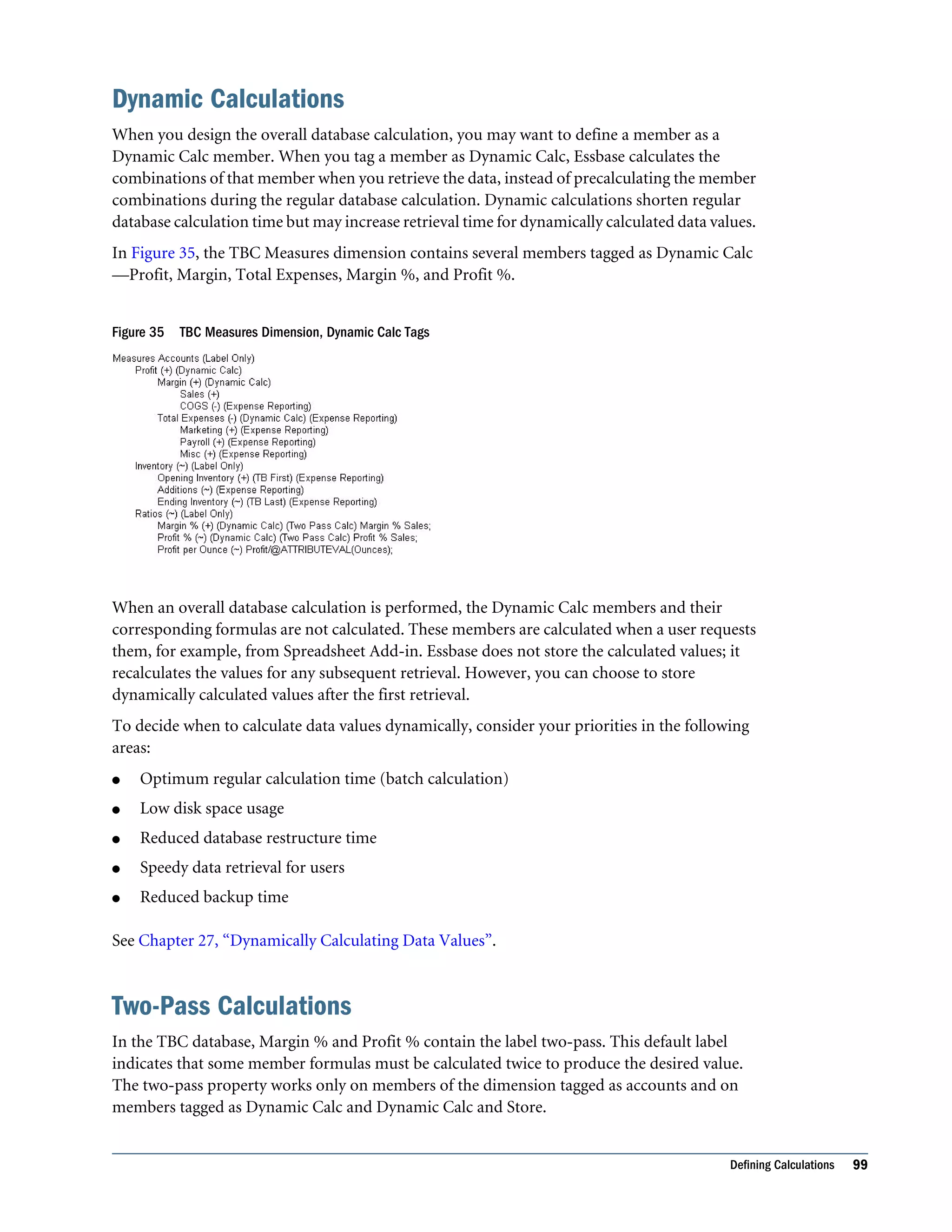
  • 200.
    Understanding Drill-through URLs ERPand EPM applications create a drill-through URL using Essbase. The drill-through URL is stored in the Essbase database file as metadata. The number of drill-through URLs per database is limited to 255. Note: It the responsibility of the Administrators of the ERP and EPM applications to define drill-through definitions and host the Web pages that they wish to use as targets of drill- through URLs. See the following topics, which describe the components of drill-through URLs: l “Drill-through URL Name” on page 200 l “Drill-through URL XML” on page 200 l “List of Drillable Regions” on page 200 l “Level 0 Boolean Flag” on page 201 Drill-through URL Name Thedrill-throughURLnameisanidentifiertomanagethedefineddrill-throughURLThisname can be different from the URL display name visible to the end user through Essbase clients. Drill-through URL XML The drill-through URL XML is a block of XML information structured in a protocol that enables Essbase to link specified database regions to information on Oracle ERP and EPM applications. This URL XML is transparent to the end users querying the application. The URL XML is populated by the ERP or EPM applications that deployed the Essbase database. It is not recommended that the Administrator edit the URL XML; however, Essbase does provide the interface to edit the URL XML. The XML block contains the drill-through URL display name, as well as a URL enabling the hyperlink from a cell to a Web interface to occur. List of Drillable Regions The list of drillable regions is a member specification defining areas of the database that should allowdrill-throughusingthespecifiedURL.Theadministratordefinesthelistofdrillableregions using a member specification of members from one or more dimensions. Define the member specification using the same Essbase member-set calculation language that you use for defining security filters. For example, the following is a valid member specification, indicating all eastern states, except New York, for months of Qtr1: @REMOVE(@DESCENDANTS("Eastern Region"), “New York”), @CHILDREN(Qtr1). The number of drillable regions in a drill-through URL is limited to 256. The number of characters per drillable region is limited to 65536. 200 Drilling Through to Oracle Applications
  • 201.
    Level 0 BooleanFlag This flag indicates whether the URL applies only to level 0 descendents of the region specified by the list of drillable regions. For example, if the level 0 flag is enabled for drillable region DESCENDANTS("Market"), @CHILDREN(Qtr1), then the URL is applicable for all states of Market during all months of Qtr1, and for all level 0 members across remaining dimensions. Creating and Managing Drill-through URLs For more information about the MaxL statements and APIs referenced in this section, see the Oracle Essbase Technical Reference and the Oracle Essbase API Reference, respectively. Use the following MaxL statements to manage drill-through URLs: l create drillthrough l alter drillthrough l display drillthrough l drop drillthrough Use the following Essbase API structures and functions to manage the drill-through URLs on the Essbase database: l C Main API Structure: m ESS_DURLINFO_T l C Main API functions: m EssCreateDrillThruURL m EssDeleteDrillThruURL m EssGetDrillThruURL m EssGetCellDrillThruReports m EssListDrillThruURLs m EssMDXIsCellGLDrillable m EssUpdateDrillThruURL l C Grid API structure: m ESSG_DATA_T l C Grid API function: m EssGGetIsCellDrillable l Visual Basic API structure: m ESB_DURLINFO_T l Visual Basic API functions: Creating and Managing Drill-through URLs 201
  • 202.
    m EsbCreateDrillThruURL m EsbUpdateDrillThruURL mEsbDeleteDrillThruURL m EsbListDrillThruURLs m EsbGetDrillThruURL m EsbGetCellDrillThruReports To manage drill-through URLs in Administration Services, see these topics in the Oracle Essbase Administration Services Online Help: l “Managing Drill-through Definitions” l “Edit Drill-through Definitions Dialog Box” 202 Drilling Through to Oracle Applications
  • 203.
    14 Designing and Building CurrencyConversion Applications In This Chapter About Currency Conversion .............................................................................203 About the Sample Currency Application ...............................................................204 Structure of Currency Applications .....................................................................204 Conversion Methods.....................................................................................208 Building Currency Conversion Applications and Performing Conversions...........................209 The information in this chapter applies only to block storage databases and is not relevant to aggregate storage databases. Also see Chapter 60, “Comparison of Aggregate and Block Storage.” About Currency Conversion The Essbase Currency Conversion feature enables you to translate financial data from one currency into another. Currency conversion facilitates comparisons among countries and enables consolidation of financial data from locations that use different currencies. For example, consider an organization that analyzes profitability data from the UK, reported in pounds, and from Japan, reported in yen. Comparing local currency profitability figures would be meaningless. To understand the relative contribution of each country, you must convert pounds into yen, yen into pounds, or both into another currency. As another example, reporting total profitability for North America requires standardization of the local currency values that constitute the North America total. Assuming that the U.S., Mexico, and Canada consolidate into Total North America, the profitability total is meaningless if data is kept in local currencies. The Total North America sum is meaningful only if local currencies are converted to a common currency before consolidation. The Essbase installation includes the option to install the Sample currency application, which consists of two databases, Interntl and Xchgrate. If you do not have access to these databases, contact your Essbase administrator. See Appendix B, “Setting Up Sample Applications.” About Currency Conversion 203
  • 204.
    About the SampleCurrency Application The Sample currency application builds on the business scenario introduced in Chapter 4, “Case Study:DesigningaSingle-Server,MultidimensionalDatabase,”astheBeverageCompany(TBC) expands its business outside the U.S. TBC adds the following markets: l Three locations in Canada: Toronto, Vancouver, and Montreal l Four locations in Europe: the UK, Germany, Switzerland, and Sweden In addition, TBC adds a new member, U.S., a consolidation of data from the U.S. regions: East, West, South, and Central. Data for each TBC market location is captured in local currency. U.S. dollar values are derived by applying exchange rates to local values. TBC must analyze actual data in two ways: l Actuals are converted at actual exchange rates. l Actuals are converted at budget exchange rates to analyze variances due to exchange rates. After all actuals are processed, budget data is converted with budget exchange rates. The TBC currency application consists of the main database (Interntl) and the currency database (Xchgrate). On Essbase Server, the databases are in the Sample application. If you do not have access to the databases, contact your Essbase administrator. Structure of Currency Applications In a business application requiring currency conversion, the main database is divided into at least two slices. One slice handles input of the local data, and another slice holds a copy of the input data converted to a common currency. Essbase holds the exchange rates required for currency conversion in a separate currency database. The currency database outline, automatically generated by Essbase from the main databaseafteryouassignthenecessarytags,typicallymapsagivenconversionratioontoasection of the main database. After the currency database is generated, it can be edited like any other Essbase database. The relationship between the main database and the currency database is illustrated in Figure 46. 204 Designing and Building Currency Conversion Applications
  • 205.
    Figure 46 CurrencyApplication Databases Main Database To enable Essbase to generate the currency database outline automatically, you modify dimensions and members in the main database outline. In the Sample currency application, the main database is Interntl. The main database outline can contain from 3 to n dimensions. At minimum, the main database must contain the following dimensions: l A dimension tagged as time. Tagging a dimension as time generates a dimension in the currency database that is identical to the time dimension in the main database. In the Sample.Interntl database, the dimension tagged as time is Year. l A dimension tagged as accounts. Tagging a dimension as accounts and assigning currency categories to its members creates a dimension in the currency database that contains members for each of the individual currency categories. Category assignment enables the application of different exchange rates to various accounts or measures. In the Sample.Interntl database, the dimension tagged as accounts is Measures. Each descendant of a member inherits the currency category tag of its ancestor. A member or sub-branch of members also can have its own category. For example, profit and loss (P&L) accounts may use exchange rates that differ from the rates used with balance sheet accounts. In addition, some accounts may not require conversion. For example, in the Sample.Interntl database, members such as Margin% and Profit% require no conversion. You tag members not to be converted as No Conversion. The No Conversion tag is not inherited. l A market-related dimension tagged as country. Tagging a dimension as country and assigning currency names to individual countries creates a member in the currency database for each currency. In the Sample.Interntl database, the Market dimension is tagged as country. The currency name for this dimension is USD (U.S. dollars), because all local currencies must be converted to USD, the company’s common currency. Becausemultiplememberscanhavethesamecurrencyname,thenumberofcurrencynames is typically less than the total number of members in the dimension. As shown in Table 31 on page 206, the Sample.Interntl database uses only six currency names for the 15 members in the Market dimension. Each of the children of the member Europe uses a different currency and, therefore, must be assigned an individual currency name. However, the U.S. Structure of Currency Applications 205
  • 206.
    dimension and itsfour regional members all use the same currency. The same is true of the Canada member and its three city members. When the children of a given member share a currency, you must define a currency name for only the parent member. Table 31 Interntl Database Currency Names Dimensions and Members Currency Name Market - Country U.S. East West South Central USD (U.S. dollar) Canada Toronto Vancouver Montreal CND (Canadian dollar) Europe UK Germany Switzerland Sweden GBP (British pound) EUR (Euro) CHF (Swiss franc) SEK (Swedish krona) When preparing a main database outline for currency conversion, you can create an optional currency partition to tell Essbase which slice of the database holds local currency data and which holds data to be converted. The dimension that you tag as currency partition contains members forbothlocalcurrencyvaluesandconvertedvalues.Localcurrencydataisconvertedtocommon currency data using currency conversion calculation scripts. In the Sample.Interntl database, the Scenario dimension is the currency partition dimension. Forinstructionsonhowtousecurrencypartitiondimensions,see“KeepingLocalandConverted Values” on page 211. Note: A currency conversion partition applies only to the Currency Conversion option. It is not related to the Partitioning option that enables data to be shared between databases by using a replicated, linked, or transparent partition. The Oracle Essbase Spreadsheet Add-in User's Guide provides examples of ad hoc currency reporting capabilities. Report scripts enable the creation of reports that convert data when the report is displayed, as discussed under “Converting Currencies in Report Scripts” on page 213. 206 Designing and Building Currency Conversion Applications
  • 207.
    Note: For alist of methods used to create the main database outline, see “Creating Main Database Outlines” on page 209. Currency Database By assigning currency tags to members in the main database outline, you enable Essbase to generate the currency database automatically. In the Sample currency application, the currency database is Xchgrate. Note: Inthecurrencydatabase,alllevel0membersmustbestored,non-dynamic-calcmembers. This means that the database the currency database is generated from must also have all level 0 members as stored, non-dynamic-calc members. A currency database always consists of the following three dimensions, with an optional fourth dimension: l A dimension tagged as time, which is typically the same as the dimension tagged as time in the main database. This allows the currency database to track currency fluctuations over time and to accurately convert various time slices of the main database. In the Sample.Xchgrate database, the dimension tagged as time is Year. Each member of the time dimension in the main database must be defined in the currency database. Values by time period in the main database usually are converted to the exchange rates of their respective time period from the currency database (although you can convert data values against the exchange rate of any period). l A dimension tagged as country, which contains the names of currencies relevant to the markets (or countries) defined in the main database. Each currency name defined in the main database must also exist in the currency database. The currency names define the country-to-exchange rate mapping when conversion occurs. In the Sample.Xchgrate database, the country dimension is CurName. Table 32 lists the currency names in the CurName dimension: Table 32 Xchgrate Database Currency Names Dimension and Members Alias Name CurName - Country USD CND GBP EUR CHF SEK U.S. dollar Canadian dollar British pound Euro Swiss franc Swedish krona l A dimension tagged as accounts, which enables the application of various rates to members of the dimension tagged as accounts in the main database. The categories defined for the Structure of Currency Applications 207
  • 208.
    accounts dimension inthe main database are used to form the members in the accounts dimensionofthecurrencydatabase.Forexample,itmaybenecessarytoconvertGrossProfit and Net Profit using one category of rates, while other accounts use a different set of rates. In the Sample.Xchgrate database, the dimension tagged as accounts is CurCategory, and the account categories included are P&L (Profit & Loss) and B/S (Balance Sheet). l A currency database, which typically includes an optional currency type dimension, which enables different scenarios for currency conversion. Typically, an application has different exchange rates for different scenarios, such as actual, budget, and forecast. To convert data between scenarios, select which type of rate to use. The currency type dimension is created when you generate the currency outline and is not directly mapped to the main database. Therefore, member names in this dimension need not match member names of the main database. In the Sample.Xchgrate database, the currency type dimension is CurType. CurType includes actual and budget scenarios. Note: Forinformationaboutcreatingthecurrencydatabaseoutline,see“BuildingCurrency Conversion Applications and Performing Conversions” on page 209. Conversion Methods Different currency applications have different conversion requirements. Essbase supports two conversion methods: l Overwriting local values with converted values. Some applications require that only converted values be stored in the main database. Local values are entered, and the conversion operation overwrites local values with common currency values. This method assumes that there is no requirement for reporting or analyzing local currencies. Because this operation overwrites data, load local values and recalculate the data each time you perform a conversion. This method is useful only for single (not ongoing) conversions. l Keeping local and converted values. Most applications require that data be stored in both local and common currency (converted) values. This method permits reporting and analyzing local data, and data modifications and recalculations are easier to control. To use this method, define a currency partition (see “Main Database” on page 205). Either of these methods may require a currency conversion at report time. Report time conversion enables analysis of various exchange rate scenarios without actually storing data in the database. The Currency Conversion module enables performance of ad hoc conversions. You perform ad hoc conversions by using Spreadsheet Add-in, as discussed in the Oracle Essbase Spreadsheet Add-in User's Guide, or by using a report script, as discussed in “Converting Currencies in Report Scripts” on page 213. 208 Designing and Building Currency Conversion Applications
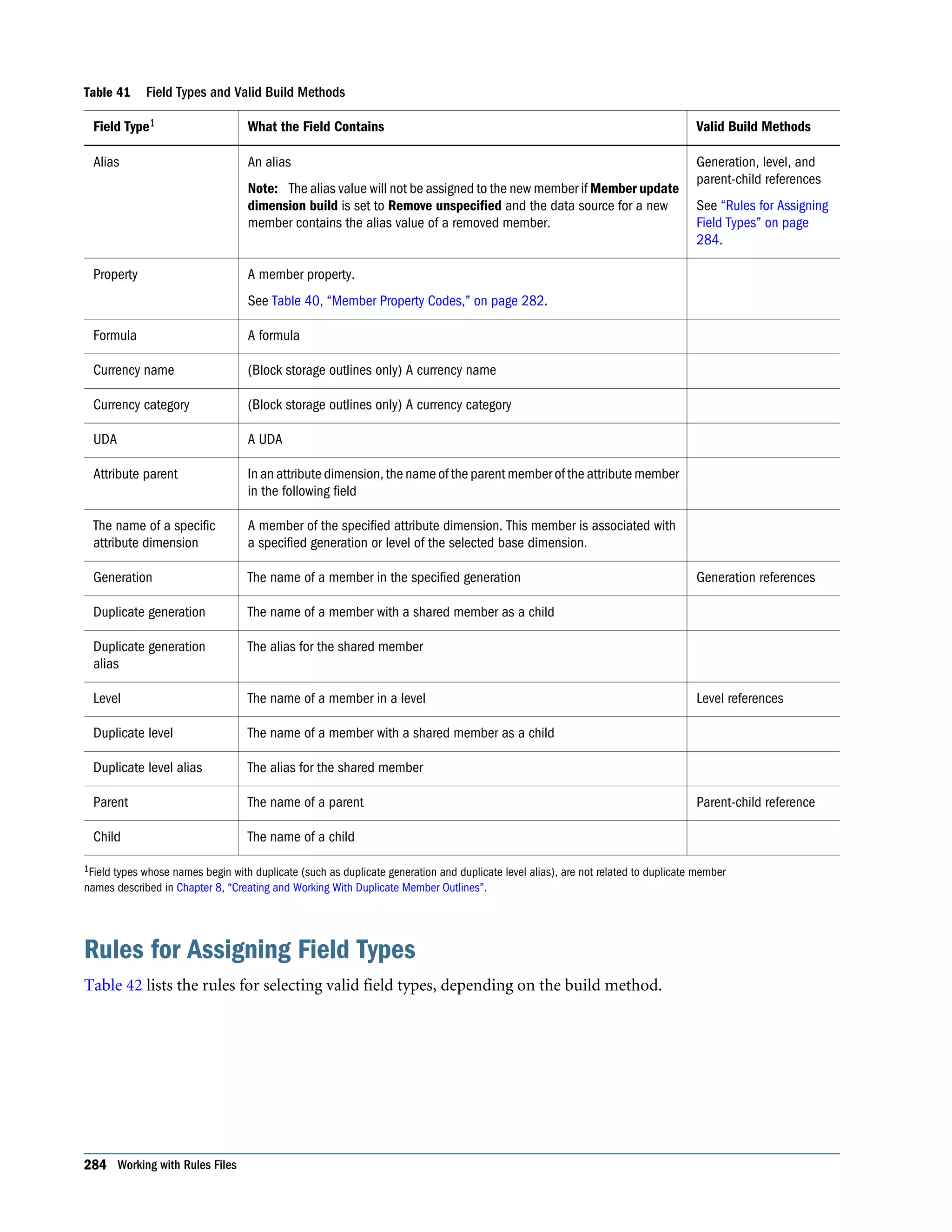
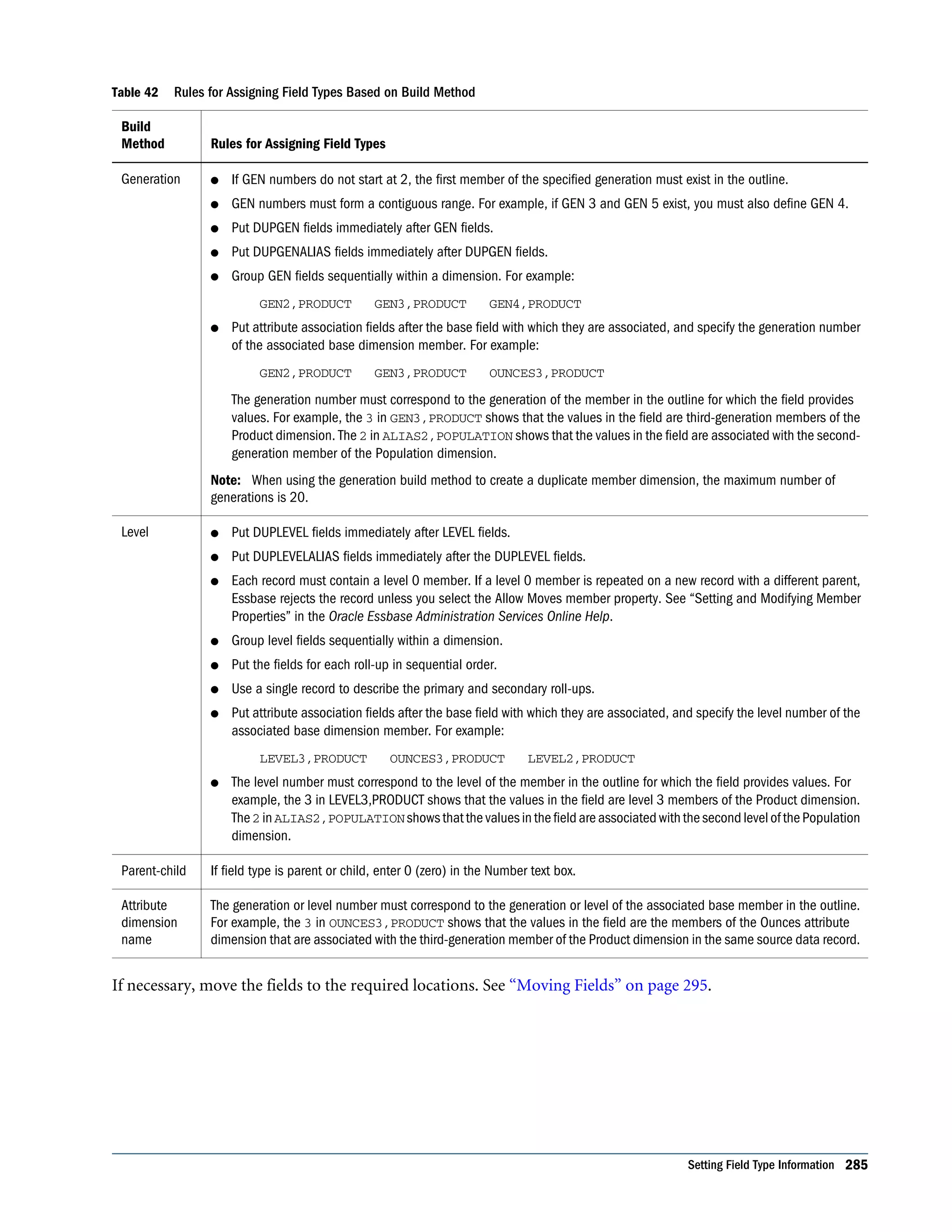
  • 209.
    Building Currency ConversionApplications and Performing Conversions To build a currency conversion application and perform conversions, use the following process: 1. Create or open the main database outline. See “Creating Main Database Outlines” on page 209. 2. Prepare the main database outline for currency conversion. See “Preparing Main Database Outlines” on page 209. 3. Generate the currency database outline. See “Generating Currency Database Outlines” on page 210. 4. Link the main and currency databases. See “Linking Main and Currency Databases” on page 210. 5. Convert currency values. See “Converting Currency Values” on page 210. 6. Track currency conversions. See “Tracking Currency Conversions” on page 214. 7. If necessary, troubleshoot currency conversion. See “Troubleshooting Currency Conversion” on page 215. Creating Main Database Outlines To create a main database outline, create or open an Essbase database outline, modify the outline as needed, and save the outline for use in the currency conversion application. ä To create an outline or open an existing outline, use a tool: Tool Topic Location Administration Services Opening and Editing Outlines Oracle Essbase Administration Services Online Help MaxL create database Oracle Essbase Technical Reference ESSCMD CREATEDB Oracle Essbase Technical Reference Preparing Main Database Outlines After you create or open the main database outline, modify dimensions and members to enable Essbase to generate the currency database outline automatically. See “Main Database” on page 205. Building Currency Conversion Applications and Performing Conversions 209
  • 210.
    ä To preparea main database outline, see “Preparing the Main Database Outline for Currency Conversion” in the Oracle Essbase Administration Services Online Help. Generating Currency Database Outlines After you verify and save the main database outline, you can generate the currency outline. The currency outline contains dimensions, members, currency names, and currency categories previously defined in the main database outline. The currency database outline is basically structured and ready to use after being generated but may require additions to make it complete. ä To generate a currency database outline, see “Generating a Currency Database Outline” in the Oracle Essbase Administration Services Online Help. Linking Main and Currency Databases To perform a currency conversion calculation, Essbase must recognize a link between the main and currency databases. Generating a currency outline does not automatically link a main database with a currency database. When you link the databases, you specify the conversion calculation method and the default currency type member. ä To link main and currency databases, see “Linking a Database to a Currency Database” in the Oracle Essbase Administration Services Online Help. Converting Currency Values Afteryoucreateacurrencyconversionapplication,youconvertdatavaluesfromalocalcurrency to a common, converted currency by using the CCONV command in calculation scripts. For example, you might convert data from a variety of currencies into USD (U.S. dollars). You can convert the data values back to the original, local currencies by using the CCONV TOLOCALRATE command. You can convert all or part of the main database using the rates defined in the currency database. You can overwrite local values with converted values, or you can keep both local and converted values in the main database, depending on your tracking and reporting needs. Note: When running a currency conversion, ensure that the data being converted is not simultaneously being updated by other user activities (for example, a calculation, data load, or currency conversion against the same currency partition). Concurrent activity on the data being converted may produce incorrect results. Essbase does not display a warning message in this situation. Note: When you convert currencies using the CCONV command, the resulting data blocks are marked as dirty for the purposes of Intelligent Calculation. Thus, Essbase recalculates all converted blocks when you recalculate the database. 210 Designing and Building Currency Conversion Applications
  • 211.
    To see samplecurrency conversion calculation scripts, see the Oracle Essbase Technical Reference. Overwriting Local Values with Converted Values To overwrite local values, you need not create a currency partition dimension in the main database. Use the CCONV command in a calculation script to convert all data in the database: The following calculation script converts the values in the database to USD: CCONV USD; CALC ALL; If required, you can specify a currency name that contains the required exchange rate. The following calculation script converts the values in the database to USD, using the exchange rate for Jan as defined in the currency database: CCONV Jan->USD; CALC ALL; The CALC ALL command is required in the examples shown because the CCONV command converts only currencies. It does not consolidate or calculate members in the database. The following calculation script uses the “Act xchg” rate to convert the converted values back to their original local currency values: CCONV TOLOCALRATE "Act xchg"; CALC ALL; Note: You cannot use the FIX command unless you are using a currency partition dimension and the CCTRACK configuration setting is TRUE in the essbase.cfg file. Keeping Local and Converted Values You can keep local and converted values in a database. In the main database, you must define themembersthatstorethelocalandconvertedvaluesbycreatingacurrencypartitiondimension (see “Main Database” on page 205). The currency partition dimension has one partition for local values and one for converted values. ä To create a calculation script that copies local data to a converted partition and calculates the data: 1 Use the DATACOPY command to copy data from the local to the converted partition. 2 Use the FIX command to calculate only the converted partition and use the CCONV command to convert the data. Note: When using a currency partition dimension, you must FIX on a member of the dimension to use the CCONV command. 3 Use the CALC command to recalculate the database. Building Currency Conversion Applications and Performing Conversions 211
  • 212.
    The following exampleis based on the Sample.Interntl database and the corresponding Sample.Xchgrate currency database. Figure 47 shows the currency partition from the Sample.Interntl database. Figure 47 Calculating Local and Converted Currency Conversions The following calculation script performs three currency conversions for Actual, Budget, and Actual @ Bud Xchg data values: /* Copy data from the local partition to the master partition (for converted values) */ DATACOPY Act TO Actual; DATACOPY Bud TO Budget; /* Convert the Actual data values using the "Act xchg" rate */ FIX(Actual) CCONV "Act xchg"->US$; ENDFIX * Convert the Budget data values using the "Bud xchg" rate */ FIX(Budget) CCONV "Bud xchg"->US$; ENDFIX /* Convert the "Actual @ Bud XChg" data values using the "Bud xchg" rate */ FIX("Actual @ Bud XChg") CCONV "Bud xchg"->US$; ENDFIX /* Recalculate the database */ CALC ALL; CALC TWOPASS; The following calculation script converts the Actual and Budget values back to their original local currency values: FIX(Actual) CCONV TOLOCALRATE "Act xchg"; ENDFIX FIX(Budget) CCONV TOLOCALRATE "Bud xchg"; ENDFIX CALC ALL; 212 Designing and Building Currency Conversion Applications
  • 213.
    Note: When youconvert currencies using the CCONV command, the resulting data blocks are marked as dirty for the purposes of Intelligent Calculation. Thus, Essbase recalculates all converted blocks when you recalculate the database. Calculating Databases If you execute a CALC ALL command to consolidate the database after running a conversion, meaningful total-level data is generated in the converted base rate partition, but the local rate partition contains a meaningless consolidation of local currency values. To prevent meaningless consolidation, use the calculation command SET UPTOLOCAL, which restricts consolidations to parents with the same defined currency. For example, all cities in the U.S. use dollars as the unit of currency. Therefore, all children of U.S. consolidate to U.S. Consolidation stops at the country level, however, because North America contains countries that use other currencies. Converting Currencies in Report Scripts You can convert currencies in report scripts, using the CURRENCY command to set the output currency and the currency type. For the syntax and definitions of Report Writer commands, see the Oracle Essbase Technical Reference. Note: Essbase cannot perform ”on the fly” currency conversions across transparent databases. If two transparent partition databases are calculated using different conversions, you cannot perform currency conversions in reports. The following Sample report contains first-quarter Budget Sales for colas, using the January exchange rate for the Peseta currency. Illinois Sales Budget Jan Feb Mar ======== ======== ======== 100-10 3 3 3 100-20 2 2 2 100-30 #MISSING #MISSING #MISSING 100 5 5 5 Currency: Jan->Peseta->Act xchg Currency: Jan->Peseta->Act xchg Illinois Sales Budget Jan Feb Mar ======== ======== ======== 100-10 3 3 3 100-20 2 2 2 100-30 #MISSING #MISSING #MISSING 100 5 5 5 Use the following script to create the Sample currency conversion report: <Page (Market, Measures, Scenario) {SupCurHeading} Illinois Sales Budget Building Currency Conversion Applications and Performing Conversions 213
  • 214.
    <Column (Year) <children Qtr1 <Currency"Jan->Peseta->Act xchg" <Ichildren Colas ! {CurHeading} Illinois Sales Budget <Column (Year) <children Qtr1 ! Tracking Currency Conversions You can use the CCTRACK configuration setting in the essbase.cfg file to control whether Essbase tracks the currency partitions that have been converted and the exchange rates that have been used for the conversions. Tracking currency conversions has the following advantages: l Enables conversion to occur at report time through Spreadsheet Add-in or Report Writer l Enables conversion of a converted currency back to its original, local rate using the CONV TOLOCALRATE command l Prevents data inaccuracies due to accidental reconversion of data during a currency calculation By default, CCTRACK is turned on. Essbase tracks which currency partitions have been converted and which have not. The tracking is done at the currency partition level: a database with two partitions has two flags, each of which can be “converted” or “unconverted.” Essbase does not store a flag for member combinations within a partition. When using a currency partition, and when CCTRACK is set to TRUE (the default) in essbase.cfg, you must FIX on a single currency partition member. You cannot FIX on multiple members, because CCTRACK works at the currency partition member level and marks as converted or unconverted all data associated with the currency partition member. For example, in the Sample.Basic database, the following example is valid: FIX(Actual) CCONV "Act xchg"->US$; ENDFIX In the Sample.Basic database, if you were able to use a FIX command to convert the actual values for only the members Jan and Feb, the database would have converted and unconverted data in the same currency partition, causing a data consistency issue. Reasons to Turn Off CCTRACK For increased efficiency when converting currency data between currency partitions, consider turning off CCTRACK. For example, if you load data for the current month into the local partition, use the DATACOPY command to copy the entire currency partition that contains the updated data, and then run the conversion on the currency partition. 214 Designing and Building Currency Conversion Applications
  • 215.
    Note: Always doa partial data load to the local partition and use the DATACOPY command to copy the entire currency partition to the converted partition before running the currency conversion. Updating data directly into the converted partition causes incorrect results. Methods for Turning Off CCTRACK You can turn off CCTRACK in three ways: l Use the SET CCTRACKCALC ON|OFF command in a calculation script to turn off CCTRACK temporarily. You can use this command at calculation time to increase flexibility and efficiency during currency conversion. l Use the CLEARCCTRACK calculation command to clear the internal exchange rate tables created by CCTRACK. You can use the command inside a FIX statement to clear the exchange rates for a currency partition. Use the command after a data load to reset the exchange rate tables so that they are ready for future currency conversion calculations. l Set CCTRACK to FALSE in the essbase.cfg file. Setting CCTRACK to FALSE turns off the tracking system and has the following results: m The CCONV command assumes that data is unconverted (is in local currency). If you accidentally run the CCONV command multiple times on the same data, the resulting data is inaccurate. m Similarly, the currency report options assume that the data is unconverted (is in local currency). If the data already has been converted in the database, it is reconverted at report time, resulting in inaccurate data. m The restrictions on using the FIX and DATACOPY commands in currency conversions do not apply. Note: When running a currency conversion, ensure that the data being converted is not simultaneously being updated by other user activities (for example, a calculation, data load, or currency conversion against the same currency partition). Concurrent activity on the data being converted may produce incorrect results. Essbase does not display a warning message in this situation. Troubleshooting Currency Conversion See “Troubleshooting Currency Conversion” in the Oracle Essbase Administration Services Online Help. Building Currency Conversion Applications and Performing Conversions 215
  • 216.
    216 Designing andBuilding Currency Conversion Applications
  • 217.
    15 Designing Partitioned Applications In ThisChapter Understanding Essbase Partitioning ...................................................................217 Partition Design Requirements .........................................................................222 Replicated Partitions.....................................................................................226 Transparent Partitions ...................................................................................230 Linked Partitions .........................................................................................236 Case Studies for Designing Partitioned Databases...................................................238 Understanding Essbase Partitioning Apartitionistheregionofadatabasethatissharedwithanotherdatabase.AnEssbasepartitioned application can span multiple servers, processors, or computers. Partition Types Table 33 lists the types of partitions that are supported in Essbase: Table 33 Partition Types Partition Type Description Applies To Replicated A copy of a portion of the data source that is stored in the data target. See “Replicated Partitions” on page 226. Block storage databases Aggregate storage databases Transparent Allows users to access data from the data source as though it were stored in the data target. The data is, however, stored at the data source, which can be in another application or Essbase database, or on another Essbase Server. See “Transparent Partitions” on page 230. Block storage databases Aggregate storage databases Linked Sends users from a cell in one database to a cell in another database. Linked partitions give users a different perspective on the data. See “Linked Partitions” on page 236. Block storage databases Aggregate storage databases Use the information in Table 34 to help you choose which type of partition to use: Understanding Essbase Partitioning 217
  • 218.
    Table 34 FeaturesSupported by Partition Type Feature Replicated Transparent Linked Up-to-the-minute data x x Reduced network traffic x x Reduced disk space x x Increased calculation speed x Smaller databases x x Improved query speed x x Invisible to end users x x Access to databases with different dimensionality x Easier to recover x Less synchronization required x Ability to query data based on its attributes x x Ability to use front-end tools that are not distributed OLAP-aware x x Easy to perform frequent updates and calculations x Ability to update data at the data target x x View data in a different context x Perform batch updates and simple aggregations x Parts of a Partition Partitions contain the following parts, as illustrated in Figure 48 and described in Table 35 on page 219. Figure 48 Parts of a Partition 218 Designing Partitioned Applications
  • 219.
    Table 35 Partsof a Partition Part Description Type of partition A flag indicating whether the partition is replicated, transparent, or linked. Data source information The server, application, and database name of the data source. Data target information The server, application, and database name of the data target. Login and password The login and password information for the data source and the data target. This information is used for internal requests between the two databases to execute administrative and end-user operations. Shared areas A definition of one or more areas, or regions, shared between the data source and the data target. To share multiple noncontiguous portions of a database, define multiple areas in a single partition. This information determines which parts of the data source and data target are shared so that Essbase can put the proper data into the data target and keep the outlines for the shared areas synchronized. Member mapping information A description of how the members in the data source map to members in the data target. Essbase uses this information to determine how to put data into the data target if the data target and the data source use different names for some members and dimensions. State of the partition Information about whether the partition is up-to-date and when the partition was last updated. Data Sources and Data Targets Partitioned databases contain at least one data source (the primary site of the data) and at least one data target (the secondary site of the data). One database can serve as the data source for one partition and the data target for another partition. When defining a partition, you map cells in the data source to their counterparts in the data target. Figure 49 Data Source and Data Target An Essbase database can contain many partitions, as well as data that is not shared with any other Essbase database. You can define partitions between the following databases: l Different databases in different applications, as long as each database uses the same language and the same Unicode-related mode. The applications can be on the same computer or different computers. l Different databases in one block storage application. This practice is not recommended, because the full benefits of partitioning databases are realized when each database is in a separate application. Understanding Essbase Partitioning 219
  • 220.
    You can defineonly one partition of each type between the same two databases. For example, you can create only one replicated partition between the Sampeast.East and Samppart.Company databases. The East or Company databases can, however, contain many replicated partitions that connect to other databases. One database can serve as the data source or data target for multiple partitions. To share data amongmanydatabases,createmultiplepartitions,eachwiththesamedatasourceandadifferent data target, as shown in Figure 50: Figure 50 Data Shared at Multiple Targets Table 36 lists the combinations of block storage and aggregate storage databases as data target and data source that are supported by each partition type: Table 36 Combinations of Data Sources and Data Targets Supported by Partition Type Source Target Replicated Transparent Linked Block storage Block storage Yes Yes Yes Aggregate storage Block storage No Yes Yes Aggregate storage Aggregate storage No Yes Yes Block storage Aggregate storage Yes Yes Yes Overlapping Partitions An overlapping partition occurs when similar data from multiple databases is the data source for one data target in a partition. For example, IDESC East, Sales from database 1 and Boston, Sales from database 2 are mapped to IDESC East, Sales and Boston, Sales in database 3. Because Boston is a member of the East dimension, the data for Boston mapped to database 3 from database 1 and database 2 overlap. This data overlap results in an overlapping partition, as shown in Figure 51: 220 Designing Partitioned Applications
  • 221.
    Figure 51 OverlappingPartitions An overlapping partition is allowed in linked partitions but is invalid in replicated and transparent partitions and generates an error message during validation. Substitution Variables in Partition Definitions Using substitution variables in partition definitions enables you to base the partition definition on different members at different times. Substitution variables act as global placeholders for information that changes regularly; each variable has an assigned value, which the Database Manager can change anytime. For example, you can define a substitution variable named Curmonth and change the substitution variable value to the member name for each month throughout the year to Jan, Feb, Mar, and so on. In this example, using a substitution variable reduces the partition size because you need not include all months in the partition definition area to access data from one month. To specify a substitution variable in an area definition or in a mapping specification, use the Use text editororUse inline editingoption.Insert“&”atthebeginningofthesubstitutionvariable name; for example, &Month. Essbase uses substitution values when you verify the partition. When you perform any process that uses partitioned data, Essbase resolves the substitution variable name to its value. The substitution variable name is displayed when you view the partition definition. See “Using Substitution Variables” on page 116. Attributes in Partitions For block storage databases, you can use attribute functions for partitioning on attribute values, but you cannot partition an attribute dimension. Use attribute values to partition a database to access members of a dimension according to their characteristics. For example, in the Sample.Basic database, you cannot partition the Pkg Type attribute dimension,butyoucancreateapartitionthatcontainsallthemembersoftheProductdimension that are associated with either or both members (Bottle and Can) of the Pkg Type dimension. If you create a partition that contains members associated with Can, you can access data only on Product members that are packaged in cans; namely, 100-10, 100-20, and 300-30. Understanding Essbase Partitioning 221
  • 222.
    Note: Retrieving dataon attribute members of block storage databases may result in missing data. See the entry for “Dense Dynamic Calc members in nonexisting stored blocks” in Table 18, “Differences Between Attribute and Standard Dimensions,” on page 163. Youcanusethe@ATTRIBUTEcommandandthe@WITHATTRcommandtodefinepartitions. For example, to extract data on all members of the Product dimension that are associated with the Caffeinated attribute dimension, you can create a partition such as @ATTRIBUTE (Caffeinated). But you cannot partition the Caffeinated attribute dimension. Based on the previous example, this partition is correct: Source Target @ATTRIBUTE(Caffeinated) @ATTRIBUTE(Caffeinated) This partition is incorrect: Source Target Caffeinated Caffeinated For more information about these commands, see the Oracle Essbase Technical Reference. Also see Chapter 10, “Working with Attributes.” Version and Encoding Requirements Version: Both ends (the source and target) of the partition must be on the same release level of Essbase Server for these partition types: l Replicated l Transparent l Linked Encoding: The application mode—Unicode mode or non-Unicode mode—of both ends of the partition must be the same for these partition types: l Replicated l Transparent Partition Design Requirements Use the information in this section to carefully design partitions before implementing them. Benefits of Partitioning Partitioning can provide the following benefits: l For block storage databases, data synchronization across multiple databases 222 Designing Partitioned Applications
  • 223.
    Essbase tracks changesmade to data values in a partition and provides tools for updating the data values in related partitions. l Outline synchronization across multiple databases (except when an aggregate storage database is the target of a transparent partition) Essbase tracks changes made to the outlines of partitioned databases and provides tools for updating related outlines. l Ability for user navigation between databases with differing dimensionality When users drill across to the new database, they can drill down to more-detailed data. Partitioning Strategies Based on user requirements, select a partitioning strategy: l Partition applications from the top down. Usetop-downpartitioningtosplitadatabaseontomultipleprocessors,servers,orcomputers, which can improve the scalability, reliability, and performance of databases. To achieve the best results with top-down partitioning, create a separate application for each partitioned database. l Partition applications from the bottom up. Use bottom-up partitioning to manage data flow between multiple related databases, which can improve the quality and accessibility of the data in databases. l Partitiondatabasesaccordingtoattributevaluesassociatedwithbasedimensions(astandard dimension associated with one or more attribute dimensions). Use this strategy to extract data based on the characteristics of a dimension, such as flavor or size. Note: You cannot partition attribute dimensions. See “Attributes in Partitions” on page 221. Guidelines for Partitioning a Database Use the following information to help you determine whether to partition a database. l Partition a database when: m The data should be closer to the people who are using it. m A single failure would be catastrophic. m It takes too long to perform calculations after new data is loaded, and you want to improve performance by spreading calculations across multiple processors or computers. m Users want to see the data in different application contexts, and you want to control how users navigate between databases. Partition Design Requirements 223
  • 224.
    m You needto synchronize information from different sources. m You plan to add new organizational units that would benefit from having their own databases. m Users must wait as other users access the database. m You want to save disk space by giving users access to data stored in a remote location. m You want to reduce network traffic by replicating data in several locations. m You need to control database outlines from a central location. m You need client write-back functionality on an aggregate storage database. See “Using a Transparent Partition to Enable Write-Back for Aggregate Storage Databases” on page 945. l Do not partition a database when: m You have disk space, network bandwidth, and administrative resource concerns. m You perform complex allocations where unit level values are derived from total values. m You are required to keep all databases online at all times. Keeping databases online can be a problem if you have databases in several time zones, because peak user load may differ between time zones. Using linked and transparent partitions exacerbate this problem, but using replicated partitions might help. m Databases are in different languages or Unicode-related modes. Essbase can partition databases only if each database uses the same language, or each database uses the same Unicode or non-Unicode mode. Guidelines for Partitioning Data When designing a partitioned database, use the following information to help you determine which data to include in each partition: l Which database should be the data source and which the data target? The database that “owns”thedata,wherethedataisupdatedandwheremostofthedetaildataisstored,should be the data source. l Are some parts of the database accessed more frequently than others? l What data can you share among sites? l How granular must the data be at each location? l How frequently is the data accessed, updated, or calculated? l What are the available resources: disk space, CPUs, and network resources? l How much data must be transferred over the network? How long does it take? l Is the data stored in one or multiple locations? l Is the data accessed in one or multiple locations? l Is there information in separate databases that should be accessed from a central location? How closely are groups of data related? 224 Designing Partitioned Applications
  • 225.
    See “Case Studiesfor Designing Partitioned Databases” on page 238. Security for Partitioned Databases Users accessing replicated, transparent, or linked partitions may need to view data stored in multiple databases. The following sections describe how to set up security so that users do not view or change inappropriate data. Setting up End-User Security Create the required end users with the correct filters. 1. Create accounts for users at the data target. See “Managing Users and Groups in Essbase Native Security Mode” on page 628. 2. Create read and write filters at the data target to determine what end users can view and update. See Chapter 38, “User Management and Security in EPM System Security Mode.” 3. If you are creating a replicated partition, determine whether users can make changes to a replicated partition at the data target. The update setting (which allows or disallows updates) overrides user filters that allow users to update data. See the . l When creating replicated partitions using the create replicated partition MaxL statement, if you do not specify the update allow grammar, replicated partitions cannot be updated by default. See the Oracle Essbase Technical Reference. l When creating replicated partitions using Administration Services Console, by default, replicated partitions can be updated. See the Oracle Essbase Administration Services Online Help. 4. If you are creating a linked partition, create accounts for users at the data source. Users accessing linked databases may need to connect to multiple databases. See “Drill Across and Linked Partitions” on page 237. Setting up Administrator Security The administrative account performs all read and write operations requested by the data target for the data source. For example, when end users request data at the data target, the administrative account retrieves the data. When end users update data at the data target, the administrative account logs into the data source and updates the data there. You can create filters on the administrative account and on the end users. Filters on the administrativeaccountcanensurethatnooneatthedatatargetcanvieworupdateinappropriate data. For example, the administrator at the corporate database can restrict write access on certain cells to avoid relying on administrators in the regions to set up security correctly for each end user. Partition Design Requirements 225
  • 226.
    Create the requiredadministrative users with the correct filters. 1. Create an administrative account at the data source and data target. See “Setting the User Name and Password” on page 245. Essbase uses this account to log onto the data source to retrieve data and to perform outline synchronization operations. 2. Create read and write filters to determine which data administrators can view and update. See Chapter 38, “User Management and Security in EPM System Security Mode”. l For replicated partitions, set up read filters at the data source to determine which data Essbase reads when replicating, and set up write filters at the data target to determine which data Essbase writes to when replicating. l For transparent partitions, set up read filters at the data source to determine which data Essbase retrieves for end users, and set up write filters at the data source to determine which data Essbase updates for end users. Using Backup and Restore and Transaction Logging and Replay with Partitioned Databases If you are using Essbase backup and restore and transaction logging and replay features with partitioned databases, there are guidelines that you must follow. See the Oracle Hyperion Enterprise Performance Management System Backup and Recovery Guide. Replicated Partitions A replicated partition is a copy of a portion of the data source that is stored in the data target. Some users can then access the data in the data source while others access it in the data target. For example, in the Samppart and Sampeast sample applications, the DBA at The Beverage Company (TBC) created a replicated partition between the East database and the Company database containing Actual, Budget, Variance, and Variance%. Users in the eastern region now store their budget data locally. Because they do not have to retrieve this data live from corporate headquarters, response times are faster, and they have more control over the downtimes and administration of local data. See “Case Study 1: Partitioning an Existing Database” on page 238. Changes to the data in a replicated partition flow from the data source to the data target. Changes made to replicated data in the data target do not flow back to the data source. If users change the data at the data target, Essbase overwrites their changes when the DBA updates the replicated partition. When a replicated partition is defined, the DBA can select a setting to prevent the data in the replicated portion of the data target from being updated. The update setting (which allows or disallows updates) takes precedence over access provided by security filters and is also honored by batch operations, such as data load and calculation. The default behavior of the update setting 226 Designing Partitioned Applications
  • 227.
    depends on whetheryou create the replicated partition using MaxL or EAS Console. See “Setting up End-User Security” on page 225. Use a replicated partition to achieve any of the following goals: l Decrease network activity l Decrease query response times l Decrease calculation times l Recover more easily from system failures Rules for Replicated Partitions Replicated partitions must follow these rules: l You must be able to map the shared replicated areas of the data source and data target outlines, although the shared areas need not be identical. You must tell Essbase how each dimension and member in the data source maps to each dimension and member in the data target. Thedatasourceanddatatargetoutlinesforthenon-sharedareasdonothavetobemappable. l Because none of the areas that you use as a replicated partition target can come from a transparent partition source, you cannot create a replicated partition on top of a transparent partition, as shown in Figure 52: Figure 52 Invalid Replicated Partition l The cells in the data target of a replicated partition cannot come from two data sources; the cells in one partition must come from one database. To replicate cells from multiple databases, create a different partition for each data source. The cells in a data target can be the data source for a different replicated partition. For example, if the Samppart.Company database contains a replicated partition from the Sampeast.East database, you can replicate the cells in Sampeast.East into a third database, such as Sampwest.West. l You cannot use attribute members to define a replicated partition. For example, associated with the Market dimension, the Market Type attribute dimension members are Urban, Suburban, and Rural. You cannot define a partition on Urban, Suburban, or Rural, because a replicated partition contains dynamic data, not stored data. Therefore, an attempt to map attributes in replicated partitions results in an error message. However, you can use the WITHATTR command to replicate attribute data. Replicated Partitions 227
  • 228.
    Advantages of ReplicatedPartitions l Becausedataisstoredclosertoendusers,inthedatatarget,replicatedpartitionscandecrease network activity, resulting in improved retrieval times for users. l The data is more easily accessible to all users. Some users access the data at the data source, others at the data target. l Failures are not as catastrophic. Because the data is in multiple places, if one database fails, only the users connected to that database are unable to access the information. Data is still available at and can be retrieved from the other sites. l Local DBAs can control the downtime of their local databases. For example, because users in the eastern region are accessing their own replicated data instead of the Company database, DBAs can bring down the Company database without affecting users in the eastern region. l Because only the relevant data is kept at each site, databases can be smaller. For example, users in the eastern region can replicate only the eastern budget information, instead of accessing a larger company database containing budget information for all regions. Disadvantages of Replicated Partitions l You need more disk space because data is stored in multiple locations. l Because the DBA must manually refresh data regularly, users may not see the latest version of the data. Performance Considerations for Replicated Partitions To improve the performance of replicated partitions, follow these guidelines: l Donotreplicatemembersthataredynamicallycalculatedinthedatasource,becauseEssbase must probe the outline to find dynamically calculated members and their children to determine how to perform the calculation. l Do not replicate derived data from the data source. Instead, replicate the lowest practical level of each dimension and perform the calculations on the data target after you complete the replication. For example, to replicate the database along the Market dimension: m Define the shared area as the lowest-level members of the Market dimension that you care about, for example, East, West, South, and Central and the level 0 members of the other dimensions. m After you complete the replication, calculate the values for Market and the upper-level values in the other dimensions at the data target. Sometimes you cannot calculate derived data at the data target. In that case, replicate it from the data source. For example, you cannot calculate derived data at the data source if the data meets any of the following criteria: 228 Designing Partitioned Applications
  • 229.
    o Requires thatdata outside the replicated area be calculated. o Requires calculation scripts from which you cannot extract only the portion to be calculated at the data target. o Is being replicated onto a computer with little processing power, such as a laptop. l To optimize the replication of an aggregate storage database when the aggregate storage database is the target and a block storage database is the source and the two outlines are identical, use one of these methods: m The REPLICATIONASSUMEIDENTICALOUTLINE configuration setting in essbase.cfg. The setting can be enabled at the server, application, or database level. The syntax for the setting is as follows: REPLICATIONASSUMEIDENTICALOUTLINE [appname [dbname]] TRUE | FALSE When updating the essbase.cfg file, you must stop and then restart Essbase Server for the changes to take effect. m The alter database MaxL statement with the replication_assume_identical_outline grammar. The statement can be enabled only at the database level. The syntax for the statement is as follows: alter database appname.dbname enable | disable replication_assume_identical_outline; When using the alter database statement, you do not need to stop and restart the aggregate storage application. Both optimization methods affect only the target aggregate storage application; the source block storage application is not affected. The methods do not apply to block storage replication. l Partitioning along a dense dimension takes longer than partitioning along a sparse dimension.WhenEssbasereplicatesdatapartitionedalongadensedimension,itmustaccess every block in the data source and then create each block in the data target during the replication operation. l You cannot replicate data into a member that is dynamically calculated at the data target. Essbase does not load or replicate into Dynamic Calc and Dynamic Calc and Store members, because these members do not contain data until a user requests it at runtime. Essbase avoids sending replicated data for both dynamic dense and dynamic sparse members on the replication target, because this data is not stored on the data target. To replicate only the data values that have changed instead of the entire partition, see “Populating or Updating Replicated Partitions” on page 257. Replicated Partitions and Port Usage With replicated partitions, users connect to the target database only. When data is updated on the target database, the process of replicating data from the source database to the target database utilizesoneportandthisconnectionisbasedontheusernamedeclaredinthepartitiondefinition (partition user). Replicated Partitions 229
  • 230.
    Note: Because ofthe short-term nature of replication, replicated partitions and ports are rarely a problem. Transparent Partitions A transparent partition allows users to manipulate data that is stored remotely as if it were part of the local database. The remote data is retrieved from the data source each time that users at the data target request it. Users do not need to know where the data is stored, because they see it as part of their local database. Figure 53 Transparent Partitions Because data is retrieved directly from the data source, users see the latest version. When they update the data, their updates are written back to the data source. This process means that other users at the data source and the data target have immediate access to those updates. With a transparent partition, users at the data source and at the data target may notice slower performance as more users access the source data. For example, the DBA at TBC can use a transparent partition to calculate each member of the Scenario dimension on a separate computer. This process reduces the elapsed time for the calculation while providing users with the same view of the data. See “Case Study 1: Partitioning an Existing Database” on page 238. Use a transparent partition to achieve the following goals: l Show users the latest version of the data l Allow users at the data target to update data l Decrease disk space Rules for Transparent Partitions Transparent partitions must follow these rules: l Thesharedtransparentareasofthedatasourceanddatatargetoutlinesneednotbeidentical, but you must be able to map the dimensions in them. You must tell Essbase how each 230 Designing Partitioned Applications
  • 231.
    dimension and memberin the data source maps to each dimension and member in the data target. l The data source and data target outlines for the nonshared areas need not be mappable, but attribute associations must be identical. Otherwise, users can get incorrect results for some retrievals. For example, if product 100-10-1010 is associated with the Grape Flavor attribute on the source, but product 100-10-1010 is not associated with Grape on the target, the total of sales for all Grape flavors in New York is incorrect. l The partition definition must contain only stored members. You cannot use attribute dimensions or members to define a transparent partition. For example, the Market Type attribute dimension, which is associated with the Market dimension, has members Urban, Suburban, and Rural. You cannot define a partition on Urban, Suburban, or Rural. l If a cell is mapped from the data source to an aggregate storage database as the target, all the cell's dependents must also be mapped to the same partition definition. l You can create a transparent partition on top of a replicated partition. In other words, you can create a transparent partition target using a replicated partition source, as shown in Figure 54 Figure 54 Valid Transparent Partition l As illustrated in Figure 55, you cannot create a transparent partition on top of multiple other partitions. In other words, you cannot create a transparent partition target from multiple sources because each cell in a database must be retrieved from only one location—either the local disk or a remote disk. Figure 55 Invalid Transparent Partition l Carefully consider any formulas you assign to members in the data source and data target. Transparent Partitions 231
  • 232.
    Advantages of TransparentPartitions Transparent partitions can solve many database problems, but transparent partitions are not always the ideal partition type. l You need less disk space, because you are storing the data in one database. l The data accessed from the data target is always the latest version. l When the user updates the data at the data source, Essbase makes those changes at the data target. l Individual databases are smaller, so they can be calculated more quickly. l The distribution of the data is invisible to the end user and the end user’s tools. l You can load the data from either the data source or data target. l You can enable write-back functionality for aggregate storage databases by creating a transparentpartitionbetweenanaggregatestoragedatabaseasthesourceandablockstorage database as the target. See “Using a Transparent Partition to Enable Write-Back for Aggregate Storage Databases” on page 945. Disadvantages of Transparent Partitions If these disadvantages are too serious, consider using replicated or linked partitions instead. l Transparent partitions increase network activity, because Essbase transfers the data at the data source across the network to the data target. Increased network activity results in slower retrieval times for users. l Because more users are accessing the data source, retrieval time may be slower. l If the data source fails, users at both the data source and the data target are affected. Therefore, the network and data source must be available whenever users at the data source or data target need them. l You can perform some administrative operations only on local data. For example, if you archive the data target, Essbase archives only the data target and not the data source. The following administrative operations work only on local data in block storage databases: m CLEARDATA calculation command m DATACOPY calculation command m EXPORT command m VALIDATE command m BEGINARCHIVE and ENDARCHIVE commands m Restructure operations in Administration Services l Whenyouperformacalculationonatransparentpartition,Essbaseperformsthecalculation using the current values of the local data and transparent dependents. Essbase does not recalculate the values of transparent dependents, because the outlines for the data source and the data target may be so different that such a calculation is inaccurate. To calculate all 232 Designing Partitioned Applications
  • 233.
    partitions, issue aCALC ALL command for each individual partition, and then perform a CALC ALL command at the top level using the new values for each partition. Consider this example: m ThedatatargetoutlinecontainsaMarketdimensionwithEast,West,South,andCentral members m The data source outline contains an East dimension with New York and New Jersey members If you tried to calculate the data target outline, you would assume that East was a level 0 member. In the data source, however, East is derived by adding New York and New Jersey. Any calculations at the data target, however, would not know this information and could not reflect changes made to New York and New Jersey in the data source. To perform an accurate calculation, therefore, calculate East in the data source and then calculate the data target. l Formulas assigned to members in the data source may produce calculated results that are inconsistent with formulas or consolidations defined in the data target, and vice versa. Performance Considerations for Transparent Partitions To improve the performance of transparent partitions, consider the following guidelines when creating the partition: l Partitioning along dense dimensions in a transparent partition can greatly slow performance, because dense dimensions are used to determine the structure and contents of data blocks. If a database is partitioned only along a dense dimension at the target, Essbase mustcomposedatablocksbyperformingnetworkcallsfortheremotedatainthetransparent partition and to the disk I/O for the local portion of the block. To improve performance, consider including one or more sparse dimensions in the area definition so that the number of blocks required is limited to combinations with the sparse members. l Basing transparent partitions on the attribute values of a dimension can increase retrieval time, because attributes are associated with sparse dimensions. In such cases, partitioning at a level higher than the level that is associated with attributes improves retrieval time. For example, in the Product dimension of the Sample.Basic database, if children 100-10, 200-10, and 300-10 (level 0) are associated with attributes, then partition their parents 100, 200, and 300 (level 1) for better retrieval performance. l Loading data into the data source from the data target can greatly slow performance. If possible, load data into the data source locally. l Retrieval time is slower because users access the data over the network. l When a transparent partition is the target, consider using these configuration settings: m For requests sent from a data source to a transparent partition target (whether a block storage or aggregate storage database), you can log transaction response times using the ENABLE_DIAG_TRANSPARENT_PARTITION configuration setting in the Transparent Partitions 233
  • 234.
    essbase.cfg file. Loggingthese messages is helpful when troubleshooting response times that are too slow. m When the transparent partition target is an aggregate storage database, you can specify the maximum size of the request grid and the response grid, using the MAX_REQUEST_GRID_SIZE and MAX_RESPONSE_GRID_SIZE configuration settings. l Partitioning base dimensions can greatly slow performance. l See “Performance Considerations for Transparent Partition Calculations” on page 234. Calculating Transparent Partitions When you perform a calculation on a transparent partition, Essbase performs the calculation using the current values of the local data and transparent dependents. When calculating local data that depends on remote data, Essbase performs a bottom-up calculation. The bottom-up calculation can be done only if the calculator cache on the target database is used properly. See “Using Bottom-Up Calculation” on page 888. Increasing the memory assigned to the calculator cache greatly improves calculation performance with transparent partitions. When a calculation is started, a message in the application log file indicates whether the calculator cache is enabled or disabled on the target database. Using the calculator cache on the target database reduces the number of blocks that are requested from the data source during calculation. Reducing the blocks requested, in turn, reducesthenetworktrafficthatisgeneratedbytransferringblocksacrossthenetwork.See“Sizing the Calculator Cache” on page 836. Performance Considerations for Transparent Partition Calculations Calculating data on the data target can greatly slow performance when the data target must retrieve each dependent data block across the network, and then perform the calculation. Performance with transparent calculations also may slow if Essbase must perform a top-down calculation on any portion of the data target that contains top-down member formulas. When the data target does not contain top-down member formulas, Essbase can perform a bottom- up calculation on the data target, which is much faster. When Essbase performs the calculation on the data source, it can always perform a bottom-up calculation. For a comparison of top-down and bottom-up calculations, see “Using Bottom-Up Calculation” on page 888. Consider using these calculation alternatives: l If you are absolutely sure that a target partition calculation script does not involve access to remote data, you can use the SET REMOTECALC OFF calculation command in the calculation script to stop retrieval efforts from the source partition. See the Oracle Essbase Technical Reference. 234 Designing Partitioned Applications
  • 235.
    l Dynamic Calcor Dynamic Calc and Store members as parents of the transparent data so that the data is calculated on the fly when it is retrieved. This process reduces the batch processing time. Essbase performs the calculation only when users request it. l A replicated layer between the low-level transparent data and high-level local data. Consider these performance strategies: l Keep the partition fully within the calculator cache area (see “Sizing the Calculator Cache” on page 836), which means that any sparse members in the partition definition must be contained within the calculator cache. For example, in the Sample.Basic database, if a partition definition includes @IDESC(East), all descendants of East must be within the calculator cache. l Enable the calculator cache, and assign a sufficient amount of memory to it. l Do not use complex formulas on any members that define the partition. For example, in Sample.Basic, assigning a complex formula to New York or New Jersey (both children of East) forces Essbase to use the top-down calculation method. See “Bottom-Up and Top- Down Calculation” on page 888. Transparent Partitions and Member Formulas If the data target and data source outlines are identical except for different member formulas, ensure that the partition definition produces the calculation results you want. For example, suppose that the data source and data target outlines both contain a Market dimensionwithNorthandSouthmembers,andchildrenofNorthandSouth.Onthedatatarget, Market is calculated from the data for the North and South members (and their children) on the data source. If any of these members on the data source contains member formulas, these formulas are calculated, affecting the calculated value of Market on the data target. These results may be different from how the Market member are calculated from the North and South members on the data target, where these formulas may not exist. Ensure that any formulas you assign to members in the data source and data target produce the results you want. Transparent Partitions and Port Usage One port is used for every unique user and machine combination. If a user defines several transparent partitions on one server, using the same user name, then only one port is occupied. In a transparent partition, when a user (user1) drills into an area in the target that accesses source data, user1 is using the user name declared in the partition definition (partition user) to access the data from the source database. This access causes the use of an additional port because different users (user1 and partition user) are connecting to the application. If a second user (user2) connects to the target database and drills down to access source data, user2 also uses the user name declared in the partition definition (partition user). Because the partition user is already connected to the source database, an additional port is not needed for the partition user, as long as user2 is accessing the same source database. Transparent Partitions 235
  • 236.
    Linked Partitions A linkedpartition connects two databases with a data cell. When you click the linked cell in the data target, you drill across to a second database—the data source—and view the data there. If you are using Spreadsheet Add-in, for example, a new sheet opens, displaying the dimensions in the second database. You can then drill down into these dimensions. Unlike replicated or transparent partitions, linked partitions do not restrict you to viewing data in the same dimensionality as the target database. The database that you link to can contain different dimensions than the database from which you connected. With linked partitions, data is not physically transferred from the source to the target. Instead, a data cell or range of cells on the target provides a link point to a cell or range of cells on the source. Figure 56 Linked Partition To prevent users from seeing privileged data, establish security filters on the data source and the data target. See “Security for Partitioned Databases” on page 225. There are no performance considerations for linked partitions, beyond optimizing the performance of each linked database. For example, if TBC grew into a large company, it might have several business units. Some data, suchasprofitandsales,existsineachbusinessunit.TBCcanstoreprofitandsalesinacentralized database so that the profit and sales for the entire company are available at a glance. The DBA can link business unit databases to the corporate database. See “Case Study 3: Linking Two Databases” on page 241. A user in such a scenario can perform these tasks: l View the general profit and sales at the corporate level in a spreadsheet at the data target. l Drill across to individual business units, such as East (this action opens a new spreadsheet). l Drill down in the new spreadsheet to more-detailed data. 236 Designing Partitioned Applications
  • 237.
    Figure 57 Sourceand Target for Linked Partition For linked partitions, the spreadsheet that the user first views is connected to the data target, and the spreadsheet that opens when the user drills across is connected to the data source. This setup is the opposite of replicated and transparent databases, in which users move from the data target to the data source. Use a linked partition to connect databases with different dimensionality. Advantages of Linked Partitions l You can view data in a different context; that is, you can navigate between databases containing many dimensions. l You need not keep the data source and data target outlines closely synchronized, because less of the outline is shared. l A single data cell can allow the user to navigate to multiple databases. For example, the Total Profit cell in the Accounting database can link to the Profit cells in the databases of each business unit. l Performance may improve, because Essbase accesses the database directly, not through a data target. Disadvantages of Linked Partitions You must create an account for users on each database or use default access to the destination database (such as through a guest account). See “Drill Across and Linked Partitions” on page 237. Drill Across and Linked Partitions When a user clicks on a linked cell in a linked partition, a spreadsheet opens and displays the linked database. This process is called drill across. To facilitate drill-across access, you can use the following strategies: Linked Partitions 237
  • 238.
    l Create accountsfor each user on each database. For example, if Mary accesses data in a CompanydatabaseandanEastdatabase,createanaccountwiththesameloginandpassword for Mary on the Company and East databases. See “Managing Users and Groups in Essbase Native Security Mode” on page 628. l Create a default account that users can use when accessing target databases. For example, if usersaccessdatathroughadatasourcenamedCompanyandadatatargetnamedEast,create aguestaccountfortheEastdatabasewiththeappropriatepermissions.Usetheguestaccount login and password as the default login when creating the linked partition. When a user drills across on data to a data target, Essbase logs the user into the data target using the following steps: 1. Checkswhethertheuserhasanaccountonthedatatargetwiththesamenameandpassword. If so, Essbase logs in the user using that account. 2. Checks whether you specified a default account on the data target when you created the partition. If you did, Essbase logs the user in using that account. 3. Opens a login window prompting the user to enter a new login and password. After the user enters a valid login and password, Essbase logs the user in using that account. Linked Partitions and Port Usage When accessing a linked partition, Essbase tries to use the end user’s (user1) login information to connect to the source database. If user1 does not have access to the source database, Essbase looks for the linked partition default user name and password. If these defaults are not specified, user1 is asked to enter login information to access the source database. Port usage varies depending on the number of user names being used to access the various source and target databases (and whether those databases are contained within the same or different servers). Case Studies for Designing Partitioned Databases The following sections describe examples of partitioning a database: Case Study 1: Partitioning an Existing Database Assume that TBC, the fictional soft drink company upon which the Sample.Basic database is based, started out with a centralized database. As the eastern region grew, however, this solution was no longer feasible. The networks to the eastern region could not handle the large data flow. Users were constantly waiting for data that they needed in order to make decisions. One day, the network went down, and users at the eastern region could not access the data. Everyone agreed that the eastern region needed to access its own data directly, without going through the company database. In addition, TBC decided to change where budgeting information was stored. The corporate budget stays at company headquarters, but the eastern region budget moves to the eastern region’s database. 238 Designing Partitioned Applications
  • 239.
    So, assume thatTBC decided to ask you to partition their large centralized database into two smaller databases—Company and East. This example is based on the Samppart sample application (which contains the Company database) and the Sampeast sample application (which contains the East database). Figure 58 shows a subset of the partitioned databases. The arrows indicate flow from the data source to the data target. The Company database is the data source for the Corp_Budget member and the data target for the East and the East Actual members. The East database is the data source for its East and Actual members and the data target for the Corp_Budget member. Figure 58 Data Flow from Data Source to Data Target ä To create a partition based on this example: 1 Determine which data to partition. The Sample.Basic database contains five standard dimensions—Year, Measures, Product, Market, and Scenario. l Partition the database along the East member of the Market dimension to give the eastern region more control over the contents of its database. l Partition the database along the Actual and Corp_Budget members of the Scenario dimension. 2 Choose the data source and the data target. l For Corp_Budget, use Company as source and East as Target, because the company owns the corporate budget—it is the source. l For Eastern Region and Actual, East is the source and Company is the target, because the eastern region needs to update its market and actual information. 3 Decide which type of partition to use. l For East, use transparent because the data target (Company) needs up-to-the-minute data. l For Corp_Budget, use transparent because the data target (East) needs up-to-the- minute data. Case Studies for Designing Partitioned Databases 239
  • 240.
    l For EastActual, use replication because the data target (Company) does not need up- to-the-minute data. 4 Create the partitioned databases by performing the following tasks. l Create the Sampeast application. l Create the East database by cutting the Company outline and pasting it into the East outline. Then delete the extra members (South, West, and Central) and promote East. l If necessary, edit existing data sources, rules files, calculation scripts, report scripts, and outlines. l Create the partitions. l Load data into the new partitions. After the corporate database is partitioned, users and DBAs see the following benefits: l Faster response times, because they are competing with fewer users for the data and they are accessing the data locally l Easier maintenance, because DBAs can control the downtime of their local databases l Access to more data, because users can connect to both the eastern and corporate budgets l Higher-quality data, because the corporate budget and eastern budget are now synchronized —they use the same data. Case Study 2: Connecting Existing Related Databases Assume that TBC has several databases, such as Inventory, Payroll, Marketing, and Sales. Users viewing the Sample.Basic database want to share data with and navigate to those other databases. You, the DBA, want to synchronize related data. It is impractical to combine all of the databases into one database, for the following reasons: l So many users access it that performance is slow. l You cannot find downtime to administer the database. l No one has control over his own data, because it is centrally managed. l The database is very sparse, because so much of the data is unrelated. By connecting the databases instead, you can: l Leverage work that has already been completed l Synchronize the data Note: This example is not included with Essbase. ä To connect multiple databases: 1 Determine which data to connect. First, connect the Inventory database. 240 Designing Partitioned Applications
  • 241.
    l Replicate theOpening_Inventory and Ending_Inventory members from the Measures dimension of the Inventory database into the Measures dimension of the Sample.Basic database. l Do not replicate the Number_On_Hand, Number_Shipped, and Number_Returned members in the Measures dimension of the Inventory database to the Sample.Basic database. l AddalinktotheInventorydatabasesothatuserscanviewthesemore-detailedmeasures, if necessary. l Create a partition containing data from the Payroll, Marketing, and Sales databases in the Sample.Basic database. 2 Choose the data source and data target. In the case of the Opening_Inventory and Ending_Inventory members, the Inventory database is the data source and the Sample.Basic database is the data target. 3 Decide which type of partition to use. Use a replicated partition for the Opening_Inventory and Ending_Inventory members because the network connection is slow. 4 Connect the Payroll, Marketing, and Sales databases. Perform steps step 1 through step 3 for each database. 5 Create the partitioned databases by performing the following tasks: l Edit existing data sources, rules files, calculation scripts, report scripts, and outlines l Create the partitions l If necessary, load data into the new partitions Now that the Sample.Basic database is partitioned, users and DBAs see the following benefits: l Easier maintenance, because DBAs can control the downtime of local databases. l Access to more data; users can link to new databases. l Higher-quality data, because the databases are now synchronized (they use the same data). Case Study 3: Linking Two Databases Assume that TBC has two main databases—Sample.Basic and TBC.Demo. Both databases have similar outlines, but TBC.Demo has two additional dimensions: l Channel, which describes where a product is sold l Package, which describes how the product is packaged The DBA for Sample.Basic notices that more users are requesting that she add channel information to Sample.Basic. But, because she does not own the data for channel information, sheisreluctanttodoso.Instead,shedecidestoallowheruserstolinktotheTBC.Demodatabase, which already contains this information. Case Studies for Designing Partitioned Databases 241
  • 242.
    Note: This exampleis not shipped with Essbase. ä To link two databases: 1 Determine which data to link. The DBA decides to link the Product dimension of Sample.Basic to the Product dimension of TBC.Demo. Users can then drill across to TBC.Demo and view the Channel and Package information. 2 Choose the data source and the data target. Because users start at the Sample.Basic database, it is considered the data target. Because users move to TBC.Demo, it is considered the data source. Note: This setup is the opposite of replicated and transparent databases, in which users move from the data target to the data source. 3 Decide which type of partition to use. Use a linked partition because the databases have different dimensionality. 4 Create the partition: l Establish a link from the Product member of Sample.Basic to the Product dimension of TBC.Demo. Remember to map the extra dimensions from TBC.Demo—Channel and Product—to void in Sample.Basic. See “Mapping Data Cubes with Extra Dimensions” on page 247. l Set up a guest account on TBC.Demo that gives the users who connect from Sample.Basic permissions to access the Channel and Package dimensions. For a general discussion on creating accounts, see “Granting Permissions to Users and Groups in Essbase Native Security Mode” on page 625. To assign accounts to linked partitions, see “Choosing a Partition Type” on page 243. After the databases are linked, users and DBAs see the following benefits: l Users have access to more data. l The DBA for Sample.Basic need not maintain TBC.Demo; she needs only to check the link periodically to make sure that it still works. 242 Designing Partitioned Applications
  • 243.
    16 Creating and Maintaining Partitions InThis Chapter Process for Creating Partitions..........................................................................243 Choosing a Partition Type ...............................................................................243 Setting up the Data Source and the Data Target .....................................................244 Setting the User Name and Password .................................................................245 Defining a Partition Area ................................................................................245 Mapping Members.......................................................................................246 Validating Partitions .....................................................................................251 Saving Partitions .........................................................................................252 Process for Maintaining Partitions......................................................................253 Testing Partitions.........................................................................................253 Synchronizing Outlines ..................................................................................253 Populating or Updating Replicated Partitions .........................................................257 Editing and Deleting Partitions..........................................................................258 Viewing Partition Information ...........................................................................258 Partitioning and SSL.....................................................................................258 Troubleshooting Partitions...............................................................................259 Process for Creating Partitions When you build a partition, each database in the partition uses a partition definition file to record all information about the partition, such as its data source, data target, and the areas to share. Partition creation requires Database Manager permissions or higher. After you have created a partition, load and calculate the database that contains the partition. Loading and calculating the partition may require you to change existing rules files and calculation scripts. See Chapter 17, “Understanding Data Loading and Dimension Building” and Chapter 22, “Calculating Essbase Databases.” Choosing a Partition Type Decide which type of partition to create: l Replicated Process for Creating Partitions 243
  • 244.
    l Transparent l Linked See“Partition Types” on page 217. Setting up the Data Source and the Data Target Define the data source and data target, including specifying the source application and database, the target application and database, and the location of each. For a list of supported block and aggregate storage data source and data target combinations for each partition type, see “Data Sources and Data Targets” on page 219. ä To set up the data source and the data target: 1 Specify the names of the application and database for the data source and data target. See“SpecifyingConnectionInformationforPartitions”intheOracleEssbaseAdministration Services Online Help. 2 Specify the locations of the Essbase Servers on which the data source and data target reside. See“SpecifyingConnectionInformationforPartitions”intheOracleEssbaseAdministration Services Online Help. If you want to use network aliases for the data source or data target names, ensure that the aliases are propagated to all computers on your system. Otherwise, use the full server name. To propagate an alias to all the computers on your system, edit the hosts file (you need root or administrative privileges) for the operating system you are using: l Windows: %WINDIR%/system32/drivers/etc/hosts l UNIX: /etc/hosts In the hosts file, add an entry using the following syntax: IP_address hostname.domainname alias [alias] The following example specifies one alias: 172.234.23.1 myhost.mydomain abcdefg.hijk.123 This example specifies multiple aliases: 172.234.23.1 myhost.mydomain abcdefg.hijk.123 lmnopqrs.tuvw.456 Note: Do not use localhost as an alias to specify source and target server names. 3 Optional: Enter a note to describe the data source or data target. See“SpecifyingConnectionInformationforPartitions”intheOracleEssbaseAdministration Services Online Help. 4 Optional: Specify the outline to which you can make changes. 244 Creating and Maintaining Partitions
  • 245.
    By default, allchanges made on the data source outline overwrite the data target outline when you synchronize the outlines. You can, however, specify that changes made to the data target outline overwrite the data source outline when you synchronize the outlines. See “Synchronizing Outlines” on page 253. Setting the User Name and Password You must specify a user name and password for Essbase to use when it communicates between the data source and the data target. The user name and password must be identical on the data source and the data target. Essbase uses this user name and password to: l Transfer data between the data source and the data target for replicated and transparent partitions. Local security filters apply to prevent end users from seeing privileged data. l Synchronize database outlines for all partition types. See “Security for Partitioned Databases” on page 225. ä To set the user name and password for the data source and the data target, see “Specifying Connection Information for Partitions” in the Oracle Essbase Administration Services Online Help. Defining a Partition Area You can define or edit the areas of the data source to share with the data target in a partition. An area is a subcube within a database and a partition comprises one or more areas. For example, an area could be all Measures at the lowest level for Actual data in the Eastern region. When you define a replicated area, ensure that the data source and data target contain the same number of cells. The shape of the two partitions must match. For example, if the area in the data source covers 18 cells, the data target should contain an area covering 18 cells into which to put those values. The cell count does not include the cells of attribute dimensions. You can use substitution variables in a partition area definition, which provides flexibility in sharing different data at different times. See “Substitution Variables in Partition Definitions” on page 221. Note: Use member names instead of their aliases to create area definitions. Although Essbase validates the aliases, the partitions will not work. Setting the User Name and Password 245
  • 246.
    ä To definea partition area, see “Defining Areas in Partitions” in the Oracle Essbase Administration Services Online Help. Mapping Members To create a partition, Essbase must be able to map all shared data source members to data target members. Oracle recommends that data source member names and data target member names are the same to reduce maintenance requirements for the partition, especially when the partition is based on member attributes. Ifthedatasourceanddatatargetcontainthesamenumberofmembersandusethesamemember names, Essbase automatically maps the members. You need only validate, save, and test the partitions. If Essbase cannot map automatically, you must map manually. Map data source members to data target members in any of the following ways: l Enter or select member names manually. (When you type a duplicate member name, type the qualified member name and enclose it in double quotation marks; for example, “[State].[New York]” l Import the member mappings from an external data file. l Create area-specific mappings. Note: You can use substitution variables for member names in mapping specifications. See “Substitution Variables in Partition Definitions” on page 221. To map members, see “Defining Global Mappings in Partitions” in the Oracle Essbase Administration Services Online Help. Mapping Members with Different Names If the data source outline and data target outline contain different members, or if the members have different names in each outline, you must map the data source members to the data target members. In the following example, the first two member names are identical, but the third member name is different: Source Target Product Product Cola Cola Year Year 1998 1998 Market Market East East_Region Because you know that East in the data source corresponds to East_Region in the data target, map East to East_Region. Then, all references to East_Region in the data target point to East in 246 Creating and Maintaining Partitions
  • 247.
    the data source.For example, if the data value for Cola, 1998, East is 15 in the data source, the data value for Cola, 1998, East_Region is 15 in the data target. Mapping Data Cubes with Extra Dimensions The number of dimensions in the data source and data target may vary. The following example illustrates a case where there are more dimensions in the data source outline than in the data target outline: Source Target Product Product Cola Cola Market Market East East Year 1999 1998 1997 You can map member 1997 of the Year dimension to Void in the data target. First, define the areas of the data source to share with the data target: Source Target @DESCENDANTS(Market), 1997 @DESCENDANTS(Market) Then, map the data source member to Void in the data target: Source Target 1997 Void “Void” is displayed automatically; manually entering “Void” may cause errors. If you do not include at least one member from the extra dimension in the area definition, you will receive an error message when you attempt to validate the partition. Note: When you map a member from an extra dimension, the partition results reflect data only for the mapped member. In the above example, the Year dimension contains three members: 1999, 1998, and 1997. If you map member 1997 from the data source to the data target, the partition results reflect Product and Market data only for 1997. Product and Market data for 1998 and 1999 will not be extracted. The following example illustrates a case where the data target includes more dimensions than the data source: Source Target Product Product Cola Cola Market East Year Year 1997 1997 In such cases, first define the shared areas of the data source and the data target: Mapping Members 247
  • 248.
    Source Target @IDESCENDANTS(Product) @IDESCENDANTS(Product),East You can then map member East from the Market dimension of the data target to Void in the data source: Source Target Void East If member East from the Market dimension in the data target is not included in the target areas definition, you will receive an error message when you attempt to validate the partition. Mapping Shared Members When you create a replicated or transparent partition using a shared member, use the actual member names in the mapping. Essbase maps the actual member from the data source. Importing Member Mappings You can import member mappings from a text file. Mapping files must have the .txt extension. A sample member file must contain all of the following (except extra columns): Figure 59 Member Mapping Import File l Data source members column (left)—lists the member names in the data source. Member names containing spaces must be in quotation marks. l Data target members column (center)—lists the member names in the data target. Member names containing spaces must be in quotes. l Non-member column (left)—missing members. Use it to map an extra member in the data source to Void in the data target or to map an extra member in the data target to Void in the data source. l Separators (between the columns)—tabs or spaces to separate columns. l Extra column (right)—the file can contain extra columns that do not contain member names. 248 Creating and Maintaining Partitions
  • 249.
    ä To importmember mappings, see “Importing Member Mappings for Partitions” in the Oracle Essbase Administration Services Online Help. Mapping Attributes Associated with Members You must accurately map attribute dimensions and members from the data source to the data target to ensure that the partition is valid. Note: You cannot map members of attributes dimension in replicated partitions (see “Rules for Replicated Partitions” on page 227). You can, however, map attributes in transparent and linked partitions (see “Attributes in Partitions” on page 221). In the following example, the outline for the data source contains a Product dimension with a member 100 (Cola). Children 100-10 and 100-20 are associated with member TRUE of the Caffeinated attribute dimension, and child 100-30 is associated with member FALSE of the Caffeinated attribute dimension. The data target outline has a Product dimension with a member 200 (Cola). Children 200-10 and 200-20 are associated with member Yes of the With_Caffeine attribute dimension, and child 200-30 is associated with No of the With_Caffeine attribute dimension. First define the areas to be shared from the data source to the data target: Source Target @DESCENDANTS(100) @DESCENDANTS(200) @DESCENDANTS(East) @DESCENDANTS(East) Then map the attributes: Source Target 100–10 200–10 100–20 200–20 100–30 200–30 Caffeinated With Caffeine Caffeinated_True With_Caffeine_True Caffeinated_False With_Caffeine_False If you map attribute Caffeinated_True to attribute With_Caffeine_No, you receive an error message during validation. You must associate caffeinated cola from the data source to caffeinated cola in the data target. An attribute dimension or an attribute member can exist in the outline of the data source but not in the outline of the data target, or in the outline of the data target but not in the outline for the data source. For example: Source Target Caffeinated True False In such cases, you have the following choices: Mapping Members 249
  • 250.
    l Create theCaffeinated attribute dimension and its members in the outline of the data target and associate them with the Product dimension. You can then map the attributes from the data source to the data target. l Map the Caffeinated attribute dimension in the data source to Void in the data target. For a comprehensive discussion of attributes, see Chapter 10, “Working with Attributes.” For a general discussion of attributes in partitions, see “Attributes in Partitions” on page 221. Creating Advanced Area-Specific Mappings If you can map all of the members in your data source to their counterparts in the data target using standard member mapping, you need not perform advanced area-specific mapping. If, however, you need to control how Essbase maps members at a more granular level, you may need to use area-specific mapping, which maps members in one area to members in another area only in the context of a particular area map. Use area-to-area mapping to do the following: l Map data differently depending on where it is coming from. l Map multiple members in the data source to a single member in the data target. Because Essbase cannot determine how to map multiple members in the data source to a single member in the data target, you must logically determine how to divide your data until you can apply one mapping rule to that subset of the data. Then use that rule in the context of area- specific mapping to map the members. ä To create area-specific mappings, see “Defining Area-Specific Member Mappings in Partitions (Optional)” in the Oracle Essbase Administration Services Online Help. Example 1: Advanced Area-Specific Mapping The data source and data target contain the following dimensions and members: Source Target Product Product Cola Cola Market Market East East Year Year 1998 1998 1999 1999 Scenario Actual Budget The data source does not have a Scenario dimension. Instead, it assumes that past data is actual data and future data is forecast, or budget, data. You know that 1998 in the data source should correspond to 1998, Actual in the data target and 1999 in the data source should correspond to 1999, Budget in the data target. So, for example, 250 Creating and Maintaining Partitions
  • 251.
    if the datavalue for Cola, East, 1998 in the data source is 15, the data value for Cola, East, 1998, Actual in the data target should be 15. Because mapping works on members, not member combinations, you cannot simply map 1998 to 1998, Actual. Define the area (1998 and 1998, Actual) and then create area-specific mapping rules for that area. Because the data source does not have Actual and Budget members, you also must map these members to Void in the data target. Example 2: Advanced Area-Specific Mapping You also can use advanced area-specific mapping if the data source and data target are structured very differently but contain the same kind of information. This strategy works, for example, if your data source and data target contain the following dimensions and members: Source Target Market Customer_Planning NY NY_Actual CA NY_Budget CA_Actual CA_Budget Scenario Actual Budget You know that NY and Actual in the data source should correspond to NY_Actual in the data target and NY and Budget in the data source should correspond to NY_Budget in the data target. So, for example, if the data value for NY, Budget in the data source is 28, the data value for NY_Budget in the data target should be 28. Because mapping works on members, not member combinations, you cannot simply map NY, Actual to NY_Actual. Define the area (NY and Actual, and NY_Actual) and then create area- specific mapping rules for that area. Because the data target does not have NY and CA members, you must also map these members to Void in the data target so that the dimensionality is complete when going from the data source to the data target. Validating Partitions Whenyoucreateapartition,validateittoensureitsaccuracybeforeyouuseit.DatabaseManager permissions or higher are required. After you validate, save the partition definition. If necessary, you can edit an existing partition. When Essbase validates a partition definition, it checks on the Essbase Server for the data source and the data target to ensure that: l The area definition is valid (contains no syntax errors). l The specified data source members are valid and map to valid members in the data target. Validating Partitions 251
  • 252.
    l All connectioninformation is correct; that is, the server names, database names, application names, user names, and password information. l For linked partitions, the default user name and password that you provide are correct. l For replicated and transparent partitions, a replication target does not overlap with a replication target; a replication target does not overlap with a transparent target; and a transparent target does not overlap with a transparent target. l For replicated and transparent partitions, the cell count for the partition is the same on the data source and the data target. l For replicated and transparent partitions, the area dimensionality matches the data source and the data target. l You must validate a transparent partition that is based on attribute values to ensure that the results are complete. Essbase does not display an error message when results are incomplete. After you validate, save the partition; the partition definition is saved to two .ddb files, on the data source server and the data target server. ä To validate a partition, use a tool: Tool Topic Location Administration Services Validating Partitions Oracle Essbase Administration Services Online Help ESSCMD VALIDATEPARTITIONDEFFILE Oracle Essbase Technical Reference MaxL create partition Oracle Essbase Technical Reference Saving Partitions After you validate the partition definition, you can save the partition definition to any of the following locations: l To both the data source server and the data target server. The partition definition is stored in two .ddb files. l To a client machine. The partition definition is stored in a .ddb file. Note: Although you can save a partition with mapping errors, operations using that partition will fail until the mapping errors are fixed. 252 Creating and Maintaining Partitions
  • 253.
    ä To savea partition definition, see “Saving Partitions” in the Oracle Essbase Administration Services Online Help. Process for Maintaining Partitions The following sections describe how to maintain partitions. Testing Partitions To test a partition: l View data targets using the Spreadsheet Add-in or another tool to ensure that the user sees the correct data. l When testing a linked partition, ensure that Essbase links you to the expected database and that the default user name and password work correctly. Synchronizing Outlines When you partition a database, Essbase must be able to map each dimension and member in the data source outline to the appropriate dimension and member in the data target outline. After you map the two outlines to each other, Essbase can make the data in the data source available from the data target, as long as the outlines are synchronized and the partition definitions are up-to-date. If you make changes to one outline, the two outlines are no longer synchronized. Although Essbasemakeswhateverchangesitcantoreplicatedandtransparentpartitionswhentheoutlines are not synchronized, Essbase may not be able to make the data in the data source available in the data target. Essbase tracks changes that you make to block storage outlines and provides tools to keep your block storage outlines synchronized. Note: Essbase does not enable automatic synchronization of aggregate storage outlines. You must manually make the same changes to the source and target outlines. Setting the Source Outline and the Target Outline Before you can synchronize block storage outlines, you must determine which outline is the source outline and which is the target outline. l The source outline is the outline from which outline changes are taken. l The target outline is the outline to which outline changes are applied. Process for Maintaining Partitions 253
  • 254.
    By default, thesource outline is from the same database as the data source; that is, outline and data changes flow in the same direction. For example, if the East database is the data source and the Company database is the data target, the default source outline is East. You can also use the data target outline as the source outline. Consider this method if the structure of the outline (its dimensions, members, and properties) is maintained centrally at a corporate level, while the data values in the outline are maintained at the regional level (for example, East). Administrators can make changes in the Company outline and apply those changes to each regional outline when the outline is synchronized. l If you make changes to the shared area in the source outline, you can propagate them to the target outline when you synchronize the outlines. l If you make changes to the target outline, those changes cannot be propagated back to the source outline when you synchronize the outlines. To move these changes up to the source outline, make those changes in Outline Editor. See Chapter 7, “Creating and Changing Database Outlines.” Essbase updates as many changes as possible to the target outline. If Essbase cannot apply all changes, a warning message prompts you to see the application log for details. Messages that pertain to outline synchronization are prefixed with OUTLINE SYNC. See “Viewing the Essbase Server and Application Logs” on page 748. ä To set the source outline, see “Setting up the Data Source and the Data Target” on page 244. Performing Block Storage Outline Synchronization ä To synchronize block storage outlines, use a tool: Tool Topic Location Administration Services Synchronizing Outlines Oracle Essbase Administration Services Online Help MaxL refresh outline Oracle Essbase Technical Reference ESSCMD GETPARTITIONOTLCHANGES APPLYOTLCHANGEFILE RESETOTLCHANGETIME PURGEOTLCHANGEFILE Oracle Essbase Technical Reference Note: For synchronizing non-Unicode-mode outlines with multibyte characters, you can use only non-Unicode clients such as ESSCMD or MaxL statements executed through the MaxL Shell. Note: Outline synchronization cannot be performed on an outline containing a Dynamic Calc member that has many (approximately 100 or more) children. 254 Creating and Maintaining Partitions
  • 255.
    Tracking Changes This topicdescribes the process for changing the source outline and synchronizing the target outline with the source outline. l When you make changes to the source outline, Essbase takes the following actions: 1. Records the changes in a change log named essxxxx.chg, where xxxxx is the number of the partition. If you have multiple partitions on a source outline, Essbase creates a change log for each partition. 2. Creates or updates the outline change timestamp for that partition in the partition definition (.ddb) file. Each partition defined against the source outline has a separate timestamp in the .ddb file. l When you pull changes from the outline source, Essbase takes the following actions: 1. Compares the last updated timestamp in the target outline .ddb file to the last updated timestamp in the source outline backup (.dbb) file. Essbase updates the target timestamp when it finishes synchronizing the outlines using the last updated time on the source outline, even if the two outlines are on servers in different time zones. 2. If the source outline has changed since the last synchronization, Essbase retrieves those changes from the source outline change log and places them in the target outline change log. The change logs may have different names on the source outline and the target outline. l When you select the changes to apply to the target outline, Essbase takes the following actions: 1. Applies the changes to the target outline. 2. Updates the timestamp in the target outline’s .ddb file, using the time from the source outline. Caution! If you choose not to apply some changes, you cannot apply those changes later. Updating Shared Members During Outline Synchronization An actual member and its shared members in the source outline are propagated to the target outline if at least one actual or shared member is defined in the partition area. As illustrated in Figure 60, the partition definition is @IDESC(“Diet”). The parent 100 and its children (100-10, 100-20, 100-30) are not defined in the partition area. The parent Diet and its children (100-10, 100-20, 100-30) are defined in the partition area. The children of Diet are shared members of the actual members. Synchronizing Outlines 255
  • 256.
    Figure 60 SharedMembers and Outline Synchronization If you make a change to an actual member in the undefined partition area, such as adding an alias to the 100-10 actual member, that change is propagated to the target outline because it is associated with a shared member in the defined partition area. The reverse is also true. If a shared member is not in the partition area and its actual member is, a change to the shared member in the undefined area is propagated to the target outline. Anychangemadetoamemberthatdoesnothaveatleastoneactualmember(orsharedmember) in the defined partition area is not propagated to the target outline. For example, in Figure 60, a change to the parent 100 is not propagated to the target outline because it is in the undefined partition area and does not have an associated shared member in the defined partition area. If a shared member is included in the partition area, it is recommended to include its parent. In the above example, the parent Diet is included in the outline because its children are shared members and in the defined partition area. Implied shared members are treated the same as shared members during outline synchronization. Actual members and their implied shared members in the source outline are propagated to the target outline if at least one actual or implied shared member is defined in the partition definition. Using the partition definition as @CHILD(“A”) in the example in Figure 61, A1 and A2 are in the defined partition area, and A11, A21, and A22 are in the undefined partition area. Although A11 (implied shared member) is in the undefined partition area, a change to A11 is propagated to the target outline because its parent, A1, is in the defined partition area. The change to the children A21 and A22 is not propagated to the target outline because these members are not defined in the partition area and are not associated with a member that is in the defined partition area. The reverse is true again. If A1 is not defined in the partition area and its implied shared member is, any change to A1 is propagated to the target outline. Figure 61 Implied Shared Members and Outline Synchronization 256 Creating and Maintaining Partitions
  • 257.
    Populating or UpdatingReplicated Partitions The administrator should regularly update data in a replicated partition. How frequently you update replicated partitions depends on user requirements for up-to-the-minute data. Essbase keeps track of when the data source was last changed and when the data target was last updated so that you can determine when to update replicated partitions. This information is saved at the data source. The administrator of either the data source site or data target site can be responsible for replicating data. Essbase also tracks which cells in a partition are changed: l Faster—Only the cells that have changed since the last replication l Slower—All cells The slower update is useful under certain conditions; for example, updating all cells to recover lost data at the target. Follow these guidelines: l Unless you update all cells, replication does not update target data when the source data has not changed since the last replication. l By default, Essbase replicates #MISSING cells. If you do not want to replicate #MISSING cells, you can use the DISABLEREPLMISSINGDATA configuration setting in the essbase.cfg file. See the Oracle Essbase Technical Reference. l If you deleted data blocks on the data source, Essbase updates all data cells at the data target, even if you choose to update only changed cells. You can delete data blocks at the data source using any of these methods: m Using the CLEARDATA command in a calculation script m Using “Clear combinations” in your rules file during a data load m Issuing CLEAR UPPER, CLEAR INPUT or RESETDB commands in Administration Services; m Restructuring the database keeping only level 0 or input data m Deleting sparse members You can replicate: l All data targets connected to a data source. For example, if you replicate all data targets connected to the Sampeast.East database, Essbase updates the Budget, Actual, Variance, and Variance % members in the Samppart.Company database: l From all data sources connected to a data target. For example, if you replicate from all data sources connected to the Samppart.Company database, Essbase pulls the Budget, Actual, Variance, and Variance % members from the Sampeast.East database and updates them in the Samppart.Company database. Populating or Updating Replicated Partitions 257
  • 258.
    ä To updatea replicated partition, use a tool: Tool Topic Location Administration Services Replicating Data Oracle Essbase Administration Services Online Help MaxL refresh replicated partition Oracle Essbase Technical Reference ESSCMD GETUPDATEDREPLCELLS GETALLREPLCELLS PUTUPDATEDREPLCELLS PUTALLREPLCELLS Oracle Essbase Technical Reference Editing and Deleting Partitions When you edit a partition, you use the same interface as for creating the partition. When you delete a partition, Essbase deletes the partition definition from the .ddb file on the data source and data target servers. ä To edit or delete a partition, see “Opening the Create or Edit Partition Window” and “Deleting Partitions” in the Oracle Essbase Administration Services Online Help. Viewing Partition Information ä To view information about a partition, use a tool: Tool Topic Location Administration Services Opening the Create or Edit Partition Window Oracle Essbase Administration Services Online Help MaxL display partition Oracle Essbase Technical Reference ESSCMD PRINTPARTITIONDEFFILE Oracle Essbase Technical Reference Partitioning and SSL The following considerations apply when partitioning in secure (SSL) mode: l The partition source and target must have the same security protocol; for example, both or neither use SSL. l To enable Essbase to use SSL connectivity, you must set ENABLESECUREMODE to TRUE. l Consider setting CLIENTPREFERREDMODE to SECURE. 258 Creating and Maintaining Partitions
  • 259.
    If CLIENTPREFERREDMODE isnot set, or is set to FALSE, but ENABLESECUREMODE is set to TRUE, you can securely create and refresh partitions in MaxL by adding :secure to the HOST-NAME string. For example, login esbuser esbpassword on “localhost:6423:secure”; Troubleshooting Partitions The following table lists common problems that you may encounter when using partitions. Table 37 Troubleshooting Problems with Partitions Symptom Possible Cause Solution When replicating to multiple data targets, some are not replicated. The connection between the data source and one of the data targets was lost during the replication operation. Retry the replication operation. If one database is unavailable, replicate into only the available databases. Not all information arrived at the data target. The data source and the data target outlines are no longer mappable. Synchronize outlines for the data source and the data target and try again. A new or recently changed partition is validated and saved but does not function. The partition may have a circular dependency. If database A is the source for database B, database B cannot be source for database A for the same slice. Edit the partition definition to remove the circular dependency. You keep running out of ports. Partitions connect to other databases using ports. Purchase more ports. When you try to access a partition, you cannot connect to it. Someone has deleted, renamed, or moved the application containing the database to which you are trying to connect. Edit the partition having problems to specify the new application name or location. Partitioned databases no longer can connect to each other. Your host names may not match. Did you use the hosts file to provide aliases to your local machine? See “Setting up the Data Source and the Data Target” on page 244. Ensure that the host names are synchronized between the servers. Essbase overwrites user edits. Users are changing data at a replicated partition that you overwrite each time you update the partition. Set the partition to disallow user updates, or explain to users why their data disappears. Administration Services does not reflect outline changes; that is, it lists the outlines as being in sync although one outline has changed. l Was the target outline changed, but not the source outline? Essbase propagates changes only to the source outline. l Does the outline change affect a defined partition? Essbase does not propagate changes to the outline that do not affect any partitions. Examine the partition definition. Data is confusing. Your partition may not be set up correctly. Check your partition to ensure that you are partitioning the data that you need. Troubleshooting Partitions 259
  • 260.
    Symptom Possible CauseSolution Moved members or dimensions in the source outline are not reflected properly in a synchronized target outline. Moving a dimension past a dimension that is not in the partition may not get propagated to the target during outline synchronization. Also, moving a member past a member that is not in the partition may not get propagated. Structure your outline so that members and dimensions are not moved across partitions. If doing so is not possible, change the target outline to reflect the source outline moved members or dimensions. 260 Creating and Maintaining Partitions
  • 261.
    P a rt I I I Building Dimensions and Loading Data In Building Dimensions and Loading Data: l Understanding Data Loading and Dimension Building l Working with Rules Files l Using a Rules File to Perform Operations on Records, Fields, and Data l Performing and Debugging Data Loads or Dimension Builds l Understanding Advanced Dimension Building Concepts Building Dimensions and Loading Data 261
  • 262.
    262 Building Dimensionsand Loading Data
  • 263.
    17 Understanding Data Loading andDimension Building In This Chapter Introduction...............................................................................................263 Process for Data Loading and Dimension Building ...................................................263 Data Sources.............................................................................................264 Rules Files ................................................................................................269 Situations that Do and Do Not Need a Rules File ....................................................270 Data Sources that Do Not Need a Rules File..........................................................270 Security and Multiple-User Considerations............................................................274 The information in this chapter applies to block storage databases and aggregate storage database. As some rules file options and data source requirements vary for aggregate storage databases, also see “Preparing Aggregate Storage Databases” on page 962. Introduction An Essbase database contains dimensions, members, and data values. l Loading data is the process of adding data values to an Essbase database from a data source, such as a Microsoft Excel spreadsheet or SQL database. If the data source is not perfectly formatted, you need a rules file to load the data values. l Building dimensions is the process of loading dimensions and members to an Essbase database outline by using a data source and a rules file. You can also use Outline Editor to add dimensions and members manually. Process for Data Loading and Dimension Building To load data values or dimensions and members into an Essbase database, follow these steps: 1. Set up the data source. If you are not using a rules file, you must set up the data source outside Essbase. See “Data Sources” on page 264. 2. If necessary, set up the rules file. See “Rules Files” on page 269. Introduction 263
  • 264.
    3. Perform thedata load or dimension build. See Chapter 20, “Performing and Debugging Data Loads or Dimension Builds.” Data Sources Data sources contain the information that you want to load into the Essbase database. A data source can contain: l Data values l Information about members, such as member names, member aliases, formulas, and consolidation properties l Generation and level names l Currency name and category l Data storage properties l Attributes l UDAs The following sections describe the components of any kind of data source. Supported Data Sources Essbase supports the following types of data sources: l Text files (flat files) from text backups or external sources l SQL data sources l Essbase export files (export files do not need a rules file to load) l Microsoft Excel spreadsheet files l Spreadsheet audit log files l Oracle Business Intelligence Enterprise Edition Note: When using spreadsheet files to load data or build an outline in Essbase, the spreadsheet files must reside on a Windows computer, regardless of the tool you use. Spreadsheet files that reside on a UNIX computer or are transferred via FTP to a UNIX computer are not supported. If Essbase Administration Server is installed on a UNIX computer, data loads and dimension builds from client-side spreadsheet files are not supported. To avoid rules file, data load, and dimension build errors, remove formatting in Microsoft Excel data source files; for example, in Excel, set color to “Automatic” and “No Fill,” and remove font settings such as bold and italic. 264 Understanding Data Loading and Dimension Building
  • 265.
    Items in aData Source As illustrated in Figure 62, a data source comprises records, fields, and field delimiters. l A record is a structured row of related fields. l A field is an individual value. l A delimiter indicates that a field is complete and that the next character in the record starts another field. Essbase reads data sources starting at the top and proceeding from left to right. Figure 62 Records and Fields As illustrated in Figure 63, data sources can contain dimension fields, member fields, member combination fields, and data fields. Figure 63 Kinds of Fields l Dimension fields identify the dimensions of the database, such as Market. Use dimension fields to tell Essbase the order of the dimensions in the data source. In Figure 63, for example, thedimensionfieldsareMarket,Product,Year,Measures,andScenario.FieldsintheMarket column, such as Texas, are members of the Market dimension, and fields in the Product column, such as 100-10, are members of the Product dimension. Although you can set dimension fields in the data source, usually you define dimension fields in the rules file. l Member fields identify the members or member combinations of the specified dimensions. Use member fields to tell Essbase to which members to map new data values, or which members to add to the outline. In Figure 63, for example, Texas, 100-10, Jan, Sales, and Actual are member fields. l Data fields contain the numeric data values that are loaded into the intersections of the members of the database. Each data value must map to a dimension intersection. In Figure 63, for example, 42 is the data value that corresponds to the intersection of Texas, 100-10, Jan, Sales, and Actual. You can specify information in the header and in an individual record. In the following example, 100 is the data value that corresponds to the intersection of Jan, Actual, Cola, East, Data Sources 265
  • 266.
    Sales, and 200is the data value that corresponds to the intersection of Jan, Actual, Cola, West, Sales. Jan, Actual Cola East Sales 100 Cola West Sales 200 Cola South Sales 300 Data fields are used only for data loading; dimension builds ignore data fields. The following sections describe each item in a data source. Valid Dimension Fields In a data load, if the data source does not identify every dimension in the Essbase database, the rules file must identify the missing dimensions. For example, the Sample.Basic database has a dimension for Year. If several data sources arrive with monthly numbers from different regions, the month itself may not be specified in the data sources. You must specify the month in the data source header or the rules file. See “Defining Header Records” on page 292. A dimension field must contain a valid dimension name. If you are not performing a dimension build, the dimension must already exist in the database. If you are performing a dimension build, the dimension name can be new, but the new name must be specified in the rules file. Valid Member Fields A member field can contain the name of a valid member or an alias. In Figure 63 on page 265, for example, Texas and Ohio are valid members of the Market dimension. A blank member field inherits the member name from the previous record. Essbase must know how to map each member field of the data source to a member of the database. To be valid, a member field must meet the following criteria: l The member field must contain or inherit a valid member name or member property. See “Using the Data Source to Work with Member Properties” on page 281. If you are not performing a dimension build, the member must already exist in the outline. If you are performing a dimension build, the member can be new. l Either the data source or the rules file must specify which dimension each member field maps to. l A member field can map to a single member name, such as Jan (which is a member of the Year dimension), or to a member combination, such as Jan, Actual (which are members of the Year and Scenario dimensions). l Member names that contain the same character as the file delimiter must be surrounded by double quotation marks. For example, if the data source is delimited by spaces, ensure that a member containing spaces, such as “New York,” is enclosed by double quotation marks. If you are performing a data load without a rules file, member names containing some other characters also must be enclosed by quotation marks. See “Data Sources that Do Not Need a Rules File” on page 270. 266 Understanding Data Loading and Dimension Building
  • 267.
    When a rulesfile is not used, blank dimension and member fields are valid. When Essbase encounters a blank dimension or member field while loading data without a rules file, it uses the last dimension or member name encountered for that dimension or member column. Note: While it processes each record in a data source for a data load, Essbase does not check to ensure that a member specified in a member field belongs to the dimension specified for the dimension field. Essbase loads the data value to the data cell identified by the member combination in the record. In Figure 63 on page 265, for example, if the second record reversed Jan and Sales (Texas, ‘100-10’, Sales, Jan, Actual, 42), Essbase would load 42 to the correct data cell. The exception is for fields in the rules file set as dimension reference method. Valid Data Fields If you are performing a dimension build, skip this section. Data fields are ignored during a dimension build. EitherthedatasourceortherulesfilemustcontainenoughinformationforEssbasetodetermine where to put each data value. A data field contains the data value for its intersection in the database. In Figure 63 on page 265, for example, 42 is a data field. It is the dollar sales of 100-10 (Cola) in Texas in January. Inadatafield,Essbaseacceptsnumbersandtheirmodifiers,withnospacesorseparatorsbetween them, and the text strings #MI and #MISSING, as listed in Table 38. Table 38 Valid Data Field Modifiers Valid Modifiers Examples Currency symbols: l Dollar $ l Euro l Yen ¥ $12 is a valid value. $ 12 is not a valid value because there is a space between the dollar sign and the 12. Parentheses around numbers to indicate a negative number (12) Minus sign before numbers. Minus signs after numbers are not valid. -12 Decimal point 12.3 Large numbers with or without commas 1,345,218 and 1345218 are valid values. #MI or #MISSING to represent missing or unknown values See “Placing Text in Empty Fields” on page 298. If the data source contains a member field for every dimension and one field that contains data values, you must define the field that contains data values as a data field in the rules file. To read the following data source into the Sample.Basic database, for example, define the last field as a data field. Jan Cola East Sales Actual 100 Feb Cola East Sales Actual 200 Data Sources 267
  • 268.
    ä To definea data field, see “Defining Columns as Data Fields” in the Oracle Essbase Administration Services Online Help. If the data source contains blank fields for data values, replace them with #MI or #MISSING. If thereisnovalueinthedatafield(orthevalueis#MISSING),Essbasedoesnotchangetheexisting data value in the database. Essbase does not replace current values with empty values. Valid Delimiters You must separate fields from each other with delimiters. If you are loading data without a rules file, you must use spaces to delimit fields. If you are using a rules file, delimiters can be any of the following: l Tabs (default) l Spaces l New lines l Carriage returns l Commas Extra Delimiters Without a Rules File In data sources that are loaded without a rules file, Essbase ignores extra delimiters. In the following example, the fields are separated by spaces. Essbase ignores the extra spaces between the fields. East Cola Actual Jan Sales 10 East Cola Actual Feb Sales 21 East Cola Actual Mar Sales 30 Extra Delimiters with a Rules File In data sources that are loaded with a rules file, Essbase reads extra delimiters as empty fields. For example, if you try to use a rules file to load the file below into the Sample.Basic database, the load fails. Essbase reads the extra comma between East and Cola in the first record as an extra field. Essbase then puts Cola into Field 3. In the next record, however, Cola is in Field 2. Essbase expects Cola to be in Field 3 and stops the data load. East,,Cola,Actual,Jan,Sales,10 East,Cola,Actual,Feb,Sales,21 East,Cola,Actual,Mar,Sales,30 To resolve the problem, delete the extra delimiter from the data source. Valid Formatting Characters Essbase views some characters in the data source as formatting characters only. Essbase ignores the characters listed in Table 39: 268 Understanding Data Loading and Dimension Building
  • 269.
    Table 39 ValidFormatting Characters Formatting Character Description == Multiple equal signs, such as for double underlining -- Multiple minus signs, such as for single underlining _ _ Multiple underscores == Multiple IBM PC graphic double underlines (ASCII character 205) _ _ Multiple IBM PC graphic single underlines (ASCII character 196) Ignored fields do not affect the data load or dimension build. For example, Essbase ignores the equal signs in the following data source and loads the other fields normally. East Actual "100-10" Sales Marketing ===== ========= Jan 10 8 Feb 21 16 Rules Files Rules define operations that Essbase performs on data values or on dimensions and members when it processes a data source. Use rules to map data values to an Essbase database or to map dimensions and members to an Essbase outline. Figure 64 Loading Data Sources Through Rules Files Rules are stored in rules files. A rules file defines which build method to use, whether data values or members are sorted or are in random order, and how to transform data values or members before loading them. It is best to create a separate rules file for each dimension. Essbase reads the data values or members in the data source, changes them based on the rules in the rules file, and loads the changed data values into the database and the changed members Rules Files 269
  • 270.
    into the outline.Essbase does not change the data source. You can reuse a rules file with any data source that requires the same set of rules. After you create a dimension build rules file, you may want to automate the process of updating dimensions. See Appendix E, “Using ESSCMD.” Situations that Do and Do Not Need a Rules File You need a rules file if the data source does not map perfectly to the database or if you are performing any of the following tasks: l Loading data from a SQL data source l Building dimensions m Adding dimensions and members to the database m Changing existing dimensions and members in the database l Changing the data in any way, including the following: m Ignoring fields or strings in the data source m Changing the order of fields by moving, joining, splitting, or creating fields m Mapping the data in the data source to the database by changing strings m Changing the data values in the data source by scaling data values or by adding data values to existing data values in the data source m Setting header records for missing values m Rejecting an invalid record and continuing the data load You do not need a rules file if you are performing a data load and the data source maps perfectly to the database. See “Data Sources that Do Not Need a Rules File” on page 270. Note: If you are using a rules file, the number of fields in each record in the rules file must match. See “Dealing with Missing Fields in a Data Source” on page 307. Data Sources that Do Not Need a Rules File If you are performing a dimension build, skip this section. If a data source contains all of the information required to load the data values in it into the database, you can load the data source directly in a free-form data load. To load a data value successfully, Essbase must encounter one member from each dimension before encountering the data value. For example, in Figure 63, Essbase loads the data value 42 into the database with the members Texas, 100-10, Jan, Sales, and Actual. If Essbase encounters a data value before a member of each dimension is specified, it stops loading the data source. To map perfectly, a data source must contain all of the following and nothing else: 270 Understanding Data Loading and Dimension Building
  • 271.
    l One ormore valid members from each dimension. A member name must be enclosed in quotation marks if it contains any of the following: m Spaces m Numeric characters (0–9) m Dashes (minus signs, hyphens) m Plus signs m Ampersands (&) Ifyouareperformingadataloadwithoutarulesfile,whenEssbaseencountersaninvalid member field, it stops the data load. Essbase loads all fields read before the invalid field into the database, resulting in a partial load of the data values. See “Loading Dimension Build and Data Load Error Logs” on page 762. l One or more valid data values. See “Valid Data Fields” on page 267. If the data source contains blank fields for data values, replace the blank fields with #MI or #MISSING. Otherwise, the data values may not load correctly. l Valid delimiters. See “Valid Delimiters” on page 268. The fields in the data source must be formatted in an order that Essbase understands. The simplest way to format a record is to include a member from each dimension and a data field, as illustrated below: Sales "100-10" Ohio Jan Actual 25 Sales "100-20" Ohio Jan Actual 25 Sales "100-30" Ohio Jan Actual 25 An incorrectly formatted data source will not load. You can edit the data source using a text editor and fix the problem. If you must perform many edits (such as moving several fields and records), consider using a rules file to load the data source. See “Rules Files” on page 269. The following sections describe more complicated ways to format free-form data sources. Formatting Ranges of Member Fields If you are performing a dimension build, skip this section. You can express member names as ranges within a dimension. For example, Sales and COGS form a range in the Measures dimension. Ranges of member names can handle a series of values. A data source can contain ranges from multiple dimensions at a time. In the example below, Jan and Feb form a range in the Year dimension and Sales and COGS form a range in the Measures dimension. Actual Texas Sales COGS Jan Feb Jan Feb "100-10" 98 89 26 19 "100-20" 87 78 23 32 Notice that Sales is defined for the first two columns and COGS for the last two columns. Data Sources that Do Not Need a Rules File 271
  • 272.
    The following sectionsdescribe additional types of ranges. Setting Ranges Automatically If you are performing a dimension build, skip this section. When Essbase encounters multiple members from the same dimension with no intervening data fields, it sets up a range for that dimension. The range stays in effect until Essbase encounters another member name from the same dimension, at which point Essbase replaces the range with the new member or new member range. The following example contains a range of Jan to Feb in the Year dimension. It remains in effect until Essbase encounters another member name, such as Mar. When Essbase encounters Mar, the range changes to Jan, Feb, Mar. Texas Sales Jan Feb Mar Actual “100-10" 98 89 58 “100-20” 87 78 115 Handling Out of Range Data Values If you are performing a dimension build, skip this section. When Essbase encounters a member range, it assumes that there is a corresponding range of data values. If the data values are not in the member range, the data load stops. Essbase loads any data fields read before the invalid field into the database, resulting in a partial data load. The following example contains more data fields than member fields in the defined range of members. The data load stops when it reaches the 10 data field. Essbase loads the 100 and 120 data fields into the database. Cola Actual East Jan Feb Sales 100 120 10 COGS 30 34 32 For information on restarting the load, see “Loading Dimension Build and Data Load Error Logs” on page 762. Interpreting Duplicate Members in a Range If you are performing a dimension build, skip this section. StructurerangesinthesourcedatasothatEssbaseinterpretsthemcorrectly.Ifamemberappears more than once in a range, Essbase ignores the duplicates. The following example shows duplicate members for Actual, Budget, Sales, and Budget and two ranges: Actual to Budget and Sales to COGS. Essbase ignores the duplicate instances of Actual, Budget, Sales, and COGs (for example, in the second line in the example, the second Actual and second Actual are ignored): Cola East 272 Understanding Data Loading and Dimension Building
  • 273.
    Actual Budget ActualBudget Sales Sales COGS COGS Jan 108 110 49 50 Feb 102 120 57 60 For Actual, the first member of the first range, Essbase maps data values to each member of the secondrange(SalesandCOGS).Essbasethenproceedstothenextvalueofthefirstrange,Budget, similarly mapping values to each member of the second range. As a result, Essbase interprets the file as shown below: Cola East Actual Budget Sales COGS Sales COGS Jan 108 110 49 50 Feb 102 120 57 60 Reading Multiple Ranges If you are performing a dimension build, skip this section. As Essbase scans a file, it processes the most recently encountered range first when identifying a range of data values. The example above contains two ranges: Actual and Budget and Sales and COGS. While reading the file from left to right and top to bottom, Essbase encounters the Actual and Budget range first and the Sales and COGS range second. Because the Sales and COGS range is encountered second, Essbase puts data fields in the Sales and COGS part of the database first. Formatting Columns If you are performing a dimension build, skip this section. Files can contain columns of fields. Essbase supports loading data from symmetric columns or asymmetric columns. Symmetric Columns If you are performing a dimension build, skip this section. Dimension builds require a rules file. Symmetric columns have the same number of members under them. In the following example, each dimension column has one column of members under it. For example, Product has one column under it (100-10 and 100-10) and Market has one column under it (Texas and Ohio). Product Measures Market Year Scenario "100-10" Sales Texas Jan Actual 112 "100-10" Sales Ohio Jan Actual 145 The columns in the following file are also symmetric, because Jan and Feb have the same number of members under them: Jan Feb Actual Budget Actual Budget "100-10" Sales Texas 112 110 243 215 "100-10" Sales Ohio 145 120 81 102 Data Sources that Do Not Need a Rules File 273
  • 274.
    Asymmetric Columns If youare performing a dimension build, skip this section. Asymmetriccolumnshavedifferentnumbersofmembersunderthem.Inthefollowingexample, the Jan and Feb columns are asymmetric because Jan has two columns under it (Actual and Budget) and Feb has one column under it (Budget): Jan Jan Feb Actual Budget Budget "100-10" Sales Texas 112 110 243 "100-10" Sales Ohio 145 120 81 If a file contains asymmetric columns, label each column with the appropriate member name. The example above is valid because the Jan label is now over Actual and Budget. It is clear to Essbase that both columns map to Jan. The following example is not valid because the column labels are incomplete. The Jan label must appear over the Actual and Budget columns. Jan Feb Actual Budget Budget "100-10" Sales Texas 112 110 243 "100-10" Sales Ohio 145 120 81 Security and Multiple-User Considerations Essbase supports concurrent multiple users reading and updating the database; therefore, users can use the database while you are dynamically building dimensions, loading data, or calculating the database. In a multi-user environment, Essbase protects data by using the security system described in Chapter 38, “User Management and Security in EPM System Security Mode”. l Security Issues The security system prevents unauthorized users from changing the database. Only users with write access to a database can load data values or add dimensions and members to the database. Write access can be provided globally or by using filters. l Multi-User Data Load Issues You can load data values while multiple users are connected to a database. Essbase uses a block locking scheme for handling multi-user issues. When you load data values, Essbase does the following: m Locks the block it is loading into so that no one can write to the block. See Chapter 51, “Ensuring Data Integrity” for information on Essbase transaction settings, such as identifying whether other users get read-only access to the locked block or noting how long Essbase waits for a locked block to be released. m Updates the block. See “Data Locks” on page 786 for information on whether Essbase unlocks a block when its update is complete or waits for the entire data load to complete before unlocking the block. 274 Understanding Data Loading and Dimension Building
  • 275.
    l Multi-User DimensionBuild Issues You cannot build dimensions while other users are reading or writing to the database. After you build dimensions, Essbase restructures the outline and locks the database for the duration of the restructure operation. Security and Multiple-User Considerations 275
  • 276.
    276 Understanding DataLoading and Dimension Building
  • 277.
    18 Working with RulesFiles In This Chapter Process for Creating Data Load Rules Files ...........................................................277 Process for Creating Dimension Build Rules Files ....................................................278 Combining Data Load and Dimension Build Rules Files .............................................278 Creating Rules Files......................................................................................279 Setting File Delimiters ...................................................................................280 Naming New Dimensions................................................................................280 Selecting a Build Method ...............................................................................280 Setting and Changing Member and Dimension Properties...........................................281 Setting Field Type Information ..........................................................................283 Setting Dimension Build Operational Instructions ....................................................286 Defining Data Load Field Properties....................................................................286 Performing Operations on Records, Fields, and Data ................................................287 Validating, Saving, and Printing ........................................................................287 Also see: l Chapter 17, “Understanding Data Loading and Dimension Building” l Chapter 20, “Performing and Debugging Data Loads or Dimension Builds” Process for Creating Data Load Rules Files To create a data load rules file: 1. Determine whether to use the same rules file for data loads and dimension builds. See “Combining Data Load and Dimension Build Rules Files” on page 278. 2. Create a rules file. See “Creating Rules Files” on page 279. 3. Set the file delimiters for the data source. See “Setting File Delimiters” on page 280. 4. Map each rules file field to the data source and define field properties. See “Defining Data Load Field Properties” on page 286. Process for Creating Data Load Rules Files 277
  • 278.
    5. Ifnecessary,setrecord,field,anddataoperationstochangethedatainthedatasourceduring loading. See Chapter19, “Using a Rules File to Perform Operations on Records, Fields, and Data.” 6. Validate and save the rules file. See “Setting Dimension Build Operational Instructions” on page 286. Process for Creating Dimension Build Rules Files To create a dimension build rules file: 1. Determine whether to use the same rules file for data loads and dimension builds. See “Combining Data Load and Dimension Build Rules Files” on page 278. 2. Create a rules file. See “Creating Rules Files” on page 279. 3. Set the file delimiters for the data source. See “Setting File Delimiters” on page 280. 4. If you are creating a dimension, name the dimension. See “Naming New Dimensions” on page 280. 5. Select the build method. See “Selecting a Build Method” on page 280. 6. If necessary, change or set the properties of members and dimensions you are building. See “Setting and Changing Member and Dimension Properties” on page 281. 7. If necessary, set record and field operations to change the members in the data source during loading. See Chapter 19, “Using a Rules File to Perform Operations on Records, Fields, and Data.” 8. Set field type information, including field type, field number, and dimension. See “Setting Field Type Information” on page 283. 9. Validate and save the rules file. See “Setting Dimension Build Operational Instructions” on page 286. Combining Data Load and Dimension Build Rules Files Before building a rules file, you must decide whether the rules file will be used for data loads and dimension builds, for only data loads, or for only dimension builds. After you create a rules file, you cannot separate it into two rules files. Similarly, you cannot merge two rules files into one file. 278 Working with Rules Files
  • 279.
    Use the samerules file for both data load and dimension build if you plan to load the data source and build new dimensions simultaneously. Use separate rules files for data load and dimension build under any of the following circumstances: l To build an outline from scratch l To perform different field operations during the data load and dimension build l To reuse the data load or dimension build rules file separately l To use data sources that contain no data values, only dimensions Creating Rules Files A rules files tells Essbase what changes to make to the data source and outline during a data load or dimension build. Note: In rules files, record size is limited to 64 KB. ä To create a rules file: 1 If you are creating the rules file on the Essbase Server, connect to the server. Connecting to the server is not necessary if you are creating the rules file on the client. 2 Open Data Prep Editor. See “Creating Rules Files” or “Opening Rules Files” in the Oracle Essbase Administration Services Online Help. You can open Data Prep Editor with a new or existing rules file. After you open Data Prep Editor,puttheeditorinthecorrectmode.See“AboutDataPrepEditor”intheOracleEssbase Administration Services Online Help. 3 Open the data source. In Data Prep Editor, you can open data sources such as text files, spreadsheet files, and SQL data sources. Data Prep Editor displays the data source, enabling you to see what needs to be changed. l To open text files and spreadsheet files, see “Opening Data Files” in the Oracle Essbase Administration Services Online Help. l To open SQL data sources, see “Opening SQL Databases” in the Oracle Essbase Administration Services Online Help. To open an SQL data source, use SQL Interface. The Oracle Essbase SQL Interface Guide provides information on supported environments, installation, and connection to supported data sources. Contact your Essbase administrator for more information. You can define a substitution variable for the data source name (DSN). When you open a SQL data source, you can select the substitution variable for the value you want to use as the DSN. For example, you can create a substitution variable named Payroll_detail Creating Rules Files 279
  • 280.
    and create arules file that specifies Payroll_detail as the substitution variable for the data source name. Before performing the data load or dimension build, you must set the value for Payroll_detail to the data source name you want to use; for example, an Oracle or IBM DB2 database. When a data load or dimension build is performed, the substitution variable value that Essbase Server finds at that time is used. See “Using Substitution Variables” on page 116. Note: WhenyouopenanSQLdatasource,therulesfieldsdefaulttotheSQLdatasource column names. If the names are not the same as the Essbase dimension names, map the fields to the dimensions. See “Changing Field Names” on page 297. Setting File Delimiters A file delimiter is the character (or characters) used to separate fields in the data source. By default,arulesfileexpectsfieldstobeseparatedbytabs.Youcansetthefiledelimiterasacomma, tab, space, fixed-width column, or custom value. Acceptable custom values are characters in the standard ASCII character set, numbered from 0 through 127. Usually, setting file delimiters is what you do first after opening a data source. Note: You do not need to set file delimiters for SQL data. ä To set file delimiters, see “Setting File Delimiters” in the Oracle Essbase Administration Services Online Help. Naming New Dimensions If you are not creating a dimension in the rules file, skip this section. If you are creating a dimension, you must name it in the rules file. See “Naming Restrictions for Dimensions, Members, and Aliases” on page 1104. If you are creating an attribute dimension, the base dimension must be a sparse dimension already defined in the outline or the rules file. See Chapter 10, “Working with Attributes.” ä To name a new dimension, see “Using Rules Files To Name Dimensions” in the Oracle Essbase Administration Services Online Help. Selecting a Build Method If you are not performing a dimension build, skip this section. If you are building a new dimension or adding members to an existing dimension, you must specify a build method for each dimension that you are creating or modifying. For information about each build method, see “Understanding Build Methods” on page 315. 280 Working with Rules Files
  • 281.
    ä To selecta build method, see “Specifying Build Methods” in the Oracle Essbase Administration Services Online Help. Setting and Changing Member and Dimension Properties If you are not performing a dimension build, skip this section. If you are performing a dimension build, you can set or change the properties of the members and dimensions in the outline. Some changes affect all members of the selected dimension, some affect only the selected dimension, and some affect all dimensions in the rules file. You can set or change member and dimension properties using the Data Prep Editor or change the member properties in the data source. Using Data Prep Editor to Set Dimension and Member Properties If you are not performing a dimension build, skip this section. ä To set dimension properties, see “Setting Dimension Properties” in the Oracle Essbase Administration Services Online Help. ä To set member properties, see “Setting Member Properties” in the Oracle Essbase Administration Services Online Help. Using the Data Source to Work with Member Properties You can modify the properties of new and existing members during a dimension build by: l Including member properties in a field in the data source l Leaving the data source field empty to reset the property to the default value, or to remove the formula or UDA In Administration Services Console, the following dimension build options control whether the value in the data source property field is applied to the associated member: l Allow property changes l Allow formula changes l Allow UDA changes In the data source, put the properties in the field directly following the field containing the members that the properties modify. For example, to specify that the Margin% member not roll up into its parent and not be shared: Setting and Changing Member and Dimension Properties 281
  • 282.
    1. Position the~ property (which indicates that the member should not roll up into its parent) and the N property (which indicates that the member should not be shared) after the Margin % field. For example: Margin% Margin% ~ N Sales 2. Set the field type for the properties fields to Property. See “Setting Field Type Information” on page 283. Removing a formula, UDA, or attribute, or resetting a property to its default value, includes the following additional steps: l In Administration Services Console, select the Delete when the field is empty option for the Property field on the Dimension Build Properties tab of the Field Properties dialog box. (This option is ignored if the appropriate dimension property is not selected in the Dimension Build dialog box.) l Leave the field NULL or empty in the data source. Table 40 lists all member codes used in the data source to assign properties to block storage outline members. (For a list of properties that can be assigned to aggregate storage outline members, see “Rules File Differences for Aggregate Storage Dimension Builds” on page 963.) Table 40 Member Property Codes Code Description % Express as a percentage of the current total in a consolidation * Multiply by the current total in a consolidation + Add to the current total in a consolidation - Subtract from the current total in a consolidation / Divide by the current total in a consolidation ~ Exclude from the consolidation ^ Exclude from all consolidations in all dimensions A Treat as an average time balance item (applies to accounts dimensions only) B Exclude data values of zero or #MISSING in the time balance (applies to accounts dimensions only) E Treat as an expense item (applies to accounts dimensions only) F Treat as a first time balance item (applies to accounts dimensions only) L Treat as a last time balance item (applies to accounts dimensions only) M Exclude data values of #MISSING from the time balance (applies to accounts dimensions only) N Never allow data sharing O Tag as label only (store no data) 282 Working with Rules Files
  • 283.
    Code Description S Setmember as stored member (non-Dynamic Calc and not label only) T Require a two-pass calculation (applies to accounts dimensions only) V Create as Dynamic Calc and Store X Create as Dynamic Calc Z Exclude data values of zero from the time balance (applies to accounts dimensions only) Setting Field Type Information If you are not performing a dimension build, skip this section. In a dimension build, each field in the data source is part of a column that describes an outline member. Fields can contain information about: l Member names l Member properties l Attribute associations ForEssbasetoprocessthisinformation,youmustspecifythefollowinginformationwhensetting field types: l Field type The type of field to expect in that column, such as a generation field or an alias field. The field type depends on the data source and the build method (see “Understanding Build Methods” on page 315). l Dimension The dimension to which the members of that column belong. l Generation or level number The generation or level number of the members of that column. ä To set field type information, see “Setting Field Types” in the Oracle Essbase Administration Services Online Help. Field Types and Valid Build Methods Table 41 lists field types and valid build methods. Setting Field Type Information 283
  • 284.
    Table 41 FieldTypes and Valid Build Methods Field Type1 What the Field Contains Valid Build Methods Alias An alias Note: The alias value will not be assigned to the new member if Member update dimension build is set to Remove unspecified and the data source for a new member contains the alias value of a removed member. Generation, level, and parent-child references See “Rules for Assigning Field Types” on page 284. Property A member property. See Table 40, “Member Property Codes,” on page 282. Formula A formula Currency name (Block storage outlines only) A currency name Currency category (Block storage outlines only) A currency category UDA A UDA Attribute parent In an attribute dimension, the name of the parent member of the attribute member in the following field The name of a specific attribute dimension A member of the specified attribute dimension. This member is associated with a specified generation or level of the selected base dimension. Generation The name of a member in the specified generation Generation references Duplicate generation The name of a member with a shared member as a child Duplicate generation alias The alias for the shared member Level The name of a member in a level Level references Duplicate level The name of a member with a shared member as a child Duplicate level alias The alias for the shared member Parent The name of a parent Parent-child reference Child The name of a child 1Field types whose names begin with duplicate (such as duplicate generation and duplicate level alias), are not related to duplicate member names described in Chapter 8, “Creating and Working With Duplicate Member Outlines”. Rules for Assigning Field Types Table 42 lists the rules for selecting valid field types, depending on the build method. 284 Working with Rules Files
  • 285.
    Table 42 Rulesfor Assigning Field Types Based on Build Method Build Method Rules for Assigning Field Types Generation l If GEN numbers do not start at 2, the first member of the specified generation must exist in the outline. l GEN numbers must form a contiguous range. For example, if GEN 3 and GEN 5 exist, you must also define GEN 4. l Put DUPGEN fields immediately after GEN fields. l Put DUPGENALIAS fields immediately after DUPGEN fields. l Group GEN fields sequentially within a dimension. For example: GEN2,PRODUCT GEN3,PRODUCT GEN4,PRODUCT l Put attribute association fields after the base field with which they are associated, and specify the generation number of the associated base dimension member. For example: GEN2,PRODUCT GEN3,PRODUCT OUNCES3,PRODUCT The generation number must correspond to the generation of the member in the outline for which the field provides values. For example, the 3 in GEN3,PRODUCT shows that the values in the field are third-generation members of the Product dimension. The 2 in ALIAS2,POPULATION shows that the values in the field are associated with the second- generation member of the Population dimension. Note: When using the generation build method to create a duplicate member dimension, the maximum number of generations is 20. Level l Put DUPLEVEL fields immediately after LEVEL fields. l Put DUPLEVELALIAS fields immediately after the DUPLEVEL fields. l Each record must contain a level 0 member. If a level 0 member is repeated on a new record with a different parent, Essbase rejects the record unless you select the Allow Moves member property. See “Setting and Modifying Member Properties” in the Oracle Essbase Administration Services Online Help. l Group level fields sequentially within a dimension. l Put the fields for each roll-up in sequential order. l Use a single record to describe the primary and secondary roll-ups. l Put attribute association fields after the base field with which they are associated, and specify the level number of the associated base dimension member. For example: LEVEL3,PRODUCT OUNCES3,PRODUCT LEVEL2,PRODUCT l The level number must correspond to the level of the member in the outline for which the field provides values. For example, the 3 in LEVEL3,PRODUCT shows that the values in the field are level 3 members of the Product dimension. The2 inALIAS2,POPULATIONshows that the values in the field are associated with the second level of the Population dimension. Parent-child If field type is parent or child, enter 0 (zero) in the Number text box. Attribute dimension name The generation or level number must correspond to the generation or level of the associated base member in the outline. For example, the 3 in OUNCES3,PRODUCT shows that the values in the field are the members of the Ounces attribute dimension that are associated with the third-generation member of the Product dimension in the same source data record. If necessary, move the fields to the required locations. See “Moving Fields” on page 295. Setting Field Type Information 285
  • 286.
    ä To movefields, see “Moving Fields” in the Oracle Essbase Administration Services Online Help. Setting Dimension Build Operational Instructions If you are not performing a dimension build, skip this section. Within the rules file, you define operations to be performed after the data source has been read: l Whether to sort members after Essbase has processed and added all members from the data source l Whether to add the members to the existing outline or to remove unspecified members from the outline Removing unspecified members is available only with the generation reference, level reference, and parent-child reference build methods. Note: Outlines are invalid if removing members results in level 0 Dynamic Calc members without formulas. Defining Data Load Field Properties You must map each rules file field to the corresponding outline member, or as a data field or ignored field. Other field characteristics may also apply. For duplicate member outlines, you must specify the method (level reference, generation reference, or dimension reference) that Essbase uses to map the field. l Level and generation references: The data source contains multiple fields within the duplicate member dimension to uniquely identify duplicate members. m Use the level reference method when fields within a dimension are organized bottom- up in the data source. m Use the generation reference method when fields within a dimension are organized top- down in the data source. For example: gen2,Market, gen3,Market, Product, Year, Measures, Scenario, *data* State,"New York","100-10",Jan,Sales,Actual,42 City,"New York","100-20",Jan,Sales Actual,82 State,Texas,"100-10",Jan,Sales,Actual,37 l Dimension reference: If an outline contains a duplicate member name in different dimensions—for example, a member name such as Other can be meaningful in different dimensions—you can use the dimension reference method. When you set a field to use the dimension reference method, you also identify the dimension to which members in that field belong. When the dimension reference method is specified for a field, Essbase checks to ensure that members in the field belong to the dimension specified for the field. 286 Working with Rules Files
  • 287.
    ä To specifygeneration, level, or dimension references for data loads, see “Mapping Field Names” in the Oracle Essbase Administration Services Online Help. Performing Operations on Records, Fields, and Data A rules file enables you to perform operations on records, fields, and data values before loading them into the database without changing the data source. See Chapter 19, “Using a Rules File to Perform Operations on Records, Fields, and Data.” Validating, Saving, and Printing Rules files are validated to ensure that the members and dimensions in the rules file map to the outline. Validation cannot ensure that the data source loads properly. ä To validate a rules file, see “Validating Rules Files” in the Oracle Essbase Administration Services Online Help. If the rules file is correct, you can perform a data load or dimension build. See Chapter 20, “Performing and Debugging Data Loads or Dimension Builds.” If the rules file is not valid, see the appropriate topic for each rules file type: l Data load: “Requirements for Valid Data Load Rules Files” on page 287 l Dimension build: “Requirements for Valid Dimension Build Rules Files`” on page 288 ä To save a rules file, see “Saving Rules Files” in the Oracle Essbase Administration Services Online Help. Requirements for Valid Data Load Rules Files For a data load rules file to validate, all of the following questions must be answered “yes.” l Is the rules file associated with the correct outline? See “Validating Rules Files” in the Oracle Essbase Administration Services Online Help. l Does each record in the data source contain only one member from each dimension? See “Items in a Data Source” on page 265. l Are all member and dimension names spelled correctly? l Are all members surrounded by quotation marks if they contain numbers or file delimiters? See “Valid Member Fields” on page 266. l Are there no extra delimiters in the data source? See “Extra Delimiters with a Rules File” on page 268. l Is the member that each data field maps to spelled correctly in the rules file? Performing Operations on Records, Fields, and Data 287
  • 288.
    See “Changing FieldNames” on page 297. l Are the file delimiters correctly placed? See “Valid Delimiters” on page 268. l Is the member in the field name a valid member? See “Mapping Fields” on page 297. l Is the dimension name used in only one field (for example, not in a field name and the header)? You can map a single data value to only one set of members. l Is only one field defined as a data field? See “Defining Columns as Data Fields” on page 299. l Is the UDA used for sign flipping in the associated outline? See “Flipping Field Signs” on page 301. Requirements for Valid Dimension Build Rules Files` For a dimension build rules file to validate, all of the following questions must be answered “yes.” l Is the rules file associated with the correct outline? See “Validating Rules Files” in the Oracle Essbase Administration Services Online Help. l Does each record contain only one member from each dimension? See “Items in a Data Source” on page 265. l Are all member and dimension names spelled correctly? l Are all members enclosed in quotation marks if they contain numbers or file delimiters? See “Valid Member Fields” on page 266. l Are there no extra delimiters in the data source? See “Extra Delimiters with a Rules File” on page 268. l Are the reference numbers sequential? See “Rules for Assigning Field Types” on page 284. l Are there no repeated generations? See “Rules for Assigning Field Types” on page 284. l Is each field type valid for the build method? See “Field Types and Valid Build Methods” on page 283. l Are all the fields in correct order? See “Rules for Assigning Field Types” on page 284. l Does each child field have a parent field? l Do all dimension names exist in the outline or the rules file? 288 Working with Rules Files
  • 289.
    l Are anydimensions specified in both the header record in the rules file and the header record in the data source? Dimensions can be specified in either the header in the rules file or the header in the data source, but not in both. See “Defining Header Records” on page 292. Copying Rules Files You can copy rules files to applications and databases on any Essbase Server, according to your permissions. You can also copy rules files across servers as part of application migration. ä To copy a rules file, use a tool: Tool Topic Location Administration Services Copying Rules Files Oracle Essbase Administration Services Online Help MaxL alter object Oracle Essbase Technical Reference ESSCMD COPYOBJECT Oracle Essbase Technical Reference Printing Rules Files You can print the entire contents and properties of a data load or dimension build rules file. You can also specify properties and settings to print. ä To print a rules file, see “Printing Rules Files” in the Oracle Essbase Administration Services Online Help. Validating, Saving, and Printing 289
  • 290.
    290 Working withRules Files
  • 291.
    19 Using a RulesFile to Perform Operations on Records, Fields, and Data In This Chapter Performing Operations on Records.....................................................................291 Performing Operations on Fields........................................................................294 Performing Operations on Data.........................................................................299 Also see: l Chapter 17, “Understanding Data Loading and Dimension Building” l Chapter 18, “Working with Rules Files” Performing Operations on Records You can perform operations at the record level. For example, you can reject certain records before they are loaded into the database. See the following sections. Selecting Records You can specify which records Essbase loads into the database or uses to build dimensions by setting selection criteria. Selection criteria are string and number conditions that must be met by one or more fields within a record for Essbase to load the record. If a field or fields in the record do not meet the selection criteria, Essbase does not load the record. You can define one or more selection criteria. For example, to load only 2003 Budget data from a data source, create a selection criterion to load only records in which the first field is Budget and the second field is 2003. If you define selection criteria on multiple fields, you can specify how Essbase combines the criteria. See “Combining Multiple Select and Reject Criteria” on page 292. ä To select a record, see “Selecting Records” in the Oracle Essbase Administration Services Online Help. Rejecting Records You can specify which records Essbase ignores by setting rejection criteria. Rejection criteria are stringandnumberconditionsthat,whenmetbyoneormorefieldswithinarecord,causeEssbase Performing Operations on Records 291
  • 292.
    to reject therecord. You can define one or more rejection criteria. If no field in the record meets the rejection criteria, Essbase loads the record. For example, to reject Actual data from a data source and load only Budget data, create a rejection criterion to reject records in which the first field is Actual. ä To reject a record, see “Rejecting Records” in the Oracle Essbase Administration Services Online Help. Combining Multiple Select and Reject Criteria When you define select and reject criteria on multiple fields, you can specify how Essbase combines the rules across fields: whether the criteria are connected logically with AND or with OR. If you select AND from the Boolean group, the fields must match all of the criteria. If you select OR, the fields must match only one of the criteria. The global Boolean setting applies to all select or reject operations in the rules file, for data load and dimension build fields. Note: If selection and rejection criteria apply to the same record (you define select and reject criteria on the same record), the record is rejected. ä To determine how to combine select and reject criteria on multiple fields, see “Combining Selection and Rejection Criteria” in the Oracle Essbase Administration Services Online Help. Setting the Records Displayed You can specify the number of records, and the first record, that Essbase displays in Data Prep Editor. When you specify the first record, Essbase skips all preceding records. For example, if you enter 5 as the starting record, Essbase does not display records 1 through 4. Note: Essbase treats header records the same as data records when counting the records to skip. ä To set the records displayed, see “Setting How Records Are Displayed” in the Oracle Essbase Administration Services Online Help. Defining Header Records Data sources can contain: l Data records, which contain member fields and data fields l Header records, which describe the contents of the data source and how to load values from the data source to the database Rules files contain records that translate the data of the data source to map it to the database. As part of that information, rules files can also contain header records. For example, the 292 Using a Rules File to Perform Operations on Records, Fields, and Data
  • 293.
    Sample.Basic database hasa dimension for Year. If several data sources arrive with monthly numbers from different regions, the month itself might not be specified in the data sources. You must set header information to specify the month. You can create a header record using one of the following methods: l Define header information in the rules file. Rulesfileheadersareusedonlyduringdataloadingordimensionbuildinganddonotchange the data source. Header information set in a rules file is not used if the rules file also points to header records in the data source. l Define header information in the data source and, in the rules file, point to the header records. Placing header information in the data source makes it possible to use the same rules file for multiple data sources with different formats, because the data source format is specified in the data source header (not in the rules file). When you add one or more headers to the data source, you must also specify in the rules files the location of the headers in the data source. The rules file tells Essbase to read the header information as a header record (not as a data record). You can also specify the type of header information in each header record. Header information defined in the data source takes precedence over header information defined in the rules file. ä To define a header in the rules file, see “Specifying Data-Source Members in Rules Files” in the Oracle Essbase Administration Services Online Help. ä To define a header in the data source, see “Setting Headers in the Data Source” in the Oracle Essbase Administration Services Online Help. Data Source Headers You can build dimensions dynamically by adding header information to the top record of the data source and by specifying the location of the header record in the rules file. The header record lists field definitions for each field. The field definition includes the field type, the field number, and the dimension name into which to load the fields. Figure 65 illustrates the format of a header record: Figure 65 Header Record with Three Field Definitions If the file delimiter is a comma, enclose each field definition in quotation marks (" "). Performing Operations on Records 293
  • 294.
    After you setthe header information in the data source, you must specify the location of the header information in the rules file. If a rules file refers to header information in a data source, Essbase uses the information in the data source—rather than the information in the rules file— to determine field types and dimensions. Valid Data Source Header Field Types Valid field types, which must be in capital letters: l GEN, DUPGEN, and DUPGENALIAS l LEVEL, DUPLEVEL, and DUPLEVELALIAS l PARENT, CHILD l PROPERTY l ALIAS l FORMULA l CURNAME l CURCAT l UDA l ATTRPARENT l The name of an attribute dimension, such as CAFFEINATED Eachfieldtypethatyousetrequiresafieldnumber.Whenthefieldtypeisthenameofanattribute dimension, the field number cannot be greater than 9. See “Setting Field Type Information” on page 283. Performing Operations on Fields Youcanperformoperationsatthefieldlevel.Forexample,youcanmoveafieldtoanewposition in the record. See the following sections. Ignoring Fields You can ignore all fields of a specified column of the data source. The fields still exist in the data source,buttheyarenotloadedintotheEssbasedatabase.Forexample,theSample.Basicdatabase has five standard dimensions: Year, Product, Market, Measures, and Scenario. If the data source has an extra field that is not a member of any dimension, such as Salesperson, you can tell Essbase to ignore the Salesperson field. 294 Using a Rules File to Perform Operations on Records, Fields, and Data
  • 295.
    ä To ignoreall fields in a column, see “Ignoring Fields” in the Oracle Essbase Administration Services Online Help. Ignoring Strings You can ignore any field in the data source that matches a string, called a token. When you ignore fields based on string values, the fields are ignored everywhere they appear in the data source, not just in a particular column. For example, in a data source that is a computer-generated report in text format, special ASCII characters might be used to create horizontal lines between pages or boxes around headings. These special characters can be defined as tokens to be ignored. ä To ignore all instances of a string, see “Ignoring Fields Based on String Matches” in the Oracle Essbase Administration Services Online Help. Arranging Fields You can set the order of the fields in the rules file to be different from the order of the fields in the data source. The data source is unchanged. See the following sections. Moving Fields You can move fields to a different location using a rules file. For example, you can specify the first field in the data source to be the third field during the data load or dimension build. In some instances, moved fields may appear to merge. If you move a field that contains empty cells, and the moved field becomes the last field in the record, as shown below, the field may merge with the field to its left. 1<tab>2<tab>3 1<tab>2<tab>(null) To prevent merging, replace the empty cell with a delimiter. ä To move fields, see “Moving Fields” in the Oracle Essbase Administration Services Online Help. Joining Fields You can join multiple fields into one field. The new field is given the name of the first field in the join. For example, if a data source has separate fields for product number (100) and product family (-10), you must join the fields (100-10) before loading them into the Sample.Basic database. Before you join fields, move the fields to join into the order in which you want them joined. See “Moving Fields” in the Oracle Essbase Administration Services Online Help. Performing Operations on Fields 295
  • 296.
    ä To joinfields, see “Joining Fields” in the Oracle Essbase Administration Services Online Help. Creating a Field by Joining Fields You can join fields by placing the joined fields into a new field. This procedure leaves the original fields intact. Creating a field is useful if you need to concatenate fields of the data source to create a member. For example, if a data source has separate fields for product number (100) and product family (-10), you must join the fields (100-10) before you load them into the Sample.Basic database. If, however, you want to preserve the two existing fields in the data source, you can create a field (100-10) using a join. The data source now includes all three fields (100, -10, and 100-10). Before you join fields, move the fields to join into the order in which you want them joined. See “Moving Fields” in the Oracle Essbase Administration Services Online Help. ä To create a field by joining existing fields, see “Creating Fields Using Joins” in the Oracle Essbase Administration Services Online Help. Copying Fields You can create a copy of a field while leaving the original field intact. For example, if, during a single dimension build, you want to define a multilevel attribute dimension and associate attributes with members of a base dimension, you must copy some of the fields. See “Working with Multilevel Attribute Dimensions” on page 328. ä To copy a field, select one field and then create a field using a join; see “Creating Fields Using Joins” in the Oracle Essbase Administration Services Online Help. Splitting Fields You can split a field into two fields. For example, if a data source for the Sample.Basic database has a field containing UPC100-10-1, you can split “UPC” out of the field and ignore it. Then, only 100-10-1, the product number, is loaded. ä To split a field, see “Splitting Fields” in the Oracle Essbase Administration Services Online Help. Creating Additional Text Fields You can create a text field between two fields. You might create a text field to insert text between fields that are to be joined. For example, if one field contains 100 and one contains 10-1, you can insert a text field with a dash between the two fields and then join the three fields to create the 100-10-1 member of the Product dimension. 296 Using a Rules File to Perform Operations on Records, Fields, and Data
  • 297.
    ä To createa field and populate it with text, see “Using Text to Create Fields” in the Oracle Essbase Administration Services Online Help. Undoing Field Operations You can undo the last field operation that you performed, such as move, split, join, create using text, or create using join, by using Undo command (select Edit, then Undo). You can undo field operations even if you have performed other actions. Undoing field operations is sequential, starting with the most recently performed operation. ä To undo one or more field operations, see “Undoing Field Operations” in the Oracle Essbase Administration Services Online Help. Mapping Fields This section applies to data load only. If you are performing a dimension build, skip this section. You use a rules file to map data source fields to Essbase member names during a data load. You can map fields in a data source directly to fields in the Essbase database during a data load by specifying which field in the data source maps to which member or member combination in the Essbase database. The data source is not changed. Note: When you open a SQL data source, the fields default to the SQL data source column names. If the SQL column names and the Essbase dimension names are the same, you need not map the column names. ä To map fields, see “Mapping Field Names” in the Oracle Essbase Administration Services Online Help. Changing Field Names To load a data source, you must specify how the fields of the data source map to the dimensions and members of the database. Rules files can translate fields of the data source so that the fields match member names each time the data source is loaded. This process does not change the data source. The rules file: l Maps member fields of the data source to dimensions and members of the database l Maps data fields of the data source to member names or member combinations (such as Jan, Actual) of the database See the following sections. Performing Operations on Fields 297
  • 298.
    Replacing Text Strings Youcan replace text strings so that the fields map to Essbase member names during a data load or dimension build. The data source is not changed. For example, if the data source abbreviates New York to NY, you can have the rules file replace each NY with New York. ä To replace a text string, see “Replacing Field Names” in the Oracle Essbase Administration Services Online Help. Placing Text in Empty Fields You may want to replace empty fields in a column with text. For example, if empty fields in the column represent default values, you can insert the default values or insert #MI to represent missing values. ä To replace an empty field with text, see “Placing Text in Empty Fields” in the Oracle Essbase Administration Services Online Help. Changing the Case of Fields You can change the case of a field so that the field maps to Essbase member names during a data load or dimension build. The data source is not changed. For example, if the data source capitalizes a field (for example, JAN) that is in lowercase in the database (jan), you can have the rules file change the field to lowercase. ä To change the case of values in a field, see “Changing Case of Fields” in the Oracle Essbase Administration Services Online Help. Dropping Leading and Trailing Spaces You can drop leading and trailing spaces from around fields of the data source. A field value containing leading or trailing spaces does not map to a member name, even if the name within the spaces is an exact match. By default, Essbase drops leading and trailing spaces. ä To drop spaces around a field, see “Dropping Spaces Around Fields” in the Oracle Essbase Administration Services Online Help. Converting Spaces to Underscores You can convert spaces in fields of the data source to underscores to make the field values match the member names of the database. 298 Using a Rules File to Perform Operations on Records, Fields, and Data
  • 299.
    ä To changespaces to underscores, see “Converting Spaces to Underscores” in the Oracle Essbase Administration Services Online Help. Adding Prefixes or Suffixes to Field Values You can add prefixes and suffixes to each field value of the data source. For example, you can add 2002 as the prefix to all member names in the Year dimension. ä To add prefix or suffix values to a field, see “Adding Prefixes and Suffixes” in the Oracle Essbase Administration Services Online Help. Performing Operations on Data This section applies to data load only. If you are performing a dimension build, skip this section. You can perform operations on the data in a field; for example, moving a field to a new position in the record. See the following sections. Defining Columns as Data Fields This section applies to data load only. If you are performing a dimension build, skip this section. If each record in the data source contains a column for every dimension and one data column, you must define the data column as a data field, as shown in the following example: Market, Product, Year, Measures, Scenario Texas 100-10 Jan Sales Actual 42 Texas 100-20 Jan Sales Actual 82 Texas 100-10 Jan Sales Actual 37 You can define only one field in a record as a data field. ä To define a data field, see “Defining Columns as Data Fields” in the Oracle Essbase Administration Services Online Help. Adding to and Subtracting from Existing Values This section is for data load only. If you are performing a dimension build, skip this section. By default, Essbase overwrites the existing values of the database with the values of the data source, but you can determine how newly loaded data values affect existing data values. You can use incoming data values to add to or subtract from existing database values. For example, if you load weekly values, you can add them to create monthly values in the database. Using this option makes recovery more difficult if the database crashes while loading data, althoughEssbaseliststhenumberofthelastrowcommittedintheapplicationlog.See“Contents of the Application Log” on page 739. Performing Operations on Data 299
  • 300.
    For block storagedatabases, set the Commit Row database transaction option to 0 to prevent difficult recoveries. This setting causes Essbase to view the entire load as a single transaction and to commit the data only when the load is complete. See “Understanding Isolation Levels” on page 785. Using Administration Services Console, you can add to and substract from existing values in block storage and aggregate storage databases. Using MaxL, you can only add to and substract from existing values in aggregate storage databases only. ä To add to or substract from existing data values, use a tool: Tool Topic Location Administration Services Adding to Data Values Subtracting from Data Values Oracle Essbase Administration Services Online Help MaxL import data (aggregate storage) Oracle Essbase Technical Reference Clearing Existing Data Values This section is for data load only. If you are performing a dimension build, skip this section. You can clear existing data values from the database before you load new values. By default, Essbase overwrites the existing values of the database with the new values of the data source. If you are adding and subtracting data values, however, Essbase adds or subtracts the new data values to and from the existing values. Before adding or subtracting new values, make sure that the existing values are correct. Before loading the first set of values into the database, make sure that there is no existing value. For example, assume that the Sales figures for January are calculated by adding the values for each week in January: January Sales = Week 1 Sales + Week 2 Sales + Week 3 Sales + Week 4 Sales When you load Week 1 Sales, clear the database value for January Monthly Sales. If there is an existing value, Essbase performs the following calculation: January Sales = Existing Value + Week 1 Sales + Week 2 Sales + Week 3 Sales + Week 4 Sales You can also clear data from fields that are not part of the data load. For example, if a data source contains data for January, February, and March, and you want to load only the March data, you can clear January and February data. ä To clear existing values, see “Clearing Existing Data Values” in the Oracle Essbase Administration Services Online Help. Note: If you are using transparent partitions, clear the values using the steps that you use to clear data from a local database. 300 Using a Rules File to Perform Operations on Records, Fields, and Data
  • 301.
    Replacing All Data Thissection applies to loading data into an aggregate storage database only. If you are loading data into a block storage database or performing a dimension build, skip this section. In an aggregate storage database, Essbase can remove all of the data in the database or all of the data in each incremental data slice in a database, and replace the data with the contents of a specified data load buffer. This functionality is useful when working with data sets that are small enough to reload completely, or when working with data that can be separated into large, static data sets that are never updated and small, volatile data sets in which you need to track changes. To replace all data, see “Replacing Database or Incremental Data Slice Contents” on page 974 and “Replacing the Contents of an Aggregate Storage Database” in the Oracle Essbase Administration Services Online Help. Scaling Data Values This section is for data load only. If you are performing a dimension build, skip this section. You can scale data values if the values of the data source are not in the same scale as the values of the database. For example, assume the real value of sales is $5,460. If the Sales data source tracks the values in hundreds, the value is 54.6. If the Essbase database tracks the real value, you must multiply the value coming in from the Sales data source (54.6) by 100 to have the value display correctly in the Essbase database (as 5460). ä To scale data values, see “Scaling Data Values” in the Oracle Essbase Administration Services Online Help. Flipping Field Signs This section is for data load only. If you are performing a dimension build, skip this section. You can reverse, or flip, the value of a data field by flipping its sign. Sign flips are based on the UDAs of the outline. When loading data into the accounts dimension, for example, you can specify that any record whose accounts member has a UDA of Expense change from a plus sign to a minus sign. See “Creating UDAs” on page 154. ä To reverse a field sign, see “Flipping Signs” in the Oracle Essbase Administration Services Online Help. Performing Operations on Data 301
  • 302.
    302 Using aRules File to Perform Operations on Records, Fields, and Data
  • 303.
    20 Performing and DebuggingData Loads or Dimension Builds In This Chapter Prerequisites for Data Loads and Dimension Builds..................................................303 Performing Data Loads or Dimension Builds ..........................................................303 Stopping Data Loads or Dimension Builds ............................................................304 Tips for Loading Data and Building Dimensions ......................................................305 Debugging Data Loads and Dimension Builds........................................................308 Also see: l Chapter 17, “Understanding Data Loading and Dimension Building” l Chapter 18, “Working with Rules Files” Prerequisites for Data Loads and Dimension Builds You can load data or members from one or more external data sources to an Essbase Server. You can load data without updating the outline, update the outline without loading data, or load data and build dimensions simultaneously. Before you load data or build dimensions, ensure that the following items are in place: l An Essbase database l A connection to the appropriate Essbase Server l One or more valid data sources See “Data Sources” on page 264. l A rules files, if you are using one See “Rules Files” on page 269. l If you are not using a rules file, a data source correctly formatted for free-form data loading See “Data Sources that Do Not Need a Rules File” on page 270. Performing Data Loads or Dimension Builds When you use Administration Services to perform a data load or dimension build, you can execute the load or build in the background so that you can continue working during the load Prerequisites for Data Loads and Dimension Builds 303
  • 304.
    or build. Youcan then check the status of the background process to see when the load or build has completed. See “Loading Data and Building Dimensions” in the Oracle Essbase Administration Services Online Help. If you are using multiple data sources in a dimension build, to reduce total processing time you can perform a deferred-restructure dimension build. See “Performing Deferred-Restructure Dimension Builds” on page 305. Note: If you are loading data into a transparent partition, follow the same steps as for loading data into a local database. ä To load data or build dimensions, use a tool: Tool Topic Location Administration Services Loading Data and Building Dimensions Oracle Essbase Administration Services Online Help MaxL For data loading: import data For dimension building: import dimensions Oracle Essbase Technical Reference ESSCMD For data loading: IMPORT For dimension building: BUILDDIM Oracle Essbase Technical Reference Stopping Data Loads or Dimension Builds You can stop a data load or dimension build before it completes. You should not stop a data load or dimension build unless it is necessary. If a data load or dimension build process is terminated, Essbase displays the file name as partially loaded. If you initiate a data load or dimension build from a client and terminate the data load or dimension build from the server, it could take time before the client responds to the termination request. Because Essbase reads the source file until all source data is read, the amount of time depends on the file size and the amount of source data that Essbase has processed. If the process is terminated from the computer that initiated it, termination is immediate. Note: If you are adding to or subtracting from data values during a data load to a block storage database, use the Committed Isolation Level setting, if possible. If the data load is terminated, this setting rolls the data load back to its previous state. See “Understanding Isolation Levels” on page 785. If you stop a data load that is adding to or subtracting from data values, see “Recovering from an Essbase Server Crash” on page 310. ä To stop a data load or dimension build before it completes, use a tool: Tool Topic Location Administration Services Disconnecting User Sessions and Requests Oracle Essbase Administration Services Online Help 304 Performing and Debugging Data Loads or Dimension Builds
  • 305.
    Tool Topic Location MaxLalter system kill request Oracle Essbase Technical Reference Tips for Loading Data and Building Dimensions This section contains topics to help you load data and build dimensions. See: l “Performing Deferred-Restructure Dimension Builds” on page 305 l “Determining Where to Load Data” on page 306 l “Dealing with Missing Fields in a Data Source” on page 307 l “Loading a Subset of Records from a Data Source” on page 307 l “Saving and Reusing Data Load Options” on page 308 Performing Deferred-Restructure Dimension Builds Skip this section if you are loading data only or are using a single data source for a dimension build. By default, each time you make changes to an outline, Essbase considers the type of change and restructuresthedatabaseifneeded.Restructuringthedatabaserebuildsthedatabase,whichtakes time, requires more disk space for its process, and can cause file defragmentation. For information about the types of changes and types of restructuring that can be required, see the following topics: l For block storage outlines, see “Optimizing Database Restructuring” on page 847. l For aggregate storage outlines, see “Aggregate Storage Database Restructuring” on page 1035. Deferred-restructure dimension builds, also known as incremental dimension builds, read multiple data sources for dimension builds and delay restructuring until all data sources have been processed. The following methods for performing deferred-restructure builds use different approaches to specifying the action: l Administration Services enables you to list all data sources in a single dialog box. When the files listed are all dimension builds, a deferred-restructure dimension build option is available. Selecting this option delays restructuring until all sources have been processed. The outline is validated after each dimension build is processed. See “Loading Data and Building Dimensions” in the Oracle Essbase Administration Services Online Help. l MaxL enables you to include all of the data sources within one import database statement. You can control whether outline validation is performed for each file. You must enable outline validation for the last file. See “import database” and “import dimension” in the MaxL section of the Oracle Essbase Technical Reference. l ESSCMD requires several commands: Tips for Loading Data and Building Dimensions 305
  • 306.
    m BEGINCBUILDDIM, toindicate that a deferred-restructure dimension build is to be performed m INCBUILDDIM for each data source, to indicate that the data sources to be included in the dimension build m ENDBUILDDIM, to trigger restructuring, if needed In all cases, the data sources are processed in the order in which they are listed. Note: MaxL and ESSCMD enable you to enforce or suppress outline verification for each file. To ensure a valid outline, ensure that the last build verifies the outline. Deferred- restructure dimension builds in Administration Services verify the outline after each data source is processed. Determining Where to Load Data Skip this section if you are building dimensions or working with an aggregate storage database. If you load data into a parent member, when you calculate the database, the consolidation of the children’s data values can overwrite the parent data value. To prevent overwriting: l If possible, do not load data directly into a parent. l If you must load data into a parent member, ensure that Essbase knows not to consolidate #MISSING values from the children of the parent into the parent. ä To set the consolidation, use a tool: Tool Topic Location Administration Services Aggregating Missing Values During Calculation Oracle Essbase Administration Services Online Help Calculation Script SET AGGMISSG Oracle Essbase Technical Reference MaxL alter database Oracle Essbase Technical Reference ESSCMD SETDBSTATEITEM Oracle Essbase Technical Reference The methods in this table work only if the child values are empty (#MISSING). If the children have data values, the data values overwrite the data values of the parent. See “Consolidating #MISSING Values” on page 900. Note: You cannot load data into Dynamic Calc, Dynamic Calc and Store, or attribute members. For example, if Year is a Dynamic Calc member, you cannot load data into it. Instead, load data into Qtr1, Qtr2, Qtr3, and Qtr4, which are not Dynamic Calc members. 306 Performing and Debugging Data Loads or Dimension Builds
  • 307.
    Dealing with MissingFields in a Data Source Each record in the data source must have the same number of data value fields to perform a data load. If data values are missing, the data load processes incorrectly. For example, the following file is invalid, because there is no value under Apr: Actual Ohio Sales Cola Jan Feb Mar Apr 10 15 20 To fix the file, insert #MISSING or #MI into the missing field: Actual Ohio Sales Cola Jan Feb Mar Apr 10 15 20 #MI See “Placing Text in Empty Fields” on page 298. Note: If a dimension field or member field is missing, Essbase uses the value that it used previously for that dimension or member field. See “Missing Dimension or Member Fields” on page 313. If a rules file has extra blank fields, join the empty fields with the field next to them. See “Joining Fields” on page 295. In aggregate storage databases, values can be loaded only to level 0 cells. Specifying #MISSING or #MI as a value in the data source removes the associated cell if it is present in the database. For information about data load differences for aggregate storage databases, see “Preparing Aggregate Storage Databases” on page 962. Loading a Subset of Records from a Data Source You can load a subset of records in a data source during a data load or a dimension build. For example, you can load records 250 to 500 without loading the other records of the data source. ä To load a subset of records: 1 Using a text-editing tool, number the records in the data source. 2 Set the rules file to ignore the column containing the record number. See “Ignoring Fields” on page 294. 3 Define a rejection criterion that rejects all records except those that you want to load. For example, reject all records for which the ignored column is fewer than 250 or greater than 500. See “Rejecting Records” on page 291. Note: You cannot reject more records than the error log can hold. By default, the limit is 1000. You can change the limit by setting DATAERRORLIMIT in the essbase.cfg file. See the Oracle Essbase Technical Reference. Tips for Loading Data and Building Dimensions 307
  • 308.
    Saving and ReusingData Load Options If you perform data loads and dimension builds through Administration Services, and you use the same data source files and rules files each time, you can save the source and rules file options specified in the Data Load dialog box and reuse them later. By default, the file options are saved in the ARBORPATH directory on the client in an XML file that you name. To use a file of saved options, you can open the file. The saved files and their options are added to the list in the currently open Data Load dialog box. Tip: You can use the data load options file as a template; after opening a data load options file, you can modify any specifications. See “Loading Data and Building Dimensions” in the Oracle Essbase Administration Services Online Help. Debugging Data Loads and Dimension Builds If a data source does not correctly load into Essbase Server, ensure that you are connected to the appropriate application and database and that you are loading the correct data source. If you still encounter problems, see the following topics. After you correct the problems, you can reload the records that did not load by reloading the error log. See “Loading Dimension Build and Data Load Error Logs” on page 762. Verifying that Essbase Server Is Available To help identify that the problem is with Essbase and not with the server or network, try to access the server without using Essbase. Check whether: l The server is running. Try connecting to the server without using Essbase. If you cannot, check with your system administrator. l Essbase Server is running. Check with your Essbase administrator. l The client is connected to the server. Try connecting to the server from the client without using Essbase. Verifying that the Data Source Is Available IfEssbasecannotopenthedatasourcethatyouwanttoload,ensurethatthefollowingconditions are true: l The data source is open (for example, is someone editing the data source?). 308 Performing and Debugging Data Loads or Dimension Builds
  • 309.
    Essbase can loadonly data sources that are not locked by another user or application. l The data source has the correct file extension. Text files must have a .txt extension; rules files must have an .rul extension. l The data source name and the path name are correct. Check for misspellings. l The data source is in the specified location. Ensure that no one has moved or deleted the data source. l If you are using a SQL data source: m The connection information (such as the user name, password, and database name) is correct. m You can connect to the SQL data source without using Essbase. Checking Error Logs If a data load or dimension build fails, the error log can be a valuable debugging tool. See “Understanding and Viewing Dimension Build and Data Load Error Logs” on page 761. If there is no error log, check whether the following conditions exist: l The person running the data load set up an error log. By default, when using a rules file, Essbase creates an error log. l The data source and Essbase Server are available. See “Verifying that Essbase Server Is Available” on page 308 and “Verifying that the Data Source Is Available” on page 308 l Essbase Server crashed during the data load. If so, you probably received a timeout error on the client. See “Recovering from an Essbase Server Crash” on page 310. l The application log exists. See “Essbase Server and Application Logs” on page 736. If the error log exists but is empty, Essbase does not think that an error occurred during loading. Check whether the following conditions exist: l The rules file contains selection or rejection criteria that rejected every record in the data source. See “Selecting Records” on page 291 and “Rejecting Records” on page 291. l The rules file validates properly. See “Requirements for Valid Data Load Rules Files” on page 287 and “Requirements for Valid Dimension Build Rules Files`” on page 288. Debugging Data Loads and Dimension Builds 309
  • 310.
    Recovering from anEssbase Server Crash If the server crashes while you are loading data, Essbase sends you a timeout error. The recovery procedures that you must perform depend on the type of load you are performing and the Isolation Level database transaction setting (see “Understanding Isolation Levels” on page 785): l If you are overwriting the values of the data source, reload the data source when the server is running again. l If you are adding to or subtracting from existing values in the data source and the Isolation Level setting is: m Committed, reload the data source when the server is running again. m Uncommitted, determine how much data Essbase loaded before the crash: 1. Compare the values of the data source with the values of the database. 2. If the values that you are adding to or subtracting from have not changed, reload the data source. 3. If the values that you are adding to or subtracting from have changed, clear the values that loaded and reload the previous data sources. If, for example, you derive monthly sales figures by adding the sales figures for each week as they are loaded, clear the sales figures from the database and reload the sales figures for each week up to the current week. Resolving Problems with Data Loaded Incorrectly If the data source loads without error, but the data in the database is wrong, check whether the following conditions exist: l You loaded the correct data source. If so, check the data source again to make sure that it contains the correct values. l There are blank fields in the data source. You must insert #MI or #MISSING into a data field that has no value. Otherwise, the data source may not load correctly. To replace a blank field with #MI or #MISSING using a rules file, see “Placing Text in Empty Fields” on page 298. l The data source is formatted correctly. m All ranges are set up properly. m The data is clean. For example, as it processes the data source, Essbase recognizes member names and knows the dimensions they belong to. If a data source record inadvertently includes a member from a dimension for which there is a member named in the header record, the new member name replaces the header record member for that dimension. In the following example data source, Essbase recognizes Florida as a member of the Market dimension. The values in the last four records are interpreted as Florida values instead of Texas values. 310 Performing and Debugging Data Loads or Dimension Builds
  • 311.
    Jan Actual TexasSales "100-10" 51.7 "100-20" 102.5 "100-20" 335.0 Florida 96.7 "200-20" 276.0 "200-20" 113.1 "200-10" 167.0 l Thereareanyimplicitlysharedmembers(whenaparentandchildsharethesamedatavalue) of which you were unaware. This situation occurs if a parent has only one child or only one child rolls up into the parent. See “Understanding Implied Sharing” on page 147. l You added incoming data to existing data instead of replacing incoming data with existing data. See “Adding to and Subtracting from Existing Values” on page 299. l You selected or rejected any records that you did not intend to select or reject. See “Selecting Records” on page 291 and “Rejecting Records” on page 291. l The sign is reversed (for example, a minus sign instead of a plus sign) and whether you performed sign flips on any UDAs. See “Flipping Field Signs” on page 301. l You cleared data combinations that you did not intend to clear. See “Clearing Existing Data Values” on page 300. l You scaled the incoming values incorrectly. See “Scaling Data Values” on page 301. l All member and alias names are fewer than 79 characters long. Note: You can check data by exporting it, by running a report on it, or by using a spreadsheet. If exporting or running reports, see Chapter 34, “Developing Report Scripts” and AppendixE,“UsingESSCMD.”Ifusingaspreadsheet,seeOracleEssbaseSpreadsheetAdd- in User's Guide. Creating Rejection Criteria for End of File Markers A SQL data source may have an end of file marker made up of special characters that cause a data load or dimension build to fail. To fix this problem, define a rejection criterion to reject the problem record. 1. Find the end of file marker in the SQL data source. 2. Determine how to search for the end of file marker using the Essbase search command. This task may be difficult, because the end of file marker may be composed of one or more special characters. Debugging Data Loads and Dimension Builds 311
  • 312.
    See “Ignoring FieldsBy Specifying Tokens” in the Oracle Essbase Administration Services Online Help. 3. Define a rejection criterion that rejects the end of file marker. See “Rejecting Records” in the Oracle Essbase Administration Services Online Help. Understanding How Essbase Processes a Rules File Sometimes, you can track down problems with dimension builds by understanding how Essbase initializes the rules file and processes the data source. Essbase performs the following steps to initialize a rules file: 1. Validates the rules file against the associated outline. 2. Validates the dimensions. This process includes ensuring that the build method and field types are compatible and that each dimension name is unique. Member names must be either unique or shared. 3. Adds new dimensions defined in the rules file to the outline. 4. Reads header records specified in the data source. Then Essbase performs the following operations on each record of the data source during a data load or dimension build: 1. Sets the file delimiters for all records. 2. Applies field operations to the data in the order in which the operations are defined in the rules file. Field operations include joins, moves, splits, and creating fields using text and joins. To see the order in which field operations are defined in the rules file, see “Performing Operations on Fields” on page 294. 3. Essbase applies all properties for each field, applying all properties to field1 before proceeding to field2. Essbase applies field properties in the following order: a. Ignores fields set to be ignored during data load b. Ignores fields set to be ignored during dimension build c. Flags the data field d. Applies field names e. Applies field generations f. Performs all replaces in the order in which they are defined in the rules file g. Drops leading and trailing spaces h. Converts spaces to underscores i. Applies suffix and prefix operations j. Scales data values k. Converts text to lowercase 312 Performing and Debugging Data Loads or Dimension Builds
  • 313.
    l. Converts textto uppercase 4. Adds members, or member information, or both, to the outline 5. If you chose to skip lines, Essbase skips the number of lines that you specified; otherwise, Essbase proceeds to the first record. 6. Essbase performs selection or rejection criteria in the order in which the criteria are defined in the rules file. Essbase loads or rejects individual records of the data source based on the specified criteria. Understanding How Essbase Processes Missing or Invalid Fields During a Data Load The following sections describe how Essbase processes invalid fields during a data load. Missing Dimension or Member Fields If a dimension or member field is missing, Essbase uses the value that it used previously for that dimension or member field. If there is no previous value, Essbase aborts the data load. For example, when you load the following file into the Sample.Basic database, Essbase maps the Ohio member field into the Market dimension for all records, including the records that have Root Beer and Diet Cola in the Product dimension. Jan Sales Actual Ohio Cola 25 "Root Beer" 50 "Diet Cola" 19 Essbase stops the data load if no prior record contains a value for the missing member field. For example, if you try to load the following file into the Sample.Basic database, the data load stops, because the Market dimension (Ohio, in the previous example) is not specified. Jan Sales Actual Cola 25 "Root Beer" 50 "Diet Cola" 19 For information on restarting the load, see “Loading Dimension Build and Data Load Error Logs” on page 762. Unknown Member Fields If you are performing a data load and Essbase encounters an unknown member name, Essbase rejects the entire record. If there is a prior record with a member name for the missing member field, Essbase continues to the next record. If there is no prior record, the data load stops. For example, when you load the following file into the Sample.Basic database, Essbase rejects the record containing Ginger Ale because it is not a valid member name. Essbase loads the records containing Cola, Root Beer, and Cream Soda. If Ginger Ale were in the first record, however, the data load would stop. Debugging Data Loads and Dimension Builds 313
  • 314.
    Jan, Sales, Actual OhioCola 2 "Root Beer" 12 "Ginger Ale" 15 "Cream Soda" 11 Note: If you are performing a dimension build, you can add the new member to the database. See “Performing Data Loads or Dimension Builds” on page 303. For information on restarting the load, see “Loading Dimension Build and Data Load Error Logs” on page 762. Invalid Data Fields If you are performing a data load, when Essbase encounters an invalid data field, it stops the data load. Essbase loads all fields read before the invalid field into the database, resulting in a partialdataload.Forexample,inthefollowingfile,Essbasestopsthedataloadwhenitencounters the 15- data value. Essbase loads the Jan and Feb Sales records but not the Mar and Apr Sales records. East Cola Actual Sales Jan $10 Feb $21 Mar $15- Apr $16 For information on continuing the load, see “Loading Dimension Build and Data Load Error Logs” on page 762. 314 Performing and Debugging Data Loads or Dimension Builds
  • 315.
    21 Understanding Advanced Dimension BuildingConcepts In This Chapter Understanding Build Methods ..........................................................................315 Using Generation References ...........................................................................316 Using Level References..................................................................................318 Using Parent-Child References .........................................................................320 Adding a List of New Members .........................................................................322 Building Attribute Dimensions and Associating Attributes ...........................................325 Building Shared Members by Using a Rules File......................................................335 Building Duplicate Member Outlines...................................................................343 All examples in this chapter are based on the Sample.Basic database. Understanding Build Methods The build method that you select depends on the type of data in the data source and determines the algorithm that Essbase uses to add, change, or remove dimensions, members, and aliases in the outline. Use the guidelines in Table 43 to select the appropriate build method for the data source: Table 43 Build Method Guidelines Type of Data in Each Record Examples Desired Operation Build Method1 Field Type Information Top-down data Each record specifies the parent’s name, the child’s name, the children of that child, and so on. Year, Quarter, Month Modify the properties of existing dimensions and members Generation references The generation number for each field. Bottom-up data Each record specifies the name of the member, the name of its parent, the name of its parent’s parent, and so forth. Month, Quarter, Year l Create shared members that roll up into different generations l Modify the properties of existing dimensions and members Level references The level number for each field. Understanding Build Methods 315
  • 316.
    Type of Datain Each Record Examples Desired Operation Build Method1 Field Type Information Parent followed by its child Each record specifies the name of the parent and the name of the new child member, in that order, although they can specify other information as well. Cola, Diet Cola l Create shared members that roll up into different generations l Share non-level 0 members l Modify properties of existing dimensions and members Parent-child references Whether a field is parent or child. The field number is 0. A list of new members Each data source lists new members; the data source does not specify where in the outline the members belong. Essbase provides algorithms that determine where to add these members. Jan, Feb, Mar, April Add all members as children of an existing parent (possibly a “dummy” parent) Add as child of the specified parent 800-10, 800-20 Add all members at the end of the dimension Add as sibling at the lowest level 800-10, 800-20 Add each new member to the dimension that contains similar members Add as sibling to a member with a matching string A list of base dimension members and their attributes Cola 16oz Can, Root Beer 14oz Bottle Add members to an attribute dimension and associate the added members with the appropriate members of the base dimension Generation, level, or parent-child references, depending on the organization of the source data The number for each field. The number is either the generation or level number of the associated member of the base dimension or zero. 1Using a level references build, you cannot create an alias that has the same name as its member. This restriction does not apply if you use other build methods, including the generation references build method. Using Generation References Top-down data sources are organized left to right from the highest level to the lowest level. Each recordbeginswiththemostgeneralinformationandprogressestothemostspecificinformation. The name of the new member is at the end of the record. When using a top-down data source, use the generation references build method. In the rules file, specify the generation number and the field type of each field of the data source. Essbase numbers members within a dimension according to the hierarchical position of the member within the dimension. The numbers are called generation references. A dimension is always generation 1. All members at the same branch in a dimension are called a generation. Generations are numbered top-down according to their position relative to the dimension; that is, relative to dimension 1. For example, as illustrated in Figure 66, the Product dimension is generation 1. Product has a 100 member, which is generation 2. 100 has members, such as 100-10, which are generation 3. To use the generation references build method, specify the generation reference number in the rules file. 316 Understanding Advanced Dimension Building Concepts
  • 317.
    Figure 66 Generations Thetop half of Figure 67 shows a top-down data source (GENREF.TXT). The data source is used to build the Product dimension. The bottom half shows the rules file for the data source (GENREF.RUL). The rules file specifies the generation number for each field in the data source. See “Setting Field Type Information” on page 283. Figure 67 Rules File for Generation Build Figure 68 shows the tree that Essbase builds from the GENREF.TXT data source and GENREF.RUL rules file: Figure 68 Generation References Dealing with Empty Fields When you use the generation references build method, you can choose to process null values. Null processing specifies what actions Essbase takes when it encounters empty fields, also known as null fields, in the data source. If null processing is not enabled, Essbase rejects all records with null values and writes an error to the error log. If null processing is enabled, Essbase processes nulls as in the following ways: l Missing field: If the null occurs where Essbase expects a GENERATION field, Essbase promotes the next GENERATION field to replace the missing field. Using Generation References 317
  • 318.
    In the followingexample, there is no field in the GEN3,Products column: GEN2,Products GEN3,Products GEN4,Products 100 100-10a When Essbase reads the record, it promotes the GEN4 field (100-10a) to GEN3, as if the data source looked like the following example: GEN2,Products GEN3,Products GEN4,Products 100 100-10a l Missingfieldbeforesecondaryfield:Ifanulloccursdirectlybeforeasecondaryfield,Essbase ignores the secondary field. (Secondary field types are alias, property, formula, duplicate generation, duplicate generation alias, currency name, currency category, attribute parent, UDA, and name of an attribute dimension.) In the following example, there is no field in the GEN2, Products or the ALIAS2,Products column: GEN2,Products ALIAS2,Products GEN3,Products GEN4,Products Cola 100-10 100-10a When Essbase reads the record, it ignores the ALIAS2 field and promotes the GEN3 field (100-10) to GEN2 and the GEN4 field (100-10a) to GEN3, as if the data source looked like the following example: GEN2,Products ALIAS2,Products GEN3,Products GEN4,Products 100-10 Cola 100-10a l Missing secondary field: If the null occurs where Essbase expects a secondary field, Essbase ignores the secondary null field and continues loading. In the following example, there is no field in the ALIAS2, Products column: GEN2,Products ALIAS2,Products GEN3,Products GEN4,Products 100 100-10 100-10a When Essbase reads the record, it ignores the ALIAS2 field and loads the other fields. Using Level References In a bottom-up data source, each record defines a single member of a dimension. The definition begins with the most specific information about the member and provides progressively more general information. A typical record specifies the name of the new member, then the name of its parent, then its parent’s parent, and so forth. Levels are defined from a bottom-up hierarchical structure. For example, in the outline in Figure69,thelowest-levelmembersareatthebottomsofthebranchesoftheProductdimension. 318 Understanding Advanced Dimension Building Concepts
  • 319.
    Figure 69 Generationand Level Numbers To build the outline in Figure 69, you can use the following bottom-up data source: 100-10-12 100-10 100 100-20-12 100-20 100 In a level reference build, the lowest-level members are sequenced left to right. Level 0 members are in the first field, level 1 members are in the second field, and so on. This organization is the opposite of how data is presented for generation references (top-down). In the following example, the rules file uses the level reference build method to add members to the Product dimension. The rules file specifies the level number and the field type for each field of the data source (see “Setting Field Type Information” on page 283). The first column of the data source contains new members (600-10-11, 600-20-10, and 600-20-18). The second column contains the parents of the new members (600-10 and 600-20), and the third column contains parents of the parents (600). Figure 70 Rules File for Level Build For example, to build the tree in Figure 71, use Figure 70 to set up the data source (LEVEL.TXT) and the rules file (LEVEL.RUL). Figure 71 Levels Using Level References 319
  • 320.
    Dealing with EmptyFields When you use the level references build method, you can choose to process null values. Null processing specifies what actions Essbase takes when it encounters empty fields, also know as null fields, in the data source. If null processing is not enabled, Essbase rejects all records with null values and writes an error to the error log. If null processing is enabled, Essbase processes nulls in the following ways: l Missing field: If a null occurs where Essbase expects a LEVEL field, Essbase promotes the next LEVEL field to replace the missing field. In the following example, there is no field in the LEVEL0, Products column: LEVEL0,Products LEVEL1,Products LEVEL2,Products 100-10 100 When Essbase reads the record, it promotes the LEVEL1 field (100-10) to LEVEL0 and the LEVEL2 field (100) to LEVEL1, as if the data source looked like the following example: LEVEL0,Products LEVEL1,Products LEVEL2,Products 100-10 100 l Missing field before a secondary field: If a null occurs directly before a secondary field, Essbase ignores the secondary field. (Secondary field options are alias, property, formula, duplicate level, duplicate level alias, currency name, currency category, attribute parent, UDA, and a name of an attribute dimension.) In the following example, there is no field in the LEVEL0, Products column: LEVEL0,Products ALIAS0,Products LEVEL1,Products LEVEL2,Products Cola 100-10 100 When Essbase reads the record, it ignores the ALIAS0 field and promotes the LEVEL1 field (100-10) to LEVEL0 and the LEVEL2 field (100) to LEVEL1, as if the data source looked like the following example: LEVEL0,Products ALIAS0,Products LEVEL1,Products LEVEL2,Products 100-10 Cola 100 l Missing secondary field: If a null occurs where Essbase expects a secondary field, Essbase ignores the secondary null field and continues loading. In the following example, there is no field in the ALIAS0, Products column: LEVEL0,Products ALIAS0,Products LEVEL1,Products LEVEL2,Products 100-10a 100-10 100 When Essbase reads the record, it ignores the ALIAS0 field and loads the other fields. Using Parent-Child References Use the parent-child references build method when every record of the data source specifies the name of a new member and the name of the parent to which you want to add the new member. 320 Understanding Advanced Dimension Building Concepts
  • 321.
    Members in adatabase exist in a parent-child relationship. Figure 72 shows part of the Product dimension with its parent and children relationships identified. Product is the parent of 100. 100 is the child of Product and the parent of 100-10, 100-10-12, and 100-10-16. 100-10, 100-10-12, and 100-10-16 are the children of 100. Figure 72 Parents and Children A parent-child data source must contain at least two columns: a parent column and a child column, in that order. The data source can include columns with other information (for example,thealias,theattributes,orthepropertiesofthenewmember).Arecordwithinaparent- child data source cannot specify multiple parents or multiple children, and cannot reverse the order of the parent and child columns. In a parent-child build, the rules file specifies which column is the parent and which column is the child. For example, the top half of Figure 73 shows a data source (PARCHIL.TXT), in which each record specifies the name of a parent and the name of its child, in that order. The bottom half of the figure shows the rules file (PARCHIL.RUL) that specifies which column is the parent and which column is the child. Additionally, this example associates aliases with the child field. Figure 73 Rules Files for Parent-Child Build Figure 74 shows the tree that Essbase builds from this data source and rules file. Figure 74 Parents and Children Note: For duplicate member situations, the parent field must contain the qualified member name. See “Building Qualified Member Names Through the Rules File” on page 344. Using Parent-Child References 321
  • 322.
    Adding a Listof New Members If a data source consists of a list of new members and does not specify their ancestors, Essbase must decide where in the outline to add them. Essbase provides the following build methods for this type of data source: l Add each new member as a sibling of the existing member whose text most closely matches its own. See “Adding Members Based On String Matches” on page 322. l Add each new member as a sibling of the lowest-level existing member. See “Adding Members as Siblings of the Lowest Level” on page 323. l Add all new members as children of a specified parent (generally a “dummy” parent). See “Adding Members to a Specified Parent” on page 324. After Essbase adds all new members to the outline, it may be necessary to move the new members into their correct positions using Outline Editor. See “Positioning Dimensions and Members” on page 126. Note: Essbase does not support concurrent attribute association with the Add as build methods. Adding Members Based On String Matches You can add new members from a data source to an existing dimension by matching strings with existing members. When Essbase encounters a new member in a data source, it scans the outlineforamembernamewithsimilartextandaddsthenewmemberasasiblingofthemember with the closest string match. For example, the data source in Figure 75 (SIBSTR.TXT) contains two new members (100-11 and 200-22) to add to the Product dimension. The new members are similar to strings in the Product dimension: they contain three digits, one dash, and two digits. To add the example members to the database, set the values in Table 44 in the rules file: Table 44 Example of Adding Members Using String Matches Field Value See Field 1 (Product) l Do not select a field type for the field l Set the dimension for the field to Product (field 1 is displayed as Product, as shown in Figure 74) “Setting Field Type Information” on page 283 Fields 2 through 6 Ignore the fields “Ignoring Fields” on page 294 Product dimension Select the “Add as sibling of matching string” build method “Selecting a Build Method” on page 280 322 Understanding Advanced Dimension Building Concepts
  • 323.
    Figure 75 RulesFile Fields Set to Add Members as Siblings with String Matches Figure 76 shows the tree that Essbase builds from this data source and rules file. 100-11 is added as a sibling of 100 and 200-22 is added as a sibling of 200. Figure 76 Tree for Adding Members as Siblings with String Matches Adding Members as Siblings of the Lowest Level You can add new members from a data source as siblings of members that reside at the lowest level of a dimension—at the level 0 branch. When Essbase encounters a new member in a data source, it scans the outline for the level 0 branch of members and adds the new member as a sibling of these members. Note: If the outline contains multiple groups of members at this level, Essbase adds the new member to the first group of members that it encounters. For example, the data source (SIBLOW.TXT) and the rules file (SIBLOW.RUL) in Figure 77 contain new members (A100-10 and A100-99) to add to the Measures dimension. Figure 77 Rules File Fields Set to Add Members as Siblings of the Lowest Level To add the example members dynamically to the database, set the values shown in Table 45 in the rules file: Adding a List of New Members 323
  • 324.
    Table 45 Exampleof Adding Members as Siblings of the Lowest Level Field Value See Field 3 (Measures) l Do not select a field type for the field l Set the dimension for the field to Measures (field 3 is displayed as Measures, as shown in Figure 77) “Setting Field Type Information” on page 283 Fields 1, 2, 4, 5, and 6 Ignore the fields “Ignoring Fields” on page 294 Measures dimension Select the “Add as sibling of lowest level” build method “Selecting a Build Method” on page 280 Figure 78 shows the tree that Essbase builds from this data source and rules file. A100–20 and A100–99 are added as siblings of Margin. Figure 78 Tree for Adding Members as Siblings of the Lowest Level Adding Members to a Specified Parent You can add all new members as children of a specified parent, generally a “dummy” parent. After Essbase adds all new members to the outline, review the added members and move or delete them in Outline Editor. When Essbase encounters a new member in the data source, it adds the new member as a child of the parent that you define. The parent must be part of the outline before you start the dimension build. For example, the data source in Figure 79 (SIBPAR.TXT) contains two new members (600-54 and 780-22) for the Product dimension (field 1). Assume that you previously added a member called NewProducts under the Products dimension. Figure 79 Rules File Fields Set to Add Members as a Child of a Specified Parent To add the example members to the database under the NewProducts member, set the values shown in Table 46 in the rules file: 324 Understanding Advanced Dimension Building Concepts
  • 325.
    Table 46 Exampleof Adding Members as a Child of a Specified Parent Field Value See Field 1 (Product) l Do not select a field type for the field l Set the dimension for the field to Product (field 1 is displayed as Product, as shown in Figure 79) “Setting Field Type Information” on page 283 Fields 2 through 6 Ignore the fields “Ignoring Fields” on page 294 Product dimension Select the “Add as child of” build method “Selecting a Build Method” on page 280 Enter NewProducts in the Add as Child of text box. Figure 80 shows the tree that Essbase builds from this data source and rules file. 600-54 and 780-22 are added as siblings of NewProducts. Figure 80 Tree for Adding Members as a Child of a Specified Parent Building Attribute Dimensions and Associating Attributes When a data source contains attribute information, you must use one or more rules files to build attribute dimensions and to associate attributes with members of their base dimensions. You can use rules files to build attribute dimensions dynamically, to add and delete members, and to establish or change attribute associations. Working with attributes involves the following operations: l If the base dimension does not exist, you must build it. l You must build the attribute dimension. l You must associate members of the base dimension with members of the attribute dimension. You can use any of the following approaches to perform these operations: l Build the base and attribute dimensions and perform the associations all simultaneously. Doing so, you use a single rules file to build the base dimension and one or more attribute dimensions to associate each attribute with the appropriate member of the base dimension. Building Attribute Dimensions and Associating Attributes 325
  • 326.
    Becausethisapproachusesasinglerulesfile,itcanbethemostconvenient.Usethisapproach if the basedimension does not exist and each source data record contains all attribute information for each member of the base dimension. l Build the attribute dimension and perform the associations in one rules file. Assuming that the base dimension is built in a separate step or that the base dimension already exists, you can build an attribute dimension and associate the attributes with the members of the base dimension in one step. You need only to define the attribute associations in the rules file. See “Associating Attributes” on page 326. l Build the attribute dimension and then perform the associations using separate rules files. Assuming that the base dimension is built in a separate step or that the base dimension already exists, you can build an attribute dimension and associate the attributes with the members of the base dimension in separate steps. Build the attribute dimension, and then associate the attribute members with members of the base dimension. Use this approach when you build numeric attribute dimensions that are multilevel or that have members that represent different-sized ranges. The following sections describe how to build attribute dimensions. Building Attribute Dimensions Beforeyoubuildattributedimensionsinadatabase,youmustdefinetheattributemembername formats for the outline. See “Setting Member Names in Attribute Dimensions” on page 169. You can build attribute dimensions in one of the following ways: l The same way in which you build standard dimensions. See“Process for Data Loading and Dimension Building” on page 263. l Simultaneously, as you associate attributes with members of the base dimension. See “Associating Attributes” on page 326. Essbase does not support concurrent attribute association with the Add as build methods. When you define the rules file for building attribute dimensions, specify the base dimension and the name of the attribute dimension file. Associating Attributes Whether you build the attribute dimension and associate the attribute members with the members of the base dimension in one step or in separate steps, define the fields as described in this section. Note: If you are working with a multilevel attribute dimension or with an attribute dimension of the type numeric, Boolean, or date, the rules file requires an additional field. See “Working with Multilevel Attribute Dimensions” on page 328. 326 Understanding Advanced Dimension Building Concepts
  • 327.
    Every record ofthe source data must include at least two columns: one for the member of the base dimension and one for the attribute value of the base dimension member. In the same source data record you can include additional columns for other attributes that you want to associate with the member of the base dimension. You must position the field for the member of the base dimension before any of the fields for the members of the attribute dimension. Define the field type for the attribute dimension member as the name of the attribute dimension, use the generation or level number of the associated member of the base dimension, and specify the base dimension name. For example, as shown in the ATTRPROD.RUL file in Figure 81, the field definition Ounces3,Product specifies that the field contains members of the Ounces attribute dimension. Each member of this field is associated with the data field that is defined asthegeneration3memberofthebasedimensionProduct.Basedonthisfielddefinition,Essbase associates the attribute 64 with the 500-10 member. Figure 81 Rules File for Associating Attributes You can have Essbase use the attribute columns to build the members of the attribute dimensions. In Data Prep Editor, in the Dimension Build Settings tab of the Dimension Build Settings dialog box, clear the Do not create members option for the base dimension. See “Setting Member Properties” in the Oracle Essbase Administration Services Online Help. When you are working with numeric ranges, you may need to build attribute dimensions and perform associations in separate steps. See “Working with Numeric Ranges” on page 330. The Caffeinated3,Product field in Figure 81 shows how to associate attributes from additional single-level attribute dimensions. Because the base dimension is already specified, you need only to define an additional field for each attribute that you want to associate with the member of the base dimension. The file in Figure 81 associates attributes as shown in the outline in Figure 82. Member 64 is a new member of the Ounces attribute dimension. Members 500, 500-10, and 500-20 are new members of the base dimension, Product, and are associated with member 64. Figure 82 Associating Attributes Building Attribute Dimensions and Associating Attributes 327
  • 328.
    Updating Attribute Associations Youcan also use the rules file shown in Figure 81 on page 327 to change attribute associations. Ensure that you allow association changes. In Data Prep Editor, on the Dimension Build Settings tab of the Dimension Build Settings dialog box, check Allow association changes for the base dimension.See“SettingMemberProperties”intheOracleEssbaseAdministrationServicesOnline Help. Note: For duplicate member situations, the field to which the attribute is associated must contain the qualified member name. See “Building Qualified Member Names Through the Rules File” on page 344. Removing Attribute Associations To remove attribute associations, use the same process as for updating them, plus the following steps: l In the Dimension Build Properties tab of the Field Properties dialog box, select Delete when the field is empty for the attribute field. (This option is ignored if Allow association changes is not selected.) l Leave the field empty or NULL in the data source. Working with Multilevel Attribute Dimensions Multilevel,numeric,Boolean,anddateattributedimensionscanhaveduplicatelevel0members. For example, associated with a Product dimension, you can have a Size attribute dimension with two levels. Level 1 categorizes sizes by men or by women. The level 0 members (attributes) are the actual sizes. You can have a member named 8 under Women and member named 8 under Men. When an attribute is part of a multilevel numeric, Boolean, or date attribute dimension, the source data must include columns for all generations or levels of the attribute dimension. In the rules file, you must make copies of all fields that comprise the levels of the attribute dimension. Define the first set of attribute fields to build the attribute dimension. Define the second set of attribute fields to associate the attributes with the appropriate base dimension members. To ensure association with the correct attribute, indicate the parent field for the attribute field by making a copy of the parent field and setting the copy of the parent field as the field type Attribute Parent. The position of the fields in the rules file is important. l Place the copied attribute dimension field or fields that define the association immediately to the right of the field for the members of the base dimension. l For a multilevel attribute dimension, place the attribute parent field immediately to the left of the field that is the child of the attribute parent. 328 Understanding Advanced Dimension Building Concepts
  • 329.
    The following stepsdescribe how to define the fields in the rules file to build a multilevel attribute dimension and associate its members with members of its base dimension. This example uses the level references build method. 1. In the rules file, in field 1 and field 2, define the attribute dimension fields in the same way in which you define standard dimensions; specify type (level or generation), number, and dimension name. Essbase uses field1 and field2 to build the attribute dimension. 2. Define the fields for building the base dimension. In the following example, you are defining the level 0 and level 1 fields for the Product dimension. Figure 83 shows the fields of the rules file at this stage. Figure 83 Defining Multilevel Attribute Dimensions Before Adding the Association Fields 3. To define the association, make a copy of the field that contains the level 0 attribute. In the current example, make a copy of field 1. a. Use the attribute dimension name as the field type and specify the generation or level number of the member of the base dimension with which Essbase associates the attribute; for example, Size0. b. Specify the base dimension; for example, Product. c. Move the new field immediately to the right of the field for the base dimension with which Essbase associates the attribute. In the current example, move the new field to the right of the field Level0, Product. 4. Make a copy of the field containing the parent of the attribute field. In the current example, make a copy of field 2. a. Set the field type of the new field as Attribute Parent and specify the generation or level number of the base member with which you want Essbase to associate the attribute; for example, ATTRPARENT0. b. Specify the attribute dimension; for example, Size. c. Move the ATTRPARENT field immediately to the left of the attribute association field that you created in step 3. As shown in Figure 84, the rules file now contains the field definitions to build the attribute dimension Size and to associate the members of Size with the appropriate members of the base dimension Product. Building Attribute Dimensions and Associating Attributes 329
  • 330.
    Figure 84 SourceData and Rules File for Building a Multilevel Attribute Dimension When you run a dimension build with the data shown in Figure 84, Essbase builds the Size attribute dimension and associates its members with the appropriate members of the base dimension. Figure 85 shows the updated outline. Figure 85 Multilevel Attribute Dimension Working with Numeric Ranges In many cases, you can use one rules file in a dimension build operation to dynamically build attribute dimensions for numeric ranges and to associate the members of the base dimension with the ranges. In the following situations, however, you must use two rules files: one to build the attribute dimension and one to associate the attributes with the appropriate members of the base dimension: l When the range size is different for different members. For example, you can define small ranges for towns and cities with smaller populations, larger ranges for mid-sized cities, and ranges greater than 1,000,000 for cities with large populations. l When the ranges are members of a multilevel attribute dimension. For example, the Population attribute dimension can have level 1 members that categorize the population ranges as Towns, Cities, and Metropolitan Areas. The Population attribute dimension shown in Figure 86 demonstrates both situations. Population is a multilevel, numeric attribute dimension with level 0 members representing ranges of different sizes. 330 Understanding Advanced Dimension Building Concepts
  • 331.
    Figure 86 NumericAttribute Dimension with Different-Sized Ranges You must use one rules file to build the Population dimension and another rules file to associate the Population dimension members as attributes of members of the base dimension. Building Attribute Dimensions that Accommodate Ranges First, create a rules file that uses the generation, level, or parent-child build method to build the attribute dimension. In the rules file, specify the following information: l The name of the attribute dimension and its associated base dimension. l The fields for building the attribute dimension. See “Setting Field Type Information” on page 283. The source data must be in attribute sequence, in ascending order. If ranges have different sizes, the source data must include a record for every attribute range. Note: In later builds, you cannot insert attribute members between existing members. To use the generation method to build the outline in Figure 86, you must sequence the source data in ascending sequence, based on the numeric attribute value. Define the fields in a rules file as shown in Figure 87. Additionally, Figure 87 shows how to associate aliases with attributes. Figure 87 Rules File for Building a Numeric Attribute Dimension with Ranges Building Attribute Dimensions and Associating Attributes 331
  • 332.
    Associating Base DimensionMembers with Their Range Attributes After you build the numeric attribute dimension ranges, you need a rules file to associate the members of the base dimension with their attributes. The source data includes fields for the members of the base dimension and fields for the data values that Essbase uses to associate the appropriate Population attribute. Define the rules file as shown in Figure 88. Figure 88 Rules File for Associating Numeric Range Attributes When you define the association field (for example, Population3, Market), place the attribute members within a range. In Data Prep Editor, on the Dimension Build Properties tab of the Field Properties dialog box, select “Place attribute members within a numeric range.” Note: Figure 88 includes a city, Boston, whose population of 3,227,707 is outside the ranges of the attribute dimension in Figure 86 on page 331, where the ranges extend only to 3,000,000. To allow for values in the source data that are outside the ranges in the attribute dimension,enterarangesize,suchas1000000.Essbaseusestherangesizetoaddmembers to the attribute dimension above the existing highest member or below the existing lowest member, as needed. Caution! After you associate members of the base dimension with members of the attribute dimension, if you manually insert new members into the attribute dimension or rename members of the attribute dimension, you may invalidate existing attribute associations. Consider an example where numeric range attributes are defined as “Tops of ranges” and an attribute dimension contains members 100, 200, 500, and 1000. A base dimension member with the value 556 is associated with the attribute 1000. If you rename a attribute dimension member from 500 to 600, the base dimension member with the value 556 now has an invalid association. This base member is still associated with the attribute 1000 when it should be associated with the attribute 600. If you manually insert new members or rename existing members, to ensure that associations are correct, rerun the dimension build procedure and associate the base members with the changed attribute dimensions. For example, rerunning the attribute association procedure correctly associates the member of the base dimension with the value 556 with the new attribute 600. 332 Understanding Advanced Dimension Building Concepts
  • 333.
    Ensuring the Validityof Associations To ensure the validity of attribute associations, you must select the correct dimension building options and perform the builds in the proper sequence. l Adding or Changing Members of the Attribute Dimension: After you associate members ofabasedimensionwiththeirnumericattributeranges,ifyoumanuallyinsertnewmembers or rename existing members in the attribute dimension, ensure that associations between attributes and base members are correct by performing one of the following tasks: m Rerunthedimensionbuildprocedurethatassociatesthebasememberswiththechanged attribute dimension. m Use Outline Editor to manually review and fix, as needed, the associations of all base dimensions. l Deleting Members from the Attribute Dimension: You can delete all members of an attribute dimension so that you can rebuild the dimension with new data. In Data Prep Editor, on the Dimension Building Properties tab on the Field Properties dialog box, click the Ranges button and select Delete all members of this attribute dimension. Essbase uses the startvalueandrangesizevaluetorebuildtheattributedimension.Toensureproperattribute association, on the Dimension Build Settings tab of the Dimension Build Settings dialog box, you must select the Allow association changes option for the base dimension. l Adding Members to the Base Dimension: You can use the same rules file to add new members to the base dimension and to associate the new members with their numeric range attributes simultaneously. Provide a value for the range size. In Data Prep Editor, on the Dimension Build Properties tab in the Field Properties dialog box, click the Ranges button and specify the range size for the attribute dimension. If Essbase encounters a base dimension value that is greater than the highest attribute member by more than the range size or is lower than the lowest attribute member by more than the range size, it creates members in the attribute dimension to accommodate the out- of-range values. For example, in Figure 89, the numeric range attributes are defined as “Tops of ranges.” The highest value member of the Population attribute dimension is 3000000. If the source data includes a record with the population 4,420,000, and the range size is 1000000, Essbase adds two members to the attribute dimension, 4000000 and 5000000, and associates the base member with the value of 4,420,000 with the 5000000 attribute. Figure 89 Dynamically Adding Attribute Range Members Building Attribute Dimensions and Associating Attributes 333
  • 334.
    When you addrange members and base dimension members simultaneously, Essbase does not create aliases for the new members of the attribute dimension. If you want aliases that describe the range values for the new members of the attribute dimension, you must add the aliases in a separate operation. Reviewing the Rules for Building Attribute and Base Dimensions The information in this section describes areas unique to defining and associating attributes through a dimension build. Getting Ready l Before running a dimension build, you must define the attribute member name formats for the outline. See “Setting Member Names in Attribute Dimensions” on page 169. l Defining new attribute dimensions in a rules file is different from defining new standard dimensions in a rules file. Defining Fields in Rules Files Rules files that are used to build single-level attribute dimensions require fewer field types than rules files that build and associate members of multilevel attribute dimensions. l For single-level attribute dimensions, define the field that contains the attribute values as the field to be associated with the members of the base dimension. A dimension build uses the defined field to add new members to the attribute dimension. See “Associating Attributes” on page 326. l For multilevel attribute dimensions, Essbase requires fields that define each generation or level in the attribute dimension and fields that define the associations. Use the new field type, Attribute Parent, to identify fields that are parent members for the attribute members being associated. See “Working with Multilevel Attribute Dimensions” on page 328. Controlling Adding New Attribute Members When Essbase encounters attribute data values that are not members of the attribute dimension, it automatically adds the values as new members. To prevent adding new members to attribute dimensions, in the Dimension Build Settings tab of the Dimension Build Settings dialog box, select the Do not create members option for the attribute dimension. See “Setting Member Properties” in the Oracle Essbase Administration Services Online Help. Controlling Associations You can control the following associations: l Making changes to attribute associations 334 Understanding Advanced Dimension Building Concepts
  • 335.
    In Data PrepEditor, in the Dimension Build Settings tab of the Dimension Build Settings dialog box, select the Allow association changes option for the attribute dimension. See “Setting Member Properties” in the Oracle Essbase Administration Services Online Help. l Enabling automatic association of base members with attributes that represent ranges of values In Data Prep Editor, on the Dimension Building Properties tab of the Field Properties dialog box, click the Ranges button and define the size of the range. See “Setting Field Type Information” on page 283. l Concurrent attribute associations Use any build method except the Add as build methods. See “Understanding Build Methods” on page 315. Note: Because attributes are defined only in the outline, the data load process does not affect them. Building Shared Members by Using a Rules File The data associated with a shared member comes from an actual member with the same name as the shared member. Because the shared member stores a pointer to data contained in the actual member, the data is shared between the members and is stored only once. For example, member 100-20 (Diet Cola) rolls up into the 100 family and into the Diet family. Figure 90 Shared Members in the Sample.Basic Database You can share members among as many parents as you want. Diet Cola has two parents (100 and Diet), but you can define it to roll up into more parents. You can share members at multiple generations in the outline. In Figure 90, Diet Cola is shared by two members at generation 2 in the outline, but it can be shared by a member at generation 3 and a member at generation 4, as shown in Figure 95 on page 338. CreatingsharedmembersatdifferentgenerationsintheoutlineiseasyinOutlineEditor;creating shared members using dimension build is more difficult. You must pick the build method and format the data source carefully. Building Shared Members by Using a Rules File 335
  • 336.
    The following sectionsdescribe how to build shared members in the outline by using a data source and a rules file. l “Sharing Members at the Same Generation” on page 336 l “Sharing Members at Different Generations” on page 338 l “Sharing Non-Level 0 Members” on page 340 l “Building Multiple Roll-Ups by Using Level References” on page 341 l “Creating Shared Roll-Ups from Multiple Data Sources” on page 342 Note: You should not create an outline in which a shared member is located before the actual member with which it is associated. If you do this, you will encounter an error while validating the outline. However, during a dimension build, you can select an option in the Dimension Build Settings–Dimension Build Settings Tab to have Essbase fix the error by making the top-most shared member the primary member and the former primary member a shared member. See the Oracle Essbase Administration Services Online Help. Sharing Members at the Same Generation Members that are shared at the same generation roll up into the same branch. 100-20 (Diet Cola) is shared by two parents (100 and Diet). Both parents roll up into the same branch (the Product dimension), and both parents are at generation 2, as shown in Figure 91: Figure 91 Sample Outline: Members Shared at the Same Generation Sharing members at the same generation is the simplest way to share members, and can be accomplished using generation, level, or parent-child references. See: l “Using Generation References to Create Same Generation Shared Members” on page 337 l “Using Level References to Create Same Generation Shared Members” on page 337 l “Using Parent-Child References to Create Same Generation Shared Members” on page 338 Sample data source and rules files are provided for each build method. The result for each build method is shown in Figure 91. 336 Understanding Advanced Dimension Building Concepts
  • 337.
    Using Generation Referencesto Create Same Generation Shared Members To create shared member parents at the same generation by using the generation references buildmethod,definethefieldtypefortheparentofthesharedmembersasDUPGEN.Aduplicate generation is a generation with shared members for children. Use the same GEN number as the primary member. For example, to create the Diet parent and share members 100-20, 200-20, 300-20, and 400-20, use the sample data source file (SHGENREF.TXT) and set up the rules file so that the fields look like the sample rules file (SHGENREF.RUL) shown in Figure 92. 100 is the Cola family, 200 is the Root Beer family, 300 is the Cream Soda family, and -20 appended to the family name (for example, 100–20) indicates a diet version of the soda. Figure 92 Sample Rules File: Members Shared at the Same Generation Using Generation References Using Level References to Create Same Generation Shared Members To create shared members of the same generation by using the level references build method, first ensure that the primary and any secondary roll-ups are specified in one record. You can specify as many secondary roll-ups as you want, as long as they are all in one record. Define the field type for the shared member as LEVEL. Then enter the level number. To create a shared member of the same generation, set the level number of the secondary roll-up to have the same number of levels as the primary roll-up. While processing the data source, Essbase creates a parent at the specified level and inserts the shared members under it. For example, to create the shared members 100-20 (Diet Cola), 200-20 (Diet Root Beer), 300-20 (Diet Cream Soda), and 400-20 (Diet Fruit Soda), use the sample data source file (SHLEV.TXT) and set up the rules file so that the fields look like the sample rules file (SHLEV.RUL) shown in Figure 93. Figure 93 Sample Rules File: Members Shared at the Same Generation Using Level References Building Shared Members by Using a Rules File 337
  • 338.
    Using Parent-Child Referencesto Create Same Generation Shared Members To create shared members of the same generation by using the parent-child references build method,definethePARENTandCHILDfieldtypes.EnsurethatEssbaseissetuptoallowsharing (in the Dimension Build Settings tab of the Dimension Build Settings dialog box, clear the Do not share option). When sharing is enabled, Essbase automatically creates duplicate members under a new parent as shared members. Figure 94 Sample Rules File: Members Shared at the Same Generation Using Parent-Child References Sharing Members at Different Generations Sometimes you want shared members to roll up into parents that are at different generations in the outline. For example, in Figure 95, the shared members roll up into parents at generation 2 (Diet) and at generation 3 (TBC and Grandma’s). This outline assumes that TBC (The Beverage Company) buys some beverages from outside vendors: it buys 200-20 (Diet Root Beer) from a vendor named Grandma’s. Figure 95 Sample Outline: Members Shared at Different Generations Sharing members at different generations can be accomplished using level or parent-child references. See: l “Using Level References to Create Different Generation Shared Members” on page 339 l “Using Parent-Child References to Create Different Generation Shared Members” on page 339 338 Understanding Advanced Dimension Building Concepts
  • 339.
    Sample data sourceand rules files are provided for each build method. The result for each build method is shown in Figure 95. Using Level References to Create Different Generation Shared Members To create shared members of different generations by using the level references build method, ensure that primary and secondary roll-ups are specified in one record. You can specify as many secondary roll-ups as you want, as long as they are all in one record. Define the field type for the shared member as LEVEL. Then enter the level number. While processing the data source, Essbase creates a parent at the specified level and inserts the shared members under it. For example, to share the products 100-20, 200-20, and 300-20 with a parent called Diet and two parents called TBC and Grandma’s, use the sample data file and the rules file shown in Figure 96: Figure 96 Sample Rules File: Members Shared at Different Generations Using Level References Using Parent-Child References to Create Different Generation Shared Members To create shared members at different generations using the parent-child references build method,definethePARENTandCHILDfieldtypes.EnsurethatEssbaseissetuptoallowsharing (on the Dimension Build Settings tab of the Dimension Build Settings dialog box, clear the Do not share option). When sharing is enabled, Essbase automatically creates duplicate members under a new parent as shared members. Figure 97 Sample Rules File: Members Shared at Different Generations Using Parent-Child References Building Shared Members by Using a Rules File 339
  • 340.
    Sharing Non-Level 0Members Sometimes you want to share non-level 0 members (members that are not at the lowest generation). For example, in Figure 98, 100, 200, and 300 are shared by TBC and Grandma's. This outline assumes that TBC buys some of its product lines from outside vendors; it buys 200 (all root beer) from a vendor named Grandma's. Figure 98 Sample Outline: Non-Level 0 Members Shared at Different Generations Sharing non-level 0 members can be accomplished using level or parent-child references. See: l “Using Level References to Create Non-Level 0 Shared Members” on page 340 l “Using Parent-Child References to Create Non-Level 0 Shared Members” on page 341 Sample data source and rules files are provided for each build method. The result for each build method is shown in Figure 98. Using Level References to Create Non-Level 0 Shared Members To create shared non-level 0 members by using the level references build method, ensure that primary and secondary roll-ups are specified in one record. You can specify unlimited secondary roll-ups, as long as they are all in one record. Define the field type for the parent of the shared member as duplicate level (DUPLEVEL), and then enter the level number. To create a shared member of the same generation, set the level number of the secondary roll-up to have the same number of levels as the primary roll-up. While processing the data source, Essbase creates a parent at the specified level and inserts the shared members under it. For example, to share the product lines 100, 200, and 300 with a parent called Soda and parents called TBC and Grandma’s, use the sample data file and rules file shown in Figure 99. This data source and rules file work only if the Diet, TBC, and Grandma’s members exist in the outline. The DUPLEVEL field is always created as a child of the dimension (at generation 2), unless the named level field already exists in the outline. 340 Understanding Advanced Dimension Building Concepts
  • 341.
    Figure 99 SampleRules File: Non-Level 0 Members Shared at Different Generations Using Level References Using Parent-Child References to Create Non-Level 0 Shared Members The parent-child references build method is the most versatile for creating shared members. It does not have any restrictions on the position of the shared members in the outline, unlike the generation references and level references build methods. To create non-level 0 shared members at the same generation using the parent-child references build method, define the PARENT and CHILD field types. Ensure that Essbase is set up to allow sharing (clear Do Not Share in the Dimension Build Settings tab of the Dimension Build Settings dialog box). When sharing is enabled, Essbase automatically creates duplicate members under a new parent as shared members. Figure 100 Sample Rules File: Non-Level 0 Members Shared at the Same Generation Using Parent-Child References Building Multiple Roll-Ups by Using Level References To enable the retrieval of totals from multiple perspectives, you can also put shared members at different levels in the outline by using the level references build method. For example, the rules file (LEVELMUL.RUL) shown in Figure 101 and Figure 102 specifies build instructions for levels in the Product dimension: Building Shared Members by Using a Rules File 341
  • 342.
    Figure 101 SampleRules File: Multiple Roll-Ups at Different Levels Using Level References Because the record is so long, this second graphic shows the rules file scrolled to the right to show the extra members: Figure 102 (Continuation) Sample Rules File: Multiple Roll-Ups at Different Levels Using Level References When you run the dimension build using the data in Figure 102, Essbase builds the outline shown in Figure 103: Figure 103 Sample Outline: Multiple Roll-Ups at Different Levels This example enables analysis not only by package type (Cans), but also by packaging material (comparing sales of aluminum cans and steel cans). Because Product is a sparse dimension, you can use an alternative outline design to enable retrieval of the same information. For example, consider creating a multilevel attribute dimension for package type with Steel and Aluminum as level 0 members under Can. For outline design guidelines, see “Analyzing Database Design” on page 82. Creating Shared Roll-Ups from Multiple Data Sources In many situations, the data for a dimension is in multiple data sources. If you are building dimensions from multiple data sources and want to create multiple roll-ups, load the first data source using the most appropriate build method, and then load all other data sources using the parent-child references build method. Ensure that Essbase is set up to allow sharing (clear Do Not Share on the Dimension Build Settings tab of the Dimension Build Settings dialog box). For example, using the following Product data source: 342 Understanding Advanced Dimension Building Concepts
  • 343.
    "Soft Drinks" Cola "SoftDrinks" "Root Beer" Cola TBC "Root Beer" Grandma’s Essbase builds the outline illustrated in Figure 104: Figure 104 Sample Outline: Soft Drinks Then load the second data source below to relate the products to the vendors using the parent- child build method. Ensure that Essbase is set up to allow sharing. Vendor TBC Vendor Grandma’s Essbase builds the outline illustrated in Figure 105: Figure 105 Sample Outline: Vendors (Shared Roll-Ups) Building Duplicate Member Outlines Duplicate member outlines contain multiple members with the same name, where the values are not shared. In unique member outlines, only shared members can have the same name. See Chapter 8, “Creating and Working With Duplicate Member Outlines.” The rules file enables you to set whether dimensions, levels, and generations in a duplicate member outline are unique or can include duplicate members. ä To set dimension uniqueness during a dimension build, see “Setting Dimension Properties” in the Oracle Essbase Administration Services Online Help. In the rules file, generation or level uniqueness is set on the Generation/Level Names tab of the Dimension Properties dialog box. Building Duplicate Member Outlines 343
  • 344.
    ä To setgeneration or level uniqueness during a dimension build, see “Setting Dimension Properties” in the Oracle Essbase Administration Services Online Help. Uniquely Identifying Members Through the Rules File To ensure that duplicate member outline hierarchies are built correctly, use qualified member names in the data source or use the rules file to construct qualified member names from fields in the data source. In most situations, the reference method and arrangement of fields provide enough information for Essbase to map data source columns to members in a duplicate member outline. The dimension build rules file for duplicate member is similar to the rules file for unique member outlines. The following operations require more complex rules files for qualified member names: l Parent-child dimension builds: The parent-child build method requires two fields, one for parent and one for child. For duplicate member situations the parent field must contain the qualified member name. Parent-child dimension builds on duplicate member outlines do not support attribute association. To ensure that attributes are associated with the correct members, perform the associations in a separate pass, using a generation-reference or level- reference rules file. l Association of attributes to existing members in the outline: For duplicate member situations, the field to which the attribute is associated must contain the qualified member name. Building Qualified Member Names Through the Rules File If the data source does not contain the qualified member name as a field, you can use the rules file to edit and join multiple fields resulting in qualified member names. To create qualified member names, use the Field Edits tab of the Data Source Properties dialog box to copy, move, and join fields, and to create brackets and periods. For example, you can assign population attributes to existing city members in a duplicate member dimension. You can use move, join, and create operations to build the qualified name. For example, the cities in the following data source already exist in the outline. You want to associate with the cities the population attributes in the last column of this four-column data source: Central "Kansas City" Kansas 706010 Central "Kansas City" Missouri 1070052 East "New York" "New York" 8104079 Editing this source through the rules file to build qualified names and sequence the field columns properly involves the following edits: l Using Create using text operations, create one field each for the following text elements: m [ 344 Understanding Advanced Dimension Building Concepts
  • 345.
    m ].[ m ].[ m] l Using Move operations, move the fields to the following sequence: 1 2 3 4 5 6 7 8 [ Central ].[ Kansas ].[ Kansas City ] 706010 l Using Join operations, join together fields 1 2 3 4 5 6 7 to create the single field to which the attributes are to be associated: [Central].[Kansas].[Kansas City]. The rules file now shows two fields: 1 2 [Central].[Kansas].[Kansas City] 706010 Building Duplicate Member Outlines 345
  • 346.
    346 Understanding AdvancedDimension Building Concepts
  • 347.
    P a rt I V Calculating Data In Calculating Data: l Calculating Essbase Databases l Developing Formulas for Block Storage Databases l Reviewing Examples of Formulas for Block Storage Databases l Defining Calculation Order l Understanding Intelligent Calculation l Dynamically Calculating Data Values l Calculating Time Series Data l Developing Calculation Scripts for Block Storage Databases l Reviewing Examples of Calculation Scripts for Block Storage Databases l Developing Custom-Defined Calculation Macros l Developing Custom-Defined Calculation Functions Calculating Data 347
  • 348.
  • 349.
    22 Calculating Essbase Databases InThis Chapter About Database Calculation ............................................................................349 About Multidimensional Calculation Concepts........................................................351 Setting the Default Calculation .........................................................................354 Calculating Databases...................................................................................354 Canceling Calculations ..................................................................................355 Parallel and Serial Calculation..........................................................................355 Security Considerations .................................................................................355 The information in this chapter applies only to block storage databases and is not relevant to aggregate storage databases. Also see: l Chapter 60, “Comparison of Aggregate and Block Storage.” l “Calculating Aggregate Storage Databases” on page 980 About Database Calculation A database contains two types of values: l Values that you enter, called input data l Values that are calculated from input data For example: l You enter regional sales figures for a variety of products. You calculate the total sales for each. l You enter the budget and actual values for the cost of goods sold for several products in severalregions.Youcalculatethevariancebetweenbudgetandactualvaluesforeachproduct in each region. l The database contains regional sales figures and prices for all products. You calculate what happens to total profit if you increase the price of one product in one region by 5%. Small differences in the precision of cell values may occur between calculations run on different platforms, due to operating system math library differences. About Database Calculation 349
  • 350.
    Note: Most computersrepresent numbers in binary, and therefore can only approximately represent real numbers. Because binary computers cannot hold an infinite number of bits after a decimal point, numeric fractions such as one-third (0.3333...) cannot be expressed as a decimal with a terminating point. Fractions with a denominator of the power of two (for example, 0.50) or ten (0.10) are the only real numbers that can be represented exactly. See IEEE Standard 754 for Floating-Point Representation (IEEE, 1985). Essbase offers two methods for calculating a database: l Outline calculation l Calculation script calculation The method that you choose depends on the type of calculation that you want to perform. Outline Calculation Outline calculation is the simplest calculation method. Essbase bases the calculation of the database on the relationships between members in the database outline and on any formulas that are associated with members in the outline. For example, Figure 106 shows the relationships between the members of the Market dimension in the Sample.Basic database. The values for New York, Massachusetts, Florida, Connecticut, and New Hampshire are added to calculate the value for East. The values for East, West, South, and Central are added to calculate the total value for Market. Figure 106 Relationship Between Members of the Market Dimension Figure 107 shows the Scenario dimension from the Sample.Basic database. The Variance and Variance % members are calculated by using the formulas attached to them. Figure 107 Calculation of Variance and Variance % It may be more efficient to calculate some member combinations when you retrieve the data instead of calculating the member combinations during the regular database calculation. You 350 Calculating Essbase Databases
  • 351.
    can use dynamiccalculations to calculate data at retrieval time. See Chapter 27, “Dynamically Calculating Data Values.” Calculation Script Calculation Calculation script calculation is the second method of calculation. Using a calculation script, you can choose exactly how to calculate a database. For example, you can calculate part of a database or copy data values between members. A calculation script contains a series of calculation commands, equations, and formulas. For example, the following calculation script increases the actual marketing expenses in the New York region by 5%. FIX (Actual, “New York”) Marketing = Marketing *1.05; ENDFIX; See Chapter 29, “Developing Calculation Scripts for Block Storage Databases.” About Multidimensional Calculation Concepts Figure 108, which is based on a simplified database, illustrates the nature of multidimensional calculations: Figure 108 Calculating a Multidimensional Database The database has three dimensions—Accounts, Time, and Scenario. The Accounts dimension has four members: l Sales and COGS are input values l Margin = Sales - COGS l Margin% = Margin % Sales (Margin as a percentage of Sales) The Time dimension has four quarters. The example displays only the members in Qtr1—Jan, Feb, and Mar. TheScenariodimensionhastwochildmembers—BudgetforbudgetvaluesandActualforactual values. About Multidimensional Calculation Concepts 351
  • 352.
    The outline inFigure 108 is illustrated as a three-dimensional cube in Figure 109: Figure 109 Illustration of a Three-Dimensional Database An intersection of members (one member on each dimension) represents a data value; a data value is stored in one cell in the database. To refer to a specific data value in a multidimensional database, you must specify each member on each dimension. In Essbase, member combinations are denoted by a cross-dimensional operator (->). Create the cross-dimensional operator using a hyphen (-) and a greater-than symbol (>). Do not include a space between the cross- dimensional operator and members. The single cell containing the data value for Sales, Jan, Actual, as shown in Figure 110, is written as Sales -> Jan -> Actual. Figure 110 Sales, Jan, Actual Slice of the Database When you refer to Sales, you are referring to a slice of the database containing eight values, as shown in Figure 111, which are: l Sales -> Jan -> Actual l Sales -> Feb -> Actual l Sales -> Mar -> Actual l Sales -> Qtr1 -> Actual l Sales -> Jan -> Budget l Sales -> Feb -> Budget l Sales -> Mar -> Budget l Sales -> Qtr1 -> Budget 352 Calculating Essbase Databases
  • 353.
    Figure 111 Sales,Actual, Budget Slice of the Database When you refer to Actual Sales, you are referring to four values, as shown in Figure 112, which are: l Sales -> Jan -> Actual l Sales -> Feb -> Actual l Sales -> Mar -> Actual l Sales -> Qtr1 -> Actual Figure 112 Actual, Sales Slice of the Database When Essbase calculates the formula “Margin% = Margin % Sales,” it takes each Margin value and calculates it as a percentage of its corresponding Sales value. Essbase cycles through the database and calculates Margin% as follows: 1. Margin -> Jan -> Actual as a percentage of Sales -> Jan -> Actual. The result is placed in Margin% -> Jan -> Actual. 2. Margin -> Feb -> Actual as a percentage of Sales -> Feb -> Actual. The result is placed in Margin% -> Feb -> Actual. 3. Margin -> Mar -> Actual as a percentage of Sales -> Mar -> Actual. The result is placed in Margin% -> Mar -> Actual. 4. Margin -> Qtr1 -> Actual as a percentage of Sales -> Qtr1 -> Actual. The result is placed in Margin% -> Qtr1 -> Actual. 5. Margin -> Jan -> Budget as a percentage of Sales -> Jan -> Budget. The result is placed in Margin% -> Jan -> Budget. About Multidimensional Calculation Concepts 353
  • 354.
    6. Essbase continuescycling through the database until it has calculated Margin% for every combination of members in the database. See Chapter 25, “Defining Calculation Order.” Setting the Default Calculation By default, the calculation for a database is a CALC ALL of the database outline. CALC ALL consolidates all dimensions and members and calculates all formulas in the outline. You can, however, specify any calculation script as the default database calculation. Thus, you can assign a frequently used script to the database rather than loading the script each time you want to perform its calculation. If you want a calculation script to work with calculation settings defined at the database level, you must set the calculation script as the default calculation. ä To set the default calculation, use a tool: Tool Topic Location Administration Services Setting the Default Calculation Oracle Essbase Administration Services Online Help MaxL alter database Oracle Essbase Technical Reference ESSCMD SETDEFAULTCALCFILE Oracle Essbase Technical Reference Calculating Databases If you have Calculation permissions, you can calculate a database. When you use Administration Services to calculate a database, you can execute the calculation in the background so that you can continue working as the calculation processes. You can then check the status of the background process to see when the calculation is complete. ä To calculate a database, use a tool: Tool Topic Location Administration Services Calculating Block Storage Databases Oracle Essbase Administration Services Online Help MaxL execute calculation Oracle Essbase Technical Reference ESSCMD CALC, CALCDEFAULT, and CALCLINE Oracle Essbase Technical Reference Spreadsheet Add-in Calculating a Database Oracle Essbase Spreadsheet Add-in User's Guide 354 Calculating Essbase Databases
  • 355.
    Canceling Calculations ä Tostop a calculation before Essbase completes it, click the Cancel button while the calculation is running. When you cancel a calculation, Essbase performs one of the following operations: l Reverts all values to their previous state l Retains any values calculated before the cancellation How Essbase handles the cancellation depends on the Essbase Kernel Isolation Level settings. See “Understanding Isolation Levels” on page 785. Parallel and Serial Calculation Essbase supports parallel and serial calculations: l Serial calculation (default): All steps in a calculation run on a single thread. Each task is completed before the next is started. l Parallel calculation: The Essbase calculator can analyze a calculation, and, if appropriate, assign tasks to multiple CPUs (up to four). See “Using Parallel Calculation” on page 874. Security Considerations To calculate a database, you must have Calculate permissions for the database outline. With calculate permissions, you can calculate any value in the database, and you can calculate a value even if a security filter denies you read and update permissions. Carefully consider providing users with calculate permissions. See Chapter 38, “User Management and Security in EPM System Security Mode.” Canceling Calculations 355
  • 356.
  • 357.
    23 Developing Formulas forBlock Storage Databases In This Chapter Using Formulas and Formula Calculations ............................................................357 Process for Creating Formulas ..........................................................................358 Understanding Formula Syntax .........................................................................359 Using Functions in Formulas............................................................................363 Using Substitution and Environment Variables in Formulas .........................................380 Using Formulas on Partitions ...........................................................................381 Displaying Formulas .....................................................................................382 The information in this chapter applies only to block storage databases and is not relevant to aggregate storage databases. Also see: l Chapter 24, “Reviewing Examples of Formulas for Block Storage Databases” l “Developing Formulas on Aggregate Storage Outlines” on page 939 l Chapter 29, “Developing Calculation Scripts for Block Storage Databases” l Chapter 58, “Optimizing Calculations” All of the examples in this chapter are based on the Sample.Basic database. For more information about the functions referenced in this chapter, see the Oracle Essbase Technical Reference. Using Formulas and Formula Calculations Formulas calculate relationships between members in a database outline. With formulas, you can: l Apply formulas to members in the database outline. Use this method if you do not need to control database calculations carefully for accuracy or performance. This method limits formula size to less than 64 KB. See “Using Functions in Formulas” on page 363. l Place formulas in a calculation script. Use this method if you need to control database calculations carefully. Using Formulas and Formula Calculations 357
  • 358.
    See “Using Formulasin Calculation Scripts” on page 460. Figure113showstheMeasuresdimensionfromtheSample.Basicdatabase.TheMargin%,Profit %, and Profit per Ounce members are calculated using the formulas applied to them. Figure 113 Calculation of Margin %, Profit %, and Profit per Ounce For formulas applied to members in a database outline, Essbase calculates formulas when you perform the following actions: l Run a default (CALC ALL) calculation of a database. l Run a calculation script that calculates the member containing the formula; for example, a CALC DIM of the dimension containing the member, or the member itself. See Chapter 29, “Developing Calculation Scripts for Block Storage Databases.” For a formula in a calculation script, Essbase calculates the formula when it occurs in the calculation script. If a formula is associated with a dynamically calculated member, Essbase calculates the formula when the user requests the data values. In a calculation script, you cannot calculate a dynamically calculatedmemberormakeadynamicallycalculatedmemberthetargetofaformulacalculation. See Chapter 27, “Dynamically Calculating Data Values.” Using dynamically calculated members in a formula on a database outline or in a calculation script can significantly affect calculation performance. Performance is affected because Essbase interrupts the regular calculation to perform the dynamic calculation. You cannot use substitution variables in formulas that you apply to the database outline. See “Using Substitution Variables in Formulas” on page 381. Process for Creating Formulas You use Formula Editor, a tab in the Member Properties dialog box in Outline Editor, to create formulas. You can type the formulas directly into the formula text area, or you can use the Formula Editor UI features to create the formula. Formulas are plain text. If required, you can create a formula in the text editor of your choice and paste it into Formula Editor. To create a formula: 1. In Outline Editor, select the member to which to apply the formula. 2. Open Formula Editor. See “Creating and Editing Formulas in Outlines” in the Oracle Essbase Administration Services Online Help. 358 Developing Formulas for Block Storage Databases
  • 359.
    3. Enter theformula text. See “Using Functions in Formulas” on page 363 and “Creating and Editing Formulas in Outlines” in the Oracle Essbase Administration Services Online Help. 4. Check the formula syntax. See “Checking Formula Syntax” on page 363. 5. Save the formula. See “Creating and Editing Formulas in Outlines” in the Oracle Essbase Administration Services Online Help. 6. Save the outline. See “Saving Outlines” in the Oracle Essbase Administration Services Online Help. Understanding Formula Syntax When you create member formulas, follow these rules: l End each statement in the formula with a semicolon (;). For example: Margin % Sales; l Use only saved outline member names. If a substitution variable is used for a member name, the substitution variable value must be a saved outline member name. l Enclose a member name in double quotation marks (“”) if the member name meets any of the following conditions: m Contains spaces. For example: "Opening Inventory" = "Ending Inventory" - Sales + Additions; m Is the same as an operator, function name, or keyword. See “Naming Restrictions in Calculation Scripts, Report Scripts, Formulas, Filters, and Substitution and Environment Variable Values” on page 1108. m Includes any nonalphanumeric character. For example, hyphens (-), asterisks (*), and slashes (/). m Is all numeric or starts with one or more numerals. For example, "100" or "10Prod" For a full list of member names that must be enclosed in quotation marks, see “Naming Restrictions in Calculation Scripts, Report Scripts, Formulas, Filters, and Substitution and Environment Variable Values” on page 1108. l End each IF statement in a formula with an ENDIF statement. For example, the following formula contains a simple IF...ENDIF statement. You can apply this formula to the Commission member in a database outline: IF(Sales < 100) Commission = 0; ENDIF; Understanding Formula Syntax 359
  • 360.
    If you areusing an IF statement nested within another IF statement, end each IF with an ENDIF. For example: "Opening Inventory" (IF (@ISMBR(Budget)) IF (@ISMBR(Jan)) "Opening Inventory" = Jan; ELSE "Opening Inventory" = @PRIOR("Ending Inventory"); ENDIF; ENDIF;) l You do not need to end ELSE or ELSEIF statements with ENDIFs. For example: IF (@ISMBR(@DESCENDANTS(West)) OR @ISMBR(@DESCENDANTS(East) Marketing = Marketing * 1.5; ELSEIF(@ISMBR(@DESCENDANTS(South))) Marketing = Marketing * .9; ELSE Marketing = Marketing * 1.1; ENDIF; Note: If you use ELSE IF (with a space) rather than ELSEIF (one word) in a formula, you must supply an ENDIF for the IF statement. l Ending ENDIF statements with a semicolon (;) is not required, but it is a good practice. When writing formulas, you can check the syntax using the Formula Editor syntax checker. See “Checking Formula Syntax” on page 363. See: l “Operators” on page 360 l “Dimension and Member Names” on page 361 l “Constant Values” on page 361 l “Nonconstant Values” on page 361 l “Basic Equations” on page 362 l “Checking Formula Syntax” on page 363 Operators Table 47 lists the types of operators you can use in formulas: Table 47 List of Operator Types Operator Type Description Mathematical Perform common arithmetic operations. For example, you can add, subtract, multiply, or divide values. See “Mathematical Operations” on page 368. 360 Developing Formulas for Block Storage Databases
  • 361.
    Operator Type Description ConditionalControl the flow of formula executions based on the results of conditional tests. For example, you can use an IF statement to test for a specified condition. See “Conditional Tests” on page 365. Cross-dimensional Point to the data values of specific member combinations. For example, you can point to the sales value for a specific product in a specific region. See “Working with Member Combinations Across Dimensions” on page 375. For information about using operators with #MISSING, zero, and other values, see the “Essbase Functions” section in the Oracle Essbase Technical Reference. Dimension and Member Names You can include dimension and member names in a formula. For example: l Scenario l 100-10 l Feb Constant Values You can assign a constant value to a member. For example: California = 120; In this formula, California is a member in a sparse dimension and 120 is a constant value. Essbase automatically creates all possible data blocks for California and assigns the value 120 to all data cells. Many thousands of data blocks may be created. To assign constants in a sparse dimension to only those intersections that require a value, use a FIX statement. See “Constant Values Assigned to Members in a Sparse Dimension” on page 885. Nonconstant Values If you assign anything other than a constant to a member in a sparse dimension, and no data block exists for that member, new blocks may not be created unless Essbase is enabled to create blocks on equations. By default, Create Blocks on Equations is disabled. For example, to create blocks for West that did not exist before running the calculation, you must enable Create Blocks on Equations for this formula: West = California + 120; Understanding Formula Syntax 361
  • 362.
    Note: If CreateBlocks on Equations is disabled for a database and data blocks exist for members on either the left- or right-side of the equation, the formula produces results. You can enable Create Blocks on Equations at the database level, whereby blocks are always created, or you can control block creation within calculation scripts using the SET CREATEBLOCKONEQ ON | OFF calculation command. ä To enable the Create Blocks on Equations feature for all calculation scripts for a specific database, use a tool: Tool Topic Location Administration Services Enabling Create Blocks on Equations Oracle Essbase Administration Services Online Help MaxL alter database Oracle Essbase Technical Reference ESSCMD SETDBSTATE Oracle Essbase Technical Reference Because unnecessary blocks can be created when Create Blocks on Equations is enabled at the application or database level, calculation performance can be affected. To control block creation withinacalculationscript,usetheSETCREATEBLOCKONEQON|OFFcalculationcommand. See “Nonconstant Values Assigned to Members in a Sparse Dimension” on page 886. Basic Equations You can apply a mathematical operation to a formula to create a basic equation. The equation can be in the database outline or in a calculation script. The syntax for an equation: member = mathematical_operation; member is a member name from the database outline and mathematical_operation is any valid mathematical operation. In the following example, Essbase cycles through the database, subtracting the values in COGS from the values in Sales, and placing the results in Margin: Margin = Sales - COGS; The following example shows how to use an equation in the database outline and in a calculation script. In the outline, apply the following formula to a Markup member: (Retail - Cost) % Retail; Then, in a calculation script, use this formula: Markup = (Retail - Cost) % Retail; Essbase cycles through the database, subtracting the values in Cost from the values in Retail, calculating the resulting values as a percentage of the values in Retail, and placing the result in Markup. 362 Developing Formulas for Block Storage Databases
  • 363.
    Checking Formula Syntax Essbaseincludes Essbase Server-based formula syntax checking that tells you about syntax errors in formulas. For example, Essbase tells you if you have mistyped a function name. Unknown names can be validated against a list of custom-defined macro and function names. If you are not connected to a server or the application associated with the outline, Essbase may connect you to validate unknown names. A syntax checker cannot tell you about semantic errors in a formula. Semantic errors occur when a formula does not work as you expect. To find semantic errors, run the calculation and check the results to ensure that they are as you expect. Essbase displays the syntax checker results at the bottom of the Formula Editor. If Essbase finds no syntax errors, it displays the “No errors” message. If Essbase finds one or more syntax errors, it displays the number of the line that includes the error and a brief description of the error. For example, if you do not include a semicolon end- of-line character at the end of a formula, Essbase displays a message similar to the following message: Error: line 1: invalid statement; expected semicolon If a formula passes validation in Formula Editor or Outline Editor, but Essbase Server detects semantic errors when the outline is saved, check the following: l The incorrect formula is saved as part of the outline, even though it contains errors. l Essbase Server writes a message in the application log that indicates what the error is and displays the incorrect formula. l Essbase Server writes an error message to the comment field of the member associated with the incorrect formula. The message indicates that the incorrect formula was not loaded. You can view this comment in Outline Editor by closing and reopening the outline. l If you do not correct the member formula, and a calculation that includes that member is run, the formula is ignored during the calculation. Afteryouhavecorrectedtheformulaandsavedtheoutline,themessageinthemembercomment is deleted. You can view the updated comment when you reopen the outline. ä To check formula syntax, see “Creating and Editing Formulas in Outlines” in Oracle Essbase Administration Services Online Help. Using Functions in Formulas Functions are predefined routines that perform specialized calculations and return sets of members or data values. Table 48 lists the types of functions you can use in formulas: Using Functions in Formulas 363
  • 364.
    Table 48 Listof Function Types Function Type Description Boolean Provide a conditional test by returning a TRUE (1) or FALSE (0) value. For example, you can use the @ISMBR function to determine whether the current member matches any members specified. See “Conditional Tests” on page 365. Mathematical Perform specialized mathematical calculations. For example, you can use the @AVG function to return the average value of a list of members. See “Mathematical Operations” on page 368. Relationship Look up data values within a database during a calculation. For example, you can use the @ANCESTVAL function to return the ancestor values of a specified member combination. See “Member Relationship Functions” on page 369. Range Declare a range of members as an argument to another function or command. For example, you can use the @SUMRANGE function to return the sum of all members within a specified range. See “Range Functions” on page 370. Financial Perform specialized financial calculations. For example, you can use the @INTEREST function to calculate simple interest or the @PTD function to calculate period-to-date values. See “Financial Functions” on page 370. Specifying member lists and ranges Specify multiple members or a range of members. For example, the @ISMBR function tests to see if a member that is currently being calculated matches any of a list or range of specified members. See “Specifying Member Lists and Ranges” on page 372. Generating member lists Generate a list of members that is based on a specified member. For example, you can use the @ICHILDREN function to return a specified member and its children. See “Generating Member Lists” on page 372. Character string manipulation Manipulate character strings for member and dimension names. For example, you can generate member names by adding a character prefix to a name or removing a suffix from a name, or by passing the name as a string. See “Manipulating Member Names” on page 375. Member combinations across dimensions Point to data values of specific member combinations by using the cross-dimensional operator (->). See “Working with Member Combinations Across Dimensions” on page 375. Interdependent values For formulas that require values from members of the same dimension, but for which the required values have not yet been calculated. See “Using Interdependent Values” on page 376. 364 Developing Formulas for Block Storage Databases
  • 365.
    Function Type Description Variancesand variance percentages Calculate a variance or percentage variance between budget and actual values. See “Calculating Variances or Percentage Variances Between Actual and Budget Values” on page 377. Allocation Allocate values that are input at a parent level across child members. You can allocate values within the same dimension or across multiple dimensions. For example, you can use the @ALLOCATE function to allocate sales values that are input at a parent level to the children of the parent; the allocation of each child is determined by its share of the sales of the previous year. See “Allocating Values” on page 378. Forecasting Manipulate data for the purposes of smoothing or interpolating data, or calculating future values. For example, you can use the @TREND function to calculate future values that are based on curve-fitting to historical values. See “Forecasting Functions” on page 379. Statistical Calculate advanced statistics. For example, you can use the @RANK function to calculate the rank of a specified member or a specified value in a data set. See “Statistical Functions” on page 379. Date and time Use date and time characteristics in calculation formulas. For example, you can use the @TODATE function to convert date strings to numbers that can be used in calculation formulas. See “Date and Time Function” on page 380. Calculation mode Specify calculation modes that Essbase is to use to calculate a formula—cell, block, bottom-up, and top-down. See “Calculation Mode Function” on page 380. Custom-defined This type enables you to perform functions that you develop for calculation operations. These custom-developed functions are written in the Java programming language and are called by the Essbase calculator framework as external functions. See “Custom-Defined Functions” on page 380. Note: Abbreviations of functions are not supported. Some commands may work in an abbreviated form, but if another function has a similar name, Essbase may use the wrong function. Use the complete function name to ensure correct results. Conditional Tests You can define formulas that use a conditional test or a series of conditional tests to control the flow of calculation. The IF and ENDIF commands define a conditional block. The formulas between the IF and the ENDIF commands are executed only if the test returns TRUE (1). If the test returns FALSE (0), you can use the ELSE and ELSEIF commands to specify alternative actions. The formulas following each ELSE command are executed only if the previous test returns FALSE (0). Conditions following each ELSEIF command are tested only if the previous IF command returns FALSE (0). See “Understanding Formula Syntax” on page 359. Using Functions in Formulas 365
  • 366.
    Whenyouuseaconditionalformulainacalculationscript,encloseitinparenthesesandassociate it with amember in the database outline, as shown in the examples in this section. In conjunction with an IF command, you can use functions that return TRUE or FALSE (1 or 0, respectively) based on the result of a conditional test. These functions are known as Boolean functions. Use Boolean functions to determine which formula to use. The decision is based on the characteristics of the current member combination. For example, to restrict a certain calculation to the members in the Product dimension that contain input data, preface the calculation with an IF test based on @ISLEV(Product,0). If one of the function parameters is a cross-dimensional member, such as @ISMBR(Sales - > Budget), all of the parts of the cross-dimensional member must match the properties of the current cell to return a value of TRUE (1). Table 49 lists Boolean functions that specify conditions: Table 49 List of Boolean Functions That Test Conditions Function Condition @ISACCTYPE Current member has a specified accounts tag (for example, an Expense tag) @ISANCEST Current member is an ancestor of the specified member @ISIANCEST Current member is an ancestor of the specified member, or the specified member itself @ISCHILD Current member is a child of the specified member @ISICHILD Current member is a child of the specified member, or the specified member itself @ISDESC Current member is a descendant of the specified member @ISIDESC Current member is a descendant of the specified member, or the specified member itself @ISGEN Current member of the specified dimension is in the generation specified @ISLEV Current member of the specified dimension is in the level specified @ISMBR Current member matches any of the specified members @ISPARENT Current member is the parent of the specified member @ISIPARENT Current member is the parent of the specified member, or the specified member itself @ISSAMEGEN Current member (of the same dimension as the specified member) is in the same generation as the specified member @ISSAMELEV Current member (of the same dimension as the specified member) is in the same level as the specified member @ISSIBLING Current member is a sibling of the specified member @ISISIBLING Current member is a sibling of the specified member, or the specified member itself @ISUDA A specified UDA exists for the current member of the specified dimension 366 Developing Formulas for Block Storage Databases
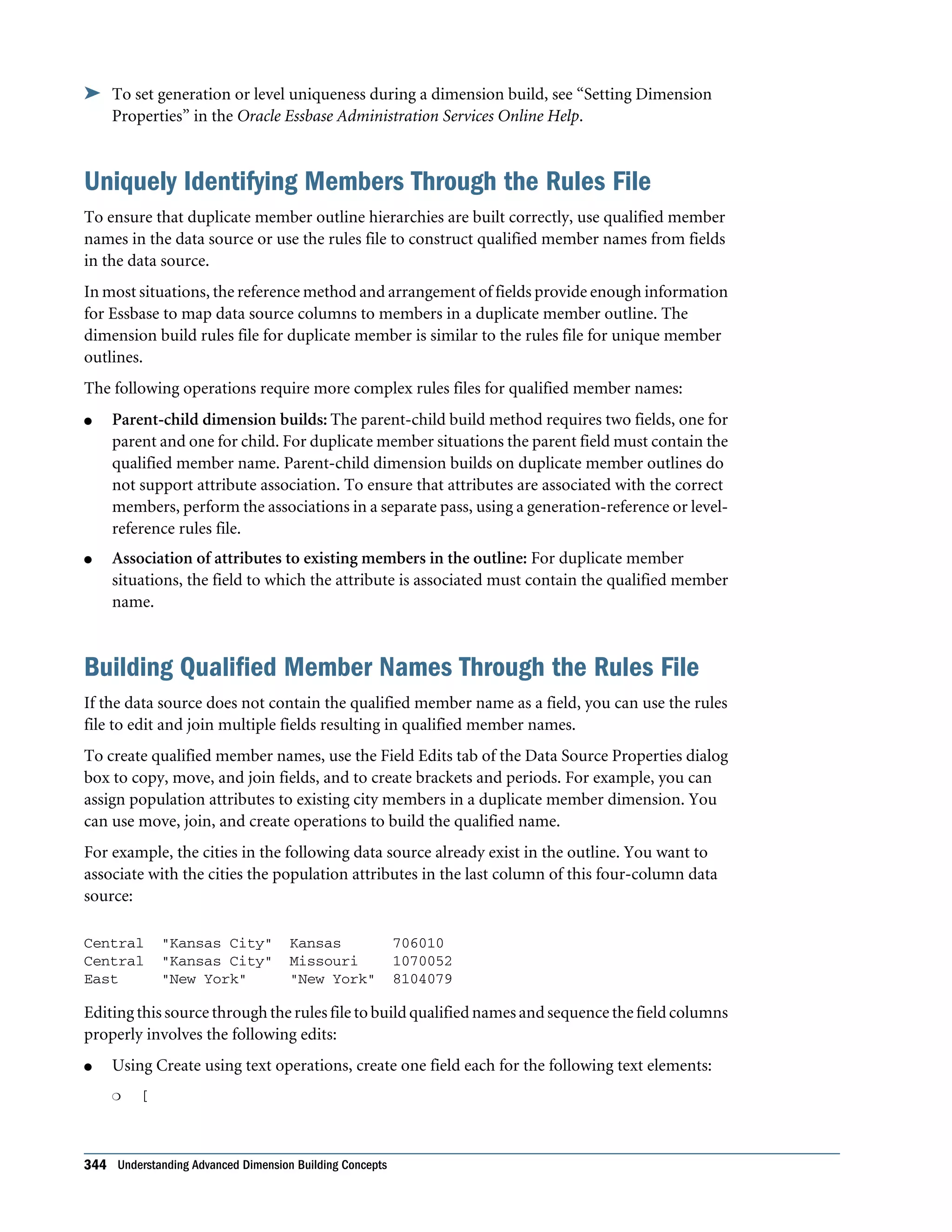
  • 367.
    When you placeformulas on the database outline, you can use only the IF, ELSE, ELSEIF, and ENDIF commands and Boolean functions to control the flow of the calculations. You can use additional control commands in a calculation script. For information about how to develop calculation scripts and how to use them to control how Essbase calculates a database, see Chapter 29, “Developing Calculation Scripts for Block Storage Databases.” For information on individual Essbase functions and calculation commands, see the Oracle Essbase Technical Reference. Examples of Conditional Tests You can apply the following formula to a Commission member in the database outline. In the following example, the formula calculates commission at 1% of sales if the sales are greater than 500000: IF(Sales > 500000) Commission = Sales * .01; ENDIF; If you place the formula in a calculation script, you must associate the formula with the Commission member as shown: Commission (IF(Sales > 500000) Commission = Sales * .01; ENDIF;) Essbase cycles through the database, performing these calculations: 1. The IF statement checks to see if the value of Sales for the current member combination is greater than 500000. 2. If Sales is greater than 500000, Essbase multiplies the value in Sales by 0.01 and places the result in Commission. In the next example, the formula tests the ancestry of the current member and then applies the appropriate Payroll calculation formula: IF(@ISIDESC(East) OR @ISIDESC(West)) Payroll = Sales * .15; ELSEIF(@ISIDESC(Central)) Payroll = Sales * .11; ELSE Payroll = Sales * .10; ENDIF; If you place the formula in a calculation script, you must associate the formula with the Payroll member as shown: Payroll(IF(@ISIDESC(East) OR @ISIDESC(West)) Payroll = Sales * .15; ELSEIF(@ISIDESC(Central)) Payroll = Sales * .11; ELSE Payroll = Sales * .10; ENDIF;) Using Functions in Formulas 367
  • 368.
    Essbase cycles throughthe database, performing the following calculations: 1. The IF statement uses the @ISIDESC function to check whether the current member on the Market dimension is a descendant of either East or West. 2. If the current member on the Market dimension is a descendant of East or West, Essbase multiplies the value in Sales by 0.15 and moves on to the next member combination. 3. If the current member is not a descendant of East or West, the ELSEIF statement uses the @ISIDESC function to check whether the current member is a descendant of Central. 4. If the current member on the Market dimension is a descendant of Central, Essbase multiplies the value in Sales by 0.11 and moves to the next member combination. 5. If the current member is not a descendant of East, West, or Central, Essbase multiplies the value in Sales by 0.10 and moves to the next member combination. See “About Multidimensional Calculation Concepts” on page 351. For information on the @ISIDESC function, see the Oracle Essbase Technical Reference. Mathematical Operations Table 50 lists mathematical functions, which allow you to perform many mathematical operations in formulas: Table 50 List of Mathematical Functions Function Operation @ABS Return the absolute value of an expression @AVG Return the average value of the values in the specified member list @EXP Return the value of e (the base of natural logarithms) raised to power of the specified expression @FACTORIAL Return the factorial of an expression @INT Return the next-lowest integer value of a member or expression @LN Return the natural logarithm of a specified expression @LOG Return the logarithm to a specified base of a specified expression @LOG10 Return the base-10 logarithm of a specified expression @MAX Return the maximum value among the expressions in the specified member list @MAXS Return the maximum value among the expressions in the specified member list, with the ability to skip zero and #MISSING values @MIN Return the minimum value among the expressions in the specified member list @MINS Return the minimum value among the expressions in the specified member list, with the ability to skip zero and #MISSING values @MOD Return the modulus produced by the division of two specified members 368 Developing Formulas for Block Storage Databases
  • 369.
    Function Operation @POWER Returnthe value of the specified member raised to the specified power @REMAINDER Return the remainder value of an expression @ROUND Return the member or expression rounded to the specified number of decimal places @SUM Return the summation of values of all specified members @TRUNCATE Return the truncated value of an expression @VAR Return the variance (difference) between two specified members. See “Calculating Variances or Percentage Variances Between Actual and Budget Values” on page 377. @VARPER Return the percentage variance (difference) between two specified members. See “Calculating Variances or Percentage Variances Between Actual and Budget Values” on page 377. Member Relationship Functions Table 51 lists relationship functions, which allow you to use the member combination that Essbase is currently calculating to look up specific values: Table 51 List of Member Relationship Functions Function Look-up Value @ANCESTVAL Ancestor values of the specified member combination @ATTRIBUTEVAL Numeric value of the attribute from the specified numeric or date attribute dimension associated with the current member @ATTRIBUTESVAL Text value of the attribute from the specified text attribute dimension associated with the current member @ATTRIBUTEBVAL Value (TRUE or FALSE) of the attribute from the specified Boolean attribute dimension associated with the current member @CURGEN Generation number of the current member combination for the specified dimension @CURLEV Level number of the current member combination for the specified dimension @GEN Generation number of the specified member @LEV Level number of the specified member @MDANCESTVAL Ancestor values of the specified member combination across multiple dimensions @SANCESTVAL Shared ancestor values of the specified member combination @PARENTVAL Parent values of the specified member combination @MDPARENTVAL Parent values of the specified member combination across multiple dimensions @SPARENTVAL Shared parent values of the specified member combination Using Functions in Formulas 369
  • 370.
    Function Look-up Value @XREFData value from another database to be used for calculation of a value from the current database @XWRITE Used to write values to another Essbase database, or to the same database For information about specific Essbase functions, see the Oracle Essbase Technical Reference. Range Functions Table 52 lists range functions, which allow you to execute a function for a range of members: Table 52 List of Range Functions Function Calculation @AVGRANGE The average value of a member across a range of members @CURRMBRRANGE A range of members that is based on the relative position of the member combination Essbase is currently calculating @MAXRANGE The maximum value of a member across a range of members @MAXSRANGE The maximum value of a member across a range of members, with the ability to skip zero and #MISSING values @MDSHIFT The next or nth member in a range of members, retaining all other members identical to the current member across multiple dimensions @MINRANGE The minimum value of a member across a range of members @MINSRANGE The minimum value of a member across a range of members, with the ability to skip zero and #MISSING values @NEXT The next or nth member in a range of members @NEXT The next or nth member in a range of members, with the option to skip #MISSING, zero, or both values @PRIOR The previous or nth previous member in a range of members @PRIORS The previous or nth previous member in a range of members, with the option to skip #MISSING, zero, or both values @SHIFT In some cases, @SHIFTPLUS or @SHIFTMINUS The next or nth member in a range of members, retaining all other members identical to the current member and in the specified dimension @SUMRANGE The summation of values of all specified members across a range of members Financial Functions Table 53 on page 371 lists financial functions, which allow you to include financial calculations in formulas: 370 Developing Formulas for Block Storage Databases
  • 371.
    Table 53 Listof Financial Functions Function Calculation @ACCUM An accumulation of values up to the specified member @COMPOUND The proceeds of a compound interest calculation @COMPOUNDGROWTH A series of values that represent the compound growth of the specified member across a range of members @DECLINE Depreciation for a specific period, calculated using the declining balance method @DISCOUNT A value discounted by the specified rate, from the first period of the range to the period in which the amount to discount is found @GROWTH A series of values that represents the linear growth of the specified value @INTEREST The simple interest for a specified member at a specified rate @IRR The Internal Rate of Return on a cash flow that is calculated across the time dimension or a specified range of members and must contain at least one investment (negative) and one income (positive). Includes an initial guess of 0.07 (the initial guess cannot be configured). @IRREX The Internal Rate of Return on a cash flow that is calculated across the time dimension or a specified range of members and must contain at least one investment (negative) and one income (positive). Includes functionality to configure the initial guess and the number of iterations the algorithm can make. @NPV The Net Present Value of an investment (based on a series of payments and incomes) @PTD The period-to-date values of members in the dimension tagged as time @SLN The amount per period that an asset in the current period may be depreciated (calculated across a range of periods). The depreciation method used is straight-line depreciation. @SYD The amount per period that an asset in the current period may be depreciated (calculated across a range of periods). The depreciation method used is sum of the year's digits. Note: One member formula cannot contain multiple financial functions (for example, @NPV and @SLN, or multiple instances of @NPV). A member formula that requires multiple financial functions must be broken into separate formulas so that each formula contains only one financial function (for example, MemberName(@NPV(...));Membername(@NPV(...))). Member-Related Functions This section discusses creating formulas that refer to members. l “Specifying Member Lists and Ranges” on page 372 l “Generating Member Lists” on page 372 l “Manipulating Member Names” on page 375 Using Functions in Formulas 371
  • 372.
    l “Working withMember Combinations Across Dimensions” on page 375 Specifying Member Lists and Ranges In some functions, you may need to specify multiple members, or you may need to specify a range of members. For example, the @ISMBR function tests to see if a member that is currently being calculated matches any of a list or range of specified members. Table 54 lists the syntax for specifying members: Table 54 Syntax for Specifying Member Lists and Ranges Member List or Range Syntax One member The member name. For example: Mar2001 A list of members A comma-delimited (,) list of member names. For example: Mar2001, Apr2001, May2001 A range of all members at the same level, between and including the two defining members The two defining member names separated by a colon (:). For example: Jan2000:Dec2000 A range of all members in the same generation, between and including the two defining members The two defining member names separated by two colons (::). For example: Q1_2000::Q4_2000 A function-generated list of members or a range of members For a list of member list contents and corresponding functions, see “Generating Member Lists” on page 372. A combination of ranges and list Separate each range, list, and function with a comma (,). For example: Q1_97::Q4_98, FY99, FY2000 or @SIBLINGS(Dept01), Dept65:Dept73, Total_Dept If you do not specify a list of members or a range of members in a function that requires either, Essbase uses the level 0 members of the dimension tagged as time. If no dimension is tagged as time, Essbase displays an error message. Generating Member Lists Member set functions allow you to generate member lists that are based on a specified member or member list. Table 55 lists member set functions: 372 Developing Formulas for Block Storage Databases
  • 373.
    Table 55 Listof Member Set Functions Function Contents of Member List @ALLANCESTORS All ancestors of the specified member, including ancestors of the specified member as a shared member. This function does not include the specified member. @IALLANCESTORS All ancestors of the specified member, including ancestors of the specified member as a shared member. This function includes the specified member. @ANCEST The ancestor of the specified member at the specified generation or level @ANCESTORS All ancestors of the specified member (optionally, up to the specified generation or level), but not the specified member @IANCESTORS All ancestors of the specified member (optionally, up to the specified generation or level), including the specified member @LANCESTORS All ancestors of the specified list of members (optionally, up to the specified generation or level), but not including the specified members @ILANCESTORS All ancestors of the specified list of members (optionally, up to the specified generation or level), including the specified members @ATTRIBUTE All base-dimension members that are associated with the specified attribute-dimension member @WITHATTR All base members that are associated with attributes that satisfy the specified conditions @BETWEEN All members whose name string value fall between, and are inclusive of, two specified string tokens @CHILDREN All children of the specified member, but not including the specified member @ICHILDREN All children of the specified member, including the specified member @CURRMBR The current member being calculated for the specified dimension @DESCENDANTS All descendants of the specified member (optionally, up to the specified generation or level), but not the specified member nor descendants of shared members @IDESCENDANTS All descendants of the specified member (optionally, up to the specified generation or level), including the specified member, but not descendants of shared members @LDESCENDANTS All descendants of the specified list of members (optionally, down to the specified generation or level), but not including the specified members @ILDESCENDANTS All descendants of the specified list of members (optionally, down to the specified generation or level), including the specified members @RDESCENDANTS All descendants of the specified member (optionally, up to the specified generation or level), including descendants of shared members, but not the specified member @IRDESCENDANTS All descendants of the specified member (optionally, up to the specified generation or level), including the specified member and descendants of shared members @EQUAL Member names that match the specified token name @NOTEQUAL Member names that do not match the specified token name @EXPAND Expands a member search by calling a member set function for each member in a member list Using Functions in Formulas 373
  • 374.
    Function Contents ofMember List @GENMBRS All members of the specified generation in the specified dimension @LEVMBRS All members of the specified level in the specified dimension @LIKE Member names that match the specified pattern. @LIST Separate lists of members to be processed by functions that require multiple list arguments @MATCH All members that match the specified wildcard selection @MBRCOMPARE Member names that match the comparison criteria @MBRPARENT Parent of the specified member @MEMBER The member with the name that is provided as a character string @MERGE A merged list of two member lists to be processed by another function @PARENT The parent of the current member being calculated in the specified dimension @RANGE A member list that crosses the specified member from one dimension with the specified member range from another dimension @REMOVE A list of members from which some members have been removed @RELATIVE All members of the specified generation or level that are above or below the specified member @SHARE A member list that identifies all shared members among the specified members @SIBLINGS All siblings of the specified member, but not the specified member @ISIBLINGS All siblings of the specified member, including the specified member @LSIBLINGS All siblings that precede the specified member in the database outline, but not the specified member @RSIBLINGS All siblings that follow the specified member in the database outline, but not the specified member @ILSIBLINGS All siblings that precede the specified member in the database outline, including the specified member @IRSIBLINGS All siblings that follow the specified member in the database outline, including the specified member @SHIFTSIBLING The sibling at the specified distance from the member @NEXTSIBLING The next, or right-most, sibling of the member @PREVSIBLING The previous, or left-most, sibling of the member @UDA All members that have a common UDA defined on Essbase Server @XRANGE A member list that identifies the range of members between (and inclusive of) two specified single or cross- dimensional members at the same level 374 Developing Formulas for Block Storage Databases
  • 375.
    Manipulating Member Names Youcan work with member names as character strings. Table 56 on page 375 lists character string manipulation functions: Table 56 List of Character String Manipulation Functions Function Character String Manipulation @CONCATENATE Create a character string that is the result of appending a member name or specified character string to another member name or character string @NAME Return a member name as a string @SUBSTRING Return a substring of characters from another character string or from a member name Working with Member Combinations Across Dimensions Use the cross-dimensional operator to point to data values of specific member combinations. Create the cross-dimensional operator using a hyphen (-) and a greater-than symbol (>). Do not include a space between the cross-dimensional operator and members. Figure 114 is a simplified illustration of a multidimensional cube, in which Jan is the first column on the X axis, Sales is the fourth and top-most row on the Y axis, and Actual is the first row on the Z axis. In this example, Sales -> Jan -> Actual is the intersection of a single data value. Figure 114 Specifying a Single Data Value The following example, which allocates miscellaneous expenses to each product in each market, illustrates how to use the cross-dimensional operator. The value of Misc_Expenses for all products in all markets is known. The formula allocates a percentage of the total Misc_Expenses value to each Product -> Market combination. The allocation is based on the value of Sales for each product in each market. Misc_Expenses = Misc_Expenses -> Market -> Product * (Sales / ( Sales -> Market -> Product)); Essbase cycles through the database, performing these calculations: 1. Divides the Sales value for the current member combination by the total Sales value for all markets and all products (Sales -> Market -> Product). Using Functions in Formulas 375
  • 376.
    2. Multiplies thevalue calculated in step 1 by the Misc_Expenses value for all markets and all products (Misc_Expenses -> Market -> Product). 3. Allocates the result to Misc_Expenses for the current member combination. Using the cross-dimensional operator can have significant performance implications. For optimization guidelines, see “Using Cross-Dimensional Operators” on page 886. Value-Related Functions This section discusses formulas related to values. l “Using Interdependent Values” on page 376 l “CalculatingVariancesorPercentageVariancesBetweenActualandBudgetValues”onpage 377 l “Allocating Values” on page 378 Using Interdependent Values Essbase optimizes calculation performance by calculating formulas for a range of members in the same dimension simultaneously. Some formulas, however, require values from members of the same dimension, and Essbase may not yet have calculated the required values. A good example is that of cash flow, in which the opening inventory is dependent on the ending inventory from the previous month. The values for Opening Inventory and Ending Inventory must be calculated on a month-by- month basis. Assume you want to achieve the results shown in Table 57: Table 57 Data Values for Cash Flow Example Jan Feb Mar Opening Inventory 100 120 110 Sales 50 70 100 Addition 70 60 150 Ending Inventory 120 110 160 AssumingthattheOpeningInventoryvalueforJanuaryisloadedintothedatabase,thefollowing calculations are required to get the results in Table 57: 1. January Ending = January Opening – Sales + Additions 2. February Opening = January Ending 3. February Ending = February Opening – Sales + Additions 4. March Opening = February Ending 5. March Ending = March Opening – Sales + Additions You can calculate the required results by applying interdependent, multiple equations to one member in the database outline. 376 Developing Formulas for Block Storage Databases
  • 377.
    The following formula,applied to the Opening Inventory member in the database outline, calculates the correct values: IF(NOT @ISMBR (Jan)) "Opening Inventory" = @PRIOR("Ending Inventory"); ENDIF; "Ending Inventory" = "Opening Inventory" - Sales + Additions; If you place the formula in a calculation script, you must associate the formula with the Opening Inventory member as shown: "Opening Inventory" (IF(NOT @ISMBR (Jan)) "Opening Inventory" = @PRIOR("Ending Inventory"); ENDIF;) "Ending Inventory" = "Opening Inventory" - Sales + Additions; Essbase cycles through the months, performing the following calculations: 1. The IF statement and @ISMBR function check that the current member on the Year dimension is not Jan. This step is necessary because the Opening Inventory value for Jan is an input value. 2. If the current month is not Jan, the @PRIOR function obtains the value for the Ending Inventory for the previous month. This value is then allocated to the Opening Inventory of the current month. 3. The Ending Inventory is calculated for the current month. Note: To calculate the correct results, you must place the above formula on one member, Opening Inventory. If you place the formulas for Opening Inventory and Ending Inventory on their separate members, Essbase calculates Opening Inventory for all months and then Ending Inventory for all months. This organization means that the value of the Ending Inventory of the previous month is not available when Opening Inventory is calculated. Calculating Variances or Percentage Variances Between Actual and Budget Values You can use the @VAR and @VARPER functions to calculate a variance or percentage variance between budget and actual values. You may want the variance to be positive or negative, depending on whether you are calculating variance for members on the accounts dimension that are expense or nonexpense items: l Expense items. You want Essbase to show a positive variance if the actual values are less than the budget values (for example, if actual costs are less than budgeted costs). l Nonexpense items. You want Essbase to show a negative variance if the actual values are less than the budget values (for example, if actual sales are less than budgeted sales). By default, Essbase assumes that members are nonexpense items and calculates the variance accordingly. Using Functions in Formulas 377
  • 378.
    ä To tellEssbase that a member is an expense item: 1 In Outline Editor, select the member. The member must be on the dimension tagged as accounts. 2 Open Formula Editor. See “Creating and Editing Formulas in Outlines” in the Oracle Essbase Administration Services Online Help. 3 Tag the member as an expense item. See “Setting Variance Reporting Properties” on page 140. When you use the @VAR or @VARPER functions, Essbase shows a positive variance if the actual values are less than the budget values. For example, in Sample.Basic, the children of Total Expenses are expense items. The Variance and Variance % members of the Scenario dimension calculate the variance between the Actual and Budget values. See Figure 115. Figure 115 Variance Example Allocating Values Allocation functions allow you to allocate values that are input at the parent level across child members in the same dimension or in different dimensions. The allocation is based on a variety of specified criteria. Table 58 List of Allocation Functions Function Allocated Values @ALLOCATE Values from a member, cross-dimensional member, or value across a member list within the same dimension. @MDALLOCATE Values from a member, cross-dimensional member, or value across multiple dimensions. For examples of calculation scripts using @ALLOCATE, see “Allocating Costs Across Products” on page 485; using @MDALLOCATE, see “Allocating Values Across Multiple Dimensions” on page 488. 378 Developing Formulas for Block Storage Databases
  • 379.
    Forecasting Functions Forecasting functionsallow you to manipulate data for the purposes of interpolating data or calculating future values. Table 59 lists the functions that forecast values: Table 59 List of Forecasting Functions Function Data Manipulation @MOVAVG Apply a moving average to a data set and replace each term in the list with a trailing average. This function modifies the data set for smoothing purposes. @MOVMAX Apply a moving maximum to a data set and replace each term in the list with a trailing maximum. This function modifies the data set for smoothing purposes. @MOVMED Apply a moving median to a data set and replace each term in the list with a trailing median. This function modifies the data set for smoothing purposes. @MOVMIN Apply a moving minimum to a data set and replace each term in the list with a trailing minimum. This function modifies the data set for smoothing purposes. @MOVSUM Apply a moving sum to a data set and replace each term with a trailing sum. This function modifies the data set for smoothing purposes. @MOVSUMX Apply a moving sum to a data set and replace each term with a trailing sum. Specify how to assign values to members before you reach the number to sum. This function modifies the data set for smoothing purposes. @SPLINE Apply a smoothing spline to a set of data points. A spline is a mathematical curve that is used to smooth or interpolate data. @TREND Calculate future values and base the calculation on curve-fitting to historical values. For information about specific Essbase functions, see the Oracle Essbase Technical Reference. Statistical Functions Statistical functions allow you to calculate advanced statistics in Essbase. Table 60 List of Statistical Functions Function Calculated Value @CORRELATION The correlation coefficient between two parallel data sets @COUNT The number of values in the specified data set @MEDIAN The median, or middle number, in the specified data set @MODE The mode, or the most frequently occurring value, in the specified data set @RANK The rank of the specified member or value in the specified data set Using Functions in Formulas 379
  • 380.
    Function Calculated Value @STDEVThe standard deviation, based upon a sample, of the specified members @STDEVP The standard deviation, based upon the entire population, of the specified members @STDEVRANGE The standard deviation, crossed with a range of members, of the specified members @VARIANCE The variance, based upon a sample, of the specified data set @VARIANCEP The variance, based upon the entire population, of the specified data set Date and Time Function The date function allows you to use dates with other functions. @TODATE: Convert date strings to numbers that can be used in calculation formulas Calculation Mode Function The calculation mode function allows you to specify which calculation mode that Essbase uses to calculate a formula. @CALCMODE:Specifythecalculationmode(cell,block,bottom-up,ortop-down)thatEssbase uses to calculate a formula Note: You can also use the configuration setting CALCMODE to set calculation modes to BLOCKorBOTTOMUPatthedatabase,application,orserverlevel.SeetheOracleEssbase Technical Reference. Custom-Defined Functions You can create custom-defined functions, to be used in formulas and calculation scripts, to perform calculations not otherwise supported by the Essbase calculation scripting language. Custom-developed functions must be written in the Java programming language and registered on the Essbase Server. The Essbase calculator framework calls them as external functions. Custom-defined functions are displayed in the functions tree in Calculation Script Editor, where you can select them to insert into a formula. See Chapter 32, “Developing Custom-Defined Calculation Functions.” Using Substitution and Environment Variables in Formulas Substitution variables are used to reference information that changes frequently; environment variables are used as placeholders for user-specific system settings. See: 380 Developing Formulas for Block Storage Databases
  • 381.
    l “Using SubstitutionVariables in Formulas” on page 381 l “Using Environment Variables in Formulas” on page 381 Using Substitution Variables in Formulas Substitution variables act as placeholders for information that changes regularly; for example, time-period information. You can use substitution variables in formulas that you apply to the database outline. When the outline is calculated, Essbase replaces the substitution variable with the value that you have assigned to it. You can create and assign values to substitution variables using Administration Services, MaxL, or ESSCMD. You can set substitution variables at the server, application, and database levels. Essbase must be able to access the substitution variable from the application and database on which you are running the calculation scripts. See “Using Substitution Variables” on page 116. To use a substitution variable in a formula, enter an ampersand (&), followed by the substitution variable name. Essbase treats any text string preceded by & as a substitution variable. For example, assume that the substitution variable UpToCurr is defined as Jan:Jun. You can use the following @ISMBR function as part of a conditional test: @ISMBR(&UpToCurr) At the time Essbase calculates the outline, it replaces the substitution variable, as shown: @ISMBR(Jan:Jun) Note: Substitution variables used in formulas for new outline members do not pass verification unless the outline is saved. Using Environment Variables in Formulas In outline member formulas, you can use system environment variables as placeholders for user- specific system settings. Because environment variables are defined at the operating system level, they are available to all formulas on Essbase Server. Using environment variables in formulas is the same as using them in calculation scripts. See “Using Environment Variables in Calculation Scripts and Formulas” on page 464. Note: Environment variables cannot be used in MDX queries or in member formulas that are within aggregate storage outlines. Using Formulas on Partitions A partitioned application can span multiple Essbase Servers, processors, or computers. Using Formulas on Partitions 381
  • 382.
    Youcanuseformulasinpartitioning,justasyouuseformulasonyourlocaldatabase.If,however, aformulayouuseinonedatabasereferencesavaluefromanotherdatabase,Essbasemustretrieve the data fromthe other database when calculating the formula; therefore, ensure that the referenced values are up-to-date and carefully consider the performance impact on the overall database calculation. See “Writing Calculation Scripts for Partitions” on page 475. With transparent partitions, carefully consider how you use formulas on the data target. See “Transparent Partitions and Member Formulas” on page 235 and “Performance Considerations for Transparent Partitions” on page 233. See Chapter 15, “Designing Partitioned Applications” and Chapter 16, “Creating and Maintaining Partitions”. Displaying Formulas ä To display a formula, use a tool: Tool Topic Location Administration Services Creating and Editing Formulas in Outlines Oracle Essbase Administration Services Online Help ESSCMD GETMBRCALC Oracle Essbase Technical Reference MaxL query database Oracle Essbase Technical Reference 382 Developing Formulas for Block Storage Databases
  • 383.
    24 Reviewing Examples of Formulasfor Block Storage Databases In This Chapter Calculating Period-to-Date Values......................................................................383 Calculating Rolling Values...............................................................................384 Calculating Monthly Asset Movements.................................................................385 Testing for #MISSING Values ...........................................................................386 Calculating an Attribute Formula .......................................................................386 The information in this chapter applies only to block storage databases and is not relevant to aggregate storage databases. Also see: l Chapter 60, “Comparison of Aggregate and Block Storage” l “Developing Formulas on Aggregate Storage Outlines” on page 939 l Chapter 30, “Reviewing Examples of Calculation Scripts for Block Storage Databases” Calculating Period-to-Date Values If the outline includes a dimension tagged as accounts, you can use the @PTD function to calculate period-to-date values. This example uses the Inventory branch of the Measures dimension from the Sample.Basic database, as shown: Inventory (~) (Label Only) Opening Inventory (+) (TB First) (Expense Reporting) IF(NOT @ISMBR(Jan)) Additions (~) (Expense Reporting) Ending Inventory (~) (TB Last) (Expense Reporting) To calculate period-to-date values for the year and for the current quarter, add two members to the Year dimension: QTD for quarter-to-date and YTD for year-to-date. For example: QTD (~) @PTD(Apr:May) YTD (~) @PTD(Jan:May); Assuming that the current month is May, add this formula to the QTD member: @PTD(Apr:May); Calculating Period-to-Date Values 383
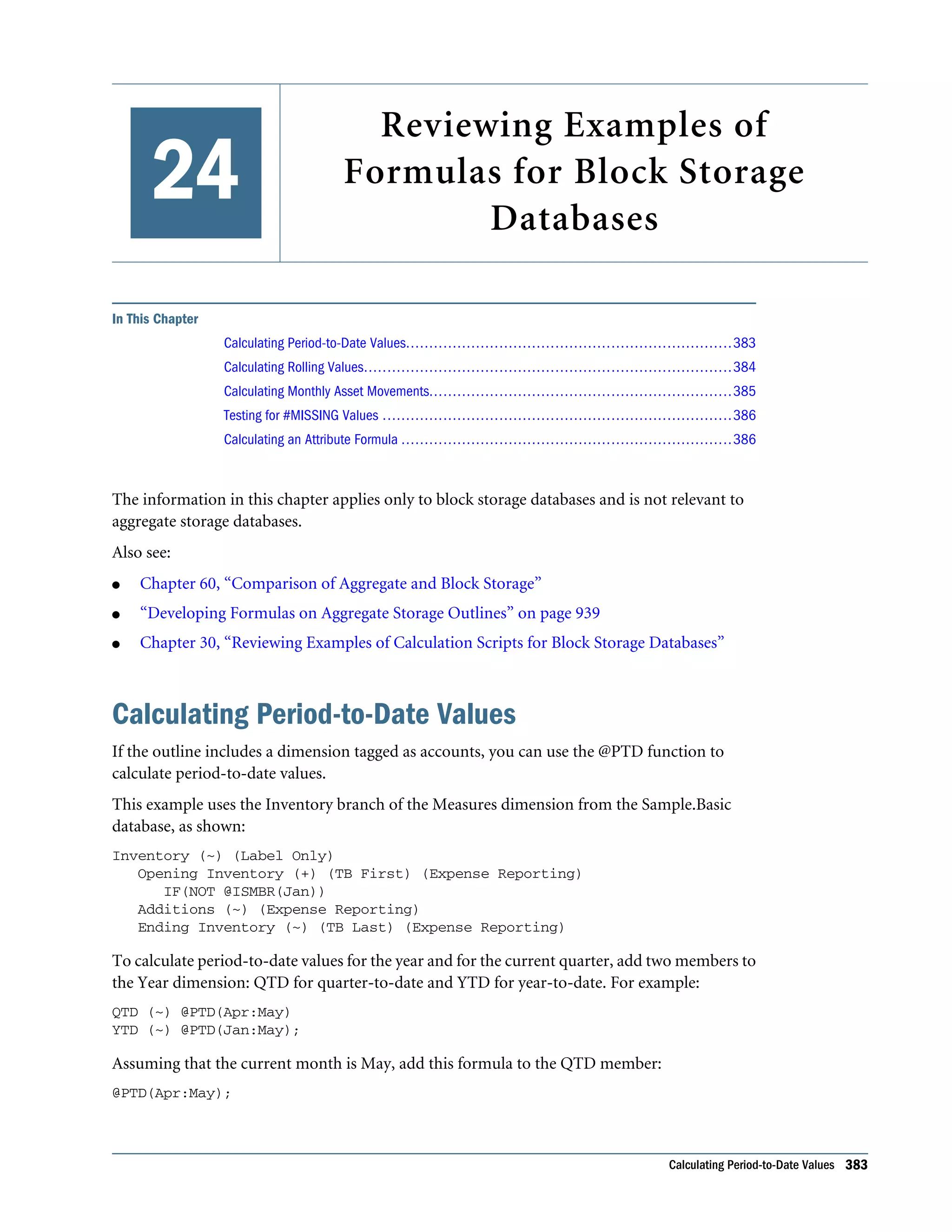
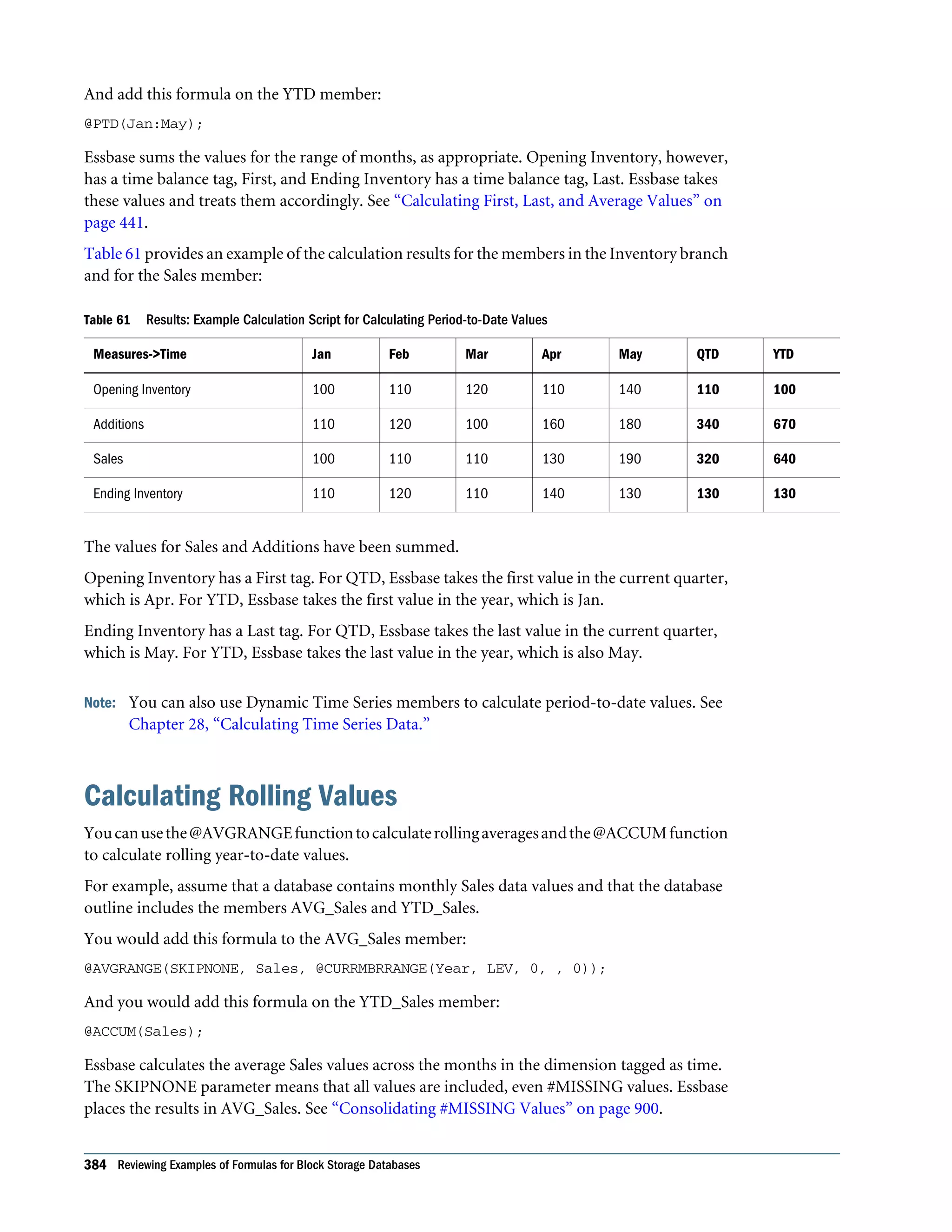
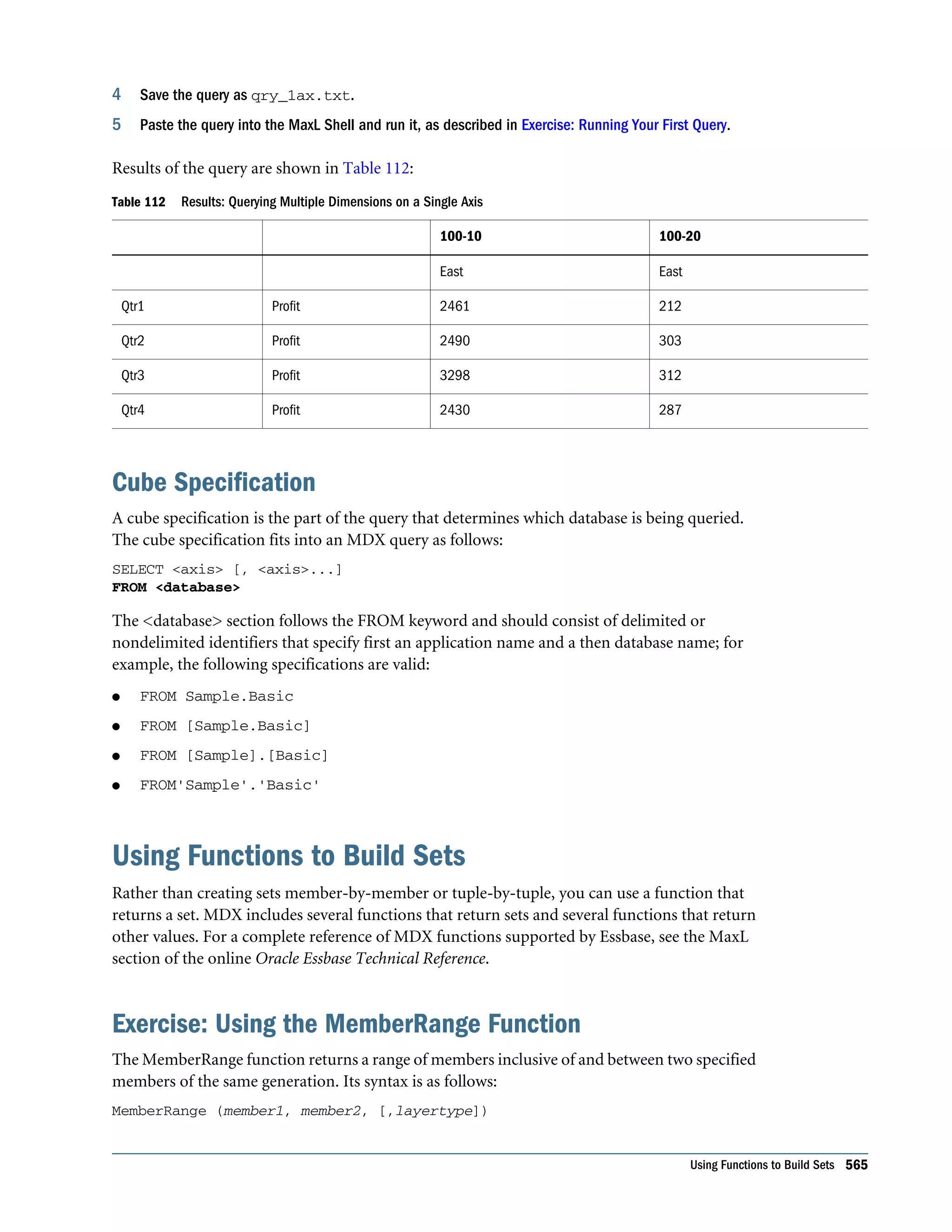

  • 384.
    And add thisformula on the YTD member: @PTD(Jan:May); Essbase sums the values for the range of months, as appropriate. Opening Inventory, however, has a time balance tag, First, and Ending Inventory has a time balance tag, Last. Essbase takes these values and treats them accordingly. See “Calculating First, Last, and Average Values” on page 441. Table 61 provides an example of the calculation results for the members in the Inventory branch and for the Sales member: Table 61 Results: Example Calculation Script for Calculating Period-to-Date Values Measures->Time Jan Feb Mar Apr May QTD YTD Opening Inventory 100 110 120 110 140 110 100 Additions 110 120 100 160 180 340 670 Sales 100 110 110 130 190 320 640 Ending Inventory 110 120 110 140 130 130 130 The values for Sales and Additions have been summed. Opening Inventory has a First tag. For QTD, Essbase takes the first value in the current quarter, which is Apr. For YTD, Essbase takes the first value in the year, which is Jan. Ending Inventory has a Last tag. For QTD, Essbase takes the last value in the current quarter, which is May. For YTD, Essbase takes the last value in the year, which is also May. Note: You can also use Dynamic Time Series members to calculate period-to-date values. See Chapter 28, “Calculating Time Series Data.” Calculating Rolling Values Youcanusethe@AVGRANGEfunctiontocalculaterollingaveragesandthe@ACCUMfunction to calculate rolling year-to-date values. For example, assume that a database contains monthly Sales data values and that the database outline includes the members AVG_Sales and YTD_Sales. You would add this formula to the AVG_Sales member: @AVGRANGE(SKIPNONE, Sales, @CURRMBRRANGE(Year, LEV, 0, , 0)); And you would add this formula on the YTD_Sales member: @ACCUM(Sales); Essbase calculates the average Sales values across the months in the dimension tagged as time. The SKIPNONE parameter means that all values are included, even #MISSING values. Essbase places the results in AVG_Sales. See “Consolidating #MISSING Values” on page 900. 384 Reviewing Examples of Formulas for Block Storage Databases
  • 385.
    Table 62 showsthe results when Essbase calculates the cumulative Sales values and places the results in YTD_Sales: Table 62 Results: Example Calculation Script for Calculating Rolling Values Measures -> Time Jan Feb Mar Qtr1 Sales 100 200 300 600 AVG_Sales 100 150 200 #MISSING YTD_Sales 100 300 600 #MISSING The values for AVG_Sales are averages of the months-to-date. For example, AVG_Sales -> Mar is an average of Sales for Jan, Feb, and Mar. The values for YTD_Sales are the cumulative values up to the current month. So YTD_Sales -> Feb is the sum of Sales -> Jan and Sales -> Feb. Calculating Monthly Asset Movements You can use the @PRIOR function to calculate values based on a previous month’s value. For example, assume that a database contains assets data values that are stored on a month-by- month basis. You can calculate the difference between the assets values of successive months (theassetmovement)bysubtractingthepreviousmonth’svaluefromthepresentmonth’svalue. Assume these three members manage the asset values for the database: l Assets for the monthly asset values l Asset_MVNT for the asset movement values l Opening_Balance for the asset value at the beginning of the year For Jan, the Asset_MVNT value is calculated by subtracting the Opening_Balance value from the Jan value. You would add this formula on the Asset_MVNT member: IF(@ISMBR(Jan)) Asset_MVNT = Assets - Opening_Balance; ELSE Asset_MVNT = Assets - @PRIOR(Assets); ENDIF; Table 63 shows the results when Essbase calculates the difference between the values of assets in successive months: Table 63 Results: Example Calculation Script for Calculating Monthly Asset Movements Assets -> Time Opening_Balance Jan Feb Mar Assets 1200 1400 1300 1800 Asset_MVNT 200 -100 500 Essbase cycles through the months, performing these calculations: Calculating Monthly Asset Movements 385
  • 386.
    1. The IFstatement and @ISMBR function check whether the current member on the Year dimension is Jan. This check is necessary because the Asset_MVNT value for Jan cannot be calculated by subtracting the previous month’s value. 2. If the current member on the Year dimension is Jan, Essbase subtracts the Opening_Balance from the Jan -> Assets value and places the result in Jan -> Asset_MVNT. 3. If the current member on the Year dimension is not Jan, the @PRIOR function obtains the value for the previous month’s assets. Essbase subtracts the previous month’s assets from the current month’s assets. It places the result in the current month’s Asset_MVNT value. Testing for #MISSING Values You can test for #MISSING values in a database. See “Consolidating #MISSING Values” on page 900. Assume that a database outline contains a member called Commission. Commission is paid at 10% of sales when the Sales value for the current member combination is not #MISSING. When applied to a Commission member in the database outline, the following formula calculates Commission: IF(Sales <> #MISSING) Commission = Sales * .1; ELSE Commission = #MISSING; ENDIF; If you place the formula in a calculation script, you must associate it with the Commission member as shown: Commission(IF(Sales <> #MISSING) Commission = Sales * .1; ELSE Commission = #MISSING; ENDIF;); Essbase cycles through the database, performing the following calculations: 1. The IF statement checks the value of the Sales member for the current member combination. 2. If Sales is not #MISSING, Essbase multiplies the value in the Sales member by 0.1 and places the result in the Commission member. 3. If Sales is #MISSING, Essbase places #MISSING in the Commission member. Calculating an Attribute Formula You can perform specific calculations on attribute-dimension members in a database. See “Calculating Attribute Data” on page 172. For example, to calculate profitability by ounce for products sized in ounces, you can use the @ATTRIBUTEVAL function in a calculation formula. In the Sample.Basic database, the Ratios branch of the Measures dimension contains a member called Profit per Ounce. The formula on this member: Profit/@ATTRIBUTEVAL(@NAME(Ounces)); 386 Reviewing Examples of Formulas for Block Storage Databases
  • 387.
    Essbase cycles throughthe Products dimension, performing the following calculations: 1. For each base member that is associated with a member from the Ounces attribute dimension, the @ATTRIBUTEVAL function returns the numeric attribute value (for example, 12 for the member 12 under Ounces). Note: The @NAME function is required to process the string “Ounces” before passing it to the @ATTRIBUTEVAL function. 2. Essbase then divides Profit by the result of @ATTRIBUTEVAL to yield Profit per Ounce. Note: See “Using Attributes in Calculation Formulas” on page 176. For more information about the @ATTRIBUTEVAL function, see the Oracle Essbase Technical Reference. Calculating an Attribute Formula 387
  • 388.
    388 Reviewing Examplesof Formulas for Block Storage Databases
  • 389.
    25 Defining Calculation Order InThis Chapter Data Storage in Data Blocks............................................................................389 Member Calculation Order ..............................................................................391 Block Calculation Order .................................................................................396 Data Block Renumbering................................................................................398 Cell Calculation Order ...................................................................................398 Calculation Passes.......................................................................................404 Calculation of Shared Members ........................................................................406 The information in this chapter applies only to block storage databases and is not relevant to aggregate storage databases. Also see: l Chapter 60, “Comparison of Aggregate and Block Storage” l “Sparse and Dense Dimensions” on page 62 l “Generations and Levels” on page 61 l “Understanding How Dynamic Calculation Changes Calculation Order” on page 431 Data Storage in Data Blocks Essbase stores data values in data blocks. Essbase creates a data block for each unique combination of sparse dimension members (providing that at least one data value exists for the combination). Each data block contains all the dense dimension member values for its unique combination of sparse dimension members. In the Sample.Basic database, the Year, Measures, and Scenario dimensions are dense; the Product and Market dimensions are sparse. Figure 116 shows an outline of the dimensions in the Sample.Basic database: Data Storage in Data Blocks 389
  • 390.
    Figure 116 Dimensionsfrom the Sample.Basic Database Note: Sample.Basic also contains five attribute dimensions. These dimensions are sparse, Dynamic Calc, meaning that attribute data is not stored in the database. See Chapter 10, “Working with Attributes.” Essbase creates a data block for each unique combination of members in the Product and Market dimensions (providing that at least one data value exists for the combination). For example, it creates one data block for the combination of 100-10, New York. This data block contains all the Year, Measures, and Scenario values for 100-10, New York. Figure 117 shows an outline of the Product and Market dimensions in the Sample.Basic database: Figure 117 Product and Market Dimensions from the Sample.Basic Database In Essbase, member combinations are denoted by the cross-dimensional operator. The symbol for the cross-dimensional operator is -> (a hyphen followed by a greater-than symbol). So 100-10, New York is written as 100-10 -> New York. You can categorize data blocks in the following ways: l Input These blocks are created by loading data to cells in a block. Input blocks can be created for (1) sparse, level 0 member combinations or (2) sparse, upper-level member combinations, when at least one of the sparse members is a parent-level member. Input blocks can be level 0 or upper-level blocks. l Noninput These blocks are created through calculations. For example, in Sample.Basic, the East -> Cola block is created during a sparse calculation process (that is, the block did not exist before calculation). l Level 0 These blocks are created for sparse member combinations when all of the sparse members are level 0 members. For example, in Sample.Basic, New York -> Cola is a level 0 block because New York and Cola are level 0 members of their respective sparse dimensions. Level 390 Defining Calculation Order
  • 391.
    0 blocks canbe input or noninput blocks; for example, a level 0 noninput block is created during an allocation process, where data is loaded at a parent level and then allocated down to level 0. l Upper level These blocks are created for sparse member combinations when at least one of the sparse members is a parent-level member. Upper-level blocks can be input or noninput blocks. See “Generations and Levels” on page 61 and “Data Blocks and the Index System” on page 70. Member Calculation Order Essbase calculates a database at the data block level, bringing one or more blocks into memory and calculating the required values within the block. Essbase calculates the blocks in order, according to their block numbers. The database outline tells Essbase how to order the blocks. Within each block, Essbase calculates the values in order according to the hierarchy in the database outline. Therefore, overall, Essbase calculates a database based on the database outline. When you perform a default calculation (CALC ALL) on a database, Essbase calculates the dimensions in this order: l If both a dimension tagged as accounts and a dimension tagged as time exist, and if formulas are applied to members on the accounts dimension, Essbase calculates in this order: 1. Dimension tagged as accounts 2. Dimension tagged as time 3. Other dense dimensions (in the order in which they are displayed in the database outline) 4. Other sparse dimensions (in the order in which they are displayed in the database outline) l Otherwise, Essbase calculates in this order: 1. Dense dimensions (in the order in which they are displayed in the database outline) 2. Sparse dimensions (in the order in which they are displayed in the database outline) Note: Attribute dimensions, which are not included in the database consolidation, do not affect calculation order. See Chapter 10, “Working with Attributes.” In the Sample.Basic database, the dimensions are calculated in this order: Measures, Year, Scenario, Product, and Market. You can override the default order by using a calculation script. See Chapter 29, “Developing Calculation Scripts for Block Storage Databases.” Member Calculation Order 391
  • 392.
    Understanding the Effectsof Member Relationships The order of calculation within each dimension depends on the relationships between members in the database outline. Within each branch of a dimension, level 0 values are calculated first followed by their level 1, parent value. Then the level 0 values of the next branch are calculated, followed by their level 1, parent value. The calculation continues in this way until all levels are calculated. Figure 118 shows the Year dimension from the Sample.Basic database. The calculation order is shown on the left. This example assumes that the parent members are not tagged as Dynamic Calc. See Chapter 27, “Dynamically Calculating Data Values.” Figure 118 Year Dimension from the Sample.Basic Database Jan is the first member in the first branch. Jan has no formula, so it is not calculated. The same applies to Feb and Mar, the other two members in the branch. Essbase calculates Qtr1 by consolidating Jan, Feb, and Mar. In this example, these members are added. Essbase then calculates the Qtr2 through Qtr4 branches in the same way. Finally, Essbase calculates the Year member by consolidating the values of Qtr1 through Qtr4. These members are added. Determining Member Consolidation You can choose how Essbase consolidates members by applying any calculation operator (+, -, /, *, %, ~, ^) to the members in the database outline. If an accounts member has a time balance tag (First, Last, or Average), Essbase consolidates it accordingly. See “Calculating First, Last, and Average Values” on page 441. If a parent member has a label only operator, Essbase does not calculate the parent from its children. If a member has a ~ operator, Essbase does not consolidate the member up to its parent. If a member has a ^ operator, Essbase does not consolidate the member in any dimension. 392 Defining Calculation Order
  • 393.
    Note: If youuse dynamic calculations, Essbase may use a different calculation order. See “Calculation Order for Dynamic Calculation” on page 431. Ordering Dimensions in the Database Outline To ensure the required calculation results, consider the calculation order of the dimensions in the database outline if you do either of these tasks: l Use calculation operators to divide (/), multiply (*), or calculate percentages (%) for members in the database outline. l Place formulas on members in the database outline. You need not consider calculation order if you use only calculation operators to add (+) and subtract (–) members in the database outline and you do not use formulas in the outline. Placing Formulas on Members in the Database Outline If you place formulas on members in the database outline, consider the calculation order of the dimensions. A formula that is attached to a member on one dimension may be overwritten by a subsequent calculation on another dimension. For example, the Sample.Basic database has a Measures dimension, tagged as accounts, and a Year dimension, tagged as time. Measures is calculated first and Year second. If you attach a formula to Margin on the Measures dimension, Essbase calculates the formula when it calculates the Measures dimension. Essbase then overwrites the formula when it consolidates the Year dimension. See “Cell Calculation Order” on page 398. Using the Calculation Operators *, /, and % If you use calculation operators to multiply ( * ), divide ( / ), and calculate percentages ( % ) for members in the database outline, consider the calculation order of the dimensions. The required calculated values may be overwritten by a subsequent calculation on another dimension. For example, the Sample.Basic database has a Measures dimension, tagged as accounts, and a Year dimension, tagged as time. Measures is calculated first and Year second. If you multiply members on the Measures dimension, the calculated results may be overwritten when Essbase consolidates values on the Year dimension. See “Cell Calculation Order” on page 398. When you use a multiplication ( * ), division ( / ), or percentage ( % ) operator to consolidate members, carefully order the members in the branch to achieve the required result. Figure 119 shows calculations operators as they appear in an outline. Assume that the user wants to divide the total of Child 2 and Child 3 by Child 1. However, if Child 1 is the first member, Essbase starts with Child 1, starting with the value #MISSING, and dividing it by Child 1. The result is #MISSING. Essbase then adds Child 2 and Child 3. Obviously, this result is not the required one. Member Calculation Order 393
  • 394.
    Figure 119 CalculationOperators in the Database Outline To calculate the correct result, make Child 1 the last member in the branch. You can apply a formula to a member on the database outline to achieve the same result. However, it is far more efficient to use these calculation operators on members as shown in Figure 119. Avoiding Forward Calculation References To obtain the calculation results you expect, ensure that the outline does not contain forward calculation references. Forward calculation references occur when the value of a calculating member is dependent on a member that Essbase has not yet calculated. In these cases, Essbase may not produce the required calculation results. For example, consider the Product dimension shown in Figure 120, which has three forward calculation references: two shared members (P100–20 and P300–20) and one nonshared member (P500–20): Figure 120 Product Dimension with Forward Calculation References In Outline Editor, when you verify the outline, Essbase identifies shared members with forward calculation references. Verifying the outline does not identify nonshared members that have forward calculation references. You can save and use an outline containing forward calculation references. ä To verify the outline, see “Verifying Outlines” in the Oracle Essbase Administration Services Online Help. Consider the five members under Diet. The members P100-20, P300-20, and P500-20 have forward calculation references: 394 Defining Calculation Order
  • 395.
    l P100-20 (+)(Shared Member): Essbase calculates the shared member P100-20 before it calculates the actual member P100-20. Because the actual member P100-20 has children, Essbase must calculate the actual member by adding its children before it can accurately calculate the shared member P100-20. l P300-20 (+) (Shared Member): Essbase calculates the shared member P300-20 before it calculates the actual member P300-20. Because the actual member P300-20 has a formula, Essbase must calculate the actual member before it can accurately calculate the shared member P300-20. l P500-20 (+) (“P200-20” + “P300-20”): The formula applied to P500-20 references members that Essbase has not yet calculated. One referenced member, P300-20, has its own formula, andEssbasemustcalculateP300-20beforeitcanaccuratelycalculateP500-20.Themembers P200-20 and P400-20 calculate correctly, because they do not have forward calculation references. l P200-20 (+) (Shared Member): P200-20 is not a forward calculation reference, although Essbase calculates the shared member P200-20 before it calculates the actual member P200-20. The actual member P200-20 has no calculation dependencies (no children and no formula). Therefore, Essbase does not need to calculate the actual member before the shared member. Essbase simply takes the value of the actual member. l P400-20 (+) (“P200-10” * 2): P400-20 is not a forward calculation reference, although the formula that is applied to P400-20 references a member that Essbase has not yet calculated. The member referenced in the formula does not itself have calculation dependencies. P200-10 is the only member in the formula, and P200-10 does not itself have children or a formula. Essbase accurately calculates P400-20. To get accurate calculation results for P100-20, P300-20, and P500-20, change the order of members in the outline. By placing the Diet shared members after the Regular members, as shown in Figure 121, you ensure that Essbase calculates the members in the required order. Figure 121 Changed Product Dimension Without Forward Calculation References Now Essbase calculates: Member Calculation Order 395
  • 396.
    l The actualmember P100-20 before it calculates the shared member P100-20. So, P100-20 no longer has a forward calculation reference. l The actual member P300-20 before the shared member P300-20. So, P300-20 no longer has a forward calculation reference. l The referenced member with a formula, P300-20, before the member P500-20. So, P500-20 no longer has a forward calculation reference. Block Calculation Order Essbase calculates blocks in the order in which the blocks are numbered. Essbase takes the first sparse dimension in a database outline as a starting point. It defines the sparse member combinations from this first dimension. In the Sample.Basic database, Product is the first sparse dimension in the database outline. Figure 122 Dimensions in the Sample.Basic Database Note: The attribute dimensions in the Sample.Basic outline (not shown in the figure above), are not included in the database consolidation and do not affect block calculation order. See Chapter 10, “Working with Attributes.”. As shown in Figure 123, Product has 19 members (excluding the shared members, for which Essbase does not create data blocks). Therefore, the first 19 data blocks in the database are numbered according to the calculation order of members in the Product dimension. 396 Defining Calculation Order
  • 397.
    Figure 123 ProductDimension from the Sample.Basic Database The other sparse dimension is Market. The first 19 data blocks contain the first member to be calculated in the Market dimension, which is New York. Table 64 shows the sparse member combinations of each Product member and New York, for the first five of these 19 data blocks: Table 64 Sparse Member Combinations: Data Blocks 0 Through 4 Block Number Product Member Market Member 0 Cola (100-10) New York 1 Diet Cola (100-20) New York 2 Caffeine Free Cola (100-30) New York 3 Colas (100) New York 4 Old Fashioned (200-10) New York The next member in the Market dimension is Massachusetts. Essbase creates the next 19 data blocks for sparse combinations of each Product member and Massachusetts. Table 65 shows the sparse member combinations for the block numbers 19 through 23: Table 65 Sparse Member Combinations: Data Blocks 19 Through 23 Block Number Product Member Market Member 19 Cola (100-10) Massachusetts 20 Diet Cola (100-20) Massachusetts 21 Caffeine Free Cola (100-30) Massachusetts 22 Colas (100) Massachusetts 23 Old Fashioned (200-10) Massachusetts Block Calculation Order 397
  • 398.
    Essbase continues untilblocks have been created for all combinations of sparse dimension members for which at least one data value exists. Essbase creates a data block only if at least one value exists for the block. For example, if no data values exist for Old Fashioned Root Beer (200-10) in Massachusetts, then Essbase does not create a data block for 200-10 -> Massachusetts. However, Essbase does reserve the appropriate block number for 200-10 -> Massachusetts in case data is loaded for that member combination in the future. When you run a default calculation (CALC ALL) on a database, each block is processed in order, according to its block number. If you have Intelligent Calculation turned on, and if the block does not need to be calculated, then Essbase skips the block and moves to the next block. For information about how intelligent calculation is used to optimize performance, see Chapter 26, “Understanding Intelligent Calculation.” Data Block Renumbering Essbase renumbers the data blocks when you make any of these changes: l Move a sparse dimension l Add a sparse dimension l Change a dense dimension to a sparse dimension l Move any member in a sparse dimension l Delete any member in a sparse dimension l Add a member to a sparse dimension Cell Calculation Order Each data block contains all the dense dimension member values for its unique combination of sparse dimension members. Each data value is contained in a cell of the data block. The order in which Essbase calculates the cells within each block depends on how you have configured the database. How you have configured the database defines the member calculation order of dense dimension members within each block. It also defines the calculation order of blocks that represent sparse dimension members. See the following examples. Cell Calculation Order: Example 1 In this example, which is the simplest case, these conditions are true: l No dimensions have time or accounts tags. l The setting for consolidating #MISSING values is turned on. l Market and Year are dense dimensions. 398 Defining Calculation Order
  • 399.
    Essbase calculates densedimensions in the order in which they are defined in the database outline. Assume that the Year dimension is positioned in the database outline before the Market dimension and is calculated first. Table 66 shows a subset of the cells in a data block: Table 66 Calculation Order Example 1: Input Cells and Calculated Cells Year-Market New York Massachusetts East Jan 112345 68754 3 Feb 135788 75643 4 Mar 112234 93456 5 Qtr1 1 2 6 Data values have been loaded into the following input cells: l Jan -> New York l Feb -> New York l Mar -> New York l Jan -> Massachusetts l Feb -> Massachusetts l Mar -> Massachusetts Essbase calculates the following cells. In Table 66, the calculation order for these cells is represented by the numbers 1 through 6 that appear in the cells: 1. Qtr1 -> New York 2. Qtr1 -> Massachusetts 3. Jan -> East 4. Feb -> East 5. Mar -> East 6. Qtr1 -> East Qtr1 -> East has multiple consolidation paths; it can be consolidated on Market or on Year. When consolidated on Market, it is a consolidation of Qtr1 -> New York and Qtr1 -> Massachusetts. When consolidated on Year, it is a consolidation of Jan -> East, Feb -> East, and Mar -> East. Essbase knows that Qtr1 -> East has multiple consolidation paths. Therefore, it calculates Qtr1 -> East only once by consolidating the values for Qtr1 and uses the consolidation path of the dimension calculated last (in this example, the Market dimension), as shown in Table 67. Cell Calculation Order 399
  • 400.
    Table 67 CalculationOrder Example 1: Results Year-Market New York Massachusetts East Jan 112345 68754 181099 Feb 135788 75643 211431 Mar 112234 93456 205690 Qtr1 360367 237853 598220 Based on the calculation order, if you place a member formula on Qtr1 in the database outline, Essbase ignores it when calculating Qtr1 -> East. If you place a member formula on East in the database outline, the formula is calculated when Essbase consolidates Qtr1 -> East on the Market consolidation path. If required, you can use a calculation script to calculate the dimensions in the order you choose. See Chapter 29, “Developing Calculation Scripts for Block Storage Databases.” Cell Calculation Order: Example 2 In this example, these conditions are true: l No dimensions have time or accounts tags. l The setting for consolidating #MISSING values is turned off (the default). l Market and Year are dense dimensions. Essbase calculates dense dimensions in the order in which they are defined in the database outline. Assume that the Year dimension is positioned in the database outline before the Market dimension and is calculated first. Table 68 shows a subset of the cells in a data block: Table 68 Calculation Order Example 2: Input Cells and Calculated Cells Year-Market New York Massachusetts East Jan 112345 68754 4 Feb 135788 75643 5 Mar 112234 93456 6 Qtr1 1 2 3/7 Data values have been loaded into the following input cells: l Jan -> New York l Feb -> New York l Mar -> New York 400 Defining Calculation Order
  • 401.
    l Jan ->Massachusetts l Feb -> Massachusetts l Mar -> Massachusetts Essbase calculates the Qtr1 cells for New York, Massachusetts, and East and the East cells for Jan, Feb, and March. In Table 68, the calculation order for these cells is represented by the numbers 1 through 7 that appear in the cells: 1. Qtr1 -> New York 2. Qtr1 -> Massachusetts 3. Qtr1 -> East 4. Jan -> East 5. Feb -> East 6. Mar -> East 7. Qtr1 -> East Qtr1 -> East is calculated on both the Year and Market consolidation paths. First, Qtr1 -> East is calculated as a consolidation of Qtr1 -> New York and Qtr1 -> Massachusetts. Second, Qtr1 -> East is calculated as a consolidation of Jan -> East, Feb -> East, and Mar -> East. The results, as shown in Table 69, are identical to the results for example 1 (see Table 67 on page 400). However, Qtr1 -> East has been calculated twice. This fact is significant when you need to load data at parent levels (see “Cell Calculation Order: Example 3” on page 401). Table 69 Calculation Order Example 2: Results Year-Market New York Massachusetts East Jan 112345 68754 181099 Feb 135788 75643 211431 Mar 112234 93456 205690 Qtr1 360367 237853 598220 Based on the calculation order, if you place a member formula on Qtr1 in the database outline, its result is overwritten when Essbase consolidates Qtr1 -> East on the Market consolidation path.IfyouplaceamemberformulaonEastinthedatabaseoutline,theresultisretained,because the Market consolidation path is calculated last. Cell Calculation Order: Example 3 In this example, these conditions are true: l No dimensions have time or accounts tags. l The setting for consolidating #MISSING values is turned off (the default). Cell Calculation Order 401
  • 402.
    l Data valueshave been loaded at parent levels. l Market and Year are dense dimensions. Essbase calculates dense dimensions in the order in which they are defined in the database outline. Assume that the Year dimension is positioned in the database outline before the Market dimension and is calculated first. Table 70 shows a subset of the cells in a data block: Table 70 Calculation Order Example 3: Input Cells and #MISSING Values Year-Market New York Massachusetts East Jan #MISSING #MISSING 181099 Feb #MISSING #MISSING 211431 Mar #MISSING #MISSING 205690 Qtr1 #MISSING #MISSING The cells are calculated in the same order as in “Cell Calculation Order: Example 2” on page 400. Qtr1 -> East is calculated on both the Year and Market consolidation paths. Because the setting for consolidating #MISSING values is turned off, Essbase does not consolidate the #MISSING values. Thus, the data that is loaded at parent levels is not overwritten by the #MISSING values below it. However, if any of the child data values are not #MISSING, these values are consolidated and overwrite the parent values. For example, if Jan -> New York contains 50000.00, this value overwrites the values loaded at parent levels. The results, as shown in Table 71, show that Essbase first correctly calculates the Qtr1 -> East cell by consolidating Jan -> East, Feb -> East, and Mar -> East, and then calculates on the Market consolidation path. However, it does not consolidate the #MISSING values in Qtr1 -> New York and Qtr1 -> Massachusetts; therefore, the value in Qtr1 -> East is not overwritten. Table 71 Calculation Order Example 3: Results Year-Market New York Massachusetts East Jan #MISSING #MISSING 181099 Feb #MISSING #MISSING 211431 Mar #MISSING #MISSING 205690 Qtr1 #MISSING #MISSING 598220 Essbase must calculate the Qtr1 -> East cell twice to ensure that a value is calculated for the cell. IfQtr1->Eastiscalculatedaccordingtoonlythelastconsolidationpath,theresultis#MISSING, which is not the required result. 402 Defining Calculation Order
  • 403.
    Cell Calculation Order:Example 4 In this example, these conditions are true: l The Year dimension is tagged as time. l The Measures dimension is tagged as accounts. Essbase calculates a dimension tagged as accounts first, followed by a dimension tagged as time. Therefore, in this example, Measures is calculated before Year. l The setting for consolidating #MISSING values is turned off (the default). l The Marketing, Payroll, and Misc Expenses values have been loaded at the Qtr1, parent level. Figure 124 shows the Profit branch of the Measures dimension in the Sample.Basic database. This example assumes that Total Expenses is not a Dynamic Calc member. Figure 124 Profit Branch of the Measures Dimension Table 72 shows a subset of the cells in a data block: Table 72 Calculation Order Example 4: Input Cells, #MISSING Values, and Calculated Cells Measures/Year Jan Feb Mar Qtr1 Sales 31538 32069 32213 13 COGS 14160 14307 14410 14 Margin 1 4 7 10/15 Marketing #MISSING #MISSING #MISSING 15839 Payroll #MISSING #MISSING #MISSING 12168 Misc #MISSING #MISSING #MISSING 233 Total Expenses 2 5 8 11/16 Profit 3 6 9 12/17 The following cells have multiple consolidation paths: l Margin -> Qtr1 l Total Expenses -> Qtr1 l Profit -> Qtr1 Cell Calculation Order 403
  • 404.
    Because the settingfor consolidating #MISSING values is turned off, Essbase does not consolidatethe#MISSINGvalues.Thus,anydatathatisloadedatparentlevelsisnotoverwritten by the #MISSING values and Essbase calculates the cells with multiple consolidation paths twice. The results are shown in Table 73: Table 73 Calculation Order Example 4: Results Measures/Year Jan Feb Mar Qtr1 Sales 31538 32069 32213 95820 COGS 14160 14307 14410 42877 Margin 17378 17762 17803 52943 Marketing #MISSING #MISSING #MISSING 15839 Payroll #MISSING #MISSING #MISSING 12168 Misc #MISSING #MISSING #MISSING 233 Total Expenses 28240 Profit 17378 17762 17803 12/17 Based on the calculation order, if you place a member formula on, for example, Margin in the database outline, its result is overwritten by the consolidation on Qtr1. Cell Calculation Order for Formulas on a Dense Dimension The cell calculation order within a data block is not affected by formulas on members. When Essbase encounters a formula in a data block, it locks any other required data blocks, calculates the formula, and proceeds with the data block calculation. When placing a formula on a dense dimension member, carefully consider the cell calculation order. As described in the examples above, the dimension calculated last overwrites previous cell calculations for cells with multiple consolidation paths. If required, you can use a calculation script to change the order in which the dimensions are calculated. See Chapter 29, “Developing Calculation Scripts for Block Storage Databases” and Chapter 23, “Developing Formulas for Block Storage Databases.” Calculation Passes Whenever possible, Essbase calculates a database in one calculation pass through the database. Thus, it reads each of the required data blocks into memory only once, performing all relevant calculations on the data block and saving it. However, in some situations, Essbase must perform multiple calculation passes through a database. On subsequent calculation passes, Essbase brings data blocks back into memory, performs further calculations on them, and saves them again. 404 Defining Calculation Order
  • 405.
    When you performa default, full calculation of a database (CALC ALL), Essbase attempts to calculate the database in one calculation pass. If you have dimensions that are tagged as accounts or time, Essbase may have to do multiple calculation passes through the database. Table 74 shows the number of calculation passes Essbase performs if you have dimensions that are tagged as time or accounts, and you have at least one formula on the accounts dimension: Table 74 Calculation Passes For Accounts and Time Dimension Dimension Tagged As Accounts Dimension Tagged As Time Calculation Passes During each calculation pass, Essbase calculates based on: Dense or Sparse None 1 All dimensions Dense Dense 1 All dimensions Dense Sparse 2 Pass 1: Accounts and time dimensions Pass 2: Other dimensions Sparse Sparse 2 Pass 1: Accounts and time dimensions Pass 2: Other dimensions Sparse Dense 2 Pass 1: Accounts dimension Pass 2: Other dimensions IfyouareusingformulasthataretaggedasTwo-Pass,Essbasemayneedtodoanextracalculation pass to calculate these formulas. See “Using Two-Pass Calculation” on page 892. When you use a calculation script to calculate a database, the number of calculation passes Essbase needs to perform depends upon the calculation script. See “Calculation Passes” on page 404 and “Understanding Multiple-Pass Calculations” on page 417. Also see “Grouping Formulas and Calculations” on page 462. If the isolation level is set for committed access, and multiple passes are required, Essbase writes data values at the end of each pass. Data retrievals that occur between passes can pick up intermediate values. When you calculate a database, Essbase automatically displays the calculation order of the dimensions for each pass through the database and tells you how many times Essbase has cycled through the database during the calculation. Essbase displays this information in the ESSCMD window and in the application log. ä To display the application log, see “Viewing the Essbase Server and Application Logs” on page 748. For each data block, Essbase decides whether to do a dense or a sparse calculation. The type of calculation it chooses depends on the type of values within the data block. When you run a default calculation (CALC ALL) on a database, each block is processed in order, according to its block number. Essbase calculates the blocks using this procedure: Calculation Passes 405
  • 406.
    l If youhave Intelligent Calculation turned on, and if the block does not need to be calculated (if it is marked as clean), Essbase skips the block and moves to the next block. See Chapter 26, “Understanding Intelligent Calculation.” l If the block needs recalculating, Essbase checks to see if the block is a level 0, an input, or an upper-level block. See “Data Storage in Data Blocks” on page 389. l If the block is a level 0 block or an input block, Essbase performs a dense calculation on the block. Each cell in the block is calculated. See “Cell Calculation Order” on page 398. l If the block is an upper-level block, Essbase either consolidates the values or performs a sparse calculation on the data block. The sparse member combination of each upper-level block contains at least one parent member. Essbase consolidates or calculates the block based on the parent member’s dimension. For example, if the upper-level block is for Product -> Florida from the Sample.Basic database, then Essbase chooses the Product dimension. If the sparse member combination for the block has multiple parent members, Essbase chooses the last dimension in the calculation order that includes a parent member. For example, if the block is for Product -> East, and you perform a default calculation on the Sample.Basic database, Essbase chooses the Market dimension, which contains East. The MarketdimensionislastinthedefaultcalculationorderbecauseitisplacedaftertheProduct dimension in the database outline. See “Member Calculation Order” on page 391. Based on the chosen sparse dimension, Essbase either consolidates the values or performs a sparse calculation on the data block: m Ifaformulaisappliedtothedatablockmemberonthechosensparsedimension,Essbase performs a formula calculation on the sparse dimension. Essbase evaluates each cell in the data block. The formula affects only the member on the sparse dimension, so overall calculation performance is not significantly affected. m If the chosen sparse dimension is a default consolidation, Essbase consolidates the values, taking the values of the previously calculated child data blocks. Calculation of Shared Members Shared members are those that share data values with other members. For example, in the Sample.Basic database, Diet Cola, Diet Root Beer, and Diet Cream are consolidated under two parents: under Diet and under their product types—Colas, Root Beer, and Cream Soda. The membersundertheDietparentaresharedmembers,asshowninFigure125.See“Understanding Shared Members” on page 145. 406 Defining Calculation Order
  • 407.
    Figure 125 CalculatingShared Members A calculation on a shared member is a calculation on the actual member. If you use the FIX command to calculate a subset of a database and the subset includes a shared member, Essbase calculates the actual member. Calculation of Shared Members 407
  • 408.
  • 409.
    26 Understanding Intelligent Calculation In ThisChapter Introducing Intelligent Calculation......................................................................409 Using Intelligent Calculation ............................................................................412 Using the SET CLEARUPDATESTATUS Command......................................................413 Calculating Data Blocks .................................................................................415 Understanding the Effects of Intelligent Calculation..................................................421 Introducing Intelligent Calculation By default, when Essbase performs a full calculation of a database, it tracks which data blocks it calculates. If you then load a subset of data, on subsequent calculations, Essbase calculates only the data blocks that have not been calculated and the calculated blocks that require recalculation because of the new data. This process is called Intelligent Calculation. By default, Intelligent Calculation is turned on. You can change this default setting in essbase.cfg. See the Oracle Essbase Technical Reference. YoucanalsoturnIntelligentCalculationonoroffinacalculationscript.See“TurningIntelligent Calculation On and Off” on page 412. For information on other calculation optimization methods, see: l Chapter 15, “Designing Partitioned Applications” l Chapter 27, “Dynamically Calculating Data Values” l Chapter 58, “Optimizing Calculations” Benefits of Intelligent Calculation Intelligent Calculation is designed to provide significant calculation performance benefits for these types of calculations: l A full calculation of a database (CALC ALL), with some exceptions. See “Limitations of Intelligent Calculation” on page 411. l A calculation script that calculates all members in one CALC DIM statement. l For database calculations that cannot use Intelligent Calculation for the full calculation, you may be able to use Intelligent Calculation for part of the calculation. Introducing Intelligent Calculation 409
  • 410.
    For example, tosignificantly improve calculation performance for a case in which you calculate a database by doing a default consolidation and then an allocation of data, enable Intelligent Calculation for the default consolidation and then disable Intelligent Calculation for the allocation. Assuming that Intelligent Calculation is turned on (the default), create a calculation script to perform these steps for a partial Intelligent Calculation: m Enable Intelligent Calculation, if it is disabled m Use CALC ALL to calculate the database m Use the SET UPDATECALC command to disable Intelligent Calculation m Allocate data m Optionally, enable Intelligent Calculation again Intelligent Calculation and Data Block Status To provide Intelligent Calculation, Essbase checks the status of the data blocks in a database. Data blocks have a calculation status of clean or dirty. Essbase marks a data block as clean after certain calculations. WhenIntelligentCalculationisenabled,Essbasecalculatesonlydirtyblocksandtheirdependent parents. When disabled, Essbase calculates all data blocks, regardless of whether they are marked as clean or dirty. Marking Blocks as Clean Essbase marks data blocks as clean in these types of calculations: l A full calculation (CALC ALL) of a database (the default calculation). l A calculation script that calculates all the dimensions in one CALC DIM statement. For example, the following calculation script calculates all members in the Sample.Basic database: CALC DIM(Measures, Product, Market, Year, Scenario); Compare this calculation script to a calculation script that calculates all the members with two CALC DIM statements: CALC DIM(Measures, Product); CALC DIM(Market, Year, Scenario); Using two CALC DIM statements causes Essbase to do at least two calculation passes through the database. In this calculation, Essbase does not, by default, mark the data blocks as clean. Because Intelligent Calculation depends on accurate clean and dirty status, you must manage these markers carefully. See “Maintaining Clean and Dirty Status” on page 411. Essbase marks calculated data blocks as clean only in the situations described above, unless you use the SET CLEARUPDATESTATUS command in a calculation script. See “Using the SET CLEARUPDATESTATUS Command” on page 413. 410 Understanding Intelligent Calculation
  • 411.
    Marking Blocks asDirty Essbase marks a data block as dirty in these situations: l Calculating the data block for a partial calculation of the database only if SET CLEARUPDATESTATUS AFTER is not part of the partial calculation statement in the calculation script l Loading data into the data block l Restructuring the database (for example, by adding a member to a dense dimension) l Copying data to the data block; for example, using DATACOPY Maintaining Clean and Dirty Status To use Intelligent Calculation when calculating a subset of a database or when performing multiple calculation passes through a database, consider carefully the implications of how Essbase marks data blocks as clean. When using Intelligent Calculation, you must accurately maintain the clean and dirty status of the data blocks to ensure that Essbase recalculates the database as efficiently as possible. For example, when you calculate a subset of a database, the newly calculated data blocks are not marked as clean by default. You can ensure that the newly calculated blocks are marked as clean by using the SET CLEARUPDATESTATUS AFTER command in a calculation script. Before creating the calculation script, see “Using the SET CLEARUPDATESTATUS Command” on page 413 and the Oracle Essbase Technical Reference. Limitations of Intelligent Calculation Consider the following limitations and situations when using Intelligent Calculation: l Intelligent Calculation works on a data block level and not on a cell level. For example, if you load a data value into one cell of a data block, the whole data block is marked as dirty. l A CALC ALL that requires two passes through the database may calculate incorrectly. The problemoccursbecauseblocksthataremarkedcleanduringthefirstpassareskippedduring the second pass. To avoid this problem, turn Intelligent Calculation off or perform a CALC DIM for each dimension (rather than a CALC ALL for the database). A CALC ALL requires two passes through the database in either of these situations: m When the accounts dimension is sparse m When the accounts dimension is dense, the time dimension is sparse, and there is at least one more dense dimension in the outline l Changing a formula on the database outline or changing an accounts property on the database outline does not cause Essbase to restructure the database. Therefore, Essbase does not mark the affected blocks as dirty. You must recalculate the appropriate data blocks. See “Changing Formulas and Accounts Properties” on page 421. l Whenever possible, Essbase calculates formulas that are tagged as two-pass and in the dimension tagged as accounts as part of the main calculation of a database. You may, Introducing Intelligent Calculation 411
  • 412.
    however, need touse a calculation script to calculate some formulas twice. When you use a calculation script, disable Intelligent Calculation before recalculating formulas. l When SET CREATENONMISSINGBLK is set to ON in a calculation script, Intelligent Calculation is turned off, and affected blocks are calculated whether they are marked clean or dirty. Using Intelligent Calculation This section provides information on turning Intelligent Calculation on and off and using Intelligent Calculation with different types of calculations. Turning Intelligent Calculation On and Off By default, Intelligent Calculation is turned on. To change the default, use the UPDATECALC setting in the essbase.cfg file. To turn Intelligent Calculation on and off for the duration of a calculation script, use the SET UPDATECALC command in a calculation script. See the Oracle Essbase Technical Reference. Using Intelligent Calculation for a Default, Full Calculation Intelligent Calculation provides significant performance benefits when you do a full calculation (CALC ALL) of a database. If you do a full calculation, leave Intelligent Calculation turned on (the default) to take advantage of its performance benefits. ä To check the current calculation setting, see “Setting the Default Calculation” in the Oracle Essbase Administration Services Online Help. Caution! When using Intelligent Calculation, note the information in “Limitations of Intelligent Calculation” on page 411. Calculating for the First Time When you do the first full calculation of a database, Essbase calculates every block. The performance is the same whether Intelligent Calculation is on or off. Recalculating When you do a full recalculation of a database with Intelligent Calculation turned on, Essbase checks each block to see whether it is marked as clean or dirty. See “Intelligent Calculation and Data Block Status” on page 410. 412 Understanding Intelligent Calculation
  • 413.
    Checking data blockshas a 5% to 10% performance overhead, which is insignificant when compared to the performance gained by enabling Intelligent Calculation. If, however, you recalculate a database in which more than approximately 80% of the values have changed, the overhead of Intelligent Calculation may outweigh the benefits. In this case, disable Intelligent Calculation. Using Intelligent Calculation for a Calculation Script, Partial Calculation Essbase marks a data block as clean when it calculates the data block on a full calculation (CALC ALL) or when it calculates all dimensions in one CALC DIM command. See “Marking Blocks as Clean” on page 410. In any other calculations, Essbase does not mark calculated data blocks as clean, unless you use theSETCLEARUPDATESTATUScommandinacalculationscript.Forexample,ifyoucalculate a subset of a database or calculate a database in two calculation passes, Essbase does not mark the calculated blocks as clean, unless you use the SET CLEARUPDATESTATUS command. The following calculation scripts do not cause Essbase to mark the calculated data blocks as clean: FIX(“New York”) CALC DIM(Product, Measures); ENDFIX CALC DIM(Measures, Product); CALC DIM(Market, Year, Scenario); Use SET CLEARUPDATESTATUS to avoid unnecessary recalculations. Using the SET CLEARUPDATESTATUS Command In some cases, Essbase does not mark calculated blocks as clean; for example, if you calculate a subset of a database or calculate a database in two calculation passes. To manually mark data blocks as clean for purposes of Intelligent Calculation, use the SET CLEARUPDATESTATUS command in a calculation script. Read this section, and also see “Intelligent Calculation and Data Block Status” on page 410. Understanding SET CLEARUPDATESTATUS The SET CLEARUPDATESTATUS command has three parameters—AFTER, ONLY, and OFF. l SET CLEARUPDATESTATUS AFTER; Essbase marks calculated data blocks as clean, even if it is calculating a subset of a database. l SET CLEARUPDATESTATUS ONLY; Essbase marks the specified data blocks as clean but does not calculate the data blocks. This parameter provides the same result as AFTER, but without calculation. Using the SET CLEARUPDATESTATUS Command 413
  • 414.
    l SET CLEARUPDATESTATUSOFF; Essbase calculates the data blocks but does not mark the calculated data blocks as clean. Data blocks are not marked as clean, even on a full calculation (CALC ALL) of a database. The existing clean or dirty status of the calculated data blocks remains unchanged. Choosing a SET CLEARUPDATESTATUS Setting When you use the SET CLEARUPDATESTATUS command to mark calculated data blocks as clean,beawareoftheserecommendationsbeforeselectingtheparameter(AFTER,ONLY,OFF): l Only calculated data blocks are marked as clean. l Do not use the SET CLEARUPDATESTATUS AFTER command with concurrent calculations unless you are certain that the concurrent calculations do not need to calculate the same data block or blocks. If concurrent calculations attempt to calculate the same data blocks, with Intelligent Calculation enabled, Essbase does not recalculate the data blocks if the data blocks are already marked clean by the other concurrent calculation. See “Handling Concurrent Calculations” on page 417. l When Essbase calculates data blocks on a first calculation pass through a database, it marks the data blocks as clean. If you try to calculate the same data blocks on a subsequent pass with Intelligent Calculation enabled, Essbase does not recalculate the data blocks, because they are already marked as clean. Reviewing Examples That Use SET CLEARUPDATESTATUS Assume a scenario using the Sample.Basic database: l Sparse dimensions are Market and Product. l New York is a member on the sparse Market dimension. l Intelligent Calculation is turned on (the default). These examples show different ways of using SET CLEARUPDATESTATUS: Example 1: CLEARUPDATESTATUS AFTER SET CLEARUPDATESTATUS AFTER; FIX(“New York”) CALC DIM(Product); ENDFIX In this example, Essbase searches for dirty parent data blocks for New York (for example New York -> Colas, in which Colas is a parent member on the Product dimension). It calculates these dirty blocks and marks them as clean. Essbase does not mark the level 0 data blocks as clean, because they are not calculated. For information on level 0 blocks, see Chapter 25, “Defining Calculation Order.” 414 Understanding Intelligent Calculation
  • 415.
    Example 2: CLEARUPDATESTATUSONLY SET CLEARUPDATESTATUS ONLY; FIX(“New York”) CALC DIM(Product); ENDFIX Essbase searches for dirty parent data blocks for New York (for example New York -> Colas, in which Colas is a parent member on the Product dimension). Essbase marks the dirty parent data blocks as clean but does not calculate the data blocks. Essbase does not mark the level 0 data blocks as clean because they are not calculated. For example, if New York -> 100-10 (a level 0 block) is dirty, it remains dirty. Example 3: CLEARUPDATESTATUS OFF SET CLEARUPDATESTATUS OFF; CALC ALL; CALC TWOPASS; SET CLEARUPDATESTATUS ONLY; CALC ALL; In this example, Essbase first calculates all the dirty data blocks in the database. The calculated data blocks remain dirty. Essbase does not mark them as clean. Essbase then calculates the members tagged as two-pass that are in the dimension tagged as accounts. Because the data blocks are still marked as dirty, Essbase recalculates them. Again, it does not mark the calculated data blocks as clean. Essbase then searches for all the dirty blocks in the database and marks them as clean. It does not calculate the blocks, although a CALC ALL command is used. Calculating Data Blocks Essbase creates a data block for each unique combination of sparse dimension members, provided that at least one data value exists for the combination. Each data block represents all dense dimension member values for that unique combination of sparse dimension members. For example, in the Sample.Basic database, the Market and Product dimensions are sparse. Therefore, the data block New York -> Colas represents all the member values on the Year, Measures, and Scenario dimensions for the sparse combination New York -> Colas. These sections assume that you are familiar with the concepts of upper-level, level 0, and input data blocks. See “Data Storage in Data Blocks” on page 389. Calculating Dense Dimensions When you calculate a dense dimension and do not use a FIX command, Essbase calculates at least some of the data values in every data block in the database. For example, the following calculation script is based on the Sample.Basic database: Calculating Data Blocks 415
  • 416.
    SET CLEARUPDATESTATUS AFTER; CALCDIM(Year); This script calculates the Year dimension, which is a dense dimension. Because Year is dense, every data block in the database includes members of the Year dimension. Therefore, Essbase calculates data values in every data block. Because the script uses the SET CLEARUPDATESTATUS AFTER command, Essbase marks all data blocks as clean. Calculating Sparse Dimensions When you calculate a sparse dimension, Essbase may not need to calculate every data block in the database. For example, the following calculation script is based on the Sample.Basic database: SET CLEARUPDATESTATUS AFTER; CALC DIM(Product); This script calculates the Product dimension, which is a sparse dimension. Because Product is sparse, a data block exists for each member on the Product dimension. For example, one data block exists for New York -> Colas and another for New York -> 100-10. Level 0 Effects The data block New York -> 100-10 is a level 0 block; it does not represent a parent member on either sparse dimension (Market or Product). The data values for New York -> 100-10 are input values; they are loaded into the database. Therefore, Essbase does not need to calculate this data block. Nor does Essbase mark the data block for New York -> 100-10 as clean, even though the script uses the SET CLEARUPDATESTATUS AFTER command. Note: Essbase calculates level 0 data blocks if a corresponding sparse, level 0 member has a formula applied to it. If you load data into a database, the level 0 data blocks into which you load data are marked as dirty. If you subsequently calculate only a sparse dimension or dimensions, the level 0 blocks remain dirty, because Essbase does not calculate them. Therefore, when you recalculate only a sparse dimension or dimensions, Essbase recalculates all upper-level data blocks, because the upper-level blocks are marked as dirty if their child blocks are dirty, although the upper-level blocks were originally clean. Upper-Level Effects Colas is a parent-level member on the Product dimension. Essbase must calculate values for Colas, so Essbase calculates this data block. Because the script uses the SET CLEARUPDATESTATUS AFTER command, Essbase marks the data block as clean. When Essbase calculates a sparse dimension, it recalculates an upper-level data block if the block is dependent on one or more dirty child blocks. 416 Understanding Intelligent Calculation
  • 417.
    Unnecessary Calculation You canavoid unnecessary calculation by calculating at least one dense dimension. When you calculate a dense dimension and do not use the FIX command, data values are calculated in every data block, including the level 0 blocks. So the level 0 blocks are marked as clean. Handling Concurrent Calculations If concurrent calculations attempt to calculate the same data blocks, and Intelligent Calculation is turned on, Essbase may not recalculate the data blocks, because they are already marked as clean. In the following example, based on the Sample.Basic database, Actual and Budget are members of the dense Scenario dimension. Because Scenario is dense, each data block in the database contains Actual and Budget values. If User 1 runs the following calculation script, Essbase calculates the Actual values for all data blocks that represent New York. Essbase marks the calculated data blocks as clean, although not all the data values in each calculated block have been calculated. For example, the Budget values have not been calculated. SET CLEARUPDATESTATUS AFTER; FIX(“New York”, Actual) CALC DIM(Product, Year); ENDFIX IfUser2runsthefollowingcalculationscripttocalculatetheBudgetvaluesforNewYork,Essbase does not recalculate the specified data blocks, because they are already marked as clean. The calculation results for Budget are not correct. SET CLEARUPDATESTATUS AFTER; FIX(“New York”, Budget) CALC DIM(Product, Year); ENDFIX One way to solve this problem is to make the Scenario dimension sparse. Then the Actual and Budget values are in different data blocks; for example, New York -> Colas -> Actual and New York -> Colas -> Budget. In this case, the second calculation script correctly calculates Budget data block. Running concurrent calculations might require an increase in the data cache. See “Sizing the Data Cache” on page 835. Understanding Multiple-Pass Calculations Whenever possible, Essbase calculates a database in one calculation pass through the database. See “Calculation Passes” on page 404. When you use a calculation script to calculate a database, the number of calculation passes that Essbase performs depends upon the calculation script. See “Intelligent Calculation and Data Block Status” on page 410 and “Grouping Formulas and Calculations” on page 462. For example, assume that Essbase calculates data blocks on a first calculation pass through a database and marks them as clean. If you attempt to calculate the same data blocks on a Calculating Data Blocks 417
  • 418.
    subsequent pass andIntelligent Calculation is enabled, Essbase does not recalculate the data blocks, because they are already marked as clean. Reviewing Examples and Solutions for Multiple-Pass Calculations These examples describe situations that produce incorrect calculation results and provide a solution to obtain correct results. They are based on the Sample.Basic database and assume that Intelligent Calculation is turned on. Example 1: Intelligent Calculation and Two-Pass This calculation script does a default calculation and then a two-pass calculation: CALC ALL; CALC TWOPASS; Error Essbase calculates the dirty data blocks in the database and marks all the data blocks as clean. Essbase then needs to recalculate the members tagged as two-pass in the dimension tagged as accounts. However, Essbase does not recalculate the specified data blocks because they are already marked as clean. The calculation results are not correct. Solution You can calculate the correct results by disabling Intelligent Calculation for the two-pass calculation. Example 2: SET CLEARUPDATESTATUS and FIX This calculation script calculates data values for New York. The calculation is based on the Product dimension: SET CLEARUPDATESTATUS AFTER; FIX(“New York”) CALC DIM(Product); ENDFIX CALC TWOPASS; Error ä Essbase performs the following processes: 1 Essbase cycles through the database calculating the dirty data blocks that represent New York. The calculation is based on the Product dimension. Thus, Essbase calculates only the blocks that represent a parent member on the Product dimension (for example, New York -> Colas, New York -> Root Beer, and New York -> Fruit Soda), and then only calculates the aggregations and formulas for the Product dimension. 418 Understanding Intelligent Calculation
  • 419.
    2 Because theSET CLEARUPDATESTATUS AFTER command is used, Essbase marks the calculated data blocks as clean, although not all data values in each calculated block have been calculated. 3 Essbase should recalculate the members tagged as two-pass in the dimension tagged as accounts; however, some of these data blocks are already marked as clean from the calculation in step 2. Essbase does not recalculate the data blocks that are marked as clean. The calculation results are not correct. Solution You can calculate the correct results by disabling Intelligent Calculation for the two-pass calculation. Example 3: SET CLEARUPDATESTATUS and Two CALC DIM Commands This calculation script bases the database calculation on the Product and Year dimensions. Because two CALC DIM commands are used, Essbase does two calculation passes through the database: SET CLEARUPDATESTATUS AFTER; CALC DIM(Product); CALC DIM(Year); Error ä Essbase performs the following processes: 1 Essbase cycles through the database calculating the dirty data blocks. The calculation is based on the Product dimension, as in “Example 2: SET CLEARUPDATESTATUS and FIX” on page 418. 2 Because the SET CLEARUPDATESTATUS AFTER command is used, Essbase marks the calculated data blocks as clean, although not all data values in each calculated block have been calculated. 3 Essbase should recalculate the data blocks. The recalculation is based on the Year dimension. However, as a result of the calculation in step 2, some data blocks are already marked as clean, and Essbase does not recalculate them. The calculation results are not correct. Solution You can calculate the correct results by using one CALC DIM command to calculate the Product and Year dimensions. Essbase calculates both dimensions in one calculation pass through the database. The following calculation script calculates the correct results: SET CLEARUPDATESTATUS AFTER; CALC DIM(Product, Year); Note: When you calculate several dimensions in one CALC DIM command, Essbase calculates the dimensions in the default calculation order and not in the order in which you list them in the command. See “Member Calculation Order” on page 391. Calculating Data Blocks 419
  • 420.
    Example 4: TwoCalculation Scripts This example calculates data values for New York but calculates based on two dimensions using two calculation scripts. The first calculation script calculates the Product dimension: SET CLEARUPDATESTATUS AFTER; FIX(“New York”) CALC DIM(Product); ENDFIX Essbase calculates the data blocks that include New York. Because the calculation is based on the Product dimension, Essbase calculates only the dirty blocks that include a parent member on the Product dimension (for example, New York -> Colas, New York -> Root Beer, and New York -> Fruit Soda), and calculates only the aggregations and formulas for the Product dimension. Because of the CLEARUPDATESTATUS AFTER command, Essbase marks the calculated data blocks as clean, although not all data values in each calculated block have been calculated. The second calculation script calculates the Year dimension: SET CLEARUPDATESTATUS AFTER; FIX(“New York”) CALC DIM(Year); ENDFIX Essbase calculates the data blocks that represent New York. Because the calculation is based on the Year dimension, which is a dense dimension, Essbase should calculate all data blocks that include New York, although within each block Essbase calculates only the aggregations and formulas for the Year dimension. Error As a result of the first calculation, some data blocks for New York are already marked as clean. Essbase does not recalculate these data blocks with the second calculation script because the data blocks are marked as clean. The calculation results are not correct. Solution You can calculate the correct results by telling Essbase not to mark the calculated data blocks as clean. The following calculation script calculates the correct results: SET CLEARUPDATESTATUS OFF; FIX(“New York”) CALC DIM(Product); ENDFIX SET CLEARUPDATESTATUS AFTER; FIX(“New York”) CALC DIM(Year); ENDFIX With the SET CLEARUPDATESTATUS OFF command, Essbase calculates dirty data blocks but does not to mark them as clean, unlike the SET CLEARUPDATESTATUS AFTER command. This solution assumes that the data blocks are not marked as clean from a previous partial calculation of the database. 420 Understanding Intelligent Calculation
  • 421.
    You can ensurethat all data blocks are calculated, regardless of their status, by disabling Intelligent Calculation. The following calculation script calculates all specified data blocks, regardless of their clean or dirty status: SET UPDATECALC OFF; FIX(“New York”) CALC DIM(Year, Product); ENDFIX Because you have not used the SET CLEARUPDATESTATUS AFTER command, Essbase does not mark calculated data blocks as clean. Understanding the Effects of Intelligent Calculation Using Intelligent Calculation may have implications for how you administer a database. This section discusses the implications of each action. Changing Formulas and Accounts Properties Because neither changing a formula in the database outline nor changing an accounts property in the database outline causes Essbase to restructure the database, data blocks affected by such a change are not marked as dirty. For example, if you change a time balance tag in the dimension tagged as accounts, Essbase does not restructure the database and does not mark the affected blocks as dirty. When you subsequently run a default calculation with Intelligent Calculation turned on, the changes are not calculated. To recalculate the appropriate data blocks, use a calculation script to perform any of the following tasks: l Disable Intelligent Calculation and calculate the member formula that has changed. l Disable Intelligent Calculation and use the FIX command to calculate the appropriate subset of a database. l Disable Intelligent Calculation and perform a default CALC ALL on a database. Using Relationship and Financial Functions If you use relationship functions (for example, @PRIOR or @NEXT) or financial functions (for example, @ACCUM, @NPV, or @INTEREST) in a formula on a sparse dimension or a dense dimension, Essbase always recalculates the data block that contains the formula. See the Oracle Essbase Technical Reference. Restructuring Databases When you restructure a database (for example, by adding a member to a dense dimension), all data blocks potentially need recalculating. Therefore, Essbase marks all data blocks as dirty. When you calculate the restructured database, all blocks are calculated. Understanding the Effects of Intelligent Calculation 421
  • 422.
    Note: Changing aformula in the database outline or changing an accounts property in the database outline does not cause Essbase to restructure the database. You must recalculate the appropriate data blocks. See “Changing Formulas and Accounts Properties” on page 421. Copying and Clearing Data When you copy values to a data block by using the DATACOPY command, the resulting data block is marked as dirty. Essbase calculates the block when you recalculate a database. When you clear data values by using the CLEARDATA and CLEARBLOCK commands, Essbase clears all the blocks regardless of how they are marked. Converting Currencies When you convert currencies using the CCONV command, the resulting data blocks are marked as dirty. Essbase calculates all converted blocks when you recalculate a database. 422 Understanding Intelligent Calculation
  • 423.
    27 Dynamically Calculating Data Values InThis Chapter Understanding Dynamic Calculation ...................................................................423 Benefitting from Dynamic Calculation..................................................................425 Using Dynamic Calculation..............................................................................426 Choosing Values to Calculate Dynamically............................................................426 Choosing Between Dynamic Calc and Dynamic Calc and Store.....................................429 Understanding How Dynamic Calculation Changes Calculation Order..............................431 Reducing the Impact on Retrieval Time................................................................434 Using Dynamic Calculations with Standard Procedures..............................................437 Creating Dynamic Calc and Dynamic Calc and Store Members.....................................438 Restructuring Databases ................................................................................438 Dynamically Calculating Data in Partitions ............................................................439 The information in this chapter applies only to block storage databases and is not relevant to aggregate storage databases. Also see Chapter 60, “Comparison of Aggregate and Block Storage.” Understanding Dynamic Calculation When you design the overall database calculation, it may be more efficient to calculate some member combinations when you retrieve their data, instead of precalculating the member combinations during a batch database calculation. Dynamically calculating some values in a database can significantly improve the performance of an overall database calculation. In Essbase, you can define a member to have a dynamic calculation. This definition tells Essbase to calculate a data value for the member as users request it. Dynamic calculation shortens batch database calculation time, but may increase retrieval time for the dynamically calculated data values. See “Reducing the Impact on Retrieval Time” on page 434. In Essbase you specify dynamic calculations on a per-member basis. You can define a member in the database outline as one of two types of a dynamically calculated member: l Dynamic Calc l Dynamic Calc and Store Understanding Dynamic Calculation 423
  • 424.
    Understanding Dynamic CalcMembers For a member tagged as Dynamic Calc, Essbase does not calculate its data value during a batch database calculation (for example, during a CALC ALL). Instead, Essbase calculates the data value upon retrieval (for example, when you retrieve the data into Spreadsheet Add-in or Smart View.) Specifically, Essbase calculates a data value dynamically when you request the data value in either of two ways: l By retrieving the data value into Spreadsheet Add-in or Smart View l By running a report script that displays the data value Essbase does not store the calculated value; it recalculates the value for each subsequent retrieval. Understanding Dynamic Calc and Store Members Essbase calculates the data value for a member tagged as Dynamic Calc and Store when you retrieve the data, in the same way as for a Dynamic Calc member. For a Dynamic Calc and Store member, however, Essbase stores the data value that is calculated dynamically. Subsequent retrievals of that data value do not require recalculation, unless Essbase detects that the value needs recalculating. Recalculation of Data When Essbase detects that the data value for a Dynamic Calc and Store member needs recalculating, it places an indicator on the data block that contains the value, so that Essbase knows to recalculate the block on the next retrieval of the data value. Essbase places the indicator on the data block containing the value and not on the data value itself, meaning that Essbase tracks Dynamic Calc and Store members at the data block level. See “Data Blocks and the Index System” on page 70. If the data block needs recalculating, Essbase detects the need and places an indicator on the data block when any of the following situations occur: l You perform a batch calculation. l You restructure the database. l You use the CLEARBLOCK DYNAMIC calculation command. See the Oracle Essbase Technical Reference. Essbase recalculates the indicated data blocks when you next retrieve the data value. 424 Dynamically Calculating Data Values
  • 425.
    Effect of UpdatedValues on Recalculation Because Essbase does not detect that a data block needs recalculating and does not place an indicator on the data block when you update the data, updated blocks are recalculated only during the next batch calculation. Consider these scenarios: l You do a data load. l You do a Lock and Send from Spreadsheet Add-in. If you load data into the children of a Dynamic Calc and Store member, and the member is a consolidation of its child members, Essbase does not know to recalculate the Dynamic Calc and Store member during the next retrieval. The parent member is recalculated only during the next batch calculation. After loading data, you must perform a batch calculation of the database or use the CLEARBLOCK DYNAMIC calculation command to ensure that the Dynamic Calc and Store members are recalculated. See the Oracle Essbase Technical Reference. Retrieving the Parent Value of Dynamically Calculated Child Values If you retrieve a parent value that is calculated from Dynamic Calc or Dynamic Calc and Store child members, Essbase must dynamically calculate the child member combinations before calculating the parent value. Essbase does not store the child values, even if they are Dynamic Calc and Store members. For example, assume that Market is a parent member and that East and West are Dynamic Calc and Store child members that consolidate up to Market. When you retrieve a data value for Market, Essbase calculates East and West, even though you have not specifically retrieved them. However, Essbase does not store the values of East or West. Benefitting from Dynamic Calculation Dynamically calculating some database values can significantly improve the performance of an overall database calculation. By calculating some data values dynamically, you reduce: l Batch calculation time of the database, because Essbase has fewer member combinations to calculate. l Disk usage, because Essbase stores fewer calculated data values. Database size and index size are also reduced. l Database restructure time. For example, adding or deleting a Dynamic Calc member in a dense dimension does not change the data block size, so Essbase does not need to restructure the database. See “Restructuring Databases” on page 438. l Time required to back up the database. Because database size is reduced, Essbase takes less time to perform a backup. Benefitting from Dynamic Calculation 425
  • 426.
    Data values thatEssbase calculates dynamically can take longer to retrieve. You can estimate the retrievaltimefordynamicallycalculatedmembers.See“ReducingtheImpactonRetrievalTime” on page 434. Using Dynamic Calculation You can tag any member as Dynamic Calc or Dynamic Calc and Store, except the following members: l Level 0 members that do not have a formula l Label-only members l Shared members Which members you choose to calculate dynamically depends on the database structure and on the balance between (1) the need for reduced calculation time and disk usage and (2) the need for speedy data retrieval for users. See “Choosing Values to Calculate Dynamically” on page 426. In Outline Editor, you can see which members are Dynamic Calc and which are Dynamic Calc and Store. Figure 126 shows Dynamic Calc members. Figure 126 Sample.Basic Outline Showing Dynamic Calc Members In Spreadsheet Add-in or Smart View, users can display visual cues to distinguish dynamically calculated values. See the Oracle Essbase Spreadsheet Add-in User's Guide and the Oracle Hyperion Smart View for Office User's Guide Help. Whendevelopingspreadsheetsthatincludedynamicallycalculatedvalues,spreadsheetdesigners may want to use the spreadsheet Navigate Without Data option, so that Essbase does not dynamically calculate and store values while test spreadsheets are built. Choosing Values to Calculate Dynamically Dynamically calculating some data values decreases calculation time and disk usage and reduces database restructure time but increases retrieval time for dynamically calculated data values. Usetheguidelinesdescribedinthefollowingsectionswhendecidingwhichmemberstocalculate dynamically. Dense Members and Dynamic Calculation Consider making the following changes to members of dense dimensions: 426 Dynamically Calculating Data Values
  • 427.
    l Tag upper-levelmembers of dense dimensions as Dynamic Calc. l Try tagging level 0 members of dense dimensions with simple formulas as Dynamic Calc, and assess the increase in retrieval time. Simple formulas do not require Essbase to perform an expensive calculation. Formulas containing financial functions or cross-dimensional operators (->) are complex formulas. l Do not tag members of dense dimensions as Dynamic Calc and Store. Sparse Members and Dynamic Calculation Consider making the following changes to members of sparse dimensions: l Tag some upper-level members of sparse dimensions that have six or fewer children as Dynamic Calc or Dynamic Calc and Store. l Tag sparse-dimension members with complex formulas as Dynamic Calc or Dynamic Calc and Store. A complex formula requires Essbase to perform an expensive calculation. For example, any formula that contains a financial function is a complex formula. See “Using Complex Formulas” on page 884. l Tag upper-level members in a dimension that you frequently restructure as Dynamic Calc or Dynamic Calc and Store. l Do not tag upper-level, sparse-dimension members that have 20 or more descendants as Dynamic Calc or Dynamic Calc and Store. See “Choosing Between Dynamic Calc and Dynamic Calc and Store” on page 429. Two-Pass Members and Dynamic Calculation To reduce the time needed to perform batch calculations, tag two-pass members as Dynamic Calc. You can tag any Dynamic Calc or Dynamic Calc and Store member as two-pass, even if it is not on an accounts dimension. See “Using Two-Pass Calculation” on page 892. For information about the interaction of members tagged as two-pass and attribute members, see “Comparing Attribute and Standard Dimensions” on page 163. For information about how querying on a two-pass member in a dense dimension impacts the dynamic calculator cache, see “Two-Pass Members and Dynamic Calculation” on page 427. Parent-Child Relationships and Dynamic Calculation If a parent member has one child member, and you tag the child as Dynamic Calc, you must also tag the parent as Dynamic Calc. Similarly, if you tag the child as Dynamic Calc and Store, you must also tag the parent as Dynamic Calc and Store. However, if a parent member has one child member, and the parent is a Dynamic Calc or Dynamic Calc and Store member, you do not have to tag the child as Dynamic Calc or Dynamic Calc and Store. Choosing Values to Calculate Dynamically 427
  • 428.
    Calculation Scripts andDynamic Calculation When Essbase calculates a CALC ALL or CALC DIM statement in a calculation script, it bypasses the calculation of Dynamic Calc and Dynamic Calc and Store members. Similarly,ifamembersetfunction(forexample,@CHILDRENor@SIBLINGS)isusedtospecify the list of members to calculate, Essbase bypasses the calculation of any Dynamic Calc or Dynamic Calc and Store members in the resulting list. If you specify a Dynamic Calc or Dynamic Calc and Store member explicitly in a calculation script, the calculation script fails. You cannot do a calculation script calculation of a Dynamic Calc or Dynamic Calc and Store member. To use a calculation script to calculate a member explicitly, do not tag the member as Dynamic Calc. For example, the following calculation script is valid only if Qtr1 is not a Dynamic Calc member: FIX (East, Colas) Qtr1; ENDFIX Formulas and Dynamically Calculated Members You can include a dynamically calculated member in a formula when you apply the formula to thedatabaseoutline.Forexample,ifQtr1isaDynamicCalcmember,youcanplacethefollowing formula on Qtr1 in the database outline: Qtr1 = Jan + Feb; You cannot make a dynamically calculated member the target of a formula calculation in a calculation script; Essbase does not reserve memory for a dynamically calculated value and, therefore, cannot assign a value to it. For example, if Qtr1 is a Dynamic Calc or Dynamic Calc and Store member, Essbase displays a syntax error if you include the following formula in a calculation script: Qtr1 = Jan + Feb; If Qtr1 is a Dynamic Calc or Dynamic Calc and Store member and Year is neither Dynamic Calc nor Dynamic Calc and Store, you can use the following formula in a calculation script: Year = Qtr1 + Qtr2; This formula is valid because Essbase does not assign a value to the dynamically calculated member. Note: Whenyoureferenceadynamicallycalculatedmemberinaformulainthedatabaseoutline or in a calculation script, Essbase interrupts the regular calculation to do the dynamic calculation. This interruption can significantly reduce calculation performance. Scripts and Dynamically Calculated Members The preprocessing phase of a calculation script cannot determine whether an outline contains dense Dynamic Calc members. If a script contains runtime-dependent formulas, Essbase must 428 Dynamically Calculating Data Values
  • 429.
    calculate all denseDynamic Calc members when the script is executed. Using the SET FRMLRTDYNAMIC OFF calculation command improves performance by stopping calculation of these Dynamic Calc members. See the Oracle Essbase Technical Reference. Dynamically Calculated Children If the calculation of a member depends on the calculation of Dynamic Calc or Dynamic Calc and Store child members, Essbase must calculate the child members first during the batch database calculation in order to calculate the parent. Therefore, regular calculation time is not reduced. This requirement applies to members of sparse dimensions and members of dense dimensions. For example, in Figure 127, Qtr1 is a Dynamic Calc member. Its children, Jan, Feb, and Mar, are not dynamic members. Its parent, Year, is not a dynamic member. When Essbase calculates Year during a batch database calculation, it must consolidate the values of its children, including Qtr1. Therefore, it must take the additional time to calculate Qtr1, although Qtr1 is a Dynamic Calc member. Figure 127 Sample.Basic Outline, Showing Qtr1 as a Dynamic Calc Member Choosing Between Dynamic Calc and Dynamic Calc and Store In most cases, you can optimize calculation performance and reduce disk usage by using Dynamic Calc members instead of Dynamic Calc and Store members. However, in specific situations, using Dynamic Calc and Store members is optimal. Recommendations for Sparse Dimension Members In most cases, to calculate a sparse dimension member dynamically, tag the member as Dynamic Calc instead of Dynamic Calc and Store. When Essbase calculates data values for a member combination that includes a Dynamic Calc member, Essbase calculates only the requested values of the relevant data block. These values can be a subset of the data block. However, when Essbase calculates data values for a member combination that includes a Dynamic Calc and Store member, Essbase must calculate and store the whole data block, even if the requested data values are a subset of the data block. Thus, the calculation takes longer and the initial retrieval time is greater. Choosing Between Dynamic Calc and Dynamic Calc and Store 429
  • 430.
    Essbase stores onlythe data blocks that contain the requested data values. If Essbase must calculate intermediate data blocks to calculate the requested data blocks, it does not store the intermediate blocks. Calculating the intermediate data blocks can significantly increase the initial retrieval time. For example, in the Sample.Basic database, Market and Product are the sparse dimensions. Assume that Market and the children of Market are Dynamic Calc and Store members. When a user retrieves the data value for the member combination Market -> Cola -> Jan -> Actual -> Sales, Essbase calculates and stores the Market -> Cola data block. To calculate and store Market -> Cola, Essbase calculates the intermediate data blocks—East -> Cola, West -> Cola, South -> Cola, and Central -> Cola. Essbase does not store these intermediate data blocks. Recommendations for Members with Specific Characteristics Using Dynamic Calc and Store may slow initial retrieval; however, subsequent retrievals are faster than for Dynamic Calc members. Use Dynamic Calc and Store instead of Dynamic Calc for the following members: l An upper-level sparse dimension member with children on a remote database. Essbase must retrieve the value from the remote database, which increases retrieval time. See “Dynamically Calculating Data in Partitions” on page 439. l A sparse dimension member with a complex formula. A complex formula requires Essbase to perform an expensive calculation. Any formula that contains a financial function or a cross-dimensional member is a complex formula. l If users frequently retrieve an upper-level member of a sparse dimension, speedy retrieval is important. For example, in the Sample.Basic database, if most users retrieve data at the Market level, you probably want to tag Market as Dynamic Calc and Store and its children as Dynamic Calc. Figure 128 Sample.Basic Outline, Market is Dynamic Calc and Store Member Recommendations for Dense Dimension Members Use Dynamic Calc members for dense dimension members. Defining members as Dynamic Calc and Store on a dense dimension provides only a small decrease in retrieval time and in batch calculation time. In addition, database size (disk usage) does not decrease significantly because Essbase reserves space in the data block for the data values of the members. 430 Dynamically Calculating Data Values
  • 431.
    Recommendations for Datawith Many Concurrent Users Use Dynamic Calc members for data with concurrent users. If many users are concurrently retrieving Essbase data, the initial retrieval time for Dynamic Calc and Store members can be significantly longer than for Dynamic Calc members. Dynamic Calc and Store member retrieval time increases as the number of concurrent user retrievals increases. However, Dynamic Calc member retrieval time does not increase as concurrent user retrievals increase. If many users are concurrently accessing data, you may see significantly faster retrieval times if you use Dynamic Calc members instead of Dynamic Calc and Store members. Understanding How Dynamic Calculation Changes Calculation Order UsingdynamicallycalculateddatavalueschangestheorderinwhichEssbasecalculatesthevalues and can have implications for how you administer a database. Calculation Order for Dynamic Calculation When Essbase dynamically calculates data values, it calculates the data in an order different from the batch database calculation order. During batch calculations, Essbase calculates the database in the following order: 1. Dimension tagged as accounts 2. Dimension tagged as time 3. Other dense dimensions (in the order in which they appear in the database outline) 4. Other sparse dimensions (in the order in which they appear in the database outline) 5. Two-pass calculations See Chapter 25, “Defining Calculation Order.” For dynamically calculated values, on retrieval, Essbase calculates the values by calculating the database in the following order: 1. Sparse dimensions l If the dimension tagged as time is sparse and the database outline uses time series data, Essbase bases the sparse calculation on the time dimension. l Otherwise, Essbase bases the calculation on the dimension that it normally uses for a batch calculation. 2. Dense dimensions a. Dimension tagged as accounts, if dense b. Dimension tagged as time, if dense Understanding How Dynamic Calculation Changes Calculation Order 431
  • 432.
    c. Time seriescalculations d. Remaining dense dimensions e. Two-pass calculations f. Attributes If your data retrieval uses attribute members, the last step in the calculation order is the summation of the attributes. Attribute calculation performs on-the-fly aggregation on data blocks that match the attribute members specified in the query. When the query contains two- pass calculation members, attribute calculation applies the two-pass calculation member formula after all the aggregated values are collected. This two-pass calculation uses the data values from the attribute calculation, not the values in a real data block. The use of attribute members in your query causes Essbase to disregard the value of the Time Balance member in the dynamic calculations. During retrievals that do not use attributes, the value of the Time Balance member is applied to the calculations. The difference in calculation procedure between the use and nonuse of attribute members generates different results for any upper-level time members that are dynamically calculated. During retrievals that do not use attributes, these dynamically calculated members are calculated in the last step and, therefore, apply the time balance functionality properly. However, during retrievals that do use attributes, the summation of the attribute is the last step applied. The difference in calculation order produces two different, predictable results for upper-level time members that are dynamically calculated. Calculation Order for Dynamically Calculating Two-Pass Members Consider the following information to ensure that Essbase produces the required calculation result when it dynamically calculates data values for members tagged as two-pass (see “Using Two-Pass Calculation” on page 892). If multiple Dynamic Calc or Dynamic Calc and Store dense dimension member are tagged as two-pass, Essbase performs the dynamic calculation in the first pass, and then calculates the two- pass members in this order: 1. Two-pass members in the accounts dimension, if any exist 2. Two-pass members in the time dimension, if any exist 3. Two-passmembersintheremainingdensedimensionsintheorderinwhichthedimensions appear in the outline For example, in the Sample.Basic database, assume the following: l Margin% in the dense Measures dimension (the dimension tagged as accounts) is tagged as Dynamic Calc and two-pass. l Variance in the dense Scenario dimension is tagged as Dynamic Calc and two-pass. 432 Dynamically Calculating Data Values
  • 433.
    Essbase calculates theaccounts dimension member first. So, Essbase calculates Margin% (from the Measures dimension) and then calculates Variance (from the Scenario dimension). If Scenario is a sparse dimension, Essbase calculates Variance first, following the regular calculation order for dynamic calculations. Essbase then calculates Margin%. See “Calculation Order for Dynamic Calculation” on page 431. This calculation order does not produce the required result, because Essbase needs to calculate Margin % -> Variance using the formula on Margin %, and not the formula on Variance. You can avoid this problem by making Scenario a dense dimension. This problem does not occur if the Measures dimension (the accounts dimension) is sparse, because Essbase still calculates Margin% first. Calculation Order for Asymmetric Data Because the calculation order used for dynamic calculations differs from the calculation order usedforbatchdatabasecalculations,insomedatabaseoutlines,youmaygetdifferentcalculation results if you tag certain members as Dynamic Calc or Dynamic Calc and Store. These differences happen when Essbase dynamically calculates asymmetric data. Symmetric data calculations produce the same results no matter which dimension is calculated. Using the data set in Table 75, the calculation for Qtr1-> Profit produces the same result whether you calculate along the dimension tagged as time or the dimension tagged as accounts. Calculating along the time dimension, add the values for Jan, Feb, and Mar: 50+100+150=300 Calculating along the accounts dimension, subtract Qtr1 -> COGS from Qtr1 -> Sales: 600–300=300 Table 75 Example of a Symmetric Calculation Time -> Accounts Jan Feb Mar Qtr1 Sales 100 200 300 600 COGS 50 100 150 300 Profit (Sales – COGS) 50 100 150 300 Asymmetric data calculations calculate differently along different dimensions. Using the data set in Table 76, the calculation for East -> Sales produces the correct result when you calculate along the Market dimension, but produces an incorrect result when you calculate along the accounts dimension. Calculating along the Market dimension, adding the values for New York, Florida, and Connecticut produces the correct results: 50 + 100 + 100 = 250 Calculating along the accounts dimension, multiplying the value East -> Price by the value East -> UnitsSold produces incorrect results: 15 * 50 = 750 Understanding How Dynamic Calculation Changes Calculation Order 433
  • 434.
    Table 76 Exampleof an Asymmetric Calculation Market -> Accounts New York Florida Connecticut East UnitsSold 10 20 20 50 Price 5 5 5 15 Sales (Price * UnitsSold) 50 100 100 250 In the following outline, East is a sparse dimension, and Accounts is a dense dimension: If East and Sales are tagged as Dynamic Calc, Essbase calculates a different result than it does if East and Sales are not tagged as Dynamic Calc. If East and Sales are not Dynamic Calc members, Essbase produces the correct result by calculating these dimensions: 1. Dense Accounts dimension—calculating the values for UnitsSold, Price, and Sales for New York, Florida, and Connecticut 2. Sparse East dimension—aggregating the calculated values for UnitsSold, Price, and Sales for New York, Florida, and Connecticut to obtain the Sales values for East If East and Sales are Dynamic Calc members, Essbase produces an incorrect result by calculating these dimensions: 1. Sparse East dimension—aggregating the values for UnitsSold, Price, and Sales for New York, Florida, and Connecticut to obtain the values for East 2. ValuesforEast->Sales—takingtheaggregatedvaluesintheEastdatablocksandperforming a formula calculation with these values to obtain the value for Sales To avoid this problem and ensure that you obtain the required results, do not tag the Sales member as Dynamic Calc or Dynamic Calc and Store. Reducing the Impact on Retrieval Time The increase in retrieval time when you dynamically calculate a member of a dense dimension is not significant unless the member contains a complex formula. The increase in retrieval time may be significant when you tag members of sparse dimensions as Dynamic Calc or Dynamic Calc and Store. The following sections discuss ways you can analyze and manage the effect of Dynamic Calc members on a database. 434 Dynamically Calculating Data Values
  • 435.
    Note: Foralistoffunctionsthathavethemostsignificanteffectonqueryretrieval,see“Choosing Between MemberSet Functions and Performance” on page 900. Displaying a Retrieval Factor To help you estimate any increase in retrieval time, Essbase calculates a retrieval factor for a database outline when you save the outline. Essbase calculates this retrieval factor based on the dynamicallycalculateddatablockthatisthemostexpensiveforEssbasetocalculate.Theretrieval factor takes into account only aggregations. It does not consider the retrieval impact of formulas. The retrieval factor is the number of data blocks that Essbase must retrieve from the disk or from the database to calculate the most expensive block. If the database has Dynamic Calc or Dynamic Calc and Store members in dense dimensions only (no Dynamic Calc or Dynamic Calc and Store members in sparse dimensions), the retrieval factor is 1. An outline with a high retrieval factor (for example, greater than 2000) can cause long delays when users retrieve data. However, the actual impact on retrieval time also depends on how many dynamically calculated data values a user retrieves. The retrieval factor is only an indicator. In some applications, using Dynamic Calc members may reduce retrieval time because the database size and index size are reduced. Essbase displays the retrieval factor value in the application log. ä To view an estimated retrieval factor, see “Viewing the Essbase Server and Application Logs” on page 748. A message similar to this sample indicates a retrieval factor: [Wed Sep 20 20:04:13 2000] Local/Sample///Info (1012710) Essbase needs to retrieve [1] Essbase kernel blocks in order to calculate the top dynamically-calculated block. This message tells you that Essbase needs to retrieve one block to calculate the most expensive dynamically calculated data block. Displaying a Summary of Dynamically Calculated Members When you add Dynamic Calc or Dynamic Calc and Store members to a database outline and save the outline, Essbase provides a summary of how many members are tagged as Dynamic Calc and Dynamic Calc and Store. Essbase displays the summary in the application log. ä To view a summary of dynamically calculated members, see “Viewing the Essbase Server and Application Logs” on page 748. A message similar to this sample is displayed: [Wed Sep 20 20:04:13 2000]Local/Sample///Info(1007125) The number of Dynamic Calc Non-Store Members = [ 8 6 0 0 2] Reducing the Impact on Retrieval Time 435
  • 436.
    [Wed Sep 2020:04:13 2000]Local/Sample///Info(1007126) The number of Dynamic Calc Store Members = [ 0 0 0 0 0] This message tells you that there are eight Dynamic Calc members in the first dimension of the database outline, six in the second dimension, and two in the fifth dimension. Dynamic Time Series members are included in this count. This example does not include Dynamic Calc and Store members. Increasing Retrieval Buffer Size When you retrieve data into Spreadsheet Add-in or use Report Writer to retrieve data, Essbase uses the retrieval buffer to optimize the retrieval. Essbase processes the data in sections. Increasing the retrieval buffer size can significantly reduce retrieval time because Essbase can process larger sections of data simultaneously. By default, the retrieval buffer size is 10 KB. However, you may speed retrieval time if you set the retrieval buffer size greater than 10 KB. See “Setting the Retrieval Buffer Size” on page 905. ä To set the retrieval buffer size, use a tool: Tool Topic Location Administration Services Setting the Size of Retrieval Buffers Oracle Essbase Administration Services Online Help MaxL alter database Oracle Essbase Technical Reference ESSCMD SETDBSTATEITEM Oracle Essbase Technical Reference Using Dynamic Calculator Caches By default, when Essbase calculates a Dynamic Calc member in a dense dimension (for example, for a query), it writes all blocks needed for the calculation into an area in memory called the dynamic calculator cache. When Essbase writes these blocks into the dynamic calculator cache, it expands them to include all Dynamic Calc members in the dense dimensions. If a query includes a two-pass calculation member in a dense dimension, the query needs one dynamic calculator cache for each block retrieved. Using the Essbase dynamic calculator cache enables centralized control of memory usage for dynamic calculations. Managing data blocks in the dynamic calculator cache also reduces the overall memory space requirement and can improve performance by reducing the number of calls to the operating system to do memory allocations. Note: The dynamic calculator cache and the calculator cache use different approaches to optimizing calculation performance. See “Sizing the Calculator Cache” on page 836. 436 Dynamically Calculating Data Values
  • 437.
    Reviewing Dynamic CalculatorCache Usage Essbase writes two messages to the application log for each data retrieval. In the following example, the first message describes the total time required for the retrieval: [Thu Aug 03 14:33:00 2005]Local/Sample/Basic/aspen/Info(1001065) Regular Extractor Elapsed Time : [0.531] seconds [Thu Aug 03 14:33:00 2005]Local/Sample/Basic/aspen/Info(1001401) Regular Extractor Big Blocks Allocs -- Dyn.Calc.Cache : [30] non-Dyn.Calc.Cache : [0] If a dynamic calculator cache is used, a second message displays the number of blocks calculated within the data calculator cache (Dyn.Calc.Cache: [n]) and the number of blocks calculated in memory outside dynamic calculator cache (non-Dyn.Calc.Cache: [n]). To determine whether the dynamic calculator cache is being used effectively, review both messages and consider your essbase.cfg settings. For example, if the message indicates that blocks were calculated outside and in a dynamic calculator cache, you may increase the DYNCALCCACHEMAXSIZE setting. If the specified maximum size is all that you can afford for all dynamic calculator caches on the server, and if using memory outside the calculator cache to complete dynamically calculated retrievals results in unacceptable delays (for example, because of swapping or paging activity), set DYNCALCCACHEWAITFORBLK to TRUE. You can use the query database MaxL statement with the performance statistics grammar to view a summary of dynamic calculator cache activity. See the Oracle Essbase Technical Reference. Using Dynamic Calculations with Standard Procedures Using dynamic calculations with standard Essbase procedures affects these processes: l Clearing data and data blocks You can use the CLEARBLOCK DYNAMIC command to remove data blocks for Dynamic Calc and Store member combinations. You can use the CLEARDATA command to mark Dynamic Calc and Store data blocks, so that Essbase knows to recalculate the blocks. The CLEARDATA command has no effect on data values for Dynamic Calc members. l Copying data You cannot copy data to a dynamically calculated data value. You cannot specify a Dynamic Calc or Dynamic Calc and Store member as the target for the DATACOPY calculation command. l Converting currencies You cannot specify a Dynamic Calc or Dynamic Calc and Store member as the target for the CCONV command. l Loading data Using Dynamic Calculations with Standard Procedures 437
  • 438.
    When you loaddata, Essbase does not load data into member combinations that contain a Dynamic Calc or Dynamic Calc and Store member. Essbase skips these members during data load and does not display an error message. To place data into Dynamic Calc and Dynamic Calc and Store members, after loading data, ensure that Essbase recalculates Dynamic Calc and Store members. See “Effect of Updated Values on Recalculation” on page 425. l Exporting data Essbase does not calculate dynamically calculated values before exporting data. Essbase does not export values for Dynamic Calc members. Essbase exports values for Dynamic Calc and Store members only if a calculated value exists in the database from a previous user retrieval of the data. l Reporting data EssbasecannotusetheSPARSEdataextractionmethodfordynamicallycalculatedmembers. The SPARSE data extraction method optimizes performance when a high proportion of the reported data rows are #MISSING. See the <SPARSE command in the Oracle Essbase Technical Reference. l Including dynamic members in calculation scripts When calculating a database, Essbase skips the calculation of any Dynamic Calc or Dynamic Calc and Store members. Essbase displays an error message if you attempt to do a member calculation of a Dynamic Calc or Dynamic Calc and Store member in a calculation script. See “Calculation Scripts and Dynamic Calculation” on page 428. Creating Dynamic Calc and Dynamic Calc and Store Members ä To create Dynamic Calc and Dynamic Calc and Store members using Outline Editor, see “Setting Member Storage Properties” in the Oracle Essbase Administration Services Online Help. ä To create Dynamic Calc and Dynamic Calc and Store members during a dimension build, in the dimension build data file, use the property X for Dynamic Calc and the property V for Dynamic Calc and Store. See “Using the Data Source to Work with Member Properties” on page 281. Restructuring Databases When you add a Dynamic Calc member to a dense dimension, Essbase does not reserve space in the data block for the member’s values. Therefore, Essbase does not need to restructure the database. However, when you add a Dynamic Calc and Store member to a dense dimension, Essbase does reserve space in the relevant data blocks for the member’s values and, therefore, must restructure the database. 438 Dynamically Calculating Data Values
  • 439.
    When you adda Dynamic Calc or a Dynamic Calc and Store member to a sparse dimension, Essbase updates the index but does not change the relevant data blocks. See “Index Manager” on page 765. Essbase can save changes to the database outline significantly faster if it does not have to restructure the database. In the following cases, Essbase does not restructure the database or change the index (Essbase saves only the database outline, which is very fast): l Add, delete, or move a dense dimension Dynamic Calc member. Essbase does restructure the database if the member is Dynamic Calc and Store. l Change the storage property of a dense dimension member from Dynamic Calc and Store member to a nondynamic storage property. l Change the storage property of a sparse dimension Dynamic Calc or Dynamic Calc and Store member to a nondynamic storage property. l Rename any Dynamic Calc or Dynamic Calc and Store member. Inthefollowingcases,Essbasedoesnotrestructurethedatabasebutdoesrestructurethedatabase index, which is significantly faster: l Add, delete, or move sparse dimension Dynamic Calc or Dynamic Calc and Store members. l Change the storage property of a dense dimension member from a nondynamic value to Dynamic Calc and Store. In the following cases, Essbase restructures the database: l Add, delete, or move a dense dimension Dynamic Calc and Store member. Essbase does not restructure the database if the member is Dynamic Calc. l Change a dense dimension Dynamic Calc and Store member to a Dynamic Calc member. l Change a dense dimension Dynamic Calc member to a Dynamic Calc and Store member. l Change the storage property of a nondynamic member in a dense dimension to Dynamic Calc. l Change the storage property of a dense dimension from Dynamic Calc member to a nondynamic value. l Change the storage property of a nondynamic member in a sparse dimension Dynamic Calc or Dynamic Calc and Store. See “Types of Database Restructuring” on page 848. Dynamically Calculating Data in Partitions You can define Dynamic Calc and Dynamic Calc and Store members in transparent, replicated, or linked regions of the partitions. See Chapter 15, “Designing Partitioned Applications”. Dynamically Calculating Data in Partitions 439
  • 440.
    For example, ifyou tag an upper-level, sparse dimension member with children that are on a remote database (transparent database partition) as Dynamic Calc and Store, because Essbase retrieves child values from the other database, retrieval time is increased. You can use Dynamic Calc instead of Dynamic Calc and Store; however, the impact on subsequent retrieval time might be too great. For example, assume that the local database is the Corporate database, which has transparent partitions to the regional data for East, West, South, and Central. You can tag the parent member Market as Dynamic Calc and Store. In a transparent partition, the definition on the remote database takes precedence over any definition on the local database. For example, if a member is tagged as Dynamic Calc in the local database but not in the remote database, Essbase retrieves the value from the remote database and does not do the local calculation. Ifyouareusingareplicatedpartition,considerusingDynamicCalcmembersinsteadofDynamic Calc and Store members. When calculating replicated data, Essbase does not retrieve the child blocks from the remote database; therefore, the impact on retrieval time is not great. Note: When Essbase replicates data, it checks the time stamp on each source data block and each corresponding target data block. If the source data block is more recent, Essbase replicates the data in the data block. However, for dynamically calculated data, data blocks and time stamps do not exist. Therefore, Essbase always replicates dynamically calculated data. 440 Dynamically Calculating Data Values
  • 441.
    28 Calculating Time SeriesData In This Chapter Introduction...............................................................................................441 Calculating First, Last, and Average Values ...........................................................441 Calculating Period-to-Date Values......................................................................445 Using Dynamic Time Series Members in Transparent Partitions.....................................450 The information in this chapter applies only to block storage databases and is not relevant to aggregate storage databases. Also see Chapter 60, “Comparison of Aggregate and Block Storage.” Introduction Time series calculations assume that you have Dynamic Time Series members defined in the outline. Calculating time series data is helpful in tracking inventory by calculating the first and last values for a time period, and in calculating period-to-date values. Calculating First, Last, and Average Values Using time balance and variance reporting tags on the dimension tagged as accounts, you can tell Essbase how to perform time balance calculations on accounts data. Essbase usually calculates a dimension tagged as time by consolidating or calculating the formulas on the parent’s children. However, you can use accounts tags, such as time balance and variance reporting tags, to consolidate a different kind of value. For example, if you tag a parent member in the accounts dimension with a time balance property of First, Essbase calculates the member by consolidating the value of the member’s first child. For example, in the Sample.Basic database, the Opening Inventory member in the Measures dimension (the accounts dimension) has a time balance property of First. This member represents the inventory at the beginning of the time period. If the time period is Qtr1, Opening Inventory represents the inventory available at the beginning of Jan (the first member in the Qtr1 branch). To use accounts tags, you must have a dimension tagged as accounts and a dimension tagged as time. You use the First, Last, and Average tags (time balance properties) and the Expense tag (variance reporting property) only on members of a dimension tagged as accounts. The dimensions you tag as time and accounts can be either dense or sparse dimensions. Introduction 441
  • 442.
    For cells oftime balance account members, a member in any dimension other than the time dimension that is set with the ^ consolidation operator is excluded from the Average calculation; the member is, however, included in First and Last calculations. Note: If you are using Intelligent Calculation, changing accounts tags in the database outline does not cause Essbase to restructure the database. You may have to tell Essbase explicitly torecalculatetherequireddatavalues.See“ChangingFormulasandAccountsProperties” on page 421. Specifying Accounts and Time Dimensions When you tag a dimension as accounts, Essbase knows that the dimension contains members with accounts tags. When you tag a dimension as time, Essbase knows that this dimension is the one on which to base the time periods for the accounts tags. As shown in Figure 129, the Measures dimension is tagged as accounts, and the Year dimension is tagged as time. Figure 129 Sample.Basic Outline Showing Accounts and Time Tags See “Creating a Time Dimension” on page 138 and “Creating an Accounts Dimension” on page 138. Reporting the Last Value for Each Time Period For an accounts dimension member, you can tell Essbase to move the last value for each time period up to the next level. To report the last value for each time period, set the member’s time balance property as Last. (The tag displays as TB Last in the database outline.) As shown in Figure 130, the accounts member Ending Inventory is tagged as TB Last. Ending Inventory consolidates the value for the last month in each quarter and uses that value for that month’s parent. For example, the value for Qtr1 is the same as the value for Mar. 442 Calculating Time Series Data
  • 443.
    Figure 130 Sample.BasicOutline Showing Last Tag For information on tagging an accounts member as Last, see “Setting Time Balance Properties” on page 138. By default, Essbase does not skip #MISSING or zero (0) values when calculating a parent value. You can choose to skip these values. For a discussion of how and why to skip #MISSING values, see “Skipping #MISSING and Zero Values” on page 444. Reporting the First Value for Each Time Period For an accounts dimension member, you can tell Essbase to move the first value for each time period up to the next level. To report the first value for each time period, set the member’s time balance property as First. (The tag displays as TB First in the database outline.) As shown in Figure 131, the accounts member Opening Inventory is tagged as TB First. Opening Inventory consolidates the value of the first month in each quarter and uses that value for that month’s parent. For example, the value for Qtr1 is the same as the value for Jan. Figure 131 Sample.Basic Outline Showing First Tag For information on tagging an accounts member as First, see “Setting Time Balance Properties” on page 138. By default, Essbase does not skip #MISSING or zero (0) values when calculating a parent value. You can choose to skip these values. See “Skipping #MISSING and Zero Values” on page 444. Calculating First, Last, and Average Values 443
  • 444.
    Reporting the AverageValue for Each Time Period For an accounts dimension member, you can tell Essbase to average values across time periods and consolidate the average up to the next level. For example, you can tell Essbase to average the values for Jan, Feb, and Mar and then use that value for the Qtr1 value. To report the average value for each time period, set the member’s time balance property as Average. For information on tagging an accounts member as Average, see “Setting Time Balance Properties” on page 138. By default, Essbase does not skip #MISSING or zero (0) values when it calculates a parent value. Thus, when it calculates the average, Essbase aggregates the child values and divides by the number of children, regardless of whether the children have #MISSING or zero values. You can tell Essbase to skip #MISSING and zero values. See “Skipping #MISSING and Zero Values” on page 444. Skipping #MISSING and Zero Values You can tell Essbase how to treat #MISSING and zero (0) values when doing time balance calculations. A #MISSING value is a marker in Essbase that indicates that the data in this location does not exist, does not contain any meaningful value, or was never entered. By default, Essbase does not skip #MISSING or 0 (zero) values when calculating a parent value. You can override this default by setting a skip property. See “Setting Skip Properties” on page 140. For example, if you tag an accounts dimension member as Last and Skip Missing, then Essbase consolidates the last nonmissing child to the parent. Consider the example in Table 77: Table 77 Example of the Effects of the Skip Missing Accounts -> Time Jan Feb Mar Qtr1 Accounts Member (Last, Skip Missing) 60 70 #MI 70 Tagging an account as Average and Skip Missing may produce different results from tagging that account as Average and Skip None. A calculation performed with Average and Skip None produces correct results because no data is skipped. But because grandparents with children are consolidated by summing the averages, results of a calculation on an account with Average and Skip Missing is incorrect unless you use Dynamic Calc or Two-Pass tags. Considering the Effects of First, Last, and Average Tags Table 78 shows how Essbase consolidates the time dimension based on the time balance (TB) First, Last, and Average tags on accounts dimension members. 444 Calculating Time Series Data
  • 445.
    Table 78 Exampleof the Effects of (TB) First, Last and Average Accounts -> Time Jan Feb Mar Qtr1 Accounts Member1 11 12 13 36 Value of Jan + Feb + Mar Accounts Member2 (TB First) 20 25 21 20 Value of Jan Accounts Member3 (TB Last) 25 21 30 30 Value of Mar Accounts Member4 (TB Average) 20 30 28 26 Average of Jan, Feb, Mar Placing Formulas on Time and Accounts Dimensions If you place a member formula on a time or accounts dimension, it may be overwritten by a time balance calculation. Table 79 shows an example in which Opening Inventory is tagged as First: Table 79 Example of the Effects of (TB) First Measures -> Year Jan Feb Mar Qtr1 Opening Inventory: First 30000 28000 27000 30000 Because Opening Inventory is tagged as First, Essbase calculates Opening Inventory for Qtr1 by taking the Opening Inventory for Jan value. Any member formula that is placed on Qtr1 in the database outline is overwritten by this time balance calculation. Calculating Period-to-Date Values You can calculate period-to-date values for data. For example, you can calculate the sales values for the current quarter up to the current month. If the current month is May, using a standard calendar quarter, the quarter total is the total of the values for April and May. In Essbase, you can calculate period-to-date values in the following ways: l During a batch calculation, using the @PTD function l Dynamically, when a user requests the values, using Dynamic Time Series members l As part of an MDX query, using the DTS function ThissectionexplainshowtouseDynamicTimeSeriesmemberstodynamicallycalculateperiod- to-date values. Using Dynamic Time Series members is almost always the most efficient method. For an example, see “Calculating Period-to-Date Values” on page 383. Calculating Period-to-Date Values 445
  • 446.
    Using Dynamic TimeSeries Members To calculate period-to-date values dynamically, you must use a Dynamic Time Series member for a period on the dimension tagged as time. See “Specifying Accounts and Time Dimensions” on page 442. You do not create the Dynamic Time Series member directly in the database outline. Instead, you enable a predefined Dynamic Time Series member and associate it with an appropriate generation number. For example, to calculate quarter-to-date values, you enable the Q-T-D member and associate it with the generation to which you want to apply the Dynamic Time Series member. In Sample.Basic, the generation containing quarters is generation number 2, which contains the Qtr1, Qtr2, Qtr3, and Qtr4 members. Essbase creates a Dynamic Time Series member called Q- T-D and associates it with generation 2. The Q-T-D member calculates monthly values up to the current month in the quarter. see “Enabling Dynamic Time Series Members” on page 447. Dynamic Time Series members are not displayed as members in the database outline. Instead, Essbase lists the currently active Dynamic Time Series members in a comment on the time dimension. In the outline in Figure 132, H-T-D (history-to-date) and Q-T-D (quarter-to-date) are active. H-T-D is associated with generation 1; Q-T-D is associated with generation 2. Figure 132 Sample.Basic Outline Showing Dynamic Time Series Essbase provides eight predefined Dynamic Time Series members: l HTD (history-to-date) l Y-T-D (year-to-date) l S-T-D (season-to-date) l P-T-D (period-to-date) l Q-T-D (quarter-to-date) l M-T-D (month-to-date) l W-T-D (week-to-date) l D-T-D (day-to-date) These members provide up to eight levels of period-to-date reporting. How many and which members you use depends on the data and the database outline. For example, if the database contains hourly, daily, weekly, monthly, quarterly, and yearly data, you can report day-to date (D-T-D), week-to-date (W-T-D), month-to-date (M-T-D), quarter- to-date (Q-T-D), and year-to-date (Y-T-D) information. 446 Calculating Time Series Data
  • 447.
    If the databasecontains monthly data for the last five years, you can report year-to-date (Y-T- D) and history-to-date (H-T-D) information, up to a specific year. If the database tracks data for seasonal time periods, you can report period-to-date (P-T-D) or season-to-date (S-T-D) information. You can associate a Dynamic Time Series member with any generation in the time dimension except the highest generation number, regardless of the data. For example, you can use the P- T-D member to report quarter-to-date information. You cannot associate Dynamic Time Series members with level 0 members of the time dimension. Note: Oraclerecommendsthatyouavoidassigningtimebalanceproperties(First,Last,Average, Skip Missing) to members set for dynamic calculations if you plan to use these members inDynamicTimeSeriescalculations.Doingsomayretrieveincorrectvaluesfortheparent members in your accounts dimension. Enabling Dynamic Time Series Members To use Dynamic Time Series members, you must enable them. If required, you can specify aliases for Dynamic Time Series members. See “Specifying Alias Names for Dynamic Time Series Members” on page 448. ä To enable Dynamic Time Series members, see “Enabling Dynamic Time Series Members” in the Oracle Essbase Administration Services Online Help. Note: The number of generations displayed depends on the number of generations in the time dimension. You cannot associate Dynamic Time Series members with the highest generation (level 0 members). AfteryouenableDynamicTimeSeriesmembersinthedatabaseoutline,Essbaseaddsacomment to the dimension tagged as time; for example, the Year dimension from Sample.Basic showing H-T-D and Q-T-D defined: Year Time (Active Dynamic Time Series Members: H-T-D, Q-T-D) (Dynamic Calc) Disabling Dynamic Time Series Members To disable a Dynamic Time Series member, tell Essbase not to use the predefined member. Calculating Period-to-Date Values 447
  • 448.
    ä To disableDynamic Time Series members, see “Disabling Dynamic Time Series Members” in the Oracle Essbase Administration Services Online Help. Specifying Alias Names for Dynamic Time Series Members You can specify alias names for predefined Dynamic Time Series members, such as QtrToDate, for the Q-T-D Dynamic Time Series member. You can then use the alias names to retrieve the Dynamic Time Series members in Smart View, Spreadsheet Add-in, or in a report. You can create up to eight alias names for each Dynamic Time Series member. Essbase saves each alias name in the Dynamic Time Series alias table that you specify. ä To create aliases for Dynamic Time Series members, see “Creating Aliases for Dynamic Time Series Members” in the Oracle Essbase Administration Services Online Help. For information on specifying and displaying alias names, see “Setting Aliases” on page 148. Applying Predefined Generation Names to Dynamic Time Series Members When you enable a Dynamic Time Series member and associate it with a generation number, Essbase creates a predefined generation name for that generation number. See “Naming Generations and Levels” on page 153. ä To display generation and level names, see “Naming Generations and Levels” in the Oracle Essbase Administration Services Online Help. Table 80 lists the Dynamic Time Series members and their corresponding generation names: Table 80 Dynamic Time Series Members and Corresponding Generation Names Member Generation Name D-T-D Day H-T-D History M-T-D Month P-T-D Period Q-T-D Quarter S-T-D Season W-T-D Week Y-T-D Year 448 Calculating Time Series Data
  • 449.
    These member andgeneration names are reserved for use by Essbase. If you use one of these generation names to create a generation name on the time dimension, Essbase automatically creates and enables the corresponding Dynamic Time Series member for you. For example, in Sample.Basic, you can create a generation name called Quarter for generation number 2. Quarter contains quarterly data in the members Qtr1, Qtr2, and so on. When you create the generation name Quarter, Essbase creates and enables a Dynamic Time Series member called Q-T-D. Retrieving Period-to-Date Values When you retrieve a Dynamic Time Series member, you must tell Essbase the time period up to which you want to calculate the period-to-date value. This time period, known as the latest time period, must be a level 0 member on the time dimension. ä Use the following methods to specify the latest time period: l For a specific member, in Smart View or Spreadsheet Add-in, specify the latest period member name. Place that name after the Dynamic Time Series member or alias name. For example,Q-T-D(May)returnsthequarter-to-datevaluebyaddingvaluesforAprilandMay. l For a retrieval, use one of the following methods to specify the latest time period: m Use the <LATEST command in Report Writer. m Specify the Latest Time Period option in the Essbase Options dialog box in Spreadsheet Add-in. The member-specific setting—for example, Q-T-D(May)—takes precedence over the <LATEST or Latest Time Series option setting. In the example in Figure 133, Q-T-D(May) displays the period-to-date value for May that is obtained by adding the values for Apr and May (8644 + 8929 = 17573). Figure 133 Spreadsheet Showing Period-To-Date Value for May Calculating Period-to-Date Values 449
  • 450.
    Using Dynamic TimeSeries Members in Transparent Partitions To optimize query time across transparent partitions for outlines containing Dynamic Time Series members, use the essbase.cfg setting TARGETTIMESERIESOPT. See the Oracle Essbase Technical Reference and Chapter 16, “Creating and Maintaining Partitions.” 450 Calculating Time Series Data
  • 451.
    29 Developing Calculation Scripts forBlock Storage Databases In This Chapter Using Calculation Scripts................................................................................452 Process for Creating Calculation Scripts...............................................................453 Understanding Calculation Script Syntax ..............................................................454 Using Calculation Commands ..........................................................................457 Using Formulas in Calculation Scripts .................................................................460 Using a Calculation Script to Control Intelligent Calculation.........................................462 Grouping Formulas and Calculations ..................................................................462 Using Substitution and Environment Variables in Calculation Scripts ..............................463 Clearing and Copying Data..............................................................................466 Calculating a Subset of a Database ...................................................................467 Exporting Data Using the DATAEXPORT Command....................................................470 Enabling Calculations on Potential Blocks ............................................................473 Using Calculation Scripts on Partitions ................................................................475 Saving, Executing, and Copying Calculations Scripts.................................................476 Checking Calculation Results ...........................................................................478 Estimating Disk Size for a Calculation .................................................................479 The information in this chapter applies only to block storage databases and is not relevant to aggregate storage databases. Also see: l Chapter 30, “Reviewing Examples of Calculation Scripts for Block Storage Databases” l Chapter 23, “Developing Formulas for Block Storage Databases” l Chapter 58, “Optimizing Calculations” l Chapter 64, “Performing Custom Calculations and Allocations on Aggregate Storage Databases” All of the examples in this chapter are based on the Sample.Basic database. For more information about the calculation commands referenced in this chapter, see the Oracle Essbase Technical Reference. 451
  • 452.
    Using Calculation Scripts Acalculation script, which contains a series of calculation commands, equations, and formulas, allows you to define calculations other than those defined by the database outline. In a calculation script, you can perform a default calculation (CALC ALL) or a calculation of your choosing (for example, you can calculate part of a database or copy data values between members). You must write a calculation script to perform any of the following tasks: l Calculate a subset of a database See “Calculating a Subset of a Database” on page 467. l Change the calculation order of the dense and sparse dimensions in a database l Perform a complex calculation in a specific order or perform a calculation that requires multiple iterations through the data (for example, some two-pass calculations require a calculation script) l Perform any two-pass calculation on a dimension without an accounts tag See “Using Two-Pass Calculation” on page 892. l Perform a currency conversion See Chapter 14, “Designing and Building Currency Conversion Applications.” l Calculate member formulas that differ from formulas in the database outline (formulas in a calculation script override formulas in the database outline) l Use an API interface to create a custom calculation dynamically l Use control of flow logic in a calculation (for example, to use the IF…ELSE…ENDIF or the LOOP…ENDLOOP commands) l Clear or copy data from specific members See “Copying Data” on page 467. l Define temporary variables for use in a database calculation See “Declaring Data Variables” on page 458. l Forcearecalculationofdatablocksafteryouhavechangedaformulaoranaccountsproperty on the database outline l Control how Essbase uses Intelligent Calculation when calculating a database See Chapter 26, “Understanding Intelligent Calculation.” The following calculation script calculates the Actual values from the Year, Measures, Market, and Product dimensions: FIX (Actual) CALC DIM(Year, Measures, Market, Product); ENDFIX Using Calculation Script Editor in Administration Services Console, you can create calculation scripts by: 452 Developing Calculation Scripts for Block Storage Databases
  • 453.
    l Entering thecalculation script in the text area of the script editor l Using the user interface features of the script editor to build the script l Creating the script in a text editor and pasting the script text into Calculation Script Editor See “About Calculation Script Editor” in the Oracle Essbase Administration Services Online Help. Calculation scripts created using Administration Services are given a .csc extension by default. If you run a calculation script from Administration Services, Smart View, or Spreadsheet Add- in, the file must have a .csc extension. However, because a calculation script is a text file, you can use MaxL or ESSCMD to run any text file as a calculation script. A calculation script can also be a string defined in memory and accessed through the API on an Essbase client or an Essbase Server. Therefore, from dialog boxes, you can dynamically create a calculation script that is based on user selections. Process for Creating Calculation Scripts Use this process to create a calculation script: 1. Create a calculation script or open an existing calculation script. See “Creating Scripts” or “Opening Scripts” in the Oracle Essbase Administration Services Online Help. 2. Enter or edit the contents of the calculation script. See “About Calculation Script Editor” in the Oracle Essbase Administration Services Online Help for information about: l Associating a script with an outline l Searching an outline tree for members l Inserting dimensions, members, and aliases in a script from an outline tree l Inserting functions and commands in a script from a tree l Using syntax autocompletion l Checking script syntax l Executing scripts l Viewing color-coded script elements l Searching for text in a script l Changing fonts 3. Validate the calculation script. See “Checking Syntax” on page 456. 4. Save the calculation script. See “Saving Calculation Scripts” on page 477. Process for Creating Calculation Scripts 453
  • 454.
    5. Execute thecalculation script. See “Executing Calculation Scripts” on page 477. 6. Check the results of the calculation script. See “Checking Calculation Results” on page 478. 7. If necessary, perform other operations on the calculation script. In the Oracle Essbase Administration Services Online Help, see the following topics: l “Locking and Unlocking Objects” l “Copying Scripts” l “Renaming Scripts” l “Deleting Scripts” l “Printing Scripts” Understanding Calculation Script Syntax Essbase provides a flexible set of commands that you can use to control how a database is calculated. You can construct calculation scripts from commands and formulas. When you create a calculation script, you must apply the following rules: l End each formula or calculation script command with a semicolon (;). For example: Example 1 CALC DIM(Product, Measures); Example 2 DATACOPY Plan TO Revised_Plan; Example 3 "Market Share" = Sales % Sales -> Market; Example 4 IF (Sales <> #MISSING) Commission = Sales * .9; ELSE Commission = #MISSING; ENDIF; You do not need to end the following commands with semicolons: IF ENDIF ELSE ELSIF FIX ENDFIX EXCLUDE 454 Developing Calculation Scripts for Block Storage Databases
  • 455.
    ENDEXCLUDE LOOP ENDLOOP Note: Although notrequired, Oracle recommends ending each ENDIF statement in a formula with a semicolon. l Enclose a member name in double quotation marks (" "), if that member name meets any of the following conditions: m Contains spaces. For example, in the following formula, Opening Inventory and Ending Inventory are enclosed in double quotation marks: "Opening Inventory" = "Ending Inventory" - Sales + Additions; m Is the same as an operator, function name, or keyword. See “Naming Restrictions in Calculation Scripts, Report Scripts, Formulas, Filters, and Substitution and Environment Variable Values” on page 1108. m Includes any nonalphanumeric character, such as a hyphen ( - ), asterisk ( * ), or slash ( / ). See “Naming Restrictions in Calculation Scripts, Report Scripts, Formulas, Filters, and Substitution and Environment Variable Values” on page 1108. m Contains only numerals or starts with a numeral. For example: “100” or “10Prod” m Begins with an ampersand (&). The leading ampersand (&) is reserved for substitution variables. If a member name begins with &, enclose the name in quotation marks. Note: Do not enclose substitution variables in quotation marks in a calculation script. m Contains a dot (.). For example: 1999.Jan or .100 l If you are using an IF statement or an interdependent formula, enclose the formula in parentheses to associate it with the specified member. For example, the following formula is associated with the Commission member in the database outline: Commission (IF(Sales < 100) Commission = 0; ENDIF;) l End each IF statement in a formula with an ENDIF statement. For example, the previous formula contains a simple IF...ENDIF statement. l If you are using an IF statement that is nested within another IF statement, end each IF with an ENDIF statement. For example: Understanding Calculation Script Syntax 455
  • 456.
    "Opening Inventory" (IF (@ISMBR(Budget)) IF(@ISMBR(Jan)) "Opening Inventory" = Jan; ELSE "Opening Inventory" = @PRIOR("Ending Inventory"); ENDIF; ENDIF;) l You do not need to end ELSE or ELSEIF statements with ENDIF statements. For example: Marketing (IF (@ISMBR(@DESCENDANTS(West)) OR @ISMBR(@DESCENDANTS(East))) Marketing = Marketing * 1.5; ELSEIF(@ISMBR(@DESCENDANTS(South))) Marketing = Marketing * .9; ELSE Marketing = Marketing * 1.1; ENDIF;) Note: If you use ELSE IF (with a space) rather than ELSEIF (one word) in a formula, you must supply an ENDIF for the IF statement. l End each FIX statement with an ENDFIX statement. For example: FIX(Budget,@DESCENDANTS(East)) CALC DIM(Year, Measures, Product); ENDFIX l End each EXCLUDE statement with an ENDEXCLUDE statement. When you write a calculation script, use the Calculation Script Editor syntax checker to validate the syntax. See “Checking Syntax” on page 456. Adding Comments You can include comments to annotate calculation scripts. Essbase ignores these comments when it runs the calculation script. To include a comment, start the comment with /* and end the comment with */. For example: /* This calculation script comment spans two lines. */ Checking Syntax Essbase includes a syntax checker that flags syntax errors (such as a mistyped function name) in a calculation script. The results are displayed in the messages panel in Administration Services Console. If syntax errors are not found, Essbase indicates the syntax check succeeded. 456 Developing Calculation Scripts for Block Storage Databases
  • 457.
    If syntax errorsare found, Essbase indicates the syntax check failed and displays one error at a time. Typically, an error message includes the line number in which the error occurred and a brief description. For example, if a semicolon end-of-line character is missing at the end of a calculation script command, Essbase displays a message similar to this one: Error: line 1: invalid statement; expected semicolon When you reach the last error, Essbase displays the following message: No more errors ä To check the syntax of a calculation script in Calculation Script Editor, see “Checking Script Syntax” in the Oracle Essbase Administration Services Online Help. Note: The syntax checker cannot determine semantic errors, which occur when a calculation script does not work as you expect. To find semantic errors, run the calculation and check the results to ensure they are as you expect. See “Checking Calculation Results” on page 478. Using Calculation Commands The topics in this section discuss calculation commands, grouped by functionality. See: l “Calculating the Database Outline” on page 457 l “Controlling the Flow of Calculations” on page 458 l “Declaring Data Variables” on page 458 l “Specifying Global Settings for a Database Calculation” on page 459 Calculating the Database Outline Table 81 lists the calculation commands that perform a database calculation based on the structure and formulas in the database outline. Table 81 List of Commands for Calculating a Database Command Calculation CALC ALL The entire database, based on the outline CALC DIM A specified dimension or dimensions CALC TWOPASS All members tagged as two-pass on the dimension tagged as accounts membername The formula applied to a member in the database outline, where membername is the name of the member to which the formula is applied CALC AVERAGE All members tagged as Average on the dimension tagged as accounts CALC FIRST All members tagged as First on the dimension tagged as accounts Using Calculation Commands 457
  • 458.
    Command Calculation CALC LASTAll members tagged as Last on the dimension tagged as accounts CCONV Currency conversions Controlling the Flow of Calculations Table 82 lists the commands that manipulate the flow of calculations: Table 82 List of Commands to Control the Flow of Calculations Command Calculation FIX…ENDFIX Calculate a subset of a database by inclusion EXCLUDE…ENDEXCLUDE Calculate a subset of a database by exclusion LOOP…ENDLOOP Specify the number of times that commands are iterated You can also use the IF and ENDIF commands to specify conditional calculations. Note: Essbasedoesnotallowbranchingfromonecalculationscripttoanothercalculationscript. Declaring Data Variables Table 83 lists the commands that declare temporary variables and, if required, set their initial values. Temporary variables store the results of intermediate calculations. You can also use substitution variables in a calculation script. See “Using Substitution Variables in Calculation Scripts” on page 464. Table 83 List of Commands for Declaring Data Variables Command Calculation ARRAY Declare one-dimensional array variables VAR Declare a temporary variable that contains a single value Values stored in temporary variables exist only while the calculation script is running. You cannot report on the values of temporary variables. Variable and array names are character strings that contain any of the following characters: l Letters a–z l Numerals 0–9 l Special characters: $ (dollar sign), # (pound sign), and _ (underscore) Typically, arrays are used to store variables as part of a member formula. The size of the array variableisdeterminedbythenumberofmembersinthecorrespondingdimension.Forexample, 458 Developing Calculation Scripts for Block Storage Databases
  • 459.
    if the Scenariodimension has four members, the following command creates an array called Discount with four entries: ARRAY Discount[Scenario]; You can use multiple arrays at a time. Specifying Global Settings for a Database Calculation Table 84 lists the commands that define calculation behavior: Table 84 List of Commands for Defining Calculation Behavior Command Calculation SET AGGMISSG Specify how Essbase treats #MISSING values during a calculation SET CACHE Adjust the default calculator cache size SET CALCPARALLEL Enable parallel calculation (see “Using Parallel Calculation” on page 874) SET CALCTASKDIMS Increase the number of dimensions used to identify tasks for parallel calculation (see “Using Parallel Calculation” on page 874) SET FRMLBOTTOMUP Optimize the calculation of sparse dimension formulas in large database outlines (see “Optimizing Formulas on Sparse Dimensions in Large Database Outlines” on page 885) SET MSG SET NOTICE Display messages to trace a calculation SET UPDATECALC Turn on and turn off Intelligent Calculation (see “Turning Intelligent Calculation On and Off” on page 412) SET CLEARUPDATESTATUS Control how Essbase marks data blocks for Intelligent Calculation (see “Using the SET CLEARUPDATESTATUS Command” on page 413) SET LOCKBLOCK Specify the maximum number of blocks that Essbase can lock concurrently when calculating a sparse member formula SET CREATEBLOCKEQ Turn on and turn off the Create Blocks on Equation setting, which controls the creation of blocks when you assign nonconstant values to members of a sparse dimension (see “Nonconstant Values Assigned to Members in a Sparse Dimension” on page 886) SET CREATENONMISSINGBLK Enable calculations on potential data blocks and save these blocks when the result is not #MISSING SET UPTOLOCAL For currency conversions, restrict consolidations to parents that have the same defined currency (see “Calculating Databases” on page 213) A SET command in a calculation script stays in effect until the next occurrence of the same SET command. In the following calculation script, Essbase displays messages at the detail level (SET MSG DETAIL;) when calculating the Year dimension and displays messages at the summary level (SET MSG SUMMARY;) when calculating the Measures dimension: SET MSG DETAIL; CALC DIM(Year); Using Calculation Commands 459
  • 460.
    SET MSG SUMMARY; CALCDIM(Measures); Some SET calculation commands trigger additional passes through the database. In the following calculation script, Essbase calculates member combinations for Qtr1 with SET AGGMISSG turned on, and then does a second calculation pass through the database and calculates member combinations for East with SET AGGMISSG turned off: SET AGGMISSG ON; Qtr1; SET AGGMISSG OFF; East; Also see “Using Two-Pass Calculation” on page 892. Using Formulas in Calculation Scripts You can place member formulas in a calculation script. When you do, the formula overrides conflicting formulas that are applied to members in the database outline. In a calculation script, you can perform both of these operations: l Calculate a member formula on the database outline l Define a formula To calculate a formula that is applied to a member in the database outline, use the member name followed by a semicolon (;). For example, the following command calculates the formula applied to the Variance member in the database outline: Variance; To override values that result from calculating an outline, manually apply a formula that you define in a calculation script. For example, the following formula cycles through the database, adding the values in the members Payroll, Marketing, and Misc, and placing the result in the Expenses member. The formula overrides any formula placed on the Expenses member in the database outline: Expenses = Payroll + Marketing + Misc; Note: You cannot apply formulas to shared members or label only members. See: l “Basic Equations” on page 461 l “Conditional Equations” on page 461 l “Interdependent Formulas” on page 462 Also see Chapter 23, “Developing Formulas for Block Storage Databases.” 460 Developing Calculation Scripts for Block Storage Databases
  • 461.
    Basic Equations You canuse equations in a calculation script to assign a value to a member. The syntax for an equation: member = mathematical_expression; member is a member name from the database outline and mathematical_expression is any valid mathematical expression. Essbase evaluates the expression and assigns the value to the specified member. In the following example, Essbase cycles through the database, subtracting the values in COGS from the values in Sales, and placing the result in Margin: Margin = Sales - COGS; In this example, Essbase cycles through the database, subtracting the values in Cost from the values in Retail, calculating the resulting values as a percentage of the values in Retail, and placing the results in Markup: Markup = (Retail - Cost) % Retail; You can also use the > (greater than) and < (less than) logical operators in equations. In the following example, if February sales are greater than January sales, Sales Increase Flag results in a value of 1; if false, the result is a value of 0: Sales Increase Flag = Sales -> Feb > Sales -> Jan; Conditional Equations When you use an IF statement as part of a member formula in a calculation script, you must: l Associate the IF statement with a single member l Enclose the IF statement in parentheses In the following example, the entire IF…ENDIF statement is enclosed in parentheses and associated with the Profit member, Profit (IF(...)...): Profit (IF (Sales > 100) Profit = (Sales - COGS) * 2; ELSE Profit = (Sales - COGS) * 1.5; ENDIF;) Essbase cycles through the database and performs the following calculations: 1. The IF statement checks whether the value of Sales for the current member combination is greater than 100. 2. If Sales is greater than 100, Essbase subtracts the value in COGS from the value in Sales, multiplies the difference by 2, and places the result in Profit. Using Formulas in Calculation Scripts 461
  • 462.
    3. If Salesis less than or equal to 100, Essbase subtracts the value in COGS from the value in Sales, multiplies the difference by 1.5, and places the result in Profit. Interdependent Formulas When you use an interdependent formula in a calculation script, the same rules apply as for the IF statement. You must: l Associate the formula with a single member l Enclose the formula in parentheses In the following example, the entire formula is enclosed in parentheses and associated with the Opening Inventory member: "Opening Inventory" (IF(NOT @ISMBR (Jan)) "Opening Inventory" = @PRIOR("Ending Inventory"); ENDIF;) "Ending Inventory" = "Opening Inventory" - Sales + Additions; Using a Calculation Script to Control Intelligent Calculation Assume that you have a formula on a sparse dimension member, and the formula contains either of the following type of function: l Relationship (for example, @PRIOR or @NEXT) l Financial (for example, @NPV or @INTEREST) Essbase always recalculates the data block that contains the formula, even if the data block is marked as clean for the purposes of Intelligent Calculation. See “Calculating Data Blocks” on page 415 and Chapter 26, “Understanding Intelligent Calculation.” Grouping Formulas and Calculations You may achieve significant calculation performance improvements by carefully grouping formulas and dimensions in a calculation script. See: l “Calculating a Series of Member Formulas” on page 462 l “Calculating a Series of Dimensions” on page 463 Calculating a Series of Member Formulas When you calculate formulas, be sure to use parentheses correctly. 462 Developing Calculation Scripts for Block Storage Databases
  • 463.
    In the followingexample, incorrectly placed parentheses causes Essbase to perform two calculation passes through the database: once calculating the formulas on the members Qtr1 and Qtr2; and once calculating the formula on Qtr3: (Qtr1; Qtr2;) Qtr3; In contrast, the following configurations cause Essbase to cycle through the database only once, calculating the formulas on the members Qtr1, Qtr2, and Qtr3: Qtr1; Qtr2; Qtr3; or (Qtr1; Qtr2; Qtr3;) Similarly, the following formulas cause Essbase to cycle through the database once, calculating both formulas in one pass: Profit = (Sales - COGS) * 1.5; Market = East + West; Calculating a Series of Dimensions When calculating a series of dimensions, you can optimize performance by grouping the dimensions wherever possible. For example, the following formula causes Essbase to cycle through the database only once: CALC DIM(Year, Measures); In contrast, the following syntax causes Essbase to cycle through the database twice, once for each CALC DIM command: CALC DIM(Year); CALC DIM(Measures); Using Substitution and Environment Variables in Calculation Scripts Substitution variables are used to reference information that changes frequently; environment variables are used as placeholders for user-specific system settings. See: l “Using Substitution Variables in Calculation Scripts” on page 464 l “Using Environment Variables in Calculation Scripts and Formulas” on page 464 Using Substitution and Environment Variables in Calculation Scripts 463
  • 464.
    Using Substitution Variablesin Calculation Scripts Whenyouincludeasubstitutionvariableinacalculationscript,Essbasereplacesthesubstitution variable with the value you specified for the substitution variable. Substitution variables are useful, for example, when you reference information or lists of members that change frequently. You create and specify values for substitution values in Administration Services. You can create substitution variables at the server, application, and database levels. To use a substitution variable in a calculation script, the substitution variable must be available to the calculation script. For example, a database-level substitution variable is available only to calculation scripts within the database; a server-level substitution variable is available to any calculation script on the server. In a calculation script, insert an ampersand (&) before a substitution variable. Essbase treats any string that begins with a leading ampersand as a substitution variable, replacing the variable with its assigned value before parsing the calculation script. For example, in Sample.Basic, to calculate Qtr1 as the current quarter: l Create a substitution variable for the current quarter (&CurQtr) and assign it the value Qtr1 l Create a calculation script that uses the &CurQtr substitution variable. For example: FIX(&CurQtr) CALC DIM(Measures, Product); ENDFIX Also see “Using Substitution Variables” on page 116. Using Environment Variables in Calculation Scripts and Formulas In calculation scripts, you can use system environment variables as placeholders for user-specific system settings. Because environment variables are defined at the operating system level, they are available to all calculation scripts on Essbase Server. Note: Environment variables cannot be used in MDX queries. To declare a system environment variable, see your operating system documentation. To use an environment variable in a calculation script, insert the dollar sign ($) character before the environment variable name. Essbase treats any string that begins with a leading dollar sign as an environment variable, replacing the variable with its assigned value before parsing the calculation script. If a member name begins with $, enclose the name in quotation marks. When using environment variables in calculation scripts, follow these guidelines: l Environment variable names: m Must consist of alphanumeric characters or underscores (_) 464 Developing Calculation Scripts for Block Storage Databases
  • 465.
    m Cannot includenonalphanumeric characters, such as hyphens (-), asterisks (*), and slashes (/) m Cannot exceed 320 bytes for Unicode-mode applications and 320 characters for non- Unicode mode applications l Environment variable values: m May contain any character except a leading dollar sign ($) m Whether numeric or non-numeric, must be enclosed in quotation marks (" "). For example: MY_PROD="100" ENV_FILE="E:tempexport1.txt" For non-numeric values, if you do not enclose the value in quotation marks when you define the environment variable, Essbase automatically encloses the value with quotation marks when the environment variable is passed. For numeric values, Essbase does not automatically enclose the value with quotation marks when the variable is passed because Essbase cannot determine if you intend to pass a numeric value or a member name. For example, if you use a calculation script statement such as 'Sales = $MY_SALES' where MY_SALES=700, the intent is to pass the numeric value of 700. If, however, Essbase encloses MY_SALES in quotation marks, MY_SALES is treated as a member name. The member name would be passed, not the numeric value, causing an error. If you want the numeric value of the variable to be treated as a string, you must enclose the value with quotation marks when you define the environment variable. m Cannot exceed 256 bytes for Unicode-mode applications and 256 characters for non- Unicode mode applications For example, you can use an environment variable to define the path and filename for an export file when exporting a block of data to a flat file. In the following calculation script, the path and filename (E:tempexport1.txt) are explicitly defined: SET DATAEXPORTOPTIONS { DATAEXPORTLEVEL "ALL"; DATAEXPORTOVERWRITEFILE ON; }; FIX ("New York", "100-10"); DATAEXPORT "File" "," "E:tempexport1.txt"; ENDFIX; You can declare an environment variable (ENV_FILE) to reference the path and filename (ENV_FILE="E:tempexport1.txt") and use the following syntax in the calculation script: DATAEXPORT "File" "," $ENV_FILE; Essbase replaces the environment variable with the value taken from the user's environment. In the following example, another environment variable (CurrMbr) is defined to export only Sales values (CurrMbr="Sales"): Using Substitution and Environment Variables in Calculation Scripts 465
  • 466.
    SET DATAEXPORTOPTIONS { DATAEXPORTLEVEL "ALL"; DATAEXPORTOVERWRITEFILEON; }; FIX ("New York", "100-10", $CurrMbr); DATAEXPORT "File" "," $ENV_FILE; ENDFIX; Environment variables can also be used to parse arguments passed to RUNJAVA, an Essbase utility in which custom-defined functions can be called directly from a calculation script. For example, you can use environment variables to get user e-mail addresses. In the following example, the RUNJAVA statement sends an e-mail notification to explicitly- defined users (to@somedomain.com and cc@mydomain.com): RUNJAVA com.hyperion.essbase.calculator.EssbaseAlert "localhost" “to@somedomain.com” "cc@mydomain.com" "" "" "Mail Subject" "Mail Body" ""; You can declare environment variables for the users (ENV_TOMAIL=“to@somedomain.com” and ENV_CCMAIL=“to@mydomain.com”) and use the following syntax in the calculation script: RUNJAVA com.hyperion.essbase.calculator.EssbaseAlert "localhost" $ENV_TOMAIL $ENV_CCMAIL "" "" "Mail Subject" "Mail Body" ""; Clearing and Copying Data You can clear a subset of data from a database and copy data values from one set of members to another set of members. See: l “Clearing Data” on page 466 l “Copying Data” on page 467 Clearing Data Table 85 lists the commands that clear data: Table 85 List of Commands for Clearing Data Command Calculation CLEARDATA Change the values of the cells you specify to #MISSING; the data blocks are not removed. Use the FIX command with the CLEARDATA command to clear a subset of a database. CLEARBLOCK Remove the entire contents of a block, including all the dense dimension members. Essbase removes the entire block, unless CLEARBLOCK is inside a FIX command on members within the block. CLEARBLOCK UPPER Remove consolidated level blocks. CLEARBLOCK NONINPUT Remove blocks containing derived values. Applies to blocks that are completely created by a calculation operation, not to blocks into which any values were loaded. 466 Developing Calculation Scripts for Block Storage Databases
  • 467.
    Command Calculation CLEARBLOCK DYNAMIC Remove blocksfor Dynamic Calc and Store member combinations. See Chapter 27, “Dynamically Calculating Data Values.” CLEARBLOCK EMPTY Remove empty blocks. The following calculation script command yields different results depending on whether the Scenario dimension is dense or sparse: FIX(Actual) CLEARBLOCK NONINPUT; ENDFIX l Dense: The command removes all data cells that do not contain input data values and that intersect with the member Actual from the Scenario dimension. l Sparse: The command removes only the blocks whose Scenario dimension member is Actual. The following formula clears all the Actual data values for Colas: CLEARDATA Actual -> Colas; To clear an entire database, see “Clearing Data” in the Oracle Essbase Administration Services Online Help. Copying Data The DATACOPY calculation command copies data cells from one range of members to another rangeofmembersinadatabase.Thetworangesmustbethesamesize.Forexample,thefollowing formula copies Actual values to Budget values: DATACOPY Actual TO Budget; You can use the FIX command to copy a subset of values. For example, the following formula copies Actual values to Budget values for the month of January only: FIX (Jan) DATACOPY Actual TO Budget; ENDFIX See “Using the FIX Command” on page 468. Calculating a Subset of a Database To calculate a subset of a database, use one of the following methods: l Create a formula using member set functions to calculate lists of members. See “Calculating Lists of Members” on page 468. Calculating a Subset of a Database 467
  • 468.
    l Use theFIX...ENDFIX commands to calculate a range of values by inclusion. See “Using the FIX Command” on page 468. l Use the EXCLUDE...ENDEXCLUDE commands to calculate a range of values by exclusion. See “Using the Exclude Command” on page 470. Note: When Intelligent Calculation is turned on, the newly calculated data blocks are not marked as clean after a partial calculation of a database. When you calculate a subset of a database, you can use the SET CLEARUPDATESTATUS AFTER command to ensure that the newly calculated blocks are marked as clean. Using this command ensures that Essbase recalculates the database as efficiently as possible using Intelligent Calculation. See Chapter 26, “Understanding Intelligent Calculation.” Calculating Lists of Members Member set functions generate a list of members that is based on a member you specify. For example, the @IDESCENDANTS function generates a list of all the descendants of a specified member. When you use a member set function in a formula, Essbase generates a list of members before calculating the formula. In the following example, using the @IDESCENDANTS command on the member Total Expenses generates a list of these members—Total Expenses, itself, and its descendants, which are Marketing, Payroll, and Misc: @IDESCENDANTS("Total Expenses"); Using the FIX Command Use the FIX command to define which members to include in the calculation. The following example calculates only the Budget values for only the descendants of East (New York, Massachusetts, Florida, Connecticut, and New Hampshire): FIX(Budget,@DESCENDANTS(East)) CALC DIM(Year, Measures, Product); ENDFIX The following example fixes on member combinations for the children of East that have a UDA of New Mkt: FIX(@CHILDREN(East) AND @UDA(Market,"New Mkt")) Marketing = Marketing * 1.1; ENDFIX The following example uses a wildcard match (???) to fix on member names that end in the characters -10, which are members 100-10, 200-10, 300-10, and 400-10: FIX(@MATCH(Product, "???-10")) Price = Price * 1.1; ENDFIX 468 Developing Calculation Scripts for Block Storage Databases
  • 469.
    When you usethe FIX command only on a dense dimension, Essbase retrieves the entire block that contains the required value or values for the members that you specify. I/O is not affected, and the calculation performance time is improved. When you use the FIX command on a sparse dimension, Essbase retrieves the block for the specified sparse dimension members. I/O may be greatly reduced. Essbase cycles through the database once for each FIX command that you use on dense dimension members. When possible, combine FIX blocks to improve calculation performance. For example, by using one FIX command, the following calculation script causes Essbase to cycle through the database only once, calculating both the Actual and the Budget values: FIX(Actual,Budget) CALC DIM(Year, Measures); ENDFIX In contrast, by using two FIX commands, the following calculation script causes Essbase to cycle through the database twice: once calculating the Actual data values and once calculating the Budget data values: FIX(Actual) CALC DIM(Year, Measures); ENDFIX FIX(Budget) CALC DIM(Year, Measures); ENDFIX You cannot FIX on a subset of a dimension that you calculate within a FIX command. For example, the following calculation script returns an error message because the CALC DIM operation calculates the entire Market dimension, although the FIX above it fixes on specific members of the Market dimension: FIX(@CHILDREN(East) AND @UDA(Market,"New Mkt")) CALC DIM(Year, Measures, Product, Market); ENDFIX FIX commands can be nested within other FIX command blocks. However, using nested FIX commands incorrectly can result in incorrect results. For example, the intent of the following calculation script is to assign 1 to all children of East and then assign 2 to New York: FIX (@CHILDREN(EAST)) ''100-10''=1; FIX (''New York'') ''100-10''=2; ENDFIX ENDFIX However, the nested FIX command fixes on a subset of the dimension that is specified by the FIX command above it (which is not allowed); therefore, the script assigns 2 to all children of East because the script runs as if it were written as: FIX (@CHILDREN(EAST),''New York'') ''100-10''=1; ''100-10''=2; ENDFIX Calculating a Subset of a Database 469
  • 470.
    Rather than usingnested FIX commands, use two separate FIX command blocks. For example: FIX (@CHILDREN(EAST)) ''100-10''=1; ENDFIX FIX (''New York'') ''100-10''=2; ENDFIX The FIX command has restrictions. See the Oracle Essbase Technical Reference. Using the Exclude Command Use the EXCLUDE...ENDEXCLUDE command to define which members to exclude from the calculation. Sometimes it is easier to specify which members not to include in a calculation than to define which members to include. Note: The EXCLUDE command has restrictions. See the Oracle Essbase Technical Reference. Exporting Data Using the DATAEXPORT Command The DATAEXPORT command enables calculation scripts to export data in binary or text, or directly to a relational database. A set of data-export-related calculation commands qualify what data to export and provide various output and formatting options. Note: DATAEXPORT to binary files is not supported across Essbase releases or between 32-bit and 64-bit operating systems. The following command sequence shows the typical calculation script structure for exporting data: SET DATAEXPORTOPTIONS { DATAEXPORTLEVEL parameters; DATAEXPORTDYNAMICCALC ON | OFF; DATAEXPORTNONEXISTINGBLOCKS ON | OFF; DATAEXPORTDECIMAL n; DATAEXPORTPRECISION n; DATAEXPORTCOLFORMAT ON | OFF; DATAEXPORTCOLHEADER dimensionName; DATAEXPORTDIMHEADER ON | OFF; DATAEXPORTRELATIONALFILE ON | OFF; DATAEXPORTOVERWRITEFILE ON | OFF; DATAEXPORTDRYRUN ON | OFF; }; DATAEXPORTCOND parameters; FIX (fixMembers) 470 Developing Calculation Scripts for Block Storage Databases
  • 471.
    DATAEXPORT parameters; ENDFIX; The followingtables list the SET DATAEXPORTOPTIONS commands, which are all optional: l Table 86—Content options l Table 87—Output format options l Table 88—Processing options Table 86 SET DATAEXPORTOPTIONS Commands: Content Options Command Calculation DATAEXPORTLEVEL Specify a data value: ALL, LEVEL0, or INPUT In specifying the data value for the DataExportLevel option, use these guidelines: l The values are case-insensitive. For example, you can specify LEVEL0 or level0. l Enclosing the value in quotation marks is optional. For example, you can specify LEVEL0 or “LEVEL0”. l If the value is not specified, Essbase uses the default value of ALL. l If the value is incorrectly expressed (for example, LEVEL 0 or LEVEL2), Essbase uses the default value of ALL. DATAEXPORTDYNAMICCALC Control export of dynamically calculated values DATAEXPORTNONEXISTINGBLOCKS Specify whether to export data from all potential data blocks or only from existing data blocks DATAEXPORTDECIMAL Specify the number of decimal positions in the exported values DATAEXPORTPRECISION Specify the total number of positions in the exported values Table 87 SET DATAEXPORTOPTIONS Commands: Output Format Options Command Calculation DATAEXPORTCOLFORMAT Specify columnar or noncolumnar format DATAEXPORTCOLHEADER Specify a dense dimension for the column header DATAEXPORTDIMHEADER Include a header record that lists all dimension names in the same order as the data in the file DATAEXPORTRELATIONALFILE Format the text export file for importing the data into a relational database Table 88 SET DATAEXPORTOPTIONS Commands: Processing Options Command Calculation DATAEXPORTOVERWRITEFILE Specify whether an existing file with the same name and location is replaced DATAEXPORTDRYRUN Enable validating the set of calculation commands and viewing export statistics—including a time estimate —without having to perform the entire export process Exporting Data Using the DATAEXPORT Command 471
  • 472.
    ä To developa calculation script that exports a subset of data: 1 Specify the SET DATAEXPORTOPTIONS command to define options for export content (see Table 86 on page 471), format (see Table 87 on page 471), and process (see Table 88 on page 471). 2 Use a DATAEXPORTCOND command to select data based on data values. 3 Use FIX...ENDFIX or EXCLUDE...ENDEXCLUDE calculation commands to select a slice of the database to be exported. 4 Within the FIX...ENDFIX or EXCLUDE...ENDEXCLUDE group, include the DATAEXPORT command. If you are using the DATAEXPORT command to insert the exported data directly into a relational database, see “Exporting Data into a Relational Database” on page 472. 5 Use the DATAIMPORTBIN calculation command to import a previously exported binary export file. Note: DATAIMPORTBIN is not supported across Essbase releases or between 32-bit and 64-bit operating systems. The SET DATAIMPORTIGNORETIMESTAMP calculation command enables you to manage the import requirement for a matching outline timestamp. Other export methods include using ESSCMD, MaxL, and Administration Services Console for database backup. Report Writer can be used to select and format a database subset, creating an output text file (see “Exporting Text Data Using Report Scripts” on page 589). Exporting Data into a Relational Database When using the DATAEXPORT command to export data for direct insertion into a relational database: l The table to which the data is to be written must exist prior to data export l Table and column names cannot contain spaces By default, when inserting exported data, Essbase uses the row-insert method, in which each row is inserted one at a time. To improve performance, you can use the batch-insert method if your relational database and the ODBC driver support the functionality. Note: 64-bit Essbase does not support using the DATAEXPORT batch-insert method to export data directly into a SQL data source. To enable batch insert, set the DATAEXPORTENABLEBATCHINSERT configuration setting in essbase.cfg to TRUE. To control the number of rows that are inserted simultaneously (instead of letting Essbase determine the batch size), use the DEXPSQLROWSIZE configuration setting to specify the number of rows in a batch (from 2 to 1000). If Essbase cannot determine whether the relational database and the ODBC driver support batch insert, it uses the row-insert method, and DEXPSQLROWSIZE (if set) is ignored. 472 Developing Calculation Scripts for Block Storage Databases
  • 473.
    Note: If DATAEXPORTENABLEBATCHINSERTis set to TRUE and DEXPSQLROWSIZE is set to 1, batch insert is disabled (as a DEXPSQLROWSIZE setting of 1 inserts rows one at a time). Advantages and Disadvantages of Exporting Data Using a Calculation Script Compared to using other methods to export data, using a calculation script has the following advantages and disadvantages: l Advantages m Enables exporting a subset of data m Supports multiple targets: flat files, relational databases, and binary files m Provides options for type, format, or data m As part of a calculation script, can be deployed in a batch process m Can be very fast when the dynamic calculation export option (DATAEXPORTDYNAMICCALC) is not used because DATAEXPORT directly accesses Kernel storage blocks in memory m Provides,throughbinaryexport/import,afasterwaytobackupandrestoredatabecause the compressed format used by binary export requires less storage for the export files m Can be used as a debug tool to trace batch calculation results by using the DATAEXPORT command before and after other calculation commands to track data changes l Disadvantages m Contains limited data formatting options compared to Report Writer formatting m Works with stored members and Dynamic Calc members only, with no support for attribute members and alias names m Not supported for aggregate storage databases m Cannot export data directly to the client m Can significantly impact performance when exporting dynamic calculation data (DATAEXPORTDYNAMICCALC) is used, unless DATAEXPORTNONEXISTINGBLOCKS is set to ON. Enabling Calculations on Potential Blocks When you use a formula on a dense member in a dense dimension, if the resultant values are from a dense dimension and the operand or operands are from a sparse dimension, Essbase does not automatically create the required blocks. Enabling Calculations on Potential Blocks 473
  • 474.
    In the followingexample, assume that you want to create budget sales and expense data from existing actual data. Sales and Expenses are members in the dense Measures dimension; Budget and Actual are members in the sparse Scenario dimension. FIX(Budget) (Sales = Sales -> Actual * 1.1; Expenses = Expenses -> Actual * .95;) ENDFIX Sales and Expenses, the results of the equations, are dense dimension members; the operand, Actual, is in a sparse dimension. Because Essbase executes dense member formulas only on existing data blocks, the calculation script does not create the required data blocks and Budget data values are not calculated for blocks that do not already exist. You can solve the problem using the following techniques: l “Using DATACOPY to Copy Existing Blocks” on page 474 l “Using SET CREATENONMISSINGBLK to Calculate All Potential Blocks” on page 475 Using DATACOPY to Copy Existing Blocks Use the DATACOPY command to create a block for each existing block, and then perform calculations on the new blocks. For example: DATACOPY Sales -> Actual TO Sales -> Budget; DATACOPY Expenses -> Actual TO Expenses -> Budget; FIX(Budget) (Sales = Sales -> Actual * 1.1; Expenses = Expenses -> Actual * .95;) ENDFIX Essbase creates blocks that contain the Budget values for each corresponding Actual block that exists. After the DATACOPY commands are finished, the remaining part of the script changes the values. Using DATACOPY works well in these situations: l Thereisamathematicalrelationshipbetweenvaluesinexistingblocksandtheircounterparts created by the DATACOPY. For example, in the preceding example, the Budget values can be calculated based on the existing Actual values. Caution! DATACOPY creates the new blocks with identical values in all cells from the source blocks. If the formula performs only on a portion of the block, these copied cells remain at the end of the calculation, potentially resulting in unwanted values. l None of the blocks that are copied contain only #MISSING values. If #MISSING values exist, blocks are written that contain only #MISSING values. Unneeded #MISSING blocks require Essbase resource and processing time. 474 Developing Calculation Scripts for Block Storage Databases
  • 475.
    Using SET CREATENONMISSINGBLKto Calculate All Potential Blocks If you are concerned about unwanted values, instead of using DATACOPY, you can use the SET CREATENONMISSINGBLK ON calculation command, which calculates all potential blocks in memory and then stores only the calculated blocks that contain data values. The SET CREATENONMISSINGBLK calculation command can be useful when calculating values on dense or sparse dimensions. The following example creates budget sales and expense data from existing actual data. Sales and Expenses are members in the dense Measures dimension; Budget and Actual are members in the sparse Scenario dimension. FIX(Budget) SET CREATENONMISSINGBLK ON (Sales = Sales -> Actual * 1.1; Expenses = Expenses -> Actual * .95;) ENDFIX Note: If SET CREATEBLOCKONEQ ON is set for sparse dimensions, SET CREATENONMISSINGBLK ON temporarily overrides SET CREATEBLOCKONEQ ON until a SET CREATENONMISSINGBLK OFF command is encountered or the calculationscriptiscompleted.See“NonconstantValuesAssignedtoMembersinaSparse Dimension” on page 886. The advantage of using the SET CREATENONMISSINGBLK command is that, when applied on dense members, only data cells that are affected by the member formula are saved. The disadvantageisthattoomanypotentialblocksmaybematerializedinmemory,possiblyaffecting calculation performance. When you use this command, limit the number of potential blocks; for example, by using FIX to restrict the scope of the blocks to be calculated. Using Calculation Scripts on Partitions See: l “Writing Calculation Scripts for Partitions” on page 475 l “Controlling Calculation Order for Partitions” on page 476 Writing Calculation Scripts for Partitions A partitioned application can span multiple servers, processors, or computers. You can achieve significant calculation performance improvements by partitioning applications and running separate calculations on each partition. When using partitioning: l Evaluate the performance impact on the overall database calculation. To improve performance, you can: Using Calculation Scripts on Partitions 475
  • 476.
    m Redesign theoverall calculation to avoid referencing remote values that are in a transparent partition in a remote database. m Dynamically calculate a value in a remote database. See “Dynamically Calculating Data in Partitions” on page 439. m Replicate a value in the database that contains the applicable formula. For example, if replicating quarterly data for the Eastern region, replicate only the values for Qtr1, Qtr2, Qtr3, and Qtr4, and calculate the parent Year values locally. l Ensure that a referenced value is up-to-date when Essbase retrieves it. Choose one of the options previously discussed (redesign, dynamically calculate, or replicate) or calculate the referenced database before calculating the formula. See Chapter 15, “Designing Partitioned Applications” and Chapter 16, “Creating and Maintaining Partitions.” Controlling Calculation Order for Partitions You must calculate databases in a specific order to ensure that Essbase calculates the required results. Figure 134 illustrates partitions in which you view information from the West, Central, and East databases transparently from the Corporate database: Figure 134 Calculating Partitions West, Central, and East contain only actual values. Corporate contains actual and budgeted values. Although you can view West, Central, and East data in the Corporate database, the data exists only in the West, Central, and East databases—it is not duplicated in the Corporate database. Therefore, when Essbase calculates Corporate, it must take the latest values from West, Central, and East. To obtain the required results, you must calculate West, Central, and East before you calculate Corporate. Saving, Executing, and Copying Calculations Scripts See: 476 Developing Calculation Scripts for Block Storage Databases
  • 477.
    l “Saving CalculationScripts” on page 477 l “Executing Calculation Scripts” on page 477 l “Copying Calculation Scripts” on page 478 Saving Calculation Scripts You can save a calculation script in the following locations: l As a file on a client computer. l As an artifact on an Essbase Server, which allows other users to access the calculation script. You can associate the script with the following artifacts: m An application and all the databases within the application, which lets you run the script against any database in the application. Calculation scripts associated with an application are saved in the ARBORPATH/app/ appname directory on the Essbase Server computer. m A database, which lets you run the script against the specified database. Calculation scripts associated with a database are saved in the ARBORPATH/app/ appname/dbname directory on the Essbase Server computer. See “Using Essbase to Manage Artifacts” on page 723. ä To save a calculation script using Calculation Script Editor, see “Saving Scripts” in the Oracle Essbase Administration Services Online Help. Executing Calculation Scripts Before you can execute a calculation script in Administration Services, you must save it as an artifact on an Essbase Server, a client computer, or a network. See “Saving Calculation Scripts” on page 477. When you use Administration Services to execute a calculation script, you can execute the calculation in the background so that you can continue working as the calculation processes. You can then check the status of the background process to see when the calculation has completed. See “Executing Calculation Scripts” in the Oracle Essbase Administration Services Online Help. ä To execute a calculation script, use a tool: Tool Topic Location Administration Services Executing Calculation Scripts Oracle Essbase Administration Services Online Help MaxL execute calculation Oracle Essbase Technical Reference ESSCMD RUNCALC Oracle Essbase Technical Reference Saving, Executing, and Copying Calculations Scripts 477
  • 478.
    Tool Topic Location SpreadsheetAdd-in ESSBASE, then CALCULATION Oracle Essbase Spreadsheet Add-in User's Guide Smart View Calculating Data Oracle Hyperion Smart View for Office User's Guide Help Copying Calculation Scripts You can copy calculation scripts to applications and databases on any Essbase Server, according to your permissions. You can also copy scripts across servers as part of application migration. ä To copy a calculation script, use a tool: Tool Topic Location Administration Services Copying Scripts Oracle Essbase Administration Services Online Help MaxL create calculation as Oracle Essbase Technical Reference ESSCMD COPYOBJECT Oracle Essbase Technical Reference Checking Calculation Results After you execute a calculation script, you can check the results of the calculation in Smart View or Spreadsheet Add-in. Essbase provides the following information about the executed calculation script: l Calculation order of the dimensions for each pass through the database l Total calculation time To display more-detailed information, you can use the SET MSG SUMMARY, SET MSG DETAIL, and SET NOTICE commands in a calculation script. See “Specifying Global Settings for a Database Calculation” on page 459. You can use these messages to understand how the calculation is performed and to tune it for the next calculation. Where you view this information depends on the tool used to execute the calculation script. l Administration Services, Spreadsheet Add-in, and Smart View—Application log See “Viewing the Essbase Server and Application Logs” on page 748. l MaxL—Standard output (command-line window) The amount of information depends on the message level set in MaxL Shell. l ESSCMD—ESSCMD window or standard output (command-line window) The amount of information depends on the message level set in ESSCMD. 478 Developing Calculation Scripts for Block Storage Databases
  • 479.
    Estimating Disk Sizefor a Calculation You can estimate the disk size required for a single CALC ALL for a full data load or a partial data load by using the ESTIMATEFULLDBSIZE configuration setting. See “Estimating Calculation Affects on Database Size” on page 874. Estimating Disk Size for a Calculation 479
  • 480.
    480 Developing CalculationScripts for Block Storage Databases
  • 481.
    30 Reviewing Examples of CalculationScripts for Block Storage Databases In This Chapter About These Calculation Script Examples .............................................................481 Calculating Variance.....................................................................................481 Calculating Database Subsets..........................................................................482 Loading New Budget Values ............................................................................483 Calculating Product Share and Market Share Values.................................................484 Allocating Costs Across Products.......................................................................485 Allocating Values Within a Dimension .................................................................486 Allocating Values Across Multiple Dimensions........................................................488 Goal-Seeking Using the LOOP Command..............................................................490 Forecasting Future Values...............................................................................493 The information in this chapter applies only to block storage databases and is not relevant to aggregate storage databases. Also see Chapter 60, “Comparison of Aggregate and Block Storage.” About These Calculation Script Examples All examples in this chapter are based on the Sample.Basic database. For examples that use the Intelligent Calculation commands SET UPDATECALC and SET CLEARUPDATESTATUS, see “Reviewing Examples That Use SET CLEARUPDATESTATUS” on page 414 and “Reviewing Examples and Solutions for Multiple-Pass Calculations” on page 418. Calculating Variance This example includes a calculation of the variance percentage between Budget and Actual values. Figure 135 shows an outline in which Variance and Variance % are tagged as Dynamic Calc, two-pass members. About These Calculation Script Examples 481
  • 482.
    Figure 135 Varianceand Variance % in the Scenario Dimension During a default calculation, Essbase aggregates the values on the Market and Product dimensions. Because percentage values do not aggregate correctly, the Variance % formula must be recalculated after the default calculation. Because Variance % is tagged as a Dynamic Calc, two-pass member, Essbase dynamically calculates Variance % values when they are retrieved. The dynamic calculation overwrites the incorrect values with the correctly calculated percentages. If you choose not to tag Variance % as a Dynamic Calc, two-pass member, use the following calculation script—which assumes that Intelligent Calculation is turned on (the default)—to perform a default calculation and to recalculate the formula on Variance %: CALC ALL; SET UPDATECALC OFF; SET CLEARUPDATESTATUS AFTER; "Variance %"; Essbase performs the following actions: 1. Performs a default calculation of the database (CALC ALL). Alternatively, you can run a default calculation of the database outline without using a calculation script. 2. Turns off Intelligent Calculation (SET UPDATECALC OFF). 3. Marks the calculated blocks calculated by the variance formula of the calculation script as clean, even though the variance calculation is a partial calculation of the database (CLEARUPDATESTATUS AFTER). By default, data blocks are marked as clean only after a full calculation of the database. 4. Cycles through the database calculating the formula for Variance %. See “Choosing Two-Pass Calculation Tag or Calculation Script” on page 895 and “Using Two- Pass Calculation” on page 892. For information on calculating statistical variance, see the Oracle Essbase Technical Reference. Calculating Database Subsets This example shows how a regional Marketing manager can calculate her respective area of the database. The calculation script uses @DESCENDENTS(East) to limit the calculations to the East region, as it calculates the Year, Measures, and Product dimensions for each child of East. Figure 136 shows an outline of the East, West, South, and Central members in the Market dimension: 482 Reviewing Examples of Calculation Scripts for Block Storage Databases
  • 483.
    Figure 136 East,West, South, and Central Members in the Market Dimension Example script: /* Calculate the Budget data values for the descendants of East */ FIX(Budget, @DESCENDANTS(East)) CALC DIM(Year, Measures, Product); ENDFIX /* Consolidate East */ FIX(Budget) @DESCENDANTS(East); ENDFIX Essbase performs the following actions: 1. Fixes on the Budget values of the descendants of East. 2. Calculates the Year, Measures, and Product dimensions in one pass of the database for all Budget values of the descendants of East. 3. Fixes on the Budget values for all members on the other dimensions. 4. Aggregates the descendants of East and places the result in East. Loading New Budget Values This example calculates Budget values and then recalculates the Variance and Variance % members. Example script: /* Calculate all Budget values */ FIX(Budget) CALC DIM(Year, Product, Market, Measures); ENDFIX /* Recalculate the Variance and Variance % formulas, which requires two passes */ Variance; "Variance %"; Essbase performs the following actions: 1. Fixes on the Budget values. 2. Calculates all Budget values. The CALC DIM command is used to calculate all the dimensions except for the Scenario dimension, which contains Budget. Loading New Budget Values 483
  • 484.
    3. Calculates theformula applied to Variance in the database outline. 4. Calculates the formula applied to Variance % in the database outline. Calculating Product Share and Market Share Values Thisexamplecalculatesproductshareandmarketsharevaluesforeachmarketandeachproduct. The share values are calculated as follows: l Each member as a percentage of the total l Each member as a percentage of its parent Assume that you added four members to the Measures dimension: l Market Share l Product Share l Market % l Product % Example script: /* First consolidate the Sales values to ensure that they are accurate */ FIX(Sales) CALC DIM(Year, Market, Product); ENDFIX /* Calculate each market as a percentage of the total market for each product */ "Market Share" = Sales % Sales -> Market; /* Calculate each product as a percentage of the total product for each market */ "Product Share" = Sales % Sales -> Product; /* Calculate each market as a percentage of its parent for each product */ "Market %" = Sales % @PARENTVAL(Market, Sales); /* Calculate each product as a percentage its parent for each market */ "Product %" = Sales % @PARENTVAL(Product, Sales); Essbase performs the following actions: 1. Fixes on the Sales values and consolidates all the Sales values. The CALC DIM command is used to calculate the Year, Market, and Product dimensions. The Measures dimension contains the Sales member and therefore is not consolidated. The Scenario dimension is label only and therefore does not need to be consolidated. 484 Reviewing Examples of Calculation Scripts for Block Storage Databases
  • 485.
    2. Cycles throughthe database and calculates Market Share by taking the Sales value for each product in each market for each month and calculating this Sales value as a percentage of total Sales in all markets for each product (Sales -> Market). 3. Calculates Product Share by taking the Sales value for each product in each market for each month and calculating this Sales value as a percentage of total Sales of all products in each market (Sales -> Product). 4. Calculates Market % by taking the Sales value for each product in each market for each month and calculating this Sales value as a percentage of the Sales value of the parent of the current member on the Market dimension. The @PARENTVAL function is used to obtain the Sales value of the parent on the Market dimension. 5. Calculates Product % by taking the Sales value for each product in each market for each month, and calculating this Sales value as a percentage of the Sales value of the parent of the current member on the Product dimension. The @PARENTVAL function is used to obtain the Sales value of the parent on the Product dimension. Allocating Costs Across Products This example allocates overhead costs to each product in each market for each month. Overhead costs are allocated based on each product’s Sales value as a percentage of the total Sales for all products. Assume that you added two members to the Measures dimension: l OH_Costs for the allocated overhead costs l OH_TotalCost for the total overhead costs Example script: /* Declare a temporary array called ALLOCQ based on the Year dimension */ ARRAY ALLOCQ[Year]; /* Turn the Aggregate Missing Values setting off. If this is your system default, omit this line */ SET AGGMISSG OFF; /* Allocate the overhead costs for Actual values */ FIX(Actual) OH_Costs (ALLOCQ=Sales/Sales->Product; OH_Costs = OH_TotalCost->Product * ALLOCQ;); /* Calculate and consolidate the Measures dimension */ CALC DIM(Measures); ENDFIX Allocating Costs Across Products 485
  • 486.
    Essbase performs thesecalculations: 1. Creates a one-dimensional array called ALLOCQ to store the value of Sales as a percentage of total Sales temporarily for each member combination. The size of ALLOCQ is based on the number of members in the Year dimension. 2. #MISSING values are not aggregated to their parents (SET AGGMISSG OFF). Data values stored at parent levels are not overwritten. IfSETAGGMISSGOFFisyoursystemdefault,omitthisline.See“Consolidating#MISSING Values” on page 900. l Fixes on the Actual values. l Cycles through the member combinations for Actual and calculates OH_Costs. l Takes the Sales value for each product in each market for each month and calculates it as a percentage of total Sales for all products in each market (Sales -> Product). The result is placed in ALLOCQ. l Takes the total overhead costs for all products (OH_TotalCost -> Product) and multipliesitbythevalueithasjustplacedinALLOCQ.TheresultisplacedinOH_Costs. Note that both equations are enclosed in parentheses ( ) and associated with the OH_Costs member: OH_Costs (equation1; equation2;). 3. Calculates and consolidates the Measures dimension. Allocating Values Within a Dimension This example uses the @ALLOCATE function to allocate budgeted total expenses across expense categories for two products. The budgeted total expenses are allocated based on the actual values for the previous year. Assume that you made the following changes, as shown in the outline in Figure 137: l Added a child, Lease, under Total Expenses in the Measures dimension l Added a child, PY Actual, to the Scenario dimension l Removed the Dynamic Calc tag from the Total Expenses member 486 Reviewing Examples of Calculation Scripts for Block Storage Databases
  • 487.
    Figure 137 ModifiedMeasures and Scenario Dimensions Assume that data values of 1000 and 2000 are loaded into Budget -> Total Expenses for Colas and Root Beer, respectively. These values must be allocated to each expense category, evenly spreading the values based on the nonmissing children of Total Expenses from PY Actual. The allocated values must be rounded to the nearest dollar. Example script: /* Allocate budgeted total expenses based on prior year */ FIX("Total Expenses") Budget = @ALLOCATE(Budget->"Total Expenses", @CHILDREN("Total Expenses"),"PY Actual",, spread,SKIPMISSING,roundAmt,0,errorsToHigh) ENDFIX The results of the calculation script: Budget PY Actual Colas Marketing 334 * 150 Payroll #MI #MI Lease 333 200 Misc 333 100 Total Expenses 1000 450 Root Beer Marketing 500 300 Payroll 500 200 Lease 500 200 Misc 500 400 Total Expenses 2000 1100 * Rounding errors are added to this value. See step 5 on page 488. ä Essbase cycles through the database, performing the following calculations: 1 Fixes on the children of Total Expenses. Using a FIX statement with @ALLOCATE may improve calculation performance. 2 For Budget -> Colas -> Marketing, divides 1 by the count of nonmissing values for each expense category in PY Actual -> Colas for each month. Allocating Values Within a Dimension 487
  • 488.
    In this case,1 is divided by 3, because there are 3 nonmissing expense values for Budget -> Colas. 3 Takes the value from step 2 (.333), multiplies it by the value for Budget -> Colas -> Total Expenses (1000), and rounds to the nearest dollar (333). The result is placed in Budget -> Colas -> Marketing. 4 Repeats step 2 and step 3 for each expense category for Budget -> Colas and then for Budget -> Root Beer. 5 As specified in the calculation script, rounds allocated values to the nearest whole dollar. Essbase makes a second pass through the block to make the sum of the rounded values equal to the allocation value (for example, 1000 for Budget -> Colas -> Total Expenses). In this example, there is a rounding error of 1 for Budget -> Colas -> Total Expenses, because the expensecategoriesaddupto999,not1000,whichistheallocationvalue.Becauseallallocated values are identical (333), the rounding error of 1 is added to the first value in the allocation range, Budget -> Colas -> Marketing (thus a value of 334). Allocating Values Across Multiple Dimensions This example uses the @MDALLOCATE function to allocate a loaded value for budgeted total expenses across three dimensions. The budgeted total expenses are allocated based on the actual values of the previous year. Assume that you made the following changes: l Added a child, PY Actual, to the Scenario dimension l Copied data from Actual into PY Actual l Cleared data from Budget For this example, a value of 750 (for Budget -> Total Expenses -> Product -> East -> Jan) must be allocated to each expense category for the children of product 100 across the states in the East. The allocation uses values from PY Actual to determine the percentage share that each category should receive. Example script: /* Allocate budgeted total expenses based on prior year, across 3 dimensions */ SET UPDATECALC OFF; FIX (East, “100”, “Total Expenses”) BUDGET = @MDALLOCATE(750,3,@CHILDREN(“100”),@CHILDREN("Total Expenses"),@CHILDREN(East),"PY Actual",,share); ENDFIX The values for PY Actual: Jan PY Actual Marketing Payroll Misc Total Expenses 100–10 New York 94 51 0 145 Massachusetts 23 31 1 55 Florida 27 31 0 58 Connecticut 40 31 0 71 488 Reviewing Examples of Calculation Scripts for Block Storage Databases
  • 489.
    New Hampshire 1531 1 47 100-20 New York 199 175 2 376 Massachusetts #MI #MI #MI #MI Florida #MI #MI #MI #MI Connecticut 26 23 0 49 New Hampshire #MI #MI #MI #MI 100-30 New York #MI #MI #MI #MI Massachusetts 26 23 0 49 Florida #MI #MI #MI #MI Connecticut #MI #MI #MI #MI New Hampshire #MI #MI #MI #MI 100 New York #MI #MI #MI #MI Massachusetts 12 22 1 35 Florida 12 22 1 35 Connecticut 94 51 0 145 New Hampshire 23 31 1 55 East 237 220 3 460 ä Essbase cycles through the database, performing these calculations: 1 Fixes on East, the children of 100, and Total Expenses. Using a FIX statement with @MDALLOCATE may improve calculation performance. 2 Before performing the allocation, determines what share of 750 (the value to be allocated) each expense category should receive, for each product-state combination, using the shares of each expense category from PY Actual. Starting with PY Actual -> 100-10 -> New York, Essbase divides the value for the first expense category, Marketing, by the value for PY Actual-> 100-10 -> East -> Total Expenses to calculate the percentage share of that category. For example, Essbase divides the value for PY Actual -> 100-10 -> New York -> Marketing (94) by the value for PY Actual -> 100-10 -> East -> Total Expenses (460), which yields a percentage share of approximately 20.4% for the Marketing category. 3 Repeats step 2 for each expense category, for each product-state combination. 4 During the allocation, Essbase uses the percentage shares calculated in step 2 and step 3 to determine what share of 750 should be allocated to each child of Total Expenses from Budget, for each product- state combination. For example, for Marketing, Essbase uses the 20.4% figure calculated in step step 2, takes 20.4% of 750 (approximately 153), and places the allocated value in Budget -> 100-10 -> New York -> Marketing (see the results that follow this procedure). 5 Repeats step 4 for each expense category and for each product-state combination, using the percentage shares from PY Actual calculated in step 2 and step 3. 6 Consolidates the expense categories to yield the values for Total Expenses. The results of the allocation for Budget: Jan Budget Marketing Payroll Misc Total Expenses 100–10 New York 153.26 83.15 0 236.41 Massachusetts 37.50 50.54 1.63 89.67 Florida 44.02 50.54 0 94.56 Allocating Values Across Multiple Dimensions 489
  • 490.
    Connecticut 65.22 50.540 115.76 New Hampshire 24.26 50.54 1.63 76.63 100-20 New York #MI #MI #MI #MI Massachusetts #MI #MI #MI #MI Florida 42.39 37.50 0 79.89 Connecticut #MI #MI #MI #MI New Hampshire #MI #MI #MI #MI 100-30 New York #MI #MI #MI #MI Massachusetts #MI #MI #MI #MI Florida #MI #MI #MI #MI Connecticut #MI #MI #MI #MI New Hampshire 19.57 35.87 1.63 57.07 100 New York 153.26 83.15 0 236.41 Massachusetts 37.50 50.54 1.63 89.67 Florida 86.41 88.04 0 174.46 Connecticut 65.22 50.54 0 115.76 New Hampshire 44.02 86.41 3.26 133.70 East 386.41 358.70 4.89 750 Goal-Seeking Using the LOOP Command This example shows how to calculate the sales value you must reach to obtain a certain profit on a specific product. In this case, the calculation script adjusts the Budget value of Sales to reach a goal of 15,000 Profit for Jan. As shown in the outline in Figure 138, assume that no members are tagged as Dynamic Calc, and that the Profit per Ounce member (under Ratios in the Measures dimension) is not included in the calculation. Figure 138 Measures Dimension Assume that, before running the goal-seeking calculation script, the data values are: Product, Market, Budget Jan Profit 12,278.50 Margin 30,195.50 Sales 49,950.00 COGS 19,755.00 Total Expenses 17,917.00 Marketing 3,515.00 Payroll 14,402.00 Misc 0 490 Reviewing Examples of Calculation Scripts for Block Storage Databases
  • 491.
    Inventory Label Onlymember Ratios Label Only member Margin % 60.45 Profit % 24.58 Example script: /* Declare the temporary variables and set their initial values*/ VAR Target = 15000, AcceptableErrorPercent = .001, AcceptableError, PriorVar, PriorTar, PctNewVarChange = .10, CurTarDiff, Slope, Quit = 0, DependencyCheck, NxtVar; /*Declare a temporary array variable called Rollback based on the Measures dimension */ ARRAY Rollback [Measures]; /* Fix on the appropriate member combinations and perform the goal-seeking calculation*/ FIX(Budget, Jan, Product, Market) LOOP (35, Quit) Sales (Rollback = Budget; AcceptableError = Target * (AcceptableErrorPercent); PriorVar = Sales; PriorTar = Profit; Sales = Sales + PctNewVarChange * Sales;); CALC DIM(Measures); Sales (DependencyCheck = PriorVar - PriorTar; IF(DependencyCheck <> 0) CurTarDiff = Profit - Target; IF(@ABS(CurTarDiff) > @ABS(AcceptableError)) Slope = (Profit - PriorTar) / (Sales - PriorVar); NxtVar = Sales - (CurTarDiff / Slope); PctNewVarChange = (NxtVar - Sales) / Sales; ELSE Quit = 1; ENDIF; ELSE Budget = Rollback; Quit = 1; ENDIF;); ENDLOOP CALC DIM(Measures); ENDFIX ä Essbase performs the following calculations: 1 Declares the required temporary variables using the VAR command. Where appropriate, the initial values are set. Goal-Seeking Using the LOOP Command 491
  • 492.
    2 Declares aone-dimensional array called Rollback to store the Budget values. The size of Rollback is based on the number of members in the Measures dimension. 3 Fixes on the Jan -> Budget values for all Product and Market members. 4 Ensures that the commands between LOOP and ENDLOOP are cycled through 35 times for each member combination. If, however, the Quit variable is set to 1, the LOOP is broken and the calculation continues after the ENDLOOP command. 5 Cycles through the member combinations, performing the following calculations: a. Places the Budget -> Sales value in the Rollback temporary array variable. b. Calculates the acceptable error, by multiplying the Target value (15000) by the AcceptableErrorPercent value (0.001). The result is placed in the AcceptableError variable. c. Retains the current Sales value, and places the Sales value for the current member combination in the PriorVar temporary variable. d. Retains the current Profit value, and places the Profit value for the current member combination in the PriorTar temporary variable. e. Calculates a new Sales value by multiplying the PctNewVarChange value (0.1) by the current Sales value, and adding the current Sales value. The result is placed in Sales. f. Calculates and consolidates the Measures dimension. g. Subtracts the PriorTar value from the PriorVar value, and places the result in the DependencyCheck temporary variable. h. Checks that DependencyCheck is not 0 (zero) (IF). l If DependencyCheck is not 0, subtracts the Target value (15000) from the current Profit and places the result in the CurTarDiff temporary variable. The IF command checks whether the absolute value (irrespective of the + or – sign) of CurTarDiff is greater than the absolute value of AcceptableError: m If greater than AcceptableError, calculates the Slope, NxtVar, and PctNewVarChange temporary variables. m If not greater than AcceptableError, breaks the LOOP command by setting the value of Quit to 1. The calculation continues after the ENDLOOP command. l If DependencyCheck is 0, places the value in the Rollback array into Budget. Essbase breaks the LOOP command by setting the value of Quit to 1. The calculation continues after the ENDLOOP command. 6 Calculates and consolidates the Measures dimension. The results for product 100-10: Product, Market, Budget Jan Profit 15,000.00 Margin 32,917.00 Sales 52,671.50 COGS 19,755.00 492 Reviewing Examples of Calculation Scripts for Block Storage Databases
  • 493.
    Total Expenses 17,917.00 Marketing3,515.00 Payroll 14,402.00 Misc 0 Inventory Label Only member Ratios Label Only member Margin % 28.47839913 Profit % 62.49489762 Forecasting Future Values This example uses a linear regression forecasting method to produce a trend (@TREND), or line, that starts with the known data values from selected previous months and continues with forecasted values based on the known values, and shows how to check the results of the trend for “goodness of fit” to the known data values. In this case, the calculation script forecasts sales data for June–December, assuming that data currently exists only up to May. AssumethattheMeasuresdimensioncontainsanadditionalchild,ErrorLR,wherethegoodness- of-fit results are placed. Example script: Sales (@TREND(@LIST(Jan,Mar,Apr),@LIST(1,3,4),, @RANGE(ErrorLR,@LIST(Jan,Mar,Apr)), @LIST(6,7,8,9,10,11,12), Jun:Dec,LR);); Table 89 describes the parameters used in the forecasting calculation script: Table 89 Parameters Used in the Example Calculation Script for Forecasting Future Values Parameter Description @LIST(Jan,Mar,Apr) Represents the Ylist, or the members that contain the known data values. The @LIST function groups the three members as a comma-delimited list and keeps the list separate from other parameters. @LIST(1,3,4) Represents the Xlist, or the underlying variable values. Because Feb and May are skipped, Essbase numbers the Ylist values as 1,3,4. , The extra comma after the Xlist parameter indicates that a parameter (weightList) was skipped. This example uses a default weight of 1. @RANGE(ErrorLR, @LIST(Jan,Mar,Apr) Represents the errorList, or the member list where results of the goodness of fit of the trend line to Ylist are placed. The values placed in errorList are the differences between the data points in Ylist and the data points on the trend line that is produced. The @RANGE function combines the ErrorLR member with Ylist (Jan, Mar, Apr) to produce a member list. @LIST(6,7,8,9,10,11,12) Represents the XforecastList, or the underlying variable values for which the forecast is sought. This example forecasts values consecutively for Jun–Dec, so the values are 6,7,8,9,10,11,12. Forecasting Future Values 493
  • 494.
    Parameter Description Jun:Dec Representsthe YforecastList, or the member list into which the forecast values are placed. This example forecasts values for Jun–Dec, based on the values for Jan, Mar, and Apr. LR Specifies the Linear Regression method. ä Essbase cycles through the database, performing the following calculations: 1 Finds the known data values on which to base the trend (Sales for Jan, Mar, Apr), as specified by the Ylist and Xlist parameters. 2 Calculates the trend line using Linear Regression and places the results in Sales for Jun–Dec, as specified by the YforecastList parameter. 3 Calculates the goodness of fit of the trend line for the data values for Jan, Mar, and Apr, and places the results in ErrorLR for those months. For example, the value in ErrorLR for Jan (4.57) means that after Essbase calculates the trend line, the difference between the Sales value for Jan (2339) and the Jan value on the trend line is 4.57. The ErrorLR values for Feb and May are #MISSING, because these months were not part of Ylist. The results of the calculation script: 100 West Actual Sales ErrorLR Jan 2339 4.57 Feb 2298 #MI Mar 2313 -13.71 Apr 2332 9.14 May 2351 #MI Jun 2315.14 #MI Jul 2311.29 #MI Aug 2307.49 #MI Sep 2303.57 #MI Oct 2299.71 #MI Nov 2295.86 #MI Dec 2292 #MI 494 Reviewing Examples of Calculation Scripts for Block Storage Databases
  • 495.
    31 Developing Custom-Defined Calculation Macros InThis Chapter Understanding Custom-Defined Macros ...............................................................495 Naming Custom-Defined Macros.......................................................................495 Creating Custom-Defined Macros ......................................................................496 Using Custom-Defined Macros .........................................................................497 Viewing Custom-Defined Macros .......................................................................497 Updating Custom-Defined Macros .....................................................................497 Copying Custom-Defined Macros.......................................................................498 Removing Custom-Defined Macros.....................................................................498 Refreshing the Catalog of Custom-Defined Macros...................................................499 The information in this chapter applies only to block storage databases and is not relevant to aggregate storage databases. Also see Chapter 60, “Comparison of Aggregate and Block Storage.” Understanding Custom-Defined Macros With custom-defined macros, you can combine multiple calculation functions into a single function. When developing and testing custom-defined macros, create and test new macros locally within a test application. Register custom-defined macros globally only after you have tested them in a test application and are ready to use them in a production environment. To create and manage custom-defined macros, you must have a security level of Database Manager or higher. Naming Custom-Defined Macros Follow these guidelines when naming custom-defined macros: l Start the macro name with the “@” symbol; for example, @MYMACRO. The rest of a name can contain letters, numbers, and the following symbols: @, #, $, and _. Macro names must not contain spaces. l For macros that are called only by other macros, start the macro name with “@_”, to distinguish it from general-use macros and functions. Understanding Custom-Defined Macros 495
  • 496.
    l Give macrosunique names. Additionally, a macro name must be different from the names of custom-defined functions and from the names of existing calculation functions. Note: If an application contains a local macro that has the same name as a global macro, the local macro takes precedence and is used for calculation. l For local macros, you must prepend the application name to the macro name, separating the application name from the macro name with a period: AppName.@MacroName For example: Sample.@MYMACRO l Because global macros are available to any application running on the Essbase Server where the macro was created, you do not assign an application name to it. Creating Custom-Defined Macros When you create a custom-defined macro, Essbase records the macro definition and stores it in a catalog of macros. You can then use the macro in formulas and calculation scripts until the macro is removed from the catalog. You can register a custom-defined macro in the following ways: l As local, in which the macro is available only in the Essbase application in which it was created l As global, in which the macro is available to all Essbase applications running on the Essbase Server where the macro was created ä To create a custom-defined macro, use a tool: Tool Topic Location Administration Services Creating Custom-Defined Macros Oracle Essbase Administration Services Online Help MaxL create macro Oracle Essbase Technical Reference The following MaxL statement creates a local macro named @COUNTRANGE for use in the Sample application: create macro Sample.'@COUNTRANGE'(Any) AS '@COUNT(SKIPMISSING, @RANGE(@@S))' spec '@COUNTRANGE(MemberRange)' comment 'counts all non-missing values'; The following MaxL statement creates a global macro named @COUNTRANGE: create macro'@COUNTRANGE'(Any) AS '@COUNT(SKIPMISSING, @RANGE(@@S))' spec '@COUNTRANGE(MemberRange)' comment 'counts all non-missing values'; 496 Developing Custom-Defined Calculation Macros
  • 497.
    Using Custom-Defined Macros Youcan use custom-defined macros like native calculation commands in calculation scripts or formulas. ä To use a custom-defined macro: 1 Create or open an existing calculation script or formula. l If it was registered locally, you must use a calculation script or formula within the application in which the macro was created. l If it was registered globally, you can use any calculation script or formula within any application on the Essbase Server. 2 Add the custom-defined macro to the calculation script or formula. For example, to use the @COUNTRANGE custom-defined macro shown earlier in this chapter, create the following calculation script: CountMbr = @COUNTRANGE(Sales, Jan:Dec); Use this calculation script with the Sample.Basic database, or replace “Sales, Jan:Dec” with a range of members in a test database. 3 Save the calculation script or formula, and then run it as usual. Viewing Custom-Defined Macros View a custom-defined macro to determine whether it has been successfully created, or whether it is local or global. ä To view a custom-defined macro, use a tool: Tool Topic Location Administration Services Viewing Custom-Defined Macros Oracle Essbase Administration Services Online Help MaxL display macro Oracle Essbase Technical Reference Updating Custom-Defined Macros ä To update a custom-defined macro: 1 Determine whether the macro is registered locally or globally. See “Viewing Custom-Defined Macros” on page 497. 2 To update the macro definition; use a tool: Using Custom-Defined Macros 497
  • 498.
    Tool Topic Location AdministrationServices Editing Custom-Defined Macros Oracle Essbase Administration Services Online Help MaxL create macro or replace macro Oracle Essbase Technical Reference The following MaxL statement changes the local macro @COUNTRANGE, which is used only in the Sample application: create or replace macro Sample.'@COUNTRANGE'(Any) as '@COUNT(SKIPMISSING, @RANGE(@@S))'; The following MaxL statement changes the global macro @COUNTRANGE: create or replace macro '@COUNTRANGE'(Any) as '@COUNT(SKIPMISSING, @RANGE(@@S))'; Copying Custom-Defined Macros You can copy custom-defined macros to any Essbase Server and application to which you have appropriate access. ä To copy a custom-defined macro, use a tool: Tool Topic Location Administration Services Copying Custom-Defined Macros Oracle Essbase Administration Services Online Help MaxL create macro Oracle Essbase Technical Reference Removing Custom-Defined Macros The procedure for removing global custom-defined macros, which is more complex than that for removing local custom-defined macros, should be performed only by DBAs. ä To remove a custom-defined macro: 1 Determine whether the macro is registered locally or globally. See “Viewing Custom-Defined Macros” on page 497. 2 Verify that no calculation scripts or formulas are using the custom-defined macro. 3 To remove the macro from the catalog of macros; use a tool: Tool Topic Location Administration Services Deleting Custom-Defined Macros Oracle Essbase Administration Services Online Help MaxL drop macro Oracle Essbase Technical Reference 498 Developing Custom-Defined Calculation Macros
  • 499.
    4 Restart allapplications associated with the macro. See “Refreshing the Catalog of Custom-Defined Macros” on page 499. The following MaxL statement removes the local macro @COUNTRANGE, which is used only in the Sample application: drop macro Sample.'@COUNTRANGE'; The following MaxL statement removes the global macro @COUNTRANGE: drop macro '@COUNTRANGE'; Refreshing the Catalog of Custom-Defined Macros Refresh the catalog of custom-defined macros when you add, update, or remove macros. ä To refresh the catalog of custom-defined macros for all applications on a server, restart the server. ä To refresh the catalog of custom-defined macros for one application, use the refresh custom definitions MaxL statement. The following MaxL statement refreshes the catalog of custom-defined macros for the Sample application: refresh custom definition on application sample; Refreshing the Catalog of Custom-Defined Macros 499
  • 500.
  • 501.
    32 Developing Custom-Defined Calculation Functions InThis Chapter Process for Creating Custom-Defined Functions ......................................................501 Custom-Defined Function Requirements ..............................................................502 Creating and Compiling a Java Class ..................................................................503 Installing Java Classes on Essbase Server.............................................................504 Registering Custom-Defined Functions ................................................................505 Using Registered Custom-Defined Functions..........................................................506 Updating Custom-Defined Functions...................................................................506 Viewing Custom-Defined Functions ....................................................................507 Removing Custom-Defined Functions..................................................................508 Copying Custom-Defined Functions....................................................................508 Performance Considerations for Custom-Defined Functions.........................................509 Memory Considerations for Custom-Defined Functions .............................................509 The information in this chapter applies only to block storage databases and is not relevant to aggregate storage databases. Also see Chapter 60, “Comparison of Aggregate and Block Storage.” Process for Creating Custom-Defined Functions To enhance the calculation functions provided with Essbase, you can create custom-defined functions for use in calculation scripts. Essbase does not provide sample custom-defined functions. Custom-defined calculation functions are written in Java. Essbase does not provide tools for creating Java classes and archives; you must have a supported version of the JDK. See the Oracle Hyperion Enterprise Performance Management System Certification Matrix (http:// www.oracle.com/technology/software/products/ias/files/fusion_certification.html). For examples of custom-defined functions, see the Oracle Essbase Technical Reference. ä To create a custom-defined function: 1 Review the requirements for custom-defined functions. See “Custom-Defined Function Requirements” on page 502. Process for Creating Custom-Defined Functions 501
  • 502.
    2 Write apublic Java class that contains at least one public, static method to be used as a custom-defined function. See “Creating and Compiling a Java Class” on page 503. 3 Install the Java class. See “Installing Java Classes on Essbase Server” on page 504. 4 Register the custom-defined function as a local or global function. See “Registering Custom-Defined Functions” on page 505. Custom-Defined Function Requirements Youcancreatemultiplemethodsinaclassforuseasacustom-definedfunction.Typically,Oracle recommends that you create the methods that you plan to use across all applications on an EssbaseServerascustom-definedfunctionsinasingleclass.If,however,youplantoaddcustom- defined functions that will be used in selective applications on the Essbase Server, create these custom-defined functions in a separate class and add them to Essbase Server in a separate .jar file. When creating multiple Java classes that contain methods for use as custom-defined functions, verify that each class name is unique. Duplicate class names cause methods in the duplicate class not to be recognized, and you cannot register those methods as custom-defined functions. Using test programs in Java, test the Java classes and methods. When you are satisfied with the output of the methods, install them on Essbase Server and register them in a single test application. Do not register functions globally for testing; doing so makes updating them more difficult if you encounter problems. Methods in custom-defined functions can have any combination of the following supported data types as input parameters: l boolean l byte l char l com.hyperion.essbase.calculator.CalcBoolean l float, double l java.lang.String l short, int, long l arrays of any of these types CalcBoolean is an Essbase-specific data type that can include three values—TRUE, FALSE, and #MISSING. For information about the other listed data types, see the JDK documentation. The method return data type can be void or any of the preceding data types. Returned data types are converted to Essbase-specific data types. Strings are mapped to a string type. Boolean values are mapped to the CalcBoolean data type. All other values are mapped to a double type. 502 Developing Custom-Defined Calculation Functions
  • 503.
    Note: EssbasedoesnotsupportdoublevariablesreturnedwithinfiniteorNot-a-Numbervalues. If thesevalues are returned from a Java program, they may not be recorded or displayed correctly in Essbase. Double variables should be checked for infinite or Not-a-Number values and set to finite values before being returned to Essbase. See the entry for the class, Double, in the JDK documentation. For creating, deleting, and managing custom-defined functions, Essbase requires these security permissions: l Local, application-wide, custom-defined functions: Application Manager or higher l Global, server-wide, custom-defined functions: Administrator When you register a custom-defined function in Essbase, you give the function a name, which is used in calculation scripts and formulas and is distinct from the Java class and method name used by the function. Follow these requirements for naming custom-defined functions: l Start the name with the @ symbol. The rest of a function name can contain letters, numbers, and the following symbols: @, #, $, and _. Function names cannot contain spaces. For example: @MYFUNCTION l Start the names of custom-defined functions that are called only by custom-defined macros with “@_”, to distinguish them from general-use functions and macros. For example: @_MYFUNCTION l Custom-definedfunctionsmusthaveuniquenames.Functionnamesmustbedifferentfrom each other, from the names of custom-defined macros, and from the names of existing calculation functions. l If an Essbase application contains a local function that has the same name as a global function, the local function is used for calculation. Creating and Compiling a Java Class To create and compile a Java class, use a text editor and the JDK javac tool. ä To create a Java class for a custom-defined function: 1 In a text editor, create a Java class. For example: public class CalcFunc { public static double sum (double[] data) { int i, n = data.length; double sum = 0.0d; for (i=0; i<n; i++) { double d = data [i]; sum = sum + d; } Creating and Compiling a Java Class 503
  • 504.
    return sum; } } 2 Savethe file with a .java extension. For example: CalcFunc.java 3 Navigate to the directory where the .java file resides; at a command prompt, enter this command: javac java_filename For example: javac CalcFunc.java 4 Resolve any compiling errors until the compiler creates a new file with a .class extension. For example: CalcFunc.class Installing Java Classes on Essbase Server Java classes must be compiled in a JAR file, using the JDK jar tool. ä To create a .jar file and install it on an Essbase Server: 1 Navigate to the directory where the .class file resides; at a command prompt, enter this command: jar cf jar_filename class_filename For example: jar cf CalcFunc.jar CalcFunc.class 2 On the computer running Essbase Server, copy the .jar file to one of the following directories (if the directory does not exist, create it): l For .jar files containing global custom-defined functions: ARBORPATH/java/udf/ l For .jar files to be used only with specific applications: ARBORPATH/app/appName/udf/ where appName is the name of the application where the local custom-defined function will be used. If the .jar file is subsequently placed in another location, you must modify the CLASSPATH variable to include the full path and filename for the .jar file. 3 If the functions will be used only by specific applications, restart those applications in Essbase. Otherwise, restart Essbase Server. 504 Developing Custom-Defined Calculation Functions
  • 505.
    Registering Custom-Defined Functions Afteryou have compiled the Java classes for custom-defined functions into .jar files and installed the .jar files on Essbase Server, you must register the custom-defined functions before you can use them in calculation scripts and formulas. See “Custom-Defined Function Requirements” on page 502. When you register a global custom-defined function, all Essbase applications on the Essbase Server can use it. Test custom-defined functions in a single application (and register them only in that application) before making them global functions. Use the same process for updating the catalog of functions as for updating the catalog of macros. See “Refreshing the Catalog of Custom-Defined Macros” on page 499. Caution! Do not register global functions for testing; doing so makes changing them more difficult if you encounter problems. ä To register a custom-defined function, use a tool: Tool Topic Location Administration Services Creating Custom-Defined Functions Oracle Essbase Administration Services Online Help MaxL create function Oracle Essbase Technical Reference To register a custom-defined function with local scope, include the application name as a prefix. For example, the following MaxL statement registers the custom-defined function, @JSUM, in the CalcFunc class as a local function for use within the Sample application: create function Sample.'@JSUM' as 'CalcFunc.sum' spec '@JSUM(memberRange)' comment 'adds list of input members'; To register a custom-defined function with global scope, do not include the application name as a prefix. For example, the following MaxL statement registers the custom-defined function, @JSUM, in the CalcFunc class as a global function for use in any application on Essbase Server: create function '@JSUM' as 'CalcFunc.sum' spec '@JSUM(memberRange)' comment 'adds list of input members'; Note: Specifying input parameters for the Java method is optional. If you do not specify input parameters, Essbase reads them from the method definition in the Java code. If, however, you are registering multiple custom-defined functions with the same method name but with different parameter sets, you must register each version of the function separately, specifying the parameters for each version of the function. Registering Custom-Defined Functions 505
  • 506.
    Using Registered Custom-DefinedFunctions You can use registered custom-defined functions like native Essbase calculation commands. ä To use a registered custom-defined function: 1 Create or open an existing calculation script or formula. l If the custom-defined function was registered locally—within a specific application— you must use a calculation script or formula within that application. l Ifthecustom-definedfunctionwasregisteredglobally,youcanuseanycalculationscript or formula on Essbase Server. 2 Add the custom-defined function to the calculation script or formula. For example, to use JSUM, use this calculation script: "New York" = @JSUM(@LIST(2.3, 4.5, 6.6, 1000.34)); Use this calculation script with the Sample.Basic sample database, or replace “New York” with the name of a member in a test database. 3 Save the calculation script or formula, and then run it as usual. Updating Custom-Defined Functions The procedure for updating custom-defined functions depends on these conditions: l Whether the function is registered locally or globally l Whether the signature of the custom-defined function—class name, method name, or input parameters—has been changed in the Java code for the custom-defined function Typically, to update a custom-defined function, you must replace the .jar file that contains the code for the function, and then re-register the function. If, however, the signature of the custom- defined function has not changed, and the function has only one set of input parameters (it is not an overloaded method), you can replace the .jar file that contains the function. Note: Only DBAs should update global custom-defined functions. ä To update a custom-defined function: 1 Determine whether the function is local or global. See “Viewing Custom-Defined Functions” on page 507. 2 Make the changes to the Java class for the custom-defined function and use Java test programs to test its output. 3 Compile the Java classes and archive them in a new .jar file, using the same name as the previous .jar file. 506 Developing Custom-Defined Calculation Functions
  • 507.
    Include any otherclasses and methods for custom-defined functions that were included in the previous .jar file. 4 Perform an action, depending on whether you are updating a local or global custom-defined function: a. Local: Shut down any Essbase applications that use the functions in the .jar file. b. Global: Shut down all Essbase applications If you are unsure which Essbase applications use which functions in the .jar file, shut down all Essbase applications. 5 Copy the new .jar file to Essbase Server, replacing the existing .jar file with the same name. 6 If the signature of the custom-defined function has not changed, skip to step 8. 7 To replace the custom-defined function, use a tool: l Administration Services: See “Editing Custom-Defined Functions” in the Oracle Essbase Administration Services Online Help. l MaxL: Use the create or replace function statement. For example: m Local: create or replace function sample.'@JSUM' as 'CalcFunc.sum'; m Global: create or replace function '@JSUM' as 'CalcFunc.sum'; 8 Restart the applications that you shut down, which updates the catalog. Viewing Custom-Defined Functions You can view custom-defined functions to determine whether a function has been registered successfully and whether it is registered locally or globally. Custom-defined functions are not displayed until they have been created and registered. ä To view a custom-defined function, use a tool: Tool Topic Location Administration Services Viewing Custom-Defined Functions Oracle Essbase Administration Services Online Help MaxL display function Oracle Essbase Technical Reference For example, use the following MaxL statement to view the custom-defined functions in the Sample application and any registered global functions: display function Sample; The display function statement lists global functions without an application name to indicate that they are global. If the application contains a function with the same name as a global function, only the local function is listed. Viewing Custom-Defined Functions 507
  • 508.
    Removing Custom-Defined Functions Thefollowing permissions are required to remove a custom-defined function: l Local: Application Manager permission for the application, or any wider permission l Global: Administrator permission Before removing custom-defined functions, you should verify that no calculation scripts or formulas are using them. Global custom-defined functions can be used in calculation scripts and formulas across Essbase Server, so you must verify that no calculation scripts or formulas on Essbase Server are using a global custom-defined function before removing it. Caution! Remove global custom-defined functions only when users are not accessing Essbase databases and calculation routines are not being performed. ä To remove a custom-defined function: 1 Determine whether the function is local or global. See “Viewing Custom-Defined Functions” on page 507. 2 Perform an action, depending on whether you are removing a local or global custom-defined function: a. Local: Shut down any Essbase applications that use the functions in the .jar file. b. Global: Shut down all Essbase applications. 3 To remove the custom-defined function, use a tool: l Administration Services: See “Deleting Custom-Defined Functions” in the Oracle Essbase Administration Services Online Help l MaxL: Use the drop function MaxL statement. For example: l Local: drop function Sample.'@JSUM'; l Global: drop function '@JSUM'; 4 Restart the applications that you shut down, which updates the catalog. Copying Custom-Defined Functions You can copy custom-defined functions to any Essbase Server and application to which you have appropriate access. To copy a custom-defined function, use a tool: Tool Topic Location Administration Services Copying Custom-Defined Functions Oracle Essbase Administration Services Online Help 508 Developing Custom-Defined Calculation Functions
  • 509.
    Tool Topic Location MaxLcreate function Oracle Essbase Technical Reference Performance Considerations for Custom-Defined Functions Because custom-defined functions are implemented as an extension of the Essbase calculator framework, you can expect custom-defined functions to operate less efficiently than functions native to the Essbase calculator framework. To optimize performance, limit the use of custom-defined functions to calculations that you cannot perform with native Essbase calculation commands, particularly in applications where calculation speed is critical. Memory Considerations for Custom-Defined Functions Use of the JVM API and Java API for XML Parsing has an initial effect on the memory required to run Essbase. The memory required to run these additional components is documented in the memory requirements for Essbase. See the Oracle Hyperion Enterprise Performance Management System Installation Start Here. Beyond these startup memory requirements, the Java programs you develop for custom-defined functions sometimes require additional memory. When started, the JVM for Win32 operating systems immediately allocates 2 MB of memory for programs. This allocation is increased according to the requirements of the programs that are then run by the JVM. The default upper limit of memory allocation for the JVM on Win32 operating systems is 64 MB. If the execution of a Java program exceeds the default upper limit of memory allocation for the JVM, the JVM generates an error. For more information about JVM memory management and memory allocation details for other operating systems, see JDK documentation. Considering the default memory requirements of the JVM and the limitations of the hardware on which you run servers, carefully monitor your use of memory. In particular, developers of custom-defined functions should be careful not to exceed memory limits of the JVM when creating large artifacts within custom-defined functions. Performance Considerations for Custom-Defined Functions 509
  • 510.
    510 Developing Custom-DefinedCalculation Functions
  • 511.
    P a rt V Retrieving Data In Retrieving Data: l Understanding Report Script Basics l Developing Report Scripts l Writing MDX Queries l Copying Data Subsets and Exporting Data l Retrieving Relational Data Retrieving Data 511
  • 512.
  • 513.
    33 Understanding Report Script Basics InThis Chapter Working With a Simple Report Script ..................................................................513 Understanding How Report Writer Works ..............................................................515 Planning Reports.........................................................................................518 Considering Security and Multiple-User Issues .......................................................519 Reviewing the Process for Creating Report Scripts....................................................519 Creating Report Scripts..................................................................................520 Saving Report Scripts....................................................................................520 Executing Report Scripts ................................................................................521 Copying Report Scripts ..................................................................................521 Developing Free-Form Reports..........................................................................521 All report script examples in this chapter are based on the Sample.Basic database. Working With a Simple Report Script When you combine report commands that include page, row, and column dimension declarations with selected members, you have all the elements of a simple report script. The following step-by-step example of the report script process includes a sample script that specifies these elements, dimensions, and member selection commands. It includes comments, which document the behavior of the script, and the ! output command. This script is based on the Sample.Basic database. 1. Create a report script. See “Creating Scripts” in the Oracle Essbase Administration Services Online Help. 2. Type the following information in the report script. // This is a simple report script example // Define the dimensions to list on the current page, as below <PAGE (Market, Measures) // Define the dimensions to list across the page, as below <COLUMN (Year, Scenario) // Define the dimensions to list down the page, as below <ROW (Product) Working With a Simple Report Script 513
  • 514.
    // Select themembers to include in the report Sales <ICHILDREN Market Qtr1 Qtr2 Actual Budget Variance <ICHILDREN Product // Finish with a bang ! 3. Save the report script. See “Saving Scripts” in the Oracle Essbase Administration Services Online Help. 4. Execute the report script. See “Executing Report Scripts” in the Oracle Essbase Administration Services Online Help. When you execute the example script against the Sample.Basic database, it produces the following report: East Sales Qtr1 Qtr2 Actual Budget Variance Actual Budget Variance ======== ======== ======== ======== ======== ======== 100 9,211 6,500 2,711 10,069 6,900 3,169 200 6,542 3,700 2,842 6,697 3,700 2,997 300 6,483 4,500 1,983 6,956 5,200 1,756 400 4,725 2,800 ,925 4,956 3,200 1,756 Product 26,961 17,500 9,461 28,678 19,000 9,678 West Sales Qtr1 Qtr2 Actual Budget Variance Actual Budget Variance ======== ======== ======== ======== ======== ======== 100 7,660 5,900 1,760 7,942 6,500 1,442 200 8,278 6,100 2,178 8,524 6,200 2,324 300 8,599 6,800 1,799 9,583 7,600 1,983 400 8,403 5,200 3,203 8,888 6,300 2,588 Product 32,940 24,000 8,940 34,937 26,600 8,337 South Sales Qtr1 Qtr2 Actual Budget Variance Actual Budget Variance ======== ======== ======== ======== ======== ======== 100 5,940 4,100 1,840 6,294 4,900 1,394 200 5,354 3,400 1,954 5,535 4,000 1,535 300 4,639 4,000 639 4,570 3,800 770 400 #MISSING MISSING #MISSING #MISSING #MISSING #MISSING Product 15,933 11,500 4,433 16,399 12,700 3,699 Central Sales Qtr1 Qtr2 514 Understanding Report Script Basics
  • 515.
    Actual Budget VarianceActual Budget Variance ======== ======== ======== ======== ======== ======== 100 9,246 ,500 2,746 9,974 7,300 2,674 200 7,269 6,800 469 7,440 7,000 440 300 10,405 6,200 4,205 10,784 6,800 3,984 400 10,664 5,200 5,464 11,201 5,800 5,401 Product 37,584 24,700 12,884 39,399 26,900 12,499 Market Sales Qtr1 Qtr2 Actual Budget Variance Actual Budget Variance ======== ======== ======== ======== ======== ======== 100 32,057 23,000 9,057 34,279 25,600 8,679 200 27,443 20,000 7,443 28,196 20,900 7,296 300 30,126 21,500 8,626 31,893 23,400 8,493 400 23,792 13,200 10,592 25,045 15,300 9,745 Product 113,418 77,700 35,718 119,413 85,200 34,21 Understanding How Report Writer Works Report Writer comprises three main components: l Report Script Editor is a text editor that you use to write report scripts. Report commands define formatted reports, export data subsets from a database, and produce free-form reports. Execute the saved script to generate a report. Saved report scripts have the file extension .rep. l ReportExtractorretrievesdatainformationfromtheEssbasedatabasewhenyourunareport script. l Report Viewer displays the complete report. Saved reports have the file extension .rpt. Understanding How Report Writer Works 515
  • 516.
    Figure 139 ReportWriter Components Report Extractor ä TheReportExtractorprocessesthereportscriptandretrievesdata,performingthefollowing actions: 1 Composes the member list, based on all possible member combinations. For example, <IDESCENDANTS East retrieves member East and all of its descendants. 2 Applies member restrictions. For example, <LINK refines the member selection. 3 Orders the member output. For example, <SORT determines the order in which members are sorted. 4 Extracts data from the following areas: l Local regions l Partitioned regions l Dynamically calculated data 5 Restricts data. For example, the following command suppresses the display of all rows that contain only missing values: {SUPMISSINGROWS} 6 Sorts data. For example, <TOP returns rows with the greatest values of a specified data column. 7 Formats output. For example, {SKIP} skips one or more lines in the final output report. The order in which Report Extractor retrieves data affects the execution of complex extraction and formatting commands. For example, because the Report Extractor restricts data (step 5) before sorting data (step 6), if you place conditional retrieval commands in the wrong order, 516 Understanding Report Script Basics
  • 517.
    report output resultscan be unexpected. Be aware of the data retrieval process when designing report scripts. Parts of a Report Understanding the parts of a report is essential as you plan and design your own reports. Figure 140 Elements of a Typical Report A typical report is composed of the following parts: l Page Headings list dimensions represented on the current page. All data values on the page have the dimensions in the page heading as a common property. <PAGE (Market, Measures) l Column Headings list members across a page. You can define columns that report on data from multiple dimensions, which results in nested column headings. <COLUMN (Year, Scenario) l Row Headings list members down a page. You can define a member list that includes rows frommultiplelevelswithinadimensionorfrommultipledimensions.Therowsareindented below the dimension name. <ROW (Product) l Titles contain user-defined text, date and time stamp, the user name of the person running the report, page numbers, the name of the source database, or any other descriptive information. Titles are user-generated and optional. Page, column, and row headings are automatically generated, because they are necessary to clearly describe the data on the report page. { STARTHEADING TEXT 1 "Prepared by:" 14 "*USERNAME" Understanding How Report Writer Works 517
  • 518.
    C "The ElectronicsClub" 65 "*PAGESTRING" TEXT 65 "*DATE" SKIP ENDHEADING } l Data values are the values contained in the database cells; they are the lookup results of member combinations or the results of calculations when the report is run through the Report Extractor. Each data value is the combination of the members in the page heading, column heading, and row name. All data values in a row share the properties of the row names of that row. A report can have zero or more row name dimensions, each of which produces column of row names, with the innermost row name column cycling the fastest. Parts of a Report Script A report script comprises a series of Report Writer commands, terminated by the bang (!) report output command. You can enter one or more report scripts in a report script file, which is a text file that you create with Report Script Editor or any text editor. To build a report script, enter or select commands that define the layout, member selection, and format in Report Script Editor. The different elements of a script are color-coded to aid readability. You can enable syntax autocompletion to help build scripts quickly. The commands in Report Writer perform two functions, data extraction and formatting: l Extraction commands deal with the selection, orientation, grouping, and ordering of raw data extracted from the database. These commands begin with less-than signs (<). l Formatting commands allow customization of the report format and appearance, the creation of new columns, and calculation of columns and rows. These commands are generally contained within braces ({ }), although some begin with less-than signs (<). l The bang character (!) terminates a series of commands and requests information from the database. You can place one or more report scripts, each terminated by its own ! command, in the same report file. For information about report commands, see the Oracle Essbase Technical Reference. Planning Reports Report design is important to presenting information. Include the proper elements and arrange information in an attractive, easy-to-read layout. ä To plan a report: 1 Consider the reporting needs and the time required to generate the report. 2 Roughly sketch the report. Include the following items: 518 Understanding Report Script Basics
  • 519.
    l Layout l Numberof columns l Members l Titles, if applicable l Format of data values 3 Review the sketch; it is often apparent at this stage if additional data or formatting is needed. 4 Determine ways to optimize the report runtime. See Chapter 59, “Optimizing Reports and Other Types of Retrieval” for a comprehensive discussion of how to optimize a report script. Note: As you plan the report, minimize use of numeric row names; instead, to avoid ambiguity, give rows descriptive names. Considering Security and Multiple-User Issues You must use Administration Services to use Report Script Editor to create or modify a report script. You can also use any text editor to create script files. If you use Report Script Editor, it enables you to create and modify report scripts stored on your desktop machine, as well as the Essbase Server. To modify report scripts stored on the server, you must have Application Manager or Database Manager access. Essbase supports concurrent, multiple-user database access. As in most multiple-user environments, Essbase protects critical data with a security system. Users can read or update data only with the correct permissions. When you execute a report script, Essbase security verifies that you have read or higher access level to all data members specified in the report. In a filtering process identical to that for retrieving members into a spreadsheet, Essbase filters any member from the output for which you have insufficient permissions. To users who are only reporting data, locks placed by other users are transparent. Even if a user has locked and is updating part of the data required by the report, the lock does not interfere with the report in any way. The data in the report reflects the data in the database at the time you run the report. Running the same report later reflects any changes made after the last report ran. See Chapter 38, “User Management and Security in EPM System Security Mode” for a comprehensive discussion of the Essbase security system. Reviewing the Process for Creating Report Scripts This section describes the process for creating a report script. 1. Create the report script. See “Creating Report Scripts” on page 520. Considering Security and Multiple-User Issues 519
  • 520.
    2. Check thereport script syntax. See “Checking Script Syntax” in the Oracle Essbase Administration Services Online Help. 3. Save the report script. See “Saving Report Scripts” on page 520. 4. Run the report script. See “Executing Report Scripts” on page 521. 5. If desired, save the report. See “Saving Reports” in the Oracle Essbase Administration Services Online Help. Creating Report Scripts You can report on the data in a database using the following methods: l Report Script Editor. Use Report Script Editor to create large-scale reports comprising many pages of multidimensional data. Reports of this scale often can exceed the capabilities of even the most robust spreadsheet. Report Writer commands let you define formatted reports, export data subsets from an Essbase database, and produce free-form reports. See “Creating Scripts” in the Oracle Essbase Administration Services Online Help. l A text editor. l Through a spreadsheet. Use report commands in a spreadsheet in free-form mode or template-retrieval mode. See the Oracle Essbase Spreadsheet Add-in User's Guide. l Essbase APIs. See “Generating Reports Using the C, Visual Basic, and Grid APIs” on page 558 and see the Oracle Essbase API Reference. l Third-party reporting tools. For information about creating and editing report scripts in Administration Services, see “About Report Script Editor” in the Oracle Essbase Administration Services Online Help. Saving Report Scripts You can save a report script in the following locations: l As a file on a client machine or network. l As an artifact on Essbase Server. To allow other users access to the report script, save it on Essbase Server. You can associate the script artifact with the following artifacts: m An application and all the databases within the application, which lets you run the script against any database in the application. m A database, which lets you run the script against the specified database. Report scripts have a .rep extension by default. If you run a report script from Administration Services, the script must have a .rep extension. 520 Understanding Report Script Basics
  • 521.
    ä To savea report script using Report Script Editor, see “Saving Report Scripts” in the Oracle Essbase Administration Services Online Help. Executing Report Scripts When you execute a report script using Administration Services, you can send the results to the Report Viewer window, to a printer, and/or to a file. From the Report Viewer window, you can print, save, and copy the report. Using Administration Services, you can execute a report in the background so that you can continue working as the report processes. You can then check the status of the background process to see when the report has completed. See “Executing Report Scripts” in the Oracle Essbase Administration Services Online Help. Copying Report Scripts You can copy report scripts to applications and databases on any Essbase Server, according to your permissions. You can also copy scripts across servers as part of application migration. ä To copy a report script, use a tool: Tool Topic Location Administration Services Copying Scripts Oracle Essbase Administration Services Online Help MaxL alter object Oracle Essbase Technical Reference ESSCMD COPYOBJECT Oracle Essbase Technical Reference Developing Free-Form Reports Free-form reports are often easier to create than structured reports. The free-form reporting style is ideal for ad hoc reporting in the Report Script Editor window. A free-form report does not include PAGE, COLUMN, or ROW commands and instead gathers this information from a series of internal rules that are applied to the report script by the Report Extractor when you run the report. The following example script and report illustrate free-form reporting: Sales Colas Jan Feb Mar Actual Budget Illinois Ohio Wisconsin Missouri Iowa Executing Report Scripts 521
  • 522.
    Colorado {UCHARACTERS} Central ! Resulting report: Sales 100 JanFeb Mar Actual Budget Actual Budget Actual Budget ======= ======= ======= ======= ======= ======= Illinois 829 700 898 700 932 700 Ohio 430 300 397 300 380 300 Wisconsin 490 300 518 400 535 400 Missouri 472 300 470 300 462 300 Iowa 161 0 162 0 162 0 Colorado 643 500 665 500 640 500 ======== === === === === === === Central 3,025 2,100 3,110 2,200 3,111 2,200 You can use formatting commands to add specific formats to a free-form report. When PAGE, COLUMN, and ROW commands are omitted, Essbase formats free-form reports according to the following rules: 1. The Report Extractor finds the last member or members of a single dimension defined in the report specification (before the report output operator !). This dimension becomes the ROW dimension for the report. All remaining selections become PAGE or COLUMN dimensions, as defined by rules 2 and 3. 2. The Report Extractor searches for any single-member selections. If a single member is found that does not satisfy rule 1, that dimension becomes a PAGE dimension. 3. The Report Extractor searches for all remaining dimension members that do not satisfy rules 1 or 2. If any remaining members are found, those dimensions become COLUMN dimensions. COLUMN dimensions are nested in the order of selection in the free-form script. 4. The Report Extractor searches the database outline for any dimensions not specified in the report specification. If unspecified dimensions are found, they become PAGE dimensions (the default for single-member selections, as defined in rule 2). 5. A subsequent selection of one or more consecutive members from a given dimension overrides any previous selection for that dimension. For example, the following report recognizes California, Oregon, Washington, Utah, Nevada, and West as members of Market. Sales Jan Feb Mar Actual Budget Apr May Jun California Oregon Washington Utah Nevada 522 Understanding Report Script Basics
  • 523.
    {UCHARACTERS} West ! Report Extractor appliesfree-form formatting rules to this report: 1. Because California, Oregon, Washington, Utah, Nevada, and West are listed last, the Report Extractor treats them as if ROW (Market) had been specified (rule 1). 2. Sales is a single-member selection from dimension Measures. The Report Extractor treats this member as if PAGE (Measures) had been specified (rule 2). 3. After searching the remaining members, the Report Extractor finds members of dimensions Year and Scenario, which it treats as COLUMN (Year, Scenario) (rule 3). 4. The Report Extractor searches the database outline and finds that dimension Product is not specified in the report specification. Because Product is a single-member selection, the Report Extractor treats this member as if PAGE (Product) had been specified (rule 4). 5. Finally, the Report Extractor finds that Apr May Jun is from the same dimension as Jan Feb Mar and is displayed on a subsequent line of the script. The Report Extractor discards the first specification (Jan Feb Mar) and uses the second (Apr May Jun). Resulting report: Product Sales Actual Budget Apr May Jun Apr May Jun ======= ====== ====== ====== ====== ====== California 3,814 4,031 4,319 3,000 3,400 3,700 Oregon 1,736 1,688 1,675 1,100 1,000 1,100 Washington 1,868 1,908 1,924 1,500 1,600 1,700 Utah 1,449 1,416 1,445 900 800 800 Nevada 2,442 2,541 2,681 1,900 2,000 2,100 ====== ===== ===== ===== ===== ===== ===== West 11,309 11,584 12,044 8,400 8,800 9,400 Note: You cannot use substitution variables in free-form mode. Developing Free-Form Reports 523
  • 524.
  • 525.
    34 Developing Report Scripts InThis Chapter Understanding Extraction Commands..................................................................525 Understanding Formatting Commands.................................................................526 Understanding Report Script Syntax ...................................................................526 Designing the Page Layout..............................................................................527 Formatting ................................................................................................531 Selecting and Sorting Members ........................................................................542 Restricting and Ordering Data Values..................................................................554 Converting Data to a Different Currency ...............................................................558 Generating Reports Using the C, Visual Basic, and Grid APIs .......................................558 All report script examples in this chapter are based on the Sample.Basic database. Also see: l Chapter 33, “Understanding Report Script Basics” l Oracle Essbase Technical Reference, for report command syntax and an extensive set of report script examples Understanding Extraction Commands You create a report using extraction commands, which specify member combinations for pages, columns, and rows. Extraction commands determine the selection, orientation, grouping, and ordering of raw data recordsextractedfromthedatabase.Thesecommandsarebasedoneitherdimensionormember names, or keywords, and their names begin with the greater-than symbol (>). Extraction commands apply to the report from the line on which they occur until the end of the report. If another extraction command occurs on a subsequent line of the report, it overrides the previous command. Understanding Extraction Commands 525
  • 526.
    Understanding Formatting Commands Youuse formatting commands to determine the visual design of the report and to control the display of the data values. Formatted data values are displayed in the report when you run the script, based on the combined extraction and report commands. Formattingcommandsenableyoutocustomizetheformatandappearanceofareportandcreate report-time calculations. Formatting commands are generally enclosed in braces ({ }), although several formatting commands begin with the less-than (<) character. Formatting commands are either applied globally within the report script or are specific to a member. Understanding Report Script Syntax To build a report, you enter commands that define the layout, member selection, and format you want in Report Script Editor. The different elements of a script are color-coded to aid readability. You can enable autocompletion to help build scripts interactively as you type. See “About Report Script Editor” in the Oracle Essbase Administration Services Online Help. When you write a report script, follow these guidelines: l Separate commands with at least one space, tab, or new line for readability. Report processing is unaffected by extra blank lines, spaces, or tabs. l Enter commands in uppercase or lowercase. Commands are not case-sensitive. If the database outline is case-sensitive, the members in the report script must match the outline. l To start report processing, enter the bang (!) report output command or one or more consecutive numeric values. You can place one or more report scripts, each terminated by its own ! command, in the same report file. l You can group multiple format commands within one set of braces. For example, these formats are synonymous: {UDATA SKIP} {UDATA} {SKIP} l Enclose member names in quotation marks in the following cases: m Names beginning with an ampersand (for example, “&Product”). m Names containing spaces (for example, “Cost of Goods Sold”). m Names containing the word Default (for example, “Default Value”). m Duplicate member names, which must be entered as qualified member names (for example, “[2006].[Qtr1]”) m Names containing one or more numerals at the beginning of the name (for example, “100-Blue”) m Names containing any of the characters listed in Table 90: 526 Developing Report Scripts
  • 527.
    Table 90 Charactersthat Require Member Name Enclosures Character Description * asterisks @ at signs {} braces [ ] brackets , commas :