Jan 2023 FUNDAMENTALS OF COMPUTER PROGRAMMING Chere L. (M. Tech) Lecturer, SWEG, AASTU Using C++
Jan 2023 PROGRAM FLOW CONTROLS (Selection Statements) Outline ▪ Introduction to flow control ▪ Branching flow controls ✓ One-way selection ✓ Two-way selection ✓ Multiple selections ✓ switch statement CHAPTER FOUR
Jan 2023 Objectives At the end of this section, you able to ▪ Identify and use selection flow controls ▪ Form and evaluate Boolean expressions ▪ Examine the relational and logical operators ▪ Write a program using selection statements
Jan 2023 4.1 Introduction to Flow Control
Jan 2023 What is flow control? ▪ It refers to the order in which a program statements (instructions) are executed (performs actions). ▪ The term reflects the fact that the currently executing statement has control of the CPU and is handed over (flow) to another statement when its execution is completed.
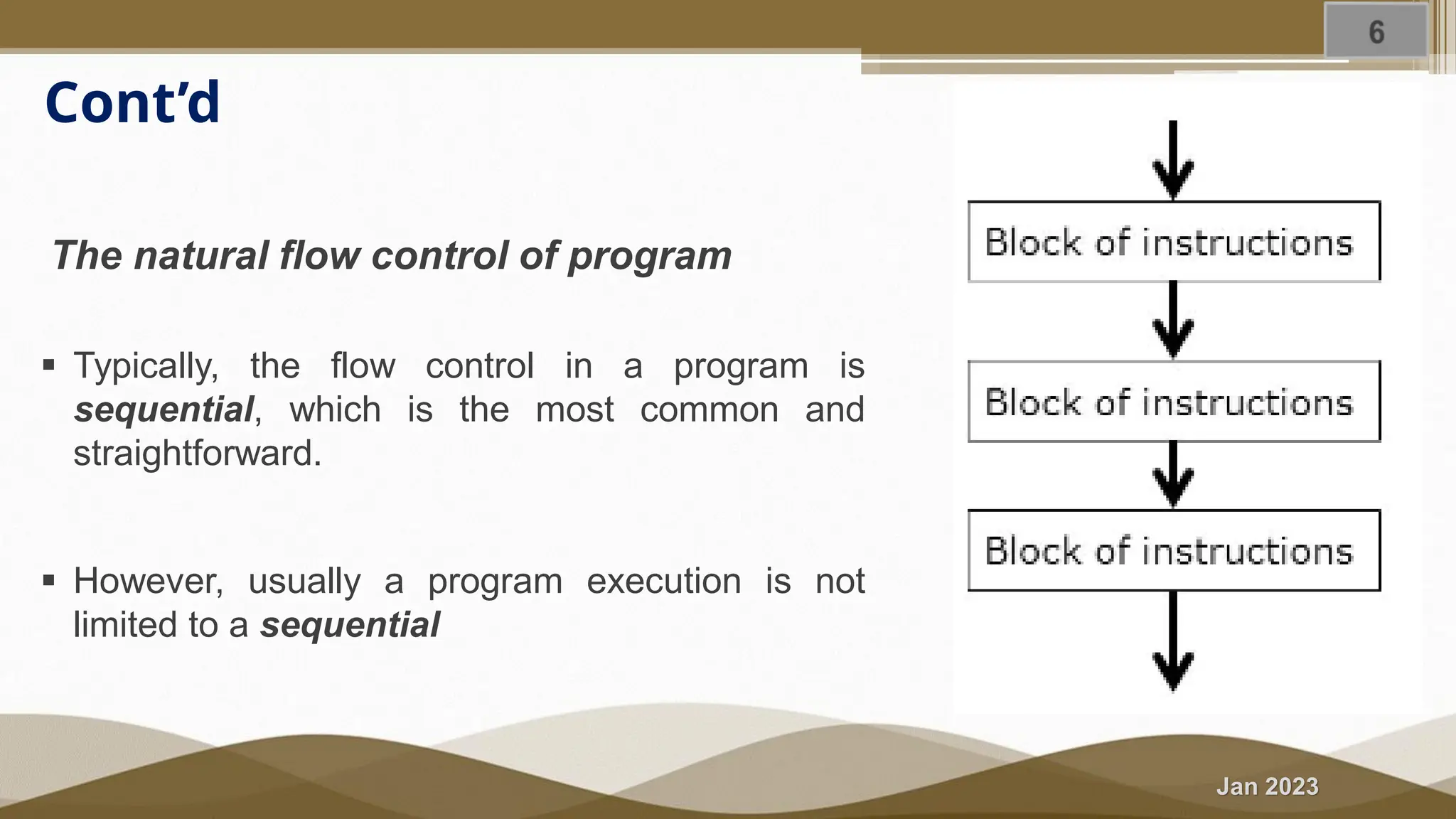
Jan 2023 Cont’d The natural flow control of program ▪ Typically, the flow control in a program is sequential, which is the most common and straightforward. ▪ However, usually a program execution is not limited to a sequential
Jan 2023 Cont’d Can the programmer alter the normal order of program execution? ▪ Yes, programmers can control the order of instruction execution ▪ Accordingly, most programming language including C++ provides control structures that serve to specify what has to be done by our program, when and under which circumstances.
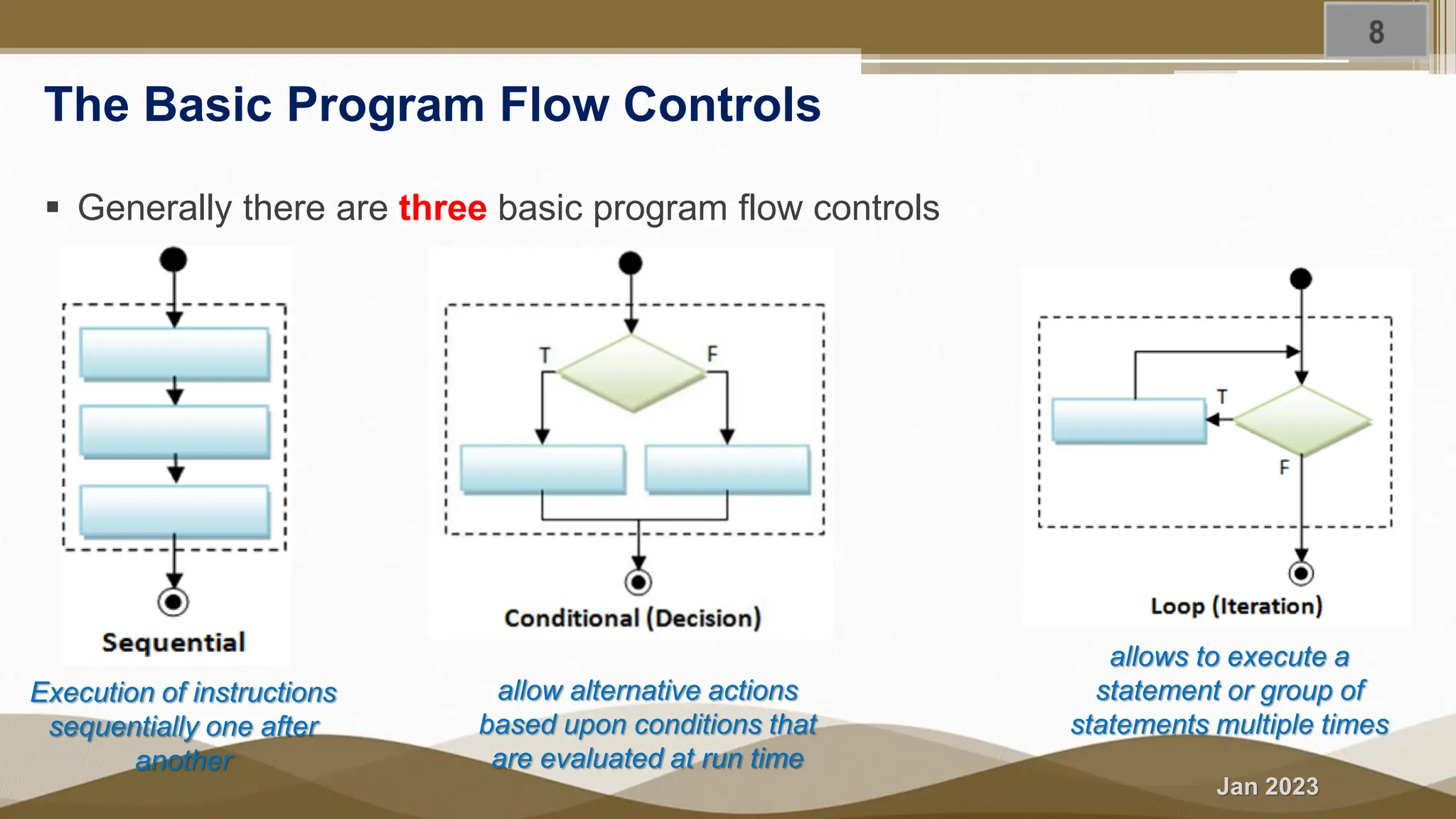
Jan 2023 The Basic Program Flow Controls ▪ Generally there are three basic program flow controls Execution of instructions sequentially one after another allow alternative actions based upon conditions that are evaluated at run time allows to execute a statement or group of statements multiple times
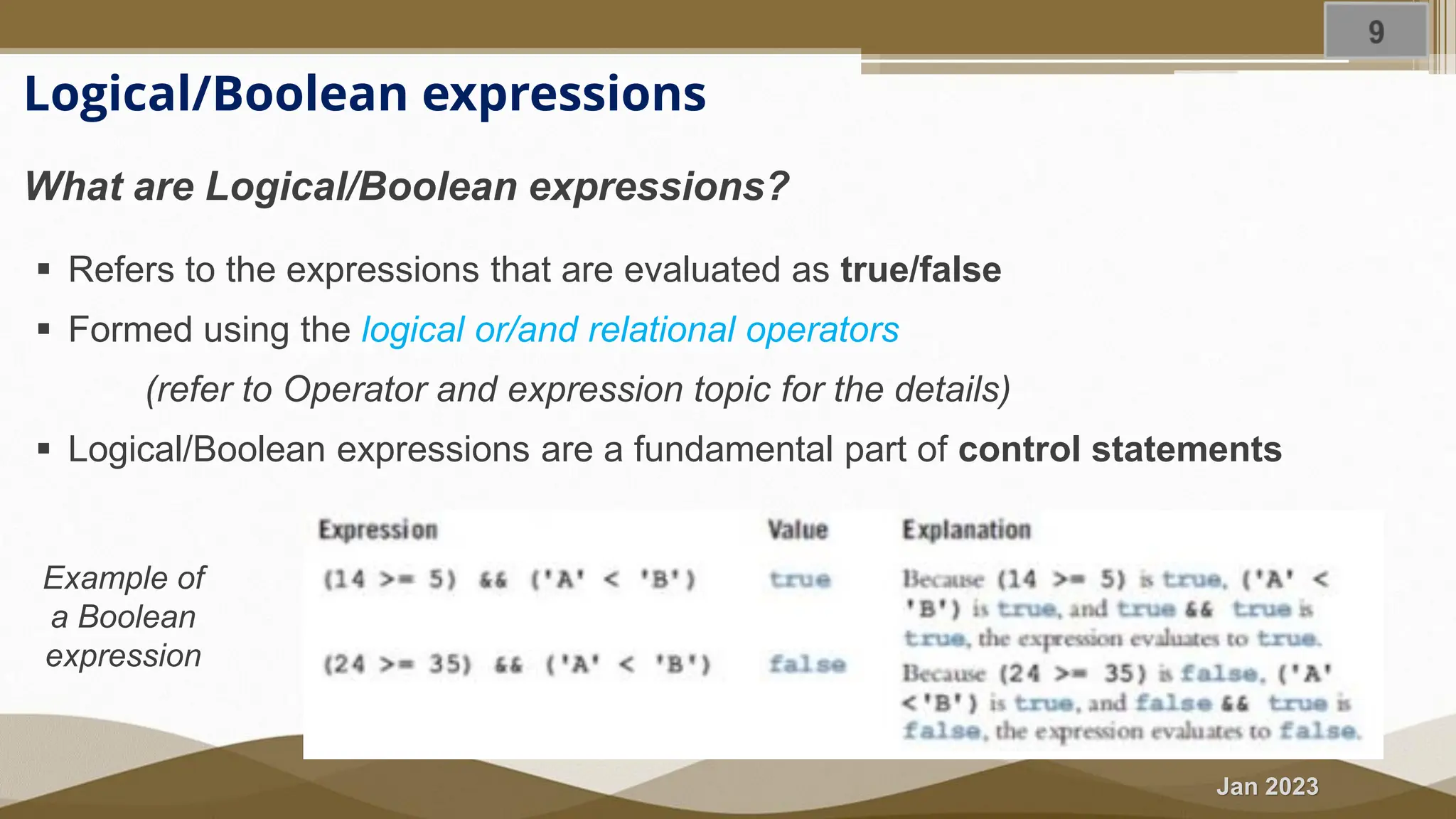
Jan 2023 Logical/Boolean expressions What are Logical/Boolean expressions? ▪ Refers to the expressions that are evaluated as true/false ▪ Formed using the logical or/and relational operators (refer to Operator and expression topic for the details) ▪ Logical/Boolean expressions are a fundamental part of control statements Example of a Boolean expression
Jan 2023 Summary In this section, we briefly discussed; ➢ Program flow control concept ➢ Revision on relational and logical operators ➢ Formation and evaluation of Logical/Boolean expressions
Jan 2023 4.2 Selection Statements (if … else statements)
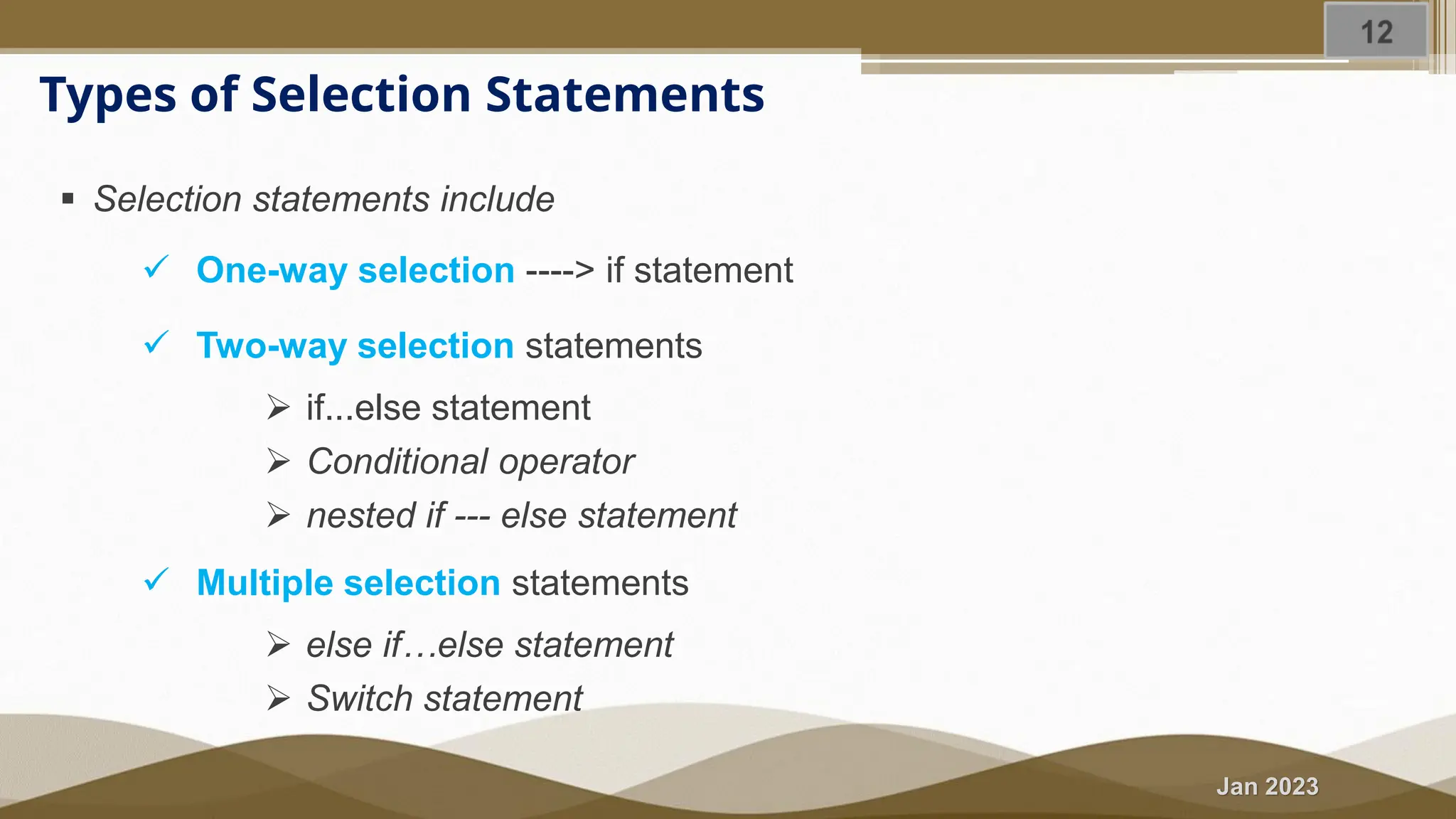
Jan 2023 Types of Selection Statements ▪ Selection statements include ✓ One-way selection ----> if statement ✓ Two-way selection statements ➢ if...else statement ➢ Conditional operator ➢ nested if --- else statement ✓ Multiple selection statements ➢ else if…else statement ➢ Switch statement
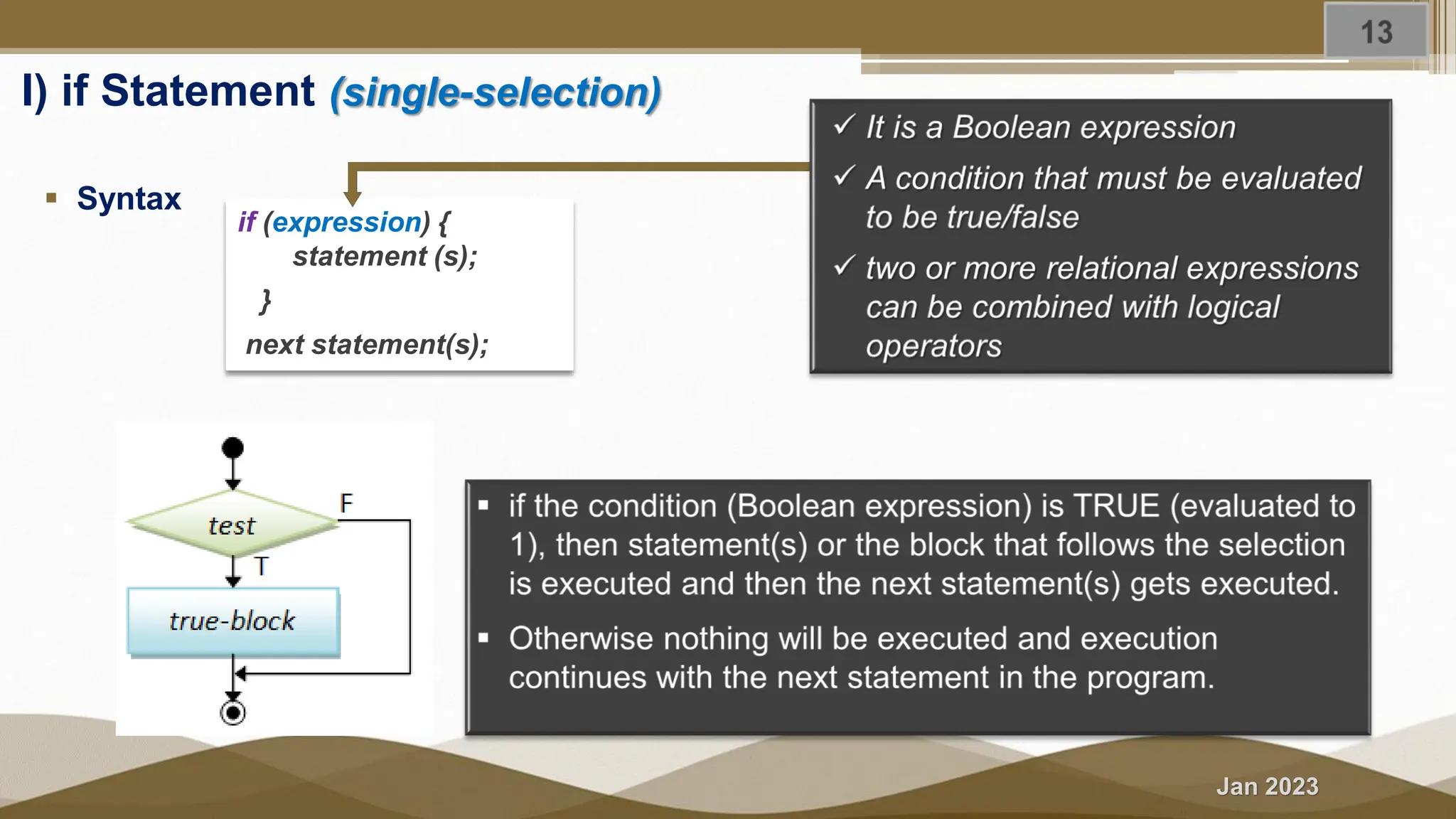
Jan 2023 I) if Statement (single-selection) ▪ Syntax if (expression) { statement (s); } next statement(s);
Jan 2023 Cont’d When to use it? ▪ When there is a one-time condition check in the program and the program continues with the normal execution either the condition is satisfied or not. Example: ▪ Computing salary bonus for an employee given extra hours worked. ▪ Set the nth bit of a long integer num to 1
Jan 2023 Exercise 4.1 Problem description Write a C++ program to calculate the Net-Pay of an employee as follow after deduction of pension (7%) and tax. The program should read the gross salary, worked hours, and income tax rate. If the employee worked hours exceed 40 hrs., the program prompts the user to enter an over-time bonus rate/hour and find the bonus payment by multiplying the extra hours worked with the provided bonus rate. net Salary = (gross Salary – pension – income tax) + Overtime payment Purpose: To demonstrate the use case of the if statement.
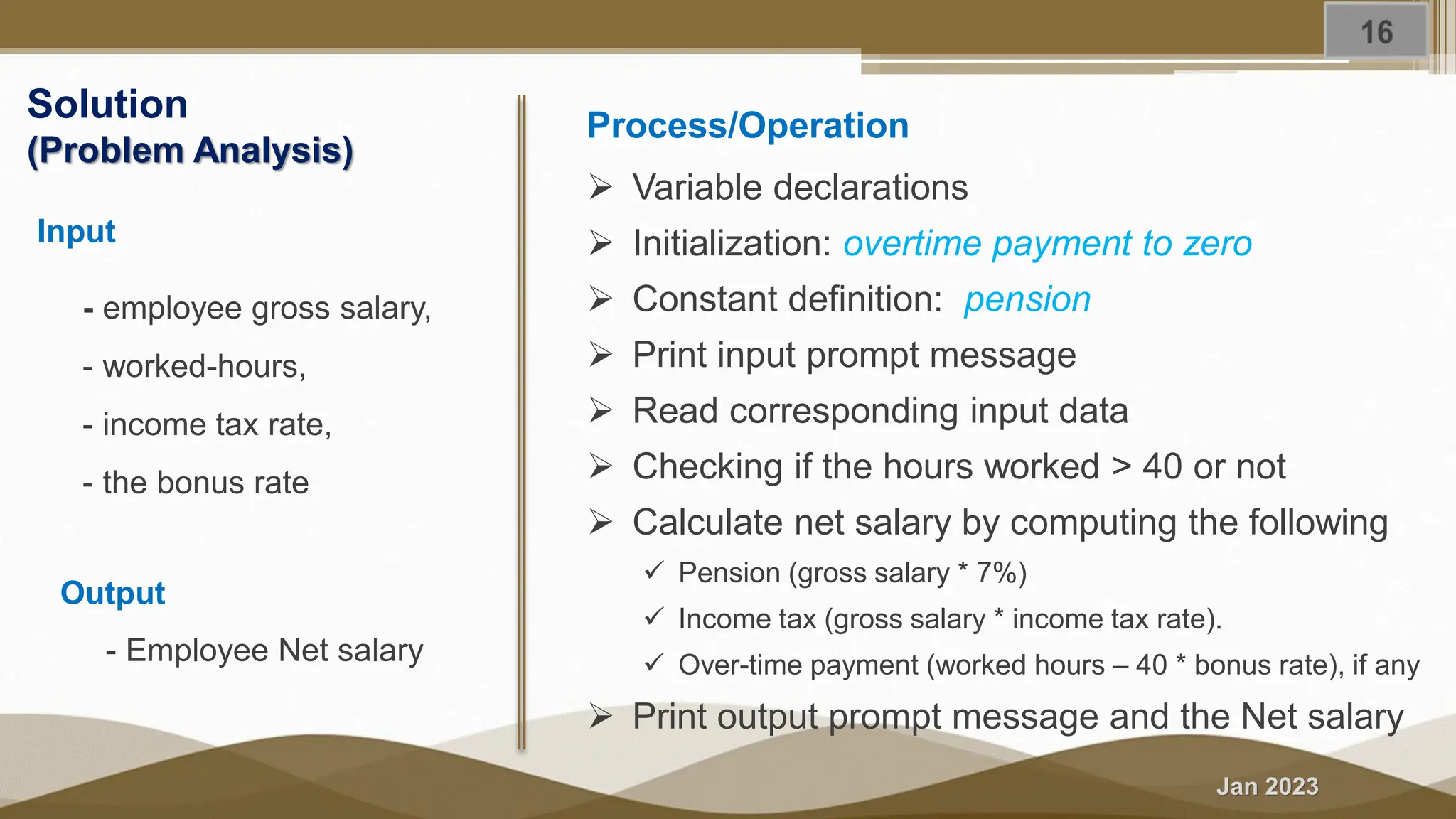
Jan 2023 Solution (Problem Analysis) Input - employee gross salary, - worked-hours, - income tax rate, - the bonus rate Output - Employee Net salary Process/Operation ➢ Variable declarations ➢ Initialization: overtime payment to zero ➢ Constant definition: pension ➢ Print input prompt message ➢ Read corresponding input data ➢ Checking if the hours worked > 40 or not ➢ Calculate net salary by computing the following ✓ Pension (gross salary * 7%) ✓ Income tax (gross salary * income tax rate). ✓ Over-time payment (worked hours – 40 * bonus rate), if any ➢ Print output prompt message and the Net salary
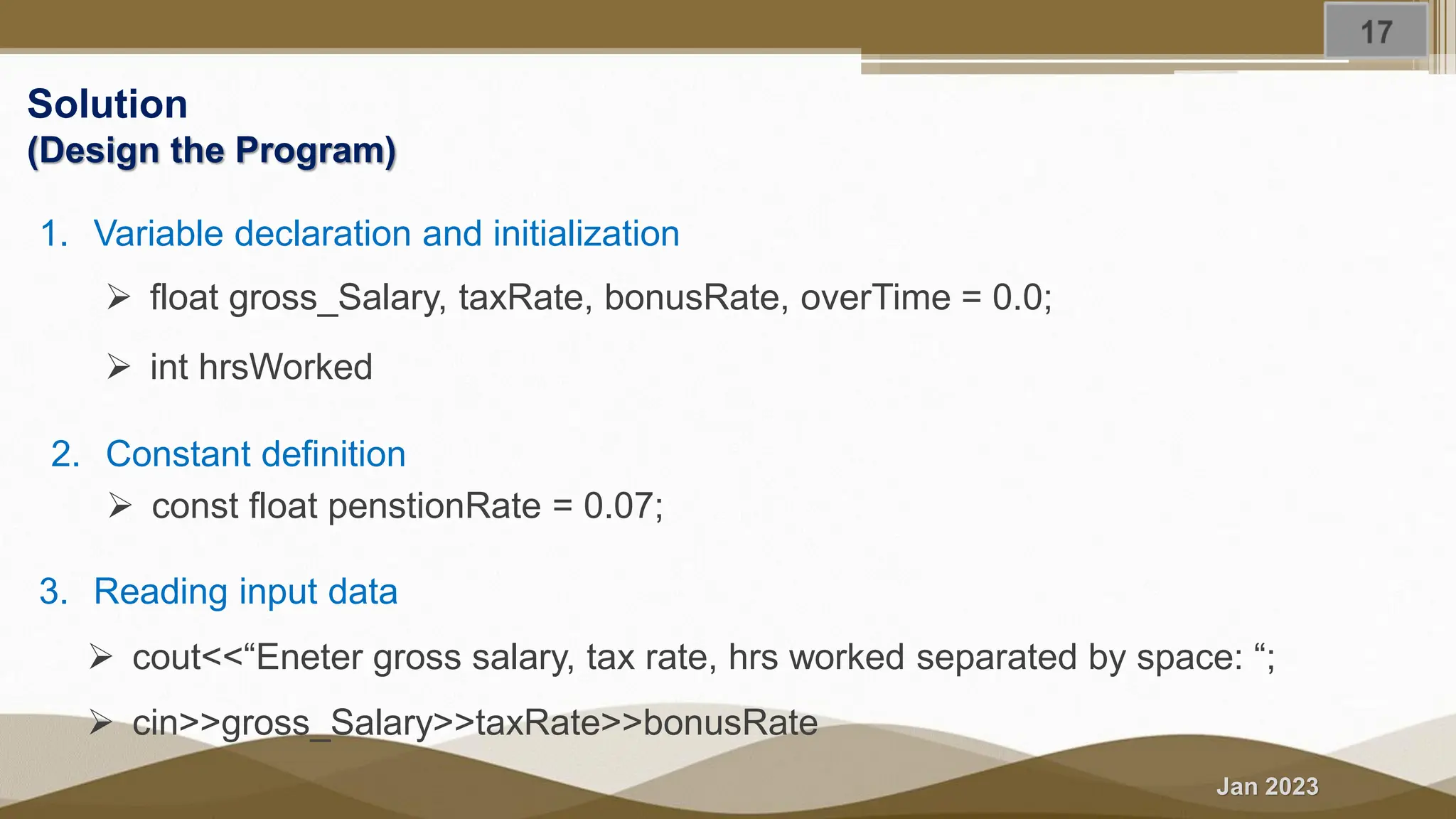
Jan 2023 Solution (Design the Program) 1. Variable declaration and initialization ➢ float gross_Salary, taxRate, bonusRate, overTime = 0.0; ➢ int hrsWorked 2. Constant definition ➢ const float penstionRate = 0.07; 3. Reading input data ➢ cout<<“Eneter gross salary, tax rate, hrs worked separated by space: “; ➢ cin>>gross_Salary>>taxRate>>bonusRate
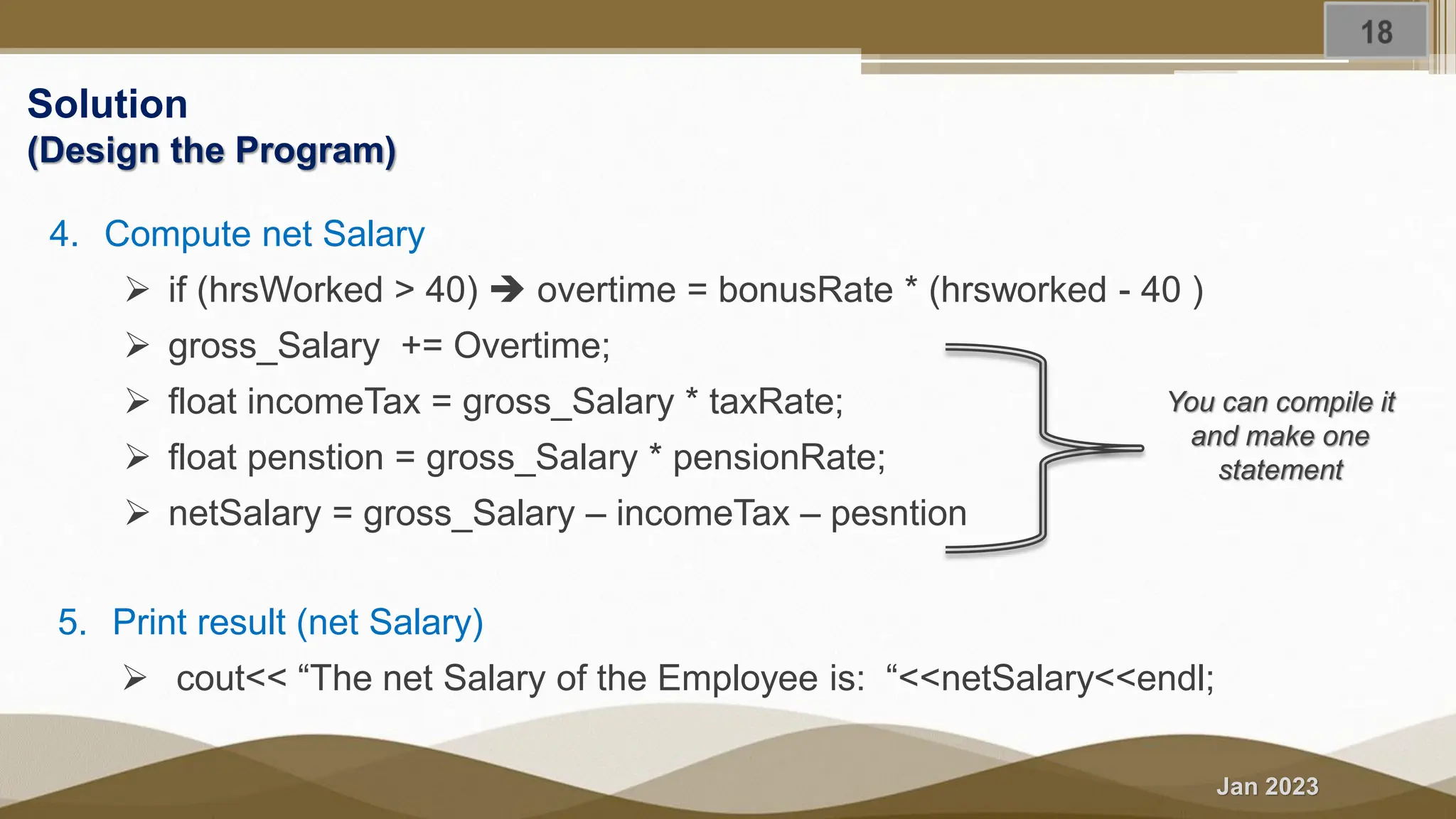
Jan 2023 Solution (Design the Program) You can compile it and make one statement 4. Compute net Salary ➢ if (hrsWorked > 40) ➔ overtime = bonusRate * (hrsworked - 40 ) ➢ gross_Salary += Overtime; ➢ float incomeTax = gross_Salary * taxRate; ➢ float penstion = gross_Salary * pensionRate; ➢ netSalary = gross_Salary – incomeTax – pesntion 5. Print result (net Salary) ➢ cout<< “The net Salary of the Employee is: “<<netSalary<<endl;
Jan 2023 Solution – Design the program
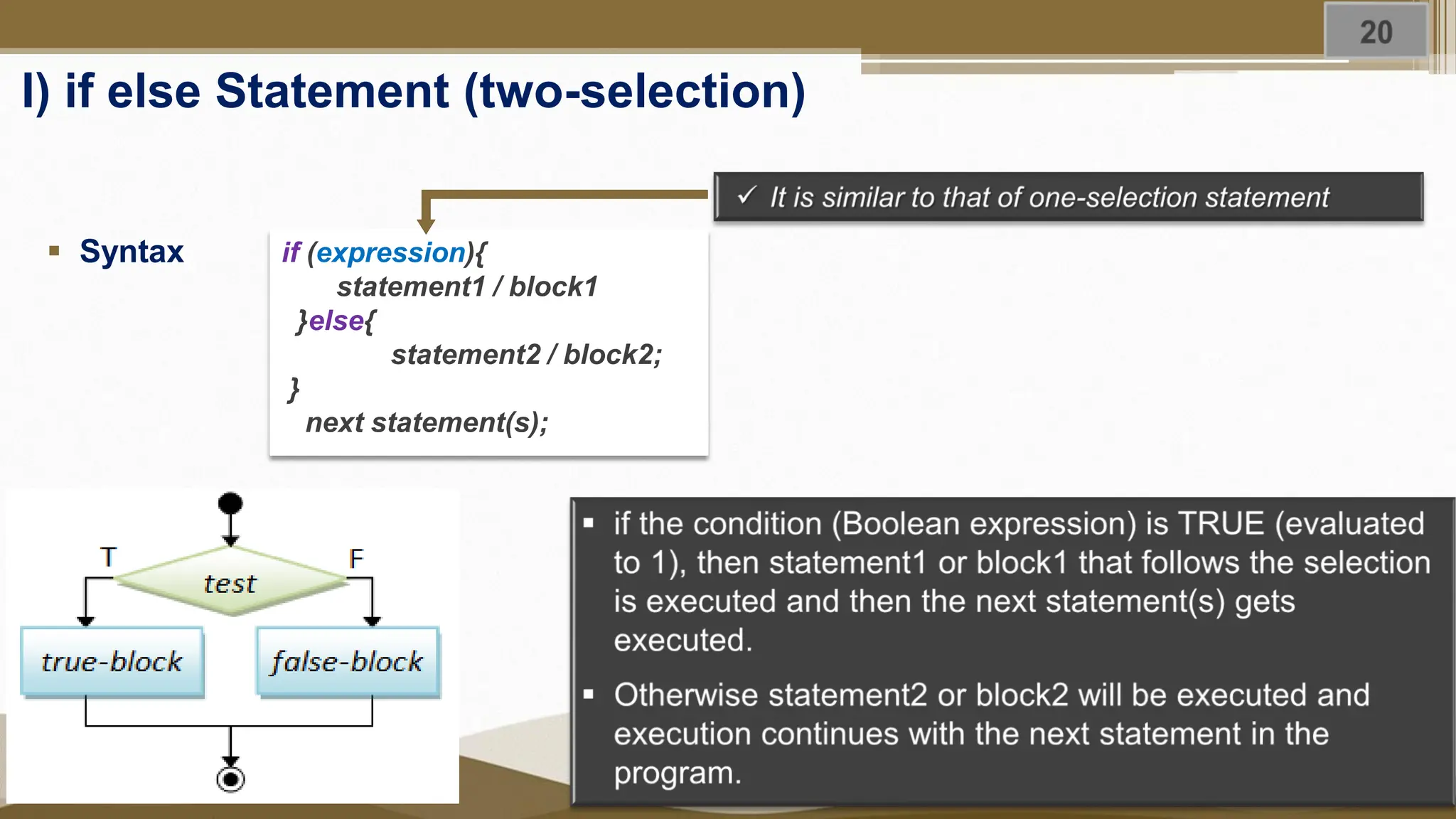
Jan 2023 I) if else Statement (two-selection) ▪ Syntax if (expression){ statement1 / block1 }else{ statement2 / block2; } next statement(s);
Jan 2023 Cont’d Another Syntax ----- > without the block { } ➢ Can be used when there is only one statement ➢ Not suggested (it causes dangling Else Problem) if (condition) <statement_true>; else <statement_false>; if (condition) <statement_true>; When it can be used? ➢ It can be used when there are two different operations to be performed based on the pre- defined condition.
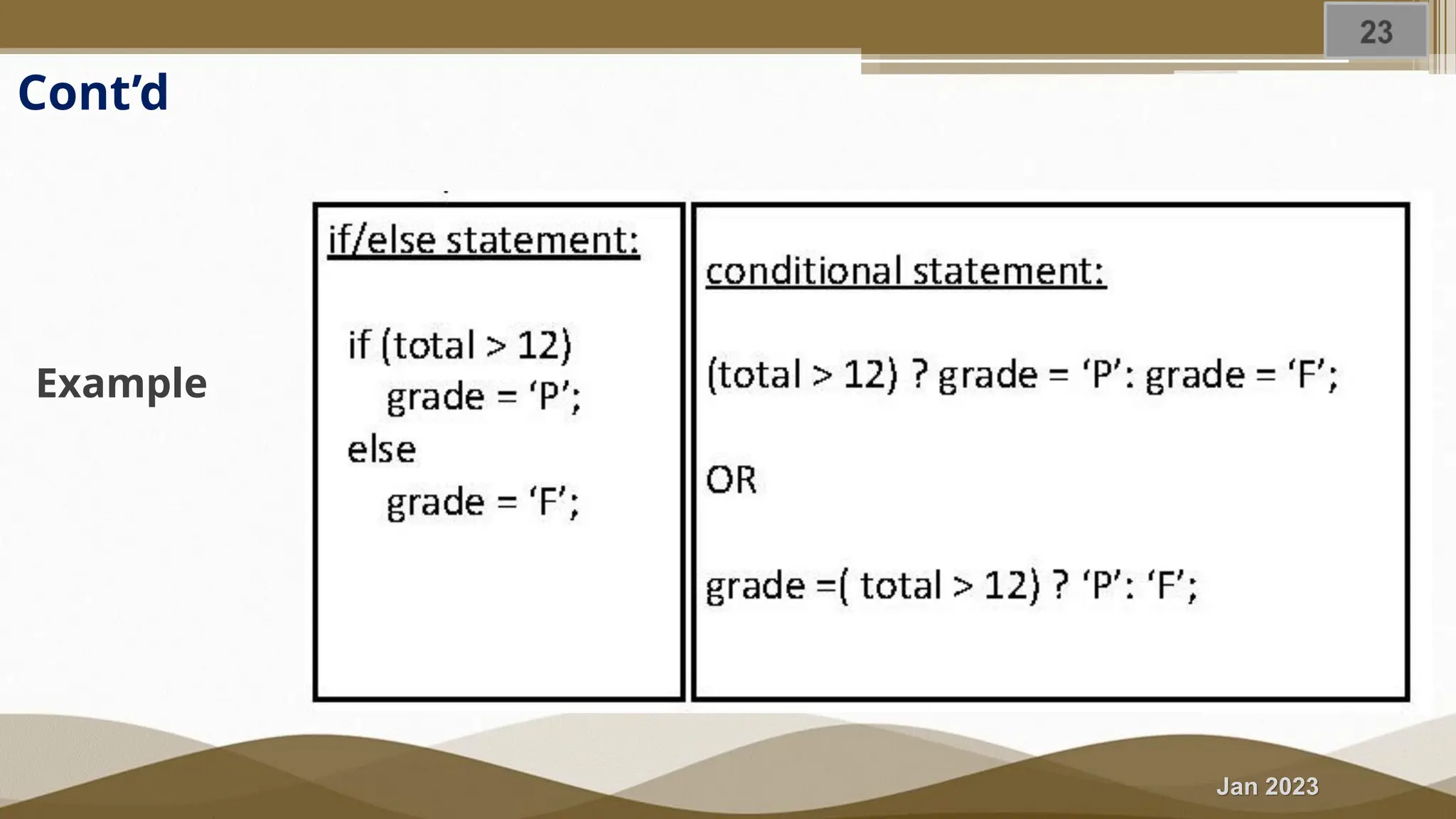
Jan 2023 III) Conditional/Ternary operator ▪ It is an alternative selection statement for the if …. else statement ▪ Syntax Condition ? Expr 1 : Expr 2;
Jan 2023 Cont’d Example
Jan 2023 Exercise 4.2 Problem description Write a C++ program to check whether a given integer number is (a) even/odd or (b) positive or negative using the two-way selection statements; ➢ if ... else statement ➢ Conditional operator Purpose: To demonstrate the use case of the two selection statements Outcome: You able to identify and differentiate the various selection statements
Jan 2023 Solution LET’S DO TOGETHER ➢ Perform an Analysis of the problem ➢ Design the program on paper ➢ Write the program.
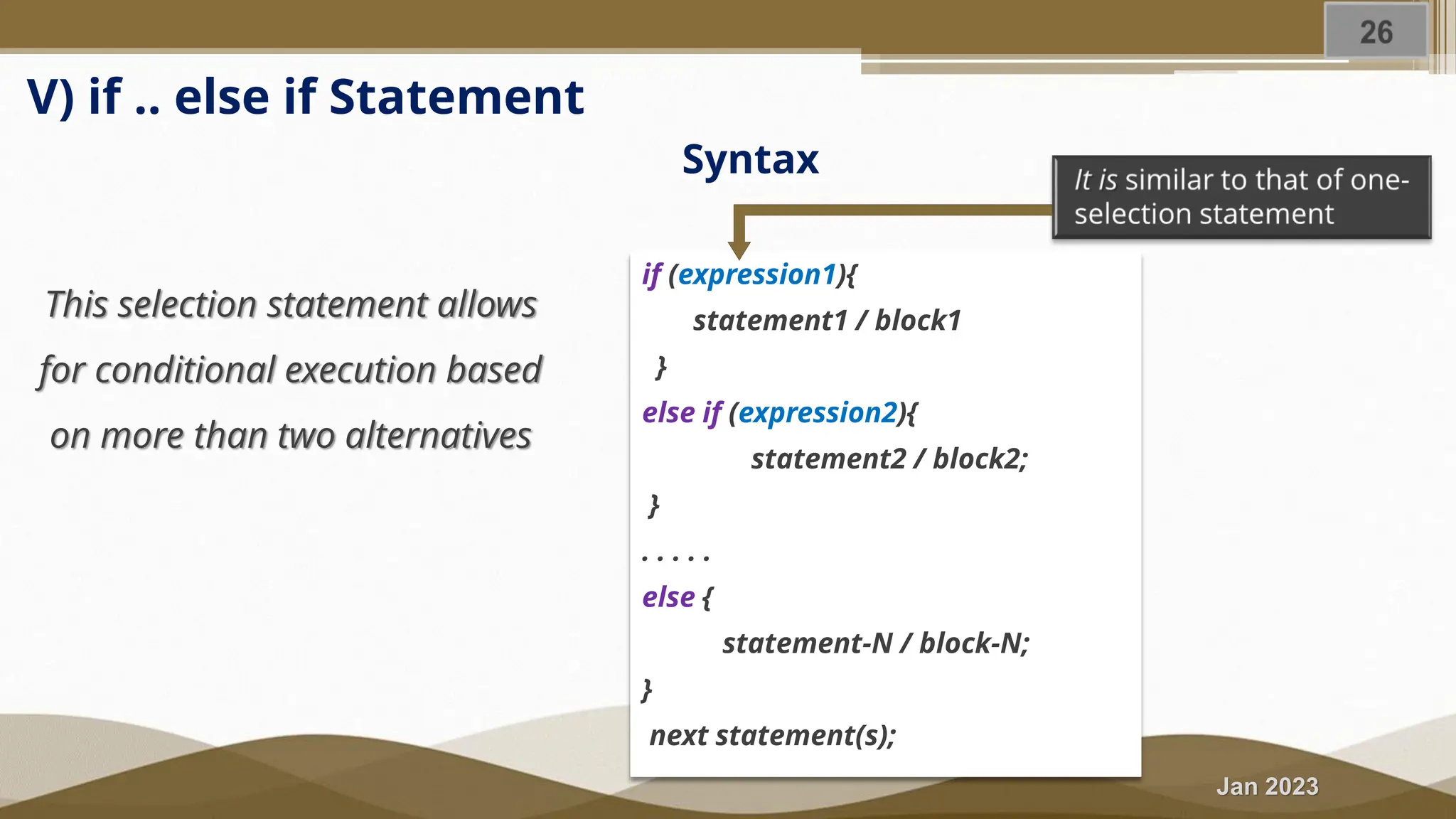
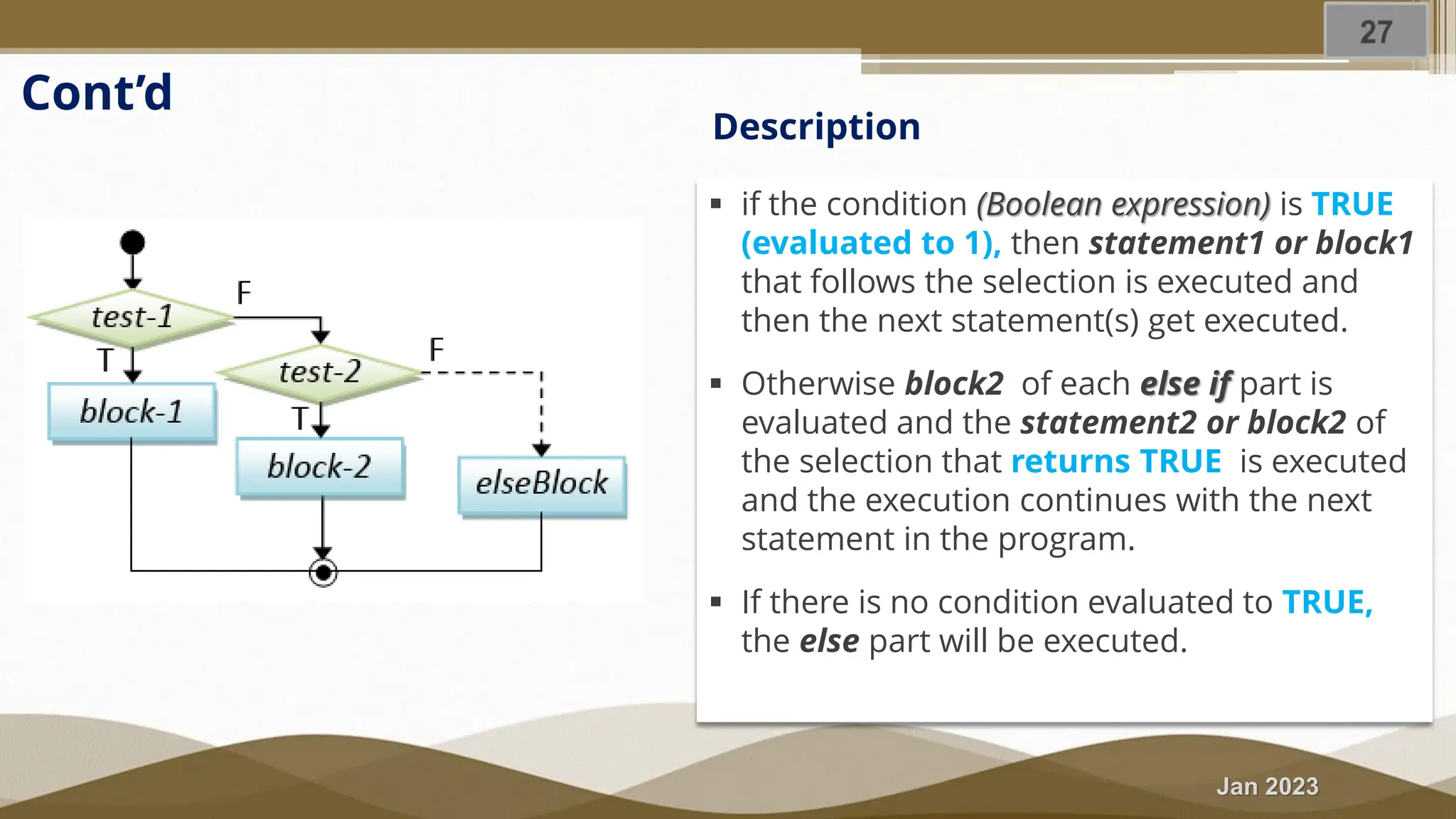
Jan 2023 V) if .. else if Statement Syntax if (expression1){ statement1 / block1 } else if (expression2){ statement2 / block2; } . . . . . else { statement-N / block-N; } next statement(s); This selection statement allows for conditional execution based on more than two alternatives
Jan 2023 ▪ if the condition (Boolean expression) is TRUE (evaluated to 1), then statement1 or block1 that follows the selection is executed and then the next statement(s) get executed. ▪ Otherwise block2 of each else if part is evaluated and the statement2 or block2 of the selection that returns TRUE is executed and the execution continues with the next statement in the program. ▪ If there is no condition evaluated to TRUE, the else part will be executed. Description Cont’d
Jan 2023 Exercise 4.3 Problem description 1. Write a program to find the largest number of three numbers using if...else statement 2. Write a program that reads a valid student mark score and prints the corresponding GRADE scale as follows. [Hint: solve it using both nested if …. else and if … else if statements) 3. Make a program that calculates and display the Body Mass Index (BMI) of a person along with it’s status (normal, under-weight or over-weight.
Jan 2023 Cont. . . . Purpose: ➢ To demonstrate the use case of the multiple selection statements ➢ To differentiate the use case of the nested two-way selection and multiple selection statements Outcome: ➢ You able to design and write a program with multiple execution alternatives and determine the difference between the various selection statements.
Jan 2023 Solution LET’S DO TOGETHER ➢ Perform an Analysis of the problem ➢ Design the program on paper ➢ Write the program.
Jan 2023 Summary In this section, we briefly discussed and demonstrated; ➢ If statement ➢ If …. else statement ➢ If … else if statement
Jan 2023 4.3 Selection Statements (Nested if … else statement)
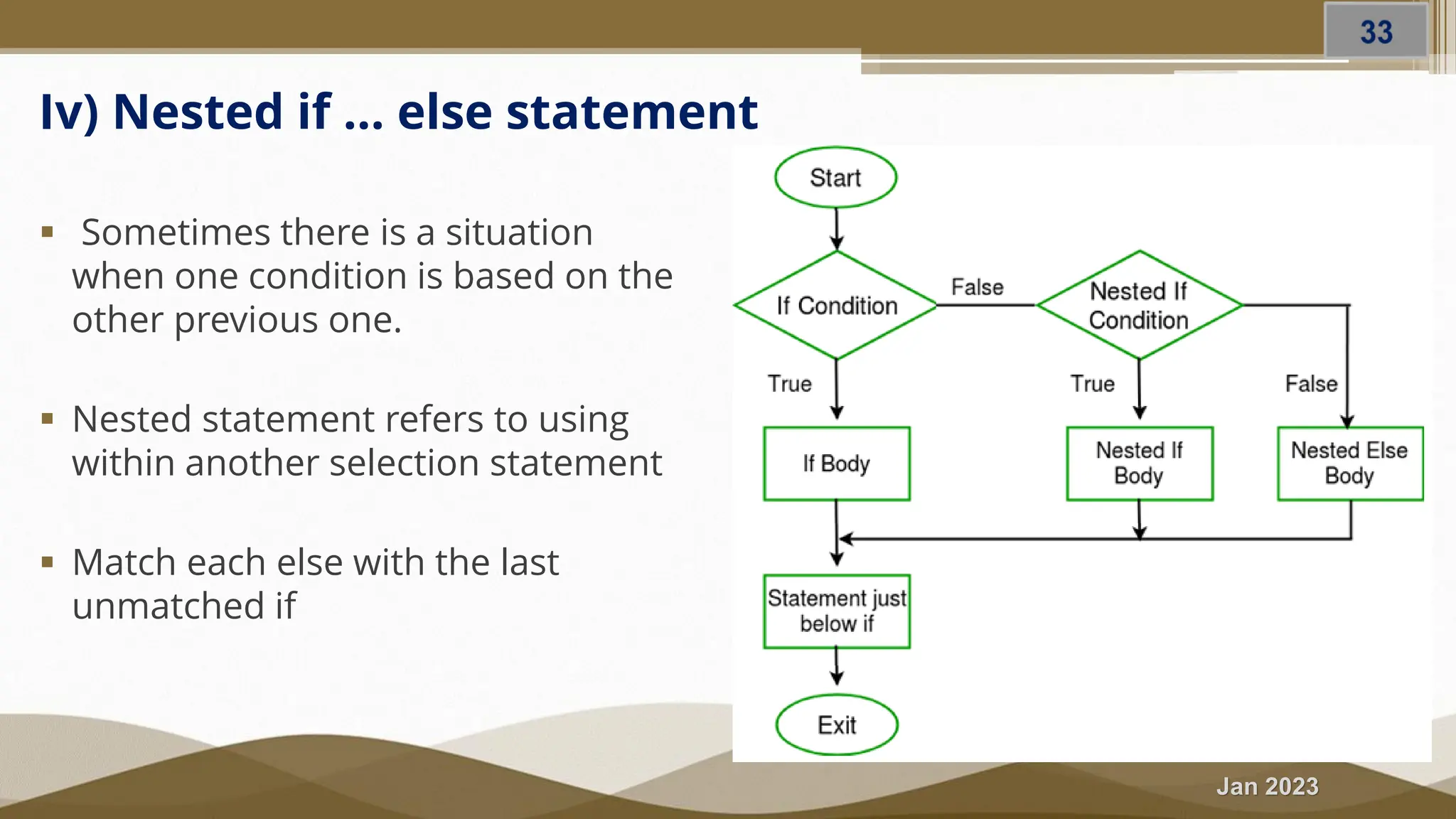
Jan 2023 Iv) Nested if … else statement ▪ Sometimes there is a situation when one condition is based on the other previous one. ▪ Nested statement refers to using within another selection statement ▪ Match each else with the last unmatched if
Jan 2023 Cont. . . Example: ▪ A program used to determine if a given symbol is a digit or upper case letter or lower case letter.
Jan 2023 Exercise 4.4 Problem description Write a C++ program that read a student mark score and print a message “Congratulation!” for a score >= 50 otherwise “Failed, try harder!” using the two-way selection statements; ➢ if ... else statement ➢ Conditional operator ➢ Nested if … else statement Purpose: To demonstrate the use case of the two selection statements Outcome: You able to identify and differentiate the various selection statements
Jan 2023 Summary In this section, we briefly demonstrated; ➢ Nested if else if statement ➢ Solved practical exercise
Jan 2023 4.3 Selection Statements (switch statement)
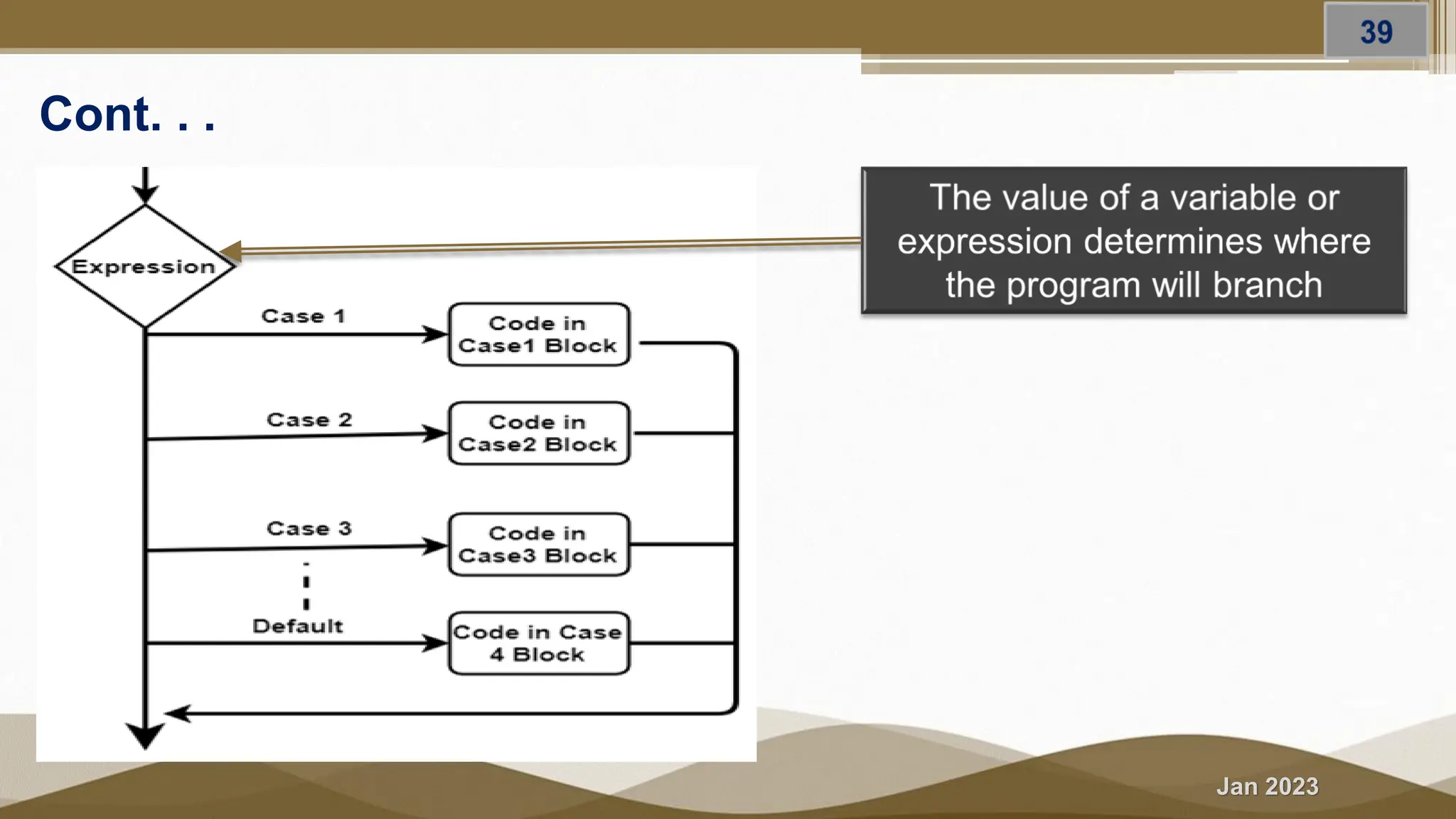
Jan 2023 VI) Switch Statement Syntax Switch statement is similar to if … else if combination, it enables you to test several cases generated by a given expression
Jan 2023 Cont. . .
Jan 2023 Cont. . . ➢ First the switch expression is evaluated once ➢ The value of the expression is compared with the values of each case ➢ If there is a match, the statements following the matched case (associated block ) will be executed until a break statement is reached. ➢ When a break statement is reached, the switch terminates, and the flow of control jumps to the next line following the switch statement. ➢ A switch statement can have an optional default case (equivalent to else), which usually appears at the end of the switch. ➢ The default case holds tasks to be executed when none of the cases is true. How it works
Jan 2023 Cont. . . ➢ The expression must be evaluated to literal value (integral or character or Boolean or enum) and can only be used to compare an expression against constants ➢ Each case is followed by the value to be compared to and a colon. ➢ The expression of each case statement in the block must be unique and cannot be either a variable or range. ➢ If no break appears, the flow of control will fall through to subsequent cases until a break is reached. ➢ It is not necessary to include block - braces {} surrounding the statements of the cases ➢ Even if it is usually necessary to include a break statement at the end of each case, there are situations in which it makes sense to have a case without a break. Important Note
Jan 2023 Exercise 4.5 Problem description Write a basic calculator program that reads an operator and numbers from the user and prints the result. [Hint: switch-case statement) Purpose: ✓ To demonstrate the use case of the switch-case statements Outcome: ✓ You able to write a menu-based program using switch-case statements Solution [LET’S DO TOGETHER] ➢ Perform an Analysis of the problem ➢ Design the program on paper ➢ Write the program.
Jan 2023 Case Evaluation Which selection statement is the best fit for this problem (has range selection)?
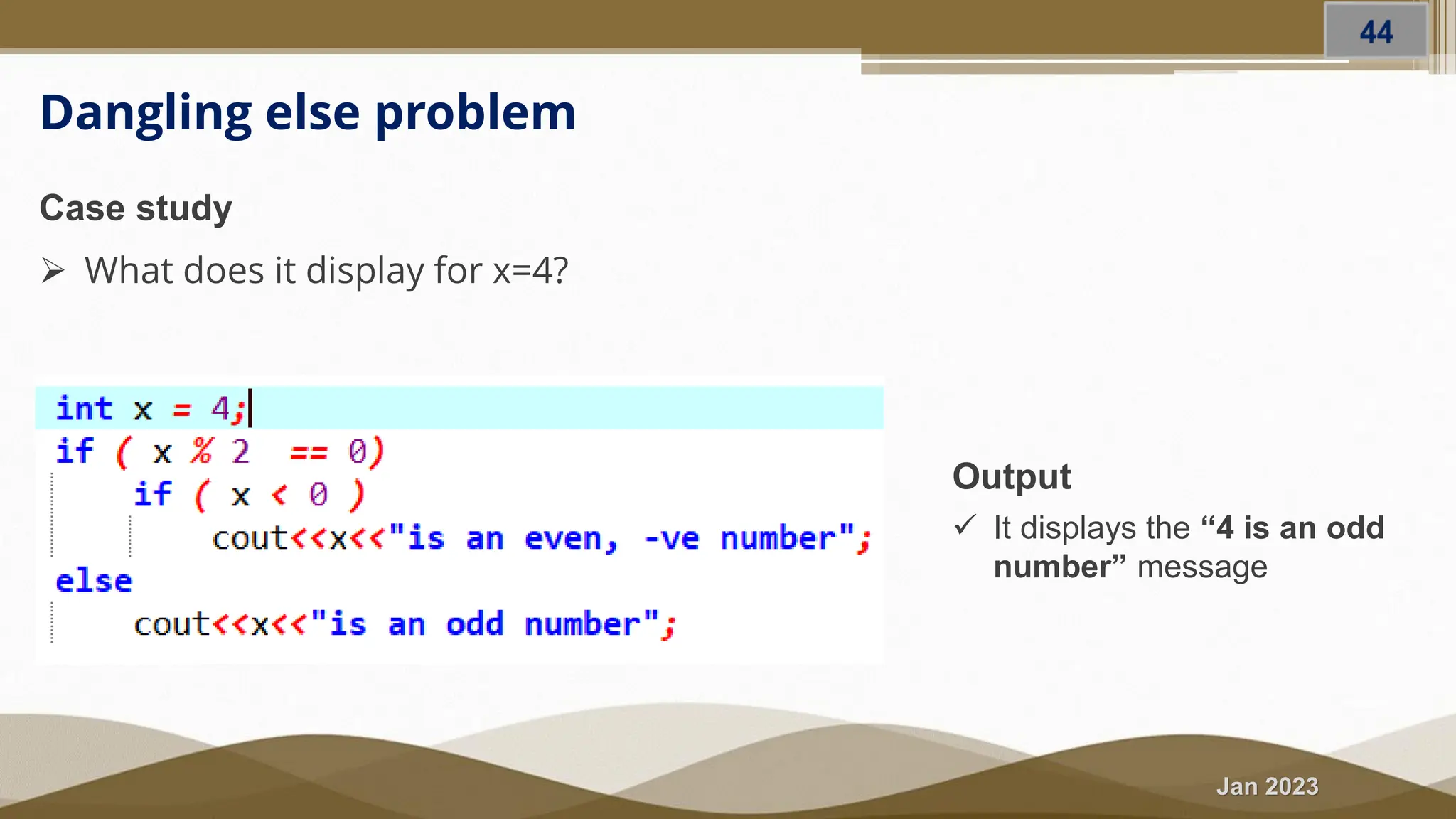
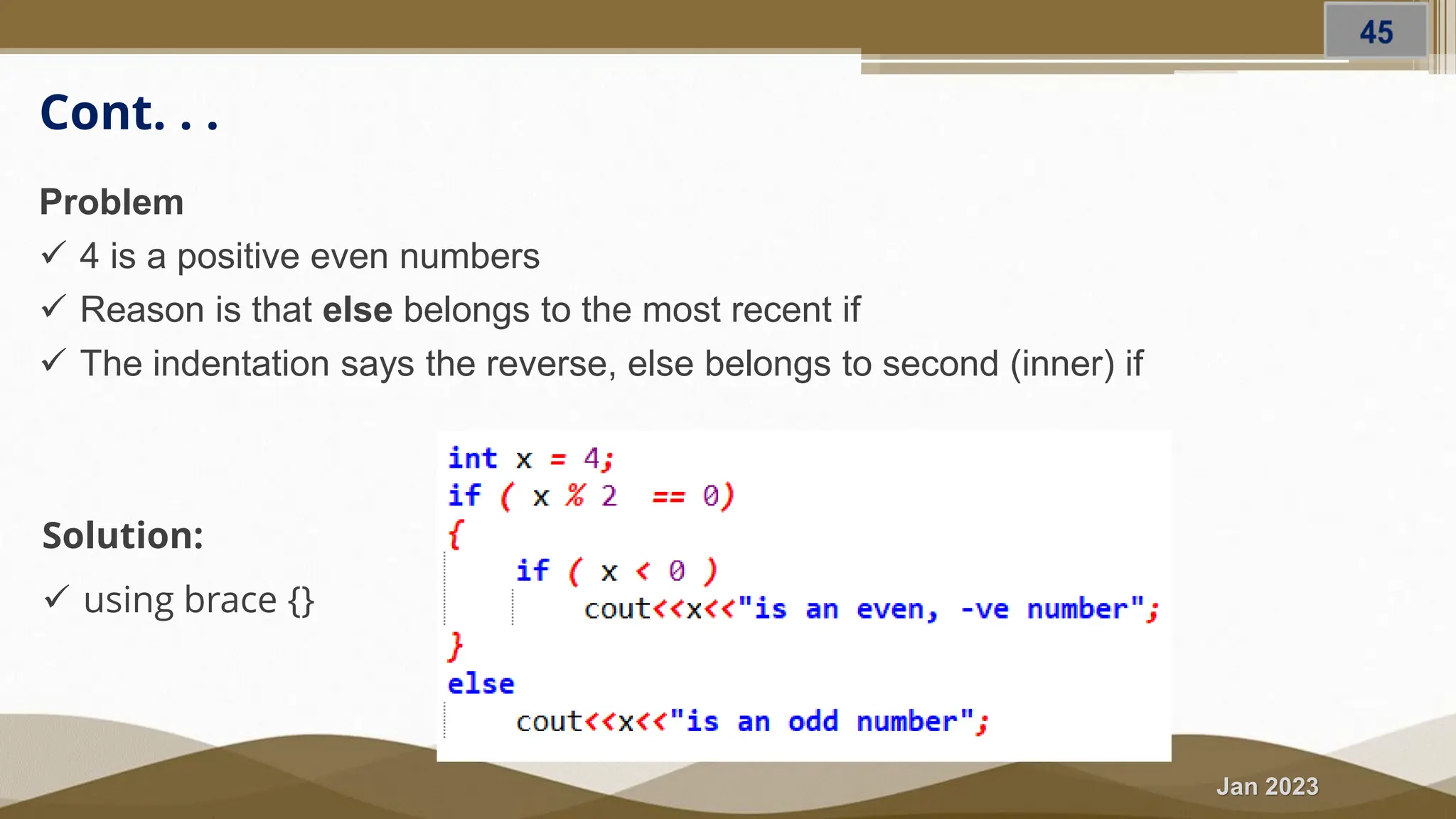
Jan 2023 Dangling else problem Output ✓ It displays the “4 is an odd number” message Case study ➢ What does it display for x=4?
Jan 2023 Cont. . . Problem ✓ 4 is a positive even numbers ✓ Reason is that else belongs to the most recent if ✓ The indentation says the reverse, else belongs to second (inner) if Solution: ✓ using brace {}
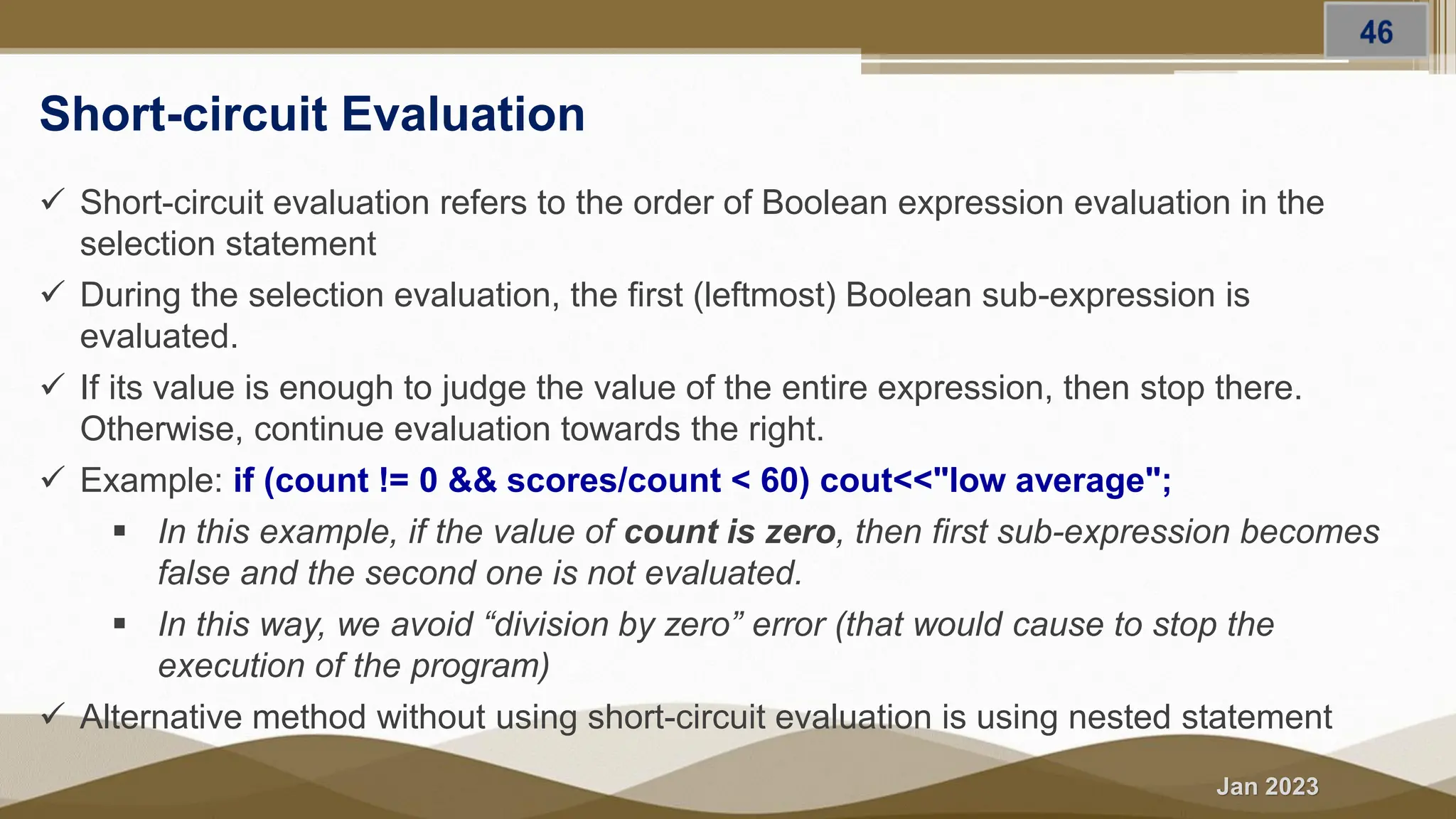
Jan 2023 Short-circuit Evaluation ✓ Short-circuit evaluation refers to the order of Boolean expression evaluation in the selection statement ✓ During the selection evaluation, the first (leftmost) Boolean sub-expression is evaluated. ✓ If its value is enough to judge the value of the entire expression, then stop there. Otherwise, continue evaluation towards the right. ✓ Example: if (count != 0 && scores/count < 60) cout<<"low average"; ▪ In this example, if the value of count is zero, then first sub-expression becomes false and the second one is not evaluated. ▪ In this way, we avoid “division by zero” error (that would cause to stop the execution of the program) ✓ Alternative method without using short-circuit evaluation is using nested statement
Jan 2023 Summary In this section, we briefly discussed and demonstrated; ➢ Switch statement ➢ Switch statement Vs. If else if statement ➢ Dangling else problem ➢ Short-circuit Evaluation
Jan 2023 Problems Solving and Practical Exercises (Refer worksheet 3)
Jan 2023 Reading Resources/Materials eBooks ▪ Chapter 5 & 6: Diane Zak; An Introduction to Programming with C++ [8th Edition], 2016 Cengage Learning ▪ Chapter 4: Gary J. Bronson; C++ For Engineers and Scientists [3rd edition], Course Technology, Cengage Learning, 2010 ▪ Chapter 2 (section 2.4): Walter Savitch; Problem Solving With C++ [10th edition], University of California, San Diego, 2018 ▪ Chapter 4: P. Deitel , H. Deitel; C++ how to program, [10th, Global Edition] (2017)
Jan 2023 Reading Resources/Materials eBooks – looping statements ▪ Chapter 7 & 8: Diane Zak; An Introduction to Programming with C++ [8th Edition], 2016 Cengage Learning ▪ Chapter 5: Gary J. Bronson; C++ For Engineers and Scientists [3rd edition], Course Technology, Cengage Learning, 2010 ▪ Chapter 2 (section 2.4): Walter Savitch; Problem Solving With C++ [10th edition], University of California, San Diego, 2018 ▪ Chapter 4 & 5: P. Deitel , H. Deitel; C++ how to program, [10th, Global Ed.] (2017)
Jan 2023 Reading Resources/Materials Online Materials ▪ https://www.w3schools.com/cpp/default.asp ▪ https://www.javatpoint.com/cpp-tutorial ▪ https://www.programiz.com/cpp-programming ▪ https://www.hackerrank.com/domains/cpp ▪ https://cplusplus.com/doc/tutorial/
Jan 2023 Thank You For Your Attention!!

Fundamentals of Computer Programming - Flow of Control I

  • 1.
    Jan 2023 FUNDAMENTALS OFCOMPUTER PROGRAMMING Chere L. (M. Tech) Lecturer, SWEG, AASTU Using C++
  • 2.
    Jan 2023 PROGRAM FLOWCONTROLS (Selection Statements) Outline ▪ Introduction to flow control ▪ Branching flow controls ✓ One-way selection ✓ Two-way selection ✓ Multiple selections ✓ switch statement CHAPTER FOUR
  • 3.
    Jan 2023 Objectives At theend of this section, you able to ▪ Identify and use selection flow controls ▪ Form and evaluate Boolean expressions ▪ Examine the relational and logical operators ▪ Write a program using selection statements
  • 4.
  • 5.
    Jan 2023 What isflow control? ▪ It refers to the order in which a program statements (instructions) are executed (performs actions). ▪ The term reflects the fact that the currently executing statement has control of the CPU and is handed over (flow) to another statement when its execution is completed.
  • 6.
    Jan 2023 Cont’d The naturalflow control of program ▪ Typically, the flow control in a program is sequential, which is the most common and straightforward. ▪ However, usually a program execution is not limited to a sequential
  • 7.
    Jan 2023 Cont’d Can theprogrammer alter the normal order of program execution? ▪ Yes, programmers can control the order of instruction execution ▪ Accordingly, most programming language including C++ provides control structures that serve to specify what has to be done by our program, when and under which circumstances.
  • 8.
    Jan 2023 The BasicProgram Flow Controls ▪ Generally there are three basic program flow controls Execution of instructions sequentially one after another allow alternative actions based upon conditions that are evaluated at run time allows to execute a statement or group of statements multiple times
  • 9.
    Jan 2023 Logical/Boolean expressions Whatare Logical/Boolean expressions? ▪ Refers to the expressions that are evaluated as true/false ▪ Formed using the logical or/and relational operators (refer to Operator and expression topic for the details) ▪ Logical/Boolean expressions are a fundamental part of control statements Example of a Boolean expression
  • 10.
    Jan 2023 Summary In thissection, we briefly discussed; ➢ Program flow control concept ➢ Revision on relational and logical operators ➢ Formation and evaluation of Logical/Boolean expressions
  • 11.
    Jan 2023 4.2 SelectionStatements (if … else statements)
  • 12.
    Jan 2023 Types ofSelection Statements ▪ Selection statements include ✓ One-way selection ----> if statement ✓ Two-way selection statements ➢ if...else statement ➢ Conditional operator ➢ nested if --- else statement ✓ Multiple selection statements ➢ else if…else statement ➢ Switch statement
  • 13.
    Jan 2023 I) ifStatement (single-selection) ▪ Syntax if (expression) { statement (s); } next statement(s);
  • 14.
    Jan 2023 Cont’d When touse it? ▪ When there is a one-time condition check in the program and the program continues with the normal execution either the condition is satisfied or not. Example: ▪ Computing salary bonus for an employee given extra hours worked. ▪ Set the nth bit of a long integer num to 1
  • 15.
    Jan 2023 Exercise 4.1 Problemdescription Write a C++ program to calculate the Net-Pay of an employee as follow after deduction of pension (7%) and tax. The program should read the gross salary, worked hours, and income tax rate. If the employee worked hours exceed 40 hrs., the program prompts the user to enter an over-time bonus rate/hour and find the bonus payment by multiplying the extra hours worked with the provided bonus rate. net Salary = (gross Salary – pension – income tax) + Overtime payment Purpose: To demonstrate the use case of the if statement.
  • 16.
    Jan 2023 Solution (Problem Analysis) Input -employee gross salary, - worked-hours, - income tax rate, - the bonus rate Output - Employee Net salary Process/Operation ➢ Variable declarations ➢ Initialization: overtime payment to zero ➢ Constant definition: pension ➢ Print input prompt message ➢ Read corresponding input data ➢ Checking if the hours worked > 40 or not ➢ Calculate net salary by computing the following ✓ Pension (gross salary * 7%) ✓ Income tax (gross salary * income tax rate). ✓ Over-time payment (worked hours – 40 * bonus rate), if any ➢ Print output prompt message and the Net salary
  • 17.
    Jan 2023 Solution (Design theProgram) 1. Variable declaration and initialization ➢ float gross_Salary, taxRate, bonusRate, overTime = 0.0; ➢ int hrsWorked 2. Constant definition ➢ const float penstionRate = 0.07; 3. Reading input data ➢ cout<<“Eneter gross salary, tax rate, hrs worked separated by space: “; ➢ cin>>gross_Salary>>taxRate>>bonusRate
  • 18.
    Jan 2023 Solution (Design theProgram) You can compile it and make one statement 4. Compute net Salary ➢ if (hrsWorked > 40) ➔ overtime = bonusRate * (hrsworked - 40 ) ➢ gross_Salary += Overtime; ➢ float incomeTax = gross_Salary * taxRate; ➢ float penstion = gross_Salary * pensionRate; ➢ netSalary = gross_Salary – incomeTax – pesntion 5. Print result (net Salary) ➢ cout<< “The net Salary of the Employee is: “<<netSalary<<endl;
  • 19.
  • 20.
    Jan 2023 I) ifelse Statement (two-selection) ▪ Syntax if (expression){ statement1 / block1 }else{ statement2 / block2; } next statement(s);
  • 21.
    Jan 2023 Cont’d Another Syntax----- > without the block { } ➢ Can be used when there is only one statement ➢ Not suggested (it causes dangling Else Problem) if (condition) <statement_true>; else <statement_false>; if (condition) <statement_true>; When it can be used? ➢ It can be used when there are two different operations to be performed based on the pre- defined condition.
  • 22.
    Jan 2023 III) Conditional/Ternaryoperator ▪ It is an alternative selection statement for the if …. else statement ▪ Syntax Condition ? Expr 1 : Expr 2;
  • 23.
  • 24.
    Jan 2023 Exercise 4.2 Problemdescription Write a C++ program to check whether a given integer number is (a) even/odd or (b) positive or negative using the two-way selection statements; ➢ if ... else statement ➢ Conditional operator Purpose: To demonstrate the use case of the two selection statements Outcome: You able to identify and differentiate the various selection statements
  • 25.
    Jan 2023 Solution LET’S DOTOGETHER ➢ Perform an Analysis of the problem ➢ Design the program on paper ➢ Write the program.
  • 26.
    Jan 2023 V) if.. else if Statement Syntax if (expression1){ statement1 / block1 } else if (expression2){ statement2 / block2; } . . . . . else { statement-N / block-N; } next statement(s); This selection statement allows for conditional execution based on more than two alternatives
  • 27.
    Jan 2023 ▪ ifthe condition (Boolean expression) is TRUE (evaluated to 1), then statement1 or block1 that follows the selection is executed and then the next statement(s) get executed. ▪ Otherwise block2 of each else if part is evaluated and the statement2 or block2 of the selection that returns TRUE is executed and the execution continues with the next statement in the program. ▪ If there is no condition evaluated to TRUE, the else part will be executed. Description Cont’d
  • 28.
    Jan 2023 Exercise 4.3 Problemdescription 1. Write a program to find the largest number of three numbers using if...else statement 2. Write a program that reads a valid student mark score and prints the corresponding GRADE scale as follows. [Hint: solve it using both nested if …. else and if … else if statements) 3. Make a program that calculates and display the Body Mass Index (BMI) of a person along with it’s status (normal, under-weight or over-weight.
  • 29.
    Jan 2023 Cont. .. . Purpose: ➢ To demonstrate the use case of the multiple selection statements ➢ To differentiate the use case of the nested two-way selection and multiple selection statements Outcome: ➢ You able to design and write a program with multiple execution alternatives and determine the difference between the various selection statements.
  • 30.
    Jan 2023 Solution LET’S DOTOGETHER ➢ Perform an Analysis of the problem ➢ Design the program on paper ➢ Write the program.
  • 31.
    Jan 2023 Summary In thissection, we briefly discussed and demonstrated; ➢ If statement ➢ If …. else statement ➢ If … else if statement
  • 32.
    Jan 2023 4.3 SelectionStatements (Nested if … else statement)
  • 33.
    Jan 2023 Iv) Nestedif … else statement ▪ Sometimes there is a situation when one condition is based on the other previous one. ▪ Nested statement refers to using within another selection statement ▪ Match each else with the last unmatched if
  • 34.
    Jan 2023 Cont. .. Example: ▪ A program used to determine if a given symbol is a digit or upper case letter or lower case letter.
  • 35.
    Jan 2023 Exercise 4.4 Problemdescription Write a C++ program that read a student mark score and print a message “Congratulation!” for a score >= 50 otherwise “Failed, try harder!” using the two-way selection statements; ➢ if ... else statement ➢ Conditional operator ➢ Nested if … else statement Purpose: To demonstrate the use case of the two selection statements Outcome: You able to identify and differentiate the various selection statements
  • 36.
    Jan 2023 Summary In thissection, we briefly demonstrated; ➢ Nested if else if statement ➢ Solved practical exercise
  • 37.
    Jan 2023 4.3 SelectionStatements (switch statement)
  • 38.
    Jan 2023 VI) SwitchStatement Syntax Switch statement is similar to if … else if combination, it enables you to test several cases generated by a given expression
  • 39.
  • 40.
    Jan 2023 Cont. .. ➢ First the switch expression is evaluated once ➢ The value of the expression is compared with the values of each case ➢ If there is a match, the statements following the matched case (associated block ) will be executed until a break statement is reached. ➢ When a break statement is reached, the switch terminates, and the flow of control jumps to the next line following the switch statement. ➢ A switch statement can have an optional default case (equivalent to else), which usually appears at the end of the switch. ➢ The default case holds tasks to be executed when none of the cases is true. How it works
  • 41.
    Jan 2023 Cont. .. ➢ The expression must be evaluated to literal value (integral or character or Boolean or enum) and can only be used to compare an expression against constants ➢ Each case is followed by the value to be compared to and a colon. ➢ The expression of each case statement in the block must be unique and cannot be either a variable or range. ➢ If no break appears, the flow of control will fall through to subsequent cases until a break is reached. ➢ It is not necessary to include block - braces {} surrounding the statements of the cases ➢ Even if it is usually necessary to include a break statement at the end of each case, there are situations in which it makes sense to have a case without a break. Important Note
  • 42.
    Jan 2023 Exercise 4.5 Problemdescription Write a basic calculator program that reads an operator and numbers from the user and prints the result. [Hint: switch-case statement) Purpose: ✓ To demonstrate the use case of the switch-case statements Outcome: ✓ You able to write a menu-based program using switch-case statements Solution [LET’S DO TOGETHER] ➢ Perform an Analysis of the problem ➢ Design the program on paper ➢ Write the program.
  • 43.
    Jan 2023 Case Evaluation Whichselection statement is the best fit for this problem (has range selection)?
  • 44.
    Jan 2023 Dangling elseproblem Output ✓ It displays the “4 is an odd number” message Case study ➢ What does it display for x=4?
  • 45.
    Jan 2023 Cont. .. Problem ✓ 4 is a positive even numbers ✓ Reason is that else belongs to the most recent if ✓ The indentation says the reverse, else belongs to second (inner) if Solution: ✓ using brace {}
  • 46.
    Jan 2023 Short-circuit Evaluation ✓Short-circuit evaluation refers to the order of Boolean expression evaluation in the selection statement ✓ During the selection evaluation, the first (leftmost) Boolean sub-expression is evaluated. ✓ If its value is enough to judge the value of the entire expression, then stop there. Otherwise, continue evaluation towards the right. ✓ Example: if (count != 0 && scores/count < 60) cout<<"low average"; ▪ In this example, if the value of count is zero, then first sub-expression becomes false and the second one is not evaluated. ▪ In this way, we avoid “division by zero” error (that would cause to stop the execution of the program) ✓ Alternative method without using short-circuit evaluation is using nested statement
  • 47.
    Jan 2023 Summary In thissection, we briefly discussed and demonstrated; ➢ Switch statement ➢ Switch statement Vs. If else if statement ➢ Dangling else problem ➢ Short-circuit Evaluation
  • 48.
    Jan 2023 Problems Solvingand Practical Exercises (Refer worksheet 3)
  • 49.
    Jan 2023 Reading Resources/Materials eBooks ▪Chapter 5 & 6: Diane Zak; An Introduction to Programming with C++ [8th Edition], 2016 Cengage Learning ▪ Chapter 4: Gary J. Bronson; C++ For Engineers and Scientists [3rd edition], Course Technology, Cengage Learning, 2010 ▪ Chapter 2 (section 2.4): Walter Savitch; Problem Solving With C++ [10th edition], University of California, San Diego, 2018 ▪ Chapter 4: P. Deitel , H. Deitel; C++ how to program, [10th, Global Edition] (2017)
  • 50.
    Jan 2023 Reading Resources/Materials eBooks– looping statements ▪ Chapter 7 & 8: Diane Zak; An Introduction to Programming with C++ [8th Edition], 2016 Cengage Learning ▪ Chapter 5: Gary J. Bronson; C++ For Engineers and Scientists [3rd edition], Course Technology, Cengage Learning, 2010 ▪ Chapter 2 (section 2.4): Walter Savitch; Problem Solving With C++ [10th edition], University of California, San Diego, 2018 ▪ Chapter 4 & 5: P. Deitel , H. Deitel; C++ how to program, [10th, Global Ed.] (2017)
  • 51.
    Jan 2023 Reading Resources/Materials OnlineMaterials ▪ https://www.w3schools.com/cpp/default.asp ▪ https://www.javatpoint.com/cpp-tutorial ▪ https://www.programiz.com/cpp-programming ▪ https://www.hackerrank.com/domains/cpp ▪ https://cplusplus.com/doc/tutorial/
  • 52.
    Jan 2023 Thank You ForYour Attention!!