MATLAB orientation courseMATLAB orientation course Fundamentals ofFundamentals of MATLAB ProgrammingMATLAB Programming Delivered byDelivered by Chirodeep BakliChirodeep Bakli Research ScholarResearch Scholar Indian Institute of Technology, KharagpurIndian Institute of Technology, Kharagpur
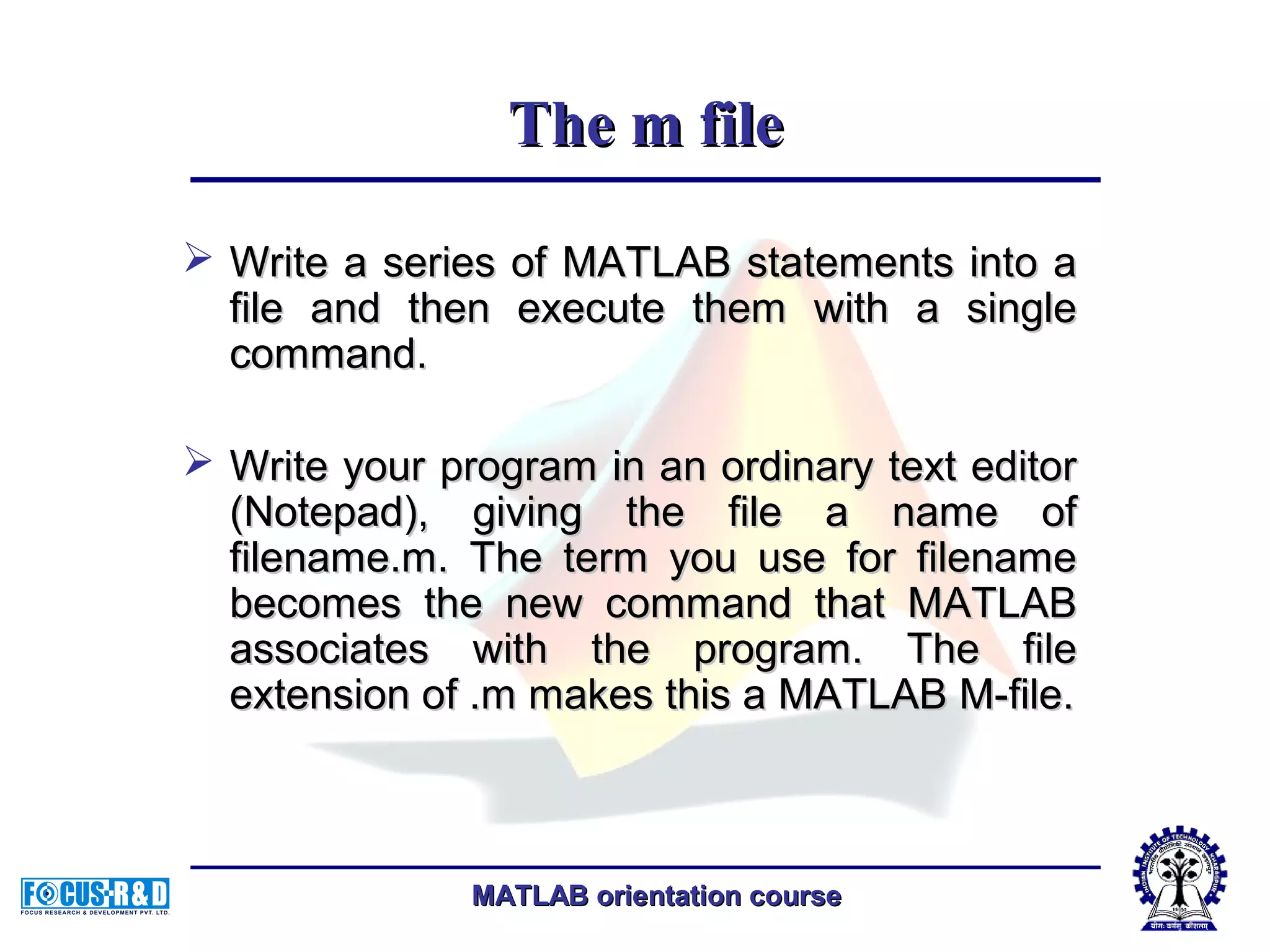
MATLAB orientation courseMATLAB orientation course The m fileThe m file  Write a series of MATLAB statements into aWrite a series of MATLAB statements into a file and then execute them with a singlefile and then execute them with a single command.command.  Write your program in an ordinary text editorWrite your program in an ordinary text editor (Notepad), giving the file a name of(Notepad), giving the file a name of filename.m. The term you use for filenamefilename.m. The term you use for filename becomes the new command that MATLABbecomes the new command that MATLAB associates with the program. The fileassociates with the program. The file extension of .m makes this a MATLAB M-file.extension of .m makes this a MATLAB M-file.
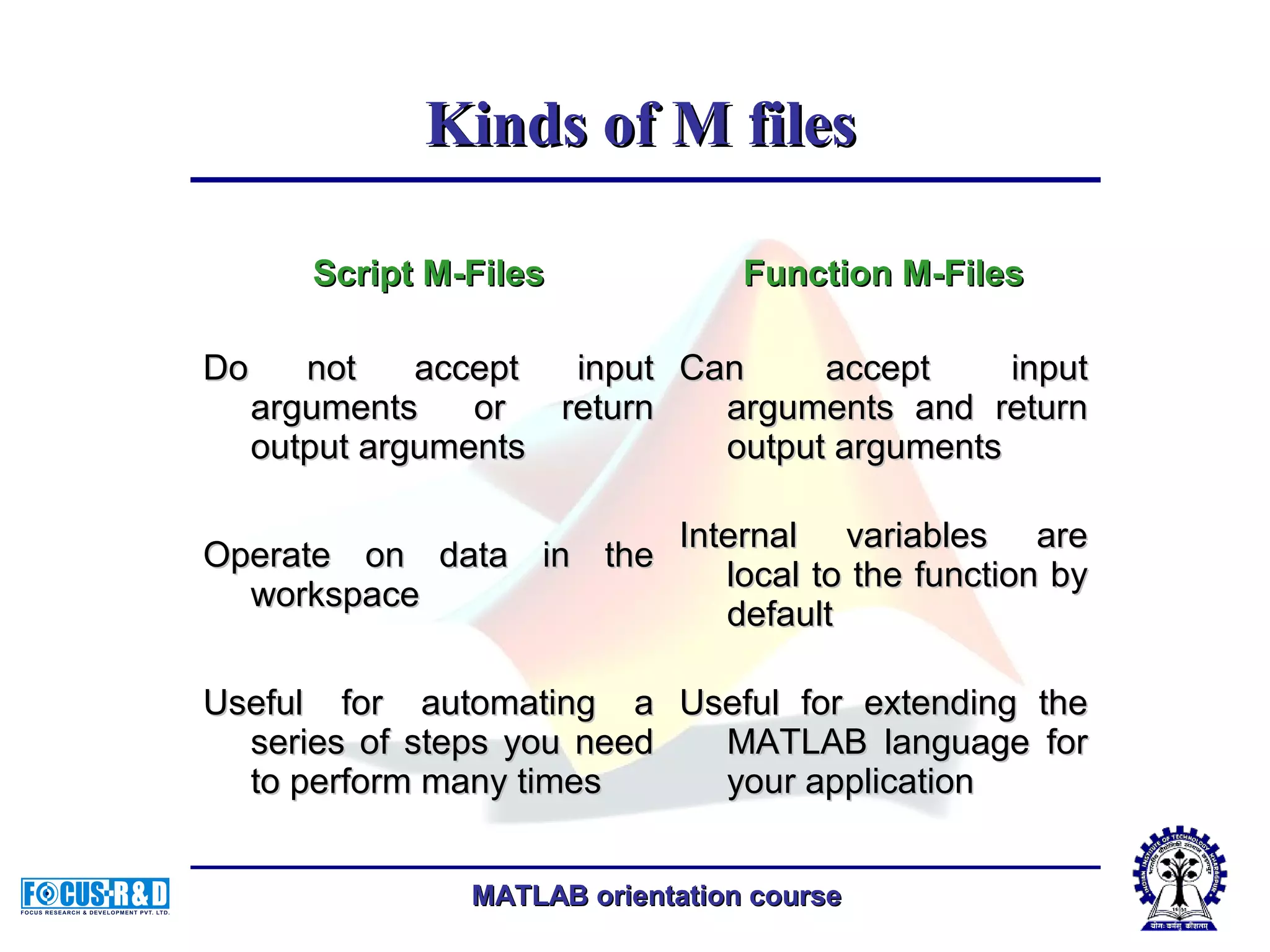
MATLAB orientation courseMATLAB orientation course Script M-FilesScript M-Files Function M-FilesFunction M-Files Do not accept inputDo not accept input arguments or returnarguments or return output argumentsoutput arguments Can accept inputCan accept input arguments and returnarguments and return output argumentsoutput arguments Operate on data in theOperate on data in the workspaceworkspace Internal variables areInternal variables are local to the function bylocal to the function by defaultdefault Useful for automating aUseful for automating a series of steps you needseries of steps you need to perform many timesto perform many times Useful for extending theUseful for extending the MATLAB language forMATLAB language for your applicationyour application Kinds of M filesKinds of M files
MATLAB orientation courseMATLAB orientation course An example of a script m-fileAn example of a script m-file Factorial.mFactorial.m n=10;n=10; factorial=1;factorial=1; forfor i=1:1:ni=1:1:n factorial=factorial*i;factorial=factorial*i; endend
MATLAB orientation courseMATLAB orientation course An example of a function m-fileAn example of a function m-file CommentComment defines thedefines the function name,function name, and the numberand the number and order ofand order of input and outputinput and output parametersparameters H1 stands for "help 1" line.H1 stands for "help 1" line. MATLAB displays the H1MATLAB displays the H1 line for a function when youline for a function when you useuse lookforlookfor or request helpor request help on an entire directory.on an entire directory.
MATLAB orientation courseMATLAB orientation course Creating M-Files: Accessing Text EditorsCreating M-Files: Accessing Text Editors >> edit fact>> edit fact.m.m
MATLAB orientation courseMATLAB orientation course Listing filesListing files >> what>> what (List the names of the files in your(List the names of the files in your current directory)current directory)
MATLAB orientation courseMATLAB orientation course Checking file contentChecking file content >> type fact>> type fact (List the contents of M-file fact.m)(List the contents of M-file fact.m)
MATLAB orientation courseMATLAB orientation course Calling functionCalling function Call the fact functionCall the fact function >> fact(5)>> fact(5)
MATLAB orientation courseMATLAB orientation course Some m-File FunctionsSome m-File Functions FunctionFunction DescriptionDescription runrun Run script that is not on currentRun script that is not on current pathpath type filenametype filename lists the contents of the file given alists the contents of the file given a full pathnamefull pathname Edit funEdit fun opens the file fun.m in a text editoropens the file fun.m in a text editor mfilenamemfilename Name of currently running M-fileName of currently running M-file namelengthmaxnamelengthmax Return maximum identifier lengthReturn maximum identifier length echoecho Echoes the script file contents asEchoes the script file contents as they are executedthey are executed
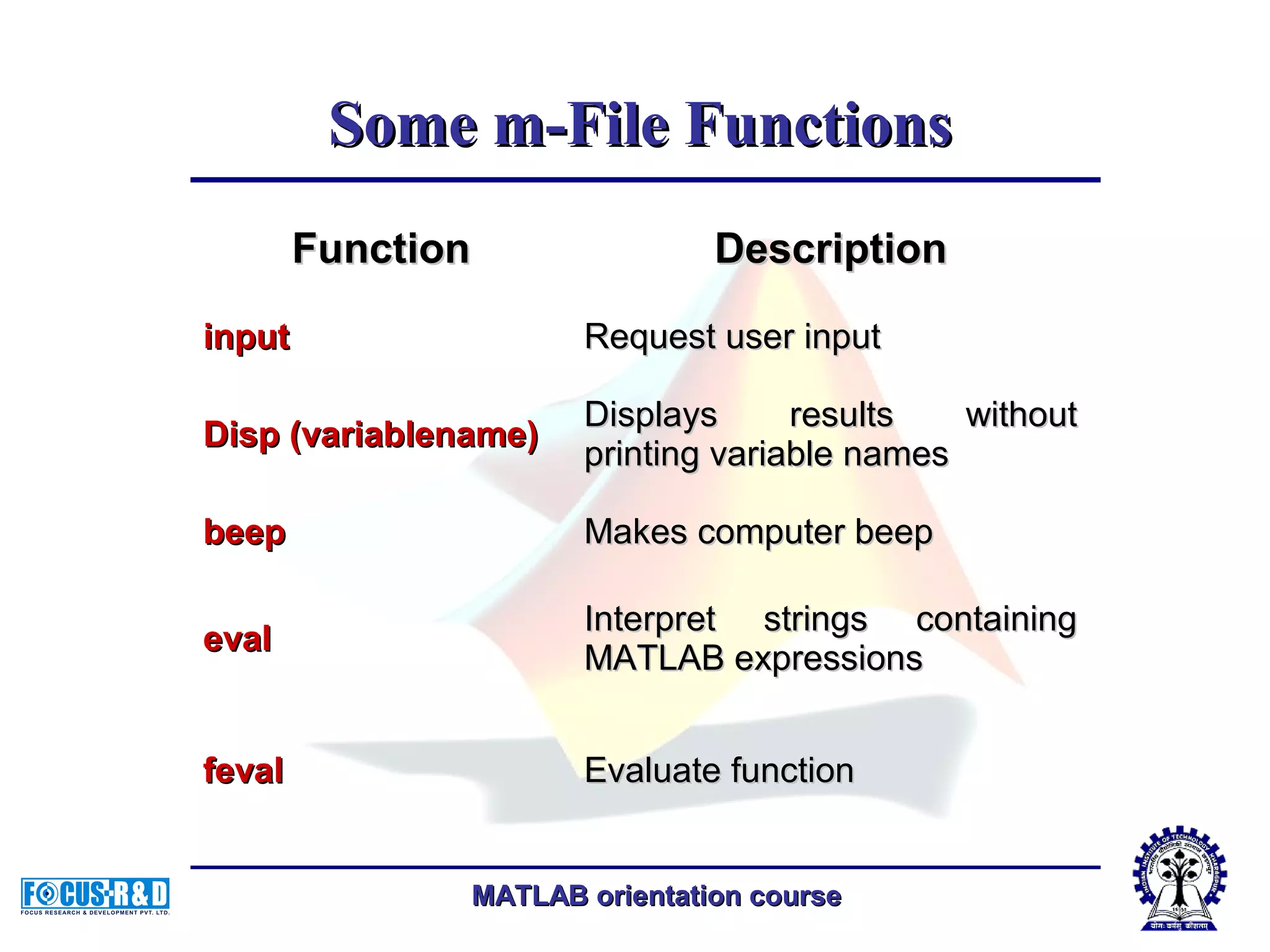
MATLAB orientation courseMATLAB orientation course Some m-File FunctionsSome m-File Functions FunctionFunction DescriptionDescription inputinput Request user inputRequest user input Disp (variablename)Disp (variablename) Displays results withoutDisplays results without printing variable namesprinting variable names beepbeep Makes computer beepMakes computer beep evaleval Interpret strings containingInterpret strings containing MATLAB expressionsMATLAB expressions fevalfeval Evaluate functionEvaluate function
MATLAB orientation courseMATLAB orientation course Some m-File FunctionsSome m-File Functions FunctionFunction DescriptionDescription pausepause pause (n)pause (n) Pauses and waits until user pressesPauses and waits until user presses any keyboard key.any keyboard key. Pause (n) pauses for n seconds andPause (n) pauses for n seconds and then continuesthen continues waitforbuttonpresswaitforbuttonpress Pauses until user presses mousePauses until user presses mouse button or any keyboard keybutton or any keyboard key keyboardkeyboard Temporarily gives control to keyboard.Temporarily gives control to keyboard. The keyboard mode is terminated byThe keyboard mode is terminated by executing the commandexecuting the command RETURNRETURN DBQUITDBQUIT can also be used to get outcan also be used to get out of keyboard mode but in this case theof keyboard mode but in this case the invoking M-file is terminated.invoking M-file is terminated.
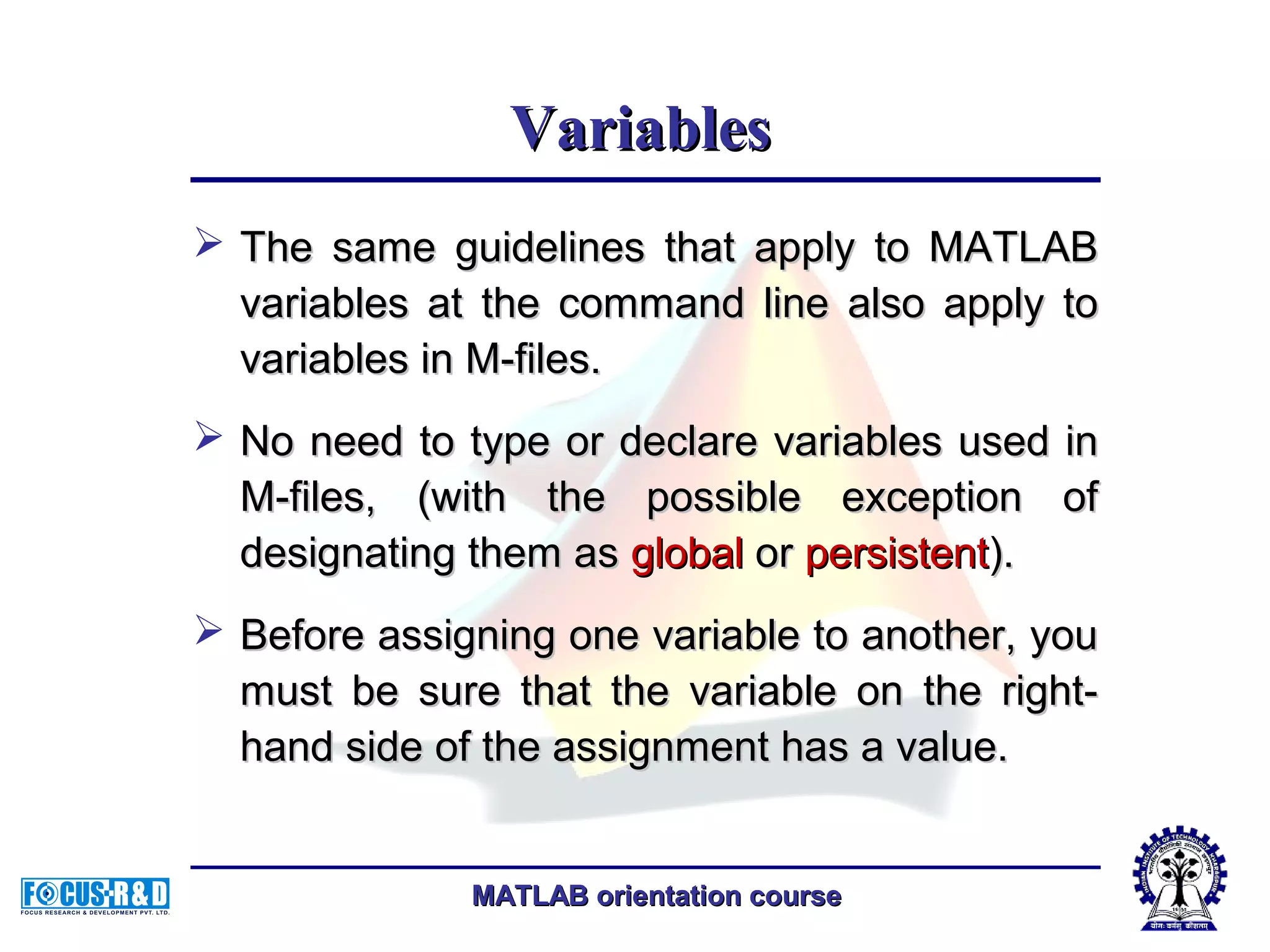
MATLAB orientation courseMATLAB orientation course VariablesVariables  The same guidelines that apply to MATLABThe same guidelines that apply to MATLAB variables at the command line also apply tovariables at the command line also apply to variables in M-files.variables in M-files.  No need to type or declare variables used inNo need to type or declare variables used in M-files, (with the possible exception ofM-files, (with the possible exception of designating them asdesignating them as globalglobal oror persistentpersistent).).  Before assigning one variable to another, youBefore assigning one variable to another, you must be sure that the variable on the right-must be sure that the variable on the right- hand side of the assignment has a value.hand side of the assignment has a value.
MATLAB orientation courseMATLAB orientation course  Any operation that assigns a value to a variableAny operation that assigns a value to a variable creates the variable, if needed, or overwrites itscreates the variable, if needed, or overwrites its current value, if it already exists.current value, if it already exists.  MATLAB variable names must begin with aMATLAB variable names must begin with a letter, which may be followed by any combinationletter, which may be followed by any combination of letters, digits, and underscores.of letters, digits, and underscores.  MATLAB distinguishes between uppercase andMATLAB distinguishes between uppercase and lowercase characters, so A and a are not thelowercase characters, so A and a are not the same variable.same variable. Avoid Using Function Names for VariablesAvoid Using Function Names for Variables VariablesVariables
MATLAB orientation courseMATLAB orientation course  Each MATLAB function has its own local variables.Each MATLAB function has its own local variables. These are separate from those of other functions,These are separate from those of other functions, and from those of the base workspace.and from those of the base workspace.  Variables defined in a function do not remain inVariables defined in a function do not remain in memory from one function call to the next, unlessmemory from one function call to the next, unless they are defined asthey are defined as globalglobal oror persistentpersistent..  Scripts, on the other hand, do not have a separateScripts, on the other hand, do not have a separate workspace. They store their variables in aworkspace. They store their variables in a workspace that is shared with the caller of theworkspace that is shared with the caller of the script. When called from the command line, theyscript. When called from the command line, they share the base workspace. When called from ashare the base workspace. When called from a function, they share that function's workspace.function, they share that function's workspace. Local VariablesLocal Variables
MATLAB orientation courseMATLAB orientation course Global VariablesGlobal Variables  If several functions all declare a particular name asIf several functions all declare a particular name as globalglobal, then they all share a single copy of that, then they all share a single copy of that variable.variable.  Any assignment to that variable, in any function, isAny assignment to that variable, in any function, is available to all the other functions declaring itavailable to all the other functions declaring it globalglobal..  Creating Global VariablesCreating Global Variables Each function that uses a global variable must firstEach function that uses a global variable must first declare the variable as global.declare the variable as global. You would declare global variable MAXLEN as follows:You would declare global variable MAXLEN as follows: global MAXLENglobal MAXLEN  To access the variable from the MATLAB commandTo access the variable from the MATLAB command line, you must declare it as global at the commandline, you must declare it as global at the command line.line.
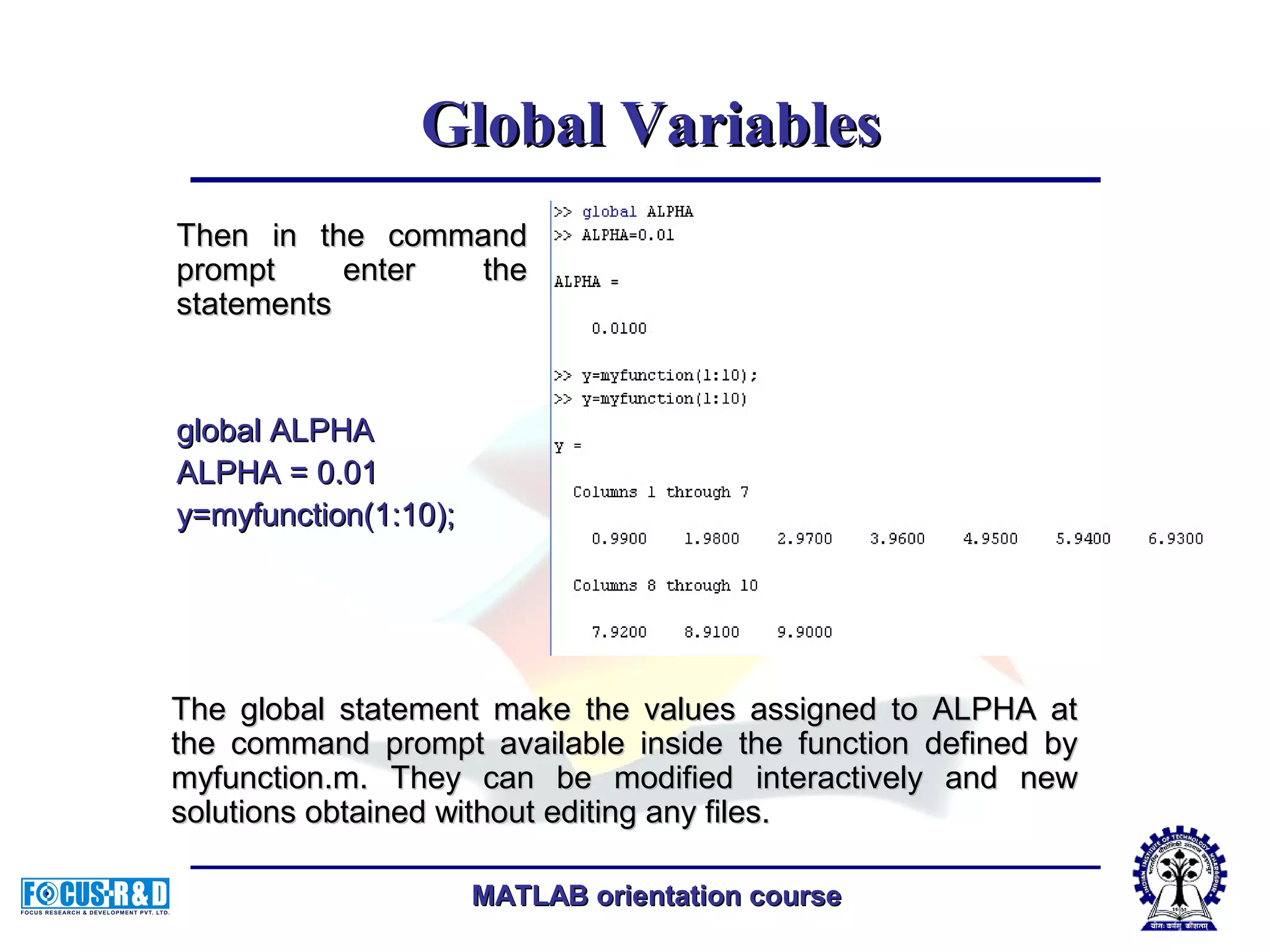
MATLAB orientation courseMATLAB orientation course function yp = myfunction(y)function yp = myfunction(y) %The function you want to check.%The function you want to check. global ALPHAglobal ALPHA yp = [y-ALPHA*y];yp = [y-ALPHA*y]; Global VariablesGlobal Variables  Suppose, for example, you want to study the effectSuppose, for example, you want to study the effect coefficients on a equation. Create an M-file,coefficients on a equation. Create an M-file, myfunction.m.myfunction.m.
MATLAB orientation courseMATLAB orientation course Then in the commandThen in the command prompt enter theprompt enter the statementsstatements global ALPHAglobal ALPHA ALPHA = 0.01ALPHA = 0.01 y=myfunction(1:10);y=myfunction(1:10); Global VariablesGlobal Variables The global statement make the values assigned to ALPHA atThe global statement make the values assigned to ALPHA at the command prompt available inside the function defined bythe command prompt available inside the function defined by myfunction.m. They can be modified interactively and newmyfunction.m. They can be modified interactively and new solutions obtained without editing any files.solutions obtained without editing any files.
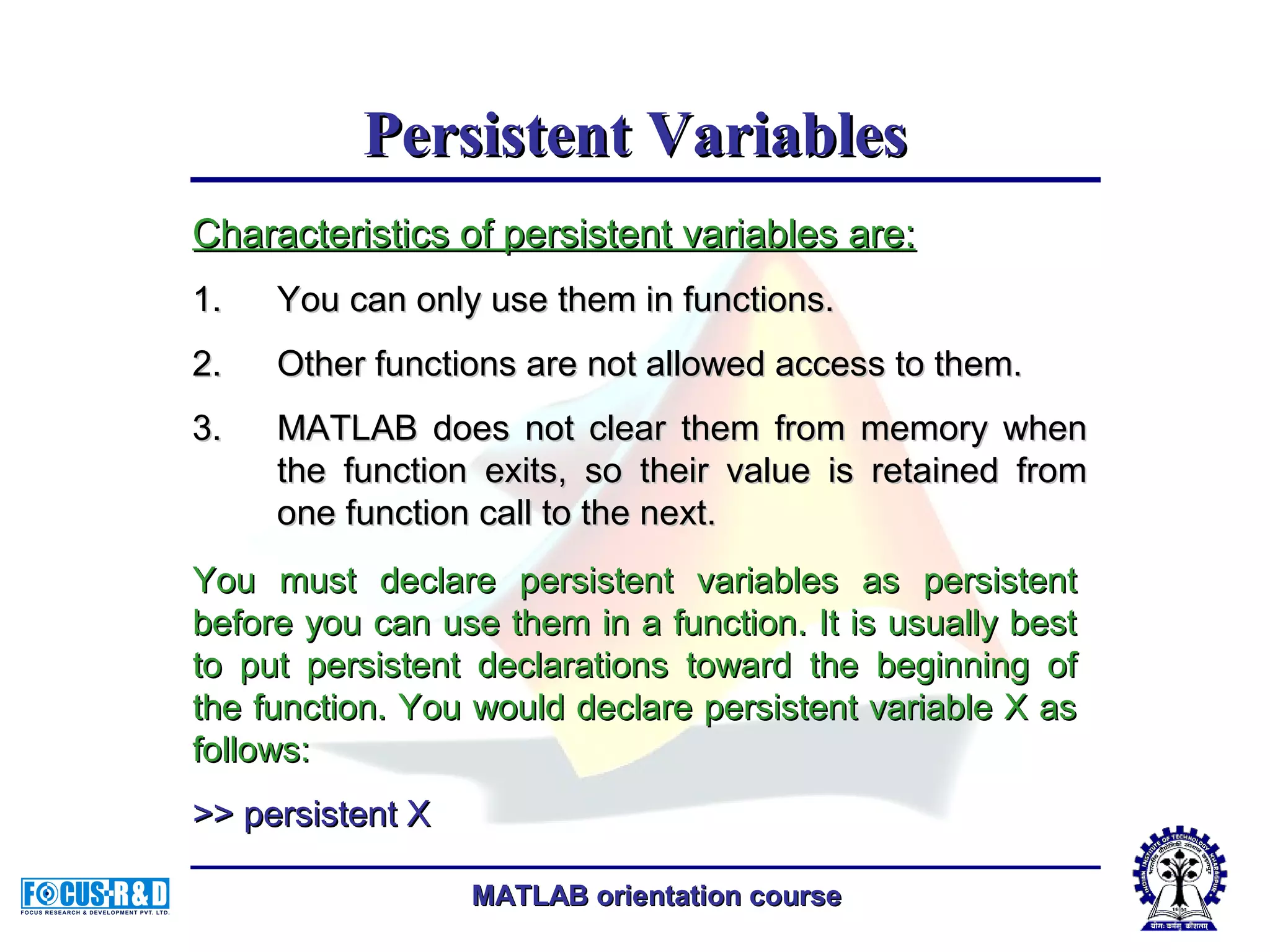
MATLAB orientation courseMATLAB orientation course Persistent VariablesPersistent Variables Characteristics of persistent variables are:Characteristics of persistent variables are: 1.1. You can only use them in functions.You can only use them in functions. 2.2. Other functions are not allowed access to them.Other functions are not allowed access to them. 3.3. MATLAB does not clear them from memory whenMATLAB does not clear them from memory when the function exits, so their value is retained fromthe function exits, so their value is retained from one function call to the next.one function call to the next. You must declare persistent variables as persistentYou must declare persistent variables as persistent before you can use them in a function. It is usually bestbefore you can use them in a function. It is usually best to put persistent declarations toward the beginning ofto put persistent declarations toward the beginning of the function. You would declare persistent variable X asthe function. You would declare persistent variable X as follows:follows: >> persistent X>> persistent X
MATLAB orientation courseMATLAB orientation course Special ValuesSpecial Values  ans:ans: Most recent answer (variable). If you doMost recent answer (variable). If you do not assign an output variable to annot assign an output variable to an expression, MATLAB automatically storesexpression, MATLAB automatically stores the result in ans.the result in ans.  pi:pi: 3.1415926535897...3.1415926535897...  eps:eps: Machine epsilonMachine epsilon  inf:inf:Stands for infinityStands for infinity  NaN:NaN: Stands for Not-a-NumberStands for Not-a-Number
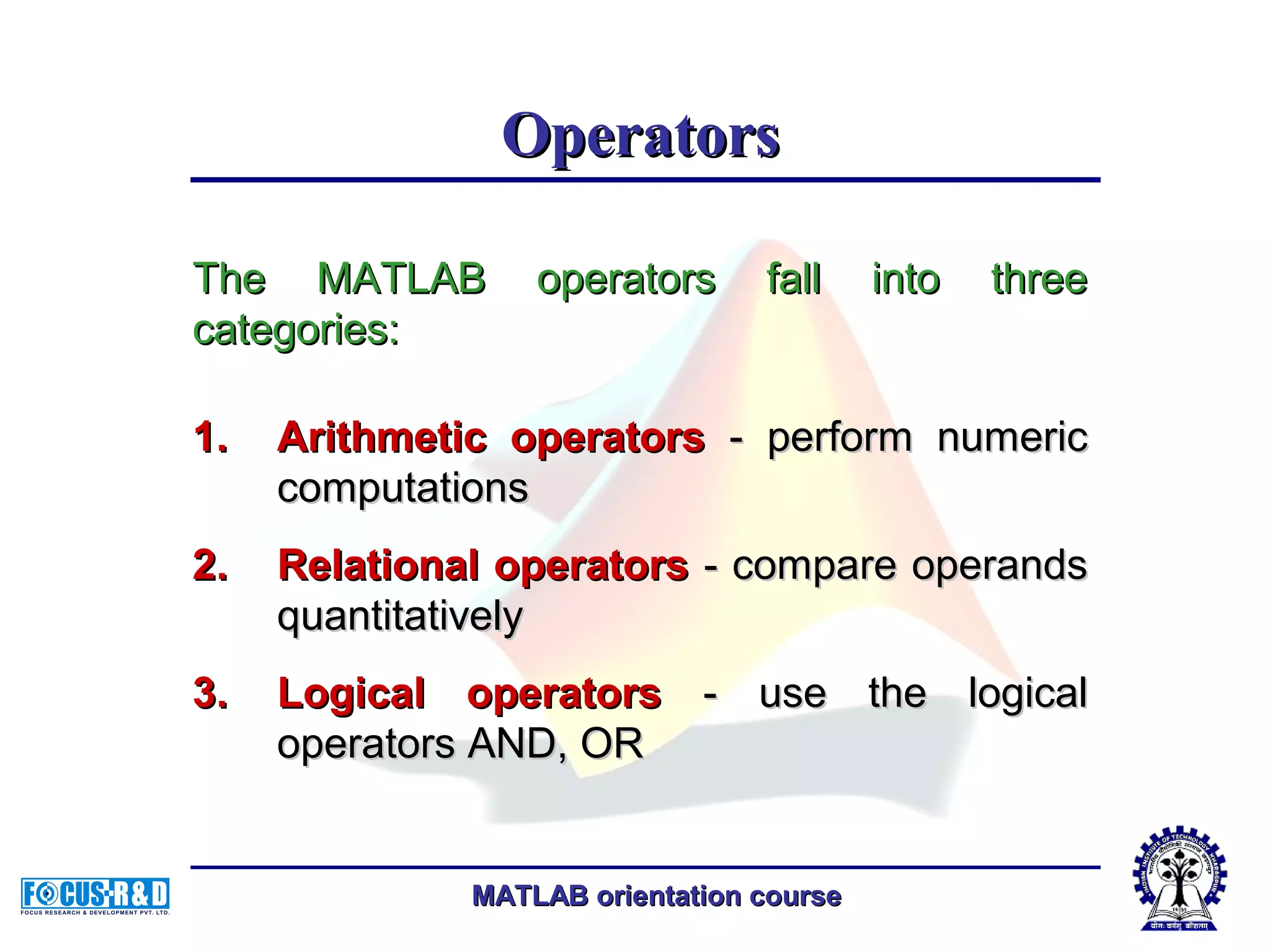
MATLAB orientation courseMATLAB orientation course OperatorsOperators 1.1. Arithmetic operatorsArithmetic operators - perform numeric- perform numeric computationscomputations 2.2. Relational operatorsRelational operators - compare operands- compare operands quantitativelyquantitatively 3.3. Logical operatorsLogical operators - use the logical- use the logical operators AND, ORoperators AND, OR The MATLAB operators fall into threeThe MATLAB operators fall into three categories:categories:
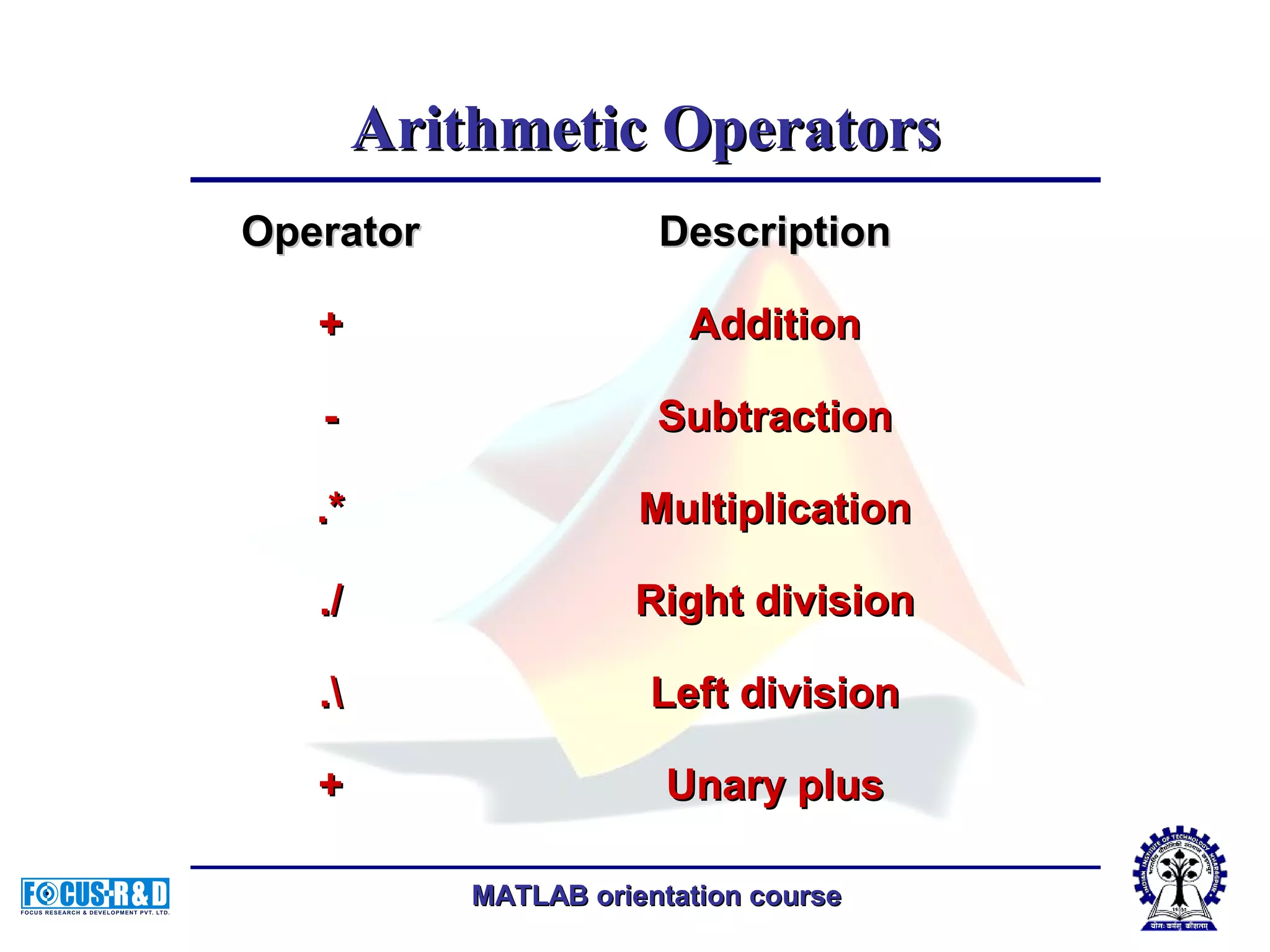
MATLAB orientation courseMATLAB orientation course Arithmetic OperatorsArithmetic Operators OperatorOperator DescriptionDescription ++ AdditionAddition -- SubtractionSubtraction .*.* MultiplicationMultiplication ././ Right divisionRight division .. Left divisionLeft division ++ Unary plusUnary plus
MATLAB orientation courseMATLAB orientation course OperatorOperator DescriptionDescription -- Unary minusUnary minus :: Colon operatorColon operator .^.^ PowerPower .'.' TransposeTranspose '' Complex conjugate transposeComplex conjugate transpose ** Matrix multiplicationMatrix multiplication // Matrix right divisionMatrix right division Matrix left divisionMatrix left division ^^ Matrix powerMatrix power Arithmetic OperatorsArithmetic Operators
MATLAB orientation courseMATLAB orientation course // Slash or matrix right division.Slash or matrix right division. B/A is roughly the sameB/A is roughly the same as B*inv(A). Moreas B*inv(A). More precisely, B/A = (A'B')'.precisely, B/A = (A'B')'. ././ Array right division.Array right division. A./B is the matrix withA./B is the matrix with elements A(i,j)/B(i,j). Aelements A(i,j)/B(i,j). A and B must have theand B must have the same size, unless one ofsame size, unless one of them is a scalar.them is a scalar. Arithmetic OperatorsArithmetic Operators
MATLAB orientation courseMATLAB orientation course Backslash or matrix leftBackslash or matrix left division.division. If A is a square matrix,If A is a square matrix, AB is inv(A)*B.AB is inv(A)*B. .. Array left division.Array left division. A.B is the matrix withA.B is the matrix with elements B(i,j)/A(i,j). Aelements B(i,j)/A(i,j). A and B must have theand B must have the same size, unless one ofsame size, unless one of them is a scalar.them is a scalar. Arithmetic OperatorsArithmetic Operators
MATLAB orientation courseMATLAB orientation course OperatorOperator DescriptionDescription << Less thanLess than <=<= Less than or equal toLess than or equal to >> Greater thanGreater than >=>= Greater than or equal toGreater than or equal to ==== Equal toEqual to ~=~= Not equal toNot equal to Relational OperatorsRelational Operators
MATLAB orientation courseMATLAB orientation course Logical OperatorsLogical Operators MATLAB offers three types of logical operatorMATLAB offers three types of logical operator and functions.and functions.  Element-wiseElement-wise - operate on corresponding- operate on corresponding elements of logical arrays.elements of logical arrays.  Bit-wiseBit-wise - operate on corresponding bits- operate on corresponding bits of integer values or arrays.of integer values or arrays.  Short-circuitShort-circuit - operate on scalar, logical- operate on scalar, logical expressions.expressions.
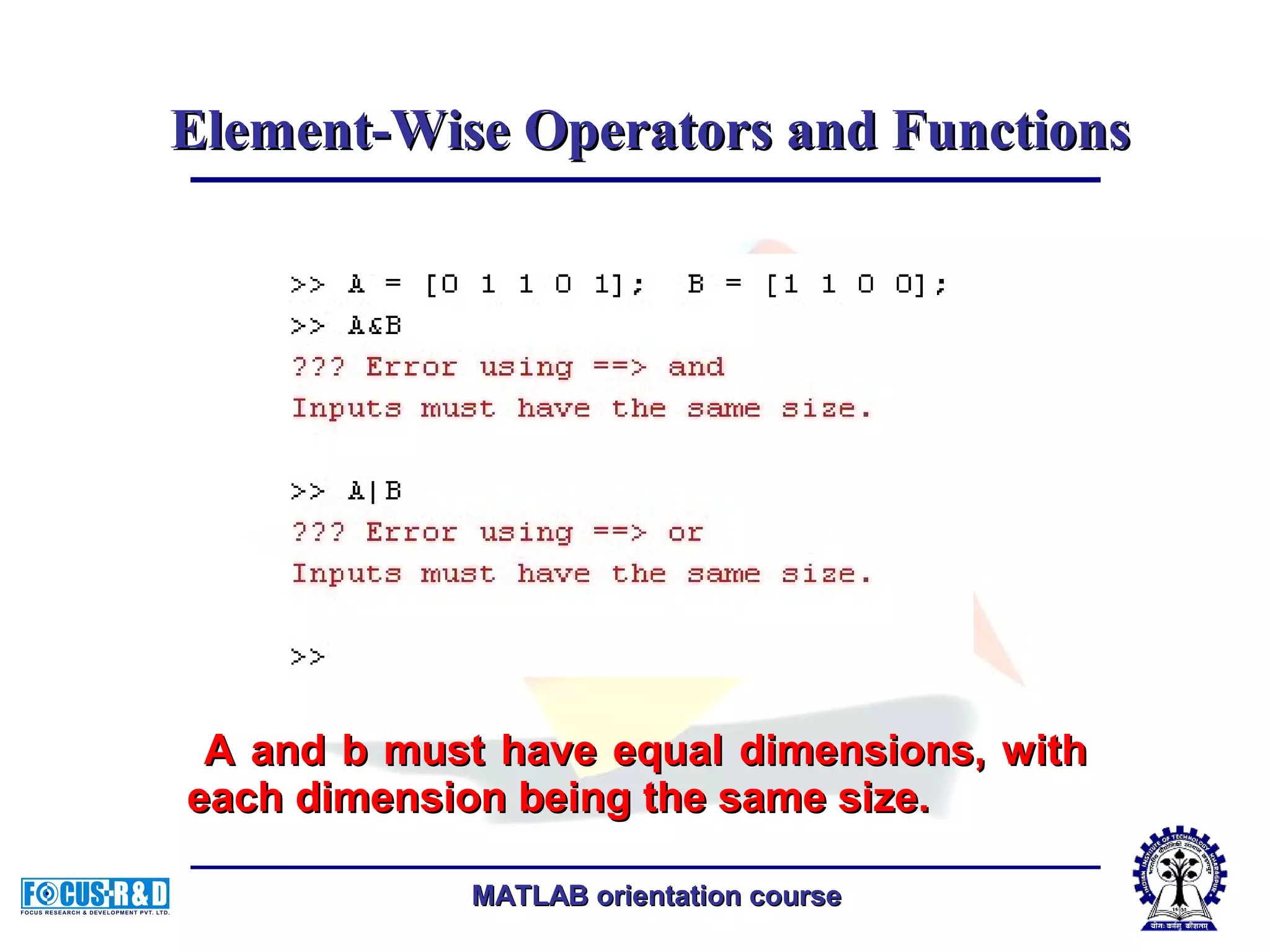
MATLAB orientation courseMATLAB orientation course Element-Wise Operators and FunctionsElement-Wise Operators and Functions  Perform element-wise logical operations onPerform element-wise logical operations on their inputs to produce a like-sized outputtheir inputs to produce a like-sized output array.array.
MATLAB orientation courseMATLAB orientation course A and b must have equal dimensions, withA and b must have equal dimensions, with each dimension being the same size.each dimension being the same size. Element-Wise Operators and FunctionsElement-Wise Operators and Functions
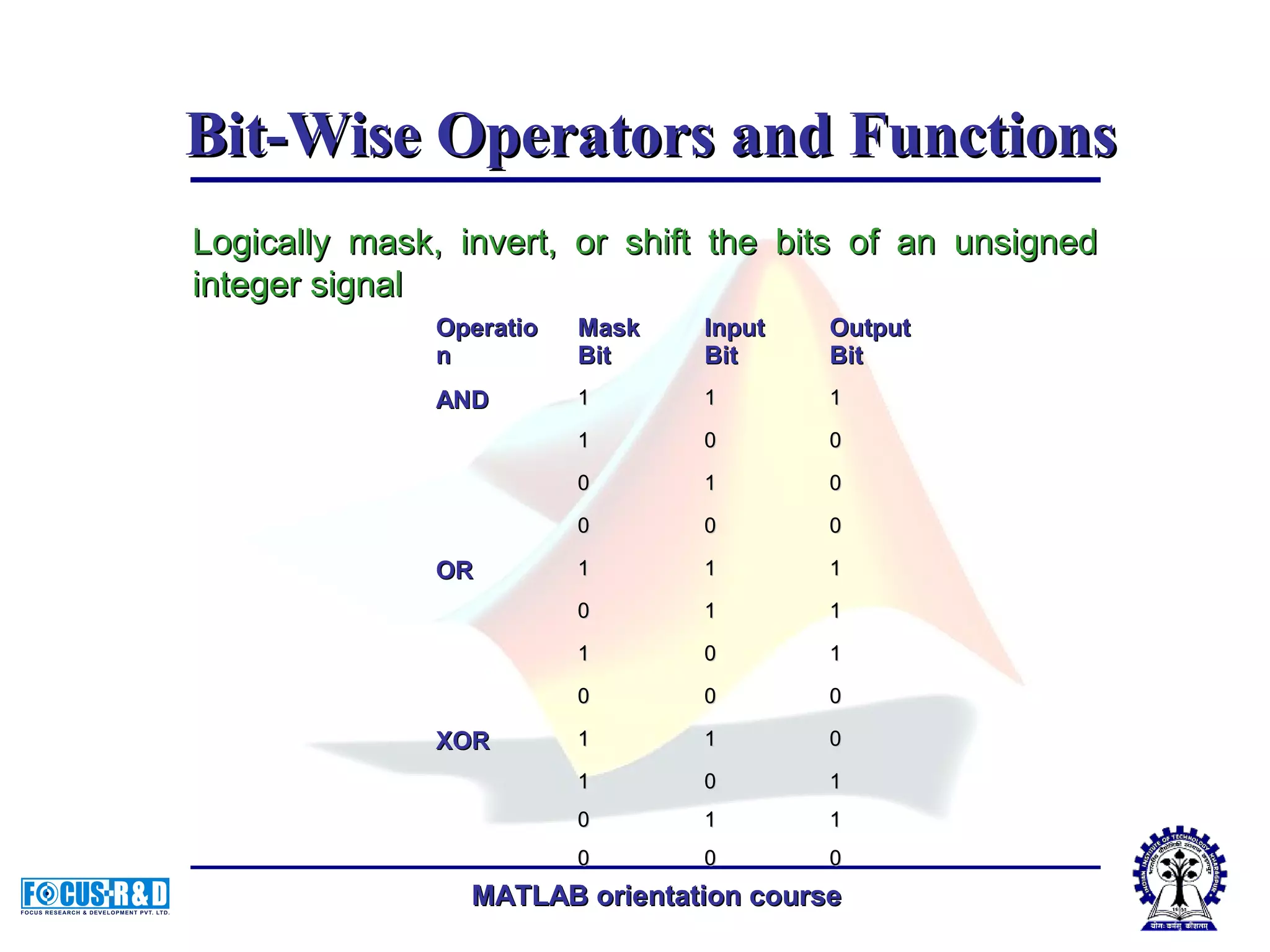
MATLAB orientation courseMATLAB orientation course Bit-Wise Operators and FunctionsBit-Wise Operators and Functions Logically mask, invert, or shift the bits of an unsignedLogically mask, invert, or shift the bits of an unsigned integer signalinteger signal OperatioOperatio nn MaskMask BitBit InputInput BitBit OutputOutput BitBit ANDAND 11 11 11 11 00 00 00 11 00 00 00 00 OROR 11 11 11 00 11 11 11 00 11 00 00 00 XORXOR 11 11 00 11 00 11 00 11 11 00 00 00
MATLAB orientation courseMATLAB orientation course  Perform AND and OR operations on logicalPerform AND and OR operations on logical expressions containing scalar values.expressions containing scalar values.  They are short-circuit operators in that they onlyThey are short-circuit operators in that they only evaluate their second operand when the result is notevaluate their second operand when the result is not fully determined by the first operand.fully determined by the first operand. Short-Circuit OperatorsShort-Circuit Operators OperatorOperator DescriptionDescription &&&& Returns true (1) if both inputs evaluate to true,Returns true (1) if both inputs evaluate to true, and false (0) if they do not.and false (0) if they do not. |||| Returns true (1) if either input, or both,Returns true (1) if either input, or both, evaluate to true, and false (0) if they do not.evaluate to true, and false (0) if they do not.
MATLAB orientation courseMATLAB orientation course Example:Example: if ((A==10)&&(B==20))if ((A==10)&&(B==20)) …….... endend if ((A==10)||(B==20))if ((A==10)||(B==20)) …….... endend Short-Circuit OperatorsShort-Circuit Operators
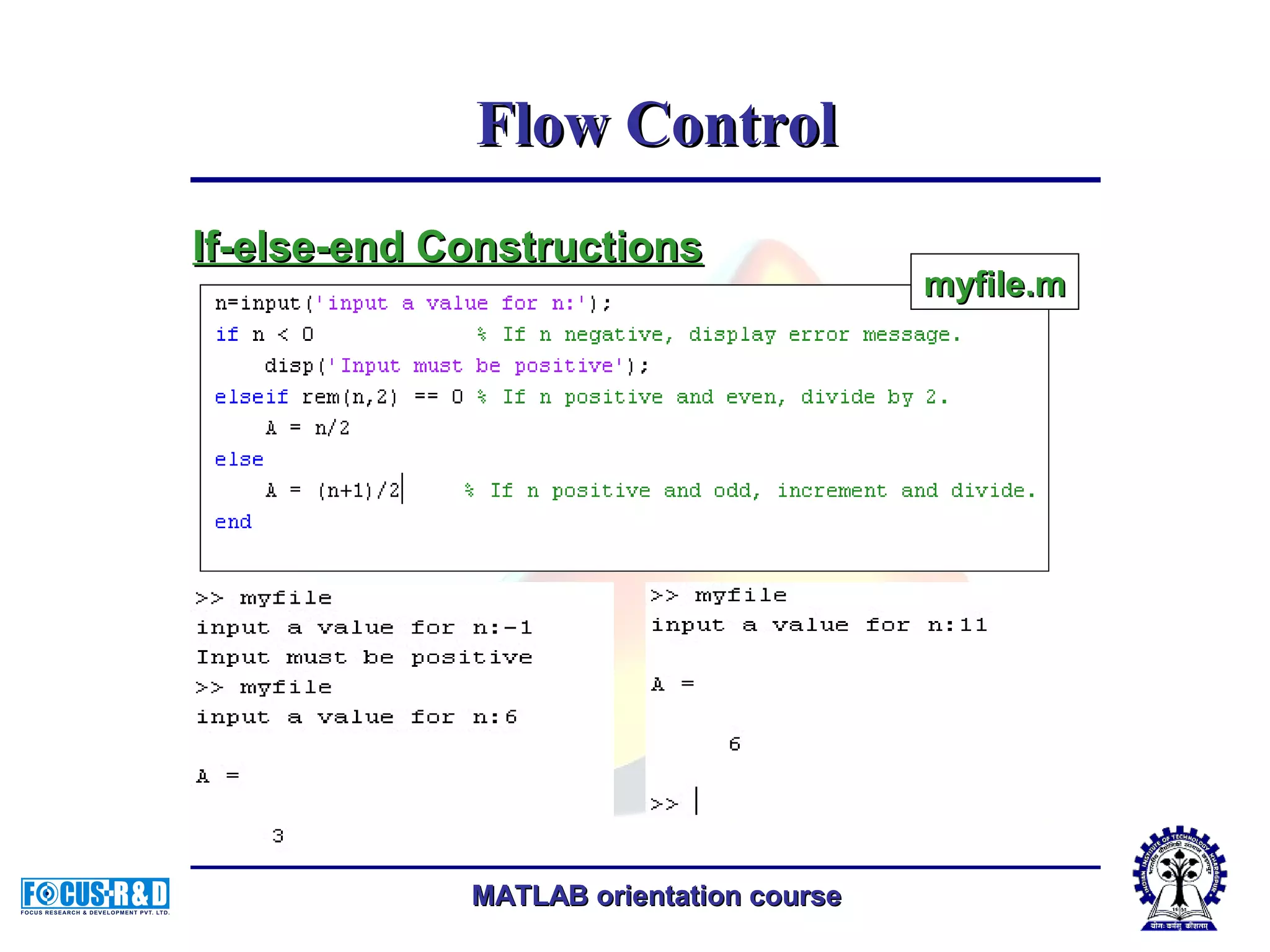
MATLAB orientation courseMATLAB orientation course Flow ControlFlow Control  ifif,, elseelse andand elseifelseif, executes a group of, executes a group of statements based on some logicalstatements based on some logical condition.condition.  switchswitch,, casecase andand otherwiseotherwise, executes, executes different groups of statements dependingdifferent groups of statements depending on the value of some logical condition.on the value of some logical condition.  whilewhile executes a group of statements anexecutes a group of statements an indefinite number of times, based on someindefinite number of times, based on some logical condition.logical condition.
MATLAB orientation courseMATLAB orientation course  forfor executes a group of statements a fixedexecutes a group of statements a fixed number of times.number of times.  continuecontinue passes control to the next iterationpasses control to the next iteration of aof a forfor oror whilewhile loop, skipping anyloop, skipping any remaining statements in the body of theremaining statements in the body of the loop.loop.  breakbreak terminates execution of aterminates execution of a forfor oror whilewhile loop.loop.  returnreturn causes execution to return to thecauses execution to return to the invoking function.invoking function.  All flow constructs useAll flow constructs use endend to indicate theto indicate the end of the flow control block.end of the flow control block. Flow ContrFlow Controlol
MATLAB orientation courseMATLAB orientation course Flow ControlFlow Control If-else-end ConstructionsIf-else-end Constructions myfile.mmyfile.m
MATLAB orientation courseMATLAB orientation course  Unlike the C languageUnlike the C language switch construct, theswitch construct, the MATLABMATLAB switch does notswitch does not "fall through.""fall through." That is, if theThat is, if the first case statement is true,first case statement is true, other case statements doother case statements do not execute. Therefore,not execute. Therefore, breakbreak statements are notstatements are not used.used. Flow ControlFlow Control  switch can handle multiple conditions in a single caseswitch can handle multiple conditions in a single case statement by enclosing the case expression in a cell array.statement by enclosing the case expression in a cell array. myfile.mmyfile.mSwitch-Case ConstructionsSwitch-Case Constructions
MATLAB orientation courseMATLAB orientation course TheThe whilewhile loop executes a statement or group ofloop executes a statement or group of statements repeatedly as long as the controllingstatements repeatedly as long as the controlling expression is true (1).expression is true (1). while expressionwhile expression statementsstatements endend Exit aExit a whilewhile loop at any time using theloop at any time using the breakbreak statement.statement. Flow ControlFlow Control ExampleExample Infinite loopInfinite loop While LoopsWhile Loops
MATLAB orientation courseMATLAB orientation course TheThe forfor loop executes a statement or group of statementsloop executes a statement or group of statements a predetermined number of times.a predetermined number of times. for index = indexstart:increment:indexendfor index = indexstart:increment:indexend statementsstatements endend default increment is 1default increment is 1.You can specify any increment,.You can specify any increment, including aincluding a negativenegative one.one. x=[1,2,3,8,4];x=[1,2,3,8,4]; for i = 2:6for i = 2:6 x(i) = 2*x(i-1);x(i) = 2*x(i-1); endend Flow ControlFlow Control For LoopsFor Loops
MATLAB orientation courseMATLAB orientation course You can nest multiple for loops.You can nest multiple for loops. x=[1,2,3,8,4;4 9 7 10 15];x=[1,2,3,8,4;4 9 7 10 15]; m=length(x(:,1));m=length(x(:,1)); n=length(x(1,:));n=length(x(1,:)); for i = 1:mfor i = 1:m for j = 1:nfor j = 1:n A(i,j) = 1/(i + j - 1);A(i,j) = 1/(i + j - 1); endend endend Flow ControlFlow Control For LoopsFor Loops
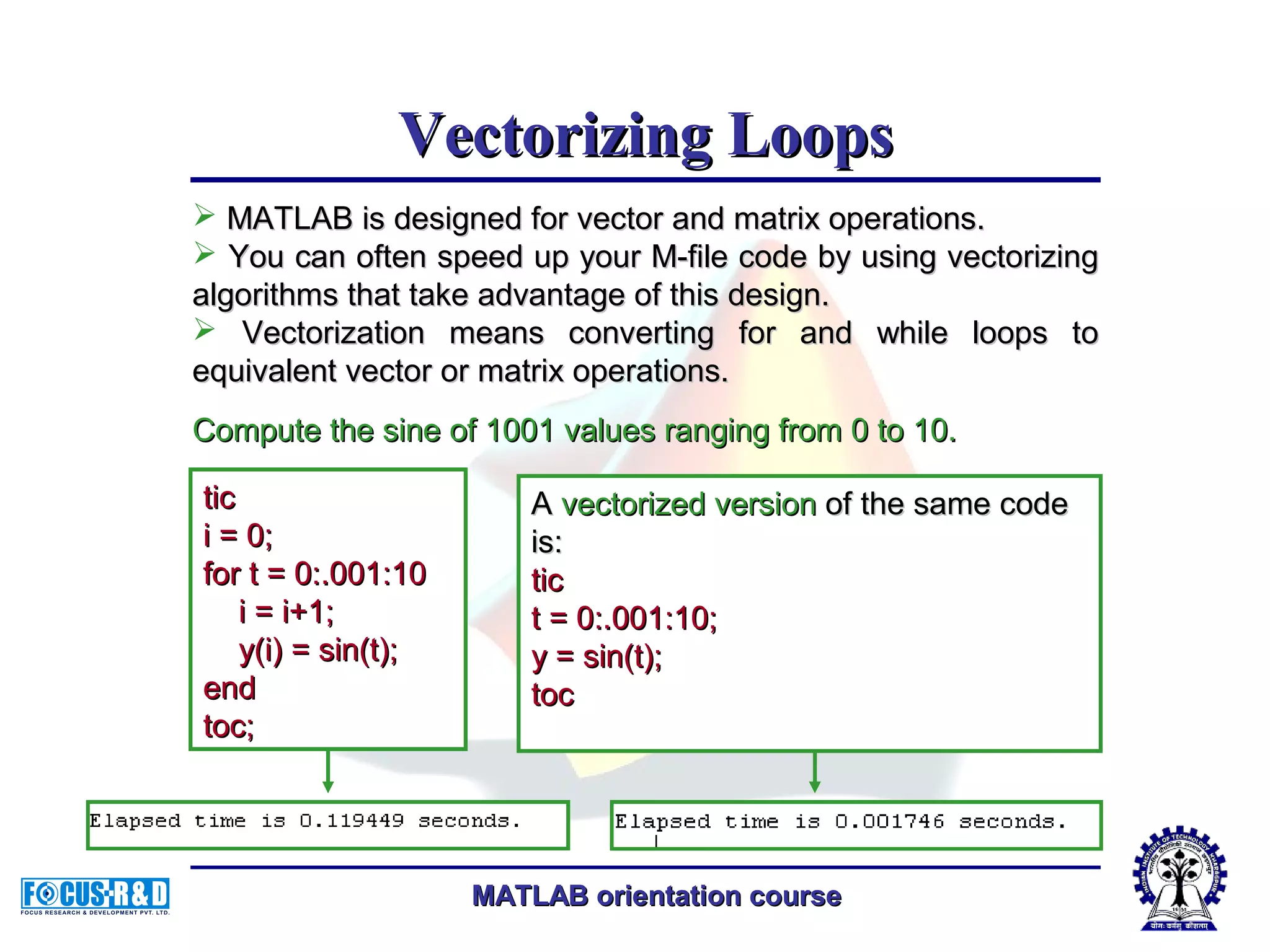
MATLAB orientation courseMATLAB orientation course Vectorizing LoopsVectorizing Loops  MATLAB is designed for vector and matrix operations.MATLAB is designed for vector and matrix operations.  You can often speed up your M-file code by using vectorizingYou can often speed up your M-file code by using vectorizing algorithms that take advantage of this design.algorithms that take advantage of this design.  Vectorization means converting for and while loops toVectorization means converting for and while loops to equivalent vector or matrix operations.equivalent vector or matrix operations. Compute the sine of 1001 values ranging from 0 to 10.Compute the sine of 1001 values ranging from 0 to 10. AA vectorized versionvectorized version of the same codeof the same code is:is: tictic t = 0:.001:10;t = 0:.001:10; y = sin(t);y = sin(t); toctoc tictic i = 0;i = 0; for t = 0:.001:10for t = 0:.001:10 i = i+1;i = i+1; y(i) = sin(t);y(i) = sin(t); endend toc;toc;
MATLAB orientation courseMATLAB orientation course File HandlingFile Handling The most commonly used, high-level, file I/OThe most commonly used, high-level, file I/O functions in MATLAB arefunctions in MATLAB are savesave andand loadload.. savesave  Saves workspace variables on disk.Saves workspace variables on disk. As an alternative to the save function, selectAs an alternative to the save function, select Save Workspace As from the File menu in theSave Workspace As from the File menu in the MATLAB desktop, or use the WorkspaceMATLAB desktop, or use the Workspace browser.browser.
MATLAB orientation courseMATLAB orientation course SyntaxSyntax • savesave • save filenamesave filename • save filename var1 var2 ...save filename var1 var2 ... • save('filename', ...)save('filename', ...) DescriptionDescription • savesave by itself, stores all workspace variablesby itself, stores all workspace variables in a binary format in the current directory inin a binary format in the current directory in a file named matlab.mat. Retrieve the dataa file named matlab.mat. Retrieve the data with load.with load. File HandlingFile Handling
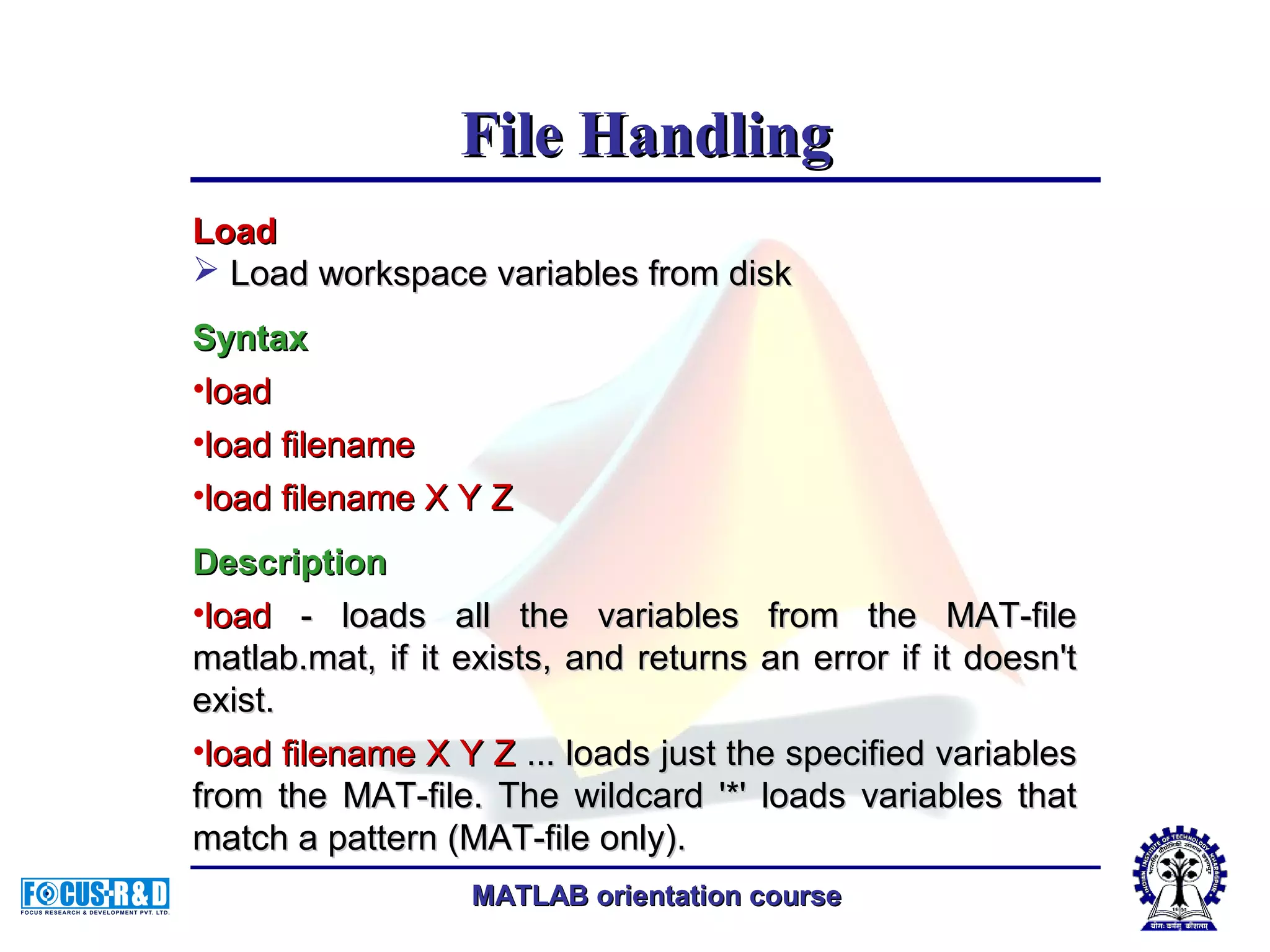
MATLAB orientation courseMATLAB orientation course LoadLoad  Load workspace variables from diskLoad workspace variables from disk SyntaxSyntax •loadload •load filenameload filename •load filename X Y Zload filename X Y Z DescriptionDescription •loadload - loads all the variables from the MAT-file- loads all the variables from the MAT-file matlab.mat, if it exists, and returns an error if it doesn'tmatlab.mat, if it exists, and returns an error if it doesn't exist.exist. •load filename X Y Zload filename X Y Z ... loads just the specified variables... loads just the specified variables from the MAT-file. The wildcard '*' loads variables thatfrom the MAT-file. The wildcard '*' loads variables that match a pattern (MAT-file only).match a pattern (MAT-file only). File HandlingFile Handling
MATLAB orientation courseMATLAB orientation course Read an ASCII delimited file into a matrixRead an ASCII delimited file into a matrix Graphical InterfaceGraphical Interface As an alternative to dlmread, use the ImportAs an alternative to dlmread, use the Import Wizard. To activate the Import Wizard, selectWizard. To activate the Import Wizard, select Import data from the File menu.Import data from the File menu. SyntaxSyntax M = dlmread(filename,delimiter)M = dlmread(filename,delimiter) M = dlmread(filename,delimiter,R,C)M = dlmread(filename,delimiter,R,C) M = dlmread(filename,delimiter,range)M = dlmread(filename,delimiter,range) File HandlingFile Handling
MATLAB orientation courseMATLAB orientation course Thank YouThank You

Fundamentals of matlab programming

  • 1.
    MATLAB orientation courseMATLABorientation course Fundamentals ofFundamentals of MATLAB ProgrammingMATLAB Programming Delivered byDelivered by Chirodeep BakliChirodeep Bakli Research ScholarResearch Scholar Indian Institute of Technology, KharagpurIndian Institute of Technology, Kharagpur
  • 2.
    MATLAB orientation courseMATLABorientation course The m fileThe m file  Write a series of MATLAB statements into aWrite a series of MATLAB statements into a file and then execute them with a singlefile and then execute them with a single command.command.  Write your program in an ordinary text editorWrite your program in an ordinary text editor (Notepad), giving the file a name of(Notepad), giving the file a name of filename.m. The term you use for filenamefilename.m. The term you use for filename becomes the new command that MATLABbecomes the new command that MATLAB associates with the program. The fileassociates with the program. The file extension of .m makes this a MATLAB M-file.extension of .m makes this a MATLAB M-file.
  • 3.
    MATLAB orientation courseMATLABorientation course Script M-FilesScript M-Files Function M-FilesFunction M-Files Do not accept inputDo not accept input arguments or returnarguments or return output argumentsoutput arguments Can accept inputCan accept input arguments and returnarguments and return output argumentsoutput arguments Operate on data in theOperate on data in the workspaceworkspace Internal variables areInternal variables are local to the function bylocal to the function by defaultdefault Useful for automating aUseful for automating a series of steps you needseries of steps you need to perform many timesto perform many times Useful for extending theUseful for extending the MATLAB language forMATLAB language for your applicationyour application Kinds of M filesKinds of M files
  • 4.
    MATLAB orientation courseMATLABorientation course An example of a script m-fileAn example of a script m-file Factorial.mFactorial.m n=10;n=10; factorial=1;factorial=1; forfor i=1:1:ni=1:1:n factorial=factorial*i;factorial=factorial*i; endend
  • 5.
    MATLAB orientation courseMATLABorientation course An example of a function m-fileAn example of a function m-file CommentComment defines thedefines the function name,function name, and the numberand the number and order ofand order of input and outputinput and output parametersparameters H1 stands for "help 1" line.H1 stands for "help 1" line. MATLAB displays the H1MATLAB displays the H1 line for a function when youline for a function when you useuse lookforlookfor or request helpor request help on an entire directory.on an entire directory.
  • 6.
    MATLAB orientation courseMATLABorientation course Creating M-Files: Accessing Text EditorsCreating M-Files: Accessing Text Editors >> edit fact>> edit fact.m.m
  • 7.
    MATLAB orientation courseMATLABorientation course Listing filesListing files >> what>> what (List the names of the files in your(List the names of the files in your current directory)current directory)
  • 8.
    MATLAB orientation courseMATLABorientation course Checking file contentChecking file content >> type fact>> type fact (List the contents of M-file fact.m)(List the contents of M-file fact.m)
  • 9.
    MATLAB orientation courseMATLABorientation course Calling functionCalling function Call the fact functionCall the fact function >> fact(5)>> fact(5)
  • 10.
    MATLAB orientation courseMATLABorientation course Some m-File FunctionsSome m-File Functions FunctionFunction DescriptionDescription runrun Run script that is not on currentRun script that is not on current pathpath type filenametype filename lists the contents of the file given alists the contents of the file given a full pathnamefull pathname Edit funEdit fun opens the file fun.m in a text editoropens the file fun.m in a text editor mfilenamemfilename Name of currently running M-fileName of currently running M-file namelengthmaxnamelengthmax Return maximum identifier lengthReturn maximum identifier length echoecho Echoes the script file contents asEchoes the script file contents as they are executedthey are executed
  • 11.
    MATLAB orientation courseMATLABorientation course Some m-File FunctionsSome m-File Functions FunctionFunction DescriptionDescription inputinput Request user inputRequest user input Disp (variablename)Disp (variablename) Displays results withoutDisplays results without printing variable namesprinting variable names beepbeep Makes computer beepMakes computer beep evaleval Interpret strings containingInterpret strings containing MATLAB expressionsMATLAB expressions fevalfeval Evaluate functionEvaluate function
  • 12.
    MATLAB orientation courseMATLABorientation course Some m-File FunctionsSome m-File Functions FunctionFunction DescriptionDescription pausepause pause (n)pause (n) Pauses and waits until user pressesPauses and waits until user presses any keyboard key.any keyboard key. Pause (n) pauses for n seconds andPause (n) pauses for n seconds and then continuesthen continues waitforbuttonpresswaitforbuttonpress Pauses until user presses mousePauses until user presses mouse button or any keyboard keybutton or any keyboard key keyboardkeyboard Temporarily gives control to keyboard.Temporarily gives control to keyboard. The keyboard mode is terminated byThe keyboard mode is terminated by executing the commandexecuting the command RETURNRETURN DBQUITDBQUIT can also be used to get outcan also be used to get out of keyboard mode but in this case theof keyboard mode but in this case the invoking M-file is terminated.invoking M-file is terminated.
  • 13.
    MATLAB orientation courseMATLABorientation course VariablesVariables  The same guidelines that apply to MATLABThe same guidelines that apply to MATLAB variables at the command line also apply tovariables at the command line also apply to variables in M-files.variables in M-files.  No need to type or declare variables used inNo need to type or declare variables used in M-files, (with the possible exception ofM-files, (with the possible exception of designating them asdesignating them as globalglobal oror persistentpersistent).).  Before assigning one variable to another, youBefore assigning one variable to another, you must be sure that the variable on the right-must be sure that the variable on the right- hand side of the assignment has a value.hand side of the assignment has a value.
  • 14.
    MATLAB orientation courseMATLABorientation course  Any operation that assigns a value to a variableAny operation that assigns a value to a variable creates the variable, if needed, or overwrites itscreates the variable, if needed, or overwrites its current value, if it already exists.current value, if it already exists.  MATLAB variable names must begin with aMATLAB variable names must begin with a letter, which may be followed by any combinationletter, which may be followed by any combination of letters, digits, and underscores.of letters, digits, and underscores.  MATLAB distinguishes between uppercase andMATLAB distinguishes between uppercase and lowercase characters, so A and a are not thelowercase characters, so A and a are not the same variable.same variable. Avoid Using Function Names for VariablesAvoid Using Function Names for Variables VariablesVariables
  • 15.
    MATLAB orientation courseMATLABorientation course  Each MATLAB function has its own local variables.Each MATLAB function has its own local variables. These are separate from those of other functions,These are separate from those of other functions, and from those of the base workspace.and from those of the base workspace.  Variables defined in a function do not remain inVariables defined in a function do not remain in memory from one function call to the next, unlessmemory from one function call to the next, unless they are defined asthey are defined as globalglobal oror persistentpersistent..  Scripts, on the other hand, do not have a separateScripts, on the other hand, do not have a separate workspace. They store their variables in aworkspace. They store their variables in a workspace that is shared with the caller of theworkspace that is shared with the caller of the script. When called from the command line, theyscript. When called from the command line, they share the base workspace. When called from ashare the base workspace. When called from a function, they share that function's workspace.function, they share that function's workspace. Local VariablesLocal Variables
  • 16.
    MATLAB orientation courseMATLABorientation course Global VariablesGlobal Variables  If several functions all declare a particular name asIf several functions all declare a particular name as globalglobal, then they all share a single copy of that, then they all share a single copy of that variable.variable.  Any assignment to that variable, in any function, isAny assignment to that variable, in any function, is available to all the other functions declaring itavailable to all the other functions declaring it globalglobal..  Creating Global VariablesCreating Global Variables Each function that uses a global variable must firstEach function that uses a global variable must first declare the variable as global.declare the variable as global. You would declare global variable MAXLEN as follows:You would declare global variable MAXLEN as follows: global MAXLENglobal MAXLEN  To access the variable from the MATLAB commandTo access the variable from the MATLAB command line, you must declare it as global at the commandline, you must declare it as global at the command line.line.
  • 17.
    MATLAB orientation courseMATLABorientation course function yp = myfunction(y)function yp = myfunction(y) %The function you want to check.%The function you want to check. global ALPHAglobal ALPHA yp = [y-ALPHA*y];yp = [y-ALPHA*y]; Global VariablesGlobal Variables  Suppose, for example, you want to study the effectSuppose, for example, you want to study the effect coefficients on a equation. Create an M-file,coefficients on a equation. Create an M-file, myfunction.m.myfunction.m.
  • 18.
    MATLAB orientation courseMATLABorientation course Then in the commandThen in the command prompt enter theprompt enter the statementsstatements global ALPHAglobal ALPHA ALPHA = 0.01ALPHA = 0.01 y=myfunction(1:10);y=myfunction(1:10); Global VariablesGlobal Variables The global statement make the values assigned to ALPHA atThe global statement make the values assigned to ALPHA at the command prompt available inside the function defined bythe command prompt available inside the function defined by myfunction.m. They can be modified interactively and newmyfunction.m. They can be modified interactively and new solutions obtained without editing any files.solutions obtained without editing any files.
  • 19.
    MATLAB orientation courseMATLABorientation course Persistent VariablesPersistent Variables Characteristics of persistent variables are:Characteristics of persistent variables are: 1.1. You can only use them in functions.You can only use them in functions. 2.2. Other functions are not allowed access to them.Other functions are not allowed access to them. 3.3. MATLAB does not clear them from memory whenMATLAB does not clear them from memory when the function exits, so their value is retained fromthe function exits, so their value is retained from one function call to the next.one function call to the next. You must declare persistent variables as persistentYou must declare persistent variables as persistent before you can use them in a function. It is usually bestbefore you can use them in a function. It is usually best to put persistent declarations toward the beginning ofto put persistent declarations toward the beginning of the function. You would declare persistent variable X asthe function. You would declare persistent variable X as follows:follows: >> persistent X>> persistent X
  • 20.
    MATLAB orientation courseMATLABorientation course Special ValuesSpecial Values  ans:ans: Most recent answer (variable). If you doMost recent answer (variable). If you do not assign an output variable to annot assign an output variable to an expression, MATLAB automatically storesexpression, MATLAB automatically stores the result in ans.the result in ans.  pi:pi: 3.1415926535897...3.1415926535897...  eps:eps: Machine epsilonMachine epsilon  inf:inf:Stands for infinityStands for infinity  NaN:NaN: Stands for Not-a-NumberStands for Not-a-Number
  • 21.
    MATLAB orientation courseMATLABorientation course OperatorsOperators 1.1. Arithmetic operatorsArithmetic operators - perform numeric- perform numeric computationscomputations 2.2. Relational operatorsRelational operators - compare operands- compare operands quantitativelyquantitatively 3.3. Logical operatorsLogical operators - use the logical- use the logical operators AND, ORoperators AND, OR The MATLAB operators fall into threeThe MATLAB operators fall into three categories:categories:
  • 22.
    MATLAB orientation courseMATLABorientation course Arithmetic OperatorsArithmetic Operators OperatorOperator DescriptionDescription ++ AdditionAddition -- SubtractionSubtraction .*.* MultiplicationMultiplication ././ Right divisionRight division .. Left divisionLeft division ++ Unary plusUnary plus
  • 23.
    MATLAB orientation courseMATLABorientation course OperatorOperator DescriptionDescription -- Unary minusUnary minus :: Colon operatorColon operator .^.^ PowerPower .'.' TransposeTranspose '' Complex conjugate transposeComplex conjugate transpose ** Matrix multiplicationMatrix multiplication // Matrix right divisionMatrix right division Matrix left divisionMatrix left division ^^ Matrix powerMatrix power Arithmetic OperatorsArithmetic Operators
  • 24.
    MATLAB orientation courseMATLABorientation course // Slash or matrix right division.Slash or matrix right division. B/A is roughly the sameB/A is roughly the same as B*inv(A). Moreas B*inv(A). More precisely, B/A = (A'B')'.precisely, B/A = (A'B')'. ././ Array right division.Array right division. A./B is the matrix withA./B is the matrix with elements A(i,j)/B(i,j). Aelements A(i,j)/B(i,j). A and B must have theand B must have the same size, unless one ofsame size, unless one of them is a scalar.them is a scalar. Arithmetic OperatorsArithmetic Operators
  • 25.
    MATLAB orientation courseMATLABorientation course Backslash or matrix leftBackslash or matrix left division.division. If A is a square matrix,If A is a square matrix, AB is inv(A)*B.AB is inv(A)*B. .. Array left division.Array left division. A.B is the matrix withA.B is the matrix with elements B(i,j)/A(i,j). Aelements B(i,j)/A(i,j). A and B must have theand B must have the same size, unless one ofsame size, unless one of them is a scalar.them is a scalar. Arithmetic OperatorsArithmetic Operators
  • 26.
    MATLAB orientation courseMATLABorientation course OperatorOperator DescriptionDescription << Less thanLess than <=<= Less than or equal toLess than or equal to >> Greater thanGreater than >=>= Greater than or equal toGreater than or equal to ==== Equal toEqual to ~=~= Not equal toNot equal to Relational OperatorsRelational Operators
  • 27.
    MATLAB orientation courseMATLABorientation course Logical OperatorsLogical Operators MATLAB offers three types of logical operatorMATLAB offers three types of logical operator and functions.and functions.  Element-wiseElement-wise - operate on corresponding- operate on corresponding elements of logical arrays.elements of logical arrays.  Bit-wiseBit-wise - operate on corresponding bits- operate on corresponding bits of integer values or arrays.of integer values or arrays.  Short-circuitShort-circuit - operate on scalar, logical- operate on scalar, logical expressions.expressions.
  • 28.
    MATLAB orientation courseMATLABorientation course Element-Wise Operators and FunctionsElement-Wise Operators and Functions  Perform element-wise logical operations onPerform element-wise logical operations on their inputs to produce a like-sized outputtheir inputs to produce a like-sized output array.array.
  • 29.
    MATLAB orientation courseMATLABorientation course A and b must have equal dimensions, withA and b must have equal dimensions, with each dimension being the same size.each dimension being the same size. Element-Wise Operators and FunctionsElement-Wise Operators and Functions
  • 30.
    MATLAB orientation courseMATLABorientation course Bit-Wise Operators and FunctionsBit-Wise Operators and Functions Logically mask, invert, or shift the bits of an unsignedLogically mask, invert, or shift the bits of an unsigned integer signalinteger signal OperatioOperatio nn MaskMask BitBit InputInput BitBit OutputOutput BitBit ANDAND 11 11 11 11 00 00 00 11 00 00 00 00 OROR 11 11 11 00 11 11 11 00 11 00 00 00 XORXOR 11 11 00 11 00 11 00 11 11 00 00 00
  • 31.
    MATLAB orientation courseMATLABorientation course  Perform AND and OR operations on logicalPerform AND and OR operations on logical expressions containing scalar values.expressions containing scalar values.  They are short-circuit operators in that they onlyThey are short-circuit operators in that they only evaluate their second operand when the result is notevaluate their second operand when the result is not fully determined by the first operand.fully determined by the first operand. Short-Circuit OperatorsShort-Circuit Operators OperatorOperator DescriptionDescription &&&& Returns true (1) if both inputs evaluate to true,Returns true (1) if both inputs evaluate to true, and false (0) if they do not.and false (0) if they do not. |||| Returns true (1) if either input, or both,Returns true (1) if either input, or both, evaluate to true, and false (0) if they do not.evaluate to true, and false (0) if they do not.
  • 32.
    MATLAB orientation courseMATLABorientation course Example:Example: if ((A==10)&&(B==20))if ((A==10)&&(B==20)) …….... endend if ((A==10)||(B==20))if ((A==10)||(B==20)) …….... endend Short-Circuit OperatorsShort-Circuit Operators
  • 33.
    MATLAB orientation courseMATLABorientation course Flow ControlFlow Control  ifif,, elseelse andand elseifelseif, executes a group of, executes a group of statements based on some logicalstatements based on some logical condition.condition.  switchswitch,, casecase andand otherwiseotherwise, executes, executes different groups of statements dependingdifferent groups of statements depending on the value of some logical condition.on the value of some logical condition.  whilewhile executes a group of statements anexecutes a group of statements an indefinite number of times, based on someindefinite number of times, based on some logical condition.logical condition.
  • 34.
    MATLAB orientation courseMATLABorientation course  forfor executes a group of statements a fixedexecutes a group of statements a fixed number of times.number of times.  continuecontinue passes control to the next iterationpasses control to the next iteration of aof a forfor oror whilewhile loop, skipping anyloop, skipping any remaining statements in the body of theremaining statements in the body of the loop.loop.  breakbreak terminates execution of aterminates execution of a forfor oror whilewhile loop.loop.  returnreturn causes execution to return to thecauses execution to return to the invoking function.invoking function.  All flow constructs useAll flow constructs use endend to indicate theto indicate the end of the flow control block.end of the flow control block. Flow ContrFlow Controlol
  • 35.
    MATLAB orientation courseMATLABorientation course Flow ControlFlow Control If-else-end ConstructionsIf-else-end Constructions myfile.mmyfile.m
  • 36.
    MATLAB orientation courseMATLABorientation course  Unlike the C languageUnlike the C language switch construct, theswitch construct, the MATLABMATLAB switch does notswitch does not "fall through.""fall through." That is, if theThat is, if the first case statement is true,first case statement is true, other case statements doother case statements do not execute. Therefore,not execute. Therefore, breakbreak statements are notstatements are not used.used. Flow ControlFlow Control  switch can handle multiple conditions in a single caseswitch can handle multiple conditions in a single case statement by enclosing the case expression in a cell array.statement by enclosing the case expression in a cell array. myfile.mmyfile.mSwitch-Case ConstructionsSwitch-Case Constructions
  • 37.
    MATLAB orientation courseMATLABorientation course TheThe whilewhile loop executes a statement or group ofloop executes a statement or group of statements repeatedly as long as the controllingstatements repeatedly as long as the controlling expression is true (1).expression is true (1). while expressionwhile expression statementsstatements endend Exit aExit a whilewhile loop at any time using theloop at any time using the breakbreak statement.statement. Flow ControlFlow Control ExampleExample Infinite loopInfinite loop While LoopsWhile Loops
  • 38.
    MATLAB orientation courseMATLABorientation course TheThe forfor loop executes a statement or group of statementsloop executes a statement or group of statements a predetermined number of times.a predetermined number of times. for index = indexstart:increment:indexendfor index = indexstart:increment:indexend statementsstatements endend default increment is 1default increment is 1.You can specify any increment,.You can specify any increment, including aincluding a negativenegative one.one. x=[1,2,3,8,4];x=[1,2,3,8,4]; for i = 2:6for i = 2:6 x(i) = 2*x(i-1);x(i) = 2*x(i-1); endend Flow ControlFlow Control For LoopsFor Loops
  • 39.
    MATLAB orientation courseMATLABorientation course You can nest multiple for loops.You can nest multiple for loops. x=[1,2,3,8,4;4 9 7 10 15];x=[1,2,3,8,4;4 9 7 10 15]; m=length(x(:,1));m=length(x(:,1)); n=length(x(1,:));n=length(x(1,:)); for i = 1:mfor i = 1:m for j = 1:nfor j = 1:n A(i,j) = 1/(i + j - 1);A(i,j) = 1/(i + j - 1); endend endend Flow ControlFlow Control For LoopsFor Loops
  • 40.
    MATLAB orientation courseMATLABorientation course Vectorizing LoopsVectorizing Loops  MATLAB is designed for vector and matrix operations.MATLAB is designed for vector and matrix operations.  You can often speed up your M-file code by using vectorizingYou can often speed up your M-file code by using vectorizing algorithms that take advantage of this design.algorithms that take advantage of this design.  Vectorization means converting for and while loops toVectorization means converting for and while loops to equivalent vector or matrix operations.equivalent vector or matrix operations. Compute the sine of 1001 values ranging from 0 to 10.Compute the sine of 1001 values ranging from 0 to 10. AA vectorized versionvectorized version of the same codeof the same code is:is: tictic t = 0:.001:10;t = 0:.001:10; y = sin(t);y = sin(t); toctoc tictic i = 0;i = 0; for t = 0:.001:10for t = 0:.001:10 i = i+1;i = i+1; y(i) = sin(t);y(i) = sin(t); endend toc;toc;
  • 41.
    MATLAB orientation courseMATLABorientation course File HandlingFile Handling The most commonly used, high-level, file I/OThe most commonly used, high-level, file I/O functions in MATLAB arefunctions in MATLAB are savesave andand loadload.. savesave  Saves workspace variables on disk.Saves workspace variables on disk. As an alternative to the save function, selectAs an alternative to the save function, select Save Workspace As from the File menu in theSave Workspace As from the File menu in the MATLAB desktop, or use the WorkspaceMATLAB desktop, or use the Workspace browser.browser.
  • 42.
    MATLAB orientation courseMATLABorientation course SyntaxSyntax • savesave • save filenamesave filename • save filename var1 var2 ...save filename var1 var2 ... • save('filename', ...)save('filename', ...) DescriptionDescription • savesave by itself, stores all workspace variablesby itself, stores all workspace variables in a binary format in the current directory inin a binary format in the current directory in a file named matlab.mat. Retrieve the dataa file named matlab.mat. Retrieve the data with load.with load. File HandlingFile Handling
  • 43.
    MATLAB orientation courseMATLABorientation course LoadLoad  Load workspace variables from diskLoad workspace variables from disk SyntaxSyntax •loadload •load filenameload filename •load filename X Y Zload filename X Y Z DescriptionDescription •loadload - loads all the variables from the MAT-file- loads all the variables from the MAT-file matlab.mat, if it exists, and returns an error if it doesn'tmatlab.mat, if it exists, and returns an error if it doesn't exist.exist. •load filename X Y Zload filename X Y Z ... loads just the specified variables... loads just the specified variables from the MAT-file. The wildcard '*' loads variables thatfrom the MAT-file. The wildcard '*' loads variables that match a pattern (MAT-file only).match a pattern (MAT-file only). File HandlingFile Handling
  • 44.
    MATLAB orientation courseMATLABorientation course Read an ASCII delimited file into a matrixRead an ASCII delimited file into a matrix Graphical InterfaceGraphical Interface As an alternative to dlmread, use the ImportAs an alternative to dlmread, use the Import Wizard. To activate the Import Wizard, selectWizard. To activate the Import Wizard, select Import data from the File menu.Import data from the File menu. SyntaxSyntax M = dlmread(filename,delimiter)M = dlmread(filename,delimiter) M = dlmread(filename,delimiter,R,C)M = dlmread(filename,delimiter,R,C) M = dlmread(filename,delimiter,range)M = dlmread(filename,delimiter,range) File HandlingFile Handling
  • 45.
    MATLAB orientation courseMATLABorientation course Thank YouThank You