Lecturer, and Researcher atThamar University By Eng: Mohammed Hussein Email: mohammedhbi@gmail.com Republic of Yemen THAMAR UNIVERSITY Faculty of Computer Science& Information System 1By Eng: Mohammed Hussein
Outline  Course Details  Introduction  Programming and TheWeb  Programming vs. Scripting  Serving HTML Pages  Web Server  Accessing a database  Web application  Ajax  HTMLTags 2By Eng: Mohammed Hussein
CourseDetails  Grading :  Practical and Project : 35%  One topic per/students from a specified set  30 minutes presentation  Examination : 65%  E.g. question you ask and how much you interact 3By Eng: Mohammed Hussein
Whatyou have to do in your project? Eng.Tariq will describe for you during the practical class time. In additional to that, you have to study and implement the DevelopPHPCustomCMS project, which shows the course concept. By Eng: Mohammed Hussein 4
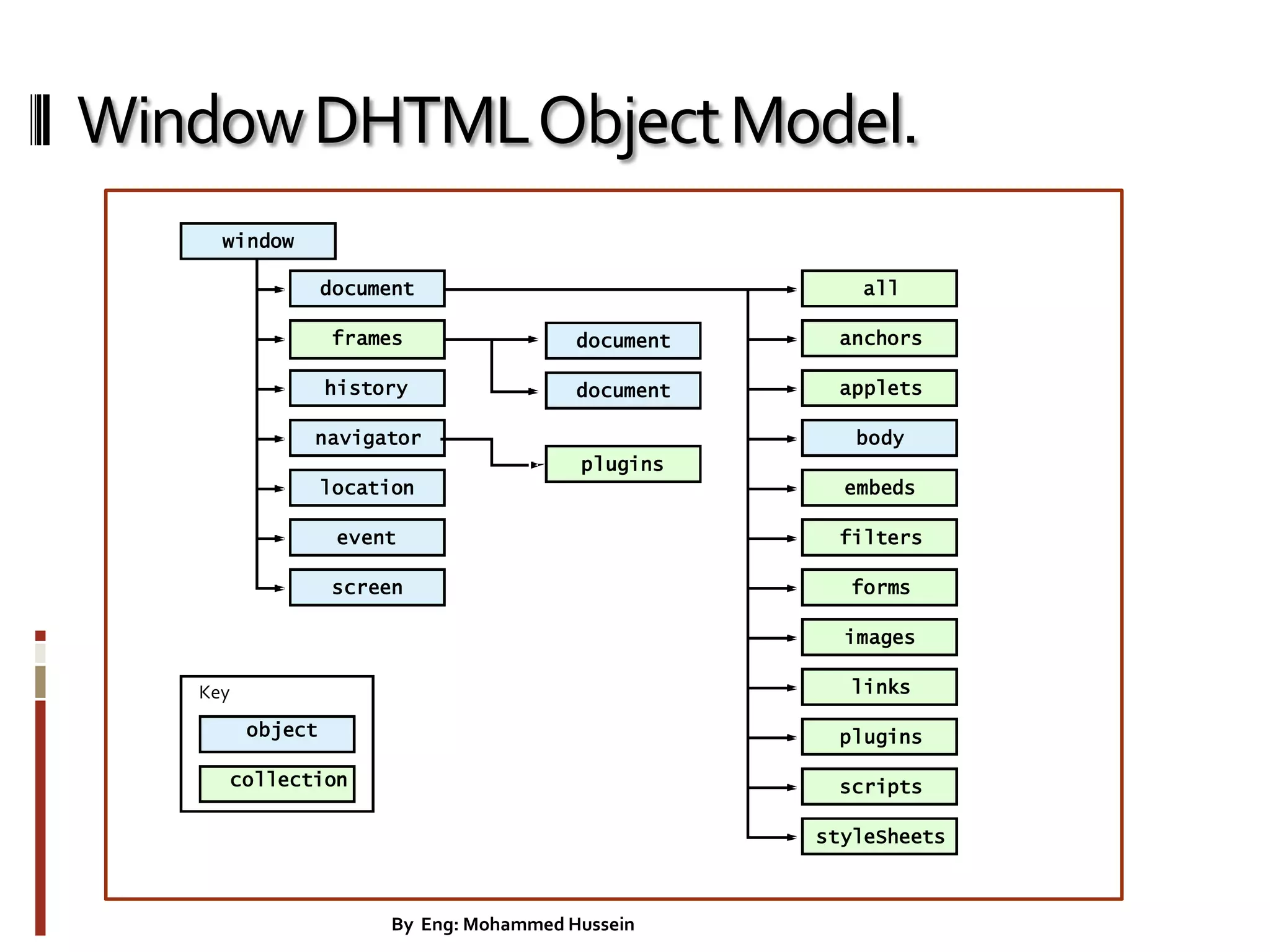
Introduction • WorldWideWeb(WWW): • a collection of interlinked multimedia documents that are stored on the Internet • HyperTextTransfer Protocol(HTTP) : • a protocol to access the WWW. • Dynamic HTML Object Model – Allows web authors to control the presentation of their pages – Gives them access to all the elements on their pages. • Web page: consist of – Elements, forms, frames, tables – Represented in an object hierarchy • Scripting – Retrieve and modify properties and attributes 5By Eng: Mohammed Hussein
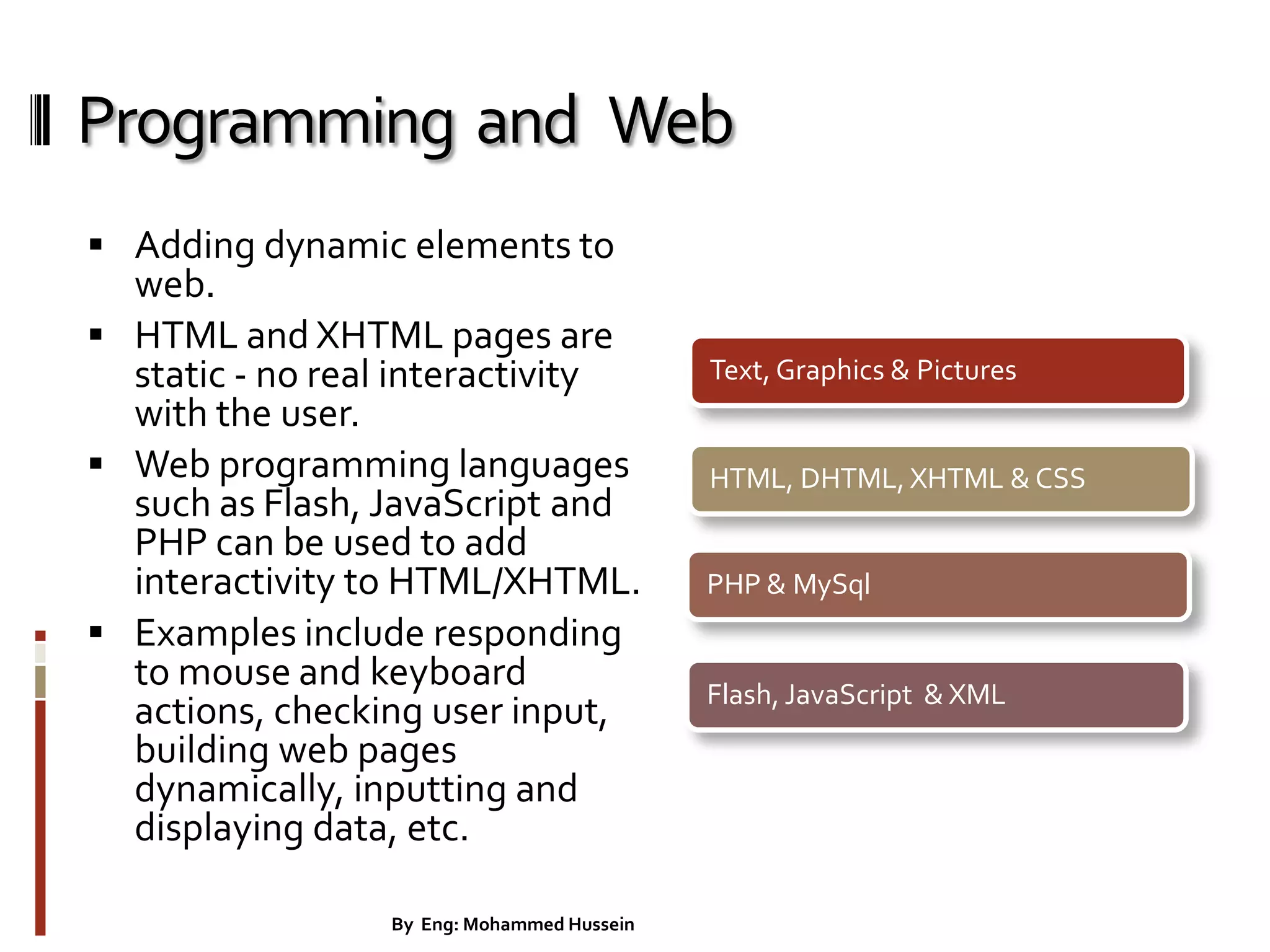
Programming and Web  Adding dynamic elements to web.  HTML and XHTML pages are static - no real interactivity with the user.  Web programming languages such as Flash, JavaScript and PHP can be used to add interactivity to HTML/XHTML.  Examples include responding to mouse and keyboard actions, checking user input, building web pages dynamically, inputting and displaying data, etc. Text, Graphics & Pictures HTML, DHTML, XHTML & CSS PHP & MySql Flash, JavaScript & XML 6By Eng: Mohammed Hussein
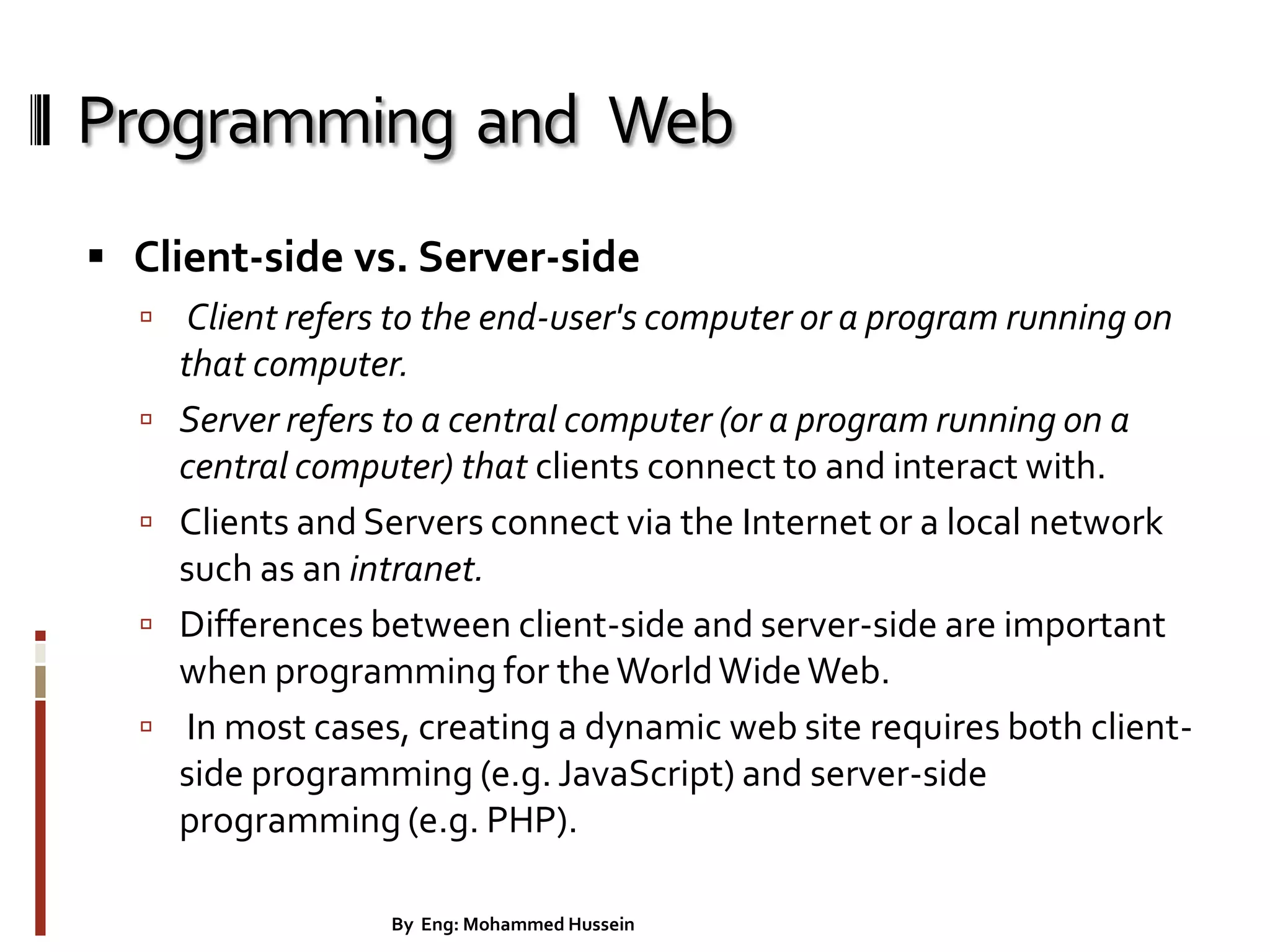
Programming and Web  Client-side vs. Server-side  Client refers to the end-user's computer or a program running on that computer.  Server refers to a central computer (or a program running on a central computer) that clients connect to and interact with.  Clients and Servers connect via the Internet or a local network such as an intranet.  Differences between client-side and server-side are important when programming for theWorldWideWeb.  In most cases, creating a dynamic web site requires both client- side programming (e.g. JavaScript) and server-side programming (e.g. PHP). 7By Eng: Mohammed Hussein
Programming vs. Scripting  Not a concrete distinction, but...  Programming languages generally have stricter rules of syntax, often need to be compiled, and usually produce code that can run more or less independently of other software.  Scripting languages are generally less strict about syntax, are usually interpreted rather than compiled, and often produce code that works with another application (e.g. a web browser or a web server).  Most newcomers find scripting languages easier to learn.  JavaScript and PHP (in its usual form) are both scripting languages. 8By Eng: Mohammed Hussein
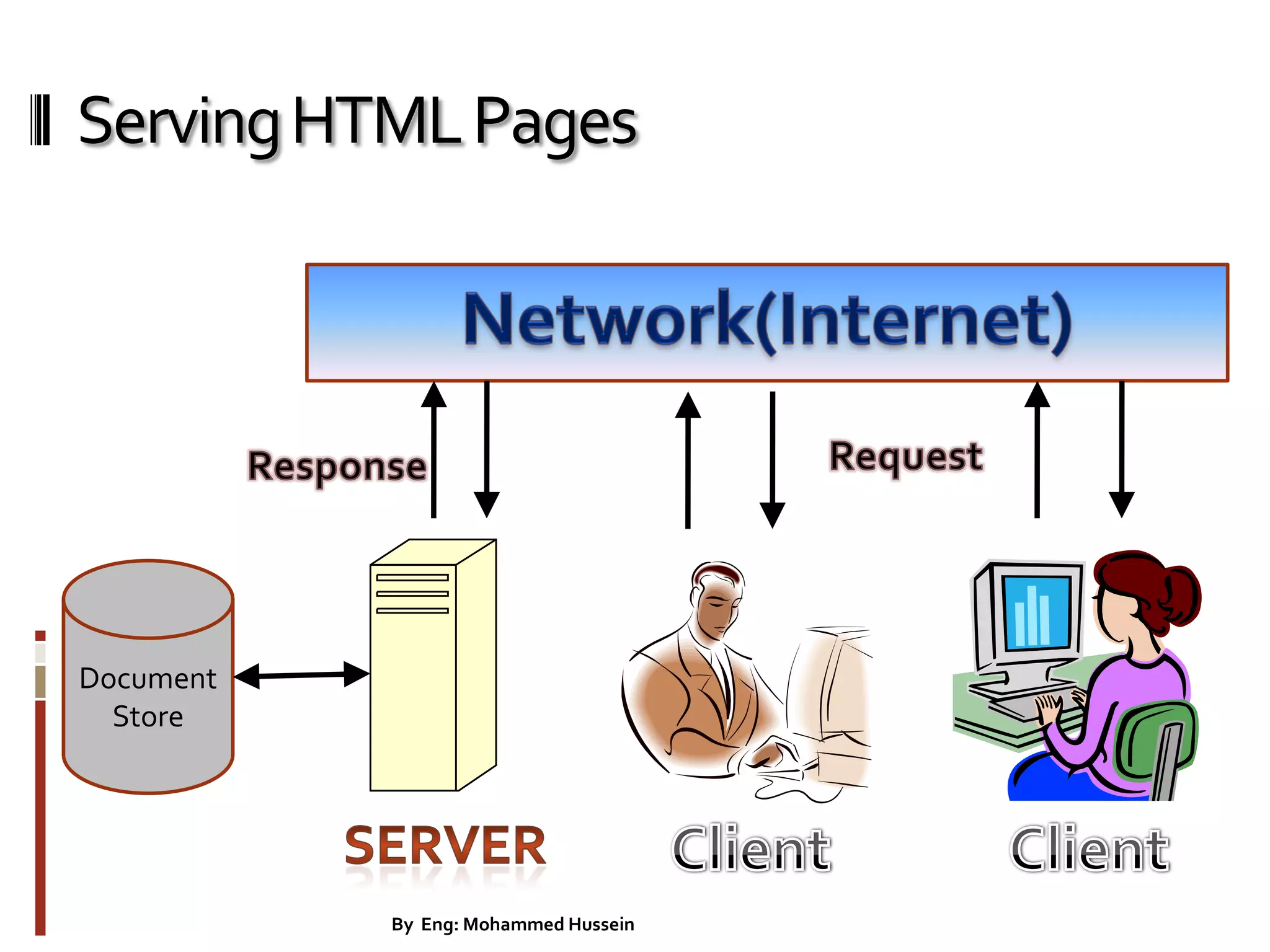
Serving HTML Pages  How clients can request HTML documents stored on a server?  We don't usually make web pages just to be viewed locally.We want to place the HTML files on a file server that is part of Internet!You do this by uploading the pages to An ISP (Internet Service Provider).As you can see in The diagram below  Setting up a Server  You can set up an HTTP server on an Linux machine using the httpd program. Many Linux machines include the ApacheWeb Server.  On a Windows you can set up xampp-win32 that include the ApacheWeb Server. 9By Eng: Mohammed Hussein
ServingHTMLPages Document Store 10By Eng: Mohammed Hussein
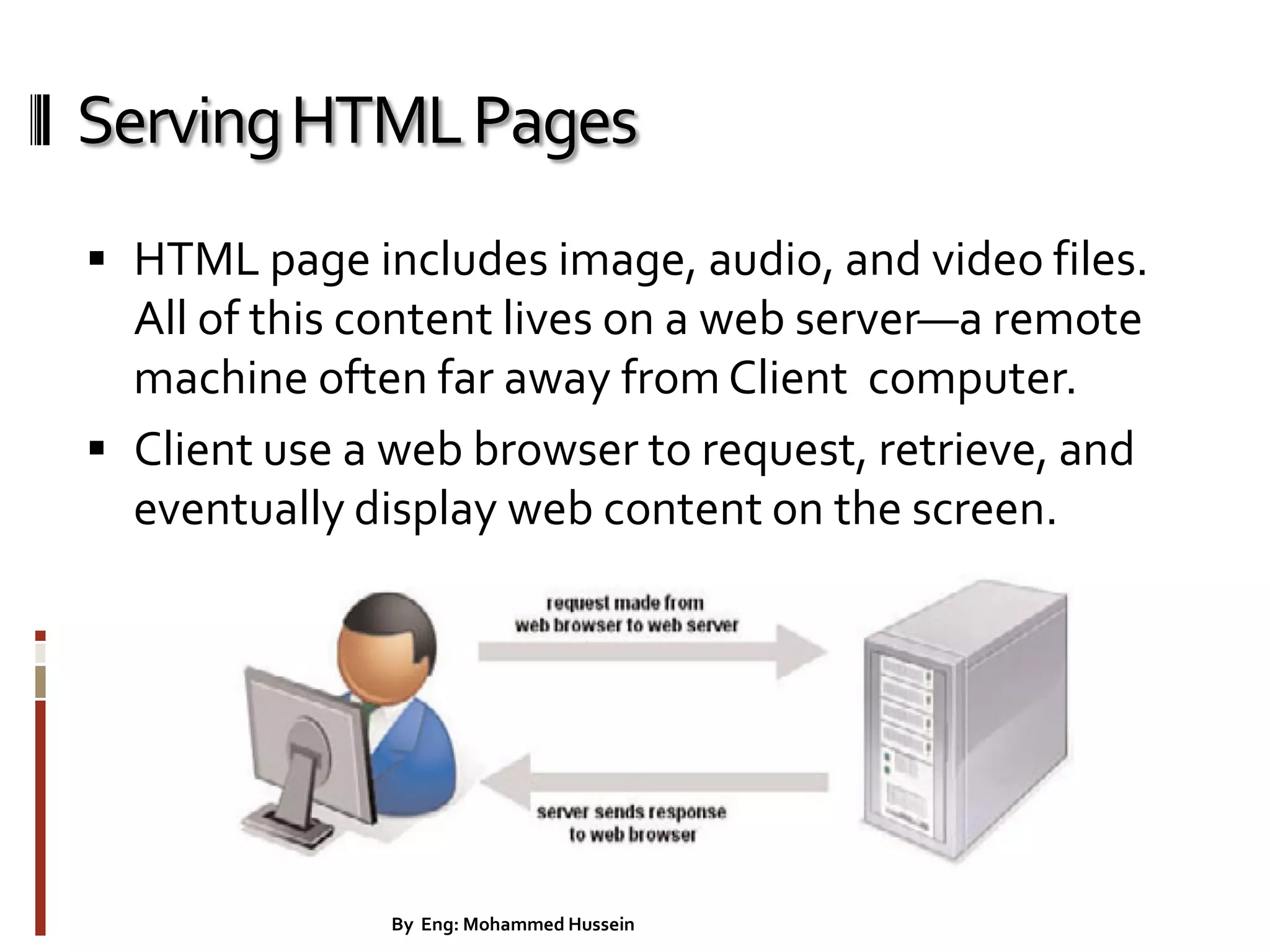
ServingHTMLPages  HTML page includes image, audio, and video files. All of this content lives on a web server—a remote machine often far away from Client computer.  Client use a web browser to request, retrieve, and eventually display web content on the screen. 11By Eng: Mohammed Hussein
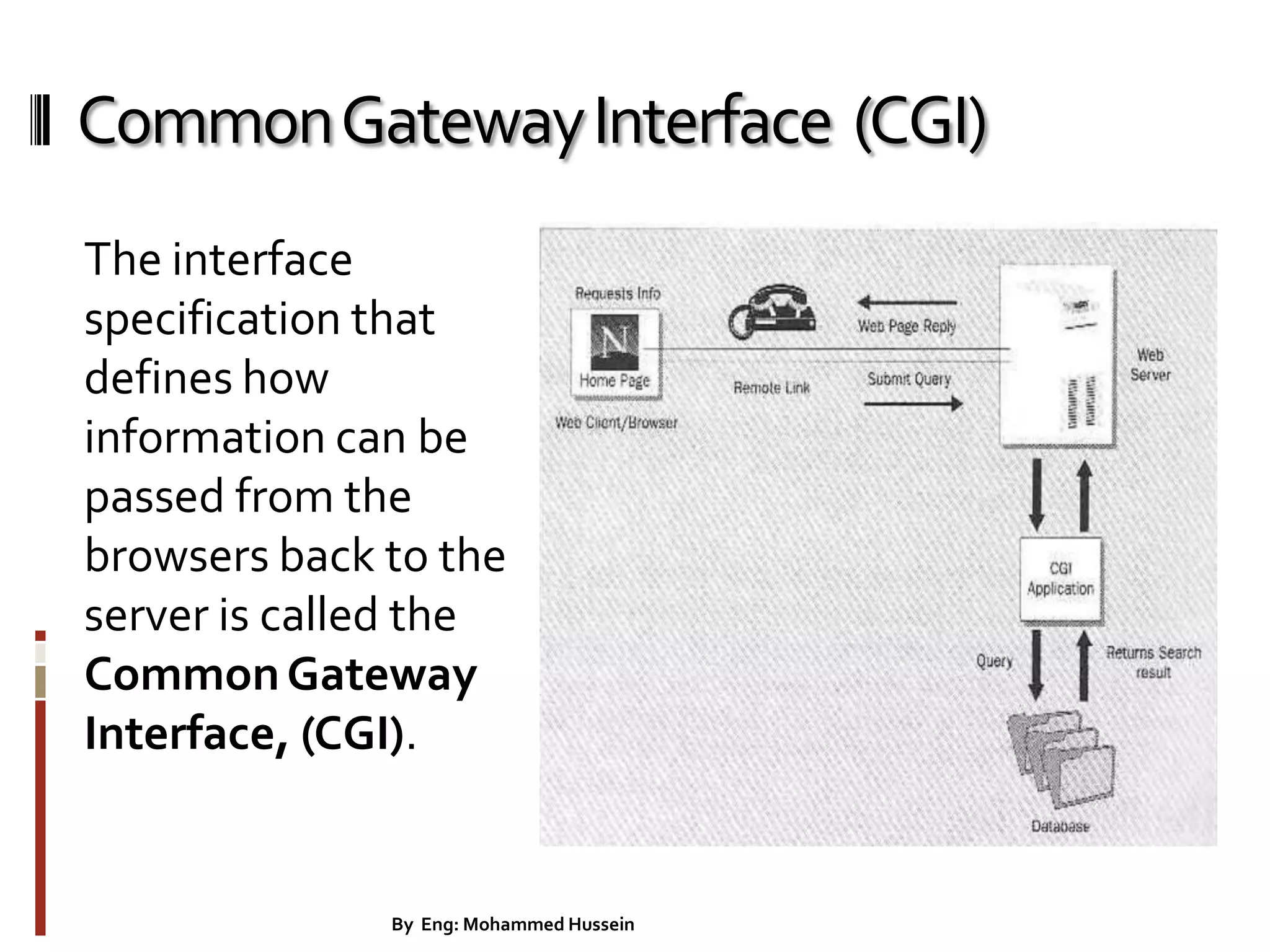
CommonGatewayInterface (CGI) The interface specification that defines how information can be passed from the browsers back to the server is called the CommonGateway Interface, (CGI). 12By Eng: Mohammed Hussein
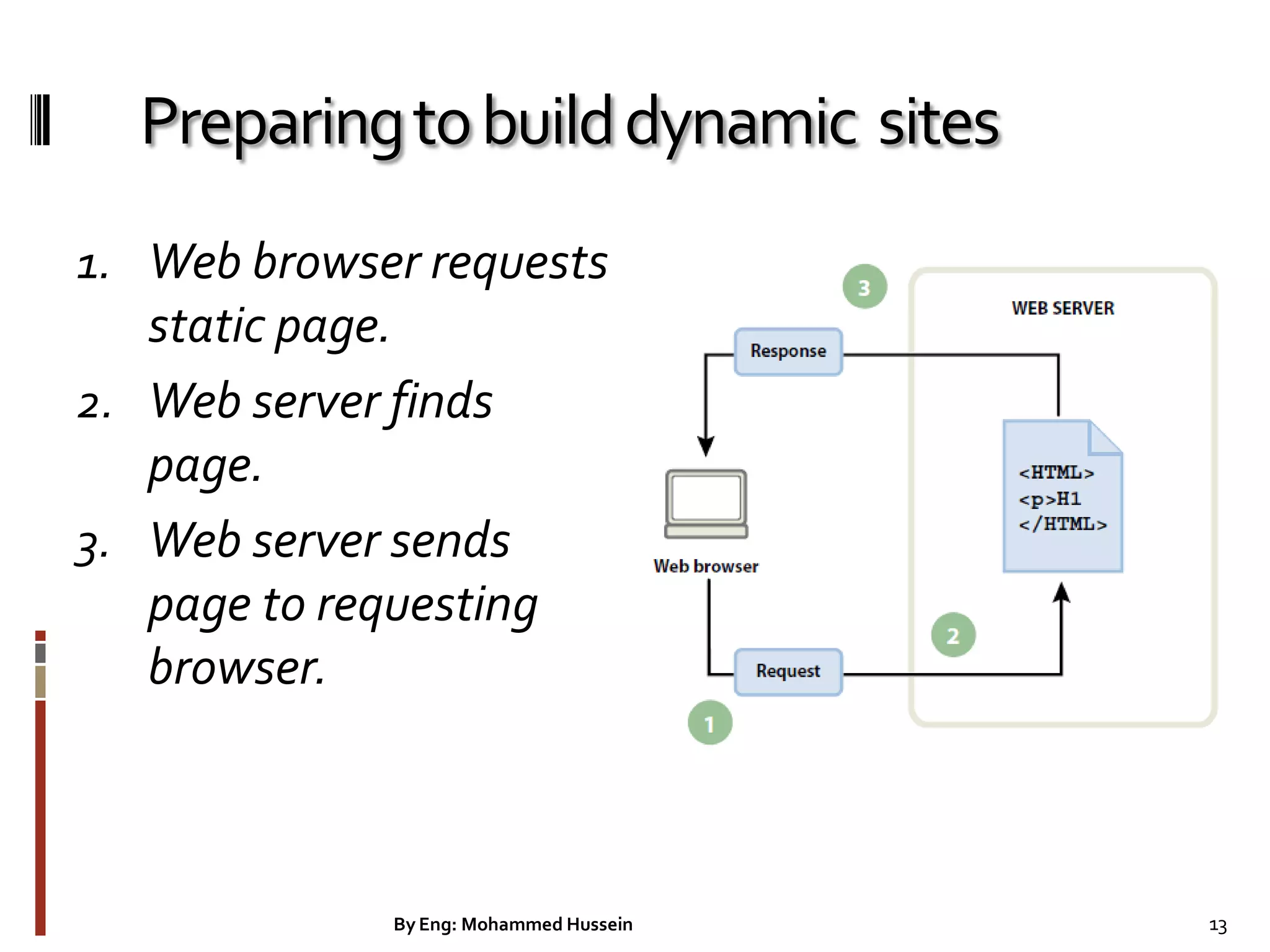
Preparingtobuilddynamic sites 1. Web browser requests static page. 2. Web server finds page. 3. Web server sends page to requesting browser. 13By Eng: Mohammed Hussein
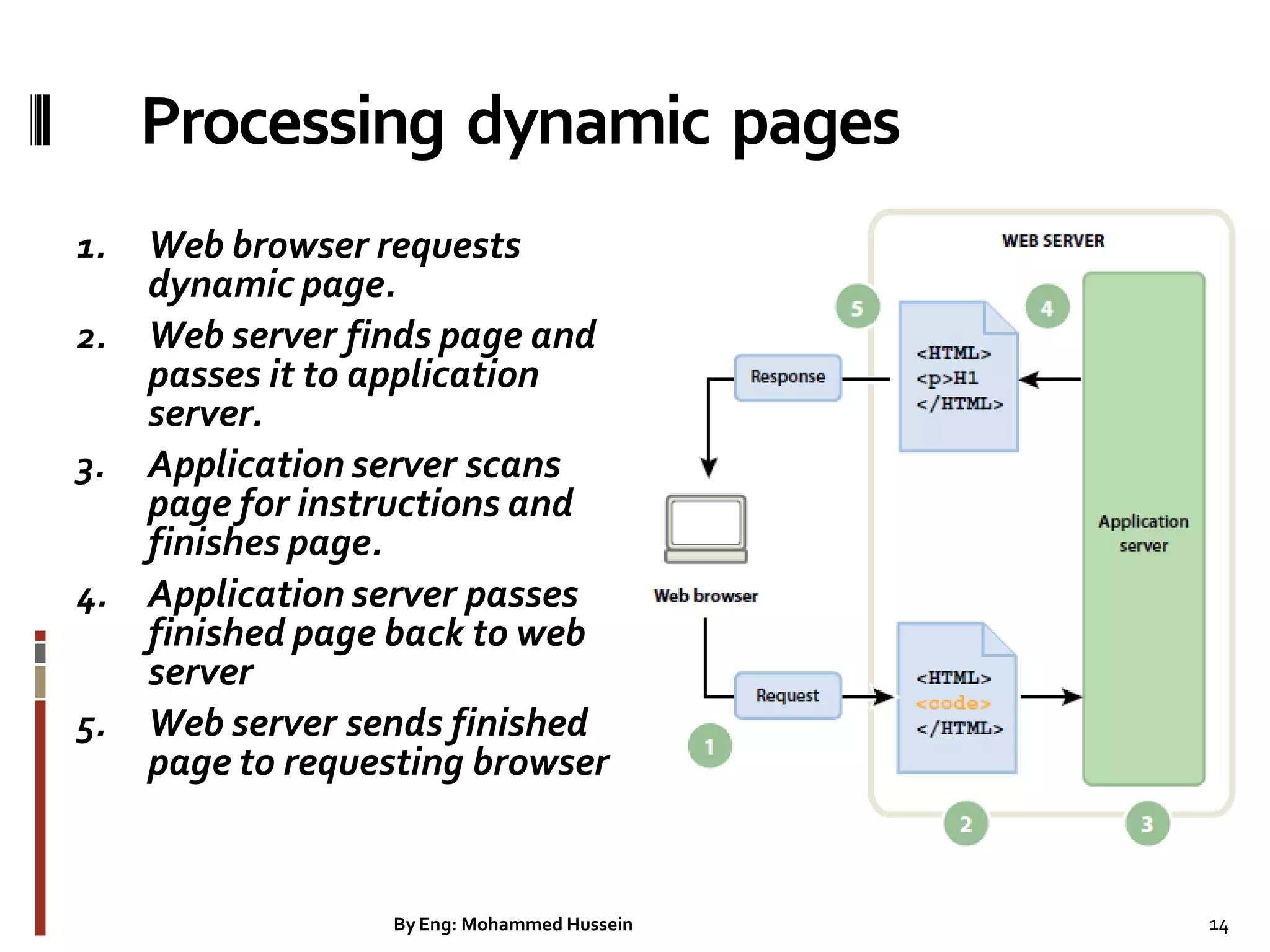
Processing dynamic pages 1. Web browser requests dynamic page. 2. Web server finds page and passes it to application server. 3. Application server scans page for instructions and finishes page. 4. Application server passes finished page back to web server 5. Web server sends finished page to requesting browser 14By Eng: Mohammed Hussein
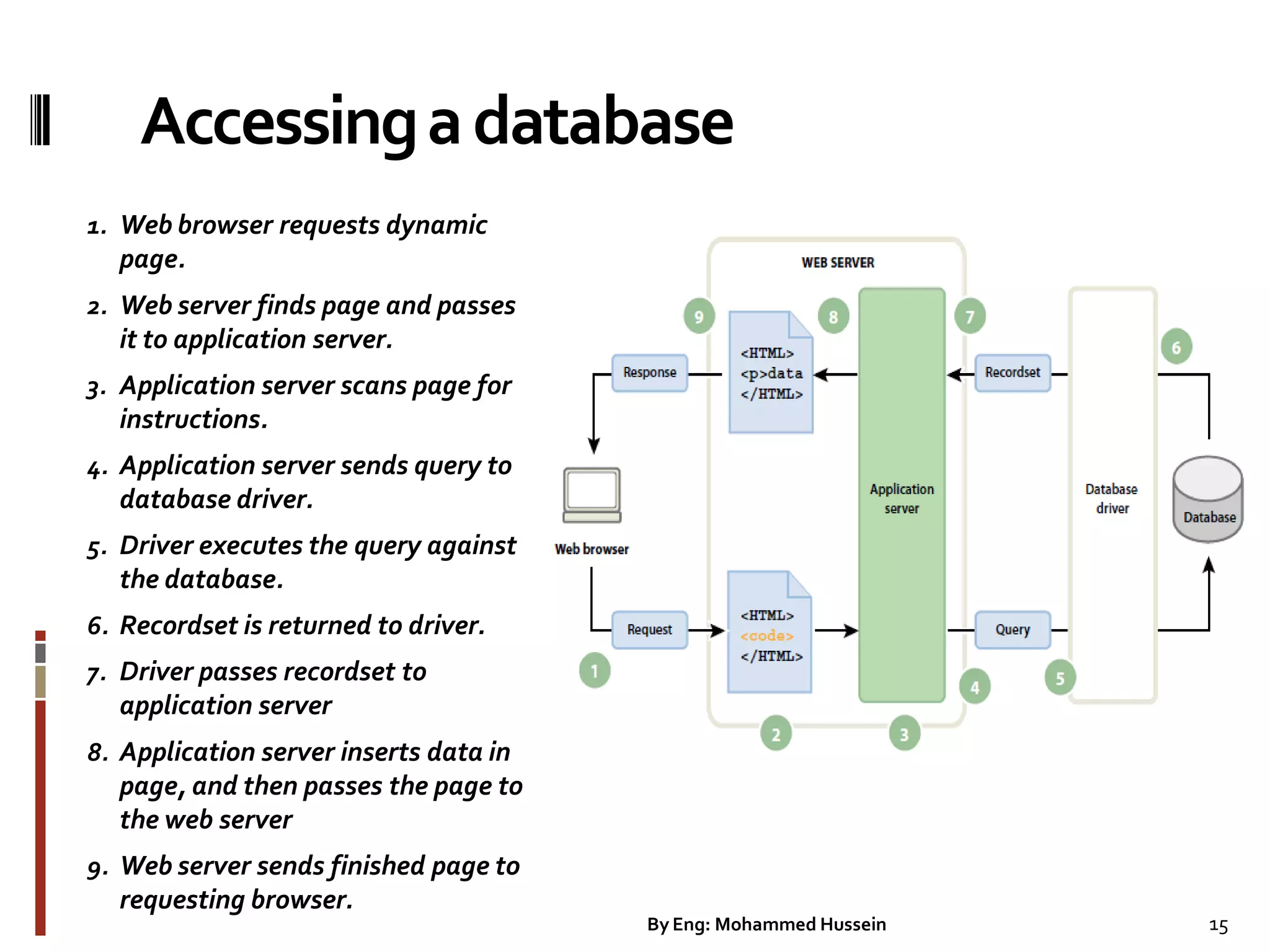
Accessingadatabase 1. Web browser requests dynamic page. 2. Web server finds page and passes it to application server. 3. Application server scans page for instructions. 4. Application server sends query to database driver. 5. Driver executes the query against the database. 6. Recordset is returned to driver. 7. Driver passes recordset to application server 8. Application server inserts data in page, and then passes the page to the web server 9. Web server sends finished page to requesting browser. 15By Eng: Mohammed Hussein
WebApplication  A web application is a website that contains pages with partly or final content of a page.  The final content of a page is determined only when the visitor requests a page from the web server.  A dynamic page which is the final content of the page that have varies of from request based on the visitor’s actions.  Web applications are built to address a variety of challenges and problems. 16By Eng: Mohammed Hussein
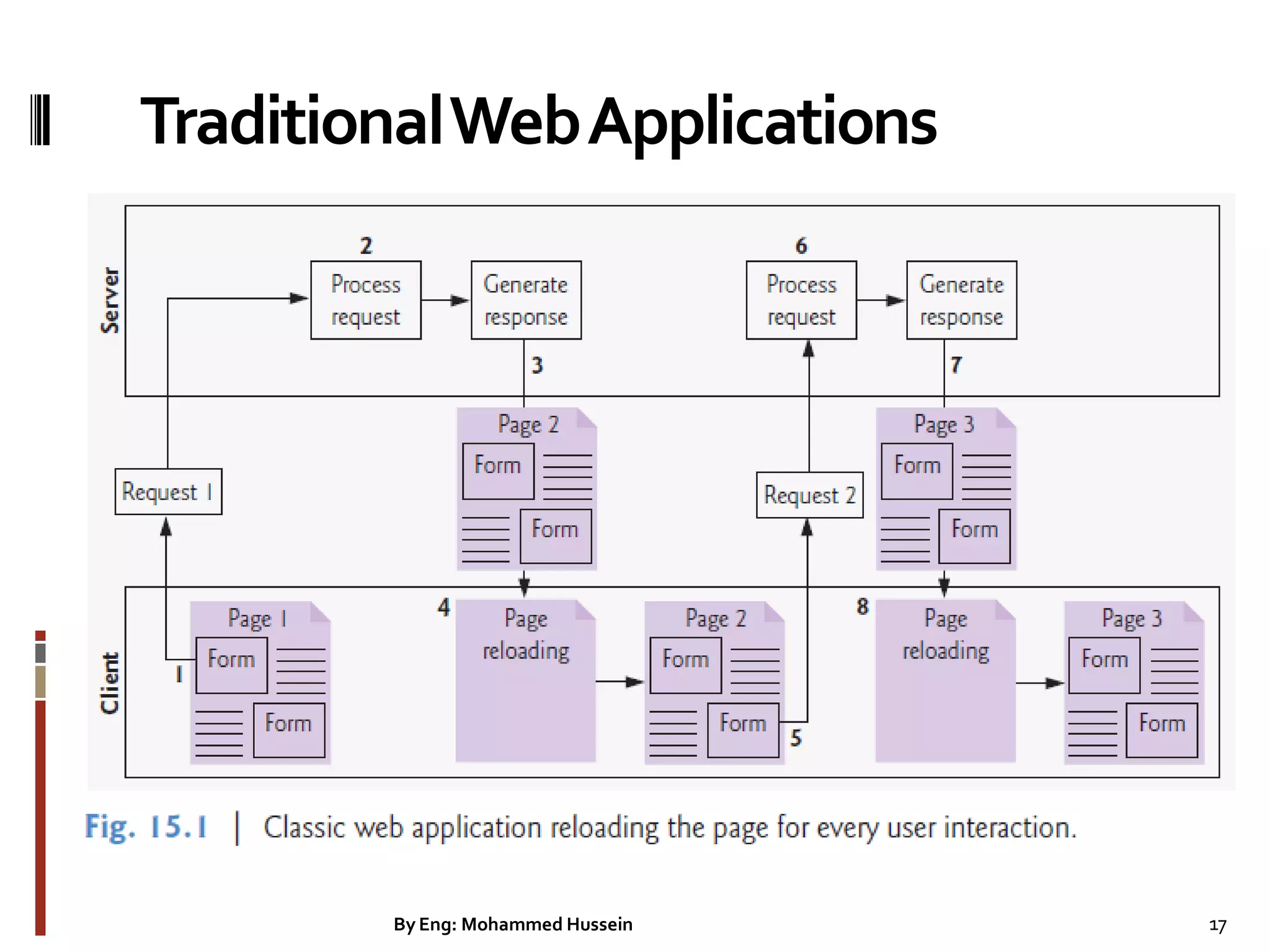
TraditionalWebApplications By Eng: Mohammed Hussein 17
TraditionalWebApplications Figure 15.1 presents the typical interactions between the client and the server in a traditional web application, such as one that uses a user registration form. First, the user fills in the form’s fields, then submits the form (Fig. 15.1, Step 1). The browser generates a request to the server, which receives the request and processes it (Step 2). The server generates and sends a response containing the exact page that the browser will render (Step 3), which causes the browser to load the new page (Step 4) and temporarily makes the browser window blank. Note that the client waits for the server to respond and reloads the entire page with the data from the response (Step 4). While such a synchronous request is being processed on the server, the user cannot interact with the client web page. Frequent long periods of waiting, due perhaps to Internet congestion, have led some users to refer to the World Wide Web as the ―World Wide Wait.‖ If the user interacts with and submits another form, the process begins again (Steps 5–8). By Eng: Mohammed Hussein 18
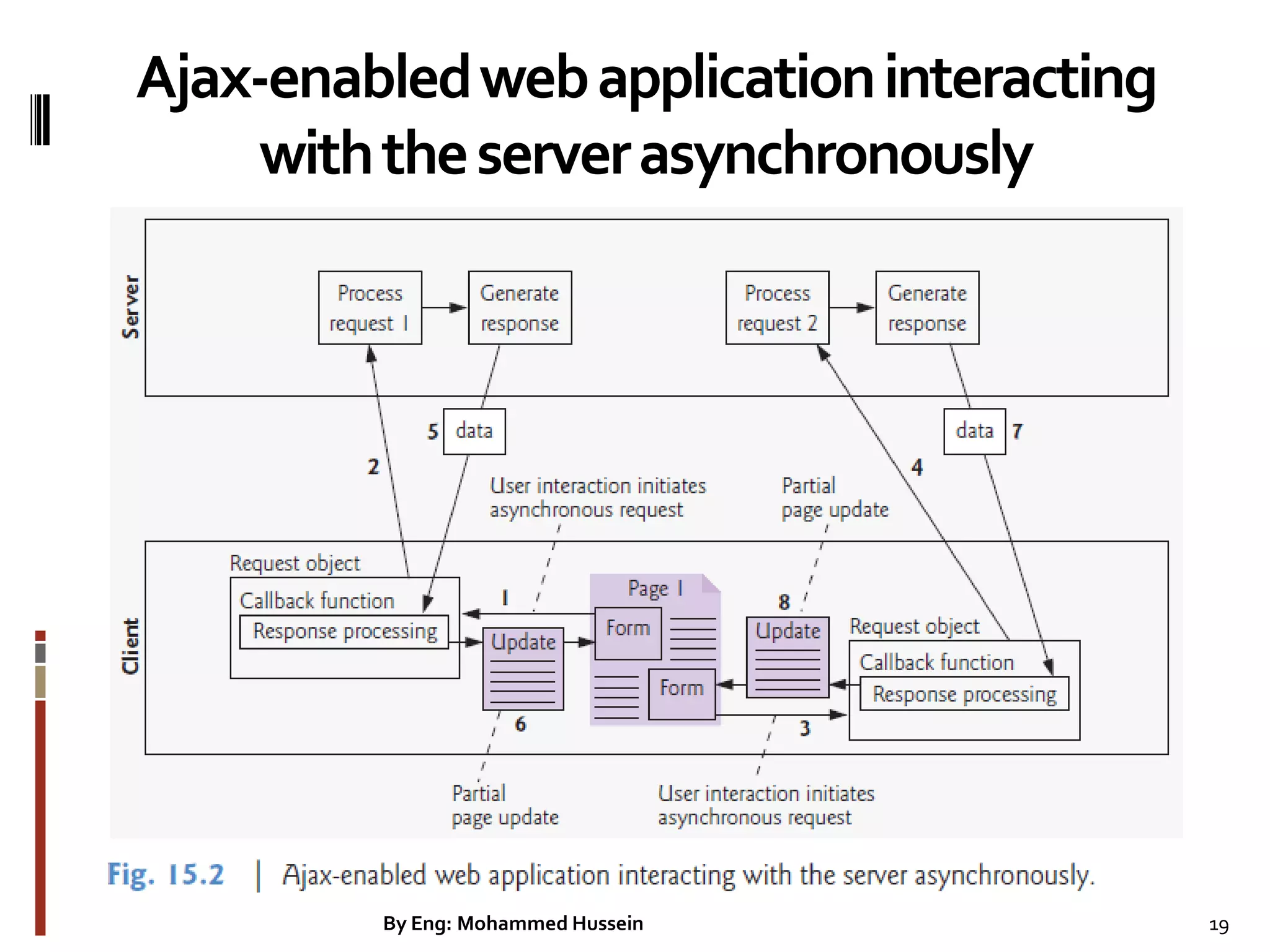
Ajax-enabledwebapplicationinteracting withtheserverasynchronously By Eng: Mohammed Hussein 19
AjaxWebApplications Ajax applications add a layer between the client and the server to manage communication between the two (Fig. 15.2). When the user interacts with the page, the client creates an XMLHttpRequest object to manage a request (Step 1). The XMLHttpRequest object sends the request to the server (Step 2) and awaits the response. The requests are asynchronous, so the user can continue interacting with the application on the client-side while the server processes the earlier request concurrently. Other user interactions could result in additional requests to the server (Steps 3 and 4). Once the server responds to the original request (Step 5), the XMLHttpRequest object that issued the request calls a client-side function to process the data returned by the server. This function—known as a callback function—uses partial page updates (Step 6) to display the data in the existing web page without reloading the entire page. At the same time, the server may be responding to the second request (Step 7) and the client-side may be starting to do another partial page update (Step 8). The callback function updates only a designated part of the page. Such partial page updates help make web applications more responsive, making them feel more like desktop applications. The web application does not load a new page while the user interacts with it. By Eng: Mohammed Hussein 20
XAMPP webserver  http://localhost/  Username: root  PHP Script Language  phpMyAdmin Database Manager  MySQL Database By Eng: Mohammed Hussein 21
AppServ-webserver  http://localhost/  Username: root  PHP Script Language  phpMyAdmin Database Manager  MySQL Database 22By Eng: Mohammed Hussein
AdobeDreamweaverCS5  You can use Adobe Dreamweaver CS5 or CS6 for the basic steps involved in creating an attractive, functional website.  In this course, you will learn to design a site layout, insert images and text, create links, and how to upload your site to the Internet. 23By Eng: Mohammed Hussein
Organizing yourwebsite  Project Name  Images folder  Html or php folder  Index page  Index page is the first page which the server will run this index file in a website.  Index page extension could be html or php. 24By Eng: Mohammed Hussein
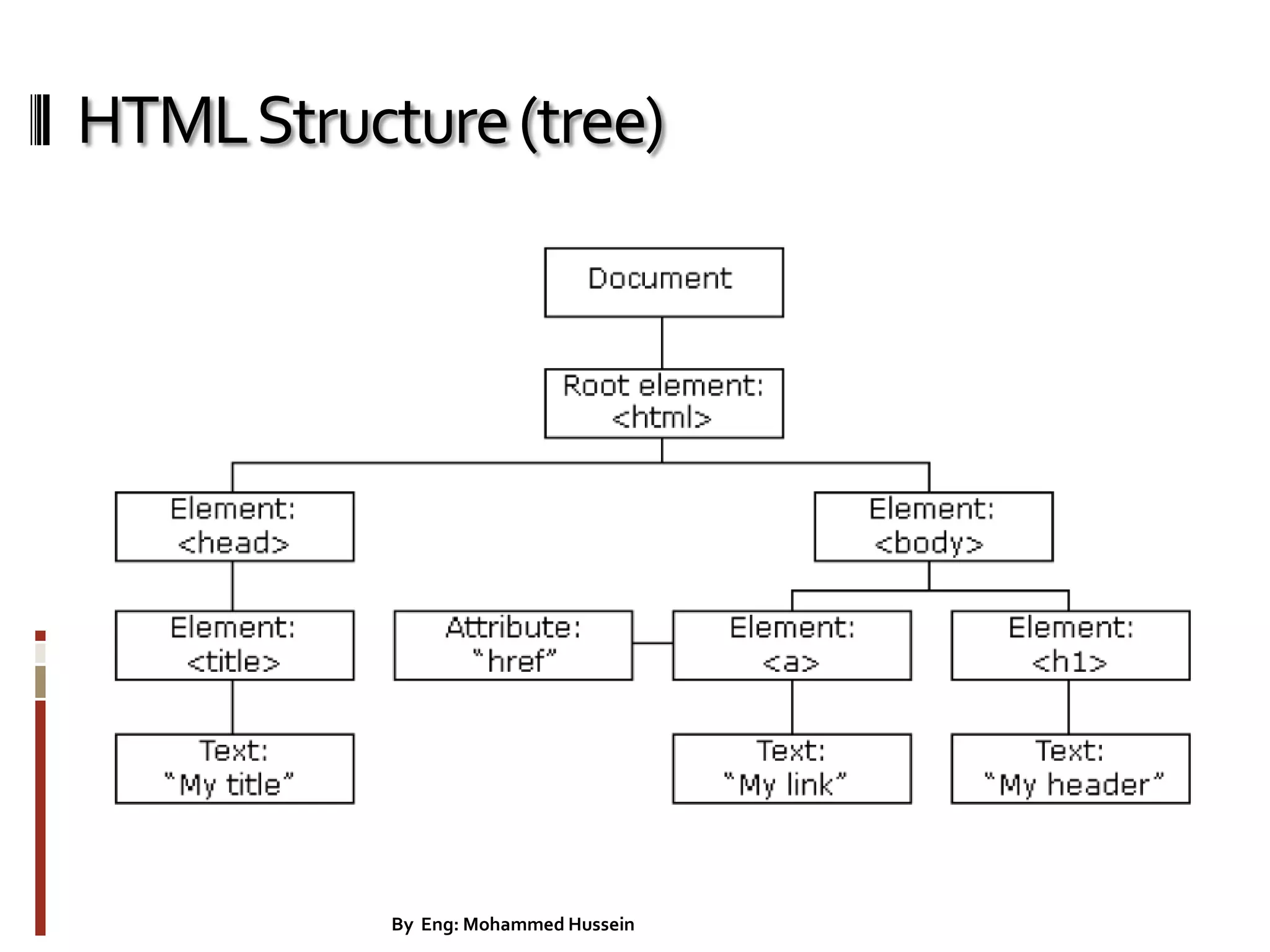
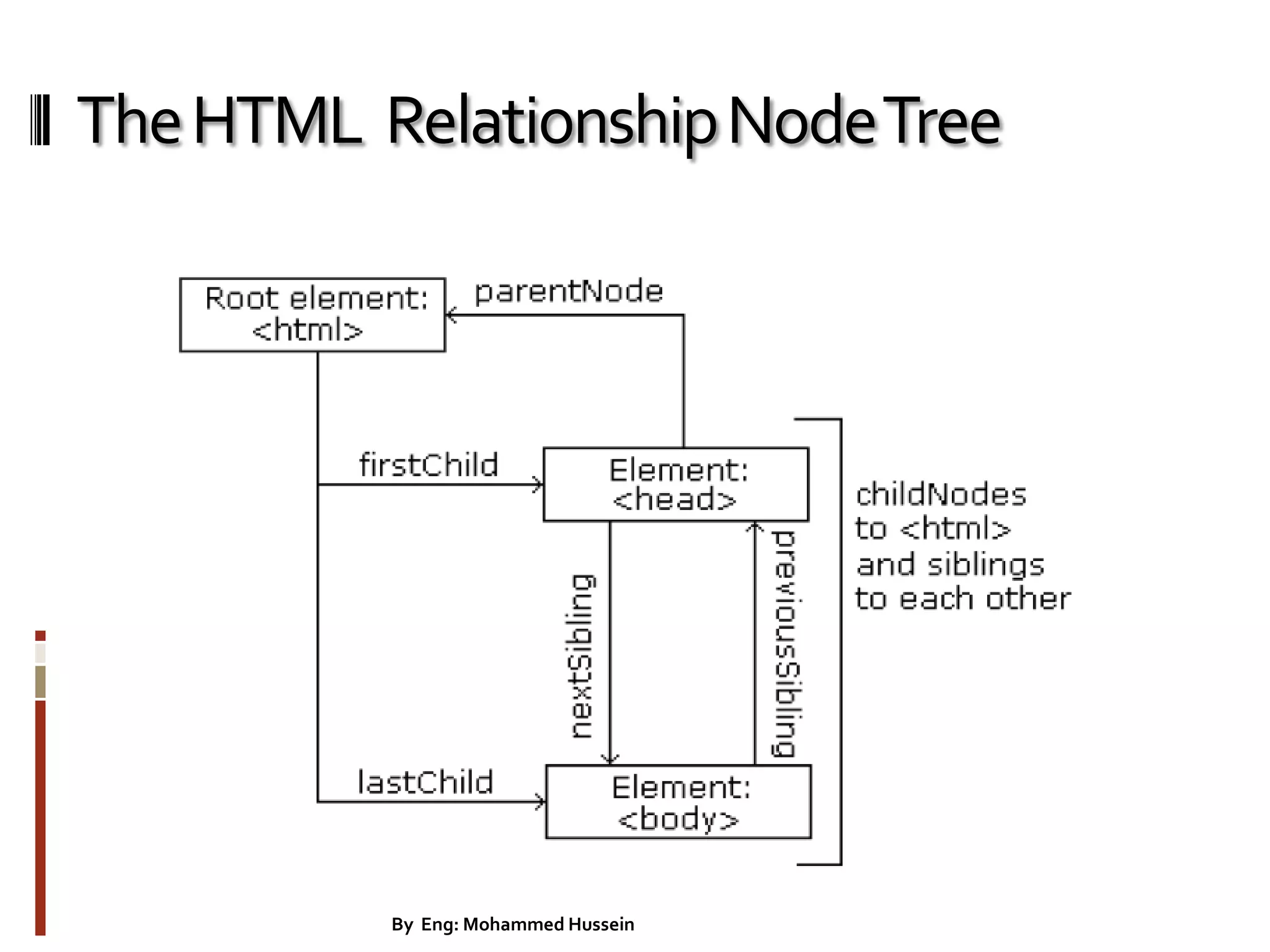
HTMLStructure(tree) 25By Eng: Mohammed Hussein
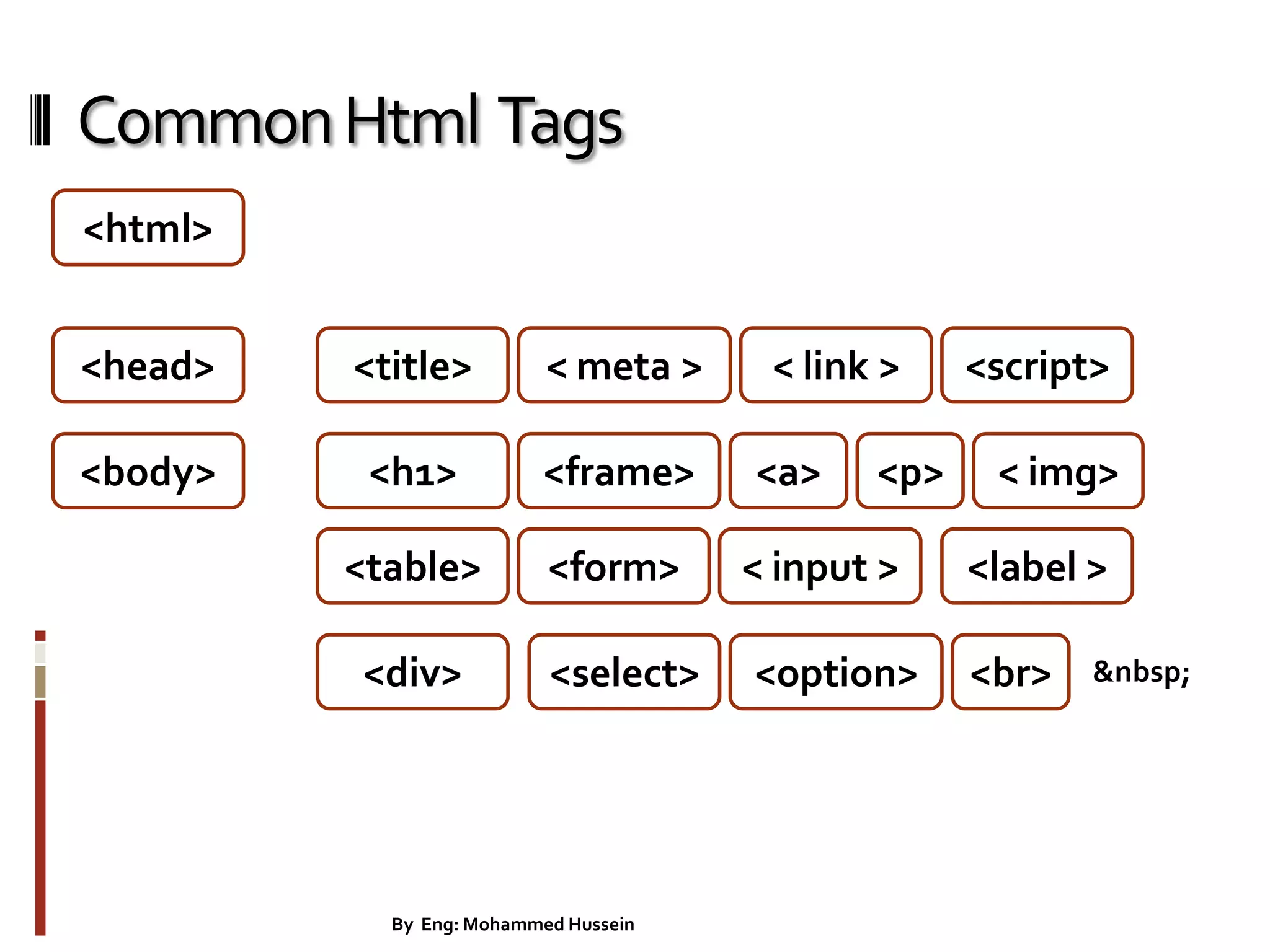
CommonHtml Tags <body> <table> <h1> <div> <title> <frame> <form> <select> <option> <head> <a> <html> < meta > < link > <script> <label > &nbsp; < input > < img><p> <br> 26By Eng: Mohammed Hussein
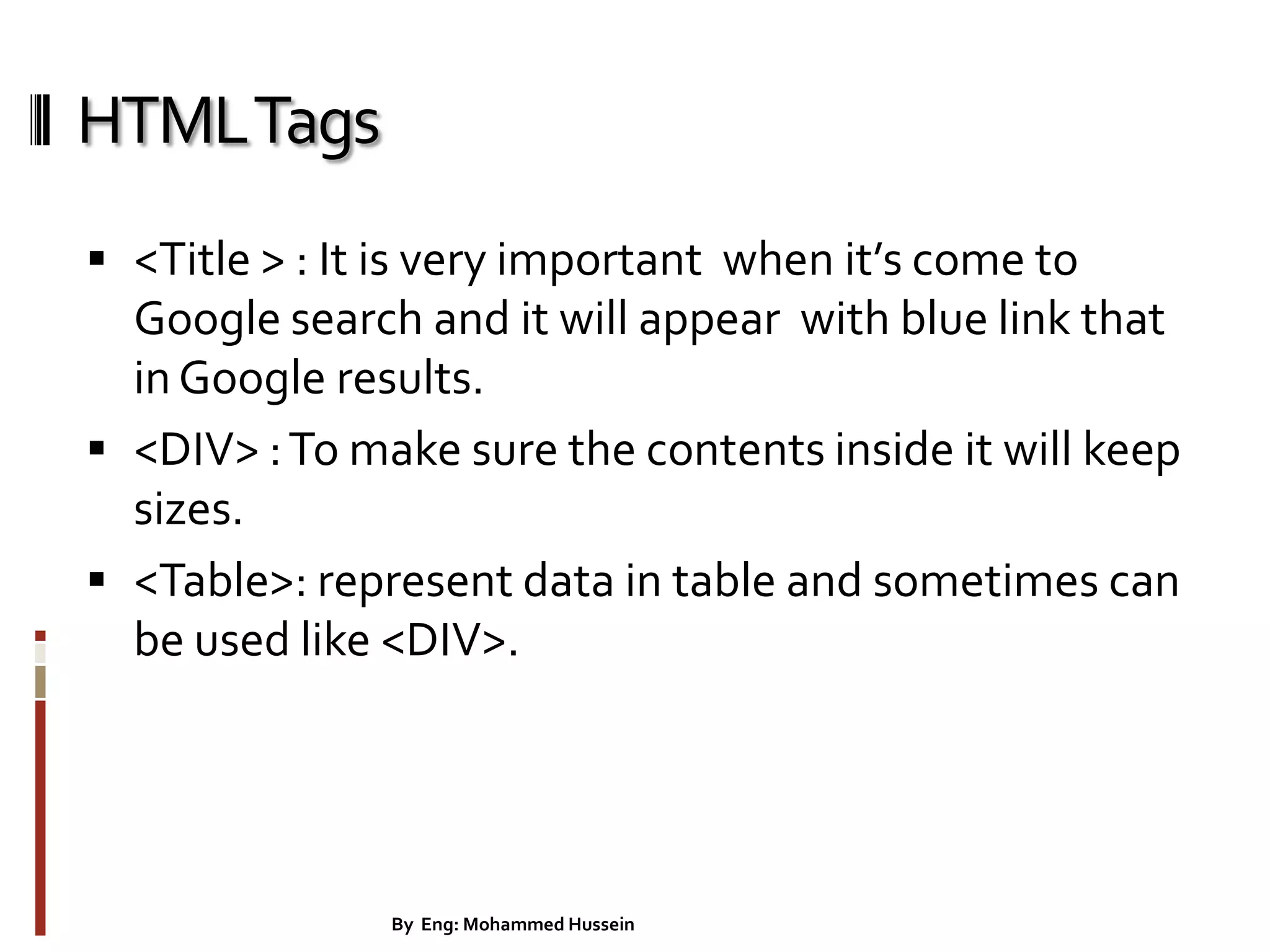
HTMLTags  <Title > : It is very important when it’s come to Google search and it will appear with blue link that inGoogle results.  <DIV> :To make sure the contents inside it will keep sizes.  <Table>: represent data in table and sometimes can be used like <DIV>. 27By Eng: Mohammed Hussein
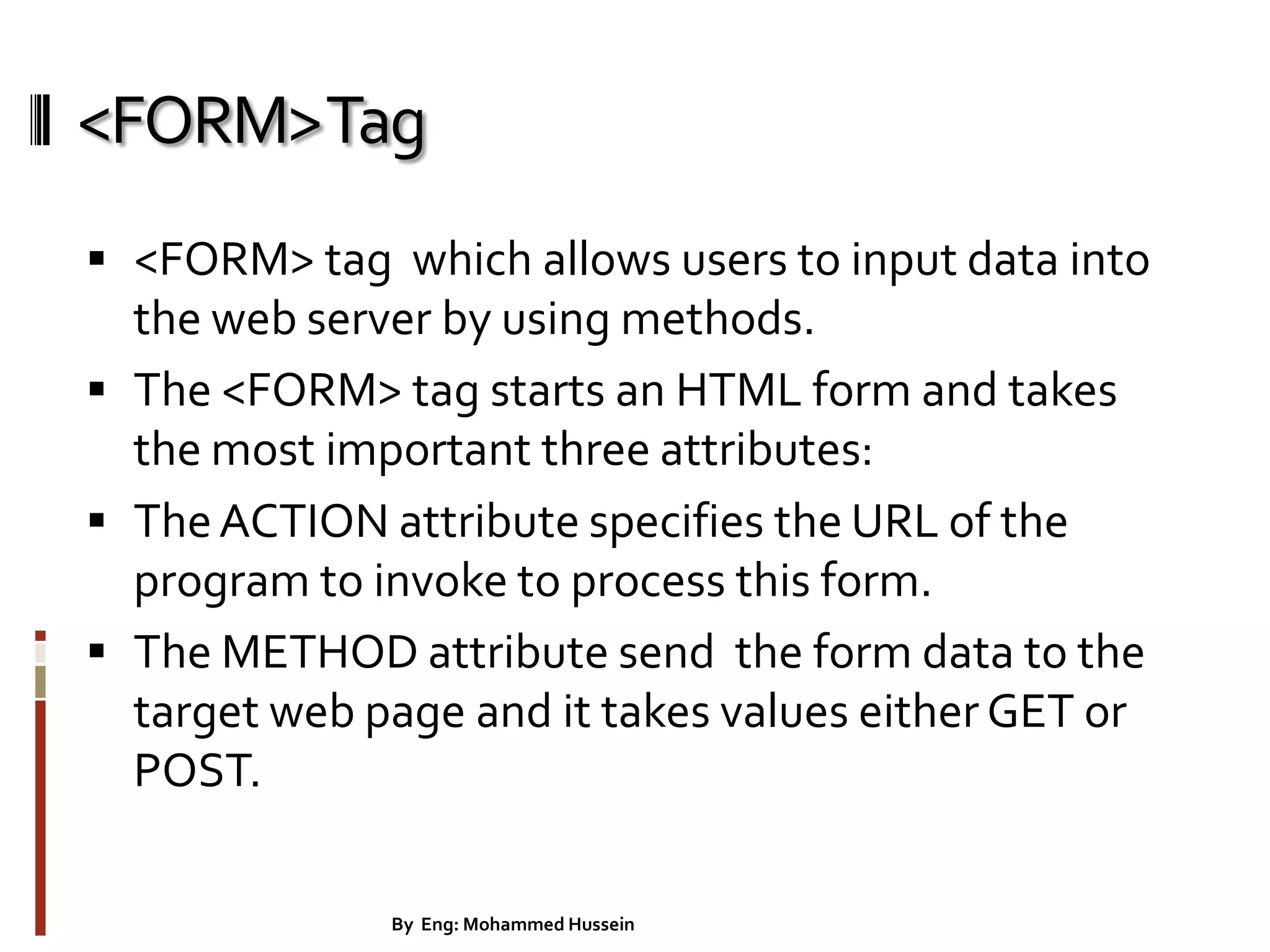
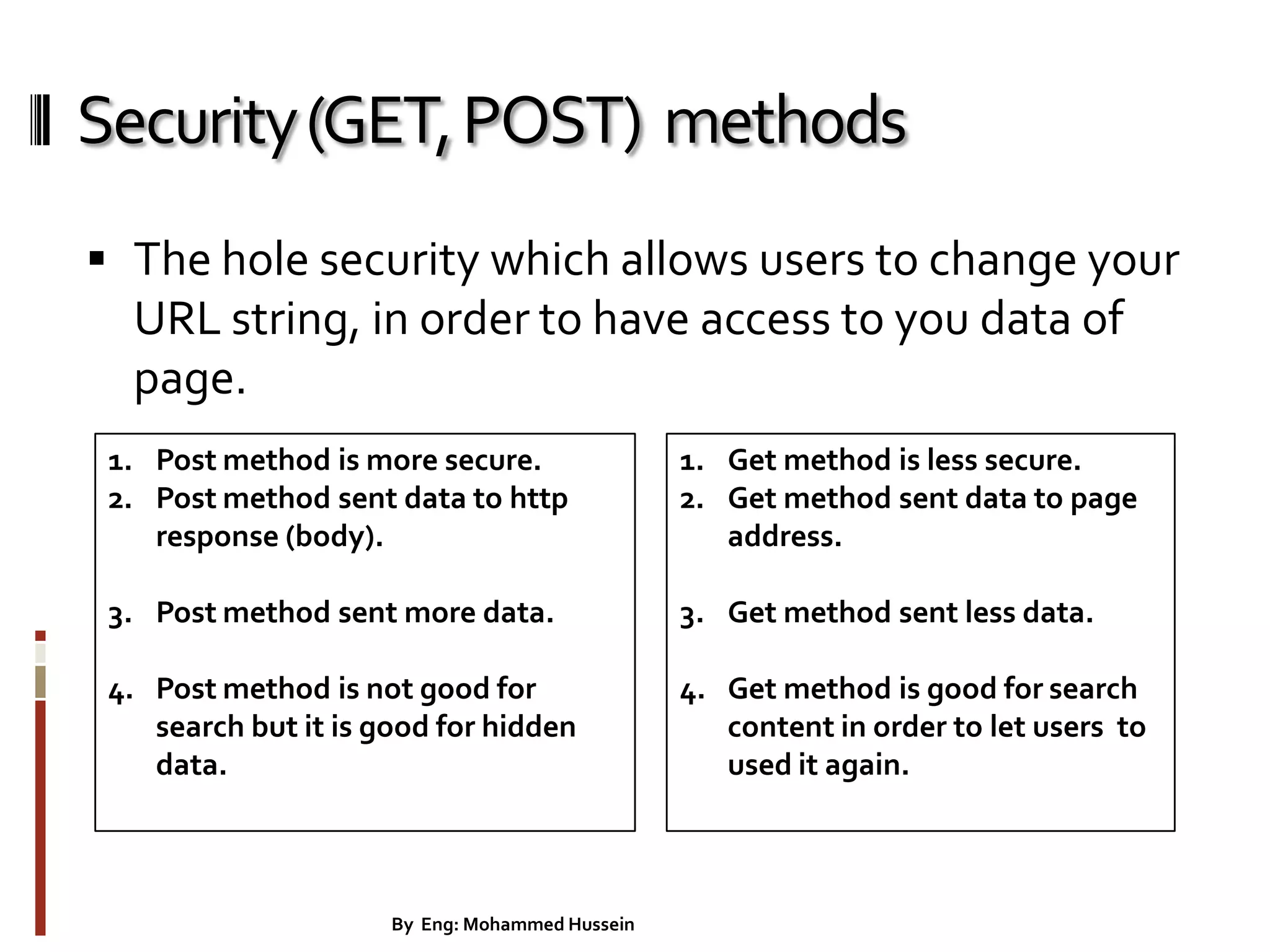
<FORM>Tag  <FORM> tag which allows users to input data into the web server by using methods.  The <FORM> tag starts an HTML form and takes the most important three attributes:  TheACTION attribute specifies the URL of the program to invoke to process this form.  The METHOD attribute send the form data to the target web page and it takes values either GET or POST. 28By Eng: Mohammed Hussein
Security(GET,POST) methods  The hole security which allows users to change your URL string, in order to have access to you data of page. 29By Eng: Mohammed Hussein 1. Post method is more secure. 2. Post method sent data to http response (body). 3. Post method sent more data. 4. Post method is not good for search but it is good for hidden data. 1. Get method is less secure. 2. Get method sent data to page address. 3. Get method sent less data. 4. Get method is good for search content in order to let users to used it again.
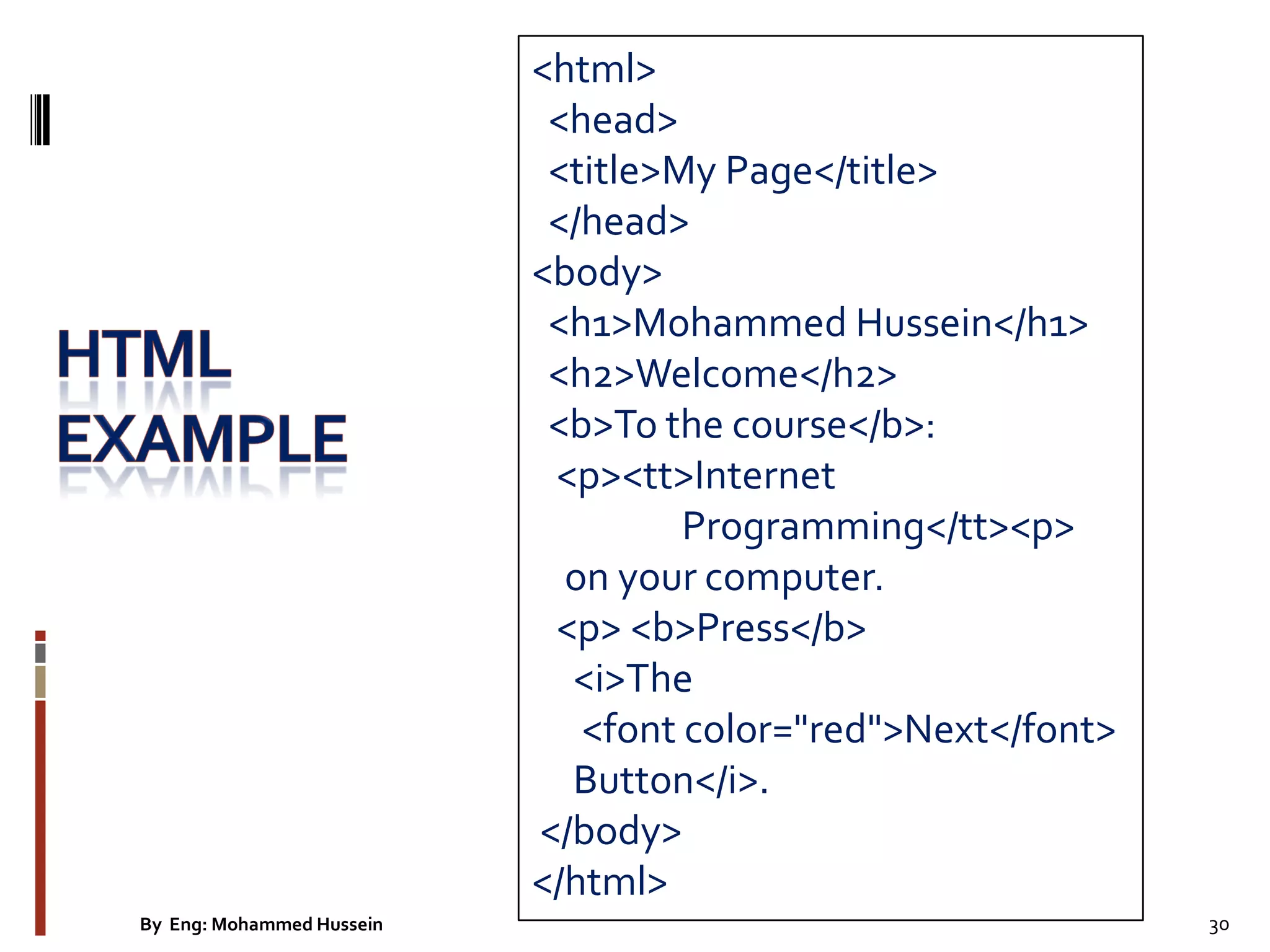
<html> <head> <title>My Page</title> </head> <body> <h1>Mohammed Hussein</h1> <h2>Welcome</h2> <b>To the course</b>: <p><tt>Internet Programming</tt><p> on your computer. <p> <b>Press</b> <i>The <font color="red">Next</font> Button</i>. </body> </html> 30By Eng: Mohammed Hussein
TheHTML RelationshipNodeTree 31By Eng: Mohammed Hussein
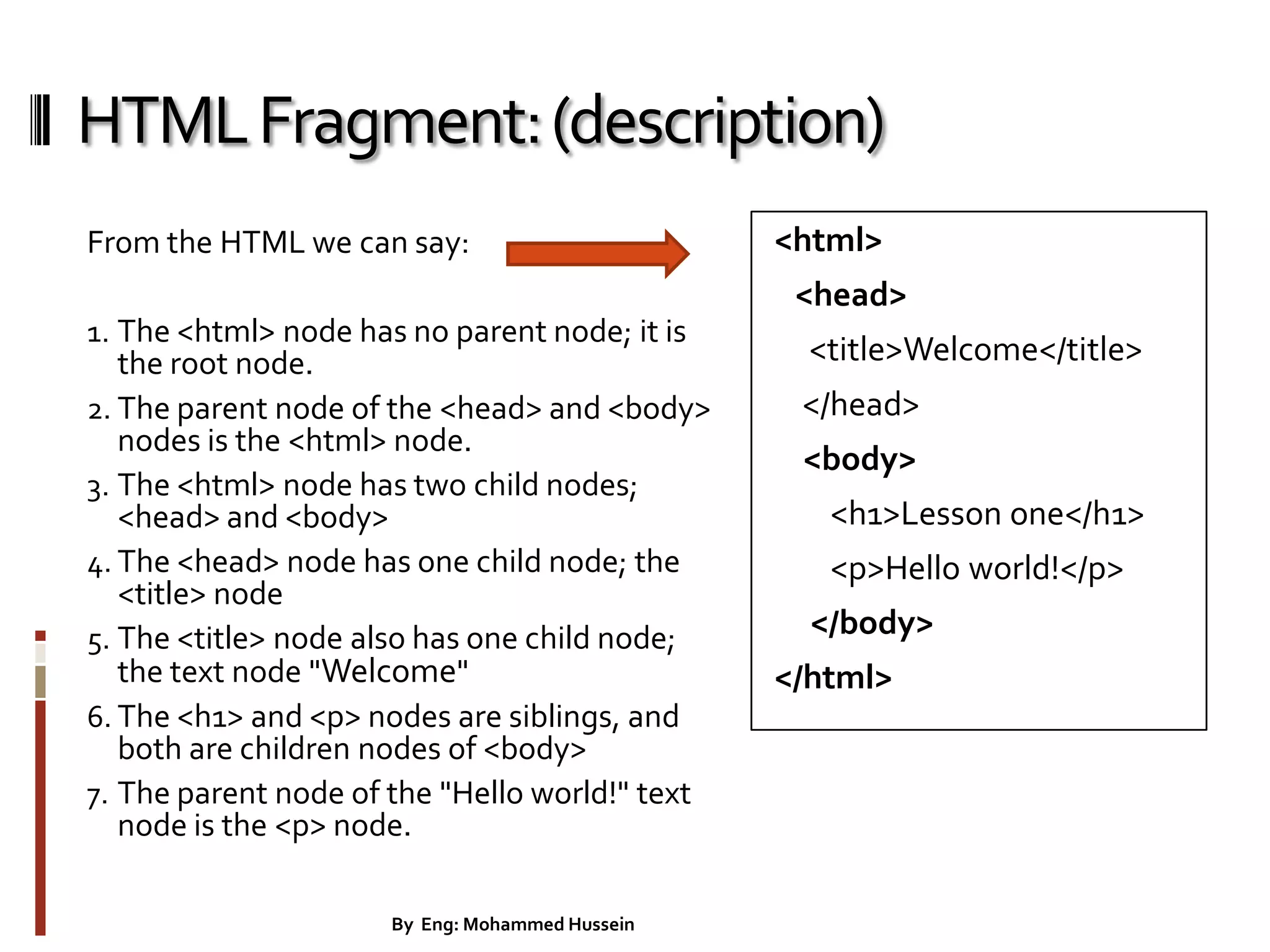
HTMLFragment:(description) From the HTML we can say: 1. The <html> node has no parent node; it is the root node. 2. The parent node of the <head> and <body> nodes is the <html> node. 3. The <html> node has two child nodes; <head> and <body> 4. The <head> node has one child node; the <title> node 5. The <title> node also has one child node; the text node "Welcome" 6. The <h1> and <p> nodes are siblings, and both are children nodes of <body> 7. The parent node of the "Hello world!" text node is the <p> node. <html> <head> <title>Welcome</title> </head> <body> <h1>Lesson one</h1> <p>Hello world!</p> </body> </html> 32By Eng: Mohammed Hussein
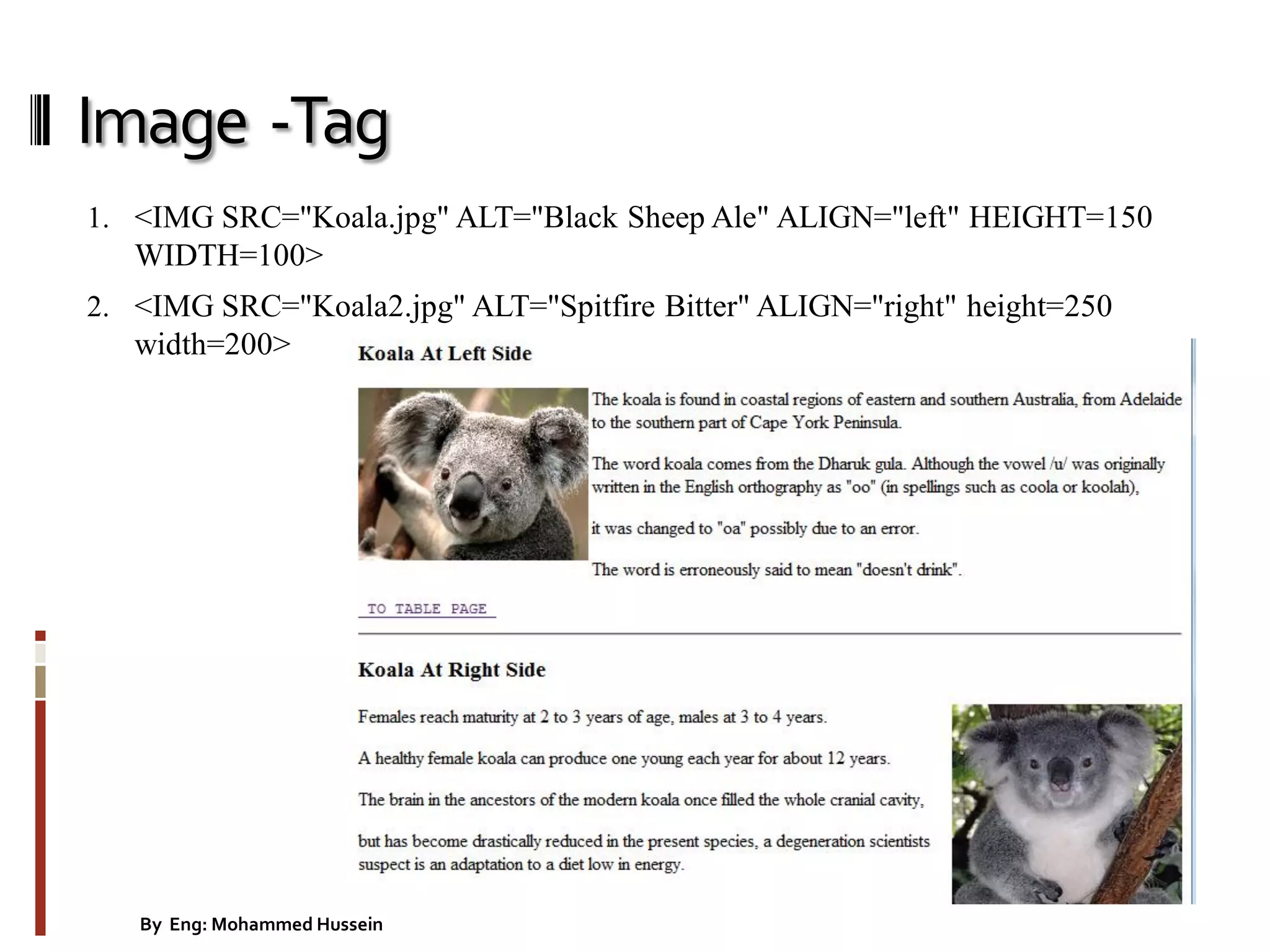
Image -Tag 1. <IMG SRC="Koala.jpg" ALT="Black Sheep Ale" ALIGN="left" HEIGHT=150 WIDTH=100> 2. <IMG SRC="Koala2.jpg" ALT="Spitfire Bitter" ALIGN="right" height=250 width=200> 33By Eng: Mohammed Hussein
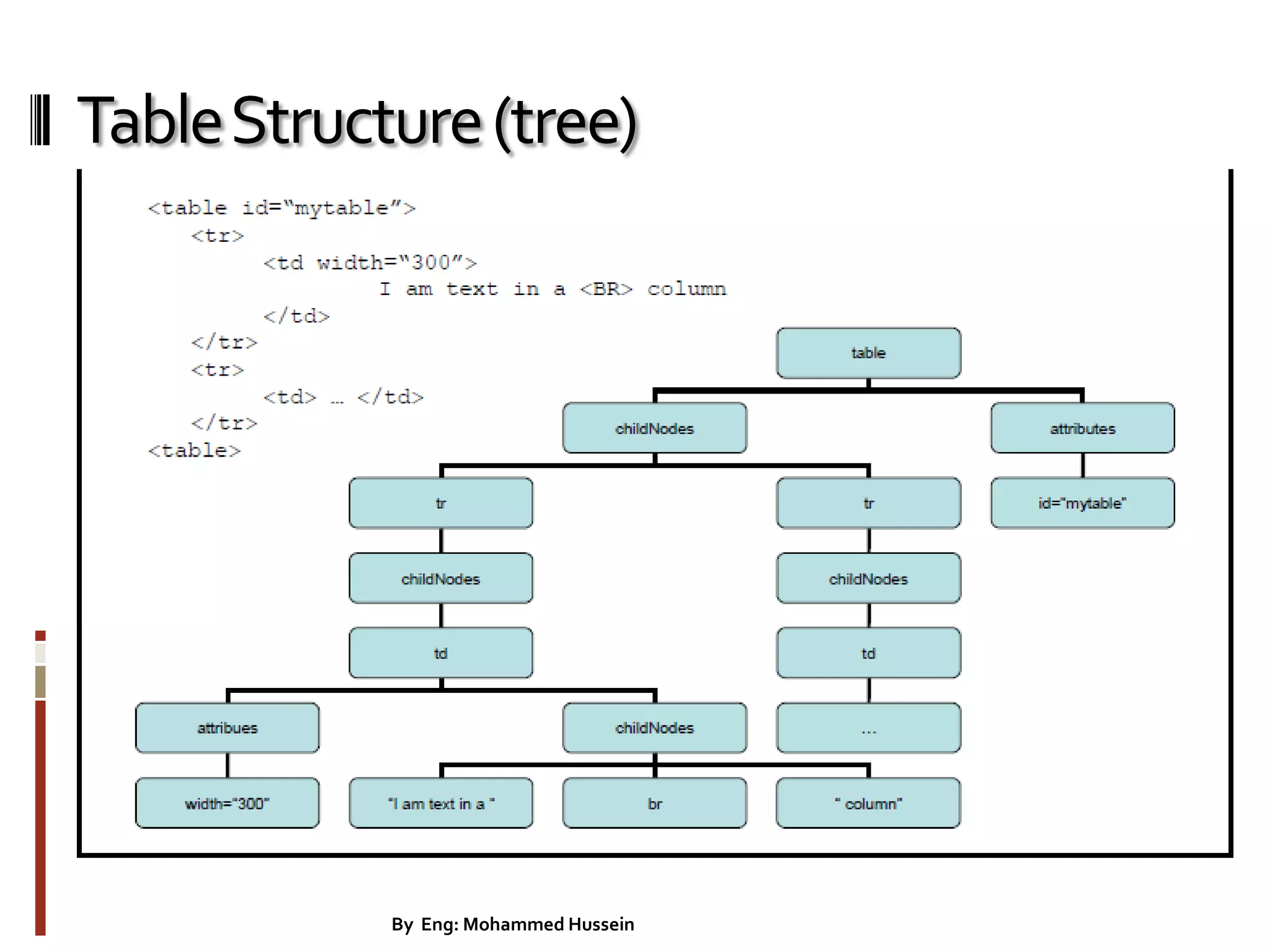
TableStructure(tree) 34By Eng: Mohammed Hussein
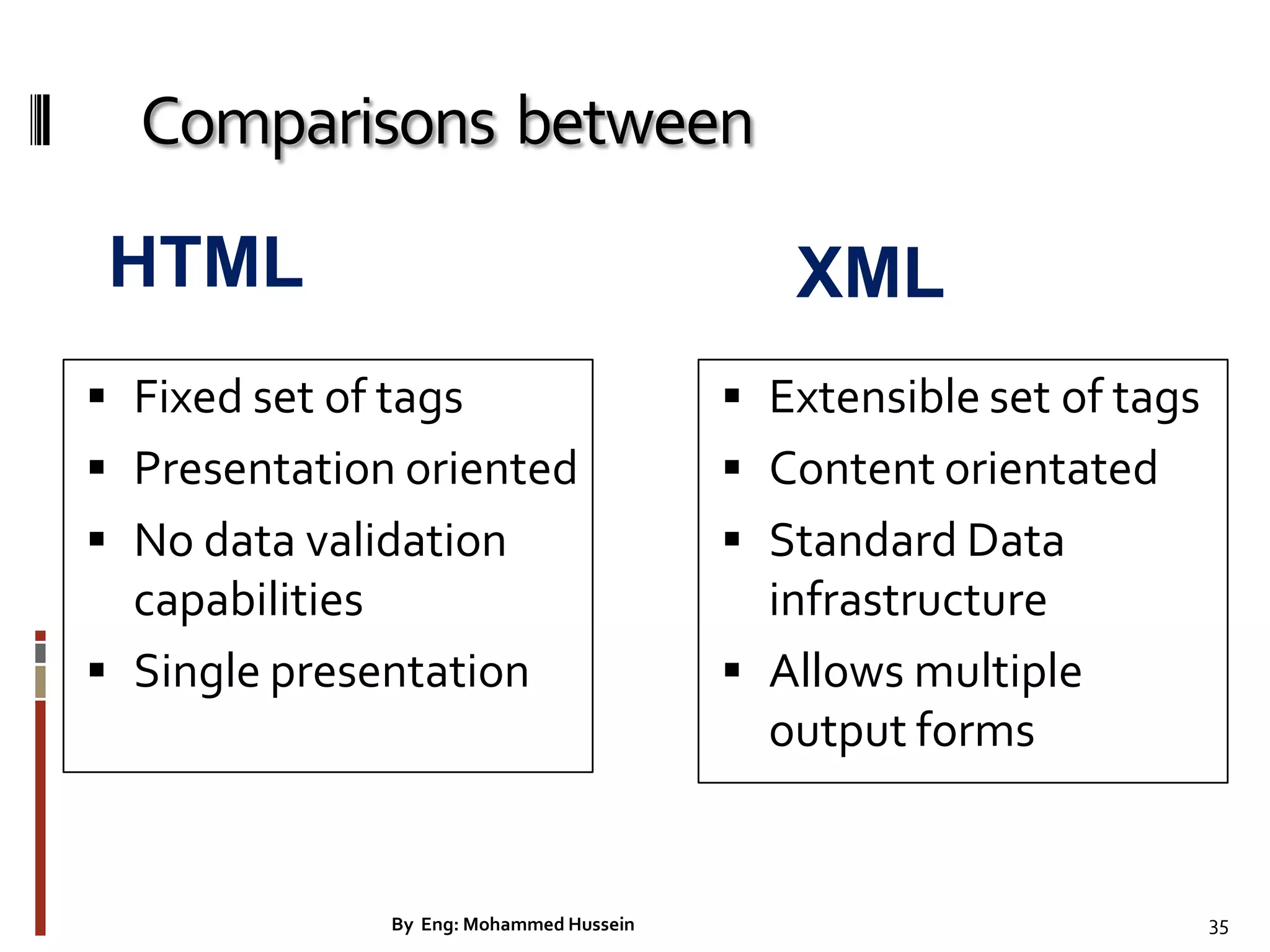
Comparisons between  Fixed set of tags  Presentation oriented  No data validation capabilities  Single presentation  Extensible set of tags  Content orientated  Standard Data infrastructure  Allows multiple output forms XMLHTML 35By Eng: Mohammed Hussein
WindowDHTMLObjectModel. applets all anchors embeds forms filters images links plugins styleSheets scripts frames plugins collection body screen document history navigator location event document document object window Key 36By Eng: Mohammed Hussein
References  http://www.w3schools.com/w3c/w3c_html.asp  http://httpd.apache.org/  http://www.joomla.org/download.html  http://www.yourhtmlsource.com/javascript/cookies. html

Internet programming lecture 1

  • 1.
    Lecturer, and ResearcheratThamar University By Eng: Mohammed Hussein Email: mohammedhbi@gmail.com Republic of Yemen THAMAR UNIVERSITY Faculty of Computer Science& Information System 1By Eng: Mohammed Hussein
  • 2.
    Outline  Course Details Introduction  Programming and TheWeb  Programming vs. Scripting  Serving HTML Pages  Web Server  Accessing a database  Web application  Ajax  HTMLTags 2By Eng: Mohammed Hussein
  • 3.
    CourseDetails  Grading : Practical and Project : 35%  One topic per/students from a specified set  30 minutes presentation  Examination : 65%  E.g. question you ask and how much you interact 3By Eng: Mohammed Hussein
  • 4.
    Whatyou have todo in your project? Eng.Tariq will describe for you during the practical class time. In additional to that, you have to study and implement the DevelopPHPCustomCMS project, which shows the course concept. By Eng: Mohammed Hussein 4
  • 5.
    Introduction • WorldWideWeb(WWW): • acollection of interlinked multimedia documents that are stored on the Internet • HyperTextTransfer Protocol(HTTP) : • a protocol to access the WWW. • Dynamic HTML Object Model – Allows web authors to control the presentation of their pages – Gives them access to all the elements on their pages. • Web page: consist of – Elements, forms, frames, tables – Represented in an object hierarchy • Scripting – Retrieve and modify properties and attributes 5By Eng: Mohammed Hussein
  • 6.
    Programming and Web Adding dynamic elements to web.  HTML and XHTML pages are static - no real interactivity with the user.  Web programming languages such as Flash, JavaScript and PHP can be used to add interactivity to HTML/XHTML.  Examples include responding to mouse and keyboard actions, checking user input, building web pages dynamically, inputting and displaying data, etc. Text, Graphics & Pictures HTML, DHTML, XHTML & CSS PHP & MySql Flash, JavaScript & XML 6By Eng: Mohammed Hussein
  • 7.
    Programming and Web Client-side vs. Server-side  Client refers to the end-user's computer or a program running on that computer.  Server refers to a central computer (or a program running on a central computer) that clients connect to and interact with.  Clients and Servers connect via the Internet or a local network such as an intranet.  Differences between client-side and server-side are important when programming for theWorldWideWeb.  In most cases, creating a dynamic web site requires both client- side programming (e.g. JavaScript) and server-side programming (e.g. PHP). 7By Eng: Mohammed Hussein
  • 8.
    Programming vs. Scripting Not a concrete distinction, but...  Programming languages generally have stricter rules of syntax, often need to be compiled, and usually produce code that can run more or less independently of other software.  Scripting languages are generally less strict about syntax, are usually interpreted rather than compiled, and often produce code that works with another application (e.g. a web browser or a web server).  Most newcomers find scripting languages easier to learn.  JavaScript and PHP (in its usual form) are both scripting languages. 8By Eng: Mohammed Hussein
  • 9.
    Serving HTML Pages How clients can request HTML documents stored on a server?  We don't usually make web pages just to be viewed locally.We want to place the HTML files on a file server that is part of Internet!You do this by uploading the pages to An ISP (Internet Service Provider).As you can see in The diagram below  Setting up a Server  You can set up an HTTP server on an Linux machine using the httpd program. Many Linux machines include the ApacheWeb Server.  On a Windows you can set up xampp-win32 that include the ApacheWeb Server. 9By Eng: Mohammed Hussein
  • 10.
  • 11.
    ServingHTMLPages  HTML pageincludes image, audio, and video files. All of this content lives on a web server—a remote machine often far away from Client computer.  Client use a web browser to request, retrieve, and eventually display web content on the screen. 11By Eng: Mohammed Hussein
  • 12.
    CommonGatewayInterface (CGI) The interface specificationthat defines how information can be passed from the browsers back to the server is called the CommonGateway Interface, (CGI). 12By Eng: Mohammed Hussein
  • 13.
    Preparingtobuilddynamic sites 1. Webbrowser requests static page. 2. Web server finds page. 3. Web server sends page to requesting browser. 13By Eng: Mohammed Hussein
  • 14.
    Processing dynamic pages 1.Web browser requests dynamic page. 2. Web server finds page and passes it to application server. 3. Application server scans page for instructions and finishes page. 4. Application server passes finished page back to web server 5. Web server sends finished page to requesting browser 14By Eng: Mohammed Hussein
  • 15.
    Accessingadatabase 1. Web browserrequests dynamic page. 2. Web server finds page and passes it to application server. 3. Application server scans page for instructions. 4. Application server sends query to database driver. 5. Driver executes the query against the database. 6. Recordset is returned to driver. 7. Driver passes recordset to application server 8. Application server inserts data in page, and then passes the page to the web server 9. Web server sends finished page to requesting browser. 15By Eng: Mohammed Hussein
  • 16.
    WebApplication  A webapplication is a website that contains pages with partly or final content of a page.  The final content of a page is determined only when the visitor requests a page from the web server.  A dynamic page which is the final content of the page that have varies of from request based on the visitor’s actions.  Web applications are built to address a variety of challenges and problems. 16By Eng: Mohammed Hussein
  • 17.
  • 18.
    TraditionalWebApplications Figure 15.1 presentsthe typical interactions between the client and the server in a traditional web application, such as one that uses a user registration form. First, the user fills in the form’s fields, then submits the form (Fig. 15.1, Step 1). The browser generates a request to the server, which receives the request and processes it (Step 2). The server generates and sends a response containing the exact page that the browser will render (Step 3), which causes the browser to load the new page (Step 4) and temporarily makes the browser window blank. Note that the client waits for the server to respond and reloads the entire page with the data from the response (Step 4). While such a synchronous request is being processed on the server, the user cannot interact with the client web page. Frequent long periods of waiting, due perhaps to Internet congestion, have led some users to refer to the World Wide Web as the ―World Wide Wait.‖ If the user interacts with and submits another form, the process begins again (Steps 5–8). By Eng: Mohammed Hussein 18
  • 19.
  • 20.
    AjaxWebApplications Ajax applications adda layer between the client and the server to manage communication between the two (Fig. 15.2). When the user interacts with the page, the client creates an XMLHttpRequest object to manage a request (Step 1). The XMLHttpRequest object sends the request to the server (Step 2) and awaits the response. The requests are asynchronous, so the user can continue interacting with the application on the client-side while the server processes the earlier request concurrently. Other user interactions could result in additional requests to the server (Steps 3 and 4). Once the server responds to the original request (Step 5), the XMLHttpRequest object that issued the request calls a client-side function to process the data returned by the server. This function—known as a callback function—uses partial page updates (Step 6) to display the data in the existing web page without reloading the entire page. At the same time, the server may be responding to the second request (Step 7) and the client-side may be starting to do another partial page update (Step 8). The callback function updates only a designated part of the page. Such partial page updates help make web applications more responsive, making them feel more like desktop applications. The web application does not load a new page while the user interacts with it. By Eng: Mohammed Hussein 20
  • 21.
    XAMPP webserver  http://localhost/ Username: root  PHP Script Language  phpMyAdmin Database Manager  MySQL Database By Eng: Mohammed Hussein 21
  • 22.
    AppServ-webserver  http://localhost/  Username:root  PHP Script Language  phpMyAdmin Database Manager  MySQL Database 22By Eng: Mohammed Hussein
  • 23.
    AdobeDreamweaverCS5  You canuse Adobe Dreamweaver CS5 or CS6 for the basic steps involved in creating an attractive, functional website.  In this course, you will learn to design a site layout, insert images and text, create links, and how to upload your site to the Internet. 23By Eng: Mohammed Hussein
  • 24.
    Organizing yourwebsite  ProjectName  Images folder  Html or php folder  Index page  Index page is the first page which the server will run this index file in a website.  Index page extension could be html or php. 24By Eng: Mohammed Hussein
  • 25.
  • 26.
    CommonHtml Tags <body> <table> <h1> <div> <title> <frame> <form> <select> <option> <head> <a> <html> <meta > < link > <script> <label > &nbsp; < input > < img><p> <br> 26By Eng: Mohammed Hussein
  • 27.
    HTMLTags  <Title >: It is very important when it’s come to Google search and it will appear with blue link that inGoogle results.  <DIV> :To make sure the contents inside it will keep sizes.  <Table>: represent data in table and sometimes can be used like <DIV>. 27By Eng: Mohammed Hussein
  • 28.
    <FORM>Tag  <FORM> tagwhich allows users to input data into the web server by using methods.  The <FORM> tag starts an HTML form and takes the most important three attributes:  TheACTION attribute specifies the URL of the program to invoke to process this form.  The METHOD attribute send the form data to the target web page and it takes values either GET or POST. 28By Eng: Mohammed Hussein
  • 29.
    Security(GET,POST) methods  Thehole security which allows users to change your URL string, in order to have access to you data of page. 29By Eng: Mohammed Hussein 1. Post method is more secure. 2. Post method sent data to http response (body). 3. Post method sent more data. 4. Post method is not good for search but it is good for hidden data. 1. Get method is less secure. 2. Get method sent data to page address. 3. Get method sent less data. 4. Get method is good for search content in order to let users to used it again.
  • 30.
    <html> <head> <title>My Page</title> </head> <body> <h1>Mohammed Hussein</h1> <h2>Welcome</h2> <b>Tothe course</b>: <p><tt>Internet Programming</tt><p> on your computer. <p> <b>Press</b> <i>The <font color="red">Next</font> Button</i>. </body> </html> 30By Eng: Mohammed Hussein
  • 31.
  • 32.
    HTMLFragment:(description) From the HTMLwe can say: 1. The <html> node has no parent node; it is the root node. 2. The parent node of the <head> and <body> nodes is the <html> node. 3. The <html> node has two child nodes; <head> and <body> 4. The <head> node has one child node; the <title> node 5. The <title> node also has one child node; the text node "Welcome" 6. The <h1> and <p> nodes are siblings, and both are children nodes of <body> 7. The parent node of the "Hello world!" text node is the <p> node. <html> <head> <title>Welcome</title> </head> <body> <h1>Lesson one</h1> <p>Hello world!</p> </body> </html> 32By Eng: Mohammed Hussein
  • 33.
    Image -Tag 1. <IMGSRC="Koala.jpg" ALT="Black Sheep Ale" ALIGN="left" HEIGHT=150 WIDTH=100> 2. <IMG SRC="Koala2.jpg" ALT="Spitfire Bitter" ALIGN="right" height=250 width=200> 33By Eng: Mohammed Hussein
  • 34.
  • 35.
    Comparisons between  Fixedset of tags  Presentation oriented  No data validation capabilities  Single presentation  Extensible set of tags  Content orientated  Standard Data infrastructure  Allows multiple output forms XMLHTML 35By Eng: Mohammed Hussein
  • 36.
  • 37.
    References  http://www.w3schools.com/w3c/w3c_html.asp  http://httpd.apache.org/ http://www.joomla.org/download.html  http://www.yourhtmlsource.com/javascript/cookies. html