Promoting robotic design and entrepreneurship experiences among students and teachers Lesson 5: Introduction to Arduino Innovative Technology Experiences for Students and Teachers (ITEST), Professional Development Program, July 2017 - 19 Mechatronics, Controls, and Robotics Laboratory, Department of Mechanical and Aerospace Engineering, NYU Tandon School of Engineering
CONTENTS • Microcontrollers and microprocessors • Introduction to Arduino • Types of Arduino boards • Programming basics: Structure of a code • TASK/ACTIVITY: ➢ Blink on-board LED ➢ Blink LED(s) ➢ Change brightness of LEDs Promoting Robotic Design and Entrepreneurship Experiences Among Students and Teachers Innovative Technology Experiences for Students and Teachers (ITEST), Professional Development Program, NYU Tandon School of Engineering, July 2017-19 2
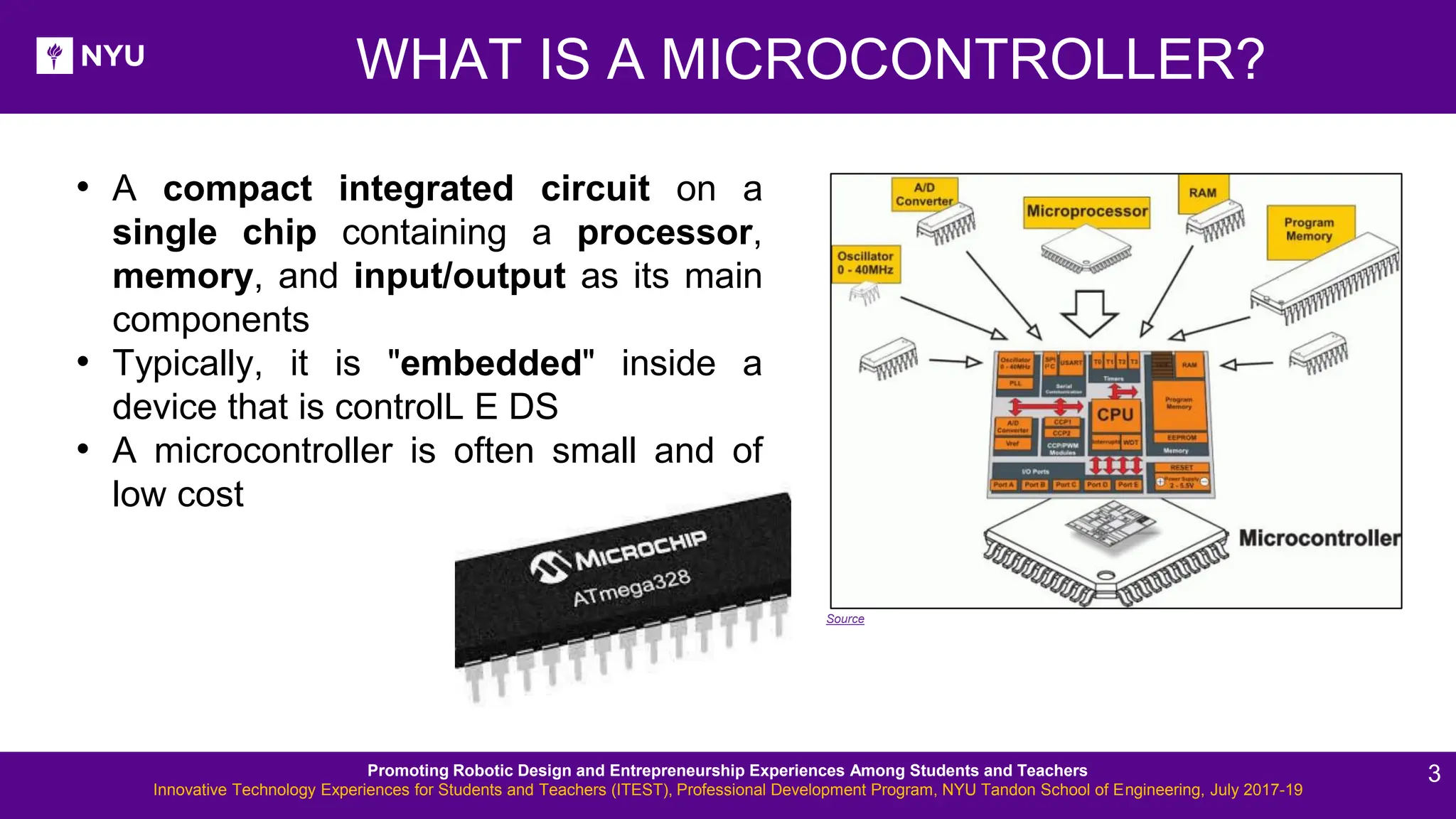
New Lesson - Photos WHAT IS A MICROCONTROLLER? • A compact integrated circuit on a single chip containing a processor, memory, and input/output as its main components • Typically, it is "embedded" inside a device that is controlL E DS • A microcontroller is often small and of low cost Source Promoting Robotic Design and Entrepreneurship Experiences Among Students and Teachers Innovative Technology Experiences for Students and Teachers (ITEST), Professional Development Program, NYU Tandon School of Engineering, July 2017-19 3
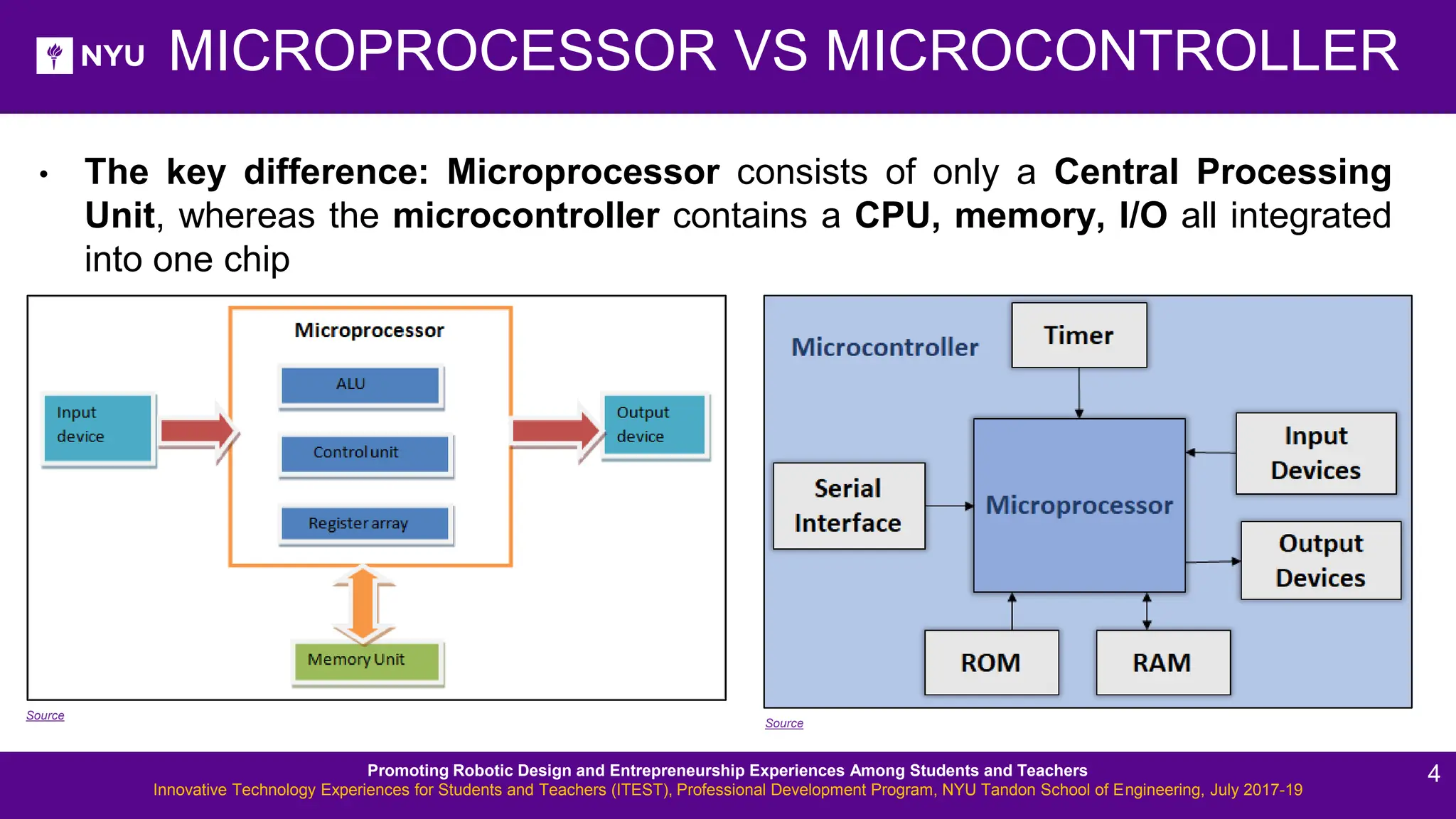
• The key difference: Microprocessor consists of only a Central Processing Unit, whereas the microcontroller contains a CPU, memory, I/O all integrated into one chip MICROPROCESSOR VS MICROCONTROLLER Source Source Promoting Robotic Design and Entrepreneurship Experiences Among Students and Teachers Innovative Technology Experiences for Students and Teachers (ITEST), Professional Development Program, NYU Tandon School of Engineering, July 2017-19 4
New Lesson - Photos MORE ABOUT THE DEVICES What is the difference between a computer, a microprocessor and a microcontroller? • Microprocessor is a full computation engine fabricated on a single chip; It acts as the central processing unit (CPU) of a microcomputer • A Computer is a microprocessor packaged on a single circuit board with many interfaces and memory chips; General purpose computers, i.e., PCs, are designed explicitly to interface with humans • Microcontrollers are designed to interface, interact, and communicate with ➢ Electrical/electronic devices ➢ Sensor/actuators ➢ High-tech gadgets, etc. Promoting Robotic Design and Entrepreneurship Experiences Among Students and Teachers Innovative Technology Experiences for Students and Teachers (ITEST), Professional Development Program, NYU Tandon School of Engineering, July 2017-19 5
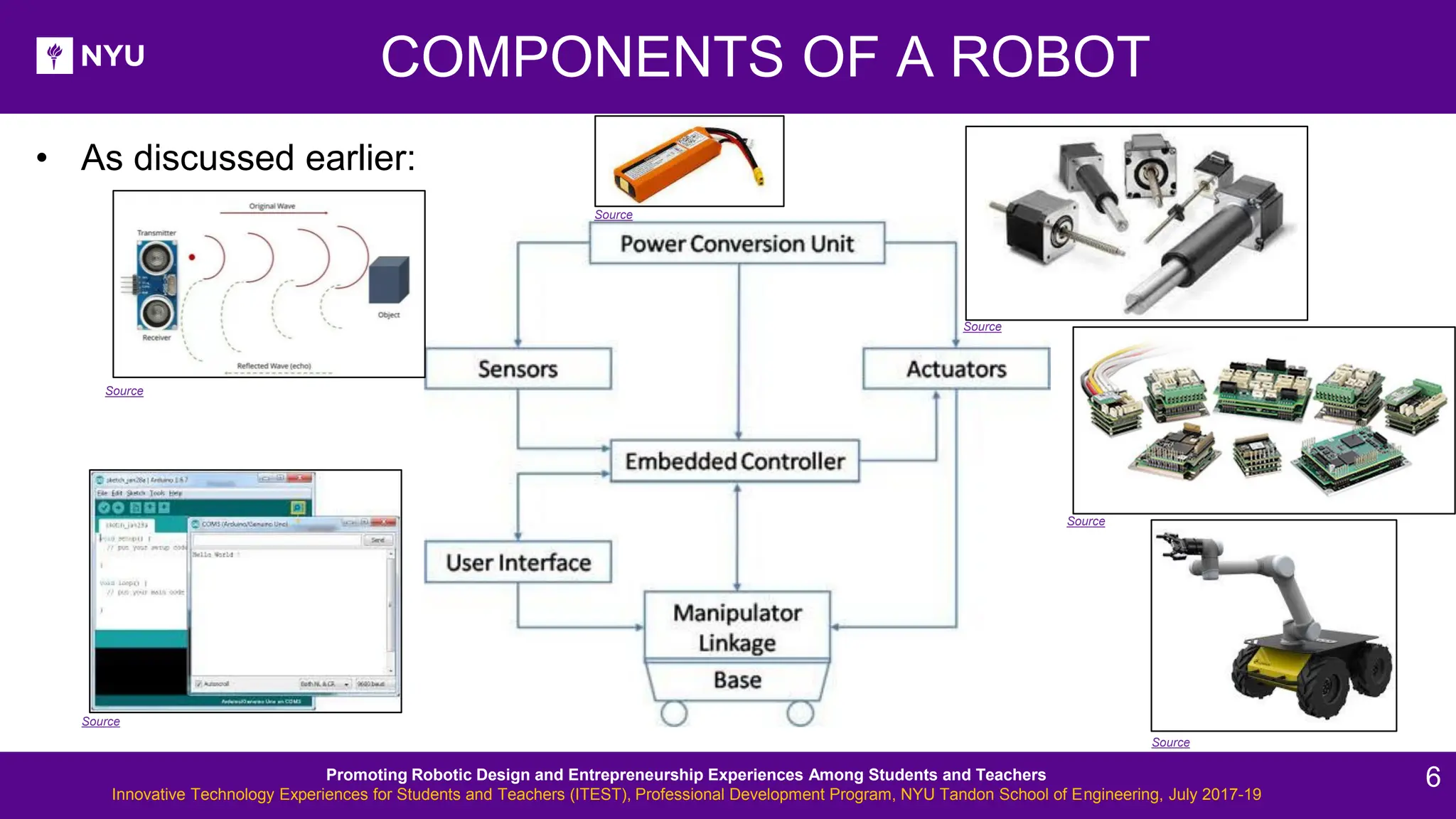
COMPONENTS OF A ROBOT • As discussed earlier: Source Source Source Source Source Source Promoting Robotic Design and Entrepreneurship Experiences Among Students and Teachers Innovative Technology Experiences for Students and Teachers (ITEST), Professional Development Program, NYU Tandon School of Engineering, July 2017-19 6
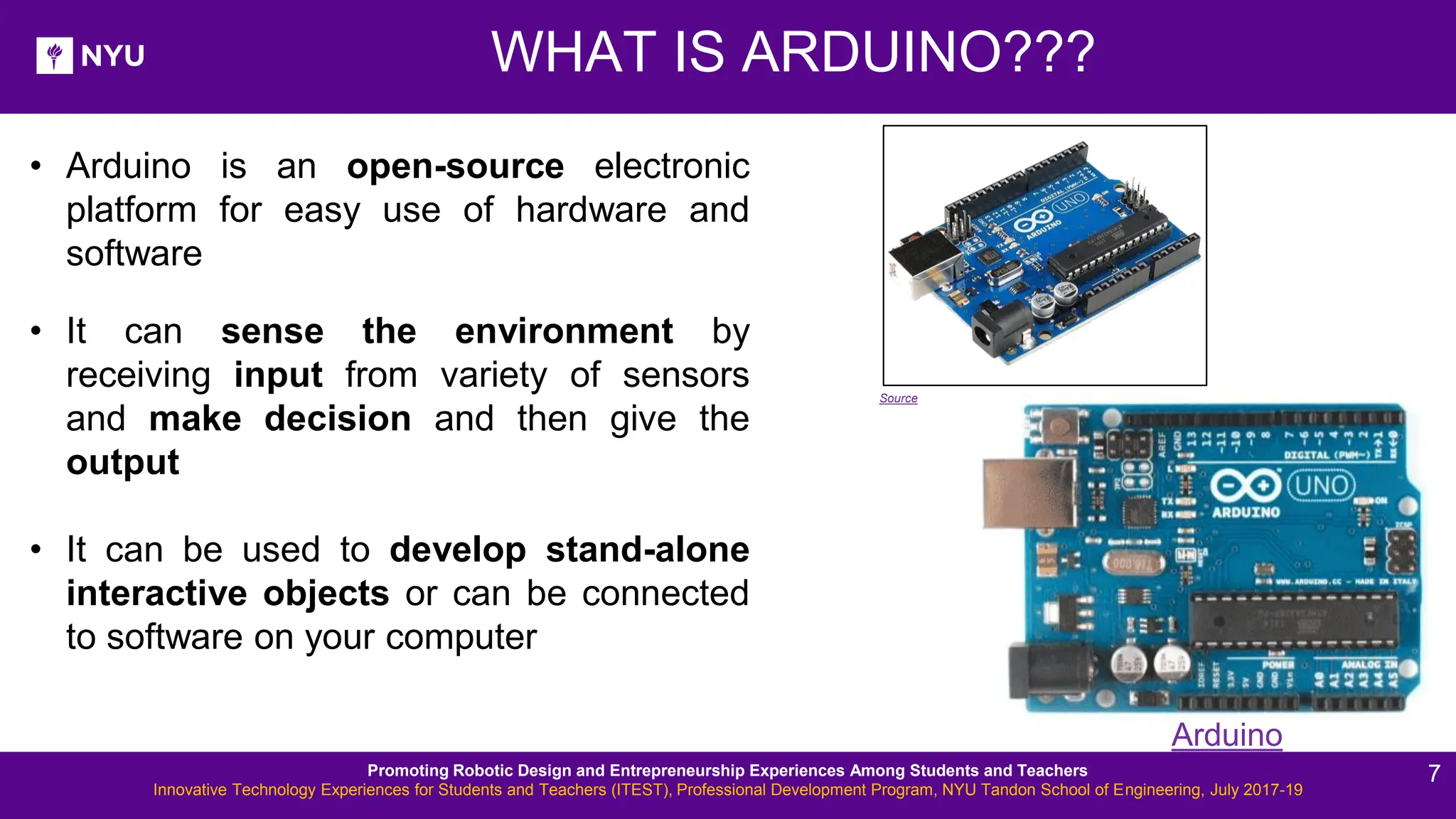
New Lesson - Photos WHAT IS ARDUINO??? • Arduino is an open-source electronic platform for easy use of hardware and software • It can sense the environment by receiving input from variety of sensors and make decision and then give the output • It can be used to develop stand-alone interactive objects or can be connected to software on your computer Arduino Source Promoting Robotic Design and Entrepreneurship Experiences Among Students and Teachers Innovative Technology Experiences for Students and Teachers (ITEST), Professional Development Program, NYU Tandon School of Engineering, July 2017-19 7
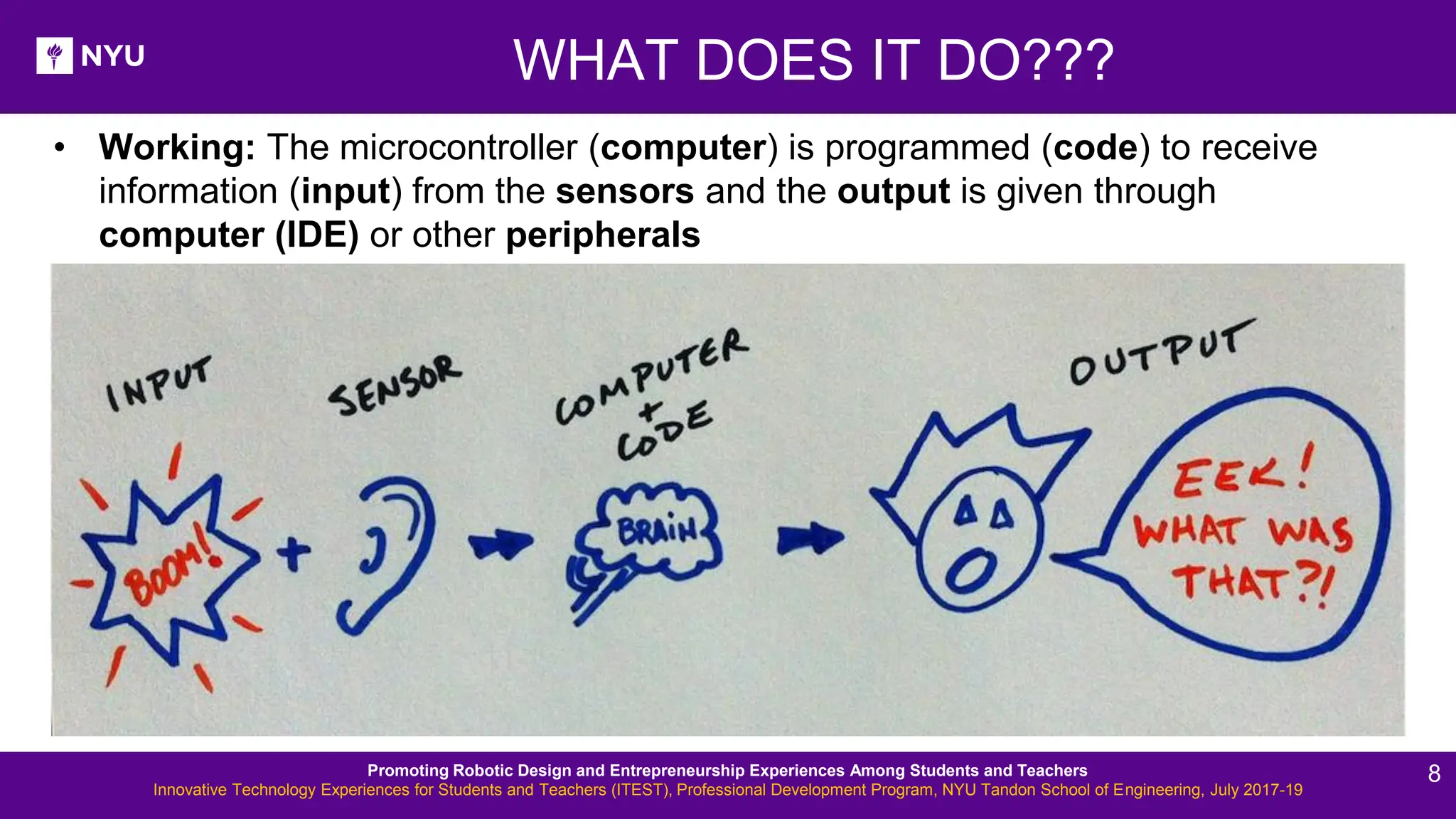
WHAT DOES IT DO??? • Working: The microcontroller (computer) is programmed (code) to receive information (input) from the sensors and the output is given through computer (IDE) or other peripherals Promoting Robotic Design and Entrepreneurship Experiences Among Students and Teachers Innovative Technology Experiences for Students and Teachers (ITEST), Professional Development Program, NYU Tandon School of Engineering, July 2017-19 8
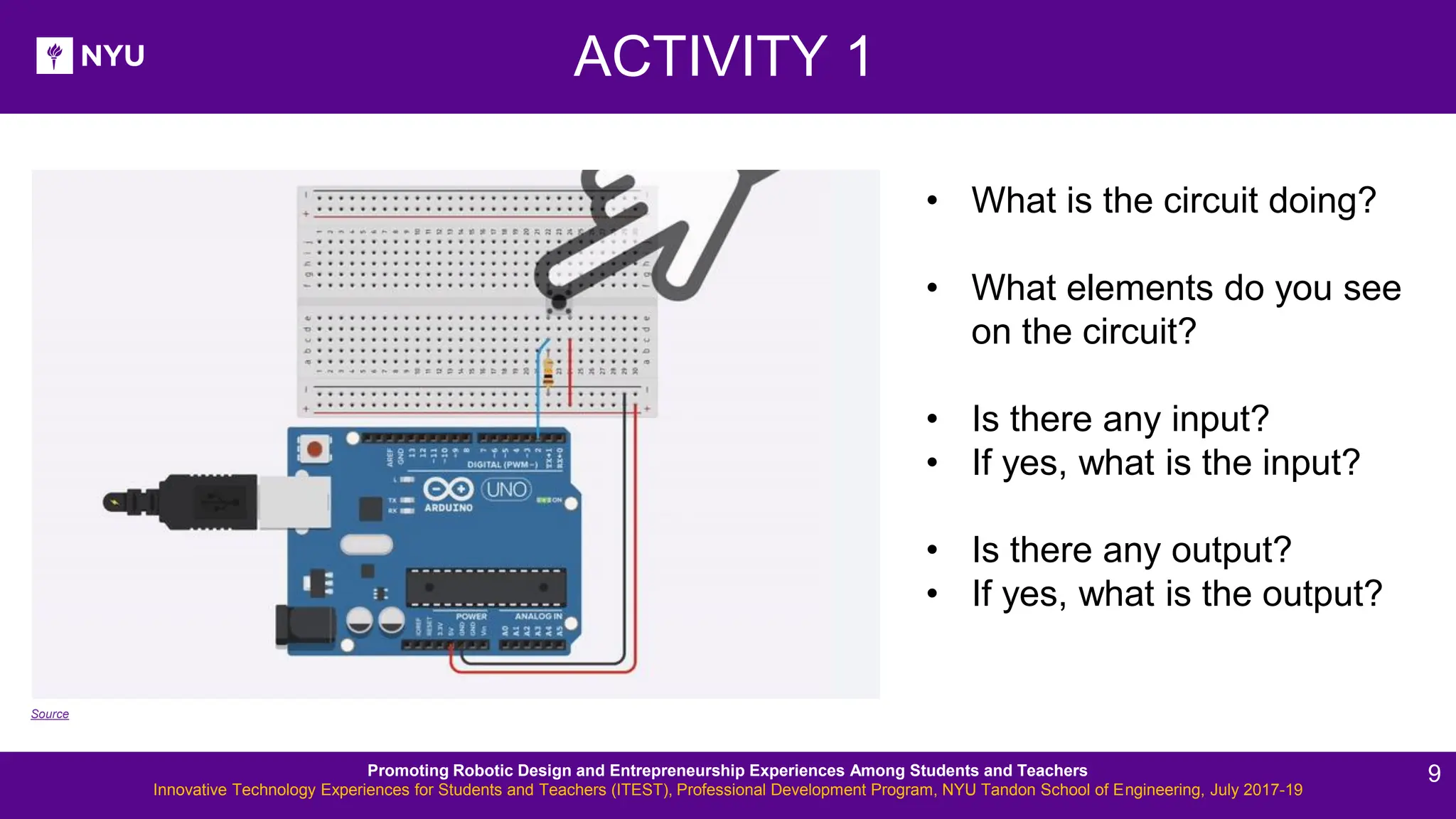
ACTIVITY 1 • What is the circuit doing? • What elements do you see on the circuit? • Is there any input? • If yes, what is the input? • Is there any output? • If yes, what is the output? Source Promoting Robotic Design and Entrepreneurship Experiences Among Students and Teachers Innovative Technology Experiences for Students and Teachers (ITEST), Professional Development Program, NYU Tandon School of Engineering, July 2017-19 9
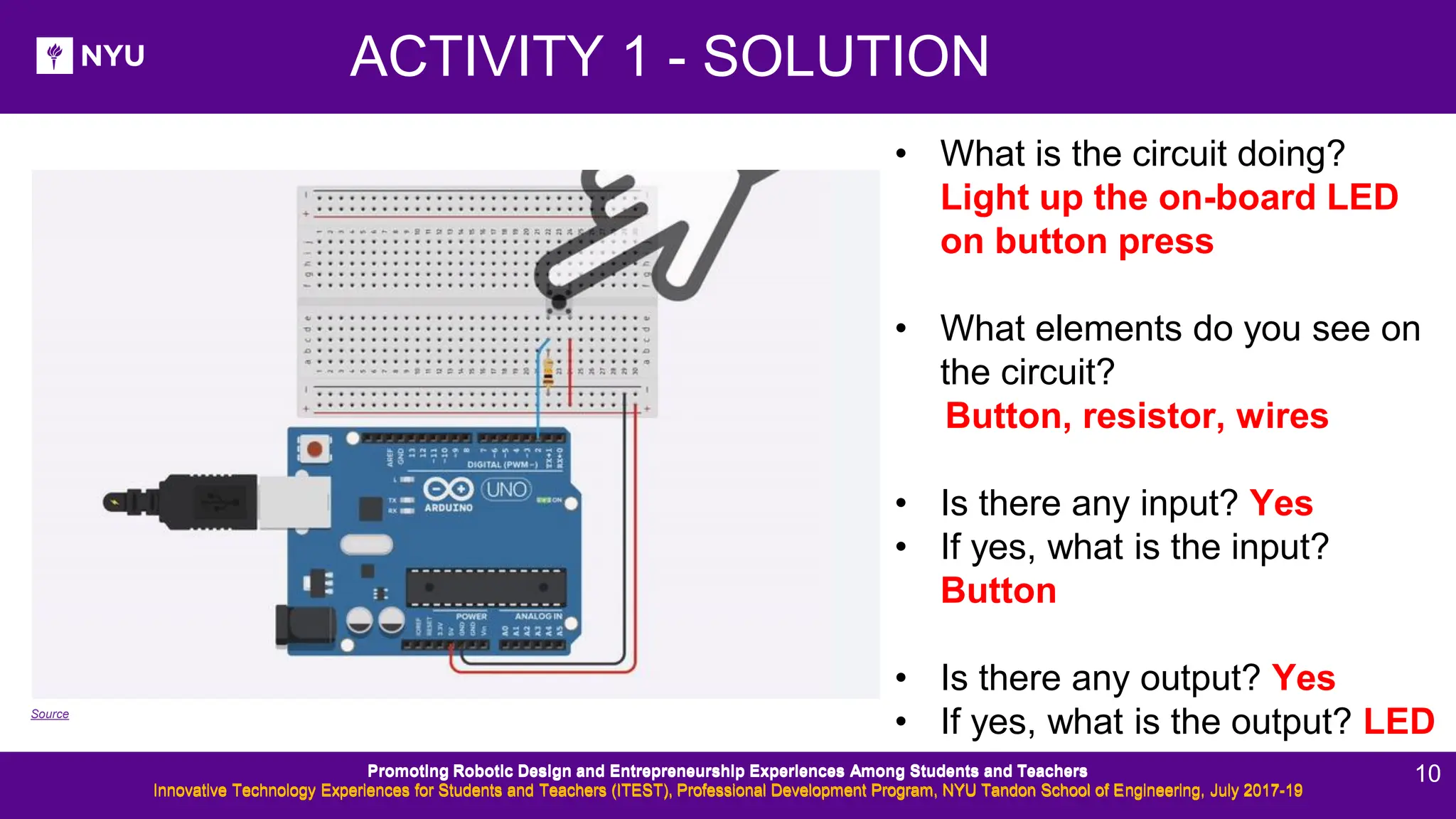
ACTIVITY 1 - SOLUTION • What is the circuit doing? Light up the on-board LED on button press • What elements do you see on the circuit? Button, resistor, wires • Is there any input? Yes • If yes, what is the input? Button • Is there any output? Yes • If yes, what is the output? LED Source Promoting Robotic Design and Entrepreneurship Experiences Among Students and Teachers Innovative Technology Experiences for Students and Teachers (ITEST), Professional Development Program, NYU Tandon School of Engineering, July 2017-19 Promoting Robotic Design and Entrepreneurship Experiences Among Students and Teachers Innovative Technology Experiences for Students and Teachers (ITEST), Professional Development Program, NYU Tandon School of Engineering, July 2017-19 10
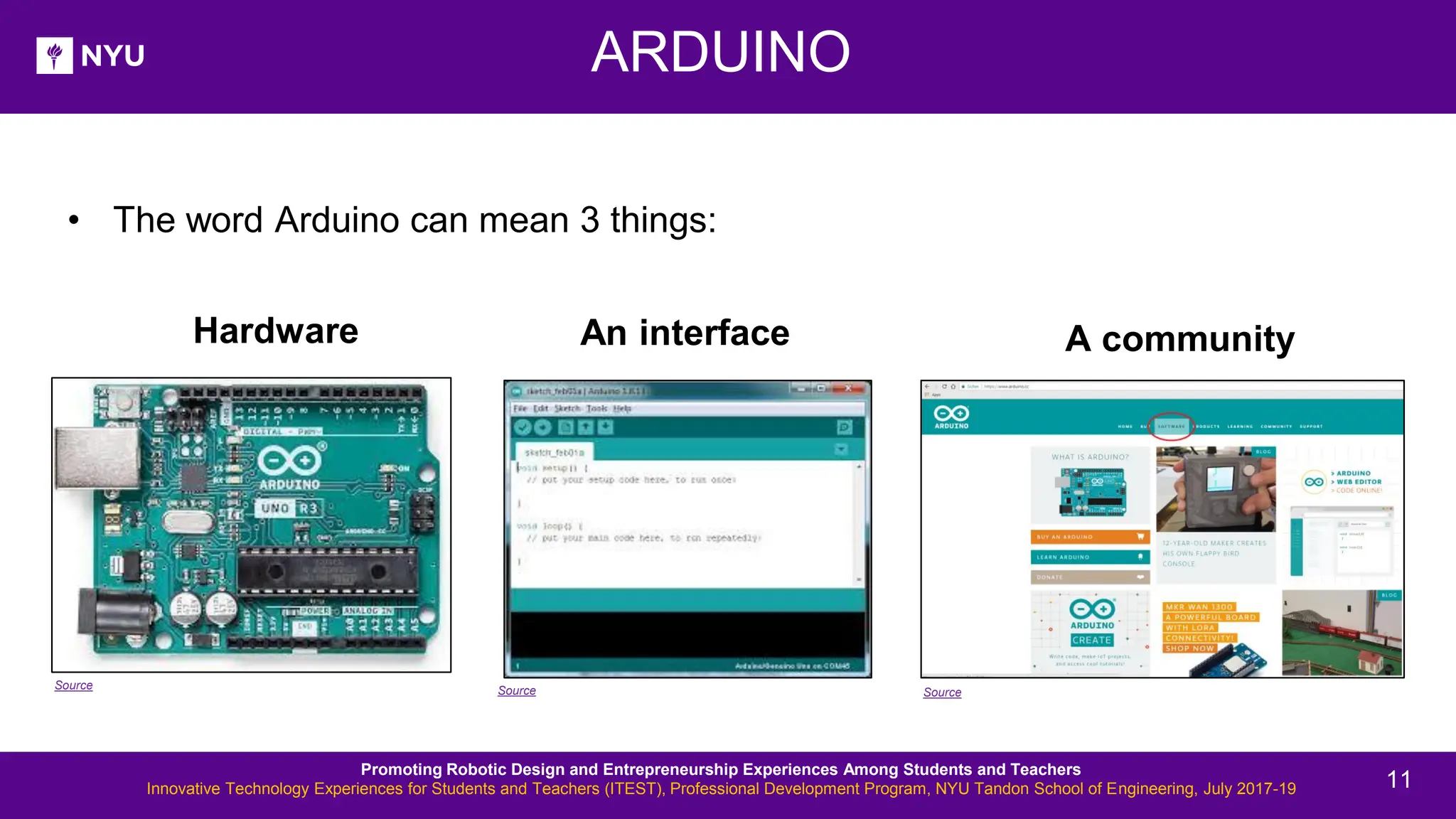
ARDUINO Source Source Source Promoting Robotic Design and Entrepreneurship Experiences Among Students and Teachers Innovative Technology Experiences for Students and Teachers (ITEST), Professional Development Program, NYU Tandon School of Engineering, July 2017-19 • The word Arduino can mean 3 things: An interface A community Hardware 11
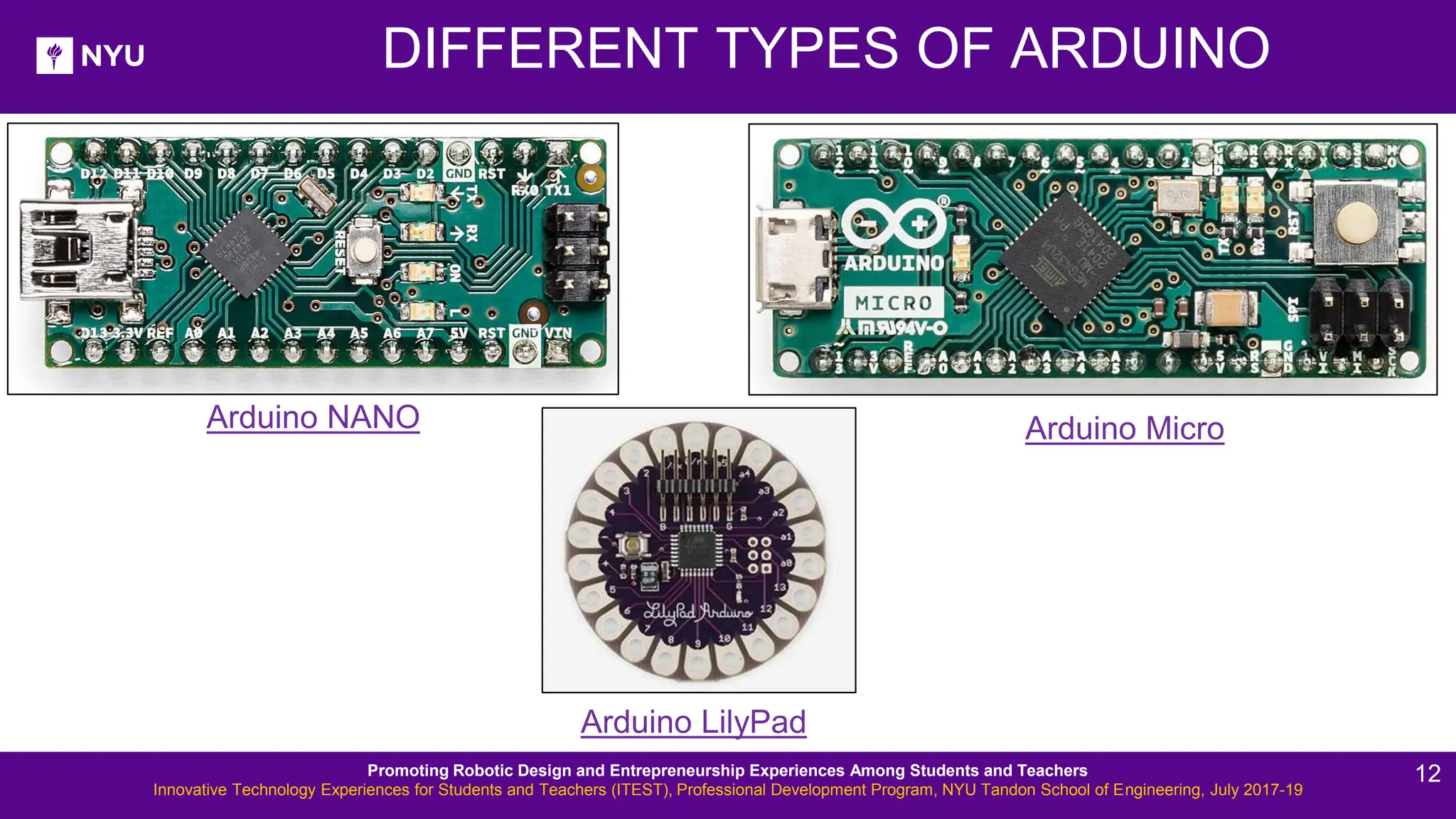
DIFFERENT TYPES OF ARDUINO Arduino LilyPad Arduino NANO Arduino Micro Promoting Robotic Design and Entrepreneurship Experiences Among Students and Teachers Innovative Technology Experiences for Students and Teachers (ITEST), Professional Development Program, NYU Tandon School of Engineering, July 2017-19 12
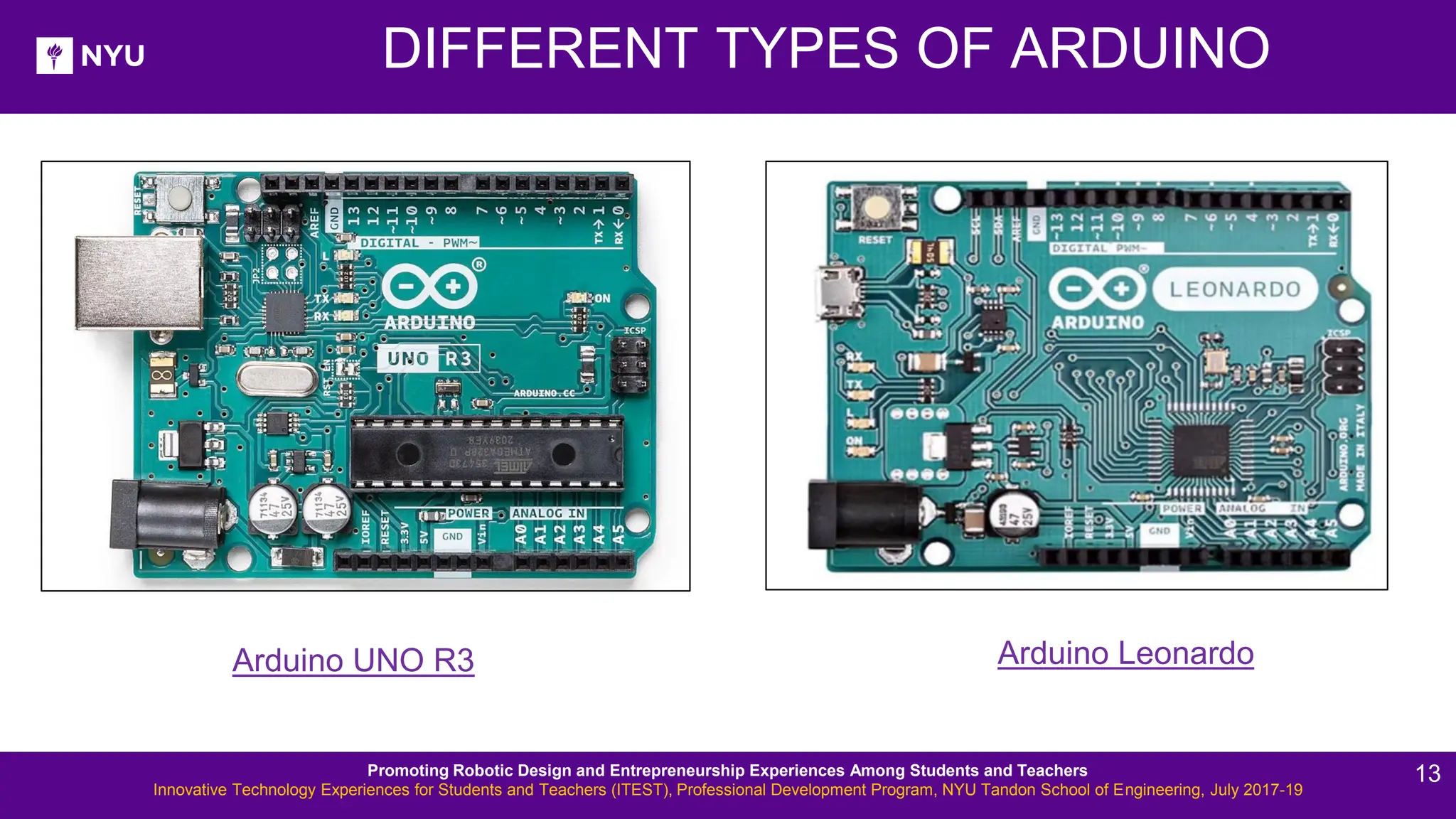
DIFFERENT TYPES OF ARDUINO Arduino UNO R3 Arduino Leonardo Promoting Robotic Design and Entrepreneurship Experiences Among Students and Teachers Innovative Technology Experiences for Students and Teachers (ITEST), Professional Development Program, NYU Tandon School of Engineering, July 2017-19 13
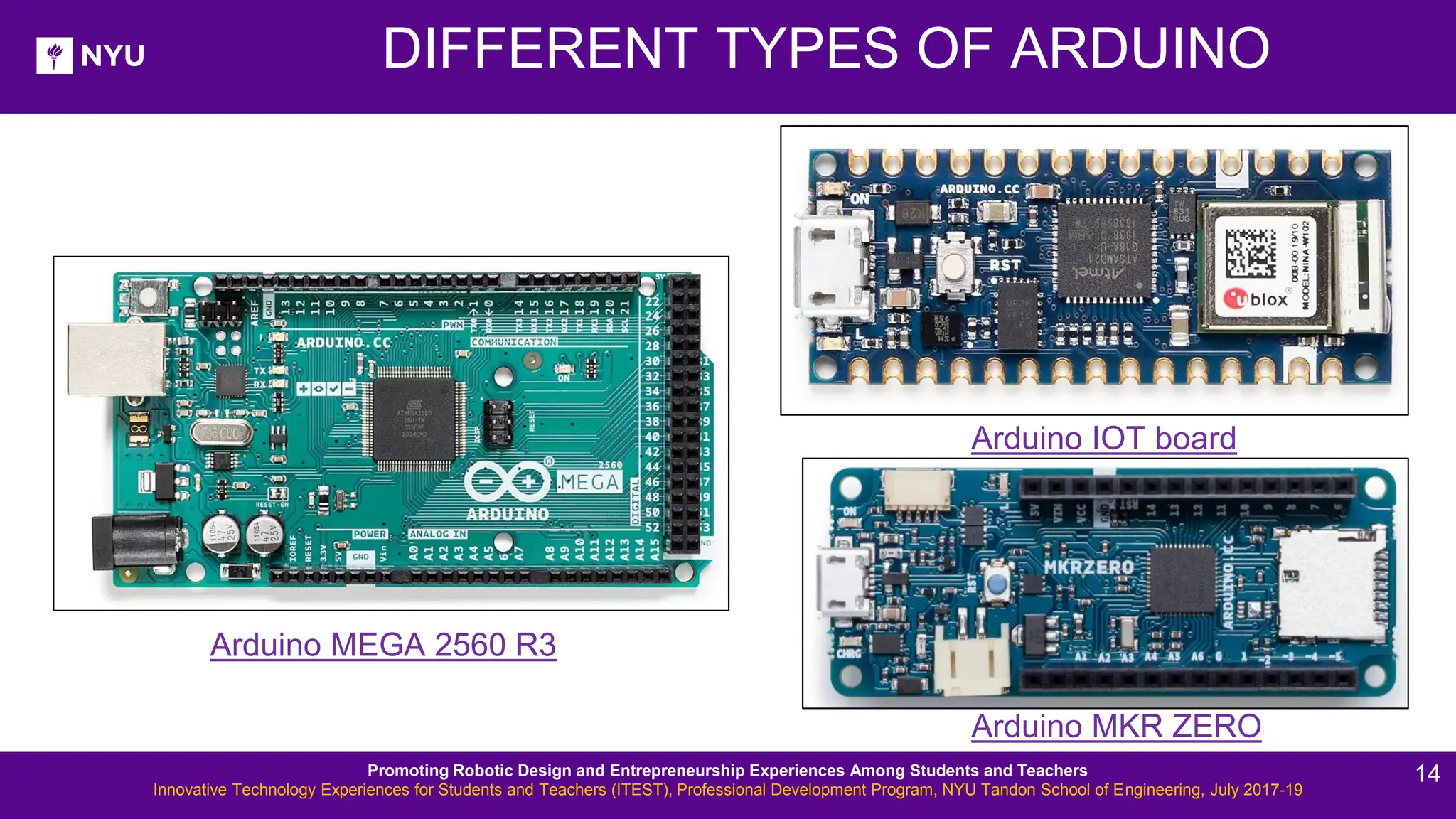
DIFFERENT TYPES OF ARDUINO Arduino MKR ZERO Arduino IOT board Arduino MEGA 2560 R3 Promoting Robotic Design and Entrepreneurship Experiences Among Students and Teachers Innovative Technology Experiences for Students and Teachers (ITEST), Professional Development Program, NYU Tandon School of Engineering, July 2017-19 14
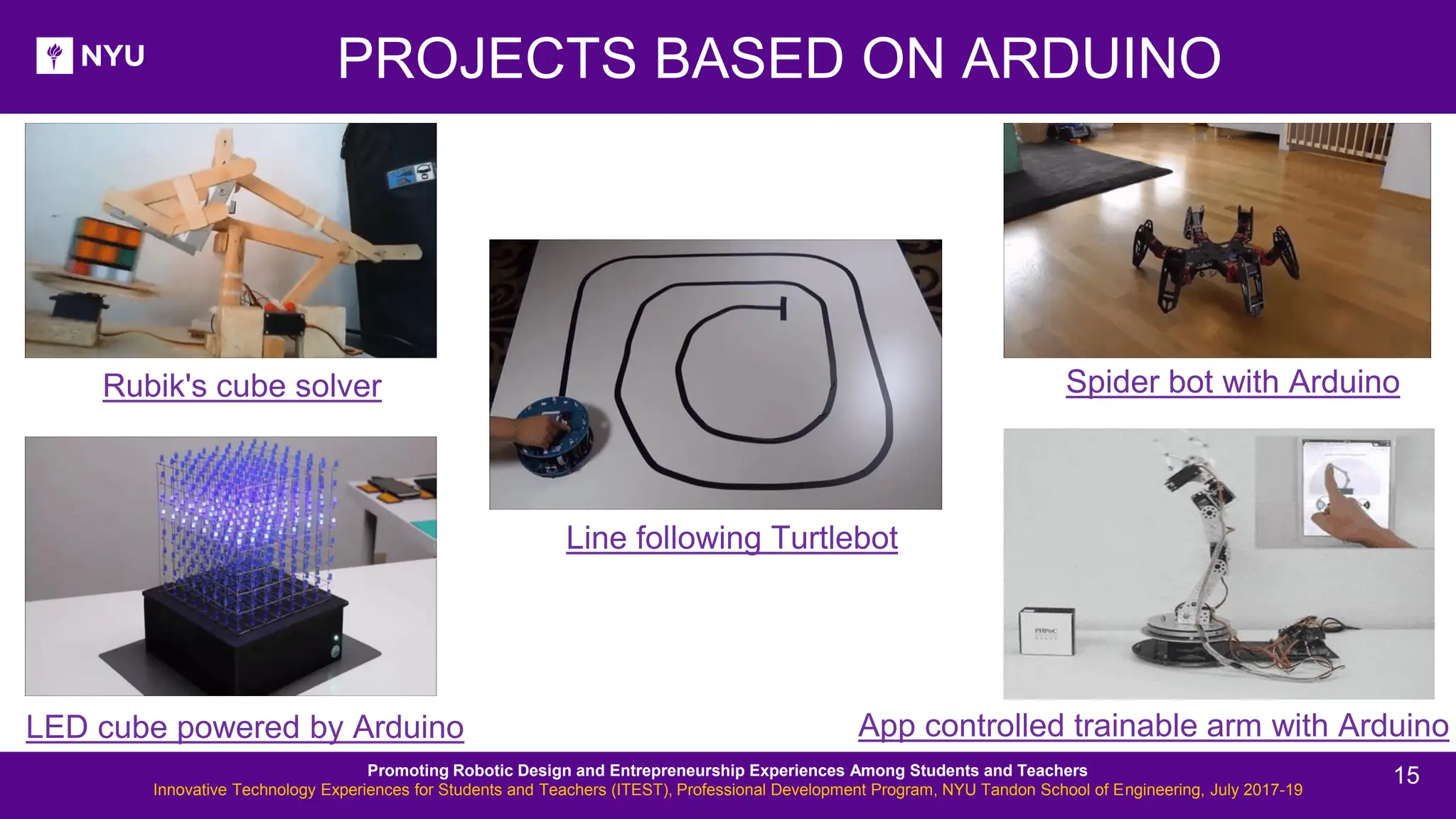
PROJECTS BASED ON ARDUINO Rubik's cube solver LED cube powered by Arduino Line following Turtlebot Spider bot with Arduino App controlled trainable arm with Arduino Promoting Robotic Design and Entrepreneurship Experiences Among Students and Teachers Innovative Technology Experiences for Students and Teachers (ITEST), Professional Development Program, NYU Tandon School of Engineering, July 2017-19 15
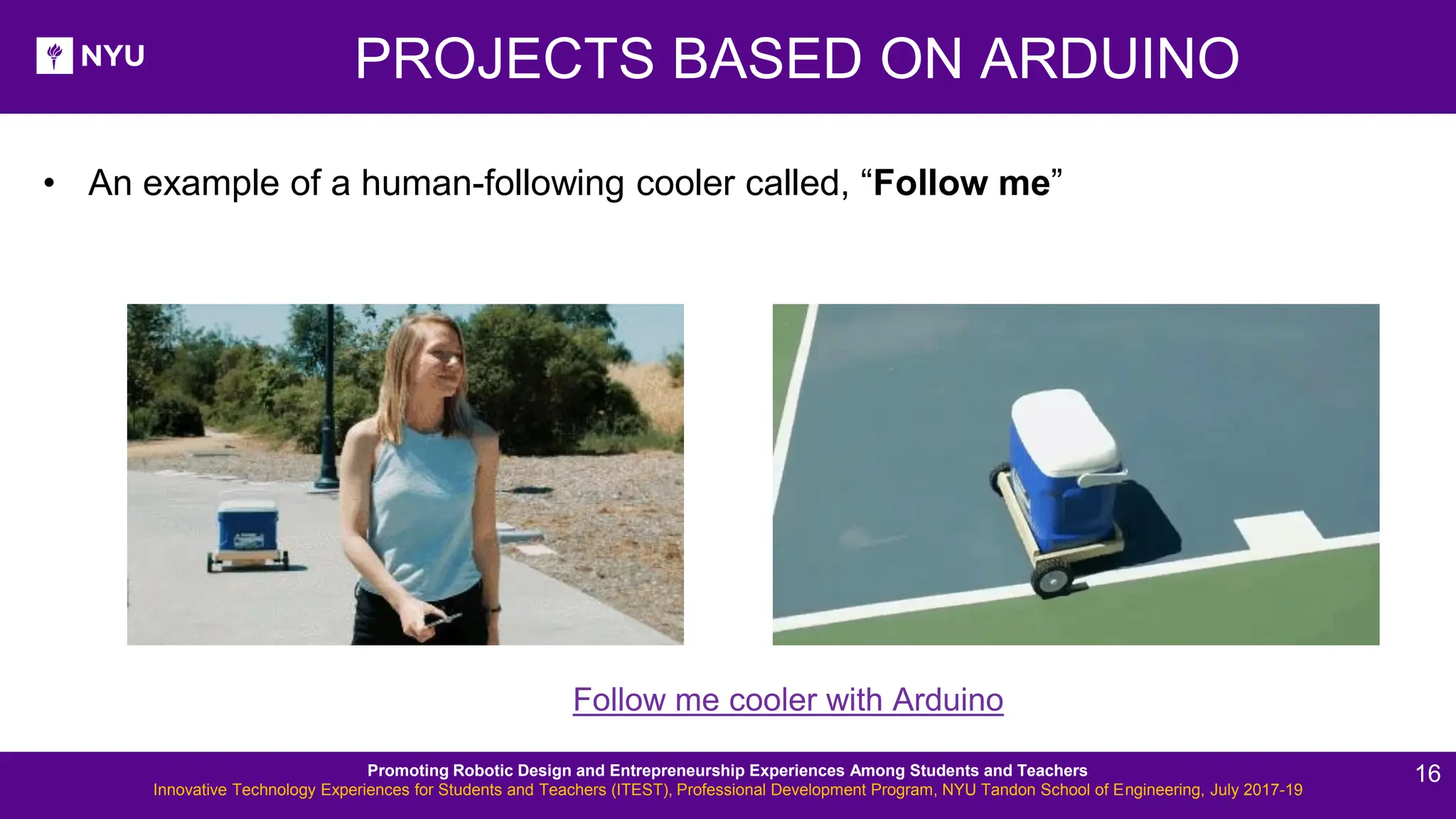
PROJECTS BASED ON ARDUINO Follow me cooler with Arduino • An example of a human-following cooler called, “Follow me” Promoting Robotic Design and Entrepreneurship Experiences Among Students and Teachers Innovative Technology Experiences for Students and Teachers (ITEST), Professional Development Program, NYU Tandon School of Engineering, July 2017-19 16
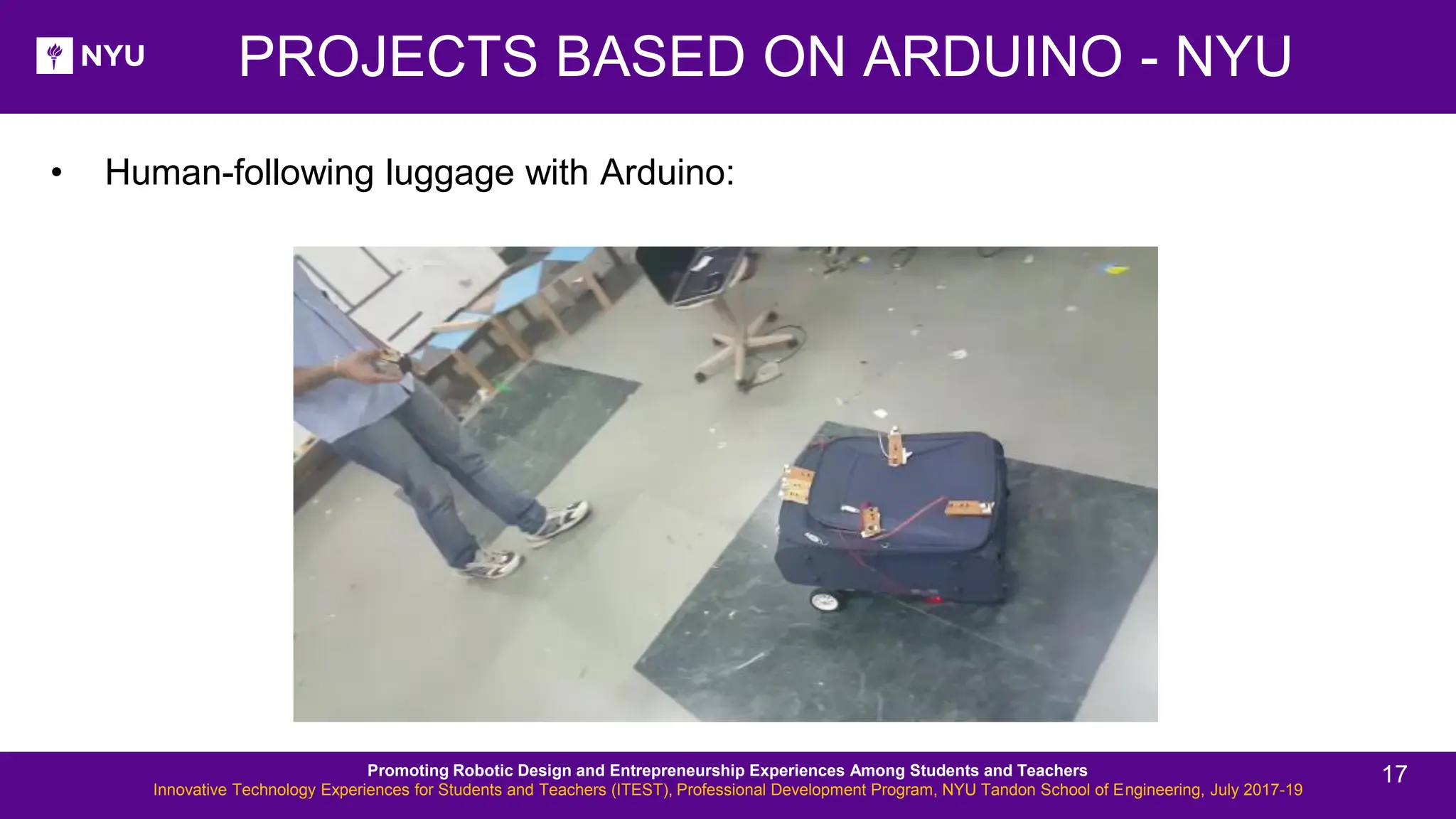
• Human-following luggage with Arduino: PROJECTS BASED ON ARDUINO - NYU Promoting Robotic Design and Entrepreneurship Experiences Among Students and Teachers Innovative Technology Experiences for Students and Teachers (ITEST), Professional Development Program, NYU Tandon School of Engineering, July 2017-19 17
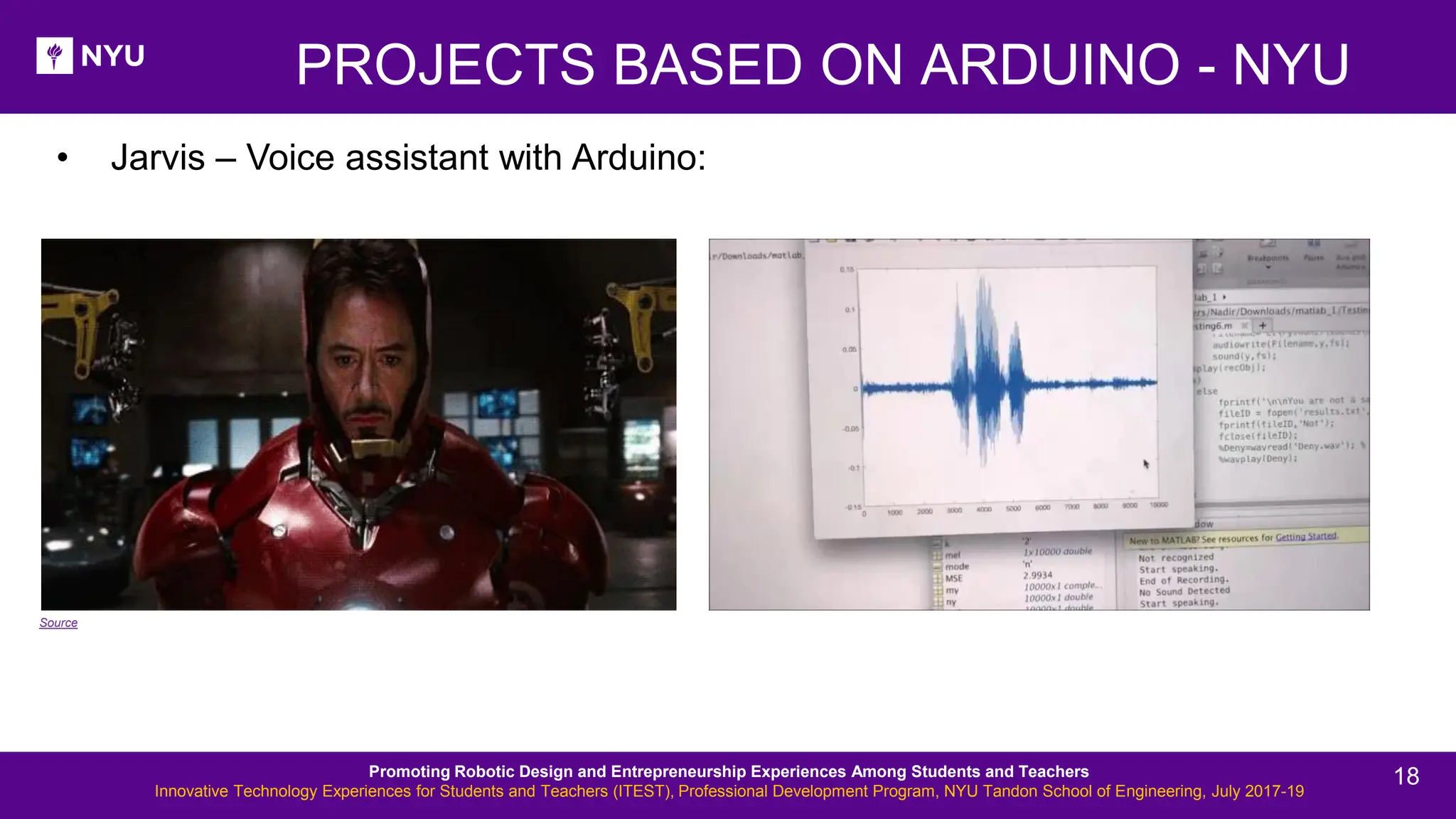
• Jarvis – Voice assistant with Arduino: PROJECTS BASED ON ARDUINO - NYU Source Promoting Robotic Design and Entrepreneurship Experiences Among Students and Teachers Innovative Technology Experiences for Students and Teachers (ITEST), Professional Development Program, NYU Tandon School of Engineering, July 2017-19 18
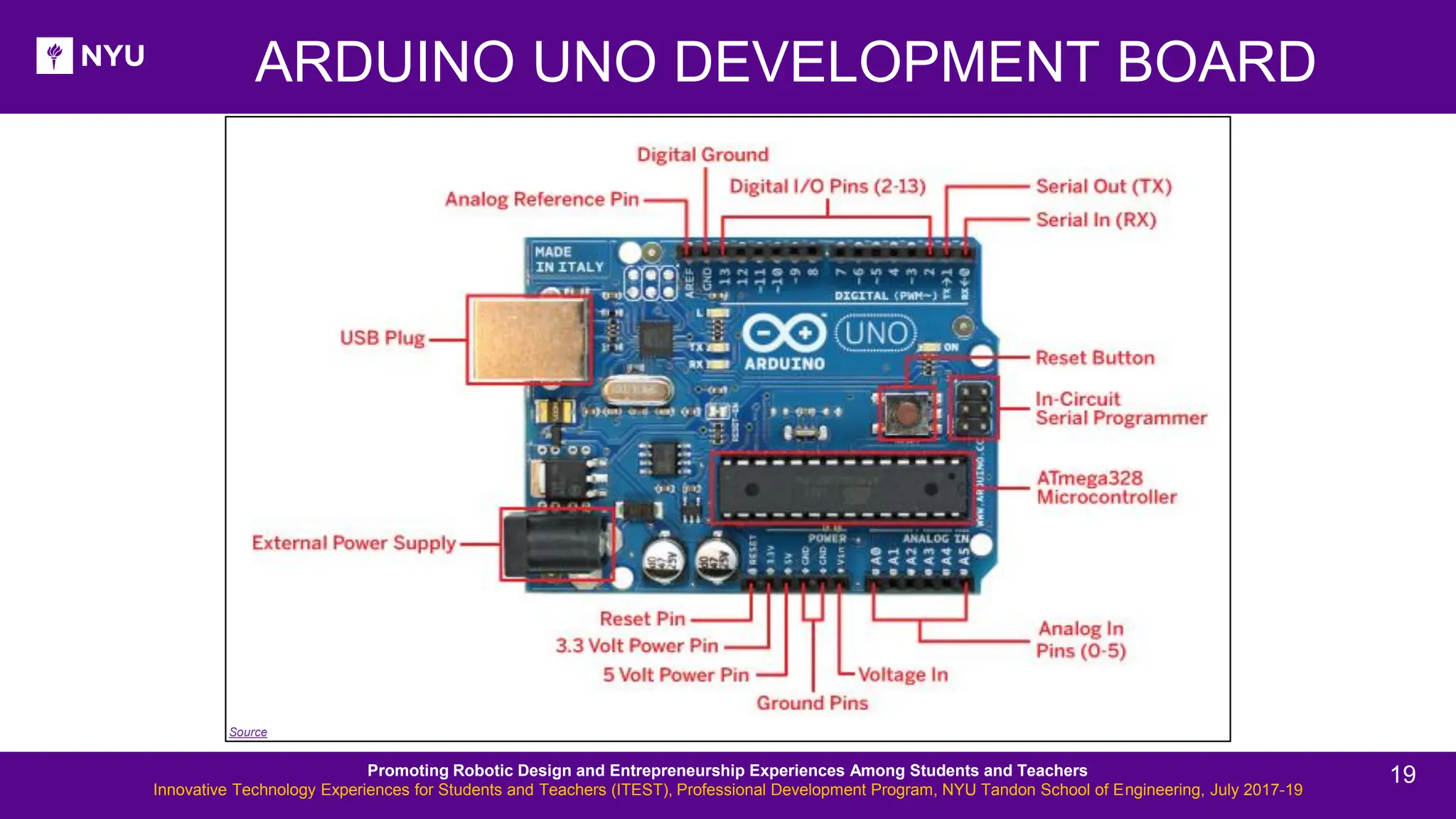
ARDUINO UNO DEVELOPMENT BOARD Source Promoting Robotic Design and Entrepreneurship Experiences Among Students and Teachers Innovative Technology Experiences for Students and Teachers (ITEST), Professional Development Program, NYU Tandon School of Engineering, July 2017-19 19
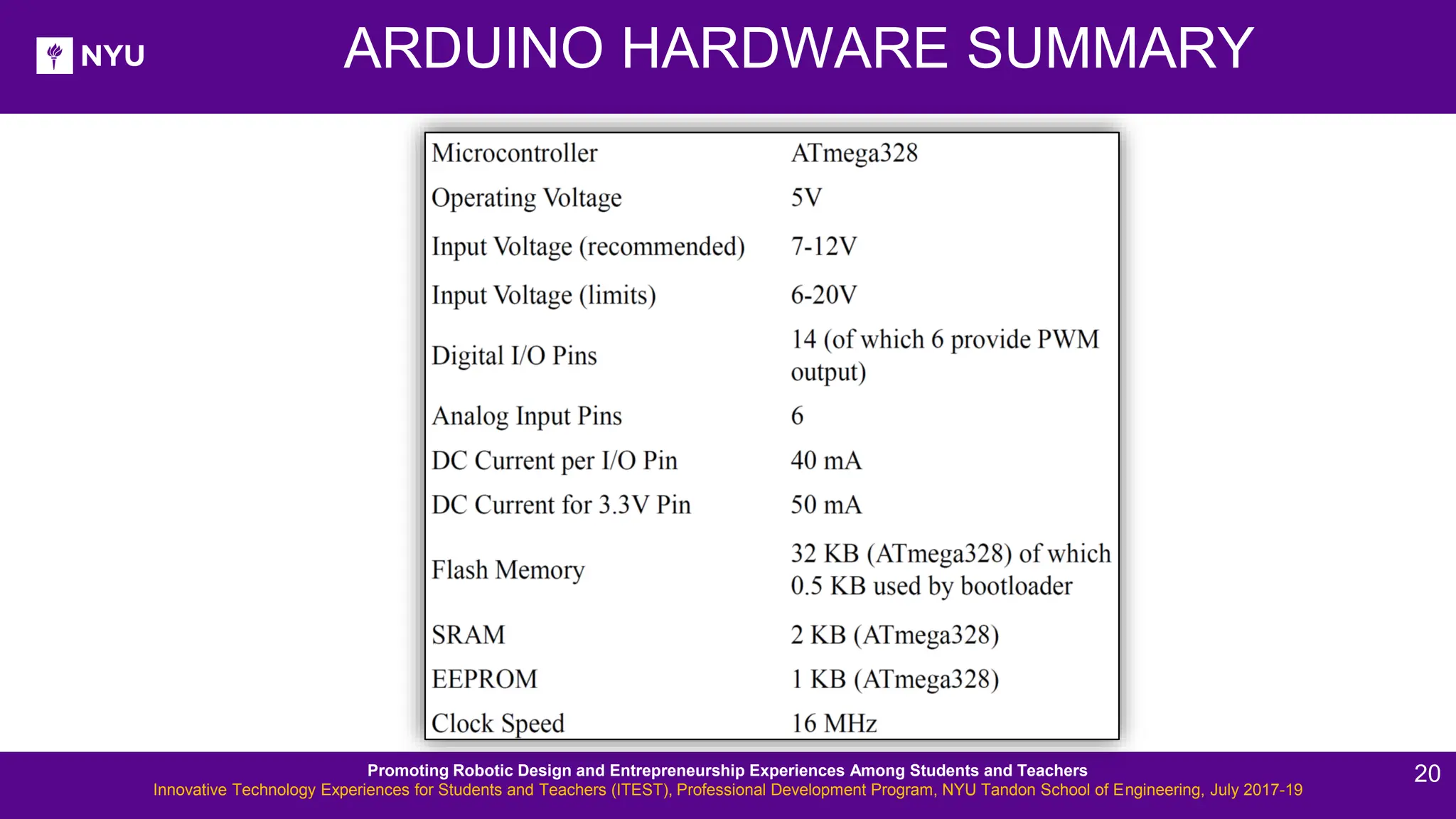
ARDUINO HARDWARE SUMMARY Promoting Robotic Design and Entrepreneurship Experiences Among Students and Teachers Innovative Technology Experiences for Students and Teachers (ITEST), Professional Development Program, NYU Tandon School of Engineering, July 2017-19 20
. Check out: http://arduino.cc/en/Guide/HomePage 1. Download and install the Arduino environment (IDE) according to your system (Mac or Windows) 2. Connect the board to your computer via the USB cable 3. If needed, install the drivers 4. Launch the Arduino IDE ACTIVITY 2 Promoting Robotic Design and Entrepreneurship Experiences Among Students and Teachers Innovative Technology Experiences for Students and Teachers (ITEST), Professional Development Program, NYU Tandon School of Engineering, July 2017-19 21
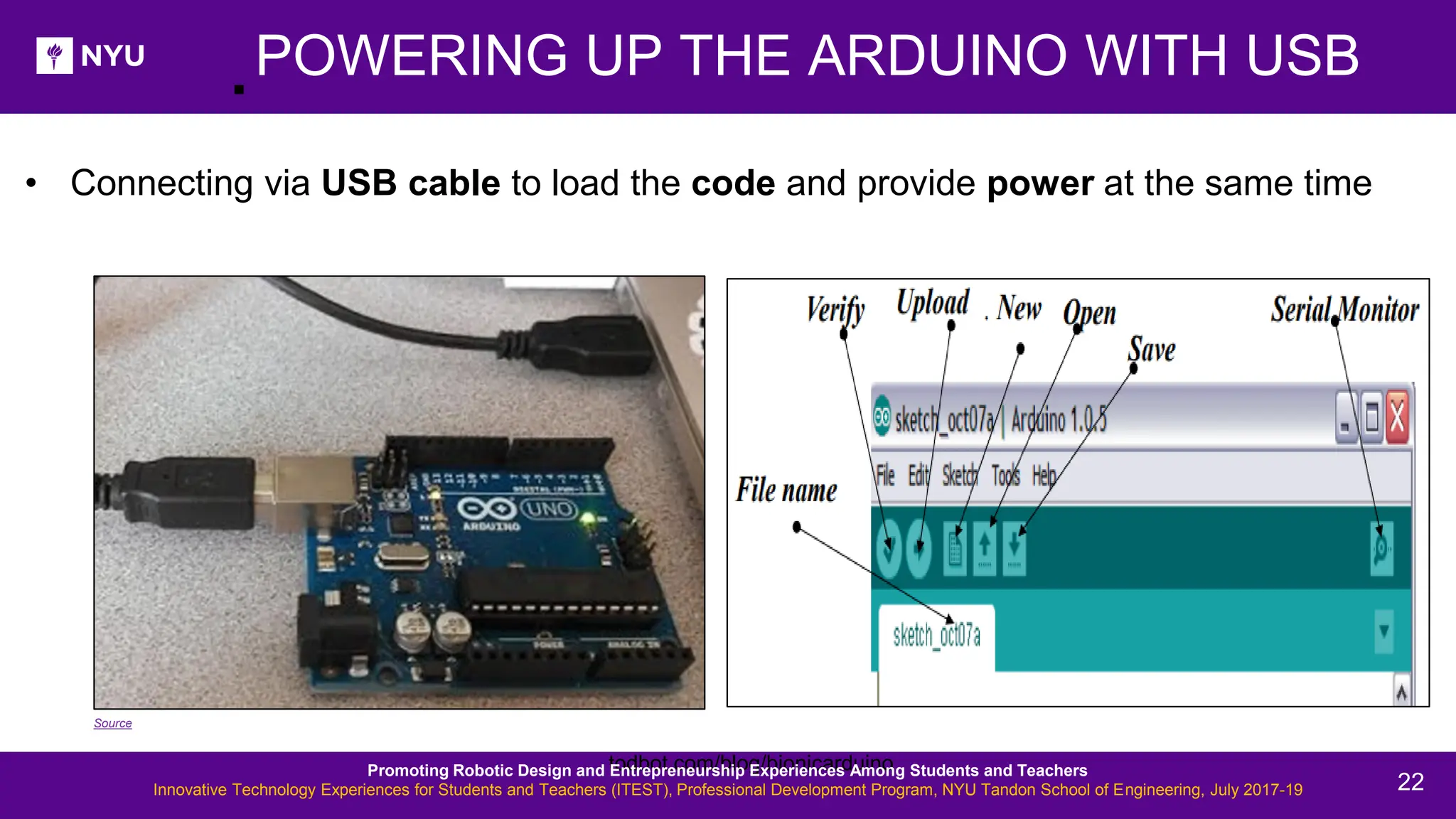
. todbot.com/blog/bionicarduino POWERING UP THE ARDUINO WITH USB • Connecting via USB cable to load the code and provide power at the same time Source Promoting Robotic Design and Entrepreneurship Experiences Among Students and Teachers Innovative Technology Experiences for Students and Teachers (ITEST), Professional Development Program, NYU Tandon School of Engineering, July 2017-19 22
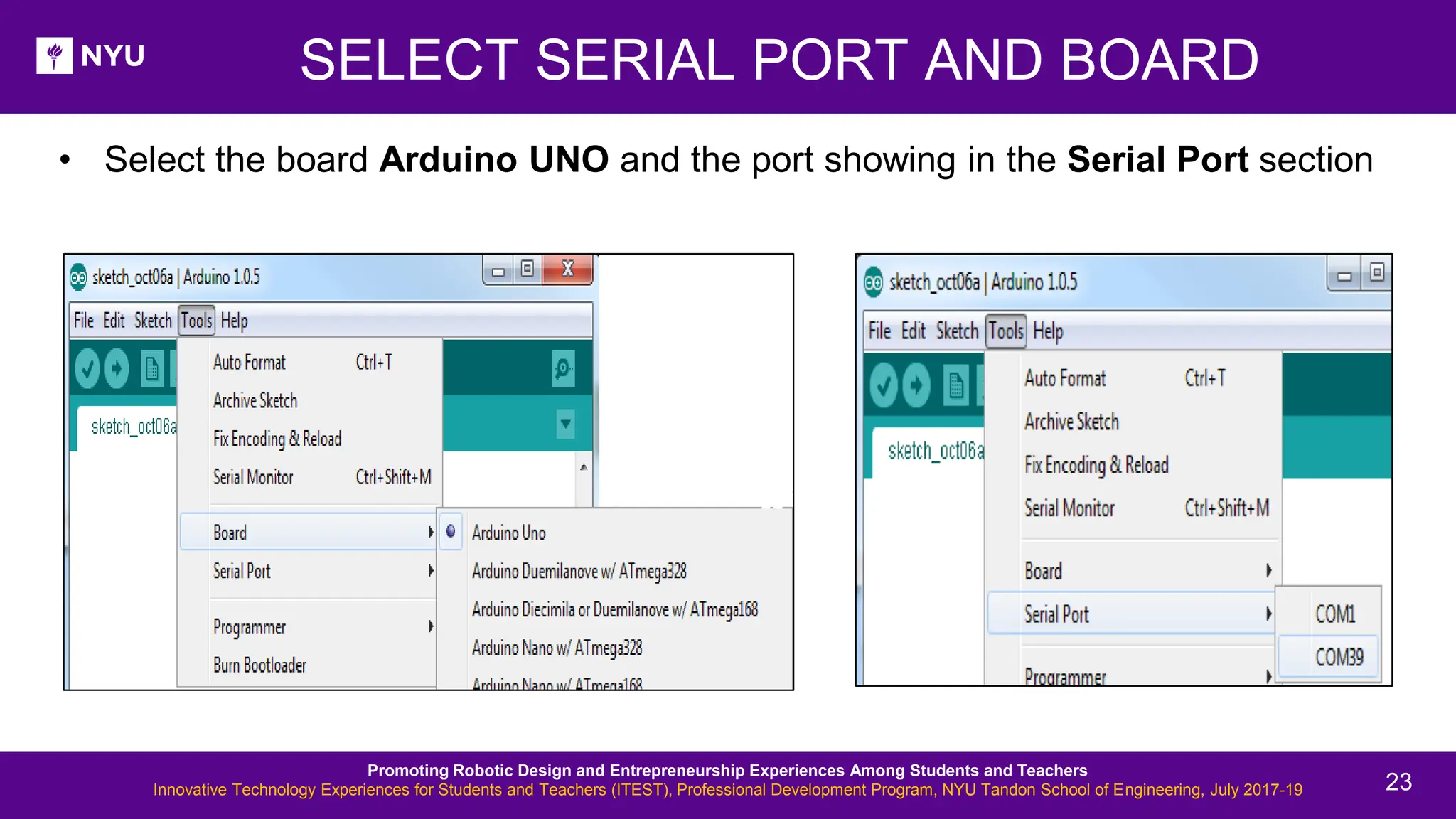
SELECT SERIAL PORT AND BOARD • Select the board Arduino UNO and the port showing in the Serial Port section Promoting Robotic Design and Entrepreneurship Experiences Among Students and Teachers Innovative Technology Experiences for Students and Teachers (ITEST), Professional Development Program, NYU Tandon School of Engineering, July 2017-19 23
. Program to blink the on-board LED 1. Select your board 2. Select your serial port 3. Open the blink example 4. Upload the program ACTIVITY 3 Source Promoting Robotic Design and Entrepreneurship Experiences Among Students and Teachers Innovative Technology Experiences for Students and Teachers (ITEST), Professional Development Program, NYU Tandon School of Engineering, July 2017-19 24
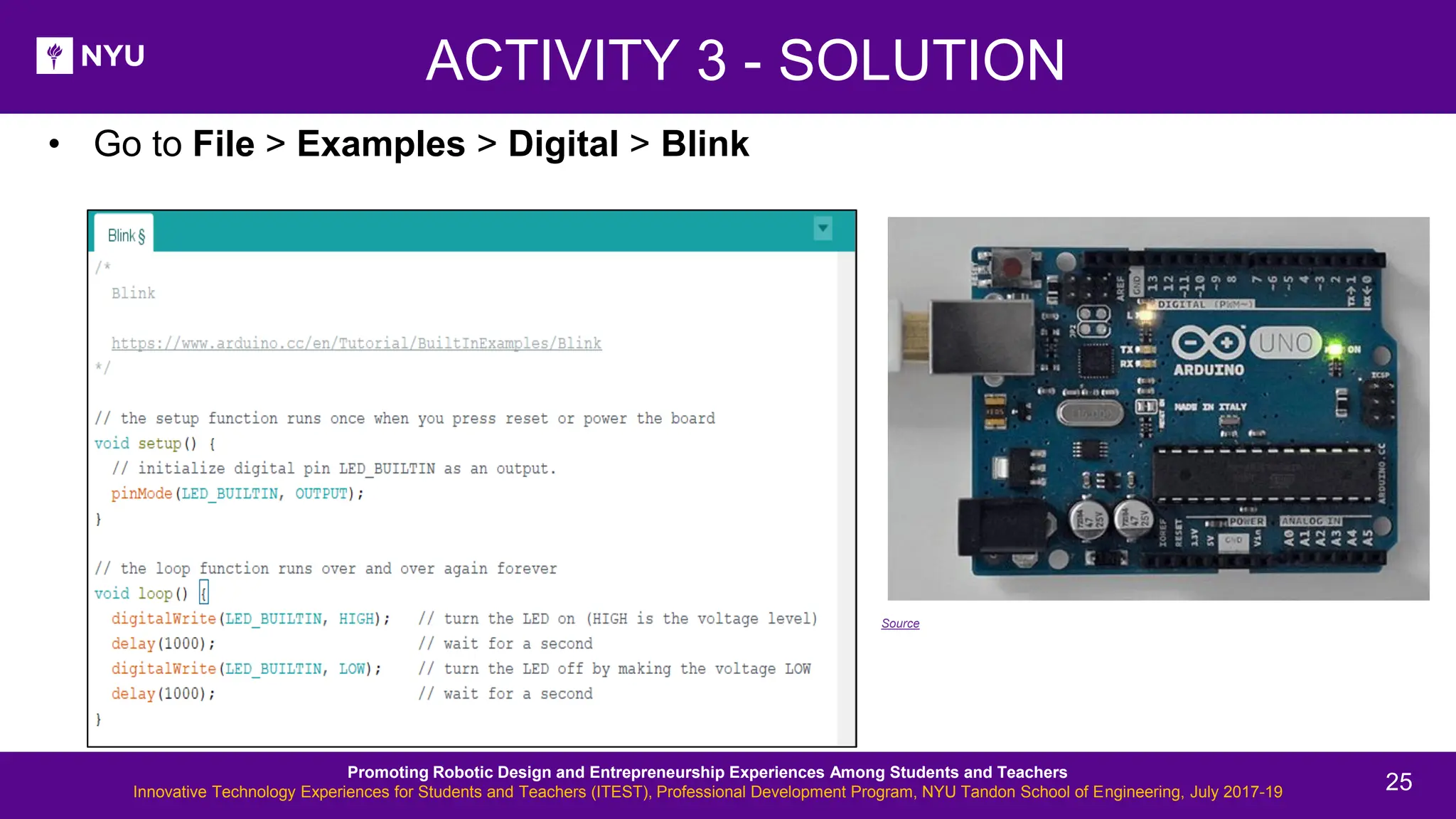
• Go to File > Examples > Digital > Blink ACTIVITY 3 - SOLUTION Source Promoting Robotic Design and Entrepreneurship Experiences Among Students and Teachers Innovative Technology Experiences for Students and Teachers (ITEST), Professional Development Program, NYU Tandon School of Engineering, July 2017-19 25
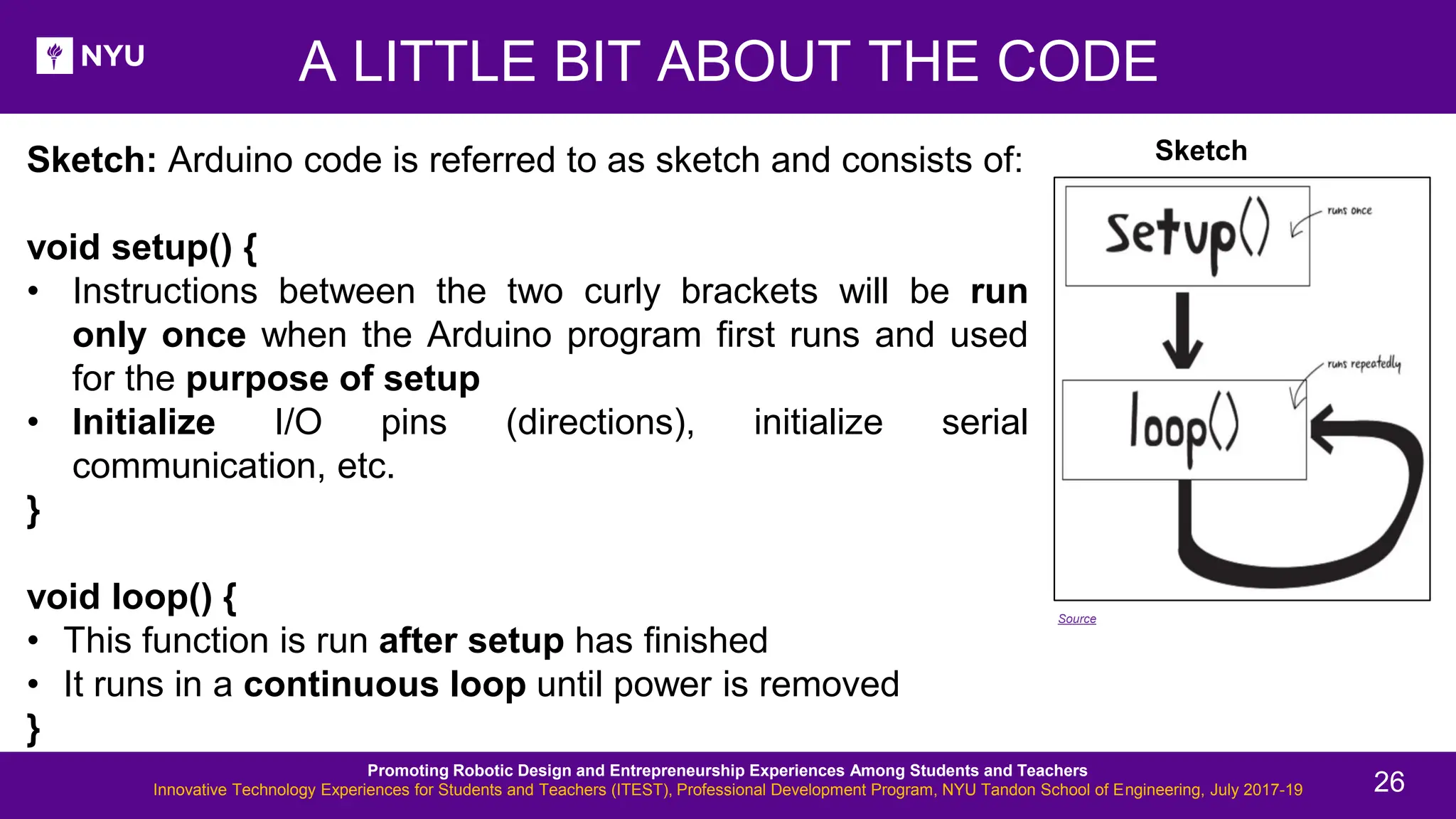
Sketch: Arduino code is referred to as sketch and consists of: void setup() { • Instructions between the two curly brackets will be run only once when the Arduino program first runs and used for the purpose of setup • Initialize I/O pins (directions), initialize serial communication, etc. } void loop() { • This function is run after setup has finished • It runs in a continuous loop until power is removed } A LITTLE BIT ABOUT THE CODE Sketch Source Promoting Robotic Design and Entrepreneurship Experiences Among Students and Teachers Innovative Technology Experiences for Students and Teachers (ITEST), Professional Development Program, NYU Tandon School of Engineering, July 2017-19 26
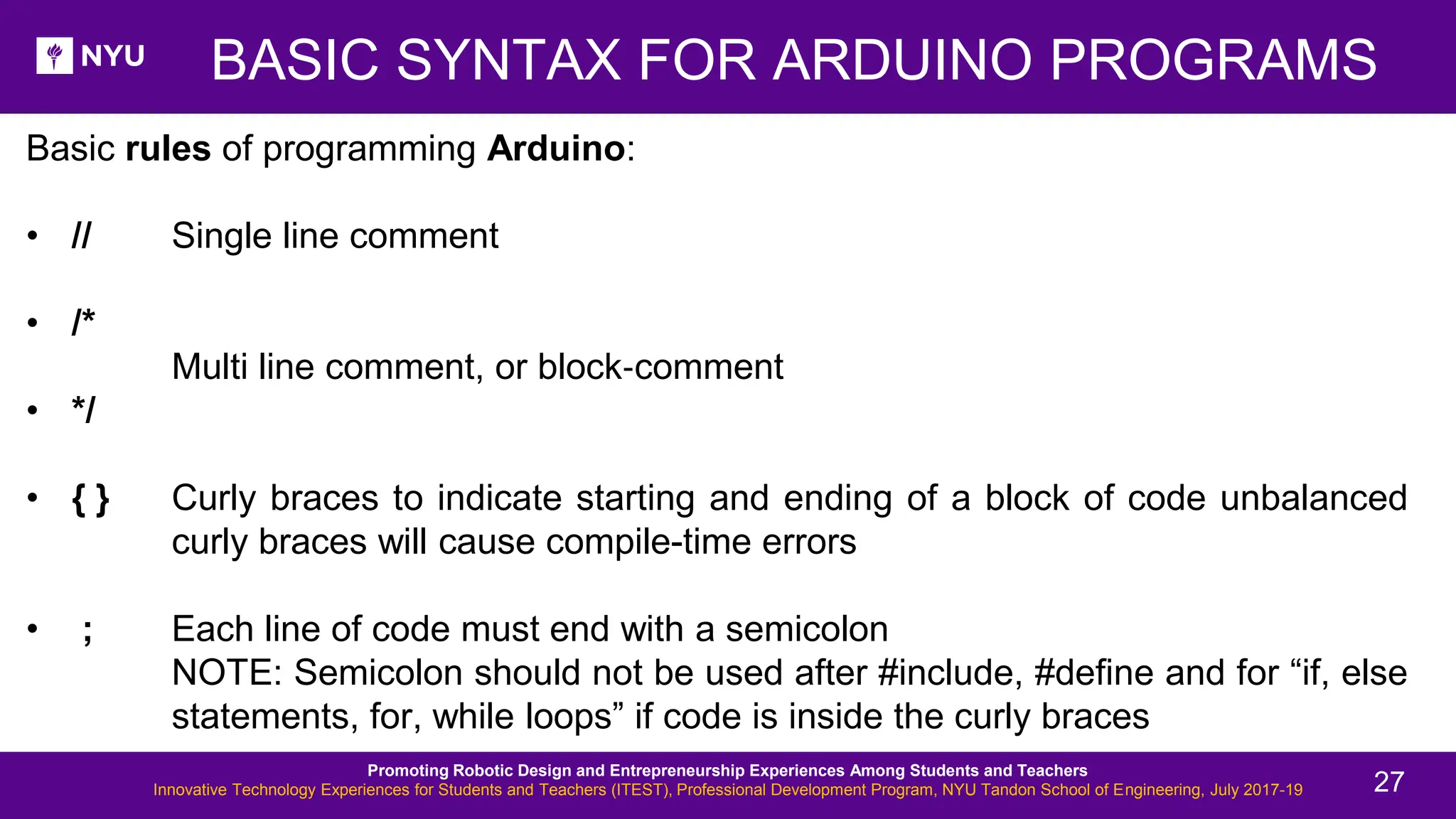
BASIC SYNTAX FOR ARDUINO PROGRAMS Basic rules of programming Arduino: • // Single line comment • /* Multi line comment, or block‐comment • */ • { } Curly braces to indicate starting and ending of a block of code unbalanced curly braces will cause compile-time errors • ; Each line of code must end with a semicolon NOTE: Semicolon should not be used after #include, #define and for “if, else statements, for, while loops” if code is inside the curly braces Promoting Robotic Design and Entrepreneurship Experiences Among Students and Teachers Innovative Technology Experiences for Students and Teachers (ITEST), Professional Development Program, NYU Tandon School of Engineering, July 2017-19 27
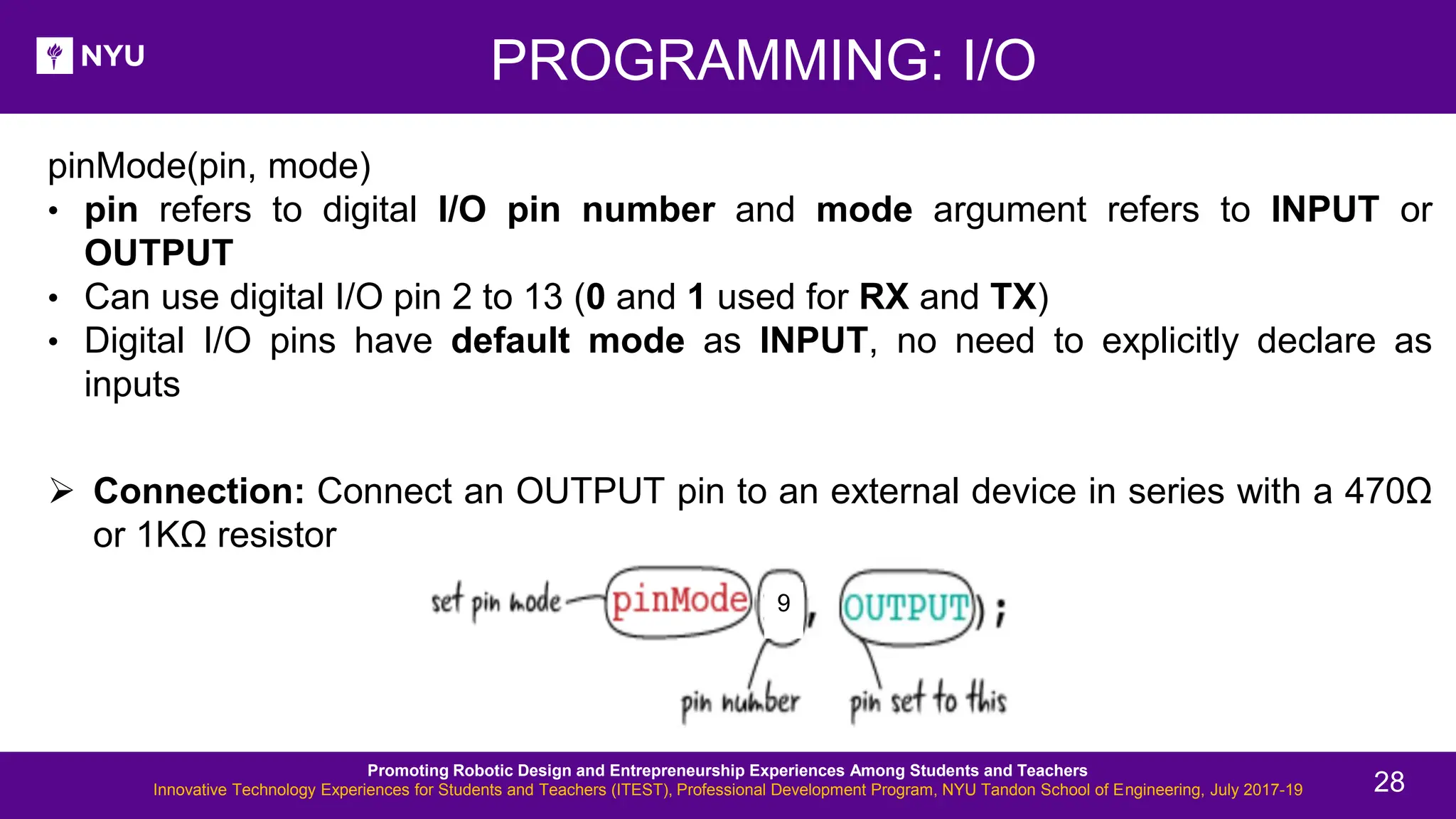
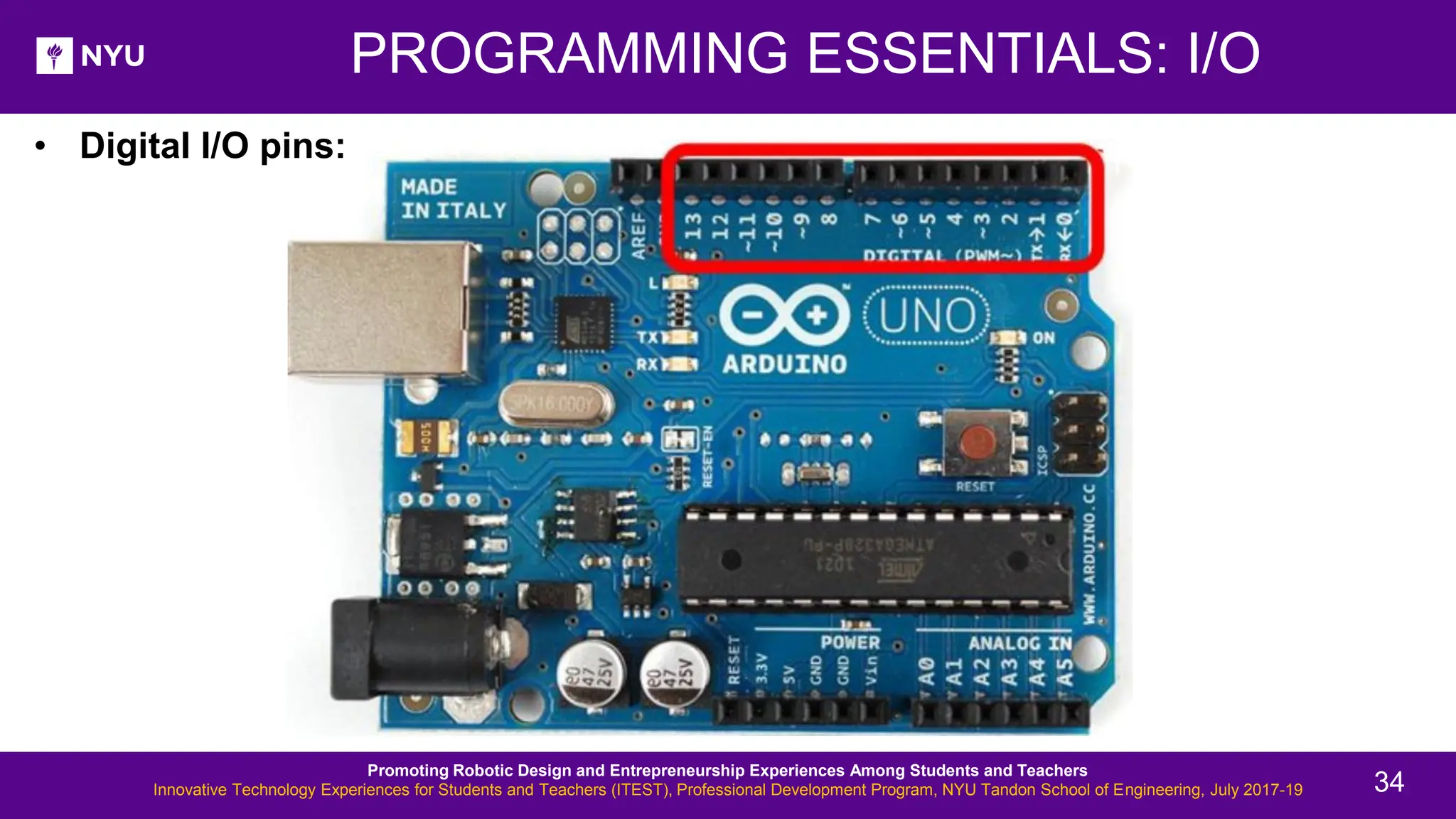
PROGRAMMING: I/O pinMode(pin, mode) • pin refers to digital I/O pin number and mode argument refers to INPUT or OUTPUT • Can use digital I/O pin 2 to 13 (0 and 1 used for RX and TX) • Digital I/O pins have default mode as INPUT, no need to explicitly declare as inputs ➢ Connection: Connect an OUTPUT pin to an external device in series with a 470Ω or 1KΩ resistor 9 Promoting Robotic Design and Entrepreneurship Experiences Among Students and Teachers Innovative Technology Experiences for Students and Teachers (ITEST), Professional Development Program, NYU Tandon School of Engineering, July 2017-19 28
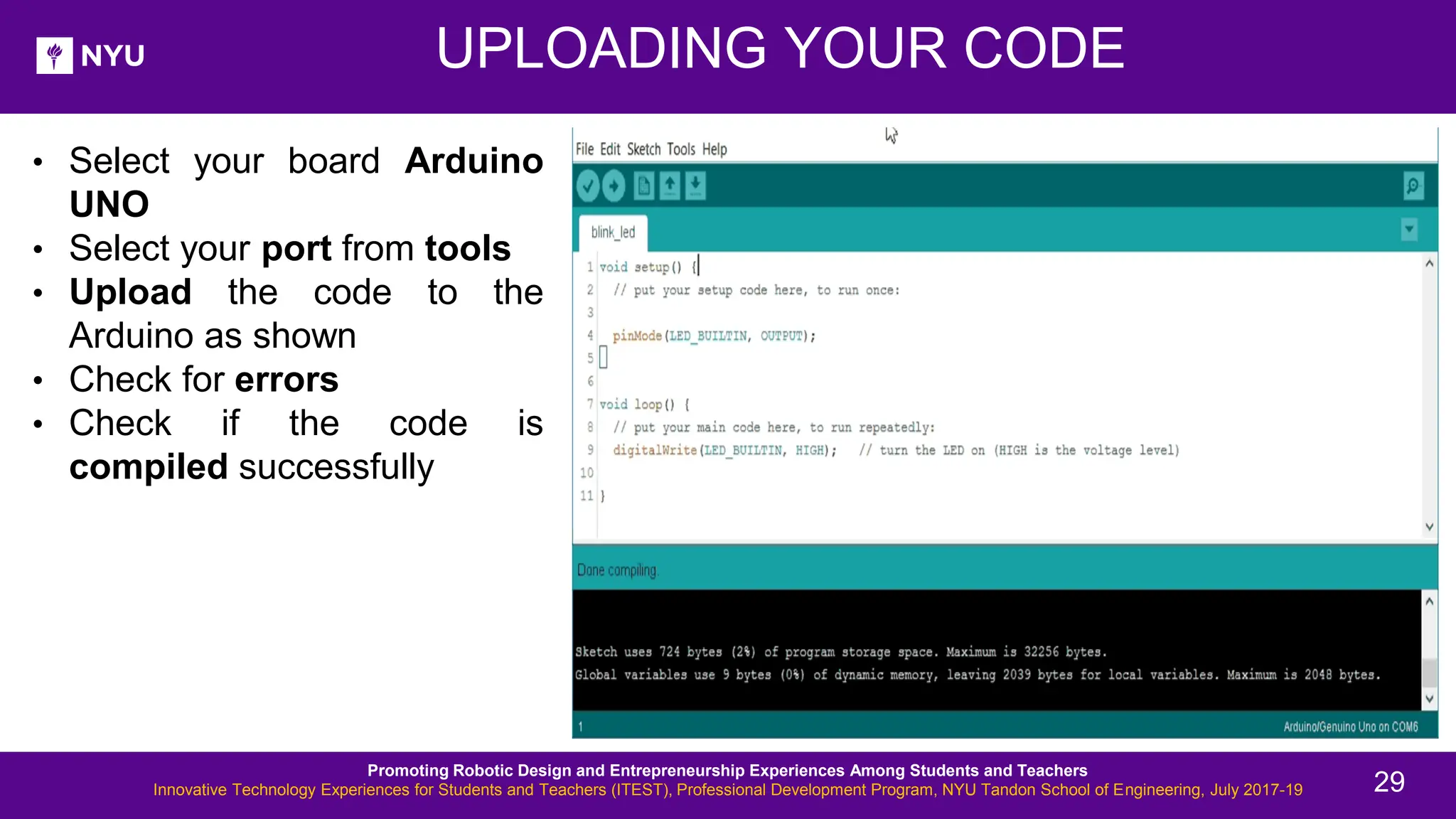
UPLOADING YOUR CODE • Select your board Arduino UNO • Select your port from tools • Upload the code to the Arduino as shown • Check for errors • Check if the code is compiled successfully Promoting Robotic Design and Entrepreneurship Experiences Among Students and Teachers Innovative Technology Experiences for Students and Teachers (ITEST), Professional Development Program, NYU Tandon School of Engineering, July 2017-19 29
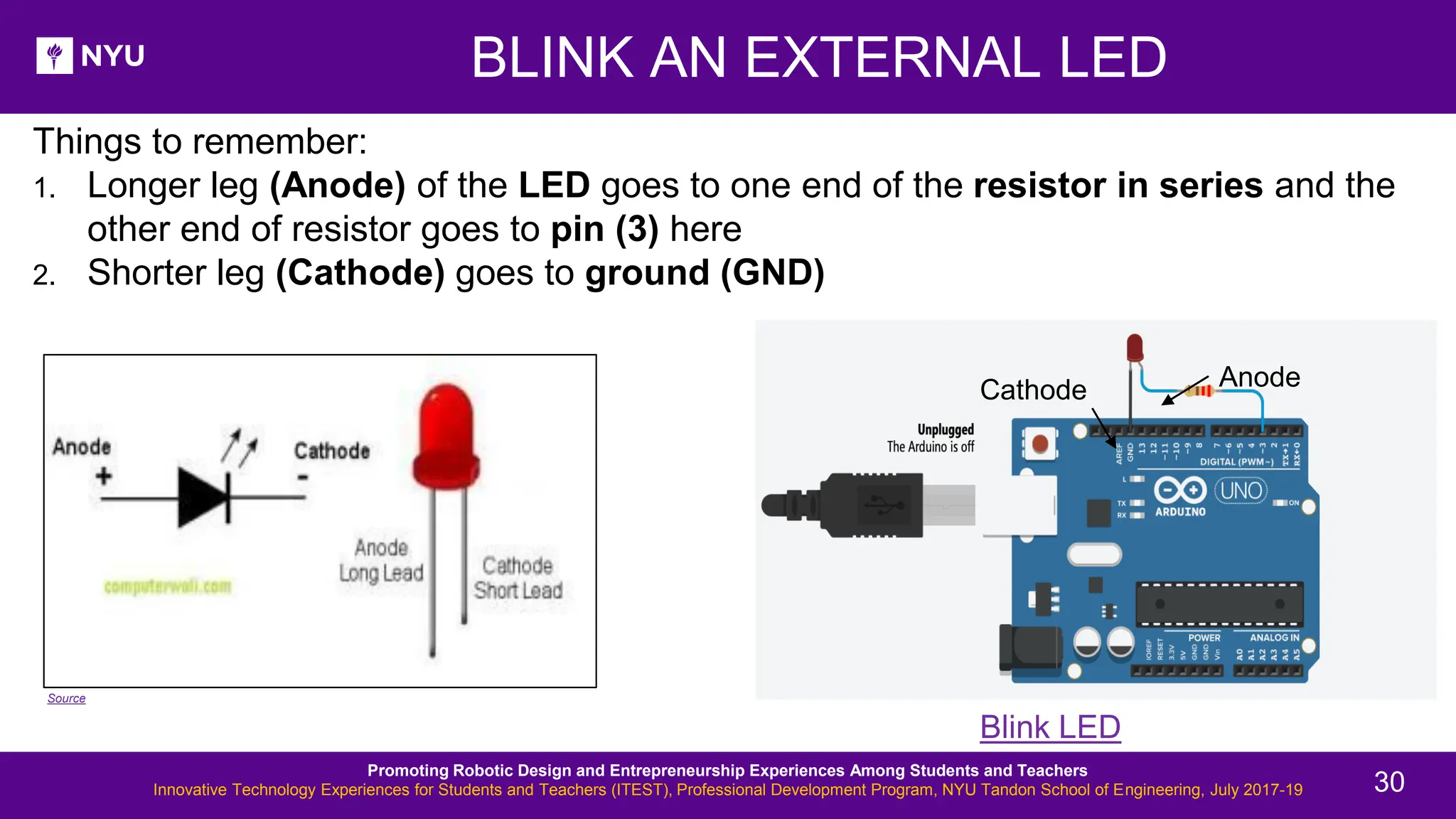
BLINK AN EXTERNAL LED Things to remember: 1. Longer leg (Anode) of the LED goes to one end of the resistor in series and the other end of resistor goes to pin (3) here 2. Shorter leg (Cathode) goes to ground (GND) Blink LED Source Promoting Robotic Design and Entrepreneurship Experiences Among Students and Teachers Innovative Technology Experiences for Students and Teachers (ITEST), Professional Development Program, NYU Tandon School of Engineering, July 2017-19 Cathode Anode 30
• Write a program to blink one external LED using Arduino ACTIVITY 4 Promoting Robotic Design and Entrepreneurship Experiences Among Students and Teachers Innovative Technology Experiences for Students and Teachers (ITEST), Professional Development Program, NYU Tandon School of Engineering, July 2017-19 31
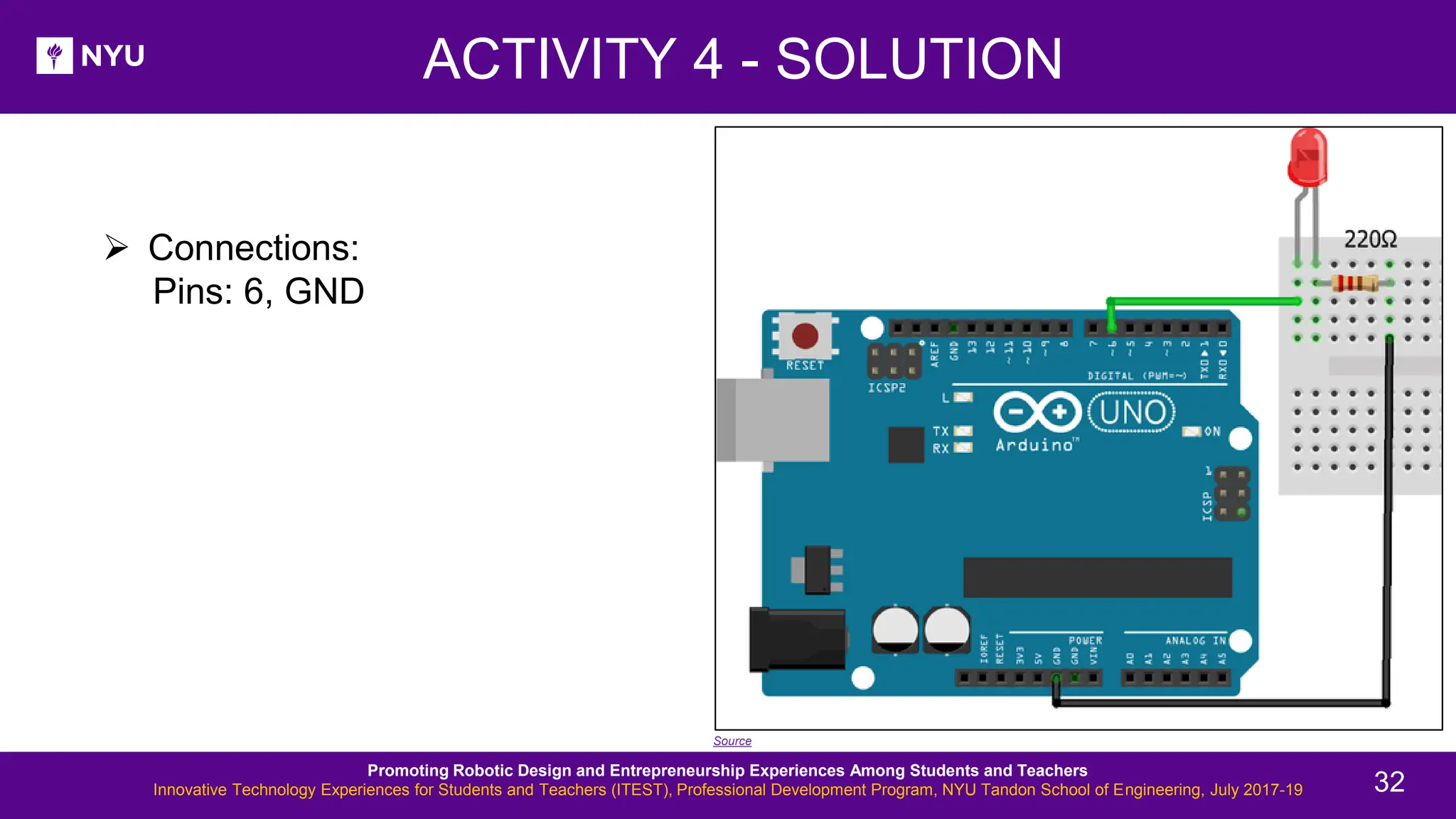
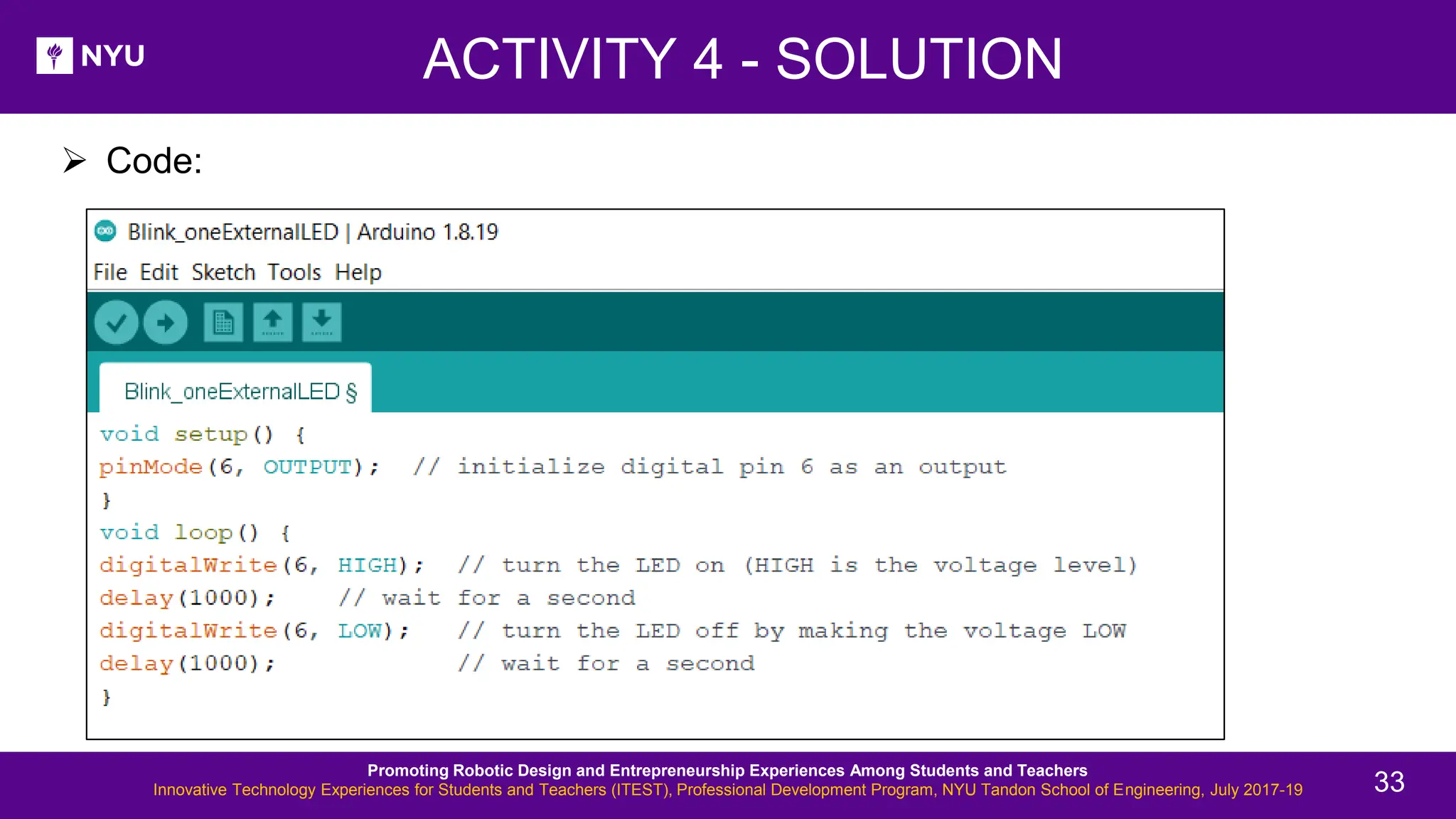
➢ Connections: Pins: 6, GND ACTIVITY 4 - SOLUTION Source Promoting Robotic Design and Entrepreneurship Experiences Among Students and Teachers Innovative Technology Experiences for Students and Teachers (ITEST), Professional Development Program, NYU Tandon School of Engineering, July 2017-19 32
➢ Code: ACTIVITY 4 - SOLUTION Promoting Robotic Design and Entrepreneurship Experiences Among Students and Teachers Innovative Technology Experiences for Students and Teachers (ITEST), Professional Development Program, NYU Tandon School of Engineering, July 2017-19 33
PROGRAMMING ESSENTIALS: I/O • Digital I/O pins: Promoting Robotic Design and Entrepreneurship Experiences Among Students and Teachers Innovative Technology Experiences for Students and Teachers (ITEST), Professional Development Program, NYU Tandon School of Engineering, July 2017-19 34
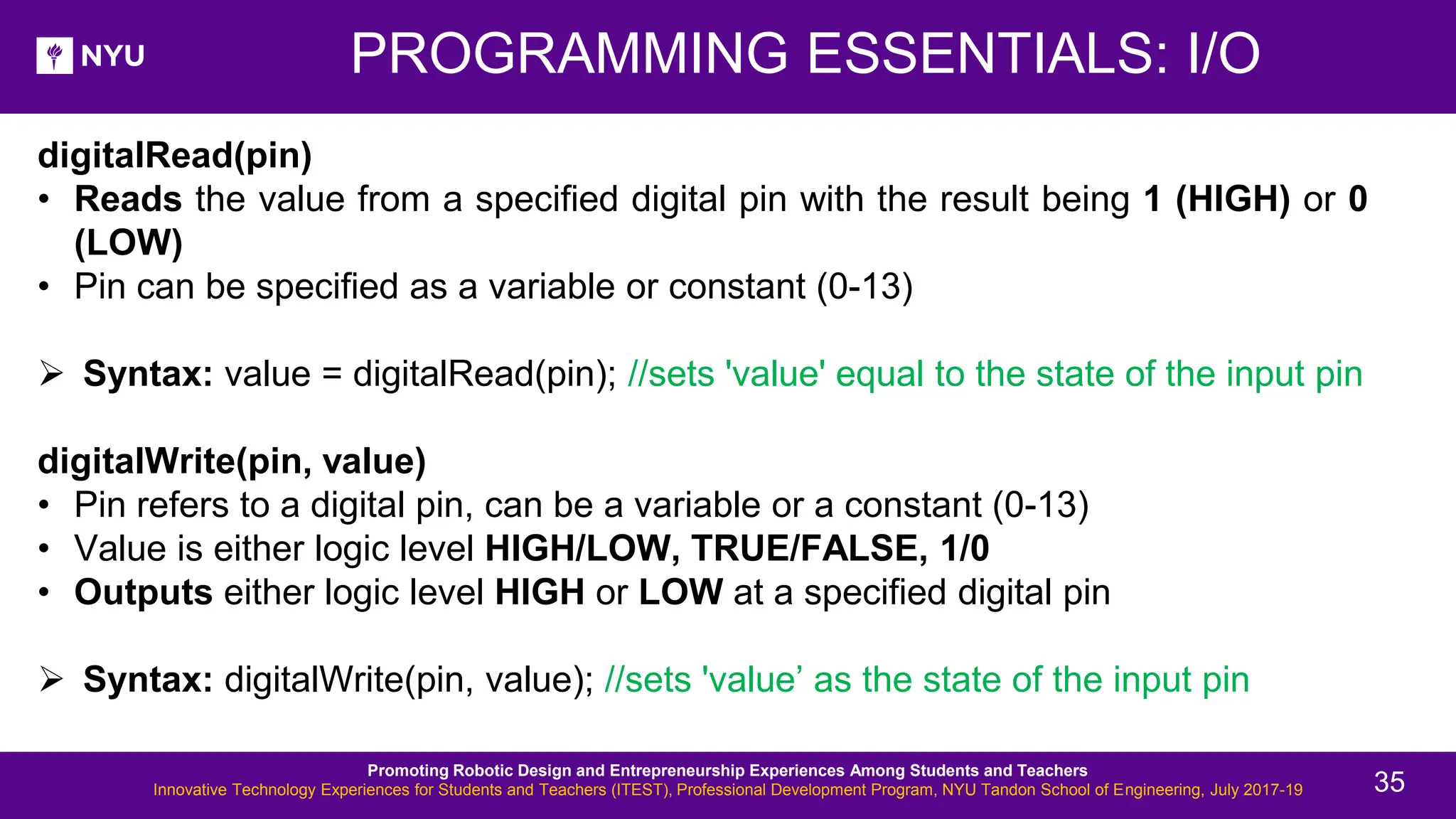
digitalRead(pin) • Reads the value from a specified digital pin with the result being 1 (HIGH) or 0 (LOW) • Pin can be specified as a variable or constant (0-13) ➢ Syntax: value = digitalRead(pin); //sets 'value' equal to the state of the input pin digitalWrite(pin, value) • Pin refers to a digital pin, can be a variable or a constant (0-13) • Value is either logic level HIGH/LOW, TRUE/FALSE, 1/0 • Outputs either logic level HIGH or LOW at a specified digital pin ➢ Syntax: digitalWrite(pin, value); //sets 'value’ as the state of the input pin PROGRAMMING ESSENTIALS: I/O Promoting Robotic Design and Entrepreneurship Experiences Among Students and Teachers Innovative Technology Experiences for Students and Teachers (ITEST), Professional Development Program, NYU Tandon School of Engineering, July 2017-19 35
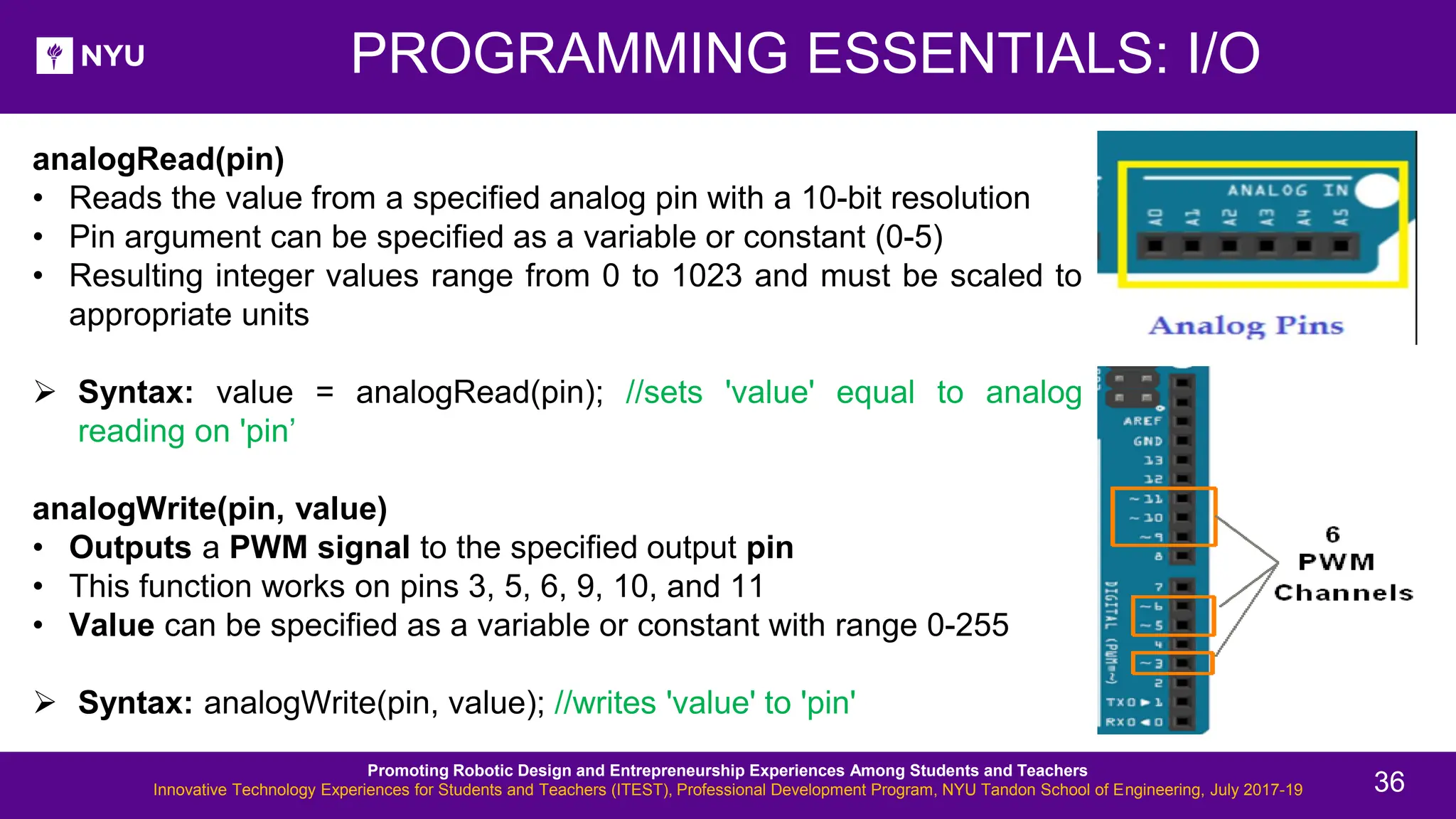
analogRead(pin) • Reads the value from a specified analog pin with a 10-bit resolution • Pin argument can be specified as a variable or constant (0-5) • Resulting integer values range from 0 to 1023 and must be scaled to appropriate units ➢ Syntax: value = analogRead(pin); //sets 'value' equal to analog reading on 'pin’ analogWrite(pin, value) • Outputs a PWM signal to the specified output pin • This function works on pins 3, 5, 6, 9, 10, and 11 • Value can be specified as a variable or constant with range 0-255 ➢ Syntax: analogWrite(pin, value); //writes 'value' to 'pin' PROGRAMMING ESSENTIALS: I/O Promoting Robotic Design and Entrepreneurship Experiences Among Students and Teachers Innovative Technology Experiences for Students and Teachers (ITEST), Professional Development Program, NYU Tandon School of Engineering, July 2017-19 36
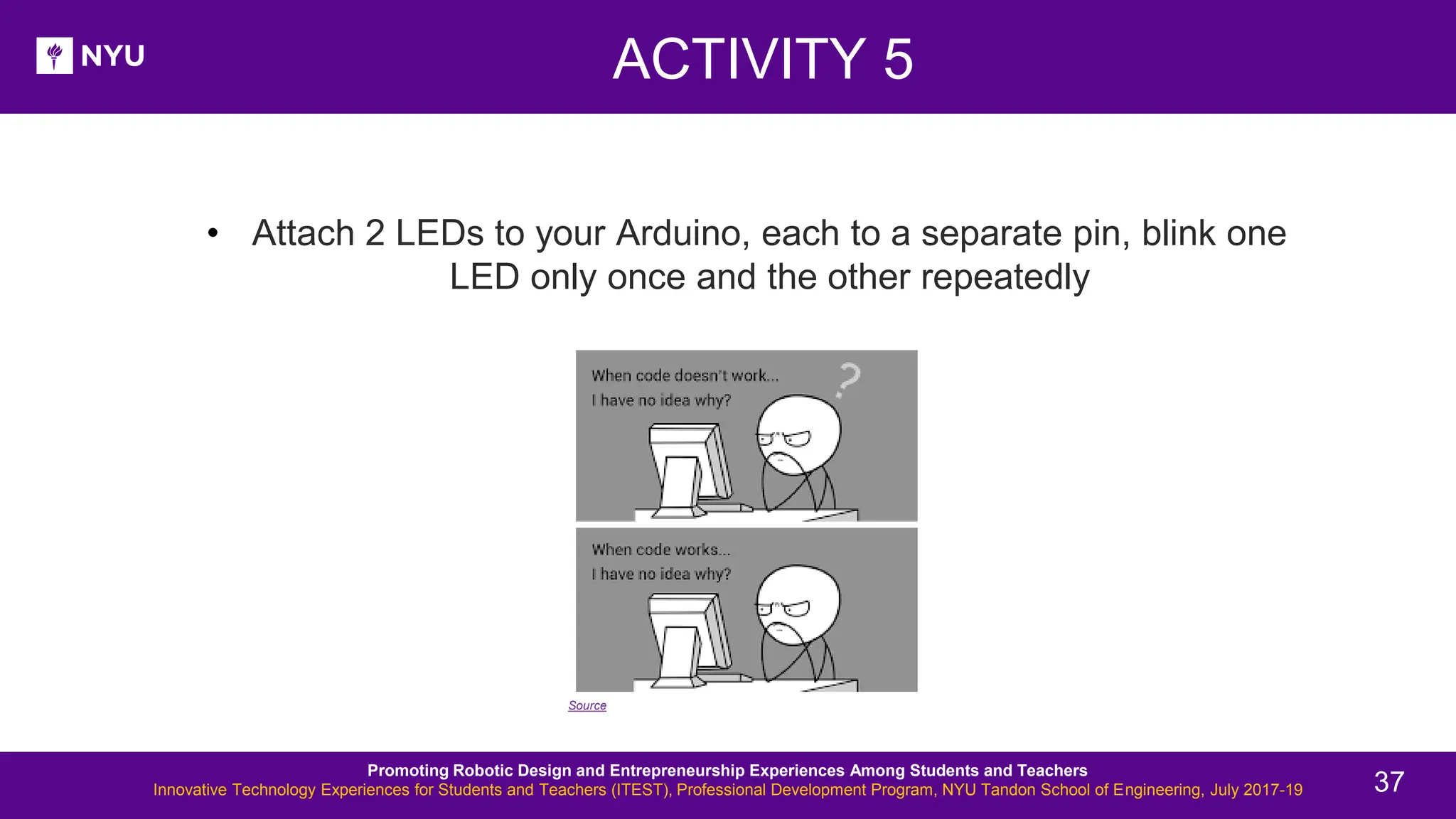
• Attach 2 LEDs to your Arduino, each to a separate pin, blink one LED only once and the other repeatedly ACTIVITY 5 Source Promoting Robotic Design and Entrepreneurship Experiences Among Students and Teachers Innovative Technology Experiences for Students and Teachers (ITEST), Professional Development Program, NYU Tandon School of Engineering, July 2017-19 37
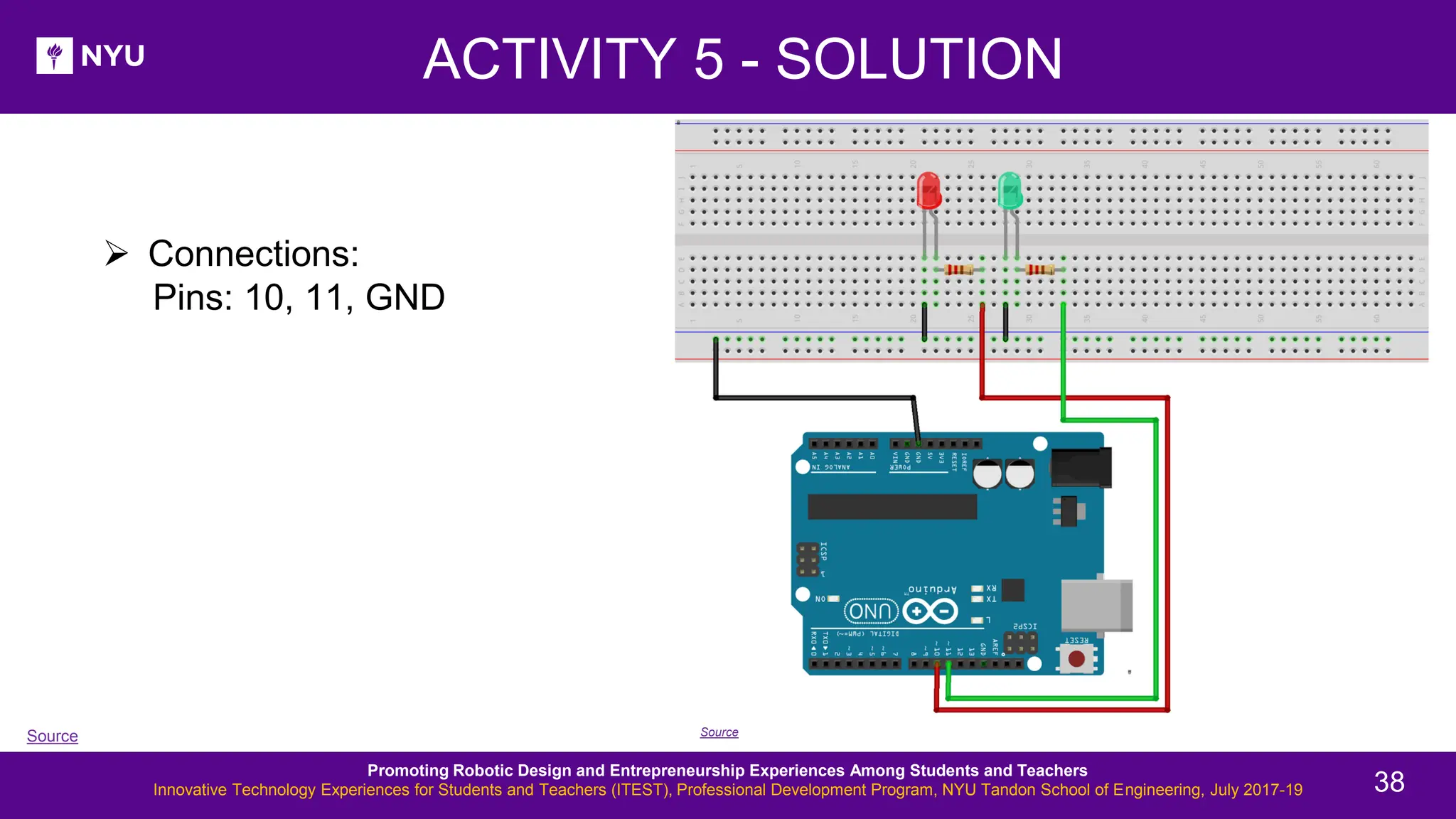
➢ Connections: Pins: 10, 11, GND ACTIVITY 5 - SOLUTION Source Source Promoting Robotic Design and Entrepreneurship Experiences Among Students and Teachers Innovative Technology Experiences for Students and Teachers (ITEST), Professional Development Program, NYU Tandon School of Engineering, July 2017-19 38
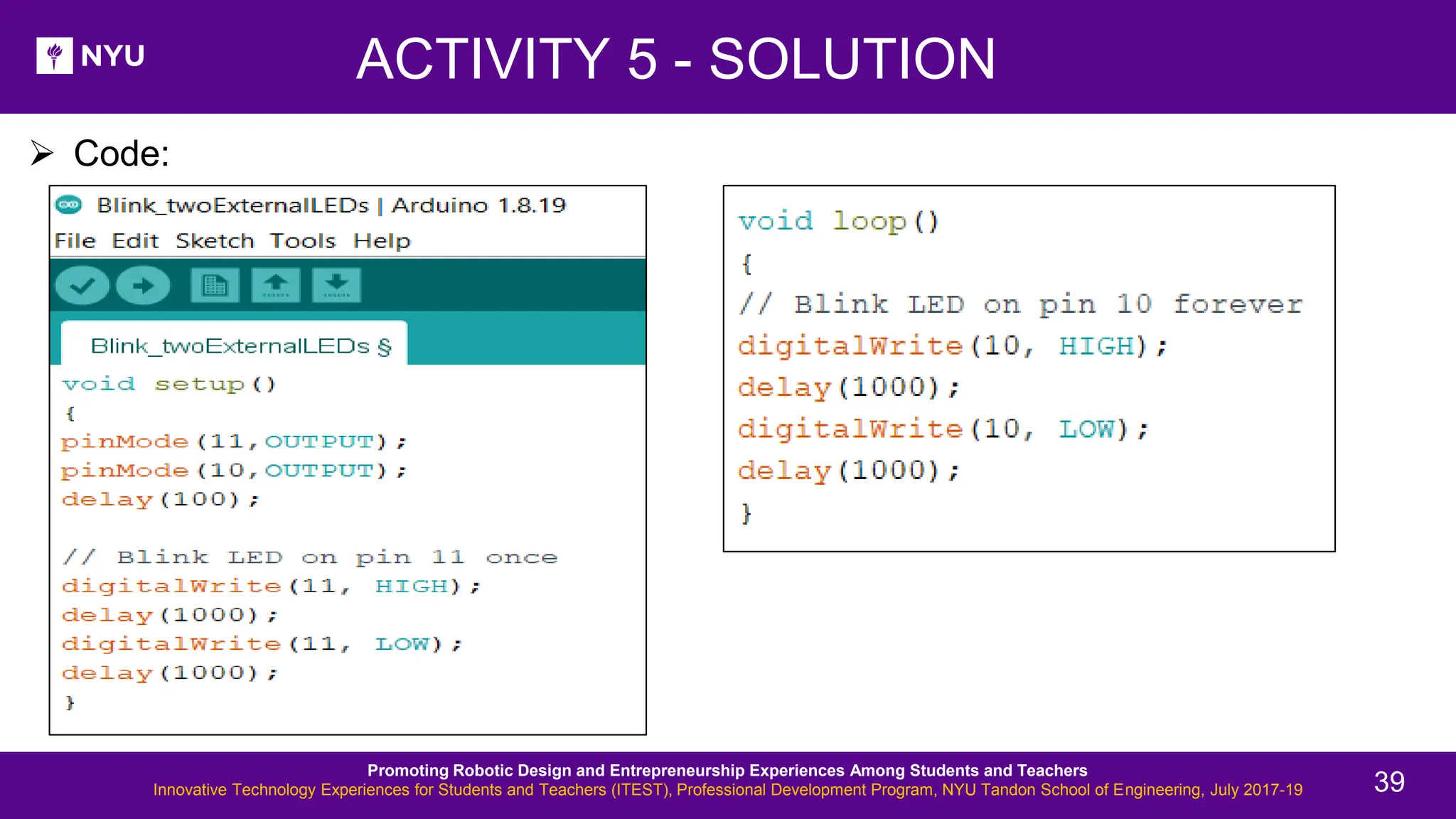
ACTIVITY 5 - SOLUTION ➢ Code: Promoting Robotic Design and Entrepreneurship Experiences Among Students and Teachers Innovative Technology Experiences for Students and Teachers (ITEST), Professional Development Program, NYU Tandon School of Engineering, July 2017-19 39
New Lesson - Photos Serial.begin(rate) • Opens serial port and sets the baud rate for serial data transmission • Typical baud rate for communicating with PC is 9600 although other speeds are supported • When using serial communication, digital pins 0 (RX) and 1 (TX) cannot be used at the same time delay(ms) • Pauses the program for time as specified in milliseconds, with 1000 being equal to 1 second PROGRAMMING ESSENTIALS Promoting Robotic Design and Entrepreneurship Experiences Among Students and Teachers Innovative Technology Experiences for Students and Teachers (ITEST), Professional Development Program, NYU Tandon School of Engineering, July 2017-19 40
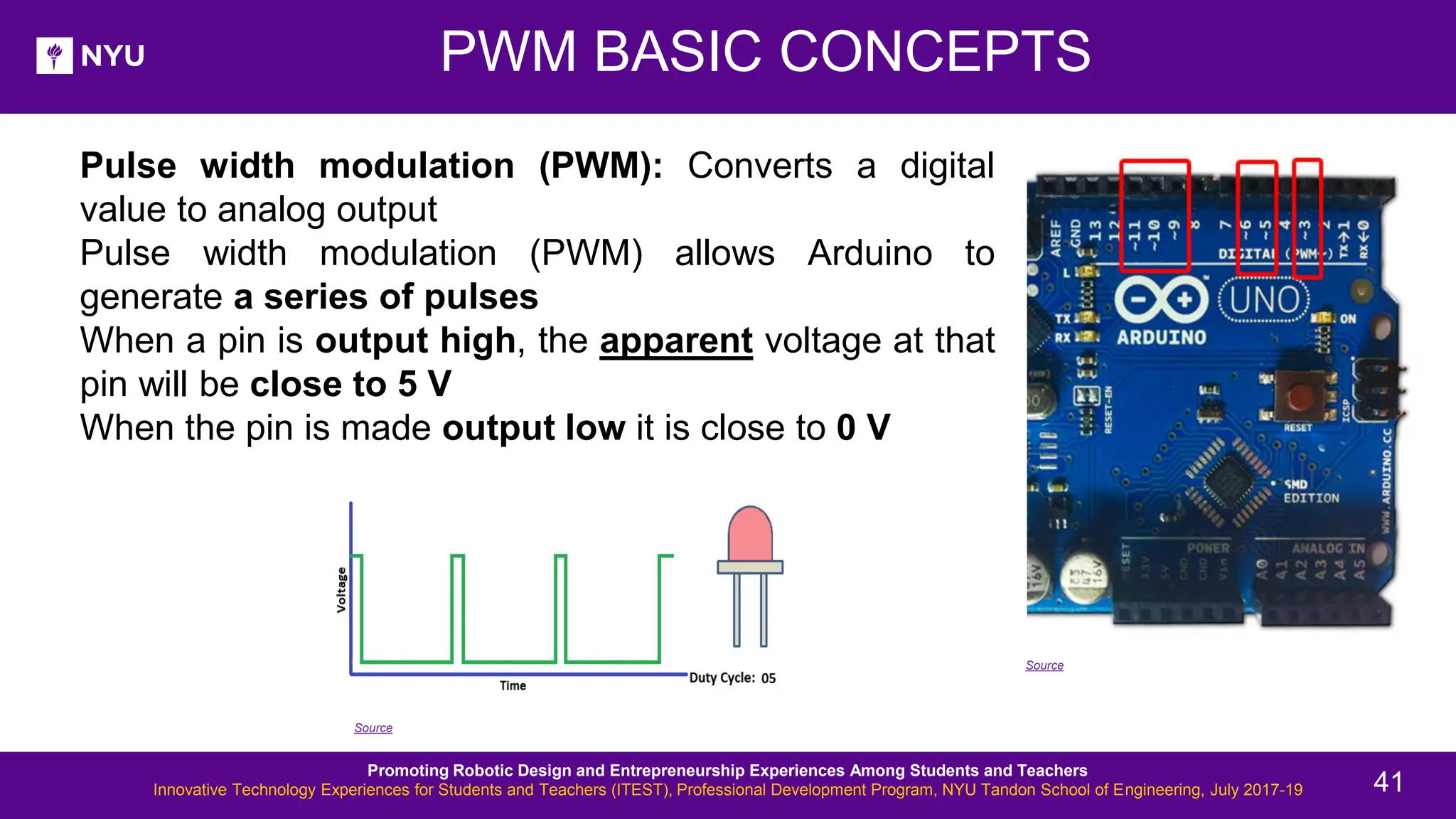
• Pulse width modulation (PWM): Converts a digital value to analog output • Pulse width modulation (PWM) allows Arduino to generate a series of pulses • When a pin is output high, the apparent voltage at that pin will be close to 5 V • When the pin is made output low it is close to 0 V PWM BASIC CONCEPTS Source Source Promoting Robotic Design and Entrepreneurship Experiences Among Students and Teachers Innovative Technology Experiences for Students and Teachers (ITEST), Professional Development Program, NYU Tandon School of Engineering, July 2017-19 41
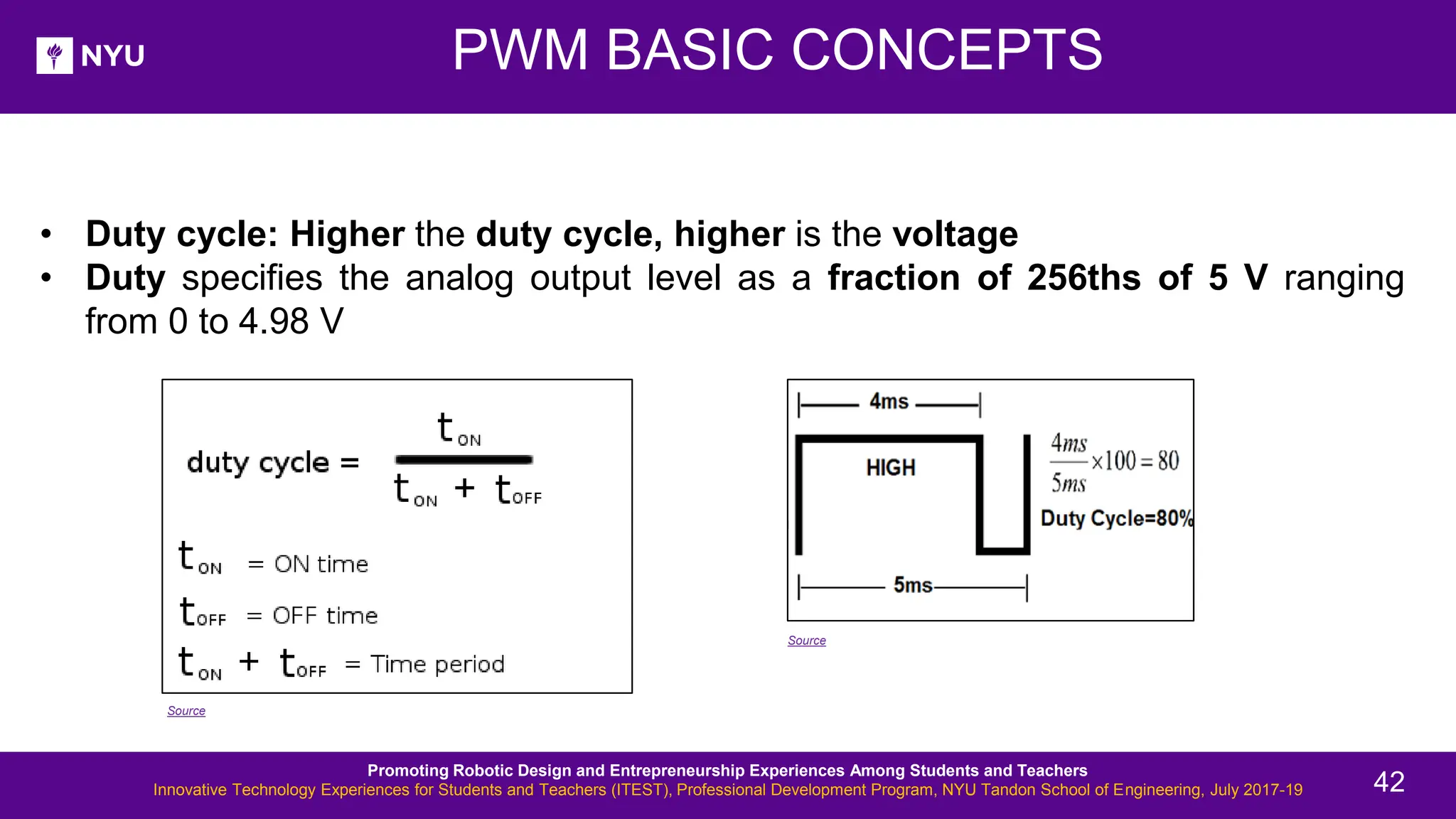
PWM BASIC CONCEPTS • Duty cycle: Higher the duty cycle, higher is the voltage • Duty specifies the analog output level as a fraction of 256ths of 5 V ranging from 0 to 4.98 V Source Source Promoting Robotic Design and Entrepreneurship Experiences Among Students and Teachers Innovative Technology Experiences for Students and Teachers (ITEST), Professional Development Program, NYU Tandon School of Engineering, July 2017-19 42
ACTIVITY 6 New Lesson - Photos • Attach one LED to your Arduino and write a program to change its brightness Promoting Robotic Design and Entrepreneurship Experiences Among Students and Teachers Innovative Technology Experiences for Students and Teachers (ITEST), Professional Development Program, NYU Tandon School of Engineering, July 2017-19 43
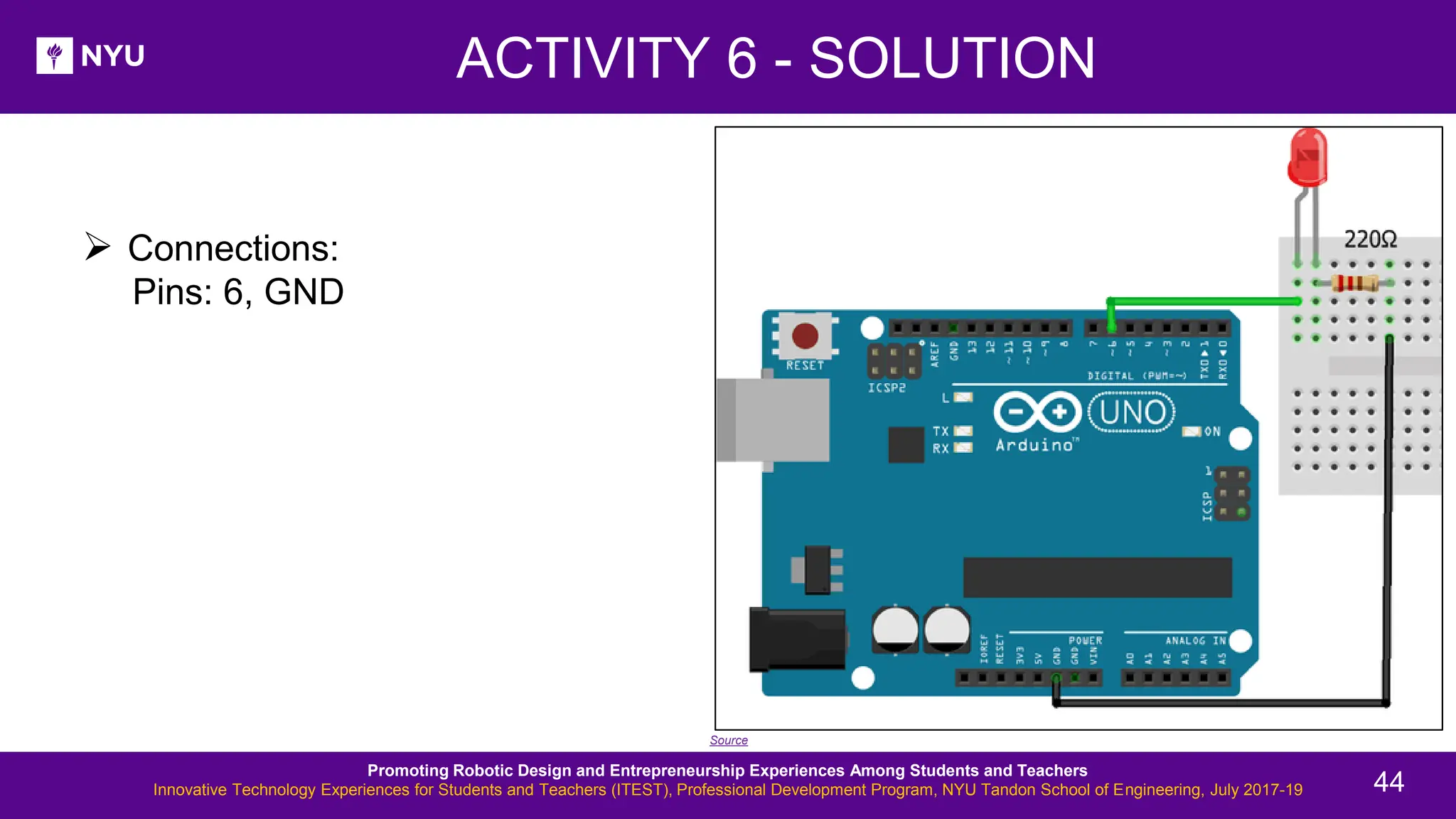
ACTIVITY 6 - SOLUTION New Lesson - Photos ➢ Connections: Pins: 6, GND Source Promoting Robotic Design and Entrepreneurship Experiences Among Students and Teachers Innovative Technology Experiences for Students and Teachers (ITEST), Professional Development Program, NYU Tandon School of Engineering, July 2017-19 44
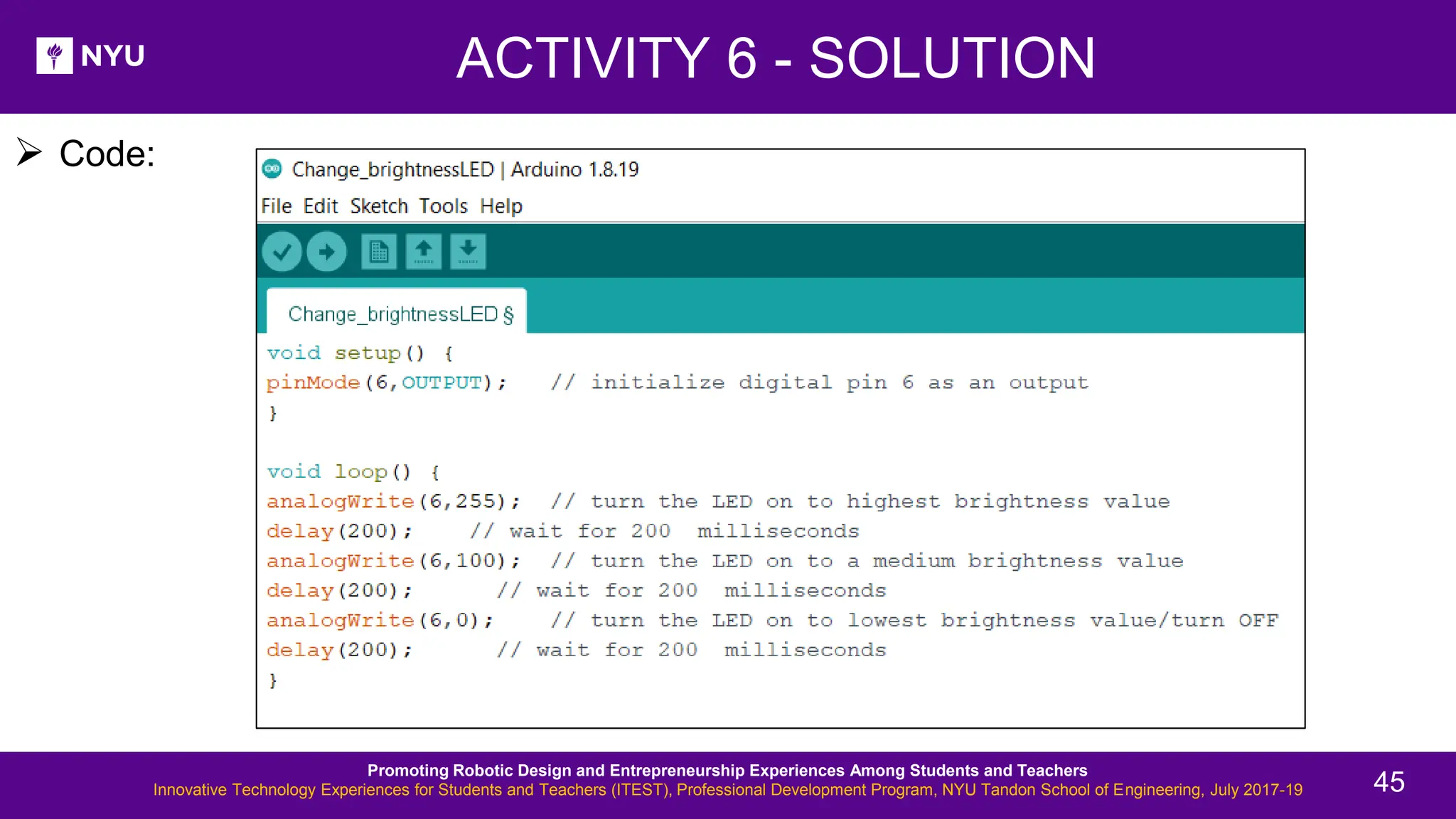
ACTIVITY 6 - SOLUTION New Lesson - Photos ➢ Code: Promoting Robotic Design and Entrepreneurship Experiences Among Students and Teachers Innovative Technology Experiences for Students and Teachers (ITEST), Professional Development Program, NYU Tandon School of Engineering, July 2017-19 45
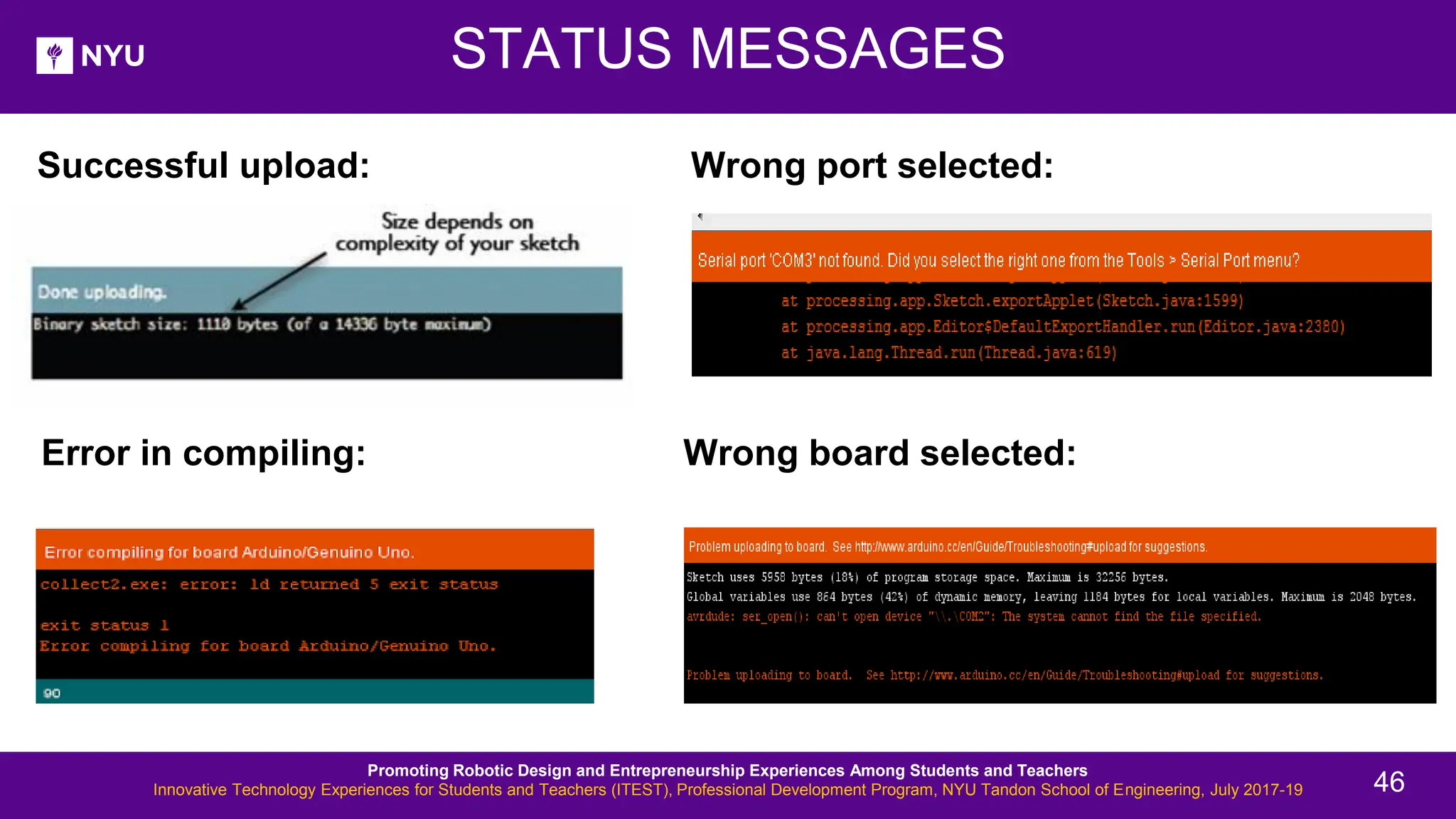
Successful upload: STATUS MESSAGES Error in compiling: Wrong port selected: Wrong board selected: Promoting Robotic Design and Entrepreneurship Experiences Among Students and Teachers Innovative Technology Experiences for Students and Teachers (ITEST), Professional Development Program, NYU Tandon School of Engineering, July 2017-19 46
ACTIVITY 7 New Lesson - Photos • Attach at least 5 LEDs to your Arduino, each to a separate pin. Blink them together Promoting Robotic Design and Entrepreneurship Experiences Among Students and Teachers Innovative Technology Experiences for Students and Teachers (ITEST), Professional Development Program, NYU Tandon School of Engineering, July 2017-19 47
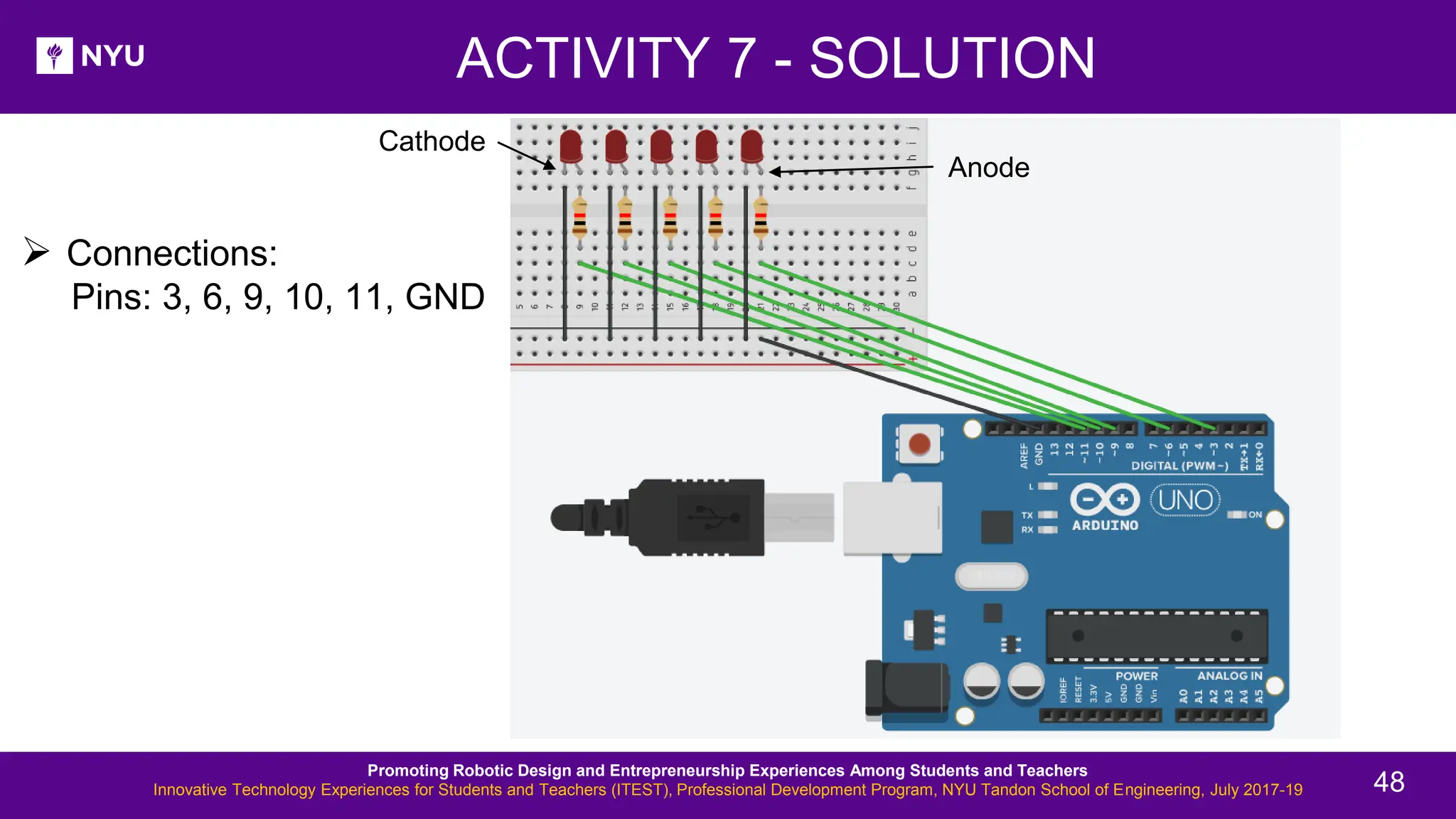
ACTIVITY 7 - SOLUTION New Lesson - Photos ➢ Connections: Pins: 3, 6, 9, 10, 11, GND Promoting Robotic Design and Entrepreneurship Experiences Among Students and Teachers Innovative Technology Experiences for Students and Teachers (ITEST), Professional Development Program, NYU Tandon School of Engineering, July 2017-19 48 Anode Cathode
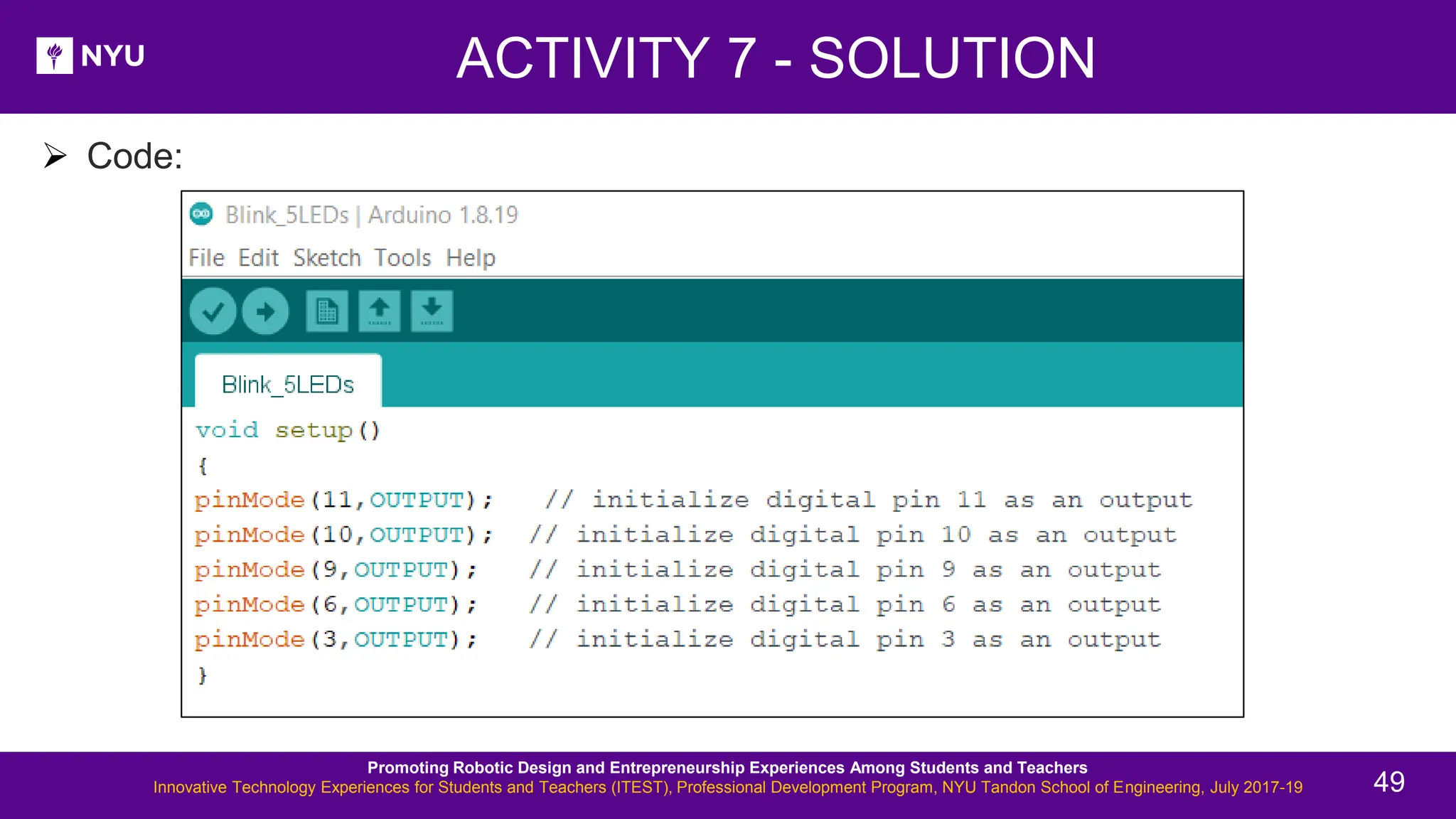
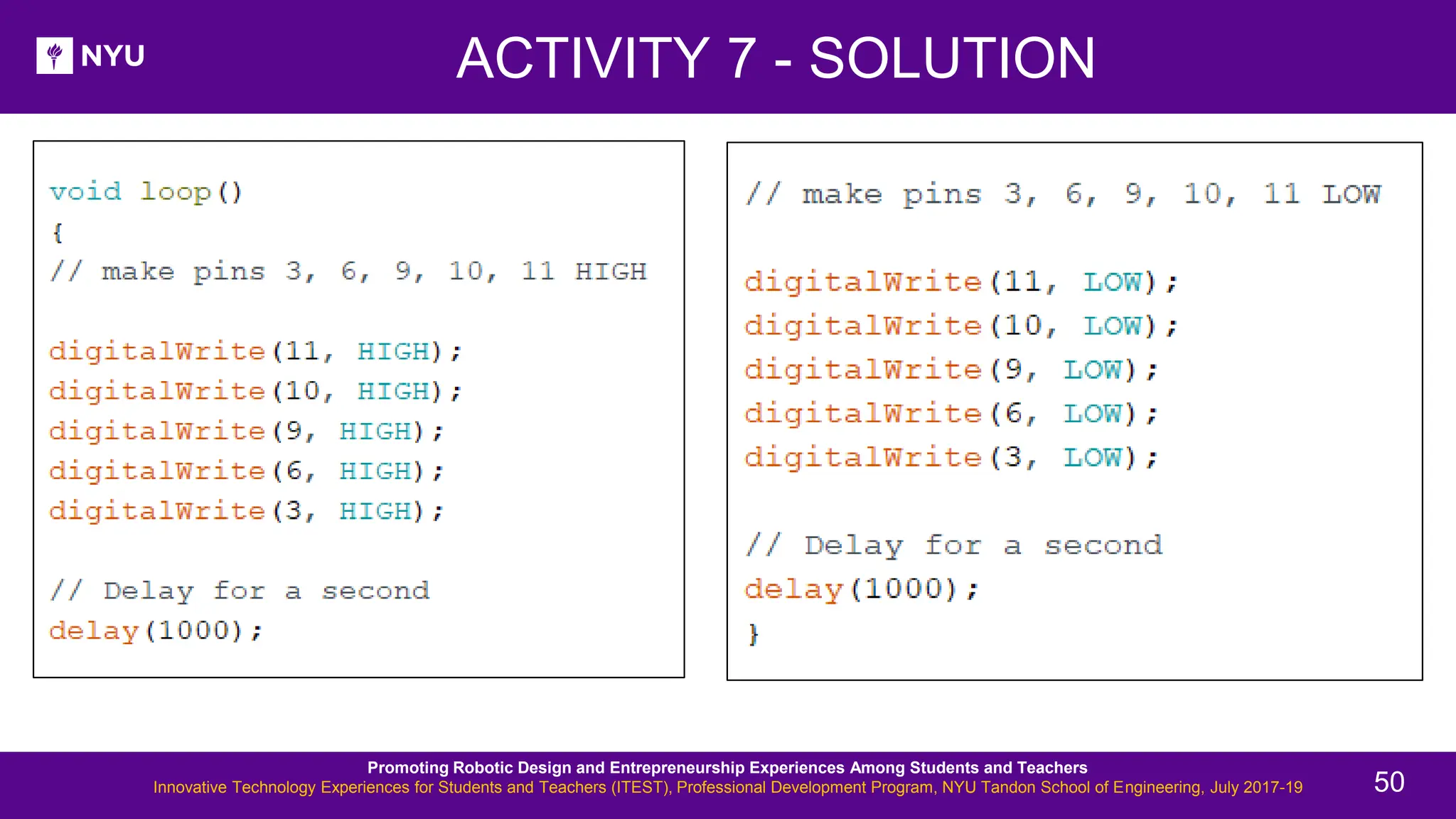
New Lesson - Photos ➢ Code: Promoting Robotic Design and Entrepreneurship Experiences Among Students and Teachers Innovative Technology Experiences for Students and Teachers (ITEST), Professional Development Program, NYU Tandon School of Engineering, July 2017-19 49 ACTIVITY 7 - SOLUTION
New Lesson - Photos Promoting Robotic Design and Entrepreneurship Experiences Among Students and Teachers Innovative Technology Experiences for Students and Teachers (ITEST), Professional Development Program, NYU Tandon School of Engineering, July 2017-19 50 ACTIVITY 7 - SOLUTION
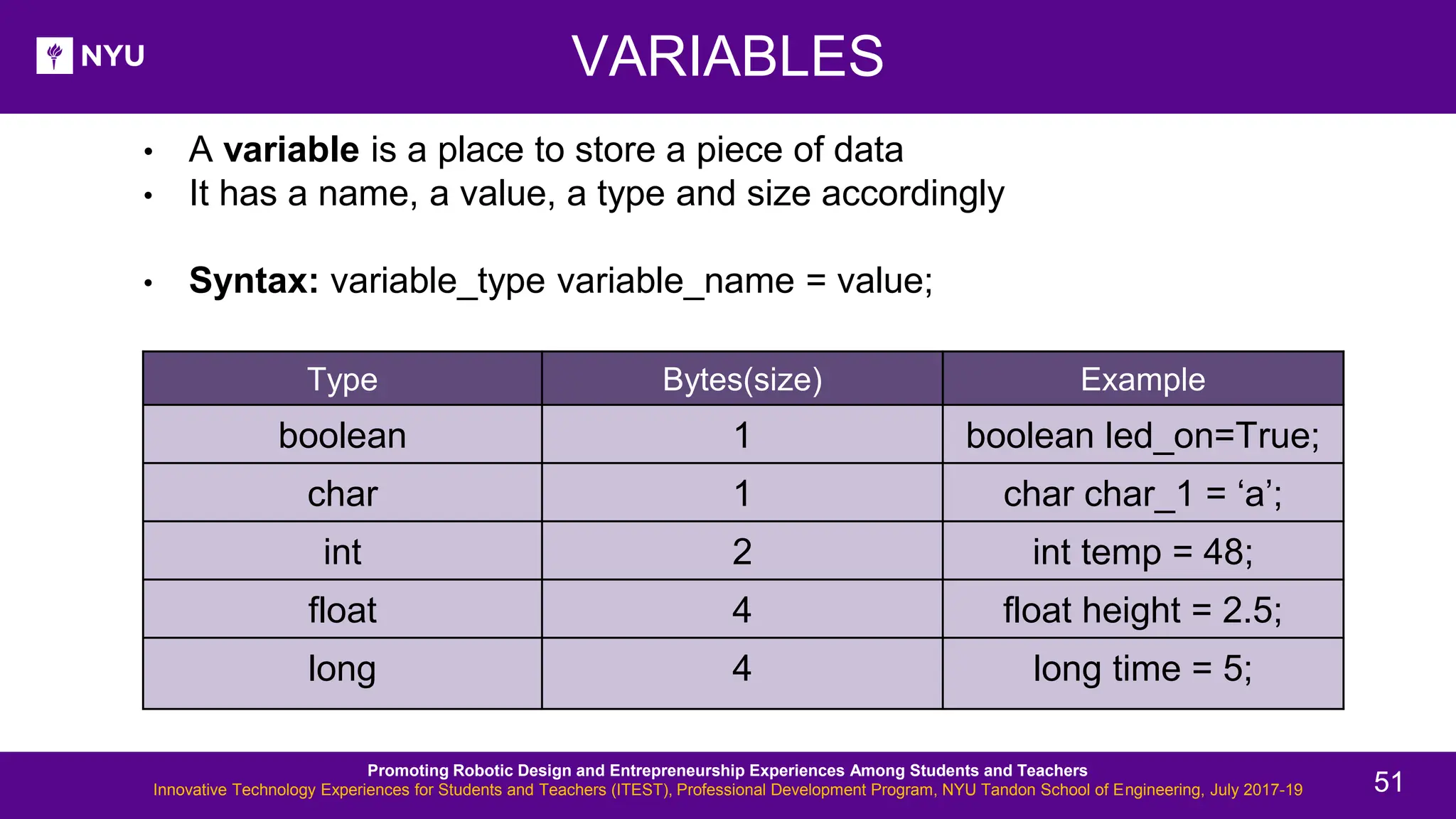
• A variable is a place to store a piece of data • It has a name, a value, a type and size accordingly • Syntax: variable_type variable_name = value; VARIABLES Promoting Robotic Design and Entrepreneurship Experiences Among Students and Teachers Innovative Technology Experiences for Students and Teachers (ITEST), Professional Development Program, NYU Tandon School of Engineering, July 2017-19 51 Type Bytes(size) Example boolean 1 boolean led_on=True; char 1 char char_1 = ‘a’; int 2 int temp = 48; float 4 float height = 2.5; long 4 long time = 5;
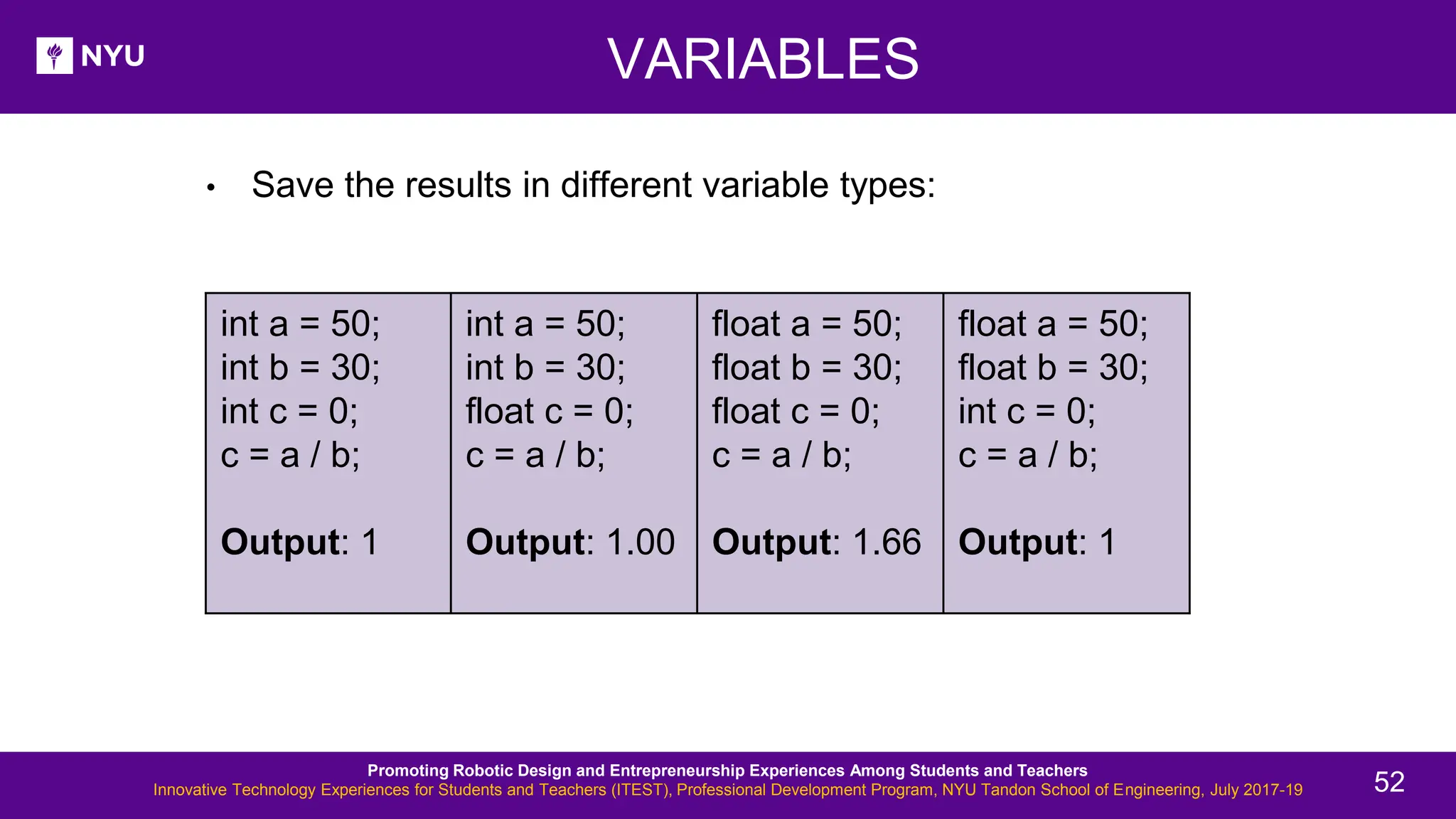
VARIABLES • Save the results in different variable types: Promoting Robotic Design and Entrepreneurship Experiences Among Students and Teachers Innovative Technology Experiences for Students and Teachers (ITEST), Professional Development Program, NYU Tandon School of Engineering, July 2017-19 52 int a = 50; int b = 30; int c = 0; c = a / b; Output: 1 int a = 50; int b = 30; float c = 0; c = a / b; Output: 1.00 float a = 50; float b = 30; float c = 0; c = a / b; Output: 1.66 float a = 50; float b = 30; int c = 0; c = a / b; Output: 1
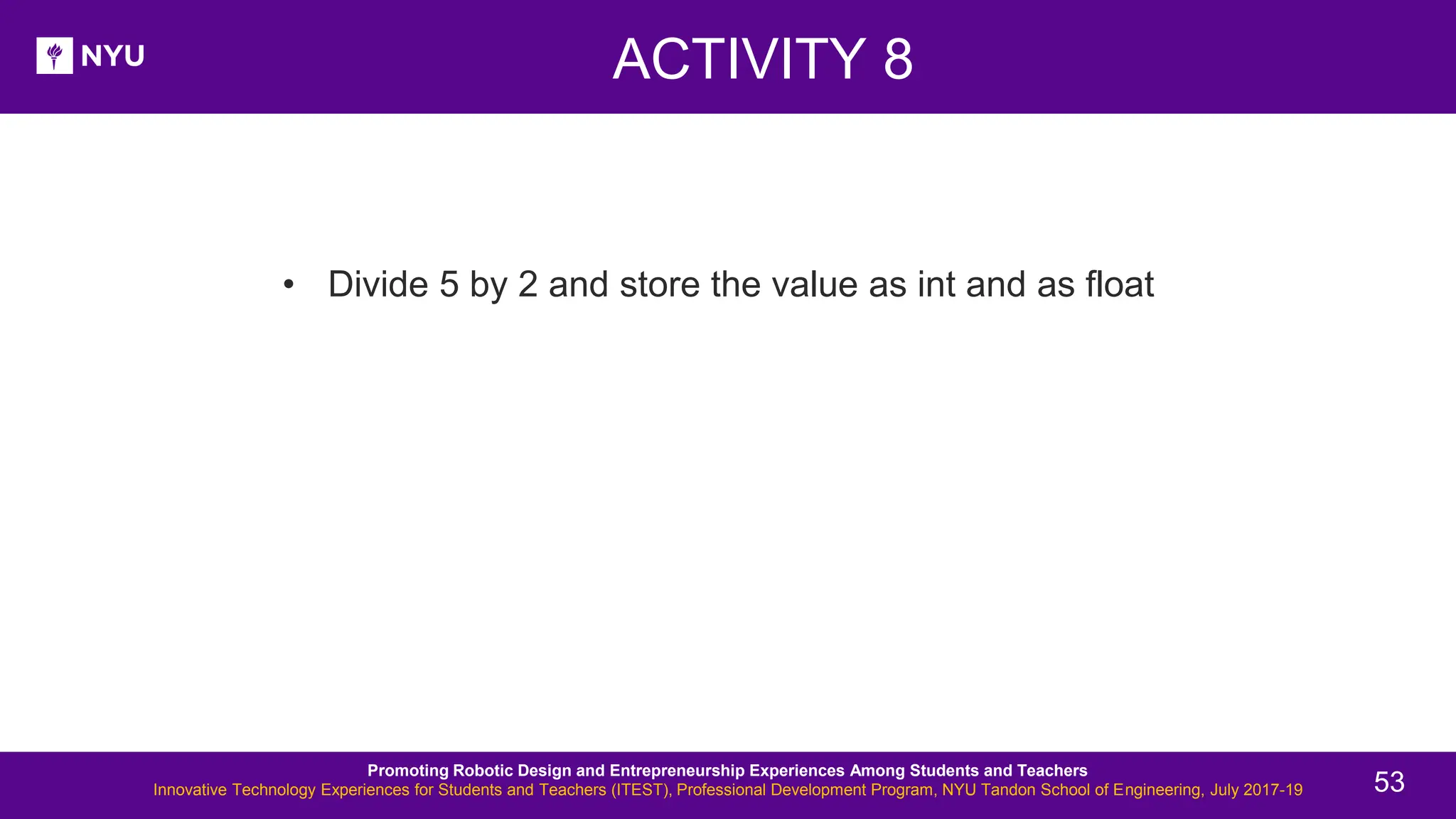
ACTIVITY 8 New Lesson - Photos • Divide 5 by 2 and store the value as int and as float Promoting Robotic Design and Entrepreneurship Experiences Among Students and Teachers Innovative Technology Experiences for Students and Teachers (ITEST), Professional Development Program, NYU Tandon School of Engineering, July 2017-19 53
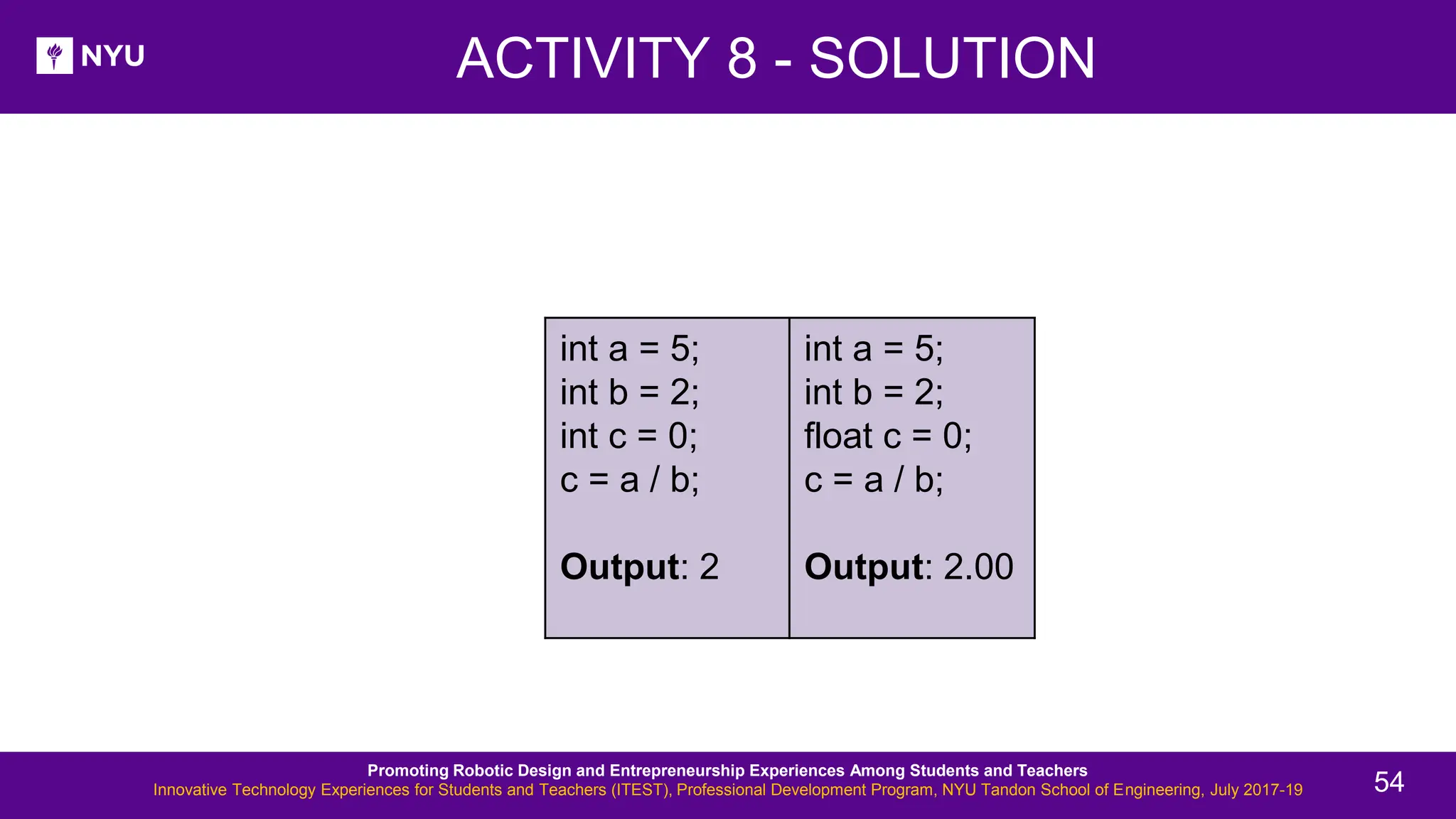
New Lesson - Photos Promoting Robotic Design and Entrepreneurship Experiences Among Students and Teachers Innovative Technology Experiences for Students and Teachers (ITEST), Professional Development Program, NYU Tandon School of Engineering, July 2017-19 54 int a = 5; int b = 2; int c = 0; c = a / b; Output: 2 int a = 5; int b = 2; float c = 0; c = a / b; Output: 2.00 ACTIVITY 8 - SOLUTION
Thank You! Questions and Feedback? Innovative Technology Experiences for Students and Teachers (ITEST), Professional Development Program, July 2017 - 19 Mechatronics, Controls, and Robotics Laboratory, Department of Mechanical and Aerospace Engineering, NYU Tandon School of Engineering

itest-lesson5-introduction-to-arduino.pdf

  • 1.
    Promoting robotic designand entrepreneurship experiences among students and teachers Lesson 5: Introduction to Arduino Innovative Technology Experiences for Students and Teachers (ITEST), Professional Development Program, July 2017 - 19 Mechatronics, Controls, and Robotics Laboratory, Department of Mechanical and Aerospace Engineering, NYU Tandon School of Engineering
  • 2.
    CONTENTS • Microcontrollers andmicroprocessors • Introduction to Arduino • Types of Arduino boards • Programming basics: Structure of a code • TASK/ACTIVITY: ➢ Blink on-board LED ➢ Blink LED(s) ➢ Change brightness of LEDs Promoting Robotic Design and Entrepreneurship Experiences Among Students and Teachers Innovative Technology Experiences for Students and Teachers (ITEST), Professional Development Program, NYU Tandon School of Engineering, July 2017-19 2
  • 3.
    New Lesson -Photos WHAT IS A MICROCONTROLLER? • A compact integrated circuit on a single chip containing a processor, memory, and input/output as its main components • Typically, it is "embedded" inside a device that is controlL E DS • A microcontroller is often small and of low cost Source Promoting Robotic Design and Entrepreneurship Experiences Among Students and Teachers Innovative Technology Experiences for Students and Teachers (ITEST), Professional Development Program, NYU Tandon School of Engineering, July 2017-19 3
  • 4.
    • The keydifference: Microprocessor consists of only a Central Processing Unit, whereas the microcontroller contains a CPU, memory, I/O all integrated into one chip MICROPROCESSOR VS MICROCONTROLLER Source Source Promoting Robotic Design and Entrepreneurship Experiences Among Students and Teachers Innovative Technology Experiences for Students and Teachers (ITEST), Professional Development Program, NYU Tandon School of Engineering, July 2017-19 4
  • 5.
    New Lesson -Photos MORE ABOUT THE DEVICES What is the difference between a computer, a microprocessor and a microcontroller? • Microprocessor is a full computation engine fabricated on a single chip; It acts as the central processing unit (CPU) of a microcomputer • A Computer is a microprocessor packaged on a single circuit board with many interfaces and memory chips; General purpose computers, i.e., PCs, are designed explicitly to interface with humans • Microcontrollers are designed to interface, interact, and communicate with ➢ Electrical/electronic devices ➢ Sensor/actuators ➢ High-tech gadgets, etc. Promoting Robotic Design and Entrepreneurship Experiences Among Students and Teachers Innovative Technology Experiences for Students and Teachers (ITEST), Professional Development Program, NYU Tandon School of Engineering, July 2017-19 5
  • 6.
    COMPONENTS OF AROBOT • As discussed earlier: Source Source Source Source Source Source Promoting Robotic Design and Entrepreneurship Experiences Among Students and Teachers Innovative Technology Experiences for Students and Teachers (ITEST), Professional Development Program, NYU Tandon School of Engineering, July 2017-19 6
  • 7.
    New Lesson -Photos WHAT IS ARDUINO??? • Arduino is an open-source electronic platform for easy use of hardware and software • It can sense the environment by receiving input from variety of sensors and make decision and then give the output • It can be used to develop stand-alone interactive objects or can be connected to software on your computer Arduino Source Promoting Robotic Design and Entrepreneurship Experiences Among Students and Teachers Innovative Technology Experiences for Students and Teachers (ITEST), Professional Development Program, NYU Tandon School of Engineering, July 2017-19 7
  • 8.
    WHAT DOES ITDO??? • Working: The microcontroller (computer) is programmed (code) to receive information (input) from the sensors and the output is given through computer (IDE) or other peripherals Promoting Robotic Design and Entrepreneurship Experiences Among Students and Teachers Innovative Technology Experiences for Students and Teachers (ITEST), Professional Development Program, NYU Tandon School of Engineering, July 2017-19 8
  • 9.
    ACTIVITY 1 • Whatis the circuit doing? • What elements do you see on the circuit? • Is there any input? • If yes, what is the input? • Is there any output? • If yes, what is the output? Source Promoting Robotic Design and Entrepreneurship Experiences Among Students and Teachers Innovative Technology Experiences for Students and Teachers (ITEST), Professional Development Program, NYU Tandon School of Engineering, July 2017-19 9
  • 10.
    ACTIVITY 1 -SOLUTION • What is the circuit doing? Light up the on-board LED on button press • What elements do you see on the circuit? Button, resistor, wires • Is there any input? Yes • If yes, what is the input? Button • Is there any output? Yes • If yes, what is the output? LED Source Promoting Robotic Design and Entrepreneurship Experiences Among Students and Teachers Innovative Technology Experiences for Students and Teachers (ITEST), Professional Development Program, NYU Tandon School of Engineering, July 2017-19 Promoting Robotic Design and Entrepreneurship Experiences Among Students and Teachers Innovative Technology Experiences for Students and Teachers (ITEST), Professional Development Program, NYU Tandon School of Engineering, July 2017-19 10
  • 11.
    ARDUINO Source Source Source PromotingRobotic Design and Entrepreneurship Experiences Among Students and Teachers Innovative Technology Experiences for Students and Teachers (ITEST), Professional Development Program, NYU Tandon School of Engineering, July 2017-19 • The word Arduino can mean 3 things: An interface A community Hardware 11
  • 12.
    DIFFERENT TYPES OFARDUINO Arduino LilyPad Arduino NANO Arduino Micro Promoting Robotic Design and Entrepreneurship Experiences Among Students and Teachers Innovative Technology Experiences for Students and Teachers (ITEST), Professional Development Program, NYU Tandon School of Engineering, July 2017-19 12
  • 13.
    DIFFERENT TYPES OFARDUINO Arduino UNO R3 Arduino Leonardo Promoting Robotic Design and Entrepreneurship Experiences Among Students and Teachers Innovative Technology Experiences for Students and Teachers (ITEST), Professional Development Program, NYU Tandon School of Engineering, July 2017-19 13
  • 14.
    DIFFERENT TYPES OFARDUINO Arduino MKR ZERO Arduino IOT board Arduino MEGA 2560 R3 Promoting Robotic Design and Entrepreneurship Experiences Among Students and Teachers Innovative Technology Experiences for Students and Teachers (ITEST), Professional Development Program, NYU Tandon School of Engineering, July 2017-19 14
  • 15.
    PROJECTS BASED ONARDUINO Rubik's cube solver LED cube powered by Arduino Line following Turtlebot Spider bot with Arduino App controlled trainable arm with Arduino Promoting Robotic Design and Entrepreneurship Experiences Among Students and Teachers Innovative Technology Experiences for Students and Teachers (ITEST), Professional Development Program, NYU Tandon School of Engineering, July 2017-19 15
  • 16.
    PROJECTS BASED ONARDUINO Follow me cooler with Arduino • An example of a human-following cooler called, “Follow me” Promoting Robotic Design and Entrepreneurship Experiences Among Students and Teachers Innovative Technology Experiences for Students and Teachers (ITEST), Professional Development Program, NYU Tandon School of Engineering, July 2017-19 16
  • 17.
    • Human-following luggagewith Arduino: PROJECTS BASED ON ARDUINO - NYU Promoting Robotic Design and Entrepreneurship Experiences Among Students and Teachers Innovative Technology Experiences for Students and Teachers (ITEST), Professional Development Program, NYU Tandon School of Engineering, July 2017-19 17
  • 18.
    • Jarvis –Voice assistant with Arduino: PROJECTS BASED ON ARDUINO - NYU Source Promoting Robotic Design and Entrepreneurship Experiences Among Students and Teachers Innovative Technology Experiences for Students and Teachers (ITEST), Professional Development Program, NYU Tandon School of Engineering, July 2017-19 18
  • 19.
    ARDUINO UNO DEVELOPMENTBOARD Source Promoting Robotic Design and Entrepreneurship Experiences Among Students and Teachers Innovative Technology Experiences for Students and Teachers (ITEST), Professional Development Program, NYU Tandon School of Engineering, July 2017-19 19
  • 20.
    ARDUINO HARDWARE SUMMARY PromotingRobotic Design and Entrepreneurship Experiences Among Students and Teachers Innovative Technology Experiences for Students and Teachers (ITEST), Professional Development Program, NYU Tandon School of Engineering, July 2017-19 20
  • 21.
    . Check out: http://arduino.cc/en/Guide/HomePage 1.Download and install the Arduino environment (IDE) according to your system (Mac or Windows) 2. Connect the board to your computer via the USB cable 3. If needed, install the drivers 4. Launch the Arduino IDE ACTIVITY 2 Promoting Robotic Design and Entrepreneurship Experiences Among Students and Teachers Innovative Technology Experiences for Students and Teachers (ITEST), Professional Development Program, NYU Tandon School of Engineering, July 2017-19 21
  • 22.
    . todbot.com/blog/bionicarduino POWERING UP THEARDUINO WITH USB • Connecting via USB cable to load the code and provide power at the same time Source Promoting Robotic Design and Entrepreneurship Experiences Among Students and Teachers Innovative Technology Experiences for Students and Teachers (ITEST), Professional Development Program, NYU Tandon School of Engineering, July 2017-19 22
  • 23.
    SELECT SERIAL PORTAND BOARD • Select the board Arduino UNO and the port showing in the Serial Port section Promoting Robotic Design and Entrepreneurship Experiences Among Students and Teachers Innovative Technology Experiences for Students and Teachers (ITEST), Professional Development Program, NYU Tandon School of Engineering, July 2017-19 23
  • 24.
    . Program to blinkthe on-board LED 1. Select your board 2. Select your serial port 3. Open the blink example 4. Upload the program ACTIVITY 3 Source Promoting Robotic Design and Entrepreneurship Experiences Among Students and Teachers Innovative Technology Experiences for Students and Teachers (ITEST), Professional Development Program, NYU Tandon School of Engineering, July 2017-19 24
  • 25.
    • Go toFile > Examples > Digital > Blink ACTIVITY 3 - SOLUTION Source Promoting Robotic Design and Entrepreneurship Experiences Among Students and Teachers Innovative Technology Experiences for Students and Teachers (ITEST), Professional Development Program, NYU Tandon School of Engineering, July 2017-19 25
  • 26.
    Sketch: Arduino codeis referred to as sketch and consists of: void setup() { • Instructions between the two curly brackets will be run only once when the Arduino program first runs and used for the purpose of setup • Initialize I/O pins (directions), initialize serial communication, etc. } void loop() { • This function is run after setup has finished • It runs in a continuous loop until power is removed } A LITTLE BIT ABOUT THE CODE Sketch Source Promoting Robotic Design and Entrepreneurship Experiences Among Students and Teachers Innovative Technology Experiences for Students and Teachers (ITEST), Professional Development Program, NYU Tandon School of Engineering, July 2017-19 26
  • 27.
    BASIC SYNTAX FORARDUINO PROGRAMS Basic rules of programming Arduino: • // Single line comment • /* Multi line comment, or block‐comment • */ • { } Curly braces to indicate starting and ending of a block of code unbalanced curly braces will cause compile-time errors • ; Each line of code must end with a semicolon NOTE: Semicolon should not be used after #include, #define and for “if, else statements, for, while loops” if code is inside the curly braces Promoting Robotic Design and Entrepreneurship Experiences Among Students and Teachers Innovative Technology Experiences for Students and Teachers (ITEST), Professional Development Program, NYU Tandon School of Engineering, July 2017-19 27
  • 28.
    PROGRAMMING: I/O pinMode(pin, mode) •pin refers to digital I/O pin number and mode argument refers to INPUT or OUTPUT • Can use digital I/O pin 2 to 13 (0 and 1 used for RX and TX) • Digital I/O pins have default mode as INPUT, no need to explicitly declare as inputs ➢ Connection: Connect an OUTPUT pin to an external device in series with a 470Ω or 1KΩ resistor 9 Promoting Robotic Design and Entrepreneurship Experiences Among Students and Teachers Innovative Technology Experiences for Students and Teachers (ITEST), Professional Development Program, NYU Tandon School of Engineering, July 2017-19 28
  • 29.
    UPLOADING YOUR CODE •Select your board Arduino UNO • Select your port from tools • Upload the code to the Arduino as shown • Check for errors • Check if the code is compiled successfully Promoting Robotic Design and Entrepreneurship Experiences Among Students and Teachers Innovative Technology Experiences for Students and Teachers (ITEST), Professional Development Program, NYU Tandon School of Engineering, July 2017-19 29
  • 30.
    BLINK AN EXTERNALLED Things to remember: 1. Longer leg (Anode) of the LED goes to one end of the resistor in series and the other end of resistor goes to pin (3) here 2. Shorter leg (Cathode) goes to ground (GND) Blink LED Source Promoting Robotic Design and Entrepreneurship Experiences Among Students and Teachers Innovative Technology Experiences for Students and Teachers (ITEST), Professional Development Program, NYU Tandon School of Engineering, July 2017-19 Cathode Anode 30
  • 31.
    • Write aprogram to blink one external LED using Arduino ACTIVITY 4 Promoting Robotic Design and Entrepreneurship Experiences Among Students and Teachers Innovative Technology Experiences for Students and Teachers (ITEST), Professional Development Program, NYU Tandon School of Engineering, July 2017-19 31
  • 32.
    ➢ Connections: Pins: 6,GND ACTIVITY 4 - SOLUTION Source Promoting Robotic Design and Entrepreneurship Experiences Among Students and Teachers Innovative Technology Experiences for Students and Teachers (ITEST), Professional Development Program, NYU Tandon School of Engineering, July 2017-19 32
  • 33.
    ➢ Code: ACTIVITY 4- SOLUTION Promoting Robotic Design and Entrepreneurship Experiences Among Students and Teachers Innovative Technology Experiences for Students and Teachers (ITEST), Professional Development Program, NYU Tandon School of Engineering, July 2017-19 33
  • 34.
    PROGRAMMING ESSENTIALS: I/O •Digital I/O pins: Promoting Robotic Design and Entrepreneurship Experiences Among Students and Teachers Innovative Technology Experiences for Students and Teachers (ITEST), Professional Development Program, NYU Tandon School of Engineering, July 2017-19 34
  • 35.
    digitalRead(pin) • Reads thevalue from a specified digital pin with the result being 1 (HIGH) or 0 (LOW) • Pin can be specified as a variable or constant (0-13) ➢ Syntax: value = digitalRead(pin); //sets 'value' equal to the state of the input pin digitalWrite(pin, value) • Pin refers to a digital pin, can be a variable or a constant (0-13) • Value is either logic level HIGH/LOW, TRUE/FALSE, 1/0 • Outputs either logic level HIGH or LOW at a specified digital pin ➢ Syntax: digitalWrite(pin, value); //sets 'value’ as the state of the input pin PROGRAMMING ESSENTIALS: I/O Promoting Robotic Design and Entrepreneurship Experiences Among Students and Teachers Innovative Technology Experiences for Students and Teachers (ITEST), Professional Development Program, NYU Tandon School of Engineering, July 2017-19 35
  • 36.
    analogRead(pin) • Reads thevalue from a specified analog pin with a 10-bit resolution • Pin argument can be specified as a variable or constant (0-5) • Resulting integer values range from 0 to 1023 and must be scaled to appropriate units ➢ Syntax: value = analogRead(pin); //sets 'value' equal to analog reading on 'pin’ analogWrite(pin, value) • Outputs a PWM signal to the specified output pin • This function works on pins 3, 5, 6, 9, 10, and 11 • Value can be specified as a variable or constant with range 0-255 ➢ Syntax: analogWrite(pin, value); //writes 'value' to 'pin' PROGRAMMING ESSENTIALS: I/O Promoting Robotic Design and Entrepreneurship Experiences Among Students and Teachers Innovative Technology Experiences for Students and Teachers (ITEST), Professional Development Program, NYU Tandon School of Engineering, July 2017-19 36
  • 37.
    • Attach 2LEDs to your Arduino, each to a separate pin, blink one LED only once and the other repeatedly ACTIVITY 5 Source Promoting Robotic Design and Entrepreneurship Experiences Among Students and Teachers Innovative Technology Experiences for Students and Teachers (ITEST), Professional Development Program, NYU Tandon School of Engineering, July 2017-19 37
  • 38.
    ➢ Connections: Pins: 10,11, GND ACTIVITY 5 - SOLUTION Source Source Promoting Robotic Design and Entrepreneurship Experiences Among Students and Teachers Innovative Technology Experiences for Students and Teachers (ITEST), Professional Development Program, NYU Tandon School of Engineering, July 2017-19 38
  • 39.
    ACTIVITY 5 -SOLUTION ➢ Code: Promoting Robotic Design and Entrepreneurship Experiences Among Students and Teachers Innovative Technology Experiences for Students and Teachers (ITEST), Professional Development Program, NYU Tandon School of Engineering, July 2017-19 39
  • 40.
    New Lesson -Photos Serial.begin(rate) • Opens serial port and sets the baud rate for serial data transmission • Typical baud rate for communicating with PC is 9600 although other speeds are supported • When using serial communication, digital pins 0 (RX) and 1 (TX) cannot be used at the same time delay(ms) • Pauses the program for time as specified in milliseconds, with 1000 being equal to 1 second PROGRAMMING ESSENTIALS Promoting Robotic Design and Entrepreneurship Experiences Among Students and Teachers Innovative Technology Experiences for Students and Teachers (ITEST), Professional Development Program, NYU Tandon School of Engineering, July 2017-19 40
  • 41.
    • Pulse widthmodulation (PWM): Converts a digital value to analog output • Pulse width modulation (PWM) allows Arduino to generate a series of pulses • When a pin is output high, the apparent voltage at that pin will be close to 5 V • When the pin is made output low it is close to 0 V PWM BASIC CONCEPTS Source Source Promoting Robotic Design and Entrepreneurship Experiences Among Students and Teachers Innovative Technology Experiences for Students and Teachers (ITEST), Professional Development Program, NYU Tandon School of Engineering, July 2017-19 41
  • 42.
    PWM BASIC CONCEPTS •Duty cycle: Higher the duty cycle, higher is the voltage • Duty specifies the analog output level as a fraction of 256ths of 5 V ranging from 0 to 4.98 V Source Source Promoting Robotic Design and Entrepreneurship Experiences Among Students and Teachers Innovative Technology Experiences for Students and Teachers (ITEST), Professional Development Program, NYU Tandon School of Engineering, July 2017-19 42
  • 43.
    ACTIVITY 6 New Lesson- Photos • Attach one LED to your Arduino and write a program to change its brightness Promoting Robotic Design and Entrepreneurship Experiences Among Students and Teachers Innovative Technology Experiences for Students and Teachers (ITEST), Professional Development Program, NYU Tandon School of Engineering, July 2017-19 43
  • 44.
    ACTIVITY 6 -SOLUTION New Lesson - Photos ➢ Connections: Pins: 6, GND Source Promoting Robotic Design and Entrepreneurship Experiences Among Students and Teachers Innovative Technology Experiences for Students and Teachers (ITEST), Professional Development Program, NYU Tandon School of Engineering, July 2017-19 44
  • 45.
    ACTIVITY 6 -SOLUTION New Lesson - Photos ➢ Code: Promoting Robotic Design and Entrepreneurship Experiences Among Students and Teachers Innovative Technology Experiences for Students and Teachers (ITEST), Professional Development Program, NYU Tandon School of Engineering, July 2017-19 45
  • 46.
    Successful upload: STATUS MESSAGES Errorin compiling: Wrong port selected: Wrong board selected: Promoting Robotic Design and Entrepreneurship Experiences Among Students and Teachers Innovative Technology Experiences for Students and Teachers (ITEST), Professional Development Program, NYU Tandon School of Engineering, July 2017-19 46
  • 47.
    ACTIVITY 7 New Lesson- Photos • Attach at least 5 LEDs to your Arduino, each to a separate pin. Blink them together Promoting Robotic Design and Entrepreneurship Experiences Among Students and Teachers Innovative Technology Experiences for Students and Teachers (ITEST), Professional Development Program, NYU Tandon School of Engineering, July 2017-19 47
  • 48.
    ACTIVITY 7 -SOLUTION New Lesson - Photos ➢ Connections: Pins: 3, 6, 9, 10, 11, GND Promoting Robotic Design and Entrepreneurship Experiences Among Students and Teachers Innovative Technology Experiences for Students and Teachers (ITEST), Professional Development Program, NYU Tandon School of Engineering, July 2017-19 48 Anode Cathode
  • 49.
    New Lesson -Photos ➢ Code: Promoting Robotic Design and Entrepreneurship Experiences Among Students and Teachers Innovative Technology Experiences for Students and Teachers (ITEST), Professional Development Program, NYU Tandon School of Engineering, July 2017-19 49 ACTIVITY 7 - SOLUTION
  • 50.
    New Lesson -Photos Promoting Robotic Design and Entrepreneurship Experiences Among Students and Teachers Innovative Technology Experiences for Students and Teachers (ITEST), Professional Development Program, NYU Tandon School of Engineering, July 2017-19 50 ACTIVITY 7 - SOLUTION
  • 51.
    • A variableis a place to store a piece of data • It has a name, a value, a type and size accordingly • Syntax: variable_type variable_name = value; VARIABLES Promoting Robotic Design and Entrepreneurship Experiences Among Students and Teachers Innovative Technology Experiences for Students and Teachers (ITEST), Professional Development Program, NYU Tandon School of Engineering, July 2017-19 51 Type Bytes(size) Example boolean 1 boolean led_on=True; char 1 char char_1 = ‘a’; int 2 int temp = 48; float 4 float height = 2.5; long 4 long time = 5;
  • 52.
    VARIABLES • Save theresults in different variable types: Promoting Robotic Design and Entrepreneurship Experiences Among Students and Teachers Innovative Technology Experiences for Students and Teachers (ITEST), Professional Development Program, NYU Tandon School of Engineering, July 2017-19 52 int a = 50; int b = 30; int c = 0; c = a / b; Output: 1 int a = 50; int b = 30; float c = 0; c = a / b; Output: 1.00 float a = 50; float b = 30; float c = 0; c = a / b; Output: 1.66 float a = 50; float b = 30; int c = 0; c = a / b; Output: 1
  • 53.
    ACTIVITY 8 New Lesson- Photos • Divide 5 by 2 and store the value as int and as float Promoting Robotic Design and Entrepreneurship Experiences Among Students and Teachers Innovative Technology Experiences for Students and Teachers (ITEST), Professional Development Program, NYU Tandon School of Engineering, July 2017-19 53
  • 54.
    New Lesson -Photos Promoting Robotic Design and Entrepreneurship Experiences Among Students and Teachers Innovative Technology Experiences for Students and Teachers (ITEST), Professional Development Program, NYU Tandon School of Engineering, July 2017-19 54 int a = 5; int b = 2; int c = 0; c = a / b; Output: 2 int a = 5; int b = 2; float c = 0; c = a / b; Output: 2.00 ACTIVITY 8 - SOLUTION
  • 55.
    Thank You! Questions andFeedback? Innovative Technology Experiences for Students and Teachers (ITEST), Professional Development Program, July 2017 - 19 Mechatronics, Controls, and Robotics Laboratory, Department of Mechanical and Aerospace Engineering, NYU Tandon School of Engineering