Java 103: Intro to Java Data Structures
Java 103 • Data Structures – Arrays – Java Collections Framework – Collection Algorithms
Java 103: Intro to Java Data Structures Arrays
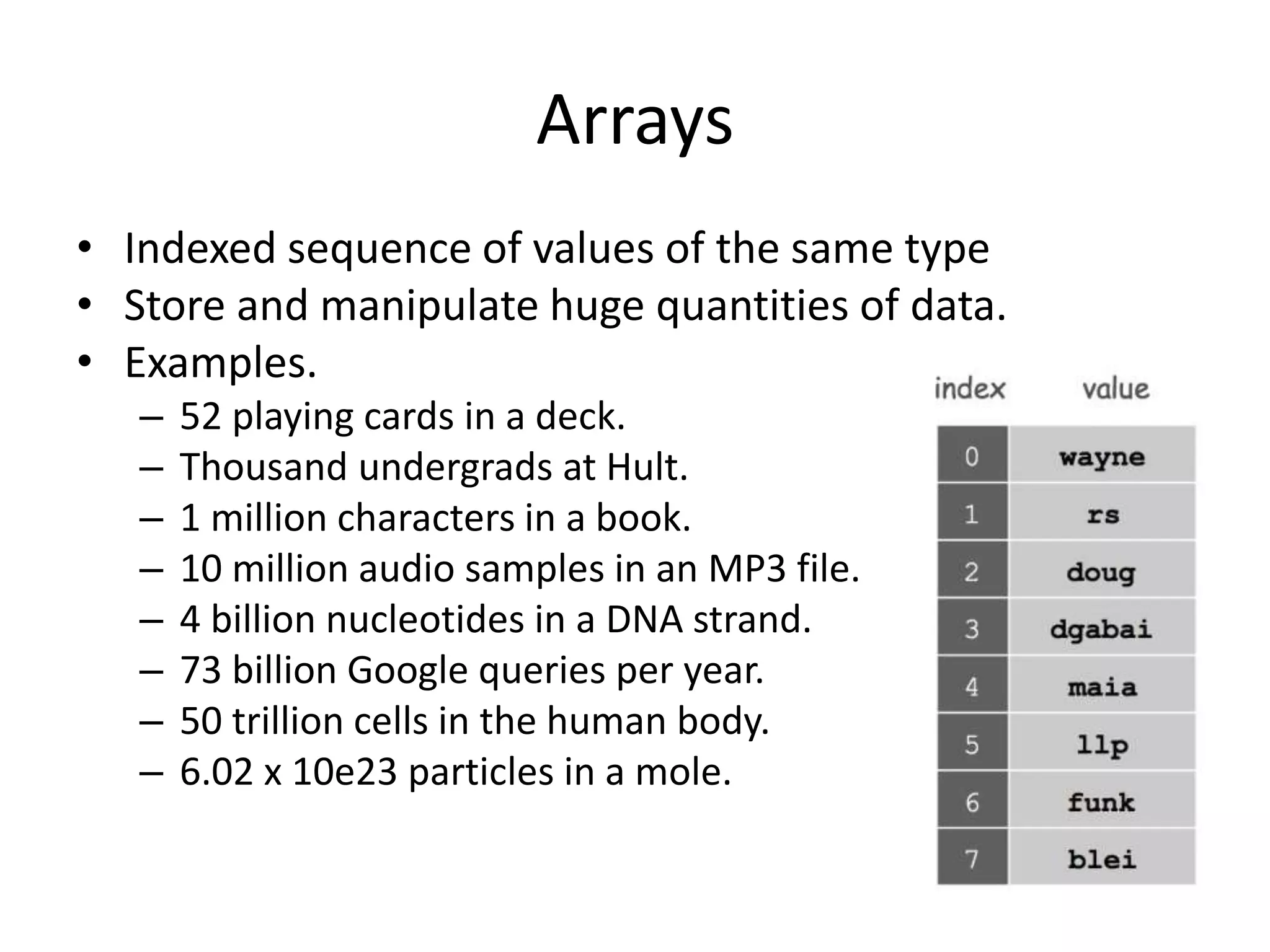
Arrays • Indexed sequence of values of the same type • Store and manipulate huge quantities of data. • Examples. – 52 playing cards in a deck. – Thousand undergrads at Hult. – 1 million characters in a book. – 10 million audio samples in an MP3 file. – 4 billion nucleotides in a DNA strand. – 73 billion Google queries per year. – 50 trillion cells in the human body. – 6.02 x 10e23 particles in a mole.
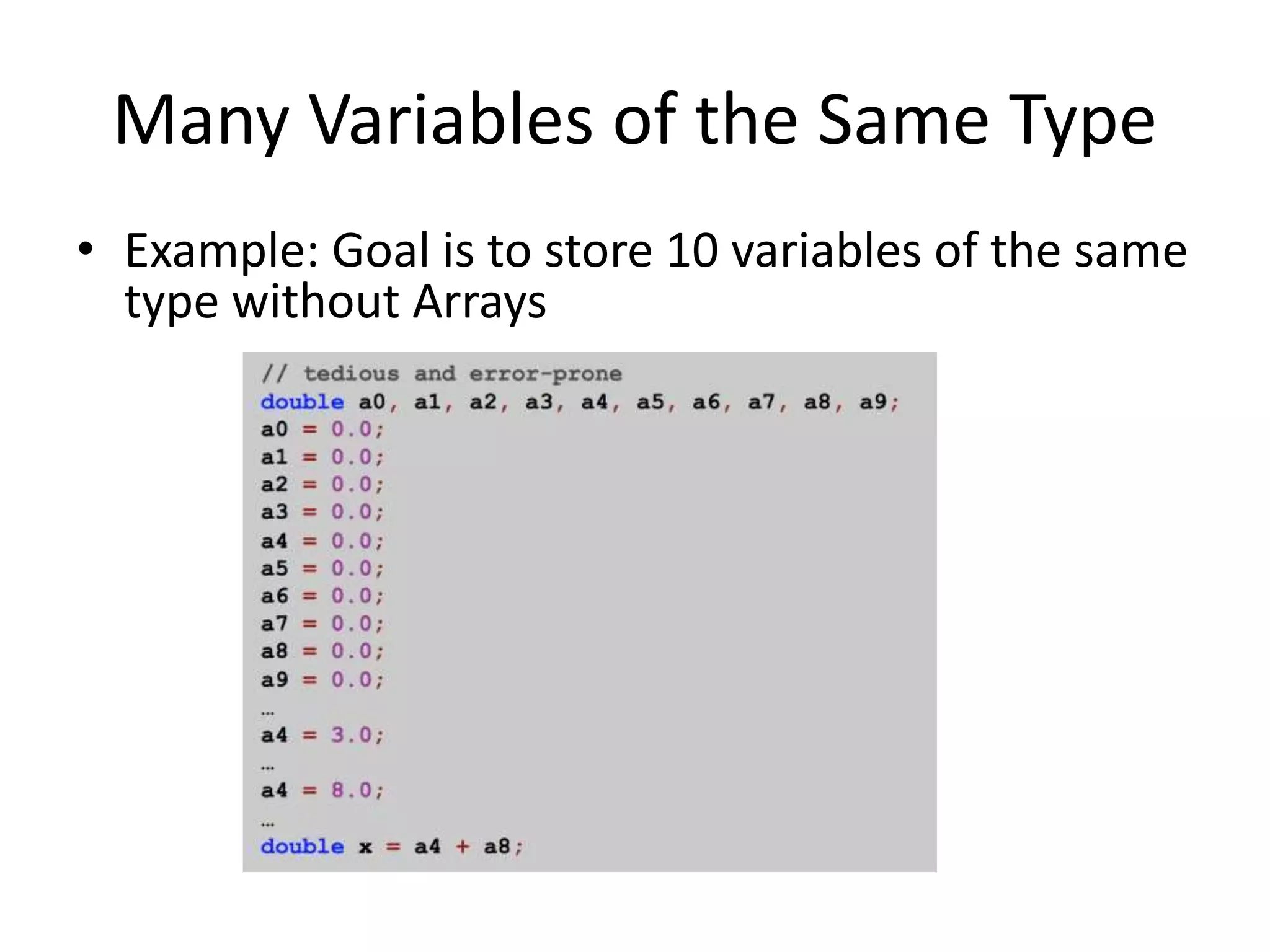
Many Variables of the Same Type • Example: Goal is to store 10 variables of the same type without Arrays
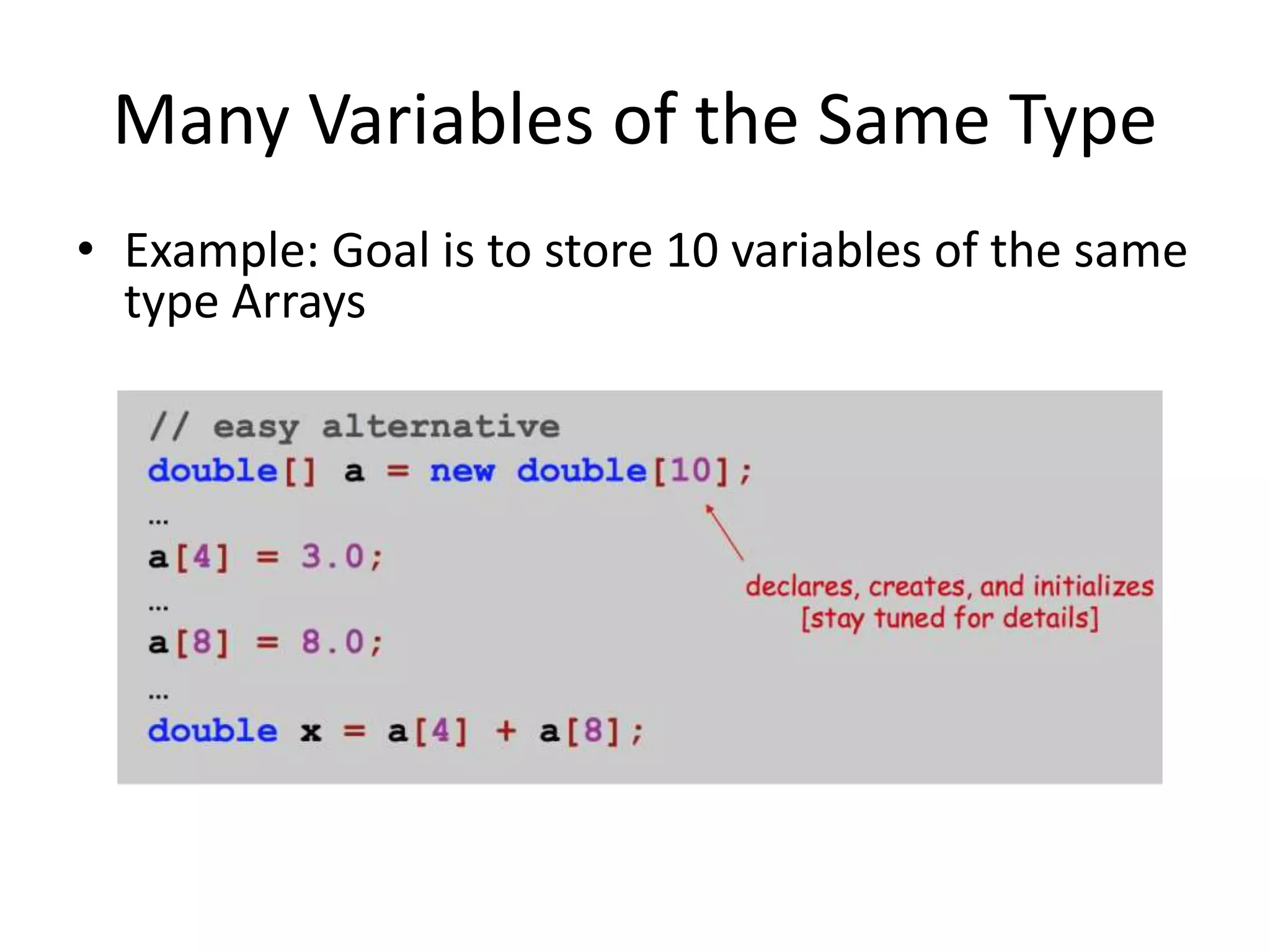
Many Variables of the Same Type • Example: Goal is to store 10 variables of the same type Arrays
Arrays in Java • Java has special language support for arrays. – To make an array: declare, create, and initialize it. – To access element i of array named a, use a[i]. – Array indices start at 0 and end at a.length - 1. • Compact alternative. – Declare, create, and initialize in one statement. – Default initialization: all numbers automatically set to zero.
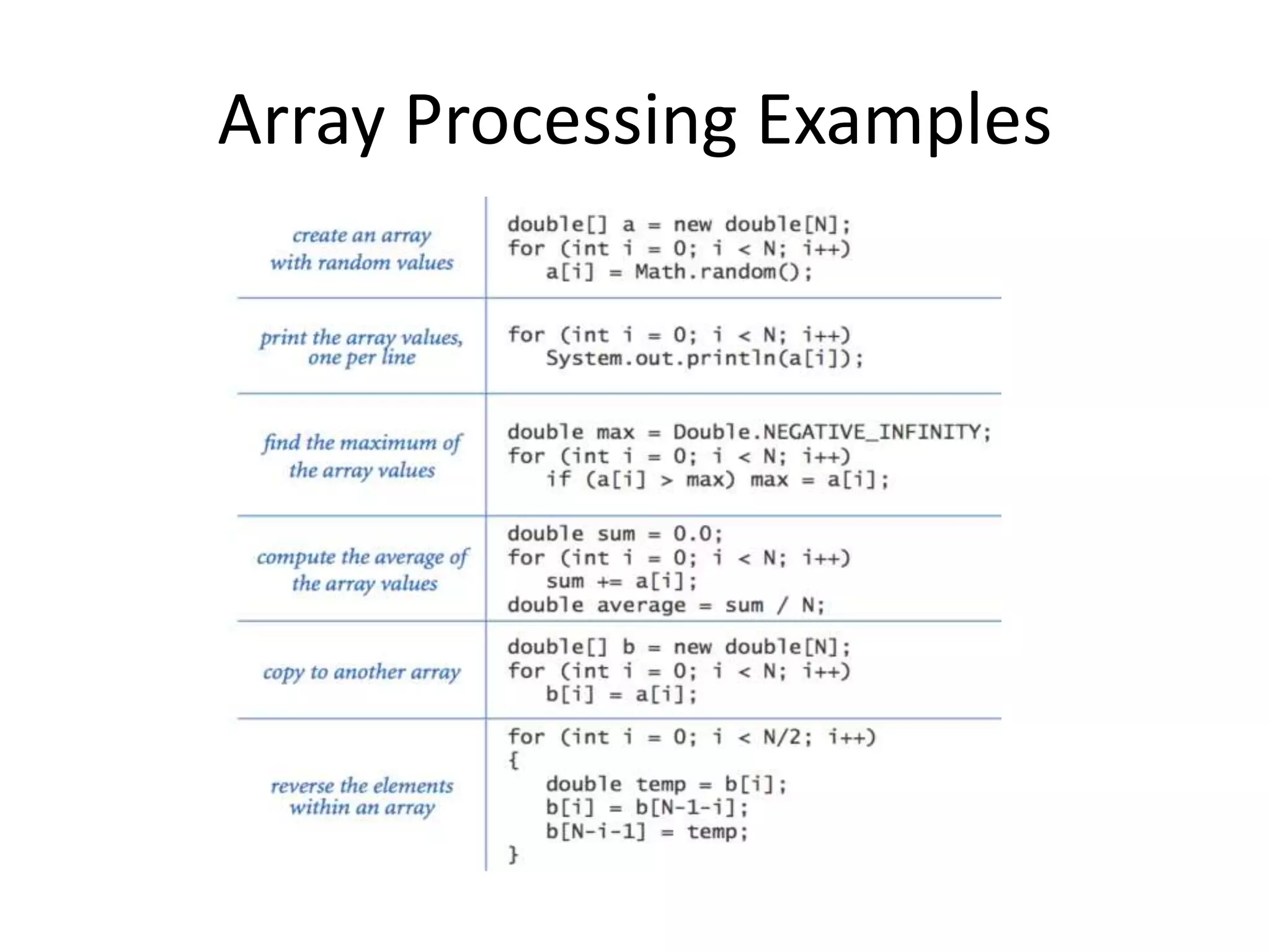
Array Processing Examples
Two-Dimensional Arrays • Examples – Table of data for each experiment and outcome. – Table of grades for each student and assignments. – Table of gray scale values for each pixel in a 2D image. • Mathematical abstraction – Matrix. • Java abstraction – 2D array.
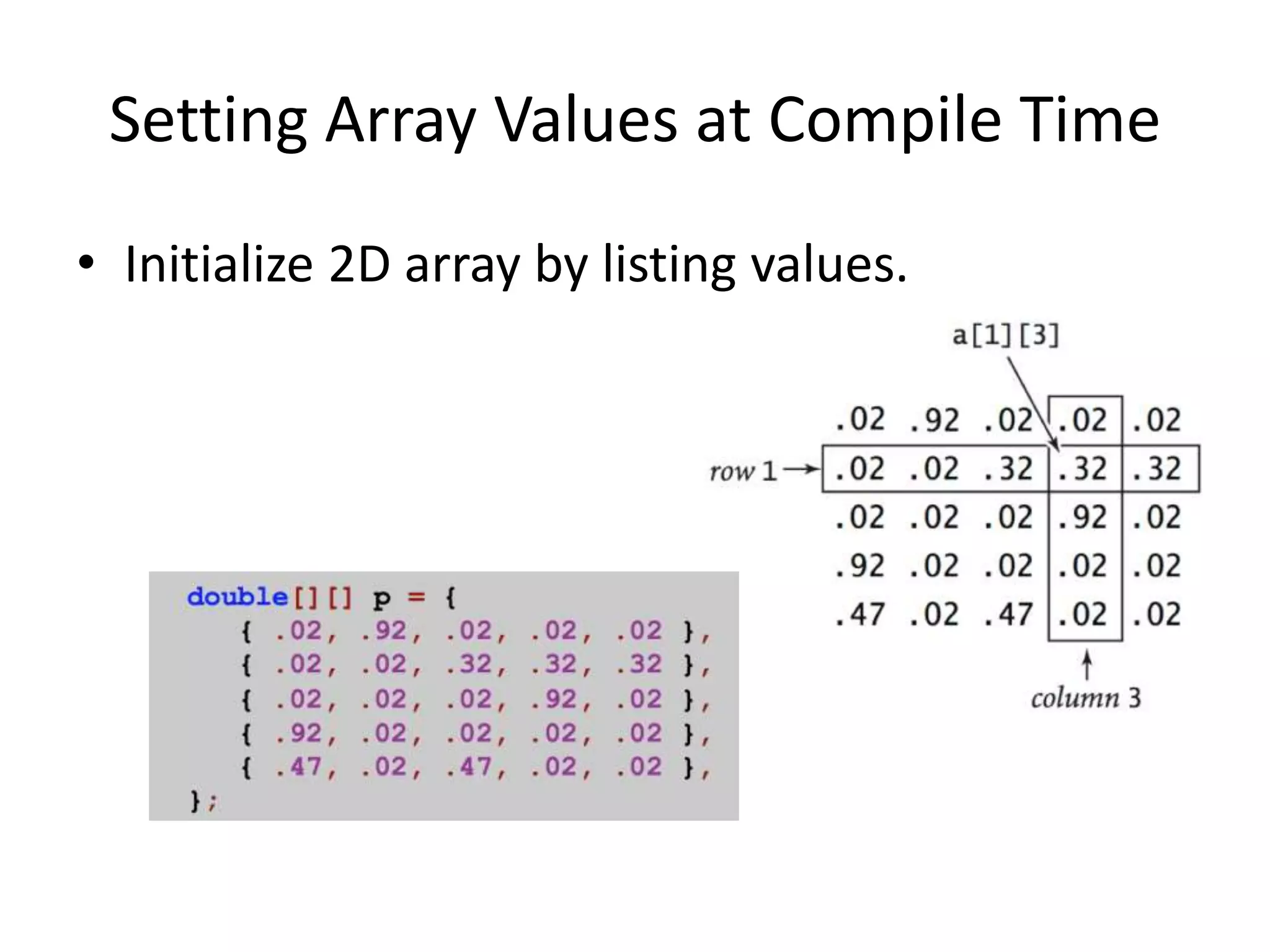
Two-Dimensional Arrays in Java • Array Access. – Use a[i][j] to access element in row I and column j. – Zero-based indexing. – Row and column indices start at 0.
Setting Array Values at Compile Time • Initialize 2D array by listing values.
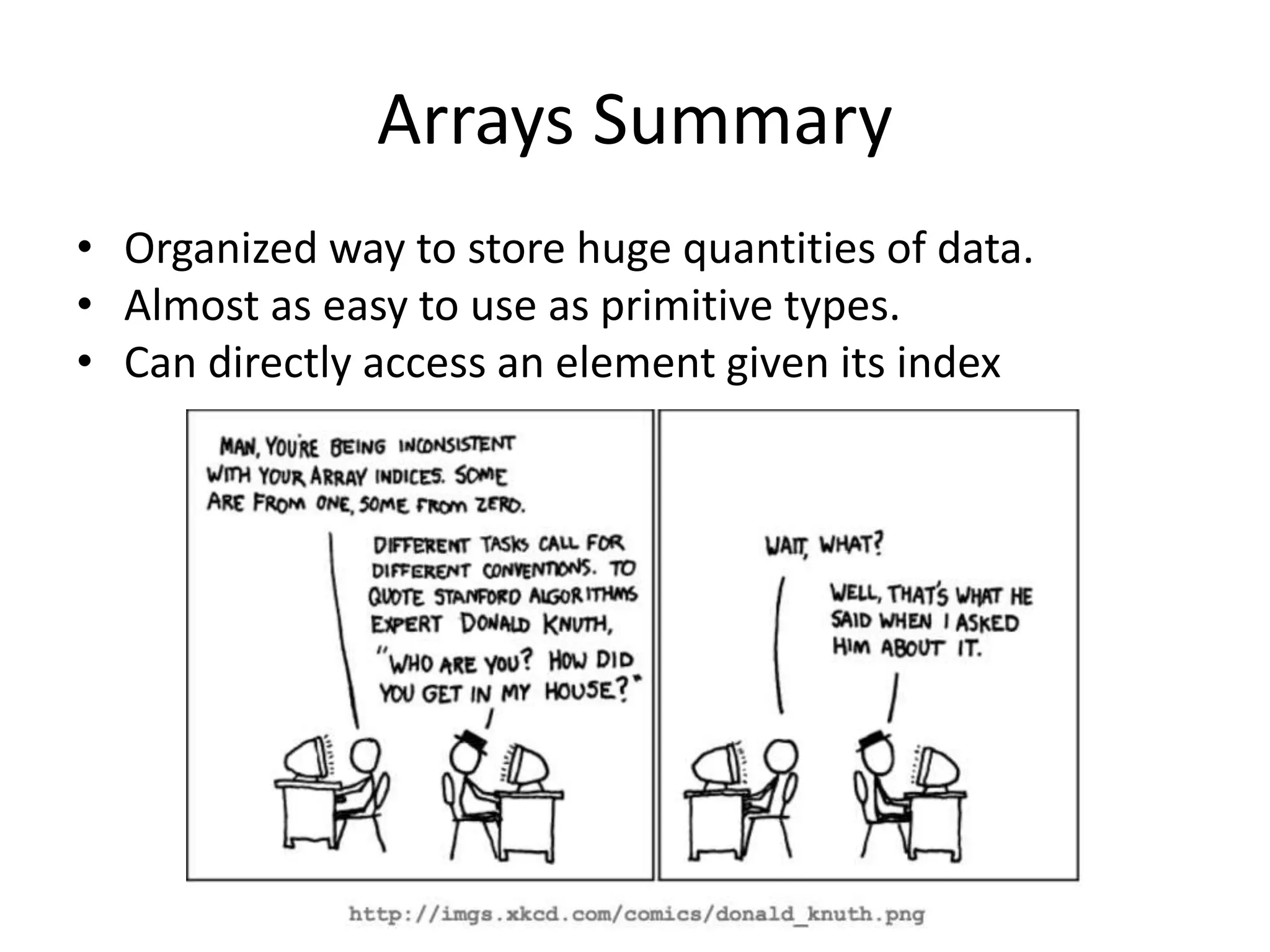
Arrays Summary • Organized way to store huge quantities of data. • Almost as easy to use as primitive types. • Can directly access an element given its index
Hands-on Exercise Array of Days
Exercise: Array of Days • Create a new Java project in Eclipse named ArrayOfDays • Create a java class named DayPrinter that prints out names of the days in a week from an array.
Solution : Arrays of Days public class DayPrinter { public static void main(String[] args) { //initialise the array with the names of days of the week String[] daysOfTheWeek = {"Sunday","Monday","Tuesday","Wednesday", "Thuesday","Friday”,"Saturday"}; //loop through the array and print their elements to //stdout for (int i= 0;i < daysOfTheWeek.length;i++ ){ System.out.println(daysOfTheWeek[i]); } } } % javac DayPrinter.java % java DayPrinter Sunday Monday Tuesday Wednesday Thuesday Friday Saturday
Java 103: Intro to Java Data Structures Equals and HashCode Methods
Overriding Object methods • public boolean equals(Object o) • public int hashCode() Use @Override!
When not to override Equals? • Each instance of the class is inherently unique (e.g. Thread) • You don’t care whether the class provides a “logical equality” test (e.g. Random) • A superclass has already overridden equals, and the superclass behaviour is appropriate for this class (e.g. Set/List/Map and Abstract*) • The class is private or package-private, and you are certain that its equals method will never be invoked (arguably, override and throw AssertionError)
Equals Contract Reflexive x.equals(x) must return true Symmetric x.equals(y) must return true iif y.equals(x) returns true Transitive if x.equals(y) is true and y.equals(z) is true, then x.equals(z) must return true Consistent multiple invocations of x.equals(y) consistently return true or consistently return false, provided no information used in equals comparisons on the objects is modified Null For any non-null reference value x, x.equals(null) must return false
Equals • Use == to determine if two reference variables refer to the same object • Use equals() to determine if two objects are meaningfully equivalent • If you don't override equals(), your objects won't be useful hashing keys • When overriding equals(), compare the objects' significant attributes
HashCode • In real-life hashing, it’s not uncommon to have more than one entry in a bucket • Hashing retrieval is a two-step process: 1. Find the right bucket (using hashCode()) 2. Search the bucket for the right element (using equals() ) • An efficient hashCode() override distributes keys evenly across its buckets • It's legal for a hashCode() method to return the same value for all instances (but very inefficient!) • If you override equals(), override hashCode() • transient variables aren't appropriate for equals() and hashCode() • redundant fields can be excluded from the hash code computation • HashMap, HashSet, Hashtable, LinkedHashMap, & LinkedHashSet use hashing
HashCode Contract Consistent: multiple calls to x.hashCode() return the same integer Condition Required Not Required (But Allowed) x.equals(y) == true x.hashCode() == y.hashCode() x.hashCode() == y.hashCode() x.equals(y) == true x.equals(y) == false No hashCode() requirements x.hashCode() != y.hashCode() x.equals(y) == false
Java 103: Intro to Java Data Structures Java Collections Framework
What is a Collection? • An object that groups multiple items into a single unit • Used to store, retrieve, manipulate, and communicate aggregate data • Represent data items that form a natural group, – a poker hand (a collection of cards) – a mail folder (a collection of letters) – a telephone directory (a mapping of names to phone numbers)
Collections Framework • A unified architecture for representing and manipulating collections • Usually contain… – Interfaces – Implementations – Algorithms • Examples of collections frameworks in other languages – C++ Standard Template Library (STL) – Smalltalk's collection hierarchy
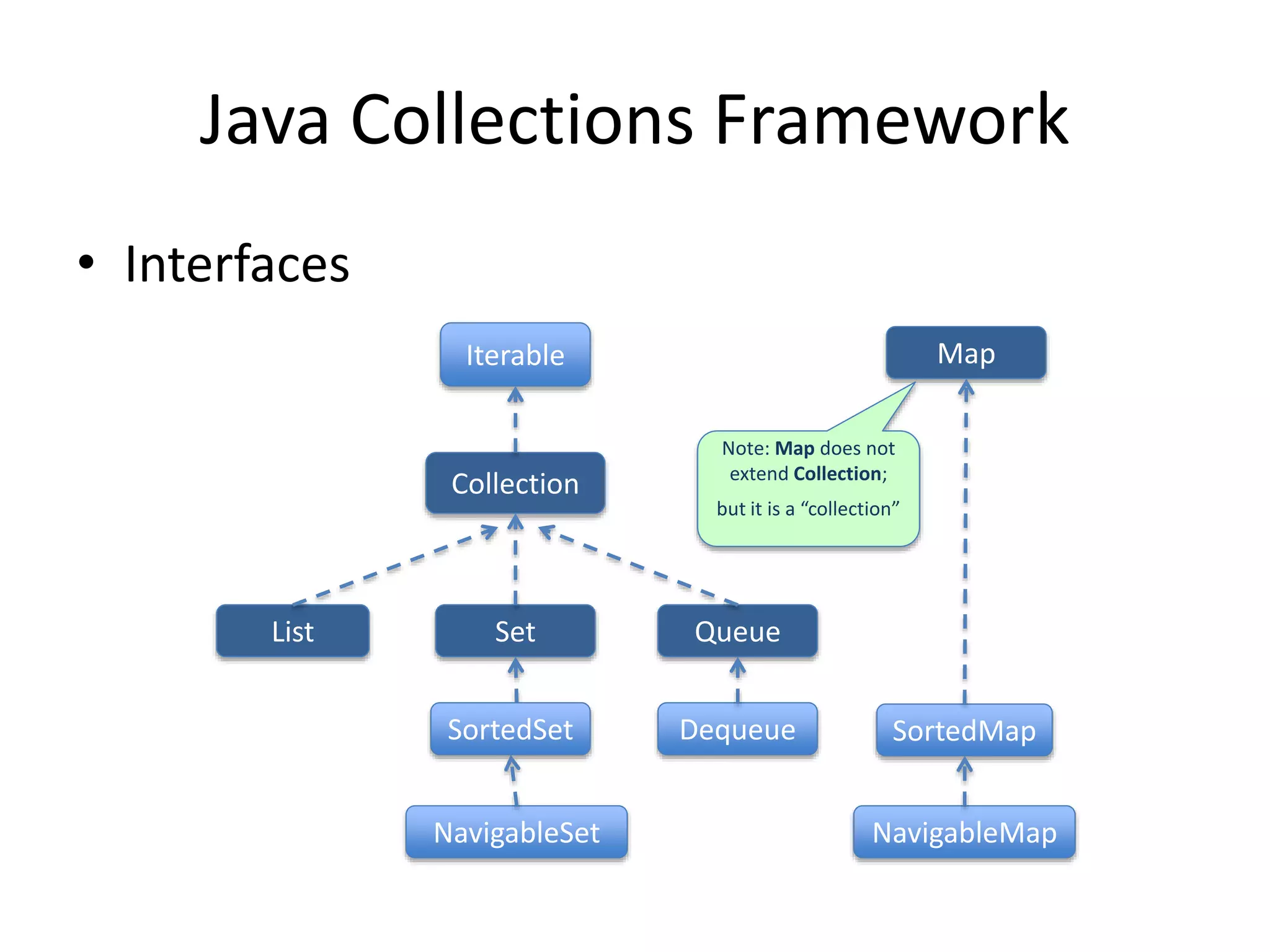
Java Collections Framework • Interfaces Collection List Set Iterable SortedSet Dequeue Queue NavigableSet NavigableMap SortedMap Map Note: Map does not extend Collection; but it is a “collection”
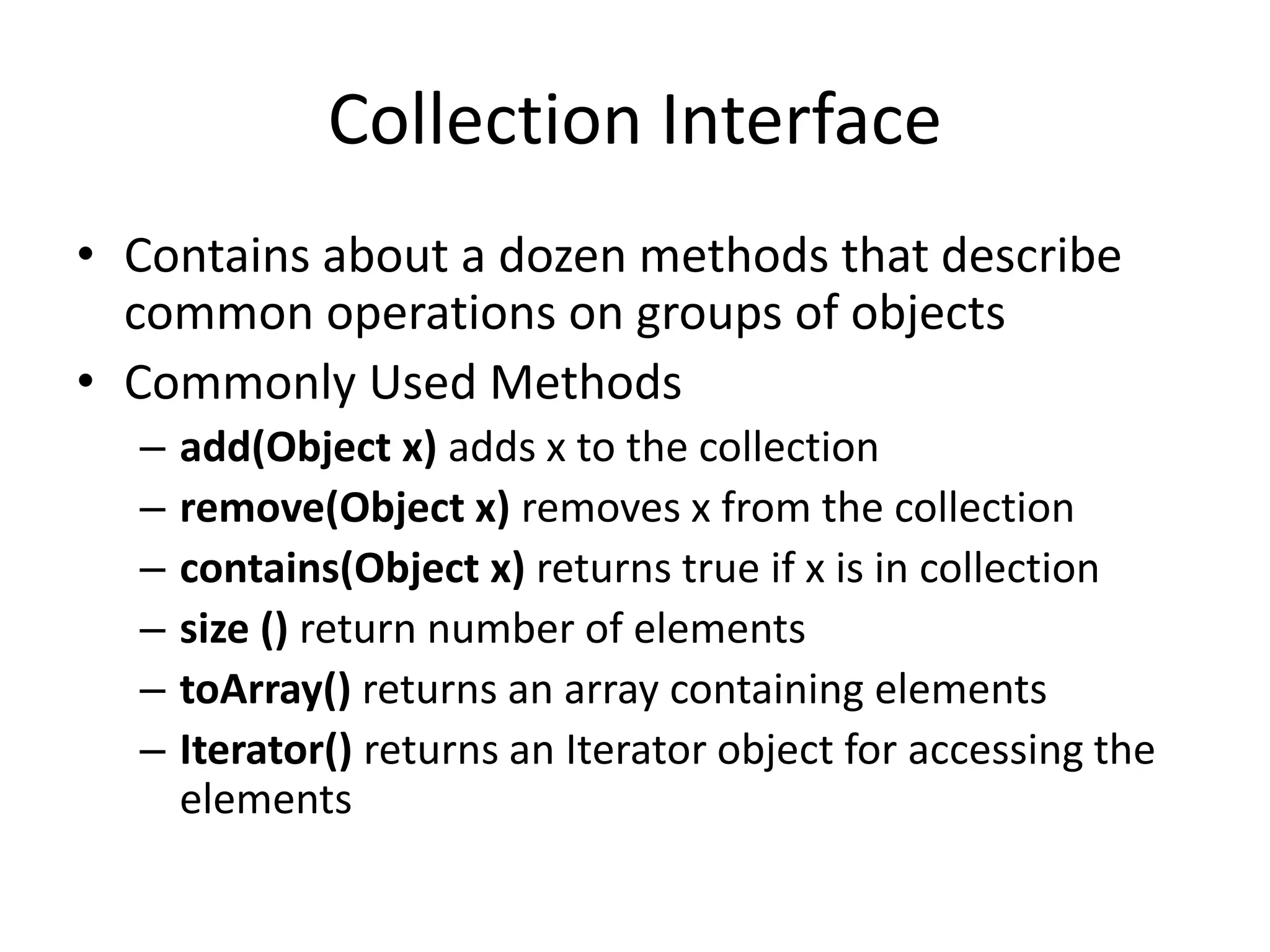
Collection Interface • Contains about a dozen methods that describe common operations on groups of objects • Commonly Used Methods – add(Object x) adds x to the collection – remove(Object x) removes x from the collection – contains(Object x) returns true if x is in collection – size () return number of elements – toArray() returns an array containing elements – Iterator() returns an Iterator object for accessing the elements
Hands-on Exercise Dumping Collection Elements
Exercise: Dumping Collection Elements • What happens when you run the following program? import java.util.*; public class DumpCollection { public static void main(String[] args) { Collection days= Arrays.asList(”Mon",”Tues",”Wed",”Thurs",”Fri",”Sat", ”Sun"); dumpCollection(months); } public static void dumpCollection(Collection c){ System.out.println("collection has " + c.size() + " elements"); Iterator iterator = c.iterator(); while (iterator.hasNext()){ System.out.println("Next element is " + iterator.next()); } } }
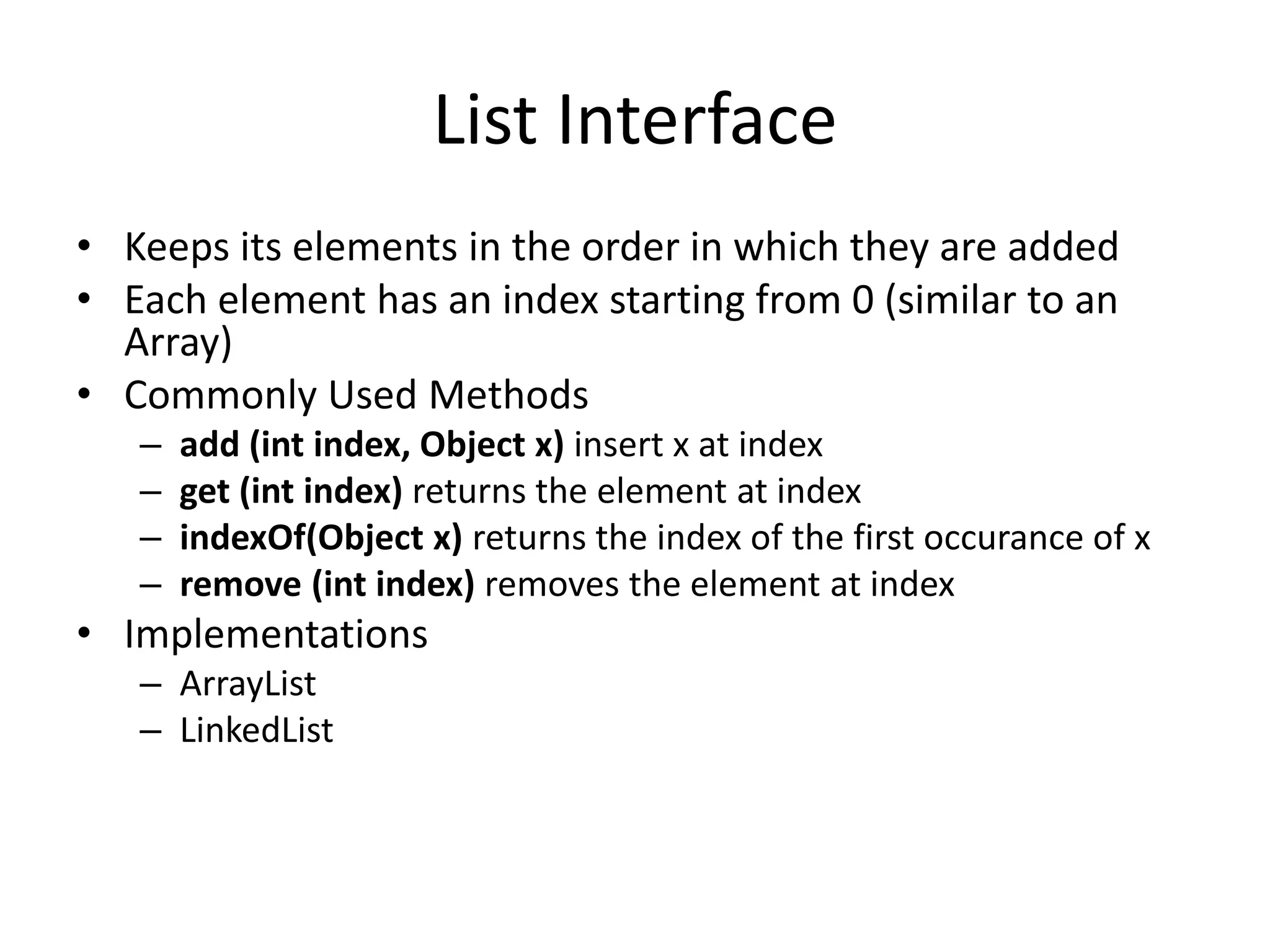
List Interface • Keeps its elements in the order in which they are added • Each element has an index starting from 0 (similar to an Array) • Commonly Used Methods – add (int index, Object x) insert x at index – get (int index) returns the element at index – indexOf(Object x) returns the index of the first occurance of x – remove (int index) removes the element at index • Implementations – ArrayList – LinkedList
List World List ArrayList LinkedList Vector
List World List ArrayList LinkedList Vector Fast iteration and fast random access
List World List ArrayList LinkedList Vector Fast iteration and fast random access Good for adding elements to the ends, i.e. stacks and queues
List World List ArrayList LinkedList Vector Fast iteration and fast random access Good for adding elements to the ends, i.e. stacks and queues It's like a slower ArrayList, but it has synchronized methods
Hands-on Exercise Creating a TODO List
Exercise: Simple TODO List • Create a Java project in Eclipse named SimpleTodoList • Create a Java program named SimpleTodoList • Create a List to store your todo list items (use either ArrayList or LinkedList) • Use a for-loop to display your list contents
Solution: Simple TODO List import java.util.ArrayList; public class SimpleTodoList { public static void main(String[] args) { ArrayList<String> todoList = new ArrayList<String>(); todoList.add("make breakfast"); todoList.add("read morning paper"); todoList.add("Doctors appointment"); for (String item : todoList ) { System.out.println("Item:" + item) ; } } }
Set Interface • Sets contain an unordered list of elements • They do not allow duplicate elements • Commonly Used Methods – add (Object x) returns true if x doesn’t already exist and false if it exists • Implementations – HashSet – TreeSet
Set World Set HashSet LinkedHashSet TreeSet
Set World Set HashSet LinkedHashSet TreeSet Fast access, assures no duplicates, provides no ordering
Set World Set HashSet LinkedHashSet TreeSet Fast access, assures no duplicates, provides no ordering No duplicates; iterates by insertion order
Set World Set HashSet LinkedHashSet TreeSet Fast access, assures no duplicates, provides no ordering No duplicates; iterates by insertion order No duplicates; iterates in sorted order
Hands-on Exercise Set of Points
Example: Set of Points • What happens when you run the following program? import java.awt.Point; import java.util.HashSet; import java.util.Set; public class AddTwice { public static void main(String[] args) { Set points = new HashSet(); Point p1 = new Point(10,20); Point p2 = new Point(10,20); points.add(p1); points.add(p2); System.out.println("number of points = " + points.size()); } }
Map Interface • Combines two collections called keys and values • Associates exactly one value with each key • Keys are used to get values from Maps • Commonly Used Methods – put (Object key, Object value) associates a key and a value – get(Object key) returns the value associated with key – containsKey (Object key) return true if the Map associates some value with key – keySet() returns a Set containing the Map’s keys – values() returns a Collection containing the Map’s values • Implementations – HashMap – TreeMap
Map World Map Hashtable LinkedHashMap Treemap HashMap
Map World Map Hashtable LinkedHashMap Treemap Like a slower HashMap (as with Vector, due to its synchronized methods). No null values or null keys allowed HashMap
Map World Map Hashtable LinkedHashMap Treemap Like a slower HashMap (as with Vector, due to its synchronized methods). No null values or null keys allowed HashMap Fastest updates (key/value s); allows one null key, many null values
Map World Map Hashtable LinkedHashMap Treemap Like a slower HashMap (as with Vector, due to its synchronized methods). No null values or null keys allowed Faster iterations; iterates by insertion order or last accessed; allows one null key, many null values HashMap Fastest updates (key/value s); allows one null key, many null values
Map World Map Hashtable LinkedHashMap Treemap Like a slower HashMap (as with Vector, due to its synchronized methods). No null values or null keys allowed Faster iterations; iterates by insertion order or last accessed; allows one null key, many null values A sorted map HashMap Fastest updates (key/value s); allows one null key, many null values
Hands-on Exercise Word Frequency Table
Example: Word Frequency Table import java.util.*; /** * Creates a word frequency table from command line arguments */ public class WordFrequency { public static void main(String[] args) { Map<String, Integer> m = new HashMap<String, Integer>(); for (String a : args) { Integer freq = m.get(a); m.put(a, (freq == null) ? 1 : freq + 1); } System.out.println(m.size() + " distinct words:"); System.out.println(m); } } % java WordFrequency if it is to be it is up to me to delegate 8 distinct words: {to=3, is=2, it=2, if=1, me=1, delegate=1, up=1, be=1}
Collection Framework Summary • Reduces programming effort • Increases program speed and quality • Allows interoperability among unrelated APIs • Reduces effort to learn and to use new APIs: • Reduces effort to design new APIs • Fosters software reuse
Collection Interface Concrete Implementation Classes Class Map Set List Ordered Sorted HashMap x No No Hashtable x No No TreeMap x Sorted By natural order or custom comparison rules LinkedHashMap x By insertion order or last access order No HashSet x No No TreeSet x Sorted By natural order or custom comparison rules LinkedHashSet x By insertion order No ArrayList x By index No Vector x By index No LinkedList x By index No
Key Methods in List, Set, and Map Key Interface Methods List Set Map Descriptions boolean add(element) boolean add(index, element) X X X Add an element. For Lists, optionally add the element at an index point boolean contains(object) boolean containsKey(object key) boolean containsValue(object value) X X X X Search a collection for an object (or, optionally for Maps a key), return the result as a boolean object get(index) object get(key) X X Get an object from a collection, via an index or a key int indexOf(object) X Get the location of an object in a List Iterator iterator() X X Get an Iterator for a List or a Set Set keySet() X Return a Set containing a Map’s keys put(key, value) X Add a key/value pair to a Map remove(index) remove(object) remove(key) X X X X Remove an element via an index, or via the element’s value, or via a key int size() X X X Return the number of elements in a collection Object[] toArray() X X Return an array containing the
Java 103: Intro to Java Collections Collection Algorithms
What are Algorithms? • Arrays Class – Contains static methods for operations on Arrays – Commonly Used Methods • asList(Array array) • sort (Array array) • Collections Class – Contains static methods for operations on Collections – Commonly Used Methods • sort (List list) • binarySearch(List list, Object key)
Collection Algorithms • Arrays Class – Contains static methods for operations on Arrays – Commonly Used Methods • asList(Array array) • sort (Array array) • Collections Class – Contains static methods for operations on Collections – Commonly Used Methods • sort (List list) • binarySearch(List list, Object key)
Key Methods in Arrays Key Methods in java.util.Arrays Descriptions static List asList(T[]) Convert an array to a List (and bind them) static int binarySearch(Object[], key) static int binarySearch(primitive[], key) Search a sorted array for a given value, return an index or insertion point static int binarySearch(T[], key, Comparator) Search a Comparator-sorted array for a value static boolean equals(Object[], Object[]) static boolean equals(primitive[], primitive[]) Compare two arrays to determine if their contents are equal public static void sort(Object[ ] ) public static void sort(primitive[ ] ) Sort the elements of an array by natural order public static void sort(T[], Comparator) Sort the elements of an array using a Comparator public static String toString(Object[]) public static String toString(primitive[]) Create a String containing the contents of an array
Key Methods in Collections Key Methods in java.util.Collections Descriptions static int binarySearch(List, key) static int binarySearch(List, key, Comparator) Search a "sorted" List for a given value, return an index or insertion point static void reverse(List) Reverse the order of elements in a List static Comparator reverseOrder() static Comparator reverseOrder(Comparator) Return a Comparator that sorts the reverse of the collection’s current sort sequence static void sort(List) static void sort(List, Comparator) Sort a List either by natural order or by a Comparator
Hands-on Exercise Sorting Arrays and Collections
Example: Sorting Arrays import java.util.Arrays; import java.util.Collections; import java.util.List; public class ArraySort { public static void main(String[] args) { String[] months = {"Jan","Feb","Mar","Apr","May","June", "July", "Aug", "Sept","Oct","Nov","Dec"}; Arrays.sort(months); for (Object month :months){ System.out.println(month); } } } % java ArraySort Aug Dec Feb Jan July June Mar May Nov Oct Sept
Example: Sorting Collections import java.util.Arrays; import java.util.Collections; import java.util.List; public class CollectionSort { public static void main(String[] args) { List months = Arrays.asList("Jan","Feb","Mar","Apr","May","June", "July", "Aug", "Sept","Oct","Nov","Dec"); Collections.sort(months); for (Object month :months){ System.out.println(month); } } } % java CollectionySort Aug Dec Feb Jan July June Mar May Nov Oct Sept
Collection Algorithms Summary • Collection algorithms enable sorting and searching of collections • Most algorithms are in … – java.util.Collections – java.utils.Arrays
Resources • Collections Framework Tutorial: http://docs.oracle.com/javase/tutorial/collections/ • Official Java Collections Framework Documentation: http://docs.oracle.com/javase/7/docs/technotes/guides/collections/

Java 103 intro to java data structures

  • 1.
    Java 103: Introto Java Data Structures
  • 2.
    Java 103 • DataStructures – Arrays – Java Collections Framework – Collection Algorithms
  • 3.
    Java 103: Introto Java Data Structures Arrays
  • 4.
    Arrays • Indexed sequenceof values of the same type • Store and manipulate huge quantities of data. • Examples. – 52 playing cards in a deck. – Thousand undergrads at Hult. – 1 million characters in a book. – 10 million audio samples in an MP3 file. – 4 billion nucleotides in a DNA strand. – 73 billion Google queries per year. – 50 trillion cells in the human body. – 6.02 x 10e23 particles in a mole.
  • 5.
    Many Variables ofthe Same Type • Example: Goal is to store 10 variables of the same type without Arrays
  • 6.
    Many Variables ofthe Same Type • Example: Goal is to store 10 variables of the same type Arrays
  • 7.
    Arrays in Java •Java has special language support for arrays. – To make an array: declare, create, and initialize it. – To access element i of array named a, use a[i]. – Array indices start at 0 and end at a.length - 1. • Compact alternative. – Declare, create, and initialize in one statement. – Default initialization: all numbers automatically set to zero.
  • 8.
  • 9.
    Two-Dimensional Arrays • Examples –Table of data for each experiment and outcome. – Table of grades for each student and assignments. – Table of gray scale values for each pixel in a 2D image. • Mathematical abstraction – Matrix. • Java abstraction – 2D array.
  • 10.
    Two-Dimensional Arrays inJava • Array Access. – Use a[i][j] to access element in row I and column j. – Zero-based indexing. – Row and column indices start at 0.
  • 11.
    Setting Array Valuesat Compile Time • Initialize 2D array by listing values.
  • 12.
    Arrays Summary • Organizedway to store huge quantities of data. • Almost as easy to use as primitive types. • Can directly access an element given its index
  • 13.
  • 14.
    Exercise: Array ofDays • Create a new Java project in Eclipse named ArrayOfDays • Create a java class named DayPrinter that prints out names of the days in a week from an array.
  • 15.
    Solution : Arraysof Days public class DayPrinter { public static void main(String[] args) { //initialise the array with the names of days of the week String[] daysOfTheWeek = {"Sunday","Monday","Tuesday","Wednesday", "Thuesday","Friday”,"Saturday"}; //loop through the array and print their elements to //stdout for (int i= 0;i < daysOfTheWeek.length;i++ ){ System.out.println(daysOfTheWeek[i]); } } } % javac DayPrinter.java % java DayPrinter Sunday Monday Tuesday Wednesday Thuesday Friday Saturday
  • 16.
    Java 103: Introto Java Data Structures Equals and HashCode Methods
  • 17.
    Overriding Object methods •public boolean equals(Object o) • public int hashCode() Use @Override!
  • 18.
    When not tooverride Equals? • Each instance of the class is inherently unique (e.g. Thread) • You don’t care whether the class provides a “logical equality” test (e.g. Random) • A superclass has already overridden equals, and the superclass behaviour is appropriate for this class (e.g. Set/List/Map and Abstract*) • The class is private or package-private, and you are certain that its equals method will never be invoked (arguably, override and throw AssertionError)
  • 19.
    Equals Contract Reflexive x.equals(x)must return true Symmetric x.equals(y) must return true iif y.equals(x) returns true Transitive if x.equals(y) is true and y.equals(z) is true, then x.equals(z) must return true Consistent multiple invocations of x.equals(y) consistently return true or consistently return false, provided no information used in equals comparisons on the objects is modified Null For any non-null reference value x, x.equals(null) must return false
  • 20.
    Equals • Use ==to determine if two reference variables refer to the same object • Use equals() to determine if two objects are meaningfully equivalent • If you don't override equals(), your objects won't be useful hashing keys • When overriding equals(), compare the objects' significant attributes
  • 21.
    HashCode • In real-lifehashing, it’s not uncommon to have more than one entry in a bucket • Hashing retrieval is a two-step process: 1. Find the right bucket (using hashCode()) 2. Search the bucket for the right element (using equals() ) • An efficient hashCode() override distributes keys evenly across its buckets • It's legal for a hashCode() method to return the same value for all instances (but very inefficient!) • If you override equals(), override hashCode() • transient variables aren't appropriate for equals() and hashCode() • redundant fields can be excluded from the hash code computation • HashMap, HashSet, Hashtable, LinkedHashMap, & LinkedHashSet use hashing
  • 22.
    HashCode Contract Consistent: multiplecalls to x.hashCode() return the same integer Condition Required Not Required (But Allowed) x.equals(y) == true x.hashCode() == y.hashCode() x.hashCode() == y.hashCode() x.equals(y) == true x.equals(y) == false No hashCode() requirements x.hashCode() != y.hashCode() x.equals(y) == false
  • 23.
    Java 103: Introto Java Data Structures Java Collections Framework
  • 24.
    What is aCollection? • An object that groups multiple items into a single unit • Used to store, retrieve, manipulate, and communicate aggregate data • Represent data items that form a natural group, – a poker hand (a collection of cards) – a mail folder (a collection of letters) – a telephone directory (a mapping of names to phone numbers)
  • 25.
    Collections Framework • Aunified architecture for representing and manipulating collections • Usually contain… – Interfaces – Implementations – Algorithms • Examples of collections frameworks in other languages – C++ Standard Template Library (STL) – Smalltalk's collection hierarchy
  • 26.
    Java Collections Framework •Interfaces Collection List Set Iterable SortedSet Dequeue Queue NavigableSet NavigableMap SortedMap Map Note: Map does not extend Collection; but it is a “collection”
  • 27.
    Collection Interface • Containsabout a dozen methods that describe common operations on groups of objects • Commonly Used Methods – add(Object x) adds x to the collection – remove(Object x) removes x from the collection – contains(Object x) returns true if x is in collection – size () return number of elements – toArray() returns an array containing elements – Iterator() returns an Iterator object for accessing the elements
  • 28.
  • 29.
    Exercise: Dumping CollectionElements • What happens when you run the following program? import java.util.*; public class DumpCollection { public static void main(String[] args) { Collection days= Arrays.asList(”Mon",”Tues",”Wed",”Thurs",”Fri",”Sat", ”Sun"); dumpCollection(months); } public static void dumpCollection(Collection c){ System.out.println("collection has " + c.size() + " elements"); Iterator iterator = c.iterator(); while (iterator.hasNext()){ System.out.println("Next element is " + iterator.next()); } } }
  • 30.
    List Interface • Keepsits elements in the order in which they are added • Each element has an index starting from 0 (similar to an Array) • Commonly Used Methods – add (int index, Object x) insert x at index – get (int index) returns the element at index – indexOf(Object x) returns the index of the first occurance of x – remove (int index) removes the element at index • Implementations – ArrayList – LinkedList
  • 31.
  • 32.
  • 33.
    List World List ArrayList LinkedList Vector Fast iterationand fast random access Good for adding elements to the ends, i.e. stacks and queues
  • 34.
    List World List ArrayList LinkedList Vector Fast iterationand fast random access Good for adding elements to the ends, i.e. stacks and queues It's like a slower ArrayList, but it has synchronized methods
  • 35.
  • 36.
    Exercise: Simple TODOList • Create a Java project in Eclipse named SimpleTodoList • Create a Java program named SimpleTodoList • Create a List to store your todo list items (use either ArrayList or LinkedList) • Use a for-loop to display your list contents
  • 37.
    Solution: Simple TODOList import java.util.ArrayList; public class SimpleTodoList { public static void main(String[] args) { ArrayList<String> todoList = new ArrayList<String>(); todoList.add("make breakfast"); todoList.add("read morning paper"); todoList.add("Doctors appointment"); for (String item : todoList ) { System.out.println("Item:" + item) ; } } }
  • 38.
    Set Interface • Setscontain an unordered list of elements • They do not allow duplicate elements • Commonly Used Methods – add (Object x) returns true if x doesn’t already exist and false if it exists • Implementations – HashSet – TreeSet
  • 39.
  • 40.
    Set World Set HashSet LinkedHashSet TreeSet Fast access,assures no duplicates, provides no ordering
  • 41.
    Set World Set HashSet LinkedHashSet TreeSet Fast access,assures no duplicates, provides no ordering No duplicates; iterates by insertion order
  • 42.
    Set World Set HashSet LinkedHashSet TreeSet Fast access,assures no duplicates, provides no ordering No duplicates; iterates by insertion order No duplicates; iterates in sorted order
  • 43.
  • 44.
    Example: Set ofPoints • What happens when you run the following program? import java.awt.Point; import java.util.HashSet; import java.util.Set; public class AddTwice { public static void main(String[] args) { Set points = new HashSet(); Point p1 = new Point(10,20); Point p2 = new Point(10,20); points.add(p1); points.add(p2); System.out.println("number of points = " + points.size()); } }
  • 45.
    Map Interface • Combinestwo collections called keys and values • Associates exactly one value with each key • Keys are used to get values from Maps • Commonly Used Methods – put (Object key, Object value) associates a key and a value – get(Object key) returns the value associated with key – containsKey (Object key) return true if the Map associates some value with key – keySet() returns a Set containing the Map’s keys – values() returns a Collection containing the Map’s values • Implementations – HashMap – TreeMap
  • 46.
  • 47.
    Map World Map Hashtable LinkedHashMap Treemap Like aslower HashMap (as with Vector, due to its synchronized methods). No null values or null keys allowed HashMap
  • 48.
    Map World Map Hashtable LinkedHashMap Treemap Like aslower HashMap (as with Vector, due to its synchronized methods). No null values or null keys allowed HashMap Fastest updates (key/value s); allows one null key, many null values
  • 49.
    Map World Map Hashtable LinkedHashMap Treemap Like aslower HashMap (as with Vector, due to its synchronized methods). No null values or null keys allowed Faster iterations; iterates by insertion order or last accessed; allows one null key, many null values HashMap Fastest updates (key/value s); allows one null key, many null values
  • 50.
    Map World Map Hashtable LinkedHashMap Treemap Like aslower HashMap (as with Vector, due to its synchronized methods). No null values or null keys allowed Faster iterations; iterates by insertion order or last accessed; allows one null key, many null values A sorted map HashMap Fastest updates (key/value s); allows one null key, many null values
  • 51.
  • 52.
    Example: Word FrequencyTable import java.util.*; /** * Creates a word frequency table from command line arguments */ public class WordFrequency { public static void main(String[] args) { Map<String, Integer> m = new HashMap<String, Integer>(); for (String a : args) { Integer freq = m.get(a); m.put(a, (freq == null) ? 1 : freq + 1); } System.out.println(m.size() + " distinct words:"); System.out.println(m); } } % java WordFrequency if it is to be it is up to me to delegate 8 distinct words: {to=3, is=2, it=2, if=1, me=1, delegate=1, up=1, be=1}
  • 53.
    Collection Framework Summary •Reduces programming effort • Increases program speed and quality • Allows interoperability among unrelated APIs • Reduces effort to learn and to use new APIs: • Reduces effort to design new APIs • Fosters software reuse
  • 54.
    Collection Interface ConcreteImplementation Classes Class Map Set List Ordered Sorted HashMap x No No Hashtable x No No TreeMap x Sorted By natural order or custom comparison rules LinkedHashMap x By insertion order or last access order No HashSet x No No TreeSet x Sorted By natural order or custom comparison rules LinkedHashSet x By insertion order No ArrayList x By index No Vector x By index No LinkedList x By index No
  • 55.
    Key Methods inList, Set, and Map Key Interface Methods List Set Map Descriptions boolean add(element) boolean add(index, element) X X X Add an element. For Lists, optionally add the element at an index point boolean contains(object) boolean containsKey(object key) boolean containsValue(object value) X X X X Search a collection for an object (or, optionally for Maps a key), return the result as a boolean object get(index) object get(key) X X Get an object from a collection, via an index or a key int indexOf(object) X Get the location of an object in a List Iterator iterator() X X Get an Iterator for a List or a Set Set keySet() X Return a Set containing a Map’s keys put(key, value) X Add a key/value pair to a Map remove(index) remove(object) remove(key) X X X X Remove an element via an index, or via the element’s value, or via a key int size() X X X Return the number of elements in a collection Object[] toArray() X X Return an array containing the
  • 56.
    Java 103: Introto Java Collections Collection Algorithms
  • 57.
    What are Algorithms? •Arrays Class – Contains static methods for operations on Arrays – Commonly Used Methods • asList(Array array) • sort (Array array) • Collections Class – Contains static methods for operations on Collections – Commonly Used Methods • sort (List list) • binarySearch(List list, Object key)
  • 58.
    Collection Algorithms • ArraysClass – Contains static methods for operations on Arrays – Commonly Used Methods • asList(Array array) • sort (Array array) • Collections Class – Contains static methods for operations on Collections – Commonly Used Methods • sort (List list) • binarySearch(List list, Object key)
  • 59.
    Key Methods inArrays Key Methods in java.util.Arrays Descriptions static List asList(T[]) Convert an array to a List (and bind them) static int binarySearch(Object[], key) static int binarySearch(primitive[], key) Search a sorted array for a given value, return an index or insertion point static int binarySearch(T[], key, Comparator) Search a Comparator-sorted array for a value static boolean equals(Object[], Object[]) static boolean equals(primitive[], primitive[]) Compare two arrays to determine if their contents are equal public static void sort(Object[ ] ) public static void sort(primitive[ ] ) Sort the elements of an array by natural order public static void sort(T[], Comparator) Sort the elements of an array using a Comparator public static String toString(Object[]) public static String toString(primitive[]) Create a String containing the contents of an array
  • 60.
    Key Methods inCollections Key Methods in java.util.Collections Descriptions static int binarySearch(List, key) static int binarySearch(List, key, Comparator) Search a "sorted" List for a given value, return an index or insertion point static void reverse(List) Reverse the order of elements in a List static Comparator reverseOrder() static Comparator reverseOrder(Comparator) Return a Comparator that sorts the reverse of the collection’s current sort sequence static void sort(List) static void sort(List, Comparator) Sort a List either by natural order or by a Comparator
  • 61.
  • 62.
    Example: Sorting Arrays importjava.util.Arrays; import java.util.Collections; import java.util.List; public class ArraySort { public static void main(String[] args) { String[] months = {"Jan","Feb","Mar","Apr","May","June", "July", "Aug", "Sept","Oct","Nov","Dec"}; Arrays.sort(months); for (Object month :months){ System.out.println(month); } } } % java ArraySort Aug Dec Feb Jan July June Mar May Nov Oct Sept
  • 63.
    Example: Sorting Collections importjava.util.Arrays; import java.util.Collections; import java.util.List; public class CollectionSort { public static void main(String[] args) { List months = Arrays.asList("Jan","Feb","Mar","Apr","May","June", "July", "Aug", "Sept","Oct","Nov","Dec"); Collections.sort(months); for (Object month :months){ System.out.println(month); } } } % java CollectionySort Aug Dec Feb Jan July June Mar May Nov Oct Sept
  • 64.
    Collection Algorithms Summary •Collection algorithms enable sorting and searching of collections • Most algorithms are in … – java.util.Collections – java.utils.Arrays
  • 65.
    Resources • Collections FrameworkTutorial: http://docs.oracle.com/javase/tutorial/collections/ • Official Java Collections Framework Documentation: http://docs.oracle.com/javase/7/docs/technotes/guides/collections/