Use Case Modeling
What is a Use Case?  Narrative descriptions of domain processes in a structured prose format  They are stories or scenarios of how people use the system
Case Study – The NextGen POS System  Computerized application used to record sales and handle payments  Used in retail store  It includes hardware and software It also interfaces to other applications, such as a third- party tax calculator and inventory control  Multiple and varied clients-side terminals and interfaces  Commercial POS
Use Case, Actor, and Scenario  Actors  Something with behavior such as person, computer system, or organization  Scenario  It is a specific sequence of actions and interactions between actors and the system. It is also called use case instance  It is one particular story of using a system  E.g. scenario of successfully purchasing items with cash or scenario of failing to purchase items because of credit payment denial  Use case then is a collection of success and failure scenarios  Use cases are requirements, primarily functional.
Use Case, Actor, and Scenario  A UC is a dialogue between an Actor and a system that accomplishes a task.  The dialogue is presented as a sequence of steps  A complete sequence of steps is a use case scenario
Use Case, Actor, and Scenario UC can contain multiple scenarios Can range from simple (brief summary) to elaborate (detailed steps using adopted document template) UCs are NOT object-oriented artifacts! They feed into other OO models
Use Cases  Kinds of Actors Primary actor has user goals fulfilled through using services of the SuD Why identify? To find user goals, which drive the use cases. Supporting actor provides a service (for example, information) to the SuD Why identify? To clarify external interfaces and protocols. Offstage actor has an interest in the behavior of the use case Why identify? To ensure that all necessary interests are identified and satisfied.
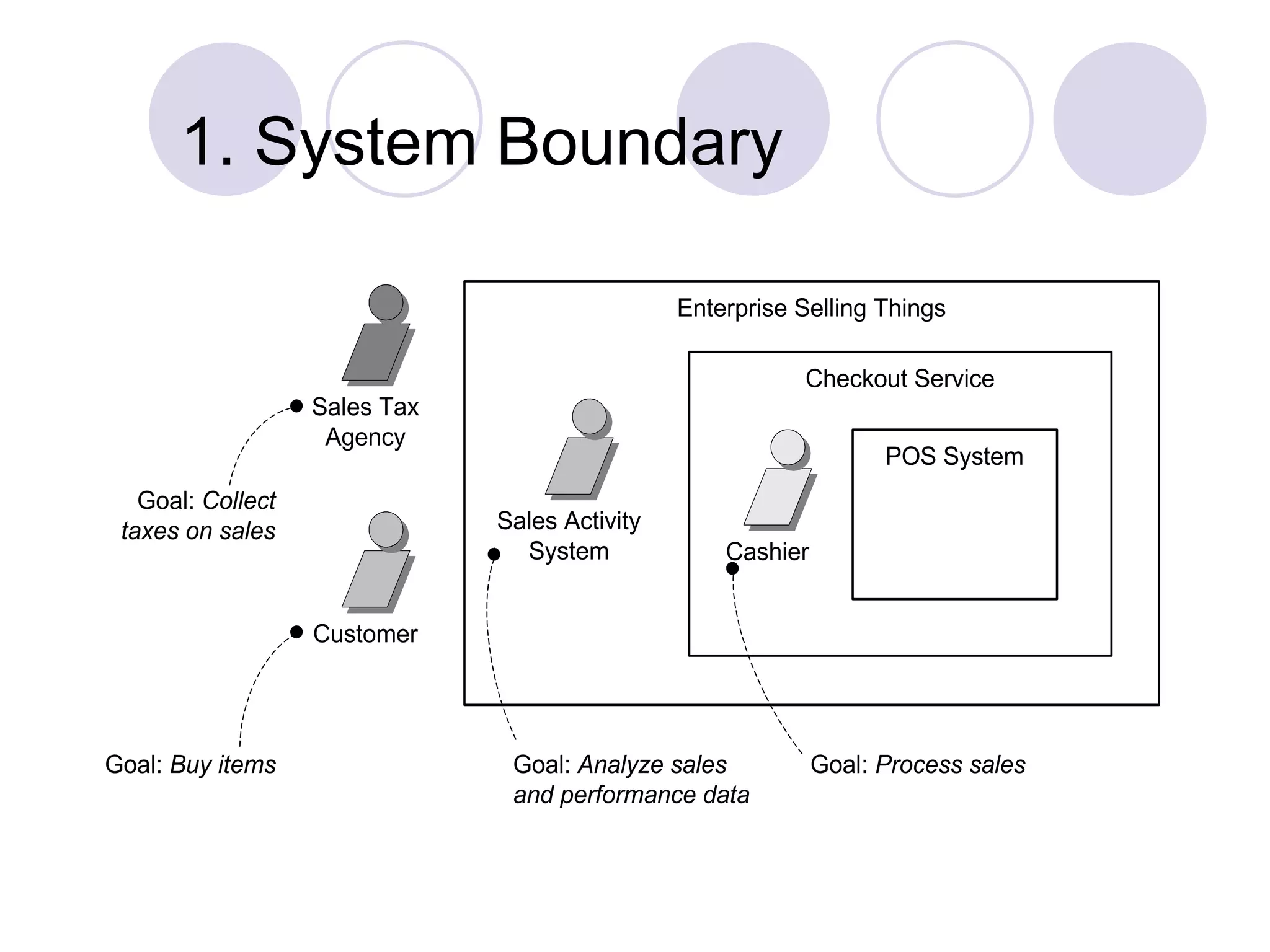
Use Cases Guidelines How to find use cases 1.Choose the system boundary 2.Find primary actors 3.Identify goals for each primary actor 4.Define Use cases that satisfy user goals
1. System Boundary Goal: Process sales Cashier Customer POS System Checkout Service Goal: Buy items Enterprise Selling Things Sales Tax Agency Goal: Collect taxes on sales Sales Activity System Goal: Analyze sales and performance data
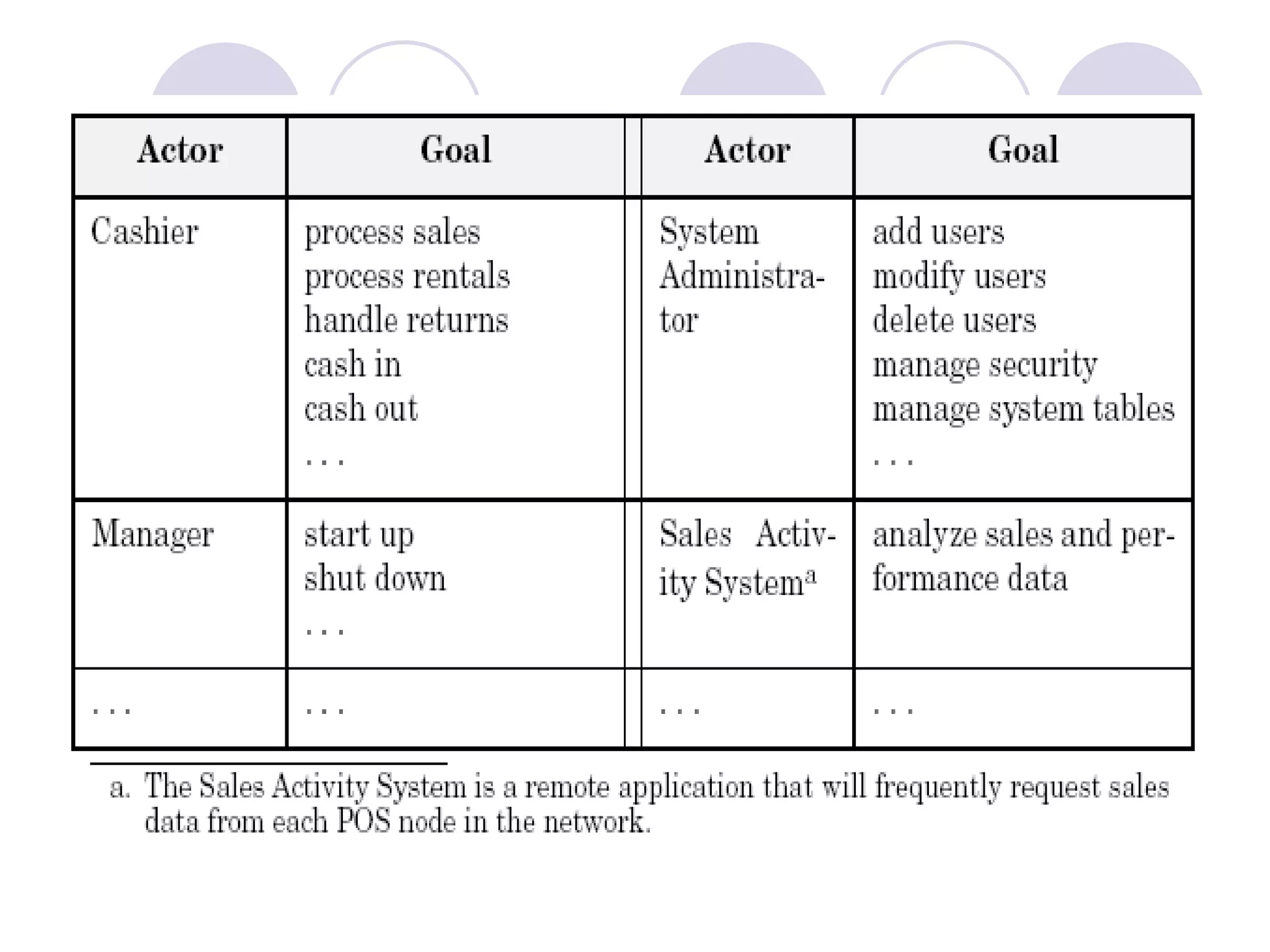
2 and 3. Primary actors and Goals  Brainstorm the primary actors first.  Questions to help identify Actors and Goals Who starts and stops the system? Who does user and security management? Who does system administration? Is “Time” an actor because the system does something in response to a time event? Are there any external software system that call upon the services of the system?  Organize the actors and goals in an Actor Goal List
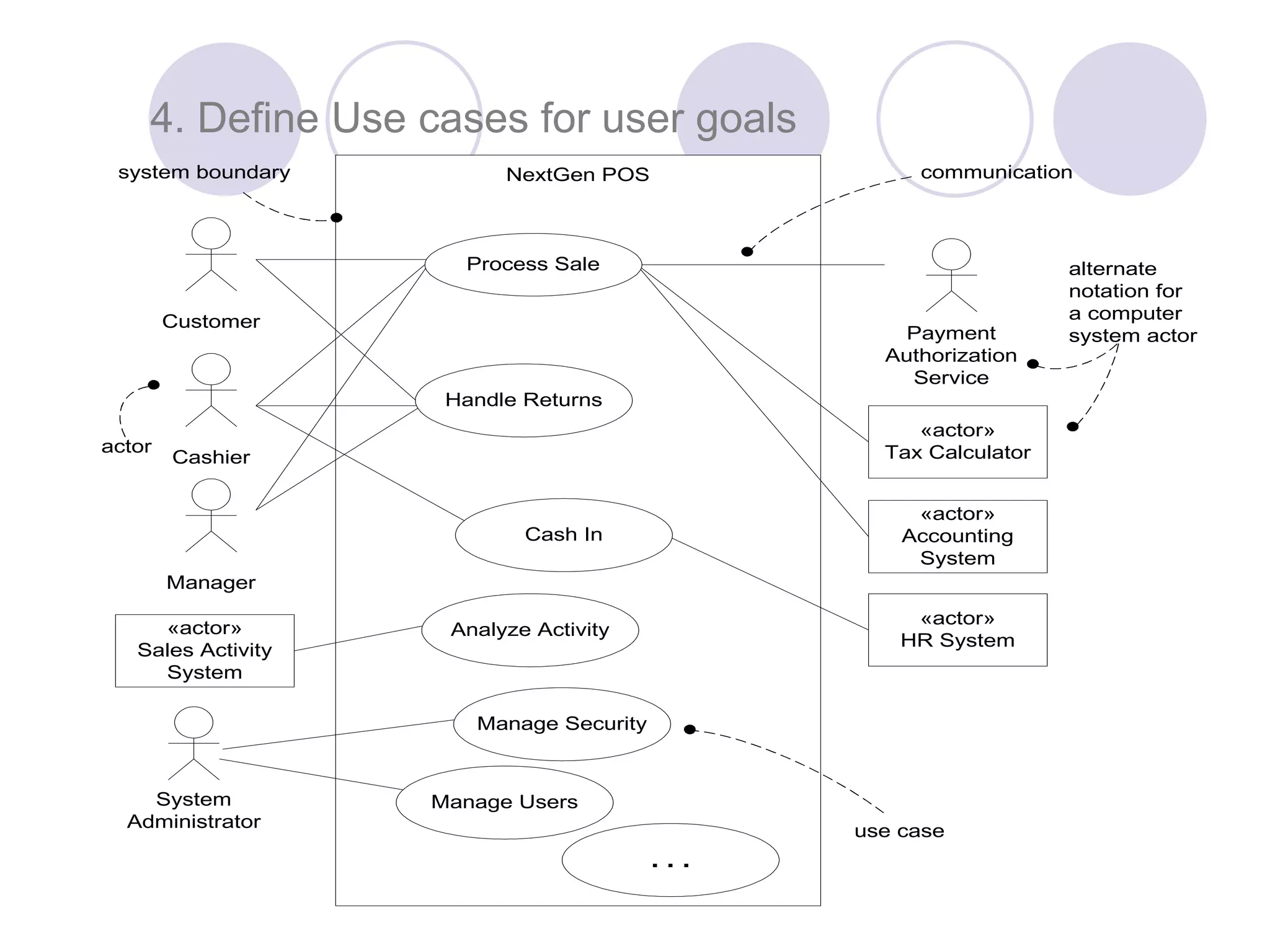
NextGen POS Manage Users . . . Cashier System Administrator actor use case communicationsystem boundary Payment Authorization Service «actor» Tax Calculator «actor» Accounting System alternate notation for a computer system actor «actor» HR System Cash In «actor» Sales Activity System Manage Security Analyze Activity Customer Manager Process Sale Handle Returns 4. Define Use cases for user goals
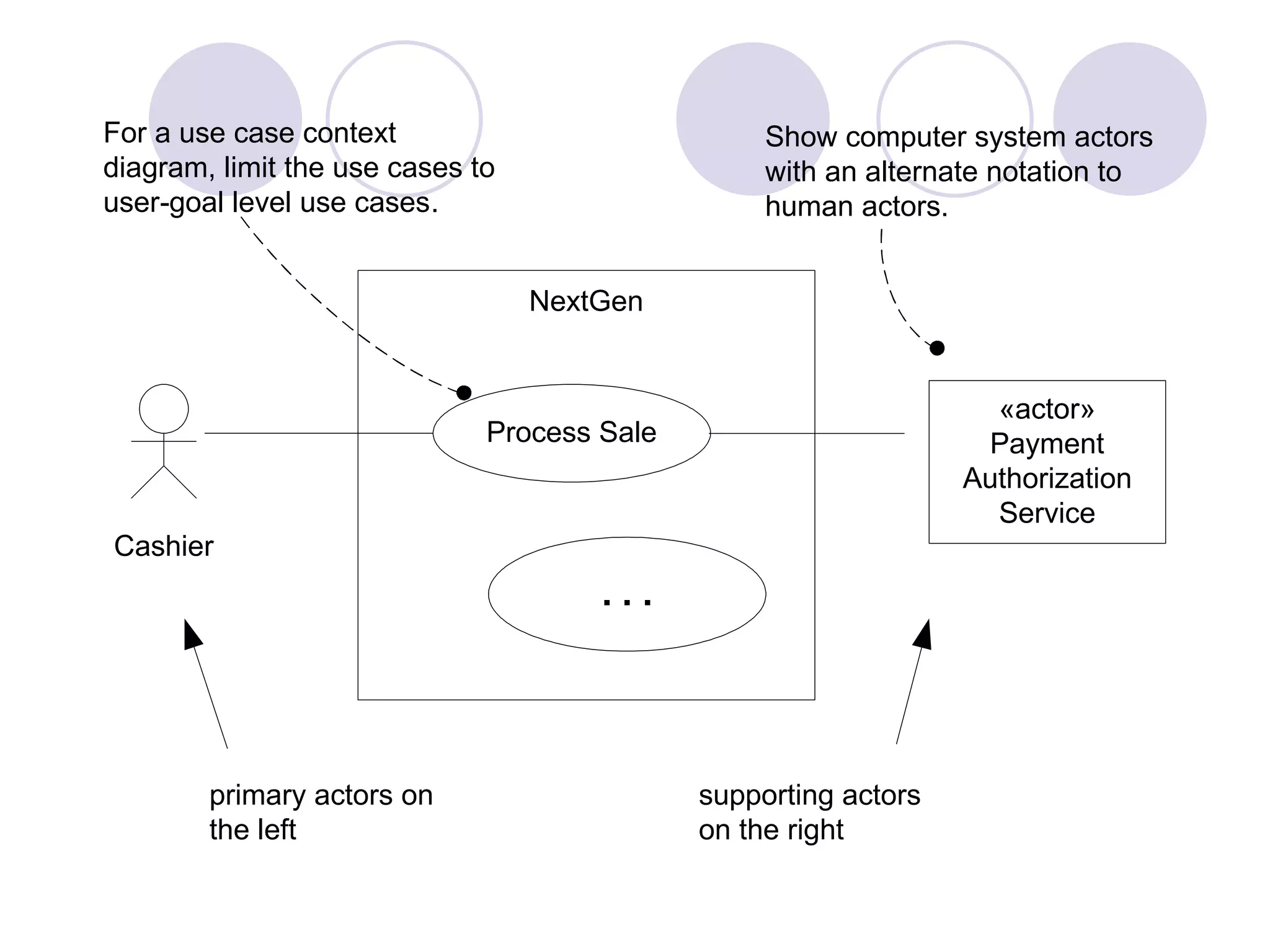
NextGen Process Sale . . . Cashier Show computer system actors with an alternate notation to human actors. primary actors on the left supporting actors on the right For a use case context diagram, limit the use cases to user-goal level use cases. «actor» Payment Authorization Service
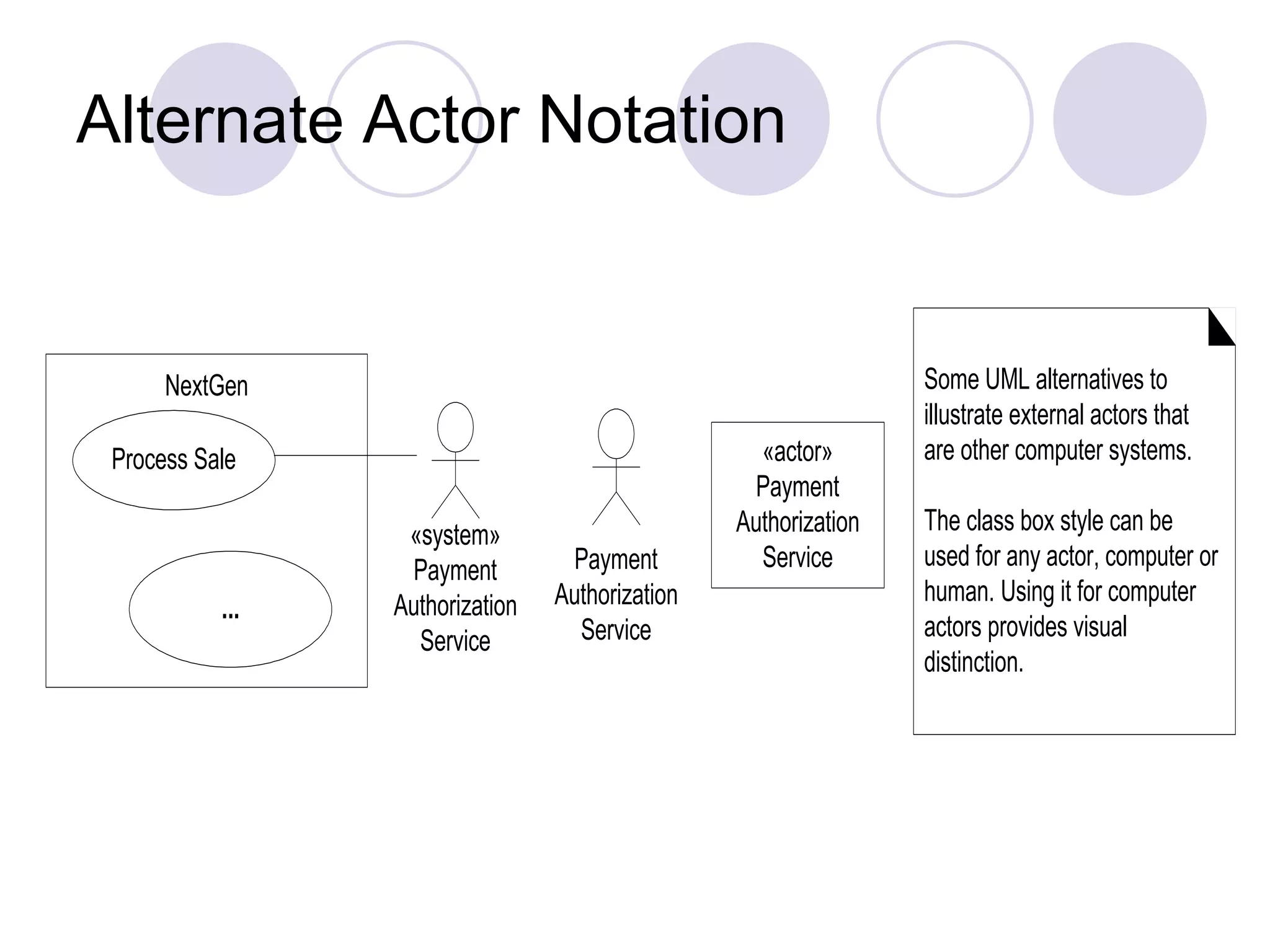
Alternate Actor Notation NextGen Process Sale «system» Payment Authorization Service ... «actor» Payment Authorization Service Some UML alternatives to illustrate external actors that are other computer systems. The class box style can be used for any actor, computer or human. Using it for computer actors provides visual distinction. Payment Authorization Service
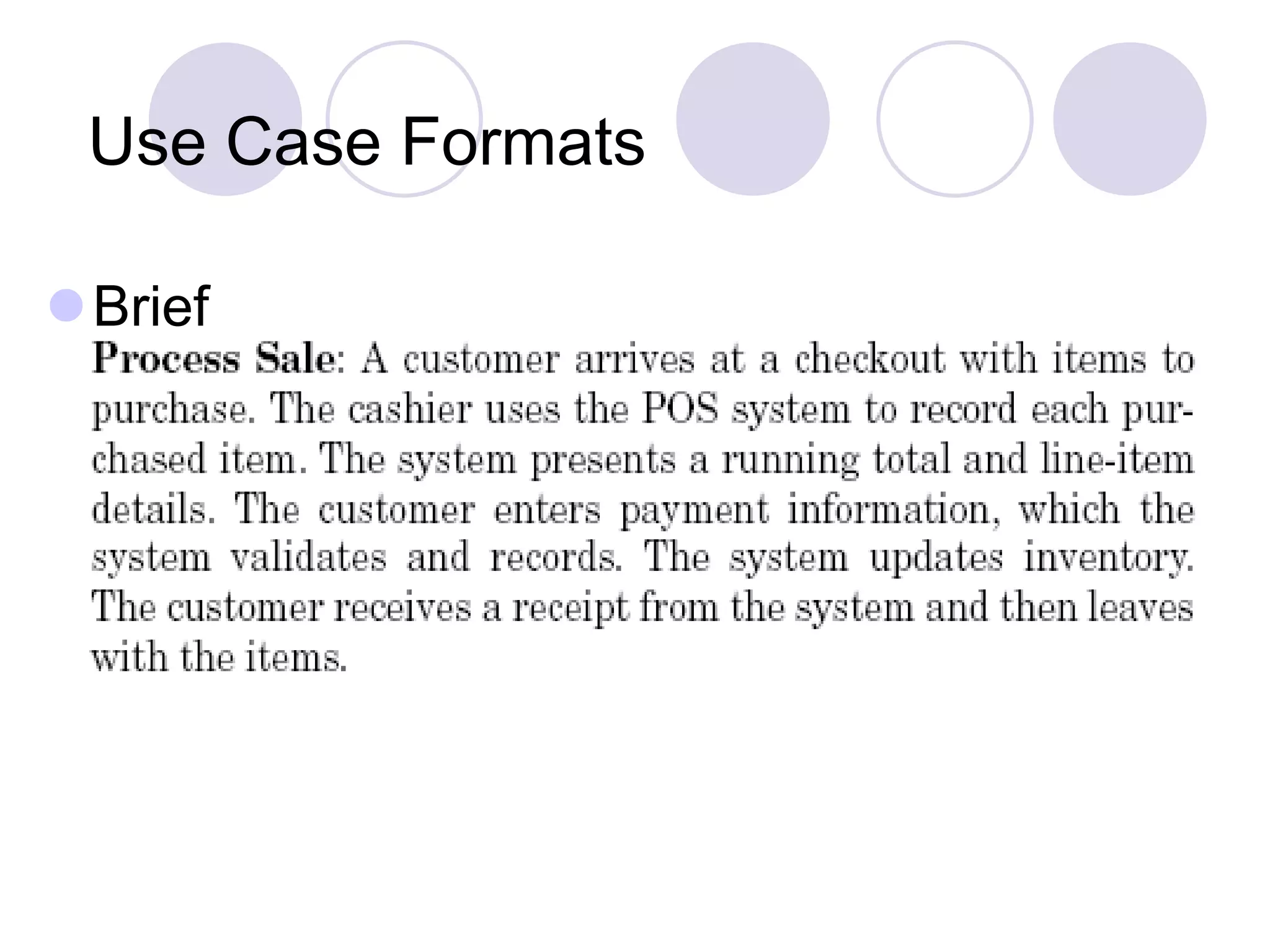
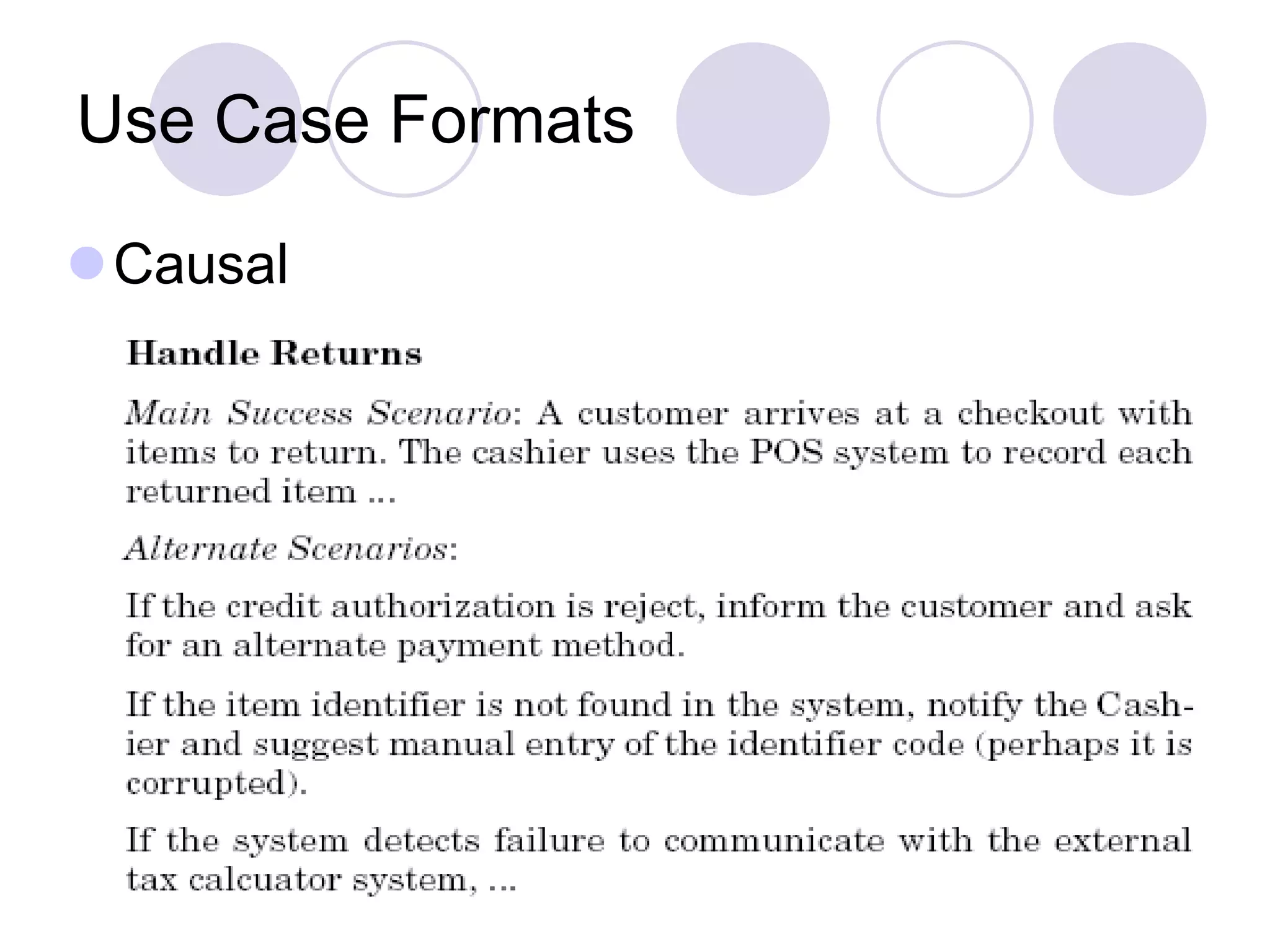
Writing Use Cases  Use cases are text documents, not diagrams and use case modeling is primarily an act of writing text, not drawing diagrams.  Use Case Style Black Box Use cases  Focus on what not how  Use Case Formats Brief Casual Fully dressed
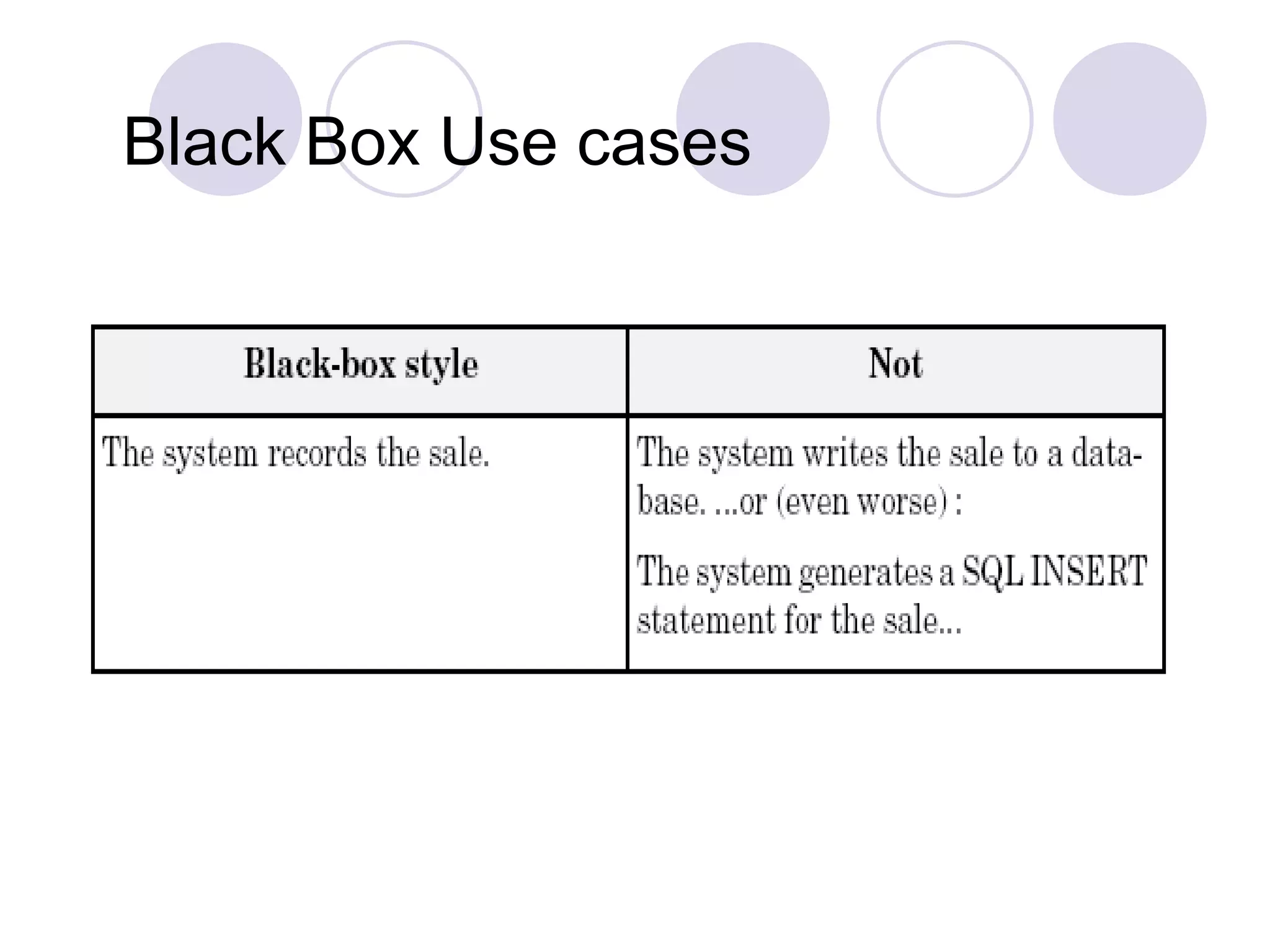
Black Box Use cases
Use Case Formats Brief
Use Case Formats Causal
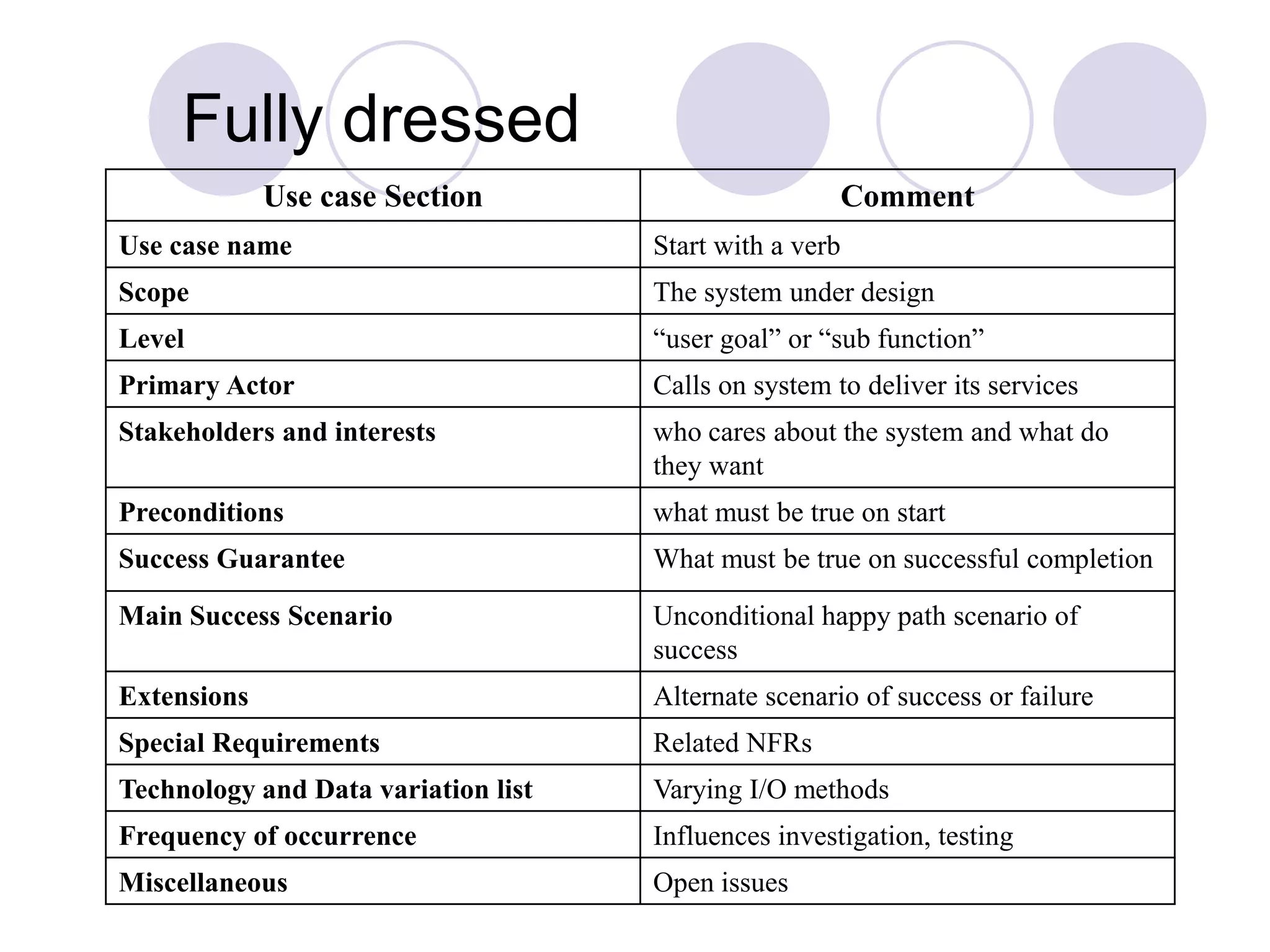
Fully dressed Use case Section Comment Use case name Start with a verb Scope The system under design Level “user goal” or “sub function” Primary Actor Calls on system to deliver its services Stakeholders and interests who cares about the system and what do they want Preconditions what must be true on start Success Guarantee What must be true on successful completion Main Success Scenario Unconditional happy path scenario of success Extensions Alternate scenario of success or failure Special Requirements Related NFRs Technology and Data variation list Varying I/O methods Frequency of occurrence Influences investigation, testing Miscellaneous Open issues
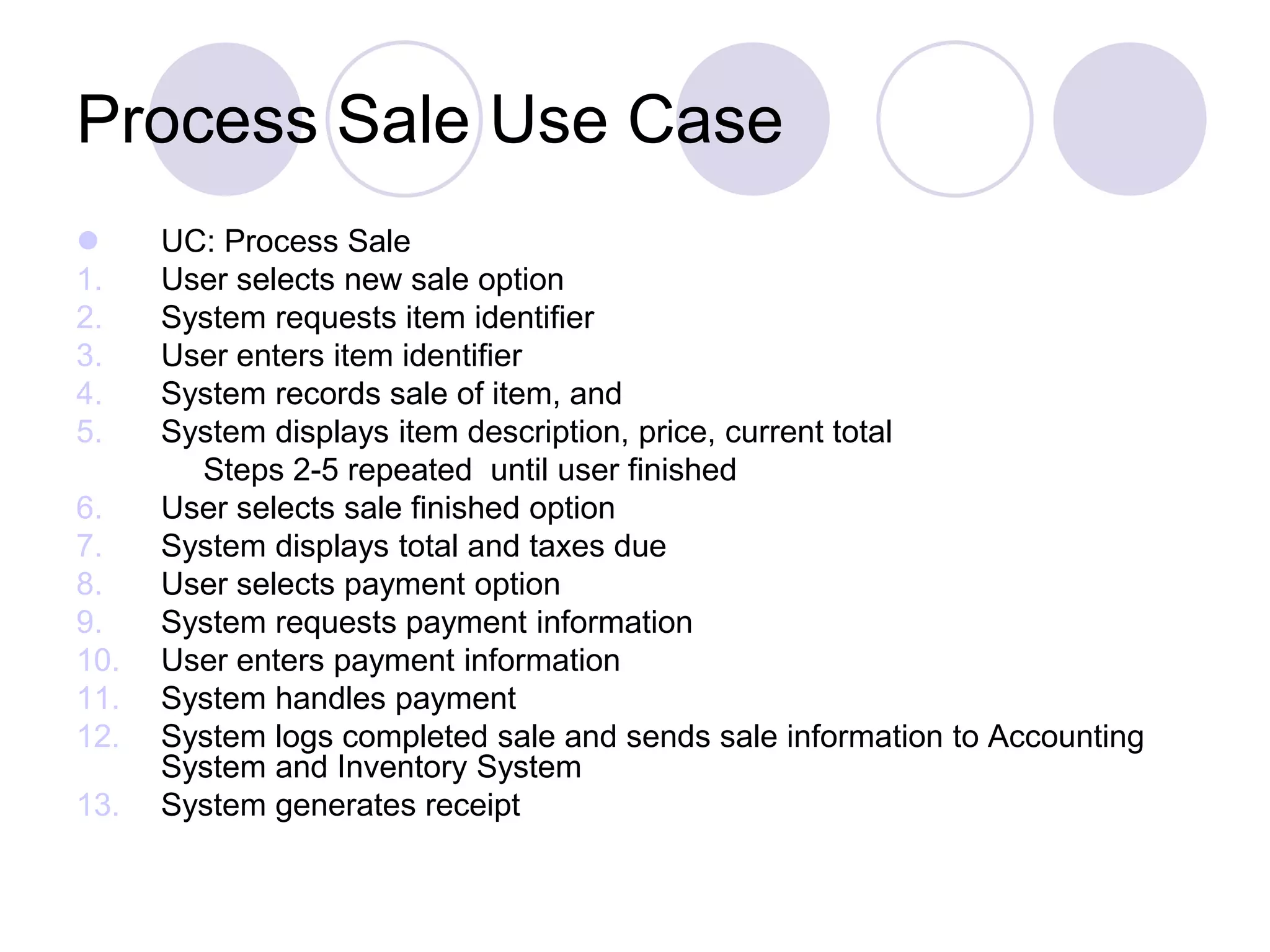
Process Sale Use Case  UC: Process Sale 1. User selects new sale option 2. System requests item identifier 3. User enters item identifier 4. System records sale of item, and 5. System displays item description, price, current total Steps 2-5 repeated until user finished 6. User selects sale finished option 7. System displays total and taxes due 8. User selects payment option 9. System requests payment information 10. User enters payment information 11. System handles payment 12. System logs completed sale and sends sale information to Accounting System and Inventory System 13. System generates receipt
What Tests Can Help in Finding Useful Use Cases?  The Boss Test  The EBP Test: A task performed by 1 user in 1 place at 1 time in response to a business event, that adds measurable value to the business and leaves data in a consistent state.  The Size Test  Examples: Applying the tests  Negotiate the supplier contract: could be modeled as business use case  Handle returns: OK with boss. Seems like an EBP  Login: boss not happy if this is all you do all day!  Move a piece on game board: Single step, Fails the size test
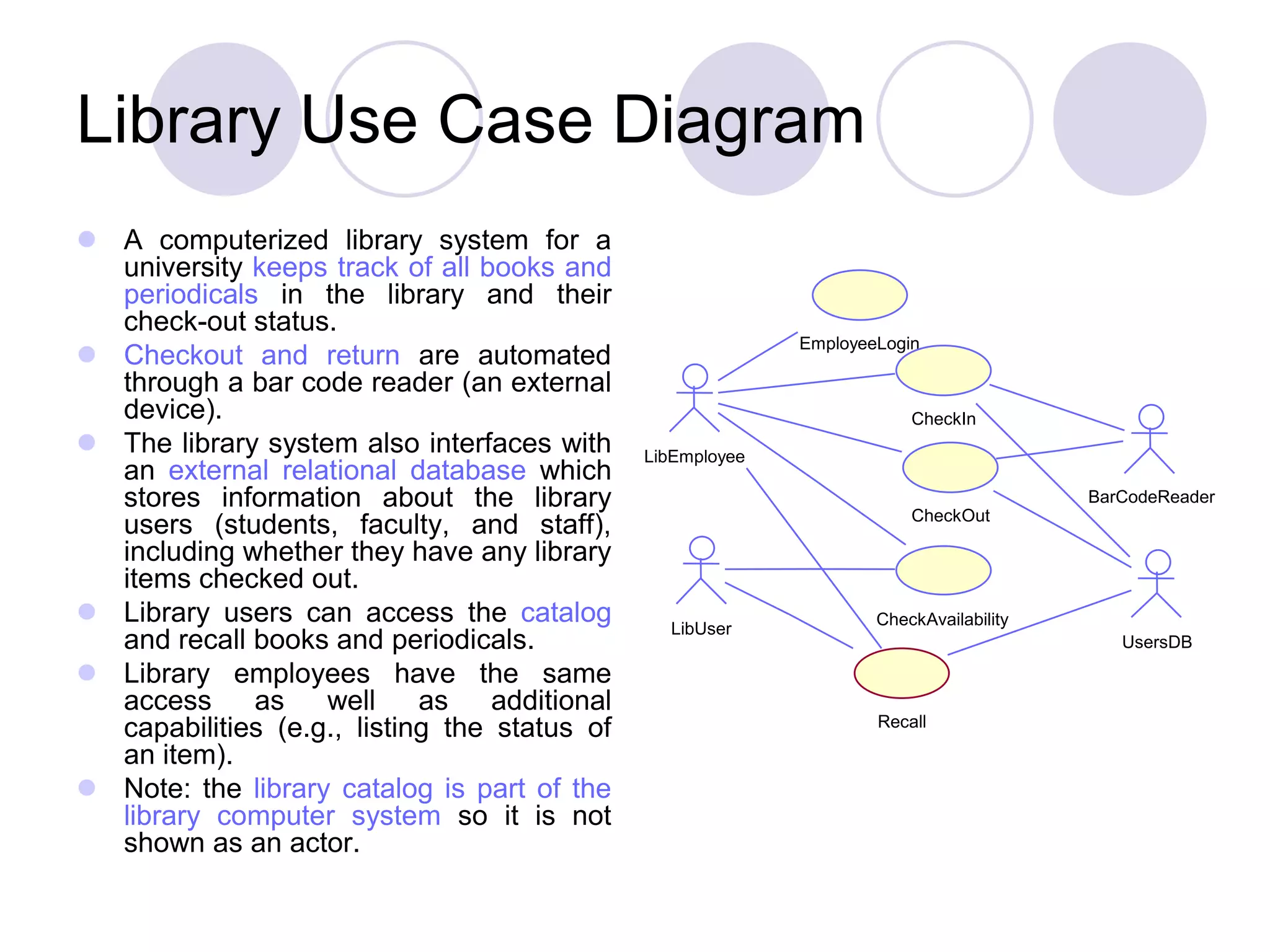
Library Use Case Diagram  A computerized library system for a university keeps track of all books and periodicals in the library and their check-out status.  Checkout and return are automated through a bar code reader (an external device).  The library system also interfaces with an external relational database which stores information about the library users (students, faculty, and staff), including whether they have any library items checked out.  Library users can access the catalog and recall books and periodicals.  Library employees have the same access as well as additional capabilities (e.g., listing the status of an item).  Note: the library catalog is part of the library computer system so it is not shown as an actor. EmployeeLogin LibEmployee CheckAvailability LibUser Recall CheckOut BarCodeReader CheckIn UsersDB
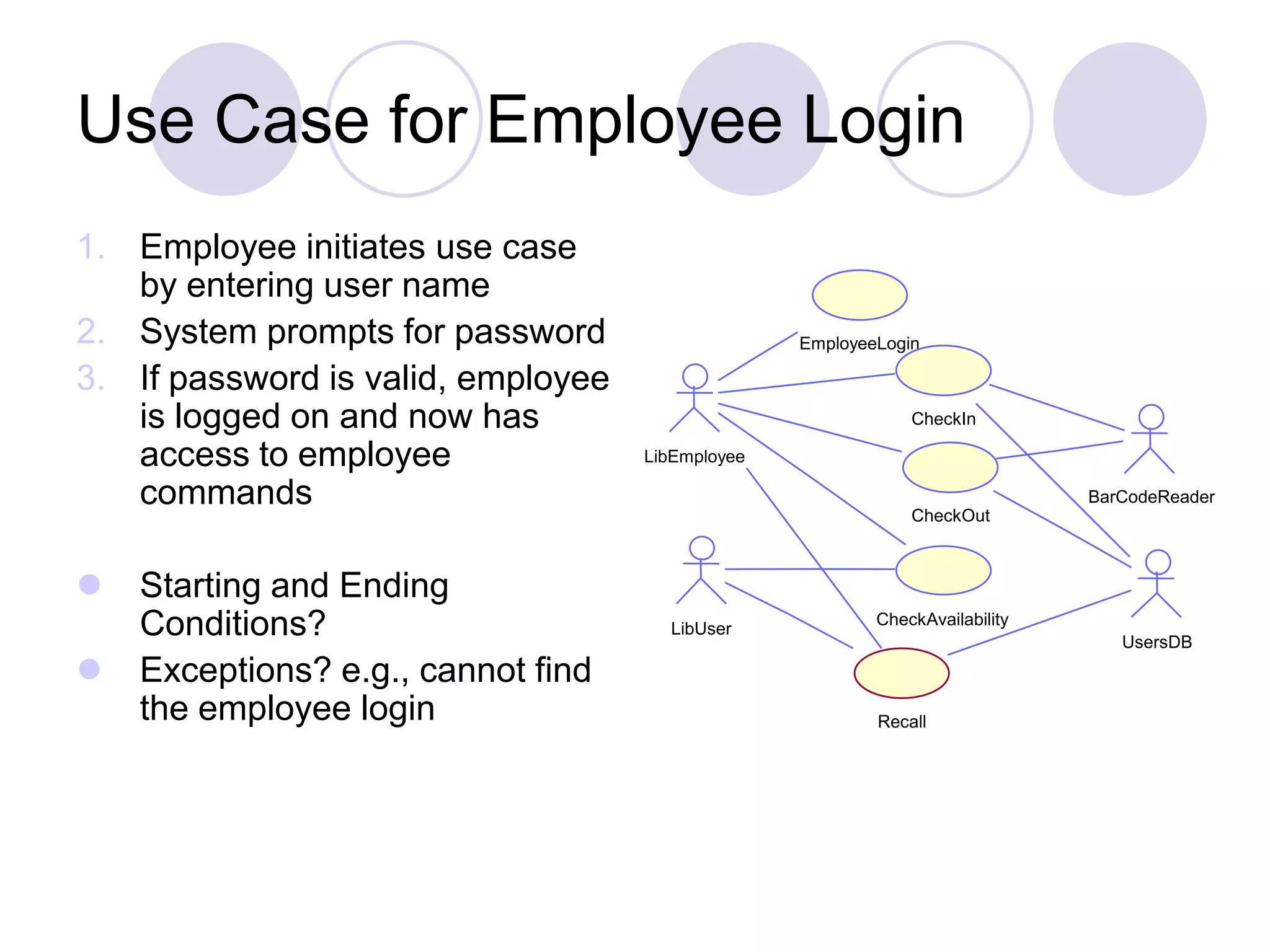
Use Case for Employee Login 1. Employee initiates use case by entering user name 2. System prompts for password 3. If password is valid, employee is logged on and now has access to employee commands  Starting and Ending Conditions?  Exceptions? e.g., cannot find the employee login EmployeeLogin LibEmployee CheckAvailability LibUser Recall CheckOut BarCodeReader CheckIn UsersDB
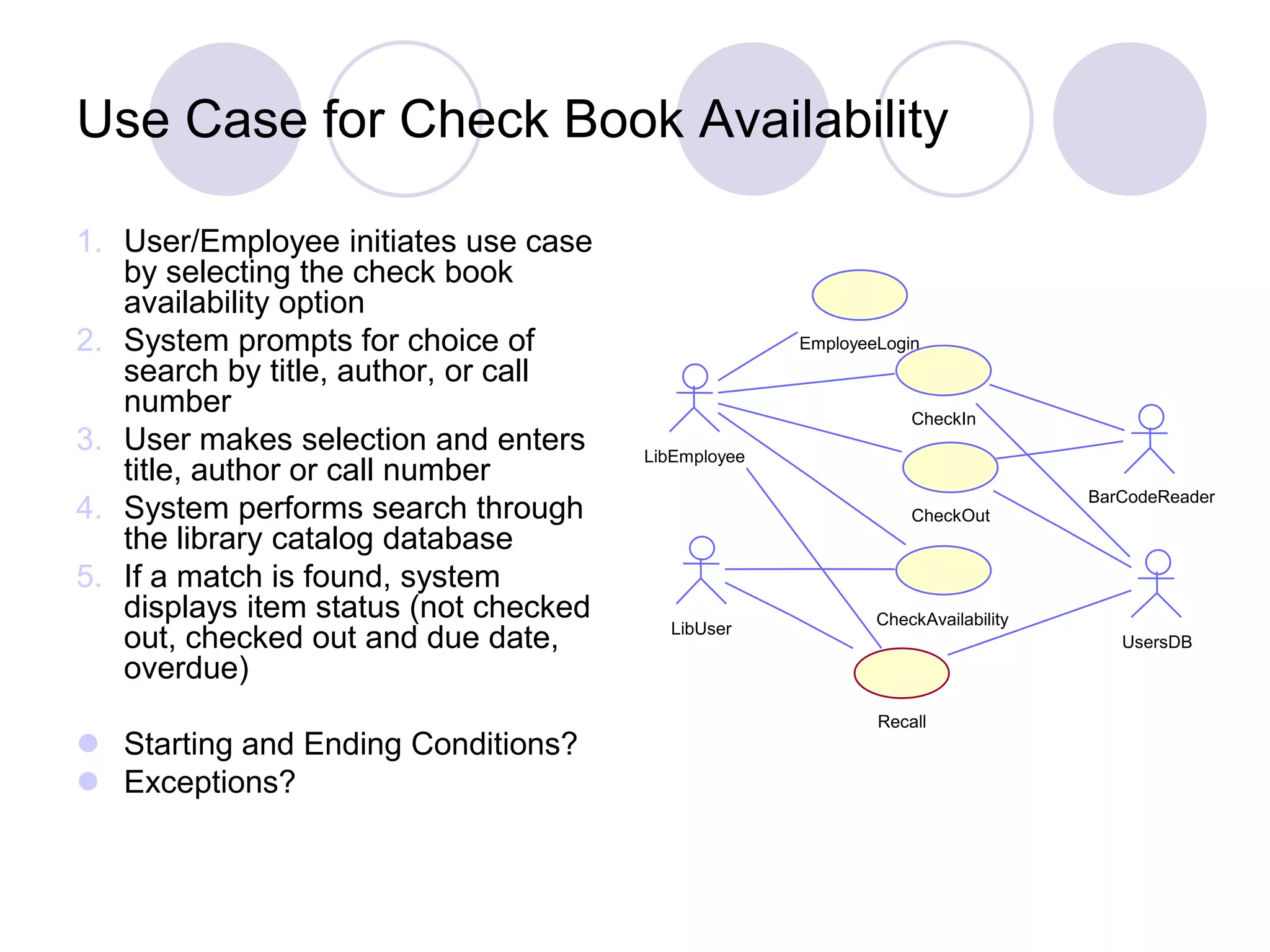
Use Case for Check Book Availability 1. User/Employee initiates use case by selecting the check book availability option 2. System prompts for choice of search by title, author, or call number 3. User makes selection and enters title, author or call number 4. System performs search through the library catalog database 5. If a match is found, system displays item status (not checked out, checked out and due date, overdue)  Starting and Ending Conditions?  Exceptions? EmployeeLogin LibEmployee CheckAvailability LibUser Recall CheckOut BarCodeReader CheckIn UsersDB
Terminology: Concrete, Abstract, Base, and Addition Use Cases  Concrete use case  is initiated by an actor  is an EBP use case  e.g., Process Sale  Abstract use case  is never instantiated by itself  is a sub-function use case (part of another use case)  e.g., Handle Credit Payment  Base use case  that includes another use case, or that is extended or specialized by another use case  e.g., Process Sale with respect to the included Handle Credit Payment  Addition use case  that is an inclusion, extension, or specialization  Handle Credit Payment in the include relationship to Process Sale  Addition use cases are usually abstract  Base use cases are usually concrete
Use Case Associations Use case association = relationship between use cases Important types: Include A use case uses another use case (functional decomposition and reuse of existing functionality) Extends A use case extends another use case Generalization A use case has different specializations
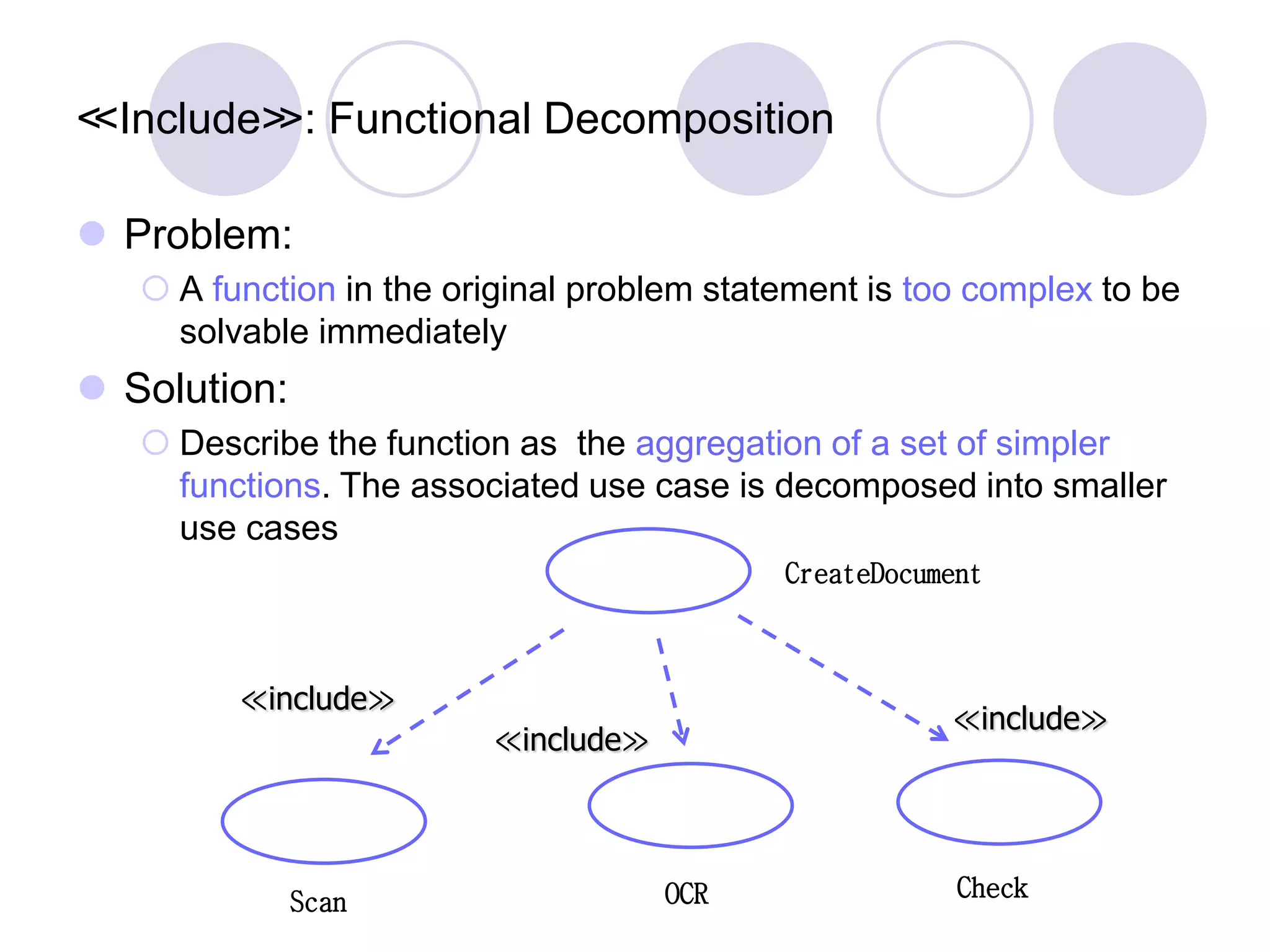
≪Include≫: Functional Decomposition  Problem:  A function in the original problem statement is too complex to be solvable immediately  Solution:  Describe the function as the aggregation of a set of simpler functions. The associated use case is decomposed into smaller use cases CreateDocument Scan OCR Check ≪include≫ ≪include≫ ≪include≫
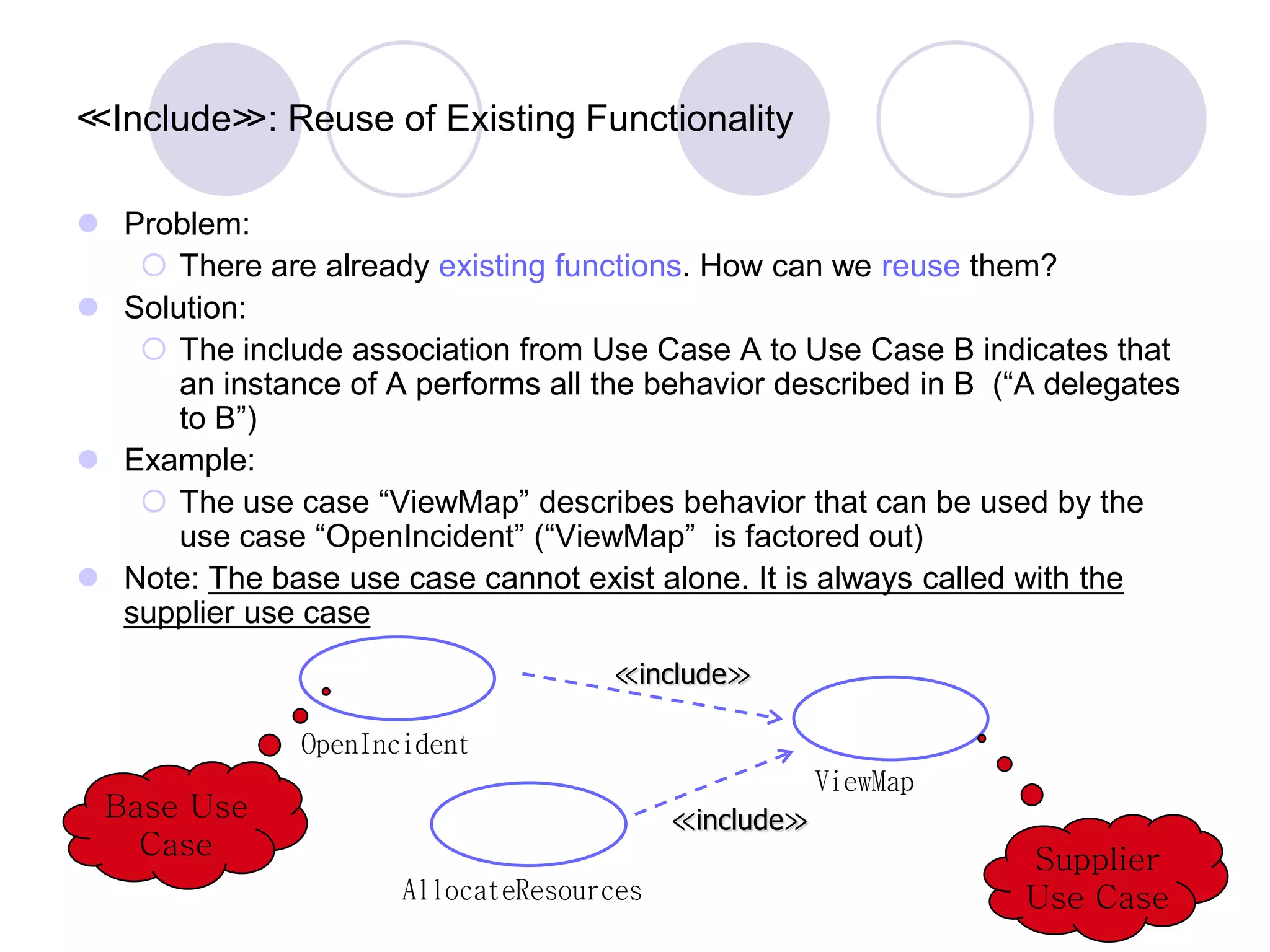
≪Include≫: Reuse of Existing Functionality  Problem:  There are already existing functions. How can we reuse them?  Solution:  The include association from Use Case A to Use Case B indicates that an instance of A performs all the behavior described in B (“A delegates to B”)  Example:  The use case “ViewMap” describes behavior that can be used by the use case “OpenIncident” (“ViewMap” is factored out)  Note: The base use case cannot exist alone. It is always called with the supplier use case ViewMap OpenIncident AllocateResources ≪include≫ Base Use Case Supplier Use Case ≪include≫
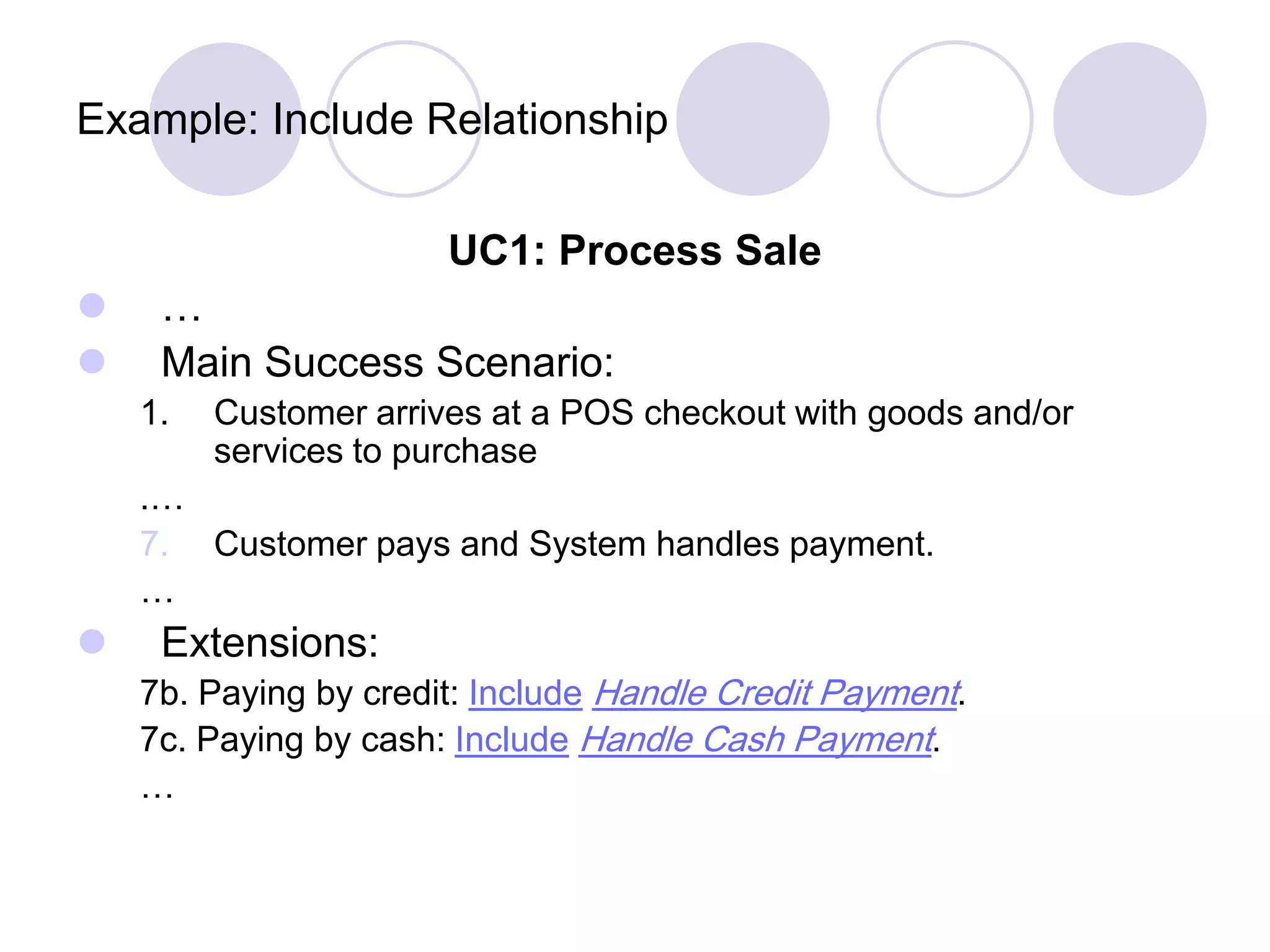
Example: Include Relationship UC1: Process Sale  …  Main Success Scenario: 1. Customer arrives at a POS checkout with goods and/or services to purchase .… 7. Customer pays and System handles payment. …  Extensions: 7b. Paying by credit: Include Handle Credit Payment. 7c. Paying by cash: Include Handle Cash Payment. …
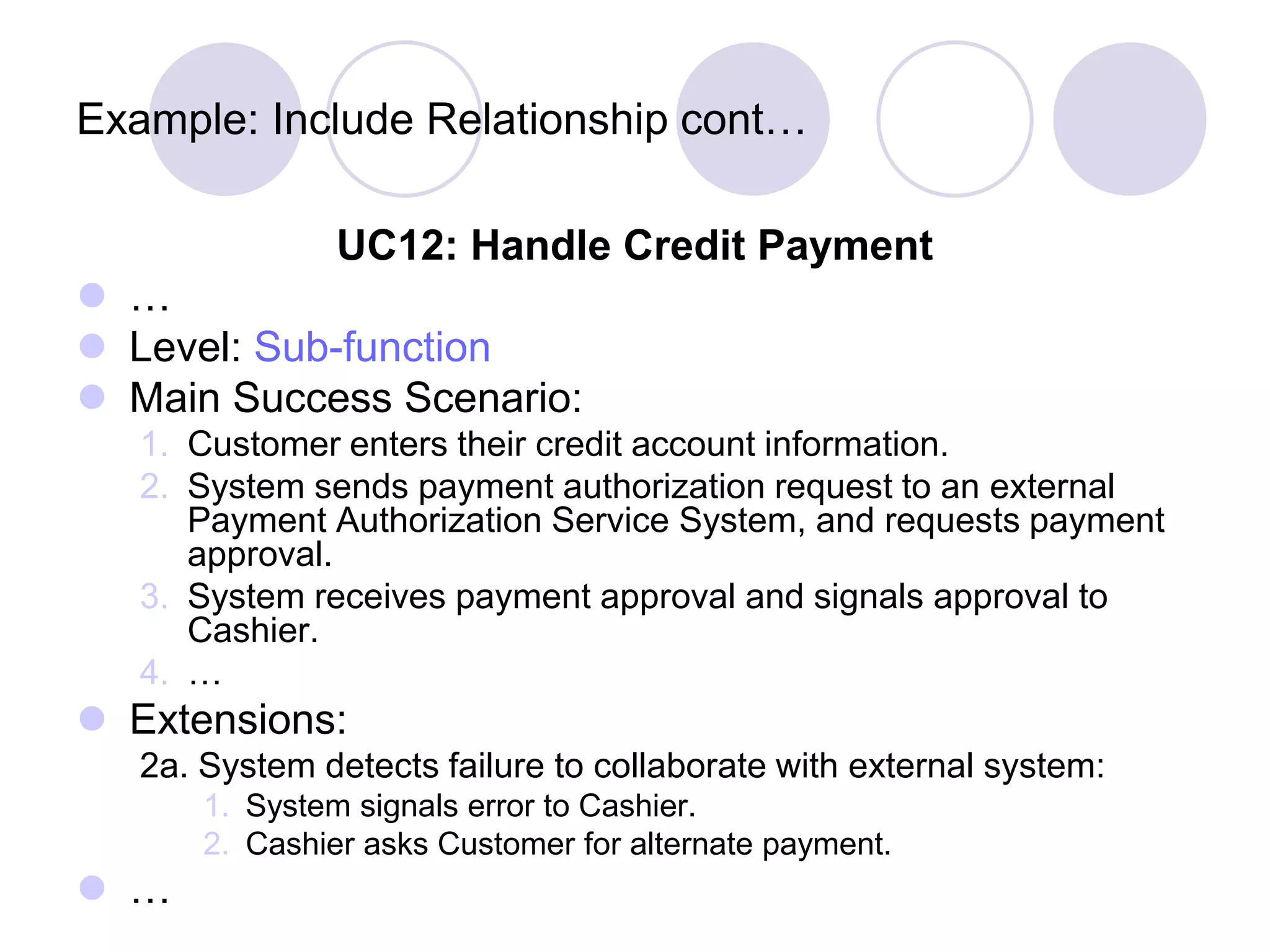
Example: Include Relationship cont… UC12: Handle Credit Payment  …  Level: Sub-function  Main Success Scenario: 1. Customer enters their credit account information. 2. System sends payment authorization request to an external Payment Authorization Service System, and requests payment approval. 3. System receives payment approval and signals approval to Cashier. 4. …  Extensions: 2a. System detects failure to collaborate with external system: 1. System signals error to Cashier. 2. Cashier asks Customer for alternate payment.  …
When to Use Include Relationship?  Use include when you are repeating yourself in two or more separate use cases and you want to avoid repetition.  A use case is very complex and long, and separating it into subunits aids comprehension.
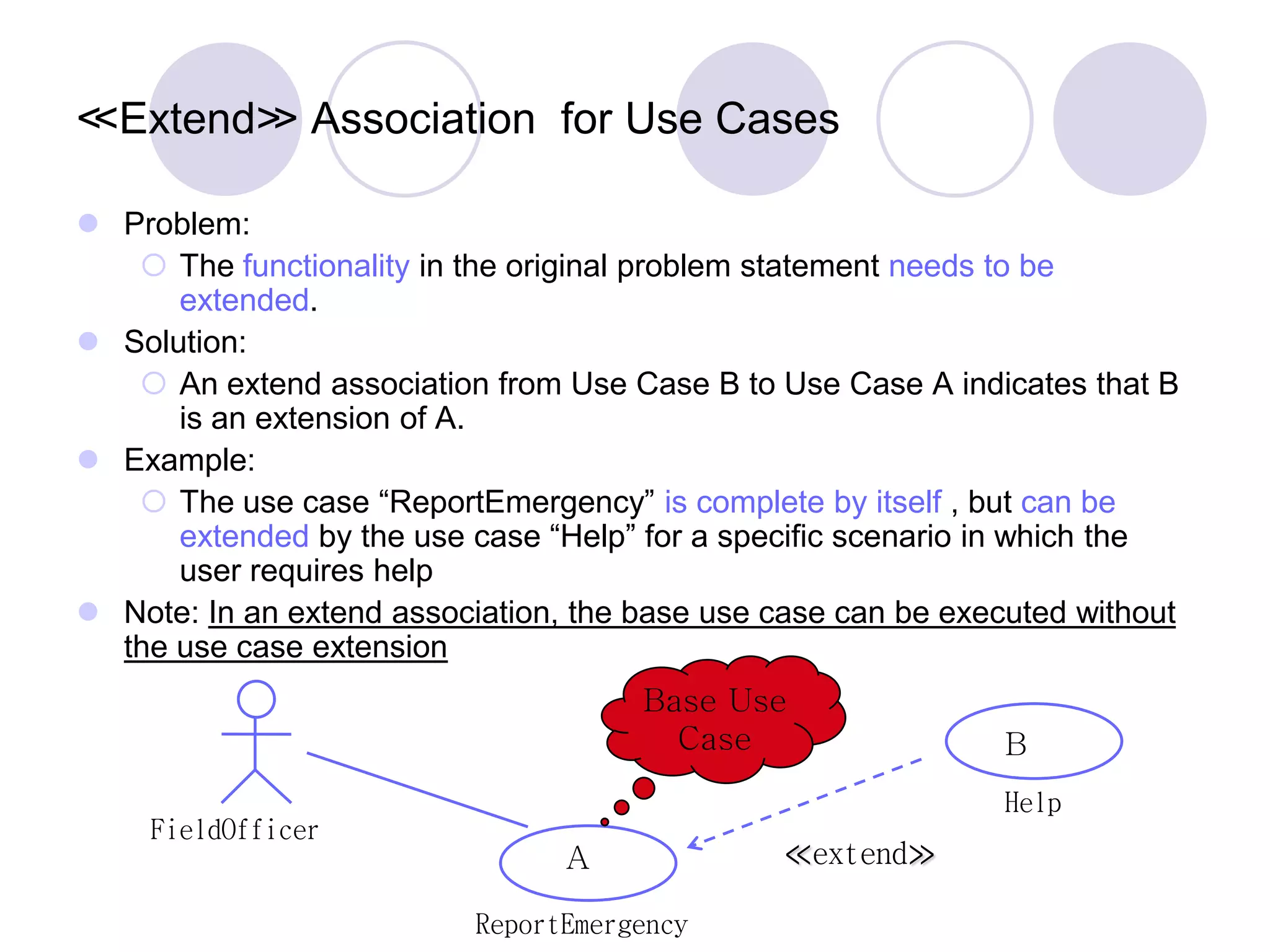
ReportEmergency FieldOfficer Help ≪extend≫ ≪Extend≫ Association for Use Cases  Problem:  The functionality in the original problem statement needs to be extended.  Solution:  An extend association from Use Case B to Use Case A indicates that B is an extension of A.  Example:  The use case “ReportEmergency” is complete by itself , but can be extended by the use case “Help” for a specific scenario in which the user requires help  Note: In an extend association, the base use case can be executed without the use case extension A B Base Use Case
≪Extend≫ Association for Use Cases  The idea is to create an extending or addition use case, and within it, describe where and under what condition it extends the behavior of some base use case.
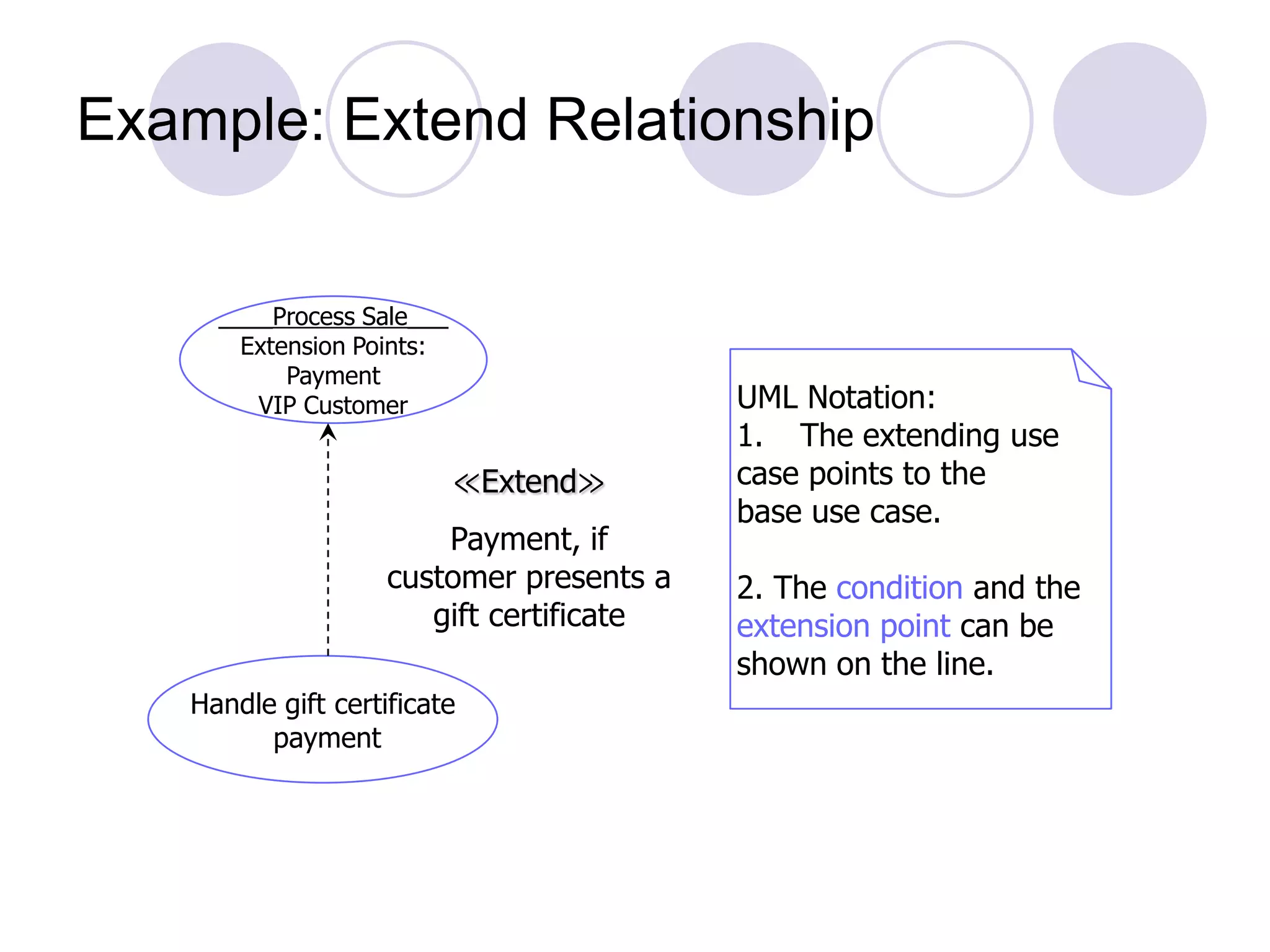
Example: Extend Relationship ____Process Sale___ Extension Points: Payment VIP Customer Handle gift certificate payment ≪Extend≫ Payment, if customer presents a gift certificate UML Notation: 1. The extending use case points to the base use case. 2. The condition and the extension point can be shown on the line.
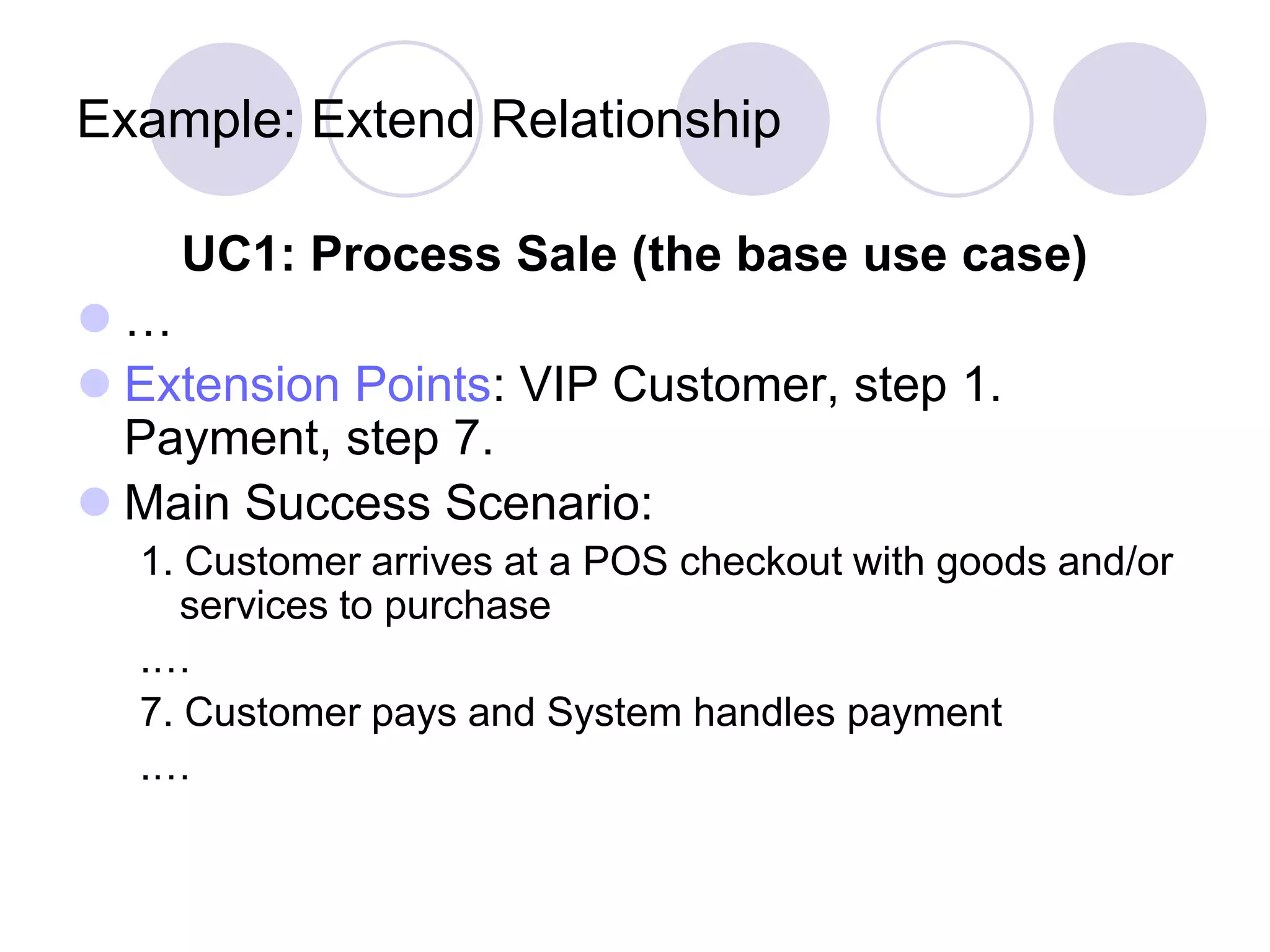
Example: Extend Relationship UC1: Process Sale (the base use case)  …  Extension Points: VIP Customer, step 1. Payment, step 7.  Main Success Scenario: 1. Customer arrives at a POS checkout with goods and/or services to purchase .… 7. Customer pays and System handles payment .…
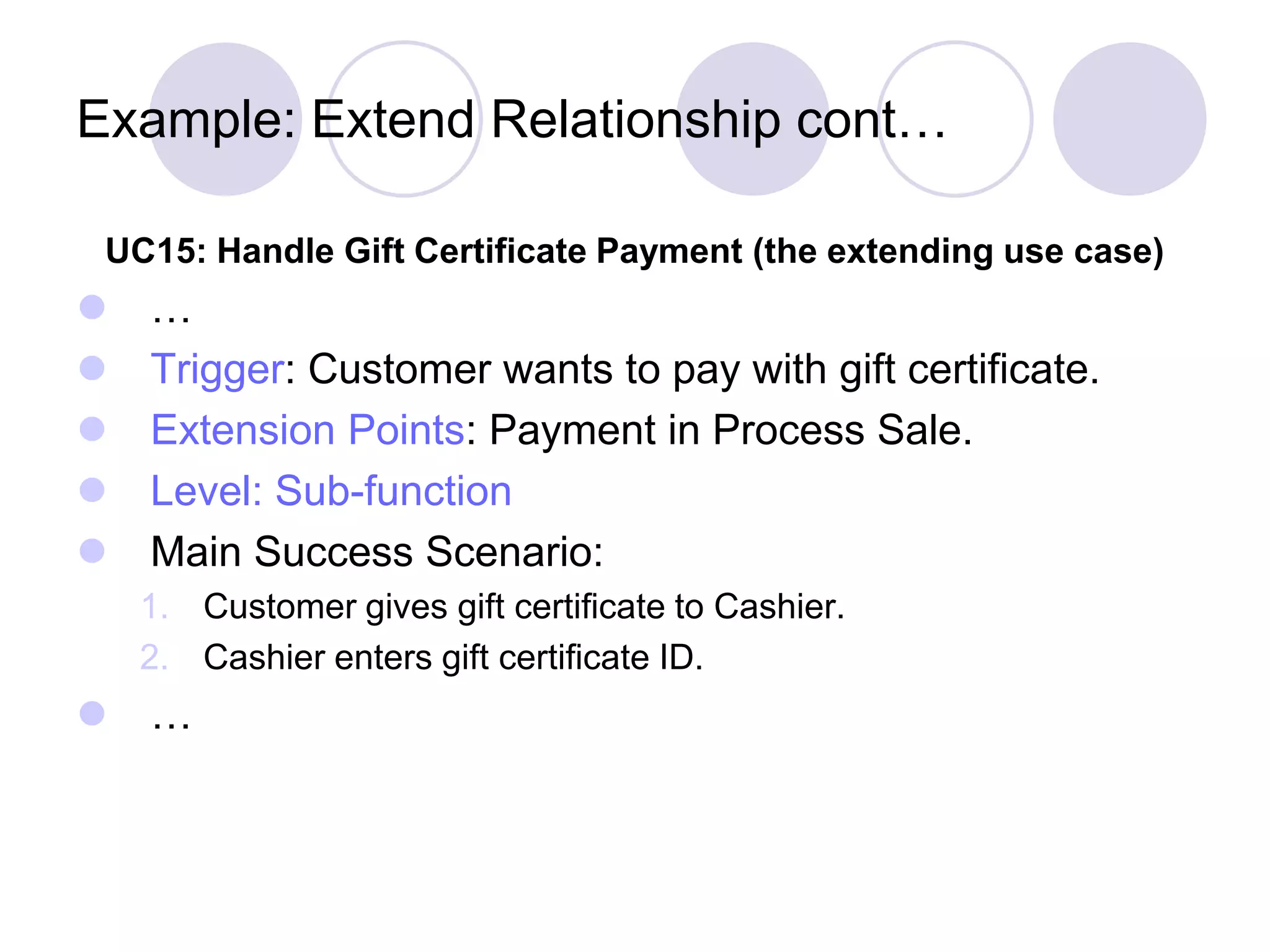
Example: Extend Relationship cont… UC15: Handle Gift Certificate Payment (the extending use case)  …  Trigger: Customer wants to pay with gift certificate.  Extension Points: Payment in Process Sale.  Level: Sub-function  Main Success Scenario: 1. Customer gives gift certificate to Cashier. 2. Cashier enters gift certificate ID.  …
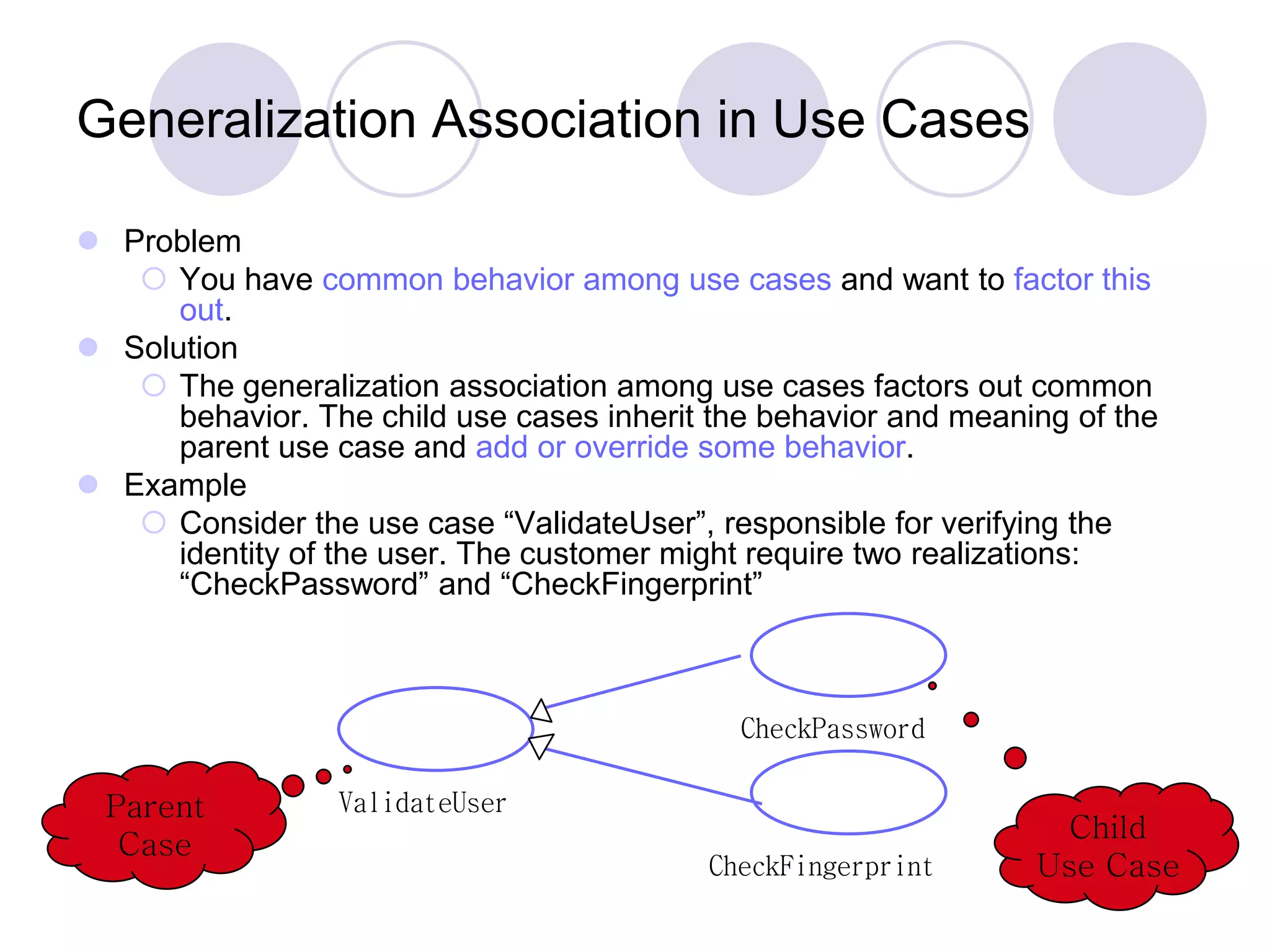
ValidateUser CheckPassword CheckFingerprint Parent Case Child Use Case Generalization Association in Use Cases  Problem  You have common behavior among use cases and want to factor this out.  Solution  The generalization association among use cases factors out common behavior. The child use cases inherit the behavior and meaning of the parent use case and add or override some behavior.  Example  Consider the use case “ValidateUser”, responsible for verifying the identity of the user. The customer might require two realizations: “CheckPassword” and “CheckFingerprint”

Lecture7 use case modeling

  • 1.
  • 2.
    What is aUse Case?  Narrative descriptions of domain processes in a structured prose format  They are stories or scenarios of how people use the system
  • 3.
    Case Study –The NextGen POS System  Computerized application used to record sales and handle payments  Used in retail store  It includes hardware and software It also interfaces to other applications, such as a third- party tax calculator and inventory control  Multiple and varied clients-side terminals and interfaces  Commercial POS
  • 4.
    Use Case, Actor,and Scenario  Actors  Something with behavior such as person, computer system, or organization  Scenario  It is a specific sequence of actions and interactions between actors and the system. It is also called use case instance  It is one particular story of using a system  E.g. scenario of successfully purchasing items with cash or scenario of failing to purchase items because of credit payment denial  Use case then is a collection of success and failure scenarios  Use cases are requirements, primarily functional.
  • 5.
    Use Case, Actor,and Scenario  A UC is a dialogue between an Actor and a system that accomplishes a task.  The dialogue is presented as a sequence of steps  A complete sequence of steps is a use case scenario
  • 6.
    Use Case, Actor,and Scenario UC can contain multiple scenarios Can range from simple (brief summary) to elaborate (detailed steps using adopted document template) UCs are NOT object-oriented artifacts! They feed into other OO models
  • 7.
    Use Cases  Kindsof Actors Primary actor has user goals fulfilled through using services of the SuD Why identify? To find user goals, which drive the use cases. Supporting actor provides a service (for example, information) to the SuD Why identify? To clarify external interfaces and protocols. Offstage actor has an interest in the behavior of the use case Why identify? To ensure that all necessary interests are identified and satisfied.
  • 8.
    Use Cases Guidelines How tofind use cases 1.Choose the system boundary 2.Find primary actors 3.Identify goals for each primary actor 4.Define Use cases that satisfy user goals
  • 9.
    1. System Boundary Goal:Process sales Cashier Customer POS System Checkout Service Goal: Buy items Enterprise Selling Things Sales Tax Agency Goal: Collect taxes on sales Sales Activity System Goal: Analyze sales and performance data
  • 10.
    2 and 3.Primary actors and Goals  Brainstorm the primary actors first.  Questions to help identify Actors and Goals Who starts and stops the system? Who does user and security management? Who does system administration? Is “Time” an actor because the system does something in response to a time event? Are there any external software system that call upon the services of the system?  Organize the actors and goals in an Actor Goal List
  • 12.
    NextGen POS Manage Users .. . Cashier System Administrator actor use case communicationsystem boundary Payment Authorization Service «actor» Tax Calculator «actor» Accounting System alternate notation for a computer system actor «actor» HR System Cash In «actor» Sales Activity System Manage Security Analyze Activity Customer Manager Process Sale Handle Returns 4. Define Use cases for user goals
  • 13.
    NextGen Process Sale . .. Cashier Show computer system actors with an alternate notation to human actors. primary actors on the left supporting actors on the right For a use case context diagram, limit the use cases to user-goal level use cases. «actor» Payment Authorization Service
  • 14.
    Alternate Actor Notation NextGen ProcessSale «system» Payment Authorization Service ... «actor» Payment Authorization Service Some UML alternatives to illustrate external actors that are other computer systems. The class box style can be used for any actor, computer or human. Using it for computer actors provides visual distinction. Payment Authorization Service
  • 15.
    Writing Use Cases Use cases are text documents, not diagrams and use case modeling is primarily an act of writing text, not drawing diagrams.  Use Case Style Black Box Use cases  Focus on what not how  Use Case Formats Brief Casual Fully dressed
  • 16.
  • 17.
  • 18.
  • 19.
    Fully dressed Use caseSection Comment Use case name Start with a verb Scope The system under design Level “user goal” or “sub function” Primary Actor Calls on system to deliver its services Stakeholders and interests who cares about the system and what do they want Preconditions what must be true on start Success Guarantee What must be true on successful completion Main Success Scenario Unconditional happy path scenario of success Extensions Alternate scenario of success or failure Special Requirements Related NFRs Technology and Data variation list Varying I/O methods Frequency of occurrence Influences investigation, testing Miscellaneous Open issues
  • 20.
    Process Sale UseCase  UC: Process Sale 1. User selects new sale option 2. System requests item identifier 3. User enters item identifier 4. System records sale of item, and 5. System displays item description, price, current total Steps 2-5 repeated until user finished 6. User selects sale finished option 7. System displays total and taxes due 8. User selects payment option 9. System requests payment information 10. User enters payment information 11. System handles payment 12. System logs completed sale and sends sale information to Accounting System and Inventory System 13. System generates receipt
  • 21.
    What Tests CanHelp in Finding Useful Use Cases?  The Boss Test  The EBP Test: A task performed by 1 user in 1 place at 1 time in response to a business event, that adds measurable value to the business and leaves data in a consistent state.  The Size Test  Examples: Applying the tests  Negotiate the supplier contract: could be modeled as business use case  Handle returns: OK with boss. Seems like an EBP  Login: boss not happy if this is all you do all day!  Move a piece on game board: Single step, Fails the size test
  • 22.
    Library Use CaseDiagram  A computerized library system for a university keeps track of all books and periodicals in the library and their check-out status.  Checkout and return are automated through a bar code reader (an external device).  The library system also interfaces with an external relational database which stores information about the library users (students, faculty, and staff), including whether they have any library items checked out.  Library users can access the catalog and recall books and periodicals.  Library employees have the same access as well as additional capabilities (e.g., listing the status of an item).  Note: the library catalog is part of the library computer system so it is not shown as an actor. EmployeeLogin LibEmployee CheckAvailability LibUser Recall CheckOut BarCodeReader CheckIn UsersDB
  • 23.
    Use Case forEmployee Login 1. Employee initiates use case by entering user name 2. System prompts for password 3. If password is valid, employee is logged on and now has access to employee commands  Starting and Ending Conditions?  Exceptions? e.g., cannot find the employee login EmployeeLogin LibEmployee CheckAvailability LibUser Recall CheckOut BarCodeReader CheckIn UsersDB
  • 24.
    Use Case forCheck Book Availability 1. User/Employee initiates use case by selecting the check book availability option 2. System prompts for choice of search by title, author, or call number 3. User makes selection and enters title, author or call number 4. System performs search through the library catalog database 5. If a match is found, system displays item status (not checked out, checked out and due date, overdue)  Starting and Ending Conditions?  Exceptions? EmployeeLogin LibEmployee CheckAvailability LibUser Recall CheckOut BarCodeReader CheckIn UsersDB
  • 25.
    Terminology: Concrete, Abstract,Base, and Addition Use Cases  Concrete use case  is initiated by an actor  is an EBP use case  e.g., Process Sale  Abstract use case  is never instantiated by itself  is a sub-function use case (part of another use case)  e.g., Handle Credit Payment  Base use case  that includes another use case, or that is extended or specialized by another use case  e.g., Process Sale with respect to the included Handle Credit Payment  Addition use case  that is an inclusion, extension, or specialization  Handle Credit Payment in the include relationship to Process Sale  Addition use cases are usually abstract  Base use cases are usually concrete
  • 26.
    Use Case Associations Usecase association = relationship between use cases Important types: Include A use case uses another use case (functional decomposition and reuse of existing functionality) Extends A use case extends another use case Generalization A use case has different specializations
  • 27.
    ≪Include≫: Functional Decomposition Problem:  A function in the original problem statement is too complex to be solvable immediately  Solution:  Describe the function as the aggregation of a set of simpler functions. The associated use case is decomposed into smaller use cases CreateDocument Scan OCR Check ≪include≫ ≪include≫ ≪include≫
  • 28.
    ≪Include≫: Reuse ofExisting Functionality  Problem:  There are already existing functions. How can we reuse them?  Solution:  The include association from Use Case A to Use Case B indicates that an instance of A performs all the behavior described in B (“A delegates to B”)  Example:  The use case “ViewMap” describes behavior that can be used by the use case “OpenIncident” (“ViewMap” is factored out)  Note: The base use case cannot exist alone. It is always called with the supplier use case ViewMap OpenIncident AllocateResources ≪include≫ Base Use Case Supplier Use Case ≪include≫
  • 29.
    Example: Include Relationship UC1:Process Sale  …  Main Success Scenario: 1. Customer arrives at a POS checkout with goods and/or services to purchase .… 7. Customer pays and System handles payment. …  Extensions: 7b. Paying by credit: Include Handle Credit Payment. 7c. Paying by cash: Include Handle Cash Payment. …
  • 30.
    Example: Include Relationshipcont… UC12: Handle Credit Payment  …  Level: Sub-function  Main Success Scenario: 1. Customer enters their credit account information. 2. System sends payment authorization request to an external Payment Authorization Service System, and requests payment approval. 3. System receives payment approval and signals approval to Cashier. 4. …  Extensions: 2a. System detects failure to collaborate with external system: 1. System signals error to Cashier. 2. Cashier asks Customer for alternate payment.  …
  • 31.
    When to UseInclude Relationship?  Use include when you are repeating yourself in two or more separate use cases and you want to avoid repetition.  A use case is very complex and long, and separating it into subunits aids comprehension.
  • 32.
    ReportEmergency FieldOfficer Help ≪extend≫ ≪Extend≫ Association forUse Cases  Problem:  The functionality in the original problem statement needs to be extended.  Solution:  An extend association from Use Case B to Use Case A indicates that B is an extension of A.  Example:  The use case “ReportEmergency” is complete by itself , but can be extended by the use case “Help” for a specific scenario in which the user requires help  Note: In an extend association, the base use case can be executed without the use case extension A B Base Use Case
  • 33.
    ≪Extend≫ Association forUse Cases  The idea is to create an extending or addition use case, and within it, describe where and under what condition it extends the behavior of some base use case.
  • 34.
    Example: Extend Relationship ____ProcessSale___ Extension Points: Payment VIP Customer Handle gift certificate payment ≪Extend≫ Payment, if customer presents a gift certificate UML Notation: 1. The extending use case points to the base use case. 2. The condition and the extension point can be shown on the line.
  • 35.
    Example: Extend Relationship UC1:Process Sale (the base use case)  …  Extension Points: VIP Customer, step 1. Payment, step 7.  Main Success Scenario: 1. Customer arrives at a POS checkout with goods and/or services to purchase .… 7. Customer pays and System handles payment .…
  • 36.
    Example: Extend Relationshipcont… UC15: Handle Gift Certificate Payment (the extending use case)  …  Trigger: Customer wants to pay with gift certificate.  Extension Points: Payment in Process Sale.  Level: Sub-function  Main Success Scenario: 1. Customer gives gift certificate to Cashier. 2. Cashier enters gift certificate ID.  …
  • 37.
    ValidateUser CheckPassword CheckFingerprint Parent Case Child Use Case Generalization Associationin Use Cases  Problem  You have common behavior among use cases and want to factor this out.  Solution  The generalization association among use cases factors out common behavior. The child use cases inherit the behavior and meaning of the parent use case and add or override some behavior.  Example  Consider the use case “ValidateUser”, responsible for verifying the identity of the user. The customer might require two realizations: “CheckPassword” and “CheckFingerprint”