Faculty of Engineering Science & Technology(FEST) Hamdard Institute of Engineering Technology(HIET) HAMDARD UNIVERSITY Instructor ABDUL HASEEB HANDS-ON WORKSHOP ON PYTHON PROGRAMMING LANGUAGE Faculty Development Program (Session-10) DAY-3
The Python Programming Language Day 2 Workshop Contents • Error handling • List (Array) • Random Number
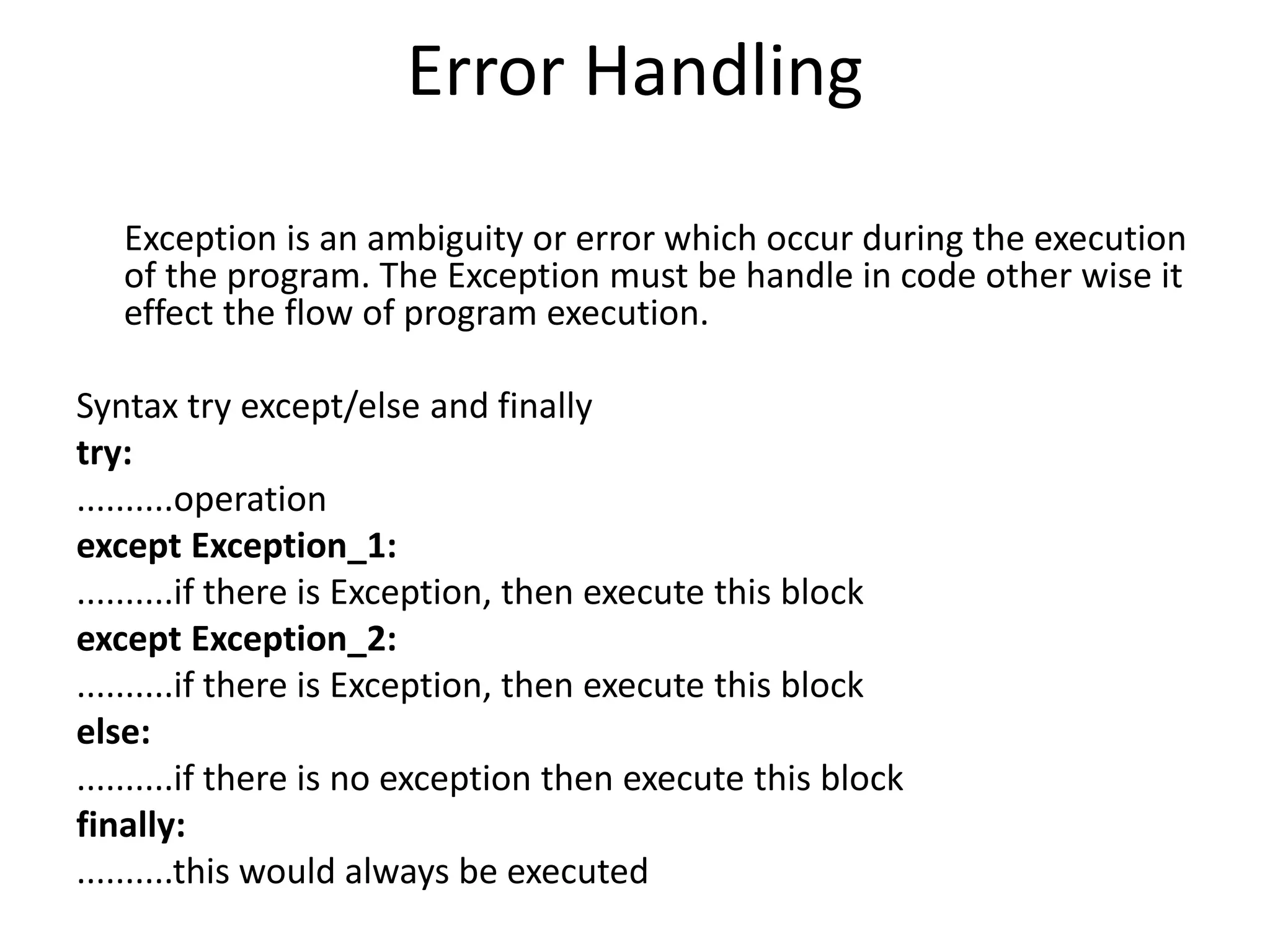
Error Handling Exception is an ambiguity or error which occur during the execution of the program. The Exception must be handle in code other wise it effect the flow of program execution. Syntax try except/else and finally try: ..........operation except Exception_1: ..........if there is Exception, then execute this block except Exception_2: ..........if there is Exception, then execute this block else: ..........if there is no exception then execute this block finally: ..........this would always be executed
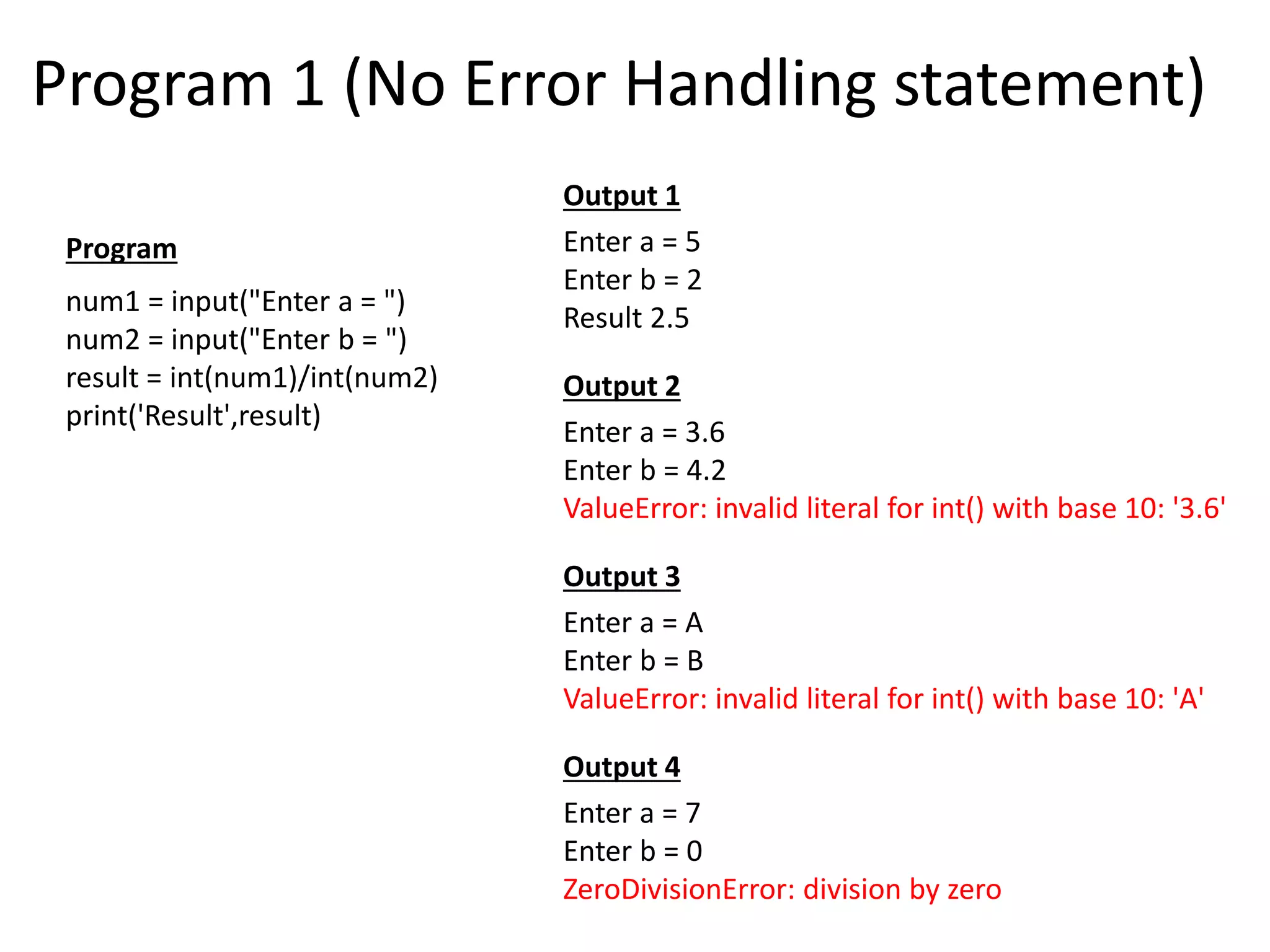
Program 1 (No Error Handling statement) Enter a = 5 Enter b = 2 Result 2.5 Enter a = 3.6 Enter b = 4.2 ValueError: invalid literal for int() with base 10: '3.6' Enter a = A Enter b = B ValueError: invalid literal for int() with base 10: 'A' Enter a = 7 Enter b = 0 ZeroDivisionError: division by zero num1 = input("Enter a = ") num2 = input("Enter b = ") result = int(num1)/int(num2) print('Result',result) Program Output 2 Output 3 Output 4 Output 1
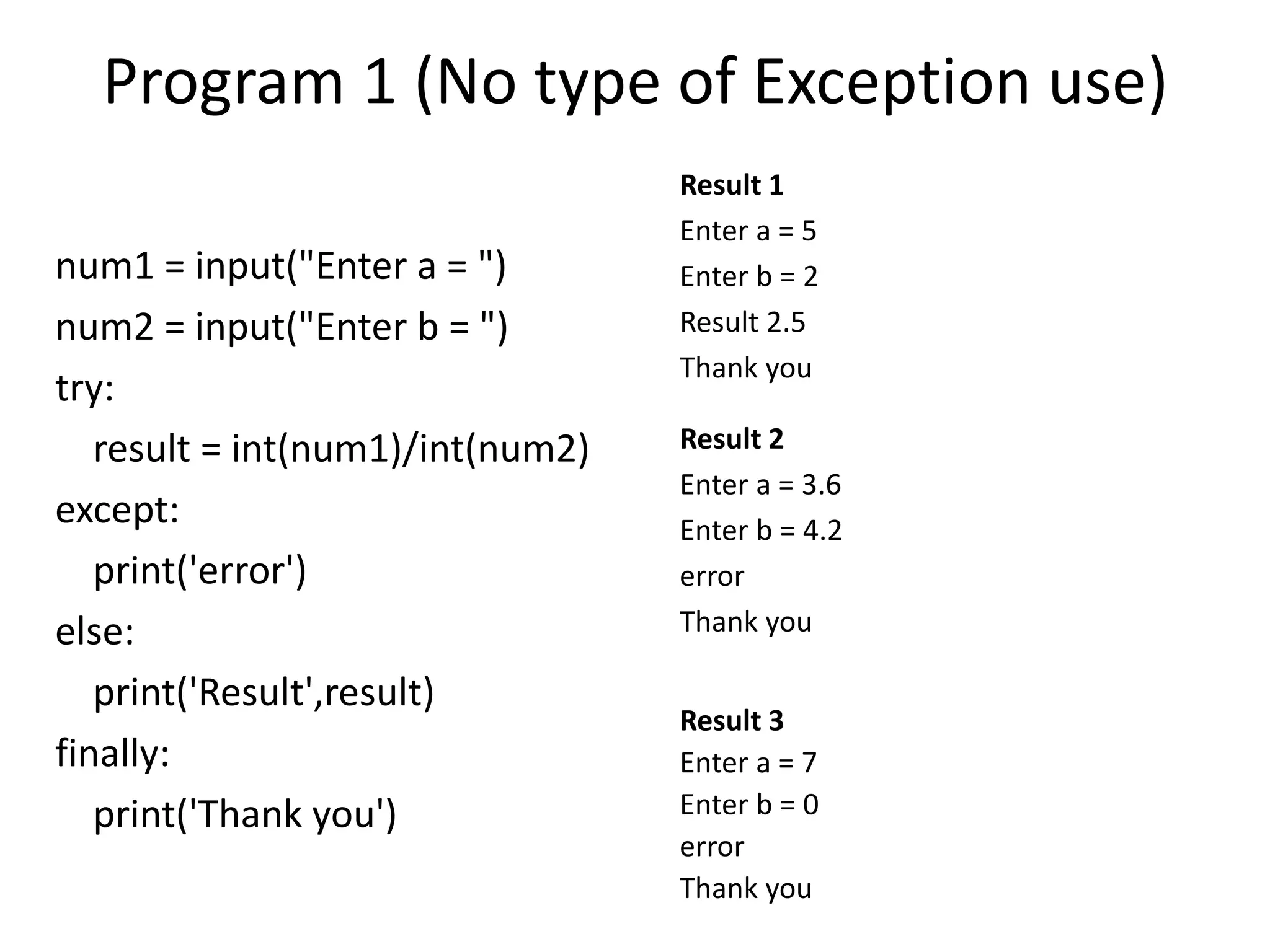
Program 1 (No type of Exception use) num1 = input("Enter a = ") num2 = input("Enter b = ") try: result = int(num1)/int(num2) except: print('error') else: print('Result',result) finally: print('Thank you') Result 1 Enter a = 5 Enter b = 2 Result 2.5 Thank you Result 2 Enter a = 3.6 Enter b = 4.2 error Thank you Result 3 Enter a = 7 Enter b = 0 error Thank you
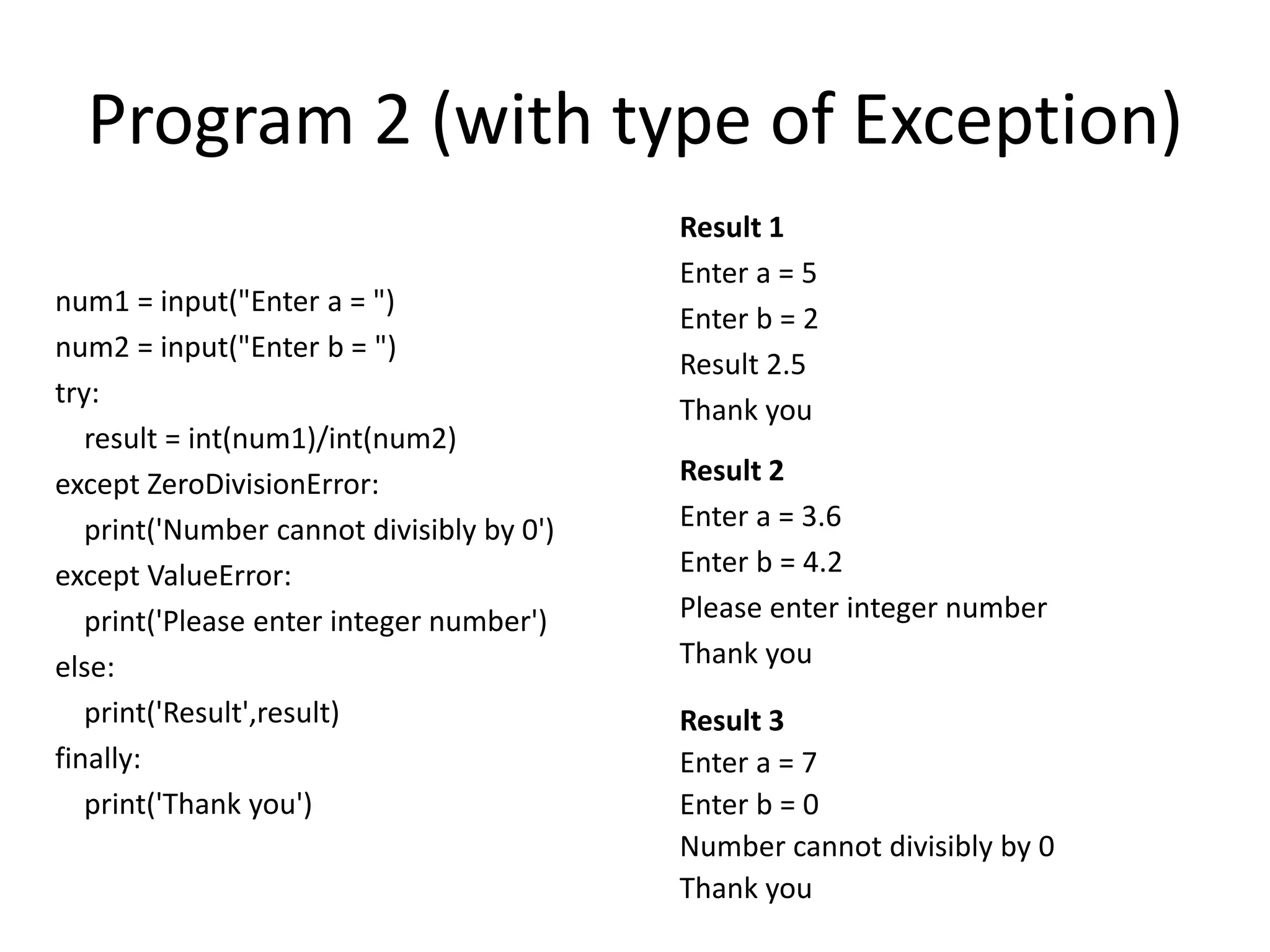
Program 2 (with type of Exception) num1 = input("Enter a = ") num2 = input("Enter b = ") try: result = int(num1)/int(num2) except ZeroDivisionError: print('Number cannot divisibly by 0') except ValueError: print('Please enter integer number') else: print('Result',result) finally: print('Thank you') Result 1 Enter a = 5 Enter b = 2 Result 2.5 Thank you Result 2 Enter a = 3.6 Enter b = 4.2 Please enter integer number Thank you Result 3 Enter a = 7 Enter b = 0 Number cannot divisibly by 0 Thank you
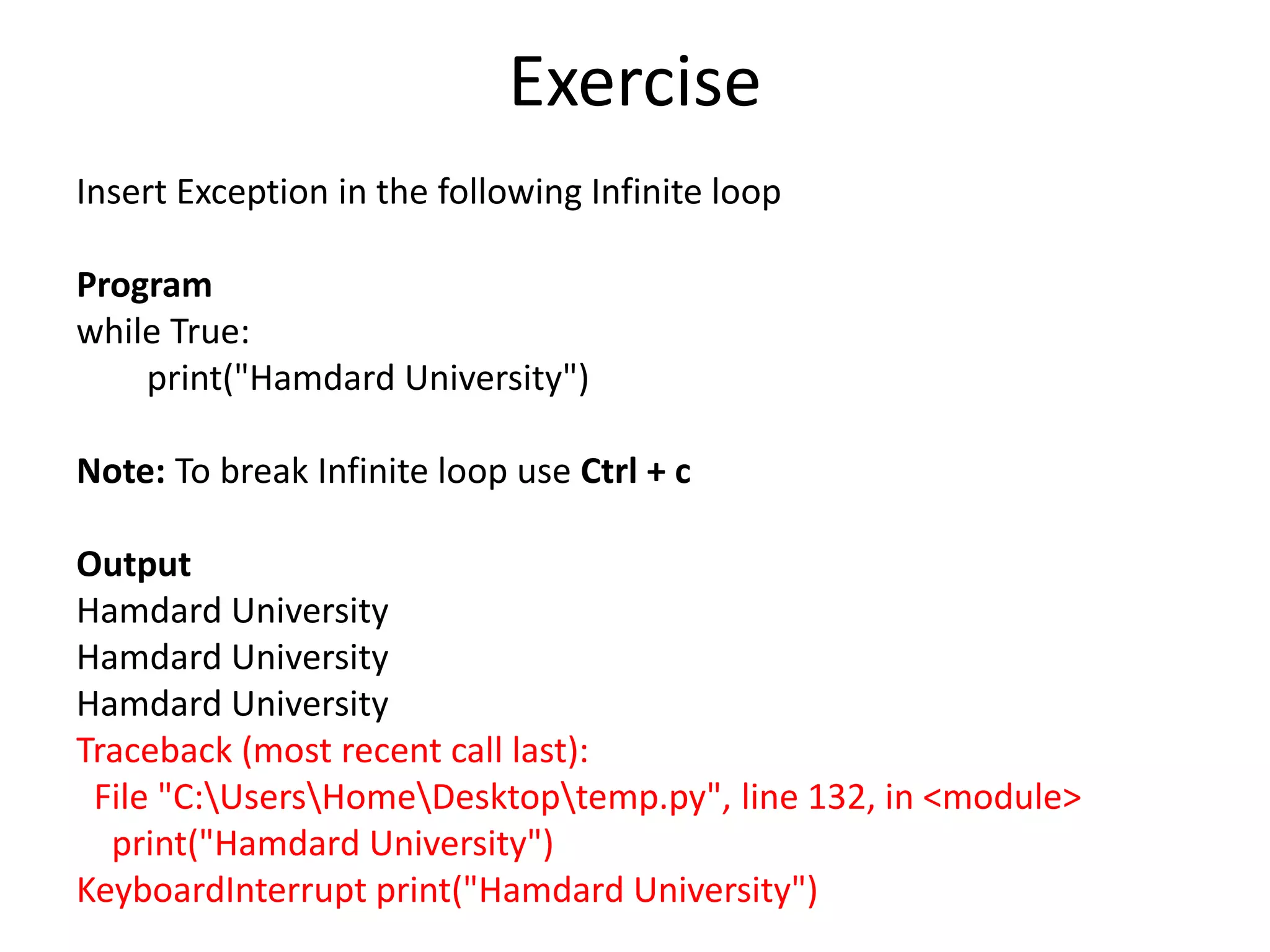
Exercise Insert Exception in the following Infinite loop Program while True: print("Hamdard University") Note: To break Infinite loop use Ctrl + c Output Hamdard University Hamdard University Hamdard University Traceback (most recent call last): File "C:UsersHomeDesktoptemp.py", line 132, in <module> print("Hamdard University") KeyboardInterrupt print("Hamdard University")
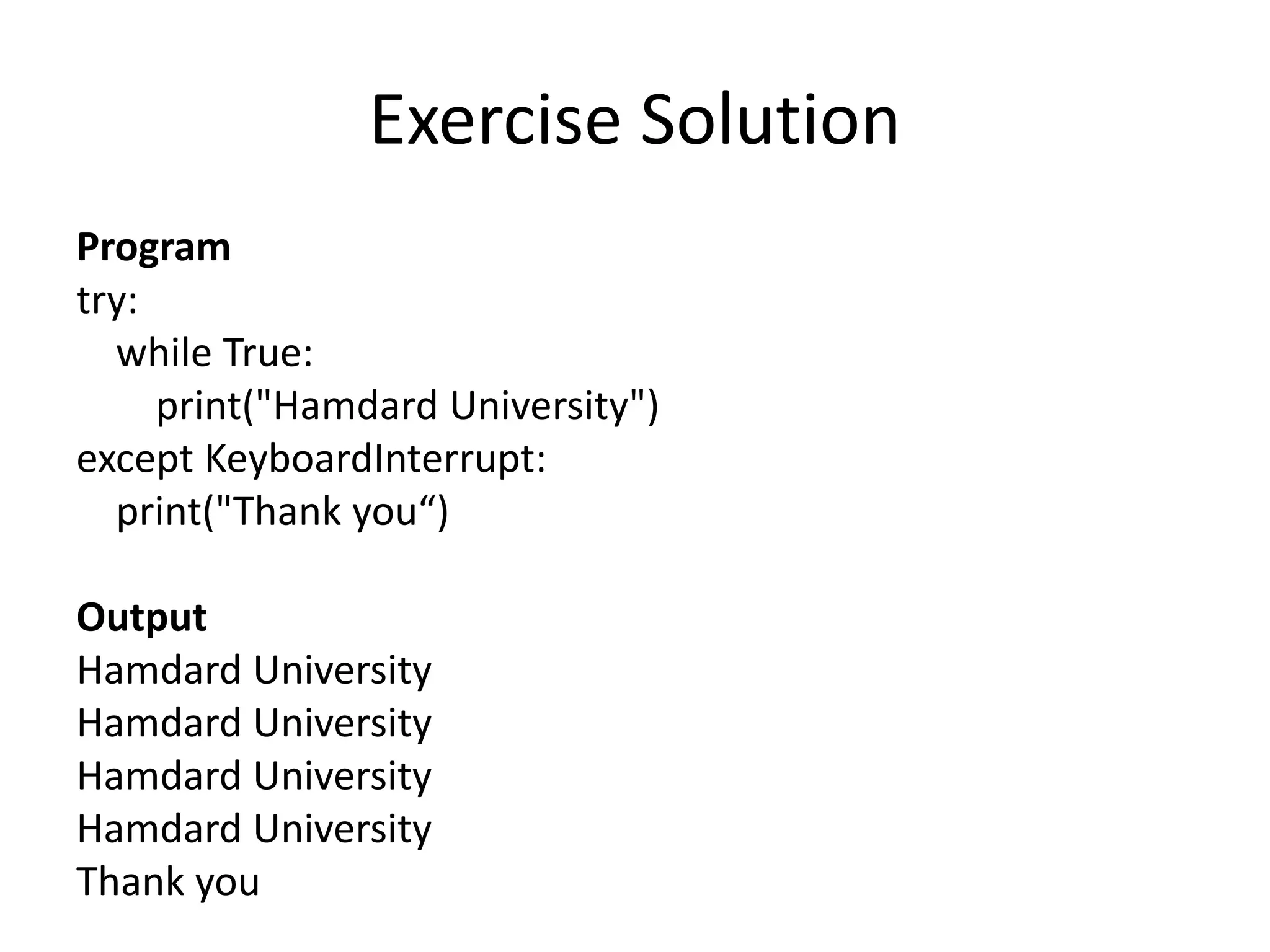
Exercise Solution Program try: while True: print("Hamdard University") except KeyboardInterrupt: print("Thank you“) Output Hamdard University Hamdard University Hamdard University Hamdard University Thank you
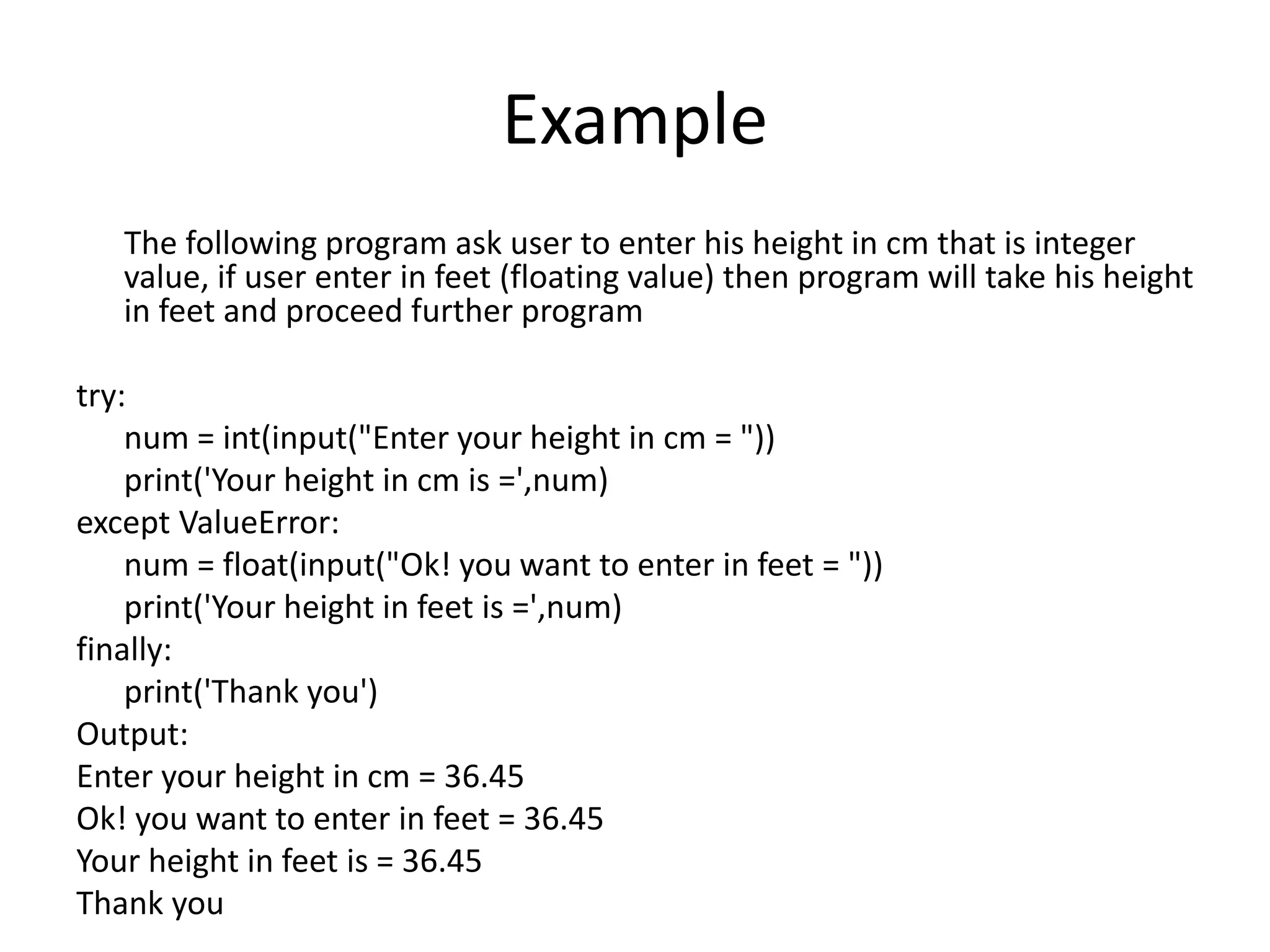
Example The following program ask user to enter his height in cm that is integer value, if user enter in feet (floating value) then program will take his height in feet and proceed further program try: num = int(input("Enter your height in cm = ")) print('Your height in cm is =',num) except ValueError: num = float(input("Ok! you want to enter in feet = ")) print('Your height in feet is =',num) finally: print('Thank you') Output: Enter your height in cm = 36.45 Ok! you want to enter in feet = 36.45 Your height in feet is = 36.45 Thank you
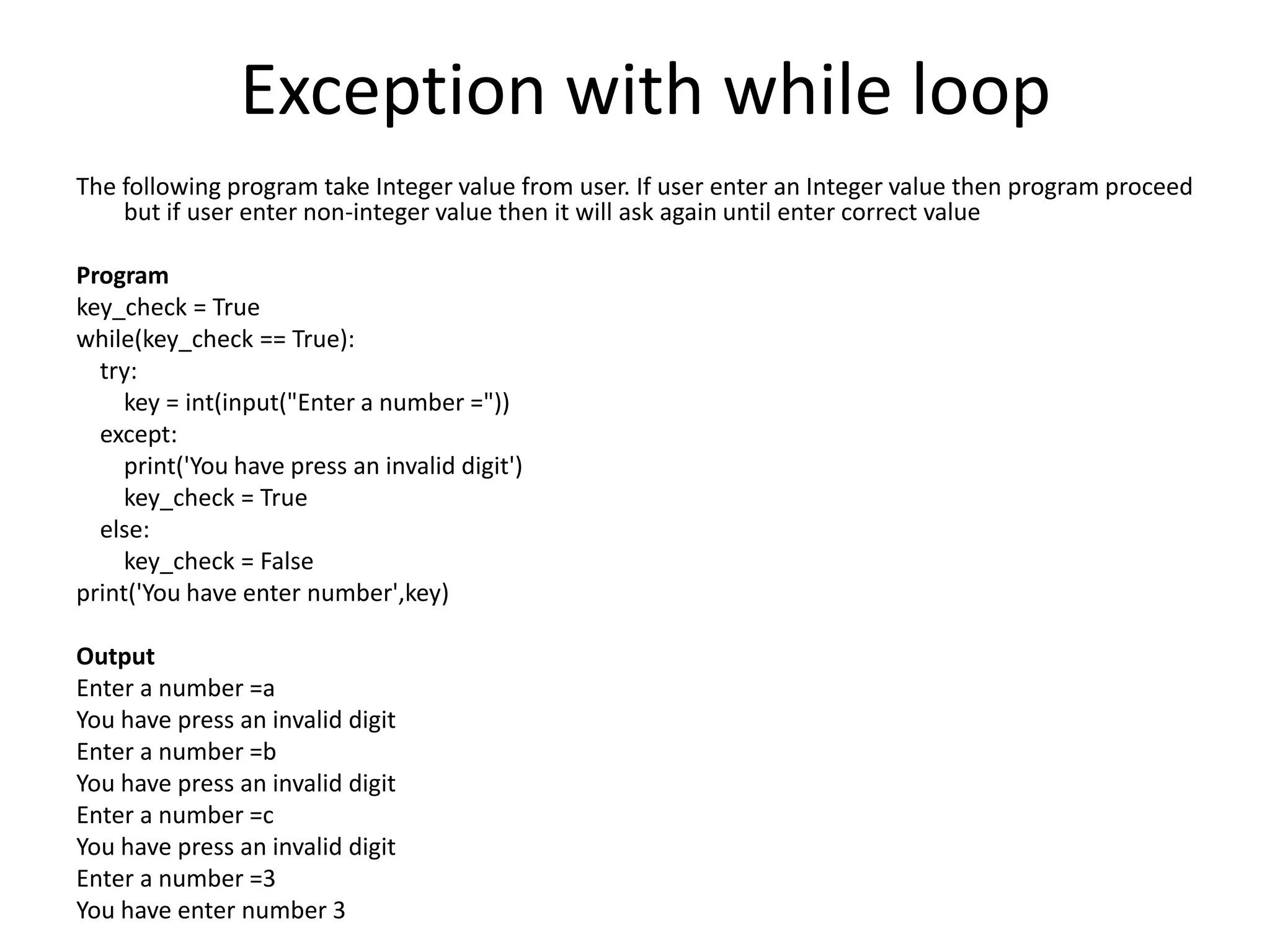
Exception with while loop The following program take Integer value from user. If user enter an Integer value then program proceed but if user enter non-integer value then it will ask again until enter correct value Program key_check = True while(key_check == True): try: key = int(input("Enter a number =")) except: print('You have press an invalid digit') key_check = True else: key_check = False print('You have enter number',key) Output Enter a number =a You have press an invalid digit Enter a number =b You have press an invalid digit Enter a number =c You have press an invalid digit Enter a number =3 You have enter number 3
LIST (Array) • Two types of Array • Static Array (in C) • Dynamic Array( in Python) Example in C (static Array) float balance[5] = {10.0, 2.0, 3.4, 7.0, 50.0}; balance[4] = 50.0; //Update array value char greeting[6] = {'H', 'e', 'l', 'l', 'o', '0'}; char greeting[] = "Hello"; // Or it can be written as Example of Array in Python (Dynamic Array) My_data = ['physics', 'chemistry', 1997, 2000]
Example Example: a=[0,0,0] #creating list of 3 elements a[0] = input(“Enter name 1= ”) a[1] = input(“Enter name 2= ”) a[2] = input(“Enter name 3= ”) print(‘Name 1 is’, a[0] , ‘ Name 2 is’, a[1] , ‘ Name 3 is’, a[2])
LIST Example a = [0,1,2,3,4,5,6,7,8,9] #Making list a[2] = 2 # Value of index 2 a[4] = 4 # Value of index 4 a[3:] = [3, 4, 5, 6, 7, 8, 9] # All values from(after) index 3 a[:7] = [0, 1, 2, 3, 4, 5, 6] # All values before index 7 a[3:7] = [3, 4, 5, 6] # All values from index 3 to index 7
Forward and Backward Indexing a = [1,2,3,4,5] a[0] 1 a[1] 2 a[2] 3 a[3] 4 a[4] 5 a = [1,2,3,4,5] a[-1] 5 a[-2] 4 a[-3] 3 a[-4] 2 a[-5] 1 Forward Indexing Reverse Indexing
List-append a = [] [] a.append(2) [2] a.append(3.5) [2, 3.5] a.append('xyz') [2, 3.5, 'xyz'] 2 2 2 3.5 3.5 2 3.5 xyz ‘xyz’ list.append(object): Append object to end
list - clear a = [0,1,2,3,4,5] [0, 1, 2, 3, 4, 5] a.clear() [] list - index a = [2,4,6,4] a.index(2) 0 a.index(4) 1 a.index(6) 2 a.index(8) Traceback (most recent call last): ValueError: 8 is not in list list.clear() : Remove all items from list list.index(value): Return first index of value. Raises ValueError if the value is not present.
a = [1,2,3,4,5,6] b = ['a','b'] a = [0,1,2,3,4,5,6] b = ['a','b'] a = b.copy() a ['a', 'b'] a = [0, 1, 2, 3, 4, 5] b = [] b = a.copy() b = [0, 1, 2, 3, 4, 5] list - copy a = [0,1,2,3,4,5,6] b = ['a','b'] a[3:] = b.copy() a [0, 1, 2, 'a', 'b'] a = [0,1,2,3,4,5,6] b = ['a','b'] a[3:4] = b.copy() a = [0, 1, 2, 'a', 'b', 4, 5, 6] Example Example Example Example list.copy(): A shallow copy of list to another list
list - extend a = [0,1,2] b = ['a','b','c'] b.extend(a) b = ['a', 'b', 'c', 0, 1, 2] b.extend(a) b = ['a', 'b', 'c', 0, 1, 2, 0, 1, 2] list.extend(iterable): extend list by appending elements from the iterable
list-count a = [0,1,1,2,2,2] a.count(0) 1 a.count(1) 2 a.count(2) 3 a.count(3) 0 a =['A','B','B','C','C','C'] a.count('A') 1 a.count('B') 2 a.count('C') 3 list.count(value): Return number of occurrences of value
list-pop a = [0,1,2,3,4,5] b = a.pop() b = 5 a = [0, 1, 2, 3, 4] a.pop() a = [0,1,2,3] c= a.pop() c = 3 a = [0,1,2] 0 1 2 3 4 0 1 2 3 4 0 1 2 3 5 5 0 1 2 3 4 list.pop([index]): Remove and return item at index (default last). Raises IndexError if list is empty or index is out of range.
list append and pop example a = [2,4,6,8] b = [] b.append(a.pop()) a =[2, 4, 6] b =[8] b.append(a.pop()) a = [2, 4] b = [8, 6] b.append(a.pop()) a = [2] b =[8, 6, 4] b.append(a.pop()) a = [] b = [8, 6, 4, 2] 2 4 6 8 2 4 6 2 4 2 8 8 6 8 6 4 8 6 4 2 Move the elements from list-a to list-b
list sort and reverse a = [1,5,9,7,0,3,6,4,2,8] a.reverse() a = [8, 2, 4, 6, 3, 0, 7, 9, 5, 1] a.sort() a = [0, 1, 2, 3, 4, 5, 6, 7, 8, 9] a.reverse() a = [9, 8, 7, 6, 5, 4, 3, 2, 1, 0] a = ['h','a','m','d','a','r','d'] a.sort() a = ['a', 'a', 'd', 'd', 'h', 'm', 'r'] a.reverse() a = ['r', 'm', 'h', 'd', 'd', 'a', 'a'] reverse(): Reverse the Array element sort(): Place element in ascending order
list -remove a = [1,2,2,3,3] a.remove(1) a = [2, 2, 3, 3] a.remove(2) a = [2, 3, 3] a.remove(3) a = [2, 3] 1 2 2 3 3 remove(value): Remove first occurrence of value. Return ValueError if the value is not present. 1 2 2 3 3 2 2 3 3 2 3 3
list - insert a = [0,1,2,3,4] a.insert(2,5) a = [0, 1, 5, 2, 3, 4] a.insert(4,9) a = [0, 1, 5, 2, 9, 3, 4] a.insert(9,7) a = [0, 1, 5, 2, 9, 3, 4, 7] Insert( index position , value ): Insert object before index position 0 1 2 3 4 1 5 2 3 4 2 9 3 4 7 5 2 9 3 4 0 10 510 5 9 7
Exercise • First generate 20 Random number • Separate the Random number in two different list that are – Even[] – Odd
Example Solution import random from random import randint a = [] even = [] odd = [] for i in range(20): a.append(randint(2,10)) print(a) a.reverse() print(a) for i in range(20): b = a.pop() if(b%2 == 0): even.append(b) else: odd.append(b) print(even) print(odd) 20 Random Number: [8, 2, 4, 3, 4, 9, 4, 8, 8, 10, 9, 6, 3, 7, 7, 7, 3, 4, 4, 3] Reverse the List: [3, 4, 4, 3, 7, 7, 7, 3, 6, 9, 10, 8, 8, 4, 9, 4, 3, 4, 2, 8] List of Even Number: [8, 2, 4, 4, 4, 8, 8, 10, 6, 4, 4] List of Odd Number: [3, 9, 9, 3, 7, 7, 7, 3, 3] Program
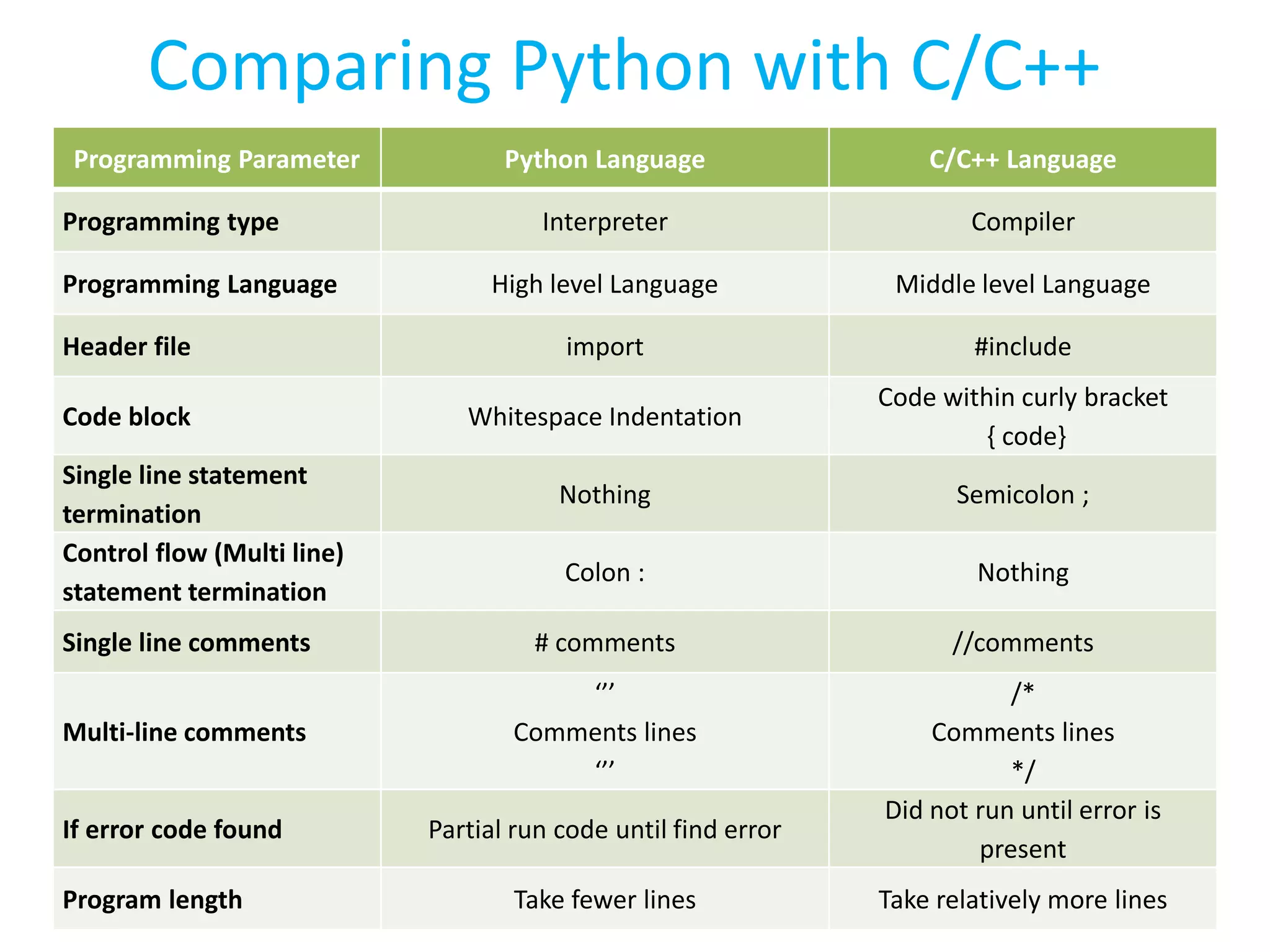
Comparing Python with C/C++ Programming Parameter Python Language C/C++ Language Programming type Interpreter Compiler Programming Language High level Language Middle level Language Header file import #include Code block Whitespace Indentation Code within curly bracket { code} Single line statement termination Nothing Semicolon ; Control flow (Multi line) statement termination Colon : Nothing Single line comments # comments //comments Multi-line comments ‘’’ Comments lines ‘’’ /* Comments lines */ If error code found Partial run code until find error Did not run until error is present Program length Take fewer lines Take relatively more lines
Python Programming code comparison with C programming code Python program C/C++ program Multi-line comments Including library Declaring variable Multi-line statement Code Block Single-line statement Single line comments ‘’’ The Python Language Example code ’’’ Import time a=10 #integer value name = 'karachi' #String for i in range (a): print("Hamdard") print('University') print(name) #program end /* The C/C++ language Example code */ #include <iostream> using namespace std; int main() { int a = 10; char name[10] = "Karachi"; for(int i =0 ; i <a ; i ++ ) { cout<<"Hamdard "; cout<<"University"<<endl; } cout<<name; return 0; } //program end
THANK YOU

Python programming workshop session 3

  • 1.
    Faculty of EngineeringScience & Technology(FEST) Hamdard Institute of Engineering Technology(HIET) HAMDARD UNIVERSITY Instructor ABDUL HASEEB HANDS-ON WORKSHOP ON PYTHON PROGRAMMING LANGUAGE Faculty Development Program (Session-10) DAY-3
  • 2.
    The Python ProgrammingLanguage Day 2 Workshop Contents • Error handling • List (Array) • Random Number
  • 3.
    Error Handling Exception isan ambiguity or error which occur during the execution of the program. The Exception must be handle in code other wise it effect the flow of program execution. Syntax try except/else and finally try: ..........operation except Exception_1: ..........if there is Exception, then execute this block except Exception_2: ..........if there is Exception, then execute this block else: ..........if there is no exception then execute this block finally: ..........this would always be executed
  • 4.
    Program 1 (NoError Handling statement) Enter a = 5 Enter b = 2 Result 2.5 Enter a = 3.6 Enter b = 4.2 ValueError: invalid literal for int() with base 10: '3.6' Enter a = A Enter b = B ValueError: invalid literal for int() with base 10: 'A' Enter a = 7 Enter b = 0 ZeroDivisionError: division by zero num1 = input("Enter a = ") num2 = input("Enter b = ") result = int(num1)/int(num2) print('Result',result) Program Output 2 Output 3 Output 4 Output 1
  • 5.
    Program 1 (Notype of Exception use) num1 = input("Enter a = ") num2 = input("Enter b = ") try: result = int(num1)/int(num2) except: print('error') else: print('Result',result) finally: print('Thank you') Result 1 Enter a = 5 Enter b = 2 Result 2.5 Thank you Result 2 Enter a = 3.6 Enter b = 4.2 error Thank you Result 3 Enter a = 7 Enter b = 0 error Thank you
  • 6.
    Program 2 (withtype of Exception) num1 = input("Enter a = ") num2 = input("Enter b = ") try: result = int(num1)/int(num2) except ZeroDivisionError: print('Number cannot divisibly by 0') except ValueError: print('Please enter integer number') else: print('Result',result) finally: print('Thank you') Result 1 Enter a = 5 Enter b = 2 Result 2.5 Thank you Result 2 Enter a = 3.6 Enter b = 4.2 Please enter integer number Thank you Result 3 Enter a = 7 Enter b = 0 Number cannot divisibly by 0 Thank you
  • 7.
    Exercise Insert Exception inthe following Infinite loop Program while True: print("Hamdard University") Note: To break Infinite loop use Ctrl + c Output Hamdard University Hamdard University Hamdard University Traceback (most recent call last): File "C:UsersHomeDesktoptemp.py", line 132, in <module> print("Hamdard University") KeyboardInterrupt print("Hamdard University")
  • 8.
    Exercise Solution Program try: while True: print("HamdardUniversity") except KeyboardInterrupt: print("Thank you“) Output Hamdard University Hamdard University Hamdard University Hamdard University Thank you
  • 9.
    Example The following programask user to enter his height in cm that is integer value, if user enter in feet (floating value) then program will take his height in feet and proceed further program try: num = int(input("Enter your height in cm = ")) print('Your height in cm is =',num) except ValueError: num = float(input("Ok! you want to enter in feet = ")) print('Your height in feet is =',num) finally: print('Thank you') Output: Enter your height in cm = 36.45 Ok! you want to enter in feet = 36.45 Your height in feet is = 36.45 Thank you
  • 10.
    Exception with whileloop The following program take Integer value from user. If user enter an Integer value then program proceed but if user enter non-integer value then it will ask again until enter correct value Program key_check = True while(key_check == True): try: key = int(input("Enter a number =")) except: print('You have press an invalid digit') key_check = True else: key_check = False print('You have enter number',key) Output Enter a number =a You have press an invalid digit Enter a number =b You have press an invalid digit Enter a number =c You have press an invalid digit Enter a number =3 You have enter number 3
  • 11.
    LIST (Array) • Twotypes of Array • Static Array (in C) • Dynamic Array( in Python) Example in C (static Array) float balance[5] = {10.0, 2.0, 3.4, 7.0, 50.0}; balance[4] = 50.0; //Update array value char greeting[6] = {'H', 'e', 'l', 'l', 'o', '0'}; char greeting[] = "Hello"; // Or it can be written as Example of Array in Python (Dynamic Array) My_data = ['physics', 'chemistry', 1997, 2000]
  • 12.
    Example Example: a=[0,0,0] #creating listof 3 elements a[0] = input(“Enter name 1= ”) a[1] = input(“Enter name 2= ”) a[2] = input(“Enter name 3= ”) print(‘Name 1 is’, a[0] , ‘ Name 2 is’, a[1] , ‘ Name 3 is’, a[2])
  • 13.
    LIST Example a =[0,1,2,3,4,5,6,7,8,9] #Making list a[2] = 2 # Value of index 2 a[4] = 4 # Value of index 4 a[3:] = [3, 4, 5, 6, 7, 8, 9] # All values from(after) index 3 a[:7] = [0, 1, 2, 3, 4, 5, 6] # All values before index 7 a[3:7] = [3, 4, 5, 6] # All values from index 3 to index 7
  • 14.
    Forward and BackwardIndexing a = [1,2,3,4,5] a[0] 1 a[1] 2 a[2] 3 a[3] 4 a[4] 5 a = [1,2,3,4,5] a[-1] 5 a[-2] 4 a[-3] 3 a[-4] 2 a[-5] 1 Forward Indexing Reverse Indexing
  • 15.
    List-append a = [] [] a.append(2) [2] a.append(3.5) [2,3.5] a.append('xyz') [2, 3.5, 'xyz'] 2 2 2 3.5 3.5 2 3.5 xyz ‘xyz’ list.append(object): Append object to end
  • 16.
    list - clear a= [0,1,2,3,4,5] [0, 1, 2, 3, 4, 5] a.clear() [] list - index a = [2,4,6,4] a.index(2) 0 a.index(4) 1 a.index(6) 2 a.index(8) Traceback (most recent call last): ValueError: 8 is not in list list.clear() : Remove all items from list list.index(value): Return first index of value. Raises ValueError if the value is not present.
  • 17.
    a = [1,2,3,4,5,6] b= ['a','b'] a = [0,1,2,3,4,5,6] b = ['a','b'] a = b.copy() a ['a', 'b'] a = [0, 1, 2, 3, 4, 5] b = [] b = a.copy() b = [0, 1, 2, 3, 4, 5] list - copy a = [0,1,2,3,4,5,6] b = ['a','b'] a[3:] = b.copy() a [0, 1, 2, 'a', 'b'] a = [0,1,2,3,4,5,6] b = ['a','b'] a[3:4] = b.copy() a = [0, 1, 2, 'a', 'b', 4, 5, 6] Example Example Example Example list.copy(): A shallow copy of list to another list
  • 18.
    list - extend a= [0,1,2] b = ['a','b','c'] b.extend(a) b = ['a', 'b', 'c', 0, 1, 2] b.extend(a) b = ['a', 'b', 'c', 0, 1, 2, 0, 1, 2] list.extend(iterable): extend list by appending elements from the iterable
  • 19.
    list-count a = [0,1,1,2,2,2] a.count(0) 1 a.count(1) 2 a.count(2) 3 a.count(3) 0 a=['A','B','B','C','C','C'] a.count('A') 1 a.count('B') 2 a.count('C') 3 list.count(value): Return number of occurrences of value
  • 20.
    list-pop a = [0,1,2,3,4,5] b= a.pop() b = 5 a = [0, 1, 2, 3, 4] a.pop() a = [0,1,2,3] c= a.pop() c = 3 a = [0,1,2] 0 1 2 3 4 0 1 2 3 4 0 1 2 3 5 5 0 1 2 3 4 list.pop([index]): Remove and return item at index (default last). Raises IndexError if list is empty or index is out of range.
  • 21.
    list append andpop example a = [2,4,6,8] b = [] b.append(a.pop()) a =[2, 4, 6] b =[8] b.append(a.pop()) a = [2, 4] b = [8, 6] b.append(a.pop()) a = [2] b =[8, 6, 4] b.append(a.pop()) a = [] b = [8, 6, 4, 2] 2 4 6 8 2 4 6 2 4 2 8 8 6 8 6 4 8 6 4 2 Move the elements from list-a to list-b
  • 22.
    list sort andreverse a = [1,5,9,7,0,3,6,4,2,8] a.reverse() a = [8, 2, 4, 6, 3, 0, 7, 9, 5, 1] a.sort() a = [0, 1, 2, 3, 4, 5, 6, 7, 8, 9] a.reverse() a = [9, 8, 7, 6, 5, 4, 3, 2, 1, 0] a = ['h','a','m','d','a','r','d'] a.sort() a = ['a', 'a', 'd', 'd', 'h', 'm', 'r'] a.reverse() a = ['r', 'm', 'h', 'd', 'd', 'a', 'a'] reverse(): Reverse the Array element sort(): Place element in ascending order
  • 23.
    list -remove a =[1,2,2,3,3] a.remove(1) a = [2, 2, 3, 3] a.remove(2) a = [2, 3, 3] a.remove(3) a = [2, 3] 1 2 2 3 3 remove(value): Remove first occurrence of value. Return ValueError if the value is not present. 1 2 2 3 3 2 2 3 3 2 3 3
  • 24.
    list - insert a= [0,1,2,3,4] a.insert(2,5) a = [0, 1, 5, 2, 3, 4] a.insert(4,9) a = [0, 1, 5, 2, 9, 3, 4] a.insert(9,7) a = [0, 1, 5, 2, 9, 3, 4, 7] Insert( index position , value ): Insert object before index position 0 1 2 3 4 1 5 2 3 4 2 9 3 4 7 5 2 9 3 4 0 10 510 5 9 7
  • 25.
    Exercise • First generate20 Random number • Separate the Random number in two different list that are – Even[] – Odd
  • 26.
    Example Solution import random fromrandom import randint a = [] even = [] odd = [] for i in range(20): a.append(randint(2,10)) print(a) a.reverse() print(a) for i in range(20): b = a.pop() if(b%2 == 0): even.append(b) else: odd.append(b) print(even) print(odd) 20 Random Number: [8, 2, 4, 3, 4, 9, 4, 8, 8, 10, 9, 6, 3, 7, 7, 7, 3, 4, 4, 3] Reverse the List: [3, 4, 4, 3, 7, 7, 7, 3, 6, 9, 10, 8, 8, 4, 9, 4, 3, 4, 2, 8] List of Even Number: [8, 2, 4, 4, 4, 8, 8, 10, 6, 4, 4] List of Odd Number: [3, 9, 9, 3, 7, 7, 7, 3, 3] Program
  • 27.
    Comparing Python withC/C++ Programming Parameter Python Language C/C++ Language Programming type Interpreter Compiler Programming Language High level Language Middle level Language Header file import #include Code block Whitespace Indentation Code within curly bracket { code} Single line statement termination Nothing Semicolon ; Control flow (Multi line) statement termination Colon : Nothing Single line comments # comments //comments Multi-line comments ‘’’ Comments lines ‘’’ /* Comments lines */ If error code found Partial run code until find error Did not run until error is present Program length Take fewer lines Take relatively more lines
  • 28.
    Python Programming codecomparison with C programming code Python program C/C++ program Multi-line comments Including library Declaring variable Multi-line statement Code Block Single-line statement Single line comments ‘’’ The Python Language Example code ’’’ Import time a=10 #integer value name = 'karachi' #String for i in range (a): print("Hamdard") print('University') print(name) #program end /* The C/C++ language Example code */ #include <iostream> using namespace std; int main() { int a = 10; char name[10] = "Karachi"; for(int i =0 ; i <a ; i ++ ) { cout<<"Hamdard "; cout<<"University"<<endl; } cout<<name; return 0; } //program end
  • 29.