Advanced Python – Bay Area Python3.x Rigorous Indulgence Group (BayPRIGgies) Veera V Pendyala veera.pendyala@gmail.com October 23, 2016
Introduction
Introduction Basic understanding of Python Programing is a prerequisite. All the examples are worked out using Python 3.5. What do you learn? • Understand the underlying concepts of the Python OOP paradigm. • Introduction to Python 3.x 1
Built-in Functions
__map__ 1 >>> def square(number): 2 ... return number * number 3 4 >>> list(map(square, [1, 2, 3, 4, 5, 6])) 5 [1, 4, 9, 16, 25, 36] 6 7 >>> # Can also be written as a list comprehension. 8 >>> [square(x) for x in [1, 2, 3, 4, 5, 6]] 9 [1, 4, 9, 16, 25, 36] 10 11 >>> # Another Example for __map__ 12 >>> list(map(pow,[2, 3, 4], [10, 11, 12])) 13 [1024, 177147, 16777216] 2
__filter__ 1 >>> def square(number): 2 ... return number * number 3 4 >>> list(map(square, [0, 1, 2, 3, 4, 5, 6, 0])) 5 [0, 1, 4, 9, 16, 25, 36, 0] 6 7 >>> list(filter(square, [0, 1, 2, 3, 4, 5, 6, 0])) 8 [1, 4, 9, 16, 25, 36] 9 10 >>> # Can also be written as a list comprehension. 11 >>> [square(x) for x in [0, 1, 2, 3, 4, 5, 6, 0] if x] 12 [1, 4, 9, 16, 25, 36] 3
all 1 >>> all([True, False]) 2 False 3 >>> all([True, True]) 4 True 5 6 >>> def is_positive(number): 7 ... if number >= 0: 8 ... return True 9 ... return False 10 11 >>> all([is_positive(x) for x in [1, 2]]) 12 True 13 >>> all([is_positive(x) for x in [1, -1]]) 14 False 15 >>> all([is_positive(x) for x in [-1, -2]]) 16 False 4
any 1 >>> any([True, False]) 2 True 3 >>> any([False, False]) 4 False 5 6 >>> def is_positive(number): 7 ... if number >= 0: 8 ... return True 9 ... return False 10 11 >>> any([is_positive(x) for x in [-1, 1]]) 12 True 13 >>> any([is_positive(x) for x in [-1, -2]]) 14 False 5
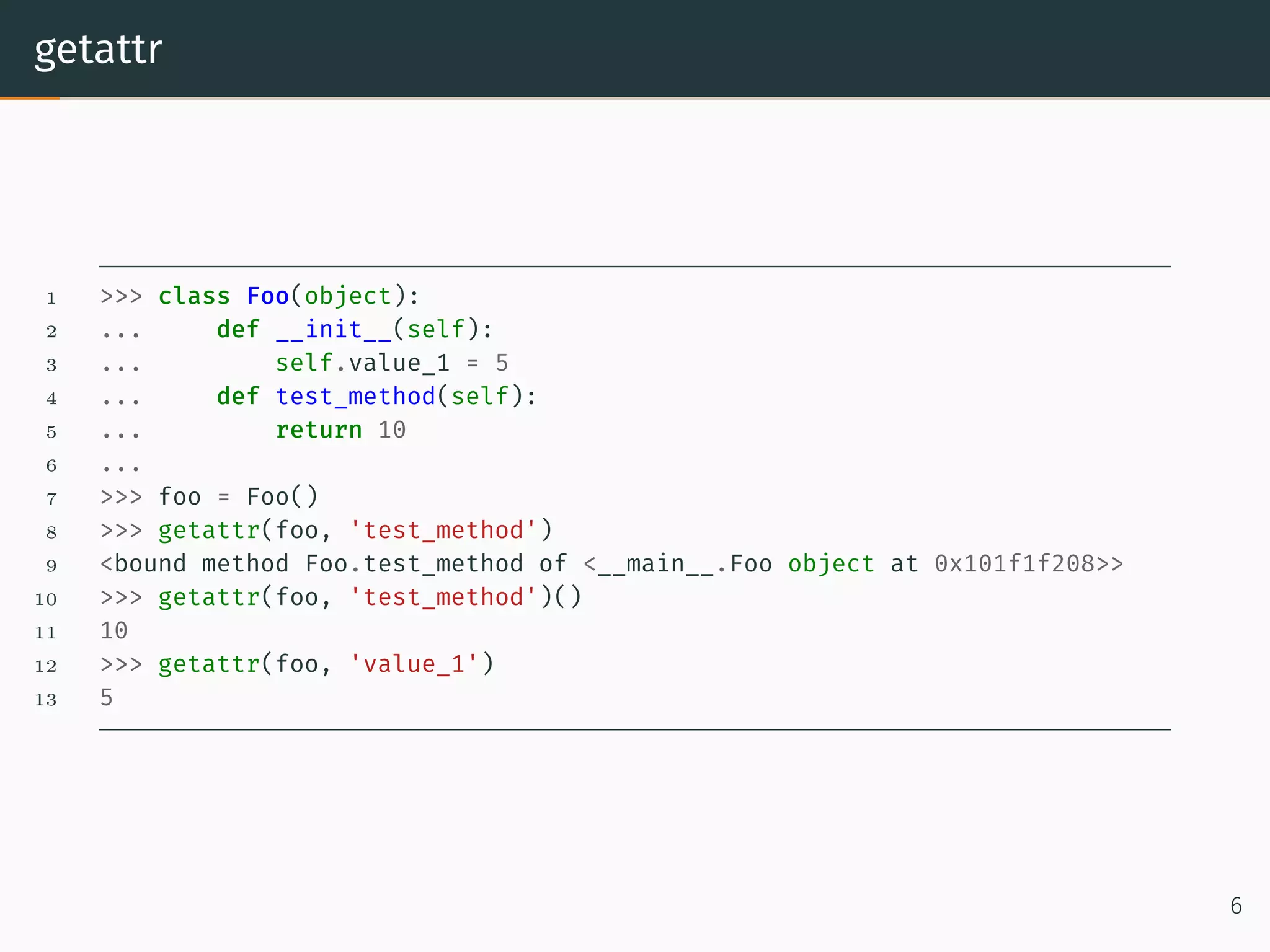
getattr 1 >>> class Foo(object): 2 ... def __init__(self): 3 ... self.value_1 = 5 4 ... def test_method(self): 5 ... return 10 6 ... 7 >>> foo = Foo() 8 >>> getattr(foo, 'test_method') 9 <bound method Foo.test_method of <__main__.Foo object at 0x101f1f208>> 10 >>> getattr(foo, 'test_method')() 11 10 12 >>> getattr(foo, 'value_1') 13 5 6
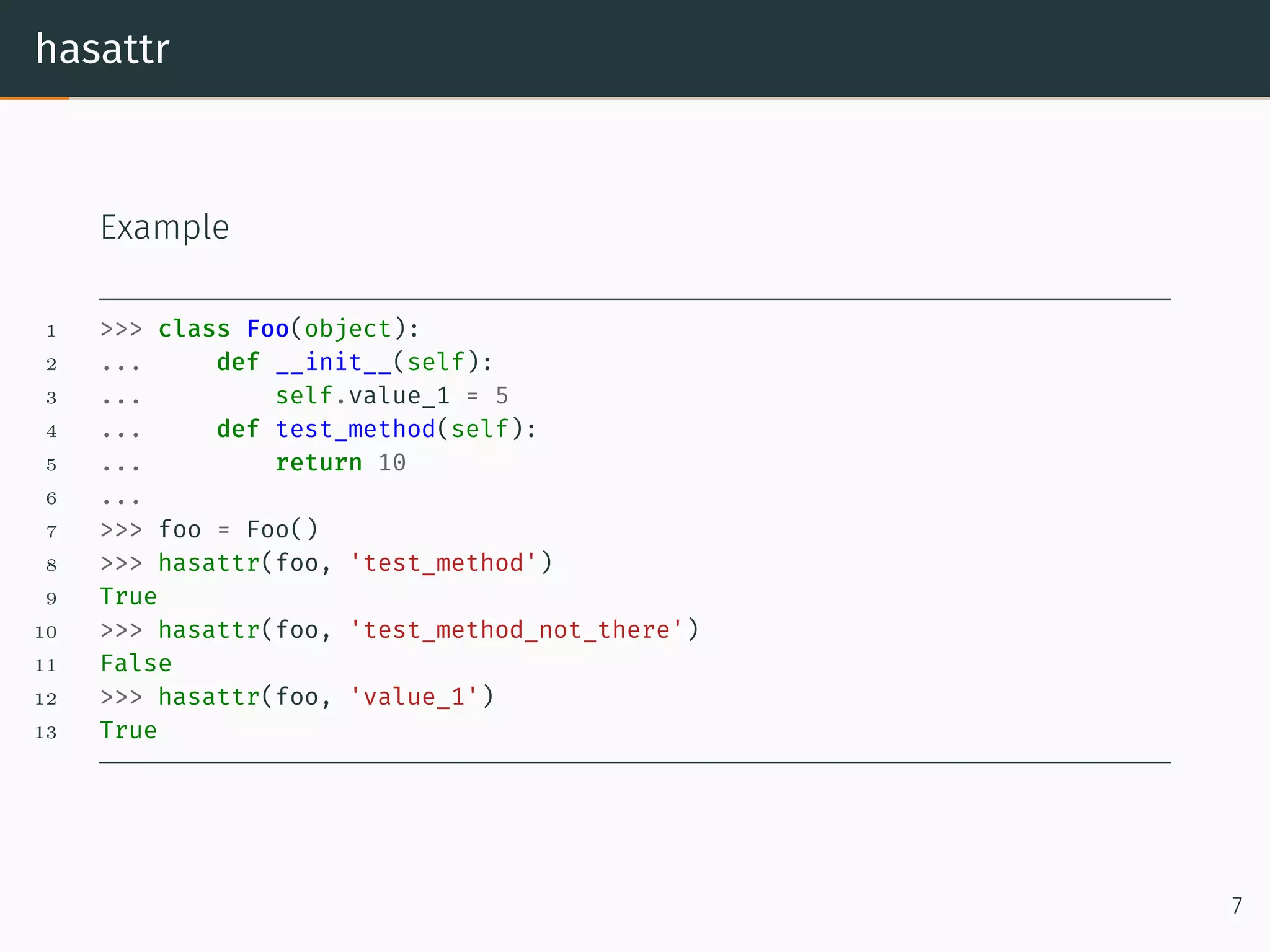
hasattr Example 1 >>> class Foo(object): 2 ... def __init__(self): 3 ... self.value_1 = 5 4 ... def test_method(self): 5 ... return 10 6 ... 7 >>> foo = Foo() 8 >>> hasattr(foo, 'test_method') 9 True 10 >>> hasattr(foo, 'test_method_not_there') 11 False 12 >>> hasattr(foo, 'value_1') 13 True 7
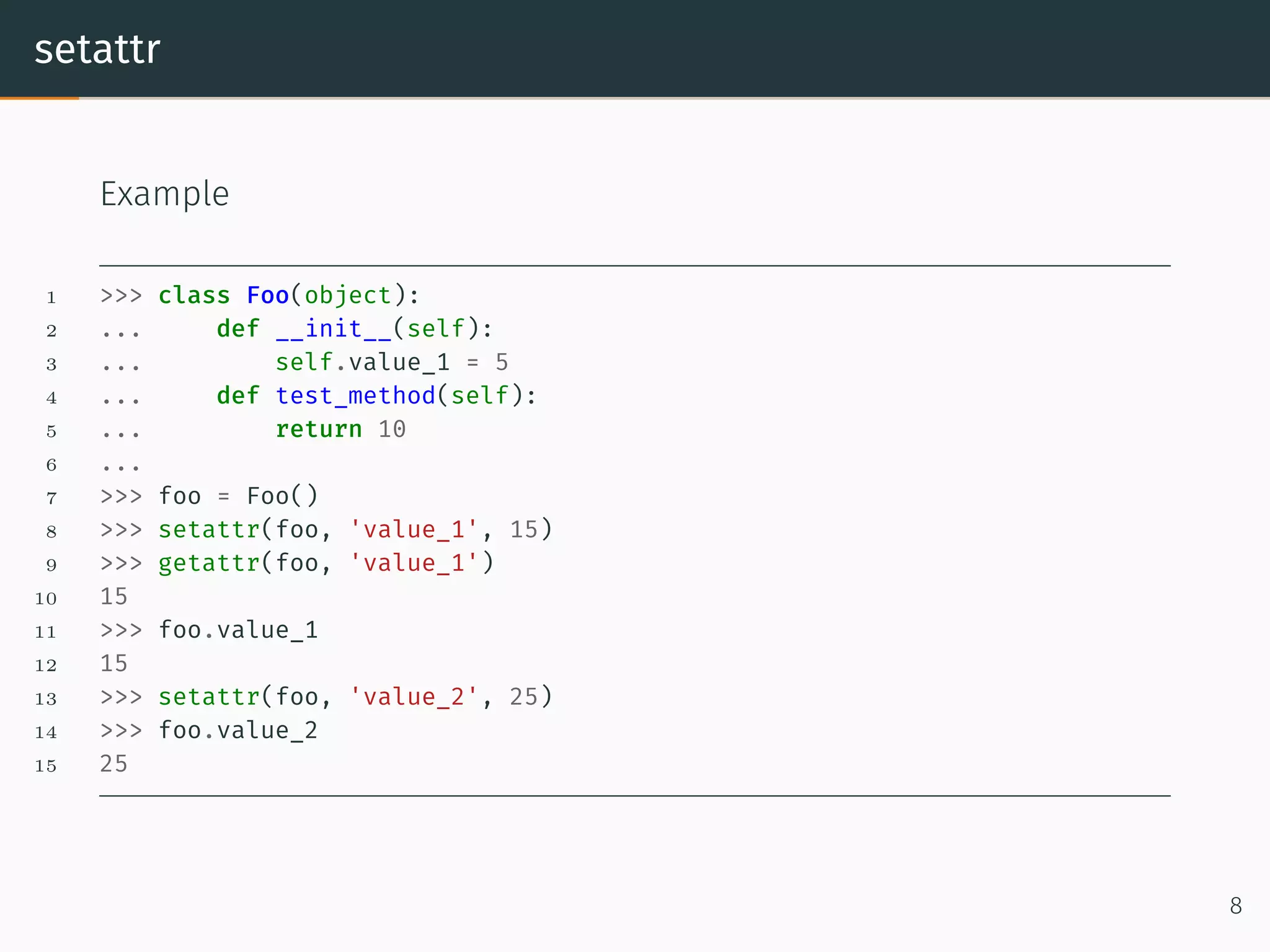
setattr Example 1 >>> class Foo(object): 2 ... def __init__(self): 3 ... self.value_1 = 5 4 ... def test_method(self): 5 ... return 10 6 ... 7 >>> foo = Foo() 8 >>> setattr(foo, 'value_1', 15) 9 >>> getattr(foo, 'value_1') 10 15 11 >>> foo.value_1 12 15 13 >>> setattr(foo, 'value_2', 25) 14 >>> foo.value_2 15 25 8
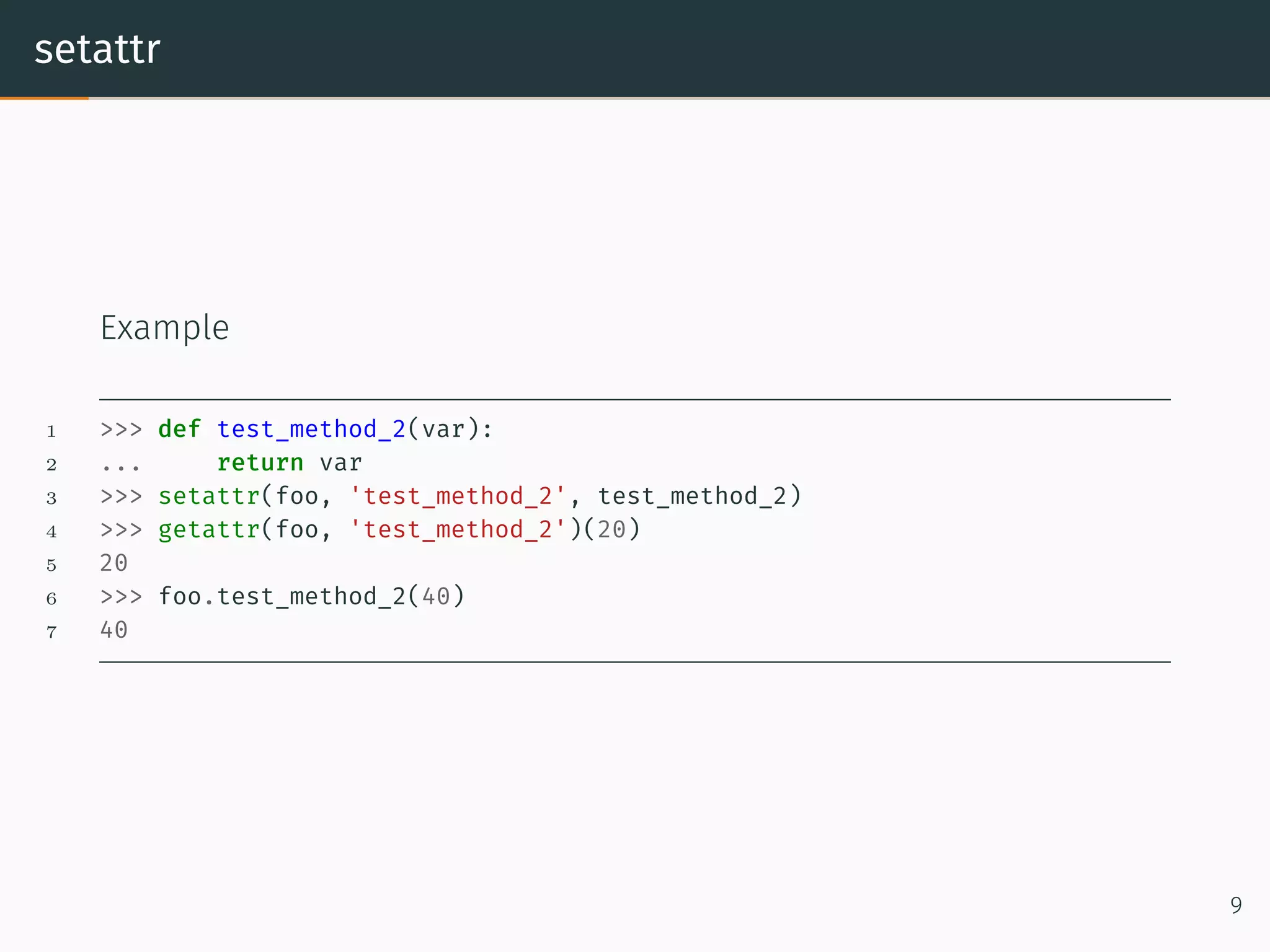
setattr Example 1 >>> def test_method_2(var): 2 ... return var 3 >>> setattr(foo, 'test_method_2', test_method_2) 4 >>> getattr(foo, 'test_method_2')(20) 5 20 6 >>> foo.test_method_2(40) 7 40 9
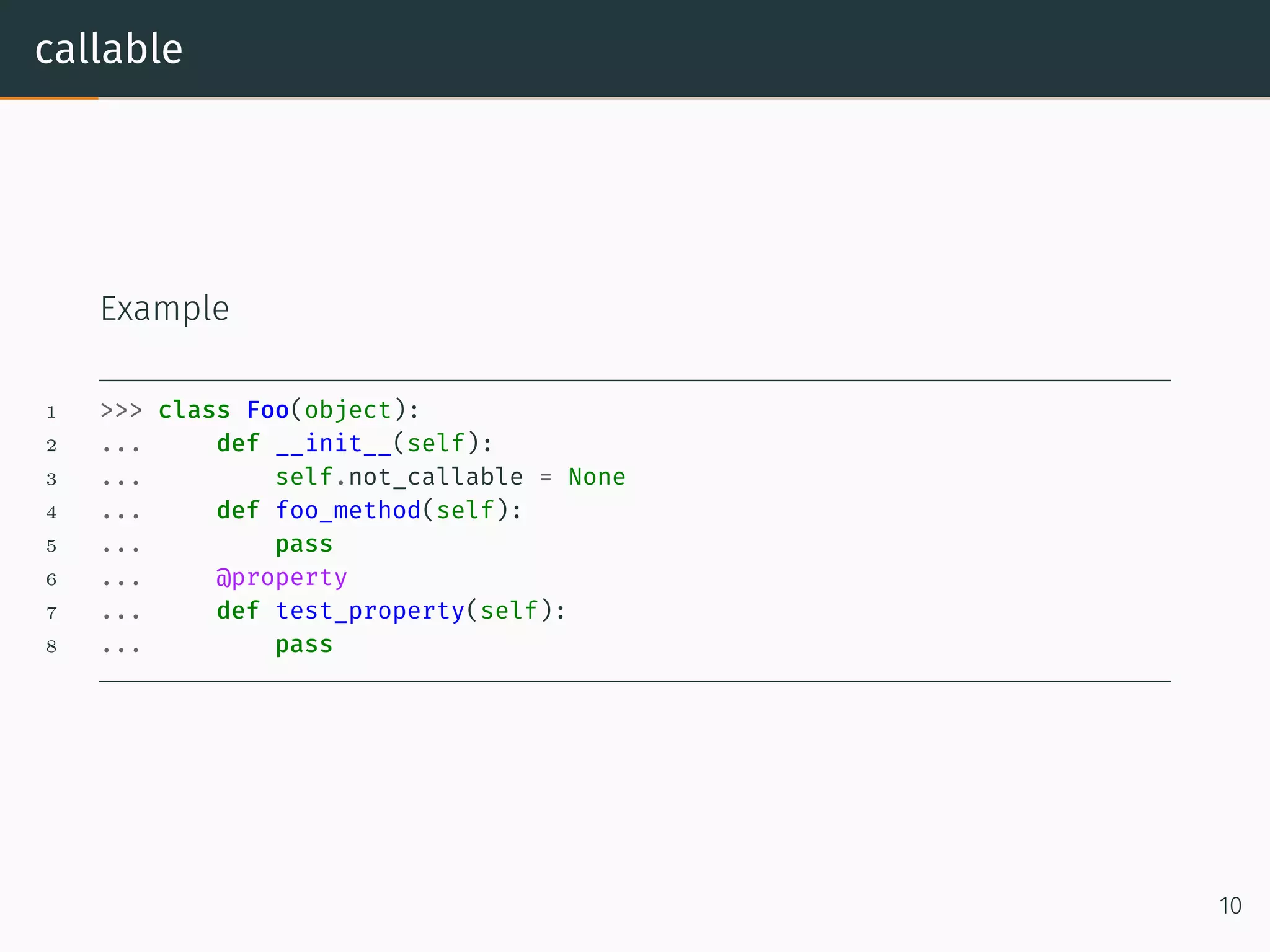
callable Example 1 >>> class Foo(object): 2 ... def __init__(self): 3 ... self.not_callable = None 4 ... def foo_method(self): 5 ... pass 6 ... @property 7 ... def test_property(self): 8 ... pass 10
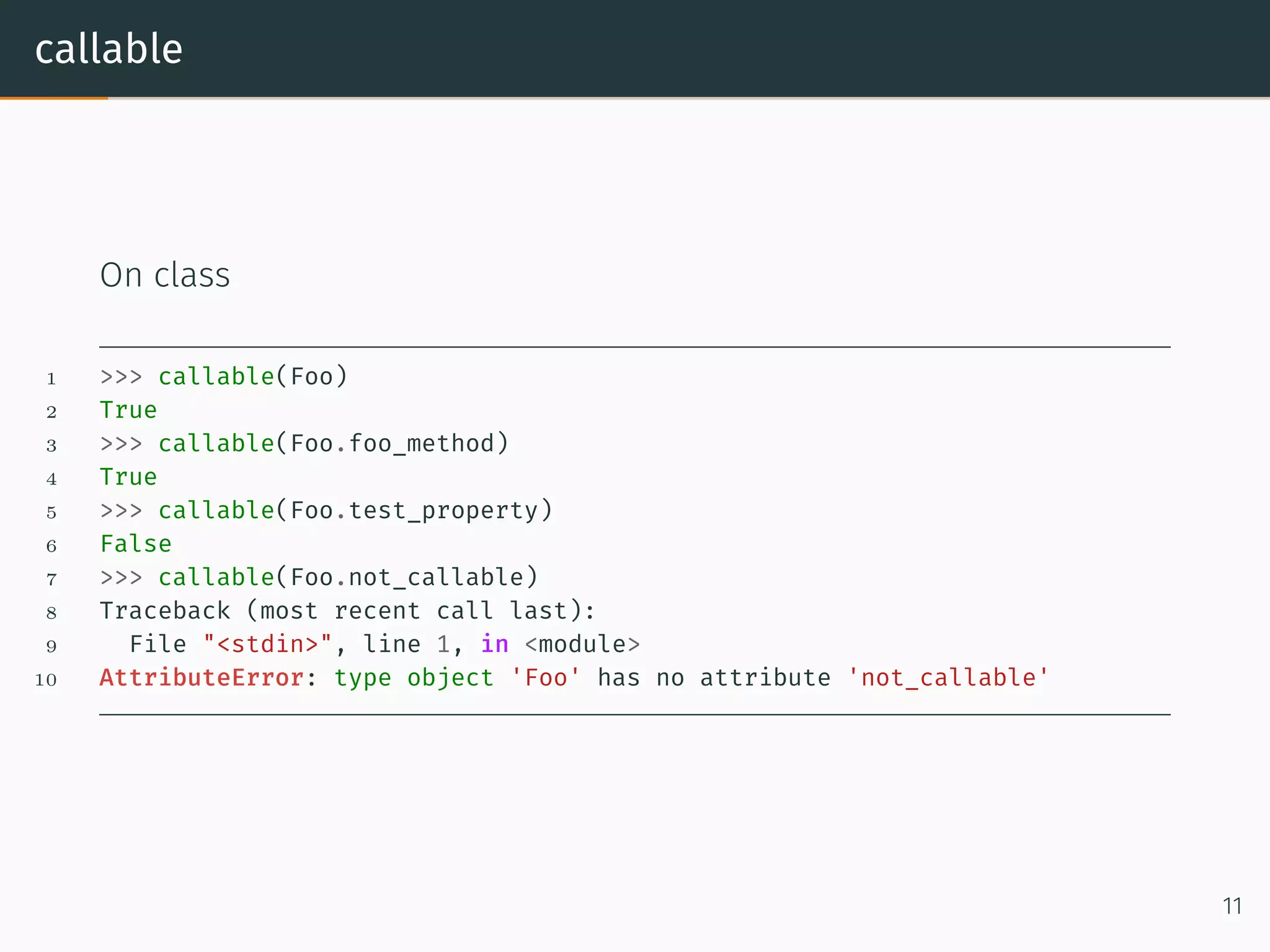
callable On class 1 >>> callable(Foo) 2 True 3 >>> callable(Foo.foo_method) 4 True 5 >>> callable(Foo.test_property) 6 False 7 >>> callable(Foo.not_callable) 8 Traceback (most recent call last): 9 File "<stdin>", line 1, in <module> 10 AttributeError: type object 'Foo' has no attribute 'not_callable' 11
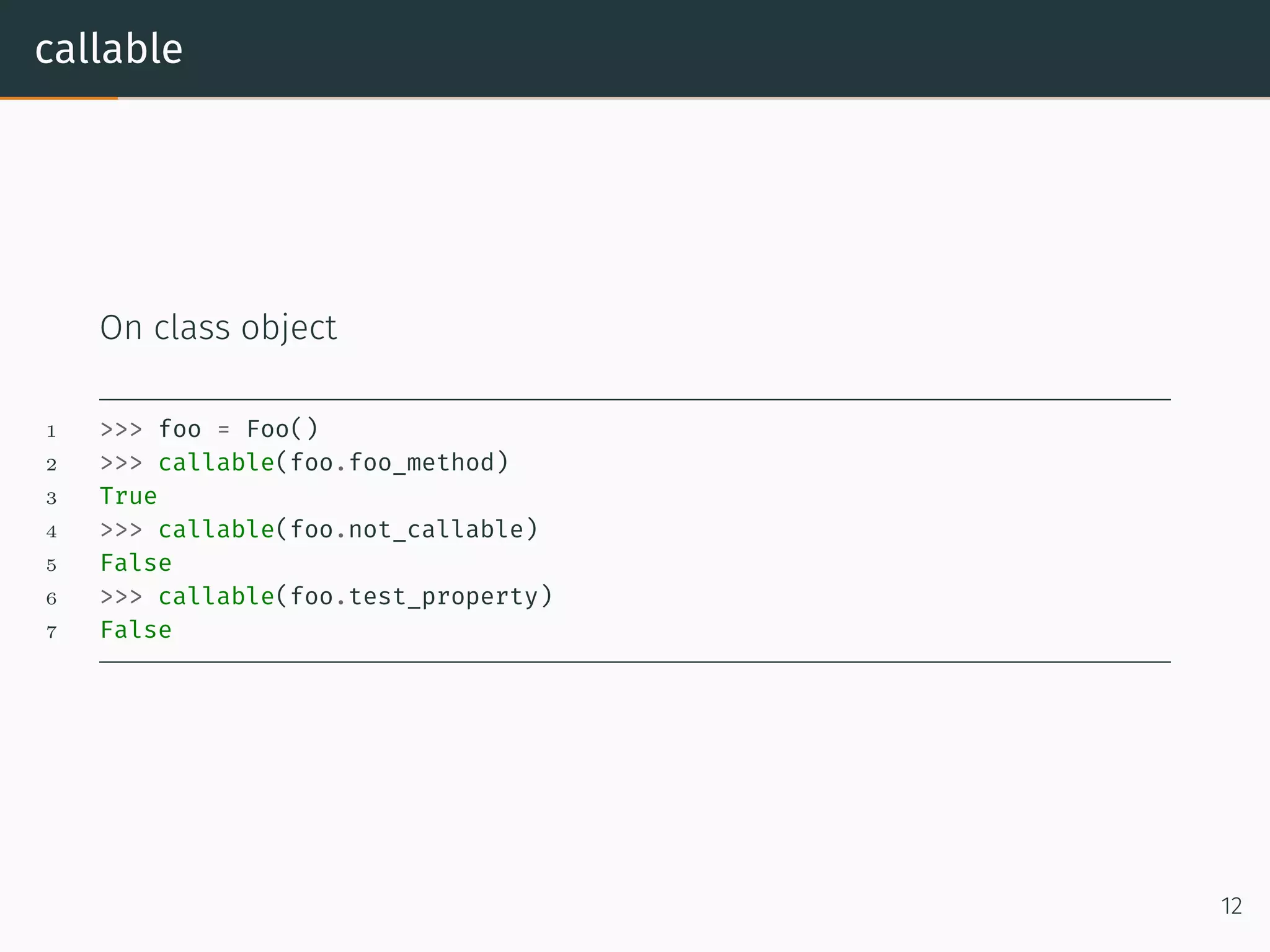
callable On class object 1 >>> foo = Foo() 2 >>> callable(foo.foo_method) 3 True 4 >>> callable(foo.not_callable) 5 False 6 >>> callable(foo.test_property) 7 False 12
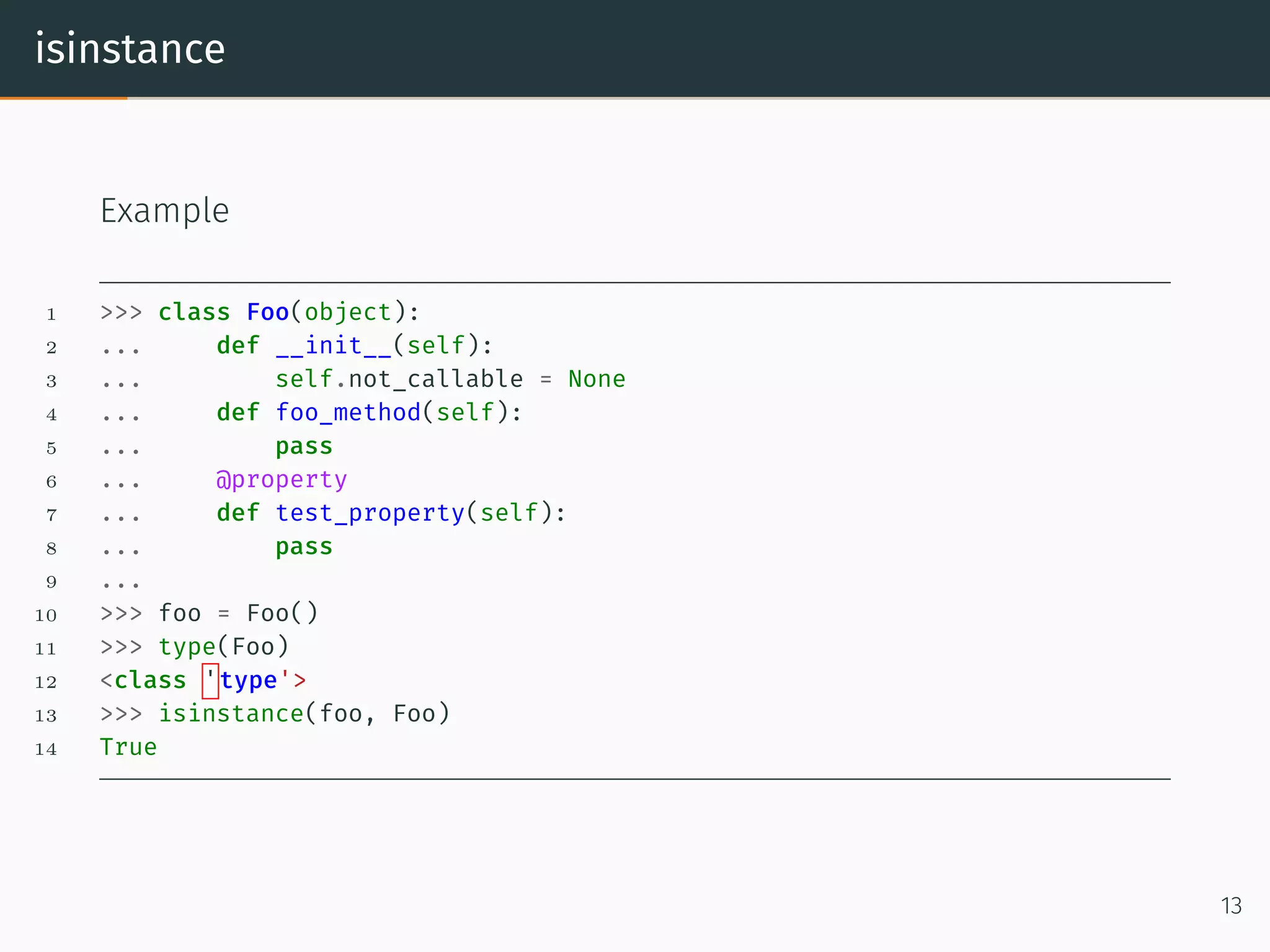
isinstance Example 1 >>> class Foo(object): 2 ... def __init__(self): 3 ... self.not_callable = None 4 ... def foo_method(self): 5 ... pass 6 ... @property 7 ... def test_property(self): 8 ... pass 9 ... 10 >>> foo = Foo() 11 >>> type(Foo) 12 <class 'type'> 13 >>> isinstance(foo, Foo) 14 True 13
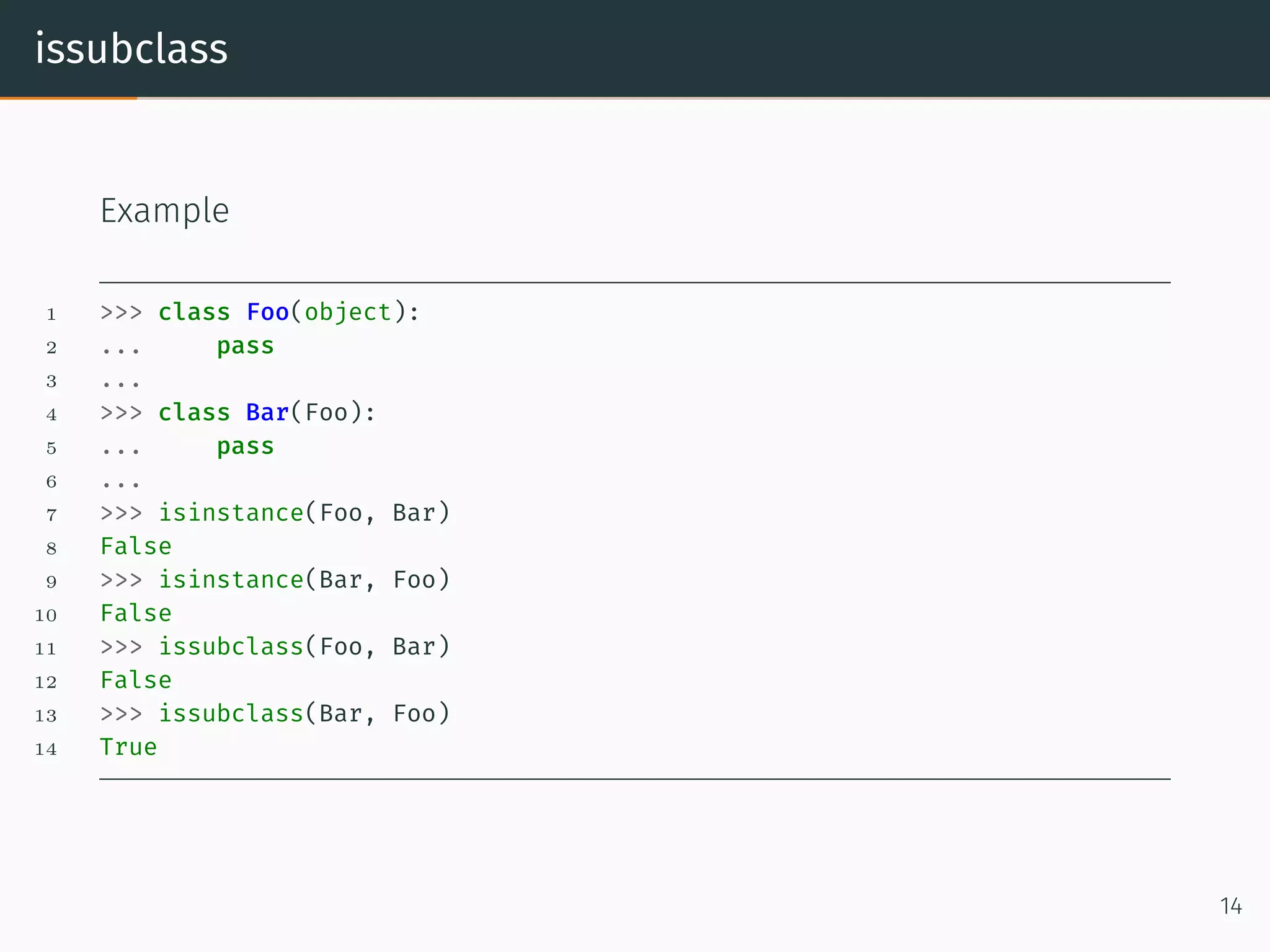
issubclass Example 1 >>> class Foo(object): 2 ... pass 3 ... 4 >>> class Bar(Foo): 5 ... pass 6 ... 7 >>> isinstance(Foo, Bar) 8 False 9 >>> isinstance(Bar, Foo) 10 False 11 >>> issubclass(Foo, Bar) 12 False 13 >>> issubclass(Bar, Foo) 14 True 14
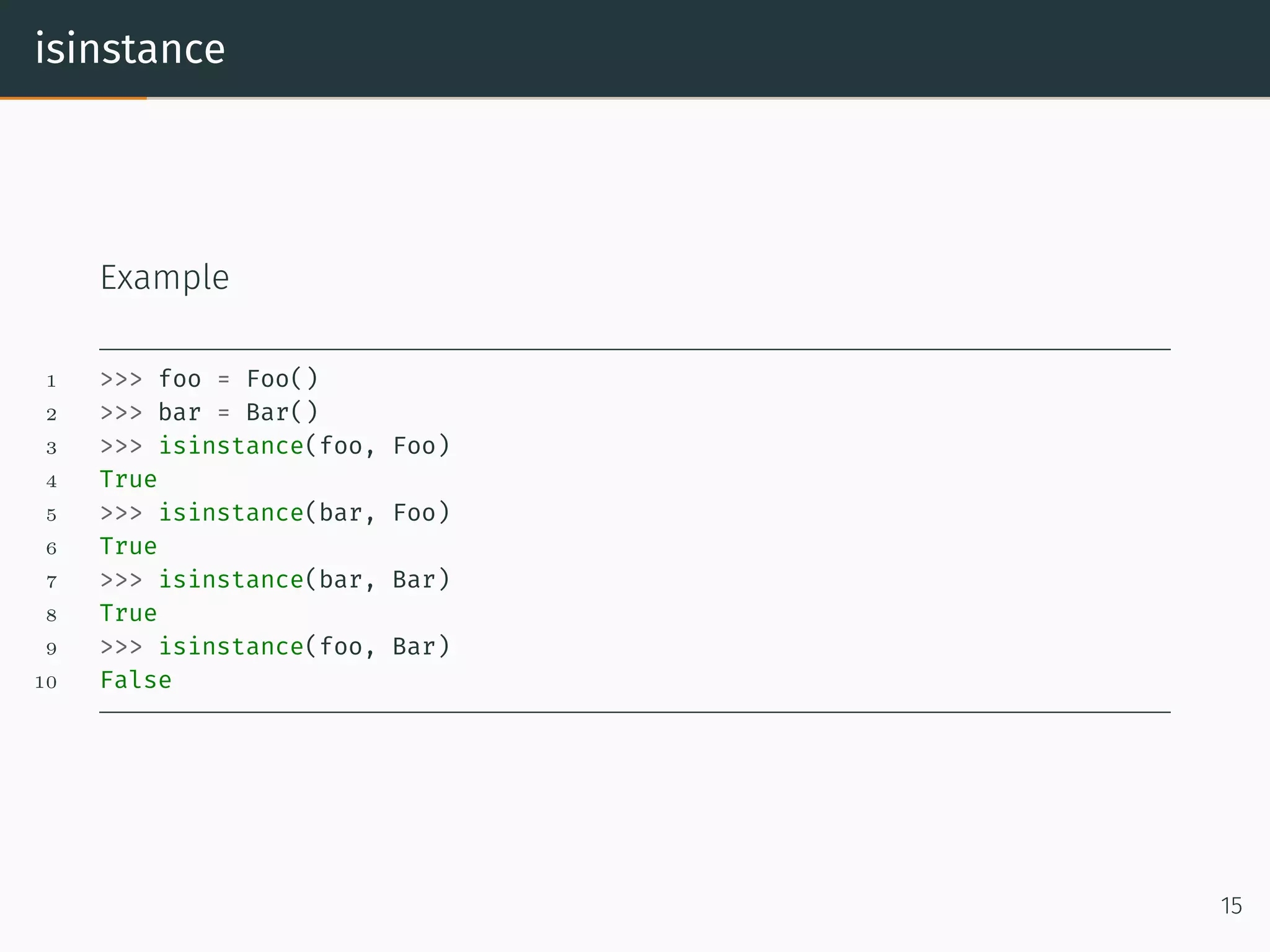
isinstance Example 1 >>> foo = Foo() 2 >>> bar = Bar() 3 >>> isinstance(foo, Foo) 4 True 5 >>> isinstance(bar, Foo) 6 True 7 >>> isinstance(bar, Bar) 8 True 9 >>> isinstance(foo, Bar) 10 False 15
Closure
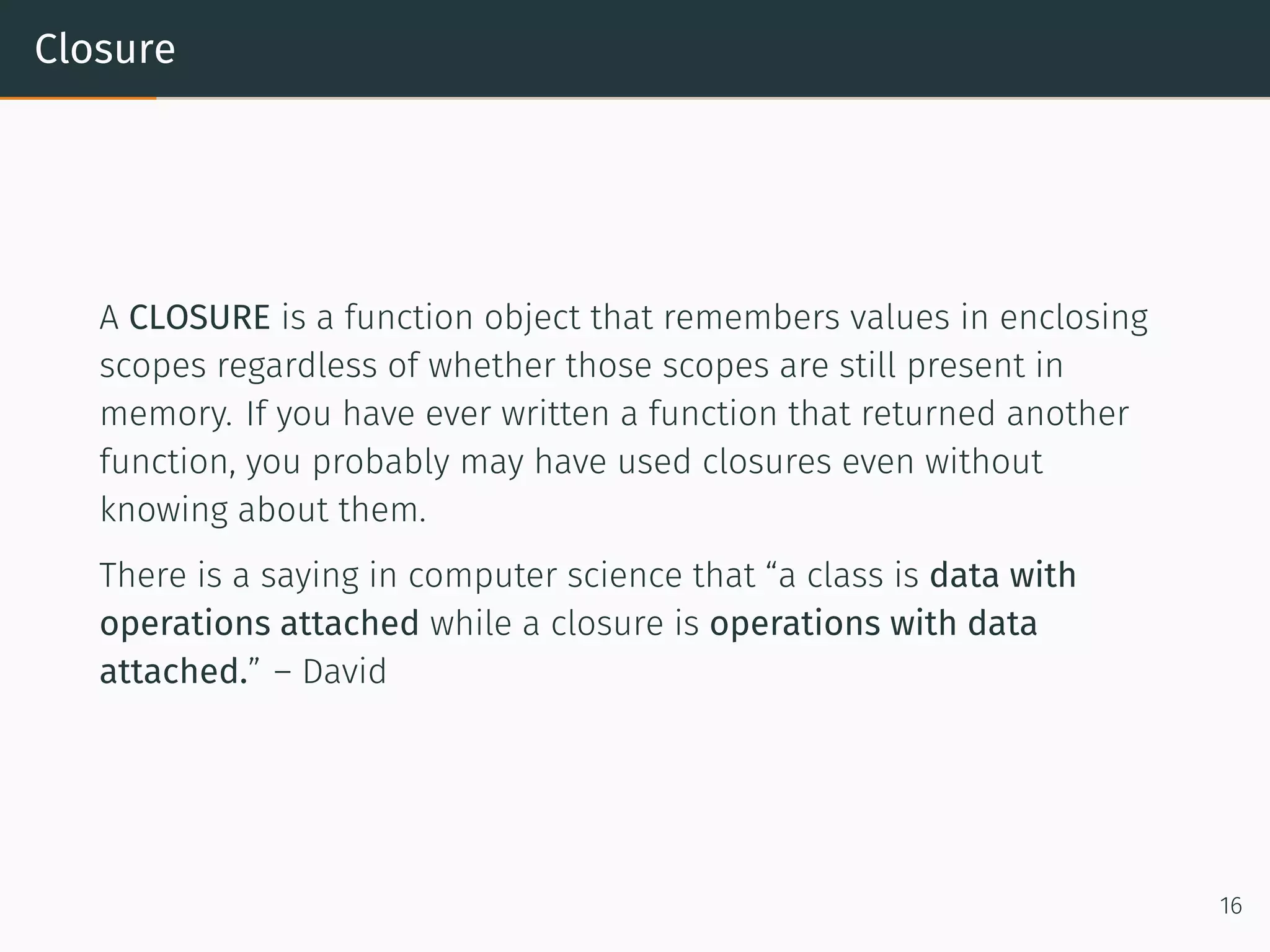
Closure A CLOSURE is a function object that remembers values in enclosing scopes regardless of whether those scopes are still present in memory. If you have ever written a function that returned another function, you probably may have used closures even without knowing about them. There is a saying in computer science that “a class is data with operations attached while a closure is operations with data attached.” – David 16
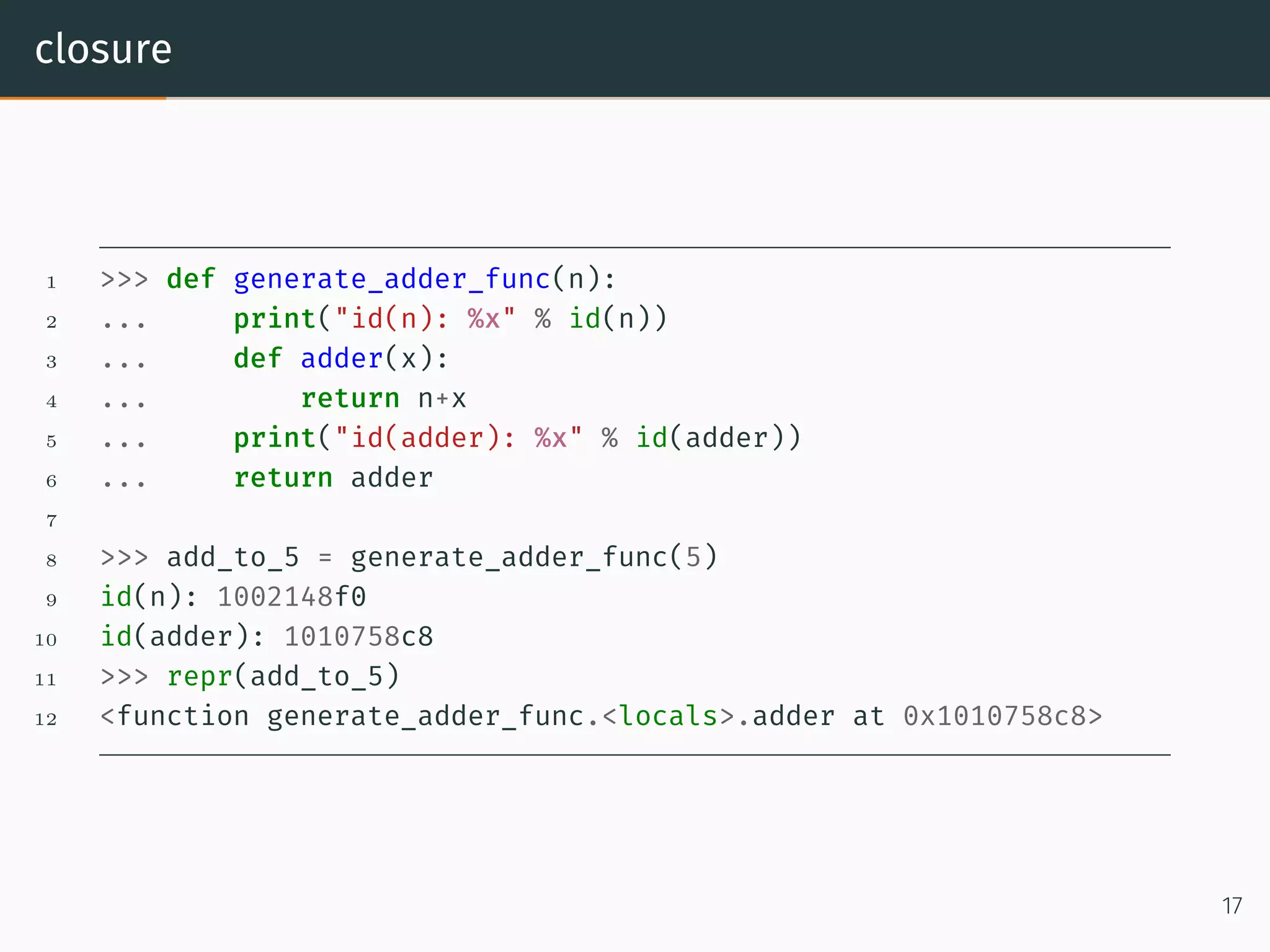
closure 1 >>> def generate_adder_func(n): 2 ... print("id(n): %x" % id(n)) 3 ... def adder(x): 4 ... return n+x 5 ... print("id(adder): %x" % id(adder)) 6 ... return adder 7 8 >>> add_to_5 = generate_adder_func(5) 9 id(n): 1002148f0 10 id(adder): 1010758c8 11 >>> repr(add_to_5) 12 <function generate_adder_func.<locals>.adder at 0x1010758c8> 17
Closure 1 >>> del generate_adder_func 2 >>> 'Value is: %d' % add_to_5(5) 3 Value is: 10 1 >>> add_to_5.__closure__ 2 (<cell at 0x1019382e8: int object at 0x1002148f0>,) 3 >>> type(add_to_5.__closure__[0]) 4 <class 'cell'> 5 >>> add_to_5.__closure__[0].cell_contents 6 5 As you can see, the __closure__ attribute of the function add_to_5 has a reference to int object at 0x1002148f0 which is none other than n (which was defined in generate_adder_func) 18
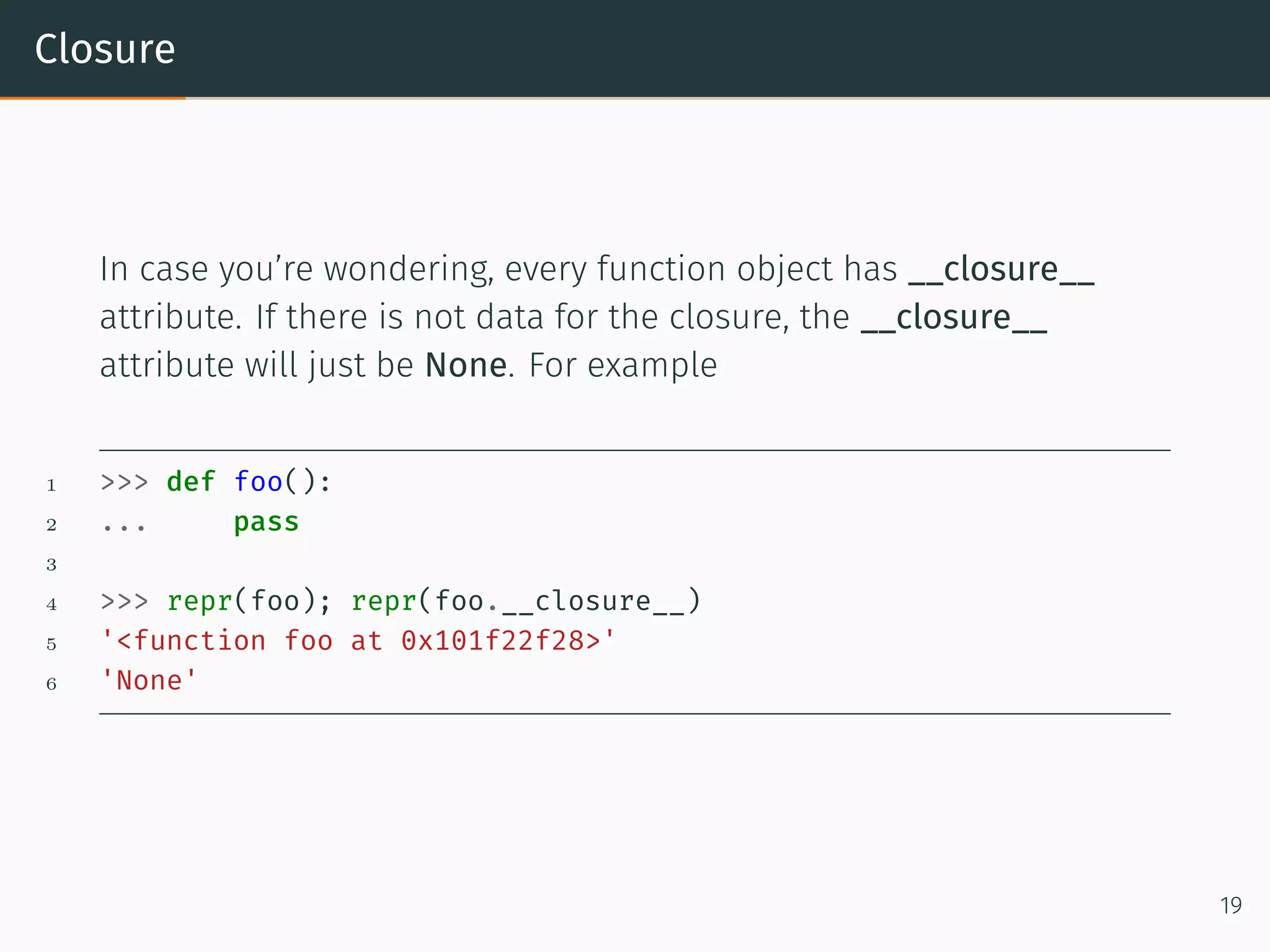
Closure In case you’re wondering, every function object has __closure__ attribute. If there is not data for the closure, the __closure__ attribute will just be None. For example 1 >>> def foo(): 2 ... pass 3 4 >>> repr(foo); repr(foo.__closure__) 5 '<function foo at 0x101f22f28>' 6 'None' 19
Decorator
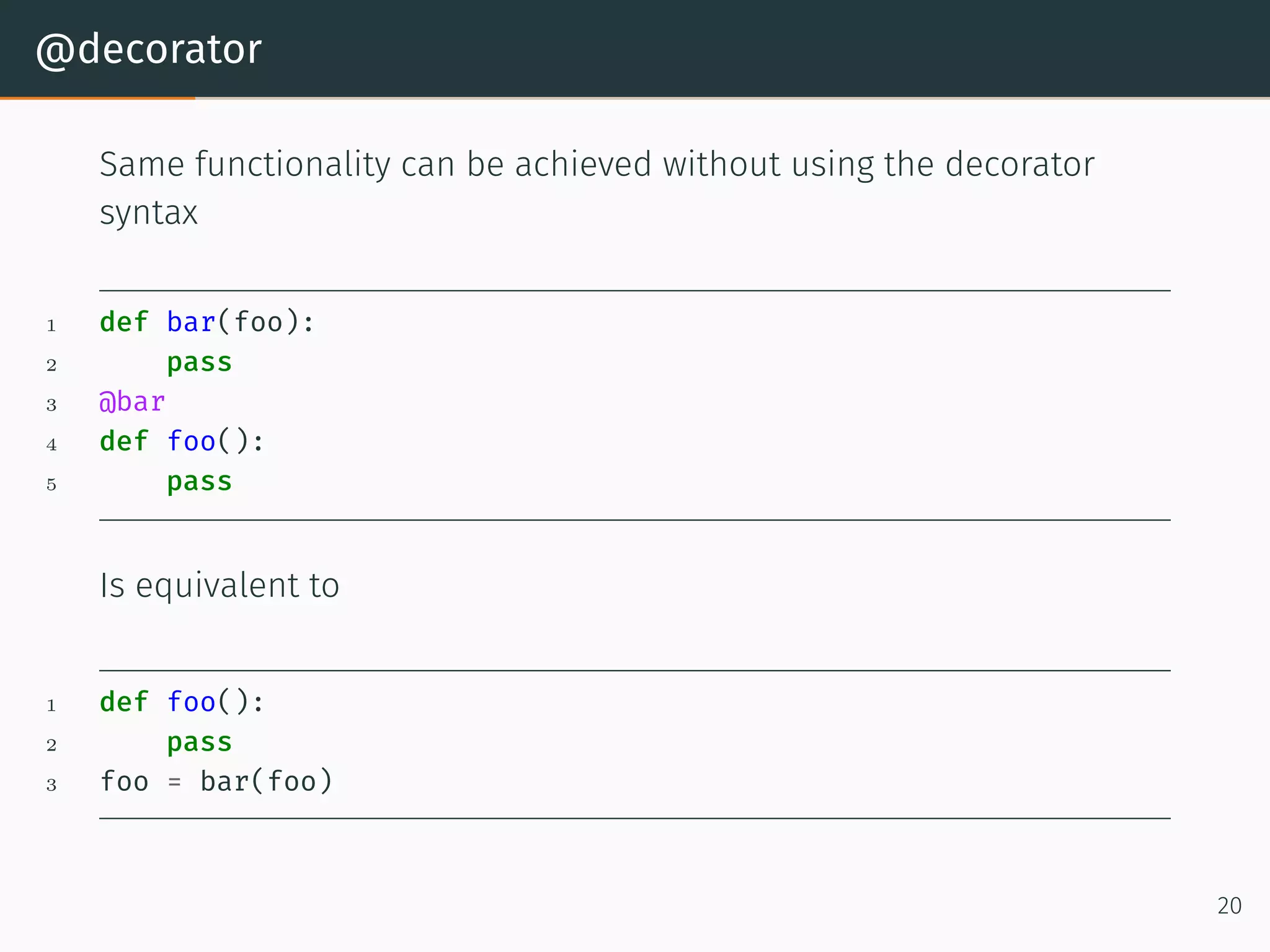
@decorator Same functionality can be achieved without using the decorator syntax 1 def bar(foo): 2 pass 3 @bar 4 def foo(): 5 pass Is equivalent to 1 def foo(): 2 pass 3 foo = bar(foo) 20
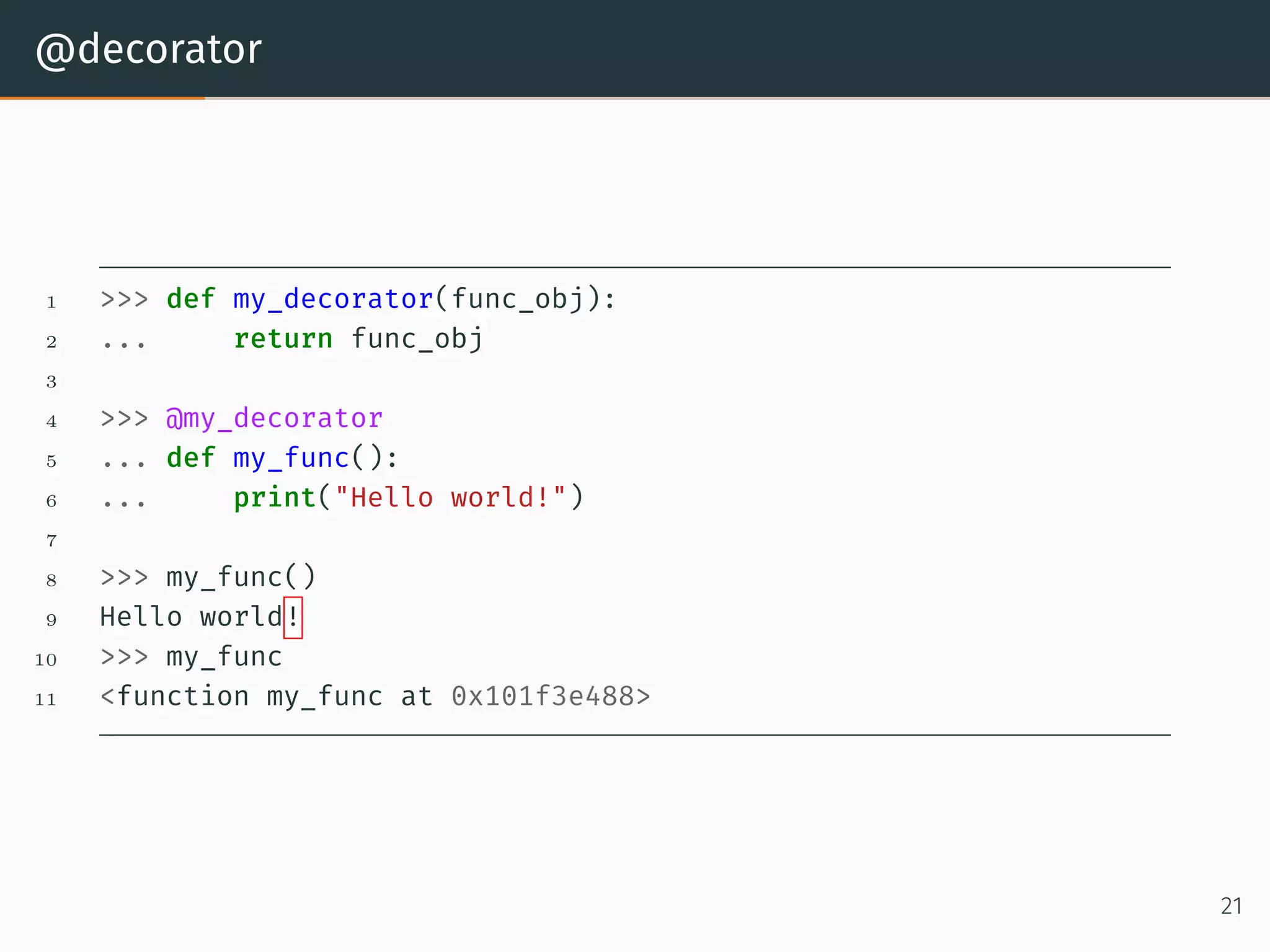
@decorator 1 >>> def my_decorator(func_obj): 2 ... return func_obj 3 4 >>> @my_decorator 5 ... def my_func(): 6 ... print("Hello world!") 7 8 >>> my_func() 9 Hello world! 10 >>> my_func 11 <function my_func at 0x101f3e488> 21
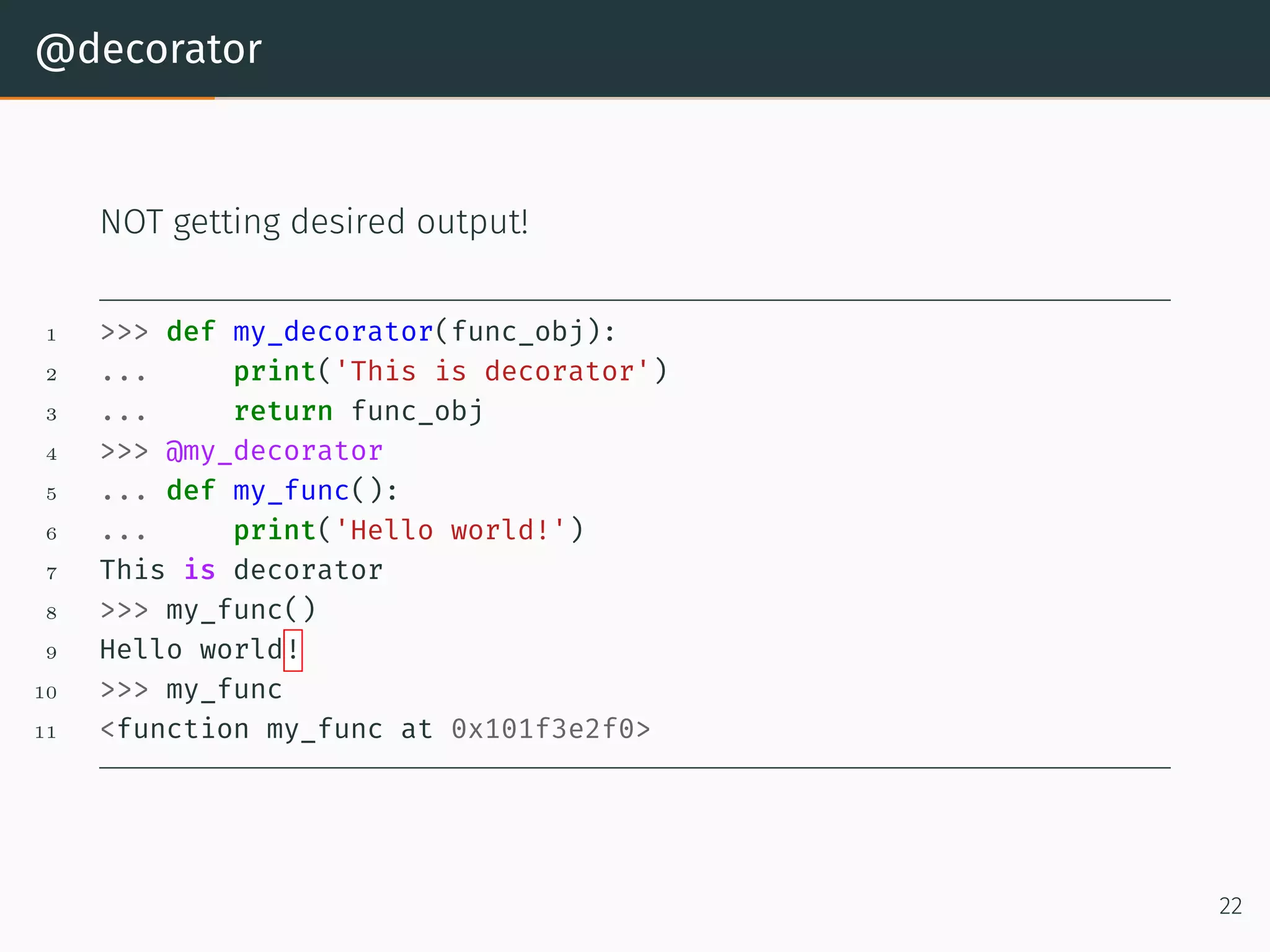
@decorator NOT getting desired output! 1 >>> def my_decorator(func_obj): 2 ... print('This is decorator') 3 ... return func_obj 4 >>> @my_decorator 5 ... def my_func(): 6 ... print('Hello world!') 7 This is decorator 8 >>> my_func() 9 Hello world! 10 >>> my_func 11 <function my_func at 0x101f3e2f0> 22
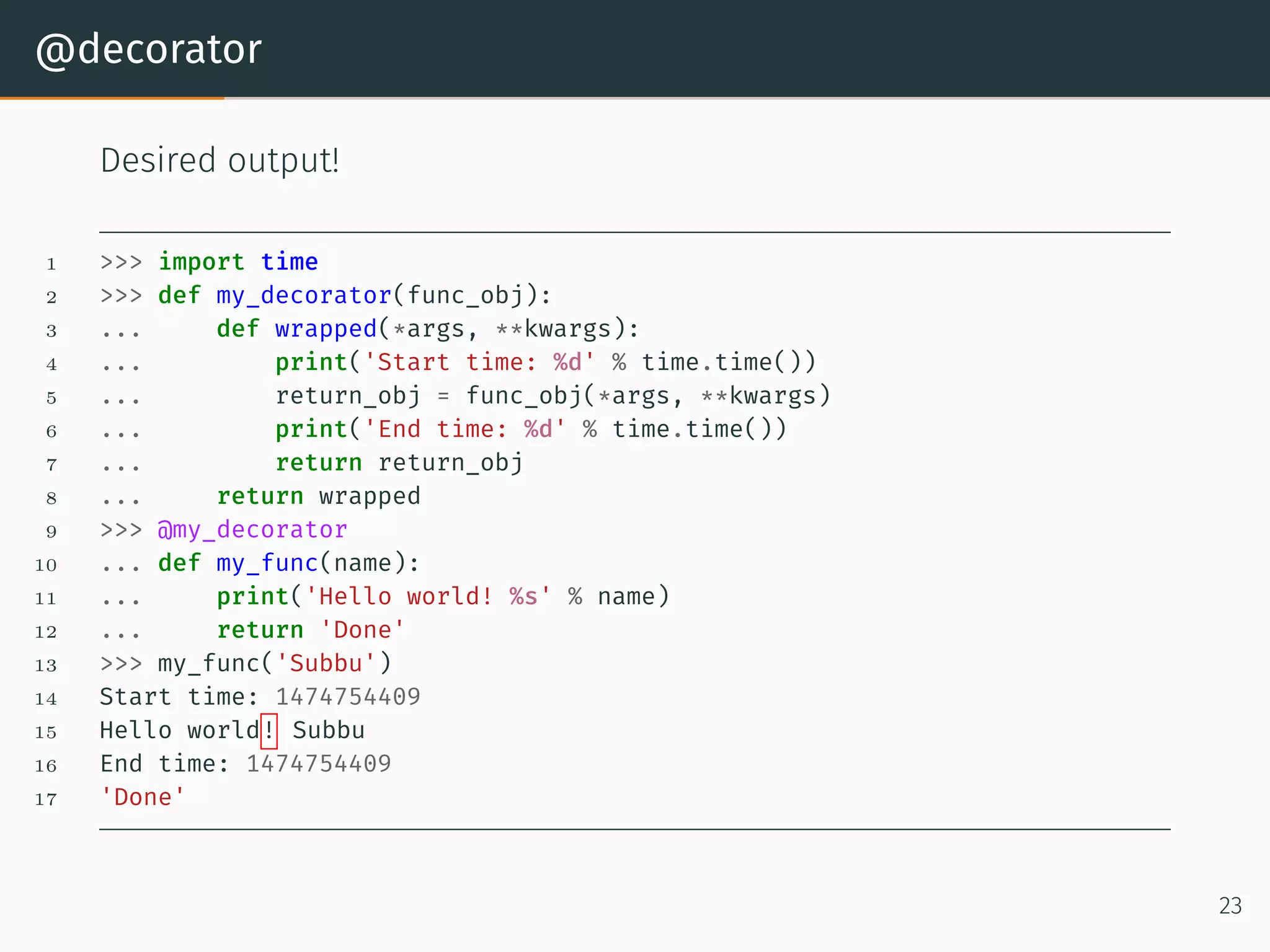
@decorator Desired output! 1 >>> import time 2 >>> def my_decorator(func_obj): 3 ... def wrapped(*args, **kwargs): 4 ... print('Start time: %d' % time.time()) 5 ... return_obj = func_obj(*args, **kwargs) 6 ... print('End time: %d' % time.time()) 7 ... return return_obj 8 ... return wrapped 9 >>> @my_decorator 10 ... def my_func(name): 11 ... print('Hello world! %s' % name) 12 ... return 'Done' 13 >>> my_func('Subbu') 14 Start time: 1474754409 15 Hello world! Subbu 16 End time: 1474754409 17 'Done' 23
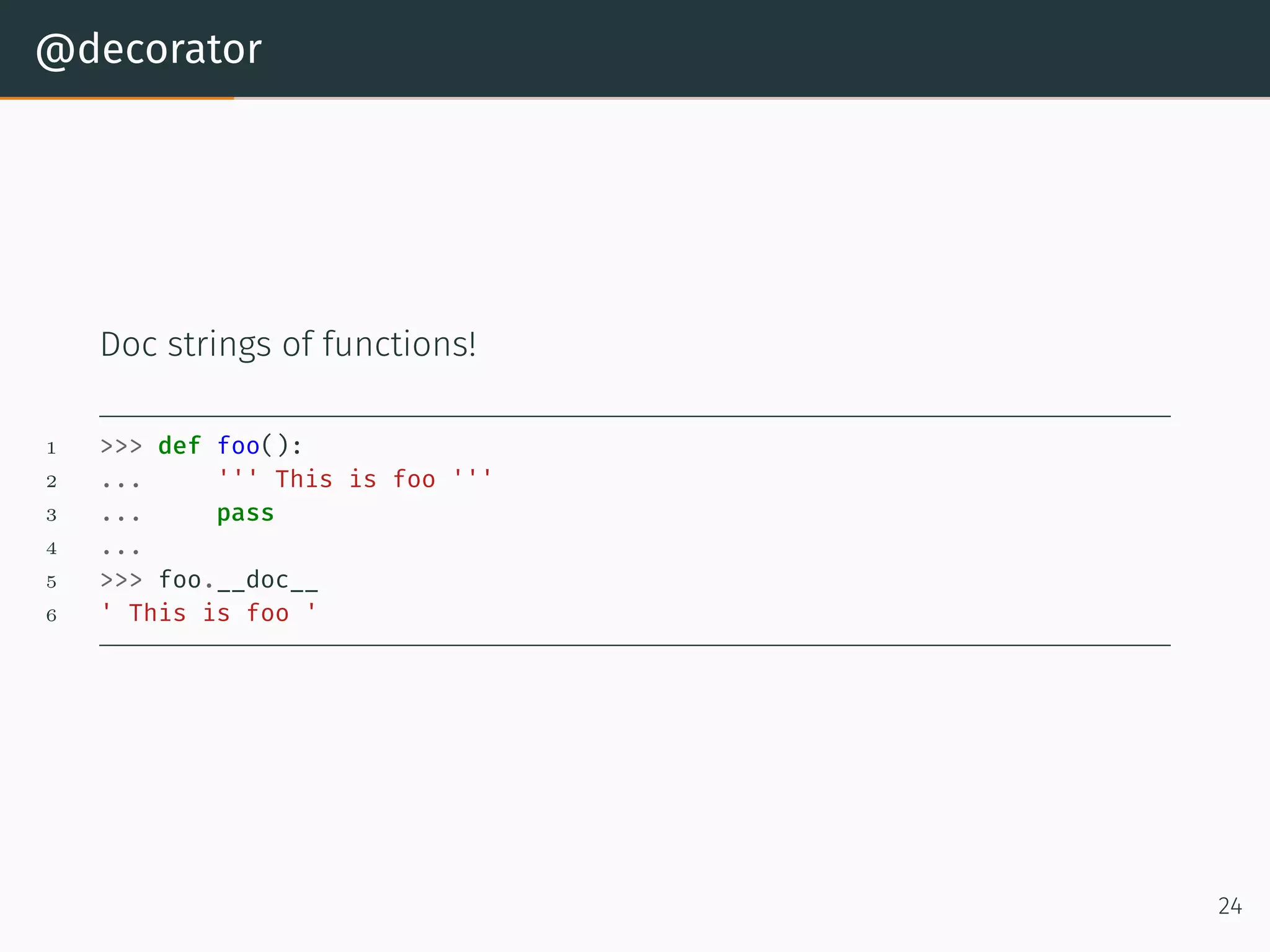
@decorator Doc strings of functions! 1 >>> def foo(): 2 ... ''' This is foo ''' 3 ... pass 4 ... 5 >>> foo.__doc__ 6 ' This is foo ' 24
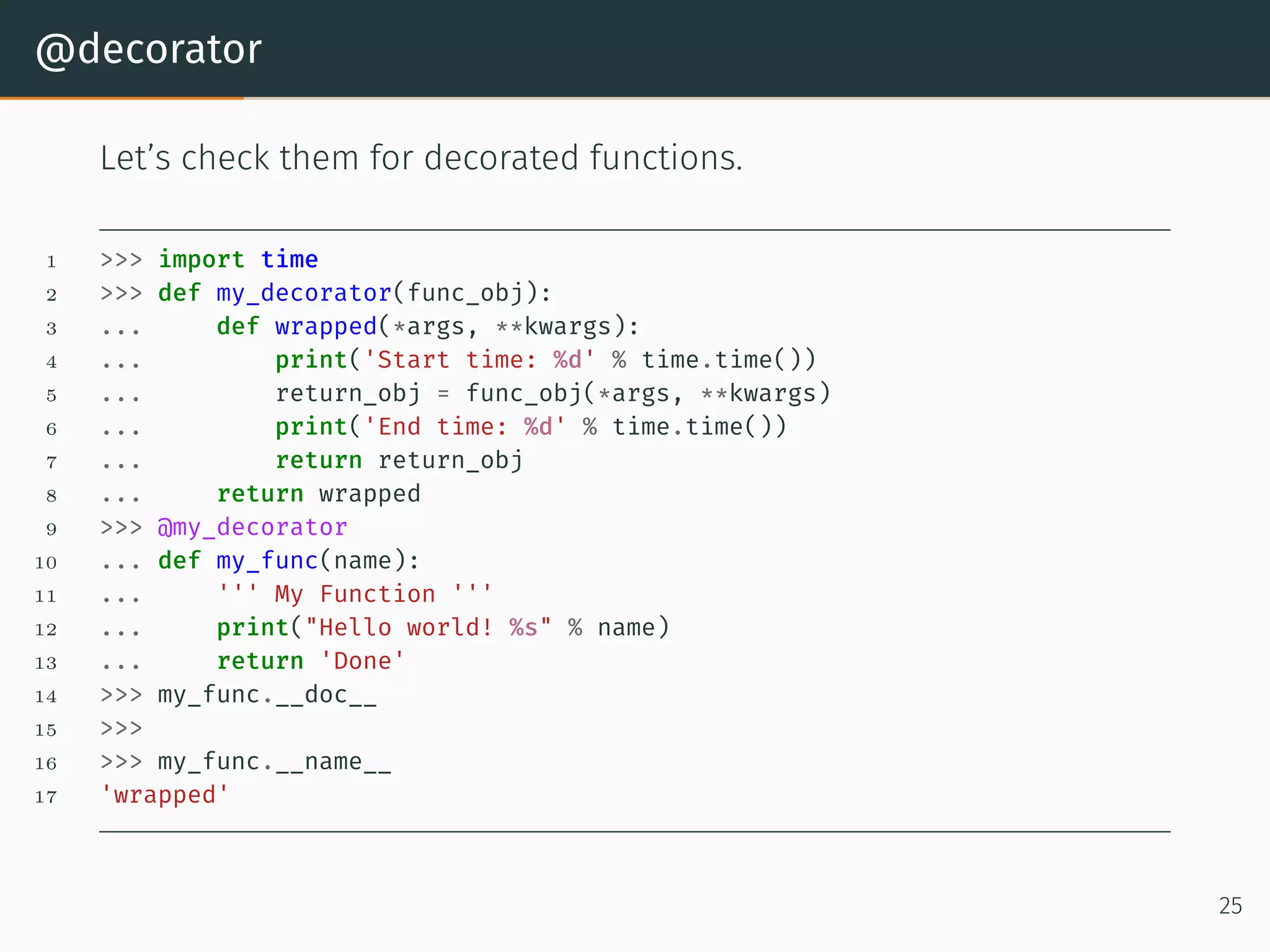
@decorator Let’s check them for decorated functions. 1 >>> import time 2 >>> def my_decorator(func_obj): 3 ... def wrapped(*args, **kwargs): 4 ... print('Start time: %d' % time.time()) 5 ... return_obj = func_obj(*args, **kwargs) 6 ... print('End time: %d' % time.time()) 7 ... return return_obj 8 ... return wrapped 9 >>> @my_decorator 10 ... def my_func(name): 11 ... ''' My Function ''' 12 ... print("Hello world! %s" % name) 13 ... return 'Done' 14 >>> my_func.__doc__ 15 >>> 16 >>> my_func.__name__ 17 'wrapped' 25
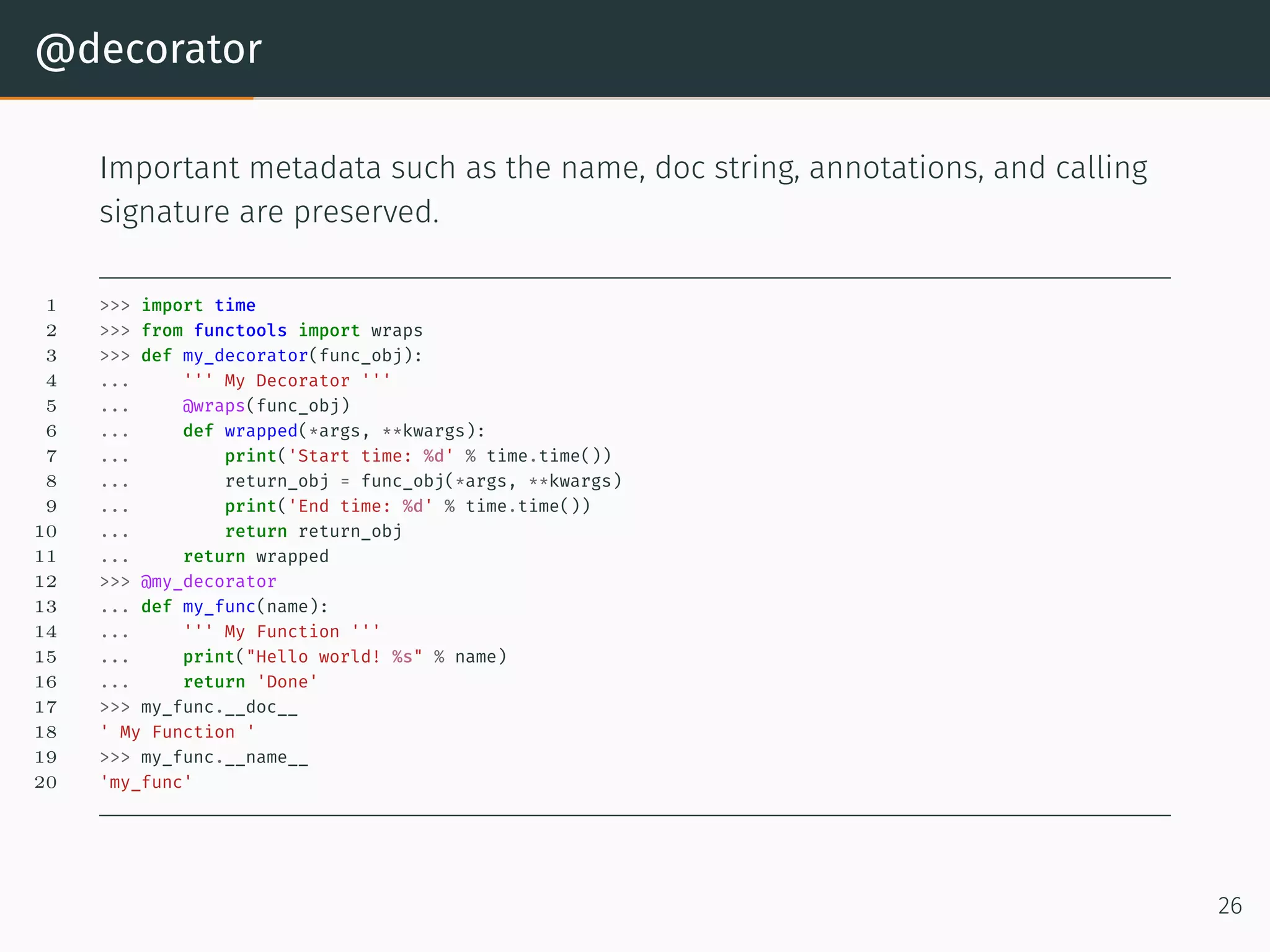
@decorator Important metadata such as the name, doc string, annotations, and calling signature are preserved. 1 >>> import time 2 >>> from functools import wraps 3 >>> def my_decorator(func_obj): 4 ... ''' My Decorator ''' 5 ... @wraps(func_obj) 6 ... def wrapped(*args, **kwargs): 7 ... print('Start time: %d' % time.time()) 8 ... return_obj = func_obj(*args, **kwargs) 9 ... print('End time: %d' % time.time()) 10 ... return return_obj 11 ... return wrapped 12 >>> @my_decorator 13 ... def my_func(name): 14 ... ''' My Function ''' 15 ... print("Hello world! %s" % name) 16 ... return 'Done' 17 >>> my_func.__doc__ 18 ' My Function ' 19 >>> my_func.__name__ 20 'my_func' 26
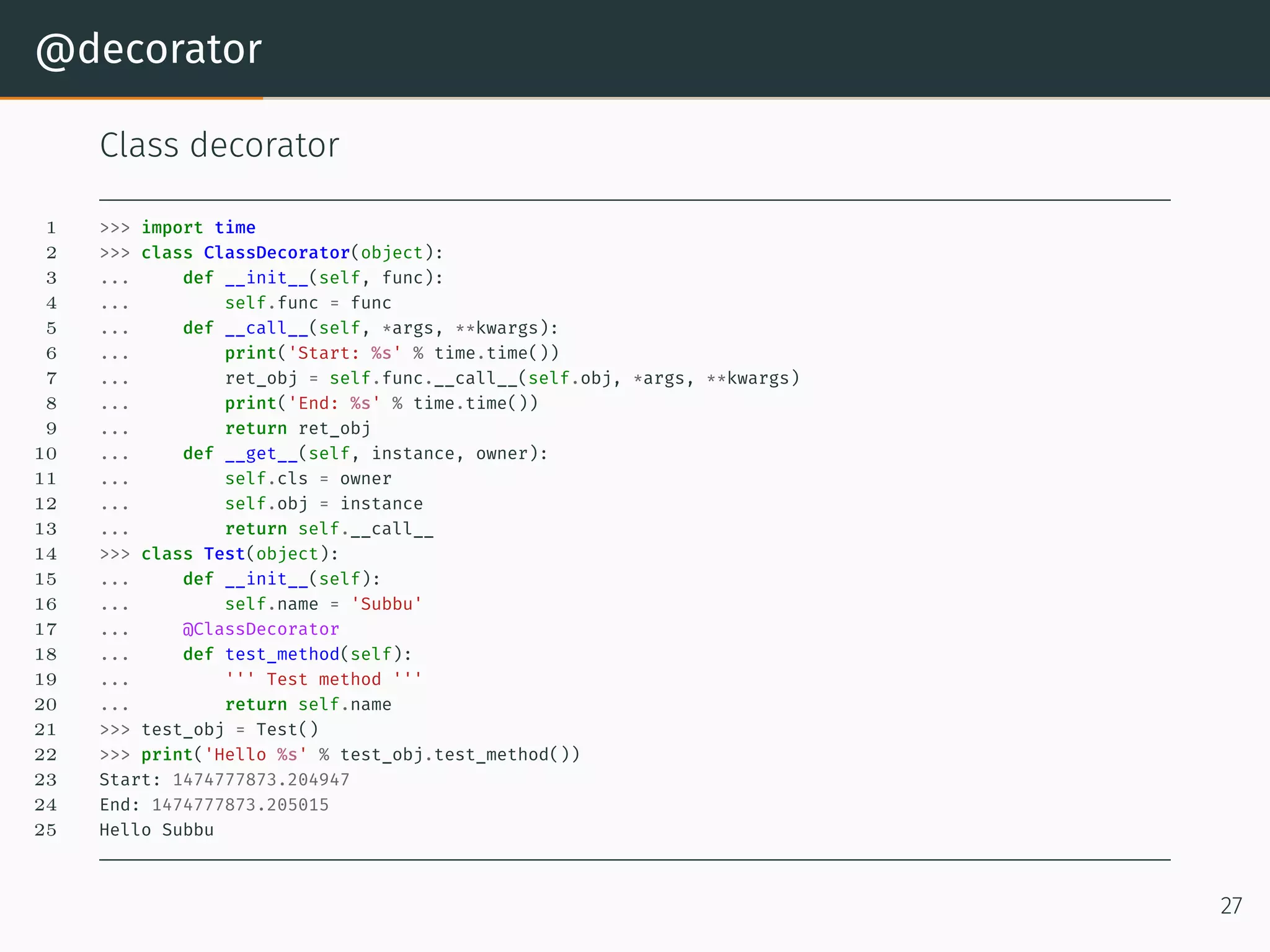
@decorator Class decorator 1 >>> import time 2 >>> class ClassDecorator(object): 3 ... def __init__(self, func): 4 ... self.func = func 5 ... def __call__(self, *args, **kwargs): 6 ... print('Start: %s' % time.time()) 7 ... ret_obj = self.func.__call__(self.obj, *args, **kwargs) 8 ... print('End: %s' % time.time()) 9 ... return ret_obj 10 ... def __get__(self, instance, owner): 11 ... self.cls = owner 12 ... self.obj = instance 13 ... return self.__call__ 14 >>> class Test(object): 15 ... def __init__(self): 16 ... self.name = 'Subbu' 17 ... @ClassDecorator 18 ... def test_method(self): 19 ... ''' Test method ''' 20 ... return self.name 21 >>> test_obj = Test() 22 >>> print('Hello %s' % test_obj.test_method()) 23 Start: 1474777873.204947 24 End: 1474777873.205015 25 Hello Subbu 27
Memoizing with function Decorator
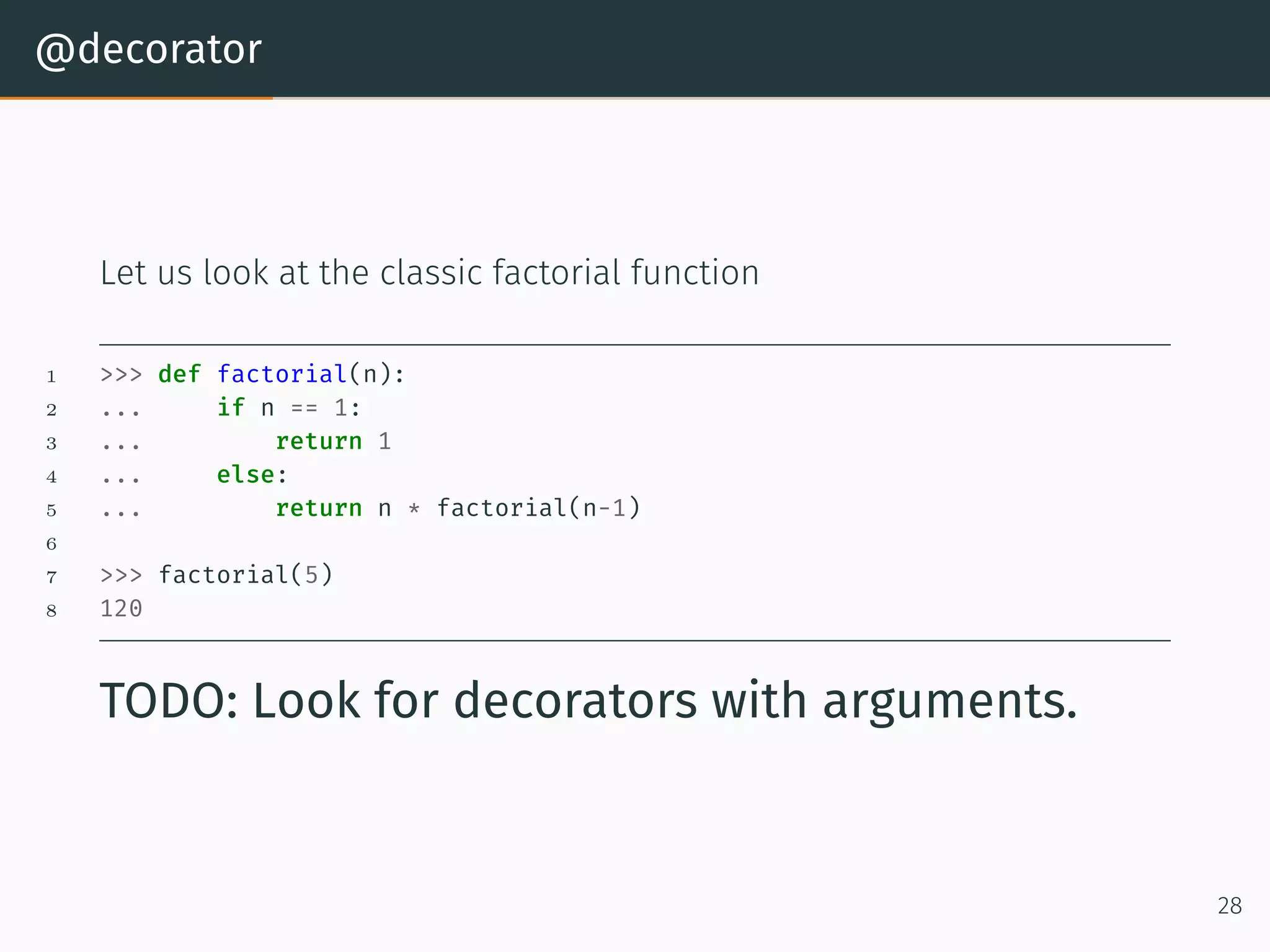
@decorator Let us look at the classic factorial function 1 >>> def factorial(n): 2 ... if n == 1: 3 ... return 1 4 ... else: 5 ... return n * factorial(n-1) 6 7 >>> factorial(5) 8 120 TODO: Look for decorators with arguments. 28
Solution for factorial 1 >>> def memoize(f): 2 ... memo = {} 3 ... def helper(x): 4 ... if x not in memo: 5 ... print('Finding the value for %d' % x) 6 ... memo[x] = f(x) 7 ... print('Factorial for %d is %d' % (x, memo[x])) 8 ... return memo[x] 9 ... return helper 10 ... 11 >>> @memoize 12 ... def factorial(n): 13 ... if n == 1: 14 ... return 1 15 ... else: 16 ... return n * factorial(n-1) 17 ... 18 >>> factorial(5) 19 Finding the value for 5 20 Finding the value for 4 21 Finding the value for 3 22 Finding the value for 2 23 Finding the value for 1 24 Factorial for 1 is 1 25 Factorial for 2 is 2 26 Factorial for 3 is 6 27 Factorial for 4 is 24 28 Factorial for 5 is 120 29 120 29
Solution for fibonacci 1 >>> def memoize(f): 2 ... memo = {} 3 ... def helper(x): 4 ... if x not in memo: 5 ... memo[x] = f(x) 6 ... return memo[x] 7 ... return helper 8 ... 9 >>> @memoize 10 ... def fib(n): 11 ... if n == 0: 12 ... return 0 13 ... elif n == 1: 14 ... return 1 15 ... else: 16 ... return fib(n-1) + fib(n-2) 17 ... 18 >>> fib(10) 19 55 30
Generators
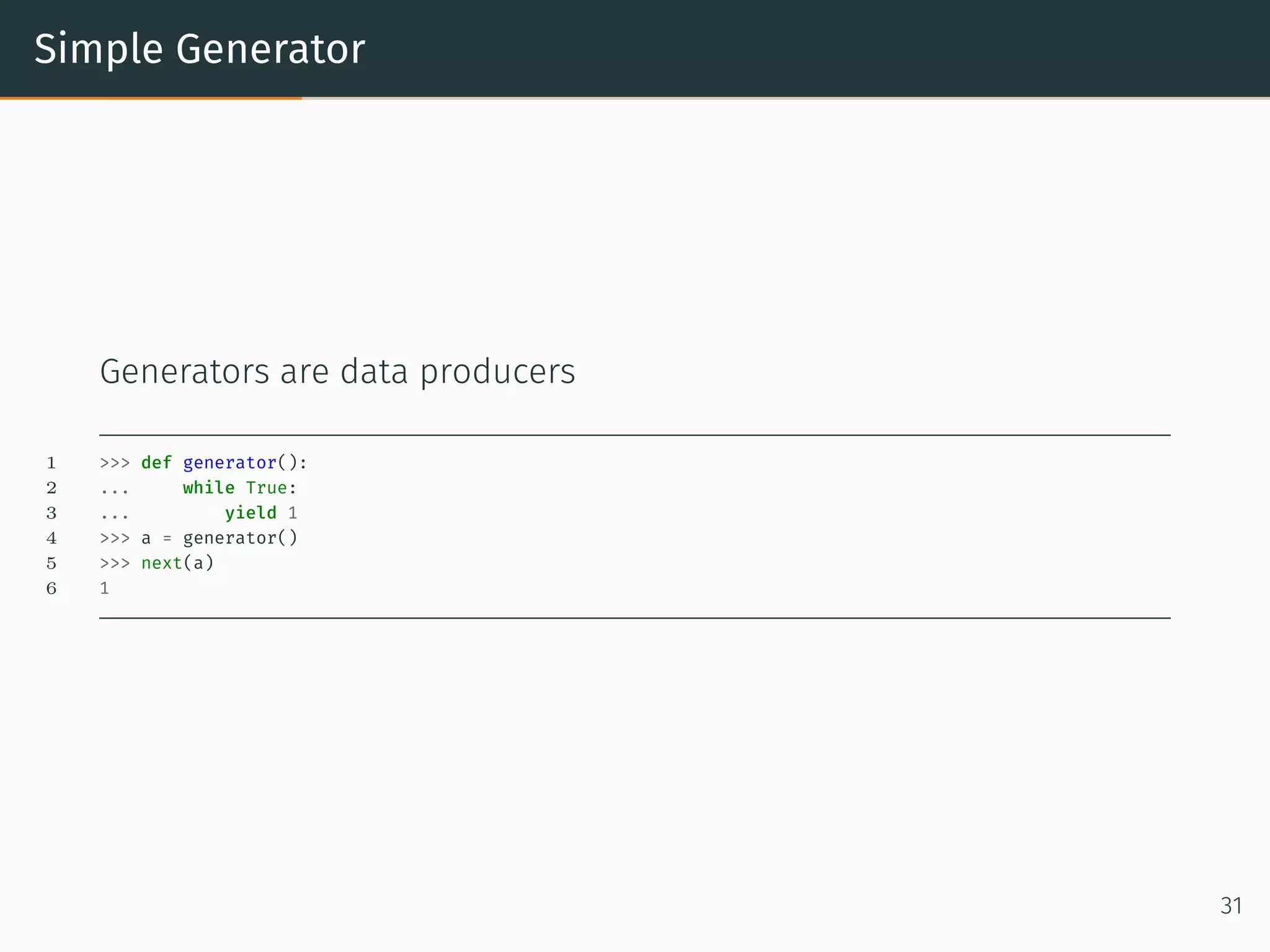
Simple Generator Generators are data producers 1 >>> def generator(): 2 ... while True: 3 ... yield 1 4 >>> a = generator() 5 >>> next(a) 6 1 31
Round robin Generator Generators are data producers 1 >>> def round_robin(): 2 ... while True: 3 ... yield from [1, 2, 3, 4] 4 >>> a = round_robin() 5 >>> a 6 <generator object round_robin at 0x101a89678> 7 >>> next(a) 8 1 9 >>> next(a) 10 2 11 >>> next(a) 12 3 13 >>> next(a) 14 4 15 >>> next(a) 16 1 17 >>> next(a) 18 2 19 >>> next(a) 20 3 21 >>> next(a) 22 4 32
Coroutine
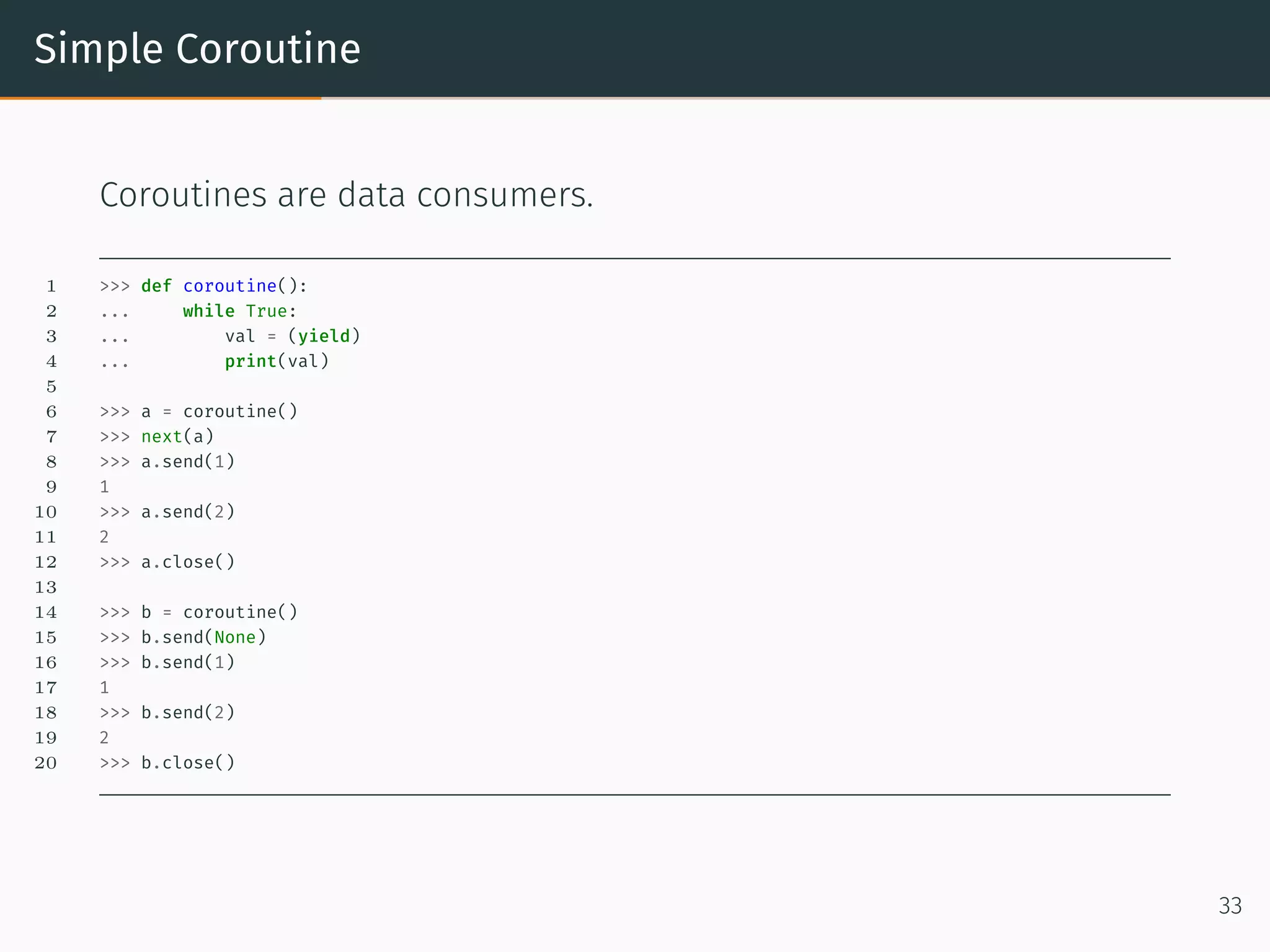
Simple Coroutine Coroutines are data consumers. 1 >>> def coroutine(): 2 ... while True: 3 ... val = (yield) 4 ... print(val) 5 6 >>> a = coroutine() 7 >>> next(a) 8 >>> a.send(1) 9 1 10 >>> a.send(2) 11 2 12 >>> a.close() 13 14 >>> b = coroutine() 15 >>> b.send(None) 16 >>> b.send(1) 17 1 18 >>> b.send(2) 19 2 20 >>> b.close() 33
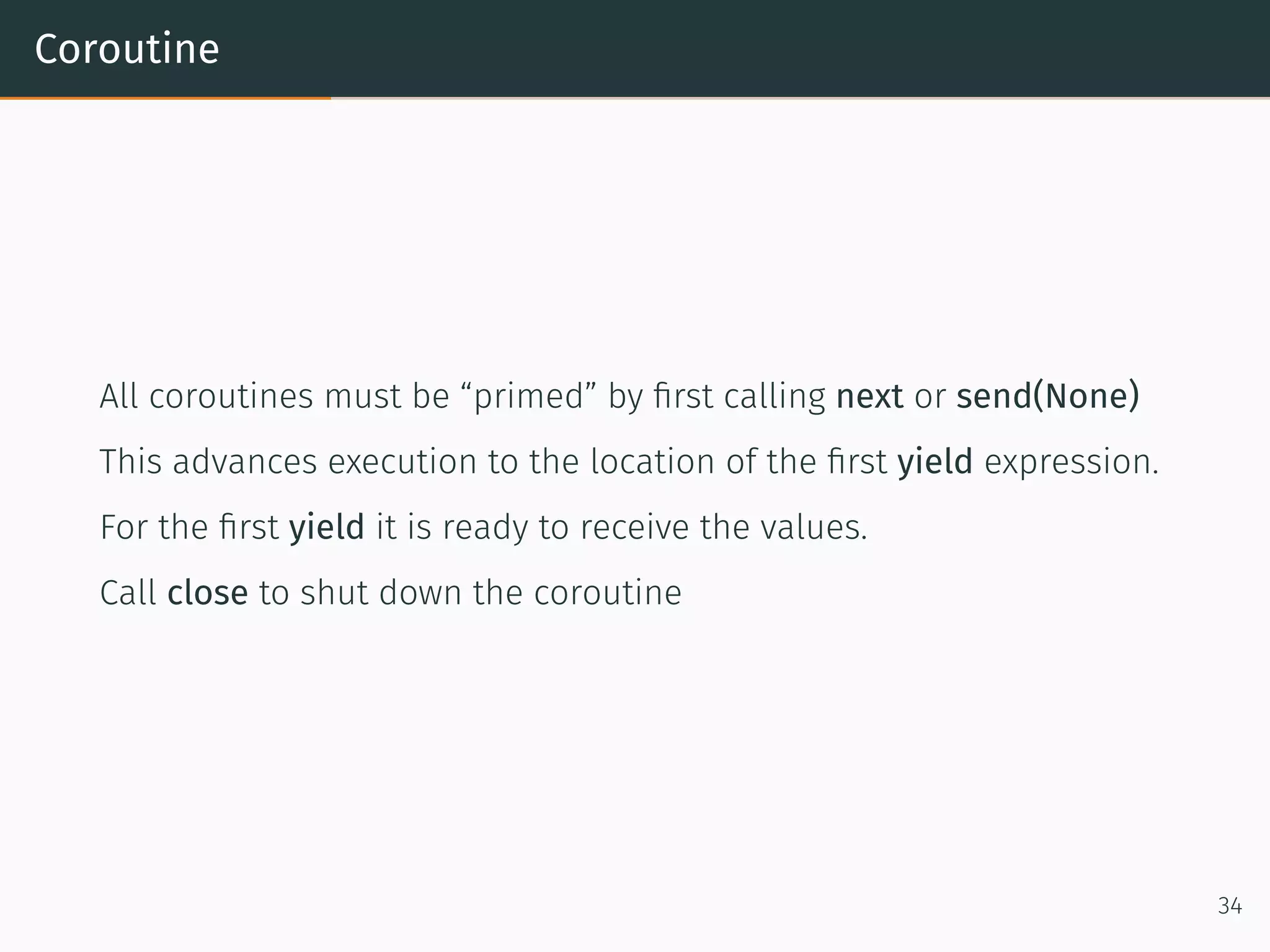
Coroutine All coroutines must be “primed” by first calling next or send(None) This advances execution to the location of the first yield expression. For the first yield it is ready to receive the values. Call close to shut down the coroutine 34
Class Properties
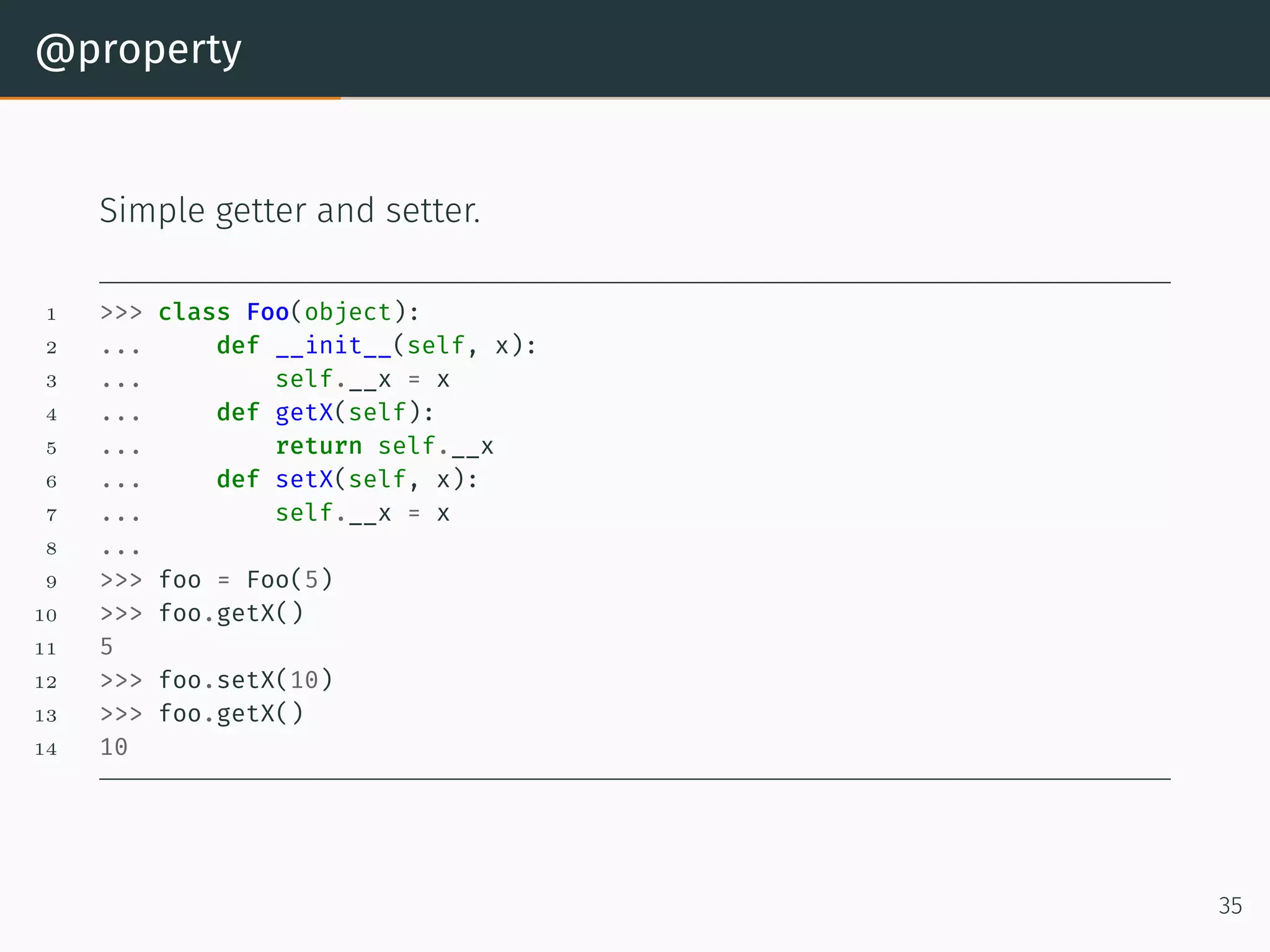
@property Simple getter and setter. 1 >>> class Foo(object): 2 ... def __init__(self, x): 3 ... self.__x = x 4 ... def getX(self): 5 ... return self.__x 6 ... def setX(self, x): 7 ... self.__x = x 8 ... 9 >>> foo = Foo(5) 10 >>> foo.getX() 11 5 12 >>> foo.setX(10) 13 >>> foo.getX() 14 10 35
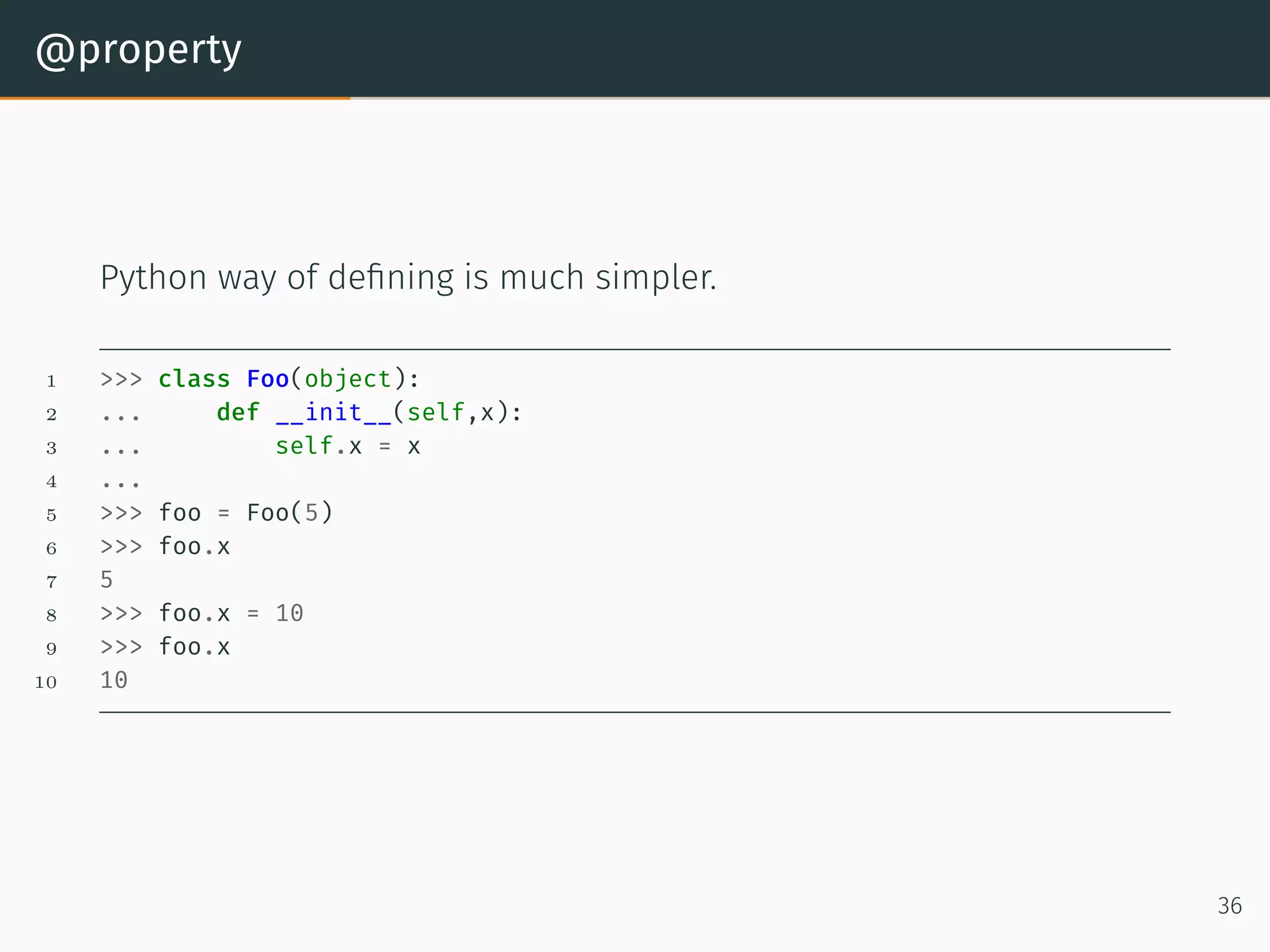
@property Python way of defining is much simpler. 1 >>> class Foo(object): 2 ... def __init__(self,x): 3 ... self.x = x 4 ... 5 >>> foo = Foo(5) 6 >>> foo.x 7 5 8 >>> foo.x = 10 9 >>> foo.x 10 10 36
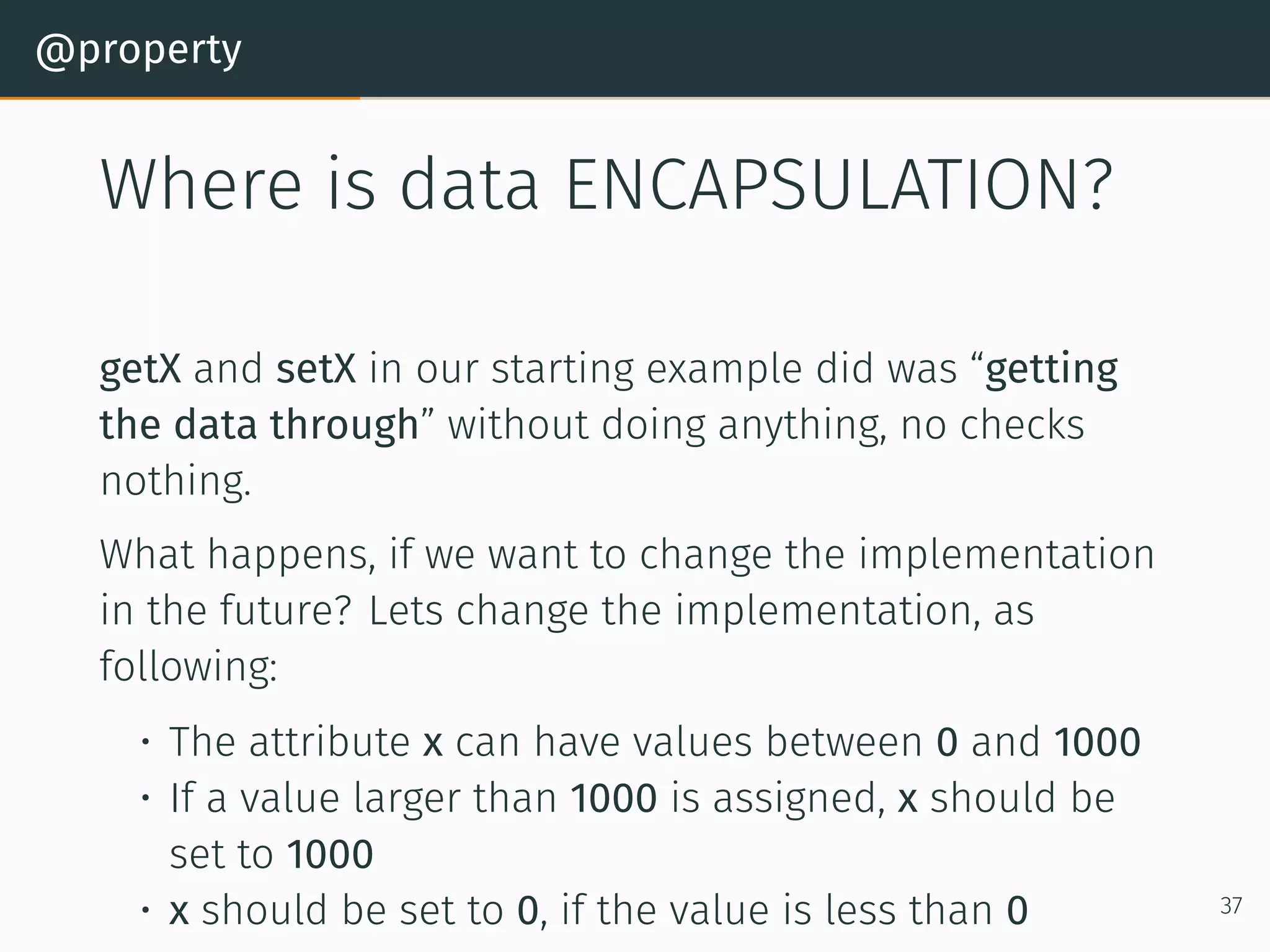
@property Where is data ENCAPSULATION? getX and setX in our starting example did was “getting the data through” without doing anything, no checks nothing. What happens, if we want to change the implementation in the future? Lets change the implementation, as following: • The attribute x can have values between 0 and 1000 • If a value larger than 1000 is assigned, x should be set to 1000 • x should be set to 0, if the value is less than 0 37
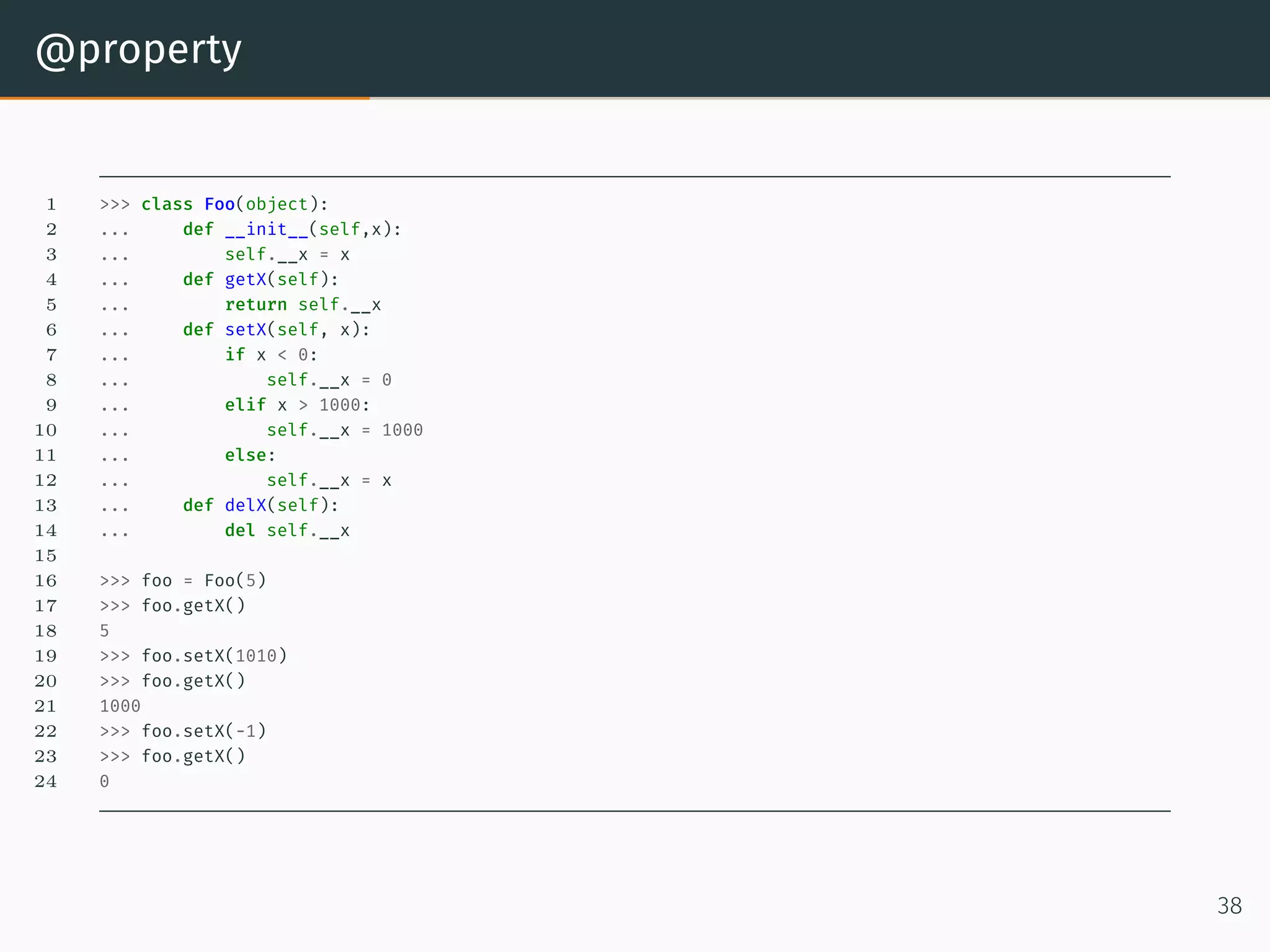
@property 1 >>> class Foo(object): 2 ... def __init__(self,x): 3 ... self.__x = x 4 ... def getX(self): 5 ... return self.__x 6 ... def setX(self, x): 7 ... if x < 0: 8 ... self.__x = 0 9 ... elif x > 1000: 10 ... self.__x = 1000 11 ... else: 12 ... self.__x = x 13 ... def delX(self): 14 ... del self.__x 15 16 >>> foo = Foo(5) 17 >>> foo.getX() 18 5 19 >>> foo.setX(1010) 20 >>> foo.getX() 21 1000 22 >>> foo.setX(-1) 23 >>> foo.getX() 24 0 38
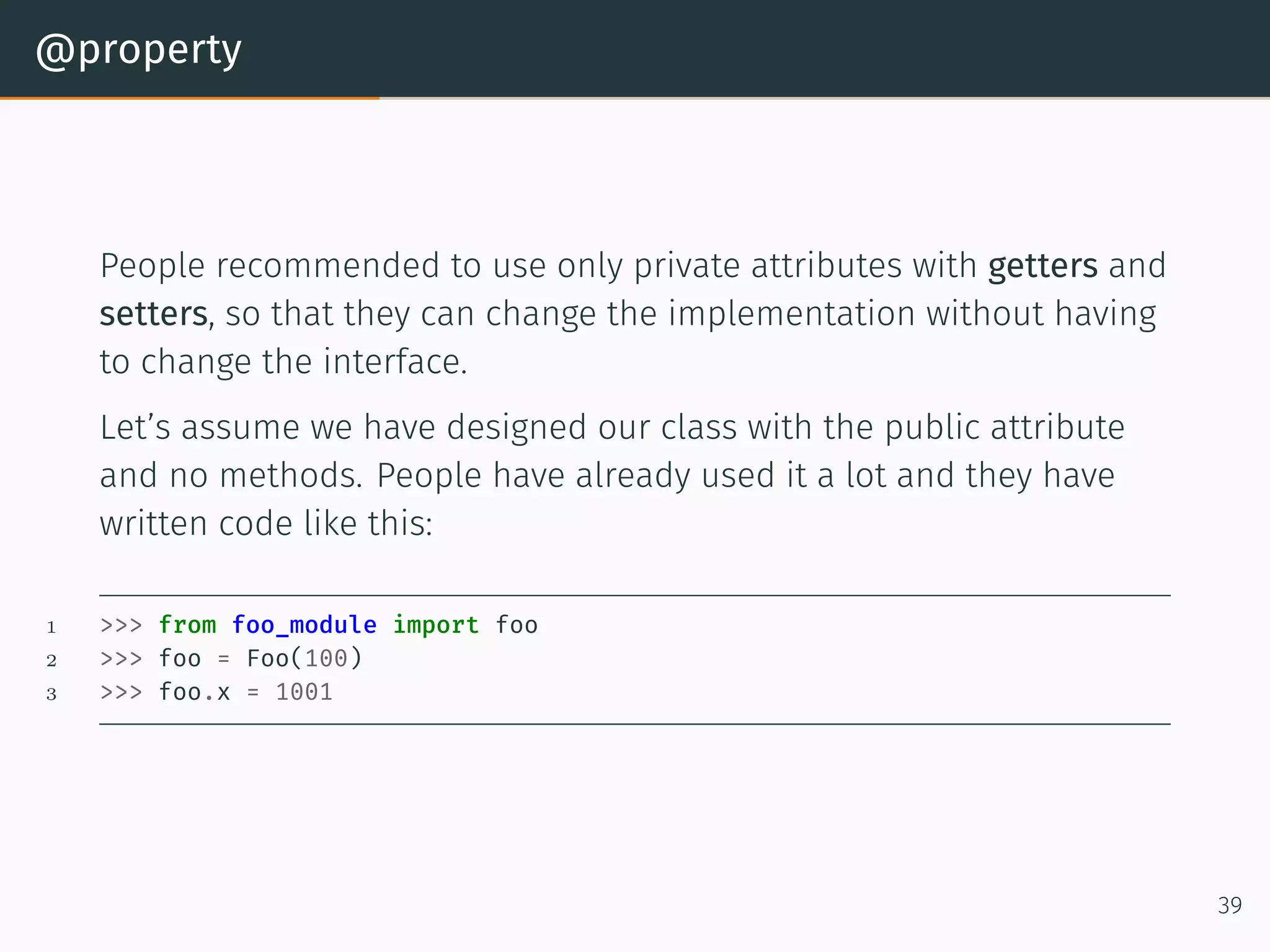
@property People recommended to use only private attributes with getters and setters, so that they can change the implementation without having to change the interface. Let’s assume we have designed our class with the public attribute and no methods. People have already used it a lot and they have written code like this: 1 >>> from foo_module import foo 2 >>> foo = Foo(100) 3 >>> foo.x = 1001 39
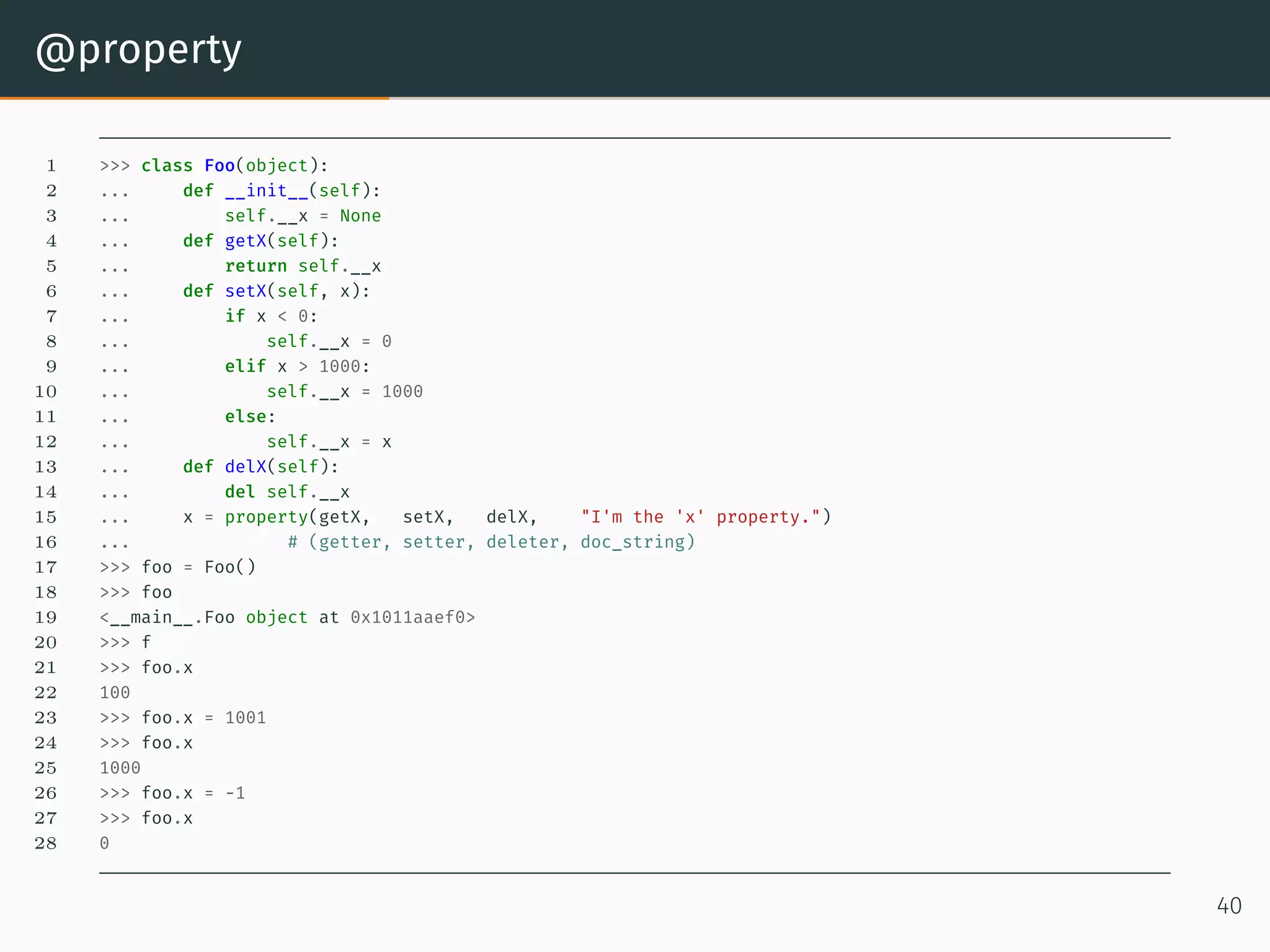
@property 1 >>> class Foo(object): 2 ... def __init__(self): 3 ... self.__x = None 4 ... def getX(self): 5 ... return self.__x 6 ... def setX(self, x): 7 ... if x < 0: 8 ... self.__x = 0 9 ... elif x > 1000: 10 ... self.__x = 1000 11 ... else: 12 ... self.__x = x 13 ... def delX(self): 14 ... del self.__x 15 ... x = property(getX, setX, delX, "I'm the 'x' property.") 16 ... # (getter, setter, deleter, doc_string) 17 >>> foo = Foo() 18 >>> foo 19 <__main__.Foo object at 0x1011aaef0> 20 >>> f 21 >>> foo.x 22 100 23 >>> foo.x = 1001 24 >>> foo.x 25 1000 26 >>> foo.x = -1 27 >>> foo.x 28 0 40
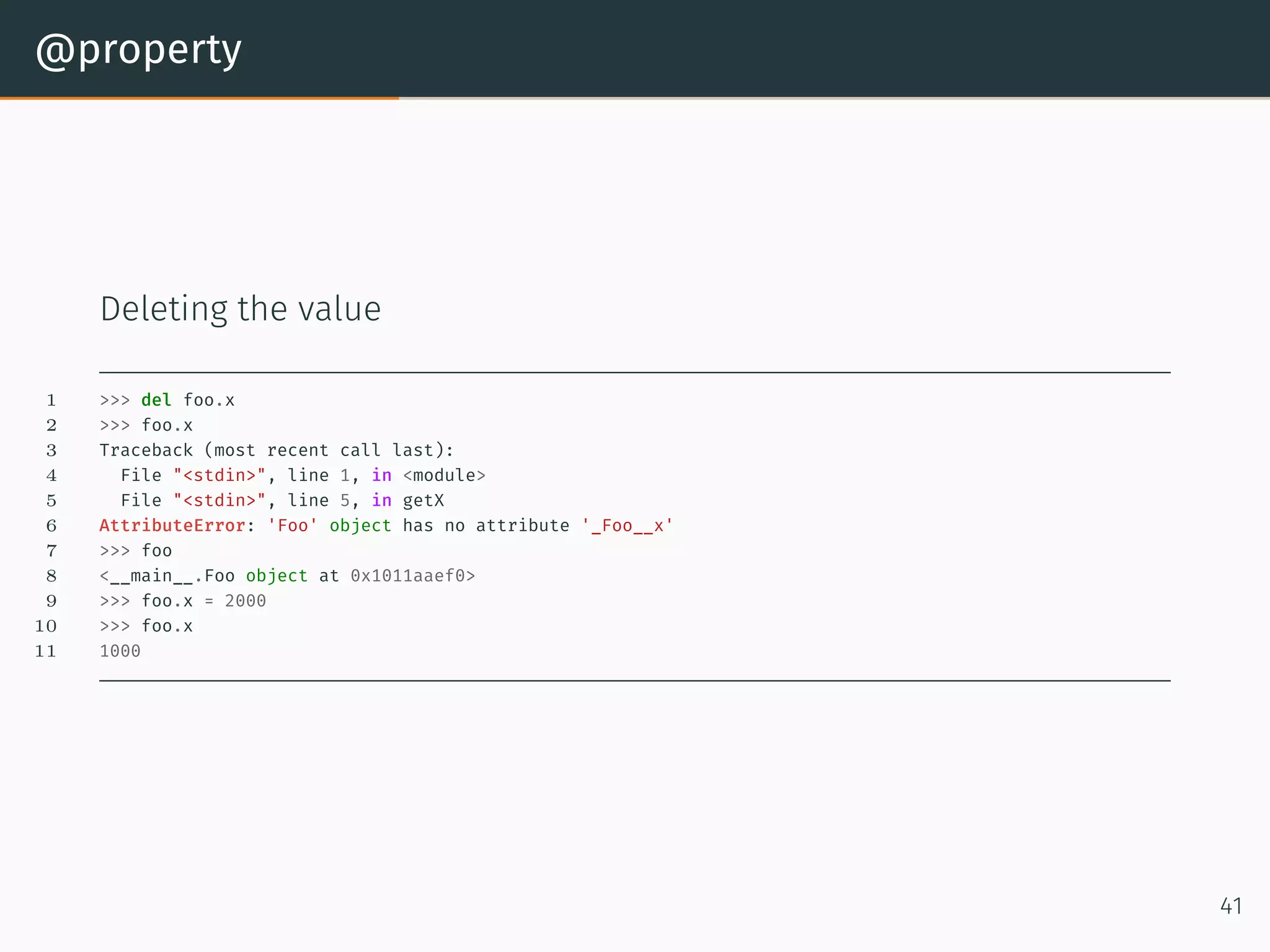
@property Deleting the value 1 >>> del foo.x 2 >>> foo.x 3 Traceback (most recent call last): 4 File "<stdin>", line 1, in <module> 5 File "<stdin>", line 5, in getX 6 AttributeError: 'Foo' object has no attribute '_Foo__x' 7 >>> foo 8 <__main__.Foo object at 0x1011aaef0> 9 >>> foo.x = 2000 10 >>> foo.x 11 1000 41
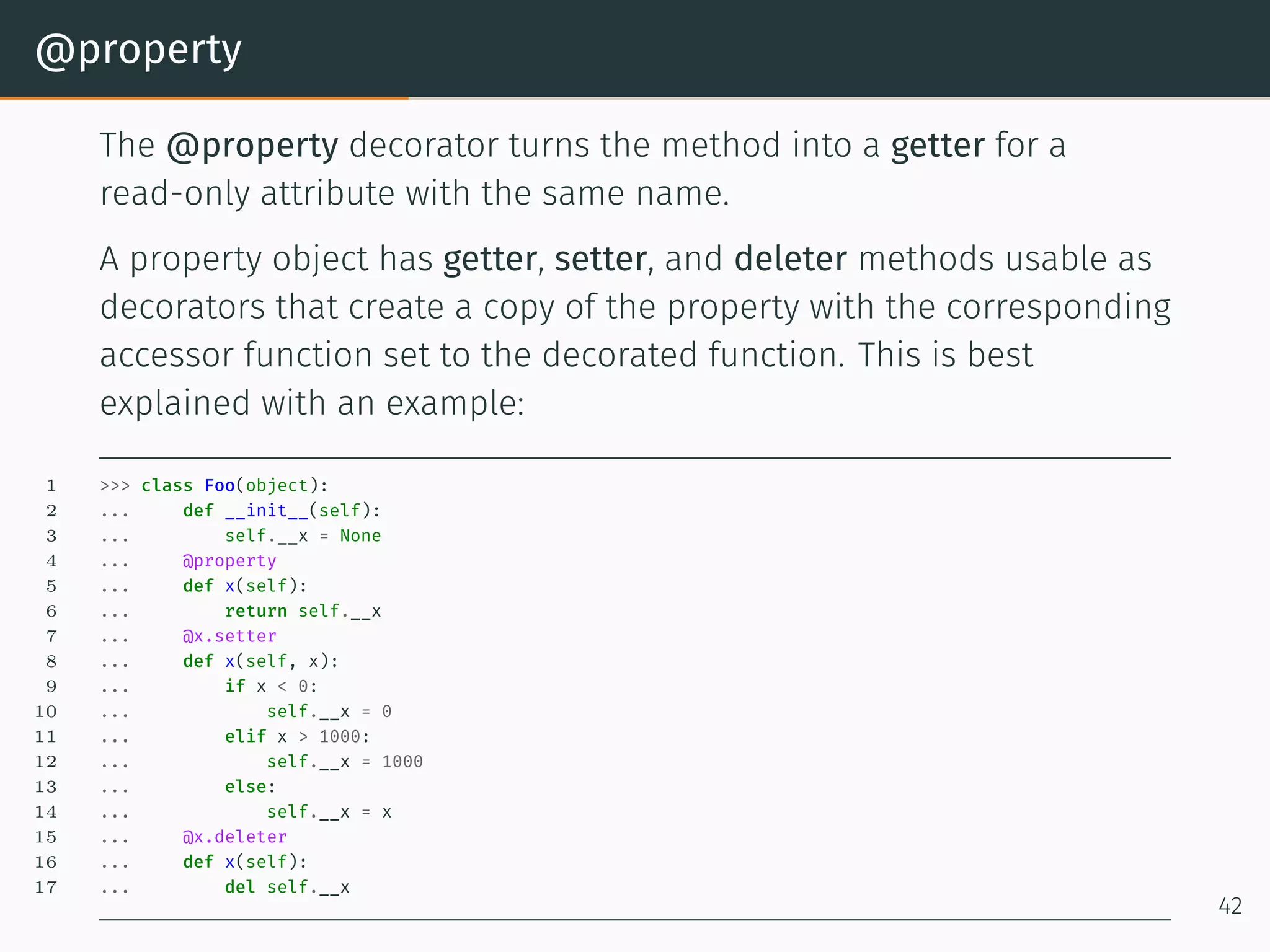
@property The @property decorator turns the method into a getter for a read-only attribute with the same name. A property object has getter, setter, and deleter methods usable as decorators that create a copy of the property with the corresponding accessor function set to the decorated function. This is best explained with an example: 1 >>> class Foo(object): 2 ... def __init__(self): 3 ... self.__x = None 4 ... @property 5 ... def x(self): 6 ... return self.__x 7 ... @x.setter 8 ... def x(self, x): 9 ... if x < 0: 10 ... self.__x = 0 11 ... elif x > 1000: 12 ... self.__x = 1000 13 ... else: 14 ... self.__x = x 15 ... @x.deleter 16 ... def x(self): 17 ... del self.__x 42
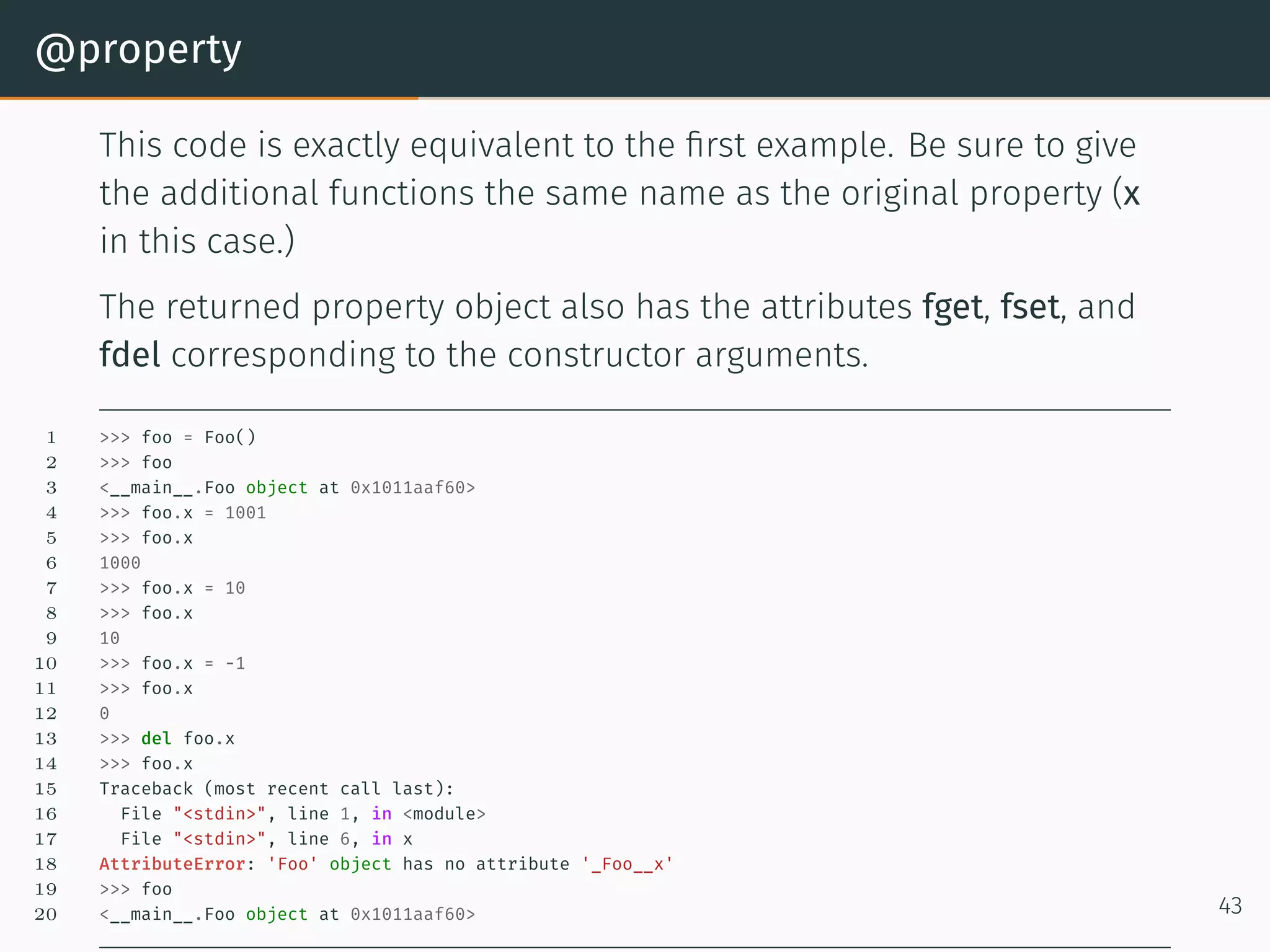
@property This code is exactly equivalent to the first example. Be sure to give the additional functions the same name as the original property (x in this case.) The returned property object also has the attributes fget, fset, and fdel corresponding to the constructor arguments. 1 >>> foo = Foo() 2 >>> foo 3 <__main__.Foo object at 0x1011aaf60> 4 >>> foo.x = 1001 5 >>> foo.x 6 1000 7 >>> foo.x = 10 8 >>> foo.x 9 10 10 >>> foo.x = -1 11 >>> foo.x 12 0 13 >>> del foo.x 14 >>> foo.x 15 Traceback (most recent call last): 16 File "<stdin>", line 1, in <module> 17 File "<stdin>", line 6, in x 18 AttributeError: 'Foo' object has no attribute '_Foo__x' 19 >>> foo 20 <__main__.Foo object at 0x1011aaf60> 43
Class Attributes
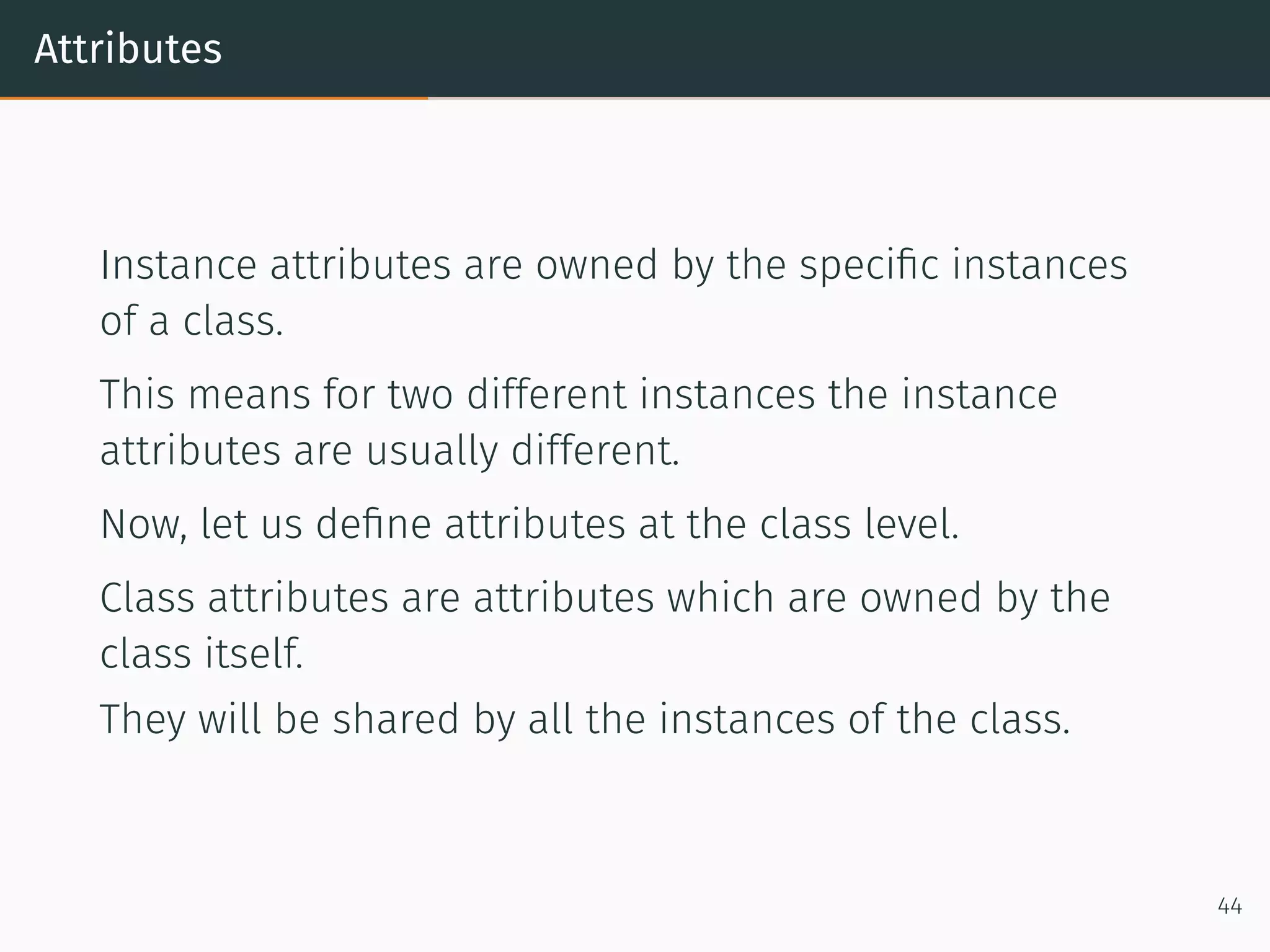
Attributes Instance attributes are owned by the specific instances of a class. This means for two different instances the instance attributes are usually different. Now, let us define attributes at the class level. Class attributes are attributes which are owned by the class itself. They will be shared by all the instances of the class. 44
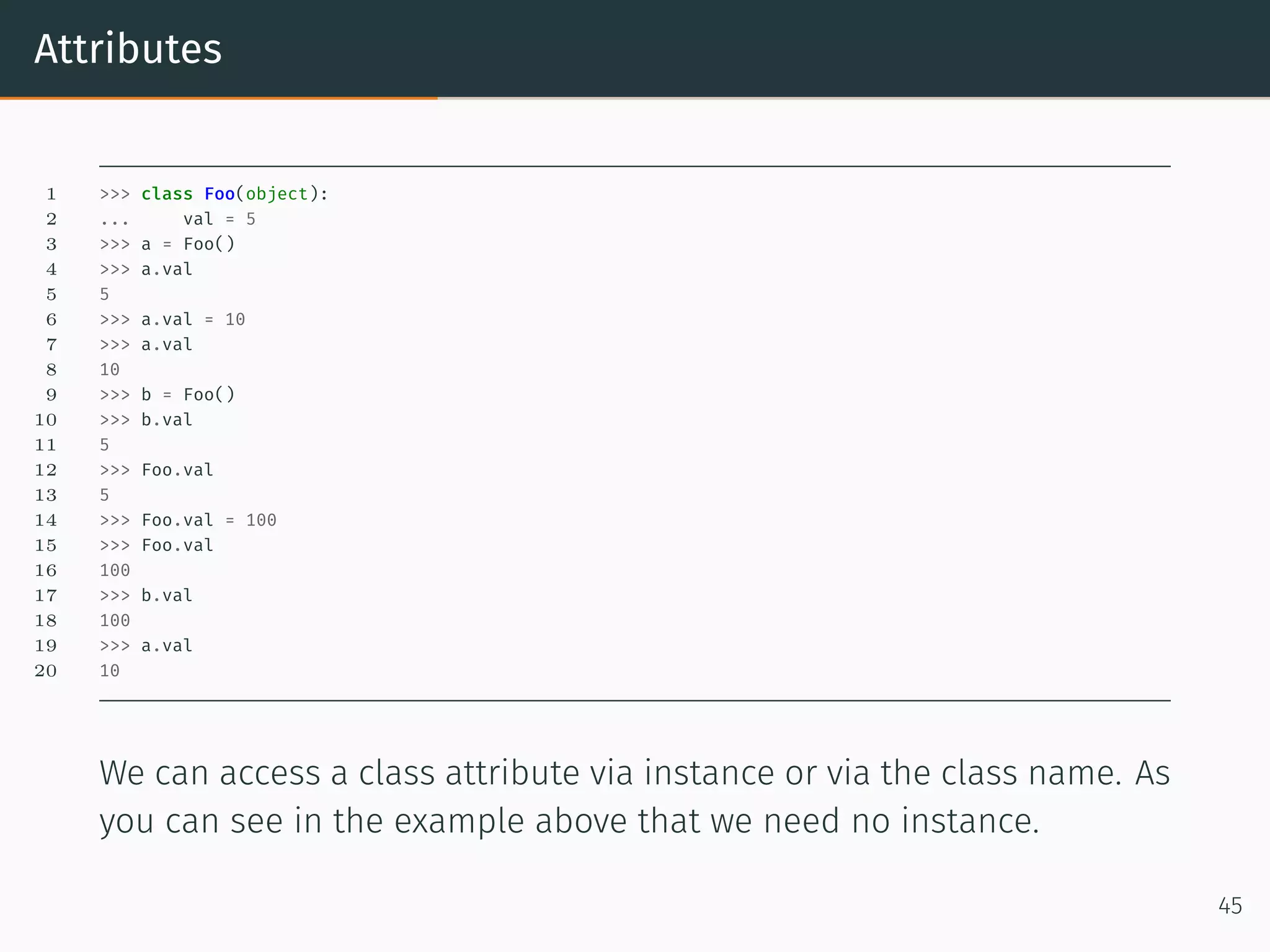
Attributes 1 >>> class Foo(object): 2 ... val = 5 3 >>> a = Foo() 4 >>> a.val 5 5 6 >>> a.val = 10 7 >>> a.val 8 10 9 >>> b = Foo() 10 >>> b.val 11 5 12 >>> Foo.val 13 5 14 >>> Foo.val = 100 15 >>> Foo.val 16 100 17 >>> b.val 18 100 19 >>> a.val 20 10 We can access a class attribute via instance or via the class name. As you can see in the example above that we need no instance. 45
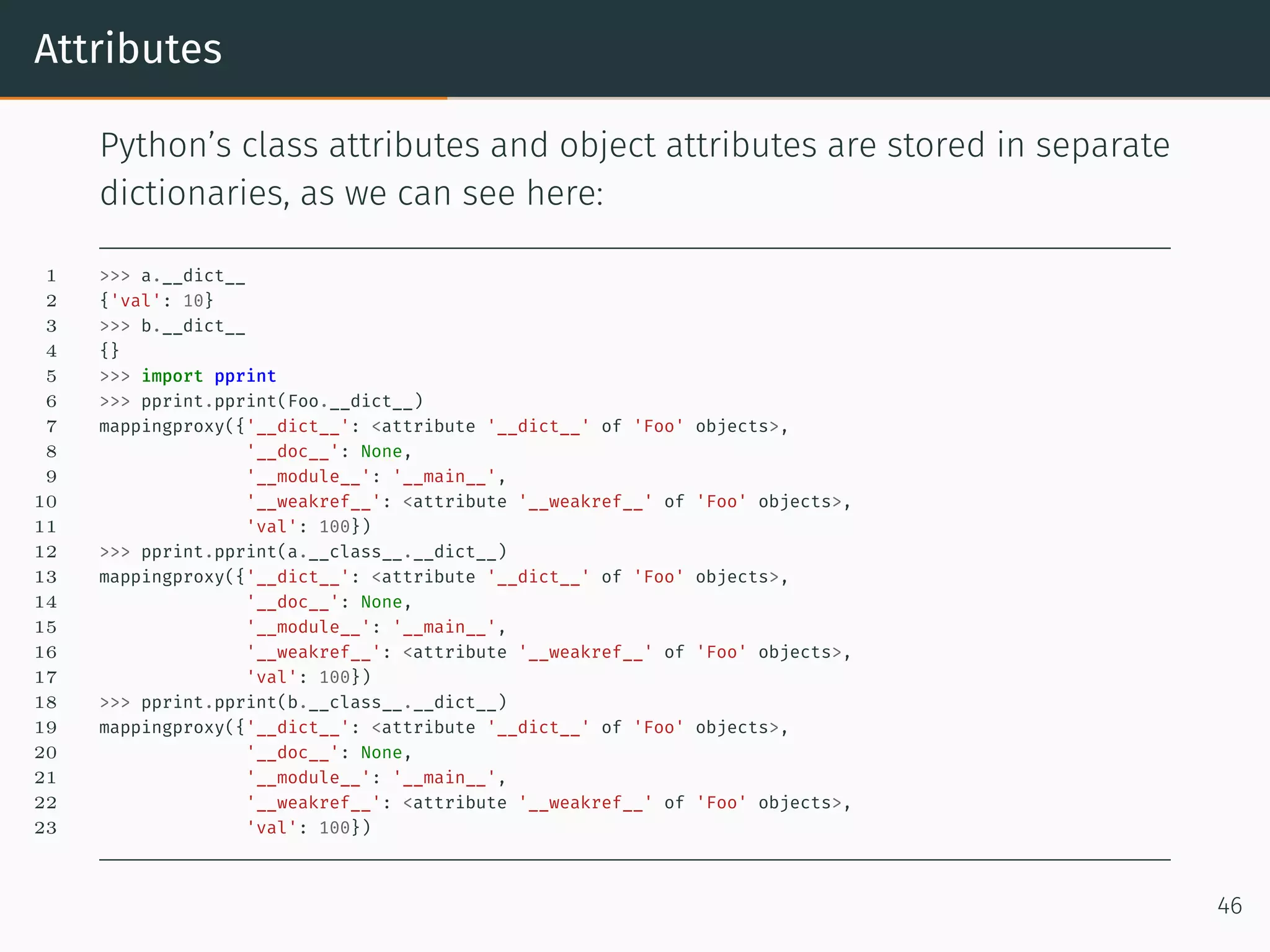
Attributes Python’s class attributes and object attributes are stored in separate dictionaries, as we can see here: 1 >>> a.__dict__ 2 {'val': 10} 3 >>> b.__dict__ 4 {} 5 >>> import pprint 6 >>> pprint.pprint(Foo.__dict__) 7 mappingproxy({'__dict__': <attribute '__dict__' of 'Foo' objects>, 8 '__doc__': None, 9 '__module__': '__main__', 10 '__weakref__': <attribute '__weakref__' of 'Foo' objects>, 11 'val': 100}) 12 >>> pprint.pprint(a.__class__.__dict__) 13 mappingproxy({'__dict__': <attribute '__dict__' of 'Foo' objects>, 14 '__doc__': None, 15 '__module__': '__main__', 16 '__weakref__': <attribute '__weakref__' of 'Foo' objects>, 17 'val': 100}) 18 >>> pprint.pprint(b.__class__.__dict__) 19 mappingproxy({'__dict__': <attribute '__dict__' of 'Foo' objects>, 20 '__doc__': None, 21 '__module__': '__main__', 22 '__weakref__': <attribute '__weakref__' of 'Foo' objects>, 23 'val': 100}) 46
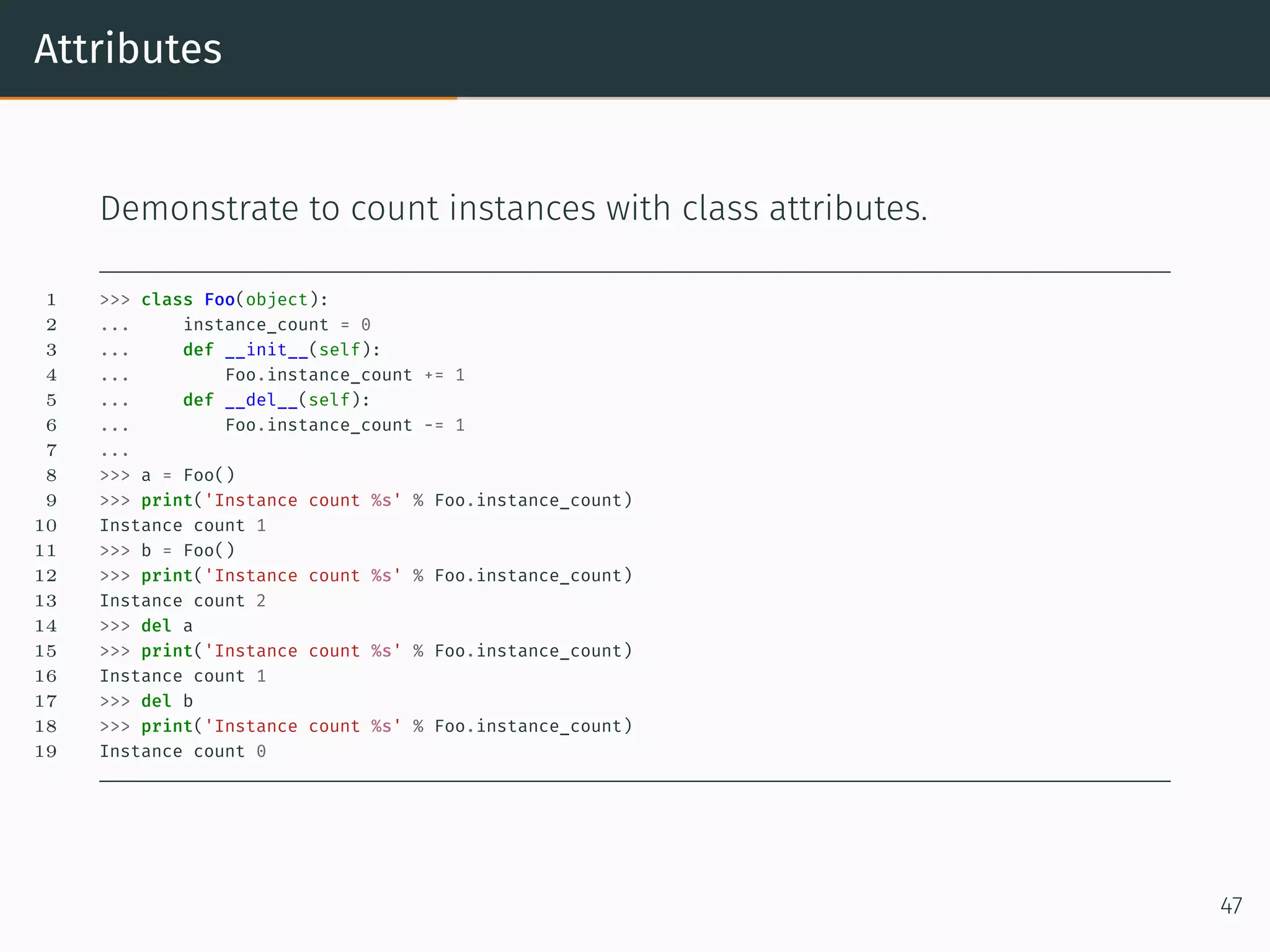
Attributes Demonstrate to count instances with class attributes. 1 >>> class Foo(object): 2 ... instance_count = 0 3 ... def __init__(self): 4 ... Foo.instance_count += 1 5 ... def __del__(self): 6 ... Foo.instance_count -= 1 7 ... 8 >>> a = Foo() 9 >>> print('Instance count %s' % Foo.instance_count) 10 Instance count 1 11 >>> b = Foo() 12 >>> print('Instance count %s' % Foo.instance_count) 13 Instance count 2 14 >>> del a 15 >>> print('Instance count %s' % Foo.instance_count) 16 Instance count 1 17 >>> del b 18 >>> print('Instance count %s' % Foo.instance_count) 19 Instance count 0 47
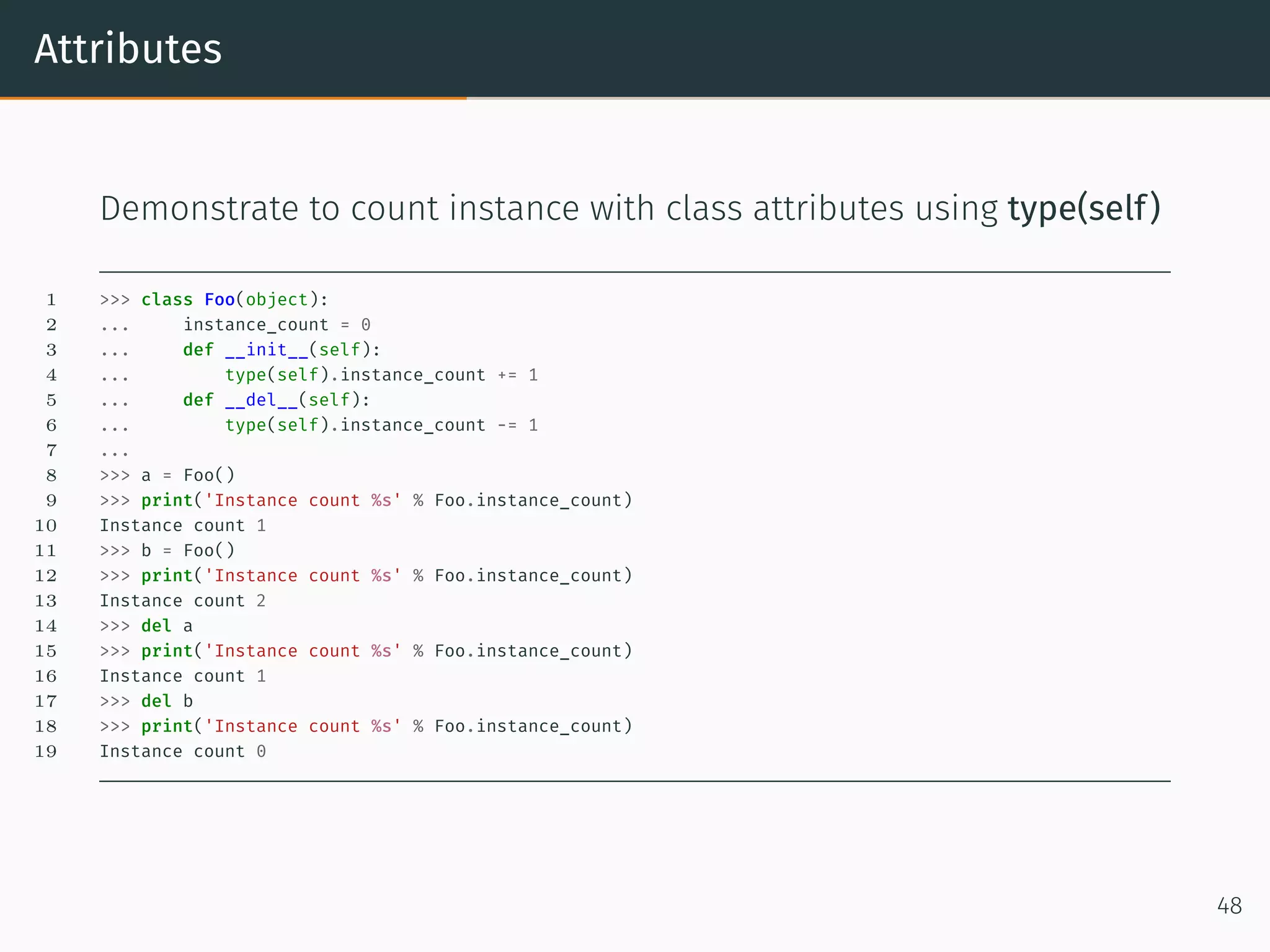
Attributes Demonstrate to count instance with class attributes using type(self) 1 >>> class Foo(object): 2 ... instance_count = 0 3 ... def __init__(self): 4 ... type(self).instance_count += 1 5 ... def __del__(self): 6 ... type(self).instance_count -= 1 7 ... 8 >>> a = Foo() 9 >>> print('Instance count %s' % Foo.instance_count) 10 Instance count 1 11 >>> b = Foo() 12 >>> print('Instance count %s' % Foo.instance_count) 13 Instance count 2 14 >>> del a 15 >>> print('Instance count %s' % Foo.instance_count) 16 Instance count 1 17 >>> del b 18 >>> print('Instance count %s' % Foo.instance_count) 19 Instance count 0 48
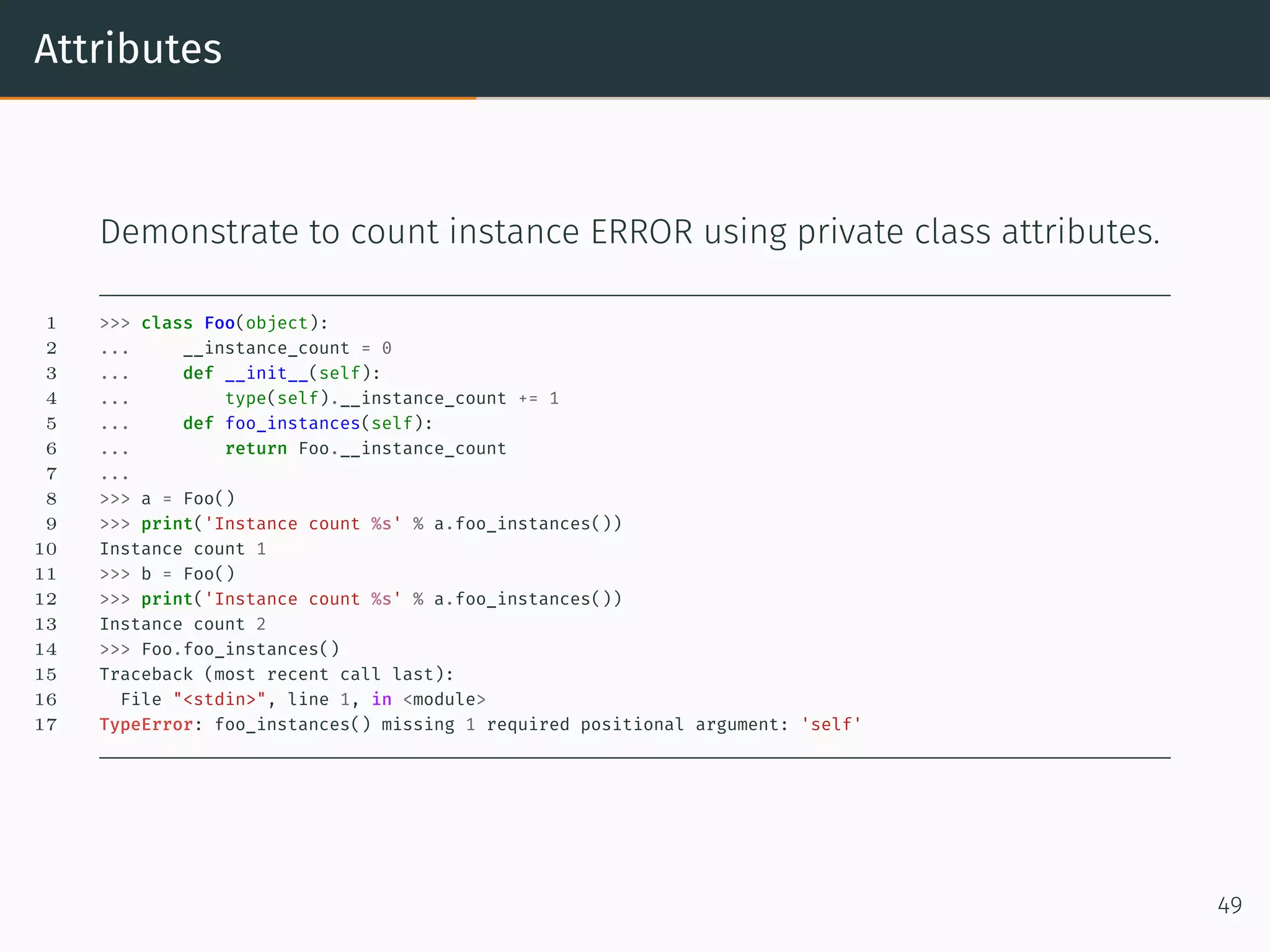
Attributes Demonstrate to count instance ERROR using private class attributes. 1 >>> class Foo(object): 2 ... __instance_count = 0 3 ... def __init__(self): 4 ... type(self).__instance_count += 1 5 ... def foo_instances(self): 6 ... return Foo.__instance_count 7 ... 8 >>> a = Foo() 9 >>> print('Instance count %s' % a.foo_instances()) 10 Instance count 1 11 >>> b = Foo() 12 >>> print('Instance count %s' % a.foo_instances()) 13 Instance count 2 14 >>> Foo.foo_instances() 15 Traceback (most recent call last): 16 File "<stdin>", line 1, in <module> 17 TypeError: foo_instances() missing 1 required positional argument: 'self' 49
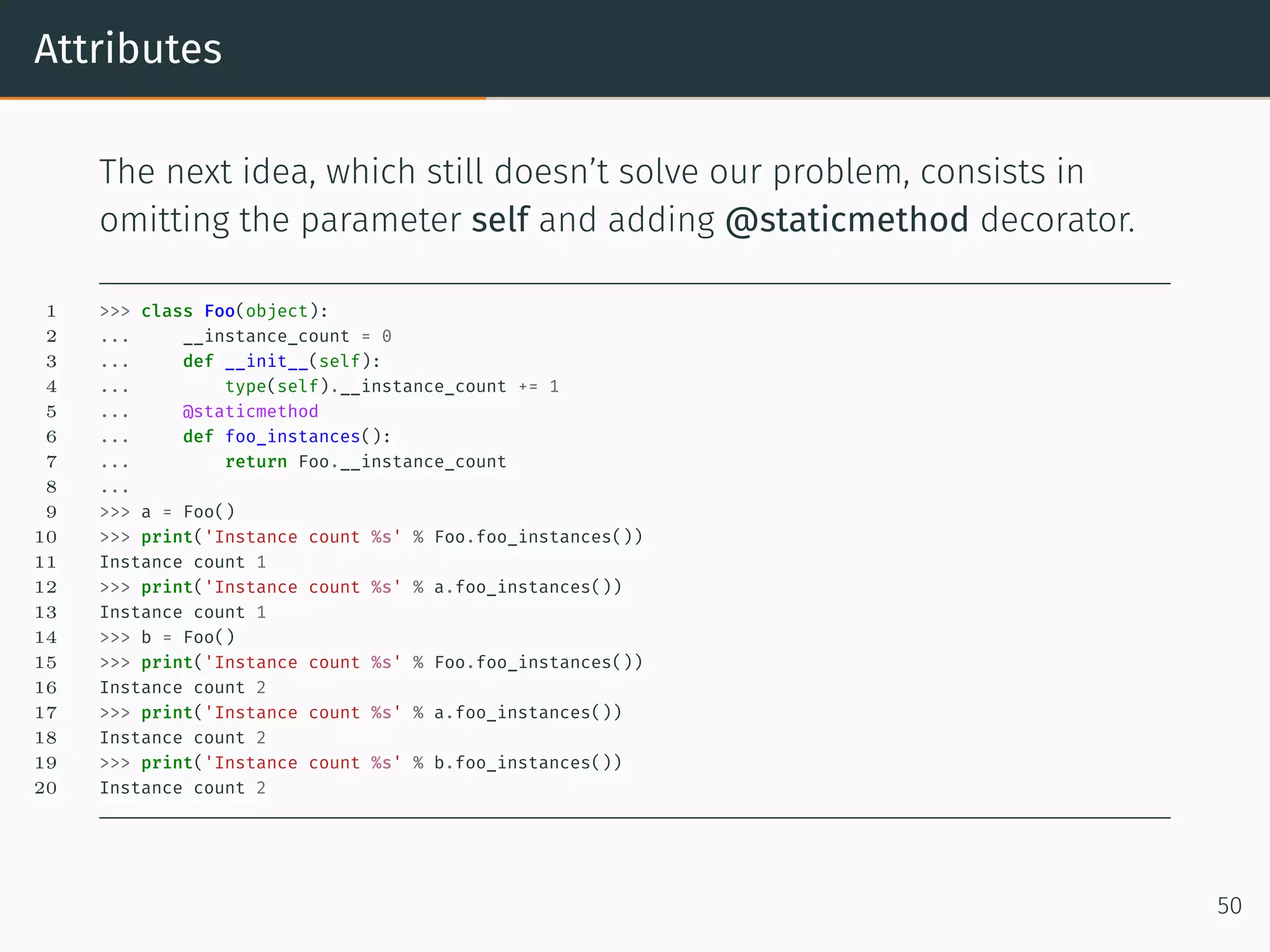
Attributes The next idea, which still doesn’t solve our problem, consists in omitting the parameter self and adding @staticmethod decorator. 1 >>> class Foo(object): 2 ... __instance_count = 0 3 ... def __init__(self): 4 ... type(self).__instance_count += 1 5 ... @staticmethod 6 ... def foo_instances(): 7 ... return Foo.__instance_count 8 ... 9 >>> a = Foo() 10 >>> print('Instance count %s' % Foo.foo_instances()) 11 Instance count 1 12 >>> print('Instance count %s' % a.foo_instances()) 13 Instance count 1 14 >>> b = Foo() 15 >>> print('Instance count %s' % Foo.foo_instances()) 16 Instance count 2 17 >>> print('Instance count %s' % a.foo_instances()) 18 Instance count 2 19 >>> print('Instance count %s' % b.foo_instances()) 20 Instance count 2 50
Class Methods
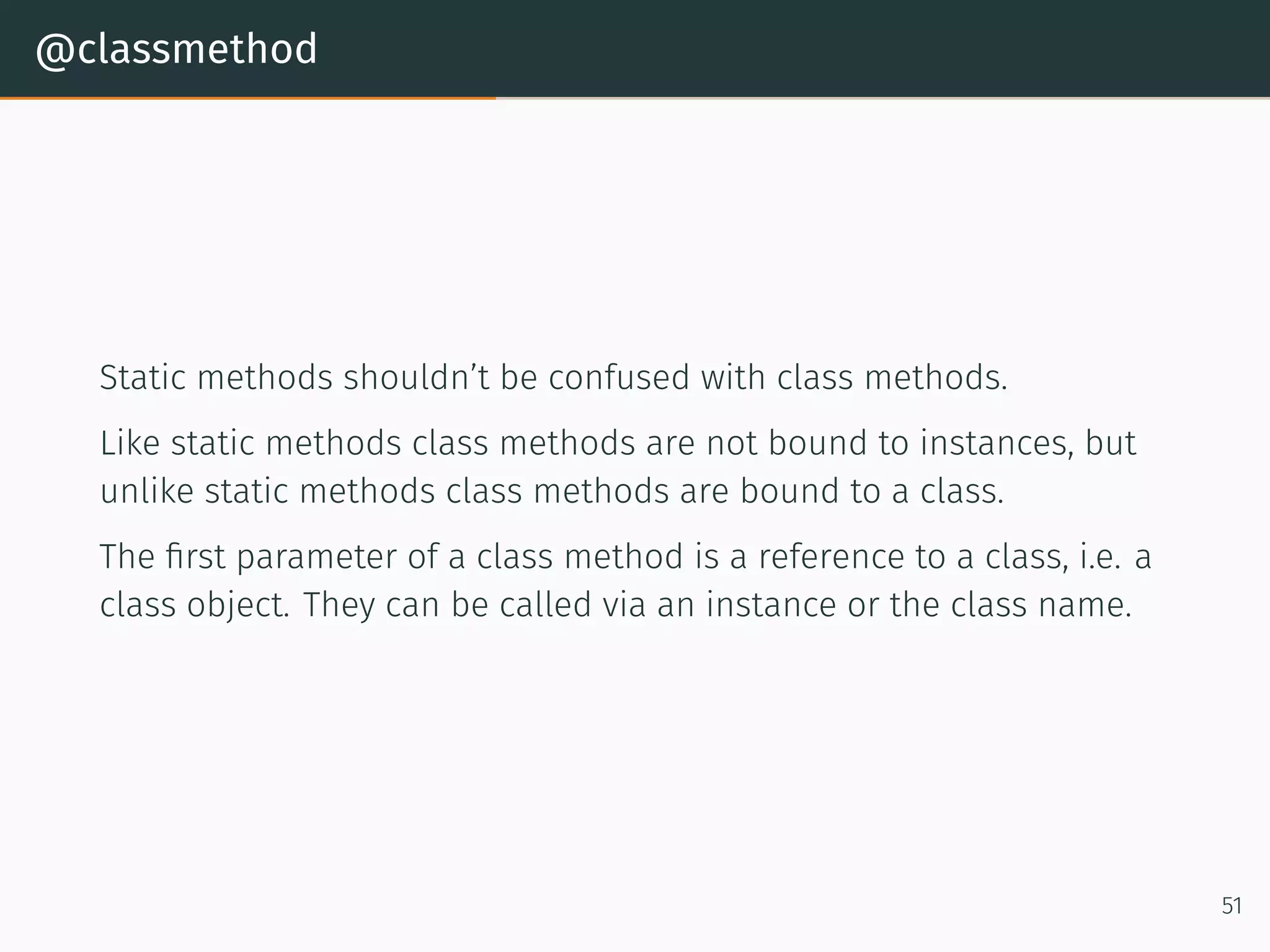
@classmethod Static methods shouldn’t be confused with class methods. Like static methods class methods are not bound to instances, but unlike static methods class methods are bound to a class. The first parameter of a class method is a reference to a class, i.e. a class object. They can be called via an instance or the class name. 51
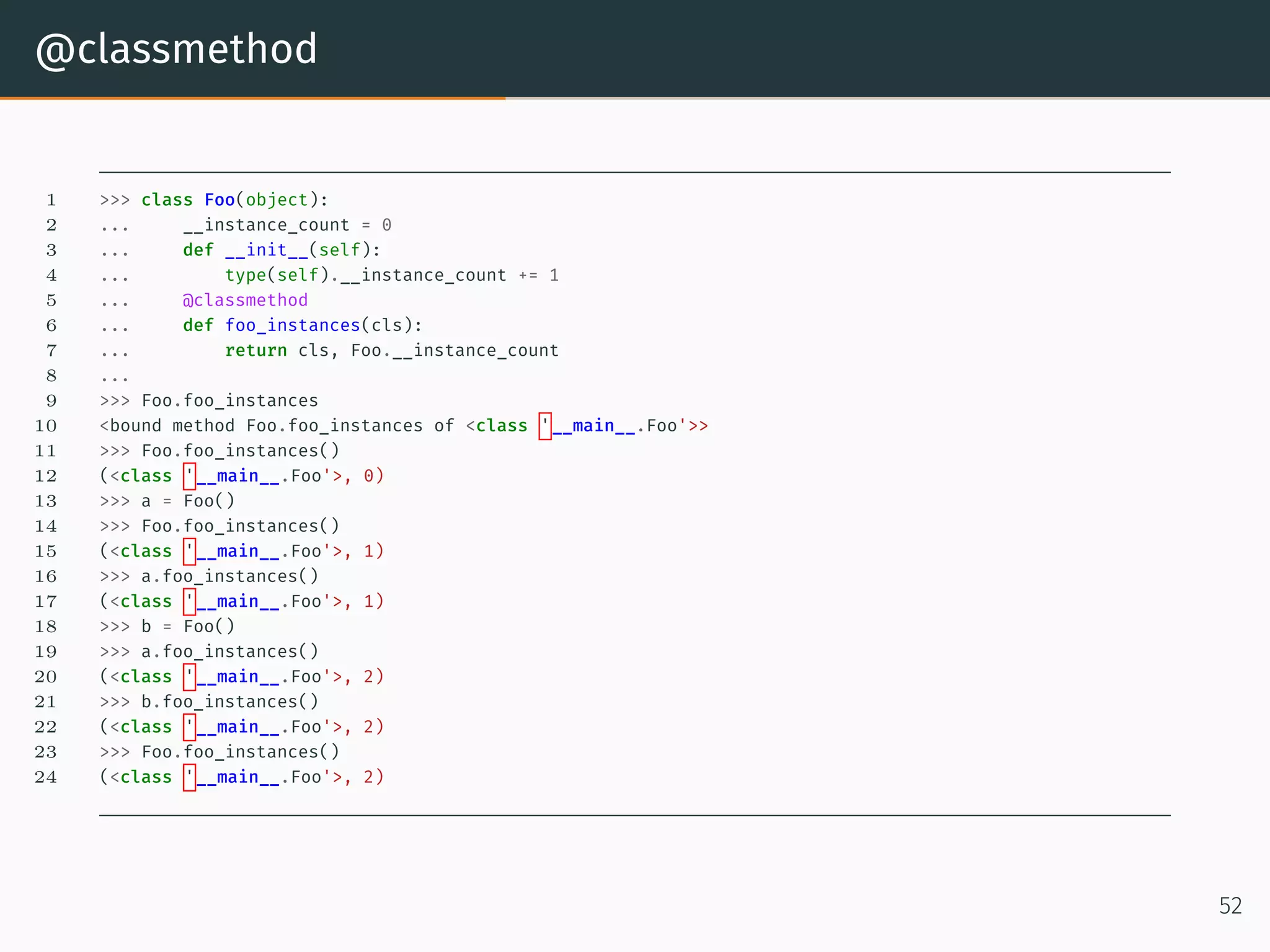
@classmethod 1 >>> class Foo(object): 2 ... __instance_count = 0 3 ... def __init__(self): 4 ... type(self).__instance_count += 1 5 ... @classmethod 6 ... def foo_instances(cls): 7 ... return cls, Foo.__instance_count 8 ... 9 >>> Foo.foo_instances 10 <bound method Foo.foo_instances of <class '__main__.Foo'>> 11 >>> Foo.foo_instances() 12 (<class '__main__.Foo'>, 0) 13 >>> a = Foo() 14 >>> Foo.foo_instances() 15 (<class '__main__.Foo'>, 1) 16 >>> a.foo_instances() 17 (<class '__main__.Foo'>, 1) 18 >>> b = Foo() 19 >>> a.foo_instances() 20 (<class '__main__.Foo'>, 2) 21 >>> b.foo_instances() 22 (<class '__main__.Foo'>, 2) 23 >>> Foo.foo_instances() 24 (<class '__main__.Foo'>, 2) 52
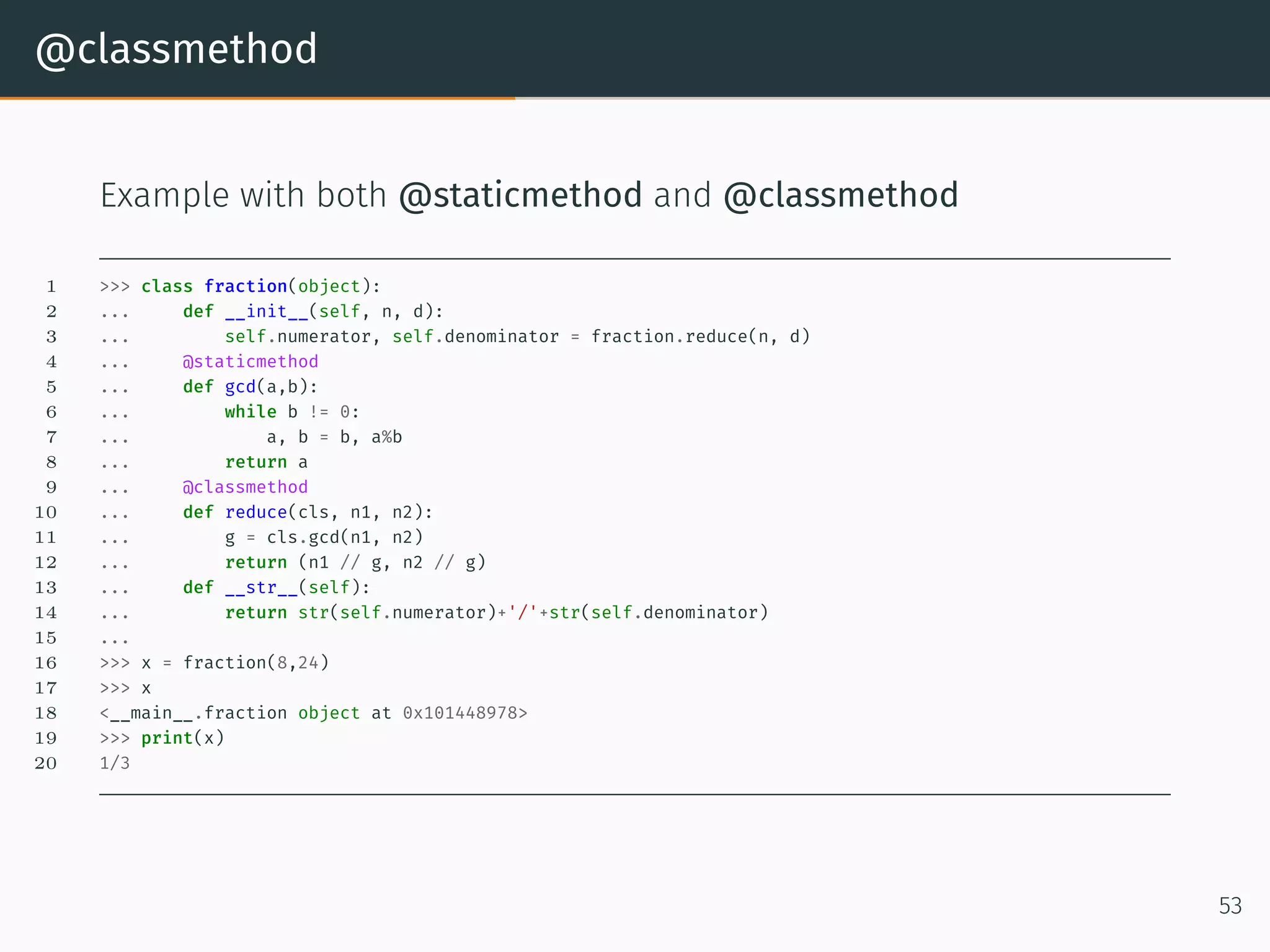
@classmethod Example with both @staticmethod and @classmethod 1 >>> class fraction(object): 2 ... def __init__(self, n, d): 3 ... self.numerator, self.denominator = fraction.reduce(n, d) 4 ... @staticmethod 5 ... def gcd(a,b): 6 ... while b != 0: 7 ... a, b = b, a%b 8 ... return a 9 ... @classmethod 10 ... def reduce(cls, n1, n2): 11 ... g = cls.gcd(n1, n2) 12 ... return (n1 // g, n2 // g) 13 ... def __str__(self): 14 ... return str(self.numerator)+'/'+str(self.denominator) 15 ... 16 >>> x = fraction(8,24) 17 >>> x 18 <__main__.fraction object at 0x101448978> 19 >>> print(x) 20 1/3 53
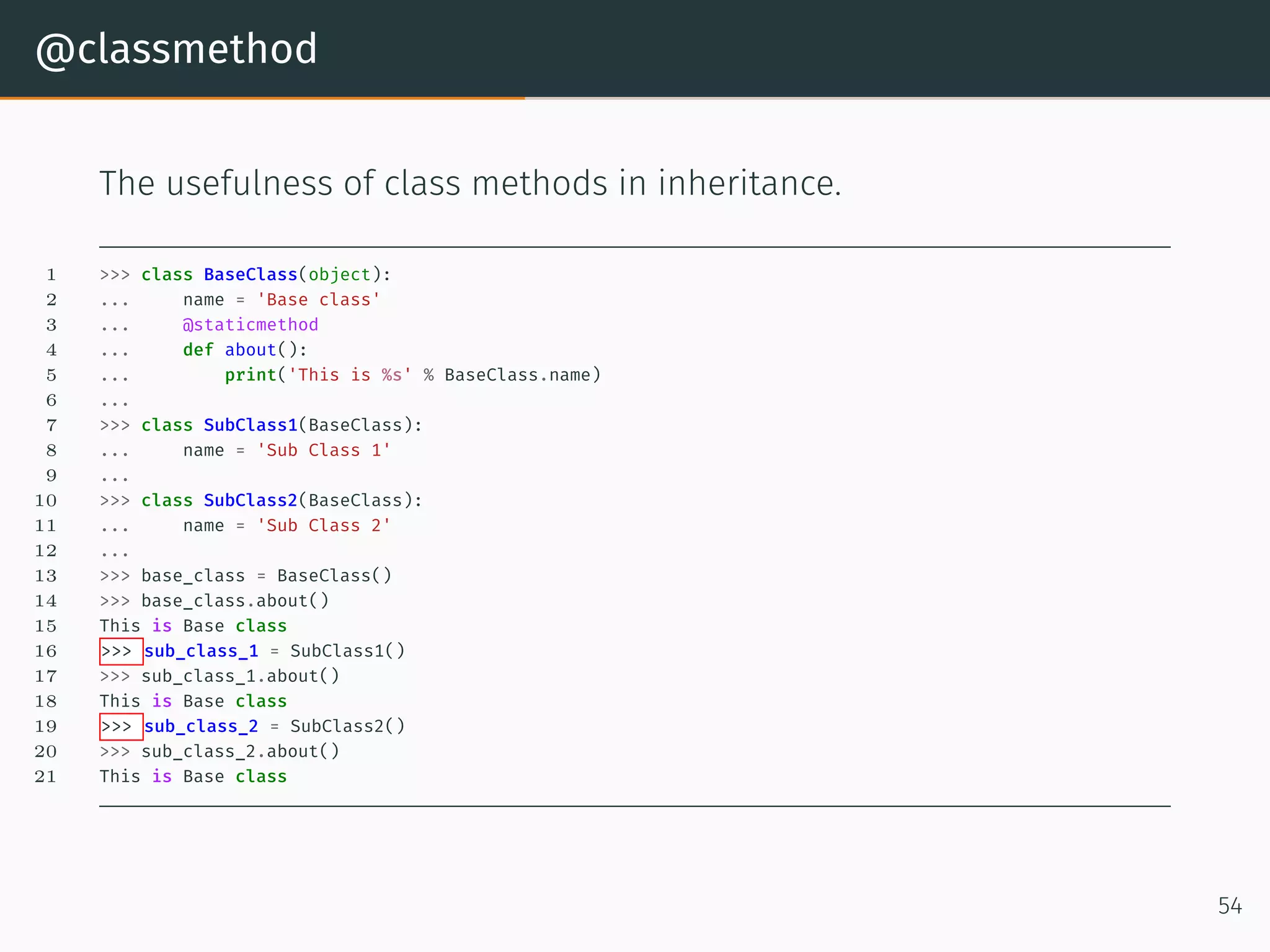
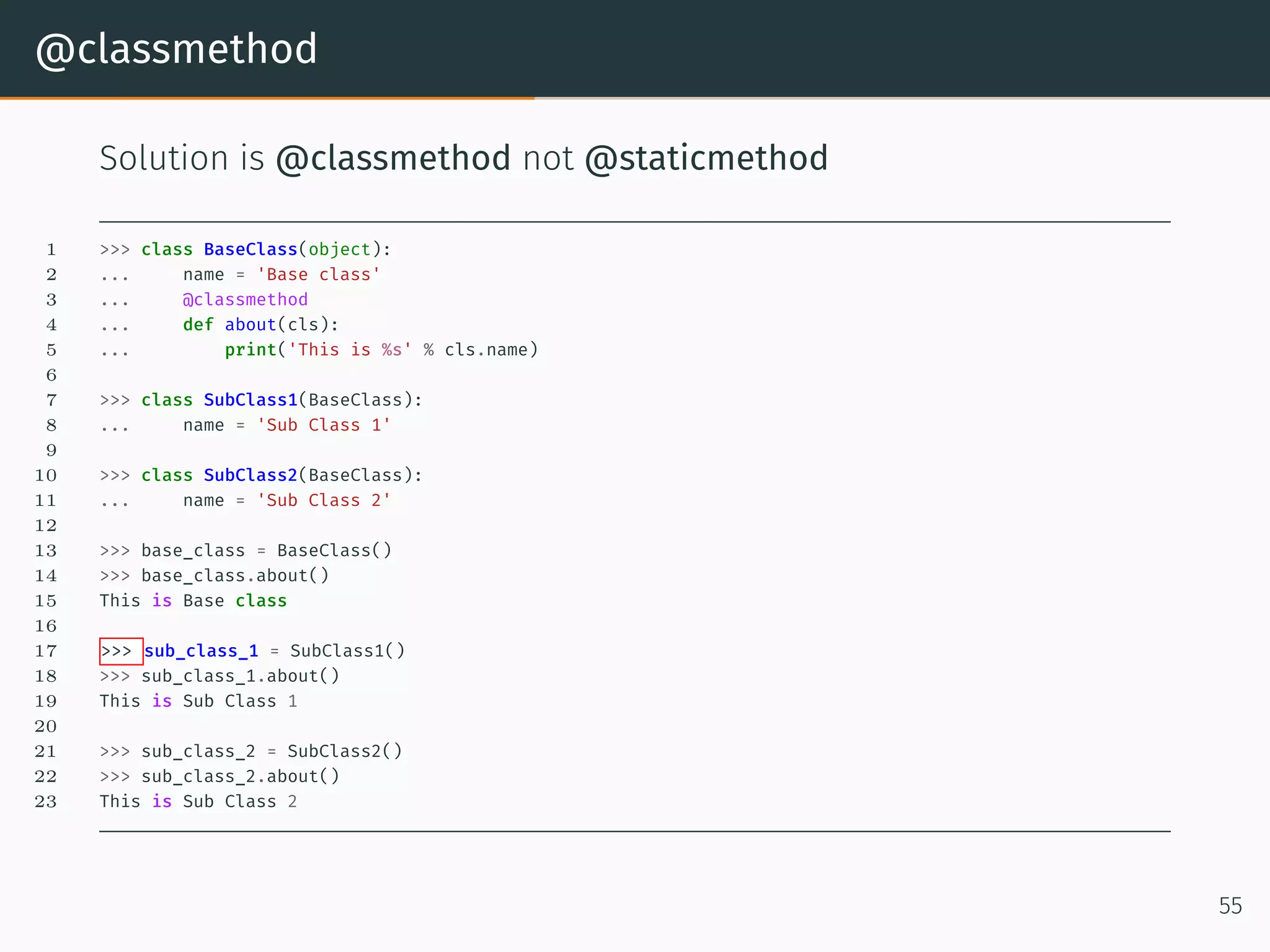
@classmethod The usefulness of class methods in inheritance. 1 >>> class BaseClass(object): 2 ... name = 'Base class' 3 ... @staticmethod 4 ... def about(): 5 ... print('This is %s' % BaseClass.name) 6 ... 7 >>> class SubClass1(BaseClass): 8 ... name = 'Sub Class 1' 9 ... 10 >>> class SubClass2(BaseClass): 11 ... name = 'Sub Class 2' 12 ... 13 >>> base_class = BaseClass() 14 >>> base_class.about() 15 This is Base class 16 >>> sub_class_1 = SubClass1() 17 >>> sub_class_1.about() 18 This is Base class 19 >>> sub_class_2 = SubClass2() 20 >>> sub_class_2.about() 21 This is Base class 54
@classmethod Solution is @classmethod not @staticmethod 1 >>> class BaseClass(object): 2 ... name = 'Base class' 3 ... @classmethod 4 ... def about(cls): 5 ... print('This is %s' % cls.name) 6 7 >>> class SubClass1(BaseClass): 8 ... name = 'Sub Class 1' 9 10 >>> class SubClass2(BaseClass): 11 ... name = 'Sub Class 2' 12 13 >>> base_class = BaseClass() 14 >>> base_class.about() 15 This is Base class 16 17 >>> sub_class_1 = SubClass1() 18 >>> sub_class_1.about() 19 This is Sub Class 1 20 21 >>> sub_class_2 = SubClass2() 22 >>> sub_class_2.about() 23 This is Sub Class 2 55
Inheritance
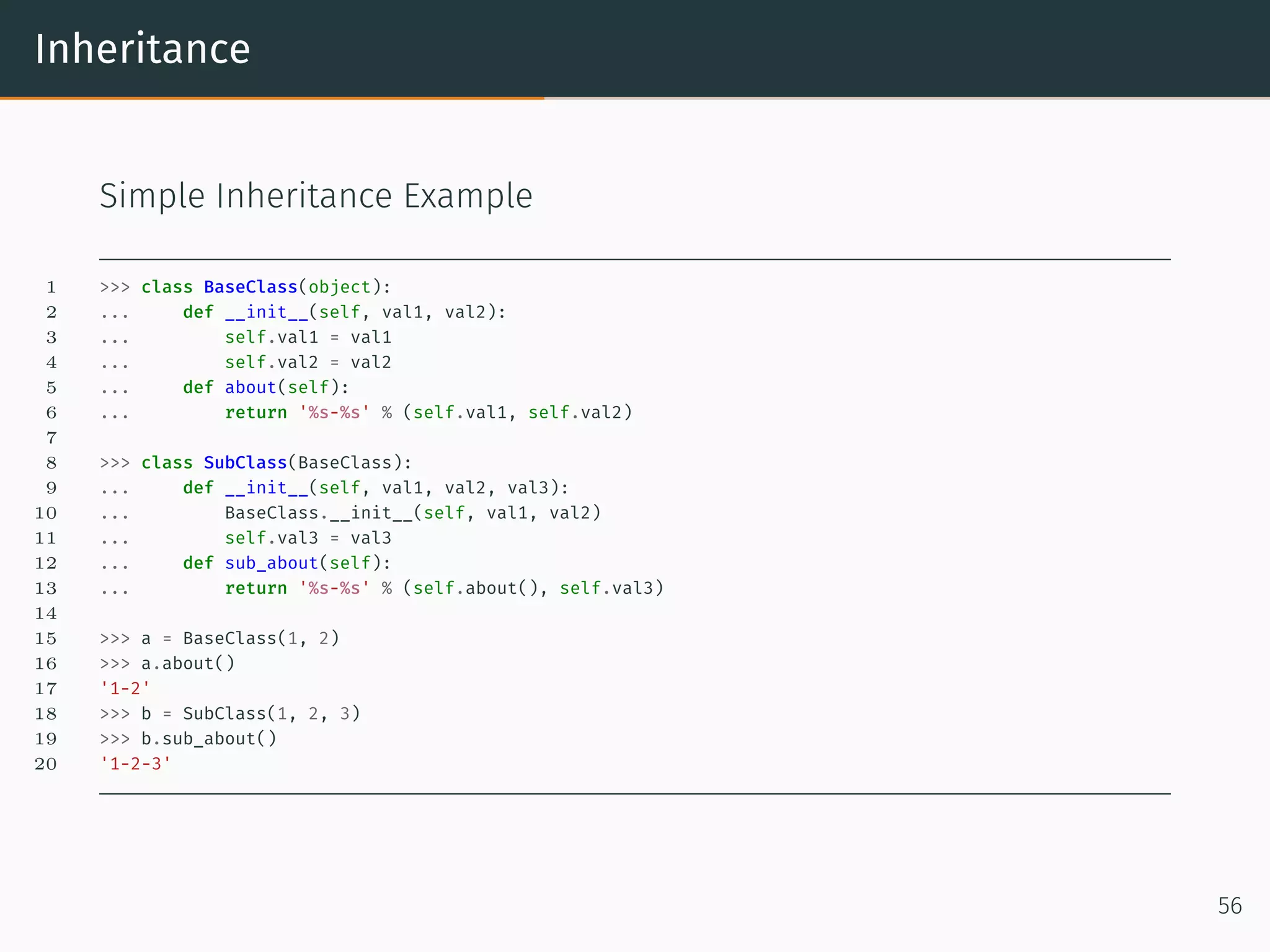
Inheritance Simple Inheritance Example 1 >>> class BaseClass(object): 2 ... def __init__(self, val1, val2): 3 ... self.val1 = val1 4 ... self.val2 = val2 5 ... def about(self): 6 ... return '%s-%s' % (self.val1, self.val2) 7 8 >>> class SubClass(BaseClass): 9 ... def __init__(self, val1, val2, val3): 10 ... BaseClass.__init__(self, val1, val2) 11 ... self.val3 = val3 12 ... def sub_about(self): 13 ... return '%s-%s' % (self.about(), self.val3) 14 15 >>> a = BaseClass(1, 2) 16 >>> a.about() 17 '1-2' 18 >>> b = SubClass(1, 2, 3) 19 >>> b.sub_about() 20 '1-2-3' 56
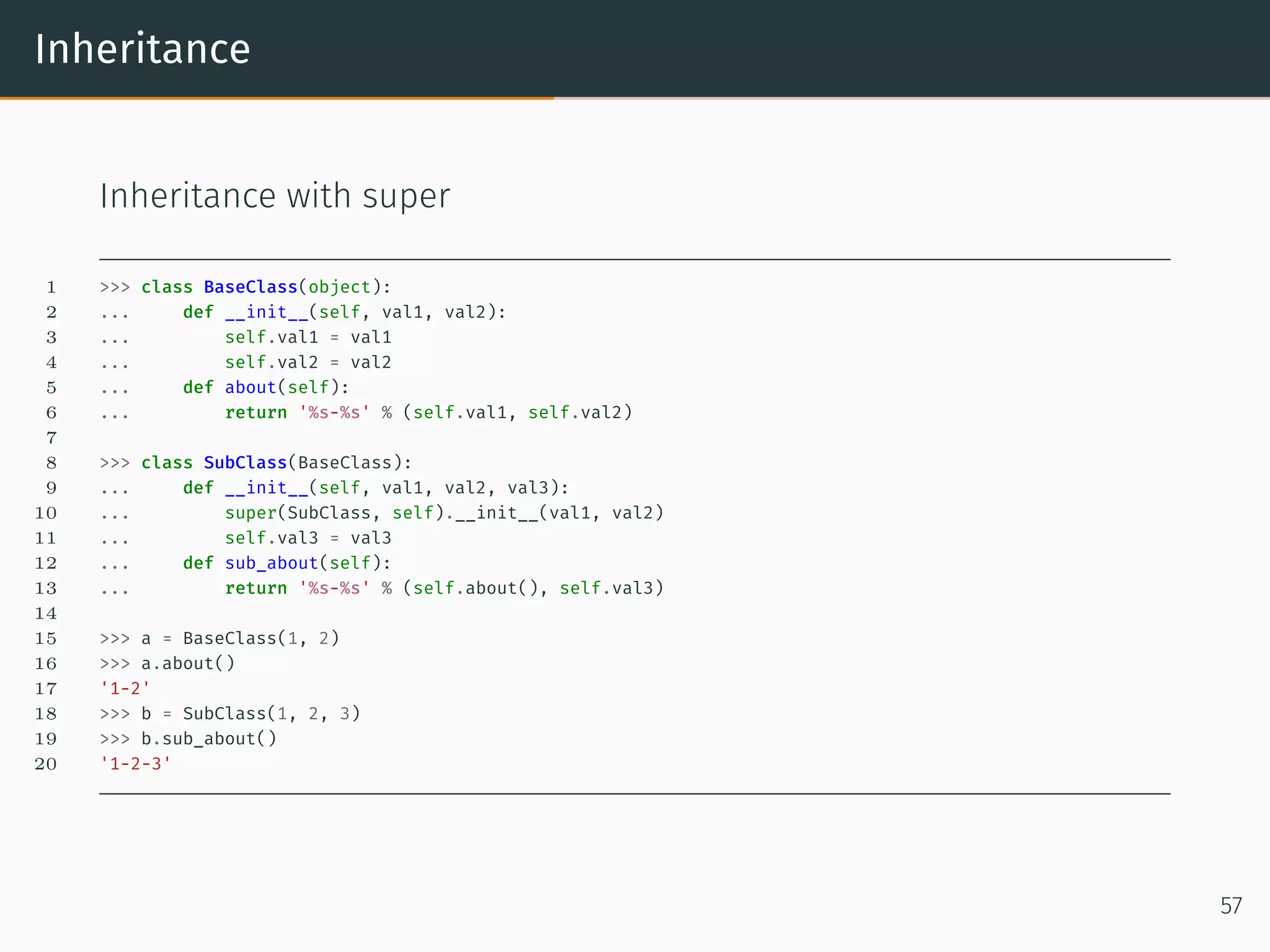
Inheritance Inheritance with super 1 >>> class BaseClass(object): 2 ... def __init__(self, val1, val2): 3 ... self.val1 = val1 4 ... self.val2 = val2 5 ... def about(self): 6 ... return '%s-%s' % (self.val1, self.val2) 7 8 >>> class SubClass(BaseClass): 9 ... def __init__(self, val1, val2, val3): 10 ... super(SubClass, self).__init__(val1, val2) 11 ... self.val3 = val3 12 ... def sub_about(self): 13 ... return '%s-%s' % (self.about(), self.val3) 14 15 >>> a = BaseClass(1, 2) 16 >>> a.about() 17 '1-2' 18 >>> b = SubClass(1, 2, 3) 19 >>> b.sub_about() 20 '1-2-3' 57
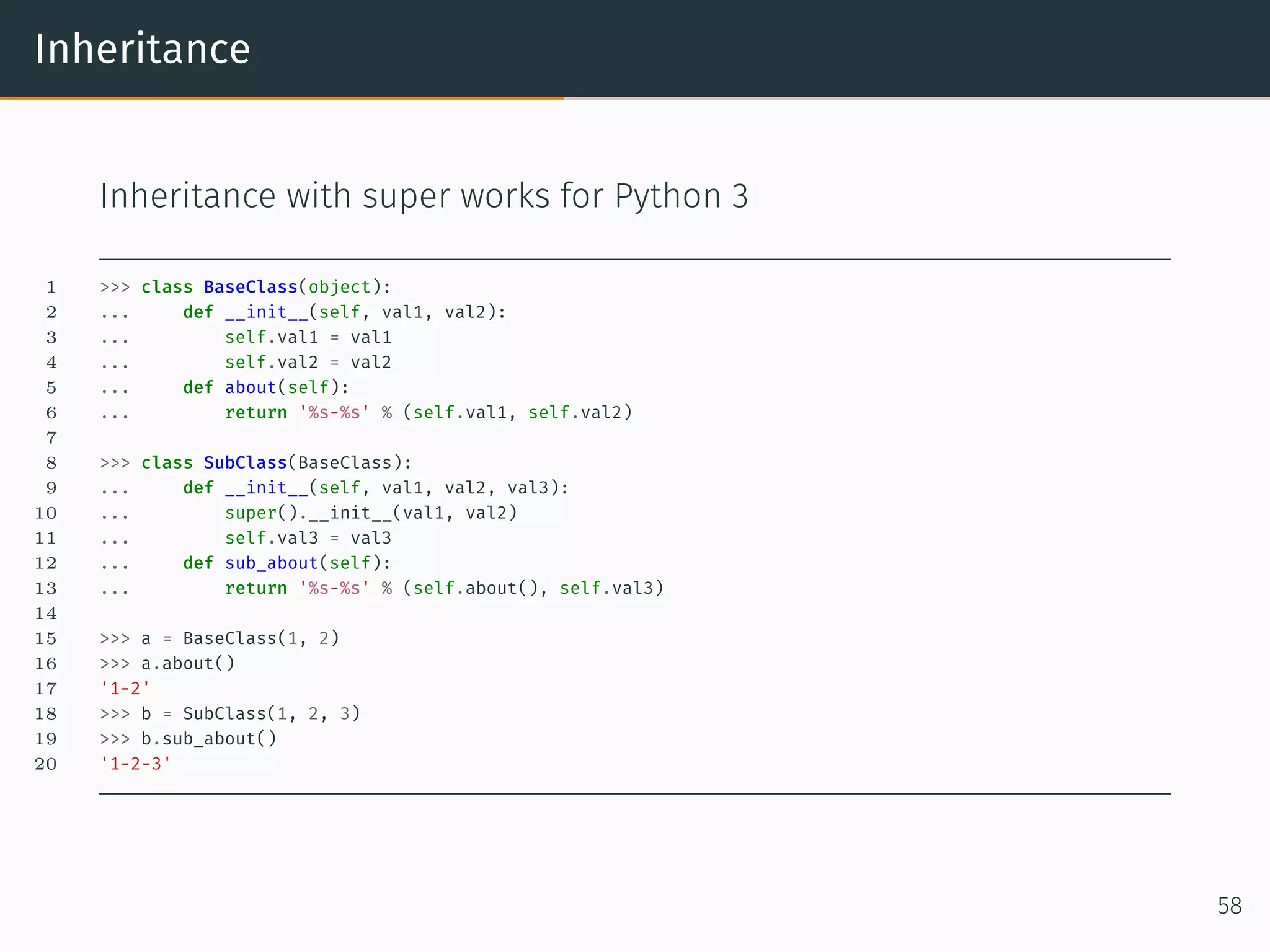
Inheritance Inheritance with super works for Python 3 1 >>> class BaseClass(object): 2 ... def __init__(self, val1, val2): 3 ... self.val1 = val1 4 ... self.val2 = val2 5 ... def about(self): 6 ... return '%s-%s' % (self.val1, self.val2) 7 8 >>> class SubClass(BaseClass): 9 ... def __init__(self, val1, val2, val3): 10 ... super().__init__(val1, val2) 11 ... self.val3 = val3 12 ... def sub_about(self): 13 ... return '%s-%s' % (self.about(), self.val3) 14 15 >>> a = BaseClass(1, 2) 16 >>> a.about() 17 '1-2' 18 >>> b = SubClass(1, 2, 3) 19 >>> b.sub_about() 20 '1-2-3' 58
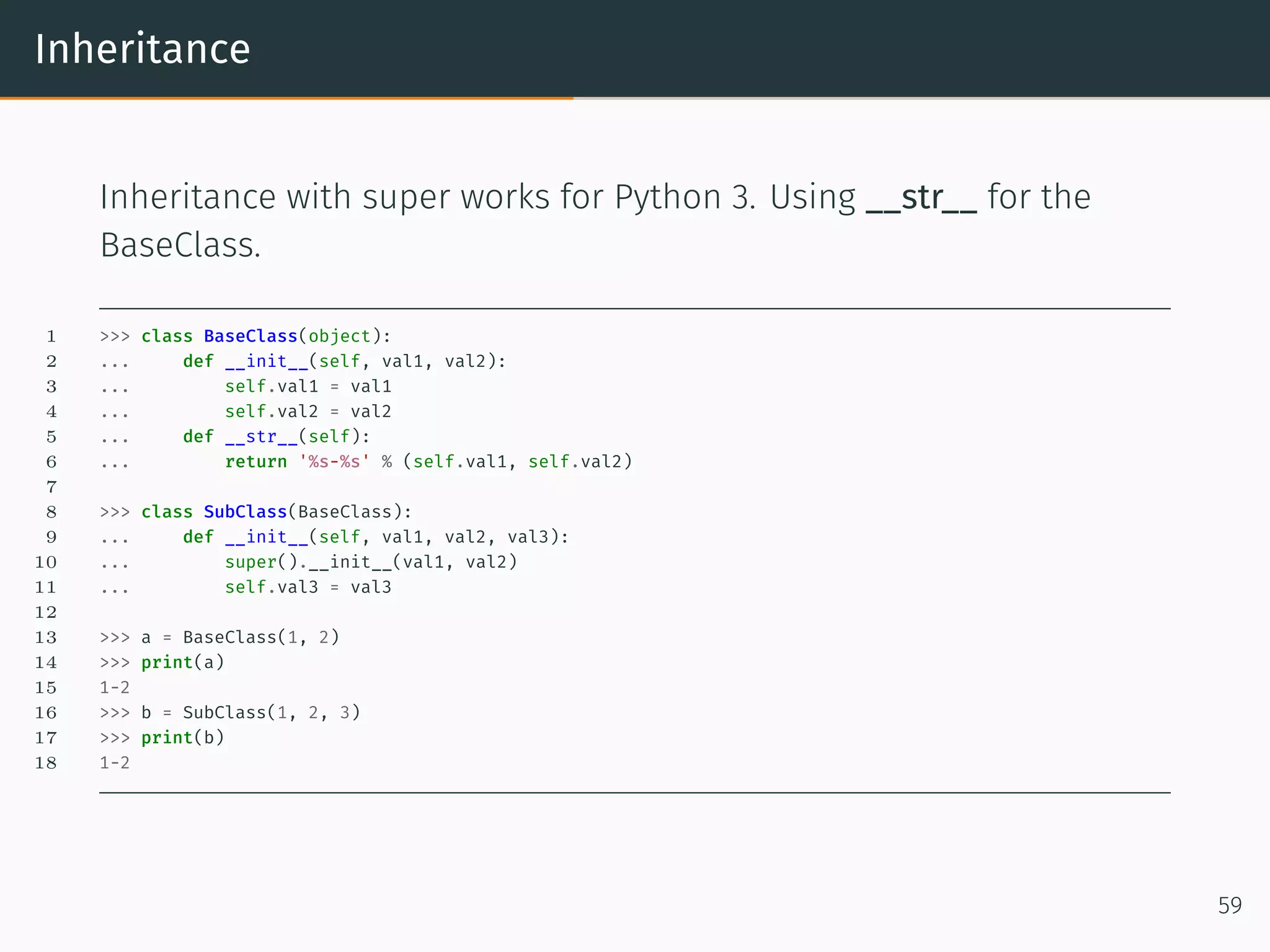
Inheritance Inheritance with super works for Python 3. Using __str__ for the BaseClass. 1 >>> class BaseClass(object): 2 ... def __init__(self, val1, val2): 3 ... self.val1 = val1 4 ... self.val2 = val2 5 ... def __str__(self): 6 ... return '%s-%s' % (self.val1, self.val2) 7 8 >>> class SubClass(BaseClass): 9 ... def __init__(self, val1, val2, val3): 10 ... super().__init__(val1, val2) 11 ... self.val3 = val3 12 13 >>> a = BaseClass(1, 2) 14 >>> print(a) 15 1-2 16 >>> b = SubClass(1, 2, 3) 17 >>> print(b) 18 1-2 59
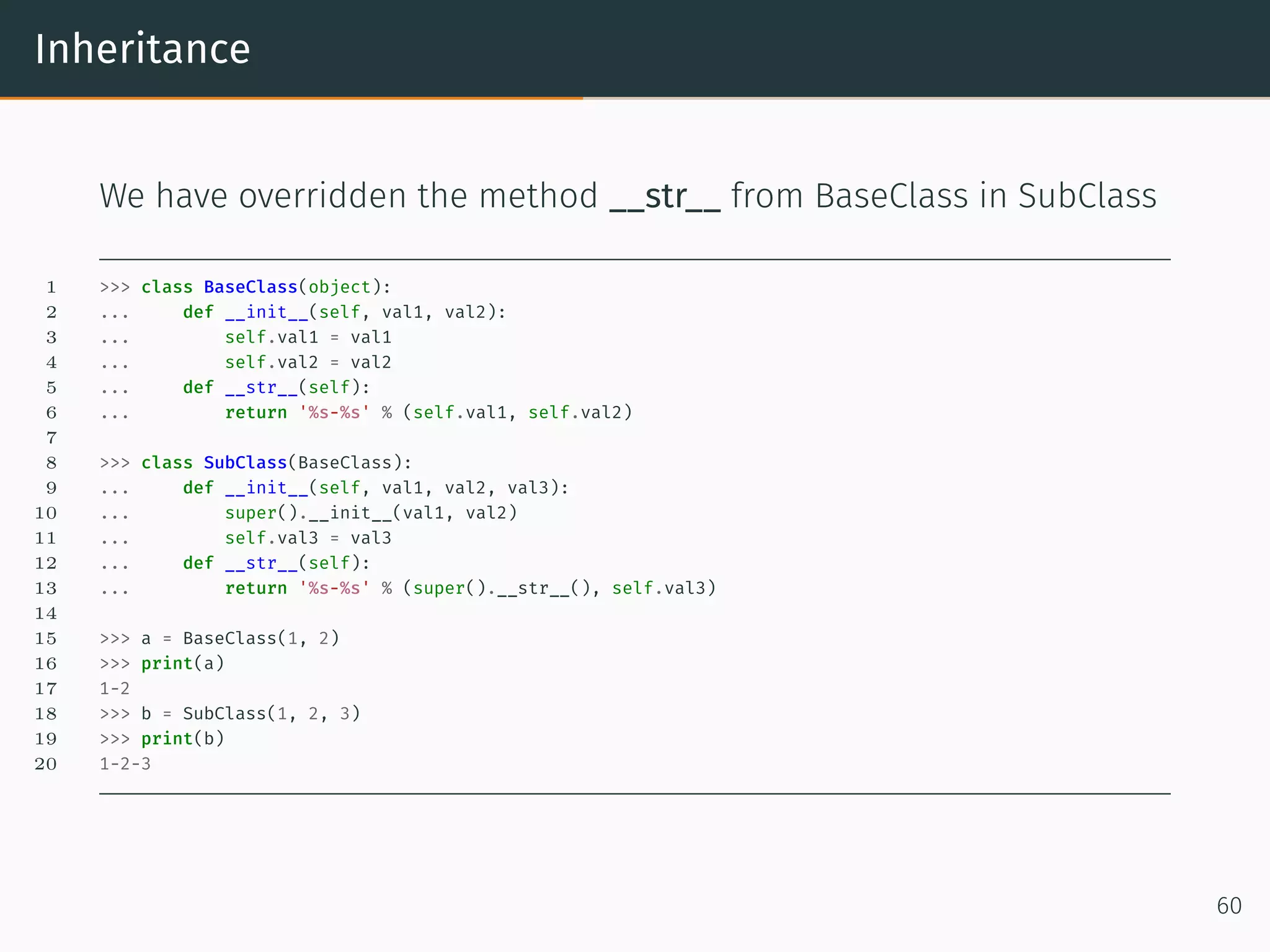
Inheritance We have overridden the method __str__ from BaseClass in SubClass 1 >>> class BaseClass(object): 2 ... def __init__(self, val1, val2): 3 ... self.val1 = val1 4 ... self.val2 = val2 5 ... def __str__(self): 6 ... return '%s-%s' % (self.val1, self.val2) 7 8 >>> class SubClass(BaseClass): 9 ... def __init__(self, val1, val2, val3): 10 ... super().__init__(val1, val2) 11 ... self.val3 = val3 12 ... def __str__(self): 13 ... return '%s-%s' % (super().__str__(), self.val3) 14 15 >>> a = BaseClass(1, 2) 16 >>> print(a) 17 1-2 18 >>> b = SubClass(1, 2, 3) 19 >>> print(b) 20 1-2-3 60
Diamond Problem
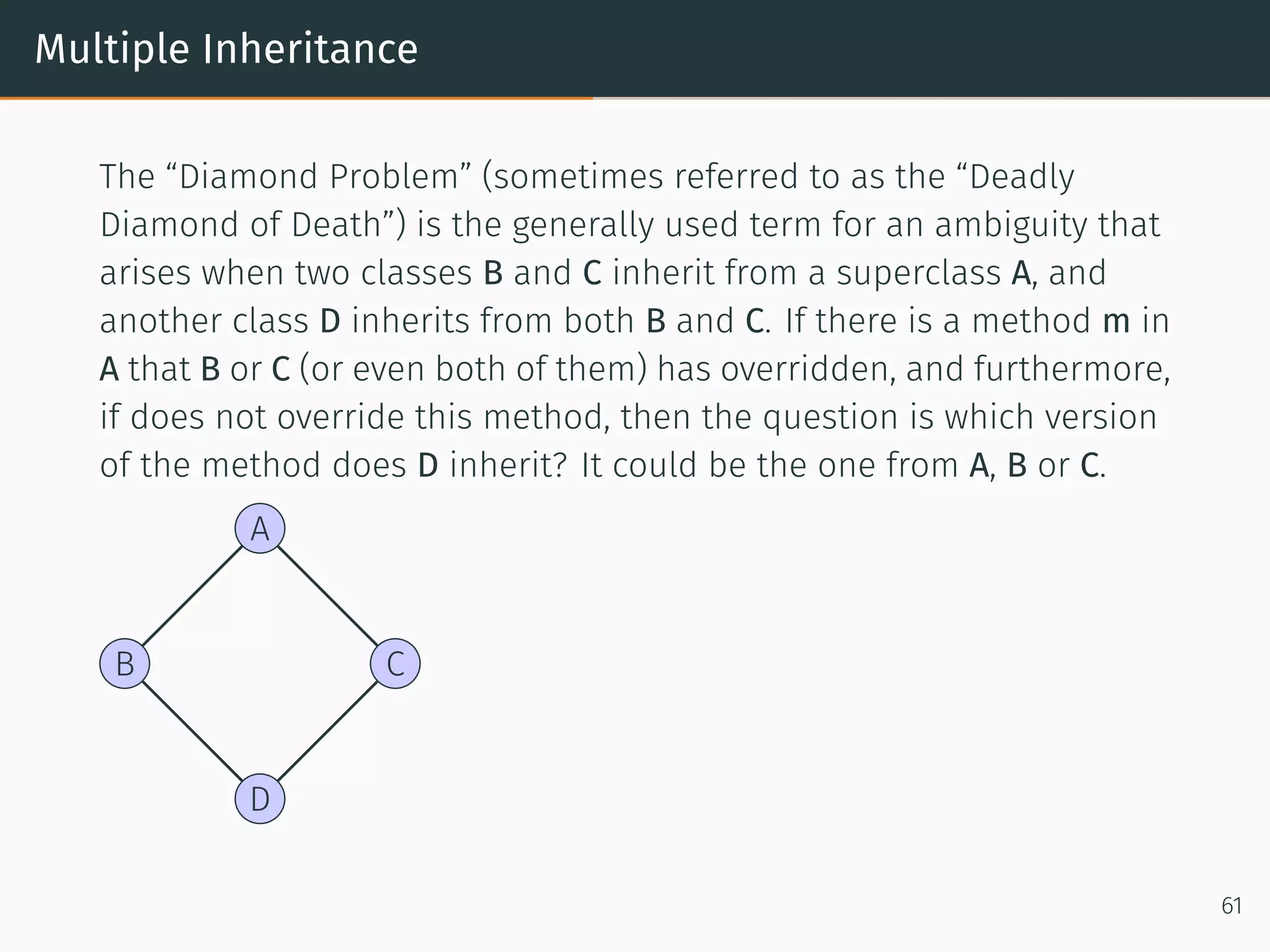
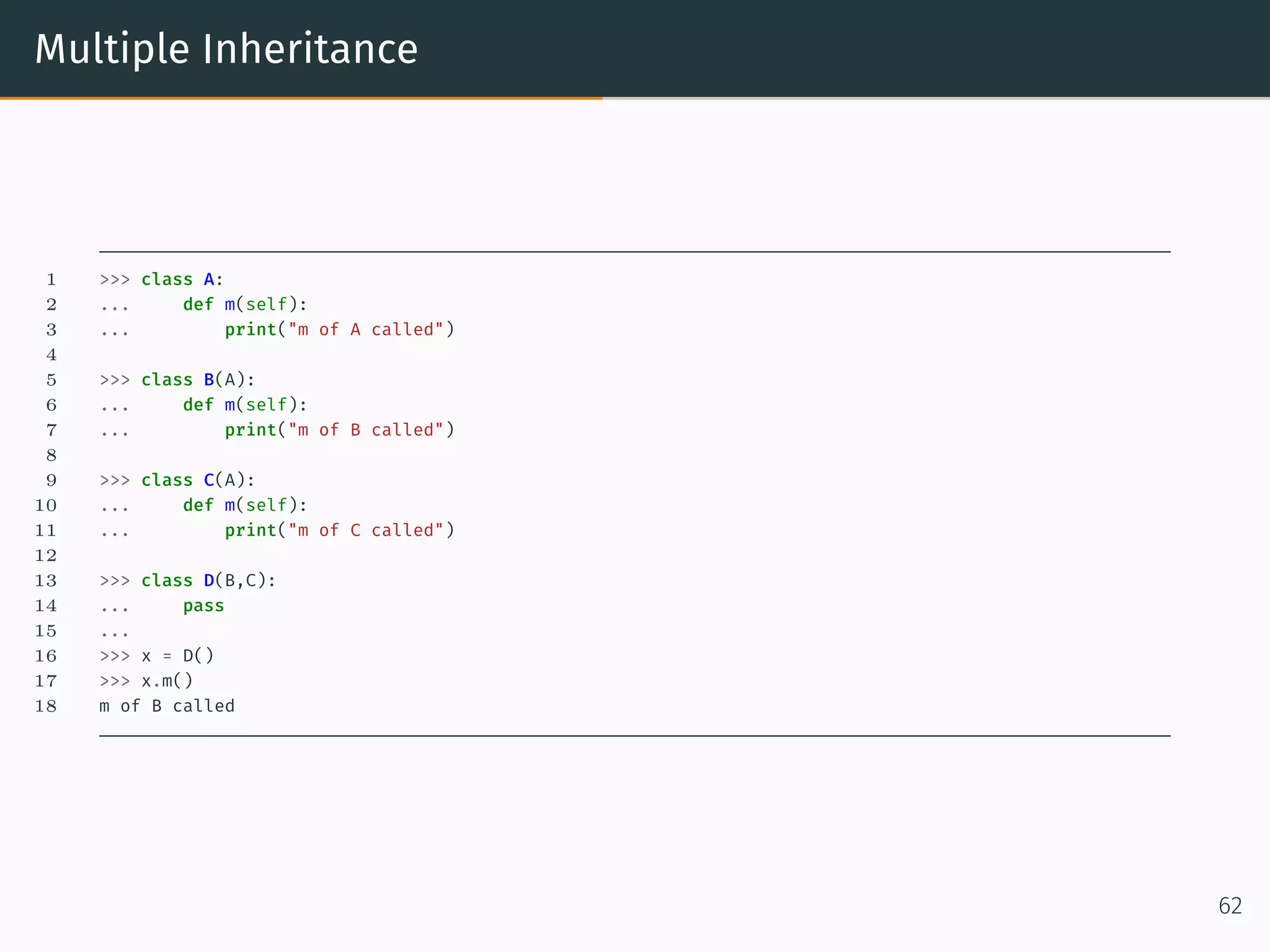
Multiple Inheritance The “Diamond Problem” (sometimes referred to as the “Deadly Diamond of Death”) is the generally used term for an ambiguity that arises when two classes B and C inherit from a superclass A, and another class D inherits from both B and C. If there is a method m in A that B or C (or even both of them) has overridden, and furthermore, if does not override this method, then the question is which version of the method does D inherit? It could be the one from A, B or C. A B C D 61
Multiple Inheritance 1 >>> class A: 2 ... def m(self): 3 ... print("m of A called") 4 5 >>> class B(A): 6 ... def m(self): 7 ... print("m of B called") 8 9 >>> class C(A): 10 ... def m(self): 11 ... print("m of C called") 12 13 >>> class D(B,C): 14 ... pass 15 ... 16 >>> x = D() 17 >>> x.m() 18 m of B called 62
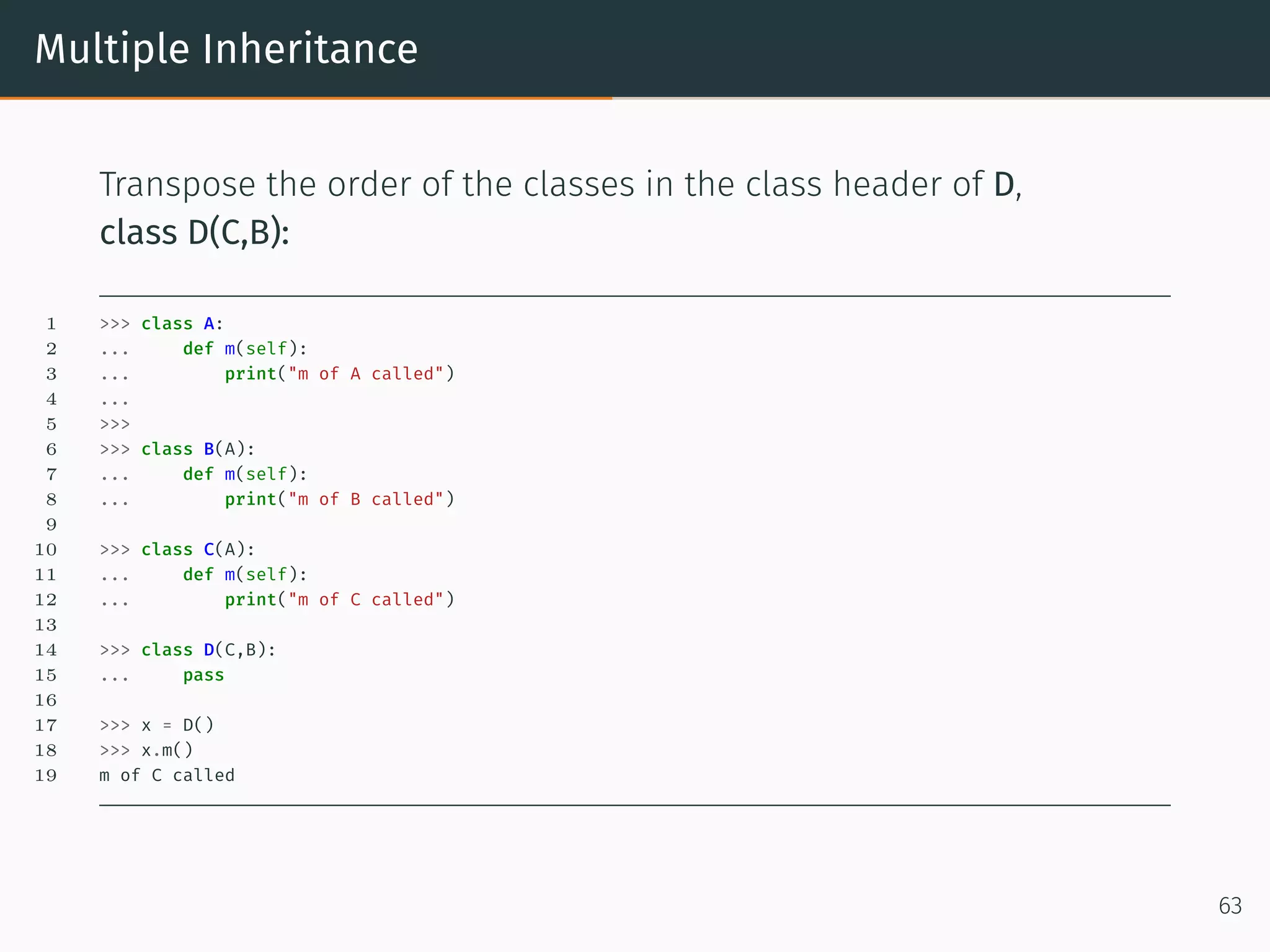
Multiple Inheritance Transpose the order of the classes in the class header of D, class D(C,B): 1 >>> class A: 2 ... def m(self): 3 ... print("m of A called") 4 ... 5 >>> 6 >>> class B(A): 7 ... def m(self): 8 ... print("m of B called") 9 10 >>> class C(A): 11 ... def m(self): 12 ... print("m of C called") 13 14 >>> class D(C,B): 15 ... pass 16 17 >>> x = D() 18 >>> x.m() 19 m of C called 63
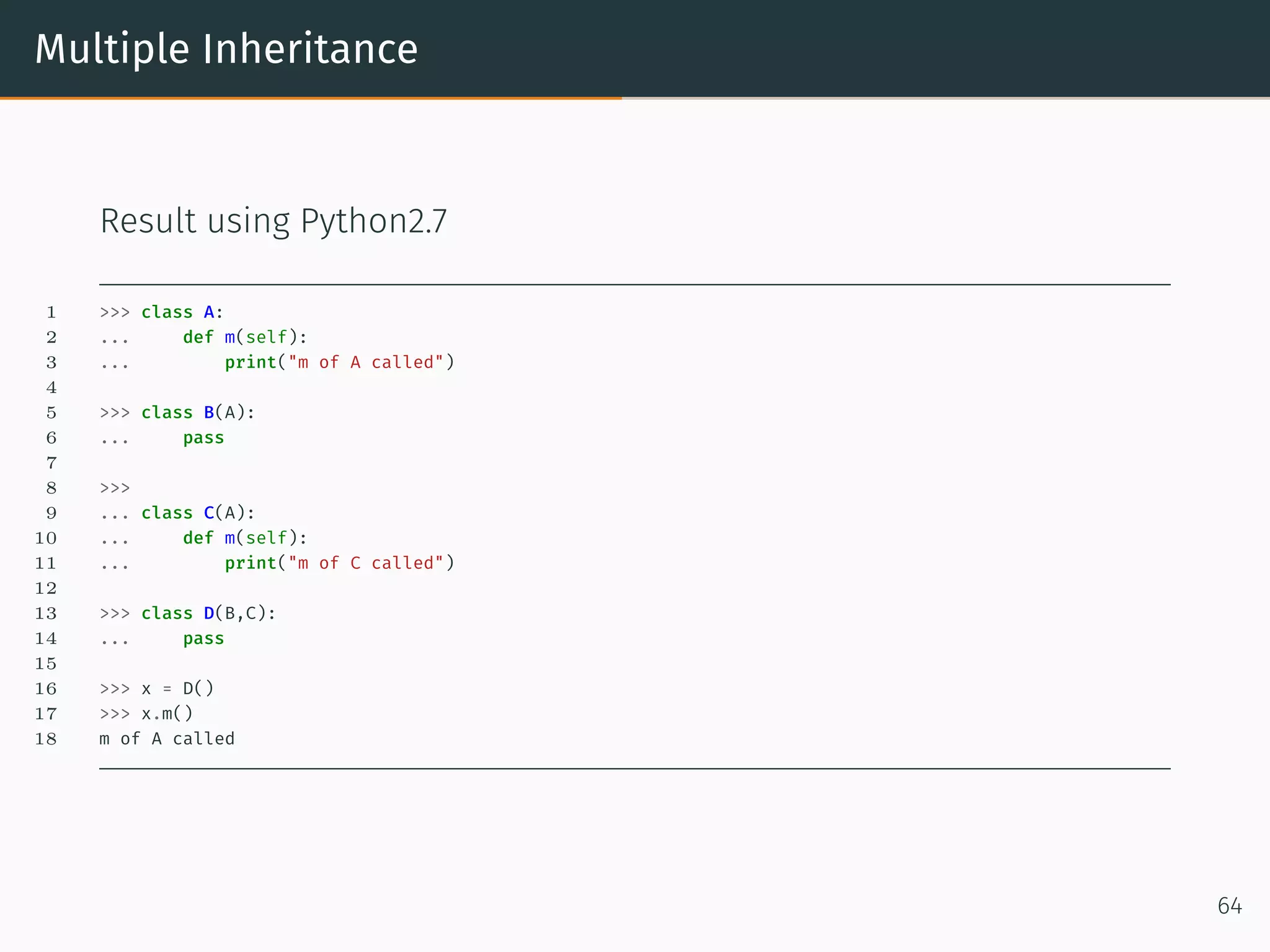
Multiple Inheritance Result using Python2.7 1 >>> class A: 2 ... def m(self): 3 ... print("m of A called") 4 5 >>> class B(A): 6 ... pass 7 8 >>> 9 ... class C(A): 10 ... def m(self): 11 ... print("m of C called") 12 13 >>> class D(B,C): 14 ... pass 15 16 >>> x = D() 17 >>> x.m() 18 m of A called 64
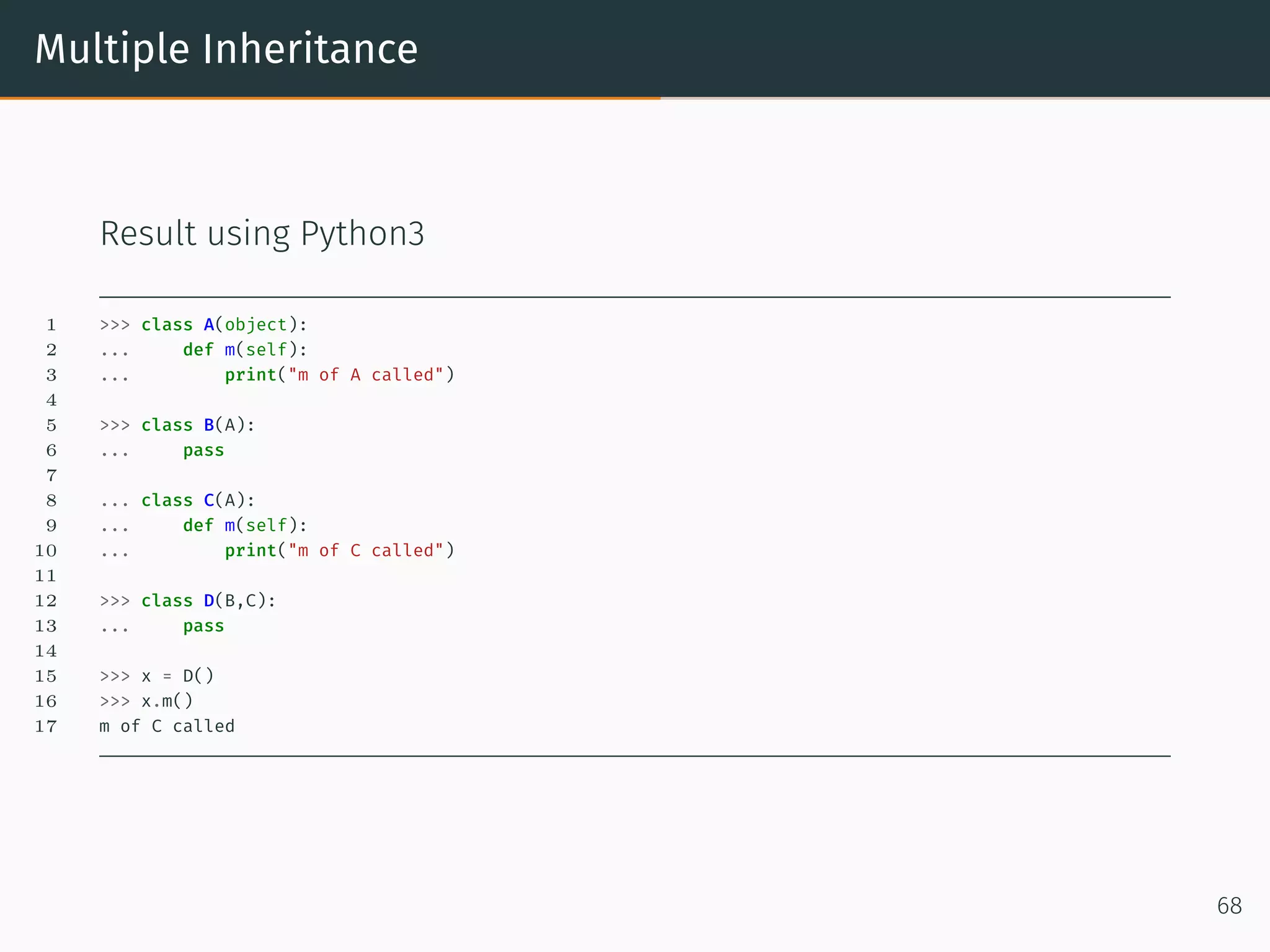
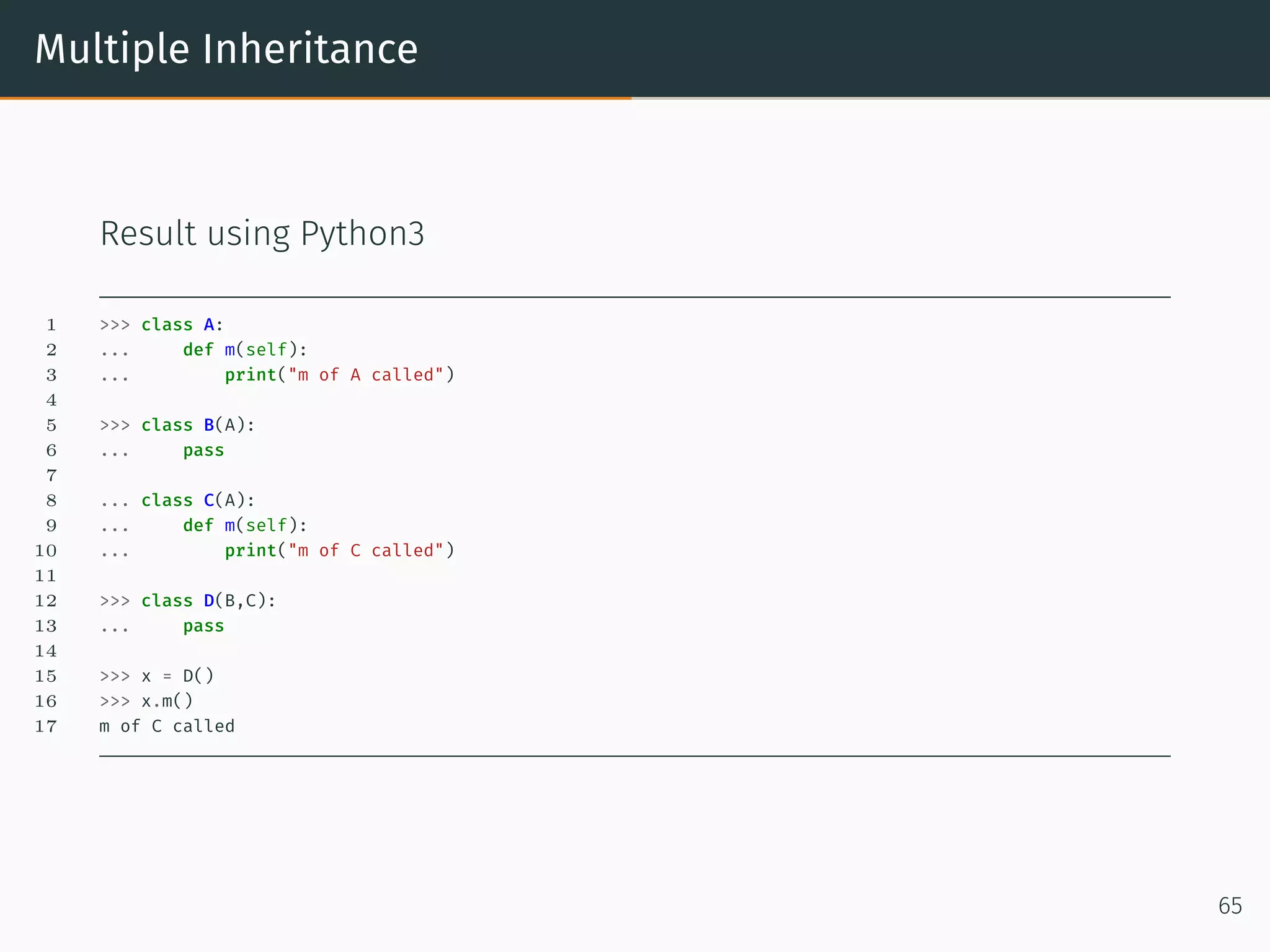
Multiple Inheritance Result using Python3 1 >>> class A: 2 ... def m(self): 3 ... print("m of A called") 4 5 >>> class B(A): 6 ... pass 7 8 ... class C(A): 9 ... def m(self): 10 ... print("m of C called") 11 12 >>> class D(B,C): 13 ... pass 14 15 >>> x = D() 16 >>> x.m() 17 m of C called 65
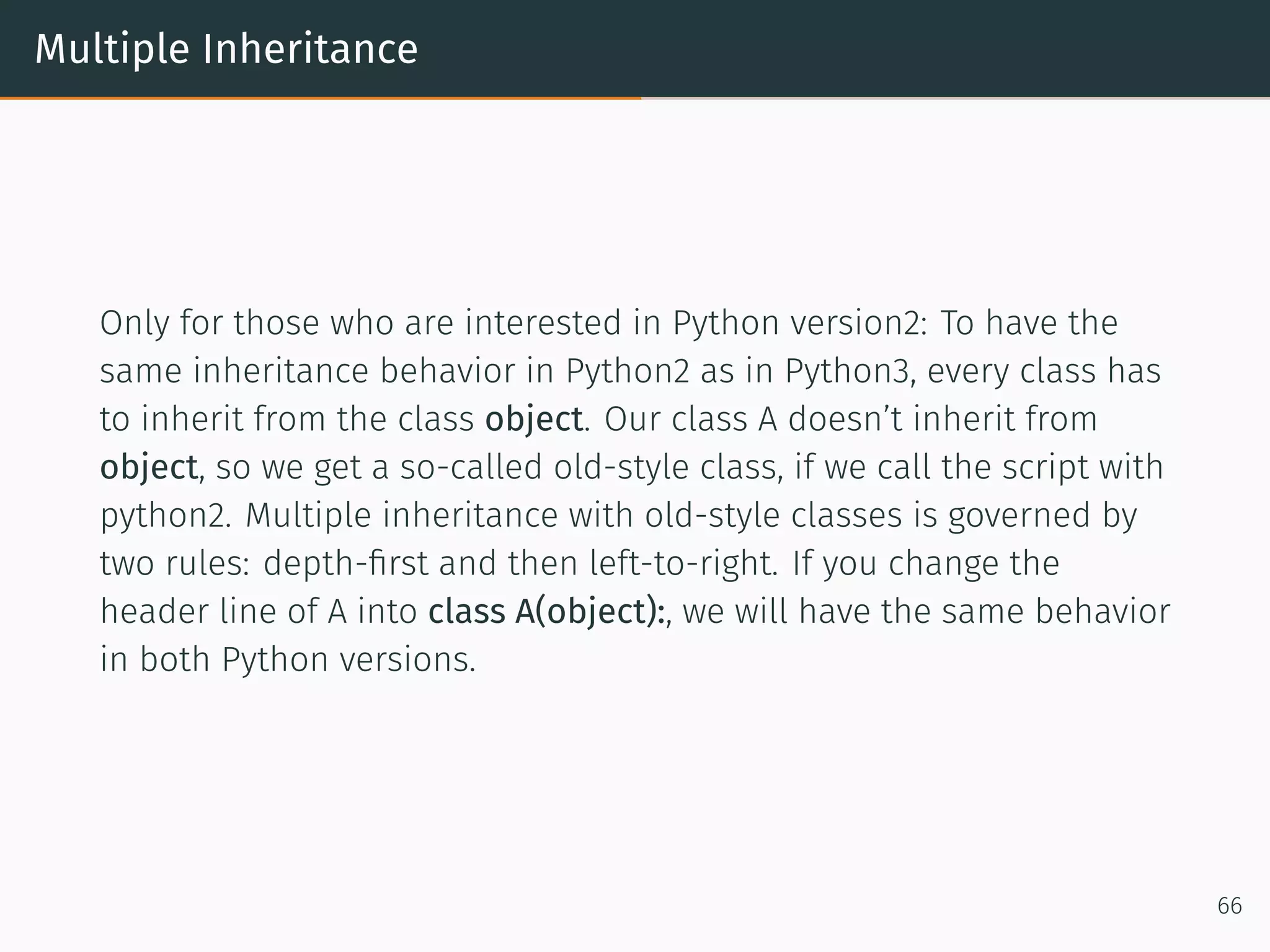
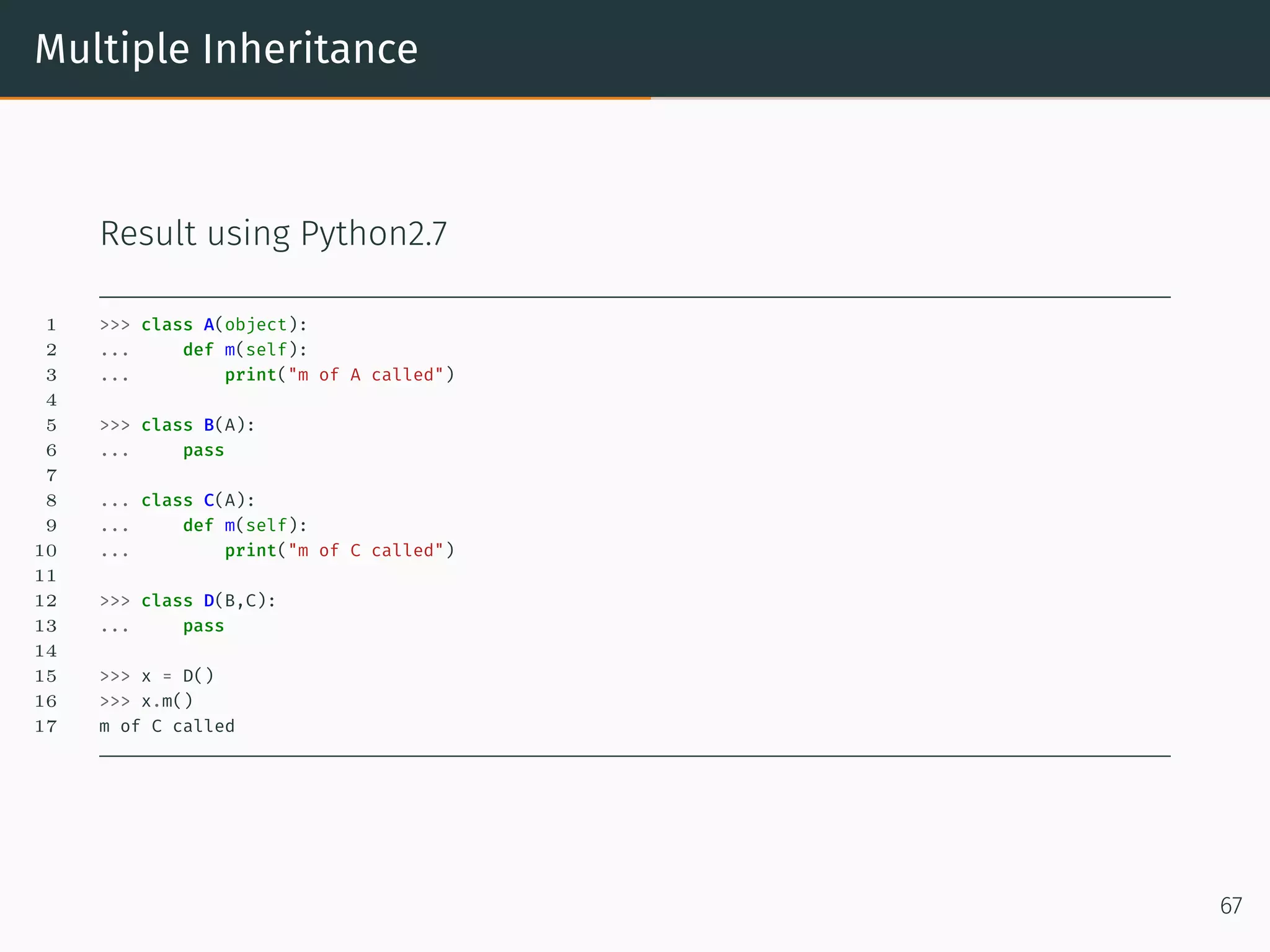
Multiple Inheritance Only for those who are interested in Python version2: To have the same inheritance behavior in Python2 as in Python3, every class has to inherit from the class object. Our class A doesn’t inherit from object, so we get a so-called old-style class, if we call the script with python2. Multiple inheritance with old-style classes is governed by two rules: depth-first and then left-to-right. If you change the header line of A into class A(object):, we will have the same behavior in both Python versions. 66
Multiple Inheritance Result using Python2.7 1 >>> class A(object): 2 ... def m(self): 3 ... print("m of A called") 4 5 >>> class B(A): 6 ... pass 7 8 ... class C(A): 9 ... def m(self): 10 ... print("m of C called") 11 12 >>> class D(B,C): 13 ... pass 14 15 >>> x = D() 16 >>> x.m() 17 m of C called 67
Multiple Inheritance Result using Python3 1 >>> class A(object): 2 ... def m(self): 3 ... print("m of A called") 4 5 >>> class B(A): 6 ... pass 7 8 ... class C(A): 9 ... def m(self): 10 ... print("m of C called") 11 12 >>> class D(B,C): 13 ... pass 14 15 >>> x = D() 16 >>> x.m() 17 m of C called 68
Method Resolution Order
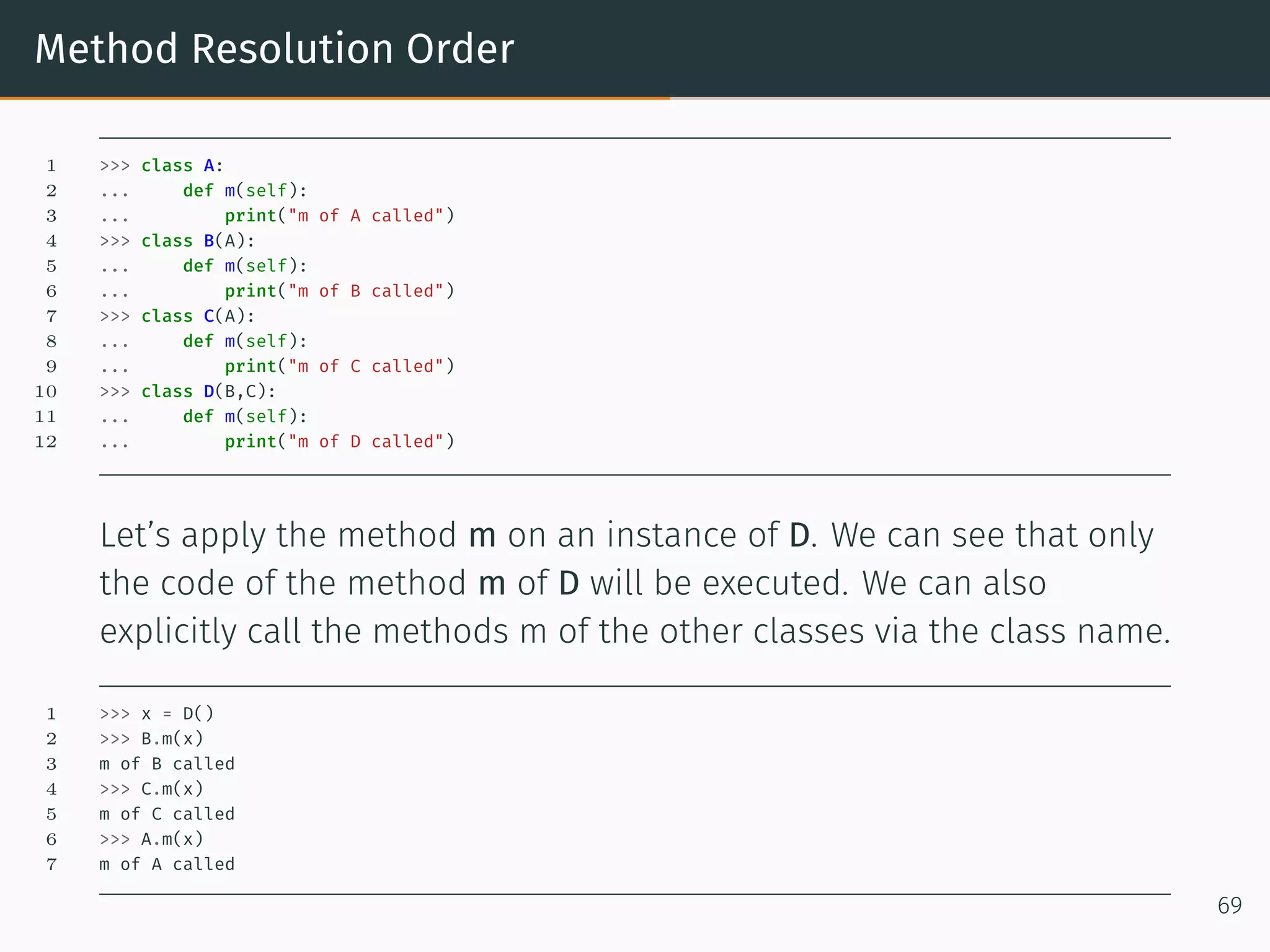
Method Resolution Order 1 >>> class A: 2 ... def m(self): 3 ... print("m of A called") 4 >>> class B(A): 5 ... def m(self): 6 ... print("m of B called") 7 >>> class C(A): 8 ... def m(self): 9 ... print("m of C called") 10 >>> class D(B,C): 11 ... def m(self): 12 ... print("m of D called") Let’s apply the method m on an instance of D. We can see that only the code of the method m of D will be executed. We can also explicitly call the methods m of the other classes via the class name. 1 >>> x = D() 2 >>> B.m(x) 3 m of B called 4 >>> C.m(x) 5 m of C called 6 >>> A.m(x) 7 m of A called 69
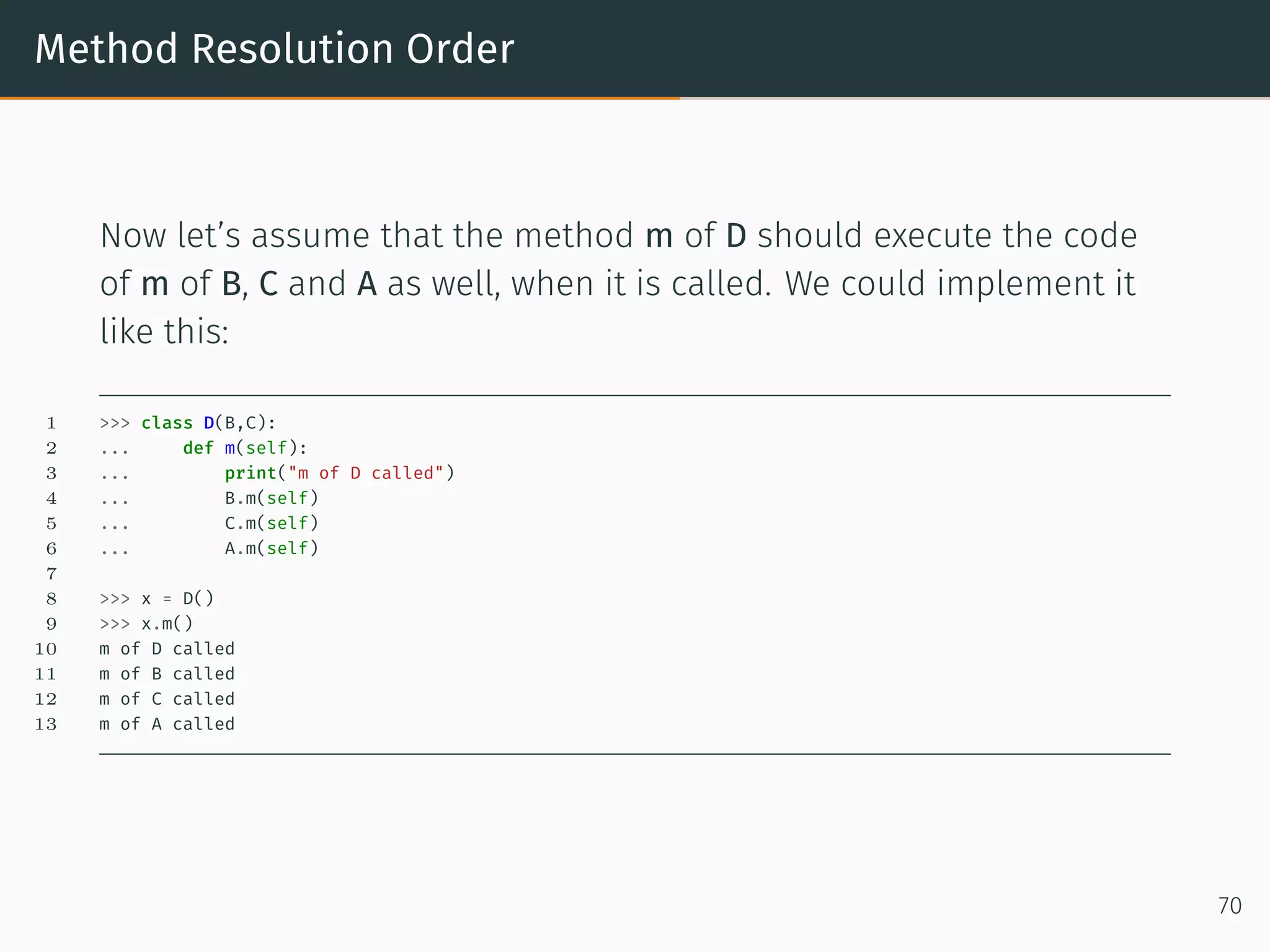
Method Resolution Order Now let’s assume that the method m of D should execute the code of m of B, C and A as well, when it is called. We could implement it like this: 1 >>> class D(B,C): 2 ... def m(self): 3 ... print("m of D called") 4 ... B.m(self) 5 ... C.m(self) 6 ... A.m(self) 7 8 >>> x = D() 9 >>> x.m() 10 m of D called 11 m of B called 12 m of C called 13 m of A called 70
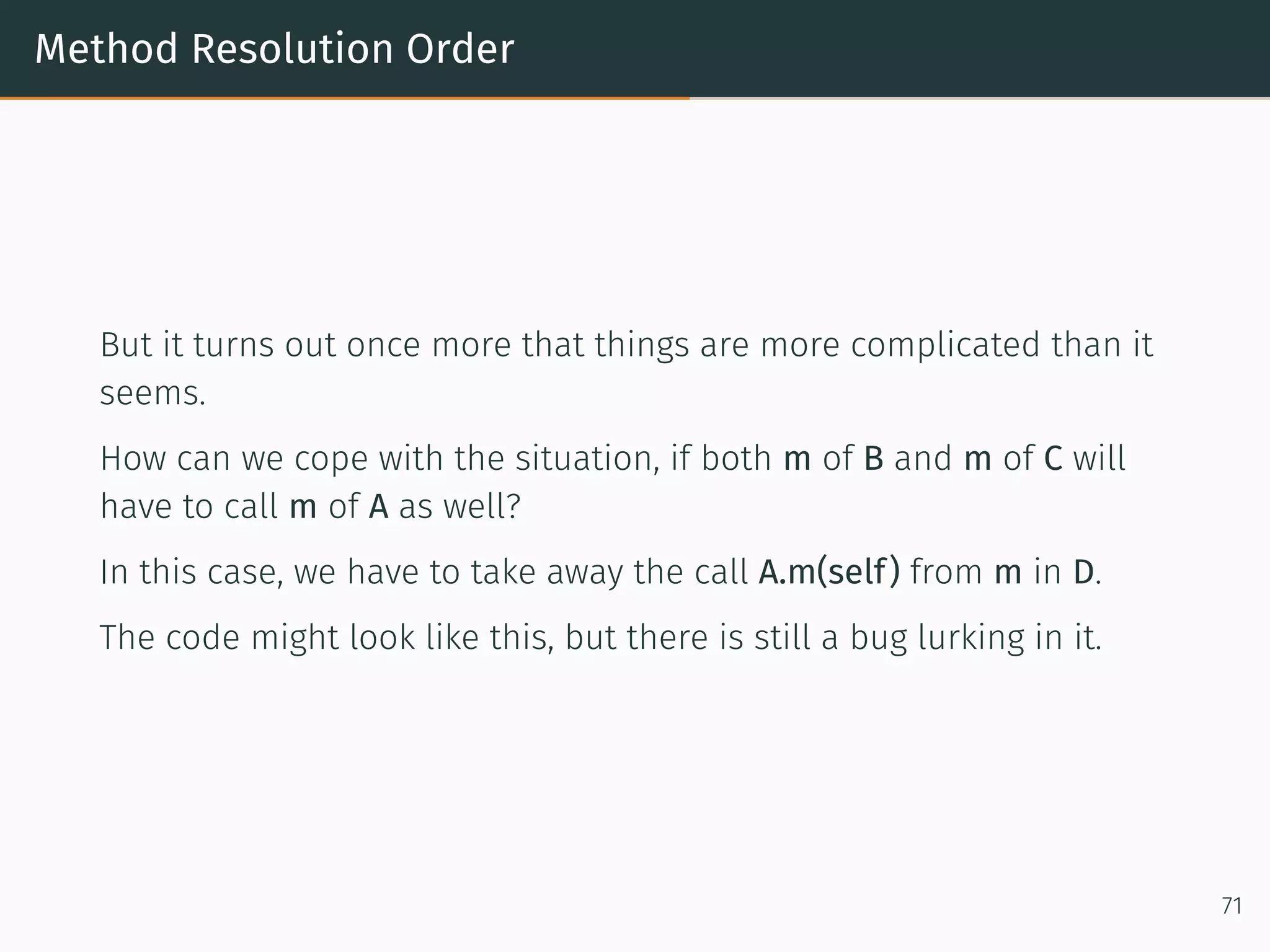
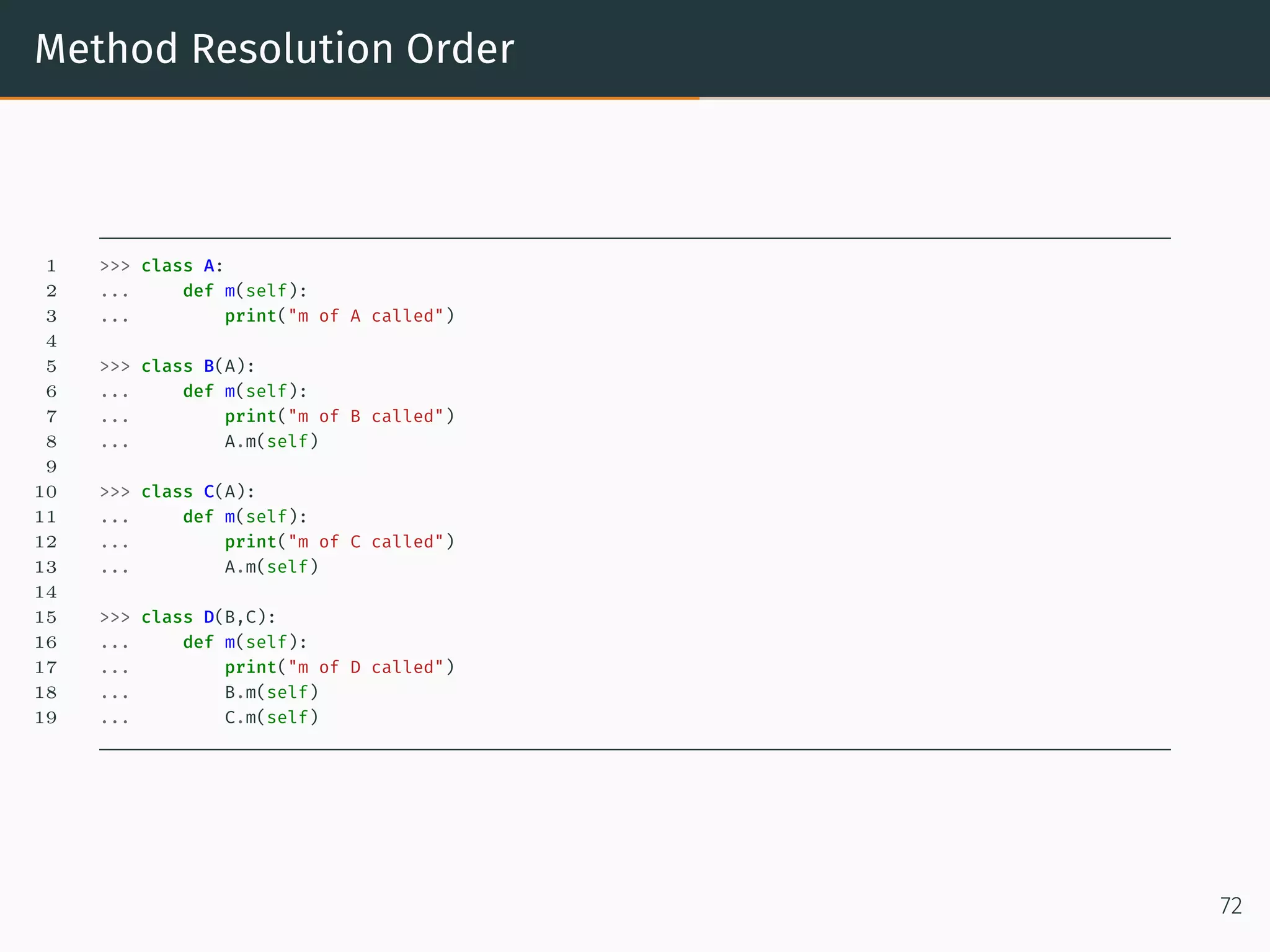
Method Resolution Order But it turns out once more that things are more complicated than it seems. How can we cope with the situation, if both m of B and m of C will have to call m of A as well? In this case, we have to take away the call A.m(self) from m in D. The code might look like this, but there is still a bug lurking in it. 71
Method Resolution Order 1 >>> class A: 2 ... def m(self): 3 ... print("m of A called") 4 5 >>> class B(A): 6 ... def m(self): 7 ... print("m of B called") 8 ... A.m(self) 9 10 >>> class C(A): 11 ... def m(self): 12 ... print("m of C called") 13 ... A.m(self) 14 15 >>> class D(B,C): 16 ... def m(self): 17 ... print("m of D called") 18 ... B.m(self) 19 ... C.m(self) 72
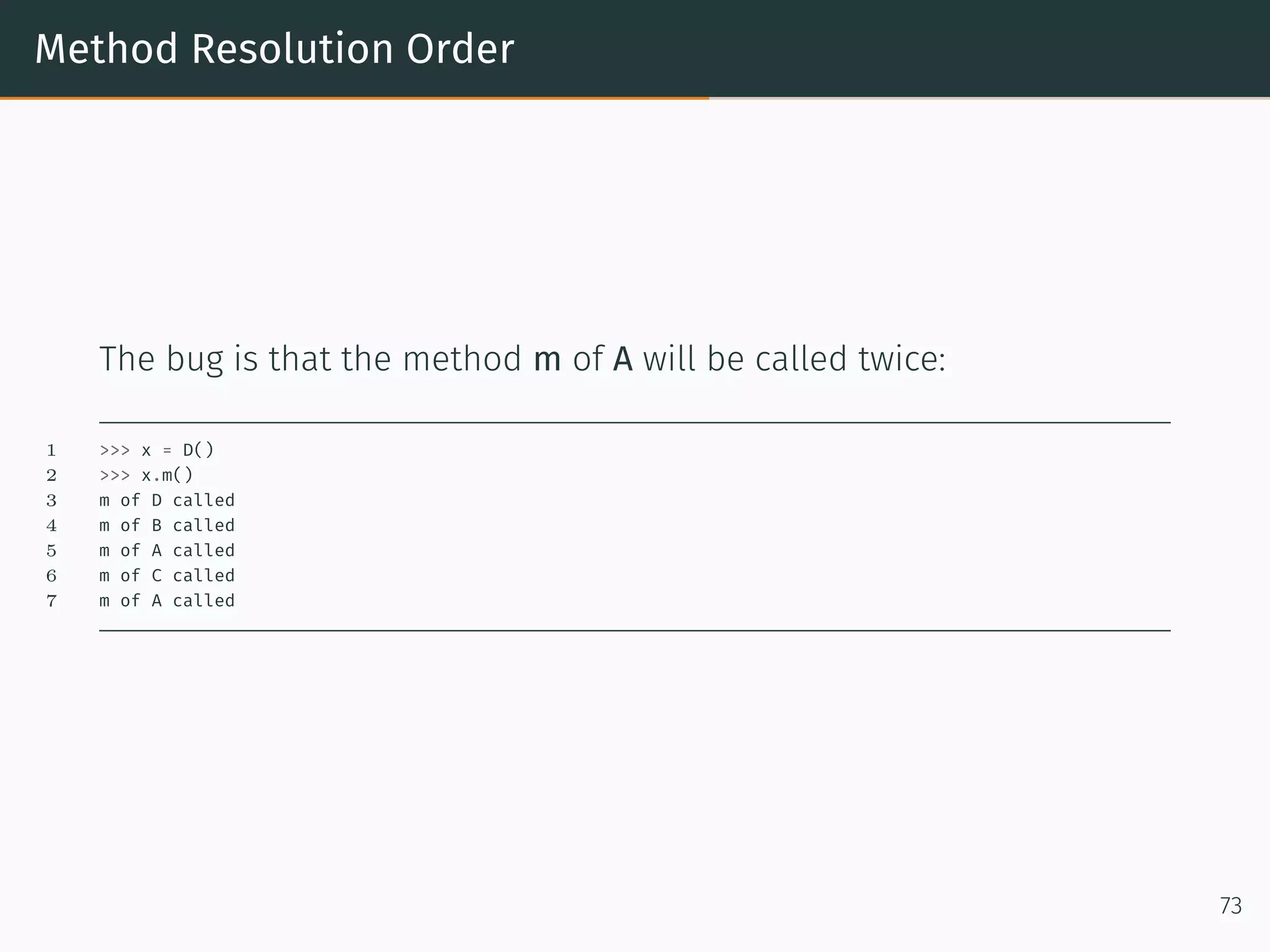
Method Resolution Order The bug is that the method m of A will be called twice: 1 >>> x = D() 2 >>> x.m() 3 m of D called 4 m of B called 5 m of A called 6 m of C called 7 m of A called 73
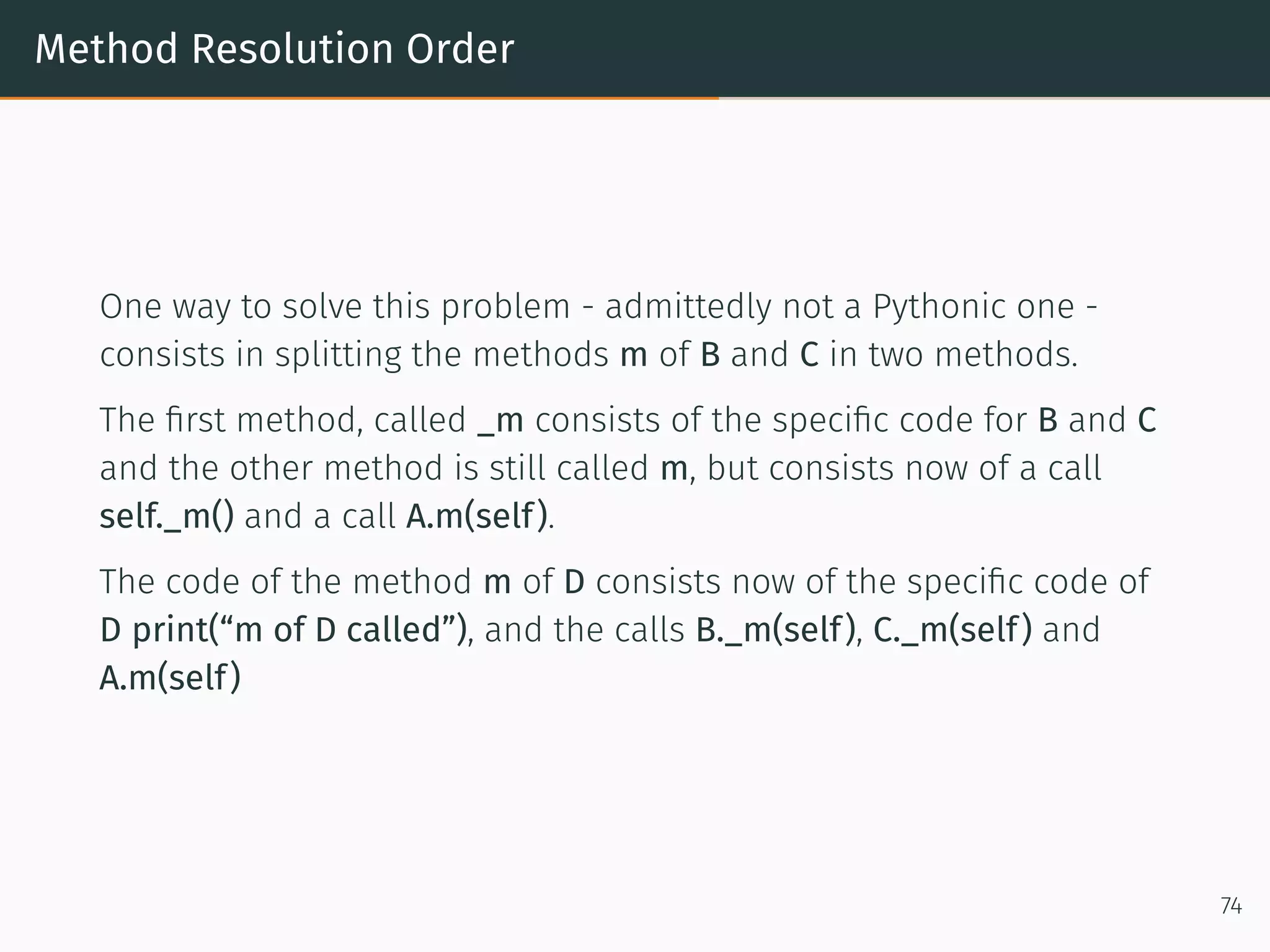
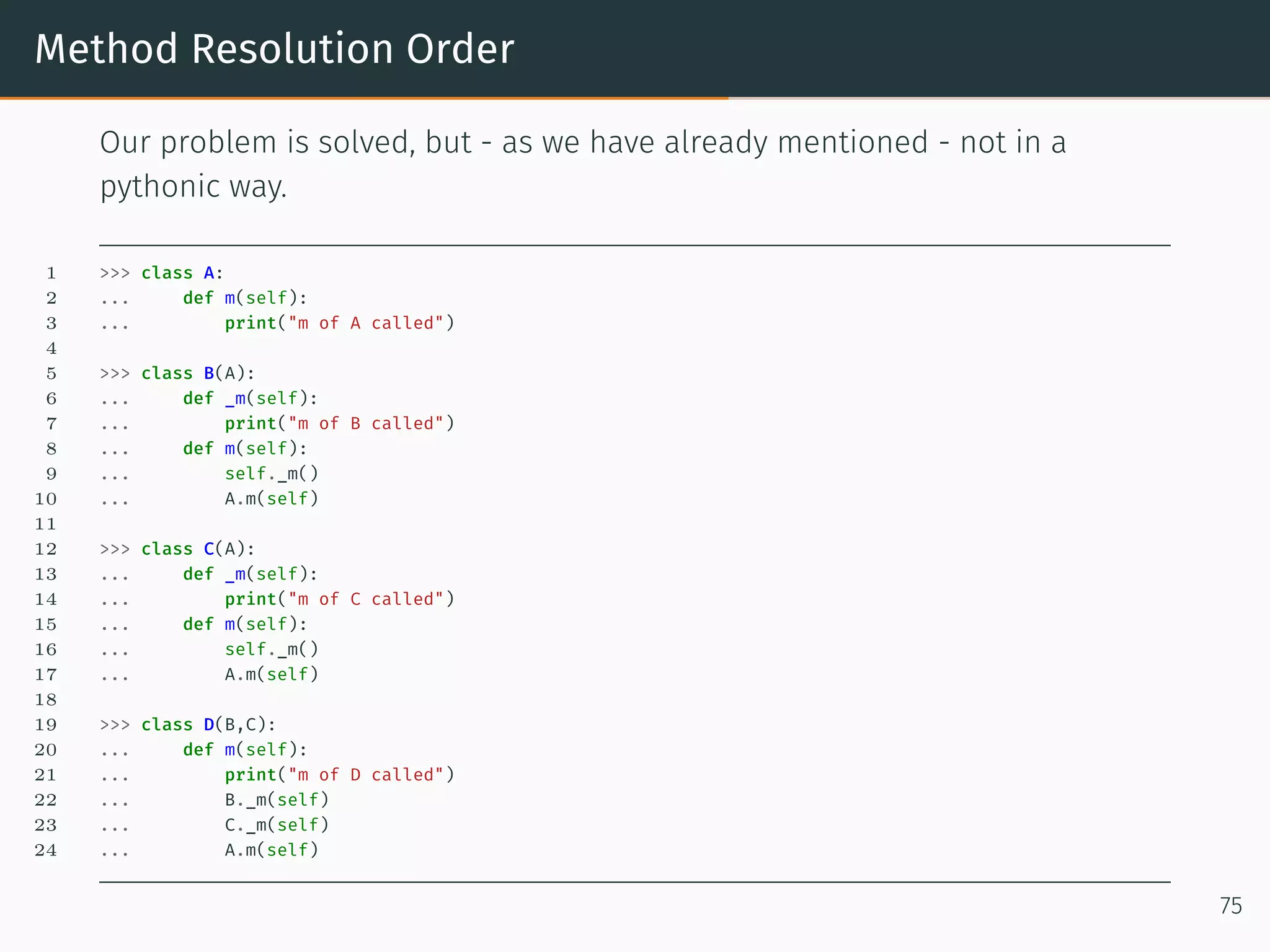
Method Resolution Order One way to solve this problem - admittedly not a Pythonic one - consists in splitting the methods m of B and C in two methods. The first method, called _m consists of the specific code for B and C and the other method is still called m, but consists now of a call self._m() and a call A.m(self). The code of the method m of D consists now of the specific code of D print(“m of D called”), and the calls B._m(self), C._m(self) and A.m(self) 74
Method Resolution Order Our problem is solved, but - as we have already mentioned - not in a pythonic way. 1 >>> class A: 2 ... def m(self): 3 ... print("m of A called") 4 5 >>> class B(A): 6 ... def _m(self): 7 ... print("m of B called") 8 ... def m(self): 9 ... self._m() 10 ... A.m(self) 11 12 >>> class C(A): 13 ... def _m(self): 14 ... print("m of C called") 15 ... def m(self): 16 ... self._m() 17 ... A.m(self) 18 19 >>> class D(B,C): 20 ... def m(self): 21 ... print("m of D called") 22 ... B._m(self) 23 ... C._m(self) 24 ... A.m(self) 75
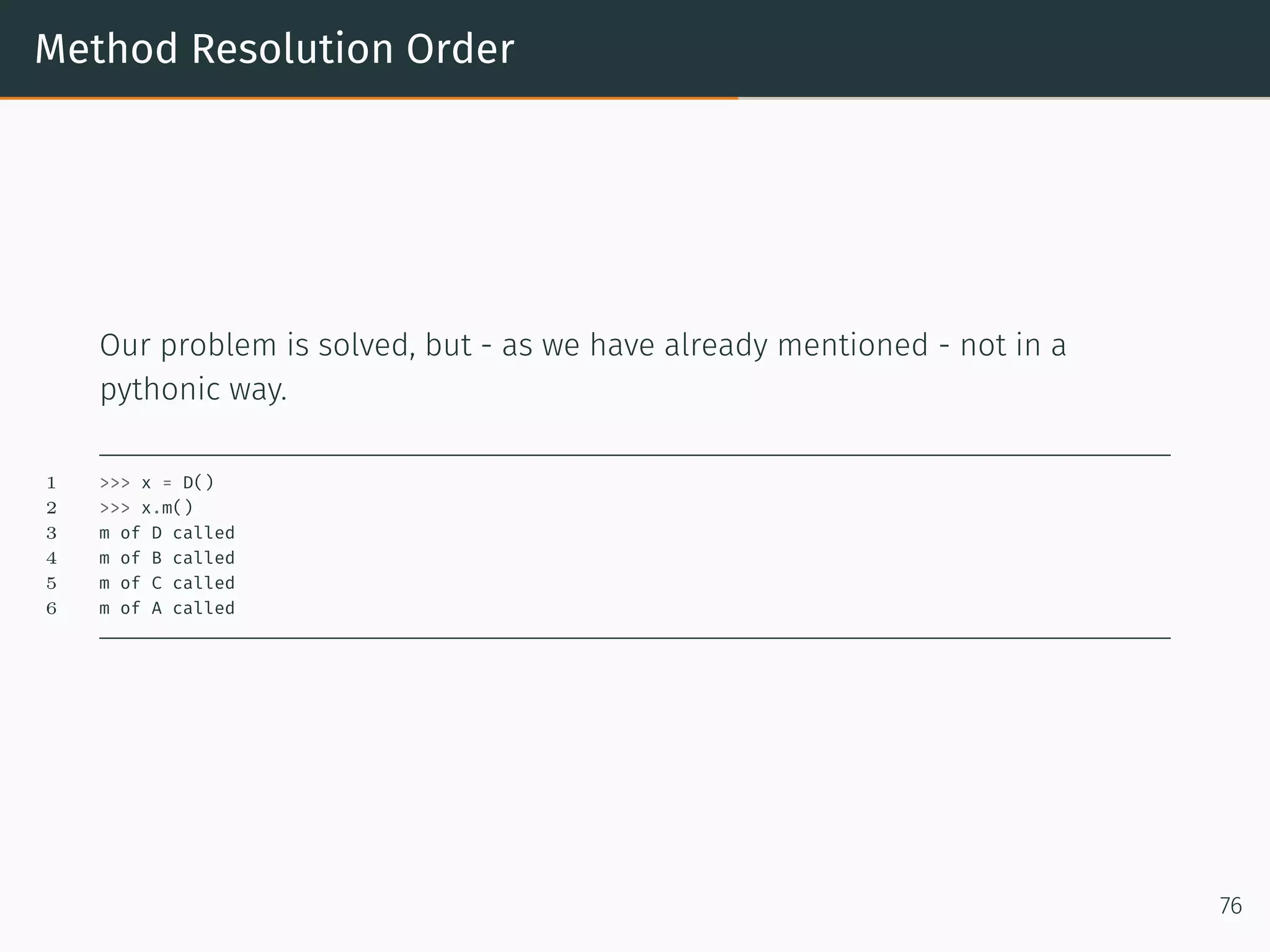
Method Resolution Order Our problem is solved, but - as we have already mentioned - not in a pythonic way. 1 >>> x = D() 2 >>> x.m() 3 m of D called 4 m of B called 5 m of C called 6 m of A called 76
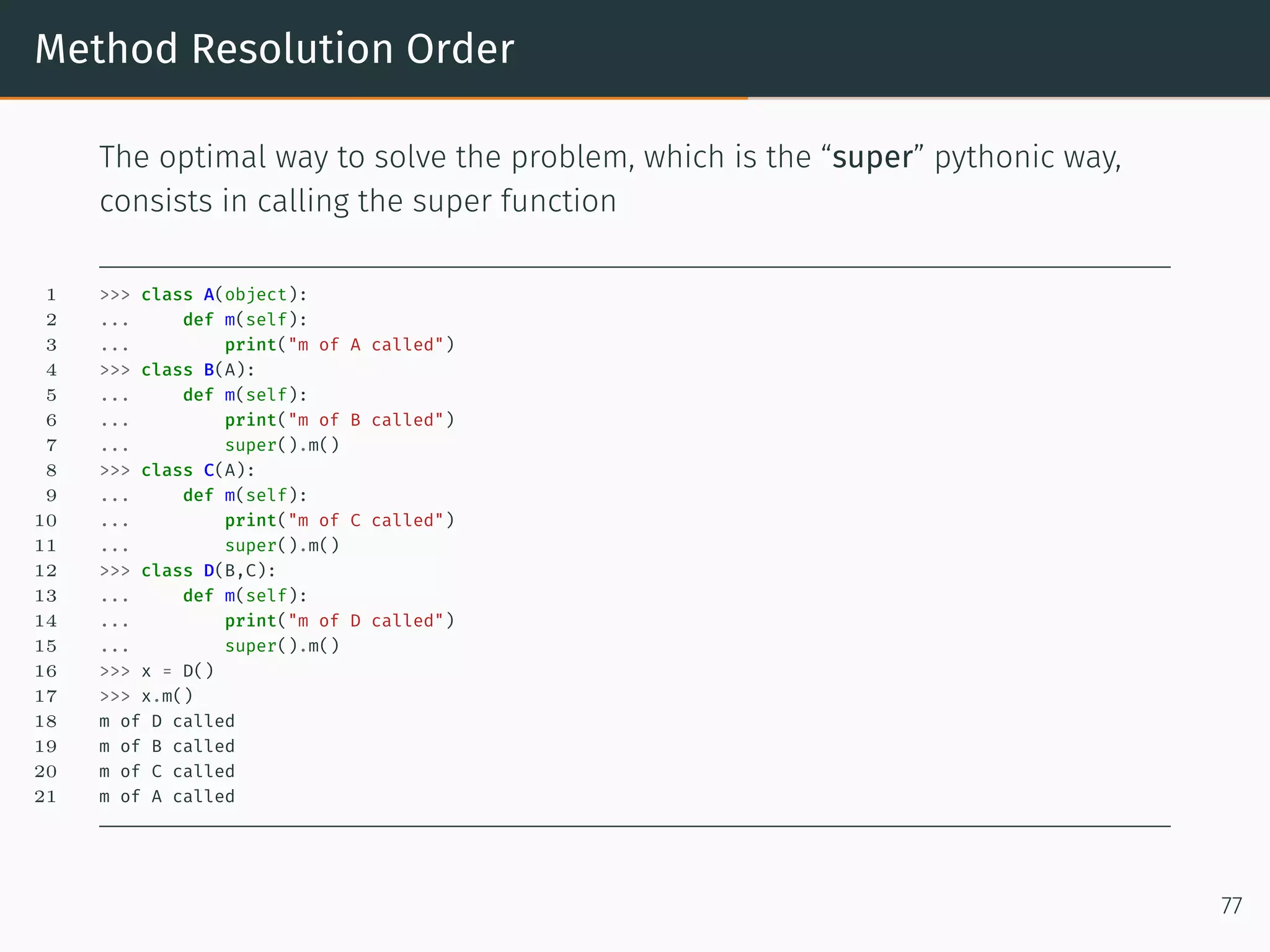
Method Resolution Order The optimal way to solve the problem, which is the “super” pythonic way, consists in calling the super function 1 >>> class A(object): 2 ... def m(self): 3 ... print("m of A called") 4 >>> class B(A): 5 ... def m(self): 6 ... print("m of B called") 7 ... super().m() 8 >>> class C(A): 9 ... def m(self): 10 ... print("m of C called") 11 ... super().m() 12 >>> class D(B,C): 13 ... def m(self): 14 ... print("m of D called") 15 ... super().m() 16 >>> x = D() 17 >>> x.m() 18 m of D called 19 m of B called 20 m of C called 21 m of A called 77
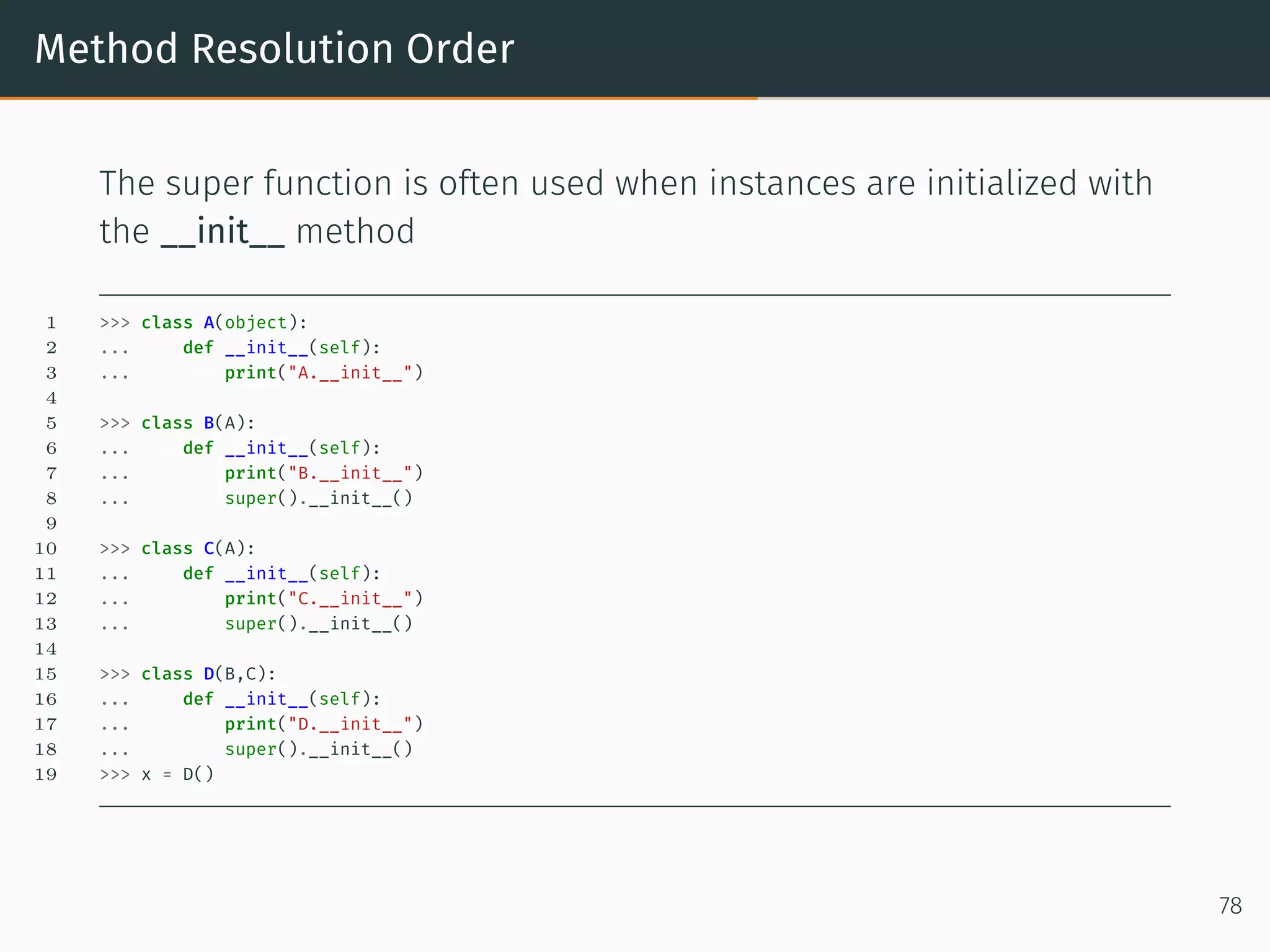
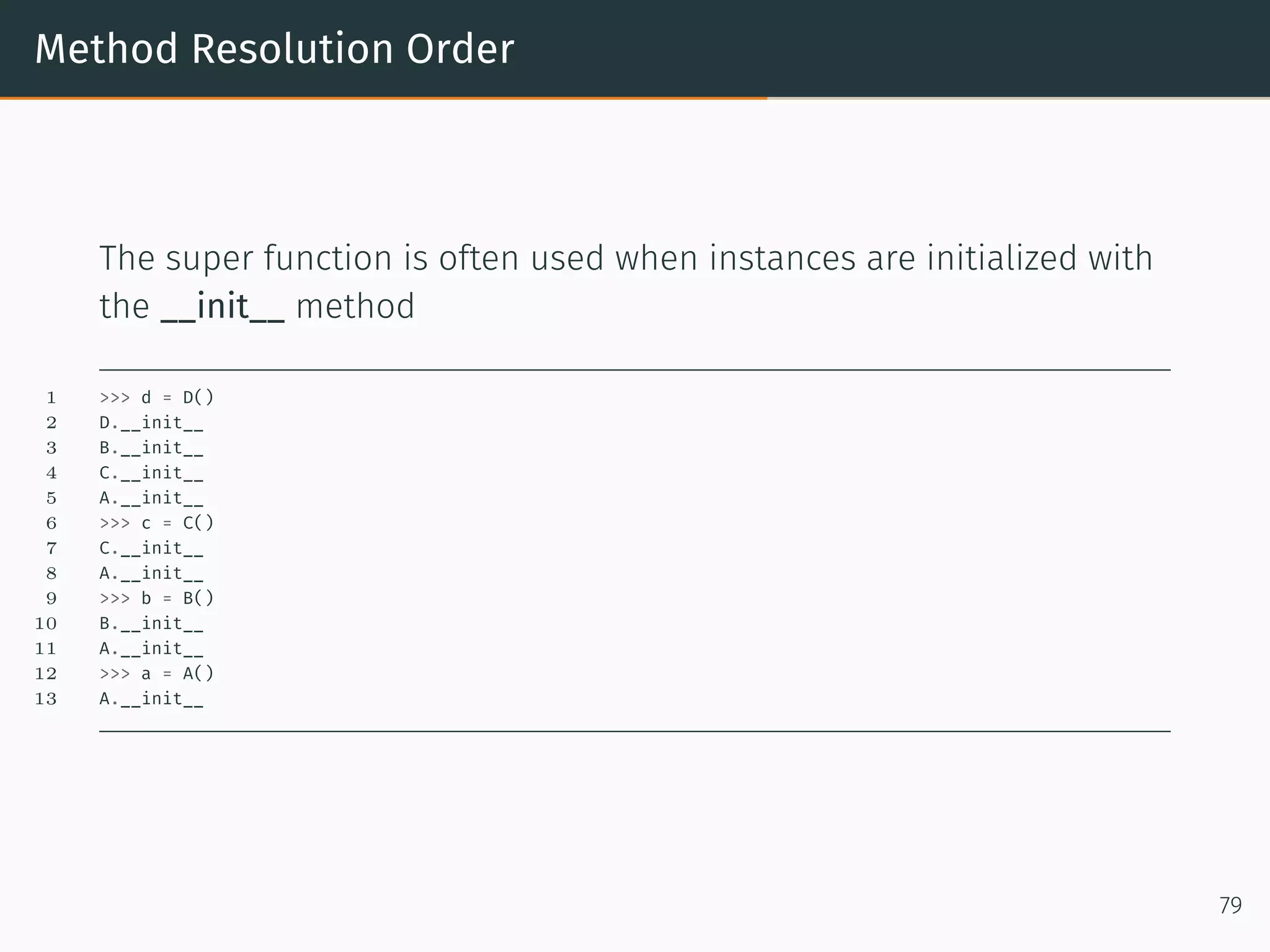
Method Resolution Order The super function is often used when instances are initialized with the __init__ method 1 >>> class A(object): 2 ... def __init__(self): 3 ... print("A.__init__") 4 5 >>> class B(A): 6 ... def __init__(self): 7 ... print("B.__init__") 8 ... super().__init__() 9 10 >>> class C(A): 11 ... def __init__(self): 12 ... print("C.__init__") 13 ... super().__init__() 14 15 >>> class D(B,C): 16 ... def __init__(self): 17 ... print("D.__init__") 18 ... super().__init__() 19 >>> x = D() 78
Method Resolution Order The super function is often used when instances are initialized with the __init__ method 1 >>> d = D() 2 D.__init__ 3 B.__init__ 4 C.__init__ 5 A.__init__ 6 >>> c = C() 7 C.__init__ 8 A.__init__ 9 >>> b = B() 10 B.__init__ 11 A.__init__ 12 >>> a = A() 13 A.__init__ 79
Method Resolution Order The question arises how the super functions makes its decision. How does it decide which class has to be used? As we have already mentioned, it uses the so-called method resolution order(MRO). It is based on the “C3 superclass linearization” algorithm. This is called a linearization, because the tree structure is broken down into a linear order. The MRO method can be used to create this list 1 >>> D.mro() 2 [<class '__main__.D'>, <class '__main__.B'>, <class '__main__.C'>, <class '__main__.A'>, <class 'object'>] 3 >>> C.mro() 4 [<class '__main__.C'>, <class '__main__.A'>, <class 'object'>] 5 >>> B.mro() 6 [<class '__main__.B'>, <class '__main__.A'>, <class 'object'>] 7 >>> A.mro() 8 [<class '__main__.A'>, <class 'object'>] 80
Polymorphism
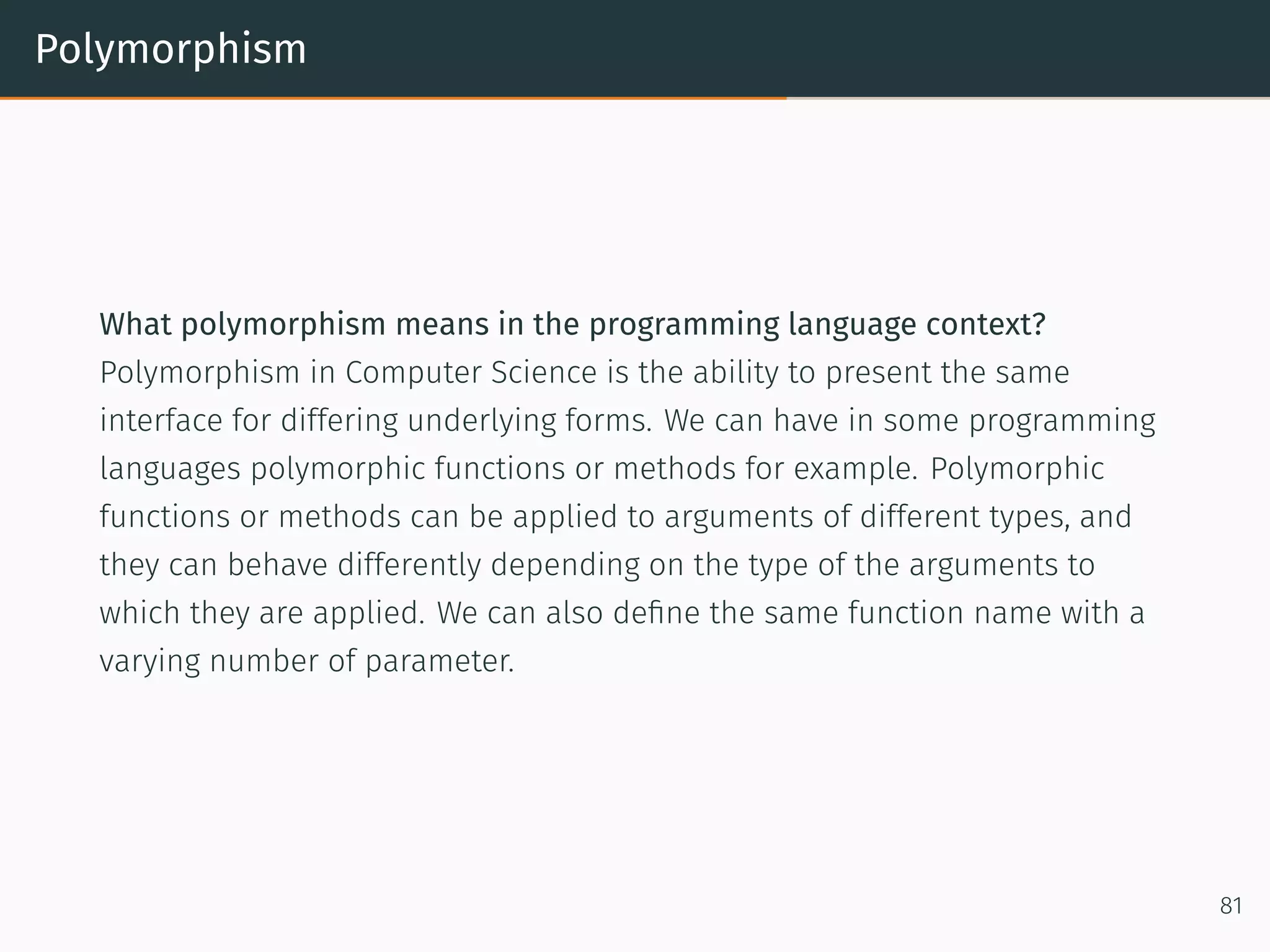
Polymorphism What polymorphism means in the programming language context? Polymorphism in Computer Science is the ability to present the same interface for differing underlying forms. We can have in some programming languages polymorphic functions or methods for example. Polymorphic functions or methods can be applied to arguments of different types, and they can behave differently depending on the type of the arguments to which they are applied. We can also define the same function name with a varying number of parameter. 81
Polymorphism 1 >>> def f(x, y): 2 ... print("values: ", x, y) 3 ... 4 >>> f(42, 43) 5 values: 42 43 6 >>> f(42, 43.7) 7 values: 42 43.7 8 >>> f(42.3, 43) 9 values: 42.3 43 10 >>> f(42.0, 43.9) 11 values: 42.0 43.9 12 >>> f([3,5,6],(3,5)) 13 values: [3, 5, 6] (3, 5) 82
Slots
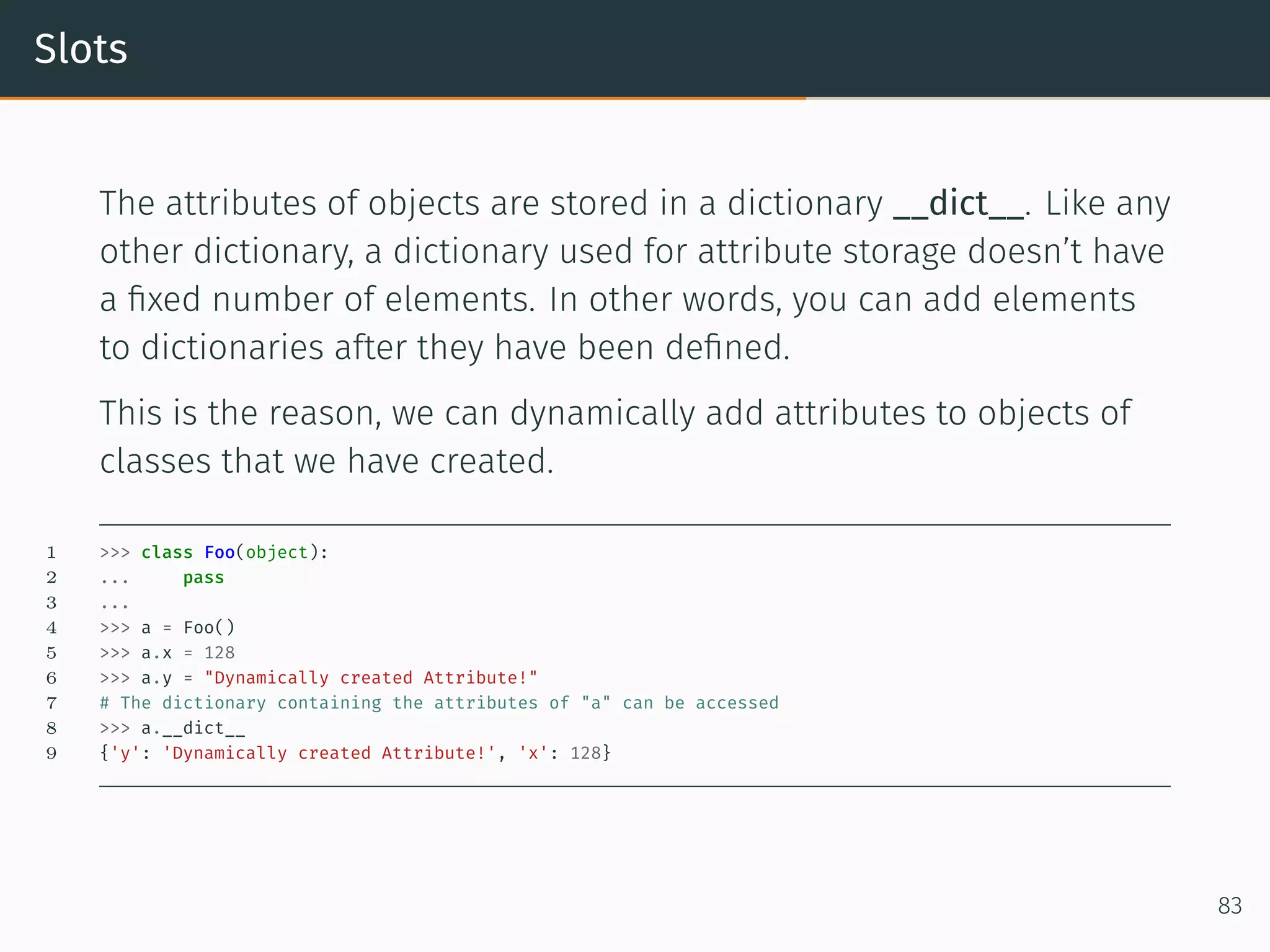
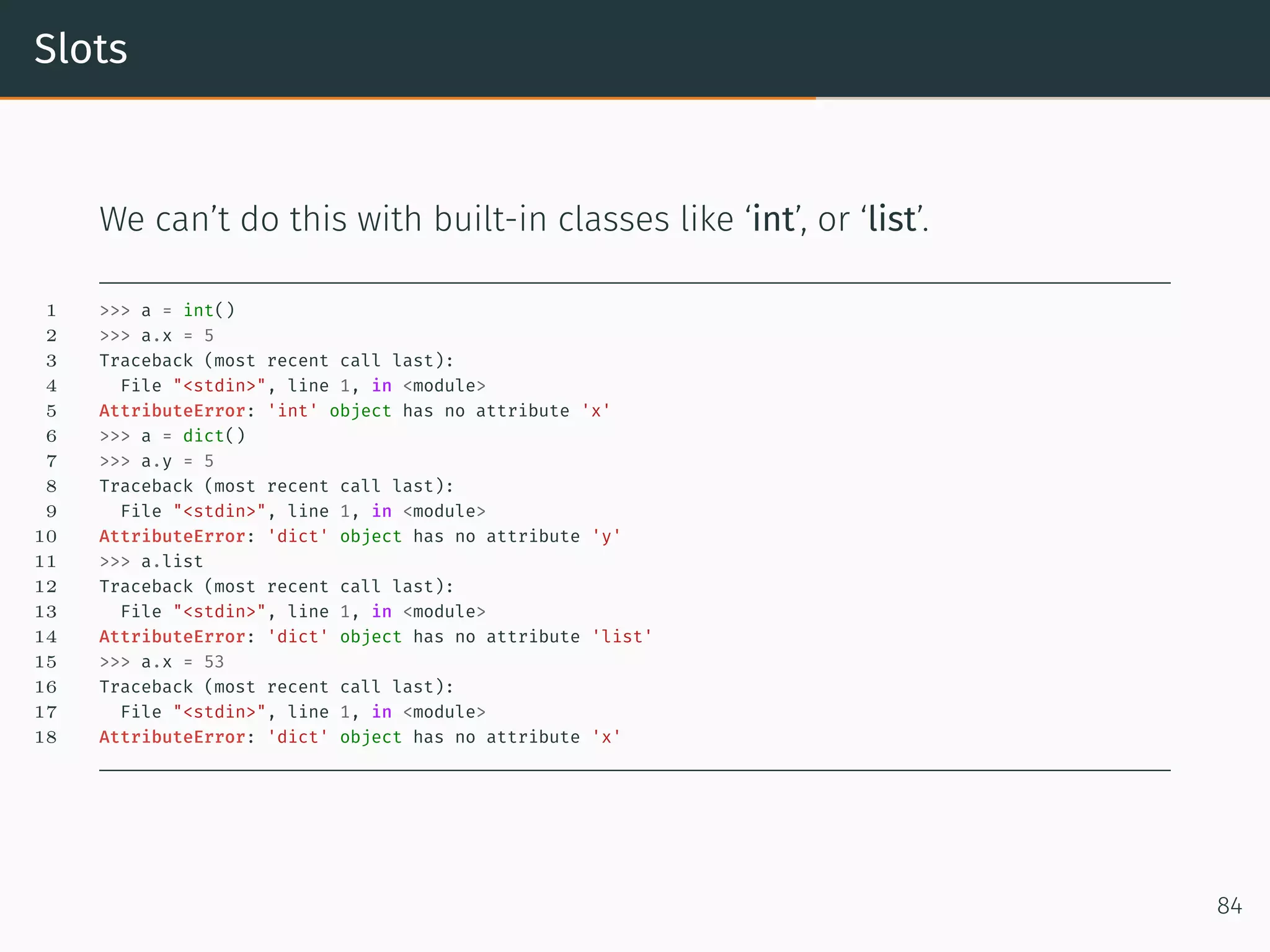
Slots The attributes of objects are stored in a dictionary __dict__. Like any other dictionary, a dictionary used for attribute storage doesn’t have a fixed number of elements. In other words, you can add elements to dictionaries after they have been defined. This is the reason, we can dynamically add attributes to objects of classes that we have created. 1 >>> class Foo(object): 2 ... pass 3 ... 4 >>> a = Foo() 5 >>> a.x = 128 6 >>> a.y = "Dynamically created Attribute!" 7 # The dictionary containing the attributes of "a" can be accessed 8 >>> a.__dict__ 9 {'y': 'Dynamically created Attribute!', 'x': 128} 83
Slots We can’t do this with built-in classes like ‘int’, or ‘list’. 1 >>> a = int() 2 >>> a.x = 5 3 Traceback (most recent call last): 4 File "<stdin>", line 1, in <module> 5 AttributeError: 'int' object has no attribute 'x' 6 >>> a = dict() 7 >>> a.y = 5 8 Traceback (most recent call last): 9 File "<stdin>", line 1, in <module> 10 AttributeError: 'dict' object has no attribute 'y' 11 >>> a.list 12 Traceback (most recent call last): 13 File "<stdin>", line 1, in <module> 14 AttributeError: 'dict' object has no attribute 'list' 15 >>> a.x = 53 16 Traceback (most recent call last): 17 File "<stdin>", line 1, in <module> 18 AttributeError: 'dict' object has no attribute 'x' 84
Slots Using a dictionary for attribute storage is very convenient, but it can mean a waste of space for objects, which have only a small amount of instance variables. The space consumption can become critical when creating large numbers of instances. Slots are a nice way to work around this space consumption problem. Instead of having a dynamic dict that allows adding attributes to objects dynamically, slots provide a static structure which prohibits additions after the creation of an instance. When we design a class, we can use slots to prevent the dynamic creation of attributes. To define slots, you have to define a list with the name __slots__. The list has to contain all the attributes, you want to use. We demonstrate this in the following class, in which the slots list contains only the name for an attribute “val”. 85
Slots We fail to create an attribute “new” 1 >>> class Foo(object): 2 ... __slots__ = ['val'] 3 ... def __init__(self, v): 4 ... self.val = v 5 6 >>> x = Foo(42) 7 >>> x.val 8 42 9 >>> x.new = "not possible" 10 Traceback (most recent call last): 11 File "<stdin>", line 1, in <module> 12 AttributeError: 'Foo' object has no attribute 'new' 86
Slots We mentioned in the beginning that slots are preventing a waste of space with objects. Since, Python 3.3 this advantage is not as impressive any more. With Python 3.3 and above Key-Sharing Dictionaries are used for the storage of objects. The attributes of the instances are capable of sharing part of their internal storage between each other, i.e. the part which stores the keys and their corresponding hashes. This helps to reduce the memory consumption of programs, which create many instances of non-builtin types. 87
Relationship between Class and type
Classes and Class Creation The relationship between type and class. When you have defined classes so far, you may have asked yourself, what is happening “behind the lines’. We have already seen, that applying “type” to an object returns the class of which the object is an instance of: 1 >>> x = [4, 5, 9] 2 >>> y = "Hello" 3 >>> print(type(x), type(y)) 4 <class 'list'> <class 'str'> If you apply type on the name of a class itself, you get the class type returned. 1 >>> print(type(list), type(str)) 2 <class 'type'> <class 'type'> 88
Classes and Class Creation This is similar to applying type on type(x) and type(y) 1 >>> x = [4, 5, 9] 2 >>> y = "Hello" 3 >>> print(type(x), type(y)) 4 <class 'list'> <class 'str'> 5 >>> print(type(type(x)), type(type(y))) 6 <class 'type'> <class 'type'> 89
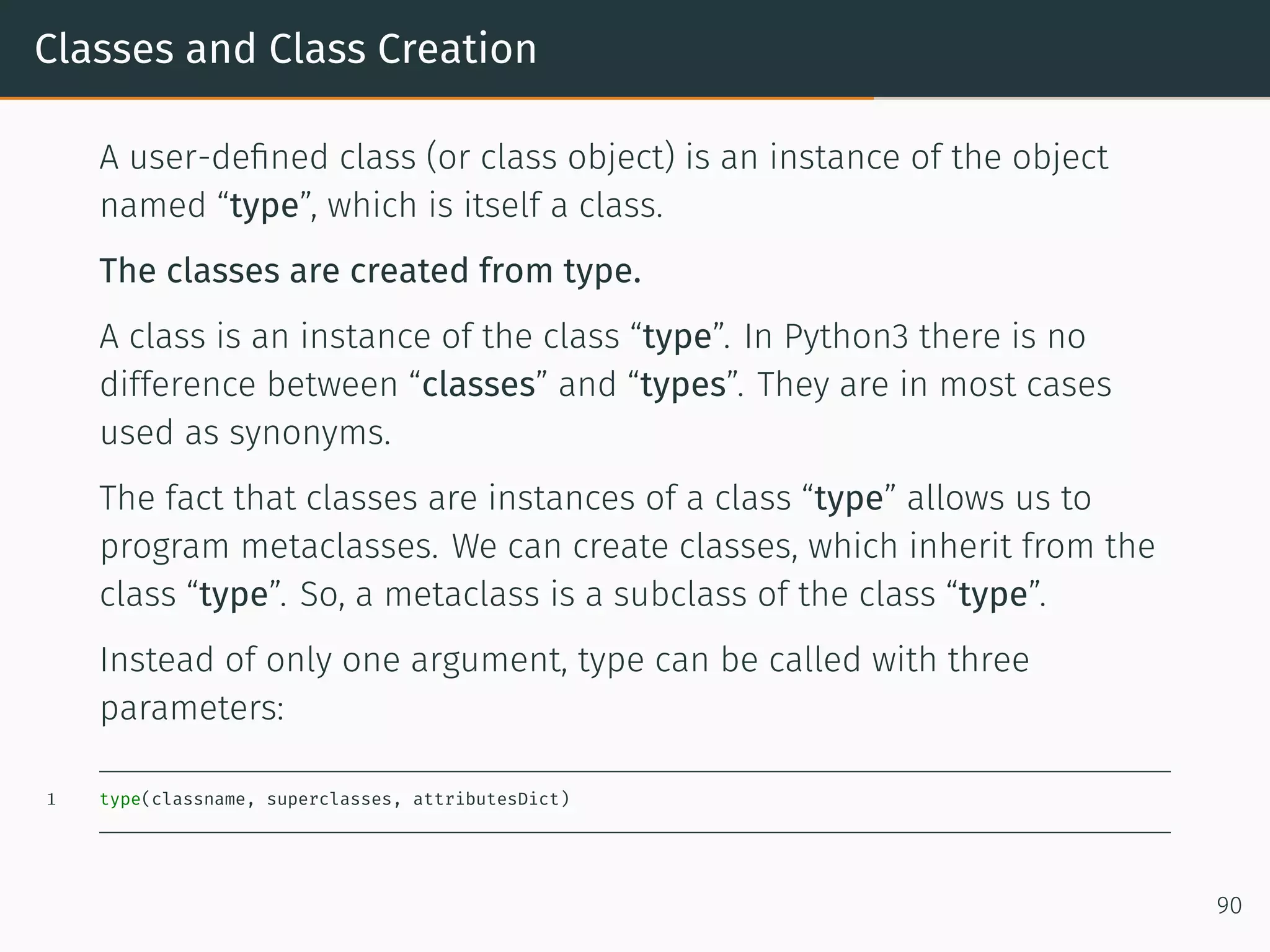
Classes and Class Creation A user-defined class (or class object) is an instance of the object named “type”, which is itself a class. The classes are created from type. A class is an instance of the class “type”. In Python3 there is no difference between “classes” and “types”. They are in most cases used as synonyms. The fact that classes are instances of a class “type” allows us to program metaclasses. We can create classes, which inherit from the class “type”. So, a metaclass is a subclass of the class “type”. Instead of only one argument, type can be called with three parameters: 1 type(classname, superclasses, attributesDict) 90
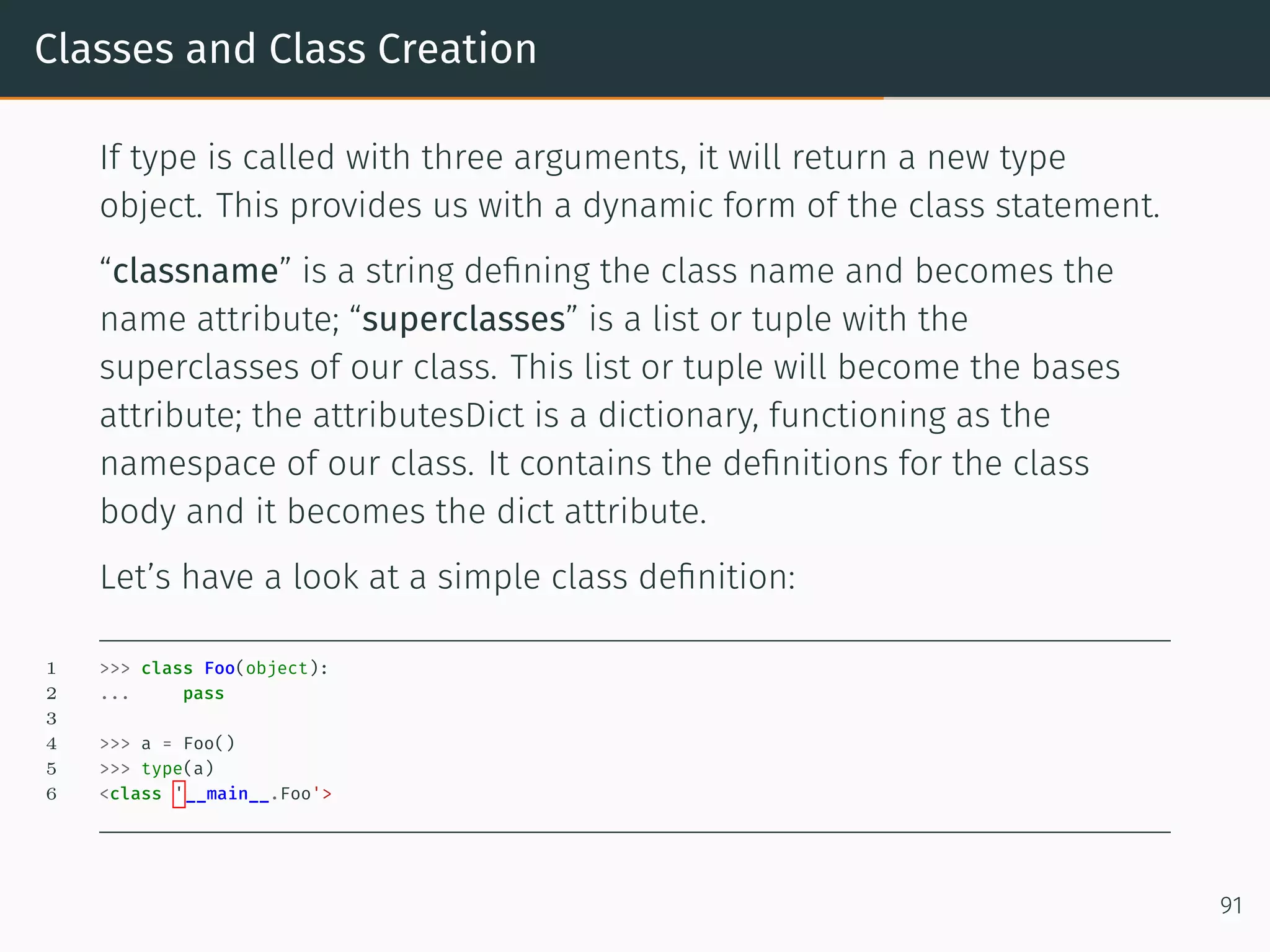
Classes and Class Creation If type is called with three arguments, it will return a new type object. This provides us with a dynamic form of the class statement. “classname” is a string defining the class name and becomes the name attribute; “superclasses” is a list or tuple with the superclasses of our class. This list or tuple will become the bases attribute; the attributesDict is a dictionary, functioning as the namespace of our class. It contains the definitions for the class body and it becomes the dict attribute. Let’s have a look at a simple class definition: 1 >>> class Foo(object): 2 ... pass 3 4 >>> a = Foo() 5 >>> type(a) 6 <class '__main__.Foo'> 91
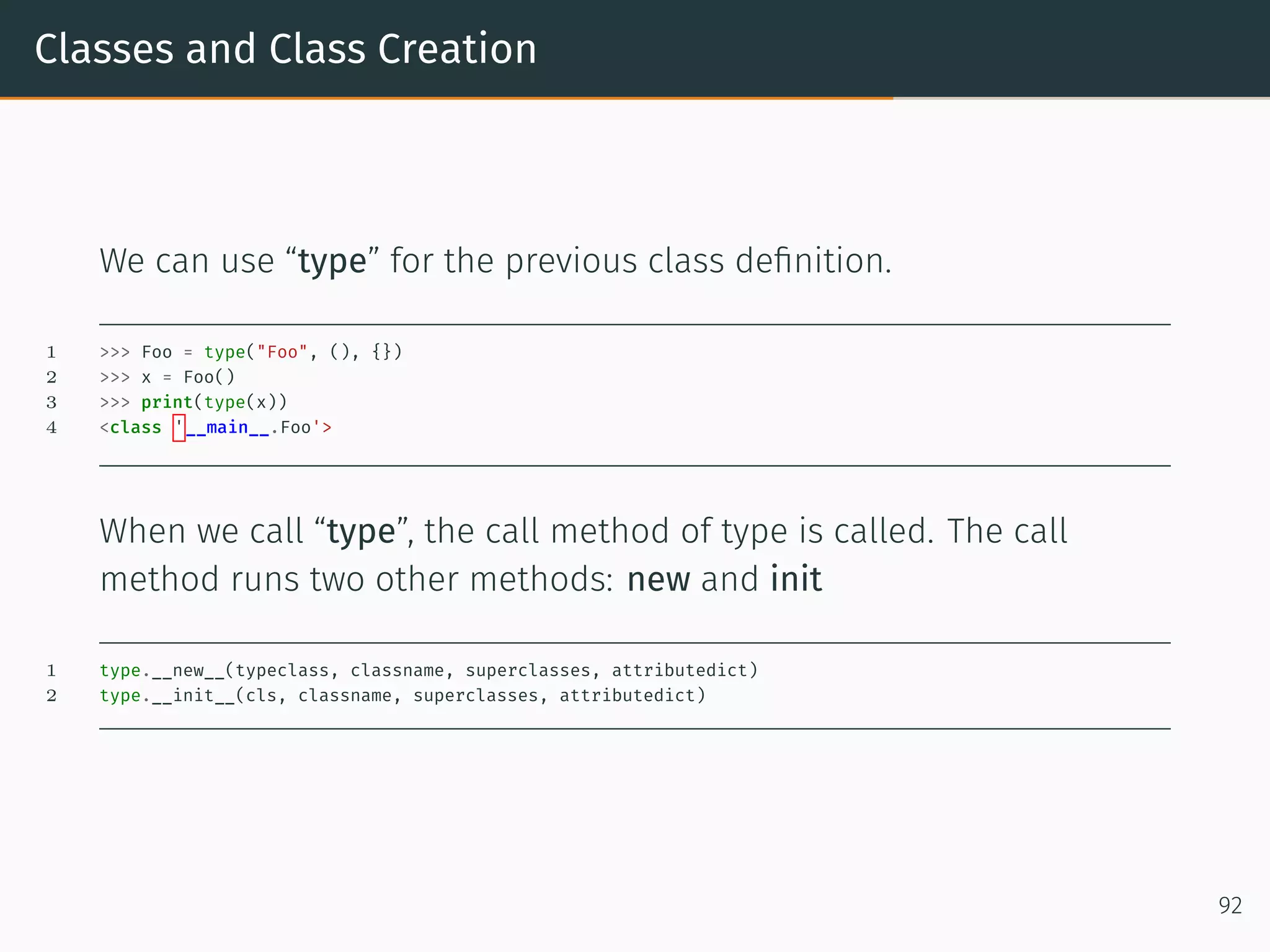
Classes and Class Creation We can use “type” for the previous class definition. 1 >>> Foo = type("Foo", (), {}) 2 >>> x = Foo() 3 >>> print(type(x)) 4 <class '__main__.Foo'> When we call “type”, the call method of type is called. The call method runs two other methods: new and init 1 type.__new__(typeclass, classname, superclasses, attributedict) 2 type.__init__(cls, classname, superclasses, attributedict) 92
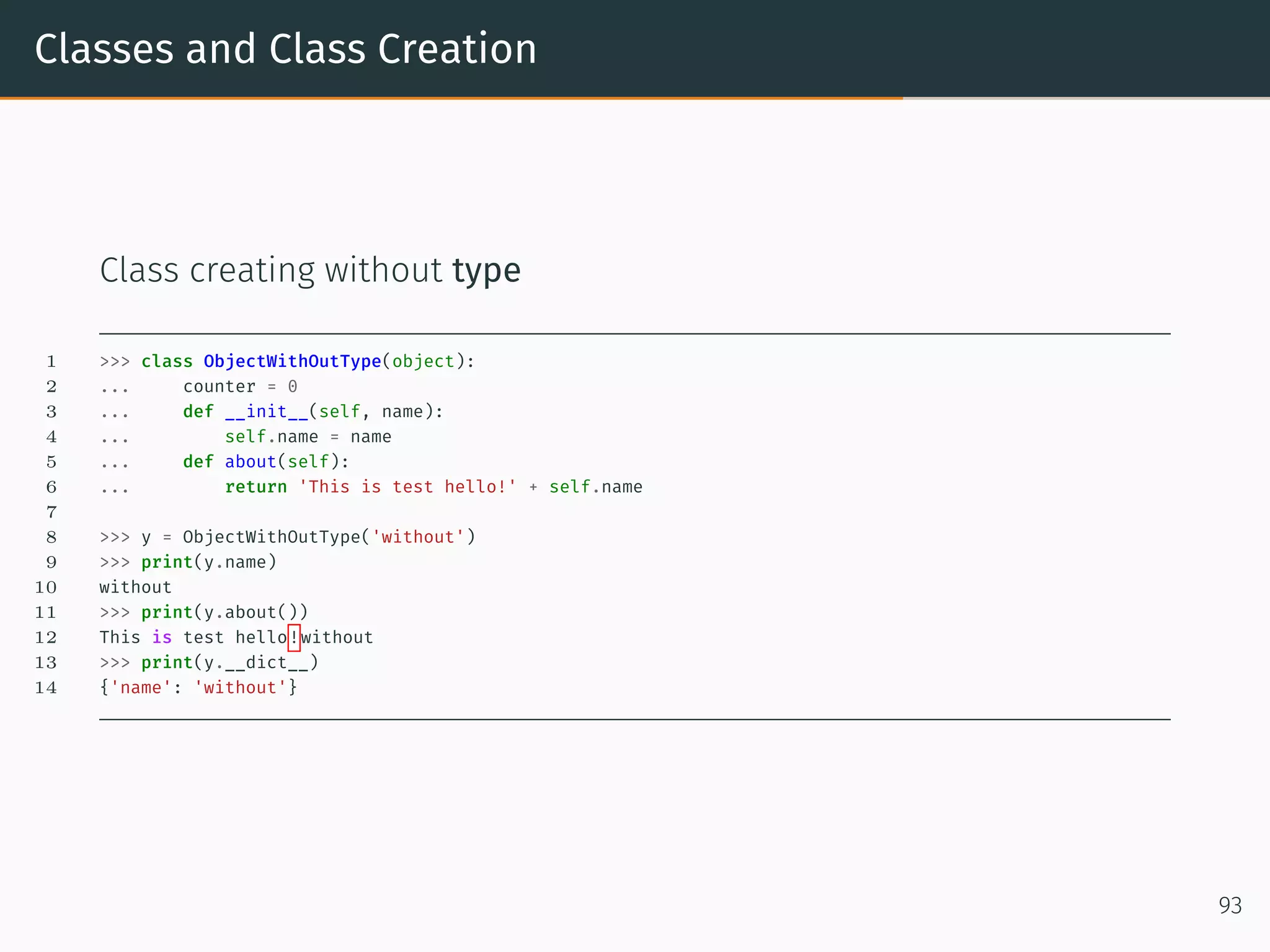
Classes and Class Creation Class creating without type 1 >>> class ObjectWithOutType(object): 2 ... counter = 0 3 ... def __init__(self, name): 4 ... self.name = name 5 ... def about(self): 6 ... return 'This is test hello!' + self.name 7 8 >>> y = ObjectWithOutType('without') 9 >>> print(y.name) 10 without 11 >>> print(y.about()) 12 This is test hello!without 13 >>> print(y.__dict__) 14 {'name': 'without'} 93
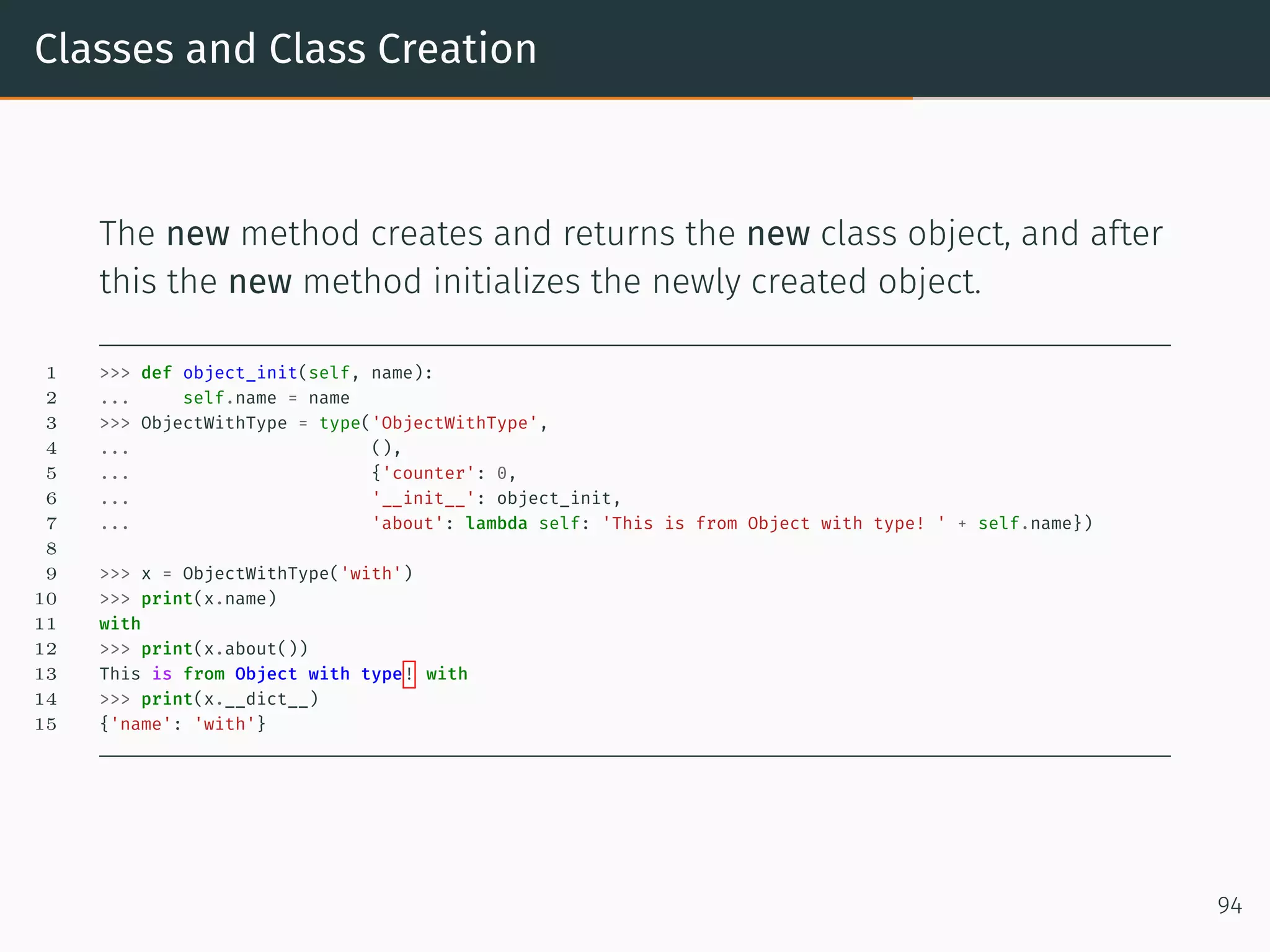
Classes and Class Creation The new method creates and returns the new class object, and after this the new method initializes the newly created object. 1 >>> def object_init(self, name): 2 ... self.name = name 3 >>> ObjectWithType = type('ObjectWithType', 4 ... (), 5 ... {'counter': 0, 6 ... '__init__': object_init, 7 ... 'about': lambda self: 'This is from Object with type! ' + self.name}) 8 9 >>> x = ObjectWithType('with') 10 >>> print(x.name) 11 with 12 >>> print(x.about()) 13 This is from Object with type! with 14 >>> print(x.__dict__) 15 {'name': 'with'} 94
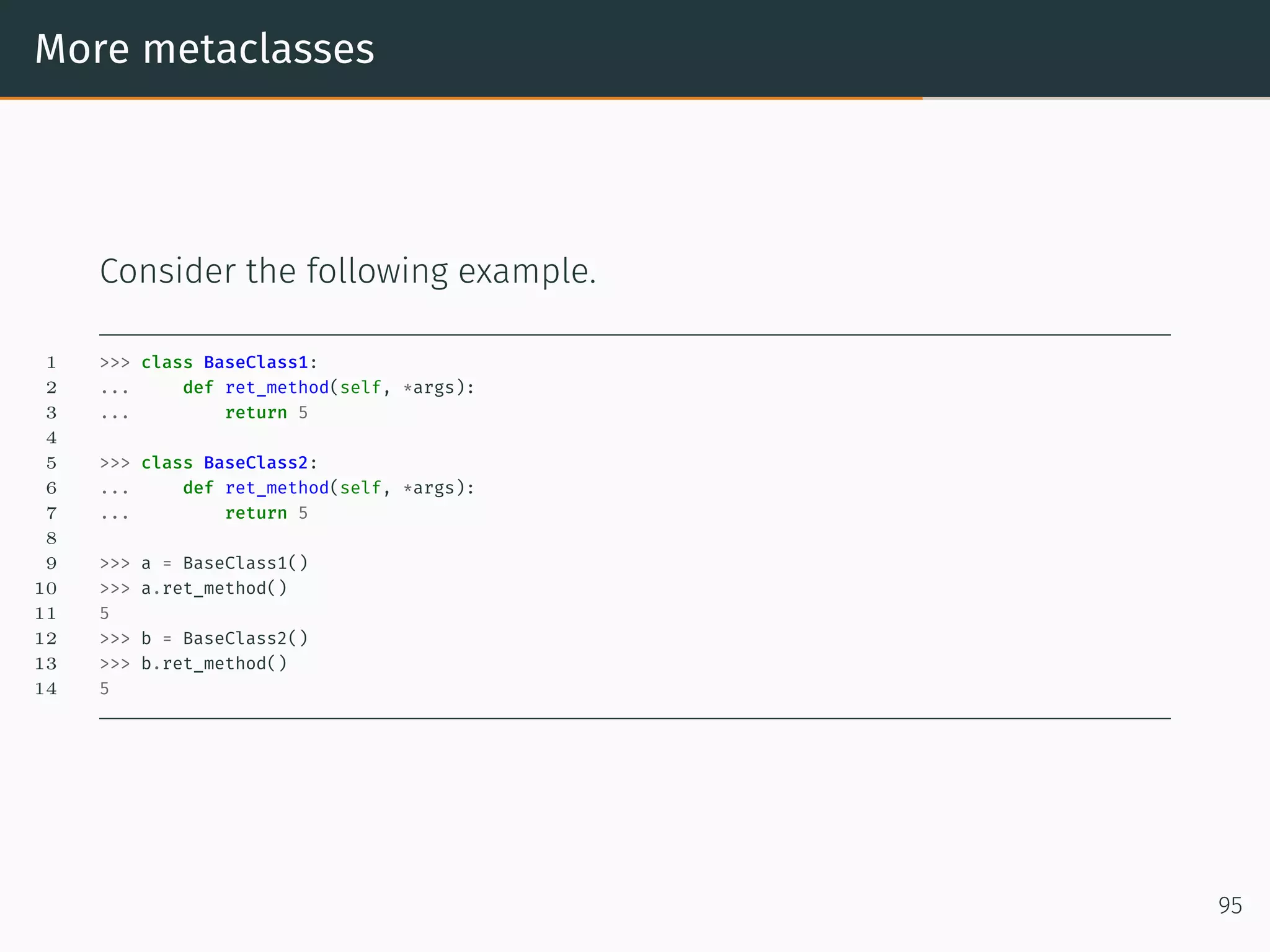
More metaclasses Consider the following example. 1 >>> class BaseClass1: 2 ... def ret_method(self, *args): 3 ... return 5 4 5 >>> class BaseClass2: 6 ... def ret_method(self, *args): 7 ... return 5 8 9 >>> a = BaseClass1() 10 >>> a.ret_method() 11 5 12 >>> b = BaseClass2() 13 >>> b.ret_method() 14 5 95
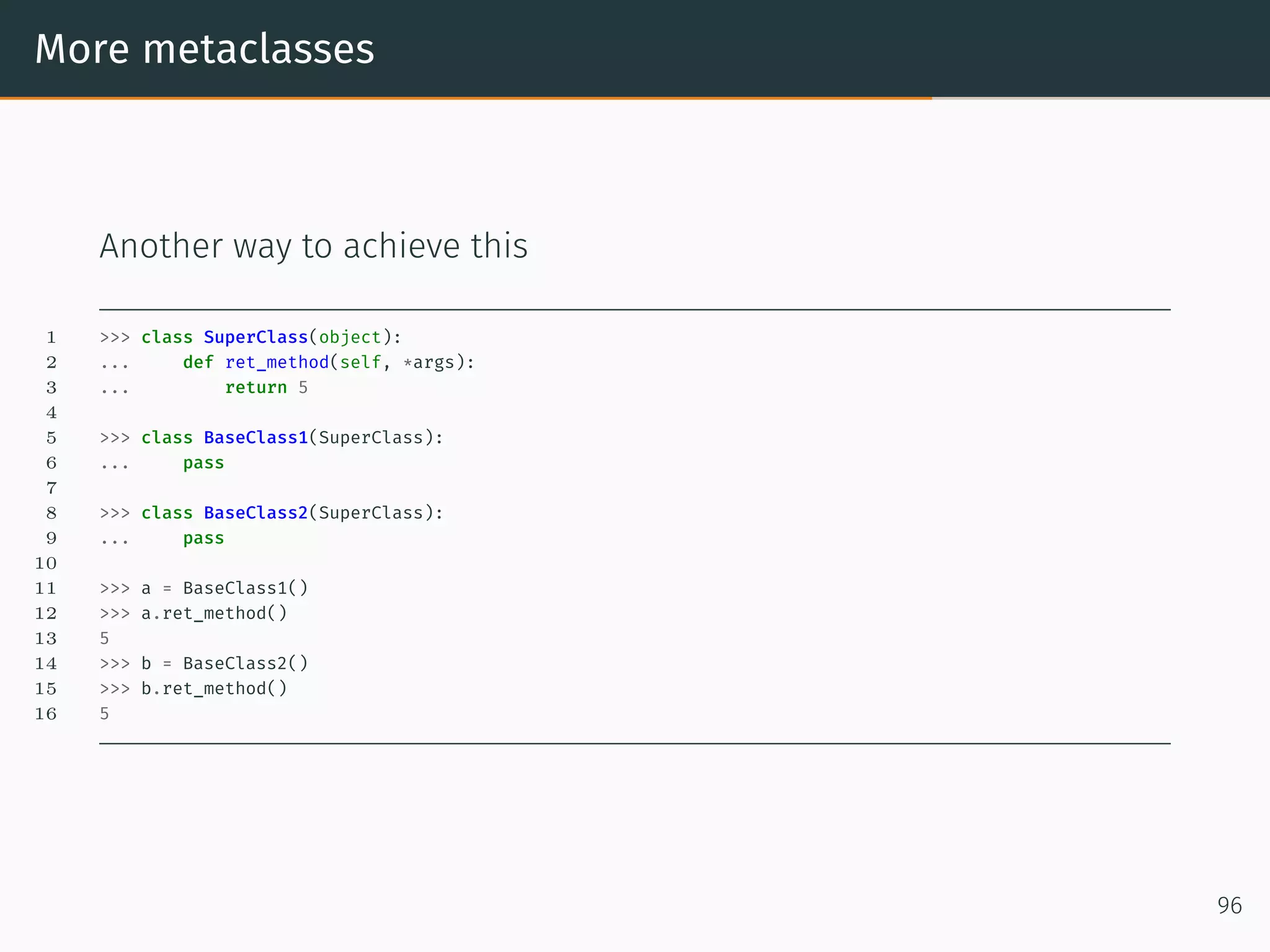
More metaclasses Another way to achieve this 1 >>> class SuperClass(object): 2 ... def ret_method(self, *args): 3 ... return 5 4 5 >>> class BaseClass1(SuperClass): 6 ... pass 7 8 >>> class BaseClass2(SuperClass): 9 ... pass 10 11 >>> a = BaseClass1() 12 >>> a.ret_method() 13 5 14 >>> b = BaseClass2() 15 >>> b.ret_method() 16 5 96
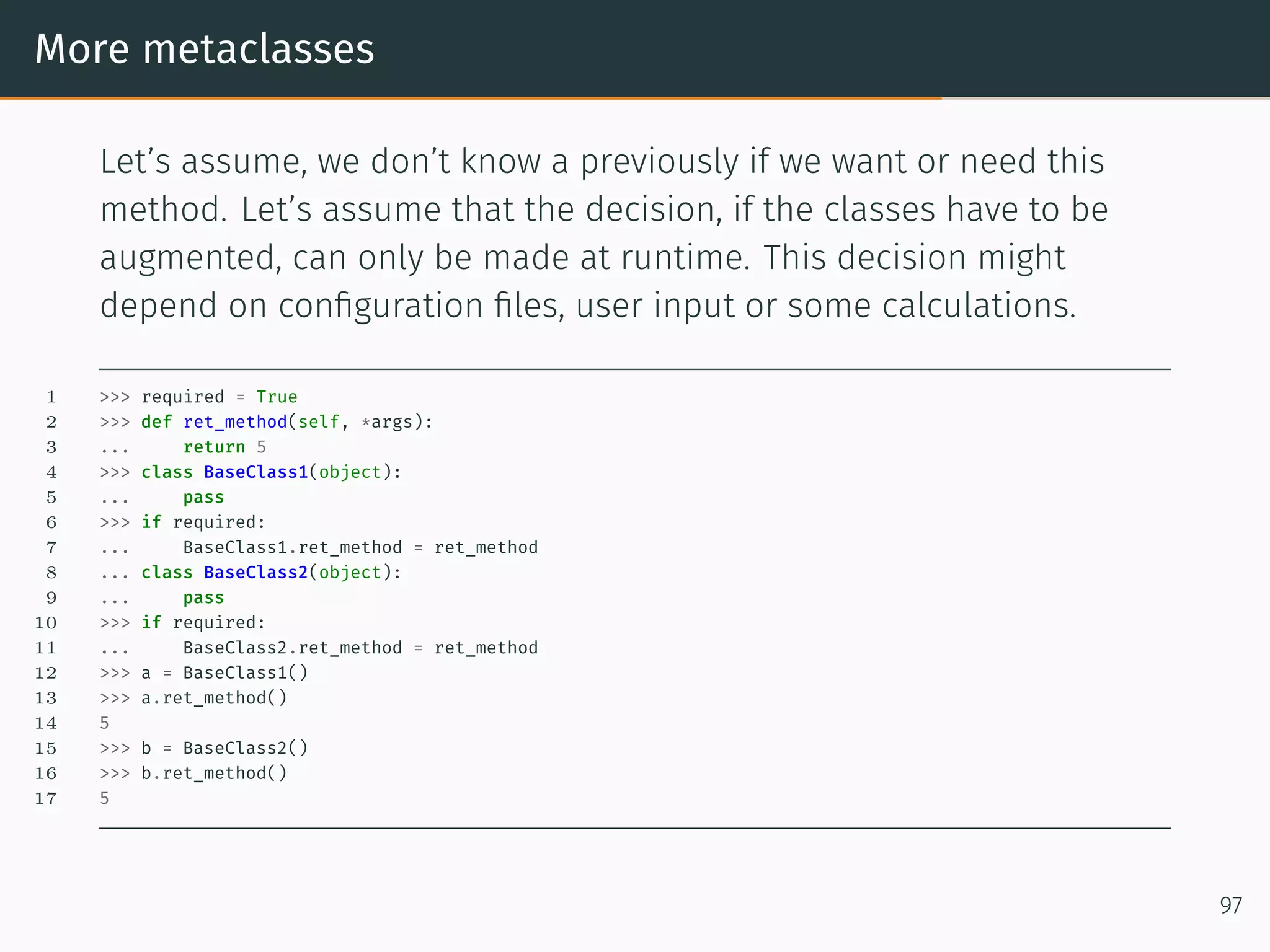
More metaclasses Let’s assume, we don’t know a previously if we want or need this method. Let’s assume that the decision, if the classes have to be augmented, can only be made at runtime. This decision might depend on configuration files, user input or some calculations. 1 >>> required = True 2 >>> def ret_method(self, *args): 3 ... return 5 4 >>> class BaseClass1(object): 5 ... pass 6 >>> if required: 7 ... BaseClass1.ret_method = ret_method 8 ... class BaseClass2(object): 9 ... pass 10 >>> if required: 11 ... BaseClass2.ret_method = ret_method 12 >>> a = BaseClass1() 13 >>> a.ret_method() 14 5 15 >>> b = BaseClass2() 16 >>> b.ret_method() 17 5 97
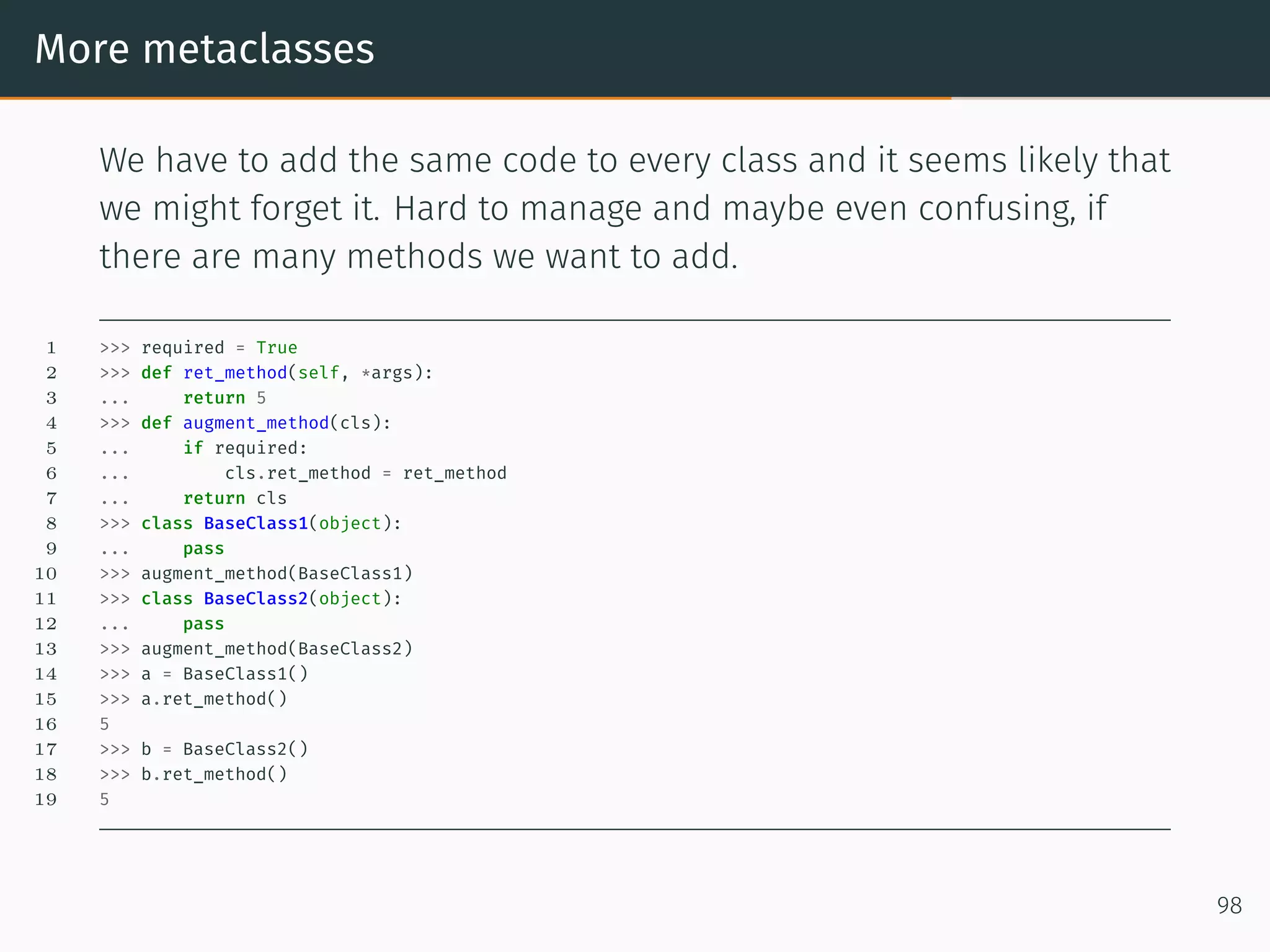
More metaclasses We have to add the same code to every class and it seems likely that we might forget it. Hard to manage and maybe even confusing, if there are many methods we want to add. 1 >>> required = True 2 >>> def ret_method(self, *args): 3 ... return 5 4 >>> def augment_method(cls): 5 ... if required: 6 ... cls.ret_method = ret_method 7 ... return cls 8 >>> class BaseClass1(object): 9 ... pass 10 >>> augment_method(BaseClass1) 11 >>> class BaseClass2(object): 12 ... pass 13 >>> augment_method(BaseClass2) 14 >>> a = BaseClass1() 15 >>> a.ret_method() 16 5 17 >>> b = BaseClass2() 18 >>> b.ret_method() 19 5 98
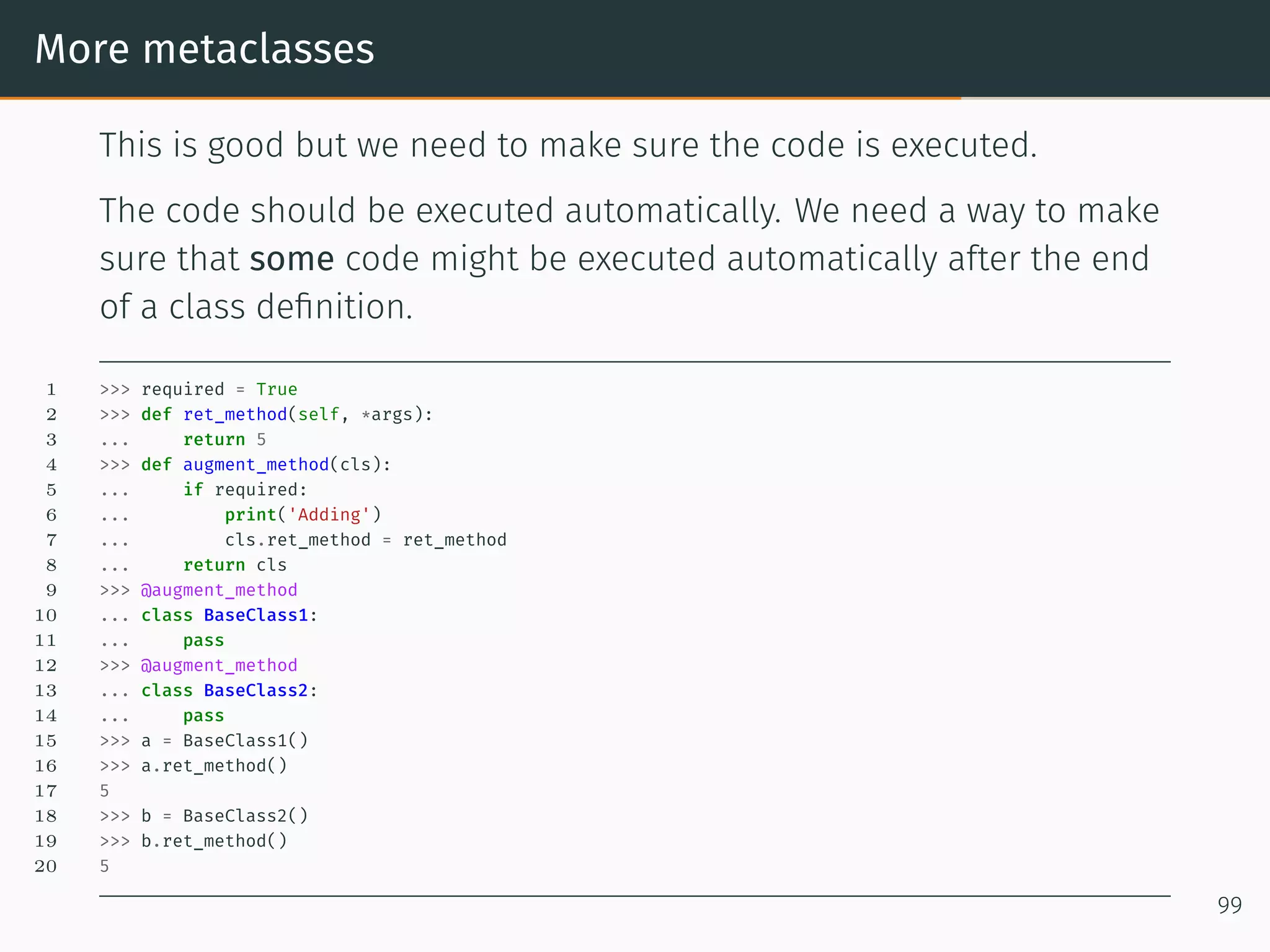
More metaclasses This is good but we need to make sure the code is executed. The code should be executed automatically. We need a way to make sure that some code might be executed automatically after the end of a class definition. 1 >>> required = True 2 >>> def ret_method(self, *args): 3 ... return 5 4 >>> def augment_method(cls): 5 ... if required: 6 ... print('Adding') 7 ... cls.ret_method = ret_method 8 ... return cls 9 >>> @augment_method 10 ... class BaseClass1: 11 ... pass 12 >>> @augment_method 13 ... class BaseClass2: 14 ... pass 15 >>> a = BaseClass1() 16 >>> a.ret_method() 17 5 18 >>> b = BaseClass2() 19 >>> b.ret_method() 20 5 99
Singleton
Singleton 1 >>> class Singleton(type): 2 ... _instances = {} 3 ... def __call__(cls, *args, **kwargs): 4 ... if cls not in cls._instances: 5 ... cls._instances[cls] = super(Singleton, cls).__call__(*args, **kwargs) 6 ... return cls._instances[cls] 7 ... 8 >>> class SingletonClass(metaclass=Singleton): 9 ... pass 10 ... 11 >>> class RegularClass(): 12 ... pass 13 ... 14 >>> x = SingletonClass() 15 >>> y = SingletonClass() 16 >>> print(x == y) 17 True 18 >>> x = RegularClass() 19 >>> y = RegularClass() 20 >>> print(x == y) 21 False 100
Common Mistakes
Common Mistakes 1 >>> a = [1, 2, 3] 2 >>> b = a 3 >>> b.append(4) 4 >>> b 5 [1, 2, 3, 4] 6 >>> a 7 [1, 2, 3, 4] 101
Common Mistakes 1 >>> def foo(a=[]): 2 ... a.append(1) 3 ... return a 4 ... 5 >>> foo() 6 [1] 7 >>> foo() 8 [1, 1] 9 >>> foo() 10 [1, 1, 1] 102
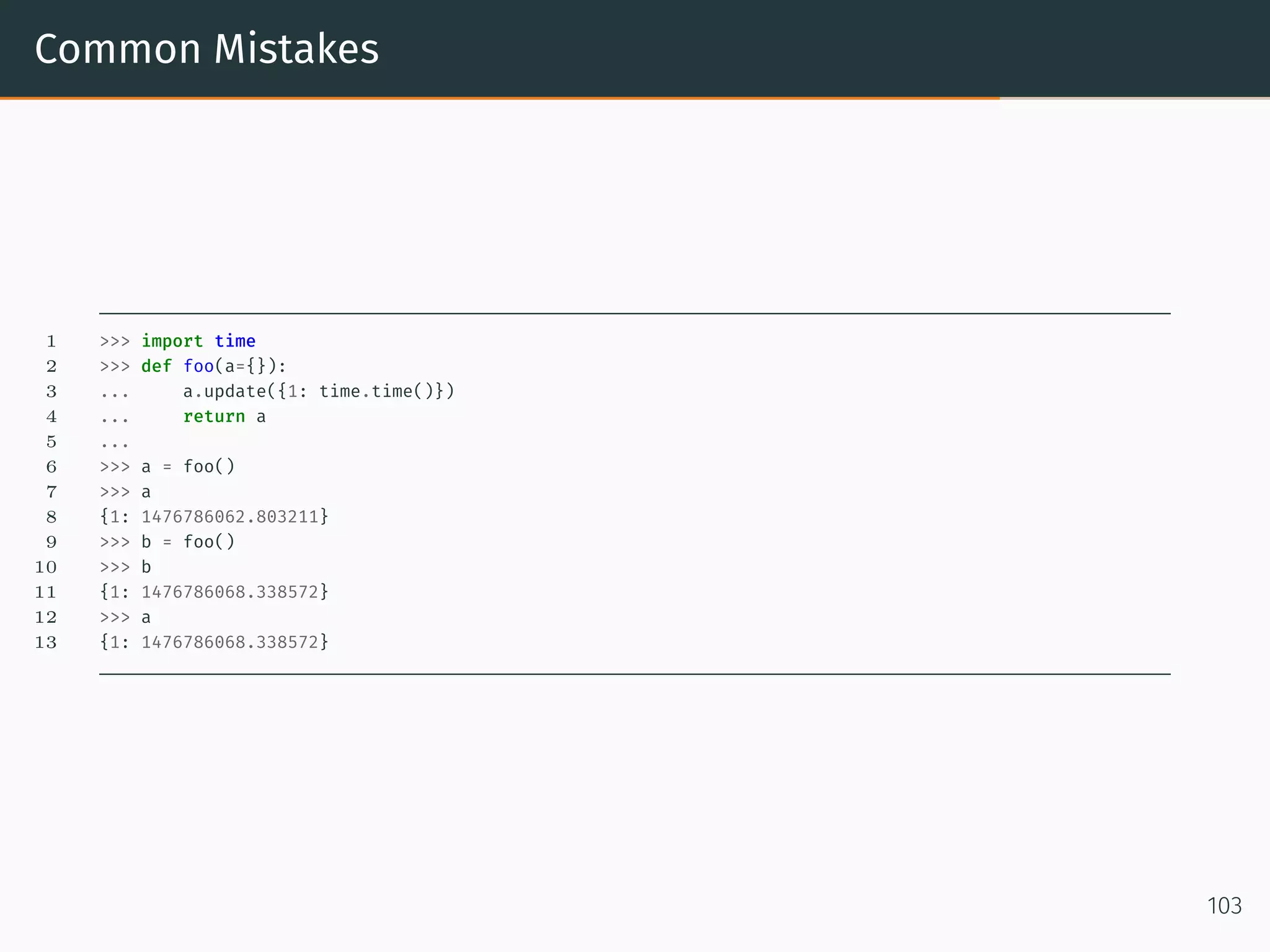
Common Mistakes 1 >>> import time 2 >>> def foo(a={}): 3 ... a.update({1: time.time()}) 4 ... return a 5 ... 6 >>> a = foo() 7 >>> a 8 {1: 1476786062.803211} 9 >>> b = foo() 10 >>> b 11 {1: 1476786068.338572} 12 >>> a 13 {1: 1476786068.338572} 103
Common Mistakes Best practice is to define None 104
Recursion
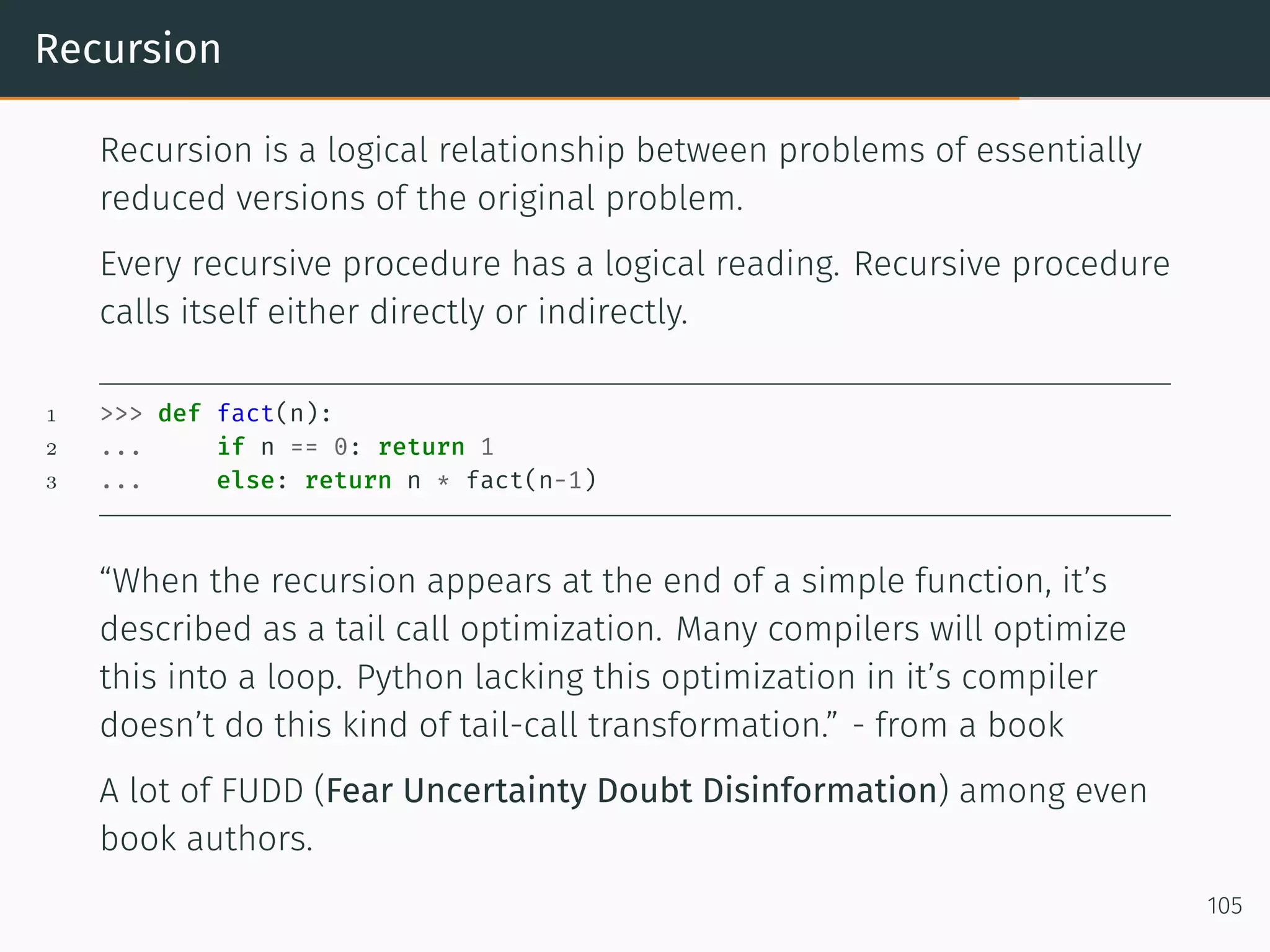
Recursion Recursion is a logical relationship between problems of essentially reduced versions of the original problem. Every recursive procedure has a logical reading. Recursive procedure calls itself either directly or indirectly. 1 >>> def fact(n): 2 ... if n == 0: return 1 3 ... else: return n * fact(n-1) “When the recursion appears at the end of a simple function, it’s described as a tail call optimization. Many compilers will optimize this into a loop. Python lacking this optimization in it’s compiler doesn’t do this kind of tail-call transformation.” - from a book A lot of FUDD (Fear Uncertainty Doubt Disinformation) among even book authors. 105
Recursion Disinformation about Tail Recursion Optimization Schemers, Prologgers and Little Lispers denounce Python for not having Tail Recursion Optimization 106
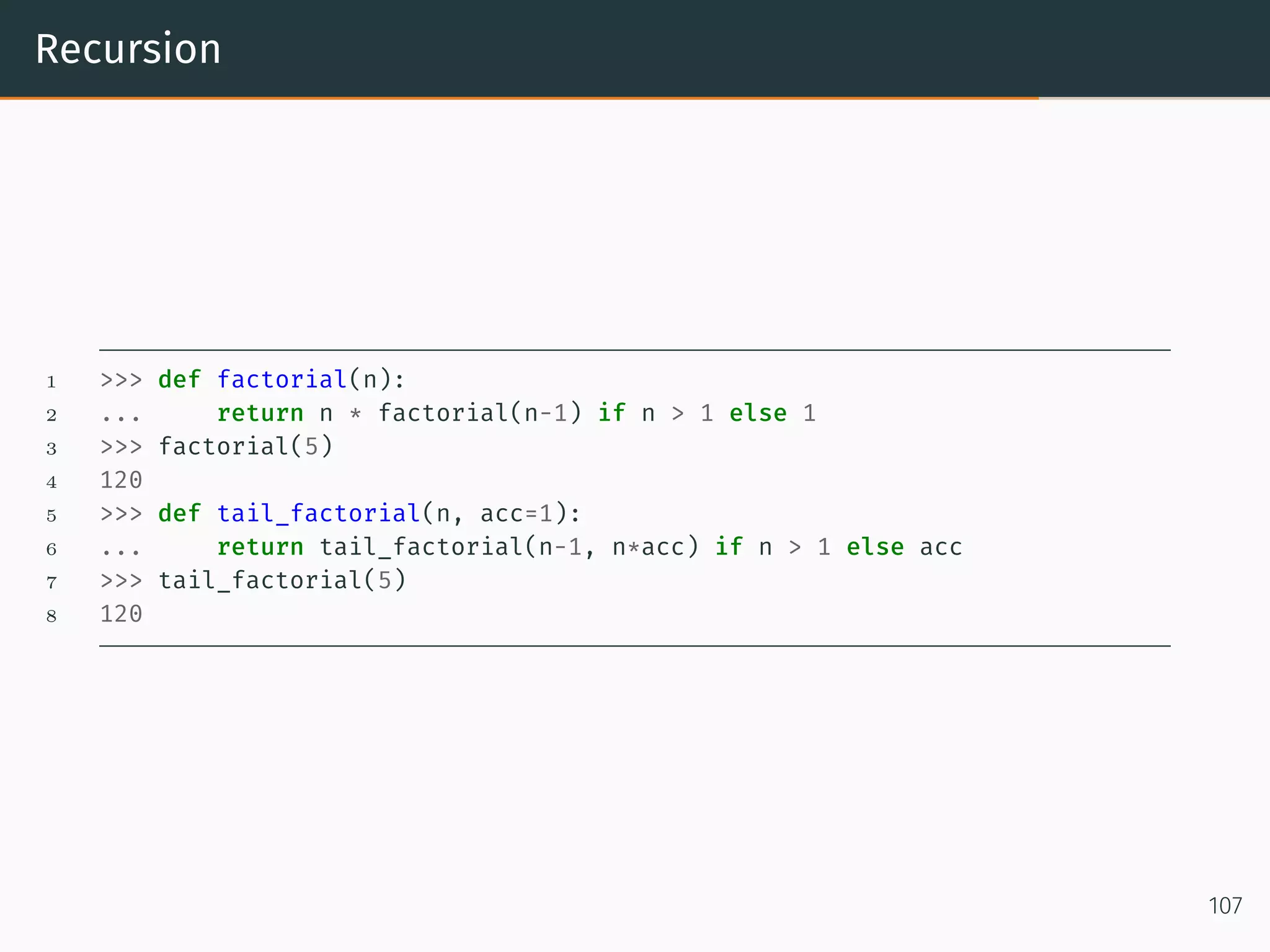
Recursion 1 >>> def factorial(n): 2 ... return n * factorial(n-1) if n > 1 else 1 3 >>> factorial(5) 4 120 5 >>> def tail_factorial(n, acc=1): 6 ... return tail_factorial(n-1, n*acc) if n > 1 else acc 7 >>> tail_factorial(5) 8 120 107
Recursion Exercise: How to sum the Integers from 1 to N? Using recursion and tail recursion. 108
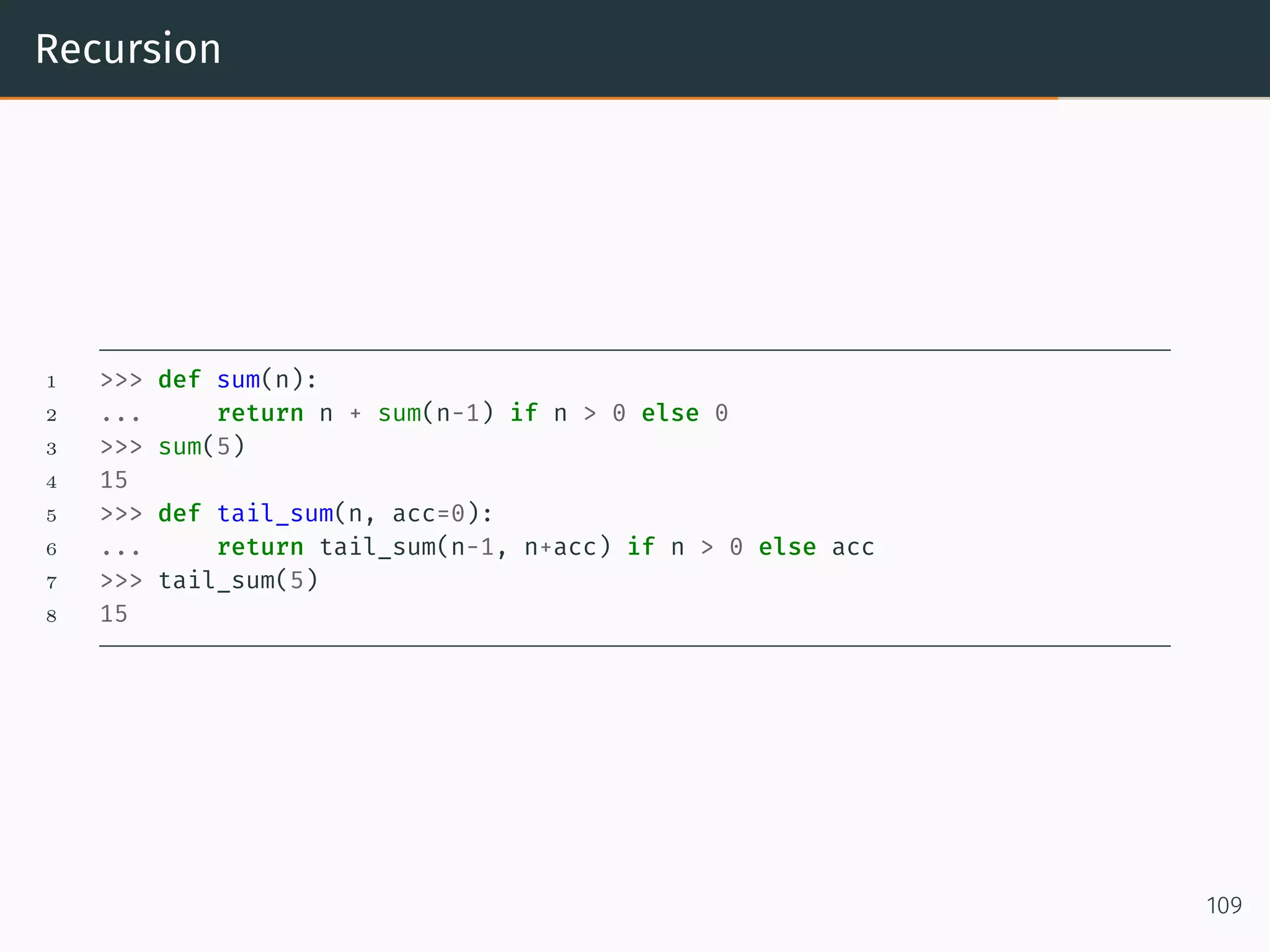
Recursion 1 >>> def sum(n): 2 ... return n + sum(n-1) if n > 0 else 0 3 >>> sum(5) 4 15 5 >>> def tail_sum(n, acc=0): 6 ... return tail_sum(n-1, n+acc) if n > 0 else acc 7 >>> tail_sum(5) 8 15 109
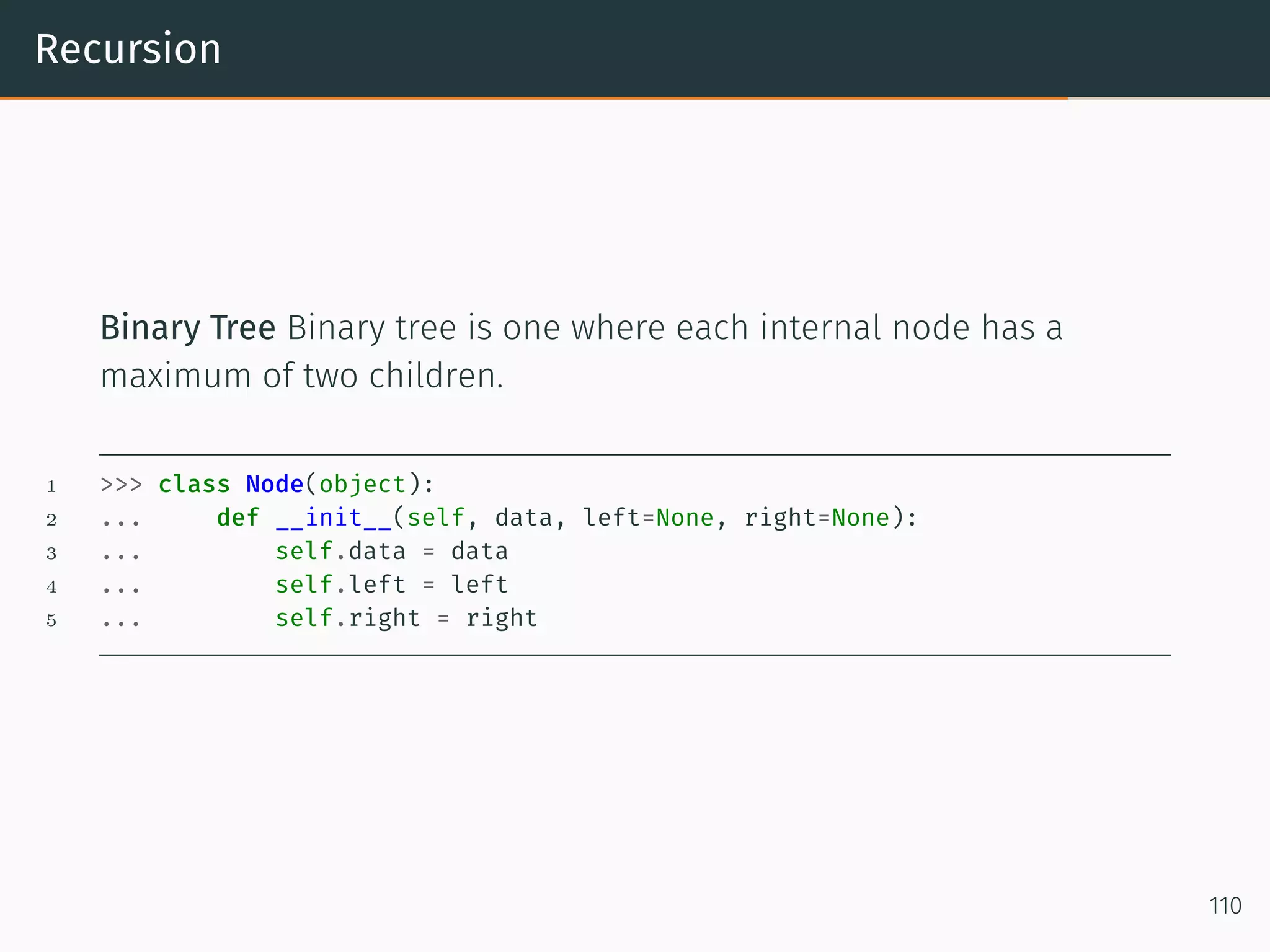
Recursion Binary Tree Binary tree is one where each internal node has a maximum of two children. 1 >>> class Node(object): 2 ... def __init__(self, data, left=None, right=None): 3 ... self.data = data 4 ... self.left = left 5 ... self.right = right 110
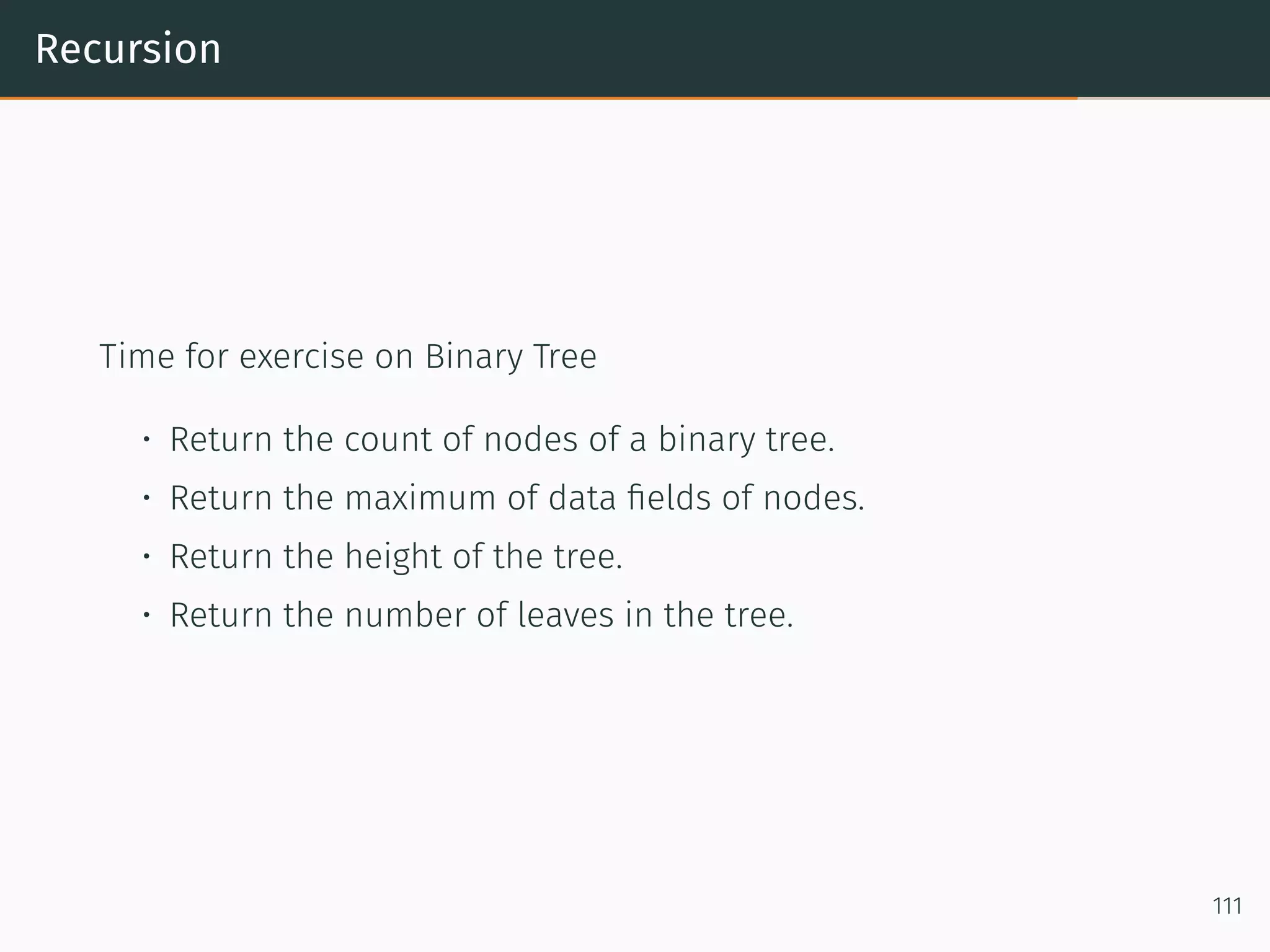
Recursion Time for exercise on Binary Tree • Return the count of nodes of a binary tree. • Return the maximum of data fields of nodes. • Return the height of the tree. • Return the number of leaves in the tree. 111
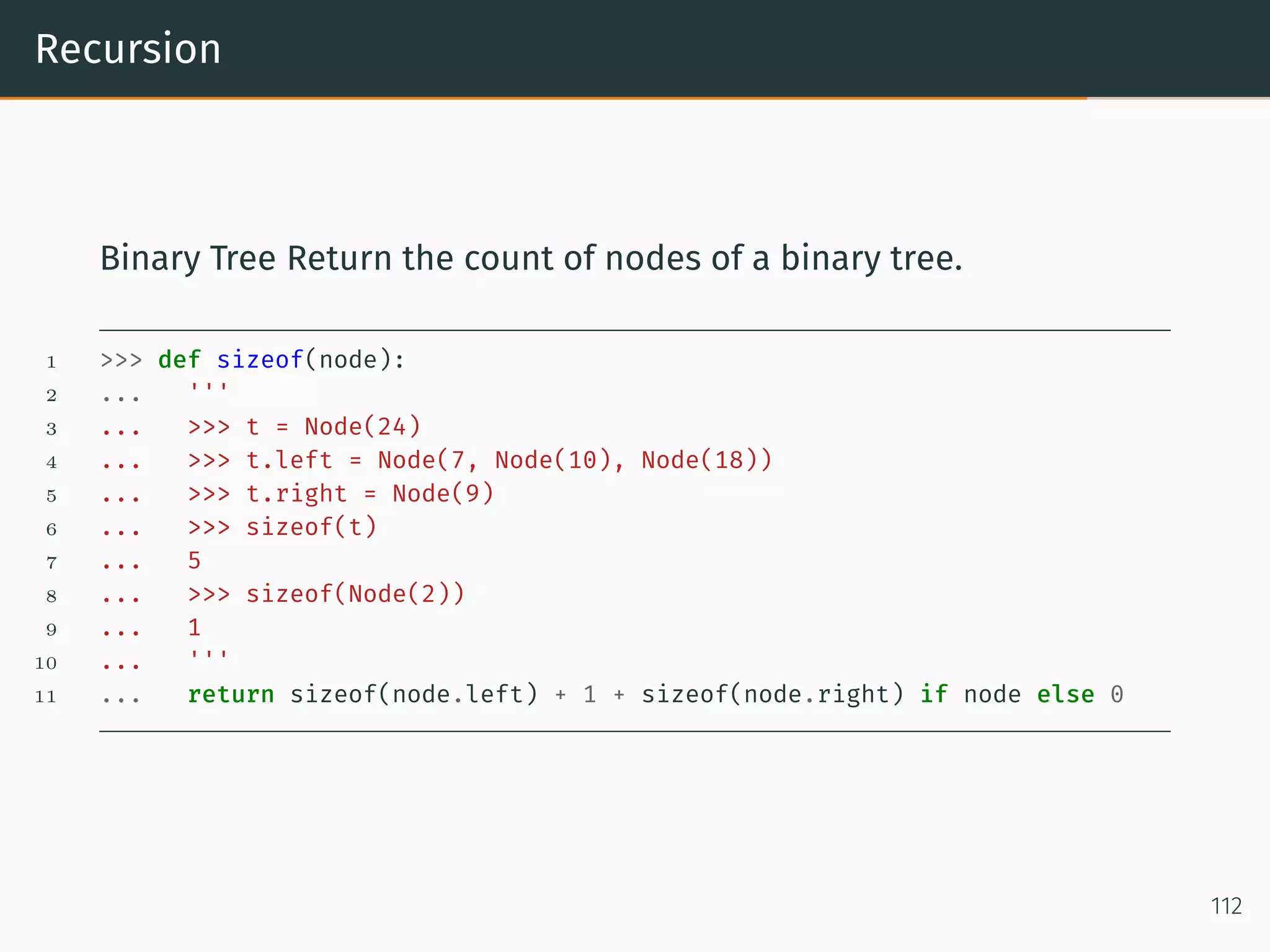
Recursion Binary Tree Return the count of nodes of a binary tree. 1 >>> def sizeof(node): 2 ... ''' 3 ... >>> t = Node(24) 4 ... >>> t.left = Node(7, Node(10), Node(18)) 5 ... >>> t.right = Node(9) 6 ... >>> sizeof(t) 7 ... 5 8 ... >>> sizeof(Node(2)) 9 ... 1 10 ... ''' 11 ... return sizeof(node.left) + 1 + sizeof(node.right) if node else 0 112
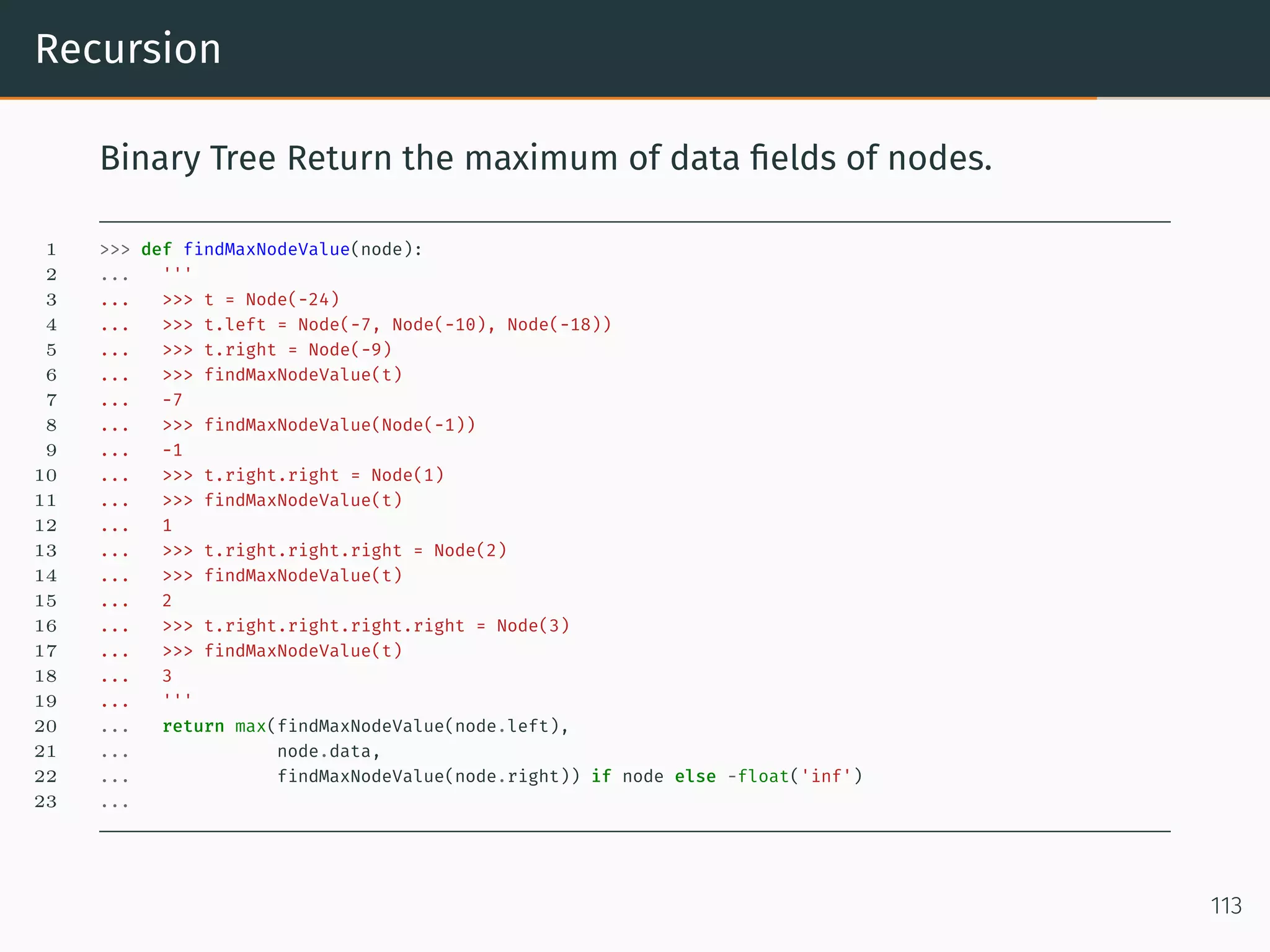
Recursion Binary Tree Return the maximum of data fields of nodes. 1 >>> def findMaxNodeValue(node): 2 ... ''' 3 ... >>> t = Node(-24) 4 ... >>> t.left = Node(-7, Node(-10), Node(-18)) 5 ... >>> t.right = Node(-9) 6 ... >>> findMaxNodeValue(t) 7 ... -7 8 ... >>> findMaxNodeValue(Node(-1)) 9 ... -1 10 ... >>> t.right.right = Node(1) 11 ... >>> findMaxNodeValue(t) 12 ... 1 13 ... >>> t.right.right.right = Node(2) 14 ... >>> findMaxNodeValue(t) 15 ... 2 16 ... >>> t.right.right.right.right = Node(3) 17 ... >>> findMaxNodeValue(t) 18 ... 3 19 ... ''' 20 ... return max(findMaxNodeValue(node.left), 21 ... node.data, 22 ... findMaxNodeValue(node.right)) if node else -float('inf') 23 ... 113
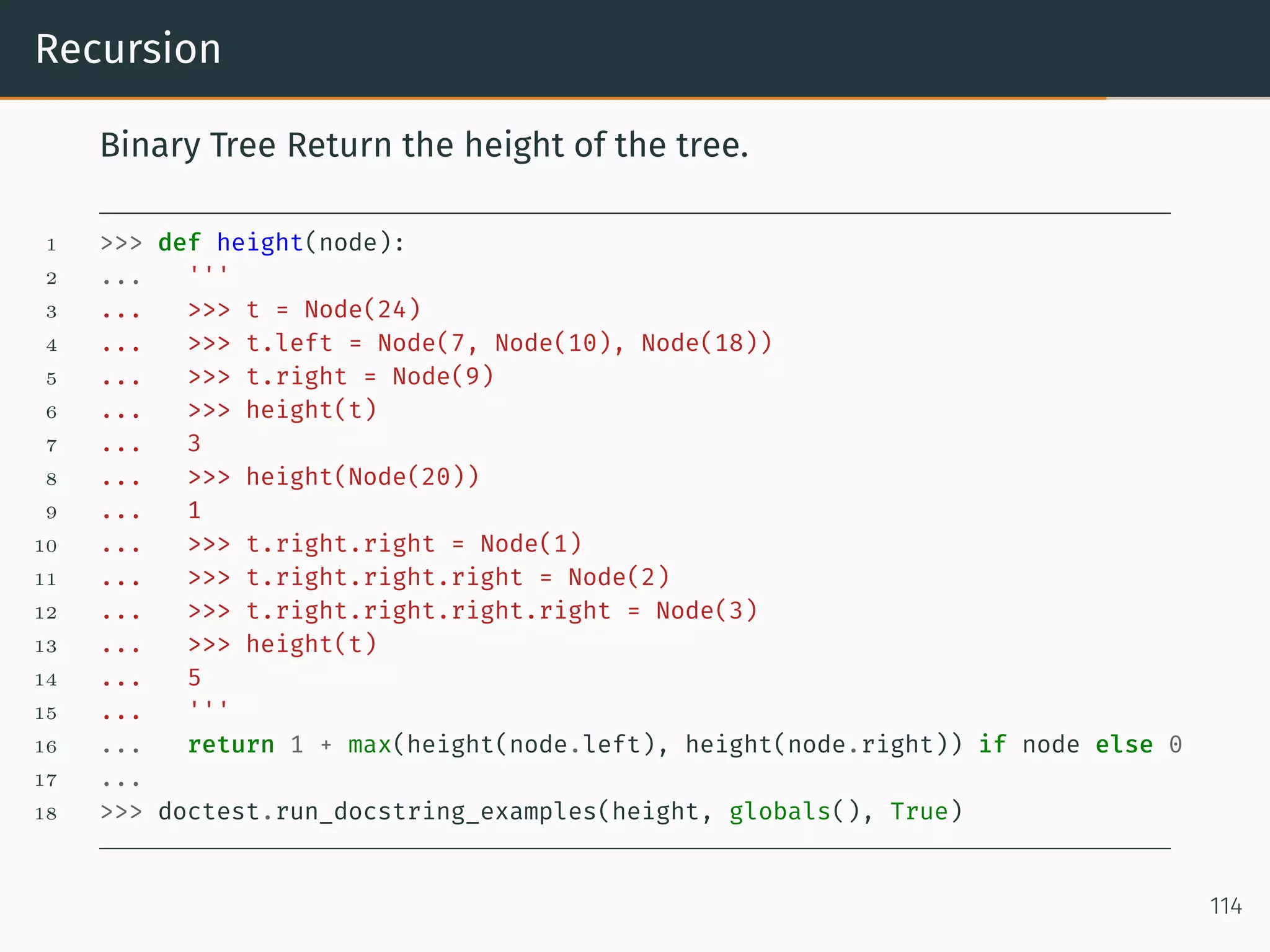
Recursion Binary Tree Return the height of the tree. 1 >>> def height(node): 2 ... ''' 3 ... >>> t = Node(24) 4 ... >>> t.left = Node(7, Node(10), Node(18)) 5 ... >>> t.right = Node(9) 6 ... >>> height(t) 7 ... 3 8 ... >>> height(Node(20)) 9 ... 1 10 ... >>> t.right.right = Node(1) 11 ... >>> t.right.right.right = Node(2) 12 ... >>> t.right.right.right.right = Node(3) 13 ... >>> height(t) 14 ... 5 15 ... ''' 16 ... return 1 + max(height(node.left), height(node.right)) if node else 0 17 ... 18 >>> doctest.run_docstring_examples(height, globals(), True) 114
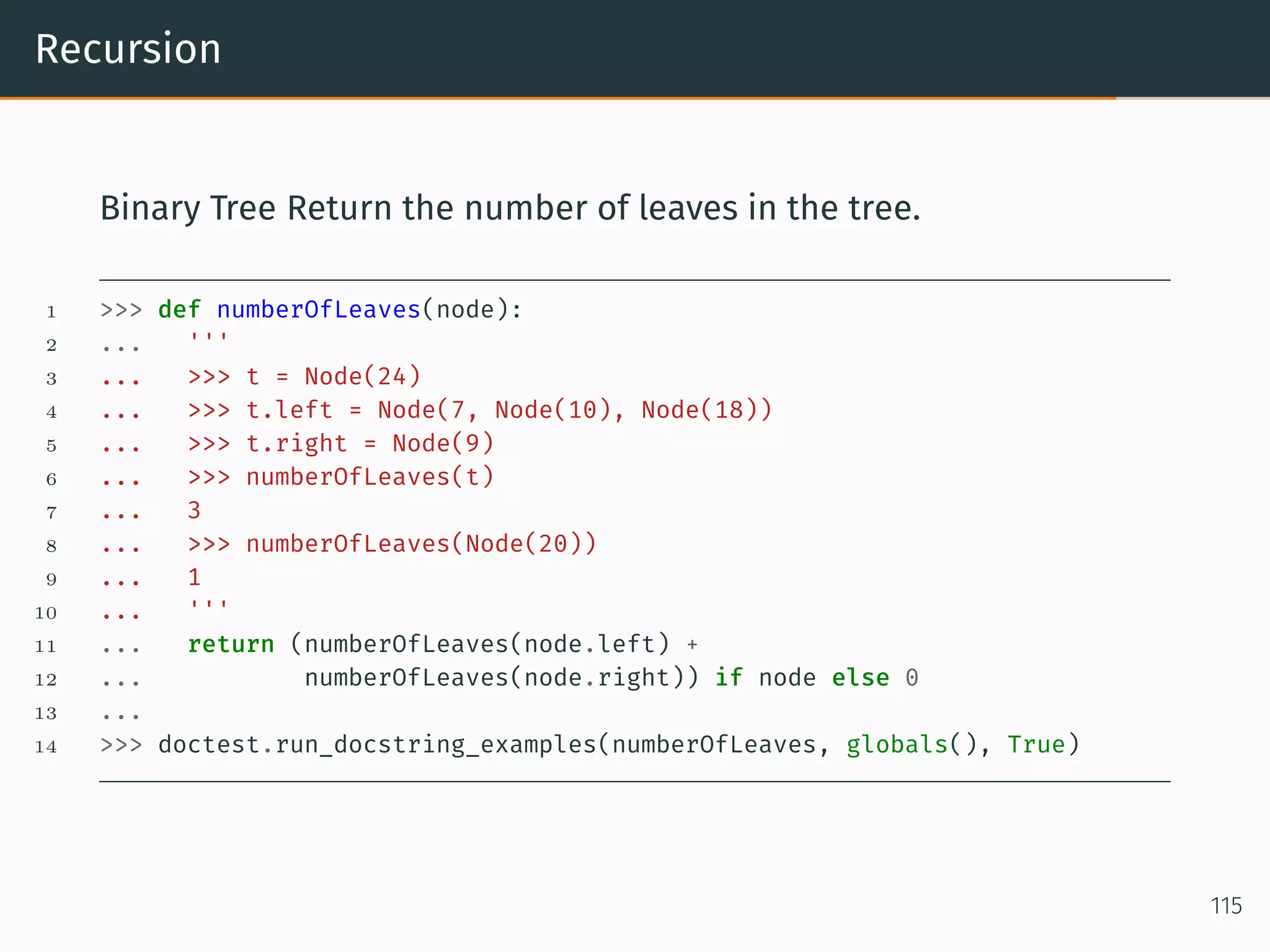
Recursion Binary Tree Return the number of leaves in the tree. 1 >>> def numberOfLeaves(node): 2 ... ''' 3 ... >>> t = Node(24) 4 ... >>> t.left = Node(7, Node(10), Node(18)) 5 ... >>> t.right = Node(9) 6 ... >>> numberOfLeaves(t) 7 ... 3 8 ... >>> numberOfLeaves(Node(20)) 9 ... 1 10 ... ''' 11 ... return (numberOfLeaves(node.left) + 12 ... numberOfLeaves(node.right)) if node else 0 13 ... 14 >>> doctest.run_docstring_examples(numberOfLeaves, globals(), True) 115
Python 3.x
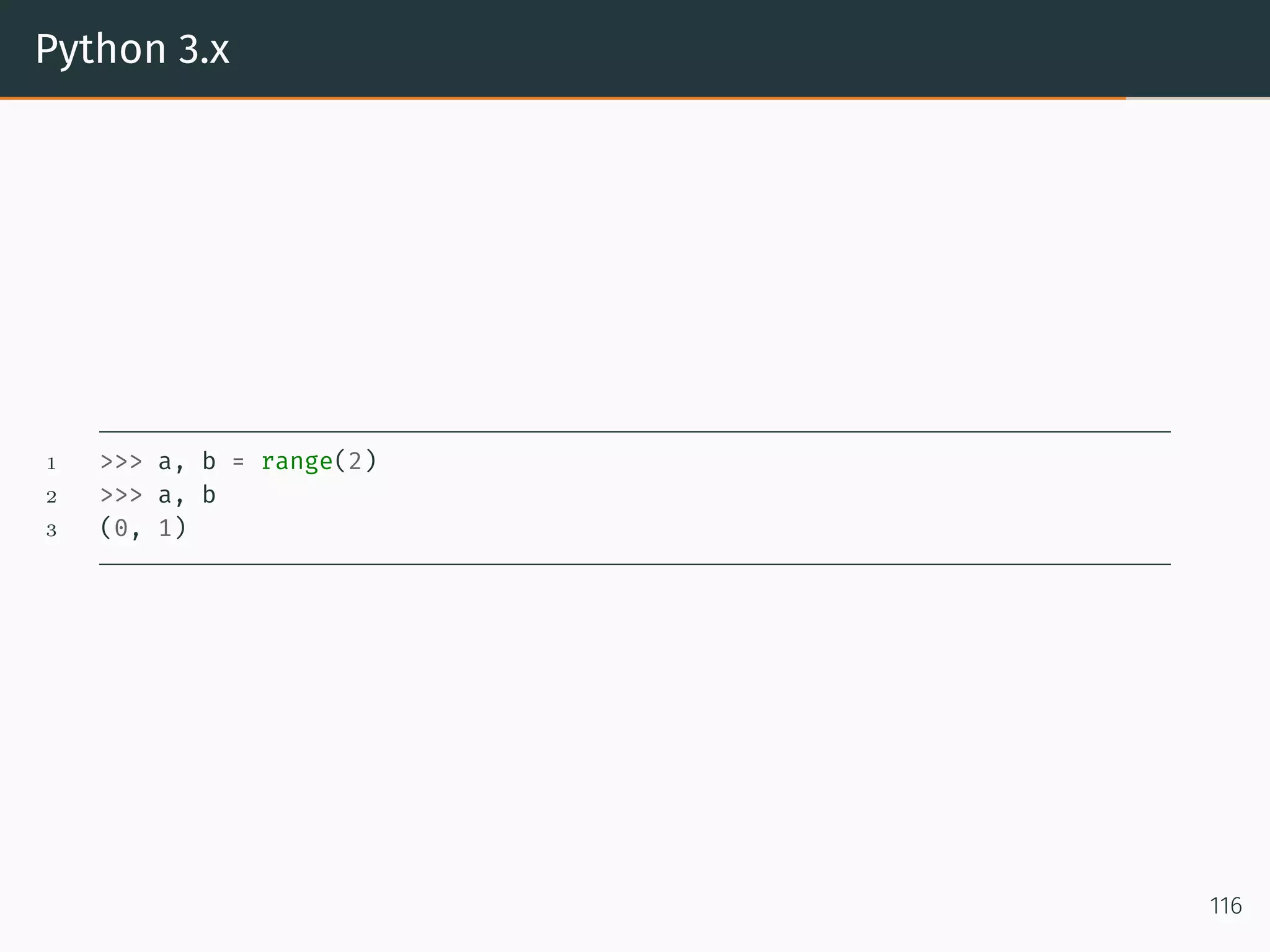
Python 3.x 1 >>> a, b = range(2) 2 >>> a, b 3 (0, 1) 116
Python 3.x 1 >>> a, b = range(2) 2 >>> a, b 3 (0, 1) 4 >>> a, b, *rest = range(10) 5 >>> a, b, rest 6 (0, 1, [2, 3, 4, 5, 6, 7, 8, 9]) 117
Python 3.x *rest can go anywhere 1 >>> a, b = range(2) 2 >>> a, b 3 (0, 1) 4 >>> a, b, *rest = range(10) 5 >>> a, b, rest 6 (0, 1, [2, 3, 4, 5, 6, 7, 8, 9]) 7 >>> 8 >>> 9 >>> a, *rest, b = range(10) 10 >>> a, rest, b 11 (0, [1, 2, 3, 4, 5, 6, 7, 8], 9) 118
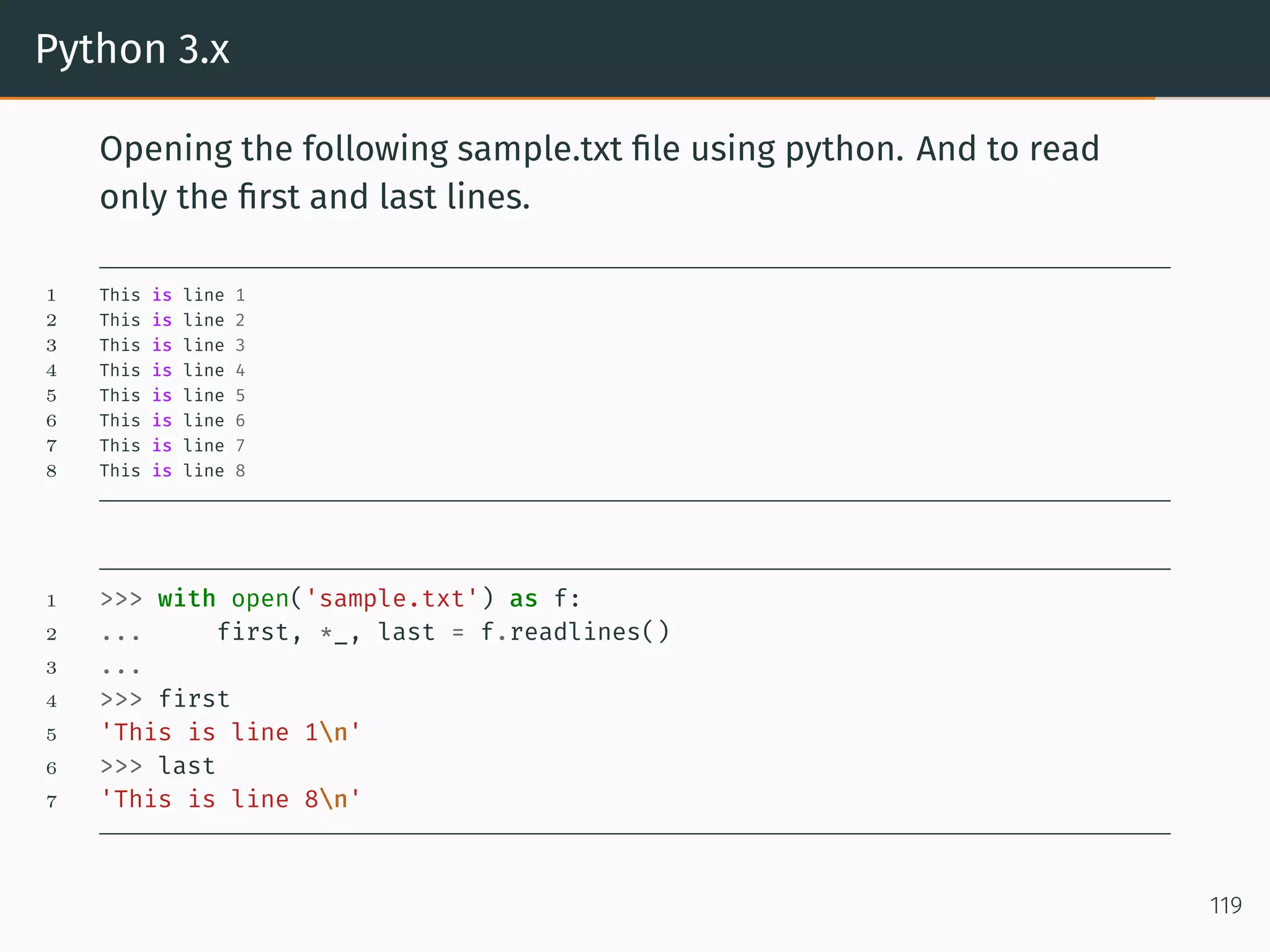
Python 3.x Opening the following sample.txt file using python. And to read only the first and last lines. 1 This is line 1 2 This is line 2 3 This is line 3 4 This is line 4 5 This is line 5 6 This is line 6 7 This is line 7 8 This is line 8 1 >>> with open('sample.txt') as f: 2 ... first, *_, last = f.readlines() 3 ... 4 >>> first 5 'This is line 1n' 6 >>> last 7 'This is line 8n' 119
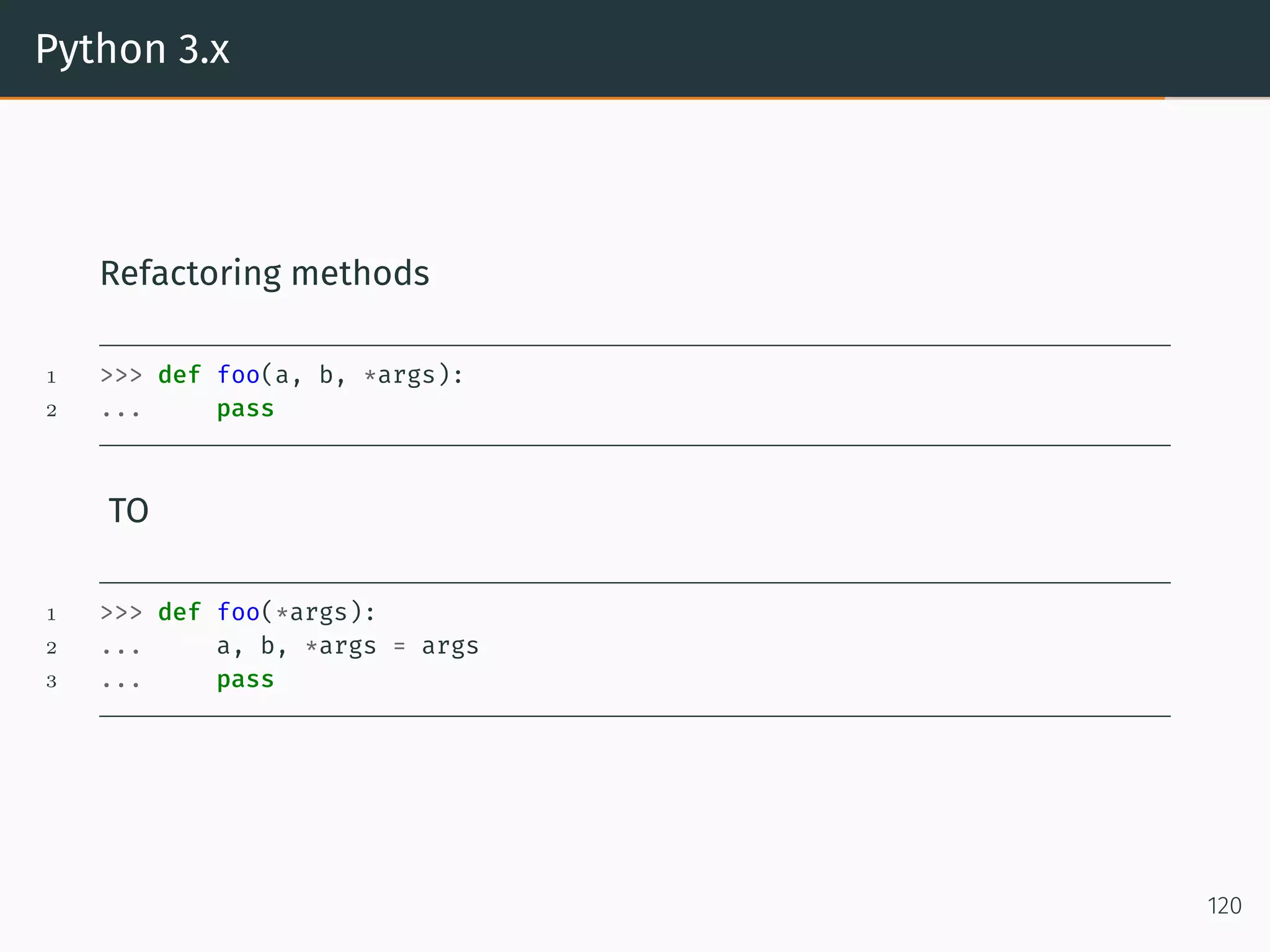
Python 3.x Refactoring methods 1 >>> def foo(a, b, *args): 2 ... pass TO 1 >>> def foo(*args): 2 ... a, b, *args = args 3 ... pass 120
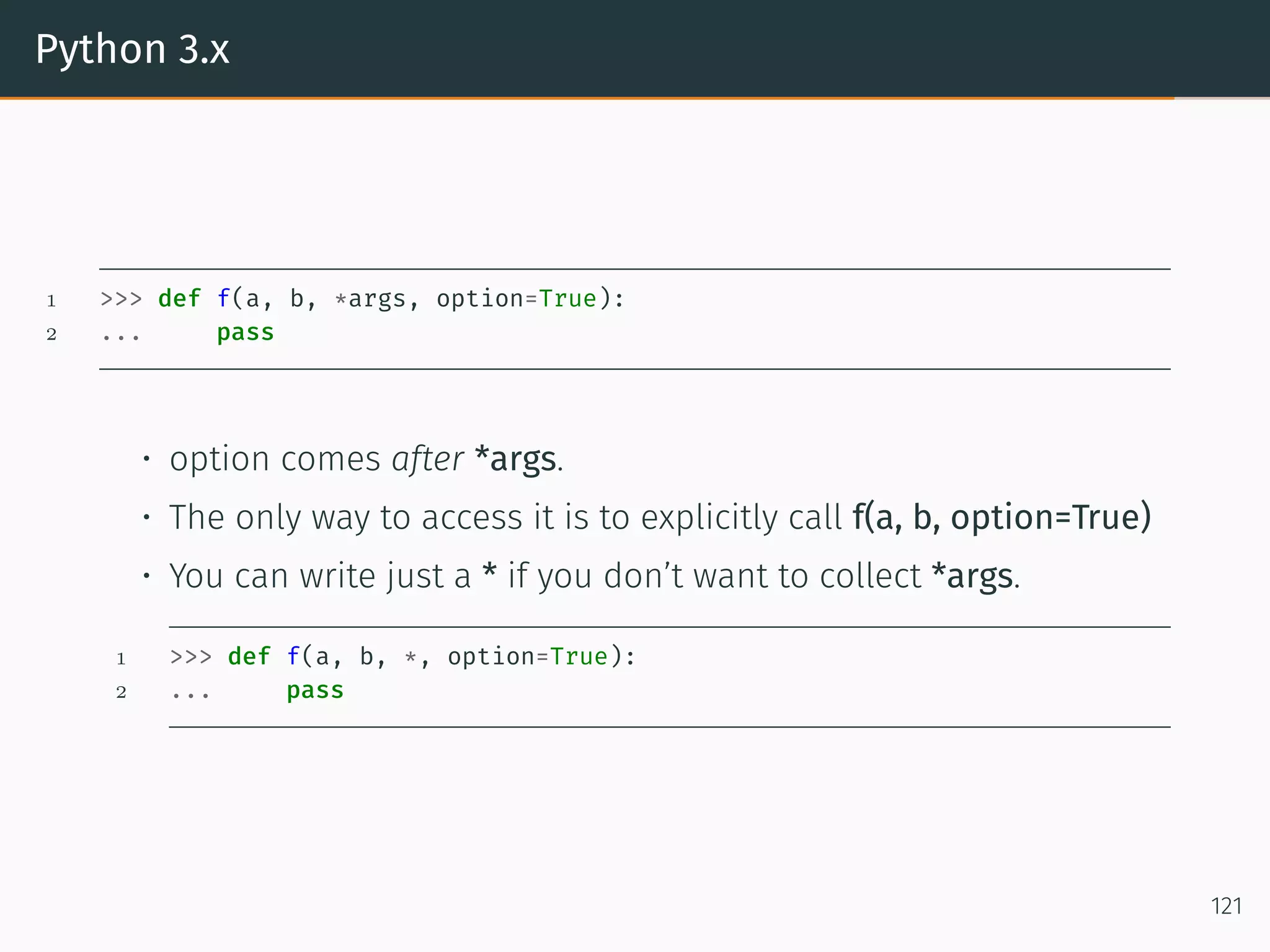
Python 3.x 1 >>> def f(a, b, *args, option=True): 2 ... pass • option comes after *args. • The only way to access it is to explicitly call f(a, b, option=True) • You can write just a * if you don’t want to collect *args. 1 >>> def f(a, b, *, option=True): 2 ... pass 121
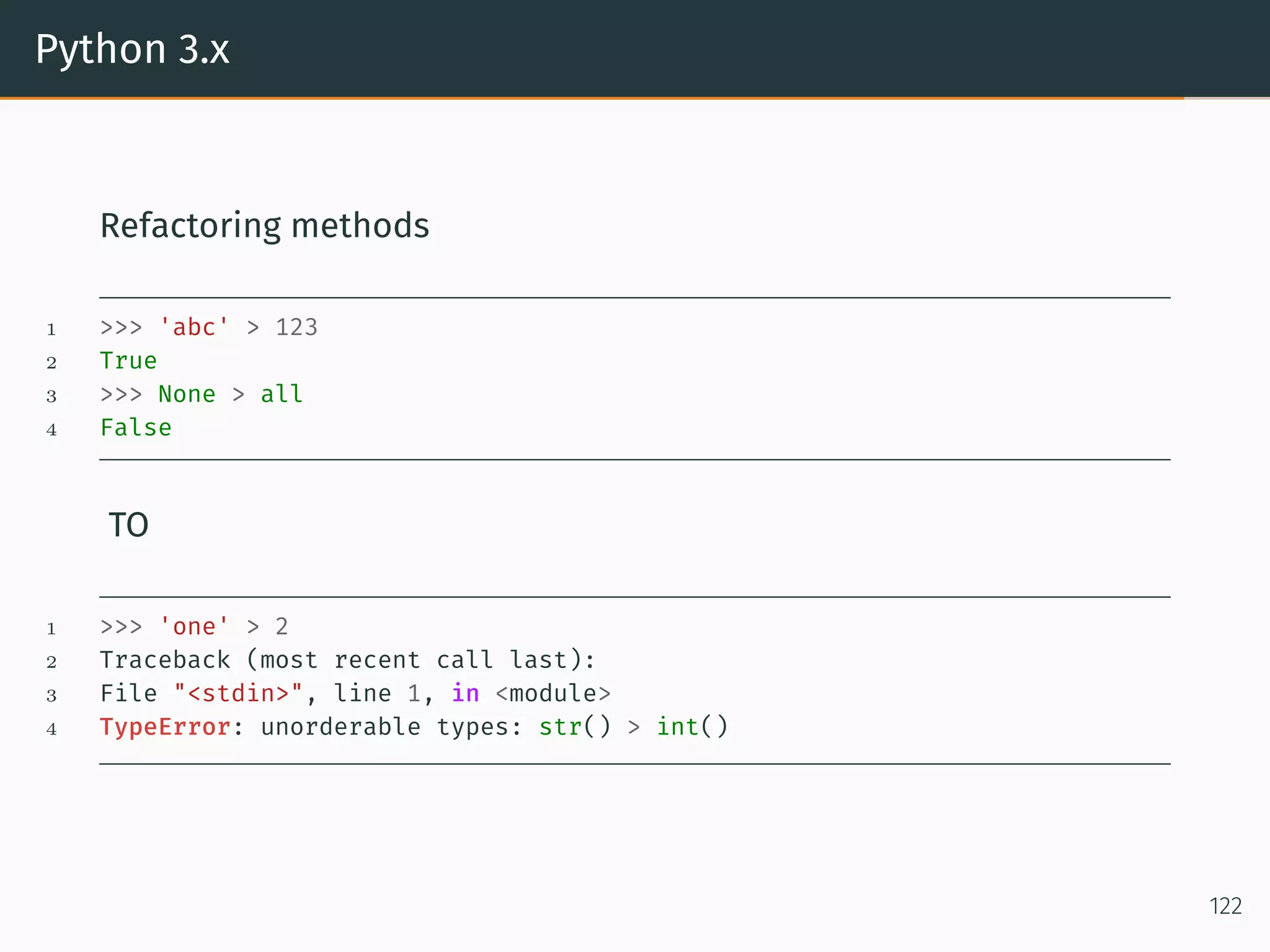
Python 3.x Refactoring methods 1 >>> 'abc' > 123 2 True 3 >>> None > all 4 False TO 1 >>> 'one' > 2 2 Traceback (most recent call last): 3 File "<stdin>", line 1, in <module> 4 TypeError: unorderable types: str() > int() 122
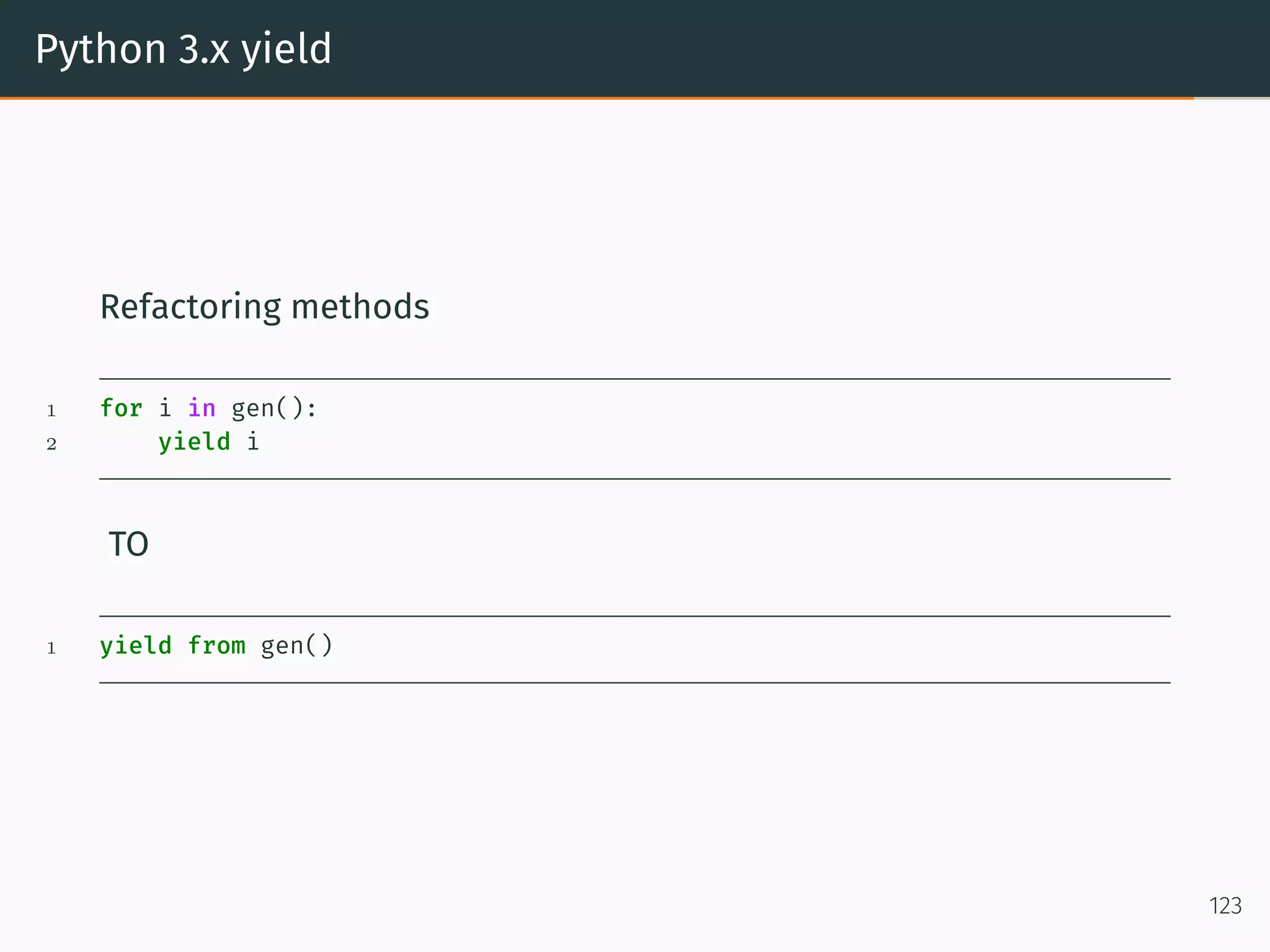
Python 3.x yield Refactoring methods 1 for i in gen(): 2 yield i TO 1 yield from gen() 123
Python 3.x I reordered the keyword arguments of a function, but something was implicitly passing in arguments expecting the order. 1 >>> def maxall(iterable, key=None): 2 ... """ 3 ... A list of all max items from the iterable 4 ... """ 5 ... key = key or (lambda x: x) 6 ... m = max(iterable, key=key) 7 ... return [i for i in iterable if key(i) == key(m)] 8 9 >>> maxall(['a', 'ab', 'bc'], len) 10 ['ab', 'bc'] 124
Python 3.x The max builtin supports max(a, b, c). We should allow that too. 1 >>> def maxall(*args, key=None): 2 ... """ 3 ... A list of all max items from the iterable 4 ... """ 5 ... if len(args) == 1: 6 ... iterable = args[0] 7 ... else: 8 ... iterable = args 9 ... key = key or (lambda x: x) 10 ... m = max(iterable, key=key) 11 ... return [i for i in iterable if key(i) == key(m)] We just broke any code that passed in the key as a second argument without using the keyword. 1 >>> maxall(['a', 'ab', 'ac'], len) 2 Traceback (most recent call last): 3 File "<stdin>", line 1, in <module> 4 File "<stdin>", line 10, in maxall 5 TypeError: unorderable types: builtin_function_or_method() > list() 125
Python 3.x Actually in Python 2 it would just return [’a’, ’ab’, ’ac’] By the way, max shows that this is already possible in Python 2, but only if you write your function in C. Obviously, we should have used maxall(iterable, *, key=None) to begin with. 126
Python 3.x yield Bad 1 def dup(n): 2 A = [] 3 for i in range(n): 4 A.extend([i, i]) 5 return A Good 1 def dup(n): 2 for i in range(n): 3 yield i 4 yield i Better 1 def dup(n): 2 for i in range(n): 3 yield from [i, i] 127
Namedtuple
namedtuple Factory Function for Tuples with Named Fields 1 >>> from collections import namedtuple 2 >>> import csv 3 >>> Point = namedtuple('Point', 'x y') 4 >>> for point in map(Point._make, csv.reader(open("points.csv", "r"))): 5 ... print(point.x, point.y) 6 1 2 7 2 3 8 3.4 5.6 9 10 10 10 >>> p = Point(x=11, y=22) 11 >>> p._asdict() 12 OrderedDict([('x', 11), ('y', 22)]) 13 >>> Color = namedtuple('Color', 'red green blue') 14 >>> Pixel = namedtuple('Pixel', Point._fields + Color._fields) 15 >>> Pixel(11, 22, 128, 255, 0) 16 Pixel(x=11, y=22, red=128, green=255, blue=0) 128
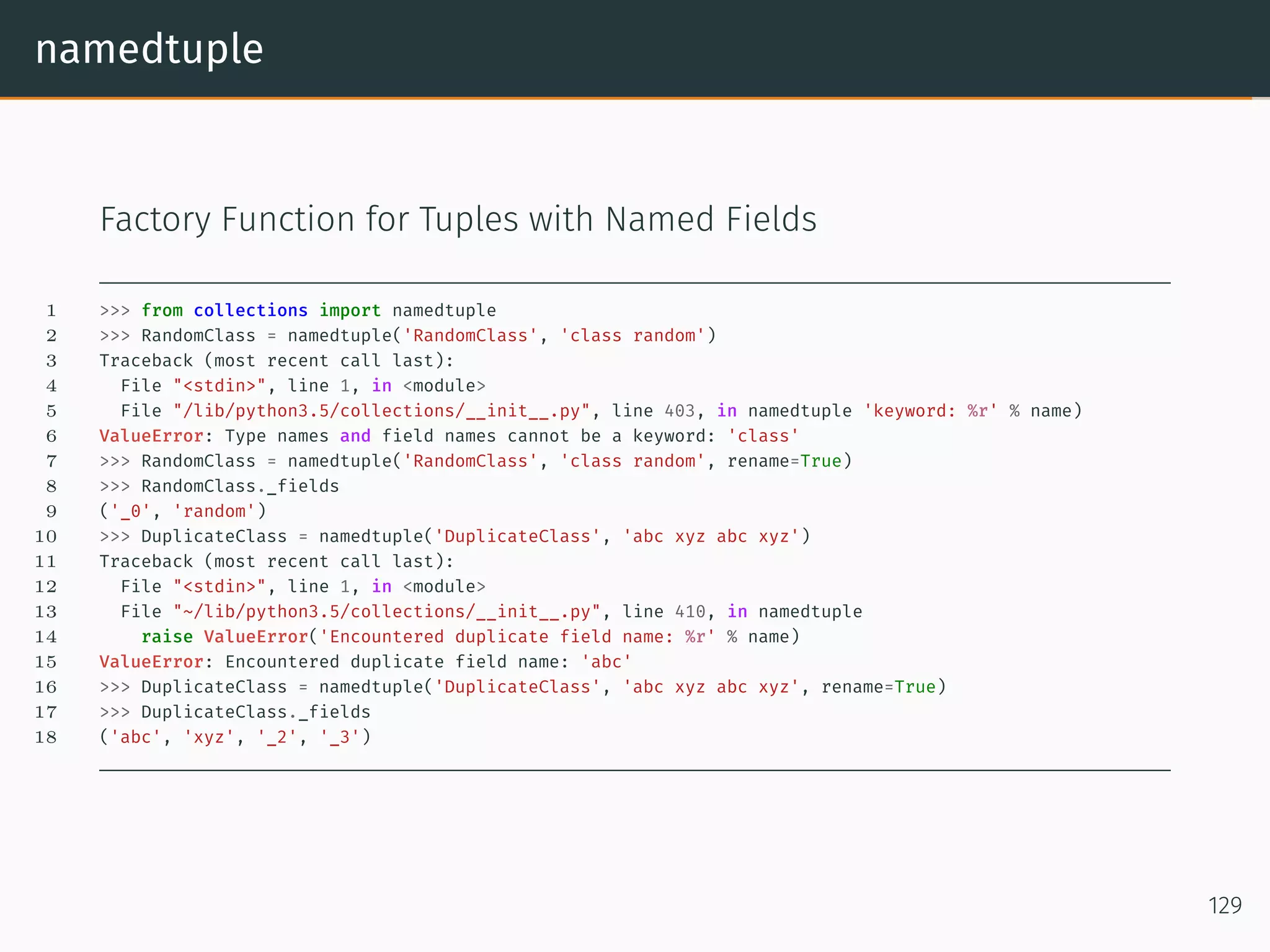
namedtuple Factory Function for Tuples with Named Fields 1 >>> from collections import namedtuple 2 >>> RandomClass = namedtuple('RandomClass', 'class random') 3 Traceback (most recent call last): 4 File "<stdin>", line 1, in <module> 5 File "/lib/python3.5/collections/__init__.py", line 403, in namedtuple 'keyword: %r' % name) 6 ValueError: Type names and field names cannot be a keyword: 'class' 7 >>> RandomClass = namedtuple('RandomClass', 'class random', rename=True) 8 >>> RandomClass._fields 9 ('_0', 'random') 10 >>> DuplicateClass = namedtuple('DuplicateClass', 'abc xyz abc xyz') 11 Traceback (most recent call last): 12 File "<stdin>", line 1, in <module> 13 File "~/lib/python3.5/collections/__init__.py", line 410, in namedtuple 14 raise ValueError('Encountered duplicate field name: %r' % name) 15 ValueError: Encountered duplicate field name: 'abc' 16 >>> DuplicateClass = namedtuple('DuplicateClass', 'abc xyz abc xyz', rename=True) 17 >>> DuplicateClass._fields 18 ('abc', 'xyz', '_2', '_3') 129
Signal Handler
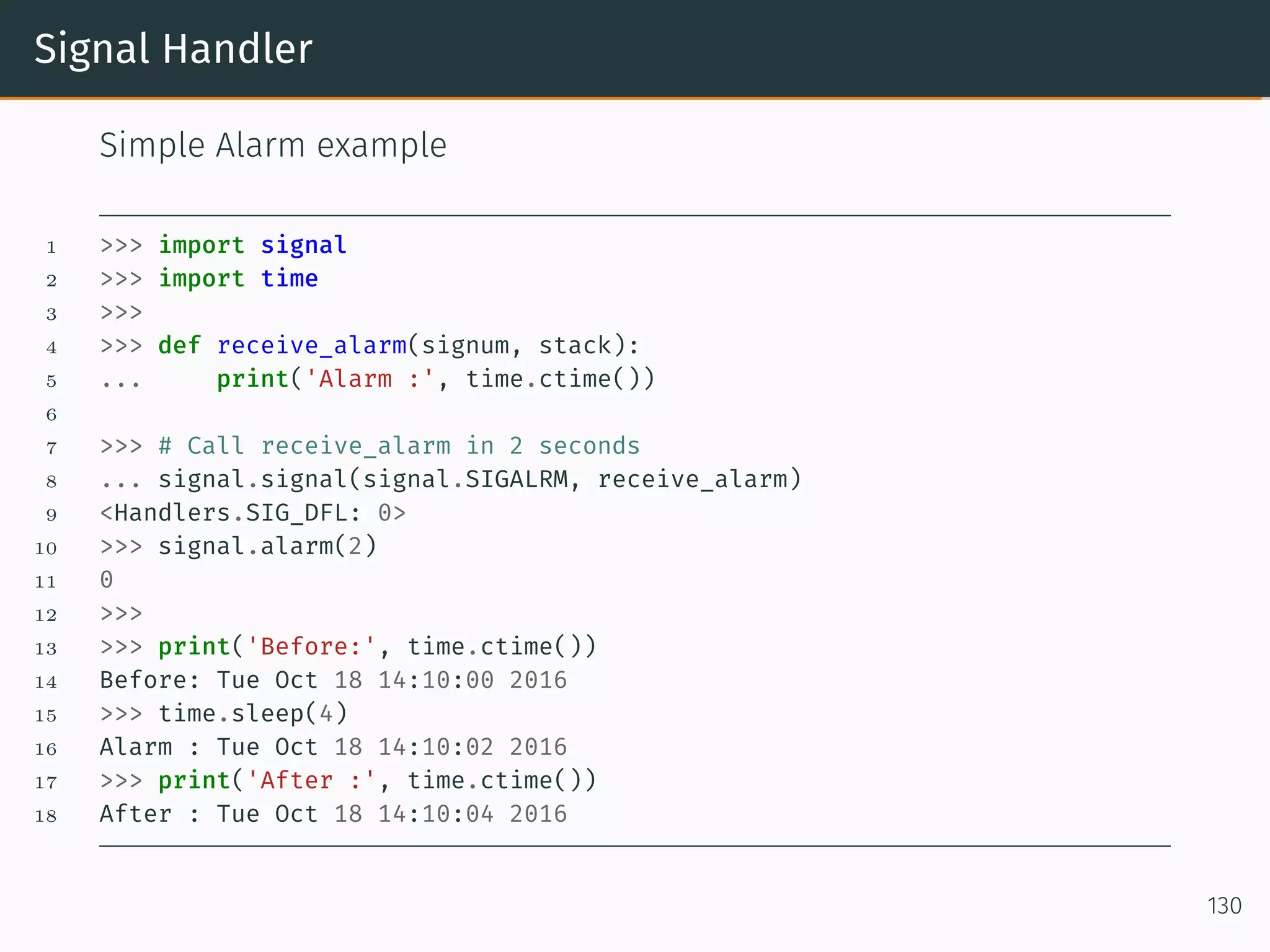
Signal Handler Simple Alarm example 1 >>> import signal 2 >>> import time 3 >>> 4 >>> def receive_alarm(signum, stack): 5 ... print('Alarm :', time.ctime()) 6 7 >>> # Call receive_alarm in 2 seconds 8 ... signal.signal(signal.SIGALRM, receive_alarm) 9 <Handlers.SIG_DFL: 0> 10 >>> signal.alarm(2) 11 0 12 >>> 13 >>> print('Before:', time.ctime()) 14 Before: Tue Oct 18 14:10:00 2016 15 >>> time.sleep(4) 16 Alarm : Tue Oct 18 14:10:02 2016 17 >>> print('After :', time.ctime()) 18 After : Tue Oct 18 14:10:04 2016 130
Conclusion
References • https://docs.python.org/3.6/ • http://www.python-course.eu/ • How to Make Mistakes in Python • Functional Programming in Python • Picking a Python Version: A Manifesto • asmeurer 131
Thank you! 131
Questions? 131

PythonOOP

  • 1.
    Advanced Python – BayArea Python3.x Rigorous Indulgence Group (BayPRIGgies) Veera V Pendyala veera.pendyala@gmail.com October 23, 2016
  • 2.
  • 3.
    Introduction Basic understanding ofPython Programing is a prerequisite. All the examples are worked out using Python 3.5. What do you learn? • Understand the underlying concepts of the Python OOP paradigm. • Introduction to Python 3.x 1
  • 4.
  • 5.
    __map__ 1 >>> defsquare(number): 2 ... return number * number 3 4 >>> list(map(square, [1, 2, 3, 4, 5, 6])) 5 [1, 4, 9, 16, 25, 36] 6 7 >>> # Can also be written as a list comprehension. 8 >>> [square(x) for x in [1, 2, 3, 4, 5, 6]] 9 [1, 4, 9, 16, 25, 36] 10 11 >>> # Another Example for __map__ 12 >>> list(map(pow,[2, 3, 4], [10, 11, 12])) 13 [1024, 177147, 16777216] 2
  • 6.
    __filter__ 1 >>> defsquare(number): 2 ... return number * number 3 4 >>> list(map(square, [0, 1, 2, 3, 4, 5, 6, 0])) 5 [0, 1, 4, 9, 16, 25, 36, 0] 6 7 >>> list(filter(square, [0, 1, 2, 3, 4, 5, 6, 0])) 8 [1, 4, 9, 16, 25, 36] 9 10 >>> # Can also be written as a list comprehension. 11 >>> [square(x) for x in [0, 1, 2, 3, 4, 5, 6, 0] if x] 12 [1, 4, 9, 16, 25, 36] 3
  • 7.
    all 1 >>> all([True,False]) 2 False 3 >>> all([True, True]) 4 True 5 6 >>> def is_positive(number): 7 ... if number >= 0: 8 ... return True 9 ... return False 10 11 >>> all([is_positive(x) for x in [1, 2]]) 12 True 13 >>> all([is_positive(x) for x in [1, -1]]) 14 False 15 >>> all([is_positive(x) for x in [-1, -2]]) 16 False 4
  • 8.
    any 1 >>> any([True,False]) 2 True 3 >>> any([False, False]) 4 False 5 6 >>> def is_positive(number): 7 ... if number >= 0: 8 ... return True 9 ... return False 10 11 >>> any([is_positive(x) for x in [-1, 1]]) 12 True 13 >>> any([is_positive(x) for x in [-1, -2]]) 14 False 5
  • 9.
    getattr 1 >>> classFoo(object): 2 ... def __init__(self): 3 ... self.value_1 = 5 4 ... def test_method(self): 5 ... return 10 6 ... 7 >>> foo = Foo() 8 >>> getattr(foo, 'test_method') 9 <bound method Foo.test_method of <__main__.Foo object at 0x101f1f208>> 10 >>> getattr(foo, 'test_method')() 11 10 12 >>> getattr(foo, 'value_1') 13 5 6
  • 10.
    hasattr Example 1 >>> classFoo(object): 2 ... def __init__(self): 3 ... self.value_1 = 5 4 ... def test_method(self): 5 ... return 10 6 ... 7 >>> foo = Foo() 8 >>> hasattr(foo, 'test_method') 9 True 10 >>> hasattr(foo, 'test_method_not_there') 11 False 12 >>> hasattr(foo, 'value_1') 13 True 7
  • 11.
    setattr Example 1 >>> classFoo(object): 2 ... def __init__(self): 3 ... self.value_1 = 5 4 ... def test_method(self): 5 ... return 10 6 ... 7 >>> foo = Foo() 8 >>> setattr(foo, 'value_1', 15) 9 >>> getattr(foo, 'value_1') 10 15 11 >>> foo.value_1 12 15 13 >>> setattr(foo, 'value_2', 25) 14 >>> foo.value_2 15 25 8
  • 12.
    setattr Example 1 >>> deftest_method_2(var): 2 ... return var 3 >>> setattr(foo, 'test_method_2', test_method_2) 4 >>> getattr(foo, 'test_method_2')(20) 5 20 6 >>> foo.test_method_2(40) 7 40 9
  • 13.
    callable Example 1 >>> classFoo(object): 2 ... def __init__(self): 3 ... self.not_callable = None 4 ... def foo_method(self): 5 ... pass 6 ... @property 7 ... def test_property(self): 8 ... pass 10
  • 14.
    callable On class 1 >>>callable(Foo) 2 True 3 >>> callable(Foo.foo_method) 4 True 5 >>> callable(Foo.test_property) 6 False 7 >>> callable(Foo.not_callable) 8 Traceback (most recent call last): 9 File "<stdin>", line 1, in <module> 10 AttributeError: type object 'Foo' has no attribute 'not_callable' 11
  • 15.
    callable On class object 1>>> foo = Foo() 2 >>> callable(foo.foo_method) 3 True 4 >>> callable(foo.not_callable) 5 False 6 >>> callable(foo.test_property) 7 False 12
  • 16.
    isinstance Example 1 >>> classFoo(object): 2 ... def __init__(self): 3 ... self.not_callable = None 4 ... def foo_method(self): 5 ... pass 6 ... @property 7 ... def test_property(self): 8 ... pass 9 ... 10 >>> foo = Foo() 11 >>> type(Foo) 12 <class 'type'> 13 >>> isinstance(foo, Foo) 14 True 13
  • 17.
    issubclass Example 1 >>> classFoo(object): 2 ... pass 3 ... 4 >>> class Bar(Foo): 5 ... pass 6 ... 7 >>> isinstance(Foo, Bar) 8 False 9 >>> isinstance(Bar, Foo) 10 False 11 >>> issubclass(Foo, Bar) 12 False 13 >>> issubclass(Bar, Foo) 14 True 14
  • 18.
    isinstance Example 1 >>> foo= Foo() 2 >>> bar = Bar() 3 >>> isinstance(foo, Foo) 4 True 5 >>> isinstance(bar, Foo) 6 True 7 >>> isinstance(bar, Bar) 8 True 9 >>> isinstance(foo, Bar) 10 False 15
  • 19.
  • 20.
    Closure A CLOSURE isa function object that remembers values in enclosing scopes regardless of whether those scopes are still present in memory. If you have ever written a function that returned another function, you probably may have used closures even without knowing about them. There is a saying in computer science that “a class is data with operations attached while a closure is operations with data attached.” – David 16
  • 21.
    closure 1 >>> defgenerate_adder_func(n): 2 ... print("id(n): %x" % id(n)) 3 ... def adder(x): 4 ... return n+x 5 ... print("id(adder): %x" % id(adder)) 6 ... return adder 7 8 >>> add_to_5 = generate_adder_func(5) 9 id(n): 1002148f0 10 id(adder): 1010758c8 11 >>> repr(add_to_5) 12 <function generate_adder_func.<locals>.adder at 0x1010758c8> 17
  • 22.
    Closure 1 >>> delgenerate_adder_func 2 >>> 'Value is: %d' % add_to_5(5) 3 Value is: 10 1 >>> add_to_5.__closure__ 2 (<cell at 0x1019382e8: int object at 0x1002148f0>,) 3 >>> type(add_to_5.__closure__[0]) 4 <class 'cell'> 5 >>> add_to_5.__closure__[0].cell_contents 6 5 As you can see, the __closure__ attribute of the function add_to_5 has a reference to int object at 0x1002148f0 which is none other than n (which was defined in generate_adder_func) 18
  • 23.
    Closure In case you’rewondering, every function object has __closure__ attribute. If there is not data for the closure, the __closure__ attribute will just be None. For example 1 >>> def foo(): 2 ... pass 3 4 >>> repr(foo); repr(foo.__closure__) 5 '<function foo at 0x101f22f28>' 6 'None' 19
  • 24.
  • 25.
    @decorator Same functionality canbe achieved without using the decorator syntax 1 def bar(foo): 2 pass 3 @bar 4 def foo(): 5 pass Is equivalent to 1 def foo(): 2 pass 3 foo = bar(foo) 20
  • 26.
    @decorator 1 >>> defmy_decorator(func_obj): 2 ... return func_obj 3 4 >>> @my_decorator 5 ... def my_func(): 6 ... print("Hello world!") 7 8 >>> my_func() 9 Hello world! 10 >>> my_func 11 <function my_func at 0x101f3e488> 21
  • 27.
    @decorator NOT getting desiredoutput! 1 >>> def my_decorator(func_obj): 2 ... print('This is decorator') 3 ... return func_obj 4 >>> @my_decorator 5 ... def my_func(): 6 ... print('Hello world!') 7 This is decorator 8 >>> my_func() 9 Hello world! 10 >>> my_func 11 <function my_func at 0x101f3e2f0> 22
  • 28.
    @decorator Desired output! 1 >>>import time 2 >>> def my_decorator(func_obj): 3 ... def wrapped(*args, **kwargs): 4 ... print('Start time: %d' % time.time()) 5 ... return_obj = func_obj(*args, **kwargs) 6 ... print('End time: %d' % time.time()) 7 ... return return_obj 8 ... return wrapped 9 >>> @my_decorator 10 ... def my_func(name): 11 ... print('Hello world! %s' % name) 12 ... return 'Done' 13 >>> my_func('Subbu') 14 Start time: 1474754409 15 Hello world! Subbu 16 End time: 1474754409 17 'Done' 23
  • 29.
    @decorator Doc strings offunctions! 1 >>> def foo(): 2 ... ''' This is foo ''' 3 ... pass 4 ... 5 >>> foo.__doc__ 6 ' This is foo ' 24
  • 30.
    @decorator Let’s check themfor decorated functions. 1 >>> import time 2 >>> def my_decorator(func_obj): 3 ... def wrapped(*args, **kwargs): 4 ... print('Start time: %d' % time.time()) 5 ... return_obj = func_obj(*args, **kwargs) 6 ... print('End time: %d' % time.time()) 7 ... return return_obj 8 ... return wrapped 9 >>> @my_decorator 10 ... def my_func(name): 11 ... ''' My Function ''' 12 ... print("Hello world! %s" % name) 13 ... return 'Done' 14 >>> my_func.__doc__ 15 >>> 16 >>> my_func.__name__ 17 'wrapped' 25
  • 31.
    @decorator Important metadata suchas the name, doc string, annotations, and calling signature are preserved. 1 >>> import time 2 >>> from functools import wraps 3 >>> def my_decorator(func_obj): 4 ... ''' My Decorator ''' 5 ... @wraps(func_obj) 6 ... def wrapped(*args, **kwargs): 7 ... print('Start time: %d' % time.time()) 8 ... return_obj = func_obj(*args, **kwargs) 9 ... print('End time: %d' % time.time()) 10 ... return return_obj 11 ... return wrapped 12 >>> @my_decorator 13 ... def my_func(name): 14 ... ''' My Function ''' 15 ... print("Hello world! %s" % name) 16 ... return 'Done' 17 >>> my_func.__doc__ 18 ' My Function ' 19 >>> my_func.__name__ 20 'my_func' 26
  • 32.
    @decorator Class decorator 1 >>>import time 2 >>> class ClassDecorator(object): 3 ... def __init__(self, func): 4 ... self.func = func 5 ... def __call__(self, *args, **kwargs): 6 ... print('Start: %s' % time.time()) 7 ... ret_obj = self.func.__call__(self.obj, *args, **kwargs) 8 ... print('End: %s' % time.time()) 9 ... return ret_obj 10 ... def __get__(self, instance, owner): 11 ... self.cls = owner 12 ... self.obj = instance 13 ... return self.__call__ 14 >>> class Test(object): 15 ... def __init__(self): 16 ... self.name = 'Subbu' 17 ... @ClassDecorator 18 ... def test_method(self): 19 ... ''' Test method ''' 20 ... return self.name 21 >>> test_obj = Test() 22 >>> print('Hello %s' % test_obj.test_method()) 23 Start: 1474777873.204947 24 End: 1474777873.205015 25 Hello Subbu 27
  • 33.
  • 34.
    @decorator Let us lookat the classic factorial function 1 >>> def factorial(n): 2 ... if n == 1: 3 ... return 1 4 ... else: 5 ... return n * factorial(n-1) 6 7 >>> factorial(5) 8 120 TODO: Look for decorators with arguments. 28
  • 35.
    Solution for factorial 1>>> def memoize(f): 2 ... memo = {} 3 ... def helper(x): 4 ... if x not in memo: 5 ... print('Finding the value for %d' % x) 6 ... memo[x] = f(x) 7 ... print('Factorial for %d is %d' % (x, memo[x])) 8 ... return memo[x] 9 ... return helper 10 ... 11 >>> @memoize 12 ... def factorial(n): 13 ... if n == 1: 14 ... return 1 15 ... else: 16 ... return n * factorial(n-1) 17 ... 18 >>> factorial(5) 19 Finding the value for 5 20 Finding the value for 4 21 Finding the value for 3 22 Finding the value for 2 23 Finding the value for 1 24 Factorial for 1 is 1 25 Factorial for 2 is 2 26 Factorial for 3 is 6 27 Factorial for 4 is 24 28 Factorial for 5 is 120 29 120 29
  • 36.
    Solution for fibonacci 1>>> def memoize(f): 2 ... memo = {} 3 ... def helper(x): 4 ... if x not in memo: 5 ... memo[x] = f(x) 6 ... return memo[x] 7 ... return helper 8 ... 9 >>> @memoize 10 ... def fib(n): 11 ... if n == 0: 12 ... return 0 13 ... elif n == 1: 14 ... return 1 15 ... else: 16 ... return fib(n-1) + fib(n-2) 17 ... 18 >>> fib(10) 19 55 30
  • 37.
  • 38.
    Simple Generator Generators aredata producers 1 >>> def generator(): 2 ... while True: 3 ... yield 1 4 >>> a = generator() 5 >>> next(a) 6 1 31
  • 39.
    Round robin Generator Generatorsare data producers 1 >>> def round_robin(): 2 ... while True: 3 ... yield from [1, 2, 3, 4] 4 >>> a = round_robin() 5 >>> a 6 <generator object round_robin at 0x101a89678> 7 >>> next(a) 8 1 9 >>> next(a) 10 2 11 >>> next(a) 12 3 13 >>> next(a) 14 4 15 >>> next(a) 16 1 17 >>> next(a) 18 2 19 >>> next(a) 20 3 21 >>> next(a) 22 4 32
  • 40.
  • 41.
    Simple Coroutine Coroutines aredata consumers. 1 >>> def coroutine(): 2 ... while True: 3 ... val = (yield) 4 ... print(val) 5 6 >>> a = coroutine() 7 >>> next(a) 8 >>> a.send(1) 9 1 10 >>> a.send(2) 11 2 12 >>> a.close() 13 14 >>> b = coroutine() 15 >>> b.send(None) 16 >>> b.send(1) 17 1 18 >>> b.send(2) 19 2 20 >>> b.close() 33
  • 42.
    Coroutine All coroutines mustbe “primed” by first calling next or send(None) This advances execution to the location of the first yield expression. For the first yield it is ready to receive the values. Call close to shut down the coroutine 34
  • 43.
  • 44.
    @property Simple getter andsetter. 1 >>> class Foo(object): 2 ... def __init__(self, x): 3 ... self.__x = x 4 ... def getX(self): 5 ... return self.__x 6 ... def setX(self, x): 7 ... self.__x = x 8 ... 9 >>> foo = Foo(5) 10 >>> foo.getX() 11 5 12 >>> foo.setX(10) 13 >>> foo.getX() 14 10 35
  • 45.
    @property Python way ofdefining is much simpler. 1 >>> class Foo(object): 2 ... def __init__(self,x): 3 ... self.x = x 4 ... 5 >>> foo = Foo(5) 6 >>> foo.x 7 5 8 >>> foo.x = 10 9 >>> foo.x 10 10 36
  • 46.
    @property Where is dataENCAPSULATION? getX and setX in our starting example did was “getting the data through” without doing anything, no checks nothing. What happens, if we want to change the implementation in the future? Lets change the implementation, as following: • The attribute x can have values between 0 and 1000 • If a value larger than 1000 is assigned, x should be set to 1000 • x should be set to 0, if the value is less than 0 37
  • 47.
    @property 1 >>> classFoo(object): 2 ... def __init__(self,x): 3 ... self.__x = x 4 ... def getX(self): 5 ... return self.__x 6 ... def setX(self, x): 7 ... if x < 0: 8 ... self.__x = 0 9 ... elif x > 1000: 10 ... self.__x = 1000 11 ... else: 12 ... self.__x = x 13 ... def delX(self): 14 ... del self.__x 15 16 >>> foo = Foo(5) 17 >>> foo.getX() 18 5 19 >>> foo.setX(1010) 20 >>> foo.getX() 21 1000 22 >>> foo.setX(-1) 23 >>> foo.getX() 24 0 38
  • 48.
    @property People recommended touse only private attributes with getters and setters, so that they can change the implementation without having to change the interface. Let’s assume we have designed our class with the public attribute and no methods. People have already used it a lot and they have written code like this: 1 >>> from foo_module import foo 2 >>> foo = Foo(100) 3 >>> foo.x = 1001 39
  • 49.
    @property 1 >>> classFoo(object): 2 ... def __init__(self): 3 ... self.__x = None 4 ... def getX(self): 5 ... return self.__x 6 ... def setX(self, x): 7 ... if x < 0: 8 ... self.__x = 0 9 ... elif x > 1000: 10 ... self.__x = 1000 11 ... else: 12 ... self.__x = x 13 ... def delX(self): 14 ... del self.__x 15 ... x = property(getX, setX, delX, "I'm the 'x' property.") 16 ... # (getter, setter, deleter, doc_string) 17 >>> foo = Foo() 18 >>> foo 19 <__main__.Foo object at 0x1011aaef0> 20 >>> f 21 >>> foo.x 22 100 23 >>> foo.x = 1001 24 >>> foo.x 25 1000 26 >>> foo.x = -1 27 >>> foo.x 28 0 40
  • 50.
    @property Deleting the value 1>>> del foo.x 2 >>> foo.x 3 Traceback (most recent call last): 4 File "<stdin>", line 1, in <module> 5 File "<stdin>", line 5, in getX 6 AttributeError: 'Foo' object has no attribute '_Foo__x' 7 >>> foo 8 <__main__.Foo object at 0x1011aaef0> 9 >>> foo.x = 2000 10 >>> foo.x 11 1000 41
  • 51.
    @property The @property decoratorturns the method into a getter for a read-only attribute with the same name. A property object has getter, setter, and deleter methods usable as decorators that create a copy of the property with the corresponding accessor function set to the decorated function. This is best explained with an example: 1 >>> class Foo(object): 2 ... def __init__(self): 3 ... self.__x = None 4 ... @property 5 ... def x(self): 6 ... return self.__x 7 ... @x.setter 8 ... def x(self, x): 9 ... if x < 0: 10 ... self.__x = 0 11 ... elif x > 1000: 12 ... self.__x = 1000 13 ... else: 14 ... self.__x = x 15 ... @x.deleter 16 ... def x(self): 17 ... del self.__x 42
  • 52.
    @property This code isexactly equivalent to the first example. Be sure to give the additional functions the same name as the original property (x in this case.) The returned property object also has the attributes fget, fset, and fdel corresponding to the constructor arguments. 1 >>> foo = Foo() 2 >>> foo 3 <__main__.Foo object at 0x1011aaf60> 4 >>> foo.x = 1001 5 >>> foo.x 6 1000 7 >>> foo.x = 10 8 >>> foo.x 9 10 10 >>> foo.x = -1 11 >>> foo.x 12 0 13 >>> del foo.x 14 >>> foo.x 15 Traceback (most recent call last): 16 File "<stdin>", line 1, in <module> 17 File "<stdin>", line 6, in x 18 AttributeError: 'Foo' object has no attribute '_Foo__x' 19 >>> foo 20 <__main__.Foo object at 0x1011aaf60> 43
  • 53.
  • 54.
    Attributes Instance attributes areowned by the specific instances of a class. This means for two different instances the instance attributes are usually different. Now, let us define attributes at the class level. Class attributes are attributes which are owned by the class itself. They will be shared by all the instances of the class. 44
  • 55.
    Attributes 1 >>> classFoo(object): 2 ... val = 5 3 >>> a = Foo() 4 >>> a.val 5 5 6 >>> a.val = 10 7 >>> a.val 8 10 9 >>> b = Foo() 10 >>> b.val 11 5 12 >>> Foo.val 13 5 14 >>> Foo.val = 100 15 >>> Foo.val 16 100 17 >>> b.val 18 100 19 >>> a.val 20 10 We can access a class attribute via instance or via the class name. As you can see in the example above that we need no instance. 45
  • 56.
    Attributes Python’s class attributesand object attributes are stored in separate dictionaries, as we can see here: 1 >>> a.__dict__ 2 {'val': 10} 3 >>> b.__dict__ 4 {} 5 >>> import pprint 6 >>> pprint.pprint(Foo.__dict__) 7 mappingproxy({'__dict__': <attribute '__dict__' of 'Foo' objects>, 8 '__doc__': None, 9 '__module__': '__main__', 10 '__weakref__': <attribute '__weakref__' of 'Foo' objects>, 11 'val': 100}) 12 >>> pprint.pprint(a.__class__.__dict__) 13 mappingproxy({'__dict__': <attribute '__dict__' of 'Foo' objects>, 14 '__doc__': None, 15 '__module__': '__main__', 16 '__weakref__': <attribute '__weakref__' of 'Foo' objects>, 17 'val': 100}) 18 >>> pprint.pprint(b.__class__.__dict__) 19 mappingproxy({'__dict__': <attribute '__dict__' of 'Foo' objects>, 20 '__doc__': None, 21 '__module__': '__main__', 22 '__weakref__': <attribute '__weakref__' of 'Foo' objects>, 23 'val': 100}) 46
  • 57.
    Attributes Demonstrate to countinstances with class attributes. 1 >>> class Foo(object): 2 ... instance_count = 0 3 ... def __init__(self): 4 ... Foo.instance_count += 1 5 ... def __del__(self): 6 ... Foo.instance_count -= 1 7 ... 8 >>> a = Foo() 9 >>> print('Instance count %s' % Foo.instance_count) 10 Instance count 1 11 >>> b = Foo() 12 >>> print('Instance count %s' % Foo.instance_count) 13 Instance count 2 14 >>> del a 15 >>> print('Instance count %s' % Foo.instance_count) 16 Instance count 1 17 >>> del b 18 >>> print('Instance count %s' % Foo.instance_count) 19 Instance count 0 47
  • 58.
    Attributes Demonstrate to countinstance with class attributes using type(self) 1 >>> class Foo(object): 2 ... instance_count = 0 3 ... def __init__(self): 4 ... type(self).instance_count += 1 5 ... def __del__(self): 6 ... type(self).instance_count -= 1 7 ... 8 >>> a = Foo() 9 >>> print('Instance count %s' % Foo.instance_count) 10 Instance count 1 11 >>> b = Foo() 12 >>> print('Instance count %s' % Foo.instance_count) 13 Instance count 2 14 >>> del a 15 >>> print('Instance count %s' % Foo.instance_count) 16 Instance count 1 17 >>> del b 18 >>> print('Instance count %s' % Foo.instance_count) 19 Instance count 0 48
  • 59.
    Attributes Demonstrate to countinstance ERROR using private class attributes. 1 >>> class Foo(object): 2 ... __instance_count = 0 3 ... def __init__(self): 4 ... type(self).__instance_count += 1 5 ... def foo_instances(self): 6 ... return Foo.__instance_count 7 ... 8 >>> a = Foo() 9 >>> print('Instance count %s' % a.foo_instances()) 10 Instance count 1 11 >>> b = Foo() 12 >>> print('Instance count %s' % a.foo_instances()) 13 Instance count 2 14 >>> Foo.foo_instances() 15 Traceback (most recent call last): 16 File "<stdin>", line 1, in <module> 17 TypeError: foo_instances() missing 1 required positional argument: 'self' 49
  • 60.
    Attributes The next idea,which still doesn’t solve our problem, consists in omitting the parameter self and adding @staticmethod decorator. 1 >>> class Foo(object): 2 ... __instance_count = 0 3 ... def __init__(self): 4 ... type(self).__instance_count += 1 5 ... @staticmethod 6 ... def foo_instances(): 7 ... return Foo.__instance_count 8 ... 9 >>> a = Foo() 10 >>> print('Instance count %s' % Foo.foo_instances()) 11 Instance count 1 12 >>> print('Instance count %s' % a.foo_instances()) 13 Instance count 1 14 >>> b = Foo() 15 >>> print('Instance count %s' % Foo.foo_instances()) 16 Instance count 2 17 >>> print('Instance count %s' % a.foo_instances()) 18 Instance count 2 19 >>> print('Instance count %s' % b.foo_instances()) 20 Instance count 2 50
  • 61.
  • 62.
    @classmethod Static methods shouldn’tbe confused with class methods. Like static methods class methods are not bound to instances, but unlike static methods class methods are bound to a class. The first parameter of a class method is a reference to a class, i.e. a class object. They can be called via an instance or the class name. 51
  • 63.
    @classmethod 1 >>> classFoo(object): 2 ... __instance_count = 0 3 ... def __init__(self): 4 ... type(self).__instance_count += 1 5 ... @classmethod 6 ... def foo_instances(cls): 7 ... return cls, Foo.__instance_count 8 ... 9 >>> Foo.foo_instances 10 <bound method Foo.foo_instances of <class '__main__.Foo'>> 11 >>> Foo.foo_instances() 12 (<class '__main__.Foo'>, 0) 13 >>> a = Foo() 14 >>> Foo.foo_instances() 15 (<class '__main__.Foo'>, 1) 16 >>> a.foo_instances() 17 (<class '__main__.Foo'>, 1) 18 >>> b = Foo() 19 >>> a.foo_instances() 20 (<class '__main__.Foo'>, 2) 21 >>> b.foo_instances() 22 (<class '__main__.Foo'>, 2) 23 >>> Foo.foo_instances() 24 (<class '__main__.Foo'>, 2) 52
  • 64.
    @classmethod Example with both@staticmethod and @classmethod 1 >>> class fraction(object): 2 ... def __init__(self, n, d): 3 ... self.numerator, self.denominator = fraction.reduce(n, d) 4 ... @staticmethod 5 ... def gcd(a,b): 6 ... while b != 0: 7 ... a, b = b, a%b 8 ... return a 9 ... @classmethod 10 ... def reduce(cls, n1, n2): 11 ... g = cls.gcd(n1, n2) 12 ... return (n1 // g, n2 // g) 13 ... def __str__(self): 14 ... return str(self.numerator)+'/'+str(self.denominator) 15 ... 16 >>> x = fraction(8,24) 17 >>> x 18 <__main__.fraction object at 0x101448978> 19 >>> print(x) 20 1/3 53
  • 65.
    @classmethod The usefulness ofclass methods in inheritance. 1 >>> class BaseClass(object): 2 ... name = 'Base class' 3 ... @staticmethod 4 ... def about(): 5 ... print('This is %s' % BaseClass.name) 6 ... 7 >>> class SubClass1(BaseClass): 8 ... name = 'Sub Class 1' 9 ... 10 >>> class SubClass2(BaseClass): 11 ... name = 'Sub Class 2' 12 ... 13 >>> base_class = BaseClass() 14 >>> base_class.about() 15 This is Base class 16 >>> sub_class_1 = SubClass1() 17 >>> sub_class_1.about() 18 This is Base class 19 >>> sub_class_2 = SubClass2() 20 >>> sub_class_2.about() 21 This is Base class 54
  • 66.
    @classmethod Solution is @classmethodnot @staticmethod 1 >>> class BaseClass(object): 2 ... name = 'Base class' 3 ... @classmethod 4 ... def about(cls): 5 ... print('This is %s' % cls.name) 6 7 >>> class SubClass1(BaseClass): 8 ... name = 'Sub Class 1' 9 10 >>> class SubClass2(BaseClass): 11 ... name = 'Sub Class 2' 12 13 >>> base_class = BaseClass() 14 >>> base_class.about() 15 This is Base class 16 17 >>> sub_class_1 = SubClass1() 18 >>> sub_class_1.about() 19 This is Sub Class 1 20 21 >>> sub_class_2 = SubClass2() 22 >>> sub_class_2.about() 23 This is Sub Class 2 55
  • 67.
  • 68.
    Inheritance Simple Inheritance Example 1>>> class BaseClass(object): 2 ... def __init__(self, val1, val2): 3 ... self.val1 = val1 4 ... self.val2 = val2 5 ... def about(self): 6 ... return '%s-%s' % (self.val1, self.val2) 7 8 >>> class SubClass(BaseClass): 9 ... def __init__(self, val1, val2, val3): 10 ... BaseClass.__init__(self, val1, val2) 11 ... self.val3 = val3 12 ... def sub_about(self): 13 ... return '%s-%s' % (self.about(), self.val3) 14 15 >>> a = BaseClass(1, 2) 16 >>> a.about() 17 '1-2' 18 >>> b = SubClass(1, 2, 3) 19 >>> b.sub_about() 20 '1-2-3' 56
  • 69.
    Inheritance Inheritance with super 1>>> class BaseClass(object): 2 ... def __init__(self, val1, val2): 3 ... self.val1 = val1 4 ... self.val2 = val2 5 ... def about(self): 6 ... return '%s-%s' % (self.val1, self.val2) 7 8 >>> class SubClass(BaseClass): 9 ... def __init__(self, val1, val2, val3): 10 ... super(SubClass, self).__init__(val1, val2) 11 ... self.val3 = val3 12 ... def sub_about(self): 13 ... return '%s-%s' % (self.about(), self.val3) 14 15 >>> a = BaseClass(1, 2) 16 >>> a.about() 17 '1-2' 18 >>> b = SubClass(1, 2, 3) 19 >>> b.sub_about() 20 '1-2-3' 57
  • 70.
    Inheritance Inheritance with superworks for Python 3 1 >>> class BaseClass(object): 2 ... def __init__(self, val1, val2): 3 ... self.val1 = val1 4 ... self.val2 = val2 5 ... def about(self): 6 ... return '%s-%s' % (self.val1, self.val2) 7 8 >>> class SubClass(BaseClass): 9 ... def __init__(self, val1, val2, val3): 10 ... super().__init__(val1, val2) 11 ... self.val3 = val3 12 ... def sub_about(self): 13 ... return '%s-%s' % (self.about(), self.val3) 14 15 >>> a = BaseClass(1, 2) 16 >>> a.about() 17 '1-2' 18 >>> b = SubClass(1, 2, 3) 19 >>> b.sub_about() 20 '1-2-3' 58
  • 71.
    Inheritance Inheritance with superworks for Python 3. Using __str__ for the BaseClass. 1 >>> class BaseClass(object): 2 ... def __init__(self, val1, val2): 3 ... self.val1 = val1 4 ... self.val2 = val2 5 ... def __str__(self): 6 ... return '%s-%s' % (self.val1, self.val2) 7 8 >>> class SubClass(BaseClass): 9 ... def __init__(self, val1, val2, val3): 10 ... super().__init__(val1, val2) 11 ... self.val3 = val3 12 13 >>> a = BaseClass(1, 2) 14 >>> print(a) 15 1-2 16 >>> b = SubClass(1, 2, 3) 17 >>> print(b) 18 1-2 59
  • 72.
    Inheritance We have overriddenthe method __str__ from BaseClass in SubClass 1 >>> class BaseClass(object): 2 ... def __init__(self, val1, val2): 3 ... self.val1 = val1 4 ... self.val2 = val2 5 ... def __str__(self): 6 ... return '%s-%s' % (self.val1, self.val2) 7 8 >>> class SubClass(BaseClass): 9 ... def __init__(self, val1, val2, val3): 10 ... super().__init__(val1, val2) 11 ... self.val3 = val3 12 ... def __str__(self): 13 ... return '%s-%s' % (super().__str__(), self.val3) 14 15 >>> a = BaseClass(1, 2) 16 >>> print(a) 17 1-2 18 >>> b = SubClass(1, 2, 3) 19 >>> print(b) 20 1-2-3 60
  • 73.
  • 74.
    Multiple Inheritance The “DiamondProblem” (sometimes referred to as the “Deadly Diamond of Death”) is the generally used term for an ambiguity that arises when two classes B and C inherit from a superclass A, and another class D inherits from both B and C. If there is a method m in A that B or C (or even both of them) has overridden, and furthermore, if does not override this method, then the question is which version of the method does D inherit? It could be the one from A, B or C. A B C D 61
  • 75.
    Multiple Inheritance 1 >>>class A: 2 ... def m(self): 3 ... print("m of A called") 4 5 >>> class B(A): 6 ... def m(self): 7 ... print("m of B called") 8 9 >>> class C(A): 10 ... def m(self): 11 ... print("m of C called") 12 13 >>> class D(B,C): 14 ... pass 15 ... 16 >>> x = D() 17 >>> x.m() 18 m of B called 62
  • 76.
    Multiple Inheritance Transpose theorder of the classes in the class header of D, class D(C,B): 1 >>> class A: 2 ... def m(self): 3 ... print("m of A called") 4 ... 5 >>> 6 >>> class B(A): 7 ... def m(self): 8 ... print("m of B called") 9 10 >>> class C(A): 11 ... def m(self): 12 ... print("m of C called") 13 14 >>> class D(C,B): 15 ... pass 16 17 >>> x = D() 18 >>> x.m() 19 m of C called 63
  • 77.
    Multiple Inheritance Result usingPython2.7 1 >>> class A: 2 ... def m(self): 3 ... print("m of A called") 4 5 >>> class B(A): 6 ... pass 7 8 >>> 9 ... class C(A): 10 ... def m(self): 11 ... print("m of C called") 12 13 >>> class D(B,C): 14 ... pass 15 16 >>> x = D() 17 >>> x.m() 18 m of A called 64
  • 78.
    Multiple Inheritance Result usingPython3 1 >>> class A: 2 ... def m(self): 3 ... print("m of A called") 4 5 >>> class B(A): 6 ... pass 7 8 ... class C(A): 9 ... def m(self): 10 ... print("m of C called") 11 12 >>> class D(B,C): 13 ... pass 14 15 >>> x = D() 16 >>> x.m() 17 m of C called 65
  • 79.
    Multiple Inheritance Only forthose who are interested in Python version2: To have the same inheritance behavior in Python2 as in Python3, every class has to inherit from the class object. Our class A doesn’t inherit from object, so we get a so-called old-style class, if we call the script with python2. Multiple inheritance with old-style classes is governed by two rules: depth-first and then left-to-right. If you change the header line of A into class A(object):, we will have the same behavior in both Python versions. 66
  • 80.
    Multiple Inheritance Result usingPython2.7 1 >>> class A(object): 2 ... def m(self): 3 ... print("m of A called") 4 5 >>> class B(A): 6 ... pass 7 8 ... class C(A): 9 ... def m(self): 10 ... print("m of C called") 11 12 >>> class D(B,C): 13 ... pass 14 15 >>> x = D() 16 >>> x.m() 17 m of C called 67
  • 81.
    Multiple Inheritance Result usingPython3 1 >>> class A(object): 2 ... def m(self): 3 ... print("m of A called") 4 5 >>> class B(A): 6 ... pass 7 8 ... class C(A): 9 ... def m(self): 10 ... print("m of C called") 11 12 >>> class D(B,C): 13 ... pass 14 15 >>> x = D() 16 >>> x.m() 17 m of C called 68
  • 82.
  • 83.
    Method Resolution Order 1>>> class A: 2 ... def m(self): 3 ... print("m of A called") 4 >>> class B(A): 5 ... def m(self): 6 ... print("m of B called") 7 >>> class C(A): 8 ... def m(self): 9 ... print("m of C called") 10 >>> class D(B,C): 11 ... def m(self): 12 ... print("m of D called") Let’s apply the method m on an instance of D. We can see that only the code of the method m of D will be executed. We can also explicitly call the methods m of the other classes via the class name. 1 >>> x = D() 2 >>> B.m(x) 3 m of B called 4 >>> C.m(x) 5 m of C called 6 >>> A.m(x) 7 m of A called 69
  • 84.
    Method Resolution Order Nowlet’s assume that the method m of D should execute the code of m of B, C and A as well, when it is called. We could implement it like this: 1 >>> class D(B,C): 2 ... def m(self): 3 ... print("m of D called") 4 ... B.m(self) 5 ... C.m(self) 6 ... A.m(self) 7 8 >>> x = D() 9 >>> x.m() 10 m of D called 11 m of B called 12 m of C called 13 m of A called 70
  • 85.
    Method Resolution Order Butit turns out once more that things are more complicated than it seems. How can we cope with the situation, if both m of B and m of C will have to call m of A as well? In this case, we have to take away the call A.m(self) from m in D. The code might look like this, but there is still a bug lurking in it. 71
  • 86.
    Method Resolution Order 1>>> class A: 2 ... def m(self): 3 ... print("m of A called") 4 5 >>> class B(A): 6 ... def m(self): 7 ... print("m of B called") 8 ... A.m(self) 9 10 >>> class C(A): 11 ... def m(self): 12 ... print("m of C called") 13 ... A.m(self) 14 15 >>> class D(B,C): 16 ... def m(self): 17 ... print("m of D called") 18 ... B.m(self) 19 ... C.m(self) 72
  • 87.
    Method Resolution Order Thebug is that the method m of A will be called twice: 1 >>> x = D() 2 >>> x.m() 3 m of D called 4 m of B called 5 m of A called 6 m of C called 7 m of A called 73
  • 88.
    Method Resolution Order Oneway to solve this problem - admittedly not a Pythonic one - consists in splitting the methods m of B and C in two methods. The first method, called _m consists of the specific code for B and C and the other method is still called m, but consists now of a call self._m() and a call A.m(self). The code of the method m of D consists now of the specific code of D print(“m of D called”), and the calls B._m(self), C._m(self) and A.m(self) 74
  • 89.
    Method Resolution Order Ourproblem is solved, but - as we have already mentioned - not in a pythonic way. 1 >>> class A: 2 ... def m(self): 3 ... print("m of A called") 4 5 >>> class B(A): 6 ... def _m(self): 7 ... print("m of B called") 8 ... def m(self): 9 ... self._m() 10 ... A.m(self) 11 12 >>> class C(A): 13 ... def _m(self): 14 ... print("m of C called") 15 ... def m(self): 16 ... self._m() 17 ... A.m(self) 18 19 >>> class D(B,C): 20 ... def m(self): 21 ... print("m of D called") 22 ... B._m(self) 23 ... C._m(self) 24 ... A.m(self) 75
  • 90.
    Method Resolution Order Ourproblem is solved, but - as we have already mentioned - not in a pythonic way. 1 >>> x = D() 2 >>> x.m() 3 m of D called 4 m of B called 5 m of C called 6 m of A called 76
  • 91.
    Method Resolution Order Theoptimal way to solve the problem, which is the “super” pythonic way, consists in calling the super function 1 >>> class A(object): 2 ... def m(self): 3 ... print("m of A called") 4 >>> class B(A): 5 ... def m(self): 6 ... print("m of B called") 7 ... super().m() 8 >>> class C(A): 9 ... def m(self): 10 ... print("m of C called") 11 ... super().m() 12 >>> class D(B,C): 13 ... def m(self): 14 ... print("m of D called") 15 ... super().m() 16 >>> x = D() 17 >>> x.m() 18 m of D called 19 m of B called 20 m of C called 21 m of A called 77
  • 92.
    Method Resolution Order Thesuper function is often used when instances are initialized with the __init__ method 1 >>> class A(object): 2 ... def __init__(self): 3 ... print("A.__init__") 4 5 >>> class B(A): 6 ... def __init__(self): 7 ... print("B.__init__") 8 ... super().__init__() 9 10 >>> class C(A): 11 ... def __init__(self): 12 ... print("C.__init__") 13 ... super().__init__() 14 15 >>> class D(B,C): 16 ... def __init__(self): 17 ... print("D.__init__") 18 ... super().__init__() 19 >>> x = D() 78
  • 93.
    Method Resolution Order Thesuper function is often used when instances are initialized with the __init__ method 1 >>> d = D() 2 D.__init__ 3 B.__init__ 4 C.__init__ 5 A.__init__ 6 >>> c = C() 7 C.__init__ 8 A.__init__ 9 >>> b = B() 10 B.__init__ 11 A.__init__ 12 >>> a = A() 13 A.__init__ 79
  • 94.
    Method Resolution Order Thequestion arises how the super functions makes its decision. How does it decide which class has to be used? As we have already mentioned, it uses the so-called method resolution order(MRO). It is based on the “C3 superclass linearization” algorithm. This is called a linearization, because the tree structure is broken down into a linear order. The MRO method can be used to create this list 1 >>> D.mro() 2 [<class '__main__.D'>, <class '__main__.B'>, <class '__main__.C'>, <class '__main__.A'>, <class 'object'>] 3 >>> C.mro() 4 [<class '__main__.C'>, <class '__main__.A'>, <class 'object'>] 5 >>> B.mro() 6 [<class '__main__.B'>, <class '__main__.A'>, <class 'object'>] 7 >>> A.mro() 8 [<class '__main__.A'>, <class 'object'>] 80
  • 95.
  • 96.
    Polymorphism What polymorphism meansin the programming language context? Polymorphism in Computer Science is the ability to present the same interface for differing underlying forms. We can have in some programming languages polymorphic functions or methods for example. Polymorphic functions or methods can be applied to arguments of different types, and they can behave differently depending on the type of the arguments to which they are applied. We can also define the same function name with a varying number of parameter. 81
  • 97.
    Polymorphism 1 >>> deff(x, y): 2 ... print("values: ", x, y) 3 ... 4 >>> f(42, 43) 5 values: 42 43 6 >>> f(42, 43.7) 7 values: 42 43.7 8 >>> f(42.3, 43) 9 values: 42.3 43 10 >>> f(42.0, 43.9) 11 values: 42.0 43.9 12 >>> f([3,5,6],(3,5)) 13 values: [3, 5, 6] (3, 5) 82
  • 98.
  • 99.
    Slots The attributes ofobjects are stored in a dictionary __dict__. Like any other dictionary, a dictionary used for attribute storage doesn’t have a fixed number of elements. In other words, you can add elements to dictionaries after they have been defined. This is the reason, we can dynamically add attributes to objects of classes that we have created. 1 >>> class Foo(object): 2 ... pass 3 ... 4 >>> a = Foo() 5 >>> a.x = 128 6 >>> a.y = "Dynamically created Attribute!" 7 # The dictionary containing the attributes of "a" can be accessed 8 >>> a.__dict__ 9 {'y': 'Dynamically created Attribute!', 'x': 128} 83
  • 100.
    Slots We can’t dothis with built-in classes like ‘int’, or ‘list’. 1 >>> a = int() 2 >>> a.x = 5 3 Traceback (most recent call last): 4 File "<stdin>", line 1, in <module> 5 AttributeError: 'int' object has no attribute 'x' 6 >>> a = dict() 7 >>> a.y = 5 8 Traceback (most recent call last): 9 File "<stdin>", line 1, in <module> 10 AttributeError: 'dict' object has no attribute 'y' 11 >>> a.list 12 Traceback (most recent call last): 13 File "<stdin>", line 1, in <module> 14 AttributeError: 'dict' object has no attribute 'list' 15 >>> a.x = 53 16 Traceback (most recent call last): 17 File "<stdin>", line 1, in <module> 18 AttributeError: 'dict' object has no attribute 'x' 84
  • 101.
    Slots Using a dictionaryfor attribute storage is very convenient, but it can mean a waste of space for objects, which have only a small amount of instance variables. The space consumption can become critical when creating large numbers of instances. Slots are a nice way to work around this space consumption problem. Instead of having a dynamic dict that allows adding attributes to objects dynamically, slots provide a static structure which prohibits additions after the creation of an instance. When we design a class, we can use slots to prevent the dynamic creation of attributes. To define slots, you have to define a list with the name __slots__. The list has to contain all the attributes, you want to use. We demonstrate this in the following class, in which the slots list contains only the name for an attribute “val”. 85
  • 102.
    Slots We fail tocreate an attribute “new” 1 >>> class Foo(object): 2 ... __slots__ = ['val'] 3 ... def __init__(self, v): 4 ... self.val = v 5 6 >>> x = Foo(42) 7 >>> x.val 8 42 9 >>> x.new = "not possible" 10 Traceback (most recent call last): 11 File "<stdin>", line 1, in <module> 12 AttributeError: 'Foo' object has no attribute 'new' 86
  • 103.
    Slots We mentioned inthe beginning that slots are preventing a waste of space with objects. Since, Python 3.3 this advantage is not as impressive any more. With Python 3.3 and above Key-Sharing Dictionaries are used for the storage of objects. The attributes of the instances are capable of sharing part of their internal storage between each other, i.e. the part which stores the keys and their corresponding hashes. This helps to reduce the memory consumption of programs, which create many instances of non-builtin types. 87
  • 104.
  • 105.
    Classes and ClassCreation The relationship between type and class. When you have defined classes so far, you may have asked yourself, what is happening “behind the lines’. We have already seen, that applying “type” to an object returns the class of which the object is an instance of: 1 >>> x = [4, 5, 9] 2 >>> y = "Hello" 3 >>> print(type(x), type(y)) 4 <class 'list'> <class 'str'> If you apply type on the name of a class itself, you get the class type returned. 1 >>> print(type(list), type(str)) 2 <class 'type'> <class 'type'> 88
  • 106.
    Classes and ClassCreation This is similar to applying type on type(x) and type(y) 1 >>> x = [4, 5, 9] 2 >>> y = "Hello" 3 >>> print(type(x), type(y)) 4 <class 'list'> <class 'str'> 5 >>> print(type(type(x)), type(type(y))) 6 <class 'type'> <class 'type'> 89
  • 107.
    Classes and ClassCreation A user-defined class (or class object) is an instance of the object named “type”, which is itself a class. The classes are created from type. A class is an instance of the class “type”. In Python3 there is no difference between “classes” and “types”. They are in most cases used as synonyms. The fact that classes are instances of a class “type” allows us to program metaclasses. We can create classes, which inherit from the class “type”. So, a metaclass is a subclass of the class “type”. Instead of only one argument, type can be called with three parameters: 1 type(classname, superclasses, attributesDict) 90
  • 108.
    Classes and ClassCreation If type is called with three arguments, it will return a new type object. This provides us with a dynamic form of the class statement. “classname” is a string defining the class name and becomes the name attribute; “superclasses” is a list or tuple with the superclasses of our class. This list or tuple will become the bases attribute; the attributesDict is a dictionary, functioning as the namespace of our class. It contains the definitions for the class body and it becomes the dict attribute. Let’s have a look at a simple class definition: 1 >>> class Foo(object): 2 ... pass 3 4 >>> a = Foo() 5 >>> type(a) 6 <class '__main__.Foo'> 91
  • 109.
    Classes and ClassCreation We can use “type” for the previous class definition. 1 >>> Foo = type("Foo", (), {}) 2 >>> x = Foo() 3 >>> print(type(x)) 4 <class '__main__.Foo'> When we call “type”, the call method of type is called. The call method runs two other methods: new and init 1 type.__new__(typeclass, classname, superclasses, attributedict) 2 type.__init__(cls, classname, superclasses, attributedict) 92
  • 110.
    Classes and ClassCreation Class creating without type 1 >>> class ObjectWithOutType(object): 2 ... counter = 0 3 ... def __init__(self, name): 4 ... self.name = name 5 ... def about(self): 6 ... return 'This is test hello!' + self.name 7 8 >>> y = ObjectWithOutType('without') 9 >>> print(y.name) 10 without 11 >>> print(y.about()) 12 This is test hello!without 13 >>> print(y.__dict__) 14 {'name': 'without'} 93
  • 111.
    Classes and ClassCreation The new method creates and returns the new class object, and after this the new method initializes the newly created object. 1 >>> def object_init(self, name): 2 ... self.name = name 3 >>> ObjectWithType = type('ObjectWithType', 4 ... (), 5 ... {'counter': 0, 6 ... '__init__': object_init, 7 ... 'about': lambda self: 'This is from Object with type! ' + self.name}) 8 9 >>> x = ObjectWithType('with') 10 >>> print(x.name) 11 with 12 >>> print(x.about()) 13 This is from Object with type! with 14 >>> print(x.__dict__) 15 {'name': 'with'} 94
  • 112.
    More metaclasses Consider thefollowing example. 1 >>> class BaseClass1: 2 ... def ret_method(self, *args): 3 ... return 5 4 5 >>> class BaseClass2: 6 ... def ret_method(self, *args): 7 ... return 5 8 9 >>> a = BaseClass1() 10 >>> a.ret_method() 11 5 12 >>> b = BaseClass2() 13 >>> b.ret_method() 14 5 95
  • 113.
    More metaclasses Another wayto achieve this 1 >>> class SuperClass(object): 2 ... def ret_method(self, *args): 3 ... return 5 4 5 >>> class BaseClass1(SuperClass): 6 ... pass 7 8 >>> class BaseClass2(SuperClass): 9 ... pass 10 11 >>> a = BaseClass1() 12 >>> a.ret_method() 13 5 14 >>> b = BaseClass2() 15 >>> b.ret_method() 16 5 96
  • 114.
    More metaclasses Let’s assume,we don’t know a previously if we want or need this method. Let’s assume that the decision, if the classes have to be augmented, can only be made at runtime. This decision might depend on configuration files, user input or some calculations. 1 >>> required = True 2 >>> def ret_method(self, *args): 3 ... return 5 4 >>> class BaseClass1(object): 5 ... pass 6 >>> if required: 7 ... BaseClass1.ret_method = ret_method 8 ... class BaseClass2(object): 9 ... pass 10 >>> if required: 11 ... BaseClass2.ret_method = ret_method 12 >>> a = BaseClass1() 13 >>> a.ret_method() 14 5 15 >>> b = BaseClass2() 16 >>> b.ret_method() 17 5 97
  • 115.
    More metaclasses We haveto add the same code to every class and it seems likely that we might forget it. Hard to manage and maybe even confusing, if there are many methods we want to add. 1 >>> required = True 2 >>> def ret_method(self, *args): 3 ... return 5 4 >>> def augment_method(cls): 5 ... if required: 6 ... cls.ret_method = ret_method 7 ... return cls 8 >>> class BaseClass1(object): 9 ... pass 10 >>> augment_method(BaseClass1) 11 >>> class BaseClass2(object): 12 ... pass 13 >>> augment_method(BaseClass2) 14 >>> a = BaseClass1() 15 >>> a.ret_method() 16 5 17 >>> b = BaseClass2() 18 >>> b.ret_method() 19 5 98
  • 116.
    More metaclasses This isgood but we need to make sure the code is executed. The code should be executed automatically. We need a way to make sure that some code might be executed automatically after the end of a class definition. 1 >>> required = True 2 >>> def ret_method(self, *args): 3 ... return 5 4 >>> def augment_method(cls): 5 ... if required: 6 ... print('Adding') 7 ... cls.ret_method = ret_method 8 ... return cls 9 >>> @augment_method 10 ... class BaseClass1: 11 ... pass 12 >>> @augment_method 13 ... class BaseClass2: 14 ... pass 15 >>> a = BaseClass1() 16 >>> a.ret_method() 17 5 18 >>> b = BaseClass2() 19 >>> b.ret_method() 20 5 99
  • 117.
  • 118.
    Singleton 1 >>> classSingleton(type): 2 ... _instances = {} 3 ... def __call__(cls, *args, **kwargs): 4 ... if cls not in cls._instances: 5 ... cls._instances[cls] = super(Singleton, cls).__call__(*args, **kwargs) 6 ... return cls._instances[cls] 7 ... 8 >>> class SingletonClass(metaclass=Singleton): 9 ... pass 10 ... 11 >>> class RegularClass(): 12 ... pass 13 ... 14 >>> x = SingletonClass() 15 >>> y = SingletonClass() 16 >>> print(x == y) 17 True 18 >>> x = RegularClass() 19 >>> y = RegularClass() 20 >>> print(x == y) 21 False 100
  • 119.
  • 120.
    Common Mistakes 1 >>>a = [1, 2, 3] 2 >>> b = a 3 >>> b.append(4) 4 >>> b 5 [1, 2, 3, 4] 6 >>> a 7 [1, 2, 3, 4] 101
  • 121.
    Common Mistakes 1 >>>def foo(a=[]): 2 ... a.append(1) 3 ... return a 4 ... 5 >>> foo() 6 [1] 7 >>> foo() 8 [1, 1] 9 >>> foo() 10 [1, 1, 1] 102
  • 122.
    Common Mistakes 1 >>>import time 2 >>> def foo(a={}): 3 ... a.update({1: time.time()}) 4 ... return a 5 ... 6 >>> a = foo() 7 >>> a 8 {1: 1476786062.803211} 9 >>> b = foo() 10 >>> b 11 {1: 1476786068.338572} 12 >>> a 13 {1: 1476786068.338572} 103
  • 123.
    Common Mistakes Best practiceis to define None 104
  • 124.
  • 125.
    Recursion Recursion is alogical relationship between problems of essentially reduced versions of the original problem. Every recursive procedure has a logical reading. Recursive procedure calls itself either directly or indirectly. 1 >>> def fact(n): 2 ... if n == 0: return 1 3 ... else: return n * fact(n-1) “When the recursion appears at the end of a simple function, it’s described as a tail call optimization. Many compilers will optimize this into a loop. Python lacking this optimization in it’s compiler doesn’t do this kind of tail-call transformation.” - from a book A lot of FUDD (Fear Uncertainty Doubt Disinformation) among even book authors. 105
  • 126.
    Recursion Disinformation about TailRecursion Optimization Schemers, Prologgers and Little Lispers denounce Python for not having Tail Recursion Optimization 106
  • 127.
    Recursion 1 >>> deffactorial(n): 2 ... return n * factorial(n-1) if n > 1 else 1 3 >>> factorial(5) 4 120 5 >>> def tail_factorial(n, acc=1): 6 ... return tail_factorial(n-1, n*acc) if n > 1 else acc 7 >>> tail_factorial(5) 8 120 107
  • 128.
    Recursion Exercise: How tosum the Integers from 1 to N? Using recursion and tail recursion. 108
  • 129.
    Recursion 1 >>> defsum(n): 2 ... return n + sum(n-1) if n > 0 else 0 3 >>> sum(5) 4 15 5 >>> def tail_sum(n, acc=0): 6 ... return tail_sum(n-1, n+acc) if n > 0 else acc 7 >>> tail_sum(5) 8 15 109
  • 130.
    Recursion Binary Tree Binarytree is one where each internal node has a maximum of two children. 1 >>> class Node(object): 2 ... def __init__(self, data, left=None, right=None): 3 ... self.data = data 4 ... self.left = left 5 ... self.right = right 110
  • 131.
    Recursion Time for exerciseon Binary Tree • Return the count of nodes of a binary tree. • Return the maximum of data fields of nodes. • Return the height of the tree. • Return the number of leaves in the tree. 111
  • 132.
    Recursion Binary Tree Returnthe count of nodes of a binary tree. 1 >>> def sizeof(node): 2 ... ''' 3 ... >>> t = Node(24) 4 ... >>> t.left = Node(7, Node(10), Node(18)) 5 ... >>> t.right = Node(9) 6 ... >>> sizeof(t) 7 ... 5 8 ... >>> sizeof(Node(2)) 9 ... 1 10 ... ''' 11 ... return sizeof(node.left) + 1 + sizeof(node.right) if node else 0 112
  • 133.
    Recursion Binary Tree Returnthe maximum of data fields of nodes. 1 >>> def findMaxNodeValue(node): 2 ... ''' 3 ... >>> t = Node(-24) 4 ... >>> t.left = Node(-7, Node(-10), Node(-18)) 5 ... >>> t.right = Node(-9) 6 ... >>> findMaxNodeValue(t) 7 ... -7 8 ... >>> findMaxNodeValue(Node(-1)) 9 ... -1 10 ... >>> t.right.right = Node(1) 11 ... >>> findMaxNodeValue(t) 12 ... 1 13 ... >>> t.right.right.right = Node(2) 14 ... >>> findMaxNodeValue(t) 15 ... 2 16 ... >>> t.right.right.right.right = Node(3) 17 ... >>> findMaxNodeValue(t) 18 ... 3 19 ... ''' 20 ... return max(findMaxNodeValue(node.left), 21 ... node.data, 22 ... findMaxNodeValue(node.right)) if node else -float('inf') 23 ... 113
  • 134.
    Recursion Binary Tree Returnthe height of the tree. 1 >>> def height(node): 2 ... ''' 3 ... >>> t = Node(24) 4 ... >>> t.left = Node(7, Node(10), Node(18)) 5 ... >>> t.right = Node(9) 6 ... >>> height(t) 7 ... 3 8 ... >>> height(Node(20)) 9 ... 1 10 ... >>> t.right.right = Node(1) 11 ... >>> t.right.right.right = Node(2) 12 ... >>> t.right.right.right.right = Node(3) 13 ... >>> height(t) 14 ... 5 15 ... ''' 16 ... return 1 + max(height(node.left), height(node.right)) if node else 0 17 ... 18 >>> doctest.run_docstring_examples(height, globals(), True) 114
  • 135.
    Recursion Binary Tree Returnthe number of leaves in the tree. 1 >>> def numberOfLeaves(node): 2 ... ''' 3 ... >>> t = Node(24) 4 ... >>> t.left = Node(7, Node(10), Node(18)) 5 ... >>> t.right = Node(9) 6 ... >>> numberOfLeaves(t) 7 ... 3 8 ... >>> numberOfLeaves(Node(20)) 9 ... 1 10 ... ''' 11 ... return (numberOfLeaves(node.left) + 12 ... numberOfLeaves(node.right)) if node else 0 13 ... 14 >>> doctest.run_docstring_examples(numberOfLeaves, globals(), True) 115
  • 136.
  • 137.
    Python 3.x 1 >>>a, b = range(2) 2 >>> a, b 3 (0, 1) 116
  • 138.
    Python 3.x 1 >>>a, b = range(2) 2 >>> a, b 3 (0, 1) 4 >>> a, b, *rest = range(10) 5 >>> a, b, rest 6 (0, 1, [2, 3, 4, 5, 6, 7, 8, 9]) 117
  • 139.
    Python 3.x *rest cango anywhere 1 >>> a, b = range(2) 2 >>> a, b 3 (0, 1) 4 >>> a, b, *rest = range(10) 5 >>> a, b, rest 6 (0, 1, [2, 3, 4, 5, 6, 7, 8, 9]) 7 >>> 8 >>> 9 >>> a, *rest, b = range(10) 10 >>> a, rest, b 11 (0, [1, 2, 3, 4, 5, 6, 7, 8], 9) 118
  • 140.
    Python 3.x Opening thefollowing sample.txt file using python. And to read only the first and last lines. 1 This is line 1 2 This is line 2 3 This is line 3 4 This is line 4 5 This is line 5 6 This is line 6 7 This is line 7 8 This is line 8 1 >>> with open('sample.txt') as f: 2 ... first, *_, last = f.readlines() 3 ... 4 >>> first 5 'This is line 1n' 6 >>> last 7 'This is line 8n' 119
  • 141.
    Python 3.x Refactoring methods 1>>> def foo(a, b, *args): 2 ... pass TO 1 >>> def foo(*args): 2 ... a, b, *args = args 3 ... pass 120
  • 142.
    Python 3.x 1 >>>def f(a, b, *args, option=True): 2 ... pass • option comes after *args. • The only way to access it is to explicitly call f(a, b, option=True) • You can write just a * if you don’t want to collect *args. 1 >>> def f(a, b, *, option=True): 2 ... pass 121
  • 143.
    Python 3.x Refactoring methods 1>>> 'abc' > 123 2 True 3 >>> None > all 4 False TO 1 >>> 'one' > 2 2 Traceback (most recent call last): 3 File "<stdin>", line 1, in <module> 4 TypeError: unorderable types: str() > int() 122
  • 144.
    Python 3.x yield Refactoringmethods 1 for i in gen(): 2 yield i TO 1 yield from gen() 123
  • 145.
    Python 3.x I reorderedthe keyword arguments of a function, but something was implicitly passing in arguments expecting the order. 1 >>> def maxall(iterable, key=None): 2 ... """ 3 ... A list of all max items from the iterable 4 ... """ 5 ... key = key or (lambda x: x) 6 ... m = max(iterable, key=key) 7 ... return [i for i in iterable if key(i) == key(m)] 8 9 >>> maxall(['a', 'ab', 'bc'], len) 10 ['ab', 'bc'] 124
  • 146.
    Python 3.x The maxbuiltin supports max(a, b, c). We should allow that too. 1 >>> def maxall(*args, key=None): 2 ... """ 3 ... A list of all max items from the iterable 4 ... """ 5 ... if len(args) == 1: 6 ... iterable = args[0] 7 ... else: 8 ... iterable = args 9 ... key = key or (lambda x: x) 10 ... m = max(iterable, key=key) 11 ... return [i for i in iterable if key(i) == key(m)] We just broke any code that passed in the key as a second argument without using the keyword. 1 >>> maxall(['a', 'ab', 'ac'], len) 2 Traceback (most recent call last): 3 File "<stdin>", line 1, in <module> 4 File "<stdin>", line 10, in maxall 5 TypeError: unorderable types: builtin_function_or_method() > list() 125
  • 147.
    Python 3.x Actually inPython 2 it would just return [’a’, ’ab’, ’ac’] By the way, max shows that this is already possible in Python 2, but only if you write your function in C. Obviously, we should have used maxall(iterable, *, key=None) to begin with. 126
  • 148.
    Python 3.x yield Bad 1def dup(n): 2 A = [] 3 for i in range(n): 4 A.extend([i, i]) 5 return A Good 1 def dup(n): 2 for i in range(n): 3 yield i 4 yield i Better 1 def dup(n): 2 for i in range(n): 3 yield from [i, i] 127
  • 149.
  • 150.
    namedtuple Factory Function forTuples with Named Fields 1 >>> from collections import namedtuple 2 >>> import csv 3 >>> Point = namedtuple('Point', 'x y') 4 >>> for point in map(Point._make, csv.reader(open("points.csv", "r"))): 5 ... print(point.x, point.y) 6 1 2 7 2 3 8 3.4 5.6 9 10 10 10 >>> p = Point(x=11, y=22) 11 >>> p._asdict() 12 OrderedDict([('x', 11), ('y', 22)]) 13 >>> Color = namedtuple('Color', 'red green blue') 14 >>> Pixel = namedtuple('Pixel', Point._fields + Color._fields) 15 >>> Pixel(11, 22, 128, 255, 0) 16 Pixel(x=11, y=22, red=128, green=255, blue=0) 128
  • 151.
    namedtuple Factory Function forTuples with Named Fields 1 >>> from collections import namedtuple 2 >>> RandomClass = namedtuple('RandomClass', 'class random') 3 Traceback (most recent call last): 4 File "<stdin>", line 1, in <module> 5 File "/lib/python3.5/collections/__init__.py", line 403, in namedtuple 'keyword: %r' % name) 6 ValueError: Type names and field names cannot be a keyword: 'class' 7 >>> RandomClass = namedtuple('RandomClass', 'class random', rename=True) 8 >>> RandomClass._fields 9 ('_0', 'random') 10 >>> DuplicateClass = namedtuple('DuplicateClass', 'abc xyz abc xyz') 11 Traceback (most recent call last): 12 File "<stdin>", line 1, in <module> 13 File "~/lib/python3.5/collections/__init__.py", line 410, in namedtuple 14 raise ValueError('Encountered duplicate field name: %r' % name) 15 ValueError: Encountered duplicate field name: 'abc' 16 >>> DuplicateClass = namedtuple('DuplicateClass', 'abc xyz abc xyz', rename=True) 17 >>> DuplicateClass._fields 18 ('abc', 'xyz', '_2', '_3') 129
  • 152.
  • 153.
    Signal Handler Simple Alarmexample 1 >>> import signal 2 >>> import time 3 >>> 4 >>> def receive_alarm(signum, stack): 5 ... print('Alarm :', time.ctime()) 6 7 >>> # Call receive_alarm in 2 seconds 8 ... signal.signal(signal.SIGALRM, receive_alarm) 9 <Handlers.SIG_DFL: 0> 10 >>> signal.alarm(2) 11 0 12 >>> 13 >>> print('Before:', time.ctime()) 14 Before: Tue Oct 18 14:10:00 2016 15 >>> time.sleep(4) 16 Alarm : Tue Oct 18 14:10:02 2016 17 >>> print('After :', time.ctime()) 18 After : Tue Oct 18 14:10:04 2016 130
  • 154.
  • 155.
    References • https://docs.python.org/3.6/ • http://www.python-course.eu/ •How to Make Mistakes in Python • Functional Programming in Python • Picking a Python Version: A Manifesto • asmeurer 131
  • 156.
  • 157.