PowerShell Conference Asia AWS (EC2|CloudFormation) and PowerShell Desired State Configuration Ravikanth Chaganti @Ravikanth Microsoft MVP (Windows PowerShell & Microsoft Azure)
PowerShell Conference Singapore 2016 AGENDA • PowerShell DSC configuration delivery methods and AWS EC2 • Why CloudFormation? • CloudFormation and DSC - Know How’s Demo Scripts: http://azrs.tk/cfnatpsconf
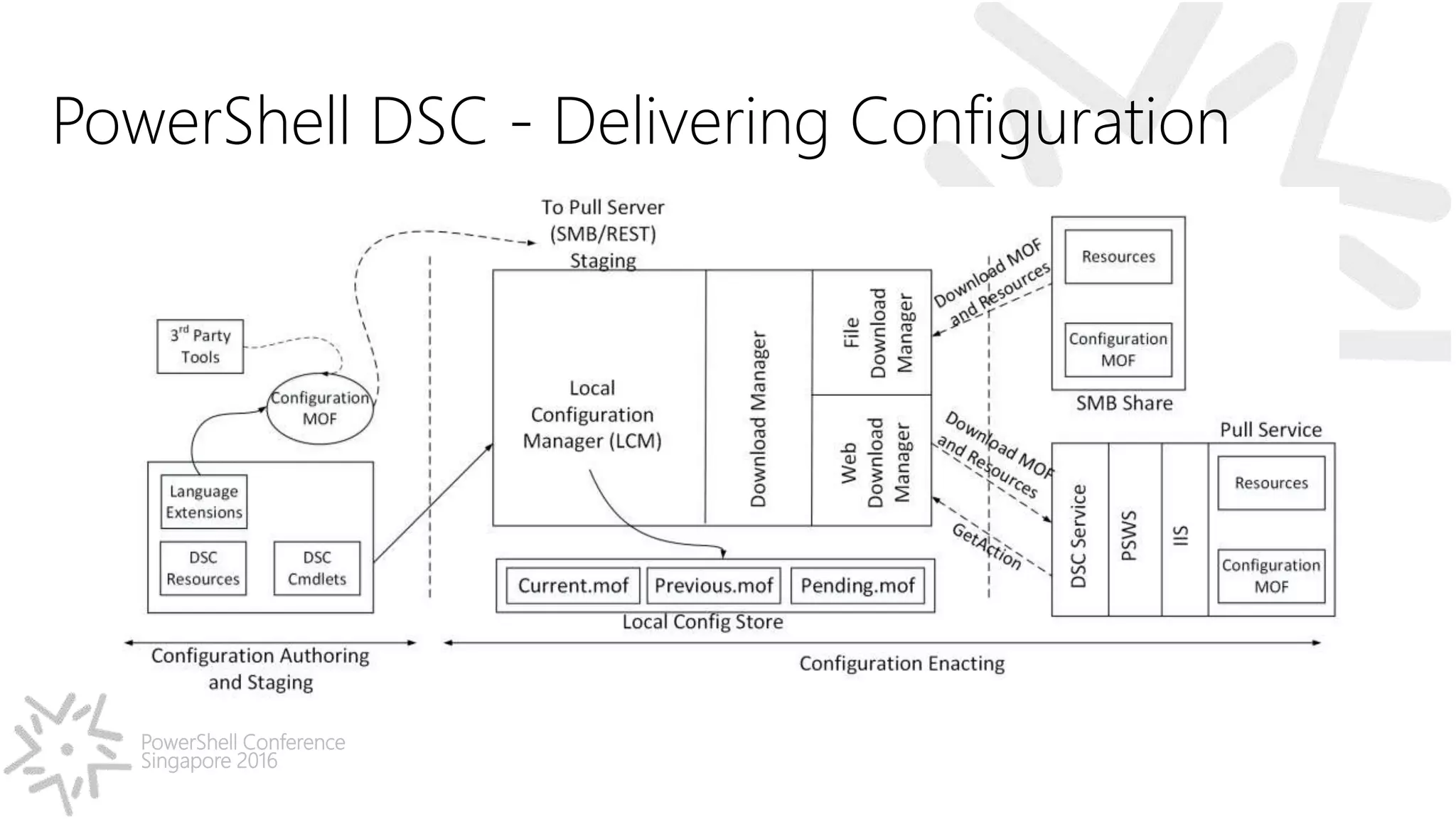
PowerShell Conference Singapore 2016 PowerShell DSC - Delivering Configuration
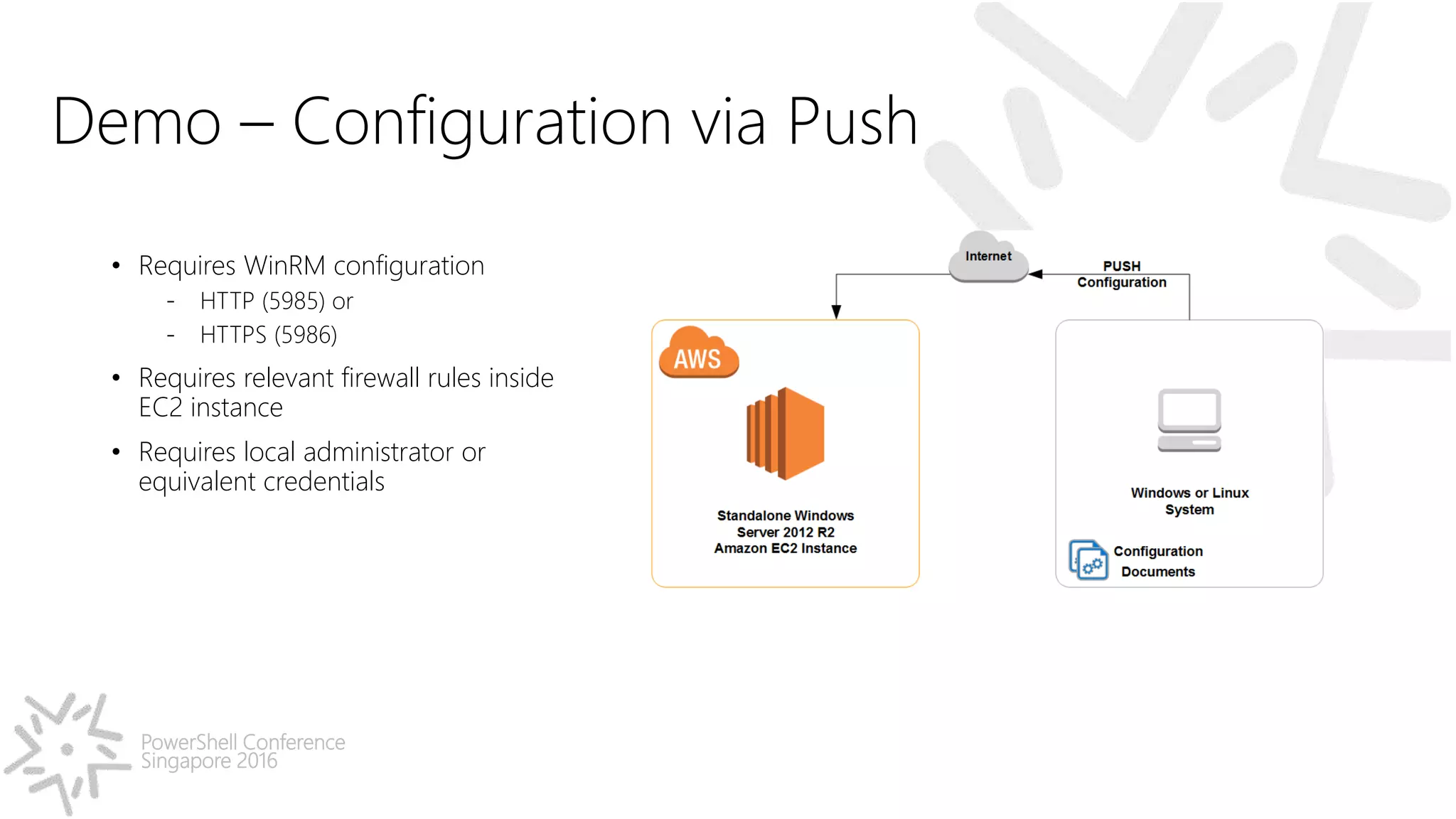
PowerShell Conference Singapore 2016 Demo – Configuration via Push • Requires WinRM configuration - HTTP (5985) or - HTTPS (5986) • Requires relevant firewall rules inside EC2 instance • Requires local administrator or equivalent credentials
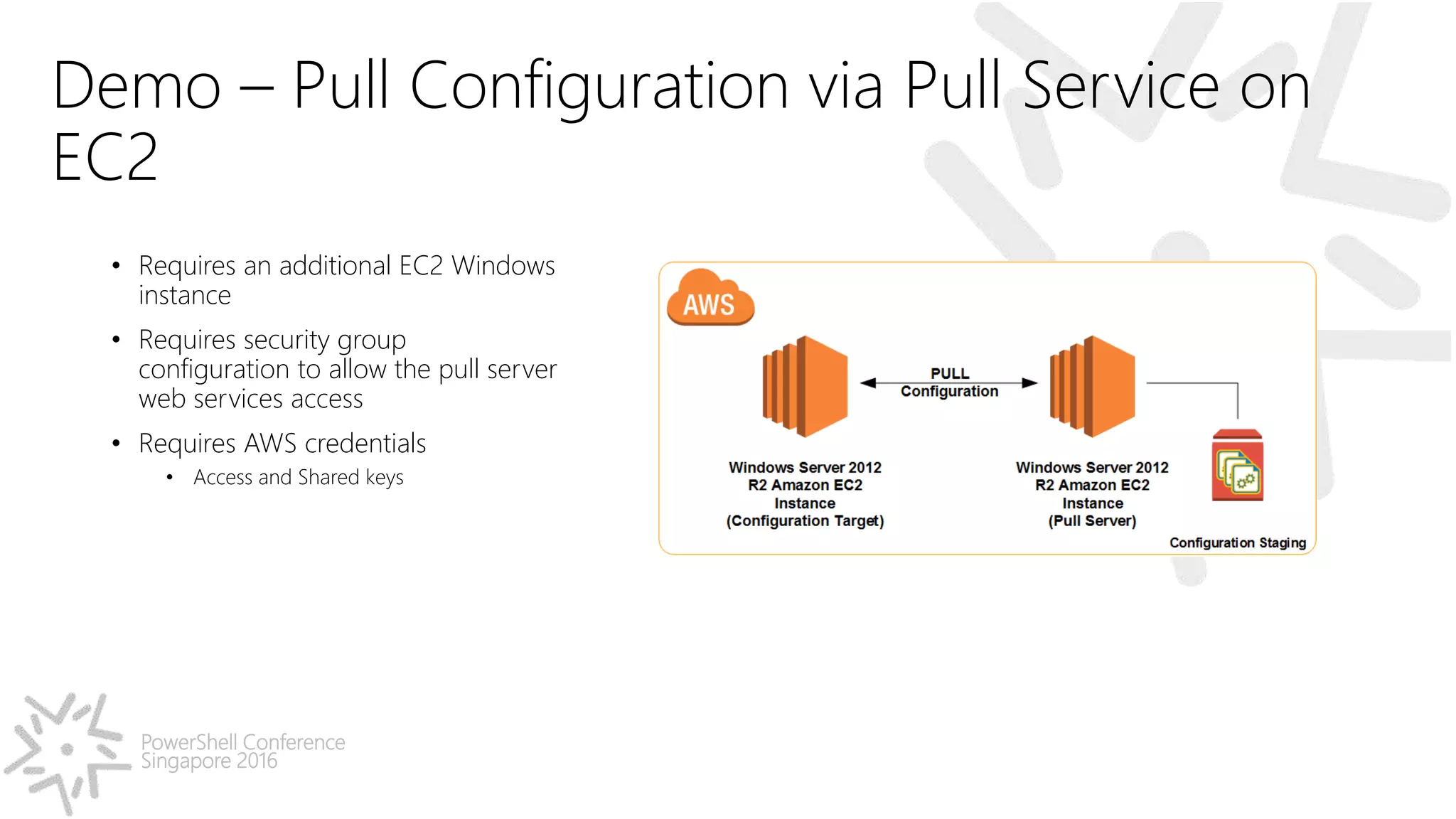
PowerShell Conference Singapore 2016 Demo – Pull Configuration via Pull Service on EC2 • Requires an additional EC2 Windows instance • Requires security group configuration to allow the pull server web services access • Requires AWS credentials • Access and Shared keys
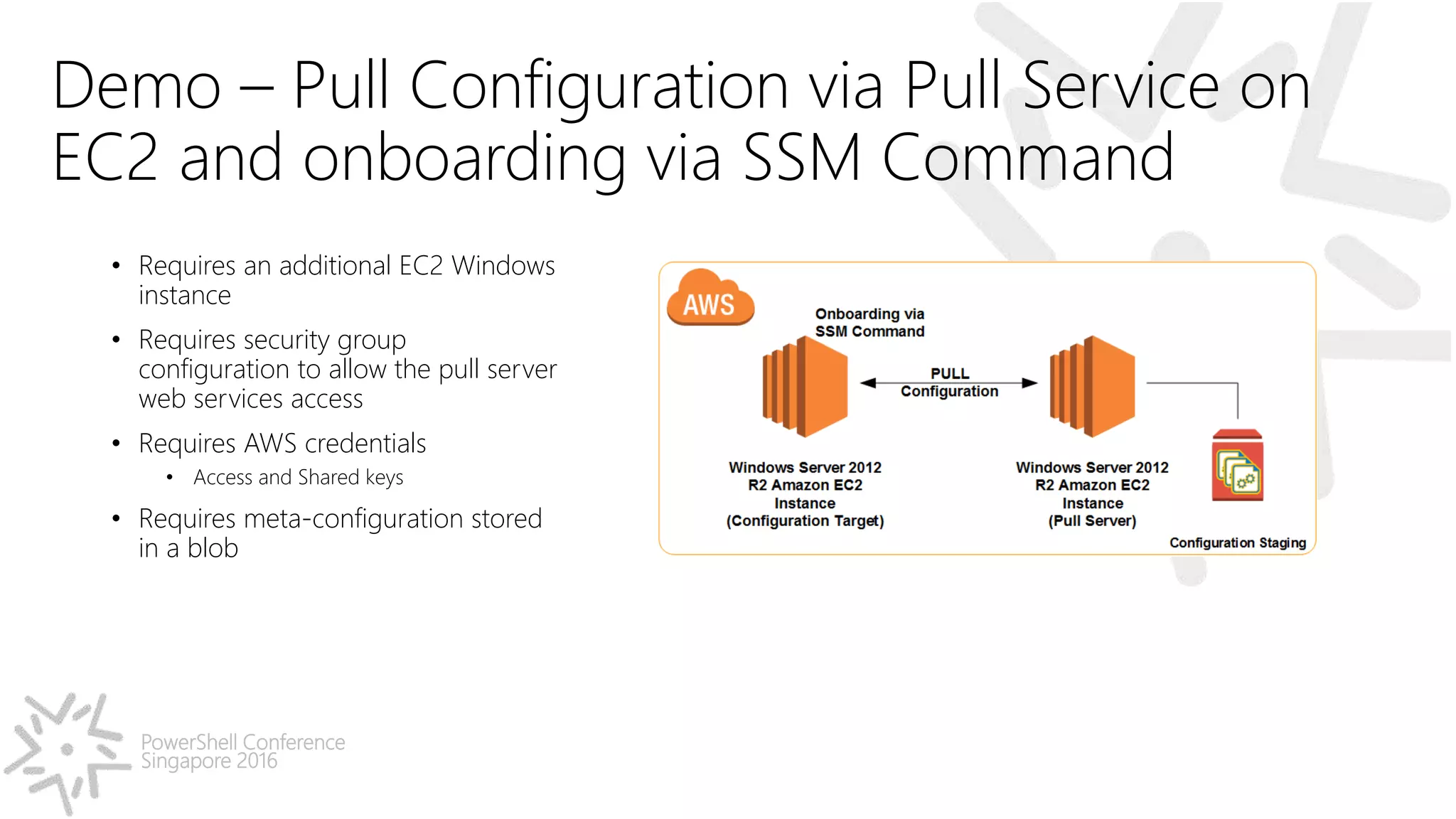
PowerShell Conference Singapore 2016 Demo – Pull Configuration via Pull Service on EC2 and onboarding via SSM Command • Requires an additional EC2 Windows instance • Requires security group configuration to allow the pull server web services access • Requires AWS credentials • Access and Shared keys • Requires meta-configuration stored in a blob
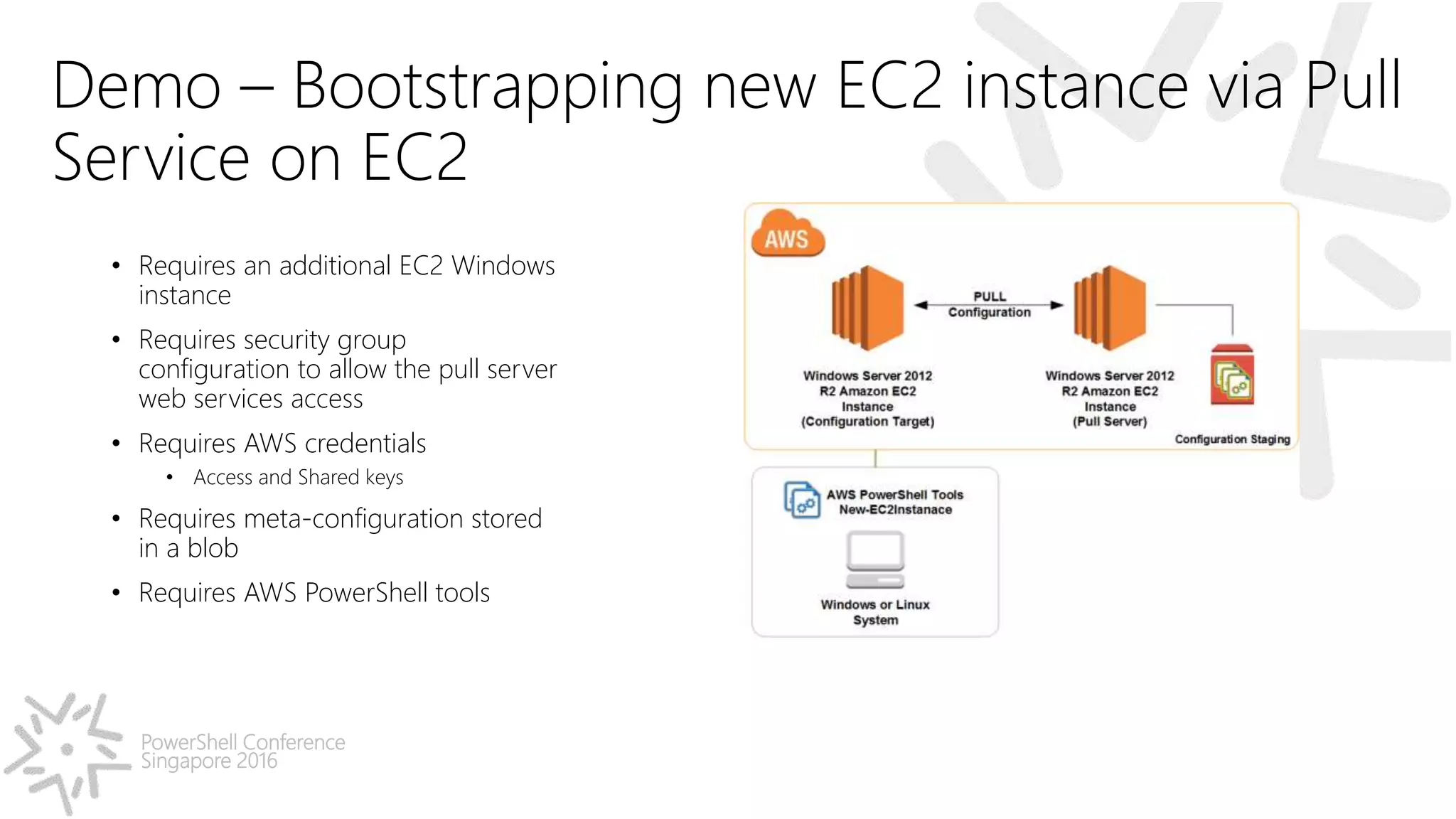
PowerShell Conference Singapore 2016 Demo – Bootstrapping new EC2 instance via Pull Service on EC2 • Requires an additional EC2 Windows instance • Requires security group configuration to allow the pull server web services access • Requires AWS credentials • Access and Shared keys • Requires meta-configuration stored in a blob • Requires AWS PowerShell tools
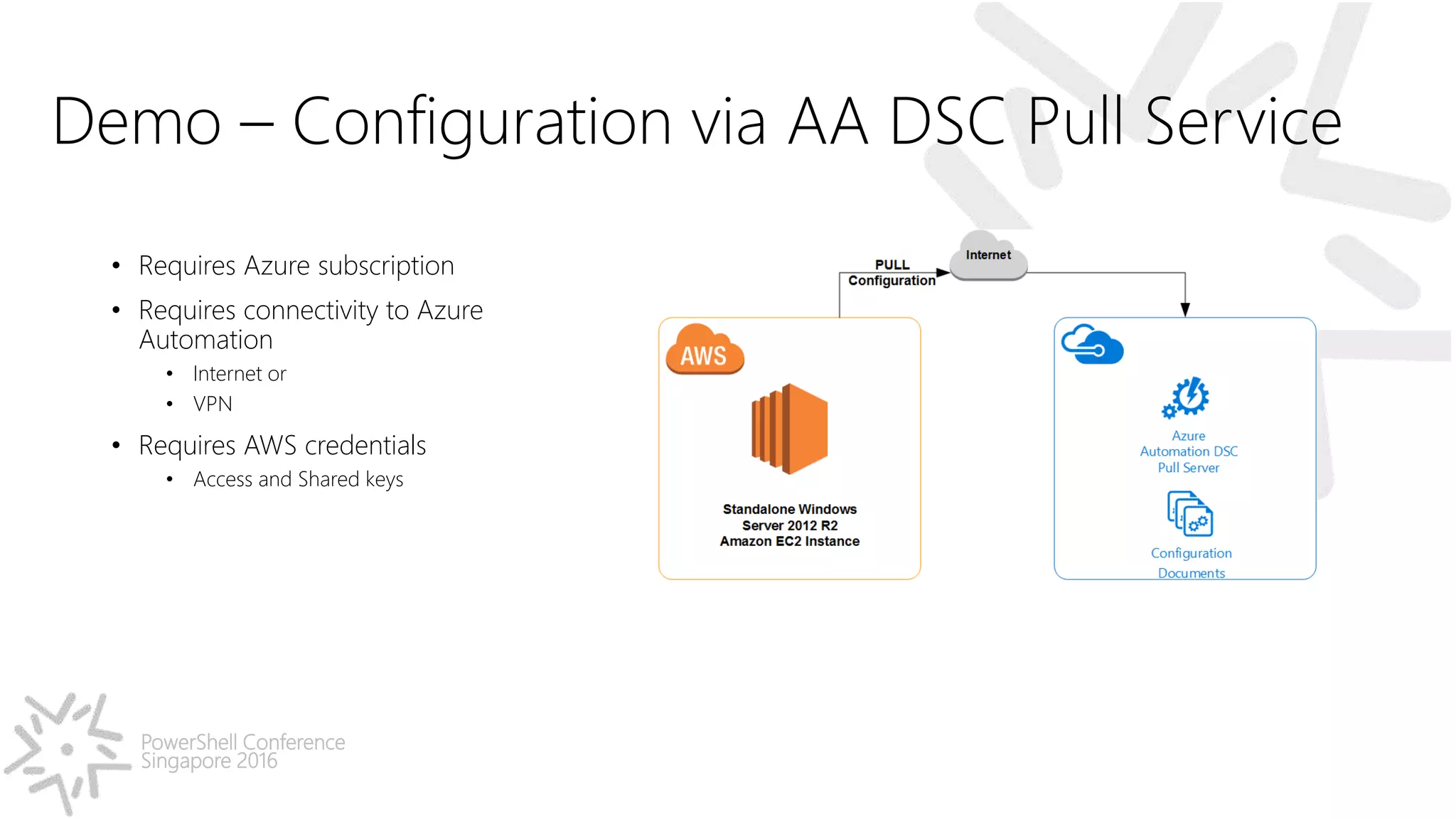
PowerShell Conference Singapore 2016 Demo – Configuration via AA DSC Pull Service • Requires Azure subscription • Requires connectivity to Azure Automation • Internet or • VPN • Requires AWS credentials • Access and Shared keys
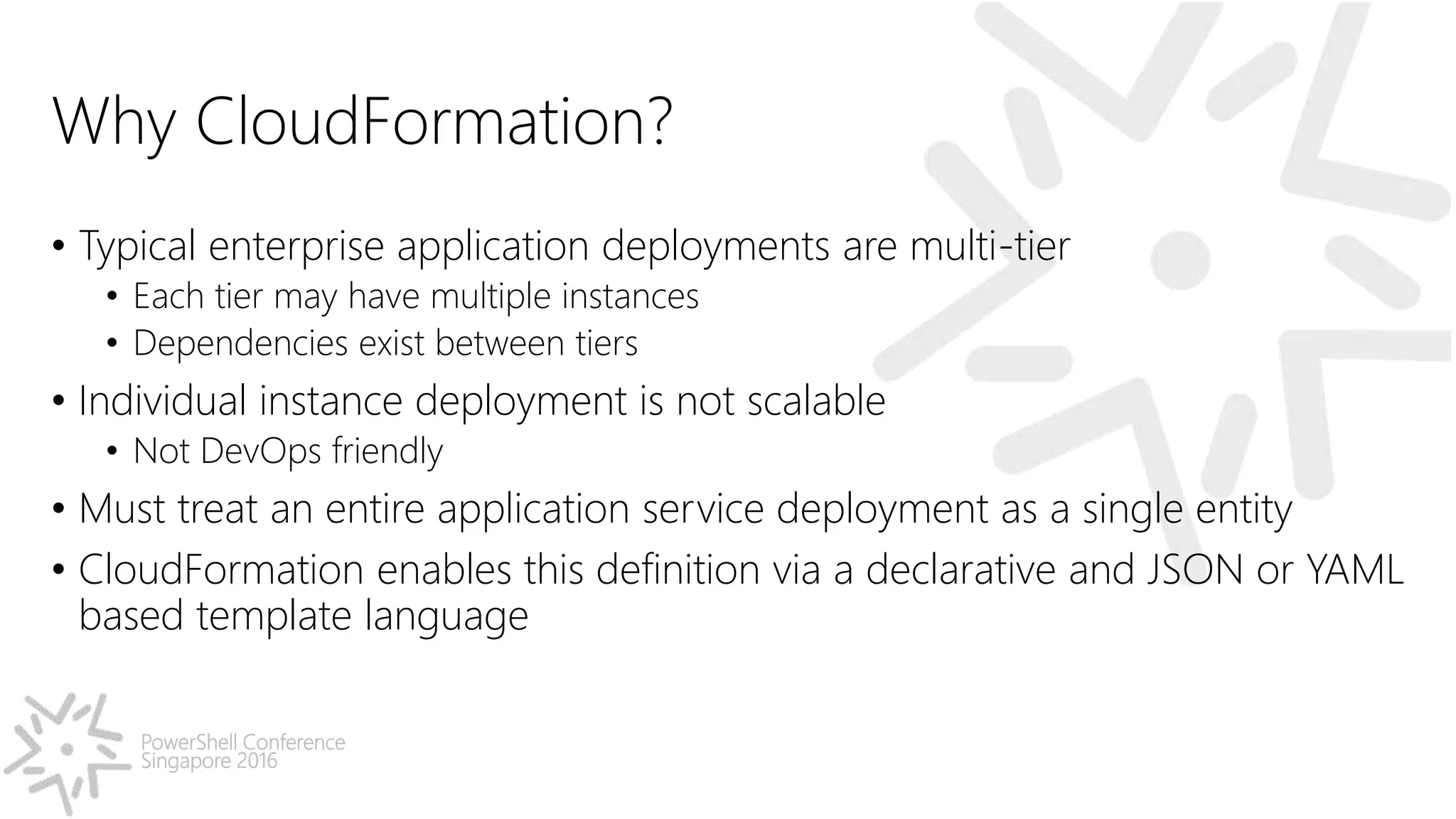
PowerShell Conference Singapore 2016 Why CloudFormation? • Typical enterprise application deployments are multi-tier • Each tier may have multiple instances • Dependencies exist between tiers • Individual instance deployment is not scalable • Not DevOps friendly • Must treat an entire application service deployment as a single entity • CloudFormation enables this definition via a declarative and JSON or YAML based template language
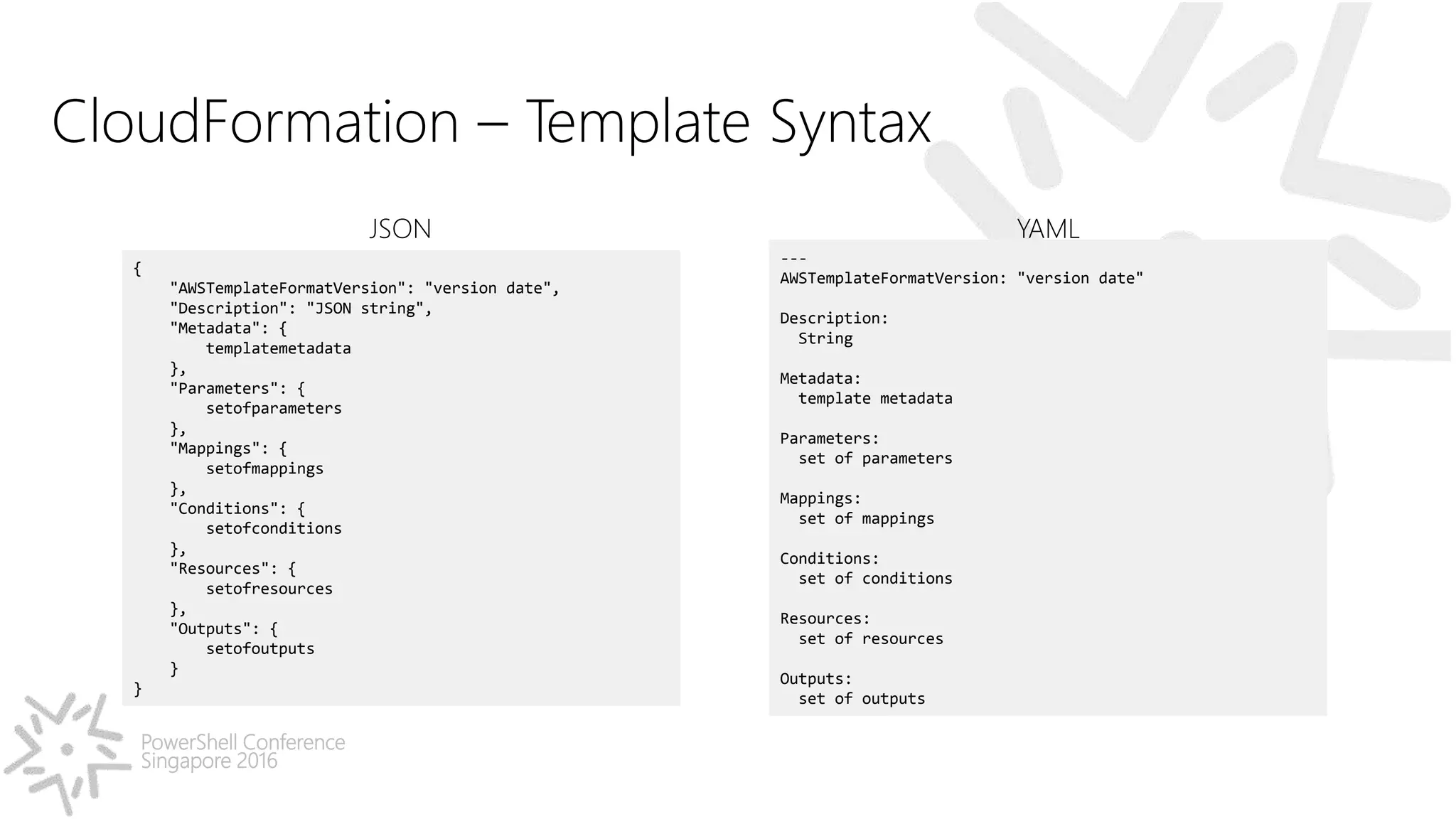
PowerShell Conference Singapore 2016 CloudFormation – Template Syntax { "AWSTemplateFormatVersion": "version date", "Description": "JSON string", "Metadata": { templatemetadata }, "Parameters": { setofparameters }, "Mappings": { setofmappings }, "Conditions": { setofconditions }, "Resources": { setofresources }, "Outputs": { setofoutputs } } JSON --- AWSTemplateFormatVersion: "version date" Description: String Metadata: template metadata Parameters: set of parameters Mappings: set of mappings Conditions: set of conditions Resources: set of resources Outputs: set of outputs YAML
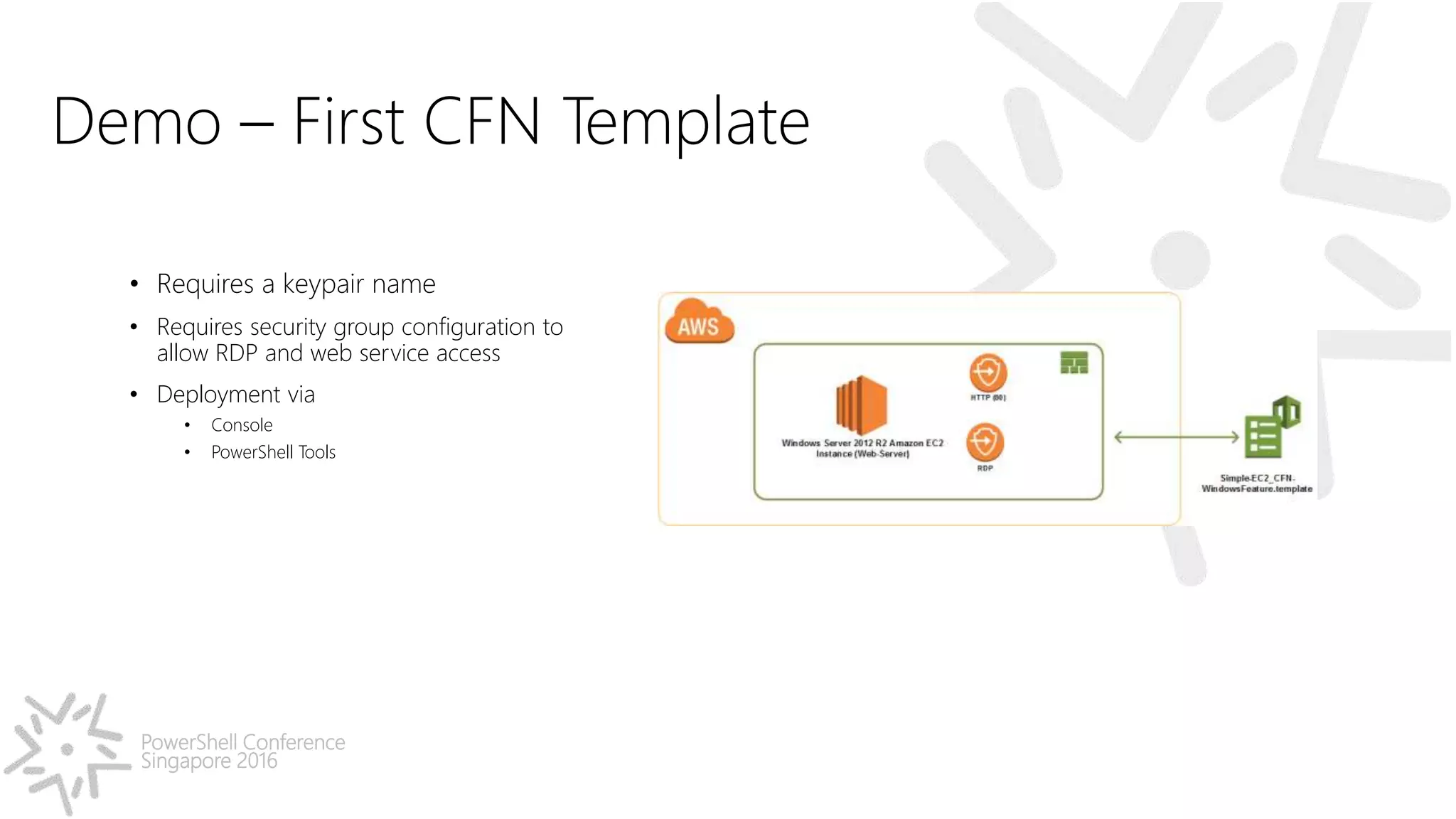
PowerShell Conference Singapore 2016 Demo – First CFN Template • Requires a keypair name • Requires security group configuration to allow RDP and web service access • Deployment via • Console • PowerShell Tools
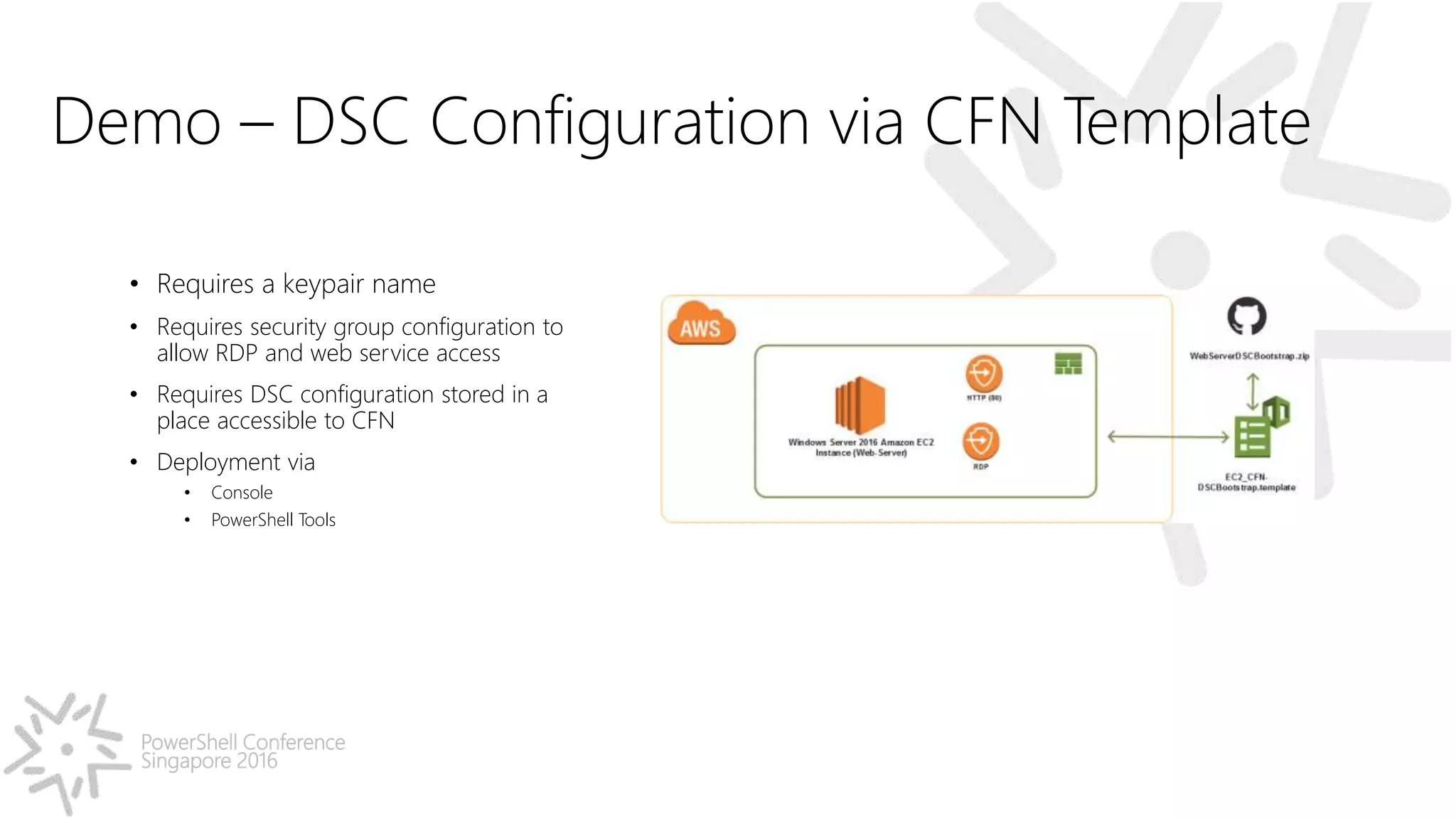
PowerShell Conference Singapore 2016 Demo – DSC Configuration via CFN Template • Requires a keypair name • Requires security group configuration to allow RDP and web service access • Requires DSC configuration stored in a place accessible to CFN • Deployment via • Console • PowerShell Tools
PowerShell Conference Singapore 2016 Summary • Several ways to onboard EC2 instances • Understand CFN helper scripts when using CloudFormation • xCloud services are certainly helpful
PowerShell Conference Singapore 2016 Don’t Forget! • Fill in your survey – it’s how we do better! • Don’t lose your badge! You need it for the Social Events • Grab the Speakers for a chat – they all have time for you! • Let everyone know what they are missing on Social Media #PowerShell #PSConfAsia Tweets (preferably with Pictures) win Prizes!!!! Photos of Marina Bay Credit: Sebastian Szumigalski

Using PowerShell DSC with AWS Cloud and CloudFormation

  • 1.
    PowerShell Conference Asia AWS(EC2|CloudFormation) and PowerShell Desired State Configuration Ravikanth Chaganti @Ravikanth Microsoft MVP (Windows PowerShell & Microsoft Azure)
  • 2.
    PowerShell Conference Singapore 2016 AGENDA •PowerShell DSC configuration delivery methods and AWS EC2 • Why CloudFormation? • CloudFormation and DSC - Know How’s Demo Scripts: http://azrs.tk/cfnatpsconf
  • 3.
  • 4.
    PowerShell Conference Singapore 2016 Demo– Configuration via Push • Requires WinRM configuration - HTTP (5985) or - HTTPS (5986) • Requires relevant firewall rules inside EC2 instance • Requires local administrator or equivalent credentials
  • 5.
    PowerShell Conference Singapore 2016 Demo– Pull Configuration via Pull Service on EC2 • Requires an additional EC2 Windows instance • Requires security group configuration to allow the pull server web services access • Requires AWS credentials • Access and Shared keys
  • 6.
    PowerShell Conference Singapore 2016 Demo– Pull Configuration via Pull Service on EC2 and onboarding via SSM Command • Requires an additional EC2 Windows instance • Requires security group configuration to allow the pull server web services access • Requires AWS credentials • Access and Shared keys • Requires meta-configuration stored in a blob
  • 7.
    PowerShell Conference Singapore 2016 Demo– Bootstrapping new EC2 instance via Pull Service on EC2 • Requires an additional EC2 Windows instance • Requires security group configuration to allow the pull server web services access • Requires AWS credentials • Access and Shared keys • Requires meta-configuration stored in a blob • Requires AWS PowerShell tools
  • 8.
    PowerShell Conference Singapore 2016 Demo– Configuration via AA DSC Pull Service • Requires Azure subscription • Requires connectivity to Azure Automation • Internet or • VPN • Requires AWS credentials • Access and Shared keys
  • 9.
    PowerShell Conference Singapore 2016 WhyCloudFormation? • Typical enterprise application deployments are multi-tier • Each tier may have multiple instances • Dependencies exist between tiers • Individual instance deployment is not scalable • Not DevOps friendly • Must treat an entire application service deployment as a single entity • CloudFormation enables this definition via a declarative and JSON or YAML based template language
  • 10.
    PowerShell Conference Singapore 2016 CloudFormation– Template Syntax { "AWSTemplateFormatVersion": "version date", "Description": "JSON string", "Metadata": { templatemetadata }, "Parameters": { setofparameters }, "Mappings": { setofmappings }, "Conditions": { setofconditions }, "Resources": { setofresources }, "Outputs": { setofoutputs } } JSON --- AWSTemplateFormatVersion: "version date" Description: String Metadata: template metadata Parameters: set of parameters Mappings: set of mappings Conditions: set of conditions Resources: set of resources Outputs: set of outputs YAML
  • 11.
    PowerShell Conference Singapore 2016 Demo– First CFN Template • Requires a keypair name • Requires security group configuration to allow RDP and web service access • Deployment via • Console • PowerShell Tools
  • 12.
    PowerShell Conference Singapore 2016 Demo– DSC Configuration via CFN Template • Requires a keypair name • Requires security group configuration to allow RDP and web service access • Requires DSC configuration stored in a place accessible to CFN • Deployment via • Console • PowerShell Tools
  • 13.
    PowerShell Conference Singapore 2016 Summary •Several ways to onboard EC2 instances • Understand CFN helper scripts when using CloudFormation • xCloud services are certainly helpful
  • 14.
    PowerShell Conference Singapore 2016 Don’tForget! • Fill in your survey – it’s how we do better! • Don’t lose your badge! You need it for the Social Events • Grab the Speakers for a chat – they all have time for you! • Let everyone know what they are missing on Social Media #PowerShell #PSConfAsia Tweets (preferably with Pictures) win Prizes!!!! Photos of Marina Bay Credit: Sebastian Szumigalski