Summary: in this tutorial, you will learn how to use SQLite ALTER TABLE statement to change the structure of an existing table.
Unlike SQL-standard and other database systems, SQLite supports a very limited functionality of the ALTER TABLE statement.
By using an SQLite ALTER TABLE statement, you can perform two actions:
- Rename a table.
- Add a new column to a table.
- Rename a column (added supported in version 3.20.0)
Using SQLite ALTER TABLE to rename a table
To rename a table, you use the following ALTER TABLE RENAME TO statement:
ALTER TABLE existing_table RENAME TO new_table;Code language: SQL (Structured Query Language) (sql)These are important points you should know before you rename a table:
- The
ALTER TABLEonly renames a table within a database. You cannot use it to move the table between the attached databases. - The database objects such as indexes and triggers associated with the table will be associated with the new table.
- If a table is referenced by views or statements in triggers, you must manually change the definition of views and triggers.
Let’s take an example of renaming a table.
First, create a table named devices that has three columns: name, model, serial; and insert a new row into the devices table.
CREATE TABLE devices ( name TEXT NOT NULL, model TEXT NOT NULL, Serial INTEGER NOT NULL UNIQUE ); INSERT INTO devices (name, model, serial) VALUES('HP ZBook 17 G3 Mobile Workstation','ZBook','SN-2015');Code language: SQL (Structured Query Language) (sql)Second, use the ALTER TABLE RENAME TO statement to change the devices table to equipment table as follows:
ALTER TABLE devices RENAME TO equipment;Code language: SQL (Structured Query Language) (sql)Third, query data from the equipment table to verify the RENAME operation.
SELECT name, model, serial FROM equipment;Code language: SQL (Structured Query Language) (sql)Using SQLite ALTER TABLE to add a new column to a table
You can use the SQLite ALTER TABLE statement to add a new column to an existing table. In this scenario, SQLite appends the new column at the end of the existing column list.
The following illustrates the syntax of ALTER TABLE ADD COLUMN statement:
ALTER TABLE table_name ADD COLUMN column_definition;Code language: SQL (Structured Query Language) (sql)There are some restrictions on the new column:
- The new column cannot have a
UNIQUEorPRIMARY KEYconstraint. - If the new column has a
NOT NULLconstraint, you must specify a default value for the column other than aNULLvalue. - The new column cannot have a default of
CURRENT_TIMESTAMP,CURRENT_DATE, andCURRENT_TIME, or an expression. - If the new column is a foreign key and the foreign key constraint check is enabled, the new column must accept a default value
NULL.
For example, you can add a new column named location to the equipment table:
ALTER TABLE equipment ADD COLUMN location text;Code language: SQL (Structured Query Language) (sql)Using SQLite ALTER TABLE to rename a column
SQLite added the support for renaming a column using ALTER TABLE RENAME COLUMN statement in version 3.20.0
The following shows the syntax of the ALTER TABLE RENAME COLUMN statement:
ALTER TABLE table_name RENAME COLUMN current_name TO new_name;For more information on how to rename a column, check it out the renaming column tutorial.
Using SQLite ALTER TABLE for other actions
If you want to perform other actions e.g., drop a column, you use the following steps:
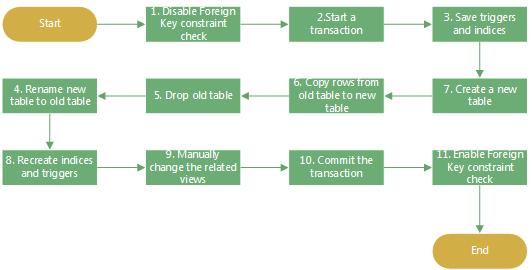
The following script illustrates the steps above:
-- disable foreign key constraint check PRAGMA foreign_keys=off; -- start a transaction BEGIN TRANSACTION; -- Here you can drop column CREATE TABLE IF NOT EXISTS new_table( column_definition, ... ); -- copy data from the table to the new_table INSERT INTO new_table(column_list) SELECT column_list FROM table; -- drop the table DROP TABLE table; -- rename the new_table to the table ALTER TABLE new_table RENAME TO table; -- commit the transaction COMMIT; -- enable foreign key constraint check PRAGMA foreign_keys=on;Code language: SQL (Structured Query Language) (sql)SQLite ALTER TABLE DROP COLUMN example
SQLite does not support ALTER TABLE DROP COLUMN statement. To drop a column, you need to use the steps above.
The following script creates two tables users and favorites, and insert data into these tables:
CREATE TABLE users( UserId INTEGER PRIMARY KEY, FirstName TEXT NOT NULL, LastName TEXT NOT NULL, Email TEXT NOT NULL, Phone TEXT NOT NULL ); CREATE TABLE favorites( UserId INTEGER, PlaylistId INTEGER, FOREIGN KEY(UserId) REFERENCES users(UserId), FOREIGN KEY(PlaylistId) REFERENCES playlists(PlaylistId) ); INSERT INTO users(FirstName, LastName, Email, Phone) VALUES('John','Doe','[email protected]','408-234-3456'); INSERT INTO favorites(UserId, PlaylistId) VALUES(1,1);Code language: SQL (Structured Query Language) (sql)The following statement returns data from the users table:
SELECT * FROM users;Code language: SQL (Structured Query Language) (sql)
And the following statement returns the data from the favorites table:
SELECT * FROM favorites;Code language: SQL (Structured Query Language) (sql)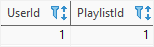
Suppose, you want to drop the column phone of the users table.
First, disable the foreign key constraint check:
PRAGMA foreign_keys=off;Second, start a new transaction:
BEGIN TRANSACTION;Code language: SQL (Structured Query Language) (sql)Third, create a new table to hold data of the users table except for the phone column:
CREATE TABLE IF NOT EXISTS persons ( UserId INTEGER PRIMARY KEY, FirstName TEXT NOT NULL, LastName TEXT NOT NULL, Email TEXT NOT NULL );Code language: SQL (Structured Query Language) (sql)Fourth, copy data from the users to persons table:
INSERT INTO persons(UserId, FirstName, LastName, Email) SELECT UserId, FirstName, LastName, Email FROM users; Code language: SQL (Structured Query Language) (sql)Fifth, drop the users table:
DROP TABLE users;Code language: SQL (Structured Query Language) (sql)Sixth, rename the persons table to users table:
ALTER TABLE persons RENAME TO users;Code language: SQL (Structured Query Language) (sql)Seventh, commit the transaction:
COMMIT;Code language: SQL (Structured Query Language) (sql)Eighth, enable the foreign key constraint check:
PRAGMA foreign_keys=on;Code language: SQL (Structured Query Language) (sql)Here is the users table after dropping the phone column:
SELECT * FROM users;Code language: SQL (Structured Query Language) (sql)
Summary
- Use the
ALTER TABLEstatement to modify the structure of an existing table. - Use
ALTER TABLE table_name RENAME TO new_namestatement to rename a table. - Use
ALTER TABLE table_name ADD COLUMN column_definitionstatement to add a column to a table. - Use
ALTER TABLE table_name RENAME COLUMN current_name TO new_nameto rename a column.

