Summary: in this tutorial, you will learn how to use SQLite MAX function to get the maximum value of all values in a group.
Introduction to SQLite MAX function
The SQLite MAX function is an aggregate function that returns the maximum value of all values in a group. You can use the MAX function to accomplish a lot of things.
For example, you can use the MAX function to find the most expensive products, find the biggest item in its group, etc.
The following illustrates the basic syntax of the MAX function.
MAX([ALL|DISTINCT] expression);Code language: SQL (Structured Query Language) (sql)The expression can be a column of a table or an expression that consists of operands, which are the columns, and operators like +, *, etc.
There are some important notes about MAX function:
- First, the
MAXfunction ignoresNULLvalues. - Second, unlike the
COUNTfunction, theDISTINCTclause is not relevant to theMAXfunction. - Third, because a column can store mixed types of data e.g., integer, real, text, blob, and
NULLin SQLite, when comparing values to find the maximum value, theMAXfunction uses the rules mentioned in the data types tutorial.
The SQLite MAX function examples
We’ll use the tracks table in the sample database for the demonstration.
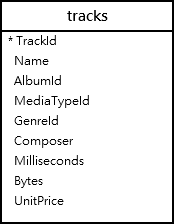
To get the largest track in bytes, you apply the MAX function to the bytes column as the following statement:
SELECT MAX(bytes) FROM tracks;Code language: SQL (Structured Query Language) (sql)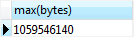
SQLite MAX function in the subquery example
To get the complete information of the biggest track, you use the subquery as follows:
SELECT TrackId, Name, Bytes FROM tracks WHERE Bytes = (SELECT MAX(Bytes) FROM tracks);Code language: SQL (Structured Query Language) (sql)
First, the inner query returns highest bytes of all tracks using the MAX function. Then, the outer query gets the largest track whose size equals the largest size returned by the subquery.
SQLite MAX function and GROUP BY clause example
You can find the largest track in each album using the MAX function with the GROUP BY clause.
First, the GROUP BY clause groups the tracks into groups based on albums. Then, the MAX function returns the largest tracks for each group.
See the following query:
SELECT AlbumId, MAX(bytes) FROM tracks GROUP BY AlbumId;Code language: SQL (Structured Query Language) (sql)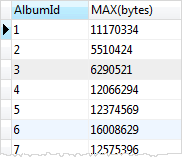
SQLite MAX function and HAVING clause
You can combine the MAX function with the HAVING clause to filter the groups based on their largest values.
For example, to find the albums and their largest track where the sizes of the largest tracks are greater than 6 MB (about ~ 6000000), you use the following statement:
SELECT albumid, max(bytes) FROM tracks GROUP BY albumid HAVING MAX(bytes) > 6000000;Code language: SQL (Structured Query Language) (sql)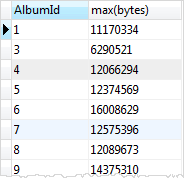
In this tutorial, you have learned how to use the SQLite MAX function to find the maximum value in a group of values.

