Summary: in this tutorial, you will learn how to sort a result set of a query using SQLite ORDER BY clause.
Introduction to SQLite ORDER BY clause
SQLite stores rows in a table in an unspecified order. It means that the rows in the table may or may not be in the order they were inserted.
If you use the SELECT statement to retrieve rows from a table, the order of rows in the result set is unspecified.
To sort the rows in a result set, you add the ORDER BY clause to the SELECT statement as follows:
SELECT select_list FROM table ORDER BY column_1 ASC, column_2 DESC;Code language: SQL (Structured Query Language) (sql)The ORDER BY clause comes after the FROM clause. It allows you to sort the result set based on one or more columns in ascending or descending order.
In this syntax, you place the column name by which you want to sort after the ORDER BY clause followed by the ASC or DESC keyword.
- The
ASCkeyword means ascending. - The
DESCkeyword means descending.
If you don’t specify the ASC or DESC keyword, SQLite sorts the result set using the ASC option. In other words, it sorts the result set in ascending order by default.
If you want to sort the result set by multiple columns, you use a comma (,) to separate two columns.
The ORDER BY clause sorts rows using columns or expressions from left to right. In other words, the ORDER BY clause sorts the rows using the first column in the list. Then, it sorts the sorted rows using the second column, and so on.
SQLite allows you to sort the result set using columns that do not appear in the select list of the SELECT clause.
SQLite ORDER BY clause examples
Let’s take the tracks table in the sample database for the demonstration.
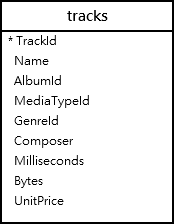
Suppose, you want to get data from name, milliseconds, and album id columns, you use the following statement:
SELECT Name, Milliseconds, AlbumId FROM tracks;Code language: SQL (Structured Query Language) (sql)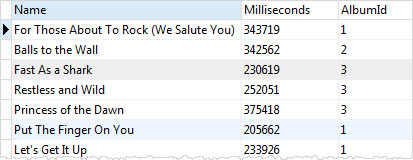
The SELECT statement that does not use ORDER BY clause returns rows that are in an unspecified order.
Suppose you want to sort the result set based on AlbumId column in ascending order, you use the following statement:
SELECT name, milliseconds, albumid FROM tracks ORDER BY albumid ASC;Code language: SQL (Structured Query Language) (sql)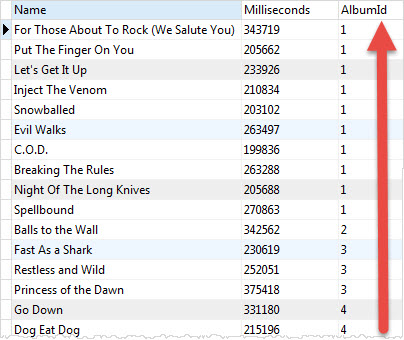
The result set now is sorted by the AlbumId column in ascending order as shown in the screenshot.
SQLite uses ASC by default so you can omit it in the above statement as follows:
SELECT name, milliseconds, albumid FROM tracks ORDER BY albumid;Suppose you want to sort the sorted result (by AlbumId) above by the Milliseconds column in descending order. In this case, you need to add the Milliseconds column to the ORDER BY clause as follows:
SELECT name, milliseconds, albumid FROM tracks ORDER BY albumid ASC, milliseconds DESC;Code language: SQL (Structured Query Language) (sql)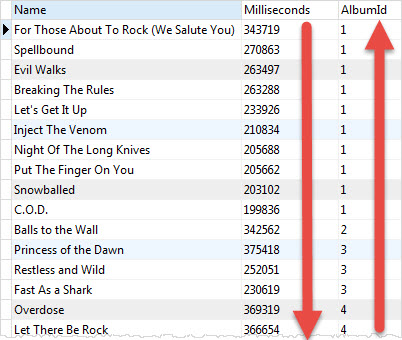
SQLite sorts rows by AlbumId column in ascending order first. Then, it sorts the sorted result set by the Milliseconds column in descending order.
If you look at the tracks of the album with AlbumId 1, you’ll find that the order of tracks changes between the two statements.
SQLite ORDER BY with the column position
Instead of specifying the names of columns, you can use the column’s position in the ORDER BY clause.
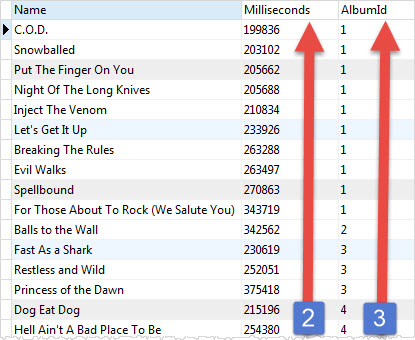
For example, the following statement sorts the tracks by both AlbumId (3rd column) and Milliseconds (2nd column) in ascending order.
SELECT name, milliseconds, albumid FROM tracks ORDER BY 3, 2;Code language: SQL (Structured Query Language) (sql)The number 3 and 2 refers to the AlbumId and Milliseconds in the column list that appears in the SELECT clause.
Sorting NULLs
In the database world, NULL is special. It denotes that the information is missing or the data is not applicable.
Suppose you want to store the birthday of an artist in a table. At the time of saving the artist’s record, you don’t have the birthday information.
To represent the unknown birthday information in the database, you may use a special date like 01.01.1900 or an '' empty string. However, these values do not clearly show that the birthday is unknown.
NULL was invented to resolve this issue. Instead of using a special value to indicate that the information is missing, NULL is used.
NULL is special because you cannot compare it with another value. Simply put, if the two pieces of information are unknown, you cannot compare them.
NULL is even cannot be compared with itself; NULL is not equal to itself so NULL = NULL always results in false.
When it comes to sorting, SQLite considers NULL to be smaller than any other value.
It means that NULLs will appear at the beginning of the result set if you use ASC or at the end of the result set when you use DESC.
SQLite 3.30.0 added the NULLS FIRST and NULLS LAST options to the ORDER BY clause. The NULLS FIRST option specifies that the NULLs will appear at the beginning of the result set while the NULLS LAST option places NULLs at the end of the result set.
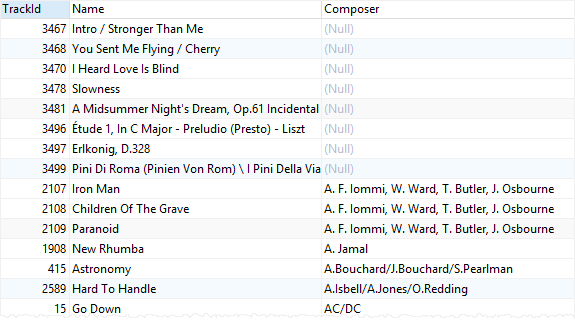
The following example uses the ORDER BY clause to sort tracks by composers:
SELECT TrackId, Name, Composer FROM tracks ORDER BY Composer;Code language: SQL (Structured Query Language) (sql)First, NULLs appear at the beginning of the result set because SQLite treats them as the lowest values. When you scroll down the result, you will see other values:
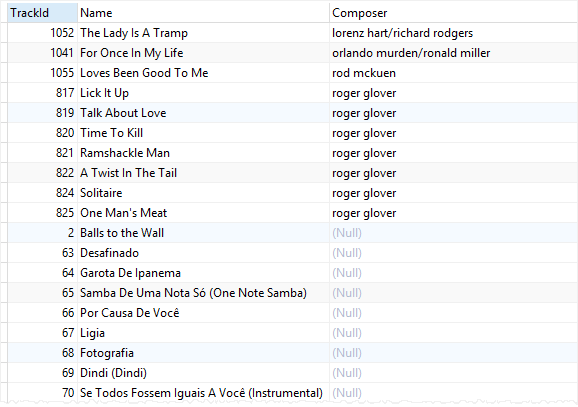
The following example uses the NULLS LAST option to place NULLs after other values:
SELECT TrackId, Name, Composer FROM tracks ORDER BY Composer NULLS LAST;Code language: SQL (Structured Query Language) (sql)If you scroll down the output, you will see that NULLs are placed at the end of the result set:
Summary
- Use the SQLite
ORDER BYclause to sort rows by one or more columns in ascending and descending orders. - Use
ASCto sort rows in ascending order. - Use
DESCto sort rows in descending order. - Use the
NULLS FIRSToption to place NULLs before other non-null values. - Use the
NULLS LASToption to place NULL after other non-null values.

