Summary: in this tutorial, we’ll start by introducing an SQLite sample database called Chinook. Then, we will give you the links to download the sample database and its diagram. Finally, we’ll show you how to connect to the sample database using the sqlite3 tool.
Introduction to the SQLite sample database
We provide an SQLite sample database named Chinook, which is good for practicing with SQLite
The following database diagram shows the Chinook database tables and their relationships.
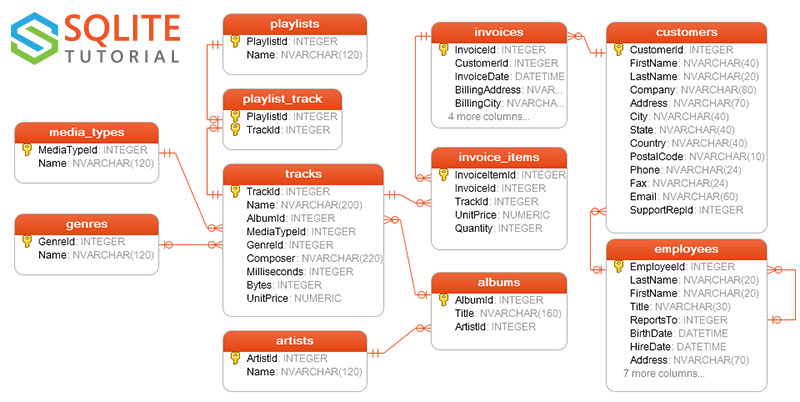
Chinook sample database tables
The Chinook sample database contains 11 tables, as follows:
-
employeestable stores employee data such as id, last name, first name, etc. It also has a field namedReportsToto specify who reports to whom. -
customerstable stores customer data. -
invoices&invoice_itemstables: these two tables store invoice data. Theinvoicestable stores invoice header data and theinvoice_itemstable stores the invoice line items data. -
artiststable stores artist data. It is a simple table that contains the id and name. -
albumstable stores data about a list of tracks. Each album belongs to one artist, but an artist may have multiple albums. -
media_typestable stores media types such as MPEG audio and AAC audio files. -
genrestable stores music types such as rock, jazz, metal, etc. -
trackstable stores the data of songs. Each track belongs to one album. -
playlists&playlist_tracktables:playliststable stores data about playlists. Each playlist contains a list of tracks. Each track may belong to multiple playlists. The relationship between theplaylistsandtrackstables is many-to-many. Theplaylist_tracktable is used to reflect this relationship.
Download SQLite sample database
You can download the SQLite sample database using the following link:
Download SQLite sample database
If you’d like to have the database diagram for reference, you can download both black-and-white and color versions in PDF format.
Download the SQLite sample database diagram
Download the SQLite sample database diagram (color version)
How to connect to SQLite sample database
The sample database file is in ZIP format, so you’ll need to extract it to a directory, such as C:\sqlite\. The file name is chinook.db.
First, open the Command Prompt on Windows or a Terminal on Unix-like systems and navigate to the SQLite directory where the sqlite3 (or sqlite3.exe) file is located.
Second, use the sqlite3 command to connect to the chinook sample database located in the same directory.
sqlite3 chinook.dbCode language: Shell Session (shell)It’ll show something like this:
SQLite version 3.44.3 2024-03-24 21:15:01 (UTF-16 console I/O) Enter ".help" for usage hints. sqlite>Code language: JavaScript (javascript)Third, show all tables in the Chinook database using the .tables command:
.tablesCode language: CSS (css)Output:
albums employees invoices playlists artists genres media_types tracks customers invoice_items playlist_trackCode language: SQL (Structured Query Language) (sql)Finally, type the .quit command to exit the sqlite3 tool:
.quitCode language: CSS (css)Summary
In this tutorial, you have learned about the chinook SQLite sample database and how to connect to it using the sqlite3 command-line tool.

